In an era marked by escalating cyber threats and evolving risk landscapes, organisations face mounting pressure to strengthen their security posture whilst maintaining seamless user experiences. At Thales, we recognise that robust security must be foundational – embedded into products and services by design, not bolted on as an afterthought. This principle underpins our commitment to the U.S. Cybersecurity and Infrastructure Security Agency (CISA)’s Secure-by-Design pledge, which calls on software manufacturers to establish security features like multi-factor authentication (MFA) as standard across their product portfolios.
As digital transformation accelerates and attack surfaces expand, the gap between security capabilities and emerging threats continues to widen. According to the 2025 Thales Data Threat Report, organisations are grappling with unprecedented challenges: 69% regard the fast-moving ecosystem as the most concerning GenAI security risk, whilst 83% report that strong MFA is used more than 40% of the time. This indicates both progress and significant opportunity for improvement. These findings underscore a critical reality: whilst security tools and technologies have advanced, comprehensive deployment and consistent enforcement remain essential challenges that demand immediate attention.
This blog examines the pivotal role of multi-factor authentication in modern cybersecurity strategies. We explore the fundamentals of MFA, analyse the evolving threat landscape that necessitates its adoption, and provide practical guidance on implementation. Whether you are a security professional seeking to strengthen your organisation’s defences or an individual user looking to protect personal accounts, this resource offers the insights and actionable steps needed to embrace MFA with confidence and rigour.
Understanding Multi-Factor Authentication: The Basics
Multi-factor authentication verifies your identity using two different forms of identification. Typically this involves something you know (like a password) and something you have (like a code on your phone). Think of it like using an ATM: you need both your bank card and your PIN to withdraw cash.
This dual-layer approach creates a significant barrier for attackers. Even if someone steals your password, they still can’t log in without that second factor. It’s elegantly simple, yet remarkably powerful – your password alone is no longer enough to unlock the door.
The Growing Threat Landscape: Why MFA Is No Longer Optional
Cyberattacks have grown increasingly sophisticated, with stolen passwords at the heart of many breaches. According to the 2023 Verizon Data Breach Investigations Report, nearly 49% of data breaches involved the use of stolen credentials.
MFA directly addresses this vulnerability. Our own research at Thales demonstrates the critical importance of strong authentication measures. According to the 2025 Thales Data Threat Report, 83% of organisations report that strong MFA is used more than 40% of the time, yet significant challenges remain in achieving comprehensive deployment. This data underscores both the growing recognition of MFA’s importance and the continued need for organisations to strengthen their authentication posture.
Furthermore, our 2025 Digital Trust Index – Third-Party Edition reveals a concerning reality: 40% of users reset passwords once or twice a month, highlighting the inherent weakness of password-only authentication systems. These frequent password resets not only frustrate users but also create security vulnerabilities that MFA effectively mitigates.
How MFA Defeats Common Attack Methods
MFA thwarts the most prevalent attack techniques:
Brute-force and credential stuffing attacks: These automated attacks become practically futile with MFA enabled because guessing the password isn’t enough to break in.
Phishing attacks: Even if you unwittingly hand over your password to a phisher, they still can’t access your account without the one-time code or second factor that MFA requires.
It’s no surprise that CISA’s Secure-by-Design guidelines explicitly call for making MFA a built-in, default security feature. In today’s threat landscape, MFA has evolved from a nice-to-have extra to an essential safeguard.
Thales’ Commitment: Security by Design and by Default
At Thales, we build security into our products by design, baked into our products and services. Our commitment to CISA’s Secure-by-Design pledge is reflected in how we develop features like MFA.
We already implement robust MFA across our cloud services to help safeguard your accounts and data. By requiring two forms of identification to access the Thales Cloud Security Console, we add an extra layer of protection that makes it “much harder for unauthorised users to access sensitive information”. This significantly reduces the risk of breaches and builds trust.
The Principle of Shared Responsibility
Thales’ approach recognises shared responsibility. “Security by default” means we provide secure settings and features right out of the box. However, security is also a partnership – we provide the tools, whilst you play a crucial role by using them.
We’ve made MFA available and straightforward to configure, and we actively encourage customers to use advanced authentication methods. Whilst MFA might not be mandated on all accounts by default today, we strongly recommend that you activate it. By choosing to enable MFA now, you’re not only protecting yourself immediately but also aligning with best practices that Thales and the cybersecurity community advocate globally.
Getting Started: How to Set Up MFA
Enabling multi-factor authentication on your Thales account is quick and straightforward. Here’s how:
Log in and navigate to your user settings. Go to Account Settings or Profile, where you’ll find security settings for MFA management. You can find these options in the Thales Cloud Security Console setup checklist.
Locate the Multi-Factor Authentication option and click to begin setup.
Select your preferred MFA method: authenticator app, SMS, or email.
Configure the chosen method:
For an authenticator app, scan the displayed QR code with your app ( MobilPASS+, Google Authenticator, Microsoft Authenticator, Authy, etc.).
For SMS, enter your mobile number to receive a verification code.
For email, a code will be sent to your registered email address.
Save your backup codes. These are your safety net if you lose access to your MFA device. Store them in a secure location like a password manager.
Complete and test the setup. Once verified, MFA will be enabled. Log out and log in again to ensure everything works properly.
That’s it! You’ve added a powerful extra layer of security in just a few minutes.
Choosing Your MFA Method: A Comparison
For organisations seeking a comprehensive overview of authentication options, Thales offers an extensive portfolio of MFA tokens and authenticators. Our OneWelcome Authenticators Portfolio includes FIDO2 passkeys, hardware tokens, smart cards, and software authenticators, ensuring secure access across different environments and devices . This breadth of choice allows organisations to select the authentication method best suited to their security requirements and user needs
When setting up MFA, you have several authentication options:
Authenticator App (recommended): Generates a new 6-digit code every 30 seconds. This method is very secure, works offline, and is significantly more phishing-resistant. Pros: High security, no network dependency. Cons: Requires your phone.
Text Message (SMS): Sends a one-time code to your mobile phone. Pros: Easy to use, no app required. Cons: Slightly less secure than authenticator apps due to potential SIM-swapping attacks, but still greatly improves security over no MFA. CISA recommends SMS-based authentication only as a “last resort” when more secure options aren’t available
Email Codes: Sends verification codes to your registered email. Pros: No extra device needed. Cons: Least secure option if your email is compromised. Use only if other methods aren’t feasible, and ensure your email itself has MFA.
Hardware Security Keys: Physical devices, such as Thales FIDO Security Keys that you plug in or tap to verify login. Pros: Highest level of security, phishing-resistant. Cons: Requires purchasing a device.
Which should you choose? If possible, use an authenticator app or hardware key, as these are most secure. For most users, an authenticator app strikes an excellent balance. SMS is a solid fallback, and email can work if necessary – just be aware of the security trade-offs.
Whilst MFA significantly strengthens security, the most forward-thinking organisations are taking the next step: eliminating passwords altogether. Passwordless authentication removes the vulnerabilities inherent in password-based systems – no passwords to steal, phish, or reuse.
Thales’ SafeNet Trusted Access empowers organisations to build comprehensive passwordless policies using FIDO2 passkeys, biometrics, and hardware authenticators. Our Passwordless 360 approach provides a detailed framework for implementing passwordless authentication across your organisation, combining security, user experience, and regulatory compliance.
Troubleshooting and Frequently Asked Questions
Q: Do I have to enter an MFA code every single time I log in?
A: Often not every time. Many systems offer the option to “remember” a device for a certain period (e.g., 14 days). This means you won’t need to enter a code each time on that trusted device. However, use this feature only on personal devices you control, not shared or public computers.
Q: I’m not receiving the MFA code, or it says the code is wrong. What should I do?
A: Common solutions include: For SMS, check your signal and that your phone number is correct in account settings. Wait a moment and click “Resend code” if available. For authenticator apps, ensure your phone’s clock is accurate, as codes are time-based. For email, check your spam folder.
Q: What if I lose access to my phone or MFA device?
A: Use your saved backup codes to log in. If you’ve lost those as well, contact Thales support for account recovery assistance.
Q: Can we use our own IdP?
A: Yes, you can leverage external IdPs like SafeNet Trusted Access by Thales, which allows you to build adaptive authentication policies and leverage a broad range of MFA options.
Q: Can I switch MFA methods?
A: Yes. You can disable MFA and re-enable it with a new method anytime through your account settings.
Q: Is MFA required?
A: Whilst not mandatory on all accounts today, we strongly recommend enabling it. It’s one of the most effective ways to protect your account.
Understanding Digital Trust: Research from Thales
Thales’ research demonstrates the critical importance of strong identity and access management. Our 2025 Digital Trust Index – Third-Party Edition reveals that 96% of third-party users face issues logging into partner systems, wasting 48 minutes a month on average. Additionally, 40% reset passwords once or twice a month – highlighting the need for more secure, passwordless methods like MFA.
The 2025 Data Threat Report further emphasises this urgency. According to our research, 83% of organisations report that strong MFA is used more than 40% of the time, yet challenges remain. As organisations adopt AI and face evolving quantum threats, robust authentication becomes even more critical.
Thales’ comprehensive Identity and Access Management solutions provide organisations with the capabilities needed to improve user experiences whilst strengthening security. From Multi-Factor Authentication and Single Sign-On to passwordless authentication and passkeys, Thales delivers the tools to make IAM processes straightforward and dependable.
Final Thought
Cybersecurity is a shared responsibility. We design secure systems, and you make them stronger by turning on protections like MFA. Enable MFA today in your Thales account settings. It takes just a few minutes and makes a significant difference.
The surge in AI-driven traffic is transforming how websites manage their content. With AI bots and agents visiting sites at unprecedented rates (often scraping without permission, payment, or attribution) content owners face a critical challenge: how to protect their intellectual property while capitalizing on legitimate AI use cases.
Today, we’re excited to announce Imperva’s integration with TollBit, a groundbreaking solution that enables our Cloud Web Application Firewall (CWAF) customers to monetize traffic from AI bots and crawlers that would otherwise scrape their content without permission or compensation.
Meeting the AI Traffic Challenge
The traditional ad-supported and subscription-based content models are being disrupted by AI. This integration provides a new economic model where value flows fairly between content creators and AI developers, transforming unauthorized scraping into a sustainable revenue stream.
How Imperva and TollBit Work Together
The integration leverages Imperva’s industry-leading Web Application Firewall capabilities alongside TollBit’s analytics and monetization platform to create a comprehensive solution:
Detection & Enforcement: Imperva CWAF identifies AI bot traffic at the edge, providing the critical first layer of protection.
Intelligent Redirection: Using Imperva’s redirect rules, requests from AI bots are automatically redirected to a TollBit subdomain (e.g., tollbit.example.com), with CWAF returning an HTTP 302 response.
Payment Gateway: The TollBit subdomain returns an HTTP 402 response code (payment required), prompting AI bot operators to obtain valid TollBit tokens for authorized access.
Analytics & Insights: Through SIEM log integration, Imperva Access and Security logs flow to TollBit’s analytics engine, providing executives with clear, AI-specific analytics that show how bots are engaging with their content and the business impact of that traffic both within Tollbit and Imperva’s UMC.
Implementation Architecture
The integration requires a straightforward setup process:
Onboard your domain to Imperva Cloud WAF
Create a TollBit account and verify domain ownership via DNS TXT records
Configure a TollBit subdomain with appropriate DNS NS records
Create redirect rules in Imperva’s management console to route AI bot traffic
Set up AWS S3 bucket integration for log processing and analytics
To ensure compatibility with TollBit’s requirements, an AWS Lambda function prefixes dates to Imperva log file names, enabling seamless ingestion into TollBit’s analytics platform.
A Shared Vision for Fair Compensation
This partnership represents a fundamental shift in how content owners approach AI traffic. Rather than simply blocking all bots or allowing unrestricted scraping, sites now have granular control to enforce access rules and pricing on their own terms.
Content owners deserve fair compensation for how their content powers the AI ecosystem. By combining Imperva’s security capabilities with TollBit’s monetization tools, we’re enabling the transition from unauthorized scraping to sustainable, licensed transactions.
What This Means for Imperva Customers
With this integration, Imperva CWAF customers gain:
Robust protection against unauthorized AI scraping at the application layer
Complete visibility into AI traffic patterns and behaviors through dedicated analytics
Flexible control to decide which AI agents can access content and under what conditions
New revenue streams that turn scraping attempts into legitimate, paid transactions
The agent economy is here, and autonomous AI visitors are becoming a permanent fixture of web traffic. With Imperva and TollBit, you can ensure these interactions happen on your terms—fairly, transparently, and profitably.
Get Started
If you’re an Imperva Cloud WAF customer and want to activate the integration:
The more critical APIs become, the more sensitive data they carry identities, payment details, health records, customer preferences, tokens, keys, and more.
And this is where organizations face a painful, often invisible problem:
To protect APIs, many organizations end up exposing the very data they are trying to secure.
Most API security tools still rely on raw-payload logging, traffic replay, or shipping full request bodies into external analytics systems. That means sensitive customer data:
Leaves controlled environments
Gets stored in multiple systems
Crosses borders without intention
Lands in tools not designed to hold PII
Multiplies breach risk and regulatory pressure
This creates a direct conflict between security, privacy, and compliance, and businesses are caught in the middle.
The Real-World Impact: When Privacy Becomes a Security Liability
Across industries – financial services, retail, healthcare, travel, public sector, the story repeats:
1. Breach blast radius expands
The more systems that hold raw API payloads, the bigger the impact when any one of them is compromised.
2. Compliance becomes harder, not easier
GDPR, CCPA, HIPAA, PCI, and emerging data-sovereignty regulations penalize:
unnecessary data retention
cross-border data transfers
third-party exposure
lack of data-minimization controls
Most API security tools inadvertently violate all four.
3. Data residency rules block API security deployments
Organizations operating in multiple regions can’t centralize raw API data in a single cloud service, but many tools require doing exactly that.
4. Dev and QA environments become privacy risks
When security tests are based on production payload replays, sensitive data leaks into non-production systems.
5. Security teams lose visibility if they avoid raw logging
Many leaders try to “lock down” data flows, but that often leaves API blind spots, making it harder to detect business logic abuse, scraping, or session-based attacks.
This is the API privacy paradox:
You either weaken privacy to strengthen security or weaken security to preserve privacy.
The Industry Approach Is Broken
The traditional API security model makes three flawed assumptions:
You must log or store raw payloads to get visibility.
You must centralize traffic for analytics.
You must replay production data to test API security.
These assumptions create privacy exposure, compliance failure, and operational friction.
Imperva Solves This by Rethinking the Architecture
API security should not require exposing sensitive data, ever.
The architecture flips the traditional model:
1. Inspect at the PoP (where traffic lives)
Traffic is parsed in-memory at the Point-of-Presence closest to the application, SaaS PoP or on-prem.
Raw values never leave the PoP.
2. Convert sensitive values into privacy-safe artifacts
Classification + hashing replaces raw payloads with:
label
schema fragments
one-way irreversible hashes
This is the only data that ever moves upstream.
3. Detect and respond using metadata only
Anomaly detection uses metadata such as:
data labels
schema context
session identifiers
hashed tokens
No raw content is needed or exposed.
4. Enforce using hashes, not identities
Hash-based enforcement enables:
per-session blocking
token-level mitigation
behavior-based decisions
without seeing or sharing the sensitive value behind the hash.
5. Same privacy guarantees across all deployments
Cloud, on-prem, hybrid – the mechanics never change.
What This Means for the Business
This is where Imperva’s architecture translates directly into measurable, enterprise-wide value:
Smaller blast radius = lower breach liability
Fewer systems hold PII, drastically reducing what attackers can steal and what you must disclose.
Faster compliance alignment
Local data processing and zero raw persistence align with GDPR, HIPAA minimum-necessary, and sovereignty rules.
Real-time protection with zero added exposure
Inline, in-PoP inspection gives detection teams full visibility without raw payload retention.
Safer automation in Dev/QA
Privacy-aware test artifacts eliminate the risk of production PII leaking into pipelines.
Reduced third-party risk
Vendors never receive raw payloads, only metadata and hashes.
A future-proof privacy posture
As regulatory pressure increases, architectures like this become mandatory, not optional.
Why This Whitepaper Matters
This whitepaper breaks down exactly how Imperva delivers production-grade API protection while preserving privacy, with clear explanations and practical examples.
You’ll learn:
How to get deep visibility without storing raw payloads
Why in-PoP processing reduces exposure and simplifies compliance
How hash-based enforcement protects identities while enabling precise blocking
How to design a privacy-first architecture that works across hybrid/multi-cloud
In other words:
If you need to secure APIs and meet privacy, residency, or compliance requirements – this is essential reading.
Ready to See How Privacy-First API Security Really Works?
Download the whitepaper and learn how Imperva protects APIs without exposing sensitive data.
The holiday shopping season is the busiest time of year for online retailers, and increasingly the most dangerous. As traffic surges and customers rush to place orders, cybercriminals use the distraction and volume to blend in. Account Takeover (ATO) attacks spike sharply in November and December, targeting shoppers’ saved payment details, loyalty points, wish-lists, and personal data.
Most retailers focus on keeping sites fast and campaigns running smoothly, but this seasonal pressure creates blind spots in authentication, login flows, and Application Programming Interface API endpoints. Attackers know this and use automated tools and AI-driven bots to slip into accounts with little resistance.
During peak season, it doesn’t take long for an unnoticed credential-stuffing surge, or a burst of suspicious login attempts to translate into real financial loss and customer frustration. For many retailers, the challenge isn’t a dramatic breach, it’s the quiet, persistent account abuse that goes undetected until the damage is already done.
The Escalation of Account Takeover Attacks
According to the 2025 Imperva Bad Bot Report, Account Takeover attacks increased by 40 percent in 2024 and by more than 50 percent since 2022. The rise reflects the expanding attack surface of modern digital businesses and the increasing availability of stolen credentials.
ATO attacks are rarely brute force assaults in the traditional sense. Most rely on automation and intelligence. Attackers use:
Credential stuffing to test stolen username and password pairs obtained from prior data breaches
Credential cracking to predict likely passwords using AI or dictionary-based guessing techniques
Brute force attacks to systematically attempt all possible combinations where no prior credential data exists
Each of these techniques is enhanced by bot networks capable of emulating legitimate traffic and distributing attacks across thousands of IP addresses to avoid detection.
Once an account is compromised, attackers can alter stored payment details, redeem loyalty points, exfiltrate personal data, or pivot into connected systems through single sign on integrations. The damage can be widespread and difficult to undo, making remediation costly, complex, and often too late to fully protect the victim.
The Cost of Compromise
A successful Account Takeover is not just a security failure; it is a business crisis. The consequences cascade across financial, regulatory, and reputational dimensions.
Financial loss from fraud, chargebacks, and stolen assets
Operational disruption as security and customer support teams manage lockouts and resets
Regulatory exposure under privacy and data protection laws such as GDPR, CCPA, and PCI DSS
Legal costs and compensation claims from affected customers or partners
Reputational damage leading to customer attrition and reduced trust
Regulators increasingly view inadequate protection of user credentials as a preventable failure. In industries such as financial services, retail, and telecom, where digital identity underpins customer engagement, the stakes are exceptionally high.
The AI Advantage for Attackers
Artificial intelligence is amplifying both the scale and sophistication of ATO campaigns. Where brute force once relied purely on volume, AI brings adaptive learning and behavioural mimicry.
Modern credential stuffing bots now simulate human navigation, introduce artificial pauses, and mirror typing patterns to bypass rate limits and behavioural detection systems. Machine learning
models trained on breached data can predict likely password sequences based on language, demographics, and prior password resets.
This capability turns traditional defences into speed bumps rather than barriers. The result is faster, more evasive attacks that require intelligent, context aware countermeasures.
The Expanding API Attack Surface
As organizations modernize applications, APIs have become both essential and exposed. They connect services, mobile clients, and third-party integrations, and they now represent a primary conduit for identity and data access.
According to Imperva telemetry, around 12 percent of all API attacks in 2024 were Account Takeovers. Many of these attacks are low volume and high value, designed to evade detection. Attackers harvest sensitive information in small increments such as user identifiers, loyalty balances, and payment tokens, and use that data later for large scale fraud or identity theft.
During the holiday shopping season, attackers take advantage of the fact that retail systems are under more pressure and handling far more automated traffic than usual. Bots are designed to blend seamlessly into this activity. They mimic real customers using legitimate browsers, realistic headers, and correctly formatted API calls, which makes them difficult to distinguish from genuine shoppers.
Instead of triggering obvious high-volume spikes, attackers quietly test stolen credentials across login APIs, probe authentication flows, and map out which accounts are valid. They reuse tokens, exploit weak session handling, and launch credential stuffing campaigns at a pace that fits naturally within peak season traffic. Because the requests look structurally correct, they often bypass volumetric detection and slip past basic rate limits.
Once inside an account, automated scripts extract loyalty balances, change delivery addresses, modify stored payment methods, or pivot through single sign on to gain access to additional services. For many retailers, these subtle API driven attacks are now the fastest growing source of credential-based compromise, and they reach their highest risk in November and December.
Thales recommends:
1. Improve visibility across login traffic this holiday season
During peak shopping periods, login volumes surge and attackers use the noise to hide. Monitor login attempts, unusual session behaviour, device changes, and repeated failures so you can spot suspicious activity early.
2. Strengthen authentication without slowing real customers
Shoppers expect fast checkout experiences, especially during sales events. Use smarter authentication controls that react to risk signals such as new devices or sudden spikes in login attempts, while keeping the journey seamless for genuine users.
3. Protect high value pages such as login and checkout
These are the most heavily targeted points during the holiday rush. Account Takeover attacks often begin on the login page and escalate at checkout. Ensure these flows have the strongest monitoring and protection in place to detect unusual behaviour before accounts are compromised.
4. Secure all APIs involved in customer accounts and orders
Retailers rely on APIs for login, checkout, loyalty, order history, and account management. These endpoints see huge traffic increases in November and December, making them prime targets for automated abuse. Apply full visibility and security controls across them.
5. Deploy Advanced Bot Protection to stop automated ATO attempts
Bots spike dramatically during holiday promotions. Advanced bot protection identifies and blocks automated credential testing, scripted login attempts, and account probing in real time without adding friction for real shoppers. This is critical for preventing ATO during your busiest weeks.
Every November and December, online retailers gear up for their biggest revenue surge of the year. But while the traffic and transactions climb, so does the threat level. Cybercriminals know exactly when customer activity (and the pressure on retail systems) is at its highest and they’re automating their attacks to exploit it.
Why retailers are especially vulnerable during peak season
Large-scale bot attacks thrive in seasonal retail: high traffic, elevated checkout volume, heavy promotional activity, and a short window for disruptions. It’s precisely when your monitoring may be stretched. According to the 2025 Thales Bad Bot Report, Retail was the second most attacked industry in 2024 (15% of all bot attacks). 33% of web traffic to retail sites was driven by bad bots. But the most recent data shows that now an astounding 53% of web traffic to retail sites is bots!
Key Findings relevant for eCommerce and Online Retail
53% – the percentage of bot traffic (good and bad) to retail websites in 2025.
39% – the percentage of bad bot traffic to online retail in 2025
64% – the percentage of bot attacks on retail sites targeting business logic.
283% – The increase in Account Takeover attacks (ATO) on Black Friday 2024
18,813 – The number of hours of downtime prevented by Thales in November and December 2024
71 Million – The number of requests per day from AI tools in 2025
Chart based on data from November 2024 to November 2025
Retailers going into peak retail season without strong bot- and account-abuse defences are exposing a key part of their business to automated fraud and exploitation.
How bad bots target Online Retailers
Retailers often focus on obvious fraud vectors (payment fraud, card testing), but bots bring subtler, higher-volume risks that can erode margins, trust, and availability:
Account Takeover (ATO). Attackers leverage stolen credentials or credential-stuffing campaigns to hijack customer accounts — often right before a major shopping event when accounts have stored payment details, loyalty points, or wish-lists. According to the 2025 Thales Bad Bot Report Account takeover (ATO) attacks increased by around 40% in 2024, a surge attributed to improved automation and AI-driven tools.
Price Scraping. Bots scrape pricing, and product data at scale (often just before or during promotions), enabling grey-market resale, and competitive undercutting.
Automated Checkout Abuse / Scalper Bots. Limited-release items (sneakers, consoles, luxury goods) are bought by bots in seconds, creating inventory hoarding or resale markets.
API & Business Logic Attacks. As retailers expose more APIs (for checkout, loyalty, account management), bots attack those endpoints rather than just classic web pages. In 2024 API attacks shifted: 44 % of advanced bot traffic targeted APIs while in 2025, 64% of all bot attacks on the retail sector targeted API business logic.
These are not threats to be taken lightly. Modern bots imitate human behaviour (headless browsers, residential proxies, AI/cloud-driven automation) and can bypass many legacy defences.
Why holiday shopping season means a high return for cybercriminals
There are a few compounding factors that intensify the risk for retailers during peak season, making it easier for attackers to exploit traffic spikes and harder for security teams to keep up:
Timing & value. As account histories build up (wish-lists, stored cards, loyalty points), the value of each account rises. Attackers know that e-commerce traffic surges around major events like Black Friday, Cyber Monday, and year-end deals.
Promotion & checkout complexity. Retailers often deploy lots of new scripts or micro-services for promotions giving more surface area for bot abuse or skimming.
Availability expectations. Customers expect 24/7 performance during peak season; disruptions (even small) risk damaging brand trust and revenue. A bot-driven DDoS or checkout-flow abuse during these days can have outsized impact.
Compliance & customer data. With peak volumes, stored-card payments, cross-border activity and new flows, the risk of data breach or regulation (e.g., PCI-DSS, GDPR) becomes more acute.
What online retail security teams should prioritise now
Gain visibility into automated traffic
You cannot protect what you cannot see. Modern bot behaviour includes leveraging headless browsers, residential proxy networks to mimic normal web traffic behaviors and AI has only served to increase the effectiveness of automated abuse making it easier for cyber criminals to repeat their abuse until they infiltrate their target. Ensure you have full visibility of your entire application and API infrastructure.
Ensure your bot protection covers more than just the homepage. High-value targets such as Login pages and account flows, checkout APIs, and loyalty endpoints are prime targets for attack.
Protect customer accounts proactively
Credential-stuffing and Account Takeover attacks will increase during peak shopping season. Traditional security measures such as good password hygiene and MFA are effective, but they are not enough for today’s AI-empowered attackers. True Account Takeover protection will immediately and accurately detect and block attacks at the edge. Always-on Account Takeover Protection will deter attackers by lowering their return on investment.
Secure APIs and microservices
Retail platforms increasingly rely on APIs which is why an Advanced Bot Protection and Advanced API Security solution is recommended to offer full visibility of all your APIs and to ensure your most risky APIs are protected.
Peak-season eCommerce is a double-edged sword: while it presents huge revenue upside, the risk of bot-driven fraud, ATO and automation abuse is also at its highest. If you treat bot threats as an afterthought, you’re leaving the door wide open for attackers who already know your calendar, traffic patterns and the weakest links in your stack.
By integrating our full application security stack from Advanced Bot Protection and API security to Client-Side Protection and WAAP visibility, retailers shift from reactive detection to proactive prevention, turning the holiday surge into a secure growth opportunity instead of a season of risk.
Our application security suite delivers best-of-breed protection in a single platform, offering superior performance with lower latency, unified visibility through Attack Analytics to uncover coordinated campaigns, and with the backing of our world-class Threat Research team.
Simplifying Cloud Network Security When securing cloud landscapes, it’s critically important to eliminate any downtime or performance degradation that firewall or gateway implementation may cause. To address these challenges, Check Point is proud to announce our support for Google Cloud Network Security Integration. This innovation creates a nondisruptive approach to cloud firewall deployment, increasing network security without negatively impacting performance. Scaling Hybrid Cloud Network Security Network security and performance are critical to any organization, but this is especially true for industries under heavy regulations like financial services, healthcare, and government. So over time these organizations gain comfort, expertise, and confidence […]
A SIEM is a complex system offering broad and flexible threat detection capabilities. Due to its complexity, its effectiveness heavily depends on how it is configured and what data sources are connected to it. A one-time SIEM setup during implementation is not enough: both the organization’s infrastructure and attackers’ techniques evolve over time. To operate effectively, the SIEM system must reflect the current state of affairs.
We provide customers with services to assess SIEM effectiveness, helping to identify issues and offering options for system optimization. In this article, we examine typical SIEM operational pitfalls and how to address them. For each case, we also include methods for independent verification.
This material is based on an assessment of Kaspersky SIEM effectiveness; therefore, all specific examples, commands, and field names are taken from that solution. However, the assessment methodology, issues we identified, and ways to enhance system effectiveness can easily be extrapolated to any other SIEM.
Methodology for assessing SIEM effectiveness
The primary audience for the effectiveness assessment report comprises the SIEM support and operation teams within an organization. The main goal is to analyze how well the usage of SIEM aligns with its objectives. Consequently, the scope of checks can vary depending on the stated goals. A standard assessment is conducted across the following areas:
Composition and scope of connected data sources
Coverage of data sources
Data flows from existing sources
Correctness of data normalization
Detection logic operability
Detection logic accuracy
Detection logic coverage
Use of contextual data
SIEM technical integration into SOC processes
SOC analysts’ handling of alerts in the SIEM
Forwarding of alerts, security event data, and incident information to other systems
Deployment architecture and documentation
At the same time, these areas are examined not only in isolation but also in terms of their potential influence on one another. Here are a couple of examples illustrating this interdependence:
Issues with detection logic due to incorrect data normalization. A correlation rule with the condition deviceCustomString1 not contains <string> triggers a large number of alerts. The detection logic itself is correct: the specific event and the specific field it targets should not generate a large volume of data matching the condition. Our review revealed the issue was in the data ingested by the SIEM, where incorrect encoding caused the string targeted by the rule to be transformed into a different one. Consequently, all events matched the condition and generated alerts.
When analyzing coverage for a specific source type, we discovered that the SIEM was only monitoring 5% of all such sources deployed in the infrastructure. However, extending that coverage would increase system load and storage requirements. Therefore, besides connecting additional sources, it would be necessary to scale resources for specific modules (storage, collectors, or the correlator).
The effectiveness assessment consists of several stages:
Collect and analyze documentation, if available. This allows assessing SIEM objectives, implementation settings (ideally, the deployment settings at the time of the assessment), associated processes, and so on.
Interview system engineers, analysts, and administrators. This allows assessing current tasks and the most pressing issues, as well as determining exactly how the SIEM is being operated. Interviews are typically broken down into two phases: an introductory interview, conducted at project start to gather general information, and a follow-up interview, conducted mid-project to discuss questions arising from the analysis of previously collected data.
Gather information within the SIEM and then analyze it. This is the most extensive part of the assessment, during which Kaspersky experts are granted read-only access to the system or a part of it to collect factual data on its configuration, detection logic, data flows, and so on.
The assessment produces a list of recommendations. Some of these can be implemented almost immediately, while others require more comprehensive changes driven by process optimization or a transition to a more structured approach to system use.
Issues arising from SIEM operations
The problems we identify during a SIEM effectiveness assessment can be divided into three groups:
Performance issues, meaning operational errors in various system components. These problems are typically resolved by technical support, but to prevent them, it is worth periodically checking system health status.
Efficiency issues – when the system functions normally but seemingly adds little value or is not used to its full potential. This is usually due to the customer using the system capabilities in a limited way, incorrectly, or not as intended by the developer.
Detection issues – when the SIEM is operational and continuously evolving according to defined processes and approaches, but alerts are mostly false positives, and the system misses incidents. For the most part, these problems are related to the approach taken in developing detection logic.
Key observations from the assessment
Event source inventory
When building the inventory of event sources for a SIEM, we follow the principle of layered monitoring: the system should have information about all detectable stages of an attack. This principle enables the detection of attacks even if individual malicious actions have gone unnoticed, and allows for retrospective reconstruction of the full attack chain, starting from the attackers’ point of entry.
Problem: During effectiveness assessments, we frequently find that the inventory of connected source types is not updated when the infrastructure changes. In some cases, it has not been updated since the initial SIEM deployment, which limits incident detection capabilities. Consequently, certain types of sources remain completely invisible to the system.
We have also encountered non-standard cases of incomplete source inventory. For example, an infrastructure contains hosts running both Windows and Linux, but monitoring is configured for only one family of operating systems.
How to detect: To identify the problems described above, determine the list of source types connected to the SIEM and compare it against what actually exists in the infrastructure. Identifying the presence of specific systems in the infrastructure requires an audit. However, this task is one of the most critical for many areas of cybersecurity, and we recommend running it on a periodic basis.
We have compiled a reference sheet of system types commonly found in most organizations. Depending on the organization type, infrastructure, and threat model, we may rearrange priorities. However, a good starting point is as follows:
High Priority – sources associated with:
Remote access provision
External services accessible from the internet
External perimeter
Endpoint operating systems
Information security tools
Medium Priority – sources associated with:
Remote access management within the perimeter
Internal network communication
Infrastructure availability
Virtualization and cloud solutions
Low Priority – sources associated with:
Business applications
Internal IT services
Applications used by various specialized teams (HR, Development, PR, IT, and so on)
Monitoring data flow from sources
Regardless of how good the detection logic is, it cannot function without telemetry from the data sources.
Problem: The SIEM core is not receiving events from specific sources or collectors. Based on all assessments conducted, the average proportion of collectors that are configured with sources but are not transmitting events is 38%. Correlation rules may exist for these sources, but they will, of course, never trigger. It is also important to remember that a single collector can serve hundreds of sources (such as workstations), so the loss of data flow from even one collector can mean losing monitoring visibility for a significant portion of the infrastructure.
How to detect: The process of locating sources that are not transmitting data can be broken down into two components.
Checking collector health. Find the status of collectors (see the support website for the steps to do this in Kaspersky SIEM) and identify those with a status of Offline, Stopped, Disabled, and so on.
Checking the event flow. In Kaspersky SIEM, this can be done by gathering statistics using the following query (counting the number of events received from each collector over a specific time period):
SELECT count(ID), CollectorID, CollectorName FROM `events` GROUP BY CollectorID, CollectorName ORDER BY count(ID)
It is essential to specify an optimal time range for collecting these statistics. Too large a range can increase the load on the SIEM, while too small a range may provide inaccurate information for a one-time check – especially for sources that transmit telemetry relatively infrequently, say, once a week. Therefore, it is advisable to choose a smaller time window, such as 2–4 days, but run several queries for different periods in the past.
Additionally, for a more comprehensive approach, it is recommended to use built-in functionality or custom logic implemented via correlation rules and lists to monitor event flow. This will help automate the process of detecting problems with sources.
Event source coverage
Problem: The system is not receiving events from all sources of a particular type that exist in the infrastructure. For example, the company uses workstations and servers running Windows. During SIEM deployment, workstations are immediately connected for monitoring, while the server segment is postponed for one reason or another. As a result, the SIEM receives events from Windows systems, the flow is normalized, and correlation rules work, but an incident in the unmonitored server segment would go unnoticed.
How to detect: Below are query variations that can be used to search for unconnected sources.
SELECT count(distinct, DeviceAddress), DeviceVendor, DeviceProduct FROM events GROUP BY DeviceVendor, DeviceProduct ORDER BY count(ID)
SELECT count(distinct, DeviceHostName), DeviceVendor, DeviceProduct FROM events GROUP BY DeviceVendor, DeviceProduct ORDER BY count(ID)
We have split the query into two variations because, depending on the source and the DNS integration settings, some events may contain either a DeviceAddress or DeviceHostName field.
These queries will help determine the number of unique data sources sending logs of a specific type. This count must be compared against the actual number of sources of that type, obtained from the system owners.
Retaining raw data
Raw data can be useful for developing custom normalizers or for storing events not used in correlation that might be needed during incident investigation. However, careless use of this setting can cause significantly more harm than good.
Problem: Enabling the Keep raw event option effectively doubles the event size in the database, as it stores two copies: the original and the normalized version. This is particularly critical for high-volume collectors receiving events from sources like NetFlow, DNS, firewalls, and others. It is worth noting that this option is typically used for testing a normalizer but is often forgotten and left enabled after its configuration is complete.
How to detect: This option is applied at the normalizer level. Therefore, it is necessary to review all active normalizers and determine whether retaining raw data is required for their operation.
Normalization
As with the absence of events from sources, normalization issues lead to detection logic failing, as this logic relies on finding specific information in a specific event field.
Problem: Several issues related to normalization can be identified:
The event flow is not being normalized at all.
Events are only partially normalized – this is particularly relevant for custom, non-out-of-the-box normalizers.
The normalizer being used only parses headers, such as syslog_headers, placing the entire event body into a single field, this field most often being Message.
An outdated default normalizer is being used.
How to detect: Identifying normalization issues is more challenging than spotting source problems due to the high volume of telemetry and variety of parsers. Here are several approaches to narrowing the search:
First, check which normalizers supplied with the SIEM the organization uses and whether their versions are up to date. In our assessments, we frequently encounter auditd events being normalized by the outdated normalizer, Linux audit and iptables syslog v2 for Kaspersky SIEM. The new normalizer completely reworks and optimizes the normalization schema for events from this source.
Execute the query:
SELECT count(ID), DeviceProduct, DeviceVendor, CollectorName FROM `events` GROUP BY DeviceProduct, DeviceVendor, CollectorName ORDER BY count(ID)
This query gathers statistics on events from each collector, broken down by the DeviceVendor and DeviceProduct fields. While these fields are not mandatory, they are present in almost any normalization schema. Therefore, their complete absence or empty values may indicate normalization issues. We recommend including these fields when developing custom normalizers.
To simplify the identification of normalization problems when developing custom normalizers, you can implement the following mechanism. For each successfully normalized event, add a Name field, populated from a constant or the event itself. For a final catch-all normalizer that processes all unparsed events, set the constant value: Name = unparsed event. This will later allow you to identify non-normalized events through a simple search on this field.
Detection logic coverage
Collected events alone are, in most cases, only useful for investigating an incident that has already been identified. For a SIEM to operate to its full potential, it requires detection logic to be developed to uncover probable security incidents.
Problem: The mean correlation rule coverage of sources, determined across all our assessments, is 43%. While this figure is only a ballpark figure – as different source types provide different information – to calculate it, we defined “coverage” as the presence of at least one correlation rule for a source. This means that for more than half of the connected sources, the SIEM is not actively detecting. Meanwhile, effort and SIEM resources are spent on connecting, maintaining, and configuring these sources. In some cases, this is formally justified, for instance, if logs are only needed for regulatory compliance. However, this is an exception rather than the rule.
We do not recommend solving this problem by simply not connecting sources to the SIEM. On the contrary, sources should be connected, but this should be done concurrently with the development of corresponding detection logic. Otherwise, it can be forgotten or postponed indefinitely, while the source pointlessly consumes system resources.
How to detect: This brings us back to auditing, a process that can be greatly aided by creating and maintaining a register of developed detection logic. Given that not every detection logic rule explicitly states the source type from which it expects telemetry, its description should be added to this register during the development phase.
If descriptions of the correlation rules are not available, you can refer to the following:
The name of the detection logic. With a standardized approach to naming correlation rules, the name can indicate the associated source or at least provide a brief description of what it detects.
The use of fields within the rules, such as DeviceVendor, DeviceProduct (another argument for including these fields in the normalizer), Name, DeviceAction, DeviceEventCategory, DeviceEventClassID, and others. These can help identify the actual source.
Excessive alerts generated by the detection logic
One criterion for correlation rules effectiveness is a low false positive rate.
Problem: Detection logic generates an abnormally high number of alerts that are physically impossible to process, regardless of the size of the SOC team.
How to detect: First and foremost, detection logic should be tested during development and refined to achieve an acceptable false positive rate. However, even a well-tuned correlation rule can start producing excessive alerts due to changes in the event flow or connected infrastructure. To identify these rules, we recommend periodically running the following query:
SELECT count(ID), Name FROM `events` WHERE Type = 3 GROUP BY Name ORDER BY count(ID)
In Kaspersky SIEM, a value of 3 in the Type field indicates a correlation event.
Subsequently, for each identified rule with an anomalous alert count, verify the correctness of the logic it uses and the integrity of the event stream on which it triggered.
Depending on the issue you identify, the solution may involve modifying the detection logic, adding exceptions (for example, it is often the case that 99% of the spam originates from just 1–5 specific objects, such as an IP address, a command parameter, or a URL), or adjusting event collection and normalization.
Lack of integration with indicators of compromise
SIEM integrations with other systems are generally a critical part of both event processing and alert enrichment. In at least one specific case, their presence directly impacts detection performance: integration with technical Threat Intelligence data or IoCs (indicators of compromise).
A SIEM allows conveniently checking objects against various reputation databases or blocklists. Furthermore, there are numerous sources of this data that are ready to integrate natively with a SIEM or require minimal effort to incorporate.
Problem: There is no integration with TI data.
How to detect: Generally, IoCs are integrated into a SIEM at the system configuration level during deployment or subsequent optimization. The use of TI within a SIEM can be implemented at various levels:
At the data source level. Some sources, such as NGFWs, add this information to events involving relevant objects.
At the SIEM native functionality level. For example, Kaspersky SIEM integrates with CyberTrace indicators, which add object reputation information at the moment of processing an event from a source.
At the detection logic level. Information about IoCs is stored in various active lists, and correlation rules match objects against these to enrich the event.
Furthermore, TI data does not appear in a SIEM out of thin air. It is either provided by external suppliers (commercially or in an open format) or is part of the built-in functionality of the security tools in use. For instance, various NGFW systems can additionally check the reputation of external IP addresses or domains that users are accessing. Therefore, the first step is to determine whether you are receiving information about indicators of compromise and in what form (whether external providers’ feeds have been integrated and/or the deployed security tools have this capability). It is worth noting that receiving TI data only at the security tool level does not always cover all types of IoCs.
If data is being received in some form, the next step is to verify that the SIEM is utilizing it. For TI-related events coming from security tools, the SIEM needs a correlation rule developed to generate alerts. Thus, checking integration in this case involves determining the capabilities of the security tools, searching for the corresponding events in the SIEM, and identifying whether there is detection logic associated with these events. If events from the security tools are absent, the source audit configuration should be assessed to see if the telemetry type in question is being forwarded to the SIEM at all. If normalization is the issue, you should assess parsing accuracy and reconfigure the normalizer.
If TI data comes from external providers, determine how it is processed within the organization. Is there a centralized system for aggregating and managing threat data (such as CyberTrace), or is the information stored in, say, CSV files?
In the former case (there is a threat data aggregation and management system) you must check if it is integrated with the SIEM. For Kaspersky SIEM and CyberTrace, this integration is handled through the SIEM interface. Following this, SIEM event flows are directed to the threat data aggregation and management system, where matches are identified and alerts are generated, and then both are sent back to the SIEM. Therefore, checking the integration involves ensuring that all collectors receiving events that may contain IoCs are forwarding those events to the threat data aggregation and management system. We also recommend checking if the SIEM has a correlation rule that generates an alert based on matching detected objects with IoCs.
In the latter case (threat information is stored in files), you must confirm that the SIEM has a collector and normalizer configured to load this data into the system as events. Also, verify that logic is configured for storing this data within the SIEM for use in correlation. This is typically done with the help of lists that contain the obtained IoCs. Finally, check if a correlation rule exists that compares the event flow against these IoC lists.
As the examples illustrate, integration with TI in standard scenarios ultimately boils down to developing a final correlation rule that triggers an alert upon detecting a match with known IoCs. Given the variety of integration methods, creating and providing a universal out-of-the-box rule is difficult. Therefore, in most cases, to ensure IoCs are connected to the SIEM, you need to determine if the company has developed that rule (the existence of the rule) and if it has been correctly configured. If no correlation rule exists in the system, we recommend creating one based on the TI integration methods implemented in your infrastructure. If a rule does exist, its functionality must be verified: if there are no alerts from it, analyze its trigger conditions against the event data visible in the SIEM and adjust it accordingly.
The SIEM is not kept up to date
For a SIEM to run effectively, it must contain current data about the infrastructure it monitors and the threats it’s meant to detect. Both elements change over time: new systems and software, users, security policies, and processes are introduced into the infrastructure, while attackers develop new techniques and tools. It is safe to assume that a perfectly configured and deployed SIEM system will no longer be able to fully see the altered infrastructure or the new threats after five years of running without additional configuration. Therefore, practically all components – event collection, detection, additional integrations for contextual information, and exclusions – must be maintained and kept up to date.
Furthermore, it is important to acknowledge that it is impossible to cover 100% of all threats. Continuous research into attacks, development of detection methods, and configuration of corresponding rules are a necessity. The SOC itself also evolves. As it reaches certain maturity levels, new growth opportunities open up for the team, requiring the utilization of new capabilities.
Problem: The SIEM has not evolved since its initial deployment.
How to detect: Compare the original statement of work or other deployment documentation against the current state of the system. If there have been no changes, or only minimal ones, it is highly likely that your SIEM has areas for growth and optimization. Any infrastructure is dynamic and requires continuous adaptation.
Other issues with SIEM implementation and operation
In this article, we have outlined the primary problems we identify during SIEM effectiveness assessments, but this list is not exhaustive. We also frequently encounter:
Mismatch between license capacity and actual SIEM load. The problem is almost always the absence of events from sources, rather than an incorrect initial assessment of the organization’s needs.
Lack of user rights management within the system (for example, every user is assigned the administrator role).
Poor organization of customizable SIEM resources (rules, normalizers, filters, and so on). Examples include chaotic naming conventions, non-optimal grouping, and obsolete or test content intermixed with active content. We have encountered confusing resource names like [dev] test_Add user to admin group_final2.
Use of out-of-the-box resources without adaptation to the organization’s infrastructure. To maximize a SIEM’s value, it is essential at a minimum to populate exception lists and specify infrastructure parameters: lists of administrators and critical services and hosts.
Disabled native integrations with external systems, such as LDAP, DNS, and GeoIP.
Generally, most issues with SIEM effectiveness stem from the natural degradation (accumulation of errors) of the processes implemented within the system. Therefore, in most cases, maintaining effectiveness involves structuring these processes, monitoring the quality of SIEM engagement at all stages (source onboarding, correlation rule development, normalization, and so on), and conducting regular reviews of all system components and resources.
Conclusion
A SIEM is a powerful tool for monitoring and detecting threats, capable of identifying attacks at various stages across nearly any point in an organization’s infrastructure. However, if improperly configured and operated, it can become ineffective or even useless while still consuming significant resources. Therefore, it is crucial to periodically audit the SIEM’s components, settings, detection rules, and data sources.
If a SOC is overloaded or otherwise unable to independently identify operational issues with its SIEM, we offer Kaspersky SIEM platform users a service to assess its operation. Following the assessment, we provide a list of recommendations to address the issues we identify. That being said, it is important to clarify that these are not strict, prescriptive instructions, but rather highlight areas that warrant attention and analysis to improve the product’s performance, enhance threat detection accuracy, and enable more efficient SIEM utilization.
This report describes a phishing campaign in which attackers impersonate legitimate Google generated messages by abusing Google Cloud Application Integration to distribute malicious emails that appear to originate from trusted Google infrastructure. The emails mimic routine enterprise notifications such as voicemail alerts and file access or permission requests, making them appear normal and trustworthy to recipients. In this incident, attackers sent 9,394 phishing emails targeting approximately 3,200 customers over the past 14 days. All messages were sent from the legitimate Google address noreply-application-integration@google.com, which significantly increased their credibility and likelihood of reaching end users’ inboxes. Method of attack Based on […]
If you’re a penetration tester, you know that lateral movement is becoming increasingly difficult, especially in well-defended environments. One common technique for remote command execution has been the use of DCOM objects.
Over the years, many different DCOM objects have been discovered. Some rely on native Windows components, others depend on third-party software such as Microsoft Office, and some are undocumented objects found through reverse engineering. While certain objects still work, others no longer function in newer versions of Windows.
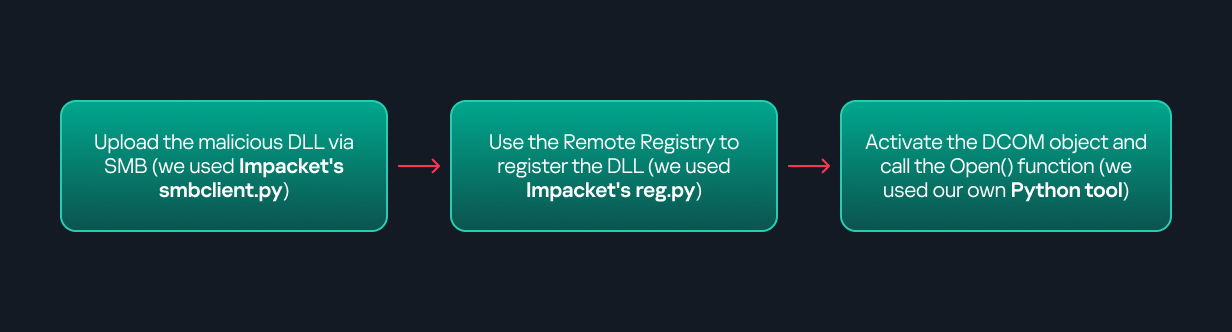
This research presents a previously undescribed DCOM object that can be used for both command execution and potential persistence. This new technique abuses older initial access and persistence methods through Control Panel items.
First, we will discuss COM technology. After that, we will review the current state of the Impacket dcomexec script, focusing on objects that still function, and discuss potential fixes and improvements, then move on to techniques for enumerating objects on the system. Next, we will examine Control Panel items, how adversaries have used them for initial access and persistence, and how these items can be leveraged through a DCOM object to achieve command execution.
Finally, we will cover detection strategies to identify and respond to this type of activity.
COM/DCOM technology
What is COM?
COM stands for Component Object Model, a Microsoft technology that defines a binary standard for interoperability. It enables the creation of reusable software components that can interact at runtime without the need to compile COM libraries directly into an application.
These software components operate in a client–server model. A COM object exposes its functionality through one or more interfaces. An interface is essentially a collection of related member functions (methods).
COM also enables communication between processes running on the same machine by using local RPC (Remote Procedure Call) to handle cross-process communication.
Terms
To ensure a better understanding of its structure and functionality, let’s revise COM-related terminology.
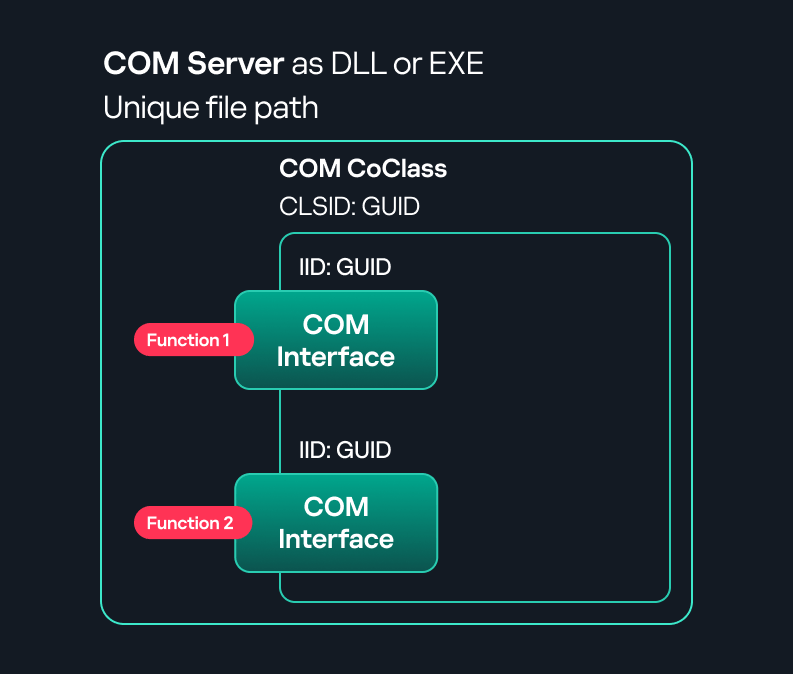
COM interface A COM interface defines the functionality that a COM object exposes. Each COM interface is identified by a unique GUID known as the IID (Interface ID). All COM interfaces can be found in the Windows Registry under HKEY_CLASSES_ROOT\Interface, where they are organized by GUID.
COM class (COM CoClass) A COM class is the actual implementation of one or more COM interfaces. Like COM interfaces, classes are identified by unique GUIDs, but in this case the GUID is called the CLSID (Class ID). This GUID is used to locate the COM server and activate the corresponding COM class.
All COM classes must be registered in the registry under HKEY_CLASSES_ROOT\CLSID, where each class’s GUID is stored. Under each GUID, you may find multiple subkeys that serve different purposes, such as:
InprocServer32/LocalServer32: Specifies the system path of the COM server where the class is defined. InprocServer32 is used for in-process servers (DLLs), while LocalServer32 is used for out-of-process servers (EXEs). We’ll describe this in more detail later.
ProgID: A human-readable name assigned to the COM class.
TypeLib: A binary description of the COM class (essentially documentation for the class).
AppID: Used to describe security configuration for the class.
COM server A COM is the module where a COM class is defined. The server can be implemented as an EXE, in which case it is called an out-of-process server, or as a DLL, in which case it is called an in-process server. Each COM server has a unique file path or location in the system. Information about COM servers is stored in the Windows Registry. The COM runtime uses the registry to locate the server and perform further actions. Registry entries for COM servers are located under the HKEY_CLASSES_ROOT root key for both 32- and 64-bit servers.
Component Object Model implementation
Client–server model
In-process server In the case of an in-process server, the server is implemented as a DLL. The client loads this DLL into its own address space and directly executes functions exposed by the COM object. This approach is efficient since both client and server run within the same process.
In-process COM server
Out-of-process server Here, the server is implemented and compiled as an executable (EXE). Since the client cannot load an EXE into its address space, the server runs in its own process, separate from the client. Communication between the two processes is handled via ALPC (Advanced Local Procedure Call) ports, which serve as the RPC transport layer for COM.
Out-of-process COM server
What is DCOM?
DCOM is an extension of COM where the D stands for Distributed. It enables the client and server to reside on different machines. From the user’s perspective, there is no difference: DCOM provides an abstraction layer that makes both the client and the server appear as if they are on the same machine.
Under the hood, however, COM uses TCP as the RPC transport layer to enable communication across machines.
Distributed COM implementation
Certain requirements must be met to extend a COM object into a DCOM object. The most important one for our research is the presence of the AppID subkey in the registry, located under the COM CLSID entry.
The AppID value contains a GUID that maps to a corresponding key under HKEY_CLASSES_ROOT\AppID. Several subkeys may exist under this GUID. Two critical ones are:
These registry settings grant remote clients permissions to activate and interact with DCOM objects.
Lateral movement via DCOM
After attackers compromise a host, their next objective is often to compromise additional machines. This is what we call lateral movement. One common lateral movement technique is to achieve remote command execution on a target machine. There are many ways to do this, one of which involves abusing DCOM objects.
In recent years, many DCOM objects have been discovered. This research focuses on the objects exposed by the Impacket script dcomexec.py that can be used for command execution. More specifically, three exposed objects are used: ShellWindows, ShellBrowserWindow and MMC20.
ShellWindows
ShellWindows was one of the first DCOM objects to be identified. It represents a collection of open shell windows and is hosted by explorer.exe, meaning any COM client communicates with that process.
In Impacket’s dcomexec.py, once an instance of this COM object is created on a remote machine, the script provides a semi-interactive shell.
Each time a user enters a command, the function exposed by the COM object is called. The command output is redirected to a file, which the script retrieves via SMB and displays back to simulate a regular shell.
Internally, the script runs this command when connecting:
cmd.exe /Q /c cd \ 1> \\127.0.0.1\ADMIN$\__17602 2>&1
This sets the working directory to C:\ and redirects the output to the ADMIN$ share under the filename __17602. After that, the script checks whether the file exists; if it does, execution is considered successful and the output appears as if in a shell.
When running dcomexec.py against Windows 10 and 11 using the ShellWindows object, the script hangs after confirming SMB connection initialization and printing the SMB banner. As I mentioned in my personal blog post, it appears that this DCOM object no longer has permission to write to the ADMIN$ share. A simple fix is to redirect the output to a directory the DCOM object can write to, such as the Temp folder. The Temp folder can then be accessed under the same ADMIN$ share. A small change in the code resolves the issue. For example:
ShellBrowserWindow
The ShellBrowserWindow object behaves almost identically to ShellWindows and exhibits the same behavior on Windows 10. The same workaround that we used for ShellWindows applies in this case. However, on Windows 11, this object no longer works for command execution.
MMC20
The MMC20.Application COM object is the automation interface for Microsoft Management Console (MMC). It exposes methods and properties that allow MMC snap-ins to be automated.
This object has historically worked across all Windows versions. Starting with Windows Server 2025, however, attempting to use it triggers a Defender alert, and execution is blocked.
As shown in earlier examples, the dcomexec.py script writes the command output to a file under ADMIN$, with a filename that begins with __:
OUTPUT_FILENAME = '__' + str(time.time())[:5]
Defender appears to check for files written under ADMIN$ that start with __, and when it detects one, it blocks the process and alerts the user. A quick fix is to simply remove the double underscores from the output filename.
Another way to bypass this issue is to use the same workaround used for ShellWindows – redirecting the output to the Temp folder. The table below outlines the status of these objects across different Windows versions.
Windows Server 2025
Windows Server 2022
Windows 11
Windows 10
ShellWindows
Doesn’t work
Doesn’t work
Works but needs a fix
Works but needs a fix
ShellBrowserWindow
Doesn’t work
Doesn’t work
Doesn’t work
Works but needs a fix
MMC20
Detected by Defender
Works
Works
Works
Enumerating COM/DCOM objects
The first step to identifying which DCOM objects could be used for lateral movement is to enumerate them. By enumerating, I don’t just mean listing the objects. Enumeration involves:
Finding objects and filtering specifically for DCOM objects.
Identifying their interfaces.
Inspecting the exposed functions.
Automating enumeration is difficult because most COM objects lack a type library (TypeLib). A TypeLib acts as documentation for an object: which interfaces it supports, which functions are exposed, and the definitions of those functions. Even when TypeLibs are available, manual inspection is often still required, as we will explain later.
There are several approaches to enumerating COM objects depending on their use cases. Next, we’ll describe the methods I used while conducting this research, taking into account both automated and manual methods.
Automation using PowerShell In PowerShell, you can use .NET to create and interact with DCOM objects. Objects can be created using either their ProgID or CLSID, after which you can call their functions (as shown in the figure below).
Shell.Application COM object function list in PowerShell
Under the hood, PowerShell checks whether the COM object has a TypeLib and implements the IDispatch interface. IDispatch enables late binding, which allows runtime dynamic object creation and function invocation. With these two conditions met, PowerShell can dynamically interact with COM objects at runtime.
Our strategy looks like this:
As you can see in the last box, we perform manual inspection to look for functions with names that could be of interest, such as Execute, Exec, Shell, etc. These names often indicate potential command execution capabilities.
However, this approach has several limitations:
TypeLib requirement: Not all COM objects have a TypeLib, so many objects cannot be enumerated this way.
IDispatch requirement: Not all COM objects implement the IDispatch interface, which is required for PowerShell interaction.
Interface control: When you instantiate an object in PowerShell, you cannot choose which interface the instance will be tied to. If a COM class implements multiple interfaces, PowerShell will automatically select the one marked as [default] in the TypeLib. This means that other non-default interfaces, which may contain additional relevant functionality, such as command execution, could be overlooked.
Automation using C++ As you might expect, C++ is one of the languages that natively supports COM clients. Using C++, you can create instances of COM objects and call their functions via header files that define the interfaces.However, with this approach, we are not necessarily interested in calling functions directly. Instead, the goal is to check whether a specific COM object supports certain interfaces. The reasoning is that many interfaces have been found to contain functions that can be abused for command execution or other purposes.
This strategy primarily relies on an interface called IUnknown. All COM interfaces should inherit from this interface, and all COM classes should implement it.The IUnknown interface exposes three main functions. The most important is QueryInterface(), which is used to ask a COM object for a pointer to one of its interfaces.So, the strategy is to:
Enumerate COM classes in the system by reading CLSIDs under the HKEY_CLASSES_ROOT\CLSID key.
Check whether they support any known valuable interfaces. If they do, those classes may be leveraged for command execution or other useful functionality.
This method has several advantages:
No TypeLib dependency: Unlike PowerShell, this approach does not require the COM object to have a TypeLib.
Use of IUnknown: In C++, you can use the QueryInterface function from the base IUnknown interface to check if a particular interface is supported by a COM class.
No need for interface definitions: Even without knowing the exact interface structure, you can obtain a pointer to its virtual function table (vtable), typically cast as a void*. This is enough to confirm the existence of the interface and potentially inspect it further.
The figure below illustrates this strategy:
This approach is good in terms of automation because it eliminates the need for manual inspection. However, we are still only checking well-known interfaces commonly used for lateral movement, while potentially missing others.
Manual inspection using open-source tools
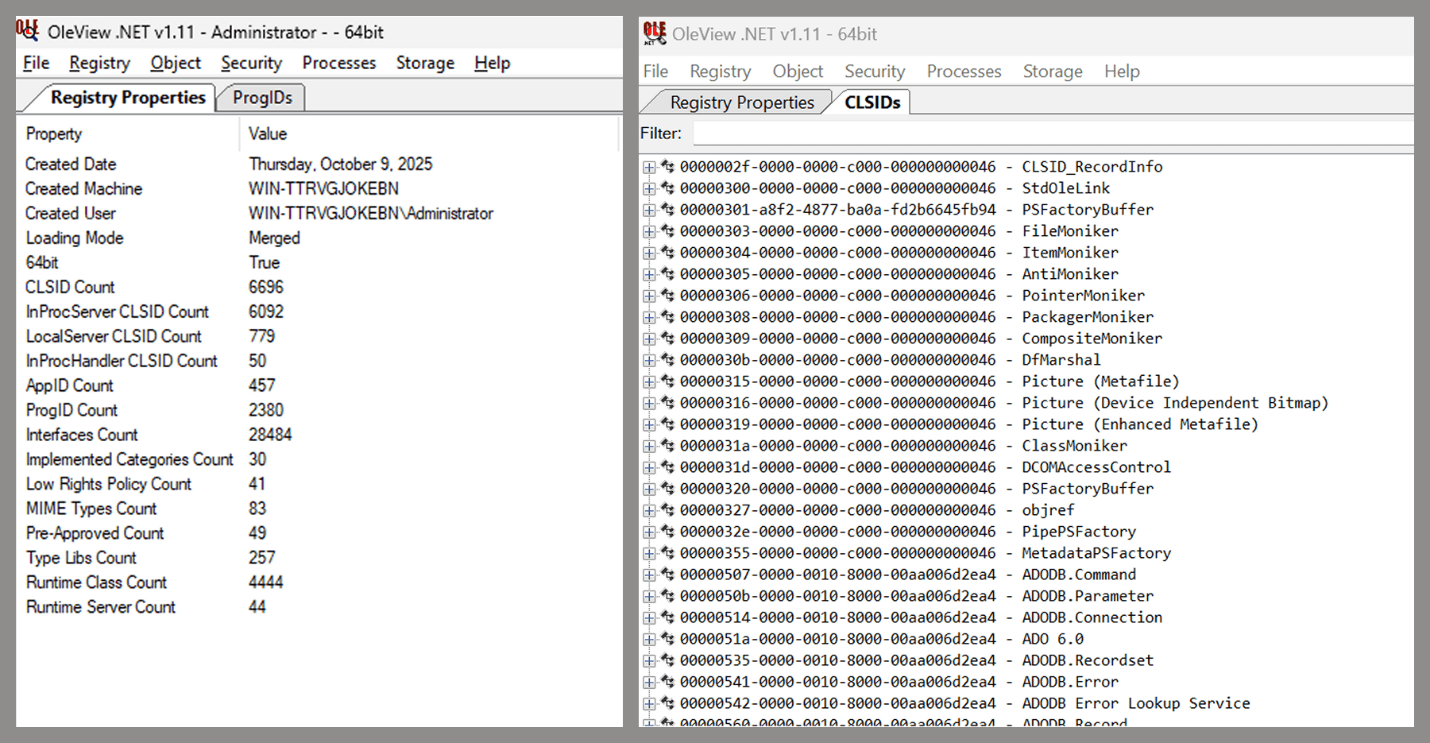
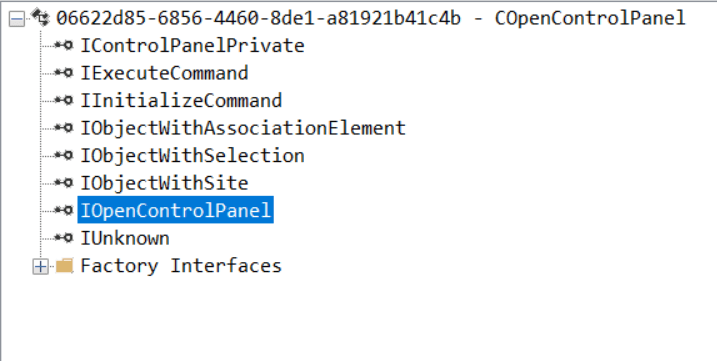
As you can see, automation can be difficult since it requires several prerequisites and, in many cases, still ends with a manual inspection. An alternative approach is manual inspection using a tool called OleViewDotNet, developed by James Forshaw. This tool allows you to:
List all COM classes in the system.
Create instances of those classes.
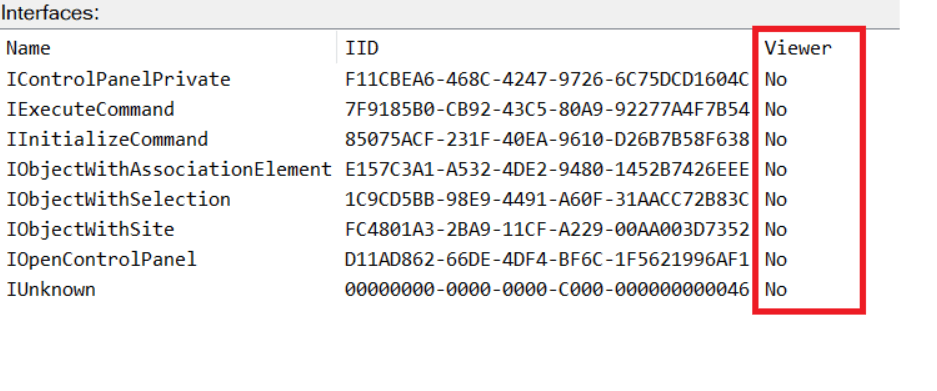
Check their supported interfaces.
Call specific functions.
Apply various filters for easier analysis.
Perform other inspection tasks.
Open-source tool for inspecting COM interfaces
One of the most valuable features of this tool is its naming visibility. OleViewDotNet extracts the names of interfaces and classes (when available) from the Windows Registry and displays them, along with any associated type libraries.
This makes manual inspection easier, since you can analyze the names of classes, interfaces, or type libraries and correlate them with potentially interesting functionality, for example, functions that could lead to command execution or persistence techniques.
Control Panel items as attack surfaces
Control Panel items allow users to view and adjust their computer settings. These items are implemented as DLLs that export the CPlApplet function and typically have the .cpl extension. Control Panel items can also be executables, but our research will focus on DLLs only.
Control Panel items
Attackers can abuse CPL files for initial access. When a user executes a malicious .cpl file (e.g., delivered via phishing), the system may be compromised – a technique mapped to MITRE ATT&CK T1218.002.
Adversaries may also modify the extensions of malicious DLLs to .cpl and register them in the corresponding locations in the registry.
Under HKEY_CURRENT_USER:
HKCU\Software\Microsoft\Windows\CurrentVersion\Control Panel\Cpls
Under HKEY_LOCAL_MACHINE:
For 64-bit DLLs:
HKLM\Software\Microsoft\Windows\CurrentVersion\Control Panel\Cpls
For 32-bit DLLs:
HKLM\Software\WOW6432Node\Microsoft\Windows\CurrentVersion\Control Panel\Cpls
These locations are important when Control Panel DLLs need to be available to the current logged-in user or to all users on the machine. However, the “Control Panel” subkey and its “Cpls” subkey under HKCU should be created manually, unlike the “Control Panel” and “Cpls” subkeys under HKLM, which are created automatically by the operating system.
Once registered, the DLL (CPL file) will load every time the Control Panel is opened, enabling persistence on the victim’s system.
It’s worth noting that even DLLs that do not comply with the CPL specification, do not export CPlApplet, or do not have the .cpl extension can still be executed via their DllEntryPoint function if they are registered under the registry keys listed above.
There are multiple ways to execute Control Panel items:
This calls the Control_RunDLL function from shell32.dll, passing the CPL file as an argument. Everything inside the CPlApplet function will then be executed.
However, if the CPL file has been registered in the registry as shown earlier, then every time the Control Panel is opened, the file is loaded into memory through the COM Surrogate process (dllhost.exe):
COM Surrogate process loading the CPL file
What happened was that a Control Panel with a COM client used a COM object to load these CPL files. We will talk about this COM object in more detail later.
The COM Surrogate process was designed to host COM server DLLs in a separate process rather than loading them directly into the client process’s address space. This isolation improves stability for the in-process server model. This hosting behavior can be configured for a COM object in the registry if you want a COM server DLL to run inside a separate process because, by default, it is loaded in the same process.
‘DCOMing’ through Control Panel items
While following the manual approach of enumerating COM/DCOM objects that could be useful for lateral movement, I came across a COM object called COpenControlPanel, which is exposed through shell32.dll and has the CLSID {06622D85-6856-4460-8DE1-A81921B41C4B}. This object exposes multiple interfaces, one of which is IOpenControlPanel with IID {D11AD862-66DE-4DF4-BF6C-1F5621996AF1}.
IOpenControlPanel interface in the OleViewDotNet output
I immediately thought of its potential to compromise Control Panel items, so I wanted to check which functions were exposed by this interface. Unfortunately, neither the interface nor the COM class has a type library.
COpenControlPanel interfaces without TypeLib
Normally, checking the interface definition would require reverse engineering, so at first, it looked like we needed to take a different research path. However, it turned out that the IOpenControlPanel interface is documented on MSDN, and according to the documentation, it exposes several functions. One of them, called Open, allows a specified Control Panel item to be opened using its name as the first argument.
Full type and function definitions are provided in the shobjidl_core.h Windows header file.
Open function exposed by IOpenControlPanel interface
It’s worth noting that in newer versions of Windows (e.g., Windows Server 2025 and Windows 11), Microsoft has removed interface names from the registry, which means they can no longer be identified through OleViewDotNet.
COpenControlPanel interfaces without names
Returning to the COpenControlPanel COM object, I found that the Open function can trigger a DLL to be loaded into memory if it has been registered in the registry. For the purposes of this research, I created a DLL that basically just spawns a message box which is defined under the DllEntryPoint function. I registered it under HKCU\Software\Microsoft\Windows\CurrentVersion\Control Panel\Cpls and then created a simple C++ COM client to call the Open function on this interface.
As expected, the DLL was loaded into memory. It was hosted in the same way that it would be if the Control Panel itself was opened: through the COM Surrogate process (dllhost.exe). Using Process Explorer, it was clear that dllhost.exe loaded my DLL while simultaneously hosting the COpenControlPanel object along with other COM objects.
COM Surrogate loading a custom DLL and hosting the COpenControlPanel object
Based on my testing, I made the following observations:
The DLL that needs to be registered does not necessarily have to be a .cpl file; any DLL with a valid entry point will be loaded.
The Open() function accepts the name of a Control Panel item as its first argument. However, it appears that even if a random string is supplied, it still causes all DLLs registered in the relevant registry location to be loaded into memory.
Now, what if we could trigger this COM object remotely? In other words, what if it is not just a COM object but also a DCOM object? To verify this, we checked the AppID of the COpenControlPanel object using OleViewDotNet.
COpenControlPanel object in OleViewDotNet
Both the launch and access permissions are empty, which means the object will follow the system’s default DCOM security policy. By default, members of the Administrators group are allowed to launch and access the DCOM object.
Based on this, we can build a remote strategy. First, upload the “malicious” DLL, then use the Remote Registry service to register it in the appropriate registry location. Finally, use a trigger acting as a DCOM client to remotely invoke the Open() function, causing our DLL to be loaded. The diagram below illustrates the flow of this approach.
Malicious DLL loading using DCOM
The trigger can be written in either C++ or Python, for example, using Impacket. I chose Python because of its flexibility. The trigger itself is straightforward: we define the DCOM class, the interface, and the function to call. The full code example can be found here.
Once the trigger runs, the behavior will be the same as when executing the COM client locally: our DLL will be loaded through the COM Surrogate process (dllhost.exe).
As you can see, this technique not only achieves command execution but also provides persistence. It can be triggered in two ways: when a user opens the Control Panel or remotely at any time via DCOM.
Detection
The first step in detecting such activity is to check whether any Control Panel items have been registered under the following registry paths:
Although commonly known best practices and research papers regarding Windows security advise monitoring only the first subkey, for thorough coverage it is important to monitor all of the above.
In addition, monitoring dllhost.exe (COM Surrogate) for unusual COM objects such as COpenControlPanel can provide indicators of malicious activity.
Finally, it is always recommended to monitor Remote Registry usage because it is commonly abused in many types of attacks, not just in this scenario.
Conclusion
In conclusion, I hope this research has clarified yet another attack vector and emphasized the importance of implementing hardening practices. Below are a few closing points for security researchers to take into account:
As shown, DCOM represents a large attack surface. Windows exposes many DCOM classes, a significant number of which lack type libraries – meaning reverse engineering can reveal additional classes that may be abused for lateral movement.
Changing registry values to register malicious CPLs is not good practice from a red teaming ethics perspective. Defender products tend to monitor common persistence paths, but Control Panel applets can be registered in multiple registry locations, so there is always a gap that can be exploited.
Bitness also matters. On x64 systems, loading a 32-bit DLL will spawn a 32-bit COM Surrogate process (dllhost.exe *32). This is unusual on 64-bit hosts and therefore serves as a useful detection signal for defenders and an interesting red flag for red teamers to consider.
If 2025 proved anything, it’s that no one wins alone in cybersecurity. AI-driven threats accelerated, and environments grew more complex while enterprises pushed hard for simplicity, integrated protection and security outcomes that deliver measurable results and meaningful value.
In response, we saw our partners around the globe lean into integration, treat AI as a built-in advantage and use the strength of our ecosystem as a force multiplier. The result: What could have been a disruptive year instead became one defined by growth and learning across our partner community.
Now, those lessons are guiding how Palo Alto Networks plans to partner with even greater precision in 2026. We remain a channel-first company that’s all-in on our ecosystem and united with our partners in a shared purpose to protect our customers’ digital future. But we also intend to double down in several areas in the year ahead, and we’re asking our partners to join us in doing the same.
1. Simplifying Security Through Integration
One message from customers that came through loud and clear in 2025 is that complexity is the enemy of resilience. Many enterprises are grappling with tool sprawl – multiple consoles, disconnected policies and overlapping investments that slow down their teams when speed and agility matter most.
The partners who delivered some of the most transformative results for organizations this year were those who chose integration over complexity and collaboration over siloed tools. With a laser focus on simplifying security, they were able to help customers:
Consolidate fragmented point tools onto a unified security platform.
Align visibility across the network, cloud and security operations center (SOC), so teams can respond faster.
Build architectures with zero trust and AI-powered detection at the core.
We saw this simplifying-security trend through integration across our ecosystem. Partners unified cloud security and detection workflows through Cortex® Cloud™ and Cortex. Teams modernized network architectures with tighter integration across our platform. We expect this activity to only accelerate in the coming year as our cloud security offerings continue to evolve.
When we innovate together, customers gain stronger defenses and a faster time-to-value. That’s why Palo Alto Networks has invested so heavily in platformization. When you connect our capabilities across network security, cloud security and security operations (wrapping them with your consulting, delivery and managed services) customers can experience something fundamentally better. With fewer gaps and clearer signals, they can build a security posture that’s built for the speed of modern threats.
In 2026, deep integration will remain a cornerstone of how we partner with precision. We’ll continue aligning our portfolio, programs and joint engagement model, so you can build offerings that reduce complexity for customers and create stronger differentiation for your business.
2. Making AI a Built-in Advantage
At Palo Alto Networks, our approach to AI in cybersecurity is straightforward. We believe AI must be embedded, not bolted on. It has to live in the data, analytics and workflows your teams rely on every day. That’s the thinking behind Precision AI®, and it’s why we built AI capabilities into our platform’s core.
Partners who treated AI as a platform capability rather than a standalone tool delivered some of the strongest outcomes for customers in 2025. They were able to meet customers’ needs and deliver business outcomes in a single, unified approach. They helped organizations:
Detect and respond to threats faster with AI-assisted analytics.
Use automation to streamline change, investigation and response workflows.
Tie AI to tangible outcomes, such as reduced risk, higher productivity and a better user experience.
In 2026, we’ll double down on AI across the platform and invest in the tools, content and enablement you need to bring those capabilities to life. Our focus is on making it easier for you to build AI-powered services that are repeatable and aligned to the outcomes customers expect.
Upcoming program changes reflect that intent. We’ll promote next-generation security as a growth engine and invest in ways that strengthen partner profitability across consulting services, resale, quality delivery, technical support and managed security services.
3. Ensuring Our Ecosystem Can Be a Growth Engine for Everyone
As AI raised the bar for both attackers and defenders in 2025, the partners who leaned into platformization and outcome-driven services were the ones who helped customers stay ahead of the curve. Those successes are now shaping how we strengthen and scale the partner ecosystem in 2026.
Our ecosystem isn’t just a route to market; it’s intended to be an economic engine for everyone involved. This year, many partners grew their business by building practices around our platform and aligning their services with where customers needed the most support: strategy, implementation, optimization, ongoing operations. We saw especially strong momentum from partners’ expansions:
Consulting and advisory services around zero trust and AI-driven transformation.
Resale opportunities centered on platform consolidation and next-generation security.
Quality delivery and technical support that keep deployments reliable and current.
Managed security services that give customers 24/7 protection and expert oversight.
These achievements reflect the value exchange at the heart of our ecosystem. Palo Alto Networks invests in platformization, AI and enablement, while our partners bring delivery expertise, regional insight and service innovation. Together, we create outcomes neither of us could deliver alone.
In 2026, we plan to build on that momentum and drive even greater partner profitability. Program evolutions will focus on growth across the full lifecycle, from initial design and implementation to long-term operation and optimization. We’re also expanding collaboration with our technology alliances to build new joint offerings and solution plays that the ecosystem can take to market together.
When we combine our platform, your expertise and the capabilities of our Alliance partners, then customers gain more paths to adopt next-generation security with confidence, and you gain more opportunities to develop differentiated, high-value practices.
Keeping Customers at the Center
At the heart of every partner collaboration is the customer, of course. Everything we build, integrate and advance together starts and ends with protecting them. This year, ecosystem alignment delivered measurable impact for our customers across industries. When partners lead with integrated solutions anchored in our platform, organizations saw visible improvements:
Faster deployment of secure solutions.
Reduced complexity with unified visibility.
Greater confidence in defending against today’s AI-driven threats.
We saw this firsthand in joint wins across cloud security transformations, zero trust modernization and AI-assisted threat detection. When our ecosystem moves together, customers can move faster, operate more securely and achieve meaningful outcomes. Customer success is the foundation of everything we do as a partner-led organization, and it will remain our North Star in 2026.
Partnering with Precision in 2026 and Beyond
What we learned and achieved together in 2025 points us toward a clear focus for 2026 to advance ecosystem-led innovation, so we can deliver outcomes that matter most to our customers.
With that mission in mind, we will focus on the following four priorities:
Deeper Integration – Expanding API partnerships and strengthening interoperability across the platform.
Co-Innovation – Enabling partners to build solutions tailored to industry needs and use cases.
Empowered Enablement – Investing in learning, automation and AI capabilities that fuel differentiated, profitable services.
Simplified Engagement – Streamlining programs and tools, so that partnering with us is faster and more rewarding.
These priorities highlight the real strength of our ecosystem: How platformization, AI and partner expertise come together to enable what we could not build alone.
Finally, to our partners and customers, thank you. Your trust, collaboration and commitment push us to innovate boldly and continuously. As we enter the new year, I’m excited about what we’ll build together. When we align our AI-powered platform, our partner programs and your expertise in delivery, services and managed security, we can deliver something far greater than a set of solutions.
We’re a powerful team that’s not just defending against what’s next; we’re defining the future of cybersecurity. And together, we’re unstoppable.
Partners, join us in shaping the next chapter of secure, AI-powered innovations. Connect with your Channel Business Manager to align on 2026 opportunities, upcoming program updates and ways we can elevate customer outcomes together. Visit the partner portal to learn more.
Key Takeaways
Integration beats complexity. Unifying technology, data and expertise drove the strongest outcomes in 2025, helping partners reduce risk and accelerate time-to-value for customers.
AI is a built-in advantage. By tapping into AI embedded across our cybersecurity platform, partners can address security and business outcomes simultaneously and deliver repeatable, profitable, AI-powered services.
The partner ecosystem is a growth engine, and together, we’re unstoppable.
Our 2026 priorities focus on deeper integration, coinnovation, empowered enablement and simplified engagement that drive partner profitability and stronger customer outcomes.
Admit it: you’ve been meaning to jump on the latest NFT reincarnation — Telegram Gifts — but just haven’t gotten around to it. It’s the hottest trend right now. Developers are churning out collectible images in partnership with celebs like Snoop Dogg. All your friends’ profiles are already decked out with these modish pictures, and you’re dying to hop on this hype train — but pay as little as possible for it.
And then it happens — a stranger messages you privately with a generous offer: a chance to snag a couple of these digital gifts — with no investment required. A bot that looks completely legit is running an airdrop. In the world of NFTs, an airdrop is a promotional stunt where a small number of new crypto assets are given away for free. The buzzword has been adopted on Telegram, thanks to the crypto nature of these gifts and the NFT mechanics running under the hood.
Limited time offer: a marketer’s favorite trick… and a scammer’s tool
They’re offering you these gift images for free — or so they say. You could later attach them to your profile or sell them for Telegram’s native currency, Toncoin. You don’t even have to tap an external link. Just hit a button in the message, launch a Mini App right inside Telegram itself, and enter your login credentials. And then… your account immediately gets hijacked. You won’t get any gifts, and overall, you’ll be left with anything but a celebratory feeling.
This is the first of the screens where, by filling in the fields, you receive a gift lose access to your Telegram account
Today, we break down a phishing scheme that exploits Telegram’s built-in Mini Apps, and share tips to help you avoid falling for these attacks.
How the new phishing scheme works
The principle of classic phishing is straightforward: the user gets a link to a fake website that mimics a legitimate sign-in form. When the victim enters their credentials, this data goes straight to the scammer. However, phishing tactics are constantly evolving, and this new attack method is far more insidious.
The bad actors create phishing Mini Apps directly inside Telegram. These appear as standard web pages but are embedded within the messaging app’s interface instead of opening in an external browser. To the user, these apps look completely legitimate. After all, they run within the official Telegram app itself.
To make it even more convincing, scammers often add a plausible-sounding limit on gifts per user
This leads the victim to think, “If this app runs inside Telegram, there must be some kind of vetting process for these apps. Surely they wouldn’t let an obvious scam through?” In practice, it turns out that’s not the case at all.
How is this scheme even a thing?
A core security issue with Telegram Mini Apps is that the platform does almost no vetting before an app goes live. This is a world apart from the strict review processes used by Google Play and the App Store — although even there, obvious malware occasionally slips through.
On Telegram, it’s far easier for bad actors. Essentially, anyone who wishes to create and launch a Mini App can do so. Telegram does not review the code, functionality, or the developer’s intent. This turns a security flaw within a messaging service boasting nearly a billion global users into a global-scale problem. To make matters worse, moderation of these Mini Apps within Telegram is entirely reactive — meaning action is only taken after users start complaining or law enforcement gets involved.
This is a global operation, with phishing lures being distributed simultaneously in both Russian and English. However, the Russian version gives away a tell-tale sign of the scammers’ haste and lack of polish. They forgot to remove a clarification question from the AI that generated the text: “Do you need bolder, more official, or humorous options?”
In this case, the bait was “gifts” from UFC fighters: a giveaway of “papakhas” — digital gift images of the traditional Dagestani hat released by Telegram in partnership with Khabib Nurmagomedov. An auction for these items did take place, with Pavel Durov even posting about it on his X and Telegram (Khabib reposted these announcements but later deleted them after the auction ended). However, there were only 29 000 of these “papakhas” released, which wasn’t enough to satisfy all the eager fans. Scammers seized on the opportunity, assuring fans they could get the exclusive items for free. The phishing campaign was a targeted one — focusing on users who’d been active on the athlete’s channel.
How the scammers lull their victims
The criminals leveraged the name of the popular Portals platform — a legitimate service for games, apps, and entertainment within Telegram. They created a series of Mini Apps that were visually almost indistinguishable from the real ones, and promoted them as free giveaways — airdrops.
To add a veneer of authenticity, the scammers even listed the official Telegram channel for Portals in the phishing Mini App’s profile. However, the legitimate Portals Market bot has a different username: @portals
That said, the scam campaigns themselves show signs of being rushed and cutting design and copywriting costs — with obvious signs of AI involvement. Some of the messages contain leftover text fragments clearly generated by a neural network, which the scammers either forgot or couldn’t be bothered to edit.
How to protect your Telegram account from being hacked
The golden security rules are simple: stay vigilant, and learn the key hallmarks of these attacks:
Verify the source. If you receive a link promising a giveaway from a celebrity or even Telegram itself but sent from an unfamiliar account or a dubious group, don’t click. Cross-check through the celebrity or company’s official channel to see if they’re actually running a promo like that.
Inspect the account verification badge. Ascertain that the blue checkmark is real and not just an emoji status or part of the profile name. You can verify this by simply tapping that checkmark icon in the profile. If it’s a Premium emoji status, Telegram will explicitly tell you so. If a checkmark emoji is simply added to the profile name, tapping it doesn’t do anything. But if the account is genuinely verified, tapping the blue checkmark will bring up an official confirmation message from Telegram.
Don’t be in a rush to authenticate in Mini Apps. Legitimate Telegram apps typically don’t require you to sign in again through a form inside the Mini App. If you’re prompted to enter your phone number or a verification code, it’s likely a phishing attempt.
Look for signs of AI-generated text or design. Weird grammar, unnatural phrasing, or leftover neural network prompts within a message are a red flag. Scammers frequently use AI-powered generation to churn out text quickly and cheaply.
Turn on two-step verification (your Telegram password). Do this right now in Settings → Privacy and Security → Two-Step Verification. Even if a scammer manages to get your phone number and SMS code, they won’t be able to access your account without this password. Obviously, never share your password with anyone — it’s meant only for you to sign in to your Telegram account.
Use a passkey to secure your account. A recent Telegram update added the ability to securely sign in with a passkey. We’ve covered using passkeys with popular services and the associated caveats in detail. A passkey makes it nearly impossible for a malicious actor to steal your account. You can set one up in Settings → Privacy and Security → Passkeys.
Store your password and passkey in a password manager. If you’ve secured your account with both a password and a passkey, remember that a weak, reused, or compromised password can still be the proverbial “spare key under the mat” for attackers — even if the “front door” is locked with a passkey. Therefore, we recommend creating a strong, unique password for Telegram and storing it — along with your passkey — in Kaspersky Password Manager. This keeps your credentials and keys available across all your devices.
What to do if your Telegram account was already stolen
The key is keeping calm and acting swiftly. You have just 24 hours to reclaim your account, or you risk losing it permanently. Follow the step-by-step guide to restoring access in our post What to do if your Telegram account is hacked.
Finally, a reminder that has become our classic mantra: if an offer looks too good to be true, it almost certainly is. Always verify information through official channels, and never enter your passwords or passkeys into unofficial apps or forms — even if they look legit. Stay vigilant and stay safe.
Want more tips on securing your messenger accounts and chats? Check out our related posts:
The attack surface for today’s enterprises is incredibly heterogeneous and dynamic. Applications and data are in constant motion, spanning public clouds, private data centers and edge locations. Users connect from anywhere.
For security leaders, this environment has led to an explosion in not only operational complexity, but in many cases, uncertainty. Together, Nutanix and Palo Alto Networks enable security to finally match the speed and scale of these dynamic hybrid cloud environments.
The security ecosystem has become vast and complex. Point solutions accumulate to address specific gaps, yet each adds another interface, another policy language and another integration to manage. However well intentioned, this sprawl can lead directly to fractured visibility, overlapping tools and operational fatigue.
Elevate Perimeter Protection to Defense-in-Depth
Enterprises today face unprecedented security complexity as hybrid and multicloud environments become the new normal. Currently, 94% of enterprises use some form of cloud service, while 89% report having a multicloud strategy in place. This distributed reality means security is paramount: while managing cloud spending is the number one operational challenge (82% overall), security remains a major concern, affecting 79% of all organizations.
Hybrid cloud adoption offers agility, but it also introduces distinct security challenges that strain traditional approaches. Adversaries have taken notice. Hybrid and multicloud environments are prime targets because they connect sensitive data, privileged accounts and critical systems across public, and on-premises infrastructure. Perimeter-based security models, built for static networks and centralized data centers, cannot keep pace in a world where apps and data continuously move between platforms.
Defense-in-depth has become essential for addressing the inherent dynamism of today’s environments. Network visibility is required to monitor and contain east-west traffic and lateral movement of threats inside cloud environments. Identity controls must verify every user, device and interaction across a distributed workforce. Data protection must follow sensitive information as it traverses multiple clouds, data centers and edge locations.
Yet managing these protections as distinct layers is no longer viable. Each cloud provider introduces its own native security controls. Each additional tool adds another interface and another policy set to maintain. Defense-in-depth only achieves its purpose when its layers are fully unified, providing consistent control enforcement from the edge to the core, comprehensive visibility across traffic, and essential data protections for all workloads, wherever they reside.
Freedom of Choice Without Fragmentation
Hybrid environments span public clouds, private infrastructure, SaaS ecosystems and legacy on-premises systems. No single vendor can realistically cover that entire landscape, and forcing security into a single closed ecosystem risks creating gaps where those environments meet.
The answer lies in an open ecosystem approach that allows organizations to assemble best-of-breed capabilities rather than being locked into a single provider’s stack.
This flexibility empowers security teams to adapt to the unique requirements of each environment while still operating through a unified security model. Policies can be applied consistently, intelligence can be shared across layers, and protections can move in step with workloads, regardless of platform. In short, this model can effectively support freedom of choice while relieving the operational burden of managing hybrid and multicloud security.
A Unified Security Layer Across Every Environment
Open ecosystems solve the problem of choice. What remains is the challenge of bringing those best-of-breed capabilities together into a solution that is coherent and scalable.
Consistent policy enforcementacross public cloud, private data centers and edge locations through a centralized management plane:
A single set of policies should be authored once and pushed everywhere, assuring a consistent security posture across all clouds and environments.
Abstraction of security intent from network coordinates through tag-driven automation, an approach that allows security policies to be expressed in terms of workload attributes (rather than IPs or locations):
These protections follow workloads automatically as they move. Through integration with orchestration pipelines, this approach aligns controls with rapid application rollouts in CI/CD workflows, all without manual reconfiguration.
With these core capabilities, security can finally catch up to the fluidity promised by hybrid cloud operating models.
Explore howPalo Alto Networks and Nutanix, work together to make this unified vision a reality, including joint offerings, like Palo Alto Networks secured Nutanix clusters with VM-Series Firewalls for AWS® and Microsoft® Azure.
Attackers often go after outdated and unused test accounts, or stumble upon publicly accessible cloud storage containing critical data that’s a bit dusty. Sometimes an attack exploits a vulnerability in an app component that was actually patched, say, two years ago. As you read these breach reports, a common theme emerges: the attacks leveraged something outdated: a service, a server, a user account… Pieces of corporate IT infrastructure that sometimes fall off the radar of IT and security teams. They become, in essence, unmanaged, useless, and simply forgotten. These IT zombies create risks for information security, regulatory compliance, and lead to unnecessary operational costs. This is generally an element of shadow IT — with one key difference: nobody wants, knows about, or benefits from these assets.
In this post, we try to identify which assets demand immediate attention, how to identify them, and what a response should look like.
Physical and virtual servers
Priority: high. Vulnerable servers are entry points for cyberattacks, and they continue consuming resources while creating regulatory compliance risks.
Prevalence:high. Physical and virtual servers are commonly orphaned in large infrastructures following migration projects, or after mergers and acquisitions. Test servers no longer used after IT projects go live, as well as web servers for outdated projects running without a domain, are also frequently forgotten. The scale of the problem is illustrated by Lets Encrypt statistics: in 2024, half of domain renewal requests came from devices no longer associated with the requested domain. And there are roughly a million of these devices in the world.
Detection: the IT department needs to implement an Automated Discovery and Reconciliation (AD&R) process that combines the results of network scanning and cloud inventory with data from the Configuration Management Database (CMDB). It enables the timely identification of outdated or conflicting information about IT assets, and helps locate the forgotten assets themselves.
This data should be supplemented by external vulnerability scans that cover all of the organization’s public IPs.
Response: establish a formal, documented process for decommissioning/retiring servers. This process needs to include verification of complete data migration, and verified subsequent destruction of data on the server. Following these steps, the server can be powered down, recycled, or repurposed. Until all procedures are complete, the server needs to be moved to a quarantined, isolated subnet.
To mitigate this issue for test environments, implement an automated process for their creation and decommission. A test environment should be created at the start of a project, and dismantled after a set period or following a certain duration of inactivity. Strengthen the security of test environments by enforcing their strict isolation from the primary (production) environment, and by prohibiting the use of real, non-anonymized business data in testing.
Forgotten user, service, and device accounts
Priority: critical. Inactive and privileged accounts are prime targets for attackers seeking to establish network persistence or expand their access within the infrastructure.
Prevalence:very high. Technical service accounts, contractor accounts, and non-personalized accounts are among the most commonly forgotten.
Detection: conduct regular analysis of the user directory (Active Directory in most organizations) to identify all types of accounts that have seen no activity over a defined period (a month, quarter, or year). Concurrently, it’s advisable to review the permissions assigned to each account, and remove any that are excessive or unnecessary.
Response: after checking with the relevant service owner on the business side or employee supervisor, outdated accounts should be simply deactivated or deleted. A comprehensive Identity and Access Management system (IAM) offers a scalable solution to this problem. In this system, the creation, deletion, and permission assignment for accounts are tightly integrated with HR processes.
For service accounts, it’s also essential to routinely review both the strength of passwords, and the expiration dates for access tokens — rotating them as necessary.
Forgotten data stores
Priority: critical. Poorly controlled data in externally accessible databases, cloud storage and recycle bins, and corporate file-sharing services — even “secure” ones — has been a key source of major breaches in 2024–2025. The data exposed in these leaks often includes document scans, medical records, and personal information. Consequently, these security incidents also lead to penalties for non-compliance with regulations such as HIPAA, GDPR, and other data-protection frameworks governing the handling of personal and confidential data.
Prevalence:high. Archive data, data copies held by contractors, legacy database versions from previous system migrations — all of these often remain unaccounted for and accessible for years (even decades) in many organizations.
Detection: given the vast variety of data types and storage methods, a combination of tools is essential for discovery:
Native audit subsystems within major vendor platforms, such as AWS Macie, and Microsoft Purview
Specialized Data Discovery and Data Security Posture Management solutions
Automated analysis of inventory logs, such as S3 Inventory
Unfortunately, these tools are of limited use if a contractor creates a data store within its own infrastructure. Controlling that situation requires contractual stipulations granting the organization’s security team access to the relevant contractor storage, supplemented by threat intelligence services capable of detecting any publicly exposed or stolen datasets associated with the company’s brand.
Response: analyze access logs and integrate the discovered storage into your DLP and CASB tools to monitor its usage — or to confirm it’s truly abandoned. Use available tools to securely isolate access to the storage. If necessary, create a secure backup, then delete the data. At the organizational policy level, it’s crucial to establish retention periods for different data types, mandating their automatic archiving and deletion upon expiry. Policies must also define procedures for registering new storage systems, and explicitly prohibit the existence of ownerless data that’s accessible without restrictions, passwords, or encryption.
Unused applications and services on servers
Priority: medium. Vulnerabilities in these services increase the risk of successful cyberattacks, complicate patching efforts, and waste resources.
Prevalence:very high. services are often enabled by default during server installation, remain after testing and configuration work, and continue to run long after the business process they supported has become obsolete.
Detection: through regular audits of software configurations. For effective auditing, servers should adhere to a role-based access model, with each server role having a corresponding list of required software. In addition to the CMDB, a broad spectrum of tools helps with this audit: tools like OpenSCAP and Lynis — focused on policy compliance and system hardening; multi-purpose tools like OSQuery; vulnerability scanners such as OpenVAS; and network traffic analyzers.
Response: conduct a scheduled review of server functions with their business owners. Any unnecessary applications or services found running should be disabled. To minimize such occurrences, implement the principle of least privilege organization-wide and deploy hardened base images or server templates for standard server builds. This ensures no superfluous software is installed or enabled by default.
Outdated APIs
Priority: high. APIs are frequently exploited by attackers to exfiltrate large volumes of sensitive data, and to gain initial access into the organization. In 2024, the number of API-related attacks increased by 41%, with attackers specifically targeting outdated APIs, as these often provide data with fewer checks and restrictions. This was exemplified by the leak of 200 million records from X/Twitter.
Prevalence:high. When a service transitions to a new API version, the old one often remains operational for an extended period, particularly if it’s still used by customers or partners. These deprecated versions are typically no longer maintained, so security flaws and vulnerabilities in their components go unpatched.
Detection: at the WAF or NGFW level, it’s essential to monitor traffic to specific APIs. This helps detect anomalies that may indicate exploitation or data exfiltration, and also identify APIs that get minimal traffic.
Response: for the identified low-activity APIs, collaborate with business stakeholders to develop a decommissioning plan, and migrate any remaining users to newer versions.
For organizations with a large pool of services, this challenge is best addressed with an API management platform in conjunction with a formally approved API lifecycle policy. This policy should include well-defined criteria for deprecating and retiring outdated software interfaces.
Software with outdated dependencies and libraries
Priority: high. This is where large-scale, critical vulnerabilities like Log4Shell hide, leading to organizational compromise and regulatory compliance issues.
Prevalence:Very high, especially in large-scale enterprise management systems, industrial automation systems, and custom-built software.
Detection: use a combination of vulnerability management (VM/CTEM) systems and software composition analysis (SCA) tools. For in-house development, it’s mandatory to use scanners and comprehensive security systems integrated into the CI/CD pipeline to prevent software from being built with outdated components.
Response: company policies must require IT and development teams to systematically update software dependencies. When building internal software, dependency analysis should be part of the code review process. For third-party software, it’s crucial to regularly audit the status and age of dependencies.
For external software vendors, updating dependencies should be a contractual requirement affecting support timelines and project budgets. To make these requirements feasible, it’s essential to maintain an up-to-date software bill of materials (SBOM).
Priority: medium. Forgotten web assets can be exploited by attackers for phishing, hosting malware, or running scams under the organization’s brand, damaging its reputation. In more serious cases, they can lead to data breaches, or serve as a launchpad for attacks against the given company. A specific subset of this problem involves forgotten domains that were used for one-time activities, expired, and weren’t renewed — making them available for purchase by anyone.
Prevalence:high — especially for sites launched for short-term campaigns or one-off internal activities.
Detection: the IT department must maintain a central registry of all public websites and domains, and verify the status of each with its owners on a monthly or quarterly basis. Additionally, scanners or DNS monitoring can be utilized to track domains associated with the company’s IT infrastructure. Another layer of protection is provided by threat intelligence services, which can independently detect any websites associated with the organization’s brand.
Response: establish a policy for scheduled website shutdown after a fixed period following the end of its active use. Implement an automated DNS registration and renewal system to prevent the loss of control over the company’s domains.
Unused network devices
Priority: high. Routers, firewalls, surveillance cameras, and network storage devices that are connected but left unmanaged and unpatched make for the perfect attack launchpad. These forgotten devices often harbor vulnerabilities, and almost never have proper monitoring — no EDR or SIEM integration — yet they hold a privileged position in the network, giving hackers an easy gateway to escalate attacks on servers and workstations.
Prevalence:medium. Devices get left behind during office moves, network infrastructure upgrades, or temporary workspace setups.
Detection: use the same network inventory tools mentioned in the forgotten servers section, as well as regular physical audits to compare network scans against what’s actually plugged in. Active network scanning can uncover entire untracked network segments and unexpected external connections.
Response: ownerless devices can usually be pulled offline immediately. But beware: cleaning them up requires the same care as scrubbing servers — to prevent leaks of network settings, passwords, office video footage, and so on.
We are proud to announce that Frost & Sullivan has recognized Palo Alto Networks Prisma® Browser as the best-positioned market leader in the Frost Radar: Zero Trust Browser Security (ZTBS), 2025 report, securing the premier position for innovation and a leadership position on growth.
This recognition comes at a pivotal moment. For the modern enterprise, the browser is no longer just an application; it is your new OS. With 85% of the work happening in browsers, it has become the focal point where revenue is generated and sensitive data is accessed. However, this shift has transformed your primary workspace into the primary attack vector, with 95% of organizations having reported a security incident originating in the browser, placing it on the frontline against sophisticated AI® threats and critical vulnerabilities. The risk of evasive, AI-driven phishing attempts is compounded by the widespread use of managed and unmanaged devices, creating blind spots that allow sensitive data to be exfiltrated faster than ever.
To combat this, enterprises need a browser that doesn't just display the web but actively defends it with its users, apps, data and devices. This is a necessity that drives our latest industry recognition.
Proven Leadership Validated by the Market
Prisma Browser’s recognition as the best-positioned leader, securing the premier position for innovation and a leadership position on growth, is a testament to our commitment to deliver best-in-class security that is both easy to deploy and that IT and users love to use. By integrating Palo Alto Networks Precision AI® technology, Cloud-Delivered Security Services (CDSS) and Enterprise DLP, we ensure our customers benefit from the power of our security engines. And because they are natively integrated in the browser, we are mitigating threats hiding in encrypted traffic, blind spot web channels, AI-powered spear phishing and other evasive web threats that legacy security tools simply cannot identify.
Prisma Browser’s Innovation Advantage
Our leadership is driven by continuous strategic innovation in the secure browser space. Prisma Browser delivers critical "last-mile" protection through the native integration of CDSS, including Advanced WildFire® for zero-day malware analysis and Advanced URL Filtering instantly at the point of user interaction. Building on this foundation, our latest innovations extend secure work to all applications, including those beyond SSO, providing full visibility and last-mile protection for unmanaged applications, such as GenAI apps, closing gaps left by incomplete identity coverage. We further solidify this best-in-class security through additional cutting-edge innovations: Advanced Web Protection for real-time evasive threat protection, Advanced Browser Protection for zero-day browser exploitation defense, and Advanced Extension Security for runtime extension security.
At the core of this defense is Precision AI, our proprietary engine that combines machine learning, deep learning and generative AI to automate detection, prevention and remediation with industry-leading accuracy. Unlike standard security tools that rely on static signatures, Prisma Browser, powered by Precision AI, inspects live, fully rendered content. It detects evasive phishing attempts (such as AI-generated cloaking) and malicious reassembly attacks that legacy tools miss, effectively fighting AI with AI. Fueled by intelligence from over 70 thousand customers, Prisma Browser delivers unmatched threat detection, identifying and blocking up to 8.95 million new and unique attacks every single day.
The Frost Report says this about Palo Alto Networks Innovation:
Key differentiating capabilities include last-mile data leakage protection with browser-level visibility; AI-powered web attack detection and prevention with full page runtime visibility; detection and disabling of malicious extensions using behavioral monitoring; an advanced AI-powered DLP engine; in-browser anti-exploit protection; and a rich library of AI applications and agents.
Crucially, Enterprise DLP capabilities are embedded directly into the rendering engine, granting granular control over sensitive data that traditional network-level tools effectively miss. This helps ensure that data on both managed and unmanaged devices remains secure against exfiltration via clipboard restrictions, screenshot blocking, real-time redaction and more, without disrupting the user experience.
Prisma Browser’s Growth Advantage
Central to the widespread adoption of Prisma Browser is our proven ability to secure the managed workforce at scale without disrupting daily workflows. One of our key differentiators is our 100% license portability, which allows organizations to deploy Prisma Browser across their entire fleet of devices, whether as full browsers, extensions, mobile solutions and firewall connectors with complete flexibility. This frictionless deployment model enables IT teams to instantly layer enterprise-grade security and unified policies onto the same native browser UX employees already know and use.
For CISOs and CIOs focused on streamlining operations, Prisma Browser is also offered as a fully integrated solution within the Prisma® SASE platform, enabling unified policies across all Palo Alto Networks solutions.
Looking Ahead
While we are proud of our position on the Frost Radar: Zero Trust Browser Security (ZTBS) report, we are just getting started. By accelerating initiatives in GenAI security, complete web protection, modern data protection and VDI reduction, we are redefining the browser. We don't just want the browser to be where you work; we are transforming it from the primary attack vector into one of the organization's most robust lines of defense and the single point where they can identify AI driven attacks and fight AI with AI.
There’s a clear trend emerging with many organizations transitioning from legacy SIEMs to Google SecOps. While the Google SIEM platform is powerful, in our experience working with enterprise clients, that power only reveals itself when security leaders make three early decisions correctly:
Detection strategy: Whether to migrate existing rules or start fresh with a green-field approach.
Data onboarding: How to scale ingestion across multi-cloud environments without breaking pipelines.
Operating model: Building workflows that prevent “alert debt” from piling up on day one.
The strategic message is clear. Treat SIEM detection management with the same diligence you treat core security architecture, and augment your analysts with AI-powered triage so your humans can focus on higher-order investigations.
Here’s a practical checklist for discovery, migration, and operational success, designed for CISOs and SOC leaders evaluating a move to Google SecOps.
The tl;dr version of the Google SIEM migration checklist
Phase
Key focus
Pre-Migration
Inventory, pain-point assessment, business justification
Migration
Tool selection, data ingestion, rule/dashboard migration, Integration, governance & risk
Post-Migration
Measurement of success, continuous improvement, cost optimisation, governance & reporting
Full Google SecOps migration checklist
Let’s dive into the details for each phase of the migration process.
Pre-migration checklist: Establishing the baseline
Inventory current environment
Catalogue all data sources feeding Splunk: log types, volumes (GB/day), retention policies, on-prem vs cloud vs multi-cloud.
Map all current detections, dashboards, reports, playbooks, SOAR workflows.
Identify any compliance/regulatory retention obligations (audit logs, legal hold).
Establish current licensing costs, infrastructure (forwarders, indexers), staffing.
Assess SIEM performance & pain points
Are you seeing cost escalation vs benefit (slower detection, high false positives, low automation)?
Is the SIEM struggling with data volume growth, scalability, multi-cloud telemetry?
Are SOC analysts spending more time on infrastructure/configuration than investigations?
Are you able to integrate newer requirements (cloud workloads, containers, IoT/OT, multi-cloud) effectively? This 451 Research report indicates many orgs run multiple SIEMs due to tool sprawl.
Define business & security objectives
What do you hope to achieve? E.g., faster detection/response, lower cost, improved coverages, cloud alignment.
What are the key metrics: mean time to detect (MTTD), mean time to respond (MTTR), cost-per-alert, false positive rate, regulatory coverage, etc.
What is your target SOC maturity in e.g., 12-24 months? Are you planning a cloud-first strategy, heavier automation/AI, less on-prem infrastructure?
Build the migration justification
Prepare a comparative TCO/ROI: legacy SIEM vs cloud-native. Google SecOps materials claim e.g., “ingest and analyse your data at Google speed and scale” and highlight cost benefit.
Understand what it will cost to migrate: re-write detections, dashboards, data flows, training, potential downtime.
Present risk assessment: What happens if you don’t migrate (risk of obsolete tool, scaling failure, cost spirals)? The “Great SIEM Migration” guide argues that legacy tools may become “dinosaurs”.
Migration-phase checklist: Executing the transition
Select migration path & vendor/partner support
Decide: full rip & replace vs phased migration vs augmentation (run new platform in parallel).
Evaluate tooling for data-migration, rule conversion, playbook migration.
Data ingestion, normalization & compatibility
Ensure: all of your log types/sources in Splunk are supported by the new platform. Google SecOps supports ingestion of Splunk CIM logs.
Plan for data mapping: Splunk field names, dashboards, custom fields → new schema.
Address historic data: Will you migrate archives? Will you keep Splunk as store-only? Community posts warn that mapping old archives can be complex.
Validate performance: test ingestion, query latency, retention policies on the new platform.
Detection rules, dashboards, SOAR workflows
Catalogue existing detection rules, dashboards, SOAR playbooks in Splunk.
Determine which can be reused, which need rewriting. Ensure parity: detection coverage, mapping to MITRE ATT&CK, business use-cases. Splunk claims strong out-of-box detection library.
Build and test new rules/playbooks in Google SecOps; validate they meet or exceed current performance (MTTD, MTTR, false positives).
Ensure analyst training and new workflows are adopted: new UI, new query language, new incident-investigation flows (Google SecOps offers “Gemini in security operations” natural-language assistant).
Integration & ecosystem fit
Ensure that Google SecOps integrates with your existing tool-stack (EDR, identity, network, cloud logs, SOAR, threat intel). Google advertises 300+ SOAR integrations.
Confirm multi-cloud/on-prem data ingestion: check vendor statements.
Validate APIs, custom connectors, forwarder architecture. Splunk vs Google SecOps comparison note: Splunk emphasizes hybrid flexibility.
Governance, compliance & retention
Check how historic data will be retained, archived, accessed, both for compliance (audits/regulators) and investigations.
Communicate to stakeholders: SOC analysts, business units, auditors. Ensure training and change-management.
Set benchmarks and metrics: Time to detect/resolve in new platform vs old; cost per alert; staff utilisation; alert volumes; false positives.
Post-migration checklist: Optimizing & sustaining value
Validate outcomes & measure success
Measure MTTD, MTTR, alert volumes, analyst productivity pre- and post-migration.
Compare actual cost savings vs business case.
Assess detection coverage: Are all critical use-cases still covered? Are any gaps emerging?
Run periodic health checks (some vendors like CardinalOps offer detection-rule health monitoring with MITRE ATT&CK coverage for Google SecOps).
Continuous improvement & SOC maturity evolution
SOC maturity doesn’t stop at migration. Use freed-up resources to focus on advanced use-cases (threat hunting, proactive detection, automation, investigations).
Ensure audit/compliance reports reflect the new tooling (document changes, validate controls).
Set up periodic reviews of tool performance, vendor roadmap, SOC maturity.
Final thoughts
Migrating to Google SecOps isn’t a simple platform swap, it’s a redesign of how your SOC operates. The upside: cost efficiency, scale, and automation can be immediate. The risks: migration complexity, content gaps, and operational disruption are real and must be managed deliberately.
As a CISO or SOC leader, treat this as a transformation program. Use the table and/or the full Checklist above to drive decisions; follow a strategic landing plan to sequence work; and anchor on the three non-negotiables outlined above:
A clear detection strategy (migrate only if the value is there; rebuild the rest in YARA-L),
Data onboarding at scale with a parser matrix and cost guardrails, and
An operating model that prevents alert debt from day one through automation and measurable KPIs.
If you want help getting there faster, we can provide a SIEM jumpstart (curated + bespoke YARA-L rules, MITRE gap analysis and coverage, detection reviews, continuous improvement with Intezer engineers), a parser/ingestion plan for multi-cloud, and of course, Intezer Forensic AI SOC’s triage to meet on day-one, 100% alert coverage with full auditability so your analysts focus on the few cases that truly need their context and expertise.
We are excited to announce the launch of Saved Searches in Google Threat Intelligence (GTI) and VirusTotal (VT), a powerful new feature designed to streamline your threat hunting workflows and foster seamless collaboration across your security team.
From Campaign to Feature: Better Search Efficiency
For the last month, we’ve highlighted the critical importance of mastering search in our ongoing #monthofgoogletisearch campaign. We saw how security teams rely on complex, highly-tuned queries to identify threats, track adversaries, and perform deep-dive investigations.
This campaign emphasized a key challenge: once you craft the perfect query - a cornerstone of your investigation - it should be easy to reuse and share. Saved Searches is the direct answer to this need, turning successful, repeatable threat-hunting logic into a shared institutional asset.
Collaboration, Simplified: Save and Share Your Queries
With this initial launch of Saved Searches, we’re delivering two foundational capabilities that will immediately improve your team’s efficiency:
Save Searches: Instantly save any complex or frequently used query directly within GTI. This ensures your best investigative logic is always accessible, eliminating the need to rebuild queries from scratch or store them externally.
Share with Users: Critical insights are often time-sensitive. You can now easily share your saved searches with any other user in your organization with access to GTI. Whether you’re escalating a finding or establishing a standard workflow, sharing the exact query ensures consistency and accelerates joint analysis.
This means that a newly onboarded analyst can instantly access the expertise of senior members, and teams can maintain a unified approach to monitoring high-priority threats. It’s collaboration built right into your investigation tool.
Get Started Today with Campaign Searches
The Saved Searches feature is live now in Google Threat Intelligence and VirusTotal.
To help you hit the ground running, we have made the most impactful searches used throughout the #monthofgoogletisearch campaign public and available to all intelligence users! You can find these expert-crafted queries in your Saved Searches section today - a perfect starting point for your investigations.
Start by exploring these campaign searches and then easily save and share your own complex search queries. Look for the option to Save and Share your searches to transform your investigative logic into a shared asset.
This is just the first phase of enhancing search capabilities within GTI. We are committed to building on this foundation to provide even more robust tools that make your threat intelligence actionable and collaborative.
You can get more info by exploring our documentation page:
Every CIO and CISO we speak with describes the same paradox: AI is now central to their transformation agenda, yet the fastest way to derail that agenda is to lose control of AI. As generative AI, agentic systems and embedded AI features spread across the enterprise, leaders are no longer asking if they need AI security; they’re asking what kind of AI security strategy will actually scale.
Gartner® has published two recent reports that validate this reality and outline the strategic direction enterprises must take to secure their AI:
Point products can plug individual gaps, but they can’t keep up with the speed, complexity and interconnected nature of AI adoption. And more importantly, they struggle to deliver the trust, consistency or scale AI transformation requires.
Many organizations are already experiencing AI adoption outpacing traditional security tools. Security teams are under pressure on three fronts:
Risk – Shadow AI, unmanaged agents and custom LLMs create new pathways for data loss, intellectual property exposure and model misuse.
Cost – Each new AI use case brings yet another tool, driving up license, integration and operations costs.
Complexity – Fragmented controls across network, data, identity and application stacks create blind spots exactly where AI is moving fastest.
From a CIO or CISO’s perspective, this isn’t just a technical concern but the fault line beneath their entire AI agenda. CIOs are under pressure to deliver productivity gains, cost efficiencies and new AI-powered capabilities faster than ever before.
CISOs, on the other hand, see a parallel reality: custom-built AI applications that may be insecure by default, agents that can act unpredictably, and a constant risk that company secrets or customer data could leak into third-party GenAI tools.
If AI moves forward without security, the enterprise is exposed. If AI slows down because security can’t keep up, the business misses its transformation goals. This is why AI security isn’t a feature; it’s the determining factor in whether AI becomes a competitive advantage or a strategic setback.
Gartner recommends the path forward as “an integrated modular AI security platform (AISP) with a common UI, data model, content inspection engine and consistent policy enforcement.”
Gartner further recommends prioritizing investments in two phases.
Phase 1
Start with AI usage control to secure the consumption of third-party AI services.
Phase 2
Expand into AI application protection to securely develop and run AI applications.
Phase 1: Securing Generative AI Usage Is the “Right Now” Challenge
Before enterprises can secure how AI is developed, they must first understand how it is already being used across the organization. The earliest risks often emerge not from the AI-enabled apps built in-house, but from the external generative AI tools and copilots employees adopt, and often without the IT teams’ knowledge.
That’s why we think the report identifies AI usage control as phase one and why we recommend IT leaders start with these immediate questions to assess their organization’s AI usage.
Where is AI actually being used in my organization?
Which tools, copilots and agents are in play, and on what data?
How do I enable productivity without losing control?
Phase 2: Securing AI Development Early Into the AI Lifecycle
Once public generative AI use is understood, the harder challenge emerges: Securing the AI apps and tools that your organization creates for itself. As models, agents and pipelines move into production, the questions shift from visibility to integrity, safety and scale.
Key questions that organizations must answer in phase two include:
What AI applications, models and agents are my teams building, and where do they live?
How do I manage the integrity, safety and compliance of AI apps before they reach production?
How do I protect models and AI applications from prompt injection, misuse or agentic threats?
How do I scale AI innovation without creating security bottlenecks for developers?
Palo Alto Networks Delivers the AI Security Platform
Although organizations can separate the work around securing AI usage and AI development, they are not two separate problems. The same organization that needs visibility into employees using public GenAI apps also needs to protect the AI applications and agents they’ve built as they move into production. A platform approach is what allows shared policies, shared guardrails and shared context across both sides of the AI usage and development equation.
That is exactly the philosophy behind our Secure AI by Design approach:
Secure how GenAI is used with Prisma® Browser and Prisma SASE to discover AI tools in use, govern access and prevent sensitive data from flowing into public models, all while keeping users productive with GenAI and enterprise copilots.
Secure how AIis built with capabilities of Prisma AIRS, such as model and agent security, AI security posture management, runtime protection, automated testing with AI Red Teaming, as well as coverage for agentic protocols, like MCP, securing custom AI applications, agents and pipelines.
We believe we are the AI Security Platform to beat because:
Palo Alto Networks product portfolio across network, edge, cloud and data provides a strong foundation for AI usage visibility and control.
The acquisition of Protect AI integrated industry-leading AI talent and products resulting in the recently announced Prisma AIRS 2.0, which delivers comprehensive end-to-end AI security, seamlessly connecting deep AI agent and model inspection in development with real-time agent defense at production runtime. The platform, continuously validated by autonomous AI red teaming, secures all interactions between AI models, agents, data and users. This gives enterprises the confidence to discover, assess and protect their entire AI ecosystem, accelerating secure innovation.
Complementing the platform, Unit 42®’s deep expertise and Huntr’s bug bounty program, provide security thought leadership that directly improves product effectiveness and threat intelligence. These programs help us continuously uncover new attack patterns, misconfigurations and supply chain risks unique to AI systems, as well as feed those insights directly back into the product roadmap.
Our large installed base and distribution channels create a flywheel for AI security platform adoption and learning from our customers and partners.
We also believe that underneath the technical requirements is a deeper truth: CIOs and CISOs want to move fast on AI, but they only feel safe doing so with a partner who has the scale, signal and staying power. This is where our breadth, research depth and ecosystem matter.
Leading Responsibly Means Listening, Innovating and Evolving
Being early is an advantage, but staying ahead requires humility and continuous learning. Leading means seeing what comes next, and Gartner’s insights accelerate our own roadmap as we continue to evolve.
Simplifying the Experience: We are integrating capabilities across Prisma AIRS, Prisma SASE and Prisma Browser to make AI security easier to adopt, operate and scale through Strata Cloud Manager as the single entry point.
Going Deeper into the AI Engineering Pipeline: We recognize that securing AI must start early in the developing environment and ML pipeline, not just at runtime. Our integrations with AI development tools and code repositories will continue to expand.
Keeping Pace with a Fast-Moving Market: We are investing in open standards, partnerships and research, so our customers don’t have to chase every point solution that appears. Palo Alto Networks is also a contributing member to OWASP Standards and Threat analysis to help create an industry standard on AI security.
Working Along Native AI Controls:Cloud providers and AI platforms are adding their own security features. We aim to complement, not replace, those controls, providing unified visibility, advanced protection and consistent policies across a fragmented AI landscape.
For us, being “the company to beat” is not a finish line. It’s a responsibility to listen carefully to customers, adapt as AI evolves, and keep delivering practical, integrated outcomes rather than isolated features.
In the end, the real race isn’t about features; it’s about who helps enterprises accelerate transformation safely, reduce risk and compete better with AI they can trust.
Disclaimer: Gartner does not endorse any company, vendor, product or service depicted in its publications, and does not advise technology users to select only those vendors with the highest ratings or other designation. Gartner publications consist of the opinions of Gartner’s business and technology insights organization and should not be construed as statements of fact. Gartner disclaims all warranties, expressed or implied, with respect to this publication, including any warranties of merchantability or fitness for a particular purpose.
Gartner, AI Vendor Race: Palo Alto Networks is the Company to Beat in AI Security Platforms, By Mark Wah, Neil MacDonald, Marissa Schmidt, Dennis Xu, Evan Zeng, 8 December 2025.
Gartner, GMs: Win the AI Security Battle With an AI Security Platform, By Neil MacDonald, Tarun Rohilla, 6 October 2025.
GARTNER is a registered trademark and service mark of Gartner, Inc. and/or its affiliates in the U.S. and internationally and is used herein with permission. All rights reserved.
Posted by Liz Prucka, Hamzeh Zawawy, Rishika Hooda, Android Security and Privacy Team
Last year, Google's Android Red Team partnered with Arm to conduct an in-depth security analysis of the Mali GPU, a component used in billions of Android devices worldwide. This collaboration was a significant step in proactively identifying and fixing vulnerabilities in the GPU software and firmware stack.
While finding and fixing individual bugs is crucial, and progress continues on eliminating them entirely, making them unreachable by restricting attack surface is another effective and often faster way to improve security. This post details our efforts in partnership with Arm to further harden the GPU by reducing the driver's attack surface.
The Growing Threat: Why GPU Security Matters
The Graphics Processing Unit (GPU) has become a critical and attractive target for attackers due to its complexity and privileged access to the system. The scale of this threat is significant: since 2021, the majority of Android kernel driver-based exploits have targeted the GPU. These exploits primarily target the interface between the User-Mode Driver (UMD) and the highly privileged Kernel-Mode Driver (KMD), where flaws can be exploited by malicious input to trigger memory corruption.
Partnership with Arm
Our goal is to raise the bar on GPU security, ensuring the Mali GPU driver and firmware remain highly resilient against potential threats. We partnered with Arm to conduct an analysis of the Mali driver, used on approximately 45% of Android devices. This collaboration was crucial for understanding the driver’s attack surface and identifying areas that posed a security risk, but were not necessary for production use.
The Right Tool for the Job: Hardening with SELinux
One of the key findings of our investigation was the opportunity to restrict access to certain GPU IOCTLs. IOCTLs act as the GPU kernel driver’s user input and output, as well as the attack surface. This approach builds on earlier kernel hardening efforts, such as those described in the 2016 post Protecting Android with More Linux Security. Mali ioctls can be broadly categorized as:
Unprivileged: Necessary for normal operation.
Instrumentation: Used by developers for profiling and debugging.
Restricted: Should not be used by applications in production. This includes IOCTLs which are intended only for GPU development, as well as IOCTLs which have been deprecated and are no longer used by a device’s current User-Mode Driver (UMD) version.
Our goal is to block access to deprecated and debug IOCTLs in production. Instrumentation IOCTLs are intended for use by profiling tools to monitor system GPU performance and are not intended to be directly used by applications in production. As such, access is restricted to shell or applications marked as debuggable. Production IOCTLs remain accessible to regular applications.
A Staged Rollout
The approach is iterative and is a staged rollout for devices using the Mali GPU. This way, we were able to carefully monitor real-world usage and collect data to validate the policy, minimizing the risk of breaking legitimate applications before moving to broader adoption:
Opt-In Policy: We started with an "opt-in" policy. We created a new SELinux attribute, gpu_harden, that disallowed instrumentation ioctls. We then selectively applied this attribute to certain system apps to test the impact. We used the allowxperm rule to audit, but not deny, access to the intended resource, and monitored the denial logs to ensure no breakage.
Opt-Out Policy: Once we were confident that our approach was sound, we moved to an "opt-out" policy. We created a gpu_debug domain that would allow access to instrumentation ioctls. All applications were hardened by default, but developers could opt-out by:
Running on a rooted device.
Setting the android:debuggable="true" attribute in their app's manifest.
Requesting a permanent exception in the SELinux policy for their application.
This approach allowed us to roll out the new security policy broadly while minimizing the impact on developers.
Step by Step instructions on how to add your Sepolicy
To help our partners and the broader ecosystem adopt similar hardening measures, this section provides a practical, step-by-step guide for implementing a robust SELinux policy to filter GPU ioctls. This example is based on the policy we implemented for the Mali GPU on Android devices.
The core principle is to create a flexible, platform-level macro that allows each device to define its own specific lists of GPU ioctl commands to be restricted. This approach separates the general policy logic from the device-specific implementation.
Official documentation detailing the added macro and GPU security policy is available at:
Step 1: Utilize the Platform-Level Hardening Macro
The first step is to use a generic macro that we built in the platform's system/sepolicy that can be used by any device. This macro establishes the framework for filtering different categories of ioctls.
In the file/sepolicy/public/te_macros, a new macro is created. This macro allows device-specific policies to supply their own lists of ioctls to be filtered. The macro is designed to:
Allow all applications (appdomain) access to a defined list of unprivileged ioctls.
Restrict access to sensitive "instrumentation" ioctls, only permitting them for debugging tools like shell or runas_app when the application is debuggable.
Block access to privileged ioctls based on the application's target SDK version, maintaining compatibility for older applications.
Step 2: Define Device-Specific IOCTL Lists
With the platform macro in place, you can now create a device-specific implementation. This involves defining the exact ioctl commands used by your particular GPU driver.
Create an ioctl_macros file in your device's sepolicy directory (e.g., device/your_company/your_device/sepolicy/ioctl_macros).
Define the ioctl lists inside this file, categorizing them as needed. Based on our analysis, we recommend at least mali_production_ioctls, mali_instrumentation_ioctls, and mali_debug_ioctls. These lists will contain the hexadecimal ioctl numbers specific to your driver.
For example, you can define your IOCTL lists as follows:
Arm has provided official categorization of their IOCTLs in Documentation/ioctl-categories.rst of their r54p2 release. This list will continue to be maintained in future driver releases.
Step 3: Apply the Policy to the GPU Device
Now, you apply the policy to the GPU device node using the macro you created.
Create a gpu.te file in your device's sepolicy directory.
Call the platform macro from within this file, passing in the device label and the ioctl lists you just defined.
Step 4: Test, Refine, and Enforce
As with any SELinux policy development, the process should be iterative. This iterative process is consistent with best practices for SELinux policy development outlined in the Android Open Source Project documentation.
Conclusion
Attack surface reduction is an effective approach to security hardening, rendering vulnerabilities unreachable. This technique is particularly effective because it provides users strong protection against existing but also not-yet-discovered vulnerabilities, and vulnerabilities that might be introduced in the future. This effort spans across Android and Android OEMs, and required close collaboration with Arm. The Android security team is committed to collaborating with ecosystem partners to drive broader adoption of this approach to help harden the GPU.
Acknowledgments
Thank you to Jeffrey Vander Stoep for his valuable suggestions and extensive feedback on this post.

 Login
Login