Google heeft aangekondigd dat het ondersteuning voor Android 6.0 Marshmallow stopt. Daardoor worden smartphones met dit besturingssysteem kwetsbaarder voor hacks.
Starting last year, Android users have been seeing the “number is now verified” system notification more frequently. And in some cases people even find mysterious outgoing text messages in their history that they never sent.
These messages often cause confusion and even anxiety: has a virus infected the phone? Are tech giants spying on our phone numbers? Let’s break down how this feature works, and what potential risks it poses to your privacy.
Why all these phone number verifications?
The notification pops up whenever Google’s phone number verification feature is triggered on your device.
Its main job is to make sure that the SIM card tied to a specific phone number is physically inside the phone. Once verified, that phone number automatically links to all active Google accounts on the device.
There are several key services that rely on the verification. Most importantly, it drives Rich Communication Services (RCS) — the modern standard for “rich” messaging right inside your standard text messaging app. It feels like a popular chat app, but without the need to install anything extra. Unlike iMessage, which is locked to Apple’s ecosystem, RCS works across compatible smartphones on various platforms since it’s an industry standard set by carriers rather than tech giants. Since recently, both Apple and Android users have been able to exchange RCS messages. For this feature to work in the Google Messages app, Google needs ongoing confirmation that your SIM card is active. If you pull out your SIM card, RCS chats will keep working for about eight days before turning off automatically.
According to Google, phone number verification serves several other purposes as well:
Account security and recovery. A verified phone number enables quick sign-ins to your Google account, two-factor authentication, and easy password recovery.
Emergency services and device location. This includes Find My Device, remote phone lock, and sharing your location with emergency responders — including via satellite messaging on the Pixel 9 and certain other modern smartphones.
Better sharing on Google. This feature helps other people find you faster on Google Meet or Duo, use Quick Share to send you files, and see that the phone number is linked to your profile.
Google also recently confirmed that this data is used to counter scams. Verification helps block calls or text messages from spoofed numbers if both the real owner of the number and the recipient are using Android devices with verified phone numbers.
How does Google verify phone numbers?
Phone number verification technology has been around on Android for quite some time — Google was sending test SMS messages as far back as in 2019. However, it became widely visible to most users following a Google system update in September 2025. The process was baked deeper into the operating system, with number verification now running by default during initial phone setup, and re-running periodically in the background.
There are two main technical methods for the verification process. Which one your device uses depends on your mobile carrier and your version of Android.
The older method relies on hidden text messages. In the background, your smartphone sends a specialized technical text message to Google’s servers. The operating system intercepts this message before you ever see it, which is why it rarely appears in your standard text messaging app. However, due to software glitches or Android customization quirks, these texts occasionally surface in sent messages, startling users. They typically look like this: “(string of letters and numbers) Google is re-verifying the phone# of this device.” Google explicitly notes in its help documentation that standard messaging rates from your carrier may apply.
In recent years, direct carrier verification (via carrier APIs) has become the primary verification method. This approach is more modern and secure than previous ones. The smartphone sends an encrypted token containing device and SIM card identifiers to the mobile carrier, and the carrier responds with the confirmed phone number. The whole process takes just a couple of seconds and runs completely unnoticed by the user. Both global telecom giants and smaller providers have connected to this verification network. Notably, third-party apps can also tap into the results of this check through Firebase Phone Number Verification, getting confirmation from your mobile carrier about which phone number is active on the device.
“Other device data” and privacy concerns
In its official documentation, Google notes that device identifiers and SIM card data may be collected during verification. In practice, this refers to unique identifiers for the SIM card and its subscriber profile (ICCID and IMSI), as well as technical device identifiers needed to run mobile networks. Google also explicitly states that it does not sell your personal information, including your phone number, to anyone.
Naturally, sending additional unique identifiers to Google — especially given the scale of its advertising business — always raises concern among privacy-conscious users. Here’s what you should keep in mind:
Metadata collection. To run RCS, Google exchanges data with your mobile carrier. Even when the content of RCS messages is encrypted, metadata — such as who is messaging whom and when — can still be stored on your carrier’s servers, and in some cases, on Google’s servers. As cybersecurity experts at the Electronic Frontier Foundation point out, if privacy is your top priority, you’re better off sticking to dedicated encrypted messaging apps.
Linked accounts. If you have both a personal and a work Google account (or a personal and a family account) set up on the same phone, the verified number will automatically link to both profiles. The operating system does not offer built-in tools to separate numbers for different accounts on a single device.
Phone number leaks. Apps on your device can already access various user identifiers, including your phone number. However, this verification system makes it easier to link multiple phone numbers to a user who has multiple Google accounts. And while Google states that it never sells phone numbers, you cannot say the same with confidence about obscure third-party Android developers.
On by default. The feature is enabled out of the box, and most users have no idea their device is silently querying their carrier in the background. While you can opt out in your Google settings once you notice it, there’s no guarantee that any data already collected will actually be deleted.
Turning off verification — why and how
For most users, verification is genuinely helpful. It simplifies account recovery, makes finding a lost phone easier, powers modern text messaging features, and assists emergency services when every second counts.
However, if you want to minimize the amount of metadata sent to Google, mobile carriers, and other data brokers, you can manually disable the feature. Here’s how:
Open your Android smartphone’s settings.
Tap Google, select the account at the top, and switch to the All services tab.
Under Privacy and security, tap Phone number verification.
Turn off automatic phone number verification.
If you also want to disable Better sharing on Google, go to Settings → Google → Manage your Google Account → Personal info → Contact info → Phone, select your number, and turn off the setting.
If you have multiple Google accounts on your phone, you’ll need to repeat these steps for each one. Unfortunately, verification sometimes turns itself back on automatically, and there’s no reliable way to prevent this on standard consumer phones with stock software.
Keep in mind that disabling verification means losing access to RCS chats in Google Messages — forcing you to fall back on basic SMS, or switch to alternative secure messaging apps. You also won’t be able to use that number for quick account recovery should you forget your password.
To thoughtfully customize your privacy settings across all your devices — regardless of the operating system, browser, or app — check out our free online tool, Privacy Checker.
Curious about other privacy risks you might not even know exist? Check out our other deep dives, here:
Threat actors are already gearing up for this year’s biggest football (soccer) event, the World Cup 2026. With millions of fans looking for ways to stream matches online, many will turn to IPTV apps to watch live TV broadcasts over the internet. It’s no surprise, then, that cybersecurity researchers have discovered multiple campaigns over the past few months where malware was disguised as fake Android IPTV apps.
In this post, we discuss what IPTV apps are, how criminals use fake versions to spread malware, what this malware is capable of, and, most importantly, how to avoid becoming a victim.
What are IPTV apps?
IPTV stands for Internet Protocol Television. This technology delivers TV content over the internet instead of through cable, over-the-air antennas, or satellites. Naturally, the simplest and most common examples of IPTV are the official platforms of TV networks, which can include both websites and dedicated apps.
However, alongside official options, pirate IPTV services also exist. They usually lure users with free or dirt-cheap access to content that can otherwise be hard to find without expensive subscriptions — most notably broadcasts of various sporting events; football matches in particular.
As is typically the case with pirated content, these apps are blocked from official app stores, forcing users to download them from third-party sites. Consequently, the risk of using these services isn’t tied to IPTV technology itself, but rather to the fake apps and modified APK files distributed under the guise of well-known platforms — both official and pirated.
Massiv banking Trojan disguised as IPTV apps
For instance, in February researchers found the Massiv banking Trojan distributed under the guise of fake IPTV apps. Even then, experts noted that this wasn’t the only malware leveraging this tactic — several others were also spotted in the wild. The primary targets of these IPTV-mimicking malicious fakes have mostly been users in Portugal, Spain, France, and Türkiye.
In most cases, the discovered fake IPTV apps lacked the advertised functionality, so users didn’t get access to any content after installing the apps. Instead, the fake app would open the website of a legitimate IPTV service in a built-in browser to mimic normal functioning and avoid raising user suspicion.
Of course, the most interesting activity happened out of the user’s sight. These are some of the features the malware did have:
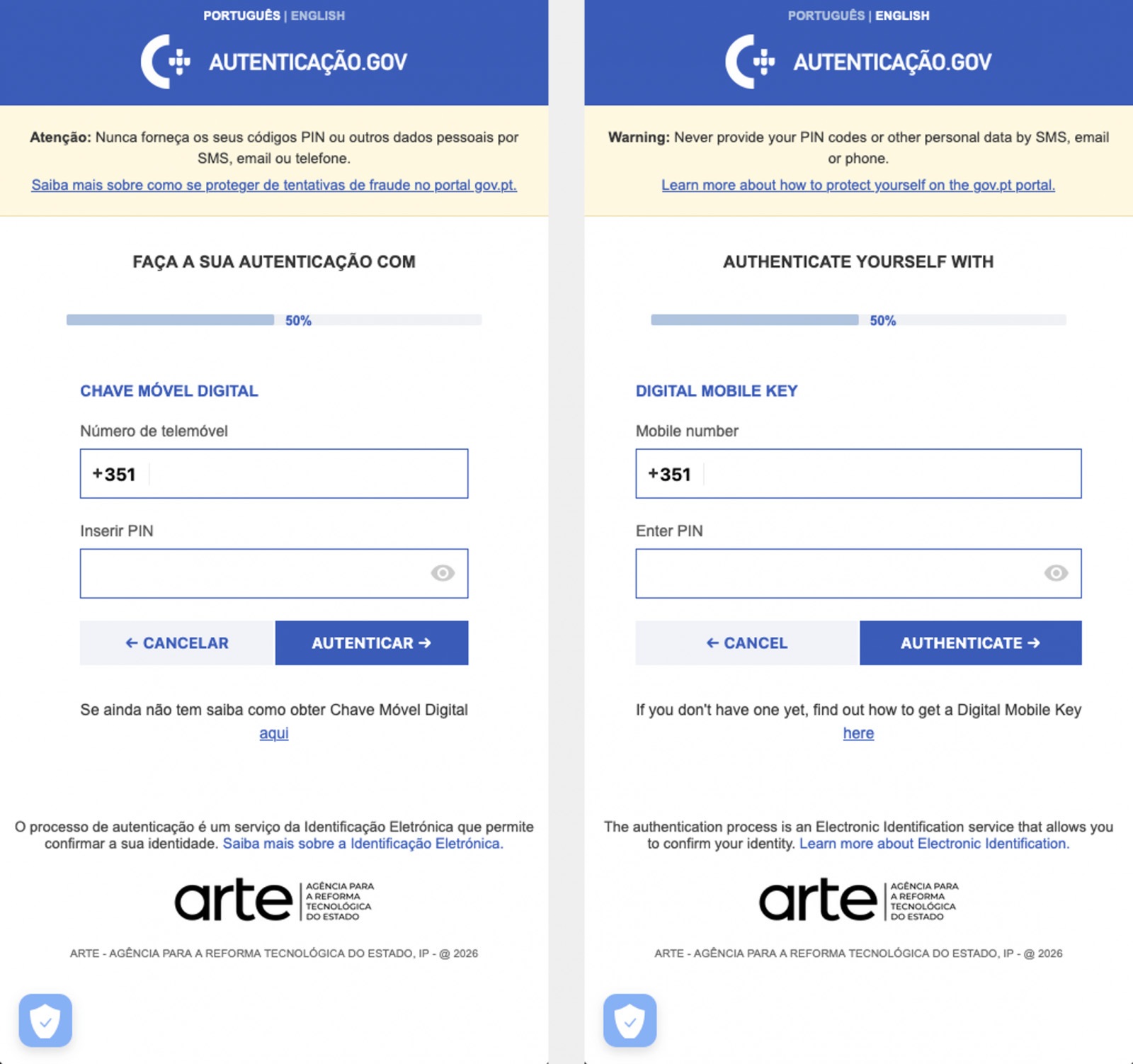
Displaying fake windows on top of legitimate ones: fake forms for entering bank details or signing in to official services, as shown in the screenshot below.
Activating a keylogger: recording and transmitting screen keyboard taps to the attackers.
Hijacking control of the compromised device.
The Massiv banking Trojan mimics the interface of the Portuguese government app Chave Móvel Digital in a fake pop-up window, looking even more convincing than the official version from Google Play. Source
Perseus steals valuable information from users’ notes
In March, researchers reported on a new campaign where several fake IPTV apps were used to distribute an even more advanced and feature-rich malware strain: Perseus.
Research into Perseus shows that the malware is based on the source code of an Android banking Trojan called Cerberus, which leaked nearly six years ago. Perseus comes in two different versions: Turkish and English. The English-language version is more advanced and shows clear signs of AI-driven refinement.
Perseus abuses Accessibility Services, a set of Android features originally designed to make life easier for users with severe visual impairments. Fraudsters learned long ago how to leverage this tool to steal data from Android devices — a topic we’ve covered in detail across several of our posts.
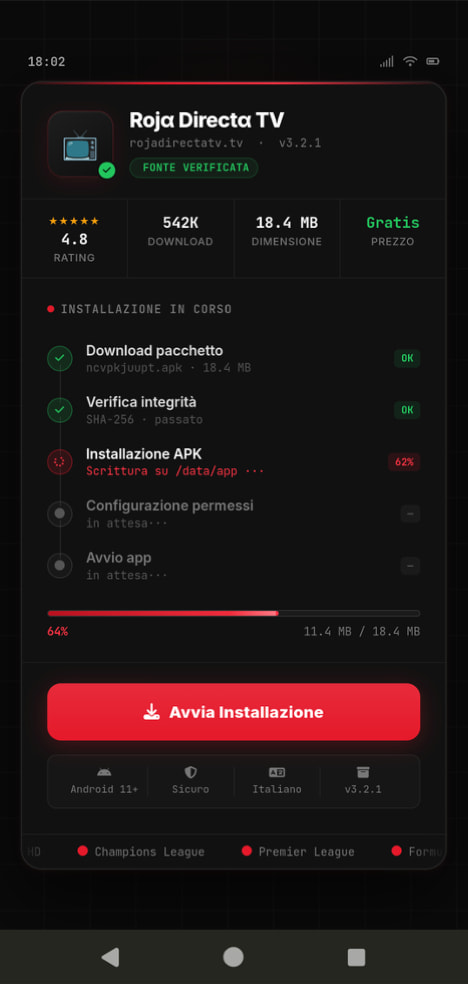
An example of a malicious APK disguised as Roja Directa TV, another IPTV app. Source
By abusing Accessibility Services, Perseus gains remote control over the victim’s device. Here’s what it can do:
Continuously capture and exfiltrate screenshots.
Send a structured map of the device’s UI for remote manipulation.
Mimic taps, swipes, text input, long presses, and other UI interactions.
Turn on the screen, launch apps, and block them from running.
Trigger a pitch-black screen overlay to hide its activities.
Log keystrokes.
On top of that, the English-language version of Perseus boasts another notable feature. The malware can hunt for sensitive information like passwords, recovery phrases, and financial data across an entire range of note-taking apps: Google Keep, Xiaomi Notes, Samsung Notes, ColorNote, Evernote, Microsoft OneNote, and Simple Notes.
All of these capabilities help criminals drain football fans’ money not just from various banking services, but from cryptocurrency apps as well.
How not to let cybercrooks ruin your World Cup
The World Cup is just around the corner, and millions of fans worldwide will definitely want to tune in to this year’s premier football event. Past experience shows that cybercriminals frequently cash in on major spectacles like this. So, how can you watch the matches safely?
Don’t download apps from unofficial stores.
Even when downloading an app from an official store — since malware occasionally slips through the cracks there, too— read the reviews carefully. Users who have been burned by fakes and malware often leave comments to warn others.
Avoid storing passwords or other sensitive information in note-taking apps. To ensure your data and finances stay secure, use a reliable password manager. By the way, Kaspersky Password Manager includes an encrypted note-taking feature, allowing you to store your valuable information safely.
You can’t even watch TV safely anymore these days! Check out other threats facing TV lovers:
Imagine handing your smartphone over for repair. A couple of days later, you pick it up — and great, it’s working again! But you won’t even realize that your device has been injected with malicious code, allowing attackers to access your smartphone even when it’s locked.
This is the beginning of the story shared by Kaspersky ICS CERT researchers, Alexander Kozlov and Sergey Anufrienko, at the Black Hat Asia 2026 conference. They managed to uncover a vulnerability that flips conventional assumptions about smartphone and IoT security on their head. Its core lies at the very heart of Qualcomm chips.
What is BootROM?
To grasp the severity of this discovery, we first need to look at how a modern device powered by a Qualcomm chip boots up. Think of it as a fortress with multiple layers of security. Each subsequent layer verifies the pass issued by the previous one. The bedrock foundation — the most trusted layer of them all — is the BootROM, a read-only memory baked directly into the silicon that can’t be modified once it comes off the fab.
The BootROM is the very first thing to run when a device powers on. It verifies the signature of the next bootloader, which in turn verifies the next, building a chain of trust all the way up to the operating system. If an attacker can compromise this chain at the BootROM level, it’s game over: the malicious code will execute before the main operating system even has a chance to load.
This is exactly what attackers can do by exploiting the CVE-2026-25262 vulnerability discovered by Kaspersky ICS CERT researchers.
Emergency Download Mode as an entry point
The research began with a protocol called Sahara. This is a component of Emergency Download Mode (EDL). Manufacturers and service centers use it to revive bricked devices: the phone is connected to a computer via USB, and a special utility program signed by the manufacturer (in this case, Qualcomm) is uploaded to it.
Sahara is implemented directly within the ARM PBL (Primary Boot Loader) — the BootROM itself. This means the protocol runs before any operating system boots, before any user access privileges are checked, and before any security controls are activated. The device simply waits for a USB connection, ready to accept data.
The communication scheme looks simple: the device sends a handshake (HELLO) to the computer, the computer selects the mode, a cycle begins to upload the utility program in chunks, and finally, the device executes the uploaded code. And it was within the verification logic of these very file chunks that the vulnerability was identified.
Write-what-where: the core of the vulnerability
In technical terms, the bug introduced by the developers is classified as CWE-123: Write-What-Where Condition. This is about as bad as it gets when it comes to flaws in low-level programming. An attacker can write arbitrary data to an arbitrary address in the device memory.
Without diving too deep into the technical weeds, suffice it to say that by exploiting the discovered vulnerability, attackers can gain access to any data on the device, including user-entered passwords, files, contacts, geolocation data, as well as the hardware sensors like the camera and microphone. In certain scenarios, complete control over the device is possible. Just a few minutes of physical access to the device via a cable connection, and the gadget has been compromised. This creates a risk if you hand your smartphone over to a repair shop, pass it to someone else to set up and install apps on, or just leave it unattended.
Which devices are affected
The CVE-2026-25262 vulnerability affects the following Qualcomm chip series: MDM9x07, MDM9x45, MDM9x65, MSM8909, MSM8916, MSM8952, and SDX50 — every single version released to date, until the vulnerability is patched by the manufacturer.
These are no obsolete museum pieces. The MDM9207, which we used for the bulk of our research, is integrated into modem modules for the internet of things (IoT), industrial equipment, smart home devices, healthcare monitoring systems, logistics trackers, and banking terminals. The MSM8916 powers many budget smartphones, while the SDX50 is used in automotive control units.
How vulnerable devices get attacked
The catch is that the attacker needs physical access to the device to pull this off. In the real world, this translates to:
Smartphone repairs at third-party repair shops, where the phone is left for several hours
Customs checkpoints in certain countries, where devices are withheld, inspected, and then returned
Lost and found scams, where your phone is stolen, tampered with, and then mysteriously found
Corporate espionage via an insider or a rogue employee
With just a few minutes of physical access to the device an attacker can plant a backdoor so deep inside that standard research tools won’t even detect it in most cases.
Why there’s no patch — and what to do
Qualcomm was notified of the discovery in March 2025 and confirmed the vulnerability in its chips. To identify it, the vendor reserved CVE-2026-25262, and on April 20, 2026, Kaspersky ICS CERT published technical information on the vulnerability and recommendations for users.
Qualcomm included this vulnerability in its May security bulletin. While fixing already-made devices is fundamentally impossible, the company promised to make all future chips without this vulnerability.
If you currently own a device with an affected chip, use our recommendations below to help mitigate the risk of infection.
Enforce strict physical control: don’t leave your devices unattended, especially when traveling or on business trips.
Choose only authorized service centers for repairs and maintenance.
Regularly update your firmware — this won’t patch the BootROM vulnerability, but it can eliminate many related vulnerabilities at higher levels.
Use a Kaspersky for Android on your device. This will safeguard your gadget from other threats that, combined with this vulnerability, could lead to unpredictable consequences.
If you notice that your gadget with a vulnerable Qualcomm chip starts acting up — overheating when idle, reporting unexpected spikes in network traffic, or exhibiting strange app behavior — you may have fallen victim to this vulnerability. You can wipe the malicious code and reset your device to its baseline state simply by completely cutting its power. This means either pulling the battery or letting it drain all the way to zero until the gadget shuts down entirely. In this case, the malicious code will most likely not persist on the device — during our research, we were unable to confirm that it could achieve persistence in non-volatile memory.
Want to learn more about severe vulnerabilities in Android phones? Check out these posts:
Netflix, Apple TV+, Disney+, Hulu, Amazon Prime, YouTube Premium… The average law-abiding family today pays for five to 10 subscriptions just to watch their shows of choice, with the monthly bill easily crossing the hundred-dollar mark. It’s no surprise, then, that social media and online marketplaces are seeing a surge in demand for the “magic boxes” that popped up at the end of 2025: Android-powered TV boxes that promise to unlock thousands of channels and every streaming service subscription-free for a one-time purchase.
Ads for these devices are flooding TikTok and Instagram: smiling influencers unbox the SuperBoxes, plug them into a TV, and browse endlessly through channels. It looks like the ultimate life hack against subscription fatigue, right? In reality, it’s one of the easiest ways to invite a botnet into your home network.
A promotional video on TikTok explaining how great it is when the cheese is free you can just go ahead and cancel all your subscriptions
What’s wrong with these cheap TV boxes?
Stories about malicious TV boxes have surfaced before, but right now, their marketing has reached a truly alarming scale.
At the end of 2025, analysts examined several models of the popular SuperBox device available from major retail stores and online marketplaces. The findings were deeply concerning: immediately upon powering up, the devices began pinging the servers of the Chinese messaging app Tencent QQ, as well as the Grass proxy service — effectively renting out the owner’s internet bandwidth to third parties.
Inside the firmware, researchers discovered applications completely uncharacteristic of a media player: a network scanner, a traffic analyzer, and tools for DNS hijacking. Consequently, the device not only streams pirated content but also scans the local network for other targets (including industrial SCADA interfaces), and stands ready to participate in DDoS attacks. The SuperBoxes were also found to contain folders with the telltale name “secondstage”, a textbook indication of multi-stage malware.
More recently, in April 2026, the Darknet Diaries podcast featured an interview with a security researcher known by the alias D3ada55, who shared plenty of intriguing details about these boxes — including the fact that they were still openly sold on major platforms like Amazon, Walmart, and Best Buy.
The infection chronicles: BADBOX to Keenadu
The SuperBox case is far from the only instance where Android devices have been turned into botnet nodes — or sold infected right out of the box. Here’s a look at the most recent cases:
BADBOX 2.0. In July 2025, Google filed a lawsuit against the operators of a botnet that compromised over 10 million Android devices — mostly cheap TV boxes, tablets, and projectors lacking Google Play Protect certification. As we reported earlier, BADBOX 2.0 specifically targets TV boxes, operating simultaneously as a proxy network and an ad fraud engine.
Kimwolf. In December 2025, the QiAnXin XLab team uncovered a DDoS botnet that had hijacked around 1.8 million Android devices. The infected hardware included generic models from off-brand manufacturers sporting high-profile names like TV BOX, SuperBox, XBOX, SmartTV, and others. The infection footprint was massive, with compromised devices shipped worldwide. Among the hardest-hit countries were Brazil, India, the U.S., Argentina, South Africa, the Philippines, and Mexico.
Keenadu. Our experts discovered this malware lurking in the firmware of brand-new devices back November 2025, though it didn’t gain widespread attention until after we published a study about it in February 2026. Keenadu masquerades as legitimate system components, embedding itself even into facial-recognition unlock apps, potentially granting attackers access to biometrics, banking data, and personal messages.
All of these stories share the same origin: the Triada Trojan, first documented by our researchers back in 2016 and dubbed at the time “one of the most advanced mobile Trojans”. Over the past decade it has evolved from a standard piece of malware into a modular backdoor baked directly into firmware during manufacturing.
How the infection scheme works
Manufacturers of cheap TV boxes cut corners on absolutely everything: Google Play Protect certification, firmware audits, and security updates. Many of these devices run on the Android Open Source Project without any security guarantees whatsoever. Somewhere along the supply chain — whether at the factory, through a middleman, or at a distributor — a backdoor gets injected into the firmware image. Our experts suspect that the manufacturer itself might not even be aware of the compromise.
The sheer scale of the infection turns millions of identical boxes into the perfect foundation for a botnet: every compromised device represents a unique IP address that can be rented out to anyone. Botnet operators like Kimwolf monetize this not only through distributed DDoS attacks but also by reselling the bandwidth of infected smart TVs and streaming boxes.
What this means for you
An infected TV box sits right in your living room, connected to your home Wi-Fi. That means it can see smartphones running banking apps, network-attached storage (NAS) units holding family archives, IP cameras, smart locks, work laptops, and any other the devices connected to your Wi-Fi network.
With this kind of beachhead inside your home network, an attacker can intercept unencrypted traffic, spoof DNS requests, scan ports, and hunt for vulnerabilities on neighboring devices. On top of that, they can use your IP address for fraudulent activity. As a result, in the best-case scenario, your IP will end up blacklisted, and legitimate services will start blocking you for suspicious activity; in the worst-case scenario, law enforcement could come knocking on your door.
How to spot a potentially dangerous gadget
You should be on alert if a device:
Is sold under a no-name brand like T95, X96Q, MX10, TV BOX, SuperBox, or some such
Promises free lifetime access to paid premium services for a one-time fee
Requires you to disable Google Play Protect, or install third-party APK files during the initial setup
Lacks Play Protect certification entirely
Is promoted through aggressive spam campaigns on social media
How to avoid hosting a botnet node
Buy certified TV boxes that feature Google Play Protect, or purchase devices directly from reputable telecom operators and internet service providers.
Isolate all smart home devices. Set up a separate Wi-Fi network on your home router for TV boxes, cameras, smart speakers, robot vacuums, and similar gear, while keeping smartphones, NAS units, and computers on the main network. This prevents malware from spreading to your critical gadgets.
Regularly update the firmware on all your devices, and don’t forget about your router — it’s another vulnerable link in the chain.
Remove any applications from your Android TV box that you didn’t install yourself, especially alternative app stores, Wi-Fi “boosters”, and “system cleaners”.
Monitor your traffic. Modern routers and Kaspersky Premium can display which devices are connecting to where. Frequent connections from a media player to servers in China are a major security red flag.
Install Kaspersky Premiumon all your devices — it protects against Trojans, and blocks the phishing pages often used to distribute infected APK files.
Don’t disable Google Play Protect, and avoid installing APKs from shady sources — this is the primary infection vector that bypasses the official app store.
If in doubt, return the TV box. A cheap streaming device isn’t worth risking your biometrics, banking data, or the reputation of your IP address.
Want to know how else to protect your smart home devices? Read more in our related posts:
In the third quarter of 2025, we updated the methodology for calculating statistical indicators based on the Kaspersky Security Network. These changes affected all sections of the report except for the statistics on installation packages, which remained unchanged.
To illustrate the differences between the reporting periods, we have also recalculated data for the previous quarters. Consequently, these figures may significantly differ from the previously published ones. However, subsequent reports will employ this new methodology, enabling precise comparisons with the data presented in this post.
The Kaspersky Security Network (KSN) is a global network for analyzing anonymized threat information, voluntarily shared by users of Kaspersky solutions. The statistics in this report are based on KSN data unless explicitly stated otherwise.
The quarter in numbers
According to Kaspersky Security Network, in Q1 2026:
More than 2.67 million attacks utilizing malware, adware, or unwanted mobile software were prevented.
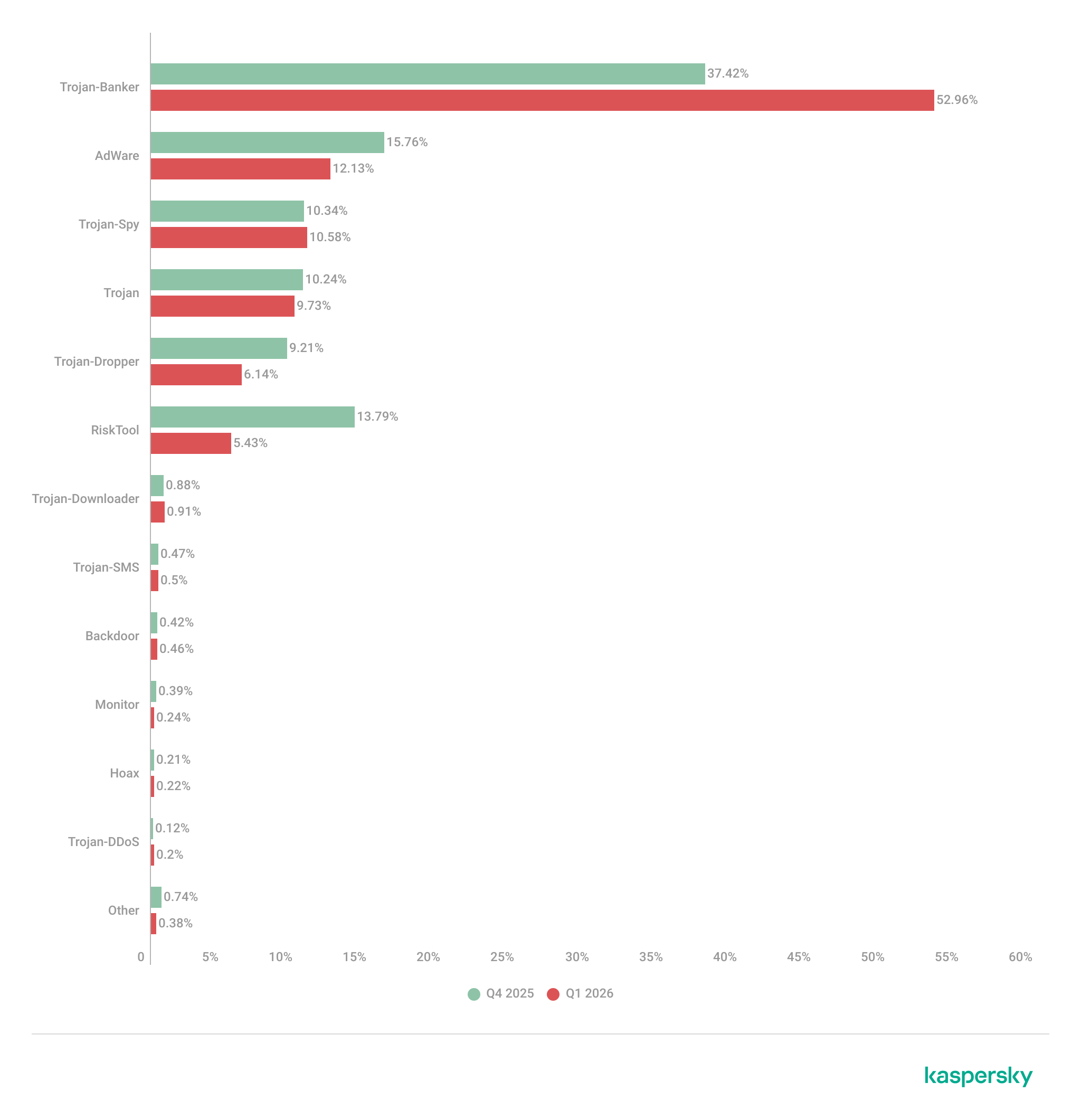
The Trojan-Banker category was the prevalent mobile malware threat with a 52.96% share of total detected applications.
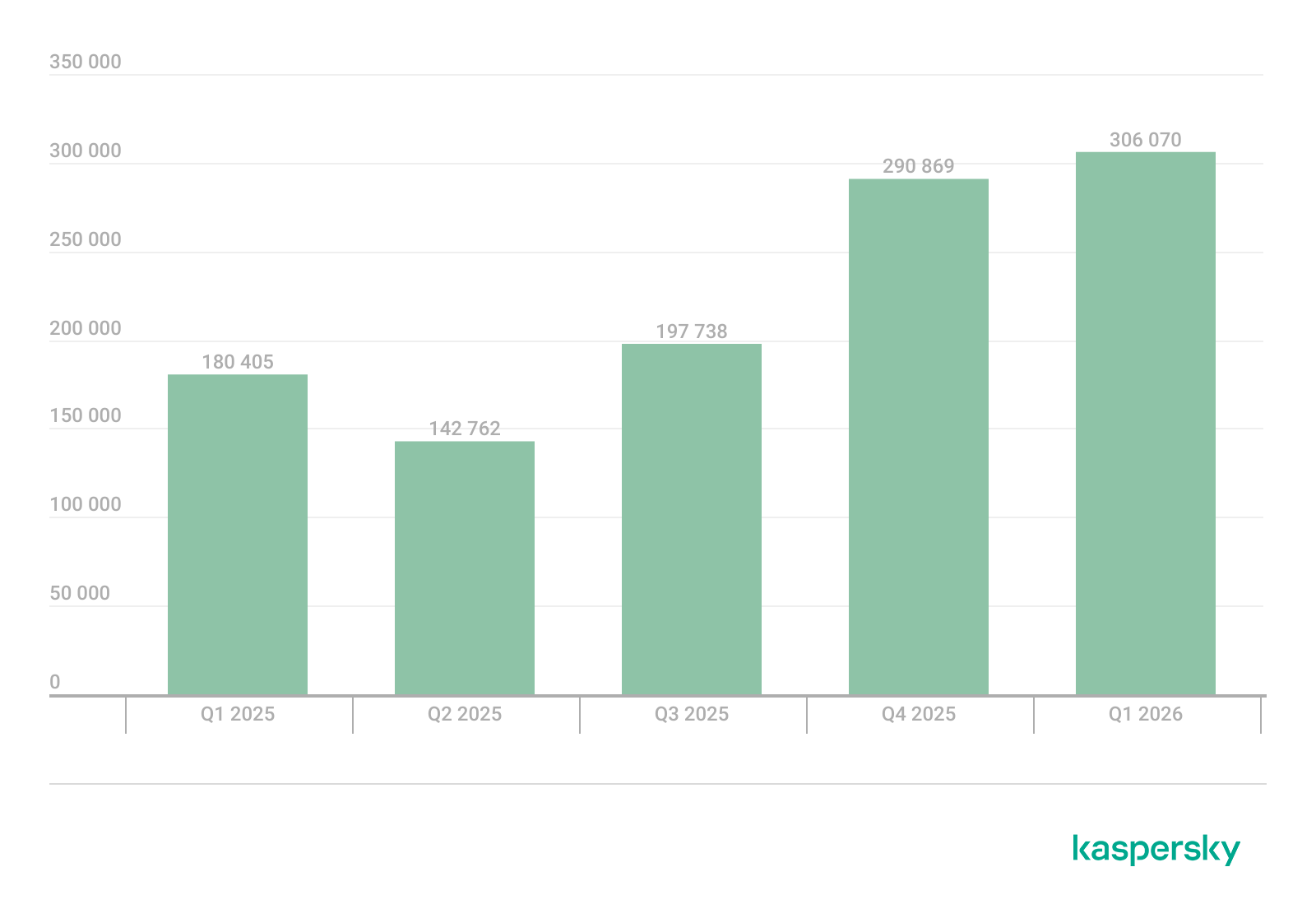
More than 306,000 malicious installation packages were discovered, including:
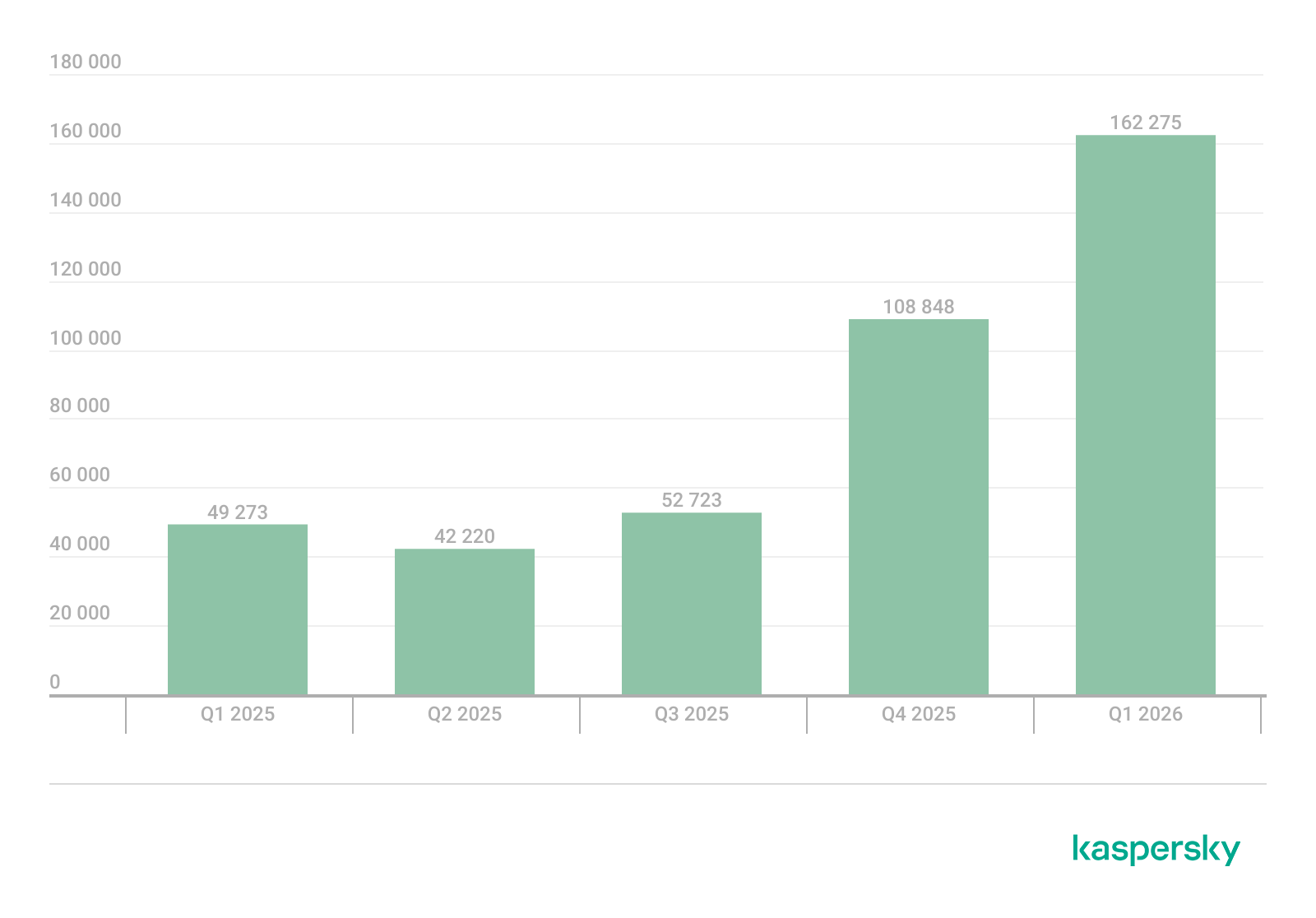
162,275 packages related to mobile banking Trojans;
439 packages related to mobile ransomware Trojans.
Quarterly highlights
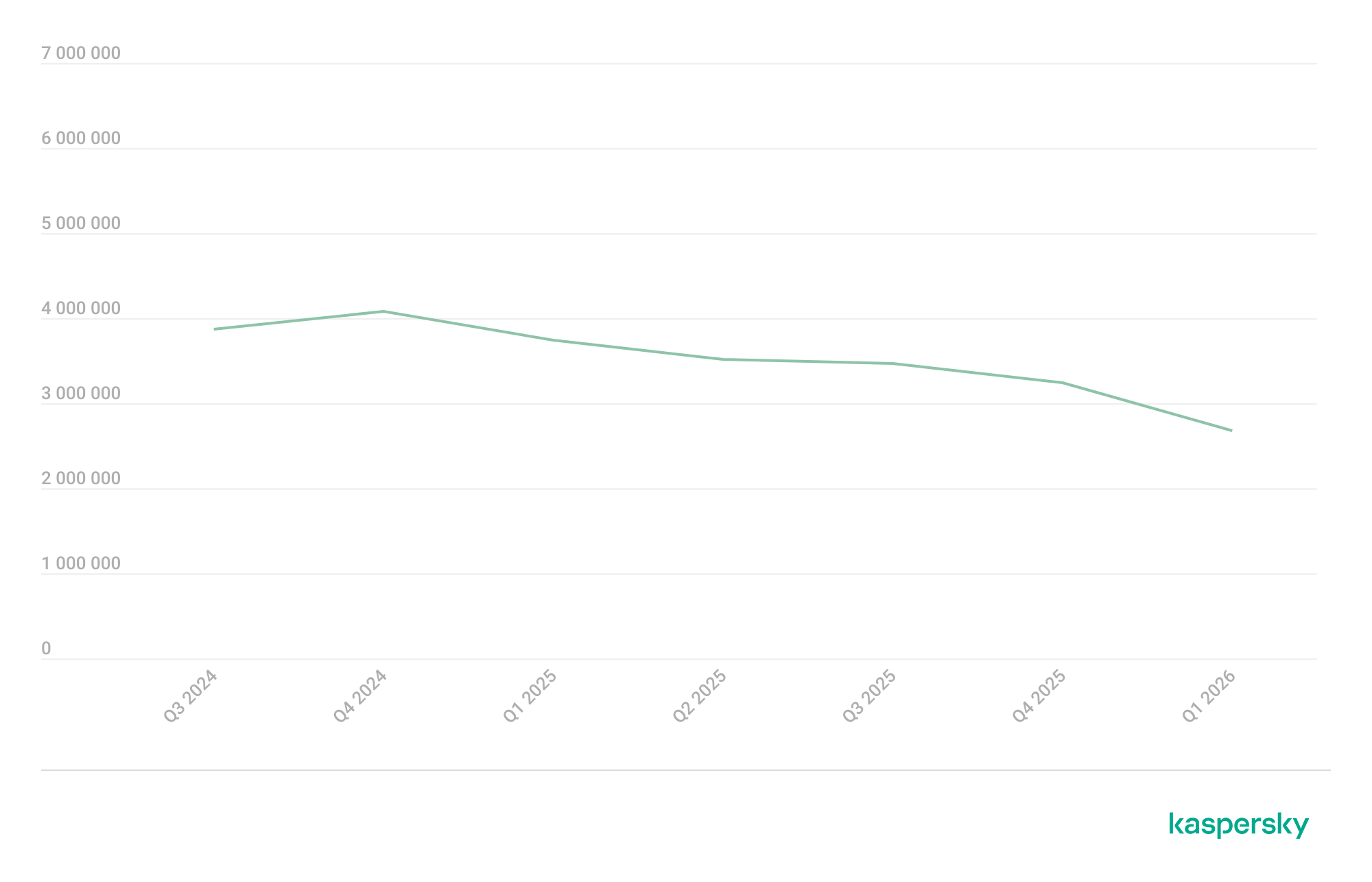
The number of malware, adware, or unwanted software attacks on mobile devices decreased to 2,676,328 in Q1, down from 3,239,244 in the previous quarter.
Attacks on users of Kaspersky mobile solutions, Q3 2024 — Q1 2026 (download)
The overall drop in attack volume stems primarily from a reduction in adware and RiskTool detections. Nonetheless, this trend does not equate to a lower risk for mobile users. As shown later in this report, the number of unique users targeted by these threats remained relatively stable.
In Q1, Synthient researchers identified a link between the notorious Kimwolf botnet and the IPIDEA proxy network. This network was later taken down in cooperation with GTIG.
In early 2026, we discovered several apps on Google Play and the App Store that contained a new version of the SparkCat crypto stealer.
The Trojan code, meticulously concealed, was embedded into the infected Android apps. The obfuscated malicious Rust library was decrypted using a Dalvik-like virtual machine custom-built by the attackers. The iOS version of the malware also underwent several changes; specifically, the attackers began leveraging Apple’s proprietary Vision framework for optical character recognition (OCR).
Mobile threat statistics
The number of Android malware samples saw a slight increase compared to Q4 2025, reaching a total of 306,070.
The detected installation packages were distributed by type as follows:
Detected mobile apps by type, Q4 2025* — Q1 2026 (download)
* Data for the previous quarter may differ slightly from previously published figures due to certain verdicts being retrospectively revised.
Threat actors once again ramped up the production of new banking Trojans; as a result, this category overtook all others in volume, accounting for more than half of all installation packages.
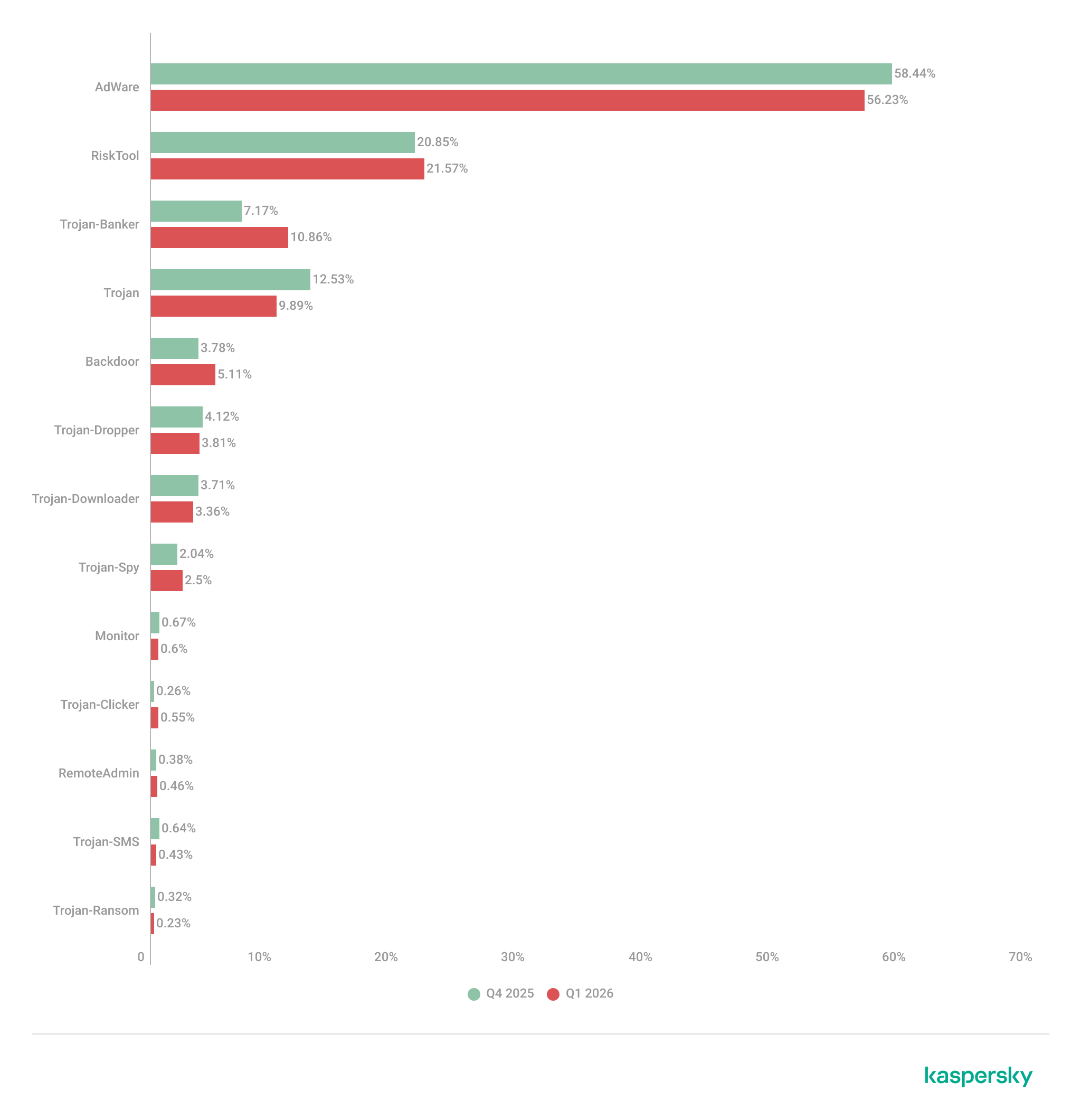
Share* of users attacked by the given type of malicious or potentially unwanted app out of all targeted users of Kaspersky mobile products, Q4 2025 — Q1 2026 (download)
* The total percentage may exceed 100% if the same users encountered multiple attack types.
Following the surge in banking Trojan installation packages, the number of associated attacks also rose, causing Trojan-Banker apps to climb one spot in terms of their share of targeted users. Mamont variants emerged as the most prevalent banking Trojans, accounting for 73.5% of detections, with the rest of the users encountering Faketoken, Rewardsteal, Creduz, and other families.
Yet banking Trojans were still outpaced by adware and RiskTool-type unwanted apps when measured by the total number of affected users. Despite a decrease in their share of installation packages, these two app types retained their positions as the top two threats by attack volume. The most common adware detections involved HiddenAd (44.9%) and MobiDash (38.1%), while most frequently seen RiskTool apps were Revpn (67%) and SpyLoan (20.5%).
TOP 20 most frequently detected types of mobile malware
Note that the malware rankings below exclude riskware or potentially unwanted software, such as RiskTool or adware.
Verdict
%* Q4 2025
%* Q1 2026
Difference in p.p.
Change in ranking
Backdoor.AndroidOS.Triada.ag
2.62
7.09
+4.48
+10
DangerousObject.Multi.Generic.
6.75
5.84
-0.92
-1
DangerousObject.AndroidOS.GenericML.
3.52
5.51
+1.99
+6
Trojan-Banker.AndroidOS.Mamont.jo
0.00
5.28
+5.28
Trojan.AndroidOS.Fakemoney.v
5.40
3.44
-1.96
-1
Trojan-Downloader.AndroidOS.Keenadu.l
0.00
3.35
+3.35
Trojan-Banker.AndroidOS.Mamont.jx
0.00
3.09
+3.09
Backdoor.AndroidOS.Triada.z
4.87
3.08
-1.79
-2
Trojan.AndroidOS.Triada.fe
5.01
2.98
-2.02
-4
Backdoor.AndroidOS.Keenadu.a
2.07
2.73
+0.66
+6
Trojan-Banker.AndroidOS.Mamont.jg
0.34
2.37
+2.03
Trojan.AndroidOS.Triada.hf
2.15
2.23
+0.07
+3
Trojan.AndroidOS.Boogr.gsh
2.35
2.15
-0.20
0
Trojan.AndroidOS.Triada.ii
5.68
2.07
-3.60
-11
Backdoor.AndroidOS.Triada.ae
1.91
1.76
-0.16
+3
Backdoor.AndroidOS.Triada.ab
1.79
1.72
-0.08
+3
Trojan.AndroidOS.Triada.gn
2.38
1.58
-0.80
-5
Trojan-Banker.AndroidOS.Mamont.gg
1.56
1.50
-0.06
+2
Trojan.AndroidOS.Triada.ga
1.48
1.50
+0.01
+4
Backdoor.AndroidOS.Triada.ad
0.53
1.40
+0.87
+44
* Unique users who encountered this malware as a percentage of all attacked users of Kaspersky mobile solutions.
The pre-installed Triada.ag backdoor rose to the top spot; it is similar to the older Triada.z version we documented previously. Because the same variant was pre-installed across a wide range of devices, the total number of affected users is aggregated. Consequently, Triada outpaced even Mamont, as users encountered a variety of Mamont variants, causing the share of that banking Trojan to spread across multiple rows. Other pre-installed Triada variants (Triada.z, Triada.ae, Triada.ab, and Triada.ad) also made the rankings. Furthermore, we observed increasing activity from the Keenadu.a backdoor, while diverse variants of the embedded Triada Trojan remained in the rankings.
Mobile banking Trojans
Q1 2026 saw a characteristic rise in mobile banking Trojan activity, with the number of packages totaling 162,275, a 50% increase compared to the prior quarter.
Number of installation packages for mobile banking Trojans detected by Kaspersky, Q1 2025 — Q1 2026 (download)
We saw a similar growth in the previous quarter, with banking Trojan volumes rising by 50% during that period as well. Various Mamont variants accounted for the absolute majority of packages and represented nearly every entry in the rankings of most frequent banking Trojans by affected user count.
TOP 10 mobile bankers
Verdict
%* Q4 2025
%* Q1 2026
Difference in p.p.
Change in ranking
Trojan-Banker.AndroidOS.Mamont.jo
0.00
15.75
+15.75
Trojan-Banker.AndroidOS.Mamont.jx
0.00
9.22
+9.22
Trojan-Banker.AndroidOS.Mamont.jg
1.47
7.08
+5.61
+24
Trojan-Banker.AndroidOS.Mamont.gg
6.79
4.48
-2.32
-3
Trojan-Banker.AndroidOS.Mamont.ks
0.00
3.98
+3.98
Trojan-Banker.AndroidOS.Agent.ws
6.03
3.78
-2.25
-2
Trojan-Banker.AndroidOS.Mamont.hl
4.30
3.27
-1.03
+1
Trojan-Banker.AndroidOS.Mamont.iv
6.00
3.08
-2.92
-3
Trojan-Banker.AndroidOS.Mamont.jb
3.93
3.07
-0.86
+1
Trojan-Banker.AndroidOS.Mamont.jv
0.00
2.79
+2.79
* Unique users who encountered this malware as a percentage of all users of Kaspersky mobile security solutions who encountered banking threats.
In the third quarter of 2025, we updated the methodology for calculating statistical indicators based on the Kaspersky Security Network. These changes affected all sections of the report except for the statistics on installation packages, which remained unchanged.
To illustrate the differences between the reporting periods, we have also recalculated data for the previous quarters. Consequently, these figures may significantly differ from the previously published ones. However, subsequent reports will employ this new methodology, enabling precise comparisons with the data presented in this post.
The Kaspersky Security Network (KSN) is a global network for analyzing anonymized threat information, voluntarily shared by users of Kaspersky solutions. The statistics in this report are based on KSN data unless explicitly stated otherwise.
The quarter in numbers
According to Kaspersky Security Network, in Q1 2026:
More than 2.67 million attacks utilizing malware, adware, or unwanted mobile software were prevented.
The Trojan-Banker category was the prevalent mobile malware threat with a 52.96% share of total detected applications.
More than 306,000 malicious installation packages were discovered, including:
162,275 packages related to mobile banking Trojans;
439 packages related to mobile ransomware Trojans.
Quarterly highlights
The number of malware, adware, or unwanted software attacks on mobile devices decreased to 2,676,328 in Q1, down from 3,239,244 in the previous quarter.
Attacks on users of Kaspersky mobile solutions, Q3 2024 — Q1 2026 (download)
The overall drop in attack volume stems primarily from a reduction in adware and RiskTool detections. Nonetheless, this trend does not equate to a lower risk for mobile users. As shown later in this report, the number of unique users targeted by these threats remained relatively stable.
In Q1, Synthient researchers identified a link between the notorious Kimwolf botnet and the IPIDEA proxy network. This network was later taken down in cooperation with GTIG.
In early 2026, we discovered several apps on Google Play and the App Store that contained a new version of the SparkCat crypto stealer.
The Trojan code, meticulously concealed, was embedded into the infected Android apps. The obfuscated malicious Rust library was decrypted using a Dalvik-like virtual machine custom-built by the attackers. The iOS version of the malware also underwent several changes; specifically, the attackers began leveraging Apple’s proprietary Vision framework for optical character recognition (OCR).
Mobile threat statistics
The number of Android malware samples saw a slight increase compared to Q4 2025, reaching a total of 306,070.
The detected installation packages were distributed by type as follows:
Detected mobile apps by type, Q4 2025* — Q1 2026 (download)
* Data for the previous quarter may differ slightly from previously published figures due to certain verdicts being retrospectively revised.
Threat actors once again ramped up the production of new banking Trojans; as a result, this category overtook all others in volume, accounting for more than half of all installation packages.
Share* of users attacked by the given type of malicious or potentially unwanted app out of all targeted users of Kaspersky mobile products, Q4 2025 — Q1 2026 (download)
* The total percentage may exceed 100% if the same users encountered multiple attack types.
Following the surge in banking Trojan installation packages, the number of associated attacks also rose, causing Trojan-Banker apps to climb one spot in terms of their share of targeted users. Mamont variants emerged as the most prevalent banking Trojans, accounting for 73.5% of detections, with the rest of the users encountering Faketoken, Rewardsteal, Creduz, and other families.
Yet banking Trojans were still outpaced by adware and RiskTool-type unwanted apps when measured by the total number of affected users. Despite a decrease in their share of installation packages, these two app types retained their positions as the top two threats by attack volume. The most common adware detections involved HiddenAd (44.9%) and MobiDash (38.1%), while most frequently seen RiskTool apps were Revpn (67%) and SpyLoan (20.5%).
TOP 20 most frequently detected types of mobile malware
Note that the malware rankings below exclude riskware or potentially unwanted software, such as RiskTool or adware.
Verdict
%* Q4 2025
%* Q1 2026
Difference in p.p.
Change in ranking
Backdoor.AndroidOS.Triada.ag
2.62
7.09
+4.48
+10
DangerousObject.Multi.Generic.
6.75
5.84
-0.92
-1
DangerousObject.AndroidOS.GenericML.
3.52
5.51
+1.99
+6
Trojan-Banker.AndroidOS.Mamont.jo
0.00
5.28
+5.28
Trojan.AndroidOS.Fakemoney.v
5.40
3.44
-1.96
-1
Trojan-Downloader.AndroidOS.Keenadu.l
0.00
3.35
+3.35
Trojan-Banker.AndroidOS.Mamont.jx
0.00
3.09
+3.09
Backdoor.AndroidOS.Triada.z
4.87
3.08
-1.79
-2
Trojan.AndroidOS.Triada.fe
5.01
2.98
-2.02
-4
Backdoor.AndroidOS.Keenadu.a
2.07
2.73
+0.66
+6
Trojan-Banker.AndroidOS.Mamont.jg
0.34
2.37
+2.03
Trojan.AndroidOS.Triada.hf
2.15
2.23
+0.07
+3
Trojan.AndroidOS.Boogr.gsh
2.35
2.15
-0.20
0
Trojan.AndroidOS.Triada.ii
5.68
2.07
-3.60
-11
Backdoor.AndroidOS.Triada.ae
1.91
1.76
-0.16
+3
Backdoor.AndroidOS.Triada.ab
1.79
1.72
-0.08
+3
Trojan.AndroidOS.Triada.gn
2.38
1.58
-0.80
-5
Trojan-Banker.AndroidOS.Mamont.gg
1.56
1.50
-0.06
+2
Trojan.AndroidOS.Triada.ga
1.48
1.50
+0.01
+4
Backdoor.AndroidOS.Triada.ad
0.53
1.40
+0.87
+44
* Unique users who encountered this malware as a percentage of all attacked users of Kaspersky mobile solutions.
The pre-installed Triada.ag backdoor rose to the top spot; it is similar to the older Triada.z version we documented previously. Because the same variant was pre-installed across a wide range of devices, the total number of affected users is aggregated. Consequently, Triada outpaced even Mamont, as users encountered a variety of Mamont variants, causing the share of that banking Trojan to spread across multiple rows. Other pre-installed Triada variants (Triada.z, Triada.ae, Triada.ab, and Triada.ad) also made the rankings. Furthermore, we observed increasing activity from the Keenadu.a backdoor, while diverse variants of the embedded Triada Trojan remained in the rankings.
Mobile banking Trojans
Q1 2026 saw a characteristic rise in mobile banking Trojan activity, with the number of packages totaling 162,275, a 50% increase compared to the prior quarter.
Number of installation packages for mobile banking Trojans detected by Kaspersky, Q1 2025 — Q1 2026 (download)
We saw a similar growth in the previous quarter, with banking Trojan volumes rising by 50% during that period as well. Various Mamont variants accounted for the absolute majority of packages and represented nearly every entry in the rankings of most frequent banking Trojans by affected user count.
TOP 10 mobile bankers
Verdict
%* Q4 2025
%* Q1 2026
Difference in p.p.
Change in ranking
Trojan-Banker.AndroidOS.Mamont.jo
0.00
15.75
+15.75
Trojan-Banker.AndroidOS.Mamont.jx
0.00
9.22
+9.22
Trojan-Banker.AndroidOS.Mamont.jg
1.47
7.08
+5.61
+24
Trojan-Banker.AndroidOS.Mamont.gg
6.79
4.48
-2.32
-3
Trojan-Banker.AndroidOS.Mamont.ks
0.00
3.98
+3.98
Trojan-Banker.AndroidOS.Agent.ws
6.03
3.78
-2.25
-2
Trojan-Banker.AndroidOS.Mamont.hl
4.30
3.27
-1.03
+1
Trojan-Banker.AndroidOS.Mamont.iv
6.00
3.08
-2.92
-3
Trojan-Banker.AndroidOS.Mamont.jb
3.93
3.07
-0.86
+1
Trojan-Banker.AndroidOS.Mamont.jv
0.00
2.79
+2.79
* Unique users who encountered this malware as a percentage of all users of Kaspersky mobile security solutions who encountered banking threats.
Posted by Jiacheng Lu, Software Engineer, Google Pixel Team
Google is continuously advancing the security of Pixel devices. We have been focusing on hardening the cellular baseband modem against exploitation. Recognizing the risks associated within the complex modem firmware, Pixel 9 shipped with mitigations against a range of memory-safety vulnerabilities. For Pixel 10, Google is advancing its proactive security measures further. Following our previous discussion on "Deploying Rust in Existing Firmware Codebases", this post shares a concrete application: integrating a memory-safe Rust DNS(Domain Name System) parser into the modem firmware. The new Rust-based DNS parser significantly reduces our security risk by mitigating an entire class of vulnerabilities in a risky area, while also laying the foundation for broader adoption of memory-safe code in other areas.
Here we share our experience of working on it, and hope it can inspire the use of more memory safe languages in low-level environments.
Why Modem Memory Safety Can’t Wait
In recent years, we have seen increasing interest in the cellular modem from attackers and security researchers. For example, Google's Project Zero gained remote code execution on Pixel modems over the Internet. Pixel modem has tens of Megabytes of executable code. Given the complexity and remote attack surface of the modem, other critical memory safety vulnerabilities may remain in the predominantly memory-unsafe firmware code.
Why DNS?
The DNS protocol is most commonly known in the context of browsers finding websites. With the evolution of cellular technology, modern cellular communications have migrated to digital data networks; consequently, even basic operations such as call forwarding rely on DNS services.
DNS is a complex protocol and requires parsing of untrusted data, which can lead to vulnerabilities, particularly when implemented in a memory-unsafe language (example: CVE-2024-27227). Implementing the DNS parser in Rust offers value by decreasing the attack surfaces associated with memory unsafety.
Picking a DNS library
DNS already has a level of support in the open-source Rust community. We evaluated multiple open source crates that implement DNS. Based on criteria shared in earlier posts, we identified hickory-proto as the best candidate. It has excellent maintenance, over 75% test coverage, and widespread adoption in the Rust community. Its pervasiveness shows its potential as the de-facto DNS choice and long term support. Although hickory-proto initially lacked no_std support, which is needed for Bare-metal environments (see our previous post on this topic), we were able to add support to it and its dependencies.
Adding no_std support
The work to enable no_std for hickory-proto is mostly mechanical. We shared the process in a previous post. We undertook modifications to hickory_proto and its dependencies to enable no_std support. The upstream no_std work also results in a no_std URL parser, beneficial to other projects.
We built prototypes and measured size with size-optimized settings. Expectedly, hickory_proto is not designed with embedded use in mind, and is not optimized for size. As the Pixel modem is not tightly memory constrained, we prioritized community support and code quality, leaving code size optimizations as future work.
However, the additional code size may be a blocker for other embedded systems. This could be addressed in the future by adding additional feature flags to conditionally compile only required functionality. Implementing this modularity would be a valuable future work.
Hook-up Rust to modem firmware
Before building the Rust DNS library, we defined several Rust unit tests to cover basic arithmetic, dynamic allocations, and FFI to verify the integration of Rust with the existing modem firmware code base.
Compile Rust code to staticlib
While using cargo is the default choice for compilation in the Rust ecosystem, it presents challenges when integrating it into existing build systems. We evaluated two options:
Using cargo to build a staticlib before the modem builds. Then add the produced staticlib into the linking step.
Directly work with rustc and integrate the Rust compilation steps into the existing modem build system.
Option #1 does not scale if we are going to add more Rust components in the future, as linking multiple staticlibs may cause duplicated symbol errors. We chose option #2 as it scales more easily and allows tighter integration into our existing build system. Our existing C/C++ codebase uses Pigweed to drive the primary build system. Pigweed supports Rust targets (example) with direct calls to rustc through rust tools defined in GN.
We compiled all the Rust crates, including hickory-proto, its dependencies, and core, compiler_builtin, alloc, to rlib. Then, we created a staticlib target with a single lib.rs file which references all the rlib crates using extern crate keywords.
Build core, alloc, and compiler_builtins
Android’s Rust Toolchain distributes source code of core, alloc, and compiler_builtins, and we leveraged this for the modem. They can be included to the build graph by adding a GN target with crate_root pointing to the root lib.rs of each crate.
Pixel modem firmware already has a well-tested and specialized global memory allocation system to support some dynamic memory allocations. alloc support was added by implementing the GlobalAlloc with FFI calls to the allocators C APIs:
Pixel modem firmware already implements a backend for the Pigweed crash facade as the global crash handler. Exposing it into Rust panic_handler through FFI unifies the crash handling for both Rust and C/C++ code.
#![no_std]
use core::panic::PanicInfo;

extern "C" {
    pub fn PwCrashBackend(sigature: *const i8, file_name: *const i8, line: u32);
}

#[panic_handler]
fn panic(panic_info: &PanicInfo) -> ! {
    let mut filename = "";
    let mut line_number: u32 = 0;

    if let Some(location) = panic_info.location() {
        filename = location.file();
        line_number = location.line();
    }

    let mut cstr_buffer = [0u8; 128];
    // Never writes to the last byte to make sure `cstr_buffer` is always zero
    // terminated.
    let (_, writer) = cstr_buffer.split_last_mut().unwrap();
    for (place, ch) in writer.iter_mut().zip(filename.bytes()) {
        *place = ch;
    }

    unsafe {
        PwCrashBackend(
            "Rust panic\0".as_ptr() as *const i8,
            cstr_buffer.as_ptr() as *const i8,
            line_number,
        );
    }

    loop {}
}
Link Rust staticlib
The Pixel modem firmware linking has a step that calls the linker to link all the objects generated from C/C++ code. By using llvm-ar -x to extract object files from the Rust combined staticlib and supplying them to the linker, the Rust code appears in the final modem image.
There was a performance issue we experienced due to weak symbols during linking. The inclusion of Rust core and compiler-builtin caused unexpected power and performance regressions on various tests. Upon analysis, we realized that modem optimized implementations of memset and memcpy provided by the modem firmware are accidentally replaced by those defined in compiler_builtin. It seems to happen because both compiler_builtin crate and the existing codebase defines symbols as weak, linker has no way to figure out which one is weaker. We fixed the regression by stripping the compiler_builtin crate before linking using a one line shell script.
For the DNS parser, we declared the DNS response parsing API in C and then implemented the same API in Rust.
int32_t process_dns_response(uint8_t*, int32_t);
The Rust function returns an integer standing for the error code. The received DNS answers in the DNS response are required to be updated to in-memory data structures that are coupled with the original C implementation, therefore, we use existing C functions to do it. The existing C functions are dispatched from the Rust implementation.
pub unsafe extern "C" fn process_dns_response(
    dns_response: *const u8,
    response_len: i32,
) -> i32 {
    //... validate inputs `dns_response` and `response_len`.


    // SAFETY:
    // It is safe because `dns_response` is null checked above. `response_len`
    // is passed in, safe as long as it is set correctly by vendor code.
    match process_response(unsafe {
        slice::from_raw_parts(dns_response, response_len)
    }) {
         Ok(()) => 0,
         Err(err) => err.into(),
    }
}

fn process_response(response: &[u8]) -> Result<()> {
    let response = hickory_proto::op::Message::from_bytes(response)?;
    let response = hickory_proto::xfer::DnsResponse::from_message(response)?;


    for answer in response.answers() {
        match answer.record_type() {
            hickory_proto::RecordType:... => {
                // SAFETY:
                // It is safe because the callback function does not store
                // reference of the inputs or their members.
                unsafe {
                    callback_to_c_function(...)?;
                }
            }

            // ... more match arms omitted.
        }
    }

    Ok(())
}
In our case, the DNS responding parsing function API is simple enough for us to hand write, while the callbacks back to C functions for handling the response have complex data type conversions. Therefore, we leveraged bindgen to generate FFI code for the callbacks.
Build third-party crates
Even with all features disabled, hickory-proto introduces more than 30 dependent crates. Manually written build rules are difficult to ensure correctness and scale poorly when upgrading dependencies into new versions.
Fuchsia has developed cargo-gnaw to support building their third party Rust crates. Cargo-gnaw works by invoking cargo metadata to resolve dependencies, then parse and generate GN build rules. This ensures correctness and ease of maintenance.
Conclusion
The Pixel 10 series of phones marks a pivotal moment, being the first Pixel device to integrate a memory-safe language into its modem.
While replacing one piece of risky attack surface is itself valuable, this project lays the foundation for future integration of memory-safe parsers and code into the cellular baseband, ensuring the baseband’s security posture will continue to improve as development continues.
Special thanks to Armando Montanez, Bjorn Mellem, Boky Chen, Cheng-Yu Tsai, Dominik Maier, Erik Gilling, Ever Rosales, Hungyen Weng, Ivan Lozano, James Farrell, Jeffrey Vander Stoep, Jiacheng Lu, Jingjing Bu, Min Xu, Murphy Stein, Ray Weng, Shawn Yang, Sherk Chung, Stephan Chen, Stephen Hines.
Posted by Eric Lynch, Product Manager, Android and Dom Elliott, Group Product Manager, Google Play
Modern digital security is at a turning point. We are on the threshold of using quantum computers to solve "impossible" problems in drug discovery, materials science, and energy—tasks that even the most powerful classical supercomputers cannot handle. However, the same unique ability to consider different options simultaneously also allows these machines to bypass our current digital locks. This puts the public-key cryptography we’ve relied on for decades at risk, potentially compromising everything from bank transfers to trade secrets. To secure our future, it is vital to adopt the new Post-Quantum Cryptography (PQC) standards National Institute of Standards and Technology (NIST) is urging before large-scale, fault-tolerant quantum computers become a reality.
To stay ahead of the curve, the technology industry must undertake a proactive, multi-year migration to Post-Quantum Cryptography (PQC). We have been preparing for a post-quantum world since 2016, conducting pioneering experiments with post-quantum cryptography, rolling out post-quantum capabilities in our products, and sharing our expertise through threat models and technical papers. For Android, the objective extends beyond patching individual applications or transport protocols. The imperative is to ensure that the entire platform architecture is resilient for the decades to come.
We are beginning tests of PQC enhancements starting in the next Android 17 beta, followed by general availability in the Android 17 production release. This deployment introduces a comprehensive architectural upgrade that is being rolled out across the operating system. By integrating the recently finalized NIST PQC standards deep into the platform, we’re establishing a new, quantum-resistant chain of trust. This chain of trust secures the platform continuously—from the moment the OS powers on, to the execution of applications distributed globally. Android is swapping today’s digital locks for advanced encryption to help enhance the security of every app you download—no matter how powerful future supercomputers get.
Securing the foundation: Verified boot and hardware trust
Security on any computing device begins when the hardware starts; if the underlying operating system is compromised, all subsequent software protections fail. As quantum computing advances, adversaries could potentially forge digital signatures to bypass these foundational integrity checks. To secure the platform against this looming threat, Android 17 introduces two major post-quantum cryptographic (PQC) upgrades:
Upgrading Android Verified Boot (AVB): The AVB library is integrating the Module-Lattice-Based Digital Signature Algorithm (ML-DSA). This provides quantum-resistant digital signatures, ensuring the software loaded during the boot sequence remains highly resistant to unauthorized modification.
Migrating Remote Attestation: Android 17 begins the transition of Remote Attestation to a fully PQC-compliant architecture under the current standards. By updating KeyMint's certificate chains to support quantum-resistant algorithms, devices can securely prove their state to relying parties, maintaining trust in a post-quantum environment.
Empowering developers: Android Keystore updates
Protecting the underlying operating system is only the first layer of defense; developers must be equipped with the cryptographic primitives necessary to leverage PQC keys and establish robust identity verification.
Implementing lattice-based cryptography, which requires significantly larger key sizes and memory footprints than classical elliptic curve cryptography, within the severely resource-constrained Trusted Execution Environment (TEE), represents a major engineering achievement. This capability is designed to support the hardware roots of trust and can now generate and verify post-quantum signatures.
Building on this hardware foundation, Android 17 updates Android Keystore to natively support ML-DSA. This allows applications to leverage quantum-safe signatures entirely within the device’s secure hardware, isolating sensitive key material from the main operating system. The SDK exposes both ML-DSA-65, and ML-DSA-87, enabling developers to seamlessly integrate these using the standard KeyPairGenerator API. This establishes a new era of identity and authentication for the app ecosystem without requiring developers to engineer proprietary cryptographic implementations.
Ecosystem scale: Bringing hybrid signing to Google Play apps and games
Android is committed to ensuring the platform is PQC resistant and extending the chain of PQC resistance to application signatures. The mechanisms used to verify the authenticity of applications are being upgraded to ensure that app installations and subsequent updates are strictly tamper-proof against quantum-enabled signature forgery. The platform will verify PQC signatures over APKs to enable this chain of trust.
To bring these critical protections to the wider developer community with minimal friction, the transition will be supported through Play App Signing. This approach provides an immediate bridge to quantum safety for the majority of active installs. Google Play will let developers automatically generate 'hybrid' signature blocks that combine classical and PQC keys.
Updating keys across billions of active devices is a complex operational endeavor. Play App Signing leverages Google Cloud KMS, which helps ensure industry-leading compliance standards, to secure signing keys. By managing signing keys securely in the cloud, Google Play enables developers to seamlessly upgrade their app security to PQC standards without the burden of complex, manual key management.
During the Android 17 release cycle, Google Play will handle the generation of quantum-safe ML-DSA signing keys for new apps and existing apps that opt-in, independent of the applications target API . Later, developers will be able to choose their own classical and ML-DSA signing keys and delegate them to Google Play for their hybrid key upgrade. To promote security best practices, Google Play will also start prompting developers to upgrade their signing keys at least every two years.
The cryptographic roadmap: From authenticity to privacy
Securing the foundation: We are upholding the integrity of our attestation and Chain of Trust by incorporating ML-DSA into Android Verified Boot.
Empower Developers: The inclusion of ML-DSA support within Android Keystore and Play App Signing allows developers to safeguard their users and application.
Ecosystem Scale: By using hybrid signatures for APKs, developers can create a protected transition that preserves current trust while adding post-quantum defenses to block unauthorized updates.
Our roadmap further integrates post-quantum key encapsulation into KeyMint, Key Attestation and Remote Key Provisioning. This evolution is intended to bolster the security of the entire identity lifecycle—from hardware-level DICE measurements to our remote attestation servers—ensuring the Android ecosystem remains resilient and private against the quantum threats of tomorrow.
This process is known as sideloading. It means installing an app on your device from somewhere other than the Google Play store, usually by downloading and opening its installation file yourself.
Right now, that typically involves:
Downloading an app file (an APK on Android) from a website, email, or another source instead of Google Play.
Manually installing it, often after turning on a setting that allows apps from “unknown” or “unverified” developers.
From Google’s point of view, this has been a security weak spot. Scammers regularly abuse sideloading to trick victims into installing malware while bypassing built‑in protections.
So anything that helps reduce that risk is welcome.
What Google is changing isn’t dramatic, but it does make the process of installing an app from outside the official Play Store more secure. In simple terms, Advanced Flow adds extra steps and delays so scammers can’t rush people into disabling protections and installing their malware.
How Advanced Flow works
To sideload apps using Advanced Flow, users will need to go through a series of steps:
Enable developer mode in system settings. This is easy enough, and helps prevent accidental or one-tap bypasses often used in high-pressure scams.
Complete a quick safety check to make sure that no one is talking you into turning off your security. Scammers often pressure victims into disabling protections.
Restart your device, which cuts off any remote access or active phone calls a scammer might be using to guide you.
Wait one day, then you can confirm the change using biometrics (like fingerprint or face unlock) or your device PIN. This one-time, one-day delay breaks the urgency scammers rely on, giving you time to think.
Once you’ve confirmed you understand the risks, you’re all set to install apps from unverified developers. You can allow this for seven days or indefinitely. For safety, you’ll still see a warning that the app is from an unverified developer, but you can just tap “Install Anyway.”
In addition to the Advanced Flow, Google is introducing free, limited distribution accounts for students and hobbyists. These let developers share apps with a small group (up to 20 devices) without needing ID verification or a registration fee.
What this means for users
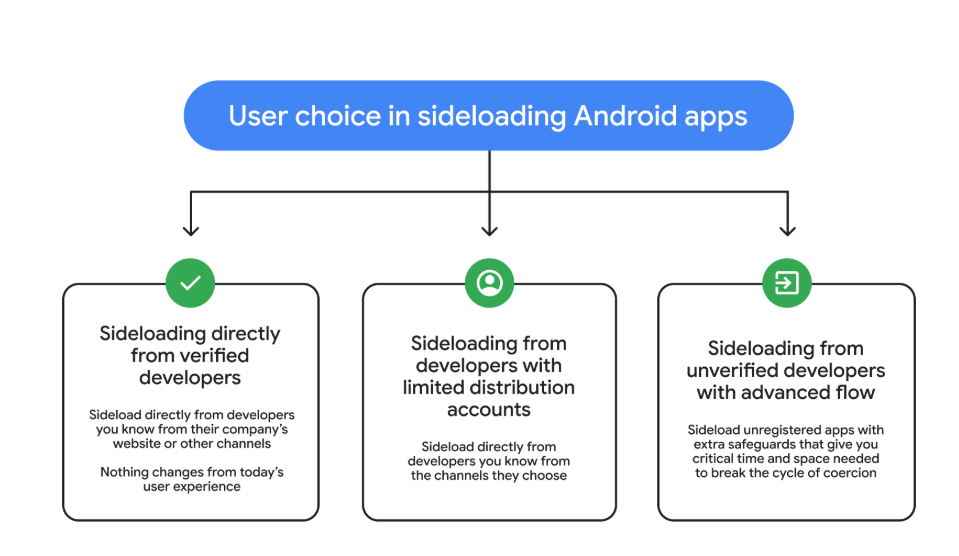
So after these changes, these will be the options for users that have “developer mode” enabled on their Android device.
Sideloading directly from verified developers
Sideloading from developers with limited distribution accounts
Sideloading from unverified developers with Advanced Flow
Image courtesy of Google
Advanced Flow is expected to roll out in August 2026.
Overall, it seems a reasonable compromise. Sideloading isn’t going away, so this keeps that ability but adds meaningful barriers against scam‑driven installs, thwarting social‑engineering campaigns without outright killing power‑user workflows. The one-day delay could turn out to be frustrating though, even if it’s only a one-time event.
We don’t just report on phone security—we provide it
Google just dropped a bombshell for app developers with the latest version of its Android mobile operating system. The company can now prevent apps from installing if they try to use the system’s accessibility features.
The new development, live in version 17.2 of Android, is all about security, explains the company. It stops certain kinds of apps from using the accessibility service if Advanced Protection Mode (APM) is enabled.
The accessibility API lets app developers support users living with disabilities who need extra help using their phones. Apps can use this API to access the screen in unique ways, control input for the user, and use voice services, for example.
Sadly, as with most useful tools, someone will always find a way to misuse it and ruin it for everyone else. Malware developers have been using this API for years as a way into your bank account. The accessibility service has a lot of power: Any app with permissions to use it can read what’s on your screen.
Many Android banking Trojans are little more than accessibility API wrappers with criminal intent. They steal 2FA codes, impersonate victims, and drain accounts while victims sleep.
Two tricks dominate. The first is fake overlays. The accessibility API lets you put overlays on top of another app’s screen. Banking and cryptocurrency Trojan developers can use this to capture your keystrokes (you think you’re just logging into your banking app, but malware is collecting everything you type).
The second is permission abuse. Once the Trojan has your passwords, it can authorize its own transactions.
The number of malware frameworks taking advantage of the accessibility API has grown. DroidLock uses it to steal your personal data before demanding a ransom. Albiriox uses it to install itself and give remote control to attackers halfway around the world.
We saw both in December, and just last month Malwarebytes researcher Stefan Dasic noticed an accessibility service-abusing malware program posing as a fake Google Security page.
Google’s nuclear option
Google has tried before to curb misuse of the API. In 2017, it warned developers to justify their use of accessibility features or risk removal from the Play Store. Developers revolted, and Google relented. But then, in November 2021, it began demanding permission forms for accessibility API usage for Android 12+ apps.
Now the company is getting tougher still, enforcing stricter accessibility API rules. Apps can no longer freely enable accessibility services using a simple software flag. Instead, only apps whose core purpose is accessibility will be allowed to use it.
Google’s examples include screen readers, switch inputs, voice controls, and Braille displays. With these new rules, password managers or automation apps aren’t getting to the accessibility API anymore.
At least, not if the user has APM turned on.
Launched in May last year, APM is Google’s version of Apple’s Lockdown Mode. It introduces far tighter security controls for people who switch it on, making it harder for malware to exploit them.
The trade-off for that extra security is more limited functionality. For example, only apps from trusted sources will install, and data transfer via USB is restricted. Accessibility API access is now restricted too.
So now, you can be a password manager or an accessibility tool, but not both. Developers relying on accessibility for convenience features will need to find another way.
This is Google acknowledging that some APIs are too dangerous to leave open, even if some legitimate apps suffer. The company is betting that most users care more about not getting robbed than having their password manager use the accessibility API for convenience.
Malware authors will adapt, as always. But for now, Google just made phones with APM turned on a lot harder to mess with.
We don’t just report on phone security—we provide it
A vulnerability in Android devices can allow attackers to gain access to a phone in less than a minute.
The vulnerability, tracked as CVE-2026-20435, affects certain MediaTek SoCs (System-on-a-Chip) using Trustonic’s TEE (Trusted Execution Environment). That may sound rare, but reportedly that’s about one in four Android phones, mostly cheaper models.
Researchers demonstrated the vulnerability by connecting a vulnerable phone to a laptop over USB, showing how their exploit recovered the handset PIN, decrypted storage, and extracted seed phrases from several software wallets.
You may argue that if an attacker has your phone, you’re already in trouble. Which is true. But the protection you rely on to keep your data safe if your phone is lost or stolen doesn’t help one bit here.
The exploit was able to extract the root keys protecting full‑disk encryption before Android fully boots and then decrypt storage. While full‑disk encryption and lock screen are supposed to be your safety net if the phone is stolen or lost, those layers fail on affected devices.
Is my phone affected?
If you’re not sure whether this vulnerability affects your mobile device, you can look up your phone on a platform like GSMArena or your vendor’s website to see which SoC it uses, then cross‑check with MediaTek’s March Security bulletin under CVE-2026-20435.
MediaTek released a firmware patch that device manufacturers can include in security updates for their phones. So all you can do is make sure you’re fully patched with the latest security update from your manufacturer. Which, depending on the patch gaps and how far along your device is in the EOL cycle, can take anywhere from days to forever.
EOL (End-of-Life) refers to the point in a product’s lifecycle when the manufacturer stops selling, marketing, or providing full support for it.
But obviously the best advice we can give you is to keep a close eye on your phone, so it doesn’t get lost or stolen.
We don’t just report on phone security—we provide it
To achieve their malign aims, Android malware developers have to address several challenges in a row: trick users to get inside their smartphones, dodge security software, talk victims into granting various system permissions, keep away from built-in battery optimizers that kill resource hogs, and, after all that, make sure their malware actually turns a profit. The creators of the BeatBanker — an Android‑based malware campaign recently discovered by our experts — have come up with something new for each one of these steps. The attack is (for now) aimed at Brazilian users, but the developers’ ambitions will almost certainly push them toward international expansion, so it’s worth staying on guard and studying the threat actor’s tricks. You can find a full technical analysis of the malware on Securelist.
How BeatBanker infiltrates a smartphone
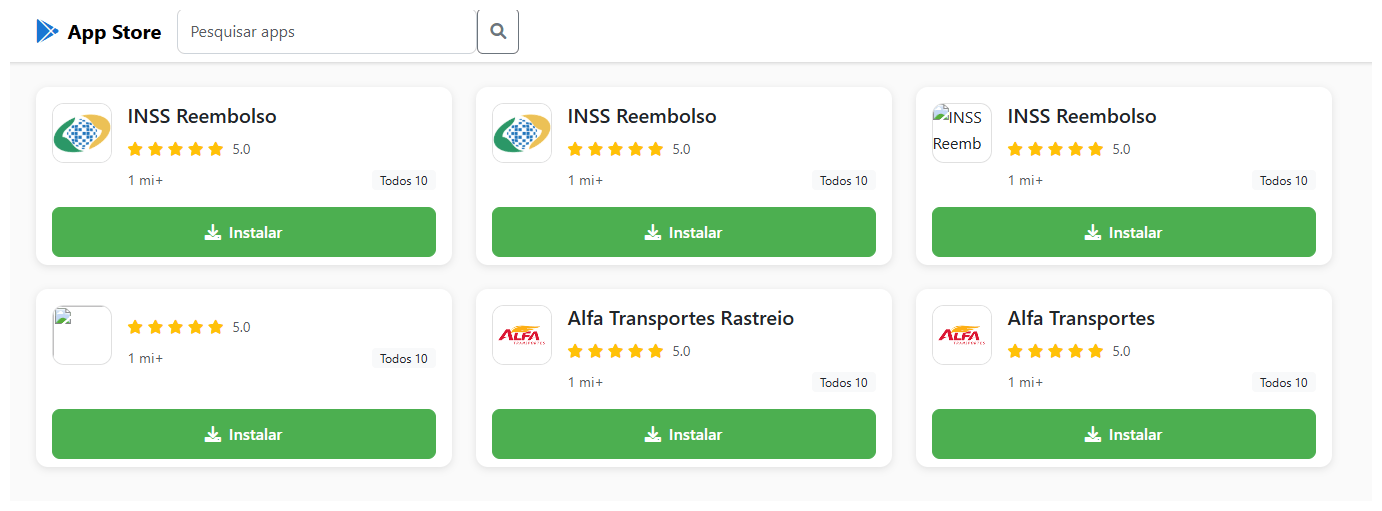
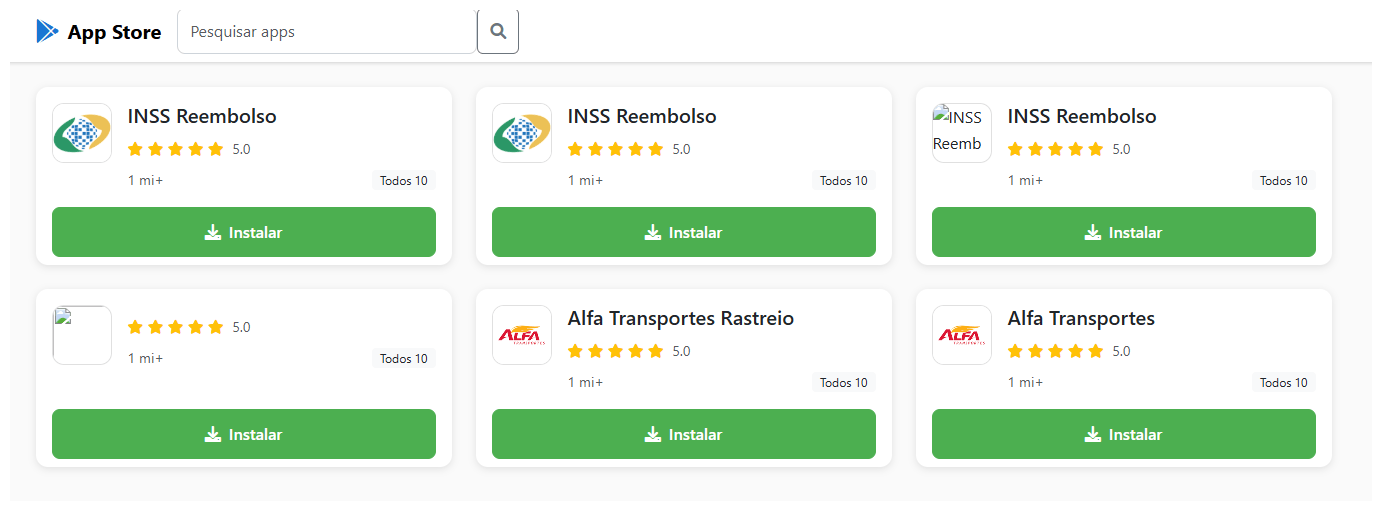
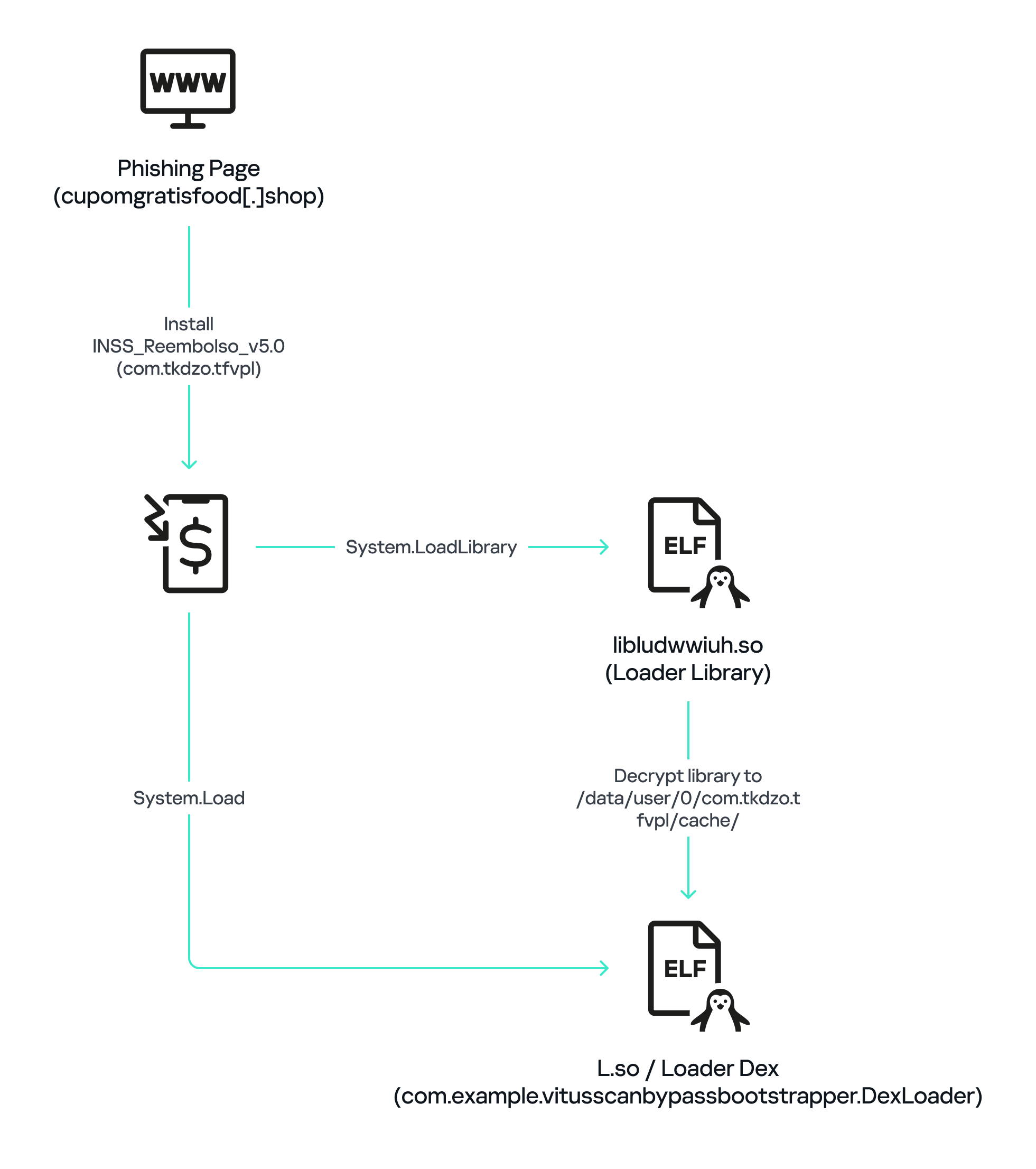
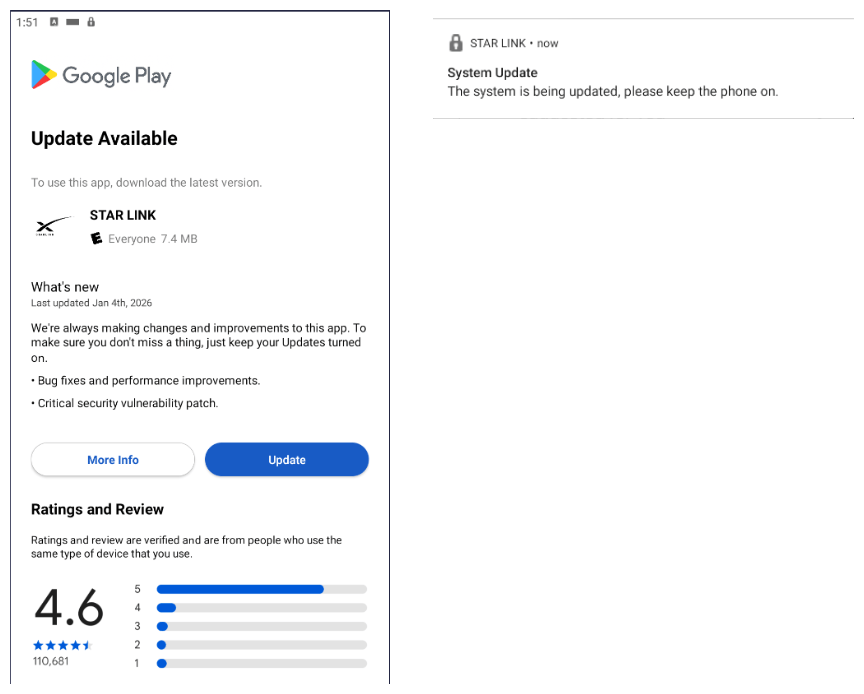
The malware is distributed through specially crafted phishing pages that mimic the Google Play Store. A page that’s easily mistaken for the official app marketplace invites users to download a seemingly useful app. In one campaign, the trojan disguised itself as the Brazilian government services app, INSS Reembolso; in another, it posed as the Starlink app.
The malicious site cupomgratisfood{.}shop does an excellent job imitating an app store. It’s just unclear why the fake INSS Reembolso appears all of three times. To be extra sure, perhaps?!
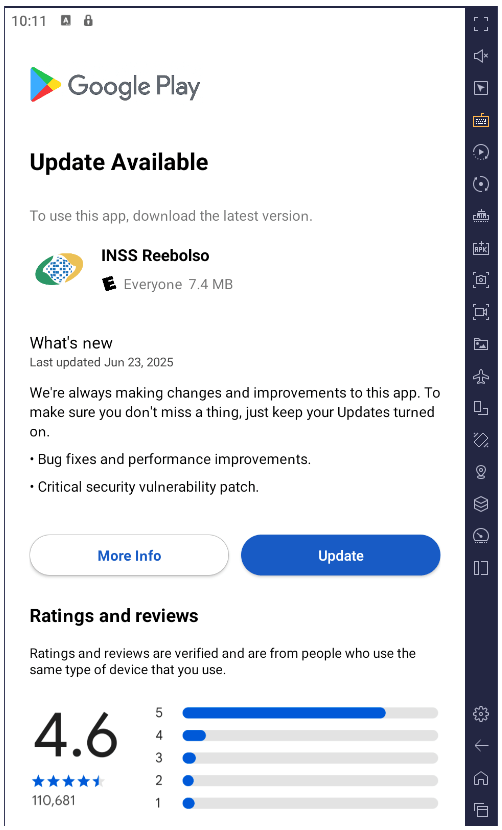
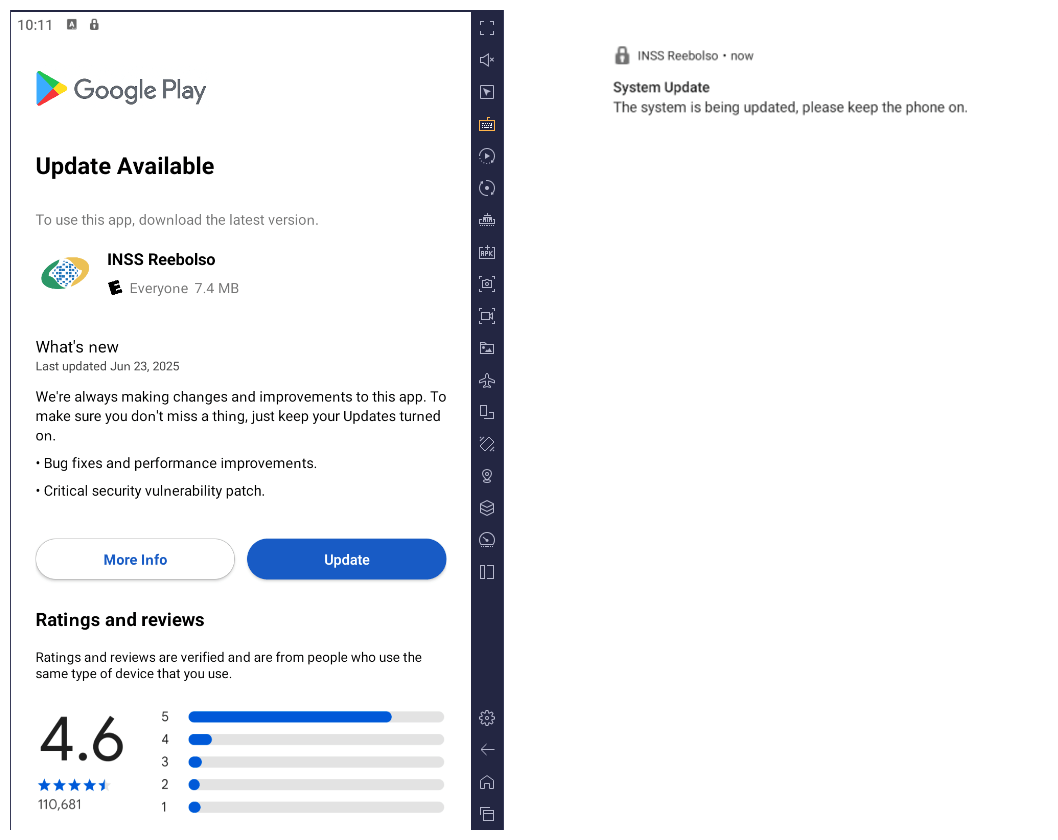
The installation takes place in several stages to avoid requesting too many permissions at once and to further lull the victim’s vigilance. After the first app is downloaded and launched, it displays an interface that also resembles Google Play and simulates an update for the decoy app — requesting the user’s permission to install apps, which doesn’t look out-of-the-ordinary in context. If you grant this permission, the malware downloads additional malicious modules to your smartphone.
After installation, the trojan simulates a decoy app update via Google Play by requesting permission to install applications while downloading additional malicious modules in the process
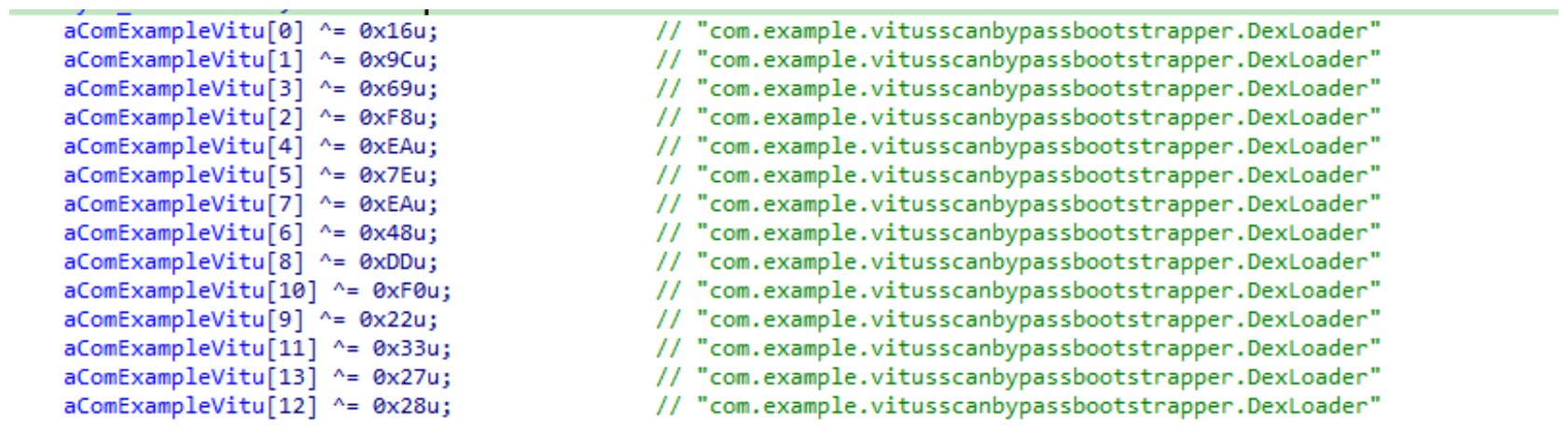
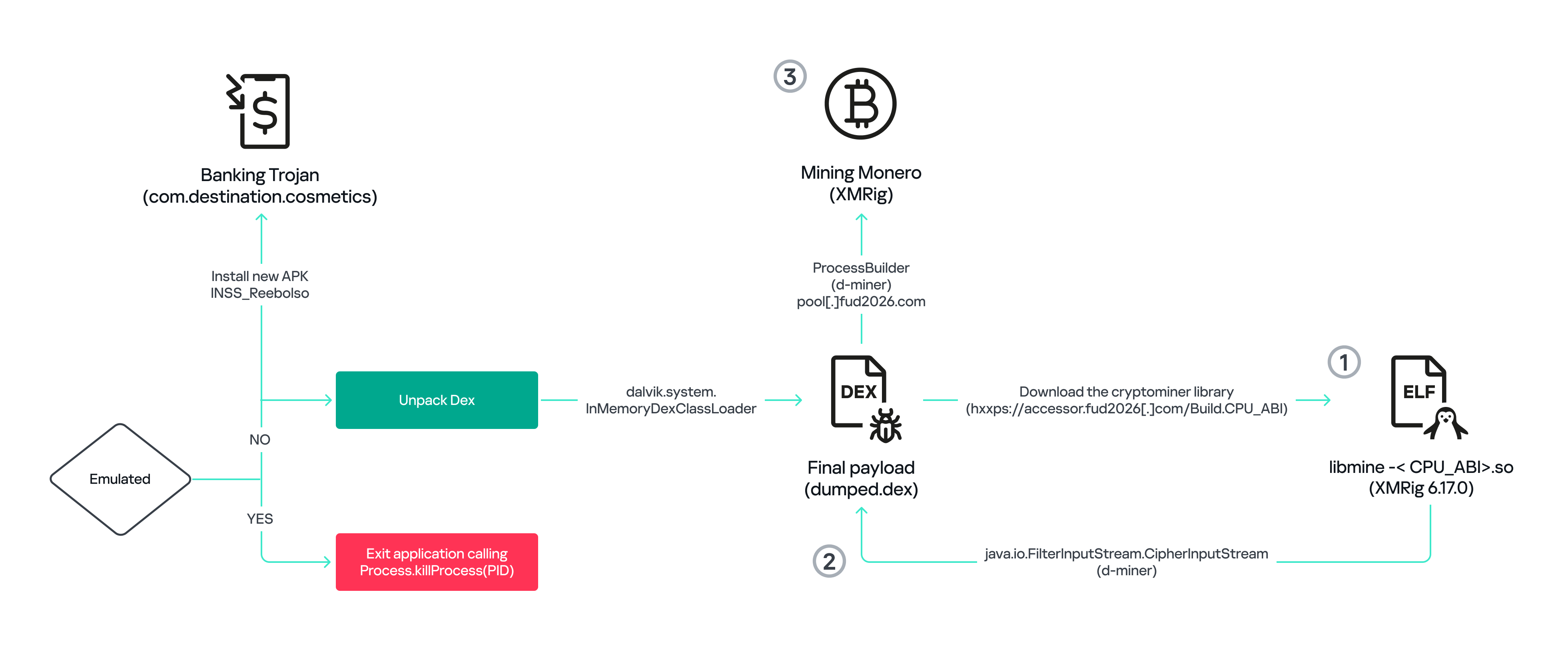
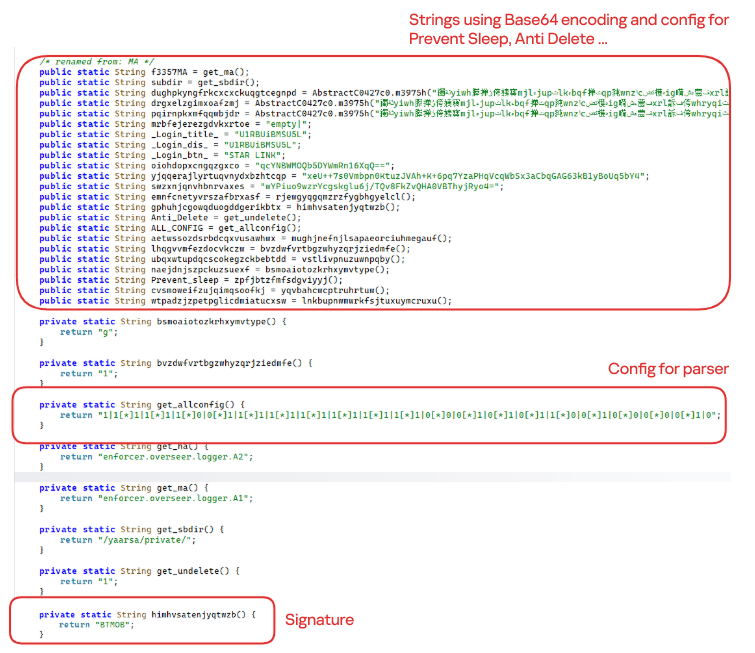
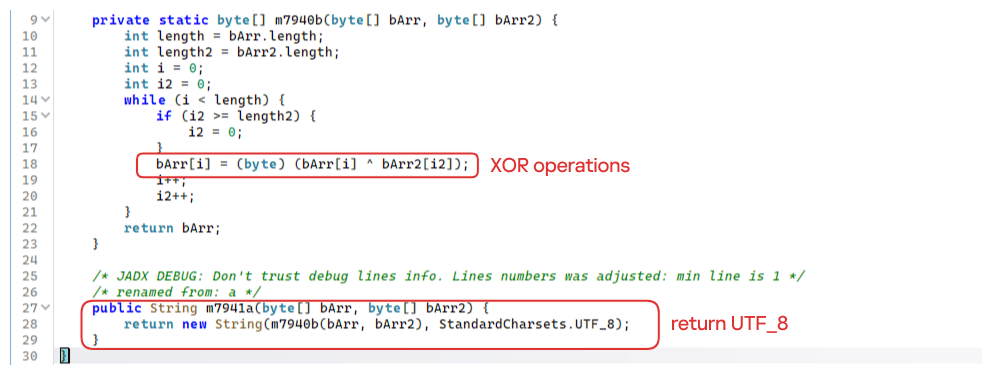
All components of the trojan are encrypted. Before decrypting and proceeding to the next stages of infection, it checks to ensure it’s on a real smartphone and in the target country. BeatBanker immediately terminates its own process if it finds any discrepancies or detects that it’s running in emulated or analysis environments. This complicates dynamic analysis of the malware. Incidentally, the fake update downloader injects modules directly into RAM to avoid creating files on the smartphone that would be visible to security software.
All these tricks are nothing new and frequently used in complex malware for desktop computers. However, for smartphones, such sophistication is still a rarity, and not every security tool will spot it. Users of Kaspersky products are protected from this threat.
Playing audio as a shield
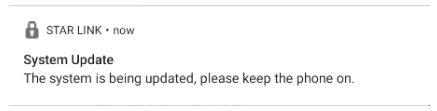
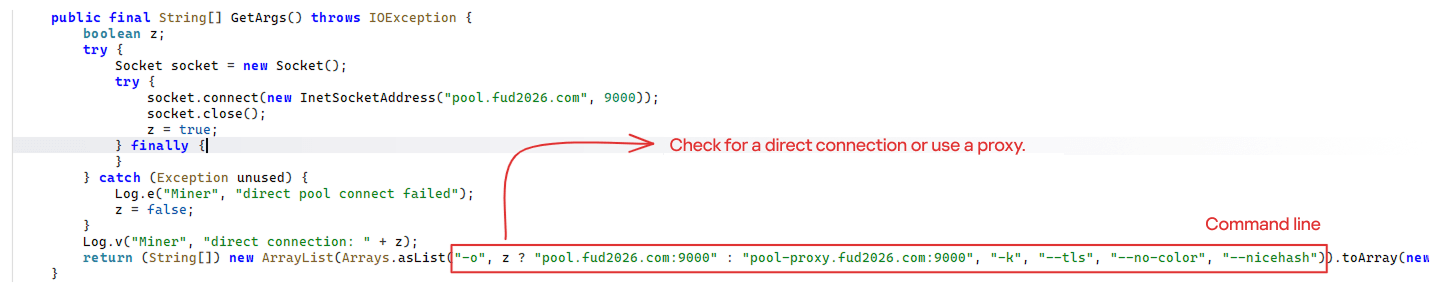
Once established on the smartphone, BeatBanker downloads a module for mining Monero cryptocurrency. The authors were very concerned that the smartphone’s aggressive battery optimization systems might shut down the miner, so they came up with a trick: playing an all-but-inaudible sound at all times. Power consumption control systems typically spare apps that are playing audio or video to avoid cutting off background music or podcast players. In this way, the malware can run continuously. Additionally, it displays a persistent notification in the status bar, asking the user to keep the phone on for a system update.
Example of a persistent system update notification from another malicious app masquerading as the Starlink app
Control via Google
To manage the trojan, the authors leverage Google’s legitimate Firebase Cloud Messaging (FCM) — a system for receiving notifications and sending data from a smartphone. This feature is available to all apps and it’s the most popular method for sending and receiving data. Thanks to FCM, attackers can monitor the device’s status and change its settings as needed.
Nothing bad happens for a while after the malware is installed: the attackers wait it out. Then they trigger the miner, but they’re careful to throttle it back if the phone overheats, the battery starts dipping, or the owner happens to be using the device. All of this is handled via FCM.
Theft and espionage
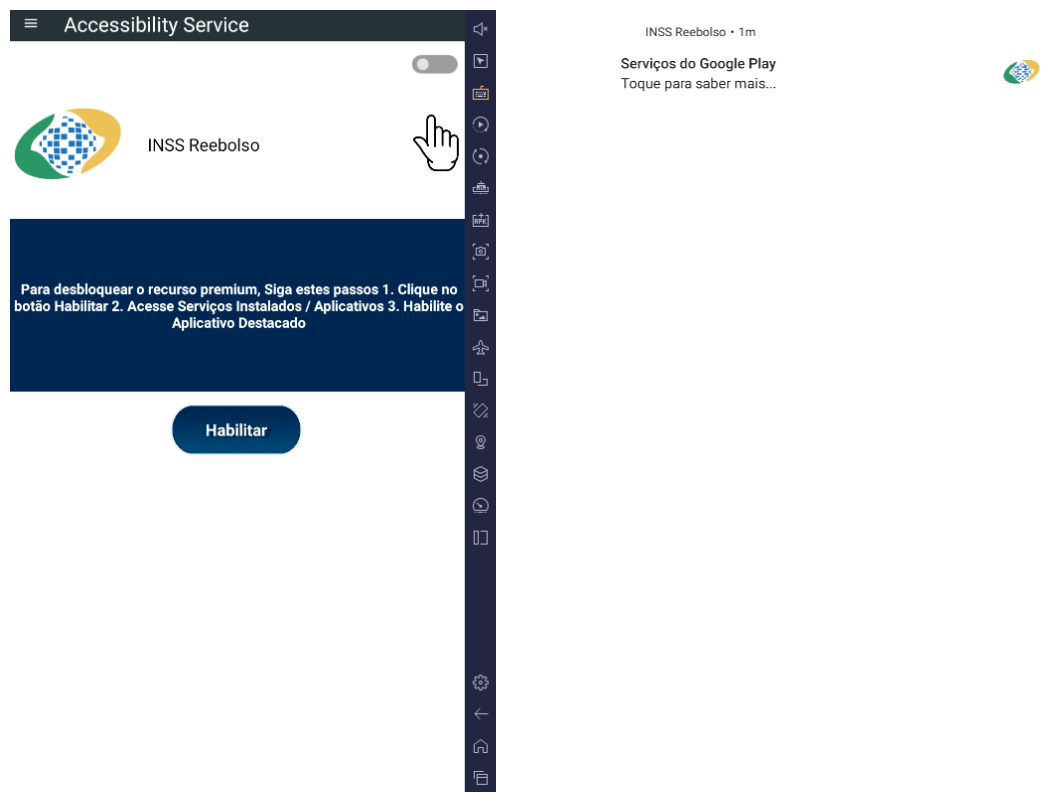
In addition to the crypto miner, BeatBanker installs extra modules to spy on the user and rob them at the right moment. The spyware module requests Accessibility Services permission, and if this is granted, begins monitoring everything that’s happening on the smartphone.
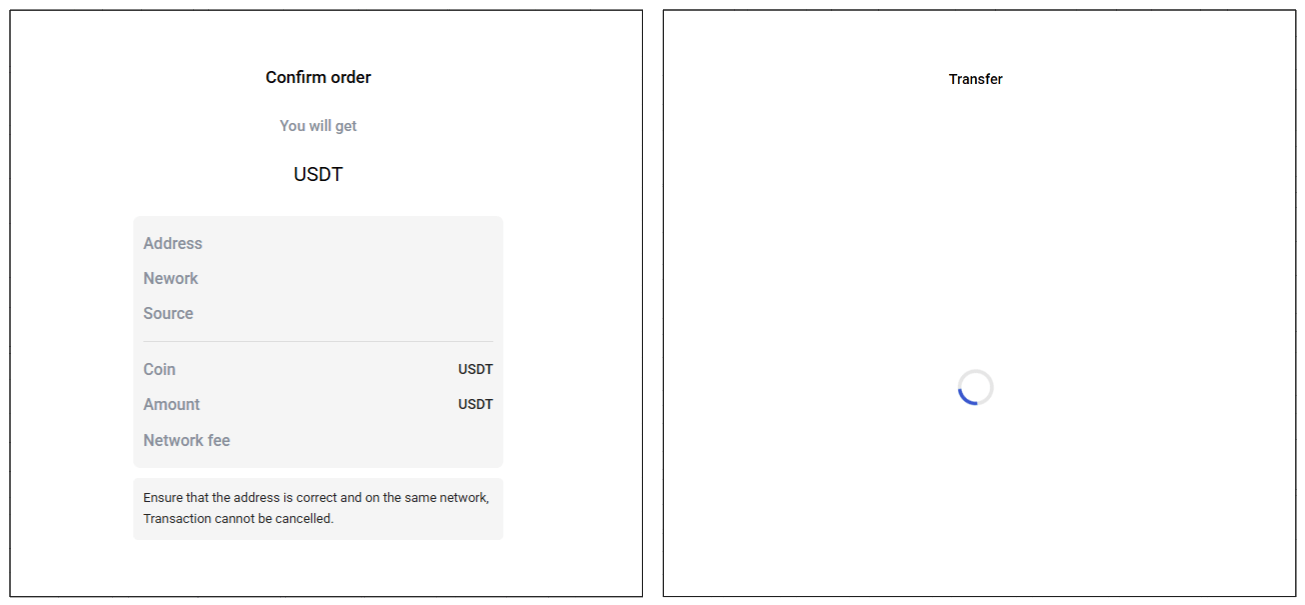
If the owner opens the Binance or Trust Wallet app to send USDT, the malware overlays a fake screen on top of the wallet interface, effectively swapping the recipient’s address for its own. All transfers go to the attackers.
The trojan features an advanced remote control system and is capable of executing many other commands:
Intercepting one-time codes from Google Authenticator
Recording audio from the microphone
Streaming the screen in real-time
Monitoring the clipboard and intercept keystrokes
Sending SMS messages
Simulating taps on specific areas of the screen and text input according to a script sent by the attacker, and much more
All of this makes it possible to rob the victim when they use any other banking or payment services — not just crypto payments.
Sometimes victims are infected with a different module for espionage and remote smartphone control — the BTMOB remote access trojan. Its malicious capabilities are even broader, including:
Automatic acquisition of certain permissions on Android 13–15
Continuous geolocation tracking
Access to the front and rear cameras
Obtaining PIN codes and passwords for screen unlocking
Capturing keyboard input
How to protect yourself from BeatBanker
Cybercriminals are constantly refining their attacks and coming up with new ways to profit from their victims. Despite this, you can protect yourself by following a few simple precautions:
Download apps from official sources only, such as Google Play or the app store preinstalled by the vendor. If you find an app while searching the internet, don’t open it via a link from your browser; instead, head to the Google Play app or another branded store on your smartphone to search for it there. While you’re at it, check the number of downloads, the app’s age, and look at the ratings and reviews. Avoid new apps, apps with low ratings, and those with a small number of downloads.
Check any permissions you grant. Don’t grant permissions if you’re not sure what they do or why that specific app requires them. Be extra careful with permissions like Install unknown apps, Accessibility, Superuser, and Display over other apps. We’ve written about these in detail in a separate article.
Equip your device with a comprehensive anti-malware solution. We, naturally, recommend Kaspersky for Android. Users of Kaspersky products are protected from BeatBanker — detected with the verdicts HEUR:Trojan-Dropper.AndroidOS.BeatBanker and HEUR:Trojan-Dropper.AndroidOS.Banker.*.
Threats to Android users have been going through the roof lately. Check out our other posts on the most relevant and widespread Android attacks and tips for keeping you and your loved ones safe:
In February 2026, the cybersecurity firm Oversecured published a report that makes you want to factory reset your phone and move into a remote cabin in the woods. Researchers audited 10 popular Android mental health apps — ranging from mood trackers and AI therapists to tools for managing depression and anxiety — and uncovered… 1575 vulnerabilities! Fifty-four of those flaws were classified as critical. Given the download stats on Google Play, as many as 15 million people could be affected. The real kicker? Six out of the ten apps tested explicitly promised users that their data was “fully encrypted and securely protected”.
We’re breaking down this scandalous “brain drain”: what exactly could leak, how it’s happening, and why “anonymity” in these services is usually just a marketing myth.
What was found in the apps
Oversecured is a mobile app security firm that uses a specialized scanner to analyze APK files for known vulnerability patterns across dozens of categories. In January 2026, researchers ran ten mental health monitoring apps from Google Play through the scanner — and the results were, shall we say, “spectacular”.
App Type
Installs
Security vulnerabilities
High-severity
Medium-severity
Low-severity
Total
Mood & habit tracker
10M+
1
147
189
337
AI therapy chatbot
1M+
23
63
169
255
AI emotional health platform
1M+
13
124
78
215
Health & symptom tracker
500k+
7
31
173
211
Depression management tool
100k+
0
66
91
157
CBT-based anxiety app
500k+
3
45
62
110
Online therapy & support community
1M+
7
20
71
98
Anxiety & phobia self-help
50k+
0
15
54
69
Military stress management
50k+
0
12
50
62
AI CBT chatbot
500k+
0
15
46
61
Total
14.7М+
54
538
983
1575
Vulnerabilities found in the 10 tested mental health apps. Source
The anatomy of the flaws
The discovered vulnerabilities are diverse, but they all boil down to one thing: giving attackers access to data that should be under lock and key.
For starters, one of the vulnerabilities allows an attacker to access any internal activity of the app — even that never intended for external eyes. This opens the door to hijacking authentication tokens and user session data. Once an attacker has those, they essentially could gain access to a user’s therapy records.
Another issue is insecure local data storage with read permissions granted to any other app on the device. In other words, that random flashlight app or calculator on your smartphone could potentially read your cognitive behavioral therapy (CBT) logs, personal notes, and mood assessments.
The researchers also found unencrypted configuration data baked right into the APK installation files. This included backend API endpoints and hardcoded URLs for Firebase databases.
Furthermore, several apps were caught using the cryptographically weak java.util.Random class to generate session tokens and encryption keys.
Finally, most of the tested apps lacked root/jailbreak detection. On a rooted device, any third-party app with root privileges could gain total access to every bit of locally stored medical data.
Shockingly, of the 10 apps analyzed, only four received updates in February 2026. The rest haven’t seen a patch since November 2025, and one hasn’t been touched since September 2024. Going 18 months without a security patch is a lifetime in this industry — especially for an app housing mood journals, therapy transcripts, and medication schedules.
Here’s a quick reminder of just how dangerous the misuse of this type of data gets. In 2024, the tech world was rocked by a sophisticated attack on XZ Utils, a critical component found in virtually every operating system based on the Linux kernel. The attacker successfully pressured the maintainer into handing over code commit permissions by exploiting the developer’s public admission of burnout and a lack of motivation to carry on with the project. Had the attack been completed, the damage would have been mind-boggling given that roughly 80% of the world’s servers run on Linux.
What could leak?
What do these apps collect and store? It’s the kind of stuff you’d likely only share with a trusted clinician: therapy session transcripts, mood logs, medication schedules, self-harm indicators, CBT notes, and various clinical assessment scales.
As far back as 2021, complete medical records were selling on the dark web for US$1000 each. For comparison, a stolen credit card number goes for anywhere between US$5 and US$30. Medical records contain a full identity package: name, address, insurance details, and diagnostic history. Unlike a credit card, you can’t exactly “reissue” your medical history. Furthermore, medical fraud is notoriously difficult to spot. While a bank might flag a suspicious transaction in hours, a fraudulent insurance claim for a phantom treatment can go unnoticed for years.
We’ve seen this movie before
The Oversecured study isn’t just an isolated horror story.
Back in 2020, Julius Kivimäki hacked the database of the Finnish psychotherapy clinic Vastaamo, making off with the records of 33 000 patients. When the clinic refused to cough up a €400 000 ransom, Kivimäki began sending direct threats to patients: “Pay €200 in Bitcoin within 24 hours, or else your records go public”. Ultimately, he leaked the entire database onto the dark web anyway. At least two people died by suicide, and the clinic was forced into bankruptcy. Kivimäki was eventually sentenced to six years and three months in prison, marking a record-breaking trial in Finland for the sheer number of victims involved.
In 2023, the U.S. Federal Trade Commission (FTC) slapped the online therapy giant BetterHelp with a US$7.8 million fine. Despite stating on their sign-up page that your data was strictly confidential, the company was caught funneling user info — including mental health questionnaire responses, emails, and IP addresses — to Facebook, Snapchat, Criteo, and Pinterest for targeted advertising. After the dust settled, 800 000 affected users received a grand total of… US$10 each in compensation.
By 2024, the FTC set its sights on the telehealth firm Cerebral, tagging them with a US$7 million fine. Through tracking pixels, Cerebral leaked the data of 3.2 million users to LinkedIn, Snapchat, and TikTok. The haul included names, medical histories, prescriptions, appointment dates, and insurance info. And the cherry on top? The company sent promotional postcards (sans envelopes) to 6000 patients, which effectively broadcasted that the recipients were undergoing psychiatric treatment.
In September 2024, security researcher Jeremiah Fowler stumbled upon an exposed database belonging to Confidant Health, a provider specializing in addiction recovery and mental health services. The database contained audio and video recordings of therapy sessions, transcripts, psychiatric notes, drug test results, and even copies of driver’s licenses. In total, 5.3 terabytes of data, 126 000 files, or 1.7 million records were sitting there without a password.
Why anonymity is an illusion
Developers love to drop the line: “We never share your personal data with anyone.” Technically, that might be true — instead, they share “anonymized profiles”. The catch? De-anonymizing that data isn’t exactly rocket science anymore. Recent research highlights that using LLMs to strip away anonymity has become a routine reality.
Even the “anonymization” process itself is often a mess. A study by Duke University revealed that data brokers are openly hawking the mental health data of Americans. Out of 37 brokers surveyed, 11 agreed to sell data linked to specific diagnoses (like depression, anxiety, and bipolar disorder), demographic parameters, and in some cases, even names and home addresses. Prices started as low as US$275 for 5000 aggregated records.
According to the Mozilla Foundation, by 2023, 59% of popular mental health apps failed to meet even the most basic privacy standards, and 40% had actually become less secure than the previous year. These apps allowed account creation via third-party services (like Google, Apple, and Facebook), featured suspiciously brief privacy policies that glossed over data collection details, and employed a clever little loophole: some privacy policies applied strictly to the company’s website, but not the app itself. In short, your clicks on the site were “protected”, but your actions within the app were fair game.
How to protect yourself
Cutting these apps out of your life entirely is, of course, the most foolproof option — but it’s not the most realistic one. Besides, there’s no guarantee you can actually nuke the data already collected — even if you delete your account. We previously covered the grueling process of scrubbing your info from data broker databases; it’s possible, but prepare for a headache. So, how can you stay safe?
Check permissions before you hit “Install”. In Google Play, navigate to App description → About this app → Permissions. A mood tracker has no business asking for access to your camera, microphone, contacts, or precise GPS location. If it does, it’s not looking out for your well-being — it’s harvesting data.
Actually read the privacy policy. We get it — nobody reads these multi-page manifestos. But when a service is vacuuming up your most intimate thoughts, it’s worth a skim. Look for the red flags: does the company share data with third parties? Can you manually delete your records? Does the policy explicitly cover the app itself, or just the website? You can always feed the policy text into an AI and ask it to flag any privacy deal-breakers.
Check the last updated date. An app that hasn’t seen an update in over six months is likely a playground for unpatched vulnerabilities. Remember: six out of the 10 apps Oversecured tested hadn’t been touched in months.
Disable everything non-essential in your phone’s privacy settings. Whenever prompted, always select “ask not to track”. When an app pleads with you to enable a specific type of tracking — claiming it’s for “internal optimization” — it’s almost always a marketing ploy rather than a functional necessity. After all, if the app truly won’t work without a certain permission, you can always go back and toggle it on later.
Don’t use “Sign in with…” services. Authenticating via Facebook, Apple, Google, or Microsoft creates additional identifiers and gives companies a golden opportunity to link your data across different platforms.
Treat everything you type like a public social media post. If you wouldn’t want a random stranger on the internet reading it, you probably shouldn’t be typing it into an app with over 150 vulnerabilities that hasn’t seen a patch since the year before last.
What else you should know about privacy settings and controlling your personal data online:
If you don’t go searching for AI services, they’ll find you all the same. Every major tech company feels a moral obligation not just to develop an AI assistant, integrated chatbot, or autonomous agent, but to bake it into their existing mainstream products and forcibly activate it for tens of millions of users. Here are just a few examples from the last six months:
Google activated Gemini for all U.S. Chrome users, cranked its browser functionality to the max, aggressively expanded the reach of AI Overviews in search results, and baked a whole suite of AI features into its online services (Gmail, Google Docs, and others).
Apple integrated its own Apple Intelligence (conveniently sharing the AI acronym) into the latest OS versions across all device types and most of its native apps.
On the flip side, geeks have rushed to build their own “personal Jarvises” by renting VPS instances or hoarding Mac minis to run the OpenClaw AI agent. Unfortunately, OpenClaw’s security issues with default settings turned out to be so massive that it’s already been dubbed the biggest cybersecurity threat of 2026.
Beyond the sheer annoyance of having something shoved down your throat, this AI epidemic brings some very real practical risks and headaches. AI assistants hoover up every bit of data they can get their hands on, parsing the context of the websites you visit, analyzing your saved documents, reading through your chats, and so on. This gives AI companies an unprecedentedly intimate look into every user’s life.
A leak of this data during a cyberattack — whether from the AI provider’s servers or from the cache on your own machine — could be catastrophic. These assistants can see and cache everything you can, including data usually tucked behind multiple layers of security: banking info, medical diagnoses, private messages, and other sensitive intel. We took a deep dive into how this plays out when we broke down the issues with the AI-powered Copilot+ Recall system, which Microsoft also planned to force-feed to everyone. On top of that, AI can be a total resource hog, eating up RAM, GPU cycles, and storage, which often leads to a noticeable hit to system performance.
For those who want to sit out the AI storm and avoid these half-baked, rushed-to-market neural network assistants, we’ve put together a quick guide on how to kill the AI in popular apps and services.
How to disable AI in Google Docs, Gmail, and Google Workspace
Google’s AI assistant features in Mail and Docs are lumped together under the umbrella of “smart features”. In addition to the large language model, this includes various minor conveniences, like automatically adding meetings to your calendar when you receive an invite in Gmail. Unfortunately, it’s an all-or-nothing deal: you have to disable all of the “smart features” to get rid of the AI.
To do this, open Gmail, click the Settings (gear) icon, and then select See all settings. On the General tab, scroll down to Google Workspace smart features. Click Manage Workspace smart feature settings and toggle off two options: Smart features in Google Workspace and Smart features in other Google products. We also recommend unchecking the box next to Turn on smart features in Gmail, Chat, and Meet on the same general settings tab. You’ll need to restart your Google apps afterward (which usually happens automatically).
How to disable AI Overviews in Google Search
You can kill off AI Overviews in search results on both desktops and smartphones (including iPhones), and the fix is the same across the board. The simplest way to bypass the AI overview on a case-by-case basis is to append -ai to your search query — for example, how to make pizza -ai. Unfortunately, this method occasionally glitches, causing Google to abruptly claim it found absolutely nothing for your request.
If that happens, you can achieve the same result by switching the search results page to Web mode. To do this, select the Web filter immediately below the search bar — you’ll often find it tucked away under the More button.
A more radical solution is to jump ship to a different search engine entirely. For instance, DuckDuckGo not only tracks users less and shows little ads, but it also offers a dedicated AI-free search — just bookmark the search page at noai.duckduckgo.com.
How to disable AI features in Chrome
Chrome currently has two types of AI features baked in. The first communicates with Google’s servers and handles things like the smart assistant, an autonomous browsing AI agent, and smart search. The second handles locally more utility-based tasks, such as identifying phishing pages or grouping browser tabs. The first group of settings is labeled AI mode, while the second contains the term Gemini Nano.
To disable them, type chrome://flags into the address bar and hit Enter. You’ll see a list of system flags and a search bar; type “AI” into that search bar. This will filter the massive list down to about a dozen AI features (and a few other settings where those letters just happen to appear in a longer word). The second search term you’ll need in this window is “Gemini“.
After reviewing the options, you can disable the unwanted AI features — or just turn them all off — but the bare minimum should include:
AI Mode Omnibox entrypoint
AI Entrypoint Disabled on User Input
Omnibox Allow AI Mode Matches
Prompt API for Gemini Nano
Prompt API for Gemini Nano with Multimodal Input
Set all of these to Disabled.
How to disable AI features in Firefox
While Firefox doesn’t have its own built-in chatbots and hasn’t (yet) tried to force upon users agent-based features, the browser does come equipped with smart-tab grouping, a sidebar for chatbots, and a few other perks. Generally, AI in Firefox is much less “in your face” than in Chrome or Edge. But if you still want to pull the plug, you’ve two ways to do it.
The first method is available in recent Firefox releases — starting with version 148, a dedicated AI Controls section appeared in the browser settings, though the controls are currently a bit sparse. You can use a single toggle to completely Block AI enhancements, shutting down AI features entirely. You can also specify whether you want to use On-device AI by downloading small local models (currently just for translations) and configure AI chatbot providers in sidebar, choosing between Anthropic Claude, ChatGPT, Copilot, Google Gemini, and Le Chat Mistral.
The second path — for older versions of Firefox — requires a trip into the hidden system settings. Type about:config into the address bar, hit Enter, and click the button to confirm that you accept the risk of poking around under the hood.
A massive list of settings will appear along with a search bar. Type “ML” to filter for settings related to machine learning.
To disable AI in Firefox, toggle the browser.ml.enabled setting to false. This should disable all AI features across the board, but community forums suggest this isn’t always enough to do the trick. For a scorched-earth approach, set the following parameters to false (or selectively keep only what you need):
ml.chat.enabled
ml.linkPreview.enabled
ml.pageAssist.enabled
ml.smartAssist.enabled
ml.enabled
ai.control.translations
tabs.groups.smart.enabled
urlbar.quicksuggest.mlEnabled
This will kill off chatbot integrations, AI-generated link descriptions, assistants and extensions, local translation of websites, tab grouping, and other AI-driven features.
How to disable AI features in Microsoft apps
Microsoft has managed to bake AI into almost every single one of its products, and turning it off is often no easy task — especially since the AI sometimes has a habit of resurrecting itself without your involvement.
How to disable AI features in Edge
Microsoft’s browser is packed with AI features, ranging from Copilot to automated search. To shut them down, follow the same logic as with Chrome: type edge://flags into the Edge address bar, hit Enter, then type “AI” or “Copilot” into the search box. From there, you can toggle off the unwanted AI features, such as:
Enable Compose (AI-writing) on the web
Edge Copilot Mode
Edge History AI
Another way to ditch Copilot is to enter edge://settings/appearance/copilotAndSidebar into the address bar. Here, you can customize the look of the Copilot sidebar and tweak personalization options for results and notifications. Don’t forget to peek into the Copilot section under App-specific settings — you’ll find some additional controls tucked away there.
How to disable Microsoft Copilot
Microsoft Copilot comes in two flavors: as a component of Windows (Microsoft Copilot), and as part of the Office suite (Microsoft 365 Copilot). Their functions are similar, but you’ll have to disable one or both depending on exactly what the Redmond engineers decided to shove onto your machine.
The simplest thing you can do is just uninstall the app entirely. Right-click the Copilot entry in the Start menu and select Uninstall. If that option isn’t there, head over to your installed apps list (Start → Settings → Apps) and uninstall Copilot from there.
In certain builds of Windows 11, Copilot is baked directly into the OS, so a simple uninstall might not work. In that case, you can toggle it off via the settings: Start → Settings → Personalization → Taskbar→ turn off Copilot.
If you ever have a change of heart, you can always reinstall Copilot from the Microsoft Store.
It’s worth noting that many users have complained about Copilot automatically reinstalling itself, so you might want to do a weekly check for a couple of months to make sure it hasn’t staged a comeback. For those who are comfortable tinkering with the System Registry (and understand the consequences), you can follow this detailed guide to prevent Copilot’s silent resurrection by disabling the SilentInstalledAppsEnabled flag and adding/enabling the TurnOffWindowsCopilot parameter.
How to disable Microsoft Recall
The Microsoft Recall feature, first introduced in 2024, works by constantly taking screenshots of your computer screen and having a neural network analyze them. All that extracted information is dumped into a database, which you can then search using an AI assistant. We’ve previously written in detail about the massive security risks Microsoft Recall poses.
Under pressure from cybersecurity experts, Microsoft was forced to push the launch of this feature from 2024 to 2025, significantly beefing up the protection of the stored data. However, the core of Recall remains the same: your computer still remembers your every move by constantly snapping screenshots and OCR-ing the content. And while the feature is no longer enabled by default, it’s absolutely worth checking to make sure it hasn’t been activated on your machine.
To check, head to the settings: Start → Settings → Privacy & Security →Recall & snapshots. Ensure the Save snapshots toggle is turned off, and click Delete snapshots to wipe any previously collected data, just in case.
How to disable AI in Notepad and Windows context actions
AI has seeped into every corner of Windows, even into File Explorer and Notepad. You might even trigger AI features just by accidentally highlighting text in an app — a feature Microsoft calls “AI Actions”. To shut this down, head to Start → Settings → Privacy & Security → Click to Do.
Notepad has received its own special Copilot treatment, so you’ll need to disable AI there separately. Open the Notepad settings, find the AI features section, and toggle Copilot off.
Finally, Microsoft has even managed to bake Copilot into Paint. Unfortunately, as of right now, there is no official way to disable the AI features within the Paint app itself.
How to disable AI in WhatsApp
In several regions, WhatsApp users have started seeing typical AI additions like suggested replies, AI message summaries, and a brand-new Chat with Meta AI button. While Meta claims the first two features process data locally on your device and don’t ship your chats off to their servers, verifying that is no small feat. Luckily, turning them off is straightforward.
To disable Suggested Replies, go to Settings → Chats → Suggestions & smart replies and toggle off Suggested replies. You can also kill off AI Sticker suggestions in that same menu. As for the AI message summaries, those are managed in a different location: Settings → Notifications → AI message summaries.
How to disable AI on Android
Given the sheer variety of manufacturers and Android flavors, there’s no one-size-fits-all instruction manual for every single phone. Today, we’ll focus on killing off Google’s AI services — but if you’re using a device from Samsung, Xiaomi, or others, don’t forget to check your specific manufacturer’s AI settings. Just a heads-up: fully scrubbing every trace of AI might be a tall order — if it’s even possible at all.
In Google Messages, the AI features are tucked away in the settings: tap your account picture, select Messages settings, then Gemini in Messages, and toggle the assistant off.
Broadly speaking, the Gemini chatbot is a standalone app that you can uninstall by heading to your phone’s settings and selecting Apps. However, given Google’s master plan to replace the long-standing Google Assistant with Gemini, uninstalling it might become difficult — or even impossible — down the road.
If you can’t completely uninstall Gemini, head into the app to kill its features manually. Tap your profile icon, select Gemini Apps activity, and then choose Turn off or Turn off and delete activity. Next, tap the profile icon again and go to the Connected Apps setting (it may be hiding under the Personal Intelligence setting). From here, you should disable all the apps where you don’t want Gemini poking its nose in.
Apple’s platform-level AI features, collectively known as Apple Intelligence, are refreshingly straightforward to disable. In your settings — on desktops, smartphones, and tablets alike — simply look for the section labeled Apple Intelligence & Siri. By the way, depending on your region and the language you’ve selected for your OS and Siri, Apple Intelligence might not even be available to you yet.
Other posts to help you tune the AI tools on your devices:
Google has patched 129 vulnerabilities in Android in its March 2026 Android Security Bulletin, including a Qualcomm display flaw that is known to be actively exploited.
You can check your device’s Android version, security update level, and Google Play system update in Settings. You should get a notification when updates are available, but you can also check for them yourself.
On most phones, go to Settings > About phone (or About device), then tap Software updates to see if anything new is available. The exact steps may vary slightly depending on the brand and Android version you’re on.
If your Android phone shows a patch level of 2026-03-05 or later, these issues are fixed.
Keeping your device up to date protects you from known vulnerabilities and helps you stay safe. We know that because of patch gaps and end-of-support cycles, some users may not receive these updates. That’s why additional protection for your Android device is important.
Technical details
The Android zero-day, tracked as CVE-2026-21385, is a high‑severity bug in a Qualcomm graphics/display component that attackers are already exploiting in limited, targeted attacks.
The vulnerability lives in an open‑source Qualcomm graphics/display component used by a large number of Android chipsets, with Qualcomm listing that well over 230 different chipset models are affected. Based on recently published Android and chipset market‑share percentages, it is reasonable to assume the issue affects hundreds of millions of devices worldwide, even if the exact number is hard to pin down.
On most Android phones, you can view the processor model in Settings > About phone (or About device) > Detailed info and specs, and look for entries such as “Processor,” “Chipset,” or “SoC.” Names like “Snapdragon 8 Gen 2,” “Snapdragon 778G,” or “Qualcomm SM8xxx/SM7xxx,” indicate a Qualcomm chipset and that the device may be in the affected family.
Google says there are signs that CVE‑2026‑21385 is already being used in “limited, targeted exploitation,” which usually means a small number of high‑value targets rather than broad, drive‑by attacks on the general public. Current descriptions point to a memory corruption scenario in the graphics component. The official description says:
“Memory corruption while using alignments for memory allocation.”
This means that if an attacker can get a malicious app or local code onto the device, they can feed specially crafted data into the graphics component’s driver and corrupt memory in a controlled way. In practice, a bug like this is a good candidate for turning a normal app’s limited access into something much more powerful, like using it as a building block in a chain of exploits to escalate privileges or to escape a sandbox.
As you can see, the attacker needs some kind of local foothold first, such as getting you to install a malicious app, exploiting another vulnerability, or abusing a compromised app already on the device.
How to stay safe
From the available information, attackers would need to trick a user into installing a malicious app that could then compromise the device. That’s why it’s a good idea to follow these safety precautions:
Only install apps from official app stores whenever possible and avoid installing apps promoted in links in SMS, email, or messaging apps.
Before installing finance‑related or retailer apps, verify the developer’s name, number of downloads, and user reviews rather than trusting a single promotional link.
Protect your devices. Use an up-to-date, real-time anti-malware solution like Malwarebytes for Android.
Scrutinize permissions. Does an app really need the permissions it’s requesting to do the job you want it to do? Especially if it asks for accessibility, SMS, or camera access.
Keep Android, Google Play services, and all other important apps up to date so you get the latest security fixes.
We don’t just report on phone security—we provide it
Google has patched 129 vulnerabilities in Android in its March 2026 Android Security Bulletin, including a Qualcomm display flaw that is known to be actively exploited.
You can check your device’s Android version, security update level, and Google Play system update in Settings. You should get a notification when updates are available, but you can also check for them yourself.
On most phones, go to Settings > About phone (or About device), then tap Software updates to see if anything new is available. The exact steps may vary slightly depending on the brand and Android version you’re on.
If your Android phone shows a patch level of 2026-03-05 or later, these issues are fixed.
Keeping your device up to date protects you from known vulnerabilities and helps you stay safe. We know that because of patch gaps and end-of-support cycles, some users may not receive these updates. That’s why additional protection for your Android device is important.
Technical details
The Android zero-day, tracked as CVE-2026-21385, is a high‑severity bug in a Qualcomm graphics/display component that attackers are already exploiting in limited, targeted attacks.
The vulnerability lives in an open‑source Qualcomm graphics/display component used by a large number of Android chipsets, with Qualcomm listing that well over 230 different chipset models are affected. Based on recently published Android and chipset market‑share percentages, it is reasonable to assume the issue affects hundreds of millions of devices worldwide, even if the exact number is hard to pin down.
On most Android phones, you can view the processor model in Settings > About phone (or About device) > Detailed info and specs, and look for entries such as “Processor,” “Chipset,” or “SoC.” Names like “Snapdragon 8 Gen 2,” “Snapdragon 778G,” or “Qualcomm SM8xxx/SM7xxx,” indicate a Qualcomm chipset and that the device may be in the affected family.
Google says there are signs that CVE‑2026‑21385 is already being used in “limited, targeted exploitation,” which usually means a small number of high‑value targets rather than broad, drive‑by attacks on the general public. Current descriptions point to a memory corruption scenario in the graphics component. The official description says:
“Memory corruption while using alignments for memory allocation.”
This means that if an attacker can get a malicious app or local code onto the device, they can feed specially crafted data into the graphics component’s driver and corrupt memory in a controlled way. In practice, a bug like this is a good candidate for turning a normal app’s limited access into something much more powerful, like using it as a building block in a chain of exploits to escalate privileges or to escape a sandbox.
As you can see, the attacker needs some kind of local foothold first, such as getting you to install a malicious app, exploiting another vulnerability, or abusing a compromised app already on the device.
How to stay safe
From the available information, attackers would need to trick a user into installing a malicious app that could then compromise the device. That’s why it’s a good idea to follow these safety precautions:
Only install apps from official app stores whenever possible and avoid installing apps promoted in links in SMS, email, or messaging apps.
Before installing finance‑related or retailer apps, verify the developer’s name, number of downloads, and user reviews rather than trusting a single promotional link.
Protect your devices. Use an up-to-date, real-time anti-malware solution like Malwarebytes for Android.
Scrutinize permissions. Does an app really need the permissions it’s requesting to do the job you want it to do? Especially if it asks for accessibility, SMS, or camera access.
Keep Android, Google Play services, and all other important apps up to date so you get the latest security fixes.
We don’t just report on phone security—we provide it
Posted by Lyubov Farafonova, Product Manager, Phone by Google; Alberto Pastor Nieto, Sr. Product Manager Google Messages and RCS Spam and Abuse
We’ve shared how Android’s proactive, multi-layered scam defenses utilize Google AI to protect users around the world from over 10 billion suspected malicious calls and messages every month1. While that scale is significant, the true impact of these protections is best understood through the stories of the individuals they help keep safe every day. This includes people like Majik B., an IT professional in Sunnyvale, California.
Despite his technical background, Majik recently found himself on a call that felt dangerously legitimate. While using his Pixel, he received a call that appeared to be from his bank. The number looked correct, the caller knew his name and his address, and the story about a "suspicious charge" made perfect sense. "I’m usually pretty careful about this stuff," Majik recalled, "but I stayed on the line longer than I normally would. Even knowing how these scams work, it was convincing in the moment."
The turning point came when his phone displayed a Scam Detection warning during the call, which provided a critical moment to pause and reflect. Majik hung up, checked his bank app directly, and confirmed there was no fraudulent charge. For Majik, Scam Detection was the intervention he needed: “The warning is what made me pause and avoid a bad situation”.
While stories like Majik’s show how our existing protections provide a robust shield against scams, our work isn't done. As scammers evolve their tactics and create more convincing and personalized threats, we’re using the best of Google AI to stay one step ahead.
A recent evaluation by Counterpoint Research found that Android smartphones provide the most comprehensive AI-powered protections of any mobile platform. We are committed to building on this foundation by expanding our AI-powered protections to more users and devices, while rolling out new features that utilize on-device AI to defend against increasingly sophisticated threats.
Expanding Scam Detection for Calls to Samsung Devices
To help protect you during phone calls, Scam Detection alerts you if a caller uses speech patterns commonly associated with fraud. We are bringing these protections to more of our users through new regional expansion and availability on new devices. Scam Detection for phone calls on Google Pixel devices is available in the US, UK, Australia, Canada, France, Germany, India, Ireland, Italy, Japan, Mexico, and Spain.
Scam Detection is already helping millions of users to stay safe from scammers, and we are expanding this feature to more manufacturers, starting with the Samsung Galaxy S26 series in the U.S. We are continuing to work with our partners to bring these industry-leading protections to even more users.
Powered by Gemini’s on-device model, Scam Detection provides intelligent protection against scam calls while ensuring that the processing stays on your device. This keeps your conversations private while delivering warnings in real-time. To preserve your privacy, the phone conversation processed by Scam Detection is neither stored on your device, nor shared outside of the device. To ensure you stay in total control of your experience, Scam Detection is turned off by default. When enabled, the feature only applies to calls identified as potential scams and is never used in calls with your contacts. You can easily manage these preferences in your phone settings whenever you choose.
Enhanced Protection Against Messaging Scams
We want everyone to feel secure when they open their messages, no matter where they are or what language they speak. To make this possible, we’ve now expanded Scam Detection for Google Messages to more than 20 countries. This includes support for several languages including English, Arabic, French, German, Portuguese, and Spanish.
Beyond reaching more people, we are also making our protections more intelligent. We are enhancing how Google Messages identifies fraudulent texts by utilizing our Gemini on-device modelon the latest Android flagship devices in the US, Canada, and the UK. The added power of Gemini’s on-device model allows for a much more nuanced analysis of complex conversational threats.
For example, it can better detect the subtle conversational patterns used in job offer scams or sophisticated romance baiting scams (also known as “pig butchering”), a deceptive tactic where a scammer builds a long-term "relationship" with a potential victim to gain their trust, before tricking them into a fraudulent investment. Because these methods rely on gradual manipulation and don’t present typical warning signs, they need more advanced capabilities to catch them at scale. These advanced protections are now rolling out on Google Pixel 10 series and other select devices, and will be available on the Samsung Galaxy S26 series.
Gemini-powered Scam Detection alerts a user to a job offer scam
Using the Best of Google AI to Set the Standard in Mobile Scam Protection
Android continues to set the standard in mobile scam protections by leveraging advanced AI to identify and intercept threats as they happen. As scammer’s strategies shift, we remain committed to developing equally adaptive and intelligent defenses. Our goal is to provide you with peace of mind so you can continue to connect and communicate with confidence, knowing our multi-layered defenses are there to help protect your financial and personal data against mobile scams.
Disclaimers
1: This total comprises all instances where a message or call was proactively blocked or where a user was alerted to potential spam or scam activity.
Posted by Vijaya Kaza, VP and GM, App & Ecosystem Trust
The Android ecosystem is a thriving global community built on trust, giving billions of users the confidence to download the latest apps. In order to maintain that trust, we’re focused on ensuring that apps do not cause real-world harm, such as malware, financial fraud, hidden subscriptions, and privacy invasions. As bad actors leverage AI to change their tactics and launch increasingly sophisticated attacks, we’ve deepened our investments in AI and real-time defenses over the last year to maintain the upper hand and stop these threats before they reach users.
Upgrading Google Play’s AI-powered, multi-layered user protections
We’ve seen a clear impact from these safety efforts on Google Play. In 2025, we prevented over 1.75 million policy-violating apps from being published on Google Play and banned more than 80,000 bad developer accounts that attempted to publish harmful apps. These figures demonstrate how our proactive protections and push for a more accountable ecosystem are discouraging bad actors from publishing malicious apps, while our new tools help honest developers build compliant apps more easily. Initiatives like developer verification, mandatory pre-review checks, and testing requirements have raised the bar for the Google Play ecosystem, significantly reducing the paths for bad actors to enter.
User safety is at the core of everything we build. Over the years, we’ve continually introduced ways to help users stay safe and make informed app choices — from parental controls to data safety transparency and app badges. We’re constantly improving our policies and protections to encourage safe, high-quality apps on Google Play and stop bad actors before they cause harm.
Apps on Google Play undergo rigorous reviews for safety and compliance with our policies. Last year, we shared that Google Play runs over 10,000 safety checks on every app we publish, and we continue to check and recheck apps after they’ve been published. In 2025, we continued scaling our defenses even further by:
Boosting AI-enhanced app detection: We integrated Google’s latest generative AI models into our review process, helping our human review team continue to find complex malicious patterns faster.
Preventing unnecessary access to sensitive data: We prevented over 255,000 apps from getting excessive access to sensitive user data and continued to strengthen our privacy policies. Our commitment to privacy-forward app development, supported by tools like Play Policy Insights in Android Studio and Data safety section, has empowered developers to continue to: minimize privacy-sensitive permission requests, and prioritize the user in their design choices.
Blocking spam ratings and reviews: Whether they lead to review inflation or deflation, spam ratings and reviews can negatively impact our users’ trust and our developers’ growth. We’re continually evolving our detection models to help ensure app reviews are accurate. Our anti-spam protections blocked 160 million spam ratings and reviews last year, including inflated and deflated reviews. We also prevented an average 0.5-star rating drop for apps targeted by review bombing, protecting our users and developers from unhelpful reviews.
Safeguarding kids and families: Our approach to kids and families is built on the core belief that children deserve a safe, enriching digital environment. Our commitment is to empower parents with robust tools while providing children with access to high-quality, age-appropriate content. Last year, we announced new layers of protection, in addition to our existing safeguards, to prevent younger audiences from discovering or downloading apps involving activities like gambling or dating.
Enhancing Google Play Protect to help keep the entire Android ecosystem safe
We also continued to improve our protections for the broader Android ecosystem, by expanding Google Play Protect and real-time security measures like in-call scam protections to help keep users safe from scams, fraud, and other threats.
As Android’s built-in defense against malware and unwanted software, Google Play Protect now scans over 350 billion Android apps daily. This proactive protection constantly checks both Play apps and those from other sources to ensure they are not potentially harmful. And, last year, its real-time scanning capability identified more than 27 million new malicious apps from outside Google Play, warning users or blocking the app to neutralize the threat. To benefit from these protections, we recommend that users always keep Google Play Protect on.
While fraudsters are constantly evolving their tactics, Google Play Protect is evolving faster. Last year, we expanded:
Enhanced fraud protection: Google Play Protect’s enhanced fraud protection analyzes and automatically blocks the installation of apps that may abuse sensitive permissions to commit financial fraud. This protection is triggered when a user attempts to install an app from an "Internet-sideloading source" — such as a web browser or messaging app — that requests a sensitive permission. Building on the success of our initial pilot in Singapore, we expanded enhanced fraud protection to 185 markets, now covering more than 2.8 billion Android devices. In 2025, we blocked 266 million risky installation attempts and helped protect users from 872,000 unique, high-risk applications.
In-call scam protection: We also introduced new protections to combat social engineering attacks during phone calls. This feature preemptively disables the ability to turn off Google Play Protect during phone calls, stopping bad actors from being able to trick users into disabling their device's built-in defenses to download a malicious app while on a call.
Partnering with developers for a more secure, privacy-friendly future
Keeping Android and Google Play safe requires deep collaboration. We want to thank our global developer community for their partnership and for sharing their feedback on the tools and support they need to succeed.
In 2025, we focused on reducing friction for developers and providing them with tools to safeguard their businesses:
Building safer apps more easily: We’re helping developers streamline their work by bringing insights directly into their natural workflows. It starts with Play Policy Insights in Android Studio, which gives developers real-time feedback as they code. We focused first on permissions and APIs that grant deeper system access or handle personal data, like location or photos. This gives developers a head start on policy requirements, including prominent disclosures or usage declarations, while they’re still building. When developers move to Play Console to prepare their apps for submission, our expanded pre-review checks help catch common reasons for rejection, like improper usage of credentials or permissions and broken privacy policy links, ensuring smoother, faster reviews.
Stronger threat detection with Play Integrity API: Every day, apps and games make over 20 billion checks with Play Integrity API to protect against abuse and unauthorized access. In 2025, we added hardware-backed signals to make it even harder for bad actors to spoof devices and introduced new in-app prompts that let users fix common issues like network errors without leaving the app. We also launched device recall in beta to help developers identify repeat bad actors even after a device has been reset, all while protecting user privacy.
Building trust through developer verification: We’ve seen how effective developer verification is on Google Play, and now we’re applying those lessons to the broader Android ecosystem. By ensuring there is a real, accountable identity behind every app, verification helps legitimize authentic developers and prevents bad actors from hiding behind anonymity to repeatedly cause harm. After gathering feedback during our early access period, we’ll open up verification to all developers this year. We’ve also added a dedicated account type for students and hobbyists, which will allow them to distribute these apps to a limited number of devices without the full verification requirements.
Greater security with every Android release: In Android 16, developers can protect users’ most private information, like bank logins, with just one line of code. We’ve integrated this feature automatically to certain apps for an instant security boost against “tapjacking,” a trick where bad apps use hidden layers to steal clicks for ad fraud.
Looking ahead
Our top priority remains making Google Play and Android the most trusted app ecosystems for everyone. This year, we’ll continue to invest in AI-driven defenses to stay ahead of emerging threats and equip Android developers with the tools they need to build apps safely. To empower developers who distribute their apps on Google Play, we’ll maintain our focus on embedding checks to help build apps that are compliant by design, while providing guidance to help proactively avoid policy violations before an app is published. We’ll also roll out Android developer verifications to hold bad actors accountable and prevent them from hiding behind anonymity to cause repeated harm.
Thank you for being part of the Google Play and Android community as we work together to build a safer app ecosystem.
Recently, we uncovered BeatBanker, an Android‑based malware campaign targeting Brazil. It spreads primarily through phishing attacks via a website disguised as the Google Play Store. To achieve their goals, the malicious APKs carry multiple components, including a cryptocurrency miner and a banking Trojan capable of completely hijacking the device and spoofing screens, among other things. In a more recent campaign, the attackers switched from the banker to a known RAT.
This blog post outlines each phase of the malware’s activity on the victim’s handset, explains how it ensures long‑term persistence, and describes its communication with mining pools.
Key findings:
To maintain persistence, the Trojan employs a creative mechanism: it plays an almost inaudible audio file on a loop so it cannot be terminated. This inspired us to name it BeatBanker.
It monitors battery temperature and percentage, and checks whether the user is using the device.
At various stages of the attack, BeatBanker disguises itself as a legitimate application on the Google Play Store and as the Play Store itself.
It deploys a banker in addition to a cryptocurrency miner.
When the user tries to make a USDT transaction, BeatBanker creates overlay pages for Binance and Trust Wallet, covertly replacing the destination address with the threat actor’s transfer address.
New samples now drop BTMOB RAT instead of the banking module.
Initial infection vector
The campaign begins with a counterfeit website, cupomgratisfood[.]shop, that looks exactly like the Google Play Store. This fake app store contains the “INSS Reembolso” app, which is in fact a Trojan. There are also other apps that are most likely Trojans too, but we haven’t obtained them.
The INSS Reembolso app poses as the official mobile portal of Brazil’s Instituto Nacional do Seguro Social (INSS), a government service that citizens can use to perform more than 90 social security tasks, from retirement applications and medical exam scheduling to viewing CNIS (National Registry of Social Information), tax, and payment statements, as well as tracking request statuses. By masquerading as this trusted platform, the fake page tricks users into downloading the malicious APK.
Packing
The initial APK file is packed and makes use of a native shared library (ELF) named libludwwiuh.so that is included in the application. Its main task is to decrypt another ELF file that will ultimately load the original DEX file.
First, libludwwiuh.so decrypts an embedded encrypted ELF file and drops it to a temporary location on the device under the name l.so. The same code that loaded the libludwwiuh.so library then loads this file, which uses the Java Native Interface (JNI) to continue execution.
l.so – the DEX loader
The library does not have calls to its functions; instead, it directly calls the Java methods whose names are encrypted in the stack using XOR (stack strings technique) and restored at runtime:
Initially, the loader makes a request to collect some network information using https://ipapi.is to determine whether the infected device is a mobile device, if a VPN is being used, and to obtain the IP address and other details.
This loader is engineered to bypass mobile antivirus products by utilizing dalvik.system.InMemoryDexClassLoader. It loads malicious DEX code directly into memory, avoiding the creation of any files on the device’s file system. The necessary DEX files can be extracted using dynamic analysis tools like Frida.
Furthermore, the sample incorporates anti-analysis techniques, including runtime checks for emulated or analysis environments. When such an environment is detected (or when specific checks fail, such as verification of the supported CPU_ABI), the malware can immediately terminate its own process by invoking android.os.Process.killProcess(android.os.Process.myPid()), effectively self-destructing to hinder dynamic analysis.
After execution, the malware displays a user interface that mimics the Google Play Store page, showing an update available for the INSS Reembolso app. This is intended to trick victims into granting installation permissions by tapping the “Update” button, which allows the download of additional hidden malicious payloads.
The payload delivery process mimics the application update. The malware uses the REQUEST_INSTALL_PACKAGES permission to install APK files directly into its memory, bypassing Google Play. To ensure persistence, the malware keeps a notification about a system update pinned to the foreground and activates a foreground service with silent media playback, a tactic designed to prevent the operating system from terminating the malicious process.
Crypto mining
When UPDATE is clicked on a fake Play Store screen, the malicious application downloads and executes an ELF file containing a cryptomining payload. It starts by issuing a GET request to the C2 server at either hxxps://accessor.fud2026.com/libmine-<arch>.so or hxxps://fud2026.com/libmine-<arch>.so. The downloaded file is then decrypted using CipherInputStream(), with the decryption key being derived from the SHA-1 hash of the downloaded file’s name, ensuring that each version of the file is encrypted with a unique key. The resulting file is renamed d-miner.
The decrypted payload is an ARM-compiled XMRig 6.17.0 binary. At runtime, it attempts to create a direct TCP connection to pool.fud2026[.]com:9000. If successful, it uses this endpoint; otherwise, it automatically switches to the proxy endpoint pool-proxy.fud2026[.]com:9000. The final command-line arguments passed to XMRig are as follows:
-o pool.fud2026[.]com:9000 or pool-proxy.fud2026[.]com:9000 (selected dynamically)
-k (keepalive)
--tls (encrypted connection)
--no-color (disable colored output)
--nicehash (NiceHash protocol support)
C2 telemetry
The malware uses Google’s legitimate Firebase Cloud Messaging (FCM) as its primary command‑and‑control (C2) channel. In the analyzed sample, each FCM message received triggers a check of the battery status, temperature, installation date, and user presence. A hidden cryptocurrency miner is then started or stopped as needed. These mechanisms ensure that infected devices remain permanently accessible and responsive to the attacker’s instructions, which are sent through the FCM infrastructure. The attacker monitors the following information:
isCharging: indicates whether the phone is charging;
batteryLevel: the exact battery percentage;
isRecentInstallation: indicates whether the application was recently installed (if so, the implant delays malicious actions);
isUserAway: indicates whether the user is away from the device (screen off and inactive);
overheat: indicates whether the device is overheating;
temp: the current battery temperature.
Persistence
The KeepAliveServiceMediaPlayback component ensures continuous operation by initiating uninterrupted playback via MediaPlayer. It keeps the service active in the foreground using a notification and loads a small, continuous audio file. This constant activity prevents the system from suspending or terminating the process due to inactivity.
The identified audio output8.mp3 is five seconds long and plays on a loop. It contains some Chinese words.
Banking module
BeatBanker compromises the machine with a cryptocurrency miner and introduces another malicious APK that acts as a banking Trojan. This Trojan uses previously obtained permission to install an additional APK called INSS Reebolso, which is associated with the package com.destination.cosmetics.
Similar to the initial malicious APK, it establishes persistence by creating and displaying a fixed notification in the foreground to hinder removal. Furthermore, BeatBanker attempts to trick the user into granting accessibility permissions to the package.
Leveraging the acquired accessibility permissions, the malware establishes comprehensive control over the device’s user interface.
The Trojan constantly monitors the foreground application. It targets the official Binance application (com.binance.dev) and the Trust Wallet application (com.wallet.crypto.trustapp), focusing on USDT transactions. When a user tries to withdraw USDT, the Trojan instantly overlays the target app’s transaction confirmation screen with a highly realistic page sourced from Base64-encoded HTML stored in the banking module.
The module captures the original withdrawal address and amount, then surreptitiously substitutes the destination address with an attacker-controlled one using AccessibilityNodeInfo.ACTION_SET_TEXT. The overlay page shows the victim the address they copied (for Binance) or just shows a loading icon (for Trust Wallet), leading them to believe they are remitting funds to the intended wallet when, in fact, the cryptocurrency is transferred to the attacker’s designated address.
Fake overlay pages: Binance (left) and Trust Wallet (right)
Target browsers
BeatBanker’s banking module monitors the following browsers installed on the victim’s device:
Chrome
Firefox
sBrowser
Brave
Opera
DuckDuckGo
Dolphin Browser
Edge
Its aim is to collect the URLs accessed by the victim using the regular expression ^(?:https?://)?(?:[^:/\\\\]+\\\\.)?([^:/\\\\]+\\\\.[^:/\\\\]+). It also offers management functionalities (add, edit, delete, list) for links saved in the device’s default browser, as well as the ability to open links provided by the attacker.
C2 communication
BeatBanker is also designed to receive commands from the C2. These commands aim to collect the victim’s personal information and gain complete control of the device.
Command
Description
0
Starts dynamic loading of the DEX class
Update
Simulates software update and locks the screen
msg:
Displays a Toast message with the provided text
goauth<*>
Opens Google Authenticator (if installed) and enables the AccessService.SendGoogleAuth flag used to monitor and retrieve authentication codes
kill<*>
Sets the protection bypass flag AccessService.bypass to “True”
and sets the initializeService.uninstall flag to “Off”
srec<*>
Starts or stops audio recording (microphone), storing the recorded data in a file with an automatically generated filename. The following path format is used to store the recording: /Config/sys/apps/rc/<timestamp>_0REC<last5digits>.wav
pst<*>
Pastes text from the clipboard (via Accessibility Services)
GRC<*>
Lists all existing audio recording files
gtrc<*>
Sends a specific audio recording file to the C2
lcm<*>
Lists supported front camera resolutions
usdtress<*>
Sets a USDT cryptocurrency address when a transaction is detected
lnk<*>
Opens a link in the browser
EHP<*>
Updates login credentials (host, port, name) and restarts the application
ssms<*>
Sends an SMS message (individually or to all contacts)
CRD<*>
Adds (E>) or removes (D>) packages from the list of blocked/disabled applications
SFD<*>
Deletes files (logs, recordings, tones) or uninstalls itself
adm<>lck<>
Immediately locks the screen using Device Administrator permissions
adm<>wip<>
Performs a complete device data wipe (factory reset)
Aclk<*>
Executes a sequence of automatic taps (auto-clicker) or lists existing macros
KBO<*>lod
Checks the status of the keylogger and virtual keyboard
KBO<*>AKP/AKA
Requests permission to activate a custom virtual keyboard or activates one
Requests Draw Over Other Apps permission (overlay)
RPM<*>INST
Requests permission to install apps from unknown sources (Android 8+)
ussd<*>
Executes a USSD code (e.g., *#06# for IMEI)
Blkt<*>
Sets the text for the lock overlay
BLKV<*>
Enables or disables full-screen lock using WindowManager.LayoutParams.TYPE_APPLICATION_OVERLAY to display a black FrameLayout element over the entire screen
SCRD<> / SCRD2<>
Enables/disables real-time screen text submission to the C2 (screen reading)
Controls VPN and firewall (status, block/allow apps, enable/disable)
noti<*>
Creates persistent and custom notifications
sp<*>
Executes a sequence of swipes/taps (gesture macro)
lodp<*>
Manages saved links in the internal browser (add, edit, delete, list)
scc:
Starts screen capture/streaming
New BeatBanker samples dropping BTMOB
Our recent detection efforts uncovered a campaign leveraging a fraudulent StarLink application that we assess as being a new BeatBanker variant. The infection chain mirrored previous instances, employing identical persistence methods – specifically, looped audio and fixed notifications. Furthermore, this variant included a crypto miner similar to those seen previously. However, rather than deploying the banking module, it was observed distributing the BTMOB remote administration tool.
The BTMOB APK is highly obfuscated and contains a class responsible for configuration. Despite this, it’s possible to identify a parser used to define the application’s behavior on the device, as well as persistence features, such as protection against restart, deletion, lock reset, and the ability to perform real-time screen recording.
String decryption
The simple decryption routine uses repetitive XOR between the encrypted data and a short key. It iterates through the encrypted text byte by byte, repeating the key from the beginning whenever it reaches the end. At each position, the sample XORs the encrypted byte with the corresponding byte of the key, overwriting the original. Ultimately, the modified byte array contains the original text, which is then converted to UTF-8 and returned as a string.
Malware-as-a-Service
BTMOB is an Android remote administration tool that evolved from the CraxsRAT, CypherRAT, and SpySolr families. It provides full remote control of the victim’s device and is sold in a Malware-as-a-Service (MaaS) model. On July 26, 2025, a threat actor posted a screenshot of the BTMOB RAT in action on GitHub under the username “brmobrats”, along with a link to the website btmob[.]xyz. The website contains information about the BTMOB RAT, including its version history, features, and other relevant details. It also redirects to a Telegram contact. Cyfirma has already linked this account to CraxsRAT and CypherRAT.
Recently, a YouTube channel was created by a different threat actor that features videos demonstrating how to use the malware and facilitate its sale via Telegram.
We also saw the distribution and sale of leaked BTMOB source code on some dark web forums. This may suggest that the creator of BeatBanker acquired BTMOB from its original author or the source of the leak and is utilizing it as the final payload, replacing the banking module observed in the INSS Reebolso incident.
In terms of functionality, BTMOB maintains a set of intrusive capabilities, including: automatic granting of permissions, especially on Android 13–15 devices; use of a black FrameLayout overlay to hide system notifications similar to the one observed in the banking module; silent installation; persistent background execution; and mechanisms designed to capture screen lock credentials, including PINs, patterns, and passwords. The malware also provides access to front and rear cameras, captures keystrokes in real time, monitors GPS location, and constantly collects sensitive data. Together, these functionalities provide the operator with comprehensive remote control, persistent access, and extensive surveillance capabilities over compromised devices.
Victims
All variants of BeatBanker – those with the banking module and those with the BTMOB RAT – were detected on victims in Brazil. Some of the samples that deliver BTMOB appear to use WhatsApp to spread, as well as phishing pages.
Conclusion
BeatBanker is an excellent example of how mobile threats are becoming more sophisticated and multi-layered. Initially focused in Brazil, this Trojan operates a dual campaign, acting as a Monero cryptocurrency miner, discreetly draining your device’s battery life while also stealing banking credentials and tampering with cryptocurrency transactions. Moreover, the most recent version goes even further, substituting the banking module with a full-fledged BTMOB RAT.
The attackers have devised inventive tricks to maintain persistence. They keep the process alive by looping an almost inaudible audio track, which prevents the operating system from terminating it and allows BeatBanker to remain active for extended periods.
Furthermore, the threat demonstrates an obsession with staying hidden. It monitors device usage, battery level and temperature. It even uses Google’s legitimate system (FCM) to receive commands. The threat’s banking module is capable of overlaying Binance and Trust Wallet screens and diverting USDT funds to the criminals’ wallets before the victim even notices.
The lesson here is clear: distrust is your best defense. BeatBanker spreads through fake websites that mimic Google Play, disguising itself as trustworthy government applications. To protect yourself against threats like this, it is essential to:
Download apps only from official sources. Always use the Google Play Store or the device vendor’s official app store. Make sure you use the correct app store app, and verify the developer.
Check permissions. Pay attention to the permissions that applications request, especially those related to accessibility and installation of third-party packages.
Keep the system updated. Security updates for Android and your mobile antivirus are essential.
Our solutions detect this threat as HEUR:Trojan-Dropper.AndroidOS.BeatBanker and HEUR:Trojan-Dropper.AndroidOS.Banker.*

 Login
Login