Mozilla has published release notes for Firefox browser version 151.0, and this update includes several genuinely meaningful privacy and security improvements.
Three changes stand out in particular:
Stronger anti‑fingerprinting
Broader protection for local network access
More control over private sessions and permissions
Note that Mozilla says several Firefox 151 features are “part of a progressive roll out,” meaning they will appear for some users first and be expanded over time. So, you may not see all of them immediately.
Privacy
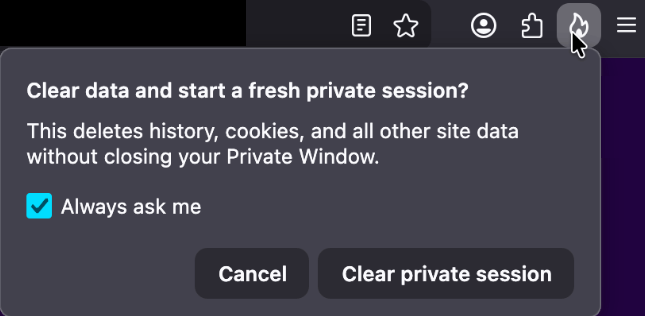
One of the more visible additions is a new “end private session” control in Private Browsing Mode. Instead of closing every private window to clear your traces, you now get a dedicated fire‑icon button next to the address bar that wipes the current private session’s data and immediately starts a fresh one.
End private session button
Under the hood, this clears the usual private browsing artifacts for that session, including history, cookies, cached files, and other site data that would normally disappear only when the last private window closes.
For people who routinely mix normal and private windows, this is safer and less error‑prone than hunting down every private tab before you walk away from the machine.
Firefox 151 also tightens its defenses against browser fingerprinting in the default “Standard” Enhanced Tracking Protection (ETP) mode. Mozilla says Firefox now limits the amount of device and browser information exposed to websites in a way that reduces the number of uniquely identifiable users by about 14% overall, and by roughly 49% on macOS.
This makes it harder for trackers to pick you out of the crowd, especially on platforms with fewer users to begin with (like certain macOS configurations). This reduces the privacy risk surface by default, which makes it harder for phishing and landing pages that redirect visitors to “categorize” you.
Another important change is Firefox’s “local network access restrictions,” which are now rolling out to all users, not just those who turned Enhanced Tracking Protection to Strict.
This means that when a website wants to communicate with devices on your local network, or with apps and services running on your machine, Firefox now asks for permission first. Chrome and Edge have been rolling out similar permission prompts.
The most notable example is CVE‑2026‑8953, a sandbox escape due to a use‑after‑free in the Disability Access APIs component. While there are currently no reports of in‑the‑wild exploitation for this specific bug at the time of writing, this is the kind of bug cybercriminals love.
A use-after-free (UAF) is a software memory vulnerability where a program attempts to access a memory location after it has been freed. If the program fails to clear the pointer to that freed memory, attackers can manipulate the error to crash the system or execute arbitrary code. A memory corruption leading to a sandbox escape is exactly the kind of link attackers want to complete a browser exploit chain.
How to update
If you’re running Firefox in a home or small‑office environment, we recommend updating to Firefox 151 as soon as possible to get the fingerprinting protections, local network access prompts, and security patches.
To update Firefox:
Open Firefox
Click the menu (three stacked lines) in the upper-right corner
Go to Help > About Firefox
Firefox will automatically check for updates and begin downloading them
Restart the browser when prompted to complete the update
Once your Firefox browser has been updated, it will show a green checkmark along with the message: “Firefox is up to date.”
Let’s face it, an incognito window can only do so much.
Breaches, dark web trading, credit fraud. Malwarebytes Identity Theft Protection monitors for all of it, alerts you fast, and comes with identity theft insurance.
If you’re worried about deepfake likenesses of yourself showing up online, you’re not alone; YouTube is worried for you. It wants to protect you by having you upload a selfie video and government ID to its site.
The idea is that the video giant will use its own AI to patrol the service for fake videos using your likeness. In exchange, you get the chance to have them taken down.
This isn’t available for everyone, though. It’s for celebs, those in vulnerable jobs, and now, most YouTube creators.
YouTube has been working on this concept, which it calls its “likeness detection” system, since it first floated the idea publicly in September 2024. That December, it launched a partnership with the Creative Artists Agency that saw it using the technology with sporting and entertainment figures.
In October last year, it expanded likeness detection to cover more creators, and then in March it expanded it again to cover politicians and journalists. And last month, it widened the net again, offering the service to Hollywood celebs. They can use it regardless of whether they have a YouTube account, it added.
Now, in its latest move, anyone 18 or older with a selfie and ID can sign up. At least in theory, as it hasn’t rolled out to everyone yet. It’s also for faces only; AI-generated voice clones are another problem entirely.
The privacy risk
Privacy advocates warned that YouTube’s likeness detection system could normalize handing biometric data to large tech platforms, even if YouTube says the data is only used to improve likeness detection models with creator permission.
On the help page for the likeness detection service, YouTube says creators can separately choose whether their face and voice templates are used to improve its likeness detection models.
“When you sign up for Likeness detection, you also have the option to allow YouTube to use your face and voice templates to develop and improve likeness detection models. This helps us build better, more accurate likeness detection technologies.”
Adding:
“You can opt out of YouTube’s use of this data for development and improvement of likeness models at any time.”
YouTube supports legislation intended to tackle deepfakes, such as the NO FAKES and TAKE IT DOWN acts. These are designed to help stop the misappropriation of someone’s image online. TAKE IT DOWN, which became law a year ago, focuses purely on “nonconsensual intimate imagery.” But that doesn’t cover other kinds of deepfakes, such as fake politicians or celebrity endorsements. Those are becoming increasingly common. NO FAKES, which hasn’t yet become law, is far broader in scope, assigning people federal rights over their own image.
So is it worth the trade?
Deepfakes, intimate and otherwise, are definitely a threat, especially for YouTubers who become popular. And the barrier to entry is lowering all the time. Google’s own DeepMind researchers found most generative AI misuse isn’t sophisticated; it’s mundane likeness manipulation by anyone with a browser.
So do you hand over your face and government ID for your protection, to a company whose broader data collection practices have faced years of scrutiny, and hope its policies don’t change? Or do you skip it and hope that the deepfake merchants don’t decide to target you?
Creators commenting on YouTube’s video revealing the service six months ago were less than impressed. One commenter said:
“I was 100% on board, up until the ID upload. That makes me very uncomfortable.”
Echoing several others who complained that it’s difficult to get takedown requests actioned, another added:
“If YouTube actually acted upon these kinds of reports, then I’d be more in favour of this.”
Whether you decide to sign up for the service or not, just be sure to do it with your eyes open.
Someone’s watching your accounts. Make sure it’s us.
Microsoft said it will change Edge’s password handling as a “defense‑in‑depth” measure.
Originally, Edge decrypted the entire saved‑password store on startup and kept all credentials resident in process memory in clear text for the whole browser session, regardless of whether a given credential was ever used or not.
A short while ago, Microsoft said this plaintext password behavior was by design. Now, Microsoft has changed course, and the new password-handling behavior is already present in Canary (the experimental preview version of Microsoft Edge), with rollout prioritized across all channels.
The researcher who originally flagged the issue said:
“Edge is the only Chromium‑based browser I’ve tested that behaves this way. By contrast, Chrome uses a design that makes it far harder for attackers to extract saved passwords by simply reading process memory.”
Microsoft Edge Security Lead Gareth Evans said Microsoft is now taking a broader view and has committed to changing Edge so that saved passwords are no longer loaded into memory on startup as clear text. As a result, exposure will be reduced as a defense‑in‑depth improvement. That means even if an attacker has administrative control of a device, it becomes harder to harvest all the passwords.
According to Microsoft:
“Going forward, Microsoft Edge will no longer load all saved passwords into memory at browser startup. Instead, passwords will be decrypted only when needed for autofill or password management operations.”
The change is already live in the Edge Canary channel and will be included in the next update for all supported Edge releases (build 148 and newer across Stable, Beta, Dev, Canary, and Extended Stable).
The reason for this change is probably more reputational and strategic rather than an acknowledgment of an exploitable vulnerability. Microsoft seems to want to align reality with its “secure by design” messaging and reduce a very visible, easy‑to‑demo weakness, even if it still doesn’t treat it as a classic memory‑disclosure bug.
Passwords in your browser
Please note that this change just means Edge will become roughly as secure an option to store passwords as every other Chromium-based browser.
Your browser password manager gives you ease of use, but that comes with some security tradeoffs. Of course, password managers aren’t foolproof either, so it’s important to decide for yourself where you store your passwords.
If you’re confident a website is safe, and anyone who can access it under your account wouldn’t learn anything sensitive, feel free to store the password in your browser, but disable autofill so you stay in control.
Use MFA where possible. It enormously reduces the risk if someone gets hold of your password. And avoid using the browser password manager to store your credit card details or other sensitive personally identifiable information, such as medical information.
Let’s face it, an incognito window can only do so much.
Breaches, dark web trading, credit fraud. Malwarebytes Identity Theft Protection monitors for all of it, alerts you fast, and comes with identity theft insurance.
Recent news had us wondering whether Meta actually knows what it wants.
On one platform, Meta is promoting AI chats that it says even it cannot read. On another, it has removed one of the few features that genuinely prevented Meta from accessing private conversations.
At the moment, Meta is heavily promoting a new Incognito Chat mode for its Meta AI assistant in WhatsApp, built on top of a system it calls Private Processing. According to WhatsApp’s own announcement, Incognito Chat is:
“Truly private — no one can read your conversation, not even us.”
When you start an Incognito chat with Meta AI, you get a temporary conversation where messages aren’t saved and disappear by default, which Meta pitches as “a space to think and explore ideas without anyone watching.”
BBC News and others report that these AI chats are text‑only for now, run in a sandboxed environment, and are separate from your regular end‑to‑end encrypted (E2EE) messaging with other people on WhatsApp.
Meta is also preparing “Side Chat,” which will let you invoke Meta AI inside other WhatsApp chats, again using this Private Processing infrastructure to claim AI assistance without breaking the underlying encryption.
On paper, that’s an impressive technical and marketing story: powerful AI, wrapped in layers of privacy‑preserving infrastructure, added to an app that already has a strong reputation for end‑to‑end encryption by default.
Meanwhile, on Instagram…
Now contrast that with what’s happening on Instagram. On 8 May 2026, Meta removed optional end‑to‑end encryption for Instagram Direct Messages (DMs) entirely. Users who had previously turned the feature on were shown notices that “end‑to‑end encrypted messaging on Instagram is no longer supported as of 8 May 2026,” and were urged to download backups of their encrypted conversations before the cutoff.
End‑to‑end encryption ensures that only the sender and recipient can read their conversations. Instagram offered this as an opt‑in feature since late 2023, but it was buried several taps deep inside individual conversation settings and never turned on by default. Meta’s explanation for shutting it down is that “very few people” used encrypted DMs and that maintaining a separate encrypted system added complexity. Critics have pointed out the circular logic. The company hid the feature, did not advertise it, and is now using low adoption as the reason to kill it rather than, say, making it easier to find or turning it on by default.
What all this means
From a user’s perspective, the result is confusing: one Meta product introduces stronger privacy than ever for AI chats, while another removes the one feature that truly stopped Meta from reading your conversations.
The key point to remember here is that “incognito” and “private” are marketing words, while end‑to‑end encryption is a technical guarantee.
For security‑conscious users, this split personality means you can no longer treat all Meta chats the same. WhatsApp remains end‑to‑end encrypted for person‑to‑person messages and adds optional privacy features around its AI, while Instagram DMs should now be assumed readable by Meta and potentially accessible to law enforcement, advertisers, or attackers who gain access to Meta’s systems.
We also know there have been lawsuits against chatbot providers in cases where the outcome of an AI conversation led to very undesirable results. But how would you be able to provide evidence when messages auto-disappear?
How to proceed
Meta’s recent moves show that strong privacy features can be added where they support a strategic narrative and removed where they conflict with business or regulatory priorities. Users can’t control those decisions, but they can respond by choosing where they hold their most sensitive conversations and by assuming that if a chat isn’t end‑to‑end encrypted by default, it is ultimately readable by someone other than the people in it.
So, what’s a safe way to move forward?
Treat Instagram DMs as postcard-level privacy. Now that E2EE is gone, assume Meta can read and scan your messages and that content could be accessed under legal orders or in a breach. Do not send passwords, recovery codes, banking details, or compromising photos over Instagram.
When someone asks you to move a conversation to Signal, WhatsApp, or another E2EE messenger, ask them why. It does make sense when you’re sharing financial details, personal images, health information, or anything you would not want a platform provider to read. But sometimes scammers prefer encrypted platforms too, because they’re harder to monitor.
Do not confuse “incognito” AI chats with full encryption. WhatsApp’s Incognito mode for Meta AI may be a privacy improvement over standard cloud AI chats, but it is still a conversation with a large language model owned by the same company that runs the platform. Share only what you’re comfortable entrusting to Meta.
Regularly review your privacy and security settings. Check which devices are logged in, enable two‑factor authentication, and verify which of your chat apps are actually end‑to‑end encrypted by default.
Scammers know more about you than you think.
Malwarebytes Mobile Security protects you from phishing, scam texts, malicious sites, and more. With real-time AI-powered Scam Guard built right in.
Some Malwarebytes users have recently noticed frequent web protection alerts while reading email in Yahoo Mail’s web interface. These alerts are caused by background connections from the Yahoo Mail page to a set of third‑party domains that our products and other security tools currently classify as risky.
What we are seeing under the hood
When you open Yahoo Mail in a browser, the page loads various embedded components for navigation, features, and metrics. As part of this, the interface makes calls to domains such as cook.howduhtable.com and related subdomains, sometimes in the context of URLs that include /ybar/mail.yahoo.com/ and a long encoded parameter. That encoded string often resolves to a URL like:
This suggests the traffic is being routed through what appears to be a sandboxed web component that Yahoo can use for things like telemetry, testing infrastructure, or mail features. It may also be part of an advertising or tracking flow, but at this time we cannot say with certainty exactly what purpose Yahoo is using it for.
Regardless of intent, multiple security systems have observed these redirect domains and assigned them poor reputations. Characteristics include:
Frequently changing, opaque subdomains that do not resemble normal consumer‑facing Yahoo addresses
Use of encoded parameters and chained redirects that make it difficult for users, and sometimes defenders, to see the final destination at a glance
Existing detections and blocklists from other vendors that classify the infrastructure as suspicious or potentially malicious
Because of these signals, Malwarebytes Web Protection and Browser Guard have been blocking a growing list of related subdomains to protect users, which is why some people see repeated alerts while using Yahoo Mail.
What we are not saying
It is important to be clear about what we do and do not know.
We have not established that Yahoo Mail itself is compromised or that Yahoo is deliberately distributing malware through its mail platform. What we can say is that third‑party or internal components invoked from within the Yahoo Mail web interface are making connections through domains that behave very similarly to infrastructure commonly associated with malicious or deceptive advertising and tracking.
From a security standpoint, this creates unnecessary risk. Any mechanism that injects content or runs sandboxed components via opaque redirect chains could, if misused or subverted in the future, expose users to harmful content without them ever clicking a suspicious link.
Blocking these domains is a precautionary step in line with our normal protection standards.
Why Malwarebytes blocks these redirects
Our decision to block these connections is based on a combination of technical behavior and third‑party reputation data:
The redirects are triggered by embedded components in the Yahoo Mail interface, not by users intentionally browsing to those domains
The infrastructure relies on frequently changing, non‑descriptive domains and subdomains, a pattern we often see in malicious or evasive advertising and tracking systems
Multiple security vendors and automated reputation feeds already flag these domains as risky or malicious, and some have seen them associated with unwanted or harmful activity
Because of this, Malwarebytes products currently block connections to these third‑party domains when they are invoked as part of Yahoo Mail’s web experience. This does not mean that all of Yahoo Mail is considered malicious. It means we are specifically interrupting a narrow set of background calls that present elevated risk.
What this means for users
If you use Yahoo Mail in a browser with Malwarebytes enabled, you may see:
Web protection or MWAC alerts referencing domains like cook.howduhtable.com or similar names while you are reading or composing email
Multiple alerts in a short period, because the mail interface may retry or rotate through different subdomains or IP addresses in the same family
In most cases, your email content itself still loads, though certain embedded elements, metrics, or ad‑related content may fail to load or behave differently.
How to stay safe and reduce interruptions
You should not need to lower your protection to continue using Yahoo Mail. Here are some practical steps you can take:
Keep Malwarebytes protection enabled Leaving Web Protection and Browser Guard on ensures blocks remain in place if these redirects change behavior or begin serving harmful content in the future.
Avoid allowlisting the suspicious domains While it’s technically possible to add exclusions for individual domains, doing so would allow their traffic to load unfiltered in your browser. We don’t recommend this unless you fully understand and accept the risk.
Use private/incognito windows for Yahoo Mail Accessing Yahoo Mail in a private/incognito session can help reduce persistence of certain tracking and advertising data because the browser discards cookies and local storage when you close the window.
Clear cookies and site data periodically If you see repeated alerts, clearing Yahoo‑related cookies and cached data may reduce some of the underlying tracking behavior that triggers these redirects.
Consider fewer‑ads options Yahoo offers paid plans that reduce or remove ads, and users can also use reputable content‑blocking extensions alongside Malwarebytes to cut down on ad‑driven behavior in webmail interfaces.
Our ongoing monitoring
The domains and infrastructure involved in these redirects are operated outside Malwarebytes, and their configuration or behavior may change over time. We are actively monitoring telemetry, sandbox reports, and reputation data for these domains and related infrastructure, and we will adjust our detections if new information emerges.
Our priority is to keep users safe while being transparent about why protection events occur, especially in widely used services such as webmail. If we learn more about the exact role of this component within Yahoo Mail, or if Yahoo provides additional clarity, we will update this article accordingly.
Stop threats before they can do any harm.
Malwarebytes Browser Guard blocks phishing pages and malicious sites automatically. Free, one click to install. Add it to your browser →
Schools love a good photo, whether it’s from a trip to a castle, a science prize ceremony, or sports day shot from three angles. For two decades, celebratory images like these have gone straight onto school websites, captioned with a name and a grade. But those days are gone, because it’s the internet in 2026 and we can’t have nice things.
As first reported by the Guardian, experts are now urging schools to take those pictures down. According to the UK’s National Crime Agency, the Internet Watch Foundation, and an advisory body called the Early Warning Working Group (EWWG), blackmailers have been scraping ordinary school photos, feeding them through AI deepfake tools to manufacture child sexual abuse material (CSAM), and demanding payment to keep the images offline.
One school, 150 images
Late last year, cybercriminals contacted an unnamed UK secondary school with that demand. The IWF classified 150 of the resulting images as CSAM under UK law and generated digital fingerprints for each image so major platforms could block reuploads.
The IWF isn’t naming the school or the police force, and it doesn’t believe this was an isolated case. The EWWG says it’s “only a matter of time” before more schools face similar demands.
UK safeguarding minister Jess Phillips called it a “deeply worrying emerging threat.” In February 2025, the UK became the first country to ban AI tools designed specifically to generate CSAM.
How we got here
This threat didn’t appear overnight, and it isn’t limited to the UK. It’s an evolution of a long-time threat: sextortion, when someone uses intimate images to blackmail you. Traditionally, sextortion relied on real intimate images that were stolen or shared, but deepfake AI has changed everything.
The FBI’s Internet Crime Complaint Center (IC3) logged more than 16,000 sextortion complaints in the first half of 2021, with losses exceeding $8 million. By June 2023, the bureau warned the playbook had shifted: attackers were using ordinary social media photos to create fake explicit images and extort minors.
UK children’s counseling helpline Childline has seen similar shifts as deepfake tools become more accessible. It already logs many sextortion cases each year, many from kids who were manipulated into sharing intimate images of themselves. Now, the organization is getting calls from children who are being sent deepfake CSAM images of themselves without any prior contact.
One 15-year-old girl, for example, was sent a “really convincing” fake nude built from her Instagram photos.
By November 2025, IWF reports of AI-generated CSAM had more than doubled year over year, rising from 199 to 426. Girls accounted for 94% of the victims. Reported cases included children ranging from newborns to two-year-olds, according to the organization.
The ecosystem around these tools is industrial. In April 2025, a researcher found an exposed AWS S3 bucket belonging to South Korean “nudify” app GenNomis containing 93,485 AI-generated images alongside the prompts that produced them.
What the schools are being told
The EWWG’s advice is to replace close-up, identifiable photos with images taken from a distance, blurred images, or photos shot from behind. It also advises schools to remove full names from captions, audit existing images, and ask parents to re-sign consent forms.
In fact, it advises schools to rethink whether they need to publish children’s photos online at all.
Some schools have already acted. According to the Guardian, Loughborough Schools Foundation, a group of three private schools sharing a website, removed recognizable pupil images entirely last year.
The UK Information Commissioner’s Office (ICO) says that it “would still generally expect you to offer an opt-out to parents” when publishing an identifiable photo of a child, but says this isn’t legally the same as consent, which has a higher bar.
Things get murkier in the US, where states often have their own student privacy statutes. Broadly, though, under the Family Educational Rights and Privacy Act (FERPA), schools typically include identifiable photos of students under the category of directory information. This category also covers name, address, telephone listing, date and place of birth, participation in officially recognized activities and sports, and dates of attendance.
Under FERPA, schools can publish this type of information unless the child’s guardian specifically opts out. They have to notify a guardian when they want to publish it, but that process may not apply indefinitely after a student leaves the school.
That means student photos and information can remain online long after families assume they have disappeared.
What happens next
Back in the UK, Childline’s Report Remove service allows children to flag explicit images or videos of themselves that have been posted online. The service took 394 blackmail reports from under-18s last year, up by one-third compared to 2024.
Meanwhile, the UK government is amending the Crime and Policing Bill, forcing platforms to take flagged intimate images down within 48 hours or face fines of 10% of global revenue.
We anticipate a race between regulators and AI-enabled cybercriminals. Right now, attackers still have to manually find the photos themselves. The concern is that this process could soon become automated, allowing criminals to scrape names and photos from school websites and social media platforms at scale.
Attorney General (AG) of Texas Ken Paxton announced that he sued Netflix for spying on Texans, including children, and collecting users’ data without their knowledge or consent.
The suit alleges Netflix secretly tracks and monetizes detailed viewing behavior of users, including children, while misleading users about its data practices. The case could reshape how Netflix collects data, targets ads, and designs “addictive” features, especially for minors.
According to the complaint, Netflix allegedly ran what the AG’s office calls a “surveillance program,” turning every click, pause, and binge session into data that could be sold to advertisers and data brokers.
Netflix firmly denies the accusations, calling the lawsuit “inaccurate” and claiming it complies with privacy laws wherever it operates. Spokesperson Jamil Walker said:
“The suit lacks merit and is based on inaccurate and distorted information.”
But regardless of how this specific case plays out, the lawsuit raises a bigger question for all subscribers: Just how much does your streaming service really know about you, and what does it do with that information?
The Texas complaint paints a picture of Netflix as a data company first and a streaming service second. Paxton’s office even describes Netflix as:
“A logging company that records and monetizes billions of behavioral events—and occasionally streams movies.”
The complaint also references a 2024 ruling by the Dutch Data Protection Authority, which said Netflix does not disclose the true scale or granularity of this data collection. The lawsuit claims Netflix did not just use this data internally for recommendations but also sold it to commercial data brokers and ad tech companies, generating “billions of dollars” annually.
The AG wants to stop the unlawful collection and disclosure of user data, require Netflix to disable autoplay by default on kid’s profiles, and impose other injunctive relief and civil penalties.
For customers, the main consequences could include potential changes to data collection, targeted advertising, autoplay defaults, and clearer consent and privacy controls. For subscribers on Netflix’s ad‑supported plans, this could slightly change how “personal” ads feel, at least in jurisdictions where regulators clamp down.
Plus, the lawsuit serves as a reminder that streaming habits may be far more trackable than users assumed. Even if Netflix ultimately wins or settles without admitting wrongdoing, the lawsuit puts a spotlight on what the company collects and why.
Netflix privacy and account settings
It will probably take a while before this lawsuit leads to any changes. But there are a few things you can do to protect your privacy:
Where available, turn off non‑essential marketing emails or in‑app promotions that rely on behavioral profiling.
Use the parental controls Netflix offers you and turn off autoplay previews.
Basically, treat your Netflix account like any other online account: Review every profile, remove old ones, and take five minutes to walk through the privacy- and playback‑related options.
Scammers don’t need to hack you. They just need you to click once.
A researcher found that Yarbo yard robots came with a host of vulnerabilities which, among others, allowed an attacker to harvest WiFi passwords.
Security researcher Andreas Makris found he could remotely hijack thousands of Yarbo yard robots worldwide, and proved it by having his mower run him over. The root cause was a cluster of “legacy” design choices: every robot shared the same hardcoded root password, remote tunnels were left open, and Message Queuing Telemetry Transport (MQTT) messaging was so weakly protected that once you had one device, you effectively had the worldwide fleet.
An attacker could pull GPS coordinates, email addresses, and Wi‑Fi passwords, turn cameras into remote spying tools, and even re‑arm the mower after someone hit the emergency stop.
All of this was enabled by a persistent backdoor tunnel that users could neither see nor meaningfully control. The risks fell into three very different buckets:
A heavy mower with remotely controllable blades and an emergency stop that can be bypassed is a real-world safety hazard.
Exposed telemetry meant attackers could map where devices were, see who owned them, and in some reports even view camera feeds.
Network abuse through shared root credentials meant compromised robots could scan local networks, steal more data, or be folded into a botnet.
Yarbo’s public response is unusually detailed for a consumer Internet of Things (IoT) vendor. It’s also refreshingly blunt in admitting that the researcher’s core findings were accurate. The company temporarily disabled the remote diagnostic tunnels, reset root passwords, locked down unauthenticated endpoints, and began ripping out unnecessary legacy access paths.
More importantly, Yarbo promises structural changes:
Unique per‑device credentials.
Over-the-Air (OTA) credential rotation.
Audited, allowlist‑based remote diagnostics.
Dedicated security contact, with a possible bug bounty to follow.
That is the sort of long‑term security hygiene we rarely see spelled out this clearly after an IoT fiasco.
From a disclosure and remediation standpoint, Yarbo is doing many things right: crediting the researcher, apologizing, prioritizing fixes, and explaining both short‑term patches and long‑term architectural changes in human language. For buyers of connected devices with blades, that level of transparency is a positive precedent.
But Yarbo has explicitly chosen to keep a remote access tunnel, although wrapped in better controls and logs, instead of offering users the option to remove or fully opt out of it.
How to secure IoT devices
The vulnerabilities uncovered in the Yarbo case present an almost a live-action demo of what the IoT CybersecurityImprovement Act is trying to prevent in US government deployments. While the Act doesn’t apply to Yarbo directly, its National Institute of Standards and Technology (NIST)-driven requirements map neatly onto what went wrong here.
So, it’s still up to users to make sure you:
Change the default credentials.
Check if the vendor will make updates available and how easy it is to install them before buying an IoT product. And then install the updates when available.
If you can, put your IoT devices on a separate network. Use a guest Wi‑Fi or separate VLAN when available.
Disable what you don’t need. Turn off UPnP, remote access, cloud control, and unnecessary services if you’re not actively using them.
If your router or security suite logs connections from IoT devices, skim those logs for odd spikes or unknown destinations.
Let’s face it, an incognito window can only do so much.
Breaches, dark web trading, credit fraud. Malwarebytes Identity Theft Protection monitors for all of it, alerts you fast, and comes with identity theft insurance.
In that article we mentioned the importance of encryption.
“With a browser password manager, someone with access to your browser could see your passwords in clear text, although Windows can be set to ask for authentication (the same you use at startup of your device).”
The typical behavior of browser password managers is to store passwords encrypted on disk, tied to your user account, and protected by the operating system.
But recently, a security researcher systematically tested every major Chromium-based browser for how they handle credentials in memory. The researcher found that Edge was the only one loading the entire password vault into plaintext process memory at startup, where it remains for the duration of the session.
Chrome and other Chromium browsers were observed to only decrypt a password when needed (autofill or “show password”), not the whole vault, and to use mechanisms like app‑bound encryption for keys. Edge does not use those protections in this context.
So, the researcher decided to write a proof-of-concept (PoC) demonstrating that accessing that vault doesn’t rely on zero-days or complex exploitation. It relies on the relatively simple ability to read process memory, which does require elevated privileges.
But when the researcher reported the issue to Microsoft, the response was underwhelming. The company’s official response was that the behavior is “by design.” The reasoning most likely is that this behavior speeds up sign‑in and autofill, and attackers would already need a compromised machine or elevated access to read RAM, which Microsoft treats as out of scope for this design decision.
Which is basically true. An attacker already needs significant foothold: for example, code execution on the box and the ability to read Edge’s process memory, often requiring elevated privileges. This is not a remote, unauthenticated bug in the browser, but the design makes post‑compromise credential harvesting easier. And it’s a capability many infostealers already have.
It’s just another thing an attacker can do once they’ve compromised your machine. Combined with this academic study from 2024, which found many password managers leak plaintext passwords into memory under some conditions, it leads us to repeat our advice.
Should you allow your browser to remember your passwords?
Your browser password manager gives you ease of use, but that costs you some security. Of course, password managers aren’t foolproof either, so it’s important to decide for yourself where you store your passwords.
If you’re confident the website is safe, and anyone that can access it under your account won’t learn anything new, feel free to store the password in your browser, but disable autofill so you stay in control.
Use MFA where possible. It enormously reduces the risk should someone get hold of your password. And refrain from using the browser password manager to store your credit card details or other sensitive personally identifiable information, such as medical information.
But we’d add that, among the major browsers, Edge appears to be the weakest option if you still choose to use a built‑in password manager.
Stop threats before they can do any harm.
Malwarebytes Browser Guard blocks phishing pages and malicious sites automatically. Free, one click to install. Add it to your browser →
The Online Safety Act came into effect in July, 2025, and the report explores what has changed in the online lives of UK families since then.
We discussed in December 2025 whether the privacy risks of age verification outweighed the enhanced child protection. While the report shows some progress, it mostly provides “an early view of how the online landscape is changing, and crucially, where it is not.”
Around half of children say they now see more age-appropriate content, and roughly four in ten parents and children feel the online world has become somewhat safer.
The online world is as much a part of a child’s environment as the physical world is. And blocking the view to parts of that world is not taken lightly. Almost half of children think age checks are easy to bypass. About a third admit to doing so recently, using tactics from fake birthdates and borrowed logins to spoofed faces and, less commonly, VPNs.
“I did catch my son [12] using an eyebrow pencil to draw a moustache on his face, and it verified him as 15 years old.”
Yet 90% of children who noticed improved blocking and reporting saw this as a good thing. Their support for these safety features is pragmatic. They point to:
clearer rules
restricted contact with strangers
limits on high-risk functions
They also rate these features as helpful in reducing exposure to harmful content and interactions.
But the system is not perfect. In the month after the child protection codes came into force, almost half of children reported some online harm, including violent, hateful, and body image-related content that should be covered by the Act’s protections.
The survey also revealed that age checks are now commonplace. Over half of children said they were asked to verify their age within a recent two-month window, often on major platforms like TikTok, YouTube/Google, and Roblox, on both new and existing accounts.
The technology is improving. Platforms use facial age estimation, government ID, and third-party age assurance apps, and these are usually easy for children to complete.
However, gains in protection come with unresolved and, in some cases, growing concerns around privacy and data use, especially around age verification and AI.
Parents are worried not just about what data is collected for age checks, but whether it will be stored or reused by government or industry. This has fueled calls for central, privacy-protective solutions rather than fragmented data collection across platforms.
Because age assurance systems are both intrusive (in terms of data) and often ineffective (easy workarounds, weak enforcement), the report suggests they may not yet provide a good safety-to-privacy trade-off from a family perspective.
Obviously, the survey also didn’t capture input from adults pretending to be children to gain access to child-only spaces, a risk that parents link directly to predatory behavior.
The authors conclude that the Online Safety Act has started to reshape children’s online environments, making safety features more visible and enabling more age‑appropriate experiences in some areas.
However, the Act has not yet produced a “step change.” Harmful content remains widespread, age‑assurance is patchy and easy to circumvent, and key concerns such as time spent online, AI risks, and persuasive design remain under‑regulated.
Browse like no one’s watching.
Malwarebytes Privacy VPN encrypts your connection and never logs what you do, so the next story you read doesn’t have to feel personal. Try it free →
Every year, hundreds of millions of real user passwords leak onto the dark web. We analyzed 231 million unique passwords from dark-web leaks between 2023 and 2026, and the conclusions are bleak: the vast majority are extremely weak. To crack 60% of these passwords, a hacker needs only an hour and a few dollars in their pocket. Furthermore, password cracking is accelerating by the year; in our similar 2024 study, the percentage of vulnerable passwords was lower.
Today we’re looking at just how reliable the average password is (spoiler: not really), and how you can secure your data and accounts using more robust methods. At the same time, we’ll highlight the patterns most commonly found in actual user passwords.
These days, passwords are almost never stored in plain text. For instance, if you create an account with the password “Password123!”, the server won’t store it as-is. Instead, the password is hashed using specific algorithms, turning it into a fixed-length string of letters and numbers (a hash) which is what actually stays on the server. For example, here’s what the MD5 hash for “Password123!” looks like:
2c103f2c4ed1e59c0b4e2e01821770fa.
Every time the user enters their password, it’s converted into a hash and compared against the one stored on the server; if the hashes match, the password is correct. If an attacker gets their hands on this hash, they have to decrypt it to recover the original password — this is what’s known as “password cracking”. This is typically done using owned or rented GPUs, and several methods can be employed for the crack:
Exhaustive enumeration (brute force). The computer tries every possible combination of characters, calculating the hash for each one. This method is the easiest way to crack short passwords, or those consisting of a single character set (such as digits only).
Rainbow tables. A total nightmare for anyone with a simple password, this is essentially a “phone book” for passwords whose hashes have already been cracked via brute force or smart algorithms. All an attacker has to do is find a matching hash and see which password corresponds to it.
Smart cracking. These algorithms are trained on databases of leaked passwords. They understand the frequency of different character combinations, and run their checks from the most likely to the least popular sequences. They account for dictionary words, character substitutions (a → @ or s → $), and consider common password structures like “dictionary word + number + special character”, while checking hashes against rainbow tables. Combining these methods significantly accelerates the cracking process.
Beyond that, attackers can also intercept passwords in plain text. There are numerous ways to do this, ranging from phishing (where a victim is lured to a fake web page and enters their password voluntarily) and keyloggers that capture keystrokes, to stealers or Trojans that swipe documents, cookies, clipboard data, and more. Unfortunately, many users keep their passwords as plain text in notes, messaging apps, and documents, or save them in browsers where attackers can extract them in seconds.
Every year, we track around a hundred million plain-text password leaks. We use these databases to warn Kaspersky Password Manager users if their data has been compromised. To address the most frequent question we get on this: no, we don’t know our users’ passwords. We’ve explained in non-techie language exactly how we compare your passwords to leaked ones without actually knowing them — and why neither your passwords stored in Kaspersky Password Managernor even their hashes ever leave your device — in our overviews of our leak analysis technology and our password manager’s internal architecture. Give them a read; you’ll be surprised by just how elegant the design is.
60% of passwords are cracked in under an hour
We expanded the database from our previous study by an additional 38 million real passwords posted by attackers on dark-web forums and compared the results. Testing was conducted using a single RTX 5090 GPU for passwords hashed with the MD5 algorithm. The data for the analysis was obtained from our Digital Footprint Intelligence service. You can review the algorithm we used to assess password strength in our article on Securelist.
Unfortunately, passwords remain as weak as ever, while cracking them becomes faster and easier with every year. Today, 60% of passwords can be cracked in less than an hour; two years ago, that figure was 59%. But the truly frightening part is something else: nearly half of all passwords (48%) are cracked in less than a minute!
Cracking time
Percentage of passwords crackable within this time in 2024
Percentage of passwords crackable within this time today
Less than a minute
45%
48%
Less than an hour
59% (+14%)
60% (+12%)
Less than 24 hours
67% (+8%)
68% (+8%)
Less than a month
73% (+6%)
74% (+6%)
Less than a year
77% (+4%)
77% (+3%)
More than a year
23%
23%
Password cracking time: two years ago and today
Attackers owe this boost in speed to graphics processors, which grow more powerful every year. While an RTX 4090 in 2024 could brute-force MD5 hashes at a rate of 164 gigahashes (billion hashes) per second, the new RTX 5090 has increased that speed by 34% — reaching 220 gigahashes per second.
And although a high-end video card like that currently retails for several thousand dollars, the price tag isn’t much of a barrier: there are plenty of cheap cloud services available for renting GPU computing power. Depending on the configuration and the model, rental costs range from a few cents to a few dollars per hour. As we’ve seen, one hour is all an attacker needs to crack three out of every five passwords they’ve found in a leak. Plus, depending on the scale of the task, they can always rent ten or even a hundred GPUs instead of just one…
It’s worth noting that cracking every password in a dataset doesn’t take much longer than cracking a single one. During each iteration, once the attacker calculates a hash for a specific character combination, they check if that same hash exists anywhere in the dataset — and the larger the dataset, the easier it is to find a match. If a match is found, the corresponding password is flagged as “cracked”, and the algorithm moves along to the next one.
Which passwords are vulnerable?
The strength of any password depends on its length, content variety, and the randomness of that content. Passwords created by humans turn out to be the least resilient — unfortunately, humans are quite predictable. We use dictionary words and character combinations that smart algorithms have long since mastered, we avoid long random strings, and patterns can be found even in keystrokes we believe are random. Interestingly enough, passwords generated by AI still carry the fingerprints of a human approach; we covered this in a separate post on how to create a strong yet memorable password.
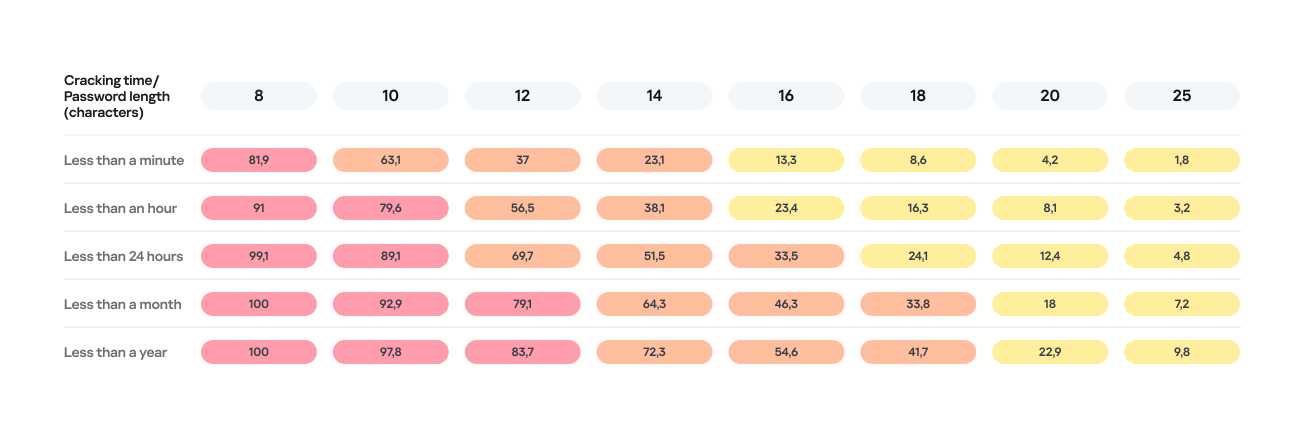
Password length is the primary factor affecting cracking time. As you can see from the table below, it takes less than 24 hours to crack almost any eight-character password.
Percentage of varying password lengths crackable within a given timeframe
But the predictability of your password is just as important. Think you’re boosting security by adding a number or a special character to a memorable word? You are, but only slightly. The patterns people use to create passwords are easily predictable and, at times, pretty amusing — though this is no laughing matter.
What we learned about password patterns
Analysis of over 200 million passwords revealed characteristic patterns that allow smart algorithms to crack user passwords with ease.
Pick a number
More than half of all passwords (53%) end with one or more digits, while nearly one in six (17%) starts with a number. Every eighth password (12%) contains sequences that look a lot like years — ranging from 1950 to 2030 — and one in ten (10%) specifically falls between 1990 and 2026. This most likely happens because folks add their birth year (or that of someone close), some other significant year, or the year they created the password or account. Fun fact: based on the distribution of these dates, it suggests that the most active internet users were born between 2000 and 2012.
However, among all numeric combinations, the most popular turned out to be… you guessed it: “1234”. Overall, patterns involving sequential keyboard presses (“qwerty, ,”ytrewq”, and the like) appear in 3% of passwords.
Special characters aren’t a silver bullet
Most password policies in recent years require at least one special character. The absolute winner in this category is the @ symbol: it appears in one out of every 10 passwords. The period (.) comes in second, followed by the exclamation point (!) in third.
Love rules the world… and Skibidi Toilet does too
Emotionally charged words often form the foundation of a password, and despite everything, positive words are more common. Frequently occurring examples include “love”, “angel”, “team”, “mate”, “life”, and “star”. That said, negativity pops up too — mostly in the form of common English swear words.
Interestingly, viral memes are reflected in passwords as well. Between 2023 and 2026, the use of the word Skibidi in passwords skyrocketed 36-fold! Naturally (see the link if it doesn’t seem natural), “toilet” saw a boost too, though to a lesser extent.
Users tend to keep their passwords unchanged for years
More than half of the passwords (54%) we identified in recent leaks have surfaced before. Part of this can be explained by the same data migrating from one dataset to another. However, there’s a much more troubling reason too: many users simply haven’t changed their passwords in years.
Analyzing the dates found within passwords shows that combinations containing the years from 2020 through 2024 remain popular. It seems people add the current year to their password when they create it — and then forget about it for several years. This actually allows us to calculate the average lifespan of a password: about three to five years.
This is a dangerous trend. For one, smart algorithms can crack much more complex passwords over that kind of timeframe. Secondly, the longer your password remains unchanged, the higher the probability it will leak — whether through a breach, malware infection, or a phishing attack.
The situation gets even worse when the same password is used across multiple accounts. In this case, attackers don’t even need to crack anything; they just need to find your password in a single leak and plug it into other sites.
How to protect your passwords and accounts
If you’ve realized while reading this post that your own passwords are among those easily crackable — don’t panic. We’ve put together a list of simple but essential tips for you.
Use a password manager
The weakest passwords are the ones people come up with themselves. Creating and memorizing hundreds of sequences of 16–20 random characters (since every site requires a unique, long password) is a daunting, unrealistic task.
That’s why you should delegate password generation and storage to our password manager. It doesn’t just create and store complex, randomized passwords in an encrypted format; it also syncs them across all your devices. To decrypt your vault, you only need to remember one main password that no one knows but you — our guide on mnemonic passwords can help you with that.
Don’t store passwords as plain text
Whatever you do, never write down passwords in files, messages, or documents. They lack the robust encryption provided by a password manager. Furthermore, these kinds of notes fall into the hands of attackers instantly if you happen to pick up a Trojan or an infostealer.
Don’t store passwords in your browser
Many users save their passwords in their browsers — especially since they conveniently offer to do it automatically. Unfortunately, research shows that malware has evolved to extract these passwords from all popular browsers almost instantly. Kaspersky Password Manager can help you import saved passwords from your favorite browser — just follow our simple, three-step guide. Most importantly, don’t forget to clear the browser’s password storage once the import is complete.
Switch to passkeys
Wherever possible, use passkeys — a cryptographic replacement for passwords. In this setup, the service stores a public key, while the private key remains on your device and is never transmitted. During login, the device simply signs a one-time request. Additionally, passkeys are tied to a specific domain, meaning phishing attacks using spoofed addresses won’t work. Kaspersky Password Manager allows you to store both passwords and passkeys, solving the problem of syncing them across different ecosystems, including Windows, Android, macOS, and iOS.
Set up two-factor authentication
Enable two-factor authentication wherever possible. Even if your password is compromised, a properly configured 2FA setup makes it extremely difficult for the attacker to access your account. For maximum security, skip the one-time codes sent via SMS and use authenticator apps instead — and yes, Kaspersky Password Manager comes in handy here, too.
Practice good digital hygiene
Remember, storing your passwords correctly is only half the battle. It’s crucial to follow the rules of digital hygiene: avoid downloading unverified files, pirated software, cheats, or cracks, and don’t click on random links. The number of infostealer attacks has been steadily rising in recent years, which means you need a robust security solution for full protection. We recommend Kaspersky Premium — it protects all your devices from Trojans, phishing, and other threats. Besides, the subscription includes our password manager.
For those serious about account security, check out our collection of posts on passwords, passkeys, and two-factor authentication:
Ukrainian police arrested three individuals in Lviv who allegedly orchestrated one of the largest Roblox account theft operations to date. Between October 2025 and January 2026, the hacking group is said to have compromised over 610,000 Roblox accounts, including at least 357 high-value “elite” accounts, making around $225,000 from selling access to them.
The hackers distributed infostealing malware disguised as game-enhancement tools, harvested login credentials from infected devices, and sold accounts through a Russian website and closed online communities based on their value.
This operation targeted Roblox accounts because they hold significant monetary value for many users. Accounts can contain high Robux balances, limited-edition items that can no longer be obtained, years of gaming progress with achievements and unlocks, and paid access to premium content.
Roblox account recovery
If you recently downloaded any suspicious game enhancements or other Roblox-related software, your first priority is to run a full system anti-malware scan.
If the hackers changed your password and you’re unable to log in, use the password recovery option on the Roblox login page by clicking “Forgot Password or Username?”. Enter the email address associated with your account and check your inbox (including spam folders) for the reset link.
After recovering access, immediately terminate all active sessions to prevent hackers from maintaining access through stolen cookies. Go to Settings > Security and click Log out of all other sessions at the bottom of the page. This ensures that anyone who had unauthorized access can no longer use your account.
If you’ve been completely locked out—because hackers have changed both your password and recovery details—contact Roblox Support immediately. Visit the Roblox support page and provide as much detail as possible. They may ask for:
Your account username (this is crucial for identification).
The original email address used to create the account.
Payment information or purchase receipts showing Robux transactions.
The approximate date and time of the compromise.
Screenshots showing account details before the compromise, including creation date.
Your previous account settings or any other details that prove ownership.
Roblox explicitly states that, unless required by law, it is under no obligation to restore compromised accounts. It does not guarantee that accounts will be returned to their previous state or that lost virtual items and currency can be recovered. Only in very limited circumstances may Roblox offer the ability to recover lost inventory or its approximate value. It’s important to note that you must contact Roblox within 30 days of the compromise if you want assistance recovering lost items or currency. The support process typically takes 2–5 days.
There are a few steps that make it harder for someone to steal your Roblox account:
Verified email address. Ensure your account has a verified email address that you actively monitor. This helps you spot unauthorized password or email changes quickly.
Use unique passwords. Never reuse passwords across different accounts. If one is exposed elsewhere, attackers will try it on other platforms, including Roblox. Your Roblox password should be completely unique and stored securely. A password manager can help you with both.
Don’t share access. Never share your password with anyone, even with people claiming to be friends. Your account credentials should belong only to you (and your parents if you’re a minor). Roblox staff will never ask for your password.
Be wary of game enhancements, hacks, cracks and keys. The hackers in this case specifically distributed malware disguised as game-enhancement tools. Be extremely cautious about downloading any third-party programs, cheats, exploits, or tools that claim to improve your Roblox experience. These are often vehicles for credential theft and account compromise.
Keep software updated. Keep all the software on your device up-to-date, so you’re protected against the latest known exploits.
Use anti-malware. Run up-to-date, real-time anti-malware software to protect your device against information stealers and other malware.
Let’s face it, an incognito window can only do so much.
Breaches, dark web trading, credit fraud. Malwarebytes Identity Theft Protection monitors for all of it, alerts you fast, and comes with identity theft insurance.
It’s best to think of the modern car as a computer on wheels — one that constantly offloads diagnostic data to the manufacturer or dealer’s servers. On board, you’ll find dozens of sensors: everything from GPS, speedometers, and hands-free microphones, to external cameras and the less obvious (but highly active) sensors for pedal pressure, tire pressure, engine temperature, and more. Even if this data isn’t beamed to the manufacturer in real-time, it’s logged in the car’s internal memory, and can reveal a wealth of information about a driver’s trips, habits, and surroundings. We’ve already taken a deep dive into how automakers collect data for commercial use, and who they sell it to (spoiler alert: insurance companies are the biggest buyers of telemetry), but today we’re looking at how law enforcement and intelligence agencies tap into this goldmine.
Digital evidence
Police departments across the globe have recognized the immense value of data stored within vehicles. If a car or its owner is potentially linked to a crime, investigators do more than just check for prints or DNA. Car Intelligence (CARINT) technology allows them to essentially scour all onboard computers, extracting data such as:
GPS-based trip history
Call logs, media player activity, and voice commands
Lists of paired devices and synced contact lists
Driving statistics: mileage, engine performance modes, and other technical parameters
There are numerous precedents where this data has served as evidence and dismantled alibis. In one U.S. criminal case, a recorded voice command became a smoking gun, proving the suspect was behind the wheel of a stolen vehicle.
With the rise of connected cars equipped with their own SIM cards and direct links to the manufacturer, law enforcement no longer needs physical access to the vehicle. Key data, such as GPS location history, can be pulled directly from the manufacturer’s servers. Furthermore, a U.S. Senate investigation revealed that nine out of 14 surveyed automakers were providing this data without a warrant.
Major suppliers of car intelligence software, such as Ateros, Berla, TA9/Rayzone, and Toka, sell their solutions exclusively to government and law enforcement agencies, which is why they’ve remained largely out of the public eye.
Comprehensive surveillance
To track persons of interest, data pulled from the vehicle itself is cross-referenced with information from other sources. According to media leaks, flagship products in this category aggregate data from the car’s SIM card, Bluetooth communication trails, street-level CCTV footage, and commercially available information from data brokers. This hybrid dataset simplifies the comprehensive mapping of a target’s movements and contacts. Journalists have discovered that some companies even market the ability to activate a vehicle’s microphones and cameras remotely and covertly, enabling real-time eavesdropping on conversations. However, experts note that due to the diversity of technical implementations across different systems, hacking the car itself remains a difficult task with no sure way of succeeding. Often, it’s simpler to correlate other, more accessible datasets to achieve the same result.
Factory-installed spy tools
Features like covert activation of cameras, microphones, and other sensors may theoretically be part of a vehicle’s stock functionality rather than the result of a hack. While we haven’t found any public evidence of such cases, it’s well known that Chinese-made vehicles are coming under increased scrutiny in several countries. For instance, they’ve been banned from Israeli military sites — with the exception of a single Chery model, provided its multimedia system is removed. Similar bans exist in the UK and Poland; furthermore, UK Ministry of Defense employees are instructed not to connect their work phones to Chinese-made cars. In Germany, security analyses of Chinese vehicles were conducted by the specialized agencies BfV and ZITiS, but the findings remain classified.
Low-cost surveillance
Tracking a vehicle — or even thousands of them — doesn’t necessarily require hacking onboard systems or tapping into vast networks of license plate readers. A recent scientific study demonstrated that innocent tire pressure monitoring systems (TPMS) provide enough data for effective tracking. Data from these sensors is transmitted via radio without any encryption and includes a unique ID that makes identifying a specific car easy. This allows for more than just confirming the vehicle’s movement; it can even be used to estimate the driver’s weight or determine if they are traveling alone. While this might not sound as impressive as remotely accessing a car’s cameras, it requires very little financial investment and works even on relatively old vehicles without an internet connection.
What you can do about vehicle tracking
While tracking a person through their car is undoubtedly a privacy risk, striking a balance in mitigating this threat is difficult: many measures are complex, largely ineffective, and simultaneously reduce the utility, safety, and convenience of a modern vehicle. Consequently, any steps taken should be weighed against your personal risk profile.
To reduce the risk of data leaks, check the privacy settings in the manufacturer’s app, the car’s infotainment system, and your connected smartphone. A connected car can transmit data about its operation to the cloud: information about trips, location, driving style, vehicle condition, and the operation of its components. Some of this data is necessary for navigation, diagnostics, and service, but not all permissions are required — check your settings and disable the transmission of data not related to the functions you need.
Be careful with permissions for access to the microphone, camera, contacts, messages, and geolocation. Only connect your own devices to the car and don’t save other people’s phones or unfamiliar Bluetooth devices in the system. When syncing your smartphone, select only the features you need — such as calls, music, and navigation — rather than granting full access to all your phone’s data.
Do not use the services of technicians who offer to “unlock” your car, reflash electronic control units, or install unofficial software to expand features, increase power, or otherwise interfere with the car’s operation. Such software has not been tested by the manufacturer: it may behave unpredictably, collect and transmit your data to malicious actors, disable security features, or affect critical vehicle systems — including steering, braking, or engine operation.
And when choosing a new car, ask the dealer not only about the number of stars in NCAP safety tests, engine power, or fuel economy, but also about the cybersecurity technologies used in the vehicle. Solutions such as the Kaspersky Automotive Secure Gateway, based on KasperskyOS, will provide the necessary protection for new cars against cyberthreats.
What other threats do connected cars hide? Read more in our posts:
Half a million Britons signed up to help cure cancer. Their data ended up for sale on Alibaba.
The UK Biobank charity informed the British government of an incident concerning the medical data belonging to 500,000 British citizens being offered for sale on the Chinese e-commerce website Alibaba.
The National Data Guardian, Dr Nicola Byrne, said in a statement:
“People who generously share their health data to benefit others through medical research rightly expect it to be kept safe and for there to be accountability when things go wrong.”
Officials said the researchers downloaded the data under a legitimate contract, but its appearance on Alibaba shows how “approved” access can still turn into public exposure.
UK Biobank holds more than 15 million biological samples and detailed health records from volunteers recruited between 2006 and 2010, and researchers worldwide use it to study cancer, dementia, diabetes, and other chronic diseases.
UK Biobank normally signs contracts with vetted universities and private companies before it lets them access the data, but investigators traced the Alibaba listings to three research institutions. UK Biobank revoked their access and paused new data access while it strengthens security controls.
At least one listing reportedly contained data on all 500,000 volunteers, and Alibaba and Chinese authorities removed the adverts before anyone could confirm a sale.
The dataset comes from UK Biobank’s long‑running research cohort and includes genetic sequences, blood samples, medical imaging, and detailed lifestyle information used for global health research.
UK Biobank emphasizes that the data was “de‑identified,” meaning it didn’t include names, addresses, or NHS numbers. But it still contained granular demographics, such as gender, age, birth month/year, socioeconomic indicators, lifestyle details, and health measures. We have repeatedly seen that such data can be re‑linked to individuals by cross‑referencing with other public or commercial records.
Why China cares
US intelligence, policy reports, and academic work paint a consistent picture: China treats large, diverse human genomic and health datasets as a strategic resource for both economic and security reasons.
The US National Counterintelligence and Security Center (NCSC) explicitly states that the People’s Republic of China views bulk healthcare and genomic data as a “strategic commodity” to drive its biotech, AI, and precision medicine industries, and has invested billions in national genomics and precision‑medicine initiatives.
Large datasets from non‑Chinese populations are particularly valuable for building AI models and improving the global commercial competitiveness of Chinese pharma and biotech.
From an attacker’s or foreign intelligence perspective, UK Biobank is a “crown jewel” asset: It’s curated, high‑quality, population‑scale, and much more useful than random breach dumps. And because genetic data is immutable (unlike a password, it cannot be replaced), any compromise has very long‑term intelligence usefulness.
Last year, the Guardian reported that one in five successful UK Biobank access applications came from Chinese entities, including BGI, China’s flagship genomics company that was later placed on the US Entity List over concerns about its role in surveillance of minority populations.
China is not just stockpiling DNA for curiosity’s sake. It is building a global genomic map that covers adversaries as well as its own citizens.
Your genome data
There have been major concerns about genetic data ending up in the wrong hands, and for good reason. But I’m not going to say that volunteering your medical data for research is bad. Researchers often put the data to good use to help others.
But there are some good questions to ask before doing so.
Who runs the project and where is it based? Prefer non‑profit or academic biobanks with clear public‑interest mandates and strong oversight, rather than opaque commercial data brokers.
How do they store the collected data? Ask specifically about genomic data, raw sequencing files, links to medical records, and whether data is encrypted at rest and in transit.
Who can access the data and under what controls? Look for a formal access committee, strict contracts, and technical controls like secure analysis environments and limited export options, not “download CSV and walk away” models like the one that enabled the UK Biobank incident.
Are foreign entities allowed to access or copy the data? In light of US and UK government warnings about Chinese access to Western genomic data, it’s reasonable to ask whether data can be accessed, processed, or stored in jurisdictions with different security expectations.
How do they handle re‑identification risk? As we’ve discussed, “de‑identified” is not a magic word. Privacy experts and US intelligence have warned that health and genomic data can often be re‑identified when combined with other datasets.
If data containing your DNA is in someone else’s hands, you can’t put it back, but you can demand better governance, push institutions to treat genomic data as national‑security‑grade sensitive.
It also requires more skepticism of highly targeted scams. Attackers can use large combined datasets to craft convincing spear‑phishing or health‑related scams, for example, contacting you about a specific condition you or a family member has. Treat unsolicited health or DNA‑related emails, calls, and apps with extra suspicion.
What do cybercriminals know about you?
Use Malwarebytes’ free Digital Footprint scan to see whether your personal information has been exposed online.
If you use the internet, you’ve likely been affected by cybercrime in some way. Even when an attack is aimed at a company, the fallout usually lands on ordinary people.
The most obvious harm is stolen data. When attackers break into a business, it is usually customer information that ends up in criminal hands, and that can lead to identity theft, tax fraud, credit card fraud, and a long tail of scam attempts that can continue for months or years. For consumers, the breach itself is often just the start of the cleanup.
That work is annoying, time-consuming, and sometimes expensive. People may have to freeze credit, replace cards, change passwords, be on the lookout for suspicious transactions, and dispute charges. The Federal Trade Commission (FTC) specifically advises consumers to use IdentityTheft.gov after a breach and recommends steps like credit freezes and fraud alerts to reduce the chance of further abuse.
When sensitive data is exposed, the harm is not only financial. Medical, insurance, and other deeply personal records can be used to create more convincing phishing or extortion attempts, and the stress of knowing that private information is circulating among criminals can linger long after the technical incident is over. In other words, breach victims are not just cleaning up a data problem, they are dealing with a loss of trust.
Breaches happen every day. Don’t be the last to know.
Cybercrime also hits consumers through service disruption. Ransomware and intrusion campaigns can interrupt payment systems, telecom services, shipping, energy distribution, booking platforms, and other infrastructure people rely on every day. In those cases, the consumer impact is immediate: you may not be able to pay, travel, call, buy, or even work normally. The CSIS timeline and Canada’s cyberthreat assessment both show that these disruptions are increasingly tied to high-value targets and can be part of broader state or criminal campaigns.
Not all these incidents are driven by cybercriminals. Recently, Britain’s cybersecurity chief warned that the UK is handling 4 nationally significant cyberincidents every week, with the majority now traced back to foreign governments rather than cybercriminal groups.
Another cost is easy to overlook: disinformation and confusion. When attackers steal data, disrupt services, or impersonate trusted brands, they can also flood the public with fake support messages, scam calls, refund schemes, and phishing emails pretending to be the breached company. The breach becomes a launchpad for more fraud, and consumers are left trying to separate legitimate notifications from those sent by attackers.
Then there is the security backlash. After a breach, companies usually tighten access rules, add more multi-factor authentication prompts, force reauthentication, shorten sessions, and increase fraud checks. Those measures are often necessary, but they also make ordinary digital life more cumbersome. The consumer ends up paying with time and frustration for security problems they did not create.
That is why company-targeted cybercrime is not really only a business problem. It is a consumer issue, a public-trust issue, and sometimes even a national security issue. A single breach can leak data, trigger fraud, interrupt essential services, amplify scams, and make using the internet more frustrating for everyone else. The real cost is rarely confined to the company that got hit.
Knowing this, it’s worth thinking carefully about which companies to trust with your data and how much you’re willing to share . You cannot stop every attack against every company you deal with, but you can limit the fallout by being more selective. Some considerations:
Do they need all the information they are asking for?
Would it hurt anything if you leave some fields blank or give less specific answers?
Has this company been breached in the past, and how did they handle it?
How long will they store the data you provide?
Can you easily have your data removed at your request?
Your name, address, and phone number are probably already for sale.
Data brokers collect and sell your personal details to anyone willing to pay. Malwarebytes Personal Data Remover finds them and gets your information removed, then keeps watch so it stays that way.
DarkSword and Coruna are two new tools for invisible attacks on iOS devices. These attacks require no user interaction and are already being actively used by bad actors in the wild. Before these threats emerged, most iPhone users didn’t have to lose sleep over their data security. Protection was really only a major concern for a narrow group — politicians, activists, diplomats, high-level business execs, and others who handle extremely sensitive data — who might be targeted by foreign intelligence agencies. We’ve covered sophisticated spyware used against such a group before — noting how hard to come by those tools were.
However, DarkSword and Coruna — discovered by researchers earlier this year — are total game-changers. This malware is being used for mass infections of everyday users. In this post, we dive into why this shift happened, why these tools are so dangerous, and how you can stay protected.
What we know about DarkSword, and how it can target your iPhone
In mid-March 2026, three separate research teams coordinated the release of their findings on a new spyware strain called DarkSword. This tool is capable of silently hacking devices running iOS 18 without the user ever knowing something is wrong.
First, we should clear up some confusion: iOS 18 isn’t as vintage as it might sound. Even though the latest version is iOS 26, Apple recently overhauled its versioning system, which threw everyone for a loop. They decided to jump ahead eight versions — from 18 straight to 26 — so the OS number matches the current year. Despite the jump, Apple estimates that about a quarter of all active devices still run iOS 18 or older.
With that cleared up, let’s get back to DarkSword. Research shows that this malware infects victims when they visit perfectly legitimate websites that have been injected with malicious code. The spyware installs itself without any user interaction at all: you just have to land on a compromised page. This is what’s known as a zero-click infection technique. Researchers report that several thousand devices have already been hit this way.
To compromise a device, DarkSword uses a six-vulnerability exploit chain to escape the sandbox, escalate privileges, and execute code. Once it’s in, the malware harvests data from the infected device, including:
Passwords
Photos
Chats and data from iMessage, WhatsApp, and Telegram
Browser history
Information from Apple’s Calendar, Notes, and Health apps
On top of all that, DarkSword lets attackers scoop up crypto-wallet data, making it essentially dual-purpose malware that functions as both a spy tool and a way to drain your crypto.
The only bit of good news is that the spyware doesn’t survive a reboot. DarkSword is fileless malware, meaning it lives in the device’s RAM, and never actually embeds itself into the file system.
Coruna: how older iOS versions are being targeted
Just two weeks before the DarkSword findings went public, researchers flagged another iOS threat dubbed Coruna. This malware is capable of compromising devices running older software — specifically iOS 13 through 17.2.1. Coruna uses the exact same playbook as DarkSword: victims visit a legitimate site injected with malicious code which then drops the malware onto the device. The whole process is completely invisible and requires zero user interaction.
A deep dive into Coruna’s code revealed it exploits a total of 23 different iOS vulnerabilities, several of which are tucked away in Apple’s WebKit. It’s worth reminding that, generally speaking (outside the EU), all iOS browsers are required to use the WebKit engine. This means these vulnerabilities don’t just affect Safari users — they’re a threat to anyone using a third-party browser on their iPhone as well.
The latest version of Coruna, much like DarkSword, includes modifications designed to drain crypto wallets. It also harvests photos and, in certain instances, email data. From what we can tell, stealing cryptocurrency seems to be the primary motive behind Coruna’s widespread deployment.
Who created Coruna and DarkSword — and how did they end up in the wild?
Code analysis of both tools suggests that Coruna and DarkSword were likely built by different developers. However, in both cases, we’re looking at software originally created by state-affiliated companies, possibly from the U.S. The high quality of the code points to this; these aren’t just Frankenstein kits cobbled together from random parts, but uniformly engineered exploits. Somewhere along the line, these tools leaked into the hands of cybercrime gangs.
One theory suggests an employee at the company that developed Coruna sold it to hackers. Since then, the malware has been used to drain crypto wallets belonging to users in China; experts estimate that at least 42 000 devices were infected there alone.
As for DarkSword, cybercriminals have already used it to compromise users in Saudi Arabia, Turkey, and Malaysia. The problem is exacerbated by the fact that the attackers who first deployed DarkSword left the full source code on infected websites, meaning it could easily be picked up by other criminal groups.
The code also includes detailed comments in English explaining exactly what each component does, which supports the theory of its Western origins. These step-by-step instructions make it easy for other hackers to adapt the tool for their own purposes.
How to protect yourself from Coruna and DarkSword
Serious malware that allows for the mass infection of iPhones while requiring zero interaction from the user has now landed in the hands of an essentially unlimited pool of cybercriminals. To pick up Coruna or DarkSword, you simply have to visit the wrong site at the wrong time. So this is one of those cases where every user needs to take iOS security seriously — not just those in high-risk groups.
The best thing you can do to protect yourself from Coruna and DarkSword is to update your devices to the latest version of iOS or iPadOS 26, as soon as you can. If you can’t update to the newest software — for instance, if your device is older and doesn’t support iOS 26 — you should still install the latest version available to you. Specifically, look for versions 15.8.7, 16.7.15, or 18.7.7. In a rare move, Apple patched a wide range of older operating systems.
To protect your Apple devices from similar malware that will likely pop up in the future, we recommend the following:
Install updates promptly on all your Apple devices. The company regularly releases OS versions that patch known vulnerabilities — don’t skip them.
Enable Background Security Improvements. This feature allows your device to receive critical security fixes separately from full iOS updates, reducing the window for hackers to exploit vulnerabilities. To enable it, go to Settings → Privacy & Security → Background Security Improvements and turn on the Automatically Install
Consider using Lockdown Mode. This is a heightened security setting that limits some device features but simultaneously blocks or significantly complicates attacks. To enable this, go to Settings → Privacy & Security → Lockdown Mode → Turn On Lockdown Mode.
Reboot your device once a day (or more). This stops fileless malware in its tracks, since these threats aren’t embedded in the system and disappear after a restart.
Use encrypted storage for sensitive data. Keep things like crypto wallet keys, photos of IDs, and confidential info in a secure vault. Kaspersky Password Manager is a great fit for this; it manages your passwords, two-factor authentication tokens, and passkeys across all your devices while also keeping your notes, photos, and docs synced and encrypted.
The idea that Apple devices are bulletproof is a myth. They’re vulnerable to zero-click attacks, Trojans, and ClickFix infection techniques — and we’ve even seen malicious apps slip into the App Store more than once. Read more here:
In 2023, Tim Utzig, a blind student from Baltimore, lost a thousand dollars to a laptop scam on X. Tim had been a long-time follower of a well-known sports journalist. When that journalist’s account started posting about a “charity sale” of brand-new MacBook Pros, Tim jumped at the chance to get a deal on a laptop he needed for his studies. After a few quick messages, he sent over the money.
Unfortunately, the journalist’s account had been hacked, and Tim’s cash went straight to scammers. The red flags were strictly visual: the page had been flagged as “temporarily restricted”, and both the bio and the Following list had changed. However, Tim’s screen reader — the software that converts on-screen text and graphics into speech — didn’t announce any of those warnings.
Screen readers allow blind users to navigate the digital world like everyone else. However, this community remains uniquely vulnerable. Even for sighted users, spotting a fake website is a challenge; for someone with a visual impairment, it’s an even steeper uphill battle.
Beyond screen readers, there are specialized mobile apps and services designed to assist the blind and low-vision community, with Be My Eyes being one of the most popular. The app connects users with sighted volunteers via a live video call to tackle everyday tasks — like setting an oven dial or locating an object on a desk. Be My Eyes also features integrated AI that can scan and narrate text or identify objects in the user’s environment.
But can these tools go beyond daily chores? Can they actually flag a phishing attempt or catch the hidden fine print when someone is opening a bank account?
Today we explore the specific online hurdles visually impaired users face, when it makes sense to lean on human or virtual assistants, and how to stay secure when using these types of services.
Common cyberthreats facing the blind and low-vision community
To start, let’s clarify the difference between these two groups. Low-vision users still rely on their remaining sight, even though their visual function is significantly reduced. To navigate digital interfaces, they often use screen magnifiers, extra-large fonts, and high-contrast settings. For them, phishing sites and emails are particularly dangerous. It’s easy to miss intentional typos — known as typosquatting — in a domain name or email address, such as the recent example of rnicrosoft{.}com.
Blind users navigate primarily by sound, using screen readers and specific touch gestures. Interestingly, though, unlike those with low vision, blind users are more likely to spot a phishing site using a screen reader: as the software reads the URL aloud, the user will hear that something is off. However, if a service — whether legitimate or malicious — isn’t fully compatible with screen readers, the risk of falling victim to a scam increases. This is exactly what happened to Tim Utzig.
It’s important to remember that screen magnifiers and readers are basic accessibility tools. They’re designed to enlarge or narrate an interface — not act as a security suite. They can’t warn the user of a threat on their own. That’s where more advanced software — tools that can analyze images and files, flag suspicious language, and describe the broader context of what’s happening on-screen — comes into play.
When to lean on an assistant
Be My Eyes is a major player in the accessibility space, boasting around 900 000 users and over nine million volunteers. Available on Windows, Android, and iOS, it bridges the gap by connecting blind and low-vision users with sighted volunteers via video calls for help with everyday tasks. For example, if someone wants to run a Synthetics cycle on their washing machine but can’t find the right button, they can hop into the app. It connects them with the first available volunteer speaking their language, who then uses the smartphone’s camera to guide them. The service is currently available in 32 languages.
In 2023, the app expanded its capabilities with the release of Be My AI — a virtual assistant powered by OpenAI’s GPT-4. Users take a photo, and the AI analyzes the image to provide a detailed text description, which it also reads aloud. Users can even open a chat window to ask follow-up questions. This got us thinking: could this AI actually spot a phishing site?
As an experiment, we uploaded a screenshot of a fake social media sign-in page to Be My Eyes. On a phone, you can do this by selecting a photo in your gallery or files, hitting Share, and choosing Describe with Be My Eyes. In Windows, you can upload a screenshot directly.
An example of a phishing page that mimics the Facebook sign-in form. Note the incorrect domain in the address bar
At first, the AI gave us a detailed description of the page. We then followed up in the chat: “Can I trust this page?” The AI flagged the domain name error immediately, advised us to close the fake login page, and suggested typing the official URL directly into the browser, or to use the official Facebook app.
Be My AI explains why the page looks sketchy: the domain doesn’t match the official site. The app suggests typing the official URL directly into the browser, or using the official Facebook app
We saw the same positive results when testing a phishing email. In fact, the AI flagged the scam during its initial description of the message. It wrapped up with a warning: “This looks like a suspicious email. It’s best not to open any attachments or click any links. Instead, navigate to the official website or app manually, or call the number listed on their official site”.
Beyond just spotting cyberthreats, Be My AI is a solid sidekick for navigating online stores, banking apps, and digital services. For instance, the AI can help you to:
Read descriptions, names, and prices when a store’s website or app doesn’t support screen readers or large fonts
Scan those tricky terms and conditions — often buried in tiny text or otherwise inaccessible to a screen reader — when you’re signing up for a subscription or opening a bank account
Pull key info directly from product cards or instruction manuals
The risks of relying on Be My AI
The most common hiccup with AI is hallucinations, where the language model distorts text, skips crucial details, or invents words out of thin air. When it comes to cyberthreats, an AI’s misplaced confidence in a malicious site or email can be dangerous. Furthermore, AI isn’t immune to prompt injection attacks, which scammers use to trick AI agents beyond just Be My AI.
Even though the AI passed our test, you shouldn’t rely on it unquestioningly. There’s no guarantee it’ll get it right every time. This is a vital point for the blind and low-vision community, as a neural network can often feel like the only eyes available.
At the end of every response, Be My AI suggests checking in with a volunteer if you’re still unsure. However, when you’re trying to spot a fake webpage, we advise against this. You have no way of knowing how tech-savvy or trustworthy a random volunteer might be. Besides, you risk accidentally exposing sensitive data like your email address or password. Before connecting with a stranger, make sure they won’t see anything confidential on your screen. Better yet, use the app’s dedicated feature to create a private group of family, friends, or trusted contacts. This ensures your video call goes to people you actually know, rather than a random volunteer.
To stay safe, we recommend installing a trusted security tool on all your devices. These programs are designed to block phishing attempts and prevent you from landing on malicious sites. Another practical recommendation for visually impaired users is to use a password manager. These apps will only auto-fill credentials on the legitimate, saved website; they won’t be fooled by a clever domain spoof.
How Be My AI handles and stores your data
According to the Be My Eyes privacy policy, video calls with volunteers may be recorded and stored to provide the service, ensure safety, enforce the terms of service, and improve the products. When you use Be My AI, your images and text prompts are sent to OpenAI to generate a response. This data is processed on servers located in the U.S., and OpenAI uses it only to fulfill your specific request. The policy explicitly states that user images and queries aren’t used to train AI models.
Photos and videos are encrypted both in transit and at rest, and the company takes steps to strip away sensitive information. It’s worth noting that video call recordings can be retained indefinitely unless you request their deletion — in which case they’re typically wiped within 30 days. Data from Be My AI interactions is stored for up to 30 days unless you delete it manually within the app. If you decide to close your account, your personal data may be held for up to 90 days. At any time, you can opt out of data sharing, or request the deletion of your existing data by contacting the Be My Eyes support team.
How to use Be My Eyes safely
Despite Be My Eyes’ claims regarding privacy, you should still follow a few ground rules when using the service:
Use Be My AI for a first-pass on suspicious emails or pages, but don’t treat it as the only source of truth. Specialized security software is better at identifying and neutralizing threats.
If a site, email, or message feels off, don’t touch any links or attachments. Instead, manually type the official website address into your browser, or open the official app to verify the info.
Remember: a volunteer sees exactly what your camera sees. Make sure it isn’t capturing things it shouldn’t, like a safe code or an open passport. Avoid sharing your name, showing your face, or revealing too much of your surroundings. Be extra careful about reflections that might show you or your personal details. Only show what is absolutely necessary for the task at hand.
Stick to your inner circle. Create a group in the app and add your friends and family. This ensures your video calls go to people you know — not a random volunteer.
Don’t use Be My AI to read documents that contain confidential info. Remember, your images and text prompts are sent to OpenAI for processing and generating a response.
Remember to delete chats you no longer need. Otherwise, they’ll hang around for 30 days.
If you need to read something personal or confidential, consider apps with real-time reading features like Envision, Seeing AI, or Lookout. These apps process data locally on your device rather than sending it to the cloud.
The smart-home craze has connected everything — from your lightbulbs to your tea kettle — to the internet, and the adult industry isn’t sitting this one out: manufacturers are releasing more smart models than ever. While syncing a sex toy to your smartphone unlocks some cool extra features, it also opens the door to potential security and privacy headaches. The good news? You can significantly lower most of these risks just by tweaking your settings and adjusting your usage habits.
How sex-toy apps actually work
To be clear upfront, while researchers have successfully hijacked sex toys in controlled experiments, the odds of a hacker remotely taking over your vibrator in the real world are pretty slim. In this post, we focus on the more realistic risks: your privacy and the safety of your data.
Most modern adult toys link up with the manufacturer’s app. These apps offer a range of usage options: you can control the device yourself, or hand over the remote to a partner — anywhere in the world via the internet.
Beyond just basic controls, many of these apps have social features: private messaging, group chats, calls, and even video sessions. In fact, you don’t even need a physical device to use some of them; you just create an account. Because of this, some of these services have essentially evolved into niche dating platforms.
The toy and your phone talk to each other via Bluetooth — with minimal risks. To handle social features or remote control, the app connects to a cloud server. This creates a constant stream of data moving back and forth: everything from commands to private messages.
Here’s the catch: even if you only use the app to control your toy locally via Bluetooth, you still get connected to that cloud server. That means you’re inheriting all the security and privacy risks.
The main risks of using sex-toy apps
Sex-toy apps are typically free. In practice, this means the primary way these services make money is by collecting data — which is often excessive. It’s not hard to find buyers of this information; it could be ad services, data brokers, or other companies interested in building detailed user profiles.
Developers of intimate apps suffer from frequent data breaches, and in this sense they’re no different from many other online services that spring a leak regularly. However, unlike a breach at an online pet food store, a data leak from a sex toy app can have much more serious consequences for the user. For sex industry workers, such as those who use webcams, these data breaches pose a direct threat to their physical safety.
Vulnerabilities within the service’s infrastructure warrant special attention. These types of bugs can be exploited by hackers to gain unauthorized access to other people’s accounts.
The inclusion of broad social features essentially turns sex-toy apps into just another messaging platform. However, while we usually know if mainstream messengers use end-to-end encryption, or what vulnerabilities they face, every sex-toy app has to be evaluated individually.
Without end-to-end encryption, user chats may be accessible on the server side. This means that if the service is compromised, the contents of those messages could end up in the hands of hackers. Furthermore, the sex toy manufacturer itself, or its individual employees, could have access to your chats.
Finally, the user’s account and everything in it can be hijacked by bad actors if it isn’t protected by a strong password and, ideally, two-factor authentication.
How to lower the risks when using sex-toy apps
Now that we’ve covered the threats, let’s talk about how to defend yourself. The most obvious choice is to skip installing the app altogether. Thankfully, most sex toys still come with physical buttons — unlike, say, smart mattresses, which often require an app just to function. For those who want the extra features, here are some practical tips for setting up and using these services.
Create an account with a dedicated email address
Set up a separate email address just for registering your account in the intimate app. This should be a “clean” email with no links to any other online services you use. Naturally, the username for this email account shouldn’t include your real name or any other easily identifiable info.
Using an anonymous email protects your reputation if the app suffers a data breach. The risk of this happening is far from theoretical. For instance, back in 2015, a hacking group named The Impact Team leaked the user database of Ashley Madison, a dating site for people seeking extramarital affairs.
To create an anonymous email, pick a service that doesn’t require a phone number at all, or lets you skip that step. Besides your real name, we also recommend leaving out your birth date, your usual social media handles, and any other details that could lead back to you.
Don’t sign up via Google, Apple, social media, or your phone number
The reasoning here is basically the same as the previous point. However, it’s worth highlighting that signing up through Google, Apple, social media, or your phone number is actually just about the worst way to go.
Using Google or social media accounts gives the app permission to, among other things, access certain data from those profiles. In the context of intimate apps, this is especially risky because it creates a direct link between highly sensitive data and your real-world identity.
Keep your real info out of your profile
Once you’re in the app, don’t use any information that could be traced back to you. Come up with an anonymous handle (if you’re feeling uninspired, use a random nickname generator), pick a fake birthday, and choose a random location.
Using fictional info means you don’t have to sweat being outed if the service ever leaks your data. You’re also protecting yourself from stalking, blackmail, and other threats that come with someone being able to pin your real identity to your account.
Hide your face and distinguishing marks when sharing private media
As we’ve mentioned throughout this post, these apps often include social features used for swapping intimate photos and videos. Even if you trust the person you’re chatting with, those files can be saved, forwarded, or used without your consent. When combined with other account info, they can make it easy to figure out who you are.
We recommend never sending intimate media that shows your face or anything else that identifies you — think recognizable home decor, personal items, documents, unique clothing, tattoos, or jewelry.
Set a strong password and enable two-factor authentication, if available
If a hacker breaks into your sex toy account, they’re getting access to your most private data. Because of that, your account needs a rock-solid password. Just to be clear, here’s what we mean by a strong password:
It’s at least 16 characters long.
It uses a mix of uppercase and lowercase letters, numbers, and special characters (like $ or @).
It’s not a real word or a well-known phrase.
It’s unique and not reused for any of your other accounts.
It doesn’t include personal info that’s easy for an outsider to find.
We also recommend turning on two-factor authentication (2FA) if the service offers it. Your best bet is to use 2FA one-time codes from an authenticator app, as it’s the most secure and completely anonymous option. You can dive deeper into creating and storing secure passwords, as well as different 2FA methods, in our dedicated blogposts.
Grant only the necessary app permissions
Every mobile app asks for permission to access certain features of your phone like Bluetooth, location, your camera, or your storage. Every extra “yes” you give expands the amount of data the app can scoop up.
We suggest being extra cautious about what you let these services see, especially when it comes to sex-toy apps. By tightening these permissions, you cut down on the amount of info that can be collected or shared without your say-so.
Take a second to think about the absolute bare minimum you’re willing to allow a sex-toy app to access. For example, there’s usually no reason for it to track your location or access your camera and mic. If you do want to upload photos, it’s better to grant access only to specific files rather than giving the app the keys to your entire photo library.
Stop apps from tracking your activity
In your iOS settings, you can block apps from collecting data about what you do and linking it to a single advertising ID. This practice, known as tracking, allows companies to stitch together data from different apps, websites, and services to build a comprehensive profile of you for targeted ads or behavioral analysis.
We strongly recommend disabling tracking for all sex-toy apps so that sensitive details about your private life don’t end up as part of your advertising profile.
Unfortunately, Android doesn’t have an exact equivalent for this setting. To minimize data collection on those devices, you’ll need to turn off ad personalization, and manually delete or reset your advertising ID every now and then. You can find more tips on dodging ad tracking in our dedicated guide.
Keep your apps and operating system up to date
Updates aren’t just about shiny new features; they also fix security bugs. Outdated versions of apps and operating systems often have vulnerabilities that hackers are just waiting to exploit.
Staying on top of your updates helps close these gaps, and lowers the risk of data breaches or unauthorized access. To make sure you don’t miss any critical fixes, it’s best to turn on automatic updates whenever possible.
Security is in your hands
Smart sex-toys and their companion apps naturally handle sensitive data, which means they require extra care when it comes to setup and daily use. That said, you can eliminate — or at least significantly reduce — most risks by following basic security rules. Essentially, it comes down to sharing as little personal info as possible with the app and, of course, using a rock-solid password.
Want more tips on keeping your intimate life private in the digital age? Check out these posts:
April 7 marks World Health Day. The theme for 2026 is “Together for health. Stand with science” — a call to join forces in the fight for evidence-based medicine and scientific progress. Many people view telehealth as one of the crowning achievements of this progress: you can basically get a doctor’s consultation in five minutes without ever leaving your couch. But there’s a catch…
Medical data sells on the black or gray markets for dozens of times more than credit card info or social media logins. Unlike a credit card, which you can just block and replace, you can’t exactly reset your medical history. Your name, birthday, address, phone number, insurance ID, diagnoses, test results, prescriptions, and treatment plans stay relevant for years. This is a goldmine for everything from targeted marketing to blackmail, fraud, or identity theft.
And with the rise of AI, the internet is now flooded with fake websites that claim to offer medical services but are actually designed to strip-mine confidential info from unsuspecting victims. Today, we’re diving into which medical details are at risk, why hackers want them, and how you can stop them in their tracks.
More valuable than credit cards
Scammers monetize stolen medical data both in bulk and through individual sales. Their first move is usually to extort a ransom from the companies they’ve successfully hacked. (In fact, back in 2024, 91% of malware-related healthcare data leaks in the U.S. were the result of ransomware attacks.) But later, the leaked data is then used for pinpointed, personal attacks. It allows hackers to build a medical profile of a victim — what meds they buy, how often, and what they take long-term — to then sell that info to big pharma or marketers, or to use it for targeted phishing scams like pitching a fake innovative treatment. They can even blackmail a patient over a sensitive diagnosis or use the info to fraudulently score prescriptions for controlled substances. On top of that, insurance companies are also hungry for this kind of data. They analyze these details to hike up insurance premiums for patients or, in some cases, refuse to provide coverage altogether. In short, there are plenty of ways they can use it against you.
How bad is it really?
The biggest medical data breach in history went down in February 2024, when the BlackCat hacking group broke into the systems of Change Healthcare. This is a division of UnitedHealth Group, which processes around 15 billion insurance transactions a year and acts as the financial middleman between patients, healthcare providers, and insurance companies.
For nine days, the attackers roamed freely through Change Healthcare’s internal systems, siphoning off six terabytes of confidential data before finally launching their ransomware. UnitedHealth was forced to completely yank Change Healthcare datacenters offline to stop the encryptor from spreading, and they ended up paying a 22-million-dollar ransom to the extortionists. The attack effectively paralyzed the U.S. healthcare system. The number of victims was revised three times: first 100 million, then 190 million, and the final tally hit a staggering 192.7 million people, with total damages estimated at 2.9 billion dollars. And the reason (on the Change Healthcare’s side) for this massive incident — which we broke down in detail in a separate post — was simply… a lack of two-factor authentication on a remote desktop access portal.
Before that, the mental health telehealth startup Cerebral embedded third-party tracking tools directly into its website and apps. As a result, the data of 3.2 million patients — including names, medical and prescription histories, and insurance info — leaked out to LinkedIn, Snapchat, and TikTok. The U.S. Federal Trade Commission slapped the company with a 7.1-million-dollar fine, and issued an unprecedented ban on using medical data for advertising purposes. By the way, that same startup also made the headlines for sending its clients promotional postcards without envelopes, displaying patient names and phrasing that made it easy for anyone to figure out their diagnosis.
Why telehealth is so vulnerable
Let’s take a look at the main weak spots in telehealth services.
Ad trackers in medical apps. Trackers from Facebook, TikTok, Snapchat, and other tech giants are often baked right into telehealth platforms, leaking patient data to advertisers without users ever knowing.
Unsecured communication channels. Sometimes doctors chat with patients through regular messaging apps instead of certified medical platforms. It’s convenient, sure, but it’s illegal for the clinic and totally unsafe for the patient.
Poor staff training. Our research showed that 30% of doctors have dealt with compromised patient data specifically during telehealth sessions, and 42% of medical staff don’t actually understand how their patients’ data is being protected.
Outdated medical devices. Many wearable medical gadgets (like heart monitors or blood pressure cuffs) use an old data transfer protocol called MQTT. It’s full of holes that could potentially allow hackers to steal sensitive info or even mess with how the device functions.
Spam and phishing in telehealth
Hackers aren’t the only ones interested in the medical field — spammers and scammers are all over it, too. They pitch “medical services” with deals that look way too good to be true, send out emails about supposed changes to your health insurance, or talk up “ancient Himalayan healing traditions”. Of course, all the links they send lead to suspicious websites offering dubious goods or services.
Spam posing as Medicare, the U.S. national health insurance program. The user is informed falsely that their insurance terms have changed in an attempt to lure them to a fake website
CURING DIABETES IS EASY: All you have to do is… Scammers are promoting some kind of miraculous Himalayan tradition for treating diabetes. But losing your money is the only thing guaranteed here!
And of course, we can't forget the classic "miracle cure" for a fungal infection — now with a 70% discount, naturally.
Should you land on such a phishing site, scammers will try to squeeze every bit of private info they can out of you: photos of your ID, insurance policy, prescriptions, and sometimes even… photos of body parts that supposedly need medical attention. From there, this data can be dumped and sold on the dark web — or used for blackmail, extortion, and follow-up phishing attacks. To learn more about how the underground data assembly line works, check out our post, What happens to data stolen using phishing?
A fake clinic website with a pretty convincing look. Scammers even created pages for "medical staff", "departments", and "research". However, for some reason, you won't find a privacy policy or terms of use anywhere on this site
Another suspicious website offers AI diagnostics, asking for a ton of personal info: full name, phone number, email, requested medical services, medical history, and current medications
This scam site offers users "visual health screening using AI" — all you have to do is upload photos of your tongue and eyes! Just a reminder: retinal scans are sometimes used for biometric authentication
As a rule of thumb, fake clinic sites usually skip the privacy policy section, and bombard you with “today only” deals that seem too good to be true. That said, with the help of AI, creating a professional-looking site that’s indistinguishable from the real thing is now a total breeze: you don’t even need design skills or fluency in the victim’s language. That’s exactly why we recommend using our comprehensive security suite — it’s designed to sniff out spam, scams and phishing, and warn you about fake websites before you land on them.
Safety tips for telehealth patients
Set up a dedicated email address for medical services. If this address leaks because a clinic gets hacked, it makes it much harder for scammers to track the rest of your digital life.
Avoid using Google, Apple, or social media sign-in for telehealth sites. Keeping things separate makes it way tougher to link your medical data to your personal accounts.
Double-check which platform is being used for your consultation. If the clinic suggests a call or chat through a standard messaging app, that’s a red flag. A secure, encrypted patient portal provided by the clinic is significantly safer.
Never send medical documents via chat apps or social media. Always upload lab results, scans, and records through the clinic’s official patient portal.
Use a unique, complex password for every account. Your government portal, clinic login, and doctor-booking app should each have a separate password. Kaspersky Password Manager can generate and store all of them for you; it also regularly scans leak databases, and alerts you if any of your accounts are compromised.
Turn on two-factor authentication. Do this first of all for government services and medical organizations. We recommend using an authenticator app rather than SMS codes: it’s more secure and totally anonymous. Kaspersky Password Manager can help you out here, too.
Share only what’s necessary. Don’t feel obligated to fill out every optional field in medical apps or on websites. The less data a service stores, the less there is to leak.
Be careful about sharing health info on social media or in chat apps. Scammers love to exploit people when they’re vulnerable. For instance, in 2024, hackers gained the trust of the XZ Utils developer who had publicly posted about burnout and depression. They convinced him to hand over control of his tool, which they then loaded with malicious code. Since XZ Utils is used in tons of Linux systems and affects OpenSSH (a protocol for remote server connections), the attack could have wrecked a huge chunk of the internet if it hadn’t been caught in time.
Don’t install telehealth apps from unknown developers. Check the reviews and take a minute to skim the privacy policy — even major platforms might be sharing your data with third parties.
Keep an eye on your medical records. Strange prescriptions, doctor visits you never made, or meds you’ve never heard of can all be signs that your account has been compromised.
Configure and regularly update your health gadgets. Fitness trackers, blood pressure monitors, smart scales, and activity trackers all send data to the web. Improper settings or unpatched vulnerabilities are an open door for data breaches.
What else you need to know about protecting your health online:
New York City lawmakers are pushing to ban private businesses from using biometric tools like voice and facial recognition software to track the public.
While the desire to use surveillance technology in stores to fight shoplifting is understandable, lawmakers and privacy advocates are worried that the data could be repurposed to profile customers.
The New York City Council has held a hearing over two bills that would ban city landlords and businesses from using facial recognition technology.
One proposal would make it illegal for any public place to use biometric recognition technology to identify or verify a customer.
The other would prohibit landlords from installing, activating, or using any biometric recognition technology that identifies tenants or their guests.
In this article we want to focus on some of the reasons behind these proposals.
For context, it’s good to know that in New York City, businesses that collect biometric data are already required to post standardized signs letting people know.
Let’s look at what happens when your face becomes your ID, and every movement in a store can be turned into another data point.
Why gathering biometric data is considered bad
Collecting biometric data raises several objections. The most pressing ones are:
Unique but hard-to-erase identifiers. While you can reset a password, your face is harder to change. This means data leaks or abuse of facial templates, gait, or voiceprints can create permanent risks and be linked across databases.
Accuracy and bias concerns. Studies and civil liberties groups have found that facial recognition system can be error-prone and biased across different groups.
Lack of meaningful consent. In practice, supermarkets and landlords using facial recognition are giving people a mere theoretical choice. People can submit their biometrics or forego basic services. Critics argue that this undermines genuine consent.
Chilling effect. The feeling of constantly being watched everywhere you go is an uncomfortable one, and can discourage people from engaging in everyday, legitimate activities.
Surveillance pricing. This deserves some more explanation, which we’ll cover next.
What is surveillance pricing?
It’s essentially how your face becomes an unerasable loyalty card.
Imagine you go into a local supermarket and notice that different people pay different prices for the same item. Would that feel fair?
Surveillance pricing refers to the use of detailed consumer data and behavioral signals to dynamically adjust prices.
Some characterize it as retailers using big‑data profiles to segment customers into increasingly narrow groups, down to the level of potentially charging each person the maximum the model thinks they are willing to pay.
We already see versions of this online. When you’re looking for airline tickets, for example, prices can change based on various signals. But it can be hard to notice, and companies tell us it’s not personal. But imagine that same logic quietly following you into the supermarket.
How this works online is relatively straightforward: websites track clicks, time on page, cart activity, and past spending to estimate how sensitive you are to price changes.
In physical stores it’s more complex, but not impossible. Data from in-store security systems that also collect biometrics and facial recognition can be combined with loyalty programs, apps, and in‑store Wi‑Fi analytics could, in theory, be combined to build similar profiles.
Electronic shelf labels (ESL) can already allow retailers to change shelf prices instantly across a store or specific sections.
This could lead to situations where wealthier or more brand-loyal customers are quietly charged more. Or vulnerable groups could be targeted with manipulative discounts for higher‑margin or even less healthy products.
What to do?
Unfortunately, there’s no simple way to privacy‑hack your way out of a system that can turn your body into a tracking ID. The most effective fix is boring but powerful: laws with teeth, regulators that actually enforce them, and stores that don’t hide what they’re doing.
You could:
Avoid stores that openly advertise biometric scanning when there are alternatives.
Support local and national efforts to regulate biometric tracking and related practices, such as the proposals from the New York City Council.
We shouldn’t have to trade access to food, housing, or basic services for the ability to move through a city without our bodies being mined for data. If we don’t draw that line now, practices like surveillance pricing could quietly bake inequality and discrimination into something as mundane as buying groceries.
We don’t just report on privacy—we offer you the option to use it.
Privacy risks should never spread beyond a headline. Keep your online privacy yours by using Malwarebytes Privacy VPN.

 Login
Login