Normal view

Securing Every Identity in the Age of AI

11 February 2026 at 16:00

The enterprise security landscape has reached an inflection point. As organizations accelerate adoption of cloud, automation and artificial intelligence, identity has become the primary attack surface of the modern enterprise. Not because defenses have weakened, but because identities have multiplied and now operate continuously at machine speed, often with elevated access.

When attackers succeed today, it almost always starts with identity. Identity is now the number one attack vector. Eighty-seven percent of organizations experienced at least two successful, identity-centric breaches in the past 12 months. These breaches can lead to outages, regulatory exposure, financial loss and reputational damage.

This reality is why today marks such a pivotal moment. CyberArk is officially joining Palo Alto Networks. This step reflects a shared conviction that identity security is no longer a supporting function. To stay ahead of modern attackers, organizations need best-in-class identity security that is deeply integrated into their broader security strategy.

The Reality of the Modern Identity Attack Surface

For years, identity security focused on a relatively small population of human users, administrators and periodic access reviews. That model no longer matches reality.

Today’s enterprises depend on vast numbers of machine identities, including workloads, services, APIs and increasingly, autonomous AI agents. Machine identities now outnumber human identities by more than 80 to 1, while 75 percent of organizations acknowledge that their human identities are governed by outdated, overly permissive privileged models.

Attackers have adapted. Rather than breaking in through vulnerabilities, they increasingly log in using stolen credentials or by exploiting excessive, poorly governed access. Identity-based attacks have become the dominant breach vector because identity sprawl and standing privilege create opportunities that are difficult to detect with traditional tools.

Yet many identity programs remain fragmented. Access management, privileged access and governance often operate in silos, with delayed visibility and manual processes. Risk accumulates silently between reviews, leaving security teams reacting after the fact.

This is the problem CyberArk was built to solve.

Why Identity Security Must Be Continuous

Securing identities in this environment requires a fundamentally different approach. Identity risk changes constantly as new identities are created, permissions shift and systems scale dynamically. Controls must operate continuously, not episodically.

This means three things:

First, organizations need real-time visibility into who or what has access to critical systems across human, machine and AI identities.

Second, privilege must be applied dynamically. Access should be granted only when needed and removed automatically when it is no longer required. Standing privilege should be the exception, not the norm.

Third, governance must evolve from periodic compliance exercises to continuous enforcement that adapts as environments change.

This is the identity security vision that has guided CyberArk for decades and why joining Palo Alto Networks is such a natural next step.

Elevating Identity to a Core Platform

As part of Palo Alto Networks, CyberArk elevates identity security to a core platform pillar.

CyberArk’s Identity Security Platform is proven at enterprise scale and trusted to protect some of the world’s most critical environments. Our approach extends privileged access principles beyond a narrow set of administrators to every identity that matters.

By treating every identity as potentially privileged, organizations can dramatically reduce their attack surface. Excessive access is identified. Unnecessary privilege is removed. Attackers lose the ability to move laterally by using stolen credentials.

Elevating identity security to a platform level also enables tighter alignment with network security, cloud security and security operations. Identity becomes a powerful control plane that informs policy enforcement, detection and response across the enterprise, delivering a more complete and actionable view of risk.

Securing the AI-Driven Enterprise

This shift is especially critical as organizations deploy AI-driven systems and autonomous agents.

These systems often require persistent access to sensitive data and infrastructure, making them attractive targets for attackers and difficult to govern with legacy identity models. Most enterprises today lack effective identity security controls for machine and AI-driven systems, leaving these identities overprivileged and undergoverned.

Applying privileged access principles universally enables organizations to secure AI-driven environments without slowing innovation. Identity security becomes the trust layer that allows enterprises to scale AI responsibly, ensuring access is controlled, monitored and adjusted dynamically as systems evolve.

What This Means for Customers

For customers, elevating identity security to a core platform delivers tangible outcomes.

Organizations gain clearer insight into identity access and risk across human, machine and agentic identities. They gain stronger protection against credential-based attacks by limiting excessive privilege and reducing the paths that attackers rely on to move undetected. They also gain operational simplicity by replacing fragmented tools and manual governance with consistent, scalable controls.

Most importantly, customers gain confidence. Confidence to adopt cloud, automation and AI, knowing that identity risk is governed continuously. Confidence that security can keep pace with change rather than reacting after the fact.

Moving Forward

CyberArk’s Identity Security solutions will continue to be available as a standalone platform. Customers can rely on the solutions they trust today while benefiting from an accelerated roadmap focused on resilience, simplicity and improved security outcomes.

At the same time, integration is underway to bring CyberArk’s best-in-class identity security capabilities more deeply into the Palo Alto Networks security ecosystem. Our priority is to listen closely to customers, meet their immediate needs, and build the path forward together.

The AI era is redefining how enterprises operate and how attackers operate alongside them. Securing every identity, human, machine and AI agent is no longer optional. It is foundational.

By bringing CyberArk into Palo Alto Networks, we are taking a decisive step toward redefining identity security for the modern enterprise and helping our customers stay secure as they innovate at speed.

The post Securing Every Identity in the Age of AI appeared first on Palo Alto Networks Blog.

The Power of Glean and Prisma AIRS Integration

Accelerating Secure AI Adoption

The rapid adoption of AI is transforming the enterprise, unlocking unprecedented productivity and accelerating workflows at a record pace. However, this velocity creates a new productivity paradox: The faster AI moves, the more it can expose the organization to entirely new categories of risk. Without specialized guardrails, unchecked AI can inadvertently bypass company policies, violate legal standards, or ignore ethical norms.

To bridge this gap, Glean, the Work AI platform, and Palo Alto Networks Prisma® AIRS™ have integrated to provide an essential security layer that empowers organizations to adopt generative AI with confidence, helping ensure that massive productivity gains never come at the cost of trust, security or compliance.

How Glean and Prisma AIRS work together.
Glean and Prisma AIRS stop AI attacks in runtime.
Display of how a prompt injection is blocked by a Work AI assistant.
Prompt injection threat blocked in real time.

Real-Time Defense Against the Modern AI Threat Surface

Generic filters often fail to catch the sophisticated nuances of AI-driven attacks. The integration of Glean and Prisma AIRS provides a purpose-built defense that acts in real time across three critical areas:

1. Neutralizing Prompt Injection

Prompt injections are malicious instructions designed to trick AI models into ignoring their safety protocols, potentially leading to the exposure of sensitive data or the execution of unauthorized actions.

For instance, an attacker could craft a prompt that causes the AI to leak its own system instructions leading to data loss. Glean and Prisma AIRS instantly detect these sophisticated manipulation attempts, blocking the request and notifying the user before the organization's integrity is compromised.

2. Safeguarding Against Harmful and Toxic Content

AI interactions must remain professional, ethical and safe.

By scanning both user prompts and AI-generated responses against organizational policy, Glean and Prisma AIRS automatically block requests that contain toxic, biased, or otherwise harmful content. This enables AI to remain a positive and productive asset for the entire workforce.

3. Preventing Malicious Code and Unsafe URLs

AI models can sometimes generate unsafe code snippets, get data from a poisoned source, or provide harmful links that lead to phishing sites or malware downloads.

For example, a developer might ask an AI assistant for a code library to process data, and the model could inadvertently suggest a malicious package that compromises the application. The Glean and Palo Alto Networks integration provides a crucial safety net, inspecting all generated content for malicious patterns and preventing employees from interacting with risky URLs, keeping the entire AI-driven development and research lifecycle secure.

Secure AI in Minutes with Out of the Box Integration

The true power of the Glean and Palo Alto Networks partnership lies in its simplicity. We’ve removed the friction of complex security configurations, enabling organizations to realize value immediately through a seamless, out of the box integration.

Onboarding is completed in three simple steps within the Glean admin console:

  1. Navigate to AI Security and select Palo Alto Networks AI Runtime Security™.
  2. Paste your Prisma AIRS Runtime Security API Key.
  3. Click Save.
Glean Admin Console for AI security.
Activate Prisma AIRS from the Glean admin console.

With these three clicks, the integration is live, providing an invisible but invincible layer of defense across your AI chats and agent interactions.

AI security showing rundown of policy violation status.
Glean admin panel showcasing all findings.

Partnering for a Secure AI Future

As enterprises scale their AI initiatives, specialized security becomes non-negotiable. Prisma AIRS provides the advanced, granular protection needed to catch threats that standard vendors can often miss, and its integration with Glean delivers that protection exactly where work happens.

Drive productivity, foster innovation, and secure your future with Glean and Palo Alto Networks.

Key Takeaways

  • Real-Time Threat Mitigation: Instantly block prompt injections, toxic content, and malicious code, transforming AI from a risk factor into a secure asset.
  • Frictionless Deployment: Achieve comprehensive AI security in minutes with a simple, three-click API integration within the Glean console.
  • Time to value: Scale AI adoption across the enterprise by ensuring every interaction complies with internal policies and global safety standards.

Ready to Deploy Secure AI? To explore how this integration can protect your organization, sign up for the Glean and Palo Alto Networks upcoming webinar.

The post The Power of Glean and Prisma AIRS Integration appeared first on Palo Alto Networks Blog.

How to protect yourself from deepfake scammers and save your money | Kaspersky official blog

6 February 2026 at 12:41

Technologies for creating fake video and voice messages are accessible to anyone these days, and scammers are busy mastering the art of deepfakes. No one is immune to the threat — modern neural networks can clone a person’s voice from just three to five seconds of audio, and create highly convincing videos from a couple of photos. We’ve previously discussed how to distinguish a real photo or video from a fake and trace its origin to when it was taken or generated. Now let’s take a look at how attackers create and use deepfakes in real time, how to spot a fake without forensic tools, and how to protect yourself and loved ones from “clone attacks”.

How deepfakes are made

Scammers gather source material for deepfakes from open sources: webinars, public videos on social networks and channels, and online speeches. Sometimes they simply call identity theft targets and keep them on the line for as long as possible to collect data for maximum-quality voice cloning. And hacking the messaging account of someone who loves voice and video messages is the ultimate jackpot for scammers. With access to video recordings and voice messages, they can generate realistic fakes that 95% of folks are unable to tell apart from real messages from friends or colleagues.

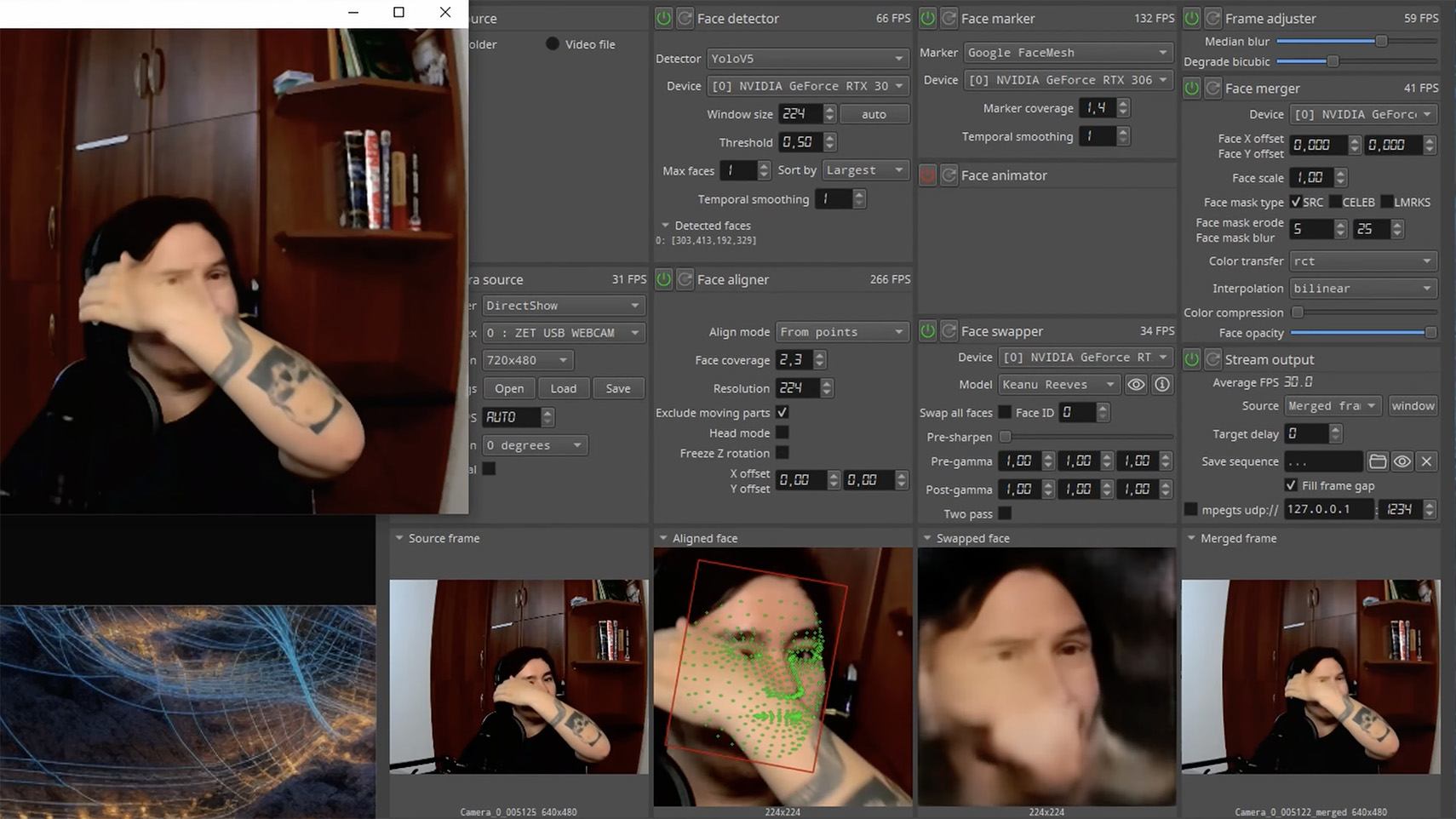
The tools for creating deepfakes vary widely, from simple Telegram bots to professional generators like HeyGen and ElevenLabs. Scammers use deepfakes together with social engineering: for example, they might first simulate a messenger app call that appears to drop out constantly, then send a pre-generated video message of fairly low quality, blaming it on the supposedly poor connection.

In most cases, the message is about some kind of emergency in which the deepfake victim requires immediate help. Naturally the “friend in need” is desperate for money, but, as luck would have it, they’ve no access to an ATM, or have lost their wallet, and the bad connection rules out an online transfer. The solution is, of course, to send the money not directly to the “friend”, but to a fake account, phone number, or cryptowallet.

Such scams often involve pre-generated videos, but of late real-time deepfake streaming services have come into play. Among other things, these allow users to substitute their own face in a chat-roulette or video call.

How to recognize a deepfake

If you see a familiar face on the screen together with a recognizable voice but are asked unusual questions, chances are it’s a deepfake scam. Fortunately, there are certain visual, auditory, and behavioral signs that can help even non-techies to spot a fake.

Visual signs of a deepfake

Lighting and shadow issues. Deepfakes often ignore the physics of light: the direction of shadows on the face and in the background may not match, and glares on the skin may look unnatural or not be there at all. Or the person in the video may be half-turned toward the window, but their face is lit by studio lighting. This example will be familiar to participants in video conferences, where substituted background images can appear extremely unnatural.

Blurred or floating facial features. Pay attention to the hairline: deepfakes often show blurring, flickering, or unnatural color transitions along this area. These artifacts are caused by flaws in the algorithm for superimposing the cloned face onto the original.

Unnaturally blinking or “dead” eyes. A person blinks on average 10 to 20 times per minute. Some deepfakes blink too rarely, others too often. Eyelid movements can be too abrupt, and sometimes blinking is out of sync, with one eye not matching the other. “Glassy” or “dead-eye” stares are also characteristic of deepfakes. And sometimes a pupil (usually just the one) may twitch randomly due to a neural network hallucination.

When analyzing a static image such as a photograph, it’s also a good idea to zoom in on the eyes and compare the reflections on the irises — in real photos they’ll be identical; in deepfakes — often not.

How to recognize a deepfake: different specular highlights in the eyes in the image on the right reveal a fake

Look at the reflections and glares in the eyes in the real photo (left) and the generated image (right) — although similar, specular highlights in the eyes in the deepfake are different. Source

Lip-syncing issues. Even top-quality deepfakes trip up when it comes to synchronizing speech with lip movements. A delay of just a hundred milliseconds is noticeable to the naked eye. It’s often possible to observe an irregular lip shape when pronouncing the sounds m, f, or t. All of these are telltale signs of an AI-modeled face.

Static or blurred background. In generated videos, the background often looks unrealistic: it might be too blurry; its elements may not interact with the on-screen face; or sometimes the image behind the person remains motionless even when the camera moves.

Odd facial expressions. Deepfakes do a poor job of imitating emotion: facial expressions may not change in line with the conversation; smiles look frozen, and the fine wrinkles and folds that appear in real faces when expressing emotion are absent — the fake looks botoxed.

Auditory signs of a deepfake

Early AI generators modeled speech from small, monotonous phonemes, and when the intonation changed, there was an audible shift in pitch, making it easy to recognize a synthesized voice. Although today’s technology has advanced far beyond this, there are other signs that still give away generated voices.

Wooden or electronic tone. If the voice sounds unusually flat, without natural intonation variations, or there’s a vaguely electronic quality to it, there’s a high probability you’re talking to a deepfake. Real speech contains many variations in tone and natural imperfections.

No breathing sounds. Humans take micropauses and breathe in between phrases — especially in long sentences, not to mention small coughs and sniffs. Synthetic voices often lack these nuances, or place them unnaturally.

Robotic speech or sudden breaks. The voice may abruptly cut off, words may sound “glued” together, and the stress and intonation may not be what you’re used to hearing from your friend or colleague.

Lack of… shibboleths in speech. Pay attention to speech patterns (such as accent or phrases) that are typical of the person in real life but are poorly imitated (if at all) by the deepfake.

To mask visual and auditory artifacts, scammers often simulate poor connectivity by sending a noisy video or audio message. A low-quality video stream or media file is the first red flag indicating that checks are needed of the person at the other end.

Behavioral signs of a deepfake

Analyzing the movements and behavioral nuances of the caller is perhaps still the most reliable way to spot a deepfake in real time.

Can’t turn their head. During the video call, ask the person to turn their head so they’re looking completely to the side. Most deepfakes are created using portrait photos and videos, so a sideways turn will cause the image to float, distort, or even break up. AI startup Metaphysic.ai — creators of viral Tom Cruise deepfakes — confirm that head rotation is the most reliable deepfake test at present.

Unnatural gestures. Ask the on-screen person to perform a spontaneous action: wave their hand in front of their face; scratch their nose; take a sip from a cup; cover their eyes with their hands; or point to something in the room. Deepfakes have trouble handling impromptu gestures — hands may pass ghostlike through objects or the face, or fingers may appear distorted, or move unnaturally.

How to spot a deepfake: when a deepfake hand is waved in front of a deepfake face, they merge together

Ask a deepfake to wave a hand in front of its face, and the hand may appear to dissolve. Source

Screen sharing. If the conversation is work-related, ask your chat partner to share their screen and show an on-topic file or document. Without access to your real-life colleague’s device, this will be virtually impossible to fake.

Can’t answer tricky questions. Ask something that only the genuine article could know, for example: “What meeting do we have at work tomorrow?”, “Where did I get this scar?”, “Where did we go on vacation two years ago?” A scammer won’t be able to answer questions if the answers aren’t present in the hacked chats or publicly available sources.

Don’t know the codeword. Agree with friends and family on a secret word or phrase for emergency use to confirm identity. If a panicked relative asks you to urgently transfer money, ask them for the family codeword. A flesh-and-blood relation will reel it off; a deepfake-armed fraudster won’t.

What to do if you encounter a deepfake

If you’ve even the slightest suspicion that what you’re talking to isn’t a real human but a deepfake, follow our tips below.

  • End the chat and call back. The surest check is to end the video call and connect with the person through another channel: call or text their regular phone, or message them in another app. If your opposite number is unhappy about this, pretend the connection dropped out.
  • Don’t be pressured into sending money. A favorite trick is to create a false sense of urgency. “Mom, I need money right now, I’ve had an accident”; “I don’t have time to explain”; “If you don’t send it in ten minutes, I’m done for!” A real person usually won’t mind waiting a few extra minutes while you double-check the information.
  • Tell your friend or colleague they’ve been hacked. If a call or message from someone in your contacts comes from a new number or an unfamiliar account, it’s not unusual — attackers often create fake profiles or use temporary numbers, and this is yet another red flag. But if you get a deepfake call from a contact in a messenger app or your address book, inform them immediately that their account has been hacked — and do it via another communication channel. This will help them take steps to regain access to their account (see our detailed instructions for Telegram and WhatsApp), and to minimize potential damage to other contacts, for example, by posting about the hack.

How to stop your own face getting deepfaked

  • Restrict public access to your photos and videos. Hide your social media profiles from strangers, limit your friends list to real people, and delete videos with your voice and face from public access.
  • Don’t give suspicious apps access to your smartphone camera or microphone. Scammers can collect biometric data through fake apps disguised as games or utilities. To stop such programs from getting on your devices, use a proven all-in-one security solution.
  • Use passkeys, unique passwords, and two-factor authentication (2FA) where possible. Even if scammers do create a deepfake with your face, 2FA will make it much harder to access your accounts and use them to send deepfakes. A cross-platform password manager with support for passkeys and 2FA codes can help out here.
  • Teach friends and family how to spot deepfakes. Elderly relatives, young children, and anyone new to technology are the most vulnerable targets. Educate them about scams, show them examples of deepfakes, and practice using a family codeword.
  • Use content analyzers. While there’s no silver bullet against deepfakes, there are services that can identify AI-generated content with high accuracy. For graphics, these include Undetectable AI and Illuminarty; for video — Deepware; and for all types of deepfakes — Sensity AI and Hive Moderation.
  • Keep a cool head. Scammers apply psychological pressure to hurry victims into acting rashly. Remember the golden rule: if a call, video, or voice message from anyone you know rouses even the slightest suspicion, end the conversation and make contact through another channel.

To protect yourself and loved ones from being scammed, learn more about how scammers deploy deepfakes:

Cyber and Physical Risks Targeting the 2026 Winter Olympics

Blogs

Blog

Cyber and Physical Risks Targeting the 2026 Winter Olympics

In this post we analyze the multi-vector threat landscape of the 2026 Winter Olympics, examining how the Games’ dispersed geographic footprint and high digital complexity create unique potential for cyber sabotage and physical disruptions.

SHARE THIS:
Default Author Image
February 5, 2026

The Milano-Cortina 2026 Winter Olympics represent a historic milestone as the first Games co-hosted by two major cities. However, the event’s expansive geographic footprint—covering 22,000 square kilometers across northern Italy—presents a complex security environment. From the metropolitan centers of Milan to the alpine peaks of Cortina d’Ampezzo, security forces are contending with a multi-vector threat landscape.

Kinetic and Physical Security Challenges

The geographically dispersed nature of the Milano-Cortina 2026 Winter Games also creates unique physical security challenges. Because venues are spread across thousands of square kilometers of the Alps, securing transit corridors and ensuring rapid emergency response across different Italian regions—including Lombardy, Veneto, and Trentino—is an incredible logistical hurdle. New tunnels, increased train services, and extended bus routes have been welcomed but create new potential targets for physical disruption by threat actors or protestors.

Terrorist and Extremist Threats

Flashpoint has not identified any terrorist or extremist threats to the Winter Olympic Games. However, lone threat actors in support of international terrorist organizations or domestic violence extremists remain a persistent threat due to the large number of attendees expected and the media attention that this event will attract.

Authorities in northern Italy are investigating a series of sabotage attacks on the national railway network that coincided with the opening of the 2026 Winter Olympic Games. The coordinated incidents—which included arson at a track switch, severed electrical cables, and the discovery of a rudimentary explosive device—caused delays of over two hours and temporarily disabled the vital transport hub of Bologna.

Protests

Flashpoint analysts identified several protests targeting the 2026 Winter Olympics:

  • US Presence and ICE Backlash: Hundreds of demonstrators have participated in protests in central Milan to demand that US ICE agents withdraw from security roles at the upcoming Winter Olympics.
  • Anti-Olympic and Environmental Activism: The most organized opposition comes from the Unsustainable Olympics Committee. They have already staged marches in Milan and Cortina, with more planned for February.
  • Pro-Palestinian Groups: Organizations such as BDS Italia are actively campaigning to boycott the games, demanding that Israel not be permitted to participate. Other pro-Palestinian groups have attempted to disrupt the Torch Relay in several cities and are expected to hold flash mob-style demonstrations in Milan’s Piazza del Duomo during the Opening Ceremony.
  • Labor Strikes: Italy frequently experiences transport strikes, which often fall on Fridays. Because the Opening Ceremony is on Friday, February 6, unions are leveraging this for maximum impact. An International Day of Protest has been coordinated by port and dock workers across the Mediterranean for February 6.

On February 7, a massive protest of approximately 10,000 people near the Olympic Village in Milan descended into violence as a peaceful march against the Winter Games ended in clashes with Italian police. While the majority of demonstrators initially focused on the environmental destruction caused by Olympic infrastructure, a smaller group of masked protestors engaged security forces with flares, stones, and firecrackers.

Cyber Threats Facing the 2026 Winter Olympics

The Milano-Cortina 2026 Winter Olympics will be among the most digitally complex global events, making it a prime target for cyberattacks. The greatest risks stem from familiar tactics such as phishing, spoofed websites, and business email compromise, which exploit human trust rather than technical flaws. With billions of viewers and a vast network of cloud services, vendors, and connected systems, the games create an expansive attack surface under intense operational pressure.

Italy blocked a series of cyberattacks targeting its foreign ministry offices, including one in Washington, as well as Winter Olympics websites and hotels in Cortina d’Ampezzo, with officials attributing the attempts to Russian sources. Foreign Minister Antonio Tajani confirmed the attacks were prevented just days before the Games’ official opening, which began with curling matches on February 4. 

Past Olympic Games show a clear pattern of heightened cyber activity, including phishing campaigns, distributed denial-of-service (DDoS) attacks, ransomware, and online scams targeting both organizers and the public. A mix of cybercriminals, advanced persistent threats, and hacktivists is expected to exploit the event for financial gain, espionage, or publicity. Experts emphasize that improving security awareness, verifying digital interactions, and strengthening supply chain defenses are critical, as the most damaging incidents often arise from ordinary threats amplified by scale and urgency.

Staying Safe at the 2026 Winter Games

The security success of Milano-Cortina 2026 relies on the integration of real-time intelligence, advanced technological safeguards, and public vigilance. As the Games proceed, the intersection of cyber-sabotage and physical protest remains the most likely source of operational disruption.

To stay safe at this year’s Games, participants should:

  1. Download Official Apps: Install the Milano Cortina 2026 Ground Transportation App and the Atm Milano app for real-time updates on transit, road closures, and “guaranteed” travel windows during strikes.
  2. Plan Around Friday Strikes: Be aware that transport strikes (Feb 6, 13, and 20) typically guarantee services only between 6:00 AM – 9:00 AM and 6:00 PM – 9:00 PM. Plan your venue transfers accordingly.
  3. Secure Your Digital Footprint: Avoid public Wi-Fi at major venues. Use a VPN and ensure Multi-Factor Authentication (MFA) is active on all your ticketing and banking accounts.
  4. Stay Clear of Protests: While most demonstrations are expected to be peaceful, they can cause sudden police cordons and transit delays.
  5. Respect the Drone Ban: Unauthorized drones are strictly prohibited over Milan and venue clusters. Leave yours at home to avoid heavy fines or interception by security units.

Stay Safe Using Flashpoint

While there are no current indications of imminent threats of extreme violence targeting the Milano-Cortina 2026 Winter Olympics, the event’s vast geographic footprint and digital complexity demand constant vigilance. Securing an event that spans 22,000 square kilometers requires more than just a physical presence; it necessitates a multi-faceted approach that bridges the gap between digital and kinetic risks.

To effectively navigate the intersection of cyber-sabotage, civil unrest, and logistical challenges, organizations and attendees must adopt a comprehensive strategy that integrates real-time intelligence with proactive security measures. Download Flashpoint’s Physical Safety Event Checklist to learn more.

Request a demo today.

The post Cyber and Physical Risks Targeting the 2026 Winter Olympics appeared first on Flashpoint.

SaaS Abuse at Scale: Phone-Based Scam Campaign Leveraging Trusted Platforms

5 February 2026 at 13:00

Overview This report documents a large-scale phishing campaign in which attackers abused legitimate software-as-a-service (SaaS) platforms to deliver phone-based scam lures that appeared authentic and trustworthy. Rather than spoofing domains or compromising services, the attackers deliberately misused native platform functionality to generate and distribute emails that closely resembled routine service notifications, inheriting the trust, reputation, and authentication posture of well-known SaaS providers. The campaign generated approximately 133,260 phishing emails, impacting 20,049 organizations. It is part of a broader and rapidly escalating trend in which attackers weaponize trusted brands and native cloud workflows to maximize delivery, credibility, and reach. Observed brands […]

The post SaaS Abuse at Scale: Phone-Based Scam Campaign Leveraging Trusted Platforms appeared first on Check Point Blog.

Protecting the Big Game: A Threat Assessment for Super Bowl LX

Blogs

Blog

Protecting the Big Game: A Threat Assessment for Super Bowl LX

This threat assessment analyzes potential physical and cyber threats to Super Bowl LX.

SHARE THIS:
Default Author Image
February 4, 2026
Superbowl LIX Threat Assessment | Flashpoint Blog
Table Of Contents

Each year, the Super Bowl draws one of the largest live audiences of any global sporting event, with tens of thousands of spectators attending in person and more than 100 million viewers expected to watch worldwide. Super Bowl LX, taking place on February 8, 2026 at Levi’s Stadium, will feature the Seattle Seahawks and the New England Patriots, with Bad Bunny headlining the halftime show and Green Day performing during the opening ceremony.

Beyond the game itself, the Super Bowl represents one of the most influential commercial and media stages in the world, with major brands investing in some of the most expensive advertising time of the year. The scale, visibility, and economic significance of the event make it an attractive target for threat actors seeking attention, disruption, or financial gain, underscoring the need for heightened security awareness.

Cybersecurity Considerations

At this time, Flashpoint has not observed any specific cyber threats targeting Super Bowl LX. Despite the absence of overt threats, it remains possible that threat actors may attempt to obtain personal information—including financial and credit card details—through scams, malware, phishing campaigns, or other opportunistic cyber activity.

High-profile events such as the Super Bowl have historically been leveraged as bait for cyber campaigns targeting fans and attendees rather than league infrastructure. In October 2024, the online store of the Green Bay Packers was hacked, exposing customers’ financial details. Previous incidents also include the February 2022 “BlackByte” ransomware attack that targeted the San Francisco 49ers in the lead-up to Super Bowl LVI.

Although Flashpoint has not identified any credible calls for large-scale cyber campaigns against Super Bowl LX at this time, analysts assess that cyber activity—if it occurs—is more likely to focus on fraud, impersonation, and social engineering directed at ticket holders, travelers, and high-profile attendees.

Online Sentiment

Flashpoint is currently monitoring online sentiment ahead of Super Bowl LX. At the time of publishing, analysts have identified pockets of increasingly negative online chatter related primarily to allegations of federal immigration enforcement activity in and around the event, as well as broader political and social tensions surrounding the Super Bowl.

Online discussions include calls for protests and boycotts tied to perceived Immigration and Customs Enforcement (ICE) involvement, as well as controversy surrounding halftime and opening ceremony performers. While sentiment toward the game itself and associated events remains largely positive, Flashpoint continues to monitor for escalation in rhetoric that could translate into real-world activity.

Potential Physical Threats

Protests and Boycotts

Flashpoint analysts have identified online chatter promoting protests in the Bay Area in response to allegations that Immigration and Customs Enforcement (ICE) agents will conduct enforcement operations in and around Super Bowl LX. A planned protest is scheduled to take place near Levi’s Stadium on February 8, 2026, during game-day hours.

At this time, Flashpoint has not identified any calls for violence or physical confrontation associated with these actions. However, analysts cannot rule out the possibility that demonstrations could expand or relocate, potentially causing localized disruptions near the venue or surrounding infrastructure if protesters gain access to restricted areas.

In addition, Flashpoint has identified online calls to boycott the Super Bowl tied to both the alleged ICE presence and controversy surrounding the event’s halftime and opening ceremony performers. Flashpoint has not identified any chatter indicating that players, NFL personnel, or affiliated organizations plan to boycott or disrupt the game or related events.

Terrorist and Extremist Threats

Flashpoint has not identified any direct or credible threats to Super Bowl LX or its attendees from violent extremists or terrorist groups at this time. However, as with any high-profile sporting event, lone actors inspired by international terrorist organizations or domestic violent extremist ideologies remain a persistent risk due to the scale of attendance and global media attention.

Super Bowl LX is designated as a SEAR-1 event, necessitating extensive interagency coordination and heightened security measures. Law enforcement presence is expected to be significant, with layered security protocols, strict access control points, and comprehensive screening procedures in place throughout Levi’s Stadium and surrounding areas. Contingency planning for crowd management, emergency response, and evacuation scenarios is ongoing.

Mitigation Strategies and Executive Protection

Given the absence of specific, identified threats, mitigation strategies for key personnel attending Super Bowl LX focus on general best practices. Security teams tasked with executive protection should remove sensitive personal information from online sources, monitor open-source and social media channels, and establish targeted alerts for potential threats or emerging protest activity.

Physical security teams and protected individuals should also familiarize themselves with venue layouts, emergency exits, nearby medical facilities, and law enforcement presence, and remain alert to changes in crowd dynamics or protest activity in the vicinity of the event.

The nearest medical facilities are:

  • O’Connor Hospital (Santa Clara Valley Healthcare)
  • Kaiser Permanente Santa Clara Medical Center
  • Santa Clara Valley Medical Center
  • Valley Health Center Sunnyvale

Several of these facilities offer 24/7 emergency services and are located within a short driving distance of the stadium.

The primary law enforcement facility near the venue is:

  • Santa Clara Police Department

As a SEAR-1 event, extensive coordination is expected among local, state, and federal law enforcement agencies throughout the Bay Area.

    Stay Safe Using Flashpoint

    Although there are no indications of any credible, immediate threats to Super Bowl LX or attendees at this time, it is imperative to be vigilant and prepared. Protecting key personnel in today’s threat environment requires a multi-faceted approach. To effectively bridge the gap between online and offline threats, organizations must adopt a comprehensive strategy that incorporates open source intelligence (OSINT) and physical security measures. Download Flashpoint’s Physical Safety Event Checklist to learn more.

    Request a demo today.

    Empowering the RAF Association with Next-Generation Cyber Resilience

    3 February 2026 at 19:00

    Palo Alto Networks is proud to enter a strategic partnership with the RAF Association.

    For over 90 years, the Royal Air Forces Association (RAFA) has championed a simple yet profound belief: No member of the RAF community should ever be left without the help they need. Serving personnel, veterans and their families, the RAF Association provides crucial welfare support, responding to increasingly complex needs in an era of operational changes and challenges, including persistent global deployment.

    Delivering on their mission today requires not only compassion and expertise but also resilient digital foundations. To strengthen and future-proof its operations, RAFA has entered into a strategic partnership with Palo Alto Networks. Together, we are modernising the Association's cyber security posture through a secure-by-design, zero trust architecture to enhance organisational resilience, secure sensitive beneficiary data, and improve operational agility. This helps ensure they can focus on their mission of support, not security management.

    As Nick Bunting OBE, Secretary General at the RAF Association, puts it:

    Cybersecurity is essential to safeguarding the trust people place in our organisation. This transformation will give us greater protection for our data and systems, ensuring that our services remain dependable and that our organisation is secure, resilient and ready for the future. Strong digital security is not just a technical requirement, it is a fundamental part of how we uphold our duty of care to every individual who relies on us.

    RAFA and Palo Alto Networks team.
    RAF Association & Palo Alto Networks Team (left to right): Gareth Turner, Tom Brookes, Nick Bunting OBE, Phil Sherwin, Ali Redfern, Darren Bisbey, Alistair Wildman

    Securing the Mission

    The RAF Association operates in a distributed environment comprising headquarters’ functions, remote caseworkers, and more than 20 RAFAKidz nursery sites, supported by a growing portfolio of cloud-based services. In this context, cybersecurity is not simply an IT concern. It is a safeguarding imperative.

    Disruption to systems or a compromise of sensitive beneficiary data could directly impact RAFA’s ability to deliver services and maintain the trust of the communities it supports. By consolidating fragmented legacy tools into a unified platform, this partnership ensures the Association’s digital evolution aligns security controls with GDPR obligations and safeguarding requirements.

    Digital Resilience with a Unified Platform for Visibility and Control

    To support RAFA's lean IT operational model, this transformation will move them away from fragmented legacy tools toward a unified platform approach. The deployment of Prisma® SASE (secure access service edge) and Cortex XDR® will provide RAFA with consistent visibility and control across users, devices, applications and data, regardless of location. This consolidation replaces complexity with clarity, allowing the organisation to inspect traffic for threats in real-time. Security policies are now enforced continuously, threats are detected and contained faster, and access to critical systems is governed by zero trust principles without compromising the user experience.

    As Phil Sherwin, Chief Information Officer, at the RAF Association states:

    Our data is one of our most valuable assets and the protection of that data, as we continue to provide life-changing support to members of the RAF community, is our most important priority. This partnership will move us into the next generation of security tools that adopt zero trust principles and is a crucial step on our journey to providing a layered approach to data protection.

    One of the most critical aspects of this modernisation is supporting RAFA’s diverse workforce, particularly within the RAFAKidz nursery sites. These environments rely on nondesk-based staff using iPads and mobile devices to get their critical work done.

    Using zero touch provisioning and the Prisma Browser™, we are enabling secure, seamless connectivity for unmanaged devices. This ensures that nursery staff can access necessary SaaS applications safely without complex login hurdles or manual configuration, improving their agility and allowing them to focus on caring for children rather than troubleshooting technology.

    Creating Operational Advantage by Scaling Operations with AI and Automation

    As a charity, RAFA has a responsibility to ensure resources are used efficiently. A critical goal of this partnership is to improve productivity and allow the organisation to scale its services without increasing the IT burden.

    By adopting Strata™ Cloud Manager with AIOps (artificial intelligence for IT operations), RAFA is shifting from reactive security operations to proactive, automated management. Machine learning helps identify configuration risks and performance issues before they affect users, while standardized policies enable the secure, consistent onboarding of new sites. This shift is projected to significantly reduce operational overhead, enabling RAFA to scale its support network cost-effectively. This shift is projected to reduce operational overhead by 40–50%.

    A Resilient Future

    This partnership is about more than deploying technology. It is about ensuring RAFA remains resilient, trusted and capable of supporting the RAF community for decades to come.

    As Darren Bisbey, Head of Group Information Security for the RAF Association, puts it:

    We live in an era where digital threats are accelerating in both scale and sophistication, creating unprecedented challenges for organisations. Our partnership with Palo Alto is a statement of intent, reflecting our unwavering commitment to building the most secure environments possible for our data.

    At Palo Alto Networks, we are honored to support RAFA in this journey, providing the digital armour and operational advantage necessary to protect those who serve and have served.

    As Alistair Wildman, Palo Alto Networks CEO for Northern Europe states:

    For over 90 years, RAFA has been a lifeline for the RAF community; it is our privilege to ensure that legacy endures in a digital-first world. By embracing a unified, AI-driven platform, RAFA is moving beyond complex, fragmented security to a posture that is Secure by Design. This partnership allows them to navigate today’s threat landscape with confidence, ensuring their resources remain focused where they belong: on the families who need them.


    Key Takeaways

    1. Digital Resilience – Strategic Shift to Zero Trust Architecture: RAFA is modernizing its cybersecurity posture by implementing a comprehensive zero trust architecture. This transition involves moving from fragmented legacy tools to a unified platform approach, deploying Prisma® SASE and Cortex XDR for 360-degree visibility and complete control over access and traffic.
    2. Interoperability – Secure, Seamless Access for Diverse Workforce: The partnership ensures operational agility by simplifying security for nondesk-based staff, particularly at the RAFAKidz nursery sites. Solutions like Zero-Touch Provisioning and the Prisma Access Browser enable secure, seamless connectivity for unmanaged devices, allowing nursery staff to focus on their critical work without complex login or configuration issues.
    3. Creating Operational Advantage – Efficiency and Scalability through AI and Automation: RAFA is leveraging technology to scale services efficiently and reduce operational overhead. By using Strata Cloud Manager with AIOps (Artificial Intelligence for IT Operations), the organization can shift to proactive management and automating remediation, which is projected to reduce operational overhead by 40–50%.

    The post Empowering the RAF Association with Next-Generation Cyber Resilience appeared first on Palo Alto Networks Blog.

    How to get started with security response automation on AWS

    29 January 2026 at 20:44

    December 2, 2019: Original publication date of this post.


    At AWS, we encourage you to use automation. Not just to deploy your workloads and configure services, but to also help you quickly detect and respond to security events within your AWS environments. In addition to increasing the speed of detection and response, automation also helps you scale your security operations as your workloads in AWS increase and scale as well. For these reasons, security automation is a key principle outlined in the Well-Architected Framework, the AWS Cloud Adoption Framework, and the AWS Security Incident Response Guide.

    Security response automation is a broad topic that spans many areas. The goal of this blog post is to introduce you to core concepts and help you get started. You will learn how to implement automated security response mechanisms within your AWS environments. This post will include common patterns that customers often use, implementation considerations, and an example solution. Additionally, we will share resources AWS has produced in the form of the Automated Security Response GitHub repo. The GitHub repo includes scripts that are ready-to-deploy for common scenarios.

    What is security response automation?

    Security response automation is a planned and programmed action taken to achieve a desired state for an application or resource based on a condition or event. When you implement security response automation, you should adopt an approach that draws from existing security frameworks. Frameworks are published materials which consist of standards, guidelines, and best practices in order help organizations manage cybersecurity-related risk. Using frameworks helps you achieve consistency and scalability and enables you to focus more on the strategic aspects of your security program. You should work with compliance professionals within your organization to understand any specific compliance or security frameworks that are also relevant for your AWS environment.

    Our example solution is based on the NIST Cybersecurity Framework (CSF), which is designed to help organizations assess and improve their ability to help prevent, detect, and respond to security events. According to the CSF, “cybersecurity incident response” supports your ability to contain the impact of potential cybersecurity events.

    Although automation is not a CSF requirement, automating responses to events enables you to create repeatable, predictable approaches to monitoring and responding to threats. When we build automation around events that we know should not occur, it gives us an advantage over a malicious actor because the automation is able to respond within minutes or even seconds compared to an on-call support engineer.

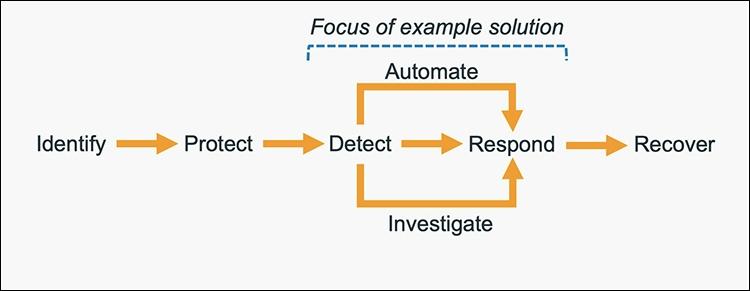
    The five main steps in the CSF are identify, protect, detect, respond and recover. We’ve expanded the detect and respond steps to include automation and investigation activities.

    Figure 1: The five steps in the CSF

    Figure 1: The five steps in the CSF

    The following definitions for each step in the diagram above are based on the CSF but have been adapted for our example in this blog post. Although we will focus on the detect, automate and respond steps, it’s important to understand the entire process flow.

    • Identify: Identify and understand the resources, applications, and data within your AWS environment.
    • Protect: Develop and implement appropriate controls and safeguards to facilitate the delivery of services.
    • Detect: Develop and implement appropriate activities to identify the occurrence of a cybersecurity event. This step includes the implementation of monitoring capabilities which will be discussed further in the next section.
    • Automate: Develop and implement planned, programmed actions that will achieve a desired state for an application or resource based on a condition or event.
    • Investigate: Perform a systematic examination of the security event to establish the root cause.
    • Respond: Develop and implement appropriate activities to take automated or manual actions regarding a detected security event.
    • Recover: Develop and implement appropriate activities to maintain plans for resilience and to restore capabilities or services that were impaired due to a security event

    Security response automation on AWS

    AWS CloudTrail and AWS Config continuously log details regarding users and other identity principals, the resources they interacted with, and configuration changes they might have made in your AWS account. We are able to combine these logs with Amazon EventBridge, which gives us a single service to trigger automations based on events. You can use this information to automatically detect resource changes and to react to deviations from your desired state.

    Figure 2: Automated remediation flow

    Figure 2: Automated remediation flow

    As shown in the diagram above, an automated remediation flow on AWS has three stages:

    1. Monitor: Your automated monitoring tools collect information about resources and applications running in your AWS environment. For example, they might collect AWS CloudTrail information about activities performed in your AWS account, usage metrics from your Amazon EC2 instances, or flow log information about the traffic going to and from network interfaces in your Amazon Virtual Private Cloud (VPC).
    2. Detect: When a monitoring tool detects a predefined condition—such as a breached threshold, anomalous activity, or configuration deviation—it raises a flag within the system. A triggering condition might be an anomalous activity detected by Amazon GuardDuty, a resource out of compliance with an AWS Config rule, or a high rate of blocked requests on an Amazon VPC security group or AWS Web Application Firewall (AWS WAF) web access control list (web-acl).
    3. Respond: When a condition is flagged, an automated response is triggered that performs an action you’ve predefined—something intended to remediate or mitigate the flagged condition.

    Examples of automated response actions may include modifying a VPC security group, patching an Amazon EC2 instance, rotating various different types of credentials, or adding an additional entry into an IP set in AWS WAF that is part of a web-acl rule to block suspicious clients who triggered a threshold from a monitoring metric.

    You can use the event-driven flow described above to achieve a variety of automated response patterns with varying degrees of complexity. Your response pattern could be as simple as invoking a single AWS Lambda function, or it could be a complex series of AWS Step Function tasks with advanced logic. In this blog post, we’ll use two simple Lambda functions in our example solution.

    How to define your response automation

    Now that we’ve introduced the concept of security response automation, start thinking about security requirements within your environment that you’d like to enforce through automation. These design requirements might come from general best practices you’d like to follow, or they might be specific controls from compliance frameworks relevant for your business.

    Customers start with the run-books they already use as part of their Incident Response Lifecycle. Simple run-books, like responding to an exfiltrated credential, can be quickly mapped to automation especially if your run book calls for the disabling of the credential and the notification of on-call personnel. But it can be resource driven as well. Events such as a new AWS VPC being created might trigger your automation to immediately deploy your company’s standard configuration for VPC flowlog collection.

    Your objectives should be quantitative, not qualitative. Here are some examples of quantitative objectives:

    • Remote administrative network access to servers should be limited.
    • Server storage volumes should be encrypted.
    • AWS console logins should be protected by multi-factor authentication.

    As an optional step, you can expand these objectives into user stories that define the conditions and remediation actions when there is an event. User stories are informal descriptions that briefly document a feature within a software system. User stories may be global and span across multiple applications or they may be specific to a single application.

    For example:

    “Remote administrative network access to servers should have limited access from internal trusted networks only. Remote access ports include SSH TCP port 22 and RDP TCP port 3389. If remote access ports are detected within the environment and they are accessible to outside resources, they should be automatically closed and the owner will be notified.”

    Once you’ve completed your user story, you can determine how to use automated remediation to help achieve these objectives in your AWS environment. User stories should be stored in a location that provides versioning support and can reference the associated automation code.

    You should carefully consider the effect of your remediation mechanisms in order to help prevent unintended impact on your resources and applications. Remediation actions such as instance termination, credential revocation, and security group modification can adversely affect application availability. Depending on the level of risk that’s acceptable to your organization, your automated mechanism can only provide a notification which would then be manually investigated prior to remediation. Once you’ve identified an automated remediation mechanism, you can build out the required components and test them in a non-production environment.

    Sample response automation walkthrough

    In the following section, we’ll walk you through an automated remediation for a simulated event that indicates potential unauthorized activity—the unintended disabling of CloudTrail logging. Outside parties might want to disable logging to avoid detection and the recording of their unauthorized activity. Our response is to re-enable the CloudTrail logging and immediately notify the security contact. Here’s the user story for this scenario:

    “CloudTrail logging should be enabled for all AWS accounts and regions. If CloudTrail logging is disabled, it will automatically be enabled and the security operations team will be notified.”

    A note about the sample response automation below as it references Amazon EventBridge: EventBridge was formerly referred to as Amazon CloudWatch Events. If you see other documentation referring to Amazon CloudWatch, you can find that configuration now via the Amazon EventBridge console page.

    Additionally, we will be looking at this scenario through the lens of an account that has a stand-alone CloudTrail configuration. While this is an acceptable configuration, AWS recommends using AWS Organizations, which allows you to configure an organizational CloudTrail. These organizational trails are immutable to the child accounts so that logging data cannot be removed or tampered with.

    In order to use our sample remediation, you will need to enable Amazon GuardDuty and AWS Security Hub in the AWS Region you have selected. Both of these services include a 30-day trial at no additional cost. See the AWS Security Hub pricing page and the Amazon GuardDuty pricing page for additional details.

    Important: You’ll use AWS CloudTrail to test the sample remediation. Running more than one CloudTrail trail in your AWS account will result in charges based on the number of events processed while the trail is running. Charges for additional copies of management events recorded in a Region are applied based on the published pricing plan. To minimize the charges, follow the clean-up steps that we provide later in this post to remove the sample automation and delete the trail.

    Deploy the sample response automation

    In this section, we’ll show you how to deploy and test the CloudTrail logging remediation sample. Amazon GuardDuty generates the finding

    Stealth:IAMUser/CloudTrailLoggingDisabled when CloudTrail logging is disabled, and AWS Security Hub collects findings from GuardDuty using the standardized finding format mentioned earlier. We recommend that you deploy this sample into a non- production AWS account.

    Select the Launch Stack button below to deploy a CloudFormation template with an automation sample in the us-east-1 Region. You can also download the template and implement it in another Region. The template consists of an Amazon EventBridge rule, an AWS Lambda function, and the IAM permissions necessary for both components to execute. It takes several minutes for the CloudFormation stack build to complete.

    Select the Launch Stack button to launch the template

    1. In the CloudFormation console, choose the Select Template form, and then select Next.
    2. On the Specify Details page, provide the email address for a security contact. For the purpose of this walkthrough, it should be an email address that you have access to. Then select Next.
    3. On the Options page, accept the defaults, then select Next.
    4. On the Review page, confirm the details, then select Create.
    5. While the stack is being created, check the inbox of the email address that you provided in step 2. Look for an email message with the subject AWS Notification – Subscription Confirmation. Select the link in the body of the email to confirm your subscription to the Amazon Simple Notification Service (Amazon SNS) topic. You should see a success message like the one shown in Figure 3:

      Figure 3: SNS subscription confirmation

      Figure 3: SNS subscription confirmation

    6. Return to the CloudFormation console. After the Status field for the CloudFormation stack changes to CREATE COMPLETE (as shown in Figure 4), the solution is implemented and is ready for testing.

      Figure 4: CREATE_COMPLETE status

      Figure 4: CREATE_COMPLETE status

    Test the sample automation

    You’re now ready to test the automated response by creating a test trail in CloudTrail, then trying to stop it.

    1. From the AWS Management Console, choose Services > CloudTrail.
    2. Select Trails, then select Create Trail.
    3. On the Create Trail form:
      1. Enter a value for Trail name and for AWS KMS alias, as shown in Figure 5.
      2. For Storage location, create a new S3 bucket or choose an existing one. For our testing, we create a new S3 bucket.

        Figure 5: Create a CloudTrail trail

        Figure 5: Create a CloudTrail trail

      3. On the next page, under Management events, select Write-only (to minimize event volume).

        Figure 6: Create a CloudTrail trail

        Figure 6: Create a CloudTrail trail

    4. On the Trails page of the CloudTrail console, verify that the new trail has started. You should see the status as logging, as shown in Figure 7.

      Figure 7: Verify new trail has started

      Figure 7: Verify new trail has started

    5. You’re now ready to act like an unauthorized user trying to cover their tracks. Stop the logging for the trail that you just created:
      1. Select the new trail name to display its configuration page.
      2. In the top-right corner, choose the Stop logging button.
      3. When prompted with a warning dialog box, select Stop logging.
      4. Verify that the logging has stopped by confirming that the Start logging button now appears in the top right, as shown in Figure 8.

        Figure 8: Verify logging switch is off

        Figure 8: Verify logging switch is off

      You have now simulated a security event by disabling logging for one of the trails in the CloudTrail service. Within the next few seconds, the near real-time automated response will detect the stopped trail, restart it, and send an email notification. You can refresh the Trails page of the CloudTrail console to verify through the Stop logging button at the top right corner.

      Within the next several minutes, the investigatory automated response will also begin. GuardDuty will detect the action that stopped the trail and enrich the data about the source of unexpected behavior. Security Hub will then ingest that information and optionally correlate with other security events.

      Following the steps below, you can monitor findings within Security Hub for the finding type TTPs/Defense Evasion/Stealth:IAMUser-CloudTrailLoggingDisabled to be generated:

    6. In the AWS Management Console, choose Services > Security Hub.
      1. In the left pane, select Findings.
      2. Select the Add filters field, then select Type.
      3. Select EQUALS, paste TTPs/Defense Evasion/Stealth:IAMUser-CloudTrailLoggingDisabled into the field, then select Apply.
      4. Refresh your browser periodically until the finding is generated.

      Figure 9: Monitor Security Hub for your finding

      Figure 9: Monitor Security Hub for your finding

    7. Select the title of the finding to review details. When you’re ready, you can choose to archive the finding by selecting the Archive link. Alternately, you can select a custom action to continue with the response. Custom actions are one of the ways that you can integrate Security Hub with custom partner solutions.

    Now that you’ve completed your review of the finding, let’s dig into the components of automation.

    How the sample automation works

    This example incorporates two automated responses: a near real-time workflow and an investigatory workflow. The near real-time workflow provides a rapid response to an individual event, in this case the stopping of a trail. The goal is to restore the trail to a functioning state and alert security responders as quickly as possible. The investigatory workflow still includes a response to provide defense in depth and uses services that support a more in-depth investigation of the incident.

    Figure 10: Sample automation workflow

    Figure 10: Sample automation workflow

    In the near real-time workflow, Amazon EventBridge monitors for the undesired activity.

    When a trail is stopped, AWS CloudTrail publishes an event on the EventBridge bus. An EventBridge rule detects the trail-stopping event and invokes a Lambda function to respond to the event by restarting the trail and notifying the security contact via an Amazon Simple Notification Service (SNS) topic.

    In the investigative workflow, CloudTrail logs are monitored for undesired activities. For example, if a trail is stopped, there will be a corresponding log record. GuardDuty detects this activity and retrieves additional data points regarding the source IP that executed the API call. Two common examples of those additional data points in GuardDuty findings include whether the API call came from an IP address on a threat list, or whether it came from a network not commonly used in your AWS account. An AWS Lambda function responds by restarting the trail and notifying the security contact. The finding is imported into AWS Security Hub, where it’s aggregated with other findings for analyst viewing. Using EventBridge, you can configure Security Hub to export the finding to partner security orchestration tools, SIEM (security information and event management) systems, and ticketing systems for investigation.

    AWS Security Hub imports findings from AWS security services such as GuardDuty, Amazon Macie and Amazon Inspector, plus from third-party product integrations you’ve enabled. Findings are provided to Security Hub in AWS Security Finding Format (ASFF), which minimizes the need for data conversion. Security Hub correlates these findings to help you identify related security events and determine a root cause. Security Hub also publishes its findings to Amazon EventBridge to enable further processing by other AWS services such as AWS Lambda. You can also create custom actions using Security Hub. Custom actions are useful for security analysts working with the Security Hub console who want to send a specific finding, or a small set of findings, to a response or a remediation workflow.

    Deeper look into how the “Respond” phase works

    Amazon EventBridge and AWS Lambda work together to respond to a security finding.

    Amazon EventBridge is a service that provides real-time access to changes in data in AWS services, your own applications, and Software-as-a-Service (SaaS) applications without writing code. In this example, EventBridge identifies a Security Hub finding that requires action and invokes a Lambda function that performs remediation. As shown in Figure 11, the Lambda function both notifies the security operator via SNS and restarts the stopped CloudTrail.

    Figure 11: Sample “respond” workflow

    Figure 11: Sample “respond” workflow

    To set this response up, we looked for an event to indicate that a trail had stopped or was disabled. We knew that the GuardDuty finding Stealth:IAMUser/CloudTrailLoggingDisabled is raised when CloudTrail logging is disabled. Therefore, we configured the default event bus to look for this event.

    You can learn more regarding the available GuardDuty findings in the user guide.

    How the code works

    When Security Hub publishes a finding to EventBridge, it includes full details of the finding as discovered by GuardDuty. The finding is published in JSON format. If you review the details of the sample finding, note that it has several fields helping you identify the specific events that you’re looking for. Here are some of the relevant details:

    {
       …
       "source":"aws.securityhub",
       …
       "detail":{
          "findings": [{
    		…
        	“Types”: [
    			"TTPs/Defense Evasion/Stealth:IAMUser-CloudTrailLoggingDisabled"
    			],
    		…
          }]
    }
    

    You can build an event pattern using these fields, which an EventBridge filtering rule can then use to identify events and to invoke the remediation Lambda function. Below is a snippet from the CloudFormation template we provided earlier that defines that event pattern for the EventBridge filtering rule:

    # pattern matches the nested JSON format of a specific Security Hub finding
          EventPattern:
            source:
            - aws.securityhub
            detail-type:
              - "Security Hub Findings - Imported"
            detail:
              findings:
                Types:
                  - "TTPs/Defense Evasion/Stealth:IAMUser-CloudTrailLoggingDisabled"
    

    Once the rule is in place, EventBridge continuously monitors the event bus for events with this pattern.

    When EventBridge finds a match, it invokes the remediating Lambda function and passes the full details of the event to the function. The Lambda function then parses the JSON fields in the event so that it can act as shown in this Python code snippet:

    # extract trail ARN by parsing the incoming Security Hub finding (in JSON format)
    trailARN = event['detail']['findings'][0]['ProductFields']['action/awsApiCallAction/affectedResources/AWS::CloudTrail::Trail']   
    
    # description contains useful details to be sent to security operations
    description = event['detail']['findings'][0]['Description']
    

    The code also issues a notification to security operators so they can review the findings and insights in Security Hub and other services to better understand the incident and to decide whether further manual actions are warranted. Here’s the code snippet that uses SNS to send out a note to security operators:

    #Sending the notification that the AWS CloudTrail has been disabled.
    snspublish = snsclient.publish(
    	TargetArn = snsARN,
    	Message="Automatically restarting CloudTrail logging.  Event description: \"%s\" " %description
    	)
    

    While notifications to human operators are important, the Lambda function will not wait to take action. It immediately remediates the condition by restarting the stopped trail in CloudTrail. Here’s a code snippet that restarts the trail to reenable logging:

    try:
    	client = boto3.client('cloudtrail')
    	enablelogging = client.start_logging(Name=trailARN)
    	logger.debug("Response on enable CloudTrail logging- %s" %enablelogging)
    except ClientError as e:
    	logger.error("An error occured: %s" %e)
    

    After the trail has been restarted, API activity is once again logged and can be audited.

    This can help provide relevant data for the remaining steps in the incident response process. The data is especially important for the post-incident phase, when your team analyzes lessons learned to help prevent future incidents. You can also use this phase to identify additional steps to automate in your incident response.

    How to Enable Custom Action and build your own Automated Response

    Unlike how you set up the notification earlier, you may not want fully automate responses to findings. To set up automation that you can manually trigger it for specific findings, you can use custom actions. A custom action is a Security Hub mechanism for sending selected findings to EventBridge that can be matched by an EventBridge rule. The rule defines a specific action to take when a finding is received that is associated with the custom action ID. Custom actions can be used, for example, to send a specific finding, or a small set of findings, to a response or remediation workflow. You can create up to 50 custom actions.

    In this section, we will walk you through how to create a custom action in Security Hub which will trigger an EventBridge rule to execute a Lambda function for the same security finding related to CloudTrail Disabled.

    Create a Custom Action in Security Hub

    1. Open Security Hub. In the left navigation pane, under Management, open the Custom actions page.
    2. Choose Create custom action.
    3. Enter an Action Name, Action Description, and Action ID that are representative of an action that you are implementing—for example Enable CloudTrail Logging.
    4. Choose Create custom action.
    5. Copy the custom action ARN that was generated. You will need it in the next steps.

    Create Amazon EventBridge Rule to capture the Custom Action

    In this section, you will define an EventBridge rule that will match events (findings) coming from Security Hub which were forwarded by the custom action you defined above.

    1. Navigate to the Amazon EventBridge console.
    2. On the right side, choose Create rule.
    3. On the Define rule detail page, give your rule a name and description that represents the rule’s purpose (for example, the same name and description that you used for the custom action). Then choose Next.
    4. Security Hub findings are sent as events to the AWS default event bus. In the Define pattern section, you can identify filters to take a specific action when matched events appear. For the Build event pattern step, leave the Event source set to AWS events or EventBridge partner events.
    5. Scroll down to Event pattern. Under Event source, leave it set to AWS Services, and under AWS Service, select Security Hub.
    6. For the Event Type, choose Security Hub Findings – Custom Action.
    7. Then select Specific custom action ARN(s) and enter the ARN for the custom action that you created earlier.
    8. Notice that as you selected these options, the event pattern on the right was updating. Choose Next.
    9. On the Select target(s) step, from the Select a target dropdown, select Lambda function. Then, from the Function dropdown, select SecurityAutoremediation-CloudTrailStartLoggingLamb-xxxx. This lambda function was created as part of the Cloudformation template.
    10. Choose Next.
    11. For the Configure tags step, choose Next.
    12. For the Review and create step, choose Create rule.

    Trigger the automation

    As GuardDuty and Security Hub have been enabled, after AWS Cloudtrail logging is enabled, you should see a security finding generated by Amazon GuardDuty and collected in AWS Security Hub.

    1. Navigate to the Security Hub Findings page.
    2. In the top corner, from the Actions dropdown menu, select the Enable CloudTrail Logging custom action.
    3. Verify the CloudTrail configuration by accessing the AWS CloudTrail dashboard.
    4. Confirm that the trail status displays as Logging, which indicates the successful execution of the remediation Lambda function triggered by the EventBridge rule through the custom action.

    How AWS helps customers get started

    Many customers look at the task of building automation remediation as daunting. Many operations teams might not have the skills or human scale to take on developing automation scripts. Because many Incident Response scenarios can be mapped to findings in AWS security services, we can begin building tools that respond and are quickly adaptable to your environment.

    Automated Security Response (ASR) on AWS is a solution that enables AWS Security Hub customers to remediate findings with a single click using sets of predefined response and remediation actions called Playbooks. The remediations are implemented as AWS Systems Manager automation documents. The solution includes remediations for issues such as unused access keys, open security groups, weak account password policies, VPC flow logging configurations, and public S3 buckets. Remediations can also be configured to trigger automatically when findings appear in AWS Security Hub.

    The solution includes the playbook remediations for some of the security controls defined as part of the following standards:

    • AWS Foundational Security Best Practices (FSBP) v1.0.0
    • Center for Internet Security (CIS) AWS Foundations Benchmark v1.2.0
    • Center for Internet Security (CIS) AWS Foundations Benchmark v1.4.0
    • Center for Internet Security (CIS) AWS Foundations Benchmark v3.0.0
    • Payment Card Industry (PCI) Data Security Standard (DSS) v3.2.1
    • National Institute of Standards and Technology (NIST) Special Publication 800-53 Revision 5

    A Playbook called Security Control is included that allows operation with AWS Security Hub’s Consolidated Control Findings feature.

    Figure 12: Architecture of the Automated Security Solution

    Figure 12: Architecture of the Automated Security Solution

    Additionally, the library includes instructions in the Implementation Guide on how to create new automations in an existing Playbook.

    You can use and deploy this library into your accounts at no additional cost, however there are costs associated with the services that it consumes.

    Clean up

    After you’ve completed the sample security response automation, we recommend that you remove the resources created in this walkthrough example from your account in order to minimize the charges associated with the trail in CloudTrail and data stored in S3.

    Important: Deleting resources in your account can negatively impact the applications running in your AWS account. Verify that applications and AWS account security do not depend on the resources you’re about to delete.

    Here are the clean-up steps:

    Summary

    You’ve learned the basic concepts and considerations behind security response automation on AWS and how to use Amazon EventBridge, Amazon GuardDuty and AWS Security Hub to automatically re-enable AWS CloudTrail when it becomes disabled unexpectedly. Additionally you got a chance to learn about the AWS Automated Security Response library and how it can help you rapidly get started with automations through Security Hub. As a next step, you may want to start building your own custom response automations and dive deeper into the AWS Security Incident Response Guide, NIST Cybersecurity Framework (CSF) or the AWS Cloud Adoption Framework (CAF) Security Perspective. You can explore additional automatic remediation solutions on the AWS Solution Library. You can find the code used in this example on GitHub.

    If you have feedback about this blog post, submit them in the Comments section below. If you have questions about using this solution, start a thread in the
    EventBridge, GuardDuty or Security Hub forums, or contact AWS Support.

    ❌