A recently disclosed flaw in Signal’s calling software could allow another participant to keep hearing you after you hang up.
The vulnerability, tracked as CVE-2026-113380 (CVSS score 9.3 out of 10), affects RingRTC versions earlier than 2.72.0. RingRTC is the open-source library behind Signal’s voice and video calling functionality, providing calling components for its mobile and desktop applications.
The flaw concerns how Signal’s calling library shuts down a call. It does not affect how it encrypts conversations. According to the published vulnerability description, another participant could overwhelm a call’s internal event queue and interfere with the steps that should disconnect it when you end the call.
The main concern is unwanted listening after someone believes a conversation has ended. If a malicious call participant successfully triggered the flaw, they could potentially continue hearing audio that the other person no longer intended to share. That might include an offhand remark, a conversation with someone nearby, or other private background sound.
The vulnerability description also mentions that video might remain active, but does not confirm that behavior or explain what affected users would see on screen. It also doesn’t specify how long any continued transmission might last.
There are no known reports of exploitation in the wild. The vulnerability concerns only how a call is shut down. It does not involve stolen passwords, compromised accounts, or exposed message histories that would call for a password reset.
What to do
The developers updated the code to make shutdown more resilient when a call’s internal queue is full or another termination step fails.
Install any available Signal updates on your devices. The fix is available in the underlying RingRTC library, but the affected and first-fixed Signal app versions have not yet been confirmed publicly in the sources reviewed.
Personally, I found an update in the Google Play Store which brought my Android app to version 8.32.2. I did not find one in the Apple App Store, although this might be because I have automatic updates enabled. The current version on my iPad is listed as 8.32 (1910). While I think that means it’s all patched, this is hard to confirm from Signal’s website.
I’ve emailed Signal for clarification and will update this article when I hear back.
Scammers know more about you than you think.
Malwarebytes Mobile Security protects you from phishing, scam texts, malicious sites, and more. With real-time AI-powered Scam Guard built right in.
A recently disclosed flaw in Signal’s calling software could allow another participant to keep hearing you after you hang up.
The vulnerability, tracked as CVE-2026-113380 (CVSS score 9.3 out of 10), affects RingRTC versions earlier than 2.72.0. RingRTC is the open-source library behind Signal’s voice and video calling functionality, providing calling components for its mobile and desktop applications.
The flaw concerns how Signal’s calling library shuts down a call. It does not affect how it encrypts conversations. According to the published vulnerability description, another participant could overwhelm a call’s internal event queue and interfere with the steps that should disconnect it when you end the call.
The main concern is unwanted listening after someone believes a conversation has ended. If a malicious call participant successfully triggered the flaw, they could potentially continue hearing audio that the other person no longer intended to share. That might include an offhand remark, a conversation with someone nearby, or other private background sound.
The vulnerability description also mentions that video might remain active, but does not confirm that behavior or explain what affected users would see on screen. It also doesn’t specify how long any continued transmission might last.
There are no known reports of exploitation in the wild. The vulnerability concerns only how a call is shut down. It does not involve stolen passwords, compromised accounts, or exposed message histories that would call for a password reset.
What to do
The developers updated the code to make shutdown more resilient when a call’s internal queue is full or another termination step fails.
Install any available Signal updates on your devices. The fix is available in the underlying RingRTC library, but the affected and first-fixed Signal app versions have not yet been confirmed publicly in the sources reviewed.
Personally, I found an update in the Google Play Store which brought my Android app to version 8.32.2. I did not find one in the Apple App Store, although this might be because I have automatic updates enabled. The current version on my iPad is listed as 8.32 (1910). While I think that means it’s all patched, this is hard to confirm from Signal’s website.
I’ve emailed Signal for clarification and will update this article when I hear back.
Scammers know more about you than you think.
Malwarebytes Mobile Security protects you from phishing, scam texts, malicious sites, and more. With real-time AI-powered Scam Guard built right in.
Modern messaging apps allow users to link their phone accounts to their computer desktop. Eavesdroppers are taking advantage of this capability:
Apps such as WhatsApp Web and Signal Desktop allow people to use their accounts on other devices, such as laptops or desktop computers.
Germany’s Customs Office has been using these features to connect a police-controlled computer to a suspect’s account.
Once connected, messages can be delivered to that computer without the police having to crack the encryption protecting them.
Netzpoltik details that police are able to gain access in this way either through physical access to someone’s phone or by intercepting verification codes via a state-sanctioned phishing attack or intercepting SMS messages via telephone surveillance.
That last paragraph is important. Making this work requires user consent.
What we want is a feature that displays connected devices, so users could notice if a new device gets connected to their account.
Pavel Durov and his “private” messaging app have a brand new rival, and it’s — drumroll, please — Elon Musk and his XChat. On our blog, we’ve discussed more than once why Durov’s claims about Telegram privacy and security are exaggerated, to put it mildly. Here, I’ll just remind the reader that standard (non-secret) chats on Telegram aren’t protected by end-to-end encryption — the bare minimum required for user data to stay private.
But let’s get back to Musk. In late April 2026, the XChat app launched for iOS users. The tech mogul had been touting his messaging app for a long time, pitching it from day one as an incredibly private and secure way to communicate, and as a direct threat to Signal, WhatsApp, Telegram, and iMessage. Today, we look at whether we should actually trust Musk’s promises this new service, break down its core features, and stack it up against the competition.
Bitcoin-style encryption
Musk initially teased XChat on June 1, 2025, naturally via his X (formerly Twitter) account. Responding to another user’s question about when to expect the new service, Musk wrote: “This week if there are no scaling issues.”
Apparently, scaling issues there were: the app’s beta didn’t drop until September 2025, and iOS users didn’t get full access until April 2026. As for Android, there is zero info on when that version would launch at the time of this writing. That said, an XChat page is already live on Google Play where users can queue up “pre-register”, whatever that means.
But let’s go back to Musk’s post announcing XChat. That specific post turned a lot of heads in the privacy and cybersecurity community, and here’s why: the tech mogul wrote that the service would be built on an “entirely new architecture”, written in Rust, and featuring “Bitcoin-style encryption”.
Elon Musk announces the launch of XChat, claiming the new messaging app is written in Rust and uses “Bitcoin-style encryption”. Source
The expert community spent a long time scratching their heads and trying to figure out what Musk actually meant. After all, Bitcoin isn’t an anonymous, encrypted data exchange system. The blockchain does use public and private cryptographic keys, but for something entirely different: signing transactions. Meanwhile, these transactions aren’t hidden from prying eyes; they’re out in the open for anyone to see, forever. Simply put, Bitcoin protects its users not by ensuring privacy, but quite the opposite — through ultimate transparency.
Most likely, Musk used “Bitcoin-style encryption” as a marketing gimmick. Bitcoin was trading near all-time highs at the time of his announcement, and cryptocurrency was the talk of the town. Technically, the XChat beta that dropped in September 2025 protected user chats with a “kind of” end-to-end encryption, but this was implemented in a way that raised serious doubts among cryptography experts.
And not without a reason. Normally, setting up an end-to-end encrypted chat automatically generates a public and private key pair. The public key is used to encrypt messages, while the private key decrypts them. Because other users need your public key to start a secure chat with you, these keys are usually stored on the app’s servers.
The private key, however, should ideally live only on the user’s device — which is exactly how Signal does it. This serves as a simple, ironclad guarantee that neither the company itself nor any third party breaching its infrastructure can access user chats, even if they really want to.
But Elon Musk’s projects always march to the beat of their own drum: the XChat developers decided it would be a great idea to store users’ private keys on XChat servers. X claims they’ll use hardware security modules (HSMs) to store these private keys — specialized appliances designed to prevent even the system owner from easily accessing the data inside. However, experts are also questioning the reliability of this setup, and coming to a grim conclusion: if X really wants to get a user’s private key, they will most likely be able to do so.
How encrypted messaging in XChat works in practice
Finally, once the scaling issues were ironed out nearly a year after the announcement, X officially rolled out the XChat app for iOS in April 2026. Now anyone can use it, but from a practical standpoint, the situation with encrypted chats seems even more convoluted than in Telegram.
According to the social network’s help center, to use end-to-end chat encryption in XChat, both users must have an X account, set up XChat, and have some sort of connection between them:
Follow, or be subscribed to each other
Have exchanged messages before
Have previously accepted a direct message request
Be a member of the same Premium Business / Premium Organization subscription on X
If users don’t follow each other and haven’t interacted before, XChat might still let them send a message request. However, that initial request goes out without end-to-end encryption.
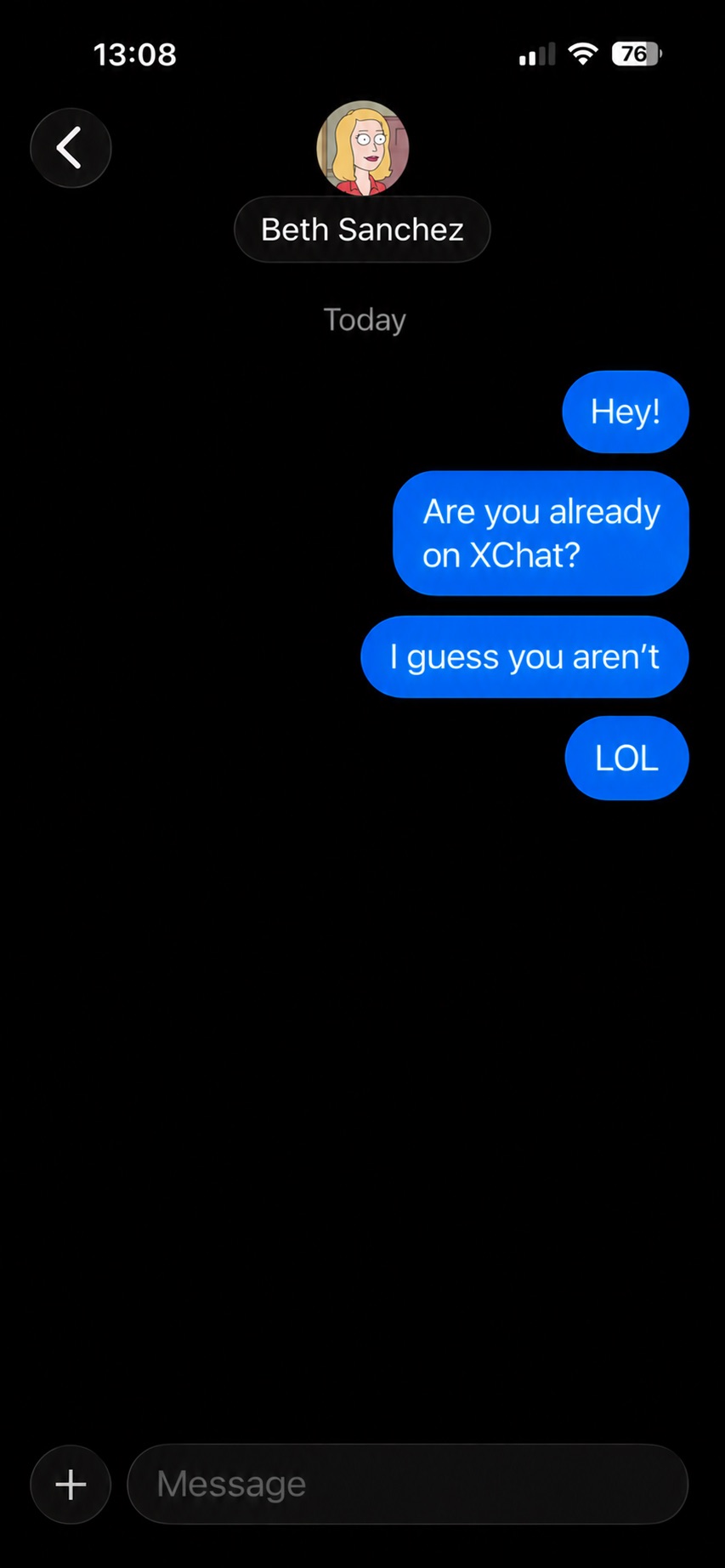
Again, this is how the process is described in the messaging app’s official help documentation. Sound overly complicated? Let me reassure you: in practice, it works — or rather, doesn’t — completely differently. I personally managed to send a message to another user who had NOT set up XChat. The app itself, of course, gave me absolutely no warning about this.
The app allows you to start a chat with a user who hasn’t even set up XChat yet, without giving the sender any heads-up.
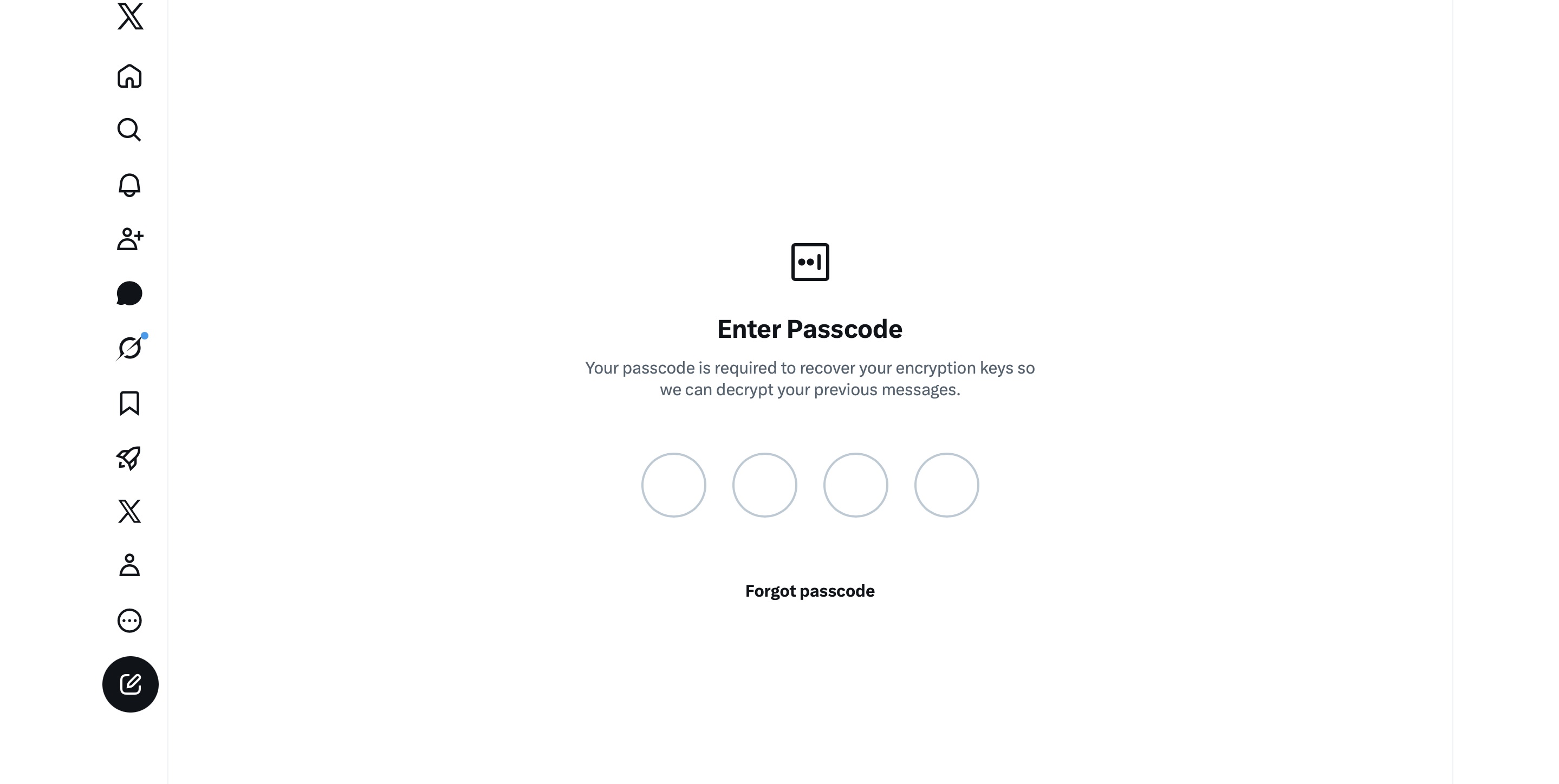
It gets even better. The user I messaged saw a notification for it on the web version of X, but couldn’t actually access the message. Here’s the catch: to start using XChat, the user first has to create a four-digit PIN. Yet, the app asks for this PIN the very first time the user tries to open it — meaning, before they even get a chance to create one. Along with this prompt, the user also sees a warning stating that without the PIN, they won’t be able to view past encrypted chats.
The user is prompted to enter a PIN to decrypt past messages before even completing the initial XChat setup.
The only workaround I found to actually start using XChat is to tap “Forgot PIN?” — even though that PIN never existed in the first place — confirm your identity, and create a new (well, your first) PIN. Naturally, you lose access to your chat history this way, so you won’t be able to read any messages sent to you in XChat before you officially set up the app.
XChat: the new Telegram, WhatsApp, Signal… or Facebook Messenger?
All these PIN hurdles actually exist for a reason. Remember, unlike WhatsApp and Signal, the XChat developers decided to store users’ private keys on their own servers. Consequently, the app uses these four-digit PINs to encrypt those keys.
According to the XChat help documentation, this mechanism was designed to ensure a “seamless” multi-device experience. It’s impossible not to point out that both WhatsApp and Signal managed to pull this off without sketchy workarounds like PIN requirements or server-side private key storage.
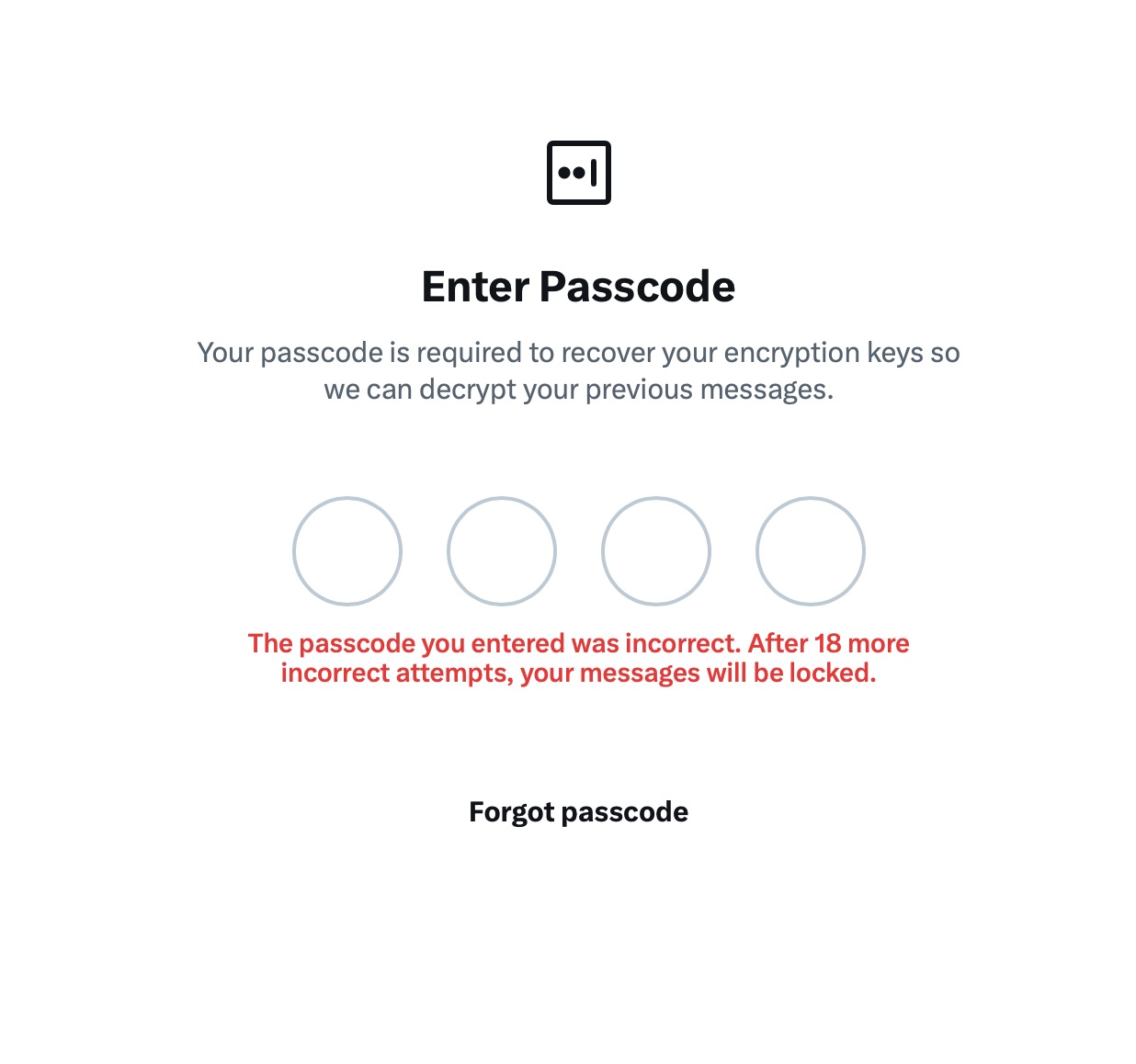
The problem is, workarounds like these undermine any claims of app privacy and security. First and chief among them, a PIN isn’t exactly the most secure way to protect sensitive data. We’ve mentioned time and again that four-digit combinations are easy to crack via brute force — especially since XChat gives you a generous 20 attempts to guess the right code.
The app allows up to 20 attempts to enter the four-digit PIN. Once the limit is reached, XChat warns that access to messages will be permanently lost.
Stepping away from the bizarre implementation of end-to-end encryption compared to other messaging apps, it’s hard to ignore the overall sense of pointlessness that comes with trying to use XChat. As a Wired journalist rightly pointed out, the app feels less like a relative of WhatsApp, Signal, or Telegram, and much more like Facebook Messenger. Except people usually open Messenger to read a text from their mom or grandma, whereas XChat seems meant for anyone wanting to check in on that weird nephew who spends all his free time on X, still believes John McAfee’s promise of $500 000 Bitcoin, and fanboys over Elon Musk.
So, what’s the bottom line on XChat?
The best way to wrap up this post is with a quote from a cybersecurity expert: “If what you want is good security, use Signal. If what you want is to be able to talk to pretty much anybody using encrypted messages, use WhatsApp. If your whole life is based around X, I guess this is better than nothing.”
If you do use XChat, rule number one is to avoid a predictable PIN — absolutely don’t use your birth year or, worse, 1234. It’s also crucial not to forget this code, because if you do, your entire chat history is gone for good. Finally, just like your other passwords, you shouldn’t keep it in your notes app, but rather in a secure password manager. This won’t only save you from having to memorize dozens of character combinations, but will also reduce the risk of losing access to your vital data and conversations.
To learn more about secure messaging in other apps, check out our other posts:
A new phishing campaign is targeting Signal users by attempting to steal their backup recovery keys to access encrypted message archives.
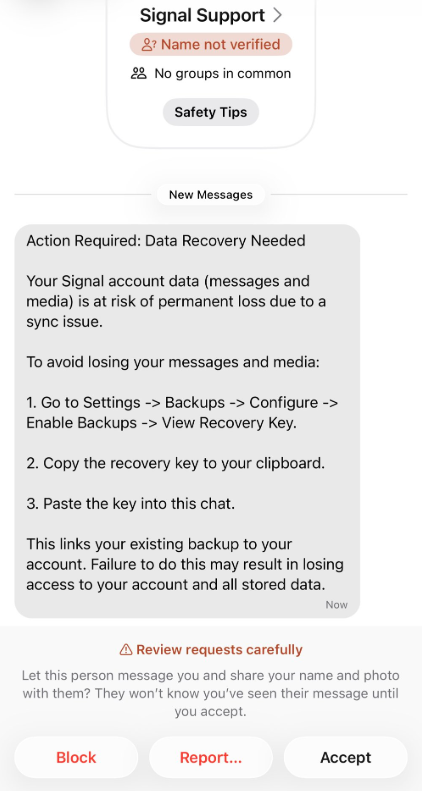
The attack is initiated by a text message pretending to come from Signal Support.
“Action Required: Data Recovery Needed Your Signal account data (message and media) Is at risk of permanent loss due to a sync issue. To avoid losing your messages and media: 1. Go to Settings -> Backups -> Configure -> Enable backups -> View Recovery Key. 2. Copy the recovery key to your clipboard. 3. Paste the key into this chat. This links your existing backup to your account. Failure to do this may result in losing access to your account and all stored data.”
There are a few red flags in this message:
The “Name not verified” label under the sender
Repeated threats of losing all your data
Pasting the key into the chat. Signal Support would never ask for your recovery key
The attack exploits Signal’s Secure Backups feature, which allows users to store encrypted archives of their conversations on Signal’s servers. These backups are protected by a 64-character recovery key.
That key should never leave the user’s device and is never shared with Signal’s servers. If hackers obtain this key and gain control of a victim’s account, they can download and decrypt the entire message history.
For an attacker, that’s even better than hijacking an account, which would only give them access to future messages.
Signal explicitly states that it will never reach out to users first and will never request registration codes, PINs, or recovery keys.
Treat unsolicited messages from “Support” as suspicious by default. Legitimate support for apps like Signal and WhatsApp do not ask you, in a chat message, to send back verification codes, PINs, or passwords. If you receive a warning about account problems, do not follow links in the message. Open the app’s settings directly or visit the official website through other means.
Never share any secret codes, multi-factor authentication keys, or app PINs. SMS codes are there to prove that you control a phone number. Anyone who has the code can pretend to be you. App‑specific PINs or passcodes are there to protect account changes. Consider anyone asking for them to be a scammer.
Use the extra security features these apps offer. Enable options like registration lock, registration PIN and device‑change alerts so that your account cannot be silently re‑registered without an extra secret. Store your PIN in a password manager instead of choosing something easy to guess or reusing a code. This reduces the risk of social engineering or shoulder‑surfing.
Another useful feature is disappearing messages. Short‑timer and disappearing messages reduce how much content is available if an attacker gains access to a chat later, or obtains long‑term access to a device or backup. They are not a complete solution, but they can limit the damage.
Use Malwarebytes Scam Guard on your device or online to check messages. Malwarebytes Scam Guard identified this message as a phishing attempt and provided further information about how to proceed.
Scammers know more about you than you think.
Malwarebytes Mobile Security protects you from phishing, scam texts, malicious sites, and more. With real-time AI-powered Scam Guard built right in.
The FBI was able to forensically extract copies of incoming Signal messages from a defendant’s iPhone, even after the app was deleted, because copies of the content were saved in the device’s push notification database….
The news shows how forensic extraction—when someone has physical access to a device and is able to run specialized software on it—can yield sensitive data derived from secure messaging apps in unexpected places. Signal already has a setting that blocks message content from displaying in push notifications; the case highlights why such a feature might be important for some users to turn on.
“We learned that specifically on iPhones, if one’s settings in the Signal app allow for message notifications and previews to show up on the lock screen, [then] the iPhone will internally store those notifications/message previews in the internal memory of the device,” a supporter of the defendants who was taking notes during the trial told 404 Media.
EDITED TO ADD (4/24): Apple has patched this vulnerability.
Apple has released a software update that deals with an issue that could allow deleted notifications to be retrieved. Something that, in at least one reported case, was used by law enforcement during forensic analysis.
Apple fixed the issue in iOS and iPadOS versions 18.7.8 and 26.4.2 (check availability for your device at those links). The update deals with a singular security vulnerability, tracked as CVE-2026-28950.
Although the description is brief—“a logging issue was addressed with improved data redaction”—the impact points us in the right direction.
“Notifications marked for deletion could be unexpectedly retained on the device.”
This suggests that Apple’s bug was that iOS kept copies of notification content in an internal database for longer than intended, even after the messages “disappeared” or the app was uninstalled. In a case reported by 404 Media, law enforcement was able to recover those notifications using standard forensic tools once they had access to the unlocked device. The example in that reported case involved Signal.
“The FBI was able to forensically extract copies of incoming Signal messages from a defendant’s iPhone, even after the app was deleted, because copies of the content were saved in the device’s push notification database.”
Before we go into the update process, you may want to know that you can mute or hide notifications in Signal, which also protects them from prying eyes. In Signal, open your Settings and tap on Notifications. You can adjust several settings there. For example, I have mine set so I only see the name of the sender.
Install the update
For iOS and iPadOS users, you can check if you’re using the latest software version by going to Settings > General > Software Update. It’s also worth turning on Automatic Updates if you haven’t already. You can do that on the same screen.
Update settings on iPad
Scammers know more about you than you think.
Malwarebytes Mobile Security protects you from phishing, scam texts, malicious sites, and more. With real-time AI-powered Scam Guard built right in.
In a Public Service Announcement (PSA) the Federal Bureau of Investigation (FBI) and the Cybersecurity and Infrastructure Security Agency (CISA) warn the public about ongoing Russian-linked phishing campaigns that aim to gain access to messaging accounts.
Earlier this month we wrote about a large‑scale phishing campaign aimed at hijacking Signal and WhatsApp accounts belonging to senior officials, military personnel, civil servants, and journalists.
Now the FBI and CISA have joined European intelligence services in warning that the same tactics are being used in a broader campaign targeting these commercial messaging apps. The goal is not to break end‑to‑end encryption, but to walk straight around it by stealing access to individual accounts.
In our previous article, we focused on warnings from the Dutch intelligence services AIVD and MIVD, which described how Russian state‑backed actors approached high‑value targets via Signal and WhatsApp, posing as “Signal Support”, “Signal Security Bot”, or similar. The PSA demonstrates how the same groups are now running global phishing campaigns against messaging app accounts, with evidence suggesting thousands of compromised accounts worldwide.
It’s important to reiterate that the attackers have not managed to break the apps’ end-to-end encryption. Instead, they are relying on social engineering to get a device added so they can eavesdrop on accounts.
The current targets include current and former US government officials, military staff, political figures, and journalists, but there is nothing to stop the same techniques being reused against businesses and everyday users.
So, while it’s tempting to dismiss this as a problem for diplomats and generals (and the agencies issuing these alerts do mention high‑profile targets first), the techniques scale very easily. Once playbooks like these are public, they tend to be copied by cybercriminals looking for new ways to steal money or accounts.
How to protect your accounts
As the PSA puts it:
“Phishing remains one of the most unsophisticated, yet effective means of cyber compromise, often rendering other protections irrelevant”
This calls asks for basic security measures:
Treat unsolicited messages from “Support” inside apps as suspicious by default. Legitimate support for apps like Signal and WhatsApp does not ask you, in a chat message, to send back verification codes, PINs, or passwords. If you receive a warning about account problems, do not follow links in the message. Open the app’s settings directly or visit the official website through other means.
Never share SMS verification codes or app PINs. SMS codes are there to prove that you control a phone number. Anyone who has the code can pretend to be you. App‑specific PINs or passcodes are there to protect account changes. Giving them away is like handing over the keys to your account. Consider anyone asking for them to be a scammer.
Be careful what you discuss and with whom. Both the Dutch and US advisories remind us that even with end‑to‑end encryption, some conversations are too sensitive for commercial chat apps.
Use the extra security features these apps offer. Enable options like registration lock, registration PIN and device‑change alerts so that your account cannot be silently re‑registered without an extra secret. Store your PIN in a password manager instead of choosing something easy to guess or reusing a common code, to reduce the chance of social engineering or shoulder‑surfing.
Another useful feature is disappearing messages. Short‑timer and disappearing messages reduce how much content is available if an attacker gets into a chat later, or if someone obtains long‑term access to a device or backup. They are not a complete solution, but they can limit the damage.
What to do if you think your account was hijacked
If you suspect an attacker has taken over your messaging account:
Try to re‑register your number in the app immediately to kick out other devices.
Revoke all linked devices and change any app‑specific PINs or lock codes.
Warn your contacts that someone may have impersonated you and ask them to treat recent messages with caution.
Review recent conversations for signs of data theft (for example, shared IDs, documents, or passwords that should now be considered exposed).
Report the incident to the app provider and, where appropriate, to national reporting centers such as the FBI’s Internet Crime Complaint Center (IC3) at ic3.gov or the relevant authority in your country.
The sooner you act, the smaller the window in which attackers can exploit your account.
We don’t just report on phone security—we provide it
Dutch intelligence services AIVD and MIVD warn that Russian state‑backed hackers are running a large‑scale campaign to break into Signal and WhatsApp accounts of high‑value targets.
The targets are said to be senior officials, military personnel, civil servants, and journalists. The attackers are not breaking end‑to‑end encryption or exploiting a vulnerability in the apps themselves. Instead, they rely on proven phishing and social engineering methods to trick users into handing over verification codes and PINs, or to add a malicious “linked device” to their account.
Last year we reported on GhostPairing, a method that tricks the target into completing WhatsApp’s own device-pairing flow, silently adding the attacker’s browser as an invisible linked device to the account.
In the cases reported by the Dutch intelligence services, the attackers contacted victims on Signal or WhatsApp while posing as “Signal Security Support Chatbot”, “Signal Support” or a similar official‑sounding account.
The message typically warns about suspicious activity or a possible detected data leak and instructs the user to complete a verification step to avoid losing data or having their account blocked.
Victims are then asked to send back the SMS verification code they just received and/or their Signal PIN.
If the victim complies, the attacker can register the account on a device they control and effectively take it over, receiving new messages and sending messages as the victim.
In a second variant, attackers abuse the “linked devices” feature (Signal’s and WhatsApp’s desktop or other secondary device function). Targets are pushed to click a link or scan a QR code that silently links the attacker’s device to the victim’s account. The victim keeps access as normal, but the attacker can now read along in real time without obvious signs of compromise.
These attacks are not new, but deserve a renewed warning because they rely entirely on human behavior, and understanding how they work makes them easier to stop. The methods used are not technically sophisticated and they can easily be copied by non‑state actors or ordinary cybercriminals.
Because of the current Russian campaigns, AIVD and MIVD say that chat apps such as Signal and WhatsApp are unsuitable for sharing classified, confidential, or otherwise sensitive government information, even though they technically support end‑to‑end encryption.
How to keep your conversations confidential
One specific warning for the targeted users is to use designated apps for sensitive information. Despite dedicated secure systems being available to many of them, some resorted to apps they already knew—Signal and WhatsApp. And to be fair, these apps are safe if you follow a few basic rules:
How to prevent and detect compromised accounts
Never share verification codes or PIN numbers. Your SMS verification code and PIN are only needed when you install or re‑register the app on a device. They are never legitimately requested in a chat. Any in‑app message, direct message (DM), email, or SMS asking you to send these codes back is a phishing attempt.
Do not trust “support” accounts in chat. Signal explicitly states that Support will never contact you via in‑app messages, SMS, or social media to ask for your verification code or PIN. Treat any “Signal Support Bot”, “Security Chatbot” or similar as malicious, block and report it and then delete the conversation.
Be cautious with links and QR codes in chat. Only scan QR codes or click device‑linking links when you yourself are in the app’s device‑linking menu and you initiated the process. If a message pushes you to “verify your device” or “secure your data” via a link or QR, assume it is part of this campaign.
Regularly review linked devices and group memberships. In Signal and WhatsApp, check the list of linked devices and remove anything you do not recognize. Also keep an eye out for strange group participants or duplicate contacts (for example “deleted account” or a contact that appears twice), which Dutch intelligence services mention as possible signs of account compromise.
Use built‑in hardening features. Enable options like registration lock, registration PIN and device‑change alerts so that your account cannot be silently re‑registered without an extra secret. Store your PIN in a password manager instead of choosing something easy to guess or reusing a common code, to reduce the chance of social engineering or shoulder‑surfing.
Use disappearing messages
Both Signal and WhatsApp support disappearing messages, and using them can meaningfully limit the impact of account compromise or device access (though they don’t prevent it completely).
Short‑timer and disappearing messages reduce how much content is available if an attacker gets into a chat later, or if someone obtains long‑term access to a device or backup. They are not a complete solution, but they can limit the damage.
Signal lets you set a per‑chat timer so that all new messages in that conversation auto‑delete from all devices after the chosen period. You can enable it for 1:1 or group chats and choose from various durations (seconds to weeks), and either party can see it is enabled and change the timer.
WhatsApp also supports disappearing messages with timers per chat (and a default option for new chats). Messages can auto-delete after periods such as 24 hours, 7 days, or 90 days, and newer builds include shorter options like 1 or 12 hours.
You turn it on in the chat info under “Disappearing messages,” then pick the desired timer; only messages sent after enabling it are affected.
For particularly sensitive media or voice messages, WhatsApp also offers “view once” photos, voice messages, and videos that can only be opened a single time before disappearing from the chat.
To set up two-factor authentication (2FA) on Signal, enable the Registration Lock feature, which requires your set PIN to log in on a new device. Open Signal, go to Settings > Privacy > Registration Lock and turn it on. This ensures that even if someone steals your SIM, they cannot access your account without your personal PIN.
We don’t just report on privacy—we offer you the option to use it.
Privacy risks should never spread beyond a headline. Keep your online privacy yours by using Malwarebytes Privacy VPN.

 Login
Login