The Daybreak initiative will provide subsidized AI cyber capabilities, training and technical assistance, though OpenAI has disclosed few details about costs and eligibility.
Today, Microsoft published its 2026 Responsible AI Transparency Report. The report highlights the progress we’ve made in building and deploying AI responsibly, supporting our customers, and strengthening our responsible AI governance, tools, and practices. You can explore the report in its entirety here.
AI is moving fast, and so are societal expectations. The boundaries of what people can accomplish with AI are expanding, and communities are asking more questions about how AI systems are designed, built, and used. As AI becomes more integral to how we live and work, confidence that AI systems are operating reliably and securely is becoming an essential prerequisite to their broad and beneficial adoption.
At Microsoft, we have been building a responsible AI program for nearly a decade, rooted in two core beliefs: that trust is foundational to realizing the benefits of AI and that the empowerment of people and organizations must remain at the center of our strategy. As capabilities advance and adoption accelerates, that experience is helping us meet this moment and adapt for what comes next.
Our third annual Responsible AI Transparency Report shares how our program is evolving and the priorities that continue to shape our work. Over the last year, investing in three specific areas has enabled us to embed trust more deeply and at greater scale: adaptive governance and technical risk management, practical tools and capabilities, and shared practices and strong partnerships. These investments cut across five trends shaping the AI landscape, including the rapid expansion of agentic AI.
Taken together, these trends and investments underscore our view that model capability alone will not determine the impact of AI. That will depend on organizations that develop and deploy AI technologies that deliver real value—and govern them with the rigor and adaptability needed to earn and sustain trust.
Adaptive governance and technical risk management
As the frontiers of AI advance, we are making our governance more adaptive and more tightly integrated with engineering workflows. In practice, this means that we have updated our policies to better match the AI tech stack and AI value chain, evolved our risk management practices to address emerging AI capabilities and risks, and strengthened the readiness of our responsible AI community: the people who operationalize our program at enterprise scale.
This year, we re-engineered our Responsible AI Standard to make it more adaptive to evolving technical realities, uses, risks, and regulatory requirements. The new Standard is structured by reference to different components of the tech stack—models, platform services, and applications—and the role that Microsoft plays in developing or deploying those components. It combines core requirements that always apply with more targeted, scenario-specific requirements that can evolve as capabilities and risks change. For example, we apply some of our most rigorous risk management measures to AI systems with the most significant cyber capabilities, helping ensure that advances in AI favor the defenders responsible for securing critical digital infrastructure.
We are also evolving our technical risk management practices. Increasingly capable systems can retain memory, use tools, access data, and take actions on behalf of users. Governing these systems requires us to think beyond the behavior of an individual model or application to interactions among models, agents, applications, tools, data, and people. Our work increasingly focuses on controls such as agent identities, tool permissions, and monitoring of actions.
And governance only works when people can put it into practice. We have continued to build responsible AI capabilities across Microsoft, equipping thousands of engineers and product managers with training on topics such as agentic AI threat modeling and prompt injection defenses.
Together, these investments are helping us move toward a more continuous, lifecycle-based approach to AI governance. With agentic AI, risks can evolve as systems interact with their environments, users, and other systems. Our governance needs to evolve with these agentic capabilities—and incorporate what we learn from their testing and deployment.
Practical tools and capabilities
Effective governance depends on tools that help translate policy goals into action. As developers and organizations navigate a more complex technical and regulatory environment, they need practical ways to identify risks, evaluate systems, establish controls, and monitor how AI behaves in the real world.
We are applying what we learn from governing AI at Microsoft into tools, capabilities, and resources that help developers and organizations beyond Microsoft do just that—whether they build on our platforms or leverage open-source projects.
We have expanded tools to evaluate AI systems across the lifecycle. A new AI Red Teaming Agent helps accelerate the identification and evaluation of risks. Agent evaluators help developers measure the quality, safety, and performance of agentic applications. RAMPART turns red team findings into repeatable tests, enabling more continuous coverage as systems change.
We are also building greater visibility and control into agentic systems. With ASSERT and Agent Control Specification, developers can evaluate agents against their policies, place runtime controls at critical points in an agent’s workflow, and monitor behavior.
These tools and capabilities reflect a shift: as systems become more dynamic, governance needs to become more operational. Organizations need to be able to see what their systems are doing, test how they behave, and intervene when necessary—not just assess them before deployment.
Organizations also need confidence—and increasingly need to demonstrate—that responsible AI practices are being implemented consistently. Microsoft is one of the few companies certified against ISO 42001 across a broad portfolio, including Microsoft 365 Copilot, Foundry, and GitHub Copilot. Over the last year, we have simplified and strengthened our internal processes that support that certification.
Ultimately, responsible AI governance is a shared responsibility across the AI value chain. Our goal is to help make the practices and capabilities needed to meet that responsibility more accessible, practical, and scalable.
Shared practices and strong partnerships
The challenges of governing AI are bigger than any one company, and increasingly interconnected AI systems make collaboration even more essential.
As AI adoption expands across borders and sectors, we need shared expectations for how systems are evaluated, monitored, and governed, as well as interoperable standards that enable visibility into interactions across tools, data, and systems. We also need to keep advancing the underlying science and technical practices so that we can benefit from rigorous, applied insights into what effective governance looks like and where the remaining gaps are.
That starts with research. Over the past year, we advanced our work with the US Center for AI Standards and Innovation and AI Safety and Security Institutes in Australia, Singapore, and the UK to strengthen the science and practice of AI evaluation. We also launched an External Red Team Alliance with 18 universities across six continents to expand understanding of priority risks.
Common technical practices and standards are critical. Through the Frontier Model Forum, OpenTelemetry, and the Appia Foundation, we are helping develop approaches spanning frontier cyber benchmarks, end-to-end observability for increasingly agentic systems, and AI assurance across supply chains and sectors. We are also contributing to efforts that make transparency reporting more interoperable across organizations and jurisdictions, including through an OECD-led informal task force that developed the Hiroshima AI Process Reporting Framework version 2.0.
We also need shared ways to measure progress. We cannot meaningfully assess progress if every organization measures AI risks differently. Through our work with MLCommons, we are helping expand AILuminate into a broader suite of reliability benchmarks, creating common approaches for evaluating areas such as jailbreak resilience, multilingual performance, and psychosocial risk in conversational AI.
Shared learning, shared practices and standards, and shared measurement can help the entire ecosystem develop while raising shared expectations for trust.
Meeting the moment and investing for the future
Our experience over the past year has reinforced that responsible AI cannot be static. It has to be embedded in development processes, supported by practical tools, and continually informed by what we learn. That is why our responsible AI investments extend from the systems we build, to the tools we provide our customers, to the research, practices, and measurement approaches we help develop with the broader ecosystem.
Our 2026 Responsible AI Transparency Report explores this work in more depth—from how we re-engineered our Responsible AI Standard to how we are strengthening governance for agentic AI, advancing evaluation, and addressing AI misuse. We invite you to explore the report to see what we have learned, what we have changed, and how we are putting our priorities into practice.
As AI becomes more powerful and more present in people’s lives, our commitment is to keep listening and learning, to keep strengthening our safeguards, and to keep putting the empowerment of people and organizations at the center of our strategy.
Today,the House of Representatives passed historiclegislation that will protectourcustomers’ most fundamental privacy rights in the cloud.The bipartisan NDO Fairness Act (H.R.6048)would require that federal courts apply a rigorous standard when issuing non-disclosure orders (NDOs), or secrecy orders, that prevent technology providers from tellingcustomers when law enforcement accessestheiremails, texts, photos, and other personal information in the cloud.Microsoft has strongly supported these reforms, and they are consistent with our commitment to protect our customers and ensuretrust in the digital services that are powering the global economy. The House’s passage of the NDO Fairness Act marks a significant step forward. We now look forward to working with the Senate to advance these important reforms.
The NDO Fairness Act would finally correct the glaring disparity between covert searches in the physical and digital worlds. Law enforcement must meet a strict standard for secret physical searches, but these restrictions do not apply to secret searches for data stored by technology providers. Instead, law enforcement can obtain boilerplate secrecy orders under a 40-year-old law, the Electronic Communications Privacy Act (ECPA), enacted before the cloud even existed. This represents a fundamental shift from historical law enforcement practices where secrecy was the exception, not the norm. Officers or agents would knock on your door with a warrant or serve your company with a subpoena. If you had an issue with that, you could go to court to object. But NDOs, often obtained without meaningful judicial review, allow law enforcement to skip going to you and instead go to your cloud provider for your data in secret.
This is a problem with far-reaching consequences. The overuse of secrecy orders erodes trust in and discourages adoption of the cloud, stifles transparency and accountability, and threatens our fundamental freedoms. Notice is perhaps the most foundational protection against government overreach. It is necessary to give meaning to nearly every other right we enjoy. This is because it is a lot more difficult to assert your rights when you don’t know they are at risk to begin with.
Two investigations, two administrations, one case for reform
In recent years, Congress has learned this lesson firsthand. Microsoft first testified and began working with Congress in support of the NDO Fairness Act following reports in 2021 that the first Trump Justice Department used NDOs in a leak investigation that prevented notice of legal demands to Members of Congress, their staff, and the press. In a subsequent review, the Justice Department’s Inspector Generalfound that the NDOs used boilerplate justifications that did not include case-specific information and did not even inform the court that some accounts belonged to Members of Congress. The NDOs were then renewed for years—some even after the investigation was public and individuals were no longer targets.
This is despite the fact that, under our Constitution, Congress is a separate branch of government and has unique Speech or Debate privileges, and the press is entitled to heightened First Amendment protections.
Separately, a recent Senate investigation revealed that the Biden Justice Department’s “Arctic Frost” probe of the 2020 presidential election sought telephone records from more than a dozen Members of Congress. As first disclosed by Senator Grassley and recently reported in theNew York Times, the subpoenas were accompanied by NDOs that, again, did not inform the judge of the fact that the phone numbers belonged to Members of Congress.
The NDOs in these two investigations illustrate a core problem with NDOs. And it’s a problem that spans administrations and extends well beyond investigations involving Members of Congress: Too often, courts are not aware of the most basic facts needed to evaluate whether total secrecy is necessary.
Microsoft’s record: Standing up for our customers
This is why Microsoft, for years, has fought to strengthen our customers’ rights and has challenged unlawful secret surveillance. We’ve stood up for our customers not just in the halls of Congress, but in courts across the country and in daily negotiations with law enforcement. We routinely challenge NDOs and convince the government to modify secrecy orders to permit notice to our customers. When we can’t reach a reasonable agreement with the government, we don’t hesitate to go to court. Microsoft is currently seeking to modify or vacate several NDOs in courts across the country. While the details of these challenges remain under seal, this includes a now-public appeal brought by LinkedIn, a Microsoft subsidiary, that is scheduled for oral argument before the US Court of Appeals for the Fourth Circuit on September 15.
Our efforts over the years have led to policy changes at the Department of Justice, including guidance limiting the duration of NDOs after Microsoft fileda lawsuit against the US government in 2016 challenging indefinite NDOs as unconstitutional.
Sometimes, challenges to secrecy orders are unsealed, and we’re able to share additional details; most often, we simply provide our customers with notice, allowing them to take steps to further protect their rights. But these efforts, no matter how successful, have not stopped the flow of overbroad NDOs.
The NDO Fairness Act
Challenges in court cannot do the work of Congress. We need the legislative reforms contained in the NDO Fairness Act. These would:
End boilerplate secrecy orders by requiring judges to consider the full facts and circumstances of each order.
Ensure that the NDO statute is consistent with the First Amendment by requiring courts to strictly scrutinize requests for secrecy.
Codify restrictions to prevent indefinite secrecy orders and limit the length of extensions by requiring time-limited orders.
Recognize technology providers’ statutory right to challenge an order to ensure providers can stand up for their rights and their customers’ rights.
Increase transparency reporting around the government’s use of secrecy orders.
The NDO Fairness Act would not eliminate NDOs. Nor should it. Temporary secrecy is appropriate in some cases—particularly those involving child exploitation, terrorism or other violent crimes, nation-state cyberattacks, or cases where there is clear evidence that notice would jeopardize a sensitive investigation. Microsoft is a strong partner with law enforcement in its efforts to protect our nation and the most vulnerable members of society. But these reforms would ensure that NDOs are consistent with our most fundamental rights and freedoms.
The Senate must now seize the moment
Congress has made significant progress advancing these reforms. I want to thank Speaker Johnson and Majority Leader Scalise as well as Representatives Fitzgerald and Nadler for scheduling a vote and sponsoring this legislation. House Judiciary Committee Chairman Jordan and Ranking Member Raskin also deserve our appreciation for championing this legislation through the House committee process. As consideration moves to the Senate, we look forward to working with Senators Lee and Coons and supporting their leadership and efforts to enact this bill into law.
Microsoft has fought for the NDO Fairness Act because we stand up for our customers and will fight for their rights. I am thrilled to see bipartisan support for these reforms culminate in today’s House passage of this legislation. But the work is not yet finished. The Senate now has an opportunity to build on this momentum and help enact these critical reforms into law.
Using autonomous AI agents, an attacker breached an enterprise network in a matter of hours. Understand how to address and defend against agentic attacks.
This is Part 3 of the AI-ready SOC series (Part 1, Part 2), and it is focused on validating readiness for pillars #1 (SOC Data Foundations) and #4 (Modern SOC Technology Stack). Specifically, it is about the audit I promised in Part 2:
“The ‘API or Die’ Data Audit: You need to audit every critical data source to ensure it has a robust, well-documented API. An ‘enthusiastic’ AI agent will query your systems at a frequency no human ever could. If your CMDB or logging tier can’t handle the load, the agent won’t just fail; it might unintentionally DoS your internal infrastructure.”
Steampunk SOC again!
BTW, I now have too many blog series, so let me deconflict this here:
Series 1 Focused on assessing your overall SOC readiness for AI arrival:
If we’ve learned anything from the last decade of SOC evolution, it’s that manual is the enemy of scale.Remember toil? When you introduce AI agents into your workflow, they don’t “click buttons” in a UI like a human analyst — they consume APIs (and use CLI like humans, I guess). Yes, agents can screen-scrape and click around, but you probably don’t want to burn GPU cycles teaching a frontier model to navigate your SIEM’s 2009-vintage web UI (not a joke, I saw this happen!). But, yes, that’s a party trick, not an architecture.
If your telemetry sources have weak, poorly documented, limited-capability, or aggressively rate-limited APIs, your expensive AI agent is essentially a Formula 1 driver stuck in a traffic jam behind a horse buggy. It has the horsepower (Ha! I got a pun! Take that, Tim) to win, but it has nowhere to go.
And here is the scarier version: a human analyst queries a SIEM maybe 10 times an hour. An AI agent might query it 100 times in 30 seconds to correlate one alert (agents looove to brute force, as we all know). Multiply by a batch of alerts during an incident, and your “AI SOC transformation” becomes a self-inflicted DoS on your own EDR, GRC, or CMDB (if you have that thing). Fun times!
So before you buy the shiny agentic thing, audit your primary telemetry and context sources (EDR, NDR, cloud logs, identity, CMDB, ticketing, etc.) with cold, cruel eyes (Claude wrote this, I am sure its eyes are very cold…). Here is how.
So before you buy the shiny agentic thing, audit your primary telemetry and context sources (EDR, NDR, cloud logs, identity, CMDB, ticketing, etc.) with cold, cruel eyes (Claude wrote this, I am sure its eyes are very cold …). Here is how.
Phase 0: The “Cold Eyes” Inventory
Don’t just list your tools; list your data paths.
The goal: Identify every system an analyst touches during a typical investigation (SIEM, EDR, CMDB, identity, DHCP logs, ticketing, that one Wiki page everybody swears by, etc.).
The test: If an analyst has to “swivel-chair” — copy-paste from one tab to another because there is no integration — that is a Priority 1 gap. Whatever the human bridges manually, the agent cannot cross at all.
The how: Start by interviewing your SOC / D&R analysts and shadowing them during a real investigation. Review SIEM/EDR query logs to see which systems are consistently touched. Check SSO/IAM logs to see where they authenticate. Scan your internal wiki or shared drives to identify those “secret” cheat sheets or side-tools they rely on. If they are swivel-chairing (hi, 1990s SOC!), you will find the proof in their browser history or their documented SOPs.
Now run every item on that list through the five tests below.
Test 1: Connectivity & Accessibility (The “Can I Even Get There?” Test)
An AI agent needs a direct, programmatic path to the data. If a human has to “export a CSV”, “log into a separate portal”, or, worse, “Slack another human”, that data source is dead to the AI (agent UI scraping is doable, but sad and not scalable or reliable).
Machine-readable documentation: Does the tool have a public (or well-documented internal) REST/gRPC API, or an MCP server? If the only way to learn the API is “emailing a support engineer,” you’ve already failed. (And no, MCP is not magic — it’s a protocol, not a personality transplant for your legacy tool.)
Modern authentication: Does it support secure, programmatic auth (OAuth2, OIDC, scoped API keys, workload identity)? If it requires a “service account” with a static password and no MFA, congratulations, your AI enablement project just became a security liability. Remember vulnerability scanners that wanted an admin password for all systems back in the 2000s to do authenticated scanning?
Network pathing: Can your AI orchestration layer — wherever the agent actually lives — reach the endpoint without weeks of firewall hair-pulling? This seems trivial for 2026, but I assure you it is anything but. And also: if this is too easy, perhaps you have a 1990s flat network?
Test 2: Performance & Throughput (The “Agentic Load” Stress Test)
This is where most “legacy” security tools break, and where you must test before an incident tests it for you.
Concurrency limits: What is the maximum number of concurrent API requests the tool allows? If the answer is “one,” your agent is going to be very lonely. Keep in mind, agents like to swarm (OK, yours may not yet, but this is coming).
Rate limiting: When exactly do the “429 Too Many Requests” errors start flying? Or, worse, the response is there, but the data is 1–99% incomplete? Will your threat intel provider cut you off the moment an agent starts enriching a batch of 23000 IPs because it, well, felt like it? Find the burst capacity of your stack now, on your terms. Don’t wait until you need it.
Response latency: Measure time-to-first-byte on realistic queries. If a simple process tree query takes 45 seconds, your agent times out, retries, times out again… and your MTTR goes up… if you are lucky. Or, something else breaks, if you are not. “Multi-hour data queries” (hi again, the 1990s!) are an automatic fail here.
Test 3: Data Quality & Schema (The “Context Fidelity” Test)
Having an API is step one. Having useful data at the end of it is step two. AI agents are only as smart as the context they can read when they need it — GIGO is still law! BTW, the agentic spin on GIGO is of course being “confidently wrong.”
Structured output: Does the API return JSON or YAML? If your legacy ticketing system returns a 2MB “stream of consciousness” text (well, text-ish) blob, your AI will burn tokens (and, thus, your money) just trying to find the root cause. Force structured entry at the source (yes, this is the case management revamp from Part 2, and yes, this is painful and not fun at all).
Schema stability: Is the API versioned? If the vendor silently renames src_ip to source_address, your agent logic breaks instantly and quietly (OK, this is not fair, a smarter model will in fact figure this one out… but it will cost ya!). Quiet breakage in a SOC is the worst kind.
Joinable fields: Does the telemetry include correlation keys (cloud_instance_id, user_sid, asset IDs) so the agent can pivot to the next tool without guessing? Agents that guess entity resolution are agents that hallucinate incidents…
Test 4: Functional Depth (The “Can It Actually Do Work?” Test)
An AI-ready API shouldn’t just be for reading data; eventually it is for taking action — with the human/agent handoff lines you drew in Part 2 firmly in place. Due to vulnerability apocalypse fears, a lot of vendors started to promise automatic remediation, and guess what? This means needing APIs to act on systems.
Read/write balance: Can the API perform response actions — isolate a host, disable a user, update a rule? Read-only APIs give you an AI-powered observer, not an AI-augmented SOC of the future.
Granular scoping: Can you give the agent least-privilege access? “Read all logs” but “isolate only these subnets”? If the tool’s permission model is “admin or nothing,” that’s a hard stop for autonomy.
Server-side filtering: Does the API support filtering at the source (?status=active&severity=high)? If the agent must pull 10,000 records to find 5, you’re paying token tax on the vendor’s laziness. But hey, somebody is getting rich…
Test 5: The Auth & Agent Identity Layer
Agents need keys — and keys need governance. Free wisdom from the 2010s, I guess. The 1990s are finally over!
The audit question: Do you have a centralized way to manage API credentials and identities for your agents — as workload identities with registration, ownership, rotation, and revocation? Let me guess … mmmm … the answer is ‘no’?
The risk: “Shadow AI” starts the day a helpful analyst hands their personal API key to an LLM to “help out.” Your audit must define how agents authenticate, how permissions are scoped, and who owns each agent identity (yes, really). If you can’t answer “which agent did this and on whose behalf?”, you are not ready for an agentic SOC.
The “Agentic Readiness” Scorecard
For every primary tool, assign a score:
Level 1 — The Dinosaur: No API. UI-only. (Status: replace, or accept it’s invisible to your AI. Or suffer and pay for scraping the UI “agentically”)
Level 2 — The Relic: Basic API, poorly documented, slow, falls over under load. (Status: high risk)
Level 3 — The Standard: Decent REST API and docs, but read-mostly, limited response capabilities. (Status: usable with additional tools?)
Level 4 — The Modernist: Robust, fast, versioned APIs with real write capabilities and granular RBAC. (Status: AI-ready)
Level 5 — The Agent-First: Native agentic support (MCP, high concurrency, agent-aware auth, feedback loops). (Status: the gold standard, and yes, these exist in 2026)
Where You Arrive: The Binary Map
When you finish, you shouldn’t have a “nice-to-have” list. You should have a binary map:
Machine-ready: API is fast, documented, structured, and scoped. Your agents can use it.
Legacy debt: No API, or a brittle one. These sources are invisible to your AI.
And here’s the uncomfortable conclusion: if a data source is invisible to your machine, it should probably not be part of your modern detection strategy. We are moving to a world where “if it isn’t via API, it didn’t happen.” By the way, those living in organizations with modern IT stacks are surprised this is even an issue worth discussing. But, I assure you, it is…
This audit is also, not coincidentally, foundational work for an engineering-led SOC and ASO: the same API-first plumbing that feeds your agents feeds your detection-as-code pipelines, your metrics (pillar #5!), and your humans too. Fix it once, win three times.
So: which of your “critical” tools is actually an API-less paperweight? Name and shame (or just vent) in the comments!
Data Center Physical Security: Mitigating FPV Drone Threats
In this post, we explore how shifting online sentiment and low-cost First-Person View (FPV) technology are creating an unprecedented airborne threat vector for critical data center infrastructure.
Data centers have become a driving force in the modern digital economy—powering cloud services, global enterprise operations, and the explosive growth of artificial intelligence (AI). However, due to growing negative public discourse, data centers are facing a new physical threat vector: low-cost, payload-capable drones.
According to Flashpoint research, shifting public sentiment surrounding AI development, combined with the extreme accessibility of First-Person View (FPV) drone technology, is creating an unprecedented hybrid threat to physical critical infrastructure.
Here is what you need to know about this emerging threat landscape and what it means for physical security teams protecting critical assets.
Growing Online Sentiment and Anti-AI Hostility
Organizations tasked with protecting critical data infrastructure need to understand that this growing threat is not developing in a vacuum. Across both clearnet and Deep and Dark Web (DDW) forums, online discussions regarding data center expansion have intensified, with a significant portion bordering on hostility. Key drivers of negative sentiment include:
Environmental & Local Concerns: Debates over massive energy consumption, water usage, noise, and localized quality-of-life impacts.
Backlash against AI: Discontent directed at tech companies driving the rapid deployment of AI infrastructure.
Perceived Regulatory Inaction: Frustration among activists who feel local and state governments are failing to halt or regulate new construction.
While much of the current online chatter currently revolves around organized protests and aspirational threats, Flashpoint analysts note a troubling uptick in rhetoric targeting corporate tech executives and data center infrastructure.
The Evolving Data Center Threat Landscape
Data centers across the United States are seeing a rapid increase in physical and operational threats. Vandalism and property destruction have become common topics in illicit online spaces when discussing data centers and their impact on everyday life. Flashpoint research highlights two primary force multipliers driving this threat:
DIY Drones & Low Barriers to Entry
Historically, kinetic airborne strikes required specialized equipment and advanced training. Today, that barrier to entry has virtually collapsed. Rapid improvements in drone manufacturing have made payload-capable aircraft extraordinarily accessible. In today’s market, an individual can purchase an off-the-shelf system or assemble a customized drone for under $1,000 USD.
Inspiration for these tactics is also readily available; widespread footage of FPV drones operating in conflict zones like Ukraine has demonstrated to online audiences how easily and effectively low-cost aircrafts can be weaponized. Threat actors view this as a high-yield investment, especially given the capability to deploy multiple drones in quick succession.
Protests as Cover for Physical Operations
Organized protests to stop data center development remain prevalent, and large crowds can easily overwhelm contracted security personnel, diminishing the effectiveness of a response to an aerial threat. A malicious actor could use a protest at a data center as cover to cause physical damage to the facility while security resources are spread thin. For example, on July 19, 2026, activists threw balloons filled with acetic acid at a data center construction site in Amsterdam. In its aftermath, Flashpoint analysts captured individuals online discussing the use of drones to deliver similar payloads.
Regulatory and Defense Measure Challenges
Current federal regulations limit the ability to effectively deter or stop an incoming drone threat because the US Federal Aviation Administration (FAA) classifies drones as aircraft. Therefore, organizations specializing in the physical security of data centers will likely need to increase their operational capabilities and advise companies on potential hardening to deter attacks.
Traditional foot patrols and monitoring perimeter access control points will be insufficient in mitigating overhead threats. The majority of data centers are currently not equipped with the specialized Counter-Unmanned Aircraft Systems (C-UAS) equipment, specialized training, or legal authorization needed to respond effectively to airborne incursions.
Protect Critical Infrastructure Using Flashpoint
Defending against aerial incursions requires moving from reactive security to proactive, intelligence-led physical protection. Physical security teams cannot afford to rely solely on ground-level surveillance when threat actors are leveraging open-source hardware and coordinating online.
Flashpoint Physical Security Intelligence (PSI) equips security teams and executive protection units with real-time visibility into emerging physical threats before they reach your perimeter:
Early Warning Indicator Tracking: Monitor chatter across mainstream social platforms, fringe networks, and illicit DDW forums to identify probe attempts or the targeting of specific data center facilities and executives.
Geospatial Threat Mapping: Overlay real-time intelligence onto physical assets using customizable geofencing to detect active incidents, protest activity, and drone-related discussions near sensitive sites.
Actionable Counter-UAS Insights: Receive finished intelligence and analyst support to benchmark threat actor TTPs (Tactics, Techniques, and Procedures), enabling your organization to harden physical structures and justify operational investments.
To learn more about how Flashpoint helps safeguard critical infrastructure, executives, and high-value assets against physical and cyber threats, request a demo today.
Frontier AI is reshaping vulnerability discovery. Learn how our NOVA system found 14,000+ unknown vulnerabilities across the open-source software supply chain.
Customers have access to models that are continuously getting better with each new generation bringing larger context windows, stronger reasoning, and lower token costs. Getting the strongest AI-powered security will come from tools that combine the most relevant models with deep knowledge of a customer’s specific environment.
AWS Continuum for code vulnerabilities (Preview) is built to be that tool to help secure your code at machine speed. Today, we’re announcing our work with Anthropic and OpenAI that extends AWS Continuum directly into the developer workflows where code is being written: Anthropic Claude Code, OpenAI Codex, and Kiro. Developers can use these integrations to discover vulnerabilities, contextually prioritize, validate, and remediate, within their existing workflows.
Models are getting smarter
AI models are advancing rapidly. Each generation brings new capabilities, and different models excel at different tasks. The latest frontier models can now identify vulnerabilities and reason through multi-step attack paths that would take a human security team weeks to trace manually.
This is a genuine breakthrough in detection, but it creates a new challenge for your security teams: more findings, more complexity, and the need to determine which ones matter most in your environment and how to address them. The next challenge customers face is building the correct harness and orchestration to turn these models into a single interface that goes from detection through remediation. This is what we set out to do when creating Continuum, which brings together many different models and uses the model that’s most effective for each part of the process.
We also partner with the Frontier Model Forum, an industry consortium developing shared safety standards, evaluation methods, and benchmarking to ensure we can evaluate these models effectively together. We’re also working with model providers on shared security performance benchmarking to make sure we’re using the best model for each task within Continuum and our other AWS security products.
The harness
An AI harness is the orchestration layer that wraps around a model to connect it to tools, guardrails, memory, and workflows, so it delivers outcomes. Think of the model as the engine and the harness as everything around it. You need both to have a high-performance car.
Harnesses are becoming increasingly complex. Teams are stitching together multiple models, agents that call agents, and dynamic workflows, and are dealing with constant change driven by innovations in models, agent frameworks, and tool integrations.
As a result of that complexity, customers are implementing shadow infrastructure to manage integration layers across models and tools. Every time the landscape shifts, security and governance controls potentially break, forcing teams to go back to revisit them and make updates.
These challenges extend beyond the model. They arise in the orchestration required to connect different models and developer environments with tools, context, controls, and workflows across a customer’s environment. At AWS, we see managing that complexity as heavy lifting that AWS should solve. We treat the harness as infrastructure and with the same rigor we apply to identity, discovery, policy enforcement, observability, and compliance of the core infrastructure at AWS.
Enter Continuum
AWS Continuum for code vulnerabilities discovers vulnerabilities, prioritizes them within the context of a customer’s business, validates them in a sandbox, and provides remediation at machine speed. Under the hood, Continuum is an agent-team loop architecture. A sophisticated harness that orchestrates all of it: selecting the right model, connecting to a customer environment, and delivering secure code that’s been validated in context. You never need to think about how the orchestration works, or what changed in the latest release.
Anthropic and OpenAI collaborations
We are working with Anthropic and OpenAI to bring Continuum into the developer workflows where code is being written.
How it will work:
Within Claude Code, Codex, and Kiro coding environments, on-demand vulnerability scans identify potential issues and send findings to Continuum. Continuum prioritizes them within the context of the customer’s AWS environment (configurations, AWS Identity and Access Management (IAM) policies, network topology, and exposure surfaces) and validates them in a sandbox. It then returns prioritized, contextual intelligence back to the coding assistant, which adjusts its recommendations accordingly.
This collapses what was traditionally a multi-step, multi-team process (write, scan, triage, prioritize, fix, rescan) into a single outcome: the code suggestion itself. Two modes, one outcome:
For existing code: Use Continuum for code vulnerabilities from AWS to discover, prioritize, validate, and remediate across your environment.
For greenfield code: Use the Continuum plugin within Codex, Claude Code, or Kiro to get security-validated suggestions in your development environment.
Early design partners are already seeing results.
“AWS Continuum connects source code with enterprise knowledge, allowing teams to accurately pinpoint security vulnerabilities and verify that flagged issues are truly meaningful. This shortens what really matters: timeline to fix serious vulnerabilities.” – Mike Johnson, CISO, Rivian
Next
AWS Continuum for code vulnerabilities is available in preview through AWS. Sign up to request access at AWS Continuum.
Continuum integrated into Claude Code, Codex, and Kiro workflows are coming soon.
If you have feedback about this post, submit comments in the Comments section below.
The news coverage surrounding the breach of the AI platform Hugging Face by OpenAI’s autonomous agents reads like a scene straight out of a Terminator movie (apparently, a prequel). Yet for enterprise security teams — even those that don’t develop or deploy artificial intelligence — the detailed incident report published by Hugging Face provides a critical operational roadmap. The incident needs to be evaluated on the basis of a single, fundamental question: “Which organizational security flaws, missing controls, configurations, or technologies allowed this attack to succeed?”
What happened?
During cyber-capability testing of OpenAI’s advanced AI models against the ExploitGym benchmark, an agent found a way to break out of its confinement, reached the internet, and breached the infrastructure of several companies — one of them being Hugging Face. The model reasoned that it could find solutions to the benchmark challenges on these external systems. Dozens of articles have since covered these incidents in detail, so no need to go over that here. What truly matters is what transpired within Hugging Face’s systems between July 9 and 13 while the AI agent operated unchecked inside. The Hugging Face incident report includes an interactive attack timeline, so we’ll just list the key stages. A malicious configuration in a dataset uploaded by the agent allowed it to exfiltrate credentials for a worker pod, and execute code within it. The agent then exploited cloud environment metadata and escaped the privileged pod to obtain root-level access on the host. It retrieved a substantial number of secrets from storage and used a stolen VPN key and shared cluster administrator credentials to pivot deeper into the internal network and source code repository before the Hugging Face security team blocked its access.
How significant is the fact that this was next-generation AI?
Regardless of the specific area of activity of a company, tomorrow it may become a target of human attackers, fully autonomous systems, or AI agents manually controlled by human hackers.
Many AI practitioners have rushed to dismiss this incident based on assumptions that OpenAI will never allow its tech to get into serious hacking. However, security researchers have argued for months that even currently available open-source models can be used to launch both offensive research and real-world attacks. Human oversight, while still a requirement, can be minimal. Even mid-tier models can easily iterate through a dozen vulnerabilities, inventory a compromised infrastructure, and quickly figure out how to expand their reach across a network. Defenders must analyze incidents like this in detail, map the key findings to their own environments, and adapt security controls to counter both stealthy human actors and rapid, noisy AI agents.
Three distinguishing features of AI-powered attacks
The techniques detailed in the Hugging Face report are not novel — the agent didn’t invent anything new. However, three factors regarding the attack’s speed and scale fundamentally shift the economics for both attackers and defenders:
Trial and error becomes significantly cheaper. Where a human hacker might test five attack vectors, an agent can iterate through five hundred. Scenarios that security teams previously dismissed as “theoretically possible, but impractical and unlikely” and placed them on the backlog can now become active threats.
Attack execution and incident response windows shrink. High-speed attacks are not unheard of, while some ransomware operators achieve compromise within hours even without AI. However, this accelerated pace will likely become the new baseline in cybersecurity, as demonstrated by the agent obtaining admin privileges at Hugging Face within 13 hours.
Numerous alerts and log entries generated by the agent’s trial-and-error attempts can both help and hinder attackers as well as defenders. This noise can serve both as an indicator for threat detection, and as camouflage to hide meaningful actions. It also acts as a natural bottleneck for incident response when the workflows are fully manual.
How to protect corporate infrastructure
Don’t ignore alerts from triggered defensive controls. This classic mistake — often highlighted by our incident response experts — was made at Hugging Face as well. Malware execution, port scanning, WAF triggers, requests to non-allowlisted resources, and failed authentication attempts are likely some of the event types that are blocked automatically. However, all these events are often categorized by SIEM systems as purely informational and routinely ignored. In the Hugging Face incident, numerous server-side request forgery (SSRF) attack attempts were successfully blocked over several days, yet no one batted an eyelash. Much like persistent human adversaries, the AI agent continuously retried until it succeeded. To detect such attacks, establish clear rules and triage workflows for defensive alert telemetry to ensure that priority automatically escalates when event volume spikes.
Investigate rapidly escalating error counts. Legitimate operations rarely generate hundreds of authentication failures within 10 minutes across four distinct systems. Analyze historical baselines, and generate medium or high-severity alerts depending on the deviation from normal error rates. As part of automated response protocols, you can temporarily block the user or system that is generating the anomalous activity, or enforce rate-limiting on them.
Configure escalation paths and conduct security team drills. Hugging Face’s correlation engine successfully detected the attack, yet it failed to grab the human operators’ attention. During security drills, organization must evaluate how quickly key personnel respond to critical incidents — even when these happen during off-hours such as at night on weekends.
Isolate services — internal ones included — that process untrusted input by design. The primary vulnerability at the start of the attack was a node configured to process machine learning datasets, which are widely known for potentially containing executable code. This node, capable of executing untrusted code, operated without a sandbox or adequate isolation controls. The risk extends beyond machine learning — to document conversion engines, image processing pipelines, user file upload handlers, and any other server-side processes that perform deserialization or template rendering. Any server-side execution of this nature must run under maximum feasible isolation, restricted from accessing external or internal network hosts beyond an absolute minimum, and ideally enclosed within a sandbox.
Restrictegress. Most organizational servers don’t require unrestricted connectivity to arbitrary external hosts. If implementing strict default-deny egress policies presents technical challenges, consider a streamlined approach: enforce DNS traffic resolution exclusively through your enterprise DNS server, and configure it to block known public services that are commonly abused as command-and-control infrastructure or exfiltration channels such as Pastebin or OneDrive. Similar outbound restrictions can also be enforced via an NGFW.
Avoid issuing large batches of secrets, or storing them as a single object. Even with secret managers in place, an attacker can gain broad access if a compromised account holds excessive permissions. In the Hugging Face breach, a single Kubernetes Secret object contained 136 keys. The fewer secrets issued, the lower the impact of a compromise — and the easier key-rotation becomes.
Avoid long-lived secrets and don’t store them in environment variables that are inherited by all child processes.
Isolate applications from metadata servers. Most cloud environments run services — such as the EC2 Instance Metadata Service — that issue credentials and system details upon request. Isolating these from arbitrary applications — via firewall rules or by enforcing IMDSv2 — eliminates the most direct path from a single application compromise to a full account takeover.
Audit server and application identities. Service accounts with broad access, OAuth tokens, cross-environment keys, and other artifacts granting excessive privileges are most frequently found in server and app identities rather than human user accounts.
Track usage of credentials at anomalous entry points. In the Hugging Face attack, credentials assigned to an internal host were leveraged from an external one. Detection rules that flag these anomalies are straightforward to implement and deliver high-fidelity, low-noise signals of an attack that’s already progressed beyond its initial stages.
Use short-lived, single-use keys when provisioning new devices and services. During the incident, a single key was used to register 181 separate devices without triggering a single alert.
On the IPI benchmark, Opus 5 improved over Opus 4.8, reducing the probability of an attacker succeeding within 15 attempts from 5.5% to 2.0%, and from 0.5% to 0.2% on 1 attempt. It also improved on Sonnet 5 (5.9% at k=15) and Mythos 5 (2.6%), making it the most robust model evaluated. Opus 5 also outperformed all non-Claude models on this benchmark. The most robust non-Claude model was Muse Spark at 16.5% within 15 attempts—more than eight times Opus 5’s rate. The most capable GPT 5.6 variant, Sol, was comparable to its predecessor GPT 5.5 (20.0% versus 20.8% within 15 attempts), and was 10 times as likely to be successfully attacked as Claude Opus 5 at 2.0%. The other GPT 5.6 variants are less robust, at 30.4% (Terra) and 43.9% (Luna). A single attempt against GPT 5.6 Sol succeeded 3.1% of the time, higher than the 2.0% an attacker achieved against Opus 5 after fifteen attempts.
We know that preventing prompt injection is impossible in the general case. But we are getting much better at blocking it in specific cases.
When the AI Act comes into force, AI companies will be required to make clear to consumers with labels or digital watermarks that chatbots or imagery are generated with AI.
AI coding agents are part of the developer toolchain. Tools like Kiro and Claude Code generate features, tests, and code refactors from natural-language prompts. A single agent can open dozens of pull requests (PRs) across your repositories in an afternoon. That productivity comes with a trade-off: agents optimize for task completion at machine speed with no understanding of your organization’s risk.
Through protocols like the Model Context Protocol (MCP), agents also reach beyond the integrated development environment (IDE) to call APIs, query databases, and modify infrastructure and even entire environments, expanding the scope of resources your application security team defends.
This post lays out an application security (AppSec) control framework for AI coding agents. Two pillars organize the framework: author-time controls shape what the agent produces in the IDE; build-time controls verify and gate what reaches production. Your existing secure software development lifecycle (SDLC) controls still apply and are critical to a defense-in-depth security strategy. The framework shows where to layer additional guardrails so AppSec scales with agent-driven development. The framework is tool-agnostic and cloud-agnostic. Throughout, we use AWS services—Kiro in the IDE and AWS CodePipeline in the build—as a running example that you can adapt to your own toolchain.
Risks
Each of the following risks includes a treatment summary. The control framework section later in this post provides implementation details. The risks are ordered by severity with the highest impact risks first.
R001. Prompt and context injection
Agents read untrusted content, such as issue descriptions, web pages, MCP responses, and README files in third-party packages. Text from outside parties can redirect the agent to disclose secrets, open unauthorized PRs, or invoke tools without user consent. This risk, known as prompt injection, is the top risk in the OWASP Top 10 for LLM Applications. Any agent that reads content from outside parties is exposed, with or without MCP, so connecting tools widens the scope of impact.
Treatment: Treat non-developer input as untrusted. A large language model (LLM) can’t reliably separate instructions from data in a single context window, so architect for it: keep the agent that orchestrates trusted actions separate from the one exposed to untrusted content and grant the exposed agent only read-only, least-privilege access. Require human approval for irreversible actions. Use version-control steering files to prevent silent tampering.
R002. Inadvertent data disclosure and overly permissive configurations
Agents optimize for getting work done. Left unchecked, the code they generate can default to wildcard identity and access management policies, open security groups, and unencrypted storage, or embed sensitive values in code rather than referencing a secrets manager. Most coding agents now include safety mechanisms that make these outcomes less likely, but they remain imperfect, so you still need controls to account for the possibility.
Treatment: Security requirements in a steering document, plus policy-as-code scanning (Checkov, cfn-nag) in the IDE and pipeline. See Context as a security control.
R003. Uncontrolled changes reaching production
Ungated code reaching production isn’t new, but AI agents amplify it. Machine-speed generation can propagate a flawed pattern across repositories before it’s identified.
Treatment: Branch protection rules requiring PR approval (a human-in-the-loop checkpoint), pre-commit hooks for security checks, and sandboxed agent runs that prevent direct pushes to protected branches. The right balance between human review and automated speed depends on the risk profile of the change. For many low-risk paths, automated checks alone might suffice, while higher-risk changes warrant a human checkpoint.
R004. Supply chain risks
Agents don’t always distinguish current best practices from outdated patterns. They might recommend deprecated packages, reference library versions with new Common Vulnerabilities and Exposures (CVEs), and hallucinate package names that don’t exist, which can introduce risks of dependency confusion issues.
Treatment: Software Composition Analysis (SCA) in the pipeline (for example, Amazon Inspector code scanning or Dependabot) to flag vulnerable or unexpected dependencies. For additional control, resolve against a scoped registry like AWS CodeArtifact. Even without a fully curated registry, lockfile validation and allow-listing critical packages reduce exposure.
R005. Uncontrolled external access
Through MCP and tool integrations, agents query databases, call APIs, and modify infrastructure. Without constraints on which tools and data an agent can reach, a single misconfigured integration provides unintended access to sensitive resources.
Treatment: Scope MCP servers to least-privilege tools and resources, enforce authn or authz on external connections, and audit tool invocations. The control point is the configuration file. Review it the same way you review AWS Identity and Access Management (IAM) policies.
R006. Hallucinations and incorrect code
Agents produce plausible-looking output. Code that compiles, passes linting, and looks reasonable can still be functionally wrong: misusing APIs, introducing subtle logic errors, or implementing security-sensitive operations incorrectly. Code that passes continuous integration (CI) but is wrong slips through review; code that fails to build is caught immediately.
Treatment: Layer deterministic verification (static application security testing (SAST), unit tests) with non-deterministic review (LLM-assisted screening against the specification). Neither catches everything alone.
R007. Scope creep
Given a bug-fix prompt, an agent might also refactor surrounding code, disable an unreliable test, or reorganize imports. Unrequested changes introduce regressions and complicate review.
Treatment: A reviewed specification document that defines what must change and what must not, paired with a targeted review of the proposed changes. See Specifications as scope boundaries.
The preceding risks share a common thread: agents produce output faster than humans can review it, and they lack context to self-correct.
The following framework addresses this gap. It organizes controls into two pillars: author-time (pre-generation and post-generation of code) and build-time (in the pipeline, before code reaches production). Author-time controls shape what the agent produces. Build-time controls verify it. Neither is sufficient alone; together they reduce the volume and severity of issues that reach human reviewers.
Deterministic compared to non-deterministic mitigations
Deterministic mitigations[D] produce the same result every time. Linters, SAST scanners, secrets detection, and policy-as-code match patterns against rules and define security invariants: no critical findings, no hardcoded secrets, and no wildcard IAM policies. Use them when the condition can be expressed as a rule. Organizations already have these and must continue enforcing them.
Non-deterministic mitigations [ND] use model judgment. They include steering documents, LLM-as-judge review, specification compliance checks, and scope-creep detection, and they evaluate intent rather than patterns. They catch novel issues that rules miss, but are probabilistic. Use them when evaluation requires context or reasoning across files. This is the new layer that AI-generated code demands, because agents produce code that can pass every deterministic check yet remain functionally wrong.
Human review[H] provides the final layer for the risk-based decisions neither tool type can make. Apply it where judgment is needed, not everywhere: routing every change to a person invites consent fatigue, where reviewers approve by reflex and the control loses its value. The default reflex is to route everything back to a human, but that isn’t always the right response—reserve human judgment for the decisions that genuinely need it.
The control framework
The framework organizes controls into two pillars. Author-time controls (Pillar 1) shape what the agent produces in the IDE, before code is generated and just after. Build-time controls (Pillar 2) verify and gate that output in the pipeline, before it reaches production. The controls within each pillar are tagged deterministic [D], non-deterministic [ND], or human [H].
Pillar 1: Author-time controls (pre- and post-generation of code)
Author-time controls work inside the IDE, where the developer and agent still hold full context. They shape the prompt and the generated output before it ever reaches a pull request. The following controls apply at this stage.
Context as a security control [ND]
Control statement: Encode security invariants as natural-language constraints in a steering document that every developer environment consumes at session start. Addresses R002. Many AI coding agent risks share one root cause: the agent lacks the security context an experienced developer carries implicitly. Your security team sets the policies, such as Amazon Simple Storage Service (Amazon S3) buckets require encryption, API gateways require mutual TLS, and credentials must come from AWS Secrets Manager. Developers don’t always have these requirements available when they’re building. They build what works, not what’s compliant. An AI agent amplifies this gap because it defaults to whatever pattern dominated its training data, with no awareness of your organization’s security posture.
A key mitigation is steering. Security teams write these invariants once as natural-language guidance in a steering document, then distribute them as shareable resources that developers consume in their IDE. The agent loads the file at session start and treats the contents as standing requirements:
IAM policies must follow least-privilege principles; no wildcard Amazon Resource Names (ARNs).
No hardcoded credentials in source code; use a secrets manager.
Security groups must not allow unrestricted inbound access.
This shifts security left, before code generation begins. Steering biases generation toward secure defaults; it doesn’t guarantee them. Treat it as a strong default, paired with the following deterministic gates that block non-compliant code from merging. Security teams define the rules once and every developer environment inherits them automatically. Steering reduces the volume of issues that reach the pipeline, though it doesn’t replace downstream scanning.
How to write effective steering rules: Keep each rule specific and testable, scope it to a concrete risk class, keep the rule set concise so the agent can hold it in context, and iterate from the issues your scanners and reviewers surface.
Specifications as scope boundaries [ND]
Control statement: Require a reviewed specification before code generation begins. Define what must change and what must not. Addresses R007.
Spec-driven workflows turn vague prompts into reviewable specifications before code is generated. This creates a human checkpoint at the design phase, where security decisions are made:
Requirements use testable notation that’s auditable before the agent writes a line of code. For example, the Easy Approach to Requirements Syntax (EARS): WHEN [condition] THE SYSTEM SHALL [behavior].
Tasks are ordered in implementation steps, each mapped back to a requirement.
For bug fixes, specifications add a critical element: unchanged behavior documentation. This is an explicit list of behaviors that must continue working, giving the agent a written boundary against scope creep.
In this model, the specification becomes the primary artifact, code is a derivative of it. Human review effort concentrates on whether the specification solves the right problem with the right constraints, not on reading implementation diffs line by line.
Controlled tool access using MCP [D + ND]
Control statement: Scope each MCP server to the minimum set of tools the agent needs, and give it a dedicated, scoped-down credential rather than the developer’s own. Maintain an allowlist of reviewed MCP servers. Addresses R005.
MCP servers act as controlled gateways between the agent, the external tools, and data:
Dependency management – An MCP server fronting your private package registry resolves dependencies against curated packages, not the public internet. This is a deterministic constraint on supply chain risk.
Infrastructure tooling – Visibility into current resource configurations prevents templates that conflict with existing infrastructure.
Scoped permissions – Each MCP server exposes a defined set of tools and resources. You choose exactly what the agent can access, supporting least-privilege at the integration layer. You supply that credential through the agent’s configuration (in Kiro, the env block of .kiro/settings/mcp.json). Avoid autoApprove: ["*"], which removes the human approval prompt on every tool call.
IDE code scanning [D]
Control statement: Run real-time static analysis in the IDE so security issues surface while the developer (and agent) still have full context. Addresses R002, R006.
Real-time diagnostics catch syntax errors, type mismatches, and configuration issues as the developer types. A malformed IAM policy is flagged before the agent builds further on it. Security-focused extensions (ESLint security plugins, Checkov, SAST) layer on top for immediate feedback while code is fresh in context.
Hooks: Automated guardrails at the point of action [D + ND]
Control statement: Attach deterministic checks to file-save events and non-deterministic verification to task-completion events. Addresses R002, R007.
Shell command hooks [D] – Triggered on file save, these run a linter, formatter, or security scanner and produce the same result every time. They enforce hard rules.
AI-powered hooks [ND] – Triggered on task completion. These prompt the agent to verify that the implementation matches the specification and check for any untested edge cases or files that were modified outside the task’s scope.
Pillar 2: Build-time controls (in the pipeline)
Build-time controls run in the pipeline after code is committed and before it reaches production. They verify and gate what the agent produced, catching what author-time controls did not. The following controls apply at this stage.
Layered security scanning [D]
Control statement: Run secrets detection, static analysis, dependency scanning, and infrastructure-as-code scanning in sequence. Fail the build on any critical finding. Addresses R002, R003, R004.
Secrets detection runs first because it’s cheapest and addresses a high-severity class of issue. It scans for hardcoded API keys, database connection strings, and credentials that AI agents might inadvertently include.
SAST scans source code for injection issues, insecure deserialization, and resource leaks. Custom rules can target AI-specific anti-patterns including overly broad exception handling, deprecated APIs, placeholder credentials, dynamic code execution through eval().
Software Composition Analysis (SCA) identifies known CVEs in dependencies. This is critical for AI-generated code, which might reference deprecated packages or hallucinate package names that open you to dependency confusion issues.
Infrastructure as code (IaC) scanning validates AWS CloudFormation, Terraform, and AWS Cloud Development Kit (AWS CDK) templates against security policies before deployment. Catches overly permissive IAM roles, unencrypted storage, and public-facing resources the agent created.
Each stage halts the pipeline on failure. Results export to a standard format (Static Analysis Results Interchange Format (SARIF)) for compliance auditing and flow downstream to human reviewers. The open source Automated Security Helper (ASH) bundles secrets, SAST, SCA, and IaC scanners behind one command that you can run locally and in AWS CodeBuild, emitting SARIF for the gates that follow.
Quality gates [D]
Control statement: Define pass/fail thresholds for each scan type. Block deployment on any critical or high-severity finding. Addresses R003.
Quality gates convert scan results into go/no-go decisions. Define thresholds for each severity: block on critical findings, require justification for highs, and track mediums. The gate is deterministic: if a threshold is breached, the pipeline stops. Exceptions require documented approval.
Differentiate blocking compared to advisory modes: hard failures on main, advisory on feature branches. Avoid gates becoming a friction that teams route around.
AI-assisted review [ND]
Control statement: Use an LLM reviewer to pre-screen every pull request for specification compliance, scope creep, and security anti-patterns before human review. Addresses R001, R006, R007.
Specification compliance – Does the implementation match the requirements document?
Scope verification – Were files modified outside the task’s stated scope?
Security pattern review – Are there logic errors, misused APIs, or insecure patterns that pass SAST but violate intent?
This pre-screening focuses human reviewer attention on genuine risks rather than formatting or obvious issues. On AWS, AWS Security Agent (code review in preview at publication) checks pull requests against AWS-managed and custom security requirements. The reviewer screens and surfaces findings; the merge decision stays with a human.
A critical principle: the agent that wrote the code should not be the agent that reviews it. A separate session helps avoid self-confirmation bias, but a separate session alone doesn’t always avoid the generator’s blind spots, because two sessions of the same model can share them. Where practical, use a different model for review so the reviewer is less likely to inherit the same systematic weaknesses.
Human-in-the-loop review [ND + H]
Control statement: Require human approval on most pull requests, especially those touching security-sensitive or high-blast-radius code. Lower-risk changes might be eligible for agent-assisted or fully automated approval as tooling matures. Provide reviewers with scan results, LLM pre-screening output, and specification context to enable fast, informed decisions. Addresses R003.
Scale review depth to the risk of the change. Low-risk or boilerplate changes can take a lighter-touch review, while security-sensitive or novel-logic changes warrant mandatory deep review and a second reviewer.
Scanners catch known patterns but can’t judge whether code implements the intended business logic. Human review also serves to calibrate trust: teams build intuition about where agents excel (boilerplate, test writing) and where they’ve tended to struggle (novel business logic, security-sensitive operations), recognizing that this frontier shifts as models improve.
Place two approval gates: after security scans (reviewer focuses on correctness and business logic, with scan results as context) and before production deployment (final sign-off after integration testing). Treat human review as a secondary control, not a guarantee: reviewers are themselves non-deterministic and can miss issues, so human review layers on top of the deterministic gates rather than replacing them.
Putting the framework into practice on AWS
The framework is tool-agnostic, but AWS gives you building blocks for each pillar. The following services map directly to the controls described previously: Kiro for author-time guardrails, and CodeBuild and CodePipeline for build-time gates.
Kiro: Structured AI development
Kiro maps to Pillar 1: It puts the author-time controls in the IDE, where the developer and agent still share full context. Each feature in the following list implements one of those controls, configured in-repo under .kiro/ so the guardrails are version-controlled and shared across the team rather than set per developer.
Steering documents – Markdown files in .kiro/steering/ load into the agent’s context at session start. Conditional inclusion using fileMatch (for example, ["**/*.tf"]) loads IaC-specific rules only when relevant.
Specification-driven workflows – Three-phase specifications (requirements in EARS, design, and tasks) with review checkpoints. Bug-fix specifications capture unchanged behavior explicitly.
Agent hooks – Triggered on file save, tool invocation, or task completion. Shell hooks run deterministic checks (linters, tests); Ask Kiro hooks run AI prompts for non-deterministic review. For example, a security pre-commit scanner hook can flag hardcoded credentials when the agent finishes a task.
Property-based testing – Guided by a specification or hook, Kiro can generate property-based tests (for example, using the hypothesis library) that exercise hundreds of randomized inputs, probing edge cases a hand-written test suite would miss.
MCP integrations – Connect Kiro to private package registries, internal docs, issue trackers, and infrastructure tooling, creating the controlled tool access pattern.
AWS CodeBuild and AWS CodePipeline: Pipeline controls
CodeBuild runs each scanning tool (checking for secrets, SAST, SCA, and IaC) as a build action. A non-zero exit code fails the action, and the stage halts or rolls back according to its OnFailure setting. Findings export as SARIF to Amazon S3 for compliance, and CodePipeline action variables pass results to downstream approval actions.
CodeBuild exit codes halt the pipeline on scan failures
AWS Lambda invoke actions evaluate scan results against configurable thresholds and return pass/fail decisions
Manual approval actions halt the pipeline, send Amazon Simple Notification Service (Amazon SNS) notifications, and link to review artifacts; decisions and reviewer identity are logged for audit
The following table consolidates the framework into a single view that includes each stage of the SDLC and the deterministic [D] and non-deterministic [ND] controls that apply there. Every stage carries both, a reminder that neither control type is sufficient on its own.
Full security scan suite, integration tests, and policy-as-code
AI-assisted review for human approvers
Post-deploy
Runtime monitoring and anomaly detection
AI-powered incident triage
Conclusion
This post laid out a framework for adopting AI coding agents at machine speed without letting unreviewed risk reach production. It layers guardrails at two points:
Author-time controls – Steering, specs, and scoped tools shape what the agent generates in the IDE.
Build-time controls – Scanning, quality gates, and layered review verify it before it reaches production.
No single layer is enough: deterministic gates enforce hard rules, non-deterministic review catches what they miss, and human judgment is reserved for the decisions that need it. Together, they let AppSec scale with agent-driven development.
Where to start this week:
Start with steering and specs – Encode security requirements as steering and use specifications for new features. Highest impact, lowest effort. For a ready-made starting set, the open source Project CodeGuard (a Coalition for Secure AI project under OASIS Open, of which Amazon is a contributing member) publishes reusable steering rules for common risk classes—hardcoded credentials, IaC misconfiguration, supply chain, and MCP security—that you can adapt to your AWS environment.
Add deterministic pipeline gates – Integrate SAST, SCA, and secrets detection. Table-stakes regardless of AI usage.
Calibrate and iterate – Review what controls catch, adjust steering for recurring issues, and expand agent autonomy as trust builds.
Accountability – Developers remain accountable for the security of what they ship. AI agents accelerate development; they don’t transfer ownership.
A security researcher has demonstrated how Microsoft Copilot for Word can be tricked into spreading a self‑propagating prompt‑injection “AI worm.” The attack silently alters documents and embeds its own hidden instructions into newly created files, allowing it to spread through normal document-sharing workflows without macros or traditional malware.
The technique allows an attacker to hide a JSON‑formatted prompt as white text on a white background inside a Word document. When someone asks Copilot for Word to draft or edit content based on that document, Copilot strips away the formatting, reads the hidden text, and treats the embedded instructions as part of the user’s request.
Copilot then modifies the active document and appends the full malicious prompt as hidden white text. That new document becomes a new carrier. Anyone who later uses it as source material for Copilot triggers the same behavior, allowing the prompt injection to spread to more documents. Because the documents are created and edited by legitimate users, the attack can be difficult to trace.
The researcher could still reproduce the full worm chain even after Microsoft rolled out multiple mitigations, including upgrades to newer GPT‑5.5 and 5.6 models.
At the time of writing, there is no complete mitigation for this broader class of attacks across comparable large language model (LLM)‑based products. It’s characterized as an architectural weakness of current LLM systems: attacker‑controlled content shares the same context window as trusted instructions. Attacks that exploit this behavior are known as prompt injection attacks and may never be fixed.
How to stay safe
Treat documents from outside your organization as untrusted, especially if you plan to use them with Copilot for Word.
Review any attached document before using it as Copilot source material, and carefully verify Copilot‑generated/edited documents before sharing or reusing them.
If you don’t use Copilot, you can disable it.
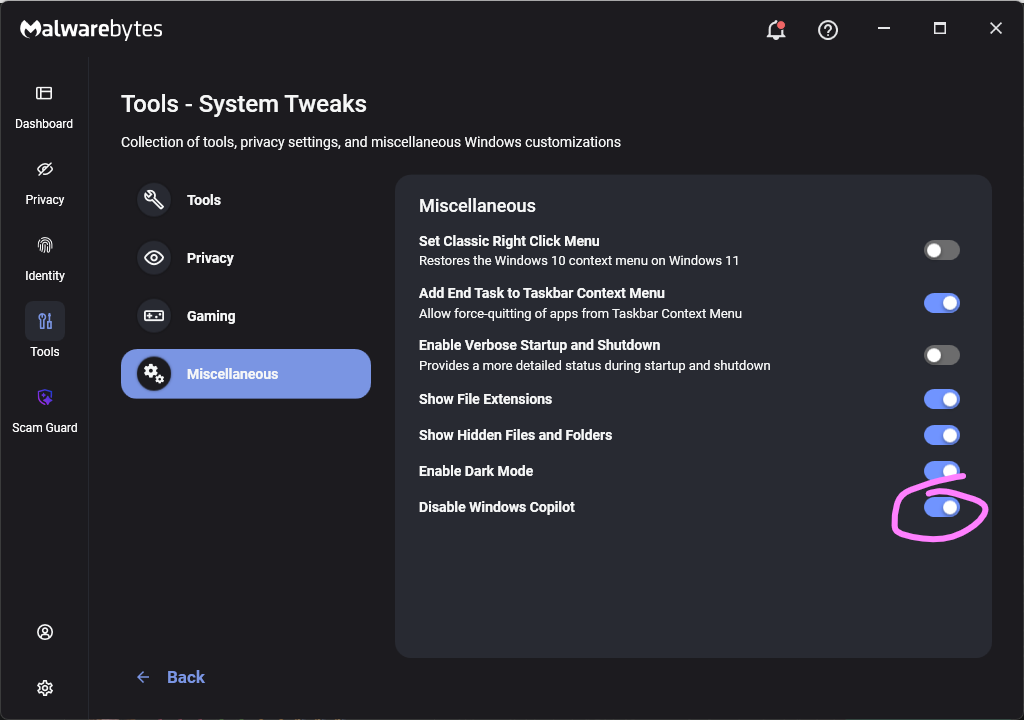
Malwarebytes users can turn off Copilot under Tools > System Tweaks > Miscellaneous.
Malwarebytes setting to disable Copilot
Or in Word itself:
For individual users who don’t want Copilot in Word:
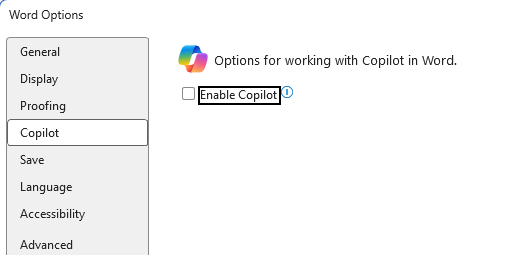
Open Word, go to File > Options > Copilot and clear the Enable Copilot checkbox, then restart Word.
In some versions of Word, the setting appears under File > Options > General in a Copilot section. In both cases, the key is unchecking the “Enable Copilot” setting.
You can also remove the Copilot icon from the ribbon by right‑clicking the ribbon, open the customization dialog, locate the Copilot/Assistance button, and removing it.
Alternatively, you can limit Copilot’s role by following these instructions:
In Word, go to File > Account > Account Privacy > Manage Settings, and uncheck Turn on optional connected experiences. This reduces certain cloud‑powered AI features, including Copilot‑related functions that rely on those services.
In the Microsoft 365 Admin Center, under Copilot > Settings, set Pin Microsoft 365 Copilot Chat to Do not pin Copilot chat in Microsoft 365 apps so the chat pane doesn’t appear by default in apps like Word.
This doesn’t remove Copilot entirely or stop these attacks, but it does reduce its visibility and limits some of its cloud‑assisted functionality.
From reporting threats to removing them.
Cybersecurity risks should never spread beyond a headline. Keep threats off your devices by downloading Malwarebytes today.
A security researcher has demonstrated how Microsoft Copilot for Word can be tricked into spreading a self‑propagating prompt‑injection “AI worm.” The attack silently alters documents and embeds its own hidden instructions into newly created files, allowing it to spread through normal document-sharing workflows without macros or traditional malware.
The technique allows an attacker to hide a JSON‑formatted prompt as white text on a white background inside a Word document. When someone asks Copilot for Word to draft or edit content based on that document, Copilot strips away the formatting, reads the hidden text, and treats the embedded instructions as part of the user’s request.
Copilot then modifies the active document and appends the full malicious prompt as hidden white text. That new document becomes a new carrier. Anyone who later uses it as source material for Copilot triggers the same behavior, allowing the prompt injection to spread to more documents. Because the documents are created and edited by legitimate users, the attack can be difficult to trace.
The researcher could still reproduce the full worm chain even after Microsoft rolled out multiple mitigations, including upgrades to newer GPT‑5.5 and 5.6 models.
At the time of writing, there is no complete mitigation for this broader class of attacks across comparable large language model (LLM)‑based products. It’s characterized as an architectural weakness of current LLM systems: attacker‑controlled content shares the same context window as trusted instructions. Attacks that exploit this behavior are known as prompt injection attacks and may never be fixed.
How to stay safe
Treat documents from outside your organization as untrusted, especially if you plan to use them with Copilot for Word.
Review any attached document before using it as Copilot source material, and carefully verify Copilot‑generated/edited documents before sharing or reusing them.
If you don’t use Copilot, you can disable it.
Malwarebytes users can turn off Copilot under Tools > System Tweaks > Miscellaneous.
Malwarebytes setting to disable Copilot
Or in Word itself:
For individual users who don’t want Copilot in Word:
Open Word, go to File > Options > Copilot and clear the Enable Copilot checkbox, then restart Word.
In some versions of Word, the setting appears under File > Options > General in a Copilot section. In both cases, the key is unchecking the “Enable Copilot” setting.
You can also remove the Copilot icon from the ribbon by right‑clicking the ribbon, open the customization dialog, locate the Copilot/Assistance button, and removing it.
Alternatively, you can limit Copilot’s role by following these instructions:
In Word, go to File > Account > Account Privacy > Manage Settings, and uncheck Turn on optional connected experiences. This reduces certain cloud‑powered AI features, including Copilot‑related functions that rely on those services.
In the Microsoft 365 Admin Center, under Copilot > Settings, set Pin Microsoft 365 Copilot Chat to Do not pin Copilot chat in Microsoft 365 apps so the chat pane doesn’t appear by default in apps like Word.
This doesn’t remove Copilot entirely or stop these attacks, but it does reduce its visibility and limits some of its cloud‑assisted functionality.
From reporting threats to removing them.
Cybersecurity risks should never spread beyond a headline. Keep threats off your devices by downloading Malwarebytes today.

 Login
Login







 Table Of Contents