❌

Reading view

Email hijacking via OAuth | Kaspersky official blog

When targeting an organization to steal information, maintaining a low profile is critical for attackers. They typically aim for long-term persistence, which requires avoiding security alerts while preserving access in case they’re detected and the organization initiates incident response or routine password resets. Malware such as infostealers or ostensibly legitimate remote monitoring and management (RMM) tools fail the first requirement: their use triggers EDR and generates suspicious events in SIEM consoles. Relying on stolen credentials conflicts with the second requirement: the moment the security team suspects a compromise, passwords can be changed immediately — terminating access. If attackers attempt to steal browser cookies instead of passwords, they face a different challenge: many online services now correlate device characteristics with the expected session cookie and block access if the cookie is used on an unrecognized device. Furthermore, cookie theft protection mechanisms implemented in Chromium-based browsers (such as Chrome, Edge, and Opera) this year have made this approach significantly more difficult.

To address this persistence challenge, the ToddyCat APT — whose main game is spying — developed a novel technique. Kaspersky experts discovered this method during an incident investigation and named it Shadow Token via Remote Debug (STRD). This technique allows the attackers to establish reliable, persistent access to a victim’s mailbox and other resources in Google Workspace. With minor adjustments, the same approach could potentially be adapted to target other services that grant third-party application access via OAuth 2.0 authentication.

How an STRD attack works

First, the attackers must compromise the victim’s system with malware. In past campaigns, ToddyCat gained initial access to organizations by exploiting known vulnerabilities in server software and distributing malicious loaders via messaging apps. The specific employee targeted by the attackers might not notice the intrusion at all. This can occur, for example, if the adversary first obtains privileged administrative credentials and uses them to deploy the malware onto targeted machines remotely. Crucially, the deployment and execution of this malware mustn’t trigger immediate security alerts.

Once active, the malware executes an STRD attack, connecting the attackers’ remote service to the victim’s mailbox using the OAuth 2.0 protocol. This process requires no user interaction and shows no visible activity on the screen. To the cloud environment (Google Workspace, in the case at hand), the activity appears as if the user has legitimately authorized a third-party app for email access or data backup.

After that, the malware can terminate its operations and even delete itself from the system. The adversary retains direct access to the mailbox using the acquired OAuth token — and they need no connection to the victim’s endpoint or to the corporate network for that. Depending on the organization’s Google Workspace configuration, this access can persist for an extended period and survive subsequent password resets.

The core concept of Shadow Token via Remote Debug

At the heart of this attack is a connection to Google Workspace services via OAuth 2.0. This is a legitimate workflow used whenever a third-party application requests access to calendar data, emails, or Google Drive files. For example, to display calendar meetings in Zoom and automatically generate conference links, a user must authorize Zoom to access Google services. Similarly, configuring a third-party email client or calendar app requires granting permission. During this authorization process, the service requesting access opens a new browser window. In this window, Google Workspace first prompts the user to select the appropriate account. Once the account is chosen, the subsequent screen displays the specific permissions requested by the third-party app, allowing the user to either approve or deny access. For this scenario to proceed seamlessly, the user must already be authenticated to Google services in their browser — which is typically the case in organizations using Google Workspace. If the user isn’t authenticated, additional steps for entering credentials and completing multi-factor authentication are introduced into the sequence.

The ToddyCat hackers developed a malicious tool called Umbrij to facilitate a two-step covert authorization process when the user is already authenticated in Google. First, the malware identifies the browsers installed on the system, and locates the specific folder storing the user’s active profile for each. The attackers target Chrome and Edge, as these are the browsers most likely serving as the primary ones within the organization.

Next, Umbrij copies the entire user profile folder to a different directory on the machine. It then launches an instance of the browser, specifying the path to the duplicated profile via the command line. Because this duplicate profile contains the user’s session cookies, websites with saved credentials won’t prompt for re-authentication. Furthermore, since this occurs on the exact same computer where the primary browser is running, online services detect no anomalies. The browsing history for this newly launched instance is isolated within the new folder, keeping it hidden from the user’s main account activity.

Crucially, the browser is launched in a dedicated debugging mode typically reserved for web development. The browser window and user interface don’t appear on the screen at all (headless mode). Instead, the browser can be controlled through a debugging port using the DevTools protocol, allowing the malware to issue commands and read the state of the screen. To orchestrate these actions, Umbrij leverages Puppeteer, a legitimate automation library.

After verifying that the debugging browser instance has launched successfully, Umbrij opens a legitimate Google Workspace OAuth screen within it. The request sent to Google is engineered to bypass additional security checks while requesting maximum access privileges. For the application ID — the identity supposedly requesting these extensive permissions — the malware impersonates one of two legitimate tools: Google Workspace Migration for Microsoft Outlook (GWMMO), or Google Workspace Sync for Microsoft Outlook (GWSMO).

When Google opens the window within the headless browser, Umbrij uses debugging tools to programmatically click on the corporate account name and the confirmation buttons. As a result, Google generates an authorization code for the app. Umbrij extracts and saves this code, subsequently forwarding it to the attackers’ command-and-control server. Finally, operating entirely within their own infrastructure rather than on the victim’s computer, the attackers exchange this authorization code for an OAuth access token. This single token is all they need to maintain long-term unrestricted access to the mailbox.

How to protect against OAuth token theft

If a Google Workspace account is compromised, incident response measures must include the following steps after collecting the necessary logs and other forensic data for investigation:

  • Resetting the affected user’s password
  • Terminating all active web sessions for the user
  • Revoking OAuth tokens and third-party app permissions
  • Reviewing and removing access granted through legacy App Passwords

In addition, security and IT teams must systematically audit issued OAuth permissions, revoke unjustifiable access rights, and restrict capabilities that allow excessive or unauthorized permission grants. We covered this topic in detail in our article on blocking unwanted AI assistants.

How to prevent exploitation of Shadow Token via Remote Debug

While Kaspersky users are protected against the Umbrij tool, security teams should proactively implement policies that prevent standard users from launching browsers in debugging mode. This functionality is intended exclusively for website and web app developers. This restriction can be enforced through the DeveloperToolsAvailability group policy (available for both Chrome and Edge).

Additionally, configure monitoring within your SIEM/XDR to track the launch of browser instances with an active debugging port. This event serves as a strong indicator of this specific attack technique.


  •  

Real Apple notifications are being used to drive tech support scams

Scammers have found a way to abuse legitimate Apple account notification emails to trick targets into calling fake tech support numbers.

According to a report from BleepingComputer, scammers create an Apple account and insert a phishing message into the personal information fields, then modify the account so that Apple sends a genuine security alert about the change to the target.

BleepingComputer was able to replicate the attack.

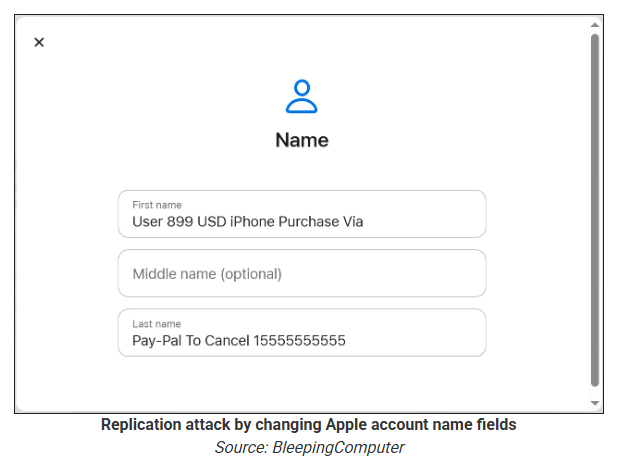
The attacker creates an Apple ID they control, then stuffs the phishing message into the personal information fields (first name, last name, possibly address), splitting it across fields because they will not fit into just one.

To launch the phish, the attacker changes something benign on their specially created Apple account, such as shipping information, which causes Apple’s systems to send a “Your Apple account was updated” security email.

While the original alert is addressed to the attacker’s iCloud email, they are then able to redistribute it to a wider victim list, for example through a mailing list.

In the copy the targets receive, the email headers still show a legitimate Apple sender, and the presence of the attacker’s iCloud address can even make it look like “someone else” has gained access to the account.

Reconstruction. Image courtesy of BleepingComputer

Because Apple includes those user-supplied fields in the security email, the phishing text is delivered inside a legitimate message sent from Apple’s own infrastructure.

This method, called call-back phishing, filters out suspicious users, so the scammers can focus on the people who fell for the first part.

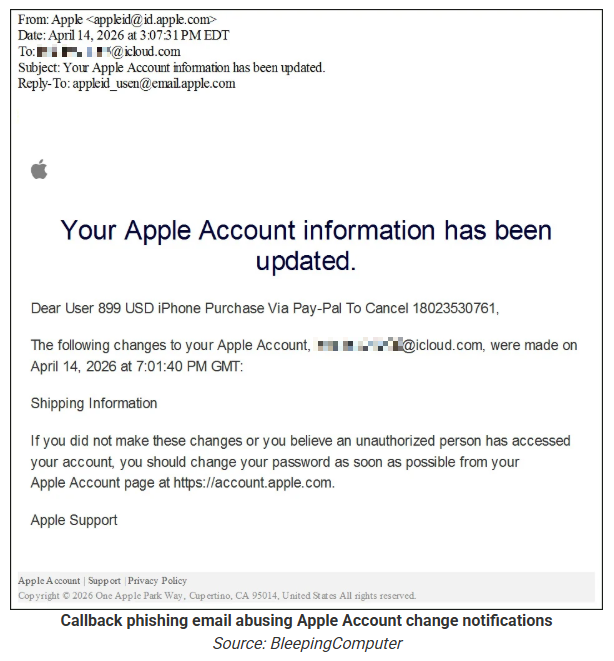
The emails come from a legitimate source, sail through every security filter because of that, and look convincing enough to scare the receiver into thinking someone spent $899 from their PayPal account.

Phishing email screenshot, courtesy of BleepingComputer

But the structure of the email does not make sense.

“Dear User” is immediately followed by the scam message where your name should have been. The header says it’s about account information rather than a purchase. And the iCloud account does not belong to the recipient. So, once you know how it’s done, they’re not impossible to spot. Which is why we wrote this blog.

And when in doubt, you can always ask Malwarebytes Scam Guard.


Scam or legit? Scam Guard knows.


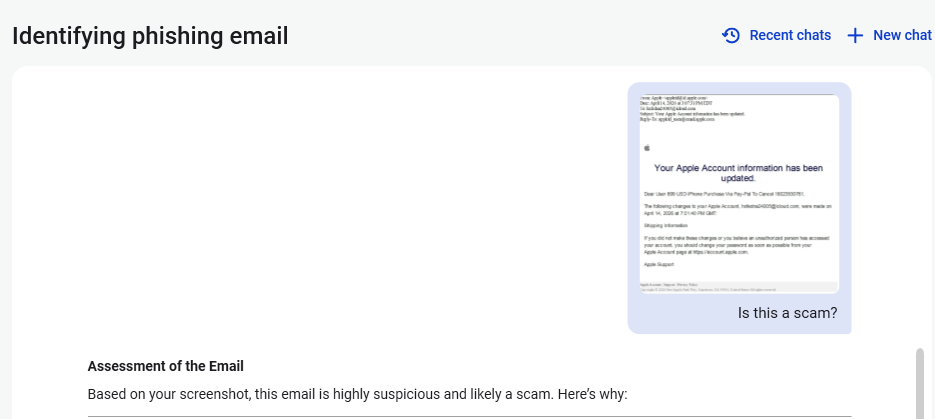
Is this a scam?
Asking Scam Guard

Scam Guard identified the screenshot as a scam and guides users through the next steps.

Scams like these work, because many users still view phone calls as more trustworthy than email, especially if the email itself passed all the usual technical authenticity checks and they initiated the call themselves.

How to stay safe

Tech support scammers will try to convince callers to install some kind of remote desktop application to steal data from your computer, or ask for financial details so they can steal your money.

To stay safe from these scammers:

  • Be wary of unexpected alerts about high‑value purchases you do not recognize. They are suspicious even if they come from a real domain.
  • Never call a number sent to you by unsolicited means or even found in sponsored search results.
  • Carefully read emails and text messages, even if they come form trustworthy addresses. Does the email make sense from a structural and linguistic point of view?
  • If someone claiming to be support for a legitimate company asks for remote access or payment details during a call, hang up and contact the company through official channels.
  • Use Malwarebytes Scam Guard to analyze any kind of message that alarms you or urges you to take immediate action.

Something feel off? Check it before you click.  

Malwarebytes Scam Guard helps you analyze suspicious links, texts, and screenshots instantly.  

Available with Malwarebytes Premium Security for all your devices, and in the Malwarebytes app for iOS and Android.  

Try it free → 

  •  

I Am in the Epstein Files

Once. Someone named “Vincenzo lozzo” wrote to Epstein in email, in 2016: “I wouldn’t pay too much attention to this, Schneier has a long tradition of dramatizing and misunderstanding things.” The topic of the email is DDoS attacks, and it is unclear what I am dramatizing and misunderstanding.

Rabbi Schneier is also mentioned, also incidentally, also once. As far as either of us know, we are not related.

EDITED TO ADD (2/7): There is more context on the Justice.gov website version.

  •  

Fake LastPass maintenance emails target users

The LastPass Threat Intelligence, Mitigation, and Escalation (TIME) team has published a warning about an active phishing campaign in which fake “maintenance” emails pressure users to back up their vaults within 24 hours. The emails lead to credential-stealing phishing sites rather than any legitimate LastPass page.

The phishing campaign that started around January 19, 2026, uses emails that falsely claim upcoming infrastructure maintenance and urge users to “backup your vault in the next 24 hours.”

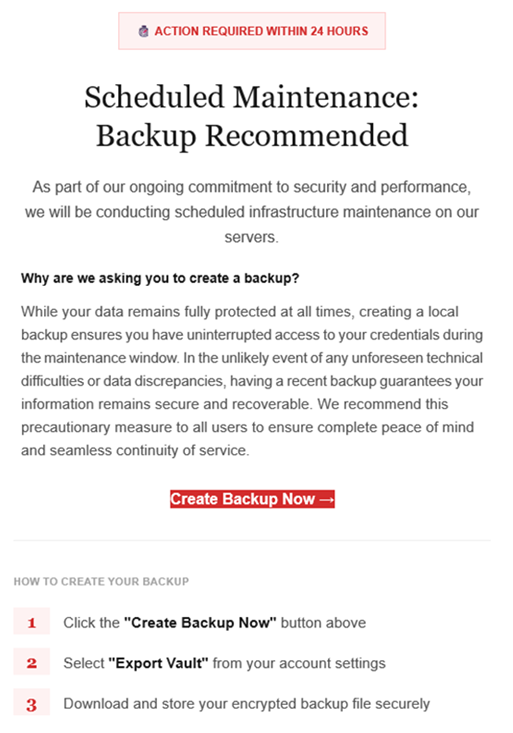
Example phishing email
Image courtesy of LastPass

“Scheduled Maintenance: Backup Recommended

As part of our ongoing commitment to security and performance, we will be conducting scheduled infrastructure maintenance on our servers.
Why are we asking you to create a backup?
While your data remains protected at all times, creating a local backup ensures you have access to your credentials during the maintenance window. In the unlikely event of any unforeseen technical difficulties or data discrepancies, having a recent backup guarantees your information remains secure and recoverable. We recommend this precautionary measure to all users to ensure complete peace of mind and seamless continuity of service.

Create Backup Now (link)

How to create your backup
1 Click the “Create Backup Now” button above
2 Select “Export Vault” from you account settings
3 Download and store your encrypted backup file securely”

The link in the email points to mail-lastpass[.]com, a domain that doesn’t belong to LastPass and has now been taken down.

Note that there are different subject lines in use. Here is a selection:

  • LastPass Infrastructure Update: Secure Your Vault Now
  • Your Data, Your Protection: Create a Backup Before Maintenance
  • Don’t Miss Out: Backup Your Vault Before Maintenance
  • Important: LastPass Maintenance & Your Vault Security
  • Protect Your Passwords: Backup Your Vault (24-Hour Window)

It is imperative for users to ignore instructions in emails like these. Giving away the login details for your password manager can be disastrous. For most users, it would provide access to enough information to carry out identity theft.

Stay safe

First and foremost, it’s important to understand that LastPass will never ask for your master password or demand immediate action under a tight deadline. Generally speaking, there are more guidelines that can help you stay safe.

  • Don’t click on links in unsolicited emails without verifying with the trusted sender that they’re legitimate.
  • Always log in directly on the platform that you are trying to access, rather than through a link.
  • Use a real-time, up-to-date anti-malware solution with a web protection module to block malicious sites.
  • Report phishing emails to the company that’s being impersonated, so they can alert other customers. In this case emails were forwarded to abuse@lastpass.com.

Pro tip: Malwarebytes Scam Guard  would have recognized this email as a scam and advised you how to proceed.


We don’t just report on threats—we help safeguard your entire digital identity

Cybersecurity risks should never spread beyond a headline. Protect your, and your family’s, personal information by using identity protection.

  •  
  •  

How to Configure SPFv1: Explained for the Masses

Kent Ickler and Derrick Rauch* // Sun Protection Factor Err… wait a second. Sender Policy Framework Ladies and Gentlemen of the class of 1997, Wear Sunscreen…I will dispense my advice, […]

The post How to Configure SPFv1: Explained for the Masses appeared first on Black Hills Information Security, Inc..

  •  

Bypassing Two-Factor Authentication on OWA & Office365 Portals

Beau Bullock // Full Disclosure: Black Hills Information Security believes in responsible disclosure of vulnerabilities. This vulnerability was reported to Microsoft on September 28th, 2016. As of the publication date of […]

The post Bypassing Two-Factor Authentication on OWA & Office365 Portals appeared first on Black Hills Information Security, Inc..

  •  

5 Reasons for Mailvelope & Easy Instructions

Gail Menius // My husband set me up with GPG and Thunderbird and it was too hard. Ethan said it was cool. Lots of people gave it good reviews. It’s […]

The post 5 Reasons for Mailvelope & Easy Instructions appeared first on Black Hills Information Security, Inc..

  •  
❌