Those losses stem from 22,364 AI-related complaints. And these figures represent only the reported losses, which may well be the proverbial tip of the iceberg.
The main drivers behind the rise in AI-powered scams are voice cloning, deepfake images and videos, and AI‑generated scripts. These tools have supercharged classic fraud schemes such as romance scams, kidnapping and extortion calls, fake influencers, and government impersonation.
Michael Machtinger, deputy assistant director of the FBI Cyber Division, told the Wall Street Journal:
“AI-created fraudulent communications can look very official and very legitimate to even the most trained individuals.”
The FBI and financial institutions recommend verifying identities via official contact channels. One of their biggest concerns is government impersonation scams, which have evolved from crude IRS gift‑card phone calls into sophisticated, multi‑channel operations that combine spoofed caller ID, stolen agency logos, and AI‑generated audio and video of public officials.
This report, and others like it, shows how AI is being weaponized to automate research on victims, generate convincing scripts, and create highly believable deepfake personas at scale.
AI is also increasingly used in business email compromise (BEC), romance scams, and impersonation fraud. In BEC cases involving AI, losses have already reached tens of millions of dollars for businesses alone.
For a broader look at why AI is simultaneously fueling scams like these and becoming indispensable to defending against them, see my article AI: Threat, tool, or both?
It explains how both defenders and criminals use AI to find vulnerabilities, and why security vendors increasingly rely on AI to process vast amounts of telemetry, detect anomalies, and keep pace with threats that “no longer move at human speed.”
How to stay safe
Consumer protection agencies have documented a growing list of the ways scammers are using AI to try to rip people off. The main problem is that we can no longer take it at face value that the person we’re talking to is who they claim to be.
Government agencies and financial institutions recommend that you:
Be skeptical of urgent payment demands, especially those involving cryptocurrency or gift cards
Limit the amount of voice and video content you share publicly, as it can be reused by scammers
Report incidents quickly to your bank(s) and IC3.gov
Pro tip: Malwarebytes Scam Guard can help you determine whether a message is a scam and guide you through the next steps.
Something feel off? Check it before you click.
Malwarebytes Scam Guard helps you analyze suspicious links, texts, and screenshots instantly.
Those losses stem from 22,364 AI-related complaints. And these figures represent only the reported losses, which may well be the proverbial tip of the iceberg.
The main drivers behind the rise in AI-powered scams are voice cloning, deepfake images and videos, and AI‑generated scripts. These tools have supercharged classic fraud schemes such as romance scams, kidnapping and extortion calls, fake influencers, and government impersonation.
Michael Machtinger, deputy assistant director of the FBI Cyber Division, told the Wall Street Journal:
“AI-created fraudulent communications can look very official and very legitimate to even the most trained individuals.”
The FBI and financial institutions recommend verifying identities via official contact channels. One of their biggest concerns is government impersonation scams, which have evolved from crude IRS gift‑card phone calls into sophisticated, multi‑channel operations that combine spoofed caller ID, stolen agency logos, and AI‑generated audio and video of public officials.
This report, and others like it, shows how AI is being weaponized to automate research on victims, generate convincing scripts, and create highly believable deepfake personas at scale.
AI is also increasingly used in business email compromise (BEC), romance scams, and impersonation fraud. In BEC cases involving AI, losses have already reached tens of millions of dollars for businesses alone.
For a broader look at why AI is simultaneously fueling scams like these and becoming indispensable to defending against them, see my article AI: Threat, tool, or both?
It explains how both defenders and criminals use AI to find vulnerabilities, and why security vendors increasingly rely on AI to process vast amounts of telemetry, detect anomalies, and keep pace with threats that “no longer move at human speed.”
How to stay safe
Consumer protection agencies have documented a growing list of the ways scammers are using AI to try to rip people off. The main problem is that we can no longer take it at face value that the person we’re talking to is who they claim to be.
Government agencies and financial institutions recommend that you:
Be skeptical of urgent payment demands, especially those involving cryptocurrency or gift cards
Limit the amount of voice and video content you share publicly, as it can be reused by scammers
Report incidents quickly to your bank(s) and IC3.gov
Pro tip: Malwarebytes Scam Guard can help you determine whether a message is a scam and guide you through the next steps.
Something feel off? Check it before you click.
Malwarebytes Scam Guard helps you analyze suspicious links, texts, and screenshots instantly.
It starts with the familiar: a short message, a trusted name, a routine tone. Delivery updates, work pings, brand alerts hum in the background, rarely attracting scrutiny. You check, you answer… — until minutes later you’ve slipped into a trap built to lower your guard and hijack your trust.
That’s why messaging scams cut deep: they exploit everyday habits where instinct, not caution, leads. Communication once moved slowly, leaving room for doubt. Now it’s instant — and that speed is a weapon in criminal hands.
On our blog, we’ve already examined numerous scam schemes in messaging apps — from pig butchering, where the victim is groomed for a very long time, or catfishing, where the scammer creates a fake identity, to phishing via chatbots or through gift-giving campaigns in messaging apps.
Now, for the first time, Kaspersky has set out to capture the full end-to-end reality of messaging-based scams to understand how quickly harm occurs, how they impact trust and what remains after the interaction ends. What emerges is a highly organized and industrialized scam ecosystem embedded within everyday messaging channels such as SMS, WhatsApp, and email.
Kaspersky experts have prepared a report on targeted scams in messaging apps, detailing not only the financial but also the emotional damage caused by such attacks, as well as providing tips on how to protect yourself and avoid them. In this post, we explore the most interesting facts, but you can find more details in the full report.
The damage is underestimated
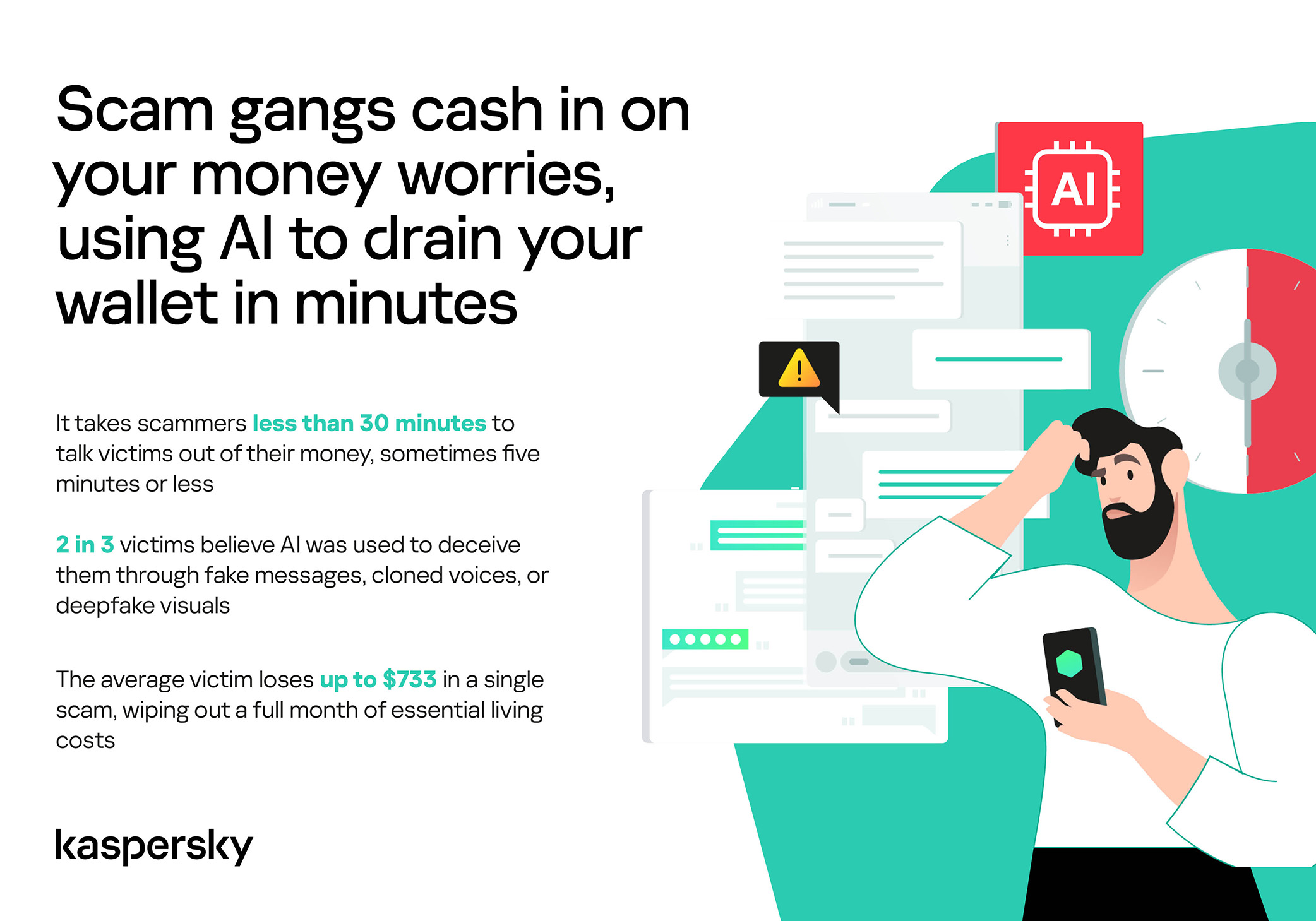
How much do you think a single successful attack via a messaging app costs the average victim? Ten dollars? Or maybe 50? You’re underestimating the scammers. Although more than a third (36%) of victims incur losses of less than $135, on average a victim loses… $733!
Country
Average loss per victim
Senegal
$392.94
Serbia
$493.32
Morocco
$504.28
Greece
$609.32
United Kingdom
$617.38
Côte d’Ivoire
$654.11
Spain
$672.67
United States
$724.73
Portugal
$868.20
Italy
$896.02
France
$1,193.58
Germany
$1,369.35
The average amount lost by a victim in a successful attack via a messaging app
On the one hand, the financial hit doesn’t look catastrophic in isolation. These are micro-losses by design. Small enough that some never report them to the police. Small enough that banks don’t always investigate. Small enough to be dismissed as bad luck rather than organized crime.
But $733 is not nothing. It’s enough to cover a month’s worth of groceries, school or daycare fees, or utility bills. Against the backdrop of the global cost-of-living crisis, a single such loss can seriously dent a family’s budget.
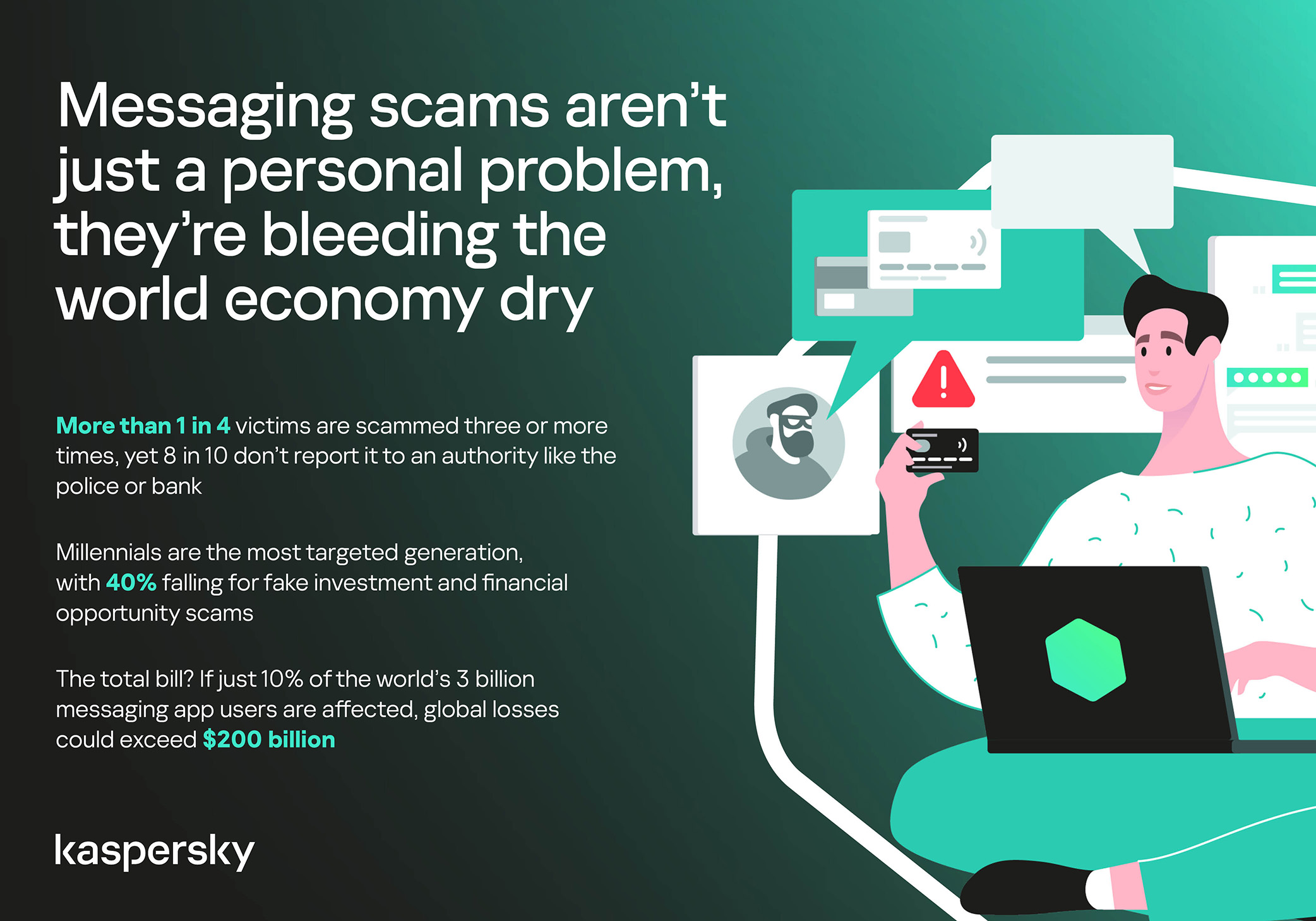
In 11% of cases, losses exceed $1,350, and more than a quarter of victims (28%) report having been scammed three or more times in the past six months. Once scammers discover that a phone number responds, that contact becomes an asset, circulating from one database to another.
Now imagine the scale of the problem: if just 10% of the three billion messaging‑app users worldwide fell victim with the average loss, the total damage would amount to… nearly $220 billion! This is comparable to the GDP of Greece, and exceeds that of Morocco, Serbia, or Côte d’Ivoire.
It becomes clear that behind the daily flood of fraudulent schemes lie large scam cartels operating on an industrial scale, using AI to personalize messages that mimic those of family members, friends, and familiar brands. This, in essence, forms the basis of a full-fledged economy built on digital identity theft.
Speed beats scrutiny
More than half of successful messaging scams (52%) unfold in under 30 minutes — from first contact to the moment money or personal data changes hands — or even faster, before the victim begins to doubt the legitimacy of the sender. In fact, one in seven scams takes less than five minutes — quicker than boiling an egg!
The speed isn’t accidental. It’s the method. Scammers structure their schemes to deny the victim a chance to come to their senses. Every element is engineered to compress the decision-making window: the urgency of the scenario, the familiarity of the format, the plausibility of the request.
They rush you — faster, faster, don’t tell anyone, you only have a few minutes, solve the problem, don’t ask questions. Click the link, fill in the details, approve the transaction, or else… Or else what? The scammers’ imagination knows no bounds here, but if you don’t do something right now, you’ll definitely regret it.
Alas, the realization of what has happened usually comes when the damage is already irreversible. More than half of victims (51%) lose money; another 43% hand over their personal data — most commonly phone numbers, names, and email addresses — to scammers, and often the victim loses both.
Where and how attacks occur
A delivery notification, a bank alert, a message from a merchant you ordered from last week — messaging apps permeate every aspect of everyday life, making such interactions completely normal. An attack shouldn’t feel like an attack. It should feel like the same message you’ve received hundreds of times.
It’s no surprise that scammers focus their attention on this method of communication first and foremost. The most popular platforms for scams are predictable: WhatsApp (43%), SMS/iMessage (40%), Facebook (27%), Telegram (22%), and Instagram (19%) — these are the ones that people trust most.
A wide variety of schemes is used. Brand impersonation is now one of the three most common types of messaging scam worldwide — accounting for 31% of cases. Fake delivery notifications top the list at 38%, followed by investment scams at 37%.
At the same time, nearly two-thirds (63%) of fraudulent schemes span multiple platforms, moving from SMS to WhatsApp, from WhatsApp to Telegram, etc. In this way, scammers achieve two goals: they mimic organic messaging and evade moderation algorithms.
AI has taken scams to a new level
Just a couple of years ago, fraudulent messages gave themselves away with bad grammar, awkward phrasing, illogical requests, and an obsessive sense of urgency. Today, a phishing message looks, sounds, and reads just like the real thing.
Scam cartels want to catch people in motion — between meetings, on a commute, or during everyday tasks — when your attention is already fragmented. They mimic your mother’s turn of phrase. They match your bank’s tone of voice. They copy your courier’s format exactly. They mirror the rhythm, structure, and style of authentic brand communications across messaging platforms. And AI is accelerating all of it.
What this creates is overlap. Legitimate and fraudulent messages appear in the same environment, using the same formats, language, and triggers. The difference between them is no longer obvious.
The data shows that two-thirds of victims (66%) believe AI was used in the scam against them, 42% cite messages written by AI, 31% report generated or cloned voices, and 25% encountered deepfake images or videos.
That’s why mere awareness and “tech-savviness” may no longer be enough to protect oneself. From Gen Z to Gen X, messaging scams cut across every generation.
And what about the emotional toll?
But money is far from the only problem a victim is left with after an attack. After what they’ve been through, people develop distrust toward incoming messages, unfamiliar numbers, and any requests for action. As a result, 99% of fraud victims say they no longer trust incoming notifications in messaging apps.
This creates a crisis of trust in all digital channels in general. Every legitimate message can now be perceived as a scam. Brands, banks, and delivery services are forced to operate in an environment where the customer is, by default, in a state of distrust.
Dr. Elizabeth Carter, a forensic linguist and criminologist at Kingston University in London, notes that scammers use familiar contexts, common social settings and embedded linguistic norms to create the illusion for the victim that their decision-making is rational and reasonable in the moment. However, what is actually happening is that they construct false realities in which those decisions end up causing financial and psychological harm. She also notes that it is very hard to identify a false reality while you are in it.
After realizing they had been deceived, more than half of victims felt anger — the kind that comes from having trusted something and discovering it was used against you. 42% of victims report frustration, 38% — feeling upset. Moreover, several months later, these feelings haven’t gone away: nearly half of all victims (48%) are still angry, a third (33%) remain frustrated, and 30% are upset.
And nearly one in 10 victims don’t tell anyone what happened. They feel shame, a sense of having fallen for something so obvious. This leaves a significant portion of the actual damage unreported: only 24% of victims contact the police, and only 23% report it to their bank.
So what can be done?
The crisis of trust — and even a touch of paranoia — that has arisen due to widespread attacks on users can linger in victims’ minds for a long time, affecting their quality of life. To prevent this, follow these guidelines:
Pause before you act. The sense of urgency you feel is almost always artificial. A legitimate bank, retailer, or delivery service won’t penalize you for taking 30 seconds to verify before clicking a link or confirming details. It’s precisely this instinct to resolve the situation quickly that scammers are counting on.
Verify through another channel. If a message appears to be from a relative, colleague, or company you trust — contact them through another channel before taking any action. Use secure verification methods, and cross-check identities when something doesn’t feel right. For families, agreeing on a “safe word” in advance can defeat even the most convincing voice clones.
Use a password manager. It will not only help you generate strong, unique passwords for all your accounts and store them securely, syncing them across all your devices, but also protect you from spoofed sites. Even if you click a phishing link and land on such a site, our password manager will notify you about the domain mismatch and refuse to autofill your username and password.
Use protection that works in real time. Modern security solutions, such as Kaspersky Premium, provide real-time protection against malicious links and phishing attempts in the apps and websites you use every day. On Android devices, a dedicated layer of anti-phishing security scans and neutralizes suspicious links as they appear, even within notifications, before you even have a chance to click them.
We’ve covered other threats in messaging apps in similar articles:
Threat actors are already gearing up for this year’s biggest football (soccer) event, the World Cup 2026. With millions of fans looking for ways to stream matches online, many will turn to IPTV apps to watch live TV broadcasts over the internet. It’s no surprise, then, that cybersecurity researchers have discovered multiple campaigns over the past few months where malware was disguised as fake Android IPTV apps.
In this post, we discuss what IPTV apps are, how criminals use fake versions to spread malware, what this malware is capable of, and, most importantly, how to avoid becoming a victim.
What are IPTV apps?
IPTV stands for Internet Protocol Television. This technology delivers TV content over the internet instead of through cable, over-the-air antennas, or satellites. Naturally, the simplest and most common examples of IPTV are the official platforms of TV networks, which can include both websites and dedicated apps.
However, alongside official options, pirate IPTV services also exist. They usually lure users with free or dirt-cheap access to content that can otherwise be hard to find without expensive subscriptions — most notably broadcasts of various sporting events; football matches in particular.
As is typically the case with pirated content, these apps are blocked from official app stores, forcing users to download them from third-party sites. Consequently, the risk of using these services isn’t tied to IPTV technology itself, but rather to the fake apps and modified APK files distributed under the guise of well-known platforms — both official and pirated.
Massiv banking Trojan disguised as IPTV apps
For instance, in February researchers found the Massiv banking Trojan distributed under the guise of fake IPTV apps. Even then, experts noted that this wasn’t the only malware leveraging this tactic — several others were also spotted in the wild. The primary targets of these IPTV-mimicking malicious fakes have mostly been users in Portugal, Spain, France, and Türkiye.
In most cases, the discovered fake IPTV apps lacked the advertised functionality, so users didn’t get access to any content after installing the apps. Instead, the fake app would open the website of a legitimate IPTV service in a built-in browser to mimic normal functioning and avoid raising user suspicion.
Of course, the most interesting activity happened out of the user’s sight. These are some of the features the malware did have:
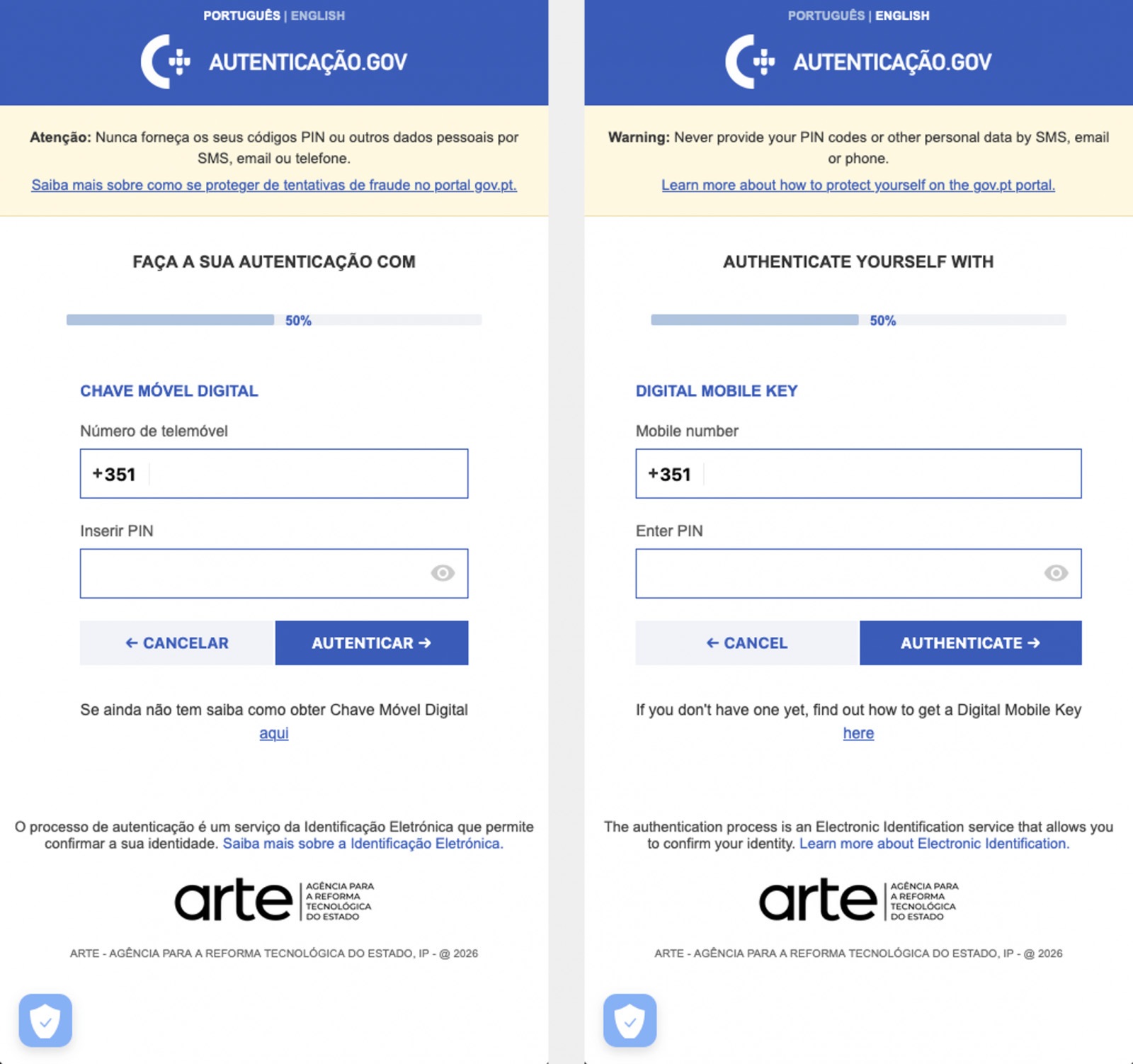
Displaying fake windows on top of legitimate ones: fake forms for entering bank details or signing in to official services, as shown in the screenshot below.
Activating a keylogger: recording and transmitting screen keyboard taps to the attackers.
Hijacking control of the compromised device.
The Massiv banking Trojan mimics the interface of the Portuguese government app Chave Móvel Digital in a fake pop-up window, looking even more convincing than the official version from Google Play. Source
Perseus steals valuable information from users’ notes
In March, researchers reported on a new campaign where several fake IPTV apps were used to distribute an even more advanced and feature-rich malware strain: Perseus.
Research into Perseus shows that the malware is based on the source code of an Android banking Trojan called Cerberus, which leaked nearly six years ago. Perseus comes in two different versions: Turkish and English. The English-language version is more advanced and shows clear signs of AI-driven refinement.
Perseus abuses Accessibility Services, a set of Android features originally designed to make life easier for users with severe visual impairments. Fraudsters learned long ago how to leverage this tool to steal data from Android devices — a topic we’ve covered in detail across several of our posts.
An example of a malicious APK disguised as Roja Directa TV, another IPTV app. Source
By abusing Accessibility Services, Perseus gains remote control over the victim’s device. Here’s what it can do:
Continuously capture and exfiltrate screenshots.
Send a structured map of the device’s UI for remote manipulation.
Mimic taps, swipes, text input, long presses, and other UI interactions.
Turn on the screen, launch apps, and block them from running.
Trigger a pitch-black screen overlay to hide its activities.
Log keystrokes.
On top of that, the English-language version of Perseus boasts another notable feature. The malware can hunt for sensitive information like passwords, recovery phrases, and financial data across an entire range of note-taking apps: Google Keep, Xiaomi Notes, Samsung Notes, ColorNote, Evernote, Microsoft OneNote, and Simple Notes.
All of these capabilities help criminals drain football fans’ money not just from various banking services, but from cryptocurrency apps as well.
How not to let cybercrooks ruin your World Cup
The World Cup is just around the corner, and millions of fans worldwide will definitely want to tune in to this year’s premier football event. Past experience shows that cybercriminals frequently cash in on major spectacles like this. So, how can you watch the matches safely?
Don’t download apps from unofficial stores.
Even when downloading an app from an official store — since malware occasionally slips through the cracks there, too— read the reviews carefully. Users who have been burned by fakes and malware often leave comments to warn others.
Avoid storing passwords or other sensitive information in note-taking apps. To ensure your data and finances stay secure, use a reliable password manager. By the way, Kaspersky Password Manager includes an encrypted note-taking feature, allowing you to store your valuable information safely.
You can’t even watch TV safely anymore these days! Check out other threats facing TV lovers:
Netflix, Apple TV+, Disney+, Hulu, Amazon Prime, YouTube Premium… The average law-abiding family today pays for five to 10 subscriptions just to watch their shows of choice, with the monthly bill easily crossing the hundred-dollar mark. It’s no surprise, then, that social media and online marketplaces are seeing a surge in demand for the “magic boxes” that popped up at the end of 2025: Android-powered TV boxes that promise to unlock thousands of channels and every streaming service subscription-free for a one-time purchase.
Ads for these devices are flooding TikTok and Instagram: smiling influencers unbox the SuperBoxes, plug them into a TV, and browse endlessly through channels. It looks like the ultimate life hack against subscription fatigue, right? In reality, it’s one of the easiest ways to invite a botnet into your home network.
A promotional video on TikTok explaining how great it is when the cheese is free you can just go ahead and cancel all your subscriptions
What’s wrong with these cheap TV boxes?
Stories about malicious TV boxes have surfaced before, but right now, their marketing has reached a truly alarming scale.
At the end of 2025, analysts examined several models of the popular SuperBox device available from major retail stores and online marketplaces. The findings were deeply concerning: immediately upon powering up, the devices began pinging the servers of the Chinese messaging app Tencent QQ, as well as the Grass proxy service — effectively renting out the owner’s internet bandwidth to third parties.
Inside the firmware, researchers discovered applications completely uncharacteristic of a media player: a network scanner, a traffic analyzer, and tools for DNS hijacking. Consequently, the device not only streams pirated content but also scans the local network for other targets (including industrial SCADA interfaces), and stands ready to participate in DDoS attacks. The SuperBoxes were also found to contain folders with the telltale name “secondstage”, a textbook indication of multi-stage malware.
More recently, in April 2026, the Darknet Diaries podcast featured an interview with a security researcher known by the alias D3ada55, who shared plenty of intriguing details about these boxes — including the fact that they were still openly sold on major platforms like Amazon, Walmart, and Best Buy.
The infection chronicles: BADBOX to Keenadu
The SuperBox case is far from the only instance where Android devices have been turned into botnet nodes — or sold infected right out of the box. Here’s a look at the most recent cases:
BADBOX 2.0. In July 2025, Google filed a lawsuit against the operators of a botnet that compromised over 10 million Android devices — mostly cheap TV boxes, tablets, and projectors lacking Google Play Protect certification. As we reported earlier, BADBOX 2.0 specifically targets TV boxes, operating simultaneously as a proxy network and an ad fraud engine.
Kimwolf. In December 2025, the QiAnXin XLab team uncovered a DDoS botnet that had hijacked around 1.8 million Android devices. The infected hardware included generic models from off-brand manufacturers sporting high-profile names like TV BOX, SuperBox, XBOX, SmartTV, and others. The infection footprint was massive, with compromised devices shipped worldwide. Among the hardest-hit countries were Brazil, India, the U.S., Argentina, South Africa, the Philippines, and Mexico.
Keenadu. Our experts discovered this malware lurking in the firmware of brand-new devices back November 2025, though it didn’t gain widespread attention until after we published a study about it in February 2026. Keenadu masquerades as legitimate system components, embedding itself even into facial-recognition unlock apps, potentially granting attackers access to biometrics, banking data, and personal messages.
All of these stories share the same origin: the Triada Trojan, first documented by our researchers back in 2016 and dubbed at the time “one of the most advanced mobile Trojans”. Over the past decade it has evolved from a standard piece of malware into a modular backdoor baked directly into firmware during manufacturing.
How the infection scheme works
Manufacturers of cheap TV boxes cut corners on absolutely everything: Google Play Protect certification, firmware audits, and security updates. Many of these devices run on the Android Open Source Project without any security guarantees whatsoever. Somewhere along the supply chain — whether at the factory, through a middleman, or at a distributor — a backdoor gets injected into the firmware image. Our experts suspect that the manufacturer itself might not even be aware of the compromise.
The sheer scale of the infection turns millions of identical boxes into the perfect foundation for a botnet: every compromised device represents a unique IP address that can be rented out to anyone. Botnet operators like Kimwolf monetize this not only through distributed DDoS attacks but also by reselling the bandwidth of infected smart TVs and streaming boxes.
What this means for you
An infected TV box sits right in your living room, connected to your home Wi-Fi. That means it can see smartphones running banking apps, network-attached storage (NAS) units holding family archives, IP cameras, smart locks, work laptops, and any other the devices connected to your Wi-Fi network.
With this kind of beachhead inside your home network, an attacker can intercept unencrypted traffic, spoof DNS requests, scan ports, and hunt for vulnerabilities on neighboring devices. On top of that, they can use your IP address for fraudulent activity. As a result, in the best-case scenario, your IP will end up blacklisted, and legitimate services will start blocking you for suspicious activity; in the worst-case scenario, law enforcement could come knocking on your door.
How to spot a potentially dangerous gadget
You should be on alert if a device:
Is sold under a no-name brand like T95, X96Q, MX10, TV BOX, SuperBox, or some such
Promises free lifetime access to paid premium services for a one-time fee
Requires you to disable Google Play Protect, or install third-party APK files during the initial setup
Lacks Play Protect certification entirely
Is promoted through aggressive spam campaigns on social media
How to avoid hosting a botnet node
Buy certified TV boxes that feature Google Play Protect, or purchase devices directly from reputable telecom operators and internet service providers.
Isolate all smart home devices. Set up a separate Wi-Fi network on your home router for TV boxes, cameras, smart speakers, robot vacuums, and similar gear, while keeping smartphones, NAS units, and computers on the main network. This prevents malware from spreading to your critical gadgets.
Regularly update the firmware on all your devices, and don’t forget about your router — it’s another vulnerable link in the chain.
Remove any applications from your Android TV box that you didn’t install yourself, especially alternative app stores, Wi-Fi “boosters”, and “system cleaners”.
Monitor your traffic. Modern routers and Kaspersky Premium can display which devices are connecting to where. Frequent connections from a media player to servers in China are a major security red flag.
Install Kaspersky Premiumon all your devices — it protects against Trojans, and blocks the phishing pages often used to distribute infected APK files.
Don’t disable Google Play Protect, and avoid installing APKs from shady sources — this is the primary infection vector that bypasses the official app store.
If in doubt, return the TV box. A cheap streaming device isn’t worth risking your biometrics, banking data, or the reputation of your IP address.
Want to know how else to protect your smart home devices? Read more in our related posts:
As we mark Safer Internet Day 2026, we’re reflecting on a simple but enduring principle: safety must be designed into online services, not bolted on. Microsoft’s work in this space spans more than two decades—from technology solutions like PhotoDNA to our investments in responsible gaming, public-private partnerships, and empowering users through education. This foundation guides our approach as we help individuals and families navigate a rapidly evolving landscape shaped by new technologies and new risks and as we innovate with next-generation AI offerings. At a moment when 91% of people tell us they worry about harms introduced by AI, our commitment to responsible innovation has never been more important—especially for our youngest users.
Read on for more about our longstanding efforts tocreate a safer digital environment, plus key findings from our Global Online Safety Survey and new examples of our work to empower families and communities through tools, research, and educational resources—including the latest release in Minecraft Education’s CyberSafe series.
Ten years of safety research
2026 marks the tenth year of our annual Global Online Safety Survey research. For a decade, we have invested in surveying teens and adults around the world about their experiences and perceptions of life online—aiming to provide fresh insights to support our collective work. That’s 130,000+ interviews across 37 countries, with the results available on our website. Ten years later, respondents tell us that they feel more connected and more productive, but less safe online.
This year’s Global Online Safety Survey also highlights the complexity of the digital environment young people now inhabit. Teens’ exposure to risk rose again, with hate speech (35%), scams (29%), and cyberbullying (23%) among the most commonly experienced harms. At the same time, teens demonstrated striking resilience: 72% talked to someone after experiencing a risk, and reporting behavior increased for the second consecutive year. But worries about the misuse of AIcontinue, underscoring againwhy safety-by-design for AI is essential, not optional. Find the full results and country-level summaries here.
Year on year, the research has told a story of evolving online safety risks and of the real-world impact. In 2026, the call to action is more urgent than ever—unless industry can deliver safe and age-appropriate experiences, young people risk losing access to technology.At Microsoft, spanning across our teams from Windows to Xbox, we have sought to continuously evolve our approach and to lead industry in advancing tailored and thoughtful safety solutions.
Evolving to meet the moment
Looking ahead, we know we need to continue to build strong guardrails to tackle acute risks and to leverage our experience while being informed by new research, new perspectives, and new technologies. The application process closed yesterday for our first AI Futures Youth Council, to be comprised of teens from across the US and EU. We’re looking forward to bringing those teens together soon for a first meeting to get their direct feedback on the role they want emerging technology to play in their lives and how we can best support their safety.
Microsoft has partnered with Cyberlite on a second youth-centered initiative to understand how teens aged 13–17 are engaging with AI companions. Through codesign workshops with students in India and Singapore, we’re capturing young people’s own perspectives on the benefits, risks, and emotional dimensions of AI use—insights that will directly inform educational resources for teens, parents, and educators. Early findings from the first workshop in December 2025 show that young people value AI as a judgment free space while also recognizing the tradeoffs: privacy risks, overreliance, and erosion of critical thinking loom larger for them than bad advice.
We’re also thinking about how we define safety in the next era of Windows, leveraging the Family Safety controls that have been integrated for over a decade. As many countries have raised the local age for digital consent, more parents will have the option to enable parental controls for teens up to the age of 18—leveraging these tools as part of a holistic approach to digital parenting. And to help parents set up and understand Family Safety, we’ve developed a shortnew guide.
Safety is also about transparency, empowerment, and education. At Xbox, bringing the joy of gaming to everyone means remaining transparent about the many ways we innovate so players, parents, and caregivers can feel confident that Xbox continues to be a place for positive play. You can read more about our recently published Xbox Transparency Report and the tools and resources available to players on the Xbox Wire blog.
We’re also excited to announce the latest release in Minecraft Education’s CyberSafe series: CyberSafe: Bad Connection? This series of immersive Minecraft worlds and educational resources is free and helps translate complex risks into fun learning experiences that meet young people in their favorite blocky world. Bad Connection?—the fifth in the series—reflects our commitment to evolving to meet new and challenging risks, with a focus on tackling serious risks related to online recruitment and radicalization. Learn more about how to access this new Minecraft world here.
The CyberSafe series has reached more than 80 million downloads since 2022 through a partnership between Minecraft Education, Xbox, and Microsoft, helping a generation of young players build the agency, resilience, and digital citizenship they need to navigate an increasingly online world. As part of our commitment to ensure people have the knowledge and skills they need to benefit from technology and stay safe, Microsoft Elevate is empowering educators and students with tools and guidance to build safer, more responsible digital habits, recognizing that AI is transforming how people learn, work, and connect. Our commitment to helping young people access technology safely is also why we’ve partnered with organizations, like the National 4-H Council to prepare young people for an AI-powered world through AI literacy and digital safety curriculum and game-based learning with Minecraft Education.
As we look ahead, our goal is clear: build technology that is safe by design, guided by evidence, and informed through partnership. The internet has changed profoundly over the past decade, and so too have the expectations of the people who use it. Safer Internet Day is a reminder that progress requires sustained collaboration across industry, civil society, researchers, and families.
—
Global Online Safety Survey Methodology
Microsoft has published annual research since 2016 that surveys how people of varying ages use and view online technology. This latest consumer-based report is based on a survey of nearly 15,000 teens (13–17) and adults that was conducted this past summer in 15 countries examining people’s attitudes and perceptions about online safety tools and interactions. Responses to online safety differ depending on the country. Full results can be accessedhere.
Technologies for creating fake video and voice messages are accessible to anyone these days, and scammers are busy mastering the art of deepfakes. No one is immune to the threat — modern neural networks can clone a person’s voice from just three to five seconds of audio, and create highly convincing videos from a couple of photos. We’ve previously discussed how to distinguish a real photo or video from a fake and trace its origin to when it was taken or generated. Now let’s take a look at how attackers create and use deepfakes in real time, how to spot a fake without forensic tools, and how to protect yourself and loved ones from “clone attacks”.
How deepfakes are made
Scammers gather source material for deepfakes from open sources: webinars, public videos on social networks and channels, and online speeches. Sometimes they simply call identity theft targets and keep them on the line for as long as possible to collect data for maximum-quality voice cloning. And hacking the messaging account of someone who loves voice and video messages is the ultimate jackpot for scammers. With access to video recordings and voice messages, they can generate realistic fakes that 95% of folks are unable to tell apart from real messages from friends or colleagues.
The tools for creating deepfakes vary widely, from simple Telegram bots to professional generators like HeyGen and ElevenLabs. Scammers use deepfakes together with social engineering: for example, they might first simulate a messenger app call that appears to drop out constantly, then send a pre-generated video message of fairly low quality, blaming it on the supposedly poor connection.
In most cases, the message is about some kind of emergency in which the deepfake victim requires immediate help. Naturally the “friend in need” is desperate for money, but, as luck would have it, they’ve no access to an ATM, or have lost their wallet, and the bad connection rules out an online transfer. The solution is, of course, to send the money not directly to the “friend”, but to a fake account, phone number, or cryptowallet.
Such scams often involve pre-generated videos, but of late real-time deepfake streaming services have come into play. Among other things, these allow users to substitute their own face in a chat-roulette or video call.
How to recognize a deepfake
If you see a familiar face on the screen together with a recognizable voice but are asked unusual questions, chances are it’s a deepfake scam. Fortunately, there are certain visual, auditory, and behavioral signs that can help even non-techies to spot a fake.
Visual signs of a deepfake
Lighting and shadow issues. Deepfakes often ignore the physics of light: the direction of shadows on the face and in the background may not match, and glares on the skin may look unnatural or not be there at all. Or the person in the video may be half-turned toward the window, but their face is lit by studio lighting. This example will be familiar to participants in video conferences, where substituted background images can appear extremely unnatural.
Blurred or floating facial features. Pay attention to the hairline: deepfakes often show blurring, flickering, or unnatural color transitions along this area. These artifacts are caused by flaws in the algorithm for superimposing the cloned face onto the original.
Unnaturally blinking or “dead” eyes. A person blinks on average 10 to 20 times per minute. Some deepfakes blink too rarely, others too often. Eyelid movements can be too abrupt, and sometimes blinking is out of sync, with one eye not matching the other. “Glassy” or “dead-eye” stares are also characteristic of deepfakes. And sometimes a pupil (usually just the one) may twitch randomly due to a neural network hallucination.
When analyzing a static image such as a photograph, it’s also a good idea to zoom in on the eyes and compare the reflections on the irises — in real photos they’ll be identical; in deepfakes — often not.
Look at the reflections and glares in the eyes in the real photo (left) and the generated image (right) — although similar, specular highlights in the eyes in the deepfake are different. Source
Lip-syncing issues. Even top-quality deepfakes trip up when it comes to synchronizing speech with lip movements. A delay of just a hundred milliseconds is noticeable to the naked eye. It’s often possible to observe an irregular lip shape when pronouncing the sounds m, f, or t. All of these are telltale signs of an AI-modeled face.
Static or blurred background. In generated videos, the background often looks unrealistic: it might be too blurry; its elements may not interact with the on-screen face; or sometimes the image behind the person remains motionless even when the camera moves.
Odd facial expressions. Deepfakes do a poor job of imitating emotion: facial expressions may not change in line with the conversation; smiles look frozen, and the fine wrinkles and folds that appear in real faces when expressing emotion are absent — the fake looks botoxed.
Auditory signs of a deepfake
Early AI generators modeled speech from small, monotonous phonemes, and when the intonation changed, there was an audible shift in pitch, making it easy to recognize a synthesized voice. Although today’s technology has advanced far beyond this, there are other signs that still give away generated voices.
Wooden or electronic tone. If the voice sounds unusually flat, without natural intonation variations, or there’s a vaguely electronic quality to it, there’s a high probability you’re talking to a deepfake. Real speech contains many variations in tone and natural imperfections.
No breathing sounds. Humans take micropauses and breathe in between phrases — especially in long sentences, not to mention small coughs and sniffs. Synthetic voices often lack these nuances, or place them unnaturally.
Robotic speech or sudden breaks. The voice may abruptly cut off, words may sound “glued” together, and the stress and intonation may not be what you’re used to hearing from your friend or colleague.
Lack of…shibboleths in speech. Pay attention to speech patterns (such as accent or phrases) that are typical of the person in real life but are poorly imitated (if at all) by the deepfake.
To mask visual and auditory artifacts, scammers often simulate poor connectivity by sending a noisy video or audio message. A low-quality video stream or media file is the first red flag indicating that checks are needed of the person at the other end.
Behavioral signs of a deepfake
Analyzing the movements and behavioral nuances of the caller is perhaps still the most reliable way to spot a deepfake in real time.
Can’t turn their head. During the video call, ask the person to turn their head so they’re looking completely to the side. Most deepfakes are created using portrait photos and videos, so a sideways turn will cause the image to float, distort, or even break up. AI startup Metaphysic.ai — creators of viral Tom Cruise deepfakes — confirm that head rotation is the most reliable deepfake test at present.
Unnatural gestures. Ask the on-screen person to perform a spontaneous action: wave their hand in front of their face; scratch their nose; take a sip from a cup; cover their eyes with their hands; or point to something in the room. Deepfakes have trouble handling impromptu gestures — hands may pass ghostlike through objects or the face, or fingers may appear distorted, or move unnaturally.
Ask a deepfake to wave a hand in front of its face, and the hand may appear to dissolve. Source
Screen sharing. If the conversation is work-related, ask your chat partner to share their screen and show an on-topic file or document. Without access to your real-life colleague’s device, this will be virtually impossible to fake.
Can’t answer tricky questions. Ask something that only the genuine article could know, for example: “What meeting do we have at work tomorrow?”, “Where did I get this scar?”, “Where did we go on vacation two years ago?” A scammer won’t be able to answer questions if the answers aren’t present in the hacked chats or publicly available sources.
Don’t know the codeword. Agree with friends and family on a secret word or phrase for emergency use to confirm identity. If a panicked relative asks you to urgently transfer money, ask them for the family codeword. A flesh-and-blood relation will reel it off; a deepfake-armed fraudster won’t.
What to do if you encounter a deepfake
If you’ve even the slightest suspicion that what you’re talking to isn’t a real human but a deepfake, follow our tips below.
End the chat and call back. The surest check is to end the video call and connect with the person through another channel: call or text their regular phone, or message them in another app. If your opposite number is unhappy about this, pretend the connection dropped out.
Don’t be pressured into sending money. A favorite trick is to create a false sense of urgency. “Mom, I need money right now, I’ve had an accident”; “I don’t have time to explain”; “If you don’t send it in ten minutes, I’m done for!” A real person usually won’t mind waiting a few extra minutes while you double-check the information.
Tell your friend or colleague they’ve been hacked. If a call or message from someone in your contacts comes from a new number or an unfamiliar account, it’s not unusual — attackers often create fake profiles or use temporary numbers, and this is yet another red flag. But if you get a deepfake call from a contact in a messenger app or your address book, inform them immediately that their account has been hacked — and do it via another communication channel. This will help them take steps to regain access to their account (see our detailed instructions for Telegram and WhatsApp), and to minimize potential damage to other contacts, for example, by posting about the hack.
How to stop your own face getting deepfaked
Restrict public access to your photos and videos. Hide your social media profiles from strangers, limit your friends list to real people, and delete videos with your voice and face from public access.
Don’t give suspicious apps access to your smartphone camera or microphone. Scammers can collect biometric data through fake apps disguised as games or utilities. To stop such programs from getting on your devices, use a proven all-in-one security solution.
Use passkeys, unique passwords, and two-factor authentication (2FA) where possible. Even if scammers do create a deepfake with your face, 2FA will make it much harder to access your accounts and use them to send deepfakes. A cross-platform password manager with support for passkeys and 2FA codes can help out here.
Teach friends and family how to spot deepfakes. Elderly relatives, young children, and anyone new to technology are the most vulnerable targets. Educate them about scams, show them examples of deepfakes, and practice using a family codeword.
Use content analyzers. While there’s no silver bullet against deepfakes, there are services that can identify AI-generated content with high accuracy. For graphics, these include Undetectable AI and Illuminarty; for video — Deepware; and for all types of deepfakes — Sensity AI and Hive Moderation.
Keep a cool head. Scammers apply psychological pressure to hurry victims into acting rashly. Remember the golden rule: if a call, video, or voice message from anyone you know rouses even the slightest suspicion, end the conversation and make contact through another channel.
To protect yourself and loved ones from being scammed, learn more about how scammers deploy deepfakes:
The year 2025 saw a record-breaking number of attacks on Android devices. Scammers are currently riding a few major waves: the hype surrounding AI apps, the urge to bypass site blocks or age checks, the hunt for a bargain on a new smartphone, the ubiquity of mobile banking, and, of course, the popularity of NFC. Let’s break down the primary threats of 2025–2026, and figure out how to keep your Android device safe in this new landscape.
Sideloading
Malicious installation packages (APK files) have always been the Final Boss among Android threats, despite Google’s multi-year efforts to fortify the OS. By using sideloading — installing an app via an APK file instead of grabbing it from the official store — users can install pretty much anything, including straight-up malware. And neither the rollout of Google Play Protect, nor the various permission restrictions for shady apps have managed to put a dent in the scale of the problem.
According to preliminary data from Kaspersky for 2025, the number of detected Android threats grew almost by half. In the third quarter alone, detections jumped by 38% compared to the second. In certain niches, like Trojan bankers, the growth was even more aggressive. In Russia alone, the notorious Mamont banker attacked 36 times more users than it did the previous year, while globally this entire category saw a nearly fourfold increase.
Today, bad actors primarily distribute malware via messaging apps by sliding malicious files into DMs and group chats. The installation file usually sports an enticing name (think “party_pics.jpg.apk” or “clearance_sale_catalog.apk”), accompanied by a message “helpfully” explaining how to install the package while bypassing the OS restrictions and security warnings.
Once a new device is infected, the malware often spams itself to everyone in the victim’s contact list.
Search engine spam and email campaigns are also trending, luring users to sites that look exactly like an official app store. There, they’re prompted to download the “latest helpful app”, such as an AI assistant. In reality, instead of an installation from an official app store, the user ends up downloading an APK package. A prime example of these tactics is the ClayRat Android Trojan, which uses a mix of all these techniques to target Russian users. It spreads through groups and fake websites, blasts itself to the victim’s contacts via SMS, and then proceeds to steal the victim’s chat logs and call history; it even goes as far as snapping photos of the owner using the front-facing camera. In just three months, over 600 distinct ClayRat builds have surfaced.
The scale of the disaster is so massive that Google even announced an upcoming ban on distributing apps from unknown developers starting in 2026. However, after a couple of months of pushback from the dev community, the company pivoted to a softer approach: unsigned apps will likely only be installable via some kind of superuser mode. As a result, we can expect scammers to simply update their how-to guides with instructions on how to toggle that mode on.
Once an Android device is compromised, hackers can skip the middleman to steal the victim’s money directly thanks to the massive popularity of mobile payments. In the third quarter of 2025 alone, over 44 000 of these attacks were detected in Russia alone — a 50% jump from the previous quarter.
There are two main scams currently in play: direct and reverse NFC exploits.
Direct NFC relay is when a scammer contacts the victim via a messaging app and convinces them to download an app — supposedly to “verify their identity” with their bank. If the victim bites and installs it, they’re asked to tap their physical bank card against the back of their phone and enter their PIN. And just like that the card data is handed over to the criminals, who can then drain the account or go on a shopping spree.
Reverse NFC relay is a more elaborate scheme. The scammer sends a malicious APK and convinces the victim to set this new app as their primary contactless payment method. The app generates an NFC signal that ATMs recognize as the scammer’s card. The victim is then talked into going to an ATM with their infected phone to deposit cash into a “secure account”. In reality, those funds go straight into the scammer’s pocket.
We break both of these methods down in detail in our post, NFC skimming attacks.
NFC is also being leveraged to cash out cards after their details have been siphoned off through phishing websites. In this scenario, attackers attempt to link the stolen card to a mobile wallet on their own smartphone — a scheme we covered extensively in NFC carders hide behind Apple Pay and Google Wallet.
The stir over VPNs
In many parts of the world, getting onto certain websites isn’t as simple as it used to be. Some sites are blocked by local internet regulators or ISPs via court orders; others require users to pass an age verification check by showing ID and personal info. In some cases, sites block users from specific countries entirely just to avoid the headache of complying with local laws. Users are constantly trying to bypass these restrictions —and they often end up paying for it with their data or cash.
Many popular tools for bypassing blocks — especially free ones — effectively spy on their users. A recent audit revealed that over 20 popular services with a combined total of more than 700 million downloads actively track user location. They also tend to use sketchy encryption at best, which essentially leaves all user data out in the open for third parties to intercept.
The permissions that this category of apps actually requires are a perfect match for intercepting data and manipulating website traffic. It’s also much easier for scammers to convince a victim to grant administrative privileges to an app responsible for internet access than it is for, say, a game or a music player. We should expect this scheme to only grow in popularity.
Trojan in a box
Even cautious users can fall victim to an infection if they succumb to the urge to save some cash. Throughout 2025, cases were reported worldwide where devices were already carrying a Trojan the moment they were unboxed. Typically, these were either smartphones from obscure manufacturers or knock-offs of famous brands purchased on online marketplaces. But the threat wasn’t limited to just phones; TV boxes, tablets, smart TVs, and even digital photo frames were all found to be at risk.
It’s still not entirely clear whether the infection happens right on the factory floor or somewhere along the supply chain between the factory and the buyer’s doorstep, but the device is already infected before the first time it’s turned on. Usually, it’s a sophisticated piece of malware called Triada, first identified by Kaspersky analysts back in 2016. It’s capable of injecting itself into every running app to intercept information: stealing access tokens and passwords for popular messaging apps and social media, hijacking SMS messages (confirmation codes: ouch!), redirecting users to ad-heavy sites, and even running a proxy directly on the phone so attackers can browse the web using the victim’s identity.
Technically, the Trojan is embedded right into the smartphone’s firmware, and the only way to kill it is to reflash the device with a clean OS. Usually, once you dig into the system, you’ll find that the device has far less RAM or storage than advertised — meaning the firmware is literally lying to the owner to sell a cheap hardware config as something more premium.
Another common pre-installed menace is the BADBOX 2.0 botnet, which also pulls double duty as a proxy and an ad-fraud engine. This one specializes in TV boxes and similar hardware.
How to go on using Android without losing your mind
Despite the growing list of threats, you can still use your Android smartphone safely! You just have to stick to some strict mobile hygiene rules.
Install a comprehensive security solution on all your smartphones. We recommend Kaspersky for Android to protect against malware and phishing.
Avoid sideloading apps via APKs whenever you can use an app store instead. A known app store — even a smaller one — is always a better bet than a random APK from some random website. If you have no other choice, download APK files only from official company websites, and double-check the URL of the page you’re on. If you aren’t 100% sure what the official site is, don’t just rely on a search engine; check official business directories or at least Wikipedia to verify the correct address.
Read OS warnings carefully during installation. Don’t grant permissions if the requested rights or actions seem illogical or excessive for the app you’re installing.
Under no circumstances should you install apps from links or attachments in chats, emails, or similar communication channels.
Buy smartphones and other electronics from official retailers, and steer clear of brands you’ve never heard of. Remember: if a deal seems too good to be true, it almost certainly is.
In 2025, cybersecurity researchers discovered several open databases belonging to various AI image-generation tools. This fact alone makes you wonder just how much AI startups care about the privacy and security of their users’ data. But the nature of the content in these databases is far more alarming.
A large number of generated pictures in these databases were images of women in lingerie or fully nude. Some were clearly created from children’s photos, or intended to make adult women appear younger (and undressed). Finally, the most disturbing part: some pornographic images were generated from completely innocent photos of real people — likely taken from social media.
In this post, we’re talking about what sextortion is, and why AI tools mean anyone can become a victim. We detail the contents of these open databases, and give you advice on how to avoid becoming a victim of AI-era sextortion.
What is sextortion?
Online sexual extortion has become so common it’s earned its own global name: sextortion (a portmanteau of sex and extortion). We’ve already detailed its various types in our post, Fifty shades of sextortion. To recap, this form of blackmail involves threatening to publish intimate images or videos to coerce the victim into taking certain actions, or to extort money from them.
Previously, victims of sextortion were typically adult industry workers, or individuals who’d shared intimate content with an untrustworthy person.
However, the rapid advancement of artificial intelligence, particularly text-to-image technology, has fundamentally changed the game. Now, literally anyone who’s posted their most innocent photos publicly can become a victim of sextortion. This is because generative AI makes it possible to quickly, easily, and convincingly undress people in any digital image, or add a generated nude body to someone’s head in a matter of seconds.
Of course, this kind of fakery was possible before AI, but it required long hours of meticulous Photoshop work. Now, all you need is to describe the desired result in words.
To make matters worse, many generative AI services don’t bother much with protecting the content they’ve been used to create. As mentioned earlier, last year saw researchers discover at least three publicly accessible databases belonging to these services. This means the generated nudes within them were available not just to the user who’d created them, but to anyone on the internet.
How the AI image database leak was discovered
In October 2025, cybersecurity researcher Jeremiah Fowler uncovered an open database containing over a million AI-generated images and videos. According to the researcher, the overwhelming majority of this content was pornographic in nature. The database wasn’t encrypted or password-protected — meaning any internet user could access it.
The database’s name and watermarks on some images led Fowler to believe its source was the U.S.-based company SocialBook, which offers services for influencers and digital marketing services. The company’s website also provides access to tools for generating images and content using AI.
However, further analysis revealed that SocialBook itself wasn’t directly generating this content. Links within the service’s interface led to third-party products — the AI services MagicEdit and DreamPal — which were the tools used to create the images. These tools allowed users to generate pictures from text descriptions, edit uploaded photos, and perform various visual manipulations, including creating explicit content and face-swapping.
The leak was linked to these specific tools, and the database contained the product of their work, including AI-generated and AI-edited images. A portion of the images led the researcher to suspect they’d been uploaded to the AI as references for creating provocative imagery.
Fowler states that roughly 10,000 photos were being added to the database every single day. SocialBook denies any connection to the database. After the researcher informed the company of the leak, several pages on the SocialBook website that had previously mentioned MagicEdit and DreamPal became inaccessible and began returning errors.
Which services were the source of the leak?
Both services — MagicEdit and DreamPal — were initially marketed as tools for interactive, user-driven visual experimentation with images and art characters. Unfortunately, a significant portion of these capabilities were directly linked to creating sexualized content.
For example, MagicEdit offered a tool for AI-powered virtual clothing changes, as well as a set of styles that made images of women more revealing after processing — such as replacing everyday clothes with swimwear or lingerie. Its promotional materials promised to turn an ordinary look into a sexy one in seconds.
DreamPal, for its part, was initially positioned as an AI-powered role-playing chat, and was even more explicit about its adult-oriented positioning. The site offered to create an ideal AI girlfriend, with certain pages directly referencing erotic content. The FAQ also noted that filters for explicit content in chats were disabled so as not to limit users’ most intimate fantasies.
Both services have suspended operations. At the time of writing, the DreamPal website returned an error, while MagicEdit seemed available again. Their apps were removed from both the App Store and Google Play.
Jeremiah Fowler says earlier in 2025, he discovered two more open databases containing AI-generated images. One belonged to the South Korean site GenNomis, and contained 95,000 entries — a substantial portion of which being images of “undressed” people. Among other things, the database included images with child versions of celebrities: American singers Ariana Grande and Beyoncé, and reality TV star Kim Kardashian.
How to avoid becoming a victim
In light of incidents like these, it’s clear that the risks associated with sextortion are no longer confined to private messaging or the exchange of intimate content. In the era of generative AI, even ordinary photos, when posted publicly, can be used to create compromising content.
This problem is especially relevant for women, but men shouldn’t get too comfortable either: the popular blackmail scheme of “I hacked your computer and used the webcam to make videos of you browsing adult sites” could reach a whole new level of persuasion thanks to AI tools for generating photos and videos.
Therefore, protecting your privacy on social media and controlling what data about you is publicly available become key measures for safeguarding both your reputation and peace of mind. To prevent your photos from being used to create questionable AI-generated content, we recommend making all your social media profiles as private as possible — after all, they could be the source of images for AI-generated nudes.
Additionally, we have a dedicated service, Privacy Checker — perfect for anyone who wants a quick but systematic approach to privacy settings everywhere possible. It compiles step-by-step guides for securing accounts on social media and online services across all major platforms.
And to ensure the safety and privacy of your child’s data, Kaspersky Safe Kids can help: it allows parents to monitor which social media their child spends time on. From there, you can help them adjust privacy settings on their accounts so their posted photos aren’t used to create inappropriate content. Explore our guide to children’s online safety together, and if your child dreams of becoming a popular blogger, discuss our step-by-step cybersecurity guide for wannabe bloggers with them.
The outgoing year of 2025 has significantly transformed our access to the Web and the ways we navigate it. Radical new laws, the rise of AI assistants, and websites scrambling to block AI bots are reshaping the internet right before our eyes. So what do you need to know about these changes, and what skills and habits should you bring with you into 2026? As is our tradition, we’re framing this as eight New Year’s resolutions. What are we pledging for 2026?…
Get to know your local laws
Last year was a bumper crop for legislation that seriously changed the rules of the internet for everyday users. Lawmakers around the world have been busy:
Applying pressure through blocks and lawsuits against platforms that wouldn’t comply with existing child protection laws — with Roblox finding itself in a particularly bright spotlight
Your best bet is to get news from sites that report calmly and without sensationalism, and to review legal experts’ commentaries. You need to understand what obligations fall on you, and, if you have underage children — what changes for them.
You might face difficult conversations with your kids about new rules for using social media or games. It’s crucial that teenage rebellion doesn’t lead to dangerous mistakes such as installing malware disguised as a “restriction-bypassing mod”, or migrating to small, unmoderated social networks. Safeguarding the younger generation requires reliable protection on their computers and smartphones, alongside parental control tools.
But it’s not just about simple compliance with laws. You’ll almost certainly encounter negative side effects that lawmakers didn’t anticipate.
Master new methods of securing access
Some websites choose to geoblock certain countries entirely to avoid the complexities of complying with regional regulations. If you’re certain your local laws allow access to the content, you can bypass these geoblocks by using a VPN. You need to select a server in a country where the site is accessible.
It’s important to choose a service that doesn’t just offer servers in the right locations, but actually enhances your privacy — as many free VPNs can effectively compromise it. We recommend Kaspersky VPN Secure Connection.
Brace for document leaks
While age verification can be implemented in different ways, it often involves websites using a third-party verification service. On your first login attempt, you’ll be redirected to a separate site to complete one of several checks: take a photo of your ID or driver’s license, use a bank card, or nod and smile for a video, and so on.
The mere idea of presenting a passport to access adult websites is deeply unpopular with many people on principle. But beyond that, there’s a serious risk of data leaks. These incidents are already a reality: data breaches have impacted a contractor used to verify Discord users, as well as service providers for TikTok and Uber. The more websites that require this verification, the higher the risk of a leak becomes.
So what can you do?
Prioritize services that don’t require document uploads. Instead, look for those utilizing alternative age verification methods such as a micro-transaction charge to a payment card, confirmation through your bank or another trusted external provider, or behavioral/biometric analysis.
Pick the least sensitive and easiest-to-replace document you have, and use only that one for all verifications. “Least sensitive” in this case means containing minimal personal data, and not referencing other primary identifiers like a national ID number.
Use a separate, dedicated email address and phone number in combination with that document. For the sites and services that don’t verify your identity, use completely different contact details. This makes it much harder for your data to be easily pieced together from different leaks.
Learn scammers’ new playbook
It’s highly likely that under the guise of “age verification”, scammers will begin phishing for personal and payment data, and pushing malware onto visitors. After all, it’s very tempting to simply copy and paste some text on your computer instead of uploading a photo of your passport. Currently, ClickFix attacks are mostly disguised as CAPTCHA checks, but age verification is the logical next step for these schemes. How to lower these risks?
Carefully check any websites that require verification. Do not complete the verification if you’ve already done it for that service before, or if you landed on the verification page via a link from a messaging app, search engine, or ad.
Never download apps or copy and paste text for verification. All legitimate services operate within the browser window, though sometimes desktop users are asked to switch to a smartphone to complete the check.
Analyze and be suspicious of any situation that requires entering a code received via a messaging app or SMS to access a website or confirm an action. This is often a scheme to hijack your messaging account or another critical service.
Even if you’re not a fan of AI, you’ll find it hard to avoid: it’s literally being shoved into each everyday service: Android, Chrome, MS Office, Windows, iOS, Creative Cloud… the list is endless. As with fast food, television, TikTok, and other easily accessible conveniences, the key is striking a balance between the healthy use of these assistants and developing an addiction.
Identify the areas where your mental sharpness and personal growth matter most to you. A person who doesn’t run regularly lowers their fitness level. Someone who always uses GPS navigation gets worse at reading paper maps. Wherever you value the work of your mind, offloading it to AI is a path to losing your edge. Maintain a balance: regularly do that mental work yourself — even if AI can do it well — from translating text to looking up info on Wikipedia. You don’t have to do it all the time, but remember to do it at least some of the time. For a more radical approach, you can also disable AI services wherever possible.
Know where the cost of a mistake is high. Despite developers’ best efforts, AI can sometimes deliver completely wrong answers with total confidence. These so-called hallucinations are unlikely to be fully eradicated anytime soon. Therefore, for important documents and critical decisions, either avoid using AI entirely, or scrutinize its output with extreme care. Check every number, every comma.
In other areas, feel free to experiment with AI. But even for seemingly harmless uses, remember that mistakes and hallucinations are a real possibility.
How to lower the risk of leaks. The more you use AI, the more of your information goes to the service provider. Whenever possible, prioritize AI features that run entirely on your device. This category includes things like the protection against fraudulent sites in Chrome, text translation in Firefox, the rewriting assistant in iOS, and so on. You can even run a full-fledged chatbot locally on your own computer.
AI agents need close supervision. The agentic capabilities of AI — where it doesn’t just suggest but actively does work for you — are especially risky. Thoroughly research the risks in this area before trusting an agent with online shopping or booking a vacation. And use modes where the assistant asks for your confirmation before entering personal data — let alone buying anything.
Audit your subscriptions and plans
The economics of the internet is shifting right before our eyes. The AI arms race is driving up the cost of components and computing power, tariffs and geopolitical conflicts are disrupting supply chains, and baking AI features into familiar products sometimes comes with a price hike. Practically any online service can get more expensive overnight — sometimes by double-digit percentages. Some providers are taking a different route, moving away from a fixed monthly fee to a pay-per-use model for things like songs downloaded or images generated.
To avoid nasty surprises when you check your bank statement, make it a habit to review the terms of all your paid subscriptions at least three or four times a year. You might find that a service has updated its plans and that you need to downgrade to a simpler one. Or a service might have quietly signed you up for an extra feature you’re not even aware of — and you need to disable it. Some services might be better switched to a free tier or canceled altogether. Financial literacy is becoming a must-have skill for managing your digital spending.
To get a complete picture of your subscriptions and truly understand how much you’re spending on digital services each month or year, it’s best to track them all in one place. A simple Excel or Google Docs spreadsheet works, but a dedicated app like SubsCrab is more convenient. It sends reminders for upcoming payments, shows all your spending month-by-month, and can even help you find better deals on the same or similar services.
Prioritize the longevity of your tech
The allure of powerful new processors, cameras, and AI features might tempt you to buy a new smartphone or laptop in 2026, but planning for making it last for several years should be a priority. There are a few reasons…
First, the pace of meaningful new features has slowed, and the urge to upgrade frequently has diminished for many. Second, gadget prices have risen significantly due to more expensive chips, labor, and shipping — making major purchases harder to justify. Furthermore, regulations like those in the EU now require easily replaceable batteries in new devices, meaning the part that wears out the fastest in a phone will be simpler and cheaper to swap out yourself.
So, what does it take to make sure your smartphone or laptop reliably lasts several years?
Physical protection. Use cases, screen protectors, and maybe even a waterproof pouch.
Proper storage. Avoid extreme temperatures, don’t leave it baking in direct sun or freezing overnight in a car at -15°C.
Battery care. Avoid regularly draining it to single-digit percentages.
Regular software updates. This is the trickiest part. Updates are essential for security to protect your phone or laptop from new types of attacks. However, updates can sometimes cause slowdowns, overheating, or battery drain. The prudent approach is to wait about a week after a major OS update, check feedback from users of your exact model, and only install it if the coast seems clear.
Secure your smart home
The smart home is giving way to a new concept: the intelligent home. The idea is that neural networks will help your home make its own decisions about what to do and when, all for your convenience — without needing pre-programmed routines. Thanks to the Matter 1.3 standard, a smart home can now manage not just lights, TVs, and locks, but also kitchen appliances, dryers, and even EV chargers! Even more importantly, we’re seeing a rise in devices where Matter over Thread is the native, primary communication protocol, like the new IKEA KAJPLATS lineup. Matter-powered devices from different vendors can see and communicate with each other. This means you can, say, buy an Apple HomePod as your smart home central hub and connect Philips Hue bulbs, Eve Energy plugs, and IKEA BILRESA switches to it.
All of this means that smart and intelligent homes will become more common — and so will the ways to attack them. We have a detailed article on smart home security, but here are a few key tips relevant in light of the transition to Matter.
Consolidate your devices into a single Matter fabric. Use the minimum number of controllers, for example, one Apple TV + one smartphone. If a TV or another device accessible to many household members acts as a controller, be sure to use password security and other available restrictions for critical functions.
Choose a hub and controller from major manufacturers with a serious commitment to security.
Minimize the number of devices connecting your Matter fabric to the internet. These devices — referred to as Border Routers — must be well-protected from external cyberattacks, for example, by restricting their access at the level of your home internet router.
Regularly audit your home network for any suspicious, unknown devices. In your Matter fabric, this is done via your controller or hub, and in your home network — via your primary router or a feature like Smart Home Monitor in Kaspersky Premium.

 Login
Login