Ransomware crims got a month-long head start on Check Point VPN 0-day that now has a fix
Sometimes it happens. You’re happily playing a game on your phone or laptop when suddenly alarms pop up out of nowhere:
“Your device is infected!”
“Your iCloud is full!”
“Your account is restricted for watching porn!”
Some games can be played for free if you agree to watch ads, and in others you can get extra lives, perks, or boosters by watching ads. That’s fine, as long as you’re given a choice and the ads are legitimate.
Unfortunately, cybercriminals sometimes manage to buy advertising space and use it to defraud gamers.
Let’s look at some examples.
The iCloud storage scam, or its OneDrive equivalent, is a well-known and long-running scam that claims you need to expand your storage or all your files will be deleted. The websites these messages link to come in many forms, but they all ask for personal and payment details to complete the upgrade.
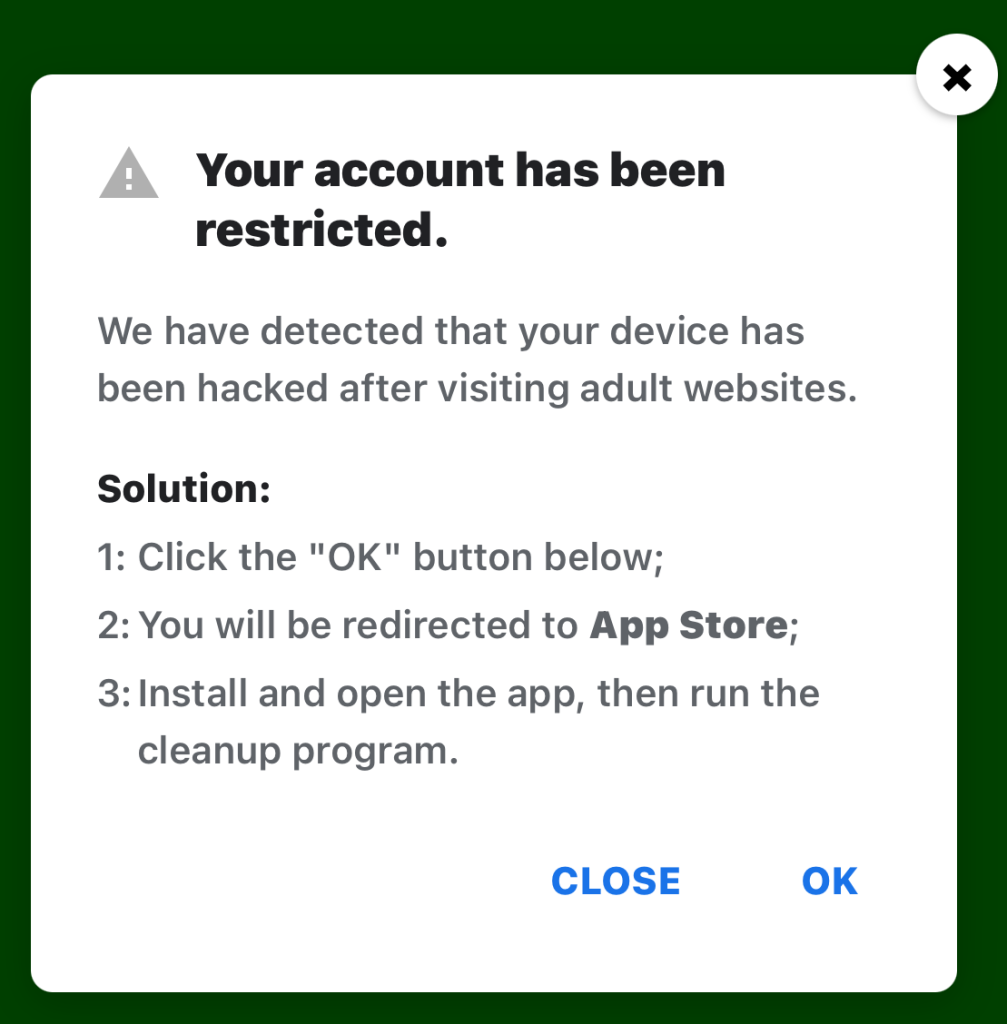
“Your account has been restricted.
We have detected that your device has been hacked after visiting adult websites.
Solution:
1:Click the “OK” button below;2:You will be redirected to App Store;
3:Install and open the app, then run the cleanup program.”
This ad is a scam and uses a classic scare tactic. It falsely claims your device has been hacked and tries to pressure you into clicking “OK” and installing a cleanup app.
Messages like this sometimes claim to be from your ISP, a “Security Department,” or a generic “Safety Center.”
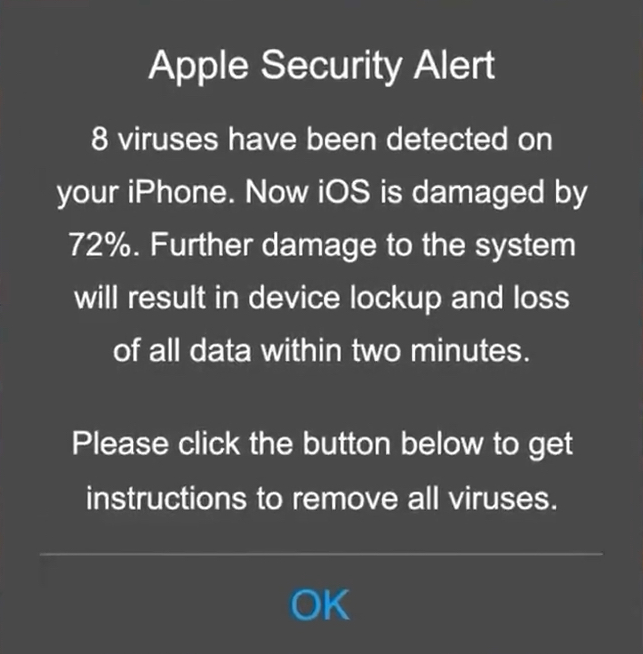
“Apple Security Alert
8 viruses have been detected on your iPhone. Now iOS is damaged by 72%. Further damage to the system will result in device lockup and loss of all data within two minutes.
Please click the button below to remove all viruses.”
This is another fake warning, commonly used by scammers to trick users into clicking links or downloading unnecessary or harmful software. Apple doesn’t send alerts like this, and these messages use vague threats to get your attention.
What kind of app you’re really installing if you follow the instructions depends on your device and your location. If you’re “lucky,” it’s just adware, but you might just as easily end up with an infostealer.
In many cases, you’ll end up with fleeceware, a type of deceptive mobile app where developers lure users in with short free trials that quickly convert into hidden subscription fees, sometimes costing hundreds of dollars per month. These apps often offer some functionality to stay on the barely legal side of things, but at wildly inflated prices.
The best response to these messages is simply to ignore them.
Real system alerts come from the OS, not from inside a game window or browser tab. Here’s a simple test: If you can switch apps and the “warning” disappears with the browser/game, it was not a system‑level alert.
Check the destination URLs before proceeding. Apple, Google, and major ISPs use predictable domains. A familiar-looking URL is not proof that a message is legitimate, but if the URL looks suspicious, it should definitely be treated as a scam.
You may arrive at something that looks like the official App Store or Google Play Store. Be wary of lookalike app stores and unofficial download sites, but if you are on the real store, the app is generally safer to install. However, it’s still worth checking reviews, permissions, and the developer before proceeding.
Visit the official website of the organization the message claims to be from and log in there. If there’s a genuine problem with your account, storage, or device, you’ll find information about it through official channels.
Use an up-to-date, real-time anti-malware solution on your devices that can detect and block malicious apps.
Scammers know more about you than you think.
Malwarebytes Mobile Security protects you from phishing, scam texts, malicious sites, and more. With real-time AI-powered Scam Guard built right in.
Sometimes it happens. You’re happily playing a game on your phone or laptop when suddenly alarms pop up out of nowhere:
“Your device is infected!”
“Your iCloud is full!”
“Your account is restricted for watching porn!”
Some games can be played for free if you agree to watch ads, and in others you can get extra lives, perks, or boosters by watching ads. That’s fine, as long as you’re given a choice and the ads are legitimate.
Unfortunately, cybercriminals sometimes manage to buy advertising space and use it to defraud gamers.
Let’s look at some examples.
The iCloud storage scam, or its OneDrive equivalent, is a well-known and long-running scam that claims you need to expand your storage or all your files will be deleted. The websites these messages link to come in many forms, but they all ask for personal and payment details to complete the upgrade.

“Your account has been restricted.
We have detected that your device has been hacked after visiting adult websites.
Solution:
1:Click the “OK” button below;2:You will be redirected to App Store;
3:Install and open the app, then run the cleanup program.”
This ad is a scam and uses a classic scare tactic. It falsely claims your device has been hacked and tries to pressure you into clicking “OK” and installing a cleanup app.
Messages like this sometimes claim to be from your ISP, a “Security Department,” or a generic “Safety Center.”

“Apple Security Alert
8 viruses have been detected on your iPhone. Now iOS is damaged by 72%. Further damage to the system will result in device lockup and loss of all data within two minutes.
Please click the button below to remove all viruses.”
This is another fake warning, commonly used by scammers to trick users into clicking links or downloading unnecessary or harmful software. Apple doesn’t send alerts like this, and these messages use vague threats to get your attention.
What kind of app you’re really installing if you follow the instructions depends on your device and your location. If you’re “lucky,” it’s just adware, but you might just as easily end up with an infostealer.
In many cases, you’ll end up with fleeceware, a type of deceptive mobile app where developers lure users in with short free trials that quickly convert into hidden subscription fees, sometimes costing hundreds of dollars per month. These apps often offer some functionality to stay on the barely legal side of things, but at wildly inflated prices.
The best response to these messages is simply to ignore them.
Real system alerts come from the OS, not from inside a game window or browser tab. Here’s a simple test: If you can switch apps and the “warning” disappears with the browser/game, it was not a system‑level alert.
Check the destination URLs before proceeding. Apple, Google, and major ISPs use predictable domains. A familiar-looking URL is not proof that a message is legitimate, but if the URL looks suspicious, it should definitely be treated as a scam.
You may arrive at something that looks like the official App Store or Google Play Store. Be wary of lookalike app stores and unofficial download sites, but if you are on the real store, the app is generally safer to install. However, it’s still worth checking reviews, permissions, and the developer before proceeding.
Visit the official website of the organization the message claims to be from and log in there. If there’s a genuine problem with your account, storage, or device, you’ll find information about it through official channels.
Use an up-to-date, real-time anti-malware solution on your devices that can detect and block malicious apps.
Scammers know more about you than you think.
Malwarebytes Mobile Security protects you from phishing, scam texts, malicious sites, and more. With real-time AI-powered Scam Guard built right in.
Threat actors are already gearing up for this year’s biggest football (soccer) event, the World Cup 2026. With millions of fans looking for ways to stream matches online, many will turn to IPTV apps to watch live TV broadcasts over the internet. It’s no surprise, then, that cybersecurity researchers have discovered multiple campaigns over the past few months where malware was disguised as fake Android IPTV apps.
In this post, we discuss what IPTV apps are, how criminals use fake versions to spread malware, what this malware is capable of, and, most importantly, how to avoid becoming a victim.
IPTV stands for Internet Protocol Television. This technology delivers TV content over the internet instead of through cable, over-the-air antennas, or satellites. Naturally, the simplest and most common examples of IPTV are the official platforms of TV networks, which can include both websites and dedicated apps.
However, alongside official options, pirate IPTV services also exist. They usually lure users with free or dirt-cheap access to content that can otherwise be hard to find without expensive subscriptions — most notably broadcasts of various sporting events; football matches in particular.
As is typically the case with pirated content, these apps are blocked from official app stores, forcing users to download them from third-party sites. Consequently, the risk of using these services isn’t tied to IPTV technology itself, but rather to the fake apps and modified APK files distributed under the guise of well-known platforms — both official and pirated.
For instance, in February researchers found the Massiv banking Trojan distributed under the guise of fake IPTV apps. Even then, experts noted that this wasn’t the only malware leveraging this tactic — several others were also spotted in the wild. The primary targets of these IPTV-mimicking malicious fakes have mostly been users in Portugal, Spain, France, and Türkiye.
In most cases, the discovered fake IPTV apps lacked the advertised functionality, so users didn’t get access to any content after installing the apps. Instead, the fake app would open the website of a legitimate IPTV service in a built-in browser to mimic normal functioning and avoid raising user suspicion.
Of course, the most interesting activity happened out of the user’s sight. These are some of the features the malware did have:

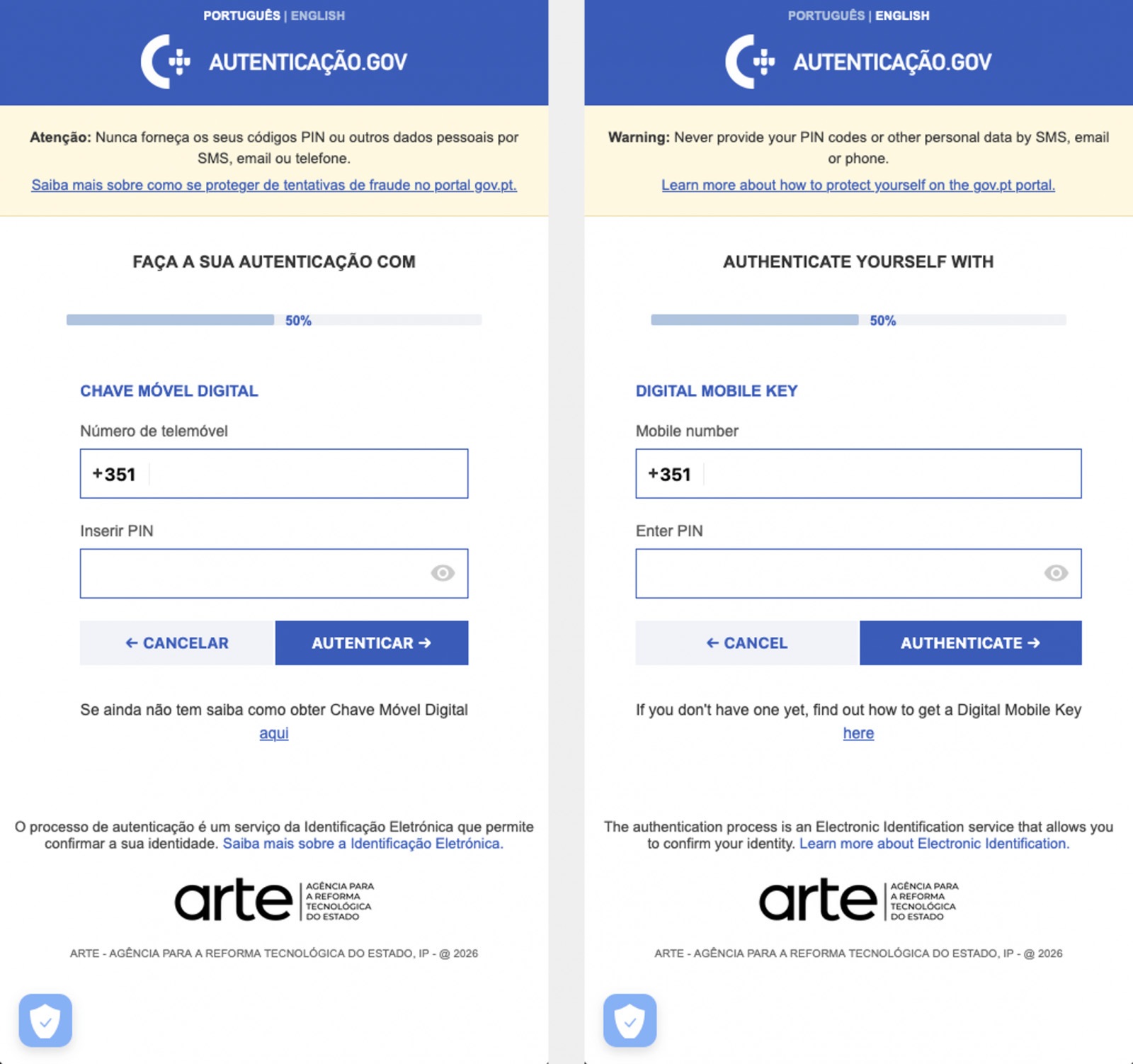
The Massiv banking Trojan mimics the interface of the Portuguese government app Chave Móvel Digital in a fake pop-up window, looking even more convincing than the official version from Google Play. Source
In March, researchers reported on a new campaign where several fake IPTV apps were used to distribute an even more advanced and feature-rich malware strain: Perseus.
Research into Perseus shows that the malware is based on the source code of an Android banking Trojan called Cerberus, which leaked nearly six years ago. Perseus comes in two different versions: Turkish and English. The English-language version is more advanced and shows clear signs of AI-driven refinement.
Perseus abuses Accessibility Services, a set of Android features originally designed to make life easier for users with severe visual impairments. Fraudsters learned long ago how to leverage this tool to steal data from Android devices — a topic we’ve covered in detail across several of our posts.

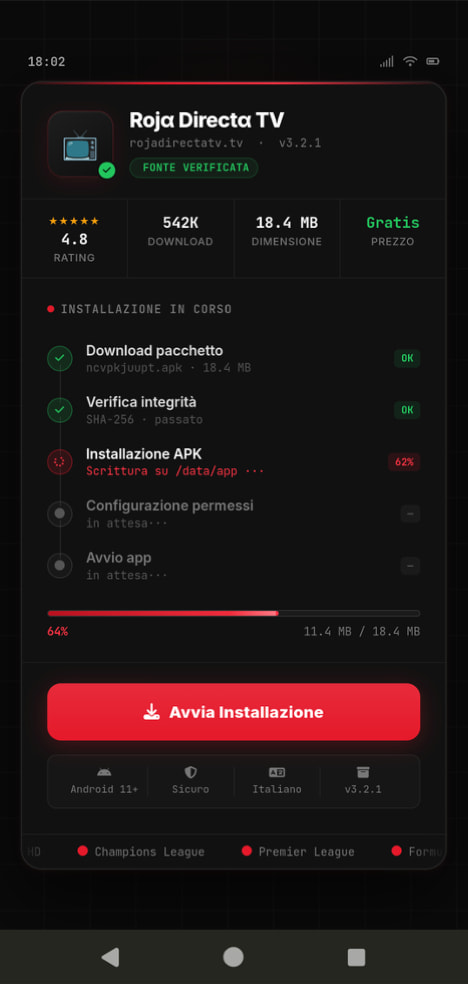
An example of a malicious APK disguised as Roja Directa TV, another IPTV app. Source
By abusing Accessibility Services, Perseus gains remote control over the victim’s device. Here’s what it can do:
On top of that, the English-language version of Perseus boasts another notable feature. The malware can hunt for sensitive information like passwords, recovery phrases, and financial data across an entire range of note-taking apps: Google Keep, Xiaomi Notes, Samsung Notes, ColorNote, Evernote, Microsoft OneNote, and Simple Notes.
All of these capabilities help criminals drain football fans’ money not just from various banking services, but from cryptocurrency apps as well.
The World Cup is just around the corner, and millions of fans worldwide will definitely want to tune in to this year’s premier football event. Past experience shows that cybercriminals frequently cash in on major spectacles like this. So, how can you watch the matches safely?
You can’t even watch TV safely anymore these days! Check out other threats facing TV lovers:


The 2026 World Cup presents major cyber risks from ransomware groups, state-aligned actors, and other groups targeting critical infrastructure. Learn more here.
The post 2026 World Cup: Discussing The World’s Biggest Game’s Attack Surface appeared first on Unit 42.

Unit 42 explores trends in data theft and extortion, outlining key strategies for organizations as frontier AI models advance.
The post Out of the Crypt: The Evolving Cyber Extortion Economy appeared first on Unit 42.

Imagine handing your smartphone over for repair. A couple of days later, you pick it up — and great, it’s working again! But you won’t even realize that your device has been injected with malicious code, allowing attackers to access your smartphone even when it’s locked.
This is the beginning of the story shared by Kaspersky ICS CERT researchers, Alexander Kozlov and Sergey Anufrienko, at the Black Hat Asia 2026 conference. They managed to uncover a vulnerability that flips conventional assumptions about smartphone and IoT security on their head. Its core lies at the very heart of Qualcomm chips.
To grasp the severity of this discovery, we first need to look at how a modern device powered by a Qualcomm chip boots up. Think of it as a fortress with multiple layers of security. Each subsequent layer verifies the pass issued by the previous one. The bedrock foundation — the most trusted layer of them all — is the BootROM, a read-only memory baked directly into the silicon that can’t be modified once it comes off the fab.
The BootROM is the very first thing to run when a device powers on. It verifies the signature of the next bootloader, which in turn verifies the next, building a chain of trust all the way up to the operating system. If an attacker can compromise this chain at the BootROM level, it’s game over: the malicious code will execute before the main operating system even has a chance to load.
This is exactly what attackers can do by exploiting the CVE-2026-25262 vulnerability discovered by Kaspersky ICS CERT researchers.
The research began with a protocol called Sahara. This is a component of Emergency Download Mode (EDL). Manufacturers and service centers use it to revive bricked devices: the phone is connected to a computer via USB, and a special utility program signed by the manufacturer (in this case, Qualcomm) is uploaded to it.
Sahara is implemented directly within the ARM PBL (Primary Boot Loader) — the BootROM itself. This means the protocol runs before any operating system boots, before any user access privileges are checked, and before any security controls are activated. The device simply waits for a USB connection, ready to accept data.
The communication scheme looks simple: the device sends a handshake (HELLO) to the computer, the computer selects the mode, a cycle begins to upload the utility program in chunks, and finally, the device executes the uploaded code. And it was within the verification logic of these very file chunks that the vulnerability was identified.
In technical terms, the bug introduced by the developers is classified as CWE-123: Write-What-Where Condition. This is about as bad as it gets when it comes to flaws in low-level programming. An attacker can write arbitrary data to an arbitrary address in the device memory.
Without diving too deep into the technical weeds, suffice it to say that by exploiting the discovered vulnerability, attackers can gain access to any data on the device, including user-entered passwords, files, contacts, geolocation data, as well as the hardware sensors like the camera and microphone. In certain scenarios, complete control over the device is possible. Just a few minutes of physical access to the device via a cable connection, and the gadget has been compromised. This creates a risk if you hand your smartphone over to a repair shop, pass it to someone else to set up and install apps on, or just leave it unattended.
The CVE-2026-25262 vulnerability affects the following Qualcomm chip series: MDM9x07, MDM9x45, MDM9x65, MSM8909, MSM8916, MSM8952, and SDX50 — every single version released to date, until the vulnerability is patched by the manufacturer.
These are no obsolete museum pieces. The MDM9207, which we used for the bulk of our research, is integrated into modem modules for the internet of things (IoT), industrial equipment, smart home devices, healthcare monitoring systems, logistics trackers, and banking terminals. The MSM8916 powers many budget smartphones, while the SDX50 is used in automotive control units.
The catch is that the attacker needs physical access to the device to pull this off. In the real world, this translates to:
With just a few minutes of physical access to the device an attacker can plant a backdoor so deep inside that standard research tools won’t even detect it in most cases.
Qualcomm was notified of the discovery in March 2025 and confirmed the vulnerability in its chips. To identify it, the vendor reserved CVE-2026-25262, and on April 20, 2026, Kaspersky ICS CERT published technical information on the vulnerability and recommendations for users.
Qualcomm included this vulnerability in its May security bulletin. While fixing already-made devices is fundamentally impossible, the company promised to make all future chips without this vulnerability.
If you currently own a device with an affected chip, use our recommendations below to help mitigate the risk of infection.
If you notice that your gadget with a vulnerable Qualcomm chip starts acting up — overheating when idle, reporting unexpected spikes in network traffic, or exhibiting strange app behavior — you may have fallen victim to this vulnerability. You can wipe the malicious code and reset your device to its baseline state simply by completely cutting its power. This means either pulling the battery or letting it drain all the way to zero until the gadget shuts down entirely. In this case, the malicious code will most likely not persist on the device — during our research, we were unable to confirm that it could achieve persistence in non-volatile memory.
Want to learn more about severe vulnerabilities in Android phones? Check out these posts:


More than 200 vulnerabilities patched in recent Chrome releases are marked as ‘reported by Google’.
The post Google’s Surge in Chrome Vulnerability Discoveries Likely Driven by AI appeared first on SecurityWeek.
Netflix, Apple TV+, Disney+, Hulu, Amazon Prime, YouTube Premium… The average law-abiding family today pays for five to 10 subscriptions just to watch their shows of choice, with the monthly bill easily crossing the hundred-dollar mark. It’s no surprise, then, that social media and online marketplaces are seeing a surge in demand for the “magic boxes” that popped up at the end of 2025: Android-powered TV boxes that promise to unlock thousands of channels and every streaming service subscription-free for a one-time purchase.
Ads for these devices are flooding TikTok and Instagram: smiling influencers unbox the SuperBoxes, plug them into a TV, and browse endlessly through channels. It looks like the ultimate life hack against subscription fatigue, right? In reality, it’s one of the easiest ways to invite a botnet into your home network.

A promotional video on TikTok explaining how great it is when the cheese is free you can just go ahead and cancel all your subscriptions
Stories about malicious TV boxes have surfaced before, but right now, their marketing has reached a truly alarming scale.
At the end of 2025, analysts examined several models of the popular SuperBox device available from major retail stores and online marketplaces. The findings were deeply concerning: immediately upon powering up, the devices began pinging the servers of the Chinese messaging app Tencent QQ, as well as the Grass proxy service — effectively renting out the owner’s internet bandwidth to third parties.
Inside the firmware, researchers discovered applications completely uncharacteristic of a media player: a network scanner, a traffic analyzer, and tools for DNS hijacking. Consequently, the device not only streams pirated content but also scans the local network for other targets (including industrial SCADA interfaces), and stands ready to participate in DDoS attacks. The SuperBoxes were also found to contain folders with the telltale name “secondstage”, a textbook indication of multi-stage malware.
More recently, in April 2026, the Darknet Diaries podcast featured an interview with a security researcher known by the alias D3ada55, who shared plenty of intriguing details about these boxes — including the fact that they were still openly sold on major platforms like Amazon, Walmart, and Best Buy.
The SuperBox case is far from the only instance where Android devices have been turned into botnet nodes — or sold infected right out of the box. Here’s a look at the most recent cases:
All of these stories share the same origin: the Triada Trojan, first documented by our researchers back in 2016 and dubbed at the time “one of the most advanced mobile Trojans”. Over the past decade it has evolved from a standard piece of malware into a modular backdoor baked directly into firmware during manufacturing.
Manufacturers of cheap TV boxes cut corners on absolutely everything: Google Play Protect certification, firmware audits, and security updates. Many of these devices run on the Android Open Source Project without any security guarantees whatsoever. Somewhere along the supply chain — whether at the factory, through a middleman, or at a distributor — a backdoor gets injected into the firmware image. Our experts suspect that the manufacturer itself might not even be aware of the compromise.
The sheer scale of the infection turns millions of identical boxes into the perfect foundation for a botnet: every compromised device represents a unique IP address that can be rented out to anyone. Botnet operators like Kimwolf monetize this not only through distributed DDoS attacks but also by reselling the bandwidth of infected smart TVs and streaming boxes.
An infected TV box sits right in your living room, connected to your home Wi-Fi. That means it can see smartphones running banking apps, network-attached storage (NAS) units holding family archives, IP cameras, smart locks, work laptops, and any other the devices connected to your Wi-Fi network.
With this kind of beachhead inside your home network, an attacker can intercept unencrypted traffic, spoof DNS requests, scan ports, and hunt for vulnerabilities on neighboring devices. On top of that, they can use your IP address for fraudulent activity. As a result, in the best-case scenario, your IP will end up blacklisted, and legitimate services will start blocking you for suspicious activity; in the worst-case scenario, law enforcement could come knocking on your door.
You should be on alert if a device:
Want to know how else to protect your smart home devices? Read more in our related posts:


The stolen credit card data was released as a free download, allegedly in response to seller misconduct.
The post B1ack’s Stash Marketplace Gives Away 4.6 Million Stolen Credit Cards appeared first on SecurityWeek.
The 13-country effort, named Operation Ramz, targeted cyber threats in the Middle East and North Africa region.
The post 201 Arrested in Crackdown on Cybercrime in Middle East, North Africa appeared first on SecurityWeek.