EFF friend Guy Kawasaki* has written a book: Everybody Has Something to Hide: Why and How to Use Signal to Preserve Your Privacy, Security, and Well-Being. This guide is now available in Spanish and English as an ebook in the EPUB format that you can download here. Take a look and consider sharing it with anyone who you know who uses (or should use) Signal.
And don't forget: EFF has two short guides on using Signal on our Surveillance Self-Defense site. An introHow to Use Signalguide, and a guide onManaging Signal Groups.
Everybody Has Something to Hide: Why and How to Use Signal to Preserve Your Privacy, Security, and Well-Being courtesy of Guy Kawasaki.
Malicious actors have developed a new way to steal data stored by Chrome for Windows. Researchers discovered the technique while analyzing a fresh build of an infostealer known as VoidStealer. The new method allows the malware to bypass Chrome’s Application-Bound (App-Bound) Encryption (ABE), a mechanism intended to protect session cookies and other valuable information stored in the browser.
Google hoped this mechanism would secure the master key Chrome uses to encrypt all sensitive data. Unfortunately, this isn’t the first time malware authors have found a workaround for this defense — leaving secrets stored in Chrome vulnerable once again.
How App-Bound Encryption works in Chrome
Google introduced App-Bound Encryption in July 2024 with the release of Chrome version 127. The company’s announcement mentioned infostealers snatching cookies from Chrome users on Windows as the primary problem ABE was intended to solve. We’ve already covered in detail what these files are and the consequences of their theft, so we’ll only briefly recap the main facts here.
Cookies are small files that the browser saves to the user’s device at a website’s request to remember various site settings. Of particular value to attackers are session cookies, which are used for automatic authentication on websites. It’s thanks to these files that we don’t have to enter a username and password every time we revisit a site.
But this convenience carries a risk: stealing these files allows an attacker to use an already-authenticated session without entering a username or password. This allows them to impersonate the user, which can lead to account hijacking, theft of personal or financial data, and other adverse consequences.
Infostealer Trojans are particularly dangerous for Chrome users on Windows. This is because, on this OS, Chrome previously relied solely on the standard built-in Data Protection API (DPAPI). With this system encryption mechanism, applications don’t need to create and store encryption keys to protect data.
The limitation of DPAPI is that it doesn’t protect data from malware that’s already successfully compromised the system and is capable of executing code on behalf of the logged-in user. This is exactly what stealers exploit: since they typically run with the user’s privileges, they can simply request DPAPI to decrypt the browser’s protected data.
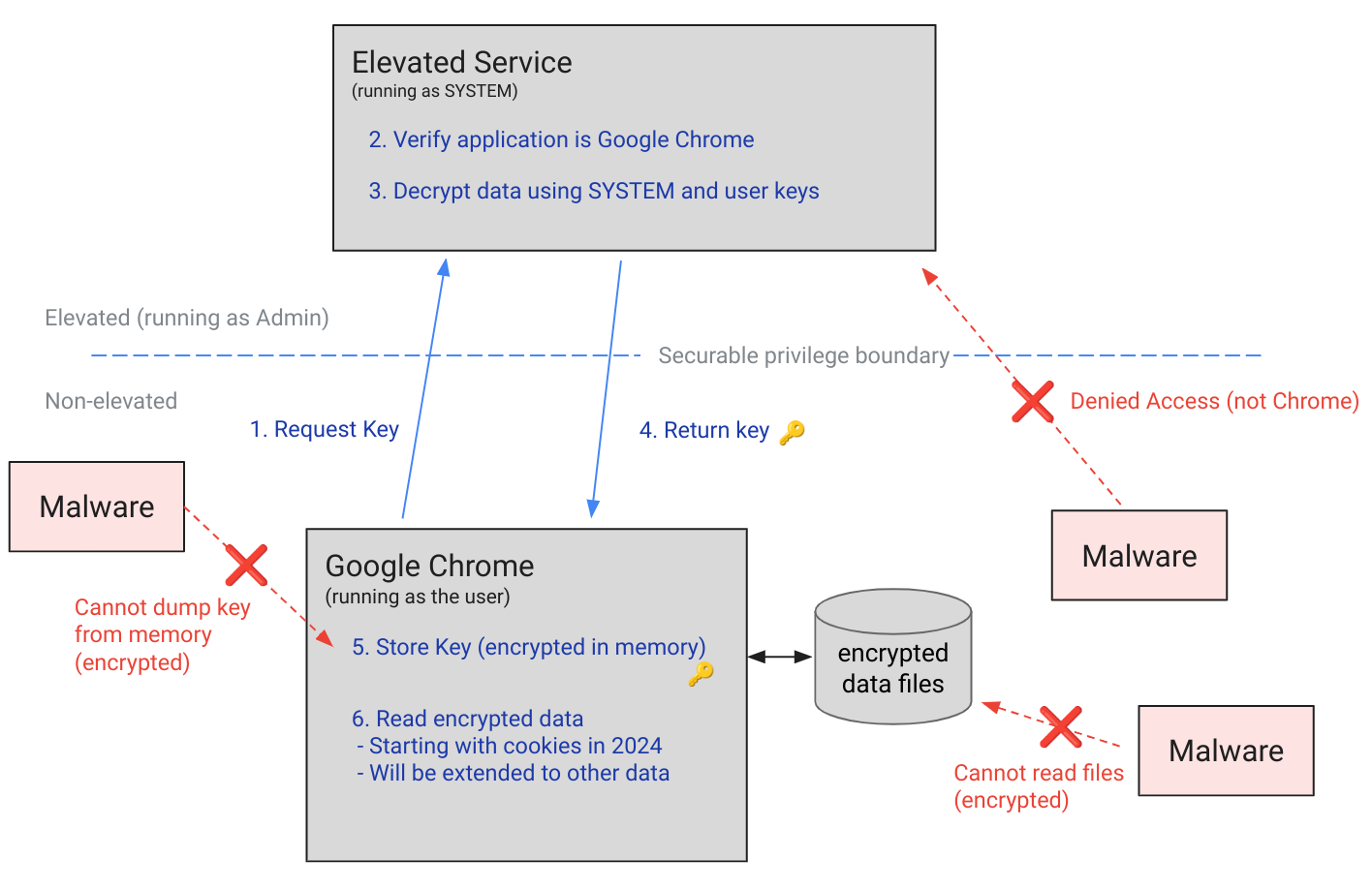
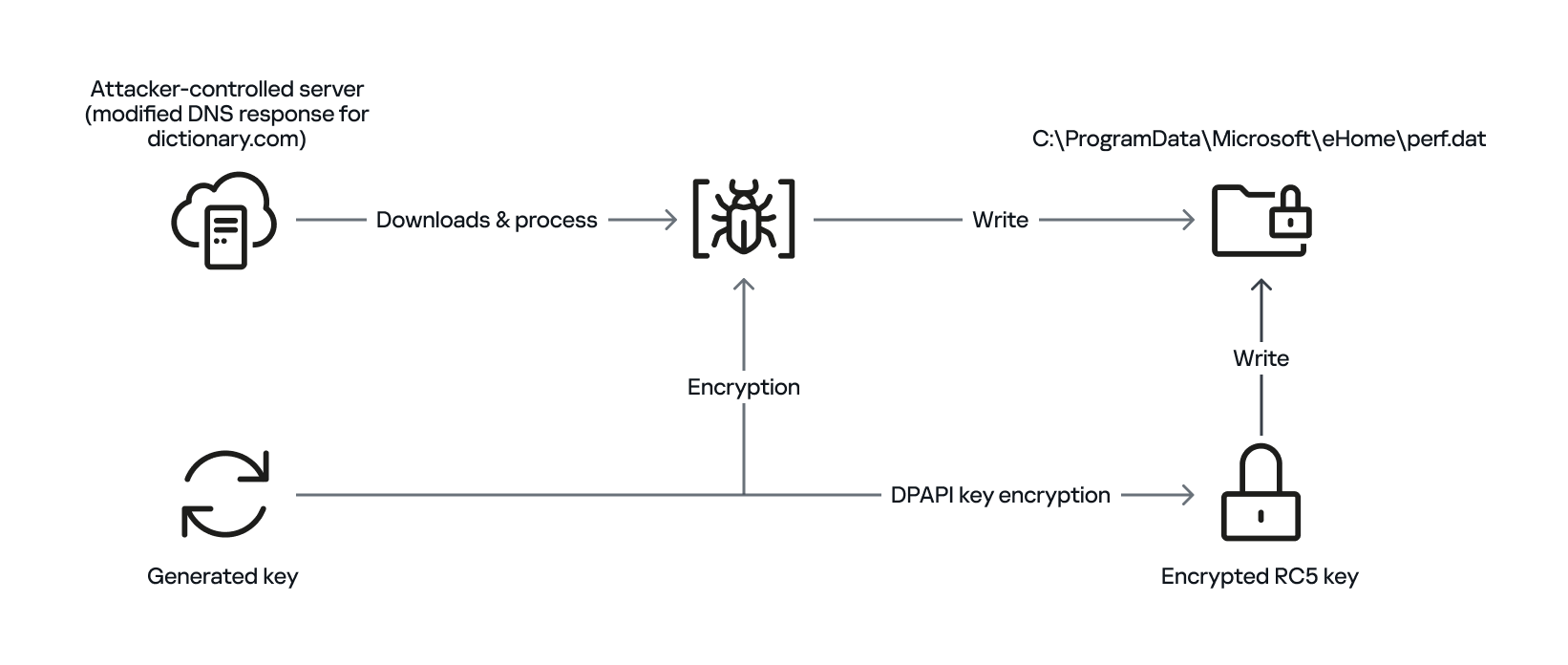
The ABE mechanism was designed to solve that specific problem. The core idea is right in the name: App-Bound Encryption means the encryption is tied to a specific application. To achieve this, a separate service running with system privileges is responsible for protecting the key used to encrypt Chrome’s data. It verifies which application is requesting access to the key, and denies the request if it doesn’t originate from Chrome.
Chrome’s App-Bound Encryption (ABE) was designed so that only Chrome itself could retrieve the master key needed to decrypt the browser’s stored data. Source
As a result, the architects of this feature assumed that to access ABE-protected browser data, an infostealer would either need to escalate its privileges to system-level, or inject malicious code directly into Chrome. In theory, this should have made attacking Chrome significantly harder and reduced the effectiveness of mass-market infostealers. As you might have guessed, things didn’t go quite that smoothly in practice.
Previous successful bypasses of Chrome’s ABE
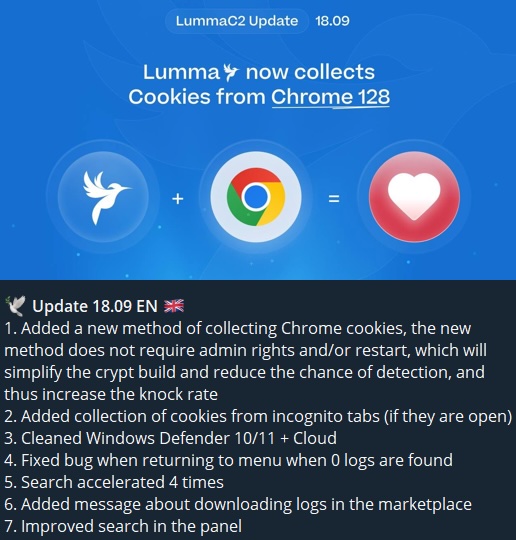
Just a couple of months after Google announced the implementation of App-Bound Encryption in Chrome, many infostealer developers claimed they’d already bypassed the protection. Among them were the creators of Meduza Stealer, Whitesnake, Lumma Stealer, and Lumar (also known as PovertyStealer).
Lumma stealer developers announce a bypass for Chrome’s App-Bound Encryption in a new version of the malware
Of course, you shouldn’t take malware developers at their word, but legitimate security researchers were able to confirm at least some of the claims. Bypasses for Google Chrome’s new data protection feature did become available almost immediately after its release.
A month later, in October 2024, tech enthusiast Alex Hagenah published a tool on GitHub called Chrome-App-Bound-Encryption-Decryption to bypass Google’s new security mechanism. Analysis of the tool’s code revealed that its author used roughly the same methods that attackers were already heavily exploiting.
What followed was a game of cat and mouse: security researchers and stealer developers came up with new tricks to circumvent App-Bound Encryption, while Google patched the newly discovered loopholes with varying degrees of success.
VoidStealer — a new data-nabbing menace
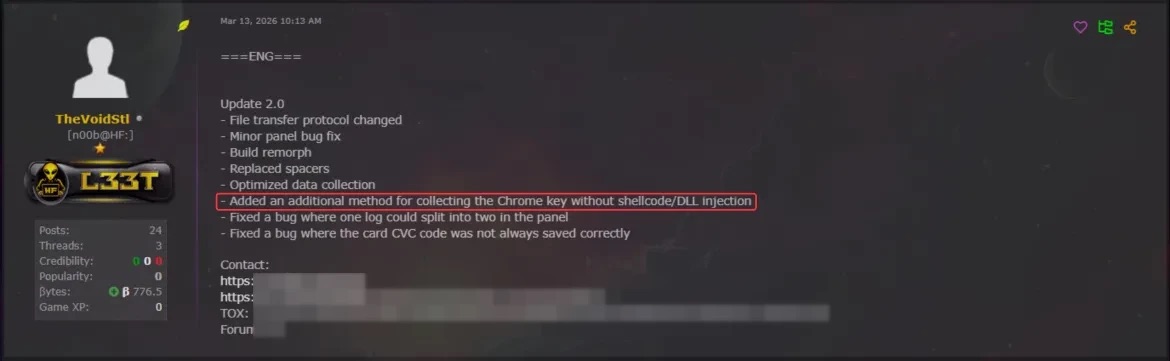
This brings us to recent events: in March 2026, news broke about a stealer named VoidStealer, which utilizes a brand-new and, by all accounts, highly effective method for bypassing ABE.
VoidStealer developers advertising a new method for bypassing ABE. Source
The malware authors developed an attack technique that targets the brief moment when the master key sits in the browser’s memory in plaintext. This occurs because, at a certain point, the browser inevitably has to decrypt its data to actually use it — for instance, to automatically sign in to a website with the relevant session cookie or to access saved credentials.
To exploit this window of opportunity, the malware attaches itself to the Chrome process as a debugger — a tool that allows one to control a program’s execution, pause it, and inspect its memory. In legitimate scenarios, these tools are used by developers to find and fix bugs, analyze application behavior, and test performance.
The malware identifies the specific section of code where data decryption takes place. It then sets a breakpoint at that location; when the program’s execution reaches that point, the browser effectively freezes. This is how the malware catches the exact moment the master key is sitting in RAM in plaintext; it then reads the key directly from memory.
It’s worth noting that everything mentioned above also applies to other Chromium-based browsers that use ABE, including Microsoft Edge, Brave, Opera, Vivaldi, and others.
How to avoid falling victim to infostealers
The scale of VoidStealer’s reach could be significant, as its developers operate under the malware-as-a-service (MaaS) model. This means they rent out the ready-made tool to other attackers, so they don’t need to develop custom malware from scratch.
This situation demonstrates that relying solely on built-in security mechanisms isn’t enough. Unfortunately, stealer developers are coming up with new workarounds faster than browser and operating system developers can roll out patches.
Here’s what users can do about it:
Avoid installing programs from suspicious sources. This will minimize the chances of malware infiltrating your system.
Learn how ClickFix attacks Lately, stealers have frequently been distributed using this specific malicious tactic.
Keep your OS and software updated on all devices. Timely updates help patch many of the vulnerabilities that malware exploits.
Install a robust security solution on all your devices. It’ll block suspicious activity in real time and alert you to potential threats.
As an added precaution, avoid storing passwords and bank card info in Google Chrome or your Notes app, as these are the first places any self-respecting stealer looks. Instead, use a secure password manager.
Stealers are hunting for your data, finding ways to infiltrate both computers and smartphones alike. To protect yourself from theft, check out our other related posts:
As outlined in the AWS post-quantum cryptography (PQC) migration plan, addressing the risk of harvest now, decrypt later (HNDL) attack is an important part of your post-quantum plan. Upgrading the client-side of your workloads to support quantum-resistant confidentiality is an important aspect of your side of the PQC shared responsibility model. Timelines to plan and execute your PQC upgrades vary by region and by industry and will depend on your own business risk profile. To learn more, see the AWS PQC frequently asked questions.
AWS Secrets Manager uses SSL/TLS to communicate with AWS resources, currently supporting TLS 1.2 and 1.3 in all AWS Regions. The service supports using TLS 1.3 with hybrid post-quantum key exchange for clients that support this capability. The hybrid post-quantum approach establishes TLS connections by combining traditional cryptography (such as X25519) with post-quantum algorithms (ML-KEM), and helps to protect your secrets against both current classical attacks and future quantum computer threats. Regardless of how your workload accesses Secrets Manager, this client-side software upgrade is the only action you need to take to address risk to secrets from HNDL. Your secrets at rest are already encrypted using keys managed by AWS Key Management Service (AWS KMS). Properly implemented symmetric encryption is considered quantum-resistant; asymmetric cryptography faces quantum threats. To learn more, watch AWS re:Inforce 2025 – Post-Quantum Cryptography Demystified.
To reduce builder effort for client-side upgrades, we’re pleased to announce the following Secrets Manager clients now enable and prefer post-quantum TLS when initiating connections to Secrets Manager: Secrets Manager Agent (v2.0.0 or later), the AWS Lambda extension (v19 or later) and the Secrets Manager CSI Driver (v2.0.0 or later). For SDK-based clients, hybrid post-quantum key exchange is available in supported AWS SDKs. Enablement requirements vary by language, version, and operating system. See the following table for your SDK client.
This launch is part of the ongoing commitment AWS has made to migrate systems to post-quantum cryptography and making it straightforward for our customers to do the same. See Post-Quantum Cryptography to learn more.
The following table summarizes the behavior for each client. When the client is upgraded to support hybrid post-quantum key exchange, the Secrets Manager service endpoint automatically selects it during the TLS handshake. Upgrading to the versions listed in the table is the only action you need to take for your workload to begin using hybrid post-quantum key exchange when calling Secrets Manager APIs.
The AWS SDK for Python (boto3) uses the OS-provided OpenSSL for TLS. Hybrid PQ key exchange in TLS requires running on a system with OpenSSL 3.5 or later installed.
The Secrets Manager caching libraries are built on the AWS SDKs and inherit their TLS behavior. Note for Java: The JDBC driver flag and Java Caching flag must be set to enable Hybrid PQ key exchange in TLS.
If you’re using the Secrets Manager Agent, the Lambda extension, or the CSI Driver, upgrade to the listed version to use hybrid post-quantum key exchange in TLS as the default. Customers using the AWS SDK for Rust, Go, or Node.js at the versions listed in the table are already upgraded and no additional action is required. The SDK will select the hybrid post-quantum key exchange for API calls. For customers using the AWS SDK for Python, hybrid post-quantum key exchange in TLS requires OpenSSL 3.5 or later to be present on the host system. Guidance on verifying and enabling this is available in the AWS Secrets Manager documentation. For customers using the AWS SDK for Java v2, hybrid post-quantum key exchange in TLS requires using the AWS CRT HTTP client. The postQuantumTlsEnabled(true) must be set on the CRT client to enable hybrid post-quantum key exchange in TLS.
After your client versions meet the requirements listed in the table, you can verify that your connections are actively using hybrid post-quantum key exchange.
How to verify your connection uses hybrid post-quantum key exchange
With hybrid post-quantum key exchange using ML-KEM now enabled by default for Secrets Manager clients (see the preceding table), most customers will not need ongoing monitoring to verify correct behavior or detect regressions. However, security teams and compliance officers might want to confirm that their Secrets Manager API calls are negotiating the hybrid key exchange. On the server side, you can confirm hybrid post-quantum key exchange in TLS by using AWS CloudTrail. On the client side, you can inspect TLS handshake details using a utility like Wireshark or by using developer tools built into major web browsers.
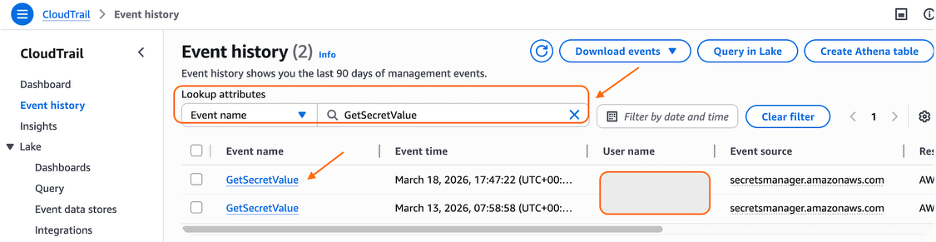
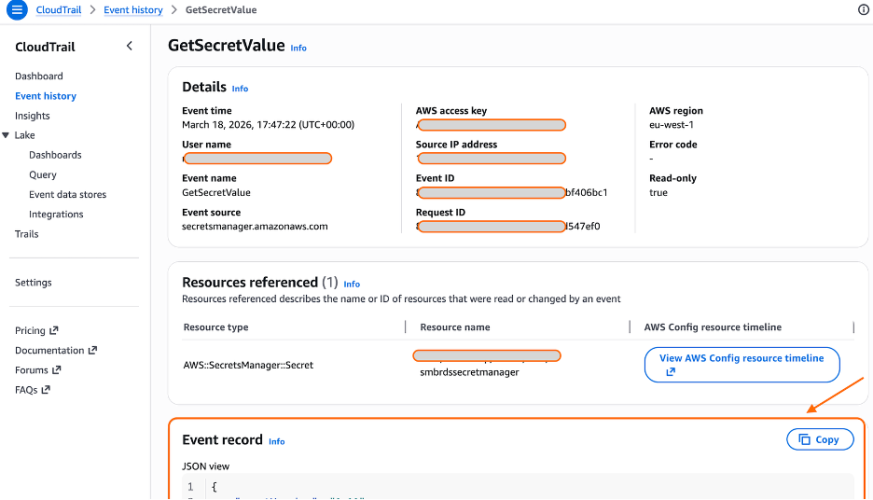
Verification is a two-step process: first, fetch a secret using your Secrets Manager client to generate a GetSecretValue API call, then confirm in AWS CloudTrail that the call negotiated hybrid post-quantum key exchange.
Fetch your secret using your Secrets Manager client
The following examples show how to retrieve your secret using the Secrets Manager Agent, Lambda extension, and CSI Driver—each of which will automatically negotiate hybrid post-quantum key exchange when calling the GetSecretValue API.
To verify hybrid post-quantum TLS with Secrets Manager Agent on EC2 instance: Install the agent on your Amazon Elastic Compute Cloud (Amazon EC2) instance and use it as a client to fetch your secret.
Use the agent to fetch your secret. curl -H “X-Aws-Parameters-Secrets-Token: $(</tmp/awssmatoken)” localhost:2773/secretsmanager/get?secretId=<YOUR-SECRET-ARN>
Wait for about 5 minutes for CloudTrail to deliver the logs.
To verify hybrid post-quantum TLS with Lambda extension: Use the AWS parameters and Secrets Manager Lambda extension to create a Lambda function that will consume your secrets from Secrets Manager using direct API calls.
Confirm hybrid post-quantum key exchange using CloudTrail
CloudTrail logs include a tlsDetails field for Secrets Manager API calls. When hybrid post-quantum key exchange in TLS is active, the keyExchange field in tlsDetails will show X25519MLKEM768. Each CloudTrail record includes a tlsDetails field that contains the cipher suite and, where available, the key exchange group negotiated during the TLS handshake.
If the keyExchange field shows X25519MLKEM768, then hybrid post-quantum key exchange in TLS is active. If it shows a traditional algorithm such as X25519, the client is not advertising ML-KEM support, and you should check the client version and configuration.
Troubleshooting
If your Secrets Manager API calls aren’t negotiating X25519MLKEM768 after updating your clients, check your SDK version, OpenSSL version (Python), and firewall or proxy configuration as shown in the Client Hybrid Post-Quantum Key Exchange Requirements section near the beginning of this post.
What’s next
This launch is one step in a broader migration. AWS is continuing to roll out ML-KEM support across AWS service HTTPS endpoints as part of Workstream 2 of the AWS PQC Migration Plan, with a target of full coverage across public AWS endpoints.
Support for CRYSTALS-Kyber, the pre-standardization predecessor to ML-KEM, is phasing out across AWS endpoints in 2026. Customers on older SDK versions that advertise only CRYSTALS-Kyber support will fall back gracefully to traditional TLS rather than negotiate the deprecated algorithm. To avoid this fallback, upgrade to the SDK versions listed in this post.
The journey of PQC migration extends beyond confidentiality of data in transit. To stay informed about the latest developments in the AWS PQC journey and your side of shared responsibility, follow the AWS Post-Quantum Cryptography page.
Conclusion
AWS Secrets Manager now enables hybrid post-quantum key exchange using ML-KEM by default to help protect your secrets and support your compliance efforts. This update requires no code changes or configuration updates for customers using the latest client versions.
This post covered how AWS Secrets Manager uses hybrid post-quantum cryptography to secure TLS connections, which clients support this capability, and how to verify that your connections are protected against harvest now, decrypt later attacks.
To benefit from this announcement today:
Upgrade your Secrets Manager client (Agent, Lambda extension, or CSI Driver) to the latest available versions to enable hybrid post-quantum key exchange using ML-KEM
If your workload uses the AWS SDK instead of a caching client, upgrade your AWS SDK and underlying dependencies to the minimum versions listed in this post
Verify hybrid post-quantum key exchange in TLS is active by checking the keyExchange field in CloudTrail tlsDetails for your Secrets Manager API calls
Test end-to-end hybrid post-quantum key exchange TLS connectivity in your environment, including network paths that traverse corporate firewalls or proxies
AWS will continue rolling out post-quantum cryptography support. For information about the broader migration effort, see the AWS PQC Migration Plan. Keep an updated cryptographic inventory of your broader environment to identify other uses of traditional public-key cryptography that will require migration. The CISA Quantum-Readiness guidance and the AWS PQC Migration Plan are good starting points.
Update April 22, 2026. Apple has reportedly addressed part of the issue with the notification database in iOS 26.4.2 and 18.7.8, released today. With this update, notifications marked for deletion should no longer be stored in the notification database.
A phone’s push notifications can contain a significant amount of information about you, your communications, and what you do throughout the day. They’re important enough to government investigations that Apple and Google now both require a judge’s order to hand details about push notifications over to law enforcement, and even with that requirement Apple shares data on hundreds of users. More recently, we also learned from a 404 Media report that law enforcement forensic extraction tools can unearth the text from deleted notifications, including those from secure messaging tools, like Signal. The good news is that you can mitigate some of this risk.
There are two points where notifications may betray your privacy: when they’re transmitted over cloud servers and once they land on the device. Let’s start with the cloud. It might seem like push notifications come directly from an app, but they are typically routed through either Apple or Google’s servers first (depending on if you use iOS or Android). According to a letter sent to the Department of Justice by Senator Wyden, the content of those notifications may be visible to Apple and Google, and at the very least the companies collect some metadata about what apps send a notification and when. App providers have to make the decision to hide the content from Apple and Google and implement that functionality; Signal is one app that does this.
Then, once the notifications land on your phone, depending on your settings, the notification content may be visible on your lock screen without needing to unlock the device. This can be dangerous if you lose your device, someone steals it, or it’s confiscated by law enforcement.
You may clear notifications after looking at them. But it turns out the content notifications get recorded in your device’s internal storage, which then makes them susceptible to recovery with certain types of forensic tools. Notification content may even persist after the app is deleted, if the OS doesn’t fully purge the app’s notification data.
We still have a lot of unanswered questions about how the notification databases work on devices. We do not know how long notifications are stored, or whether they’re backed up to the cloud, in which case the cloud provider could get backdoor access to the content of messages if the backups are enabled and not end-to-end encrypted. This may also make backups vulnerable to law enforcement demands for data.
Which is all to say that there are myriad ways that law enforcement can access the content or metadata of push notifications. Let’s fix that.
Consider the Strongest Notification Protections for Your Secure Messaging Apps
Secure chat tools are designed to keep the content of the messages safe inside the app. So, for secure chat apps like WhatsApp and Signal, that means the company that makes those apps cannot see the content of your messages, and they’re only accessible on your and your recipients’ devices. Once messages land on a device, it’s still important to consider some privacy precautions, particularly with notifications.
Signal Signal offers three levels of information to include in notifications, all which are pretty self explanatory:
Name, Content, and Actions (Name and message on Android) shows the entirety of a message as well as who sent it (on iPhone you can also slide to reply, mark as read, or call back).
Name only only shows the name of the sender.
No Name or Content (No name or message on Android) will only show that you have a message from Signal, not who sent it or what it’s about.
To change your settings:
On iPhone: Tap your profile picture, then Settings > Notifications > Show.
On Android: Tap your profile picture, then Notifications > Show.
WhatsApp WhatsApp only has one option for this, and it’s currently limited to iPhone, but you can at least tell the app not to include the content of a message in the notification:
Open WhatsApp for iPhone, tap the “You” bar, then Notifications, and disable the Show preview option.
Check your other apps to see if they offer similar settings.
Limit Your Notifications Device-Wide
Since Apple and Google manage push notifications for their respective devices, they also have some visibility into certain data. Push notification data can include certain types of metadata, like which app sent a notification and when, as well as the account ID associated with the phone. In some cases, Apple and Google may have access to unencrypted content, including the content of the text in a notification or other information from the app itself.
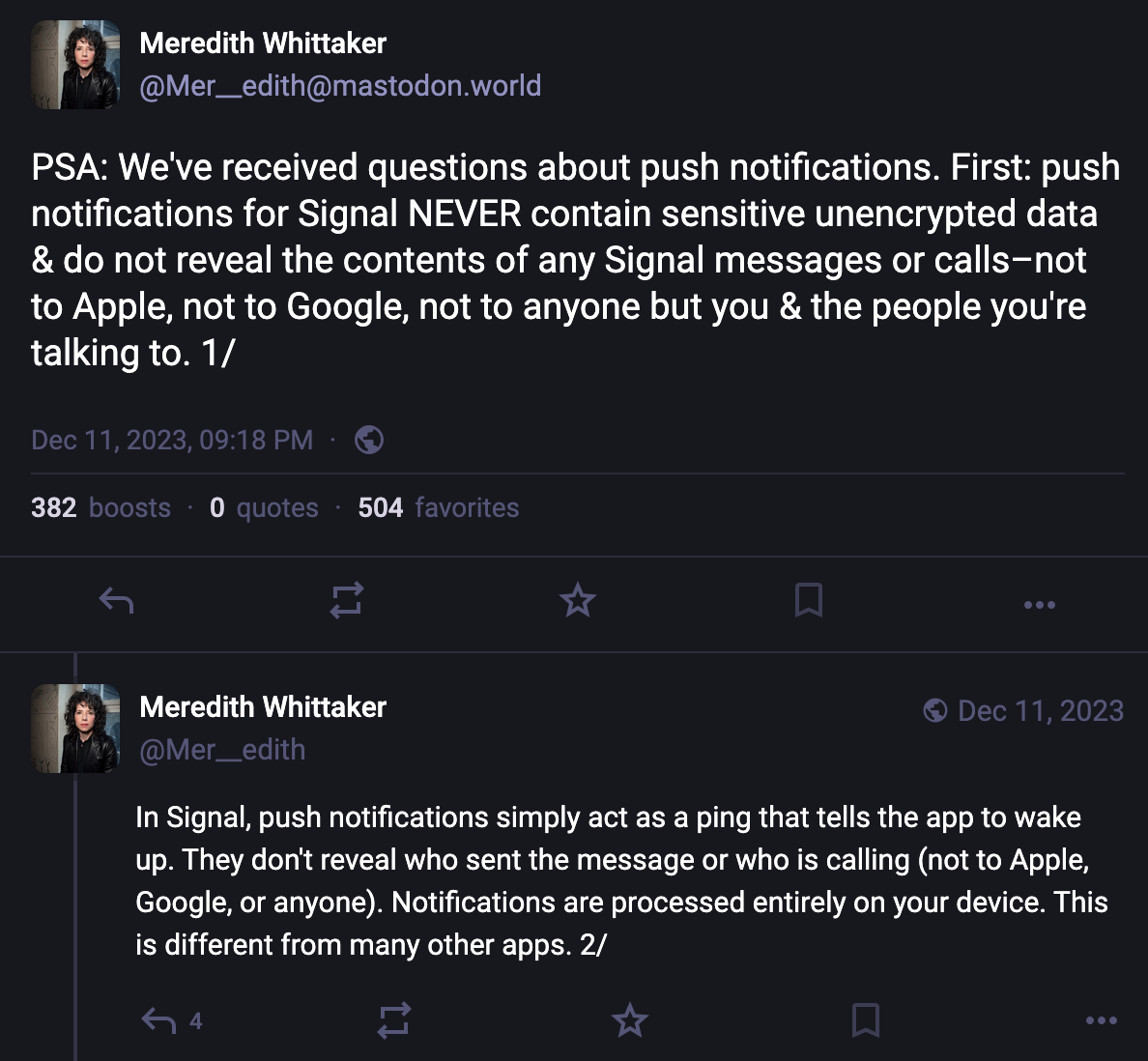
For most app notifications, there’s no simple way to easily figure out what metadata might be gleaned from a notification, or if the notification is unencrypted or not. But some app developers have described details along these lines. For example, Signal president Meredith Whittaker explained on social media how the Signal app handles notifications entirely on-device. Searching online for an app name along with “notification privacy,” “notification encryption” or “notification metadata” may help answer your questions, or you may need to dig around in support forums for the app.
It’s also good to reconsider whether any app should be sending you notifications to begin with. Aside from a potential decrease in the number of distractions you endure throughout the day, or the level of chaos on display on your lockscreen, limiting the apps that can send notifications and what content is visible in them can improve your privacy with respect to the sorts of metadata that may be gathered by the companies, as well as any content that may be viewable if someone has physically accessed your device.
To check and change your settings on iPhone
Open Settings > Notifications.
On the Show Previews option, you can choose whether to show the content of notifications on the lock screen, “Always,” which doesn’t require unlocking the device, “When Unlocked,” which does, and “Never,” which means notifications won’t have any details, just that you have a notification in an app.
Alternatively, you can scroll down and change these settings per app. Just tap the app name, then the Show Previews menu, and choose how you’d like them to appear. Or, if you’ve decided you don’t want notifications from that app at all, uncheck the Allow Notifications option.
To check and change your settings on Android The core version of Android relies on app developers to develop specific settings more than controlling them on a platform-wide level.
Open Settings > Notifications > App notifications to disable notifications from any app completely. Some apps may also offer internal notification options for specific types of notices, like new messages, that you can control in the app itself. Tap an app name, then tap the Addition settings in the app option to potentially customize it more.
You can also experiment with the sensitive content setting. This is up to the developer to set properly, but when done so, most notifications will require at least unlocking the device to see them. Open Settings > Notifications > Notifications on lock screen and disable “Show sensitive content.”
Control What Notifications AI Tools Can Access
In an attempt to make notifications easier to skim, both Android and iOS offer optional ways to get notification summaries using their AI tools that summarize the content of notifications. On an individual app level, WhatsApp offers this as well. Some of these summarization tools, like Apple’s, run on the device, while others, like WhatsApp’s, do not. This can all be a lot to keep track of, and sending data off device may create some level of risk for some messages.
Since this is a bit more complicated, we have another blog post that walks through the steps to take to protect messaging from accidentally ending up in AI tools built into Apple and Google's devices. For WhatsApp specifically, we have a blog detailing when you might want to turn on the app’s “Advanced Chat Privacy” feature, which can disable summaries for both yourself and others in the chat.
Balancing security, privacy, and usability with something like push notifications is a complicated task. At the very least, Apple and Google should better ensure that the content of these notifications isn’t transmitted over their servers in plain text. The companies need to also make sure that device operating systems don’t back up the notification database to the cloud, and when an app is deleted, that all notification data is purged.
We appreciate that apps like Signal allow you to control what’s visible with notifications on a per-app basis, and we’d like to see this level of granularity of choices in other secure messaging tools, like WhatsApp. Likewise, more apps should handle push notifications similarly to the way Signal does, where a ping is sent to wake up the app to check for messages, and the content of that message is never sent across servers.
JanelaRAT is a malware family that takes its name from the Portuguese word “janela” which means “window”. JanelaRAT looks for financial and cryptocurrency data from specific banks and financial institutions in the Latin America region.
JanelaRAT is a modified variant of BX RAT that has targeted users since June 2023. One of the key differences between these Trojans is that JanelaRAT uses a custom title bar detection mechanism to identify desired websites in victims’ browsers and perform malicious actions.
The threat actors behind JanelaRAT campaigns continuously update the infection chain and malware versions by adding new features.
Kaspersky solutions detect this threat as Trojan.Script.Generic and Backdoor.MSIL.Agent.gen.
Initial infection
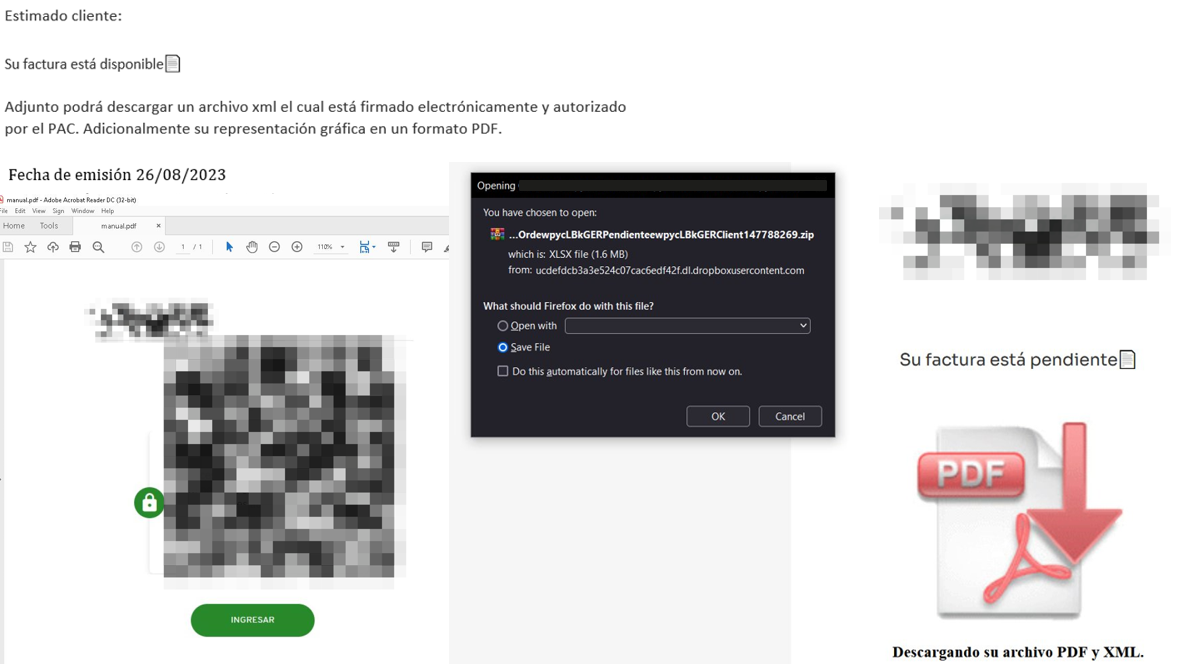
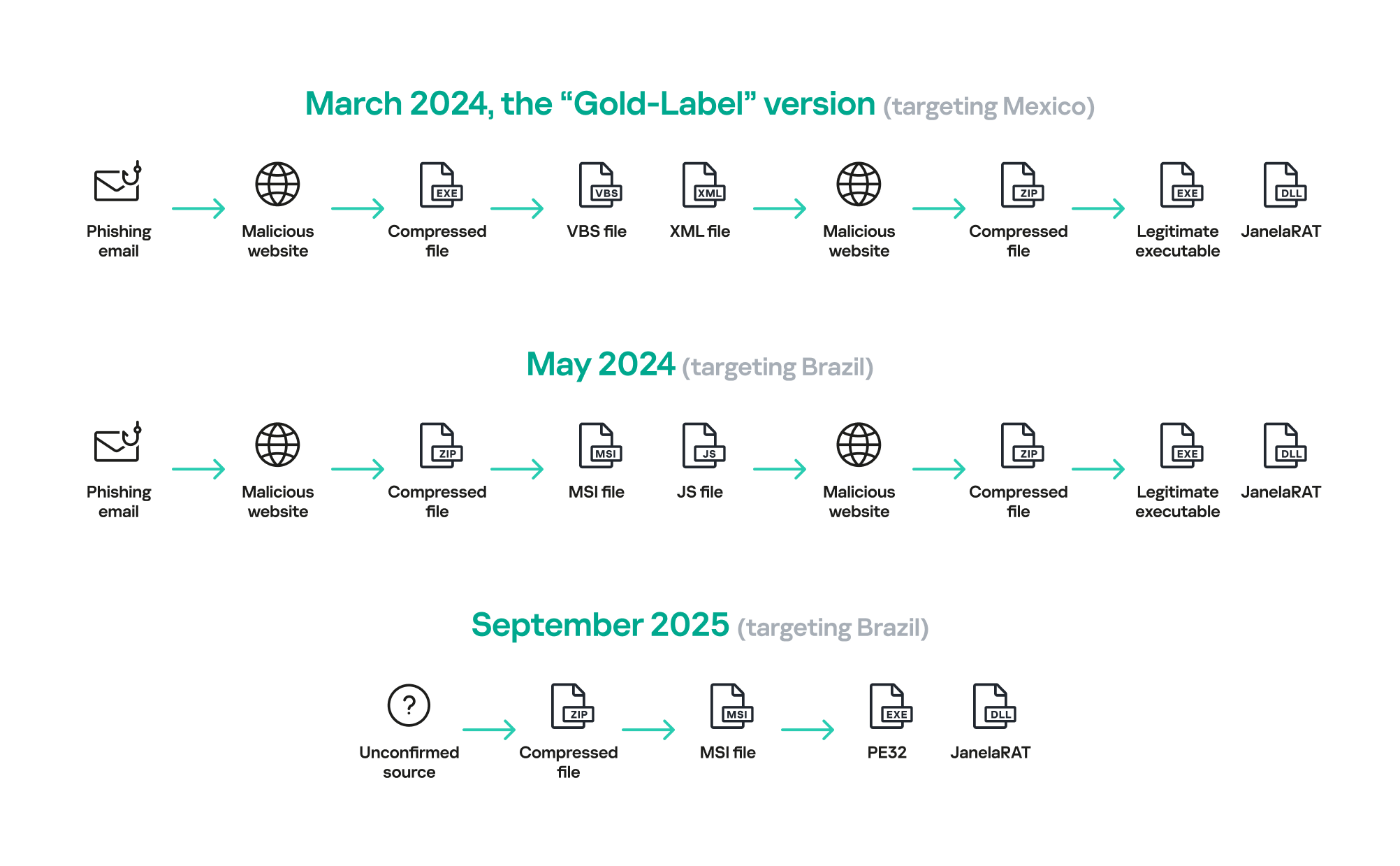
JanelaRAT campaigns involve a multi-stage infection chain. It starts with emails mimicking the delivery of pending invoices to trick victims into downloading a PDF file by clicking a malicious link. Then the victims are redirected to a malicious website from which a compressed file is downloaded.
Malicious email used in JanelaRAT campaigns
Throughout our monitoring of these malware campaigns, the compressed files have typically contained VBScripts, XML files, other ZIP archives, and BAT files. They ultimately lead to downloading a ZIP archive that contains components for DLL sideloading and executing JanelaRAT as the final payload.
However, we have observed variations in the infection chains depending on the delivered version of the malware. The latest observed campaign evolved by integrating MSI files to deliver a legitimate PE32 executable and a DLL, which is then sideloaded by the executable. This DLL is actually JanelaRAT, delivered as the final payload.
Based on our analysis of previous JanelaRAT intrusions, the updates in the infection chain represent threat actors’ attempts to streamline the process, with a reduced number of malware installation steps. We’ve observed a logical sequence in how components, such as MSI files, have been incorporated and adapted over time. Moreover, we have observed the use of auxiliary files — additional components that aid in the infection — such as configuration files that have been changing over time, showing how the threat actors have adapted these infections in an effort to avoid detection.
JanelaRAT infection flow evolution
Initial dropper
The MSI file acts as an initial dropper designed to install the final implant and establish persistence on the system. It obfuscates file paths and names with the objective to hinder analysis. This code is designed to create several ActiveX objects to manipulate the file system and execute malicious commands.
Among the actions taken, the MSI defines paths based on environment variables for hosting binaries, creating a startup shortcut, and storing a first-run indicator file. The dropper file checks for the existence of the latter and for a specific path, and if either is missing, it creates them. If the file exists, the MSI file redirects the user to an external website as a decoy, showing that everything is “normal”.
The MSI dropper places two files at a specified path: the legitimate executable nevasca.exe and the PixelPaint.dll library, renaming them with obfuscated combinations of random strings before relocating. An LNK shortcut is created in the user’s Startup folder, pointing to the renamed nevasca.exe executable, ensuring persistence. Finally, the nevasca.exe file is executed, which in turn loads the PixelPaint.dll file that is JanelaRAT.
Malicious implant
In this case, we analyzed JanelaRAT version 33, which was masqueraded as a legitimate pixel art app. Similar to other malware versions, it was protected with Eazfuscator, a common .NET obfuscation tool. We have also seen previous JanelaRAT samples that used the ConfuserEx obfuscator or its custom builds. The malware uses Control Flow Flattening method and renames classes and variables to make the code unreadable without deobfuscation.
JanelaRAT monitors the victim’s activity, intercepts sensitive banking interactions, and establishes an interactive C2 channel to report changes to the threat actor. While screen monitoring is also present, the core functionality focuses on financial fraud and real-time manipulation of the victim’s machine. The malware collects system information, including OS version, processor architecture (32-bit, 64-bit, or unknown), username, and machine name. The Trojan evaluates the current user’s privilege level and assigns different nicknames for administrators, users, guests, and an additional one for any other role.
The malware then retrieves the current date and constructs a beacon to register the victim on the C2 server, along with the malware version. To prevent multiple instances, the malware creates the mutex and exits if it already exists.
String encryption
All JanelaRAT samples utilize encrypted strings for sending information to the C2 and obfuscating embedded data. The encryption algorithm remains consistent across campaigns, combining base64 encoding with Rijndael (AES). The encryption key is derived from the MD5 hash of a 4-digit number and the IV is composed of the first 16 bytes of the decoded base64 data.
C2 communication and command handling
After initialization, JanelaRAT establishes a TCP socket, configuring callbacks for connection events and message handling. It registers all known message types, executing specific system tasks based on the received message.
Following socket initialization, the malware launches two background routines:
User inactivity and session tracking
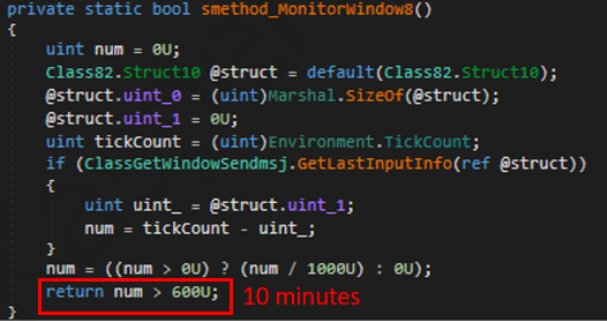
This routine activates timers and launches secondary threads, including an internal timer and a user inactivity monitor. The malware determines if the victim’s machine has been inactive for more than 10 minutes by calculating the elapsed time since the last user input. If the inactivity period exceeds 10 minutes, the malware notifies the C2 by sending the corresponding message. Upon user activity, it notifies the threat actor again. This makes it possible to track the user’s presence and routine to time possible remote operations.
Timer that looks for 10 minutes of inactivity
Victim registration and further malicious activity
This routine is launched immediately after the socket setup. It triggers two subroutines responsible for periodic HTTP beaconing and downloading additional payloads.
The first subroutine executes a PowerShell downloaded from a staging server during post-exploitation. Its main objective is to establish persistence by downloading the PixelPaint.dll file once again. The routine then builds and executes periodic HTTP requests to the C2, reporting the malware’s version and the victim machine’s security environment. It loops continuously as long as a specific local file does not exist, ensuring repeated telemetry transmission. The file was not observed being extracted or created by the malware itself; rather, it appears to be placed on the system by the threat actor during other post-exploitation activities. Based on previous incidents, this file likely contains instructions for establishing persistence.
This JanelaRAT version constructs a second C2 URL for beaconing, using several decrypted strings and following a pattern that uses different parameters to report information about new victims:
We have observed constant changes in the parameters across campaigns. A new parameter “AN” was introduced in this version. It is used to detect the presence of a specific process associated with banking security software. If such software is found on the victim’s device, the malware notifies the threat actor.
Parameter
Description
VS
JanelaRAT version
PL
OFF by default
AN
Yes or No depending on whether banking security software process exists
The second subroutine is responsible for monitoring the user’s visits to banking websites and reporting any activity of interest to the threat actor. JanelaRAT 33v is specifically engineered to target Brazilian financial institutions. However, we have also observed other versions of the malware targeting other specific countries in the region, such as the “Gold-Label” version targeting banking users in Mexico that we described earlier.
This subroutine creates a timer to enable an active system monitoring cycle. During this cycle, the malware obtains the title of the active window and checks if it matches entries of interest using a hardcoded but obfuscated list of financial institutions. Although the threat actors behind JanelaRAT primarily focus on one country as a target, the list of financial institutions is constantly updated.
If a title bar matches one of the listed targets, the malware waits 12 seconds before establishing a dedicated communication channel to the C2. This channel is used to execute malicious tasks, including taking screenshots, monitoring keyboard and mouse input, displaying messages to the user, injecting keystrokes or simulating mouse input, and forcing system shutdown.
To perform these actions, the malware uses a dedicated C2 handler that interprets incoming commands from the C2. Notably, 33v supports live banking session hijacking, not just credential theft.
Action Performed
Description
Capture desktop image
Send compressed screenshots to the C2
Specific screenshots
Crop specific screen regions and exfiltrate images
Overlay windows
Display images in full-screen mode, limit user interactions, and mimic bank dialogs to harvest credentials
Keylogging
Keystroke capture
Simulate keyboard
Inject keys such as DOWN, UP, and TAB to navigate or trigger new elements
Track mouse input
Move the cursor, simulate clicks, and report the cursor position
Display message
Show message boxes (custom title, text, buttons, or icons)
System shutdown
Execute a forced shutdown sequence
Command execution
Run CMD or PowerShell scripts/commands
Task Manager
manipulation
Launch Task Manager, find its window, and hide it to prevent discovery by the user
Check for banking security software process
Detect the presence of anti-fraud systems
Beaconing
Send host information (malware version, profile, presence of banking software)
Toggle internal modes
Enable and disable modes such as screenshot flow, key injection, or overlay visibility
Anti-analysis
Detect sandbox or automation tools
C2 infrastructure
Unlike other versions, this variant rotates its C2 server daily. Once a title bar matches the one in the list, the software dynamically constructs the C2 channel domain by concatenating an obfuscated string, the current date, and a suffix domain related to a legitimate dynamic DNS (DDNS) service. This communication is established using port 443, but not TLS.
Decoy overlay system
This version of JanelaRAT implements a decoy overlay system designed to capture banking credentials and bypass multi-factor authentication. When a target banking window is detected, the malware requests further instructions from the C2 server. The C2 responds with a command identifier and a Base64-encoded image, which is then displayed as a full-screen overlay window mimicking legitimate banking or system interfaces. The malware ensures the fake window completely covers the screen and limits the victim’s interaction with the system.
The malware blocks the victim’s interaction by displaying modal dialogs. Each modal dialog corresponds to a specific operation, such as password capture, token/MFA capture, fake loading screen, fake Windows update full-screen modal and more. The malware resizes the overlay, scans multiple screens, and loads deceptive elements to distract the user or temporarily hide legitimate application windows.
Among other fake elements, the malware displays fake Windows update notifications, often accompanied by messages in Brazilian Portuguese, such as:
“Configuring Windows updates, please wait.”
“Do not turn off your computer; this could take some time.”
When a message command is received from the operator, the malware constructs a custom message box based on parameters sent from the server. These parameters include the message title, text content, button type (e.g., OK, Yes/No), and icon type (e.g., Warning, Error). The malware then creates a maximized message box positioned at the top of the screen, ensuring it captures user focus and blocks the visibility of other windows, mimicking a system or security alert.
An obfuscated acknowledgement string is sent back to the C2 to confirm successful execution of this task.
Anti-analysis techniques
In addition to the conditional behavior based on whether the process of banking security software is detected, the malware includes anti-analysis routines and computer environment checks, such as sandbox detection through the Magnifier and MagnifierWindow components. These components are used to determine if accessibility tools are active on the infected computer indicating a possible malware analysis environment.
Persistence
The malware establishes persistence by writing a command script into the Windows Startup directory. This script forces the execution chain to run at each user logon enabling malicious activity without triggering privilege escalation prompts. The script is executed silently to evade user awareness.
This method is either an alternative or a supplement to the persistence method previously described in the subroutines responsible for periodic HTTP beaconing section.
Victimology
Consistent with previous intrusions and campaigns, the primary targets of the threat actors distributing JanelaRAT are banking users in Latin America, with specific focus on users of financial institutions in Brazil and Mexico.
According to our telemetry, in 2025 we detected 14,739 attacks in Brazil and 11,695 in Mexico related to JanelaRAT.
Conclusions
JanelaRAT remains an active and evolving threat, with intrusions exhibiting consistent characteristics despite ongoing modifications. We have tracked the evolution of JanelaRAT infections for some time, observing variations in both the malware itself and its infection chain, including targeted variants for specific countries.
This variant represents a significant advancement in the actor’s capabilities, combining multiple communication channels, comprehensive victim monitoring, interactive overlays, input injection, and robust remote control features. The malware is specifically designed to minimize user visibility and adapt its behavior upon detection of anti-fraud software.
To mitigate the risk of communication with the C2 infrastructure utilizing similar evasive techniques, we recommend that defenders block dynamic DNS services at the corporate perimeter or internal DNS resolvers. This will disrupt the communication channels used by JanelaRAT and similar threats.
JanelaRAT is a malware family that takes its name from the Portuguese word “janela” which means “window”. JanelaRAT looks for financial and cryptocurrency data from specific banks and financial institutions in the Latin America region.
JanelaRAT is a modified variant of BX RAT that has targeted users since June 2023. One of the key differences between these Trojans is that JanelaRAT uses a custom title bar detection mechanism to identify desired websites in victims’ browsers and perform malicious actions.
The threat actors behind JanelaRAT campaigns continuously update the infection chain and malware versions by adding new features.
Kaspersky solutions detect this threat as Trojan.Script.Generic and Backdoor.MSIL.Agent.gen.
Initial infection
JanelaRAT campaigns involve a multi-stage infection chain. It starts with emails mimicking the delivery of pending invoices to trick victims into downloading a PDF file by clicking a malicious link. Then the victims are redirected to a malicious website from which a compressed file is downloaded.
Malicious email used in JanelaRAT campaigns
Throughout our monitoring of these malware campaigns, the compressed files have typically contained VBScripts, XML files, other ZIP archives, and BAT files. They ultimately lead to downloading a ZIP archive that contains components for DLL sideloading and executing JanelaRAT as the final payload.
However, we have observed variations in the infection chains depending on the delivered version of the malware. The latest observed campaign evolved by integrating MSI files to deliver a legitimate PE32 executable and a DLL, which is then sideloaded by the executable. This DLL is actually JanelaRAT, delivered as the final payload.
Based on our analysis of previous JanelaRAT intrusions, the updates in the infection chain represent threat actors’ attempts to streamline the process, with a reduced number of malware installation steps. We’ve observed a logical sequence in how components, such as MSI files, have been incorporated and adapted over time. Moreover, we have observed the use of auxiliary files — additional components that aid in the infection — such as configuration files that have been changing over time, showing how the threat actors have adapted these infections in an effort to avoid detection.
JanelaRAT infection flow evolution
Initial dropper
The MSI file acts as an initial dropper designed to install the final implant and establish persistence on the system. It obfuscates file paths and names with the objective to hinder analysis. This code is designed to create several ActiveX objects to manipulate the file system and execute malicious commands.
Among the actions taken, the MSI defines paths based on environment variables for hosting binaries, creating a startup shortcut, and storing a first-run indicator file. The dropper file checks for the existence of the latter and for a specific path, and if either is missing, it creates them. If the file exists, the MSI file redirects the user to an external website as a decoy, showing that everything is “normal”.
The MSI dropper places two files at a specified path: the legitimate executable nevasca.exe and the PixelPaint.dll library, renaming them with obfuscated combinations of random strings before relocating. An LNK shortcut is created in the user’s Startup folder, pointing to the renamed nevasca.exe executable, ensuring persistence. Finally, the nevasca.exe file is executed, which in turn loads the PixelPaint.dll file that is JanelaRAT.
Malicious implant
In this case, we analyzed JanelaRAT version 33, which was masqueraded as a legitimate pixel art app. Similar to other malware versions, it was protected with Eazfuscator, a common .NET obfuscation tool. We have also seen previous JanelaRAT samples that used the ConfuserEx obfuscator or its custom builds. The malware uses Control Flow Flattening method and renames classes and variables to make the code unreadable without deobfuscation.
JanelaRAT monitors the victim’s activity, intercepts sensitive banking interactions, and establishes an interactive C2 channel to report changes to the threat actor. While screen monitoring is also present, the core functionality focuses on financial fraud and real-time manipulation of the victim’s machine. The malware collects system information, including OS version, processor architecture (32-bit, 64-bit, or unknown), username, and machine name. The Trojan evaluates the current user’s privilege level and assigns different nicknames for administrators, users, guests, and an additional one for any other role.
The malware then retrieves the current date and constructs a beacon to register the victim on the C2 server, along with the malware version. To prevent multiple instances, the malware creates the mutex and exits if it already exists.
String encryption
All JanelaRAT samples utilize encrypted strings for sending information to the C2 and obfuscating embedded data. The encryption algorithm remains consistent across campaigns, combining base64 encoding with Rijndael (AES). The encryption key is derived from the MD5 hash of a 4-digit number and the IV is composed of the first 16 bytes of the decoded base64 data.
C2 communication and command handling
After initialization, JanelaRAT establishes a TCP socket, configuring callbacks for connection events and message handling. It registers all known message types, executing specific system tasks based on the received message.
Following socket initialization, the malware launches two background routines:
User inactivity and session tracking
This routine activates timers and launches secondary threads, including an internal timer and a user inactivity monitor. The malware determines if the victim’s machine has been inactive for more than 10 minutes by calculating the elapsed time since the last user input. If the inactivity period exceeds 10 minutes, the malware notifies the C2 by sending the corresponding message. Upon user activity, it notifies the threat actor again. This makes it possible to track the user’s presence and routine to time possible remote operations.
Timer that looks for 10 minutes of inactivity
Victim registration and further malicious activity
This routine is launched immediately after the socket setup. It triggers two subroutines responsible for periodic HTTP beaconing and downloading additional payloads.
The first subroutine executes a PowerShell downloaded from a staging server during post-exploitation. Its main objective is to establish persistence by downloading the PixelPaint.dll file once again. The routine then builds and executes periodic HTTP requests to the C2, reporting the malware’s version and the victim machine’s security environment. It loops continuously as long as a specific local file does not exist, ensuring repeated telemetry transmission. The file was not observed being extracted or created by the malware itself; rather, it appears to be placed on the system by the threat actor during other post-exploitation activities. Based on previous incidents, this file likely contains instructions for establishing persistence.
This JanelaRAT version constructs a second C2 URL for beaconing, using several decrypted strings and following a pattern that uses different parameters to report information about new victims:
We have observed constant changes in the parameters across campaigns. A new parameter “AN” was introduced in this version. It is used to detect the presence of a specific process associated with banking security software. If such software is found on the victim’s device, the malware notifies the threat actor.
Parameter
Description
VS
JanelaRAT version
PL
OFF by default
AN
Yes or No depending on whether banking security software process exists
The second subroutine is responsible for monitoring the user’s visits to banking websites and reporting any activity of interest to the threat actor. JanelaRAT 33v is specifically engineered to target Brazilian financial institutions. However, we have also observed other versions of the malware targeting other specific countries in the region, such as the “Gold-Label” version targeting banking users in Mexico that we described earlier.
This subroutine creates a timer to enable an active system monitoring cycle. During this cycle, the malware obtains the title of the active window and checks if it matches entries of interest using a hardcoded but obfuscated list of financial institutions. Although the threat actors behind JanelaRAT primarily focus on one country as a target, the list of financial institutions is constantly updated.
If a title bar matches one of the listed targets, the malware waits 12 seconds before establishing a dedicated communication channel to the C2. This channel is used to execute malicious tasks, including taking screenshots, monitoring keyboard and mouse input, displaying messages to the user, injecting keystrokes or simulating mouse input, and forcing system shutdown.
To perform these actions, the malware uses a dedicated C2 handler that interprets incoming commands from the C2. Notably, 33v supports live banking session hijacking, not just credential theft.
Action Performed
Description
Capture desktop image
Send compressed screenshots to the C2
Specific screenshots
Crop specific screen regions and exfiltrate images
Overlay windows
Display images in full-screen mode, limit user interactions, and mimic bank dialogs to harvest credentials
Keylogging
Keystroke capture
Simulate keyboard
Inject keys such as DOWN, UP, and TAB to navigate or trigger new elements
Track mouse input
Move the cursor, simulate clicks, and report the cursor position
Display message
Show message boxes (custom title, text, buttons, or icons)
System shutdown
Execute a forced shutdown sequence
Command execution
Run CMD or PowerShell scripts/commands
Task Manager
manipulation
Launch Task Manager, find its window, and hide it to prevent discovery by the user
Check for banking security software process
Detect the presence of anti-fraud systems
Beaconing
Send host information (malware version, profile, presence of banking software)
Toggle internal modes
Enable and disable modes such as screenshot flow, key injection, or overlay visibility
Anti-analysis
Detect sandbox or automation tools
C2 infrastructure
Unlike other versions, this variant rotates its C2 server daily. Once a title bar matches the one in the list, the software dynamically constructs the C2 channel domain by concatenating an obfuscated string, the current date, and a suffix domain related to a legitimate dynamic DNS (DDNS) service. This communication is established using port 443, but not TLS.
Decoy overlay system
This version of JanelaRAT implements a decoy overlay system designed to capture banking credentials and bypass multi-factor authentication. When a target banking window is detected, the malware requests further instructions from the C2 server. The C2 responds with a command identifier and a Base64-encoded image, which is then displayed as a full-screen overlay window mimicking legitimate banking or system interfaces. The malware ensures the fake window completely covers the screen and limits the victim’s interaction with the system.
The malware blocks the victim’s interaction by displaying modal dialogs. Each modal dialog corresponds to a specific operation, such as password capture, token/MFA capture, fake loading screen, fake Windows update full-screen modal and more. The malware resizes the overlay, scans multiple screens, and loads deceptive elements to distract the user or temporarily hide legitimate application windows.
Among other fake elements, the malware displays fake Windows update notifications, often accompanied by messages in Brazilian Portuguese, such as:
“Configuring Windows updates, please wait.”
“Do not turn off your computer; this could take some time.”
When a message command is received from the operator, the malware constructs a custom message box based on parameters sent from the server. These parameters include the message title, text content, button type (e.g., OK, Yes/No), and icon type (e.g., Warning, Error). The malware then creates a maximized message box positioned at the top of the screen, ensuring it captures user focus and blocks the visibility of other windows, mimicking a system or security alert.
An obfuscated acknowledgement string is sent back to the C2 to confirm successful execution of this task.
Anti-analysis techniques
In addition to the conditional behavior based on whether the process of banking security software is detected, the malware includes anti-analysis routines and computer environment checks, such as sandbox detection through the Magnifier and MagnifierWindow components. These components are used to determine if accessibility tools are active on the infected computer indicating a possible malware analysis environment.
Persistence
The malware establishes persistence by writing a command script into the Windows Startup directory. This script forces the execution chain to run at each user logon enabling malicious activity without triggering privilege escalation prompts. The script is executed silently to evade user awareness.
This method is either an alternative or a supplement to the persistence method previously described in the subroutines responsible for periodic HTTP beaconing section.
Victimology
Consistent with previous intrusions and campaigns, the primary targets of the threat actors distributing JanelaRAT are banking users in Latin America, with specific focus on users of financial institutions in Brazil and Mexico.
According to our telemetry, in 2025 we detected 14,739 attacks in Brazil and 11,695 in Mexico related to JanelaRAT.
Conclusions
JanelaRAT remains an active and evolving threat, with intrusions exhibiting consistent characteristics despite ongoing modifications. We have tracked the evolution of JanelaRAT infections for some time, observing variations in both the malware itself and its infection chain, including targeted variants for specific countries.
This variant represents a significant advancement in the actor’s capabilities, combining multiple communication channels, comprehensive victim monitoring, interactive overlays, input injection, and robust remote control features. The malware is specifically designed to minimize user visibility and adapt its behavior upon detection of anti-fraud software.
To mitigate the risk of communication with the C2 infrastructure utilizing similar evasive techniques, we recommend that defenders block dynamic DNS services at the corporate perimeter or internal DNS resolvers. This will disrupt the communication channels used by JanelaRAT and similar threats.
At the NDSS Symposium 2026 in San Diego in February, a group of respected researchers presented a study unveiling the AirSnitch attack, which bypasses the Wi-Fi client isolation feature — also commonly known as guest network or device isolation. This attack allows connecting to a single wireless network via an access point, and then gaining access to other connected devices, including those using entirely different service set identifiers (SSIDs) on that same hardware. Targeted devices could easily be running on wireless subnets protected by WPA2 or WPA3 protocols. The attack doesn’t actually break encryption; instead, it exploits the way access points handle group keys and packet routing.
In practical terms, this means that a guest network provides very little in the way of real security. If your guest and employee networks are running on the same physical device, AirSnitch allows a connected attacker to inject malicious traffic into neighboring SSIDs. In some cases, they can even pull off a full-blown man-in-the-middle (MitM) attack.
Wi-Fi security and the role of isolation
Wi-Fi security is constantly evolving; every time a practical attack is made against the latest generation of protection, the industry shifts toward more complex algorithms and procedures. This cycle started with the FMS attacks used to crack WEP encryption keys, and continues to this day: recent examples include the KRACK attacks on WPA2, and the FragAttacks, which impacted every security protocol version from WEP all the way through WPA3.
Attacking modern Wi-Fi networks effectively (and quietly) is no small feat. Most professionals agree that using WPA2/WPA3 with complex keys and separating networks based on their purpose is usually enough for protection. However, only specialists really know that client isolation was never actually standardized within the IEEE 802.11 protocols. Different manufacturers implement isolation in completely different ways — using Layer 2 or Layer 3 of network architecture; in other words, handling it at either the router or the Wi-Fi controller level — meaning the behavior of isolated subnets varies wildly depending on your specific access point or router model.
While marketing claims that client isolation is perfect for keeping restaurant or hotel guests from attacking one another — or ensuring corporate visitors can’t access anything but the internet — in reality, isolation often relies on people not trying to hack it. This is exactly what the AirSnitch research highlights.
Types of AirSnitch attacks
The name AirSnitch doesn’t just refer to a single vulnerability, but a whole family of architectural flaws found in Wi-Fi access points. It’s also the name of an open-source tool used to test routers for these specific weaknesses. However, security professionals need to keep in mind that there’s only a very thin line between testing and attacking.
The model for all these attacks is the same: a malicious client is connected to an access point (AP) where isolation is active. Other users — the targets — are connected to the same SSID or even different SSIDs on that same AP. This is a very realistic scenario; for example, a guest network might be open and unencrypted, or an attacker could simply get the guest Wi-Fi password by posing as a legitimate visitor.
For certain AirSnitch attacks, the attacker needs to know the victim’s MAC or IP address beforehand. Ultimately, how effective each attack is depends on the specific hardware manufacturer (more on that below).
GTK attack
After the WPA2/WPA3 handshake, the access point and the clients agree on a Group Transient Key (GTK) to handle broadcast traffic. In this scenario, the attacker wraps packets destined for a specific victim inside a broadcast traffic envelope. They then send these directly to the victim while spoofing the access point’s MAC address. This attack only allows for traffic injection, meaning the attacker won’t receive a response. However, even that is enough to deliver malicious ICMPv6 routing advertisements, or DNS and ARP messages to the client — effectively bypassing isolation. This is the most universal version of the attack working on any WPA2/WPA3 network that uses a shared GTK. That said, some enterprise-grade access points support GTK randomization for each individual client, which renders this specific method ineffective.
Broadcast packet redirection
This version of the attack doesn’t even require the attacker to authenticate at the access point first. The attacker sends packets to the AP with a broadcast destination address (FF:FF:FF:FF:FF:FF) and the ToDS flag set to 1. As a result, many access points treat this packet as legitimate broadcast traffic; they encrypt it using the GTK, and blast it out to every client on the subnet, including the victim. Just like in the previous method, traffic specifically meant for a single victim can be pre-packaged inside.
Router redirection
This attack exploits an architectural gap between Layer 2 and Layer 3 security found in some manufacturers’ hardware. The attacker sends a packet to the access point, setting the victim’s IP address as the destination at the network layer (L3). However, at the wireless layer (L2), the destination is set to the access point’s own MAC address, so the isolation filter doesn’t trip. The routing subsystem (L3) then dutifully routes the packet back out to the victim, bypassing the L2 isolation entirely. Like the previous methods, this is another transmit-only attack where the attacker can’t see the reply.
Port stealing to intercept packets
The attacker connects to the network using a spoofed version of the victim’s MAC address, and floods the network with ARP responses claiming, “this MAC address is on my port and SSID”. The target network’s router updates its MAC tables, and starts sending the victim’s traffic to this new port instead. Consequently, traffic intended for the victim ends up with the attacker — even if the victim is connected to a completely different SSID.
In a scenario where the attacker connects via an open, unencrypted network, this means traffic meant for a client on a WPA2/WPA3-secured network is actually broadcast over the open air, where not only the attacker but anyone nearby can sniff it.
Port stealing to send packets
In this version, the attacker connects directly to the victim’s Wi-Fi adapter, and bombards it with ARP requests spoofing the access point’s MAC address. As a result, the victim’s computer starts sending its outgoing traffic to the attacker instead of the network. By running both stealing attacks simultaneously, an attacker can, in several scenarios, execute a full MitM attack.
Practical consequences of AirSnitch attacks
By combining several of the techniques described above, a hacker can pull off some pretty serious moves:
Complete bidirectional traffic interception for a MitM attack. This means they can snatch and modify data moving between the victim and the access point without the victim ever knowing.
Hopping between SSIDs. An attacker sitting on a guest network can reach hosts on a locked-down corporate network if both are running off the same physical access point.
Attacks on RADIUS. Since many companies use RADIUS authentication for their corporate Wi-Fi, an attacker can spoof the access point’s MAC address to intercept initial RADIUS authentication packets. From there, they can brute-force the shared secret. Once they have that, they can spin up a rogue RADIUS server and access point to hijack data from any device that connects to it.
Exposing unencrypted data from “secure” subnets: Traffic that’s supposed to be sent to a client under the protection of WPA2/WPA3 can be retransmitted onto an open guest network, where it’s essentially broadcast for anyone to hear.
To pull off these attacks effectively, a hacker needs a device capable of simultaneous data transmission and reception with both the victim’s adapter and the access point. In a real-world scenario, this usually means a laptop with two Wi-Fi adapters running specifically configured Linux drivers. It’s worth noting that the attack isn’t exactly silent: it requires a flood of ARP packets, it can cause brief Wi-Fi glitches when it starts, and network speeds might tank to around 10Mbps. Despite these red flags, it’s still very much a practical threat in many environments.
Vulnerable devices
As part of the study, several enterprise and home access points and routers were put to the test. The list included products from Cisco, Netgear, Ubiquiti, Tenda, D-Link, TP-Link, LANCOM, and ASUS, as well as routers running popular community firmware like DD-WRT and OpenWrt. Every single device tested was vulnerable to at least some of the attacks described here. Even more concerning, the D-Link DIR-3040 and LANCOM LX-6500 were susceptible to every single variation of AirSnitch.
Interestingly, some routers were equipped with protective mechanisms that blocked the attacks, even though the underlying architectural flaws were still present. For example, the Tenda RX2 Pro automatically disconnects any client whose MAC address appears on two BSSIDs simultaneously, which effectively shuts down port stealing.
The researchers emphasize that any network administrator or IT security team serious about defense should test their own specific configurations. That’s the only way to pinpoint exactly which threats are relevant to your organization’s setup.
How to protect your corporate network from AirSnitch
The threat is most immediate for organizations running guest and corporate Wi-Fi networks on the same access points without additional VLAN segmentation. There are also significant risks for companies using RADIUS with outdated settings or weak shared secrets for wireless authentication.
The bottom line is that we need to stop viewing client isolation on an access point as a real security measure, and start seeing it as just a convenience feature. Real security needs to be handled differently:
Segment the network using VLANs. Each SSID should have its own VLAN, with strict 802.1Q packet tagging maintained all the way from the access point to the firewall or router.
Implement stricter packet inspection at the routing level — depending on the hardware capabilities. Features like Dynamic ARP Inspection, DHCP snooping, and limiting the number of MAC addresses per port help defend against IP/MAC spoofing.
Enable individual GTK keys for each client, if your equipment supports it.
Use more resilient RADIUS and 802.1X settings, including modern cipher suites and robust shared secrets.
Log and analyze EAP/RADIUS authentication anomalies in your SIEM. This helps track many attack attempts beyond just AirSnitch. Other red flag events to watch for include the same MAC address appearing on different SSIDs, spikes in ARP requests, or clients rapidly jumping between BSSIDs or VLANs.
Apply security at higher levels of the network topology. Many of these attacks lose their punch if the organization has universally implemented TLS and HSTS for all business application traffic, requires an active VPN for all Wi-Fi connections, or has fully embraced a Zero Trust architecture.
Google moved up its estimated deadline for quantum preparedness in cryptography to 2029—only 33 months from now. That’s earlier than previousdeadlines, and they proposed the new post-quantum migration deadline because of two newpapers that comprise a big jump in the state of the technology. It’s ahead of schedule, but not altogether unexpected. Cryptographers and engineers have been working on this for years, and as the deadline gets closer, it’s not surprising to see more precise timeline estimates come up.
The preparation for the Y2K bug is not a perfect analogy. Like Y2K, if systems are not updated in time, anyone with a powerful enough quantum computer will be able to more easily insert malware into the core systems of a computer and fake authentication to allow impersonation merely by observing network traffic. These are the threats whose mitigation timelines have been moved up.
But unlike Y2K, there’s a second sort of attack that we already need to be prepared for: quantum computers will be able to decrypt years of captured messages sent over encrypted messaging platforms shared any time before those platforms updated to quantum-proof encryption. That type of attack has been the main focus of engineering efforts so far and mitigation is well on its way, since anything before the upgrade might eventually be compromised.
Fortunately, not all cryptography is broken by quantum computers. Notably, symmetric encryption is quantum resistant. That means that if you have disk encryption turned on, you shouldn’t have to worry about quantum computers breaking into your phone, as long as your system’s keys are long enough. The problem is how you get the keys to do that encryption, and how you authenticate software on your device and in the cloud.
Engineers: Time to Lock In
For those whose work touches on any sort of cryptographic deployment, you’re hopefully already working on the post-quantum transition. If not, you really should be; there are quite a few relevantposts and updates with more information about what this news means for you. Your key agreement systems should be upgraded soon if they’re not already because of store-now-decrypt-later attacks. Now it’s time to preparefor authentication attacks on forged signatures as well.
In some cases, you may need to wait on others to finish their work first. If you’re using NGINX to host websites on Ubuntu, for example, the security settings you need to upgrade key agreement were just released in version 26.04. Updates are rolling out, so keep checking in and upgrade your systems as soon as you’re able to.
Users: Stay Updated, Check on Your Chats
But if you’re not in any position to be updating software or hardware, there may be some additional steps you can take to make sure you're as protected as possible. You’ll want to get the latest post-quantum protections as soon as they're available, so if you don't already have a habit of applying software updates in a timely manner, now’s a good time to start.
If you want to know if the website you’re using or the encrypted messaging app you’re chatting over will leak its data in a few years to anyone storing traffic now, you can search for its name with the word "quantum." The engineers are usually pretty proud of their work and have announced their post-quantum support (like what we’ve seen from Signal and iMessage). If you can’t find that information, you may want to have extra consideration for what you say over the internet, or switch the tools you're using. Those are the big areas to worry about now, before quantum computers are actually here, because they could result in the mass leakage of old messages.
The new deadline means that some technologies are simply not going to make it in time and will have to be left by the wayside, like trusted execution environments (TEEs), due to the slower speed of hardware deployments. TEEs are how companies do private processing on user data in the cloud, and they’re particularly relevant to AI offerings.
Even now, though they offer more protection than processing data in the clear, TEEs are notassecure as homomorphic encryption or doing the processing on device. Post-quantum, the security level gets much closer to computation on cleartext, and even with strong user controls, that makes it way too easy to accidentally backdoor your own encrypted chats. If you’re worried about the contents of messages in an encrypted chat being exposed, you’ll probably want to completely avoid using AI features that might leak that content, such as summarization of recent chat history and notifications, and reply composition assistance.
How’s the Transition Going So Far?
The work to update the world to post-quantum is well on its way. NIST finalized the standards for post-quantum cryptographic algorithms back in 2024. The larger platforms, websites, and hosting providers have already updated their algorithms, so even now, you’re probablyalreadyusing post-quantum algorithms to access some of the internet. Measurementsvary pretty widely, but up to about 4 in 10 websites currently support a post-quantum key exchange.
There’s still some work to be done in figuring out how to make the needed changes—for example, the way you find out a website’s private key to make HTTPS possible is being reworked to make room for larger signatures. Some technologies are just coming to market, like the post-quantum root of trust available now in some Chromebooks. In practice, this means that as you think about replacing your current devices in the next few years, you may want to check if you’re picking up hardware that has post-quantum support, if those specific protections are required for your threat model.
For the areas that still need updating, how much can we expect to actually get ready by the new deadline? It’s likely that not every cryptographically-capable device and deployment will be ready in time, and hardware with hard-coded certificates will probably be the last to update. We saw that happen when SHA-1 was deprecated; Point of Sale systems in particular were late adopters. While governments and large companies with quantum computers may not be interested in stealing money from cash registers, they will be interested in accessing secrets about people’s private lives. That’s why it’s so important that everyone does their part to upgrade, to protect the details of private communications and browsing.
And there’s a good chance that older devices that won’t receive quantum-resistant updates were probably vulnerable to some other attack already. Quantum computation is just one type of attack on cryptography that’s notable for the scale of migration required, and how every public-key cryptosystem and authentication scheme has to do the work to prepare. That’s not a difference in kind, it’s a difference in scale, and some systems will inevitably be left behind.
Quantum preparedness hits different industries and services in different ways, but services that handle communications and financial information are particularly susceptible to risk, and need to act quickly to protect the privacy and security of billions of people.
The EU’s so-called Chat Control plan, which would mandate mass scanning and other encryption breaking measures, has had some good news lately. The most controversial idea, the forced requirement to scan encrypted messages, was given up by EU member states. And now, another win for privacy: the EU Parliament has dealt a real blow to voluntary mass-scanning of chats by voting to not prolong an interim derogation from e-Privacy rules in the EU. These rules allowed service providers, temporarily, to scan private communication.
But no one should celebrate just yet. We said there is more to it, and voluntary scanning is a key part. Unlike in the U.S., where there is no comprehensive federal privacy law, the general and indiscriminate scanning of people’s messages is not legal in the EU without a specific legal basis. The e-Privacy derogation law, which gave (limited) cover for such activities, has now expired. Does that mean mass scanning will stop overnight?
Not really.
Companies have continued similar scanning practices during past gaps. Google, Meta, Microsoft, and Snap have already signaled in a joint statement to “continue to take voluntary action on our relevant Interpersonal Communication Services.” Whether this indicates continued scanning of our private communication is not entirely clear, but what is clear is that such activity would now risk breaching EU law. Then again, lack of compliance with EU data protection and privacy rules is nothing new for big tech in Europe.
Most importantly, the “Chat Control” proposal for mandatory detection of child abuse material (CSAM) is still alive and being negotiated. It has shifted the focus toward so-called risk mitigation measures, such as problematic age verification and voluntary activities. If platforms are expected to adopt these as part of their compliance, they risk no longer being truly voluntary. While mass scanning may be gone on paper, some broader concerns remain.
So, where does this leave us? The immediate priority is to make sure the expired exception for mass scanning is not revived. At the same time, lawmakers need to pull the teeth from the currently negotiated Chat Control proposal by narrowing risk mitigation measures. This means ensuring that age verification does not become a default requirement and “voluntary activities” are not turned into an expectation to scan our communications.
As we said before, this is a zombie proposal. It keeps coming back and must not be allowed to return through the back door.
Banks, governments and tech providers urged to upgrade security because current systems will soon be obsolete
Banks, governments and technology providers need to be prepared for quantum computer hackers capable of breaking most existing encryption systems by 2029, Google has warned.
The tech company said in a blogpost that quantum computers would pose a “significant threat to current cryptographic standards” before the end of the decade and urged other companies to follow its lead.
On March 4, 2026, Google and iVerify published reports about a highly sophisticated exploit kit targeting Apple iPhone devices. According to Google, the exploit kit was first discovered in targeted attacks conducted by a customer of an unnamed surveillance vendor. It was later used by other attackers in watering-hole attacks in Ukraine and in financially motivated attacks in China. Additionally, researchers discovered an instance with the debug version of the exploit kit, which revealed the internal names of the exploits and the framework name used by its developers — Coruna. Analysis of the kit showed that it relies on the exploitation of many previously patched vulnerabilities and also includes exploits for CVE-2023-32434 and CVE-2023-38606. These two vulnerabilities particularly caught our attention because they had been first discovered as zero-days used in Operation Triangulation.
Operation Triangulation is a complex mobile APT campaign targeting iOS devices. We discovered it while monitoring the network traffic of our own corporate Wi-Fi network. We noticed suspicious activity that originated from several iOS-based phones. Following the investigation, we learned that this campaign employed a sophisticated spyware implant and multiple zero-day exploits. The investigation lasted for over six months, during which we disclosed our findings in connection to the attack. Kaspersky GReAT experts also presented these findings at the 37th Chaos Communication Congress (37C3).
Although all the details of both CVE-2023-32434 and CVE-2023-38606 have long been publicly available, and other researchers have developed their own exploits without ever seeing the Triangulation code, we decided to closely investigate the exploits used in Coruna. Some of the exploit kit distribution links provided by Google remained active at the time the report was published, which allowed us to collect, decrypt, and analyze all components of Coruna.
During our analysis, we discovered that the kernel exploit for CVE-2023-32434 and CVE-2023-38606 vulnerabilities used in Coruna, in fact, is an updated version of the same exploit that had been used in Operation Triangulation. The images below illustrate a high-level overview of the two attack chains. The exploit in question is highlighted with a red rectangle.
Attack chain of Operation Triangulation (simplified)
Attack chain of Coruna (simplified)
Moreover, we discovered that Coruna includes four additional kernel exploits that we had not seen used in Operation Triangulation, two of which were developed after the discovery of Operation Triangulation. All of these exploits are built on the same kernel exploitation framework and share common code. Code similarities from kernel exploits can also be found in other components of Coruna. These findings led us to conclude that this exploit kit was not patchworked but rather designed with a unified approach. We assume that it’s an updated version of the same exploitation framework that was used — at least to some extent — in Operation Triangulation.
Technical details
While we continue to investigate all exploits and vulnerabilities used by Coruna, this post provides a high-level overview of the exploit kit and attack chain.
Safari
Exploitation begins with a stager that fingerprints the browser and selects and executes appropriate remote code execution (RCE) and pointer authentication code (PAC) exploits depending on the browser version. It also contains a URL to an encrypted file with information about all available packages containing exploits and other components. The stager also includes a 256-bit key used to decrypt it. The URL and decryption key are passed to a payload embedded in PAC exploits.
Payload
The payload is responsible for initiating the exploitation of the kernel. After initialization, the payload first downloads a file with information about other available components. To extract it, the payload performs several steps processing multiple file formats.
First, the downloaded file is decrypted using the ChaCha20 stream cipher. Decryption yields a container with the magic number 0xBEDF00D, which stores LZMA-compressed data.
The file format used by the exploit kit to store compressed data
Offset
Field
0x00
Magic number (0xBEDF00D)
0x04
Decompressed data size
0x08
LZMA-compressed data
The decompressed data presents another container with the magic number 0xF00DBEEF. This file format is used in the exploit kit to store and retrieve files by their IDs.
The file format used by the exploit kit to store files
Offset
Field
0x00
Magic number (0xF00DBEEF)
0x04
Number of entries
0x08
Entry[0].File ID
0x0C
Entry[0].Status
0x10
Entry[0].File offset
0x14
Entry[0].File size
We provide a description of all possible File ID values below. At this stage, when the payload gathers information about all available file packages, this container holds only one file, and its File ID is 0x70000.
Finally, we get to the file with information about all available file packages. It starts with the magic value 0x12345678. The exploit kit uses this file format to obtain URLs and decryption keys for additional components that need to be downloaded.
The file format used by the exploit kit to store information about file packages
Offset
Field
0x00
Magic number (0x12345678)
0x04
Flags
0x08
Directory path
0x108
Number of entries
0x10C
Entry[0].Package ID
0x110
Entry[0].ChaCha20 key
0x130
Entry[0].File name
The components required for exploiting a targeted device are selected using the Package ID. Its high byte specifies the package type and required hardware. We’ve seen the following package types:
0xF2 – exploit for ARM64,
0xF3 – exploit for ARM64E,
0xA2 – Mach-O loader for ARM64,
0xA3 – Mach-O loader for ARM64E,
2 – implant for ARM64,
0xE2 – implant for ARM64E.
The payload code also supports additional package types, such as 0xF1, an exploit for older ARM devices that do not support 64-bit architecture. Interestingly, however, the files for such exploits are missing.
Other bytes of the Package ID define the supported firmware version and CPU generation.
Some of the observed Package IDs (those with unique content)
Package ID
Description
0xF3300000
Kernel exploit (iOS < 14.0 beta 7) and other components
0xF3400000
Kernel exploit (iOS < 14.7) and other components
0xF3700000
Kernel exploit (iOS < 16.5 beta 4) and other components
0xF3800000
Kernel exploit (iOS < 16.6 beta 5) and other components
0xF3900000
Kernel exploit (iOS < 17.2) and other components
0xA3030000
Mach-O loader (iOS 16.X) (A13 – A16)
0xA3050000
Mach-O loader (iOS 16.0 – 16.4)
The files inside these packages are also stored in encrypted and compressed 0xF00DBEEF containers, but this time compression is optional and is determined by the second bit in the Flags field. Different packages contain different sets of files. A description of all possible File IDs is given in the table below.
Observed File IDs
File ID
Description
0x10000
Implant
0x50000
Mach-O loader (default)
0x70000
List of additional components
0x70005
Launcher config
0x80000
Launcher in 0xF2/0xF3 packages, or Mach-O loader in 0xA2/0xA3
0x90000
Kernel exploit
0x90001
Kernel exploit (for Mach-O loader)
0xA0000
Logs cleaner
0xA0001
Mach-O loader component
0xA0002
Mach-O loader component
0xF0000
RPC stager
After downloading the necessary components, the payload begins executing kernel exploits, Mach-O loaders, and the malware launcher. The payload selects an appropriate Mach-O loader based on the firmware version, CPU, and presence of the iokit-open-service permission.
Kernel exploits
We analyzed all five kernel exploits from the kit and discovered that one of them is an updated version of the same exploit we discovered in Operation Triangulation. There are many small changes, but the most noticeable are as follows:
The code takes into account more values from XNU version strings, allowing for more accurate version checking.
Added a check for iOS 17.2. We assume that this was the latest version of iOS at the time of development (released in December 2023).
Added checks for newer Apple processors: A17, M3, M3 Pro, M3 Max (released in fall 2023).
Added a check for iOS version 16.5 beta 4. This version patched the exploit after our report to Apple.
Why does the exploit need to check for iOS 17.2 and newer CPUs if the targeted vulnerabilities were fixed in iOS 16.5 beta 4? The answer can be found by examining other exploits: they are all based on the same source code. The only difference is in the vulnerabilities they exploit, so these checks were added to support the newer exploits and appeared in the older version after recompilation.
Launcher
The launcher is responsible for orchestrating the post-exploitation activities. It also uses the kernel exploit and the interface it provides. However, since the exploit creates special kernel objects during its execution that provide the ability to read and write to kernel memory, the launcher simply reuses these objects without the need to trigger vulnerabilities and go through the entire exploitation path again. The launcher cleans up exploitation artifacts, retrieves the process name for injection from a config with the 0xDEADD00F magic number, injects a stager into the target process, uses it to execute itself, and launches the implant.
Conclusions
This case demonstrates once again the dangers associated with such malicious tools that lie in their potential wide usage. Originally developed for cyber-espionage purposes, this framework is now being used by cybercriminals of a broader kind, placing millions of users with unpatched devices at risk. Given its modular design and ease of reuse, we expect that other threat actors will begin incorporating it into their attacks. We strongly recommend that users install the latest security updates as soon as possible, if they have not already done so.
On March 4, 2026, Google and iVerify published reports about a highly sophisticated exploit kit targeting Apple iPhone devices. According to Google, the exploit kit was first discovered in targeted attacks conducted by a customer of an unnamed surveillance vendor. It was later used by other attackers in watering-hole attacks in Ukraine and in financially motivated attacks in China. Additionally, researchers discovered an instance with the debug version of the exploit kit, which revealed the internal names of the exploits and the framework name used by its developers — Coruna. Analysis of the kit showed that it relies on the exploitation of many previously patched vulnerabilities and also includes exploits for CVE-2023-32434 and CVE-2023-38606. These two vulnerabilities particularly caught our attention because they had been first discovered as zero-days used in Operation Triangulation.
Operation Triangulation is a complex mobile APT campaign targeting iOS devices. We discovered it while monitoring the network traffic of our own corporate Wi-Fi network. We noticed suspicious activity that originated from several iOS-based phones. Following the investigation, we learned that this campaign employed a sophisticated spyware implant and multiple zero-day exploits. The investigation lasted for over six months, during which we disclosed our findings in connection to the attack. Kaspersky GReAT experts also presented these findings at the 37th Chaos Communication Congress (37C3).
Although all the details of both CVE-2023-32434 and CVE-2023-38606 have long been publicly available, and other researchers have developed their own exploits without ever seeing the Triangulation code, we decided to closely investigate the exploits used in Coruna. Some of the exploit kit distribution links provided by Google remained active at the time the report was published, which allowed us to collect, decrypt, and analyze all components of Coruna.
During our analysis, we discovered that the kernel exploit for CVE-2023-32434 and CVE-2023-38606 vulnerabilities used in Coruna, in fact, is an updated version of the same exploit that had been used in Operation Triangulation. The images below illustrate a high-level overview of the two attack chains. The exploit in question is highlighted with a red rectangle.
Attack chain of Operation Triangulation (simplified)
Attack chain of Coruna (simplified)
Moreover, we discovered that Coruna includes four additional kernel exploits that we had not seen used in Operation Triangulation, two of which were developed after the discovery of Operation Triangulation. All of these exploits are built on the same kernel exploitation framework and share common code. Code similarities from kernel exploits can also be found in other components of Coruna. These findings led us to conclude that this exploit kit was not patchworked but rather designed with a unified approach. We assume that it’s an updated version of the same exploitation framework that was used — at least to some extent — in Operation Triangulation.
Technical details
While we continue to investigate all exploits and vulnerabilities used by Coruna, this post provides a high-level overview of the exploit kit and attack chain.
Safari
Exploitation begins with a stager that fingerprints the browser and selects and executes appropriate remote code execution (RCE) and pointer authentication code (PAC) exploits depending on the browser version. It also contains a URL to an encrypted file with information about all available packages containing exploits and other components. The stager also includes a 256-bit key used to decrypt it. The URL and decryption key are passed to a payload embedded in PAC exploits.
Payload
The payload is responsible for initiating the exploitation of the kernel. After initialization, the payload first downloads a file with information about other available components. To extract it, the payload performs several steps processing multiple file formats.
First, the downloaded file is decrypted using the ChaCha20 stream cipher. Decryption yields a container with the magic number 0xBEDF00D, which stores LZMA-compressed data.
The file format used by the exploit kit to store compressed data
Offset
Field
0x00
Magic number (0xBEDF00D)
0x04
Decompressed data size
0x08
LZMA-compressed data
The decompressed data presents another container with the magic number 0xF00DBEEF. This file format is used in the exploit kit to store and retrieve files by their IDs.
The file format used by the exploit kit to store files
Offset
Field
0x00
Magic number (0xF00DBEEF)
0x04
Number of entries
0x08
Entry[0].File ID
0x0C
Entry[0].Status
0x10
Entry[0].File offset
0x14
Entry[0].File size
We provide a description of all possible File ID values below. At this stage, when the payload gathers information about all available file packages, this container holds only one file, and its File ID is 0x70000.
Finally, we get to the file with information about all available file packages. It starts with the magic value 0x12345678. The exploit kit uses this file format to obtain URLs and decryption keys for additional components that need to be downloaded.
The file format used by the exploit kit to store information about file packages
Offset
Field
0x00
Magic number (0x12345678)
0x04
Flags
0x08
Directory path
0x108
Number of entries
0x10C
Entry[0].Package ID
0x110
Entry[0].ChaCha20 key
0x130
Entry[0].File name
The components required for exploiting a targeted device are selected using the Package ID. Its high byte specifies the package type and required hardware. We’ve seen the following package types:
0xF2 – exploit for ARM64,
0xF3 – exploit for ARM64E,
0xA2 – Mach-O loader for ARM64,
0xA3 – Mach-O loader for ARM64E,
2 – implant for ARM64,
0xE2 – implant for ARM64E.
The payload code also supports additional package types, such as 0xF1, an exploit for older ARM devices that do not support 64-bit architecture. Interestingly, however, the files for such exploits are missing.
Other bytes of the Package ID define the supported firmware version and CPU generation.
Some of the observed Package IDs (those with unique content)
Package ID
Description
0xF3300000
Kernel exploit (iOS < 14.0 beta 7) and other components
0xF3400000
Kernel exploit (iOS < 14.7) and other components
0xF3700000
Kernel exploit (iOS < 16.5 beta 4) and other components
0xF3800000
Kernel exploit (iOS < 16.6 beta 5) and other components
0xF3900000
Kernel exploit (iOS < 17.2) and other components
0xA3030000
Mach-O loader (iOS 16.X) (A13 – A16)
0xA3050000
Mach-O loader (iOS 16.0 – 16.4)
The files inside these packages are also stored in encrypted and compressed 0xF00DBEEF containers, but this time compression is optional and is determined by the second bit in the Flags field. Different packages contain different sets of files. A description of all possible File IDs is given in the table below.
Observed File IDs
File ID
Description
0x10000
Implant
0x50000
Mach-O loader (default)
0x70000
List of additional components
0x70005
Launcher config
0x80000
Launcher in 0xF2/0xF3 packages, or Mach-O loader in 0xA2/0xA3
0x90000
Kernel exploit
0x90001
Kernel exploit (for Mach-O loader)
0xA0000
Logs cleaner
0xA0001
Mach-O loader component
0xA0002
Mach-O loader component
0xF0000
RPC stager
After downloading the necessary components, the payload begins executing kernel exploits, Mach-O loaders, and the malware launcher. The payload selects an appropriate Mach-O loader based on the firmware version, CPU, and presence of the iokit-open-service permission.
Kernel exploits
We analyzed all five kernel exploits from the kit and discovered that one of them is an updated version of the same exploit we discovered in Operation Triangulation. There are many small changes, but the most noticeable are as follows:
The code takes into account more values from XNU version strings, allowing for more accurate version checking.
Added a check for iOS 17.2. We assume that this was the latest version of iOS at the time of development (released in December 2023).
Added checks for newer Apple processors: A17, M3, M3 Pro, M3 Max (released in fall 2023).
Added a check for iOS version 16.5 beta 4. This version patched the exploit after our report to Apple.
Why does the exploit need to check for iOS 17.2 and newer CPUs if the targeted vulnerabilities were fixed in iOS 16.5 beta 4? The answer can be found by examining other exploits: they are all based on the same source code. The only difference is in the vulnerabilities they exploit, so these checks were added to support the newer exploits and appeared in the older version after recompilation.
Launcher
The launcher is responsible for orchestrating the post-exploitation activities. It also uses the kernel exploit and the interface it provides. However, since the exploit creates special kernel objects during its execution that provide the ability to read and write to kernel memory, the launcher simply reuses these objects without the need to trigger vulnerabilities and go through the entire exploitation path again. The launcher cleans up exploitation artifacts, retrieves the process name for injection from a config with the 0xDEADD00F magic number, injects a stager into the target process, uses it to execute itself, and launches the implant.
Conclusions
This case demonstrates once again the dangers associated with such malicious tools that lie in their potential wide usage. Originally developed for cyber-espionage purposes, this framework is now being used by cybercriminals of a broader kind, placing millions of users with unpatched devices at risk. Given its modular design and ease of reuse, we expect that other threat actors will begin incorporating it into their attacks. We strongly recommend that users install the latest security updates as soon as possible, if they have not already done so.
Microsoft gives the FBI the ability to decrypt BitLocker in response to court orders: about twenty times per year.
It’s possible for users to store those keys on a device they own, but Microsoft also recommends BitLocker users store their keys on its servers for convenience. While that means someone can access their data if they forget their password, or if repeated failed attempts to login lock the device, it also makes them vulnerable to law enforcement subpoenas and warrants.
Today, we’re launching Encrypt It Already, our push to get companies to offer stronger privacy protections to our data and communications by implementing end-to-end encryption. If that name sounds a little familiar, it’s because this is a spiritual successor to our 2019 campaign, Fix It Already, a campaign where we pushed companies to fix longstanding issues.
End-to-end encryption is the best way we have to protect our conversations and data. It ensures the company that provides a service cannot access the data or messages you store on it. So, for secure chat apps like WhatsApp and Signal, that means the company that makes those apps cannot see the contents of your messages, and they’re only accessible on your and your recipients. When it comes to data, like what’s stored using Apple’s Advanced Data Protection, it means you control the encryption keys and the service provider will not be able to access the data.
We’ve divided this up into three categories, each with three different demands:
Keep your Promises: Features that the company has publicly stated they’re working on, but which haven’t launched yet.
Facebook should use end-to-end encryption for group messages
Apple and Google should deliver on their promise of interoperable end-to-end encryption of RCS
Bluesky should launch its promised end-to-end encryption for DMs
Defaults Matter: Features that are available on a service or in app already, but aren’t enabled by default.
Telegram should default to end-to-end encryption for DMs
WhatsAppshould use end-to-end encryption for backups by default
Ring should enable end-to-end encryption for its cameras by default
Protect Our Data: New features that companies should launch, often because their competition is doing it already.
Google should launch end-to-end encryption for Google Authenticator backups
Google should offer end-to-end encryption for Android backup data
Apple and Google should offer an AI permissions per app option to block AI access to secure chat apps
What is only half the problem. How is just as important.
What Companies Should Do When They Launch End-to-End Encryption Features
There’s no one-size fits all way to implement end-to-end encryption in products and services, but best practices can support the security of the platform with the transparency that makes it possible for its users to trust it protects data like the company claims it does. When these encryption features launch, companies should consider doing so with:
A blog post written for a general audience that summarizes the technical details of the implementation, and when it makes sense, a technical white paper that goes into further detail for the technical crowd.
Clear user-facing documentation around what data is and isn’t end-to-end encrypted, and robust and clear user controls when it makes sense to have them.
Data minimization principles whenever feasible, storing as little metadata as possible.
Technical documentation is important for end-to-encryption features, but so is clear documentation that makes it easy for users to understand what is and isn’t protected, what features may change, and what steps they need to take to set it up so they’re comfortable with how data is protected.
What You Can Do
When it’s an option, enable any end-to-end encryption features you can, like on Telegram, WhatsApp, and Ring.
For everything else, let companies know that these are features you want! You can find messages to share on social media on the Encrypt It Already website, and take the time to customize those however you’d like.
In some cases, you can also reach out to a company directly with feature requests, which all the above companies, except for Google and WhatsApp, offer in some form. We recommend filing these through any service you use for any of the above features you’d like to see:
As for Ring and Telegram, we’ve already made the asks and just need your help to boost them. Head over to the Telegram bug and suggestions and upvote this post, and Ring’s feature request board and boost this post.
End-to-end encryption protects what we say and what we store in a way that gives users—not companies or governments—control over data. These sorts of privacy-protective features should be the status quo across a range of products, from fitness wearables to notes apps, but instead it’s a rare feature limited to a small set of services, like messaging and (occasionally) file storage. These demands are just the start. We deserve this sort of protection for a far wider array of products and services. It’s time to encrypt it already!
Defending encryption has long been a bedrock of our work. Without encryption, it's impossible to have private conversations or private data storage. This year, we’ve seen attacks on these rights from all around the world.
Europe Goes All in On Breaking Encryption, Mostly Fails (For Now)
The European Union Council has repeatedly tried to pass a controversial message scanning proposal, known as “Chat Control,” that would require secure messaging providers to scan the contents of messages. Every time this has come up since it was first introduced in 2022, it got batted down—because no matter how you slice it, client-side scanning breaks end-to-end encryption. The Danish presidency seemed poised to succeed in passing Chat Control this year, but strong pushback from across the EU caused them to reconsider and rework their stance. In its current state, Chat Control isn’t perfect, but it at least includes strong language to protect encryption, which is good news for users.
Meanwhile, France tried to pass its own encryption-breaking legislation. Unlike Chat Control, which pushed for client-side scanning, France took a different approach: allowing so-called “ghost participants,” where law enforcement could silently join encrypted chats. Thankfully, the French National Assembly did the right thing and rejected this dangerous proposal.
It wasn’t all wins, though.
Perhaps the most concerning encryption issue is still ongoing in the United Kingdom, where the British government reportedly ordered Apple to backdoor its optional end-to-end encryption in iCloud. In response, Apple disabled one of its strongest security features, Advanced Data Protection, for U.K. users. After some back and forth with the U.S., the U.K. allegedly rewrote the demand, to clarify it was limited to only apply to British users. That doesn’t make it any better. Tribunal hearings are planned for 2026, and we’ll continue to monitor developments.
Speaking of developments to keep an eye on, the European Commission released its “Technology Roadmap on Encryption” which discusses new ways for law enforcement to access encrypted data. There’s a lot that could happen with this roadmap, but let’s be clear, here: EU officials should scrap any roadmap focused on encryption circumvention and instead invest in stronger, more widespread use of end-to-end encryption.
U.S. Attempts Fall Flat
The U.S. had its share of battles, too. The Senate re-introduced the STOP CSAM Act, which threatened to compromise encryption by requiring encrypted communication providers to have knowledge about what sorts of content their services are being used to send. The bill allows encrypted services to raise a legal defense—but only after they’ve been sued. That's not good enough. STOP CSAM would force encryption providers to defend against costly lawsuits over content they can't see or control. And a jury could still consider the use of encryption to be evidence of wrongdoing.
In Florida, a bill ostensibly about minors' social media use also just so happened to demand a backdoor into encryption services—already an incredible overreach. It went further, attempting to ban disappearing messages and grant parents unrestricted access to their kids’ messages as well. Thankfully, the Florida Legislature ended without passing it.
It is unlikely these sorts of attempts to undermine encryption will suddenly stop. But whatever comes next, EFF will continue to stand up for everyone's right to use encryption to have secure and private online communications.
This article is part of our Year in Review series. Read other articles about the fight for digital rights in 2025.
The Evasive Panda APT group (also known as Bronze Highland, Daggerfly, and StormBamboo) has been active since 2012, targeting multiple industries with sophisticated, evolving tactics. Our latest research (June 2025) reveals that the attackers conducted highly-targeted campaigns, which started in November 2022 and ran until November 2024.
The group mainly performed adversary-in-the-middle (AitM) attacks on specific victims. These included techniques such as dropping loaders into specific locations and storing encrypted parts of the malware on attacker-controlled servers, which were resolved as a response to specific website DNS requests. Notably, the attackers have developed a new loader that evades detection when infecting its targets, and even employed hybrid encryption practices to complicate analysis and make implants unique to each victim.
Furthermore, the group has developed an injector that allows them to execute their MgBot implant in memory by injecting it into legitimate processes. It resides in the memory space of a decade-old signed executable by using DLL sideloading and enables them to maintain a stealthy presence in compromised systems for extended periods.
The threat actor commonly uses lures that are disguised as new updates to known third-party applications or popular system applications trusted by hundreds of users over the years.
In this campaign, the attackers used an executable disguised as an update package for SohuVA, which is a streaming app developed by Sohu Inc., a Chinese internet company. The malicious package, named sohuva_update_10.2.29.1-lup-s-tp.exe, clearly impersonates a real SohuVA update to deliver malware from the following resource, as indicated by our telemetry:
There is a possibility that the attackers used a DNS poisoning attack to alter the DNS response of p2p.hd.sohu.com[.]cn to an attacker-controlled server’s IP address, while the genuine update module of the SohuVA application tries to update its binaries located in appdata\roaming\shapp\7.0.18.0\package. Although we were unable to verify this at the time of analysis, we can make an educated guess, given that it is still unknown what triggered the update mechanism.
Furthermore, our analysis of the infection process has identified several additional campaigns pursued by the same group. For example, they utilized a fake updater for the iQIYI Video application, a popular platform for streaming Asian media content similar to SohuVA. This fake updater was dropped into the application’s installation folder and executed by the legitimate service qiyiservice.exe. Upon execution, the fake updater initiated malicious activity on the victim’s system, and we have identified that the same method is used for IObit Smart Defrag and Tencent QQ applications.
The initial loader was developed in C++ using the Windows Template Library (WTL). Its code bears a strong resemblance to Wizard97Test, a WTL sample application hosted on Microsoft’s GitHub. The attackers appear to have embedded malicious code within this project to effectively conceal their malicious intentions.
The loader first decrypts the encrypted configuration buffer by employing an XOR-based decryption algorithm:
for ( index = 0; index < v6; index = (index + 1) )
{
if ( index >= 5156 )
break;
mw_configindex ^= (&mw_deflated_config + (index & 3));
}
After decryption, it decompresses the LZMA-compressed buffer into the allocated buffer, and all of the configuration is exposed, including several components:
The malware also checks the name of the logged-in user in the system and performs actions accordingly. If the username is SYSTEM, the malware copies itself with a different name by appending the ext.exe suffix inside the current working directory. Then it uses the ShellExecuteW API to execute the newly created version. Notably, all relevant strings in the malware, such as SYSTEM and ext.exe, are encrypted, and the loader decrypts them with a specific XOR algorithm.
Decryption routine of encrypted strings
If the username is not SYSTEM, the malware first copies explorer.exe into %TEMP%, naming the instance as tmpX.tmp (where X is an incremented decimal number), and then deletes the original file. The purpose of this activity is unclear, but it consumes high system resources. Next, the loader decrypts the kernel32.dll and VirtualProtect strings to retrieve their base addresses by calling the GetProcAddress API. Afterwards, it uses a single-byte XOR key to decrypt the shellcode, which is 9556 bytes long, and stores it at the same address in the .data section. Since the .data section does not have execute permission, the malware uses the VirtualProtect API to set the permission for the section. This allows for the decrypted shellcode to be executed without alerting security products by allocating new memory blocks. Before executing the shellcode, the malware prepares a 16-byte-long parameter structure that contains several items, with the most important one being the address of the encrypted MgBot configuration buffer.
Multi-stage shellcode execution
As mentioned above, the loader follows a unique delivery scheme, which includes at least two stages of payload. The shellcode employs a hashing algorithm known as PJW to resolve Windows APIs at runtime in a stealthy manner.
The shellcode first searches for a specific DAT file in the malware’s primary installation directory. If it is found, the shellcode decrypts it using the CryptUnprotectData API, a Windows API that decrypts protected data into allocated heap memory, and ensures that the data can only be decrypted on the particular machine by design. After decryption, the shellcode deletes the file to avoid leaving any traces of the valuable part of the attack chain.
If, however, the DAT file is not present, the shellcode initiates the next-stage shellcode installation process. It involves retrieving encrypted data from a web source that is actually an attacker-controlled server, by employing a DNS poisoning attack. Our telemetry shows that the attackers successfully obtained the encrypted second-stage shellcode, disguised as a PNG file, from the legitimate website dictionary[.]com. However, upon further investigation, it was discovered that the IP address associated with dictionary[.]com had been manipulated through a DNS poisoning technique. As a result, victims’ systems were resolving the website to different attacker-controlled IP addresses depending on the victims’ geographical location and internet service provider.
To retrieve the second-stage shellcode, the first-stage shellcode uses the RtlGetVersion API to obtain the current Windows version number and then appends a predefined string to the HTTP header:
sec-ch-ua-platform: windows %d.%d.%d.%d.%d.%d
This implies that the attackers needed to be able to examine request headers and respond accordingly. We suspect that the attackers’ collection of the Windows version number and its inclusion in the request headers served a specific purpose, likely allowing them to target specific operating system versions and even tailor their payload to different operating systems. Given that the Evasive Panda threat actor has been known to use distinct implants for Windows (MgBot) and macOS (Macma) in previous campaigns, it is likely that the malware uses the retrieved OS version string to determine which implant to deploy. This enables the threat actor to adapt their attack to the victim’s specific operating system by assessing results on the server side.
Downloading a payload from the web resource
From this point on, the first-stage shellcode proceeds to decrypt the retrieved payload with a XOR decryption algorithm:
key = *(mw_decryptedDataFromDatFile + 92);
index = 0;
if ( sz_shellcode )
{
mw_decryptedDataFromDatFile_1 = Heap;
do
{
*(index + mw_decryptedDataFromDatFile_1) ^= *(&key + (index & 3));
++index;
}
while ( index < sz_shellcode );
}
The shellcode uses a 4-byte XOR key, consistent with the one used in previous stages, to decrypt the new shellcode stored in the DAT file. It then creates a structure for the decrypted second-stage shellcode, similar to the first stage, including a partially decrypted configuration buffer and other relevant details.
Next, the shellcode resolves the VirtualProtect API to change the protection flag of the new shellcode buffer, allowing it to be executed with PAGE_EXECUTE_READWRITE permissions. The second-stage shellcode is then executed, with the structure passed as an argument. After the shellcode has finished running, its return value is checked to see if it matches 0x9980. Depending on the outcome, the shellcode will either terminate its own process or return control to the caller.
Although we were unable to retrieve the second-stage payload from the attackers’ web server during our analysis, we were able to capture and examine the next stage of the malware, which was to be executed afterwards. Our analysis suggests that the attackers may have used the CryptProtectData API during the execution of the second shellcode to encrypt the entire shellcode and store it as a DAT file in the malware’s main installation directory. This implies that the malware writes an encrypted DAT file to disk using the CryptProtectData API, which can then be decrypted and executed by the first-stage shellcode. Furthermore, it appears that the attacker attempted to generate a unique encrypted second shellcode file for each victim, which we believe is another technique used to evade detection and defense mechanisms in the attack chain.
Secondary loader
We identified a secondary loader, named libpython2.4.dll, which was disguised as a legitimate Windows library and used by the Evasive Panda group to achieve a stealthier loading mechanism. Notably, this malicious DLL loader relies on a legitimate, signed executable named evteng.exe (MD5: 1c36452c2dad8da95d460bee3bea365e), which is an older version of python.exe. This executable is a Python wrapper that normally imports the libpython2.4.dll library and calls the Py_Main function.
The secondary loader retrieves the full path of the current module (libpython2.4.dll) and writes it to a file named status.dat, located in C:\ProgramData\Microsoft\eHome, but only if a file with the same name does not already exist in that directory. We believe with a low-to-medium level of confidence that this action is intended to allow the attacker to potentially update the secondary loader in the future. This suggests that the attacker may be planning for future modifications or upgrades to the malware.
The malware proceeds to decrypt the next stage by reading the entire contents of C:\ProgramData\Microsoft\eHome\perf.dat. This file contains the previously downloaded and XOR-decrypted data from the attacker-controlled server, which was obtained through the DNS poisoning technique as described above. Notably, the implant downloads the payload several times and moves it between folders by renaming it. It appears that the attacker used a complex process to obtain this stage from a resource, where it was initially XOR-encrypted. The attacker then decrypted this stage with XOR and subsequently encrypted and saved it to perf.dat using a custom hybrid of Microsoft’s Data Protection Application Programming Interface (DPAPI) and the RC5 algorithm.
General overview of storing payload on disk by using hybrid encryption
This custom encryption algorithm works as follows. The RC5 encryption key is itself encrypted using Microsoft’s DPAPI and stored in the first 16 bytes of perf.dat. The RC5-encrypted payload is then appended to the file, following the encrypted key. To decrypt the payload, the process is reversed: the encrypted RC5 key is first decrypted with DPAPI, and then used to decrypt the remaining contents of perf.dat, which contains the next-stage payload.
The attacker uses this approach to ensure that a crucial part of the attack chain is secured, and the encrypted data can only be decrypted on the specific system where the encryption was initially performed. This is because the DPAPI functions used to secure the RC5 key tie the decryption process to the individual system, making it difficult for the encrypted data to be accessed or decrypted elsewhere. This makes it more challenging for defenders to intercept and analyze the malicious payload.
After completing the decryption process, the secondary loader initiates the runtime injection method, which likely involves the use of a custom runtime DLL injector for the decrypted data. The injector first calls the DLL entry point and then searches for a specific export function named preload. Although we were unable to determine which encrypted module was decrypted and executed in memory due to a lack of available data on the attacker-controlled server, our telemetry reveals that an MgBot variant is injected into the legitimate svchost.exe process after the secondary loader is executed. Fortunately, this allowed us to analyze these implants further and gain additional insights into the attack, as well as reveal that the encrypted initial configuration was passed through the infection chain, ultimately leading to the execution of MgBot. The configuration file was decrypted with a single-byte XOR key, 0x58, and this would lead to the full exposure of the configuration.
Our analysis suggests that the configuration includes a campaign name, hardcoded C2 server IP addresses, and unknown bytes that may serve as encryption or decryption keys, although our confidence in this assessment is limited. Interestingly, some of the C2 server addresses have been in use for multiple years, indicating a potential long-term operation.
Decryption of the configuration in the injected MgBot implant
Victims
Our telemetry has detected victims in Türkiye, China, and India, with some systems remaining compromised for over a year. The attackers have shown remarkable persistence, sustaining the campaign for two years (from November 2022 to November 2024) according to our telemetry, which indicates a substantial investment of resources and dedication to the operation.
Attribution
The techniques, tactics, and procedures (TTPs) employed in this compromise indicate with high confidence that the Evasive Panda threat actor is responsible for the attack. Despite the development of a new loader, which has been added to their arsenal, the decade-old MgBot implant was still identified in the final stage of the attack with new elements in its configuration. Consistent with previous research conducted by several vendors in the industry, the Evasive Panda threat actor is known to commonly utilize various techniques, such as supply-chain compromise, Adversary-in-the-Middle attacks, and watering-hole attacks, which enable them to distribute their payloads without raising suspicion.
Conclusion
The Evasive Panda threat actor has once again showcased its advanced capabilities, evading security measures with new techniques and tools while maintaining long-term persistence in targeted systems. Our investigation suggests that the attackers are continually improving their tactics, and it is likely that other ongoing campaigns exist. The introduction of new loaders may precede further updates to their arsenal.
As for the AitM attack, we do not have any reliable sources on how the threat actor delivers the initial loader, and the process of poisoning DNS responses for legitimate websites, such as dictionary[.]com, is still unknown. However, we are considering two possible scenarios based on prior research and the characteristics of the threat actor: either the ISPs used by the victims were selectively targeted, and some kind of network implant was installed on edge devices, or one of the network devices of the victims — most likely a router or firewall appliance — was targeted for this purpose. However, it is difficult to make a precise statement, as this campaign requires further attention in terms of forensic investigation, both on the ISPs and the victims.
The configuration file’s numerous C2 server IP addresses indicate a deliberate effort to maintain control over infected systems running the MgBot implant. By using multiple C2 servers, the attacker aims to ensure prolonged persistence and prevents loss of control over compromised systems, suggesting a strategic approach to sustaining their operations.
The Evasive Panda APT group (also known as Bronze Highland, Daggerfly, and StormBamboo) has been active since 2012, targeting multiple industries with sophisticated, evolving tactics. Our latest research (June 2025) reveals that the attackers conducted highly-targeted campaigns, which started in November 2022 and ran until November 2024.
The group mainly performed adversary-in-the-middle (AitM) attacks on specific victims. These included techniques such as dropping loaders into specific locations and storing encrypted parts of the malware on attacker-controlled servers, which were resolved as a response to specific website DNS requests. Notably, the attackers have developed a new loader that evades detection when infecting its targets, and even employed hybrid encryption practices to complicate analysis and make implants unique to each victim.
Furthermore, the group has developed an injector that allows them to execute their MgBot implant in memory by injecting it into legitimate processes. It resides in the memory space of a decade-old signed executable by using DLL sideloading and enables them to maintain a stealthy presence in compromised systems for extended periods.
The threat actor commonly uses lures that are disguised as new updates to known third-party applications or popular system applications trusted by hundreds of users over the years.
In this campaign, the attackers used an executable disguised as an update package for SohuVA, which is a streaming app developed by Sohu Inc., a Chinese internet company. The malicious package, named sohuva_update_10.2.29.1-lup-s-tp.exe, clearly impersonates a real SohuVA update to deliver malware from the following resource, as indicated by our telemetry:
There is a possibility that the attackers used a DNS poisoning attack to alter the DNS response of p2p.hd.sohu.com[.]cn to an attacker-controlled server’s IP address, while the genuine update module of the SohuVA application tries to update its binaries located in appdata\roaming\shapp\7.0.18.0\package. Although we were unable to verify this at the time of analysis, we can make an educated guess, given that it is still unknown what triggered the update mechanism.
Furthermore, our analysis of the infection process has identified several additional campaigns pursued by the same group. For example, they utilized a fake updater for the iQIYI Video application, a popular platform for streaming Asian media content similar to SohuVA. This fake updater was dropped into the application’s installation folder and executed by the legitimate service qiyiservice.exe. Upon execution, the fake updater initiated malicious activity on the victim’s system, and we have identified that the same method is used for IObit Smart Defrag and Tencent QQ applications.
The initial loader was developed in C++ using the Windows Template Library (WTL). Its code bears a strong resemblance to Wizard97Test, a WTL sample application hosted on Microsoft’s GitHub. The attackers appear to have embedded malicious code within this project to effectively conceal their malicious intentions.
The loader first decrypts the encrypted configuration buffer by employing an XOR-based decryption algorithm:
for ( index = 0; index < v6; index = (index + 1) )
{
if ( index >= 5156 )
break;
mw_configindex ^= (&mw_deflated_config + (index & 3));
}
After decryption, it decompresses the LZMA-compressed buffer into the allocated buffer, and all of the configuration is exposed, including several components:
The malware also checks the name of the logged-in user in the system and performs actions accordingly. If the username is SYSTEM, the malware copies itself with a different name by appending the ext.exe suffix inside the current working directory. Then it uses the ShellExecuteW API to execute the newly created version. Notably, all relevant strings in the malware, such as SYSTEM and ext.exe, are encrypted, and the loader decrypts them with a specific XOR algorithm.
Decryption routine of encrypted strings
If the username is not SYSTEM, the malware first copies explorer.exe into %TEMP%, naming the instance as tmpX.tmp (where X is an incremented decimal number), and then deletes the original file. The purpose of this activity is unclear, but it consumes high system resources. Next, the loader decrypts the kernel32.dll and VirtualProtect strings to retrieve their base addresses by calling the GetProcAddress API. Afterwards, it uses a single-byte XOR key to decrypt the shellcode, which is 9556 bytes long, and stores it at the same address in the .data section. Since the .data section does not have execute permission, the malware uses the VirtualProtect API to set the permission for the section. This allows for the decrypted shellcode to be executed without alerting security products by allocating new memory blocks. Before executing the shellcode, the malware prepares a 16-byte-long parameter structure that contains several items, with the most important one being the address of the encrypted MgBot configuration buffer.
Multi-stage shellcode execution
As mentioned above, the loader follows a unique delivery scheme, which includes at least two stages of payload. The shellcode employs a hashing algorithm known as PJW to resolve Windows APIs at runtime in a stealthy manner.
The shellcode first searches for a specific DAT file in the malware’s primary installation directory. If it is found, the shellcode decrypts it using the CryptUnprotectData API, a Windows API that decrypts protected data into allocated heap memory, and ensures that the data can only be decrypted on the particular machine by design. After decryption, the shellcode deletes the file to avoid leaving any traces of the valuable part of the attack chain.
If, however, the DAT file is not present, the shellcode initiates the next-stage shellcode installation process. It involves retrieving encrypted data from a web source that is actually an attacker-controlled server, by employing a DNS poisoning attack. Our telemetry shows that the attackers successfully obtained the encrypted second-stage shellcode, disguised as a PNG file, from the legitimate website dictionary[.]com. However, upon further investigation, it was discovered that the IP address associated with dictionary[.]com had been manipulated through a DNS poisoning technique. As a result, victims’ systems were resolving the website to different attacker-controlled IP addresses depending on the victims’ geographical location and internet service provider.
To retrieve the second-stage shellcode, the first-stage shellcode uses the RtlGetVersion API to obtain the current Windows version number and then appends a predefined string to the HTTP header:
sec-ch-ua-platform: windows %d.%d.%d.%d.%d.%d
This implies that the attackers needed to be able to examine request headers and respond accordingly. We suspect that the attackers’ collection of the Windows version number and its inclusion in the request headers served a specific purpose, likely allowing them to target specific operating system versions and even tailor their payload to different operating systems. Given that the Evasive Panda threat actor has been known to use distinct implants for Windows (MgBot) and macOS (Macma) in previous campaigns, it is likely that the malware uses the retrieved OS version string to determine which implant to deploy. This enables the threat actor to adapt their attack to the victim’s specific operating system by assessing results on the server side.
Downloading a payload from the web resource
From this point on, the first-stage shellcode proceeds to decrypt the retrieved payload with a XOR decryption algorithm:
key = *(mw_decryptedDataFromDatFile + 92);
index = 0;
if ( sz_shellcode )
{
mw_decryptedDataFromDatFile_1 = Heap;
do
{
*(index + mw_decryptedDataFromDatFile_1) ^= *(&key + (index & 3));
++index;
}
while ( index < sz_shellcode );
}
The shellcode uses a 4-byte XOR key, consistent with the one used in previous stages, to decrypt the new shellcode stored in the DAT file. It then creates a structure for the decrypted second-stage shellcode, similar to the first stage, including a partially decrypted configuration buffer and other relevant details.
Next, the shellcode resolves the VirtualProtect API to change the protection flag of the new shellcode buffer, allowing it to be executed with PAGE_EXECUTE_READWRITE permissions. The second-stage shellcode is then executed, with the structure passed as an argument. After the shellcode has finished running, its return value is checked to see if it matches 0x9980. Depending on the outcome, the shellcode will either terminate its own process or return control to the caller.
Although we were unable to retrieve the second-stage payload from the attackers’ web server during our analysis, we were able to capture and examine the next stage of the malware, which was to be executed afterwards. Our analysis suggests that the attackers may have used the CryptProtectData API during the execution of the second shellcode to encrypt the entire shellcode and store it as a DAT file in the malware’s main installation directory. This implies that the malware writes an encrypted DAT file to disk using the CryptProtectData API, which can then be decrypted and executed by the first-stage shellcode. Furthermore, it appears that the attacker attempted to generate a unique encrypted second shellcode file for each victim, which we believe is another technique used to evade detection and defense mechanisms in the attack chain.
Secondary loader
We identified a secondary loader, named libpython2.4.dll, which was disguised as a legitimate Windows library and used by the Evasive Panda group to achieve a stealthier loading mechanism. Notably, this malicious DLL loader relies on a legitimate, signed executable named evteng.exe (MD5: 1c36452c2dad8da95d460bee3bea365e), which is an older version of python.exe. This executable is a Python wrapper that normally imports the libpython2.4.dll library and calls the Py_Main function.
The secondary loader retrieves the full path of the current module (libpython2.4.dll) and writes it to a file named status.dat, located in C:\ProgramData\Microsoft\eHome, but only if a file with the same name does not already exist in that directory. We believe with a low-to-medium level of confidence that this action is intended to allow the attacker to potentially update the secondary loader in the future. This suggests that the attacker may be planning for future modifications or upgrades to the malware.
The malware proceeds to decrypt the next stage by reading the entire contents of C:\ProgramData\Microsoft\eHome\perf.dat. This file contains the previously downloaded and XOR-decrypted data from the attacker-controlled server, which was obtained through the DNS poisoning technique as described above. Notably, the implant downloads the payload several times and moves it between folders by renaming it. It appears that the attacker used a complex process to obtain this stage from a resource, where it was initially XOR-encrypted. The attacker then decrypted this stage with XOR and subsequently encrypted and saved it to perf.dat using a custom hybrid of Microsoft’s Data Protection Application Programming Interface (DPAPI) and the RC5 algorithm.
General overview of storing payload on disk by using hybrid encryption
This custom encryption algorithm works as follows. The RC5 encryption key is itself encrypted using Microsoft’s DPAPI and stored in the first 16 bytes of perf.dat. The RC5-encrypted payload is then appended to the file, following the encrypted key. To decrypt the payload, the process is reversed: the encrypted RC5 key is first decrypted with DPAPI, and then used to decrypt the remaining contents of perf.dat, which contains the next-stage payload.
The attacker uses this approach to ensure that a crucial part of the attack chain is secured, and the encrypted data can only be decrypted on the specific system where the encryption was initially performed. This is because the DPAPI functions used to secure the RC5 key tie the decryption process to the individual system, making it difficult for the encrypted data to be accessed or decrypted elsewhere. This makes it more challenging for defenders to intercept and analyze the malicious payload.
After completing the decryption process, the secondary loader initiates the runtime injection method, which likely involves the use of a custom runtime DLL injector for the decrypted data. The injector first calls the DLL entry point and then searches for a specific export function named preload. Although we were unable to determine which encrypted module was decrypted and executed in memory due to a lack of available data on the attacker-controlled server, our telemetry reveals that an MgBot variant is injected into the legitimate svchost.exe process after the secondary loader is executed. Fortunately, this allowed us to analyze these implants further and gain additional insights into the attack, as well as reveal that the encrypted initial configuration was passed through the infection chain, ultimately leading to the execution of MgBot. The configuration file was decrypted with a single-byte XOR key, 0x58, and this would lead to the full exposure of the configuration.
Our analysis suggests that the configuration includes a campaign name, hardcoded C2 server IP addresses, and unknown bytes that may serve as encryption or decryption keys, although our confidence in this assessment is limited. Interestingly, some of the C2 server addresses have been in use for multiple years, indicating a potential long-term operation.
Decryption of the configuration in the injected MgBot implant
Victims
Our telemetry has detected victims in Türkiye, China, and India, with some systems remaining compromised for over a year. The attackers have shown remarkable persistence, sustaining the campaign for two years (from November 2022 to November 2024) according to our telemetry, which indicates a substantial investment of resources and dedication to the operation.
Attribution
The techniques, tactics, and procedures (TTPs) employed in this compromise indicate with high confidence that the Evasive Panda threat actor is responsible for the attack. Despite the development of a new loader, which has been added to their arsenal, the decade-old MgBot implant was still identified in the final stage of the attack with new elements in its configuration. Consistent with previous research conducted by several vendors in the industry, the Evasive Panda threat actor is known to commonly utilize various techniques, such as supply-chain compromise, Adversary-in-the-Middle attacks, and watering-hole attacks, which enable them to distribute their payloads without raising suspicion.
Conclusion
The Evasive Panda threat actor has once again showcased its advanced capabilities, evading security measures with new techniques and tools while maintaining long-term persistence in targeted systems. Our investigation suggests that the attackers are continually improving their tactics, and it is likely that other ongoing campaigns exist. The introduction of new loaders may precede further updates to their arsenal.
As for the AitM attack, we do not have any reliable sources on how the threat actor delivers the initial loader, and the process of poisoning DNS responses for legitimate websites, such as dictionary[.]com, is still unknown. However, we are considering two possible scenarios based on prior research and the characteristics of the threat actor: either the ISPs used by the victims were selectively targeted, and some kind of network implant was installed on edge devices, or one of the network devices of the victims — most likely a router or firewall appliance — was targeted for this purpose. However, it is difficult to make a precise statement, as this campaign requires further attention in terms of forensic investigation, both on the ISPs and the victims.
The configuration file’s numerous C2 server IP addresses indicate a deliberate effort to maintain control over infected systems running the MgBot implant. By using multiple C2 servers, the attacker aims to ensure prolonged persistence and prevents loss of control over compromised systems, suggesting a strategic approach to sustaining their operations.
Pentest reports sometimes include bad information under a heading like, “Weak TLS Configuration” or “Insecure SSL Certificates.” This article will explain how TLS is supposed to work, common ways it […]

 Login
Login