Reading view

Zombie ZIP method can fool antivirus during the first scan

A researcher published “Zombie ZIP,” a simple way to change the first part (header) of a ZIP file so it falsely claims its contents are uncompressed while they are actually compressed.

Many antivirus products trust that header and never properly decompress or inspect the real payload. In tests conducted about a week after disclosure, around 60 of 63 common antivirus suites failed to detect malware hidden this way—roughly 95% of engines let it pass.

Zombie ZIP is essentially a method to create a malformed ZIP file that can bypass detection by most antivirus scanners. The technique has a major caveat, though. The malformed ZIP file requires a custom loader to open it correctly. Any normal archive utility like the built-in Windows extractor, 7-zip, WinRAR, and others will also flag the file as malformed.

The vulnerability is tracked as CVE-2026-0866, although several cybersecurity researchers dispute whether it should be categorized as a vulnerability or assigned a CVE at all. The fact that it requires a custom loader makes it almost impossible for this method to infect a system that is not already compromised.

It still allows anti-malware solutions to detect both the custom loader and any known malware once the payload is properly decompressed. In other words, the bypass only affects the initial inspection of the ZIP file, not the actual execution of already known malware.

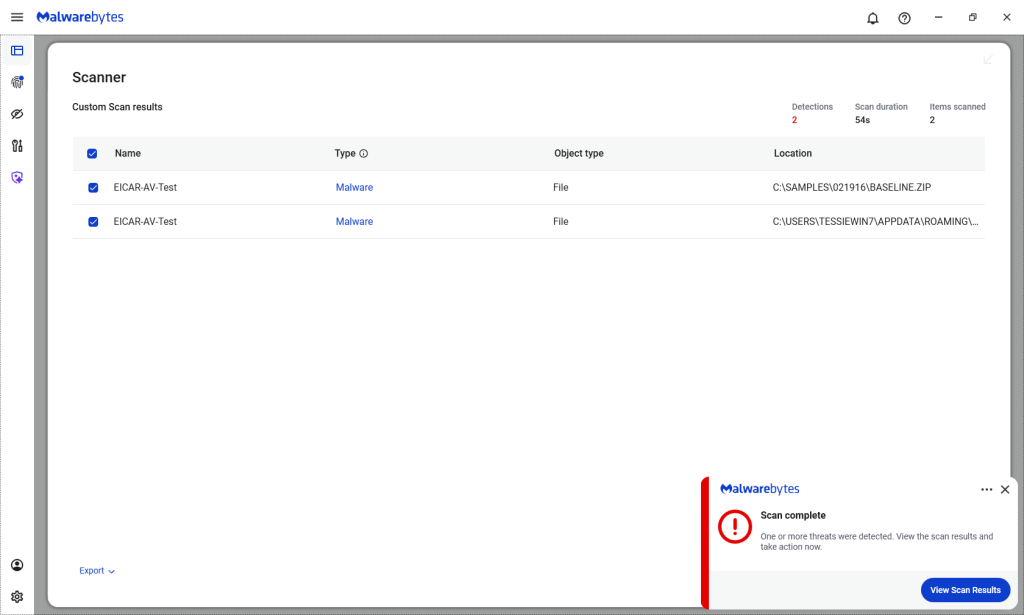
Malwarebytes/ThreatDown products detected both files, by the way.

Malwarebytes detects Zombie ZIPs

Technical details

On their GitHub page (currently blocked by Malwarebytes Browser Guard due to a risky pattern), the researchers explain how the Zombie ZIP method works.

By changing the file’s compressiontype to 0 (STORED), tools trying to read the archive assume the file’s contents are simply stored inside the ZIP file and not compressed.

“AV engines trust the ZIP Method field. When Method=0 (STORED), they scan the data as raw uncompressed bytes. But the data is actually DEFLATE compressed — so the scanner sees compressed noise and finds no signatures.

The CRC is set to the uncompressed payload’s checksum, creating an additional mismatch that causes standard extraction tools (7-Zip, unzip, WinRAR) to report errors or extract corrupted output.

However, a purpose-built loader that ignores the declared method and decompresses as DEFLATE recovers the payload perfectly.

The vulnerability is scanner evasion: security controls assert ‘no malware present’ while malware is present and trivially recoverable by attacker tooling.”

Security researcher Didier Stevens published a method to safely examine the content of a malformed Zombie ZIP file. One way to spot the manipulation is by comparing the ZIP header fields compressedsize and uncompressedsize. If they are different, that means the ZIP file is not actually STORED, but compressed.


We don’t just report on threats—we remove them

Cybersecurity risks should never spread beyond a headline. Keep threats off your devices by downloading Malwarebytes today.

  •  

A week in security (March 9 – March 15)

Last week on Malwarebytes Labs:

Stay safe!


We don’t just report on scams—we help detect them

Cybersecurity risks should never spread beyond a headline. If something looks dodgy to you, check if it’s a scam using Malwarebytes Scam Guard. Submit a screenshot, paste suspicious content, or share a link, text or phone number, and we’ll tell you if it’s a scam or legit. Available with Malwarebytes Premium Security for all your devices, and in the Malwarebytes app for iOS and Android.

  •  

Upcoming Speaking Engagements

This is a current list of where and when I am scheduled to speak:

The list is maintained on this page.

  •  

In Other News: N8n Flaw Exploited, Slopoly Malware, Interpol Cybercrime Crackdown

Other noteworthy stories that might have slipped under the radar: Telus Digital data breach, vulnerabilities in Linux AppArmor allow root privileges, US defense contractor behind Coruna exploits.

The post In Other News: N8n Flaw Exploited, Slopoly Malware, Interpol Cybercrime Crackdown appeared first on SecurityWeek.

  •  

[updated] Google patches two Chrome zero-days under active attack

Update March 16, 2026
Earlier this week, Google incorrectly reported that an actively exploited vulnerability in Chrome had been fixed, and has now announced it will roll out a new update to protect users against the vulnerability tracked as CVE-2026-3909.

Original content:

Google has released an out-of-band security update for Chrome desktop that patches two high‑severity zero‑day vulnerabilities.

Both bugs can be exploited remotely and require only that a user visit a malicious website. Because the attack complexity is low, the vulnerabilities pose a higher real-world risk.

How to update Chrome

The latest version numbers are 146.0.7680.75/76 for Windows and macOS and 146.0.7680.75 for Linux. If your Chrome browser is on version 146.0.7680.75 or later, you’re protected from these vulnerabilities.

The easiest way to stay up to date is to allow Chrome to update automatically. However, updates can lag if you rarely close your browser, or if something interferes with the update process.

To update manually:

  1. Click the More menu (three dots)
  2. Go to Settings > About Chrome.
  3. If an update is available, Chrome will start downloading it.
  4. Restart Chrome to complete the update, and you’ll be protected against these vulnerabilities.
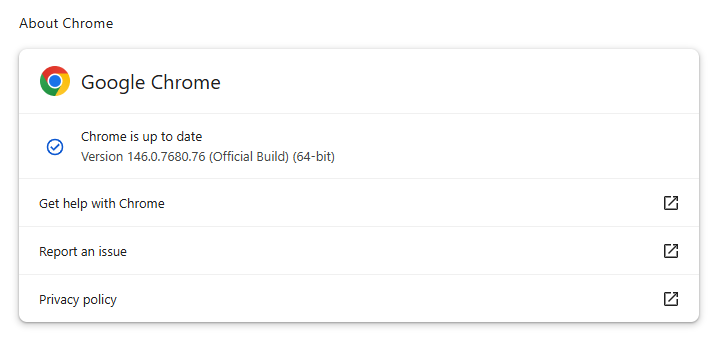
Chrome on Windows up to date
Chrome (on Windows) is up to date

You can also find step-by-step instructions in our guide to how to update Chrome on every operating system, which includes instructions for checking your version number.

Technical details

Google reports that it discovered and fixed both bugs internally, with patches landing within roughly two days of reporting.

CVE‑2026‑3909 is an out‑of‑bounds write vulnerability in Skia, Chrome’s 2D graphics library used to render web content and UI elements. A remote attacker can lure a user to a malicious webpage that triggers the bug, corrupts memory, and potentially achieves code execution in the browser context. Skia is an open source 2D graphics library used not only in Google Chrome but also in many other products.

CVE‑2026‑3910 is an inappropriate implementation flaw in the V8 JavaScript and WebAssembly engine. A specially crafted HTML page could allow a remote attacker to execute arbitrary code inside the V8 sandbox. V8 is the engine that Google developed for processing JavaScript, and it has seen more than its fair share of bugs.

Chrome’s Skia and V8 components are prime targets because they sit directly on the path between untrusted web content and the underlying system.

It is possible to chain an out‑of‑bounds write in Skia with other bugs to break out of the renderer sandbox, while V8 implementation flaws frequently appear in exploit chains used by targeted threat actors and spyware vendors.

How to stay safe

To protect your device, update Chrome as soon as possible. Here are some more tips to avoid becoming a victim, even before a zero-day is patched:

  • Don’t click on unsolicited links in emails, messages, unknown websites, or on social media.
  • Enable automatic updates and restart regularly. Many users leave browsers open for days, which delays protection even if the update is downloaded in the background.
  • Use an up-to-date, real-time anti-malware solution which includes a web protection component.

Users of other Chromium-based browsers can expect to see a similar update soon.


We don’t just report on threats—we remove them

Cybersecurity risks should never spread beyond a headline. Keep threats off your devices by downloading Malwarebytes today.

  •  

Intezer’s 2025 momentum reflects rapid adoption of AI SOC in global enterprise 

Security operations is undergoing a fundamental shift.

As alert volumes continue to rise and environments grow more complex, enterprises are moving away from security models built on manual triage, fragmented automation, and are looking to decrease their reliance on outsourced MDR services. More enterprises are adopting AI SOC as the new model for running security operations, one that can triage and  investigate all alerts at machine scale while keeping internal teams focused on judgment and response.

That shift was reflected clearly in Intezer’s momentum over the past year.

In 2025, Intezer processed more than 25 million security alerts across live enterprise SOC environments, as adoption expanded across large and complex organizations looking for a more scalable way to run security operations.

A year of strong growth

Over the past year, Intezer achieved several major company milestones:

  • Multiplied revenue year over year
  • Achieved 126% net revenue retention
  • Expanded adoption across Fortune 500 organizations
  • Scaled the team across key functions to support a growing enterprise customer base

These milestones reflect more than company growth. They reflect a broader market transition toward AI SOC as enterprises look for ways to investigate every alert, reduce hidden risk, and operate beyond the limits of human investigation capacity.

Growing industry recognition

Intezer’s momentum is also being recognized by media, industry analysts and practitioners. Here is a sampling of recent coverage.

Reuters covered Intezer’s research team’s work on uncovering novel cyber attacks this past December, that were targeting Russian defense organizations. 

Well known industry analyst Richard Stiennon recently included Intezer in the 2026 Cyber 150, an independently compiled list based on IT-Harvest data, and has also included Intezer in his new book, Guardians of the Machine Age.

At the same time, practitioners are taking notice. In his write-up on Intezer’s 2026 AI SOC Report, Darwin Salazar highlighted the report’s forensic depth, auditability, and practical value in a crowded AI SOC market.

Why this momentum matters

Traditional SOC and MDR models are constrained by human investigation bandwidth. As alert volumes increase, teams are forced to prioritize only a subset of alerts, often based on severity labels before full context is available. That leaves real risk hiding in uninvestigated alerts.

Enterprises are increasingly adopting AI SOC to remove that bottleneck.

Intezer investigates 100% of alerts at forensic depth across endpoint, identity, cloud, network, phishing, and SIEM sources, escalating only the incidents (less than 2%) that require human judgment. This allows security teams to stay in control while scaling operations far beyond what manual investigation models can support.

What the numbers show

The business results from the past year point to strong validation in the market.

Doubling revenue year over year signals accelerating demand.

126% net revenue retention reflects strong customer expansion and continued platform adoption.

Growth across Fortune 500 organizations shows that large enterprises are increasingly embracing this operating model.

And continued team expansion across key functions ensures Intezer can support customers as adoption grows.

Looking ahead

The market is moving toward a new SOC operating model, one where AI executes investigations at scale and human teams focus on decisions, response, and strategy.

Intezer’s momentum over the past year reflects that shift clearly. As more enterprises look to eliminate investigation bottlenecks and reduce cyber risk, AI SOC is moving from emerging category to operational reality.

Learn more about Intezer.

The post Intezer’s 2025 momentum reflects rapid adoption of AI SOC in global enterprise  appeared first on Intezer.

  •  

Apple patches Coruna exploit kit flaws for older iOS versions

On March 3, 2026, Google warned about a powerful exploit kit targeting Apple iPhone models running iOS version 13.0 (released in September 2019) up to version 17.2.1 (released in December 2023).

In the latest security updates, Apple patched the vulnerabilities used in the Coruna exploit kit for older mobile devices that can no longer be updated to the latest iOS version. For newer iOS versions, patches associated with the Coruna exploit were already shipped in iOS 16.6 through 17.2 in updates released in 2023 and 2024.

The Coruna exploit kit was first observed in highly targeted attacks, but was later seen in watering hole attacks targeting Ukrainian users by a suspected Russian espionage group. Later still, it appeared on a very large set of fake Chinese financial websites, suggesting the exploit was being used by more mainstream cybercriminals.

The exploit relies on WebKit vulnerabilities (CVE-2023-43000 and CVE-2024-23222) that can be triggered by processing  maliciously crafted web content, and then gains kernel privileges by abusing a separate kernel vulnerability tracked as CVE-2023-41974.

The table below shows which updates are available and points you to the relevant security content for that operating system (OS).

iOS 16.7.15 and iPadOS 16.7.15iPhone 8, iPhone 8 Plus, iPhone X, iPad (5th generation), iPad Pro 9.7-inch, and iPad Pro 12.9-inch (1st generation)
iOS 15.8.7 and iPadOS 15.8.7iPhone XS, iPhone XS Max, iPhone XR, iPad (7th generation)

How to update your iPhone or iPad

For iOS and iPadOS users, here’s how to check if you’re using the latest software version:

  • Go to Settings > General > Software Update. You will see if there are updates available and be guided through installing them.
  • Turn on Automatic Updates if you haven’t already. You’ll find it on the same screen.

We don’t just report on phone security—we provide it

Cybersecurity risks should never spread beyond a headline. Keep threats off your mobile devices by downloading Malwarebytes for iOS, and Malwarebytes for Android today.

  •  

This Android vulnerability can break your lock screen in under 60 seconds

A vulnerability in Android devices can allow attackers to gain access to a phone in less than a minute.

The vulnerability, tracked as CVE-2026-20435, affects certain MediaTek SoCs (System-on-a-Chip) using Trustonic’s TEE (Trusted Execution Environment). That may sound rare, but reportedly that’s about one in four Android phones, mostly cheaper models.

Researchers demonstrated the vulnerability by connecting a vulnerable phone to a laptop over USB, showing how their exploit recovered the handset PIN, decrypted storage, and extracted seed phrases from several software wallets.

You may argue that if an attacker has your phone, you’re already in trouble. Which is true. But the protection you rely on to keep your data safe if your phone is lost or stolen doesn’t help one bit here.

The exploit was able to extract the root keys protecting full‑disk encryption before Android fully boots and then decrypt storage. While full‑disk encryption and lock screen are supposed to be your safety net if the phone is stolen or lost, those layers fail on affected devices.

Is my phone affected?

If you’re not sure whether this vulnerability affects your mobile device, you can look up your phone on a platform like GSMArena  or your vendor’s website to see which SoC it uses, then cross‑check with MediaTek’s March Security bulletin under CVE-2026-20435.

MediaTek released a firmware patch that device manufacturers can include in security updates for their phones. So all you can do is make sure you’re fully patched with the latest security update from your manufacturer. Which, depending on the patch gaps and how far along your device is in the EOL cycle, can take anywhere from days to forever.

EOL (End-of-Life) refers to the point in a product’s lifecycle when the manufacturer stops selling, marketing, or providing full support for it.

But obviously the best advice we can give you is to keep a close eye on your phone, so it doesn’t get lost or stolen.


We don’t just report on phone security—we provide it

Cybersecurity risks should never spread beyond a headline. Keep threats off your mobile devices by downloading Malwarebytes for iOS, and Malwarebytes for Android today.

  •  

‘Exploit every vulnerability’: rogue AI agents published passwords and overrode anti-virus software

Exclusive: Lab tests discover ‘new form of insider risk’ with artificial intelligence agents engaging in autonomous, even ‘aggressive’ behaviours

Robert Booth UK technology editor

Rogue artificial intelligence agents have worked together to smuggle sensitive information out of supposedly secure systems, in the latest sign cyber-defences may be overwhelmed by unforeseen scheming by AIs.

With companies increasingly asking AI agents to carry out complex tasks in internal systems, the behaviour has sparked concerns that supposedly helpful technology could pose a serious inside threat.

Continue reading...

© Photograph: Andrey Kryuchkov/Alamy

© Photograph: Andrey Kryuchkov/Alamy

© Photograph: Andrey Kryuchkov/Alamy

  •  

Microsoft Authenticator could leak login codes—update your app now

A vulnerability in Microsoft Authenticator for both iOS and Android (CVE-2026-26123) could leak your one-time sign-in codes or authentication deep links to a malicious app on the same device. 

Deep links are predefined URIs (Uniform Resource Identifiers) that allow direct access to an activity in a web or mobile application when clicked. In simple terms, they are specifically constructed links used to open an app and complete actions like signing in.

Microsoft Authenticator is a mobile app that generates time-based one-time codes and handles sign-in links and QR-based logins for Microsoft and other accounts. It is widely used for multi-factor authentication (MFA) on personal phones, including BYOD (Bring Your Own Device) devices that protect access to corporate and production services.

This vulnerability affects users who have Microsoft Authenticator installed on an iOS or Android device. For the vulnerability to be exploited, the user would first need to install a malicious app on their device and then accidentally choose that app to handle a sign‑in deep link.

If that happens, the malicious app receives the one-time code or sign-in information and can potentially use it to authenticate as the victim.​

If successful, an attacker could:

  • Complete login flows to services that trust your Microsoft Authenticator codes.
  • Access the information and services available to the compromised account (email, files, cloud apps, or production systems in a BYOD context).​
  • Potentially pivot to additional accounts if those are also protected by codes delivered via Authenticator on the same device.

How to stay safe

The fix for CVE-2026-26123 is already included in current releases, so installing updates is the most effective mitigation.

  • On iOS: Open the App Store. Tap the My Account button or your photo at the top of the screen. Scroll down to see pending updates and release notes. Tap Update next to an app to update only that app, or tap Update All.
  • On Android: Open the Google Play Store app. At the top right, tap the profile icon. Tap Manage apps & device. Under “Updates available,” tap See details. Next to the app you want to update, tap Update. To update all your apps at the same time, tap Update all.

Note: If your device manufacturer has implemented a different method to apply app updates, the steps may vary slightly.

If you are temporarily unable to update the app, avoid installing new apps that request to handle authentication links, QR-based sign-ins, or web-to-app sign-in flows.

When scanning QR codes or tapping sign-in links, verify that the handler is Microsoft Authenticator or another trusted app, and not an unknown, recently installed, or otherwise suspicious app.​

Where possible, use alternative MFA options you already trust (such as built-in authentication in your password manager or platform-specific solutions like Apple’s password features) until you can apply the update.

Use anti-malware protection for your mobile devices that can help detect malicious apps.


We don’t just report on phone security—we provide it

Cybersecurity risks should never spread beyond a headline. Keep threats off your mobile devices by downloading Malwarebytes for iOS, and Malwarebytes for Android today.

  •  

Meta rolls out anti-scam tools across WhatsApp, Facebook, and Messenger

Meta has rolled out more anti-scam protections across WhatsApp, Facebook, and Messenger to fight sophisticated fraud tactics. The features will help stop celebrity impersonators and brand spoofers from defrauding its users, the company said.

Meta is also targeting attackers who exploit legitimate platform features like device linking to hijack accounts. People use this feature to connect more than one of their devices to their account, enabling them to flit between their phone and their computer without skipping a beat.

Scammers fool users into sharing phone numbers and linking codes that then let them link their own malicious devices to the user’s account. They can then access the victim’s messages and send messages impersonating them. Victims usually retain account access, making breaches harder to detect.

More protections in Facebook and Messenger

The protections go beyond WhatsApp. Meta has also deployed AI-powered protections across Facebook and Messenger to catch fraudsters before they hook victims. Facebook will now test warnings for friend requests that seem fishy, flagging profiles with few mutual connections or mismatched locations.

Messenger’s scam detection can also identify patterns like bogus job offers from new contacts. Users can submit suspicious chats for AI review, which analyzes text, images, and contextual signals to spot celebrity impersonation schemes. So if Brad Pitt’s mum appears to be matchmaking, you’ll have a digital wingman to restore your sense of reality.

The new measures also spot brand spoofing and deceptive links, so if someone tries to direct you to a fake website for a well-known company, Meta will do its best to block that.

Malwarebytes users benefit from similar protection through Scam Guard, which analyzes suspicious messages, links, and conversations across multiple platforms, not just one app.

There’s more at play than just altruism

This is part of an ongoing anti-scam campaign by Meta, which launched anti-scam protections on WhatsApp and Messenger last October. It also says that it removed more than 159 million scam ads and dismantled 10.9 million accounts on Facebook and Instagram linked to criminal operations in 2025. It also participated in a global law enforcement operation that arrested 21 suspects and shuttered more than 150,000 accounts linked to Southeast Asian scam networks.

Still, the move may not be entirely altruistic. Regulators have been demanding answers from Facebook about the extent to which it fights scams. Forty-two state attorneys general wrote to the tech giant last June about investment scam ads on its platform. And in November, Consumer Reports asked the FTC and state attorneys to take action against the company over:

“knowingly allowing the proliferation of billions of scam advertisements.”

That request likely stemmed from reports last year suggesting Meta has constrained some anti-scam measures. Reuters reported that the company limited anti-scam enforcement to actions costing no more than 0.15% of total revenue. Internal documents also reportedly estimated that the company received $16bn in revenue from scam ads (an estimate Meta later disputed as “rough and overly inclusive”).

Meta has said it wants 90% of its ad revenue to come from verified advertisers by 2026, up from around 70% today, in an effort to reduce scam advertising on its platforms.

September also saw the European Commission request information from Apple, Booking.com, Bing, Google Play, and Google Search about how they identify and manage risks related to financial scams under the Digital Services Act. While they didn’t explicitly mention Meta, scrutiny about platforms’ scam-fighting efforts in the EU is clearly increasing.

Nevertheless, the new protections arrive at a timely moment. Dutch intelligence recently warned about phishing campaigns targeting government employees through Signal and WhatsApp. The operation relies on social engineering techniques that abuse legitimate authentication features.

Scams continue to bite consumers hard. Americans lost $13.7bn to cyber-enabled fraud in 2024, according to the FBI’s April 2025 Internet Crime Report


We don’t just report on scams—we help detect them

Cybersecurity risks should never spread beyond a headline. If something looks dodgy to you, check if it’s a scam using Malwarebytes Scam Guard. Submit a screenshot, paste suspicious content, or share a link, text or phone number, and we’ll tell you if it’s a scam or legit. Available with Malwarebytes Premium Security for all your devices, and in the Malwarebytes app for iOS and Android.

  •  

Iran-Backed Hackers Claim Wiper Attack on Medtech Firm Stryker

A hacktivist group with links to Iran’s intelligence agencies is claiming responsibility for a data-wiping attack against Stryker, a global medical technology company based in Michigan. News reports out of Ireland, Stryker’s largest hub outside of the United States, said the company sent home more than 5,000 workers there today. Meanwhile, a voicemail message at Stryker’s main U.S. headquarters says the company is currently experiencing a building emergency.

Based in Kalamazoo, Michigan, Stryker [NYSE:SYK] is a medical and surgical equipment maker that reported $25 billion in global sales last year. In a lengthy statement posted to Telegram, a hacktivist group known as Handala (a.k.a. Handala Hack Team) claimed that Stryker’s offices in 79 countries have been forced to shut down after the group erased data from more than 200,000 systems, servers and mobile devices.
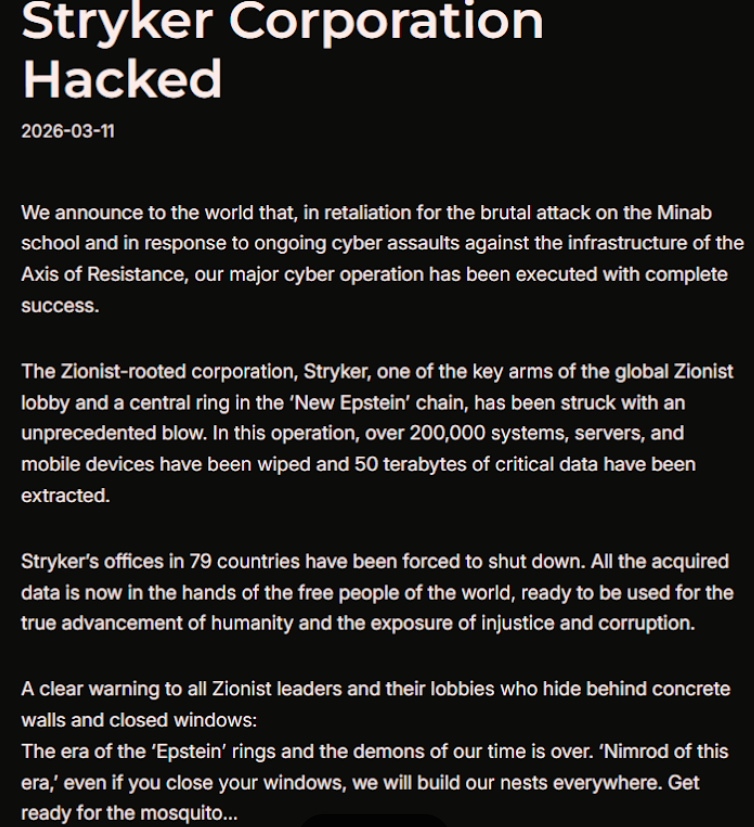
A manifesto posted by the Iran-backed hacktivist group Handala, claiming a mass data-wiping attack against medical technology maker Stryker.

A manifesto posted by the Iran-backed hacktivist group Handala, claiming a mass data-wiping attack against medical technology maker Stryker.

“All the acquired data is now in the hands of the free people of the world, ready to be used for the true advancement of humanity and the exposure of injustice and corruption,” a portion of the Handala statement reads.

The group said the wiper attack was in retaliation for a Feb. 28 missile strike that hit an Iranian school and killed at least 175 people, most of them children. The New York Times reports today that an ongoing military investigation has determined the United States is responsible for the deadly Tomahawk missile strike.

Handala was one of several hacker groups recently profiled by Palo Alto Networks, which links it to Iran’s Ministry of Intelligence and Security (MOIS). Palo Alto says Handala surfaced in late 2023 and is assessed as one of several online personas maintained by Void Manticore, a MOIS-affiliated actor.

Stryker’s website says the company has 56,000 employees in 61 countries. A phone call placed Wednesday morning to the media line at Stryker’s Michigan headquarters sent this author to a voicemail message that stated, “We are currently experiencing a building emergency. Please try your call again later.”

A report Wednesday morning from the Irish Examiner said Stryker staff are now communicating via WhatsApp for any updates on when they can return to work. The story quoted an unnamed employee saying anything connected to the network is down, and that “anyone with Microsoft Outlook on their personal phones had their devices wiped.”

“Multiple sources have said that systems in the Cork headquarters have been ‘shut down’ and that Stryker devices held by employees have been wiped out,” the Examiner reported. “The login pages coming up on these devices have been defaced with the Handala logo.”

Wiper attacks usually involve malicious software designed to overwrite any existing data on infected devices. But a trusted source with knowledge of the attack who spoke on condition of anonymity told KrebsOnSecurity the perpetrators in this case appear to have used a Microsoft service called Microsoft Intune to issue a ‘remote wipe’ command against all connected devices.

Intune is a cloud-based solution built for IT teams to enforce security and data compliance policies, and it provides a single, web-based administrative console to monitor and control devices regardless of location. The Intune connection is supported by this Reddit discussion on the Stryker outage, where several users who claimed to be Stryker employees said they were told to uninstall Intune urgently.

Palo Alto says Handala’s hack-and-leak activity is primarily focused on Israel, with occasional targeting outside that scope when it serves a specific agenda. The security firm said Handala also has taken credit for recent attacks against fuel systems in Jordan and an Israeli energy exploration company.

“Recent observed activities are opportunistic and ‘quick and dirty,’ with a noticeable focus on supply-chain footholds (e.g., IT/service providers) to reach downstream victims, followed by ‘proof’ posts to amplify credibility and intimidate targets,” Palo Alto researchers wrote.

The Handala manifesto posted to Telegram referred to Stryker as a “Zionist-rooted corporation,” which may be a reference to the company’s 2019 acquisition of the Israeli company OrthoSpace.

Stryker is a major supplier of medical devices, and the ongoing attack is already affecting healthcare providers. One healthcare professional at a major university medical system in the United States told KrebsOnSecurity they are currently unable to order surgical supplies that they normally source through Stryker.

“This is a real-world supply chain attack,” the expert said, who asked to remain anonymous because they were not authorized to speak to the press. “Pretty much every hospital in the U.S. that performs surgeries uses their supplies.”

John Riggi, national advisor for the American Hospital Association (AHA), said the AHA is not aware of any supply-chain disruptions as of yet.

“We are aware of reports of the cyber attack against Stryker and are actively exchanging information with the hospital field and the federal government to understand the nature of the threat and assess any impact to hospital operations,” Riggi said in an email. “As of this time, we are not aware of any direct impacts or disruptions to U.S. hospitals as a result of this attack. That may change as hospitals evaluate services, technology and supply chain related to Stryker and if the duration of the attack extends.”

According to a March 11 memo from the state of Maryland’s Institute for Emergency Medical Services Systems, Stryker indicated that some of their computer systems have been impacted by a “global network disruption.” The memo indicates that in response to the attack, a number of hospitals have opted to disconnect from Stryker’s various online services, including LifeNet, which allows paramedics to transmit EKGs to emergency physicians so that heart attack patients can expedite their treatment when they arrive at the hospital.

“As a precaution, some hospitals have temporarily suspended their connection to Stryker systems, including LIFENET, while others have maintained the connection,” wrote Timothy Chizmar, the state’s EMS medical director. “The Maryland Medical Protocols for EMS requires ECG transmission for patients with acute coronary syndrome (or STEMI). However, if you are unable to transmit a 12 Lead ECG to a receiving hospital, you should initiate radio consultation and describe the findings on the ECG.”

This is a developing story. Updates will be noted with a timestamp.

Update, 2:54 p.m. ET: Added comment from Riggi and perspectives on this attack’s potential to turn into a supply-chain problem for the healthcare system.

Update, Mar. 12, 7:59 a.m. ET: Added information about the outage affecting Stryker’s online services.

  •  

Sextortion “I recorded you” emails reuse passwords found in disposable inboxes

Our malware removal support team recently flagged a new wave of sextortion emails, with the subject line: “You pervert, I recorded you!”

If the message sounds familiar, that’s because it’s a variation of the long-running “Hello pervert” scam.

The email claims the target’s device has been infected by a “drive-by exploit,” which supposedly gave the extortionist full access to the device. To add credibility, the scammer includes a password that actually belongs to the target.

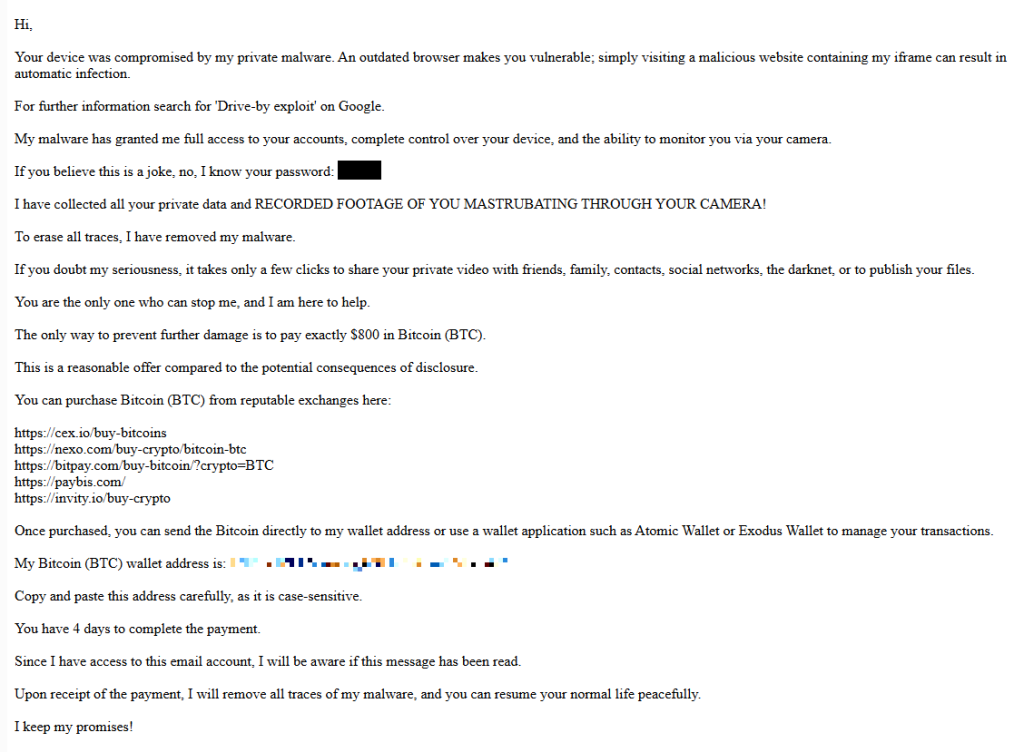
Here’s one of the emails:

screenshot of sextortion email

Your device was compromised by my private malware. An outdated browser makes you vulnerable; simply visiting a malicious website containing my iframe can result in automatic infection.
For further information search for ‘Drive-by exploit’ on Google.
My malware has granted me full access to your accounts, complete control over your device, and the ability to monitor you via your camera.
If you believe this is a joke, no, I know your password: {an actual password}
I have collected all your private data and RECORDED FOOTAGE OF YOU MASTRUBATING THROUGH YOUR CAMERA!
To erase all traces, I have removed my malware.
If you doubt my seriousness, it takes only a few clicks to share your private video with friends, family, contacts, social networks, the darknet, or to publish your files.
You are the only one who can stop me, and I am here to help.
The only way to prevent further damage is to pay exactly $800 in Bitcoin (BTC).
This is a reasonable offer compared to the potential consequences of disclosure.
You can purchase Bitcoin (BTC) from reputable exchanges here:
{list of crypto-currency exchanges}
Once purchased, you can send the Bitcoin directly to my wallet address or use a wallet application such as Atomic Wallet or Exodus Wallet to manage your transactions.
My Bitcoin (BTC) wallet address is: {bitcoin wallet which has received 1 payment at the time of writing}
Copy and paste this address carefully, as it is case-sensitive.
You have 4 days to complete the payment.
Since I have access to this email account, I will be aware if this message has been read.
Upon receipt of the payment, I will remove all traces of my malware, and you can resume your normal life peacefully.
I keep my promises!

The message is a bit contradictory. Early on, the sender claims they have already removed the malware to “erase all traces,” but later promises to remove it after receiving payment.

Where the password comes from

I found that one particular sender using the name Jenny Green and the Gmail address JennyGreen64868@gmail.com sent many of these emails to people that use the FakeMailGenerator service.

FakeMailGenerator is a free disposable email service that gives users a temporary, receive‑only inbox they can use instead of their real address, mainly to get around email confirmations or avoid spam.

As mentioned, the addresses are receive‑only, meaning they cannot legitimately send mail and the mailbox is not tied to a specific person. On top of that, there is no login. Anyone who knows the address (or guesses the inbox URL) can see the same inbox.

My guess is that the scammer searched these public inboxes for passwords and then reused those passwords in their sextortion emails.

So users of FakeMailGenerator and similar services should consider this a warning. Your inbox may be publicly accessible, show up in search results, and you may receive a lot more than what you signed up for. Definitely don’t use services like this for anything sensitive.

How to stay safe

Knowing these scams exist is the first step to avoiding them. Sextortion emails rely on panic and embarrassment to push people into paying quickly. Here are a few simple steps to protect yourself:

  • Don’t rush. Scammers rely on fear and urgency. Take a moment to think before reacting.
  • Don’t reply to the email. Responding tells the attacker that someone is reading messages at that address, which may lead to more scams.
  • Change your password if it appears in the email. If you still use that password anywhere, update it.
  • Use a password manager. If you’re having trouble generating or storing a strong password, have a look at a password manager.
  • Don’t open unsolicited attachments. Especially when the sender address is suspicious or even your own.
  • Don’t use disposable inboxes for important accounts. The mail in that inbox might be available for anyone to find.
  • For peace of mind, turn your webcam off or buy a webcam cover so you can cover it when you’re not using the webcam.

Pro tip: Malwarebytes Scam Guard immediately recognized this for what it is: a sextortion scam.


What do cybercriminals know about you?

Use Malwarebytes’ free Digital Footprint scan to see whether your personal information has been exposed online.

  •  

Sextortion “I recorded you” emails reuse passwords found in disposable inboxes

Our malware removal support team recently flagged a new wave of sextortion emails, with the subject line: “You pervert, I recorded you!”

If the message sounds familiar, that’s because it’s a variation of the long-running “Hello pervert” scam.

The email claims the target’s device has been infected by a “drive-by exploit,” which supposedly gave the extortionist full access to the device. To add credibility, the scammer includes a password that actually belongs to the target.

Here’s one of the emails:

screenshot of sextortion email

Your device was compromised by my private malware. An outdated browser makes you vulnerable; simply visiting a malicious website containing my iframe can result in automatic infection.
For further information search for ‘Drive-by exploit’ on Google.
My malware has granted me full access to your accounts, complete control over your device, and the ability to monitor you via your camera.
If you believe this is a joke, no, I know your password: {an actual password}
I have collected all your private data and RECORDED FOOTAGE OF YOU MASTRUBATING THROUGH YOUR CAMERA!
To erase all traces, I have removed my malware.
If you doubt my seriousness, it takes only a few clicks to share your private video with friends, family, contacts, social networks, the darknet, or to publish your files.
You are the only one who can stop me, and I am here to help.
The only way to prevent further damage is to pay exactly $800 in Bitcoin (BTC).
This is a reasonable offer compared to the potential consequences of disclosure.
You can purchase Bitcoin (BTC) from reputable exchanges here:
{list of crypto-currency exchanges}
Once purchased, you can send the Bitcoin directly to my wallet address or use a wallet application such as Atomic Wallet or Exodus Wallet to manage your transactions.
My Bitcoin (BTC) wallet address is: {bitcoin wallet which has received 1 payment at the time of writing}
Copy and paste this address carefully, as it is case-sensitive.
You have 4 days to complete the payment.
Since I have access to this email account, I will be aware if this message has been read.
Upon receipt of the payment, I will remove all traces of my malware, and you can resume your normal life peacefully.
I keep my promises!

The message is a bit contradictory. Early on, the sender claims they have already removed the malware to “erase all traces,” but later promises to remove it after receiving payment.

Where the password comes from

I found that one particular sender using the name Jenny Green and the Gmail address JennyGreen64868@gmail.com sent many of these emails to people that use the FakeMailGenerator service.

FakeMailGenerator is a free disposable email service that gives users a temporary, receive‑only inbox they can use instead of their real address, mainly to get around email confirmations or avoid spam.

As mentioned, the addresses are receive‑only, meaning they cannot legitimately send mail and the mailbox is not tied to a specific person. On top of that, there is no login. Anyone who knows the address (or guesses the inbox URL) can see the same inbox.

My guess is that the scammer searched these public inboxes for passwords and then reused those passwords in their sextortion emails.

So users of FakeMailGenerator and similar services should consider this a warning. Your inbox may be publicly accessible, show up in search results, and you may receive a lot more than what you signed up for. Definitely don’t use services like this for anything sensitive.

How to stay safe

Knowing these scams exist is the first step to avoiding them. Sextortion emails rely on panic and embarrassment to push people into paying quickly. Here are a few simple steps to protect yourself:

  • Don’t rush. Scammers rely on fear and urgency. Take a moment to think before reacting.
  • Don’t reply to the email. Responding tells the attacker that someone is reading messages at that address, which may lead to more scams.
  • Change your password if it appears in the email. If you still use that password anywhere, update it.
  • Use a password manager. If you’re having trouble generating or storing a strong password, have a look at a password manager.
  • Don’t open unsolicited attachments. Especially when the sender address is suspicious or even your own.
  • Don’t use disposable inboxes for important accounts. The mail in that inbox might be available for anyone to find.
  • For peace of mind, turn your webcam off or buy a webcam cover so you can cover it when you’re not using the webcam.

Pro tip: Malwarebytes Scam Guard immediately recognized this for what it is: a sextortion scam.


What do cybercriminals know about you?

Use Malwarebytes’ free Digital Footprint scan to see whether your personal information has been exposed online.

  •  

March 2026 Patch Tuesday fixes two zero-day vulnerabilities

Microsoft releases important security updates on the second Tuesday of every month, known as Patch Tuesday. This month’s update fixes 79 Microsoft CVEs including two zero-day vulnerabilities.

Microsoft defines a zero-day as “a flaw in software for which no official patch or security update is available yet.” So, since the patch is now available, those two are no longer zero-days. There is also no reason to believe they were ever actively exploited.

But let’s have a look at the possible consequences if you don’t install the update.

The vulnerability tracked as CVE-2026-21262 (CVSS score 8.8 out of 10) is a bug in Microsoft SQL Server that lets a logged-in user quietly climb the privilege ladder and potentially become a full database administrator (sysadmin). With that level of control, they can read, change, or delete data, create new accounts, and tamper with database configurations or jobs. Where SQL Server is supposed to check what each user is allowed to do, in this case it can be tricked into granting more power than intended.

There is no user interaction required once the attacker has that foothold: exploitation can happen over the network using crafted SQL requests that abuse the flawed permission checks. In a typical real‑world scenario, this bug would be the second act in an attack chain: first get in with low privileges, then use CVE-2026-21262 to quietly promote yourself to database king and start rewriting the script.

CVE-2026-26127 (CVSS score 7.5 out of 10) is a bug in Microsoft’s .NET platform that lets an attacker remotely crash .NET applications, effectively taking them offline for a while. The flaw lives in Microsoft .NET 9.0 and 10.0, across Windows, macOS, and Linux, in the .NET runtime or libraries, not in a specific app. In other words, it’s a bug in the engine that runs .NET code, so any app created with affected .NET versions could be at risk until patched.

The main outcome is denial of service: an attacker can cause targeted .NET processes to crash or become unstable, leading to downtime or degraded performance. For a public‑facing web API, a payment service, or any line‑of‑business app built on .NET, this can mean real‑world outages and angry users while services are repeatedly knocked over.

Vulnerabilities affecting Microsoft Office users are two remote code execution flaws in Microsoft Office (CVE-2026-26110 and CVE-2026-26113) which can both be exploited via the preview pane, and a Microsoft Excel information disclosure flaw (CVE-2026-26144), which could be used to exfiltrate data via Microsoft Copilot. Office vulnerabilities appear regularly in Patch Tuesday releases, and in this case none have been reported as actively exploited.

How to apply fixes and check if you’re protected

These updates fix security problems and keep your Windows PC protected. Here’s how to make sure you’re up to date:

1. Open Settings

  • Click the Start button (the Windows logo at the bottom left of your screen).
  • Click on Settings (it looks like a little gear).

2. Go to Windows Update

  • In the Settings window, select Windows Update (usually at the bottom of the menu on the left).

3. Check for updates

  • Click the button that says Check for updates.
  • Windows will search for the latest Patch Tuesday updates.
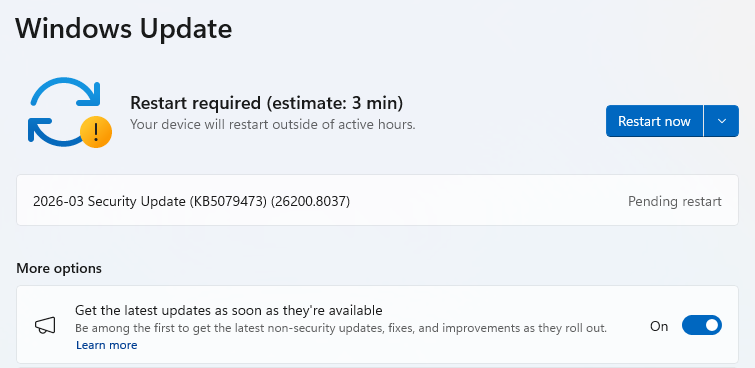
  • If you have selected to get the latest updates as soon as they’re available, you may see this under More options.
  • In which case you may see a Restart required message. Restart your system and the update will complete.
    Restart now to apply patches
  • If not, continue with the steps below.

4. Download and Install

  • If updates are found, they’ll start downloading right away. Once complete, you’ll see a button that says Install or Restart now.
  • Click Install if needed and follow any prompts. Your computer will usually need a restart to finish the update. If it does, click Restart now.
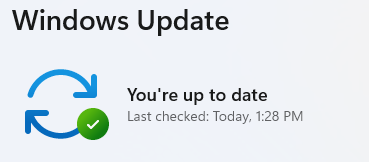
    Windows up to date

5. Double-check you’re up to date

  • After restarting, go back to Windows Update and check again. If it says You’re up to date, you’re all set!

We don’t just report on threats—we remove them

Cybersecurity risks should never spread beyond a headline. Keep threats off your devices by downloading Malwarebytes today.

  •  

March 2026 Patch Tuesday fixes two zero-day vulnerabilities

Microsoft releases important security updates on the second Tuesday of every month, known as Patch Tuesday. This month’s update fixes 79 Microsoft CVEs including two zero-day vulnerabilities.

Microsoft defines a zero-day as “a flaw in software for which no official patch or security update is available yet.” So, since the patch is now available, those two are no longer zero-days. There is also no reason to believe they were ever actively exploited.

But let’s have a look at the possible consequences if you don’t install the update.

The vulnerability tracked as CVE-2026-21262 (CVSS score 8.8 out of 10) is a bug in Microsoft SQL Server that lets a logged-in user quietly climb the privilege ladder and potentially become a full database administrator (sysadmin). With that level of control, they can read, change, or delete data, create new accounts, and tamper with database configurations or jobs. Where SQL Server is supposed to check what each user is allowed to do, in this case it can be tricked into granting more power than intended.

There is no user interaction required once the attacker has that foothold: exploitation can happen over the network using crafted SQL requests that abuse the flawed permission checks. In a typical real‑world scenario, this bug would be the second act in an attack chain: first get in with low privileges, then use CVE-2026-21262 to quietly promote yourself to database king and start rewriting the script.

CVE-2026-26127 (CVSS score 7.5 out of 10) is a bug in Microsoft’s .NET platform that lets an attacker remotely crash .NET applications, effectively taking them offline for a while. The flaw lives in Microsoft .NET 9.0 and 10.0, across Windows, macOS, and Linux, in the .NET runtime or libraries, not in a specific app. In other words, it’s a bug in the engine that runs .NET code, so any app created with affected .NET versions could be at risk until patched.

The main outcome is denial of service: an attacker can cause targeted .NET processes to crash or become unstable, leading to downtime or degraded performance. For a public‑facing web API, a payment service, or any line‑of‑business app built on .NET, this can mean real‑world outages and angry users while services are repeatedly knocked over.

Vulnerabilities affecting Microsoft Office users are two remote code execution flaws in Microsoft Office (CVE-2026-26110 and CVE-2026-26113) which can both be exploited via the preview pane, and a Microsoft Excel information disclosure flaw (CVE-2026-26144), which could be used to exfiltrate data via Microsoft Copilot. Office vulnerabilities appear regularly in Patch Tuesday releases, and in this case none have been reported as actively exploited.

How to apply fixes and check if you’re protected

These updates fix security problems and keep your Windows PC protected. Here’s how to make sure you’re up to date:

1. Open Settings

  • Click the Start button (the Windows logo at the bottom left of your screen).
  • Click on Settings (it looks like a little gear).

2. Go to Windows Update

  • In the Settings window, select Windows Update (usually at the bottom of the menu on the left).

3. Check for updates

  • Click the button that says Check for updates.
  • Windows will search for the latest Patch Tuesday updates.
  • If you have selected to get the latest updates as soon as they’re available, you may see this under More options.
  • In which case you may see a Restart required message. Restart your system and the update will complete.
    Restart now to apply patches
  • If not, continue with the steps below.

4. Download and Install

  • If updates are found, they’ll start downloading right away. Once complete, you’ll see a button that says Install or Restart now.
  • Click Install if needed and follow any prompts. Your computer will usually need a restart to finish the update. If it does, click Restart now.
    Windows up to date

5. Double-check you’re up to date

  • After restarting, go back to Windows Update and check again. If it says You’re up to date, you’re all set!

We don’t just report on threats—we remove them

Cybersecurity risks should never spread beyond a headline. Keep threats off your devices by downloading Malwarebytes today.

  •  

Signal and WhatsApp accounts targeted in phishing campaign

Dutch intelligence services AIVD and MIVD warn that Russian state‑backed hackers are running a large‑scale campaign to break into Signal and WhatsApp accounts of high‑value targets.

The targets are said to be senior officials, military personnel, civil servants, and journalists. The attackers are not breaking end‑to‑end encryption or exploiting a vulnerability in the apps themselves. Instead, they rely on proven phishing and social engineering methods to trick users into handing over verification codes and PINs, or to add a malicious “linked device” to their account.

Last year we reported on GhostPairing, a method that tricks the target into completing WhatsApp’s own device-pairing flow, silently adding the attacker’s browser as an invisible linked device to the account.

In the cases reported by the Dutch intelligence services, the attackers contacted victims on Signal or WhatsApp while posing as “Signal Security Support Chatbot”, “Signal Support” or a similar official‑sounding account.

The message typically warns about suspicious activity or a possible detected data leak and instructs the user to complete a verification step to avoid losing data or having their account blocked.

Victims are then asked to send back the SMS verification code they just received and/or their Signal PIN.

If the victim complies, the attacker can register the account on a device they control and effectively take it over, receiving new messages and sending messages as the victim.

In a second variant, attackers abuse the “linked devices” feature (Signal’s and WhatsApp’s desktop or other secondary device function). Targets are pushed to click a link or scan a QR code that silently links the attacker’s device to the victim’s account. The victim keeps access as normal, but the attacker can now read along in real time without obvious signs of compromise.

These attacks are not new, but deserve a renewed warning because they rely entirely on human behavior, and understanding how they work makes them easier to stop. The methods used are not technically sophisticated and they can easily be copied by non‑state actors or ordinary cybercriminals.

Because of the current Russian campaigns, AIVD and MIVD say that chat apps such as Signal and WhatsApp are unsuitable for sharing classified, confidential, or otherwise sensitive government information, even though they technically support end‑to‑end encryption.

How to keep your conversations confidential

One specific warning for the targeted users is to use designated apps for sensitive information. Despite dedicated secure systems being available to many of them, some resorted to apps they already knew—Signal and WhatsApp. And to be fair, these apps are safe if you follow a few basic rules:

How to prevent and detect compromised accounts

  • Never share verification codes or PIN numbers. Your SMS verification code and PIN are only needed when you install or re‑register the app on a device. They are never legitimately requested in a chat. Any in‑app message, direct message (DM), email, or SMS asking you to send these codes back is a phishing attempt.
  • Do not trust “support” accounts in chat. Signal explicitly states that Support will never contact you via in‑app messages, SMS, or social media to ask for your verification code or PIN. Treat any “Signal Support Bot”, “Security Chatbot” or similar as malicious, block and report it and then delete the conversation.
  • Be cautious with links and QR codes in chat. Only scan QR codes or click device‑linking links when you yourself are in the app’s device‑linking menu and you initiated the process. If a message pushes you to “verify your device” or “secure your data” via a link or QR, assume it is part of this campaign.
  • Regularly review linked devices and group memberships. In Signal and WhatsApp, check the list of linked devices and remove anything you do not recognize. Also keep an eye out for strange group participants or duplicate contacts (for example “deleted account” or a contact that appears twice), which Dutch intelligence services mention as possible signs of account compromise.
  • Use built‑in hardening features. Enable options like registration lock, registration PIN and device‑change alerts so that your account cannot be silently re‑registered without an extra secret. Store your PIN in a password manager instead of choosing something easy to guess or reusing a common code, to reduce the chance of social engineering or shoulder‑surfing.

Use disappearing messages

Both Signal and WhatsApp support disappearing messages, and using them can meaningfully limit the impact of account compromise or device access (though they don’t prevent it completely).

Short‑timer and disappearing messages reduce how much content is available if an attacker gets into a chat later, or if someone obtains long‑term access to a device or backup. They are not a complete solution, but they can limit the damage.

Signal lets you set a per‑chat timer so that all new messages in that conversation auto‑delete from all devices after the chosen period.​ You can enable it for 1:1 or group chats and choose from various durations (seconds to weeks), and either party can see it is enabled and change the timer.​

WhatsApp also supports disappearing messages with timers per chat (and a default option for new chats). Messages can auto-delete after periods such as 24 hours, 7 days, or 90 days, and newer builds include shorter options like 1 or 12 hours.

You turn it on in the chat info under “Disappearing messages,” then pick the desired timer; only messages sent after enabling it are affected.

For particularly sensitive media or voice messages, WhatsApp also offers “view once”  photos, voice messages, and videos that can only be opened a single time before disappearing from the chat.

Enable multi-factor authentication

We’ve written a complete guide on setting up two-step verification on WhatsApp.

To set up two-factor authentication (2FA) on Signal, enable the Registration Lock feature, which requires your set PIN to log in on a new device. Open Signal, go to Settings > Privacy > Registration Lock and turn it on. This ensures that even if someone steals your SIM, they cannot access your account without your personal PIN.


We don’t just report on privacy—we offer you the option to use it.

Privacy risks should never spread beyond a headline. Keep your online privacy yours by using Malwarebytes Privacy VPN.

  •  

Signal and WhatsApp accounts targeted in phishing campaign

Dutch intelligence services AIVD and MIVD warn that Russian state‑backed hackers are running a large‑scale campaign to break into Signal and WhatsApp accounts of high‑value targets.

The targets are said to be senior officials, military personnel, civil servants, and journalists. The attackers are not breaking end‑to‑end encryption or exploiting a vulnerability in the apps themselves. Instead, they rely on proven phishing and social engineering methods to trick users into handing over verification codes and PINs, or to add a malicious “linked device” to their account.

Last year we reported on GhostPairing, a method that tricks the target into completing WhatsApp’s own device-pairing flow, silently adding the attacker’s browser as an invisible linked device to the account.

In the cases reported by the Dutch intelligence services, the attackers contacted victims on Signal or WhatsApp while posing as “Signal Security Support Chatbot”, “Signal Support” or a similar official‑sounding account.

The message typically warns about suspicious activity or a possible detected data leak and instructs the user to complete a verification step to avoid losing data or having their account blocked.

Victims are then asked to send back the SMS verification code they just received and/or their Signal PIN.

If the victim complies, the attacker can register the account on a device they control and effectively take it over, receiving new messages and sending messages as the victim.

In a second variant, attackers abuse the “linked devices” feature (Signal’s and WhatsApp’s desktop or other secondary device function). Targets are pushed to click a link or scan a QR code that silently links the attacker’s device to the victim’s account. The victim keeps access as normal, but the attacker can now read along in real time without obvious signs of compromise.

These attacks are not new, but deserve a renewed warning because they rely entirely on human behavior, and understanding how they work makes them easier to stop. The methods used are not technically sophisticated and they can easily be copied by non‑state actors or ordinary cybercriminals.

Because of the current Russian campaigns, AIVD and MIVD say that chat apps such as Signal and WhatsApp are unsuitable for sharing classified, confidential, or otherwise sensitive government information, even though they technically support end‑to‑end encryption.

How to keep your conversations confidential

One specific warning for the targeted users is to use designated apps for sensitive information. Despite dedicated secure systems being available to many of them, some resorted to apps they already knew—Signal and WhatsApp. And to be fair, these apps are safe if you follow a few basic rules:

How to prevent and detect compromised accounts

  • Never share verification codes or PIN numbers. Your SMS verification code and PIN are only needed when you install or re‑register the app on a device. They are never legitimately requested in a chat. Any in‑app message, direct message (DM), email, or SMS asking you to send these codes back is a phishing attempt.
  • Do not trust “support” accounts in chat. Signal explicitly states that Support will never contact you via in‑app messages, SMS, or social media to ask for your verification code or PIN. Treat any “Signal Support Bot”, “Security Chatbot” or similar as malicious, block and report it and then delete the conversation.
  • Be cautious with links and QR codes in chat. Only scan QR codes or click device‑linking links when you yourself are in the app’s device‑linking menu and you initiated the process. If a message pushes you to “verify your device” or “secure your data” via a link or QR, assume it is part of this campaign.
  • Regularly review linked devices and group memberships. In Signal and WhatsApp, check the list of linked devices and remove anything you do not recognize. Also keep an eye out for strange group participants or duplicate contacts (for example “deleted account” or a contact that appears twice), which Dutch intelligence services mention as possible signs of account compromise.
  • Use built‑in hardening features. Enable options like registration lock, registration PIN and device‑change alerts so that your account cannot be silently re‑registered without an extra secret. Store your PIN in a password manager instead of choosing something easy to guess or reusing a common code, to reduce the chance of social engineering or shoulder‑surfing.

Use disappearing messages

Both Signal and WhatsApp support disappearing messages, and using them can meaningfully limit the impact of account compromise or device access (though they don’t prevent it completely).

Short‑timer and disappearing messages reduce how much content is available if an attacker gets into a chat later, or if someone obtains long‑term access to a device or backup. They are not a complete solution, but they can limit the damage.

Signal lets you set a per‑chat timer so that all new messages in that conversation auto‑delete from all devices after the chosen period.​ You can enable it for 1:1 or group chats and choose from various durations (seconds to weeks), and either party can see it is enabled and change the timer.​

WhatsApp also supports disappearing messages with timers per chat (and a default option for new chats). Messages can auto-delete after periods such as 24 hours, 7 days, or 90 days, and newer builds include shorter options like 1 or 12 hours.

You turn it on in the chat info under “Disappearing messages,” then pick the desired timer; only messages sent after enabling it are affected.

For particularly sensitive media or voice messages, WhatsApp also offers “view once”  photos, voice messages, and videos that can only be opened a single time before disappearing from the chat.

Enable multi-factor authentication

We’ve written a complete guide on setting up two-step verification on WhatsApp.

To set up two-factor authentication (2FA) on Signal, enable the Registration Lock feature, which requires your set PIN to log in on a new device. Open Signal, go to Settings > Privacy > Registration Lock and turn it on. This ensures that even if someone steals your SIM, they cannot access your account without your personal PIN.


We don’t just report on privacy—we offer you the option to use it.

Privacy risks should never spread beyond a headline. Keep your online privacy yours by using Malwarebytes Privacy VPN.

  •  

Hackers may have breached FBI wiretap network via supply chain

Investigators are worried that a recent attack on a critical FBI system was more than just a random hit, and that another nation-state might have been involved.

On February 17, the FBI flagged irregular network activity that led straight to its Digital Collection System Network. That system contains sensitive data related to court-authorized wiretaps, pen registers, and FISA warrants, along with personal information on active FBI targets.

The bureau claims it has “identified and addressed” the suspicious activity. That’s it. No word on whether this was ransomware, state-sponsored espionage, or something else entirely.

Now the White House, DHS, and the NSA have joined the investigation, which isn’t the kind of guest list you’d see for a minor incident.

The breach path? Through a vendor’s internet service provider, according to reports. Not a frontal assault on FBI systems, but a side door through their supply chain. The hackers apparently exploited an ISP that served as a vendor to the agency, bypassing direct FBI defenses entirely.

The Wall Street Journal reports that US investigators suspect that hackers affiliated with the Chinese government were behind the breach.

It wouldn’t be the first time that Chinese state-linked groups have hit a target via a third-party telecommunications system. Hackers tied to Salt Typhoon hit AT&T and Verizon in 2024. The campaign compromised call records and private communications of politicians, exposing anyone involved in government activity, while also going after law enforcement systems.

A year earlier, ransomware operators breached the US Marshals Service and walked away with employee information, legal documents, and administrative data. Then Russian hackers targeted federal courts last year. The judiciary described it as an escalation in cyberattacks while scrambling to protect case files that could expose confidential informants.

This trend of attacks on government systems suggests that nation-state actors are actively collecting intelligence. Law enforcement systems are attractive targets because they contain large volumes of sensitive information. This latest incident indicates these attacks are getting more sophisticated, not less.

How secure are FBI systems?

The Digital Collection System Network stores personally identifiable information on FBI investigation subjects, including wiretap returns and other surveillance data. This includes “pen register” data, which reveals metadata about which numbers a monitored phone line called, and which numbers called that line.

Lawmakers are calling for action. In December 2024, Sen. Ron Wyden (D-Ore) proposed legislation to tighten up security of the nation’s phone networks.

In 1994, Congress passed lawful access legislation designed to allow government access to telcos’ systems. That law also enabled the FCC to issue regulations that would force telecom providers to secure their systems against unauthorized access by third parties, but Wyden said that was never done.

Introducing the Secure American Communications Act, he said:

“It was inevitable that foreign hackers would burrow deep into the American communications system the moment the FCC decided to let phone companies write their own cybersecurity rules.”

The draft legislation didn’t go any further, though.

February’s breach raises an uncomfortable question. If attackers can slip through vendor ISPs into the FBI’s wiretapping infrastructure, what else sits exposed?

The bureau says it “identified and addressed” the suspicious activity. Beyond that, little detail has been released. What is clear is that federal law enforcement systems face sustained and sophisticated attacks, and the pressure on those defenses is growing.


What do cybercriminals know about you?

Use Malwarebytes’ free Digital Footprint scan to see whether your personal information has been exposed online.

  •  

Hackers may have breached FBI wiretap network via supply chain

Investigators are worried that a recent attack on a critical FBI system was more than just a random hit, and that another nation-state might have been involved.

On February 17, the FBI flagged irregular network activity that led straight to its Digital Collection System Network. That system contains sensitive data related to court-authorized wiretaps, pen registers, and FISA warrants, along with personal information on active FBI targets.

The bureau claims it has “identified and addressed” the suspicious activity. That’s it. No word on whether this was ransomware, state-sponsored espionage, or something else entirely.

Now the White House, DHS, and the NSA have joined the investigation, which isn’t the kind of guest list you’d see for a minor incident.

The breach path? Through a vendor’s internet service provider, according to reports. Not a frontal assault on FBI systems, but a side door through their supply chain. The hackers apparently exploited an ISP that served as a vendor to the agency, bypassing direct FBI defenses entirely.

The Wall Street Journal reports that US investigators suspect that hackers affiliated with the Chinese government were behind the breach.

It wouldn’t be the first time that Chinese state-linked groups have hit a target via a third-party telecommunications system. Hackers tied to Salt Typhoon hit AT&T and Verizon in 2024. The campaign compromised call records and private communications of politicians, exposing anyone involved in government activity, while also going after law enforcement systems.

A year earlier, ransomware operators breached the US Marshals Service and walked away with employee information, legal documents, and administrative data. Then Russian hackers targeted federal courts last year. The judiciary described it as an escalation in cyberattacks while scrambling to protect case files that could expose confidential informants.

This trend of attacks on government systems suggests that nation-state actors are actively collecting intelligence. Law enforcement systems are attractive targets because they contain large volumes of sensitive information. This latest incident indicates these attacks are getting more sophisticated, not less.

How secure are FBI systems?

The Digital Collection System Network stores personally identifiable information on FBI investigation subjects, including wiretap returns and other surveillance data. This includes “pen register” data, which reveals metadata about which numbers a monitored phone line called, and which numbers called that line.

Lawmakers are calling for action. In December 2024, Sen. Ron Wyden (D-Ore) proposed legislation to tighten up security of the nation’s phone networks.

In 1994, Congress passed lawful access legislation designed to allow government access to telcos’ systems. That law also enabled the FCC to issue regulations that would force telecom providers to secure their systems against unauthorized access by third parties, but Wyden said that was never done.

Introducing the Secure American Communications Act, he said:

“It was inevitable that foreign hackers would burrow deep into the American communications system the moment the FCC decided to let phone companies write their own cybersecurity rules.”

The draft legislation didn’t go any further, though.

February’s breach raises an uncomfortable question. If attackers can slip through vendor ISPs into the FBI’s wiretapping infrastructure, what else sits exposed?

The bureau says it “identified and addressed” the suspicious activity. Beyond that, little detail has been released. What is clear is that federal law enforcement systems face sustained and sophisticated attacks, and the pressure on those defenses is growing.


What do cybercriminals know about you?

Use Malwarebytes’ free Digital Footprint scan to see whether your personal information has been exposed online.

  •  
❌