Reading view

What’s your data worth on the dark web? (Lock and Code S07E15)

This week on the Lock and Code podcast…

Twenty years ago, a British mathematician named Clive Humby popularized a phrase that came to describe data’s relationship with the entire global economy: “Data is the new oil.”

Pithy as the phrase sounds, it is undeniably true.

Data steers decisions at businesses of every size. Data created entirely new industries built around its capture. And, for a select number of companies, data has produced billions—if not trillions—of dollars in value.

So how is it that, on the dark web, your stolen identity can be purchased for just 95 cents?

That’s what a Malwarebytes researcher found last month after spending 48 hours inside the dark web to investigate cybercrime. Across a variety of forums and directories, he found subscription plans for malware that steals information once implanted on a device. He found guides for deploying social engineering scams. He found people selling their services to build fake websites that trick people into handing over their usernames and passwords. And he found one of the dark web’s most traded commodities—personal data, packaged together about individual people, to help a cybercriminal commit identity fraud.

These packages are called “fullz.” For victims in the United States, a fullz contains a full name, Social Security Number, date of birth, address, and other personal details. That is enough, on its own, for a cybercriminal to potentially open a bogus line of credit, file a fake tax return, access financial accounts, or obtain medical services under someone else’s name.

As we wrote on Malwarebytes Labs:

“For less than the cost of a cup of coffee, a cybercriminal can buy enough information to devastate someone’s financial life.”

It’s the kind of risk that could scare anyone, especially considering the scale behind it. In just the first six months of 2026, Malwarebytes found more than 7,500 compromised data sets on the dark web containing more than 8.4 billion records.

And yet, even today, cybersecurity professionals still get asked why anyone should bother protecting their data.

The public, understandably, are exhausted. With data breaches happening every week—if not every day—cybersecurity can start to feel pointless. With young people unable to build financial security, they start believing that they have nothing worth stealing. And with Big Tech already collecting our every movement, behavior, click, and concern, people understandably feel powerless to fight any kind of data abuse, be it corporate or criminal.

So today’s episode approaches the question from a different direction. This isn’t about why you should protect yourself—plenty of company websites will tell you that, and most of them rely on fear. This is about why hackers want your data in the first place.

Today, on the Lock and Code podcast, host David Ruiz explains how cybercriminals turn a single repeated password into account takeover, how a screenshot of your house from Google Maps became a tool in extortion emails, and why the most benign information about you—an address, an age, one public photo—is often the most useful data a stranger can buy.

Tune in today to listen to the full episode.

Show notes and credits:

Intro Music: “Spellbound” by Kevin MacLeod (incompetech.com)
Licensed under Creative Commons: By Attribution 4.0 License
http://creativecommons.org/licenses/by/4.0/
Outro Music: “Good God” by Wowa (unminus.com)


Listen up—Malwarebytes doesn’t just talk cybersecurity, we provide it.

Protect yourself from online attacks that threaten your identity, your files, your system, and your financial well-being with our exclusive offer for Malwarebytes Premium for Lock and Code listeners.

  •  

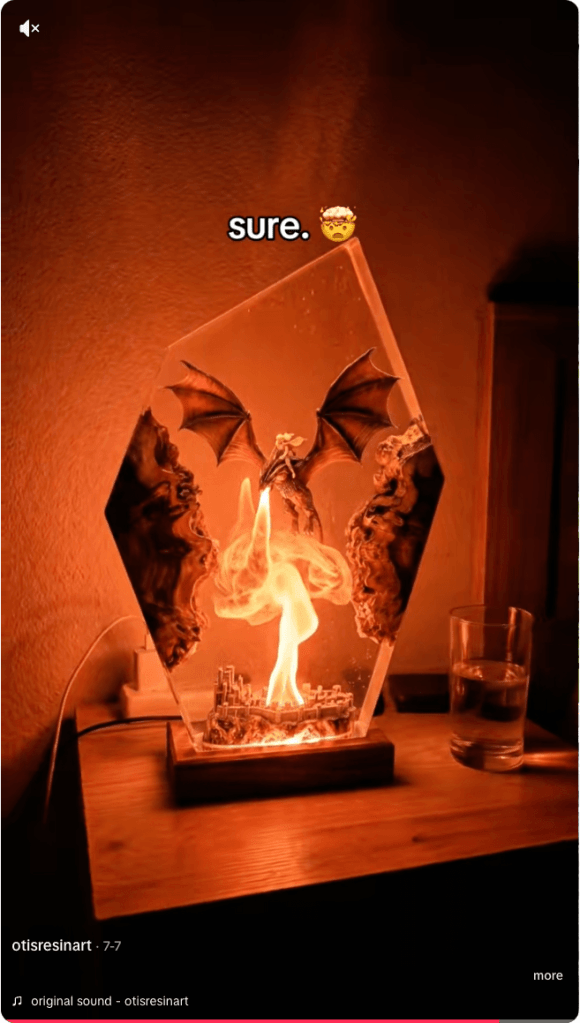
Don’t get fooled by TikTok resin art scams

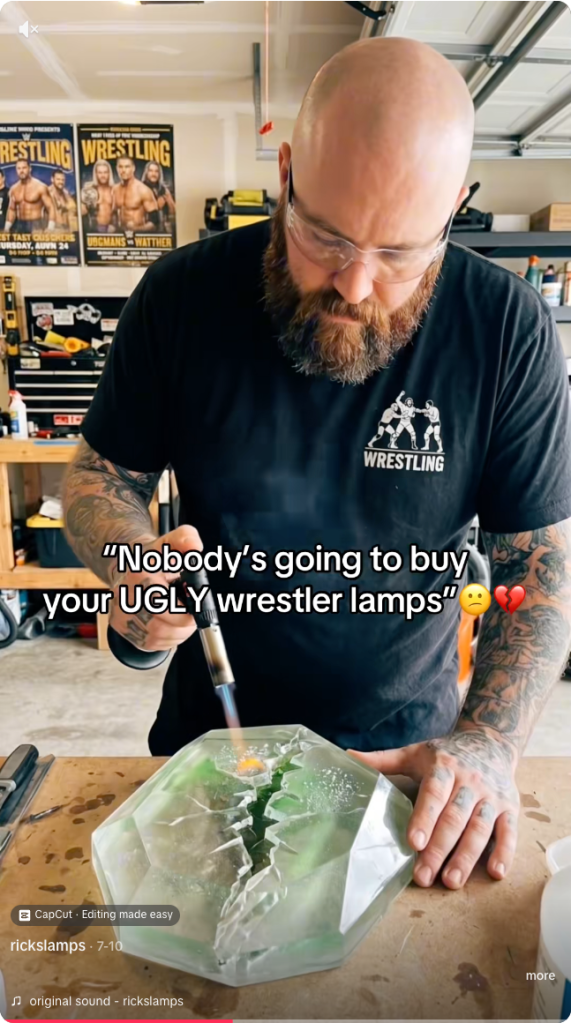
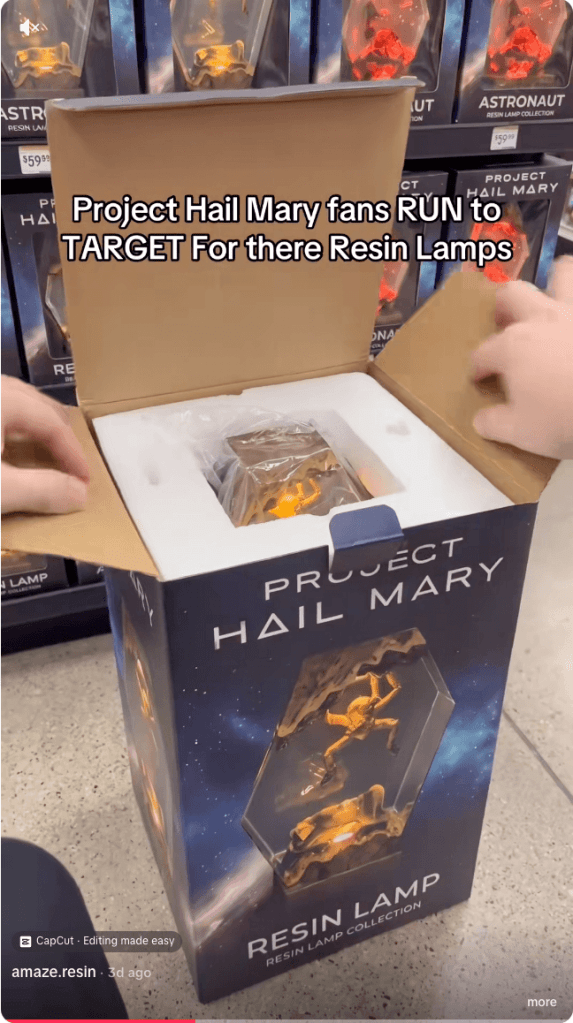
Resin art has become a popular corner of TikTok, with some videos attracting millions of views. But not every glossy, colorful post is what it claims to be. Scammers are using the look of handmade resin art to trick buyers, collectors, and even fellow artists into sending money for work that either doesn’t exist or wasn’t created by the person posting it.

There are plenty of genuine resin artists on TikTok. Unfortunately, the platform has also attracted scammers who steal videos and impersonate legitimate creators.

  • Fake resin art
  • Fake resin art
  • Fake resin art
  • Fake resin art
  • Fake resin art
  • Fake resin art

The scam is fairly straightforward. A TikTok account presents itself as a resin artist, posts satisfying videos, and invites people to “DM to order.” In some cases, the videos are stolen from other creators, the account has no real process footage, and the seller disappears after receiving payment.

One resin artist discovered that scammers were using their videos to impersonate them and scam TikTok users. They shared the following comment:

Ridiculous TikTok scammer…lol. Profile says they’re a resin artist and to DM them to order, but none of the videos are theirs. When I wrote to them asking them to take down the many videos of mine that they posted, passing them off as their own with no credit, their answer was that they aren’t a resin artist and are just sharing videos they like 🤣🤣 Literally about 1/4 of “their” videos are mine 🙄

These scams often rely on trust and urgency. The account may show polished clips of poured resin, finished coasters, trays, jewelry, or wall art, then push buyers to move the conversation into direct messages. Once the buyer moves to a different platform, the scammer typically requests a deposit, full payment, or personal details with little chance of being held accountable.

And real artists don’t just get their work ripped off. A scammer may contact a creator claiming to want to buy, feature, or license their work, but the real goal is to extract fees, banking information, or other sensitive data. Social media art scams are often repetitive because they are built from the same templates and scripts.

Script is similar across many videos in resin art scams
Different videos, same script

How to spot a TikTok resin art scam

The safest approach is the boring one: verify before you pay. If the artwork looks amazing but the seller’s identity is vague, the risk is real.

Check the TikTok account

Before ordering, look for signs that the artist is genuine:

  • The account didn’t appear overnight and has a history of original posts.
  • The same videos don’t appear under multiple creator names or belong to another artist.
  • The creator shows themselves making the artwork, with consistent process videos, a recognizable workspace, and works in progress.
  • The videos don’t contain obvious AI artifacts, such as impossible resin effects or objects moving after they’ve supposedly been sealed inside hardened resin.
  • Comments raising concerns haven’t been deleted or buried under generic praise.
  • The seller isn’t pushing you to order only through direct messages or asking for payment before you’ve verified who they are.

Check the website

If you do click through to a website, spend a few minutes checking it before you buy:

  • Look for a genuine returns and refunds policy, a physical business address, company or VAT details (where applicable), and consistent contact information.
  • Check how old the website is. Scam sites often use domains that were registered only weeks or months ago, especially when they claim to have been selling handmade products for years.
  • Search for recent independent reviews rather than relying on testimonials published on the site itself.
  • Run a reverse image search on the product photos to see whether they’ve been copied from another artist.
  • Only pay using a method that offers buyer protection, such as a credit card or PayPal. If a seller insists on a bank transfer, cryptocurrency, or another irreversible payment method, walk away.

Not every resin art account is a scam. Many belong to genuine artists, and that’s why impersonation scams can be so convincing.

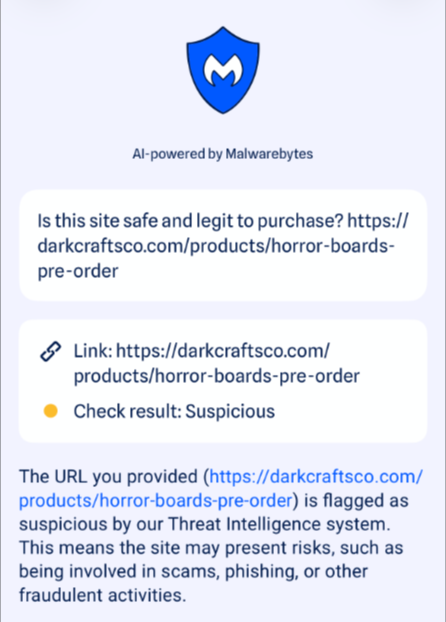
If you’re unsure, paste the website address into Malwarebytes Scam Guard and ask whether it shows signs of being fraudulent. It can help identify suspiciously new domains and other common scam indicators.

Use Malwarebytes Scam Guard to check whether a social media post or website is part of a scam.

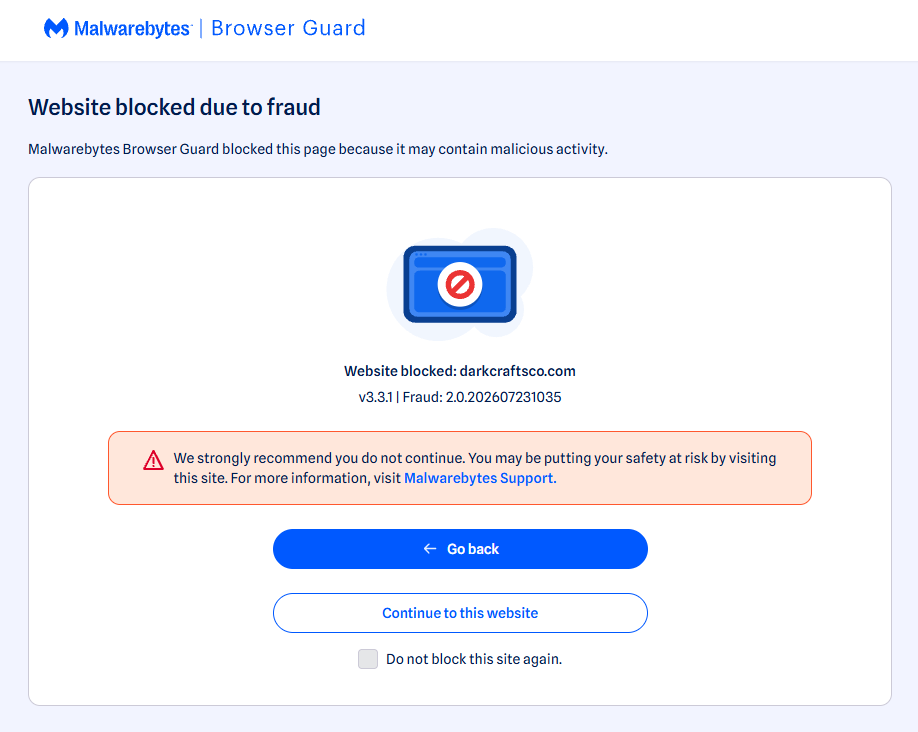
Use real-time web protection to block known fraudulent and malicious websites, like Browser Guard did for this web shop:

Browser Guard blocks the web shop due to likely fraud
Browser Guard blocks the fraudulent website

Both are free—making them much cheaper than sending money to a scammer.


Something feel off? Check it before you click.  

Malwarebytes Scam Guard helps you analyze suspicious links, texts, and screenshots instantly.  

Available with Malwarebytes Premium Security for all your devices, and in the Malwarebytes app for iOS and Android.  
Try it free → 

  •  

88% of people struggle to tell what’s real online

What would you trade for a technology that can do almost anything? For many people, the answer is clear: Everything they thought they could trust.

In a few, short years, Artificial Intelligence (AI) tools have granted people unfettered access to easier writing, faster image generation, quicker coding, and near-instantaneous answers, advice, and information—advantages they value and want. But the same tools that can spruce up a dating profile or reimagine an old photograph can also manipulate the broader world online, and people are noticing.

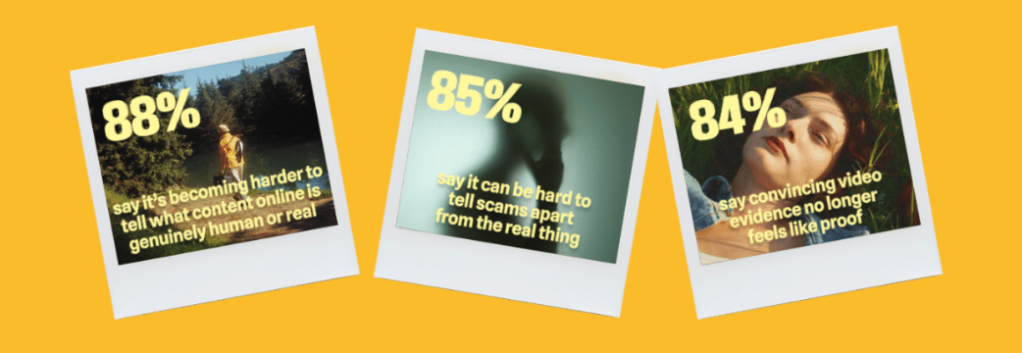
According to new research from Malwarebytes, 88% of people said it’s becoming harder to tell what content online is genuinely human or real, with 84% saying that “convincing video evidence” no longer feels like proof. Further, 85% said it can be hard to tell scams apart from the real thing—a major uptick from the 66% who said the same thing last year.

Statistics from the Face Value report

These are the first signs of AI’s counterfeit world. Replete with fake websites, fake products, fake videos, fake pictures, fake voices, and even fake people, it is threatening to swallow the web.

The latest report from Malwarebytes, Face value: How AI is reshaping trust, identity, and scams exposes the hidden cost of AI on the public: an excess of fraud that is dismantling trust in reality and in one another.

The damage arrives in large moments and small, from the US parent who said they “received a voicemail that sounded exactly like my son’s voice, saying he was in trouble and needed money for legal fees,” to the two entirely unrelated respondents fooled by the same AI-generated video of rabbits bouncing on a trampoline, to the individual worried about “my grandfather showing me AI slop and he thought it was real.”

For this research, Malwarebytes surveyed 1,500 adults aged 18 and older across the US, UK, Austria, Germany, and Switzerland about their uses, feelings, and concerns regarding AI. The sample was equally split for gender with a spread of ages, geographical regions, and race groups, and weighted to provide a balanced view.

The complete findings can be found in the full report:

Here are some of the key takeaways and findings:

  • 88% said it’s becoming harder to tell what content online is genuinely human or real
  • 84% said convincing video evidence no longer feels like proof 
  • 85% of people said it’s hard to tell a scam from the real thing (up from 66% last year)
  • 50% have experienced some form of AI fraud or scam, such as being misled by AI-generated photos of products or receiving a highly personalized scam message
  • 19% have specifically experienced some form of AI-driven identity harm, including the 10% who have had someone use AI to generate sexually explicit content of them without permission
  • 81% fear someone stealing their family’s likeness, yet only 13% have created a family codeword to guard against it
  • 67% worry about voice cloning, yet only 19% have turned off voicemail recordings to prevent it
  • 45% say it’s okay to use AI for personal emotional tasks (like writing wedding vows or a eulogy)
  • 34% say it’s okay to use AI to help create or improve a dating profile
  • One in three self-avowed daily users of AI said it’s okay to generate explicit images of someone without their consent 

Defeat would be the wrong lesson to take from all this. It is true now that the internet requires assistance, but there are plenty of safe places to seek help.

While Malwarebytes works to provide new tools, we’d like to remind both the AI anxious and the eager about the first rule of the internet: Remember the human. People’s voices, bodies, choices, and agency belong to them and them alone. 

As for every fake video, product, website, and image, understand that there’s help. No one needs to navigate an artificial internet alone. Whether through scam detection, identity protection, and simple awareness, people have more options than they may realize.

  •  

More PayPal emails hijacked to deliver tech support scams

Scammers have found another way to get deceptive messages delivered through PayPal’s legitimate services.

In December 2025, we reported that PayPal closed a loophole that let scammers send real emails with fake purchase notices.

In those cases, scammers created a PayPal subscription and then paused it, which triggered PayPal’s genuine “Your automatic payment is no longer active” notification. They also set up a fake subscriber account, likely a Google Workspace mailing list, which automatically forwarded any email it received to all other group members.

Recently, ConsumerWorld.org alerted us that tech support scammers have found a way to manipulate the subject line of PayPal payment notifications.

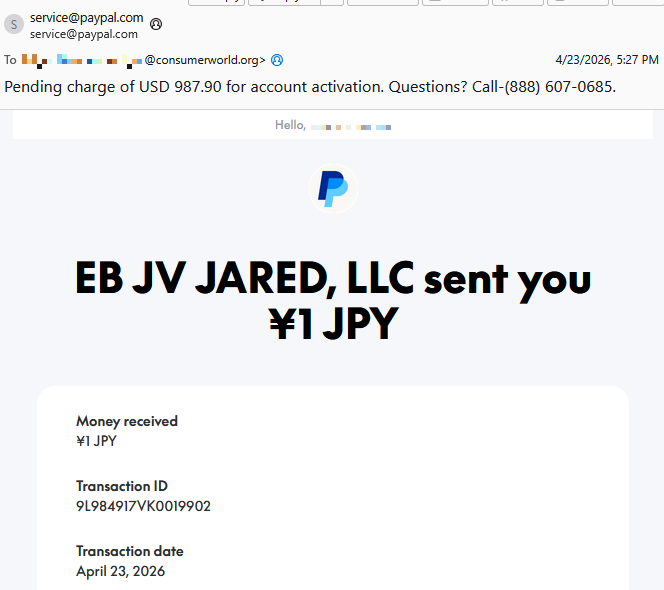
This is a screenshot of the example they sent us.

Screenshot email from PayPal scammers

As you can see, the email comes from service@paypal.com. It wasn’t spoofed, which means it passes standard security checks (DKIM, SPF, DMARC).

While the body of the email says that you received a payment of ¥1 JPY (a whopping $0.0063), the subject line tells a different story:

“Pending charge of USD 987.90 for account activation. Questions? Call-(888) 607-0685.”

As an extra bonus for the scammers, the email contains personalized details—the recipient’s actual name and a real transaction ID.

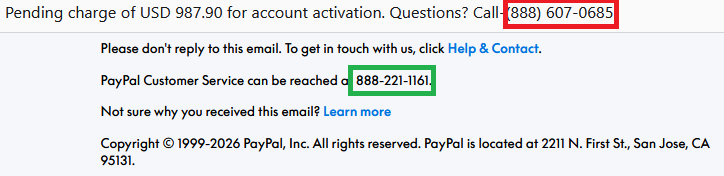
The number in the subject line is not PayPal’s. The legitimate contact number appears inside the email.

the fake and the real PayPal number
The fake (red) and the real (green) PayPal number

Scam or legit? Scam Guard knows.


The intention of the email is straightforward.

Recipients think:

  1. “Oh no! There’s a pending charge for $987.90.”
  2. “The amount doesn’t match what I see in the email body—that’s weird and scary.”
  3. “I need to call this number immediately to dispute this charge.”

They call the number in the subject line, only to reach tech support scammers.

These scammers pretend to be PayPal support and may try to:

  • Get you to “verify” payment methods
  • Collect banking details
  • Convince you to install remote access tools
  • Take control of accounts or devices
  • All of the above

How the subject line is altered is still unclear. Based on PayPal’s documented email behavior, subject lines are typically fixed and not meant to include arbitrary free text or phone numbers. Our findings indicate that the subject line was already weaponized at the point PayPal’s systems signed the email. If someone along the way had rewritten the subject, the dkim=pass header.d=paypal.com result would likely fail.

One possibility is that the scammer abused PayPal’s note or remittance field in a way that surfaces in certain payout templates, including the subject line and HTML <title>, even though normal merchant payment‑received emails don’t allow arbitrary subjects.

The title tag matches the subject line of the email

We have contacted PayPal for comment and will update this post if we hear back.

How to avoid PayPal scams

The best way to stay safe is to stay informed about the tricks scammers use. Learn to spot the red flags that almost always give away scams and phishing emails, and remember:

  • Use verified, official ways to contact companies. Don’t call numbers listed in suspicious emails or attachments.
  • Beware of someone wanting to connect to your computer remotely. One of the tech support scammer’s biggest weapons is their ability to connect remotely to their victims. If they do this, they essentially have total access to all of your files and folders.
  • Report suspicious emails to PayPal. Send the email to phishing@paypal.com to support their investigations.

If you’ve fallen victim to a tech support scam:

  • Paid the scammer? Contact your bank or card provider and let them know what’s happened. You can also file a complaint with the FTC or your local law enforcement, depending on your region.
  • Shared a password? Change it anywhere it’s used. Consider using a password manager and enable 2FA for important accounts.
  • Gave access to your device? Run a full security scan. If scammers had access to your system, they may have planted a backdoor so they can revisit whenever they feel like it. Malwarebytes can remove these and other software left behind by scammers.
  • Watch your accounts: Keep an eye out for unexpected payments or suspicious charges on your credit cards and bank accounts.
  • Be wary of suspicious emails. If you’ve fallen for one scam, they may target you again.

Pro tip: Malwarebytes Scam Guard recognized this email as a call back scam. Upload any suspicious text, emails, attachments, and other files to ask for its opinion. It’s really very good at recognizing scams. 


Something feel off? Check it before you click.  

Malwarebytes Scam Guard helps you analyze suspicious links, texts, and screenshots instantly.  

Available with Malwarebytes Premium Security for all your devices, and in the Malwarebytes app for iOS and Android.  
Try it free → 

  •  

Real Apple notifications are being used to drive tech support scams

Scammers have found a way to abuse legitimate Apple account notification emails to trick targets into calling fake tech support numbers.

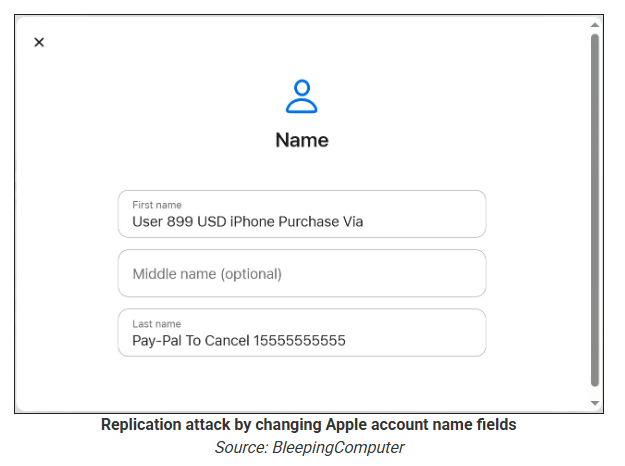
According to a report from BleepingComputer, scammers create an Apple account and insert a phishing message into the personal information fields, then modify the account so that Apple sends a genuine security alert about the change to the target.

BleepingComputer was able to replicate the attack.

The attacker creates an Apple ID they control, then stuffs the phishing message into the personal information fields (first name, last name, possibly address), splitting it across fields because they will not fit into just one.

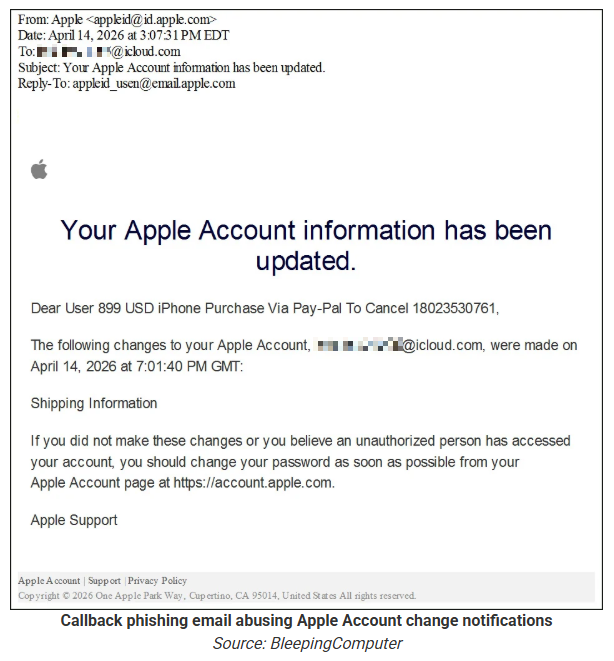
To launch the phish, the attacker changes something benign on their specially created Apple account, such as shipping information, which causes Apple’s systems to send a “Your Apple account was updated” security email.

While the original alert is addressed to the attacker’s iCloud email, they are then able to redistribute it to a wider victim list, for example through a mailing list.

In the copy the targets receive, the email headers still show a legitimate Apple sender, and the presence of the attacker’s iCloud address can even make it look like “someone else” has gained access to the account.

Reconstruction. Image courtesy of BleepingComputer

Because Apple includes those user-supplied fields in the security email, the phishing text is delivered inside a legitimate message sent from Apple’s own infrastructure.

This method, called call-back phishing, filters out suspicious users, so the scammers can focus on the people who fell for the first part.

The emails come from a legitimate source, sail through every security filter because of that, and look convincing enough to scare the receiver into thinking someone spent $899 from their PayPal account.

Phishing email screenshot, courtesy of BleepingComputer

But the structure of the email does not make sense.

“Dear User” is immediately followed by the scam message where your name should have been. The header says it’s about account information rather than a purchase. And the iCloud account does not belong to the recipient. So, once you know how it’s done, they’re not impossible to spot. Which is why we wrote this blog.

And when in doubt, you can always ask Malwarebytes Scam Guard.


Scam or legit? Scam Guard knows.


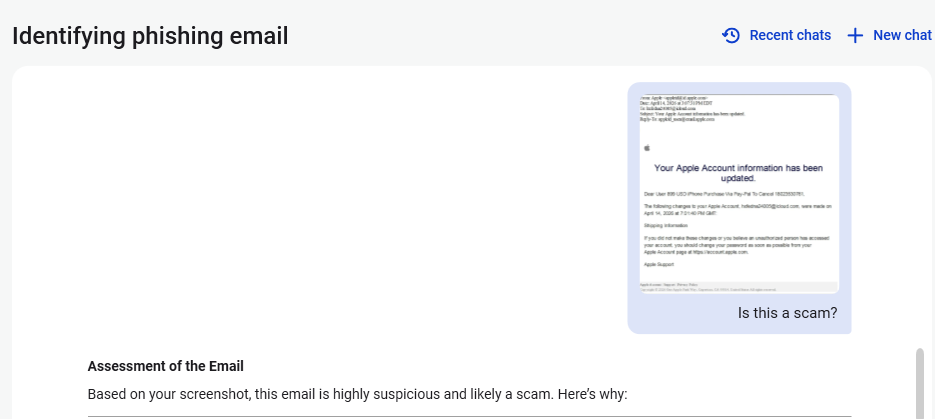
Is this a scam?
Asking Scam Guard

Scam Guard identified the screenshot as a scam and guides users through the next steps.

Scams like these work, because many users still view phone calls as more trustworthy than email, especially if the email itself passed all the usual technical authenticity checks and they initiated the call themselves.

How to stay safe

Tech support scammers will try to convince callers to install some kind of remote desktop application to steal data from your computer, or ask for financial details so they can steal your money.

To stay safe from these scammers:

  • Be wary of unexpected alerts about high‑value purchases you do not recognize. They are suspicious even if they come from a real domain.
  • Never call a number sent to you by unsolicited means or even found in sponsored search results.
  • Carefully read emails and text messages, even if they come form trustworthy addresses. Does the email make sense from a structural and linguistic point of view?
  • If someone claiming to be support for a legitimate company asks for remote access or payment details during a call, hang up and contact the company through official channels.
  • Use Malwarebytes Scam Guard to analyze any kind of message that alarms you or urges you to take immediate action.

Something feel off? Check it before you click.  

Malwarebytes Scam Guard helps you analyze suspicious links, texts, and screenshots instantly.  

Available with Malwarebytes Premium Security for all your devices, and in the Malwarebytes app for iOS and Android.  

Try it free → 

  •  
❌