You might not expect a disaster recovery company to weigh in on business email compromise (BEC). But the fact that we are the ones talking about it is a sign that, too often, something’s gone wrong.
This week, Axios reported that major US banks were detecting third-party AI agents operating inside customer accounts. In many cases, customers have given the agents their usernames and passwords so they could act on their behalf. This kind of access can violate a bank’s rules.
“Are you protecting me, or are you protecting your own profits?”
Bianco described traditional finance’s business model as “based on laziness.” Customers may leave idle cash in low- or no-interest bank accounts rather than move it into a money market fund. An AI agent could make that move for them. “Now that you’re able to do it, the banks are afraid they’re gonna lose that revenue stream,” he said.
The banks offer a different explanation. JPMorgan Chase CEO Jamie Dimon said the bank wouldn’t allow just any outside agent into its systems because doing so was “too risky for clients and for JPMorgan.”
Both explanations can be true: banks can want to retain deposits while also facing real security problems when software acts through customers’ accounts.
Handing over your banking login introduces another service into the security chain. A vulnerability in that service could expose your credentials or allow your account to be misused. And as Bank of America reportedly pointed out:
“If you do share your credentials, keep in mind that you’re responsible for activity resulting from that access.”
That’s the bank’s stated position, not a universal ruling on consumers’ legal rights. Still, it’s a warning worth taking seriously.
Pros and cons
An AI agent with permission to make purchases might find and buy an item at a lower price. But giving an agent access to your bank account also means sharing sensitive banking information with a third party. We’ve seen shared AI chats become searchable online too.
Axios reported that many banks allow, or are moving toward allowing, read-only access. This can let a tool analyze transactions without giving it permission to move money.
That’s an important boundary, but it doesn’t make the information harmless. An agent that can read bank statements may still disclose them if it’s compromised or manipulated. Preventing transactions and protecting confidentiality are separate security goals.
How to keep control of your money
For consumers, the practical question is not whether banks have perfectly selfless motives. It’s what access you’re giving away, and what could happen if the agent makes a mistake.
Don’t paste banking passwords or security codes into a general-purpose AI assistant. Major banks have explicitly warned customers against sharing their credentials.
Use your bank’s approved connection methods rather than giving an agent your login. Where supported, choose read-only access if all you need is analysis or budgeting help.
Give agents access to as little sensitive information as possible. An assistant comparing publicly advertised savings rates doesn’t need your bank statements. OpenAI recommends limiting agents to the data and credentials they need for the task.
Review consequential actions yourself. If an agent asks for confirmation, check exactly what it intends to do and what information it will share. Don’t treat a confirmation prompt as a formality.
AI can make it easier to compare financial products and spot opportunities you might otherwise miss. But an assistant that finds a better rate and an agent that can act inside your account are different propositions.
Let it help with the homework, but be cautious about handing it the keys.
Let’s face it, an incognito window can only do so much.
Breaches, dark web trading, credit fraud. Malwarebytes Identity Theft Protection monitors for all of it, alerts you fast, and comes with identity theft insurance.
On October 27, Google issued a new Stable channel update for Chrome.
Most users are on Chrome’s Stable channel. The desktop update brings Chrome to versions 156.0.8078.73/.74 for Windows and Mac and 156.0.8078.73 for Linux. The update includes 52 security fixes, including four rated Critical.
On the same day, Mozilla issued Security Advisory 2026-118, which fixes 167 vulnerabilities. Firefox 159 also introduces several new features.
Both updates will roll out over the coming days and weeks.
How to update Chrome
The easiest option is to allow Chrome to update automatically. But you can end up lagging behind on updates if you never close your browser or if something goes wrong, such as an extension preventing the update.
If you don’t want to wait for the rollout to reach you, manually updating is easy. Open About Google Chrome from Chrome’s settings or Help menu. Chrome will check for updates. If one is available, click Relaunch to apply it.
To update Firefox, open the browser and click the menu button at the right side of the Firefox toolbar, then go to Help and select About Firefox. The About Mozilla Firefox window will open.
Firefox will automatically check for updates. If one is available, it will be downloaded. Once done, you’ll be prompted to click Relaunch. After Firefox restarts, it will be up to date.
After the update, the version should be 159.0 or later
Technical details
These Chrome and Firefox updates address a familiar problem: browser code mishandling memory while processing web content. Both releases fix use-after-free vulnerabilities, including flaws in page layout, JavaScript processing, and SVG graphics.
A use-after-free vulnerability occurs when a program attempts to access a memory location after it has been freed. That can cause crashes or, in some cases, allow an attacker to run their own code.
There’s another connection between these updates: both Google and Mozilla credit OpenAI Codex Security with finding bugs fixed in these releases. AI can help security teams examine browser code for weaknesses, alongside human code reviews and automated tests that check how software handles unexpected inputs.
Mozilla’s collaboration with Anthropic shows how AI-discovered findings can lead to fixes: researchers validated vulnerabilities before reporting them, giving Mozilla’s team reproducible bugs to investigate, repair, and deliver to users.
Browse like no one’s watching.
Malwarebytes Privacy VPN encrypts your connection and never logs what you do, so the next story you read doesn’t have to feel personal. Try it free →
Network-connected surveillance cameras are now widespread in both home and enterprise environments, so securing them is essential to safeguarding physical spaces and sensitive assets. As these devices continue to gain new features and network connectivity capabilities, vulnerabilities in their implementation can have significant security implications.
During our research, we discovered a denial-of-service vulnerability that affects Intelbras IP cameras systems. The flaw resides in a firmware update endpoint that is accessible without authentication and allows anyone with access to the local Wi-Fi network to knock cameras offline. A single request disrupts the camera for only about a minute, but sending periodic requests keeps the device offline indefinitely. We reported the issue to Intelbras, monitored the remediation process, validated the fix in the new firmware, and will now demonstrate the exploitation procedure step-by-step.
Following our notification, Intelbras patched the vulnerability and released updated firmware (R.260804) along with update instructions. A candidate ID of CAN-2026-2035970 has been assigned by MITRE following submission, pending the final CVE assignment. Additionally, the Intelbras team recently informed us that MITRE has classified the vulnerability as Medium, assigning it a score of 5.1 under the CVSS 4.0 framework. The issue discussed in this article is no longer present in the latest firmware version.
Firmware
Intelbras provides firmware files on its official website. While users can manually install these updates via an SD card, the cameras also natively support firmware upgrades over the local network via their web interface and mobile app. We obtained the firmware version v240927 for the iM3B-C (IM3 C) camera, which was the latest available version at the time of our research. According to Intelbras, the same firmware is also compatible with the iMX C, iM4 C, iM5 SC, iME 360 C, and iM7+ FC models. Below, we can view the firmware version and the camera model used as an example.
To provide context, we will explain how the camera’s authentication mechanism works and why it is relevant to accessing the camera’s endpoints. The main firmware component is an ARM binary named sonia, responsible for controlling the kernel drivers used by the camera hardware, authentication, and livestream recording, among other things.
How authentication works
The global.login RPC method handles authentication at the /RPC2_Login endpoint. First, the client, such as the mobile app or a custom script, sends the username and an empty password. The camera responds with an authentication challenge (a set of values to verify the password without transmitting it). This response returns a temporary session, the encryption type in the encryption field, a random value, and a realm (authentication scope). At this stage, a false response is normal and does not indicate a failed login, as the authentication process is not yet complete.
Next, the client calculates the response password from the authentication challenge. It first generates an MD5 (username:realm:original_password) hash as the base. It then calculates a second MD5 (username:random:first_md5) hash, where first_md5 is the result of the previous step. To complete the authentication, the client sends this final result back to /RPC2_Login in a second global.login call, passing the username, calculated password, and temporary session ID.
If the login is accepted, the camera returns true and a new, authenticated session. This session must be used for all subsequent RPC calls, including the camera’s other endpoints, for example, the one that reboots the device or those that expose sensitive information.
Affected endpoint
The affected endpoint is the firmware upgrade route http://<ip_address>/firmwareUpgrade_service/Demo, which lacks authentication checks; furthermore, it fails to verify whether the firmware is actually valid before initiating the upgrade process. This creates a serious issue because the upgrade requires the camera to reboot, and that is precisely when the problem occurs: the camera enters reboot mode and eventually shuts down, appearing offline to the user and anyone who has the camera registered on their device.
PoC: vulnerability exploitation
Now that we have outlined how the vulnerability works, we will use a Python script on an iM3B-C camera to exploit it for demonstration purposes. The exploit contacts the camera’s endpoint to upload firmware. Below, we can see sonia creating the endpoint responsible for the firmware upgrade.
Next, the exploit will hit the endpoint and cause the camera to reboot. Consequently, mobile phones running the Intelbras app will lose connection with the registered device. Below, we can see the camera operating normally: the green light is on and the app is showing it is available for viewing.
The camera is online
After the exploit executes, we can see the effects: the camera goes offline and loses connection to the registered devices.
The camera is offline
The exploit is quite simple: it sends an HTTP POST request with the firmware, which causes the camera to accept the request and initiate the reboot process. It does not matter whether the firmware is original; the reboot process will start regardless.
New firmware version
After we notified Intelbras about this flaw in the endpoint implementation, the company contacted the OEM vendor. As a result, a new firmware version was released that requires authentication to initiate an update through this endpoint.
Below, we can compare the new firmware, which validates cookies and session data, with the old firmware, which performed no authentication checks and proceeded directly to the update routine.
Real risk
An attacker can remotely trigger the camera firmware upgrade and reboot process without authenticating or supplying a valid firmware image. This may cause the device to go offline, which results in a denial-of-service condition preventing legitimate users from accessing live monitoring or managing the camera.
The potential impact is significant due to the number of affected users. The Intelbras Mibo Smart app, which the company provides to connect and manage the devices mentioned in this report, has over 4,000,000 downloads. Brazil represents the largest user base, followed by Paraguay, Ecuador, Colombia, Argentina, Chile, Peru, Bolivia, Uruguay, and Venezuela. As a result, exploitation of this issue affects a large number of users.
Takeaways
This is a medium-severity vulnerability that Intelbras is already aware of. The issue has been addressed in a newer firmware release (R.260804 along with update instructions), which mitigates this attack vector. Because the vulnerability directly affects the availability and normal operation of the affected cameras, it is highly recommended that users verify the firmware version currently installed on their devices and update to the latest available version as soon as possible. Keeping the firmware up to date is an essential security practice, especially for internet-connected surveillance devices, as outdated versions may remain exposed to known vulnerabilities.
Your workloads reach most destinations by domain name, but a firewall can only act on what it sees in the traffic. For HTTP and HTTPS, AWS Network Firewall domain rules match the name that the client puts in the request, and the client chooses that name. The connections for protocols such as SSH and SSH File Transfer Protocol (SFTP) don’t carry the domain name. The client uses the name only for the DNS lookup and then connects straight to the IP address that DNS returned. As a result, Network Firewall rules for these protocols have used IP addresses, which change over time. For web and non-web traffic alike, Network Firewall had no view of the answers that your DNS resolver returned, because that shared visibility between DNS and the firewall didn’t exist.
On October 21, 2026, we launched Route 53 Resolved IP Validation for AWS Network Firewall, at no additional charge. Amazon Route 53 Resolver now shares the IP addresses that it returns for each domain name with Network Firewall, and Network Firewall checks each new outbound connection against them. With this launch, you can now filter non-web traffic by domain name, and you can prevent Server Name Indication (SNI) manipulation on TLS traffic without needing to enable TLS inspection.
In this post, we explain how the feature works, show how to turn it on in alert mode, and walk through two common use cases. They’re examples; the same check applies to any outbound traffic that you control by domain name.
How it works
Amazon Route 53 Resolver answers DNS queries from resources in your virtual private cloud (VPC) configured to use it, and it’s available by default in every VPC. With this feature, Route 53 Resolver keeps the IP addresses that it returns for each domain name in a resolved IP cache. When a new outbound connection starts, Network Firewall checks the destination address against that cache.
The workload asks Route 53 Resolver at 10.0.0.2 for files.partner.example.com.
DNS Firewall checks the query first. Domain rules can block or alert on it; an empty rule group lets it through.
Route 53 Resolver answers 203.0.113.10 and records the answer in the resolved IP cache.
The SFTP connection to 203.0.113.10 on port 22 reaches the Network Firewall endpoint.
The policy checks the first packet. The address is in the cache, so the connection continues.
The stateful rule passes it, because Route 53 Resolver returned the address for files.partner.example.com.
The connection leaves through the NAT gateway and internet gateway.
The flow log and alert log record the new fields.
The feature has three parts:
An Amazon Route 53 Resolver DNS Firewall rule group – It defines the scope. The answers that Route 53 Resolver returns in every VPC associated with this rule group go into the resolved IP cache. The rule group can be empty. Add rules to it and the same rule group also filters the DNS queries themselves, for example, by blocking lookups of known threat domains. Together, DNS Firewall checks the lookup and Network Firewall checks the connection that follows.
The Network Firewall policy setting – On the first packet of each new connection, before your stateful rules run, Network Firewall checks whether Route 53 Resolver returned the destination address for a domain name. If it did, the connection continues to your stateful rules. If it didn’t, Network Firewall applies the action you chose: Alert, Drop, or Reject.
Resolved-domain rules – In your stateful rule groups, these rules match a connection by the domain name that its destination address was resolved for, so they work with every protocol. Use the name that your clients look up.
The following diagram shows this architecture.
Figure 1. How Network Firewall checks the SFTP connection from use case 1 against the answers that Route 53 Resolver returned
The policy setting checks every connection, not only web traffic. A connection to an IP address that no client looked up through Route 53 Resolver, such as a hardcoded address, fails the check. If any of your workloads connect straight to IP addresses, add those addresses to Bypass destination validation IP ranges before you enforce. A stateful pass rule doesn’t exempt them because the policy check runs before your rules. The check is per address: when any client in an associated VPC looks up a name, its addresses pass the check for every client in scope in the same Availability Zone. For details, see Resolved IP validation in AWS Network Firewall in the AWS Network Firewall Developer Guide.
Prerequisites
To follow along, you need:
DNS through Amazon Route 53 Resolver – Network Firewall can check only answers that Route 53 Resolver returned. Queries that reach Route 53 Resolver through Resolver endpoints or Resolver forwarding rules count.
A Route 53 Resolver DNS Firewall rule group associated with the VPCs whose DNS answers Network Firewall should check connections against.
The policy setting turned on before you add resolved-domain rules – Rules that use domain filtering (the aws_route_53_resolved_domain keyword) need Route 53 Resolved IP Validation turned on in the same firewall policy. Turn the setting on first, in alert mode, then add the rules.
A supported deployment model – The feature works with distributed deployments, including multiple firewall endpoints, where clients reach a firewall endpoint in their own Availability Zone, and with centralized deployments where the firewall is attached natively to AWS Transit Gateway. If routing sends a client to a firewall endpoint in another Availability Zone, its connections fail the check. To move a centralized deployment to a natively attached firewall, see Why and how to migrate to a Transit Gateway attached AWS Network Firewall.
How to turn it on in alert mode
Start in alert mode because clients cache DNS answers. Network Firewall recognizes only the answers that Route 53 Resolver returns after the DNS Firewall rule group is associated with the VPC and selected in the policy. A client that still uses an answer it cached earlier fails the check until it looks up the name again, usually when its cached record expires. Alert mode lets you see this without blocking anything. Allow about 24 hours in alert mode for clients to refresh their caches.
Create a DNS Firewall rule group (it can be empty) and associate it with the VPCs whose DNS answers Network Firewall should check connections against. For the steps, see Creating a rule group and rules.
Or, to use a DNS Firewall rule group that you already have, make sure it’s associated with those VPCs and only those. An answer returned in any associated VPC is valid for every client that the firewall checks. Which clients are checked is set by source IP ranges in step 6.
In the Amazon Virtual Private Cloud (Amazon VPC) console, under Network Firewall, choose Firewall policies, then choose the policy that your firewall uses. On the Traffic inspection tab, in the Route 53 Resolved IP validation section, choose Edit and select Enable Route 53 Resolved IP validation.
For Action, choose Alert. For DNS Firewall rule group, choose the rule group from step 1 or 2.
For DNS expiry exception policy, choose what happens to a connection that’s already open when its entry expires from the resolved IP cache. Continue keeps it running, Drop stops it silently, and Reject stops it with a TCP reset. We recommend Continue so that long-running sessions, such as file transfers, aren’t cut off midway. However, choose the option that fits your security requirements.
For source IP ranges, list the clients to check. If you don’t set it, Network Firewall checks clients in the firewall’s VPC and in any additional VPCs attached to the firewall. If your clients are in other VPCs, such as spoke VPCs that send traffic to a firewall attached to a transit gateway, enter their CIDR ranges; otherwise, Network Firewall doesn’t check their connections. Add destinations that you allow by IP address to Bypass destination validation IP ranges. Choose Save.
The following screenshot illustrates these steps.
Figure 2. Route 53 Resolved IP Validation turned on in alert mode
In alert mode, Network Firewall doesn’t block a connection that fails the check, and it doesn’t write an alert of its own. It records the result in your flow logs, in the route53_resolved_ip field of each connection. A value of true means Route 53 Resolver returned the destination address for a domain name. A value of false means it didn’t, so enforcement would block the connection. The same field also appears in alert log records that a rule or the policy’s default action writes for the connection. Pass rules don’t write one unless they have the alert; keyword. The DnsUnresolvedFlows metric in Amazon CloudWatch counts the connections that fail the check, and DnsAzUnavailableFlows counts connections from an Availability Zone that doesn’t support the feature. The following alert log record (trimmed, with example values) was written by a default action that alerts, for a connection to an address that Route 53 Resolver returned:
In alert mode, this record is for a TLS connection that presented an allowed domain name but went to an address that Route 53 Resolver didn’t return for it, blocked by the policy’s default action in use case 2:
Before you switch Action to Drop or Reject, check that connections that fail the check are ones you expect and that destinations you allow by IP address are in the bypass ranges. Reject sends a TCP reset, so a blocked TCP client fails right away instead of waiting for a timeout. After you enforce, blocked connections appear in your flow logs with route53_resolved_ip as false, not in your alert logs. For the metrics and log fields to watch, see Monitoring and troubleshooting resolved IP validation.
Use case 1: Filter non-web traffic by domain name
Before this launch, Network Firewall rules for protocols that carry no domain name, such as SFTP, used IP addresses. Now, you can allow them by domain name. In this example, a workload sends files over SFTP to a partner at files.partner.example.com on TCP port 22, and the partner can change the addresses behind that name at any time. The same approach works for SSH, MySQL, and other non-web protocols. You create it as a standard stateful rule. Follow these steps:
Under Network Firewall, choose Network Firewall rule groups, then choose Create rule group. Choose Stateful rule group and Standard stateful rule, and choose the rule evaluation order that your policy uses.
Choose Add rule. For Protocol, choose TCP. For Destination port, enter 22. Under Domain filtering, enter files.partner.example.com. For Action, choose Pass.
Create the rule group, then add it to your firewall policy.
Figure 3. A pass rule for SFTP on TCP port 22, scoped to the partner’s domain name
If you manage rules as code, the equivalent Suricata rule is shown in the following code. It adds the alert; keyword so that the firewall logs allowed connections. The console rule doesn’t add it.
pass tcp any any -> any 22 (alert; msg:"Allow TCP/22 to files.partner.example.com"; aws_route_53_resolved_domain:"files.partner.example.com"; sid:1;)
When the partner moves its server to a new address, the next DNS answer adds it to the resolved IP cache. There’s no IP list to maintain. The cache keeps earlier answers for longer than their DNS time to live (TTL), so the old address can still pass for a while.
Use case 2: Prevent SNI spoofing without TLS inspection
With SNI spoofing, a client presents an allowed domain name in its TLS request while it connects to a different server. Preventing that has required TLS inspection, which decrypts the traffic. Route 53 Resolved IP Validation prevents it without TLS inspection. In this example, a workload calls a partner API at api.partner.example.com over HTTPS. TLS traffic on port 443 must reach only the addresses that Route 53 Resolver returned for that name. You create a pass rule in a standard stateful rule group, as in use case 1, and the firewall policy’s default action drops everything that no rule passes. Follow these steps:
Under Network Firewall, choose Network Firewall rule groups, and then choose Create rule group. Choose Stateful rule group and Standard stateful rule, then choose Strict order.
Choose Add rule. For Protocol, choose TLS. For Destination port, enter 443. Under Domain filtering, enter api.partner.example.com. For Action, choose Pass.
Create the rule group, then add it to your firewall policy.
In the firewall policy, use strict rule order. For the stateful default actions, choose Application drop established(server-directed only) and Application alert established (server-directed only). The alert action logs what the drop action blocks. For why we recommend these default actions, see Firewall policy configuration in the AWS Security Services Best Practices guide.
Figure 4. A pass rule for TLS on port 443, scoped to the partner’s domain name
If you manage rules as code, the equivalent Suricata rule is:
pass tls any any -> any 443 (aws_route_53_resolved_domain:"api.partner.example.com"; sid:2;)
The pass rule matches the destination address, not the name in the TLS request. TLS traffic on port 443 passes only when Route 53 Resolver returned the destination address for api.partner.example.com. If the partner’s addresses also serve other domain names, such as behind a content delivery network (CDN), those names pass too. To also require the partner’s name in the TLS request, add an exact SNI match to the same rule: tls.sni; content:"api.partner.example.com"; startswith; endswith; nocase;.
Without startswith and endswith, the content match accepts any SNI that contains the name.
A connection that presents the partner’s name but goes to another address doesn’t match the pass rule. If Route 53 Resolver never returned that address, the policy setting’s enforcement action blocks the connection before your rules run. In alert mode, the policy setting lets the connection through to your rules instead, and the stateful default action drops it because the pass rule doesn’t match. Its alert log record shows route53_resolved_ip as false, as in the second example previously. If Route 53 Resolver returned the address for a different domain name, the connection passes the policy check. The stateful default action then drops it because the pass rule doesn’t match, and that record shows route53_resolved_ip as true.
Best practices
We recommend that you follow these best practices:
Keep DNS on Route 53 Resolver – Block outbound UDP and TCP port 53 DNS to other resolvers, including DNS over HTTPS (DoH) and DNS over TLS (DoT), on Network Firewall, so that clients don’t bypass the check. Route 53 Resolved IP Validation alone doesn’t do this. If any client looks up a public resolver’s name, such as dns.google, that resolver’s addresses pass the check.
Keep DNS Firewall rules in those VPCs – Route 53 Resolved IP Validation checks the connections that follow a DNS lookup, not the DNS queries themselves. DNS Firewall blocks lookups of known threat domains with AWS managed domain lists, and its advanced rule groups detect data leaving through DNS queries, such as DNS tunneling.
Start small – Add domain filtering to a few rules at a time, then add more when the results look clean. For domain allow list patterns, see Allow rules and domain allowlisting.
Turn on flow and alert logging and detailed monitoring – Connections that fail the resolved IP check show in your flow logs (route53_resolved_ip: false) and in the DnsUnresolvedFlows metric, not in your alert logs. Pass rules without the alert; keyword don’t write an alert log record.
Pricing and availability
Route 53 Resolved IP Validation is available today in all commercial AWS Regions (Regions other than the AWS GovCloud (US) Regions and the China Regions) where AWS Network Firewall and Amazon Route 53 Resolver DNS Firewall are available, at no additional charge. For the list of Regions, see AWS Capabilities by Region. A DNS Firewall rule group with no rules doesn’t incur DNS Firewall charges. Standard DNS Firewall pricing applies after you add rules. See AWS Network Firewall pricing and Amazon Route 53 pricing.
Conclusion
In this post, we showed you how Route 53 Resolved IP Validation works and how to turn it on in alert mode. Network Firewall now checks each connection’s destination against the IP addresses that Amazon Route 53 Resolver returned for the DNS query. Filtering SFTP, SSH, database, and other non-web traffic by domain name and preventing SNI spoofing without TLS inspection are two common examples of what that makes possible. To get started, turn the feature on in alert mode and review the results before you enforce. For the full walkthrough, see Getting started with resolved IP validation.
Launching the expanded AI Classroom Toolkit with Cyberlite during Global Media and Information Literacy Week
AI is opening new pathways to information, giving people faster access to answers, ideas, and knowledge. At the same time, it’s making it harder to know whether the content we see is authentic.
Companies that build AI have a responsibility to make it reliable and trustworthy, and that responsibility doesn’t shift to the people who use it. But AI is already shaping how people search, learn, and encounter information. Helping people navigate that reality means building media and AI literacy (MAIL): the judgment to decide whether and how to use AI and what information to trust. These skills are as foundational as AI safety, and educators are asking for help teaching them.
That’s why, during Global Media and Information Literacy Week, we’re launching the expanded AI Classroom Toolkit: Unlocking Generative AI Safely and Responsibly, created with the online safety organization Cyberlite. It’s part of Microsoft’s broader commitment to make sure AI strengthens human thinking rather than replaces it. It also reflects Microsoft’s focus on education and empowerment, a core pillar of our Safe Participation Framework.
What’s new in the AI Classroom Toolkit
The expanded toolkit adds a deeper focus on critical thinking, verification, and media and AI literacy, helping students judge AI outputs and make informed decisions about what to trust online. Together with the original modules, it’s now a single, classroom-ready resource that covers the core of AI safety and literacy. Realistic, scenario-based lessons and activities help students practice these skills in situations they may encounter online:
The Climate Campaign: Gina enters an online challenge to make a campaign for a cause she cares about and finds that some winning entries use AI to show events that never happened. Students sort a feed of real and AI-made posts and practice lateral reading. The lesson: whether a post was made with AI doesn’t decide whether it’s trustworthy. What it claims, and who is behind it, does.
The Helpful Bot: Alex creates an AI help bot inside his online game, then catches it inventing details and collecting players’ personal information. Students learn why AI can get things wrong, how to trace claims to reliable sources, and why they’re responsible for AI-generated content they act on or share.
What Kind of AI User Are You?: An interactive quiz, hosted by Cyberlite, helps students identify their AI habits, strengths, and potential blind spots, and gives them an AI Type to reflect on and discuss.
“When we created the first Classroom Toolkit: Unlocking Generative AI Safely and Responsibly with Microsoft in 2023, most of the conversation was about using AI safely. Today, the questions young people ask about AI have grown sharper and more personal, like what to believe online or how far to trust a chatbot’s answer,” said Michelle Yao, cofounder of Cyberlite.
The toolkit also reflects what young people in our co-design sessions with Cyberlite told us: they want to learn by doing, through games, real-life scenarios, and peer discussion. Teachers don’t need to be AI experts, and students don’t need an AI tool in hand to start.
That approach builds on the reach and results of the original toolkit. Since 2023, the first version has reached educators in 10 countries and 11 languages, including through government and partner learning platforms. In South Korea, 93% of participating educators reported improved knowledge and understanding of ethical issues, privacy, and bias related to AI.
“Our hope is that every student leaves a little surer of their own judgment, and that everyone feels more confident deciding how AI fits into their lives,” said Yao.
Literacy works alongside product design and policy
Education is one part of the equation. Our commitment to media and AI literacy also shows up in how we design products and the policies we support.
Last month, we set out five principles for AI in education, including “AI designed to support students’ learning, not replace their thinking.” We alsocommitted to enforceable privacy, safety, and transparency protections for qualifying educational AI products in US school districts. These protections help schools and families understand how these tools work and the controls available to them.
Media and AI literacy is now a global priority
The Organisation for Economic Co-operation and Development has released a framework for a MAIL assessment beginning in 2029. As part of its Programme for International Student Assessment (PISA), it will examine how students reflect on, analyze, and evaluate information, including AI-generated information. This week in New Delhi, UNESCO is also launching an AI extension of its “Think Critically, Click Wisely” global curriculum, which Microsoft advised on.
This growing global focus makes the need for support urgent—educators want help, and many aren’t getting it. In Microsoft’s 2026 AI in Education report, 53% of educators and 77% of students say they haven’t had AI training.
Closing this skills gap matters beyond the classroom. Healthy societies depend on a shared basis of facts, informed public debate, and confident civic participation. As authenticity gets harder to judge, there’s a risk that people start doubting everything, creating what the Digital Inquiry Group calls a “dangerous declaration of permanent uncertainty.” MAIL offers a way through. It builds the confidence to decide what to trust.
Media and AI literacy for every age
Across Microsoft, we’re helping people build these skills wherever they learn and find information:
In classrooms: Students debate whether to accept, question, or rework an AI tool’s answers in an AI and Critical Thinking lesson from The Economist Educational Foundation, supported by Microsoft. Available alongside other media literacy lessons in Microsoft Learning Zone, the lesson has reached students in 116 countries.
Through play: Millions of players have checked sources, spotted bias, and cracked cases of AI misuse in Minecraft Education’s The Investigators and Reed Smart: AI Detective.
For content creators: UNESCO, with Microsoft’s support, is developing resources to help creator associations train their members in MAIL and is testing them with creators in Nairobi this week.
For voters: Check. Recheck. Vote. helps people apply AI literacy to election information.
In our products: Search Progress, built with input from the Digital Inquiry Group, turns research assignments into source-checking practice in Microsoft Teams for Education.
What’s next
Through Microsoft Elevate for Educators and local partners, we’ll bring the AI Classroom Toolkit to new audiences, with more languages and localized content rolling out through 2027. We’ll keep evolving it as technology and educators’ needs change.
AI will keep changing how people find information and the content they encounter. Our goal is to help people meet that change with confident, informed judgment about the AI they use and the information they trust so they can fully take part in civic and democratic life.
We continue to expand the scope of our assurance programs at Amazon Web Services (AWS) and are pleased to announce the successful completion of our first ever Cloud High (PBHH) security assessment with 172 assessed services and features. Completion of this assessment, effective September 18, 2026, makes AWS the first cloud service provider (CSP) in Canada to meet this high security bar and provide assurance to our valued customers. This assessment also reaffirms our commitment to helping public and commercial customers achieve and maintain the highest-grade security standard for workloads with increased sensitivity.
What is the Cloud High assessment and why is it important?
The Cloud High security profile (that is, PBHH) seeks to enhance the integrity and availability of customer organizational workloads that are considered to have an increased level of sensitivity. These are systems that the Government of Canada (GC) and its service providers use to support delivery of services at a national scale or that are determined to be significant for handling sensitive information. The profile is based on the Security and privacy controls and assurance activities catalogue (ITSP.10.033). The Cloud High (PBHH) profile includes all controls and enhancements contained within the Cloud Medium profile (PBMM), with additional controls and enhancements to address higher integrity and availability requirements. The Cloud Medium and Cloud High profiles establish baseline security requirements for cloud services. These services support GC workloads and information processing up to the Protected B level.
As of September 18, 2026, there are a total of 172 AWS services and features that were assessed by the Canadian Centre for Cyber Security (CCCS) under Cloud High security assessment. The assessment covers services and features that are available in both the Canada (Central) and Canada West (Calgary) AWS Regions.
How can you access the assessment?
The summary assessment is available through AWS Artifact. You can also learn more about the Cloud High and Medium assessment on the AWS CCCS assessment compliance webpage.
AWS strives to continually bring services into scope of its compliance programs to help you meet your architectural and regulatory needs. Please reach out to your AWS account team if you have questions or feedback about the Cloud High and Medium assessments.
To learn more about our compliance and security programs, refer to AWS Compliance Programs. As always, we value your feedback and questions; reach out to the AWS Compliance team through the Contact Us page.
The most important work I’ve done in cybersecurity would make for terrible television. There were no countdown clocks and no frantic typing, just a lot of careful reading, a lot of hard conversations, and the occasional quiet moment where everything finally clicked. That’s the part I want to show you this week, because the three people I talked to have built their entire careers on the work that happens off-camera, and it’s the part that decides who lasts in this field.
This is a four-part series following 11 AWS security professionals through the real stories of how they got here and what the work actually looks like. In Part 1: I didn’t plan this, I shared how three of them found their way in, and in Part 2: What even is this job?, we looked at roles most people don’t know exist. This week is about what the day-to-day actually feels like, told through three AWS security professionals whose work rarely makes it into the trailer but is the reason any of it holds together.
Unlimited ammo
Brandon Caldwell, Mgr, Security Engineering
Ask most people to picture an application security engineer at work and they’ll imagine someone hunched over a terminal breaking into systems. Brandon Caldwell‘s actual days (reviewing software while it’s being built so the flaws never ship) look almost nothing like that. He spends them in conversation: sitting with the engineers who built a product, walking through how it works, and asking question after question until he understands it well enough to see where it could break. “This job is at least 50 percent people,” he tells the folks he hires. “You have to people a lot.”
The hardest part of the day isn’t technical, it’s human. Brandon’s team has to hand builders news they don’t want to hear, and he’s blunt with new hires about what that really feels like.
“Our job is to go tell someone their baby is ugly. I use that phrase because it is meant to draw out empathy. This is the thing they love and spent time on, and you show up at the end and say that thing is ugly. Of course they are going to react.” – Brandon Caldwell
Learning to deliver that message without crushing the person across the table is, in his telling, the actual craft of the job. It’s why he prizes empathy, and why he says the engineers who struggle most in application security are the ones who got into tech specifically to avoid talking to people. The rest of the day is the patient, unglamorous work of reading someone else’s code closely enough to find the one flaw they didn’t know they’d left, then explaining it in a way that lands as help rather than judgment.
That explaining is more than a conversation. So much of security work gets written down: the finding documented so an engineer can act on it, the advisory that tells customers what to do, the policy that sets the bar for everyone who comes after. The ability to write clearly, to turn something messy and technical into a few sentences a reader can actually use, is one of the quiet differentiators as you move up in this field, and it’s a skill worth building long before anyone asks you to.
None of this is where Brandon started. He’s been curious about breaking things since he was a kid hex-editing the game Doom for unlimited ammo, taught himself reverse engineering (taking apart finished software to understand how it works) before it had a name, and spent years as an IT admin and then in incident response at Microsoft back when cybersecurity barely existed as a job title. What pulled him off the breaking side was noticing—after watching the same handful of mistakes scroll past again and again (things like SQL injection and cross-site scripting, two of the most common ways attackers exploit a poorly built website)—that he’d rather help teams avoid the break-in than perform it. Application security, he says, is his natural place.
As for breaking in yourself, Brandon’s advice follows straight from how he spends his days: practice interviewing and asking the right questions and spend real time around builders so you understand what goes into the thing you’re critiquing. When he hires, certifications are the last thing he looks at; he wants to see capture-the-flag competition results (hacking contests where you solve security puzzles to earn points) and public GitHub projects, because those prove you’ve done the work. Build something, break something, and get comfortable talking to the people who build.
Forget that
Kurt Heath, IT Support Associate
Kurt Heath‘s chosen corner of the work is offensive security: penetration testing (getting paid to legally break into systems to prove where they’re weak) and, eventually, red teaming. The day-to-day of getting good at it is far less cinematic than the label suggests. It’s hours of hands-on practice against deliberately vulnerable targets, reading about a technique and then trying it until it works, and the slow accumulation of the layers the job actually rests on: operating systems, networking, software development, and security fundamentals, all applied at once. He’s the first to say pen testing is “the sexy thing” that gets advertised, and the first to warn that it shouldn’t be anyone’s first stop, because of how much quiet groundwork sits underneath it.
A big part of his real workday now is deciding how, and how much, to lean on AI. Kurt treats it as a tool rather than a crutch: he uses it as a coding assistant when he has to work in an unfamiliar language, and to sort through large volumes of information quickly, but he won’t let it think for him. He still fills out forms like this blog’s questionnaire by hand, keeping a personal touch on his own work, and he’s wary of letting AI pull the trigger during an engagement, since an overzealous tool can act on a network however it sees fit, cause unintended operational damage, or wander out of scope and create a legal problem. The way he sees it, security is fundamentally a human problem: automation keeps getting better at the systematic parts, but thinking outside the box the way an attacker does stays stubbornly human.
How Kurt got here matters less to the day-to-day than how he keeps going, but it’s worth knowing that he’s largely self-taught. After a community college program didn’t work out, he taught himself from scratch, finishing shifts at an auto plant and then spending nights with YouTube and a search bar learning how computers and networks actually worked. The hardest part, he told me, was self-motivation, and what carried him through was a mix of sheer want and, eventually, other people: the friends and community he found in Discord servers, security podcasts, and interest channels who helped him turn raw drive into real focus. He even got a tattoo as a reminder that there is no plan B.
“There is no other option. There’s no what if. This is it. This is life now, and I’ll figure it out some way, somehow, no matter how long it takes.” – Kurt Heath
If you’re drawn to the same offensive work, Kurt’s advice is to resist starting there. Build the foundation first, often through a role like a security operations center, join the communities where people are learning in the open, and let the flashier work come after the groundwork is solid. Progress in this field—in his experience—is measured less by the title you land than by how much you grow and who you grow alongside.
The comfort lock
Seth Jeacopello, Mgr, Security Engineer
Seth works in application security too, but if Brandon’s days are mostly about people, Seth’s are mostly about code, which makes the two of them a useful picture of how differently the same job can look. When Seth Jeacopello gets stuck on a hard problem, he doesn’t stare at it harder, he picks up a lock. An actual physical lock with pins and tumblers, because he’s a serious lock-picking hobbyist, and over the years he’s learned that the best response to hitting a wall is to set the problem down and pick what he calls a comfort lock, one he knows well and can open easily. It isn’t about the lock; it’s about giving his brain a small win so he can return to the hard thing with fresh eyes.
The comfort lock exists because Seth’s actual day-to-day is easy to get lost in. In application security, a big part of the job is reading enormous amounts of someone else’s code looking for the one flaw that matters, and as a lifelong developer he genuinely loves reading code, which is exactly what makes it a trap. He described the pull of it to me: you convince yourself the vulnerability is just behind the next function, and the next, and suddenly two days are gone. The skill he’s spent decades sharpening isn’t finding things, it’s knowing when deep enough is deep enough and when to step back, which is where the lock comes in. After 26 years, the meta-skill of managing his own attention is as much a part of the craft as anything technical.
That longevity goes back a long way. Around 1999, still in his teens, he landed a software quality assurance internship, was hired as a developer by 17, and gravitated toward the security-flavored work from the start before moving into network security tooling, rising to chief architect and then chief technology officer along the way.
“We’re like three or four guys off the street coming in with a product, and this huge company was like, yeah, you three, go for it. That was probably one of the coolest things.” – Seth Jeacopello
His advice for building the instincts the daily work demands is refreshingly concrete: set up a deliberately vulnerable practice machine, break into it, and then go read the logs it generated, so you learn not just how an attack works but what it looks like from the defender’s side. That single exercise builds both the offensive and the investigative muscle at once, and it’s the kind of patient, repeatable practice that the day-to-day of this field actually rewards.
The thread
There’s a version of cybersecurity that makes for great television, fast-paced and full of eureka moments, and those moments do exist. But the three people I talked to this week live in a different version of the field, one built on patience, repetition, and a kind of stubborn care that doesn’t photograph well. For Brandon, the real work is the hard, human conversation of telling a builder their work is flawed without making an enemy of them. For Kurt, it’s the unglamorous hours of hands-on practice and the discipline to use AI as a tool without letting it think for him. For Seth, it’s reading one more page of code and knowing when to stop, with a comfort lock on the desk for when he can’t.
None of that makes a great action sequence, but all of it is what a security career actually looks like, and the good news for anyone starting out is that these are learnable habits, not inborn talent. Notice how much of the real work is human: empathy, patience, judgment, and knowing how your own mind works. The analytical, interpersonal, and self-management skills you already have are not a consolation prize, they are part of the job. If you want to begin building the rest, here are a few places to start:
TryHackMe and Hack The Box let you stand up deliberately vulnerable machines, break in, and study what you triggered, exactly the exercise Seth recommends
The OWASP Top 10 explains the most common application security flaws, including the ones Brandon saw on repeat
The OWASP Cheat Sheet Series turns those flaws into practical, task-level guidance on how to build and review software securely; the daily bread of Brandon’s and Seth’s work
The Darknet Diaries podcast tells the human stories behind real security incidents, and it’s a good way to hear what the work actually feels like
And if you want to build cloud security skills specifically, AWS has free and hands-on resources to help you start:
AWS Skill Builder offers more than 1,000 free self-paced courses, including security learning plans you can start today
AWS Builder Labs lets you practice in a real AWS console on hands-on security labs, the stand-it-up-and-try-it approach Seth recommends
In Part 4: What I’d tell myself, we close the series with the advice and hard-won lessons these professionals would hand to someone just starting out.
Doing the work behind the work? These three want you to know it counts. Share your story on LinkedIn!
Elections give scammers plenty to work with: urgent deadlines, familiar faces, passionate supporters, and messages asking people to take action.
Some want you to “fix” your voter registration. Others want a donation, an answer to a survey, or payment for merchandise supposedly endorsed by your favorite politician. The details change, but the objective stays the same: get your money, your personal information, or both.
Here are five election-themed scams to watch out for.
Scam 1. “We’ll help you vote”
Not every election-themed lure starts with a threat. Some offer to make voting easier.
“Get your ballot on autopilot,” reads one text message we reviewed. It encourages recipients to join a permanent absentee list so their ballots arrive at home for every election, adding the reassuring words: “Verified. Tracked. Counted.”
A voting-assistance text message reviewed by Scam Guard
The message is a scam, though it borrows the language of a real Minnesota voting service. Minnesota does have a permanent absentee voter list, but the link in this text is fraudulent. To check or sign up, go directly to your election authority’s official website.
Other messages take the opposite approach: instead of offering convenience, they warn that you could lose your chance to vote.
A message might say you are not registered to vote, your details are incomplete, or your registration is about to be cancelled. Then it offers a link to sort everything out.
The FBI recently warned about messages that send recipients to fraudulent voter-registration pages. Instead of helping people vote, these sites collect personal information that criminals can use for further fraud.
In Brazil, scammers used a fake WhatsApp account with the Superior Electoral Court’s logo. It claimed to be the court’s “Customer Service Department” (which doesn’t exist) and told people to download an app called “Soluciona Pendência,” roughly translated as “Resolve an outstanding issue.” The message falsely warned that people could lose access to banking or government services.
Scam 2. “Donate now to help your candidate win”
A fundraising appeal arrives just as an election reaches a critical moment. It uses the candidate’s photograph, familiar campaign language, and an urgent request for money.
That does not necessarily mean the campaign sent it.
The FBI warns that scammers impersonate candidates and political fundraising organizations to collect supposed campaign contributions. Victims believe they are supporting a legitimate organization, but the money goes to criminals instead.
Before donating, find the campaign or organization’s official website yourself and check who will receive the payment. Don’t let a countdown, a matching-donation claim, or a message about an impending defeat rush your decision. The Better Business Bureau (BBB) advises researching political fundraising requests and resisting pressure to act immediately.
Scam 3. “Take our political survey and claim your reward”
Not every political poll is suspicious. But a request for your opinion can also be an opening for a scam.
The BBB warns about fraudulent polling calls that promise a prize in exchange for answering questions. After the “survey,” the caller asks for credit card information to cover shipping, taxes, or other costs associated with the supposed reward.
At that point, the questions about candidates have served their purpose: keeping you engaged long enough to introduce a payment request.
Other election-themed messages ask people to complete surveys through links. Treat those links with the same caution you would an unexpected donation or registration request. A familiar political organization’s name does not establish who operates the website.
You can decline an unsolicited poll. You should not need to hand over payment details simply to share your political views or claim a surprise reward.
Scam 4. “Pay this electoral fine” or “Report for election duty”
Few things make a message feel urgent quite like an official-looking demand backed by a possible penalty.
Brazil’s Superior Electoral Court (TSE) has warned about messages falsely claiming people had an unresolved voting issue. The messages link to fake government websites designed to steal personal information or trick people into paying.
Brazil does have legitimate electoral fines, which can be paid through official channels, including Pix. So a fine or Pix request alone doesn’t prove a message is a scam. If a message says you owe money or must perform election duty, check with the relevant authority using contact details from its official website. Don’t use the message’s phone number, link, or QR code.
Scam 5. Your favorite politician “wants you to buy this”
A politician’s name can be used to sell more than a political message.
Criminals use candidates’ names, photographs, logos, and slogans to advertise merchandise that never arrives. What looks like a way to support a candidate becomes an ordinary shopping scam wrapped in campaign branding.
Apply the same skepticism to a “commemorative,” “patriotic,” or supposedly collectible product advertised using a politician’s name. Before buying, ask:
Is the seller actually affiliated with the politician or campaign?
What, exactly, are you buying?
Is there evidence for claims about the product’s quality, usefulness, or future value?
What are the total price, refund terms, and any recurring charges?
A product does not become useful, valuable, or a sound investment because an ad places it beside a politician’s photograph. Nor does a photograph prove that the politician endorsed it.
There is also a difference between a product you consider poor value and a fraudulent offer. A product being poor value doesn’t automatically make it a scam. Look for clear deception: a fake endorsement, false claims, hidden fees, or an order that never arrives.
How to stay safe from election scams
You don’t need to work out every detail of a suspicious message before deciding whether to act on it. Verify the message through a route the sender does not control.
Go directly to official election websites to check registration, voting requirements, deadlines, and alleged penalties.
Verify donation requests independently. Find the campaign or organization yourself and confirm where your money will go.
Keep payment details out of unsolicited surveys. A political poll that turns into a request to pay for a prize is a red flag.
Check sellers before buying political merchandise. A candidate’s name or logo does not authenticate the shop.
Don’t mistake personal details for proof. A message can contain accurate information about you and still be a scam.
Keep political choices separate from requests for money or personal information. You can support a cause without responding to an unexpected message.
Fortinet solutions secure Oracle enterprise AI workloads, combining AI guardrails, governance, and cost control with Oracle Cloud Infrastructure services.
Note: YARA-X v1.21.0 adds a parent_name field to the items in vt.behaviour.processes_list, and v1.22.0 adds ancestor_names. VirusTotal now fills that list for every sandbox report that includes a process tree, by flattening it. The result is one entry per process, and each entry knows the name of the process that created it and of the processes above it. Read the YARA-X blog.
If you have written Livehunt rules on top of sandbox behavior, you have probably used vt.behaviour.processes_created. It is a flat list of command lines. It tells you that mshta.exe ran and that powershell.exe ran, but not that one started the other. For a lot of detections that is the whole point: PowerShell on its own is noise, PowerShell launched by mshta.exe is not.
Our sandboxes have always recorded the full process tree. The problem was getting it into YARA, which has no recursive types. As of this month, every file with sandbox reports that reaches Livehunt carries vt.behaviour.processes_list: one entry per process, from every sandbox that ran the file, and each entry knows the name of its parent, the names of its ancestors, and the files it touched.
This post covers what is in each entry, what to keep in mind when writing rules against it, and five cases we worked through while preparing it, each with the rules we wrote and tested. Every case comes with at least one hash, so you can paste the rule in the Livehunt editor and test it yourself.
If you haven't read it yet, we recommend our earlier post It's all about the structure! Creating YARA rules by clicking. It shows how to open the Structure view of any file in the Livehunt editor and turn fields into rule conditions with a click, which is handy for everything that follows.
What each process entry carries
Field
Type
What it holds
name
string
The process, as the sandbox reports it. Usually the image path plus the command line.
parent_name
string
The name of the process that created this one. Empty for root processes and when the parent is unknown.
ancestor_names
array of strings
The names of its ancestors, nearest first: ancestor_names[0] is the parent (the same as parent_name), ancestor_names[1] the grandparent, and so on. Empty for root processes and when the parent is unknown.
process_id / parent_process_id
string
PIDs, as reported by the sandbox.
start_time / termination_time
integer
When the process started and ended, if known.
files_written
array of strings
Files this process created or modified.
files_opened
array of strings
Files this process opened.
files_deleted
array of strings
Files this process deleted.
files_copied[x].source / .destination
string
Files this process copied, when the sandbox attributes copies to a process.
The fields that change how you write rules are parent_name, ancestor_names and the per-process file lists. With them, "PowerShell wrote a .dll" becomes "the PowerShell that cmd.exe started wrote a .dll".
The simplest possible rule looks like this:
import "vt"

rule cmd_spawns_schtasks_create {
  condition:
    for any p in vt.behaviour.processes_list : (
      p.name icontains "schtasks" and
      p.name icontains "/create" and
      p.parent_name icontains "cmd.exe"
    )
}
Things to know before you write rules
Names are not normalized. Each sandbox writes process names its own way. CAPE gives the quoted command line, Zenbox prepends the image path to the command line, Tencent HABO gives only the executable name, and C2AE and Microsoft Sysinternals often leave environment variables unexpanded (%ComSpec% /c ...). Use icontains and match on the executable name, not on a full path with == or startswith.
Link processes by name, not by PID. A file is usually run by several sandboxes, and Livehunt puts all their processes in the same list. PID 1040 can be cmd.exe in one report and explorer.exe in another. To go more than one level up, use ancestor_names: it is built from each sandbox report on its own, so a chain never mixes processes from different sandboxes. For long chains, you can also climb by name: look for the entry whose name is equal to the parent_name you already have. Both strings come from the same sandbox report, so an exact == is safe there.
A practical workflow is to search first and write the rule second. Intelligence search already supports behavior_processes:"<command line>", which matches anywhere in the list with no hierarchy. It is a quick way to collect candidates. Then you write the rule with the parent condition, and test it against those hashes in the Livehunt editor.
Case 1: porting a Sigma rule, and what it misses
Sigma's Suspicious MSHTA Child Process (03cc0c25-389f-4bf8-b48d-11878079f1ca) is a good example of a detection that needs the parent. Stripped down, it says: the parent image ends with \mshta.exe and the child is a shell or a scripting host.
The Livehunt version maps ParentImage to parent_name and Image to name:
import "vt"

rule mshta_spawns_shell {
  meta:
    description = "Port of Sigma 03cc0c25 (Suspicious MSHTA Child Process)"
  condition:
    for any p in vt.behaviour.processes_list : (
      p.parent_name icontains "mshta.exe" and
      (
        p.name icontains "cmd.exe" or
        p.name icontains "powershell" or
        p.name icontains "pwsh" or
        p.name icontains "wscript" or
        p.name icontains "cscript" or
        p.name icontains "bash.exe" or
        p.name icontains "reg.exe" or
        p.name icontains "regsvr32" or
        p.name icontains "bitsadmin"
      )
    )
}
One thing does not carry over. Sigma also checks OriginalFileName to catch renamed binaries, and sandbox process names have no equivalent. A renamed mshta.exe will get past this rule.
We tested it against d30a0a6c09f664446943d82982f0630e85c447cbe84be8a74b6db6d66effbe80, an Excel file named NOVI USD 44570.00 952PLA3262852510.xls (18/76, tagged cve-2017-0199). It matches. What is more interesting is the CAPE process tree behind the match:
Excel is not the parent of mshta.exe. The exploit has Office request an object through DCOM, so mshta.exe is started by the DCOM launcher service, and it shows up with -Embedding. A rule that looks for "Office spawns mshta" would never fire on this document. What we can do is walk one level up from the shell and check the grandparent:
import "vt"

rule dcom_mshta_spawns_shell {
  condition:
    for any p in vt.behaviour.processes_list : (
      (p.name icontains "cmd.exe" or p.name icontains "powershell") and
      p.parent_name icontains "mshta.exe" and
      p.ancestor_names[1] icontains "svchost.exe" and
      p.ancestor_names[1] icontains "dcomlaunch"
    )
}
The first entry of ancestor_names is always the parent, so ancestor_names[1] is the grandparent: the process that started mshta.exe. Without it, you need a second loop over the list to find the entry whose name is the shell's parent_name, and one more loop for every extra level.
The same rule matches other spreadsheets from the same wave, for example 8d249972358268b7a00e182e3f1ecf93ec8bbbee65d22ef4d8a3c382783c1cfa (PO#3302-20260520002.xls), 2d199776cc50b9ad548132105e95af86b29ec8ebca03895a7ddecde58587306b (Request Quotation.xls) and 7c8a3c8366b3106db56359e3defc654d365ce4de21d0a7b1fbad02fbb2aeae52. The rest of that chain shows up again in cases 4 and 5.
Case 2: a services.exe that is not, and the copies behind it
On a normal Windows system, services.exe is started by wininit.exe and by nothing else. A services.exe with any other parent deserves a look:
import "vt"

rule fake_services_wrong_parent {
  condition:
    for any p in vt.behaviour.processes_list : (
      p.name iendswith "\\services.exe" and
      p.parent_name != "" and
      not p.parent_name icontains "wininit.exe"
    )
}
The parent_name != "" check matters. In the reports we looked at, the real services.exe shows up as a root process with no parent, and we don't want those to match.
Our first version also covered lsass.exe. We tested it against 43 recent, clean, signed files, and it matched 19 of them. In those reports the sandbox records lsass.exe with services.exe as its parent. Whatever the reason, that is what the data says, so we dropped lsass.exe from the rule. The lesson is a general one: before encoding what the parent "should" be, check what the sandboxes actually report for clean files.
The rule matches fe8357febe314becf31510a7a2ecb0369e312ad58a448292f5f8a09075d7694c, a .NET executable (45/76) submitted as Cd5KK.exe. In the Jujubox report, Cd5KK.exe starts C:\Windows\System32\NlsLexicons0c1a\services.exe. That process writes two .vbs files to %TEMP% and runs each one with WScript.exe, and one of the scripts starts the fake services.exe again. The sample also launches one PowerShell per path to add Defender exclusions, and in the CAPE report it creates ONLOGON scheduled tasks through WMI, with wmiprvse.exe as the parent of schtasks.exe.
Where did the fake services.exe come from? Jujubox does not attribute file copies to a process, but it does report them at the summary level, in vt.behaviour.files_copied. Cd5KK.exe copied itself to eight places, each one with the name of a Windows binary:
You can combine both fields. This rule looks for a copy named after a system process, and then for a process in the list that runs from exactly that path and has a parent:
import "vt"

rule copy_with_system_name_is_executed {
  condition:
    for any c in vt.behaviour.files_copied : (
      (
        c.destination iendswith "\\services.exe" or
        c.destination iendswith "\\smss.exe" or
        c.destination iendswith "\\lsass.exe" or
        c.destination iendswith "\\csrss.exe" or
        c.destination iendswith "\\svchost.exe" or
        c.destination iendswith "\\wmiprvse.exe" or
        c.destination iendswith "\\taskhostw.exe" or
        c.destination iendswith "\\conhost.exe"
      ) and
      for any p in vt.behaviour.processes_list : (
        p.name icontains c.destination and
        p.parent_name != ""
      )
    )
}
The copy proves the file was planted, and the process entry proves it ran. We tested the rule against 30 recent files with a services.exe path in their Jujubox file activity: it matched 9 of them, among them 4930cc4e7e3e258bf2815793f0e5698bdd45adfae8e052bb1dc4c05c6689ade6, which shares the trojan.msil/basic label with Cd5KK.exe and also matches the services.exe parent rule above. It did not match any of the 43 clean files.
Case 3: headless consoles, renamed or not
conhost.exe --headless runs a console program without showing a window. Sigma has a rule that looks for --headless and powershell in the conhost.exe command line. With the parent available, we can ask a slightly different question: did a PowerShell process actually start with a headless console as its parent?
import "vt"

rule headless_console_runs_powershell {
  condition:
    for any p in vt.behaviour.processes_list : (
      (p.name icontains "powershell" or p.name icontains "pwsh") and
      p.parent_name icontains "--headless"
    )
}
A plain search shows why a rule on the command line alone gets noisy. behavior_processes:"conhost.exe --headless" fs:2026-09-01+ returned 947 files when we ran it. Part of that is legitimate software. Terminal emulators use pseudo-consoles, which start conhost.exe --headless --inheritcursor ... --server .... herdr.exe (c18555a6bb74cd021198b57d16b93b40e74e7d0f8f0c28a45f0a4cc22dea0f8b, 0/76) does exactly that, and the rule above does not match it, because that conhost.exe never starts a shell.
On the malicious side, 5c2ceaec797dfa79e81cde6d765898ee8102357e280fa322db6e5a4b0ce3fc4a is a Windows shortcut with a Korean-language lure about penalty guidelines for e-commerce law violations, named with a double .hwp.lnk extension (34/76). CAPE and Jujubox both show the same chain: opening the shortcut starts conhost.exe --headless powershell.exe -NoP -exec BYpass -w 1 -C $rukp = '...', and that console starts the PowerShell that runs the Base64 blob. The decoded script opens with a function called Invoke-EnvironmentCheck.
Notice that the rule checks for --headless in the parent, not for conhost.exe. That is deliberate. 77da8a02d71078564409863c358a544e981b9643c8f50c1daabc5d5d176e3c75 (42/76) drops a file called rhpmx63snl.exe into %APPDATA%\MicrosoftWorker_e08ec640d\. That file is 51bb5aeef2e48dd14fae764f80dc67f516df9914ea9c350329e229f6cea919a2, an unmodified Microsoft conhost.exe (original name CONHOST.EXE, 0/77) with a random name. It later runs as rhpmx63snl.exe --headless powershell.exe -w h -ep bypass -c & "...\xd24mgasgb4.exe". A rule that required conhost.exe in the parent would miss it. If you only want the renamed case, add not p.parent_name icontains "conhost".
Case 4: persistence that actually ran
Spotting schtasks /create is easy. Knowing whether the task did anything during the analysis is harder, and the process list can answer it. When a scheduled task fires, the new process has the Task Scheduler service as its parent (svchost.exe -k netsvcs -p -s Schedule, or taskeng.exe on older systems). If that process runs a file the sample wrote earlier, the persistence worked.
import "vt"

rule task_scheduler_runs_dropped_file {
  condition:
    for any run in vt.behaviour.processes_list : (
      (
        run.parent_name icontains "-s schedule" or
        run.parent_name icontains "taskeng.exe"
      ) and
      for any dropper in vt.behaviour.processes_list : (
        for any f in dropper.files_written : (
          (f iendswith ".exe" or f iendswith ".dll" or f iendswith ".vbs" or
           f iendswith ".js" or f iendswith ".ps1" or f iendswith ".bat" or
           f iendswith ".cmd") and
          run.name icontains f
        )
      )
    )
}
This is the first rule in the post that uses files_written, and it uses it to link two processes that are not parent and child: the one that wrote the file, and the one the scheduler started from it.
Back to 77da8a02d71078564409863c358a544e981b9643c8f50c1daabc5d5d176e3c75. In the CAPE report, software.exe writes rhpmx63snl.exe and xd24mgasgb4.exe to %APPDATA%\MicrosoftWorker_e08ec640d\, and then runs:
When the task fires, the scheduler starts rhpmx63snl.exe (the renamed conhost.exe from case 3), which starts PowerShell, which starts xd24mgasgb4.exe. Every link in that sentence is a parent_name, and the rule matches. The whole chain is also in the ancestor_names of xd24mgasgb4.exe: the PowerShell, rhpmx63snl.exe, the Schedule service and services.exe.
Zenbox saw the same task fire, but reported rhpmx63snl.exe as a root process with no parent. That is fine: CAPE has the link, and the rule only needs one sandbox to see it. It also shows why you shouldn't write rules that need every sandbox to agree.
One more format issue we ran into. a549a6c8c01da1d03e8da663eec70997a5bd5207e665d8e23f6fa75804dafc06, a VBS file we use in the next case, also creates a task that fires during the VMRay analysis, with taskeng.exe as the parent. The rule misses it, because VMRay logged that command line with doubled backslashes (C:\\Users\\Public\\Downloads\\PoItWjNFjv.vbs), so the path in files_written is not a substring of the process name. When a rule should match and does not, check the raw strings first. Here ancestor_names gives a check that does not depend on how paths are written: the task runs wscript.exe with the dropped script, the script starts PowerShell, and taskeng.exe is among that PowerShell's ancestors. A PowerShell process with for any a in p.ancestor_names : (a icontains "taskeng.exe") catches it.
Case 5: .NET binaries reading browser credentials
Loaders often inject the final payload into a signed .NET Framework binary such as MSBuild.exe, RegAsm.exe, RegSvcs.exe, InstallUtil.exe or aspnet_compiler.exe. On their own, these processes are normal on a developer machine. Started by PowerShell or a scripting host, and writing temporary copies of browser credential databases, they are not.
import "vt"

rule dotnet_lolbin_touches_browser_logins {
  condition:
    for any p in vt.behaviour.processes_list : (
      (
        p.name icontains "aspnet_compiler.exe" or
        p.name icontains "regasm.exe" or
        p.name icontains "regsvcs.exe" or
        p.name icontains "msbuild.exe" or
        p.name icontains "installutil.exe" or
        p.name icontains "addinprocess"
      ) and
      for any a in p.ancestor_names : (
        a icontains "powershell" or
        a icontains "wscript" or
        a icontains "cscript" or
        a icontains "mshta"
      ) and
      for any f in p.files_written : (
        f icontains "\\User Data\\" and
        (f icontains "\\Login Data" or f icontains "\\Web Data" or f icontains "\\Cookies")
      )
    )
}
All three conditions apply to the same process: what it is, what is above it, and what it wrote. That is the difference from the flat fields. behaviour_files:"Login Data" together with behavior_processes:"MSBuild.exe" can match a file where those two things happened in unrelated processes.
The rule matches a549a6c8c01da1d03e8da663eec70997a5bd5207e665d8e23f6fa75804dafc06, a VBS file named RFQ_638O-0194RFQ26_202610070614034439RFQ.vbs (14/76). In the CAPE report, a hidden PowerShell that rebuilds its script from environment variables is started through WMI (its parent is wmiprvse.exe), and that PowerShell starts MSBuild.exe, which writes ...\Google\Chrome\User Data\Default\Login Data.tmp and the matching -wal and -shm files. It also matches the Excel file from case 1, d30a0a6c09f664446943d82982f0630e85c447cbe84be8a74b6db6d66effbe80, where the last process in the chain, aspnet_compiler.exe, writes the same files. In that file, the ancestor_names of aspnet_compiler.exe go all the way back to the exploit: the PowerShell running XBRYINEZ.ps1, WScript.exe, the obfuscated PowerShell, cmd.exe and mshta.exe -Embedding.
Checking the ancestors instead of only the parent matters in 2d199776cc50b9ad548132105e95af86b29ec8ebca03895a7ddecde58587306b, the Request Quotation.xls from case 1. There, the process that writes the Chrome and Edge Login Data and Web Data files is a second aspnet_compiler.exe, started with /stext by the first one. Its parent is aspnet_compiler.exe, so a rule that only looks at parent_name misses it, while the PowerShell and WScript.exe above it are its second and third ancestors. On the 420 malicious and 324 clean files we used to measure ancestor_names, this version matched 5 malicious files that the parent-only version missed, and none of the clean ones.
Testing the rules
Everything in this post was tested two ways. First, against the hashes above and against a set of clean files, using the Livehunt rule tester. The tester rebuilds the vt module for the hash you give it, so it works for files analyzed before these fields existed. Second, in a live Livehunt ruleset with all the rules. Within a few minutes of enabling it we were already getting notifications for mshta_spawns_shell, dcom_mshta_spawns_shell, task_scheduler_runs_dropped_file and others. The ancestor_names versions of the rules were also run with YARA-X 1.22.0 against the same hashes and 324 clean files.
Wrapping up
A command line tells you what ran. Its parent and ancestors tell you how it got there, and the files it wrote tell you what it left behind. Rules that join the two are harder for a sample to sidestep, because the operator would need to change the chain, not just the strings. Open the vt module view of any file you are investigating, find the processes_list entry that bothers you, and write the rule from there.
Ransomware operators are scaling their attacks, and the barriers to entry continue to fall. In the first half of 2026, Flashpoint identified 6,256 ransomware attacks across industries, representing a 45% increase between 2025 and 2026, as Ransomware-as-a-Service (RaaS) operations expanded and threat actors increasingly leveraged AI, stolen credentials, and vulnerability exploits to accelerate their campaigns.
The impact is widespread. Manufacturing accounted for 18% of observed attacks, followed by business services and consulting (13%) and healthcare (9%). Meanwhile, prolific ransomware groups such as Qilin and Akira continue to demonstrate the scale at which these operations can function.
Understanding how ransomware attacks develop, and where they can be interrupted, is critical for defenders.
Introducing Ransomware in the Age of AI: A Survival Guide for Defenders
Flashpoint’s new guide, Ransomware in the Age of AI: A Survival Guide for Defenders, provides cyber threat intelligence professionals, threat hunters, and security leaders with a practical look at the modern ransomware attack lifecycle, from initial reconnaissance and access to incident response and recovery.
Drawing on Flashpoint’s primary-source intelligence and analysis of evolving threat actor tactics, the guide explores how organizations can identify opportunities to disrupt attacks before they escalate, strengthen incident response, and reduce the risk of repeat compromise.
Access the guide to learn:
How modern ransomware attacks unfold: Follow the attack lifecycle, from reconnaissance, phishing, and initial access through lateral movement, encryption, and ransom negotiations.
Where defenders can intervene: Understand how compromised credential monitoring, vulnerability intelligence, and visibility into underground activity can help identify threats before attackers reach critical systems.
How AI is reshaping ransomware operations: Explore how AI-enabled capabilities, commoditized tooling, and RaaS ecosystems are changing the economics and execution of ransomware attacks.
How to strengthen response and recovery: Learn strategies for containing active incidents, restoring operations, improving cross-team coordination, and reducing exposure to repeat attacks.
“In H1 2026, Flashpoint observed a 45% surge in ransomware activity, with critical sectors like manufacturing, business consulting, and healthcare taking the brunt of these attacks. As RaaS syndicates like Qilin and Akira scale their operations alongside a 27% rise in infostealers, access is becoming faster and cheaper. Effective defense requires grounding incident response in primary-source intelligence across every phase of the attack lifecycle.”
Ian GrayVP of Intelligence, Flashpoint
Understanding the Modern Ransomware Attack Lifecycle
Ransomware attacks rarely begin with encryption. Long before systems are locked or ransom demands appear, threat actors may be gathering intelligence on potential targets, exploiting exposed vulnerabilities, or acquiring stolen credentials through underground marketplaces.
Flashpoint observed a 27% increase in infostealer operations in H1 2026 compared to H1 2025, underscoring the growing role of compromised identities in the ransomware ecosystem. Stolen credentials and session data can provide attackers with access to organizational environments, potentially allowing them to bypass traditional defenses and establish a foothold.
These initial access methods are increasingly interconnected with broader criminal operations. RaaS groups can leverage specialized tools and services throughout the attack chain, while AI-enabled capabilities offer additional opportunities to automate and accelerate certain activities.
This creates multiple opportunities for defenders to act. Intelligence about exposed credentials, emerging exploitation activity, and threat actor behavior can help security teams identify risks earlier and prioritize defensive action before an intrusion progresses.
The guide examines these opportunities across the ransomware lifecycle, outlining how proactive intelligence and coordinated response can help organizations minimize operational disruption and strengthen resilience.
Build a More Proactive Defense Against Ransomware
As ransomware operations continue to evolve, organizations need visibility into the threats targeting their environments and the intelligence to respond at every stage of an attack.
From identifying compromised credentials and monitoring emerging threats to containing incidents and preventing repeat attacks, a lifecycle-based approach helps security teams make more informed decisions before, during, and after a ransomware incident.
Get the Ransomware in the Age of AI: A Survival Guide for Defenders to explore the modern ransomware attack lifecycle and learn how Flashpoint’s threat intelligence can help your organization anticipate, disrupt, and recover from ransomware attacks.
Check Point Research discovered a campaign we track as Yoba where attackers abuse the popularity of AI tools such as ChatGPT and Claude, creating fake GitHub projects that pretend to be desktop applications like GPT-5.6 Sol, GPT-6 Astra, and Claude Opus.
The malware is placed next to legitimate, signed executables from OpenAI and Anthropic so it can be loaded indirectly, a technique commonly known as DLL sideloading, which is often used to bypass security protections.
This campaign demonstrates strong operational security (OPSEC) by avoiding dedicated command-and-control (C2) infrastructure and instead relying on Telegram, Tor, Catbox, and DNS over HTTPS (DoH).
The actor behind the campaign shows indicators that suggest Russian origins and appears to operate primarily in the UTC-4 time zone.
Introduction
Over the past two months, we have been tracking a campaign that abuses the popularity of AI tools such as ChatGPT and Claude to spread a custom malware chain we call Yoba. The attackers use fake GitHub projects that pretend to be AI desktop applications like GPT-5.6 Sol, GPT-6 Astra, and Claude Opus. These projects look convincing and use real GitHub infrastructure, which helps them appear legitimate to potential victims. The website exhibits search-targeted content and suspicious installer-delivery tactics consistent with an SEO-poisoning lure.
Inside the installers, there is a malicious component we refer to as the YobaDropper. This dropper includes another component, the YobaLoader, which is responsible for contacting attacker-controlled infrastructure and fetching the final payload. In this report, we describe how victims are lured to these fake projects, how the YobaDropper and YobaLoader work together, and how the attackers ultimately use this chain to run unwanted software on infected systems.
Figure 1 — GPT-6 Astra campaign, attack chain.
GitHub Repositories
The initial access occurred via malicious GitHub repositories. The projects were impersonating ChatGPT and Claude related models, more specifically GPT-5.6 Sol, GPT-6 Astra, and Claude Opus. No manipulation of fake engagement (stars/forks) was in place.
Figure 2 — GitHub repository.
Aside from the repositories, GitHub.io pages were used to describe the capabilities of the software, while the malware was hosted as a release.
Figure 3 — GitHub.io page with links to malicious release.
These phishing landing pages contain download links that point directly to the malicious ZIP releases hosted on GitHub.
Figure 4 — Claude Opus GitHub[.]io page.
While the repositories do not show signs of fake engagement (such as artificially inflated stars or forks) that would promote them within GitHub’s own search, they still appear among the top results on Google. This is most likely due to SEO poisoning, where the attackers optimize titles, descriptions, and hosting domains to make their malicious projects rank highly in external search engines.
Figure 5 — Google Search results.
Each repository uses a different email address (edwardcarlsonmkym[@]outlook[.]com, daxschneiderdjuu[@]outlook[.]com, and rioprestonlfyx[@]outlook[.]com), and the uploader appears to operate in UTC+4, UTC-4, and UTC+3 respectively. This inconsistency likely reflects a deliberate attempt to obscure the threat actor’s true operational timezone.
Although the first repository was created around July 2026, the first two malicious releases were not uploaded until the end of August, and a third malicious release followed approximately five days later.
Malicious zip files hosted on GitHub and other legitimate platforms are usually password-protected, since this prevents automated tools from unpacking and therefore analyzing them. However, neither of these repositories used password protection, as the binaries already had very low detection rates thanks to their anti-sandbox and other anti-analysis techniques.
Figure 6 — Low detection rate.
While the two ChatGPT-related releases and their repositories were created about five days apart, the ZIP files contain mostly the same files, including the malicious components, and they maintain the same IoCs.
Filename
sol-setup.zip (ChatGPT)
GPT-6-Astra-Setup.zip
151.0.7922.174.manifest
2026-08-30 15:11:18
N/A
D3dx9_41.dll
N/A
2021-10-18 17:58:06
owl-shell-runtime.json
2026-08-30 15:11:18
2026-08-30 15:11:18
Setup.exe
2026-08-30 15:11:18
2026-08-30 15:11:18
snapshot_blob.bin
2026-08-30 15:11:18
2026-08-30 15:11:18
v8_context_snapshot.bin
2026-08-30 15:11:18
2026-08-30 15:11:18
vk_swiftshader.dll
2026-08-30 15:11:18
2026-08-30 15:11:18
vk_swiftshader_icd.json
2026-08-30 15:11:18
2026-08-30 15:11:18
vulkan-1.dll
2026-08-30 15:11:18
2026-08-30 15:11:18
winmm.dll
2026-08-30 15:14:20
2026-08-30 15:14:20
By adding the compilation timestamps to this these time-related operations, we are able to determine which files appear to contain the malicious functionality without performing any initial analysis.
Filename
Compilation Timestamp (UTC)
D3dx9_41.dll
2076-06-18 21:48:40
Setup.exe
2026-08-19 20:00:27
vk_swiftshader.dll
2026-08-19 20:00:27
vulkan-1.dll
2026-08-19 20:00:27
winmm.dll
2026-08-30 19:14:19
The file that immediately stands out is winmm.dll, which was compiled the same day it was added to the ZIP archive. This suggests it is the component with the malicious functionality, while the other files serve to make the package appear legitimate. The compilation timestamp also indicates the actor is operating in the UTC-4 timezone.
Furthermore, Setup.exe, a legitimate signed OpenAI executable, is used during execution to sideload the malicious DLL. The Setup-Claude.zip file contains the same structure, though in this case Setup.exe is a legitimate signed Claude executable.
Figure 7 — Signed OpenAI and Anthropic binaries.
YobaDropper – winmm.dll
The malicious DLL contains multiple export names, suggesting that the legitimate winmm.dll has been spoofed. As in many other cases, these exports exist but their code has been stripped out, leaving them mostly empty and reducing the size of the binary.
Figure 8 — Stripped code from exports.
All 180 exports contain just a return instruction (C3) followed by NOPs (90), and DllEntryPoint is the only one containing actual code.
Anti-Analysis, Pre-Checks
The first function implements an anti-sandbox technique: the malware hashes the basename of its host executable and checks whether the checksum matches the hardcoded value 0xE6C2F326. The hashing algorithm has been identified as DJB2, which other malware families have also used in the past. The malware expects to run under the name Setup.exe, so this check fails if the DLL is executed on its own inside a sandbox environment.
Figure 9 — DJB2 algorithm and hash check.
Although a failed check does not terminate the process, the DLL performs 200,000 iterations of Sleep(5500), amounting to approximately 12.73 days, while repeatedly appending the decoded filler string pddy to a local UTF-16 buffer.
In the second function, the malware checks whether the infected user is located in a CIS country by inspecting the system’s keyboard layout. Ukraine was historically included in such checks, but it is not in the list used by recent malware.
The language check is unusual. Instead of comparing the victim’s keyboard language ID against hardcoded values, the malware checks whether the ID falls within the range 0x19–0x44. For IDs in that range, it tests the corresponding bit in the bitmask 0xEC0400C8401 to determine whether the language belongs to a CIS-region country, with an explicit exception for ID 0x22 (Ukrainian). Bazarloader has used a similar technique in the past, with the bitmask 0xD8080190C03.
Figure 10 — Language checks.
Language IDs excluded from the infection:
Russian
Belarusian
Tajik
Armenian
Azerbaijani
Georgian
Kazakh
Kyrgyz
Turkmen
Uzbek
Tatar
The malware continues to resolve Windows API functions dynamically from kernel32.dll and ntdll.dll by comparing hashes of the exported function names. The hashing algorithm is again DJB2, with the initial value 0x1505.
The last check before the malware unpacks and deploys the embedded payload tests whether the process is running with administrator privileges. If it is not, the malware displays the message “Please run this program as Administrator.” to the victim and terminates itself, requiring the user to rerun it with elevated privileges.
Deploying Phase
The dropper contains multiple XOR-encrypted strings that are decrypted when needed. These strings include the file paths where the embedded binaries are dropped, as well as the decryption keys.
It creates a directory under ProgramData named WMProcess. Then it copies the original WMPDMC.exe from System32 into this newly created folder. Next, it decrypts the embedded payload using the string IRANNUMBERONE as the XOR seed and drops the decrypted payload in the same folder under the name wmpdui.dll.
Using scheduled tasks, the dropper maintains persistence by leveraging the legitimate executable, which will sideload the malicious payload. To make the task appear legitimate, it sets the author to Microsoft Corporation and the description to Collects device metadata for Windows Media Player.. It also sets the boot-trigger delay to PT3M, which corresponds to a 3-minute delay after system startup, and configures the task to run under the Local System account (S-1-5-18).
YobaLoader – wmpdui.dll
The second-stage payload contains the same code as the dropper, which indicates that the same developer is responsible for both components.
The same anti-sandbox technique is used, forcing the malware to be run only by WMPDMC.exe. It again checks the hash of the process basename, and only continues execution if this value matches the hardcoded hash 0x552751E3.
The dropper uses the DJB2 hashing algorithm to hash and verify the process name and to resolve Windows API functions, both with the same seed 0x1505. The loader (YobaLoader) also uses DJB2 for the process name with the same seed as the dropper, but for resolving Windows API functions it uses a different seed, 0x1DEB.
Figure 11 — Hashing windows API functions.
The developer reused the same string-hashing algorithm but changed the seed (0x1505 in the dropper, 0x1DEB in the loader) to separate the hash spaces for each stage, complicating analysis, and reducing the effectiveness of hash-based detection and automated tooling.
Network
The downloader uses an interesting process to obtain the next-stage payload. It first decrypts multiple strings using a simple XOR operation, among these strings is the URL of a Telegram channel, t[.]me/yoba_fanclub. It then visits this channel using the user-agent string Mozilla/5.0 (Windows NT 10.0; Win64;) and parses the HTML source to extract the src URL of the element with the class tgme_page_photo_image. This class refers to the location where the channel’s profile image is hosted.
Figure 12 — Telegram channel.
It downloads the image and uses the last 50 bytes as a seed to generate a domain based on three lists of dictionary words, which are decrypted as part of the DGA algorithm. This DGA algorithm uses three sets of strings:
Adjectives
Nouns
Verbs
Finally, it generates and appends an integer value in the range 0–999. The generated domain has the following format, "$adjective-$noun-$verb-$digit.dedyn[.]io". By changing the image of the Telegram channel, a new domain can be generated.
The following Python snippet represents the DGA algorithm:
It then queries Google’s DNS-over-HTTPS (DoH) API to obtain an encrypted command from a DNS TXT record, using a URL of the form https://dns[.]google/resolve?name=$DGA&type=TXT.
By relying on a DoH service and common file-hosting platforms, the actor aims to bypass passive DNS monitoring and some gateway-based security protections, making their command-and-control traffic harder to distinguish from regular user activity.
Figure 13 — DNS TXT record, base64 encoded data.
It decodes the Base64-encoded data field from the JSON response and validates it using Ed25519 signature verification with the public key b5c2d20623d4e6647d06a42864edd8629f82c5c384b243fdaeeeca24b3873d64. Once the signature validation succeeds, it decrypts the decoded value using AES in ECB mode with the key 1d0d1368b4d53f3a6322cf40e84e63db.
The downloader retrieves the encrypted payload and decrypts it using the same AES key and ECB mode that were previously used for the DNS data.
The malware provides three methods for deploying the downloaded payload. The selected method is indicated by the first character of the decrypted response that follows the URL (1/2/3):
Injects the downloaded payload into svchost.exe (NtWriteVirtualMemory/NtCreateThreadEx). It enumerates running processes and, using the hashing algorithm with the seed 0x1DEB, searches for the hash value 0xC26CDEA5, which corresponds to svchost.exe.
Saves the payload as a %TEMP%\$10_rand_char\$10_rand_char.exe file and executes it. Before running the executable, the downloader removes the Zone.Identifier alternate data stream, which is hidden metadata used by Windows to track the origin of downloaded files.
Saves the payload as a %TEMP%\$10_rand_char\$10_rand_char.ps1 PowerShell script and invokes it with the following parameters: -WindowStyle Hidden -ExecutionPolicy Bypass -File.
Finally, the injected payload into svchost.exe is an XMRig 6.26.0 miner with a hidden command line targeting a TLS-enabled onion mining endpoint through a local Tor SOCKS5 proxy. It can unpack and start Tor 0.4.9.12 plus lyrebird 0.8.1, monitor user-input activity to pause mining, and conditionally load the WinRing0 driver service for MSR-based mining optimization.
Although we observed an XMRig cryptominer as the final payload in this campaign, the YobaLoader is a generic loader. The operator can supply any PE or PowerShell payload via the signed DNS TXT tasking, so future waves may deliver different malware families.
Past Yoba Versions
Yoba exposes, through the same hashing algorithm it uses for anti-analysis, the specific process name under which it expects to run. Even without having full visibility into the campaign from the very beginning, analysts can still infer which targeted software was used to lure users by correlating this expected process name with the fake AI applications promoted on the associated GitHub repositories and GitHub Pages sites.
Hash
Process
Product
0xE6C2F326
Setup.exe
ChatGPT & Claude Opus
0x56221573
Cursor.exe
Cursor AI Coding Agent
0x39DE0DD8
Unknown
Unknown
Earlier YobaDropper observed in the wild appeared in early June 2026. In this campaign, the dropper was sideloaded by a process named Cursor.exe (hash: 0x56221573). It remains unclear whether Cursor.exe was a legitimate signed binary. The majority of the functionality in this early variant is consistent with the newer versions of both the dropper and the loader.
YobaDropper shows two main differences between its older and newer versions:
Unpacking logic: In the oldest version, the buffer is first Base64-decoded and then XOR-decrypted to extract the YobaLoader. In the newer version, the developer removed the Base64-decoding step and performs only XOR decryption, simplifying the unpacking process.
Execution method: The second change concerns how YobaLoader is triggered. The newer version uses Scheduled Tasks to start the copied legitimate host and sideload the loader, whereas the first discovered version creates the shortcut msdefender_scheduler{7940-8490-6670-1081}.lnk in the Startup folder. This shortcut executes a copied %APPDATA%\Microsaft Difendir\msdtc.exe and sideloads %APPDATA%\Microsaft Difendir\mswsock.dll.
Earlier version of YobaLoader contains language checks and excludes only Russia from infection. In later versions, these checks were moved to the dropper stage and expanded to exclude additional CIS countries, shifting regional filtering earlier in the infection chain.
Figure 14 — Exclusion of Russian language from infection.
While the overall DGA logic remains the same, the early variant uses the extension .aber[.]ir instead of .dedyn[.]io. In addition, instead of injecting into svchost.exe, this variant injects into a different running process identified only by its hashed name 0x21BD94C2.
The initial loader also implements several anti-analysis techniques that have been removed from the newer versions of the malware:
1. Anti-debugging It enumerates all kernel object types and reads their TypeName values. Each type name is hashed using DJB2 with the seed 0x1DEB until the hash matches 0xCF9EE149, which corresponds to DebugObject. If a DebugObject is found, it indicates that a debugger is or was active, and in that case the malware terminates itself.
Figure 15 — DebugObject via NtQueryObject-ObjectAllTypesInformation.
2. Anti-VM The malware uses a VM/sandbox-detection scoring function while running several hardware fingerprinting checks. The maximum score is 6, and the minimum required to continue the infection chain is 3. The checks include:
Hypervisor-present bit and CPUID timing (via RDTSCP).
Despite these small differences in early anti-analysis behavior, the Telegram channel and the profile image used as the seed for the DGA remain the same as in the newer variants, indicating that the operator retained the same infrastructure while iterating on the loader’s evasion logic.
Conclusion
The Yoba campaign shows how attackers can use trusted platforms and the current interest in AI tools to distribute malware in a way that looks believable and harmless at first glance. By packaging their code together with well-known software names and hosting it on GitHub, they lower the chances that users or basic security checks will immediately flag the files as suspicious. Although the underlying techniques are more advanced than typical commodity malware, the main goals remain straightforward: gain a foothold on the victim’s system, avoid easy detection, and then run the attacker’s chosen payload. Organizations should be cautious about installing “AI helpers” or similar tools from unverified repositories and should enforce policies that restrict running software from unknown sources. Combining user awareness with basic technical controls.
As interest in new AI tools accelerates, cybercriminals are finding ways to exploit the trust surrounding them. Check Point Research (CPR) has uncovered Yoba, a malware campaign using fake GitHub projects impersonating supposed ChatGPT and Claude desktop applications, while abusing legitimate, signed OpenAI and Anthropic executables to help load malware. The campaign shows how the rush to access new AI tools is creating opportunities for social engineering, even when the AI platforms themselves have not been compromised. Key Findings Attackers used fake GitHub projects impersonating supposed ChatGPT and Claude desktop applications to distribute Yoba malware. Legitimate, signed OpenAI and Anthropic […]
In a short period, Check Point has appeared across three new Gartner research publications examining autonomous remediation, exposure assessment, and the future of preemptive cybersecurity. These three reports ask very different questions. But how do they connect? One examines how organizations can trust autonomous remediation. Another looks at the growing exposure management market and the increasing importance of exploitability. The third looks further ahead at the technologies Gartner believes will shape preemptive cybersecurity. Taken together, the reports capture a broader change already underway across the industry. Exposure management is expanding from identifying risk toward understanding exploitability and enabling action. Exploitability […]
Attackers compromised camera management software to deploy malware, establish persistence, and beacon to C2. Huntress breaks down the attack chain and IOCs.
 Login



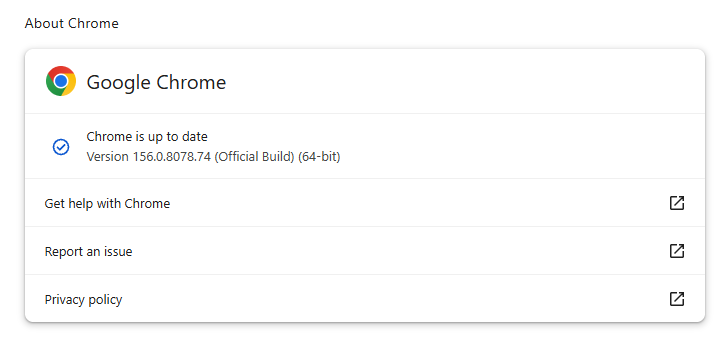
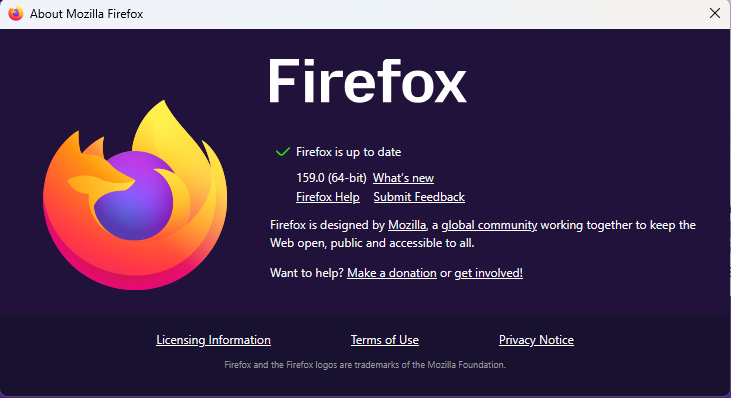

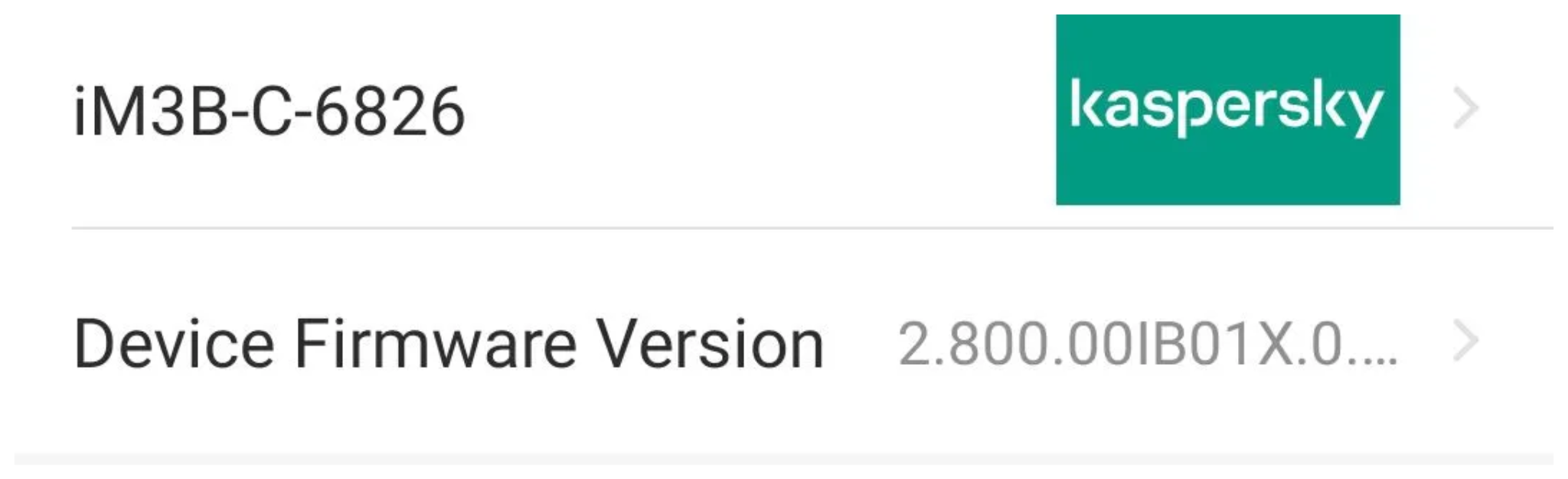
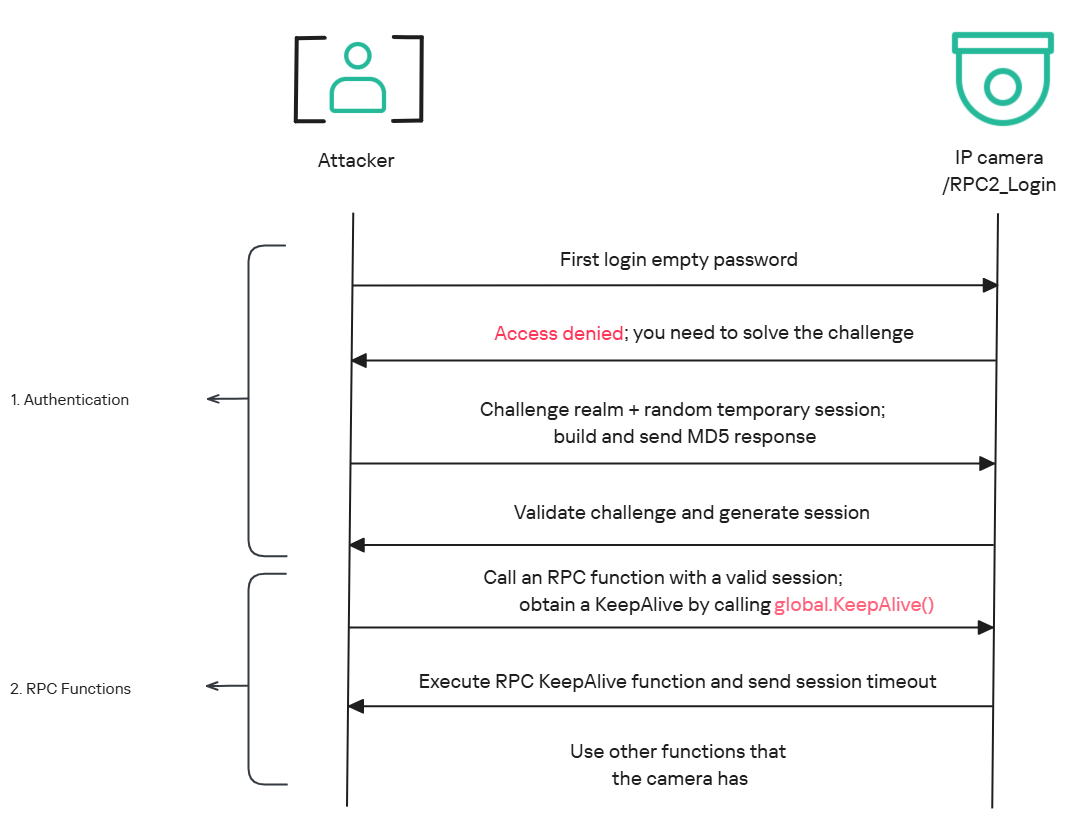
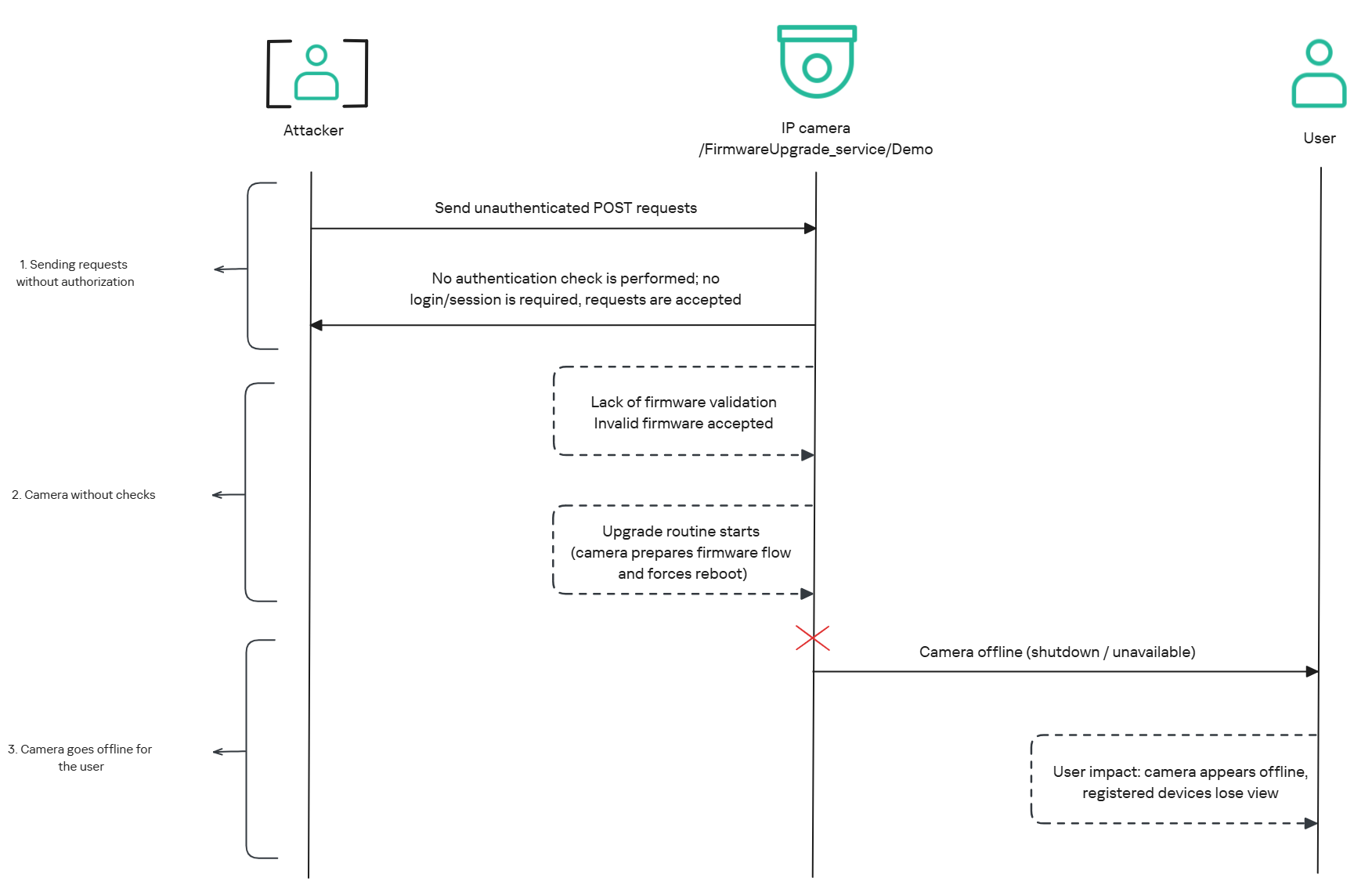

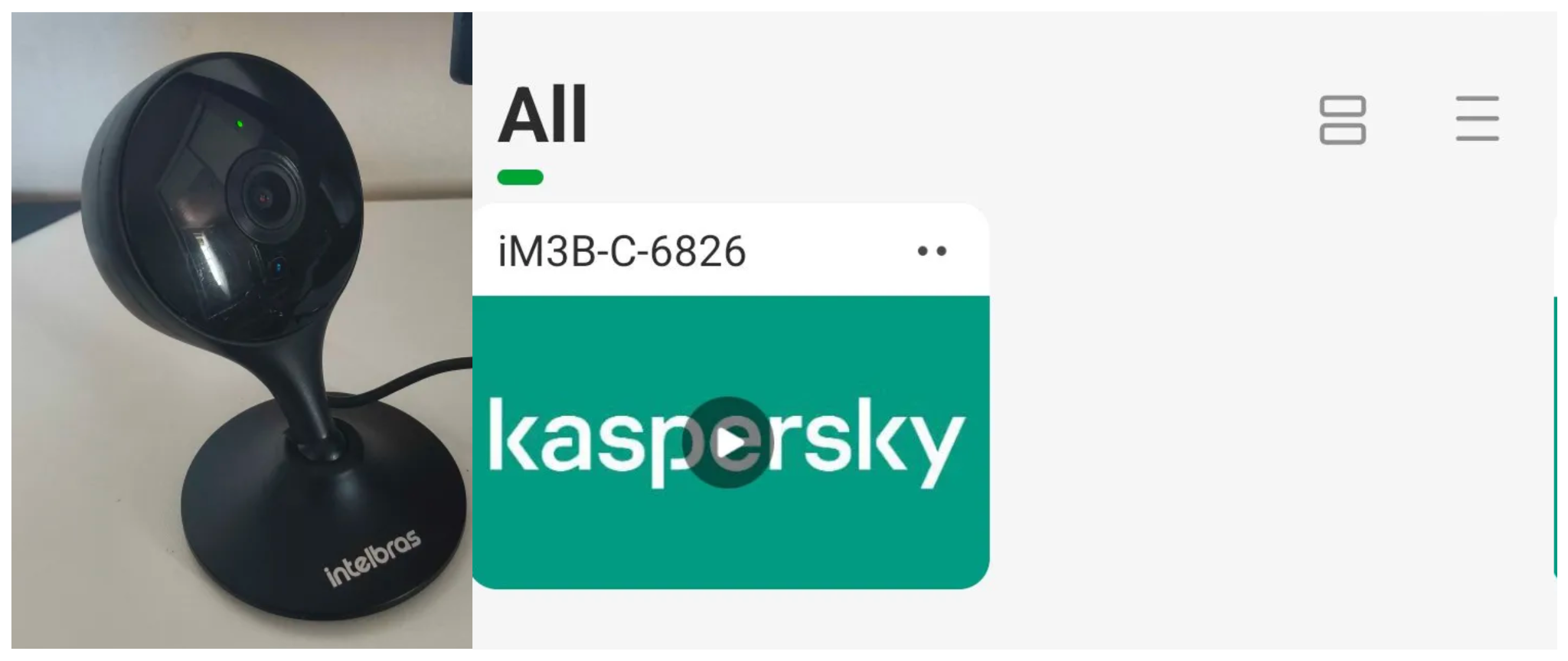
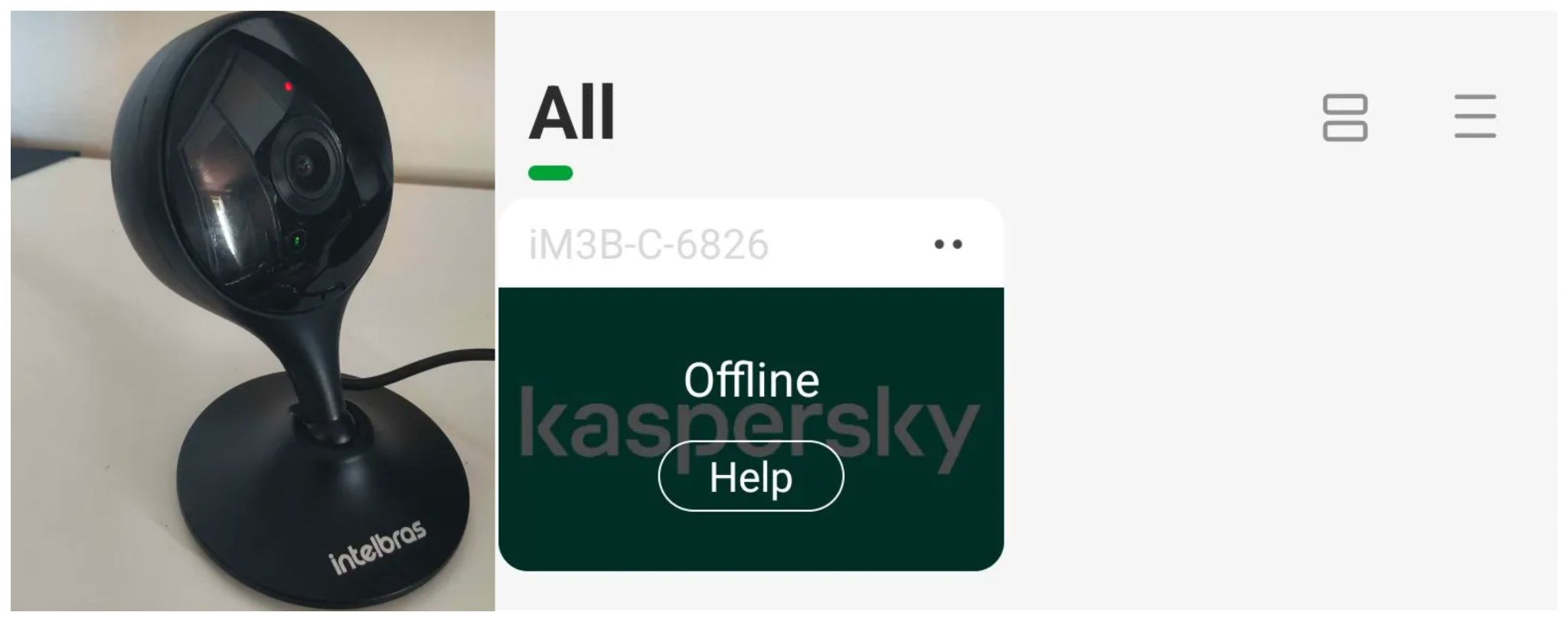
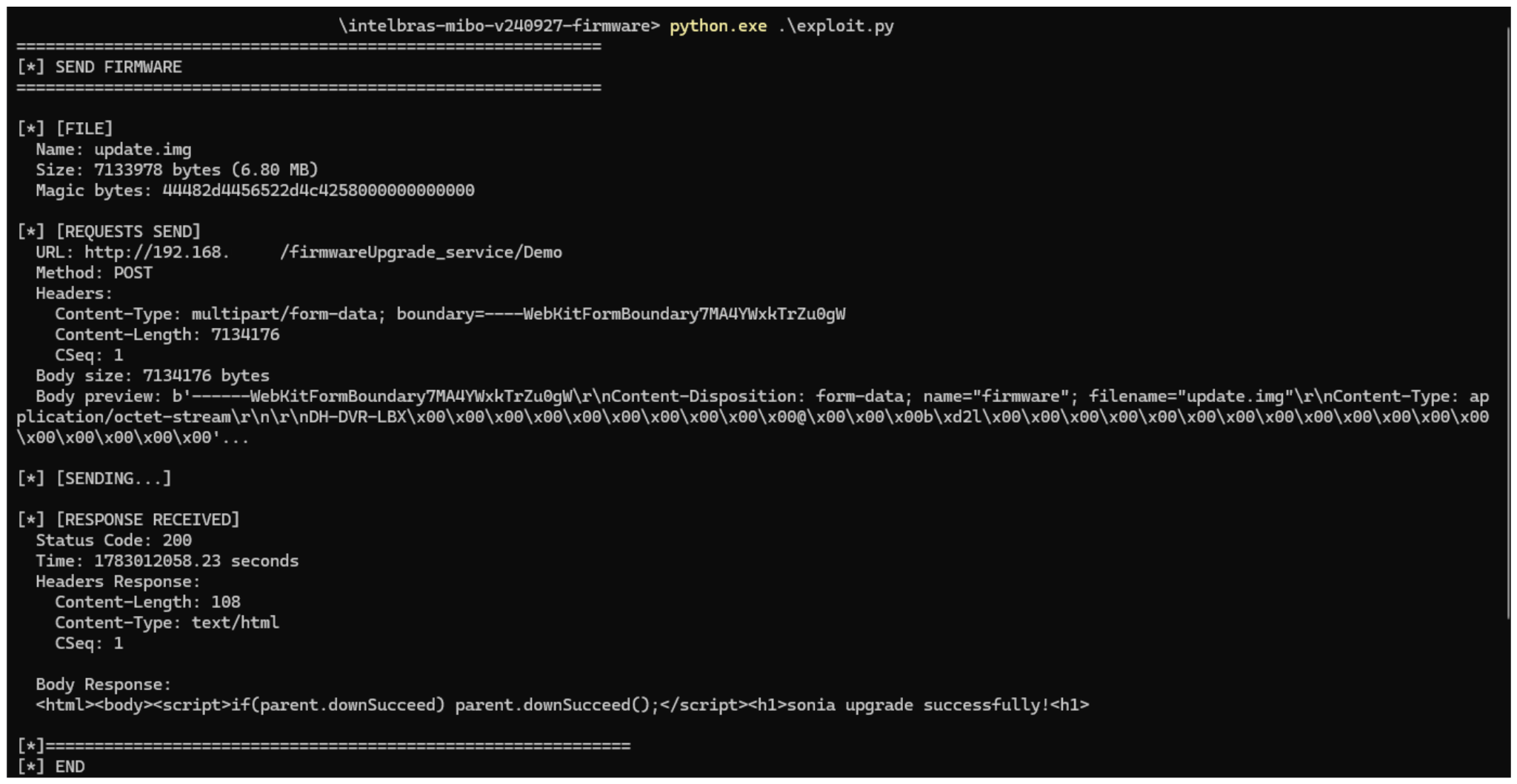
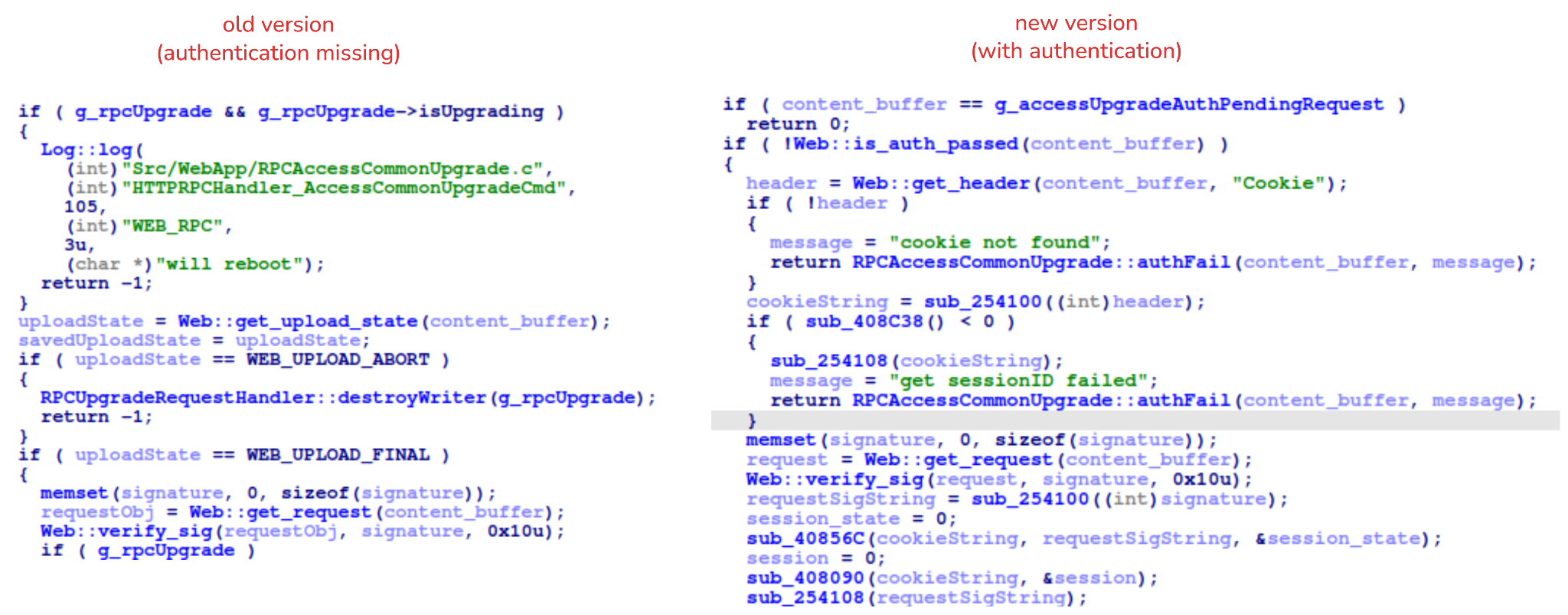




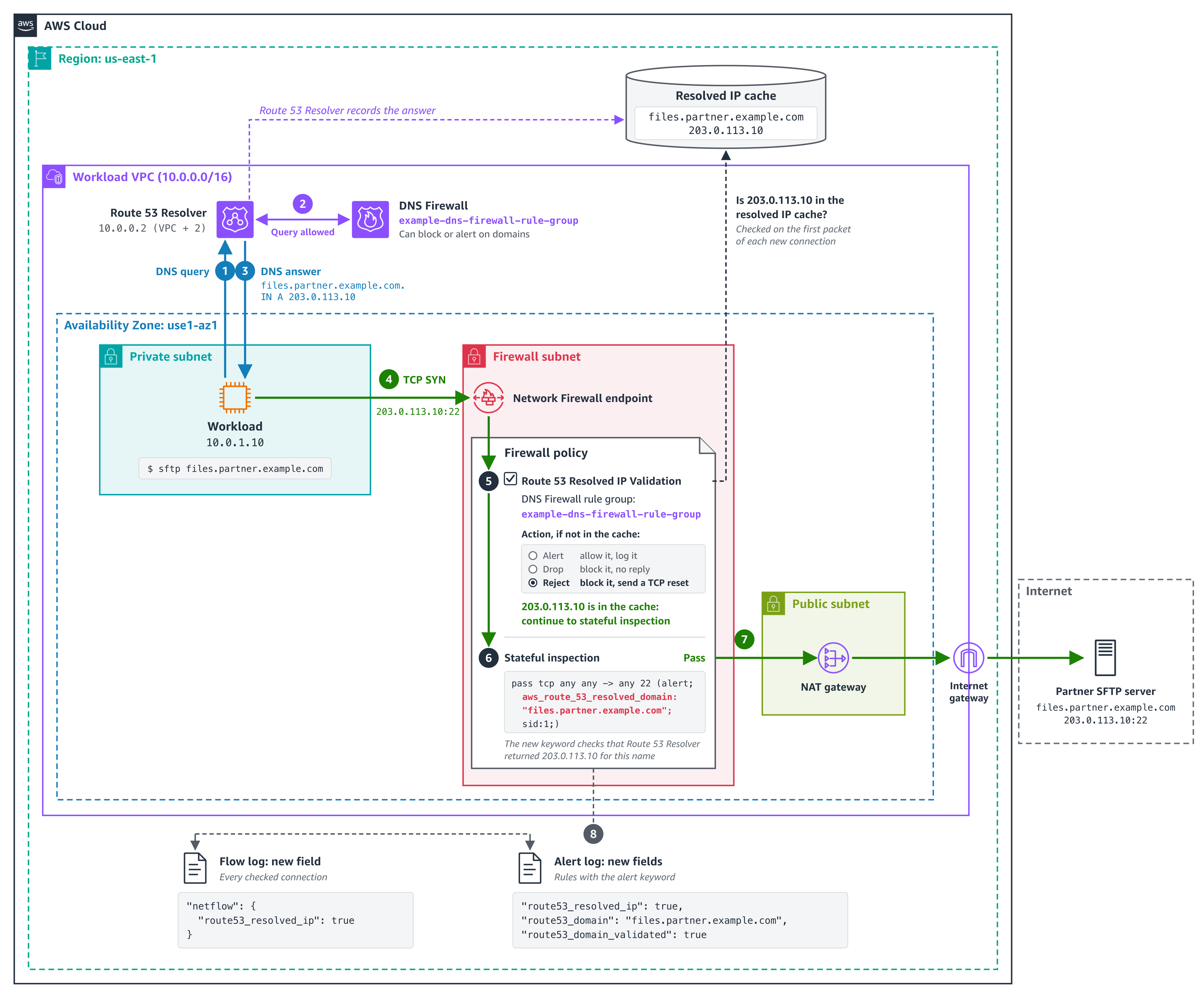
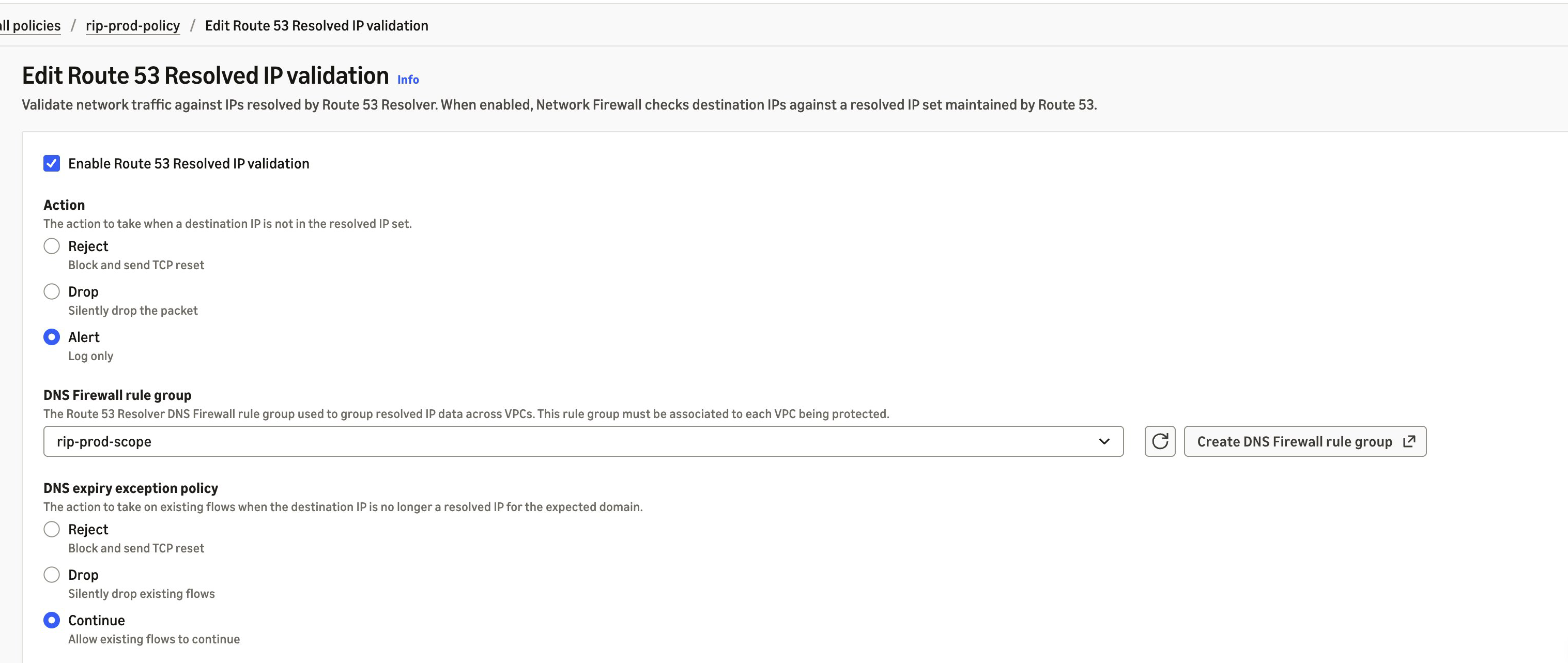
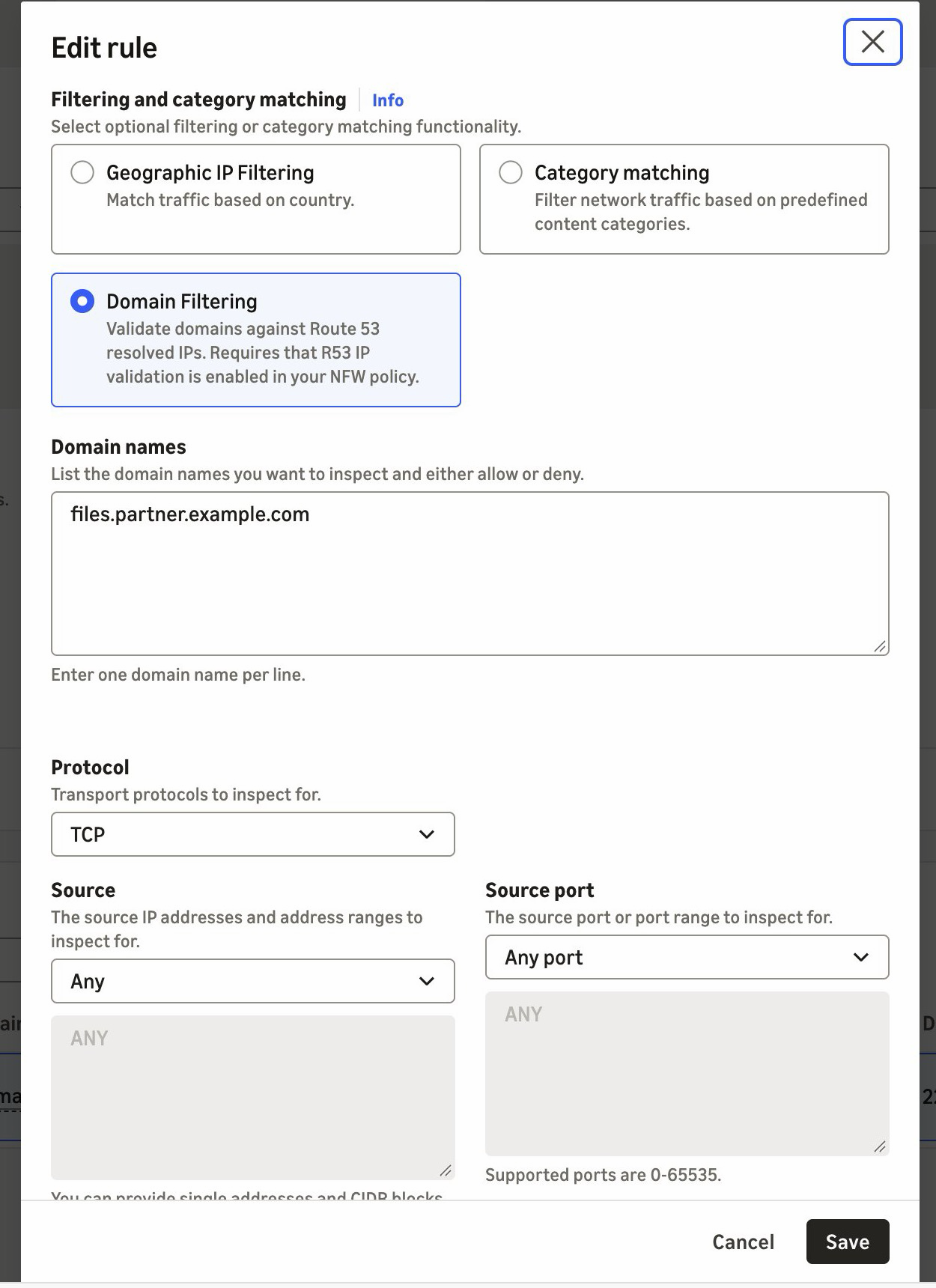
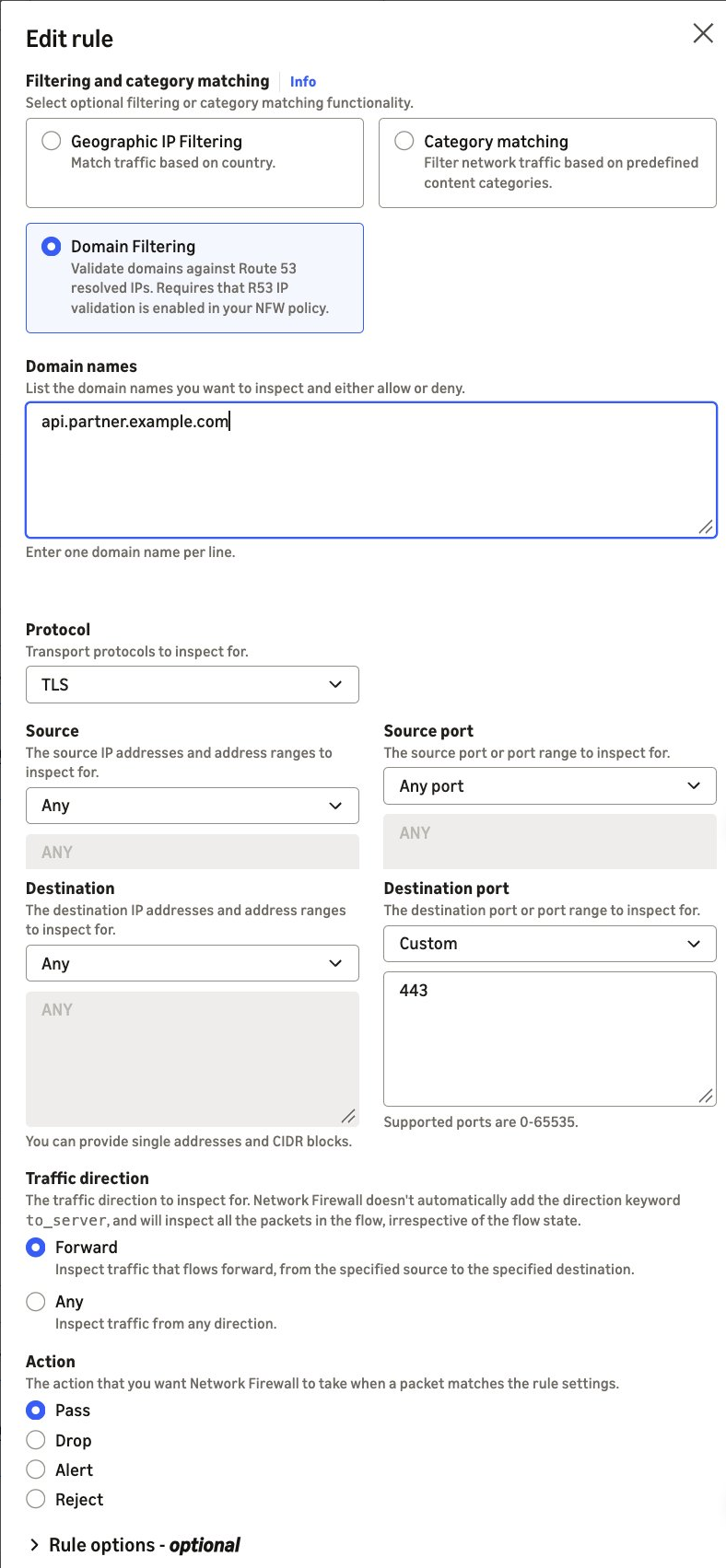








 Table Of Contents