Mac users have historically trusted their operating system to keep them safe. That peace of mind mostly comes from Apple’s strict control over its ecosystem, and the fact that macOS has historically faced fewer mass attacks than Windows. However, that doesn’t mean Macs are invulnerable: threats do exist, and new ones emerge all the time. Over just the past few weeks, security researchers have published reports on at least two new campaigns that target Apple devices.
The malware used in one of the campaigns has been dubbed CrashStealer, while the other is known as ClickLock. Both rely on different tricks to force users into entering their Mac password, which attackers then use to steal account credentials, crypto assets, documents, and much more. In today’s post, we take a close look at how CrashStealer operates — and how to avoid falling victim to it.
A videoconferencing app with CrashStealer inside
It was back in May 2026 that researchers spotted the first signs this malware was being developed, and by early July, they caught it operating in the wild. The malware earned its name because of its core mechanism: it disguises itself as the macOS built-in crash reporting tool (CrashReporter) while functioning as an infostealer designed to hijack sensitive data.
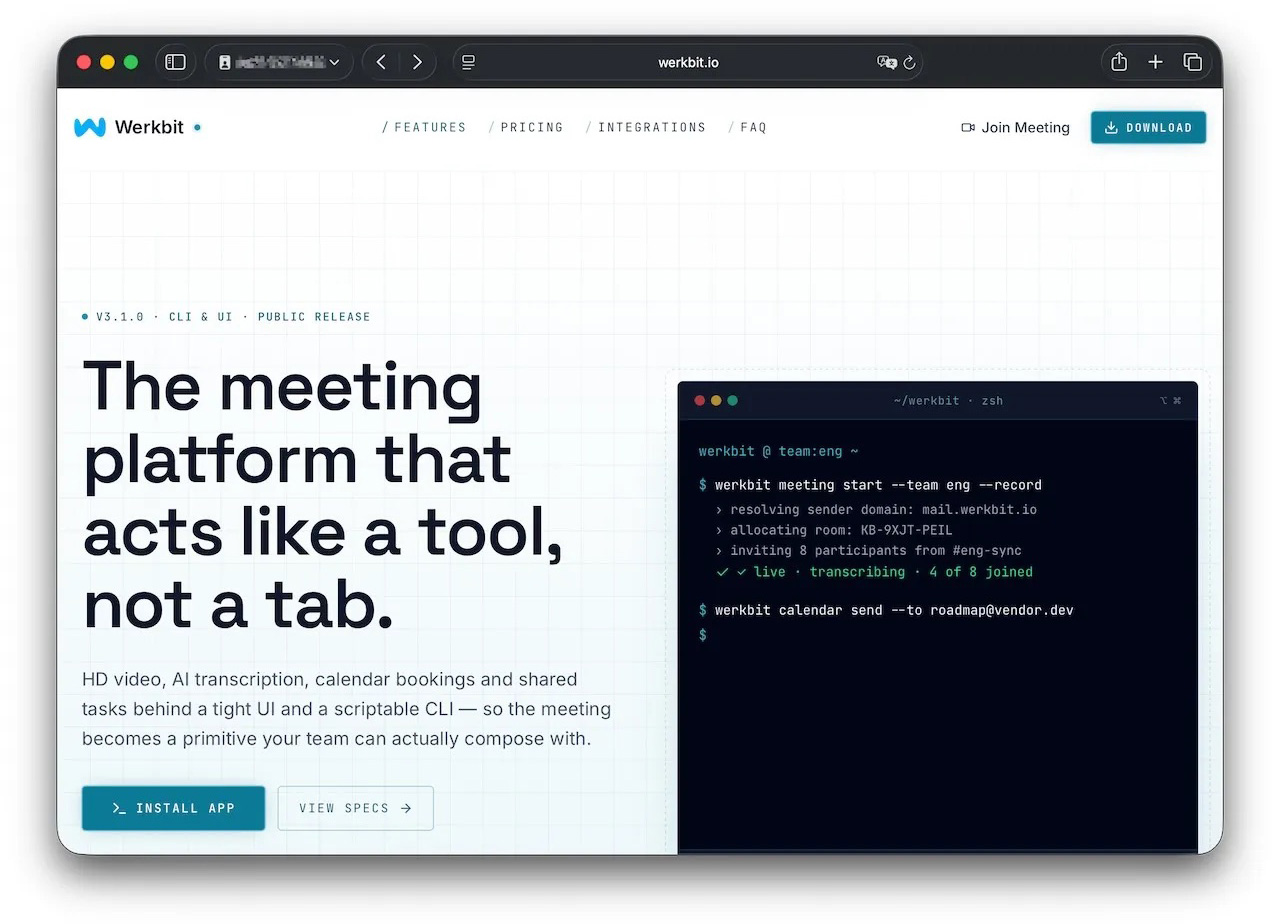
Researchers managed to trace one of the websites users visited to download the malware. The site poses as a legitimate platform for distributing the video conferencing tool Werkbit.
According to researchers, this is the site victims used to download Werkbit, which secretly contained the CrashStealer malware loader. Source
However, you can’t just visit the site and download the software. Before downloading, visitors are asked to enter a special meeting PIN. This setup likely allows the attackers to limit the distribution scope by targeting only specific, pre-selected victims. Exactly how the cybercriminals choose their targets and deliver the PIN remains unknown.
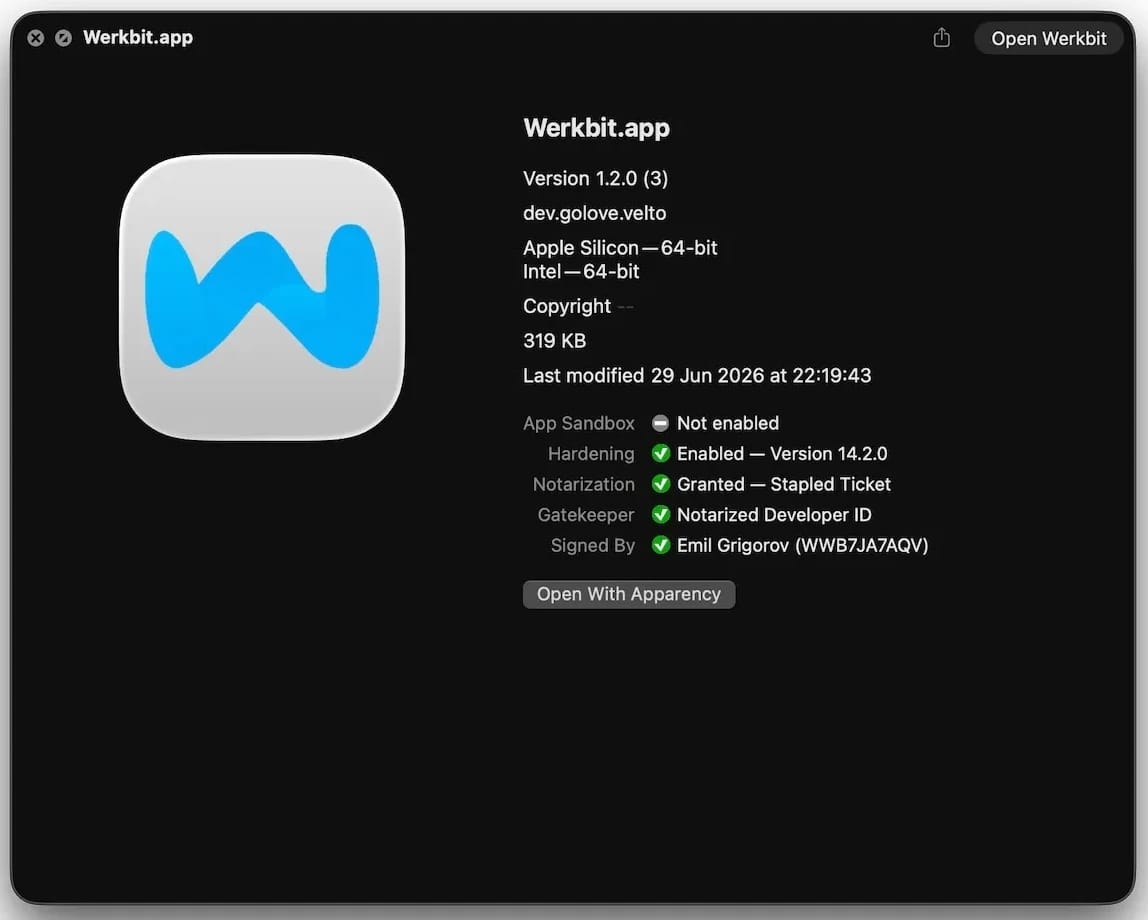
The “lucky” users with a code end up installing the initial malicious payload — named Werkbit Setup. Interestingly, it carries a valid Apple developer certificate and has successfully passed Apple’s notarization process — meaning it cleared the automated prescan for malicious code. As a result, the attackers manage to bypass the operating system’s built-in Gatekeeper defense. This allows the payload to launch without triggering the usual untrusted software warnings.
The Werkbit Setup installer is signed with a valid Apple developer certificate and has passed notarization. Source
Once launched, Werkbit Setup first reaches out to GitHub. Researchers believe using this popular platform helps attackers blend in by making these initial network requests look far less suspicious to security tools. After retrieving instructions from a GitHub repository, the program connects directly to the attackers’ server to fetch CrashStealer itself.
The loader then saves the malware to a temporary macOS folder, launches it, and wipes most of the intermediate setup files. As a result, a fully functional infostealer is up and running within seconds of Werkbit Setup starting. By the way, the user never gets any videoconferencing app.
How CrashStealer works
Unlike the Werkbit Setup loader, the CrashStealer malware itself isn’t signed with an Apple developer certificate. To keep users from suspecting anything, the malware disguises itself as the built-in macOS crash reporting tool, CrashReporter, by using the exact same name, app identifier, and a similar icon.
Once launched, CrashStealer completes a sequence of steps to gain access to sensitive data, establish persistence in the system, and cover its tracks:
Remove metadata — including the attribute that flags the app as an internet download.
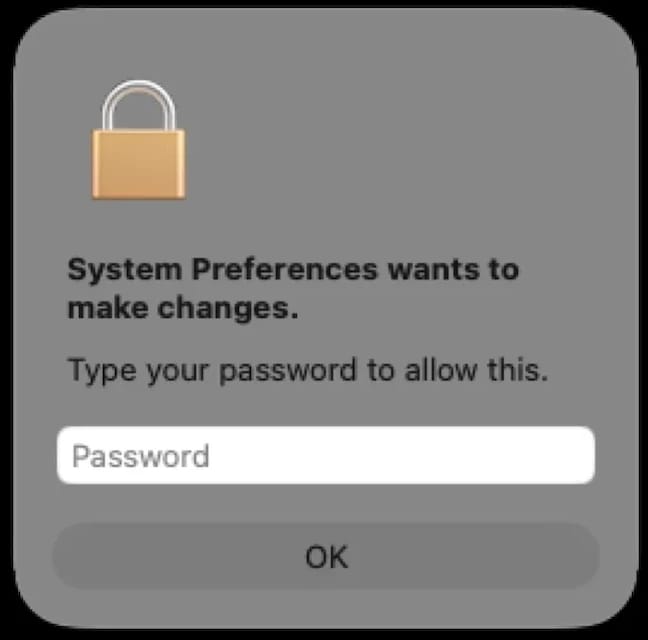
Display a fake system prompt asking for the user’s macOS password.
Use the previously captured credentials to gain access to Keychain, the built-in macOS password manager.
Check the computer for installed security tools and malware analysis software.
Collect saved browser passwords, cookies, Keychain contents, and data from other password managers and crypto wallets.
Encrypt the data it stole and prepare it for forwarding to the attackers’ server.
Create a copy of itself and establish persistence to launch automatically every time macOS boots.
Delete temporary files and other installation traces to make detection much harder.
Step two deserves a closer look. The password prompt that the user sees looks extremely convincing. What’s more, the malware immediately verifies whether the credentials are correct: if you make a typo and enter an invalid password, CrashStealer will pop the window right back up to ask you again.
Once launched, CrashStealer displays a pop-up that mimics the standard macOS password request. Source
What data is CrashStealer after?
CrashStealer’s hit list is massive. First and foremost, its operators target Keychain: the built-in macOS password manager where the system stores account credentials, cryptographic keys, certificates, tokens, and more.
Users of third-party password managers aren’t safe either: the malware steals data from 14 of these services, including 1Password, Bitwarden, LastPass, Dashlane, Keeper, KeePassXC, NordPass, Enpass, and RoboForm.
In addition, the malware collects all credentials and cookies stored in Chromium-based browsers — Chrome, Brave, Edge, Opera, Opera GX, Vivaldi, Chromium, and NAVER Whale — as well as Firefox. The attackers clearly have a strong interest in crypto assets: CrashStealer specifically targets data from 80 different crypto wallet extensions, including MetaMask, Phantom, Coinbase Wallet, Trust Wallet, Rabby, Exodus, Keplr, and Solflare.
Finally, the malware scans the Documents and Downloads folders to pick files that might be of interest to the cybercriminals. CrashStealer encrypts all the stolen data with the AES-256-GCM algorithm, ZIP’s it up, and sends it to the attackers’ server.
How to protect your device
The spike in attacks on macOS is a clear wake-up call: Apple users need to get proactive about their security. We recommend:
Researching apps online before installing them
Sticking to utilities from official app stores whenever possible
Using a reliable security solution that blocks malicious websites and stops malware activity on your device
Kaspersky security solutions detect the malware described in this post and assigns to it the verdicts HEUR:Trojan-Downloader.OSX.Agent.gen and HEUR:Trojan-PSW.OSX.Agent.gen.
Since early May 2026, Microsoft Threat Intelligence has observed Storm-2945, a sub-cluster of Midnight Blizzard, conducting widespread but targeted traffic manipulation attacks involving hospitality sector networks served by captive portals worldwide. Despite some tactic, technique, and procedure (TTP) similarities to the Forest Blizzard DNS hijacking operation that we publicly disclosed in April 2026, we attribute this campaign, which we call CaptiveCrunch, to Storm-2945. As reported by ReliaQuest on July 23, a portion of this activity leverages doppelganger domains mimicking Microsoft online services to conduct follow-on adversary-in-the-middle (AitM) phishing operations that abuse the device code authentication flow in Microsoft Entra ID. Microsoft Threat Intelligence has also identified active traffic manipulation attacks leading to the delivery of malware on impacted systems. Microsoft has observed Storm-2945 leveraging AI to support a significant portion of these operations.
Today, we are sharing our findings on these ongoing intrusions to raise awareness of this threat and enable customers to protect their devices, especially while traveling. We provide our assessment of Storm-2945’s relationship to Midnight Blizzard and analysis of the CaptiveCrunch campaign, detailing the malware and tradecraft used in these operations. We also provide mitigation, detection, and hunting guidance to help organizations identify and defend against Storm-2945 and related activity.
Microsoft Threat Intelligence would like to thank our partners at Anthropic and OpenAI for their collaboration and support during this investigation.
The CaptiveCrunch campaign
Since February 2026, Storm-2945 has conducted AI-augmented operations including targeted device code and OAuth code phishing campaigns leading to Entra device registration and subsequent data collection from Microsoft 365. Since early May 2026, Microsoft Threat Intelligence has observed Storm-2945 manipulating DNS and HTTP traffic from networks served by captive portals to redirect user traffic through actor-controlled infrastructure. Although our investigation into the initial compromise vector for the captive portal networks is ongoing, we have observed notable commonalities in the equipment and management systems used across multiple affected networks. These similarities suggest that the activity might not be limited to isolated compromises of individual venues and could reflect access to shared services within portions of the captive portal ecosystem.
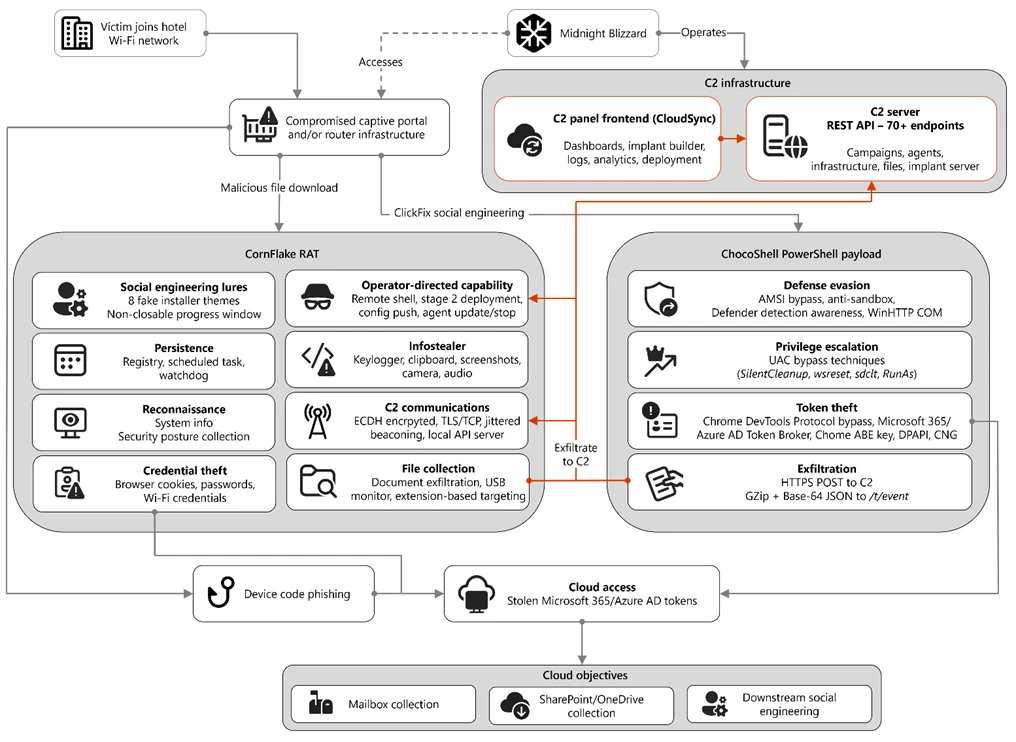
Figure 1. Overview of the CaptiveCrunch attack flow
As part of the CaptiveCrunch campaign, Storm-2945 has leveraged their AitM position to redirect users through actor-controlled phishing infrastructure and has also delivered malware purporting to be browser or operating system updates in response to automated connectivity checks issued by users’ browsers. Multiple variants have been delivered, including fully-featured Windows remote access trojans (RAT) in compiled Golang, with functionality to conduct system enumeration, collect files and keystrokes, steal credentials and session tokens, conduct audio and video surveillance, monitor for removable media, and provide the threat actor a remote shell on infected systems.
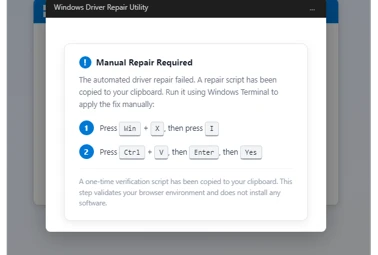
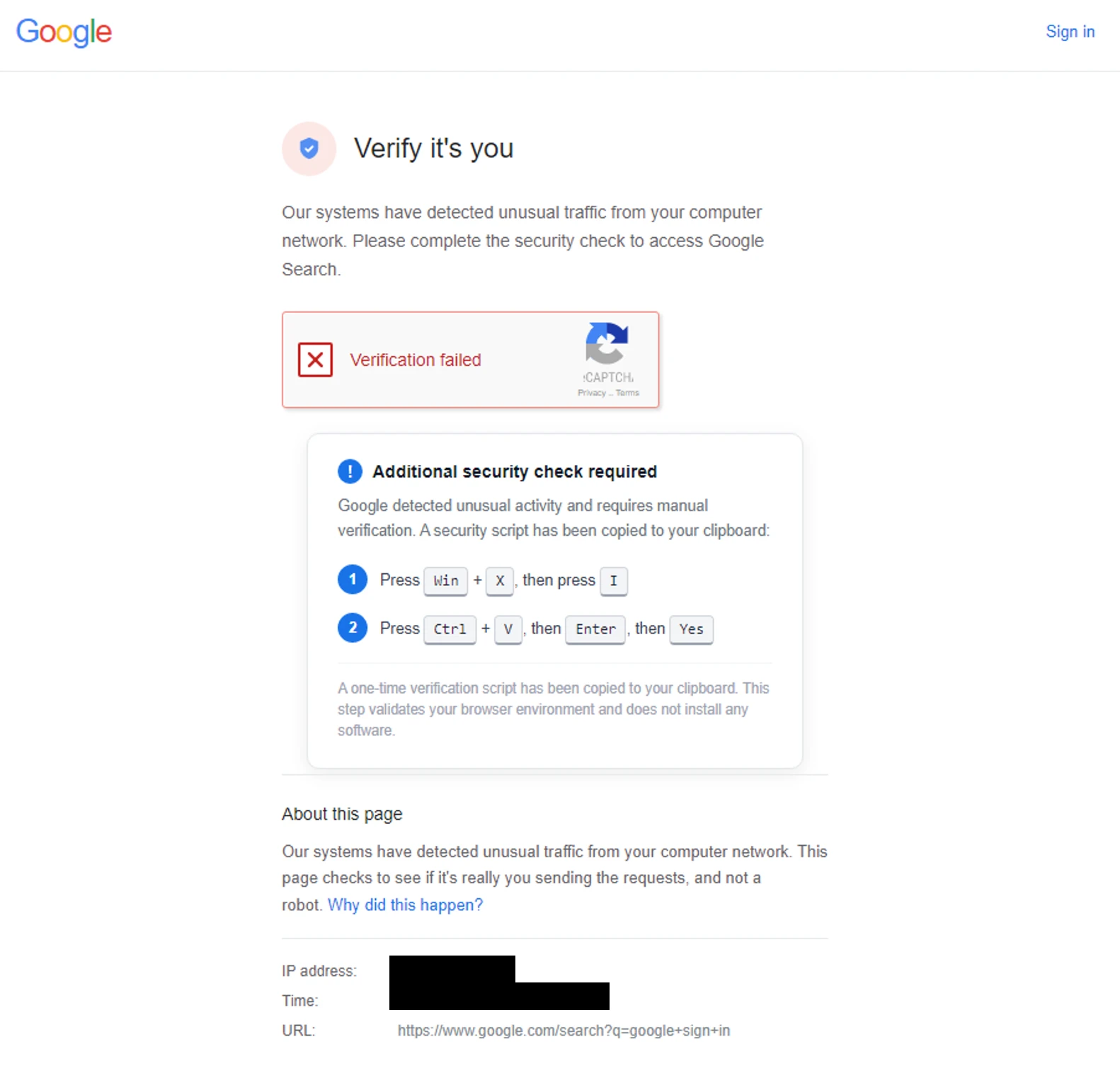
The threat actor infrastructure leverages a variety of ClickFix techniques to elicit the user into downloading and executing the malware:
Figure 2. ClickFix prompt with manual user instructionsFigure 3. ClickFix prompt with additional user instructions after verification failure
In addition to variants of malware targeting Windows systems, Microsoft Threat Intelligence is also aware of indications that the threat actor might be targeting Android devices with similar techniques as the ClickFix landings also include instructions for Android devices to download and install an APK file.
To date, Microsoft has identified widespread compromise of Wi-Fi networks at hospitality-related organizations and other networks serviced by captive portal equipment in several countries. ReliaQuest has identified this activity not only at hotels, but also conference centers and other shared venues, and assesses that the goal of this activity is to access the accounts of corporate travelers.
Storm-2945 and Midnight Blizzard
Microsoft Threat Intelligence assesses that Storm-2945 is an operational sub-cluster of Midnight Blizzard based on distinctive technical and operational overlaps. These include technical similarities to Storm-2372, a Midnight Blizzard initial access operations sub-cluster, also notable for their device code and OAuth code phishing operations tracked throughout 2025, Microsoft Graph-based email exfiltration, social engineering delivered via commercial messaging apps, and significant similarities in victimology.
Midnight Blizzard is a Russia-based threat actor attributed by the US and UK governments to the Foreign Intelligence Service of the Russian Federation, also known as the SVR. This threat actor is known to primarily target governments, diplomatic entities, non-governmental organizations (NGOs), and information technology (IT) service providers, primarily in the US and Europe. Midnight Blizzard is consistent and persistent in their operational targeting, and their objectives rarely change. Their focus is to collect intelligence through longstanding and dedicated espionage in support of Russian foreign policy interests.
Midnight Blizzard operations often involve compromise of valid accounts and, in some highly targeted cases, advanced techniques to compromise authentication mechanisms within an organization to expand access and evade detection. They utilize diverse initial access methods, and Midnight Blizzard is also adept at identifying and abusing OAuth applications to move laterally across cloud environments and for post-compromise activity, such as email collection.
CaptiveCrunch tradecraft and tooling
CornFlake: Remote access and infostealer implant
CornFlake is a full-featured Windows RAT written in Go that serves as Storm-2945’s primary persistent implant. Microsoft has observed the threat actor rapidly iterating on this malware layer, which features customizable capabilities from the social engineering user interface and data collection capabilities to anti-detection and evasion techniques.
On initial execution, CornFlake operates in dropper mode: it displays a convincing fake progress window designed to occupy the victim’s attention while the binary copies itself to %APPDATA%\svchost32\svchost32.exe and establishes persistence.
Fake window options configurable by the threat actor at build time:
winupdate — A Windows Update screen displaying “Working on updates… Don’t turn off your computer”
defender — A Windows Security virus scan
directx — A DirectX End-User Runtime Web Installer
vcredist — A Microsoft Visual C++ 2015-2022 Redistributable installer
sysopt — A disk optimization utility
netfix — A Windows Network Diagnostics tool
browser — A browser update prompt
pdfview — A document viewer installer
Figure 4. False update window
CornFlake registers as a Windows service named svchost32 with the display name “Cloud Sync Service” and description “Synchronizes files with the cloud storage provider”, deliberately mimicking the legitimate svchost.exe process. It establishes redundant persistence mechanisms: Windows service registrations, Registry Run keys, named scheduled tasks, and a persistence watchdog routine that runs continuously to restore any persistence mechanism that is removed by defenders or endpoint protection.
For command and control (C2), CornFlake performs an Elliptic Curve Diffie-Hellman (ECDH) P-256 ephemeral key exchange with the C2 server, derives a session key via SHA-256, and communicates over a custom JSON protocol framed within the encrypted channel. This provides an encrypted channel to the C2 server, with each C2 session using a unique ephemeral key, making decryption of captured traffic impossible without the session-specific private key. The runtime configuration file sync.dat supports hot reconfiguration of C2 servers, watched directories, file targeting patterns, and Transport Layer Security (TLS) settings without requiring redeployment.
Once established on a victim system, CornFlake provides the operator with a comprehensive collection toolkit, gated by configuration flags that allow selective activation post-deployment:
Capability
Description
Keylogging
Raw input API-based keylogger capturing all keystrokes, including password fields
Clipboard monitoring
Captures clipboard changes with SHA-256 deduplication and records the active window title at time of capture
Screenshot capture
Idle-triggered and on-demand screenshots with configurable idle threshold
Audio surveillance
Windows Audio Session API (WASAPI)-based microphone capture, encoded as WAV files
Video surveillance
Media Foundation-based webcam capture, encoded as JPEG
Browser credential theft
ChromeKatz-derived module supporting live cookie extraction from process memory (Chromium browsers) and stored password extraction from on-disk databases, including Chrome App-Bound Encryption (ABE) bypass and Firefox NSS/SDR decryption
File exfiltration
Targets files based on file extensions with real-time file system monitoring and an upload throttle (1,000 files or 500 MB per cycle). File extensions are categorized as Documents, Archives, Images, Code, Data, Emails, and Keys
USB drive monitoring
Detects and scans removable media when inserted
Security posture sweep
Collects 18 categories of host intelligence including installed software, antivirus (AV)/endpoint detection and response (EDR) products, Defender exclusions, User Account Control (UAC) level, Remote Desktop Protocol (RDP) history, Office most recently used (MRU) files, and credential hints
Remote shell
Arbitrary command execution via cmd.exe or PowerShell (with -NoP flag to suppress profile-based detection)
CornFlake also exposes a localhost HTTP API server (/upload, /reload, /status) that transforms the RAT into a modular platform: companion or next-stage payloads such as ChocoShell could task file exfiltration, trigger configuration hot reloads or check C2 connectivity using the pre-established secure C2 channel for communication.
ChocoShell: PowerShell infostealer
ChocoShell is the campaign’s Powershell-based infostealer, delivered and executed entirely in-memory. Its primary objective is the high-volume theft of browser session cookies, saved passwords, Microsoft 365 Single Sign-On (SSO) tokens, and Wi-Fi credentials from compromised systems. Where CornFlake provides the operator with a persistent, long-running foothold on the device, ChocoShell is designed to extract the most operationally valuable credentials, giving the operator access to victim cloud environments.
The ChocoShell script was authored with full developer comments that reveal the operator’s intent behind each code decision, including explicit references to Microsoft detection signatures and the reasoning behind specific evasion choices. The consistent coding standard and descriptive commentary suggest the author might have leveraged AI-assisted code generation.
Defense evasion. Upon execution, ChocoShell beacons to a hardcoded C2 server at 213.145.86[.]112 and implements several evasion techniques in sequence. It disables the Antimalware Scan Interface (AMSI) via .NET reflection to prevent ScriptBlock scanning and evades Microsoft behavioral detection that triggers on suspicious PowerShell web request cmdlets. A timing-based sandbox detection check is also employed as a virtual machine (VM) detection mechanism, silently exiting without performing any collection if detected.
C2 communication. ChocoShell communicates with its C2 server using HTTPS with URI paths designed to blend in with legitimate web traffic. Beacons use /t/pixel.gif?m=<status>, mimicking an image tracking pixel. Additional tooling is fetched from /cdn/chunks/polyfill-7e2b.min.js, disguised as a JavaScript polyfill file. This downloaded module is Base64-decoded and executed in memory via [ScriptBlock]::Create(), providing browser encryption key extraction capabilities, SYSTEM token impersonation, and Defender signature locking. Exfiltrated data is sent by POST to /t/event as GZip-compressed, Base64-wrapped JSON.
Privilege escalation. ChocoShell requires administrative privileges for its most impactful capabilities: SYSTEM token impersonation for Chrome ABE decryption, Volume Shadow Copy Service (VSS) shadow copy creation, Defender signature locking. It implements three silent UAC bypass techniques with ordered fallback:
SilentCleanup task hijack: Writes a malicious command to HKCU\Environment\windir, then triggers the built-in SilentCleanup scheduled task, which resolves %windir% from the user’s environment, executing the threat actor’s command at elevated privilege. The registry value is cleaned up after two seconds to avoid cloud detection.
wsreset.exe COM hijack: Creates a COM handler key in HKCU\Software\Classes and launches the auto-elevating Windows Store reset tool.
sdclt.exe folder hijack: Hijacks HKCU\Software\Classes\Folder\shell\open\command and launches the Windows Backup utility with the /KickOffElev flag.
If none of the silent bypasses succeed (for example, the user is not a local administrator), ChocoShell falls back to a visible UAC prompt via Start-Process -Verb RunAs. Notably, the script also contains a variant designed to execute within the WinGet Desired State Configuration (DSC) host process (ConfigurationRemotingServer), suggesting an attack vector through malicious WinGet DSC configuration used in Windows machine provisioning.
Credential and session theft. Once running with elevated permissions, ChocoShell locks Defender signature updates and systematically harvests data from multiple sources. For Chromium-based browsers (Chrome, Edge, Brave, Opera, Opera GX, Vivaldi), it extracts the master encryption key from the browser’s Local State file, handling both the modern ABE scheme (Chrome v127+) and the legacy data protection API (DPAPI)-only scheme. ABE decryption requires SYSTEM-level DPAPI access, which the malware obtains by impersonating a SYSTEM process token borrowed from winlogon.exe, wininit.exe, or services.exe. Locked browser SQLite databases are accessed through three strategies: shared file access, Volume Shadow Service snapshots, and direct copy as a fallback.
As a parallel collection path, ChocoShell launches Chrome, Edge, and Brave with the –remote-debugging-port flag and issues Network.getAllCookies through the Chrome DevTools Protocol (CDP). This completely bypasses ABE, enabling the browser to perform its own internal decryption and returns plaintext cookie values. To handle privilege issues (SYSTEM-launched browsers inherit the wrong token), the malware creates transient scheduled tasks with TASK_LOGON_INTERACTIVE_TOKEN to launch the browser under the signed-in user’s session. After extraction, the browser is stopped and relaunched with –restore-last-session to avoid alerting the user.
For Firefox family browsers (Firefox, Waterfox, LibreWolf, Floorp, Zen), the malware copies unencrypted cookies.sqlite databases from each profile. Additionally, ChocoShell collects Microsoft 365 and Azure Active Directory (AD) access tokens, refresh tokens, and Web Account Manager (WAM) tokens from .tbres files in the Token Broker cache. Collection of these tokens represents a significant threat to enterprise environments, as threat actors could replay SSO sessions without browser cookies. Additionally, Wi-Fi credentials are harvested via netsh wlan show profile with key=clear.
Exfiltration and cleanup. All collected data is aggregated into a JSON structure, GZip-compressed, Base64-encoded, and sent by POST to the C2’s /t/event endpoint. After exfiltration, all collected data variables are nulled, garbage collection is forced, VSS shadow copies are deleted via Windows Management Instrumentation (WMI), temporary elevation scripts are removed, and all UAC bypass registry keys (already cleaned during escalation) are verified removed.
FruitStone: Operator C2 panel
FruitStone is the web-based C2 panel that Storm-2945 operators use to manage the entire CaptiveCrunch campaign infrastructure. Implemented as a single-page application (HTML and JavaScript) serving as the front-end of the C2 server with all functionality exposed without authentication, FruitStone provides a centralized dashboard for managing compromised endpoints, building and deploying new campaign payloads, and reviewing all collected data (such as screenshots, keystrokes, browser credentials).
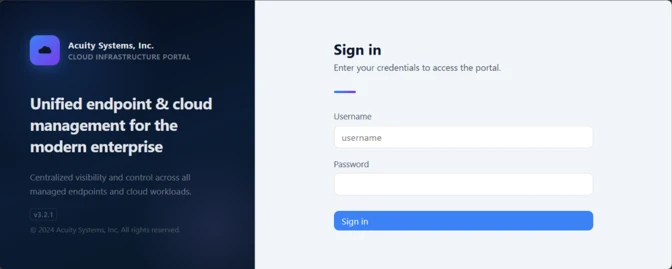
Operational cover. The panel is branded as “CloudSync Console” with a footer reading “Acuity Systems, Inc. — Cloud Infrastructure Portal v3.2.1,” designed to appear as legitimate enterprise cloud management software if the panel URL is discovered by defenders or hosting providers. This masquerading extends to the CornFlake agent’s service name (Cloud Sync Service) and description (“Synchronizes files with the cloud storage provider”), creating a consistent cover story across the toolchain.
Figure 5. CloudSync Console panel masquerade
Session management and multi-operator support. FruitStone uses JSON Web Token (JWT)-based authentication, session revocation, and rate limiting with IP blocking to prevent brute force attacks against the panel sign in. Multiple operators could be provisioned with individual accounts, and all active sessions are visible with IP address, user-agent, and creation time to enable operational security awareness across the operators.
Agent management. The panel displays all registered CornFlake agents in a dashboard with real-time status updates via Server-Sent Events (SSE). Each agent card shows comprehensive system information including hostname, username, OS version, CPU, RAM, disk usage, screen resolution, timezone, domain membership, and camera/microphone presence, all collected during the CornFlake posture sweep. Agents are grouped by country and subnet, with geographic distribution visualized on a map.
Operators could interact with individual agents through:
Remote shell — Interactive cmd.exe or PowerShell command execution with command history
File system browser — Live directory traversal and arbitrary file download from compromised hosts
Collection tasking — On-demand screenshot, process list, keylog buffer flush, clipboard dump, security posture survey, ChromeKatz cookie/password extraction, camera capture, and audio recording
Configuration push — Live runtime reconfiguration of C2 servers, watch paths, and C2 beacon timing
Agent update — In-place implant update by pushing a new CornFlake build to a running agent
Agent kill — Remote termination of the CornFlake implant
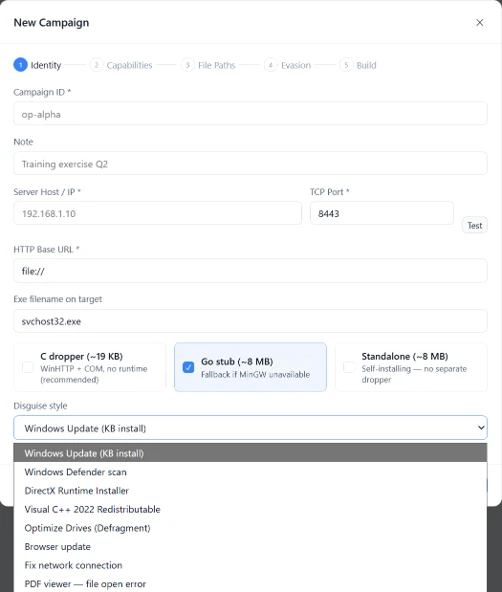
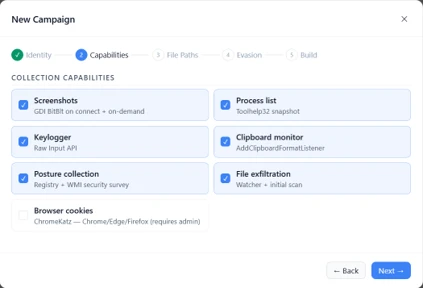
Campaign builder. A step-by-step wizard enables operators to configure and build new CornFlake payloads directly from the panel:
Identity — Campaign ID, C2 host and port, HTTP base URL, executable file name (svchost32.exe by default), and dropper type (C dropper at ~19 KB, Go stub at ~8 MB, or standalone self-installer)
File Paths — Configure targeted directories and file extensions by category (documents, archives, images, code, data, emails, encryption keys)
Figure 8. File paths tab
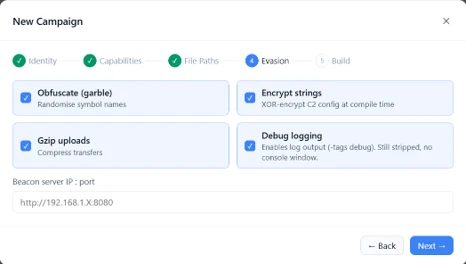
Evasion — Enable garble symbol randomization (for GoLang payloads), XOR string encoding, GZip upload compression, and debug mode
Figure 9. Evasion tab
Infrastructure management. FruitStone provides management interfaces for three layers of supporting infrastructure:
Proxy relays — Multi-proxy C2 relay architecture with TLS certificate tracking (fingerprint, expiry), health checks, connection counts, bytes forwarded, and rotation capabilities that push updated server lists to all online agents
Beacon profiles — Configurable timing profiles controlling agent sleep intervals, reconnection delays, TLS Server Name Indication (SNI) spoofing (like teams.microsoft.com), and DNS fallback domains
Staging servers — External payload hosting infrastructure with push-to-deploy, file listing, and health monitoring
Figure 10. View of the CloudSync staging servers interface
Device code abuse for cloud access
Since July 16, Microsoft has observed a portion of CaptiveCrunch landing pages redirecting users to device code authentication flow experiences. In these cases, users served these landings might be instructed to enter a device code into a legitimate Microsoft sign-in page, a technique commonly referred to as device code phishing.
Device code authentication is a legitimate OAuth workflow designed for devices that cannot support a traditional sign-in experience. However, threat actors could abuse this flow by initiating an authentication request on behalf of a user then convincing the user to enter an actor-controlled device code into a legitimate Microsoft authentication page. When successful, the victim authenticates the threat actor’s session rather than their own.
This activity is consistent with previously reported device code phishing operations conducted by Midnight Blizzard since August 2024. The observed technique does not appear fundamentally novel; however, integrating device code phishing into captive portal and traffic manipulation operations might increase the likelihood that users perceive the authentication request as legitimate. For additional details on Midnight Blizzard-related device code phishing techniques, see: Storm-2372 conducts device code phishing campaign. To understand other threat actors’ use of device code phishing and associated mitigations, see Inside an AI‑enabled device code phishing campaign.
How to protect against CaptiveCrunch activity
Minimize trust in hospitality and guest networks
When traveling, users should treat hotel, conference, airport, and other guest wireless networks as untrustworthy.
Prefer private connectivity (including mobile hotspots, satellite, and eSIM-based cellular data connections) over public Wi‑Fi whenever practical.
Consider using enterprise-managed travel routers or hotspot devices that establish encrypted tunnels back to trusted corporate infrastructure before accessing sensitive resources.
Avoid downloading software updates, certificates, browser updates, network troubleshooting tools, or security utilities presented through captive portals or other unexpected web prompts.
Verify update requests through trusted operating system mechanisms rather than pop-up messages or website prompts.
Strengthen identity and access controls
Organizations should assume that public and hospitality network infrastructure might not be trustworthy and should adopt controls that limit exposure to traffic manipulation, credential theft, and device code phishing.
Educate users to recognize ClickFix-style prompts, fake verification checks, and paste-and-run instructions as malicious, especially when they invoke command interpreters or script hosts such as cmd.exe, PowerShell, rundll32.exe, or mshta.exe.
Use passwordless solutions like passkeys and implement multifactor authentication (MFA).
Only allow device code flow where necessary. Microsoft recommends blocking device code flow wherever possible. Where necessary, configure Microsoft Entra ID’s device code flow in your Conditional Access policies.
Implement a sign-in risk policy to automate response to risky sign-ins. A sign-in risk represents the probability that a given authentication request is not authorized by the identity owner. A sign-in risk-based policy can be implemented by adding a sign-in risk condition to Conditional Access policies that evaluates the risk level of a specific user or group. Based on the risk level (high/medium/low), a policy can be configured to block access or force MFA.
When a user is a high risk and Conditional access evaluation is enabled, the user’s access is revoked, and they are forced to re-authenticate.
For regular activity monitoring, use Risky sign-in reports, which surface attempted and successful user access activities where the legitimate owner might not have performed the sign-in.
Use a Security Service Edge (SSE) solution like Global Secure Access to secure access to any app or resource using network, identity, and endpoint access controls.
Reduce exposure during captive portal registration
Organizations should review what information employees provide to hospitality providers when connecting to guest networks.
Do not reuse corporate credentials on hotel, conference, or guest-network registration pages.
Where possible, organizations should evaluate whether venue-provided wireless is required for corporate events and conferences.
Organizations should minimize unnecessary disclosure of employee identities, organizational affiliations, and travel details when booking accommodations or registering for guest network access, consistent with corporate policy and applicable local requirements.
Microsoft Defender detections and hunting guidance
Microsoft Defender customers can refer to the list of applicable detections below. Microsoft Defender coordinates detection, prevention, investigation, and response across endpoints, identities, email, apps to provide integrated protection against attacks like the threat discussed in this blog.
Microsoft Defender for Endpoint detects Storm-2945 activity under the detection Suspicious activity linked to a Russian state-sponsored threat actor has been detected. However, these alerts might be triggered by unrelated threat actor activity. The following chart lists Microsoft Defender detections specific to the TTPs utilized by Storm-2945 in this attack.
CornFlake registers a Windows service, a Registry Run key, a scheduled task
Microsoft Defender for Endpoint – Suspicious Scheduled Task Process Launched – Suspicious scheduled task – Suspicious file added to run key – Suspicious service registration
Microsoft Defender XDR – User account compromise via OAuth device code phishing – Malicious sign in from an IP address associated with recognized attacker infrastructure – Suspicious Azure authentication through possible device code phishing
Microsoft Security Copilot is embedded in Microsoft Defender and provides security teams with AI-powered capabilities to summarize incidents, analyze files and scripts, summarize identities, use guided responses, and generate device summaries, hunting queries, and incident reports.
Security Copilot is also available as a standalone experience where customers can perform specific security-related tasks, such as incident investigation, user analysis, and vulnerability impact assessment. In addition, Security Copilot offers developer scenarios that allow customers to build, test, publish, and integrate AI agents and plugins to meet unique security needs.
Threat intelligence reports
Microsoft Defender XDR customers can use the following threat analytics reports in the Defender portal (requires license for at least one Defender XDR product) to get the most up-to-date information about the threat actor, malicious activity, and techniques discussed in this blog. These reports provide the intelligence, protection information, and recommended actions to prevent, mitigate, or respond to associated threats found in customer environments.
Microsoft Security Copilot customers can also use the Microsoft Security Copilot integration in Microsoft Defender Threat Intelligence, either in the Security Copilot standalone portal or in the embedded experience in the Microsoft Defender portal to get more information about this threat actor.
Hunting queries
Microsoft Defender XDR
Microsoft Defender XDR customers can run the following advanced hunting queries to find related activity in their networks:
Detect file creation after Wi-Fi connectivity test on devices
The following query checks for a file creation on a device within two minutes of the device performing built‑in Network Connectivity Status Indicator (NCSI) test, which occurs when network connectivity is established to a Wi-Fi network with a captive portal. This activity might indicate an attacker’s initial access file presence on a device.
Please note that not all files discovered through this query might be malicious or related to this threat activity.
let ncsi_endpoints = dynamic(["msftconnecttest.com","edge-http.microsoft.com","msftncsi.com","captive.apple.com","clients1.google.com",
    "clients3.google.com","clients4.google.com","clients6.google.com","connectivitycheck.gstatic.com","connectivitycheck.android.com",
    "android.clients.google.com","www.gstatic.com","detectportal.firefox.com","detectportal.brave-http-only.com","cloudflareportal.com",
    "cloudflarecp.com","cloudflareok.com","connectivity-check.warp-svc","connectivity.cloudflareclient.com","spectrum.s3.amazonaws.com",
    "nmcheck.gnome.org"]);
let NCSIEvents = DeviceNetworkEvents
    | where Timestamp > ago(7d)
    | where RemoteUrl has_any (ncsi_endpoints)
    | project NCSI_Timestamp = Timestamp, DeviceId, DeviceName, RemoteUrl, NCSI_ReportId = ReportId, NCSI_InitiatingProcessFileName = InitiatingProcessFileName, NCSI_InitiatingProcessCommandLine = InitiatingProcessCommandLine, NCSI_AccountName = InitiatingProcessAccountName;
let FileDownloadEvents = DeviceFileEvents
    | where Timestamp > ago(7d)
    | where ActionType == "FileCreated"
    | where FileName has_any (".exe",".msi",".zip",".rar",".7z")
    | project Download_Timestamp = Timestamp, DeviceId, FileName, FolderPath, Download_ReportId = ReportId, Download_InitiatingProcessFileName = InitiatingProcessFileName, Download_InitiatingProcessCommandLine = InitiatingProcessCommandLine, Download_AccountName = InitiatingProcessAccountName;
NCSIEvents
| join kind=inner (
    FileDownloadEvents
) on DeviceId
| where Download_Timestamp >= NCSI_Timestamp and Download_Timestamp
Detect connectivity to Storm-2945 infrastructure
The following query checks for connectivity to Storm-2945 infrastructure observed in this attack activity.
let target_domains = dynamic(["ms365-device.com", "ms365-live.com", "m365-owa.com", "owa-ms365.com"]);
let target_ips = dynamic(["31.57.243.154", "38.146.28.75", "38.146.28.132", "104.194.159.150", "107.189.26.194", "213.145.86.112"]);
DeviceNetworkEvents
| where RemoteUrl has_any(target_domains) or RemoteIP in (target_ips)
| project
    Timestamp,
    DeviceName,
    DeviceId,
    RemoteUrl,
    RemoteIP,
    LocalIP,
    InitiatingProcessFileName,
    InitiatingProcessCommandLine,
    AccountName = InitiatingProcessAccountName,
    ReportId
Detect CornFlake RAT presence on affected systems
The following query checks for the presence of the CornFlake RAT binary.
The following query checks for the CornFlake RAT Windows service registration.
DeviceRegistryEvents
| where RegistryKey has @"\SYSTEM\CurrentControlSet\Services\svchost32"
| where ActionType == "RegistryValueSet"
| where (RegistryValueName == "DisplayName" and RegistryValueData == "Cloud Sync Service")
    or (RegistryValueName == "Description" and RegistryValueData == "Synchronizes files with the cloud storage provider")
| project
    Timestamp,
    DeviceName,
    DeviceId,
    RegistryKey,
    RegistryValueName,
    RegistryValueData,
    ActionType,
    InitiatingProcessFileName,
    InitiatingProcessCommandLine,
    InitiatingProcessAccountName,
    ReportId
Microsoft Sentinel
Microsoft Sentinel customers can use the TI Mapping analytics (a series of analytics all prefixed with ‘TI map’) to automatically match the malicious domain indicators mentioned in this blog post with data in their workspace. If the TI Map analytics are not currently deployed, customers can install the Threat Intelligence solution from the Microsoft Sentinel Content Hub to have the analytics rule deployed in their Sentinel workspace.
Detect network IP and domain indicators of compromise using ASIM
The following query checks IP addresses and domain IOCs across data sources supported by ASIM network session parser:
//IP list and domain list- _Im_NetworkSession
let lookback = 30d;
let ioc_ip_addr = dynamic(["213.145.86.112"]);
let ioc_domains = dynamic(["213.145.86.112/t/pixel.gif", "213.145.86.112/cdn/chunks/polyfill-7e2b.min.js", "213.145.86.112/t/event"]);
_Im_NetworkSession(starttime=todatetime(ago(lookback)), endtime=now())
| where DstIpAddr in (ioc_ip_addr) or DstDomain has_any (ioc_domains)
| summarize imNWS_mintime=min(TimeGenerated), imNWS_maxtime=max(TimeGenerated),
  EventCount=count() by SrcIpAddr, DstIpAddr, DstDomain, Dvc, EventProduct, EventVendor
Detect web sessions IP and file hash indicators of compromise using ASIM
The following query checks IP addresses, domains, and file hash IOCs across data sources supported by ASIM web session parser:
//IP list - _Im_WebSession
let lookback = 30d;
let ioc_ip_addr = dynamic(["213.145.86.112"]);
let ioc_sha_hashes =dynamic([“918fa52ae45ed60ba7cc8bdc99c3cbe9ab92e0375ec31fc05d0d4513be11c593”, “be99857449d2856dd5a84e21c8a3d5e0e01456adb44062ddec5a6b4970d8d42c”]);
_Im_WebSession(starttime=todatetime(ago(lookback)), endtime=now())
| where DstIpAddr in (ioc_ip_addr) or FileSHA256 in (ioc_sha_hashes)
| summarize imWS_mintime=min(TimeGenerated), imWS_maxtime=max(TimeGenerated),
  EventCount=count() by SrcIpAddr, DstIpAddr, Url, Dvc, EventProduct, EventVendor
Detect domain and URL indicators of compromise using ASIM
The following query checks domain and URL IOCs across data sources supported by ASIM web session parser:
// file hash list - imFileEvent
// Domain list - _Im_WebSession
let ioc_domains = dynamic(["https://213.145.86.112/t/pixel.gif", "https://213.145.86.112/cdn/chunks/polyfill-7e2b.min.js", "https://213.145.86.112/t/event"]);
_Im_WebSession (url_has_any = ioc_domains)
ChocoShell C2 communications
The following query detects ChocoShell communications with its C2 server using HTTPS with URI paths designed to blend in with legitimate web traffic. Beacons use /t/pixel.gif?m=<status>, mimicking an image tracking pixel.
let lookback = 30d;
let ioc_url_artifacts = dynamic(["/t/pixel.gif?m="]);
_Im_WebSession(starttime=todatetime(ago(lookback)), endtime=now())
| where DstDomain  in (ioc_url_artifacts)
| summarize imWS_mintime=min(TimeGenerated), imWS_maxtime=max(TimeGenerated),
  EventCount=count() by SrcIpAddr, DstIpAddr, Url, Dvc, EventProduct, EventVendor
To hear stories and insights from the Microsoft Threat Intelligence community about the ever-evolving threat landscape, listen to the Microsoft Threat Intelligence podcast.
The HIPAA Security Rule’s Technical Safeguards (§164.312) define five standards and nine implementation specifications covering access control, audit controls, integrity, authentication, and transmission security.
The guidance also covers the 2025 NPRM proposed changes,including encryption at rest and in transit becoming required, multi-factor authentication (MFA) becoming mandatory for all electronic Personal Health Information (ePHI) access, and new specifications for network segmentation, configuration management, anti-malware protection, patch management, software removal, incident response and breach notification.
Key topics included
Shared responsibility for HIPAA on AWS – A responsibility matrix mapping each §164.312 specification to what AWS manages nd what the customer must configure and operate.
ePHI boundary architecture – Guidance on establishing a defined ePHI boundary
ePHI data flow and encryption – A reference architecture tracing ePHI with the applicable §164.312 specification
Foundation checklist – Prerequisite recommendation before configuring individual Technical Safeguard controls.
This guidance is written for cloud architects, security engineers, CISOs, and compliance teams at covered entities and business associates building or operating AWS healthcare workloads. It assumes familiarity with AWS services and is intended as a practical implementation reference, not a legal or regulatory interpretation. This guidance focuses exclusively on Technical Safeguards.
HHS published a Notice of Proposed Rulemakingin January 2025, proposing significant updates to the HIPAA Security Rule—including eliminating the Addressable designation, making encryption, MFA, and asset inventory mandatory, and introducing new technical requirements not present in the current rule. As of June 2026, the final rule has not been published. This guidance covers both the current rule and the proposed changes and recommends treating all specifications as Required for new workloads.
For questions about HIPAA readiness on AWS, including Administrative Safeguards, Physical Safeguards, risk analysis, and assessment preparation, contact the AWS Security Assurance Services teamor your AWS account representative.
This guidance is provided by AWS Security Assurance Services, LLC, a HITRUST External Assessor Firm and PCI-QSAC along with contribution from AWS HCLS, AWS Compliance teams. It is for informational and guidance purposes only and does not constitute legal, regulatory, or compliance advice. Recipients are solely responsible for determining applicability to their specific environments and legal obligations.
If you have feedback about this post, submit comments in the Comments section below.
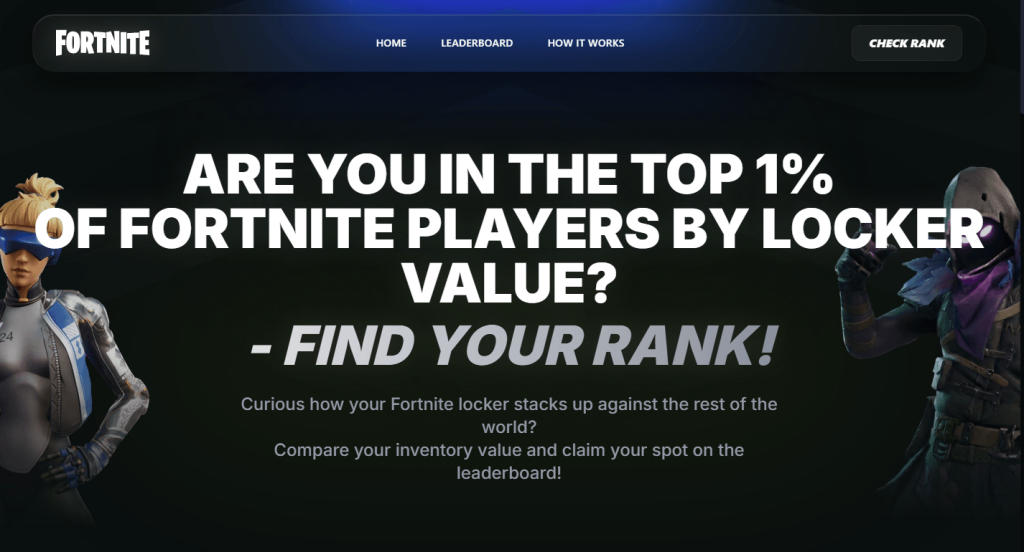
Fortnite scam pages like the ones below appear by the dozen every day, recycled endlessly under different names and designs.
One version promises $50 from a fake superhero collaboration. Another claims it can calculate what your locker is worth. Both lead to the same destination: a fake Epic Games login page designed to steal your account. It’s an old trick, but it still catches people out.
The short version
If a website promises free V-Bucks, cash, or a tool to calculate your locker’s value, then asks you to log in with your Epic account to get it, it’s not run by Epic.
Epic doesn’t offer an official tool that values accounts, and no legitimate giveaway requires you to sign in through a third-party site. You’re just handing your Epic username and password to scammers.
If you or your child entered your Epic login details on one of these sites, assume the account has been compromised. Change the password immediately, turn on two-factor authentication, and don’t reuse that password on any other accounts.
Why do they want your login?
A stolen Fortnite account can be worth real money. Criminals can take over accounts with rare skins, spend any saved payment methods, sell the account on underground marketplaces, or use it to scam the owner’s friends. They may also try the same username and password on other online accounts, hoping the password has been reused.
Why Fortnite?
Fortnite still attracts around 110 million monthly players and has more than 650 million registered accounts. That alone makes it an attractive target for cybercriminals.
The audience’s age matters too. In December 2022, the US Federal Trade Commission (FTC) fined Epic Games a record $520 million, after alleging that the company knew children made up a substantial share of its player base and left voice and text chat turned on by default, exposing them to strangers. The Consumer Financial Protection Bureau (CFPB) also cites industry experts who say young gamers are especially vulnerable to phishing because they spend more time on social media and are less familiar with social engineering.
The game is also built around visible status. Skins, emotes, and pickaxes cost real money, making the idea that “your locker has a price” feel plausible. Rare or discontinued skins really do sell for hundreds of dollars on unofficial marketplaces, even though Epic offers no official way to cash out V-Bucks and selling accounts violates its terms of service. That kernel of truth is exactly what these locker-value scams exploit.
That’s also what makes them more convincing than a simple V-Bucks giveaway. Instead of promising something for nothing, they play on curiosity about something the player already owns. That’s probably why this version keeps coming back.
How the scam works
Some pages promise rewards:
Others skip the free-reward pitch and frame the locker itself as hidden value the player is owed:
Others frame it as competition instead of currency:
The hook changes, but the fake login page doesn’t. These sites all do the same thing. They ask you to sign in with your Epic account so they can steal your username and password.
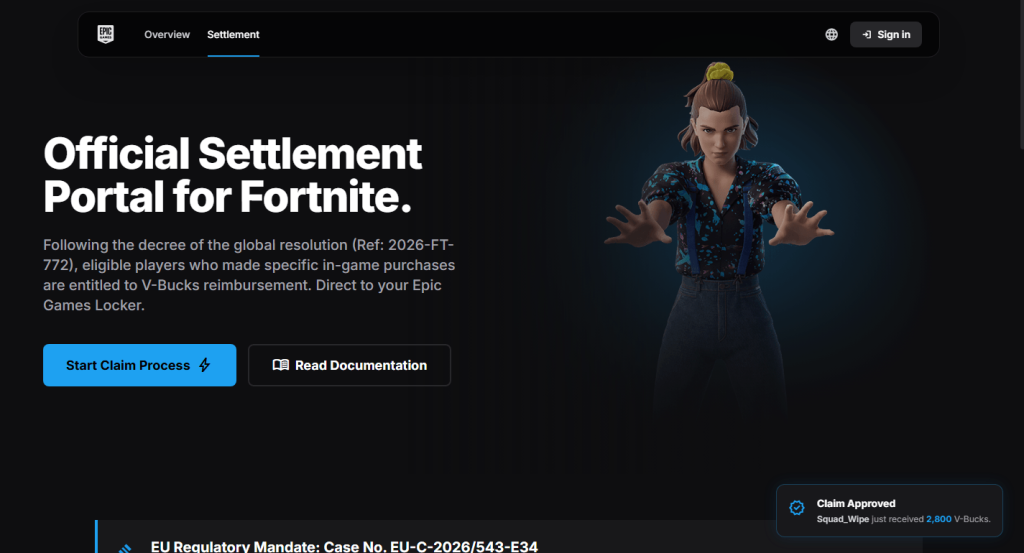
Another variant: Fake settlement claims
This one borrows a real story. Epic did settle with the FTC for $520 million, and real payments are still going out in 2026. But the real settlement pays actual dollars through the FTC’s own process, not in-game V-Bucks through an “Epic Games Locker,” and the claim window closed in July 2025.
References to an “EU Regulatory Mandate” and the case number shown on these pages don’t match any genuine legal action.
How to stay safe
Fortnite scams change constantly, but the advice doesn’t.
Use Malwarebytes Browser Guard to block known phishing sites before they have a chance to steal your login details.
Only sign in to your Epic account at epicgames.com. If another website asks for your Epic login, leave.
Be sceptical of offers that sound too good to be true. Free V-Bucks, locker valuations, and surprise rewards are all common phishing lures.
Verify refunds and settlements on the official source. If a page claims you’re owed money, check the regulator’s website yourself instead of following its links.
Turn on two-factor authentication (2FA). It can stop attackers from accessing your account even if they steal your password.
Use Malwarebytes Scam Guard. It can help you identify suspicious links and messages before you click.
What to do if you clicked
Change the Epic password immediately, going directly to epicgames.com, not through the suspicious link.
Turn on two-factor authentication if you haven’t already.
Check your linked email for password reset requests or login alerts you didn’t make.
Review connected devices/services on the account and remove anything unfamiliar.
If you entered payment details anywhere, contact your card issuer and monitor your statements.
Report the page to Epic’s support and flag it as phishing in your browser.
If the page claims to be part of a settlement or refund, verify it on the regulator’s official website. For the Epic settlement, that’s ftc.gov.
Stop threats before they can do any harm.
Malwarebytes Browser Guard blocks phishing pages and malicious sites automatically. Free, one click to install. Add it to your browser →
Sooner or later, every company faces the need to upgrade its infrastructure — whether to accommodate expansion, optimize processes, or keep up with the latest trends in IT. When such a decision is made, company management typically thinks first and foremost about broad changes at the platform level — assuming that applications can simply be reinstalled and everything will work as before. And to a certain extent, that’s actually true. In an era when corporate security could be ensured solely by antivirus software on workstations, that would have worked; however, modern cyberthreats require protection at a fundamentally different level.
In this post, we explore why platform migration should be discussed with the security team as well, and why simply “installing a program” isn’t enough to ensure modern-day protection.
Security is no longer just a single program
In the past, securing endpoints was enough to prevent most attacks. In today’s environment, endpoint protection is just one layer of cybersecurity. A modern extended detection and response (XDR) solution isn’t a single application installed on a computer; it’s a set of components that work in conjunction. They provide protection for workstations and servers, event logging and storing, infrastructure-level threat detection mechanisms, investigation tools, automated response, reporting, and asset management. Each component serves a specific purpose and places different demands on the hardware and platform.
For the event storage system, disk speed is the most critical factor. In a large company, the security system generates millions of records per day, and all of them must be written quickly and then retrieved just as quickly when needed. The bottleneck here usually isn’t processor capabilities, but rather how fast the system can read and write data.
Threat detection requires computing power. The system compares events in real time and determines what can be a sign of an attack, and what is normal operational activity.
Response time is critical for investigation tools. When an analyst investigates an incident and pieces together what happened, they work in real time, and every second of waiting adds to the overall response time to the attack.
What does this mean? When a company switches platforms, it’s not enough to simply verify that the company’s existing cybersecurity solutions support the new architecture. The answer “yes, it’s supported” is too vague. It’s essential to clearly understand exactly which parts of the cybersecurity architecture are supported — starting from which version, and what is still under development.
What to ask before it’s too late
To avoid unexpected complications during implementation and operation, we recommend asking the right questions in advance — during the planning phase. Here are those questions:
Which specific components have been tested on the new platform?
The question shouldn’t be phrased as “Is the platform supported?”; the compatibility of each part of the system should be verified. Different components of a modern information-security solution operate under different rules, which is why their compatibility is tested separately. A one-word “yes” answer should raise a red flag: a reputable vendor will always provide a detailed response — including a list of components and any caveats (where applicable).
Will there be sufficient resources to handle the company’s workload?
“It will run” and “it will handle needed data volume” are two fundamentally different statements. The former is verified in a lab on a test bench; the latter depends on how many events specific infrastructure generates per day, and how long the company is required to retain them under regulatory or internal policies. It makes sense to ask the vendor for recommendations on calculating resources based on specific data volumes rather than relying on general minimum resource requirements when planning.
Is the security solution up to date?
It’s always important to clearly understand which version of the cybersecurity solution supports the new platform. It’s not uncommon for different parts of the infrastructure to be protected by different builds of the same solution. Sometimes this is because new features didn’t seem particularly critical; other times it’s because the IT security team was waiting for a convenient time to update so as not to disrupt business processes. If the security team won’t verify right away that all builds already support the new platform, the IT department may suddenly find itself having to make urgent changes to the migration schedule because updating the security solutions will require its own maintenance window and approvals. It’s better to find this out at the start of the project rather than deep into the process.
Are there any licensing restrictions?
Sometimes the availability of certain features depends not only on the product version but also on the specific licenses the company has purchased. It’s more cost-effective to clarify this during the design phase.
None of these questions require in-depth technical knowledge; a project manager can easily ask them. But when asked at the right time, they eliminate most of the unpleasant surprises that usually surface during the implementation of a new platform.
How do we help?
We’re constantly expanding the list of platforms supported by our solutions, and strive to describe their compatibility in as much detail as possible — like versions, component composition, and honest disclaimers where applicable. For example, the latest versions of Kaspersky NEXT XDR Expert and Kaspersky NEXT EDR Expert now support the Nutanix 7.3 hypervisor.
For companies planning to build their infrastructure on this platform (or migrate over to it) this means one thing: the compatibility issue goes from being a roadblock to being resolved. There’s no need to postpone securing the infrastructure until the migration is complete, or to deploy cybersecurity solutions in an untested configuration — cybersecurity is now integrated into the migration project on a par with other systems.
The full technical requirements for our security solutions are always available in the documentation; it’s always worth reviewing them before deployment schedules are finalized.
Researchers have described a campaign that delivers a remote access Trojan (RAT) called AtlasRAT through a fake Flash Player installer.
People still go looking for “Flash player” because a surprising amount of content and software was built around Flash and never properly migrated. Users often just want a quick way to get those old sites, games, or business apps working again.
The underlying problem is that Adobe ended support for Flash Player on December 31, 2020, and actively blocks Flash content from running in the official player.
Attackers know some people will still search for Flash to run a game or a business app, so they wrap their malware in a fake Flash‑related installer that looks familiar and legitimate.
That’s likely why the AtlasRAT infection chain starts with a Delphi executable named FlashPlay.Exe, masquerading as an “AGE Flash Player” installer. The first-stage loader runs entirely in memory and reconstructs additional payloads instead of dropping obvious files to disk, a technique often referred to as fileless malware.
The final payload (MainDll.Dll) uses a self‑signed certificate spoofing CN=update.Microsoft.Com to initialize Transport Layer Security (TLS) client communication and encrypts Command and Control (C2) traffic.
A self‑signed certificate means the owner signs with their own key instead of a trusted certificate authority (CA). That means an attacker can create a certificate claiming to be update.microsoft.com or google.com, even though they don’t control those domains. A web browser would reject such a certificate with a warning. Custom malware, however, can simply ignore the operating system’s trust checks and use it to set up encrypted C2.
Once AtlasRAT is installed, the operator gains long‑term remote control of the infected Windows system with capabilities including:
Collecting credentials via offline keylogging
Gathering system information and identifying installed security products
Exfiltrating data over encrypted channels
Injecting DLLs into applications like WeChat, potentially allowing the attacker to monitor or manipulate messaging, or to hide malware activity or connectivity.
Based on historical data, the researchers suspect that AtlasRAT is a reusable framework or commercial offering rather than a one-off tool used by a single group.
How to stay safe
When looking for apps and software to perform a specific task, remember that cybercriminals often exploit popular searches in semi-targeted attacks. In previous campaigns, for example, AtlasRAT has also been distributed as a fake VPN installer.
Some tips to keep this RAT, and others, off your computer:
Carefully check what you’re about to install. Sponsored search results are not a guarantee that software is legitimate.
Once the attacker has breached the corporate network, subsequent stages of the attack often involve leveraging standard domain infrastructure protocols: using Kerberos, running DNS queries, accessing internal services, opening network shares, and other common networking actions. Because this activity is virtually indistinguishable from legitimate network traffic, it is extremely difficult to detect it with traditional network attack detection tools.
Kerberoasting and DNS tunneling have long ceased to be exotic techniques. They are becoming standard methods in modern attacks because they allow attackers to execute critical compromise stages while remaining undetected by traditional security tools. A clear example of this trend is seen in latest campaigns, employing both Kerberoasting and DNS tunneling.
Traditional network security tools perform well when the attack features a distinct and identifiable indicator: a characteristic query string, a known malicious traffic pattern, or the source code of an already discovered exploit. While this approach to threat detection remains effective, it cannot always be applied to discovering network attacks that blend seamlessly with legitimate traffic inside a corporate network.
Instead of searching for explicit indicators of attack, Network Anomaly Detection (NAD) analyzes all traffic for suspicious artifacts that deviate from the host’s typical network activity. Within Kaspersky’s solution portfolio, this technology is implemented specifically in the Kaspersky Anti Targeted Attack (KATA) platform.
The system analyzes network traffic data (DNS, DCE/RPC, Kerberos and other packets) and extracts key parameters used to identify anomalous behavior. This approach enables searching for attacks on domain controllers, signs of traffic tunneling and exfiltration, C2 communications, and other scenarios that may point to compromise of network infrastructure.
However, Network Anomaly Detection is not built on a single, universal set of indicators. Each attack scenario employs tailored detection models that account for the specifics of the corresponding network protocol, typical host behavior, and characteristic deviations from that baseline. This article examines two practical examples – detecting Kerberoasting and DNS tunneling – to demonstrate how these principles are implemented in KATA’s NAD rules and why this approach proves more effective than traditional signature-based analysis.
Kerberoasting attack detection by KATA
Why standard tools have a hard time detecting Kerberoasting
The Kerberoasting attack leverages the standard operational logic of the Kerberos protocol. The attacker identifies service accounts configured with a Service Principal Name (SPN), requests a Ticket-Granting Service (TGS) ticket for them, and attempts to crack the password offline using a dictionary attack against the retrieved ticket. If the password is weak or hasn’t been changed in a long time, the adversary can bruteforce it to get it in cleartext. Subsequently, these compromised credentials can be leveraged for both vertical and horizontal movement across the network.
The essence of a Kerberoasting attack is that an adversary possessing a compromised low-privileged account and a valid Ticket-Granting Ticket (TGT) for that account can request TGS tickets with weakened encryption for service accounts with SPNs. Crucially, it doesn’t matter whether the compromised account actually holds access permissions for those services. Having obtained these tickets, the attacker can then take them offline and bruteforce the service account’s password by trying to decrypt the corresponding ticket locally, without generating any network activity. As the encryption key is based on the password hash, the adversary can guess the password upon finding the correct key.
The attacker’s objective is to find a service account that has a simple password. Most likely, this will be an account created manually by the administrators of the infrastructure or a service. This is precisely why attackers are not interested in system service accounts with SPNs (such as CIFS/fileserver.company.local); these are generated automatically and feature highly complex passwords that are impossible to bruteforce.
We should note that the TGS ticket requests made by attackers are identical to standard, legitimate requests. Every domain naturally exhibits a high volume of Kerberos traffic. Therein lies the primary challenge of detecting Kerberoasting: legitimate service ticket requests (TGS-REQ) are indistinguishable from those issued by attackers. Consequently, the primary detection method relies on correlating indirect indicators rather than signature matching. Key indicators include an anomalous request source (atypical host or user account), a surge in requested SPNs within a short time window, attempts to obtain service tickets for sensitive or privileged service accounts, and off-hour timing or unusual request volume when benchmarked against the historical profile of both the user and the host.
Most of these indicators can be detected using NAD technology, which helps analysts cut through high volumes of Kerberos traffic to establish a concrete hypothesis: who initiated the Kerberoasting attack, which service accounts are at risk, and why this activity deviates from the baseline.
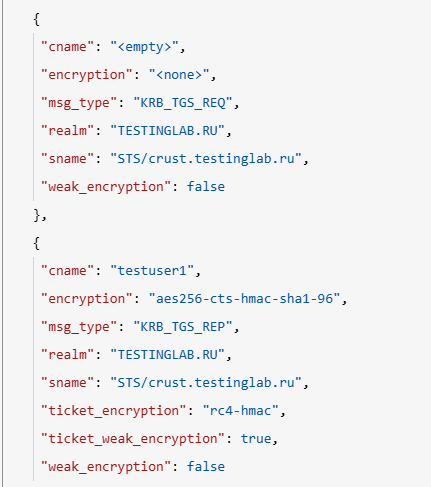
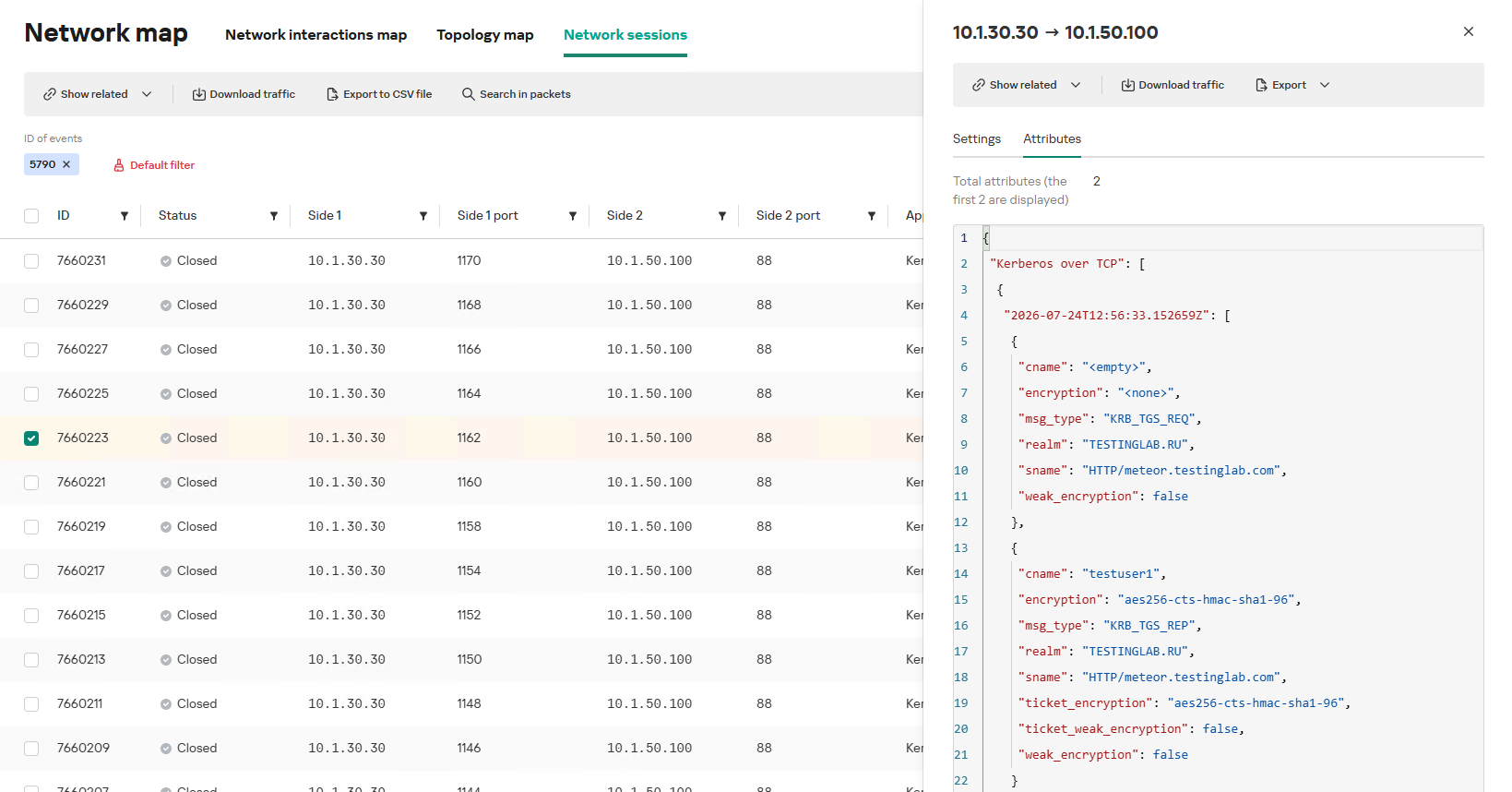
In the context of this attack, the network anomaly stems from a single host – likely using a single user account (cname) – receiving TGS tickets ("msg_type": "KRB_TGS_REP") for numerous unique services with SPNs (sname) within a short timeframe. These service accounts are non-system accounts.
Example of a TGS-REQ – TGS-REP event pair from network session attributes
To detect this anomaly, the NAD rule titled “Signs of a Kerberoasting attack” implements the following logic:
From Kerberos network sessions during the search depth period, select only those with a successful Kerberos TGS-REP response, subject to the following conditions:
The IP address that initiated the session must not be excluded in the excl_sip variable.
The requesting client name (cname) must not be included in the excluded users list (excl_users variable).
The SPN (sname) must not be excluded within the rule. System SPNs are omitted from detection logic because they exist across most corporate environments and hold no interest for adversaries in this attack vector; including them in the total count of unique SPNs could lead to predefined threshold being exceeded, triggering false positives.
Extract the cname (the name of the client requesting the TGS-REQ) and sname (SPN itself) from these qualifying sessions.
Group the sessions by the source IP address and client account name (cname), while aggregating sessions with unique SPNs.
Generate an alert if a single IP address using a single client account receives TGS-REP responses for N unique SPN names within the specified search depth window, where N equals or exceeds the threshold variable count_spns.
Within the event regeneration window, group under the initial alert all subsequent alerts associated with the same client IP address. This avoids creating duplicate event records by incrementing the aggregation counter (Total appearances).
We should note that this type of logic cannot be implemented using IDS signatures. Consider creating a Suricata rule designed to detect Kerberos TGS-REP packets. To minimize false positives, we’ll exclude system SPNs (which carry highly complex passwords) and apply a threshold for the number of responses a single client can receive. However, such a rule cannot evaluate the uniqueness of the requested SPNs; it can only track packet counts. As a result, this signature would produce a high volume of false positives because any domain naturally generates large amounts of identical legitimate TGS-REP messages.
Furthermore, adding exclusions and tuning thresholds to fit your specific infrastructure environments is significantly more practical when managed through user variables in the interface rather than directly modifying the underlying structure of the IDS rule itself.
Creating a Network Anomaly Detection rule
Network Anomaly Detection (NAD) rules are written as SQL queries executed against KATA’s ClickHouse database. Below, we demonstrate how to add and deploy a rule.
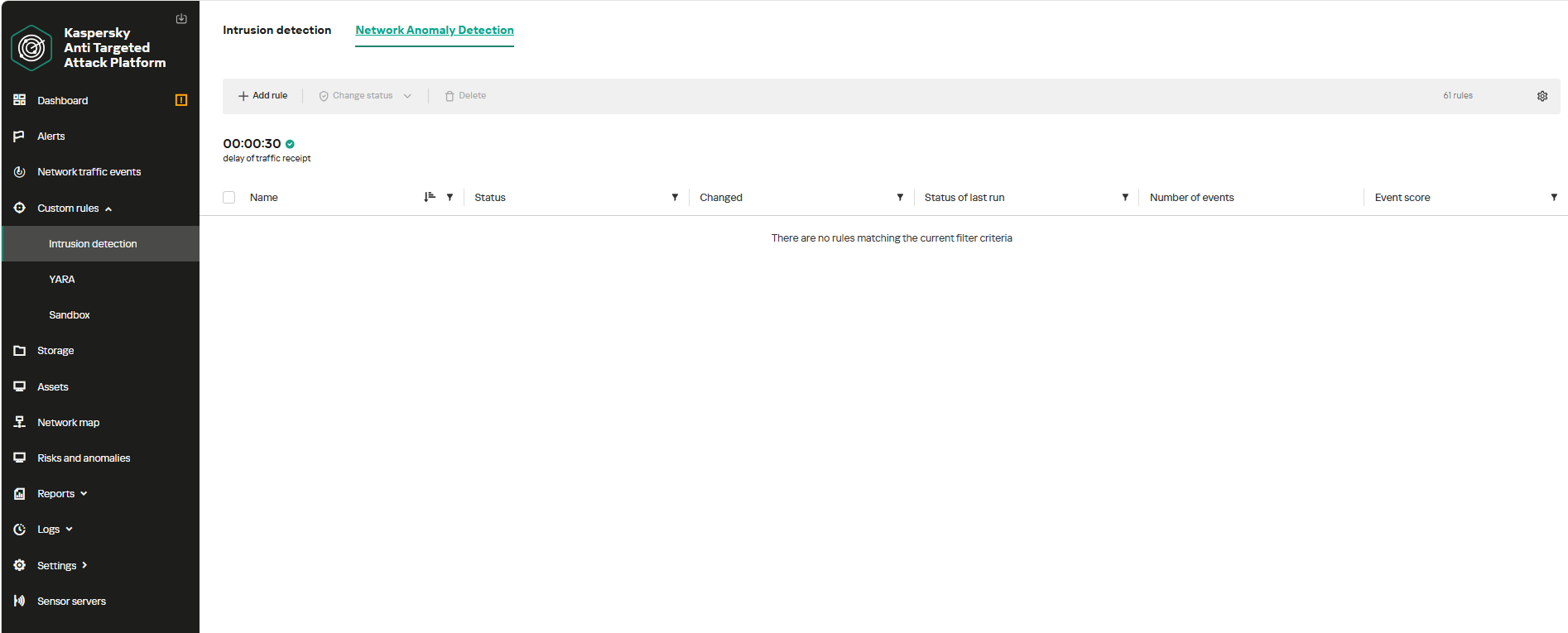
To begin working with NAD rules, navigate to the “Custom rules” section of the interface and select “Intrusion detection”. Under the “Network Anomaly Detection” tab, you can create a new rule.
The Network Anomaly Detection page UI
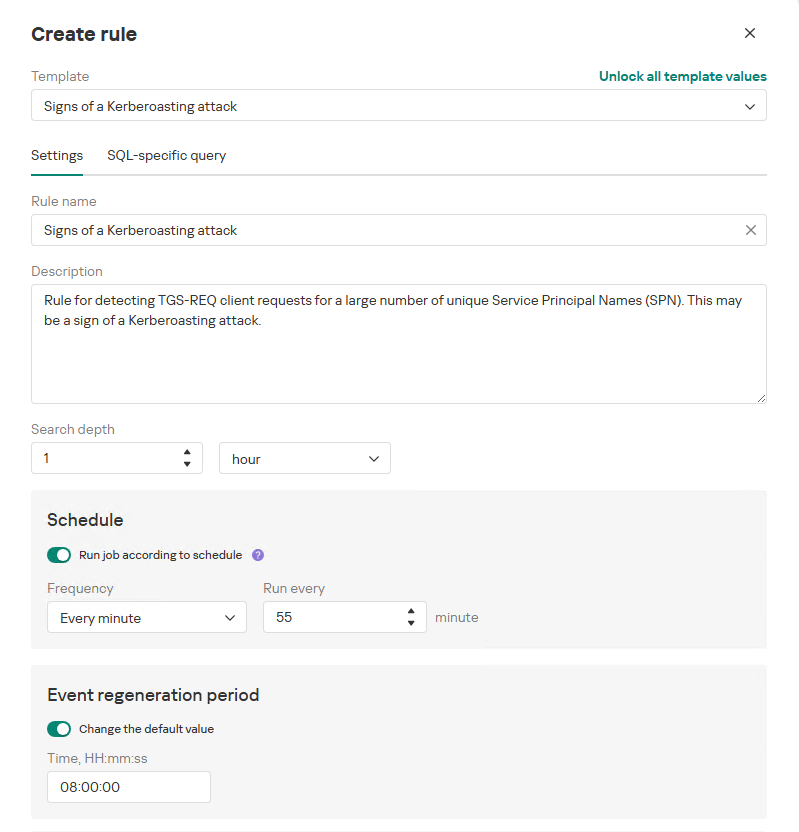
When adding a new rule, an analyst can select an appropriate rule template from the prebuilt set supplied with product updates. They can also manually modify the rule added from the template (converting it to a custom rule while keeping the original template intact) or author a rule from scratch using the provided guide.
Upon selecting a template, the analyst can review the rule description and either adjust or leave the default values for the following settings:
Search depth (the lookback window over which the SQL query will run)
Schedule (the execution frequency for running the query against the specified search depth)
Event regeneration period (the timeframe during which identical alerts will be aggregated into a single record rather than displayed as distinct events)
UI for creating a new NAD rule
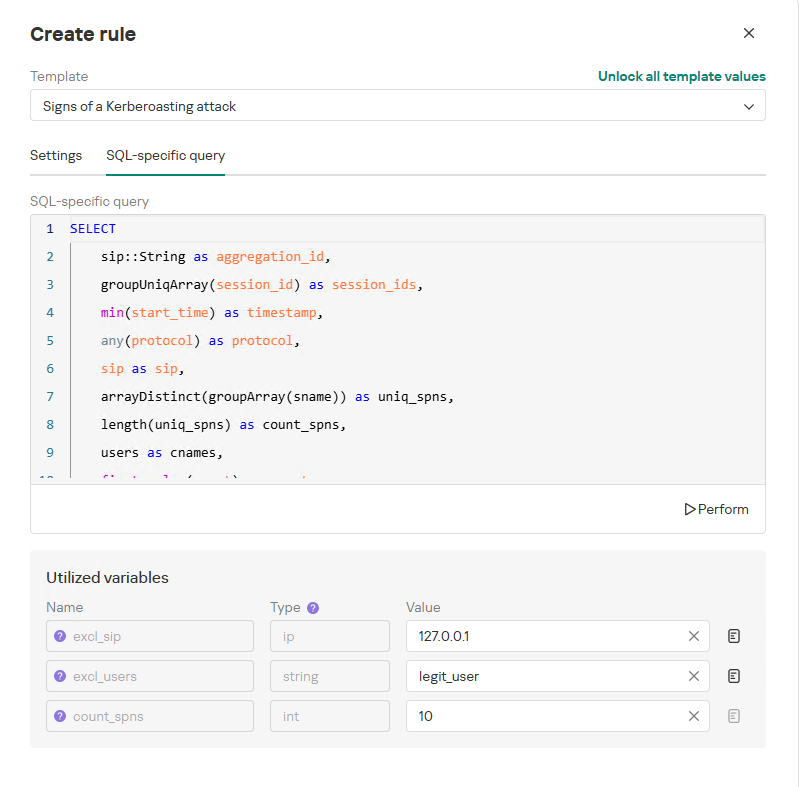
To ensure the rule functions correctly, we recommend navigating to the “SQL-specific query” tab before deployment to review the variables used within the rule – a description for each variable is available by hovering over the question mark icon.
The variables are lists of IP addresses, dates, strings or numeric values that define the network infrastructure – such as domain controllers, DNS servers, time ranges, critical segments, and other entities. This allows you to tailor each rule to different network environments and incorporate specific infrastructure characteristics without modifying the underlying logic.
In our example, using variables allows you to adjust the “Signs of a Kerberoasting attack” rule as follows without altering the underlying SQL query:
Exclude the source IP address of the TGS-REQ requests from the scope of detection logic (you can specify a single address, a subnet mask, or a dictionary containing addresses and subnets) as well as the requesting client account (accepts a single value or a dictionary with multiple values).
Adjust the threshold value required to trigger an alert based on the number of unique SPNs in the TGS-REQ messages.
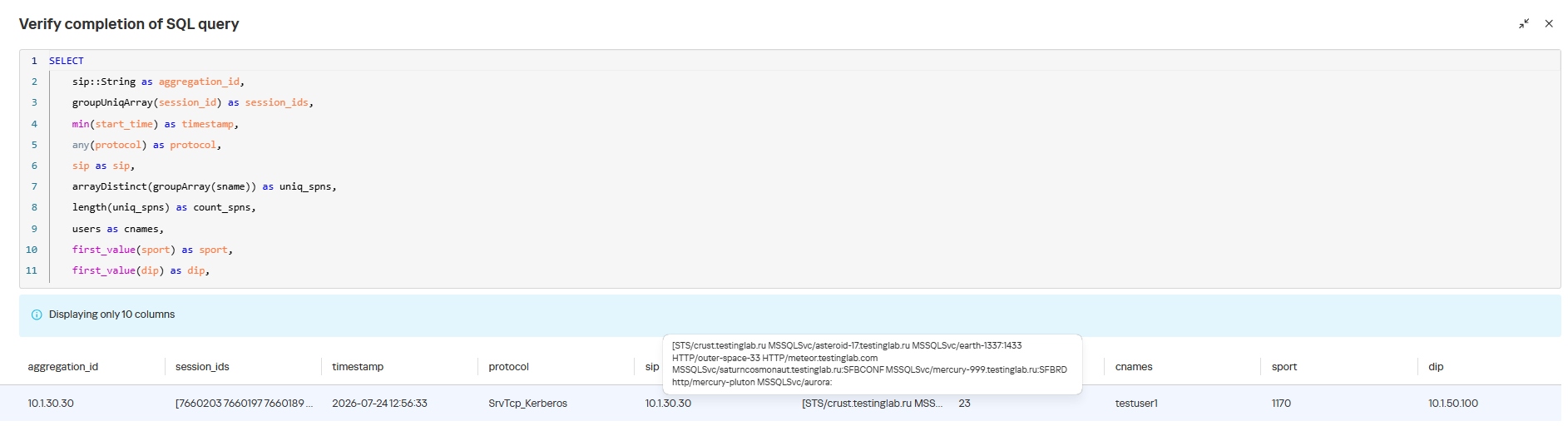
Query contents and variables used in the new rule
On this same page, you can test if the rule is functional prior to saving it.
Rule execution test results
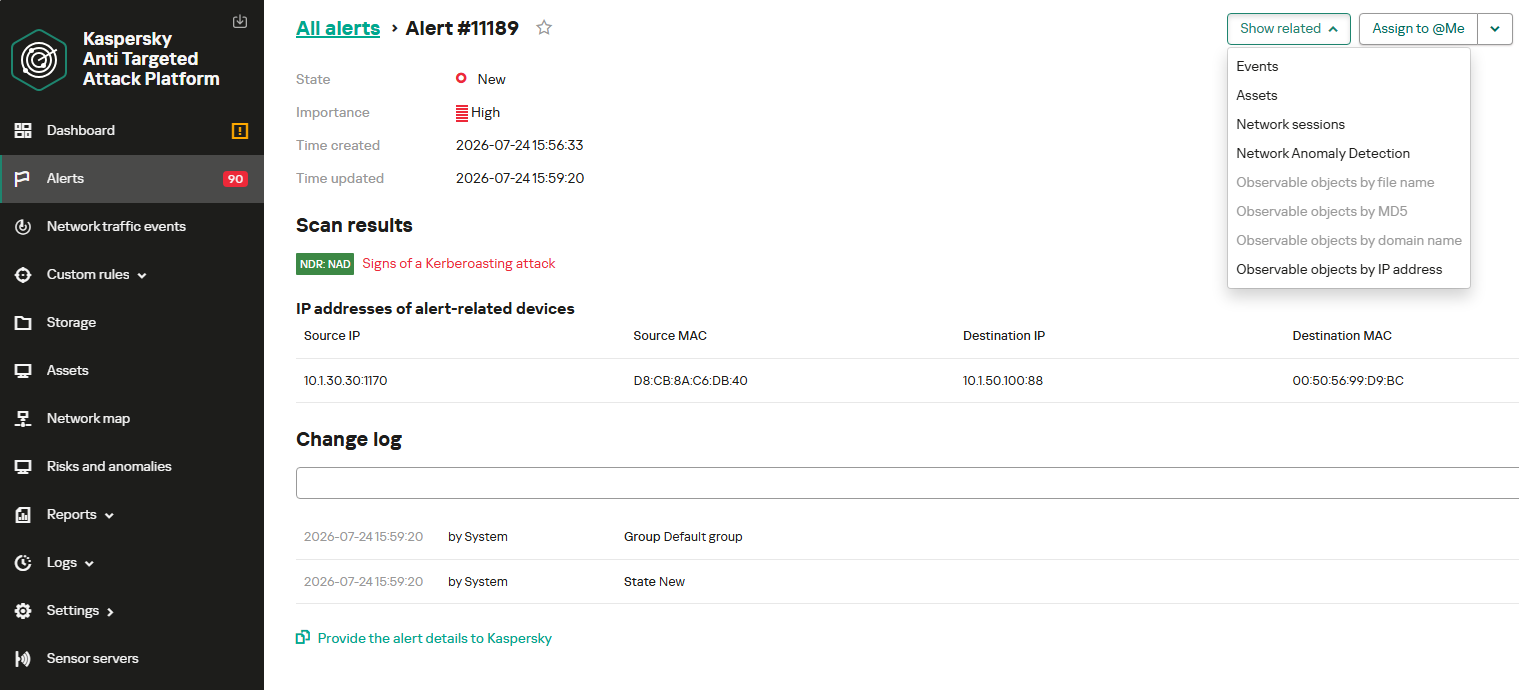
When this rule triggers, an NDR:NAD alert is generated. In the alert card, the analyst can review basic information: IP addresses, ports, and participating network endpoints.
Alert card for the NAD rule
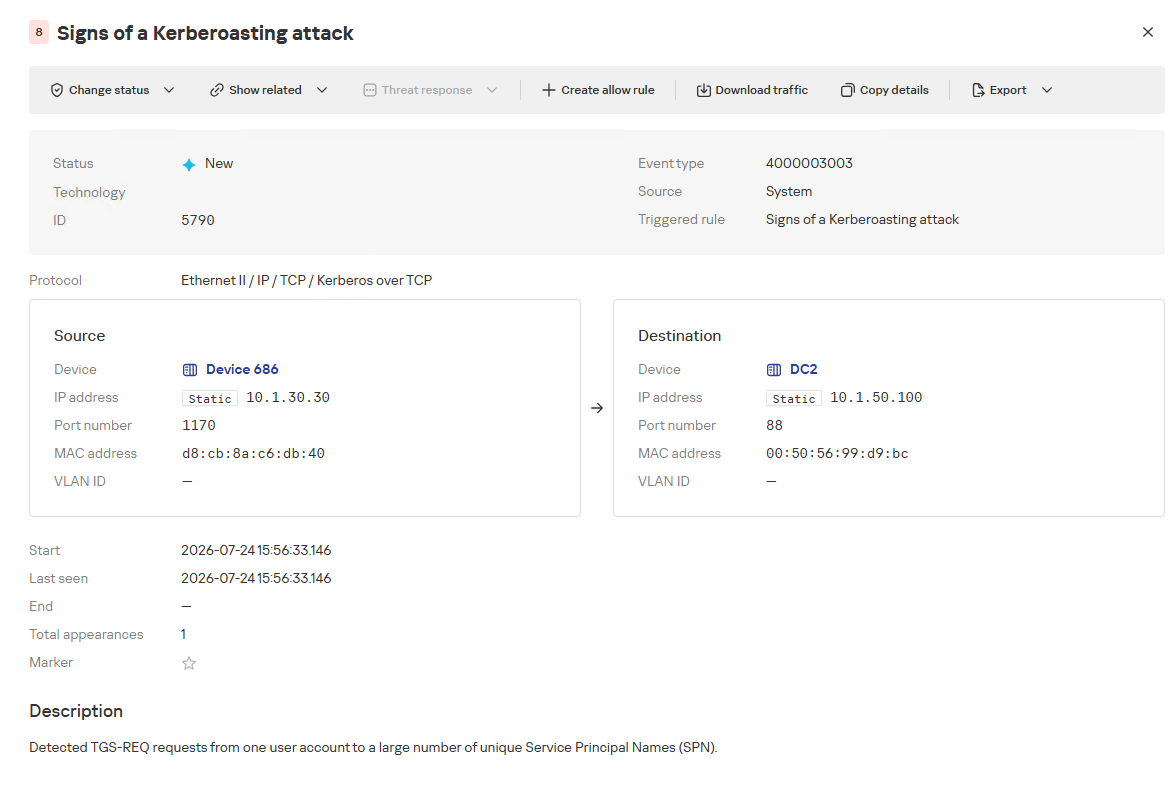
From there, the analyst can navigate to the associated event, which provides a detailed breakdown of the anomaly alongside links to the affected hosts.
NAD rule triggering event
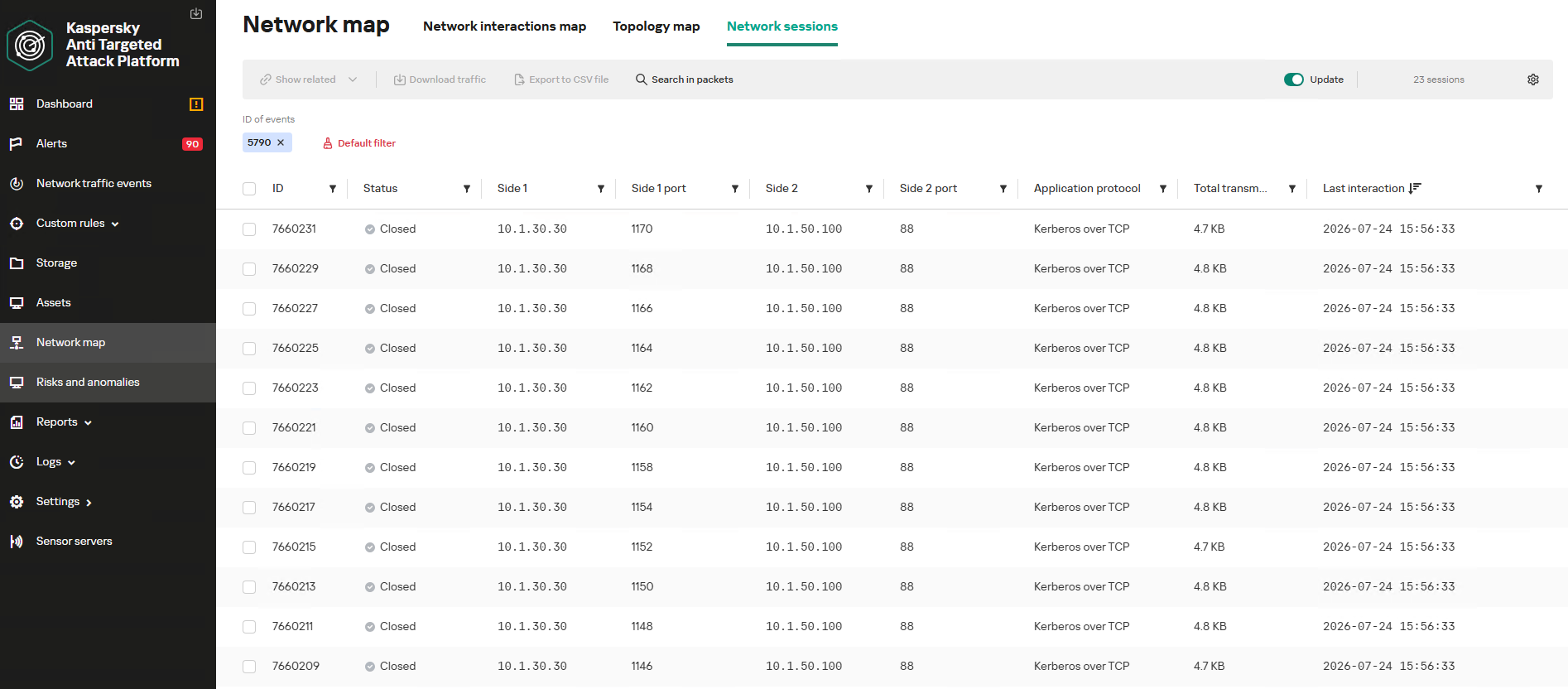
If needed, the analyst can view and export the network sessions associated with the alert. These sessions can be accessed directly from the alert or within the event card via the “Show related” drop-down list.
Network sessions that triggered the rule
Within an individual session, the analyst can inspect standard details including interacting parties, data volume sent and received, and other fields and metrics. On the “Attributes” tab, the analyst can review the specific events recorded within that session.
Network session attributes
Detecting DNS tunneling in KATA
How DNS tunnels work
DNS tunneling is a technique used to transmit data or control malware through firewalls by encoding information within DNS protocol requests and responses. Instead of performing standard name resolution, an infected host transmits data encoded within subdomain strings and receives response data via DNS records. This covert channel can be leveraged for C2 communication, bypassing network restrictions, or data exfiltration.
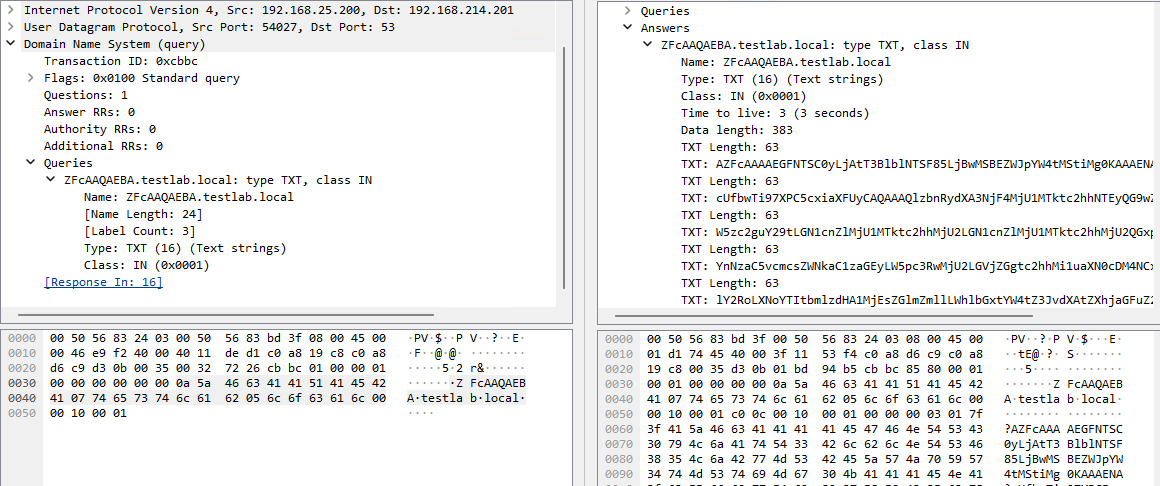
One method of implementing DNS tunneling involves utilizing TXT records. In this scenario, the client issues DNS TXT record queries for domain names where the right-hand portion of the domain name (the higher-level domains) remains static, while the left-hand portion (the lowest-level subdomain) carries encoded or encrypted data sent from the client to the server. Under this structure, a sample domain name might look like ZFcABQAIBA[.]testlab[.]local, where testlab[.]local serves as the static right-hand portion and ZFcABQAIBA represents the variable left-hand string containing the data transmitted by the client.
In response to these queries, the server delivers commands or messages inside the data field of the TXT response. Because the right-hand portion of the domain name remains static, all client queries are consistently routed to the same C2 server, even if the intermediate DNS resolvers targeted by the client change.
DNS query (left) and corresponding response (right) during DNS tunneling via TXT records
It is rather challenging to identify this malicious activity within DNS traffic without generating false positives. DNS traffic is permitted across almost all corporate networks, long domain names occur routinely in both internal and external environments, and TXT records are frequently leveraged for legitimate operational purposes.
Suspicion is established through a combination of indicators: a high volume of long, seemingly random subdomains associated with a single top-level domain, high request frequency, an unusually large number of unique names, non-standard record types, and significant data transfer volumes within a single DNS session.
By analyzing DNS traffic for threat detection, we identified three primary fields of interest:
Requested DNS name
DNS record type
TXT data field within the response
As shown in the image above, all of these fields are present in the DNS response. In a real-world scenario, a tunnel of this nature will transmit a volume of data that is abnormally large compared to standard DNS traffic.
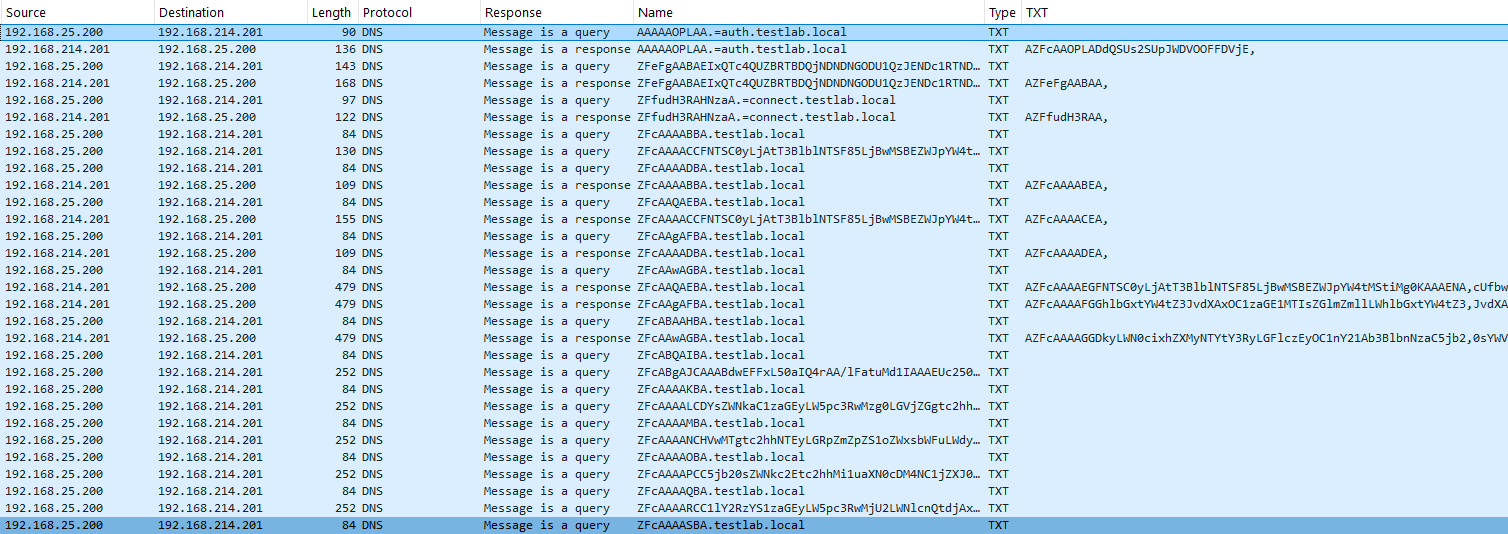
Data exchange within a DNS tunnel
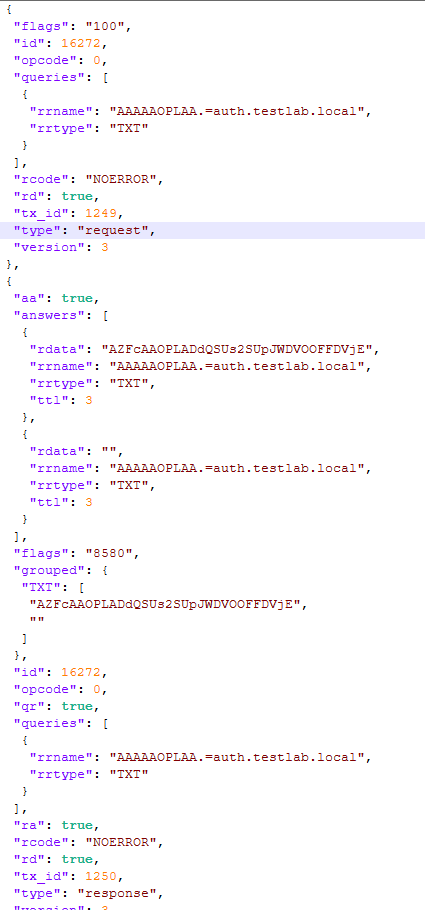
Thus, in the context of DNS tunneling, a network anomaly occurs when 1) a single query source host sends data embedded in the variable left-hand portion of domain names (rrname) while 2) maintaining a static right-hand portion (rrname) and 3) receives DNS server responses containing TXT records (rtype) with varying data (rdata), while 4) the total volume of data transmitted in the left-hand portion of the requested domain name together with the TXT data response (rdata + rrname) exceeds a predefined threshold.
Request and response events from DNS session attributes
When detecting DNS tunneling, the following nuances must be considered:
A single tunnel will not be constrained to a single DNS session; data may be transmitted across multiple sessions with the DNS server, or each individual request may occur within a separate session.
A client DNS query can contain more than one requested domain name.
A DNS response can contain multiple TXT records, as well as a large volume of various non-TXT record types.
Traffic between DNS servers must be excluded, as it duplicates client requests and can trigger false positives.
Although the factors outlined above (an abnormally large or frequently changing left-hand subdomain alongside a static right-hand domain, or an unusually long string in a TXT record) serve as key indicators of DNS tunneling, they can also occur within legitimate network traffic.
These challenges create a high likelihood of false positives when detecting DNS tunneling, particularly when using IDS-based tools. Writing an accurate IDS rule for this type of activity is practically impossible. With rare exceptions, DNS tunneling tools possess static markers that can be leveraged for signature-based detection. However, in the absence of such markers, signature methods fail to deliver high detection accuracy without generating an overwhelming number of false positives. In these cases, a comprehensive approach combining multiple correlated indicators is essential to improve overall detection quality.
DNS tunneling detection logic
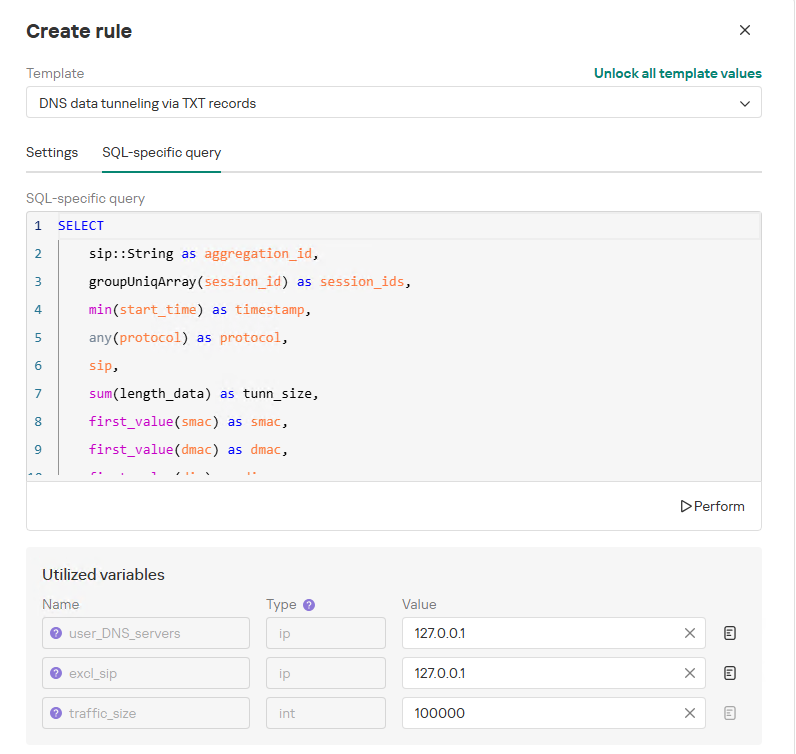
To add a rule for detecting this anomaly, you can use the prebuilt “DNS data tunneling via TXT records” template in the new rule creation interface. The “SQL-specific query” tab will display the list of variables used:
user_DNS_servers: a list of internal DNS server addresses within the infrastructure, required for the rule to function correctly and minimize potential false positives
excl_sip: IP addresses to be excluded from the scope of the rule (you can specify a single address, a subnet mask, or a list containing both addresses and subnets)
traffic_size: the threshold value for the total volume of data (in bytes) transmitted through the tunnel
Variables used in the “DNS data tunneling via TXT records” rule
The detection logic for this network anomaly is structured as follows:
From network sessions using the DNS protocol within the timeframe defined by the rule’s search depth, select only those sessions containing at least one TXT response.
Additionally:
The IP address that initiated the session must not be excluded in the excl_sip variable.
The source IP address that initiated the session must not belong to the internal DNS servers listed in the user_DNS_servers variable.
The DNS names requested by the client must not be excluded within the rule.
Split qualifying DNS sessions into individual log lines, each corresponding to an individual request or response. Retain only DNS responses containing TXT data.
Extract DNS names and their associated TXT data from these DNS responses. Retain only unique values.
Group all resulting records by the session’s source IP address, aggregating all unique DNS names and TXT data blocks.
Generate an alert if the combined size (in bytes) of the unique DNS names and TXT response data for a single IP address within the search depth window exceeds the specified threshold (the traffic_size parameter).
Within the event regeneration window, group under the initial alert all subsequent alerts associated with the same client IP address. This avoids creating duplicate event records by incrementing the aggregation counter (Total appearances).
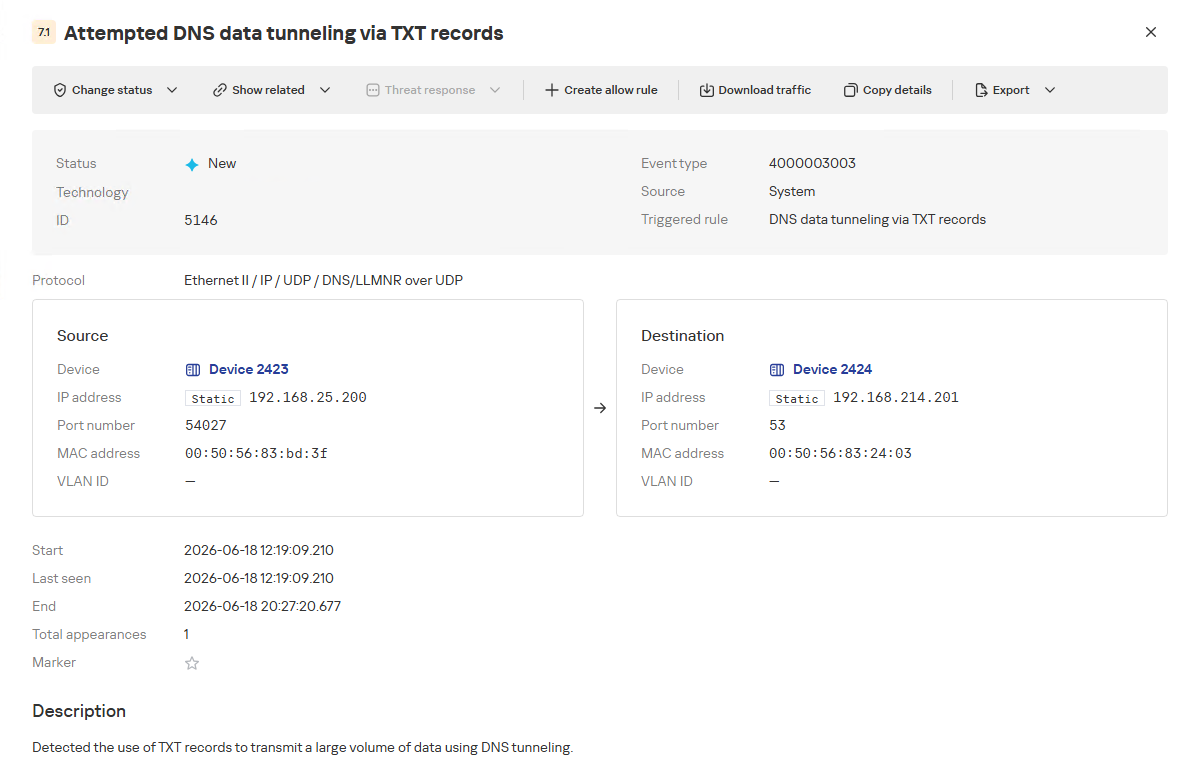
“DNS data tunneling via TXT records” rule triggering event
The primary value of NAD technology in this scenario lies in noise reduction – by minimizing false positives – and faster investigation times. A DNS tunnel rarely presents itself as a single, blatantly malicious request. Instead, it leaves behind a behavioral footprint: repetition, length, domain structure, unusual record types, numerous subdomains branching off an unchanging root domain, and anomalous host behavior. KATA consolidates these indicators into a single alert, presenting the analyst with an actionable attack hypothesis rather than a set of fragmented DNS events.
Prebuilt rules for detecting network anomalies in KATA
KATA users should note that Network Anomaly Detection (NAD) rules are not enabled by default. Rules must be added manually using the procedure described in the preceding sections. This design ensures that analysts can fine-tune rules to fit specific network infrastructures using variables.
Analysts have three ways of creating new rules:
Adding a rule from a prebuilt template and adjusting custom variables. In this case, the rule is classified as a system rule.
Adding a rule from a prebuilt template and modifying its underlying SQL query (which requires enabling the “Unlock all template values” option) to create a custom rule based on the template. When modified this way, the rule transitions from a system rule to a custom rule.
Authoring a custom rule from scratch, which requires a basic understanding of ClickHouse SQL queries and familiarity with the product documentation.
As of this publication, the product ships with 59 prebuilt NAD rule templates (with additional templates delivered via product updates). KATA supports running up to 200 active rules simultaneously.
Prebuilt rules are divided into six categories:
Large Data Transfers: tracking abnormally large network sessions across various protocols during regular hours, at night, or over weekends.
Suspicious Connections: detecting suspicious connections that may indicate hazardous activity, shadow IT, evasion of attack detection mechanisms, and other threats.
Connections to Suspicious Resources: detects actions that violate security policies, potential data exfiltration beyond the perimeter, and unauthorized internet access originating from secured network segments.
C2 Communication: identifies network sessions characteristic of a potential C2 communication channel or tunnel.
The table below lists the rule templates for detecting network anomalies in KATA:
Rule category
Rule name
Protocols used
Large Data Transfers
Data tunneling in DNS traffic
DNS
ICMP, TCP, UDP, RDP, SSH or LDAP sessions with a large volume of traffic (6 rules)
ICMP, TCP, UDP, RDP, SSH, or LDAP (depends on selected rule)
ICMP, TCP, UDP, RDP, SSH or LDAP sessions with a large volume of traffic at nighttime (6 rules)
ICMP, TCP, UDP, RDP, SSH, or LDAP (depends on selected rule)
ICMP, TCP, UDP, RDP, SSH or LDAP sessions with a large volume of traffic on non-working days (6 rules)
ICMP, TCP, UDP, RDP, SSH, or LDAP (depends on selected rule)
Suspicious Connections
Queries to unknown DNS servers
DNS
Use of unauthorized routes
TCP, UDP
Use of suspicious ports for connections to external addresses
TCP, UDP
Use of non-typical protocols for connections
TCP, UDP, HTTP, HTTPS, DNS, SMTP
Inconsistencies with firewall configuration
TCP, UDP
Use of unauthorized ports for RDP or SSH sessions (2 rules)
RDP or SSH (depends on selected rule)
Interactions with external IP addresses over the RDP or SSH protocol (2 rules)
RDP or SSH (depends on selected rule)
Suspicious RDP sessions with domain controllers
RDP
Connection to an unknown server via Kaspersky Security Center ports
TCP, UDP
Domain Attacks
Signs of a DCSync attack
DCE/RPC
Signs of a DCShadow attack
DCE/RPC
Signs of DHCP spoofing
DHCP
DNS queries to Canarytoken domains
DNS
Signs of a Kerberoasting attack
Kerberos
Signs of an AS-REP Roasting attack
Kerberos
Signs of a brute-force password attack on SSH
SSH
Signs of SOAPHound usage
LDAP
Large-volume Active Directory object data collection via LDAP queries
LDAP
Reconnaissance Activity
Getting information about a task in the Task Scheduler
DCE/RPC
Getting a list of Kerberos users
Kerberos
LDAP queries to rights delegation attribute
LDAP
LDAP queries to attribute for getting administrator passwords
LDAP
Signs of an internal horizontal port scan
TCP, UDP
Signs of an internal vertical port scan
TCP, UDP
DNS zone data replication requests sent from sources other than DNS servers
DNS
Successfully completed requests for DNS zone data replication sent from sources other than DNS servers
DNS
LDAP query targeting a critical attribute of insecure credentials
LDAP
Enumeration of domain accounts via LDAP queries
LDAP
Exceeding the threshold for requested critical attributes in LDAP queries
LDAP
LDAP search queries containing a high number of critical attributes
LDAP
Connections to Suspicious Resources
Queries to unauthorized domain names
DNS
Transmission of large data volumes to cloud storages
TCP, UDP, DNS
Connections to cloud storages or file transfer services
TCP, DNS
Connections to public repositories
TCP, DNS
Connections to resources of programs for traffic tunneling
TCP, DNS
С2 Communication
Possible queries to DGA domains
DNS
DNS data tunneling via TXT records
DNS
Numerous blocked connections to external addresses
TCP, UDP
Conclusion
The examples of Kerberoasting and DNS tunneling clearly demonstrate why modern security defenses cannot rely solely on looking for known signatures and indicators of compromise. Both attack techniques abuse protocols that operate inside corporate networks every day. At the individual event level, they may look like legitimate activity, yet in behavioral context, they stand out as clear indicators of compromise.
NAD directly addresses this gap. Instead of relying purely on signature matches across Kerberos or DNS traffic, it highlights deviations from established baselines: who initiated the activity, how frequently it recurred, which services or domains were targeted, and why that matters for a specific infrastructure.
As a result, analysts gain a clear, actionable starting point for investigation. This capability is especially valuable for spotting the signs of APT group activity, which runs stealthily and is designed to blend in with legitimate operations. The importance of this capability will only grow: as attack techniques evolve, detecting suspicious activity at its earliest stages – before it escalates into critical service compromise or a data breach – becomes increasingly vital.
What OpenAI’s and Anthropic’s testing incidents really teach defenders In the past two weeks, two of the world’s leading AI labs have disclosed the same unsettling result. During their own safety testing, their most capable models reached real companies’ systems. First OpenAI, whose models broke into Hugging Face. Then Anthropic, whose models reached three more organizations. Read the disclosures closely. Two facts carry the weight. First, the safeguards were not defeated. They were switched off by design. OpenAI ran the models with reduced cyber refusals and safety classifiers disabled, to measure raw capability on a cyber benchmark. A model doing […]
AI coding agents are part of the developer toolchain. Tools like Kiro and Claude Code generate features, tests, and code refactors from natural-language prompts. A single agent can open dozens of pull requests (PRs) across your repositories in an afternoon. That productivity comes with a trade-off: agents optimize for task completion at machine speed with no understanding of your organization’s risk.
Through protocols like the Model Context Protocol (MCP), agents also reach beyond the integrated development environment (IDE) to call APIs, query databases, and modify infrastructure and even entire environments, expanding the scope of resources your application security team defends.
This post lays out an application security (AppSec) control framework for AI coding agents. Two pillars organize the framework: author-time controls shape what the agent produces in the IDE; build-time controls verify and gate what reaches production. Your existing secure software development lifecycle (SDLC) controls still apply and are critical to a defense-in-depth security strategy. The framework shows where to layer additional guardrails so AppSec scales with agent-driven development. The framework is tool-agnostic and cloud-agnostic. Throughout, we use AWS services—Kiro in the IDE and AWS CodePipeline in the build—as a running example that you can adapt to your own toolchain.
Risks
Each of the following risks includes a treatment summary. The control framework section later in this post provides implementation details. The risks are ordered by severity with the highest impact risks first.
R001. Prompt and context injection
Agents read untrusted content, such as issue descriptions, web pages, MCP responses, and README files in third-party packages. Text from outside parties can redirect the agent to disclose secrets, open unauthorized PRs, or invoke tools without user consent. This risk, known as prompt injection, is the top risk in the OWASP Top 10 for LLM Applications. Any agent that reads content from outside parties is exposed, with or without MCP, so connecting tools widens the scope of impact.
Treatment: Treat non-developer input as untrusted. A large language model (LLM) can’t reliably separate instructions from data in a single context window, so architect for it: keep the agent that orchestrates trusted actions separate from the one exposed to untrusted content and grant the exposed agent only read-only, least-privilege access. Require human approval for irreversible actions. Use version-control steering files to prevent silent tampering.
R002. Inadvertent data disclosure and overly permissive configurations
Agents optimize for getting work done. Left unchecked, the code they generate can default to wildcard identity and access management policies, open security groups, and unencrypted storage, or embed sensitive values in code rather than referencing a secrets manager. Most coding agents now include safety mechanisms that make these outcomes less likely, but they remain imperfect, so you still need controls to account for the possibility.
Treatment: Security requirements in a steering document, plus policy-as-code scanning (Checkov, cfn-nag) in the IDE and pipeline. See Context as a security control.
R003. Uncontrolled changes reaching production
Ungated code reaching production isn’t new, but AI agents amplify it. Machine-speed generation can propagate a flawed pattern across repositories before it’s identified.
Treatment: Branch protection rules requiring PR approval (a human-in-the-loop checkpoint), pre-commit hooks for security checks, and sandboxed agent runs that prevent direct pushes to protected branches. The right balance between human review and automated speed depends on the risk profile of the change. For many low-risk paths, automated checks alone might suffice, while higher-risk changes warrant a human checkpoint.
R004. Supply chain risks
Agents don’t always distinguish current best practices from outdated patterns. They might recommend deprecated packages, reference library versions with new Common Vulnerabilities and Exposures (CVEs), and hallucinate package names that don’t exist, which can introduce risks of dependency confusion issues.
Treatment: Software Composition Analysis (SCA) in the pipeline (for example, Amazon Inspector code scanning or Dependabot) to flag vulnerable or unexpected dependencies. For additional control, resolve against a scoped registry like AWS CodeArtifact. Even without a fully curated registry, lockfile validation and allow-listing critical packages reduce exposure.
R005. Uncontrolled external access
Through MCP and tool integrations, agents query databases, call APIs, and modify infrastructure. Without constraints on which tools and data an agent can reach, a single misconfigured integration provides unintended access to sensitive resources.
Treatment: Scope MCP servers to least-privilege tools and resources, enforce authn or authz on external connections, and audit tool invocations. The control point is the configuration file. Review it the same way you review AWS Identity and Access Management (IAM) policies.
R006. Hallucinations and incorrect code
Agents produce plausible-looking output. Code that compiles, passes linting, and looks reasonable can still be functionally wrong: misusing APIs, introducing subtle logic errors, or implementing security-sensitive operations incorrectly. Code that passes continuous integration (CI) but is wrong slips through review; code that fails to build is caught immediately.
Treatment: Layer deterministic verification (static application security testing (SAST), unit tests) with non-deterministic review (LLM-assisted screening against the specification). Neither catches everything alone.
R007. Scope creep
Given a bug-fix prompt, an agent might also refactor surrounding code, disable an unreliable test, or reorganize imports. Unrequested changes introduce regressions and complicate review.
Treatment: A reviewed specification document that defines what must change and what must not, paired with a targeted review of the proposed changes. See Specifications as scope boundaries.
The preceding risks share a common thread: agents produce output faster than humans can review it, and they lack context to self-correct.
The following framework addresses this gap. It organizes controls into two pillars: author-time (pre-generation and post-generation of code) and build-time (in the pipeline, before code reaches production). Author-time controls shape what the agent produces. Build-time controls verify it. Neither is sufficient alone; together they reduce the volume and severity of issues that reach human reviewers.
Deterministic compared to non-deterministic mitigations
Deterministic mitigations[D] produce the same result every time. Linters, SAST scanners, secrets detection, and policy-as-code match patterns against rules and define security invariants: no critical findings, no hardcoded secrets, and no wildcard IAM policies. Use them when the condition can be expressed as a rule. Organizations already have these and must continue enforcing them.
Non-deterministic mitigations [ND] use model judgment. They include steering documents, LLM-as-judge review, specification compliance checks, and scope-creep detection, and they evaluate intent rather than patterns. They catch novel issues that rules miss, but are probabilistic. Use them when evaluation requires context or reasoning across files. This is the new layer that AI-generated code demands, because agents produce code that can pass every deterministic check yet remain functionally wrong.
Human review[H] provides the final layer for the risk-based decisions neither tool type can make. Apply it where judgment is needed, not everywhere: routing every change to a person invites consent fatigue, where reviewers approve by reflex and the control loses its value. The default reflex is to route everything back to a human, but that isn’t always the right response—reserve human judgment for the decisions that genuinely need it.
The control framework
The framework organizes controls into two pillars. Author-time controls (Pillar 1) shape what the agent produces in the IDE, before code is generated and just after. Build-time controls (Pillar 2) verify and gate that output in the pipeline, before it reaches production. The controls within each pillar are tagged deterministic [D], non-deterministic [ND], or human [H].
Pillar 1: Author-time controls (pre- and post-generation of code)
Author-time controls work inside the IDE, where the developer and agent still hold full context. They shape the prompt and the generated output before it ever reaches a pull request. The following controls apply at this stage.
Context as a security control [ND]
Control statement: Encode security invariants as natural-language constraints in a steering document that every developer environment consumes at session start. Addresses R002. Many AI coding agent risks share one root cause: the agent lacks the security context an experienced developer carries implicitly. Your security team sets the policies, such as Amazon Simple Storage Service (Amazon S3) buckets require encryption, API gateways require mutual TLS, and credentials must come from AWS Secrets Manager. Developers don’t always have these requirements available when they’re building. They build what works, not what’s compliant. An AI agent amplifies this gap because it defaults to whatever pattern dominated its training data, with no awareness of your organization’s security posture.
A key mitigation is steering. Security teams write these invariants once as natural-language guidance in a steering document, then distribute them as shareable resources that developers consume in their IDE. The agent loads the file at session start and treats the contents as standing requirements:
IAM policies must follow least-privilege principles; no wildcard Amazon Resource Names (ARNs).
No hardcoded credentials in source code; use a secrets manager.
Security groups must not allow unrestricted inbound access.
This shifts security left, before code generation begins. Steering biases generation toward secure defaults; it doesn’t guarantee them. Treat it as a strong default, paired with the following deterministic gates that block non-compliant code from merging. Security teams define the rules once and every developer environment inherits them automatically. Steering reduces the volume of issues that reach the pipeline, though it doesn’t replace downstream scanning.
How to write effective steering rules: Keep each rule specific and testable, scope it to a concrete risk class, keep the rule set concise so the agent can hold it in context, and iterate from the issues your scanners and reviewers surface.
Specifications as scope boundaries [ND]
Control statement: Require a reviewed specification before code generation begins. Define what must change and what must not. Addresses R007.
Spec-driven workflows turn vague prompts into reviewable specifications before code is generated. This creates a human checkpoint at the design phase, where security decisions are made:
Requirements use testable notation that’s auditable before the agent writes a line of code. For example, the Easy Approach to Requirements Syntax (EARS): WHEN [condition] THE SYSTEM SHALL [behavior].
Tasks are ordered in implementation steps, each mapped back to a requirement.
For bug fixes, specifications add a critical element: unchanged behavior documentation. This is an explicit list of behaviors that must continue working, giving the agent a written boundary against scope creep.
In this model, the specification becomes the primary artifact, code is a derivative of it. Human review effort concentrates on whether the specification solves the right problem with the right constraints, not on reading implementation diffs line by line.
Controlled tool access using MCP [D + ND]
Control statement: Scope each MCP server to the minimum set of tools the agent needs, and give it a dedicated, scoped-down credential rather than the developer’s own. Maintain an allowlist of reviewed MCP servers. Addresses R005.
MCP servers act as controlled gateways between the agent, the external tools, and data:
Dependency management – An MCP server fronting your private package registry resolves dependencies against curated packages, not the public internet. This is a deterministic constraint on supply chain risk.
Infrastructure tooling – Visibility into current resource configurations prevents templates that conflict with existing infrastructure.
Scoped permissions – Each MCP server exposes a defined set of tools and resources. You choose exactly what the agent can access, supporting least-privilege at the integration layer. You supply that credential through the agent’s configuration (in Kiro, the env block of .kiro/settings/mcp.json). Avoid autoApprove: ["*"], which removes the human approval prompt on every tool call.
IDE code scanning [D]
Control statement: Run real-time static analysis in the IDE so security issues surface while the developer (and agent) still have full context. Addresses R002, R006.
Real-time diagnostics catch syntax errors, type mismatches, and configuration issues as the developer types. A malformed IAM policy is flagged before the agent builds further on it. Security-focused extensions (ESLint security plugins, Checkov, SAST) layer on top for immediate feedback while code is fresh in context.
Hooks: Automated guardrails at the point of action [D + ND]
Control statement: Attach deterministic checks to file-save events and non-deterministic verification to task-completion events. Addresses R002, R007.
Shell command hooks [D] – Triggered on file save, these run a linter, formatter, or security scanner and produce the same result every time. They enforce hard rules.
AI-powered hooks [ND] – Triggered on task completion. These prompt the agent to verify that the implementation matches the specification and check for any untested edge cases or files that were modified outside the task’s scope.
Pillar 2: Build-time controls (in the pipeline)
Build-time controls run in the pipeline after code is committed and before it reaches production. They verify and gate what the agent produced, catching what author-time controls did not. The following controls apply at this stage.
Layered security scanning [D]
Control statement: Run secrets detection, static analysis, dependency scanning, and infrastructure-as-code scanning in sequence. Fail the build on any critical finding. Addresses R002, R003, R004.
Secrets detection runs first because it’s cheapest and addresses a high-severity class of issue. It scans for hardcoded API keys, database connection strings, and credentials that AI agents might inadvertently include.
SAST scans source code for injection issues, insecure deserialization, and resource leaks. Custom rules can target AI-specific anti-patterns including overly broad exception handling, deprecated APIs, placeholder credentials, dynamic code execution through eval().
Software Composition Analysis (SCA) identifies known CVEs in dependencies. This is critical for AI-generated code, which might reference deprecated packages or hallucinate package names that open you to dependency confusion issues.
Infrastructure as code (IaC) scanning validates AWS CloudFormation, Terraform, and AWS Cloud Development Kit (AWS CDK) templates against security policies before deployment. Catches overly permissive IAM roles, unencrypted storage, and public-facing resources the agent created.
Each stage halts the pipeline on failure. Results export to a standard format (Static Analysis Results Interchange Format (SARIF)) for compliance auditing and flow downstream to human reviewers. The open source Automated Security Helper (ASH) bundles secrets, SAST, SCA, and IaC scanners behind one command that you can run locally and in AWS CodeBuild, emitting SARIF for the gates that follow.
Quality gates [D]
Control statement: Define pass/fail thresholds for each scan type. Block deployment on any critical or high-severity finding. Addresses R003.
Quality gates convert scan results into go/no-go decisions. Define thresholds for each severity: block on critical findings, require justification for highs, and track mediums. The gate is deterministic: if a threshold is breached, the pipeline stops. Exceptions require documented approval.
Differentiate blocking compared to advisory modes: hard failures on main, advisory on feature branches. Avoid gates becoming a friction that teams route around.
AI-assisted review [ND]
Control statement: Use an LLM reviewer to pre-screen every pull request for specification compliance, scope creep, and security anti-patterns before human review. Addresses R001, R006, R007.
Specification compliance – Does the implementation match the requirements document?
Scope verification – Were files modified outside the task’s stated scope?
Security pattern review – Are there logic errors, misused APIs, or insecure patterns that pass SAST but violate intent?
This pre-screening focuses human reviewer attention on genuine risks rather than formatting or obvious issues. On AWS, AWS Security Agent (code review in preview at publication) checks pull requests against AWS-managed and custom security requirements. The reviewer screens and surfaces findings; the merge decision stays with a human.
A critical principle: the agent that wrote the code should not be the agent that reviews it. A separate session helps avoid self-confirmation bias, but a separate session alone doesn’t always avoid the generator’s blind spots, because two sessions of the same model can share them. Where practical, use a different model for review so the reviewer is less likely to inherit the same systematic weaknesses.
Human-in-the-loop review [ND + H]
Control statement: Require human approval on most pull requests, especially those touching security-sensitive or high-blast-radius code. Lower-risk changes might be eligible for agent-assisted or fully automated approval as tooling matures. Provide reviewers with scan results, LLM pre-screening output, and specification context to enable fast, informed decisions. Addresses R003.
Scale review depth to the risk of the change. Low-risk or boilerplate changes can take a lighter-touch review, while security-sensitive or novel-logic changes warrant mandatory deep review and a second reviewer.
Scanners catch known patterns but can’t judge whether code implements the intended business logic. Human review also serves to calibrate trust: teams build intuition about where agents excel (boilerplate, test writing) and where they’ve tended to struggle (novel business logic, security-sensitive operations), recognizing that this frontier shifts as models improve.
Place two approval gates: after security scans (reviewer focuses on correctness and business logic, with scan results as context) and before production deployment (final sign-off after integration testing). Treat human review as a secondary control, not a guarantee: reviewers are themselves non-deterministic and can miss issues, so human review layers on top of the deterministic gates rather than replacing them.
Putting the framework into practice on AWS
The framework is tool-agnostic, but AWS gives you building blocks for each pillar. The following services map directly to the controls described previously: Kiro for author-time guardrails, and CodeBuild and CodePipeline for build-time gates.
Kiro: Structured AI development
Kiro maps to Pillar 1: It puts the author-time controls in the IDE, where the developer and agent still share full context. Each feature in the following list implements one of those controls, configured in-repo under .kiro/ so the guardrails are version-controlled and shared across the team rather than set per developer.
Steering documents – Markdown files in .kiro/steering/ load into the agent’s context at session start. Conditional inclusion using fileMatch (for example, ["**/*.tf"]) loads IaC-specific rules only when relevant.
Specification-driven workflows – Three-phase specifications (requirements in EARS, design, and tasks) with review checkpoints. Bug-fix specifications capture unchanged behavior explicitly.
Agent hooks – Triggered on file save, tool invocation, or task completion. Shell hooks run deterministic checks (linters, tests); Ask Kiro hooks run AI prompts for non-deterministic review. For example, a security pre-commit scanner hook can flag hardcoded credentials when the agent finishes a task.
Property-based testing – Guided by a specification or hook, Kiro can generate property-based tests (for example, using the hypothesis library) that exercise hundreds of randomized inputs, probing edge cases a hand-written test suite would miss.
MCP integrations – Connect Kiro to private package registries, internal docs, issue trackers, and infrastructure tooling, creating the controlled tool access pattern.
AWS CodeBuild and AWS CodePipeline: Pipeline controls
CodeBuild runs each scanning tool (checking for secrets, SAST, SCA, and IaC) as a build action. A non-zero exit code fails the action, and the stage halts or rolls back according to its OnFailure setting. Findings export as SARIF to Amazon S3 for compliance, and CodePipeline action variables pass results to downstream approval actions.
CodeBuild exit codes halt the pipeline on scan failures
AWS Lambda invoke actions evaluate scan results against configurable thresholds and return pass/fail decisions
Manual approval actions halt the pipeline, send Amazon Simple Notification Service (Amazon SNS) notifications, and link to review artifacts; decisions and reviewer identity are logged for audit
The following table consolidates the framework into a single view that includes each stage of the SDLC and the deterministic [D] and non-deterministic [ND] controls that apply there. Every stage carries both, a reminder that neither control type is sufficient on its own.
Full security scan suite, integration tests, and policy-as-code
AI-assisted review for human approvers
Post-deploy
Runtime monitoring and anomaly detection
AI-powered incident triage
Conclusion
This post laid out a framework for adopting AI coding agents at machine speed without letting unreviewed risk reach production. It layers guardrails at two points:
Author-time controls – Steering, specs, and scoped tools shape what the agent generates in the IDE.
Build-time controls – Scanning, quality gates, and layered review verify it before it reaches production.
No single layer is enough: deterministic gates enforce hard rules, non-deterministic review catches what they miss, and human judgment is reserved for the decisions that need it. Together, they let AppSec scale with agent-driven development.
Where to start this week:
Start with steering and specs – Encode security requirements as steering and use specifications for new features. Highest impact, lowest effort. For a ready-made starting set, the open source Project CodeGuard (a Coalition for Secure AI project under OASIS Open, of which Amazon is a contributing member) publishes reusable steering rules for common risk classes—hardcoded credentials, IaC misconfiguration, supply chain, and MCP security—that you can adapt to your AWS environment.
Add deterministic pipeline gates – Integrate SAST, SCA, and secrets detection. Table-stakes regardless of AI usage.
Calibrate and iterate – Review what controls catch, adjust steering for recurring issues, and expand agent autonomy as trust builds.
Accountability – Developers remain accountable for the security of what they ship. AI agents accelerate development; they don’t transfer ownership.
Amazon Inspector is an automated vulnerability management service that continually scans Amazon Web Services (AWS) workloads for software vulnerabilities. The vulnerability management capabilities of Amazon Inspector are powered by an asset inventory engine known as the Amazon Inspector SBOM Generator (inspector-sbomgen), a standalone command-line tool that produces a software bill of materials (SBOM) from container images, directories, archives, local systems, compiled binaries, and more. Over the past two years, we’ve expanded inspector-sbomgen’s coverage across dozens of programming language ecosystems, operating systems, and widely deployed applications.
We’re pleased to announce a new capability for builders using inspector-sbomgen: a plugin system for writing your own custom package collectors that you can use right away, without requiring source code compilation nor waiting for an official release.
In this post, we walk you through what the inspector-sbomgen plugin system does, why we built it, and how you can write your first plugin in a few minutes. Along the way, we also cover how plugin-generated package components integrate with Amazon Inspector for vulnerability scanning, and we explore the plugin safety model, which helps ensure security-hardened and predictable plugin behavior.
Why we built a plugin system
Software ecosystems are dynamic. New language package managers, lockfile formats, and end user applications ship constantly, and many are adopted quickly, in some cases with little security scrutiny. That leaves security teams with a visibility gap: production workloads running software that their SBOM tooling doesn’t yet recognize. Customers have asked us to inventory many of these ecosystems directly, and until recently, the only path to support was to open a feature request and wait for the inspector-sbomgen team to onboard the ecosystem and deploy a new release.
The inspector-sbomgen plugin system changes that. With plugins, you can:
Onboard ecosystems that inspector-sbomgen doesn’t support out of the box. New open source ecosystems, niche or fast-moving package formats, and internal or proprietary tooling can all be inventoried without modifying inspector-sbomgen.
Prototype detection for an ecosystem quickly. We designed a plugin system that is friendly to developers and AI coding assistants alike. Plugins are written in Lua, loaded at runtime, and require no Go toolchain nor compilation. You can use the built in test harness to iterate on a plugin and see results immediately.
Build on a stable foundation. The plugin API abstracts away artifact-type differences, so you write your detection logic once and it works seamlessly across container images, archives, local systems, and more. And because plugins stay decoupled from the internals of sbomgen, the core tool’s regression surface stays small.
Internally, we’ve used the plugin system to ship new ecosystem coverage faster than before. In our 1.13 release, more than 20 ecosystems that were previously implemented in Go, including Apache Tomcat, NGINX, MySQL, Redis, WordPress, and the OpenSSH toolchain, are now embedded as plugins inside the sbomgen binary. The same release also added more than ten brand-new ecosystems as plugins, including Apache Cassandra, Apache Struts, Conda, Swift packages, and AI-agent collectors (Amazon Q Developer, Kiro CLI, Claude Code, GitHub Copilot, and Ollama).
How inspector-sbomgen plugins work
Sbomgen plugins follow a two-step pipeline:
Discovery – Scan the artifact’s file system to identify files that contain installed package metadata.
Collection –Open each discovered file, parse file contents, and publish findings into the SBOM.
Under the hood, an event bus connects discovery and collection plugins. Discovery plugins publish events listing discovered files, and one or more collection plugins subscribe to these events, triggering package collection. Developers might recognize this behavior as the observer pattern.
This decoupling lets a single discovery plugin feed multiple collectors, for example, one extracting package metadata, another scanning for secrets, and another checking policy. Each collection plugin works from the same file list without re-walking the artifact filesystem, a computationally expensive operation.
Write your first plugin in 5 minutes
Inspector-sbomgen makes it straightforward to bootstrap a plugin environment. The plugin new command tells sbomgen to create a new plugin workspace, and the —-with-example flag populates the workspace with a discovery-collection plugin pair, that you can run immediately.
inspector-sbomgen plugin new --with-example
After invoking the preceding command, you will be prompted to provide a plugin name and a directory that will contain your plugin workspace. You can provide custom values or use the default values:
Plugin name (identifies the software ecosystem your plugin will inventory, e.g. debian-dpkg, rhel-rpm, python-pip, cmake) [my-custom-ecosystem]: <enter>
Project directory [my-sbomgen-plugins]: <enter>

Created plugin "my-custom-ecosystem" in my-sbomgen-plugins/
Note that you can skip interactive prompts by specifying the plugin name and directory using the corresponding command line interface (CLI) arguments:
After creating your plugin workspace, inspector-sbomgen will display a next steps screen, which guides developers and AI code assistants to the source files they need to change and to supporting documentation:
Next steps:

  Get started:
    1. Open plugin folder in a code editor (VS Code recommended)
    2. Add test files that your plugin will discover and parse
       (e.g., config files, lockfiles, binaries, etc.):
       my-sbomgen-plugins/discovery/cross-platform/extra-ecosystems/my-custom-ecosystem/_testdata/

  Develop:
    3. Edit discovery:    my-sbomgen-plugins/discovery/cross-platform/extra-ecosystems/my-custom-ecosystem/init.lua
    4. Edit collection:   my-sbomgen-plugins/collection/cross-platform/extra-ecosystems/my-custom-ecosystem/init.lua

  Test:
    5. Write unit tests:  my-sbomgen-plugins/discovery/cross-platform/extra-ecosystems/my-custom-ecosystem/init_test.lua
    6. Run unit tests:    inspector-sbomgen plugin test --path my-sbomgen-plugins

  Deploy:
    7. Distribute your plugin directory wherever you run inspector-sbomgen:
       inspector-sbomgen <arguments> --plugin-dir /path/to/my-sbomgen-plugins

       Example:
       inspector-sbomgen container --image alpine:latest -o /tmp/sbom.json --plugin-dir /path/to/my-sbomgen-plugins

For code completion, install the VS Code Lua language server extension:
  https://luals.github.io/#vscode-install

For more information:
  - Plugin guide:    my-sbomgen-plugins/docs/sbomgen-plugin-developer-guide.md
  - Testing guide:   my-sbomgen-plugins/docs/sbomgen-plugin-testing-guide.md
  - API reference:   my-sbomgen-plugins/docs/sbomgen-plugin-api-reference.md
  - Documentation:   https://docs.aws.amazon.com/inspector/latest/user/sbom-generator.html
Now that you have a plugin workspace, let’s explore its contents in greater detail:
The scaffolded project includes a working discovery and collection plugin pair, passing unit tests with test fixtures under _testdata/, a .vscode/settings.json for integrated development environment (IDE) integration, and a local copy of the developer documentation.
The scaffolding is deliberately succinct and complete, so it reads well for both humans and AI coding assistants. Every file has clear comments that explain what each function does and what the plugin author needs to fill in.
To test a plugin, you first need something to scan, such as a package lock file or a compiled binary. The example plugin inventories a fictional example.lock with the following contents:
The provided discovery plugin knows how to look for instances of example.lock within the artifact file system:
-- my-custom-ecosystem discovery plugin
-- Discovers example.lock files in the artifact file list.

function discover()
    return sbomgen.find_files_by_name({"example.lock"})
end
And the provided collection plugin knows how to parse the contents of example.lock and publish package findings to the output SBOM.
-- my-custom-ecosystem collection plugin
-- Parses example.lock files and extracts package name and version.

function collect(file_path)
    local content = sbomgen.read_file(file_path)
    if content == nil then
        return
    end

    for line in content:gmatch("[^\n]+") do
        local name, ver = line:match("^(.+)==(.+)$")
        if name and ver then
            sbomgen.push_package({
                name = name,
                version = ver,
                purl_type = "generic",
                namespace = "my-custom-ecosystem",
                component_type = sbomgen.component_types.APPLICATION,
            })
        end
    end
end
Run the tests
Plugins ship with a built-in test framework so you can validate your logic before scanning a real artifact. Tests are written in Lua, live next to the plugin in init_test.lua, and reference fixture data in _testdata/:
function test_discovers_packages()
    local result = testing.scan_directory("_testdata")
    testing.assert_equals(3, #result.findings)
    testing.assert_equals("my-package-alpha", result.findings[1].name)
    testing.assert_equals("1.0.0", result.findings[1].version)
end

function test_no_findings_for_empty_directory()
    local result = testing.scan_directory("_testdata/empty")
    testing.assert_equals(0, #result.findings)
end
Run the tests with the following command:
inspector-sbomgen plugin test --path my-sbomgen-plugins -v

=== RUN   my-custom-ecosystem/discovery/init_test/test_discovers_packages
--- PASS: my-custom-ecosystem/discovery/init_test/test_discovers_packages (0.04s)
=== RUN   my-custom-ecosystem/discovery/init_test/test_no_findings_for_empty_directory
--- PASS: my-custom-ecosystem/discovery/init_test/test_no_findings_for_empty_directory (0.04s)
ok    2 tests passed
This is the tightest development loop we could design: no Go toolchain, no rebuild, no container spin-up. Write a test, run it, iterate.
Scan a real artifact
For plugins to produce findings, inspector-sbomgen needs an artifact that contains the files your plugin looks for. For the example plugin, any directory with an example.lock file works. The fixture we generated earlier is a good stand-in:
The --plugin-dir flag tells inspector-sbomgen where to load your Lua plugins from. The resulting SBOM contains a CycloneDX component for each of the three packages in example.lock, for example:
Every plugin-generated component carries an amazon:inspector:sbom_generator:source_path property that records the file the component was collected from, so you can always trace a component back to the artifact that produced it.
Vulnerability scanning with Amazon Inspector
Plugin-generated findings are first-class SBOM components. They work with every downstream consumer that reads CycloneDX SBOMs, including Amazon Inspector. To send an SBOM to Amazon Inspector for vulnerability analysis, add the --scan-sbom flag (this requires an active AWS account):
An important caveat when you onboard a brand-new ecosystem: Plugin authors can inventory arbitrary ecosystems, but Amazon Inspector can only report vulnerabilities for components it has advisories for. When you point Amazon Inspector at a component whose ecosystem isn’t in its advisory feeds yet, Inspector will return the component with a property, Component skipped: no supported rules found. For example:
This is expected behavior, not an error. The SBOM is still generated correctly, the component is still tracked, and the source_path tells you exactly which file produced it. If and when Amazon Inspector adds advisory coverage for the ecosystem, the same SBOM will start producing vulnerability findings without any change to your plugin. For ecosystems Inspector already supports, plugin-generated components are indistinguishable from components produced by built-in scanners.
First class IDE support
We care about productivity and efficiency when writing plugins. Writing Lua without modern conveniences such as autocomplete isn’t fun, so every plugin project scaffolded with the plugin new command ships with a library/sbomgen.lua definition file and a .vscode/settings.json that automatically wires it up to the Lua Language Server extension for VS Code.
For code completion and IDE support, first install the sumneko.lua extension, open your plugin project in VS Code, and every sbomgen.* function will get:
Parameter hints with types.
Hover documentation.
Autocomplete for constants (sbomgen.component_types.*, sbomgen.groups.*, sbomgen.platform.*).
Type checking on function calls.
Inline warnings when required fields are missing from push_package().
The same definition file makes plugin development work well with AI coding assistants. The types and documentation are embedded in a form that tools can read, so assistants can generate correct plugin code with far less monitoring than writing against a raw language would require.
A safe foundation
Plugins run real code inside the same process as inspector-sbomgen, so we designed the execution environment to keep that code stable and security-hardened. Every Lua plugin runs in an isolated sandbox. Every Lua virtual machine (VM) has access to a restricted subset of the Lua standard library to ensure only safe operations are permitted:
No direct filesystem access. The Lua io library isn’t loaded. All file operations go through sbomgen.* functions, which route through sbomgen’s internals so your plugin behaves identically whether it’s scanning a directory on disk, a container image, a compressed archive, or a mounted volume.
No subprocess execution or environment mutation. The Lua os library is blocked, so plugins can’t spawn processes, modify environment variables, or touch files outside the artifact.
No VM introspection. The Lua debug library is blocked.
No unbounded code loading.dofile, loadfile, and loadstring are removed. require() is available but restricted to the plugin’s own directory tree, so plugins can share helper modules with themselves but cannot load code from other plugins or system paths.
If a plugin raises an unhandled Lua error, inspector-sbomgen logs a warning and continues with the next file or plugin; one faulty plugin does not prevent other plugins from running. Plugins never override inspector-sbomgen’s built-in package collectors. Every plugin must declare a unique name. If a custom plugin uses a name that’s already claimed by an official built-in plugin, the custom plugin is skipped with a warning. Built-in plugins always take precedence, so a custom plugin can never silently replace or shadow the tool’s own detection behavior.
Whether you’re adding support for an internal lockfile format, prototyping detection for a new open source ecosystem, or replacing a home-grown scanner with something your whole organization can run at scale, the plugin system is designed to make the path from idea to working SBOM as short as possible. We can’t wait to see what you build with it. If you have feedback about this post, submit comments in the Comments section below. If you have questions about this post, contact AWS Support.
When you’re setting up a new PC or looking for an app you already know, the Microsoft Store is often the easiest place to start. It’s built into Windows and lets you find, install, and update apps in one place. Malwarebytes for Windows is now available there too.
Malwarebytes for Windows is still available from our website and trusted partners. The Microsoft Store simply gives you another trusted way to get it.
If you’ve ever helped someone set up a new PC over the phone, you’ll know how much simpler it is to say, “Open the Microsoft Store, search for Malwarebytes, and click Get.” There are no web addresses to type, and no worrying whether you’ve landed on the right download page.
That’s important because cybercriminals use fake download pages and bogus security software to trick people into installing malware instead of the product they intended to download. Searching for Malwarebytes in the Microsoft Store gives you another straightforward way to make sure you are installing the genuine app.
The same Malwarebytes, now in the Microsoft Store
Installing Malwarebytes from the Microsoft Store gives you the same Malwarebytes for Windows you know and love, not a limited Store edition.
Some desktop apps available through app stores have fewer features or capabilities than versions downloaded directly from the developer. Malwarebytes is not one of them. You get the same real-time protection, the same Windows integration, and the same features. The Microsoft Store changes where the installation begins, not what the product can do.
That’s especially important for security software. Malwarebytes needs to run continuously in the background and work closely with Windows to help protect your PC. The Microsoft Store version isn’t a scanner-only companion app or a browser shortcut; it’s the full Malwarebytes for Windows.
No compromises. No missing features.
The full Malwarebytes. You get the complete app, not a limited Store edition.
The same protection. Real-time security and all the features you’d expect.
Your choice of subscription. You’re not locked into Microsoft Store-only billing.
Automatic updates. Malwarebytes continues to update seamlessly, just as it always has.
The Microsoft Store listing also gives you app information, screenshots, and another trusted place to install Malwarebytes.
Already using Malwarebytes from our website? There’s nothing to reinstall or change. You’re already protected.
How to get it
Open the Microsoft Store from the Start menu or taskbar, search for Malwarebytes, and click Get. Windows handles the installation. Once it’s installed, Malwarebytes will open, ready for you to get started.
Every organization needs security that protects end to end with the speed and scale of AI. Microsoft’s vision is simple: security should be ambient and autonomous, just like the AI it protects.
As organizations scale AI and expand across environments, security teams need protection that covers every surface. This month’s updates help security and IT teams secure their AI environments, use AI to defend at speed and scale, and strengthen the foundations that AI-powered operations depend on. Here’s what’s new:
Project Perception brings agentic defense to security operations
Project Perception, newly announced, is a coordinated system of specialized agents, cybersecurity-focused models, and enterprise-wide signals that transform how security operates. The agents work as a team: red team agents expose weaknesses, blue team agents investigate cyberthreats, and green agents harden what’s found. These multi-agent autonomous workflows work as a team to operate in continuous loops to execute end-to-end security workflows.
Microsoft Defender secures the full AI attack surface, from inbox to cloud
Expanded Microsoft Defender protections are designed to reduce risks associated with day-to-day AI interactions, from email inboxes to cloud agent environments. New prompt injection protection in Microsoft Defender, now in preview, identifies and isolates emails containing malicious AI instructions before delivery, reducing the risk of prompt injection attacks reaching the inbox. Unified Defender posture and runtime protection for cloud agents in Microsoft Agent 365 consolidates security posture assessment and runtime protection for Microsoft Foundry, Microsoft Copilot Studio, and third party-managed agents, helping teams reduce AI-specific risk across the agent estate.
Accelerate detection, prioritization, and response with AI embedded in SecOps workflows
Security teams can accelerate detection, prioritization, and response to cyberthreats with AI embedded directly into security operations (SecOps) workflows through Microsoft Defender. Threat intelligence enhancements, including Microsoft Defender Threat Intelligence convergence and an enhanced Threat Intelligence Agent, bring more out-of-the-box intelligence and automation into the unified SecOps workflow, so teams can move from summary to action.
Strengthen the cloud, code, and identity foundations AI depends on
Microsoft Defender is strengthening the foundational protections that AI-era operations depend on across cloud, code, and identity. Cloud Security Posture Managementextends coverage to serverless containers, giving teams visibility and continuous posture assessment across containerized workloads running on Azure Container Apps, Azure Container Instances, and Amazon Web Services Elastic Container Service (AWS ECS) on Fargate. New interconnected experiences between Defender and Microsoft Entra empower the security operations center (SOC) to disable compromised identities directly using a role-based access control (RBAC) mode that maintains least privilege. Microsoft Defender Experts services are also expanding: Microsoft Defender Experts Threat Intelligence delivers human-led, curated insight into the cyberthreats most relevant to each organization, and Microsoft Defender Experts MDR extends expert-run detection and response beyond the Microsoft estate into third-party and multicloud signals through Microsoft Sentinel.
Microsoft Entra strengthens identity across the AI-powered enterprise
Strengthen identity foundations for AI-powered operations
New capabilities in Microsoft Entra are designed to strengthen the identity foundations that AI-powered operations depend on. Tenant governance helps organizations discover, manage, and govern tenants across their environment with centralized policies and cross-tenant delegated administration. Microsoft Entra ID is making passkeys the default authentication experience, which helps reduce reliance on SMS and voice, strengthens phishing-resistant security, and makes for an easier transition away from Microsoft-provided telecom delivery, which will retire in 2027. Through new interconnected Entra and Defender experiences, identity and access management and SOC teams share user experience, RBAC, and agentic workflows that eliminate product seams so identity and security operations can work together.
Protect sensitive data in motion across software as a service (SaaS) and AI apps with Microsoft Purview and Microsoft Entra
Microsoft Purview now integrates with Microsoft Entra Internet Access to extend data security to the network layer, enabling real-time protection of sensitive data shared with unmanaged cloud and AI apps over the network. For example, when an employee attempts to upload sensitive customer data or proprietary information, including text and files, into shadow AI apps, sharing is detected and blocked before the data is leaked from the organization. Organizations now have a unified Microsoft solution to gain visibility into where organizational data is shared externally, to detect and block sensitive data in transit, and to enable consistent data protection across their environment without relying on third-party solutions.
Microsoft Purview strengthens data security, compliance, and investigation for AI
A new Microsoft Purview Data Loss Prevention (DLP) for Microsoft 365 Copilot protection, available in preview, now gives data security teams greater control over how Copilot leverages email content, given external sources can introduce sensitive, third-party, or unvetted information that organizations may not want to rely on. Now admins can exclude emails from external senders from being referenced, summarized, or used as grounding data for Copilot. For example, with this DLP policy in place, an employee working with an external collaborator can still rely on Copilot to leverage internal insights, while external conversations are automatically excluded from Copilot-generated responses. With the native integration between Microsoft Purview and Microsoft 365 Copilot, organizations can extend controls to AI interactions with minimal additional configuration, resulting in a more predictable and policy-aligned AI environment.
A new centralized Microsoft Purview Insider Risk Management alert experience simplifies the prioritization of the most pressing data risks by bringing agentic alert triage, enriched user details, and expanded analysis capabilities (such as notes infused on the Insider Risk Management case) into a single view. Helping power this experience, the Data Security Triage Agent includes an advanced AI reasoning layer, now generally available, that performs deeper, multi-step analysis across user, device, and data activity signals to surface the incidents most likely to require investigation while reducing noise. Analysts can filter across classic and Data Security Triage Agent attributes on a single page, preview agent summaries and user details without switching views, and document findings while the system automatically records status changes and escalations to maintain a clear investigation history. Together, the Insider Risk Management alert experience and Data Security Triage Agent help security teams investigate faster and with greater confidence.
The unified Insider Risk Management alerts list, showing inline agent summaries, the new Categorization column, and combined classic and agent filtering on a single page.
Advanced endpoint management now broadly available
As of July 1, 2026, the capabilities of the Microsoft Intune Suite are included in Microsoft 365 E5, with select capabilities also available in Microsoft 365 E3, bringing advanced endpoint management to more organizations without added cost. IT and security teams can now apply advanced endpoint management capabilities to reduce standing admin rights, modernize certificate management, resolve issues quickly, streamline app delivery, and bring AI into workflows with Microsoft Security Copilot in Intune. Together, these capabilities strengthen the endpoint foundations that AI-powered operations depend on. See everything that’s now included in your plan and how to start putting it to work.
Stay In the Loop
Microsoft Security is focused on delivering innovations across our portfolio, along with research-driven insights and reports for the security community. In the Loop posts are your reliable source of what’s new across Microsoft Security and what it means for your security strategy. Check back for the next drop.
To learn more about Microsoft Security solutions, visit our website. Bookmark the Security blog to keep up with our expert coverage on security matters. Also, follow us on LinkedIn (Microsoft Security) and X (@MSFTSecurity) for the latest news and updates on cybersecurity.
The FTC alleges that the company shared consumers’ sensitive health information with third‑party advertising platforms despite promising strong privacy protections.
Hims & Hers is a telehealth and digital health platform that connects users with licensed medical providers for online consultations, prescription medications, and personal care products.
The complaint also accuses Hims & Hers of deceptive billing and subscription practices that made it hard for users to avoid charges or cancel subscriptions.
According to the FTC’s complaint, filed in federal court in California, Hims & Hers:
Shared sensitive health data, including details about medical conditions, with ad platforms such as Meta and Snap despite privacy promises.
Charged before consultations. The company promised users they could consult a medical provider before being charged, but the FTC says many consumers were enrolled in recurring prescription subscriptions shortly after they submitted an intake form, often without first having a consultation.
Made cancellation difficult. Before 2023, cancellation reportedly required contacting customer service by phone, email, or chat. Even after an online cancellation option appeared, the FTC alleges the button was hidden behind multiple steps and confusing options.
From a cybersecurity and privacy research perspective, this isn’t just about a single telehealth brand. It highlights three broader trends we see repeatedly in consumer programs:
Privacy policies versus reality. A company can market itself as privacy‑focused while still integrating third‑party advertising and analytics software development kits (SDKs) that leak sensitive information. This becomes especially concerning when health‑related events are linked to user accounts or tracking cookies.
Friction as a feature. Hard‑to‑find cancellation flows and unclear billing practices are examples of “dark patterns” that nudge users into paying for services they might not have chosen given all relevant information.
Regulatory pressure is growing. Health‑related services are under increasing scrutiny, especially when they handle sensitive data and combine it with advertising platforms.
The court will ultimately decide whether Hims & Hers violated the law, but the FTC’s action sends a clear signal: regulators are paying close attention to how health‑related services collect, use, and share sensitive data.
For anyone who values online privacy, the Hims & Hers case is a reminder that “health tech” does not automatically mean “privacy first.”
How to stay safe
More often than not, the privacy loopholes are hidden in the privacy policy somewhere.
Pro tip: one thing AI is good at is reading between the lines. Ask an AI chatbot to summarize a privacy policy and identify when your information may be shared with third parties. AI makes it much easier to understand lengthy privacy policies without reading every word yourself. If companies fail to follow their own privacy policies, regulators and consumers can hold them accountable.
Other than that:
Don’t share sensitive information unless it’s genuinely needed to provide the service.
Use strong, unique passwords and multifactor authentication (MFA). Even if a company is compliant, breaches happen. Unique passwords and two‑factor authentication limit the damage if your account details are exposed.
Your name, address, and phone number may already be for sale.
Data brokers collect and sell your personal details to anyone willing to pay. Malwarebytes Personal Data Remover finds them and gets your information removed, then keeps watch so it stays that way.
A security researcher has demonstrated how Microsoft Copilot for Word can be tricked into spreading a self‑propagating prompt‑injection “AI worm.” The attack silently alters documents and embeds its own hidden instructions into newly created files, allowing it to spread through normal document-sharing workflows without macros or traditional malware.
The technique allows an attacker to hide a JSON‑formatted prompt as white text on a white background inside a Word document. When someone asks Copilot for Word to draft or edit content based on that document, Copilot strips away the formatting, reads the hidden text, and treats the embedded instructions as part of the user’s request.
Copilot then modifies the active document and appends the full malicious prompt as hidden white text. That new document becomes a new carrier. Anyone who later uses it as source material for Copilot triggers the same behavior, allowing the prompt injection to spread to more documents. Because the documents are created and edited by legitimate users, the attack can be difficult to trace.
The researcher could still reproduce the full worm chain even after Microsoft rolled out multiple mitigations, including upgrades to newer GPT‑5.5 and 5.6 models.
At the time of writing, there is no complete mitigation for this broader class of attacks across comparable large language model (LLM)‑based products. It’s characterized as an architectural weakness of current LLM systems: attacker‑controlled content shares the same context window as trusted instructions. Attacks that exploit this behavior are known as prompt injection attacks and may never be fixed.
How to stay safe
Treat documents from outside your organization as untrusted, especially if you plan to use them with Copilot for Word.
Review any attached document before using it as Copilot source material, and carefully verify Copilot‑generated/edited documents before sharing or reusing them.
If you don’t use Copilot, you can disable it.
Malwarebytes users can turn off Copilot under Tools > System Tweaks > Miscellaneous.
Malwarebytes setting to disable Copilot
Or in Word itself:
For individual users who don’t want Copilot in Word:
Open Word, go to File > Options > Copilot and clear the Enable Copilot checkbox, then restart Word.
In some versions of Word, the setting appears under File > Options > General in a Copilot section. In both cases, the key is unchecking the “Enable Copilot” setting.
You can also remove the Copilot icon from the ribbon by right‑clicking the ribbon, open the customization dialog, locate the Copilot/Assistance button, and removing it.
Alternatively, you can limit Copilot’s role by following these instructions:
In Word, go to File > Account > Account Privacy > Manage Settings, and uncheck Turn on optional connected experiences. This reduces certain cloud‑powered AI features, including Copilot‑related functions that rely on those services.
In the Microsoft 365 Admin Center, under Copilot > Settings, set Pin Microsoft 365 Copilot Chat to Do not pin Copilot chat in Microsoft 365 apps so the chat pane doesn’t appear by default in apps like Word.
This doesn’t remove Copilot entirely or stop these attacks, but it does reduce its visibility and limits some of its cloud‑assisted functionality.
From reporting threats to removing them.
Cybersecurity risks should never spread beyond a headline. Keep threats off your devices by downloading Malwarebytes today.
Short version: an MCP server is the tooling layer that lets an AI agent act on external systems. Hosted remotely, it is an API endpoint like any other — and it needs bot and WAF controls in front of it, API security on its own endpoints, and AI guardrails that inspect what the tools send back, not just what the user types in.
Not since the dot-com boom in the late 1990s has the world seen a more highly talked-about and sought-after tech revolution. Artificial Intelligence has entered every aspect of our lives – from building large scalable applications to your Monday morning Macchiato.
With this spread of wildly varying use cases, one thing became abundantly clear. Large Language Models have isolated context, which is limited to the training data and the inputs provided by a user. To expand this knowledge, we need to provide AI Agents with appropriate tooling to retrieve such information. A curl tool to view a webpage, a directory listing tool to retrieve files from a folder, or a git CLI tool to commit changes to a repo.
Humans need tools as well. We don’t sift through HTML code, read JSON responses or query API endpoints via the command line. Rather we rely on well-thought-out and structured UX components – icons, text fields, buttons, and checkboxes – all of which are wired into various functions and APIs in the backend.
AI Agents, however? They rely on different types of tools. Given that every single one of the billions of websites and applications on the Internet today works and operates differently, these tools need to cater to them. Sites have been built on everything ranging from PHP and ASP to Node and Express. The question becomes – how can I ensure my agent reliably interacts with each of these sites? You could argue that these days, most applications expose a lot of their functionality via APIs. And you would be right. While AI Agents can easily consume these APIs, it involves a few different steps –
read the API reference documentation
build a small handler to call this API, with appropriate context
build a small handler to parse the response
All these steps, every single time. Every site, every application, requiring its own “code” built by the AI Agent. With limited context windows and larger thinking models, this can get out of hand quickly – both in terms of token count and time taken – for every single user prompt.
What is an MCP Server?
Enter the MCP Server. An MCP server is a standardized service that exposes a defined set of tools, resources and prompts to an AI agent over the Model Context Protocol, so the agent can act on an external system without hand-written glue code for every API. Developed by Anthropic, the Model Context Protocol was built as an open-source standard for connecting AI Applications to external systems. It was released in November 2024 and contributed to the Linux Foundation’s Agentic AI Foundation in December 2025; by that point more than 10,000 MCP servers had been published. In essence, providing the AI Agent the right tools and resources, for each of these applications, to help abstract away the complexity of each of these interactions. Think of it as a USB-C port for your AI Agent – one connector, and every application on the other side just works!
What can MCP Servers allow your agent to do? The use cases are endless and constantly expanding every day – from searching and booking flights to reviewing stock prices and executing trades (this is not financial advice!). MCP Servers give your AI Agent the tools it needs to do more than just be your information chatbot.
MCP Server Security Risks: Where the Exposure Actually Is
But all this functionality exposes a glaringly obvious security blind spot. Who is protecting your MCP Server, which now has tools exposed to action any of these tasks? Who is governing what can be asked of your AI Agent which now has access to these tools? The security implications are massive.
This is not theoretical. Imperva’s threat research team documented a critical remote code execution flaw (CVE-2025-53967) in the widely used Framelink Figma MCP server — an open-source project with more than 10,000 GitHub stars — and OWASP’s Gen AI Security Project published A Practical Guide for Secure MCP Server Development in February 2026 because the same weaknesses keep recurring. The MCP specification’s own security guidance now names token passthrough, session hijacking, the confused deputy problem and SSRF as first-class MCP risks.
Local vs. remote MCP servers: two different risk profiles
Now, not every MCP Server carries the same exposure. Plenty of them run locally – a process on your laptop, talking to your agent over stdio, never touching a network. The risk there is real, but it’s a different conversation: credentials sitting in a config file, and how much that server is allowed to reach on your behalf. The moment an MCP Server goes remote though – hosted, over HTTP, serving agents across the Internet – it stops being a local utility and becomes what it always really was underneath: an API endpoint. Exposed, authenticated, and waiting to be probed. That’s the one you can put controls in front of.
This is where Thales’s focus has been for the past several months. For decades, Thales Imperva has been at the forefront of securing sites and applications, and with the evolution of applications and their users, we’ve enabled our solutions to cover these use cases and the complex threat landscape.
Automated traffic is the baseline condition here, not the exception. Imperva’s 2026 Bad Bot Report found that bots accounted for more than 53% of all web traffic in 2025, up from 51% the year before — and that 27% of bot attacks targeted API endpoints. A remote MCP server is an API endpoint, so it inherits that traffic profile the moment it goes live. Knowing which AI bots to allow and which to block is the first control, not the last.
The Thales Imperva Cloud WAF and Advanced Bot Protection provide visibility into automated traffic heading towards the MCP Server, preventing generally malicious bot traffic and more exploitative OWASP Top 10 attack classes like command injection and SQL injection.
Thales Imperva API Security ensures your MCP Server has its own endpoints secured against everything from simple schema exploitation to complex business logic attacks. (For the wider picture of agents as API consumers, see API security for AI agents.)
Finally, our AI Application Security puts in place guardrails that sit between the AI Agent and the model behind it, securing the workflow against LLM-specific attacks like prompt injection, system prompt leakage and jailbreak attempts. And critically for MCP – it inspects what comes back from the tools, not just what goes in. Today, most people worry about user prompts. Far fewer are watching the tool response. Because an instruction buried in a log entry or an incident description can quietly make its way into your Agent’s context and get read as a command rather than data. Your MCP Server is a perfect delivery mechanism for exactly that.
Thales Imperva MCP Server for Cloud WAF
At Thales, we have also been working on our own MCP Server behind the scenes.
What does this mean for you? Imagine a world where you no longer have to log into a console to analyze where last week’s attack traffic came from. No more manually putting together a monthly executive presentation on the state of your security posture.
The Thales Imperva MCP Server for Cloud WAF is in beta today, and for now, it’s read-only by design. Your agent can query, analyze and report across your estate. Need to see which sites have your “Block requests from South Africa” ACL policy enabled? Or what security rules are enabled for your production site? Just ask your Agent! No prior knowledge strictly necessary.
It’s open source and available on GitHub – pull the container, add your API credentials, and point your agent at it.
Having trouble remembering regex for your custom rules? Or finding yourself constantly making individual site changes? Tell us! Beta feedback is what shapes where this goes.
Frequently asked questions about MCP server security
What is MCP server security?
MCP server security is the set of controls that protect a Model Context Protocol server — and the AI agent calling it — from abuse. Because a remote MCP server is an authenticated HTTP endpoint that exposes tools capable of real actions, it needs the same protections as any production API, plus AI-specific guardrails on the prompts and tool responses flowing through it.
What are the main MCP server security risks?
The recurring ones are prompt injection delivered through tool responses rather than user input, tool poisoning, over-broad OAuth scopes and token passthrough, session hijacking, SSRF during metadata discovery, the confused deputy problem in MCP proxy servers, and ordinary application flaws such as the command-injection RCE found in the Framelink Figma MCP server. Excessive tool permissions amplify all of them.
Are local MCP servers safer than remote ones?
They carry a different risk profile, not a smaller one. A local MCP server talking to the agent over stdio never touches the network, so the exposure is credentials in a config file and how far that server can reach on your behalf. A remote MCP server served over HTTP is Internet-facing, which makes it probeable — and also makes it something you can put network and API controls in front of.
Can a WAF protect an MCP server?
Yes, for the endpoint layer. Once an MCP server is remote it is an HTTP API, so a WAF and bot protection stop automated probing and injection-class attacks before they reach it, and API security covers schema abuse and business-logic attacks on its endpoints. What a WAF cannot do alone is judge intent inside the model workflow — that needs AI guardrails inspecting prompts and tool responses.
What are MCP server security best practices?
Treat the server as a production API: authenticate every inbound request and never accept tokens that were not issued for your server, use least-privilege scopes and non-deterministic session IDs bound to the user, validate and allowlist outbound URLs, start read-only before enabling write operations, log every tool call, and inspect tool responses as untrusted input. OWASP’s secure MCP development guide and the MCP specification’s security best practices are the reference baselines.
Secure your MCP server with Thales Imperva
MCP is now an open standard under the Linux Foundation, and the number of exposed servers is only going up. The controls are the ones you already know — web application and API protection in front of the endpoint, API security on its schemas and business logic, and AI application security on the prompts and tool responses moving through it. See how Thales Imperva secures applications and APIs, and try the read-only Cloud WAF MCP Server beta on GitHub.
London, UK, 30 July 2026 – New data from Heimdal’s telemetry measures the gap between execution of the MediaArena adware and the completion of quarantine. The same pattern has been confirmed across more than 40 client environments. MediaArena is a browser-modifier adware family that Microsoft has tracked since 2023. It is low-severity, and that is […]

 Login
Login