On October 27, Google issued a new Stable channel update for Chrome.
Most users are on Chrome’s Stable channel. The desktop update brings Chrome to versions 156.0.8078.73/.74 for Windows and Mac and 156.0.8078.73 for Linux. The update includes 52 security fixes, including four rated Critical.
On the same day, Mozilla issued Security Advisory 2026-118, which fixes 167 vulnerabilities. Firefox 159 also introduces several new features.
Both updates will roll out over the coming days and weeks.
How to update Chrome
The easiest option is to allow Chrome to update automatically. But you can end up lagging behind on updates if you never close your browser or if something goes wrong, such as an extension preventing the update.
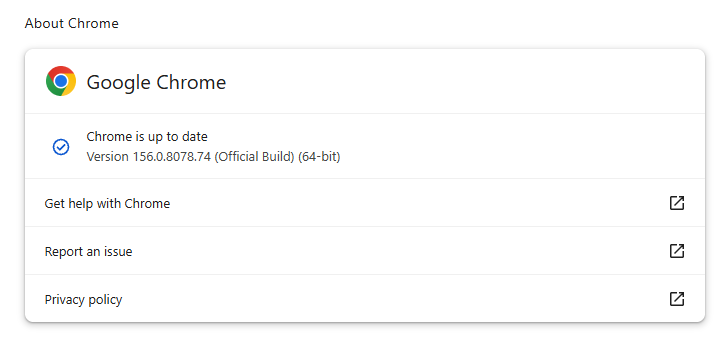
If you don’t want to wait for the rollout to reach you, manually updating is easy. Open About Google Chrome from Chrome’s settings or Help menu. Chrome will check for updates. If one is available, click Relaunch to apply it.
To update Firefox, open the browser and click the menu button at the right side of the Firefox toolbar, then go to Help and select About Firefox. The About Mozilla Firefox window will open.
Firefox will automatically check for updates. If one is available, it will be downloaded. Once done, you’ll be prompted to click Relaunch. After Firefox restarts, it will be up to date.
After the update, the version should be 159.0 or later
Technical details
These Chrome and Firefox updates address a familiar problem: browser code mishandling memory while processing web content. Both releases fix use-after-free vulnerabilities, including flaws in page layout, JavaScript processing, and SVG graphics.
A use-after-free vulnerability occurs when a program attempts to access a memory location after it has been freed. That can cause crashes or, in some cases, allow an attacker to run their own code.
There’s another connection between these updates: both Google and Mozilla credit OpenAI Codex Security with finding bugs fixed in these releases. AI can help security teams examine browser code for weaknesses, alongside human code reviews and automated tests that check how software handles unexpected inputs.
Mozilla’s collaboration with Anthropic shows how AI-discovered findings can lead to fixes: researchers validated vulnerabilities before reporting them, giving Mozilla’s team reproducible bugs to investigate, repair, and deliver to users.
Browse like no one’s watching.
Malwarebytes Privacy VPN encrypts your connection and never logs what you do, so the next story you read doesn’t have to feel personal. Try it free →
On October 27, Google issued a new Stable channel update for Chrome.
Most users are on Chrome’s Stable channel. The desktop update brings Chrome to versions 156.0.8078.73/.74 for Windows and Mac and 156.0.8078.73 for Linux. The update includes 52 security fixes, including four rated Critical.
On the same day, Mozilla issued Security Advisory 2026-118, which fixes 167 vulnerabilities. Firefox 159 also introduces several new features.
Both updates will roll out over the coming days and weeks.
How to update Chrome
The easiest option is to allow Chrome to update automatically. But you can end up lagging behind on updates if you never close your browser or if something goes wrong, such as an extension preventing the update.
If you don’t want to wait for the rollout to reach you, manually updating is easy. Open About Google Chrome from Chrome’s settings or Help menu. Chrome will check for updates. If one is available, click Relaunch to apply it.
To update Firefox, open the browser and click the menu button at the right side of the Firefox toolbar, then go to Help and select About Firefox. The About Mozilla Firefox window will open.
Firefox will automatically check for updates. If one is available, it will be downloaded. Once done, you’ll be prompted to click Relaunch. After Firefox restarts, it will be up to date.
After the update, the version should be 159.0 or later
Technical details
These Chrome and Firefox updates address a familiar problem: browser code mishandling memory while processing web content. Both releases fix use-after-free vulnerabilities, including flaws in page layout, JavaScript processing, and SVG graphics.
A use-after-free vulnerability occurs when a program attempts to access a memory location after it has been freed. That can cause crashes or, in some cases, allow an attacker to run their own code.
There’s another connection between these updates: both Google and Mozilla credit OpenAI Codex Security with finding bugs fixed in these releases. AI can help security teams examine browser code for weaknesses, alongside human code reviews and automated tests that check how software handles unexpected inputs.
Mozilla’s collaboration with Anthropic shows how AI-discovered findings can lead to fixes: researchers validated vulnerabilities before reporting them, giving Mozilla’s team reproducible bugs to investigate, repair, and deliver to users.
Browse like no one’s watching.
Malwarebytes Privacy VPN encrypts your connection and never logs what you do, so the next story you read doesn’t have to feel personal. Try it free →
The process that gates nearly every B2B deal is a self-assessment the sender distrusts and the receiver accepts. There is finally a better basis for trust between companies.
AI agents and associated tooling are becoming increasingly common in corporate infrastructure. Agents can perform a range of actions with the user’s privileges, such as accessing data, running commands, and interacting with external services. This creates new security risks, especially when these tools are used without the security team’s oversight or well-designed policies.
Detecting, tracking, and controlling AI agents is becoming one of the most pressing tasks for security teams today. We closely follow technological developments and continuously update our solutions to respond to new threats in a timely manner amid a rapidly changing technology landscape. This post describes new expertise built into Kaspersky products that helps counter the threats posed by the proliferation of AI agents. We approach this problem from several angles.
First, you need to thoroughly understand the threat you are dealing with. To this end, we added profiles to the Kaspersky Threat Intelligence Portal that describe various AI agents and how attackers exploit them. At their core, AI agents are programs (processes) that run in the operating system on endpoints and can also launch other processes. This means that Endpoint Detection and Response solutions are among the key endpoint controls for this threat. These solutions detect the presence and launch of AI agents, track their activity, and identify potentially dangerous behavior. When needed, they also take action, such as stopping a suspicious process, blocking the activity, or isolating the host, to reduce the likelihood of an incident escalating. For this purpose, we developed specially adapted detection rules.
You can use Kaspersky Endpoint Security, now also available as Kaspersky Next, to control and restrict the launch of AI agents. This solution uses two components to detect AI agents and control how they are used. Application Control categorizes the application processes launched on endpoints, and Web Control manages access to specific categories of web resources for users on endpoints.
Finally, even harmless AI agents can contain malicious instructions (skills), such as those downloaded from unsafe external sources. Kaspersky Scan Engine analyzes installed applications to detect these threats and also checks LLM files for malicious code. Let’s take a closer look at these solutions and technologies.
Popular AI applications and services in organizations
Tools from Anthropic and OpenAI take the top spots in the September 2026 ranking of AI agents by popularity among Kaspersky users. This list is based on telemetry from Kaspersky solutions. It shows the number of users who had the relevant AI vendors’ products installed at the time of the study.
#
AI product
1
Claude
2
Claude Code
3
Codex
4
OpenCode
5
Zed
6
Wispr Flow
7
LM Studio
8
ZCode
9
Chatbox
10
Cherry Studio
The data shows that agentic systems, especially AI agents for software development, are the most popular AI applications. The TOP 10 also includes an application for running large language models locally (LM Studio) and a voice note-taking app (Wispr Flow).
According to open sources, these are the most widely used AI services in 2026:
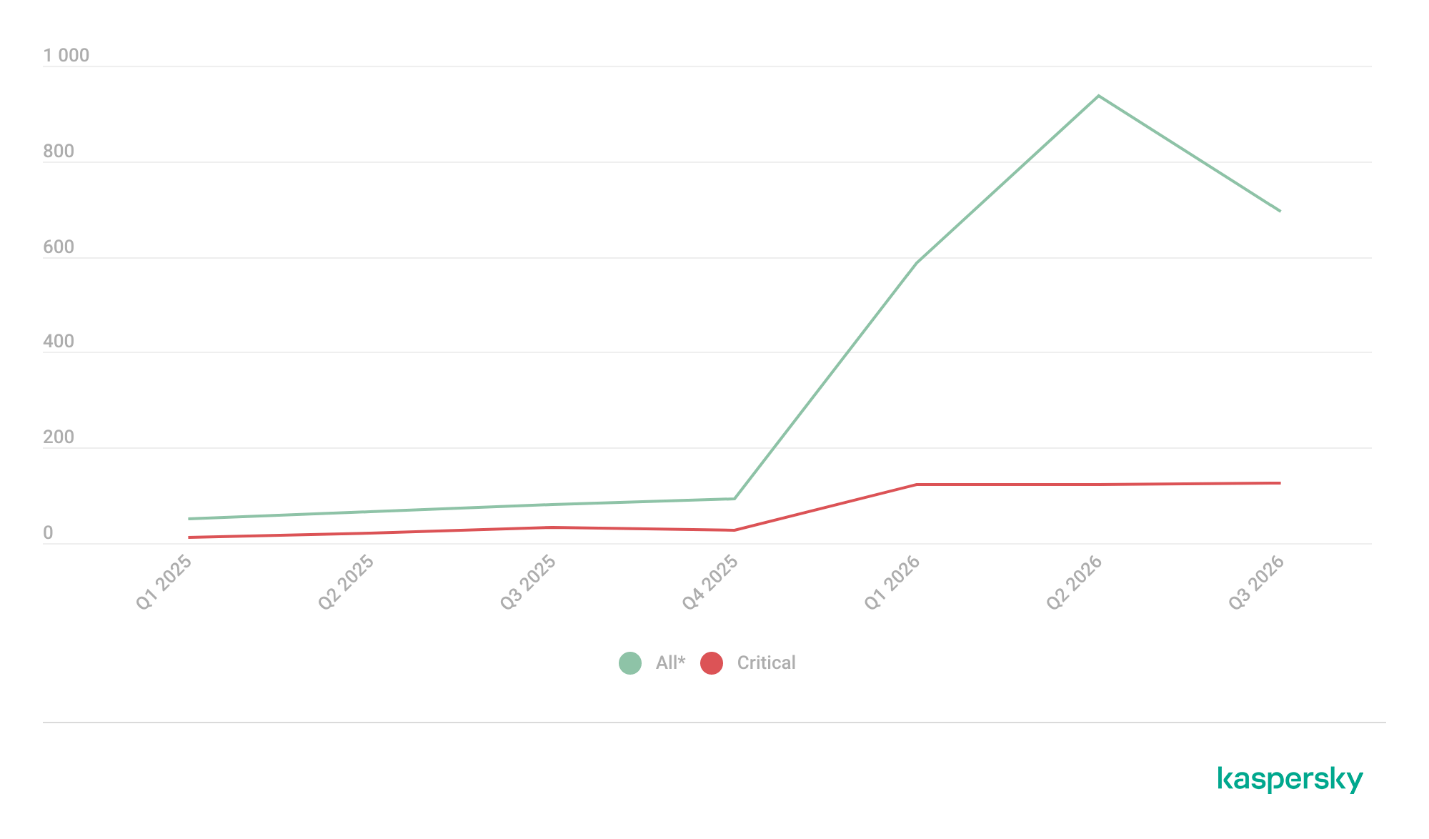
Number of published vulnerabilities in LLMs, AI tools, and plugins with similar functionality, 2025–2026 (download)
* Data for previous quarters was updated and may differ slightly from previously published data.
Application Control and Web Control
To enforce the organization’s security policy for AI agents and other AI applications on the corporate network, Kaspersky products offer application control based on KL categories. These categories classify installed software and give you granular control over which approved applications can run in the organization.
Application Control analyzes the processes launched on endpoints, tracking which AI agents are running in corporate systems at any given moment, on which hosts, and under which accounts. Application Control also shows how long a given program has been in use.
This makes it easier for the Kaspersky Security Center (KSC) administrator to control applications. Administrators can use KL categories to allow or block AI agents inside the company for specific groups of employees.
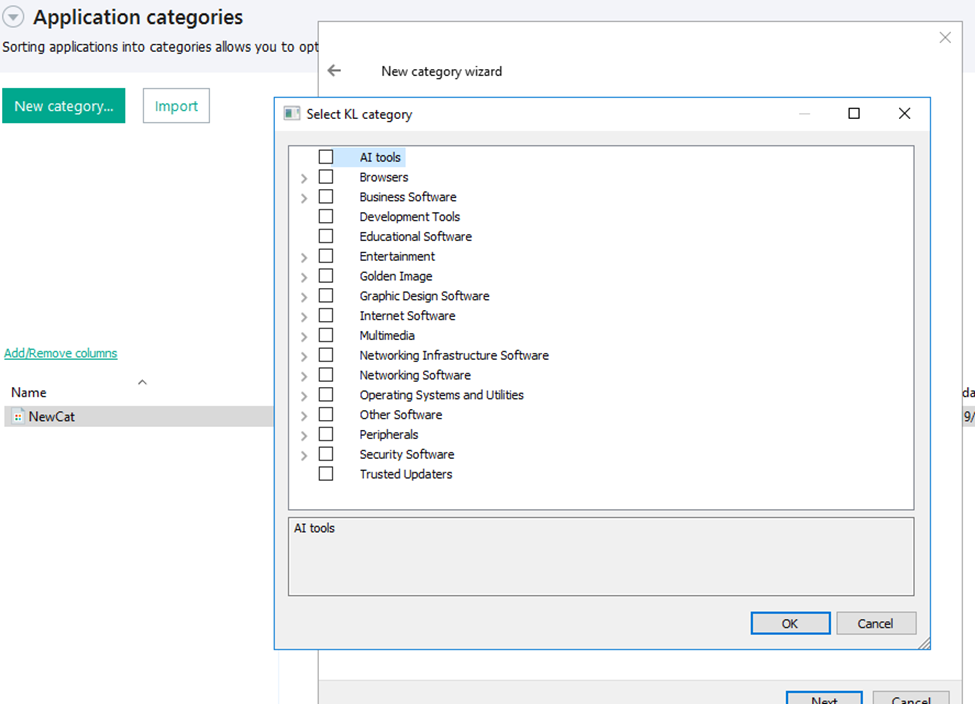
Here is what this functionality looks like to KSC administrators:
KL categories available when configuring Application Control
For details on how to configure Application Control in KSC, follow this link.
In Kaspersky Endpoint Security (KES), Application Control can operate in two modes:
Denylist. In this mode, Application Control lets users run any applications except those blocked by Application Control rules. This is the default mode.
Allowlist. In this mode, Application Control blocks users from running any applications except those explicitly allowed by Application Control rules.
Below are the steps to configure Application Control to block AI tools.
Configuring Application Control for the AI Tools category in KES
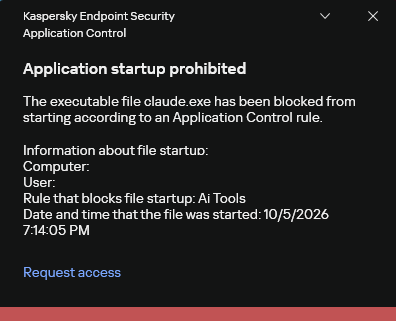
With this setup, when a user tries to launch an AI agent, they get a notification and the agent doesn’t start.
KES notification about an attempt to launch an AI agent
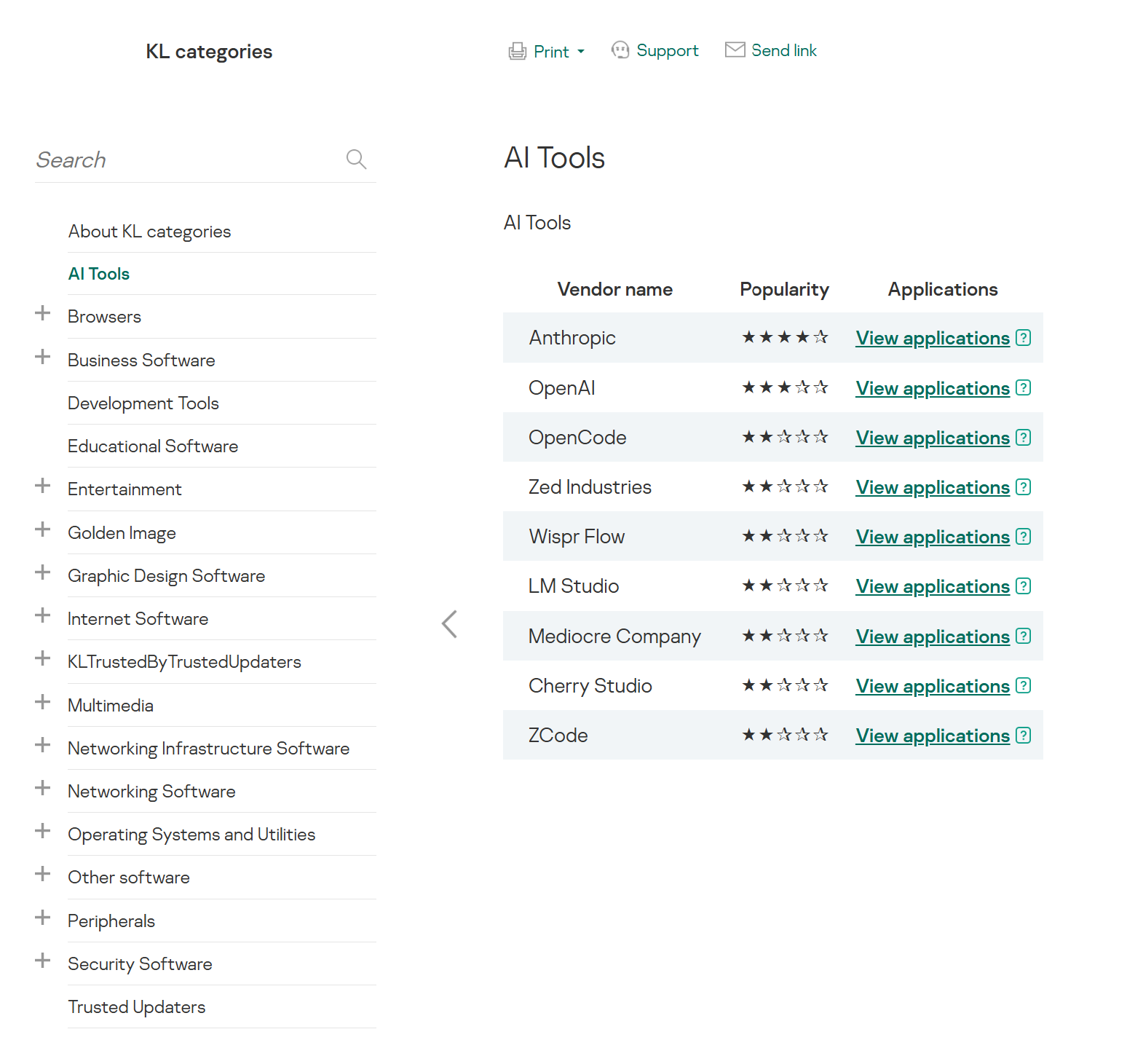
The View applications drop-down list shows products for a specific vendor.
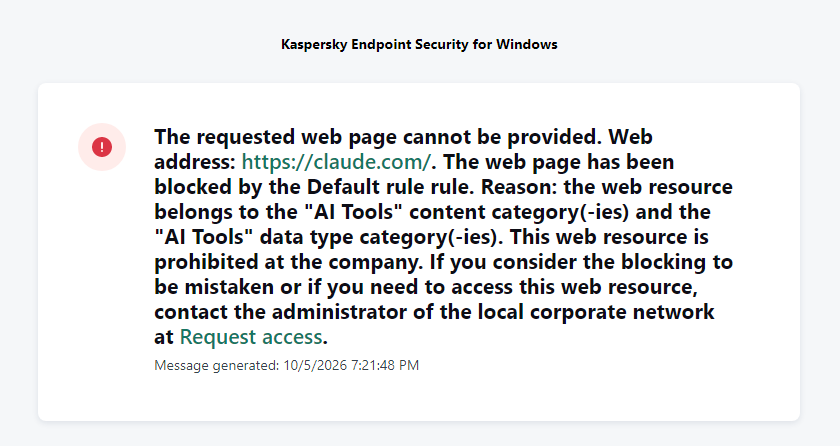
Similarly, Web Control lets you manage user access to web resources. If a user tries to open a denylisted website, KES blocks access and shows a warning.
KES notification about an attempt to access a prohibited web resource
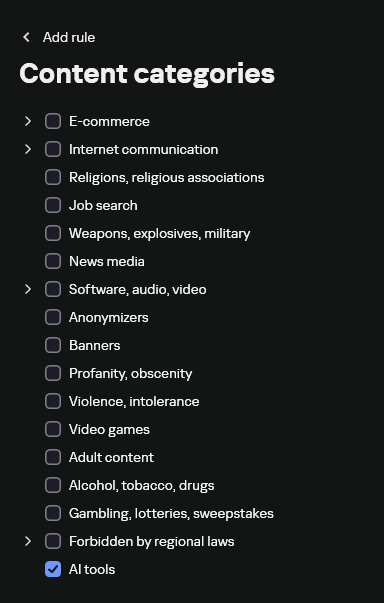
When configuring access, the administrator can block websites that provide AI as a service.
Website categories
For more on configuring Web Control, follow this link. The help portal also provides information on website categories that can be assigned to resources to configure access control.
Kaspersky Endpoint Detection and Response
To an EDR solution, an AI agent is a regular process. It has its own executable, a tree of child processes, and network communications, all of which need to be monitored for suspicious activity. An attacker can use an AI agent as an automation tool. An AI agent installed as a legitimate user tool can also be leveraged in a ClickFix attack, where it executes a malicious instruction received from an untrusted source, such as a document, web page, or email. That said, unsafe actions by an agent do not always indicate an attack. There may be no malicious intent in the chain at all. An incident can result from what looks like an ordinary instruction from a user who doesn’t fully understand the consequences of having it executed. The mere fact that an agent was launched does not reveal whether it is being used in an attack. That is why Kaspersky EDR (KEDR) uses both conventional behavioral rules and rules written and adapted to detect AI tools. The latter identify risky agent actions and settings, and help determine which AI tool was involved in suspicious activity.
Conventional KEDR rules detect the vast majority of familiar malicious techniques, including when performed by an AI agent. A suspicious PowerShell launch, persistence via Task Scheduler, or an attempt to steal credentials leaves clear, identifiable traces. These traces look the same no matter what initiated the actions. The rules analyze launch parameters, process relationships, affected files, network activity, and other telemetry events.
For example, in a recent Armored Likho campaign, we found signs that AI had been used to create loader and dropper samples, which were later compiled with NSIS (Nullsoft Scriptable Install System). The key telltale artifacts were icons in the scripts and excessive comments on every function, which is uncharacteristic of human-written code. In addition, the group continues to generate new modules for its BusySnake Stealer and BusySnake RAT samples. For example, the attackers used AI to develop a module that runs multiple checks for virtual environment artifacts and calculates a score. Depending on the score, the sample either runs or exits with code 0. Even though the initial access samples, payloads, and their modules were AI-generated, the commands they execute via rundll32 and PowerShell are detected by the shell_creation_by_rundll32 and suspicious_powershell_cmd_or_script_spawning rules.
So, for detecting an attack like this, it is not important who wrote the loader, the payload, or its modules: they are given away by the commands they execute, process relationships, and other traces of activity in the system. AI can be involved both in preparing the code and in carrying out the attack directly on the device.
In the latter case, the attacker uses the agent to carry out their tasks and lets it choose and run the required commands within the privileges it has. For effective protection, it is critical to link suspicious actions back to the AI tool and the conditions under which it operates. In KEDR, several specialized rules handle this task.
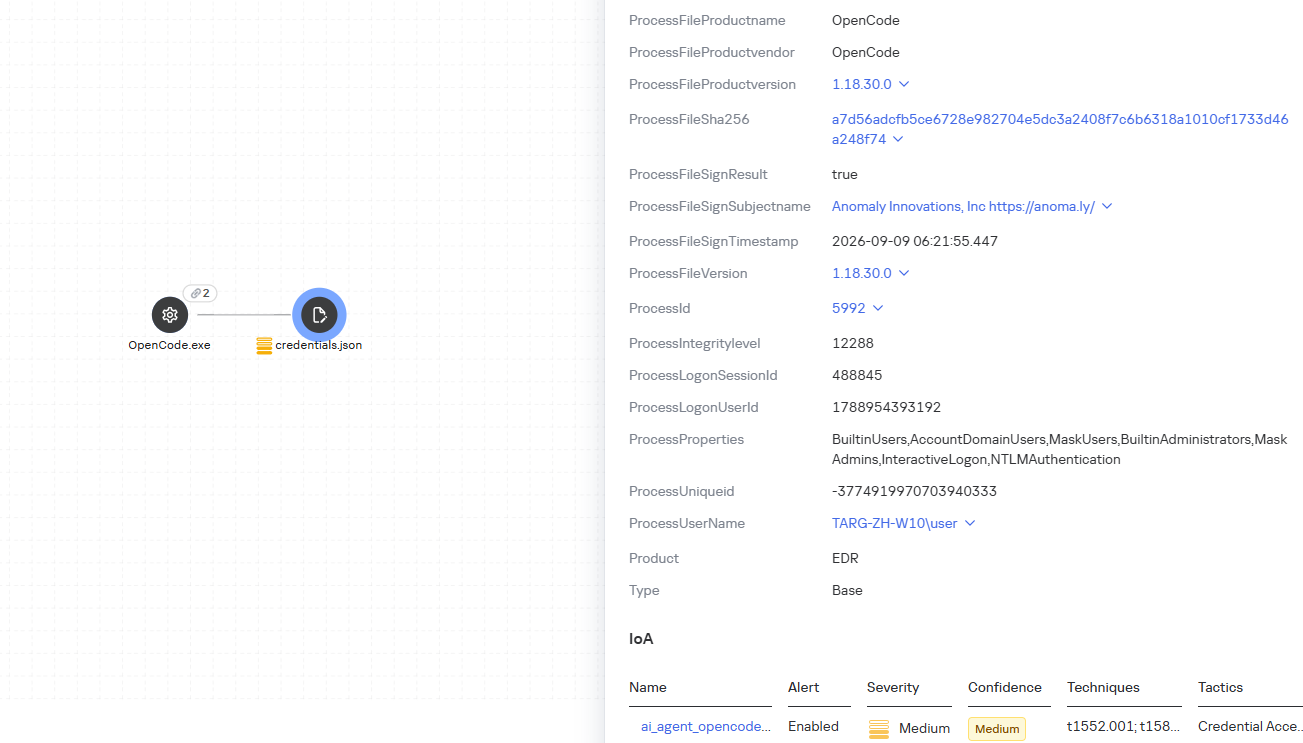
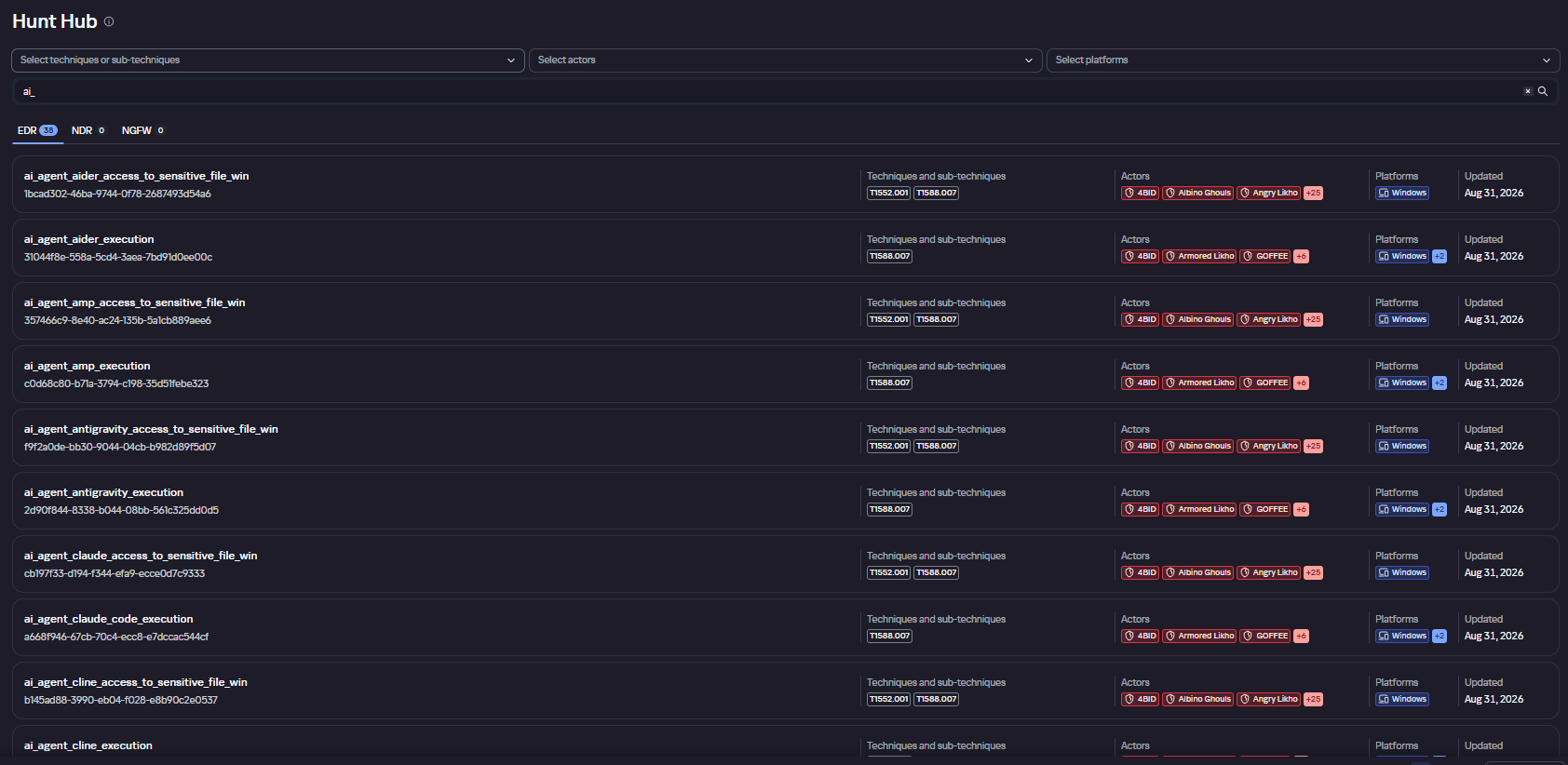
We have created separate rules for popular AI agents, ai_agent_*_access_to_sensitive_file_**, where * is the tool name and ** is the operating system. They generate alerts when an agent accesses files that contain credentials, tokens, or keys.
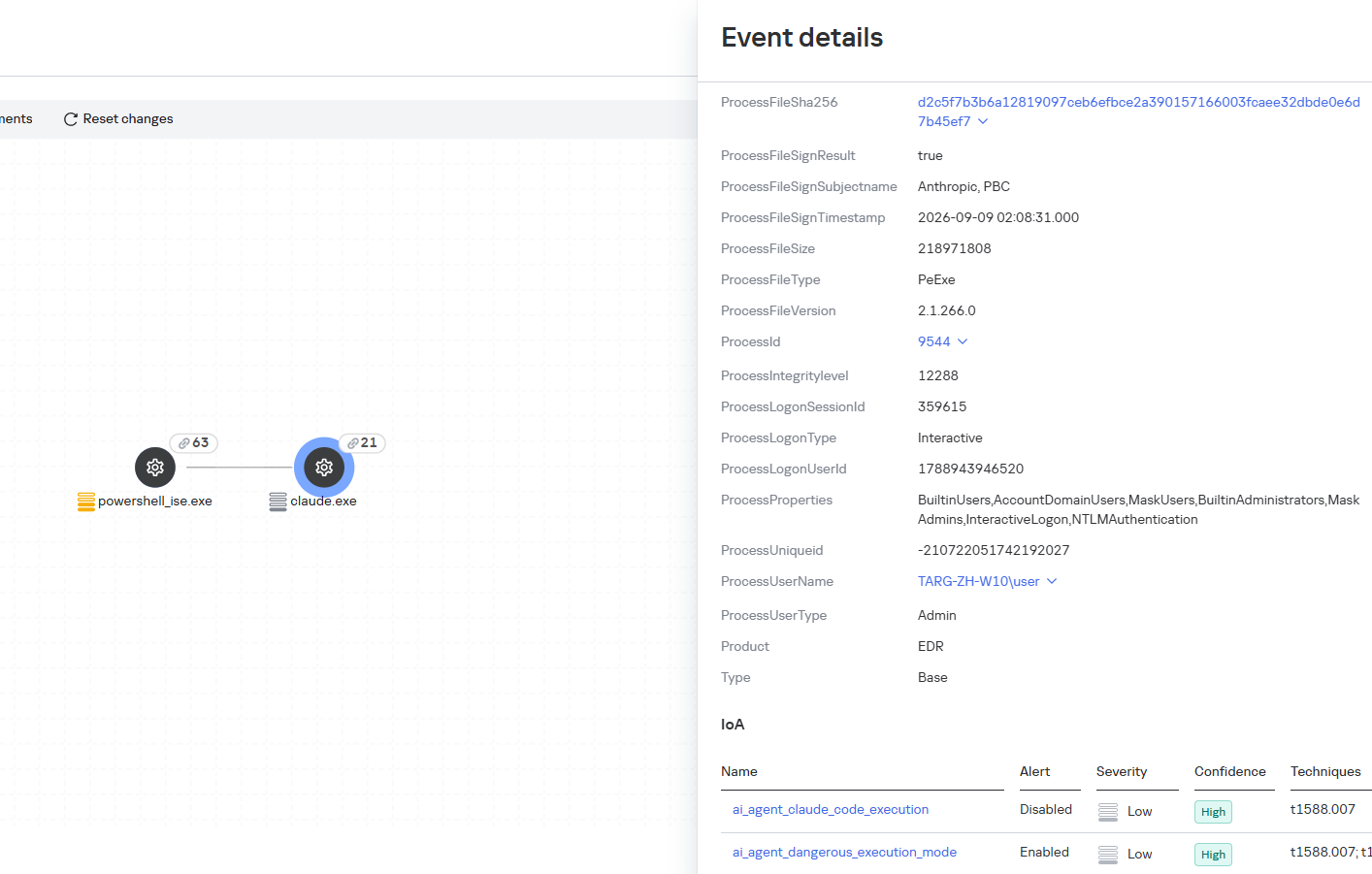
The ai_agent_dangerous_execution_mode rule detects agents launched with auto-approval of all actions (so-called YOLO mode) or with the sandbox disabled. These settings do not indicate an attack on their own, but they let the agent perform dangerous actions without user confirmation.
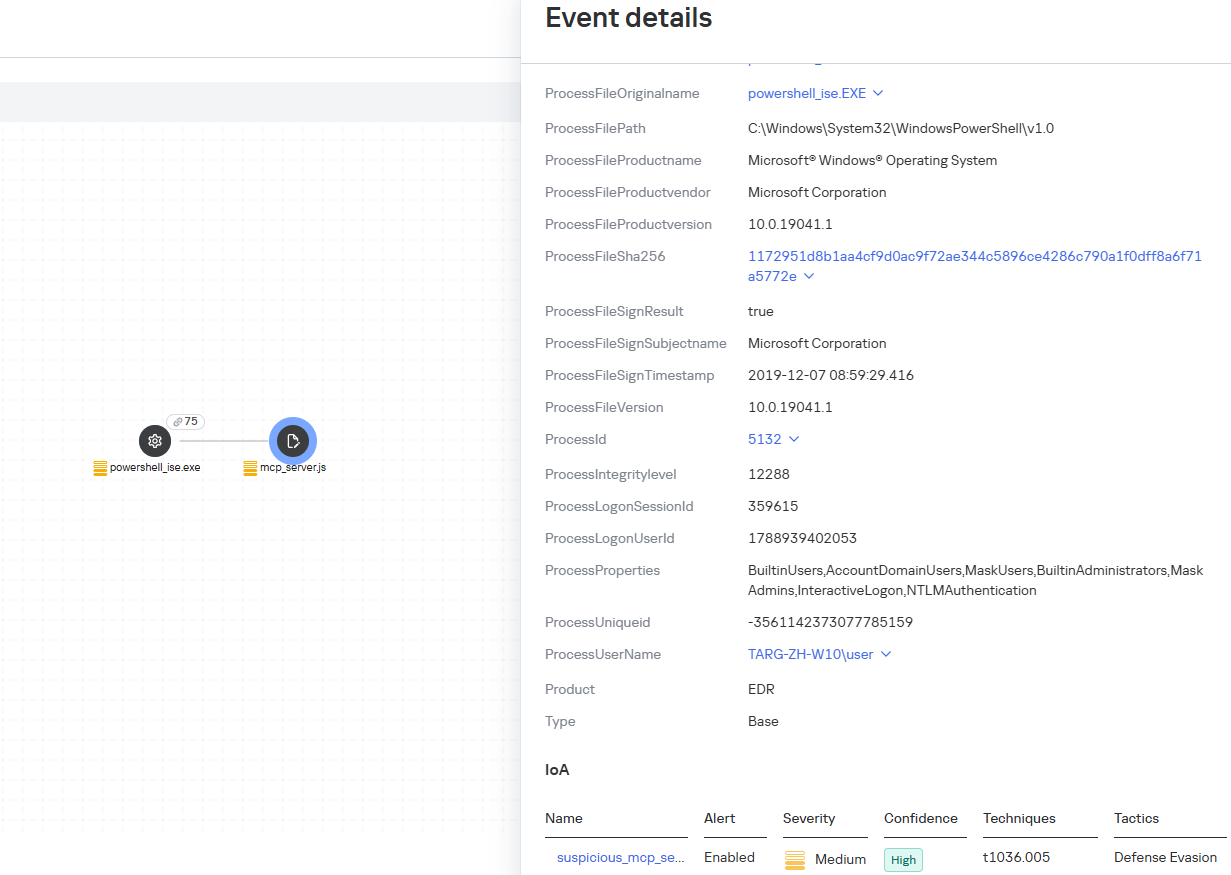
The suspicious_mcp_server_artifact rule triggers when MCP server scripts are created or modified in hidden, temporary, or cache directories. Attackers can place an MCP server in these locations to quietly connect it to the agent: through the MCP server, they can pass instructions to the agent, call third-party tools, and access the user’s data.
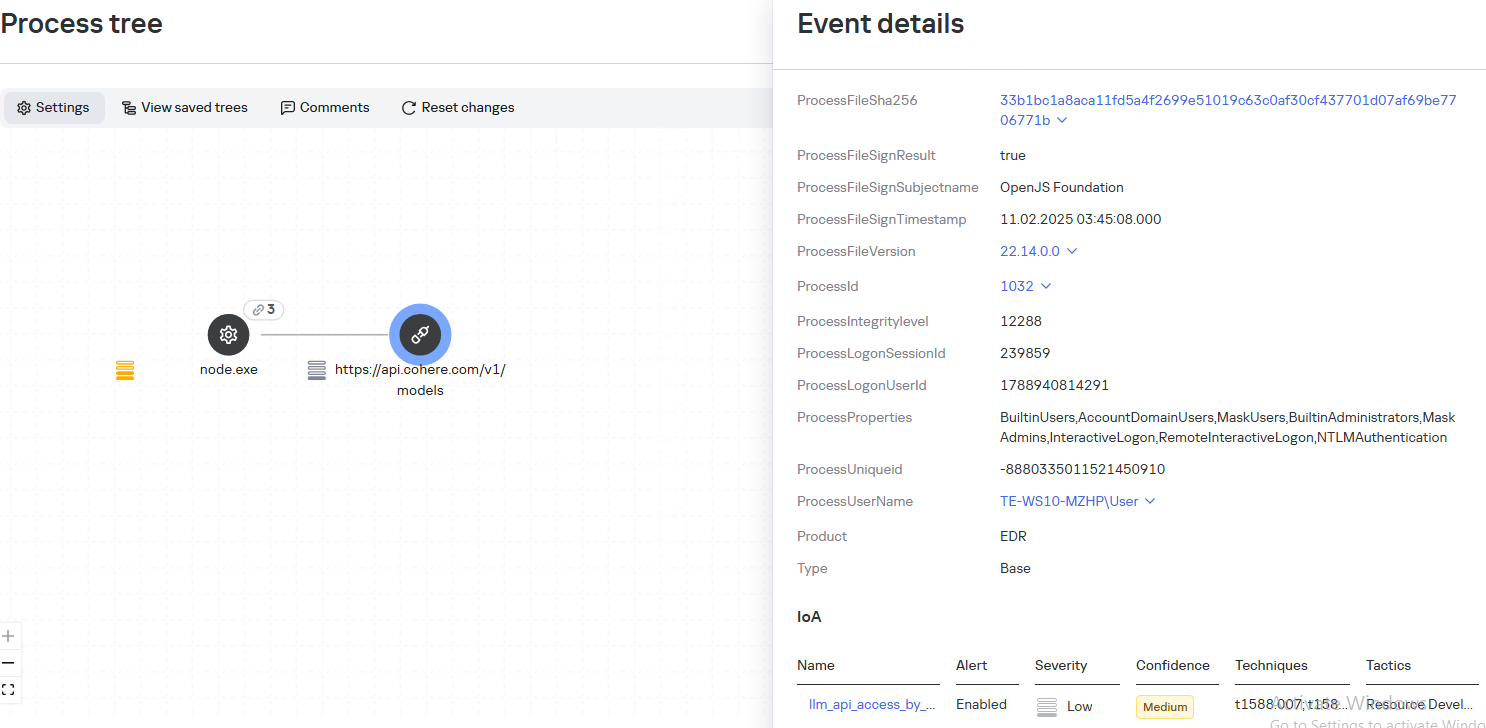
The llm_api_access_by_unusual_apps rule generates an alert when an application on Windows, Linux, or macOS connects to the API of a known external LLM service, unless this activity falls under predefined exclusions. This helps spot model access by applications that do not normally behave this way.
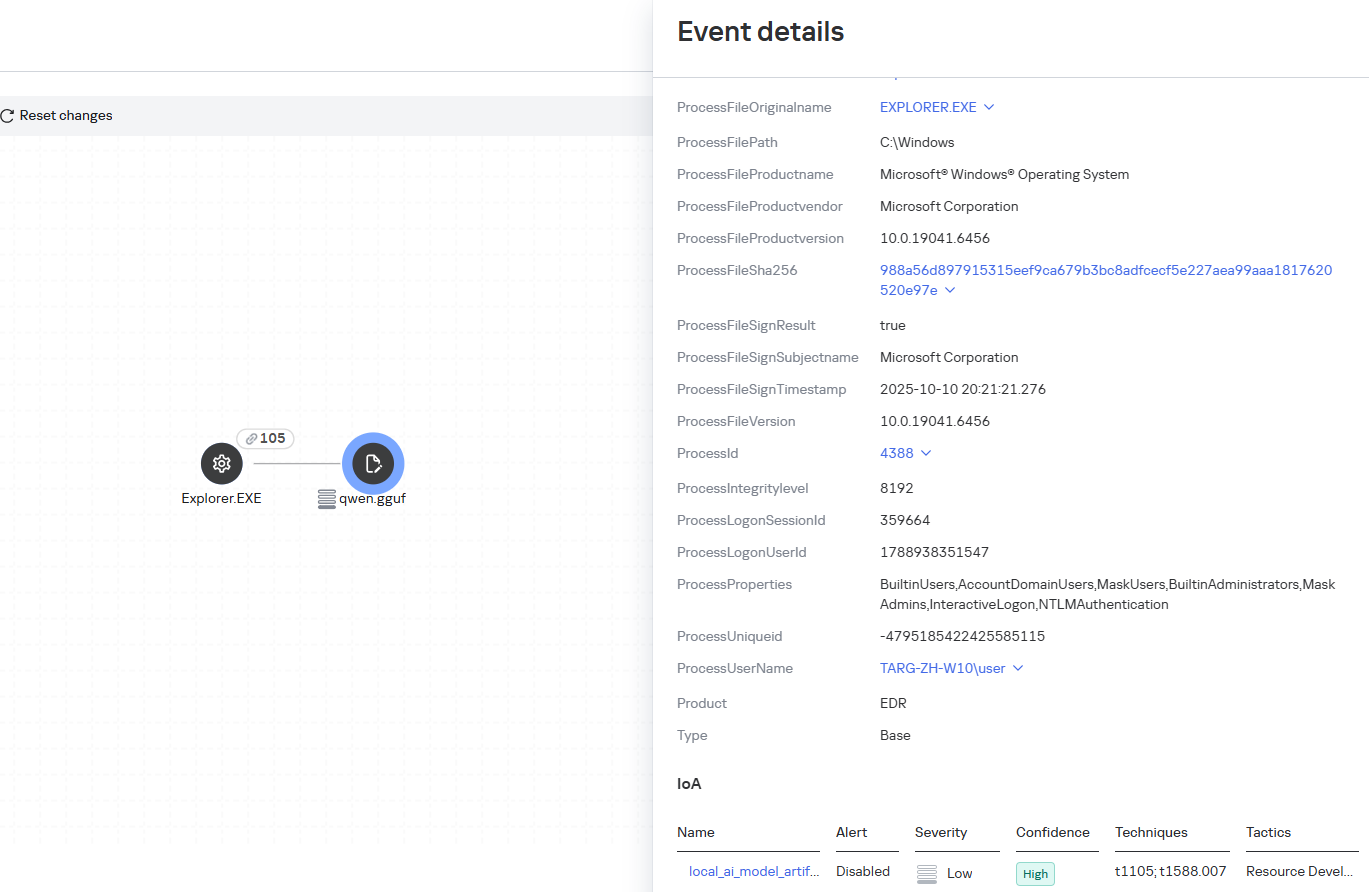
Some Kaspersky EDR rules tag events for investigation but do not generate alerts. For example, the ai_agent_**_execution rules flag launches of known agents on Windows, Linux, and macOS. The local_ai_model_artifact rule records the creation or modification of AI model files in typical application, runtime, and cache directories. These events reveal AI tools on the device, including tools that run on local models and never call an external API.
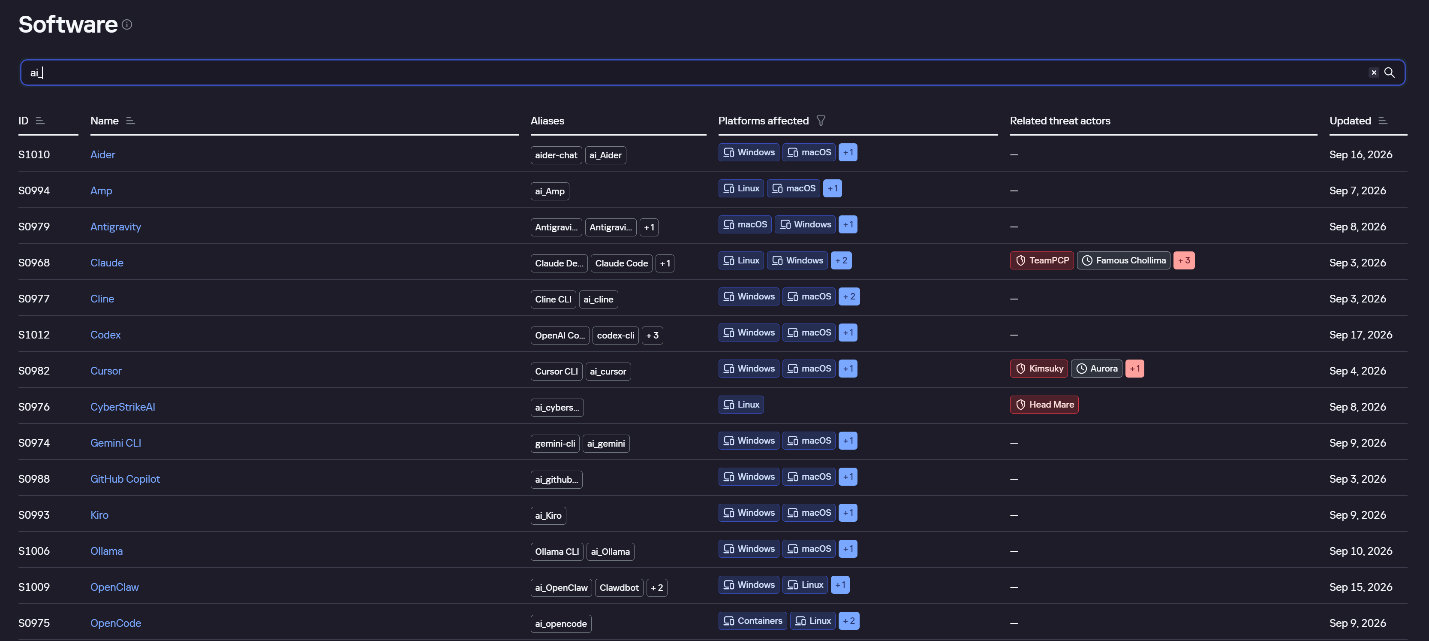
The Kaspersky Threat Intelligence Portal offers a large number of software profiles, including profiles of AI agents. You can sort them by the ai_ prefix:
AI agent profiles on Kaspersky TIP
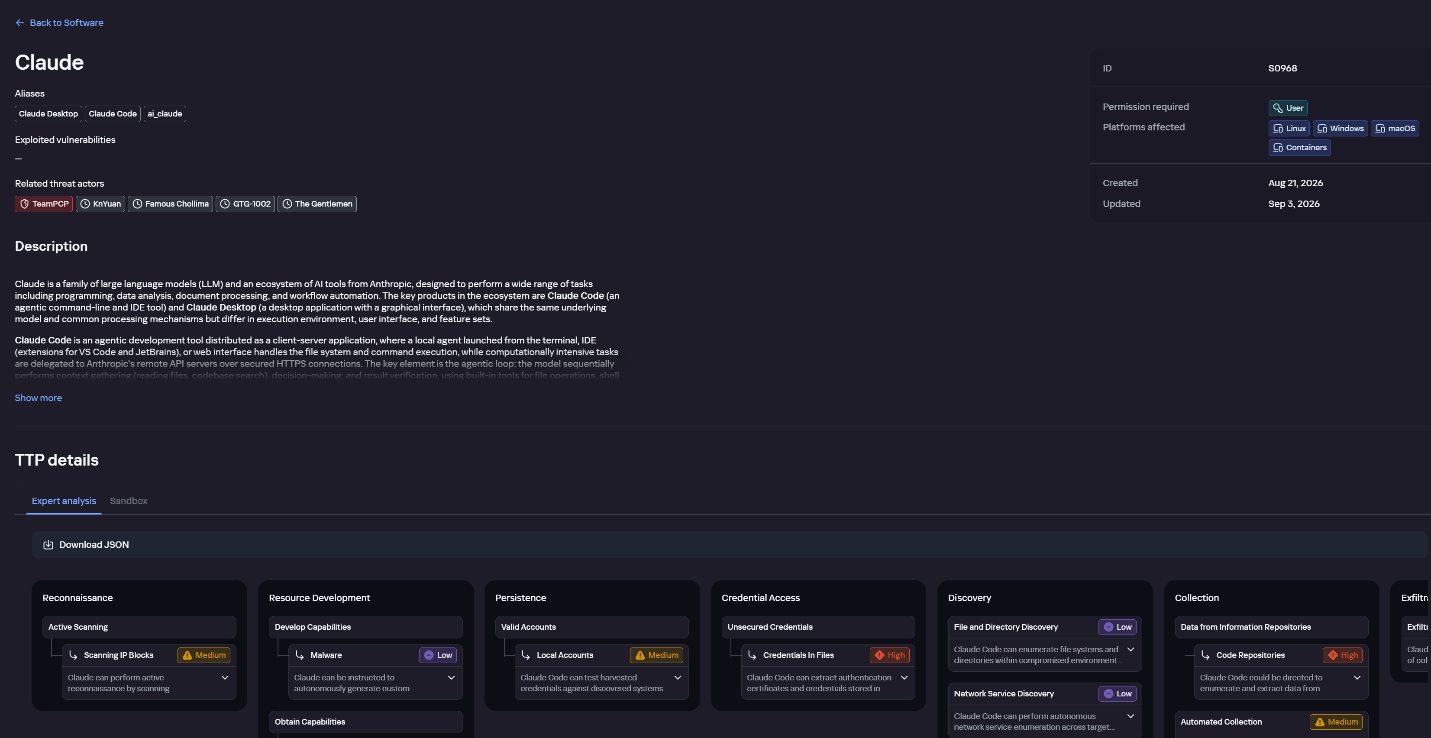
The profile of an AI agent such as Claude Desktop includes a detailed description of the software, the privilege level required to run it, supported platforms, and threat actor groups known to use it. It also lists tactics and techniques mapped to the MITRE ATT&CK framework, with descriptions of the procedures the tool can be used for.
Claude profile on Kaspersky TIP
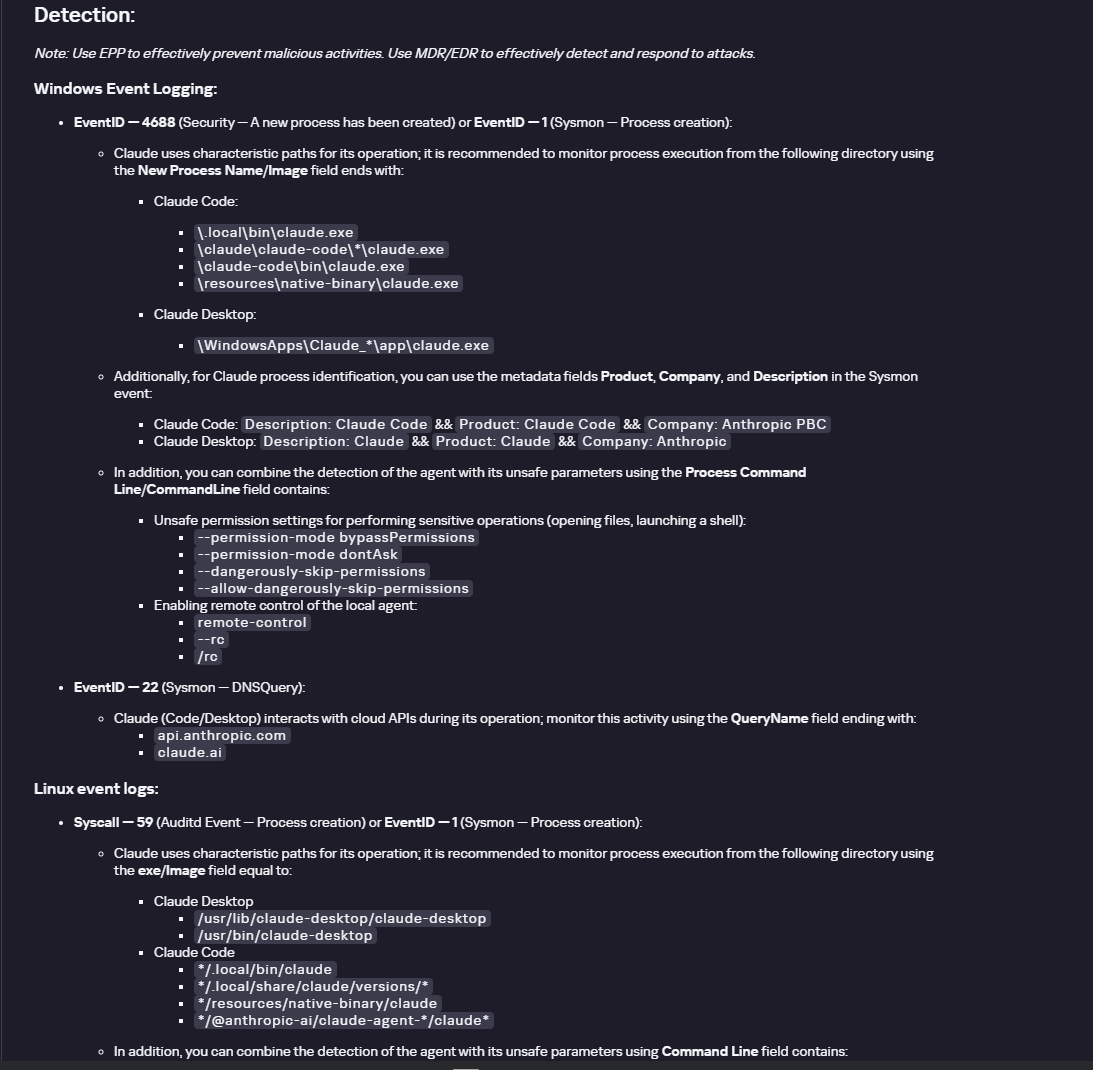
The description also lists ways to detect the software through standard system auditing mechanisms:
Windows: events from standard audit logs and Sysmon events
Linux: syscall audit events and Sysmon events
Network auditing: a set of protocols and the traffic generated by the software
The detection section lists the main artifacts the software leaves in the system: command lines, possible launch parameters, names of the services and scheduled tasks it creates, and the key network artifacts.
Detection section in the Claude profile
Hunt Hub
In December 2025, the Kaspersky Threat Intelligence Portal added Hunt Hub (HH), a repository of detection rules. This is a unique Kaspersky project, and we developed it in response to growing market demand.
This functionality is available in the Threat Landscape section of the portal. It gives analysts access to detection rules: their descriptions and their mapping to MITRE ATT&CK tactics and techniques, as well as to the associated cybercriminal groups.
In the Hunt Hub section, customers can explore the detection logic of EDR, NDR, and NGFW products, including the logic for detecting AI agents.
Rules in the Hunt Hub repository
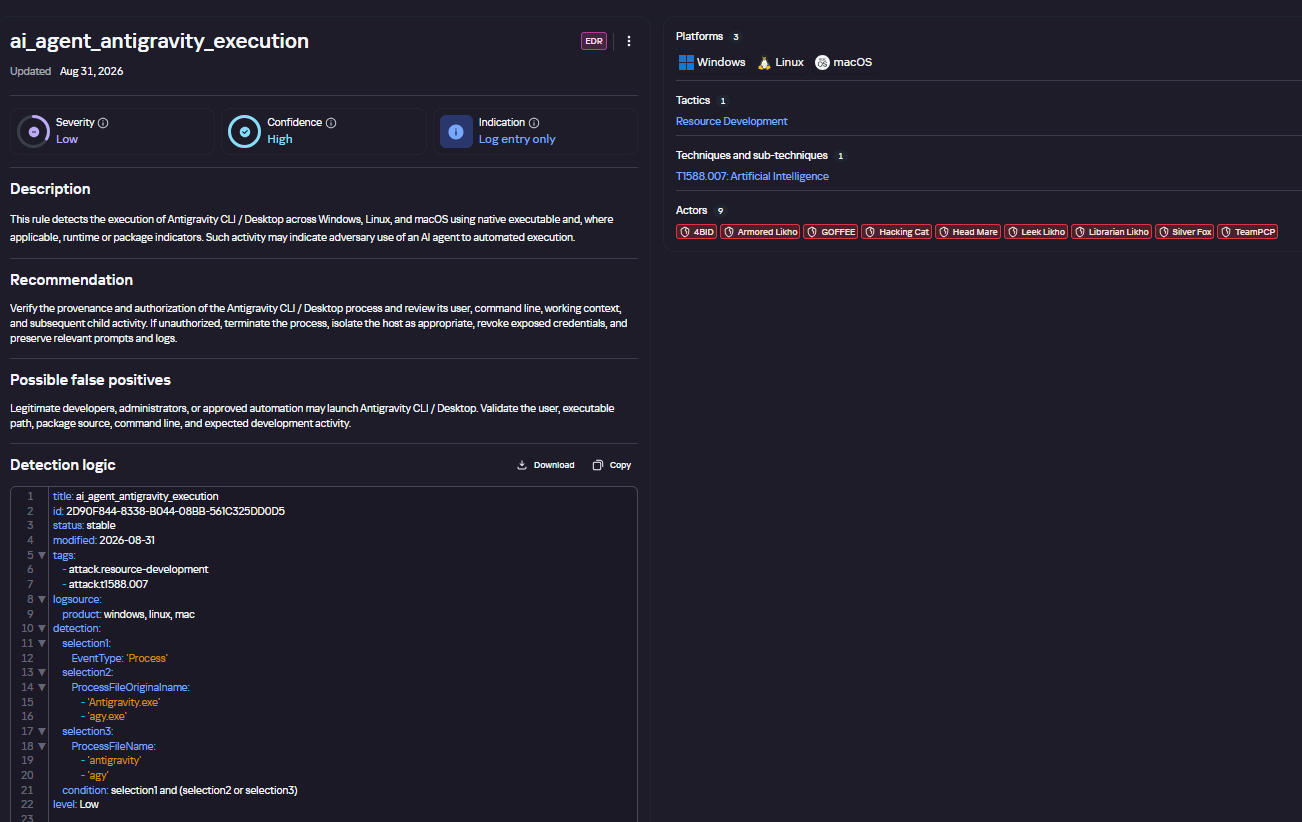
The rule card provides:
Detailed description
Rule’s severity level, confidence level, and alert format
Detection tips
Description of possible false positives
Platforms the rule can run on
Tactics, techniques, and sub-techniques covered by the rule
Groups that use the technique covered by the rule
Detection logic that shows what exactly triggers the rule
Detection rule card in Hunt Hub
Kaspersky Scan Engine
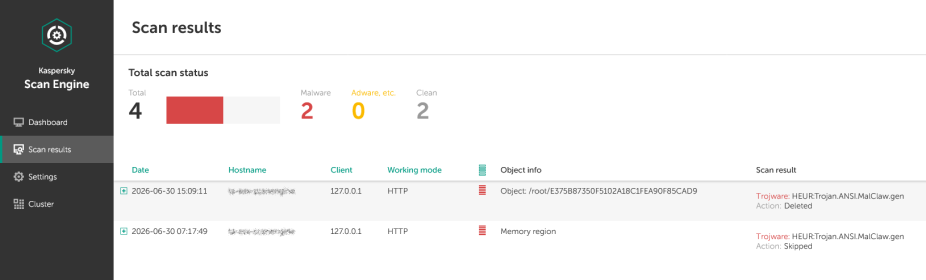
Skills are a key component of the AI agent ecosystem. They’re prewritten sets of natural-language instructions that extend agent functionality. We previously covered the risks that malicious skills pose to agent users. A skill can require the usage of additional programs and services, come with helper scripts (for example, written in Python), or contain a malicious command embedded right in the instruction text. This means that adding skills to an originally harmless AI agent opens up several new ways for malicious code to enter the system. To prevent this, any skills obtained from external sources must be scanned. Kaspersky Scan Engine is well suited for this task. This is a cyberthreat detection and response solution that seamlessly integrates with various applications. It can detect malicious code in agent skills, associated scripts, and in files generated by running agents.
Detection of a malicious agent skill in Kaspersky Scan Engine
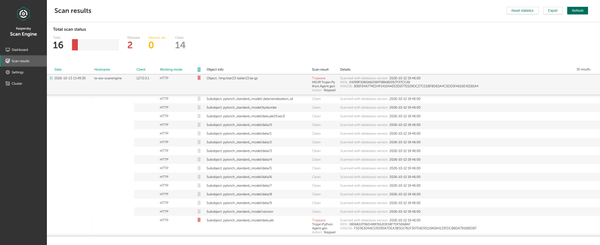
Trained LLMs come in many formats. Some of them (PTH, PT, PKL, KERS, and others) also store parameters and weights (training datasets). These files can also contain malicious code, so it’s critical to scan them before running and using them. Kaspersky Scan Engine scans potentially dangerous LLM formats for infected data. It can deserialize and analyze models to detect malicious code regardless of model size.
Detection of an LLM with malicious code in Kaspersky Scan Engine
Conclusion
AI agents are rapidly making their way into corporate environments: they help employees work faster and take on a wide range of tasks, but they also open up new opportunities for attackers. To take advantage of this technology without compromising security, organizations need to build multi-layered protection and minimize risks. A range of Kaspersky solutions can help with this:
Kaspersky TIP keeps you up to date on current scenarios in which attackers use AI agents, and its Hunt Hub section provides rules for detecting suspicious AI agent activity.
Kaspersky EDR detects AI agents in the infrastructure and monitors their activity on endpoints. If it detects potentially dangerous actions, the product can log the event, notify the SOC, and take response actions, such as stopping the process or isolating the host.
Application Control in Kaspersky products can fully restrict the use of AI agents within the company by using application categorization. The Web Control component can restrict access to AIaaS web resources.
Kaspersky Scan Engine can be integrated into various company processes to detect malicious code in any files, including AI agent skills and LLMs.
When companies combine the tools described above in a comprehensive approach, they can adopt AI agents in an informed way: with an understanding of the associated risks and effective means of minimizing them.
AI agents and associated tooling are becoming increasingly common in corporate infrastructure. Agents can perform a range of actions with the user’s privileges, such as accessing data, running commands, and interacting with external services. This creates new security risks, especially when these tools are used without the security team’s oversight or well-designed policies.
Detecting, tracking, and controlling AI agents is becoming one of the most pressing tasks for security teams today. We closely follow technological developments and continuously update our solutions to respond to new threats in a timely manner amid a rapidly changing technology landscape. This post describes new expertise built into Kaspersky products that helps counter the threats posed by the proliferation of AI agents. We approach this problem from several angles.
First, you need to thoroughly understand the threat you are dealing with. To this end, we added profiles to the Kaspersky Threat Intelligence Portal that describe various AI agents and how attackers exploit them. At their core, AI agents are programs (processes) that run in the operating system on endpoints and can also launch other processes. This means that Endpoint Detection and Response solutions are among the key endpoint controls for this threat. These solutions detect the presence and launch of AI agents, track their activity, and identify potentially dangerous behavior. When needed, they also take action, such as stopping a suspicious process, blocking the activity, or isolating the host, to reduce the likelihood of an incident escalating. For this purpose, we developed specially adapted detection rules.
You can use Kaspersky Endpoint Security, now also available as Kaspersky Next, to control and restrict the launch of AI agents. This solution uses two components to detect AI agents and control how they are used. Application Control categorizes the application processes launched on endpoints, and Web Control manages access to specific categories of web resources for users on endpoints.
Finally, even harmless AI agents can contain malicious instructions (skills), such as those downloaded from unsafe external sources. Kaspersky Scan Engine analyzes installed applications to detect these threats and also checks LLM files for malicious code. Let’s take a closer look at these solutions and technologies.
Popular AI applications and services in organizations
Tools from Anthropic and OpenAI take the top spots in the September 2026 ranking of AI agents by popularity among Kaspersky users. This list is based on telemetry from Kaspersky solutions. It shows the number of users who had the relevant AI vendors’ products installed at the time of the study.
#
AI product
1
Claude
2
Claude Code
3
Codex
4
OpenCode
5
Zed
6
Wispr Flow
7
LM Studio
8
ZCode
9
Chatbox
10
Cherry Studio
The data shows that agentic systems, especially AI agents for software development, are the most popular AI applications. The TOP 10 also includes an application for running large language models locally (LM Studio) and a voice note-taking app (Wispr Flow).
According to open sources, these are the most widely used AI services in 2026:
Number of published vulnerabilities in LLMs, AI tools, and plugins with similar functionality, 2025–2026 (download)
* Data for previous quarters was updated and may differ slightly from previously published data.
Application Control and Web Control
To enforce the organization’s security policy for AI agents and other AI applications on the corporate network, Kaspersky products offer application control based on KL categories. These categories classify installed software and give you granular control over which approved applications can run in the organization.
Application Control analyzes the processes launched on endpoints, tracking which AI agents are running in corporate systems at any given moment, on which hosts, and under which accounts. Application Control also shows how long a given program has been in use.
This makes it easier for the Kaspersky Security Center (KSC) administrator to control applications. Administrators can use KL categories to allow or block AI agents inside the company for specific groups of employees.
Here is what this functionality looks like to KSC administrators:
KL categories available when configuring Application Control
For details on how to configure Application Control in KSC, follow this link.
In Kaspersky Endpoint Security (KES), Application Control can operate in two modes:
Denylist. In this mode, Application Control lets users run any applications except those blocked by Application Control rules. This is the default mode.
Allowlist. In this mode, Application Control blocks users from running any applications except those explicitly allowed by Application Control rules.
Below are the steps to configure Application Control to block AI tools.
Configuring Application Control for the AI Tools category in KES
With this setup, when a user tries to launch an AI agent, they get a notification and the agent doesn’t start.
KES notification about an attempt to launch an AI agent
The View applications drop-down list shows products for a specific vendor.
Similarly, Web Control lets you manage user access to web resources. If a user tries to open a denylisted website, KES blocks access and shows a warning.
KES notification about an attempt to access a prohibited web resource
When configuring access, the administrator can block websites that provide AI as a service.
Website categories
For more on configuring Web Control, follow this link. The help portal also provides information on website categories that can be assigned to resources to configure access control.
Kaspersky Endpoint Detection and Response
To an EDR solution, an AI agent is a regular process. It has its own executable, a tree of child processes, and network communications, all of which need to be monitored for suspicious activity. An attacker can use an AI agent as an automation tool. An AI agent installed as a legitimate user tool can also be leveraged in a ClickFix attack, where it executes a malicious instruction received from an untrusted source, such as a document, web page, or email. That said, unsafe actions by an agent do not always indicate an attack. There may be no malicious intent in the chain at all. An incident can result from what looks like an ordinary instruction from a user who doesn’t fully understand the consequences of having it executed. The mere fact that an agent was launched does not reveal whether it is being used in an attack. That is why Kaspersky EDR (KEDR) uses both conventional behavioral rules and rules written and adapted to detect AI tools. The latter identify risky agent actions and settings, and help determine which AI tool was involved in suspicious activity.
Conventional KEDR rules detect the vast majority of familiar malicious techniques, including when performed by an AI agent. A suspicious PowerShell launch, persistence via Task Scheduler, or an attempt to steal credentials leaves clear, identifiable traces. These traces look the same no matter what initiated the actions. The rules analyze launch parameters, process relationships, affected files, network activity, and other telemetry events.
For example, in a recent Armored Likho campaign, we found signs that AI had been used to create loader and dropper samples, which were later compiled with NSIS (Nullsoft Scriptable Install System). The key telltale artifacts were icons in the scripts and excessive comments on every function, which is uncharacteristic of human-written code. In addition, the group continues to generate new modules for its BusySnake Stealer and BusySnake RAT samples. For example, the attackers used AI to develop a module that runs multiple checks for virtual environment artifacts and calculates a score. Depending on the score, the sample either runs or exits with code 0. Even though the initial access samples, payloads, and their modules were AI-generated, the commands they execute via rundll32 and PowerShell are detected by the shell_creation_by_rundll32 and suspicious_powershell_cmd_or_script_spawning rules.
So, for detecting an attack like this, it is not important who wrote the loader, the payload, or its modules: they are given away by the commands they execute, process relationships, and other traces of activity in the system. AI can be involved both in preparing the code and in carrying out the attack directly on the device.
In the latter case, the attacker uses the agent to carry out their tasks and lets it choose and run the required commands within the privileges it has. For effective protection, it is critical to link suspicious actions back to the AI tool and the conditions under which it operates. In KEDR, several specialized rules handle this task.
We have created separate rules for popular AI agents, ai_agent_*_access_to_sensitive_file_**, where * is the tool name and ** is the operating system. They generate alerts when an agent accesses files that contain credentials, tokens, or keys.
The ai_agent_dangerous_execution_mode rule detects agents launched with auto-approval of all actions (so-called YOLO mode) or with the sandbox disabled. These settings do not indicate an attack on their own, but they let the agent perform dangerous actions without user confirmation.
The suspicious_mcp_server_artifact rule triggers when MCP server scripts are created or modified in hidden, temporary, or cache directories. Attackers can place an MCP server in these locations to quietly connect it to the agent: through the MCP server, they can pass instructions to the agent, call third-party tools, and access the user’s data.
The llm_api_access_by_unusual_apps rule generates an alert when an application on Windows, Linux, or macOS connects to the API of a known external LLM service, unless this activity falls under predefined exclusions. This helps spot model access by applications that do not normally behave this way.
Some Kaspersky EDR rules tag events for investigation but do not generate alerts. For example, the ai_agent_**_execution rules flag launches of known agents on Windows, Linux, and macOS. The local_ai_model_artifact rule records the creation or modification of AI model files in typical application, runtime, and cache directories. These events reveal AI tools on the device, including tools that run on local models and never call an external API.
The Kaspersky Threat Intelligence Portal offers a large number of software profiles, including profiles of AI agents. You can sort them by the ai_ prefix:
AI agent profiles on Kaspersky TIP
The profile of an AI agent such as Claude Desktop includes a detailed description of the software, the privilege level required to run it, supported platforms, and threat actor groups known to use it. It also lists tactics and techniques mapped to the MITRE ATT&CK framework, with descriptions of the procedures the tool can be used for.
Claude profile on Kaspersky TIP
The description also lists ways to detect the software through standard system auditing mechanisms:
Windows: events from standard audit logs and Sysmon events
Linux: syscall audit events and Sysmon events
Network auditing: a set of protocols and the traffic generated by the software
The detection section lists the main artifacts the software leaves in the system: command lines, possible launch parameters, names of the services and scheduled tasks it creates, and the key network artifacts.
Detection section in the Claude profile
Hunt Hub
In December 2025, the Kaspersky Threat Intelligence Portal added Hunt Hub (HH), a repository of detection rules. This is a unique Kaspersky project, and we developed it in response to growing market demand.
This functionality is available in the Threat Landscape section of the portal. It gives analysts access to detection rules: their descriptions and their mapping to MITRE ATT&CK tactics and techniques, as well as to the associated cybercriminal groups.
In the Hunt Hub section, customers can explore the detection logic of EDR, NDR, and NGFW products, including the logic for detecting AI agents.
Rules in the Hunt Hub repository
The rule card provides:
Detailed description
Rule’s severity level, confidence level, and alert format
Detection tips
Description of possible false positives
Platforms the rule can run on
Tactics, techniques, and sub-techniques covered by the rule
Groups that use the technique covered by the rule
Detection logic that shows what exactly triggers the rule
Detection rule card in Hunt Hub
Kaspersky Scan Engine
Skills are a key component of the AI agent ecosystem. They’re prewritten sets of natural-language instructions that extend agent functionality. We previously covered the risks that malicious skills pose to agent users. A skill can require the usage of additional programs and services, come with helper scripts (for example, written in Python), or contain a malicious command embedded right in the instruction text. This means that adding skills to an originally harmless AI agent opens up several new ways for malicious code to enter the system. To prevent this, any skills obtained from external sources must be scanned. Kaspersky Scan Engine is well suited for this task. This is a cyberthreat detection and response solution that seamlessly integrates with various applications. It can detect malicious code in agent skills, associated scripts, and in files generated by running agents.
Detection of a malicious agent skill in Kaspersky Scan Engine
Trained LLMs come in many formats. Some of them (PTH, PT, PKL, KERS, and others) also store parameters and weights (training datasets). These files can also contain malicious code, so it’s critical to scan them before running and using them. Kaspersky Scan Engine scans potentially dangerous LLM formats for infected data. It can deserialize and analyze models to detect malicious code regardless of model size.
Detection of an LLM with malicious code in Kaspersky Scan Engine
Conclusion
AI agents are rapidly making their way into corporate environments: they help employees work faster and take on a wide range of tasks, but they also open up new opportunities for attackers. To take advantage of this technology without compromising security, organizations need to build multi-layered protection and minimize risks. A range of Kaspersky solutions can help with this:
Kaspersky TIP keeps you up to date on current scenarios in which attackers use AI agents, and its Hunt Hub section provides rules for detecting suspicious AI agent activity.
Kaspersky EDR detects AI agents in the infrastructure and monitors their activity on endpoints. If it detects potentially dangerous actions, the product can log the event, notify the SOC, and take response actions, such as stopping the process or isolating the host.
Application Control in Kaspersky products can fully restrict the use of AI agents within the company by using application categorization. The Web Control component can restrict access to AIaaS web resources.
Kaspersky Scan Engine can be integrated into various company processes to detect malicious code in any files, including AI agent skills and LLMs.
When companies combine the tools described above in a comprehensive approach, they can adopt AI agents in an informed way: with an understanding of the associated risks and effective means of minimizing them.
A recently disclosed flaw in Signal’s calling software could allow another participant to keep hearing you after you hang up.
The vulnerability, tracked as CVE-2026-113380 (CVSS score 9.3 out of 10), affects RingRTC versions earlier than 2.72.0. RingRTC is the open-source library behind Signal’s voice and video calling functionality, providing calling components for its mobile and desktop applications.
The flaw concerns how Signal’s calling library shuts down a call. It does not affect how it encrypts conversations. According to the published vulnerability description, another participant could overwhelm a call’s internal event queue and interfere with the steps that should disconnect it when you end the call.
The main concern is unwanted listening after someone believes a conversation has ended. If a malicious call participant successfully triggered the flaw, they could potentially continue hearing audio that the other person no longer intended to share. That might include an offhand remark, a conversation with someone nearby, or other private background sound.
The vulnerability description also mentions that video might remain active, but does not confirm that behavior or explain what affected users would see on screen. It also doesn’t specify how long any continued transmission might last.
There are no known reports of exploitation in the wild. The vulnerability concerns only how a call is shut down. It does not involve stolen passwords, compromised accounts, or exposed message histories that would call for a password reset.
What to do
The developers updated the code to make shutdown more resilient when a call’s internal queue is full or another termination step fails.
Install any available Signal updates on your devices. The fix is available in the underlying RingRTC library, but the affected and first-fixed Signal app versions have not yet been confirmed publicly in the sources reviewed.
Personally, I found an update in the Google Play Store which brought my Android app to version 8.32.2. I did not find one in the Apple App Store, although this might be because I have automatic updates enabled. The current version on my iPad is listed as 8.32 (1910). While I think that means it’s all patched, this is hard to confirm from Signal’s website.
I’ve emailed Signal for clarification and will update this article when I hear back.
Scammers know more about you than you think.
Malwarebytes Mobile Security protects you from phishing, scam texts, malicious sites, and more. With real-time AI-powered Scam Guard built right in.
A recently disclosed flaw in Signal’s calling software could allow another participant to keep hearing you after you hang up.
The vulnerability, tracked as CVE-2026-113380 (CVSS score 9.3 out of 10), affects RingRTC versions earlier than 2.72.0. RingRTC is the open-source library behind Signal’s voice and video calling functionality, providing calling components for its mobile and desktop applications.
The flaw concerns how Signal’s calling library shuts down a call. It does not affect how it encrypts conversations. According to the published vulnerability description, another participant could overwhelm a call’s internal event queue and interfere with the steps that should disconnect it when you end the call.
The main concern is unwanted listening after someone believes a conversation has ended. If a malicious call participant successfully triggered the flaw, they could potentially continue hearing audio that the other person no longer intended to share. That might include an offhand remark, a conversation with someone nearby, or other private background sound.
The vulnerability description also mentions that video might remain active, but does not confirm that behavior or explain what affected users would see on screen. It also doesn’t specify how long any continued transmission might last.
There are no known reports of exploitation in the wild. The vulnerability concerns only how a call is shut down. It does not involve stolen passwords, compromised accounts, or exposed message histories that would call for a password reset.
What to do
The developers updated the code to make shutdown more resilient when a call’s internal queue is full or another termination step fails.
Install any available Signal updates on your devices. The fix is available in the underlying RingRTC library, but the affected and first-fixed Signal app versions have not yet been confirmed publicly in the sources reviewed.
Personally, I found an update in the Google Play Store which brought my Android app to version 8.32.2. I did not find one in the Apple App Store, although this might be because I have automatic updates enabled. The current version on my iPad is listed as 8.32 (1910). While I think that means it’s all patched, this is hard to confirm from Signal’s website.
I’ve emailed Signal for clarification and will update this article when I hear back.
Scammers know more about you than you think.
Malwarebytes Mobile Security protects you from phishing, scam texts, malicious sites, and more. With real-time AI-powered Scam Guard built right in.
Here’s a counterintuitive truth: the ultimate goal of threat hunting isn’t to find more security incidents—it’s to drive continuous improvement across your entire security program. We’re not hunting merely to find present bad; we’re hunting to decrease the probability of future bad.
Think of it like debugging. You don’t debug just to find bugs—you debug to build better software. Each bug you find teaches you something about your system, improves your testing, and makes future bugs less likely. Threat hunting works the same way.
The Cyclical Nature of Threat Hunting
Every threat hunting framework can be thought of as a cycle that improves with every revolution.
Step 1: Determine Your Focus
The biggest challenge in threat hunting? Answering this question: “Where do we even start?” You can’t just randomly poke around in logs hoping to find something interesting. You need a method to focus your efforts.
The good news is that there are several effective approaches, and you don’t have to pick just one. In fact, most mature programs blend approaches over time.
Hypothesis-driven hunting starts with an educated guess, perhaps informed by the latest threat intelligence. Maybe something like, “I bet adversaries are using scheduled tasks for persistence on our web servers.”
Baseline hunting flips the question entirely: instead of rooting around for specific threats, you map what “normal” looks like in your environment, then investigate anything that doesn’t fit the pattern.
Statistical analysis tools like RITA let you approach those patterns from yet another angle. They surface statistically weird behaviors and connections, giving you a prioritized list of anomalies to consider and maybe investigate.
Machine learning models can highlight specific events that deviate from learned baselines, essentially saying “start here” with confidence scores attached.
Step 2: Investigation
The real detective work happens here. Investigation is iterative and rarely linear. You start broad, progressively narrow your focus by filtering out known-good activity, and follow interesting patterns wherever they lead. One scheduled task leads to a user account, which leads to authentication logs, which leads to source IPs, which leads to ... you get it.
The “art” is knowing which threads to pull and which to drop. Something can be technically anomalous but contextually benign, like a DBA running weird queries at 2 AM because production is on fire.
Step 3: Discovery and Analysis
Eventually you reach a conclusion. Maybe you found a threat. Awesome! Now hand it to incident response.
But maybe, or most likely in fact, you found nothing…
Here’s the critical mindset shift: finding nothing isn’t failure. It’s validation—discovery of a different kind, even. A thorough hunt might confirm that your defenses are working and that an attack isn’t happening (win!). Or it might reveal that a detection you thought existed doesn’t, or that it’s misconfigured and wouldn’t fire even if the attack happened (also a win because now you know what to fix).
Approached with this mindset, any outcome is a win, and every hunt ultimately makes you more secure.
Step 4: Knowledge Refinement and Improvement
This is where threat hunting transforms from investigation into force multiplication. Everything you’ve learned feeds back into your security program:
Create detection rules so you don’t have to manually hunt for the same thing again.
Document baselines about normal behavior in your environment.
Share knowledge with your team and the wider community (Document!).
Generate new hypotheses for the next hunt (Back to Step 1...).
Close visibility gaps you discovered.
Measure and communicate your program’s value.
This phase is what makes hunting a continuous improvement engine. Each excursion expands detection coverage, deepens environmental knowledge, sharpens hunting skills, and strengthens overall security posture.
The Self-Improving Loop
The real power of this hunting “loop” is its cumulative nature. Your first few hunts might feel slow and uncertain. But knowledge accumulates. Patterns become obvious. Investigation approaches become routine. Organizations committed to sustained hunting programs often hit critical mass around 12–18 months, where value accelerates dramatically.
Remember: You’re not just looking for today’s threats. You’re building tomorrow’s defenses. Every rotation improves your skills, the program, and the rotations themselves. That’s the threat hunting flywheel.
Security, Orchestration, Automation, and Response (SOAR) is still a foreign concept to some but has rapidly evolved into a necessity for high-performing SOCs. SOCs without a SOAR — or without meaningful automation — will struggle with manual repetition, duplicate alerts, and slow response times as they scale. With SOAR, many of these problems can be addressed or reduced.
While SOAR isn’t a “silver bullet” by any means, the operational impacts are real because of the power it gives a SOC to optimize workflows, centralize security alert management, and minimize threat response time (or mean time to resolution). According to the Ponemon Institute, organizations can receive on average upwards of 17,000 malware alerts per week. The BHIS Active SOC reduced overall ticket volume by roughly 60% through intelligent alert grouping — consolidating related signals into single cases instead of working them as individual alerts.
How SOAR Works
To understand how this is possible, we need to discuss what SOAR is and how it works. A SOAR is a platform specialized primarily around security use cases. This platform serves as a centralized hub for data enrichment, integrations, and response actions, all of which take place in the context of “playbooks.” Think of a playbook as a flowchart, where each step performs a specific operation.
At the top of the flowchart, data (let’s say an EDR alert) initially enters the playbook. As it continues, decision points control the directional flow, API requests gather additional data or perform actions, and finally, there is some sort of output. So, a SOAR is really a technology—a curated set of tools and processes that work together to automate what can be wisely automated so as to serve as a happy medium between total manual management and total automation to maximize a SOC team’s ability to respond quickly and appropriately despite the problems and time constraints that the team encounters due to sheer volume.
Real-World Application
Consider a real-world example: Suppose that a device triggers a low-confidence EDR alert. Since it’s low-confidence, the EDR doesn’t take any action and sends it to the SOAR. The SOAR makes an API call out to VirusTotal (a service for detecting malware) with the indicators of compromise (IOCs) of the alert. If the IOCs return as malicious, the SOAR reaches back to the EDR, which in turn, isolates the host.
Now let’s say that this EDR alert fired 100 times, each on a different signature, all on the same host. Let’s also say that network detections for Command and Control also started firing related to that user. With a SOAR, all of those disparate signals could be condensed into one singular Case, rather than a number of individual alerts. Using logic within your SOAR playbooks, you could group all these events together based on numerous field values, going a layer deeper than you normally could with a SIEM, which usually just allows for the suppression of duplicates.
Challenges of Implementing SOAR
Now that you understand the potential power of a SOAR, you might be asking, “Hayden, why isn’t everyone using a SOAR then?” There are a few good reasons for that:
A high price tag: While some offerings are maybe tens of thousands a year, some of the larger enterprise offerings could run you hundreds of thousands a year just to purchase the product.
Required expertise: A SOAR is a very powerful, but very delicate, tool. Used correctly, it could do the work of several FTEs for your team; used incorrectly, at best it may not work as you want, and at worst it could cause runaway scenarios of automated containment or remediation. Having qualified SOAR engineers on your team is critical to extract the true value of the technology.
Implementation effort: Even the most expensive SOAR won’t solve all your problems immediately. Like any technology, it will require maintenance and updates, but with a SOAR, you also have to build many of the functions that you need or at least cater them to your use cases.
The Bottom Line
It may sound like I’m trying to convince you that a SOAR isn’t worth the effort, but that couldn’t be further from the truth. On the contrary, SOAR is becoming an expectation for any high-performing SOC, rather than a nice-to-have. As volume and complexity of alerts increase, a SOAR becomes essential to respond quickly and adequately to these alerts.
As AI becomes increasingly utilized throughout the security space, it's important to consider how it should be used most effectively. We've all seen companies adding AI into every offering and function they perform, often as much as possible.
In security operations, this creates a divide between two types of companies:
Companies that rely primarily on AI to do the work
Companies that enable their operators to become higher performers through the use of AI
Both types address a clear problem: volume. Anyone who has worked in a SOC knows that alert volume results in burnout, limits the number of customers you can support, and takes time away from more important tasks. Using AI to accelerate triage of high-volume, lower-complexity alerts is a practical and effective strategy. It frees analysts to focus on the ambiguous cases that require human judgment. With the right context and data, AI can meaningfully assist in distinguishing malicious from benign activity — but "most of the time" isn't good enough when a miss means a breach. AI augments the analyst; it doesn't replace their judgment.
That said, keeping a human in the loop is critical for the fringe cases: AI hallucination, highly complex technical investigations, and even situations where attackers attempt to fool the models with injection or evasion techniques.
Let's talk about some ways you can be the second type of company: the one that enables operators rather than replaces them.
AI for Triage Enhancement
Utilizing AI for enhancement of the triage process is something all security operation centers should be doing right now. While AI may occasionally be wrong or may hallucinate, anyone not taking advantage of it to work across the huge amount of data that SOCs process will fall behind their competitors.
I'm not suggesting that an AI model should be constantly closing alerts. Instead, consider this: Could an AI elevate alerts that would otherwise not have been investigated?
All SOCs process swathes of low-fidelity or low-severity alerts that are usually suppressed, deduplicated, or closed out through automation. What if you could use an AI model to review these alerts that would've been closed anyway and elevate those requiring human response to higher priorities? The worst-case scenario—a false negative—isn't applicable here. These alerts wouldn't have received much attention anyway. In the ideal scenario, you could intelligently review alerts your analysts wouldn't have looked at otherwise, escalating truly concerning activity for a human to look at.
AI for Quality Assurance
Another clear use case for AI in SOCs is quality assurance. Many QA checks on investigations are random, but what if you could curate a set of prompts that tasks AI with looking for common mistakes within your investigations and notifies a human to review them?
The AI could highlight the causes for concern, providing a starting point for the human analyst. It could even offer suggestions to both the reviewer and the analyst, making note of possible improvements. The higher quality the QA prompts, the better the feedback.
AI for Validation
Similar to the first use case mentioned, AI could validate analyst investigations and look for logical gaps or potential blind spots. Effectively, it could be used to provide top cover for analysts, giving them more space to triage quicker without chasing down every lead, knowing that the model (ideally trained on past cases!) is fact-checking and logically validating their investigation, freeing them to confidently triage without second-guessing themselves.
Human Augmentation
While AI excels at handling repetitive high-volume tasks, human expertise remains essential for complex investigations, fringe cases, and maintaining accountability. Rather than viewing AI as a cost-cutting tool to reduce headcount (or to take on many more customers with the same headcount), think of it as an investment that multiplies the effectiveness of your existing team. By strategically deploying AI to handle or fact-check routine work, you free your analysts to focus on the sophisticated threats that truly require human judgment and critical thinking.
If you take one thing from this article, I want it to be this:
Using AI to augment your operators may not show the same immediate "return" as replacing them, but, over time, it will increase your service quality tenfold.

 Login