❌

Normal view

Google’s location data privacy failures draw a €403 million fine

24 September 2026 at 10:31

The Irish Data Protection Commission (DPC) has fined Google €403 million ($459 million) for violating European privacy law. The penalty follows a six-year inquiry into Google’s management of user location data between May 2018 and February 2020.

During that time, Google collected users’ location data without making clear that it could be used to infer their interests and shape the ads they saw.

Google’s location history keeps track of users’ locations when using their devices. It’s an opt-in service that includes a Timeline feature to display a private map of the places they’ve visited. A separate Android feature, Location Accuracy, helps devices determine their location more accurately than GPS alone.

Google had told users that they could stop Location History tracking by turning off that setting. But a report by the Associated Press in 2018 found that doing so wasn’t enough to stop Google from saving some of that location data. Researchers at Princeton University later confirmed the AP’s findings.

One reason was Web & App Activity, a separate Google account setting that can save information about what Google account holders have been browsing on the web and doing with their apps. That service was also collecting location data. Turning off Location History did not turn off Web & App Activity.

This issue led to payouts in multiple US jurisdictions. Google agreed to pay $85 million to Arizona in October 2022, $392 million to 40 states that November, and $9.5 million to the District of Columbia the following month. It also agreed to pay $39.9 million to Washington State in 2023, $1.38 billion to Texas in May 2025 as part of a two-suit settlement. Last September, a jury awarded $425 million in a separate class action case.

The DPC first looked into the issue in 2018 after the AP investigation and launched an official statutory inquiry in February 2020. Along with the fine, it has ordered Google to bring its location data processing into compliance within six months. The DPC says it will publish the full text of its decision in due course.

Google told Bloomberg that it had revised its practices since 2019 and launched tools to make location data easier to manage. In December 2023, Google announced that it would change its Timeline feature to keep its data on users’ devices. It also said that, for people turning on Location History for the first time, the default period before data is automatically deleted would fall from 18 months to 3 months.

This isn’t the only Google-related investigation that the DPC has launched. It launched one on Google’s processing of EU residents’ data for its AI model two years ago, and another related to the processing of personal data for its online Ad Exchange in 2019.

Check your Google location settings

Turning off Timeline doesn’t stop Google from saving location information through other settings. Check Web & App Activity and, if you see it, Search Services History too.

You can turn these settings off and delete activity already saved to your account.


Browse like no one’s watching. 

Malwarebytes Privacy VPN encrypts your connection and never logs what you do, so the next story you read doesn’t have to feel personal. Try it free → 

Some cheap smart glasses are a security disaster

22 September 2026 at 17:04

Apart from the privacy concerns around smart glasses, researchers have found that some cheap brands come with barely any security at all.

ABC Australia reports that researchers from NSB Cyber and Abstract Shield tested two inexpensive pairs, costing A$60 and A$110 (around US$42 and US$78), and found more than a dozen flaws across the smart glasses themselves, their app, and an associated website.

The main problem they uncovered was insecure Bluetooth pairing: If the glasses were powered on and not connected to their owner’s phone, an attacker could connect first, with no password or meaningful pairing confirmation.

After connecting, an attacker could reportedly control the glasses to capture photos or recordings, copy existing media, and intercept data moving between the glasses and the phone. An attacker could also make another device appear to be the victim’s glasses, allowing it to connect to the owner’s mobile app.

The testing also found that a Bluetooth-visible device identifier could allegedly be used with a weakness in the app’s website to retrieve a user’s email address and date of birth.

The research uncovered another privacy issue. ABC reports that voice or text submitted to the built-in AI, along with images sent to it, was first transmitted to a server in Shenzhen and could be forwarded elsewhere, depending on the function. The tests did not establish how the data was subsequently used.

The server locations, combined with some of the AI’s answers to specific questions, led researchers to conclude that the chatbot companion relied at least in part on Chinese sovereign AI models. Professor Kimberlee Weatherall, a technology regulation expert involved in the testing, said the failure to identify China in the privacy policy appeared to violate the Australian Privacy Principles,

The timing of the testing is also relevant because Australia’s smart-device security standards apply to most consumer smart devices manufactured on or after March 4, 2026. They require, among other measures, no universal default passwords, a way to report vulnerabilities, and information about the minimum security-update period. Devices made before that date are outside the requirements.

Experts quoted by ABC said the devices violated Australia’s privacy laws and were also likely to breach several sections of the Cyber Security Act. However, whether the new smart-device standards apply would depend partly on when the glasses were manufactured, and the rules have not yet been tested in a known enforcement action.

Professor Weatherall said:

“The rules say that the password must be unique. It doesn’t even seem like they were applying a password, which might mean that their standards are so low they don’t even technically breach that rule, which I find amazing.”

What to do

We’re not fans of smart glasses, expensive or cheap. But if you own a pair:

  • Avoid pairing or using inexpensive camera glasses that lack a clear physical pairing step, account authentication, a published security-contact process, and a stated update-support period.
  • Stop using their AI or cloud features for sensitive material, remove unnecessary permissions from the companion app, check for firmware and app updates, and consider returning the product if the vendor cannot document a fix.
  • Ask permission before recording people, and check your local laws to understand what is and isn’t allowed.

From reporting threats to removing them.

Cybersecurity risks should never spread beyond a headline. Keep threats off your devices by downloading Malwarebytes today.

Why set up a VPN on your router | Kaspersky official blog

28 September 2026 at 16:59

VPN use is growing around the world, with the worldwide average holding steady at 20% growth per year. Users have come to appreciate everything a VPN offers: it encrypts your connection, shields you from relentless ISP tracking (and the targeted ads that often come with it), hides your IP address and location, and lets you keep using your favorite paid services while traveling. This matters most at big public events, like international football tournaments, the Olympics, or concerts by popular performers, where the odds of scammers intercepting an unprotected Wi-Fi connection go up sharply.

That said, VPNs come with their own frustrations. One of the biggest is that many smart devices – including TVs, game consoles, streaming boxes, and smart-home gadgets – can’t run a VPN at all. On top of that, you usually have to set up the VPN separately on every single device in your home. Installing the VPN directly on your home router solves both problems at once: it protects your entire home network, including newly added devices. Here’s a closer look at what benefits that setup gives you.

1. Every device gets VPN protection

Turn on a VPN on your router, and every device connected to your home Wi-Fi automatically sends its traffic through that protected, encrypted connection. There’s nothing extra to do: connect your phone, laptop, or TV to the Wi-Fi, and its traffic is already routed through the VPN.

Many paid VPN services cap the number of devices you can use under a single subscription. But your router only counts as one device on that list, even though it might be protecting a dozen or more gadgets in your home at once.

It’s worth noting that installing a VPN on a router is usually only possible with paid VPN services. Free plans typically don’t offer this option, or only allow it in a very limited way.

2. Set it up and forget it

Setting up a VPN on every phone and computer in the house can get tedious fast. And if your home devices run on a mix of operating systems, you’ve to start by locating the VPN settings on each one, since Android, Windows, iOS, and macOS all handle this differently.

With a router setup, you configure the VPN once, and it automatically covers any new device you connect later too.

3. Protection even for devices that don’t support VPN

Plenty of devices can’t run a VPN at all. That includes smart TVs, streaming boxes, game consoles, and nearly every piece of smart-home tech out there, from baby monitors to robot vacuums. A VPN on your router protects all of them, and you don’t have to tinker with your vacuum cleaner or smart bulb’s settings separately.

4. No need to worry about turning the VPN on and off

Many people want to make sure that not a single byte of their data leaves their device before the VPN kicks in. The problem is that there’s always a short gap between turning on a computer or phone and the VPN firing up, and during that window, data travels over the internet unencrypted.

The usual fixes are to turn on special features – such as Always On VPN or a VPN kill switch – in the operating system or VPN app. A more effective option though is running the VPN on the router itself. That way, “not a byte without the VPN” becomes true automatically for every device on your home network. But for complete peace of mind, you’ll still want to set up a kill switch on the router too, so that if the VPN ever disconnects (say, the VPN server becomes temporarily unavailable), your devices lose their internet connection entirely rather than falling back to an unprotected one.

5. Working remotely with two VPNs at once

Another common headache is needing to run two VPN services at the same time. This usually comes up with remote work: you need a corporate VPN to connect to your company’s network, while also wanting a personal VPN for everything else. On many devices, running two VPN connections at once for different purposes is either a real hassle to configure or not possible at all. Constantly switching between the two isn’t convenient either, and it opens up privacy and security gaps.

A VPN on your router solves this too. You simply turn on the corporate VPN on your work computer, and it runs on top of your Wi-Fi connection, which is already protected by your personal VPN on the router. In effect, you end up with one VPN nested inside the other (corporate VPN → Wi-Fi → VPN → internet), but this layered setup rarely causes any issues.

6. Getting around apps that block VPNs

Some banking and streaming apps can detect when a VPN app is running on your device and simply refuse to work. Usually, they can’t tell what kind of VPN it is or why you’re using it. They just object to any VPN connection being active at all. If the VPN runs on your router instead of on the device itself, this problem disappears.

7. Protecting guests on your home network

Any device belonging to friends or family that connects to your Wi-Fi automatically gets VPN protection too, with no setup required on their end.

8. Less strain on your devices

Since the router handles the encryption workload, your phones, tablets, and other lightweight devices can use less computing power and drain less battery than they would if running a VPN themselves.

9. Simplified VPN management

Need to switch VPN servers, change protocols, or tweak other settings? Just do it once, on the router. There’s no need to reconfigure every device separately.

Precautions and things to keep in mind

For all its advantages, running a VPN on your router does come with a few trade-offs worth knowing about.

  • Encrypting traffic for an entire network takes real processing power, so on an underpowered router, your connection speed may end up limited.
  • Some routers don’t support VPNs at all, or only work with older, less secure protocols like PPTP.
  • If your router was issued by your ISP, you may not have enough permissions to install a VPN on it.

In any of these cases, you can buy a more capable router that supports VPNs, and use it either instead of, or alongside the ISP-issued box, setting up your home network and VPN on your own hardware.

With this setup, your devices connect as follows: device → Wi-Fi or Ethernet → personal VPN on router → internet. For computers that also connect to a corporate VPN, the path looks slightly different: corporate VPN on computer → Wi-Fi or Ethernet → personal VPN on router → internet.

If you can’t connect your own router directly to your ISP’s network because your model lacks the right port (for example, with a fiber connection), you can use an Ethernet cable to plug your personal router’s input into your provider’s box. In that case, you can either switch the ISP-issued router into bridge mode or simply turn off its Wi-Fi so it doesn’t add unnecessary wireless clutter, since its only job now is connecting to the provider’s network and passing that connection along to your own router.

It’s also worth noting that some online services – like banks, government sites, online stores, and streaming platforms – may restrict or block access entirely when they detect a foreign IP address through a VPN. To get around this, you can either turn off Wi-Fi on your phone and use your mobile data instead, or take a more sophisticated approach to your router setup, as described below.

Most modern routers let you create more than one Wi-Fi network, usually supporting at least a separate home and guest network, each with their own settings. You can use this to create two networks: one with the VPN always on, and one without. Then, for services that don’t play well with VPNs, you can simply switch to the unsecured Wi-Fi network instead.

If you’re willing to spend some more time on setup, there’s an even more convenient option, known as split tunneling: individually configuring certain services or websites to bypass the VPN while sending everything else through your secure VPN connection as usual. To do this, you’ll need to specify the addresses of the sites that should skip the VPN.

Many feature-rich routers also let you divide your home devices into groups and set different connection rules for each group. That way, you could set things up so your smart TV reaches streaming services without a VPN, while your smart home devices, computers, and phones only ever connect to the internet through the protected channel.

How to set up a VPN on your router

Setting up a VPN on your router might sound more complicated than installing it on individual devices, but it delivers far more comfort and protection for your whole home network.

To do this, you’ll need a router that supports VPNs, and a subscription to a VPN service that can generate configuration files for routers using modern VPN protocols. Kaspersky VPN supports the two most widely used VPN protocols – OpenVPN and WireGuard – for connecting routers to the service.

You can create a Kaspersky VPN configuration file for your router by following our detailed guide. For instructions specific to your router model, we recommend searching online or asking an AI assistant something like “how to set up a VPN on {your router model}“.

DraftKings Is Using AI to Supercharge the Harms of Online Behavioral Advertising

24 September 2026 at 22:11

Online sports betting company DraftKings is using AI to target customers who are most likely to place losing bets and respond to gambling promotions. This kind of targeting is a form of online behavioral advertising, which is when companies personalize the ads they show you based on the data they’ve collected about you. The more data a company has, the more personalized the ad can be. While DraftKings is using AI to supercharge the harmful effects of online behavioral advertising, EFF has long argued that all behavioral advertising should be banned. 

According to the New York Times, DraftKings is using its customers’ betting records to train a machine learning model to find losing gamblers. Once found, DraftKings sends these customers targeted advertising designed to lure them back to the site to place more bets—bets that DraftKings thinks will be losing ones. DraftKings has a business incentive to keep losing gamblers coming back to their site, because these are the users actually making DraftKings money. Unfortunately, those considered “problem gamblers” (people who repeatedly gamble despite harm to themselves, their finances, and their relationships) are highly likely to be targeted by this model. By re-engaging these individuals through targeted promotions aimed at keeping them on the platform, DraftKings is capitalizing on their vulnerability for profit instead of mitigating their risk. 

Predatory online behavioral advertising isn’t new, but companies’ use of AI to process data and target customers has magnified its harms. Online behavioral advertising incentivizes the collection of vast quantities of data to power ad tech. Adding AI into the mix means that even more data is collected to train and refine models. Because AI operates as a black box, the humans building the models can rarely predict which data points are the most useful to the AI, driving them to continuously collect more data. AI also allows companies to process enormous data sets much faster, and, as a result, supercharges the harms of online behavioral advertising. 

A direct consequence of online behavioral advertising is that it provides the data the surveillance industry needs to run. Data collected for targeted placement of ads is being sold to insurance companies, banks, and state and federal government law enforcement agencies such as CBP. ICE is also taking an interest in the data fueling ad tech: earlier this year, ICE published a Request for Information “seeking information to better understand how the industry’s commercial Big Data and Ad Tech providers can directly support investigations activities.”  

DraftKings seems to be using solely “first party data” to target their ads, meaning that they’re using only the data they collect directly from their users and are not buying any additional data from third parties to fuel their machine learning model. This highlights how policy solutions that only limit third-party data sharing and selling would not be enough to prevent these predatory advertisements. Rather, policymakers must ban online behavioral ads.   

What DraftKings is doing with their targeted promotions is just one example of how online behavioral advertising causes real harm to real people. But there are ways to take back control over your own data: EFF offers resources such as our Surveillance Self Defense project, along with other tips for how you can protect yourself on mobile apps and on websites.  

DraftKings’ use of AI to target losing gamblers illustrates how ad tech evolves and how companies find new ways to use our data against us. This is why EFF believes that all behavioral advertising should be banned. If companies can’t send personalized ads, they’ll have less incentive to collect the behavioral data powering them.  

Google’s location data privacy failures draw a €403 million fine

24 September 2026 at 10:31

The Irish Data Protection Commission (DPC) has fined Google €403 million ($459 million) for violating European privacy law. The penalty follows a six-year inquiry into Google’s management of user location data between May 2018 and February 2020.

During that time, Google collected users’ location data without making clear that it could be used to infer their interests and shape the ads they saw.

Google’s location history keeps track of users’ locations when using their devices. It’s an opt-in service that includes a Timeline feature to display a private map of the places they’ve visited. A separate Android feature, Location Accuracy, helps devices determine their location more accurately than GPS alone.

Google had told users that they could stop Location History tracking by turning off that setting. But a report by the Associated Press in 2018 found that doing so wasn’t enough to stop Google from saving some of that location data. Researchers at Princeton University later confirmed the AP’s findings.

One reason was Web & App Activity, a separate Google account setting that can save information about what Google account holders have been browsing on the web and doing with their apps. That service was also collecting location data. Turning off Location History did not turn off Web & App Activity.

This issue led to payouts in multiple US jurisdictions. Google agreed to pay $85 million to Arizona in October 2022, $392 million to 40 states that November, and $9.5 million to the District of Columbia the following month. It also agreed to pay $39.9 million to Washington State in 2023, $1.38 billion to Texas in May 2025 as part of a two-suit settlement. Last September, a jury awarded $425 million in a separate class action case.

The DPC first looked into the issue in 2018 after the AP investigation and launched an official statutory inquiry in February 2020. Along with the fine, it has ordered Google to bring its location data processing into compliance within six months. The DPC says it will publish the full text of its decision in due course.

Google told Bloomberg that it had revised its practices since 2019 and launched tools to make location data easier to manage. In December 2023, Google announced that it would change its Timeline feature to keep its data on users’ devices. It also said that, for people turning on Location History for the first time, the default period before data is automatically deleted would fall from 18 months to 3 months.

This isn’t the only Google-related investigation that the DPC has launched. It launched one on Google’s processing of EU residents’ data for its AI model two years ago, and another related to the processing of personal data for its online Ad Exchange in 2019.

Check your Google location settings

Turning off Timeline doesn’t stop Google from saving location information through other settings. Check Web & App Activity and, if you see it, Search Services History too.

You can turn these settings off and delete activity already saved to your account.


Browse like no one’s watching. 

Malwarebytes Privacy VPN encrypts your connection and never logs what you do, so the next story you read doesn’t have to feel personal. Try it free → 

Some cheap smart glasses are a security disaster

22 September 2026 at 17:04

Apart from the privacy concerns around smart glasses, researchers have found that some cheap brands come with barely any security at all.

ABC Australia reports that researchers from NSB Cyber and Abstract Shield tested two inexpensive pairs, costing A$60 and A$110 (around US$42 and US$78), and found more than a dozen flaws across the smart glasses themselves, their app, and an associated website.

The main problem they uncovered was insecure Bluetooth pairing: If the glasses were powered on and not connected to their owner’s phone, an attacker could connect first, with no password or meaningful pairing confirmation.

After connecting, an attacker could reportedly control the glasses to capture photos or recordings, copy existing media, and intercept data moving between the glasses and the phone. An attacker could also make another device appear to be the victim’s glasses, allowing it to connect to the owner’s mobile app.

The testing also found that a Bluetooth-visible device identifier could allegedly be used with a weakness in the app’s website to retrieve a user’s email address and date of birth.

The research uncovered another privacy issue. ABC reports that voice or text submitted to the built-in AI, along with images sent to it, was first transmitted to a server in Shenzhen and could be forwarded elsewhere, depending on the function. The tests did not establish how the data was subsequently used.

The server locations, combined with some of the AI’s answers to specific questions, led researchers to conclude that the chatbot companion relied at least in part on Chinese sovereign AI models. Professor Kimberlee Weatherall, a technology regulation expert involved in the testing, said the failure to identify China in the privacy policy appeared to violate the Australian Privacy Principles,

The timing of the testing is also relevant because Australia’s smart-device security standards apply to most consumer smart devices manufactured on or after March 4, 2026. They require, among other measures, no universal default passwords, a way to report vulnerabilities, and information about the minimum security-update period. Devices made before that date are outside the requirements.

Experts quoted by ABC said the devices violated Australia’s privacy laws and were also likely to breach several sections of the Cyber Security Act. However, whether the new smart-device standards apply would depend partly on when the glasses were manufactured, and the rules have not yet been tested in a known enforcement action.

Professor Weatherall said:

“The rules say that the password must be unique. It doesn’t even seem like they were applying a password, which might mean that their standards are so low they don’t even technically breach that rule, which I find amazing.”

What to do

We’re not fans of smart glasses, expensive or cheap. But if you own a pair:

  • Avoid pairing or using inexpensive camera glasses that lack a clear physical pairing step, account authentication, a published security-contact process, and a stated update-support period.
  • Stop using their AI or cloud features for sensitive material, remove unnecessary permissions from the companion app, check for firmware and app updates, and consider returning the product if the vendor cannot document a fix.
  • Ask permission before recording people, and check your local laws to understand what is and isn’t allowed.

From reporting threats to removing them.

Cybersecurity risks should never spread beyond a headline. Keep threats off your devices by downloading Malwarebytes today.

EU Kids Act Won't Keep the Internet Accountable and Trustworthy

21 September 2026 at 14:27

The EU Commission draft law to restrict young people’s access to the internet that it presented last week will come at a high cost: it will put online services behind age gates, expand the use of intrusive age verification, and undermine the privacy of all users. 

The EU Kids Act aims to protect children from risks associated with social media, video games, and AI systems by introducing age-based access rules, safety requirements, and stronger enforcement and oversight measures. It presents itself as building on the Digital Services Act (DSA) and puts into “hard law” some of the safety-by-design measures specified in the non-binding DSA guidelines on minors’ protection. 

The proposal is built around the following elements: social media age “delay”, safety by design, age assurance and parental responsibility, and strong enforcement. Each of these measures are concerning.  

Mandatory Age Gates for Social Media and Video-Sharing Platforms 

Following the advice of an expert panel, the proposal would create a phased access to social media and video-sharing platforms deemed risky—a threshold met simply by relying on personalized recommender systems or offering “uninterrupted content consumption”: no service accounts for children under 13; restricted accounts under tight parental supervision from 13 to 15; and autonomous accounts in a safe-by-design environment from 15 to 18. Full online access is therefore reserved for adults. 

However they’re designed, age gates undermine civil liberties, reduce safety, and create barriers to internet entry, often at the expense of marginalized groups.

If this sounds complex and like a compliance nightmare, that’s because it is. The access delay comes with privacy-intrusive age verification across the board, relying on the EU age verification scheme. For teenagers, this law means significant control in the hands of their parents, who must set up accounts and prove that they are, in fact, parents, adding yet another problematic layer of verification. 

In fairness, the Kids Act’s gradual approach at least appears to be designed with some proportionality considerations, rather than imposing a blanket social media ban. Just last month a French court declared such undifferentiated bans unconstitutional. The EU Kids Act distinguishes between age groups and certain services and follows a risk-based approach. This means, for example, that age verification is not required for existing accounts if the provider can tell with a “high degree of confidence” that the user is above the age threshold—a vaguely specified standard.  

Yet, the law still indiscriminately covers social media and video-sharing, with virtually all mainstream services being covered by the proposal. The broad scope also sits uneasy with the use of age thresholds, which remain a blunt proxy for maturity. What is more, by focusing heavily on safety and harms, the EU Kids Act pays little attention to the privacy and freedom of expression rights of users, as well as the right of children themselves to access information and to participate online. However they’re designed, age gates undermine civil liberties, reduce safety, and create barriers to internet entry, often at the expense of marginalized groups. They also create a powerful infrastructure for control and further entrench the power of big tech. 

The proposal exempts not-for-profit encyclopedias, scientific repositories and educational services, as well as open-source software-developing and-sharing platforms. However, no exceptions are foreseen for small and medium-sized enterprises, which will only foster the dominance of resource-laden tech companies that were already investing in similar measures. And we know that most companies are well-advised to play it safe and use privacy-unfriendly age checks across their platforms. 

Safety by Design Across Covered Services 

The proposal’s second pillar, “safety by design”, casts a wider net. It applies across social media, video-sharing, online games, AI companions, chatbots and even app stores—with varying requirements. Providers must generally make child-safe design the default and can relax from the requirements only if they use age assurance to establish that the user is an adult. 

For example, rules on addictive features such as infinite scrolling, safe account settings, and more choice over recommender systems are to provide a safe internet experience to young people. As regards AI companions and chatbots, the proposal requires companies to design their services to reduce minors’ exposure to emotional dependencies and harmful interactions. Online games are covered as well: they must come with contact protections. The law also makes app stores the gate keeper for age-appropriate access, based on an age-rating system. 

The devil of these measures lies in the details, but all of them raise fundamental rights concerns and some of them seem poorly suited, if at all, to the decentralized architecture of the Fediverse. The requirement for very large online platforms to set up compliance plans before rolling out new services raises additional questions about the risks of transplanting product-safety doctrines of conformity and risk control into speech regulation. Deciding what is “safe” can easily become a question of what content people can access or share.  

Next Steps  

By choosing to regulate all these aspects through the Kids Act, the Commission not only but creates a privacy minefield, it also intermingles the digital fairness agenda with the more fundamental-rights heavy questions of age assurance and access to information. An unfortunate policy choice that will politicize well-intentioned efforts to curb manipulative and addictive design practices (read our position on the DFA). 

It speaks volume that the Kids Act has not gone through a full impact assessment process, which would typically require a systemic check of alternative policy options and stakeholder consultations. Looking forward, we call on the EU lawmakers to pull the teeth of the most harmful suggestions and to make sure that the new measures don’t erode the fundamental rights of all users. 

How to Limit What Apple’s New Siri AI Can Access in iOS 27

18 September 2026 at 23:55

Apple’s new operating system is here, and along with it comes a new version of Siri, dubbed with two very familiar letters: AI. As the name suggests, this Siri power-up resembles an AI chatbot more than the often derided voice assistant you might be used to. It has even evolved from a blob you invoke with a verbal command or a button press to a whole app. This update comes with a slew of privacy complications, but you can take some control over what this new Siri can access and use. 

There’s no denying that the new version of Siri is far more powerful than it used to be, and arguably more useful at surfacing details on your phone. But that comes at the cost of deeper access. Once enabled, Siri and Spotlight are combined, unifying the interface. Where you may have once just pulled down on the screen to search for an app or contact, you’re now also invoking Siri. 

animated gif of siri ai text input buble

Spotlight and Siri are now visually one and the same.

By default, ask Siri a question and it’ll search through your Apple apps, like Notes, Messages, emails, and more. As time goes on, if the developer chooses to let it, Siri will gain access to more and more third-party apps. If an app developer doesn’t add that support, then Siri AI won’t be able to access the contents of that app (unless it’s shared screenshot-style via a new feature called “on-screen awareness,” which we’ll talk about more in a moment). 

For example, if Signal doesn’t choose to implement Siri AI support and you only talk to Bill on Signal, you won’t get an answer when you ask Siri AI, “What was the last photo Bill sent me?” But if you talk to Bill on Apple Messages and ask that same question, Siri AI will summarize what it thinks the photo is.

Sometimes Siri processes this data on your device. Sometimes it uses Apple’s Private Cloud Compute (PCC), which means the data is sent off your device to a cloud server. While you can try digging through the Apple Intelligence Report to figure out what’s sent to PCC, there’s no immediate visual indication from the user’s point of view when data leaves the device or when AI can handle it on the phone, iPad, or Mac itself. In practice, ask Siri AI a question and you’ll never really know if it’s being computed on device or off.

Apple claims what’s sent to PCC is not stored by the company after it is processed, but there are certain types of data or certain apps you might have on your phone that are not worth the risk. That’s especially true if you’re using a feature like Advanced Data Protection, which turns on end-to-end encryption for much of what’s stored in iCloud. Sending data that’s stored with end-to-end encryption off your device and into the cloud—no matter the privacy promises—is a fundamental change to the risk assessment you should make. “Private” means the system is engineered so that Apple shouldn’t be able to see or store the data, but it doesn’t mean it’s encrypted or doesn’t leave the device.

This leaves the privacy of certain apps up to a strange combination of an app developer’s choices and your own. You can, of course, disable Siri entirely (Settings > Siri > "Turn Off Siri"), or choose not to invoke Siri to ask questions, but perhaps you don’t want to fully disable or disengage with the system. Thankfully, you can put some guardrails on Siri AI’s access. Once you’ve updated to iOS 27, here are the steps to take. 

Note: only iPhone 15 Pro/Pro Max, as well as all models of the iPhone 16 and newer support Apple’s AI features. Siri AI is currently only available in English, and not available worldwide.

How to Restrict Siri’s Access to the Content Inside Apps

screenshot of settings app showing "show content in search" unchecked

By default, how (and if) Siri AI can access data inside apps is up to the app developer. If an app developer chooses to index the contents of their app, then it may appear in search, and thus be made available to Siri AI. This means the content may pop up during general or direct searches, like “What are my plans for November" might cull information from your calendar, Messages, Notes, and, as they update, third-party apps.

If you do not want Siri to look through certain apps to consider the contents in results, you can tell it not to:

  • Open Settings > Apps > [the app you don’t want Siri to look through] > Search
  • Disable the option to “Show Content in Search.” 

With this setting disabled, when you ask Siri general questions, it will not surface details from the app you selected. For example, if you disable “Show Content in Search” for Messages, it will not be able to read your Messages conversations. 

Left: Asking Siri to summarize a message thread with Show Content in Search enabled. Right: With the setting disabled.

There is also an “App Access” setting where you can configure some of the ways Siri interacts with apps. You’d think this is where we’d have gone to revoke access to the content of an app, but alas, this settings page is more about some basic functionality with device personalization, not Siri’s access to the contents of the app.

  • Open Settings > Siri > App Access
  • Tap an app where you’d like to change Siri’s settings.

On this screen, you’ll find a variety of options, depending on what an app supports. “Learn from this App” sounds nefarious, but is mostly about tracking usage, like how often you open an app, and if a developer supports it, what you interact with.

The rest of the options are mostly about the personalization tweaks that Siri makes, where it suggests apps it thinks you want at the moment in various places, like when searching or sharing. “Show on Home Screen,” “Suggest App,” and “Suggest Notifications” are just about whether you see apps in those places. 

For example, if you have a widget of Siri-suggested apps on the home screen, that’s the “Show on Home Screen” toggle. If you see an app recommended in another app, like adding a date to your calendar from an email, that’s “Suggest App.” Apple claims these features all use on-device processing and the data is not stored on servers.

For anything not covered here, refer to this documentation for steps to disable certain features.

The On-Screen Awareness Capability May Be Concerning for Some People

There is one Siri AI feature you (and app developers) can’t do as much about: on-screen awareness, a feature you can invoke at any point to prompt Siri and ask it to explain what you’re looking at and perform certain actions. For example, you can ask it to summarize a web page, cut a recipe you’re reading in half, add an event to your calendar, or try to figure out where a photo was taken. All potentially useful features.

But you can also ask it to summarize or explain a Signal group chat that you're looking at, or a meme in a WhatsApp chat, and the data from that on-screen interaction may be sent to PCC. There is currently no way for you or app developers to block this feature, so it’s up to you, and those you chat with, to simply not use it if you’re concerned about the content of conversations potentially leaving your device. It would be a large improvement to privacy, especially secure chat apps, if Apple provided developers a means to block access to Siri AI’s on-screen awareness tool. Even better if they gave you a single control to block all Siri AI features from an app entirely.

Revoke Access to Training Data

By default, Siri AI won’t collect and use data from your interactions with it for training AI features. But during the setup process, Apple provides a way to opt in, which you might have tapped without thinking about it. If you’d rather your data not get used for training, you can opt out:

  • Open Settings > Privacy & Security > Analytics & Improvements
  • Disable the option for “Improve Siri & Dictation.” 

According to Apple’s privacy documentation, disabling this option should revoke training access to the audio and text from the Siri app.

Go Back to the Old Version of Siri (and Disable Other AI Features)

settings app with allowed siri version

Want nothing to do with any of this but still find Siri useful enough to keep around (or you just have to keep it turned on in order to use CarPlay)? For the time being, you can get the old Siri back, though the process is a bit odd.

  • Open up Settings > Screen Time > Content & Privacy Restrictions
  • If you have never done so, enable the toggle for “Content & Privacy Restrictions.”
  • Tap the Siri option, then “Allowed Siri Version.” 
  • Select “Siri Classic.”

You can no longer easily disable Apple Intelligence entirely with one tap in the Settings, but on this screen you can also configure other AI features, like disabling the writing and math assistance prompts, turning off image creation, and disallowing the use of extensions. Follow this guide on Apple's site for everything else.

For the most part, Apple’s handling of AI features is far less in-your-face than others, and because of that the privacy implications are easier to untangle. But even still, it’s difficult to know what’s processed on device and what’s sent off, and so the privacy trade-offs are never spelled out as clearly as they should be. 

Apple could improve on this by offering an on-device only option for Siri AI and providing a clear, single setting toggle to prevent all AI features in a specific app (it looks like Apple is planning a single privacy toggle in a future update. We'll update if and when it does). In general, Siri’s power-up has also made it blurry and difficult to really figure out what sorts of privacy options exist. “Siri” means many things, both on device and off, ranging from “searching the entire internet for an answer” to “setting a timer,” and users have no straightforward ways to wrangle that data to suit their needs. As it stands, it’s a confusing collection of different toggles that never feel exactly right and which many users might struggle to grasp.

Data Broker Radaris Loses Domains in Privacy Fight

16 September 2026 at 20:14

The consumer data broker Radaris.com has long had a reputation for ignoring requests to remove personal information from its vast empire of people-search services online. That reputation caught up with the company recently in a lawsuit alleging Radaris violated a New Jersey privacy law that provides for hefty fines against data brokers that publish personal information on state law enforcement officials. In the face of repeated stonewalling and prevarication by attorneys for Radaris, the judge in the case ordered that radaris.com and more than a dozen other data broker domains be transferred to the plaintiffs.

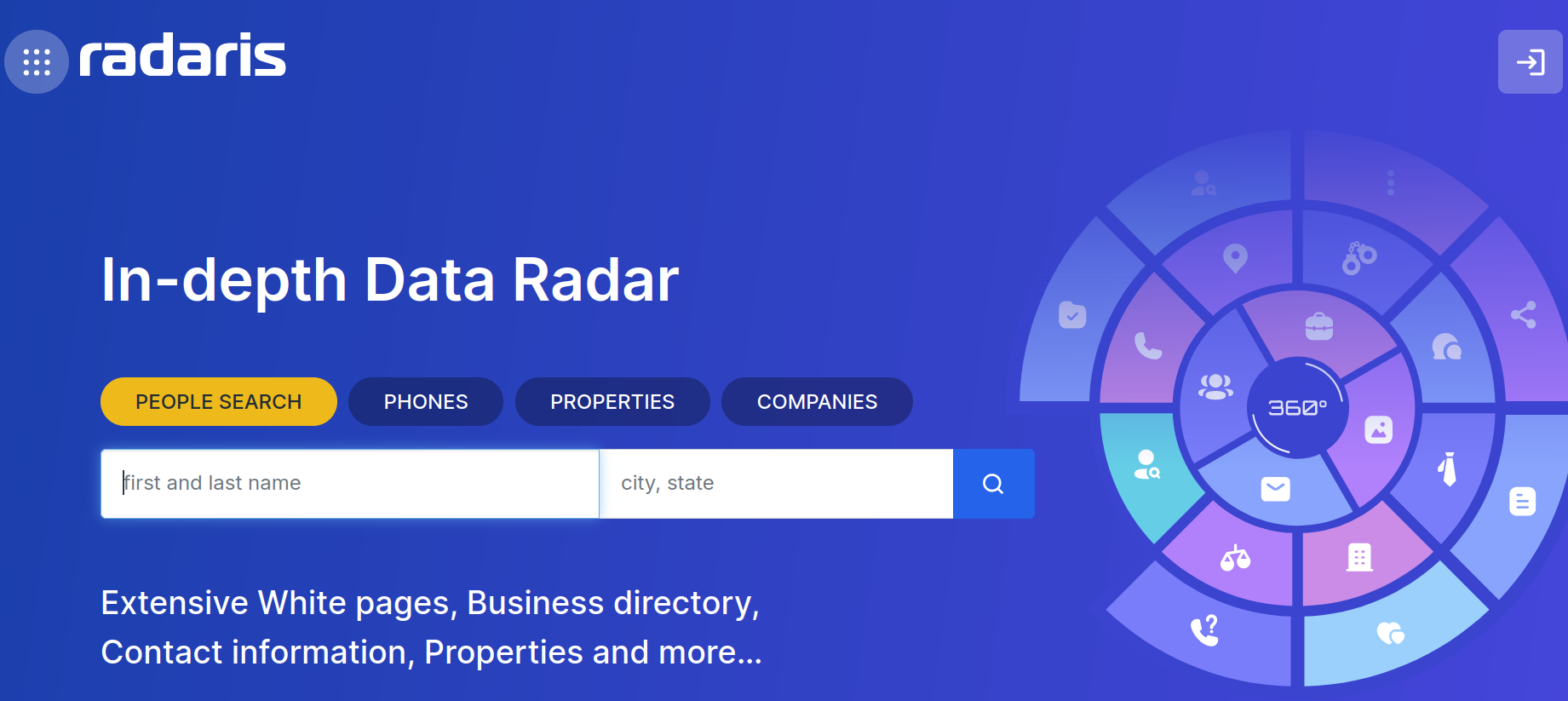
The radaris.com website, prior to the domain transfer to Atlas.

In February 2024, Radaris was sued by Atlas Data Privacy Corp, a company that has been pursuing data brokers alleged to be violating a New Jersey statute called Daniel’s Law. The statute allows state law enforcement officials, government personnel, judges and their families to have their information completely removed from commercial data brokers and people-search services, and provides for fines of $1,000 per violation against companies that ignore removal requests.

Less than a month after Atlas sued Radaris, KrebsOnSecurity published a deep dive into the Radaris co-founders — Igor and Dmitry Lubarsky (also spelled Lybarsky) — Russian-born brothers living in Massachusetts who operate a dizzying array of people-search companies as well as a number of Russian language dating services and affiliate programs.

Attorneys for the Lubarsky brothers threatened to sue for defamation if the story wasn’t removed and an apology issued. Their attorney asserted that our reporting was wildly inaccurate, and that the true owners of the company were Ukrainians living in Ukraine.

The Lubarsky brothers Dmitry or “Dan” (left) and Gary/Igor.

KrebsOnSecurity doubled down and showed how the Lubarsky brothers built and operated Radaris and other data broker companies using a fictitious CEO’s name. Our follow-up story noted that Radaris’s attorney — a lawyer with the Boston Law Group named Val Gurvits — admitted his clients had invented the CEO pseudonym “Gary Norden,” and that Radaris also had issued multiple press releases over the years that quoted the fake CEO while seeking money from potential investors.

Attorneys for Radaris waited until the last minute to appear in court and contest what was all but certain to be a default judgment in favor of the plaintiffs, and then told the court that Atlas had failed to serve the real owners and operators of Radaris and several of its sister data broker companies.

Atlas re-filed the lawsuit in June 2025, this time dramatically expanding the number of Radaris family data brokers accused of violating Daniel’s Law. Matt Adkisson, president and CEO of Atlas, said Radaris turned to a tried-and-true playbook: Delaying in court until the last possible minute, and playing shell games with Radaris’s true country of origin and the individuals listed as owners and operators of these sites.

“We refer to this period as their island-hopping phase. Privacy policies changed constantly, and new entities kept appearing from places like the Marshall Islands, the British Virgin Islands, and Seychelles,” Adkisson told KrebsOnSecurity. “Behind the scenes, it felt like a shell game. Defense lawyers told the court that certain entities merely operated the domains and were the proper parties to sue. But by the time a judgment neared, those entities would be discarded and new entities would appear. Meanwhile, the lawyers claimed the other entities that actually owned the domains should not be held responsible.”

Adkisson said when the defendants updated their terms of service to state that Radaris was suddenly managed by a company in the Marshall Islands, Atlas hired an investigator in that country and soon learned the brand new entity that Radaris claimed was managing the company didn’t even exist yet.

Mr. Gurvits stepped forward as Radaris’s attorney in a class action lawsuit the company temporarily lost in 2017 because it never contested the claim in court. When the plaintiffs told the judge they couldn’t collect on the $7.5 million default judgment, the court ordered the domain registry Verisign to transfer the radaris.com domain name to the plaintiffs.

Mr. Gurvits appealed that verdict, arguing the lawsuit hadn’t named the actual owners of the Radaris domain name — a Cyprus company called Bitseller Expert Limited — and thus taking the domain away would be a violation of their due process rights.

The judge in the 2017 case ruled in Radaris’ favor — halting the domain transfer — and told the plaintiffs they could refile their complaint. Soon after, the operator of Radaris changed from Bitseller to Andtop Company, an entity formed (PDF) in the Marshall Islands in Oct. 2020. The plaintiffs never re-filed their lawsuit.

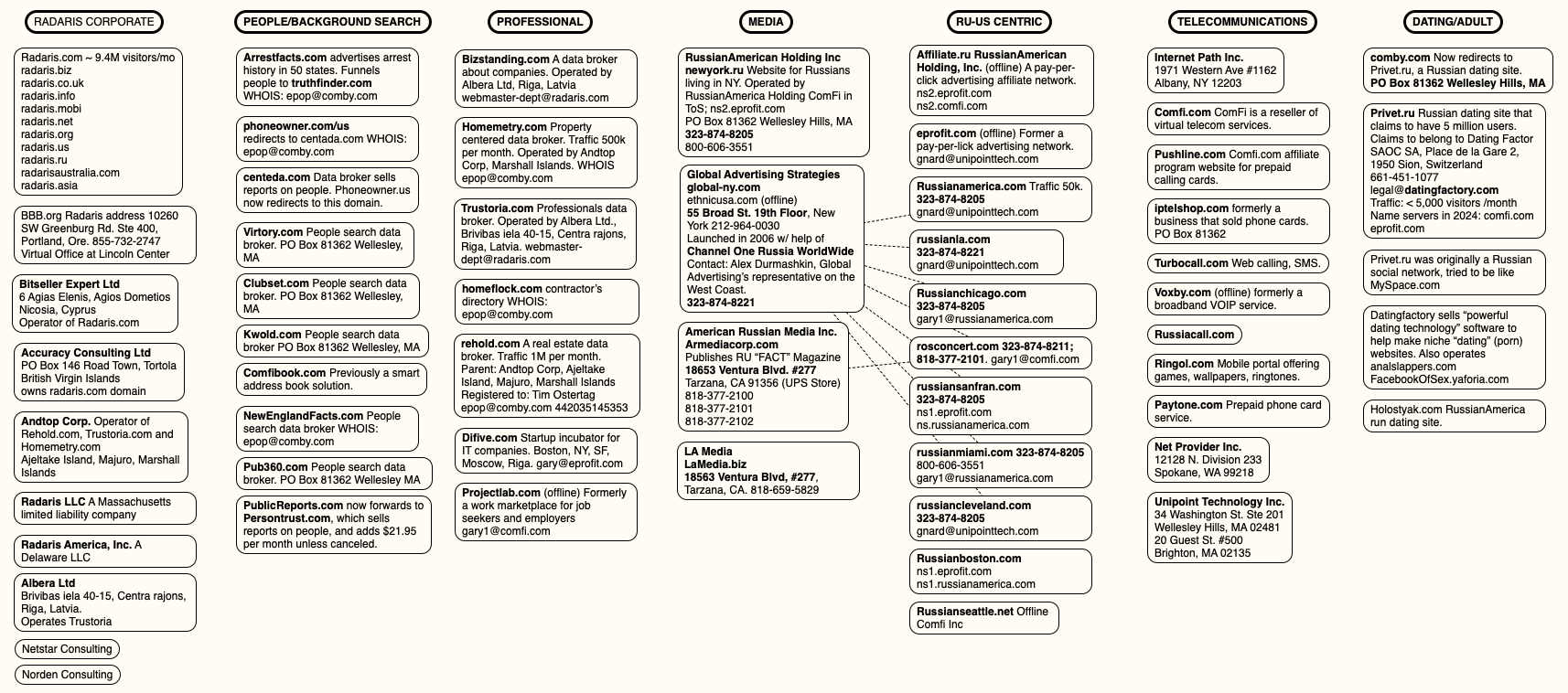
A mind map of various entities tied to Radaris and the company’s co-founders. Click to enlarge.

“That seemed to be their modus operandi,” said Raj Parikh, a partner at PEM Law in New Jersey who handles most of the Daniel’s Law litigation for Atlas. “In the past, they won by attrition. Plaintiffs’ attorneys tired of the procedural games and just gave up. That strategy worked for a decade, and it probably would have worked in this case too, since any financial recovery from foreign actors will be difficult. But we were acutely aware of the threat this website posed to law enforcement officers and other public officials in New Jersey, and decided early on to commit whatever time and resources were necessary to remove that threat.”

On August 26, the judge in the New Jersey case found the defendants were given multiple chances to appear and defend the claims against them but had failed to do so. Mr. Gurvits declined to comment on the case, saying it had been assigned to another attorney, a Mr. Victor Worms. In response to questions, Mr. Worms asserted the New Jersey court transferred Radaris.com to Atlas as part of a default judgment against Radaris.com, which is not a legal entity.

“We have made a motion to vacate that default judgment on the grounds that it is void since a non-entity has no legal capacity to sue or be sued,” Worms replied. “We also intend to pursue all appropriate appeals because we believe the transfer of Radaris.com amounts to a forfeiture in violation of various constitutional principles.”

While radaris.com still comes up prominently in results when searching online for U.S. residents by name, the domain no longer sells detailed personal dossiers on millions of Americans. Its homepage now displays a notice from Atlas, as well as links to our previous reporting on Radaris.

EMAIL CONFIRMATIONS

Atlas told KrebsOnSecurity that it has obtained more than 10,000 emails and documents in the course of litigation, and that those messages confirm our previous reporting on the owners and operators of Radaris and its myriad companies.

Atlas said the emails clearly establish that the nominal legal vehicles — Radaris America, Inc.; Bitseller Expert Limited; Digital Orbit Corp; Core Solutions Group Inc; Lucky Solutions Inc; Virtura Corp; Veripages Inc.; Nuform Solutions Inc.; Growth Data Advisors Inc.; Property Experts, Inc — are all administered by the same three or four people from the same mailboxes, share one bank or payment card set, and are all managed from one virtual office address.

“The corpus establishes, with documentary evidence generated independently by banks, payment processors, hosting providers, registrars, software-as-a-service vendors and the operators’ own systems, that radaris.com and at least twenty-five other people-search websites are one operation run by a small Boston-area group whose administrative, financial and technical functions sit on the difive.com mail domain and its successors (centerex.com, scienteco.com, eprofit.com, realmo.com, pub360.com),” reads a summary shared by Atlas.

Atlas said the emails show Radaris.com earns approximately $42,000 a month, while Veripages.com earns around $45,000 monthly via its partnership with the Lifetime Value Company, a marketing and advertising firm whose brands include PeopleLooker, PeopleSmart, NumberGuru, and Bumper, a car history site.

According to Atlas, the emails also showed the Radaris family of websites earns as much as $25,000 each month from their partnership with Onerep, a company that claims to help people remove their information from people-search sites. In March 2024, KrebsOnSecurity revealed how the Belarusian founder of Onerep had launched and operated dozens of people-search sites over the years and was continuing to operate one of them (Nuwber), effectively spreading the disease and selling the cure.

The domain radaris.com now redirects to this notice from Atlas about the court-ordered domain transfer.

The domain radaris.com now redirects to this notice from Atlas about the court-ordered domain transfer.

All told, the New Jersey court has so far transferred 14 domain names from the Radaris family of companies to Atlas. Radaris.com now redirects to a notice of the court-ordered domain transfer.

THE ROAD AHEAD

The Radaris family of companies is still potentially facing fines of $1,000 per alleged violation of Daniel’s Law. For the time being, however, Daniel’s Law is facing a constitutional challenge from virtually all of the 150 other consumer data broker firms being sued by Atlas.

The data broker industry responded by having at least 70 of the Atlas lawsuits moved to federal court, challenging the New Jersey statute as overly broad and a violation of the First Amendment. The U.S. Court of Appeals for the Third Circuit has not yet issued a decision on the constitutional challenge, but either way the case is widely expected to be appealed all the way to the U.S. Supreme Court.

Meanwhile, at least 14 other states have now passed laws modeled after the New Jersey statute, with more states considering similar measures. However, West Virginia’s Daniel’s Law was ruled facially unconstitutional under the First Amendment by a federal district court in August 2025.

Justin Sherman is a privacy expert and author of the forthcoming book “The Middlemen,” which examines how the data broker industry powers modern surveillance. Sherman said federal lawmakers have long faced intense lobbying by the technology industry against more restrictive U.S. data privacy laws, but that many powerful industries are now working against passing comprehensive data privacy legislation.

“These days at the federal level, add in the intense amount of lobbying against these laws from social media companies, big tech, cryptocurrency firms, and now AI proponents in the mix who claim that limiting their data scraping is somehow going to collapse the whole U.S. economy under Chinese rule,” he said.

Sherman said people-search companies will continue to thrive unless and until Congress enacts meaningful consumer privacy and data protection laws that are relevant to life in the 21st century. That’s because virtually all state privacy laws exempt records that might be considered “public” or “government” documents, including voting registries, property filings, marriage certificates, motor vehicle records, criminal records, court documents, death records, professional licenses, bankruptcy filings, and more.

At least 25 states have passed or implemented laws requiring age verification for residents seeking to access adult content online, but there is no federal law that limits how the companies that are scanning everyone’s drivers license can use, share or keep the data provided. Had such restrictions been enshrined in law, we may have avoided the recent breach at IDScan.net, which exposed the drivers license information on more than 153 million Americans when the records were briefly turned into a point-and-click identity theft service on the dark web.

“The average person can look at Daniel’s Law and have a perfectly normal reaction, which is that everyone should be covered, not just police and judges,” Sherman said. “But we don’t need more wake-up calls. We’ve had eight million wake-up calls already on the need for better privacy laws. The lack of comprehensive federal privacy law is not for a lack of knowledge, and anyone claiming otherwise is either not reading the news or kidding themselves.”

Protecting customer privacy means standing up for transparency

Why LinkedIn is challenging an overbroad government demand—and why Congress must make secrecy the exception

Today, the U.S. Court of Appeals for the Fourth Circuit heard oral argument in LinkedIn’s (a Microsoft subsidiary) appeal challenging a government demand for user records and a related secrecy order that is preventing LinkedIn from notifying those users that the government is seeking their data. The appeal asks important, constitutional questions about whether service providers may challenge demands that sweep in records unrelated to an investigation, and when the government may prevent a provider from notifying the user of a request.  

This appeal continues Microsoft’s longstanding work to ensure that secrecy orders remain the exception, not the rule. LinkedIn’s appeal asks courts to enforce meaningful limits on both the scope of government demands and the secrecy that can accompany them. 

We recognize law enforcement’s important role in protecting public safety and investigating crime, and sometimes that does need to be done covertly. We respond to lawful legal requests. At the same time, customers and users deserve meaningful limits and independent oversight through an adversarial process. And, customers deserve to be notified when the government seeks their data, unless the government clearly establishes the need for secrecy under statutory and constitutional standards. 

Those safeguards fulfill basic constitutional rights. The Fourth Amendment protects the right to be free from unreasonable searches and seizures. That right applies to papers kept in a desk, and it also applies when personal and business records are stored online. Online service providers, like LinkedIn and Microsoft, also have a First Amendment right to speak to their customers when the government obtains an order to search their private information. Secrecy may sometimes be justified—but it should be tailored to demonstrated needs and subject to meaningful review.  

This particular case arose after LinkedIn received a court order seeking user records together with a secrecy order preventing LinkedIn from informing anyone about the order. The details remain under seal, including the nature of the information the government seeks and the people who own that information. But the Fourth Circuit partially unsealed LinkedIn’s opening brief in July, allowing the public to understand some of the core issues. LinkedIn argues that the demand is overbroad, the secrecy order is unconstitutional, and the government has violated LinkedIn’s due process by withholding evidence from LinkedIn. 

Three amicus briefs from a broad coalition support LinkedIn’s position. The American Civil Liberties Union and ACLU of Virginia argue that users’ privacy interests must inform whether a demand is reasonable and that providers may be the only practical means of challenging unlawful process because users often receive no notice. The Reporters Committee for Freedom of the Press warns that overbroad demands, delayed notice, and secret evidence can expose confidential sources and chill newsgathering. Amazon, Apple, Google, Meta, and X emphasize that cloud providers are uniquely positioned to identify irrelevant requests and that secrecy orders require case-specific evidence rather than boilerplate assertions. Together, these briefs show why cloud providers must be able to test both the scope of government demands and the need for secrecy. 

Microsoft has a long record of standing up for these principles. In 2014, Microsoft successfully challenged a secrecy order connected to a National Security Letter that prevented notice to an enterprise customer. In 2016, we filed a landmark challenge to the widespread use of indefinite secrecy orders. We’ve successfully challenged individual secrecy orders time and again over the years. Our efforts contributed to updated Justice Department policies, but executive-branch practices can change. Durable protections require the development of case law and legislation. 

The U.S. House of Representatives recently took an important step in that direction. On August 31, the House passed legislation to rein in secret surveillance and strengthen notice protections when the government seeks data held by technology providers. As we explained when the bill passed, the reforms would place clearer limits on secrecy orders, require greater accountability, and help ensure that secrecy is the exception – not the rule. The Senate should act promptly to send these historic reforms to the President. 

The House –passed legislation recognizes that privacy and public safety are not opposing values. Clear standards can give investigators the confidentiality they genuinely need while providing courts, providers, and customers with predictable rules. The pending legislation and LinkedIn’s appeal are the latest, complementary chapters in this broader effort. Legislation can establish durable, system-wide rules for notice and accountability. Courts must meanwhile enforce the limits already contained in existing statutes and the Constitution. Neither task requires obstructing legitimate investigations. Rather, both mean the government must seek only relevant information, justify secrecy with specific evidence, and infringe on speech to the least extent possible. 

That is why today’s argument matters beyond a single sealed investigation. People and organizations increasingly entrust their most sensitive information to online services. If providers cannot challenge demands they know are overbroad—or if courts may silence them without a rigorous, adversarial review—the safeguards the law requires will be weakened precisely when they are most needed.

Microsoft and LinkedIn will continue to support lawful investigations while standing up for customer privacy, transparency, and the rule of law. We have appealed to the Fourth Circuit to preserve providers’ ability to challenge overbroad demands and to require the government to meet its constitutional burden before imposing secrecy. And we urge the Senate to complete the work the House began by enacting durable non-disclosure order reform.

Further reading 

The post Protecting customer privacy means standing up for transparency appeared first on Microsoft On the Issues.

❌