❌

Normal view

Why 2FA SMS is a Bad Idea in 2026

By: Sucuri
9 April 2026 at 21:00
Why 2FA SMS is a Bad Idea in 2026

What is 2FA?

Two-factor authentication (2FA) offers a second layer of security to help protect an account from brute force, phishing, and social engineering attacks.

2FA requires an extra step for a user to prove their identity, which reduces the chance of a bad actor gaining access to their account or data. And since notifications are sent to verify the initial authentication via username and passwords, it also gives users and business the ability to monitor for potential indicators of a compromise.

Continue reading Why 2FA SMS is a Bad Idea in 2026 at Sucuri Blog.

Microsoft Patch Tuesday, March 2026 Edition

11 March 2026 at 01:32

Microsoft Corp. today pushed security updates to fix at least 77 vulnerabilities in its Windows operating systems and other software. There are no pressing β€œzero-day” flaws this month (compared to February’s five zero-day treat), but as usual some patches may deserve more rapid attention from organizations using Windows. Here are a few highlights from this month’s Patch Tuesday.

Image: Shutterstock, @nwz.

Two of the bugs Microsoft patched today were publicly disclosed previously. CVE-2026-21262 is a weakness that allows an attacker to elevate their privileges on SQL Server 2016 and later editions.

β€œThis isn’t just any elevation of privilege vulnerability, either; the advisory notes that an authorized attacker can elevate privileges to sysadmin over a network,” Rapid7’s Adam Barnett said. β€œThe CVSS v3 base score of 8.8 is just below the threshold for critical severity, since low-level privileges are required. It would be a courageous defender who shrugged and deferred the patches for this one.”

The other publicly disclosed flaw is CVE-2026-26127, a vulnerability in applications running on .NET. Barnett said the immediate impact of exploitation is likely limited to denial of service by triggering a crash, with the potential for other types of attacks during a service reboot.

It would hardly be a proper Patch Tuesday without at least one critical Microsoft Office exploit, and this month doesn’t disappoint. CVE-2026-26113 and CVE-2026-26110 are both remote code execution flaws that can be triggered just by viewing a booby-trapped message in the Preview Pane.

Satnam Narang at Tenable notes that just over half (55%) of all Patch Tuesday CVEs this month are privilege escalation bugs, and of those, a half dozen were rated β€œexploitation more likely” β€” across Windows Graphics Component, Windows Accessibility Infrastructure, Windows Kernel, Windows SMB Server and Winlogon. These include:

–CVE-2026-24291: Incorrect permission assignments within the Windows Accessibility Infrastructure to reach SYSTEM (CVSS 7.8)
–CVE-2026-24294: Improper authentication in the core SMB component (CVSS 7.8)
–CVE-2026-24289: High-severity memory corruption and race condition flaw (CVSS 7.8)
–CVE-2026-25187: Winlogon process weakness discovered by Google Project Zero (CVSS 7.8).

Ben McCarthy, lead cyber security engineer at Immersive, called attention to CVE-2026-21536, a critical remote code execution bug in a component called the Microsoft Devices Pricing Program. Microsoft has already resolved the issue on their end, and fixing it requires no action on the part of Windows users. But McCarthy says it’s notable as one of the first vulnerabilities identified by an AI agent and officially recognized with a CVE attributed to the Windows operating system. It was discovered by XBOW, a fully autonomous AI penetration testing agent.

XBOW has consistently ranked at or near the top of the Hacker One bug bounty leaderboard for the past year. McCarthy said CVE-2026-21536 demonstrates how AI agents can identify critical 9.8-rated vulnerabilities without access to source code.

β€œAlthough Microsoft has already patched and mitigated the vulnerability, it highlights a shift toward AI-driven discovery of complex vulnerabilities at increasing speed,” McCarthy said. β€œThis development suggests AI-assisted vulnerability research will play a growing role in the security landscape.”

Microsoft earlier provided patches to address nine browser vulnerabilities, which are not included in the Patch Tuesday count above. In addition, Microsoft issued a crucial out-of-band (emergency) update on March 2 for Windows Server 2022 to address a certificate renewal issue with passwordless authentication technology Windows Hello for Business.

Separately, Adobe shipped updates to fix 80 vulnerabilities β€” some of them critical in severity β€” in a variety of products, including Acrobat and Adobe Commerce. Mozilla Firefox v. 148.0.2 resolves three high severity CVEs.

For a complete breakdown of all the patches Microsoft released today, check out the SANS Internet Storm Center’s Patch Tuesday post. Windows enterprise admins who wish to stay abreast of any news about problematic updates, AskWoody.com is always worth a visit. Please feel free to drop a comment below if you experience any issues apply this month’s patches.

Who is the Kimwolf Botmaster β€œDort”?

28 February 2026 at 13:01

In early January 2026, KrebsOnSecurity revealed how a security researcher disclosed a vulnerability that was used to build Kimwolf, the world’s largest and most disruptive botnet. Since then, the person in control of Kimwolf β€” who goes by the handle β€œDort” β€” has coordinated a barrage of distributed denial-of-service (DDoS), doxing and email flooding attacks against the researcher and this author, and more recently caused a SWAT team to be sent to the researcher’s home. This post examines what is knowable about Dort based on public information.

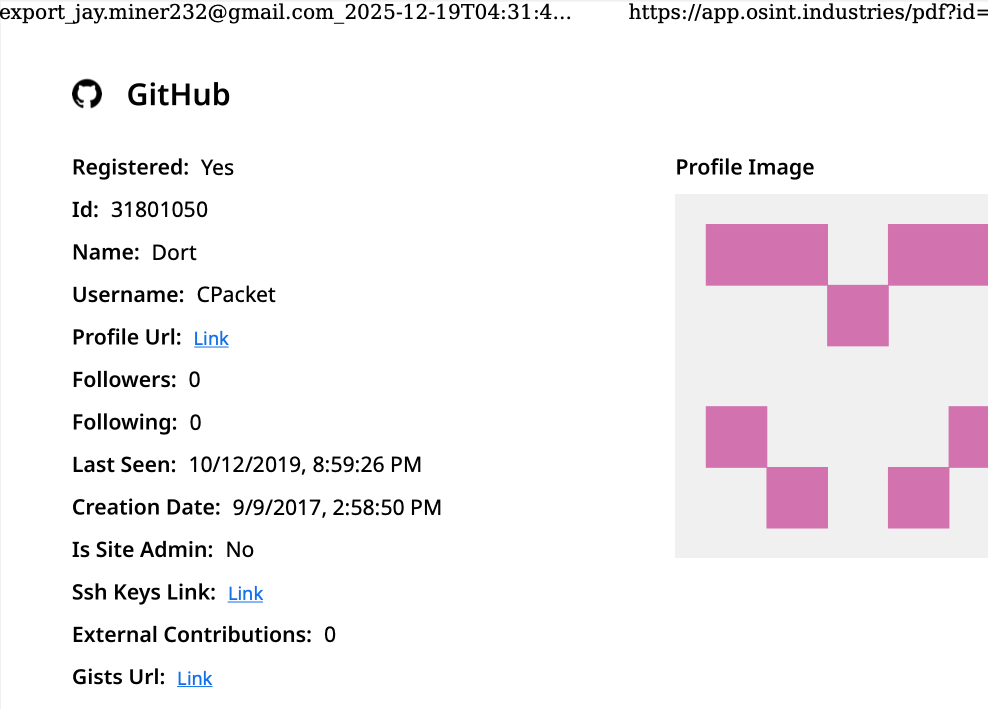
A public β€œdox” created in 2020 asserted Dort was a teenager from Canada (DOB August 2003) who used the aliases β€œCPacket” and β€œM1ce.” A search on the username CPacket at the open source intelligence platform OSINT Industries finds a GitHub account under the names Dort and CPacket that was created in 2017 using the email address jay.miner232@gmail.com.

Image: osint.industries.

The cyber intelligence firm Intel 471 says jay.miner232@gmail.com was used between 2015 and 2019 to create accounts at multiple cybercrime forums, including Nulled (username β€œUubuntuu”) and Cracked (user β€œDorted”); Intel 471 reports that both of these accounts were created from the same Internet address at Rogers Canada (99.241.112.24).

Dort was an extremely active player in the Microsoft game Minecraft who gained notoriety for their β€œDortware” software that helped players cheat. But somewhere along the way, Dort graduated from hacking Minecraft games to enabling far more serious crimes.

Dort also used the nickname DortDev, an identity that was active in March 2022 on the chat server for the prolific cybercrime group known as LAPSUS$. Dort peddled a service for registering temporary email addresses, as well as β€œDortsolver,” code that could bypass various CAPTCHA services designed to prevent automated account abuse. Both of these offerings were advertised in 2022 on SIM Land, a Telegram channel dedicated to SIM-swapping and account takeover activity.

The cyber intelligence firm Flashpoint indexed 2022 posts on SIM Land by Dort that show this person developed the disposable email and CAPTCHA bypass services with the help of another hacker who went by the handle β€œQoft.”

β€œI legit just work with Jacob,” Qoft said in 2022 in reply to another user, referring to their exclusive business partner Dort. In the same conversation, Qoft bragged that the two had stolen more than $250,000 worth of Microsoft Xbox Game Pass accounts by developing a program that mass-created Game Pass identities using stolen payment card data.

Who is the Jacob that Qoft referred to as their business partner? The breach tracking service Constella Intelligence finds the password used by jay.miner232@gmail.com was reused by just one other email address: jacobbutler803@gmail.com. Recall that the 2020 dox of Dort said their date of birth was August 2003 (8/03).

Searching this email address at DomainTools.com reveals it was used in 2015 to register several Minecraft-themed domains, all assigned to a Jacob Butler in Ottawa, Canada and to the Ottawa phone number 613-909-9727.

Constella Intelligence finds jacobbutler803@gmail.com was used to register an account on the hacker forum Nulled in 2016, as well as the account name β€œM1CE” on Minecraft. Pivoting off the password used by their Nulled account shows it was shared by the email addresses j.a.y.m.iner232@gmail.com and jbutl3@ocdsb.ca, the latter being an address at a domain for the Ottawa-Carelton District School Board.

Data indexed by the breach tracking service Spycloud suggests that at one point Jacob Butler shared a computer with his mother and a sibling, which might explain why their email accounts were connected to the password β€œjacobsplugs.” Neither Jacob nor any of the other Butler household members responded to requests for comment.

The open source intelligence service Epieos finds jacobbutler803@gmail.com created the GitHub account β€œMemeClient.” Meanwhile, Flashpoint indexed a deleted anonymous Pastebin.com post from 2017 declaring that MemeClient was the creation of a user named CPacket β€” one of Dort’s early monikers.

Why is Dort so mad? On January 2, KrebsOnSecurity published The Kimwolf Botnet is Stalking Your Local Network, which explored research into the botnet by Benjamin Brundage, founder of the proxy tracking service Synthient. Brundage figured out that the Kimwolf botmasters were exploiting a little-known weakness in residential proxy services to infect poorly-defended devices β€” like TV boxes and digital photo frames β€” plugged into the internal, private networks of proxy endpoints.

By the time that story went live, most of the vulnerable proxy providers had been notified by Brundage and had fixed the weaknesses in their systems. That vulnerability remediation process massively slowed Kimwolf’s ability to spread, and within hours of the story’s publication Dort created a Discord server in my name that began publishing personal information about and violent threats against Brundage, Yours Truly, and others.

Dort and friends incriminating themselves by planning swatting attacks in a public Discord server.

Last week, Dort and friends used that same Discord server (then named β€œKrebs’s Koinbase Kallers”) to threaten a swatting attack against Brundage, again posting his home address and personal information. Brundage told KrebsOnSecurity that local police officers subsequently visited his home in response to a swatting hoax which occurred around the same time that another member of the server posted a door emoji and taunted Brundage further.

Dort, using the alias β€œMeow,” taunts Synthient founder Ben Brundage with a picture of a door.

Someone on the server then linked to a cringeworthy (and NSFW) new Soundcloud diss track recorded by the user DortDev that included a stickied message from Dort saying, β€œUr dead nigga. u better watch ur fucking back. sleep with one eye open. bitch.”

β€œIt’s a pretty hefty penny for a new front door,” the diss track intoned. β€œIf his head doesn’t get blown off by SWAT officers. What’s it like not having a front door?”

With any luck, Dort will soon be able to tell us all exactly what it’s like.

Update, 10:29 a.m.: Jacob Butler responded to requests for comment, speaking with KrebsOnSecurity briefly via telephone. Butler said he didn’t notice earlier requests for comment because he hasn’t really been online since 2021, after his home was swatted multiple times. He acknowledged making and distributing a Minecraft cheat long ago, but said he hasn’t played the game in years and was not involved in Dortsolver or any other activity attributed to the Dort nickname after 2021.

β€œIt was a really old cheat and I don’t remember the name of it,” Butler said of his Minecraft modification. β€œI’m very stressed, man. I don’t know if people are going to swat me again or what. After that, I pretty much walked away from everything, logged off and said fuck that. I don’t go online anymore. I don’t know why people would still be going after me, to be completely honest.”

When asked what he does for a living, Butler said he mostly stays home and helps his mom around the house because he struggles with autism and social interaction. He maintains that someone must have compromised one or more of his old accounts and is impersonating him online as Dort.

β€œSomeone is actually probably impersonating me, and now I’m really worried,” Butler said. β€œThis is making me relive everything.”

But there are issues with Butler’s timeline. For example, Jacob’s voice in our phone conversation was remarkably similar to the Jacob/Dort whose voice can be heard in this Sept. 2022 Clash of Code competition between Dort and another coder (Dort lost). At around 6 minutes and 10 seconds into the recording, Dort launches into a cursing tirade that mirrors the stream of profanity in the diss rap that Dortdev posted threatening Brundage. Dort can be heard again at around 16 minutes; at around 26:00, Dort threatens to swat his opponent.

Butler said the voice of Dort is not his, exactly, but rather that of an impersonator who had likely cloned his voice.

β€œI would like to clarify that was absolutely not me,” Butler said. β€œThere must be someone using a voice changer. Or something of the sorts. Because people were cloning my voice before and sending audio clips of β€˜me’ saying outrageous stuff.”

Further reading:

Jan. 8, 2026: Who Benefited from the Aisuru and Kimwolf Botnets?

Jan. 20, 2026: Kimwolf Botnet Lurking in Corporate, Govt. Networks

Jan. 26, 2026: Who Operates the Badbox 2.0 Botnet?

Feb. 11, 2026: Kimwolf Botnet Swamps Anonymity Network I2P

Mar. 19, 2026: Feds Disrupt IoT Botnets Behind Huge DDoS Attacks

Gentoo Linux ruilt Microsofts GitHub in voor Codeberg vanwege Copilot

17 February 2026 at 20:24
Gentoo Linux verlaat Microsofts ontwikkelplatform GitHub en stapt over naar Codeberg. Deze migratie is vanwege het opdringen van Copilot en het gebruik van code op GitHub voor de training van die AI-toepassing. Codeberg is een non-profitorganisatie en gevestigd in Duitsland.

Patch Tuesday, February 2026 Edition

10 February 2026 at 22:49

Microsoft today released updates to fix more than 50 security holes in its Windows operating systems and other software, including patches for a whopping six β€œzero-day” vulnerabilities that attackers are already exploiting in the wild.

Zero-day #1 this month is CVE-2026-21510, a security feature bypass vulnerability in Windows Shell wherein a single click on a malicious link can quietly bypass Windows protections and run attacker-controlled content without warning or consent dialogs. CVE-2026-21510 affects all currently supported versions of Windows.

The zero-day flawΒ CVE-2026-21513 is aΒ security bypass bug targeting MSHTML, the proprietary engine of the default Web browser in Windows. CVE-2026-21514 is a related security feature bypass in Microsoft Word.

The zero-day CVE-2026-21533 allows local attackers to elevate their user privileges to β€œSYSTEM” level access in Windows Remote Desktop Services. CVE-2026-21519 is a zero-day elevation of privilege flaw in the Desktop Window Manager (DWM), a key component of Windows that organizes windows on a user’s screen. Microsoft fixed a different zero-day in DWM just last month.

The sixth zero-day is CVE-2026-21525, a potentially disruptive denial-of-service vulnerability in the Windows Remote Access Connection Manager, the service responsible for maintaining VPN connections to corporate networks.

Chris Goettl at Ivanti reminds us Microsoft has issued several out-of-band security updates since January’s Patch Tuesday. On January 17, Microsoft pushed a fix that resolved a credential prompt failure when attempting remote desktop or remote application connections. On January 26, Microsoft patched a zero-day security feature bypass vulnerability (CVE-2026-21509) in Microsoft Office.

Kev Breen at Immersive notes that this month’s Patch Tuesday includes several fixes for remote code execution vulnerabilities affecting GitHub Copilot and multiple integrated development environments (IDEs), including VS Code, Visual Studio, and JetBrains products. The relevant CVEs are CVE-2026-21516, CVE-2026-21523, and CVE-2026-21256.

Breen said the AI vulnerabilities Microsoft patched this month stem from a command injection flaw that can be triggered through prompt injection, or tricking the AI agent into doing something it shouldn’t β€” like executing malicious code or commands.

β€œDevelopers are high-value targets for threat actors, as they often have access to sensitive data such as API keys and secrets that function as keys to critical infrastructure, including privileged AWS or Azure API keys,” Breen said. β€œWhen organizations enable developers and automation pipelines to use LLMs and agentic AI, a malicious prompt can have significant impact. This does not mean organizations should stop using AI. It does mean developers should understand the risks, teams should clearly identify which systems and workflows have access to AI agents, and least-privilege principles should be applied to limit the blast radius if developer secrets are compromised.”

TheΒ SANS Internet Storm CenterΒ has aΒ clickable breakdown of each individual fix this month from Microsoft, indexed by severity and CVSS score. Enterprise Windows admins involved in testing patches before rolling them out should keep an eye on askwoody.com, which often has the skinny on wonky updates. Please don’t neglect to back up your data if it has been a while since you’ve done that, and feel free to sound off in the comments if you experience problems installing any of these fixes.

How fake party invitations are being used to install remote access tools

2 February 2026 at 11:18

β€œYou’re invited!” 

It soundsΒ friendly,Β familiarΒ and quiteΒ harmless.Β But in aΒ scamΒ we recentlyΒ spotted, thatΒ simpleΒ phrase is beingΒ usedΒ to trick victims into installing a full remote access tool on theirΒ WindowsΒ computersβ€”giving attackers complete control of the system.Β 

What appears to be aΒ casual party or event invitationΒ leads toΒ the silent installation ofΒ ScreenConnect, a legitimate remoteΒ supportΒ toolΒ quietly installedΒ in the background and abused byΒ attackers.Β 

Here’s how theΒ scamΒ works, whyΒ it’sΒ effective, andΒ how to protect yourself.Β 

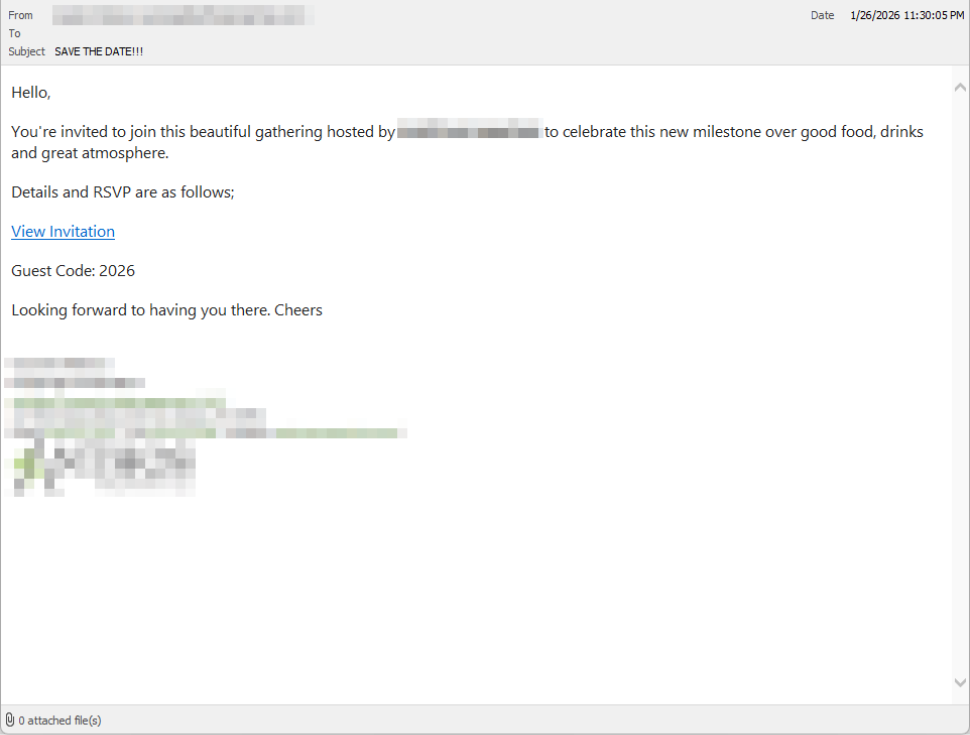
TheΒ email: AΒ partyΒ invitationΒ 

Victims receive an email framed as a personal invitationβ€”often written to look like it came from a friend or acquaintance. The message is deliberately informal and social, lowering suspicion and encouraging quick action.Β 

In the screenshot below, the email arrived from a friend whose email account had been hacked, but it could just as easily come from a sender you don’t know.

So far,Β we’veΒ only seenΒ thisΒ campaignΒ targetingΒ peopleΒ in theΒ UK,Β butΒ there’s nothingΒ stoppingΒ it from expandingΒ elsewhere.Β 

Clicking the link in the email leadsΒ to a polishedΒ invitationΒ page hosted on an attacker-controlled domain.Β 

Party invitation email from a contact

TheΒ invite: TheΒ landing pageΒ thatΒ leads to an installerΒ 

The landing page leans heavily into theΒ partyΒ theme,Β but instead of showing event details, the pageΒ nudgesΒ the user toward opening a file. None of them look dangerous on their own, but together theyΒ keep the user focused on theΒ β€œinvitation” file:Β 

  • A boldΒ β€œYou’re Invited!” headlineΒ 
  • The suggestion that aΒ friend had sent the invitationΒ 
  • AΒ messageΒ sayingΒ the invitation is best viewed on aΒ Windows laptop or desktop
  • A countdownΒ suggestingΒ yourΒ invitation is already β€œdownloading” 
  • A message implying urgency and social proof (β€œI opened mine and it was so easy!”)Β 

Within seconds, the browser is redirected to downloadΒ RSVPPartyInvitationCard.msiΒ 

The page even triggers the download automatically to keep the victim moving forward without stopping to think.Β 

This MSI fileΒ isn’tΒ an invitation.Β It’sΒ an installer.Β 

The landing page

TheΒ guest: What the MSIΒ actuallyΒ doesΒ 

When theΒ user opens theΒ MSI file, it launchesΒ msiexec.exeΒ andΒ silentlyΒ installsΒ ScreenConnectΒ Client, a legitimate remote access tool often used by IT support teams.Β Β 

There’sΒ noΒ invitation, RSVP form, or calendar entry.Β 

What happens instead:Β 

  • ScreenConnectΒ binaries areΒ installedΒ underΒ C:\Program Files (x86)\ScreenConnectΒ Client\Β 
  • AΒ persistent Windows serviceΒ is createdΒ (for example,Β ScreenConnectΒ ClientΒ 18d1648b87bb3023)Β 
  • ScreenConnectΒ installsΒ multiple .NET-based componentsΒ 
  • There is no clear user-facingΒ indicationΒ that a remote access tool is being installedΒ 

From the victim’s perspective,Β very littleΒ seems to happen. But at this point, the attackerΒ can now remotely accessΒ theirΒ computer.Β 

TheΒ after-party: RemoteΒ accessΒ isΒ establishedΒ 

Once installed, the ScreenConnect client initiates encrypted outbound connections to ScreenConnect’s relay servers, including a uniquely assigned instance domain.

That connectionΒ givesΒ the attacker theΒ same level of access as a remote ITΒ technician, including theΒ ability to:Β 

  • SeeΒ the victim’s screen in real time
  • ControlΒ theΒ mouse and keyboardΒ 
  • Upload or downloadΒ filesΒ 
  • KeepΒ accessΒ even after the computer is restartedΒ 

BecauseΒ ScreenConnectΒ is legitimate softwareΒ commonlyΒ usedΒ for remote support,Β its presenceΒ isn’tΒ always obvious. On a personal computer, the first signs are often behavioral, such as unexplained cursor movement, windows opening on their own, or a ScreenConnect process the user doesn’t remember installing.Β 

WhyΒ thisΒ scamΒ worksΒ 

This campaign is effective because it targetsΒ normal, predictable human behavior. From a behavioral security standpoint, it exploitsΒ our naturalΒ curiosityΒ andΒ appears to beΒ a lowΒ risk.Β 

Most peopleΒ don’tΒ think of invitations as dangerous. Opening one feels passive,Β like glancing at a flyer or checking a message, not installing software.Β 

Even security-aware users are trained to watch out for warnings and pressure. A friendly β€œyou’re invited” messageΒ doesn’tΒ trigger those alarms.Β 

By the time something feels off, the software is already installed.Β 

Signs your computer may be affectedΒ 

Watch for:Β 

  • A download or executed file namedΒ RSVPPartyInvitationCard.msiΒ 
  • AnΒ unexpected installation ofΒ ScreenConnectΒ ClientΒ 
  • AΒ Windows serviceΒ namedΒ ScreenConnectΒ ClientΒ with random charactersΒ Β 
  • Your computer makes outbound HTTPS connections toΒ ScreenConnectΒ relay domainsΒ 
  • Your system resolvesΒ the invitation-hosting domain used in this campaign,Β xnyr[.]digitalΒ 

How to stay safeΒ Β 

This campaign is a reminder that modern attacks oftenΒ don’tΒ break inβ€”they’reΒ invited in.Β Remote access tools give attackers deep control over a system. Acting quickly can limitΒ the damage.Β Β 

For individualsΒ 

If you receive an email like this:Β 

  • Be suspicious of invitations that ask you to download or open softwareΒ 
  • Never run MSI files from unsolicited emailsΒ 
  • Verify invitations through another channel before opening anythingΒ 

If you already clicked or ran the file:Β Β 

  • Disconnect from the internetΒ immediatelyΒ 
  • Check forΒ ScreenConnectΒ and uninstall it if presentΒ 
  • Run a full security scanΒ 
  • Change important passwords from a clean, unaffected deviceΒ 

ForΒ organisationsΒ (especially in the UK)Β 

  • Alert onΒ unauthorizedΒ ScreenConnectΒ installations
  • Restrict MSI execution whereΒ feasibleΒ 
  • Treat β€œremote support tools” as high-risk software
  • Educate users:Β invitationsΒ don’tΒ come as installersΒ 

This scam works by installing a legitimate remote access tool without clear user intent. That’s exactly the gap Malwarebytes is designed to catch.

Malwarebytes now detects newly installed remote access tools and alerts you when one appears on your system. You’re then given a choice: confirm that the tool is expected and trusted, or remove it if it isn’t.


We don’t just report on threatsβ€”we remove them

Cybersecurity risks should never spread beyond a headline. Keep threats off your devices byΒ downloading Malwarebytes today.

How fake party invitations are being used to install remote access tools

2 February 2026 at 11:18

β€œYou’re invited!” 

It soundsΒ friendly,Β familiarΒ and quiteΒ harmless.Β But in aΒ scamΒ we recentlyΒ spotted, thatΒ simpleΒ phrase is beingΒ usedΒ to trick victims into installing a full remote access tool on theirΒ WindowsΒ computersβ€”giving attackers complete control of the system.Β 

What appears to be aΒ casual party or event invitationΒ leads toΒ the silent installation ofΒ ScreenConnect, a legitimate remoteΒ supportΒ toolΒ quietly installedΒ in the background and abused byΒ attackers.Β 

Here’s how theΒ scamΒ works, whyΒ it’sΒ effective, andΒ how to protect yourself.Β 

TheΒ email: AΒ partyΒ invitationΒ 

Victims receive an email framed as a personal invitationβ€”often written to look like it came from a friend or acquaintance. The message is deliberately informal and social, lowering suspicion and encouraging quick action.Β 

In the screenshot below, the email arrived from a friend whose email account had been hacked, but it could just as easily come from a sender you don’t know.

So far,Β we’veΒ only seenΒ thisΒ campaignΒ targetingΒ peopleΒ in theΒ UK,Β butΒ there’s nothingΒ stoppingΒ it from expandingΒ elsewhere.Β 

Clicking the link in the email leadsΒ to a polishedΒ invitationΒ page hosted on an attacker-controlled domain.Β 

Party invitation email from a contact

TheΒ invite: TheΒ landing pageΒ thatΒ leads to an installerΒ 

The landing page leans heavily into theΒ partyΒ theme,Β but instead of showing event details, the pageΒ nudgesΒ the user toward opening a file. None of them look dangerous on their own, but together theyΒ keep the user focused on theΒ β€œinvitation” file:Β 

  • A boldΒ β€œYou’re Invited!” headlineΒ 
  • The suggestion that aΒ friend had sent the invitationΒ 
  • AΒ messageΒ sayingΒ the invitation is best viewed on aΒ Windows laptop or desktop
  • A countdownΒ suggestingΒ yourΒ invitation is already β€œdownloading” 
  • A message implying urgency and social proof (β€œI opened mine and it was so easy!”)Β 

Within seconds, the browser is redirected to downloadΒ RSVPPartyInvitationCard.msiΒ 

The page even triggers the download automatically to keep the victim moving forward without stopping to think.Β 

This MSI fileΒ isn’tΒ an invitation.Β It’sΒ an installer.Β 

The landing page

TheΒ guest: What the MSIΒ actuallyΒ doesΒ 

When theΒ user opens theΒ MSI file, it launchesΒ msiexec.exeΒ andΒ silentlyΒ installsΒ ScreenConnectΒ Client, a legitimate remote access tool often used by IT support teams.Β Β 

There’sΒ noΒ invitation, RSVP form, or calendar entry.Β 

What happens instead:Β 

  • ScreenConnectΒ binaries areΒ installedΒ underΒ C:\Program Files (x86)\ScreenConnectΒ Client\Β 
  • AΒ persistent Windows serviceΒ is createdΒ (for example,Β ScreenConnectΒ ClientΒ 18d1648b87bb3023)Β 
  • ScreenConnectΒ installsΒ multiple .NET-based componentsΒ 
  • There is no clear user-facingΒ indicationΒ that a remote access tool is being installedΒ 

From the victim’s perspective,Β very littleΒ seems to happen. But at this point, the attackerΒ can now remotely accessΒ theirΒ computer.Β 

TheΒ after-party: RemoteΒ accessΒ isΒ establishedΒ 

Once installed, the ScreenConnect client initiates encrypted outbound connections to ScreenConnect’s relay servers, including a uniquely assigned instance domain.

That connectionΒ givesΒ the attacker theΒ same level of access as a remote ITΒ technician, including theΒ ability to:Β 

  • SeeΒ the victim’s screen in real time
  • ControlΒ theΒ mouse and keyboardΒ 
  • Upload or downloadΒ filesΒ 
  • KeepΒ accessΒ even after the computer is restartedΒ 

BecauseΒ ScreenConnectΒ is legitimate softwareΒ commonlyΒ usedΒ for remote support,Β its presenceΒ isn’tΒ always obvious. On a personal computer, the first signs are often behavioral, such as unexplained cursor movement, windows opening on their own, or a ScreenConnect process the user doesn’t remember installing.Β 

WhyΒ thisΒ scamΒ worksΒ 

This campaign is effective because it targetsΒ normal, predictable human behavior. From a behavioral security standpoint, it exploitsΒ our naturalΒ curiosityΒ andΒ appears to beΒ a lowΒ risk.Β 

Most peopleΒ don’tΒ think of invitations as dangerous. Opening one feels passive,Β like glancing at a flyer or checking a message, not installing software.Β 

Even security-aware users are trained to watch out for warnings and pressure. A friendly β€œyou’re invited” messageΒ doesn’tΒ trigger those alarms.Β 

By the time something feels off, the software is already installed.Β 

Signs your computer may be affectedΒ 

Watch for:Β 

  • A download or executed file namedΒ RSVPPartyInvitationCard.msiΒ 
  • AnΒ unexpected installation ofΒ ScreenConnectΒ ClientΒ 
  • AΒ Windows serviceΒ namedΒ ScreenConnectΒ ClientΒ with random charactersΒ Β 
  • Your computer makes outbound HTTPS connections toΒ ScreenConnectΒ relay domainsΒ 
  • Your system resolvesΒ the invitation-hosting domain used in this campaign,Β xnyr[.]digitalΒ 

How to stay safeΒ Β 

This campaign is a reminder that modern attacks oftenΒ don’tΒ break inβ€”they’reΒ invited in.Β Remote access tools give attackers deep control over a system. Acting quickly can limitΒ the damage.Β Β 

For individualsΒ 

If you receive an email like this:Β 

  • Be suspicious of invitations that ask you to download or open softwareΒ 
  • Never run MSI files from unsolicited emailsΒ 
  • Verify invitations through another channel before opening anythingΒ 

If you already clicked or ran the file:Β Β 

  • Disconnect from the internetΒ immediatelyΒ 
  • Check forΒ ScreenConnectΒ and uninstall it if presentΒ 
  • Run a full security scanΒ 
  • Change important passwords from a clean, unaffected deviceΒ 

ForΒ organisationsΒ (especially in the UK)Β 

  • Alert onΒ unauthorizedΒ ScreenConnectΒ installations
  • Restrict MSI execution whereΒ feasibleΒ 
  • Treat β€œremote support tools” as high-risk software
  • Educate users:Β invitationsΒ don’tΒ come as installersΒ 

This scam works by installing a legitimate remote access tool without clear user intent. That’s exactly the gap Malwarebytes is designed to catch.

Malwarebytes now detects newly installed remote access tools and alerts you when one appears on your system. You’re then given a choice: confirm that the tool is expected and trusted, or remove it if it isn’t.


We don’t just report on threatsβ€”we remove them

Cybersecurity risks should never spread beyond a headline. Keep threats off your devices byΒ downloading Malwarebytes today.

A Beginner’s Guide to the CVE Database

20 November 2025 at 02:47
A Beginner’s Guide to the CVE Database

Keeping websites and applications secure starts with knowing which vulnerabilities exist, how severe they are, and whether they affect your stack. That’s exactly where the CVE program shines. Below, we’ll cover some CVE fundamentals, including what they are, how to search and understand the data, and how to translate this information into actionable steps.

Introduction to the CVE database
So, what is CVE?

CVE stands for Common Vulnerabilities and Exposures, a community-driven program that assigns unique identifiers to publicly known vulnerabilities.

Continue reading A Beginner’s Guide to the CVE Database at Sucuri Blog.

GoSpoof – Turning Attacks into IntelΒ 

By: BHIS
29 October 2025 at 15:00

Imagine this: You’re an attacker ready to get their hands on valuable data that you can sell to afford going on a sweet vacation. You do your research, your recon, everything, ensuring that there’s no way this can go wrong. The day of the attack, you brew some coffee, crack your knuckles, and get started. A few hours into the service scan, you come to realize that all the network ports are open, but in use.

The post GoSpoof – Turning Attacks into IntelΒ  appeared first on Black Hills Information Security, Inc..

Wrangling Windows Event Logs with Hayabusa & SOF-ELK (Part 2)

By: BHIS
1 October 2025 at 16:00

But what if we need to wrangle Windows Event Logs for more than one system? In part 2, we’ll wrangle EVTX logs at scale by incorporating Hayabusa and SOF-ELK into my rapid endpoint investigation workflow (β€œREIW”)!Β 

The post Wrangling Windows Event Logs with Hayabusa & SOF-ELK (Part 2) appeared first on Black Hills Information Security, Inc..

Stop Spoofing Yourself! Disabling M365 Direct Send

By: BHIS
20 August 2025 at 16:00

Remember the good β€˜ol days of Zip drives, Winamp, the advent of β€œOffice 365,” and copy machines that didn’t understand email authentication? Okay, maybe they weren’t so good! For a […]

The post Stop Spoofing Yourself! Disabling M365 Direct Send appeared first on Black Hills Information Security, Inc..

DNS Triage Cheatsheet

By: BHIS
6 August 2025 at 17:00

DNS Triage is a reconnaissance tool that finds information about an organization's infrastructure, software, and third-party services as fast as possible. The goal of DNS Triage is not to exhaustively find every technology asset that exists on the internet. The goal is to find the most commonly abused items of interest for real attackers.

The post DNS Triage Cheatsheet appeared first on Black Hills Information Security, Inc..

❌