Scammers have found a way to abuse legitimate Apple account notification emails to trick targets into calling fake tech support numbers.
According to a report from BleepingComputer, scammers create an Apple account and insert a phishing message into the personal information fields, then modify the account so that Apple sends a genuine security alert about the change to the target.
BleepingComputer was able to replicate the attack.
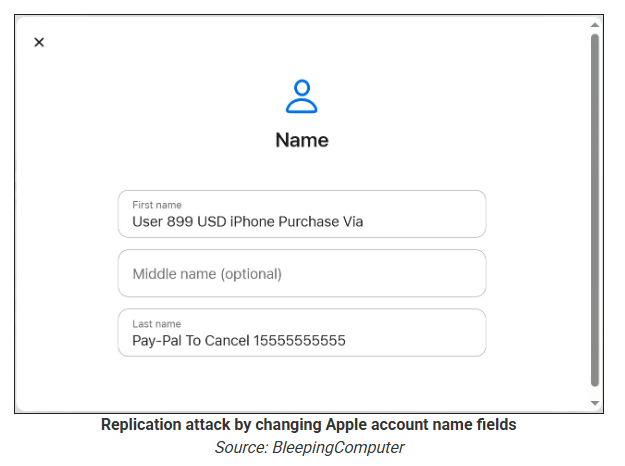
The attacker creates an Apple ID they control, then stuffs the phishing message into the personal information fields (first name, last name, possibly address), splitting it across fields because they will not fit into just one.
To launch the phish, the attacker changes something benign on their specially created Apple account, such as shipping information, which causes Apple’s systems to send a “Your Apple account was updated” security email.
While the original alert is addressed to the attacker’s iCloud email, they are then able to redistribute it to a wider victim list, for example through a mailing list.
In the copy the targets receive, the email headers still show a legitimate Apple sender, and the presence of the attacker’s iCloud address can even make it look like “someone else” has gained access to the account.
Because Apple includes those user-supplied fields in the security email, the phishing text is delivered inside a legitimate message sent from Apple’s own infrastructure.
This method, called call-back phishing, filters out suspicious users, so the scammers can focus on the people who fell for the first part.
The emails come from a legitimate source, sail through every security filter because of that, and look convincing enough to scare the receiver into thinking someone spent $899 from their PayPal account.
But the structure of the email does not make sense.
“Dear User” is immediately followed by the scam message where your name should have been. The header says it’s about account information rather than a purchase. And the iCloud account does not belong to the recipient. So, once you know how it’s done, they’re not impossible to spot. Which is why we wrote this blog.
And when in doubt, you can always ask Malwarebytes Scam Guard.
Scam Guard identified the screenshot as a scam and guides users through the next steps.
Scams like these work, because many users still view phone calls as more trustworthy than email, especially if the email itself passed all the usual technical authenticity checks and they initiated the call themselves.
How to stay safe
Tech support scammers will try to convince callers to install some kind of remote desktop application to steal data from your computer, or ask for financial details so they can steal your money.
To stay safe from these scammers:
Be wary of unexpected alerts about high‑value purchases you do not recognize. They are suspicious even if they come from a real domain.
Never call a number sent to you by unsolicited means or even found in sponsored search results.
Carefully read emails and text messages, even if they come form trustworthy addresses. Does the email make sense from a structural and linguistic point of view?
If someone claiming to be support for a legitimate company asks for remote access or payment details during a call, hang up and contact the company through official channels.
Use Malwarebytes Scam Guard to analyze any kind of message that alarms you or urges you to take immediate action.
Something feel off? Check it before you click.
Malwarebytes Scam Guard helps you analyze suspicious links, texts, and screenshots instantly.
Scammers have found a way to abuse legitimate Apple account notification emails to trick targets into calling fake tech support numbers.
According to a report from BleepingComputer, scammers create an Apple account and insert a phishing message into the personal information fields, then modify the account so that Apple sends a genuine security alert about the change to the target.
BleepingComputer was able to replicate the attack.
The attacker creates an Apple ID they control, then stuffs the phishing message into the personal information fields (first name, last name, possibly address), splitting it across fields because they will not fit into just one.
To launch the phish, the attacker changes something benign on their specially created Apple account, such as shipping information, which causes Apple’s systems to send a “Your Apple account was updated” security email.
While the original alert is addressed to the attacker’s iCloud email, they are then able to redistribute it to a wider victim list, for example through a mailing list.
In the copy the targets receive, the email headers still show a legitimate Apple sender, and the presence of the attacker’s iCloud address can even make it look like “someone else” has gained access to the account.
Because Apple includes those user-supplied fields in the security email, the phishing text is delivered inside a legitimate message sent from Apple’s own infrastructure.
This method, called call-back phishing, filters out suspicious users, so the scammers can focus on the people who fell for the first part.
The emails come from a legitimate source, sail through every security filter because of that, and look convincing enough to scare the receiver into thinking someone spent $899 from their PayPal account.
But the structure of the email does not make sense.
“Dear User” is immediately followed by the scam message where your name should have been. The header says it’s about account information rather than a purchase. And the iCloud account does not belong to the recipient. So, once you know how it’s done, they’re not impossible to spot. Which is why we wrote this blog.
And when in doubt, you can always ask Malwarebytes Scam Guard.
Scam Guard identified the screenshot as a scam and guides users through the next steps.
Scams like these work, because many users still view phone calls as more trustworthy than email, especially if the email itself passed all the usual technical authenticity checks and they initiated the call themselves.
How to stay safe
Tech support scammers will try to convince callers to install some kind of remote desktop application to steal data from your computer, or ask for financial details so they can steal your money.
To stay safe from these scammers:
Be wary of unexpected alerts about high‑value purchases you do not recognize. They are suspicious even if they come from a real domain.
Never call a number sent to you by unsolicited means or even found in sponsored search results.
Carefully read emails and text messages, even if they come form trustworthy addresses. Does the email make sense from a structural and linguistic point of view?
If someone claiming to be support for a legitimate company asks for remote access or payment details during a call, hang up and contact the company through official channels.
Use Malwarebytes Scam Guard to analyze any kind of message that alarms you or urges you to take immediate action.
Something feel off? Check it before you click.
Malwarebytes Scam Guard helps you analyze suspicious links, texts, and screenshots instantly.
A dreadful thing happens far too often whenever an older adult falls for a scam: They get blamed for it. Not the scammers who lied and cheated their victim out of money. Not law enforcement for failing to recover funds. Not even the Big Tech companies that could have the most important role in protecting people online—and which, it turns out, knowingly bring in revenue every year from fraud.
Instead, it is the older adults themselves whose stories are often shirked aside because of a mix of ageism and denial. Allegedly left behind by technology, only an octogenarian would hand their password over in a phishing scheme, or open an email attachment from a stranger, or send money to a fake charity online. Everyone else, everyone else believes, is too savvy for the same.
The data disagrees.
When Malwarebytes studied this last year, it found that, depending on the type of scam—especially for things like “sextortion”—younger individuals were far more likely to report falling victim. Further, digging into data from the US Federal Trade Commission revealed entirely separate patterns. For example, while Americans between the ages of 80 and 89 reported the highest median loss due to fraud in 2024, they also made up the smallest share of their population to report a loss at all. And in 2025, that same group represented the smallest share of reported identity theft, a crime far more likely to be reported by people between 30 and 39.
Questions about who reports what crimes at what rate are valid to explore, but it’s important to see the big picture: Americans lost at least $15.9 billion to fraud last year. Protecting older adults is actually about protecting everyone, and that’s because modern scams don’t arrive only where people over 70 spend time. They arrive where we all are, which is online. They come through endless text messages, they slide into social media DMs, and they prey on things any of us can be—a widow, a divorcee, or simply a lonely person.
According to Marti DeLiema, Assistant Professor at the University of Minnesota’s School of Social Work, scams and fraud are now the most common form of organized crime globally, rivaling weapons trafficking, drug trafficking, human trafficking, and sex trafficking. In 2024 alone, she said, the FTC estimated that older adults in the US had as much as $81.5 billion stolen from them. And the tools meant to fight back—broad consumer awareness campaigns, embedded warning messages at the point of transaction, the training of bank tellers and retail clerks—are nowhere near keeping pace.
So what actually works? And who, if anyone, is doing the work?
Today, on the Lock and Code podcast with host David Ruiz, we speak with DeLiema about who is really susceptible to financial fraud, why victims often describe a scam as a form of betrayal trauma, and why the companies best positioned to stop scam messages from reaching consumers may be the ones least motivated to do so.
“This is not a technical capability problem at all. This is a conflict of incentives.”
A dreadful thing happens far too often whenever an older adult falls for a scam: They get blamed for it. Not the scammers who lied and cheated their victim out of money. Not law enforcement for failing to recover funds. Not even the Big Tech companies that could have the most important role in protecting people online—and which, it turns out, knowingly bring in revenue every year from fraud.
Instead, it is the older adults themselves whose stories are often shirked aside because of a mix of ageism and denial. Allegedly left behind by technology, only an octogenarian would hand their password over in a phishing scheme, or open an email attachment from a stranger, or send money to a fake charity online. Everyone else, everyone else believes, is too savvy for the same.
The data disagrees.
When Malwarebytes studied this last year, it found that, depending on the type of scam—especially for things like “sextortion”—younger individuals were far more likely to report falling victim. Further, digging into data from the US Federal Trade Commission revealed entirely separate patterns. For example, while Americans between the ages of 80 and 89 reported the highest median loss due to fraud in 2024, they also made up the smallest share of their population to report a loss at all. And in 2025, that same group represented the smallest share of reported identity theft, a crime far more likely to be reported by people between 30 and 39.
Questions about who reports what crimes at what rate are valid to explore, but it’s important to see the big picture: Americans lost at least $15.9 billion to fraud last year. Protecting older adults is actually about protecting everyone, and that’s because modern scams don’t arrive only where people over 70 spend time. They arrive where we all are, which is online. They come through endless text messages, they slide into social media DMs, and they prey on things any of us can be—a widow, a divorcee, or simply a lonely person.
According to Marti DeLiema, Assistant Professor at the University of Minnesota’s School of Social Work, scams and fraud are now the most common form of organized crime globally, rivaling weapons trafficking, drug trafficking, human trafficking, and sex trafficking. In 2024 alone, she said, the FTC estimated that older adults in the US had as much as $81.5 billion stolen from them. And the tools meant to fight back—broad consumer awareness campaigns, embedded warning messages at the point of transaction, the training of bank tellers and retail clerks—are nowhere near keeping pace.
So what actually works? And who, if anyone, is doing the work?
Today, on the Lock and Code podcast with host David Ruiz, we speak with DeLiema about who is really susceptible to financial fraud, why victims often describe a scam as a form of betrayal trauma, and why the companies best positioned to stop scam messages from reaching consumers may be the ones least motivated to do so.
“This is not a technical capability problem at all. This is a conflict of incentives.”
When we read about this new malware tactic, or that novel social engineering approach, it’s easy to forget that there are scammers out there making a living from ancient methods.
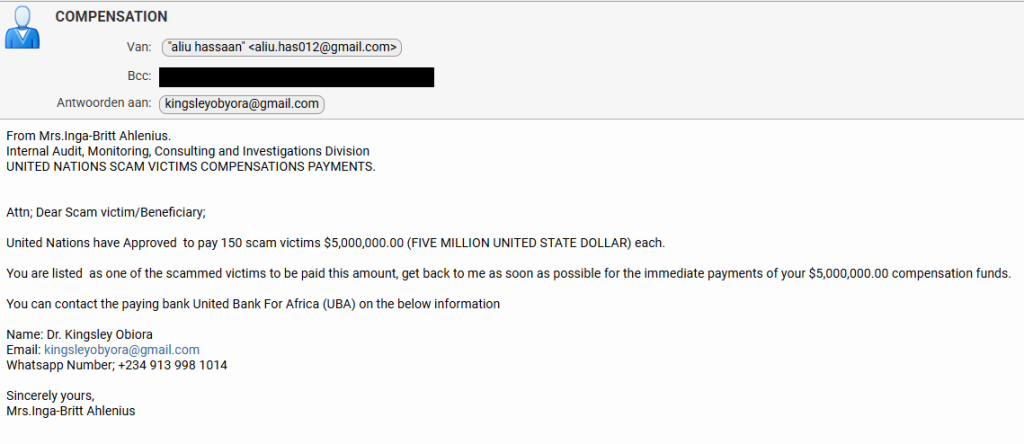
Recently, one of our researchers received this variation on the good old Nigerian advance-fee scam.
From: Mrs.Inga-Britt Ahlenius. Internal Audit, Monitoring, Consulting and Investigations Division UNITED NATIONS SCAM VICTIMS COMPENSATIONS PAYMENTS.
Attn; Dear Scam victim/Beneficiary;
United Nations have Approved to pay 150 scam victims $5,000,000.00 (FIVE MILLION UNITED STATE DOLLAR) each.
You are listed as one of the scammed victims to be paid this amount, get back to me as soon as possible for the immediate payments of your $5,000,000.00 compensation funds.
You can contact the paying bank United Bank For Africa (UBA) on the below information
The scammers got a few details right. Anyone looking up the names in the email will find that they exist and are associated with the mentioned organizations.
Inga–Britt Monica Stigsdotter Ahlenius is a Swedish auditor, public servant and former Under-Secretary-General for the United Nations.
The name “Inga‑Britt Ahlenius” has been reused across many such 419‑style advance‑fee scams, sometimes claiming she is a UN fund monitoring agent or under‑secretary general distributing tens of millions in “compensation” or “unclaimed funds.”
Kingsley Obiora is a Nigerian economist who served as the Deputy Governor of Economic Policy at the Central Bank of Nigeria from 2020 to 2023. Which lends a degree of credibility to the Nigerian country code (+234) in the number they want us to contact by WhatsApp.
So, we decided to put our “friend” Tess to work once again. Loyal readers will remember how Tess almost fell for a task scammer. So maybe she’s eligible for that five-million-dollar compensation.
They came right to the point. We’d have to pay a courier fee to get our $5 million dollar ATM card. And I’m pretty sure that if we agreed to pay that, additional costs would swiftly follow. Once you’ve invested a bit of money, you’re likely to keep going since you don’t want to lose what you’ve already paid.
So, I offered to pick up the ATM card in person. Always wanted to see Nigeria.
For a while I thought they saw through my bluff. Maybe I shouldn’t have disclosed just yet that I work for Malwarebytes. But it quickly became clear they trusted me about as much as I trusted them.
I’ll play along as long as I can, but after giving me the physical address of the UBA bank in Lagos, Nigeria, they started to make it more difficult to pick up the ATM card in person.
A week is not a long time to arrange a trip to Nigeria, so I tried to get an idea of how much the “courier” would set me back before they gave up on me.
I didn’t expect it to be that much, to be honest. Maybe they thought they could raise the price since I contemplated to pick it up in person. Or they just wanted to get rid of me. You’d expect them to charge maybe €75 for the courier and then come up with €200 for stamp duty and €600 for insurance later on.
Consequences are real
It’s easy to laugh at talk of five‑million‑dollar ATM cards, but campaigns like this still make money. Behind every “Dear Scam victim/Beneficiary” is someone who is lonely, in debt, or simply overwhelmed by official‑sounding language. Once they’ve paid the first “courier fee,” the sunk‑cost effect kicks in, and it becomes harder and harder to walk away.
This is especially true for people who have already been victims of scams, who are clearly the target here.
How to stay safe
Tess’ efforts have helped us highlight the red flags in this type of scam:
Receiving news of a huge payout out of the blue should definitely trigger the “too good to be true” alarm bells.
For important communications, free webmail and WhatsApp are rarely the official contact channels.
Scammers apply pressure to act quickly and ask you to pay a fee before you receive anything.
They often use vague job titles and ask you to keep things quiet.
Odd language and capitalization can be a clue, although AI is making these less common.
Any one of these signs is a reason to stop and delete the email. Together, they spell out a classic advance‑fee scam.
For Tess this was a safe experiment: no money lost, just a few evenings spent sparring with a “UN compensation officer” on WhatsApp. For the people these criminals really want to reach, the stakes are much higher.
If you, or someone you care about, ever receives a message promising life‑changing money in exchange for a small courier fee or processing charge, treat it as a warning sign, not a windfall.
Close the tab, delete the message, and, if in doubt, ask a trusted friend or advisor before you act.
The easiest way to recognize a golden‑oldie scam is still the simplest: if it sounds too good to be true, it probably isn’t true.
Something feel off? Check it before you click.
Malwarebytes Scam Guard helps you analyze suspicious links, texts, and screenshots instantly.
When we read about this new malware tactic, or that novel social engineering approach, it’s easy to forget that there are scammers out there making a living from ancient methods.
Recently, one of our researchers received this variation on the good old Nigerian advance-fee scam.
From: Mrs.Inga-Britt Ahlenius. Internal Audit, Monitoring, Consulting and Investigations Division UNITED NATIONS SCAM VICTIMS COMPENSATIONS PAYMENTS.
Attn; Dear Scam victim/Beneficiary;
United Nations have Approved to pay 150 scam victims $5,000,000.00 (FIVE MILLION UNITED STATE DOLLAR) each.
You are listed as one of the scammed victims to be paid this amount, get back to me as soon as possible for the immediate payments of your $5,000,000.00 compensation funds.
You can contact the paying bank United Bank For Africa (UBA) on the below information
The scammers got a few details right. Anyone looking up the names in the email will find that they exist and are associated with the mentioned organizations.
Inga–Britt Monica Stigsdotter Ahlenius is a Swedish auditor, public servant and former Under-Secretary-General for the United Nations.
The name “Inga‑Britt Ahlenius” has been reused across many such 419‑style advance‑fee scams, sometimes claiming she is a UN fund monitoring agent or under‑secretary general distributing tens of millions in “compensation” or “unclaimed funds.”
Kingsley Obiora is a Nigerian economist who served as the Deputy Governor of Economic Policy at the Central Bank of Nigeria from 2020 to 2023. Which lends a degree of credibility to the Nigerian country code (+234) in the number they want us to contact by WhatsApp.
So, we decided to put our “friend” Tess to work once again. Loyal readers will remember how Tess almost fell for a task scammer. So maybe she’s eligible for that five-million-dollar compensation.
They came right to the point. We’d have to pay a courier fee to get our $5 million dollar ATM card. And I’m pretty sure that if we agreed to pay that, additional costs would swiftly follow. Once you’ve invested a bit of money, you’re likely to keep going since you don’t want to lose what you’ve already paid.
So, I offered to pick up the ATM card in person. Always wanted to see Nigeria.
For a while I thought they saw through my bluff. Maybe I shouldn’t have disclosed just yet that I work for Malwarebytes. But it quickly became clear they trusted me about as much as I trusted them.
I’ll play along as long as I can, but after giving me the physical address of the UBA bank in Lagos, Nigeria, they started to make it more difficult to pick up the ATM card in person.
A week is not a long time to arrange a trip to Nigeria, so I tried to get an idea of how much the “courier” would set me back before they gave up on me.
I didn’t expect it to be that much, to be honest. Maybe they thought they could raise the price since I contemplated to pick it up in person. Or they just wanted to get rid of me. You’d expect them to charge maybe €75 for the courier and then come up with €200 for stamp duty and €600 for insurance later on.
Consequences are real
It’s easy to laugh at talk of five‑million‑dollar ATM cards, but campaigns like this still make money. Behind every “Dear Scam victim/Beneficiary” is someone who is lonely, in debt, or simply overwhelmed by official‑sounding language. Once they’ve paid the first “courier fee,” the sunk‑cost effect kicks in, and it becomes harder and harder to walk away.
This is especially true for people who have already been victims of scams, who are clearly the target here.
How to stay safe
Tess’ efforts have helped us highlight the red flags in this type of scam:
Receiving news of a huge payout out of the blue should definitely trigger the “too good to be true” alarm bells.
For important communications, free webmail and WhatsApp are rarely the official contact channels.
Scammers apply pressure to act quickly and ask you to pay a fee before you receive anything.
They often use vague job titles and ask you to keep things quiet.
Odd language and capitalization can be a clue, although AI is making these less common.
Any one of these signs is a reason to stop and delete the email. Together, they spell out a classic advance‑fee scam.
For Tess this was a safe experiment: no money lost, just a few evenings spent sparring with a “UN compensation officer” on WhatsApp. For the people these criminals really want to reach, the stakes are much higher.
If you, or someone you care about, ever receives a message promising life‑changing money in exchange for a small courier fee or processing charge, treat it as a warning sign, not a windfall.
Close the tab, delete the message, and, if in doubt, ask a trusted friend or advisor before you act.
The easiest way to recognize a golden‑oldie scam is still the simplest: if it sounds too good to be true, it probably isn’t true.
Something feel off? Check it before you click.
Malwarebytes Scam Guard helps you analyze suspicious links, texts, and screenshots instantly.
The threat of losing your photos is a powerful lure, so scammers are now using it to steal personal and financial details.
The Guardian warns about an iCloud-themed campaign that start with a few “your iCloud storage is full’ messages, then escalates to threats. If you don’t respond or take action, the emails claim your data will be wiped on a specific date.
US Consumer Affairs has urged users not to click any links and to contact Apple directly if they receive such messages.
The deadline in the emails is never far away, usually just two days. No scammer ever wants you to think things through before you act, so there is always time pressure.
We’ve seen these emails in English and Spanish. Oddly, the monthly rate is set at 99 pence or 99 euro cents respectively.
The 0.99 seems to be the magic number. In reality, scammers don’t care about the payment. What they want is for you fill out the form on their phishing site.
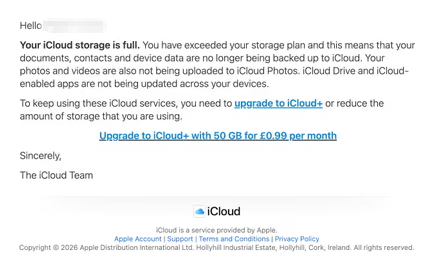
Email saying you must upgrade to iCloud+ or lose your photos
The screenshot above is just one of many examples. There are plenty of variations, but they all follow the same them: make a small payment to stop the files in your iCloud storage from being deleted.
The websites these emails link to also vary, but they all ask for personal and payment details to complete that payment.
How to stay safe
It’s worth remembering that Apple does notify users when their iCloud storage is nearing capacity, but those alerts appear within your device settings or as official system notifications. They don’t come through unsolicited text messages or emails with external links. If you need to check your storage, go directly to Settings on your device and review your iCloud usage.
So, to stay safe:
Always access your account through our official website.
Never share your password with anyone.
Never click on links in unsolicited emails without verifying with a trusted source.
The threat of losing your photos is a powerful lure, so scammers are now using it to steal personal and financial details.
The Guardian warns about an iCloud-themed campaign that start with a few “your iCloud storage is full’ messages, then escalates to threats. If you don’t respond or take action, the emails claim your data will be wiped on a specific date.
US Consumer Affairs has urged users not to click any links and to contact Apple directly if they receive such messages.
The deadline in the emails is never far away, usually just two days. No scammer ever wants you to think things through before you act, so there is always time pressure.
We’ve seen these emails in English and Spanish. Oddly, the monthly rate is set at 99 pence or 99 euro cents respectively.
The 0.99 seems to be the magic number. In reality, scammers don’t care about the payment. What they want is for you fill out the form on their phishing site.
Email saying you must upgrade to iCloud+ or lose your photos
The screenshot above is just one of many examples. There are plenty of variations, but they all follow the same them: make a small payment to stop the files in your iCloud storage from being deleted.
The websites these emails link to also vary, but they all ask for personal and payment details to complete that payment.
How to stay safe
It’s worth remembering that Apple does notify users when their iCloud storage is nearing capacity, but those alerts appear within your device settings or as official system notifications. They don’t come through unsolicited text messages or emails with external links. If you need to check your storage, go directly to Settings on your device and review your iCloud usage.
So, to stay safe:
Always access your account through our official website.
Never share your password with anyone.
Never click on links in unsolicited emails without verifying with a trusted source.
Travel companies love telling you your data is safe. Booking.com just reminded everyone why that’s a hard promise to keep.
The Amsterdam-based booking giant began notifying customers on April 13 that “unauthorized third parties” had accessed guest reservation data. The compromised information includes booking details, names, email addresses, physical addresses, and phone numbers—essentially everything you’d need to convincingly impersonate a hotel contacting a guest.
The criminals appear to have accessed the data by compromising Booking.com’s hotel partners. A Microsoft report blames the ClickFix phishing technique, which gets victims (in this case, hotel employees) to install malware disguised a computer “fix.”
Microsoft blames a criminal group called Storm-1865 for the caper, and caught it running exactly this kind of campaign against hotel workers across across North America, Oceania, South and Southeast Asia, and Europe, deploying nasty malware like XWorm and VenomRAT through fake CAPTCHA pages.
Booking.com’s customer notification warned that the exposed data could be used for phishing and said it would never ask for sensitive information or bank transfers.
But scammers have a proven playbook for turning stolen booking data into cash. They can hijack a reservation by impersonating a hotel, message guests demanding a further payment, or credit card details for “payment verification.” The stolen data gives them everything they need to convince the hotel customer they’re legit.
This has happened to Booking.com partners and customers before. In 2018, criminals phished hotel employees and accessed data belonging to Booking.com customers. Scammers also conducted a voice phishing campaign later that year that targeted 40 hotels in the UAE. Over 4,000 customers’ data was stolen, including credit card data from 300 people. Booking.com was late reporting the breach to the Dutch privacy regulator, which imposed a €475,000 fine (around $560,000) in 2021.
The travel industry’s recurring breach problem
Breaches like these are a pattern in the travel business. In January 2026, Eurail disclosed a breach that spilled passport numbers, addresses, and, for some travelers, photocopies of IDs and health data. KLM and Air France had customer data swiped in August 2025. Hertz, Dollar, and Thrifty were all caught in the Cl0p gang’s exploitation of Cleo file transfer software, with criminals pilfering drivers’ licenses and credit card data.
What’s interesting about all of these incidents is that like the Booking.com data heist, all involve compromise of third parties rather than the travel operations themselves. The travel industry sits on enormous troves of passport numbers, payment cards, and itineraries. And its security posture of sprawling supply chains, franchised operations, and third-party platforms makes it a soft target.
What you can do
How many customers were affected? Booking.com isn’t saying. For a platform with over 100 million active mobile app users and 500 million monthly website visits, that silence is concerning.
If you’ve used Booking.com recently, here’s the practical guide to protection. Don’t trust messages asking you to “verify” payment details, even if they arrive through the platform itself.
Here is Booking.com’s own advice about these scams, issued before this latest incident:
“If there is no pre-payment policy or deposit requirement outlined, but you’re asked to pay in advance to secure your booking, it is likely a scam.”
Check your booking confirmation email for what you actually owe and when. If anything seems off, contact the property directly, rather than through a link someone sends you. And watch your bank statements. The scammers who exploit this kind of data don’t always strike immediately.
Something feel off? Check it before you click.
Malwarebytes Scam Guard helps you analyze suspicious links, texts, and screenshots instantly.
Travel companies love telling you your data is safe. Booking.com just reminded everyone why that’s a hard promise to keep.
The Amsterdam-based booking giant began notifying customers on April 13 that “unauthorized third parties” had accessed guest reservation data. The compromised information includes booking details, names, email addresses, physical addresses, and phone numbers—essentially everything you’d need to convincingly impersonate a hotel contacting a guest.
The criminals appear to have accessed the data by compromising Booking.com’s hotel partners. A Microsoft report blames the ClickFix phishing technique, which gets victims (in this case, hotel employees) to install malware disguised a computer “fix.”
Microsoft blames a criminal group called Storm-1865 for the caper, and caught it running exactly this kind of campaign against hotel workers across across North America, Oceania, South and Southeast Asia, and Europe, deploying nasty malware like XWorm and VenomRAT through fake CAPTCHA pages.
Booking.com’s customer notification warned that the exposed data could be used for phishing and said it would never ask for sensitive information or bank transfers.
But scammers have a proven playbook for turning stolen booking data into cash. They can hijack a reservation by impersonating a hotel, message guests demanding a further payment, or credit card details for “payment verification.” The stolen data gives them everything they need to convince the hotel customer they’re legit.
This has happened to Booking.com partners and customers before. In 2018, criminals phished hotel employees and accessed data belonging to Booking.com customers. Scammers also conducted a voice phishing campaign later that year that targeted 40 hotels in the UAE. Over 4,000 customers’ data was stolen, including credit card data from 300 people. Booking.com was late reporting the breach to the Dutch privacy regulator, which imposed a €475,000 fine (around $560,000) in 2021.
The travel industry’s recurring breach problem
Breaches like these are a pattern in the travel business. In January 2026, Eurail disclosed a breach that spilled passport numbers, addresses, and, for some travelers, photocopies of IDs and health data. KLM and Air France had customer data swiped in August 2025. Hertz, Dollar, and Thrifty were all caught in the Cl0p gang’s exploitation of Cleo file transfer software, with criminals pilfering drivers’ licenses and credit card data.
What’s interesting about all of these incidents is that like the Booking.com data heist, all involve compromise of third parties rather than the travel operations themselves. The travel industry sits on enormous troves of passport numbers, payment cards, and itineraries. And its security posture of sprawling supply chains, franchised operations, and third-party platforms makes it a soft target.
What you can do
How many customers were affected? Booking.com isn’t saying. For a platform with over 100 million active mobile app users and 500 million monthly website visits, that silence is concerning.
If you’ve used Booking.com recently, here’s the practical guide to protection. Don’t trust messages asking you to “verify” payment details, even if they arrive through the platform itself.
Here is Booking.com’s own advice about these scams, issued before this latest incident:
“If there is no pre-payment policy or deposit requirement outlined, but you’re asked to pay in advance to secure your booking, it is likely a scam.”
Check your booking confirmation email for what you actually owe and when. If anything seems off, contact the property directly, rather than through a link someone sends you. And watch your bank statements. The scammers who exploit this kind of data don’t always strike immediately.
Something feel off? Check it before you click.
Malwarebytes Scam Guard helps you analyze suspicious links, texts, and screenshots instantly.
Pushpaganda is the name researchers have given to an AI-assisted ad fraud, social engineering, and scareware operation targeting mobile users.
For most people, Pushpaganda starts as something that looks completely normal. For example, a recommended article in your Google Discover feed (the personalized news stream on your phone) or one of the suggested stories you see when you open a new Chrome tab. The operators behind this campaign use AI‑generated articles and images, plus aggressive SEO or paid placement, to get their content surfaced in those feeds so it feels like any other story about money, tech, or politics.
The topics are classic clickbait. You might see a card about a new tax refund, a government payout, a bank deposit, or some too‑good‑to‑be‑true gadget like a $100 phone with a “300MP camera.” On a small mobile screen, with a matching thumbnail and a headline tailored to your region, that’s exactly the kind of thing many people would reasonably tap.
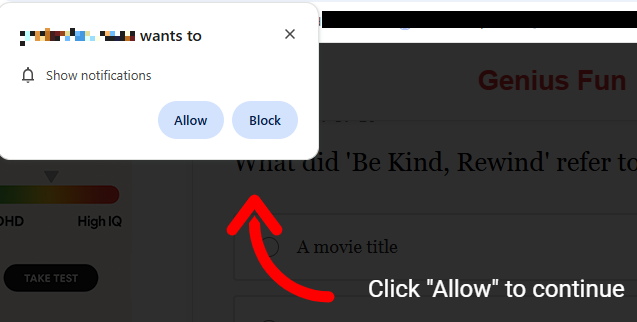
Having tapped, you land on an attacker-controlled site that looks like a regular article page but wastes no time throwing up a browser prompt asking to send you notifications. Many users have been trained by years of pop-ups to click “Allow” just to get it out of the way, especially if the page claims you need to click “Allow” to continue reading or see the offer.
Some pages will falsely claim you have to click Allow to continue reading
Unfortunately, with that single tap, the site now has permission to push messages straight to your Android or desktop, where they sit alongside emails, chats, and real alerts from banks or government apps. Because the notifications don’t behave like traditional pop‑ups and can bypass normal ad‑blocking, many people don’t realize they’ve effectively subscribed to a scam channel.
The result is a stream of alarming notifications that seem to come out of nowhere and have little to do with the original site you visited, so the link between the site and the notifications is usually lost on the victims. Clicking those notifications rarely leads to what they promise. Instead, you’re pushed to another domain in the same network, which may ask for even more permissions, personal data, or try to funnel you into financial scams. Over time, this can expose you to fake investment schemes, fraudulent “tech support” numbers, or pages pushing questionable subscriptions.
All of this costs you time and attention, and sometimes money. At best, you end up with a polluted notification tray full of fake alerts that make it harder to spot something genuinely important. At worst, you follow one scare message too far, hand over personal details or payment information, and become the victim of fraud, identity theft, or aggressive subscription traps. And even if you never click again, your browser is still quietly loading pages and ads you never asked for.
How to stay safe from Pushpaganda
Treat “Allow notifications” prompts as potential traps, especially on sites you’ve never heard of that you reached via a feed or a search result. And even more so if they come with additional, misleading, instructions.
Besides that you should:
Be skeptical of sensational cards in your Discover feed that promise sudden cash, miracle devices, or dramatic political revelations.
Don’t trust buttons that scream “Apply now,” “Claim now,” or “Join WhatsApp” on pages that already feel pushy or poorly written.
Keep your browser, operating system (OS), and other important software up to date.
Use a security app that can block malicious websites and scam pages before they load.
Scammers know more about you than you think.
Malwarebytes Mobile Security protects you from phishing, scam texts, malicious sites, and more. With real-time AI-powered Scam Guard built right in.
Pushpaganda is the name researchers have given to an AI-assisted ad fraud, social engineering, and scareware operation targeting mobile users.
For most people, Pushpaganda starts as something that looks completely normal. For example, a recommended article in your Google Discover feed (the personalized news stream on your phone) or one of the suggested stories you see when you open a new Chrome tab. The operators behind this campaign use AI‑generated articles and images, plus aggressive SEO or paid placement, to get their content surfaced in those feeds so it feels like any other story about money, tech, or politics.
The topics are classic clickbait. You might see a card about a new tax refund, a government payout, a bank deposit, or some too‑good‑to‑be‑true gadget like a $100 phone with a “300MP camera.” On a small mobile screen, with a matching thumbnail and a headline tailored to your region, that’s exactly the kind of thing many people would reasonably tap.
Having tapped, you land on an attacker-controlled site that looks like a regular article page but wastes no time throwing up a browser prompt asking to send you notifications. Many users have been trained by years of pop-ups to click “Allow” just to get it out of the way, especially if the page claims you need to click “Allow” to continue reading or see the offer.
Some pages will falsely claim you have to click Allow to continue reading
Unfortunately, with that single tap, the site now has permission to push messages straight to your Android or desktop, where they sit alongside emails, chats, and real alerts from banks or government apps. Because the notifications don’t behave like traditional pop‑ups and can bypass normal ad‑blocking, many people don’t realize they’ve effectively subscribed to a scam channel.
The result is a stream of alarming notifications that seem to come out of nowhere and have little to do with the original site you visited, so the link between the site and the notifications is usually lost on the victims. Clicking those notifications rarely leads to what they promise. Instead, you’re pushed to another domain in the same network, which may ask for even more permissions, personal data, or try to funnel you into financial scams. Over time, this can expose you to fake investment schemes, fraudulent “tech support” numbers, or pages pushing questionable subscriptions.
All of this costs you time and attention, and sometimes money. At best, you end up with a polluted notification tray full of fake alerts that make it harder to spot something genuinely important. At worst, you follow one scare message too far, hand over personal details or payment information, and become the victim of fraud, identity theft, or aggressive subscription traps. And even if you never click again, your browser is still quietly loading pages and ads you never asked for.
How to stay safe from Pushpaganda
Treat “Allow notifications” prompts as potential traps, especially on sites you’ve never heard of that you reached via a feed or a search result. And even more so if they come with additional, misleading, instructions.
Besides that you should:
Be skeptical of sensational cards in your Discover feed that promise sudden cash, miracle devices, or dramatic political revelations.
Don’t trust buttons that scream “Apply now,” “Claim now,” or “Join WhatsApp” on pages that already feel pushy or poorly written.
Keep your browser, operating system (OS), and other important software up to date.
Use a security app that can block malicious websites and scam pages before they load.
Scammers know more about you than you think.
Malwarebytes Mobile Security protects you from phishing, scam texts, malicious sites, and more. With real-time AI-powered Scam Guard built right in.
A convincing phishing campaign is going after YouTube creators, and if it works, attackers don’t just steal your Google login. They can take over your entire Google account, including Gmail, your files, and payments, then hijack your YouTube channel and use your audience to run scams.
The lure is a fake copyright strike notification that’s so convincing even security-aware users could fall for it. The attack site pulls in your real channel data, such as your profile picture, subscriber count, and latest video, to build a personalized scare page. It funnels you toward a sign-in page designed to steal your Google account.
The operation runs like a franchise: multiple attackers share the same platform, each running their own campaigns against different creators.
Why your YouTube channel is worth more than you think
For full-time creators, a YouTube channel isn’t just a hobby, it’s a business. It generates revenue through ads, sponsorships, and merchandise. And it all sits behind a single Google login that also controls your Gmail, Google Drive, and payment details.
That’s what makes creators such attractive targets. Attackers who hijack a channel often rebrand it within minutes, typically to impersonate a cryptocurrency company, and use the existing audience to livestream scams. The original creator gets locked out and watches their years of work being used to defraud their own subscribers.
A copyright strike is the perfect bait because it exploits the one thing creators fear most: losing their channel overnight.
“Check your Youtube copyright status instantly”
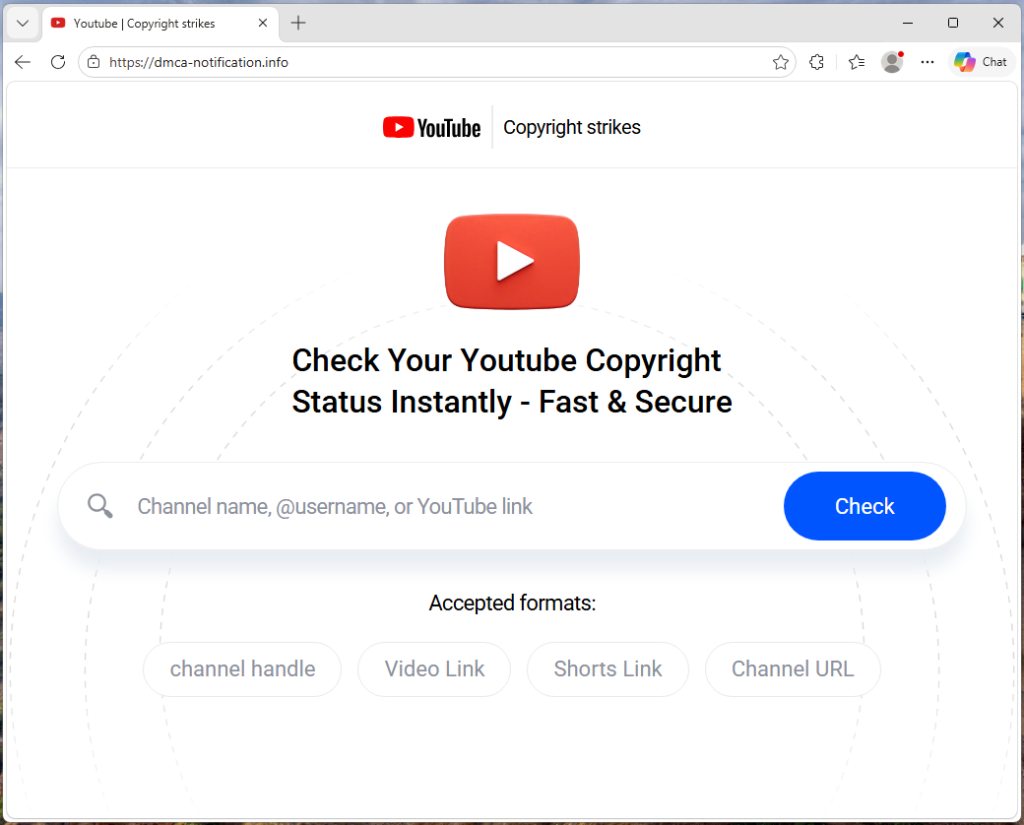
The campaign runs from a site called dmca-notification[.]info. The browser tab reads “Youtube | Copyright strikes,” and the page itself looks clean and professional, complete with YouTube logo, search bar, and helpful instructions.
It invites you to enter your channel name, @handle, or video link to check your copyright status. Nothing about it stands out as immediately suspicious.
Each phishing link includes the target’s channel handle directly in the URL, so the page already knows who you are before you type anything.
The source code contains a tracking flag called suppressTelegramVisit, which changes how visits are logged depending on whether an affiliate parameter is present. This suggests the operators may be coordinating traffic through Telegram, although the kit could be distributed through any platform.
Your own videos, used against you
Once the page has your channel name, it fetches real data from YouTube: your avatar, subscriber count, video count, and your most recent upload (including its title, thumbnail, and view count). That information is then used to build a fake copyright complaint.
You see your own branding alongside a claim that a specific segment of your latest video has been flagged for copyright infringement. The timestamps are dynamically generated for each victim based on the video’s length, making each notice look unique and legitimate. It’s similar to receiving a fake legal notice that includes your real home address. The personal details make it harder to dismiss as spam.
“Respond within three days or face enforcement actions”
The page piles on the pressure. A warning tells you that deleting the video won’t remove the strike. A red notice threatens that if you don’t respond within three days, your channel will face enforcement actions. The proposed fix is simple: sign in with Google to verify you’re the channel owner, and the claim will be resolved within 24 hours.
Every element on the page is designed to push you toward the “Login via Google” button before you stop to think.
The sign-in page that steals your account
When you click that button, the site contacts its own backend server to fetch the address of an external phishing page, one that the attacker can swap out to a new domain at any time.
In observed traffic, the request to /api/get-active-domain returned the domain blacklivesmattergood4[.]com, which was then loaded inside a full-screen overlay on top of the copyright notice page.
What appears next is a classic Browser-in-the-Browser attack: a fake Chrome pop-up rendered entirely in HTML and CSS. It includes a title bar reading “Sign in – Google Accounts – Google Chrome,” a padlock icon, and a URL that looks like accounts.google.com. None of it is real. They’re all just graphics. The only real address bar is the one at the top of your actual browser, which still shows dmca-notification[.]info.
Inside the fake window sits a convincing replica of Google’s sign-in page. It looks exactly like the real thing, but every keystroke goes to the attacker.
Traffic capture also showed attempts to contact additional domains—dopozj[.]net, ec40pr[.]net, and xddlov[.]net—which returned 502 errors at the time of capture. These may be backup infrastructure or credential relay servers that were offline.
The rotating-domain approach is what makes this campaign resilient. The phishing domain is fetched in real time with no caching, allowing attackers to rotate infrastructure quickly. If one domain is taken down, the next victim is sent to a new one.
Once credentials are entered, the overlay closes and the victim is returned to the copyright notice page with no confirmation or error . It gives the attacker time to use the stolen credentials before the victim realizes anything happened.
Big channels get a free pass (on purpose)
One interesting detail: the kit checks whether the target channel has more than three million subscribers. If it does, the entire phishing flow is skipped. Instead of the copyright strike warning and login button, the page shows a benign message: “Your channel is in good standing. No further action is needed.”
This is almost certainly an evasion tactic. Very large channels are more likely to have dedicated security teams, relationships with YouTube’s trust and safety staff, or the visibility to trigger a rapid takedown if they publicly report the scam. By automatically exempting them, the kit reduces the risk of drawing attention from exactly the people most capable of getting the operation shut down.
Not just one scammer
The source code reveals that this isn’t a single phishing page run by one person. The kit includes an affiliate tracking system where each attacker gets their own ID embedded in the phishing links they send out. A central backend tracks which operator delivered which victim and how far each target got through the funnel. Our traffic capture confirms this: the phishing link included a referral ID (ref=huyznaetdmca), the default affiliate tag, which appears to be a transliteration of a Russian phrase. Brand names like Google and YouTube are also written with lookalike Cyrillic characters in the source code to evade automated security scanners.
In short, this is phishing-as-a-service: a shared platform that multiple attackers can use to run campaigns against YouTube creators at scale.
How to protect yourself
This campaign is a reminder that phishing has moved far beyond badly spelled emails from a Nigerian prince. Today’s phishing kits are professionally engineered platforms with rotating infrastructure, real-time personalization, and franchise-style distribution.
For YouTube creators, the key rule is simple: copyright strikes only appear in YouTube Studio.
If you get a warning anywhere else, treat it as suspicious.
Be wary of urgency. Real copyright processes don’t rush you into action
Go directly to studio.youtube.com or through trusted channels to check your status
Never sign in through a link in an email or message
Spot a fake browser window
Try dragging it: A real window moves freely. A fake one is stuck inside the page
Minimize your browser: A real pop-up stays open. A fake one disappears
Check the URL: If you can’t interact with it, it’s just an image
Even if everything looks right, always check the actual address bar before entering your username and password.
If you’ve already entered your details, act quickly:
Change your Google password immediately
Revoke active sessions in your account security settings
Check your YouTube channel for unauthorized changes
Indicators of Compromise (IOCs)
Domain
dmca-notification[.]info (primary phishing site)
blacklivesmattergood4[.]com (credential harvesting domain — active at time of capture)
dopozj[.]net (associated infrastructure — 502 at time of capture)
ec40pr[.]net (associated infrastructure — 502 at time of capture)
xddlov[.]net (associated infrastructure — 502 at time of capture)
Something feel off? Check it before you click.
Malwarebytes Scam Guard helps you analyze suspicious links, texts, and screenshots instantly.
A convincing phishing campaign is going after YouTube creators, and if it works, attackers don’t just steal your Google login. They can take over your entire Google account, including Gmail, your files, and payments, then hijack your YouTube channel and use your audience to run scams.
The lure is a fake copyright strike notification that’s so convincing even security-aware users could fall for it. The attack site pulls in your real channel data, such as your profile picture, subscriber count, and latest video, to build a personalized scare page. It funnels you toward a sign-in page designed to steal your Google account.
The operation runs like a franchise: multiple attackers share the same platform, each running their own campaigns against different creators.
Why your YouTube channel is worth more than you think
For full-time creators, a YouTube channel isn’t just a hobby, it’s a business. It generates revenue through ads, sponsorships, and merchandise. And it all sits behind a single Google login that also controls your Gmail, Google Drive, and payment details.
That’s what makes creators such attractive targets. Attackers who hijack a channel often rebrand it within minutes, typically to impersonate a cryptocurrency company, and use the existing audience to livestream scams. The original creator gets locked out and watches their years of work being used to defraud their own subscribers.
A copyright strike is the perfect bait because it exploits the one thing creators fear most: losing their channel overnight.
“Check your Youtube copyright status instantly”
The campaign runs from a site called dmca-notification[.]info. The browser tab reads “Youtube | Copyright strikes,” and the page itself looks clean and professional, complete with YouTube logo, search bar, and helpful instructions.
It invites you to enter your channel name, @handle, or video link to check your copyright status. Nothing about it stands out as immediately suspicious.
Each phishing link includes the target’s channel handle directly in the URL, so the page already knows who you are before you type anything.
The source code contains a tracking flag called suppressTelegramVisit, which changes how visits are logged depending on whether an affiliate parameter is present. This suggests the operators may be coordinating traffic through Telegram, although the kit could be distributed through any platform.
Your own videos, used against you
Once the page has your channel name, it fetches real data from YouTube: your avatar, subscriber count, video count, and your most recent upload (including its title, thumbnail, and view count). That information is then used to build a fake copyright complaint.
You see your own branding alongside a claim that a specific segment of your latest video has been flagged for copyright infringement. The timestamps are dynamically generated for each victim based on the video’s length, making each notice look unique and legitimate. It’s similar to receiving a fake legal notice that includes your real home address. The personal details make it harder to dismiss as spam.
“Respond within three days or face enforcement actions”
The page piles on the pressure. A warning tells you that deleting the video won’t remove the strike. A red notice threatens that if you don’t respond within three days, your channel will face enforcement actions. The proposed fix is simple: sign in with Google to verify you’re the channel owner, and the claim will be resolved within 24 hours.
Every element on the page is designed to push you toward the “Login via Google” button before you stop to think.
The sign-in page that steals your account
When you click that button, the site contacts its own backend server to fetch the address of an external phishing page, one that the attacker can swap out to a new domain at any time.
In observed traffic, the request to /api/get-active-domain returned the domain blacklivesmattergood4[.]com, which was then loaded inside a full-screen overlay on top of the copyright notice page.
What appears next is a classic Browser-in-the-Browser attack: a fake Chrome pop-up rendered entirely in HTML and CSS. It includes a title bar reading “Sign in – Google Accounts – Google Chrome,” a padlock icon, and a URL that looks like accounts.google.com. None of it is real. They’re all just graphics. The only real address bar is the one at the top of your actual browser, which still shows dmca-notification[.]info.
Inside the fake window sits a convincing replica of Google’s sign-in page. It looks exactly like the real thing, but every keystroke goes to the attacker.
Traffic capture also showed attempts to contact additional domains—dopozj[.]net, ec40pr[.]net, and xddlov[.]net—which returned 502 errors at the time of capture. These may be backup infrastructure or credential relay servers that were offline.
The rotating-domain approach is what makes this campaign resilient. The phishing domain is fetched in real time with no caching, allowing attackers to rotate infrastructure quickly. If one domain is taken down, the next victim is sent to a new one.
Once credentials are entered, the overlay closes and the victim is returned to the copyright notice page with no confirmation or error . It gives the attacker time to use the stolen credentials before the victim realizes anything happened.
Big channels get a free pass (on purpose)
One interesting detail: the kit checks whether the target channel has more than three million subscribers. If it does, the entire phishing flow is skipped. Instead of the copyright strike warning and login button, the page shows a benign message: “Your channel is in good standing. No further action is needed.”
This is almost certainly an evasion tactic. Very large channels are more likely to have dedicated security teams, relationships with YouTube’s trust and safety staff, or the visibility to trigger a rapid takedown if they publicly report the scam. By automatically exempting them, the kit reduces the risk of drawing attention from exactly the people most capable of getting the operation shut down.
Not just one scammer
The source code reveals that this isn’t a single phishing page run by one person. The kit includes an affiliate tracking system where each attacker gets their own ID embedded in the phishing links they send out. A central backend tracks which operator delivered which victim and how far each target got through the funnel. Our traffic capture confirms this: the phishing link included a referral ID (ref=huyznaetdmca), the default affiliate tag, which appears to be a transliteration of a Russian phrase. Brand names like Google and YouTube are also written with lookalike Cyrillic characters in the source code to evade automated security scanners.
In short, this is phishing-as-a-service: a shared platform that multiple attackers can use to run campaigns against YouTube creators at scale.
How to protect yourself
This campaign is a reminder that phishing has moved far beyond badly spelled emails from a Nigerian prince. Today’s phishing kits are professionally engineered platforms with rotating infrastructure, real-time personalization, and franchise-style distribution.
For YouTube creators, the key rule is simple: copyright strikes only appear in YouTube Studio.
If you get a warning anywhere else, treat it as suspicious.
Be wary of urgency. Real copyright processes don’t rush you into action
Go directly to studio.youtube.com or through trusted channels to check your status
Never sign in through a link in an email or message
Spot a fake browser window
Try dragging it: A real window moves freely. A fake one is stuck inside the page
Minimize your browser: A real pop-up stays open. A fake one disappears
Check the URL: If you can’t interact with it, it’s just an image
Even if everything looks right, always check the actual address bar before entering your username and password.
If you’ve already entered your details, act quickly:
Change your Google password immediately
Revoke active sessions in your account security settings
Check your YouTube channel for unauthorized changes
Indicators of Compromise (IOCs)
Domain
dmca-notification[.]info (primary phishing site)
blacklivesmattergood4[.]com (credential harvesting domain — active at time of capture)
dopozj[.]net (associated infrastructure — 502 at time of capture)
ec40pr[.]net (associated infrastructure — 502 at time of capture)
xddlov[.]net (associated infrastructure — 502 at time of capture)
Something feel off? Check it before you click.
Malwarebytes Scam Guard helps you analyze suspicious links, texts, and screenshots instantly.
Undisclosed number of names and contact and reservation details accessed in latest cybercrime attempt
The accommodation reservation website Booking.com has suffered a data breach with “unauthorised parties” gaining access to customers’ details.
The platform said it “noticed some suspicious activity involving unauthorised third parties being able to access some of our guests’ booking information”.
In a Public Service Announcement (PSA) the Federal Bureau of Investigation (FBI) and the Cybersecurity and Infrastructure Security Agency (CISA) warn the public about ongoing Russian-linked phishing campaigns that aim to gain access to messaging accounts.
Earlier this month we wrote about a large‑scale phishing campaign aimed at hijacking Signal and WhatsApp accounts belonging to senior officials, military personnel, civil servants, and journalists.
Now the FBI and CISA have joined European intelligence services in warning that the same tactics are being used in a broader campaign targeting these commercial messaging apps. The goal is not to break end‑to‑end encryption, but to walk straight around it by stealing access to individual accounts.
In our previous article, we focused on warnings from the Dutch intelligence services AIVD and MIVD, which described how Russian state‑backed actors approached high‑value targets via Signal and WhatsApp, posing as “Signal Support”, “Signal Security Bot”, or similar. The PSA demonstrates how the same groups are now running global phishing campaigns against messaging app accounts, with evidence suggesting thousands of compromised accounts worldwide.
It’s important to reiterate that the attackers have not managed to break the apps’ end-to-end encryption. Instead, they are relying on social engineering to get a device added so they can eavesdrop on accounts.
The current targets include current and former US government officials, military staff, political figures, and journalists, but there is nothing to stop the same techniques being reused against businesses and everyday users.
So, while it’s tempting to dismiss this as a problem for diplomats and generals (and the agencies issuing these alerts do mention high‑profile targets first), the techniques scale very easily. Once playbooks like these are public, they tend to be copied by cybercriminals looking for new ways to steal money or accounts.
How to protect your accounts
As the PSA puts it:
“Phishing remains one of the most unsophisticated, yet effective means of cyber compromise, often rendering other protections irrelevant”
This calls asks for basic security measures:
Treat unsolicited messages from “Support” inside apps as suspicious by default. Legitimate support for apps like Signal and WhatsApp does not ask you, in a chat message, to send back verification codes, PINs, or passwords. If you receive a warning about account problems, do not follow links in the message. Open the app’s settings directly or visit the official website through other means.
Never share SMS verification codes or app PINs. SMS codes are there to prove that you control a phone number. Anyone who has the code can pretend to be you. App‑specific PINs or passcodes are there to protect account changes. Giving them away is like handing over the keys to your account. Consider anyone asking for them to be a scammer.
Be careful what you discuss and with whom. Both the Dutch and US advisories remind us that even with end‑to‑end encryption, some conversations are too sensitive for commercial chat apps.
Use the extra security features these apps offer. Enable options like registration lock, registration PIN and device‑change alerts so that your account cannot be silently re‑registered without an extra secret. Store your PIN in a password manager instead of choosing something easy to guess or reusing a common code, to reduce the chance of social engineering or shoulder‑surfing.
Another useful feature is disappearing messages. Short‑timer and disappearing messages reduce how much content is available if an attacker gets into a chat later, or if someone obtains long‑term access to a device or backup. They are not a complete solution, but they can limit the damage.
What to do if you think your account was hijacked
If you suspect an attacker has taken over your messaging account:
Try to re‑register your number in the app immediately to kick out other devices.
Revoke all linked devices and change any app‑specific PINs or lock codes.
Warn your contacts that someone may have impersonated you and ask them to treat recent messages with caution.
Review recent conversations for signs of data theft (for example, shared IDs, documents, or passwords that should now be considered exposed).
Report the incident to the app provider and, where appropriate, to national reporting centers such as the FBI’s Internet Crime Complaint Center (IC3) at ic3.gov or the relevant authority in your country.
The sooner you act, the smaller the window in which attackers can exploit your account.
We don’t just report on phone security—we provide it
Scam compounds in Southeast Asia have already become modern slave farms, trapping victims and forcing many of them to become scammers for them. Now they’ve added another type of worker to the mix: so-called AI models.
These professional scammers conduct video calls with their targets, charming them into handing over their cash. As reported in WIRED this week, recruitment ads describe roles handling around a hundred live video calls per day, promoting romance scams and crypto hustles in industrial-scale scam operations across Cambodia, Myanmar, and Laos.
These scam farms already rely on chat operators to ensnare scam victims via messaging apps. Many of these operators are themselves victims of trafficking, forced to work long shifts under threats of violence. They develop relationships with victims over time, exploiting loneliness or financial worries. While they work to make a victim feel special, they’re actually juggling similar text sessions with dozens of people at once. Eventually, a victim may want a video call, either to meet their imagined sweetheart or to confirm an investment opportunity is legitimate (or both).
Chat operators might not have the ability to charm victims on video, especially when they’re victims themselves, being made to work long shifts and are physically beaten. So when a victim asks for a video call, the scam bosses call in a specialist “AI model” with strong interpersonal skills to charm the victim. Despite the name, they’re real people hired to appear on video calls. The AI deepfake software adjusts their looks to match the fictionalized person that the victim is hoping to see.
Scam operations run recruitment ads for these models, and many seem willing to apply for these jobs. Humanity Research Consultancy, an investigative research group that tracks trafficking supply chains, identified a pitch from a 24-year-old Uzbekistani calling herself Angel. She claimed to speak four languages and to have a year’s experience as an AI model. She demanded $7,000 monthly for her services.
The growth of scam compounds
How do these scam compounds even exist? According to the Australian Strategic Policy Institute, Myanmar’s 2021 military coup helped fuel a fraud boom. Scam centers along the Thai border have more than doubled as crime syndicates move into that region, along with Myanmar, Cambodia and Laos.
These scam centers are often tolerated because they line the coffers of local militia. But there have been some countermeasures. Raids and cross-border crackdowns have led to arrests and the movement of large numbers of suspects between countries, including operations targeting compounds such as KK Park in Myawaddy. Cambodia and Myanmar have also signalled increased efforts to tackle scam operations, although the networks remain highly resilient.
This kind of activity becomes easier as technology improves. Real-time face-swapping and deepfake tools are now good enough to support live video, not just pre-recorded clips. We’ve already seen real-time deepfakes used for everything from job interviews through to impersonating banking executives to scam millions. What’s new here is the scale: people handling dozens or even hundreds of calls a day for romance scams and crypto investment fraud shows that this is now a mass exploit.
How to stay safe
Here’s the problem with deepfake video: the common “tells” that let you spot it are evaporating. At one time a sure sign of an AI deepfake was someone with the wrong number of fingers or oddities in hairlines. You can up the ante in live calls by asking someone to turn sideways. Have them touch their nose, and wave their fingers in front of their face. It’s more difficult for deepfake software to handle that extra noise.
But beware: the algorithms that produce deepfakes are getting better all the time, and more easily able to handle such tests. We’re at the point where this deepfake researcher says many more of us will be fooled by them this year.
If you can’t fully trust what you see, fall back on what you know. Be wary of unsolicited contact, especially when someone quickly builds emotional rapport or introduces an investment opportunity. Even if a profile looks well-established or a website appears legitimate, take time to dig a little deeper.
Avoid sharing personal or financial information with someone you’ve only met online, and be wary of anyone who pushes you toward quick decisions or asks to move conversations off established platforms. The FBI has some sound advice on their website.
The most dangerous part of this deepfake AI model trend is that it helps scam operations cross the final frontier. A live human can close a scam that a simple chat interaction can’t. That’s why people like Angel from Uzbekistan have a job, and why you need to be more on your guard than ever.
We don’t just report on scams—we help detect them
Cybersecurity risks should never spread beyond a headline. If something looks dodgy to you, check if it’s a scam using Malwarebytes Scam Guard. Submit a screenshot, paste suspicious content, or share a link, text or phone number, and we’ll tell you if it’s a scam or legit. Available with Malwarebytes Premium Security for all your devices, and in the Malwarebytes app for iOS and Android.

 Login
Login