Normal view

[updated] A fake cloud storage alert that ends at Freecash

3 February 2026 at 11:38

Last week we talked about an app that promises users they can make money testing games, or even just by scrolling through TikTok.

Imagine our surprise when we ended up on a site promoting that same Freecash app while investigating a “cloud storage” phish. We’ve all probably seen one of those. They’re common enough and according to recent investigation by BleepingComputer, there’s a

“large-scale cloud storage subscription scam campaign targeting users worldwide with repeated emails falsely warning recipients that their photos, files, and accounts are about to be blocked or deleted due to an alleged payment failure.”

Based on the description in that article, the email we found appears to be part of this campaign.

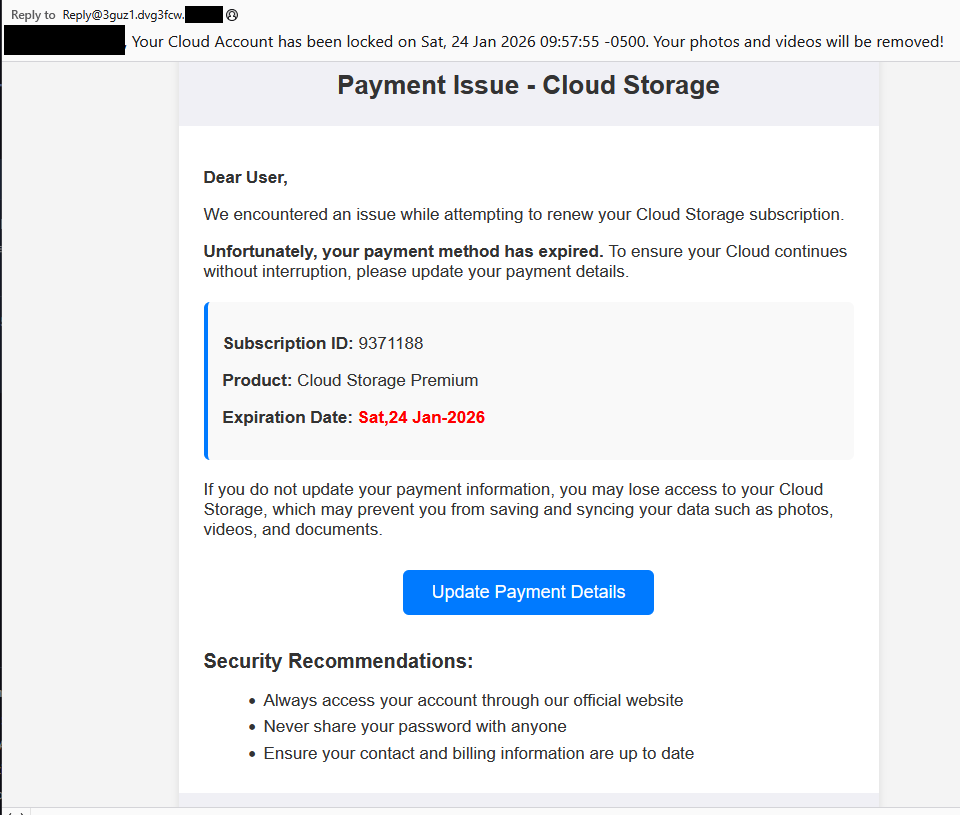
Cloud storage payment issue email

The subject line of the email is:

“{Recipient}. Your Cloud Account has been locked on Sat, 24 Jan 2026 09:57:55 -0500. Your photos and videos will be removed!”

This matches one of the subject lines that BleepingComputer listed.

And the content of the email:

Payment Issue – Cloud Storage

Dear User,

We encountered an issue while attempting to renew your Cloud Storage subscription.

Unfortunately, your payment method has expired. To ensure your Cloud continues without interruption, please update your payment details.

Subscription ID: 9371188

Product: Cloud Storage Premium

Expiration Date: Sat,24 Jan-2026

If you do not update your payment information, you may lose access to your Cloud Storage, which may prevent you from saving and syncing your data such as photos, videos, and documents.

Update Payment Details {link button}

Security Recommendations:

  • Always access your account through our official website
  • Never share your password with anyone
  • Ensure your contact and billing information are up to date”

The link in the email leads to  https://storage.googleapis[.]com/qzsdqdqsd/dsfsdxc.html#/redirect.html, which helps the scammer establish a certain amount of trust because it points to Google Cloud Storage (GCS). GCS is a legitimate service that allows authorized users to store and manage data such as files, images, and videos in buckets. However, as in this case, attackers can abuse it for phishing.

The redirect carries some parameters to the next website.

first redirect

The feed.headquartoonjpn[.]com domain was blocked by Malwarebytes. We’ve seen it before in an earlier campaign involving an Endurance-themed phish.

Endiurance phish

After a few more redirects, we ended up at hx5.submitloading[.]com, where a fake CAPTCHA triggered the last redirect to freecash[.]com, once it was solved.

slider captcha

The end goal of this phish likely depends on the parameters passed along during the redirects, so results may vary.

Rather than stealing credentials directly, the campaign appears designed to monetize traffic, funneling victims into affiliate offers where the operators get paid for sign-ups or conversions.

BleepingComputer noted that they were redirected to affiliate marketing websites for various products.

“Products promoted in this phishing campaign include VPN services, little-known security software, and other subscription-based offerings with no connection to cloud storage.”

How to stay safe

Ironically, the phishing email itself includes some solid advice:

  • Always access your account through our official website.
  • Never share your password with anyone.

We’d like to add:

  • Never click on links in unsolicited emails without verifying with a trusted source.
  • Use an up-to-date, real-time anti-malware solution with a web protection component.
  • Do not engage with websites that attract visitors like this.

Pro tip: Malwarebytes Scam Guard would have helped you identify this email as a scam and provided advice on how to proceed.

Redirect flow (IOCs)

storage.googleapis[.]com/qzsdqdqsd/dsfsdxc.html

feed.headquartoonjpn[.]com

revivejudgemental[.]com

hx5.submitloading[.]com

freecash[.]com

Update February 5, 2026

Almedia GmbH, the company behind the Freecash platform, reached out to us for information about the chain of redirects that lead to their platform. And after an investigation they notified us that:

“Following Malwarebytes’ reporting and the additional information they shared with us, we investigated the issue and identified an affiliate operating in breach of our policies. That partner has been removed from our network.

Almedia does not sell user data, and we take compliance, user trust, and responsible advertising seriously.”


We don’t just report on scams—we help detect them

Cybersecurity risks should never spread beyond a headline. If something looks dodgy to you, check if it’s a scam using Malwarebytes Scam Guard, a feature of our mobile protection products. Submit a screenshot, paste suspicious content, or share a text or phone number, and we’ll tell you if it’s a scam or legit. Download Malwarebytes Mobile Security for iOS or Android and try it today!

[updated] A fake cloud storage alert that ends at Freecash

3 February 2026 at 11:38

Last week we talked about an app that promises users they can make money testing games, or even just by scrolling through TikTok.

Imagine our surprise when we ended up on a site promoting that same Freecash app while investigating a “cloud storage” phish. We’ve all probably seen one of those. They’re common enough and according to recent investigation by BleepingComputer, there’s a

“large-scale cloud storage subscription scam campaign targeting users worldwide with repeated emails falsely warning recipients that their photos, files, and accounts are about to be blocked or deleted due to an alleged payment failure.”

Based on the description in that article, the email we found appears to be part of this campaign.

Cloud storage payment issue email

The subject line of the email is:

“{Recipient}. Your Cloud Account has been locked on Sat, 24 Jan 2026 09:57:55 -0500. Your photos and videos will be removed!”

This matches one of the subject lines that BleepingComputer listed.

And the content of the email:

Payment Issue – Cloud Storage

Dear User,

We encountered an issue while attempting to renew your Cloud Storage subscription.

Unfortunately, your payment method has expired. To ensure your Cloud continues without interruption, please update your payment details.

Subscription ID: 9371188

Product: Cloud Storage Premium

Expiration Date: Sat,24 Jan-2026

If you do not update your payment information, you may lose access to your Cloud Storage, which may prevent you from saving and syncing your data such as photos, videos, and documents.

Update Payment Details {link button}

Security Recommendations:

  • Always access your account through our official website
  • Never share your password with anyone
  • Ensure your contact and billing information are up to date”

The link in the email leads to  https://storage.googleapis[.]com/qzsdqdqsd/dsfsdxc.html#/redirect.html, which helps the scammer establish a certain amount of trust because it points to Google Cloud Storage (GCS). GCS is a legitimate service that allows authorized users to store and manage data such as files, images, and videos in buckets. However, as in this case, attackers can abuse it for phishing.

The redirect carries some parameters to the next website.

first redirect

The feed.headquartoonjpn[.]com domain was blocked by Malwarebytes. We’ve seen it before in an earlier campaign involving an Endurance-themed phish.

Endiurance phish

After a few more redirects, we ended up at hx5.submitloading[.]com, where a fake CAPTCHA triggered the last redirect to freecash[.]com, once it was solved.

slider captcha

The end goal of this phish likely depends on the parameters passed along during the redirects, so results may vary.

Rather than stealing credentials directly, the campaign appears designed to monetize traffic, funneling victims into affiliate offers where the operators get paid for sign-ups or conversions.

BleepingComputer noted that they were redirected to affiliate marketing websites for various products.

“Products promoted in this phishing campaign include VPN services, little-known security software, and other subscription-based offerings with no connection to cloud storage.”

How to stay safe

Ironically, the phishing email itself includes some solid advice:

  • Always access your account through our official website.
  • Never share your password with anyone.

We’d like to add:

  • Never click on links in unsolicited emails without verifying with a trusted source.
  • Use an up-to-date, real-time anti-malware solution with a web protection component.
  • Do not engage with websites that attract visitors like this.

Pro tip: Malwarebytes Scam Guard would have helped you identify this email as a scam and provided advice on how to proceed.

Redirect flow (IOCs)

storage.googleapis[.]com/qzsdqdqsd/dsfsdxc.html

feed.headquartoonjpn[.]com

revivejudgemental[.]com

hx5.submitloading[.]com

freecash[.]com

Update February 5, 2026

Almedia GmbH, the company behind the Freecash platform, reached out to us for information about the chain of redirects that lead to their platform. And after an investigation they notified us that:

“Following Malwarebytes’ reporting and the additional information they shared with us, we investigated the issue and identified an affiliate operating in breach of our policies. That partner has been removed from our network.

Almedia does not sell user data, and we take compliance, user trust, and responsible advertising seriously.”


We don’t just report on scams—we help detect them

Cybersecurity risks should never spread beyond a headline. If something looks dodgy to you, check if it’s a scam using Malwarebytes Scam Guard, a feature of our mobile protection products. Submit a screenshot, paste suspicious content, or share a text or phone number, and we’ll tell you if it’s a scam or legit. Download Malwarebytes Mobile Security for iOS or Android and try it today!

How fake party invitations are being used to install remote access tools

2 February 2026 at 11:18

“You’re invited!” 

It sounds friendly, familiar and quite harmless. But in a scam we recently spotted, that simple phrase is being used to trick victims into installing a full remote access tool on their Windows computers—giving attackers complete control of the system. 

What appears to be a casual party or event invitation leads to the silent installation of ScreenConnect, a legitimate remote support tool quietly installed in the background and abused by attackers. 

Here’s how the scam works, why it’s effective, and how to protect yourself. 

The email: A party invitation 

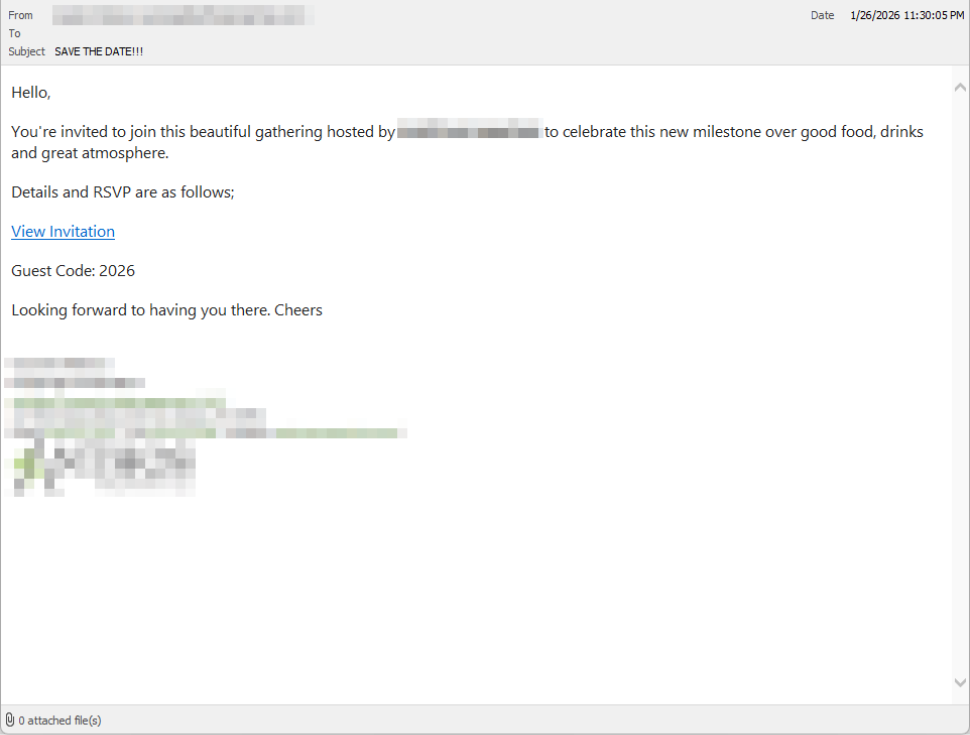
Victims receive an email framed as a personal invitation—often written to look like it came from a friend or acquaintance. The message is deliberately informal and social, lowering suspicion and encouraging quick action. 

In the screenshot below, the email arrived from a friend whose email account had been hacked, but it could just as easily come from a sender you don’t know.

So far, we’ve only seen this campaign targeting people in the UK, but there’s nothing stopping it from expanding elsewhere. 

Clicking the link in the email leads to a polished invitation page hosted on an attacker-controlled domain. 

Party invitation email from a contact

The invite: The landing page that leads to an installer 

The landing page leans heavily into the party theme, but instead of showing event details, the page nudges the user toward opening a file. None of them look dangerous on their own, but together they keep the user focused on the “invitation” file: 

  • A bold “You’re Invited!” headline 
  • The suggestion that a friend had sent the invitation 
  • A message saying the invitation is best viewed on a Windows laptop or desktop
  • A countdown suggesting your invitation is already “downloading” 
  • A message implying urgency and social proof (“I opened mine and it was so easy!”

Within seconds, the browser is redirected to download RSVPPartyInvitationCard.msi 

The page even triggers the download automatically to keep the victim moving forward without stopping to think. 

This MSI file isn’t an invitation. It’s an installer. 

The landing page

The guest: What the MSI actually does 

When the user opens the MSI file, it launches msiexec.exe and silently installs ScreenConnect Client, a legitimate remote access tool often used by IT support teams.  

There’s no invitation, RSVP form, or calendar entry. 

What happens instead: 

  • ScreenConnect binaries are installed under C:\Program Files (x86)\ScreenConnect Client\ 
  • A persistent Windows service is created (for example, ScreenConnect Client 18d1648b87bb3023) 
  • ScreenConnect installs multiple .NET-based components 
  • There is no clear user-facing indication that a remote access tool is being installed 

From the victim’s perspective, very little seems to happen. But at this point, the attacker can now remotely access their computer. 

The after-party: Remote access is established 

Once installed, the ScreenConnect client initiates encrypted outbound connections to ScreenConnect’s relay servers, including a uniquely assigned instance domain.

That connection gives the attacker the same level of access as a remote IT technician, including the ability to: 

  • See the victim’s screen in real time
  • Control the mouse and keyboard 
  • Upload or download files 
  • Keep access even after the computer is restarted 

Because ScreenConnect is legitimate software commonly used for remote support, its presence isn’t always obvious. On a personal computer, the first signs are often behavioral, such as unexplained cursor movement, windows opening on their own, or a ScreenConnect process the user doesn’t remember installing. 

Why this scam works 

This campaign is effective because it targets normal, predictable human behavior. From a behavioral security standpoint, it exploits our natural curiosity and appears to be a low risk. 

Most people don’t think of invitations as dangerous. Opening one feels passive, like glancing at a flyer or checking a message, not installing software. 

Even security-aware users are trained to watch out for warnings and pressure. A friendly “you’re invited” message doesn’t trigger those alarms. 

By the time something feels off, the software is already installed. 

Signs your computer may be affected 

Watch for: 

  • A download or executed file named RSVPPartyInvitationCard.msi 
  • An unexpected installation of ScreenConnect Client 
  • A Windows service named ScreenConnect Client with random characters  
  • Your computer makes outbound HTTPS connections to ScreenConnect relay domains 
  • Your system resolves the invitation-hosting domain used in this campaign, xnyr[.]digital 

How to stay safe  

This campaign is a reminder that modern attacks often don’t break in—they’re invited in. Remote access tools give attackers deep control over a system. Acting quickly can limit the damage.  

For individuals 

If you receive an email like this: 

  • Be suspicious of invitations that ask you to download or open software 
  • Never run MSI files from unsolicited emails 
  • Verify invitations through another channel before opening anything 

If you already clicked or ran the file:  

  • Disconnect from the internet immediately 
  • Check for ScreenConnect and uninstall it if present 
  • Run a full security scan 
  • Change important passwords from a clean, unaffected device 

For organisations (especially in the UK) 

  • Alert on unauthorized ScreenConnect installations
  • Restrict MSI execution where feasible 
  • Treat “remote support tools” as high-risk software
  • Educate users: invitations don’t come as installers 

This scam works by installing a legitimate remote access tool without clear user intent. That’s exactly the gap Malwarebytes is designed to catch.

Malwarebytes now detects newly installed remote access tools and alerts you when one appears on your system. You’re then given a choice: confirm that the tool is expected and trusted, or remove it if it isn’t.


We don’t just report on threats—we remove them

Cybersecurity risks should never spread beyond a headline. Keep threats off your devices by downloading Malwarebytes today.

How fake party invitations are being used to install remote access tools

2 February 2026 at 11:18

“You’re invited!” 

It sounds friendly, familiar and quite harmless. But in a scam we recently spotted, that simple phrase is being used to trick victims into installing a full remote access tool on their Windows computers—giving attackers complete control of the system. 

What appears to be a casual party or event invitation leads to the silent installation of ScreenConnect, a legitimate remote support tool quietly installed in the background and abused by attackers. 

Here’s how the scam works, why it’s effective, and how to protect yourself. 

The email: A party invitation 

Victims receive an email framed as a personal invitation—often written to look like it came from a friend or acquaintance. The message is deliberately informal and social, lowering suspicion and encouraging quick action. 

In the screenshot below, the email arrived from a friend whose email account had been hacked, but it could just as easily come from a sender you don’t know.

So far, we’ve only seen this campaign targeting people in the UK, but there’s nothing stopping it from expanding elsewhere. 

Clicking the link in the email leads to a polished invitation page hosted on an attacker-controlled domain. 

Party invitation email from a contact

The invite: The landing page that leads to an installer 

The landing page leans heavily into the party theme, but instead of showing event details, the page nudges the user toward opening a file. None of them look dangerous on their own, but together they keep the user focused on the “invitation” file: 

  • A bold “You’re Invited!” headline 
  • The suggestion that a friend had sent the invitation 
  • A message saying the invitation is best viewed on a Windows laptop or desktop
  • A countdown suggesting your invitation is already “downloading” 
  • A message implying urgency and social proof (“I opened mine and it was so easy!”

Within seconds, the browser is redirected to download RSVPPartyInvitationCard.msi 

The page even triggers the download automatically to keep the victim moving forward without stopping to think. 

This MSI file isn’t an invitation. It’s an installer. 

The landing page

The guest: What the MSI actually does 

When the user opens the MSI file, it launches msiexec.exe and silently installs ScreenConnect Client, a legitimate remote access tool often used by IT support teams.  

There’s no invitation, RSVP form, or calendar entry. 

What happens instead: 

  • ScreenConnect binaries are installed under C:\Program Files (x86)\ScreenConnect Client\ 
  • A persistent Windows service is created (for example, ScreenConnect Client 18d1648b87bb3023) 
  • ScreenConnect installs multiple .NET-based components 
  • There is no clear user-facing indication that a remote access tool is being installed 

From the victim’s perspective, very little seems to happen. But at this point, the attacker can now remotely access their computer. 

The after-party: Remote access is established 

Once installed, the ScreenConnect client initiates encrypted outbound connections to ScreenConnect’s relay servers, including a uniquely assigned instance domain.

That connection gives the attacker the same level of access as a remote IT technician, including the ability to: 

  • See the victim’s screen in real time
  • Control the mouse and keyboard 
  • Upload or download files 
  • Keep access even after the computer is restarted 

Because ScreenConnect is legitimate software commonly used for remote support, its presence isn’t always obvious. On a personal computer, the first signs are often behavioral, such as unexplained cursor movement, windows opening on their own, or a ScreenConnect process the user doesn’t remember installing. 

Why this scam works 

This campaign is effective because it targets normal, predictable human behavior. From a behavioral security standpoint, it exploits our natural curiosity and appears to be a low risk. 

Most people don’t think of invitations as dangerous. Opening one feels passive, like glancing at a flyer or checking a message, not installing software. 

Even security-aware users are trained to watch out for warnings and pressure. A friendly “you’re invited” message doesn’t trigger those alarms. 

By the time something feels off, the software is already installed. 

Signs your computer may be affected 

Watch for: 

  • A download or executed file named RSVPPartyInvitationCard.msi 
  • An unexpected installation of ScreenConnect Client 
  • A Windows service named ScreenConnect Client with random characters  
  • Your computer makes outbound HTTPS connections to ScreenConnect relay domains 
  • Your system resolves the invitation-hosting domain used in this campaign, xnyr[.]digital 

How to stay safe  

This campaign is a reminder that modern attacks often don’t break in—they’re invited in. Remote access tools give attackers deep control over a system. Acting quickly can limit the damage.  

For individuals 

If you receive an email like this: 

  • Be suspicious of invitations that ask you to download or open software 
  • Never run MSI files from unsolicited emails 
  • Verify invitations through another channel before opening anything 

If you already clicked or ran the file:  

  • Disconnect from the internet immediately 
  • Check for ScreenConnect and uninstall it if present 
  • Run a full security scan 
  • Change important passwords from a clean, unaffected device 

For organisations (especially in the UK) 

  • Alert on unauthorized ScreenConnect installations
  • Restrict MSI execution where feasible 
  • Treat “remote support tools” as high-risk software
  • Educate users: invitations don’t come as installers 

This scam works by installing a legitimate remote access tool without clear user intent. That’s exactly the gap Malwarebytes is designed to catch.

Malwarebytes now detects newly installed remote access tools and alerts you when one appears on your system. You’re then given a choice: confirm that the tool is expected and trusted, or remove it if it isn’t.


We don’t just report on threats—we remove them

Cybersecurity risks should never spread beyond a headline. Keep threats off your devices by downloading Malwarebytes today.

Get paid to scroll TikTok? The data trade behind Freecash ads

26 January 2026 at 15:28

Loyal readers and other privacy-conscious people will be familiar with the expression, “If it’s too good to be true, it’s probably false.”

Getting paid handsomely to scroll social media definitely falls into that category. It sounds like an easy side hustle, which usually means there’s a catch.

In January 2026, an app called Freecash shot up to the number two spot on Apple’s free iOS chart in the US, helped along by TikTok ads that look a lot like job offers from TikTok itself. The ads promised up to $35 an hour to watch your “For You” page. According to reporting, the ads didn’t promote Freecash by name. Instead, they showed a young woman expressing excitement about seemingly being “hired by TikTok” to watch videos for money.

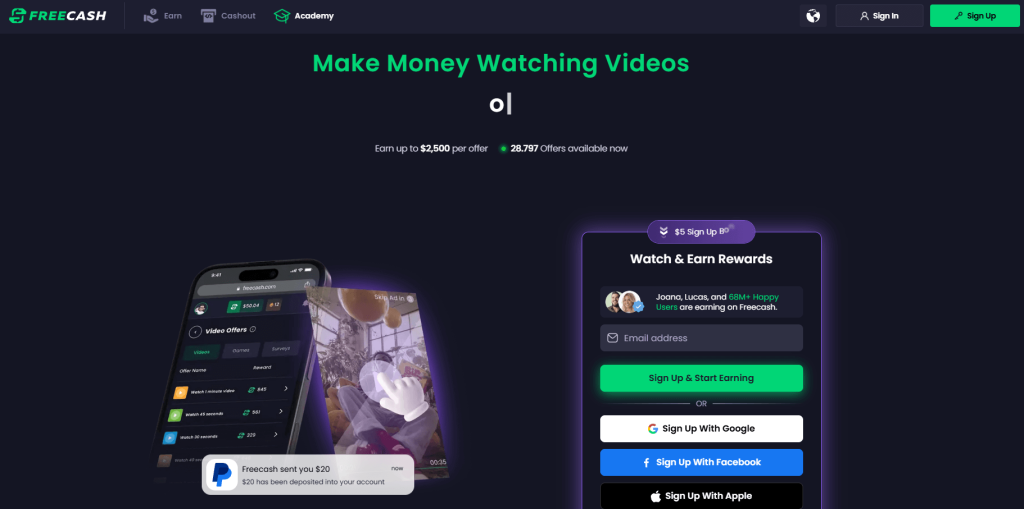
Freecash landing page

The landing pages featured TikTok and Freecash logos and invited users to “get paid to scroll” and “cash out instantly,” implying a simple exchange of time for money.

Those claims were misleading enough that TikTok said the ads violated its rules on financial misrepresentation and removed some of them.

Once you install the app, the promised TikTok paycheck vanishes. Instead, Freecash routes you to a rotating roster of mobile games—titles like Monopoly Go and Disney Solitaire—and offers cash rewards for completing time‑limited in‑game challenges. Payouts range from a single cent for a few minutes of daily play up to triple‑digit amounts if you reach high levels within a fixed period.

The whole setup is designed not to reward scrolling, as it claims, but to funnel you into games where you are likely to spend money or watch paid advertisements.

Freecash’s parent company, Berlin‑based Almedia, openly describes the platform as a way to match mobile game developers with users who are likely to install and spend. The company’s CEO has spoken publicly about using past spending data to steer users toward the genres where they’re most “valuable” to advertisers. 

Our concern, beyond the bait-and-switch, is the privacy issue. Freecash’s privacy policy allows the automatic collection of highly sensitive information, including data about race, religion, sex life, sexual orientation, health, and biometrics. Each additional mobile game you install to chase rewards adds its own privacy policy, tracking, and telemetry. Together, they greatly increase how much behavioral data these companies can harvest about a user.

Experts warn that data brokers already trade lists of people likely to be more susceptible to scams or compulsive online behavior—profiles that apps like this can help refine.

We’ve previously reported on data brokers that used games and apps to build massive databases, only to later suffer breaches exposing all that data.

When asked about the ads, Freecash said the most misleading TikTok promotions were created by third-party affiliates, not by the company itself. Which is quite possible because Freecash does offer an affiliate payout program to people who promote the app online. But they made promises to review and tighten partner monitoring.

For experienced users, the pattern should feel familiar: eye‑catching promises of easy money, a bait‑and‑switch into something that takes more time and effort than advertised, and a business model that suddenly makes sense when you realize your attention and data are the real products.

How to stay private

Free cash? Apparently, there is no such thing.

If you’re curious how intrusive schemes like this can be, consider using a separate email address created specifically for testing. Avoid sharing real personal details. Many users report that once they sign up, marketing emails quickly pile up.

Some of these schemes also appeal to people who are younger or under financial pressure, offering tiny payouts while generating far more value for advertisers and app developers.

So, what can you do?

  • Gather information about the company you’re about to give your data. Talk to friends and relatives about your plans. Shared common sense often helps make the right decisions.
  • Create a separate account if you want to test a service. Use a dedicated email address and avoid sharing real personal details.
  • Limit information you provide online to what makes sense for the purpose. Does a game publisher need your Social Security Number? I don’t think so.
  • Be cautious about app installs that are framed as required to make the money initially promised, and review permissions carefully.
  • Use an up-to-date real-time anti-malware solution on all your devices.

Work from the premise that free money does not exist. Try to work out the business model of those offering it, and then decide.


We don’t just report on threats – we help protect your social media

Cybersecurity risks should never spread beyond a headline. Protect your social media accounts by using Malwarebytes Identity Theft Protection.

Get paid to scroll TikTok? The data trade behind Freecash ads

26 January 2026 at 15:28

Loyal readers and other privacy-conscious people will be familiar with the expression, “If it’s too good to be true, it’s probably false.”

Getting paid handsomely to scroll social media definitely falls into that category. It sounds like an easy side hustle, which usually means there’s a catch.

In January 2026, an app called Freecash shot up to the number two spot on Apple’s free iOS chart in the US, helped along by TikTok ads that look a lot like job offers from TikTok itself. The ads promised up to $35 an hour to watch your “For You” page. According to reporting, the ads didn’t promote Freecash by name. Instead, they showed a young woman expressing excitement about seemingly being “hired by TikTok” to watch videos for money.

Freecash landing page

The landing pages featured TikTok and Freecash logos and invited users to “get paid to scroll” and “cash out instantly,” implying a simple exchange of time for money.

Those claims were misleading enough that TikTok said the ads violated its rules on financial misrepresentation and removed some of them.

Once you install the app, the promised TikTok paycheck vanishes. Instead, Freecash routes you to a rotating roster of mobile games—titles like Monopoly Go and Disney Solitaire—and offers cash rewards for completing time‑limited in‑game challenges. Payouts range from a single cent for a few minutes of daily play up to triple‑digit amounts if you reach high levels within a fixed period.

The whole setup is designed not to reward scrolling, as it claims, but to funnel you into games where you are likely to spend money or watch paid advertisements.

Freecash’s parent company, Berlin‑based Almedia, openly describes the platform as a way to match mobile game developers with users who are likely to install and spend. The company’s CEO has spoken publicly about using past spending data to steer users toward the genres where they’re most “valuable” to advertisers. 

Our concern, beyond the bait-and-switch, is the privacy issue. Freecash’s privacy policy allows the automatic collection of highly sensitive information, including data about race, religion, sex life, sexual orientation, health, and biometrics. Each additional mobile game you install to chase rewards adds its own privacy policy, tracking, and telemetry. Together, they greatly increase how much behavioral data these companies can harvest about a user.

Experts warn that data brokers already trade lists of people likely to be more susceptible to scams or compulsive online behavior—profiles that apps like this can help refine.

We’ve previously reported on data brokers that used games and apps to build massive databases, only to later suffer breaches exposing all that data.

When asked about the ads, Freecash said the most misleading TikTok promotions were created by third-party affiliates, not by the company itself. Which is quite possible because Freecash does offer an affiliate payout program to people who promote the app online. But they made promises to review and tighten partner monitoring.

For experienced users, the pattern should feel familiar: eye‑catching promises of easy money, a bait‑and‑switch into something that takes more time and effort than advertised, and a business model that suddenly makes sense when you realize your attention and data are the real products.

How to stay private

Free cash? Apparently, there is no such thing.

If you’re curious how intrusive schemes like this can be, consider using a separate email address created specifically for testing. Avoid sharing real personal details. Many users report that once they sign up, marketing emails quickly pile up.

Some of these schemes also appeal to people who are younger or under financial pressure, offering tiny payouts while generating far more value for advertisers and app developers.

So, what can you do?

  • Gather information about the company you’re about to give your data. Talk to friends and relatives about your plans. Shared common sense often helps make the right decisions.
  • Create a separate account if you want to test a service. Use a dedicated email address and avoid sharing real personal details.
  • Limit information you provide online to what makes sense for the purpose. Does a game publisher need your Social Security Number? I don’t think so.
  • Be cautious about app installs that are framed as required to make the money initially promised, and review permissions carefully.
  • Use an up-to-date real-time anti-malware solution on all your devices.

Work from the premise that free money does not exist. Try to work out the business model of those offering it, and then decide.


We don’t just report on threats – we help protect your social media

Cybersecurity risks should never spread beyond a headline. Protect your social media accounts by using Malwarebytes Identity Theft Protection.

Fake LastPass maintenance emails target users

22 January 2026 at 14:53

The LastPass Threat Intelligence, Mitigation, and Escalation (TIME) team has published a warning about an active phishing campaign in which fake “maintenance” emails pressure users to back up their vaults within 24 hours. The emails lead to credential-stealing phishing sites rather than any legitimate LastPass page.

The phishing campaign that started around January 19, 2026, uses emails that falsely claim upcoming infrastructure maintenance and urge users to “backup your vault in the next 24 hours.”

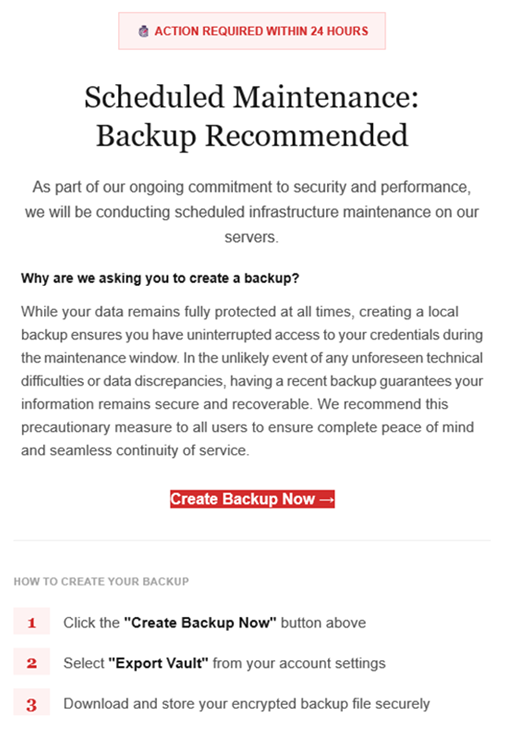
Example phishing email
Image courtesy of LastPass

“Scheduled Maintenance: Backup Recommended

As part of our ongoing commitment to security and performance, we will be conducting scheduled infrastructure maintenance on our servers.
Why are we asking you to create a backup?
While your data remains protected at all times, creating a local backup ensures you have access to your credentials during the maintenance window. In the unlikely event of any unforeseen technical difficulties or data discrepancies, having a recent backup guarantees your information remains secure and recoverable. We recommend this precautionary measure to all users to ensure complete peace of mind and seamless continuity of service.

Create Backup Now (link)

How to create your backup
1 Click the “Create Backup Now” button above
2 Select “Export Vault” from you account settings
3 Download and store your encrypted backup file securely”

The link in the email points to mail-lastpass[.]com, a domain that doesn’t belong to LastPass and has now been taken down.

Note that there are different subject lines in use. Here is a selection:

  • LastPass Infrastructure Update: Secure Your Vault Now
  • Your Data, Your Protection: Create a Backup Before Maintenance
  • Don’t Miss Out: Backup Your Vault Before Maintenance
  • Important: LastPass Maintenance & Your Vault Security
  • Protect Your Passwords: Backup Your Vault (24-Hour Window)

It is imperative for users to ignore instructions in emails like these. Giving away the login details for your password manager can be disastrous. For most users, it would provide access to enough information to carry out identity theft.

Stay safe

First and foremost, it’s important to understand that LastPass will never ask for your master password or demand immediate action under a tight deadline. Generally speaking, there are more guidelines that can help you stay safe.

  • Don’t click on links in unsolicited emails without verifying with the trusted sender that they’re legitimate.
  • Always log in directly on the platform that you are trying to access, rather than through a link.
  • Use a real-time, up-to-date anti-malware solution with a web protection module to block malicious sites.
  • Report phishing emails to the company that’s being impersonated, so they can alert other customers. In this case emails were forwarded to abuse@lastpass.com.

Pro tip: Malwarebytes Scam Guard  would have recognized this email as a scam and advised you how to proceed.


We don’t just report on threats—we help safeguard your entire digital identity

Cybersecurity risks should never spread beyond a headline. Protect your, and your family’s, personal information by using identity protection.

Fake LastPass maintenance emails target users

22 January 2026 at 14:53

The LastPass Threat Intelligence, Mitigation, and Escalation (TIME) team has published a warning about an active phishing campaign in which fake “maintenance” emails pressure users to back up their vaults within 24 hours. The emails lead to credential-stealing phishing sites rather than any legitimate LastPass page.

The phishing campaign that started around January 19, 2026, uses emails that falsely claim upcoming infrastructure maintenance and urge users to “backup your vault in the next 24 hours.”

Example phishing email
Image courtesy of LastPass

“Scheduled Maintenance: Backup Recommended

As part of our ongoing commitment to security and performance, we will be conducting scheduled infrastructure maintenance on our servers.
Why are we asking you to create a backup?
While your data remains protected at all times, creating a local backup ensures you have access to your credentials during the maintenance window. In the unlikely event of any unforeseen technical difficulties or data discrepancies, having a recent backup guarantees your information remains secure and recoverable. We recommend this precautionary measure to all users to ensure complete peace of mind and seamless continuity of service.

Create Backup Now (link)

How to create your backup
1 Click the “Create Backup Now” button above
2 Select “Export Vault” from you account settings
3 Download and store your encrypted backup file securely”

The link in the email points to mail-lastpass[.]com, a domain that doesn’t belong to LastPass and has now been taken down.

Note that there are different subject lines in use. Here is a selection:

  • LastPass Infrastructure Update: Secure Your Vault Now
  • Your Data, Your Protection: Create a Backup Before Maintenance
  • Don’t Miss Out: Backup Your Vault Before Maintenance
  • Important: LastPass Maintenance & Your Vault Security
  • Protect Your Passwords: Backup Your Vault (24-Hour Window)

It is imperative for users to ignore instructions in emails like these. Giving away the login details for your password manager can be disastrous. For most users, it would provide access to enough information to carry out identity theft.

Stay safe

First and foremost, it’s important to understand that LastPass will never ask for your master password or demand immediate action under a tight deadline. Generally speaking, there are more guidelines that can help you stay safe.

  • Don’t click on links in unsolicited emails without verifying with the trusted sender that they’re legitimate.
  • Always log in directly on the platform that you are trying to access, rather than through a link.
  • Use a real-time, up-to-date anti-malware solution with a web protection module to block malicious sites.
  • Report phishing emails to the company that’s being impersonated, so they can alert other customers. In this case emails were forwarded to abuse@lastpass.com.

Pro tip: Malwarebytes Scam Guard  would have recognized this email as a scam and advised you how to proceed.


We don’t just report on threats—we help safeguard your entire digital identity

Cybersecurity risks should never spread beyond a headline. Protect your, and your family’s, personal information by using identity protection.

Dutch police sell fake tickets to show how easily scams work

16 January 2026 at 11:05

If you can’t beat them, copy them. That seems to be the thinking behind an unusual campaign by the Dutch police, who set up a fake ticket website selling tickets that don’t exist.

The website, TicketBewust.nl, invites people to order tickets for events like football matches and concerns. But the offers were never real. The entire site was a deliberate sting, designed to show people how easily ticket fraud works.

The Netherlands’ National Police created the site to warn people about ticket fraud. They worked with the Fraud Helpdesk and online marketplace Marktplaats to run ads promoting “exclusive tickets” for sold-out concerts. If anyone got far enough to try and buy a ticket, the fake site took them to a police webpage explaining that they’d just interacted with a fake online shop.

People fell for these too-good-to-be-true deals—and that’s the most interesting part of this story. Many of us assume we’re far too savvy to fall prey to such online shenanigans, but a surprisingly large number of people do.

More than 300,000 people saw the police ads on Marktplaats between October 30, 2025, and January 11, 2026. Over 30,000 people opened opened it to take a look. 7,402 of them clicked the link to the fake site that was in the ad, and 3,432 people tried to order tickets.

That’s a reminder that online crime works a lot like regular ecommerce. Whether you’re selling real tickets or fake ones, it’s just a numbers game. Only a small percentage of people who see an ad will ever convert—but even a tiny fraction can be lucrative.

In this case, around 1% of people that saw the ad took the bait, but that represents a big profit for scammers. Fake ticket sellers raked in an average of $672 per victim in the US between 2020 and 2024, according to data from the Better Business Bureau (BBB).

Why ticket fraud is so common

Dutch police get around 50,000 online fraud complaints annually, with 10% involving fake tickets. It’s a problem in other countries too, with UK losses to gig ticket scams doubling in 2024 to £1.6 million (around $2.1 million).

Part of the reason fake ticket scams are so effective is that many cases never get reported. Some victims don’t think the loss is significant enough, while others simply don’t want to admit they were tricked. But there’s another, more fundamental reason these scams work so well: the audience is already primed to buy.

People searching for tickets are usually doing so because they don’t want to miss out. Scammers lean hard into that fear of missing out (FOMO), pairing it with scarcity cues like “sold out,” “limited availability,” or time-limited offers. People under emotional pressure from urgency and scarcity tend to do irrational things and take risks they shouldn’t. It’s why people invest erratically or take gambles on dodgy online sales.

How to protect yourself from fake ticket sites

The advice for avoiding shady ticket sellers looks a lot like advice for avoiding scams in general:

  • Watch what you click on social media. Social media accounts for 52% of concert ticket fraud cases, according to the BBB data. Stick to official channels like Ticketmaster, AXS, or the venue’s box office—and double check the URL you’re accessing.
  • Don’t let emotions get the better of you. Ticket sellers target high-demand events because they know people are desperate to attend and might let their guard down. That’s why fake ticket scams spiked after Oasis announced their reunion tour.
  • Don’t be fooled by support lines. Just because they’re on the phone doesn’t mean they’re legit.
  • Never pay via Zelle, Venmo, Cash App, gift cards or crypto. Use credit cards or other payment methods that offer purchase protection.

A little skepticism can go a long way when looking for sought-after tickets. So if you see an online ad offering you the seats of a lifetime, take a minute to research the seller. It could save you hundreds of dollars and a heap of disappointment.


We don’t just report on scams—we help detect them

Cybersecurity risks should never spread beyond a headline. If something looks dodgy to you, check if it’s a scam using Malwarebytes Scam Guard, a feature of our mobile protection products. Submit a screenshot, paste suspicious content, or share a text or phone number, and we’ll tell you if it’s a scam or legit. Download Malwarebytes Mobile Security for iOS or Android and try it today!

Dutch police sell fake tickets to show how easily scams work

16 January 2026 at 11:05

If you can’t beat them, copy them. That seems to be the thinking behind an unusual campaign by the Dutch police, who set up a fake ticket website selling tickets that don’t exist.

The website, TicketBewust.nl, invites people to order tickets for events like football matches and concerns. But the offers were never real. The entire site was a deliberate sting, designed to show people how easily ticket fraud works.

The Netherlands’ National Police created the site to warn people about ticket fraud. They worked with the Fraud Helpdesk and online marketplace Marktplaats to run ads promoting “exclusive tickets” for sold-out concerts. If anyone got far enough to try and buy a ticket, the fake site took them to a police webpage explaining that they’d just interacted with a fake online shop.

People fell for these too-good-to-be-true deals—and that’s the most interesting part of this story. Many of us assume we’re far too savvy to fall prey to such online shenanigans, but a surprisingly large number of people do.

More than 300,000 people saw the police ads on Marktplaats between October 30, 2025, and January 11, 2026. Over 30,000 people opened opened it to take a look. 7,402 of them clicked the link to the fake site that was in the ad, and 3,432 people tried to order tickets.

That’s a reminder that online crime works a lot like regular ecommerce. Whether you’re selling real tickets or fake ones, it’s just a numbers game. Only a small percentage of people who see an ad will ever convert—but even a tiny fraction can be lucrative.

In this case, around 1% of people that saw the ad took the bait, but that represents a big profit for scammers. Fake ticket sellers raked in an average of $672 per victim in the US between 2020 and 2024, according to data from the Better Business Bureau (BBB).

Why ticket fraud is so common

Dutch police get around 50,000 online fraud complaints annually, with 10% involving fake tickets. It’s a problem in other countries too, with UK losses to gig ticket scams doubling in 2024 to £1.6 million (around $2.1 million).

Part of the reason fake ticket scams are so effective is that many cases never get reported. Some victims don’t think the loss is significant enough, while others simply don’t want to admit they were tricked. But there’s another, more fundamental reason these scams work so well: the audience is already primed to buy.

People searching for tickets are usually doing so because they don’t want to miss out. Scammers lean hard into that fear of missing out (FOMO), pairing it with scarcity cues like “sold out,” “limited availability,” or time-limited offers. People under emotional pressure from urgency and scarcity tend to do irrational things and take risks they shouldn’t. It’s why people invest erratically or take gambles on dodgy online sales.

How to protect yourself from fake ticket sites

The advice for avoiding shady ticket sellers looks a lot like advice for avoiding scams in general:

  • Watch what you click on social media. Social media accounts for 52% of concert ticket fraud cases, according to the BBB data. Stick to official channels like Ticketmaster, AXS, or the venue’s box office—and double check the URL you’re accessing.
  • Don’t let emotions get the better of you. Ticket sellers target high-demand events because they know people are desperate to attend and might let their guard down. That’s why fake ticket scams spiked after Oasis announced their reunion tour.
  • Don’t be fooled by support lines. Just because they’re on the phone doesn’t mean they’re legit.
  • Never pay via Zelle, Venmo, Cash App, gift cards or crypto. Use credit cards or other payment methods that offer purchase protection.

A little skepticism can go a long way when looking for sought-after tickets. So if you see an online ad offering you the seats of a lifetime, take a minute to research the seller. It could save you hundreds of dollars and a heap of disappointment.


We don’t just report on scams—we help detect them

Cybersecurity risks should never spread beyond a headline. If something looks dodgy to you, check if it’s a scam using Malwarebytes Scam Guard, a feature of our mobile protection products. Submit a screenshot, paste suspicious content, or share a text or phone number, and we’ll tell you if it’s a scam or legit. Download Malwarebytes Mobile Security for iOS or Android and try it today!

Enshittification is ruining everything online (Lock and Code S07E01)

12 January 2026 at 06:03

This week on the Lock and Code podcast…

There’s a bizarre thing happening online right now where everything is getting worse.

Your Google results have become so bad that you’ve likely typed what you’re looking for, plus the word “Reddit,” so you can find discussion from actual humans. If you didn’t take this route, you might get served AI results from Google Gemini, which once recommended that every person should eat “at least one small rock per day.” Your Amazon results are a slog, filled with products that have surreptitiously paid reviews. Your Facebook feed could be entirely irrelevant because the company decided years ago that you didn’t want to see what your friends posted, you wanted to see what brands posted, because brands pay Facebook, and you don’t, so brands are more important than your friends.

But, according to digital rights activist and award-winning author Cory Doctorow, this wave of online deterioration isn’t an accident—it’s a business strategy, and it can be summed up in a word he coined a couple of years ago: Enshittification.

Enshittification is the process by which an online platform—like Facebook, Google, or Amazon—harms its own services and products for short-term gain while managing to avoid any meaningful consequences, like the loss of customers or the impact of meaningful government regulation. It begins with an online platform treating new users with care, offering services, products, or connectivity that they may not find elsewhere. Then, the platform invites businesses on board that want to sell things to those users. This means businesses become the priority and the everyday user experience is hindered. But then, in the final stage, the platform also makes things worse for its business customers, making things better only for itself.

This is how a company like Amazon went from helping you find nearly anything you wanted to buy online to helping businesses sell you anything you wanted to buy online to making those businesses pay increasingly high fees to even be discovered online. Everyone, from buyers to sellers, is pretty much entrenched in the platform, so Amazon gets to dictate the terms.

Today, on the Lock and Code podcast with host David Ruiz, we speak with Doctorow about enshittification’s fast damage across the internet, how to fight back, and where it all started.

 ”Once these laws were established, the tech companies were able to take advantage of them. And today we have a bunch of companies that aren’t tech companies that are nevertheless using technology to rig the game in ways that the tech companies pioneered.”

Tune in today to listen to the full conversation.

Show notes and credits:

Intro Music: “Spellbound” by Kevin MacLeod (incompetech.com)
Licensed under Creative Commons: By Attribution 4.0 License
http://creativecommons.org/licenses/by/4.0/
Outro Music: “Good God” by Wowa (unminus.com)


Listen up—Malwarebytes doesn’t just talk cybersecurity, we provide it.

Protect yourself from online attacks that threaten your identity, your files, your system, and your financial well-being with our exclusive offer for Malwarebytes Premium Security for Lock and Code listeners.

Enshittification is ruining everything online (Lock and Code S07E01)

12 January 2026 at 06:03

This week on the Lock and Code podcast…

There’s a bizarre thing happening online right now where everything is getting worse.

Your Google results have become so bad that you’ve likely typed what you’re looking for, plus the word “Reddit,” so you can find discussion from actual humans. If you didn’t take this route, you might get served AI results from Google Gemini, which once recommended that every person should eat “at least one small rock per day.” Your Amazon results are a slog, filled with products that have surreptitiously paid reviews. Your Facebook feed could be entirely irrelevant because the company decided years ago that you didn’t want to see what your friends posted, you wanted to see what brands posted, because brands pay Facebook, and you don’t, so brands are more important than your friends.

But, according to digital rights activist and award-winning author Cory Doctorow, this wave of online deterioration isn’t an accident—it’s a business strategy, and it can be summed up in a word he coined a couple of years ago: Enshittification.

Enshittification is the process by which an online platform—like Facebook, Google, or Amazon—harms its own services and products for short-term gain while managing to avoid any meaningful consequences, like the loss of customers or the impact of meaningful government regulation. It begins with an online platform treating new users with care, offering services, products, or connectivity that they may not find elsewhere. Then, the platform invites businesses on board that want to sell things to those users. This means businesses become the priority and the everyday user experience is hindered. But then, in the final stage, the platform also makes things worse for its business customers, making things better only for itself.

This is how a company like Amazon went from helping you find nearly anything you wanted to buy online to helping businesses sell you anything you wanted to buy online to making those businesses pay increasingly high fees to even be discovered online. Everyone, from buyers to sellers, is pretty much entrenched in the platform, so Amazon gets to dictate the terms.

Today, on the Lock and Code podcast with host David Ruiz, we speak with Doctorow about enshittification’s fast damage across the internet, how to fight back, and where it all started.

 ”Once these laws were established, the tech companies were able to take advantage of them. And today we have a bunch of companies that aren’t tech companies that are nevertheless using technology to rig the game in ways that the tech companies pioneered.”

Tune in today to listen to the full conversation.

Show notes and credits:

Intro Music: “Spellbound” by Kevin MacLeod (incompetech.com)
Licensed under Creative Commons: By Attribution 4.0 License
http://creativecommons.org/licenses/by/4.0/
Outro Music: “Good God” by Wowa (unminus.com)


Listen up—Malwarebytes doesn’t just talk cybersecurity, we provide it.

Protect yourself from online attacks that threaten your identity, your files, your system, and your financial well-being with our exclusive offer for Malwarebytes Premium Security for Lock and Code listeners.

Phishing campaign abuses Google Cloud services to steal Microsoft 365 logins

6 January 2026 at 16:01

Attackers are sending very convincing fake “Google” emails that slip past spam filters, route victims through several trusted Google-owned services, and ultimately lead to a look-alike Microsoft 365 sign-in page designed to harvest usernames and passwords.

Researchers found that cybercriminals used Google Cloud Application Integration’s Send Email feature to send phishing emails from a legitimate Google address: noreply-application-integration@google[.]com.

Google Cloud Application Integration allows users to automate business processes by connecting any application with point-and-click configurations. New customers currently receive free credits, which lowers the barrier to entry and may attract some cybercriminals.

The initial email arrives from what looks like a real Google address and references something routine and familiar, such as a voicemail notification, a task to complete, or permissions to access a document. The email includes a link that points to a genuine Google Cloud Storage URL, so the web address appears to belong to Google and doesn’t look like an obvious fake.

After the first click, you are redirected to another Google‑related domain (googleusercontent[.]com) showing a CAPTCHA or image check. Once you pass the “I’m not a robot check,” you land on what looks like a normal Microsoft 365 sign‑in page, but on close inspection, the web address is not an official Microsoft domain.

Any credentials provided on this site will be captured by the attackers.

The use of Google infrastructure provides the phishers with a higher level of trust from both email filters and the receiving users. This is not a vulnerability, just an abuse of cloud-based services that Google provides.

Google’s response

Google said it has taken action against the activity:

“We have blocked several phishing campaigns involving the misuse of an email notification feature within Google Cloud Application Integration. Importantly, this activity stemmed from the abuse of a workflow automation tool, not a compromise of Google’s infrastructure. While we have implemented protections to defend users against this specific attack, we encourage continued caution as malicious actors frequently attempt to spoof trusted brands. We are taking additional steps to prevent further misuse.”

We’ve seen several phishing campaigns that abuse trusted workflows from companies like Google, PayPal, DocuSign, and other cloud-based service providers to lend credibility to phishing emails and redirect targets to their credential-harvesting websites.

How to stay safe

Campaigns like these show that some responsibility for spotting phishing emails still rests with the recipient. Besides staying informed, here are some other tips you can follow to stay safe.

  • Always check the actual web address of any login page; if it’s not a genuine Microsoft domain, do not enter credentials.​ Using a password manager will help because they will not auto-fill your details on fake websites.
  • Be cautious of “urgent” emails about voicemails, document shares, or permissions, even if they appear to come from Google or Microsoft.​ Creating urgency is a common tactic by scammers and phishers.
  • Go directly to the service whenever possible. Instead of clicking links in emails, open OneDrive, Teams, or Outlook using your normal bookmark or app.
  • Use multi‑factor authentication (MFA) so that stolen passwords alone are not enough, and regularly review which apps have access to your account and remove anything you don’t recognize.

Pro tip: Malwarebytes Scam Guard can recognize emails like this as scams. You can upload suspicious text, emails, attachments and other files and ask for its opinion. It’s really very good at recognizing scams.


We don’t just report on scams—we help detect them

Cybersecurity risks should never spread beyond a headline. If something looks dodgy to you, check if it’s a scam using Malwarebytes Scam Guard, a feature of our mobile protection products. Submit a screenshot, paste suspicious content, or share a text or phone number, and we’ll tell you if it’s a scam or legit. Download Malwarebytes Mobile Security for iOS or Android and try it today!

Phishing campaign abuses Google Cloud services to steal Microsoft 365 logins

6 January 2026 at 16:01

Attackers are sending very convincing fake “Google” emails that slip past spam filters, route victims through several trusted Google-owned services, and ultimately lead to a look-alike Microsoft 365 sign-in page designed to harvest usernames and passwords.

Researchers found that cybercriminals used Google Cloud Application Integration’s Send Email feature to send phishing emails from a legitimate Google address: noreply-application-integration@google[.]com.

Google Cloud Application Integration allows users to automate business processes by connecting any application with point-and-click configurations. New customers currently receive free credits, which lowers the barrier to entry and may attract some cybercriminals.

The initial email arrives from what looks like a real Google address and references something routine and familiar, such as a voicemail notification, a task to complete, or permissions to access a document. The email includes a link that points to a genuine Google Cloud Storage URL, so the web address appears to belong to Google and doesn’t look like an obvious fake.

After the first click, you are redirected to another Google‑related domain (googleusercontent[.]com) showing a CAPTCHA or image check. Once you pass the “I’m not a robot check,” you land on what looks like a normal Microsoft 365 sign‑in page, but on close inspection, the web address is not an official Microsoft domain.

Any credentials provided on this site will be captured by the attackers.

The use of Google infrastructure provides the phishers with a higher level of trust from both email filters and the receiving users. This is not a vulnerability, just an abuse of cloud-based services that Google provides.

Google’s response

Google said it has taken action against the activity:

“We have blocked several phishing campaigns involving the misuse of an email notification feature within Google Cloud Application Integration. Importantly, this activity stemmed from the abuse of a workflow automation tool, not a compromise of Google’s infrastructure. While we have implemented protections to defend users against this specific attack, we encourage continued caution as malicious actors frequently attempt to spoof trusted brands. We are taking additional steps to prevent further misuse.”

We’ve seen several phishing campaigns that abuse trusted workflows from companies like Google, PayPal, DocuSign, and other cloud-based service providers to lend credibility to phishing emails and redirect targets to their credential-harvesting websites.

How to stay safe

Campaigns like these show that some responsibility for spotting phishing emails still rests with the recipient. Besides staying informed, here are some other tips you can follow to stay safe.

  • Always check the actual web address of any login page; if it’s not a genuine Microsoft domain, do not enter credentials.​ Using a password manager will help because they will not auto-fill your details on fake websites.
  • Be cautious of “urgent” emails about voicemails, document shares, or permissions, even if they appear to come from Google or Microsoft.​ Creating urgency is a common tactic by scammers and phishers.
  • Go directly to the service whenever possible. Instead of clicking links in emails, open OneDrive, Teams, or Outlook using your normal bookmark or app.
  • Use multi‑factor authentication (MFA) so that stolen passwords alone are not enough, and regularly review which apps have access to your account and remove anything you don’t recognize.

Pro tip: Malwarebytes Scam Guard can recognize emails like this as scams. You can upload suspicious text, emails, attachments and other files and ask for its opinion. It’s really very good at recognizing scams.


We don’t just report on scams—we help detect them

Cybersecurity risks should never spread beyond a headline. If something looks dodgy to you, check if it’s a scam using Malwarebytes Scam Guard, a feature of our mobile protection products. Submit a screenshot, paste suspicious content, or share a text or phone number, and we’ll tell you if it’s a scam or legit. Download Malwarebytes Mobile Security for iOS or Android and try it today!

Telegram Hosting World’s Largest Darknet Market

5 January 2026 at 13:01

Wired is reporting on Chinese darknet markets on Telegram.

The ecosystem of marketplaces for Chinese-speaking crypto scammers hosted on the messaging service Telegram have now grown to be bigger than ever before, according to a new analysis from the crypto tracing firm Elliptic. Despite a brief drop after Telegram banned two of the biggest such markets in early 2025, the two current top markets, known as Tudou Guarantee and Xinbi Guarantee, are together enabling close to $2 billion a month in money-laundering transactions, sales of scam tools like stolen data, fake investment websites, and AI deepfake tools, as well as other black market services as varied as pregnancy surrogacy and teen prostitution.

The crypto romance and investment scams regrettably known as “pig butchering”—carried out largely from compounds in Southeast Asia staffed with thousands of human trafficking victims—have grown to become the world’s most lucrative form of cybercrime. They pull in around $10 billion annually from US victims alone, according to the FBI. By selling money-laundering services and other scam-related offerings to those operations, markets like Tudou Guarantee and Xinbi Guarantee have grown in parallel to an immense scale.

LinkedIn Job Scams

31 December 2025 at 13:03

Interesting article on the variety of LinkedIn job scams around the world:

In India, tech jobs are used as bait because the industry employs millions of people and offers high-paying roles. In Kenya, the recruitment industry is largely unorganized, so scamsters leverage fake personal referrals. In Mexico, bad actors capitalize on the informal nature of the job economy by advertising fake formal roles that carry a promise of security. In Nigeria, scamsters often manage to get LinkedIn users to share their login credentials with the lure of paid work, preying on their desperation amid an especially acute unemployment crisis.

These are scams involving fraudulent employers convincing prospective employees to send them money for various fees. There is an entirely different set of scams involving fraudulent employees getting hired for remote jobs.

Frogblight threatens you with a court case: a new Android banker targets Turkish users

15 December 2025 at 08:00

In August 2025, we discovered a campaign targeting individuals in Turkey with a new Android banking Trojan we dubbed “Frogblight”. Initially, the malware was disguised as an app for accessing court case files via an official government webpage. Later, more universal disguises appeared, such as the Chrome browser.

Frogblight can use official government websites as an intermediary step to steal banking credentials. Moreover, it has spyware functionality, such as capabilities to collect SMS messages, a list of installed apps on the device and device filesystem information. It can also send arbitrary SMS messages.

Another interesting characteristic of Frogblight is that we’ve seen it updated with new features throughout September. This may indicate that a feature-rich malware app for Android is being developed, which might be distributed under the MaaS model.

This threat is detected by Kaspersky products as HEUR:Trojan-Banker.AndroidOS.Frogblight.*, HEUR:Trojan-Banker.AndroidOS.Agent.eq, HEUR:Trojan-Banker.AndroidOS.Agent.ep, HEUR:Trojan-Spy.AndroidOS.SmsThief.de.

Technical details

Background

While performing an analysis of mobile malware we receive from various sources, we discovered several samples belonging to a new malware family. Although these samples appeared to be still under development, they already contained a lot of functionality that allowed this family to be classified as a banking Trojan. As new versions of this malware continued to appear, we began monitoring its development. Moreover, we managed to discover its control panel and based on the “fr0g” name shown there, we dubbed this family “Frogblight”.

Initial infection

We believe that smishing is one of the distribution vectors for Frogblight, and that the users had to install the malware themselves. On the internet, we found complaints from Turkish users about phishing SMS messages convincing users that they were involved in a court case and containing links to download malware. versions of Frogblight, including the very first ones, were disguised as an app for accessing court case files via an official government webpage and were named the same as the files for downloading from the links mentioned above.

While looking for online mentions of the names used by the malware, we discovered one of the phishing websites distributing Frogblight, which disguises itself as a website for viewing a court file.

The phishing website distributing Frogblight

The phishing website distributing Frogblight

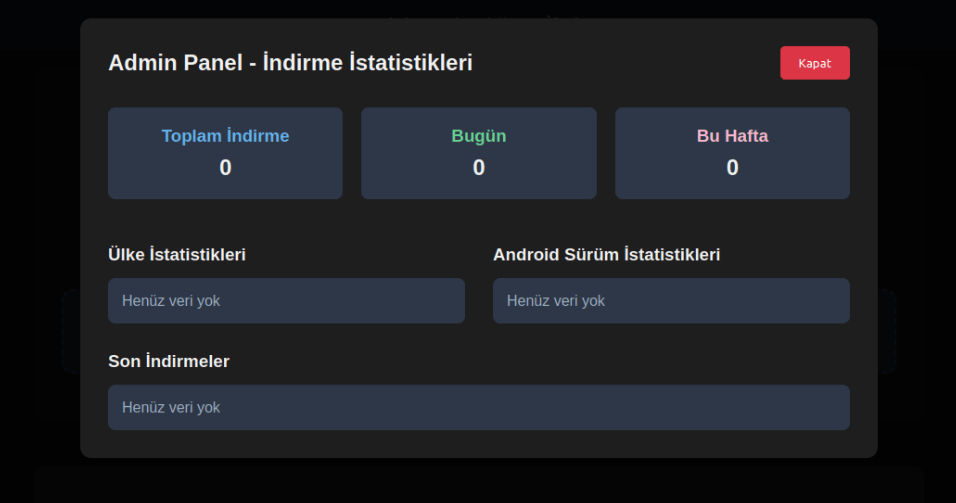
We were able to open the admin panel of this website, where it was possible to view statistics on Frogblight malware downloads. However, the counter had not been fully implemented and the threat actor could only view the statistics for their own downloads.

The admin panel interface of the website from which Frogblight is downloaded

The admin panel interface of the website from which Frogblight is downloaded

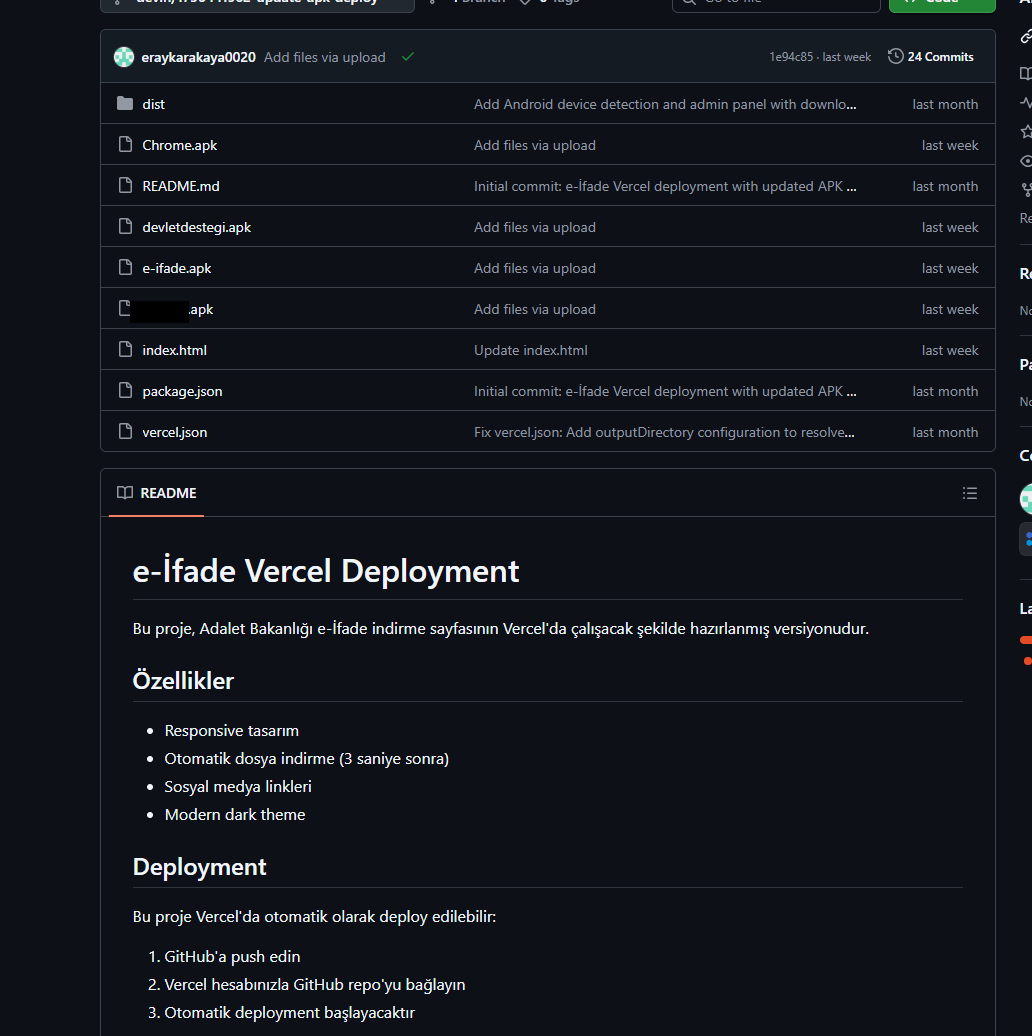
Additionally, we found the source code of this phishing website available in a public GitHub repository. Judging by its description, it is adapted for fast deployment to Vercel, a platform for hosting web apps.

The GitHub repository with the phishing website source code

The GitHub repository with the phishing website source code

App features

As already mentioned, Frogblight was initially disguised as an app for accessing court case files via an official government webpage. Let’s look at one of the samples using this disguise (9dac23203c12abd60d03e3d26d372253). For analysis, we selected an early sample, but not the first one discovered, in order to demonstrate more complete Frogblight functionality.

After starting, the app prompts the victim to grant permissions to send and read SMS messages, and to read from and write to the device’s storage, allegedly needed to show a court file related to the user.

The full list of declared permissions in the app manifest file is shown below:

  • MANAGE_EXTERNAL_STORAGE
  • READ_EXTERNAL_STORAGE
  • WRITE_EXTERNAL_STORAGE
  • READ_SMS
  • RECEIVE_SMS
  • SEND_SMS
  • WRITE_SMS
  • RECEIVE_BOOT_COMPLETED
  • INTERNET
  • QUERY_ALL_PACKAGES
  • BIND_ACCESSIBILITY_SERVICE
  • DISABLE_KEYGUARD
  • FOREGROUND_SERVICE
  • FOREGROUND_SERVICE_DATA_SYNC
  • POST_NOTIFICATIONS
  • QUICKBOOT_POWERON
  • RECEIVE_MMS
  • RECEIVE_WAP_PUSH
  • REQUEST_IGNORE_BATTERY_OPTIMIZATIONS
  • SCHEDULE_EXACT_ALARM
  • USE_EXACT_ALARM
  • VIBRATE
  • WAKE_LOCK
  • ACCESS_NETWORK_STATE
  • READ_PHONE_STATE

After all required permissions are granted, the malware opens the official government webpage for accessing court case files in WebView, prompting the victim to sign in. There are different sign-in options, one of them via online banking. If the user chooses this method, they are prompted to click on a bank whose online banking app they use and fill out the sign-in form on the bank’s official website. This is what Frogblight is after, so it waits two seconds, then opens the online banking sign-in method regardless of the user’s choice. For each webpage that has finished loading in WebView, Frogblight injects JavaScript code allowing it to capture user input and send it to the C2 via a REST API.

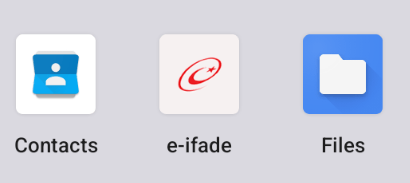
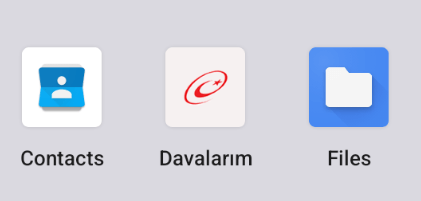
The malware also changes its label to “Davalarım” if the Android version is newer than 12; otherwise it hides the icon.

The app icon before (left) and after launching (right)

The app icon before (left) and after launching (right)

In the sample we review in this section, Frogblight uses a REST API for C2 communication, implemented using the Retrofit library. The malicious app pings the C2 server every two seconds in foreground, and if no error is returned, it calls the REST API client methods fetchOutbox and getFileCommands. Other methods are called when specific events occur, for example, after the device screen is turned on, the com.capcuttup.refresh.PersistentService foreground service is launched, or an SMS is received. The full list of all REST API client methods with parameters and descriptions is shown below.
REST API client method Description Parameters
fetchOutbox Request message content to be sent via SMS or displayed in a notification device_id: unique Android device ID
ackOutbox Send the results of processing a message received after calling the API method fetchOutbox device_id: unique Android device ID
msg_id: message ID
status: message processing status
error: message processing error
getAllPackages Request the names of app packages whose launch should open a website in WebView to capture user input data action: same as the API method name
getPackageUrl Request the website URL that will be opened in WebView when the app with the specified package name is launched action: same as the API method name
package: the package name of the target app
getFileCommands Request commands for file operations

Available commands:
●       download: upload the target file to the C2
●       generate_thumbnails: generate thumbnails from the image files in the target directory and upload them to the C2
●       list: send information about all files in the target directory to the C2
●       thumbnail: generate a thumbnail from the target image file and upload it to the C2

device_id: unique Android device ID
pingDevice Check the C2 connection device_id: unique Android device ID
reportHijackSuccess Send captured user input data from the website opened in a WebView when the app with the specified package name is launched action: same as the API method name
package: the package name of the target app
data: captured user input data
saveAppList Send information about the apps installed on the device device_id: unique Android device ID app_list: a list of apps installed on the device
app_count: a count of apps installed on the device
saveInjection Send captured user input data from the website opened in a WebView. If it was not opened following the launch of the target app, the app_name parameter is determined based on the opened URL device_id: unique Android device ID app_name: the package name of the target app
form_data: captured user input data
savePermission Unused but presumably needed for sending information about permissions device_id: unique Android device ID permission_type: permission type
status: permission status
sendSms Send information about an SMS message from the device device_id: unique Android device ID sender: the sender’s/recipient’s phone number
message: message text
timestamp: received/sent time
type: message type (inbox/sent)
sendTelegramMessage Send captured user input data from the webpages opened by Frogblight in WebView device_id: unique Android device ID
url: website URL
title: website page title
input_type: the type of user input data
input_value: user input data
final_value: user input data with additional information
timestamp: the time of data capture
ip_address: user IP address
sms_permission: whether SMS permission is granted
file_manager_permission: whether file access permission is granted
updateDevice Send information about the device device_id: unique Android device ID
model: device manufacturer and model
android_version: Android version
phone_number: user phone number
battery: current battery level
charging: device charging status
screen_status: screen on/off
ip_address: user IP address
sms_permission: whether SMS permission is granted
file_manager_permission: whether file access permission is granted
updatePermissionStatus Send information about permissions device_id: unique Android device ID
permission_type: permission type
status: permission status
timestamp: current time
uploadBatchThumbnails Upload thumbnails to the C2 device_id: unique Android device ID
thumbnails: thumbnails
uploadFile Upload a file to the C2 device_id: unique Android device ID
file_path: file path
download_id: the file ID on the C2
The file itself is sent as an unnamed parameter
uploadFileList Send information about all files in the target directory device_id: unique Android device ID
path: directory path
file_list: information about the files in the target directory
uploadFileListLog Send information about all files in the target directory to an endpoint different from uploadFileList device_id: unique Android device ID
path: directory path
file_list: information about the files in the target directory
uploadThumbnailLog Unused but presumably needed for uploading thumbnails to an endpoint different from uploadBatchThumbnails device_id: unique Android device ID
thumbnails: thumbnails

Remote device control, persistence, and protection against deletion

The app includes several classes to provide the threat actor with remote access to the infected device, gain persistence, and protect the malicious app from being deleted.

  • capcuttup.refresh.AccessibilityAutoClickService
    This is intended to prevent removal of the app and to open websites specified by the threat actor in WebView upon target apps startup. It is present in the sample we review, but is no longer in use and deleted in further versions.
  • capcuttup.refresh.PersistentService
    This is a service whose main purpose is to interact with the C2 and to make malicious tasks persistent.
  • capcuttup.refresh.BootReceiver
    This is a broadcast receiver responsible for setting up the persistence mechanisms, such as job scheduling and setting alarms, after device boot completion.

Further development

In later versions, new functionality was added, and some of the more recent Frogblight variants disguised themselves as the Chrome browser. Let’s look at one of the fake Chrome samples (d7d15e02a9cd94c8ab00c043aef55aff).

In this sample, new REST API client methods have been added for interacting with the C2.

REST API client method Description Parameters
getContactCommands Get commands to perform actions with contacts
Available commands:
●       ADD_CONTACT: add a contact to the user device
●       DELETE_CONTACT: delete a contact from the user device
●       EDIT_CONTACT: edit a contact on the user device
device_id: unique Android device ID
sendCallLogs Send call logs to the C2 device_id: unique Android device ID
call_logs: call log data
sendNotificationLogs Send notifications log to the C2. Not fully implemented in this sample, and as of the time of writing this report, we hadn’t seen any samples with a full-fledged implementation of this API method action: same as the API method name
notifications: notification log data

Also, the threat actor had implemented a custom input method for recording keystrokes to a file using the com.puzzlesnap.quickgame.CustomKeyboardService service.

Another Frogblight sample we observed trying to avoid emulators and using geofencing techniques is 115fbdc312edd4696d6330a62c181f35. In this sample, Frogblight checks the environment (for example, device model) and shuts down if it detects an emulator or if the device is located in the United States.

Part of the code responsible for avoiding Frogblight running in an undesirable environment

Part of the code responsible for avoiding Frogblight running in an undesirable environment

Later on, the threat actor decided to start using a web socket instead of the REST API. Let’s see an example of this in one of the recent samples (08a3b1fb2d1abbdbdd60feb8411a12c7). This sample is disguised as an app for receiving social support via an official government webpage. The feature set of this sample is very similar to the previous ones, with several new capabilities added. Commands are transmitted over a web socket using the JSON format. A command template is shown below:

{
    "id": <command ID>,
    "command_type": <command name>
    "command_data": <command data>
}

It is also worth noting that some commands in this version share the same meaning but have different structures, and the functionality of certain commands has not been fully implemented yet. This indicates that Frogblight was under active development at the time of our research, and since no its activity was noticed after September, it is possible that the malware is being finalized to a fully operational state before continuing to infect users’ devices. A full list of commands with their parameters and description is shown below:

Command Description Parameters
connect Send a registration message to the C2
connection_success Send various information, such as call logs, to the C2; start pinging the C2 and requesting commands
auth_error Log info about an invalid login key to the Android log system
pong_device Does nothing
commands_list Execute commands List of commands
sms_send_command Send an arbitrary SMS message recipient: message destination
message: message text
msg_id: message ID
bulk_sms_command Send an arbitrary SMS message to multiple recipients recipients: message destinations
message: message text
get_contacts_command Send all contacts to the C2
get_app_list_command Send information about the apps installed on the device to the C2
get_files_command Send information about all files in certain directories to the C2
get_call_logs_command Send call logs to the C2
get_notifications_command Send a notifications log to the C2. This is not fully implemented in the sample at hand, and as of the time of writing this report, we hadn’t seen any samples with a full-fledged implementation of this command
take_screenshot_command Take a screenshot. This is not fully implemented in the sample at hand, and as of the time of writing this report, we hadn’t seen any samples with a full-fledged implementation of this command
update_device Send registration message to the C2
new_webview_data Collect WebView data. This is not fully implemented in the sample at hand, and as of the time of writing this report, we hadn’t seen any samples with a full-fledged implementation of this command
new_injection Inject code. This is not fully implemented in the sample at hand, and as of the time of writing this report, we hadn’t seen any samples with a full-fledged implementation of this command code: injected code
target_app: presumably the package name of the target app
add_contact_command Add a contact to the user device name: contact name
phone: contact phone
email: contact email
contact_add Add a contact to the user device display_name: contact name
phone_number: contact phone
email: contact email
contact_delete Delete a contact from the user device phone_number: contact phone
contact_edit Edit a contact on the user device display_name: new contact name
phone_number: contact phone
email: new contact email
contact_list Send all contacts to the C2
file_list Send information about all files in the specified directory to the C2 path: directory path
file_download Upload the specified file to the C2 file_path: file path
download_id: an ID that is received with the command and sent back to the C2 along with the requested file. Most likely, this is used to organize data on the C2
file_thumbnail Generate a thumbnail from the target image file and upload it to the C2 file_path: image file path
file_thumbnails Generate thumbnails from the image files in the target directory and upload them to the C2 folder_path: directory path
health_check Send information about the current device state: battery level, screen state, and so on
message_list_request Send all SMS messages to the C2
notification_send Show an arbitrary notification title: notification title
message: notification message
app_name: notification subtext
package_list_response Save the target package names packages: a list of all target package names.
Each list element contains:
package_name: target package name
active: whether targeting is active
delete_contact_command Delete a contact from the user device. This is not fully implemented in the sample at hand, and as of the time of writing this report, we hadn’t seen any samples with a full-fledged implementation of this command contact_id: contact ID
name: contact name
file_upload_command Upload specified file to the C2. This is not fully implemented in the sample at hand, and as of the time of writing this report, we hadn’t seen any samples with a full-fledged implementation of this command file_path: file path
file_name: file name
file_download_command Download file to user device. This is not fully implemented in the sample at hand, and as of the time of writing this report, we hadn’t seen any samples with a full-fledged implementation of this command file_url: the URL of the file to download
download_path: download path
download_file_command Download file to user device. This is not fully implemented in the sample at hand, and as of the time of writing this report, we hadn’t seen any samples with a full-fledged implementation of this command file_url: the URL of the file to download
download_path: downloading path
get_permissions_command Send a registration message to the C2, including info about specific permissions
health_check_command Send information about the current device state, such as battery level, screen state, and so on
connect_error Log info about connection errors to the Android log system A list of errors
reconnect Send a registration message to the C2
disconnect Stop pinging the C2 and requesting commands from it

Authentication via WebSocket takes place using a special key.

The part of the code responsible for the WebSocket authentication logic

The part of the code responsible for the WebSocket authentication logic

At the IP address to which the WebSocket connection was made, the Frogblight web panel was accessible, which accepted the authentication key mentioned above. Since only samples using the same key as the webpanel login are controllable through it, we suggest that Frogblight might be distributed under the MaaS model.

The interface of the sign-in screen for the Frogblight web panel

The interface of the sign-in screen for the Frogblight web panel

Judging by the menu options, the threat actor can sort victims’ devices by certain parameters, such as the presence of banking apps on the device, and send bulk SMS messages and perform other mass actions.

Victims

Since some versions of Frogblight opened the Turkish government webpage to collect user-entered data on Turkish banks’ websites, we assume with high confidence that it is aimed mainly at users from Turkey. Also, based on our telemetry, the majority of users attacked by Frogblight are located in that country.

Attribution

Even though it is not possible to provide an attribution to any known threat actor based on the information available, during our analysis of the Frogblight Android malware and the search for online mentions of the names it uses, we discovered a GitHub profile containing repos with Frogblight, which had also created repos with Coper malware, distributed under the MaaS model. It is possible that this profile belongs to the attackers distributing Coper who have also started distributing Frogblight.

GitHub repositories containing Frogblight and Coper malware

GitHub repositories containing Frogblight and Coper malware

Also, since the comments in the Frogblight code are written in Turkish, we believe that its developers speak this language.

Conclusions

The new Android malware we dubbed “Frogblight” appeared recently and targets mainly users from Turkey. This is an advanced banking Trojan aimed at stealing money. It has already infected real users’ devices, and it doesn’t stop there, adding more and more new features in the new versions that appear. It can be made more dangerous by the fact that it may be used by attackers who already have experience distributing malware. We will continue to monitor its development.

Indicators of Compromise

More indicators of compromise, as well as any updates to these, are available to the customers of our crimeware reporting service. If you are interested, please contact crimewareintel@kaspersky.com.

APK file hashes
8483037dcbf14ad8197e7b23b04aea34
105fa36e6f97977587a8298abc31282a
e1cd59ae3995309627b6ab3ae8071e80
115fbdc312edd4696d6330a62c181f35
08a3b1fb2d1abbdbdd60feb8411a12c7
d7d15e02a9cd94c8ab00c043aef55aff
9dac23203c12abd60d03e3d26d372253

C2 domains
1249124fr1241og5121.sa[.]com
froglive[.]net

C2 IPs
45.138.16.208[:]8080

URL of GitHub repository with Frogblight phishing website source code
https://github[.]com/eraykarakaya0020/e-ifade-vercel

URL of GitHub account containing APK files of Frogblight and Coper
https://github[.]com/Chromeapk

Distribution URLs
https://farketmez37[.]cfd/e-ifade.apk
https://farketmez36[.]sbs/e-ifade.apk
https://e-ifade-app-5gheb8jc.devinapps[.]com/e-ifade.apk

Frogblight threatens you with a court case: a new Android banker targets Turkish users

15 December 2025 at 08:00

In August 2025, we discovered a campaign targeting individuals in Turkey with a new Android banking Trojan we dubbed “Frogblight”. Initially, the malware was disguised as an app for accessing court case files via an official government webpage. Later, more universal disguises appeared, such as the Chrome browser.

Frogblight can use official government websites as an intermediary step to steal banking credentials. Moreover, it has spyware functionality, such as capabilities to collect SMS messages, a list of installed apps on the device and device filesystem information. It can also send arbitrary SMS messages.

Another interesting characteristic of Frogblight is that we’ve seen it updated with new features throughout September. This may indicate that a feature-rich malware app for Android is being developed, which might be distributed under the MaaS model.

This threat is detected by Kaspersky products as HEUR:Trojan-Banker.AndroidOS.Frogblight.*, HEUR:Trojan-Banker.AndroidOS.Agent.eq, HEUR:Trojan-Banker.AndroidOS.Agent.ep, HEUR:Trojan-Spy.AndroidOS.SmsThief.de.

Technical details

Background

While performing an analysis of mobile malware we receive from various sources, we discovered several samples belonging to a new malware family. Although these samples appeared to be still under development, they already contained a lot of functionality that allowed this family to be classified as a banking Trojan. As new versions of this malware continued to appear, we began monitoring its development. Moreover, we managed to discover its control panel and based on the “fr0g” name shown there, we dubbed this family “Frogblight”.

Initial infection

We believe that smishing is one of the distribution vectors for Frogblight, and that the users had to install the malware themselves. On the internet, we found complaints from Turkish users about phishing SMS messages convincing users that they were involved in a court case and containing links to download malware. versions of Frogblight, including the very first ones, were disguised as an app for accessing court case files via an official government webpage and were named the same as the files for downloading from the links mentioned above.

While looking for online mentions of the names used by the malware, we discovered one of the phishing websites distributing Frogblight, which disguises itself as a website for viewing a court file.

The phishing website distributing Frogblight

The phishing website distributing Frogblight

We were able to open the admin panel of this website, where it was possible to view statistics on Frogblight malware downloads. However, the counter had not been fully implemented and the threat actor could only view the statistics for their own downloads.

The admin panel interface of the website from which Frogblight is downloaded

The admin panel interface of the website from which Frogblight is downloaded

Additionally, we found the source code of this phishing website available in a public GitHub repository. Judging by its description, it is adapted for fast deployment to Vercel, a platform for hosting web apps.

The GitHub repository with the phishing website source code

The GitHub repository with the phishing website source code

App features

As already mentioned, Frogblight was initially disguised as an app for accessing court case files via an official government webpage. Let’s look at one of the samples using this disguise (9dac23203c12abd60d03e3d26d372253). For analysis, we selected an early sample, but not the first one discovered, in order to demonstrate more complete Frogblight functionality.

After starting, the app prompts the victim to grant permissions to send and read SMS messages, and to read from and write to the device’s storage, allegedly needed to show a court file related to the user.

The full list of declared permissions in the app manifest file is shown below:

  • MANAGE_EXTERNAL_STORAGE
  • READ_EXTERNAL_STORAGE
  • WRITE_EXTERNAL_STORAGE
  • READ_SMS
  • RECEIVE_SMS
  • SEND_SMS
  • WRITE_SMS
  • RECEIVE_BOOT_COMPLETED
  • INTERNET
  • QUERY_ALL_PACKAGES
  • BIND_ACCESSIBILITY_SERVICE
  • DISABLE_KEYGUARD
  • FOREGROUND_SERVICE
  • FOREGROUND_SERVICE_DATA_SYNC
  • POST_NOTIFICATIONS
  • QUICKBOOT_POWERON
  • RECEIVE_MMS
  • RECEIVE_WAP_PUSH
  • REQUEST_IGNORE_BATTERY_OPTIMIZATIONS
  • SCHEDULE_EXACT_ALARM
  • USE_EXACT_ALARM
  • VIBRATE
  • WAKE_LOCK
  • ACCESS_NETWORK_STATE
  • READ_PHONE_STATE

After all required permissions are granted, the malware opens the official government webpage for accessing court case files in WebView, prompting the victim to sign in. There are different sign-in options, one of them via online banking. If the user chooses this method, they are prompted to click on a bank whose online banking app they use and fill out the sign-in form on the bank’s official website. This is what Frogblight is after, so it waits two seconds, then opens the online banking sign-in method regardless of the user’s choice. For each webpage that has finished loading in WebView, Frogblight injects JavaScript code allowing it to capture user input and send it to the C2 via a REST API.

The malware also changes its label to “Davalarım” if the Android version is newer than 12; otherwise it hides the icon.

The app icon before (left) and after launching (right)

The app icon before (left) and after launching (right)

In the sample we review in this section, Frogblight uses a REST API for C2 communication, implemented using the Retrofit library. The malicious app pings the C2 server every two seconds in foreground, and if no error is returned, it calls the REST API client methods fetchOutbox and getFileCommands. Other methods are called when specific events occur, for example, after the device screen is turned on, the com.capcuttup.refresh.PersistentService foreground service is launched, or an SMS is received. The full list of all REST API client methods with parameters and descriptions is shown below.
REST API client method Description Parameters
fetchOutbox Request message content to be sent via SMS or displayed in a notification device_id: unique Android device ID
ackOutbox Send the results of processing a message received after calling the API method fetchOutbox device_id: unique Android device ID
msg_id: message ID
status: message processing status
error: message processing error
getAllPackages Request the names of app packages whose launch should open a website in WebView to capture user input data action: same as the API method name
getPackageUrl Request the website URL that will be opened in WebView when the app with the specified package name is launched action: same as the API method name
package: the package name of the target app
getFileCommands Request commands for file operations

Available commands:
●       download: upload the target file to the C2
●       generate_thumbnails: generate thumbnails from the image files in the target directory and upload them to the C2
●       list: send information about all files in the target directory to the C2
●       thumbnail: generate a thumbnail from the target image file and upload it to the C2

device_id: unique Android device ID
pingDevice Check the C2 connection device_id: unique Android device ID
reportHijackSuccess Send captured user input data from the website opened in a WebView when the app with the specified package name is launched action: same as the API method name
package: the package name of the target app
data: captured user input data
saveAppList Send information about the apps installed on the device device_id: unique Android device ID app_list: a list of apps installed on the device
app_count: a count of apps installed on the device
saveInjection Send captured user input data from the website opened in a WebView. If it was not opened following the launch of the target app, the app_name parameter is determined based on the opened URL device_id: unique Android device ID app_name: the package name of the target app
form_data: captured user input data
savePermission Unused but presumably needed for sending information about permissions device_id: unique Android device ID permission_type: permission type
status: permission status
sendSms Send information about an SMS message from the device device_id: unique Android device ID sender: the sender’s/recipient’s phone number
message: message text
timestamp: received/sent time
type: message type (inbox/sent)
sendTelegramMessage Send captured user input data from the webpages opened by Frogblight in WebView device_id: unique Android device ID
url: website URL
title: website page title
input_type: the type of user input data
input_value: user input data
final_value: user input data with additional information
timestamp: the time of data capture
ip_address: user IP address
sms_permission: whether SMS permission is granted
file_manager_permission: whether file access permission is granted
updateDevice Send information about the device device_id: unique Android device ID
model: device manufacturer and model
android_version: Android version
phone_number: user phone number
battery: current battery level
charging: device charging status
screen_status: screen on/off
ip_address: user IP address
sms_permission: whether SMS permission is granted
file_manager_permission: whether file access permission is granted
updatePermissionStatus Send information about permissions device_id: unique Android device ID
permission_type: permission type
status: permission status
timestamp: current time
uploadBatchThumbnails Upload thumbnails to the C2 device_id: unique Android device ID
thumbnails: thumbnails
uploadFile Upload a file to the C2 device_id: unique Android device ID
file_path: file path
download_id: the file ID on the C2
The file itself is sent as an unnamed parameter
uploadFileList Send information about all files in the target directory device_id: unique Android device ID
path: directory path
file_list: information about the files in the target directory
uploadFileListLog Send information about all files in the target directory to an endpoint different from uploadFileList device_id: unique Android device ID
path: directory path
file_list: information about the files in the target directory
uploadThumbnailLog Unused but presumably needed for uploading thumbnails to an endpoint different from uploadBatchThumbnails device_id: unique Android device ID
thumbnails: thumbnails

Remote device control, persistence, and protection against deletion

The app includes several classes to provide the threat actor with remote access to the infected device, gain persistence, and protect the malicious app from being deleted.

  • capcuttup.refresh.AccessibilityAutoClickService
    This is intended to prevent removal of the app and to open websites specified by the threat actor in WebView upon target apps startup. It is present in the sample we review, but is no longer in use and deleted in further versions.
  • capcuttup.refresh.PersistentService
    This is a service whose main purpose is to interact with the C2 and to make malicious tasks persistent.
  • capcuttup.refresh.BootReceiver
    This is a broadcast receiver responsible for setting up the persistence mechanisms, such as job scheduling and setting alarms, after device boot completion.

Further development

In later versions, new functionality was added, and some of the more recent Frogblight variants disguised themselves as the Chrome browser. Let’s look at one of the fake Chrome samples (d7d15e02a9cd94c8ab00c043aef55aff).

In this sample, new REST API client methods have been added for interacting with the C2.

REST API client method Description Parameters
getContactCommands Get commands to perform actions with contacts
Available commands:
●       ADD_CONTACT: add a contact to the user device
●       DELETE_CONTACT: delete a contact from the user device
●       EDIT_CONTACT: edit a contact on the user device
device_id: unique Android device ID
sendCallLogs Send call logs to the C2 device_id: unique Android device ID
call_logs: call log data
sendNotificationLogs Send notifications log to the C2. Not fully implemented in this sample, and as of the time of writing this report, we hadn’t seen any samples with a full-fledged implementation of this API method action: same as the API method name
notifications: notification log data

Also, the threat actor had implemented a custom input method for recording keystrokes to a file using the com.puzzlesnap.quickgame.CustomKeyboardService service.

Another Frogblight sample we observed trying to avoid emulators and using geofencing techniques is 115fbdc312edd4696d6330a62c181f35. In this sample, Frogblight checks the environment (for example, device model) and shuts down if it detects an emulator or if the device is located in the United States.

Part of the code responsible for avoiding Frogblight running in an undesirable environment

Part of the code responsible for avoiding Frogblight running in an undesirable environment

Later on, the threat actor decided to start using a web socket instead of the REST API. Let’s see an example of this in one of the recent samples (08a3b1fb2d1abbdbdd60feb8411a12c7). This sample is disguised as an app for receiving social support via an official government webpage. The feature set of this sample is very similar to the previous ones, with several new capabilities added. Commands are transmitted over a web socket using the JSON format. A command template is shown below:

{
    "id": <command ID>,
    "command_type": <command name>
    "command_data": <command data>
}

It is also worth noting that some commands in this version share the same meaning but have different structures, and the functionality of certain commands has not been fully implemented yet. This indicates that Frogblight was under active development at the time of our research, and since no its activity was noticed after September, it is possible that the malware is being finalized to a fully operational state before continuing to infect users’ devices. A full list of commands with their parameters and description is shown below:

Command Description Parameters
connect Send a registration message to the C2
connection_success Send various information, such as call logs, to the C2; start pinging the C2 and requesting commands
auth_error Log info about an invalid login key to the Android log system
pong_device Does nothing
commands_list Execute commands List of commands
sms_send_command Send an arbitrary SMS message recipient: message destination
message: message text
msg_id: message ID
bulk_sms_command Send an arbitrary SMS message to multiple recipients recipients: message destinations
message: message text
get_contacts_command Send all contacts to the C2
get_app_list_command Send information about the apps installed on the device to the C2
get_files_command Send information about all files in certain directories to the C2
get_call_logs_command Send call logs to the C2
get_notifications_command Send a notifications log to the C2. This is not fully implemented in the sample at hand, and as of the time of writing this report, we hadn’t seen any samples with a full-fledged implementation of this command
take_screenshot_command Take a screenshot. This is not fully implemented in the sample at hand, and as of the time of writing this report, we hadn’t seen any samples with a full-fledged implementation of this command
update_device Send registration message to the C2
new_webview_data Collect WebView data. This is not fully implemented in the sample at hand, and as of the time of writing this report, we hadn’t seen any samples with a full-fledged implementation of this command
new_injection Inject code. This is not fully implemented in the sample at hand, and as of the time of writing this report, we hadn’t seen any samples with a full-fledged implementation of this command code: injected code
target_app: presumably the package name of the target app
add_contact_command Add a contact to the user device name: contact name
phone: contact phone
email: contact email
contact_add Add a contact to the user device display_name: contact name
phone_number: contact phone
email: contact email
contact_delete Delete a contact from the user device phone_number: contact phone
contact_edit Edit a contact on the user device display_name: new contact name
phone_number: contact phone
email: new contact email
contact_list Send all contacts to the C2
file_list Send information about all files in the specified directory to the C2 path: directory path
file_download Upload the specified file to the C2 file_path: file path
download_id: an ID that is received with the command and sent back to the C2 along with the requested file. Most likely, this is used to organize data on the C2
file_thumbnail Generate a thumbnail from the target image file and upload it to the C2 file_path: image file path
file_thumbnails Generate thumbnails from the image files in the target directory and upload them to the C2 folder_path: directory path
health_check Send information about the current device state: battery level, screen state, and so on
message_list_request Send all SMS messages to the C2
notification_send Show an arbitrary notification title: notification title
message: notification message
app_name: notification subtext
package_list_response Save the target package names packages: a list of all target package names.
Each list element contains:
package_name: target package name
active: whether targeting is active
delete_contact_command Delete a contact from the user device. This is not fully implemented in the sample at hand, and as of the time of writing this report, we hadn’t seen any samples with a full-fledged implementation of this command contact_id: contact ID
name: contact name
file_upload_command Upload specified file to the C2. This is not fully implemented in the sample at hand, and as of the time of writing this report, we hadn’t seen any samples with a full-fledged implementation of this command file_path: file path
file_name: file name
file_download_command Download file to user device. This is not fully implemented in the sample at hand, and as of the time of writing this report, we hadn’t seen any samples with a full-fledged implementation of this command file_url: the URL of the file to download
download_path: download path
download_file_command Download file to user device. This is not fully implemented in the sample at hand, and as of the time of writing this report, we hadn’t seen any samples with a full-fledged implementation of this command file_url: the URL of the file to download
download_path: downloading path
get_permissions_command Send a registration message to the C2, including info about specific permissions
health_check_command Send information about the current device state, such as battery level, screen state, and so on
connect_error Log info about connection errors to the Android log system A list of errors
reconnect Send a registration message to the C2
disconnect Stop pinging the C2 and requesting commands from it

Authentication via WebSocket takes place using a special key.

The part of the code responsible for the WebSocket authentication logic

The part of the code responsible for the WebSocket authentication logic

At the IP address to which the WebSocket connection was made, the Frogblight web panel was accessible, which accepted the authentication key mentioned above. Since only samples using the same key as the webpanel login are controllable through it, we suggest that Frogblight might be distributed under the MaaS model.

The interface of the sign-in screen for the Frogblight web panel

The interface of the sign-in screen for the Frogblight web panel

Judging by the menu options, the threat actor can sort victims’ devices by certain parameters, such as the presence of banking apps on the device, and send bulk SMS messages and perform other mass actions.

Victims

Since some versions of Frogblight opened the Turkish government webpage to collect user-entered data on Turkish banks’ websites, we assume with high confidence that it is aimed mainly at users from Turkey. Also, based on our telemetry, the majority of users attacked by Frogblight are located in that country.

Attribution

Even though it is not possible to provide an attribution to any known threat actor based on the information available, during our analysis of the Frogblight Android malware and the search for online mentions of the names it uses, we discovered a GitHub profile containing repos with Frogblight, which had also created repos with Coper malware, distributed under the MaaS model. It is possible that this profile belongs to the attackers distributing Coper who have also started distributing Frogblight.

GitHub repositories containing Frogblight and Coper malware

GitHub repositories containing Frogblight and Coper malware

Also, since the comments in the Frogblight code are written in Turkish, we believe that its developers speak this language.

Conclusions

The new Android malware we dubbed “Frogblight” appeared recently and targets mainly users from Turkey. This is an advanced banking Trojan aimed at stealing money. It has already infected real users’ devices, and it doesn’t stop there, adding more and more new features in the new versions that appear. It can be made more dangerous by the fact that it may be used by attackers who already have experience distributing malware. We will continue to monitor its development.

Indicators of Compromise

More indicators of compromise, as well as any updates to these, are available to the customers of our crimeware reporting service. If you are interested, please contact crimewareintel@kaspersky.com.

APK file hashes
8483037dcbf14ad8197e7b23b04aea34
105fa36e6f97977587a8298abc31282a
e1cd59ae3995309627b6ab3ae8071e80
115fbdc312edd4696d6330a62c181f35
08a3b1fb2d1abbdbdd60feb8411a12c7
d7d15e02a9cd94c8ab00c043aef55aff
9dac23203c12abd60d03e3d26d372253

C2 domains
1249124fr1241og5121.sa[.]com
froglive[.]net

C2 IPs
45.138.16.208[:]8080

URL of GitHub repository with Frogblight phishing website source code
https://github[.]com/eraykarakaya0020/e-ifade-vercel

URL of GitHub account containing APK files of Frogblight and Coper
https://github[.]com/Chromeapk

Distribution URLs
https://farketmez37[.]cfd/e-ifade.apk
https://farketmez36[.]sbs/e-ifade.apk
https://e-ifade-app-5gheb8jc.devinapps[.]com/e-ifade.apk

Breach of 120 000 IP cameras in South Korea: security tips | Kaspersky official blog

11 December 2025 at 16:15

South Korean law enforcement has arrested four suspects linked to the breach of approximately 120 000 IP cameras installed in private homes and commercial spaces — including karaoke lounges, pilates studios, and a gynecology clinic. Two of the hackers sold sexually explicit footage from the cameras through a foreign adult website. In this post, we explain what IP cameras are, and where their vulnerabilities lie. We also dive into the details of the South Korea incident and share practical advice on how to avoid becoming a target for attackers hunting for intimate video content.

How do IP cameras work?

An IP camera is a video camera connected to the internet via the Internet Protocol (IP), which lets you view its feed remotely on a smartphone or computer. Unlike traditional CCTV surveillance systems, these cameras don’t require a local surveillance hub — like you see in the movies — or even a dedicated computer to be plugged into. An IP camera streams video directly in real time to any device that connects to it over the internet. Most of today’s IP camera manufacturers also offer optional cloud storage plans, letting you access recorded footage from anywhere in the world.

In recent years, IP cameras have surged in popularity to become ubiquitous, serving a wide range of purposes — from monitoring kids and pets at home to securing warehouses, offices, short-term rental apartments (often illegally), and small businesses. Basic models can be picked up online for as little as US$25–40.

A typical budget-friendly IP camera offered for sale

You can find a Full HD IP camera on an online marketplace for under US$25 — affordable prices have made them incredibly popular for both home and small business use

One of the defining features of IP cameras is that they’re originally designed for remote access. The camera connects to the internet and silently accepts incoming connections — ready to stream video to anyone who knows its address and has the password. And this leads to two common problems with these devices.

  1. Default passwords. IP camera owners often keep the simple default usernames and passwords that come preconfigured on the device.
  2. Vulnerabilities in outdated software. Software updates for cameras often require manual intervention: you need to log in to the administration interface, check for an update, and install it yourself. Many users simply skip this altogether. Worse, updates might not even exist — many camera vendors ignore security and drop support right after the sale.

What happened in South Korea?

Let’s rewind to what unfolded this fall in South Korea. Law-enforcement authorities reported a breach of roughly 120 000 IP cameras, and the arrest of four suspects in connection with the attacks. Here’s what we know about each of them.

  • Suspect 1, unemployed, hacked approximately 63 000 IP cameras, producing and later selling 545 sexually explicit videos for a total of 35 million South Korean won, or just under US$24 000.
  • Suspect 2, an office worker, compromised around 70 000 IP cameras and sold 648 illicit sexual videos for 18 million won (about US$12 000).
  • Suspect 3, self-employed, hacked 15 000 IP cameras and created illegal content, including footage involving minors. So far, there’s no information suggesting this individual sold any material.
  • Suspect 4, an office worker, appears to have breached only 136 IP cameras, and isn’t accused of producing or selling illegal content.

The astute reader may have noticed the numbers don’t quite add up — the figures above totaling well over 120 000. South Korean law enforcement hasn’t provided a clear explanation for this discrepancy. Journalists speculate that some of the devices may have been compromised by multiple attackers.

The investigation has revealed that only two of the accused actually sold the sexual content they’d stolen. However, the scale of their operation is staggering. Last year, the website hosting voyeurism and sexual exploitation content — which both perpetrators used to sell their videos — received 62% of its uploads from just these two individuals. In essence, this video enthusiast duo supplied the majority of the platform’s illegal content. It’s also been reported that three buyers of these videos were detained.

South Korean investigators were able to identify 58 specific locations of the hacked cameras. They’ve notified the victims and provided guidance on changing the passwords to secure their IP cameras. This suggests — although the investigators haven’t disclosed any details about the method of compromise — that the attackers used brute-forcing to crack the cameras’ simple passwords.

Another possibility is that the camera owners, as is often the case, simply never changed the default usernames and passwords. These default credentials are frequently widely known, so it’s entirely plausible that to gain access the attackers only needed to know the camera’s IP address and try a handful of common username and password combinations.

How to avoid becoming a victim of voyeur hackers

The takeaways from this whole South Korean dorama drama are straight from our playbook:

  • Always replace the factory-set credentials with your own logins and passwords.
  • Never use weak or common passwords — even for seemingly harmless accounts or gadgets. You don’t have to work at the Louvre to be a target. You never know which credentials attackers will try to crack, or where that initial breach might lead them.
  • Always set unique passwords. If you reuse passwords, a single data leak from one service can put all your other accounts at risk.

These rules are universal: they apply just as much to your social media and banking accounts as they do to your robot vacuums, IP cameras, and every other smart device in your home.

To keep all those unique passwords organized without losing your mind, we strongly recommend a reliable password manager. Kaspersky Password Manager can both store all your credentials securely and generate truly random, complex, and uncrackable passwords for you. With it, you can be confident that no one will guess the passwords to your accounts or devices. Plus, it helps you generate one-time codes for two-factor authentication, save and autofill passkeys, and sync your sensitive data — not just logins and passwords, but also bank card details, documents, and even private photos — in encrypted form across all your devices.

Wondering if a hidden camera is filming you? Read more in our posts:

❌