Normal view

Scams in messengers: exposing the global scam-cartels exploiting everyday messagesng-heist | Kaspersky official blog

1 June 2026 at 09:00

It starts with the familiar: a short message, a trusted name, a routine tone. Delivery updates, work pings, brand alerts hum in the background, rarely attracting scrutiny. You check, you answer… — until minutes later you’ve slipped into a trap built to lower your guard and hijack your trust.

That’s why messaging scams cut deep: they exploit everyday habits where instinct, not caution, leads. Communication once moved slowly, leaving room for doubt. Now it’s instant — and that speed is a weapon in criminal hands.

On our blog, we’ve already examined numerous scam schemes in messaging apps — from pig butchering, where the victim is groomed for a very long time, or catfishing, where the scammer creates a fake identity, to phishing via chatbots or through gift-giving campaigns in messaging apps.

Now, for the first time, Kaspersky has set out to capture the full end-to-end reality of messaging-based scams to understand how quickly harm occurs, how they impact trust and what remains after the interaction ends. What emerges is a highly organized and industrialized scam ecosystem embedded within everyday messaging channels such as SMS, WhatsApp, and email.

Kaspersky experts have prepared a report on targeted scams in messaging apps, detailing not only the financial but also the emotional damage caused by such attacks, as well as providing tips on how to protect yourself and avoid them. In this post, we explore the most interesting facts, but you can find more details in the full report.

The damage is underestimated

How much do you think a single successful attack via a messaging app costs the average victim? Ten dollars? Or maybe 50? You’re underestimating the scammers. Although more than a third (36%) of victims incur losses of less than $135, on average a victim loses… $733!

Country Average loss per victim
Senegal $392.94
Serbia $493.32
Morocco $504.28
Greece $609.32
United Kingdom $617.38
Côte d’Ivoire $654.11
Spain $672.67
United States $724.73
Portugal $868.20
Italy $896.02
France $1,193.58
Germany $1,369.35

The average amount lost by a victim in a successful attack via a messaging app

On the one hand, the financial hit doesn’t look catastrophic in isolation. These are micro-losses by design. Small enough that some never report them to the police. Small enough that banks don’t always investigate. Small enough to be dismissed as bad luck rather than organized crime.

But $733 is not nothing. It’s enough to cover a month’s worth of groceries, school or daycare fees, or utility bills. Against the backdrop of the global cost-of-living crisis, a single such loss can seriously dent a family’s budget.

In 11% of cases, losses exceed $1,350, and more than a quarter of victims (28%) report having been scammed three or more times in the past six months. Once scammers discover that a phone number responds, that contact becomes an asset, circulating from one database to another.

Now imagine the scale of the problem: if just 10% of the three billion messaging‑app users worldwide fell victim with the average loss, the total damage would amount to… nearly $220 billion! This is comparable to the GDP of Greece, and exceeds that of Morocco, Serbia, or Côte d’Ivoire.

It becomes clear that behind the daily flood of fraudulent schemes lie large scam cartels operating on an industrial scale, using AI to personalize messages that mimic those of family members, friends, and familiar brands. This, in essence, forms the basis of a full-fledged economy built on digital identity theft.

Scam gangs cash in on your money worries, using AI to drain your wallet in minutes

Speed beats scrutiny

More than half of successful messaging scams (52%) unfold in under 30 minutes — from first contact to the moment money or personal data changes hands — or even faster, before the victim begins to doubt the legitimacy of the sender. In fact, one in seven scams takes less than five minutes — quicker than boiling an egg!

The speed isn’t accidental. It’s the method. Scammers structure their schemes to deny the victim a chance to come to their senses. Every element is engineered to compress the decision-making window: the urgency of the scenario, the familiarity of the format, the plausibility of the request.

They rush you — faster, faster, don’t tell anyone, you only have a few minutes, solve the problem, don’t ask questions. Click the link, fill in the details, approve the transaction, or else… Or else what? The scammers’ imagination knows no bounds here, but if you don’t do something right now, you’ll definitely regret it.

Alas, the realization of what has happened usually comes when the damage is already irreversible. More than half of victims (51%) lose money; another 43% hand over their personal data — most commonly phone numbers, names, and email addresses — to scammers, and often the victim loses both.

Where and how attacks occur

A delivery notification, a bank alert, a message from a merchant you ordered from last week — messaging apps permeate every aspect of everyday life, making such interactions completely normal. An attack shouldn’t feel like an attack. It should feel like the same message you’ve received hundreds of times.

It’s no surprise that scammers focus their attention on this method of communication first and foremost. The most popular platforms for scams are predictable: WhatsApp (43%), SMS/iMessage (40%), Facebook (27%), Telegram (22%), and Instagram (19%) — these are the ones that people trust most.

A wide variety of schemes is used. Brand impersonation is now one of the three most common types of messaging scam worldwide — accounting for 31% of cases. Fake delivery notifications top the list at 38%, followed by investment scams at 37%.

At the same time, nearly two-thirds (63%) of fraudulent schemes span multiple platforms, moving from SMS to WhatsApp, from WhatsApp to Telegram, etc. In this way, scammers achieve two goals: they mimic organic messaging and evade moderation algorithms.

AI has taken scams to a new level

Just a couple of years ago, fraudulent messages gave themselves away with bad grammar, awkward phrasing, illogical requests, and an obsessive sense of urgency. Today, a phishing message looks, sounds, and reads just like the real thing.

Scam cartels want to catch people in motion — between meetings, on a commute, or during everyday tasks — when your attention is already fragmented. They mimic your mother’s turn of phrase. They match your bank’s tone of voice. They copy your courier’s format exactly. They mirror the rhythm, structure, and style of authentic brand communications across messaging platforms. And AI is accelerating all of it.

What this creates is overlap. Legitimate and fraudulent messages appear in the same environment, using the same formats, language, and triggers. The difference between them is no longer obvious.

The data shows that two-thirds of victims (66%) believe AI was used in the scam against them, 42% cite messages written by AI, 31% report generated or cloned voices, and 25% encountered deepfake images or videos.

That’s why mere awareness and “tech-savviness” may no longer be enough to protect oneself. From Gen Z to Gen X, messaging scams cut across every generation.

And what about the emotional toll?

But money is far from the only problem a victim is left with after an attack. After what they’ve been through, people develop distrust toward incoming messages, unfamiliar numbers, and any requests for action. As a result, 99% of fraud victims say they no longer trust incoming notifications in messaging apps.

This creates a crisis of trust in all digital channels in general. Every legitimate message can now be perceived as a scam. Brands, banks, and delivery services are forced to operate in an environment where the customer is, by default, in a state of distrust.

Dr. Elizabeth Carter, a forensic linguist and criminologist at Kingston University in London, notes that scammers use familiar contexts, common social settings and embedded linguistic norms to create the illusion for the victim that their decision-making is rational and reasonable in the moment. However, what is actually happening is that they construct false realities in which those decisions end up causing financial and psychological harm. She also notes that it is very hard to identify a false reality while you are in it.

After realizing they had been deceived, more than half of victims felt anger — the kind that comes from having trusted something and discovering it was used against you. 42% of victims report frustration, 38% — feeling upset. Moreover, several months later, these feelings haven’t gone away: nearly half of all victims (48%) are still angry, a third (33%) remain frustrated, and 30% are upset.

And nearly one in 10 victims don’t tell anyone what happened. They feel shame, a sense of having fallen for something so obvious. This leaves a significant portion of the actual damage unreported: only 24% of victims contact the police, and only 23% report it to their bank.

Messaging scams aren't just a personal problem, they're bleeding the world economy dry

So what can be done?

The crisis of trust — and even a touch of paranoia — that has arisen due to widespread attacks on users can linger in victims’ minds for a long time, affecting their quality of life. To prevent this, follow these guidelines:

  • Pause before you act. The sense of urgency you feel is almost always artificial. A legitimate bank, retailer, or delivery service won’t penalize you for taking 30 seconds to verify before clicking a link or confirming details. It’s precisely this instinct to resolve the situation quickly that scammers are counting on.
  • Verify through another channel. If a message appears to be from a relative, colleague, or company you trust — contact them through another channel before taking any action. Use secure verification methods, and cross-check identities when something doesn’t feel right. For families, agreeing on a “safe word” in advance can defeat even the most convincing voice clones.
  • Use a password manager. It will not only help you generate strong, unique passwords for all your accounts and store them securely, syncing them across all your devices, but also protect you from spoofed sites. Even if you click a phishing link and land on such a site, our password manager will notify you about the domain mismatch and refuse to autofill your username and password.
  • Use protection that works in real time. Modern security solutions, such as Kaspersky Premium, provide real-time protection against malicious links and phishing attempts in the apps and websites you use every day. On Android devices, a dedicated layer of anti-phishing security scans and neutralizes suspicious links as they appear, even within notifications, before you even have a chance to click them.

We’ve covered other threats in messaging apps in similar articles:

Frogblight threatens you with a court case: a new Android banker targets Turkish users

15 December 2025 at 08:00

In August 2025, we discovered a campaign targeting individuals in Turkey with a new Android banking Trojan we dubbed “Frogblight”. Initially, the malware was disguised as an app for accessing court case files via an official government webpage. Later, more universal disguises appeared, such as the Chrome browser.

Frogblight can use official government websites as an intermediary step to steal banking credentials. Moreover, it has spyware functionality, such as capabilities to collect SMS messages, a list of installed apps on the device and device filesystem information. It can also send arbitrary SMS messages.

Another interesting characteristic of Frogblight is that we’ve seen it updated with new features throughout September. This may indicate that a feature-rich malware app for Android is being developed, which might be distributed under the MaaS model.

This threat is detected by Kaspersky products as HEUR:Trojan-Banker.AndroidOS.Frogblight.*, HEUR:Trojan-Banker.AndroidOS.Agent.eq, HEUR:Trojan-Banker.AndroidOS.Agent.ep, HEUR:Trojan-Spy.AndroidOS.SmsThief.de.

Technical details

Background

While performing an analysis of mobile malware we receive from various sources, we discovered several samples belonging to a new malware family. Although these samples appeared to be still under development, they already contained a lot of functionality that allowed this family to be classified as a banking Trojan. As new versions of this malware continued to appear, we began monitoring its development. Moreover, we managed to discover its control panel and based on the “fr0g” name shown there, we dubbed this family “Frogblight”.

Initial infection

We believe that smishing is one of the distribution vectors for Frogblight, and that the users had to install the malware themselves. On the internet, we found complaints from Turkish users about phishing SMS messages convincing users that they were involved in a court case and containing links to download malware. versions of Frogblight, including the very first ones, were disguised as an app for accessing court case files via an official government webpage and were named the same as the files for downloading from the links mentioned above.

While looking for online mentions of the names used by the malware, we discovered one of the phishing websites distributing Frogblight, which disguises itself as a website for viewing a court file.

The phishing website distributing Frogblight

The phishing website distributing Frogblight

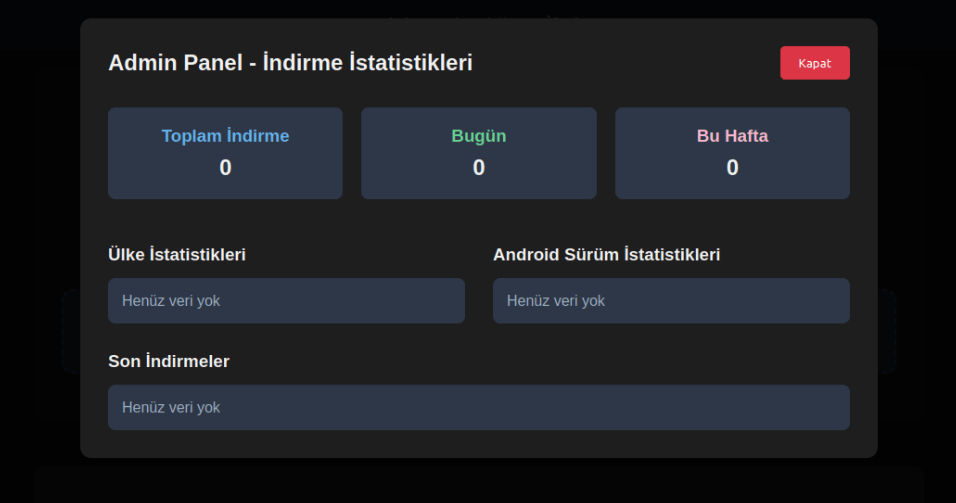
We were able to open the admin panel of this website, where it was possible to view statistics on Frogblight malware downloads. However, the counter had not been fully implemented and the threat actor could only view the statistics for their own downloads.

The admin panel interface of the website from which Frogblight is downloaded

The admin panel interface of the website from which Frogblight is downloaded

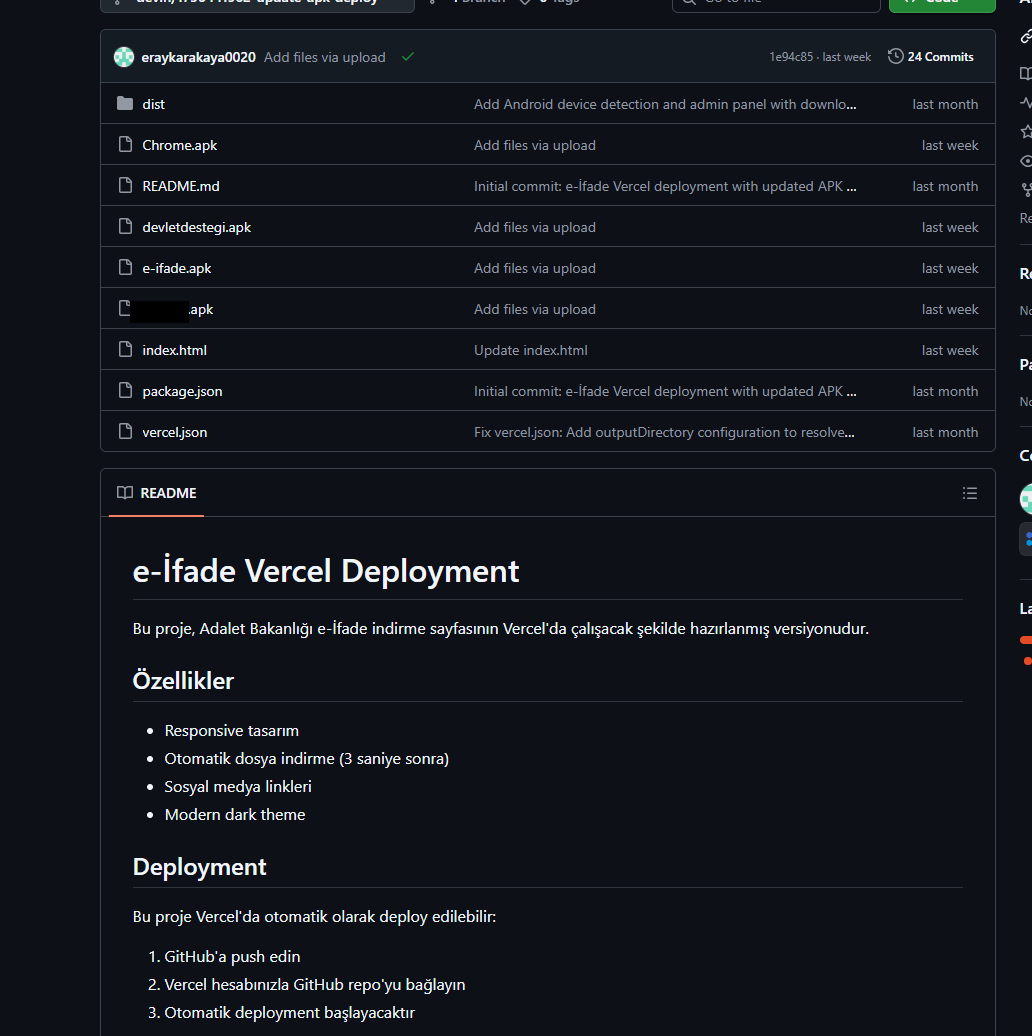
Additionally, we found the source code of this phishing website available in a public GitHub repository. Judging by its description, it is adapted for fast deployment to Vercel, a platform for hosting web apps.

The GitHub repository with the phishing website source code

The GitHub repository with the phishing website source code

App features

As already mentioned, Frogblight was initially disguised as an app for accessing court case files via an official government webpage. Let’s look at one of the samples using this disguise (9dac23203c12abd60d03e3d26d372253). For analysis, we selected an early sample, but not the first one discovered, in order to demonstrate more complete Frogblight functionality.

After starting, the app prompts the victim to grant permissions to send and read SMS messages, and to read from and write to the device’s storage, allegedly needed to show a court file related to the user.

The full list of declared permissions in the app manifest file is shown below:

  • MANAGE_EXTERNAL_STORAGE
  • READ_EXTERNAL_STORAGE
  • WRITE_EXTERNAL_STORAGE
  • READ_SMS
  • RECEIVE_SMS
  • SEND_SMS
  • WRITE_SMS
  • RECEIVE_BOOT_COMPLETED
  • INTERNET
  • QUERY_ALL_PACKAGES
  • BIND_ACCESSIBILITY_SERVICE
  • DISABLE_KEYGUARD
  • FOREGROUND_SERVICE
  • FOREGROUND_SERVICE_DATA_SYNC
  • POST_NOTIFICATIONS
  • QUICKBOOT_POWERON
  • RECEIVE_MMS
  • RECEIVE_WAP_PUSH
  • REQUEST_IGNORE_BATTERY_OPTIMIZATIONS
  • SCHEDULE_EXACT_ALARM
  • USE_EXACT_ALARM
  • VIBRATE
  • WAKE_LOCK
  • ACCESS_NETWORK_STATE
  • READ_PHONE_STATE

After all required permissions are granted, the malware opens the official government webpage for accessing court case files in WebView, prompting the victim to sign in. There are different sign-in options, one of them via online banking. If the user chooses this method, they are prompted to click on a bank whose online banking app they use and fill out the sign-in form on the bank’s official website. This is what Frogblight is after, so it waits two seconds, then opens the online banking sign-in method regardless of the user’s choice. For each webpage that has finished loading in WebView, Frogblight injects JavaScript code allowing it to capture user input and send it to the C2 via a REST API.

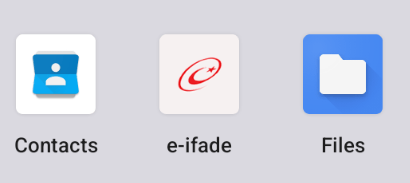
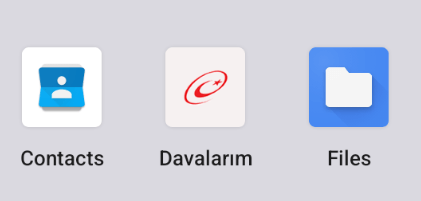
The malware also changes its label to “Davalarım” if the Android version is newer than 12; otherwise it hides the icon.

The app icon before (left) and after launching (right)

The app icon before (left) and after launching (right)

In the sample we review in this section, Frogblight uses a REST API for C2 communication, implemented using the Retrofit library. The malicious app pings the C2 server every two seconds in foreground, and if no error is returned, it calls the REST API client methods fetchOutbox and getFileCommands. Other methods are called when specific events occur, for example, after the device screen is turned on, the com.capcuttup.refresh.PersistentService foreground service is launched, or an SMS is received. The full list of all REST API client methods with parameters and descriptions is shown below.
REST API client method Description Parameters
fetchOutbox Request message content to be sent via SMS or displayed in a notification device_id: unique Android device ID
ackOutbox Send the results of processing a message received after calling the API method fetchOutbox device_id: unique Android device ID
msg_id: message ID
status: message processing status
error: message processing error
getAllPackages Request the names of app packages whose launch should open a website in WebView to capture user input data action: same as the API method name
getPackageUrl Request the website URL that will be opened in WebView when the app with the specified package name is launched action: same as the API method name
package: the package name of the target app
getFileCommands Request commands for file operations

Available commands:
●       download: upload the target file to the C2
●       generate_thumbnails: generate thumbnails from the image files in the target directory and upload them to the C2
●       list: send information about all files in the target directory to the C2
●       thumbnail: generate a thumbnail from the target image file and upload it to the C2

device_id: unique Android device ID
pingDevice Check the C2 connection device_id: unique Android device ID
reportHijackSuccess Send captured user input data from the website opened in a WebView when the app with the specified package name is launched action: same as the API method name
package: the package name of the target app
data: captured user input data
saveAppList Send information about the apps installed on the device device_id: unique Android device ID app_list: a list of apps installed on the device
app_count: a count of apps installed on the device
saveInjection Send captured user input data from the website opened in a WebView. If it was not opened following the launch of the target app, the app_name parameter is determined based on the opened URL device_id: unique Android device ID app_name: the package name of the target app
form_data: captured user input data
savePermission Unused but presumably needed for sending information about permissions device_id: unique Android device ID permission_type: permission type
status: permission status
sendSms Send information about an SMS message from the device device_id: unique Android device ID sender: the sender’s/recipient’s phone number
message: message text
timestamp: received/sent time
type: message type (inbox/sent)
sendTelegramMessage Send captured user input data from the webpages opened by Frogblight in WebView device_id: unique Android device ID
url: website URL
title: website page title
input_type: the type of user input data
input_value: user input data
final_value: user input data with additional information
timestamp: the time of data capture
ip_address: user IP address
sms_permission: whether SMS permission is granted
file_manager_permission: whether file access permission is granted
updateDevice Send information about the device device_id: unique Android device ID
model: device manufacturer and model
android_version: Android version
phone_number: user phone number
battery: current battery level
charging: device charging status
screen_status: screen on/off
ip_address: user IP address
sms_permission: whether SMS permission is granted
file_manager_permission: whether file access permission is granted
updatePermissionStatus Send information about permissions device_id: unique Android device ID
permission_type: permission type
status: permission status
timestamp: current time
uploadBatchThumbnails Upload thumbnails to the C2 device_id: unique Android device ID
thumbnails: thumbnails
uploadFile Upload a file to the C2 device_id: unique Android device ID
file_path: file path
download_id: the file ID on the C2
The file itself is sent as an unnamed parameter
uploadFileList Send information about all files in the target directory device_id: unique Android device ID
path: directory path
file_list: information about the files in the target directory
uploadFileListLog Send information about all files in the target directory to an endpoint different from uploadFileList device_id: unique Android device ID
path: directory path
file_list: information about the files in the target directory
uploadThumbnailLog Unused but presumably needed for uploading thumbnails to an endpoint different from uploadBatchThumbnails device_id: unique Android device ID
thumbnails: thumbnails

Remote device control, persistence, and protection against deletion

The app includes several classes to provide the threat actor with remote access to the infected device, gain persistence, and protect the malicious app from being deleted.

  • capcuttup.refresh.AccessibilityAutoClickService
    This is intended to prevent removal of the app and to open websites specified by the threat actor in WebView upon target apps startup. It is present in the sample we review, but is no longer in use and deleted in further versions.
  • capcuttup.refresh.PersistentService
    This is a service whose main purpose is to interact with the C2 and to make malicious tasks persistent.
  • capcuttup.refresh.BootReceiver
    This is a broadcast receiver responsible for setting up the persistence mechanisms, such as job scheduling and setting alarms, after device boot completion.

Further development

In later versions, new functionality was added, and some of the more recent Frogblight variants disguised themselves as the Chrome browser. Let’s look at one of the fake Chrome samples (d7d15e02a9cd94c8ab00c043aef55aff).

In this sample, new REST API client methods have been added for interacting with the C2.

REST API client method Description Parameters
getContactCommands Get commands to perform actions with contacts
Available commands:
●       ADD_CONTACT: add a contact to the user device
●       DELETE_CONTACT: delete a contact from the user device
●       EDIT_CONTACT: edit a contact on the user device
device_id: unique Android device ID
sendCallLogs Send call logs to the C2 device_id: unique Android device ID
call_logs: call log data
sendNotificationLogs Send notifications log to the C2. Not fully implemented in this sample, and as of the time of writing this report, we hadn’t seen any samples with a full-fledged implementation of this API method action: same as the API method name
notifications: notification log data

Also, the threat actor had implemented a custom input method for recording keystrokes to a file using the com.puzzlesnap.quickgame.CustomKeyboardService service.

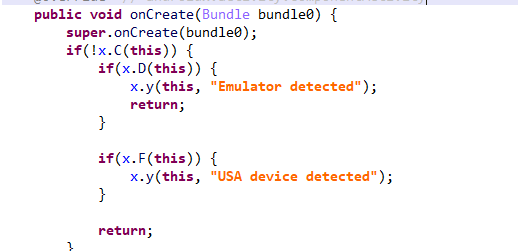
Another Frogblight sample we observed trying to avoid emulators and using geofencing techniques is 115fbdc312edd4696d6330a62c181f35. In this sample, Frogblight checks the environment (for example, device model) and shuts down if it detects an emulator or if the device is located in the United States.

Part of the code responsible for avoiding Frogblight running in an undesirable environment

Part of the code responsible for avoiding Frogblight running in an undesirable environment

Later on, the threat actor decided to start using a web socket instead of the REST API. Let’s see an example of this in one of the recent samples (08a3b1fb2d1abbdbdd60feb8411a12c7). This sample is disguised as an app for receiving social support via an official government webpage. The feature set of this sample is very similar to the previous ones, with several new capabilities added. Commands are transmitted over a web socket using the JSON format. A command template is shown below:

{
    "id": <command ID>,
    "command_type": <command name>
    "command_data": <command data>
}

It is also worth noting that some commands in this version share the same meaning but have different structures, and the functionality of certain commands has not been fully implemented yet. This indicates that Frogblight was under active development at the time of our research, and since no its activity was noticed after September, it is possible that the malware is being finalized to a fully operational state before continuing to infect users’ devices. A full list of commands with their parameters and description is shown below:

Command Description Parameters
connect Send a registration message to the C2
connection_success Send various information, such as call logs, to the C2; start pinging the C2 and requesting commands
auth_error Log info about an invalid login key to the Android log system
pong_device Does nothing
commands_list Execute commands List of commands
sms_send_command Send an arbitrary SMS message recipient: message destination
message: message text
msg_id: message ID
bulk_sms_command Send an arbitrary SMS message to multiple recipients recipients: message destinations
message: message text
get_contacts_command Send all contacts to the C2
get_app_list_command Send information about the apps installed on the device to the C2
get_files_command Send information about all files in certain directories to the C2
get_call_logs_command Send call logs to the C2
get_notifications_command Send a notifications log to the C2. This is not fully implemented in the sample at hand, and as of the time of writing this report, we hadn’t seen any samples with a full-fledged implementation of this command
take_screenshot_command Take a screenshot. This is not fully implemented in the sample at hand, and as of the time of writing this report, we hadn’t seen any samples with a full-fledged implementation of this command
update_device Send registration message to the C2
new_webview_data Collect WebView data. This is not fully implemented in the sample at hand, and as of the time of writing this report, we hadn’t seen any samples with a full-fledged implementation of this command
new_injection Inject code. This is not fully implemented in the sample at hand, and as of the time of writing this report, we hadn’t seen any samples with a full-fledged implementation of this command code: injected code
target_app: presumably the package name of the target app
add_contact_command Add a contact to the user device name: contact name
phone: contact phone
email: contact email
contact_add Add a contact to the user device display_name: contact name
phone_number: contact phone
email: contact email
contact_delete Delete a contact from the user device phone_number: contact phone
contact_edit Edit a contact on the user device display_name: new contact name
phone_number: contact phone
email: new contact email
contact_list Send all contacts to the C2
file_list Send information about all files in the specified directory to the C2 path: directory path
file_download Upload the specified file to the C2 file_path: file path
download_id: an ID that is received with the command and sent back to the C2 along with the requested file. Most likely, this is used to organize data on the C2
file_thumbnail Generate a thumbnail from the target image file and upload it to the C2 file_path: image file path
file_thumbnails Generate thumbnails from the image files in the target directory and upload them to the C2 folder_path: directory path
health_check Send information about the current device state: battery level, screen state, and so on
message_list_request Send all SMS messages to the C2
notification_send Show an arbitrary notification title: notification title
message: notification message
app_name: notification subtext
package_list_response Save the target package names packages: a list of all target package names.
Each list element contains:
package_name: target package name
active: whether targeting is active
delete_contact_command Delete a contact from the user device. This is not fully implemented in the sample at hand, and as of the time of writing this report, we hadn’t seen any samples with a full-fledged implementation of this command contact_id: contact ID
name: contact name
file_upload_command Upload specified file to the C2. This is not fully implemented in the sample at hand, and as of the time of writing this report, we hadn’t seen any samples with a full-fledged implementation of this command file_path: file path
file_name: file name
file_download_command Download file to user device. This is not fully implemented in the sample at hand, and as of the time of writing this report, we hadn’t seen any samples with a full-fledged implementation of this command file_url: the URL of the file to download
download_path: download path
download_file_command Download file to user device. This is not fully implemented in the sample at hand, and as of the time of writing this report, we hadn’t seen any samples with a full-fledged implementation of this command file_url: the URL of the file to download
download_path: downloading path
get_permissions_command Send a registration message to the C2, including info about specific permissions
health_check_command Send information about the current device state, such as battery level, screen state, and so on
connect_error Log info about connection errors to the Android log system A list of errors
reconnect Send a registration message to the C2
disconnect Stop pinging the C2 and requesting commands from it

Authentication via WebSocket takes place using a special key.

The part of the code responsible for the WebSocket authentication logic

The part of the code responsible for the WebSocket authentication logic

At the IP address to which the WebSocket connection was made, the Frogblight web panel was accessible, which accepted the authentication key mentioned above. Since only samples using the same key as the webpanel login are controllable through it, we suggest that Frogblight might be distributed under the MaaS model.

The interface of the sign-in screen for the Frogblight web panel

The interface of the sign-in screen for the Frogblight web panel

Judging by the menu options, the threat actor can sort victims’ devices by certain parameters, such as the presence of banking apps on the device, and send bulk SMS messages and perform other mass actions.

Victims

Since some versions of Frogblight opened the Turkish government webpage to collect user-entered data on Turkish banks’ websites, we assume with high confidence that it is aimed mainly at users from Turkey. Also, based on our telemetry, the majority of users attacked by Frogblight are located in that country.

Attribution

Even though it is not possible to provide an attribution to any known threat actor based on the information available, during our analysis of the Frogblight Android malware and the search for online mentions of the names it uses, we discovered a GitHub profile containing repos with Frogblight, which had also created repos with Coper malware, distributed under the MaaS model. It is possible that this profile belongs to the attackers distributing Coper who have also started distributing Frogblight.

GitHub repositories containing Frogblight and Coper malware

GitHub repositories containing Frogblight and Coper malware

Also, since the comments in the Frogblight code are written in Turkish, we believe that its developers speak this language.

Conclusions

The new Android malware we dubbed “Frogblight” appeared recently and targets mainly users from Turkey. This is an advanced banking Trojan aimed at stealing money. It has already infected real users’ devices, and it doesn’t stop there, adding more and more new features in the new versions that appear. It can be made more dangerous by the fact that it may be used by attackers who already have experience distributing malware. We will continue to monitor its development.

Indicators of Compromise

More indicators of compromise, as well as any updates to these, are available to the customers of our crimeware reporting service. If you are interested, please contact crimewareintel@kaspersky.com.

APK file hashes
8483037dcbf14ad8197e7b23b04aea34
105fa36e6f97977587a8298abc31282a
e1cd59ae3995309627b6ab3ae8071e80
115fbdc312edd4696d6330a62c181f35
08a3b1fb2d1abbdbdd60feb8411a12c7
d7d15e02a9cd94c8ab00c043aef55aff
9dac23203c12abd60d03e3d26d372253

C2 domains
1249124fr1241og5121.sa[.]com
froglive[.]net

C2 IPs
45.138.16.208[:]8080

URL of GitHub repository with Frogblight phishing website source code
https://github[.]com/eraykarakaya0020/e-ifade-vercel

URL of GitHub account containing APK files of Frogblight and Coper
https://github[.]com/Chromeapk

Distribution URLs
https://farketmez37[.]cfd/e-ifade.apk
https://farketmez36[.]sbs/e-ifade.apk
https://e-ifade-app-5gheb8jc.devinapps[.]com/e-ifade.apk

Frogblight threatens you with a court case: a new Android banker targets Turkish users

15 December 2025 at 08:00

In August 2025, we discovered a campaign targeting individuals in Turkey with a new Android banking Trojan we dubbed “Frogblight”. Initially, the malware was disguised as an app for accessing court case files via an official government webpage. Later, more universal disguises appeared, such as the Chrome browser.

Frogblight can use official government websites as an intermediary step to steal banking credentials. Moreover, it has spyware functionality, such as capabilities to collect SMS messages, a list of installed apps on the device and device filesystem information. It can also send arbitrary SMS messages.

Another interesting characteristic of Frogblight is that we’ve seen it updated with new features throughout September. This may indicate that a feature-rich malware app for Android is being developed, which might be distributed under the MaaS model.

This threat is detected by Kaspersky products as HEUR:Trojan-Banker.AndroidOS.Frogblight.*, HEUR:Trojan-Banker.AndroidOS.Agent.eq, HEUR:Trojan-Banker.AndroidOS.Agent.ep, HEUR:Trojan-Spy.AndroidOS.SmsThief.de.

Technical details

Background

While performing an analysis of mobile malware we receive from various sources, we discovered several samples belonging to a new malware family. Although these samples appeared to be still under development, they already contained a lot of functionality that allowed this family to be classified as a banking Trojan. As new versions of this malware continued to appear, we began monitoring its development. Moreover, we managed to discover its control panel and based on the “fr0g” name shown there, we dubbed this family “Frogblight”.

Initial infection

We believe that smishing is one of the distribution vectors for Frogblight, and that the users had to install the malware themselves. On the internet, we found complaints from Turkish users about phishing SMS messages convincing users that they were involved in a court case and containing links to download malware. versions of Frogblight, including the very first ones, were disguised as an app for accessing court case files via an official government webpage and were named the same as the files for downloading from the links mentioned above.

While looking for online mentions of the names used by the malware, we discovered one of the phishing websites distributing Frogblight, which disguises itself as a website for viewing a court file.

The phishing website distributing Frogblight

The phishing website distributing Frogblight

We were able to open the admin panel of this website, where it was possible to view statistics on Frogblight malware downloads. However, the counter had not been fully implemented and the threat actor could only view the statistics for their own downloads.

The admin panel interface of the website from which Frogblight is downloaded

The admin panel interface of the website from which Frogblight is downloaded

Additionally, we found the source code of this phishing website available in a public GitHub repository. Judging by its description, it is adapted for fast deployment to Vercel, a platform for hosting web apps.

The GitHub repository with the phishing website source code

The GitHub repository with the phishing website source code

App features

As already mentioned, Frogblight was initially disguised as an app for accessing court case files via an official government webpage. Let’s look at one of the samples using this disguise (9dac23203c12abd60d03e3d26d372253). For analysis, we selected an early sample, but not the first one discovered, in order to demonstrate more complete Frogblight functionality.

After starting, the app prompts the victim to grant permissions to send and read SMS messages, and to read from and write to the device’s storage, allegedly needed to show a court file related to the user.

The full list of declared permissions in the app manifest file is shown below:

  • MANAGE_EXTERNAL_STORAGE
  • READ_EXTERNAL_STORAGE
  • WRITE_EXTERNAL_STORAGE
  • READ_SMS
  • RECEIVE_SMS
  • SEND_SMS
  • WRITE_SMS
  • RECEIVE_BOOT_COMPLETED
  • INTERNET
  • QUERY_ALL_PACKAGES
  • BIND_ACCESSIBILITY_SERVICE
  • DISABLE_KEYGUARD
  • FOREGROUND_SERVICE
  • FOREGROUND_SERVICE_DATA_SYNC
  • POST_NOTIFICATIONS
  • QUICKBOOT_POWERON
  • RECEIVE_MMS
  • RECEIVE_WAP_PUSH
  • REQUEST_IGNORE_BATTERY_OPTIMIZATIONS
  • SCHEDULE_EXACT_ALARM
  • USE_EXACT_ALARM
  • VIBRATE
  • WAKE_LOCK
  • ACCESS_NETWORK_STATE
  • READ_PHONE_STATE

After all required permissions are granted, the malware opens the official government webpage for accessing court case files in WebView, prompting the victim to sign in. There are different sign-in options, one of them via online banking. If the user chooses this method, they are prompted to click on a bank whose online banking app they use and fill out the sign-in form on the bank’s official website. This is what Frogblight is after, so it waits two seconds, then opens the online banking sign-in method regardless of the user’s choice. For each webpage that has finished loading in WebView, Frogblight injects JavaScript code allowing it to capture user input and send it to the C2 via a REST API.

The malware also changes its label to “Davalarım” if the Android version is newer than 12; otherwise it hides the icon.

The app icon before (left) and after launching (right)

The app icon before (left) and after launching (right)

In the sample we review in this section, Frogblight uses a REST API for C2 communication, implemented using the Retrofit library. The malicious app pings the C2 server every two seconds in foreground, and if no error is returned, it calls the REST API client methods fetchOutbox and getFileCommands. Other methods are called when specific events occur, for example, after the device screen is turned on, the com.capcuttup.refresh.PersistentService foreground service is launched, or an SMS is received. The full list of all REST API client methods with parameters and descriptions is shown below.
REST API client method Description Parameters
fetchOutbox Request message content to be sent via SMS or displayed in a notification device_id: unique Android device ID
ackOutbox Send the results of processing a message received after calling the API method fetchOutbox device_id: unique Android device ID
msg_id: message ID
status: message processing status
error: message processing error
getAllPackages Request the names of app packages whose launch should open a website in WebView to capture user input data action: same as the API method name
getPackageUrl Request the website URL that will be opened in WebView when the app with the specified package name is launched action: same as the API method name
package: the package name of the target app
getFileCommands Request commands for file operations

Available commands:
●       download: upload the target file to the C2
●       generate_thumbnails: generate thumbnails from the image files in the target directory and upload them to the C2
●       list: send information about all files in the target directory to the C2
●       thumbnail: generate a thumbnail from the target image file and upload it to the C2

device_id: unique Android device ID
pingDevice Check the C2 connection device_id: unique Android device ID
reportHijackSuccess Send captured user input data from the website opened in a WebView when the app with the specified package name is launched action: same as the API method name
package: the package name of the target app
data: captured user input data
saveAppList Send information about the apps installed on the device device_id: unique Android device ID app_list: a list of apps installed on the device
app_count: a count of apps installed on the device
saveInjection Send captured user input data from the website opened in a WebView. If it was not opened following the launch of the target app, the app_name parameter is determined based on the opened URL device_id: unique Android device ID app_name: the package name of the target app
form_data: captured user input data
savePermission Unused but presumably needed for sending information about permissions device_id: unique Android device ID permission_type: permission type
status: permission status
sendSms Send information about an SMS message from the device device_id: unique Android device ID sender: the sender’s/recipient’s phone number
message: message text
timestamp: received/sent time
type: message type (inbox/sent)
sendTelegramMessage Send captured user input data from the webpages opened by Frogblight in WebView device_id: unique Android device ID
url: website URL
title: website page title
input_type: the type of user input data
input_value: user input data
final_value: user input data with additional information
timestamp: the time of data capture
ip_address: user IP address
sms_permission: whether SMS permission is granted
file_manager_permission: whether file access permission is granted
updateDevice Send information about the device device_id: unique Android device ID
model: device manufacturer and model
android_version: Android version
phone_number: user phone number
battery: current battery level
charging: device charging status
screen_status: screen on/off
ip_address: user IP address
sms_permission: whether SMS permission is granted
file_manager_permission: whether file access permission is granted
updatePermissionStatus Send information about permissions device_id: unique Android device ID
permission_type: permission type
status: permission status
timestamp: current time
uploadBatchThumbnails Upload thumbnails to the C2 device_id: unique Android device ID
thumbnails: thumbnails
uploadFile Upload a file to the C2 device_id: unique Android device ID
file_path: file path
download_id: the file ID on the C2
The file itself is sent as an unnamed parameter
uploadFileList Send information about all files in the target directory device_id: unique Android device ID
path: directory path
file_list: information about the files in the target directory
uploadFileListLog Send information about all files in the target directory to an endpoint different from uploadFileList device_id: unique Android device ID
path: directory path
file_list: information about the files in the target directory
uploadThumbnailLog Unused but presumably needed for uploading thumbnails to an endpoint different from uploadBatchThumbnails device_id: unique Android device ID
thumbnails: thumbnails

Remote device control, persistence, and protection against deletion

The app includes several classes to provide the threat actor with remote access to the infected device, gain persistence, and protect the malicious app from being deleted.

  • capcuttup.refresh.AccessibilityAutoClickService
    This is intended to prevent removal of the app and to open websites specified by the threat actor in WebView upon target apps startup. It is present in the sample we review, but is no longer in use and deleted in further versions.
  • capcuttup.refresh.PersistentService
    This is a service whose main purpose is to interact with the C2 and to make malicious tasks persistent.
  • capcuttup.refresh.BootReceiver
    This is a broadcast receiver responsible for setting up the persistence mechanisms, such as job scheduling and setting alarms, after device boot completion.

Further development

In later versions, new functionality was added, and some of the more recent Frogblight variants disguised themselves as the Chrome browser. Let’s look at one of the fake Chrome samples (d7d15e02a9cd94c8ab00c043aef55aff).

In this sample, new REST API client methods have been added for interacting with the C2.

REST API client method Description Parameters
getContactCommands Get commands to perform actions with contacts
Available commands:
●       ADD_CONTACT: add a contact to the user device
●       DELETE_CONTACT: delete a contact from the user device
●       EDIT_CONTACT: edit a contact on the user device
device_id: unique Android device ID
sendCallLogs Send call logs to the C2 device_id: unique Android device ID
call_logs: call log data
sendNotificationLogs Send notifications log to the C2. Not fully implemented in this sample, and as of the time of writing this report, we hadn’t seen any samples with a full-fledged implementation of this API method action: same as the API method name
notifications: notification log data

Also, the threat actor had implemented a custom input method for recording keystrokes to a file using the com.puzzlesnap.quickgame.CustomKeyboardService service.

Another Frogblight sample we observed trying to avoid emulators and using geofencing techniques is 115fbdc312edd4696d6330a62c181f35. In this sample, Frogblight checks the environment (for example, device model) and shuts down if it detects an emulator or if the device is located in the United States.

Part of the code responsible for avoiding Frogblight running in an undesirable environment

Part of the code responsible for avoiding Frogblight running in an undesirable environment

Later on, the threat actor decided to start using a web socket instead of the REST API. Let’s see an example of this in one of the recent samples (08a3b1fb2d1abbdbdd60feb8411a12c7). This sample is disguised as an app for receiving social support via an official government webpage. The feature set of this sample is very similar to the previous ones, with several new capabilities added. Commands are transmitted over a web socket using the JSON format. A command template is shown below:

{
    "id": <command ID>,
    "command_type": <command name>
    "command_data": <command data>
}

It is also worth noting that some commands in this version share the same meaning but have different structures, and the functionality of certain commands has not been fully implemented yet. This indicates that Frogblight was under active development at the time of our research, and since no its activity was noticed after September, it is possible that the malware is being finalized to a fully operational state before continuing to infect users’ devices. A full list of commands with their parameters and description is shown below:

Command Description Parameters
connect Send a registration message to the C2
connection_success Send various information, such as call logs, to the C2; start pinging the C2 and requesting commands
auth_error Log info about an invalid login key to the Android log system
pong_device Does nothing
commands_list Execute commands List of commands
sms_send_command Send an arbitrary SMS message recipient: message destination
message: message text
msg_id: message ID
bulk_sms_command Send an arbitrary SMS message to multiple recipients recipients: message destinations
message: message text
get_contacts_command Send all contacts to the C2
get_app_list_command Send information about the apps installed on the device to the C2
get_files_command Send information about all files in certain directories to the C2
get_call_logs_command Send call logs to the C2
get_notifications_command Send a notifications log to the C2. This is not fully implemented in the sample at hand, and as of the time of writing this report, we hadn’t seen any samples with a full-fledged implementation of this command
take_screenshot_command Take a screenshot. This is not fully implemented in the sample at hand, and as of the time of writing this report, we hadn’t seen any samples with a full-fledged implementation of this command
update_device Send registration message to the C2
new_webview_data Collect WebView data. This is not fully implemented in the sample at hand, and as of the time of writing this report, we hadn’t seen any samples with a full-fledged implementation of this command
new_injection Inject code. This is not fully implemented in the sample at hand, and as of the time of writing this report, we hadn’t seen any samples with a full-fledged implementation of this command code: injected code
target_app: presumably the package name of the target app
add_contact_command Add a contact to the user device name: contact name
phone: contact phone
email: contact email
contact_add Add a contact to the user device display_name: contact name
phone_number: contact phone
email: contact email
contact_delete Delete a contact from the user device phone_number: contact phone
contact_edit Edit a contact on the user device display_name: new contact name
phone_number: contact phone
email: new contact email
contact_list Send all contacts to the C2
file_list Send information about all files in the specified directory to the C2 path: directory path
file_download Upload the specified file to the C2 file_path: file path
download_id: an ID that is received with the command and sent back to the C2 along with the requested file. Most likely, this is used to organize data on the C2
file_thumbnail Generate a thumbnail from the target image file and upload it to the C2 file_path: image file path
file_thumbnails Generate thumbnails from the image files in the target directory and upload them to the C2 folder_path: directory path
health_check Send information about the current device state: battery level, screen state, and so on
message_list_request Send all SMS messages to the C2
notification_send Show an arbitrary notification title: notification title
message: notification message
app_name: notification subtext
package_list_response Save the target package names packages: a list of all target package names.
Each list element contains:
package_name: target package name
active: whether targeting is active
delete_contact_command Delete a contact from the user device. This is not fully implemented in the sample at hand, and as of the time of writing this report, we hadn’t seen any samples with a full-fledged implementation of this command contact_id: contact ID
name: contact name
file_upload_command Upload specified file to the C2. This is not fully implemented in the sample at hand, and as of the time of writing this report, we hadn’t seen any samples with a full-fledged implementation of this command file_path: file path
file_name: file name
file_download_command Download file to user device. This is not fully implemented in the sample at hand, and as of the time of writing this report, we hadn’t seen any samples with a full-fledged implementation of this command file_url: the URL of the file to download
download_path: download path
download_file_command Download file to user device. This is not fully implemented in the sample at hand, and as of the time of writing this report, we hadn’t seen any samples with a full-fledged implementation of this command file_url: the URL of the file to download
download_path: downloading path
get_permissions_command Send a registration message to the C2, including info about specific permissions
health_check_command Send information about the current device state, such as battery level, screen state, and so on
connect_error Log info about connection errors to the Android log system A list of errors
reconnect Send a registration message to the C2
disconnect Stop pinging the C2 and requesting commands from it

Authentication via WebSocket takes place using a special key.

The part of the code responsible for the WebSocket authentication logic

The part of the code responsible for the WebSocket authentication logic

At the IP address to which the WebSocket connection was made, the Frogblight web panel was accessible, which accepted the authentication key mentioned above. Since only samples using the same key as the webpanel login are controllable through it, we suggest that Frogblight might be distributed under the MaaS model.

The interface of the sign-in screen for the Frogblight web panel

The interface of the sign-in screen for the Frogblight web panel

Judging by the menu options, the threat actor can sort victims’ devices by certain parameters, such as the presence of banking apps on the device, and send bulk SMS messages and perform other mass actions.

Victims

Since some versions of Frogblight opened the Turkish government webpage to collect user-entered data on Turkish banks’ websites, we assume with high confidence that it is aimed mainly at users from Turkey. Also, based on our telemetry, the majority of users attacked by Frogblight are located in that country.

Attribution

Even though it is not possible to provide an attribution to any known threat actor based on the information available, during our analysis of the Frogblight Android malware and the search for online mentions of the names it uses, we discovered a GitHub profile containing repos with Frogblight, which had also created repos with Coper malware, distributed under the MaaS model. It is possible that this profile belongs to the attackers distributing Coper who have also started distributing Frogblight.

GitHub repositories containing Frogblight and Coper malware

GitHub repositories containing Frogblight and Coper malware

Also, since the comments in the Frogblight code are written in Turkish, we believe that its developers speak this language.

Conclusions

The new Android malware we dubbed “Frogblight” appeared recently and targets mainly users from Turkey. This is an advanced banking Trojan aimed at stealing money. It has already infected real users’ devices, and it doesn’t stop there, adding more and more new features in the new versions that appear. It can be made more dangerous by the fact that it may be used by attackers who already have experience distributing malware. We will continue to monitor its development.

Indicators of Compromise

More indicators of compromise, as well as any updates to these, are available to the customers of our crimeware reporting service. If you are interested, please contact crimewareintel@kaspersky.com.

APK file hashes
8483037dcbf14ad8197e7b23b04aea34
105fa36e6f97977587a8298abc31282a
e1cd59ae3995309627b6ab3ae8071e80
115fbdc312edd4696d6330a62c181f35
08a3b1fb2d1abbdbdd60feb8411a12c7
d7d15e02a9cd94c8ab00c043aef55aff
9dac23203c12abd60d03e3d26d372253

C2 domains
1249124fr1241og5121.sa[.]com
froglive[.]net

C2 IPs
45.138.16.208[:]8080

URL of GitHub repository with Frogblight phishing website source code
https://github[.]com/eraykarakaya0020/e-ifade-vercel

URL of GitHub account containing APK files of Frogblight and Coper
https://github[.]com/Chromeapk

Distribution URLs
https://farketmez37[.]cfd/e-ifade.apk
https://farketmez36[.]sbs/e-ifade.apk
https://e-ifade-app-5gheb8jc.devinapps[.]com/e-ifade.apk

❌