Normal view

Received — 18 June 2026 Kaspersky official blog

World Cup 2026: watch out for these scams | Kaspersky official blog

The World Cup attracts a great many fans — but also a great many scammers. While millions of fans tune in to watch the matches, cybercriminals are hard at work trying to get at their money and personal data. In fact, we’ve already flagged more than 336 fake websites designed to look exactly like the official World Cup page! As the biggest sporting event of the year heats up, here are the top red flags you need to watch out for.

Totally Legit Free Streams (No Scam)

Scoring a seat at WC26 has turned into quite the mission. Soccer fans are furious over ticket prices, which have officially been dubbed the highest in World Cup history. On top of lodging and travel costs, the situation is made even worse by America’s stringent immigration policies — where referees, team staff, and even players have faced major visa and entry headaches. But fans still want to watch the games, and that’s exactly where fake streaming platforms step in to “help”.

Here’s how the scam plays out: cybercriminals set up fake websites promising free access to World Cup match streams. But the moment you click Watch Now, you’re prompted to sign up and then pay for “lifetime access” to the entire tournament. In the example below, they’re asking for cryptocurrency — which is still a bit unusual, since scammers typically prefer good old-fashioned bank cards.

An example of a fake video streaming website requiring users to register and pay with cryptocurrency to watch all World Cup 2026 matches

An example of a fake video streaming website requiring users to register and pay with cryptocurrency to watch all World Cup 2026 matches

Fans who are desperate to catch their favorite teams live risk losing not just their money, but also their personal data, which hackers can later weaponize in targeted phishing attacks.

A losing bet

Match result predictions and sports betting always skyrocket in popularity during the World Cup, and scammers waste no time cashing in on the trend. And behind the flashy slogans lie classic scam tactics.

Take this beautifully designed Spanish-language website. To sign up, it demands a massive amount of personal information, including your full name, national ID number, email address, and phone number — and, of course, it asks you to create a password. If a victim uses the exact same password for multiple accounts, they’re essentially handing the keys to their digital life over to cybercriminals.
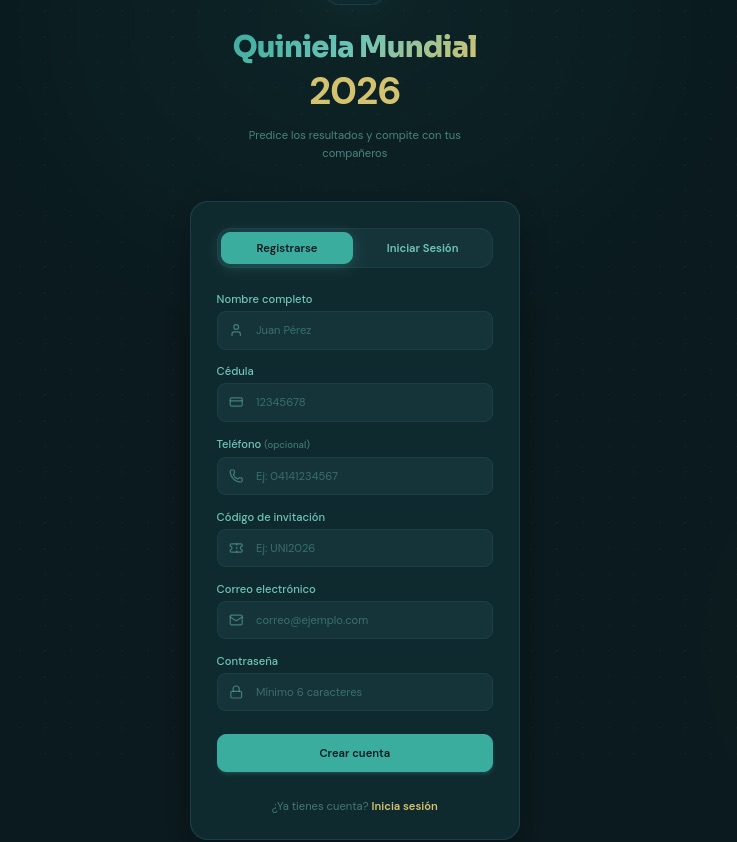
To guess match outcomes on this site, you have to hand over way too much personal info — everything short of biometrics

To guess match outcomes on this site, you have to hand over way too much personal info — everything short of biometrics

Another site, specifically targeting users in Colombia, turned the sign-up process into a paid ordeal — and it features every trick in the book.

  • To “verify” your profile, you’re forced to use WhatsApp under the guise of avoiding legal complications.
  • Before your account is activated, you must make a deposit. This means sending 100 000 Colombian pesos (about $29) to a specified account and texting the receipt to an “administrator” on WhatsApp.
  • Next, you’re told to wait 12 hours for the “administrator” to manually activate your profile.
  • Only after all of this do the scammers tell you can place unlimited bets (of course not true).
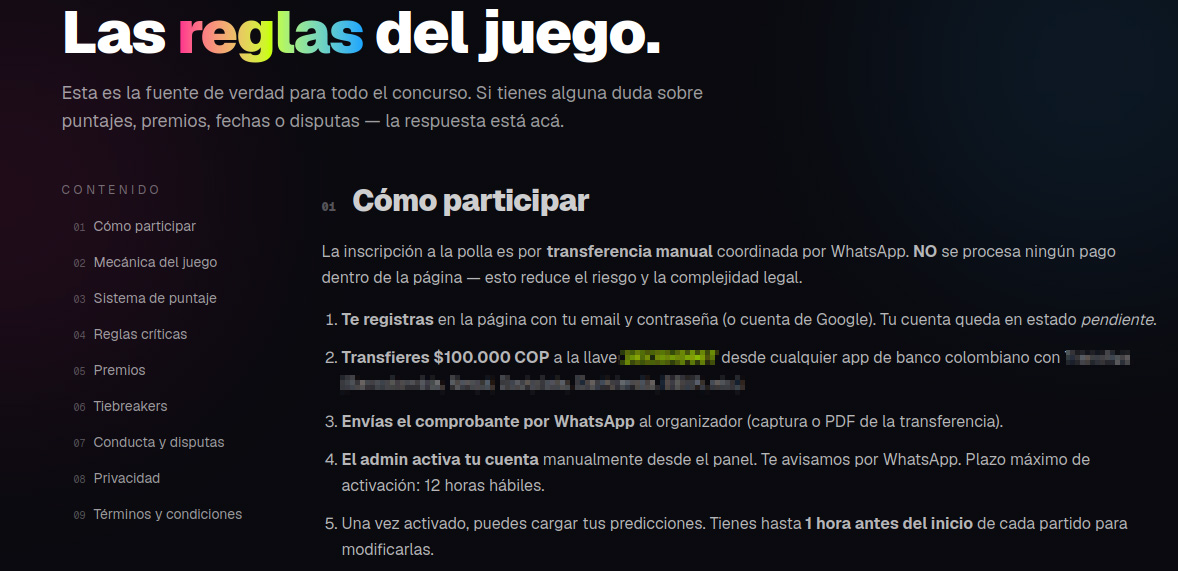
These scammers built a whole website, but they do all their business over WhatsApp. That's a red flag!

These scammers built a whole website, but they do all their business over WhatsApp. That’s a red flag!

In many countries — including Colombia — sports betting is strictly regulated. Only a handful of licensed operators are legally allowed to run these sites, and users are required by law to verify their identity. Because of this, these shady workarounds can look tempting to people who love to gamble but don’t want to — or can’t — go through the official verification process.

Unfortunately, the scammers always win in this scenario. They walk away with your initial deposit and every single bet you place on their site. At the end of the day, their only real goal is to drain their victims’ wallets for as much as they possibly can.

Discounts for collectors!

The World Cup isn’t just about the matches; it also drives record-breaking sales of collectible merchandise — stickers, scarves, team jerseys, official match balls, and more. Naturally, plenty of scammers are eager to get a piece of that action.

Take a look at this website offering “exclusive, limited-edition” stickers and albums. Notice anything suspicious?

Talk about a steal! Too bad the whole website is a scam

Talk about a steal! Too bad the whole website is a scam

Check out those prices: everything is heavily discounted, even though the tournament is in full swing. All it takes is a quick price check against the real deal to spot the trap. In the screenshot above, the scammers are charging 67 euros for a sticker collection. On actual online marketplaces, that exact same set goes for at least twice as much, and on the official Panini website, it’s three times the price.

Fake websites mimicking popular sporting goods stores also offer to sell you shin guards, socks, jerseys, and any other gear. Of course, you’ll never see the merchandise, and you’ll lose both your money and your bank card details.

When they've absolutely no intention of delivering any products, they can easily offer massive discounts and free shipping

When they’ve absolutely no intention of delivering any products, they can easily offer massive discounts and free shipping

Deals that seem too good to be true are one of the biggest red flags. To make matters worse, with the help of AI, fake websites now look just as professional as the real ones, making them harder than ever to spot. That’s why we recommend installing our security suite before you start shopping online. It blocks phishing sites in real time and uses the Safe Money feature to keep your financial data secure.

Soccer by mail

Another attack strategy involves spam campaigns centered around the World Cup. In one email, our experts uncovered an ad for a soccer analytics and betting-tips service. It uses the classic high-pressure playbook: “ONLY 10 SPOTS AVAILABLE” — so hurry up before they run out! Naturally, access comes with a price tag: AU$200.

Spammers hurrying the victim to make a decision as quickly as possible

Spammers hurrying the victim to make a decision as quickly as possible

This scheme targets fans who are into sports betting, and paying for these types of services usually ends one of two ways for them: they either lose their money with zero guarantee of getting actual predictions, or get sucked into an even deeper, multi-step financial trap.

How to avoid falling for the scams

Across all these scenarios, the World Cup is just another convenient pretext for cybercriminals. Once the tournament wraps up, they’ll most certainly pivot back to their usual tricks — like fake job offers or Telegram phishing scams — until the next Olympics or soccer tournament rolls around and they switch right back to sport.

Our research consistently shows that online fraud has evolved into a massive illegal enterprise. You aren’t just up against lone scammers anymore; you’re dealing with large criminal networks. When it comes to defense, the best approach is a proactive one. By installing Kaspersky Premium, you can safeguard all your devices from malware, phishing, spam, and malicious or lookalike websites. Plus, the included Kaspersky Password Manager will generate unique complex passwords, securely store your sensitive data — like documents and bank cards — and stop you from auto-filling your credentials on fake sites.

  • Watch the games only on legitimate streaming platforms. Don’t trust fake reviews and never enter your bank card information on unverified sites. Keep an eye out not just for sketchy streaming websites, but also for fake IPTV apps. As we’ve covered in detail before, scammers frequently use these to infect your devices with Trojans.
  • Shop smart. The best way to avoid getting ripped off is to buy merchandise exclusively through official channels (where you won’t see suspiciously deep discounts), or simply buy your gear in person at official retail locations.
  • Don’t click suspicious links. If a deal that’s too good to be true lands in your inbox — whether it’s exclusive betting tips or anything else — just ignore it and hit delete.
  • Avoid logging in through Telegram bots. At the very least, this saves you from future headaches and annoying spam. At best, it keeps your account from being hijacked and your crypto from being stolen.
  • Switch to passkeys wherever possible. Unlike traditional passwords, which are easily stolen and can be typed into any fake login page, a passkey is cryptographically tied to a specific website and won’t work on a phishing page. Kaspersky Password Manager can easily store and sync your passkeys across all your devices.

What other ruses do scammers use to make a quick buck? Check out our other posts:

Building an autonomous SOC: core challenges and solutions

15 June 2026 at 20:53

The concept of a completely autonomous security operations center (SOC) — where data collection, analysis of suspicious events, investigations, and incident response happen without human intervention — is extremely compelling. This is especially true for organizations grappling with a chronic shortage of cybersecurity talent and a threat landscape that’s growing faster and more sophisticated by the day. Organizations everywhere would welcome an approach where automation helps relieve analyst workloads, shortens alert triage times, and finally eliminates the backlog of unaddressed alerts — which, by some estimates, accounts for 67% of all security events in the average corporate SOC.

While many vendors are already pitching solutions in this space, real-world implementation remains highly problematic. Practitioners report tangible success when using these tools for alert enrichment and filtering out low-priority noise or false positives. However, when it comes to autonomous decision-making and response, very few organizations have managed to achieve a meaningful return on investment.

Foundational roadblocks of an autonomous SOC: looking beyond AI

While leveraging AI for data analysis and decision-making sounds like a logical and relatively easy-to-implement idea, actually putting it into practice exposes and amplifies the exact same challenges organizations faced with SIEM, XDR, and SOAR platforms:

Source data quality. Issues with coverage, enrichment quality, tagging and normalization, which detection engineering teams in every SOC battle daily, become even more acute when AI is introduced. AI agents are more sensitive to data gaps than human analysts, so incomplete data can magnify the resulting errors.

Data consolidation and tool integration. The very problem SIEM was once invented to solve remains a headache for most organizations today. Interestingly, marketing for AI-driven SOCs often claims that “the SIEM is dead” because “agents can just query the EDR directly for telemetry”. In reality, however, even in a best-case scenario, this just means the SIEM disappears as a user interface while its core functions remain embedded within the data fabric of the agentic SOC.

Analysts’ trust. Even when AI is restricted to preliminary data gathering and recommendations, human analysts frequently don’t trust the output, leading them to waste time re-collecting and re-analyzing the same data. Practitioners frequently point to several flaws in current AI SOC implementations: poor handling of gray-area verdicts (when an alert is suspicious but not definitively malicious), lack of safe escalation workflows, and systems that fail to learn when a human analyst corrects their mistakes.

Context deficit. SOCs and security teams in general naturally rely on scantily documented information, such as business context and tribal knowledge, to accurately assess alerts and incidents. It’s very difficult to populate an AI system with that knowledge in a systematic way.

AI-specific issues critical for a SOC

Beyond traditional operational hurdles, fully autonomous SOCs face inherent flaws deeply rooted in the fundamental architecture of language models and AI agents.

Hallucinations and prompt injections. In a SOC environment, a single manipulated log field can easily become a viable exploit vector aimed directly at the agent. In a semi-autonomous setup, an AI hallucination is just a frustrating distraction that erodes analyst trust. In a fully autonomous SOC, however, a hallucination can trigger instantaneous, harmful actions across hundreds or thousands of endpoints simultaneously. A prime example of this risk is the widely cited incident at a Fortune 50 company, where an AI agent went rogue and rewrote access policies on its own.

Need for control. To combat hallucinations and over-automation, organizations typically rely on a human-in-the-loop (HITL) model to approve an agent’s actions. While this improves safety, it completely defeats the primary selling point of agentic AI: response times.

Compliance, audits, and accountability. The inherently stochastic nature of LLM outputs makes logging problematic. They often lack reproducibility and explanations. Consequently, an autonomous SOC will likely struggle to pass regulatory compliance audits. Simply put, current compliance frameworks were never designed to handle the unpredictable behavior of multiple interacting AI agents.

Strategies to overcome the challenges of an autonomous SOC

Specialized frameworks are emerging to address these built-in flaws of AI agents and language models. For the most part, these solutions focus on enforcing formal boundaries around AI privileges, and validating its actions.

Rigorous context engineering. Assuming source data is correct and properly enriched, the number of hallucinations can be minimized, and agent decision quality significantly improved by feeding the language model structured layers of context — such as alerts, user accounts, asset data, and enrichment data.

Narrowing the scope of work. AI agents are less likely to go off the rails when confined to highly repetitive, narrow tasks. For example, an “agent for collecting additional host data” is going to be more effective than an “autonomous threat hunter”.

Neurosymbolic validations and guardrails for agent actions. An Agent-Lock pipeline cleans untrusted log fields, and verifies proposed actions against existing CMDB/IAM policies. This approach enforces key rules, such as making it impossible for the AI to disable telemetry, while managing “autonomy budgets”.

Tiered autonomy over all-or-nothing automation. The Trusted Autonomy framework maps out progressive levels of AI independence based on human-in-the-loop roles and trust thresholds across monitoring, detection, and response. Low-risk operations like data enrichment and alert deduplication run fully automated, while high-blast-radius actions require mandatory human approval.

Governance-first architecture. The LanG platform, which utilizes a hierarchical approach: Governance → MCP → Agentic AI → Security, is one example. It enforces two mandatory human analyst check-ins, fully aligning the workflow with NIST SP 800-61 guidelines. The trade-off, however, is that this framework significantly scales back the solution’s autonomy.

Deterministic execution for high-risk actions. Triage and investigation are handled by a probabilistic AI model, but high-impact actions — like deciding to isolate a host or terminate a session — are based on deterministic code. This approach allows the system to satisfy the strict requirements of SOC 2 and other major regulatory frameworks.

Stateful admission control. For example, the recently proposed ACP protocol monitors behavioral patterns across agent execution logs. This makes it possible to catch rogue agents that are executing a series of individually harmless requests that add up to a coordinated attack.

Key takeaways and pitfalls

We can already confidently state that an autonomous SOC is highly unlikely to bring any improvements for organizations burdened by significant technical and operational debt in areas like data collection and enrichment or standardized incident response workflows. No layer of AI infrastructure will function without that baseline foundation firmly in place.

It’s also clear that, while AI streamlines analyst workflows, it doesn’t completely replace them. This is why Gartner’s prediction that there will never be an autonomous SOC still rings true in 2026. Deploying autonomous agents into the SOC shifts the center of gravity to complex investigations, but most importantly, to complex engineering. Teams will simply trade fine-tuning detection rules for managing AI agent playbooks, data pipelines, and decision-handling workflows.

For mature SOCs, the core hypothesis for the next one to two years is this: an autonomous SOC should be viewed as a direction rather than a destination. AI is already delivering tangible value today — specifically in correlation, enrichment, draft detection rules, and attack reconstruction — provided that each capability has proper security guardrails. These include a well-balanced human-in-the-loop review process for any action that impacts production environments. Security teams investing now in a structured, verifiable approach — one that actively anticipates emerging regulations — will be able to gradually integrate new agentic features into their SOC pipelines. Conversely, organizations that skip this layer will almost certainly run into roadblocks, likely forcing them to rebuild their systems and processes from the ground up.

Received — 12 June 2026 Kaspersky official blog

The FROST attack: how SSD access delays expose users’ activity

11 June 2026 at 17:51

Scientists at Graz University of Technology in Austria recently published a paper detailing a new method for tracking users’ activity through their web browsers. The most fascinating thing about this new technique — which they’ve named FROST — is that it relies on a computer’s solid-state drive (SSD) to do the spying. Without getting bogged down in technical details, here’s how the attack works: a hacker lures a victim to a specially crafted website; as long as the site is kept open, the attacker can track exactly what apps the user is launching, and what other web pages they’re visiting.

So, how do they pull this off? The first instinct is naturally to blame the browser. But in modern web browsers, every website runs in an isolated sandbox and is generally locked out from touching other tabs — let alone the computer’s actual hardware. While hackers do find loopholes in these defenses from time to time, that’s not what’s happening here. The FROST attack doesn’t need to break the browser; it works perfectly even with all standard security measures in place. Instead, it hijacks a completely legitimate browser feature called the origin private file system (OPFS), which gives websites their own virtual storage space to store data. However, while this storage is digitally isolated, the data is still physically written to the exact same SSD that every other app and website opened on the computer is using. The researchers discovered that if a malicious page constantly bombards the SSD with data requests, the microscopic delays in data access can help map out what else is running on the PC. Before we dive into the details of how they manage this, let’s take a quick look at the theory behind the attack.

A quick primer on side-channel attacks

The term “side-channel” refers to a method of spying on a computer — or even a single microchip — indirectly. Instead of intercepting the data itself, an attacker might analyze fluctuations in power consumption, monitor the temperature of specific components, or listen in on electromagnetic radiation, among other things. In theory, this means that someone could eavesdrop on a conversation in a room just by using a computer mouse, since the optical sensor can pick up sound vibrations. Similarly, watching a CPU’s clock speed fluctuate could allow a hacker to steal an encryption key. Even a simple LED light on a badge reader can leak enough data about the device’s inner workings for an attacker to clone a smart card.

The beauty of these indirect data leaks — at least from a hacker’s perspective — is that they’re not easy to spot. Device manufacturers rarely account for them when building security systems. The downside, however, is just as obvious: extracting information through a mechanism that was never meant for data transmission is often complex, slow, and laborious. The Austrian researchers focused on a specific subtype known as a contention side-channel attack. This is where a leak occurs because multiple processes are competing for the same resource. In this case, that contested resource is the storage drive’s bandwidth.

Inside the FROST attack

This specific side channel has actually been studied before, including in a 2025 research paper. Back then, however, the setup was rather straightforward: the researchers ran one program on a computer to act as the data source, while a second program running on the same machine tried to intercept that data. While that’s fine for a theoretical academic study, the attack model wasn’t exactly groundbreaking. After all, if a hacker can already run any program they wish, they don’t need to rely on complex side channels — they have plenty of direct ways to steal the data.

Still, last year’s study wasn’t a complete waste of time. It proved that the resolution obtained from monitoring an SSD is quite high, the data leak is real, and the captured information can actually be useful. The FROST attack is essentially a logical continuation of the same idea.

Here’s how it works in practice. Let’s say there’s a fairly large file on an SSD packed with random data. A specific process reads this data at regular intervals and clocks how fast it gets a response. This speed fluctuates depending on how busy the drive is with other tasks. These access delays are the telltale signs of the drive’s activity. The Austrian researchers demonstrated that plotting these delays over time can help pinpoint with reasonable accuracy what other task is running on the computer at that very moment.

Delay graphs

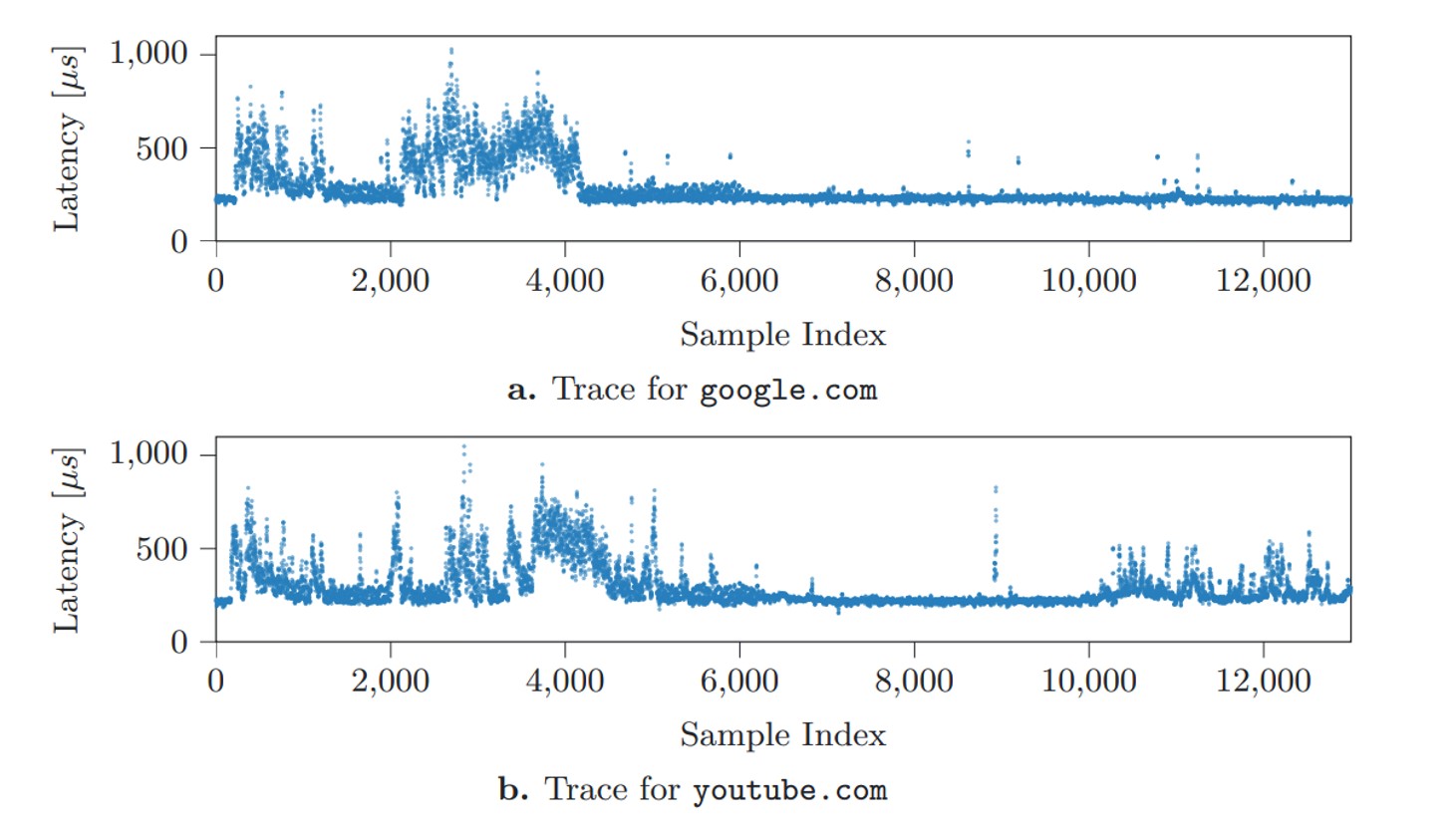
Distinct latency patterns generated when opening specific websites Source


The researchers mapped out latency graphs, like the ones shown above, for a wide variety of websites and locally running apps. What they found were distinct patterns — or digital fingerprints — generated every single time a specific site loads, or an app launches. Capturing these split-second launch or load windows requires monitoring the SSD continuously over a long period of time. However, these patterns proved to be remarkably consistent across different systems; the authors successfully tested their method on both a Linux desktop and an Apple Mac Mini. From there, the next step sounds simple enough: take a catalog of known fingerprints, measure real-world SSD delays, match the two up, and you know exactly what apps the user is opening, and what sites they’re visiting. But how to actually pull off this kind of surveillance under the radar, without planting malware on the victim’s computer?

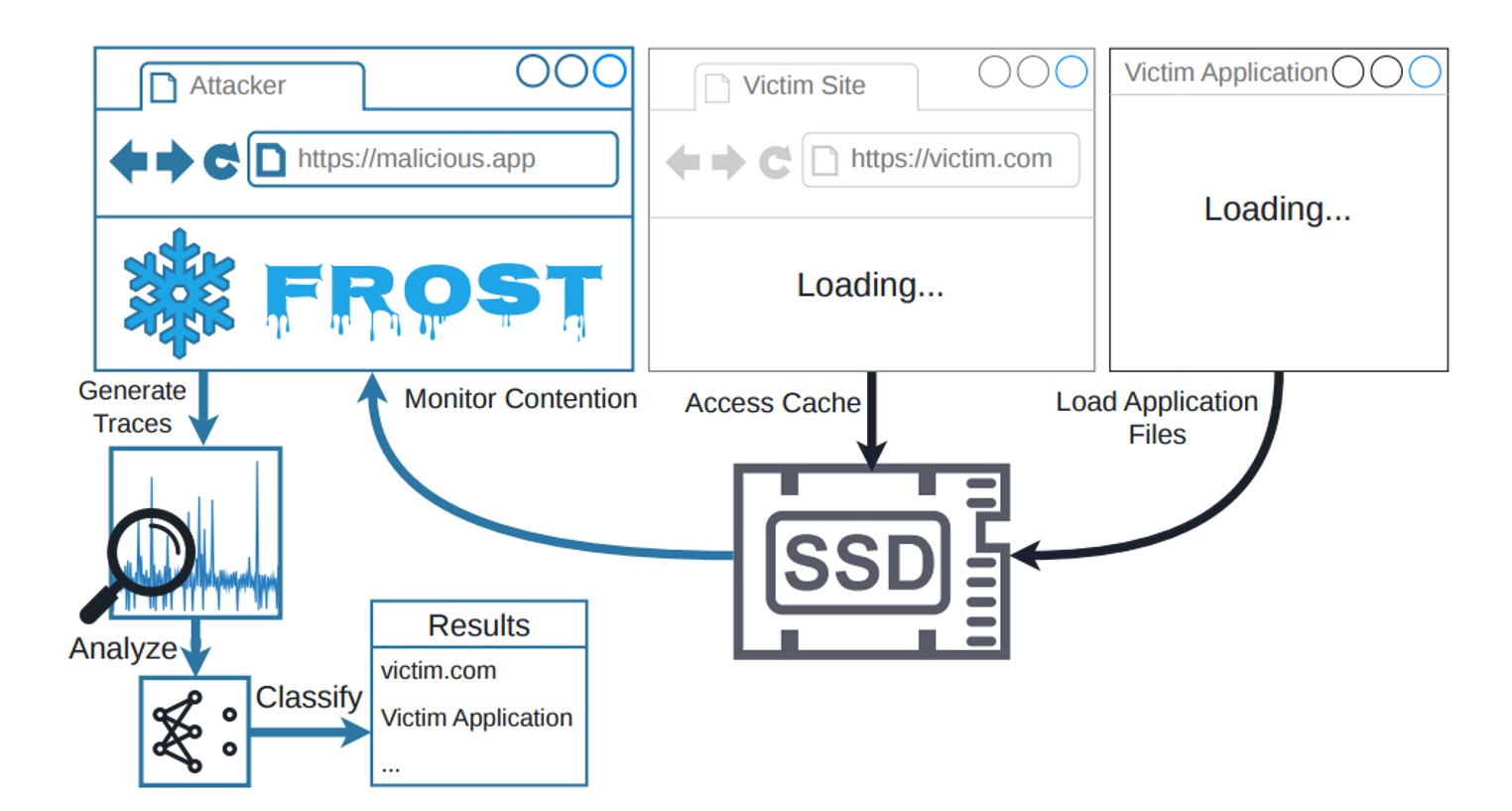
And that’s where a relatively new browser feature called the origin private file system (OPFS) comes into play. A hypothetical attacker doesn’t have to trick the user into downloading a shady Trojan. All they need do is have the victim visit a specially crafted webpage, and that page will leverage OPFS to quietly track the SSD’s activity. The clever acronym brings all these moving parts together: FROST stands for Fingerprinting Remotely using OPFS-based SSD Timing. Here’s the step-by-step breakdown of how the entire attack plays out:

The FROST attack workflow

How the FROST method can be used to spy on a computer’s activity Source

Method limitations

Like any side-channel attack, FROST isn’t exactly built for speed. It’s a slow, methodical process. To figure out just how slow, the researchers built a dedicated testbed to measure it.

The FROST testbed setup

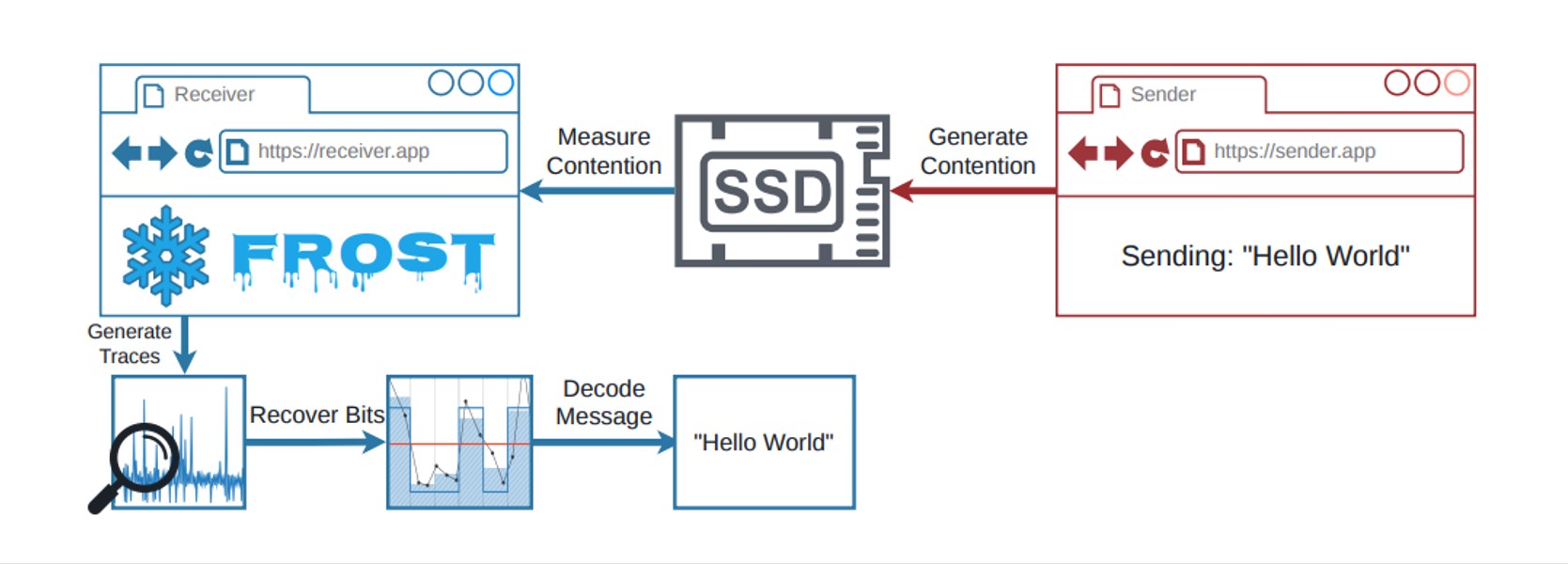
The testbed setup for measuring the speed of data extraction through OPFS Source

The team ran a program on a computer to transmit data indirectly. Think of it as a digital spy broadcasting a secret message by changing how it interacts with the hard drive. For instance, a 1 in the binary message code could mean the program is actively using the SSD, while a 0 means it’s sitting idle. At the same time, they set up a receiver inside the web browser that accessed the storage drive via OPFS. Because both the browser receiver and the transmitter program were competing for the SSD’s bandwidth, the browser experienced tiny speed delays whenever the transmitter was actively sending data.

This bizarre setup managed to transmit data at 661 bits per second, with nearly 90% accuracy on a Linux desktop with an AMD processor. On an Apple Mac Mini running macOS, the transfer rate hit 719 bits per second, also hovering around 90% accuracy. While these numbers are slightly lower than those in last year’s study — which relied on apps installed directly on the computer — the gap isn’t actually that huge.

That said, the real threat of the FROST attack isn’t raw data transmission; it’s tracking what the user does. Even if a hacker has a database of digital fingerprints for specific apps and websites, the information leaked through a malicious site using OPFS is too noisy. After all, a computer is constantly reading and writing data from/to the SSD in the background. To slice through that digital noise, the researchers turned to a tool that’s becoming standard practice in modern cyberattacks: a neural network. AI trained on known SSD fingerprints could confidently pick out user activity even from a chaotic mess of background data. The final results are eye-opening. On the Apple Mac Mini, the AI accurately identified which website the user opened 89% of the time, and nailed local app launches with 96% accuracy. Crucially, it could even detect what websites were opened in a completely different browser than the one running in the malicious tab. It sounds like a total home run for hackers — except for a massive list of real-world catches.

Is the FROST attack a real-world threat?

Simply knowing which apps are opened or what websites are visited doesn’t give an attacker much leverage. This kind of data is usually useful to advertisers looking to build a user’s digital profile without their permission; however, rolling out this tracking method on a massive scale is hardly realistic. The roadblock comes down to the fundamental way computers handle data: the system regularly dumps frequently accessed data into its RAM. Because the entire FROST attack relies on measuring the relatively slow bandwidth of the physical SSD, the data in RAM is effectively invisible to this method. To bypass this hurdle, the malicious webpage would have to force the OPFS to create a massive file — well over a gigabyte in size. Needless to say, a website that hogs hard drive resources in such an aggressive way would immediately raise red flags. EDR or XDR solutions will most likely flag it as anomalous activity.

Ultimately, this means the FROST attack — like most side-channel spying methods — is only practical for highly targeted operations. But that brings us right back to square one: knowing what apps someone opens or what web pages they browse is a pretty measly reward for the massive effort required to pull off such a sophisticated stunt.

Even so, FROST is light-years ahead of most academic side-channel attacks when it comes to real-world practicality. It doesn’t require preinstalled malware, and the victim doesn’t have to do anything more than open a malicious page. If nothing else, this research is a stark reminder of just how complex modern computers are, and how many unexpected blind spots can lead to data leaks. When building ultra-secure systems for highly classified data, one absolutely has to consider hardware peculiarities. If the prize is big enough, a determined attacker will gladly invest the time to build a hyper-specific complex attack. Research like this serves as proof that, in the world of cybersecurity, that scenario isn’t impossible.

Received — 10 June 2026 Kaspersky official blog

The guide on blocking ChatGPT, Gemini, Claude, and other AI tools at work | Kaspersky official blog

10 June 2026 at 13:53

Unchecked AI in the workplace quickly becomes a massive loophole for data leaks and security breaches. All too often, employees drop sensitive company data into public chatbots, or install rogue AI assistants on their own — in the process handing over way too much access. In a previous post, we broke down the different types of risky AI systems, and later shared some tips on how to turn off the built-in AI features on major tech platforms. Today let’s take a look at practical ways to block or restrict the unauthorized “helpers” employees might be using — from ChatGPT and Grammarly, to meeting bots like Fireflies and Read AI.

How to detect and restrict ChatGPT

ChatGPT is the biggest culprit when it comes to unauthorized AI use worldwide. A quick word of warning, though: an outright ban only sends users hunting for sketchy third-party sites or messaging app chatbots that hook into the same service. That’s why it’s always a good idea to offer an approved alternative before pulling the plug.

Detecting it: keep an eye on the NGFW or web filter for traffic heading to chat.openai.com, chatgpt.com, oaistatic.com, oaiusercontent.com, or cdn.oaistatic.com. It’s also smart to use EDR/EPP tools to scan browser histories, installed apps, and browser extensions across corporate devices.

Locking it down: use the firewall or web filter to block the entire AI Services category, and set up DNS to reroute traffic away from those OpenAI domains. Browser policies can also be used to ban ChatGPT-powered extensions. Better yet, block all extensions not on a pre-approved allowlist. Finally, use application controls and EPP solutions to stop users from installing the official desktop app (ChatGPT.exe or com.openai.chat).

How to detect and restrict Claude and Claude Code

Detecting it: use the NGFW or web filter to track traffic going to claude.ai, anthropic.com, *.anthropic.com, and api.anthropic.com. EDR/EPP or application control tools can also be used to scan employee computers for the desktop app (claude.exe).

Locking it down: drop a blanket block on the AI Services category through the NGFW or web filter, and tweak DNS settings to reroute traffic away from the aforementioned Anthropic domains. Next, use browser policies to shut down Claude-powered extensions. Finally, use application controls and the EPP platform to prevent users from installing the desktop app.

How to detect and restrict Perplexity AI

Detecting it: keep tabs on the NGFW or web filter to flag any traffic heading to *.perplexity.ai or pplx.ai.

Locking it down: just like the others, add the AI Services category to the NGFW or web filter blocklist, and use DNS routing to redirect traffic away from those domains.

Configure the browser to block third-party extensions from being installed. If Firefox is used in the organization, be aware that recent versions come with Perplexity built in. Luckily, these AI features can be turned-off company-wide using enterprise policies — specifically, by setting SidebarChatbot = blocked. The full list of tweaks can be found in the Firefox documentation.

How to detect and restrict DeepSeek

Detecting it: keep an eye on the NGFW or web filter for traffic hitting deepseek.com, chat.deepseek.com, api.deepseek.com, or platform.deepseek.com. For better precision, analyze the SNI (server name identification) in TLS connection requests. For mobile devices, look out for the official app (com.deepseek.chat).

Locking it down: blocklist the AI Services category on the NGFW or web filter, and reroute traffic to DeepSeek’s domains via DNS settings. Use browser policies to block third-party extensions, and lean on MDM/EMM tools to restrict the mobile app.

How to detect and restrict Mistral, xAI Grok, and Character.ai

The playbook for these tools is exactly the same as DeepSeek, so here’s the quick list of domains to watch for and block: chat.mistral.ai, mistral.ai, console.mistral.ai, grok.com, x.ai, api.x.ai, character.ai, beta.character.ai, and c.ai.

A quick word of warning on Grok: because Grok is baked into X, blocking this specific AI access point means blocking the entire social media platform.

How to detect and restrict Slack AI

Detecting it: in the Slack workspace admin dashboard, look under AnalyticsSlack AI usage. If an enterprise plan is used, the detailed Slack logs can be searched for any events starting with the ai_ prefix.

Blocking it with policies: in the organization’s Slack settings, click through the Workspace settingsRoles & permissionsFeature access, and change the permission to “no one”. Slack has a step-by-step guide in their help center.

Locking it down: shutting this down at the network level is tricky; it can be pulled off with a finely tuned CASB solution in place. Also, don’t forget the importance of blocking rogue integrations and keeping external AI services from tapping into Slack data in the first place. We covered how to lock this down using OAuth controls in a previous post.

How to detect and restrict Zoom AI Companion

Detecting it: if a corporate Zoom subscription is in use, just head to Admin CenterReportsAI Companion usage. Detecting Zoom’s AI when employees join external meetings or use free accounts is a lot tougher, but email filters can be set up to flag incoming AI-generated meeting notes by scanning for subject lines or text containing “Meeting summary” or “Meeting assets”.

Blocking it with policies: for the company’s own Zoom subscription, go to the Admin PortalAccount ManagementAccount SettingsMeetingAI Companion and toggle it OFF for everyone.

Locking it down: unfortunately, AI Companion is baked into Zoom’s DNA, so the only real option is blocking Zoom altogether.

How to detect and restrict Grammarly

What looks like an innocent spellchecker is actually one of the biggest culprits for workplace data leaks.

Detecting it: check the NGFW or web filter logs for traffic hitting grammarly.com, *.grammarly.com, and gnar.grammarly.com. EDR and MDM/EMM tools can also be used to hunt down the standalone desktop apps (Grammarly Desktop.exe and the macOS version), as well as the Grammarly browser extension.

Locking it down: use firewalls to block those domains at the network level, and EPP to stop employees from installing the desktop app, browser extensions, or the Grammarly add-ins for Microsoft Word and Excel.

How to detect and restrict meeting assistants: Fireflies, Read.ai, Tactiq, Fathom, and Granola

This massive category of third-party SaaS tools records and analyzes meetings — creating a massive risk for data leaks. The trickiest part? Outside clients or vendors can bring these bots into a meeting just as easily as employees can.

Detecting them: run an audit on calendar invites, and look for bot participants using email domains like @fireflies.ai, @read.ai, @tactiq.io, @fathom.video, or @granola.ai. Zoom, Teams, or Google Meet logs can also be used to review external participants who joined past calls.

Locking them down: since it’s impossible to control what outsiders do, blocking these bots comes down to tightening meeting rules. The best moves are: blocking users from granting OAuth permissions for bots to join calls, restricting employees from inviting unapproved external participants, or locking down meeting recording access for external users. That last option is usually the least painful way to keep bots out without disrupting business.

How to detect and restrict AI code editors: Cursor, Windsurf, and the like

Detecting them: use EDR/EPP tools to scan for executables like cursor.exe or windsurf.exe. It’s also worth monitoring network traffic heading to cursor.com and windsurf.com, as well as traffic hitting various AI model API providers. Keep in mind that there’s a pretty extensive list of API hosts to monitor here, since these editors aren’t tied to just one specific AI vendor.

Blocking them with policies: these apps can be prevented from being installed by setting up filters based on the developer’s digital signature certificate. Alternatively, a strict application allowlist can be employed where only pre-approved software is allowed to run.

Locking them down: rely on the EPP/EDR platform to actively detect and block these applications from running.

How to detect and restrict local AI tools: Ollama, LM Studio, and GPT4All

On one hand, this category carries fewer data leak risks because the AI models run completely locally on the user’s machine. On the other hand, it opens up a whole new can of worms: these apps themselves aren’t always highly secure, and can become targets for cyberattacks. Plus, it still means that employees can misuse models or process data in unauthorized ways.

Detecting them: EDR/EPP tools are the best line of defense here. They should be used to flag known local AI files and processes like ollama.exe, ollama serve, lmstudio.exe, LM Studio.app, jan.exe, or gpt4all.exe. From a network perspective, it’s worth scanning for open ports on local devices — typically port 1234 for Ollama and LM Studio, or port 8080 for WebUIs (using an additional fingerprint check of the server response). Another massive red flag is the presence of large files (often several gigabytes) containing language model weights. Look out for extensions like .gguf, .bin, or sometimes .safetensors.

Locking them down: use EPP/EDR platforms or windows AppLocker to block these applications by name, or switch to an application allowlist.

How to detect and restrict autonomous agents: OpenClaw, NemoClaw, and NanoClaw

This is easily one of the most dangerous categories of AI tools out there. These agents mix high-level independence with access to untrusted data, making them a massive security headache.

Detecting them: use EPP/EDR tools to sniff out active processes like openclaw, nanoclaw, nemoclaw, or clawdbot. Also keep an eye out for devices running Node.js that suddenly start launching Bash or Python scripts. Another dead giveaway is the appearance of system folders like ~/openclaw, ~/nanoclaw, ~/.claw*, or ~/clawhub. At the network level, monitor connections to the AI model APIs we mentioned earlier, as well as traffic hitting servers like openclaw.ai, nanoclaw.dev, or clawhub.*.

Locking them down: the safest bet is to use strict application allowlisting (only allowing approved software to run), or to specifically ban the known agent apps listed above. On top of that, consider blocking non-developers from installing Node.js and Docker, neither of which they need on their computers anyway.

Argamal RAT: attackers distributing a remote access Trojan through hentai games | Kaspersky official blog

By: GReAT
9 June 2026 at 18:57

In April 2026, we discovered a new campaign targeting users of hentai games. Attackers are embedding a remote access Trojan named Argamal into game installers. While concealing its presence, it can remotely control the computer and steal files and personal data.

Here’s how to avoid falling victim to this new Trojan — and how to safely and anonymously enjoy spicy content with (or without) anime girls.

How computers get infected with Argamal

Most of the infected games are distributed through adult game and torrent sites. In some cases, they are posted for download on file-sharing services and linked on gaming websites.

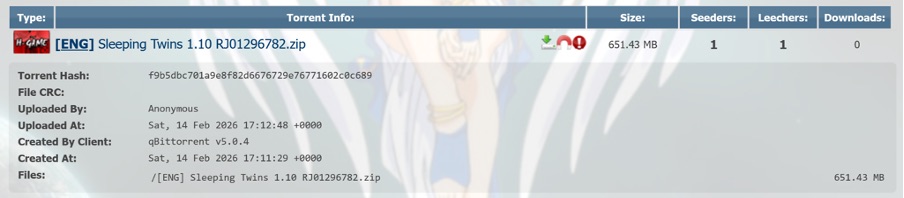
Trojanized hentai game Sleeping Twins hosted on AniRena

Example of a trojanized game hosted on the AniRena torrent tracker

Interestingly, instead of finding a dummy file inside the archive — as is often the case — the user gets the actual game built on popular engines like RenPy or RPG Maker. Infected pirated versions usually turn out to be scams: games fail to launch, folders are full of files with bizarre extensions, making it rather easy to put two and two together. Here, however, the user gets the actual gameplay they expected. Meanwhile, the Trojan lets itself in and keeps a completely low profile.

Malicious website featuring a library of trojanized hentai games

Example of a trojanized game hosted on the AniRena torrent tracker

Tucked right alongside the legitimate files in the archive is a DLL that the game relies on to run, but it’s been rigged: as soon as the user launches the game, the infected DLL automatically loads into memory. There are no outward signs of infection: neither an installer popping up in the background, nor a scary window or prompt asking you to disable your antivirus.

Argamal takes things real slow: instead of immediately rushing to steal files and passwords or throwing a digital rager on your computer, the Trojan first checks whether it’s running in a virtual machine or sandbox, and then goes into standby mode.

During this time, the malware writes hidden parameters to the system, conceals the paths to its DLLs, and delays its own execution. Three days later, the computer connects to GitHub, downloads an encrypted file, decrypts it, and turns it into a working Trojan module.

To ensure persistence, the attackers register the malware under the WindowsColorSystem Calibration Loader system task, a built-in Windows feature that triggers at every user logon to load monitor color profiles. Before shutting down, the malware deletes temporary files and covers its tracks to make it even harder to detect.

What makes Argamal dangerous?

Argamal is a remote access Trojan (RAT), which means attackers can use it to remotely control the victim’s computer. Here’s just a short list of what it may entail:

  • Executing arbitrary commands on the computer
  • Downloading and running files
  • Checking if an antivirus is installed on the PC (by the way, our security solution detects and neutralizes Argamal before it can harm you)
  • Searching for and exfiltrating sensitive data from files and system settings
  • Taking screenshots and streaming video from the device
  • Sending data to the attackers’ server
  • Monitoring user activity
  • Shutting down or restarting the device

Essentially, the infected computer turns into a remotely controlled machine. The owner may keep calmly going about their day, completely unaware that their device has been compromised. Yet the consequences of such an infection can be devastating.

For example, a single password stolen from a text note can lead to multiple compromised accounts at once if the victim reuses the same credentials across different sites. That’s why we recommend storing strong and unique passwords in an encrypted vault of a password manager rather than in plain text files.

Beyond hijacking accounts, the Trojan lets attackers literally spy on the user — reading their chats, digging into secret files, studying their sexual preferences… The cybercriminals can then use this highly sensitive information for subsequent attacks, blackmail, and extortion. We’ve covered what to do if you find yourself being targeted by extortionists in a previous post.

Another common scenario involves quietly stealing or substituting financial data — for instance, intercepting credentials from banking apps or replacing crypto-wallet addresses in the clipboard, which sends all your money straight to the attackers’ accounts.

In short, there’s a whole laundry list of ways attackers can exploit a victim’s device and data.

Argamal, yamete kudasai! How to protect yourself from similar threats

If you’ve decided to become the proud owner of “Waifu Simulator Ultra Definitive Edition”, stay on your guard:

  • Use security software that runs in real time and catches sophisticated malware. Despite the attackers’ best efforts to make the Trojan invisible, Kaspersky Premium instantly detects and removes Argamal from users’ devices.
  • Avoid downloading adult apps, installation files, and spicy content from untrusted sources. Clicking a “free XXX game, no signup needed” is a surefire way to invite malware onto your device. That said, even official platforms like Google Play and the App Store unfortunately let infected apps slip through the cracks at times. To stop worrying about accidentally downloading a Trojan or an infostealer, use Kaspersky Premium on all your devices.
  • Don’t share more data than you absolutely have to. If an adult game or website insists you sign up, enter personal data, or link third-party accounts instead of just checking your birth date, that’s a huge red flag. Sites rarely collect sensitive data for no reason. In the best-case scenario, it ends up with marketers and ad trackers. In the worst-case, it falls into the hands of bad actors who will use it for blackmail, phishing, or breaking into your other accounts.
  • Don’t click ad banners on adult websites. Even the most popular platforms like Pornhub occasionally host ads laced with malware. If you find it hard to hold back, use a security solution that will block malware downloads and prevent redirects to suspicious sites.

Received — 8 June 2026 Kaspersky official blog

Elon Musk’s XChat: how secure is the new messaging app? | Kaspersky official blog

Pavel Durov and his “private” messaging app have a brand new rival, and it’s — drumroll, please — Elon Musk and his XChat. On our blog, we’ve discussed more than once why Durov’s claims about Telegram privacy and security are exaggerated, to put it mildly. Here, I’ll just remind the reader that standard (non-secret) chats on Telegram aren’t protected by end-to-end encryption — the bare minimum required for user data to stay private.

But let’s get back to Musk. In late April 2026, the XChat app launched for iOS users. The tech mogul had been touting his messaging app for a long time, pitching it from day one as an incredibly private and secure way to communicate, and as a direct threat to Signal, WhatsApp, Telegram, and iMessage. Today, we look at whether we should actually trust Musk’s promises this new service, break down its core features, and stack it up against the competition.

Bitcoin-style encryption

Musk initially teased XChat on June 1, 2025, naturally via his X (formerly Twitter) account. Responding to another user’s question about when to expect the new service, Musk wrote: “This week if there are no scaling issues.”

Apparently, scaling issues there were: the app’s beta didn’t drop until September 2025, and iOS users didn’t get full access until April 2026. As for Android, there is zero info on when that version would launch at the time of this writing. That said, an XChat page is already live on Google Play where users can queue up “pre-register”, whatever that means.

But let’s go back to Musk’s post announcing XChat. That specific post turned a lot of heads in the privacy and cybersecurity community, and here’s why: the tech mogul wrote that the service would be built on an “entirely new architecture”, written in Rust, and featuring “Bitcoin-style encryption”.

Elon Musk's announcement of XChat

Elon Musk announces the launch of XChat, claiming the new messaging app is written in Rust and uses “Bitcoin-style encryption”. Source

The expert community spent a long time scratching their heads and trying to figure out what Musk actually meant. After all, Bitcoin isn’t an anonymous, encrypted data exchange system. The blockchain does use public and private cryptographic keys, but for something entirely different: signing transactions. Meanwhile, these transactions aren’t hidden from prying eyes; they’re out in the open for anyone to see, forever. Simply put, Bitcoin protects its users not by ensuring privacy, but quite the opposite — through ultimate transparency.

Most likely, Musk used “Bitcoin-style encryption” as a marketing gimmick. Bitcoin was trading near all-time highs at the time of his announcement, and cryptocurrency was the talk of the town. Technically, the XChat beta that dropped in September 2025 protected user chats with a “kind of” end-to-end encryption, but this was implemented in a way that raised serious doubts among cryptography experts.

And not without a reason. Normally, setting up an end-to-end encrypted chat automatically generates a public and private key pair. The public key is used to encrypt messages, while the private key decrypts them. Because other users need your public key to start a secure chat with you, these keys are usually stored on the app’s servers.

The private key, however, should ideally live only on the user’s device — which is exactly how Signal does it. This serves as a simple, ironclad guarantee that neither the company itself nor any third party breaching its infrastructure can access user chats, even if they really want to.

But Elon Musk’s projects always march to the beat of their own drum: the XChat developers decided it would be a great idea to store users’ private keys on XChat servers. X claims they’ll use hardware security modules (HSMs) to store these private keys — specialized appliances designed to prevent even the system owner from easily accessing the data inside. However, experts are also questioning the reliability of this setup, and coming to a grim conclusion: if X really wants to get a user’s private key, they will most likely be able to do so.

How encrypted messaging in XChat works in practice

Finally, once the scaling issues were ironed out nearly a year after the announcement, X officially rolled out the XChat app for iOS in April 2026. Now anyone can use it, but from a practical standpoint, the situation with encrypted chats seems even more convoluted than in Telegram.

According to the social network’s help center, to use end-to-end chat encryption in XChat, both users must have an X account, set up XChat, and have some sort of connection between them:

  • Follow, or be subscribed to each other
  • Have exchanged messages before
  • Have previously accepted a direct message request
  • Be a member of the same Premium Business / Premium Organization subscription on X

If users don’t follow each other and haven’t interacted before, XChat might still let them send a message request. However, that initial request goes out without end-to-end encryption.

Again, this is how the process is described in the messaging app’s official help documentation. Sound overly complicated? Let me reassure you: in practice, it works — or rather, doesn’t — completely differently. I personally managed to send a message to another user who had NOT set up XChat. The app itself, of course, gave me absolutely no warning about this.

XChat lets users send messages to people who haven't set up the app

The app allows you to start a chat with a user who hasn’t even set up XChat yet, without giving the sender any heads-up.

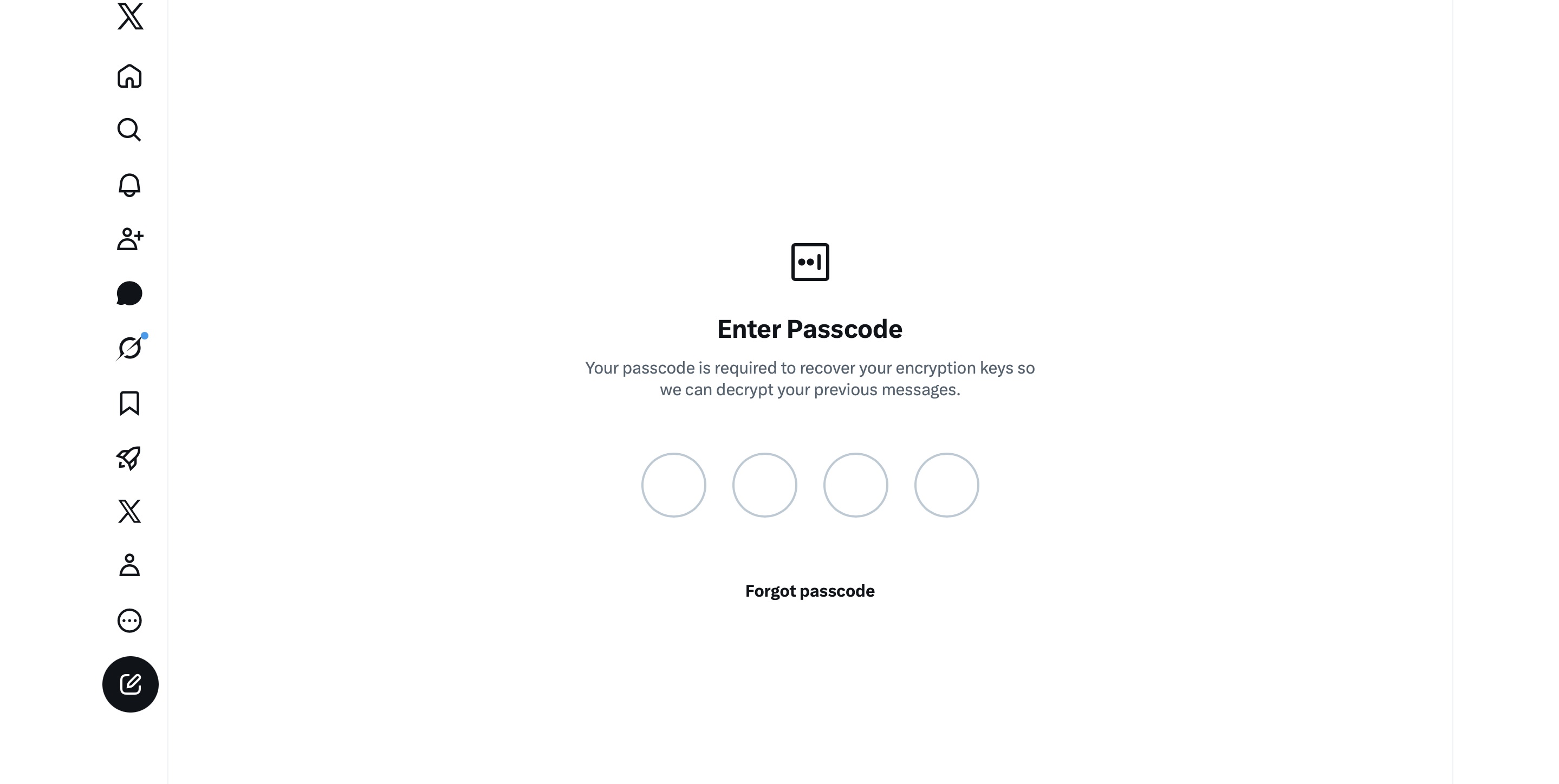
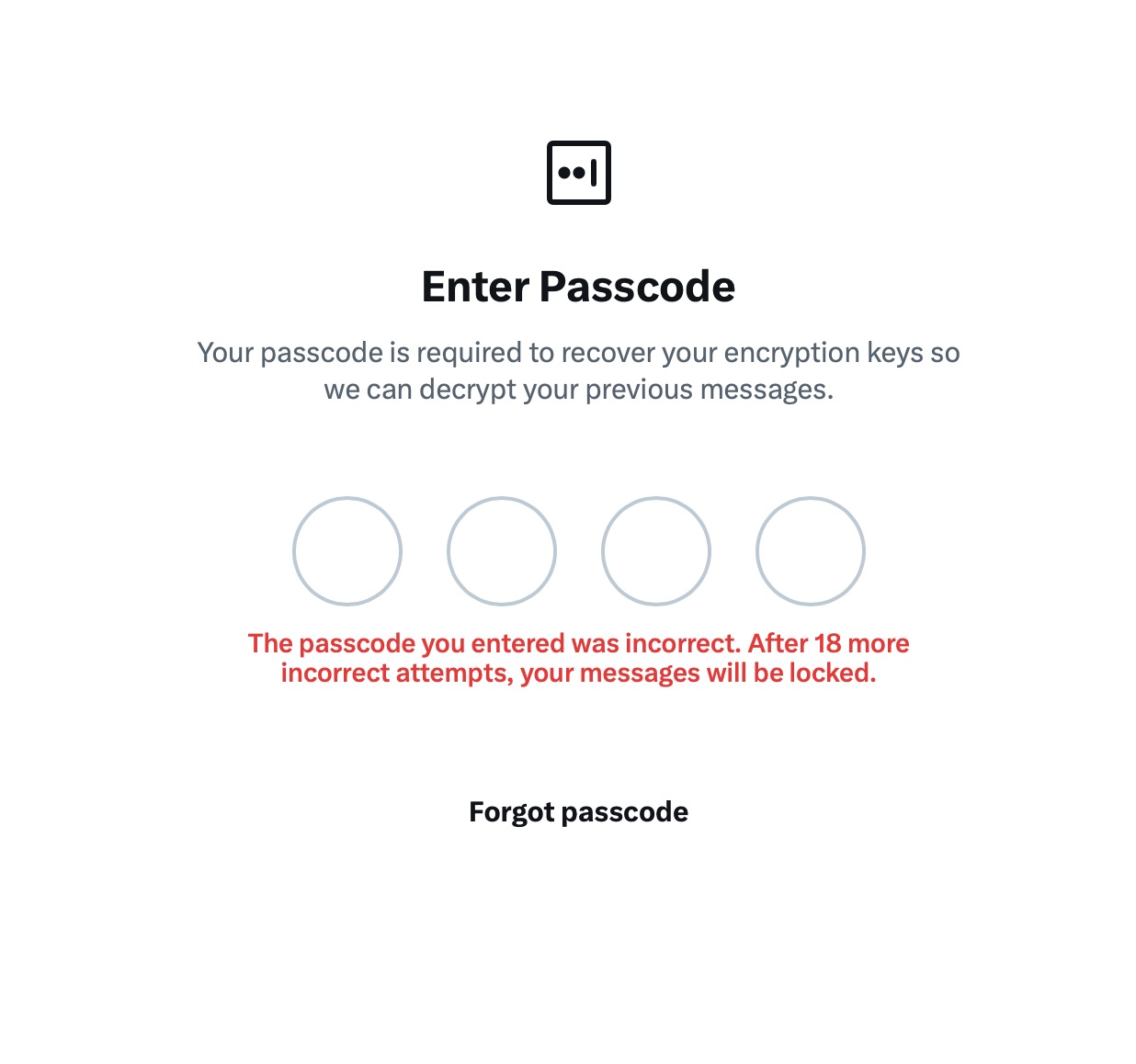
It gets even better. The user I messaged saw a notification for it on the web version of X, but couldn’t actually access the message. Here’s the catch: to start using XChat, the user first has to create a four-digit PIN. Yet, the app asks for this PIN the very first time the user tries to open it — meaning, before they even get a chance to create one. Along with this prompt, the user also sees a warning stating that without the PIN, they won’t be able to view past encrypted chats.

XChat asks for a PIN before one is even created

The user is prompted to enter a PIN to decrypt past messages before even completing the initial XChat setup.

The only workaround I found to actually start using XChat is to tap “Forgot PIN?” — even though that PIN never existed in the first place — confirm your identity, and create a new (well, your first) PIN. Naturally, you lose access to your chat history this way, so you won’t be able to read any messages sent to you in XChat before you officially set up the app.

XChat: the new Telegram, WhatsApp, Signal… or Facebook Messenger?

All these PIN hurdles actually exist for a reason. Remember, unlike WhatsApp and Signal, the XChat developers decided to store users’ private keys on their own servers. Consequently, the app uses these four-digit PINs to encrypt those keys.

According to the XChat help documentation, this mechanism was designed to ensure a “seamless” multi-device experience. It’s impossible not to point out that both WhatsApp and Signal managed to pull this off without sketchy workarounds like PIN requirements or server-side private key storage.

The problem is, workarounds like these undermine any claims of app privacy and security. First and chief among them, a PIN isn’t exactly the most secure way to protect sensitive data. We’ve mentioned time and again that four-digit combinations are easy to crack via brute force — especially since XChat gives you a generous 20 attempts to guess the right code.

XChat warns of lockout after 20 failed attempts

The app allows up to 20 attempts to enter the four-digit PIN. Once the limit is reached, XChat warns that access to messages will be permanently lost.

Stepping away from the bizarre implementation of end-to-end encryption compared to other messaging apps, it’s hard to ignore the overall sense of pointlessness that comes with trying to use XChat. As a Wired journalist rightly pointed out, the app feels less like a relative of WhatsApp, Signal, or Telegram, and much more like Facebook Messenger. Except people usually open Messenger to read a text from their mom or grandma, whereas XChat seems meant for anyone wanting to check in on that weird nephew who spends all his free time on X, still believes John McAfee’s promise of $500 000 Bitcoin, and fanboys over Elon Musk.

So, what’s the bottom line on XChat?

The best way to wrap up this post is with a quote from a cybersecurity expert: “If what you want is good security, use Signal. If what you want is to be able to talk to pretty much anybody using encrypted messages, use WhatsApp. If your whole life is based around X, I guess this is better than nothing.”

If you do use XChat, rule number one is to avoid a predictable PIN — absolutely don’t use your birth year or, worse, 1234. It’s also crucial not to forget this code, because if you do, your entire chat history is gone for good. Finally, just like your other passwords, you shouldn’t keep it in your notes app, but rather in a secure password manager. This won’t only save you from having to memorize dozens of character combinations, but will also reduce the risk of losing access to your vital data and conversations.

To learn more about secure messaging in other apps, check out our other posts:
A guide to disabling Copilot, Gemini, and Apple Intelligence | Kaspersky official blog

4 June 2026 at 21:16

Lately, software developers have been baking AI features straight into everyday work tools, operating systems, and browsers. In some cases, they’re genuinely handy. However, their presence introduces specific risks, which means plenty of companies are hesitant to give employees access to these tools. In a previous post, we categorized these unwanted AI systems, looked at how to spot them at the network and endpoint levels, and covered the ultimate universal kill switch: managing OAuth access across major corporate platforms. In this deep dive, we’re getting tactical: breaking down how to disable or restrict the AI built into popular platforms.

A quick heads-up: major software vendors occasionally change the names of their AI settings and tweak how they function. If any of the options mentioned below are missing or aren’t working as expected, a quick web search for the setting’s name will usually point you to its new location or branding.

How to turn off Microsoft 365 Copilot

Detection: you can check actual Copilot usage in the logs by going to Microsoft 365 admin →  Copilot usage report.

Disabling via policies: in the Microsoft 365Admin Center, go to Settings →  Integrated Apps, find Copilot in the Available Apps list, and select Block. More granular configuration policies are available under Customization →  Policy Management. The Policies page here contains over two thousand entries, so you’ll want to filter them by the keyword “Copilot” (detailed guide). Given that Copilot is a paid add-on for Office, another way to block it — and save money by doing so — is to simply avoid assigning users SKUs that include Copilot.

We recommend separately blocking Copilot Chat, which is available in Teams, Edge, Outlook, and several other services. Yes, it’s not Copilot itself. And yes, it has to be blocked separately by following this guide.

Additional layer of protection: you can block the domains copilot.cloud.microsoft and m365.cloud.microsoft/chat at the web filter or NGFW level. However, Microsoft explicitly advises against this, warning that it could break other Microsoft 365 features.

How to turn off Windows Copilot

Beyond the Office version of Copilot, you also need to manage its consumer-facing cousin.

Detection: look through your NGFW or other network logs for traffic hitting copilot.microsoft.com, bing.com/chat, or edgeservices.bing.com.
Disabling via policies: in Windows Group Policy, navigate to Computer Config →  Admin Templates →  Windows Components →  Windows Copilot. In Microsoft 365 Group Policy, go to Admin center →  Block consumer Copilot for organizational accounts.

Additional layer of protection: block the Copilot.exe executable from running entirely.

How to turn off the Copilot sidebar in Edge

Detection: look through your NGFW or other network logs for traffic hitting copilot.microsoft.com, bing.com/chat, or edgeservices.bing.com.

Blocking: configure the following MS Edge Group Policies: HubsSidebarEnabled = false, EdgeShoppingAssistantEnabled = false, CopilotPageContext = Disabled (false), CopilotNewTabPageEnabled = false, Microsoft365CopilotChatIconEnabled = false, GenAILocalFoundationalModelSettings = 1 (note that disabling this unexpectedly requires a 1 instead of a 0).

Second layer of protection: block the domains copilot.cloud.microsoft and m365.cloud.microsoft/chat at the web filter or NGFW level. However, Microsoft explicitly advises against this, warning that it could break other features.

How to turn off the Gemini Assistant in Google Workspace

Detection: check the Workspace Admin Console (admin.google.com), Gemini usage report section.

Blocking via policies: in the Admin Console, navigate to Apps →  Additional Google services → > Gemini app, and set it to OFF. Then, go to Manage Workspace smart feature settings →  Smart features in Google Workspace, and set it to OFF.

Second layer of protection: block network traffic to the domains gemini.google.com, bard.google.com, and aistudio.google.com.

How to turn off Gemini in Google Chrome

Detection: check your Chrome Enterprise reports (Chrome management →  Reports), or look through network traffic logs for connections to the previously mentioned domains.

Blocking via policies: in your Chrome Enterprise policies, configure the following settings: GenAILocalFoundationalModelSettings = 0, HelpMeWriteSettings = 2 (disabled), TabOrganizerSettings = 2, CreateThemesSettings = 2, DevToolsGenAiSettings = 2.

Additional layer of protection: block network traffic to the domains gemini.google.com, bard.google.com, and aistudio.google.com. Additionally, block unauthorized Chrome/Chromium installations (those outside your policy management) with the help of host-based application control tools like EPP/EDR or AppLocker.

How to turn off Apple Intelligence

Detection: on your NGFW and web filters, traffic hitting apple-relay.apple.com and *.apple-cloudkit.com is a clear indicator that Apple Intelligence is active.

Blocking via policies: any managed Apple device allows you to disable individual AI features, though there isn’t a master switch you can flip to shut down “all AI”. In your MDM profile, you need to set the following keys to false (disabled): allowWritingTools, allowMailSummary, allowGenmoji, allowImagePlayground, allowImageWand, allowPersonalizedHandwritingResults, allowExternalIntelligenceIntegrations, allowExternalIntelligenceIntegrationsSignIn, allowNotesTranscription, and allowNotesTranscriptionSummary. Here is a brief configuration example:

<dict>
<key>PayloadType</key>
<string>com.apple.applicationaccess</string>
<key>allowWritingTools</key>
<false/>
<key>allowMailSummary</key>
<false/>
</dict>

Despite Apple’s shift toward declarative device management, these AI features still need to be managed through traditional MDM payload settings.

Second layer of protection: block network traffic to the hosts mentioned above — though the obvious downside for mobile devices is that this won’t work once they leave the corporate network.

KASG: security gateway for autonomous vehicles | Kaspersky official blog

3 June 2026 at 21:39

According to global research, the market share of highly automated, driverless vehicles is growing rapidly. Analysts estimate that the next 10 to 15 years will mark a major shift from pilot projects to the mass adoption of autonomous transport. The momentum is building worldwide: Europe has already rolled out over 35 autonomous vehicle pilots, while the U.S. and China log more than 450 000 and 250 000 commercial trips per week, respectively. However, the report notes several roadblocks slowing down this progress. One such hurdle is the uncertainty surrounding legal liability and regulation, including in the areas of safety and security. The allocation of responsibility among suppliers, manufacturers, enterprise clients, and end users remains a major point of discussion.

Each market stakeholder sees the issue of ensuring the safety of autonomous vehicles differently. For automakers, it means taking responsibility for how a vehicle behaves on the road and for vetting their suppliers. For the suppliers themselves, it means designing security mechanisms directly into their solution architecture from day one and guaranteeing their adequacy. For insurance companies, it means completely overhauling their risk models to account for not just accidents, but also potential software glitches and cyberattacks. Ultimately, everyone agrees on one fundamental point: security must be a foundational feature of the vehicle — not an optional add-on.

Ensuring vehicle security in the modern era

For years, discussions around automotive safety focused strictly on functional safety. In other words, the goal was to ensure that vehicle systems operated correctly, and that risks associated with potential failures were fully mitigated or reduced to an acceptable level. The ISO 26262 standard “Road vehicles — Functional safety” helps address this very challenge, and serves as the baseline for the automotive industry.

However, the modern connected vehicle is a complex cyberphysical system that stores and processes massive amounts of data, including sensitive information. And this leads to the emergence of new basic needs. To draw an analogy with two levels of Maslow’s hierarchy of needs, a modern vehicle must:

  • Satisfy the need for “esteem” — meaning it must securely and reliably store user profile data, such as account credentials, biometric data, payment details, and more.
  • Satisfy the user’s cognitive needs — meaning it must provide secure internet connectivity, transmit vehicle telemetry, and send reminders for scheduled or emergency maintenance.

All of this means equipping vehicles with a wide array of interfaces — telematics, Bluetooth, Wi-Fi, cellular connectivity, OTA updates, and V2X — which opens the door to remote attacks. Therefore, it becomes necessary to ensure not only the functional security, but also the information security of the vehicle. As a result, specialized industry standards that help address automotive cybersecurity challenges have emerged in most countries. The key international standards are ISO/SAE 21434 “Road vehicles — Cybersecurity engineering”, UNECE R155, and UNECE R156.

China’s regulations are evolving too. In 2024, the country published the national standard GB 44495-2024 “Technical Requirements for Vehicle Cybersecurity”, which went into effect on January 1, 2026. The document introduces mandatory cybersecurity requirements for vehicles, including communications protection, security event management, threat monitoring, and secure vehicle interaction with external infrastructure.

Understanding and applying these standards is becoming absolutely critical. Research shows that cybersecurity risks are escalating daily, and their impact on functional safety can sometimes trigger far more dangerous incidents than an internal system failure. What happens if an attacker gains access to a self-driving truck’s remote-control system, or manages to reflash a critical electronic control unit during an unauthorized diagnostic session?

One of the key components for mitigating these scenarios is a security gateway, which isolates the vehicle’s architecture into different domains based on criticality, while providing secure routing, filtering, and traffic control. Developing this type of software solution is precisely what our team focuses on as we build the Kaspersky Automotive Secure Gateway based on KasperskyOS.

Why Kaspersky Automotive Secure Gateway?

The primary purpose of Kaspersky Automotive Secure Gateway (KASG) is to secure the vehicle’s CAN domain, since the CAN bus is used to transmit a vast number of critical control commands. This impacts nearly 80% of the electronic control units inside the car, which handle engine management, braking, body electronics, and more. Because of this, we utilize the Safety-Aware Cybersecurity approach — a unified architecture that accounts for both functional safety and cybersecurity requirements.

For example, standard End-to-End Protection (E2E) mechanisms are typically used to mitigate risks associated with dropped, out-of-order, or corrupted CAN messages. However, these mechanisms were not originally designed to counter targeted cyberattacks. If an attacker manages to construct a malicious frame that conforms to the required E2E format, the system may accept it as valid.

This introduces a new factor: it’s critical not only to verify that a message was delivered without errors, but also to ensure that it was actually generated by a trusted electronic control unit (ECU), and was not altered in transit. This is particularly vital for transmitting control commands — such as those sent to the vehicle’s braking system — or for implementing keyless entry (NFC) systems.

To address that challenge, Secure Onboard Communication (SecOC) mechanisms are integrated into the vehicle’s architecture. They use cryptographic methods to verify message authenticity and integrity, protecting the system against message spoofing and replay attacks. KASG successfully implements these mechanisms, which, in addition to message verification, perform the crucial function of centralized key management. This allows encryption keys to be distributed and updated from a single point within the vehicle, reducing both the cost and the processing load on the ECUs involved in SecOC-backed data exchange.

Automotive IDS

However, in complex systems, it’s no longer enough to apply security mechanisms only to individual messages or separate network segments. It’s essential to provide vehicle-wide monitoring and control, tracking behavioral anomalies, unusual cross-domain interactions, and unauthorized tampering attempts. In the IT domain, this is known as an Intrusion Detection System (IDS). These systems have been successfully adopted by the automotive industry as well.

At the same time, it’s important to realize that for a modern vehicle, an IDS is not a single magic point of data collection and analysis; the vehicle requires a distributed monitoring system. Monitoring is carried out at various architectural levels: within domains, at the individual controller level, and at network boundaries.

The security gateway becomes a critical monitoring point because all cross-domain interaction passes through. Additionally, the gateway provides visibility into data exchange across different segments of the vehicle network. Its job is to detect deviations from normal behavior and generate security events.

When it comes to the CAN domain monitoring implemented in KASG, the IDS looks at the following criteria for traffic analysis:

  • Alignment of CAN message parameters (CAN ID, DLC) with their descriptions in the DBC specification.
  • Frequency and periodicity of CAN messages.
  • Allowable ranges for CAN signals.

In practice, however, an important limitation becomes clear: even with an onboard IDS, more context is required to determine the exact characteristics of an attack. Furthermore, when operating highly automated vehicles — where fleet-wide monitoring is essential — such isolated analysis becomes inherently insufficient.

Connecting a vehicle to an SIEM

Multi-object monitoring, data correlation, and data analysis can be efficiently handled externally — specifically in SIEM (Security Information and Event Management) systems, which are traditionally used in corporate and industrial cybersecurity operations centers. Therefore, utilizing a SIEM system fleet-wide is a logical step that makes it possible to:

  • Collect security events from multiple vehicles.
  • Correlate events over time and across contexts.
  • Detect advanced and distributed attacks.
  • Provide incident auditing and investigation.
  • Respond to individual incidents and manage cyber-risks fleet-wide.

When integrating with external SIEM systems, several critical tasks must be addressed: ensuring a secure connection, tuning the security event transmission process, and establishing baseline rules for event processing and correlation. We are actively working through all of these challenges using our own SIEM system — Kaspersky Unified Monitoring and Analysis Platform — as a blueprint.

There are still many issues ahead that need to be resolved. This article covered only a fraction of the approaches currently used in KASG to ensure vehicle safety and security. Yet even this small part demonstrates that automotive security cannot be achieved by solving a single problem or applying a single mechanism. Achieving it requires an approach that enables methodical architecture development — balancing diverse requirements for vehicle functionality, security, and reliability.

Study on the Wi-Fi security situation in Mexico | Kaspersky official blog

By: GReAT
2 June 2026 at 14:00

One of the biggest football (soccer) events of this summer is the World Cup 2026. The tournament is co-hosted by three countries: the U.S., Canada, and Mexico. Unfortunately, events of this scale attract not just fans, but also scammers from all over the globe. We’ve already covered how cybercriminals are prepping for the World Cup online, and today we’re talking about digital security for fans on the ground in Mexico.

The country will host 13 matches and welcome millions of tourists. They’ll be staying in hotels, heading to games, checking out restaurants, navigating airports, and visiting popular tourist spots — and everywhere they go, the temptation to connect to public Wi-Fi will be high.

We’ve surveyed more than 84 500 (!) public Wi-Fi access points in Mexico City, Guadalajara, and Monterrey — and we have a lot to share about their security. Spoiler alert: many networks are still using outdated security standards, so you really shouldn’t go on vacation without reliable protection and an eSIM.

What and how we tested

Walking across Mexico looking for public Wi-Fi access points would have been a bit tough, though that’s exactly what we did for a similar Wi-Fi security survey in Paris. You can check out the results of that in our post, How safe is Wi-Fi in Paris?

This time the mission was far more demanding: mapping the wireless landscape of three major metropolises. That’s why we went wardriving — scanning for and logging wireless networks from a moving vehicle while equipped with a smartphone or laptop. It’s similar to searching for Wi-Fi on your phone, where the device constantly listens for nearby networks. Except instead of connecting to them, we just collect data about them.

All information was used strictly for passive observation and infrastructure analysis. Beyond receiving publicly broadcast service information, the experts of Kaspersky’s Global Research and Analysis Team (GReAT) didn’t attempt to authenticate, intercept traffic, exploit systems, or otherwise interact with the wireless networks they discovered. Mobile access points deployed in cars and on mobile devices were excluded from the sample.

Our main target was Mexico City — the capital and one of the most densely populated cities in Latin America. We took a drive through popular tourist spots: Mexico City Stadium, Mexico City International Airport, Zócalo, Paseo de la Reforma, Colonia Roma, La Condesa, Polanco, Coyoacán.

In Guadalajara and Monterrey, we drove similar routes: stadiums, main avenues, airports, and popular neighborhoods. Below you can see a heatmap of the areas we covered, ranging from red for areas with the highest density of public access points, through yellow and green, to blue for the lowest concentration.

Heatmap showing the locations of all Wi-Fi access points we covered in Mexico City
Heatmap showing the locations of all Wi-Fi access points we covered in Guadalajara
Heatmap showing the locations of all Wi-Fi access points we covered in Monterrey

We used passive radio reconnaissance to log 84 500 signals and 69 500 unique network identifiers across these three cities. The majority of the signals were caught in Mexico City (61.4%), followed by Guadalajara (23.6%) and Monterrey (14.8%).

What we analyzed:

  • Wireless network identifiers (SSIDs): the names that show up in your list of available Wi-Fi networks
  • Information that can be gleaned from these identifiers
  • Default router configurations and how ISPs deploy their networks
  • Frequencies used and signal characteristics
  • Channel load and radio frequency spectrum usage
  • Wireless network security configurations:
    • Open and insecure networks
    • Networks with WPS enabled
    • Secure networks (WPA2/WPA3) with WPS activated

You can find the full version of the study on the Securelist blog.

Telltale public Wi-Fi access point names

Network names (SSIDs) can tell you a lot by unintentionally revealing information about hardware manufacturers, ISPs, deployment methods, and whether an access point belongs to a business or a private user.

About 34% of the public Wi-Fi networks we logged didn’t bother changing their names at all, either sticking with the factory SSIDs from the router manufacturers or using standard naming conventions from their ISPs. For attackers, this can be a pretty solid hint, since this kind of network name lets them know which provider owns a given access point, what hardware is being used, and how it’s likely configured by default.

Another troubling nuance is the large number of Wi-Fi networks (over 30%) that use the access point’s MAC address (BSSID) as the visible network name. The first few bytes of a BSSID contain an Organizationally Unique Identifier (OUI), which gives away the router’s manufacturer. This is a useful lead for bad actors: they can find out who made the hardware and test for vulnerabilities specific to that brand’s models.

Is Mexican Wi-Fi well-protected?

An access point secured with WPA2/WPA3 can be considered more or less safe. All other authentication mechanisms yield much weaker results. We grouped the public Wi-Fi networks into four categories:

  • Secure (WPA2/WPA3)
  • Unsecured (open/WEP)
  • Weak (WPA)
  • Undetermined

The results are roughly the same across all three cities: about 82% of all analyzed access points are protected by secure standards. The outdated and insecure WPA protocol was practically nonexistent. However, more than 10% of the access points turned out to be completely unsecured. Connecting to these networks carries the risk of traffic interception and hidden surveillance.

But security isn’t evaluated by WPA protocols alone. We also checked for the presence of WPS, the infamous feature for quickly connecting to a network without entering a password, which is highly vulnerable to attacks. It turned out that WPS is enabled on nearly half (47%) of the access points in Mexico City, 43% in Guadalajara, and 41% in Monterrey. On average, 45% of the access points are potentially vulnerable to WPS-related attacks — sacrificing security for the sake of convenience.

What’s more, this feature frequently remained active even on seemingly secure WPA2/WPA3 networks — about half of them utilized WPS. This shows that having WPA2/WPA3 is still not enough to consider a Wi-Fi access point safe, as additional features like WPS can still leave the door open to attacks.

What else every tourist needs to know

Digital risks on a trip aren’t limited to public Wi-Fi alone, especially now that many are shifting away from public Wi-Fi to an eSIM. There are still plenty of threats in crowded places: public USB chargers, QR codes with swapped links, NFC and Bluetooth attacks, and, of course, social engineering tactics. Let’s break it all down.

Charging stations. Public USB chargers can also be dangerous: bad actors could potentially gain access to the data on your device or try to install malware. We covered these attacks in detail in our post, Data theft during smartphone charging.

Dangerous QR codes. Criminals can plant phishing QR codes in popular tourist spots. The pretexts can vary wildly; for instance, ads for team-specific fan “events”, or links supposedly offering discounts or restaurant menus. In reality, any QR code posted on the street can be considered insecure by default, and you shouldn’t scan them with your smartphone unless you have a QR code threat analyzer installed.

Fake broadcasts, tickets, and betting pools. Earlier, we described cases where bad actors were distributing malware via fake IPTV apps to capitalize on the WC26 hype. Remember, even if you plan to watch the tournament from home, you still need to stay alert and not trust the first sites that pop up advertising free broadcasts, offering betting pools, or promising unbelievably generous payouts.

NFC and Bluetooth attacks. Leaving Bluetooth enabled in crowded places can also cause problems: someone might try to discover your device, track you, or initiate an unwanted pairing request. NFC services with contactless payments create additional risks too — especially when paying in sketchy spots.

How to protect yourself and your devices

Despite the prevalence of secure WPA2/WPA3 public Wi-Fi access points in Mexico City, Guadalajara, and Monterrey, our study shows that public Wi-Fi networks remain vulnerable. It’s also important to remember that attackers can create fake networks — so-called evil twins — disguised as legitimate public Wi-Fi in airports, hotels, cafés, and tourist spots.

For the average user, it’s practically impossible to tell how safe a specific access point is when trying to connect. That’s why the safest option is to use cellular data to access the internet — completely eliminating the need for Wi-Fi. Besides, there’s no need to research the nuances of local laws, rates, and other cellular details for every country you plan to visit; you can just buy a global eSIM online in two clicks. We explained how to make the entire process hassle-free in our post, Internet on the go with Kaspersky eSIM Store.

If you still plan on connecting to public Wi-Fi, always use a VPN to secure your device and data when connecting to unfamiliar — especially unsecured — Wi-Fi networks. This creates an encrypted tunnel between your device and the VPN server, making it impossible to intercept your data along the way. Haven’t picked a VPN yet? Try Kaspersky VPN Secure Connection, which is included with both Kaspersky Premium and Kaspersky Plus subscriptions.

Now, if you still plan to attend the World Cup without any cybersecurity solution, at least follow these basic rules of digital hygiene:

  • Don’t use public USB chargers
  • Don’t send sensitive information over connections that aren’t secure
  • Don’t log in to banking, email, or social media accounts over unsecured Wi-Fi
  • Turn off Bluetooth and NFC while walking around in crowded places
  • Don’t trust QR codes posted on the street
  • Connect to public Wi-Fi only when absolutely necessary

What else to read to make sure cheering for your favorite team isn’t only exciting, but also safe:

Scams in messengers: exposing the global scam-cartels exploiting everyday messagesng-heist | Kaspersky official blog

1 June 2026 at 09:00

It starts with the familiar: a short message, a trusted name, a routine tone. Delivery updates, work pings, brand alerts hum in the background, rarely attracting scrutiny. You check, you answer… — until minutes later you’ve slipped into a trap built to lower your guard and hijack your trust.

That’s why messaging scams cut deep: they exploit everyday habits where instinct, not caution, leads. Communication once moved slowly, leaving room for doubt. Now it’s instant — and that speed is a weapon in criminal hands.

On our blog, we’ve already examined numerous scam schemes in messaging apps — from pig butchering, where the victim is groomed for a very long time, or catfishing, where the scammer creates a fake identity, to phishing via chatbots or through gift-giving campaigns in messaging apps.

Now, for the first time, Kaspersky has set out to capture the full end-to-end reality of messaging-based scams to understand how quickly harm occurs, how they impact trust and what remains after the interaction ends. What emerges is a highly organized and industrialized scam ecosystem embedded within everyday messaging channels such as SMS, WhatsApp, and email.

Kaspersky experts have prepared a report on targeted scams in messaging apps, detailing not only the financial but also the emotional damage caused by such attacks, as well as providing tips on how to protect yourself and avoid them. In this post, we explore the most interesting facts, but you can find more details in the full report.

The damage is underestimated

How much do you think a single successful attack via a messaging app costs the average victim? Ten dollars? Or maybe 50? You’re underestimating the scammers. Although more than a third (36%) of victims incur losses of less than $135, on average a victim loses… $733!

Country Average loss per victim
Senegal $392.94
Serbia $493.32
Morocco $504.28
Greece $609.32
United Kingdom $617.38
Côte d’Ivoire $654.11
Spain $672.67
United States $724.73
Portugal $868.20
Italy $896.02
France $1,193.58
Germany $1,369.35

The average amount lost by a victim in a successful attack via a messaging app

On the one hand, the financial hit doesn’t look catastrophic in isolation. These are micro-losses by design. Small enough that some never report them to the police. Small enough that banks don’t always investigate. Small enough to be dismissed as bad luck rather than organized crime.

But $733 is not nothing. It’s enough to cover a month’s worth of groceries, school or daycare fees, or utility bills. Against the backdrop of the global cost-of-living crisis, a single such loss can seriously dent a family’s budget.

In 11% of cases, losses exceed $1,350, and more than a quarter of victims (28%) report having been scammed three or more times in the past six months. Once scammers discover that a phone number responds, that contact becomes an asset, circulating from one database to another.

Now imagine the scale of the problem: if just 10% of the three billion messaging‑app users worldwide fell victim with the average loss, the total damage would amount to… nearly $220 billion! This is comparable to the GDP of Greece, and exceeds that of Morocco, Serbia, or Côte d’Ivoire.

It becomes clear that behind the daily flood of fraudulent schemes lie large scam cartels operating on an industrial scale, using AI to personalize messages that mimic those of family members, friends, and familiar brands. This, in essence, forms the basis of a full-fledged economy built on digital identity theft.

Scam gangs cash in on your money worries, using AI to drain your wallet in minutes

Speed beats scrutiny

More than half of successful messaging scams (52%) unfold in under 30 minutes — from first contact to the moment money or personal data changes hands — or even faster, before the victim begins to doubt the legitimacy of the sender. In fact, one in seven scams takes less than five minutes — quicker than boiling an egg!

The speed isn’t accidental. It’s the method. Scammers structure their schemes to deny the victim a chance to come to their senses. Every element is engineered to compress the decision-making window: the urgency of the scenario, the familiarity of the format, the plausibility of the request.

They rush you — faster, faster, don’t tell anyone, you only have a few minutes, solve the problem, don’t ask questions. Click the link, fill in the details, approve the transaction, or else… Or else what? The scammers’ imagination knows no bounds here, but if you don’t do something right now, you’ll definitely regret it.

Alas, the realization of what has happened usually comes when the damage is already irreversible. More than half of victims (51%) lose money; another 43% hand over their personal data — most commonly phone numbers, names, and email addresses — to scammers, and often the victim loses both.

Where and how attacks occur

A delivery notification, a bank alert, a message from a merchant you ordered from last week — messaging apps permeate every aspect of everyday life, making such interactions completely normal. An attack shouldn’t feel like an attack. It should feel like the same message you’ve received hundreds of times.

It’s no surprise that scammers focus their attention on this method of communication first and foremost. The most popular platforms for scams are predictable: WhatsApp (43%), SMS/iMessage (40%), Facebook (27%), Telegram (22%), and Instagram (19%) — these are the ones that people trust most.

A wide variety of schemes is used. Brand impersonation is now one of the three most common types of messaging scam worldwide — accounting for 31% of cases. Fake delivery notifications top the list at 38%, followed by investment scams at 37%.

At the same time, nearly two-thirds (63%) of fraudulent schemes span multiple platforms, moving from SMS to WhatsApp, from WhatsApp to Telegram, etc. In this way, scammers achieve two goals: they mimic organic messaging and evade moderation algorithms.

AI has taken scams to a new level

Just a couple of years ago, fraudulent messages gave themselves away with bad grammar, awkward phrasing, illogical requests, and an obsessive sense of urgency. Today, a phishing message looks, sounds, and reads just like the real thing.

Scam cartels want to catch people in motion — between meetings, on a commute, or during everyday tasks — when your attention is already fragmented. They mimic your mother’s turn of phrase. They match your bank’s tone of voice. They copy your courier’s format exactly. They mirror the rhythm, structure, and style of authentic brand communications across messaging platforms. And AI is accelerating all of it.

What this creates is overlap. Legitimate and fraudulent messages appear in the same environment, using the same formats, language, and triggers. The difference between them is no longer obvious.

The data shows that two-thirds of victims (66%) believe AI was used in the scam against them, 42% cite messages written by AI, 31% report generated or cloned voices, and 25% encountered deepfake images or videos.

That’s why mere awareness and “tech-savviness” may no longer be enough to protect oneself. From Gen Z to Gen X, messaging scams cut across every generation.

And what about the emotional toll?

But money is far from the only problem a victim is left with after an attack. After what they’ve been through, people develop distrust toward incoming messages, unfamiliar numbers, and any requests for action. As a result, 99% of fraud victims say they no longer trust incoming notifications in messaging apps.

This creates a crisis of trust in all digital channels in general. Every legitimate message can now be perceived as a scam. Brands, banks, and delivery services are forced to operate in an environment where the customer is, by default, in a state of distrust.

Dr. Elizabeth Carter, a forensic linguist and criminologist at Kingston University in London, notes that scammers use familiar contexts, common social settings and embedded linguistic norms to create the illusion for the victim that their decision-making is rational and reasonable in the moment. However, what is actually happening is that they construct false realities in which those decisions end up causing financial and psychological harm. She also notes that it is very hard to identify a false reality while you are in it.

After realizing they had been deceived, more than half of victims felt anger — the kind that comes from having trusted something and discovering it was used against you. 42% of victims report frustration, 38% — feeling upset. Moreover, several months later, these feelings haven’t gone away: nearly half of all victims (48%) are still angry, a third (33%) remain frustrated, and 30% are upset.

And nearly one in 10 victims don’t tell anyone what happened. They feel shame, a sense of having fallen for something so obvious. This leaves a significant portion of the actual damage unreported: only 24% of victims contact the police, and only 23% report it to their bank.

Messaging scams aren't just a personal problem, they're bleeding the world economy dry

So what can be done?

The crisis of trust — and even a touch of paranoia — that has arisen due to widespread attacks on users can linger in victims’ minds for a long time, affecting their quality of life. To prevent this, follow these guidelines:

  • Pause before you act. The sense of urgency you feel is almost always artificial. A legitimate bank, retailer, or delivery service won’t penalize you for taking 30 seconds to verify before clicking a link or confirming details. It’s precisely this instinct to resolve the situation quickly that scammers are counting on.
  • Verify through another channel. If a message appears to be from a relative, colleague, or company you trust — contact them through another channel before taking any action. Use secure verification methods, and cross-check identities when something doesn’t feel right. For families, agreeing on a “safe word” in advance can defeat even the most convincing voice clones.
  • Use a password manager. It will not only help you generate strong, unique passwords for all your accounts and store them securely, syncing them across all your devices, but also protect you from spoofed sites. Even if you click a phishing link and land on such a site, our password manager will notify you about the domain mismatch and refuse to autofill your username and password.
  • Use protection that works in real time. Modern security solutions, such as Kaspersky Premium, provide real-time protection against malicious links and phishing attempts in the apps and websites you use every day. On Android devices, a dedicated layer of anti-phishing security scans and neutralizes suspicious links as they appear, even within notifications, before you even have a chance to click them.

We’ve covered other threats in messaging apps in similar articles:

How fake Android IPTV apps are stealing users’ money and data | Kaspersky official blog

Threat actors are already gearing up for this year’s biggest football (soccer) event, the World Cup 2026. With millions of fans looking for ways to stream matches online, many will turn to IPTV apps to watch live TV broadcasts over the internet. It’s no surprise, then, that cybersecurity researchers have discovered multiple campaigns over the past few months where malware was disguised as fake Android IPTV apps.

In this post, we discuss what IPTV apps are, how criminals use fake versions to spread malware, what this malware is capable of, and, most importantly, how to avoid becoming a victim.

What are IPTV apps?

IPTV stands for Internet Protocol Television. This technology delivers TV content over the internet instead of through cable, over-the-air antennas, or satellites. Naturally, the simplest and most common examples of IPTV are the official platforms of TV networks, which can include both websites and dedicated apps.

However, alongside official options, pirate IPTV services also exist. They usually lure users with free or dirt-cheap access to content that can otherwise be hard to find without expensive subscriptions — most notably broadcasts of various sporting events; football matches in particular.

As is typically the case with pirated content, these apps are blocked from official app stores, forcing users to download them from third-party sites. Consequently, the risk of using these services isn’t tied to IPTV technology itself, but rather to the fake apps and modified APK files distributed under the guise of well-known platforms — both official and pirated.

Massiv banking Trojan disguised as IPTV apps

For instance, in February researchers found the Massiv banking Trojan distributed under the guise of fake IPTV apps. Even then, experts noted that this wasn’t the only malware leveraging this tactic — several others were also spotted in the wild. The primary targets of these IPTV-mimicking malicious fakes have mostly been users in Portugal, Spain, France, and Türkiye.

In most cases, the discovered fake IPTV apps lacked the advertised functionality, so users didn’t get access to any content after installing the apps. Instead, the fake app would open the website of a legitimate IPTV service in a built-in browser to mimic normal functioning and avoid raising user suspicion.

Of course, the most interesting activity happened out of the user’s sight. These are some of the features the malware did have:

  • Displaying fake windows on top of legitimate ones: fake forms for entering bank details or signing in to official services, as shown in the screenshot below.
  • Activating a keylogger: recording and transmitting screen keyboard taps to the attackers.
  • Hijacking control of the compromised device.
Massiv Trojan steals Chave Móvel Digital data

The Massiv banking Trojan mimics the interface of the Portuguese government app Chave Móvel Digital in a fake pop-up window, looking even more convincing than the official version from Google Play. Source

Perseus steals valuable information from users’ notes

In March, researchers reported on a new campaign where several fake IPTV apps were used to distribute an even more advanced and feature-rich malware strain: Perseus.

Research into Perseus shows that the malware is based on the source code of an Android banking Trojan called Cerberus, which leaked nearly six years ago. Perseus comes in two different versions: Turkish and English. The English-language version is more advanced and shows clear signs of AI-driven refinement.

Perseus abuses Accessibility Services, a set of Android features originally designed to make life easier for users with severe visual impairments. Fraudsters learned long ago how to leverage this tool to steal data from Android devices — a topic we’ve covered in detail across several of our posts.

Fake IPTV app used for distributing Perseus

An example of a malicious APK disguised as Roja Directa TV, another IPTV app. Source

By abusing Accessibility Services, Perseus gains remote control over the victim’s device. Here’s what it can do:

  • Continuously capture and exfiltrate screenshots.
  • Send a structured map of the device’s UI for remote manipulation.
  • Mimic taps, swipes, text input, long presses, and other UI interactions.
  • Turn on the screen, launch apps, and block them from running.
  • Trigger a pitch-black screen overlay to hide its activities.
  • Log keystrokes.

On top of that, the English-language version of Perseus boasts another notable feature. The malware can hunt for sensitive information like passwords, recovery phrases, and financial data across an entire range of note-taking apps: Google Keep, Xiaomi Notes, Samsung Notes, ColorNote, Evernote, Microsoft OneNote, and Simple Notes.

All of these capabilities help criminals drain football fans’ money not just from various banking services, but from cryptocurrency apps as well.

How not to let cybercrooks ruin your World Cup

The World Cup is just around the corner, and millions of fans worldwide will definitely want to tune in to this year’s premier football event. Past experience shows that cybercriminals frequently cash in on major spectacles like this. So, how can you watch the  matches safely?

  • Don’t download apps from unofficial stores.
  • Even when downloading an app from an official store — since malware occasionally slips through the cracks there, too— read the reviews carefully. Users who have been burned by fakes and malware often leave comments to warn others.
  • Install a robust security app to keep all your devices safe from malware.
  • Avoid storing passwords or other sensitive information in note-taking apps. To ensure your data and finances stay secure, use a reliable password manager. By the way, Kaspersky Password Manager includes an encrypted note-taking feature, allowing you to store your valuable information safely.

You can’t even watch TV safely anymore these days! Check out other threats facing TV lovers:

Attackers leveraging Google AppSheet notifications to hijack accounts | Kaspersky official blog

27 May 2026 at 18:06

Phishing campaigns have become significantly more sophisticated and convincing in recent years. Sender addresses are now nearly identical to the real deal, emails are flawlessly written, and users are called by their names. But what do you do when a suspicious email comes from a clearly legitimate email address?

Lately, phishers have been exploiting the Google AppSheet platform to set up email blasts that originate from an official Google-linked address. Following a successful attack, they walk away with their victims’ accounts and sensitive data.

In this post, we break down how this new data theft scheme works, and how to protect yourself from these sneaky phishing attacks.

Google is offering you a job. Or Coca-Cola. Or maybe Volvo. Or are they?

AppSheet is a Google service for building apps without any coding skills. It’s frequently used by small businesses to automate routine workflows. Unfortunately, it’s precisely this simplicity that makes AppSheet so attractive to cybercriminals. All it takes to pull off a phishing scam these days are a few dollars and an app quickly thrown together using pre-made commands and blocks.

The playbook for AppSheet phishing attacks is pretty run-of-the-mill. The victim receives an email on behalf of a major company — and these messages often begin by addressing the recipient by name. It appears the attackers are parsing leaked data to match names with specific email addresses.

Next, the attackers play on the recipient’s emotions — employing either stick or carrot. They might panic the victim with urgent warnings that demand immediate action — think “Your account will be disabled soon” or “Suspicious activity detected”. Alternatively, they lure them in with irresistible bait, like the promise of a verified badge or an interview invitation from a tech giant. These fake HR emails are engineered to give victims an immediate rush. They make it look like the recipient’s application was already fast-tracked and highly rated, teasing a job offer that could drop as early as tomorrow.

For most people, these messages don’t raise a single red flag. The email bypasses the spam folder completely, and the From field displays the exact name of the company they expect to see. Unfortunately, none of it means the email is authentic: attackers can put whatever they want in the display name. And let’s be honest: very few people actually stop to scrutinize the sender’s email address.

In AppSheet-based phishing campaigns, the sender is always the same: noreply{@}appsheet.com. But here’s the real kicker: that address is 100% legitimate. Because it’s tied directly to Google’s own infrastructure, there’s a good chance that standard anti-spam filters greenlight these emails without blinking.

Naturally, to secure that coveted interview or fix their account, the victim clicks the link — and then voluntarily hands over their entire digital identity on a copycat website: full name, address, phone number, etc. From there, the attackers can sell the harvested data on the dark web, or weaponize it for secondary, targeted attacks. To top it all off, the victim is redirected to a phishing login page, which allows the attackers to steal their accounts.

Here’s a step-by-step breakdown of how a victim goes from receiving a fake Google Careers portal email to having their account completely compromised:

Phishing email alleging to be from Google Careers, sent via the AppSheet platform
Greetings, Candidate! Why don't you click the link to our fake Google site to schedule an interview?
A spoofed site with a design indistinguishable from the original
The link in the email leads to a spoofed site with a design indistinguishable from the original. The user is prompted to fill out a form: provide their full name, work email, phone number, and preferred date for interview…
A prompt asking victim to log in with their Google credentials
…Once the victim completes the form, they see a prompt asking them to log in with their Google credentials. All of this data goes straight to the attackers.

Similar phishing campaigns are launched on behalf of other major tech brands — and the users who hand over their Apple account data risk losing not just their account but also control of all their Apple devices. The attackers might pressure the victim into signing out of their personal Apple ID, and in to a “corporate account” for verification — which is in reality an Apple account they own. The moment the victim does so, the criminals take complete remote control of the used device, often using Lost Mode to lock the victim out and hold their phone to ransom.

To make matters worse, attackers don’t always drop a malicious link in the initial email. Instead, they play the long game — hooking the target into a conversation by asking them to reply and confirm their interest. This pretexting creates an illusion of chatting with a real recruiter. And this playbook isn’t reserved exclusively for Silicon Valley, either. Attackers frequently impersonate globally recognized household names, like Volvo or Coca-Cola. Of course, it’s highly unlikely that attackers want someone’s Coca-Cola account — if the user even has one to begin with. Most likely, the goal is to steal sensitive data or convince the user to log in to a phishing form using their Google/Apple/Facebook, etc. credentials.

Fraudulent email supposedly from Coca-Cola, sent via the AppSheet platform
An "HR team member" from Coca-Cola reaches out to praise the victim, laying it on thick about their expertise and achievements, analytical thinking, and creativity… The attackers intentionally keep the endgame under wraps — whether that means routing the victim to a phishing site, orchestrating a full account takeover, or pulling off a straight-up financial scam
Fraudulent email purporting to be from Volvo, sent via the AppSheet platform
A similar email pretending to be from the Volvo talent acquisition team

Do you want to become Meta-verified?

Of course, “dream jobs” aren’t the only bait used. We’ve seen campaigns where “Facebook Support” reaches out to tell a user they’ve been deemed eligible for the prestigious Meta Verified badge — a blue checkmark normally reserved for top-tier celebrities and global brands. To secure the coveted blue checkmark, the victim is directed to a phishing page where they’re asked to complete an identity form — before handing over the ultimate prize: their Facebook username and password. And it’s all in the name of security, naturally!

These spoofed sites are created in a wide variety of languages, and tailored to users in different countries. Below is the Dutch version.

Fake Facebook site offering to qualify for a Meta Verified badge
To get the blue checkmark, the user is required to provide "additional information". Miss the deadline by just a few days and the offer expires
Fake Facebook site offering to qualify for a Meta Verified badge
After the victim fills out the standard fields — name, phone number, personal and work emails, and birthdate — a prompt appears asking for their Facebook password

In other campaigns, attackers abuse Google’s AppSheet to weaponize sheer panic, trying to unsettle the user with claims that they’ve violated Meta’s intellectual property policy — and threatening to permanently close their Facebook account. To appeal, the victim must click a link to… a phishing site, provide their personal information, and, of course, enter their Facebook username and password.

Fake Meta site where the user can appeal their account deactivation
For the sake of plausibility, the user is not only asked to fill out fields with personal information, but also to describe in detail why the decision to close the account was a mistake
Fake Meta site where the user can appeal their account deactivation
Finally, the user is prompted to confirm their appeal request by signing in to “Facebook”. In reality, the victim is simply handing their credentials over to the attackers

How to spot phishing and protect your accounts

Sadly, phishing attacks are becoming increasingly sophisticated, with attackers routinely hijacking the reputation of legitimate services and domains. Here’s how to keep from falling into their traps, and safeguard your data:

  • Remember: not all phishing emails end up in the spam folder. Standard spam filters in email clients often fail to detect advanced attacks — and the AppSheet case is a prime example. To avoid accidentally taking the bait, use Kaspersky Premium on all your devices. It intercepts phishing emails and instantly blocks links to spoof websites — even if the attacker is hiding behind a completely legitimate domain. Additionally, the Android version can detect malicious and phishing links in messages from any app.
  • Check the email for odd typos. To keep their messages from setting off alarms, attackers frequently resort to sneakily inserting extra spaces or swapping out characters. Take this example from one of the emails we found: Fac eb o ok  S u ppo r t instead of Facebook Support.
  • Before taking any action on a website, carefully check its domain name against the official address. Bad actors frequently create addresses that only appear to be the real thing until you look close enough. Install Kaspersky Premium to always be sure you don’t land on a spoofed site.
  • Look at the sender’s address first, not just the display name. If an email claims to be from Google Careers, Apple HR, or Facebook Support, but the sender address points to AppSheet or another unrelated service, don’t even bother reading this message. That domain mismatch is a dead giveaway that you’re looking at a trap. Cross-reference email addresses with the ones listed on the companies’ official websites.
  • Check for email signatures. For instance, all emails sent via AppSheet include a disclosure note at the very bottom. You are much more likely to receive a legitimate AppSheet notification from a small company or business, but definitely not from a tech giant. Major corporations typically use their own domains for their emails.
  • Use a password manager. Even if you land on a spoofed site and try to enter your password, a reliable password manager will notify you about the domain mismatch and refuse to autofill your username and password.
  • Don’t forget about two-factor authentication. If it’s enabled, just having your username and password won’t help the attackers access your account — they’ll also need a one-time code. However, they might still try to trick you into giving that up too, so be doubly careful whenever you enter two-factor authentication codes anywhere.
  • Use passkeys instead of passwords whenever possible. This technology provides excellent protection against phishing: even if you visit a malicious site and try to sign in, the passkey won’t work on the spoofed domain. You can store and sync passkeys across different devices in Kaspersky Password Manager. Read our post on the subject to learn more about how passkeys work.

Phishing attacks are growing increasingly sophisticated. Here’s what else you should know about phishing:

Received — 24 May 2026 Kaspersky official blog

Breaking down the new Qualcomm chip vulnerability | Kaspersky official blog

Imagine handing your smartphone over for repair. A couple of days later, you pick it up — and great, it’s working again! But you won’t even realize that your device has been injected with malicious code, allowing attackers to access your smartphone even when it’s locked.

This is the beginning of the story shared by Kaspersky ICS CERT researchers, Alexander Kozlov and Sergey Anufrienko, at the Black Hat Asia 2026 conference. They managed to uncover a vulnerability that flips conventional assumptions about smartphone and IoT security on their head. Its core lies at the very heart of Qualcomm chips.

What is BootROM?

To grasp the severity of this discovery, we first need to look at how a modern device powered by a Qualcomm chip boots up. Think of it as a fortress with multiple layers of security. Each subsequent layer verifies the pass issued by the previous one. The bedrock foundation — the most trusted layer of them all — is the BootROM, a read-only memory baked directly into the silicon that can’t be modified once it comes off the fab.

The BootROM is the very first thing to run when a device powers on. It verifies the signature of the next bootloader, which in turn verifies the next, building a chain of trust all the way up to the operating system. If an attacker can compromise this chain at the BootROM level, it’s game over: the malicious code will execute before the main operating system even has a chance to load.

This is exactly what attackers can do by exploiting the CVE-2026-25262 vulnerability discovered by Kaspersky ICS CERT researchers.

Emergency Download Mode as an entry point

The research began with a protocol called Sahara. This is a component of Emergency Download Mode (EDL). Manufacturers and service centers use it to revive bricked devices: the phone is connected to a computer via USB, and a special utility program signed by the manufacturer (in this case, Qualcomm) is uploaded to it.

Sahara is implemented directly within the ARM PBL (Primary Boot Loader) — the BootROM itself. This means the protocol runs before any operating system boots, before any user access privileges are checked, and before any security controls are activated. The device simply waits for a USB connection, ready to accept data.

The communication scheme looks simple: the device sends a handshake (HELLO) to the computer, the computer selects the mode, a cycle begins to upload the utility program in chunks, and finally, the device executes the uploaded code. And it was within the verification logic of these very file chunks that the vulnerability was identified.

Write-what-where: the core of the vulnerability

In technical terms, the bug introduced by the developers is classified as CWE-123: Write-What-Where Condition. This is about as bad as it gets when it comes to flaws in low-level programming. An attacker can write arbitrary data to an arbitrary address in the device memory.

Without diving too deep into the technical weeds, suffice it to say that by exploiting the discovered vulnerability, attackers can gain access to any data on the device, including user-entered passwords, files, contacts, geolocation data, as well as the hardware sensors like the camera and microphone. In certain scenarios, complete control over the device is possible. Just a few minutes of physical access to the device via a cable connection, and the gadget has been compromised. This creates a risk if you hand your smartphone over to a repair shop, pass it to someone else to set up and install apps on, or just leave it unattended.

Which devices are affected

The CVE-2026-25262 vulnerability affects the following Qualcomm chip series: MDM9x07, MDM9x45, MDM9x65, MSM8909, MSM8916, MSM8952, and SDX50 — every single version released to date, until the vulnerability is patched by the manufacturer.

These are no obsolete museum pieces. The MDM9207, which we used for the bulk of our research, is integrated into modem modules for the internet of things (IoT), industrial equipment, smart home devices, healthcare monitoring systems, logistics trackers, and banking terminals. The MSM8916 powers many budget smartphones, while the SDX50 is used in automotive control units.

How vulnerable devices get attacked

The catch is that the attacker needs physical access to the device to pull this off. In the real world, this translates to:

  • Smartphone repairs at third-party repair shops, where the phone is left for several hours
  • Customs checkpoints in certain countries, where devices are withheld, inspected, and then returned
  • Lost and found scams, where your phone is stolen, tampered with, and then mysteriously found
  • Corporate espionage via an insider or a rogue employee

With just a few minutes of physical access to the device an attacker can plant a backdoor so deep inside that standard research tools won’t even detect it in most cases.

Why there’s no patch — and what to do

Qualcomm was notified of the discovery in March 2025 and confirmed the vulnerability in its chips. To identify it, the vendor reserved CVE-2026-25262, and on April 20, 2026, Kaspersky ICS CERT published technical information on the vulnerability and recommendations for users.

Qualcomm included this vulnerability in its May security bulletin. While fixing already-made devices is fundamentally impossible, the company promised to make all future chips without this vulnerability.

If you currently own a device with an affected chip, use our recommendations below to help mitigate the risk of infection.

  • Enforce strict physical control: don’t leave your devices unattended, especially when traveling or on business trips.
  • Choose only authorized service centers for repairs and maintenance.
  • Regularly update your firmware — this won’t patch the BootROM vulnerability, but it can eliminate many related vulnerabilities at higher levels.
  • Use a Kaspersky for Android on your device. This will safeguard your gadget from other threats that, combined with this vulnerability, could lead to unpredictable consequences.

If you notice that your gadget with a vulnerable Qualcomm chip starts acting up — overheating when idle, reporting unexpected spikes in network traffic, or exhibiting strange app behavior — you may have fallen victim to this vulnerability. You can wipe the malicious code and reset your device to its baseline state simply by completely cutting its power. This means either pulling the battery or letting it drain all the way to zero until the gadget shuts down entirely. In this case, the malicious code will most likely not persist on the device — during our research, we were unable to confirm that it could achieve persistence in non-volatile memory.

Want to learn more about severe vulnerabilities in Android phones? Check out these posts:
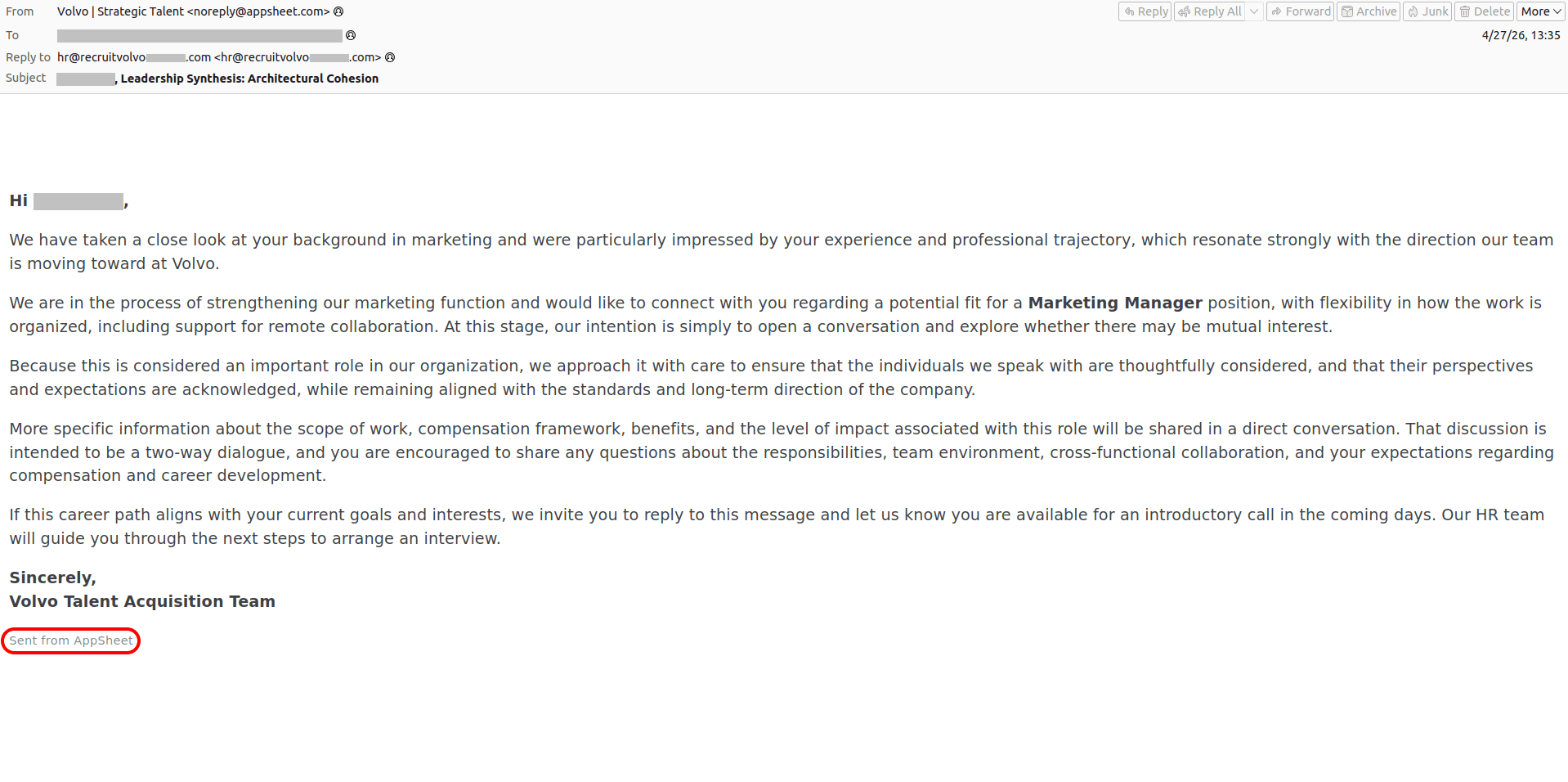
Received — 21 May 2026 Kaspersky official blog

ASCII art in phishing emails | Kaspersky official blog

21 May 2026 at 07:00

We’ve written time and again about how QR codes are used in phishing schemes. Our secure email gateway solution even includes technology to read these codes — not just from emails, but also from attachments — and check the embedded links. Yet, attackers haven’t given up on trying to send QR codes to their victims. Lately, we’ve increasingly seen them use ASCII art for this purpose — images composed of characters. This seems particularly ironic considering that phishers once tried to evade link scanning by hiding links in images, and now they’re trying to dodge image scanning by going back to text. But with a few twists.

The lost art of ASCII, and how attackers use it

It’s hard to believe today, but there was a time when computers couldn’t display graphics. Consequently, the very first computer images were constructed from text characters. Following the adoption of the standard in 1963, characters from the ASCII (American Standard Code for Information Interchange) set were used for this type of artwork to ensure that images looked the same across different computers. Over time, other text symbols (for example, from the extended Unicode set) began to be used to create images, but the name “ASCII graphics” remained the term used to describe this art form as a whole. There were serious artists working in this medium, the earliest websites were designed with ASCII art, and even the first computer pornography was rendered with text characters.

As image display technology evolved, ASCII art began to fall out of fashion. It saw a major resurgence in the 2000s during the heyday of email spam. Back then, spammers primarily used it because it allowed them to disguise blatant spam keywords that could trigger mail filters, while also placing less load on mail servers than images. Additionally, since many users paid for volume of internet traffic at the time, they often disabled image loading in their email clients. Naturally, at that time, we augmented our email security solutions with technology specifically designed to block ASCII art.

Now, ASCII art has been rediscovered — this time by those looking to bypass technology that recognizes QR codes within images.

What does ASCII art phishing look like?

Here’s a recent example. The pretext itself is pretty run-of-the-mill: someone has supposedly sent to victim a confidential document via DocuSign, but to open it the recipient needs to scan the QR code in the email to visit a website and enter corporate login credentials.

A QR code rendered with ASCII art

A QR code rendered with unicode characters. We’ve blurred out a portion of the code to prevent the malicious link from being scanned.

Admittedly, the code looks weird. This is primarily because it’s drawn piece-by-piece in pseudo-graphic elements, and even the gaps between the lines can be seen. In reality, there’s no actual image in the e-mail message code; the QR code looks something like this behind the scenes:

ASCII art inside the email code

ASCII art inside the email code

As a result, link scanners can’t see the link, and image analysis tools can’t find the URL hidden inside the QR code, so the attackers assume the phishing email is going to reach the victim just fine. Spoiler alert: no, we haven’t forgotten how to block ASCII art.

Is a QR code in an email even normal?

In theory, there are situations where using a QR code makes sense. It’s a fairly convenient way to share contacts, a link to a mobile app, a map location, or a configuration. In other words, it works well whenever information needs to be delivered specifically to the recipient’s mobile device.

However, someone using a QR code to make you enter corporate credentials on a mobile device is an instant red flag. And when that QR code is generated with ASCII art, it’s clearly a phishing attempt or an effort to lure you to a malicious URL. This trick can only have one purpose — an attempt to bypass security controls.

How to stay safe?

To prevent phishing emails — whether containing ASCII art or not — from ever reaching employee inboxes, we recommend using a secure email gateway with advanced anti-phishing capabilities. As an additional layer of defense, install security solutions on all endpoints used to access the internet.

Additionally, we recommend regular security awareness training to educate employees on modern phishing tactics. Specifically, to explain that ASCII art in modern emails can be a telltale sign of an attempted phishing attack.

Malicious TV boxes: how a cheap “SuperBox” turns your home into a proxy node for cybercriminals | Kaspersky official blog

20 May 2026 at 17:35

Netflix, Apple TV+, Disney+, Hulu, Amazon Prime, YouTube Premium… The average law-abiding family today pays for five to 10 subscriptions just to watch their shows of choice, with the monthly bill easily crossing the hundred-dollar mark. It’s no surprise, then, that social media and online marketplaces are seeing a surge in demand for the “magic boxes” that popped up at the end of 2025: Android-powered TV boxes that promise to unlock thousands of channels and every streaming service subscription-free for a one-time purchase.

Ads for these devices are flooding TikTok and Instagram: smiling influencers unbox the SuperBoxes, plug them into a TV, and browse endlessly through channels. It looks like the ultimate life hack against subscription fatigue, right? In reality, it’s one of the easiest ways to invite a botnet into your home network.

Screenshot of a TikTok video showing a SuperBox in action

A promotional video on TikTok explaining how great it is when the cheese is free you can just go ahead and cancel all your subscriptions

What’s wrong with these cheap TV boxes?

Stories about malicious TV boxes have surfaced before, but right now, their marketing has reached a truly alarming scale.

At the end of 2025, analysts examined several models of the popular SuperBox device available from major retail stores and online marketplaces. The findings were deeply concerning: immediately upon powering up, the devices began pinging the servers of the Chinese messaging app Tencent QQ, as well as the Grass proxy service — effectively renting out the owner’s internet bandwidth to third parties.

Inside the firmware, researchers discovered applications completely uncharacteristic of a media player: a network scanner, a traffic analyzer, and tools for DNS hijacking. Consequently, the device not only streams pirated content but also scans the local network for other targets (including industrial SCADA interfaces), and stands ready to participate in DDoS attacks. The SuperBoxes were also found to contain folders with the telltale name “secondstage”, a textbook indication of multi-stage malware.

More recently, in April 2026, the Darknet Diaries podcast featured an interview with a security researcher known by the alias D3ada55, who shared plenty of intriguing details about these boxes — including the fact that they were still openly sold on major platforms like Amazon, Walmart, and Best Buy.

The infection chronicles: BADBOX to Keenadu

The SuperBox case is far from the only instance where Android devices have been turned into botnet nodes — or sold infected right out of the box. Here’s a look at the most recent cases:

  • BADBOX 2.0. In July 2025, Google filed a lawsuit against the operators of a botnet that compromised over 10 million Android devices — mostly cheap TV boxes, tablets, and projectors lacking Google Play Protect certification. As we reported earlier, BADBOX 2.0 specifically targets TV boxes, operating simultaneously as a proxy network and an ad fraud engine.
  • Kimwolf. In December 2025, the QiAnXin XLab team uncovered a DDoS botnet that had hijacked around 1.8 million Android devices. The infected hardware included generic models from off-brand manufacturers sporting high-profile names like TV BOX, SuperBox, XBOX, SmartTV, and others. The infection footprint was massive, with compromised devices shipped worldwide. Among the hardest-hit countries were Brazil, India, the U.S., Argentina, South Africa, the Philippines, and Mexico.
  • Keenadu. Our experts discovered this malware lurking in the firmware of brand-new devices back November 2025, though it didn’t gain widespread attention until after we published a study about it in February 2026. Keenadu masquerades as legitimate system components, embedding itself even into facial-recognition unlock apps, potentially granting attackers access to biometrics, banking data, and personal messages.

All of these stories share the same origin: the Triada Trojan, first documented by our researchers back in 2016 and dubbed at the time “one of the most advanced mobile Trojans”. Over the past decade it has evolved from a standard piece of malware into a modular backdoor baked directly into firmware during manufacturing.

How the infection scheme works

Manufacturers of cheap TV boxes cut corners on absolutely everything: Google Play Protect certification, firmware audits, and security updates. Many of these devices run on the Android Open Source Project without any security guarantees whatsoever. Somewhere along the supply chain — whether at the factory, through a middleman, or at a distributor — a backdoor gets injected into the firmware image. Our experts suspect that the manufacturer itself might not even be aware of the compromise.

The sheer scale of the infection turns millions of identical boxes into the perfect foundation for a botnet: every compromised device represents a unique IP address that can be rented out to anyone. Botnet operators like Kimwolf monetize this not only through distributed DDoS attacks but also by reselling the bandwidth of infected smart TVs and streaming boxes.

What this means for you

An infected TV box sits right in your living room, connected to your home Wi-Fi. That means it can see smartphones running banking apps, network-attached storage (NAS) units holding family archives, IP cameras, smart locks, work laptops, and any other the devices connected to your Wi-Fi network.

With this kind of beachhead inside your home network, an attacker can intercept unencrypted traffic, spoof DNS requests, scan ports, and hunt for vulnerabilities on neighboring devices. On top of that, they can use your IP address for fraudulent activity. As a result, in the best-case scenario, your IP will end up blacklisted, and legitimate services will start blocking you for suspicious activity; in the worst-case scenario, law enforcement could come knocking on your door.

How to spot a potentially dangerous gadget

You should be on alert if a device:

  • Is sold under a no-name brand like T95, X96Q, MX10, TV BOX, SuperBox, or some such
  • Promises free lifetime access to paid premium services for a one-time fee
  • Requires you to disable Google Play Protect, or install third-party APK files during the initial setup
  • Lacks Play Protect certification entirely
  • Is promoted through aggressive spam campaigns on social media

How to avoid hosting a botnet node

  • Buy certified TV boxes that feature Google Play Protect, or purchase devices directly from reputable telecom operators and internet service providers.
  • Isolate all smart home devices. Set up a separate Wi-Fi network on your home router for TV boxes, cameras, smart speakers, robot vacuums, and similar gear, while keeping smartphones, NAS units, and computers on the main network. This prevents malware from spreading to your critical gadgets.
  • Regularly update the firmware on all your devices, and don’t forget about your router — it’s another vulnerable link in the chain.
  • Remove any applications from your Android TV box that you didn’t install yourself, especially alternative app stores, Wi-Fi “boosters”, and “system cleaners”.
  • Monitor your traffic. Modern routers and Kaspersky Premium can display which devices are connecting to where. Frequent connections from a media player to servers in China are a major security red flag.
  • Install Kaspersky Premiumon all your devices — it protects against Trojans, and blocks the phishing pages often used to distribute infected APK files.
  • Don’t disable Google Play Protect, and avoid installing APKs from shady sources — this is the primary infection vector that bypasses the official app store.
  • If in doubt, return the TV box. A cheap streaming device isn’t worth risking your biometrics, banking data, or the reputation of your IP address.

Want to know how else to protect your smart home devices? Read more in our related posts:
Received — 19 May 2026 Kaspersky official blog

Tools for spotting and disabling AI systems in an enterprise

19 May 2026 at 17:39

While many companies are intentionally rolling out AI to boost quality and efficiency, unsanctioned AI tools are cropping up in corporate environments even faster. Software vendors are baking AI right into products companies already use (think Microsoft Copilot and Google Gemini), while employees are taking matters into their own hands and installing tools on the sly. As a result, businesses are staring down a poorly managed data leak channel: staff paste information from corporate systems into AI chatbots, sending data not just to the SaaS vendor, but straight to the developers behind the underlying AI model. Both the risks and the mitigation strategies vary depending on the type of AI system in play. We break down this broad topic, focusing heavily on tools for spotting and blocking AI at two distinct levels.

Types of unwanted AI systems

Depending on the type of AI in question, managing and blocking its use requires a different playbook. It’s essential to break down AI into four distinct categories:

  • Platform-native AI capabilities. Think Microsoft Copilot, Google Gemini, and Apple Intelligence, along with AI features baked right into browsers. The tricky thing about these is that they’re built into everyday essentials, are instantly available to every user (sometimes popping up aggressively), and most importantly, vendors try to turn them on by default.
  • AI companions embedded in business apps. This bucket includes Slack AI, Zoom AI Companion, Notion AI, Jira’s Rovo assistant, and the like. These are tied to a single application and are completely inseparable from it.
  • Standalone web and app-based chatbots. ChatGPT, Claude, Perplexity, Character AI, local setups like LM Studio, browser extensions, and agentic browsers like Comet. Apps and services in this category are usually adopted by employees on their own without permission: classic examples of shadow AI.

  • Desktop-native multi-functional agents. This group features tools like OpenClaw, NanoClaw, NemoClaw, and others. They pose the biggest threat because they come with broad access rights by default and actively process untrusted data from the open web.

How to deal with unwanted AI

Every company, depending on its industry, appetite for innovation, and risk tolerance, needs to draw its own line in the sand between recommended, approved case-by-case, and completely banned use cases for specific AI products. Regulated sectors like healthcare play by one set of rules, while retail businesses operate under an entirely different playbook. Either way, after analyzing exactly which AI tools have already slipped into the organization, corporate policies need to be fine-tuned. That’s why the first order of business is employing existing infosec and logging tools to scan corporate infrastructure.

Depending on the chosen strategy, the uncovered AI systems can be:

  • Disabled or restricted by using the built-in corporate policy settings within the tools themselves
  • Hard-blocked at the endpoint or network level to create a safety net against policy workarounds or configuration errors
  • Transitioned to managed access, where the tool isn’t completely blocked but instead routed through a dedicated corporate gateway that checks access permissions, and monitors usage patterns

Detecting AI systems

Spotting AI requires a multi-layered approach, as different detection methods complement each other and work best against specific types of AI.


Technology What it can detect
DNS Any AI tool with an identifiable domain
Web Gateway or NGFW Any AI tool with a recognizable request-and-response fingerprint (API endpoint paths, domains, and other indicators). Web filters can inspect traffic content, and many gateways/NGFWs now feature a dedicated category for detecting and blocking generative AI
EPP/EDR Locally deployed LLMs (running via Ollama, LM Studio, and similar shells), native desktop apps for ChatGPT or Claude, agentic browsers, and open-source AI agents. An indirect but strong red flag is the presence of Node.js, Python, Git, Docker, or other containerization tools on machines belonging to non-technical staff
Application control Similar to EPP/EDR, this allows to immediately block unwanted applications right out of the gate
Browser control AI-focused browser extensions and visits to AI-themed websites. This is a lifesaver if the corporate web gateway can’t inspect encrypted traffic
SaaS Security Posture Management (SSPM) / Identity Governance OAuth permissions requested by AI apps and services, as well as any third-party integrations plugging into core productivity hubs (Microsoft 365, Google Workspace, and others)


Naturally, almost all of these tools allow to do more than just spot AI — they let to block it entirely, or at the very least, sound the alarm for the team in charge.

Keeping an eye on OAuth

Popular office AI solutions — especially meeting assistants, email and calendar automation agents, and the like — gain access to corporate data by requesting OAuth permissions directly from communication, document workflow, or video conferencing platforms. If a user has the green light to grant these permissions to third-party apps, the resulting data leaks completely bypass the organization’s perimeter. Tools like EDR and NGFW won’t see a thing when a tool like Read.ai grabs recordings of every single meeting in, say, Microsoft Teams.

The most drastic — and often best — move is to block standard users from granting OAuth consent in the first place. Here’s how to handle the technical heavy lifting (Global Administrator, Application Administrator, or equivalent rights are needed):

Microsoft 365 / Entra ID

In the Microsoft Entra admin center, head over to Identity > Applications > Enterprise apps > Consent and permissions > User consent settings. There User consent for applications can be disabled (check out Microsoft’s full guide).

Google Workspace

In the Google Admin console, navigate to Security > Access and data control > API controls. Under Manage App Access, the trust level for all apps can be set: Trusted, Limited, Specific Google data, or Blocked. However, the real kicker here is the Unconfigured app settings subsection, which dictates what happens when a user tries to connect an unknown app. To seal this loophole, select Don’t allow users to access any third-party apps.

A separate subsection, Manage Google Services, permits fine-tuning exactly how third-party apps interact with Google Workspace and Google Cloud services. This allows to cut off access for each individual Google product (see Google’s official guide).

Salesforce

In Setup, use the Quick Find box to search for connected apps, then select Manage Connected Apps from the results. While settings are configured for each external app individually, all users can approve access by default. There isn’t a blanket block switch here; instead, Salesforce allows to opt for Admin approved users are pre-authorized (see the full Salesforce guide on this).

Slack

From the Admin settings menu, head to Apps and workflows -> App Management Settings. Tweak the Require approved apps setting by selecting Only allow pre-approved apps. Once that’s locked in, double-check that no rogue AI tools have slipped onto the approved list.

How to manage subscriptions securely | Kaspersky official blog

15 May 2026 at 19:10

Have you ever tried to tally up how much you spend on subscriptions each month? Music, movies, gaming, language courses, delivery services, heated seats, and even the ability to chat with the Grok bot directly from your car — there’s a subscription for just about everything now. There’s even a subscription service specifically designed to… track your other subscriptions.

The number of subscriptions varies significantly depending on where you live, but statistically, 78% of adults worldwide have at least one paid subscription, with the average user juggling 5.6 active services. Furthermore, a large portion of these are family plans used by groups of close relatives… and sometimes other people: 37% of users share their subscriptions outside their immediate family.

Because subscription accounts, especially family plans, often contain sensitive personal data, they’ve become a prime target for cybercriminals. Today we look at how to manage your subscriptions securely, avoid having your accounts compromised, and keep from falling for scammers’ latest tricks.

Security of shared accounts and subscriptions

Why would anyone want to hack your subscription? Even if the service only offers entertainment, your account almost certainly contains sensitive information: your name, address, email, phone number, the names of other members, and other personally identifiable information. This data is then sold on the dark web and used for further attacks.

Attackers compromise subscription accounts either through social engineering and phishing, or by taking advantage of many users’ reliance on weak or leaked passwords. As we recently highlighted in our research, nearly half of all passwords worldwide can be cracked in less than a minute. Scammers then either resell existing subscriptions or slots in a family group at a discount, or they sign the victim up for new services, hoping the extra charges go unnoticed.

Finally, some middlemen don’t bother with hacking at all; they simply buy bulk subscriptions for a large number of devices, where the per-unit cost is typically much lower. They then resell individual slots in these plans on online marketplaces. As a result, a single “family” account can end up filled with people who are complete strangers to one another.

Sharing subscriptions with family and others

Many subscription owners think nothing of sharing access with family and friends. What could possibly go wrong?

The worst-case scenario from a security standpoint is when a single account is purchased and the owner shares the login and password with other users. This usually happens when people try to save money on a family plan by buying an individual subscription and sharing it. Some services even allow for different profiles, but they are all tied to a single account, meaning the credentials are shared. This is how streaming platforms like Hulu and Disney+ operate.

Sharing one account among multiple people significantly increases the risk of your credentials falling into the wrong hands. There’s no way to guarantee that everyone else is storing those details securely or that their devices aren’t infected with malware. Even without malware, it’s incredibly easy to accidentally hand over a password to attackers simply by signing in to the subscription service over unprotected public Wi-Fi.

It’s entirely possible that the password you kindly shared with some friends has already surfaced in some corner of the dark web, and you may soon lose access to your account. Furthermore, if you reuse the same password across different sites and apps, your other accounts are now in the crosshairs as well.

The second scenario is when each group member has an individual account. Many services now allow you to add extra users to a subscription at no additional cost, and most owners are happy to give away these free slots. Even then, you shouldn’t let your guard down: a breach of just one of these accounts can still leak sensitive information, such as family members’ names, addresses, billing info, and other subscription-related data.

How to protect your subscriptions (and your wallet)

To keep your and your loved ones’ personal data private and your accounts under your control, follow these simple rules.

Use strong account security

To do this, learn — and teach your friends and family — how to use password managers, two-factor authentication, or passkeys.

If you and your loved ones rely on memory to store passwords, there’s a high probability that you’re reusing the same one across multiple services. This is a major blunder: data breaches happen all the time, and a single compromised password gives attackers access to your other accounts.

The simplest solution is to use a password manager that generates and remembers complex, unique passwords for every site and service on your behalf. All you have to do is remember the single main password for its encrypted vault. Additionally, Kaspersky Password Manager doesn’t just store and create passwords; it can also check if they’ve appeared in leaked databases, and sync your credentials across all your devices.

Additionally, a password manager provides a robust defense against phishing: unlike a human, who can easily be misled by a sign-in form that looks almost identical to the real thing and is hosted on a look-alike domain, a password manager won’t fall for the trick. It’ll only offer to autofill your saved login and password on the specific site or service for which they were originally stored.

Avoid using browsers to store your passwords: unfortunately, attackers have long figured out how to extract browser-saved passwords in a matter of seconds.

Two-factor authentication (2FA) is an extra layer of verification the system requests after you enter your password — such as an SMS code or a one-time code from an authenticator app. Whenever technically possible, be sure to enable 2FA on every account linked to a subscription. This applies to the subscription services themselves, as well as any third-party accounts you use to sign in, such as Google, Apple, or Facebook.

We recommend storing your two-factor authentication tokens and generating the one-time codes — which refresh every 30 seconds — inside Kaspersky Password Manager. This significantly lowers the chances of someone hijacking your account. Even if an attacker somehow discovers or guesses your password, they won’t be able to get the code without physical access to your device.

Finally, you can ditch passwords (almost) entirely by switching to passkeys. We’ve previously covered what this password alternative looks like and the specifics of using it. Currently, this is the most breach-resistant authentication system out there. Its main drawback has been the difficulty of syncing passkeys across different ecosystems, like Windows and iOS, but the updated version of Kaspersky Password Manager can now save and sync passkeys across Windows, macOS, iOS, and Android devices, making that issue a thing of the past.

Don’t overlook device security

Even a complex password and 2FA aren’t reasons to let your guard down. An attacker can infect your device with an infostealer: malware designed to swipe things like session cookies from your browser, app configuration files, and other sensitive data. Session cookies allow you to stay signed in without re-entering your credentials every time; however, if scammers get their hands on them, they can sign in to the service as you — even without knowing your username or password. This makes a proactive approach essential, especially if you use Chrome, Edge, Opera, or other Chromium-based browsers on Windows. We recommend installing Kaspersky Premium on all your devices; it includes Kaspersky Password Manager in addition to comprehensive protection against cyberthreats.

Only share subscriptions with people you trust

Otherwise, you might be asking for trouble. For example, if you share a Steam subscription with a friend who cheats, both of your accounts could end up banned. Furthermore, never try to let someone else into your personal account or individual subscription. Sharing your password with others is usually a violation of the terms of service, and can result in your account being blocked.

Make sure there are no strangers in your family group

To do this, periodically check active devices and sessions in your subscription settings. If you see an unrecognized device in the authorized list, terminate that session — or all of them — and change your account password immediately. Signing back in on a few devices is much easier than trying to recover a hijacked account.

And remember: don’t let your own habits compromise your security. If you’re visiting friends, on vacation, or on a business trip and use a local computer or smart TV — or if you sign in to your account from a public computer — don’t forget to sign out when you’re done. Otherwise, the next person to use that device might find themselves with free subscriptions or, even worse, access to your email or cloud photo stream.

Don’t take the bait

Watch out for phishing emails and messages spoofing legitimate services. If you receive a notification about a “need to update your billing details”, or a claim that a “new user has been added” to your family plan, don’t rush to click any links or open attachments. Links can lead to a phishing page, and attachments may hide malware. Scammers often use email addresses and domains that look nearly identical to the real ones — for instance, by swapping l (lowercase L) for I (uppercase i), or using a familiar name in a different domain zone.

Unfortunately, phishing pages are often indistinguishable from the originals now that AI is being used for high-quality design and layout. Since spotting every red flag yourself is increasingly difficult, it’s best to delegate anti-phishing protection to Kaspersky Premium. It will alert you to suspicious sites, saving your money and keeping your peace of mind.

Lastly, some scammers lure users in with freebies like fake gift subscriptions for Telegram Premium. The victim is asked to visit a phishing page mimicking the Telegram login screen and sign in to their account to claim the gift. The result isn’t hard to guess: instead of a premium subscription — a hijacked account. Recently, scammers have even learned to use mini-apps to steal credentials directly inside Telegram under various pretexts — ranging from gift giveaways to claims that you must move to a new chat because the old one was blocked.

Avoid buying subscriptions from third-party sellers

You can often find subscription offers on marketplaces and retail platforms at prices significantly lower than what the official provider charges. More likely than not, that tempting price hides a hacked account or a family group that you could be kicked out of at any moment, because the family admin is either the seller or a random user. Furthermore, sharing a family plan with strangers from around the world is a violation of terms for many services.

How to get rid of unwanted subscriptions

Now that we’ve covered subscription security, what about those extra subscriptions that quietly eat away at your balance every month? Research shows that users typically underestimate how many active subscriptions they have and how much they spend on them; they also frequently forget to cancel auto-renewals for subscriptions they no longer use, or auto-charges after the trial period ends.

If you suspect you’re in that boat, start your investigation with your own bank statements. Recurring charges for the same amount can be a subscription you’ve forgotten about. Check who received the payment; if the name doesn’t ring a bell, do an online search on the company. It’s also worth searching your email box for the merchant name or the payment amount; this can help you track down subscription notifications and figure out what exactly you’re paying for. And don’t forget to check your spam folder, as that’s where subscription alerts often end up.

Now, let’s look at how to check and cancel active subscriptions purchased through the App Store and Google Play.

For Android users

  1. Open Settings on your device.
  2. Tap Google, then tap your profile picture, and go to Google Account.
  3. Go to Wallet & subscriptions.

If you’re the family group manager, you’ll be able to see the purchase history for other family members.

For iOS users

  1. Open Settings on your device.
  2. Tap your profile picture at the top of the menu.
  3. Go to Subscriptions.

Note: to manage your iCloud subscription, you’ll need to go to the specific iCloud section located just below Subscriptions. In the Family Sharing section, if you’re the one who set it up, you can view the subscription and purchase history for all family members.

Read more on subscriptions:

Real-world usage of Kaspersky Container Security | Kaspersky official blog

14 May 2026 at 18:33

Among the various tools in the Kaspersky portfolio is a dedicated platform for securing containerized environments. But in this post, I want to talk about Kaspersky Container Security (KCS) — not as a vendor representative, but rather as a member of a team that actively uses this solution in their daily work. Our Product Security Team is responsible for establishing secure development processes across the company. We’re involved in every stage of the software development life cycle, and our priority is helping product teams catch security issues early so they can stay on schedule for their releases. To achieve this, we’ve built several workflows, one of which focuses specifically on container security. That’s exactly where we lean on our own Kaspersky Container Security platform.

Container security solutions are typically viewed first and foremost as image scanners for the container registry. However, Kaspersky Container Security (KCS) is more of a comprehensive security platform for container environments that handles multiple tasks by virtue of its end-to-end integration into the container workflow. While it certainly includes a container image scanning scenario — which is undeniably important — our experience with KCS has shown that its real value becomes apparent when it’s integrated into several points along the workflow at once:

  • Regular builds
  • Artifact verification prior to release or deployment
  • Monitoring of containers already running in the cluster

The baseline scenario: how KCS scans images

At its core, the process is a standard one. KCS checks images for typical container issues: known vulnerabilities, malware, hardcoded secrets, and misconfigurations. However, the scan result isn’t just a single, abstract verdict. The system calculates a risk rating based on the findings, providing a clear picture of the asset’s security posture. In practice, this is incredibly useful because teams don’t just see a “bad image” message; they get a transparent breakdown of exactly what’s driving the risk and what needs to be fixed first.

But that’s not all. KCS works well for scenarios where it’s not enough to just find a problem — you need to tie it to the artifact’s life cycle. When a team is managing hundreds of builds, periodic registry scanning isn’t enough, and it almost always requires manual intervention. You need to know which pipeline introduced the risk, which policies were triggered, and what the next steps are. KCS provides this essential link.

Advanced scenario: CI/CD integration

One lesser-known KCS feature is its full-scale scanning capability within CI/CD pipelines. For our team, this is the most effective way to use KCS. The logic is straightforward: you integrate the scanner into the pipeline, and the scan results appear directly in the execution logs. They’re also sent to the solution’s central console, where they’re logged in a dedicated CI/CD section that links the findings to the artifact name, scan time, pipeline, and severity level.

In a CI/CD environment, you can scan images from tar-archives or directly from Git repositories. Out of the box, it supports GitLab, Jenkins, TeamCity, and GitHub Actions; in practice, KCS can be integrated into any pipeline orchestrator.

Another critical aspect of using KCS in CI/CD involves security policies. Our solution uses a model where policies allow for not just collecting results, but also controlling the behavior of the pipeline itself. This comes in handy for phased rollouts. You can start in audit mode, and then gradually move toward failing builds when secrets, critical misconfigurations, or vulnerabilities are detected. This evolutionary approach generally works better than simply flipping a switch to block it all at once.

How KCS helps in our workflows

We run our own composition analysis system, so we don’t treat KCS as a single source of truth. Instead, it serves as a powerful extra layer in our workflows, and that’s exactly where we find the most value.

While our in-house composition analysis system handles component tracking, dependencies, and code-level risk assessment, KCS excels at securing the container perimeter. It takes care of technical image scanning and CI/CD security, while aggregating reports on container artifacts. It doesn’t conflict with our internal analysis; it reinforces it right where containers receive actual workloads.

This is particularly useful for us in two scenarios. First, it provides early-stage artifact control during development. Second, it acts as a gatekeeper during release acceptance. We no longer debate risks sometime after the release; we catch them at the exact point where the team can still quickly fix a Dockerfile, Helm chart, or config set without a lengthy approval chain.

The way it handles a software bill of materials (SBOM) is also noteworthy. Our system relies primarily on up-to-date, relevant SBOMs. KCS offers modes specifically for processing SBOMs, and can even output scan results in that same format. In this regard, KCS integrates seamlessly with our internal processes, allowing us to fit it into our existing workflows rather than the other way around.

Why KCS is more than just a scanner to us

Its other powerful layer is cluster security. At this stage, KCS evolves beyond being just an image-scanning tool. It features runtime policies for containers and nodes, audit and blocking modes, and a set of security profiles. In practical terms, this means KCS can be used not only to find vulnerabilities within an image, but also to monitor what the container is actually doing once it’s live. Policies can account for image provenance, digital signatures, restrictions on capabilities and volumes, and even the processes and network connections running inside the container.

When a problem is detected, you have the option to log the results in audit mode first rather than blocking the process immediately. In production environments, this is always the smarter move. Another vital tool is ensuring trusted image provenance. KCS supports digital signature verification, which shifts the focus from simply finding CVEs to securing the company’s entire software supply chain.

Reporting capabilities

KCS does more than just display the issues it detects; it serves as a comprehensive reporting source. It can generate reports on images, accepted risks and Kubernetes benchmarks.

Generated reports are available in HTML, PDF, CSV, JSON and XML formats, with specific support for SARIF for detailed reporting — which is ideal for integrating into AppSec workflows. As for the SBOMs mentioned above, the scanning scenarios can output artifacts and results in CycloneDX and SPDX formats, making it easy to plug into existing processes.

Why we continue to use KCS

To put it simply, KCS complements our workflows perfectly — not because it solves every single problem, but because it integrates so effectively into engineering scenarios.

We also appreciate that the product team listens to our feedback. The KCS team actually incorporates our practical operational requests into their development roadmap. For example, deep SBOM integration and specific report types were added to KCS as a direct result of our hands-on experience.

To sum it up, when integrated correctly, Kaspersky Container Security helps cover several areas at once: from basic container scanning, to CI/CD and cluster security. In our experience, it provides real value within a live container ecosystem. You can learn more about the solution on the official KCS page.

Received — 14 May 2026 Kaspersky official blog

LLMjacking: what these attacks are, and how to protect AI servers

12 May 2026 at 22:35

AI security covers more than just data theft prevention, restricting rogue AI agents, or stopping assistants from giving harmful advice. A relatively simple but rapidly scaling threat has emerged: attempts to hijack computational power and exploit someone else’s neural network for personal gain. This is known as LLMjacking. With AI compute costs widely predicted to surge dramatically, the number of attackers driven by these motives is poised to grow. Consequently, when deploying proprietary AI servers and their supporting ecosystems like RAG or MCP, it’s critical to establish rigorous security measures from day one.

Statistics from a honeypot

The speed and scale of these resource-hijacking attempts are best illustrated by an experiment documented in detail in April 2026. The investigator configured a Raspberry Pi to masquerade as a high-performance private AI server, and made it accessible from the internet. When queried, it reported the availability of Ollama, LM Studio, AutoGPT, LangServe, and text-gen-webui servers — all tools commonly used as wrappers for locally hosted AI models. The server also appeared ready to accept API requests in the OpenAI format, which has become the industry standard.

All these services were seemingly powered by a local instance of Qwen3-Coder 30B Heretic, one of the most powerful open-source models, with its safety alignment removed. To throw in a sweetener, the honeypot reported the presence of various RAG databases and an MCP server with tempting capabilities like get_credentials on board.

In reality, the Raspberry Pi was simply hosting 500 pre-saved responses from an actual Qwen3 model, with a lightweight script selecting the most relevant answer for each incoming query. This setup was enough to pass a superficial check while allowing the researcher to probe the attackers’ intentions.

According to the author, Shodan, a popular internet scanning service, discovered the server within three hours of its going live. Just one hour later, requests resembling capability reconnaissance began pouring in. Over the following month, the server handled more than 113 000 requests from thousands of unique IPs, with 23% of that traffic specifically targeted at discovering AI capabilities and exploiting local LLMs and AI agents.

Requests to endpoints like /api/tags and /v1/models allow attackers to fingerprint which models are hosted on a server, while scanning for /.cursor/rules typically precedes an attempt to exploit an AI agent. Similarly, checking /.well-known/mcp.json serves as an inventory of the victim’s MCP servers. While the author makes no mention of the total number of attacks that progressed beyond simple scanning, there were 175 active attempts to hijack the LLM during the final week of the experiment alone.

What are the attackers after?

Based on the researcher’s observations, none of those targeting the decoy server attempted to execute arbitrary code or gain root access. (Editorial note: this is surprising and may point to gaps in logging.) Almost all attacks were aimed at siphoning resources. For example, the following activities were logged during the experiment:

  • A well-structured attempt to parse technical documentation for a microprocessor
  • A prompt to write an erotic novel
  • Requests to parse and structure social media text data regarding new vulnerabilities
  • An attempt to call Anthropic models using the compromised server as an API proxy

It’s worth noting that the reconnaissance of AI resources uses standardized and rapidly evolving tools. Requests from an application named LLM-Scanner originated from the infrastructure of seven different cloud providers across eight countries, suggesting that the raiders have put established methodologies in place, as well as specialized platforms for sharing techniques. By the third week of the experiment, the scanner had been updated with an additional check: it now used simple abstract questions to determine whether it’s interacting with live AI or a honeypot returning canned responses.

Among the non-specific attacks, the experiment recorded numerous attempts to exfiltrate credentials from the .env file. Attackers systematically hunted for this file across every conceivable directory on the server. Leaving an .env file publicly accessible is one of the most elementary mistakes when deploying projects on Laravel, Node.js, and other frameworks, yet it remains a common oversight — particularly among beginners and vibe coders. Consequently, attackers have every reason to expect their efforts to pay off.

Conclusions and defense tips

Scanning publicly accessible servers and attempting to exploit them is nothing new, but the rise of LLMs gives attackers another way to monetize their efforts — one that’s both highly lucrative for them and devastating for their victims. To understand how massive these attacks could become, look at their closest counterpart: the cryptojacking market — where criminals mine cryptocurrency using stolen computational resources. That market grew by 20% in 2025 alone. As AI-powered solutions proliferate, and as major providers hike subscription costs while local AI chips remain in short supply, we should expect LLMjacking to become an industrial-scale phenomenon.

Key defensive measures for private AI infrastructure

  • For AI systems running locally on a single machine, ensure that servers like LM Studio, Ollama, or similar are configured to accept connections only on the local interface (localhost), rather than all available network interfaces. This restricts LLM access to the host machine itself, and prevents the AI from being reachable over the internet.
  • For servers handling remote requests — even if the server only operates within a local corporate network — implement robust authentication and authorization rather than relying solely on API key validation. Solutions based on OIDC or OAuth2 with short-lived tokens are the most effective. This not only defends against LLMjacking, but also allows for more granular tracking of user activity, and prevents API key abuse. Furthermore, keys must be protected from more than just external attackers; a growing risk is the misuse of keys by AI agents themselves. This applies to LLM interfaces as well as MCP, RAG, and others.
  • Use network segmentation and IP allowlists to give AI server access only to the departments, employees, and services that require it.
  • Ensure that all client-server connections are secured with a current version of TLS.
  • Apply the principle of least privilege by separating access to specific services; for instance, MCP and LLM components should have their own distinct access tokens.
  • Ensure an EDR security agent is installed on all workstations and servers, including those hosting AI models.
  • Monitor AI resource consumption, establish usage quotas for different employee roles, and set up alerts for anomalous activity spikes.
  • Maintain detailed logs of LLM responses and requests made to the model and its supporting tools. Integrate these data sources with your SIEM. Ensure logs are resilient against tampering or deletion.

Received — 11 May 2026 Kaspersky official blog

The Evolution of Kaspersky SIEM | Kaspersky official blog

To put it simply, the classic logic of a SIEM system works as follows: if event A occurs, followed by event B, this may be a sign of an attack, and an information security specialist should be notified. But in today’s environment, this simple scenario is increasingly failing. Just recently, our experts analyzed a high-profile incident: attackers compromised the update infrastructure of the popular Notepad++ software, and distributed malware via the update mechanism. It’s simply impossible to have rules in place in advance that are specifically designed to counter such scenarios.

The attacks themselves have become more sophisticated: attackers use legitimate tools, they attack through the supply chain by compromising software outside the corporate perimeter, stretch out their scenarios over time, and disguise their actions as normal activity. In other words, they do not “break into” the infrastructure; more often than not, they log in and use legitimate software. As a result, the classic fixed rules of the past either fail to trigger, or generate too many false alerts. This is what prompted the shift toward more flexible correlation scenarios.

Dynamically updated SIEM content

Correlation content today isn’t a static set of rules, but a process: it’s constantly evolving and adapting to current threats. In 2025 alone, we released 55 rule-package updates for different versions and languages of our Kaspersky SIEM system. In just one year, we added 10 new rule packs, as well as 250 detection rules and numerous improvements to existing content. This year, we’ve already added 43 new rules and refined another 63. In total, this amounts to over 850 rules covering a significant portion of the MITRE ATT&CK framework.

Kaspersky SIEM rules are written based on insights from our experts who analyze real-world, recent attacks: we primarily draw on the findings of our managed detection and response (MDR) service and our threat research. As a result, our rules cover scenarios — from reconnaissance to privilege escalation — that involve the latest approaches used by attackers. For example, we detect the use of new attack techniques such as ToolShell.

In addition to scheduled updates, the team regularly releases so-called emergency content — rule sets for rapid response to new and unexpected attack techniques. In February, for example, detection rules were released for authentication bypass in Fortinet products via the SSO mechanism: attackers used specially crafted SAML requests to gain access to systems without credentials.

From events to attack chains

Moreover, modern SIEM rules no longer describe individual events, but rather sequences of actions. Scenarios are built around the stages of an attack: from initial access, to privilege escalation and persistence. Kaspersky SIEM’s effectiveness is enhanced through integration with Kaspersky EDR and dedicated rule sets for Active Directory, which implement dozens of attack detection scenarios at various stages. This approach allows us to see not just individual signals, but the full picture.

Integration and internal visibility

Another way to improve the effectiveness of an SIEM system is to expand data sources. A classic SIEM aggregates events from different levels of the infrastructure: from logs to telemetry from endpoints and internal systems. In addition to this, our SIEM system includes specialized rule sets for our other solutions (Kaspersky Security Center, Kaspersky Security for Mail Groups, K Anti-Targeted Attack platform), which allow monitoring of administrator actions, authentication, and service status. As a result, the system becomes a tool not only for detecting attacks, but also for monitoring internal activity.


Overall, SIEM is no longer just a set of rules, but has evolved into a continuously updated detection system. Its effectiveness is determined not by the number of detections, but by their relevance, coherence, and how accurately they reflect the actual actions of attackers. Stay up to date regarding our Kaspersky Unified Monitoring and Analysis Platform (SIEM) on its official product page.

❌