Normal view

Received — 12 June 2026 Kaspersky official blog

The FROST attack: how SSD access delays expose users’ activity

11 June 2026 at 17:51

Scientists at Graz University of Technology in Austria recently published a paper detailing a new method for tracking users’ activity through their web browsers. The most fascinating thing about this new technique — which they’ve named FROST — is that it relies on a computer’s solid-state drive (SSD) to do the spying. Without getting bogged down in technical details, here’s how the attack works: a hacker lures a victim to a specially crafted website; as long as the site is kept open, the attacker can track exactly what apps the user is launching, and what other web pages they’re visiting.

So, how do they pull this off? The first instinct is naturally to blame the browser. But in modern web browsers, every website runs in an isolated sandbox and is generally locked out from touching other tabs — let alone the computer’s actual hardware. While hackers do find loopholes in these defenses from time to time, that’s not what’s happening here. The FROST attack doesn’t need to break the browser; it works perfectly even with all standard security measures in place. Instead, it hijacks a completely legitimate browser feature called the origin private file system (OPFS), which gives websites their own virtual storage space to store data. However, while this storage is digitally isolated, the data is still physically written to the exact same SSD that every other app and website opened on the computer is using. The researchers discovered that if a malicious page constantly bombards the SSD with data requests, the microscopic delays in data access can help map out what else is running on the PC. Before we dive into the details of how they manage this, let’s take a quick look at the theory behind the attack.

A quick primer on side-channel attacks

The term “side-channel” refers to a method of spying on a computer — or even a single microchip — indirectly. Instead of intercepting the data itself, an attacker might analyze fluctuations in power consumption, monitor the temperature of specific components, or listen in on electromagnetic radiation, among other things. In theory, this means that someone could eavesdrop on a conversation in a room just by using a computer mouse, since the optical sensor can pick up sound vibrations. Similarly, watching a CPU’s clock speed fluctuate could allow a hacker to steal an encryption key. Even a simple LED light on a badge reader can leak enough data about the device’s inner workings for an attacker to clone a smart card.

The beauty of these indirect data leaks — at least from a hacker’s perspective — is that they’re not easy to spot. Device manufacturers rarely account for them when building security systems. The downside, however, is just as obvious: extracting information through a mechanism that was never meant for data transmission is often complex, slow, and laborious. The Austrian researchers focused on a specific subtype known as a contention side-channel attack. This is where a leak occurs because multiple processes are competing for the same resource. In this case, that contested resource is the storage drive’s bandwidth.

Inside the FROST attack

This specific side channel has actually been studied before, including in a 2025 research paper. Back then, however, the setup was rather straightforward: the researchers ran one program on a computer to act as the data source, while a second program running on the same machine tried to intercept that data. While that’s fine for a theoretical academic study, the attack model wasn’t exactly groundbreaking. After all, if a hacker can already run any program they wish, they don’t need to rely on complex side channels — they have plenty of direct ways to steal the data.

Still, last year’s study wasn’t a complete waste of time. It proved that the resolution obtained from monitoring an SSD is quite high, the data leak is real, and the captured information can actually be useful. The FROST attack is essentially a logical continuation of the same idea.

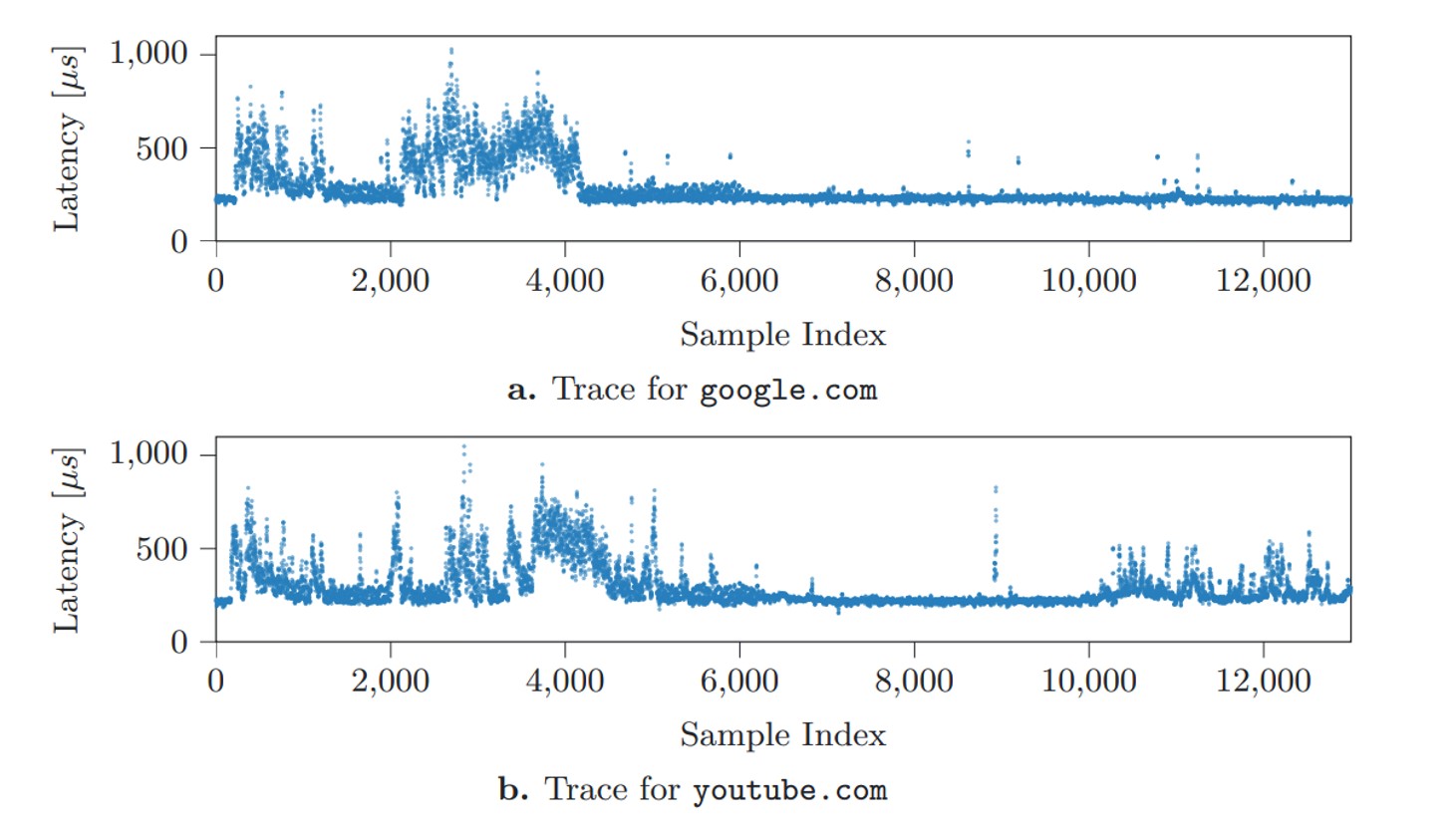
Here’s how it works in practice. Let’s say there’s a fairly large file on an SSD packed with random data. A specific process reads this data at regular intervals and clocks how fast it gets a response. This speed fluctuates depending on how busy the drive is with other tasks. These access delays are the telltale signs of the drive’s activity. The Austrian researchers demonstrated that plotting these delays over time can help pinpoint with reasonable accuracy what other task is running on the computer at that very moment.

Delay graphs

Distinct latency patterns generated when opening specific websites Source


The researchers mapped out latency graphs, like the ones shown above, for a wide variety of websites and locally running apps. What they found were distinct patterns — or digital fingerprints — generated every single time a specific site loads, or an app launches. Capturing these split-second launch or load windows requires monitoring the SSD continuously over a long period of time. However, these patterns proved to be remarkably consistent across different systems; the authors successfully tested their method on both a Linux desktop and an Apple Mac Mini. From there, the next step sounds simple enough: take a catalog of known fingerprints, measure real-world SSD delays, match the two up, and you know exactly what apps the user is opening, and what sites they’re visiting. But how to actually pull off this kind of surveillance under the radar, without planting malware on the victim’s computer?

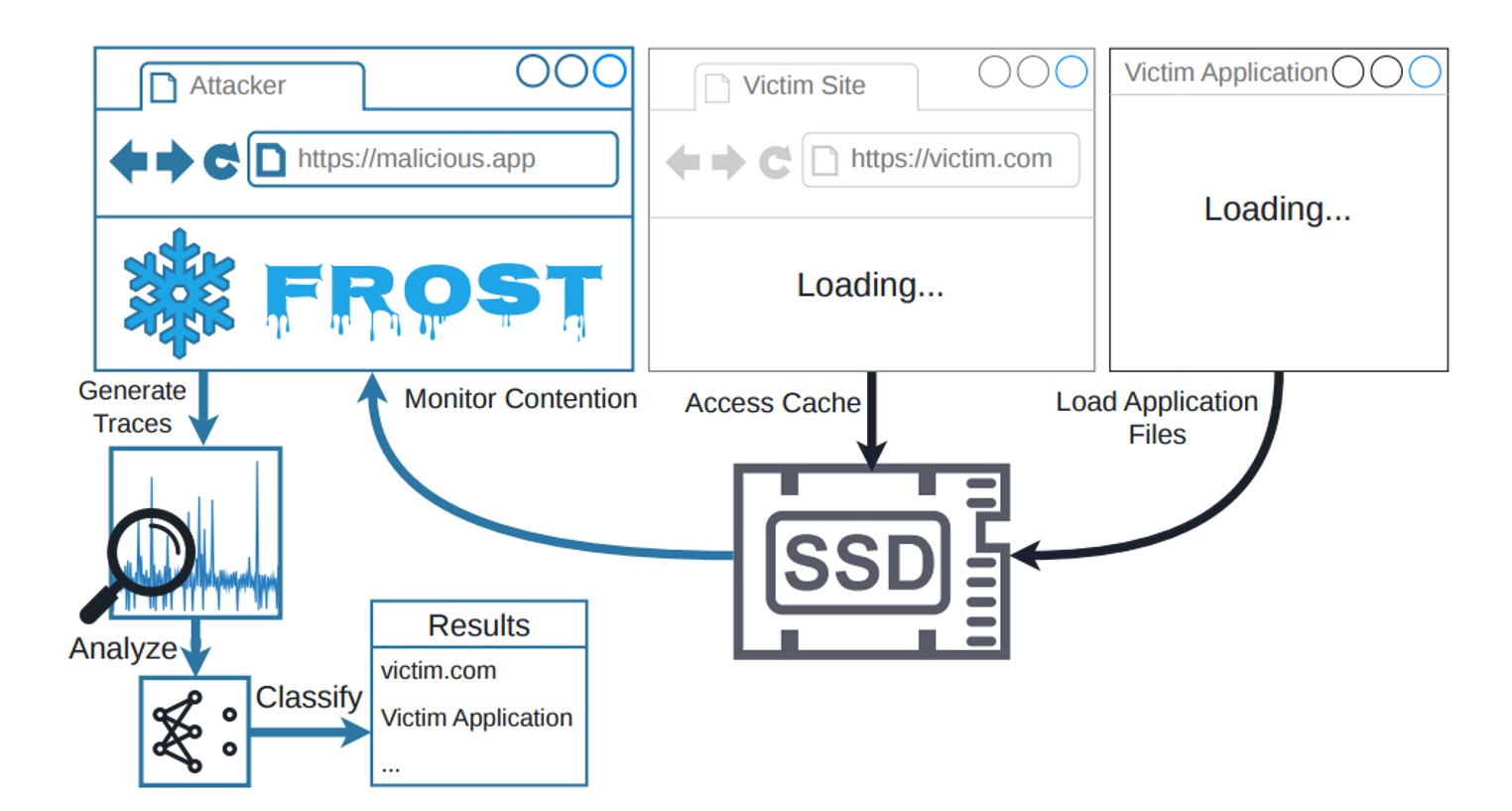
And that’s where a relatively new browser feature called the origin private file system (OPFS) comes into play. A hypothetical attacker doesn’t have to trick the user into downloading a shady Trojan. All they need do is have the victim visit a specially crafted webpage, and that page will leverage OPFS to quietly track the SSD’s activity. The clever acronym brings all these moving parts together: FROST stands for Fingerprinting Remotely using OPFS-based SSD Timing. Here’s the step-by-step breakdown of how the entire attack plays out:

The FROST attack workflow

How the FROST method can be used to spy on a computer’s activity Source

Method limitations

Like any side-channel attack, FROST isn’t exactly built for speed. It’s a slow, methodical process. To figure out just how slow, the researchers built a dedicated testbed to measure it.

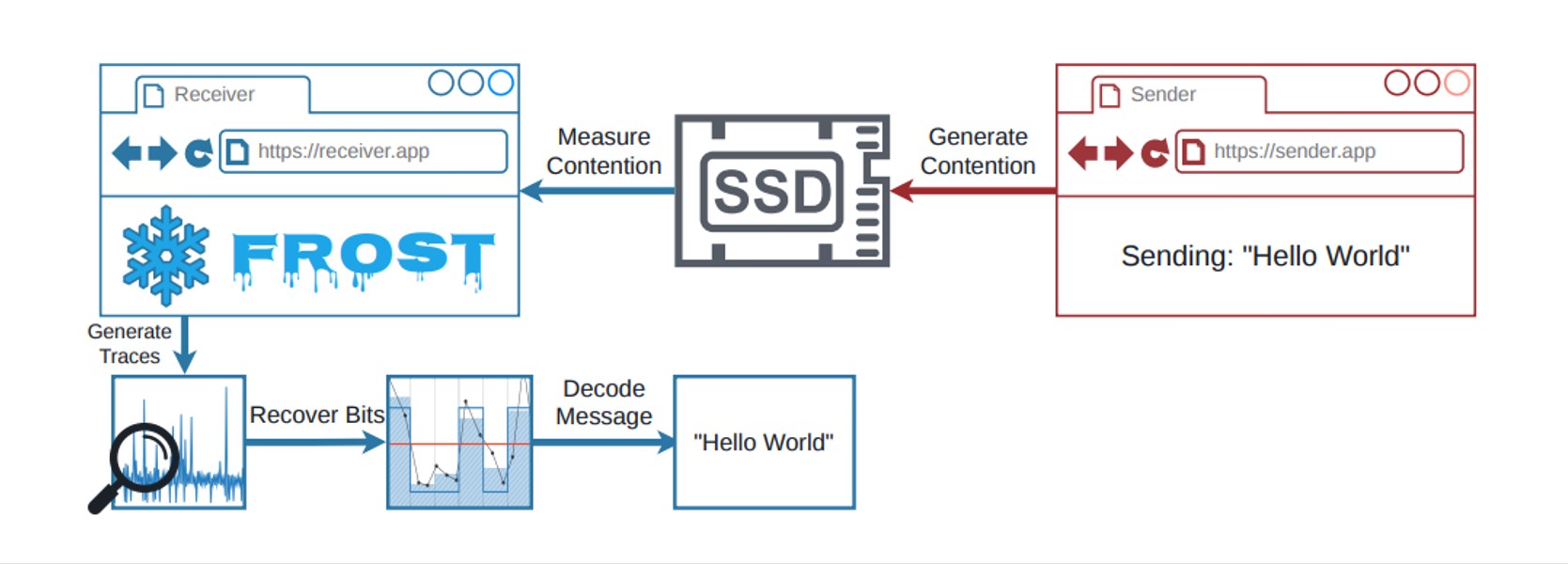
The FROST testbed setup

The testbed setup for measuring the speed of data extraction through OPFS Source

The team ran a program on a computer to transmit data indirectly. Think of it as a digital spy broadcasting a secret message by changing how it interacts with the hard drive. For instance, a 1 in the binary message code could mean the program is actively using the SSD, while a 0 means it’s sitting idle. At the same time, they set up a receiver inside the web browser that accessed the storage drive via OPFS. Because both the browser receiver and the transmitter program were competing for the SSD’s bandwidth, the browser experienced tiny speed delays whenever the transmitter was actively sending data.

This bizarre setup managed to transmit data at 661 bits per second, with nearly 90% accuracy on a Linux desktop with an AMD processor. On an Apple Mac Mini running macOS, the transfer rate hit 719 bits per second, also hovering around 90% accuracy. While these numbers are slightly lower than those in last year’s study — which relied on apps installed directly on the computer — the gap isn’t actually that huge.

That said, the real threat of the FROST attack isn’t raw data transmission; it’s tracking what the user does. Even if a hacker has a database of digital fingerprints for specific apps and websites, the information leaked through a malicious site using OPFS is too noisy. After all, a computer is constantly reading and writing data from/to the SSD in the background. To slice through that digital noise, the researchers turned to a tool that’s becoming standard practice in modern cyberattacks: a neural network. AI trained on known SSD fingerprints could confidently pick out user activity even from a chaotic mess of background data. The final results are eye-opening. On the Apple Mac Mini, the AI accurately identified which website the user opened 89% of the time, and nailed local app launches with 96% accuracy. Crucially, it could even detect what websites were opened in a completely different browser than the one running in the malicious tab. It sounds like a total home run for hackers — except for a massive list of real-world catches.

Is the FROST attack a real-world threat?

Simply knowing which apps are opened or what websites are visited doesn’t give an attacker much leverage. This kind of data is usually useful to advertisers looking to build a user’s digital profile without their permission; however, rolling out this tracking method on a massive scale is hardly realistic. The roadblock comes down to the fundamental way computers handle data: the system regularly dumps frequently accessed data into its RAM. Because the entire FROST attack relies on measuring the relatively slow bandwidth of the physical SSD, the data in RAM is effectively invisible to this method. To bypass this hurdle, the malicious webpage would have to force the OPFS to create a massive file — well over a gigabyte in size. Needless to say, a website that hogs hard drive resources in such an aggressive way would immediately raise red flags. EDR or XDR solutions will most likely flag it as anomalous activity.

Ultimately, this means the FROST attack — like most side-channel spying methods — is only practical for highly targeted operations. But that brings us right back to square one: knowing what apps someone opens or what web pages they browse is a pretty measly reward for the massive effort required to pull off such a sophisticated stunt.

Even so, FROST is light-years ahead of most academic side-channel attacks when it comes to real-world practicality. It doesn’t require preinstalled malware, and the victim doesn’t have to do anything more than open a malicious page. If nothing else, this research is a stark reminder of just how complex modern computers are, and how many unexpected blind spots can lead to data leaks. When building ultra-secure systems for highly classified data, one absolutely has to consider hardware peculiarities. If the prize is big enough, a determined attacker will gladly invest the time to build a hyper-specific complex attack. Research like this serves as proof that, in the world of cybersecurity, that scenario isn’t impossible.

Received — 25 April 2026 Kaspersky official blog

Eavesdropping via fiber-optic cables | Kaspersky official blog

24 April 2026 at 22:36

Researchers from three universities in Hong Kong have published a paper demonstrating a method of eavesdropping through fiber-optic cables. Fiber optics have long been the gold standard for data transmission due to their ability to transfer information at high speeds over long distances. Fiber-optic cabling utilizes ultra-thin glass threads for transmission, and is widely used not only for backbone data lines but also for connecting individual premises. And as it turns out, these very glass threads are sensitive enough to vibrations that they subtly alter the parameters of the optical signal.

Potentially, this allows a fiber-optic cable to be turned into a microphone and intercept room conversations while being kilometers away from the sound source. In other words, this exploits so-called side channels — non-obvious characteristics of everyday home or office appliances that enable information leaks. Of course, this work is largely theoretical, much like other similar studies we’ve covered previously — eavesdropping through mouse sensors, using RAM modules as radio transmitters, exfiltrating data from CCTV sensors, or screen snooping through HDMI cables. However, several news outlets have reported on the Hong Kong researchers’ study as if it were a turnkey method, so let’s try to determine just how dangerous it really is in practice.

Hurdles of optical eavesdropping

The unique characteristics of fiber-optic cables were first considered back in 2012 by Russian researchers, who conceded the theoretical possibility of such an attack. The goal of the Hong Kong researchers was to demonstrate at least some level of practical implementation for eavesdropping.

Network and room layout

Diagram of a provider’s fiber-optic network showing the location of the attacker and the room targeted for eavesdropping. Source

The diagram above illustrates a typical FTTH (fiber-to-the-home) network architecture, where end users or organizations connect directly to a fiber-optic cable. The ISP manages the so-called Optical Distribution Network (ODN), to which end-users are connected. The device on the user’s end is called an Optical Networking Unit (ONU).

An attack leveraging this equipment is quite difficult to execute. To eavesdrop on a specific ONU endpoint, a potential adversary would need access to the provider’s infrastructure and control over the ODN equipment. What exactly is this device? It’s a network router or an optical-to-Ethernet converter — a small box usually tucked away in an office utility closet. Inside the premises, connectivity is provided either by Wi-Fi or a local network using Ethernet cabling. Crucially, the fiber-optic cable is unlikely to run directly into a sensitive area like a CEO’s office — the very place where eavesdropping would be most relevant.

Eavesdropping setup

Schematic representation of the eavesdropping setup on the attacker’s side. Source

And here’s a rough idea of what the attacker’s equipment would look like. Using special tech, they send optical pulses down the fiber-optic cable and measure the parameters of their transmission. Minor vibrations from footsteps in a room near the cable and nearby conversations trigger an effect known as Rayleigh scattering. This effect, in turn, causes minute deviations in the reflected signal’s parameters, which are then captured on the attacker’s end using a photosensor.

Recording the sound of footsteps

Recording the sound of footsteps in a room through a fiber-optic cable. Source

Before moving on to voice recording, the researchers decided to test a simpler scenario. To streamline the task, they ran the fiber-optic cable around the perimeter of the room and recorded footsteps — which generate significant vibration — rather than quiet conversation. This experiment was quite successful — the footsteps were audible. However, human speech proved to be far more challenging to capture. It turned out that even in laboratory conditions, intercepting a conversation between two people was impossible. To make further stages of the attack possible, the researchers assumed the presence of a bug at the fiber’s entry point into the room. This module is essentially a microphone that converts audio signals into vibrations on the optical cable. This amplifies the signal, making it possible to intercept on the attacker’s side.

Not-so-obvious advantages

But wait — if we’re talking about planting a bug in a room, why go through all the trouble with fiber optics? Why not just have the bug transmit the conversation on its own through cellular data or the building’s landline — especially since it’s already sitting right on top of it? Because there’s a distinct advantage to the researchers’ proposed attack scenario.

A regular bug transmitting audio over a cellular network or through the internet is fairly easy to detect, whereas a transmitter relaying data via fiber-optic cable vibrations can operate much more stealthily. Such a tap would be relatively easy to implant during the installation of network equipment, and harder to detect using traditional bug-sweeping tools.

Another major benefit of this hypothetical attack is that the eavesdropping can take place kilometers away from the target room — the attacker wouldn’t have to put themselves at extra risk by being near the target. Theoretically, one could also imagine a scenario where a separate fiber-optic cable is run into a room solely for surveillance purposes without raising much suspicion from those being surveilled.

Practical takeaways

If we frame the question as, “Can attackers remotely eavesdrop on any room that has fiber-optic cabling?” the answer is no; it’s still impossible. However, this work by the Hong Kong researchers, which highlights quirks of a common data transmission medium, demonstrates a technically feasible — albeit unlikely and quite expensive to execute — scenario for a targeted attack.

Received — 23 April 2026 Kaspersky official blog

Targeting developers: real-world cases, tactics, and defense strategies | Kaspersky official blog

22 April 2026 at 18:11

Lately, hackers have been turning up the heat on software developers. On the surface, this might seem like a puzzling move — why go after someone who’s literally paid to understand tech when there are plenty of less-savvy targets in the office? As it turns out, compromising a developer’s machine offers a much bigger payoff for an attacker.

Why developers are such high-value targets

For starters, compromising a coder’s workstation can give attackers a direct line to source code, credentials, authentication tokens, or even the entire development infrastructure. If the company builds software for others, a hijacked dev environment allows attackers to launch a massive supply chain attack, using the company’s products to infect its customer base. If the developer works on internal services, their machine becomes a perfect beachhead for lateral movement, allowing hackers to spread deeper into the corporate network.

Even when attackers are purely chasing cryptocurrency (and let’s face it, tech pros are much more likely to hold crypto than the average person), the malware used in these hits doesn’t just swap out wallet addresses; it vacuums up every scrap of valuable data it can find — especially those login credentials and session tokens. Even if the original attackers don’t care about corporate access, they can easily flip those credentials to initial access brokers or more specialized threat actors on the dark web.

Why developers are sitting ducks

In practice, developers aren’t nearly as good at understanding cyberthreats and spotting social engineering as they think they are. This misconception is a big reason why they often fall prey to cybercriminals. Professional expertise can often create a false sense of digital invincibility. This often leads technical professionals to cut corners on security protocols, bypass restrictions set by the security team, or even disable security software on their corporate machines when it gets in the way of their workflow. That mindset, combined with a job that requires them to constantly download and run third-party code, makes them sitting ducks for cyberattackers.

Attack vectors targeting developers

Once an attacker sets their sights on a software engineer, their go-to move is usually finding a way to slip malicious code onto the machine. But that’s just the tip of the iceberg — hackers are also masters at rebranding classic, battle-tested tactics.

Compromising open-source packages

One of the most common ways to hit a developer is by poisoning open-source software. We’ve seen a flood of these attacks over the past year. A prime example hit in March 2026, when attackers managed to inject malicious code into LiteLLM, a popular Python library hosted in the PyPI repository. Because this library acts as a versatile gateway for connecting various AI agents, it’s baked into a massive number of projects. These trojanized versions of LiteLLM delivered scripts designed to hunt for credentials across the victim’s system. Once stolen, that data serves as a skeleton key for attackers to infiltrate any company that was unlucky enough to download the infected packages.

Malware hidden in technical assignments

Every so often, attackers post enticing job openings for developers, complete with take-home test assignments that are laced with malicious code. For instance, in late February 2026, malicious actors pushed out web application projects built on Next.js via several malicious repositories, framing them as coding tests. Once a developer cloned the repo and fired up the project locally, a script would trigger automatically to download and install a backdoor. The attackers gained full remote access to the developer’s machine.

Fake development tools

Recently, our experts described an attack where hackers used paid search-engine ads to push malware disguised as popular AI tools. One of the primary baits was Claude Code, an AI coding assistant. This campaign specifically targeted developers looking for a way to use AI-assistants under the radar, without getting the green light from their company’s infosec team. The ads directed users to a malicious site that perfectly mimicked the official Claude Code documentation. It even included “installation instructions”, which prompted the user to copy and run a command. In reality, running that command installed an infostealer that harvested credentials and shuttled them off to a remote server.

Social engineering tactics

That said, attackers often stick to the basics when trying to plant malware. A recent investigation into a compromised npm package — Axios — revealed that hackers had gained access to a maintainer’s system using a shockingly simple “outdated software” ruse. The attackers reached out to the Axios repository maintainer while posing as the founder of a well-known company. After some back-and-forth, they invited him to a video interview. When the developer tried to join the meeting on what looked like Microsoft Teams, he hit a fake notification claiming his software was out of date and needed an immediate update. That “update” was actually a Remote Access Trojan, giving the attackers access to his machine.

Niche spam

Sometimes, even a blast of fake notifications does the trick, especially when it’s tailored to the audience. For example, just recently, attackers were caught posting fake alerts in the Discussions tabs of various GitHub projects, claiming there was a critical vulnerability in Visual Studio Code that required an immediate update. Because developers subscribed to those discussions received these alerts directly via email, the notifications looked like legitimate security warnings. Of course, the link in the message didn’t lead to an official patch; it pointed to a “fixed” version of VS Code that was actually laced with malware.

How to safeguard an organization

To minimize the risk of a breach, companies should lean into the following best practices:

Received — 20 March 2026 Kaspersky official blog

Predator spyware disables iOS camera and microphone indicators | Kaspersky official blog

20 March 2026 at 12:17

Cybersecurity researchers have taken a close look at the inner workings of the Predator spyware, developed by the Cyprus-based company Intellexa. Rather than focusing on how the spyware initially infects a device, this latest research zooms in on how the malware behaves once a device has already been compromised.

The most fascinating discovery involves the mechanisms the Trojan uses to hide iOS camera and microphone indicators. By doing so, it can covertly spy on the infected user. In today’s post, we break down what Predator spyware actually is, how the iOS indicator system is designed to work, and how this malware manages to disable these indicators.

What Predator is, how it works, and what… Alien has to do with it

We previously took a deep dive into the most notorious commercial spyware out there in a dedicated feature — where we discussed the star of today’s post, Predator, among the others. You can check out that earlier post for a detailed review of this spyware, but for now, here’s a quick refresher on the essentials.

Predator was originally developed by a North Macedonian company named Cytrox. It was later acquired by the aforementioned Intellexa, a Cyprus-registered firm owned by a former Israeli intelligence officer — a truly international spy games collaboration.

Strictly speaking, Predator is the second half of a spyware duo designed to monitor iOS and Android users. The first component is named Alien; it’s responsible for compromising a device and installing Predator. As you might’ve guessed, these pieces of malware are named after the famous Alien vs. Predator franchise.

An attack using Intellexa’s software typically begins with a message containing a malicious link. When the victim clicks it, they’re directed to a site that leverages a chain of browser and OS vulnerabilities to infect the device. To keep things looking normal and avoid raising suspicion, the user is then redirected to a legitimate website.

Besides Alien, Intellexa offers several other delivery vehicles for landing Predator on a target’s device. These include the Mars and Jupiter systems, which are installed on the service provider’s side to infect devices through a man-in-the-middle attack.

Predator spyware for iOS comes packed with a wide array of surveillance tools. Most notably, it can record and transmit data from the device’s camera and microphone. Naturally, to keep the user from catching on to this suspicious activity, the system’s built-in recording indicators — the green and orange dots at the top of the screen — must be disabled. While it’s been known for some time that Predator could somehow hide these alerts, it’s only thanks to this research that we know how exactly it pulls it off.

How the iOS camera and microphone indicator system works

To understand how Predator disables these indicators, we first need to look at how iOS handles them. Since the release of iOS 14 in 2020, Apple devices have alerted users whenever the microphone or camera is active by displaying an orange or green dot at the top of the screen. If both are running simultaneously, only the green dot is shown.

Microphone usage indicator in iOS

In iOS 14 and later, an orange dot appears at the top of the screen when the microphone is in use. Source

Just like other iOS user interface elements, recording indicators are managed by a process called SpringBoard, which is responsible for the device’s system-wide UI. When an app starts using the camera or microphone, the system registers the change in that specific module’s state. This activity data is then gathered by an internal system component, which passes the information to SpringBoard for processing. Once SpringBoard receives word that the camera or microphone is active, it toggles the green or orange dot on or off based on that data.

Camera usage indicator in iOS

If the camera is in use (or both the camera and microphone are), a green dot appears. Source

From an app’s perspective, the process works like this: first, the app requests permission to access the camera or microphone through the standard iOS permission mechanism. When the app actually needs to use one or both of these modules, it calls the iOS system API. If the user has granted permission, iOS activates the requested module and automatically updates the status indicator. These indicators are strictly controlled by the operating system; third-party apps have no direct access to them.

How Predator interferes with the iOS camera and microphone indicators

Cybersecurity researchers analyzed a captured version of Predator and uncovered traces of multiple techniques used by the spyware’s creators to bypass built-in iOS mechanisms and disable recording indicators.

In the first approach — which appears to have been used during early development — the malware attempted to interfere with the indicators at the display stage right after SpringBoard received word that the camera or microphone was active. However, this method was likely deemed too complex and unreliable by the developers. As a result, this specific function remains in the Trojan as dead code — it’s never actually executed.

Ultimately, Predator settled on a simpler, more effective method that operates at the very level where the system receives data about the camera or microphone being turned on. To do this, Predator intercepts the communication between SpringBoard and the specific component responsible for collecting activity data from these modules.

By exploiting the specific characteristics of Objective-C — the programming language used to write the SpringBoard application — the malware completely blocks the signals indicating that the camera or microphone has been activated. As a result, SpringBoard never receives the signal that the module’s status has changed, so it never triggers the recording indicators.

How to lower your risk of spyware infection

Predator-grade spyware is quite expensive, and typically reserved for high-stakes industrial or state-sponsored espionage. On one hand, this means defending against such a high-tier threat is difficult — and achieving 100% protection is likely impossible. On the other hand, for these same reasons, the average user is statistically unlikely to be targeted.

However, if you’ve reason to believe you’re at risk from Predator or Pegasus-class spyware, here are a few steps you can take to make an attacker’s job much harder:

  • Don’t click suspicious links from unknown senders.
  • Regularly update your operating system, browsers, and messaging apps.
  • Reboot your device occasionally. A simple restart can often help “lose the tail”, forcing attackers to reinfect the device from scratch.
  • Install a reliable security solution on all the devices you use.

For a deeper dive into staying safe, check out security expert Costin Raiu’s post: Staying safe from Pegasus, Chrysaor and other APT mobile malware.

Curious about other ways your smartphone might be used to spy on you? Check out our related posts:

Received — 12 March 2026 Kaspersky official blog

Ransomware attacks on schools and colleges | Kaspersky official blog

6 March 2026 at 18:30

Back when ransomware was just a startup industry, the primary goal of the attackers was simple: encrypt data, then extort a ransom in exchange for decrypting it. Because of this, cybercriminals mostly targeted commercial enterprises — companies that valued their data enough to justify a hefty payout. Schools and colleges were generally left alone — hackers assumed educators didn’t have the kind of data worth paying a ransom for.

But times have changed, and so has the ransomware groups’ business model. The focus has shifted from payment for decryption, to extortion in exchange for non-disclosure of stolen data. Now, the “incentive” to pay isn’t just about restoring the company’s normal operations, but rather avoiding regulatory trouble, potential lawsuits, and reputational damage. And it’s this shift that’s put educational institutions in the crosshairs.

In this post, we discuss several cases of ransomware attacks on educational organizations, why they took place, and how to keep cybercriminals out of the classroom.

Attacks on educational institutions in 2025–2026

In February 2026, the Sapienza University of Rome, one of Europe’s oldest and largest higher education institutions, suffered a ransomware attack. Internal systems were down for three days. According to sources familiar with the incident, the cybercriminals sent the university’s administration a link leading to a ransom demand. Upon clicking the link, a countdown timer started on the site that opened — counting down from  72 hours: the time the attackers demands needed to be met. As of now, there’s still no word on whether the university administration paid up or not.

Unfortunately, this case isn’t an exception. At the very end of 2025, attackers targeted another Italian educational institution — a vocational training center in the small city of Treviso. Things aren’t looking much better in the UK, either: in the same year, Blacon High School was hit by ransomware. Its administration had to shut its doors for two days to restore its IT systems, assess the scale of the incident, and prevent the attack from spreading further through the network.

In fact, a UK government study suggests these incidents are just part of a broader trend. According to its 2025 data, cyberincidents hit 60% of secondary schools, 85% of colleges, and 91% of universities. Across the pond, American researchers also noted that in the first quarter of 2025, ransomware attacks in the global education sector surged by 69% year on year. Clearly, the trend is global.

Why schools and universities are becoming easy targets

The core of the problem is that modern educational organizations are rapidly incorporating digital services into their operations. A typical school or university infrastructure now manages a dizzying array of services:

  • Electronic gradebooks and registers
  • Distance learning platforms
  • Admission systems and databases for storing applicants’ personal data
  • Cloud storage for educational materials
  • Internal staff and student portals
  • Email for faculty, students, and the administration to communicate

While these systems make education more convenient and manageable, they also drastically expand the attack surface. Every new service and every additional user account is a potential doorway for a phishing campaign, access compromise, or a personal data leak.

According to a UK study, the primary vector for these attacks is basic phishing. But that’s not all that surprising: since the education sector was off the cybercriminals’ radar for so long, cybersecurity training for both staff and students was hardly a priority. As a result, even the most seasoned professors can find themselves falling for a fake email purportedly sent by the “dean” or the “school principal”.

But it’s not just the faculty. Students themselves often unwittingly act as mules for malware. In many institutions, students still frequently hand in assignments on USB flash drives. These drives travel across various home or public devices, picking up malicious digital hitchhikers along the way. All it takes is one infected USB drive plugged into a campus workstation to give an attacker a foothold in the internal network.

It’s worth noting that while USB drives aren’t as ubiquitous as they were a decade ago, they remain a staple in the educational environment. Dismissing the threats they carry isn’t a good idea.

How to ensure the cybersecurity of educational infrastructure

Let’s face it: training every literature and biology teacher to spot phishing emails is now easy, quick task. Similarly, the educational system isn’t going to cut down on USB usage overnight.

Fortunately, a robust security solution (such as Kaspersky Small Office Security) can do the heavy lifting for you. It’s ideal for schools and colleges that need set-it-and-forget-it protection without a steep learning curve. Plus, it’s affordable even for institutions operating on a tight budget, and doesn’t require constant management.

At the same time, Kaspersky Small Office Security addresses all the threats we’ve discussed above: it blocks clicks on phishing links, automatically scans USB drives the moment they’re plugged in, and prevents suspicious files from executing on devices connected to the school’s network.

What a browser-in-the-browser attack is, and how to spot a fake login window | Kaspersky official blog

In 2022, we dived deep into an attack method called browser-in-the-browser — originally developed by the cybersecurity researcher known as mr.d0x. Back then, no actual examples existed of this model being used in the wild. Fast-forward four years, and browser-in-the-browser attacks have graduated from the theoretical to the real: attackers are now using them in the field. In this post, we revisit what exactly a browser-in-the-browser attack is, show how hackers are deploying it, and, most importantly, explain how to keep yourself from becoming its next victim.

What is a browser-in-the-browser (BitB) attack?

For starters, let’s refresh our memories on what mr.d0x actually cooked up. The core of the attack stems from his observation of just how advanced modern web development tools — HTML, CSS, JavaScript, and the like — have become. It’s this realization that inspired the researcher to come up with a particularly elaborate phishing model.

A browser-in-the-browser attack is a sophisticated form of phishing that uses web design to craft fraudulent websites imitating login windows for well-known services like Microsoft, Google, Facebook, or Apple that look just like the real thing. The researcher’s concept involves an attacker building a legitimate-looking site to lure in victims. Once there, users can’t leave comments or make purchases unless they “sign in” first.

Signing in seems easy enough: just click the Sign in with {popular service name} button. And this is where things get interesting: instead of a genuine authentication page provided by the legitimate service, the user gets a fake form rendered inside the malicious site, looking exactly like… a browser pop-up. Furthermore, the address bar in the pop-up, also rendered by the attackers, displays a perfectly legitimate URL. Even a close inspection won’t reveal the trick.

From there, the unsuspecting user enters their credentials for Microsoft, Google, Facebook, or Apple into this rendered window, and those details go straight to the cybercriminals. For a while this scheme remained a theoretical experiment by the security researcher. Now — real-world attackers have added it to their arsenals.

Facebook credential theft

Attackers have put their own spin on mr.d0x’s original concept: recent browser-in-the-browser hits have been kicking off with emails designed to alarm recipients. For instance, one phishing campaign posed as a law firm informing the user they’d committed a copyright violation by posting something on Facebook. The message included a credible-looking link allegedly to the offending post.

Phishing email masquerading as a legal notice

Attackers sent messages on behalf of a fake law firm alleging copyright infringement — complete with a link supposedly to the problematic Facebook post. Source

Interestingly, to lower the victim’s guard, clicking the link didn’t immediately open a fake Facebook login page. Instead, they were first greeted by a bogus Meta CAPTCHA. Only after passing it was the victim presented with the fake authentication pop-up.

Fake login window rendered directly inside the webpage

This isn’t a real browser pop-up; it’s a website element mimicking a Facebook login page — a ruse that allows attackers to display a perfectly convincing address. Source

Naturally, the fake Facebook login page followed mr.d0x’s blueprint: it was built entirely with web design tools to harvest the victim’s credentials. Meanwhile, the URL displayed in the forged address bar pointed to the real Facebook site — www.facebook.com.

How to avoid becoming a victim

The fact that scammers are now deploying browser-in-the-browser attacks just goes to show that their bag of tricks is constantly evolving. But don’t despair — there’s a way to tell if a login window is legit. A password manager is your friend here, which, among other things, acts as a reliable security litmus test for any website.

That’s because when it comes to auto-filling credentials, a password manager looks at the actual URL, not what the address bar appears to show, or what the page itself looks like. Unlike a human user, a password manager can’t be fooled with browser-in-the-browser tactics, or any other tricks, like domains having a slightly different address (typosquatting) or phishing forms buried in ads and pop-ups. There’s a simple rule: if your password manager offers to auto-fill your login and password, you’re on a website you’ve previously saved credentials for. If it stays silent, something’s fishy.

Beyond that, following our time-tested advice will help you defend against various phishing methods, or at least minimize the fallout if an attack succeeds:

  • Enable two-factor authentication (2FA) for every account that supports it. Ideally, use one-time codes generated by a dedicated authenticator app as your second factor. This helps you dodge phishing schemes designed to intercept confirmation codes sent via SMS, messaging apps, or email. You can read more about one-time-code 2FA in our dedicated post.
  • Use passkeys. The option to sign in with this method can also serve as a signal that you’re on a legitimate site. You can learn all about what passkeys are and how to start using them in our deep dive into the technology.
  • Set unique, complex passwords for all your accounts. Whatever you do, never reuse the same password across different accounts. We recently covered what makes a password truly strong on our blog. To generate unique combinations — without needing to remember them — Kaspersky Password Manager is your best bet. As an added bonus, it can also generate one-time codes for two-factor authentication, store your passkeys, and synchronize your passwords and files across your various devices.

Finally, this post serves as yet another reminder that theoretical attacks described by cybersecurity researchers often find their way out into the wild. So, keep an eye on our blog, and subscribe to our Telegram channel to stay up to speed on the latest threats to your digital security and how to shut them down.

Read about other inventive phishing techniques scammers are using day in day out:

Local KTAE and the IDA Pro plugin | Kaspersky official blog

27 February 2026 at 17:55

In a previous post, we walked through a practical example of how threat attribution helps in incident investigations. We also introduced the Kaspersky Threat Attribution Engine (KTAE) — our tool for making an educated guess about which specific APT group a malware sample belongs to. To demonstrate it, we used the Kaspersky Threat Intelligence Portal — a cloud-based tool that provides access to KTAE as part of our comprehensive Threat Analysis service, alongside a sandbox and a non-attributing similarity-search tool. The advantages of a cloud service are obvious: clients don’t need to invest in hardware, install anything, or manage any software. However, as real-world experience shows, the cloud version of an attribution tool isn’t for everyone…

First, some organizations are bound by regulatory restrictions that strictly forbid any data from leaving their internal perimeter. For the security analysts at these firms, uploading files to a third-party service is out of the question. Second, some companies employ hardcore threat hunters who need a more flexible toolkit — one that lets them work with their own proprietary research alongside Kaspersky’s threat intelligence. That’s why KTAE is available in two flavors: a cloud-based version and an on-prem deployment.

What are the on-prem KTAE advantages over the cloud version?

First off, the local version of KTAE ensures an investigation stays fully confidential. All the analysis takes place right in the organization’s internal network. The threat intelligence source is a database deployed inside the company perimeter; it is packed with the unique indicators and attribution data of every malicious sample known to our experts; and it also contains the characteristics pertaining to legitimate files to exclude false-positive detections. The database gets regular updates, but it operates one-way: no information ever leaves the client’s network.

Additionally, the on-prem version of KTAE gives experts the ability to add new threat groups to the database and link them to malware samples they discovered on their own. This means that subsequent attribution of new files will account for the data added by internal researchers. This allows experts to catalog their own unique malware clusters, work with them, and identify similarities.

Here’s another handy expert tool: our team has developed a free plugin for IDA Pro, a popular disassembler, for use with the local version of KTAE.

What’s the purpose of an attribution plugin for a disassembler?

For a SOC analyst on alert triage, attributing a malicious file found in the infrastructure is straightforward: just upload it to KTAE (cloud or on-prem) and get a verdict, like Manuscrypt (83%). That’s sufficient for taking adequate countermeasures against that group’s known toolkit and assessing the overall situation. A threat hunter, however, might not want to take that verdict at face value. Alternatively, they might ask, “Which code fragments are unique across all the malware samples used by this group?” Here an attribution plugin for a disassembler comes in handy.


Inside the IDA Pro interface, the plugin highlights the specific disassembled code fragments that triggered the attribution algorithm. This doesn’t just allow for a more expert-level deep dive into new malware samples; it also lets Kaspersky researchers refine attribution rules on the fly. As a result, the algorithm — and KTAE itself — keeps evolving, making attribution more accurate with every run.

How to set up the plugin

The plugin is a script written in Python. To get it up and running you need IDA Pro. Unfortunately, it won’t work in IDA Free, since it lacks support for Python plugins. If you don’t have Python installed yet, you’d need to grab that, set up the dependencies (check the requirements file in our GitHub repository), and make sure IDA Pro environment variables are pointing to the Python libraries.

Next, you’d need to insert the URL for your local KTAE instance into the script body and provide your API token (which is available on a commercial basis) — just like it’s done in the example script described in the KTAE documentation.

Then you can simply drop the script into your IDA Pro plugins folder and fire up the disassembler. If you’ve done it right, then, after loading and disassembling a sample, you’ll see the option to launch the Kaspersky Threat Attribution Engine (KTAE) plugin under EditPlugins:

How to use the plugin

When the plugin is installed, here’s what happens under the hood: the file currently loaded in IDA Pro is sent via API to the locally installed KTAE service, at the URL configured in the script. The service analyzes the file, and the analysis results are piped right back into IDA Pro.

On a local network, the script usually finishes its job in a matter of seconds (the duration depends on the connection to the KTAE server and the size of the analyzed file). Once the plugin wraps up, a researcher can start digging into the highlighted code fragments. A double-click leads straight to the relevant section in the assembly or binary code (Hex view) for analysis. These extra data points make it easy to spot shared code blocks and track changes in a malware toolkit.

By the way, this isn’t the only IDA Pro plugin the GReAT team has created to make life easier for threat hunters. We also offer another IDA plugin that significantly speeds up and streamlines the reverse-engineering process, and which, incidentally, was a winner in the IDA Plugin Contest 2024.

To learn more about the Kaspersky Threat Attribution Engine and how to deploy it, check out the official product documentation. And to arrange a demonstration or piloting project, please fill out the form on the Kaspersky website.

Received — 2 February 2026 Kaspersky official blog

How does cyberthreat attribution help in practice?

2 February 2026 at 18:36

Not every cybersecurity practitioner thinks it’s worth the effort to figure out exactly who’s pulling the strings behind the malware hitting their company. The typical incident investigation algorithm goes something like this: analyst finds a suspicious file → if the antivirus didn’t catch it, puts it into a sandbox to test → confirms some malicious activity → adds the hash to the blocklist → goes for coffee break. These are the go-to steps for many cybersecurity professionals — especially when they’re swamped with alerts, or don’t quite have the forensic skills to unravel a complex attack thread by thread. However, when dealing with a targeted attack, this approach is a one-way ticket to disaster — and here’s why.

If an attacker is playing for keeps, they rarely stick to a single attack vector. There’s a good chance the malicious file has already played its part in a multi-stage attack and is now all but useless to the attacker. Meanwhile, the adversary has already dug deep into corporate infrastructure and is busy operating with an entirely different set of tools. To clear the threat for good, the security team has to uncover and neutralize the entire attack chain.

But how can this be done quickly and effectively before the attackers manage to do some real damage? One way is to dive deep into the context. By analyzing a single file, an expert can identify exactly who’s attacking his company, quickly find out which other tools and tactics that specific group employs, and then sweep infrastructure for any related threats. There are plenty of threat intelligence tools out there for this, but I’ll show you how it works using our Kaspersky Threat Intelligence Portal.

A practical example of why attribution matters

Let’s say we upload a piece of malware we’ve discovered to a threat intelligence portal, and learn that it’s usually being used by, say, the MysterySnail group. What does that actually tell us? Let’s look at the available intel:

MysterySnail group information

First off, these attackers target government institutions in both Russia and Mongolia. They’re a Chinese-speaking group that typically focuses on espionage. According to their profile, they establish a foothold in infrastructure and lay low until they find something worth stealing. We also know that they typically exploit the vulnerability CVE-2021-40449. What kind of vulnerability is that?

CVE-2021-40449 vulnerability details

As we can see, it’s a privilege escalation vulnerability — meaning it’s used after hackers have already infiltrated the infrastructure. This vulnerability has a high severity rating and is heavily exploited in the wild. So what software is actually vulnerable?

Vulnerable software

Got it: Microsoft Windows. Time to double-check if the patch that fixes this hole has actually been installed. Alright, besides the vulnerability, what else do we know about the hackers? It turns out they have a peculiar way of checking network configurations — they connect to the public site 2ip.ru:

Technique details

So it makes sense to add a correlation rule to SIEM to flag that kind of behavior.

Now’s the time to read up on this group in more detail and gather additional indicators of compromise (IoCs) for SIEM monitoring, as well as ready-to-use YARA rules (structured text descriptions used to identify malware). This will help us track down all the tentacles of this kraken that might have already crept into corporate infrastructure, and ensure we can intercept them quickly if they try to break in again.

Additional MysterySnail reports

Kaspersky Threat Intelligence Portal provides a ton of additional reports on MysterySnail attacks, each complete with a list of IoCs and YARA rules. These YARA rules can be used to scan all endpoints, and those IoCs can be added into SIEM for constant monitoring. While we’re at it, let’s check the reports to see how these attackers handle data exfiltration, and what kind of data they’re usually hunting for. Now we can actually take steps to head off the attack.

And just like that, MysterySnail, the infrastructure is now tuned to find you and respond immediately. No more spying for you!

Malware attribution methods

Before diving into specific methods, we need to make one thing clear: for attribution to actually work, the threat intelligence provided needs a massive knowledge base of the tactics, techniques, and procedures (TTPs) used by threat actors. The scope and quality of these databases can vary wildly among vendors. In our case, before even building our tool, we spent years tracking known groups across various campaigns and logging their TTPs, and we continue to actively update that database today.

With a TTP database in place, the following attribution methods can be implemented:

  1. Dynamic attribution: identifying TTPs through the dynamic analysis of specific files, then cross-referencing that set of TTPs against those of known hacking groups
  2. Technical attribution: finding code overlaps between specific files and code fragments known to be used by specific hacking groups in their malware

Dynamic attribution

Identifying TTPs during dynamic analysis is relatively straightforward to implement; in fact, this functionality has been a staple of every modern sandbox for a long time. Naturally, all of our sandboxes also identify TTPs during the dynamic analysis of a malware sample:

TTPs of a malware sample

The core of this method lies in categorizing malware activity using the MITRE ATT&CK framework. A sandbox report typically contains a list of detected TTPs. While this is highly useful data, it’s not enough for full-blown attribution to a specific group. Trying to identify the perpetrators of an attack using just this method is a lot like the ancient Indian parable of the blind men and the elephant: blindfolded folks touch different parts of an elephant and try to deduce what’s in front of them from just that. The one touching the trunk thinks it’s a python; the one touching the side is sure it’s a wall, and so on.

Blind men and an elephant

Technical attribution

The second attribution method is handled via static code analysis (though keep in mind that this type of attribution is always problematic). The core idea here is to cluster even slightly overlapping malware files based on specific unique characteristics. Before analysis can begin, the malware sample must be disassembled. The problem is that alongside the informative and useful bits, the recovered code contains a lot of noise. If the attribution algorithm takes this non-informative junk into account, any malware sample will end up looking similar to a great number of legitimate files, making quality attribution impossible. On the flip side, trying to only attribute malware based on the useful fragments but using a mathematically primitive method will only cause the false positive rate to go through the roof. Furthermore, any attribution result must be cross-checked for similarities with legitimate files — and the quality of that check usually depends heavily on the vendor’s technical capabilities.

Kaspersky’s approach to attribution

Our products leverage a unique database of malware associated with specific hacking groups, built over more than 25 years. On top of that, we use a patented attribution algorithm based on static analysis of disassembled code. This allows us to determine — with high precision, and even a specific probability percentage — how similar an analyzed file is to known samples from a particular group. This way, we can form a well-grounded verdict attributing the malware to a specific threat actor. The results are then cross-referenced against a database of billions of legitimate files to filter out false positives; if a match is found with any of them, the attribution verdict is adjusted accordingly. This approach is the backbone of the Kaspersky Threat Attribution Engine, which powers the threat attribution service on the Kaspersky Threat Intelligence Portal.

❌