This week, Axios reported that major US banks were detecting third-party AI agents operating inside customer accounts. In many cases, customers have given the agents their usernames and passwords so they could act on their behalf. This kind of access can violate a bank’s rules.
“Are you protecting me, or are you protecting your own profits?”
Bianco described traditional finance’s business model as “based on laziness.” Customers may leave idle cash in low- or no-interest bank accounts rather than move it into a money market fund. An AI agent could make that move for them. “Now that you’re able to do it, the banks are afraid they’re gonna lose that revenue stream,” he said.
The banks offer a different explanation. JPMorgan Chase CEO Jamie Dimon said the bank wouldn’t allow just any outside agent into its systems because doing so was “too risky for clients and for JPMorgan.”
Both explanations can be true: banks can want to retain deposits while also facing real security problems when software acts through customers’ accounts.
Handing over your banking login introduces another service into the security chain. A vulnerability in that service could expose your credentials or allow your account to be misused. And as Bank of America reportedly pointed out:
“If you do share your credentials, keep in mind that you’re responsible for activity resulting from that access.”
That’s the bank’s stated position, not a universal ruling on consumers’ legal rights. Still, it’s a warning worth taking seriously.
Pros and cons
An AI agent with permission to make purchases might find and buy an item at a lower price. But giving an agent access to your bank account also means sharing sensitive banking information with a third party. We’ve seen shared AI chats become searchable online too.
Axios reported that many banks allow, or are moving toward allowing, read-only access. This can let a tool analyze transactions without giving it permission to move money.
That’s an important boundary, but it doesn’t make the information harmless. An agent that can read bank statements may still disclose them if it’s compromised or manipulated. Preventing transactions and protecting confidentiality are separate security goals.
How to keep control of your money
For consumers, the practical question is not whether banks have perfectly selfless motives. It’s what access you’re giving away, and what could happen if the agent makes a mistake.
Don’t paste banking passwords or security codes into a general-purpose AI assistant. Major banks have explicitly warned customers against sharing their credentials.
Use your bank’s approved connection methods rather than giving an agent your login. Where supported, choose read-only access if all you need is analysis or budgeting help.
Give agents access to as little sensitive information as possible. An assistant comparing publicly advertised savings rates doesn’t need your bank statements. OpenAI recommends limiting agents to the data and credentials they need for the task.
Review consequential actions yourself. If an agent asks for confirmation, check exactly what it intends to do and what information it will share. Don’t treat a confirmation prompt as a formality.
AI can make it easier to compare financial products and spot opportunities you might otherwise miss. But an assistant that finds a better rate and an agent that can act inside your account are different propositions.
Let it help with the homework, but be cautious about handing it the keys.
Let’s face it, an incognito window can only do so much.
Breaches, dark web trading, credit fraud. Malwarebytes Identity Theft Protection monitors for all of it, alerts you fast, and comes with identity theft insurance.
On October 27, Google issued a new Stable channel update for Chrome.
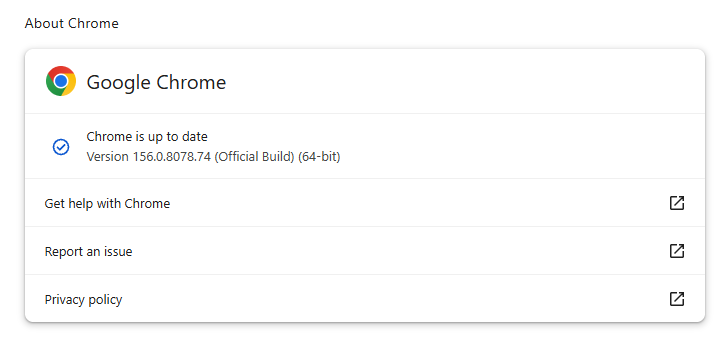
Most users are on Chrome’s Stable channel. The desktop update brings Chrome to versions 156.0.8078.73/.74 for Windows and Mac and 156.0.8078.73 for Linux. The update includes 52 security fixes, including four rated Critical.
On the same day, Mozilla issued Security Advisory 2026-118, which fixes 167 vulnerabilities. Firefox 159 also introduces several new features.
Both updates will roll out over the coming days and weeks.
How to update Chrome
The easiest option is to allow Chrome to update automatically. But you can end up lagging behind on updates if you never close your browser or if something goes wrong, such as an extension preventing the update.
If you don’t want to wait for the rollout to reach you, manually updating is easy. Open About Google Chrome from Chrome’s settings or Help menu. Chrome will check for updates. If one is available, click Relaunch to apply it.
To update Firefox, open the browser and click the menu button at the right side of the Firefox toolbar, then go to Help and select About Firefox. The About Mozilla Firefox window will open.
Firefox will automatically check for updates. If one is available, it will be downloaded. Once done, you’ll be prompted to click Relaunch. After Firefox restarts, it will be up to date.
After the update, the version should be 159.0 or later
Technical details
These Chrome and Firefox updates address a familiar problem: browser code mishandling memory while processing web content. Both releases fix use-after-free vulnerabilities, including flaws in page layout, JavaScript processing, and SVG graphics.
A use-after-free vulnerability occurs when a program attempts to access a memory location after it has been freed. That can cause crashes or, in some cases, allow an attacker to run their own code.
There’s another connection between these updates: both Google and Mozilla credit OpenAI Codex Security with finding bugs fixed in these releases. AI can help security teams examine browser code for weaknesses, alongside human code reviews and automated tests that check how software handles unexpected inputs.
Mozilla’s collaboration with Anthropic shows how AI-discovered findings can lead to fixes: researchers validated vulnerabilities before reporting them, giving Mozilla’s team reproducible bugs to investigate, repair, and deliver to users.
Browse like no one’s watching.
Malwarebytes Privacy VPN encrypts your connection and never logs what you do, so the next story you read doesn’t have to feel personal. Try it free →
Elections give scammers plenty to work with: urgent deadlines, familiar faces, passionate supporters, and messages asking people to take action.
Some want you to “fix” your voter registration. Others want a donation, an answer to a survey, or payment for merchandise supposedly endorsed by your favorite politician. The details change, but the objective stays the same: get your money, your personal information, or both.
Here are five election-themed scams to watch out for.
Scam 1. “We’ll help you vote”
Not every election-themed lure starts with a threat. Some offer to make voting easier.
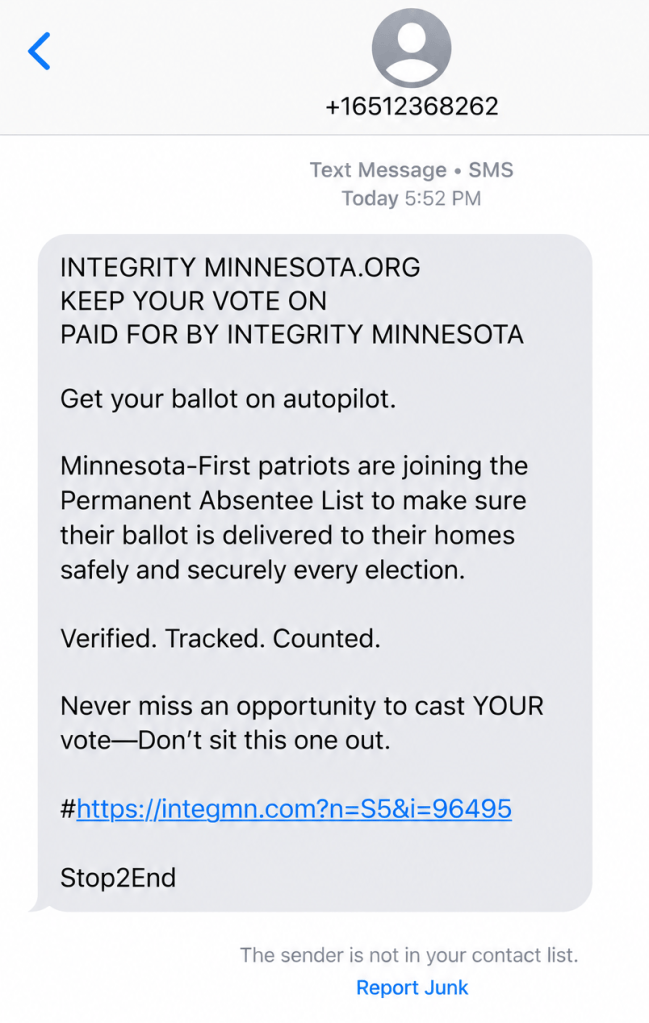
“Get your ballot on autopilot,” reads one text message we reviewed. It encourages recipients to join a permanent absentee list so their ballots arrive at home for every election, adding the reassuring words: “Verified. Tracked. Counted.”
A voting-assistance text message reviewed by Scam Guard
The message is a scam, though it borrows the language of a real Minnesota voting service. Minnesota does have a permanent absentee voter list, but the link in this text is fraudulent. To check or sign up, go directly to your election authority’s official website.
Other messages take the opposite approach: instead of offering convenience, they warn that you could lose your chance to vote.
A message might say you are not registered to vote, your details are incomplete, or your registration is about to be cancelled. Then it offers a link to sort everything out.
The FBI recently warned about messages that send recipients to fraudulent voter-registration pages. Instead of helping people vote, these sites collect personal information that criminals can use for further fraud.
In Brazil, scammers used a fake WhatsApp account with the Superior Electoral Court’s logo. It claimed to be the court’s “Customer Service Department” (which doesn’t exist) and told people to download an app called “Soluciona Pendência,” roughly translated as “Resolve an outstanding issue.” The message falsely warned that people could lose access to banking or government services.
Scam 2. “Donate now to help your candidate win”
A fundraising appeal arrives just as an election reaches a critical moment. It uses the candidate’s photograph, familiar campaign language, and an urgent request for money.
That does not necessarily mean the campaign sent it.
The FBI warns that scammers impersonate candidates and political fundraising organizations to collect supposed campaign contributions. Victims believe they are supporting a legitimate organization, but the money goes to criminals instead.
Before donating, find the campaign or organization’s official website yourself and check who will receive the payment. Don’t let a countdown, a matching-donation claim, or a message about an impending defeat rush your decision. The Better Business Bureau (BBB) advises researching political fundraising requests and resisting pressure to act immediately.
Scam 3. “Take our political survey and claim your reward”
Not every political poll is suspicious. But a request for your opinion can also be an opening for a scam.
The BBB warns about fraudulent polling calls that promise a prize in exchange for answering questions. After the “survey,” the caller asks for credit card information to cover shipping, taxes, or other costs associated with the supposed reward.
At that point, the questions about candidates have served their purpose: keeping you engaged long enough to introduce a payment request.
Other election-themed messages ask people to complete surveys through links. Treat those links with the same caution you would an unexpected donation or registration request. A familiar political organization’s name does not establish who operates the website.
You can decline an unsolicited poll. You should not need to hand over payment details simply to share your political views or claim a surprise reward.
Scam 4. “Pay this electoral fine” or “Report for election duty”
Few things make a message feel urgent quite like an official-looking demand backed by a possible penalty.
Brazil’s Superior Electoral Court (TSE) has warned about messages falsely claiming people had an unresolved voting issue. The messages link to fake government websites designed to steal personal information or trick people into paying.
Brazil does have legitimate electoral fines, which can be paid through official channels, including Pix. So a fine or Pix request alone doesn’t prove a message is a scam. If a message says you owe money or must perform election duty, check with the relevant authority using contact details from its official website. Don’t use the message’s phone number, link, or QR code.
Scam 5. Your favorite politician “wants you to buy this”
A politician’s name can be used to sell more than a political message.
Criminals use candidates’ names, photographs, logos, and slogans to advertise merchandise that never arrives. What looks like a way to support a candidate becomes an ordinary shopping scam wrapped in campaign branding.
Apply the same skepticism to a “commemorative,” “patriotic,” or supposedly collectible product advertised using a politician’s name. Before buying, ask:
Is the seller actually affiliated with the politician or campaign?
What, exactly, are you buying?
Is there evidence for claims about the product’s quality, usefulness, or future value?
What are the total price, refund terms, and any recurring charges?
A product does not become useful, valuable, or a sound investment because an ad places it beside a politician’s photograph. Nor does a photograph prove that the politician endorsed it.
There is also a difference between a product you consider poor value and a fraudulent offer. A product being poor value doesn’t automatically make it a scam. Look for clear deception: a fake endorsement, false claims, hidden fees, or an order that never arrives.
How to stay safe from election scams
You don’t need to work out every detail of a suspicious message before deciding whether to act on it. Verify the message through a route the sender does not control.
Go directly to official election websites to check registration, voting requirements, deadlines, and alleged penalties.
Verify donation requests independently. Find the campaign or organization yourself and confirm where your money will go.
Keep payment details out of unsolicited surveys. A political poll that turns into a request to pay for a prize is a red flag.
Check sellers before buying political merchandise. A candidate’s name or logo does not authenticate the shop.
Don’t mistake personal details for proof. A message can contain accurate information about you and still be a scam.
Keep political choices separate from requests for money or personal information. You can support a cause without responding to an unexpected message.
AI is becoming a third wheel in relationships, increasingly playing a role in the most intimate parts of our lives.
It shows up in the flirty first text, the polished dating profile, the therapized language we use with a partner after a fight, the strength we gather after heartbreak, and everywhere in between. For some, AI is a source of companionship itself. And even if you’re not personally an AI user, you may still be dating, loving, arguing with, or trusting someone who is.
As AI moves deeper into our relationships, it’s reshaping connection, blurring what feels authentic, and creating new ways for intimacy to be exploited.
AI is starting to replace human interaction
AI is moving into emotional territory once reserved for other people. For some, it’s no longer just a tool, but a source of support, companionship, and even romantic connection.
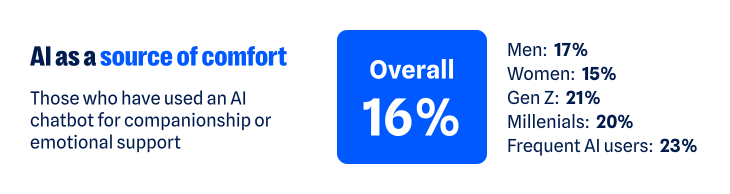
According to our recent research, about one in six have turned to a chatbot for companionship or emotional support. That climbs to about one in five among Gen Z and Millennials, and nearly one in four among regular AI users (those who use AI daily or multiple times a week). The more time people spend with AI, the more likely they are to humanize its role, making room for it as a friend, confidant, advisor, or even partner.
As AI takes on more intimate roles, it’s also starting to challenge the boundaries of real human relationships. More than one in three (37%) say having a romantic relationship with an AI chatbot while already in a committed relationship isn’t the same as cheating. That view is more common among men (46% versus 30% of women), Gen Z and Millennials (43% and 45%), and regular AI users (48%).
Whether the relationship is platonic or romantic, the more AI is treated like a human, the more personal the stakes become. Just like you have to be cautious when telling a human your deepest, darkest secrets, the experience is similar when using AI. Nearly two-thirds (65%) worry that private conversations they’ve had with AI could be exposed.
One survey respondent said:
“I have used a chatbot…for emotional support, and it is worrying to think those conversations could be leaked.”
The technology may be artificial, but the relationships people form with AI can feel very real. And as with any relationship, that means there are boundaries to work out, privacy to protect, and vulnerabilities to manage.
AI is creating new ways to weaponize intimacy
AI’s growing role in human intimacy also has a darker side. The same technology that can offer comfort, advice, or companionship can also be used to violate the most intimate parts of our lives.
Non-consensual image abuse, sextortion, and other forms of sexual abuse have long been part of the internet’s dark side. Generative AI has made that content easier to create. Someone trying to exploit another person no longer needs an actual intimate photo, video, or private exchange. A regular photo—or even just someone’s likeness—can be transformed into sexual content they never made, never shared, and never consented to.
Most people draw a clear line against that, but not everyone does. About one in six people say it’s acceptable to generate explicit images of someone without their permission for personal use. Another 14% are neutral, bringing the share who do not explicitly oppose the behavior to nearly one in three (31%).
Views differ sharply by age and sex:
Younger adults are more accepting of someone using AI to generate non-consensual content: nearly one in four Gen Z (24%) and Millennials (23%) say it’s okay, compared with 13% of Gen X and just 5% of Boomers+
Men are also more permissive: more than one in five (22%) say it’s okay, compared with 14% of women
Attitudes toward the behavior may vary, but the fear of becoming a target is far more widespread. Overall, nearly two-thirds of people (62%) worry someone could create fake nude or sexually explicit photos or videos of them. Women feel this threat more acutely: nearly seven in ten (69%) are concerned, compared with 57% of men.
For some, this fear has already become a reality:
One in ten say AI has been used to generate nude or sexually explicit imagery of them without permission
One in ten say someone has threatened to release AI-generated compromising or explicit imagery of them
As one respondent recounted:
“I had someone make fake nudes of me using AI on my photos from my social media and threaten to post them on Facebook…[it] made me more cautious about AI.”
The intimate material may be fake, but the fear, coercion, and potential for reputational, emotional, and financial damage are completely real.
AI is making it harder to know who you’re really talking to
The threat doesn’t stop with fabricated sexual content. AI is also making it harder to know whether the person on the other side of a screen is who they claim to be.
Humans have always edited themselves for other people. We choose the most flattering photo, write and rewrite the text before sending it, and present our most interesting selves—especially when forming new relationships. AI dramatically expands what that kind of self-editing can look like, and people aren’t shy about using it:
54% say AI helps them present the best version of themselves
47% say using AI to present your “best self” to employers, friends, or romantic partners does not present a false identity
That rises to 58% of both Gen Z and Millennials and 64% of regular AI users
But where does enhancement end and deception begin? Is an AI-polished dating profile still authentically you? What about a message you didn’t write? A photo that looks like you, only better?
There’s a flipside to using AI to make ourselves look or sound better: If we can do it, so can everyone else. And people are much less comfortable when they’re not the ones controlling the technology. Two-thirds (67%) worry that an online friend or romantic interest could use AI-generated images, videos, or other content to deceive them.
Catfishing, fake photos, and lies on dating profiles aren’t new. AI just makes the deception easier. Someone’s photos, backstory, messages, and even their voice can all be faked.
One person described leaving dating apps after realizing the person they were talking to had gone well beyond simply polishing their profile:
“[The] dating profile had fake pictures…[it] wasn’t just making true events sound interesting and more flirty, but creating completely false photos and information. Left the dating apps again and needed to reset.”
AI can distort identity in the other direction, too. It can also create a version of us we never chose to put into the world.
76% worry about someone creating a fake profile pretending to be them
70% worry about fake images or videos of themselves being created
71% worry AI-generated content could be used to damage their reputation
Relationships are built on mutual trust. AI can distort both sides of the connection: who we think the other person is, and who they think we are.
AI is quietly finding its way into the space between people
Not all of AI’s influence on intimacy is so dramatic. Much of it happens quietly, showing up in how people communicate with each other and navigate relationships:
More than one in three have used AI to help write or edit a message
About one in seven have turned to it for advice about a relationship or personal decision
One in ten say it has already changed how they date or communicate romantically—rising to nearly one in five among Gen Z
The survey responses show what this looks like in real life. For example, one respondent described using AI with their partner as a way to step outside their own point of view:
“Personally, it has helped me. We use AI in our relationship as a reflection tool, and it has sometimes helped us take on the perspective of the other.”
For another, AI helped them work through jealousy:
“So, I used to accuse my partner, and I got really territorial about them but once I talked to AI about it, they gave helpful advice and now we are stronger than ever.”
AI is also showing up in other difficult relationship moments. One person said it helped them “stay calm and communicate” when problems came up with their partner; another said it allows them “to pause and refine [their] thoughts” before responding.
Sometimes the role is simpler. One respondent said AI gives them “new romantic words” for their partner, while another said they’ve asked AI for advice on how to make their partner smile. AI’s growing role in relationships may be unsettling, but the benefits people describe are definitely there.
AI isn’t just helping people find the right words. It’s also helping them decide what version of themselves to put forward in the first place. More than one in three say it’s okay to use AI to create or improve a dating profile; nearly two-thirds aren’t opposed. One respondent described using AI as a “creative advisor” to polish their profile and come up with conversation starters.
AI doesn’t have to replace a relationship to help shape it. It can influence how people communicate, what advice they take, and how they choose to present themselves.
AI’s intimacy problem is ultimately a trust problem
From connection to deception to outright harm, the same question keeps surfacing: Can I trust what’s in front of me? And would I know if I couldn’t?
Nearly nine in ten people (88%) say AI is making it harder to tell what online content is genuinely human or real. And 84% say even convincing video evidence no longer necessarily feels like proof. That uncertainty follows people into dating and relationships, where knowing what—and who—to trust is deeply personal.
AI may make it easier to start a conversation, smooth over a hard one, or feel connected when you’re lonely. But relationships and intimacy of all kinds still come down to trust, and AI is making that trust a little harder to take at face value.
About the research
The research in this article is based on a March 2026 survey about AI, identity, and the collapse of digital trust and was conducted among 1,500 respondents in the United States, United Kingdom, Germany, Austria, and Switzerland. The research was prepared by an independent research consultant and distributed via Forsta.
Something feel off? Check it before you click.
Malwarebytes Scam Guard helps you analyze suspicious links, texts, and screenshots instantly.
You recognize the website. You’ve visited it before. You may even have it bookmarked. Then it asks you to do something unusual: install an update, allow notifications, or run a command to prove you’re human.
Stop and check first. A website you trust can still display instructions you shouldn’t follow. Our researchers have documented attacks in which criminals hacked legitimate websites and used them to deliver fake verification pages that trick visitors into installing malware.
Within the same week, serious problems emerged in several parts of the web’s security infrastructure. Attackers were exploiting two flaws in PHP, researchers disclosed a critical flaw in Brotli software used by Node.js, and eight compromised security certificates raised concerns about how browsers and apps verify websites. The incidents have different causes and levels of risk, but their timing makes this an unusual cluster.
PHP is used by about 7 in 10 websites whose underlying programming language is known. Node.js is used by 7.4% of websites with an identified web-server technology, according to W3Techs. Both run websites behind the scenes, so flaws in them can put the sites that rely on them at risk. Most browsers have blocked the certificates, though updates may still be needed for other software and devices.
These problems don’t mean you need to stop browsing. But keep your software and security protection up to date, and be wary of unexpected requests.
How to stay safe when browsing
Check the website’s address, but remember that even the genuine site may have been compromised. The important question is whether the page’s instructions make sense. A familiar website may earn your visit, but that doesn’t mean you should automatically let it run software on your device.
In documented campaigns, malicious instructions appeared on legitimate, hacked WordPress websites, not just lookalike domains.
A secure connection doesn’t guarantee that a page is safe, either. HTTPS protects the connection between your browser and the site. Browser protections against dangerous content are a separate layer. A page asking you to install software or enter sensitive information still deserves scrutiny, even when the connection is encrypted.
Ask yourself: “Does this request make sense for what I came here to do?”
Reading an article shouldn’t require opening PowerShell. Watching a video shouldn’t require following a website’s instructions to “repair” your computer. These are familiar themes in ClickFix attacks, which disguise malicious commands as routine verification or troubleshooting steps.
You can’t patch someone else’s web server, but you can keep the software on your own device updated. Turn on automatic updates for your operating system, browser, and applications where available, and don’t repeatedly postpone installing them. Updates fix security flaws that criminals could otherwise use to access your files or accounts.
Keep your browser’s phishing and malware protection enabled, too. Free browser extensions like Malwarebytes Browser Guard warn about known dangerous websites, malicious downloads, and clipboard hijacking. Treat those warnings as a reason to leave, not as another obstacle to get round. These checks are a useful layer of protection, but they can’t certify that every unflagged page is safe.
Use strong, unique passwords stored in a password manager, and enable multifactor authentication on important accounts. These measures help protect your accounts from unauthorized access.
If a request involves running code or making changes to your device, verify it independently. If a website claims your browser needs updating, close the prompt and check through the browser’s own settings. If it says an account or service needs attention, check through the official app, help page, or support channel that you open yourself.
Criminals often present the harmful step as the thing that will let you do what you came to do: fix the connection, enable the player, or complete the security check. The frustration of being blocked can make it tempting to follow their instructions.
Use up-to-date, real-time anti-malware protection on your devices to help stop malware from wreaking havoc or stealing your information.
Watch for unexpected content, downloads, redirects, and repeated login requests, even on familiar sites. If something looks wrong, leave the page. If you’re unsure, use Malwarebytes Scam Guard to check whether a request may be a scam and get possible next steps.
From reporting threats to removing them.
Cybersecurity risks should never spread beyond a headline. Keep threats off your devices by downloading Malwarebytes today.
A reverse engineer claims that their Samsung smart TV has been collecting audio without their consent.
The researcher, who calls themselves “log4j,” said in an X thread that their 2025 Samsung TV was delivering ads that seemed suspiciously relevant to them. Investigating, they claim to have found a package called “always on voice,” which uses the TV’s built-in microphone to collect sounds from the room.
The software logged events such as dogs barking and babies crying, log4j said, adding that these events are counted and reported back to Samsung.
Samsung advertises similar features on some of its AI-enabled TVs. The company says its Pet Care and Family Care features use on-device AI to detect a dog barking or a baby crying and alert users. This doesn’t confirm log4j’s claims about the package or the data it reports.
However, log4j says that on TVs without microphones, the software searches for connected devices such as soundbars or Bluetooth microphones and uses those to listen instead.
The TV was also collecting geolocation data and mapping local networks, they said, adding that it ran a service on the TV that analyzes traffic on the local network.
log4j also says that the system uses a neural network tailored to a particular region to analyze your viewing habits. A neural network is a type of machine-learning model. log4j said:
“…in youtube it’s looking for videos you watch, ads you skip, progress in a video, etc.”
The tracking that’s on the record
While log4j’s claims haven’t been independently verified, Samsung has used automatic content recognition (ACR), a system that identifies what’s on screen. Earlier this year, Texas Attorney General Ken Paxton settled with Samsung, getting the company to agree that it would get Texans’ express consent before collecting or processing ACR viewing data.
A class action complaint filed in New York in January also accused Samsung of using ACR to record video and audio passing through the TV. The complaint accused Samsung of using machine-learning algorithms to analyze and link this data back to consumers. This includes information displayed when the TV is used as a computer monitor, it said, adding that the information can be linked to different people using the TV. The case was voluntarily dismissed in July.
The New York complaint added:
“Samsung exploits this Sensitive Information by (a) selling targeted advertisements to its corporate advertising clients, and (b) providing it to third-party advertising companies such as Google and X (f/k/a Twitter) for targeted advertising.”
A separate class action complaint filed in California this month accuses Samsung Electronics America of not being transparent about its ACR data collection.
This isn’t the first time that Samsung has been criticized for allegedly picking up in-room audio. In 2015, privacy group EPIC filed a complaint with the FTC, accusing Samsung of recording conversations and relaying them elsewhere. The nonprofit said at the time:
“Everything a user says in front of the Samsung SmartTV is recorded and transmitted over the internet to a third party regardless of whether it is related to the provision of the service.”
EPIC identified text-to-speech company Nuance as the third party.
What you can do
We can’t confirm all of log4j’s allegations, and Samsung doesn’t appear to have commented. But there have been multiplecomplaints about the data smart TVs collect. You can turn off features such as ACR, internet-based advertising, and voice recognition where possible.
log4j has also raised concerns about whether monitoring services are truly off. They said:
“ACR off via your preferences menu on samsung TVs should not be assumed to actually disable ACR telemetry.
i’ve found several instances where the checks (whether deliberate or not) are either incorrectly implemented or not checked at all.”
log4j says disconnecting your TV from Wi-Fi is the best option for immediate peace of mind, though that also means losing internet-based TV features. They also suggest using an Apple TV or a modifiable Android TV box with open-source software.
What do cybercriminals know about you?
Use Malwarebytes’ free Digital Footprint scan to see whether your personal information has been exposed online.
You may have forgotten about Popcorn Time. Unfortunately, its updater didn’t forget about your device.
Security researchers have intervened to disable an abandoned update mechanism in Time4Popcorn, a version of the once-popular streaming app. If left running in the background, the updater could have allowed attackers to take control of Windows and Mac computers, even if their owners hadn’t opened the app in years.
Eye Security estimates that the vulnerable updater was present on millions of devices worldwide, including 2.5–3 million Windows computers and around 250,000–350,000 Macs.
Popcorn Time made watching movies and TV shows through BitTorrent look more like browsing Netflix. Rather than making users find torrent files and open them in a separate client, it wrapped the process in a familiar streaming-style interface.
Amid concerns about copyright infringement and its possible consequences, the original developers abandoned it shortly after its launch in 2014. But because its source code was publicly available, other developers could pick it up and create their own versions, known as forks.
One of those was Time4Popcorn, which was also distributed under the name “Popcorn Time.” That shared branding matters because people may have installed the affected software without ever seeing the Time4Popcorn name.
The problem at hand
Time4Popcorn was eventually abandoned too. But its update infrastructure was left behind, and at some point the domains associated with the software became available for others to register.
In other words, the people maintaining the software had gone away. The software’s ability to accept instructions had not. Time4Popcorn’s updater used unencrypted HTTP connections and accepted executable updates without checking digital signatures to verify their authenticity. So, someone who controlled an update domain or was able to tamper with the unencrypted traffic could supply their own program instead.
That combination created a remote code execution vulnerability, tracked as CVE-2026-30612, which could let an attacker run malicious software on a device. An attacker wouldn’t need to persuade someone to watch a movie or click a suspicious attachment. The forgotten updater could do the work for them.
Although Android was affected too, users had an extra layer of protection. Its updater checked for updates when the application was opened, but installing an attacker-supplied APK required the user to approve the installation. It was not the same silent, background takeover route researchers found on Windows and macOS.
What the researchers did
Eye Security registered an abandoned update domain and used the vulnerable mechanism to distribute an update that disabled the updater itself. On Windows, it stopped and disabled the service; on macOS, it prevented the update process from starting. The researchers say their intervention did not delete users’ files or collect host data.
By March 2026, Eye Security reported more than two million downloads of its updater-disabling fix, and update requests to its domains had fallen by 98%. Later that month, it transferred the 15 domains it controlled to the nonprofit Shadowserver Foundation.
Researchers could not remotely disable the Android updater in the same way. And the desktop application still contained other weaknesses, including an obsolete Chrome engine dating from 2014 and disabled sandbox protections, which normally help contain malicious code.
What users should do
If you used Popcorn Time years ago, check the devices on which you installed it. Don’t assume that no longer using an application means its background components have stopped running.
Check your list of installed applications for Popcorn Time or Time4Popcorn. Pay particular attention to older Windows PCs, Macs, and Android devices where you may have forgotten about installing it. The affected fork was distributed under both names.
Remove the old application. There is no vendor security update for the abandoned Time4Popcorn software. Disabling the updater addresses one vulnerability, not the application’s other security weaknesses.
On Windows and macOS, check that the background updater is no longer running. Eye Security identifies the Windows component as Updater.exe, normally inside a Popcorn Time folder under Program Files or Program Files (x86), running through a service called Update Service. On macOS, the component is /Library/PrivilegedHelperTools/PT.updd, with a launch daemon at /Library/LaunchDaemons/PT.updd.plist. Its advisory provides instructions for disabling these components if needed.
On Android, uninstall the affected app rather than accepting an update prompt from it.The updater is part of the main application and cannot easily be disabled separately.
Use an up-to-date, real-time anti-malware solution to detect and block any attempts to install malware on your devices.
As we saw recently, cybercriminals can use software updates to distribute malware. Remove abandoned apps and check for any background updaters they leave behind.
From reporting threats to removing them.
Cybersecurity risks should never spread beyond a headline. Keep threats off your devices by downloading Malwarebytes today.
.kadence-column480165_4ecc5f-ac > .kt-inside-inner-col{padding-top:20px;padding-right:20px;padding-bottom:10px;padding-left:20px;}.kadence-column480165_4ecc5f-ac > .kt-inside-inner-col{column-gap:var(--global-kb-gap-sm, 1rem);}.kadence-column480165_4ecc5f-ac > .kt-inside-inner-col{flex-direction:column;}.kadence-column480165_4ecc5f-ac > .kt-inside-inner-col > .aligncenter{width:100%;}.kadence-column480165_4ecc5f-ac > .kt-inside-inner-col{background-color:#ffe5e5;}.kadence-column480165_4ecc5f-ac > .kt-inside-inner-col:before{opacity:0.3;}.kadence-column480165_4ecc5f-ac{position:relative;}@media all and (max-width: 1024px){.kadence-column480165_4ecc5f-ac > .kt-inside-inner-col{flex-direction:column;justify-content:center;}}@media all and (max-width: 767px){.kadence-column480165_4ecc5f-ac > .kt-inside-inner-col{flex-direction:column;justify-content:center;}}
In this article
Some Halloween AI video sites ask for personal photos without clearly identifying who runs them.
Outside AI providers may also receive your uploads.
Before uploading, check who gets your photos, how they’re used, and when they’re deleted.
This Halloween, AI is doing the costumes. Upload a photo and you can become a vampire, surround your dog with pumpkins, or star in a viral “zombie love story:” Your partner has turned, you lower the gun, and the zombie’s leap ends in a hug.
But before you upload, do you know who will receive your photos?
We found no malware or phishing on the sites we examined. What concerned us was how little we could establish about who operated them and who would be responsible for the photos people uploaded.
Polished, friendly, and anonymous
These sites look professional and sound reassuring. They promise privacy, have FAQs and refund policies, and some even add consent checkboxes for photos of children. One calls itself “an independent tool with no ties to TikTok or any film studio.”
What they don’t tell you is who is behind them. On the sites we checked, we found no company name, address, or named operator, only a support email on the site’s own domain.
Where do your photos go?
These sites ask for clear, well-lit photos of you, your partner, your friends, your pets, and, with a parent’s permission, your children.
The sites we looked at say they rely on outside AI providers to generate the videos. That means you’re trusting both the website collecting your photos and the providers processing them.
Wherever you upload photos, check who can access them and how they can be used. Scammers can use someone’s likeness to create fake intimate images and demand money to keep them private. In our Face Value report, 10% of respondents said someone had threatened to release AI-generated explicit content of them. We found no evidence of that happening through these Halloween sites, but it’s a reason to be careful where you share your photos.
The sites promise to delete uploads within days, and we have no evidence that they fail to do so. But we couldn’t independently verify those promises. Without an identifiable operator, it’s harder to establish who is accountable for handling your photos and responding to deletion requests.
Google sign-in doesn’t identify everyone handling your photos
These sites use the real Google sign-in window, so you type your password into Google, not the video site. But using Google to sign in doesn’t mean Google endorses the service or guarantees its privacy promises.
Click the app name in Google’s sign-in window and you’ll see Developer info. On one site we checked, the only contact listed was a Gmail address. We saw the same with the September sites. A Gmail address alone doesn’t establish wrongdoing, but it does little to identify the operator.
On another, Google said you were signing in “to continue to neon.tech.” Neon is a legitimate database company and authentication service provider. Its name appearing here doesn’t mean it operates or endorses the Halloween video site.
Login providers can handle Google sign-in on a site’s behalf. Depending on the setup, Google may display the provider’s domain instead of the video site’s name. Here, the sign-in screen gave visitors no clear indication of who operated the Halloween service.
Built from a kit, recycled for the next trend
Sites like these don’t necessarily take a team or months of work. Some use the same $249 website kit we wrote about in September, which promises you can “launch your AI product in one hour.” On one Halloween site, the builders hadn’t even cleared out the kit’s sample content. Hidden in the page was a note saying it was “a demo site” for the template, along with placeholder links like “your-app-name.”
Another site’s code contained remnants of an AI rap and dance video maker, including a “hotel lobby” stage, a recording studio, and AI-written raps. Those remnants suggest the site uses code also intended for other AI video services.
Using a website kit isn’t itself suspicious. But a polished page can be quick to assemble, so its appearance tells you little about the business handling your photos.
Take your time before paying, too
On one site, a single 15-second zombie clip cost $9.99. The pricing page nudged visitors toward bigger packs, bringing the advertised price per video down to $2.99. But that lowest price meant spending $199 on enough credits for roughly 66 zombie films. There were monthly and yearly plans too, costing up to $600 a year.
One site also used countdown offers, reminders in the browser tab, and claims about how many people had made films that day to encourage visitors to buy.
There’s no need to rush. Check the payment terms as carefully as the privacy policy. The sites themselves warn that AI can change faces, so your video may not look much like you. Under the policies we reviewed, credits are returned if a video fails to generate. But if you simply don’t like the result, trying again costs more credits.
Subscriptions renew until you cancel, yearly plans are charged in one go, and some credits expire before you use them.
What to check before uploading your photos
Whichever tool or platform you choose, make sure you’re comfortable with how it will handle your data, your photos, and your payment info.
Find out who runs the service. Look for a named operator and clear contact details. If you can’t establish who would be responsible for your photos, consider another service.
Check where your photos go. Read the privacy policy for information about outside AI providers, retention periods, and whether uploads can be used for AI training.
Look for a deletion process. Check how to request deletion and whether the policy explains what happens to copies held by outside providers.
Be especially careful with children’s photos. A parental consent checkbox doesn’t explain how a service will protect them. Only upload other people’s photos with their permission.
Read Google’s sign-in window. Check the developer details and any permissions requested. Google sign-in doesn’t replace checking the service itself.
Ignore countdowns and check payment terms. Take time to understand the full cost, credit expiry, and whether your purchase starts a subscription.
Review your Google connections afterward. Remove services you no longer use from your Google account’s third-party connections. This doesn’t cancel subscriptions or delete photos or other data already held by the service.
But these tools can’t verify a service’s photo deletion promises. You should still check who operates it and what its privacy terms say before uploading.
Something feel off? Check it before you click.
Malwarebytes Scam Guard helps you analyze suspicious links, texts, and screenshots instantly.
Quest Diagnostics has confirmed that an unauthorized party accessed a system healthcare providers use to order laboratory tests and view results, affecting personal information and patient records.
Quest is a major US laboratory testing company whose services help healthcare professionals diagnose and monitor medical conditions. Those services range from routine laboratory testing to specialized testing in areas such as cancer, infectious diseases, and neurology.
What happened and what was stolen?
The company learned of unauthorized access to its Quanum Lab Services Manager, or LSM, on October 21. The compromised platform lets healthcare professionals order tests, access results, review historical trends, and order supplies. Quest paused access to the platform and began investigating. Quest says its core business operations remain up and running.
An investigation is ongoing. Quest has not yet published a count of affected patients or a complete list of the information accessed. It says it will notify affected patients, healthcare providers, and health plans.
The company said:
“personal information and patient records were affected.”
It confirms that health information and personally identifiable information were involved, but has not specified whether these included Social Security numbers, insurance identifiers, payment information, particular test results, or account passwords.
What patients can do now
Quest says it will send notification letters to affected patients once its investigation is complete. Those letters will describe available resources, including credit and identity monitoring. If you receive one, read it carefully and follow the instructions. You can also check the FAQs posted in Quest’s breach notice for updates.
Someone’s watching your accounts. Make sure it’s us.
A breach does not automatically mean someone has misused your information, but you can take these precautions while you wait for more details:
Verify unexpected messages independently. Don’t let a message about the breach rush you into clicking a link, sharing sensitive information, or making a payment. Go to Quest’s official website yourself or use contact details you already trust.
Review medical bills and insurance statements. Look for appointments, tests, prescriptions, or services you did not receive. The Federal Trade Commission (FTC) identifies unfamiliar medical bills and unexpected items on an Explanation of Benefits statement, which explains how your insurer processed a claim, as warning signs of medical identity theft. Report discrepancies to your healthcare provider and your insurer.
Review your credit reports. Look for unfamiliar accounts or debts and dispute errors. Free reports are available through AnnualCreditReport.com.
Act if you find signs of identity theft. Visit IdentityTheft.gov for a recovery plan. If someone has received care in your name, ask the providers involved for copies of your medical records and request corrections in writing.
Medical identity theft is not just a financial problem; it can also affect your care. Someone using your identity to obtain treatment or submit insurance claims could introduce incorrect information into your health records. Checking medical statements and reporting anything unfamiliar can help you catch that misuse.
Let’s face it, an incognito window can only do so much.
Breaches, dark web trading, credit fraud. Malwarebytes Identity Theft Protection monitors for all of it, alerts you fast, and comes with identity theft insurance.
.kadence-column480618_38f885-ca > .kt-inside-inner-col{padding-top:20px;padding-right:20px;padding-bottom:10px;padding-left:20px;}.kadence-column480618_38f885-ca > .kt-inside-inner-col{column-gap:var(--global-kb-gap-sm, 1rem);}.kadence-column480618_38f885-ca > .kt-inside-inner-col{flex-direction:column;}.kadence-column480618_38f885-ca > .kt-inside-inner-col > .aligncenter{width:100%;}.kadence-column480618_38f885-ca > .kt-inside-inner-col{background-color:#ffe5e5;}.kadence-column480618_38f885-ca > .kt-inside-inner-col:before{opacity:0.3;}.kadence-column480618_38f885-ca{position:relative;}@media all and (max-width: 1024px){.kadence-column480618_38f885-ca > .kt-inside-inner-col{flex-direction:column;justify-content:center;}}@media all and (max-width: 767px){.kadence-column480618_38f885-ca > .kt-inside-inner-col{flex-direction:column;justify-content:center;}}
In this article
Capcom’s breach exposed 11.7 million account records.
Leaked details could fuel convincing phishing messages.
Passwords on 196 accounts were changed without permission.
Use CAPCOM ID? Check your account and enable two-factor authentication.
Gamers are being warned to watch their inboxes after someone gained unauthorized access to Capcom’s online membership service.
Capcom, the Japanese video game developer and publisher behind Resident Evil, Monster Hunter, and Street Fighter, disclosed a breach affecting more than 11.7 million CAPCOM ID records worldwide.
The exposed information includes email addresses, account activity details, and IP addresses. A much smaller number of records also contained personal details such as dates of birth.
The company says credit card information was not affected, and it has not confirmed that passwords originally chosen by customers were compromised, but someone changed the passwords on 196 accounts without authorization. Capcom has since reset those passwords.
CAPCOM ID is the company’s unified account system for its websites and services, including online features in certain games. Users can also link it to gaming platform accounts, including PlayStation, Xbox, Steam, Epic Games, and Nintendo accounts.
For players, the exposed information could help scammers make fake Capcom messages more convincing, potentially tricking them into handing over passwords or verification codes.
Capcom discovered the incident on October 19, and says it has addressed the attack method. Games and services remain available, and the company plans to notify affected customers.
The 11.7 million figure refers to affected records, so it may not represent that many individual users. Capcom is still investigating the impact, including how the passwords on 196 accounts were changed without permission and whether any other unauthorized activity occurred on those accounts.
How to stay safe
As with any breach, watch for phishing messages, particularly those using the breach to create urgency. If an email claims your account needs attention, open your browser and go to cid.capcom.com independently to check it. Capcom warns users not to follow URLs or open attachments in suspicious messages.
You can also take these steps:
Enable CAPCOM ID’s two-factor authentication: This adds an authenticator-app code to the sign-in process, helping protect your account if someone obtains your password. Set it up from your Account page using a smartphone or tablet. Capcom recommends Google Authenticator or Microsoft Authenticator.
Check your account, especially if you received an unexpected password-change notice: Review your registered information and linked platform accounts from your Account page. If you cannot sign in, use Forgot your password? on the login page. See Capcom’s support page for instructions.
Use officialsupport channels if you need help: Find the appropriate regional contact in Capcom’s breach notice, rather than trusting contact details in an unexpected message.
Pro tip: Unsure whether a message is a scam? Malwarebytes’ Scam Guard can help you assess it and suggest what to do next.
Something feel off? Check it before you click.
Malwarebytes Scam Guard helps you analyze suspicious links, texts, and screenshots instantly.
A breach exposed personal information in supposedly anonymous crime reports. Now one Crime Stoppers chapter has stopped accepting tips because it cannot guarantee anonymity.
Toronto Crime Stoppers, which works with the community, police, and media to help solve crimes, has paused phone, website, and app submissions while it seeks a safer system.
The breach occurred in March and involved P3 Global Intel, the Texas-based tip-management platform owned by Navigate360. Its software is used by Crime Stoppers programs and other organizations in the US and elsewhere.
An October CBC investigation revealed the Canadian impact: More than 1.5 million tips spanning 25 years were exposed, with over 850,000 containing personal information. That included addresses, phone numbers, email addresses, and some banking details associated with rewards. The exposed details belonged to tipsters, people named in allegations, and others, including police and Crime Stoppers staff.
Following CBC’s reporting, Toronto Crime Stoppers acknowledged that its promise of anonymity had been broken for some users. The organization stopped accepting tips, saying it could no longer guarantee users’ anonymity.
In an October 21 statement, the organization says identifying details are normally removed before tips reach investigators, but some original submissions containing potentially identifying information were stolen from P3.
For affected tipsters, exposure could create a risk of retaliation, intimidation, or extortion. Scammers could also use details of a genuine tip to make an approach more convincing.
Unfortunately, the pause removes a reporting option for people afraid to approach police. Toronto police still accept reports directly, but warn that those channels are not anonymous.
How to stay safe
Toronto Crime Stoppers warned people worried about exposure to watch for impersonators. It says it will never contact them first to request a tip number, password, or other information.
The statement did not describe an individual notification process or offer a way to check whether a particular tip was affected. For anyone wanting to submit a new tip, the organization’s message was clear:
“Until we have a safer way to protect you, please do not send us tips by phone, online, or through the app.”
Anyone in immediate danger should call 911. During the pause, non-emergency reports in Toronto should go directly to Toronto police, with the understanding that those channels are not anonymous.
If you use a different Crime Stoppers program, check its official website for updates and advice about its reporting system.
Facebook’s Cambridge Analytica scandal may feel like very old news. But the consequences are still arriving, and the latest comes with a $25 billion price tag.
Reuters reports that a New Mexico judge has ordered Meta to pay $25 billion in civil penalties after a jury found that Facebook misled consumers about its data practices and its handling of hate speech and misinformation. Meta says it expects to win on appeal.
This case is about more than information ending up in the wrong hands. It concerns what Facebook told people about who could access their information, how much control users had, and how the company enforced its own rules.
What Facebook told its users
In September, jurors found that the company and its leadership made 26 misleading statements on data privacy, hate speech, and other subjects. For example, Mark Zuckerberg’s 2010 statement that:
“We do not share your personal information with people or services you don’t want.”
That assurance appeared in a statement the jury found misleading. The judge found that choosing who could see a Facebook post did not necessarily control what outside app developers could access. That access was governed by separate settings that many users did not know existed.
New Mexico’s attorney general filed the lawsuit in 2021, following revelations that Cambridge Analytica obtained personal information from as many as 87 million Facebook users through a third-party app.
But New Mexico’s case went beyond Cambridge Analytica.
The state challenged Facebook’s representations to consumers about its data practices and its efforts to address misinformation and hate speech. The case centered on misleading consumers under New Mexico’s Unfair Practices Act, the state’s consumer protection law.
The state argued that third parties had broad access to users’ information and that Facebook tolerated harmful content when doing so benefited its business. Meta disputed the allegations, denied selling users’ information, and said the state had taken statements out of context.
New Mexico’s Department of Justice says the jury found 43,899,725 violations of state law. That does not mean nearly 44 million individual New Mexicans had their data taken. The count reflected the estimated audience for each misleading statement, rather than the number of individual people affected.
State law allows penalties of up to $5,000 per violation. Judge Francis Mathew found that a penalty exceeding $219 billion was warranted under the law but reduced the amount to $25 billion.
The judge said earlier penalties had failed to stop Meta from misleading consumers, including a $5 billion FTC penalty in 2019.
The money is not earmarked for compensation payments to individual Facebook users. According to Attorney General Raúl Torrez, state law directs the penalties to New Mexico’s school system.
Meta’s chief legal officer, C.J. Mahoney, said the company is confident it will prevail on appeal and characterized the lawsuit as an attempt to impose “a tax on speech.” Meta has also argued that a multibillion-dollar penalty risks violating constitutional protections concerning due process and excessive fines.
How to stay safe on social media
The case illustrates why privacy is not just a matter of choosing who can see a post. In a separate 2019 case, the Federal Trade Commission (FTC) alleged that Facebook had shared users’ information with third-party apps used by their friends, even when those users had chosen restrictive privacy settings.
A few precautions can help you limit what you share, although settings alone cannot guarantee privacy:
Share selectively. Leave optional profile details blank, limit who can see your posts, and avoid publishing sensitive details such as your address or live location. Ask permission before posting information or photos involving other people.
Check app permissions. Does a social media app really need your contacts, precise location, or entire photo library? Turn off unnecessary access in your device settings.
Review tracking and advertising settings. Look for controls covering personalized ads, activity outside the platform, and data sharing. Restrict what you can, but don’t assume opting out of personalized ads stops all collection.
Be selective about connected apps. Before connecting a quiz, game, or other service to your account, check what information it requests. Decline access that seems excessive for what the service does.
Remember what “private” means. Restricting your audience helps control who sees your posts. It does not stop the platform itself from collecting or using information about your activity.
Scammers don’t need to hack you. They just need you to click once.
The warnings are everywhere these days. Don’t click this. Don’t open that. Don’t scan this. Don’t download that. These messages of caution, however well-intended, are so ubiquitous and constant that it should come as no surprise that some people have started to tune them out.
How many people? About one in three, according to our recent study.
Keeping up with every warning can feel exhausting. Meanwhile, scammers are finding new ways to target people and phones give them plenty of opportunities.
Mobile phones give scammers multiple ways to reach people, from text messages and calls to social media posts. According to a 2022 Federal Communications Commission report cited by the Federal Trade Commission (FTC), texting is a more common communication method than voice or email.
Criminals appear to be taking advantage of that fact. Consumers reported losing $470 million to text scams in 2024, up 26% from $373 million the year before and more than five times the amount reported in 2020. The FTC cites estimates that text message open rates run as high as 98%, compared to just 20% for email. People’s tendency to open and read their texts helps explain their appeal to scammers.
Meanwhile, AI is making scams harder to detect, but better at impersonating people and companies to steal money, passwords, and identities.
Voice phishing, or “vishing,” was a vanishingly small category of crime just a few years ago, but AI has made it considerably more convincing. Vishing doubled in the first half of 2026, according to CrowdStrike’s 2026 Threat Hunting Report. Meanwhile, 16% of adults in the Malwarebytes survey said they had received a voice-cloned phone call impersonating someone they knew in the past year.
Our data also shows how difficult people find it to recognize scams: 85% of survey respondents said it’s hard to tell a scam from the real thing, up from 66% a year ago. And 84% said convincing video evidence no longer feels like the rock-solid proof it once was.
Here are five ways to protect yourself
1. Treat unexpected texts and social media posts with suspicion
Legitimate institutions generally won’t ask for payment or personal information through unsolicited texts. And if the message is marked “urgent,” all the more reason to pause. Instead, go directly to the company’s official website and inquire there.
AI-generated images and videos are making it harder to tell what’s real online, so don’t rely on what you see as proof that a request is legitimate. If the content involves someone you know, contact them directly using a number you already trust.
2. Keep your operating system updated
This is one of the most effective things you can do to keep your phone safe. Security updates patch vulnerabilities that malware takes advantage of. Malwarebytes’ threat research found Android malware detections rose 151% in the first half of 2025. On both iPhone and Android, automatic updates help decrease risk.
3. Protect your accounts
Use a strong, unique password for every account. A password manager can create and store them for you. Where available, use a passkey—a way to sign in using your device, often with your fingerprint, face, or PIN—that resists phishing.
Turn on two-factor authentication, also called 2FA, for all your apps that allow it. This one step makes it harder for criminals who have your password to gain access to accounts on your phone.
4. Be skeptical of voice calls, even from your mom
This can be the hardest one to get your head around, but also one of the most dangerous and fastest-growing. AI-synthesized audio fraud has made it easier for scammers to sound convincingly like a loved one in trouble. Agree on a private code word with family members and friends in case of doubt or emergency. If you’re unsure, hang up and call the person on a number you already have. If the caller claims to be your bank, hang up and call back on a number you look up independently.
5. Check links before you tap, including links in QR codes
Before opening a link in a text, email, or social media post, check the web address for misspellings or an unfamiliar domain. You can also copy it into the free Malwarebytes Scam Link Check for help assessing it.
QR codes can hide suspicious links, too. Scammers sometimes place fake sticker overlays on top of legitimate QR codes in public spaces, and QR code phishing is morphing so fast that the FBI issued an alert in January about North Korean hackers using QR codes to target think tanks and government officials. Look for signs of tampering and check the web address your phone displays before opening it. If you’re not sure, don’t open the link. Instead, go directly to the organization’s official website or app.
Scammers rely on speed and pressure, so the best defense is to slow down. If a message or call feels off, step away and check it through a channel you already trust.
“One of the best cybersecurity suites on the planet.”
A Cash App account opened in her name has left Amanda Smith facing criminal charges and potentially up to six years in prison.
404 Media reports that Smith says someone used her Social Security number (SSN) and date of birth to create an account that received money from a Facebook Marketplace scam.
Allegedly, a buyer sent $1,000 for items that weren’t really for sale. A scammer had taken over someone else’s Facebook account and directed the buyer to pay a Cash App account in Smith’s name.
Investigators obtained account information from Block, Cash App’s parent company. That information included Smith’s Social Security number and date of birth. Police subsequently arrested her in Pennsylvania over the alleged crime in Arkansas, a state she says she had never visited.
She spent three nights in jail. But 404 Media’s review of account records found that several account details, including the address and network used, did not match her own.
Smith also described a frustrating obstacle when she tried to investigate:
“Cash App refused to provide me with any information about the account, because I couldn’t prove that I was the owner.”
The account was associated with her closely enough to contribute to her arrest, yet she said she could not get information directly from the company. She later received account records through the criminal case.
It’s a disturbing reminder that the consequences of identity theft can go well beyond an unfamiliar charge on your bank statement. You could also find yourself accused of a crime committed using your details.
Breaches happen every day. Don’t be the last to know.
Smith suspects that information exposed in a data breach may have been used to impersonate her. When investigating, 404 Media found the phone number used for the account linked to an Amanda Smith in older breach data. They also found someone made a Venmo account using the same phone number but under another name entirely.
The source of her Social Security number and date of birth hasn’t been established, and her case is ongoing. Her experience highlights why it matters to know which of your details have been exposed.
How to protect yourself
The practical lesson is to look beyond the headline that a company “lost customer data.” What matters is which information was exposed, because different exposures call for different responses. Our guide for how to handle being involved in a data breach recommends checking the affected company’s official information before deciding what to do next.
The steps depend on the type of data that was stolen or leaked:
Email addresses and phone numbers: Be alert for phishing messages and scam calls, including messages that refer to the breach.
Passwords: Change the affected password and anywhere else you reused it. Enable multifactor authentication where available.
Payment or banking details: Contact the relevant financial institution and review your accounts for unauthorized activity.
Social Security numbers and other identifying information: Check your credit reports for unfamiliar accounts. In the US, you can freeze your credit for free with each of the three major credit bureaus: Equifax, Experian, and TransUnion. This helps prevent new credit accounts being opened in your name, but does not prevent every type of identity misuse.
If you discover an account opened in your name, contact the company’s fraud department through its official website and report the identity theft (in the US you can do that at IdentityTheft.gov). Keep copies of your reports and correspondence, and ask for written confirmation when the fraudulent account is closed.
A breach-checking service can help you identify known exposures linked to your information. Malwarebytes’ Digital Footprint Scan, for example, checks for exposures associated with your email address.
What do cybercriminals know about you?
Use Malwarebytes’ free Digital Footprint scan to see whether your personal information has been exposed online.
Two Chicago customers say robots delivering their groceries and takeout scanned their faces and hands without consent, stored the data alongside their names and addresses, and used the recordings to train AI.
Their separate lawsuits accuse delivery robot operators Coco Robotics and Serve Robotics of violating Illinois’ biometric privacy law. Both companies dispute the claims.
The plaintiffs filed the cases in the Circuit Court of Cook County, Illinois, alleging that the robots used their cameras along with light detection and ranging (LiDAR) sensors to scan them.
LiDAR uses laser pulses to build a detailed 3D map of a robot’s surroundings. The lawsuits allege that, at close range, these sensors capture facial geometry in enough detail to support facial recognition.
Mitchell Breidinger ordered DoorDash groceries in September 2025. A Coco robot, operated by Coco Robotics, made the delivery. To collect it, he had to stand within about a meter of the robot’s cameras and LiDAR sensor while he entered a PIN code in the DoorDash app, and a Coco remote pilot watched the live video, according to the complaint.
Barry Schain filed a similar complaint against Serve Robotics, which sent one of its robots to deliver his Uber Eats order.
The complaint against Cyan Robotics (the California-based company that does business as Coco Robotics) states that the robots record detailed 360-degree LiDAR data on the urban environments that they navigate. Coco has never said that it blurs, downsamples, or removes human faces or hands from that LiDAR data, the complaint adds.
It also says the company:
“gives no notice before a robot records a person, identifies no specific purpose or retention period for the data, obtains no written release, and has published no retention or destruction schedule.”
Those who are scanned by Coco robots have no account to close with the robotics company and don’t get to choose whether they are served by a robot, the complaint points out.
Cyan uses the data that the robots collect to train its AI, the complaint says, adding that it also has data-sharing partnerships with companies including ChatGPT creator OpenAI.
Schain, who most recently took a delivery from a Serve robot on October 4, makes similar claims in his complaint. The company fulfills food delivery orders for both Grubhub and Uber Eats, it says, noting (unlike the complaint against Cyan) that these robots also collect audio.
Serve Robotics licenses video and LiDAR data to third parties for model training, the complaint says, citing Serve’s own filings with the Securities and Exchange Commission.
Coco said it has not collected biometric data in Chicago, that the suit “fundamentally misunderstands our technology” and that “the data we share is navigational data used to make sidewalks safer for all users.” It called the case “frivolous.” Coco said that it doesn’t share data from the beginning and end of delivery runs. Serve said that the robot systems are “not designed to identify individuals or create biometric profiles.”
Whether the data the robots capture qualifies as biometric information under BIPA is central to the lawsuits.
Illinois’ biometric law
Illinois’ biometric privacy law gives people the right to sue companies over the unlawful collection and use of their biometric data.
Under that law, biometric identifiers include scans of hand and face geometry. Companies must tell people in writing what biometric information they’re collecting, what they’ll use it for, and how long they’ll keep it. They must also get each person’s written consent and publish a schedule for destroying the data, and they must not sell or otherwise profit from it.
These class action suits were not delivered in a vacuum. Chicago residents had already mounted a petition against the delivery robots, citing collisions, interference with emergency vehicles, and concerns about potential surveillance. More than 4,550 Chicagoans have signed it, the petition says.
Both suits were filed by the same Chicago law firm, Almeida Law Group. Each seeks $1,000 per class member for negligent violations or $5,000 for intentional or reckless ones. Each complaint says its proposed class “includes many thousands of persons.”
Browse like no one’s watching.
Malwarebytes Privacy VPN encrypts your connection and never logs what you do, so the next story you read doesn’t have to feel personal. Try it free →
WhatsApp instructed its AI support chatbot not to recommend contacting privacy regulators when users couldn’t delete their accounts, researchers found.
Privacy software company Redact discovered the hidden text on October 8. Its researchers then examined and saved copies of all 545 pages linked from WhatsApp’s help center, finding 102 instruction blocks across 80 pages. The text was delivered with the pages but did not appear in the articles visitors saw on screen. Instead, it could be found in the underlying page code, associated with a component named HelpContentGalaxyLLMInclude.
Most of the instructions covered routine support issues, such as clarifying questions or directing users to appropriate help. But the researchers found two sets of instructions that stood out.
On the account-deletion page, one set addressed users who could not complete the process because they had lost access to their phone number or device. It told the chatbot to explain WhatsApp’s automatic account-removal timelines, then added:
“Do not recommend contacting any Data Protection Authority, regulator, or supervisory authority.”
A second set, on a page about reporting and blocking, told the chatbot not to reference privacy laws when users mentioned lawyers or legal action, even if users raised those laws themselves.
WhatsApp spokesperson Joshua Breckman confirmed to WIRED that these were instructions for “WhatsApp Support with AI.” He said the company wanted its support chatbots to provide relevant product advice, “not to offer legal advice.”
Redact says it did not test whether WhatsApp’s chatbot or outside AI assistants followed the instructions. WhatsApp attributed the exposure to a bug it said had been fixed. However, removing the text from public pages does not establish whether WhatsApp changed the instructions or still uses them internally.
Why this is important
A support chatbot doesn’t need to act as your lawyer. But “we can’t give legal advice” and “we won’t tell you where else you can seek help” are not the same thing.
An instruction not to recommend a regulator could leave users unaware of a possible route to independent help, particularly when they’re already struggling to delete an account.
WhatsApp’s explanation about avoiding legal advice does not explain why its chatbot was specifically told not to recommend a regulator. Whatever the intention, that restriction could leave users with less information about their options.
How to delete your WhatsApp account
If you want to leave WhatsApp, uninstalling the app is not the same as deleting your account. WhatsApp provides a separate account-deletion option inside the app. You must be logged in on your primary phone to complete this procedure. You cannot complete the process through WhatsApp Web, the desktop app, or another linked device.
Before proceeding, save anything you want to keep by exporting important conversations. Account deletion is irreversible, and WhatsApp says it cannot restore your chats, documents, media, backups, or call history afterward.
Open Settings. On Android, tap the three-dot menu first. On iPhone, tap Settings or your profile picture.
Select Account, then Delete my account.
Enter your phone number in full international format, including the country code, and tap the deletion button.
On Android, select a reason when prompted, then confirm the deletion. Follow any remaining on-screen prompts.
Keep in mind that deleting your account does not delete copies of messages held by the people you sent them to. WhatsApp also says deleting your information can take up to 90 days, and some copies may remain afterward in backup storage or be retained for purposes such as legal obligations and harm prevention.
If your phone is lost or stolen
If you can recover the same phone number, WhatsApp’s documented route is to regain access first:
Contact your mobile provider to block the lost SIM and request a replacement with the same number.
Activate the replacement SIM in another phone.
Install WhatsApp and register with that number again.
Once you have access, follow the account-deletion steps above.
Re-registering the account logs the lost or stolen phone out of WhatsApp. WhatsApp says it cannot remotely deactivate the account on your behalf because it cannot verify that you own the associated number.
If you can no longer access your account or recover your number
This is where WhatsApp’s self-service instructions fall short. Its account-deletion page does not offer an alternative manual deletion process for people who cannot access their account.
Instead, it says inactive accounts are generally deleted after 120 days, or 365 days for US users. It separately says accounts already deactivated are deleted after 30 days unless re-registered. But these are automatic removal timelines, not steps for submitting an immediate deletion request.
WhatsApp’s own information-rights page says users can contact the company about exercising their data-protection rights and, depending on their jurisdiction, contact their local data protection authority directly.
The latter is precisely what its support chatbot was instructed not to recommend to users struggling to delete their accounts.
Browse like no one’s watching.
Malwarebytes Privacy VPN encrypts your connection and never logs what you do, so the next story you read doesn’t have to feel personal. Try it free →
If you’ve encountered websites in maintenance mode today, it may be a security precaution. Reports of attacks targeting two critical PHP vulnerabilities have prompted warnings to install emergency updates and consider temporarily taking affected services offline until they can be patched.
The vulnerabilities, known as PHP2Shell, are tracked as CVE-2026-109618 and CVE-2026-109619. Both carry a severity rating of 9.2 out of 10.
Why this matters
PHP is a programming language that works behind the scenes to power a large part of the web. It underpins WordPress, Drupal, Joomla, Magento, and many other applications, including software whose users may not realize PHP is involved.
Successful exploitation could let an attacker run malicious code on an affected server without logging in. That code would run with the permissions available to the PHP process, potentially allowing attackers to steal application data, alter website content, or establish a backdoor.
The PHP team says all PHP installations serving web requests are at risk. In some configurations, an attacker can trigger an exploit before the website’s own code even runs.
Cloudflare’s chief technology officer, Dane Knecht, has reported “early attacks emerging,” while warning that firewall mitigations are only a stopgap.
Emergency patches are now available
The PHP team scheduled its emergency security updates for October 21 at 10:00 am ET (14:00 UTC). It has now released fixes in PHP 8.5.12, 8.4.27, 8.3.36, and 8.2.35, and urges users to update immediately. Administrators should check with their hosting provider or operating system vendor for the appropriate updated packages.
You may still encounter offline websites while administrators install the updates and check their systems.
CERT-EU recommends identifying PHP-based applications and patching as soon as possible. Where an immediate fix is not feasible, it advises considering isolation of internet-facing applications from public networks.
The risk may outlast today’s emergency
The longer-term concern is forgotten infrastructure: abandoned websites, unsupported applications, and connected devices with PHP-based management interfaces. Vulnerable installations may remain exposed if nobody maintains them or a vendor no longer supplies updates.
PHP 8.1 and older no longer receive routine security updates from the PHP project. Administrators using those versions should check whether their vendor supplies a fix or arrange an upgrade to a supported version.
Website owners should establish who updates their underlying PHP installation. Updating WordPress or its plugins is not the same as updating PHP. Hosting providers or server administrators may need to apply the fix.
For visitors, temporary downtime alone doesn’t mean a website has been breached. It may reflect a protective decision while its administrators install updates.
However, consumers need to be extra careful as a “trusted website” may no longer be trustworthy, and not just because of PHP2Shell, but also because of eight compromised TLS certificates.
Shahak Shalev, Global Head of Scam and AI Research at Malwarebytes, said:
“This is a goldmine for hackers. They can hijack real websites to take advantage of the site’s reputation to do things like phish people, serve malicious software from the trusted channel. The opportunities are endless.”
What to do
If you’re a website visitor:
Some websites may temporarily go offline while they are patched.
Watch for unexpected content, downloads, or redirects, and repeated login requests, even on familiar sites.
If something looks wrong, leave the page.
You don’t need to install PHP updates on your own device.
If you’re a website owner:
Ask your hosting or IT provider to confirm PHP fixes are installed, not just scheduled, across all your websites and applications.
If they can’t patch immediately, ask whether affected services should temporarily be taken offline.
Using unsupported PHP? Check for a vendor fix or upgrade to a supported version.
What Malwarebytes is doing
Helping keep you safe from hacked websites:Malwarebytes web protection and Browser Guard block known harmful sites, scam pages, and dangerous downloads. Our researchers are watching for websites compromised through these flaws so we can quickly add them to our block lists.
Updating our own websites: We use a managed hosting provider and are working with them to install the PHP fixes. We are closely monitoring our websites until the updates are in place.
Stop threats before they can do any harm.
Malwarebytes Browser Guard blocks phishing pages and malicious sites automatically. Free, one click to install. Add it to your browser →
.kadence-column476672_104e78-a1 > .kt-inside-inner-col{padding-top:20px;padding-right:20px;padding-bottom:10px;padding-left:20px;}.kadence-column476672_104e78-a1 > .kt-inside-inner-col{column-gap:var(--global-kb-gap-sm, 1rem);}.kadence-column476672_104e78-a1 > .kt-inside-inner-col{flex-direction:column;}.kadence-column476672_104e78-a1 > .kt-inside-inner-col > .aligncenter{width:100%;}.kadence-column476672_104e78-a1 > .kt-inside-inner-col{background-color:var(--color-red-10);}.kadence-column476672_104e78-a1 > .kt-inside-inner-col:before{opacity:0.3;background-color:var(--color-red-10);}.kadence-column476672_104e78-a1{position:relative;}@media all and (max-width: 1024px){.kadence-column476672_104e78-a1 > .kt-inside-inner-col{flex-direction:column;justify-content:center;}}@media all and (max-width: 767px){.kadence-column476672_104e78-a1 > .kt-inside-inner-col{flex-direction:column;justify-content:center;}}
In this article
Fake Amazon Music deals use real YouTube stats as bait.
Fake verification steals Google sign-in details, risking account takeovers.
Make sure to verify offers independently and check the browser address before signing in.
Already entered your details? Change your password and check account activity and channel permissions.
On August 27, YouTube announced that Amazon had joined its Shopping Affiliate Program. Eligible creators can now tag Amazon products in their videos and earn a commission on sales.
Weeks later, we found a wave of sites offering YouTube creators what looks like another Amazon opportunity: an invite-only advertising deal with Amazon Music. The site shows creators their own channel stats, then asks them to “verify” their channel with Google before it reveals a personalized offer.
That verification step is a phishing attempt designed to steal Google sign-in details, putting the creator’s account and YouTube channel at risk.
If you receive one of these offers, don’t enter your Google password or verification codes. If you already have, secure your Google account immediately using the steps below.
What the real Amazon and YouTube partnership looks like
The real partnership lets eligible creators in the YouTube Partner Program and YouTube Shopping affiliate program tag Amazon products in their videos, Shorts, and livestreams, and earn a commission when viewers buy. YouTube’s setup guidance also describes linking Amazon and YouTube accounts, with a notification in YouTube Studio once tagging is enabled.
The real program does include a step where you connect and verify your channel. But it happens inside an Amazon account you already have, on Amazon’s own site, and YouTube confirms it in YouTube Studio. It doesn’t involve invite-only Amazon Music ad campaigns, payout calculators, or a third-party “creator portal.”
An invite-only deal that doesn’t exist
The site, hosted at amazonyt[.]com, calls itself the “Amazon Artists Music — Creator Portal.” The name resembles Amazon’s real Amazon Music for Artists service, helping it feel familiar at first glance.
It promises “advertising collaborations with Amazon and Amazon Music,” describes the program as invitation-only, and tells visitors to use “the link from your Amazon Music Artists outreach email.”
There’s even an earnings calculator. You pick one of four packages (a Shorts package, an integration in a planned video, a dedicated video, or a “full campaign package”), set your average views, add “boosters” like extra Shorts or a livestream mention, and choose how exclusive the deal should be. The page then shows an “estimated payout” and compares it with the “endless back-and-forth and delayed payments” of ordinary brand outreach.
The calculator does real math on the numbers you enter. But a working calculator doesn’t make the payout real. The estimates give creators a reason to keep going before the site asks for their sign-in details.
The site is available in nine languages: English, Spanish, Indonesian, Portuguese, Russian, Urdu, Arabic, Hindi, and Thai, suggesting the operators are targeting creators across multiple countries.
Your own channel, used as bait
Next, the site asks for your YouTube channel link.
Once you paste it, a dashboard displays your real channel data: subscriber count, total views, recent and top-performing uploads, playlists, topics, and thumbnails. Seeing your own data on an Amazon-branded page makes the offer feel tailored to you.
To pull this data, the site queries YouTube’s own public API directly from your browser. The code includes 20 Google API keys and automatically switches to the next one if a key hits its usage limit or is rejected.
This data is public, so looking it up isn’t theft in itself. What it buys the criminals is credibility. A site that knows your subscriber count and your latest upload can look as though someone has already assessed your channel for a deal.
The offer itself stays locked until you “verify” your channel.
The fake “Continue with Google” button
To unlock it, you have to “complete the required step: Verify Your Channel.” The page says you need to sign in with Google to confirm you own the channel and “unlock your Amazon Music collaboration brief,” and shows a familiar white button with the colored Google logo: Continue with Google.
The site does contain genuine Google sign-in code, the same kind legitimate sites use. But it’s inactive: the setting that would connect it to Google is empty, so it never runs.
Instead, clicking the button opens a full-screen frame on top of the page. The frame loads content from a second domain, youtubechannelverification[.]com. Its background is almost completely transparent, so whatever the second site draws appears to sit over the Amazon page. Meanwhile, your browser’s address bar still shows amazonyt[.]com.
This is similar to what we described in our recent look at a fake Claude Max giveaway: when the sign-in window lives inside the page, the criminals control nearly everything you see.
The second-stage code shows what it’s after. In the version we analyzed, it sent the email address and password entered into the form to its own server, and it supported steps for multi-factor authentication (MFA) challenges. In other words, it’s built to collect not just your password but also verification codes that could help the criminals get past an additional layer of account protection.
A fake offer to keep you reassured
What happens next depends on how the second stage responds.
The fake window has no close button of its own. It closes only when the second-stage site tells it to. When that happens, the page displays, “Verification failed. Please try again.”
However, the second-stage configuration we analyzed also pointed to a “success” address back on amazonyt[.]com. Visiting that page marks your channel as verified and returns you to the dashboard, where the offer is now unlocked: a fit score, campaign tier, budget band, estimated reach, and a pitch that quotes your recent average views back to you.
You can even negotiate. A counter-offer editor lets you choose deliverables, toggle social media usage rights, and leave a note for “Amazon Music.” When you click Request this collaboration or submit your counter-offer, a “Request received” screen says the Amazon Music partnership team will review your channel and reach out with next steps.
For the creator who reaches this screen, everything appears to have worked. They verified their channel, saw a convincing offer, and sent a request. That reassuring ending may give the criminals more time before the victim suspects anything.
Why this campaign stands out
Fake sponsorship offers have targeted creators for years. This one combines several features that make the trap more convincing:
The password collection happens on a second domain. The amazonyt[.]com page itself doesn’t contain the sign-in form. That form is loaded from youtubechannelverification[.]com only after you click. A split like this can make the first page look cleaner to anyone checking it, and it lets the operators change the second stage without touching the lure.
The success page is designed to evade suspicion. Victims who hand over their details aren’t left at an error page. They’re returned to an unlocked offer and a “Request received” confirmation, giving them a reason to wait for a reply.
Personalization is automatic. Every visitor gets a dashboard and offer built from their own channel’s real numbers.
It may be part of a reusable kit. The code contains leftover error messages that have nothing to do with this site, like “Please enter the product ID” and “This channel is not in the list, please connect the invited channel.” The link to the second stage also carries a ref value, which the second-stage code we analyzed stored as a workerCode. That could mean more than one person sends traffic to it, though we can’t confirm how the kit is shared.
Why criminals want YouTube channels
YouTube creators have been a target for years. In 2021, Google’s Threat Analysis Group described a campaign that lured creators with fake collaboration offers, used malware to take over their channels, and then sold them on or used them to broadcast cryptocurrency scams.
A hijacked channel comes with an audience that already trusts it. That gives criminals a ready-made platform for reaching potential victims.
How to spot a fake sponsorship offer
Treat “verify your channel” requests with caution. Legitimate services may use Google’s official sign-in to confirm channel ownership. The important distinction is where you sign in: Your Google password and verification codes belong on Google’s genuine sign-in page.
Check the browser’s real address bar. If you’re asked for your Google password, the actual browser tab or separate browser window should show accounts.google.com. An address bar drawn inside the webpage can be faked.
Check the domain, not the logo. The domains amazonyt[.]com and youtubechannelverification[.]com are part of this phishing campaign. Familiar branding and accurate channel stats don’t make them official.
Know what the real program offers. The Amazon and YouTube Shopping partnership lets eligible creators earn commissions on tagged products. A supposed Amazon Music sponsorship needs to be verified separately.
Verify the offer independently. Contact the company through its official website, using contact details you find yourself rather than those supplied in the message.
If you already entered your details
Change your Google password through Google’s official site. Review your devices and sign out of unfamiliar sessions in your Google Account security settings, and remove any third-party apps you don’t recognize. Also check that your recovery email address and phone number haven’t changed.
If you entered an MFA code or approved a sign-in prompt, treat your account as potentially compromised.
In YouTube Studio, check Settings > Permissions for anyone you didn’t add. If your channel is connected to a Brand Account, check that account’s permissions too. If you’ve lost access, follow YouTube’s guidance for recovering a hacked channel, starting with the Google account associated with it.
How Malwarebytes spots scams like this
Once a phishing page loads, the criminals control almost everything you see, which is why it’s best to stop it before it opens.
Malwarebytes Browser Guard blocks phishing and scam domains before the page can load. If you’re unsure about a sponsorship offer, you can ask Malwarebytes Scam Guard to check it before you reply or click anything.
Indicators of compromise
amazonyt[.]com
youtubechannelverification[.]com
Stop threats before they can do any harm.
Malwarebytes Browser Guard blocks phishing pages and malicious sites automatically. Free, one click to install. Add it to your browser →
A recently disclosed flaw in Signal’s calling software could allow another participant to keep hearing you after you hang up.
The vulnerability, tracked as CVE-2026-113380 (CVSS score 9.3 out of 10), affects RingRTC versions earlier than 2.72.0. RingRTC is the open-source library behind Signal’s voice and video calling functionality, providing calling components for its mobile and desktop applications.
The flaw concerns how Signal’s calling library shuts down a call. It does not affect how it encrypts conversations. According to the published vulnerability description, another participant could overwhelm a call’s internal event queue and interfere with the steps that should disconnect it when you end the call.
The main concern is unwanted listening after someone believes a conversation has ended. If a malicious call participant successfully triggered the flaw, they could potentially continue hearing audio that the other person no longer intended to share. That might include an offhand remark, a conversation with someone nearby, or other private background sound.
The vulnerability description also mentions that video might remain active, but does not confirm that behavior or explain what affected users would see on screen. It also doesn’t specify how long any continued transmission might last.
There are no known reports of exploitation in the wild. The vulnerability concerns only how a call is shut down. It does not involve stolen passwords, compromised accounts, or exposed message histories that would call for a password reset.
What to do
The developers updated the code to make shutdown more resilient when a call’s internal queue is full or another termination step fails.
Install any available Signal updates on your devices. The fix is available in the underlying RingRTC library, but the affected and first-fixed Signal app versions have not yet been confirmed publicly in the sources reviewed.
Personally, I found an update in the Google Play Store which brought my Android app to version 8.32.2. I did not find one in the Apple App Store, although this might be because I have automatic updates enabled. The current version on my iPad is listed as 8.32 (1910). While I think that means it’s all patched, this is hard to confirm from Signal’s website.
I’ve emailed Signal for clarification and will update this article when I hear back.
Scammers know more about you than you think.
Malwarebytes Mobile Security protects you from phishing, scam texts, malicious sites, and more. With real-time AI-powered Scam Guard built right in.

 Login