UK leaps to sixth in global flood charts as mega-swarm unleashes 31.4 Tbps Yuletide pummeling
Cloudflare says DDoS crews ended 2025 by pushing traffic floods to new extremes, while Britain made an unwelcome leap of 36 places to become the world's sixth-most targeted location.…
It started with an email that looked boringly familiar: Apple logo, a clean layout, and a subject line designed to make the target’s stomach drop.
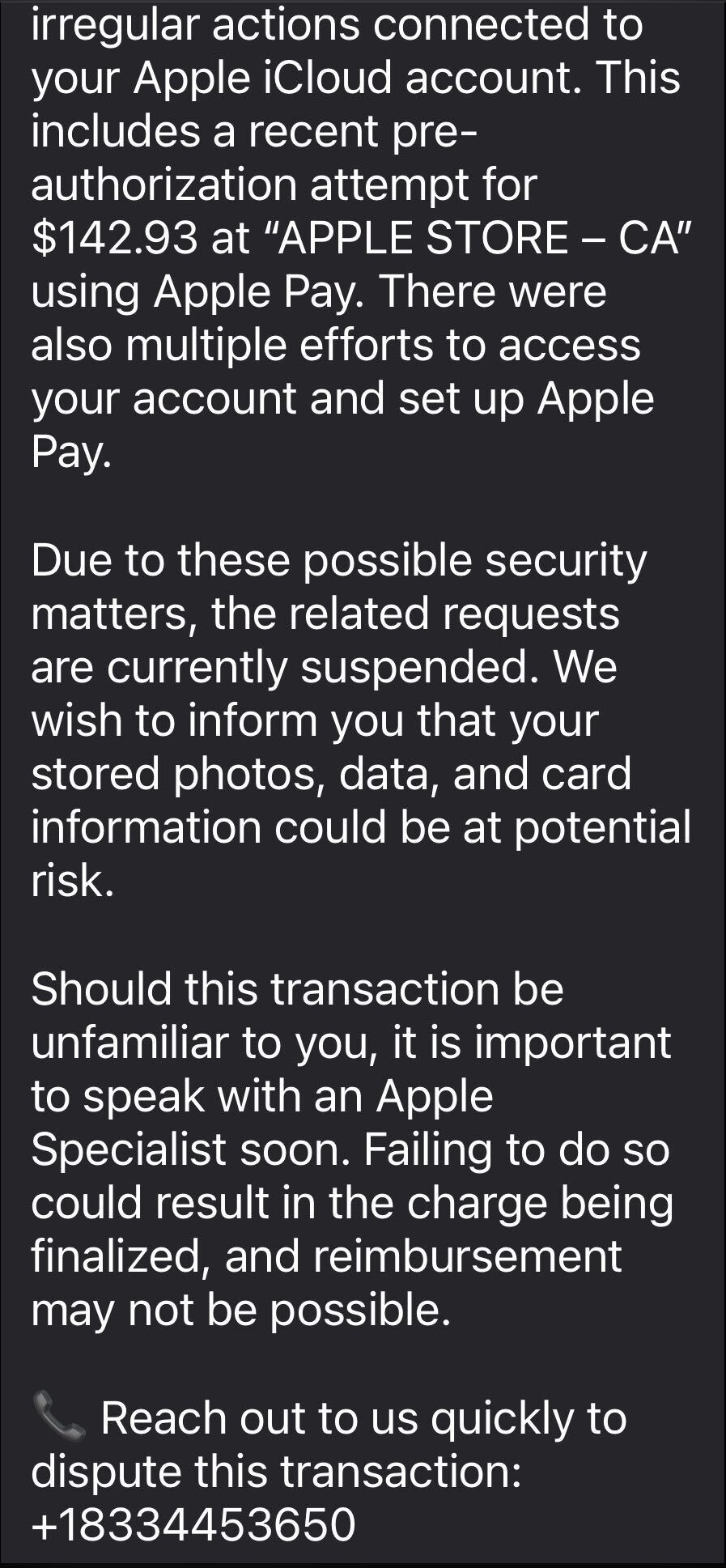
The message claimed Apple has stopped a high‑value Apple Pay charge at an Apple Store, complete with a case ID, timestamp, and a warning that the account could be at risk if the target doesn’t respond.
In some cases, there was even an “appointment” booked on their behalf to “review fraudulent activity,” plus a phone number they should call immediately if the time didn’t work. Nothing in the email screams amateur. The display name appears to be Apple, the formatting closely matches real receipts, and the language hits all the right anxiety buttons.
The email warns recipients not to Apple Pay until they’ve spoken to “Apple Billing & Fraud Prevention,” and it provides a phone number to call.
After dialing the number, an agent introduces himself as part of Apple’s fraud department and asks for details such as Apple ID verification codes or payment information.
The conversation is carefully scripted to establish trust. The agent explains that criminals attempted to use Apple Pay in a physical Apple Store and that the system “partially blocked” the transaction. To “fully secure” the account, he says, some details need to be verified.
The call starts with harmless‑sounding checks: your name, the last four digits of your phone number, what Apple devices you own, and so on.
Next comes a request to confirm the Apple ID email address. While the victim is looking it up, a real-looking Apple ID verification code arrives by text message.
The agent asks for this code, claiming it’s needed to confirm they’re speaking to the rightful account owner. In reality, the scammer is logging into the account in real time and using the code to bypass two-factor authentication.
Once the account is “confirmed,” the agent walks the victim through checking their bank and Apple Pay cards. They ask questions about bank accounts and suggest “temporarily securing” payment methods so criminals can’t exploit them while the “Apple team” investigates.
The entire support process is designed to steal login codes and payment data. At scale, campaigns like this work because Apple’s brand carries enormous trust, Apple Pay involves real money, and users have been trained to treat fraud alerts as urgent and to cooperate with “support” when they’re scared.
One example submitted to Malwarebytes Scam Guard showed an email claiming an Apple Gift Card purchase for $279.99 and urging the recipient to call a support number (1-812-955-6285).
Another user submitted a screenshot showing a fake “Invoice Receipt – Paid” styled to look like an Apple Store receipt for a 2025 MacBook Air 13-inch laptop with M4 chip priced at $1,157.07 and a phone number (1-805-476-8382) to call about this “unauthorized transaction.”
What you should know
Apple doesn’t set up fraud appointments through email. The company also doesn’t ask users to fix billing problems by calling numbers in unsolicited messages.
Closely inspect the sender’s address. In these cases, the email doesn’t come from an official Apple domain, even if the display name makes it seem legitimate.
Never share two-factor authentication (2FA) codes, SMS codes, or passwords with anyone, even if they claim to be from Apple.
Ignore unsolicited messages urging you to take immediate action. Always think and verify before you engage. Talk to someone you trust if you’re not sure.
Malwarebytes Scam Guard helped several users identify this type of scam. For those without a subscription, you can use Scam Guard in ChatGPT.
If you’ve already engaged with these Apple Pay scammers, it is important to:
Change the Apple ID password immediately from Settings or appleid.apple.com, not from any link provided by email or SMS.
Check active sessions, sign out of all devices, then sign back in only on devices you recognize and control.
Rotate your Apple ID password again if you see any new login alerts, and confirm 2FA is still enabled. If not, turn it on.
In Wallet, check every card for unfamiliar Apple Pay transactions and recent in-store or online charges. Monitor bank and credit card statements closely for the next few weeks and dispute any unknown transactions immediately.
Check if the primary email account tied to your Apple ID is yours, since control of that email can be used to take over accounts.
We don’t just report on scams—we help detect them
Cybersecurity risks should never spread beyond a headline. If something looks dodgy to you, check if it’s a scam using Malwarebytes Scam Guard, a feature of our mobile protection products. Submit a screenshot, paste suspicious content, or share a text or phone number, and we’ll tell you if it’s a scam or legit. Download Malwarebytes Mobile Security for iOS or Android and try it today!
404Media is reporting that the FBI could not access a reporter’s iPhone because it had Lockdown Mode enabled:
The court record shows what devices and data the FBI was able to ultimately access, and which devices it could not, after raiding the home of the reporter, Hannah Natanson, in January as part of an investigation into leaks of classified information. It also provides rare insight into the apparent effectiveness of Lockdown Mode, or at least how effective it might be before the FBI may try other techniques to access the device.
“Because the iPhone was in Lockdown mode, CART could not extract that device,” the court record reads, referring to the FBI’s Computer Analysis Response Team, a unit focused on performing forensic analyses of seized devices. The document is written by the government, and is opposing the return of Natanson’s devices.
The FBI raided Natanson’s home as part of its investigation into government contractor Aurelio Perez-Lugones, who is charged with, among other things, retention of national defense information. The government believes Perez-Lugones was a source of Natanson’s, and provided her with various pieces of classified information. While executing a search warrant for his mobile phone, investigators reviewed Signal messages between Pere-Lugones and the reporter, the Department of Justice previously said.
Living off the AI isn’t a hypothetical but a natural continuation of the tradecraft we’ve all been defending against, now mapped onto assistants, agents, and MCP.
Other noteworthy stories that might have slipped under the radar: AT&T and Verizon response to Salt Typhoon, AI agents solve security challenges, man arrested in Poland for DDos Attacks.
Zscaler says the acquisition will allow customers to embed lightweight extensions into any browser, providing increased security and eliminating the need for third-party browsers.
Chrome's latest revision of its browser extension architecture, known as Manifest v3 (MV3), was widely expected to make content blocking and privacy extensions less effective than its predecessor, Manifest v2 (MV2).…
Immigration and Customs Enforcement (ICE) and Customs and Border Protection (CBP) have descended into utter lawlessness, most recently in Minnesota. The violence is shocking. So are the intrusions on digital rights and civil liberties. For example, immigration agents are routinely scanning faces of people they suspect of unlawful presence in the country – 100,000 times, according to the Wall Street Journal. The technology has already misidentified at least one person, according to 404 Media.
Face recognition technology is so dangerous that government should not use it at all—least of all these out-of-control immigration agencies.
To combat these abuses, EFF is proud to support the “ICE Out of Our Faces Act.” This new federal bill would ban ICE and CBP agents, and some local police working with them, from acquiring or using biometric surveillance systems, including face recognition technology, or information derived from such systems by another entity. This bill would be enforceable, among other ways, by a strong private right of action.
The bill’s lead author is Senator Ed Markey. We thank him for his longstanding leadership on this issue, including introducing similar legislation that would ban all federal law enforcement agencies, and some federally-funded state agencies, from using biometric surveillance systems (a bill that EFF also supported). The new “ICE Out of My Face Act” is also sponsored by Senator Merkley, Senator Wyden, and Representative Jayapal.
It’s past time for the federal government to end its use of this abusive surveillance technology. A great place to start is its use for immigration enforcement, given ICE and CBP’s utter disdain for the law. Face surveillance in the hands of the government is a fundamentally harmful technology, even under strict regulations or if the technology was 100% accurate. We thank the authors of this bill for their leadership in taking steps to end this use of this dangerous and invasive technology.
You can read the bill here, and the bill’s announcement here.
Contact details were accessed in an intrusion that went undetected for months, the blogging outfit says
Newsletter platform Substack has admitted that an intruder swiped user contact details months before the company noticed, forcing it to warn writers and readers that their email addresses and other account metadata were accessed without permission.…

 Login
Login