Imagine our surprise when we ended up on a site promoting that same Freecash app while investigating a “cloud storage” phish. We’ve all probably seen one of those. They’re common enough and according to recent investigation by BleepingComputer, there’s a
“large-scale cloud storage subscription scam campaign targeting users worldwide with repeated emails falsely warning recipients that their photos, files, and accounts are about to be blocked or deleted due to an alleged payment failure.”
Based on the description in that article, the email we found appears to be part of this campaign.
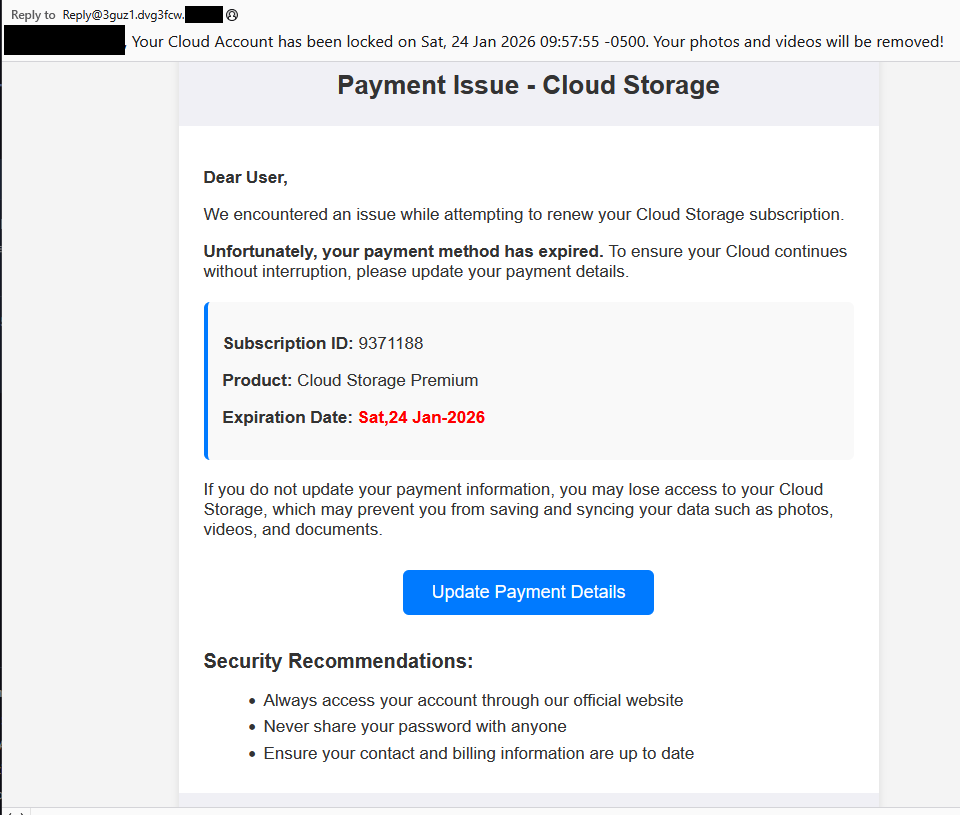
The subject line of the email is:
“{Recipient}. Your Cloud Account has been locked on Sat, 24 Jan 2026 09:57:55 -0500. Your photos and videos will be removed!”
This matches one of the subject lines that BleepingComputer listed.
And the content of the email:
“Payment Issue – Cloud Storage
Dear User,
We encountered an issue while attempting to renew your Cloud Storage subscription.
Unfortunately, your payment method has expired. To ensure your Cloud continues without interruption, please update your payment details.
Subscription ID: 9371188
Product: Cloud Storage Premium
Expiration Date: Sat,24 Jan-2026
If you do not update your payment information, you may lose access to your Cloud Storage, which may prevent you from saving and syncing your data such as photos, videos, and documents.
Update Payment Details {link button}
Security Recommendations:
Always access your account through our official website
Never share your password with anyone
Ensure your contact and billing information are up to date”
The link in the email leads to https://storage.googleapis[.]com/qzsdqdqsd/dsfsdxc.html#/redirect.html, which helps the scammer establish a certain amount of trust because it points to Google Cloud Storage (GCS). GCS is a legitimate service that allows authorized users to store and manage data such as files, images, and videos in buckets. However, as in this case, attackers can abuse it for phishing.
The redirect carries some parameters to the next website.
The feed.headquartoonjpn[.]com domain was blocked by Malwarebytes. We’ve seen it before in an earlier campaign involving an Endurance-themed phish.
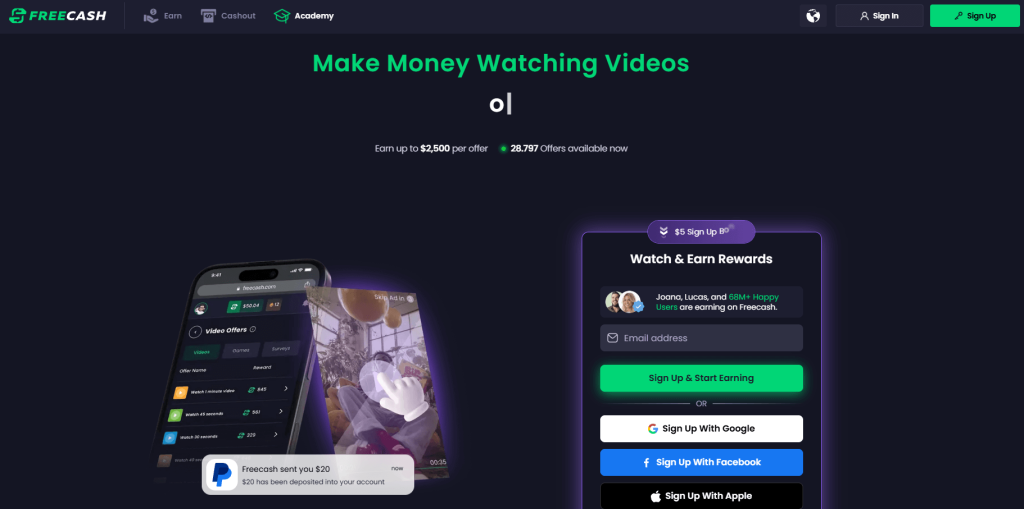
After a few more redirects, we ended up at hx5.submitloading[.]com, where a fake CAPTCHA triggered the last redirect to freecash[.]com, once it was solved.
The end goal of this phish likely depends on the parameters passed along during the redirects, so results may vary.
Rather than stealing credentials directly, the campaign appears designed to monetize traffic, funneling victims into affiliate offers where the operators get paid for sign-ups or conversions.
BleepingComputer noted that they were redirected to affiliate marketing websites for various products.
“Products promoted in this phishing campaign include VPN services, little-known security software, and other subscription-based offerings with no connection to cloud storage.”
How to stay safe
Ironically, the phishing email itself includes some solid advice:
Always access your account through our official website.
Never share your password with anyone.
We’d like to add:
Never click on links in unsolicited emails without verifying with a trusted source.
Do not engage with websites that attract visitors like this.
Pro tip: Malwarebytes Scam Guard would have helped you identify this email as a scam and provided advice on how to proceed.
Redirect flow (IOCs)
storage.googleapis[.]com/qzsdqdqsd/dsfsdxc.html
feed.headquartoonjpn[.]com
revivejudgemental[.]com
hx5.submitloading[.]com
freecash[.]com
Update February 5, 2026
Almedia GmbH, the company behind the Freecash platform, reached out to us for information about the chain of redirects that lead to their platform. And after an investigation they notified us that:
“Following Malwarebytes’ reporting and the additional information they shared with us, we investigated the issue and identified an affiliate operating in breach of our policies. That partner has been removed from our network.
Almedia does not sell user data, and we take compliance, user trust, and responsible advertising seriously.”
We don’t just report on scams—we help detect them
Cybersecurity risks should never spread beyond a headline. If something looks dodgy to you, check if it’s a scam using Malwarebytes Scam Guard, a feature of our mobile protection products. Submit a screenshot, paste suspicious content, or share a text or phone number, and we’ll tell you if it’s a scam or legit. Download Malwarebytes Mobile Security for iOS or Android and try it today!
It sounds friendly, familiar and quite harmless. But in a scam we recently spotted, that simple phrase is being used to trick victims into installing a full remote access tool on their Windows computers—giving attackers complete control of the system.
What appears to be a casual party or event invitation leads to the silent installation of ScreenConnect, a legitimate remote support tool quietly installed in the background and abused by attackers.
Here’s how the scam works, why it’s effective, and how to protect yourself.
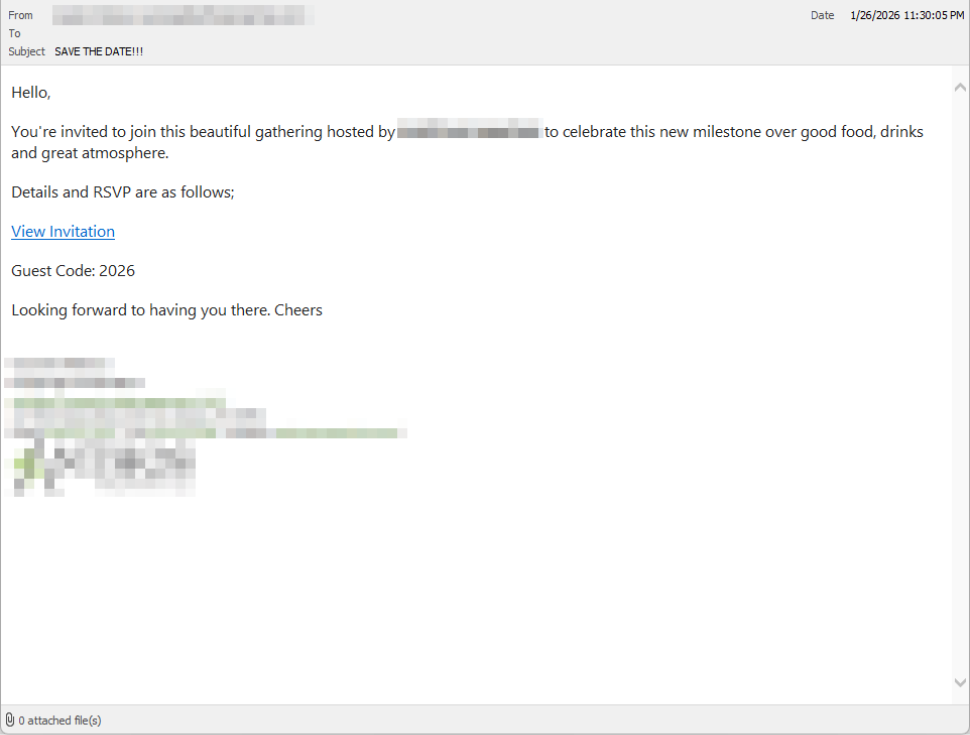
The email: A party invitation
Victims receive an email framed as a personal invitation—often written to look like it came from a friend or acquaintance. The message is deliberately informal and social, lowering suspicion and encouraging quick action.
In the screenshot below, the email arrived from a friend whose email account had been hacked, but it could just as easily come from a sender you don’t know.
So far, we’ve only seen this campaign targeting people in the UK, but there’s nothing stopping it from expanding elsewhere.
Clicking the link in the email leads to a polished invitation page hosted on an attacker-controlled domain.
The invite: The landing page that leads to an installer
The landing page leans heavily into the party theme, but instead of showing event details, the page nudges the user toward opening a file. None of them look dangerous on their own, but together they keep the user focused on the “invitation” file:
A bold “You’re Invited!” headline
The suggestion that a friend had sent the invitation
A message saying the invitation is best viewed on a Windows laptop or desktop
A countdown suggesting your invitation is already “downloading”
A message implying urgency and social proof (“I opened mine and it was so easy!”)
Within seconds, the browser is redirected to download RSVPPartyInvitationCard.msi
The page even triggers the download automatically to keep the victim moving forward without stopping to think.
This MSI file isn’t an invitation. It’s an installer.
The guest: What the MSI actually does
When the user opens the MSI file, it launches msiexec.exe and silently installs ScreenConnect Client, a legitimate remote access tool often used by IT support teams.
There’s no invitation, RSVP form, or calendar entry.
What happens instead:
ScreenConnect binaries are installed under C:\Program Files (x86)\ScreenConnect Client\
A persistent Windows service is created (for example, ScreenConnect Client 18d1648b87bb3023)
There is no clear user-facing indication that a remote access tool is being installed
From the victim’s perspective, very little seems to happen. But at this point, the attacker can now remotely access their computer.
The after-party: Remote access is established
Once installed, the ScreenConnect client initiates encrypted outbound connections to ScreenConnect’s relay servers, including a uniquely assigned instance domain.
That connection gives the attacker the same level of access as a remote IT technician, including the ability to:
See the victim’s screen in real time
Control the mouse and keyboard
Upload or download files
Keep access even after the computer is restarted
Because ScreenConnect is legitimate software commonly used for remote support, its presence isn’t always obvious. On a personal computer, the first signs are often behavioral, such as unexplained cursor movement, windows opening on their own, or a ScreenConnect process the user doesn’t remember installing.
Why this scam works
This campaign is effective because it targets normal, predictable human behavior. From a behavioral security standpoint, it exploits our natural curiosity and appears to be a low risk.
Most people don’t think of invitations as dangerous. Opening one feels passive, like glancing at a flyer or checking a message, not installing software.
Even security-aware users are trained to watch out for warnings and pressure. A friendly “you’re invited” message doesn’t trigger those alarms.
By the time something feels off, the software is already installed.
Signs your computer may be affected
Watch for:
A download or executed file named RSVPPartyInvitationCard.msi
An unexpected installation of ScreenConnect Client
A Windows service named ScreenConnect Client with random characters
Your computer makes outbound HTTPS connections to ScreenConnect relay domains
Your system resolves the invitation-hosting domain used in this campaign, xnyr[.]digital
How to stay safe
This campaign is a reminder that modern attacks often don’t break in—they’re invited in. Remote access tools give attackers deep control over a system. Acting quickly can limit the damage.
For individuals
If you receive an email like this:
Be suspicious of invitations that ask you to download or open software
Never run MSI files from unsolicited emails
Verify invitations through another channel before opening anything
If you already clicked or ran the file:
Disconnect from the internet immediately
Check for ScreenConnect and uninstall it if present
Run a full security scan
Change important passwords from a clean, unaffected device
For organisations (especially in the UK)
Alert on unauthorized ScreenConnect installations
Restrict MSI execution where feasible
Treat “remote support tools” as high-risk software
Educate users: invitations don’t come as installers
This scam works by installing a legitimate remote access tool without clear user intent. That’s exactly the gap Malwarebytes is designed to catch.
Malwarebytes now detects newly installed remote access tools and alerts you when one appears on your system. You’re then given a choice: confirm that the tool is expected and trusted, or remove it if it isn’t.
We don’t just report on threats—we remove them
Cybersecurity risks should never spread beyond a headline. Keep threats off your devices by downloading Malwarebytes today.
Loyal readers and other privacy-conscious people will be familiar with the expression, “If it’s too good to be true, it’s probably false.”
Getting paid handsomely to scroll social media definitely falls into that category. It sounds like an easy side hustle, which usually means there’s a catch.
In January 2026, an app called Freecash shot up to the number two spot on Apple’s free iOS chart in the US, helped along by TikTok ads that look a lot like job offers from TikTok itself. The ads promised up to $35 an hour to watch your “For You” page. According to reporting, the ads didn’t promote Freecash by name. Instead, they showed a young woman expressing excitement about seemingly being “hired by TikTok” to watch videos for money.
The landing pages featured TikTok and Freecash logos and invited users to “get paid to scroll” and “cash out instantly,” implying a simple exchange of time for money.
Those claims were misleading enough that TikTok said the ads violated its rules on financial misrepresentation and removed some of them.
Once you install the app, the promised TikTok paycheck vanishes. Instead, Freecash routes you to a rotating roster of mobile games—titles like Monopoly Go and Disney Solitaire—and offers cash rewards for completing time‑limited in‑game challenges. Payouts range from a single cent for a few minutes of daily play up to triple‑digit amounts if you reach high levels within a fixed period.
The whole setup is designed not to reward scrolling, as it claims, but to funnel you into games where you are likely to spend money or watch paid advertisements.
Freecash’s parent company, Berlin‑based Almedia, openly describes the platform as a way to match mobile game developers with users who are likely to install and spend. The company’s CEO has spoken publicly about using past spending data to steer users toward the genres where they’re most “valuable” to advertisers.
Our concern, beyond the bait-and-switch, is the privacy issue. Freecash’s privacy policy allows the automatic collection of highly sensitive information, including data about race, religion, sex life, sexual orientation, health, and biometrics. Each additional mobile game you install to chase rewards adds its own privacy policy, tracking, and telemetry. Together, they greatly increase how much behavioral data these companies can harvest about a user.
Experts warn that data brokers already trade lists of people likely to be more susceptible to scams or compulsive online behavior—profiles that apps like this can help refine.
We’ve previously reported on data brokers that used games and apps to build massive databases, only to later suffer breaches exposing all that data.
When asked about the ads, Freecash said the most misleading TikTok promotions were created by third-party affiliates, not by the company itself. Which is quite possible because Freecash does offer an affiliate payout program to people who promote the app online. But they made promises to review and tighten partner monitoring.
For experienced users, the pattern should feel familiar: eye‑catching promises of easy money, a bait‑and‑switch into something that takes more time and effort than advertised, and a business model that suddenly makes sense when you realize your attention and data are the real products.
If you’re curious how intrusive schemes like this can be, consider using a separate email address created specifically for testing. Avoid sharing real personal details. Many users report that once they sign up, marketing emails quickly pile up.
Some of these schemes also appeal to people who are younger or under financial pressure, offering tiny payouts while generating far more value for advertisers and app developers.
So, what can you do?
Gather information about the company you’re about to give your data. Talk to friends and relatives about your plans. Shared common sense often helps make the right decisions.
Create a separate account if you want to test a service. Use a dedicated email address and avoid sharing real personal details.
Limit information you provide online to what makes sense for the purpose. Does a game publisher need your Social Security Number? I don’t think so.
Be cautious about app installs that are framed as required to make the money initially promised, and review permissions carefully.
The LastPass Threat Intelligence, Mitigation, and Escalation (TIME) team has published a warning about an active phishing campaign in which fake “maintenance” emails pressure users to back up their vaults within 24 hours. The emails lead to credential-stealing phishing sites rather than any legitimate LastPass page.
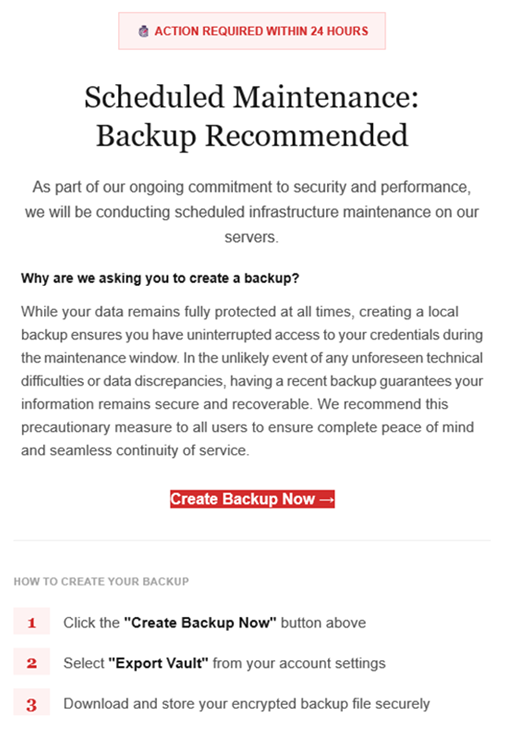
The phishing campaign that started around January 19, 2026, uses emails that falsely claim upcoming infrastructure maintenance and urge users to “backup your vault in the next 24 hours.”
Image courtesy of LastPass
“Scheduled Maintenance: Backup Recommended
As part of our ongoing commitment to security and performance, we will be conducting scheduled infrastructure maintenance on our servers. Why are we asking you to create a backup? While your data remains protected at all times, creating a local backup ensures you have access to your credentials during the maintenance window. In the unlikely event of any unforeseen technical difficulties or data discrepancies, having a recent backup guarantees your information remains secure and recoverable. We recommend this precautionary measure to all users to ensure complete peace of mind and seamless continuity of service.
Create Backup Now (link)
How to create your backup 1 Click the “Create Backup Now” button above 2 Select “Export Vault” from you account settings 3 Download and store your encrypted backup file securely”
The link in the email points to mail-lastpass[.]com, a domain that doesn’t belong to LastPass and has now been taken down.
Note that there are different subject lines in use. Here is a selection:
LastPass Infrastructure Update: Secure Your Vault Now
Your Data, Your Protection: Create a Backup Before Maintenance
Don’t Miss Out: Backup Your Vault Before Maintenance
Important: LastPass Maintenance & Your Vault Security
Protect Your Passwords: Backup Your Vault (24-Hour Window)
It is imperative for users to ignore instructions in emails like these. Giving away the login details for your password manager can be disastrous. For most users, it would provide access to enough information to carry out identity theft.
Stay safe
First and foremost, it’s important to understand that LastPass will never ask for your master password or demand immediate action under a tight deadline. Generally speaking, there are more guidelines that can help you stay safe.
Don’t click on links in unsolicited emails without verifying with the trusted sender that they’re legitimate.
Always log in directly on the platform that you are trying to access, rather than through a link.
Use a real-time, up-to-date anti-malware solution with a web protection module to block malicious sites.
Report phishing emails to the company that’s being impersonated, so they can alert other customers. In this case emails were forwarded to abuse@lastpass.com.
Pro tip: Malwarebytes Scam Guard would have recognized this email as a scam and advised you how to proceed.
We don’t just report on threats—we help safeguard your entire digital identity
Cybersecurity risks should never spread beyond a headline. Protect your, and your family’s, personal information by using identity protection.
If you can’t beat them, copy them. That seems to be the thinking behind an unusual campaign by the Dutch police, who set up a fake ticket website selling tickets that don’t exist.
The website, TicketBewust.nl, invites people to order tickets for events like football matches and concerns. But the offers were never real. The entire site was a deliberate sting, designed to show people how easily ticket fraud works.
The Netherlands’ National Police created the site to warn people about ticket fraud. They worked with the Fraud Helpdesk and online marketplace Marktplaats to run ads promoting “exclusive tickets” for sold-out concerts. If anyone got far enough to try and buy a ticket, the fake site took them to a police webpage explaining that they’d just interacted with a fake online shop.
People fell for these too-good-to-be-true deals—and that’s the most interesting part of this story. Many of us assume we’re far too savvy to fall prey to such online shenanigans, but a surprisingly large number of people do.
More than 300,000 people saw the police ads on Marktplaats between October 30, 2025, and January 11, 2026. Over 30,000 people opened opened it to take a look. 7,402 of them clicked the link to the fake site that was in the ad, and 3,432 people tried to order tickets.
That’s a reminder that online crime works a lot like regular ecommerce. Whether you’re selling real tickets or fake ones, it’s just a numbers game. Only a small percentage of people who see an ad will ever convert—but even a tiny fraction can be lucrative.
In this case, around 1% of people that saw the ad took the bait, but that represents a big profit for scammers. Fake ticket sellers raked in an average of $672 per victim in the US between 2020 and 2024, according to data from the Better Business Bureau (BBB).
Why ticket fraud is so common
Dutch police get around 50,000 online fraud complaints annually, with 10% involving fake tickets. It’s a problem in other countries too, with UK losses to gig ticket scams doubling in 2024 to £1.6 million (around $2.1 million).
Part of the reason fake ticket scams are so effective is that many cases never get reported. Some victims don’t think the loss is significant enough, while others simply don’t want to admit they were tricked. But there’s another, more fundamental reason these scams work so well: the audience is already primed to buy.
People searching for tickets are usually doing so because they don’t want to miss out. Scammers lean hard into that fear of missing out (FOMO), pairing it with scarcity cues like “sold out,” “limited availability,” or time-limited offers. People under emotional pressure from urgency and scarcity tend to do irrational things and take risks they shouldn’t. It’s why people invest erratically or take gambles on dodgy online sales.
How to protect yourself from fake ticket sites
The advice for avoiding shady ticket sellers looks a lot like advice for avoiding scams in general:
Watch what you click on social media. Social media accounts for 52% of concert ticket fraud cases, according to the BBB data. Stick to official channels like Ticketmaster, AXS, or the venue’s box office—and double check the URL you’re accessing.
Don’t let emotions get the better of you. Ticket sellers target high-demand events because they know people are desperate to attend and might let their guard down. That’s why fake ticket scams spiked after Oasis announced their reunion tour.
Don’t be fooled by support lines. Just because they’re on the phone doesn’t mean they’re legit.
Never pay via Zelle, Venmo, Cash App, gift cards or crypto. Use credit cards or other payment methods that offer purchase protection.
A little skepticism can go a long way when looking for sought-after tickets. So if you see an online ad offering you the seats of a lifetime, take a minute to research the seller. It could save you hundreds of dollars and a heap of disappointment.
We don’t just report on scams—we help detect them
Cybersecurity risks should never spread beyond a headline. If something looks dodgy to you, check if it’s a scam using Malwarebytes Scam Guard, a feature of our mobile protection products. Submit a screenshot, paste suspicious content, or share a text or phone number, and we’ll tell you if it’s a scam or legit. Download Malwarebytes Mobile Security for iOS or Android and try it today!
There’s a bizarre thing happening online right now where everything is getting worse.
Your Google results have become so bad that you’ve likely typed what you’re looking for, plus the word “Reddit,” so you can find discussion from actual humans. If you didn’t take this route, you might get served AI results from Google Gemini, which once recommended that every person should eat “at least one small rock per day.” Your Amazon results are a slog, filled with products that have surreptitiously paid reviews. Your Facebook feed could be entirely irrelevant because the company decided years ago that you didn’t want to see what your friends posted, you wanted to see what brands posted, because brands pay Facebook, and you don’t, so brands are more important than your friends.
But, according to digital rights activist and award-winning author Cory Doctorow, this wave of online deterioration isn’t an accident—it’s a business strategy, and it can be summed up in a word he coined a couple of years ago: Enshittification.
Enshittification is the process by which an online platform—like Facebook, Google, or Amazon—harms its own services and products for short-term gain while managing to avoid any meaningful consequences, like the loss of customers or the impact of meaningful government regulation. It begins with an online platform treating new users with care, offering services, products, or connectivity that they may not find elsewhere. Then, the platform invites businesses on board that want to sell things to those users. This means businesses become the priority and the everyday user experience is hindered. But then, in the final stage, the platform also makes things worse for its business customers, making things better only for itself.
This is how a company like Amazon went from helping you find nearly anything you wanted to buy online to helping businesses sell you anything you wanted to buy online to making those businesses pay increasingly high fees to even be discovered online. Everyone, from buyers to sellers, is pretty much entrenched in the platform, so Amazon gets to dictate the terms.
Today, on the Lock and Code podcast with host David Ruiz, we speak with Doctorow about enshittification’s fast damage across the internet, how to fight back, and where it all started.
”Once these laws were established, the tech companies were able to take advantage of them. And today we have a bunch of companies that aren’t tech companies that are nevertheless using technology to rig the game in ways that the tech companies pioneered.”
Attackers are sending very convincing fake “Google” emails that slip past spam filters, route victims through several trusted Google-owned services, and ultimately lead to a look-alike Microsoft 365 sign-in page designed to harvest usernames and passwords.
Researchers found that cybercriminals used Google Cloud Application Integration’s Send Email feature to send phishing emails from a legitimate Google address: noreply-application-integration@google[.]com.
Google Cloud Application Integration allows users to automate business processes by connecting any application with point-and-click configurations. New customers currently receive free credits, which lowers the barrier to entry and may attract some cybercriminals.
The initial email arrives from what looks like a real Google address and references something routine and familiar, such as a voicemail notification, a task to complete, or permissions to access a document. The email includes a link that points to a genuine Google Cloud Storage URL, so the web address appears to belong to Google and doesn’t look like an obvious fake.
After the first click, you are redirected to another Google‑related domain (googleusercontent[.]com) showing a CAPTCHA or image check. Once you pass the “I’m not a robot check,” you land on what looks like a normal Microsoft 365 sign‑in page, but on close inspection, the web address is not an official Microsoft domain.
Any credentials provided on this site will be captured by the attackers.
The use of Google infrastructure provides the phishers with a higher level of trust from both email filters and the receiving users. This is not a vulnerability, just an abuse of cloud-based services that Google provides.
Google’s response
Google said it has taken action against the activity:
“We have blocked several phishing campaigns involving the misuse of an email notification feature within Google Cloud Application Integration. Importantly, this activity stemmed from the abuse of a workflow automation tool, not a compromise of Google’s infrastructure. While we have implemented protections to defend users against this specific attack, we encourage continued caution as malicious actors frequently attempt to spoof trusted brands. We are taking additional steps to prevent further misuse.”
We’ve seen several phishing campaigns that abuse trusted workflows from companies like Google, PayPal, DocuSign, and other cloud-based service providers to lend credibility to phishing emails and redirect targets to their credential-harvesting websites.
How to stay safe
Campaigns like these show that some responsibility for spotting phishing emails still rests with the recipient. Besides staying informed, here are some other tips you can follow to stay safe.
Always check the actual web address of any login page; if it’s not a genuine Microsoft domain, do not enter credentials. Using a password manager will help because they will not auto-fill your details on fake websites.
Be cautious of “urgent” emails about voicemails, document shares, or permissions, even if they appear to come from Google or Microsoft. Creating urgency is a common tactic by scammers and phishers.
Go directly to the service whenever possible. Instead of clicking links in emails, open OneDrive, Teams, or Outlook using your normal bookmark or app.
Use multi‑factor authentication (MFA) so that stolen passwords alone are not enough, and regularly review which apps have access to your account and remove anything you don’t recognize.
Pro tip: Malwarebytes Scam Guard can recognize emails like this as scams. You can upload suspicious text, emails, attachments and other files and ask for its opinion. It’s really very good at recognizing scams.
We don’t just report on scams—we help detect them
Cybersecurity risks should never spread beyond a headline. If something looks dodgy to you, check if it’s a scam using Malwarebytes Scam Guard, a feature of our mobile protection products. Submit a screenshot, paste suspicious content, or share a text or phone number, and we’ll tell you if it’s a scam or legit. Download Malwarebytes Mobile Security for iOS or Android and try it today!
In August 2025, we discovered a campaign targeting individuals in Turkey with a new Android banking Trojan we dubbed “Frogblight”. Initially, the malware was disguised as an app for accessing court case files via an official government webpage. Later, more universal disguises appeared, such as the Chrome browser.
Frogblight can use official government websites as an intermediary step to steal banking credentials. Moreover, it has spyware functionality, such as capabilities to collect SMS messages, a list of installed apps on the device and device filesystem information. It can also send arbitrary SMS messages.
Another interesting characteristic of Frogblight is that we’ve seen it updated with new features throughout September. This may indicate that a feature-rich malware app for Android is being developed, which might be distributed under the MaaS model.
This threat is detected by Kaspersky products as HEUR:Trojan-Banker.AndroidOS.Frogblight.*, HEUR:Trojan-Banker.AndroidOS.Agent.eq, HEUR:Trojan-Banker.AndroidOS.Agent.ep, HEUR:Trojan-Spy.AndroidOS.SmsThief.de.
Technical details
Background
While performing an analysis of mobile malware we receive from various sources, we discovered several samples belonging to a new malware family. Although these samples appeared to be still under development, they already contained a lot of functionality that allowed this family to be classified as a banking Trojan. As new versions of this malware continued to appear, we began monitoring its development. Moreover, we managed to discover its control panel and based on the “fr0g” name shown there, we dubbed this family “Frogblight”.
Initial infection
We believe that smishing is one of the distribution vectors for Frogblight, and that the users had to install the malware themselves. On the internet, we found complaints from Turkish users about phishing SMS messages convincing users that they were involved in a court case and containing links to download malware. versions of Frogblight, including the very first ones, were disguised as an app for accessing court case files via an official government webpage and were named the same as the files for downloading from the links mentioned above.
While looking for online mentions of the names used by the malware, we discovered one of the phishing websites distributing Frogblight, which disguises itself as a website for viewing a court file.
The phishing website distributing Frogblight
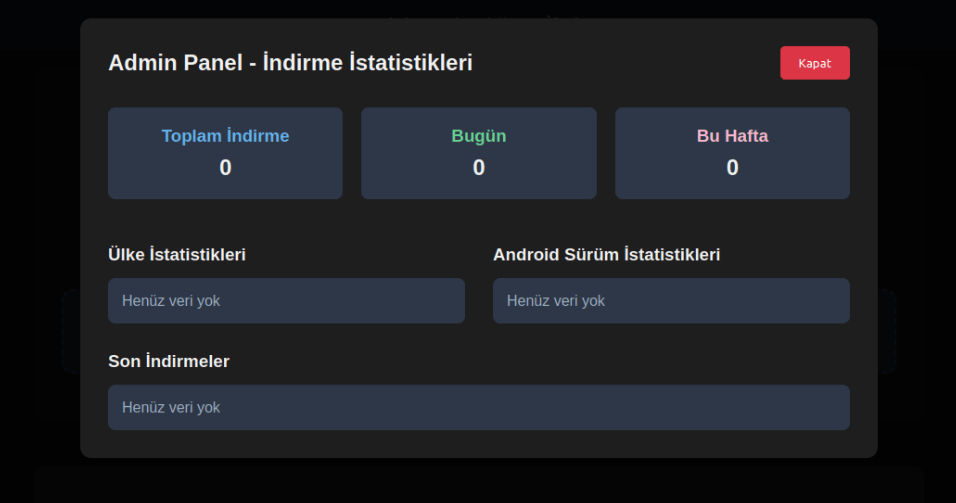
We were able to open the admin panel of this website, where it was possible to view statistics on Frogblight malware downloads. However, the counter had not been fully implemented and the threat actor could only view the statistics for their own downloads.
The admin panel interface of the website from which Frogblight is downloaded
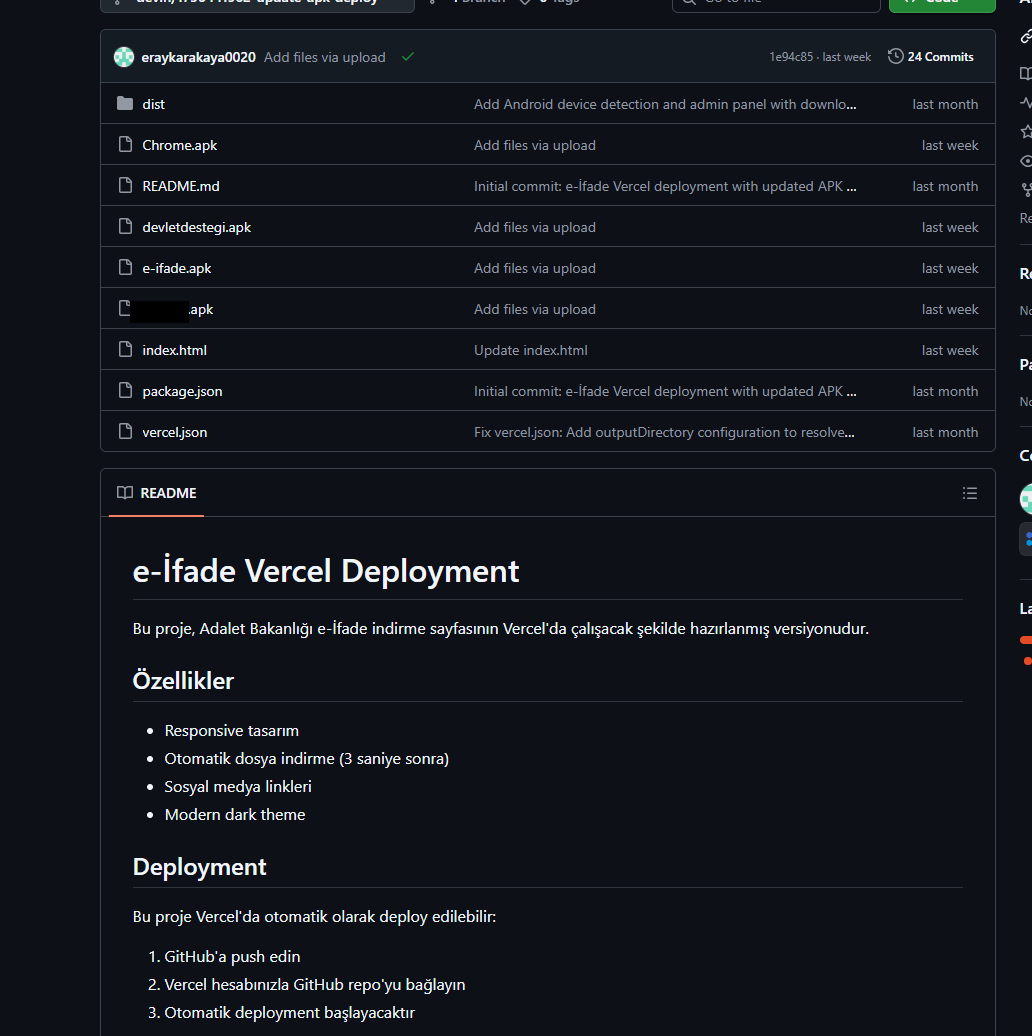
Additionally, we found the source code of this phishing website available in a public GitHub repository. Judging by its description, it is adapted for fast deployment to Vercel, a platform for hosting web apps.
The GitHub repository with the phishing website source code
App features
As already mentioned, Frogblight was initially disguised as an app for accessing court case files via an official government webpage. Let’s look at one of the samples using this disguise (9dac23203c12abd60d03e3d26d372253). For analysis, we selected an early sample, but not the first one discovered, in order to demonstrate more complete Frogblight functionality.
After starting, the app prompts the victim to grant permissions to send and read SMS messages, and to read from and write to the device’s storage, allegedly needed to show a court file related to the user.
The full list of declared permissions in the app manifest file is shown below:
MANAGE_EXTERNAL_STORAGE
READ_EXTERNAL_STORAGE
WRITE_EXTERNAL_STORAGE
READ_SMS
RECEIVE_SMS
SEND_SMS
WRITE_SMS
RECEIVE_BOOT_COMPLETED
INTERNET
QUERY_ALL_PACKAGES
BIND_ACCESSIBILITY_SERVICE
DISABLE_KEYGUARD
FOREGROUND_SERVICE
FOREGROUND_SERVICE_DATA_SYNC
POST_NOTIFICATIONS
QUICKBOOT_POWERON
RECEIVE_MMS
RECEIVE_WAP_PUSH
REQUEST_IGNORE_BATTERY_OPTIMIZATIONS
SCHEDULE_EXACT_ALARM
USE_EXACT_ALARM
VIBRATE
WAKE_LOCK
ACCESS_NETWORK_STATE
READ_PHONE_STATE
After all required permissions are granted, the malware opens the official government webpage for accessing court case files in WebView, prompting the victim to sign in. There are different sign-in options, one of them via online banking. If the user chooses this method, they are prompted to click on a bank whose online banking app they use and fill out the sign-in form on the bank’s official website. This is what Frogblight is after, so it waits two seconds, then opens the online banking sign-in method regardless of the user’s choice. For each webpage that has finished loading in WebView, Frogblight injects JavaScript code allowing it to capture user input and send it to the C2 via a REST API.
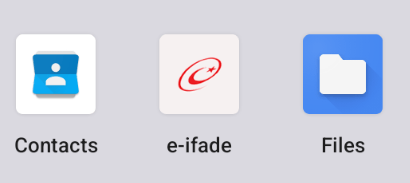
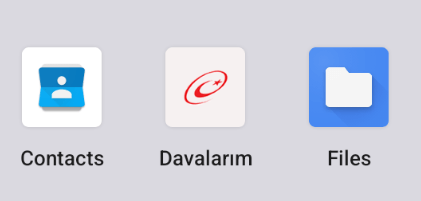
The malware also changes its label to “Davalarım” if the Android version is newer than 12; otherwise it hides the icon.
The app icon before (left) and after launching (right)
In the sample we review in this section, Frogblight uses a REST API for C2 communication, implemented using the Retrofit library. The malicious app pings the C2 server every two seconds in foreground, and if no error is returned, it calls the REST API client methods fetchOutbox and getFileCommands. Other methods are called when specific events occur, for example, after the device screen is turned on, the com.capcuttup.refresh.PersistentService foreground service is launched, or an SMS is received. The full list of all REST API client methods with parameters and descriptions is shown below.
REST API client method
Description
Parameters
fetchOutbox
Request message content to be sent via SMS or displayed in a notification
device_id: unique Android device ID
ackOutbox
Send the results of processing a message received after calling the API method fetchOutbox
device_id: unique Android device ID
msg_id: message ID
status: message processing status
error: message processing error
getAllPackages
Request the names of app packages whose launch should open a website in WebView to capture user input data
action: same as the API method name
getPackageUrl
Request the website URL that will be opened in WebView when the app with the specified package name is launched
action: same as the API method name
package: the package name of the target app
getFileCommands
Request commands for file operations
Available commands:
● download: upload the target file to the C2
● generate_thumbnails: generate thumbnails from the image files in the target directory and upload them to the C2
● list: send information about all files in the target directory to the C2
● thumbnail: generate a thumbnail from the target image file and upload it to the C2
device_id: unique Android device ID
pingDevice
Check the C2 connection
device_id: unique Android device ID
reportHijackSuccess
Send captured user input data from the website opened in a WebView when the app with the specified package name is launched
action: same as the API method name
package: the package name of the target app
data: captured user input data
saveAppList
Send information about the apps installed on the device
device_id: unique Android device ID app_list: a list of apps installed on the device
app_count: a count of apps installed on the device
saveInjection
Send captured user input data from the website opened in a WebView. If it was not opened following the launch of the target app, the app_name parameter is determined based on the opened URL
device_id: unique Android device ID app_name: the package name of the target app
form_data: captured user input data
savePermission
Unused but presumably needed for sending information about permissions
device_id: unique Android device ID permission_type: permission type
status: permission status
sendSms
Send information about an SMS message from the device
device_id: unique Android device ID sender: the sender’s/recipient’s phone number
message: message text
timestamp: received/sent time
type: message type (inbox/sent)
sendTelegramMessage
Send captured user input data from the webpages opened by Frogblight in WebView
device_id: unique Android device ID
url: website URL
title: website page title
input_type: the type of user input data
input_value: user input data
final_value: user input data with additional information
timestamp: the time of data capture
ip_address: user IP address
sms_permission: whether SMS permission is granted
file_manager_permission: whether file access permission is granted
updateDevice
Send information about the device
device_id: unique Android device ID
model: device manufacturer and model
android_version: Android version
phone_number: user phone number
battery: current battery level
charging: device charging status
screen_status: screen on/off
ip_address: user IP address
sms_permission: whether SMS permission is granted
file_manager_permission: whether file access permission is granted
updatePermissionStatus
Send information about permissions
device_id: unique Android device ID
permission_type: permission type
status: permission status
timestamp: current time
uploadBatchThumbnails
Upload thumbnails to the C2
device_id: unique Android device ID
thumbnails: thumbnails
uploadFile
Upload a file to the C2
device_id: unique Android device ID
file_path: file path
download_id: the file ID on the C2
The file itself is sent as an unnamed parameter
uploadFileList
Send information about all files in the target directory
device_id: unique Android device ID
path: directory path
file_list: information about the files in the target directory
uploadFileListLog
Send information about all files in the target directory to an endpoint different from uploadFileList
device_id: unique Android device ID
path: directory path
file_list: information about the files in the target directory
uploadThumbnailLog
Unused but presumably needed for uploading thumbnails to an endpoint different from uploadBatchThumbnails
device_id: unique Android device ID
thumbnails: thumbnails
Remote device control, persistence, and protection against deletion
The app includes several classes to provide the threat actor with remote access to the infected device, gain persistence, and protect the malicious app from being deleted.
capcuttup.refresh.AccessibilityAutoClickService
This is intended to prevent removal of the app and to open websites specified by the threat actor in WebView upon target apps startup. It is present in the sample we review, but is no longer in use and deleted in further versions.
capcuttup.refresh.PersistentService
This is a service whose main purpose is to interact with the C2 and to make malicious tasks persistent.
capcuttup.refresh.BootReceiver
This is a broadcast receiver responsible for setting up the persistence mechanisms, such as job scheduling and setting alarms, after device boot completion.
Further development
In later versions, new functionality was added, and some of the more recent Frogblight variants disguised themselves as the Chrome browser. Let’s look at one of the fake Chrome samples (d7d15e02a9cd94c8ab00c043aef55aff).
In this sample, new REST API client methods have been added for interacting with the C2.
REST API client method
Description
Parameters
getContactCommands
Get commands to perform actions with contacts
Available commands:
● ADD_CONTACT: add a contact to the user device
● DELETE_CONTACT: delete a contact from the user device
● EDIT_CONTACT: edit a contact on the user device
device_id: unique Android device ID
sendCallLogs
Send call logs to the C2
device_id: unique Android device ID
call_logs: call log data
sendNotificationLogs
Send notifications log to the C2. Not fully implemented in this sample, and as of the time of writing this report, we hadn’t seen any samples with a full-fledged implementation of this API method
action: same as the API method name
notifications: notification log data
Also, the threat actor had implemented a custom input method for recording keystrokes to a file using the com.puzzlesnap.quickgame.CustomKeyboardService service.
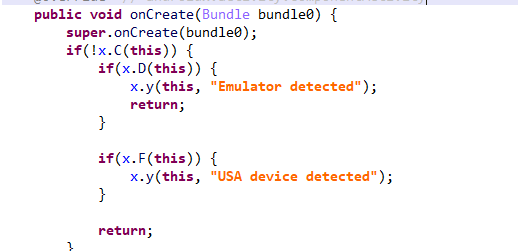
Another Frogblight sample we observed trying to avoid emulators and using geofencing techniques is 115fbdc312edd4696d6330a62c181f35. In this sample, Frogblight checks the environment (for example, device model) and shuts down if it detects an emulator or if the device is located in the United States.
Part of the code responsible for avoiding Frogblight running in an undesirable environment
Later on, the threat actor decided to start using a web socket instead of the REST API. Let’s see an example of this in one of the recent samples (08a3b1fb2d1abbdbdd60feb8411a12c7). This sample is disguised as an app for receiving social support via an official government webpage. The feature set of this sample is very similar to the previous ones, with several new capabilities added. Commands are transmitted over a web socket using the JSON format. A command template is shown below:
It is also worth noting that some commands in this version share the same meaning but have different structures, and the functionality of certain commands has not been fully implemented yet. This indicates that Frogblight was under active development at the time of our research, and since no its activity was noticed after September, it is possible that the malware is being finalized to a fully operational state before continuing to infect users’ devices. A full list of commands with their parameters and description is shown below:
Command
Description
Parameters
connect
Send a registration message to the C2
–
connection_success
Send various information, such as call logs, to the C2; start pinging the C2 and requesting commands
–
auth_error
Log info about an invalid login key to the Android log system
–
pong_device
Does nothing
–
commands_list
Execute commands
List of commands
sms_send_command
Send an arbitrary SMS message
recipient: message destination
message: message text
msg_id: message ID
bulk_sms_command
Send an arbitrary SMS message to multiple recipients
recipients: message destinations
message: message text
get_contacts_command
Send all contacts to the C2
–
get_app_list_command
Send information about the apps installed on the device to the C2
–
get_files_command
Send information about all files in certain directories to the C2
–
get_call_logs_command
Send call logs to the C2
–
get_notifications_command
Send a notifications log to the C2. This is not fully implemented in the sample at hand, and as of the time of writing this report, we hadn’t seen any samples with a full-fledged implementation of this command
–
take_screenshot_command
Take a screenshot. This is not fully implemented in the sample at hand, and as of the time of writing this report, we hadn’t seen any samples with a full-fledged implementation of this command
–
update_device
Send registration message to the C2
–
new_webview_data
Collect WebView data. This is not fully implemented in the sample at hand, and as of the time of writing this report, we hadn’t seen any samples with a full-fledged implementation of this command
–
new_injection
Inject code. This is not fully implemented in the sample at hand, and as of the time of writing this report, we hadn’t seen any samples with a full-fledged implementation of this command
code: injected code
target_app: presumably the package name of the target app
add_contact_command
Add a contact to the user device
name: contact name
phone: contact phone
email: contact email
contact_add
Add a contact to the user device
display_name: contact name
phone_number: contact phone
email: contact email
contact_delete
Delete a contact from the user device
phone_number: contact phone
contact_edit
Edit a contact on the user device
display_name: new contact name
phone_number: contact phone
email: new contact email
contact_list
Send all contacts to the C2
–
file_list
Send information about all files in the specified directory to the C2
path: directory path
file_download
Upload the specified file to the C2
file_path: file path
download_id: an ID that is received with the command and sent back to the C2 along with the requested file. Most likely, this is used to organize data on the C2
file_thumbnail
Generate a thumbnail from the target image file and upload it to the C2
file_path: image file path
file_thumbnails
Generate thumbnails from the image files in the target directory and upload them to the C2
folder_path: directory path
health_check
Send information about the current device state: battery level, screen state, and so on
–
message_list_request
Send all SMS messages to the C2
–
notification_send
Show an arbitrary notification
title: notification title
message: notification message
app_name: notification subtext
package_list_response
Save the target package names
packages: a list of all target package names.
Each list element contains:
package_name: target package name
active: whether targeting is active
delete_contact_command
Delete a contact from the user device. This is not fully implemented in the sample at hand, and as of the time of writing this report, we hadn’t seen any samples with a full-fledged implementation of this command
contact_id: contact ID
name: contact name
file_upload_command
Upload specified file to the C2. This is not fully implemented in the sample at hand, and as of the time of writing this report, we hadn’t seen any samples with a full-fledged implementation of this command
file_path: file path
file_name: file name
file_download_command
Download file to user device. This is not fully implemented in the sample at hand, and as of the time of writing this report, we hadn’t seen any samples with a full-fledged implementation of this command
file_url: the URL of the file to download
download_path: download path
download_file_command
Download file to user device. This is not fully implemented in the sample at hand, and as of the time of writing this report, we hadn’t seen any samples with a full-fledged implementation of this command
file_url: the URL of the file to download
download_path: downloading path
get_permissions_command
Send a registration message to the C2, including info about specific permissions
–
health_check_command
Send information about the current device state, such as battery level, screen state, and so on
–
connect_error
Log info about connection errors to the Android log system
A list of errors
reconnect
Send a registration message to the C2
–
disconnect
Stop pinging the C2 and requesting commands from it
–
Authentication via WebSocket takes place using a special key.
The part of the code responsible for the WebSocket authentication logic
At the IP address to which the WebSocket connection was made, the Frogblight web panel was accessible, which accepted the authentication key mentioned above. Since only samples using the same key as the webpanel login are controllable through it, we suggest that Frogblight might be distributed under the MaaS model.
The interface of the sign-in screen for the Frogblight web panel
Judging by the menu options, the threat actor can sort victims’ devices by certain parameters, such as the presence of banking apps on the device, and send bulk SMS messages and perform other mass actions.
Victims
Since some versions of Frogblight opened the Turkish government webpage to collect user-entered data on Turkish banks’ websites, we assume with high confidence that it is aimed mainly at users from Turkey. Also, based on our telemetry, the majority of users attacked by Frogblight are located in that country.
Attribution
Even though it is not possible to provide an attribution to any known threat actor based on the information available, during our analysis of the Frogblight Android malware and the search for online mentions of the names it uses, we discovered a GitHub profile containing repos with Frogblight, which had also created repos with Coper malware, distributed under the MaaS model. It is possible that this profile belongs to the attackers distributing Coper who have also started distributing Frogblight.
GitHub repositories containing Frogblight and Coper malware
Also, since the comments in the Frogblight code are written in Turkish, we believe that its developers speak this language.
Conclusions
The new Android malware we dubbed “Frogblight” appeared recently and targets mainly users from Turkey. This is an advanced banking Trojan aimed at stealing money. It has already infected real users’ devices, and it doesn’t stop there, adding more and more new features in the new versions that appear. It can be made more dangerous by the fact that it may be used by attackers who already have experience distributing malware. We will continue to monitor its development.
In Part 2, we’re diving headfirst into one of the most critical attack surfaces in the LLM ecosystem - Prompt Injection: The AI version of talking your way past the bouncer.
Many people have heard of ChatGPT, Gemini, Bart, Claude, Llama, or other artificial intelligence (AI) assistants at this point. These are all implementations of what are known as large language […]
This blog will be referencing the ICS/OT Backdoors & Breaches expansion deck created by BHIS and Dragos. We will be reviewing the ICS-focused Initial Compromise cards that are used to simulate a cyber incident and suggest potential mitigations to what is presented.
by Austin Kaiser // Intern Hacking a satellite is not a new thing. Satellites have been around since 1957. The first satellite launched was called Sputnik 1 and was launched […]
Quick Jump: In the constantly evolving landscape of cybersecurity, it is common to see features designed for convenience lead to negative cybersecurity consequences. Microsoft Teams, an essential tool for corporate […]
Lost in Transition: A Timeline of Failed Successors to Breach and Raid Forums
The legacy of Raid, Breach, and their ‘successors’ provides an important lens into how data breach communities function and the real-life implications of the information they traffic
Starting June 24, 2023, visitors to the former domain of Raid Forums were greeted by the avatar of arrested administrator “pompompurin” in tiny handcuffs—an unprecedented trolling of sorts by authorities.
Pompompurin, whose real name is Conor Brian Fitzpatrick, became a highly reputable threat actor on the now-defunct top-tier hacking forum Raid Forums and upon its shutdown, founded Breach Forums. Breach Forums continued the legacy of Raid Forums, both as a fixture among the data breach communities and as a law enforcement target.
The founder and administrator of Raid Forums, Diogo Santos Coelho (aka “omnipotent), was arrested on January 31, 2022. Fitzpatrick, who has been operating on English- and Russian-language forums under the pompompurin moniker since at least October 2020, was arrested by federal agents on March 15, 2023.
Now, both Raid Forums and Breach Forums are no more. And ever since their seizures, other threat actors, some of whom were involved in the Breach and Raid, have attempted to continue their legacies in the purpose and services they provide. But it has thus far been a race to the bottom.
Insight into the illicit spaces where cyber threat actors operate is vital to any threat intelligence operation. The legacy of Raid, Breach, and their “successors” provides an important lens into how data breach communities function and the real-life implications of the information they traffic.
Relatedreading
Another One Bites the Dust: The (Apparent) End of Breach Forums
Here is a summary of the recent events that we have observed within cybercriminal communities related, in some way, to Breach Forums and its legacy as a popular home for threat actors.
March 17, 2023: Breach Forums administrator “baphomet” decides to shut down the forum following the March 15 arrest of administrator pompompurin. The Washington Post included Flashpoint analysis in its March 22 coverage on the end of Breach Forums.
March 29, 2023: PwnedForum, an identically formatted clone of Breach Forums, launches and quickly gains users and shares compromised data. The forum’s creator, “Sinistery,” solicited forum administrators and developers to volunteer to operate the site.
However, the forum was quickly shut down on April 4, 2023, following a disagreement between Sinistery and forum administrators. A message attempting to sell PwnedForum was briefly advertised on the website before closing. One of the forum’s former main administrators, “Frost,” stated that they were working on a new forum separate from PwnedForum, though they did not provide a timeline.
May 29, 2023: “Impotent,” the forum administrator Exposed, leaks the database of 478,870 Raid Forums users.
June 4, 2023: PwnedForums posted on Telegram that the notorious leak collective, ShinyHunters, is launching a forum with former Breach Forums admins.
Also on June 4, a user posted an advertisement for the Exposed forum, calling it the “new” Breach Forums and inviting the Russian hacktivist collective Killnet to join the forum.
June 12, 2023: ShinyHunters launches a new forum called Breach Forums—eponymous by name only.
That very same day, Exposed Forums shut down. Its founders, “Impotent” and “Purism,” share that they will no longer support the development of Exposed Forums while cautioning against using the new Breach Forums due to operational security concerns.
June 18, 2023: Breach Forums is hacked, and the data breach exposes the personal information of over 4,000 registered members.
OnniForums, which appears to have launched in April 2023, took responsibility for the attack. It also claimed to have breached the forum Exposed, using a zero-day vulnerability in the open source forum software MyBB. The data leak included login keys, usernames, email addresses, IP addresses, password hashes, registration dates, members’ last visits and posts, number of posts, last activity, and social media handles with profile links.
June 24, 2023: The user database of DarkForums, a relatively new and unknown forum, is breached and leaked, joining the ranks of Raid Forums and the new Breach Forums.
Though it is difficult to assess if any of these forums will sufficiently fill the void of the data breach communities that Raid Forums provided, threat actors continue to start new darknet venues—a perpetual cycle that shows the resiliency of illicit communities and forums, despite law enforcement, in-fighting, and the adversarial nature of these communities that lends itself to, well, data breaches. Though there may not be a centralized venue for data breaches, it will not be for a lack of trying … even if it means leaking the databases of their competitors.
Get Flashpoint on your side
Flashpoint’s suite of actionable intelligence solutions enables organizations to proactively identify and mitigate cyber and physical risk that could imperil people, places, and assets. To unlock the power of great threat intelligence, get started with a free Flashpoint trial.
Raymond Felch // Preface: I began my exploration of reverse-engineering firmware a few weeks back (see “JTAG – Micro-Controller Debugging“), and although I made considerable progress finding and identifying the […]
Beau Bullock // Overview Microsoft Exchange users have the power to grant other users various levels of access to their mailbox folders. For example, a user can grant other users […]
Original by Bob Covello, CISSP / Modified with permission by BHIS // Note: This glossary was started to answer questions related to information security. It will be updated as required. […]

 Login
Login