❌

Normal view

From Automation to Infection: How OpenClaw AI Agent Skills Are Being Weaponized

2 February 2026 at 21:52

The fastest-growing personal AI agent ecosystem just became a new delivery channel for malware. Over the last few days, VirusTotal has detected hundreds of OpenClaw skills that are actively malicious. What started as an ecosystem for extending AI agents is rapidly becoming a new supply-chain attack surface, where attackers distribute droppers, backdoors, infostealers and remote access tools disguised as helpful automation.

What is OpenClaw (formerly Clawdbot / Moltbot)?

Unless you’ve been completely disconnected from the internet lately, you’ve probably heard about the viral success of OpenClaw and its small naming soap opera. What started as Clawdbot, briefly became Moltbot, and finally settled on OpenClaw, after a trademark request made the original name off-limits.

At its core, OpenClaw is a self-hosted AI agent that runs on your own machine and can execute real actions on your behalf: shell commands, file operations, network requests. Which is exactly why it’s powerful, and also why, unless you actively sandbox it, the security blast radius is basically your entire system.

Skills: powerful by design, dangerous by default

OpenClaw skills are essentially small packages that extend what the agent can do. Each skill is built around a SKILL.md file (with some metadata and instructions) and may include scripts or extra resources. Skills can be loaded locally, but most users discover and install them from ClawHub, the public marketplace for OpenClaw extensions.

This is what makes the ecosystem so powerful: instead of hardcoding everything into the agent, you just add skills and suddenly it can use new tools, APIs, and workflows. The agent reads the skill documentation on demand and follows its instructions.

The problem is that skills are also third-party code, running in an environment with real system access. And many of them come with β€œsetup” steps users are trained to trust: paste this into your terminal, download this binary and run it, export these environment variables. From an attacker’s perspective, it’s a perfect social-engineering layer.

So yes, skills are a gift for productivity and, unsurprisingly, a gift for malware authors too. Same mechanism, very different intentions.

What we added: OpenClaw Skill support in VirusTotal Code Insight

To help detect this emerging abuse pattern, we’ve added native support in VirusTotal Code Insight for OpenClaw skill packages, including skills distributed as ZIP files. Under the hood, we use Gemini 3 Flash to perform a fast security-focused analysis of the entire skill, starting from SKILL.md and including any referenced scripts or resources.

The goal is not to understand what the skill claims to do, but to summarize what it actually does from a security perspective: whether it downloads and executes external code, accesses sensitive data, performs network operations, or embeds instructions that could coerce the agent into unsafe behavior. In practice, this gives analysts a concise, security-first description of the real behavior of a skill, making it much easier to spot malicious patterns hidden behind β€œhelpful” functionality.

What we’re seeing in the wild

At the time of writing, VirusTotal Code Insight has already analyzed more than 3,016 OpenClaw skills, and hundreds of them show malicious characteristics.

Not all of these cases are the same. On one side, we are seeing many skills flagged as dangerous because they contain poor security practices or outright vulnerabilities: insecure use of APIs, unsafe command execution, hardcoded secrets, excessive permissions, or sloppy handling of user input. This is increasingly common in the era of vibe coding, where code is generated quickly, often without a real security model, and published straight into production.

But more worrying is the second group: skills that are clearly and intentionally malicious. These are presented as legitimate tools, but their real purpose is to perform actions such as sensitive data exfiltration, remote control via backdoors, or direct malware installation on the host system.

Case study: hightower6eu, a malware publisher in plain sight

One of the most illustrative cases we’ve observed is the ClawHub user "hightower6eu", who is highly active publishing skills that appear legitimate but are consistently used to deliver malware


At the time of writing, VirusTotal Code Insight has already analyzed 314 skills associated with this single user, and the number is still growing, all of them identified as malicious. The skills cover a wide range of apparently harmless use cases (crypto analytics, finance tracking, social media analysis, auto-updaters, etc) but they all follow a similar pattern: users are instructed to download and execute external code from untrusted sources as part of the "setup" process.


To make this more tangible, the screenshot below shows how VirusTotal Code Insight analyzes one of the skills published by hightower6eu, in this case a seemingly harmless skill called "Yahoo Finance".

On the surface, the file looks clean: no antivirus engines flag it as malicious, and the ZIP itself contains almost no real code. This is exactly why traditional detection fails.

VT Code Insight, however, looks at the actual behavior described in the skill. In this case, it identifies that the skill instructs users to download and execute external code from untrusted sources as a mandatory prerequisite, both on Windows and macOS. From a security perspective, that’s a textbook malware delivery pattern: the skill acts as a social engineering wrapper whose only real purpose is to push remote execution. In other words, nothing in the file is technically "malware" by itself. The malware is the workflow. And that’s precisely the kind of abuse pattern Code Insight is designed to surface.


79e8f3f7a6113773cdbced2c7329e6dbb2d0b8b3bf5a18c6c97cb096652bc1f2

If you actually read the SKILL.md, the real behavior becomes obvious. For Windows users, the skill instructs them to download a ZIP file from an external GitHub account, protected with the password 'openclaw', extract it, and run the contained executable: openclaw-agent.exe.


When submitted to VirusTotal, this executable is detected as malicious by multiple security vendors, with classifications consistent with packed trojans.

17703b3d5e8e1fe69d6a6c78a240d8c84b32465fe62bed5610fb29335fe42283

When the system is macOS, the skill doesn't provide a binary directly. Instead, it points the user to a shell script hosted on glot.io, which is obfuscated using Base64:


Once the Base64 payload is decoded, the real behavior becomes visible: the script simply downloads and executes another file from a remote server over plain HTTP:


The final stage is the file x5ki60w1ih838sp7, a Mach-O executable. When submitted to VirusTotal, this binary is detected as malicious by 16 security engines, with classifications consistent with stealer trojans and generic malware families:

1e6d4b0538558429422b71d1f4d724c8ce31be92d299df33a8339e32316e2298

When the file is analyzed by multiple automated reversing tools and Gemini 3 Pro, the results are consistent: the binary is identified as a trojan infostealer, and more specifically as a variant of Atomic Stealer (AMOS).


This family of malware is well known in the macOS ecosystem. It is designed to run stealthily in the background and systematically harvest sensitive user data, including system and application passwords, browser cookies and stored credentials, and cryptocurrency wallets and related artifacts.

What OpenClaw users (and platforms) should do right now

OpenClaw itself provides reasonable security building blocks, but they only help if people actually use them:

  • Treat skill folders as trusted-code boundaries and strictly control who can modify them.
  • Prefer sandboxed executions and keep agents away from sensitive credentials and personal data.
  • Be extremely skeptical of any skill that requires pasting commands into a shell or running downloaded binaries.
  • If you operate a registry or marketplace, add publish-time scanning and flag skills that include remote execution, obfuscated scripts, or instructions designed to bypass user oversight.

And if you’re installing community skills: scan them first. For personal AI agents, the supply chain is not a detail, it’s the whole product.

Finally, we want to give full credit to Peter Steinberger, the creator of OpenClaw, for the success, traction, and energy around the project. From our side, we’d love to collaborate and explore ways to integrate VirusTotal directly into the OpenClaw publishing and review workflow, so that developers and users can benefit from security analysis without getting in the way of innovation.

HowΒ Manifest v3Β forced us to rethinkΒ Browser Guard, and whyΒ that’sΒ a good thingΒ 

2 February 2026 at 19:11

As a Browser Guard user, you might not have noticed much difference lately. Browser Guard still blocks scams and phishing attempts just like always, and, in many cases, even better.

But behind the scenes, almost everything changed. The rules that govern how browser extensions work went through a major overhaul, and we had to completely rebuild how Browser Guard protects you.

First,Β whatΒ is Manifest v3Β (andΒ v2)?Β 

Browser extensions include a configuration file called a β€œmanifest”. Think of it as an instruction manual that tells your browser what an extension can do and how it’s allowed to do it.

Manifest v3 is the latest version of that system, and it’s now the only option allowed in major browsers like Chrome and Edge.

In Manifest v2, Browser Guard could use highly customized logic to analyze and block suspicious activity as it happened, protecting you as you browsed the web.

With Manifest v3, that flexibility is mostly gone. Extensions can no longer run deeply complex, custom logic in the same way. Instead, we can only pass static rule lists to the browser, called Declarative Net Request (DNR) rules.

But those DNR rules come with strict constraints.

Rule sets are size-limited by the browser to save space. Because rules are stored as raw JSON files, developers can’t use other data types to make them smaller. And updating those DNR rules can only be done by updating the extension entirely.

This is less of a problem on Chrome, which allows developers to push updates quickly, but other browsers don’t currently support this fast-track process. Dynamic rule updates exist, but they’re limited, and nowhere near large enough to hold the full set of rules.

In short, we couldn’t simply port Browser Guard from Manifest v2 to v3. The old approach wouldn’t keep our users protected.

AΒ noteΒ about Firefox and BraveΒ 

Firefox and Brave chose a different path and continue to support the more flexible Manifest v2 method of blocking requests.

However, since Brave doesn’t have its own extension store, users can only install extensions they already had before Google removed Manifest v2 extensions from the Chrome Web Store. Though Brave also has strong out-of-the-box ad protection.

For Browser Guard users on Firefox, rest assured the same great blocking techniques will continue to work.

How Browser GuardΒ still protectsΒ youΒ 

Given all of this, we had to get creative.

Many ad blockers already support pattern-based matching to stop ads and trackers. We asked a different question: what if we could use similar techniques to catch scam and phishing attempts before we know the specific URL is malicious?

Better yet, what if we did it without relying on the new DNR APIs?

So, we built a new pattern-matching system focused specifically on scam and phishing behavior, supporting:

  • Full regex-based URL matching
  • Full XPath and querySelector support
  • Matching against any content on the page
  • Favicon spoof detection

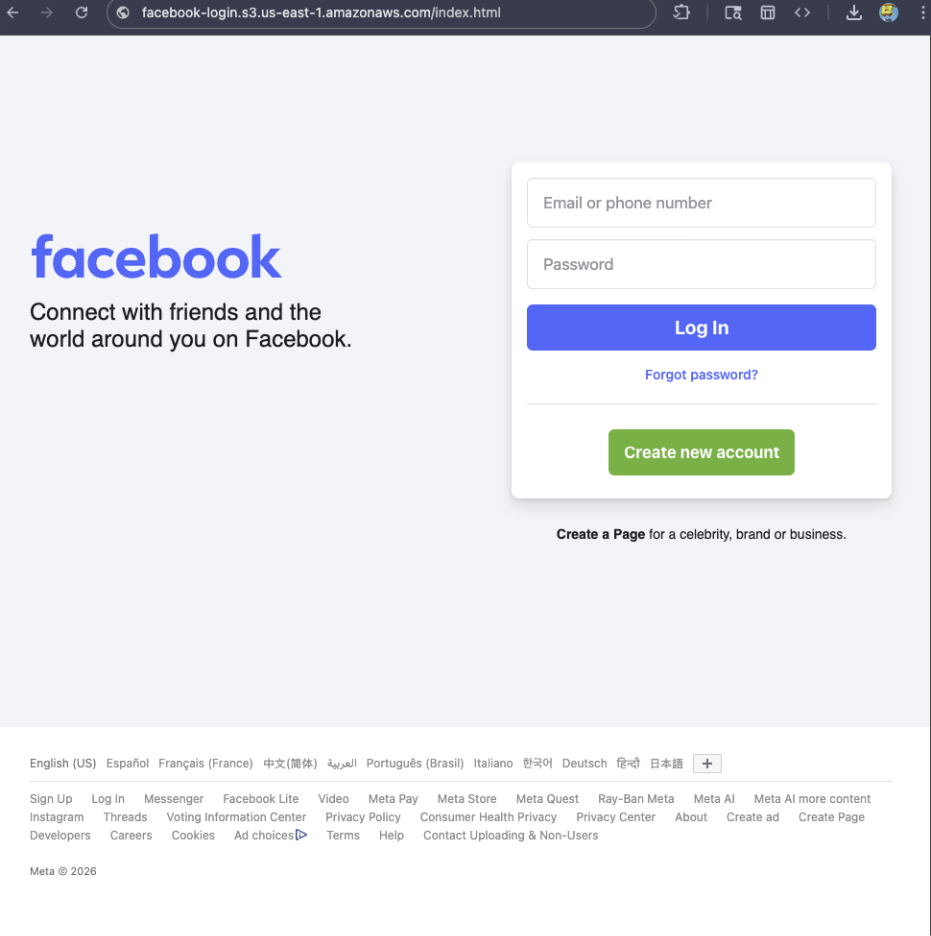
For example, if a site is hosted on Amazon S3, contains a password-input field, and uses a homoglyph in the URL to trick users into thinking they were logging into Facebook, Browser Guard can detect that combinationβ€”even if we’ve never seen the URL before.

Fake Facebook login screen

Why this matters more nowΒ 

With AI,Β attackersΒ canΒ createΒ near-perfect duplicates of websitesΒ easier than ever.Β And did you spot the homoglyph in the URL? Nope, neither did I!Β Β 

That’sΒ why we designed this system so weΒ canΒ updateΒ itsΒ rulesΒ every 30 minutes,Β instead of waiting for full extension updates.Β Β 

ButΒ I still seeΒ staticΒ blockingΒ rulesΒ in Browser GuardΒ 

That’sΒ trueβ€”for now.Β Β 

We’ve found a temporary workaround that lets us support all the rules that we had before. However, we had to remove some of the more advanced logic that used to sit on top of them.

For example, we can’t use these large datasets to block subframe requests, only main frame requests. Nor can we stack multiple logic layers together; blocking is limited to simple matches (regex, domains and URLs).

ThoseΒ limits are a big reasonΒ we’reΒ investingΒ moreΒ heavily inΒ pattern-basedΒ andΒ heuristicΒ protection.Β 

PureΒ heuristicsΒ 

From day one, Browser Guard has used heuristics (behavior) to detect scams and phishing, monitoring behavior on the page to match suspicious activity.

For example, some scam pages deliberately break your browser’s back button by abusing window.replaceState, then trick you into calling that scammer’s β€œcomputer helpline.” Others try to convince you to run malicious commands on your computer.

Browser Guard canΒ detectΒ theseΒ behaviorsΒ andΒ warnΒ youΒ before you fall for them.Β 

What’sΒ next?Β 

Did someone say AI?Β Β 

You’veΒ probably seenΒ Scam GuardΒ inΒ other Malwarebytes products.Β We’re currently working on a version tailored specifically for Browser Guard. More soon!

Final thoughtsΒ 

While Manifest v3 introduced meaningful improvements to browser security, it also created real challenges for security tools like Browser Guard.

Rather than scaling back, the Browser Guard team rebuilt our approach from the ground up, focusing on behavior, patterns, and faster response times. The result is protection that’s different under the hood, but just as committed to keeping you safe online.


We don’t just report on scamsβ€”we help detect them

Cybersecurity risks should never spread beyond a headline. If something looks dodgy to you, check if it’s a scam using Malwarebytes Scam Guard, a feature of our mobile protection products. Submit a screenshot, paste suspicious content, or share a text or phone number, and we’llΒ tell you if it’s a scam or legit. Download Malwarebytes Mobile Security for iOS or Android and try it today!

Scam-checking just got easier: Malwarebytes is now in ChatGPTΒ 

2 February 2026 at 14:45

IfΒ you’veΒ ever stared at a suspicious text, email, or link and thoughtΒ β€œIs this a scam… or am I overthinking it?” Well,Β you’reΒ not alone.Β 

ScamsΒ areΒ getting harder to spot, and even savvy internet users get caught off guard.Β That’sΒ whyΒ MalwarebytesΒ isΒ theΒ firstΒ cybersecurityΒ providerΒ available directly insideΒ ChatGPT, bringing trusted threat intelligence to millions of people right whereΒ theseΒ questions happen.Β 

Simply ask:Β β€œMalwarebytes, is this a scam?” andΒ you’llΒ get a clear, informed answerβ€”superΒ fast.Β 

How to accessΒ 

To access Malwarebytes inside ChatGPT:

  • Sign inΒ toΒ ChatGPTΒ Β 
  • Go to AppsΒ Β 
  • Search for Malwarebytes and press ConnectΒ Β 
  • From then on, you can β€œ@Malwarebytes” toΒ check if a text message, DM, email, orΒ other Β contentΒ seems malicious.Β Β 

Cybersecurity help, rightΒ when andΒ whereΒ you need itΒ 

Malwarebytes in ChatGPT lets you tap intoΒ ourΒ cybersecurityΒ expertiseΒ withoutΒ everΒ leaving the conversation. Whether something feelsΒ offΒ or youΒ want a second opinion, you can get trusted guidance inΒ no time at all.Β 

Here’sΒ what you can do:Β 

SpotΒ scamsΒ fasterΒ 

Paste in a suspicious text message, email, or DM and get:Β 

  • A clear, point-by-point breakdown of phishingΒ orΒ any knownΒ red flagsΒ 
  • An explanation ofΒ whyΒ something looks riskyΒ 
  • Practical next steps to help you stay safeΒ 

YouΒ won’tΒ get any jargon or guessing from us. What you will get is 100%Β peace of mind.Β 

Check links, domains, and phone numbersΒ 

Not sure if a URL, website, or phone number is legit?Β Ask for a risk assessment informed by Malwarebytes threat intelligence, including:Β 

  • Signs of suspicious activityΒ 
  • Whether the link or sender has been associated withΒ scamsΒ 
  • If a domain is newly registered, follows redirects, or other potentially suspicious elementsΒ 
  • What to do nextβ€”block it, ignore it, orΒ proceedΒ with cautionΒ 

Powered by real threat intelligenceΒ 

The verdicts you getΒ aren’tΒ based on vibes or generic advice.Β They’reΒ powered by Malwarebytes’ continuously updated threat intelligenceβ€”the same real-world data that helps protect millions of devices and people worldwide every day.Β 

If you spot something suspicious, you canΒ submitΒ it directly to Malwarebytes through ChatGPT. Those reports help strengthen threat intelligence, making the internet safer not just for you, but for everyone.

  • Link reputation scanner:Β Checks URLs against threat intelligence databases, detects newly registered domains (<30 days), and follows redirects.
  • Phone number reputation check:Β ValidatesΒ phone numbers against scam/spam databases, including carrier and location details.Β Β 
  • Email address reputation check:Β Analyzes email domains for phishing & other malicious activity.Β Β 
  • WHOIS domain lookup:Β Retrieves registration data such as registrar, creation andΒ expirationΒ dates, andΒ abuse ofΒ contacts.Β Β 
  • Verify domain legitimacy:Β Look up domain registration details toΒ identifyΒ newly created or suspicious websites commonly used in phishing attacks.Β Β 
  • Get geographic context:Β Receive warnings when phone numbers originate from unexpected regions, a common indicator of internationalΒ scamΒ operations.Β 

Available nowΒ 

Malwarebytes in ChatGPT isΒ availableΒ wherever ChatGPT apps are available.

To get started, just ask ChatGPT:Β 

β€œMalwarebytes, is this a scam?” 

For deeper insights, proactive protection, and human support, download the Malwarebytes appβ€”our security solutions are designed to stop threats before they reach you, and the damage is done.

2nd February – Threat Intelligence Report

By: lorenf
2 February 2026 at 14:35

For the latest discoveries in cyber research for the week of 2nd February, please download our Threat Intelligence Bulletin.

TOP ATTACKS AND BREACHES

  • MicroWorld Technologies, maker of eScan antivirus, has suffered a supply-chain compromise. Malicious updates were pushed via the legitimate eScan updater, delivering multi-stage malware that establishes persistence, enables remote access, and blocks automatic updates. In response, eScan shut down its global update service for more than eight hours.
  • Crunchbase, a private company intelligence platform, has confirmed a data breach of over 2 million records claimed by ShinyHunters threat group after a ransom demand was refused. The published files were stolen from its corporate network and include customer names, contact details, partner contracts and other internal documents. Crunchbase said that their operations were not disrupted.
  • Qilin ransomware group has leaked an alleged database belonging to Tulsa International Airport in Oklahoma. The database include financial records, internal emails, and employee identification data. The airport authority has not yet confirmed compromise, and operations reportedly continue.

Check Point Threat Emulation provides protection against this threat (Ransomware.Wins.Qilin.ta.*; Ransomware.Wins.Qilin)

  • WorldLeaks extortion group has claimed responsibility for a data breach on the sportswear giant Nike. The threat group allegedly exposed samples totaling 1.4 terabytes of internal data including documents and archives related to the company’s supply chain and manufacturing operations.

AI THREATS

  • Clawdbot, an open source AI agent gateway, has more than 900 publicly exposed and often unauthenticated instances due to localhost auto approval behind reverse proxies. It enables credential theft, access to chat histories, and remote code execution.
  • Researchers uncovered RedKitten, a 2026 campaign with LLM-assisted development indicators targeting Iranian activists and NGOs. The campaign uses password-protected Excel lures to deliver SloppyMIO, a C# implant that uses Telegram for C2 and GitHub/Google Drive for payloads, with steganographic configuration, AppDomain Manager injection, and scheduled task persistence.
  • Researchers identified 16 malicious Chrome extensions for ChatGPT that exfiltrate authorization details and session tokens. The extensions inject scripts into the ChatGPT web application to monitor outbound requests, allowing attackers to hijack sessions and access chat histories.
  • Researchers analyzed publicly accessible open-source LLM deployments via Ollama and revealed many with disabled guardrails and exposed system prompts, enabling spam, phishing, disinformation, and other abuse.

VULNERABILITIES AND PATCHES

  • A critical path traversal vulnerability (CVE-2025-8088) in WinRAR is actively exploited by government backed threat actors linked to Russia and China as well as financially motivated threat actors. Weaponized phishing forces WinRAR to write malware into the Windows Startup folder, enabling automatic execution for ransomware and credential theft. A patch is available on WinRAR 7.13.

Check Point IPS provides protection against this threat (RARLAB WinRAR Directory Traversal (CVE-2025-8088))

  • SmarterTools addressed two critical SmarterMail flaws, including CVE-2026-24423 enabling remote code execution and CVE-2026-23760 allowing unauthenticated admin account takeover. The second flaw is actively exploited, and over 6,000 exposed SmarterMail servers are reportedly vulnerable.

Check Point IPS provides protection against this threat (SmarterTools SmarterMail Remote Code Execution (CVE-2026-24423); SmarterTools SmarterMail Authentication Bypass (CVE-2026-23760))

  • Fortinet has fixed CVE-2026-24858, an authentication bypass in FortiCloud single sign on which allowed unauthorized access and admin creation on downstream devices. The flaw carries CVSS 9.4 and is actively exploited via FortiCloud SSO.

THREAT INTELLIGENCE REPORTS

  • Check Point Research has published the 2026 Cyber Security Report, highlighting AI as a force multiplier across attacks, fragmentation in ransomware with data only extortion, and multi-channel social engineering attacks. It maps threat activity to geopolitics and identity driven paths, quantifies risky AI usage, and provides sector and regional breakouts.
  • Polish CERT detailed coordinated destructive attacks on Polish energy and manufacturing sectors, attributed to Static Tundra, using FortiGate SSL VPN access. The attackers conducted reconnaissance, firmware damage, lateral movement, and deployed DynoWiper and LazyWiper that corrupt files.
  • Researchers have uncovered renewed Matanbuchus downloader campaigns using Microsoft Installer files disguised as legitimate installers, with frequent component changes to evade antivirus and machine learning detection. In many cases, the loader is used for further ransomware deployment.

Check Point Harmony Endpoint and Threat Emulation provide protection against this threat (Trojan-Downloader.Wins.Matanbuchus.ta.*; Trojan-Downloader.Wins.Matanbuchus; Trojan-Downloader.Win.Matanbuchus)

  • Researchers have identified PyRAT, a Python based cross platform RAT for Windows and Linux, using unencrypted HTTP POST C2, fingerprinting victims, and file and screenshot exfiltration. Persistence uses a deceptive autostart on Linux and a user Run key on Windows, with semi persistent identifiers.
  • Researchers have found an Android campaign distributing a RAT via fake security alerts installing TrustBastion, which retrieves a second-stage payload from Hugging Face. The malware abuses Accessibility Services, deploys credential-stealing overlays, and uses server-side polymorphism to regenerate payloads every 15 minutes.

The post 2nd February – Threat Intelligence Report appeared first on Check Point Research.

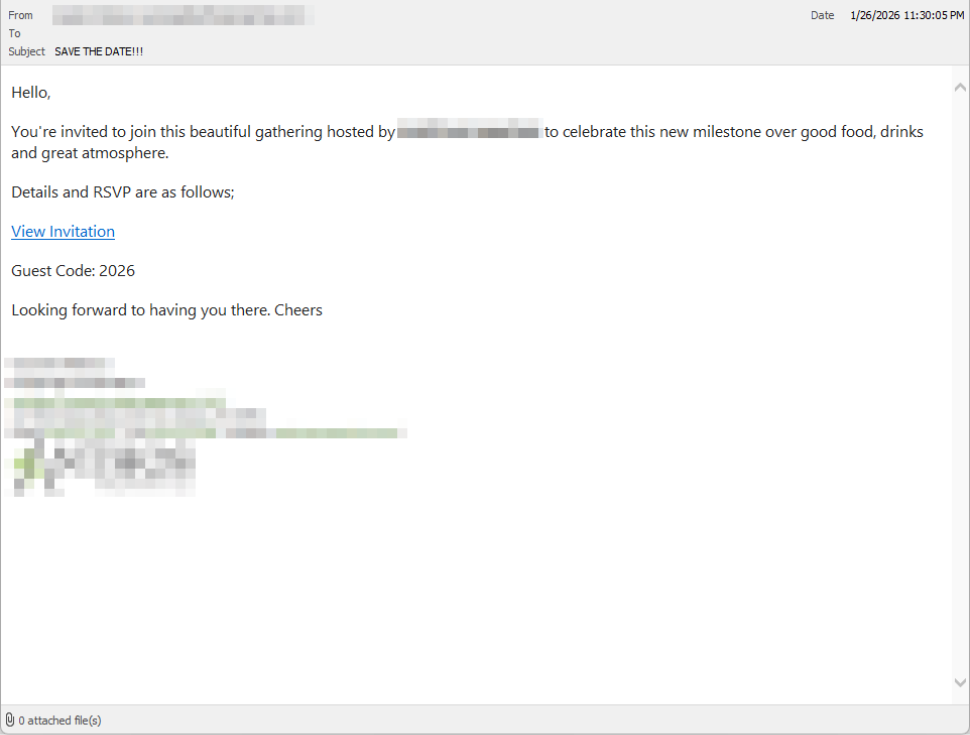
How fake party invitations are being used to install remote access tools

2 February 2026 at 11:18

β€œYou’re invited!” 

It soundsΒ friendly,Β familiarΒ and quiteΒ harmless.Β But in aΒ scamΒ we recentlyΒ spotted, thatΒ simpleΒ phrase is beingΒ usedΒ to trick victims into installing a full remote access tool on theirΒ WindowsΒ computersβ€”giving attackers complete control of the system.Β 

What appears to be aΒ casual party or event invitationΒ leads toΒ the silent installation ofΒ ScreenConnect, a legitimate remoteΒ supportΒ toolΒ quietly installedΒ in the background and abused byΒ attackers.Β 

Here’s how theΒ scamΒ works, whyΒ it’sΒ effective, andΒ how to protect yourself.Β 

TheΒ email: AΒ partyΒ invitationΒ 

Victims receive an email framed as a personal invitationβ€”often written to look like it came from a friend or acquaintance. The message is deliberately informal and social, lowering suspicion and encouraging quick action.Β 

In the screenshot below, the email arrived from a friend whose email account had been hacked, but it could just as easily come from a sender you don’t know.

So far,Β we’veΒ only seenΒ thisΒ campaignΒ targetingΒ peopleΒ in theΒ UK,Β butΒ there’s nothingΒ stoppingΒ it from expandingΒ elsewhere.Β 

Clicking the link in the email leadsΒ to a polishedΒ invitationΒ page hosted on an attacker-controlled domain.Β 

Party invitation email from a contact

TheΒ invite: TheΒ landing pageΒ thatΒ leads to an installerΒ 

The landing page leans heavily into theΒ partyΒ theme,Β but instead of showing event details, the pageΒ nudgesΒ the user toward opening a file. None of them look dangerous on their own, but together theyΒ keep the user focused on theΒ β€œinvitation” file:Β 

  • A boldΒ β€œYou’re Invited!” headlineΒ 
  • The suggestion that aΒ friend had sent the invitationΒ 
  • AΒ messageΒ sayingΒ the invitation is best viewed on aΒ Windows laptop or desktop
  • A countdownΒ suggestingΒ yourΒ invitation is already β€œdownloading” 
  • A message implying urgency and social proof (β€œI opened mine and it was so easy!”)Β 

Within seconds, the browser is redirected to downloadΒ RSVPPartyInvitationCard.msiΒ 

The page even triggers the download automatically to keep the victim moving forward without stopping to think.Β 

This MSI fileΒ isn’tΒ an invitation.Β It’sΒ an installer.Β 

The landing page

TheΒ guest: What the MSIΒ actuallyΒ doesΒ 

When theΒ user opens theΒ MSI file, it launchesΒ msiexec.exeΒ andΒ silentlyΒ installsΒ ScreenConnectΒ Client, a legitimate remote access tool often used by IT support teams.Β Β 

There’sΒ noΒ invitation, RSVP form, or calendar entry.Β 

What happens instead:Β 

  • ScreenConnectΒ binaries areΒ installedΒ underΒ C:\Program Files (x86)\ScreenConnectΒ Client\Β 
  • AΒ persistent Windows serviceΒ is createdΒ (for example,Β ScreenConnectΒ ClientΒ 18d1648b87bb3023)Β 
  • ScreenConnectΒ installsΒ multiple .NET-based componentsΒ 
  • There is no clear user-facingΒ indicationΒ that a remote access tool is being installedΒ 

From the victim’s perspective,Β very littleΒ seems to happen. But at this point, the attackerΒ can now remotely accessΒ theirΒ computer.Β 

TheΒ after-party: RemoteΒ accessΒ isΒ establishedΒ 

Once installed, the ScreenConnect client initiates encrypted outbound connections to ScreenConnect’s relay servers, including a uniquely assigned instance domain.

That connectionΒ givesΒ the attacker theΒ same level of access as a remote ITΒ technician, including theΒ ability to:Β 

  • SeeΒ the victim’s screen in real time
  • ControlΒ theΒ mouse and keyboardΒ 
  • Upload or downloadΒ filesΒ 
  • KeepΒ accessΒ even after the computer is restartedΒ 

BecauseΒ ScreenConnectΒ is legitimate softwareΒ commonlyΒ usedΒ for remote support,Β its presenceΒ isn’tΒ always obvious. On a personal computer, the first signs are often behavioral, such as unexplained cursor movement, windows opening on their own, or a ScreenConnect process the user doesn’t remember installing.Β 

WhyΒ thisΒ scamΒ worksΒ 

This campaign is effective because it targetsΒ normal, predictable human behavior. From a behavioral security standpoint, it exploitsΒ our naturalΒ curiosityΒ andΒ appears to beΒ a lowΒ risk.Β 

Most peopleΒ don’tΒ think of invitations as dangerous. Opening one feels passive,Β like glancing at a flyer or checking a message, not installing software.Β 

Even security-aware users are trained to watch out for warnings and pressure. A friendly β€œyou’re invited” messageΒ doesn’tΒ trigger those alarms.Β 

By the time something feels off, the software is already installed.Β 

Signs your computer may be affectedΒ 

Watch for:Β 

  • A download or executed file namedΒ RSVPPartyInvitationCard.msiΒ 
  • AnΒ unexpected installation ofΒ ScreenConnectΒ ClientΒ 
  • AΒ Windows serviceΒ namedΒ ScreenConnectΒ ClientΒ with random charactersΒ Β 
  • Your computer makes outbound HTTPS connections toΒ ScreenConnectΒ relay domainsΒ 
  • Your system resolvesΒ the invitation-hosting domain used in this campaign,Β xnyr[.]digitalΒ 

How to stay safeΒ Β 

This campaign is a reminder that modern attacks oftenΒ don’tΒ break inβ€”they’reΒ invited in.Β Remote access tools give attackers deep control over a system. Acting quickly can limitΒ the damage.Β Β 

For individualsΒ 

If you receive an email like this:Β 

  • Be suspicious of invitations that ask you to download or open softwareΒ 
  • Never run MSI files from unsolicited emailsΒ 
  • Verify invitations through another channel before opening anythingΒ 

If you already clicked or ran the file:Β Β 

  • Disconnect from the internetΒ immediatelyΒ 
  • Check forΒ ScreenConnectΒ and uninstall it if presentΒ 
  • Run a full security scanΒ 
  • Change important passwords from a clean, unaffected deviceΒ 

ForΒ organisationsΒ (especially in the UK)Β 

  • Alert onΒ unauthorizedΒ ScreenConnectΒ installations
  • Restrict MSI execution whereΒ feasibleΒ 
  • Treat β€œremote support tools” as high-risk software
  • Educate users:Β invitationsΒ don’tΒ come as installersΒ 

This scam works by installing a legitimate remote access tool without clear user intent. That’s exactly the gap Malwarebytes is designed to catch.

Malwarebytes now detects newly installed remote access tools and alerts you when one appears on your system. You’re then given a choice: confirm that the tool is expected and trusted, or remove it if it isn’t.


We don’t just report on threatsβ€”we remove them

Cybersecurity risks should never spread beyond a headline. Keep threats off your devices byΒ downloading Malwarebytes today.

Autonomous Threat Operations in action: Real results from Recorded Future’s own SOC team | Recorded Future

1 February 2026 at 01:00

Key Takeaways:

  • Recorded Future deployed Autonomous Threat Operations within its own SOC before customer release, ensuring real-world effectiveness and identifying critical capabilities.
  • Autonomous Threat Operations reduced analyst-dependent, inconsistent processes, creating standardized hunts that deliver the same input, output, and expectations every time.
  • Team members now run 15-20 threat hunts weeklyβ€”work that previously required days or weeks of manual research, coordination, and planning.
  • During the Salt Typhoon campaign, Recorded Future's CISO launched a comprehensive network-wide threat hunt in five minutes between meetings, enabling immediate risk mitigation.
  • A single pane of glass eliminates context-switching across multiple tools, allowing analysts to hunt threats and research IOCs within one platform.

Autonomous Threat Operations in action: Real results from Recorded Future’s own SOC team

The ultimate test of any cybersecurity solution Recorded Future builds? Using it to defend our own network.

That's exactly what we did with Autonomous Threat Operations. Before rolling it out to customers, we became Customer Zero, deploying the technology within our security operations organization to see if it could truly transform the way security teams hunt for threats.

The results exceeded our expectations. What we discovered wasn't just incremental improvement; it was a fundamental shift in what our security team could accomplish.

The challenge: Inconsistent and analyst-dependent threat hunting

Prior to implementing Autonomous Threat Operations, we faced the same threat hunting challenges many security teams struggle with today. As Josh Gallion, Recorded Future's Incident Response Manager, explains: "Before using Autonomous Threat Operations, our approach to threat hunting was more piecemeal and unique to each analyst. It varied based on whatever they were comfortable with and however they were trained on the tooling."

c4yy0f6y1p

This inconsistency meant that the quality and thoroughness of our threat hunts varied significantly by analyst. And since each team member had different strengths, different levels of experience, and different comfort levels with our security tools, we struggled to standardize the process.

The transformation: Unified, repeatable threat hunting

Autonomous Threat Operations leveled the playing field immediately. "It unifies the hunting capability and makes it so that every time analysts run a hunt, it's the same," says Gallion. "We get the same input, we get the same output, and we know what to expect."

The implementation was remarkably straightforward. "When we turned it on, it just was a simple connection to our Splunk environment," he says. "And once the team started using it, we could see an increase in the number of threat hunts each user would do."

Perhaps most importantly, Autonomous Threat Operations enabled our team to shift from reactive, manual hunting to proactive, automated operations. "Now we can schedule hunts that will continuously run over time, update with the threat actor TTPs, and give us a more holistic view," Gallion says. "Before, we had to have an analyst get back into the product and look for new IOCs to run. Now it just runs it automatically and we know that that's taken care of."

Real-world impact: Upskilling junior analysts and enabling rapid response

According to Recorded Future's CISO, Jason Steer, the true value of Autonomous Threat Operations became clear through two significant outcomes.

First, the technology dramatically upskilled our junior staff. In traditional manual workflows, preparing to run a single threat hunt could take days or even weeksβ€”requiring extensive research, coordination, and planning.

Today, our junior analysts are running 15–20 threat hunts each week to identify high-priority threats. This isn't just about quantity; it's about empowering less experienced team members to contribute meaningfully to our defense posture while accelerating their professional development.

sn9crhxmaj

Gallion sees this impact firsthand. "We have newer analysts who can do more advanced hunting based on IOCs, and it does it for them automatically in the background,” he says. β€œWe get our results, and then they can do research in the app to shore up the findings."

Second, the speed and accessibility of automated threat hunting has proven invaluable during critical moments. When Steer read about Salt Typhoon making its way into corporate networks, he didn't need to schedule a meeting, assemble a team, or wait for the next sprint cycle. In the five minutes between meetings, he was able to launch a comprehensive threat hunt across Recorded Future's entire network to identify and mitigate associated risks to our systems.

That kind of rapid response would have been impossible with manual processesβ€”and in today's threat landscape, that speed can mean the difference between containment and catastrophe.

The advantage of a single pane of glass

Another key benefit emerged around workflow efficiency. "Having a single pane of glass makes it a lot easier for an analyst to do not just the threat hunt, but also to see the meaning behind the IOCs that they're pulling back into the app," says Gallion. "Analysts don't like to have to get into a whole bunch of different applications. If we don't have to, it speeds things up and we can add context from inside the app."

This unified approach has eliminated the context-switching and tool-juggling that had often slowed down our security team and led to missed findings.

Why the Customer Zero experience matters

Serving as Customer Zero validated what we believed Autonomous Threat Operations could deliver to every customer: consistent, repeatable threat hunting that empowers analysts of all skill levels to defend their organizations more effectively. By testing the new solution within our own security operations first, we were able to identify what works, refine the capabilities that matter most, and prove that Autonomous Threat Operations isn't just a theoretical improvementβ€”it's a practical solution that transforms daily security operations.

Gallion sums it up this way: "Some of the aspects of Autonomous Threat Operations that'll have the biggest impact are the repeatability, the scheduling of threat hunts to happen over time, and the single pane of glass that allows analysts to research IOCs in the app without having to go into multiple tools."

We saw a need for Autonomous Threat Operations, so we built it. Being Customer Zero enabled us to test it, refine it, and ensure that it’s the best possible solution to help our customers enter the era of the autonomous SOC.

Learn more about Autonomous Threat Operations by clicking here, or start operationalizing your threat intelligence now by booking a custom demo.

How does cyberthreat attribution help in practice?

2 February 2026 at 18:36

Not every cybersecurity practitioner thinks it’s worth the effort to figure out exactly who’s pulling the strings behind the malware hitting their company. The typical incident investigation algorithm goes something like this: analyst finds a suspicious file β†’ if the antivirus didn’t catch it, puts it into a sandbox to test β†’ confirms some malicious activity β†’ adds the hash to the blocklist β†’ goes for coffee break. These are the go-to steps for many cybersecurity professionals β€” especially when they’re swamped with alerts, or don’t quite have the forensic skills to unravel a complex attack thread by thread. However, when dealing with a targeted attack, this approach is a one-way ticket to disaster β€” and here’s why.

If an attacker is playing for keeps, they rarely stick to a single attack vector. There’s a good chance the malicious file has already played its part in a multi-stage attack and is now all but useless to the attacker.Β Meanwhile, the adversary has already dug deep into corporate infrastructure and is busy operating with an entirely different set of tools. To clear the threat for good, the security team has to uncover and neutralize the entire attack chain.

But how can this be done quickly and effectively before the attackers manage to do some real damage? One way is to dive deep into the context. By analyzing a single file, an expert can identify exactly who’s attacking his company, quickly find out which other tools and tactics that specific group employs, and then sweep infrastructure for any related threats. There are plenty of threat intelligence tools out there for this, but I’ll show you how it works using our Kaspersky Threat Intelligence Portal.

A practical example of why attribution matters

Let’s say we upload a piece of malware we’ve discovered to a threat intelligence portal, and learn that it’s usually being used by, say, the MysterySnail group. What does that actually tell us? Let’s look at the available intel:

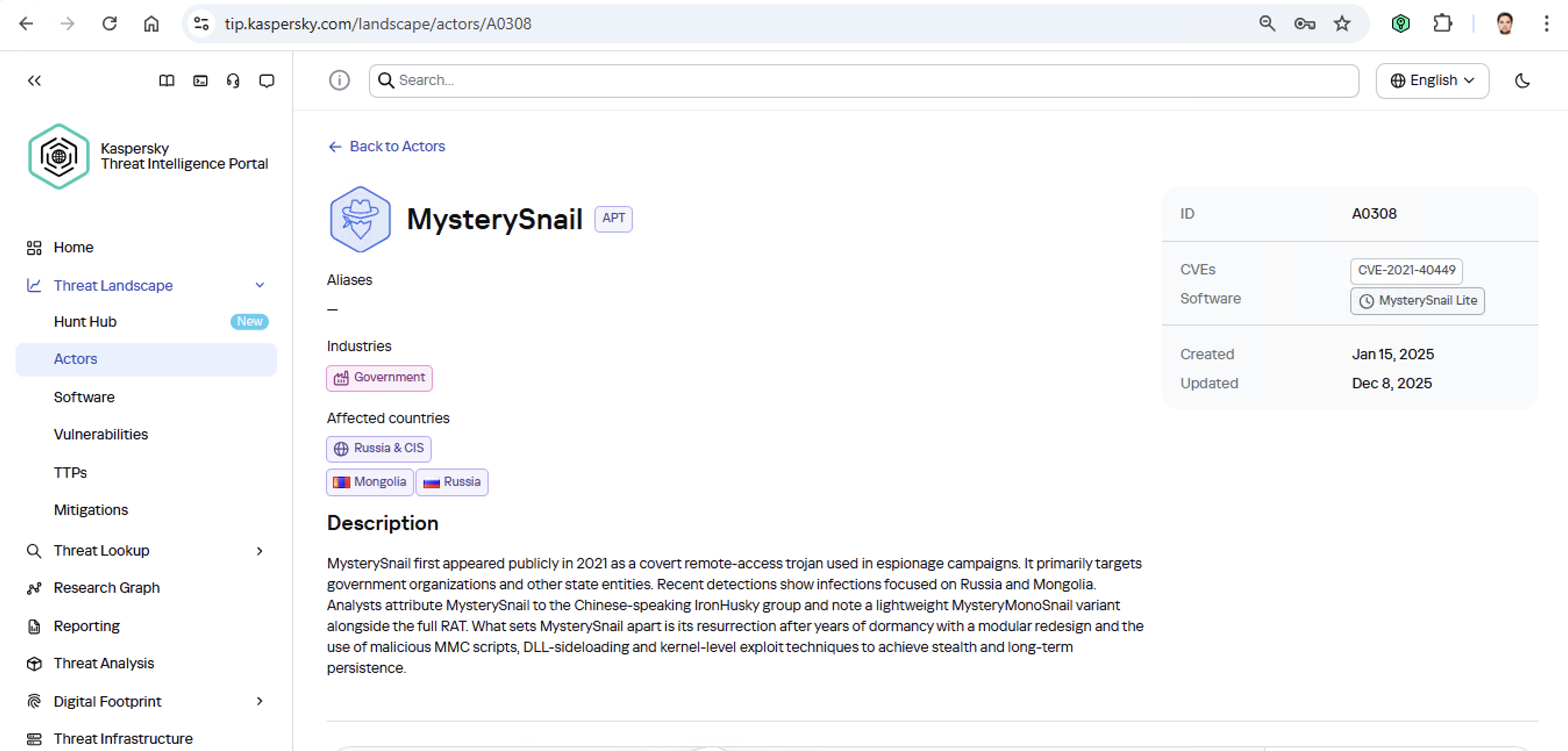
MysterySnail group information

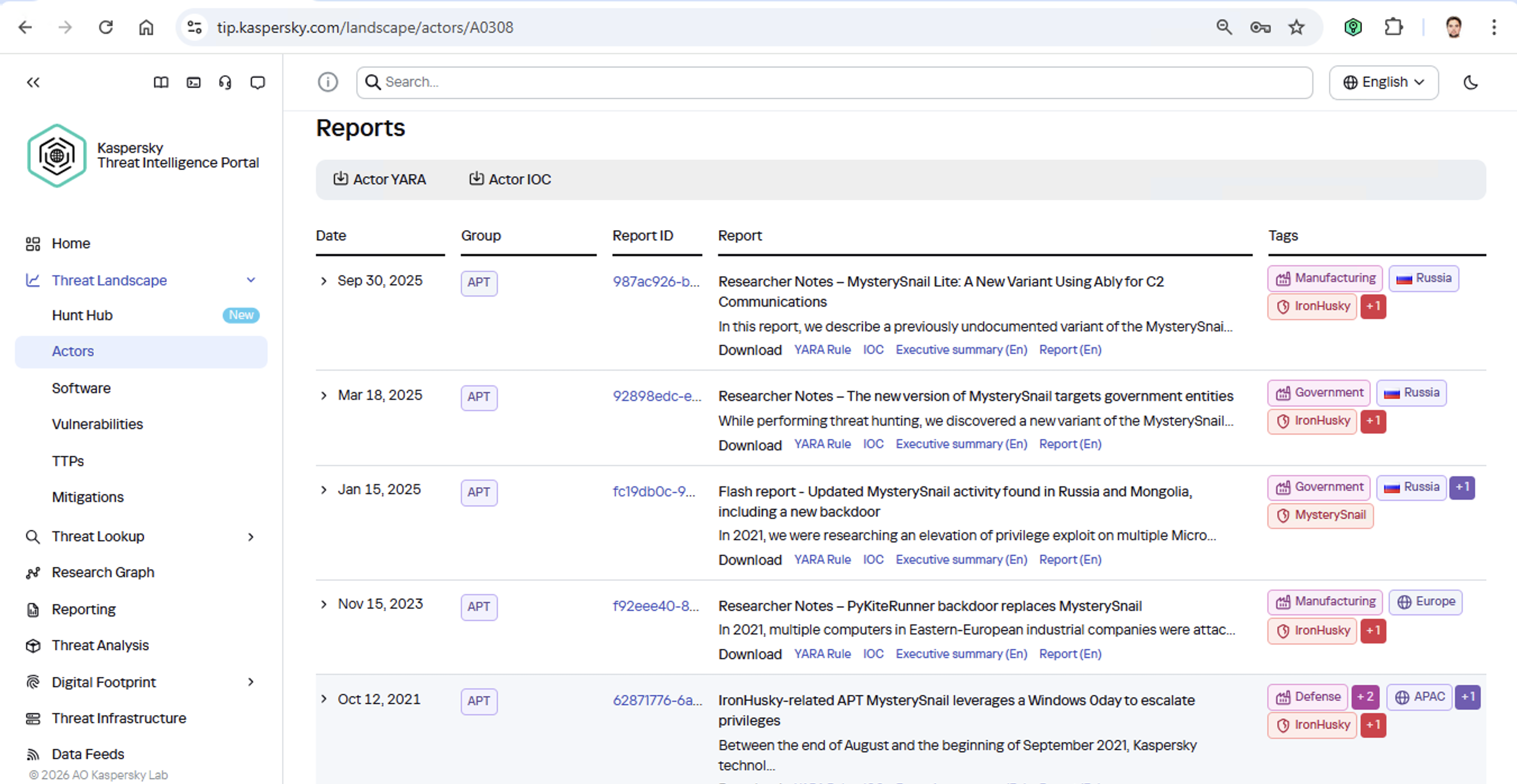
First off, these attackers target government institutions in both Russia and Mongolia. They’re a Chinese-speaking group that typically focuses on espionage. According to their profile, they establish a foothold in infrastructure and lay low until they find something worth stealing. We also know that they typically exploit the vulnerability CVE-2021-40449. What kind of vulnerability is that?

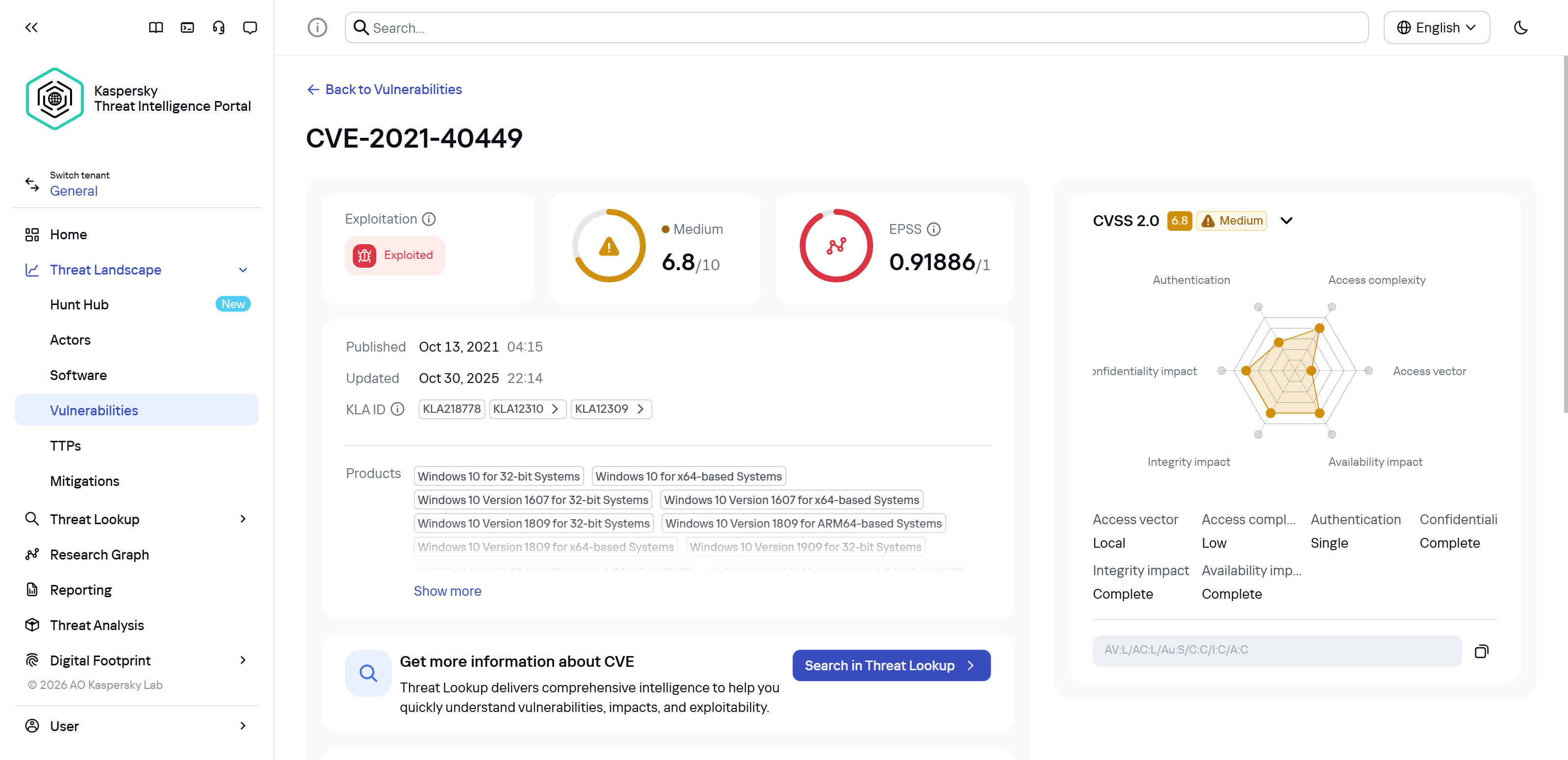
CVE-2021-40449 vulnerability details

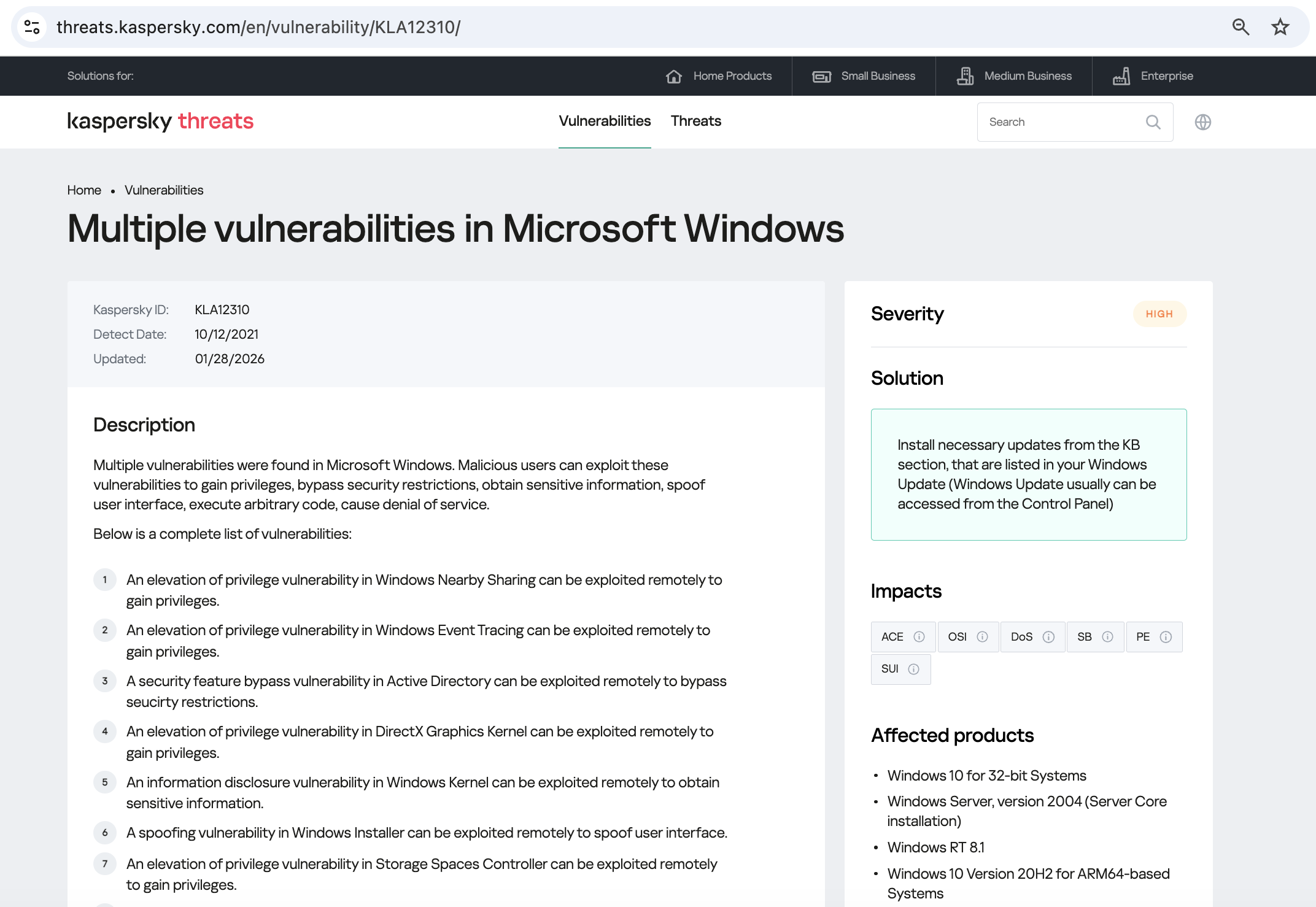
As we can see, it’s a privilege escalation vulnerability β€” meaning it’s used after hackers have already infiltrated the infrastructure. This vulnerability has a high severity rating and is heavily exploited in the wild. So what software is actually vulnerable?

Vulnerable software

Got it: Microsoft Windows. Time to double-check if the patch that fixes this hole has actually been installed. Alright, besides the vulnerability, what else do we know about the hackers? It turns out they have a peculiar way of checking network configurations β€” they connect to the public site 2ip.ru:

Technique details

So it makes sense to add a correlation rule to SIEM to flag that kind of behavior.

Now’s the time to read up on this group in more detail and gather additional indicators of compromise (IoCs) for SIEM monitoring, as well as ready-to-use YARA rules (structured text descriptions used to identify malware). This will help us track down all the tentacles of this kraken that might have already crept into corporate infrastructure, and ensure we can intercept them quickly if they try to break in again.

Additional MysterySnail reports

Kaspersky Threat Intelligence Portal provides a ton of additional reports on MysterySnail attacks, each complete with a list of IoCs and YARA rules. These YARA rules can be used to scan all endpoints, and those IoCs can be added into SIEM for constant monitoring. While we’re at it, let’s check the reports to see how these attackers handle data exfiltration, and what kind of data they’re usually hunting for. Now we can actually take steps to head off the attack.

And just like that, MysterySnail, the infrastructure is now tuned to find you and respond immediately. No more spying for you!

Malware attribution methods

Before diving into specific methods, we need to make one thing clear: for attribution to actually work, the threat intelligence provided needs a massive knowledge base of the tactics, techniques, and procedures (TTPs) used by threat actors. The scope and quality of these databases can vary wildly among vendors. In our case, before even building our tool, we spent years tracking known groups across various campaigns and logging their TTPs, and we continue to actively update that database today.

With a TTP database in place, the following attribution methods can be implemented:

  1. Dynamic attribution: identifying TTPs through the dynamic analysis of specific files, then cross-referencing that set of TTPs against those of known hacking groups
  2. Technical attribution: finding code overlaps between specific files and code fragments known to be used by specific hacking groups in their malware

Dynamic attribution

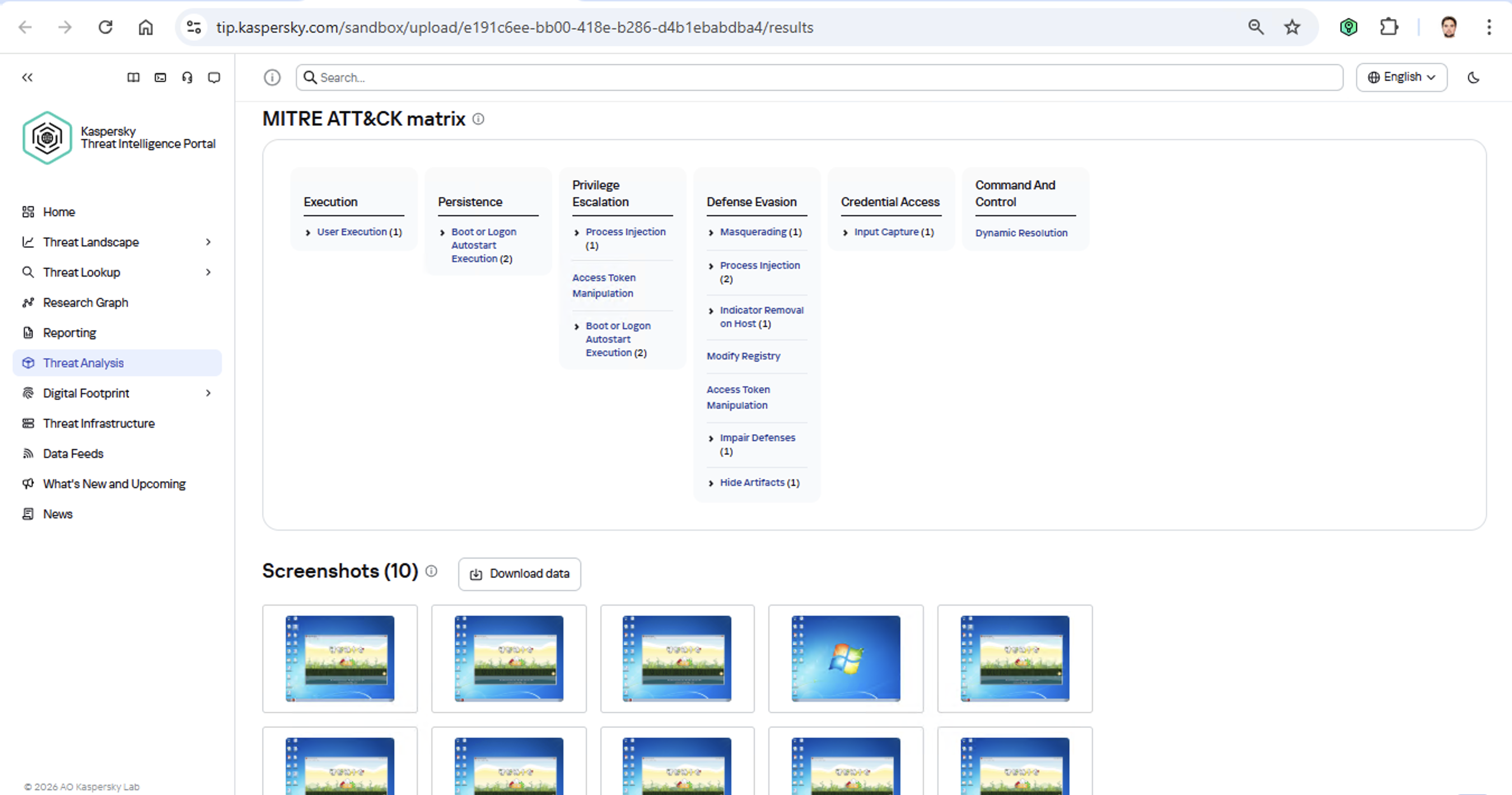
Identifying TTPs during dynamic analysis is relatively straightforward to implement; in fact, this functionality has been a staple of every modern sandbox for a long time. Naturally, all of our sandboxes also identify TTPs during the dynamic analysis of a malware sample:

TTPs of a malware sample

The core of this method lies in categorizing malware activity using the MITRE ATT&CK framework. A sandbox report typically contains a list of detected TTPs. While this is highly useful data, it’s not enough for full-blown attribution to a specific group. Trying to identify the perpetrators of an attack using just this method is a lot like the ancient Indian parable of the blind men and the elephant: blindfolded folks touch different parts of an elephant and try to deduce what’s in front of them from just that. The one touching the trunk thinks it’s a python; the one touching the side is sure it’s a wall, and so on.

Blind men and an elephant

Technical attribution

The second attribution method is handled via static code analysis (though keep in mind that this type of attribution is always problematic). The core idea here is to cluster even slightly overlapping malware files based on specific unique characteristics. Before analysis can begin, the malware sample must be disassembled. The problem is that alongside the informative and useful bits, the recovered code contains a lot of noise. If the attribution algorithm takes this non-informative junk into account, any malware sample will end up looking similar to a great number of legitimate files, making quality attribution impossible. On the flip side, trying to only attribute malware based on the useful fragments but using a mathematically primitive method will only cause the false positive rate to go through the roof. Furthermore, any attribution result must be cross-checked for similarities with legitimate files β€” and the quality of that check usually depends heavily on the vendor’s technical capabilities.

Kaspersky’s approach to attribution

Our products leverage a unique database of malware associated with specific hacking groups, built over more than 25 years. On top of that, we use a patented attribution algorithm based on static analysis of disassembled code. This allows us to determine β€” with high precision, and even a specific probability percentage β€” how similar an analyzed file is to known samples from a particular group. This way, we can form a well-grounded verdict attributing the malware to a specific threat actor. The results are then cross-referenced against a database of billions of legitimate files to filter out false positives; if a match is found with any of them, the attribution verdict is adjusted accordingly. This approach is the backbone of the Kaspersky Threat Attribution Engine, which powers the threat attribution service on the Kaspersky Threat Intelligence Portal.

❌