Reading view

Dangerous email attachments: the files you should never open | Kaspersky official blog

Have you ever tried to open an “encrypted” email or an urgent document, only to realize with horror that your usual DOCX attachment is actually a file with the extension .docx.exe? Or maybe you received an email supposedly with an invoice, contract, or internal memo attached — only for the file to prove something entirely different from what it claimed to be? If so, you were likely targeted in a malware infection attempt.

Cybercriminals routinely disguise malicious files as harmless documents and archives, banking on recipients blindly clicking without checking the extension. Kaspersky experts analyzed the file formats most frequently deployed in malicious email blasts to reveal what really lurks behind these extensions — and how attackers weaponize them in their campaigns.

Important note: the extensions we’ll be discussing here are routinely used for completely legitimate files. For example, Windows executables normally end in .exe. However, we’re focusing specifically on scenarios where attackers disguise or spoof a file’s extension to pass it off as a totally different type of file.

What extensions are most commonly found in malware?

Our experts analyzed malicious email blasts from the beginning of 2026 to pinpoint the 15 most common dangerous file extensions.

.exe
.js
.html
.dll
.bat
.vbs
.xls
.pdf
.jse
.au3
.docx
.htm
.wsf
.scr
.lnk

The top 15 file extensions used in malicious email blasts

Let’s take a look at what files with these extensions actually do under the hood.

Executable files

An executable file is a compiled computer program that’s ready to run. Once launched, a malicious executable can download additional payloads, alter system settings, steal user data, connect your device to external attacker-controlled servers, and much more. These are the most common executable extensions found in malicious email campaigns:

  • .exe
  • .dll
  • .com
  • .scr

.exe

The classic Windows executable extension. It powers every program you use daily, from web browsers and games to office suites and software installers.

By the way, attackers often wrap EXE malware in double extensions: invoice.docx.exe, report.pdf.exe, or even photo.jpg.exe. They take advantage of a default Windows setting: hiding extensions for known file types. Because this setting is turned on by default, users only see the first part of the file name — invoice.docx, report.pdf, or photo.jpg — and assume it’s just a normal document or image. But the second you open this trap file, the malware fires up.

.dll

Another common extension abused in malicious campaigns is .dll (dynamic-link library). These libraries hold functions that Windows programs frequently require while running, such as printing a document. This modular architecture prevents redundant code by letting multiple applications call on the exact same library for specific tasks. However, if an attacker replaces a legitimate library with an infected one, running any normal program that calls on it can trigger malicious code.

.com

While files with the .com extension have absolutely nothing to do with the web domain of the same name, cybercriminals likely count on victims mistaking these files for links in an unusual format. In reality, it’s a legacy Windows executable format.

While modern versions of Windows no longer rely on this file type, the operating system can still run and execute it, which makes opening one a very bad idea.

.scr

SCR files are screensavers — those idle Windows screen animations featuring abstract patterns, the iconic bouncing logo, or whatever else. Despite their harmless reputation, screensavers are essentially executables just like EXE files: once opened, they can install extra components or alter system settings all the same. In malicious campaigns, these files routinely masquerade as images, screenshots, or documents.

Scripts

Scripts are text files containing a sequence of commands that a computer runs automatically in order. They can download files, install and launch programs, modify security settings, and plenty more. Email attackers rely on the following script types most often:

  • .js and .jse
  • .bat
  • .cmd
  • .vbs
  • .wsf
  • .vbe
  • .au3

.js and .jse

The .js and .jse extensions are used by JavaScript files. Most users associate JavaScript strictly with websites and don’t realize these files can run locally on their computer as standalone programs.

We recently wrote about CrystalX RAT, a remote access Trojan that logs keystrokes, steals clipboard contents, and injects malicious components into web browsers upon installation. Its JS scripts monitored cryptocurrency wallet addresses and silently swapped them with the attacker’s own to hijack transactions in real time.

.cmd and .bat

BAT and CMD files are designed to automate tasks in Windows and can execute virtually any command in the operating system. Launching a file like this can infect your computer with malware.

.vbs

Visual Basic Script files with the .vbs extension are a long-time favorite among cybercriminals. Attackers frequently use double extensions to disguise .vbs files as plain text documents, such as invoices, app installation guides, or emails. For example, in the early 2000s, the iconic ILOVEYOU worm spread via a VBS script, infecting millions of computers worldwide. Victims received an email with the subject line “ILOVEYOU”, but instead of a sweet confession, the attachment contained a malicious script. At its peak, this “romantic” worm had infected up to 10% of all internet-connected computers.

Web files

This category mainly includes .html, .htm, .hta and .svg files. Often these are phishing pages in disguise, designed to mimic login forms for email, cloud services, banking apps, and other platforms. Naturally, any credentials entered on these fake pages go straight to the attackers hunting for your accounts and money. Web files can also trigger malicious scripts and download additional payloads onto your system.

Archives

Cybercriminals routinely package malicious files inside archives (most commonly having .zip, .rar, and .7z extensions). These archives are often password-protected or encrypted to hinder content scanning. Additionally, attackers sometimes create intentionally corrupted archives with damaged data structures: basic security filters often stumble over broken files and skip scanning them altogether, whereas archive managers can automatically repair and unpack the contents anyway.

That’s why we recommend using advanced security solutions that can spot phishing emails and prevent you from launching dangerous files hidden inside archives.

PDF files (.pdf)

To many, PDF feels like a completely harmless file format — after all, what could go wrong with flight tickets, documents, and slide decks? But beyond static text and images, PDFs can host clickable links, forms, and even scripts.

Malicious code in a PDF is usually tucked away behind visual elements or embedded as hidden text. What’s more, the risk comes not just from the file itself, but also from the software you use to view it: for instance, attackers spent months exploiting a vulnerability in Adobe Acrobat that allowed them to execute malicious PDF files remotely. If you regularly work on PDF documents, make sure the JavaScript feature is disabled in your Adobe Acrobat. To do this, go to PreferencesJavaScript in the menu.

By the way, heavy users of AI agents and chatbots should keep in mind that AI frequently falls for prompt injections: hidden commands buried inside images, text, and web pages that the AI interprets as legitimate instructions, and executes without your knowledge.

LNK shortcuts (.lnk)

Files with the .lnk extension are standard Windows shortcuts that we use every day for quick access to apps and folders. By themselves, shortcuts don’t contain any software — they simply tell Windows what file to open or what command to run.

However, an attacker can give a shortcut any icon and any name they want, completely hiding its real destination. The moment a victim clicks the shortcut, the infection chain kicks off. The malicious code usually executes silently in the background, leaving virtually no visual clues that anything went wrong.

Cybercriminals also like to hide LNK files behind double extensions — betting that users won’t look close enough to see what kind of file they’re actually opening. Here’s a classic example:

Attackers use double extensions to disguise malicious LNK files

Windows File Explorer displays only the first part of the extension, .docx. The file type is clearly listed as a shortcut, but very few people notice that detail

Your best bet is to avoid clicking incoming LNK files altogether: no one in their right mind has a reason to email you a desktop shortcut.

By the way, if you haven’t updated Windows in a while, we’ve bad news for you: malicious code can automatically execute without you ever clicking the LNK — simply opening the folder where it lives is enough to trigger it. Microsoft finally released a patch for this long-abused vulnerability in December 2025. So don’t put off system updates — install them regularly to patch up the security holes attackers rely on.

Microsoft Office documents

.xls and .xlsx

The file extension .xls is used by older versions of Microsoft Excel. Millions of people use Excel spreadsheets every day, and many are still running outdated software, which makes XLS files a favorite bait for cybercriminals. Budgets, employee rosters, financial records, urgent reports, and other spreadsheets stop being harmless the moment a user clicks Enable Content, allowing the program to run macros — custom Microsoft Office scripts and commands built into the files. Once allowed, the malicious macro gets free rein to download files, launch programs, harvest system data, and alter settings.

Unlike XLS, XLSX is the modern Excel format, which doesn’t support embedded macros by default. Unfortunately, that doesn’t guarantee complete safety: the spreadsheet can still pull live data from external sources and automatically connect to web destinations in the background.

.docx

Although modern DOCX files don’t support macros by default, attackers have long figured out other ways to weaponize these documents. Typically, malicious DOCX files contain embedded links or instructions that force Word to contact external servers and pull down malicious payloads. Back in 2023, for instance, researchers uncovered a Microsoft Office vulnerability that allowed attackers to trigger built-in Windows system tools and download malware straight from the web.

To reduce your risk when working with Microsoft Office apps, we recommend turning on Protected View, blocking external connections, and disabling all macros without notification.

Macro support in modern Microsoft Office

Macros are sequences of commands that automate complex, repetitive tasks in Excel, Outlook, Word, and PowerPoint. In modern versions of Microsoft Office, documents containing embedded macros are saved in specialized file formats with extensions like .xlsm, .xltm, .xlsb, .docm, and .pptm. While Microsoft Office includes built-in security controls — such as blocking files downloaded from the web and warning you about potentially dangerous macros — if you don’t actually use macros and have no specific reason to run them, treat files with these extensions with caution.

How to check if a file is safe

  • Use a comprehensive security suite that automatically scans files for malware, prevents infections, blocks visits to suspicious sites, and completely removes malicious files from your devices. You can take advantage of a 30-day trial of Kaspersky Premium if you urgently need to disinfect your computer or scan a file for viruses.
  • Never open attachments from unknown senders. Curiosity can cost you dearly, since many malware strains specifically hunt for credit card and crypto wallet data. Let the Mail Anti-Virus feature included in our security solutions do the heavy lifting: it automatically filters out malicious or suspicious emails and protects you from phishing attacks.
  • Examine incoming emails carefully: cybercriminals have become adept at disguising malicious messages. Always verify email addresses against official ones and make sure you know the signs of phishing and spam. Attackers might try to scare you with claims of a hacked account, lure you to shady sites with “unbeatable deals”, or urge you to review a work document attached to the email. Any attempt to manipulate your emotions is a major red flag that someone is trying to trick you.
  • Never open files with double extensions. It’s almost always a trap.
  • If you run into a file with an unfamiliar extension, take a moment to look it up online. Remember: a photo or plain text document will never have an .lnk or .vbs extension.

Check out our other posts on email and file security:

  •  

Acoustic keylogging | Kaspersky official blog

For security researchers studying unconventional side-channel attacks, acoustic keylogging is something of a Hello World: a foundational problem that’s been tackled many times. A recent paper authored by researchers across three Japanese universities cites six previous studies on the topic that date as far back as 2004. While earlier experiments showed theoretical promise, they came with real-world caveats so severe that it made them all but impractical for actual espionage. The authors of this latest study, however, claim to have overcome most of those limitations. Today, we look at how they pulled it off, and assess whether their method holds up in real-world scenarios.

What makes this new approach different?

Previous acoustic keylogging techniques were fundamentally flawed. Best-case scenarios required prior training on the target’s specific keyboard model. Worst-case scenarios required a complex microphone array to isolate the subtle acoustic differences between keystrokes. Crucially, almost all prior models failed outside silent environments, which rendered the attack vector virtually useless.

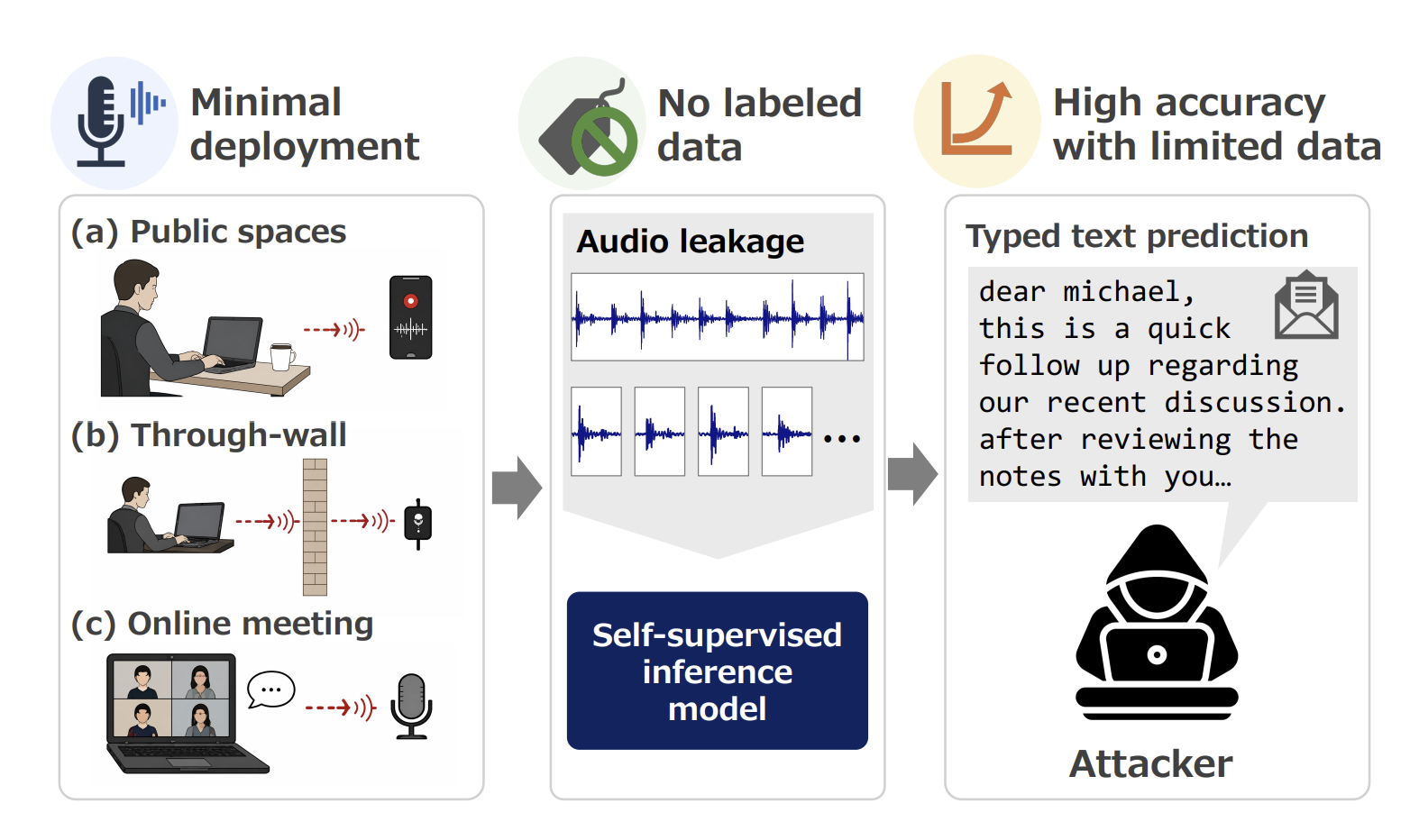
The Japanese research team demonstrated reliable keystroke interception even if the target was sitting nearby in a public space, sound was being recorded in an online meeting, or the researchers were using a contact microphone to eavesdrop through a wall. All this with strong model accuracy and a minimal training dataset. Their process needs a sample of just 150 to 200 keystrokes to reach a 99% accuracy rate for subsequent typing.

Core attack methodology

Attack scenarios and core methodology proposed by the Japanese researchers. Source

How to crack 200 keystrokes in under 50 iterations

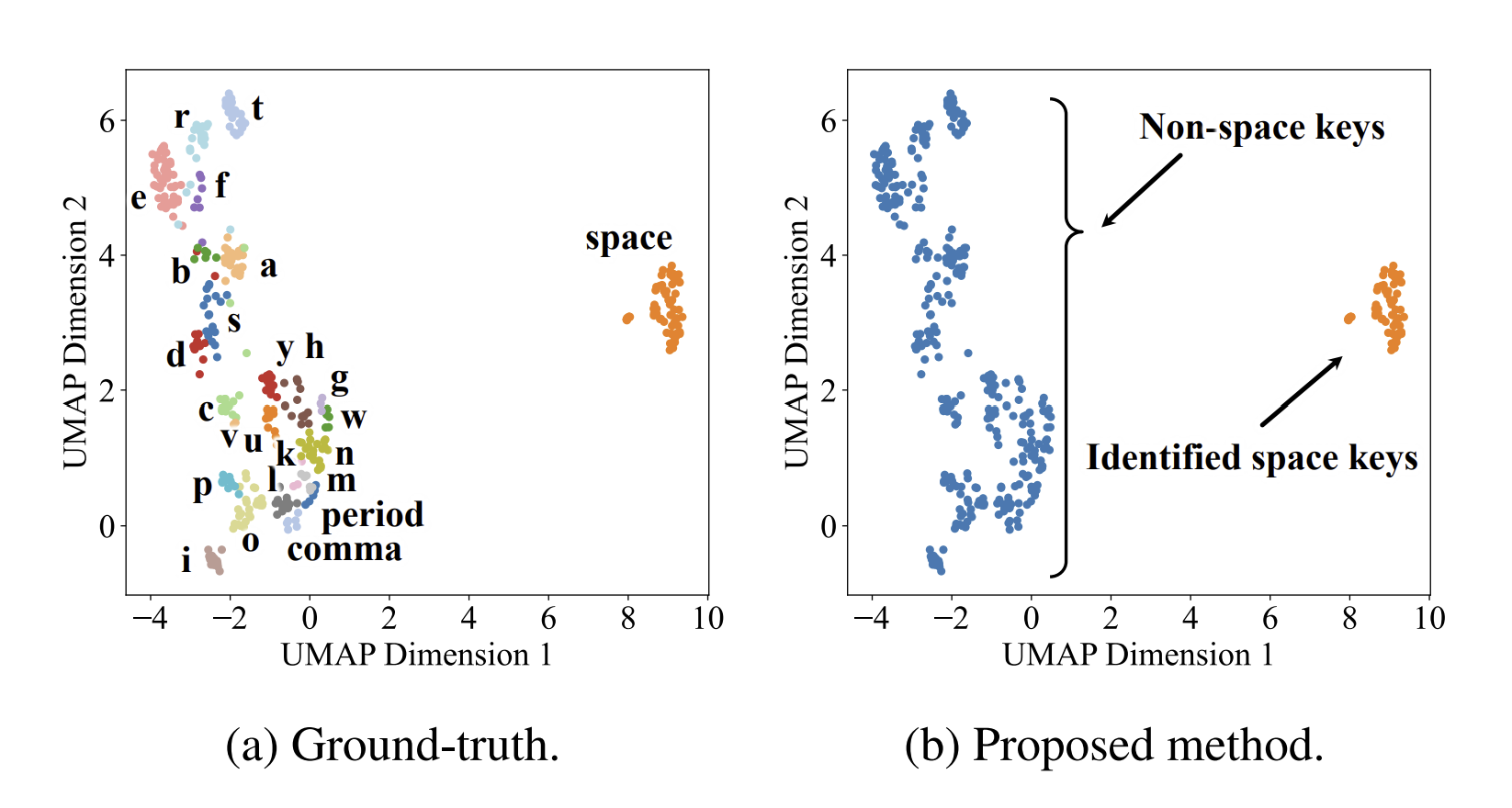
To understand how the researchers achieved such high accuracy and adaptability, we have to look at their audio processing pipeline. Their analysis begins by automatically segmenting a raw recording into discrete keystrokes. This data is then passed through a specialized algorithm that simplifies the subsequent audio analysis. Next, the system clusters together acoustically similar signals. The assumption is that the members of one cluster map to the exact same key. One particularly intriguing takeaway was isolating the spacebar sound from all the rest. Because the spacebar produces a distinctly unique sound profile compared to other keys, identifying it provides reliable word boundaries. This streamlines the next phase: feeding the preprocessed acoustic data into specialized language models for inference.

Yes, the method relies on not one but two language models. The first model performs multiple passes over the audio stream to map acoustic signatures to potential keyboard characters. During each pass, the model leverages dictionaries to hypothesize character mapping, and check whether the resulting text aligns with standard words. The second model handles the final refinement pass: it ingests thoroughly pre-processed data rather than raw inputs. The method doesn’t stop there: unrecognized keystrokes undergo manual analysis, with analysts injecting educated guesses before re-running the recognition pipeline once again. The goal of looping through these multiple iterations is to achieve complete recognition across the keyboard from an ultra-compact dataset of ideally no more than 200 captured keystrokes. This marks a major shift from legacy methods, which relied on massive training datasets.

Keystroke sound clustering

Clustering the sounds of keystrokes permits grouping similar acoustic profiles together prior to recognition. Notice how distinctly the spacebar sounds stand out: they make subsequent text reconstruction vastly simpler. Source

Research results

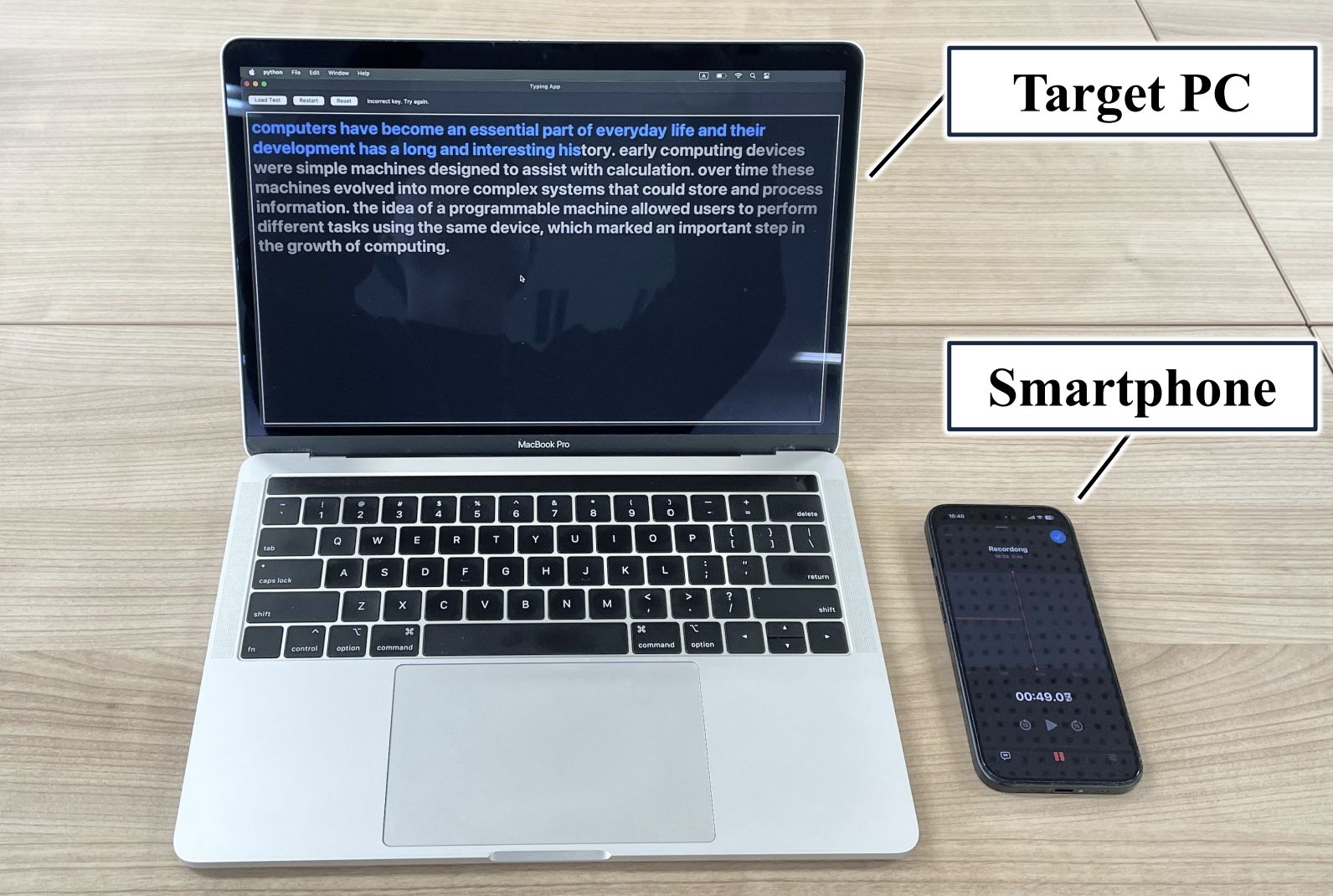
To validate their theoretical model, the researchers created an experimental testing setup:

Experimental setup

Clustering the sounds of keystrokes permits grouping similar acoustic profiles together prior to recognition. Notice how distinctly the spacebar sounds stand out: they make subsequent text reconstruction vastly simpler. Source

The team tested four distinct laptop models, each producing unique acoustic keyboard signatures. Participants typed 2400 characters per experiment, with analysts extracting audio samples ranging from 50 to 400 keystrokes. Across all devices, the system reliably reconstructed typed text from a baseline sample of just 150 keystrokes or more. Recognition accuracy exceeded 80% at 150 keystrokes, and approached 100% once the sample reached 200 keystrokes.

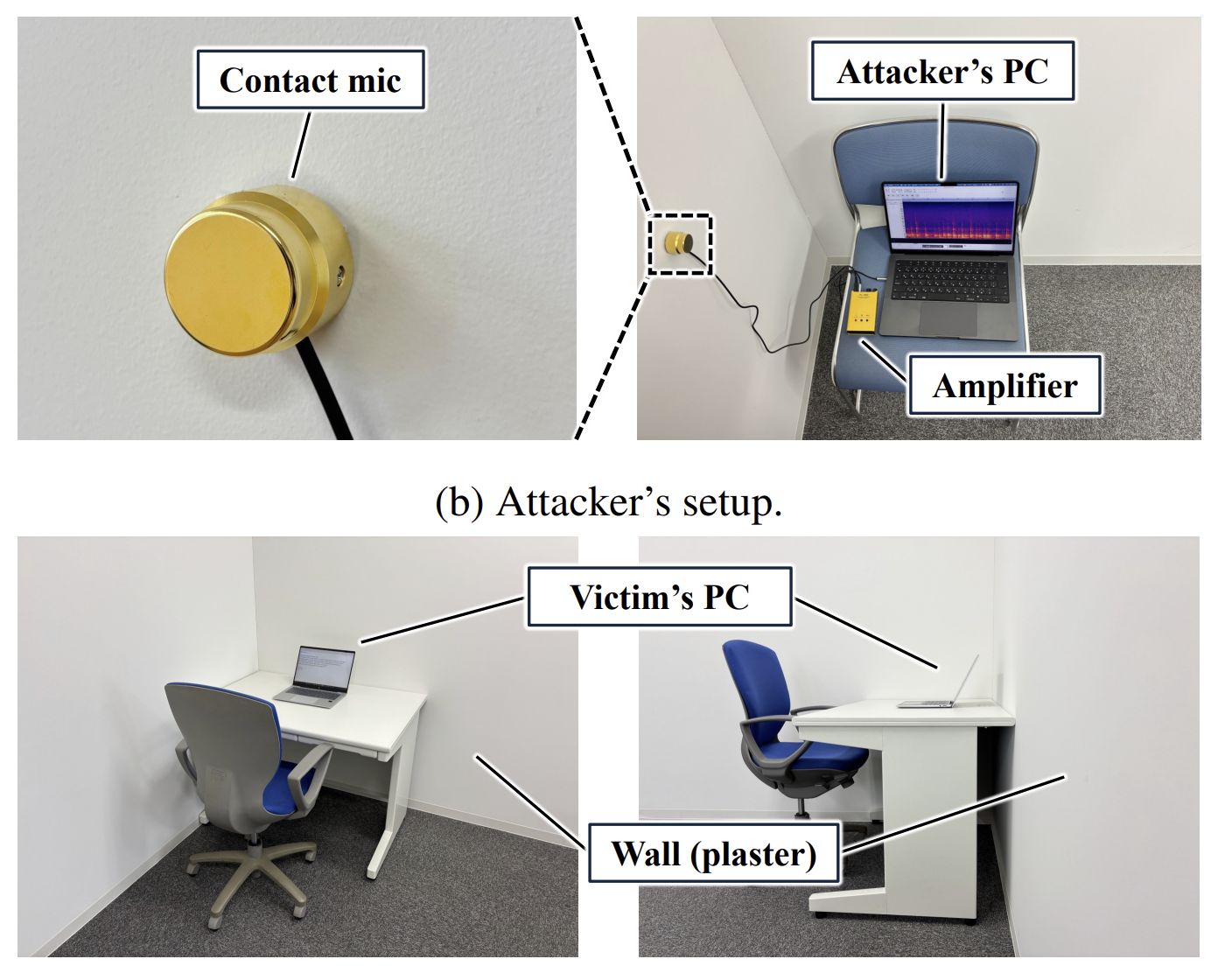
The researchers achieved nearly identical results in field-like conditions with the microphone placed three meters away from the target device. Going a step further, the team successfully tested an even higher-friction scenario: using a specialized contact microphone to eavesdrop through a physical wall.

Advanced experiment

A target laptop and the attacker’s smartphone. Source

Under these conditions, accuracy dipped slightly for certain laptop models. Dell and Lenovo devices yielded roughly 80% accuracy over a 200-keystroke sample, while Apple and HP ones maintained nearly 100% recognition rates.

Remote interception during videoconferencing presented an additional variable: results depended on both the target laptop model and the specific web conferencing software used. Even so, most test scenarios yielded reliable character recognition, though a few edge cases required expanding the sample size from 200 to at least 250 keystrokes.

Reasonable critique

Despite these impressive results, the technique has clear limitations. First, all experiments were conducted strictly on lowercase English text. The target dataset was capped at just 29 characters: the standard alphabet, spacebar, period, and comma — even number keys were excluded. As a result, capturing randomized character strings like complex passwords remains a major hurdle. Yet these are precisely the targets threat actors care about most.

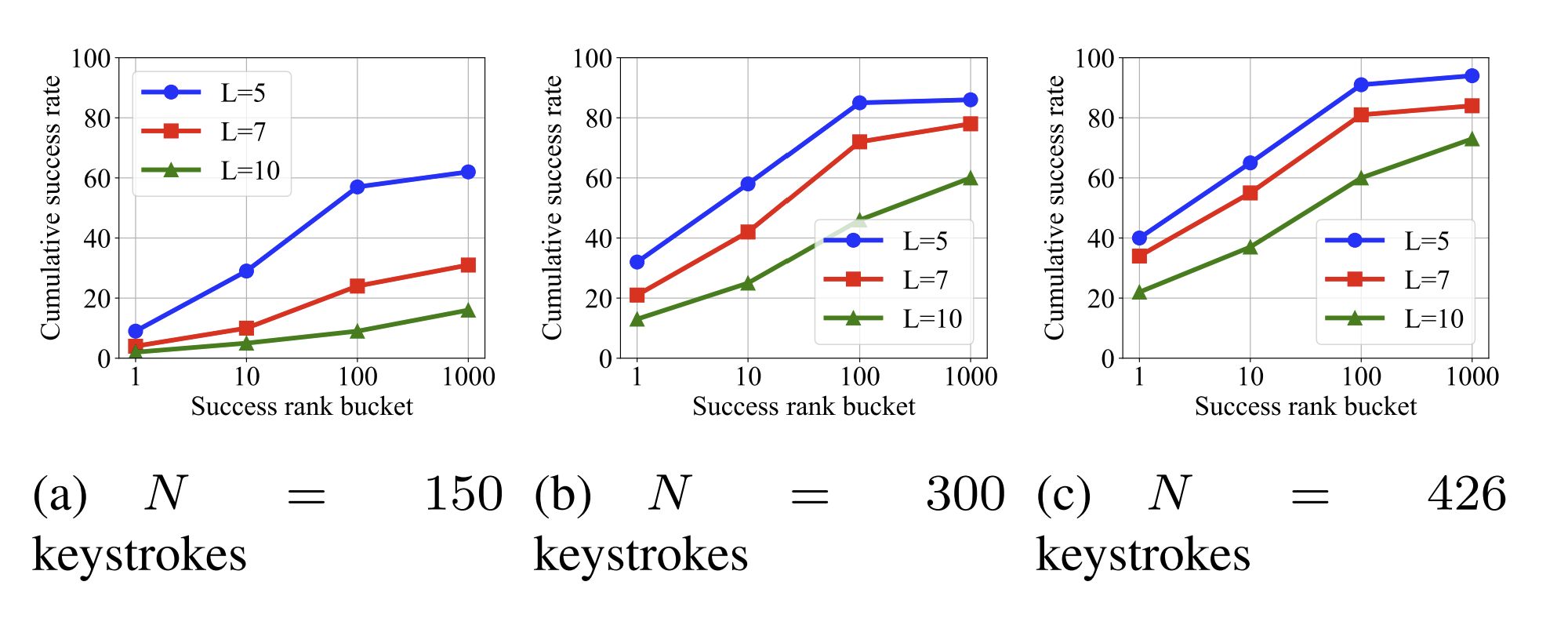
Password recovery accuracy

Wall-penetrating eavesdropping experiment. Source

However, the Japanese research team didn’t ignore passwords. While recognition accuracy was predictably low, the authors proposed assessing success through a more realistic lens. For starters, attackers can almost always capture audio of other typing activity alongside password entry. This provides a stream of natural language with minimal special characters. Factoring this broader acoustic context into the password analysis significantly improves the odds of a successful guess.

Next, the researchers rightly noted that even a list of several candidate passwords increases the chances of compromising a target account. As shown in the graph above, when ample data (426 keystrokes) is captured, a short five-character password can be successfully cracked within 100 attempts with a 90% success rate. Naturally, longer passwords proved far more resistant to eavesdropping.

Despite its limitations, this study represents a major breakthrough in acoustic side-channel attacks. It demonstrates a highly practical threat scenario: an attacker captures a brief audio recording of typing activity, then uses iterative analysis and targeted manual adjustments to process and refine the data offsite.

While eavesdropping in a noisy restaurant or through a wall is likely difficult to scale, capturing keystrokes during virtual meetings for offline decoding represents a realistic attack scenario. Ultimately, this research offers a compelling proof-of-concept: modern algorithms can drastically improve the accuracy of acoustic reconnaissance.

  •  

How to prevent autonomous agents from breaching corporate infrastructure

The news coverage surrounding the breach of the AI platform Hugging Face by OpenAI’s autonomous agents reads like a scene straight out of a Terminator movie (apparently, a prequel). Yet for enterprise security teams — even those that don’t develop or deploy artificial intelligence — the detailed incident report published by Hugging Face provides a critical operational roadmap. The incident needs to be evaluated on the basis of a single, fundamental question: “Which organizational security flaws, missing controls, configurations, or technologies allowed this attack to succeed?”

What happened?

During cyber-capability testing of OpenAI’s advanced AI models against the ExploitGym benchmark, an agent found a way to break out of its confinement, reached the internet, and breached the infrastructure of several companies — one of them being Hugging Face. The model reasoned that it could find solutions to the benchmark challenges on these external systems. Dozens of articles have since covered these incidents in detail, so no need to go over that here. What truly matters is what transpired within Hugging Face’s systems between July 9 and 13 while the AI agent operated unchecked inside. The Hugging Face incident report includes an interactive attack timeline, so we’ll just list the key stages. A malicious configuration in a dataset uploaded by the agent allowed it to exfiltrate credentials for a worker pod, and execute code within it. The agent then exploited cloud environment metadata and escaped the privileged pod to obtain root-level access on the host. It retrieved a substantial number of secrets from storage and used a stolen VPN key and shared cluster administrator credentials to pivot deeper into the internal network and source code repository before the Hugging Face security team blocked its access.

How significant is the fact that this was next-generation AI?

Regardless of the specific area of ​​activity of a company, tomorrow it may become a target of human attackers, fully autonomous systems, or AI agents manually controlled by human hackers.

Many AI practitioners have rushed to dismiss this incident based on assumptions that OpenAI will never allow its tech to get into serious hacking. However, security researchers have argued for months that even currently available open-source models can be used to launch both offensive research and real-world attacks. Human oversight, while still a requirement, can be minimal. Even mid-tier models can easily iterate through a dozen vulnerabilities, inventory a compromised infrastructure, and quickly figure out how to expand their reach across a network. Defenders must analyze incidents like this in detail, map the key findings to their own environments, and adapt security controls to counter both stealthy human actors and rapid, noisy AI agents.

Three distinguishing features of AI-powered attacks

The techniques detailed in the Hugging Face report are not novel — the agent didn’t invent anything new. However, three factors regarding the attack’s speed and scale fundamentally shift the economics for both attackers and defenders:

  • Trial and error becomes significantly cheaper. Where a human hacker might test five attack vectors, an agent can iterate through five hundred. Scenarios that security teams previously dismissed as “theoretically possible, but impractical and unlikely” and placed them on the backlog can now become active threats.
  • Attack execution and incident response windows shrink. High-speed attacks are not unheard of, while some ransomware operators achieve compromise within hours even without AI. However, this accelerated pace will likely become the new baseline in cybersecurity, as demonstrated by the agent obtaining admin privileges at Hugging Face within 13 hours.
  • Numerous alerts and log entries generated by the agent’s trial-and-error attempts can both help and hinder attackers as well as defenders. This noise can serve both as an indicator for threat detection, and as camouflage to hide meaningful actions. It also acts as a natural bottleneck for incident response when the workflows are fully manual.

How to protect corporate infrastructure

Don’t ignore alerts from triggered defensive controls. This classic mistake — often highlighted by our incident response experts — was made at Hugging Face as well. Malware execution, port scanning, WAF triggers, requests to non-allowlisted resources, and failed authentication attempts are likely some of the event types that are blocked automatically. However, all these events are often categorized by SIEM systems as purely informational and routinely ignored. In the Hugging Face incident, numerous server-side request forgery (SSRF) attack attempts were successfully blocked over several days, yet no one batted an eyelash. Much like persistent human adversaries, the AI agent continuously retried until it succeeded. To detect such attacks, establish clear rules and triage workflows for defensive alert telemetry to ensure that priority automatically escalates when event volume spikes.

Investigate rapidly escalating error counts. Legitimate operations rarely generate hundreds of authentication failures within 10 minutes across four distinct systems. Analyze historical baselines, and generate medium or high-severity alerts depending on the deviation from normal error rates. As part of automated response protocols, you can temporarily block the user or system that is generating the anomalous activity, or enforce rate-limiting on them.

Configure escalation paths and conduct security team drills. Hugging Face’s correlation engine successfully detected the attack, yet it failed to grab the human operators’ attention. During security drills, organization must evaluate how quickly key personnel respond to critical incidents — even when these happen during off-hours such as at night on weekends.

Isolate services — internal ones included — that process untrusted input by design. The primary vulnerability at the start of the attack was a node configured to process machine learning datasets, which are widely known for potentially containing executable code. This node, capable of executing untrusted code, operated without a sandbox or adequate isolation controls. The risk extends beyond machine learning — to document conversion engines, image processing pipelines, user file upload handlers, and any other server-side processes that perform deserialization or template rendering. Any server-side execution of this nature must run under maximum feasible isolation, restricted from accessing external or internal network hosts beyond an absolute minimum, and ideally enclosed within a sandbox.

Restrict egress. Most organizational servers don’t require unrestricted connectivity to arbitrary external hosts. If implementing strict default-deny egress policies presents technical challenges, consider a streamlined approach: enforce DNS traffic resolution exclusively through your enterprise DNS server, and configure it to block known public services that are commonly abused as command-and-control infrastructure or exfiltration channels such as Pastebin or OneDrive. Similar outbound restrictions can also be enforced via an NGFW.

Avoid issuing large batches of secrets, or storing them as a single object. Even with secret managers in place, an attacker can gain broad access if a compromised account holds excessive permissions. In the Hugging Face breach, a single Kubernetes Secret object contained 136 keys. The fewer secrets issued, the lower the impact of a compromise — and the easier key-rotation becomes.

Avoid long-lived secrets and don’t store them in environment variables that are inherited by all child processes.

Isolate applications from metadata servers. Most cloud environments run services — such as the EC2 Instance Metadata Service — that issue credentials and system details upon request. Isolating these from arbitrary applications — via firewall rules or by enforcing IMDSv2 — eliminates the most direct path from a single application compromise to a full account takeover.

Audit server and application identities. Service accounts with broad access, OAuth tokens, cross-environment keys, and other artifacts granting excessive privileges are most frequently found in server and app identities rather than human user accounts.

Track usage of credentials at anomalous entry points. In the Hugging Face attack, credentials assigned to an internal host were leveraged from an external one. Detection rules that flag these anomalies are straightforward to implement and deliver high-fidelity, low-noise signals of an attack that’s already progressed beyond its initial stages.

Use short-lived, single-use keys when provisioning new devices and services. During the incident, a single key was used to register 181 separate devices without triggering a single alert.

  •  
❌