Reading view

Why do people (and robots) call but stay silent? | Kaspersky official blog

Your phone rings, you pick up and say hello. On the other end: total silence. No one answers, and the call abruptly disconnects. If you don’t already use spam call blockers, you’ve almost certainly run into this situation before.

In most cases, these are scam calls. Today, we explain why these calls happen, what the callers want from you, and how to protect yourself. Most importantly, we’ll look at whether you even need to bother protecting yourself against them in the first place.

Who’s calling?

It’s not just scammers on the line — robots, legitimate call center operators, and ordinary folks make these calls too. Let’s break down each type of caller — ordered from best-case to worst-case scenario for your security.

Actual person

The most harmless scenario is that an actual person called you, but their microphone is acting up. Maybe they accidentally muted themselves with their ear, or their smartphone connected to a Bluetooth headset, speaker, or car system that isn’t capturing their voice. Carrier glitches can also mute one side of a call. The caller might have no idea there’s a problem — as far as they know, they are speaking, but no one can hear them. In cases like this, you usually recognize the incoming phone number.

If the call comes from an unknown number, there’s still no need to panic — though the list of those who might be calling gets much longer.

One legitimate possibility is a call center agent who simply didn’t pick up or connect their headset in time. Call center systems are designed to dial numbers faster than agents can wrap up their calls. The system tried to route the call to a human, but no reps were available. That’s why you sometimes have to wait a few seconds before hearing a single word, or why you might hear ringing tones as if you were the one making the call.

Robot or AI

Silence on the line is a common sign of robocalls. Robots test whether a phone number is active and, if it is, pass it along to a human — meaning a real sales rep (or scammer) will call you back in the next few days. It’s worth noting that scammers aren’t the only ones making these pinging calls. Legitimate call centers use the exact same tools to reduce the workload on their live agents.

An AI agent could also be behind the silent call. To the person answering, there’s no practical difference: the call looks identical to one made by a standard bot. However, AI can do more than just auto-dial numbers — it can analyze your response and use that data to decide whether your number is active and ready to be handed off to a live person for follow-up.

Unwanted caller

Now we get to the real threat. Perhaps one of the most dangerous and unpleasant sources of silent phone calls is a scammer. A quick, silent call like this can actually be the groundwork for a long, elaborate attack with cover stories about loans, government agencies, other fraudsters, even law enforcement.

Debt collectors might also be calling and staying quiet. Your number could end up on their radar if you, your family, or close contacts have outstanding debts. In these cases, a silent call is often used as a tactic for psychological pressure.

A similar technique is used in stalking. While silent calls cause no direct harm on their own, they can be leveraged to induce anxiety, create a feeling of being constantly watched, and cause ongoing emotional distress.

Why do they call and stay silent?

When you pick up, you likely respond out of habit with a quick “Hello?” or “Hi there.” That’s all it takes for the other party to gather a wealth of data. While this information used to be difficult to process, the rise of artificial intelligence has made the task significantly easier. Let’s look at what someone can learn about you from just one spoken word:

  • Region, accent, and location. Scammers are sophisticated and cunning. Their tactics are often tailored by region — targeting residents of specific countries or even regions within them. This is especially relevant in places like India or South Africa, which have 22 and 11 official languages, respectively.
  • Approximate age and gender. While a human listener might easily confuse a teenager’s voice with a young woman’s or misjudge someone’s age entirely, AI is far better at picking up on subtle vocal nuances. Knowing your age and gender helps scammers refine their playbook for future social engineering attacks.
  • Times you’re available. If you answer the phone in the morning, afternoon, or late at night, attackers can schedule their follow-up call during the exact time window when you’re most likely to pick up.
  • Likelihood of a successful attack. AI can automatically assess the potential value of a target. For instance, if someone answers quickly, speaks calmly, and doesn’t immediately hang up on unknown numbers, they’ll likely be assigned a higher priority for follow-up calls by live scam operators.

Back to the “why do they call and stay silent”, the main reason is to harvest biometric data. Just a few seconds of recorded audio can help cybercriminals create a voice deepfake. While one or two words might not yield a convincing clone on their own, attackers can stitch together recordings from multiple silent calls to build a believable replica.

This technology is already being used in real-world scams. Impersonating a relative, colleague, or boss, fraudsters can urgently ask you to send them money, to share a two-factor authentication code for government services, or to complete some other seemingly innocuous request. The more realistic the deepfake sounds, the harder it is to spot the scam — especially when backed by a convincing backstory.

What to do if you get a silent call?

If you answer a call, say a few words, and hang up, there’s no need to panic. However, that brief interaction can confirm to attackers that your number is active and that you’ll answer calls from unknown numbers. As a result, your phone number could end up on target lists for future spam or scam campaigns. That said, it’s important to remember that a single silent call poses no immediate security threat.

Here are a few tips to help you stay calm and avoid falling for scam tactics if those silent calls are becoming a problem:

  • Don’t answer calls from unknown or hidden numbers. Here’s a helpful tip: if someone genuinely needs to reach you, they’ll find another way to do so, or keep calling from the exact same number at various times. Scammers almost always dial from different numbers, while automated bots operate on a rigid schedule — like calling every day at precisely 8:05 AM.
  • Don’t rush to call back. Scammers often count on proactive victims who are curious enough to return calls from unfamiliar numbers. On top of that, calling back could end up costing you money if it’s a premium-rate number.
  • Don’t speak first. Wait for the caller to greet you before starting a conversation. If you hear muffled noise or complete silence on the line, hang up and save yourself the hassle — it’s likely a scam.
  • Block unknown numbers — even after the call. If you picked up and realized the call could be risky, it’s best to block the number right away. You can use the built-in features on most modern smartphones to do this.
  • Don’t share your number everywhere. Phishing sites, fly-by-night web pages, and sketchy giveaways often exist solely to collect your personal data. When filling out forms online, it doesn’t hurt to use a burner or secondary number.
  • Get a second phone number. Separate your daily life between two numbers. Use your main line strictly for family, friends, and work contacts, and reserve the secondary line for deliveries, online marketplaces, and general web sign-ups.

Further reading on scammers and deepfakes:

  •  

What’s your data worth on the dark web? (Lock and Code S07E15)

This week on the Lock and Code podcast…

Twenty years ago, a British mathematician named Clive Humby popularized a phrase that came to describe data’s relationship with the entire global economy: “Data is the new oil.”

Pithy as the phrase sounds, it is undeniably true.

Data steers decisions at businesses of every size. Data created entirely new industries built around its capture. And, for a select number of companies, data has produced billions—if not trillions—of dollars in value.

So how is it that, on the dark web, your stolen identity can be purchased for just 95 cents?

That’s what a Malwarebytes researcher found last month after spending 48 hours inside the dark web to investigate cybercrime. Across a variety of forums and directories, he found subscription plans for malware that steals information once implanted on a device. He found guides for deploying social engineering scams. He found people selling their services to build fake websites that trick people into handing over their usernames and passwords. And he found one of the dark web’s most traded commodities—personal data, packaged together about individual people, to help a cybercriminal commit identity fraud.

These packages are called “fullz.” For victims in the United States, a fullz contains a full name, Social Security Number, date of birth, address, and other personal details. That is enough, on its own, for a cybercriminal to potentially open a bogus line of credit, file a fake tax return, access financial accounts, or obtain medical services under someone else’s name.

As we wrote on Malwarebytes Labs:

“For less than the cost of a cup of coffee, a cybercriminal can buy enough information to devastate someone’s financial life.”

It’s the kind of risk that could scare anyone, especially considering the scale behind it. In just the first six months of 2026, Malwarebytes found more than 7,500 compromised data sets on the dark web containing more than 8.4 billion records.

And yet, even today, cybersecurity professionals still get asked why anyone should bother protecting their data.

The public, understandably, are exhausted. With data breaches happening every week—if not every day—cybersecurity can start to feel pointless. With young people unable to build financial security, they start believing that they have nothing worth stealing. And with Big Tech already collecting our every movement, behavior, click, and concern, people understandably feel powerless to fight any kind of data abuse, be it corporate or criminal.

So today’s episode approaches the question from a different direction. This isn’t about why you should protect yourself—plenty of company websites will tell you that, and most of them rely on fear. This is about why hackers want your data in the first place.

Today, on the Lock and Code podcast, host David Ruiz explains how cybercriminals turn a single repeated password into account takeover, how a screenshot of your house from Google Maps became a tool in extortion emails, and why the most benign information about you—an address, an age, one public photo—is often the most useful data a stranger can buy.

Tune in today to listen to the full episode.

Show notes and credits:

Intro Music: “Spellbound” by Kevin MacLeod (incompetech.com)
Licensed under Creative Commons: By Attribution 4.0 License
http://creativecommons.org/licenses/by/4.0/
Outro Music: “Good God” by Wowa (unminus.com)


Listen up—Malwarebytes doesn’t just talk cybersecurity, we provide it.

Protect yourself from online attacks that threaten your identity, your files, your system, and your financial well-being with our exclusive offer for Malwarebytes Premium for Lock and Code listeners.

  •  

What’s your data worth on the dark web? (Lock and Code S07E15)

This week on the Lock and Code podcast…

Twenty years ago, a British mathematician named Clive Humby popularized a phrase that came to describe data’s relationship with the entire global economy: “Data is the new oil.”

Pithy as the phrase sounds, it is undeniably true.

Data steers decisions at businesses of every size. Data created entirely new industries built around its capture. And, for a select number of companies, data has produced billions—if not trillions—of dollars in value.

So how is it that, on the dark web, your stolen identity can be purchased for just 95 cents?

That’s what a Malwarebytes researcher found last month after spending 48 hours inside the dark web to investigate cybercrime. Across a variety of forums and directories, he found subscription plans for malware that steals information once implanted on a device. He found guides for deploying social engineering scams. He found people selling their services to build fake websites that trick people into handing over their usernames and passwords. And he found one of the dark web’s most traded commodities—personal data, packaged together about individual people, to help a cybercriminal commit identity fraud.

These packages are called “fullz.” For victims in the United States, a fullz contains a full name, Social Security Number, date of birth, address, and other personal details. That is enough, on its own, for a cybercriminal to potentially open a bogus line of credit, file a fake tax return, access financial accounts, or obtain medical services under someone else’s name.

As we wrote on Malwarebytes Labs:

“For less than the cost of a cup of coffee, a cybercriminal can buy enough information to devastate someone’s financial life.”

It’s the kind of risk that could scare anyone, especially considering the scale behind it. In just the first six months of 2026, Malwarebytes found more than 7,500 compromised data sets on the dark web containing more than 8.4 billion records.

And yet, even today, cybersecurity professionals still get asked why anyone should bother protecting their data.

The public, understandably, are exhausted. With data breaches happening every week—if not every day—cybersecurity can start to feel pointless. With young people unable to build financial security, they start believing that they have nothing worth stealing. And with Big Tech already collecting our every movement, behavior, click, and concern, people understandably feel powerless to fight any kind of data abuse, be it corporate or criminal.

So today’s episode approaches the question from a different direction. This isn’t about why you should protect yourself—plenty of company websites will tell you that, and most of them rely on fear. This is about why hackers want your data in the first place.

Today, on the Lock and Code podcast, host David Ruiz explains how cybercriminals turn a single repeated password into account takeover, how a screenshot of your house from Google Maps became a tool in extortion emails, and why the most benign information about you—an address, an age, one public photo—is often the most useful data a stranger can buy.

Tune in today to listen to the full episode.

Show notes and credits:

Intro Music: “Spellbound” by Kevin MacLeod (incompetech.com)
Licensed under Creative Commons: By Attribution 4.0 License
http://creativecommons.org/licenses/by/4.0/
Outro Music: “Good God” by Wowa (unminus.com)


Listen up—Malwarebytes doesn’t just talk cybersecurity, we provide it.

Protect yourself from online attacks that threaten your identity, your files, your system, and your financial well-being with our exclusive offer for Malwarebytes Premium for Lock and Code listeners.

  •  

Don’t get fooled by TikTok resin art scams

Resin art has become a popular corner of TikTok, with some videos attracting millions of views. But not every glossy, colorful post is what it claims to be. Scammers are using the look of handmade resin art to trick buyers, collectors, and even fellow artists into sending money for work that either doesn’t exist or wasn’t created by the person posting it.

There are plenty of genuine resin artists on TikTok. Unfortunately, the platform has also attracted scammers who steal videos and impersonate legitimate creators.

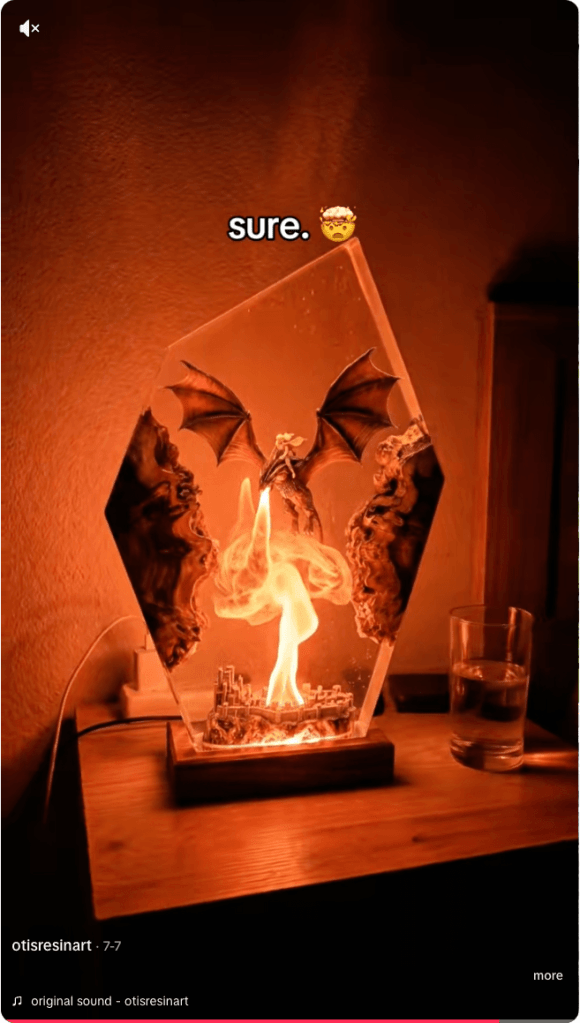
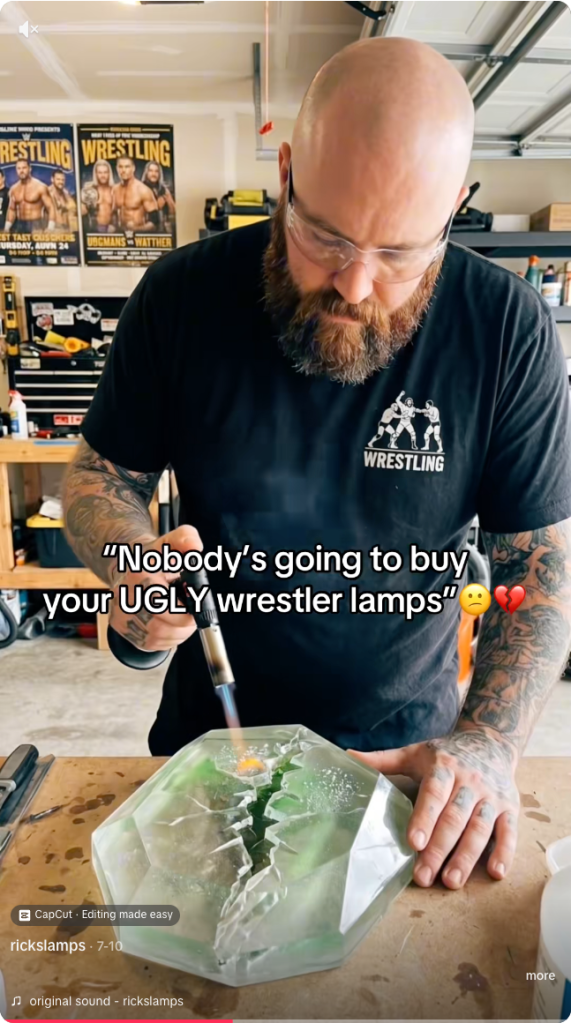
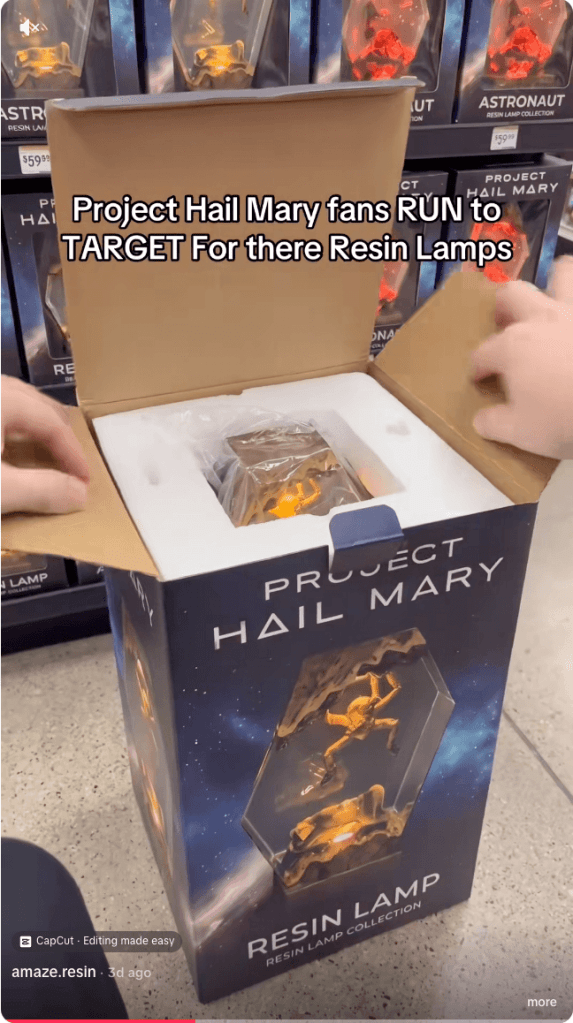
  • Fake resin art
  • Fake resin art
  • Fake resin art
  • Fake resin art
  • Fake resin art
  • Fake resin art

The scam is fairly straightforward. A TikTok account presents itself as a resin artist, posts satisfying videos, and invites people to “DM to order.” In some cases, the videos are stolen from other creators, the account has no real process footage, and the seller disappears after receiving payment.

One resin artist discovered that scammers were using their videos to impersonate them and scam TikTok users. They shared the following comment:

Ridiculous TikTok scammer…lol. Profile says they’re a resin artist and to DM them to order, but none of the videos are theirs. When I wrote to them asking them to take down the many videos of mine that they posted, passing them off as their own with no credit, their answer was that they aren’t a resin artist and are just sharing videos they like 🤣🤣 Literally about 1/4 of “their” videos are mine 🙄

These scams often rely on trust and urgency. The account may show polished clips of poured resin, finished coasters, trays, jewelry, or wall art, then push buyers to move the conversation into direct messages. Once the buyer moves to a different platform, the scammer typically requests a deposit, full payment, or personal details with little chance of being held accountable.

And real artists don’t just get their work ripped off. A scammer may contact a creator claiming to want to buy, feature, or license their work, but the real goal is to extract fees, banking information, or other sensitive data. Social media art scams are often repetitive because they are built from the same templates and scripts.

Script is similar across many videos in resin art scams
Different videos, same script

How to spot a TikTok resin art scam

The safest approach is the boring one: verify before you pay. If the artwork looks amazing but the seller’s identity is vague, the risk is real.

Check the TikTok account

Before ordering, look for signs that the artist is genuine:

  • The account didn’t appear overnight and has a history of original posts.
  • The same videos don’t appear under multiple creator names or belong to another artist.
  • The creator shows themselves making the artwork, with consistent process videos, a recognizable workspace, and works in progress.
  • The videos don’t contain obvious AI artifacts, such as impossible resin effects or objects moving after they’ve supposedly been sealed inside hardened resin.
  • Comments raising concerns haven’t been deleted or buried under generic praise.
  • The seller isn’t pushing you to order only through direct messages or asking for payment before you’ve verified who they are.

Check the website

If you do click through to a website, spend a few minutes checking it before you buy:

  • Look for a genuine returns and refunds policy, a physical business address, company or VAT details (where applicable), and consistent contact information.
  • Check how old the website is. Scam sites often use domains that were registered only weeks or months ago, especially when they claim to have been selling handmade products for years.
  • Search for recent independent reviews rather than relying on testimonials published on the site itself.
  • Run a reverse image search on the product photos to see whether they’ve been copied from another artist.
  • Only pay using a method that offers buyer protection, such as a credit card or PayPal. If a seller insists on a bank transfer, cryptocurrency, or another irreversible payment method, walk away.

Not every resin art account is a scam. Many belong to genuine artists, and that’s why impersonation scams can be so convincing.

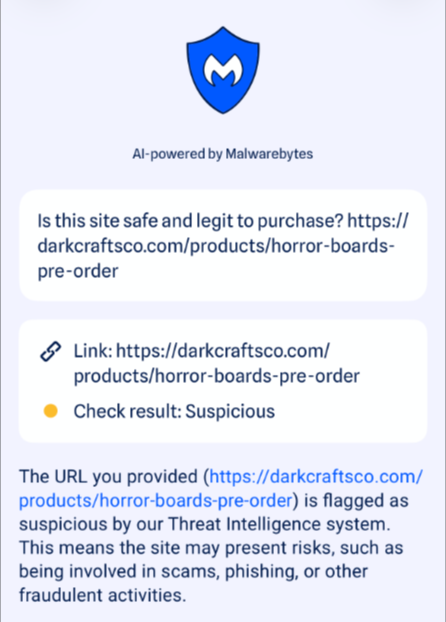
If you’re unsure, paste the website address into Malwarebytes Scam Guard and ask whether it shows signs of being fraudulent. It can help identify suspiciously new domains and other common scam indicators.

Use Malwarebytes Scam Guard to check whether a social media post or website is part of a scam.

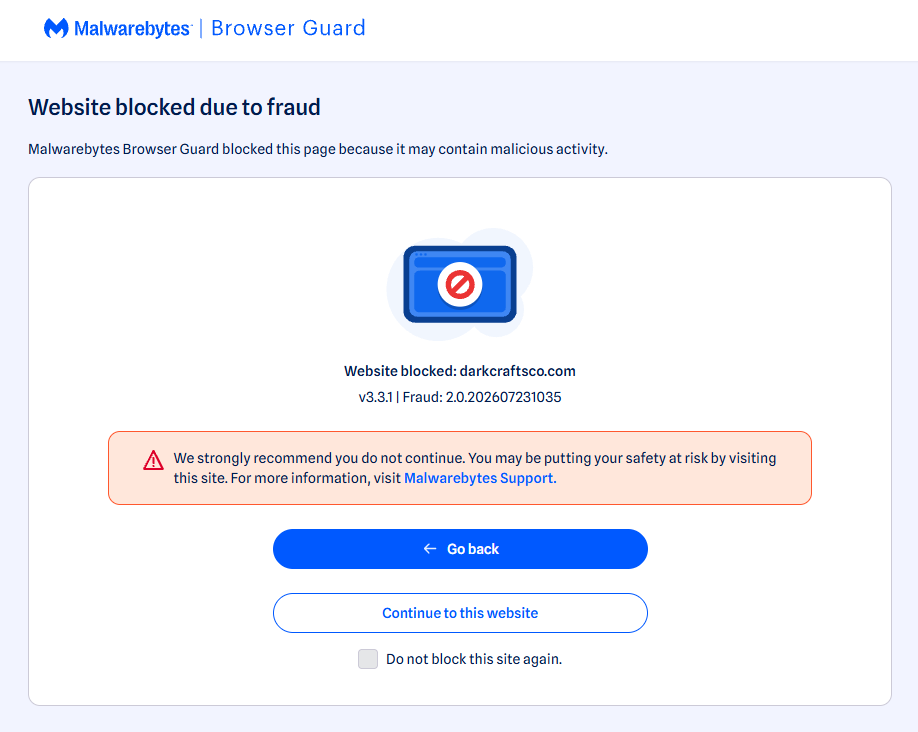
Use real-time web protection to block known fraudulent and malicious websites, like Browser Guard did for this web shop:

Browser Guard blocks the web shop due to likely fraud
Browser Guard blocks the fraudulent website

Both are free—making them much cheaper than sending money to a scammer.


Something feel off? Check it before you click.  

Malwarebytes Scam Guard helps you analyze suspicious links, texts, and screenshots instantly.  

Available with Malwarebytes Premium Security for all your devices, and in the Malwarebytes app for iOS and Android.  

Try it free → 

  •  

Don’t get fooled by TikTok resin art scams

Resin art has become a popular corner of TikTok, with some videos attracting millions of views. But not every glossy, colorful post is what it claims to be. Scammers are using the look of handmade resin art to trick buyers, collectors, and even fellow artists into sending money for work that either doesn’t exist or wasn’t created by the person posting it.

There are plenty of genuine resin artists on TikTok. Unfortunately, the platform has also attracted scammers who steal videos and impersonate legitimate creators.

  • Fake resin art
  • Fake resin art
  • Fake resin art
  • Fake resin art
  • Fake resin art
  • Fake resin art

The scam is fairly straightforward. A TikTok account presents itself as a resin artist, posts satisfying videos, and invites people to “DM to order.” In some cases, the videos are stolen from other creators, the account has no real process footage, and the seller disappears after receiving payment.

One resin artist discovered that scammers were using their videos to impersonate them and scam TikTok users. They shared the following comment:

Ridiculous TikTok scammer…lol. Profile says they’re a resin artist and to DM them to order, but none of the videos are theirs. When I wrote to them asking them to take down the many videos of mine that they posted, passing them off as their own with no credit, their answer was that they aren’t a resin artist and are just sharing videos they like 🤣🤣 Literally about 1/4 of “their” videos are mine 🙄

These scams often rely on trust and urgency. The account may show polished clips of poured resin, finished coasters, trays, jewelry, or wall art, then push buyers to move the conversation into direct messages. Once the buyer moves to a different platform, the scammer typically requests a deposit, full payment, or personal details with little chance of being held accountable.

And real artists don’t just get their work ripped off. A scammer may contact a creator claiming to want to buy, feature, or license their work, but the real goal is to extract fees, banking information, or other sensitive data. Social media art scams are often repetitive because they are built from the same templates and scripts.

Script is similar across many videos in resin art scams
Different videos, same script

How to spot a TikTok resin art scam

The safest approach is the boring one: verify before you pay. If the artwork looks amazing but the seller’s identity is vague, the risk is real.

Check the TikTok account

Before ordering, look for signs that the artist is genuine:

  • The account didn’t appear overnight and has a history of original posts.
  • The same videos don’t appear under multiple creator names or belong to another artist.
  • The creator shows themselves making the artwork, with consistent process videos, a recognizable workspace, and works in progress.
  • The videos don’t contain obvious AI artifacts, such as impossible resin effects or objects moving after they’ve supposedly been sealed inside hardened resin.
  • Comments raising concerns haven’t been deleted or buried under generic praise.
  • The seller isn’t pushing you to order only through direct messages or asking for payment before you’ve verified who they are.

Check the website

If you do click through to a website, spend a few minutes checking it before you buy:

  • Look for a genuine returns and refunds policy, a physical business address, company or VAT details (where applicable), and consistent contact information.
  • Check how old the website is. Scam sites often use domains that were registered only weeks or months ago, especially when they claim to have been selling handmade products for years.
  • Search for recent independent reviews rather than relying on testimonials published on the site itself.
  • Run a reverse image search on the product photos to see whether they’ve been copied from another artist.
  • Only pay using a method that offers buyer protection, such as a credit card or PayPal. If a seller insists on a bank transfer, cryptocurrency, or another irreversible payment method, walk away.

Not every resin art account is a scam. Many belong to genuine artists, and that’s why impersonation scams can be so convincing.

If you’re unsure, paste the website address into Malwarebytes Scam Guard and ask whether it shows signs of being fraudulent. It can help identify suspiciously new domains and other common scam indicators.

Use Malwarebytes Scam Guard to check whether a social media post or website is part of a scam.

Use real-time web protection to block known fraudulent and malicious websites, like Browser Guard did for this web shop:

Browser Guard blocks the web shop due to likely fraud
Browser Guard blocks the fraudulent website

Both are free—making them much cheaper than sending money to a scammer.


Something feel off? Check it before you click.  

Malwarebytes Scam Guard helps you analyze suspicious links, texts, and screenshots instantly.  

Available with Malwarebytes Premium Security for all your devices, and in the Malwarebytes app for iOS and Android.  

Try it free → 

  •  

How Google phone number verification works, and whether you should turn it off | Kaspersky official blog

Starting last year, Android users have been seeing the “number is now verified” system notification more frequently. And in some cases people even find mysterious outgoing text messages in their history that they never sent.

These messages often cause confusion and even anxiety: has a virus infected the phone? Are tech giants spying on our phone numbers? Let’s break down how this feature works, and what potential risks it poses to your privacy.

Why all these phone number verifications?

The notification pops up whenever Google’s phone number verification feature is triggered on your device.

Its main job is to make sure that the SIM card tied to a specific phone number is physically inside the phone. Once verified, that phone number automatically links to all active Google accounts on the device.

There are several key services that rely on the verification. Most importantly, it drives Rich Communication Services (RCS) — the modern standard for “rich” messaging right inside your standard text messaging app. It feels like a popular chat app, but without the need to install anything extra. Unlike iMessage, which is locked to Apple’s ecosystem, RCS works across compatible smartphones on various platforms since it’s an industry standard set by carriers rather than tech giants. Since recently, both Apple and Android users have been able to exchange RCS messages. For this feature to work in the Google Messages app, Google needs ongoing confirmation that your SIM card is active. If you pull out your SIM card, RCS chats will keep working for about eight days before turning off automatically.

According to Google, phone number verification serves several other purposes as well:

  • Account security and recovery. A verified phone number enables quick sign-ins to your Google account, two-factor authentication, and easy password recovery.
  • Emergency services and device location. This includes Find My Device, remote phone lock, and sharing your location with emergency responders — including via satellite messaging on the Pixel 9 and certain other modern smartphones.
  • Better sharing on Google. This feature helps other people find you faster on Google Meet or Duo, use Quick Share to send you files, and see that the phone number is linked to your profile.

Google also recently confirmed that this data is used to counter scams. Verification helps block calls or text messages from spoofed numbers if both the real owner of the number and the recipient are using Android devices with verified phone numbers.

How does Google verify phone numbers?

Phone number verification technology has been around on Android for quite some time — Google was sending test SMS messages as far back as in 2019. However, it became widely visible to most users following a Google system update in September 2025. The process was baked deeper into the operating system, with number verification now running by default during initial phone setup, and re-running periodically in the background.

There are two main technical methods for the verification process. Which one your device uses depends on your mobile carrier and your version of Android.

The older method relies on hidden text messages. In the background, your smartphone sends a specialized technical text message to Google’s servers. The operating system intercepts this message before you ever see it, which is why it rarely appears in your standard text messaging app. However, due to software glitches or Android customization quirks, these texts occasionally surface in sent messages, startling users. They typically look like this: “(string of letters and numbers) Google is re-verifying the phone# of this device.” Google explicitly notes in its help documentation that standard messaging rates from your carrier may apply.

In recent years, direct carrier verification (via carrier APIs) has become the primary verification method. This approach is more modern and secure than previous ones. The smartphone sends an encrypted token containing device and SIM card identifiers to the mobile carrier, and the carrier responds with the confirmed phone number. The whole process takes just a couple of seconds and runs completely unnoticed by the user. Both global telecom giants and smaller providers have connected to this verification network. Notably, third-party apps can also tap into the results of this check through Firebase Phone Number Verification, getting confirmation from your mobile carrier about which phone number is active on the device.

“Other device data” and privacy concerns

In its official documentation, Google notes that device identifiers and SIM card data may be collected during verification. In practice, this refers to unique identifiers for the SIM card and its subscriber profile (ICCID and IMSI), as well as technical device identifiers needed to run mobile networks. Google also explicitly states that it does not sell your personal information, including your phone number, to anyone.

Naturally, sending additional unique identifiers to Google — especially given the scale of its advertising business — always raises concern among privacy-conscious users. Here’s what you should keep in mind:

Metadata collection. To run RCS, Google exchanges data with your mobile carrier. Even when the content of RCS messages is encrypted, metadata — such as who is messaging whom and when — can still be stored on your carrier’s servers, and in some cases, on Google’s servers. As cybersecurity experts at the Electronic Frontier Foundation point out, if privacy is your top priority, you’re better off sticking to dedicated encrypted messaging apps.

Linked accounts. If you have both a personal and a work Google account (or a personal and a family account) set up on the same phone, the verified number will automatically link to both profiles. The operating system does not offer built-in tools to separate numbers for different accounts on a single device.

Phone number leaks. Apps on your device can already access various user identifiers, including your phone number. However, this verification system makes it easier to link multiple phone numbers to a user who has multiple Google accounts. And while Google states that it never sells phone numbers, you cannot say the same with confidence about obscure third-party Android developers.

On by default. The feature is enabled out of the box, and most users have no idea their device is silently querying their carrier in the background. While you can opt out in your Google settings once you notice it, there’s no guarantee that any data already collected will actually be deleted.

Turning off verification — why and how

For most users, verification is genuinely helpful. It simplifies account recovery, makes finding a lost phone easier, powers modern text messaging features, and assists emergency services when every second counts.

However, if you want to minimize the amount of metadata sent to Google, mobile carriers, and other data brokers, you can manually disable the feature. Here’s how:

  1. Open your Android smartphone’s settings.
  2. Tap Google, select the account at the top, and switch to the All services tab.
  3. Under Privacy and security, tap Phone number verification.
  4. Turn off automatic phone number verification.

If you also want to disable Better sharing on Google, go to SettingsGoogleManage your Google AccountPersonal infoContact infoPhone, select your number, and turn off the setting.

If you have multiple Google accounts on your phone, you’ll need to repeat these steps for each one. Unfortunately, verification sometimes turns itself back on automatically, and there’s no reliable way to prevent this on standard consumer phones with stock software.

Keep in mind that disabling verification means losing access to RCS chats in Google Messages — forcing you to fall back on basic SMS, or switch to alternative secure messaging apps. You also won’t be able to use that number for quick account recovery should you forget your password.

To thoughtfully customize your privacy settings across all your devices — regardless of the operating system, browser, or app — check out our free online tool, Privacy Checker.

Curious about other privacy risks you might not even know exist? Check out our other deep dives, here:

  •  
❌