Back when ransomware was just a startup industry, the primary goal of the attackers was simple: encrypt data, then extort a ransom in exchange for decrypting it. Because of this, cybercriminals mostly targeted commercial enterprises — companies that valued their data enough to justify a hefty payout. Schools and colleges were generally left alone — hackers assumed educators didn’t have the kind of data worth paying a ransom for.
But times have changed, and so has the ransomware groups’ business model. The focus has shifted from payment for decryption, to extortion in exchange for non-disclosure of stolen data. Now, the “incentive” to pay isn’t just about restoring the company’s normal operations, but rather avoiding regulatory trouble, potential lawsuits, and reputational damage. And it’s this shift that’s put educational institutions in the crosshairs.
In this post, we discuss several cases of ransomware attacks on educational organizations, why they took place, and how to keep cybercriminals out of the classroom.
Attacks on educational institutions in 2025–2026
In February 2026, the Sapienza University of Rome, one of Europe’s oldest and largest higher education institutions, suffered a ransomware attack. Internal systems were down for three days. According to sources familiar with the incident, the cybercriminals sent the university’s administration a link leading to a ransom demand. Upon clicking the link, a countdown timer started on the site that opened — counting down from 72 hours: the time the attackers demands needed to be met. As of now, there’s still no word on whether the university administration paid up or not.
Unfortunately, this case isn’t an exception. At the very end of 2025, attackers targeted another Italian educational institution — a vocational training center in the small city of Treviso. Things aren’t looking much better in the UK, either: in the same year, Blacon High School was hit by ransomware. Its administration had to shut its doors for two days to restore its IT systems, assess the scale of the incident, and prevent the attack from spreading further through the network.
In fact, a UK government study suggests these incidents are just part of a broader trend. According to its 2025 data, cyberincidents hit 60% of secondary schools, 85% of colleges, and 91% of universities. Across the pond, American researchers also noted that in the first quarter of 2025, ransomware attacks in the global education sector surged by 69% year on year. Clearly, the trend is global.
Why schools and universities are becoming easy targets
The core of the problem is that modern educational organizations are rapidly incorporating digital services into their operations. A typical school or university infrastructure now manages a dizzying array of services:
Electronic gradebooks and registers
Distance learning platforms
Admission systems and databases for storing applicants’ personal data
Cloud storage for educational materials
Internal staff and student portals
Email for faculty, students, and the administration to communicate
While these systems make education more convenient and manageable, they also drastically expand the attack surface. Every new service and every additional user account is a potential doorway for a phishing campaign, access compromise, or a personal data leak.
According to a UK study, the primary vector for these attacks is basic phishing. But that’s not all that surprising: since the education sector was off the cybercriminals’ radar for so long, cybersecurity training for both staff and students was hardly a priority. As a result, even the most seasoned professors can find themselves falling for a fake email purportedly sent by the “dean” or the “school principal”.
But it’s not just the faculty. Students themselves often unwittingly act as mules for malware. In many institutions, students still frequently hand in assignments on USB flash drives. These drives travel across various home or public devices, picking up malicious digital hitchhikers along the way. All it takes is one infected USB drive plugged into a campus workstation to give an attacker a foothold in the internal network.
It’s worth noting that while USB drives aren’t as ubiquitous as they were a decade ago, they remain a staple in the educational environment. Dismissing the threats they carry isn’t a good idea.
How to ensure the cybersecurity of educational infrastructure
Let’s face it: training every literature and biology teacher to spot phishing emails is now easy, quick task. Similarly, the educational system isn’t going to cut down on USB usage overnight.
Fortunately, a robust security solution (such as Kaspersky Small Office Security) can do the heavy lifting for you. It’s ideal for schools and colleges that need set-it-and-forget-it protection without a steep learning curve. Plus, it’s affordable even for institutions operating on a tight budget, and doesn’t require constant management.
At the same time, Kaspersky Small Office Security addresses all the threats we’ve discussed above: it blocks clicks on phishing links, automatically scans USB drives the moment they’re plugged in, and prevents suspicious files from executing on devices connected to the school’s network.
Following its emergence in August 2023, Tycoon2FA rapidly became one of the most widespread phishing-as-a-service (PhaaS) platforms, enabling campaigns responsible for tens of millions of phishing messages reaching over 500,000 organizations each month worldwide. The phishing kit—developed, supported, and advertised by the threat actor tracked by Microsoft Threat Intelligence as Storm-1747—provided adversary-in-the-middle (AiTM) capabilities that allowed even less skilled threat actors to bypass multifactor authentication (MFA), significantly lowering the barrier to conducting account compromise at scale.
Figure 1. Monthly volume of Tycoon2FA-related phishing messages
Tycoon2FA’s platform enabled threat actors to impersonate trusted brands by mimicking sign-in pages for services like Microsoft 365, OneDrive, Outlook, SharePoint, and Gmail. It also allowed threat actors using its service to establish persistence and to access sensitive information even after passwords are reset, unless active sessions and tokens were explicitly revoked. This worked by intercepting session cookies generated during the authentication process, simultaneously capturing user credentials. The MFA codes were subsequently relayed through Tycoon2FA’s proxy servers to the authenticating service.
To evade detection, Tycoon2FA used techniques like anti-bot screening, browser fingerprinting, heavy code obfuscation, self-hosted CAPTCHAs, custom JavaScript, and dynamic decoy pages. Targets are often lured through phishing emails containing attachments like .svg, .pdf, .html, or .docx files, often embedded with QR codes or JavaScript.
This blog provides a comprehensive up-to-date analysis of Tycoon2FA’s progression and scale. We share specific examples of the Tycoon2FA service panel, including a detailed analysis of Tycoon2FA infrastructure. Defending against Tycoon2FA and similar AiTM phishing threats requires a layered approach that blends technical controls with user awareness. This blog also provides Microsoft Defender detection and hunting guidance, as well as resources on how to set up mail flow rules, enforce spoof protections, and configure third-party connectors to prevent spoofed phishing messages from reaching user inboxes.
Tycoon2FA phishing services were advertised and sold to cybercriminals on applications like Telegram and Signal. Phish kits were observed to start at $120 USD for access to the panel for 10 days and $350 for access to the panel for a month, but these prices could vary.
Tycoon2FA is operated through a web‑based administration panel provided on a per user basis that centrally integrates all functionality provided by the Tycoon 2FA PhaaS platform. The panel serves as a single dashboard for configuring, tracking, and refining campaigns. While it does not include built‑in mailer capabilities, the panel provides the core components needed to support phishing campaigns. This includes pre‑built templates, attachment files for common lure formats, domain and hosting configuration, redirect logic, and victim tracking. This design makes the platform accessible to less technically skilled actors while still offering sufficient flexibility for more experienced operators.
Figure 2. Tycoon2FA admin panel sign-in screen
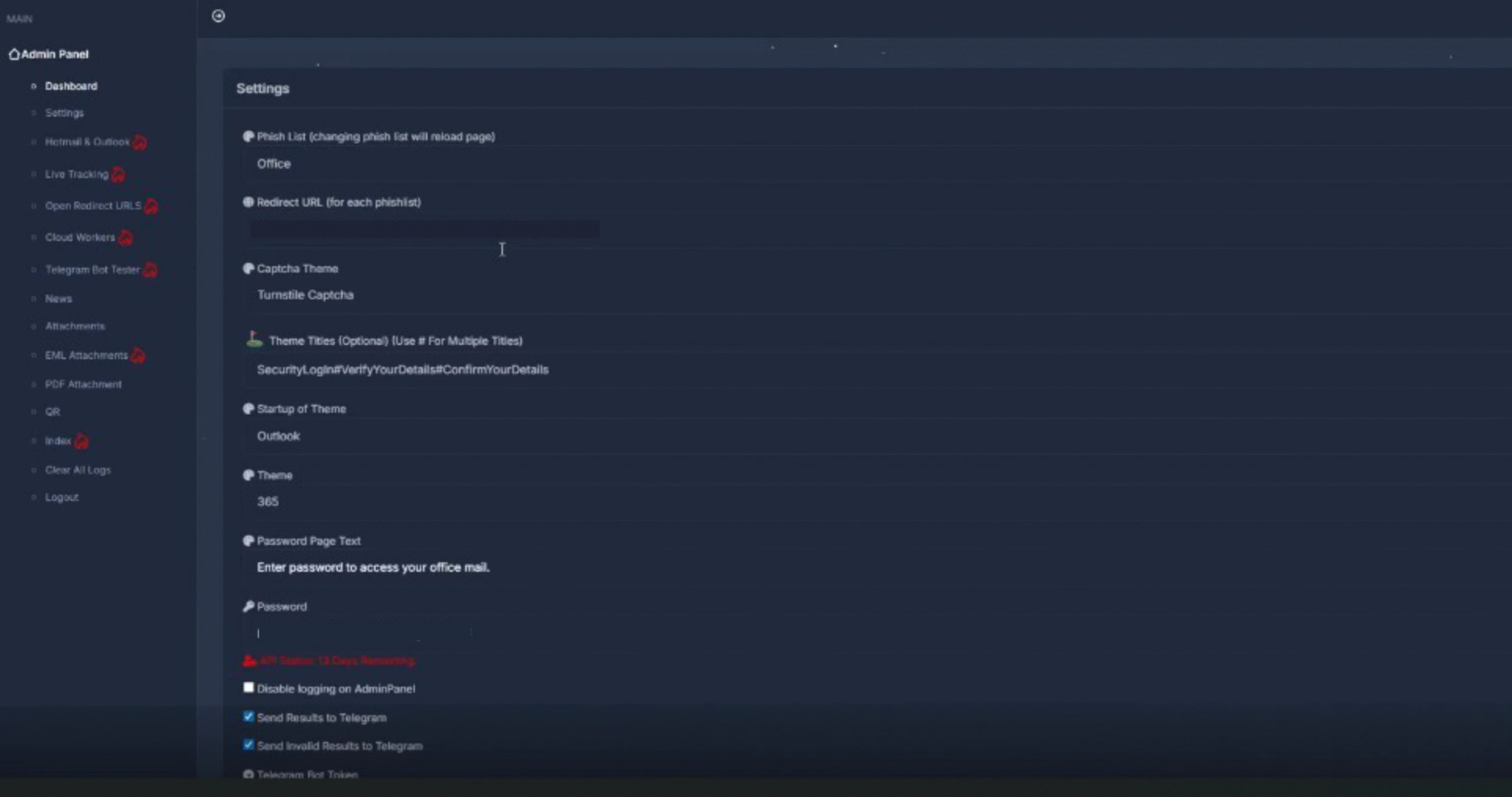
After signing in, Tycoon2FA customers are presented with a dashboard used to configure, monitor, and manage phishing campaigns. Campaign operators can configure a broad set of campaign parameters that control how phishing content is delivered and presented to targets. Key settings include lure template selection and branding customization, redirection routing, MFA interception behavior, CAPTCHA appearance and logic, attachment generation, and exfiltration configuration. Campaign operators can choose from highly configurable landing pages and sign-in themes that impersonate widely trusted services such as Microsoft 365, Outlook, SharePoint, OneDrive, and Google, increasing the perceived legitimacy of attacks.
Figure 3. Phishing page theme selection and configuration settings
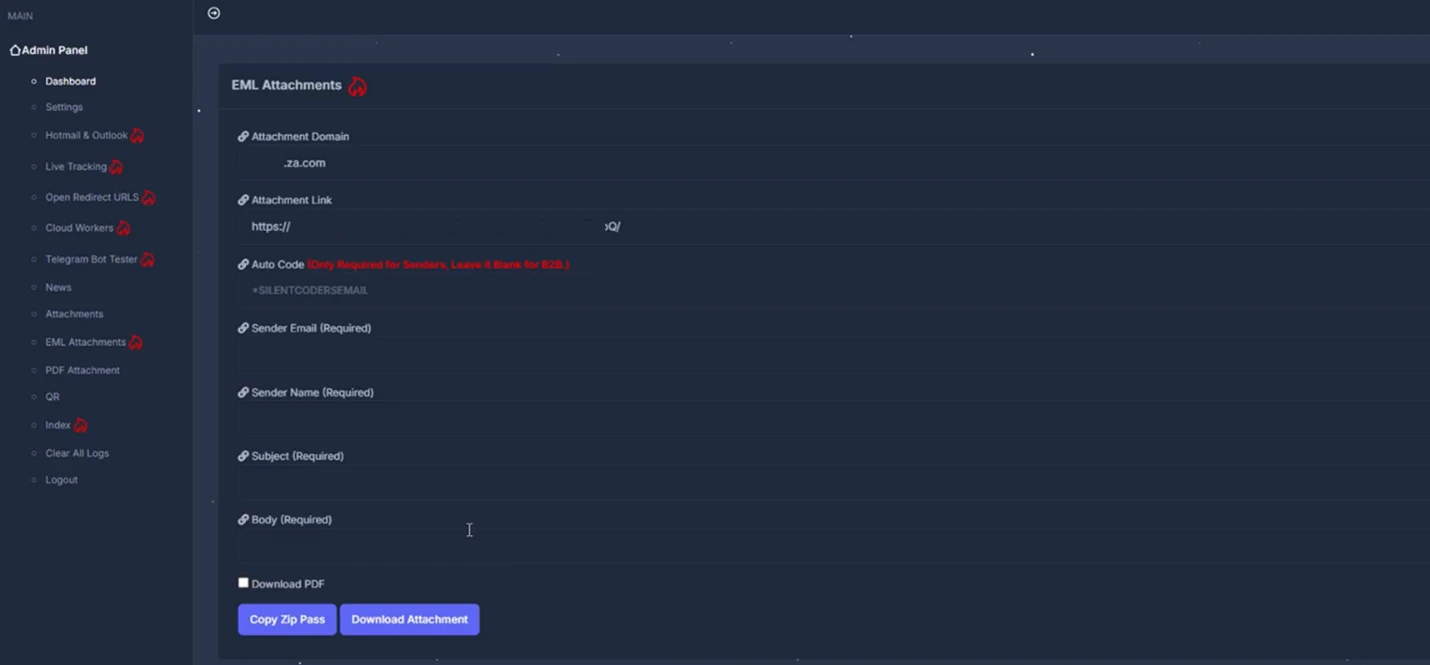
Campaign operators can also configure how the malicious content is delivered through attachments. Options include generating EML files, PDFs, and QR codes, offering multiple ways to package and distribute phishing lures.
Figure 4. Malicious attachment options
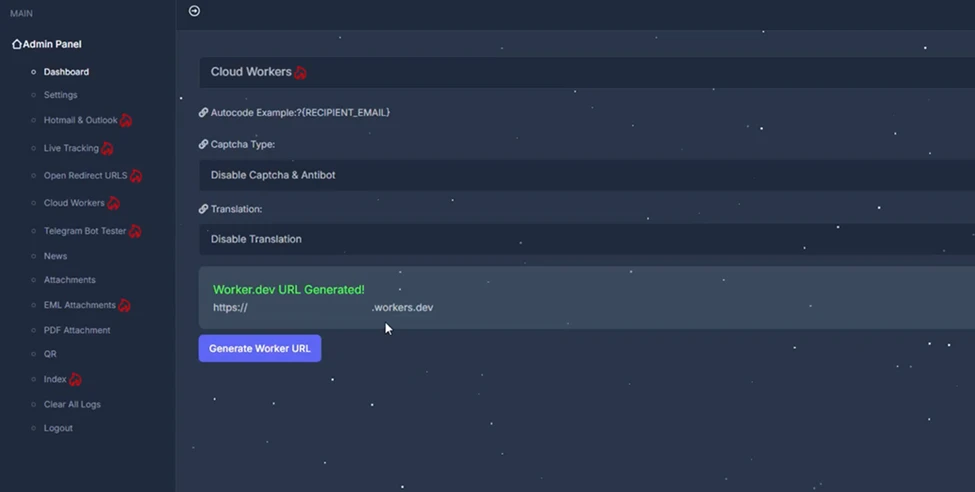
The panel also allows operators to manage redirect chains and routing logic, including the use of intermediate pages and decoy destinations. Support for automated subdomain rotation and intermediary Cloudflare Workers-based URLs enables campaigns to adapt quickly as infrastructure is identified or blocked. The following is a visual example of redirect and routing options, including intermediate pages and decoy destinations used within a phishing campaign.
Figure 5. Redirect chain and routing configuration
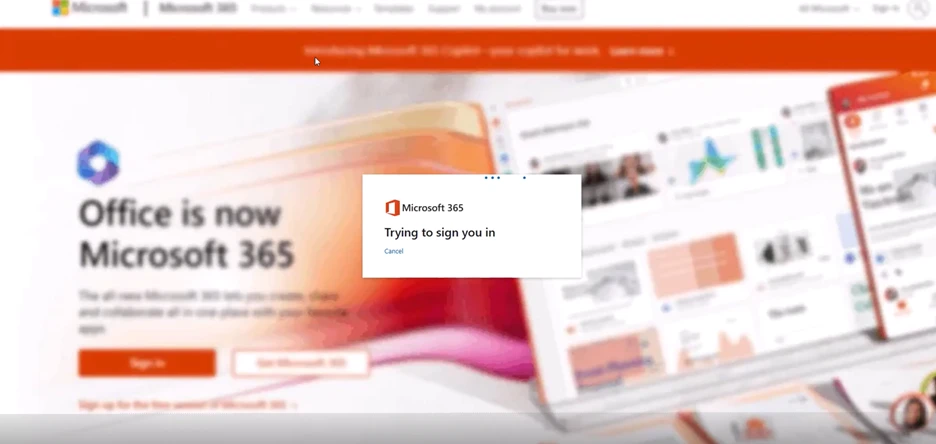
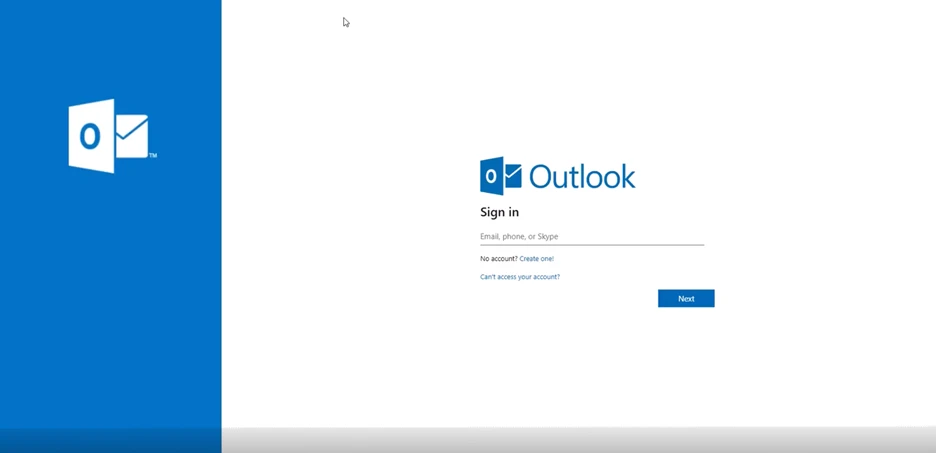
Once configured, these settings control the appearance and behavior of the phishing pages delivered to targets. The following examples show how selected themes (Microsoft 365 and Outlook) are rendered as legitimate-looking sign-in pages presented to targets.
Figure 6. Sample Tycoon2FA phishing pages
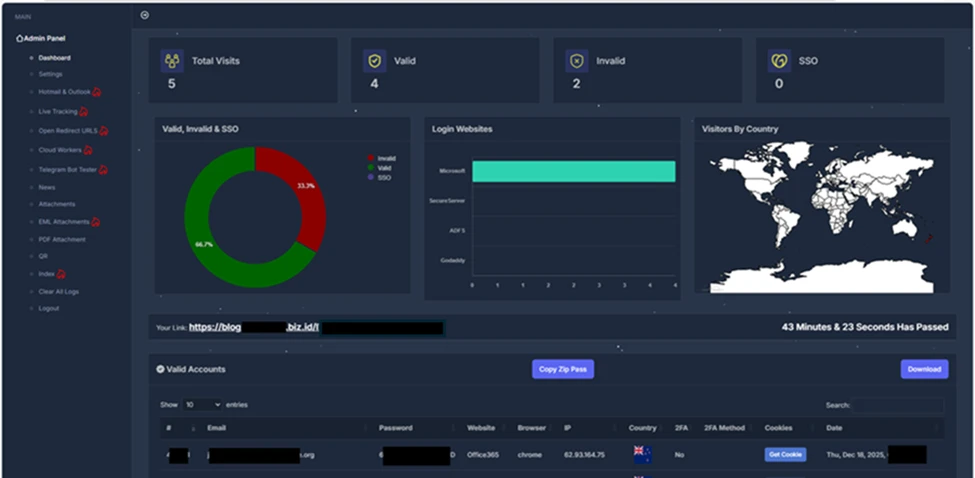
Beyond campaign configuration, the panel provides detailed visibility into victim interaction and authentication outcomes. Operators can track valid and invalid sign-in attempts, MFA usage, and session cookie capture, with victim data organized by attributes such as targeted service, browser, location, and authentication status. Captured credentials and session cookies can be viewed or downloaded directly within the panel and/or forwarded to Telegram for near‑real‑time monitoring. The following image shows a summary view of victim account outcomes for threat actors to review and track.
Figure 7. Tycoon2FA panel dashboard
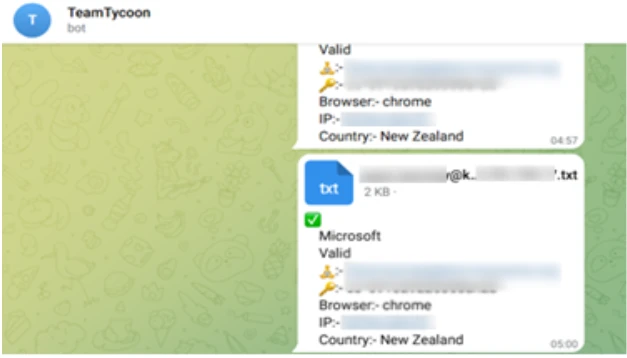
Captured session information including account attributes, browsers and location metadata, and authentication artifacts are exfiltrated through Telegram bot.
Figure 8. Exfiltrated session information
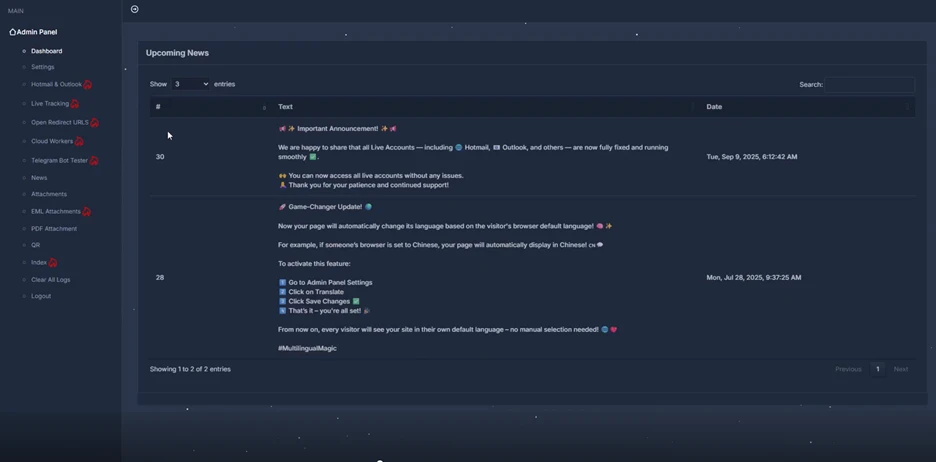
In addition to configuration and campaign management features, the panel includes a section for announcements and updates related to the service. These updates reflect regular maintenance and ongoing changes, indicating that the service continues to evolve.
Figure 9. Tycoon2FA announcement and update panel
By combining centralized configuration, real-time visibility, and regular platform updates, the service enables scalable AiTM phishing operations that can adapt quickly to defensive measures. This balance of usability, adaptability, and sustained development has contributed to Tycoon2FA’s adoption across a wide range of campaigns.
Tycoon2FA infrastructure
Tycoon2FA’s infrastructure has shifted from static, high-entropy domains to a fast-moving ecosystem with diverse top-level domains (TLDs) and short-lived (often 24-72 hours) fully qualified domain names (FQDNs), with the majority hosted on Cloudflare. A key change is the move toward a broader mix of TLDs. Early tracking showed heavier use of regional TLDs like .es and .ru, but recent campaigns increasingly rotated across inexpensive generic TLDs that require little to no identity verification. Examples include .space, .email, .solutions, .live, .today, and .calendar, as well as second-level domains such as .sa[.]com, .in[.]net, and .com[.]de.
Tycoon2FA generated large numbers of subdomains for individual phishing campaigns, used them briefly, then dropped them and spun up new ones. Parent root domains might remain registered for weeks or months, but nearly all campaign-specific FQDNs were temporary. The rapid turnover complicated detection efforts, such as building reliable blocklists or relying on reputation-based defenses.
Subdomain patterns have also shifted toward more readable formats. Instead of high entropy or algorithmically generated strings, like those used in July 2025, newly observed subdomains used recognizable words tied to common workflows or services, like those observed in December 2025.
Some subdomains resembled everyday processes or tech terms like cloud, desktop, application, and survey, while others echoed developer or admin vocabulary like python, terminal, xml, and faq. Software as a service (SaaS) brand names have appeared in subdomains as well, such as docker, zendesk, azure, microsoft, sharepoint, onedrive, and nordvpn. This shift was likely used to reduce user suspicion and to evade detection models that rely on entropy or string irregularity.
Tycoon2FA’s success stemmed from closely mimicking legitimate authentication processes while covertly intercepting both user credentials and session tokens, granting attackers full access to targeted accounts. Tycoon2FA operators could bypass nearly all commonly deployed MFA methods, including SMS codes, one-time passcodes, and push notifications. The attack chain was typical yet highly effective and started with phishing the user through email, followed by a multilayer redirect chain, then a spoofed sign-in page with AiTM relay, and authentication relay culminating in token theft.
Tycoon2FA phishing emails
In observed campaigns, threat actors gained initial access through phishing emails that used either embedded links or malicious attachments. Most of Tycoon2FA’s lures fell into four categories:
PDF or DOC/DOCX attachments with QR codes
SVG files containing embedded redirect logic
HTML attachments with short messages
Redirect links that appear to come from trusted services
Email lures were crafted from ready-made templates that impersonated trusted business applications like Microsoft 365, Azure, Okta, OneDrive, Docusign, and SharePoint. These templates spanned themes from generic notifications (like voicemail and shared document access) to targeted workflows (like human resources (HR) updates, corporate documents, and financial statements). In addition to spoofing trusted brands, phishing emails often leveraged compromised accounts with existing threads to increase legitimacy.
While Tycoon2FA supplied hosting infrastructures, along with various phishing and landing page related templates, email distribution was not provided by the service.
Defense evasion
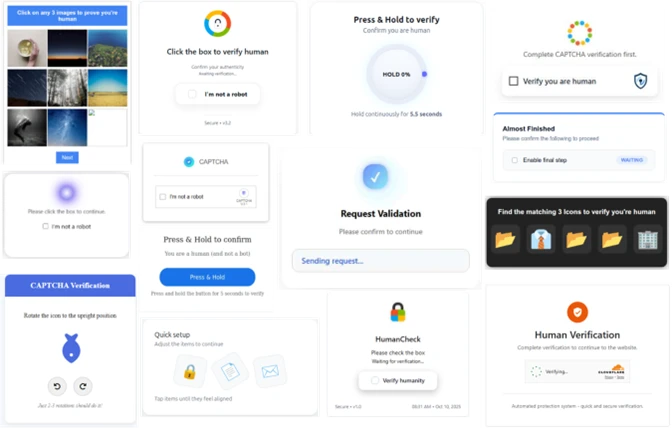
From a defense standpoint, Tycoon2FA stood out for its continuously updated evasion and attack techniques. A defining feature was the use of constantly changing custom CAPTCHA pages that regenerated frequently and varied across campaigns. As a result, static signatures and narrowly scoped detection logic became less effective over time. Before credentials were entered, targets encounter the custom CAPTCHA challenge, which was designed to block automated scanners and ensure real users reach the phishing content. These challenges often used randomized HTML5 canvas elements, making them hard to bypass with automation. While Cloudflare Turnstile was once the primary CAPTCHA, Tycoon2FA shifted to using a rotating set of custom CAPTCHA challenges. The CAPTCHA acted as a gate in the flow, legitimizing the process and nudging the target to continue.
Figure 10. Custom CAPTCHA pages observed on Tycoon2FA domains
After the CAPTCHA challenge, the user was shown a dynamically generated sign-in portal that mirrored the targeted service’s branding and authentication flow, most often Microsoft or Gmail. The page might even include company branding to enhance legitimacy. When the user submitted credentials, Tycoon2FA immediately relayed them to the real service, triggering the genuine MFA challenge. The phishing page then displayed the same MFA prompt (for example, number matching or code entry). Once the user completed MFA, the attacker captured the session cookie and gained real-time access without needing further authentication, even if the password was changed later. These pages were created with heavily obfuscated and randomized JavaScript and HTML, designed to evade signature-based detection and other security tools.
The phishing kit also disrupted analysis through obfuscation and dynamic code generation, including nonfunctional dead code, to defeat consistent fingerprinting. When the campaign infrastructure encountered an unexpected or invalid server response (for example, a geolocation outside the allowed targeting zone), the kit replaced phishing content with a decoy page or a benign redirect to avoid exposing the live credential phishing site.
Tycoon2FA further complicated investigation by actively checking for analysis of environments or browser automation and adjusting page behavior if detected. These evasive measures included:
Intercepting user input
Keystroke monitoring
Blocking copy/paste and right click functions
Detecting or blocking automated inspection
Automation tools (for example, PhantomJS, Burp Suite)
Disabling common developer tool shortcuts
Validating and filtering incoming traffic
Browser fingerprinting
Datacenter IP filtering
Geolocation restrictions
Suspicious user agent profiling
Increased obfuscation
Encoded content (Base64, Base91)
Fragmented or concatenated strings
Invisible Unicode characters
Layered URL/URI encoding
Dead or nonfunctional script
If analysis was suspected at any point, the kit redirected to a legitimate decoy site or threw a 404 error.
Complementing these anti-analysis measures, Tycoon2FA used increasingly complex redirect logic. Instead of sending victims directly to the phishing page, it chained multiple intermediate hosts, such as Azure Blob Storage, Firebase, Wix, TikTok, or Google resources, to lend legitimacy to the redirect path. Recent changes combined these redirect chains with encoded Uniform Resource Identifier (URI) strings that obscured full URL paths and landing points, frustrating both static URL extraction and detonation attempts. Stacked together, these tactics made Tycoon2FA a resilient, fast-moving system that evaded both automated and manual detection efforts.
Credential theft and account access
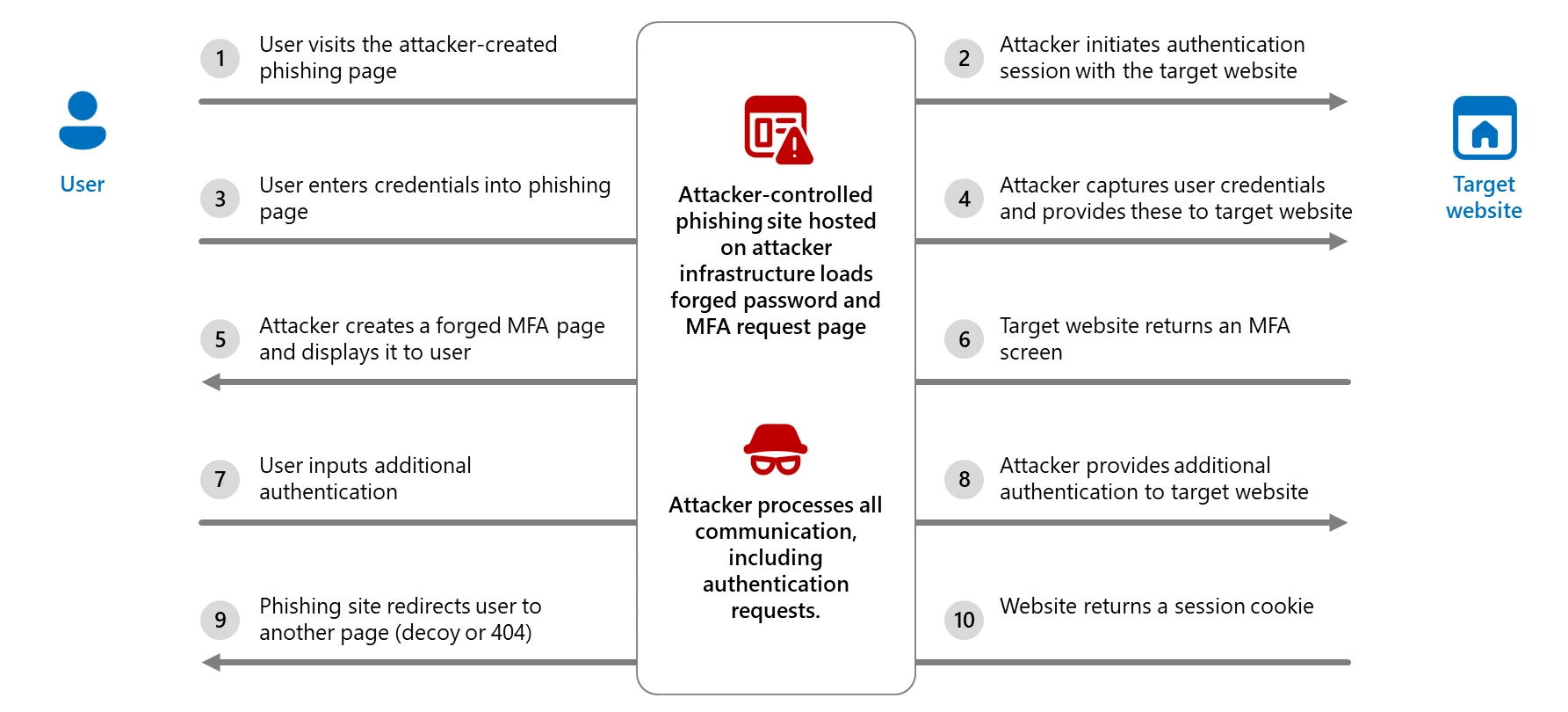
Captured credentials and session tokens were exfiltrated over encrypted channels, often via Telegram bots. Attackers could then access sensitive data and establish persistence by modifying mailbox rules, registering new authenticator apps, or launching follow-on phishing campaigns from compromised accounts. The following diagram breaks down the AiTM process.
Figure 11. AiTM authentication process
Tycoon2FA illustrated the evolution of phishing kits in response to rising enterprise defenses, adapting its lures, infrastructure, and evasion techniques to stay ahead of detection. As organizations increasingly adopt MFA, attackers are shifting to tools that target the authentication process itself instead of attempting to circumvent it. Coupled with affordability, scalability, and ease of use, Tycoon2FA posed a persistent and significant threat to both consumer and enterprise accounts, especially those that rely on MFA as a primary safeguard.
Mitigation and protection guidance
Mitigating threats from phishing actors begins with securing user identity by eliminating traditional credentials and adopting passwordless, phishing-resistant MFA methods such as FIDO2 security keys, Windows Hello for Business, and Microsoft Authenticator passkeys.
If Microsoft Defender alerts indicate suspicious activity or confirmed compromised account or a system, it’s essential to act quickly and thoroughly. The following are recommended remediation steps for each affected identity:
Reset credentials – Immediately reset the account’s password and revoke any active sessions or tokens. This ensures that any stolen credentials can no longer be used.
Re-register or remove MFA devices – Review users’ MFA devices, specifically those recently added or updated.
Revert unauthorized payroll or financial changes – If the attacker modified payroll or financial configurations, such as direct deposit details, revert them to their original state and notify the appropriate internal teams.
Remove malicious inbox rules – Attackers often create inbox rules to hide their activity or forward sensitive data. Review and delete any suspicious or unauthorized rules.
Verify MFA reconfiguration – Confirm that the user has successfully reconfigured MFA and that the new setup uses secure, phishing-resistant methods.
To defend against the wide range of phishing threats, Microsoft Threat Intelligence recommends the following mitigation steps:
Configure Microsoft Defender for Office 365 to recheck links on click. Safe Links provides URL scanning and rewriting of inbound email messages in mail flow, and time-of-click verification of URLs and links in email messages, other Microsoft 365 applications such as Teams, and other locations such as SharePoint Online. Safe Links scanning occurs in addition to the regular anti-spam and anti-malware protection in inbound email messages in Microsoft Exchange Online Protection (EOP). Safe Links scanning can help protect your organization from malicious links used in phishing and other attacks.
Turn on Zero-hour auto purge (ZAP) in Defender for Office 365 to quarantine sent mail in response to newly-acquired threat intelligence and retroactively neutralize malicious phishing, spam, or malware messages that have already been delivered to mailboxes.
Encourage users to use Microsoft Edge and other web browsers that support Microsoft Defender SmartScreen, which identifies and blocks malicious websites, including phishing sites, scam sites, and sites that host malware.
Turn on cloud-delivered protection in Microsoft Defender Antivirus or the equivalent for your antivirus product to cover rapidly evolving attack tools and techniques. Cloud-based machine learning protections block a majority of new and unknown variants
Use the Attack Simulator in Microsoft Defender for Office 365 to run realistic, yet safe, simulated phishing and password attack campaigns. Run spear-phishing (credential harvest) simulations to train end-users against clicking URLs in unsolicited messages and disclosing credentials.
Configure automatic attack disruption in Microsoft Defender XDR. Automatic attack disruption is designed to contain attacks in progress, limit the impact on an organization’s assets, and provide more time for security teams to remediate the attack fully.
Microsoft Defender customers can refer to the list of applicable detections below. Microsoft Defender coordinates detection, prevention, investigation, and response across endpoints, identities, email, apps to provide integrated protection against attacks like the threat discussed in this blog.
Customers with provisioned access can also use Microsoft Security Copilot in Microsoft Defender to investigate and respond to incidents, hunt for threats, and protect their organization with relevant threat intelligence.
The following alerts might indicate threat activity associated with this threat. These alerts, however, can be triggered by unrelated threat activity and are not monitored in the status cards provided with this report.
Tactic
Observed activity
Microsoft Defender coverage
Initial access
Threat actor gains access to account through phishing
Microsoft Defender for Office 365 – A potentially malicious URL click was detected – Email messages containing malicious file removed after delivery – Email messages containing malicious URL removed after delivery – Email messages from a campaign removed after delivery. – Email messages removed after delivery – Email reported by user as malware or phish – A user clicked through to a potentially malicious URL – Suspicious email sending patterns detected
Microsoft Defender XDR – User compromised in AiTM phishing attack – Authentication request from AiTM-related phishing page – Risky sign-in after clicking a possible AiTM phishing URL – Successful network connection to IP associated with an AiTM phishing kit – Successful network connection to a known AiTM phishing kit – Suspicious network connection to a known AiTM phishing kit – Possible compromise of user credentials through an AiTM phishing attack – Potential user compromise via AiTM phishing attack – AiTM phishing attack results in user account compromise – Possible AiTM attempt based on suspicious sign-in attributes – User signed in to a known AiTM phishing page
Defense evasion
Threat actors create an inbox rule post-compromise
Threat actors use AiTM to support follow-on behaviors
Microsoft Defender for Endpoint – Suspicious activity likely indicative of a connection to an adversary-in-the-middle (AiTM) phishing site
Additionally, using Microsoft Defender for Cloud Apps connectors, Microsoft Defender XDR raises AiTM-related alerts in multiple scenarios. For Microsoft Entra ID customers using Microsoft Edge, attempts by attackers to replay session cookies to access cloud applications are detected by Microsoft Defender XDR through Defender for Cloud Apps connectors for Microsoft Office 365 and Azure. In such scenarios, Microsoft Defender XDR raises the following alerts:
Stolen session cookie was used
User compromised through session cookie hijack
Microsoft Defender XDR raises the following alerts by combining Microsoft Defender for Office 365 URL click and Microsoft Entra ID Protection risky sign-ins signal.
Possible AiTM phishing attempt
Risky sign-in attempt after clicking a possible AiTM phishing URL
Microsoft Security Copilot
Microsoft Security Copilot is embedded in Microsoft Defender and provides security teams with AI-powered capabilities to summarize incidents, analyze files and scripts, summarize identities, use guided responses, and generate device summaries, hunting queries, and incident reports.
Security Copilot is also available as a standalone experience where customers can perform specific security-related tasks, such as incident investigation, user analysis, and vulnerability impact assessment. In addition, Security Copilot offers developer scenarios that allow customers to build, test, publish, and integrate AI agents and plugins to meet unique security needs.
Threat intelligence reports
Microsoft Defender XDR customers can use the following threat analytics reports in the Defender portal (requires license for at least one Defender XDR product) to get the most up-to-date information about the threat actor, malicious activity, and techniques discussed in this blog. These reports provide intelligence, protection information, and recommended actions to prevent, mitigate, or respond to associated threats found in customer environments:
Microsoft Security Copilot customers can also use the Microsoft Security Copilot integration in Microsoft Defender Threat Intelligence, either in the Security Copilot standalone portal or in the embedded experience in the Microsoft Defender portal to get more information about this threat actor.
Advanced hunting
Microsoft Defender customers can run the following advanced hunting queries to find activity associated with Tycoon2FA.
Suspicious sign-in attempts
Find identities potentially compromised by AiTM attacks:
AADSignInEventsBeta
| where Timestamp > ago(7d)
| where IsManaged != 1
| where IsCompliant != 1
//Filtering only for medium and high risk sign-in
| where RiskLevelDuringSignIn in (50, 100)
| where ClientAppUsed == "Browser"
| where isempty(DeviceTrustType)
| where isnotempty(State) or isnotempty(Country) or isnotempty(City)
| where isnotempty(IPAddress)
| where isnotempty(AccountObjectId)
| where isempty(DeviceName)
| where isempty(AadDeviceId)
| project Timestamp,IPAddress, AccountObjectId, ApplicationId, SessionId, RiskLevelDuringSignIn, Browser
Suspicious URL clicks from emails
Look for any suspicious URL clicks from emails by a user before their risky sign-in:
UrlClickEvents
| where Timestamp between (start .. end) //Timestamp around time proximity of Risky signin by user
| where AccountUpn has "" and ActionType has "ClickAllowed"
| project Timestamp,Url,NetworkMessageId
To hear stories and insights from the Microsoft Threat Intelligence community about the ever-evolving threat landscape, listen to the Microsoft Threat Intelligence podcast.
In 2022, we dived deep into an attack method called browser-in-the-browser — originally developed by the cybersecurity researcher known as mr.d0x. Back then, no actual examples existed of this model being used in the wild. Fast-forward four years, and browser-in-the-browser attacks have graduated from the theoretical to the real: attackers are now using them in the field. In this post, we revisit what exactly a browser-in-the-browser attack is, show how hackers are deploying it, and, most importantly, explain how to keep yourself from becoming its next victim.
What is a browser-in-the-browser (BitB) attack?
For starters, let’s refresh our memories on what mr.d0x actually cooked up. The core of the attack stems from his observation of just how advanced modern web development tools — HTML, CSS, JavaScript, and the like — have become. It’s this realization that inspired the researcher to come up with a particularly elaborate phishing model.
A browser-in-the-browser attack is a sophisticated form of phishing that uses web design to craft fraudulent websites imitating login windows for well-known services like Microsoft, Google, Facebook, or Apple that look just like the real thing. The researcher’s concept involves an attacker building a legitimate-looking site to lure in victims. Once there, users can’t leave comments or make purchases unless they “sign in” first.
Signing in seems easy enough: just click the Sign in with {popular service name} button. And this is where things get interesting: instead of a genuine authentication page provided by the legitimate service, the user gets a fake form rendered inside the malicious site, looking exactly like… a browser pop-up. Furthermore, the address bar in the pop-up, also rendered by the attackers, displays a perfectly legitimate URL. Even a close inspection won’t reveal the trick.
From there, the unsuspecting user enters their credentials for Microsoft, Google, Facebook, or Apple into this rendered window, and those details go straight to the cybercriminals. For a while this scheme remained a theoretical experiment by the security researcher. Now — real-world attackers have added it to their arsenals.
Facebook credential theft
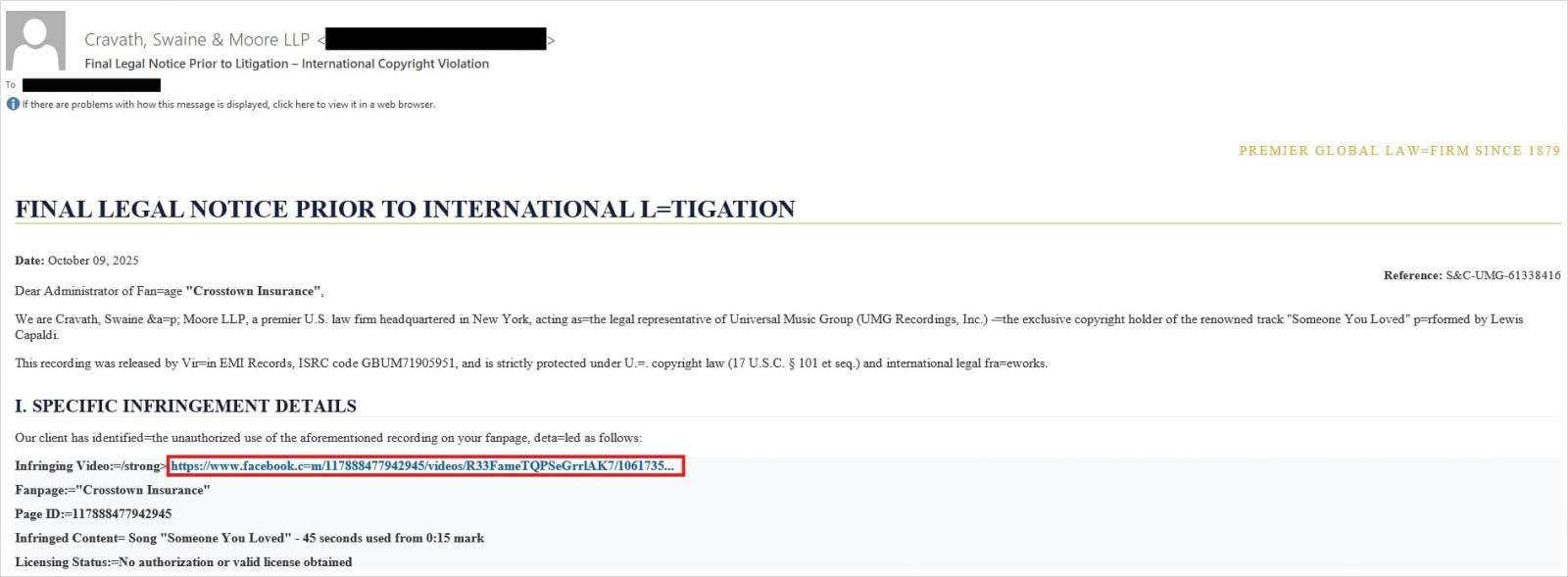
Attackers have put their own spin on mr.d0x’s original concept: recent browser-in-the-browser hits have been kicking off with emails designed to alarm recipients. For instance, one phishing campaign posed as a law firm informing the user they’d committed a copyright violation by posting something on Facebook. The message included a credible-looking link allegedly to the offending post.
Attackers sent messages on behalf of a fake law firm alleging copyright infringement — complete with a link supposedly to the problematic Facebook post. Source
Interestingly, to lower the victim’s guard, clicking the link didn’t immediately open a fake Facebook login page. Instead, they were first greeted by a bogus Meta CAPTCHA. Only after passing it was the victim presented with the fake authentication pop-up.
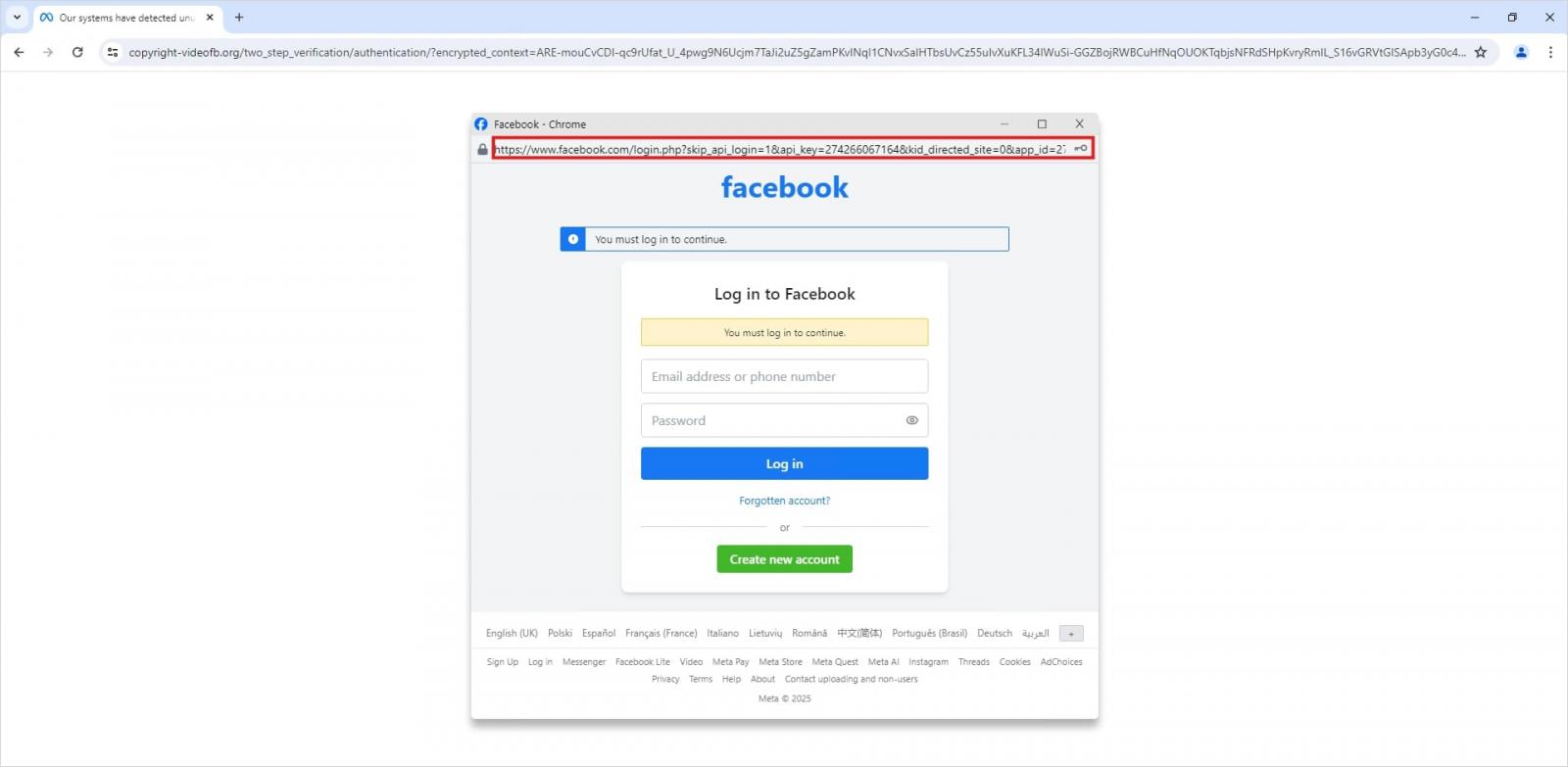
This isn’t a real browser pop-up; it’s a website element mimicking a Facebook login page — a ruse that allows attackers to display a perfectly convincing address. Source
Naturally, the fake Facebook login page followed mr.d0x’s blueprint: it was built entirely with web design tools to harvest the victim’s credentials. Meanwhile, the URL displayed in the forged address bar pointed to the real Facebook site — www.facebook.com.
How to avoid becoming a victim
The fact that scammers are now deploying browser-in-the-browser attacks just goes to show that their bag of tricks is constantly evolving. But don’t despair — there’s a way to tell if a login window is legit. A password manager is your friend here, which, among other things, acts as a reliable security litmus test for any website.
That’s because when it comes to auto-filling credentials, a password manager looks at the actual URL, not what the address bar appears to show, or what the page itself looks like. Unlike a human user, a password manager can’t be fooled with browser-in-the-browser tactics, or any other tricks, like domains having a slightly different address (typosquatting) or phishing forms buried in ads and pop-ups. There’s a simple rule: if your password manager offers to auto-fill your login and password, you’re on a website you’ve previously saved credentials for. If it stays silent, something’s fishy.
Beyond that, following our time-tested advice will help you defend against various phishing methods, or at least minimize the fallout if an attack succeeds:
Enable two-factor authentication (2FA) for every account that supports it. Ideally, use one-time codes generated by a dedicated authenticator app as your second factor. This helps you dodge phishing schemes designed to intercept confirmation codes sent via SMS, messaging apps, or email. You can read more about one-time-code 2FA in our dedicated post.
Use passkeys. The option to sign in with this method can also serve as a signal that you’re on a legitimate site. You can learn all about what passkeys are and how to start using them in our deep dive into the technology.
Set unique, complex passwords for all your accounts. Whatever you do, never reuse the same password across different accounts. We recently covered what makes a password truly strong on our blog. To generate unique combinations — without needing to remember them — Kaspersky Password Manager is your best bet. As an added bonus, it can also generate one-time codes for two-factor authentication, store your passkeys, and synchronize your passwords and files across your various devices.
Finally, this post serves as yet another reminder that theoretical attacks described by cybersecurity researchers often find their way out into the wild. So, keep an eye on our blog, and subscribe to our Telegram channel to stay up to speed on the latest threats to your digital security and how to shut them down.
Read about other inventive phishing techniques scammers are using day in day out:
Unit 42 details recent Iranian cyberattack activity, sharing direct observations of phishing, hacktivist activity and cybercrime. We include recommendations for defenders.

 Login
Login