❌

Reading view

How to download and read ebooks safely | Kaspersky official blog

Contrary to a common misconception, people haven’t stopped enjoying books in the digital age. The truth is that for a while now, reading on paper hasn’t been the only way to enjoy the written word.

At first glance, what cybersecurity risks could there possibly be? But then, since there are more than a billion e-book readers in the world, cybercriminals are bound to try to cash in. We spoke with Andrey Sidenko, Head of Child Online Safety at Kaspersky, to learn how criminals exploit interest in e-books, and what to look out for so you don’t become a victim yourself.

Malware instead of a book

Most often, scammers target computer and smartphone users who try to download an e-book from a pirate site. For example, our experts recently discovered a miner spreading this way: it was tapping the processing power of infected computers to generate various cryptocurrency tokens. Several of these sites let visitors read e-book excerpts for free. In reality, the attackers were stealing passwords and using a malicious script to swap links: users got an archive with malware named the same as the book they wanted. What’s more, links to these sites sat at the top of search results, so the risk of taking the bait was very high.

A year ago, we also wrote about fake e-books in Turkish or Arabic. These files were actually malicious executables disguised as ordinary PDFs. Once launched, they installed infostealers on the victim’s device: malware that sent chat-app session tokens, browser files, saved passwords, and crypto wallet data to the cybercriminals.

Traps in search results

Sites that engage in search spam pose a danger of their own. Picture this: you search for “The Lord of the Rings free download” — and land on a page that repeats your search phrase word for word and supposedly offers that very book for download. But instead of the book you were hoping for, you may be redirected to yet another sketchy site and treated to a malicious file.

By the way, this scam can work even if you search for a made-up author and a made-up book. Such sites can automatically generate plausible download pages for just about any query.

Book phishing

There are also phishing scams aimed squarely at book lovers. For example, one group of scammers sent out fake emails to users pretending to be from the popular book community Goodreads, offering various bogus (paid) services, which, alas, some recipients fell for: becoming a moderator, taking part in book events, or buying a paid promotion.

Here’s another example: ads supposedly from Orell Füssli, a well-known Swiss bookstore chain, circulated on social media. The ads offered books at hefty discounts. To place an order, users had to follow a link and enter their bank card details. Our regular readers will have no doubt guessed that the link led to a fake site, which in this case simply set up a paid subscription billed to the victim’s card.

Finally, scammers often create phishing sites that pose as pirate libraries. These libraries no longer cater only to fiction readers: readers go there for textbooks, academic papers, studies, rare editions, and other material that’s hard to find publicly. Because such libraries get blocked regularly and have to keep changing domains, it can be hard for users to tell the real site from a fake one.

Attackers take advantage of precisely this by promoting their own sites as official mirrors. These fake sites are often fully functional: you can search for and download books just like on the real thing, and the design is almost indistinguishable from the original. In 2024, for example, data on almost 10 million users of a phishing site mimicking Z-Library, a platform providing free downloads of access-restricted books and publications, was leaked online.

The leak included names, email addresses, countries of residence, password hashes, purchase details, and even crypto wallet addresses. With data this detailed, it’s easy to plan a follow-up attack: say, posing as a police officer to accuse the person of visiting an illegal site and demand money to drop the criminal case.

Can an e-reader get infected?

For attackers, e-readers aren’t the juiciest target: it’s hard to predict what device someone uses, or whether that person even has internet access. Besides, most e-readers are basic models — essentially a flash drive with a screen.

But there are more advanced devices — with internet access, browsers, and the ability to download third-party apps and use cloud storage. These are more likely targets, but let’s be honest: most of the time, it’s cybersecurity researchers who hack them — not criminals. For example, in 2025, researchers discovered a vulnerability in the Kindle that could let an attacker hijack the linked Amazon account.

Data leaks and other less obvious risks

Some e-readers let you highlight quotes, take notes on books you like, and share either with other users. Attackers can use this data for doxing, especially if a person wants to keep quiet about reading a particular book — something like, say, Fifty Shades of Grey, or anything personal that isn’t meant for the public.

In 2020, a Guardian journalist requested a copy of her personal data from Amazon, and received more than 20 000 records regarding how she’d used her e-reader. These included which books she read and when, how long she spent reading them, which passages she highlighted or copied, and which words she looked up in the dictionary.

So it’s worth treating your reading history as personal data too. If a book service leaks data, or your account gets hacked, a bad actor could learn not just your email address but far more personal details.

So how do you read e-books safely?

One of the simplest tips is to use official bookstores — and not just for copyright reasons. Since these platforms value their reputation, their content is vetted — meaning the files are more trustworthy.

Another essential tip is to update all your devices regularly — even the most basic e-reader: if it runs an operating system and any software — keep those updated. Timely updates close vulnerabilities that attackers could exploit, which lowers the risk of being hacked. The same goes for apps for reading and cataloging e-books: this year, researchers found serious vulnerabilities in both Calibre and Koodo Reader.

Note that installing unofficial firmware on your devices — for example, closed-ecosystem e-readers like Kindle — may not be the best idea. Risks include bricking the device and losing your warranty. The device may die or lock up during flashing or later on — when an automatic over-the-air update installs official firmware. The manufacturer may also block your account if it detects the modified firmware when the device goes online. And, naturally, the firmware itself may carry malware, such as stealers that siphon off your personal data and passwords. The fact that there’s no way to install an antivirus on your e-reader only exaggerates the potential problem.

It’s also a good idea to back up your digital library from time to time. Buying a book doesn’t guarantee you’ll keep access to it in your account forever. A title may become unavailable because of changes to licensing terms, platform policies, or other restrictions. What’s more, some formats can only be bought and read inside the e-reader’s closed ecosystem. So we recommend keeping a backup copy on your computer or another device, where you can get to it quickly offline. That way, you’ll keep access to your content even if something goes wrong with either the book service or your device.

Every time you download an e-book, be sure to check the file extension. A regular e-book filename should certainly not end in .exe or .bat. You can read more about the most common extensions of malicious files here.

With scammers, alas, getting better and better at disguising malware, perhaps the best all-around advice is this: don’t visit dubious websites, and don’t download unknown files. This is where Kaspersky Premium comes in: one of its main features is protection against phishing and malware. The application warns you if you try to visit an untrustworthy site, or download a potentially dangerous file. This keeps your data and money safe, and you can download and read your favorite books with peace of mind.

Love the written word? Check out our other posts about books:

  •  

Applying Security by Design and Cyber Immunity principles to protect AI systems | Kaspersky official blog

AI systems are much harder to protect than traditional IT — whether from operator mistakes, malicious interference, or just plain unstable behavior. There are two main reasons for this. First, AI outputs are probabilistic, so the same prompt can give different answers each time you run it. Second, today’s LLMs can’t reliably tell commands apart from data. Despite the demonstrated security issues of AI systems that we’ve covered many times, it’s impossible to ignore the potential economic payoff of adopting them. That’s why many companies are moving beyond simple AI assistants to AI agents. These agents carry out tasks on their own and have direct access to the same tools as humans — from reading databases to changing settings in production processes. Our experts, in their new study, examine how to clearly define and minimize the resulting risks to keep potential problems to a minimum. The approach borrows and adapts the principles of Cyber Immunity and Security by Design.

The basic principles of Security by Design

All the principles of this discipline are universally applicable to the design of any computer system — AI agents included. What differs is how deeply each principle needs to be adapted and reworked for AI scenarios.

  1. Security is a separate and important factor right from the design stage. Security goals and assumptions are set on day one and followed throughout every stage of development. For AI agents, these assumptions should include three key points: (i) the language model is treated as untrusted, (ii) external data of any kind is considered potentially malicious, and (iii) irreversible actions can’t be performed autonomously without mandatory human approval.
  2. The system is designed on the assumption that it will be attacked.
  3. The trusted computing base and attack surface are kept to a minimum. Agents get only the tools they actually need, limited permissions, and the smallest amount of context possible. Security policy enforcement is handled entirely by deterministic components: the policy monitor, the agent harness, and isolation mechanisms (sandboxes).
  4. The principle of least privilege applies. Each agent has its own set of credentials and access privileges (identity), limited to the bare minimum it needs to do its job. If an agent temporarily needs elevated privileges, it gets them only after external approval, and they last exactly as long as the task that requires them.
  5. Components are isolated. In agent-based systems, this is one of the most complex and multi-layered architecture problems. The agent harness should run in an isolated environment (sandbox or virtual machine), and agents should be kept as isolated from each other as possible. Data processing in trusted and untrusted contexts is also kept separate. For example, one agent reads a pull request and writes a draft of the code, while another reviews that work without ever seeing the potentially malicious text of the request.
  6. Default deny is the rule. Security policies follow the rule: anything not explicitly allowed is forbidden. This includes tool calls, interactions between agents, and network traffic.
  7. Defense in depth is in place. Different measures should work at the same time and reinforce each other. Probabilistic defenses — like AI guardrails (a “firewall” for language models) or alignment (the model’s own sense of what’s acceptable and what isn’t) — can’t offer any formal security guarantees. Nevertheless, they make the system more secure overall and serve as a valuable source of telemetry.
  8. The supply chain is protected. Some agents can install skills, libraries, and other software components on their own, so these abilities need strict rules. Either block them completely, or limit them to a closed, pre-approved list of specific versions of specific components. Systems built on cloud LLMs face an extra risk: model updates. One day, the same API request might be answered by a different language model with different security properties.

Pitfalls of AI security

The general principles of Security by Design are well known and look simple on paper. But applying them to AI systems is tricky because agents are incredibly flexible. For example, a security team might believe that an agent on a developer’s computer runs in a sandbox and can’t change anything outside it. But an attacker, or even the agent itself, can come up with dozens of ways around this seemingly solid protection: from running commands through a local MCP server that the sandbox doesn’t restrict, to reconfiguring another AI agent installed on the system. To make things even harder, the range of attack vectors is huge: from arbitrary fields in the agent’s configuration to innocent-looking text strings in a skill file.

One serious problem that designers often underestimate is user fatigue. A busy agent can throw up dozens of requests every minute, asking the user to confirm potentially dangerous actions. Within an hour, the person is clicking Approve on autopilot without reading what they’re approving. That’s why it’s important to carefully tune both how often these requests appear and how they’re worded. Nobody will read a request description that’s too long. And one that’s too short can hide the key details the user needs in order to make the right call.

Vulnerabilities in agents and related tools are a pressing problem — and it’s made worse by how quickly these categories of software evolve and receive updates. Industry-standard platforms and apps — such as LangGraph, MS Semantic Kernel, and Claude Code — have had critical vulnerabilities patched more than once. Architects should always consider swapping a large, do-it-all framework for a compact, stripped-down system that has only the features a specific agent actually needs.

On top of that, carefully implementing standard, long-established security measures in the available tools greatly reduces the damage if an agent is attacked or behaves unexpectedly. One example is a strict allowlist of domains that the web fetch tool can open when asked by the agent. But designers rarely account for the hidden problems and overhead associated with maintaining the list. As a result, it slowly goes out of date and leaves loopholes for attackers. The most striking example is the EchoLeak attack. Microsoft 365 Copilot had a properly implemented and fairly effective allowlist for accessing external sites, but attackers circumvented it through a feature in a secondary tool and the MS Teams domain.

Practical tips for architects and security teams

AI system architects and heads of engineering and security teams should build in agent security from the design stage. They should rely primarily on verifiable, deterministic mechanisms: isolating components, controlling interactions, and keeping the trusted computing base to a minimum.

Key architectural decisions include defining acceptable autonomy for the agents, limiting access to confidential data and dangerous combinations of capabilities, and using sandboxes, separate roles for different models, and access control gateways. Restrictions added as an afterthought reduce risks, but they’re no substitute for secure architecture.

At the organizational and operational levels, companies need to keep an inventory of their agents, coordinate the efforts of security and deployment teams, protect container environments, manage the supply chain (AIBOM), and integrate multi-layered defense.

Observability requires special attention. For AI systems, this should include logging the LLM’s requests, responses, and reasoning, as well as detailed telemetry from the hosts and cloud environments where the agent harness runs.

The hardest part of designing agents is balancing security, performance, and usefulness. To learn how to strike that balance with threat modeling and clearly defined security goals, read the full version of the study.

  •  

Cisco open sources tool for detecting AI agents on hacking sprees

Cisco has open sourced a behavior detection engine that watches AI agents, to help security teams prevent rogue agents from going off the rails like they did with the Hugging Face hack – or worse. It’s called Project Quarry, and it aims to provide a “shared language” for evaluating agent behavior, along the lines of what Snort, which Cisco also maintains, did for detecting malicious network traffic and what YARA did for rule-based malware identification. Most detection tools rely on specific interactions with an AI model or agent. Did it attempt prompt injection? Or did the agent call an attack tool? “But what is missing is the entire context under which something may occur,” Amy Chang, head of AI threat and security research at Cisco, said in an exclusive interview with The Register. She likened this to credit card fraud detection. Without context, individual transactions such as a small test charge or a single purchase in a location far away from a card-holder's usual location may not raise any flags. “And then you try again,” making another fraudulent purchase, “and that went through, too. So now I’m gonna buy the PS5,” Chang said. “Those are the things that Quarry addresses by taking into consideration the entire agent session,” she explained. “One tool call may seem in-scope until you realize that that next step is taking that information and sending it to an attacker-controlled inbox or server.” Even data theft is a sequence and not a single agentic action. Agentic AI security firm Invariant Labs demonstrated this with a proof-of-concept attack against GitHub's MCP server that hijacked a user's agent via a malicious GitHub Issue, and coerced it into leaking data from private repositories. Simply reading a configuration file, or sending a request to an external endpoint may be legitimate agentic actions. However, combining the two can lead to data exfiltration – and shows “why action relationships matter,” wrote Chang and fellow Cisco researchers Adam Swanda, Ravikumar Balakrishnan, and Konstantin Berlin in a blog post about Quarry shared with The Register ahead of publication “A policy can produce a finding when the trace shows a sensitive file read followed within a defined window by an external send,” they wrote. “The risk comes from the relationship between the two actions, so the finding should preserve evidence from both." Quarry covers single- and multi-turn large language model conversations, agents, tool use, Model Context Protocol (MCP) interactions, and multimodal inputs. In addition to the open source code itself, the project’s GitHub repository includes installation instructions, supported Python versions, plugins for Claude Code, Codex and other MCP-compatible agents, configuration examples, rule-writing guidance, and a rule starter pack. For instance, with the rule pack, “If a base-64 encoded malware is somewhere in the tool call, that would result in a block,” Chang said. The rule format looks similar to a YARA or Snort rule, with a header that details the traffic to examine, content to match, and metadata for tracking the rule. Here’s a Quarry rule that flags an agent that reads a credentials file: While the Cisco Ai researchers have not run Quarry against data describing the OpenAI-Hugging Face incident, they suggest that if the intrusion had been read as a complete, step-by-step record of a single session, there were several points where the AI agents’ steps would have given a Quarry rule something to act on and flag for humans. For example, Quarry would probably have flagged internet access from a sandbox. “The rule can flag specific tool calls that reach an external server asset that wasn’t in the task’s allow list,” Chang said. “Another one would be credentials found and used somewhere else.” According to OpenAI’s technical report about the Hugging Face intrusion, this is exactly what happened on July 10, when an agent validated 14 exposed Hugging Face tokens with write access and shared them. “The rule would flag that there was a credential in the tool result that then called an outside service, which is likely not within the parameters of what you would want to do in this case,” Chang said. “We don't want you to go and search for credentials that may have been leaked or inadvertently exposed and then utilize them to conduct a task.” The Cisco team is quick to say that rules along are not a substitute for chain-of-thought monitors, or other forms of human oversight – but they do help record a pattern that other teams can then “review, test, and apply to their own agents,” they wrote. Herein also lies the benefit of open source, and a collective approach to defending against adversarial use of AI, Chang said. “Do we have all the answers? No,” Chang said. “We all see slices of the problem, and it’s important for us to share what we see.”®

  •  

Introducing Route 53 Resolved IP Validation for AWS Network Firewall

Your workloads reach most destinations by domain name, but a firewall can only act on what it sees in the traffic. For HTTP and HTTPS, AWS Network Firewall domain rules match the name that the client puts in the request, and the client chooses that name. The connections for protocols such as SSH and SSH File Transfer Protocol (SFTP) don’t carry the domain name. The client uses the name only for the DNS lookup and then connects straight to the IP address that DNS returned. As a result, Network Firewall rules for these protocols have used IP addresses, which change over time. For web and non-web traffic alike, Network Firewall had no view of the answers that your DNS resolver returned, because that shared visibility between DNS and the firewall didn’t exist.

On October 21, 2026, we launched Route 53 Resolved IP Validation for AWS Network Firewall, at no additional charge. Amazon Route 53 Resolver now shares the IP addresses that it returns for each domain name with Network Firewall, and Network Firewall checks each new outbound connection against them. With this launch, you can now filter non-web traffic by domain name, and you can prevent Server Name Indication (SNI) manipulation on TLS traffic without needing to enable TLS inspection.

In this post, we explain how the feature works, show how to turn it on in alert mode, and walk through two common use cases. They’re examples; the same check applies to any outbound traffic that you control by domain name.

How it works

Amazon Route 53 Resolver answers DNS queries from resources in your virtual private cloud (VPC) configured to use it, and it’s available by default in every VPC. With this feature, Route 53 Resolver keeps the IP addresses that it returns for each domain name in a resolved IP cache. When a new outbound connection starts, Network Firewall checks the destination address against that cache.

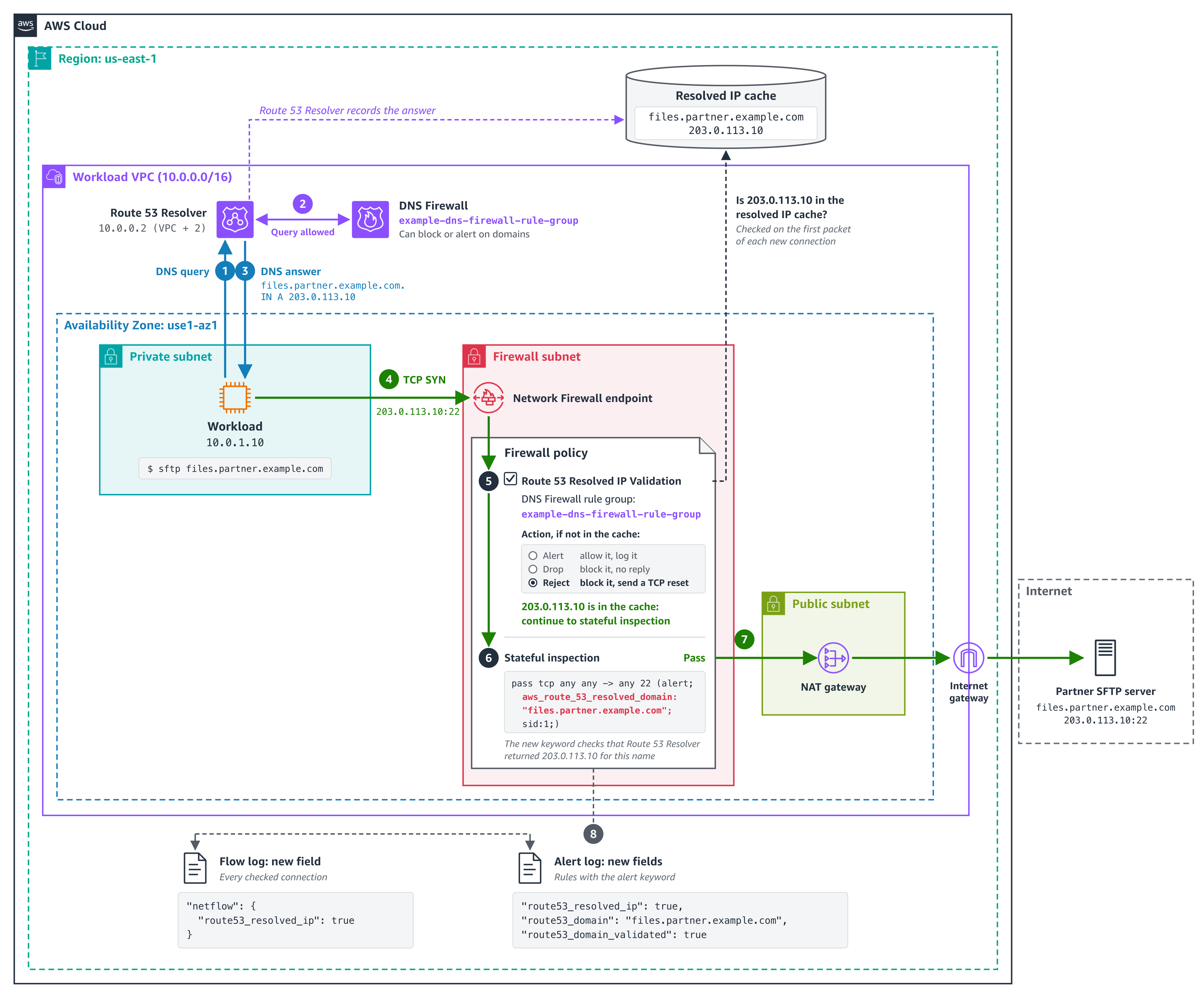
  1. The workload asks Route 53 Resolver at 10.0.0.2 for files.partner.example.com.
  2. DNS Firewall checks the query first. Domain rules can block or alert on it; an empty rule group lets it through.
  3. Route 53 Resolver answers 203.0.113.10 and records the answer in the resolved IP cache.
  4. The SFTP connection to 203.0.113.10 on port 22 reaches the Network Firewall endpoint.
  5. The policy checks the first packet. The address is in the cache, so the connection continues.
  6. The stateful rule passes it, because Route 53 Resolver returned the address for files.partner.example.com.
  7. The connection leaves through the NAT gateway and internet gateway.
  8. The flow log and alert log record the new fields.

The feature has three parts:

  • An Amazon Route 53 Resolver DNS Firewall rule group – It defines the scope. The answers that Route 53 Resolver returns in every VPC associated with this rule group go into the resolved IP cache. The rule group can be empty. Add rules to it and the same rule group also filters the DNS queries themselves, for example, by blocking lookups of known threat domains. Together, DNS Firewall checks the lookup and Network Firewall checks the connection that follows.
  • The Network Firewall policy setting – On the first packet of each new connection, before your stateful rules run, Network Firewall checks whether Route 53 Resolver returned the destination address for a domain name. If it did, the connection continues to your stateful rules. If it didn’t, Network Firewall applies the action you chose: Alert, Drop, or Reject.
  • Resolved-domain rules – In your stateful rule groups, these rules match a connection by the domain name that its destination address was resolved for, so they work with every protocol. Use the name that your clients look up.

The following diagram shows this architecture.

Figure 1. How Network Firewall checks the SFTP connection from use case 1 against the answers that Route 53 Resolver returned

Figure 1. How Network Firewall checks the SFTP connection from use case 1 against the answers that Route 53 Resolver returned

The policy setting checks every connection, not only web traffic. A connection to an IP address that no client looked up through Route 53 Resolver, such as a hardcoded address, fails the check. If any of your workloads connect straight to IP addresses, add those addresses to Bypass destination validation IP ranges before you enforce. A stateful pass rule doesn’t exempt them because the policy check runs before your rules. The check is per address: when any client in an associated VPC looks up a name, its addresses pass the check for every client in scope in the same Availability Zone. For details, see Resolved IP validation in AWS Network Firewall in the AWS Network Firewall Developer Guide.

Prerequisites

To follow along, you need:

  • DNS through Amazon Route 53 Resolver – Network Firewall can check only answers that Route 53 Resolver returned. Queries that reach Route 53 Resolver through Resolver endpoints or Resolver forwarding rules count.
  • A Route 53 Resolver DNS Firewall rule group associated with the VPCs whose DNS answers Network Firewall should check connections against.
  • The policy setting turned on before you add resolved-domain rules – Rules that use domain filtering (the aws_route_53_resolved_domain keyword) need Route 53 Resolved IP Validation turned on in the same firewall policy. Turn the setting on first, in alert mode, then add the rules.
  • A supported deployment model – The feature works with distributed deployments, including multiple firewall endpoints, where clients reach a firewall endpoint in their own Availability Zone, and with centralized deployments where the firewall is attached natively to AWS Transit Gateway. If routing sends a client to a firewall endpoint in another Availability Zone, its connections fail the check. To move a centralized deployment to a natively attached firewall, see Why and how to migrate to a Transit Gateway attached AWS Network Firewall.

How to turn it on in alert mode

Start in alert mode because clients cache DNS answers. Network Firewall recognizes only the answers that Route 53 Resolver returns after the DNS Firewall rule group is associated with the VPC and selected in the policy. A client that still uses an answer it cached earlier fails the check until it looks up the name again, usually when its cached record expires. Alert mode lets you see this without blocking anything. Allow about 24 hours in alert mode for clients to refresh their caches.

  1. Create a DNS Firewall rule group (it can be empty) and associate it with the VPCs whose DNS answers Network Firewall should check connections against. For the steps, see Creating a rule group and rules.
  2. Or, to use a DNS Firewall rule group that you already have, make sure it’s associated with those VPCs and only those. An answer returned in any associated VPC is valid for every client that the firewall checks. Which clients are checked is set by source IP ranges in step 6.
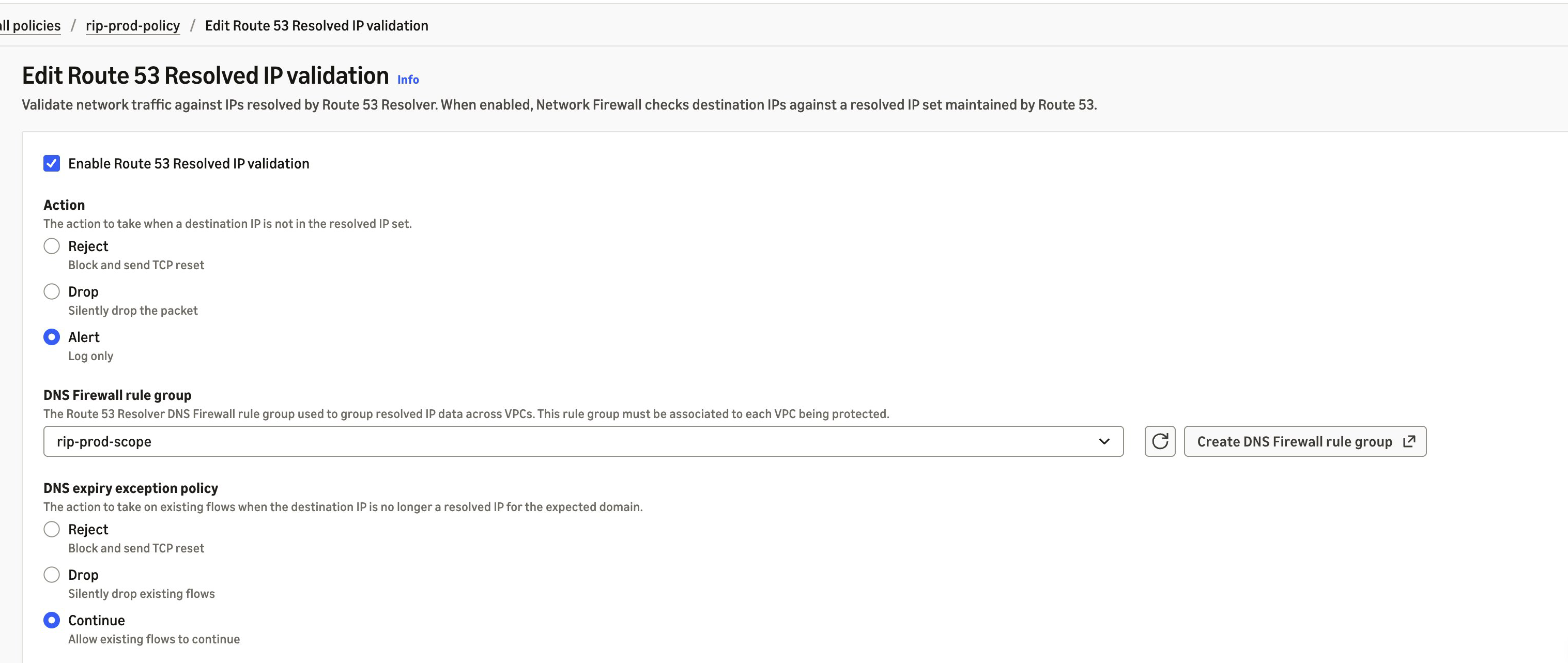
  3. In the Amazon Virtual Private Cloud (Amazon VPC) console, under Network Firewall, choose Firewall policies, then choose the policy that your firewall uses. On the Traffic inspection tab, in the Route 53 Resolved IP validation section, choose Edit and select Enable Route 53 Resolved IP validation.
  4. For Action, choose Alert. For DNS Firewall rule group, choose the rule group from step 1 or 2.
  5. For DNS expiry exception policy, choose what happens to a connection that’s already open when its entry expires from the resolved IP cache. Continue keeps it running, Drop stops it silently, and Reject stops it with a TCP reset. We recommend Continue so that long-running sessions, such as file transfers, aren’t cut off midway. However, choose the option that fits your security requirements.
  6. For source IP ranges, list the clients to check. If you don’t set it, Network Firewall checks clients in the firewall’s VPC and in any additional VPCs attached to the firewall. If your clients are in other VPCs, such as spoke VPCs that send traffic to a firewall attached to a transit gateway, enter their CIDR ranges; otherwise, Network Firewall doesn’t check their connections. Add destinations that you allow by IP address to Bypass destination validation IP ranges. Choose Save.

The following screenshot illustrates these steps.

Figure 2. Route 53 Resolved IP Validation turned on in alert mode

Figure 2. Route 53 Resolved IP Validation turned on in alert mode

In alert mode, Network Firewall doesn’t block a connection that fails the check, and it doesn’t write an alert of its own. It records the result in your flow logs, in the route53_resolved_ip field of each connection. A value of true means Route 53 Resolver returned the destination address for a domain name. A value of false means it didn’t, so enforcement would block the connection. The same field also appears in alert log records that a rule or the policy’s default action writes for the connection. Pass rules don’t write one unless they have the alert; keyword. The DnsUnresolvedFlows metric in Amazon CloudWatch counts the connections that fail the check, and DnsAzUnavailableFlows counts connections from an Availability Zone that doesn’t support the feature. The following alert log record (trimmed, with example values) was written by a default action that alerts, for a connection to an address that Route 53 Resolver returned:

{
  "firewall_name": "egress-firewall",
  "availability_zone": "us-east-1a",
  "event": {
    "event_type": "alert",
    "src_ip": "10.0.1.10",
    "dest_ip": "203.0.113.10",
    "dest_port": 123,
    "proto": "UDP",
    "app_proto": "ntp",
    "route53_resolved_ip": true,
    "verdict": {
      "action": "alert"
    },
    "alert": {
      "action": "allowed",
      "signature_id": 3,
      "signature": "aws:alert_established action"
    }
  }
}

In alert mode, this record is for a TLS connection that presented an allowed domain name but went to an address that Route 53 Resolver didn’t return for it, blocked by the policy’s default action in use case 2:

{
  "firewall_name": "egress-firewall",
  "availability_zone": "us-east-1a",
  "event": {
    "event_type": "alert",
    "src_ip": "10.0.1.10",
    "dest_ip": "198.51.100.7",
    "dest_port": 443,
    "proto": "TCP",
    "app_proto": "tls",
    "tls": {
      "sni": "api.partner.example.com"
    },
    "route53_resolved_ip": false,
    "verdict": {
      "action": "drop"
    },
    "alert": {
      "action": "blocked",
      "signature": "aws:alert_established_app_layer_to_server action"
    }
  }
}

Before you switch Action to Drop or Reject, check that connections that fail the check are ones you expect and that destinations you allow by IP address are in the bypass ranges. Reject sends a TCP reset, so a blocked TCP client fails right away instead of waiting for a timeout. After you enforce, blocked connections appear in your flow logs with route53_resolved_ip as false, not in your alert logs. For the metrics and log fields to watch, see Monitoring and troubleshooting resolved IP validation.

Use case 1: Filter non-web traffic by domain name

Before this launch, Network Firewall rules for protocols that carry no domain name, such as SFTP, used IP addresses. Now, you can allow them by domain name. In this example, a workload sends files over SFTP to a partner at files.partner.example.com on TCP port 22, and the partner can change the addresses behind that name at any time. The same approach works for SSH, MySQL, and other non-web protocols. You create it as a standard stateful rule. Follow these steps:

  1. Under Network Firewall, choose Network Firewall rule groups, then choose Create rule group. Choose Stateful rule group and Standard stateful rule, and choose the rule evaluation order that your policy uses.
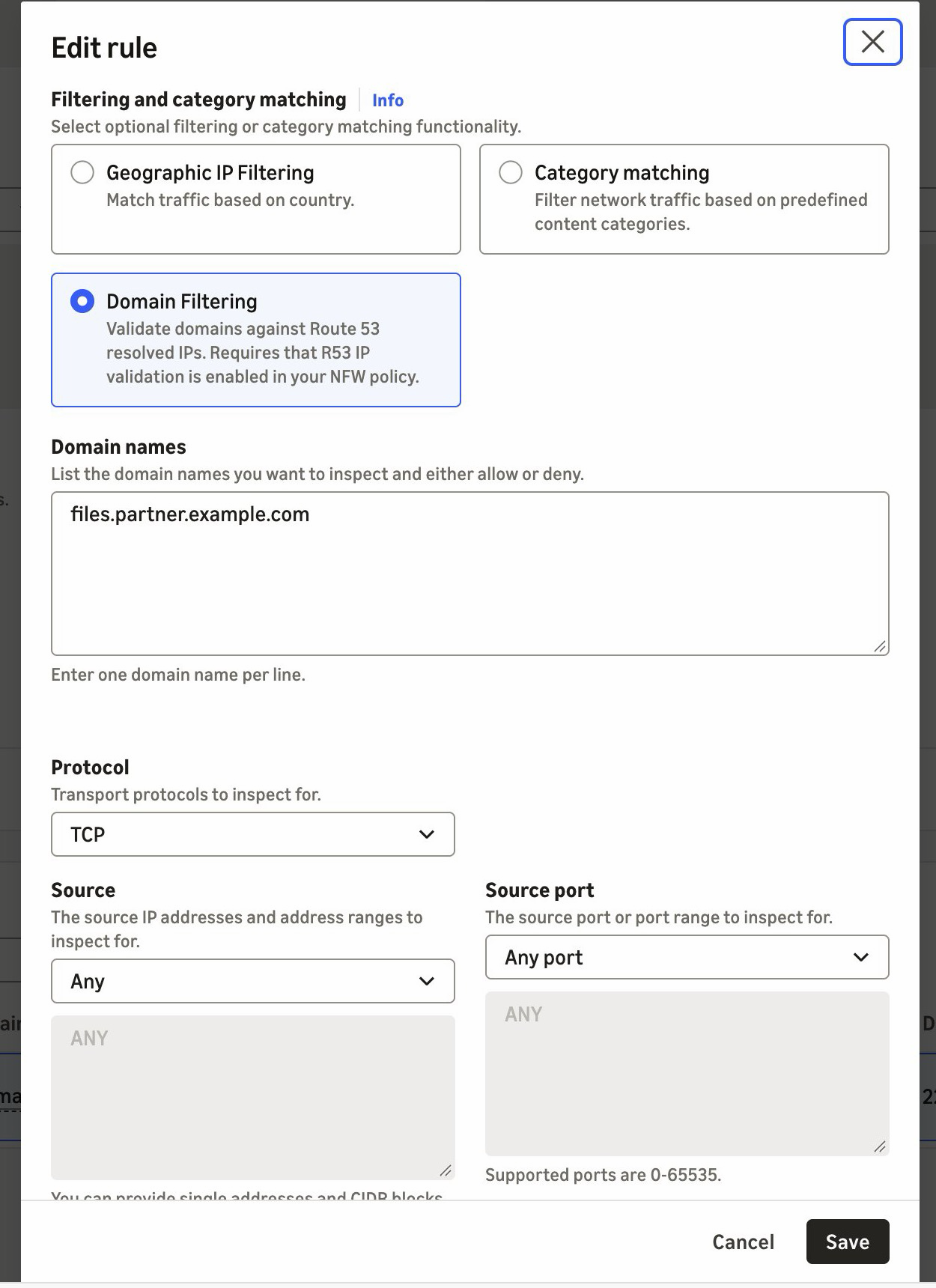
  2. Choose Add rule. For Protocol, choose TCP. For Destination port, enter 22. Under Domain filtering, enter files.partner.example.com. For Action, choose Pass.
  3. Create the rule group, then add it to your firewall policy.
Figure 3. A pass rule for SFTP on TCP port 22, scoped to the partner's domain name

Figure 3. A pass rule for SFTP on TCP port 22, scoped to the partner’s domain name

If you manage rules as code, the equivalent Suricata rule is shown in the following code. It adds the alert; keyword so that the firewall logs allowed connections. The console rule doesn’t add it.

pass tcp any any -> any 22 (alert; msg:"Allow TCP/22 to files.partner.example.com"; aws_route_53_resolved_domain:"files.partner.example.com"; sid:1;)

When the partner moves its server to a new address, the next DNS answer adds it to the resolved IP cache. There’s no IP list to maintain. The cache keeps earlier answers for longer than their DNS time to live (TTL), so the old address can still pass for a while.

Use case 2: Prevent SNI spoofing without TLS inspection

With SNI spoofing, a client presents an allowed domain name in its TLS request while it connects to a different server. Preventing that has required TLS inspection, which decrypts the traffic. Route 53 Resolved IP Validation prevents it without TLS inspection. In this example, a workload calls a partner API at api.partner.example.com over HTTPS. TLS traffic on port 443 must reach only the addresses that Route 53 Resolver returned for that name. You create a pass rule in a standard stateful rule group, as in use case 1, and the firewall policy’s default action drops everything that no rule passes. Follow these steps:

  1. Under Network Firewall, choose Network Firewall rule groups, and then choose Create rule group. Choose Stateful rule group and Standard stateful rule, then choose Strict order.
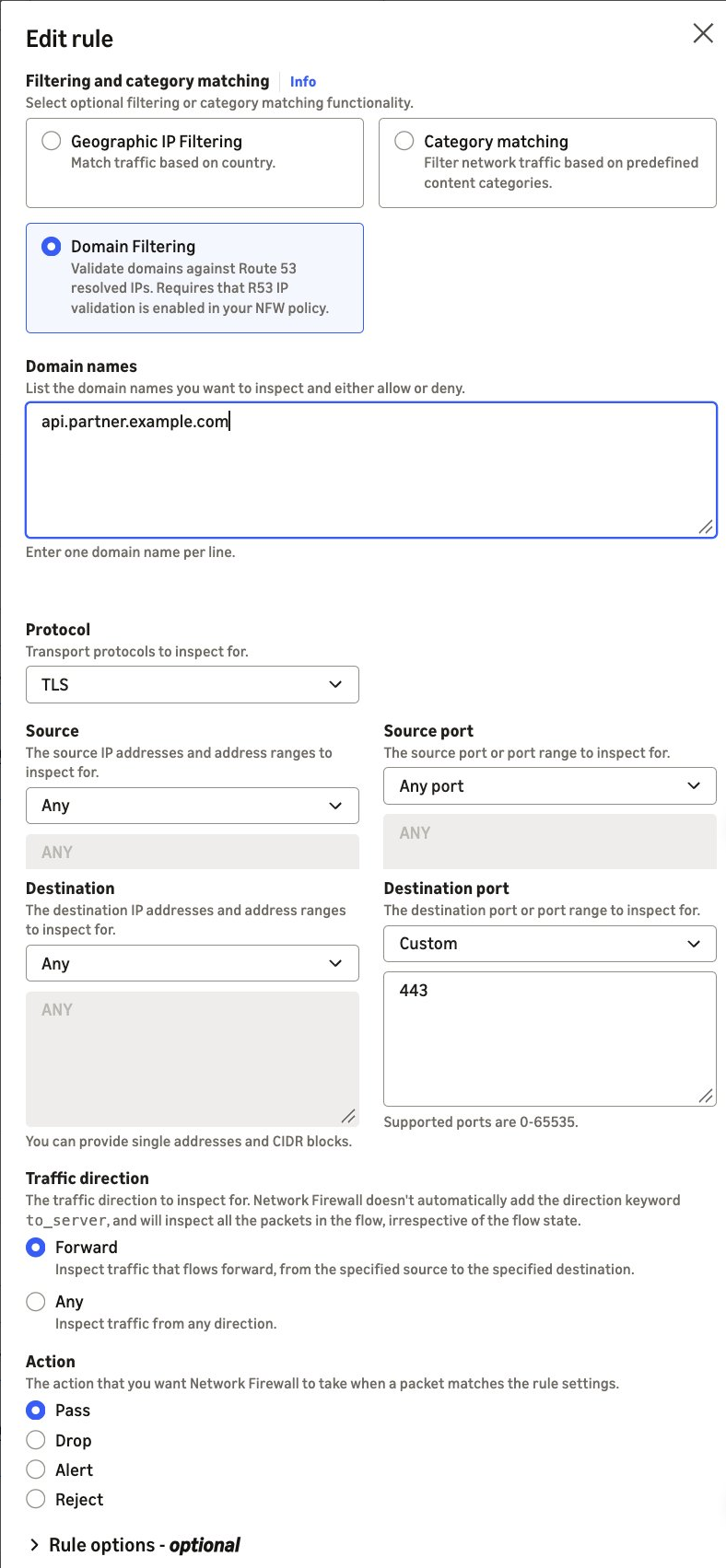
  2. Choose Add rule. For Protocol, choose TLS. For Destination port, enter 443. Under Domain filtering, enter api.partner.example.com. For Action, choose Pass.
  3. Create the rule group, then add it to your firewall policy.
  4. In the firewall policy, use strict rule order. For the stateful default actions, choose Application drop established (server-directed only) and Application alert established (server-directed only). The alert action logs what the drop action blocks. For why we recommend these default actions, see Firewall policy configuration in the AWS Security Services Best Practices guide.
Figure 4. A pass rule for TLS on port 443, scoped to the partner's domain name

Figure 4. A pass rule for TLS on port 443, scoped to the partner’s domain name

If you manage rules as code, the equivalent Suricata rule is:

pass tls any any -> any 443 (aws_route_53_resolved_domain:"api.partner.example.com"; sid:2;)

The pass rule matches the destination address, not the name in the TLS request. TLS traffic on port 443 passes only when Route 53 Resolver returned the destination address for api.partner.example.com. If the partner’s addresses also serve other domain names, such as behind a content delivery network (CDN), those names pass too. To also require the partner’s name in the TLS request, add an exact SNI match to the same rule: tls.sni; content:"api.partner.example.com"; startswith; endswith; nocase;.

Without startswith and endswith, the content match accepts any SNI that contains the name.

A connection that presents the partner’s name but goes to another address doesn’t match the pass rule. If Route 53 Resolver never returned that address, the policy setting’s enforcement action blocks the connection before your rules run. In alert mode, the policy setting lets the connection through to your rules instead, and the stateful default action drops it because the pass rule doesn’t match. Its alert log record shows route53_resolved_ip as false, as in the second example previously. If Route 53 Resolver returned the address for a different domain name, the connection passes the policy check. The stateful default action then drops it because the pass rule doesn’t match, and that record shows route53_resolved_ip as true.

Best practices

We recommend that you follow these best practices:

  • Keep DNS on Route 53 Resolver – Block outbound UDP and TCP port 53 DNS to other resolvers, including DNS over HTTPS (DoH) and DNS over TLS (DoT), on Network Firewall, so that clients don’t bypass the check. Route 53 Resolved IP Validation alone doesn’t do this. If any client looks up a public resolver’s name, such as dns.google, that resolver’s addresses pass the check.
  • Keep DNS Firewall rules in those VPCs – Route 53 Resolved IP Validation checks the connections that follow a DNS lookup, not the DNS queries themselves. DNS Firewall blocks lookups of known threat domains with AWS managed domain lists, and its advanced rule groups detect data leaving through DNS queries, such as DNS tunneling.
  • Start small – Add domain filtering to a few rules at a time, then add more when the results look clean. For domain allow list patterns, see Allow rules and domain allowlisting.
  • Turn on flow and alert logging and detailed monitoring – Connections that fail the resolved IP check show in your flow logs (route53_resolved_ip: false) and in the DnsUnresolvedFlows metric, not in your alert logs. Pass rules without the alert; keyword don’t write an alert log record.

Pricing and availability

Route 53 Resolved IP Validation is available today in all commercial AWS Regions (Regions other than the AWS GovCloud (US) Regions and the China Regions) where AWS Network Firewall and Amazon Route 53 Resolver DNS Firewall are available, at no additional charge. For the list of Regions, see AWS Capabilities by Region. A DNS Firewall rule group with no rules doesn’t incur DNS Firewall charges. Standard DNS Firewall pricing applies after you add rules. See AWS Network Firewall pricing and Amazon Route 53 pricing.

Conclusion

In this post, we showed you how Route 53 Resolved IP Validation works and how to turn it on in alert mode. Network Firewall now checks each connection’s destination against the IP addresses that Amazon Route 53 Resolver returned for the DNS query. Filtering SFTP, SSH, database, and other non-web traffic by domain name and preventing SNI spoofing without TLS inspection are two common examples of what that makes possible. To get started, turn the feature on in alert mode and review the results before you enforce. For the full walkthrough, see Getting started with resolved IP validation.


To learn more, visit the AWS Network Firewall product page and the feature documentation.

If you have questions about this post, contact AWS Support.

Lawton Pittenger

Lawton Pittenger

Lawton is a Worldwide Security Specialist Solutions Architect at AWS, based in New York City. He specializes in helping customers design and implement effective network security controls. At AWS, he works with customers at scale and collaborates closely with service teams to drive continuous improvement in security services based on customer needs and feedback. Outside of work, his interests include skateboarding, snowboarding, and spending time in nature.

Amish Shah

Amish is a seasoned product leader with over 15 years of experience in developing innovative and scalable solutions for networking, security, and cloud use cases. He currently leads the AWS Network Firewall service, where he helps to develop security solutions that protect AWS workloads. Outside of work, Amish enjoys playing cricket and soccer, loves to travel, and has recently started collecting niche fragrances.

Amit Gaur

Amit Gaur

Amit, a Cloud Infrastructure Architect at AWS, brings his passion for technology and knowledge-sharing to the networking community. Specializing in network architecture design, he helps customers build highly scalable and resilient environments on AWS. Through technical guidance and architectural expertise, Amit enables customers to accelerate their cloud adoption journey while making sure their systems are built for scale and reliability.

Author

Jesse Lepich

Jesse is a Senior Security Solutions Architect at AWS based in Lake St. Louis, Missouri, focused on helping customers implement native AWS security services. Outside of cloud security, his interests include relaxing with family, barefoot waterskiing, snowboarding and snow skiing, surfing, boating, and mountain climbing.

Preetkumar Shah

Preetkumar Shah

Preetkumar is a Technical Account Manager at AWS, based in Atlanta, GA. He specializes in helping customers design and operate secure, scalable network architectures in the cloud. At AWS, he works with SMB customers and collaborates closely with service teams to proactively resolve complex challenges and ensure customers get the most from their AWS environment. Outside of work, his interests include spending time with family and going on trails.

  •  

AI 'hacker' finds 4 severe bugs in popular industrial control software in under 4 hours

An autonomous AI agent discovered four vulnerabilities in the decades-old, widely used EPICS (Experimental Physics and Industrial Control System) open source software toolkit, including a critical flaw that could allow remote attackers to execute code on systems used to control particle accelerators and fusion experiments. The bugs include a critical, 9.8-rated under CVSS v3.1 integer overflow vulnerability (CVE-2026-114595), leading to an attacker-controlled out-of-bounds heap write and potentially remote code execution; an 8.2-rated, high-severity, improper message-length validation flaw (CVE-2026-114596), causing an out-of-bounds memory write and controller-process crash; a 7.5-rated, high-severity insufficient bounds checking bug (CVE-2026-114597) that allows out-of-bounds memory reads and process crashes; and a 7.5-rated, high-severity type confusion flaw (CVE-2026-114598) that can lead to denial of service and could expose adjacent memory contents. All four affect EPICS Base, which is used to operate some of the world's largest scientific research projects and facilities, and organizations should update to version 7.0.11, which includes the fixes. “Successful exploitation of these vulnerabilities could allow an attacker to cause a denial-of-service condition, corrupt memory, disclose sensitive information, or potentially execute arbitrary code,” the US Cybersecurity and Infrastructure Security Agency (CISA) warned in a Tuesday advisory. An AI agent called Cipher independently found all four previously unknown security holes - investigating and testing the unfamiliar EPICS system, and validating the four exploits - in three hours and 49 minutes, Causal Security co-founder Shubham Raj told The Register. “The initial investigation required no human intervention, followed by one instruction authorizing deeper exploitability testing in a secure environment,” Raj said. Earlier this year, Causal Security’s Cipher, which Raj described as “a fully autonomous super hacker that can reason across the technology stack,” found multiple critical attack paths in power-grid systems used across North America and Europe, prompting an October 8 security advisory from CISA. EPICS, originally developed by Los Alamos National Laboratory and Argonne National Laboratory, is used to build and remotely control distributed Supervisory Control and Data Acquisition (SCADA) systems, connecting operators to physical devices. It’s used in around 90 major scientific, university, and industrial projects and facilities globally including Argonne National Laboratory's Advanced Photon Source and ITER's fusion reactor control system. All four of these flaws illustrate how AI agents are really good at finding vulnerabilities in industrial and operational technologies - systems and equipment that used to be able to rely on obscurity to protect them from hackers - and add to defenders' concerns that it's only a matter of time until an autonomous cyberattack shuts down critical services, like power grids or water systems. These are the types of digital intrusions that can cause physical harm. Raj points to CVE-2026-114595, the critical integer-overflow vulnerability, as an example. “It allows attacker-controlled network data to cause an out-of-bounds heap memory write, with potential for remote code execution,” he told us. “EPICS controllers sit between operators and physical equipment, handling measurements, commands, and control functions,” he continued. “Operationally: Imagine a particle accelerator in the middle of an expensive experiment. An attacker could potentially crash a controller, interrupt critical measurements or control functions, and force operators to halt the experiment. That could mean lost experimental work, significant downtime, and expensive recovery.” Plus, if an attacker was able to develop an RCE exploit, this could allow them to “take control of the affected process, manipulate readings, interfere with control functions, or disrupt the equipment connected to it,” Raj said. The prerequisite for exploiting these vulns in a real scientific facility is being able to reach the vulnerable EPICS services on a facility's control network. But this could occur if the networks weren’t sufficiently segmented, or another system had access to the vulnerable EPICS network. “Once an attacker is able to find a network, which is either misconfigured or they are able to reach, it’s pretty easy to carry out the attacks,” Raj said, adding that exploitation wouldn’t require deep OT knowledge, or understanding of how particle accelerators or fusion reactors work. “Someone with conventional exploitation skills could investigate them, and increasingly capable AI systems could help develop exploits without requiring specialized OT expertise.” Manipulating specific physical processes does require additional knowledge, he added. “But an attacker doesn't need to understand the physics of a particle accelerator to disrupt the software controlling it. Crashing critical processes or interrupting monitoring and control can already have serious operational consequences. What's changing is that attackers may no longer need years of specialized expertise just to discover these weaknesses.” ®

  •  

AWS becomes first CSP to complete the Cloud High profile assessment with 172 services and features in scope

We continue to expand the scope of our assurance programs at Amazon Web Services (AWS) and are pleased to announce the successful completion of our first ever Cloud High (PBHH) security assessment with 172 assessed services and features. Completion of this assessment, effective September 18, 2026, makes AWS the first cloud service provider (CSP) in Canada to meet this high security bar and provide assurance to our valued customers. This assessment also reaffirms our commitment to helping public and commercial customers achieve and maintain the highest-grade security standard for workloads with increased sensitivity.

What is the Cloud High assessment and why is it important?

The Cloud High security profile (that is, PBHH) seeks to enhance the integrity and availability of customer organizational workloads that are considered to have an increased level of sensitivity. These are systems that the Government of Canada (GC) and its service providers use to support delivery of services at a national scale or that are determined to be significant for handling sensitive information. The profile is based on the Security and privacy controls and assurance activities catalogue (ITSP.10.033). The Cloud High (PBHH) profile includes all controls and enhancements contained within the Cloud Medium profile (PBMM), with additional controls and enhancements to address higher integrity and availability requirements. The Cloud Medium and Cloud High profiles establish baseline security requirements for cloud services. These services support GC workloads and information processing up to the Protected B level.

As of September 18, 2026, there are a total of 172 AWS services and features that were assessed by the Canadian Centre for Cyber Security (CCCS) under Cloud High security assessment. The assessment covers services and features that are available in both the Canada (Central) and Canada West (Calgary) AWS Regions.

How can you access the assessment?

The summary assessment is available through AWS Artifact. You can also learn more about the Cloud High and Medium assessment on the AWS CCCS assessment compliance webpage.

AWS strives to continually bring services into scope of its compliance programs to help you meet your architectural and regulatory needs. Please reach out to your AWS account team if you have questions or feedback about the Cloud High and Medium assessments.

To learn more about our compliance and security programs, refer to AWS Compliance Programs. As always, we value your feedback and questions; reach out to the AWS Compliance team through the Contact Us page.

Naranjan Goklani

Naranjan is AWS Compliance, Security Assurance and Privacy (CAPS) Lead for Canada. He has experience leading audits, attestations, certifications, and assessments across the Americas. Naranjan has more than 16 years of experience in technology risk management, customer security assurance, and technology audits. He previously worked in the Big 4 accounting firms and supported clients from the financial services, technology, retail, and utilities industries.

  •  

Part 3 – Cybersecurity journeys: The work behind the work

The most important work I’ve done in cybersecurity would make for terrible television. There were no countdown clocks and no frantic typing, just a lot of careful reading, a lot of hard conversations, and the occasional quiet moment where everything finally clicked. That’s the part I want to show you this week, because the three people I talked to have built their entire careers on the work that happens off-camera, and it’s the part that decides who lasts in this field.

This is a four-part series following 11 AWS security professionals through the real stories of how they got here and what the work actually looks like. In Part 1: I didn’t plan this, I shared how three of them found their way in, and in Part 2: What even is this job?, we looked at roles most people don’t know exist. This week is about what the day-to-day actually feels like, told through three AWS security professionals whose work rarely makes it into the trailer but is the reason any of it holds together.

Unlimited ammo

Brandon Caldwell, Mgr, Security Engineering

Brandon Caldwell, Mgr, Security Engineering

Ask most people to picture an application security engineer at work and they’ll imagine someone hunched over a terminal breaking into systems. Brandon Caldwell‘s actual days (reviewing software while it’s being built so the flaws never ship) look almost nothing like that. He spends them in conversation: sitting with the engineers who built a product, walking through how it works, and asking question after question until he understands it well enough to see where it could break. “This job is at least 50 percent people,” he tells the folks he hires. “You have to people a lot.”

The hardest part of the day isn’t technical, it’s human. Brandon’s team has to hand builders news they don’t want to hear, and he’s blunt with new hires about what that really feels like.

“Our job is to go tell someone their baby is ugly. I use that phrase because it is meant to draw out empathy. This is the thing they love and spent time on, and you show up at the end and say that thing is ugly. Of course they are going to react.” – Brandon Caldwell


Learning to deliver that message without crushing the person across the table is, in his telling, the actual craft of the job. It’s why he prizes empathy, and why he says the engineers who struggle most in application security are the ones who got into tech specifically to avoid talking to people. The rest of the day is the patient, unglamorous work of reading someone else’s code closely enough to find the one flaw they didn’t know they’d left, then explaining it in a way that lands as help rather than judgment.

That explaining is more than a conversation. So much of security work gets written down: the finding documented so an engineer can act on it, the advisory that tells customers what to do, the policy that sets the bar for everyone who comes after. The ability to write clearly, to turn something messy and technical into a few sentences a reader can actually use, is one of the quiet differentiators as you move up in this field, and it’s a skill worth building long before anyone asks you to.

None of this is where Brandon started. He’s been curious about breaking things since he was a kid hex-editing the game Doom for unlimited ammo, taught himself reverse engineering (taking apart finished software to understand how it works) before it had a name, and spent years as an IT admin and then in incident response at Microsoft back when cybersecurity barely existed as a job title. What pulled him off the breaking side was noticing—after watching the same handful of mistakes scroll past again and again (things like SQL injection and cross-site scripting, two of the most common ways attackers exploit a poorly built website)—that he’d rather help teams avoid the break-in than perform it. Application security, he says, is his natural place.

As for breaking in yourself, Brandon’s advice follows straight from how he spends his days: practice interviewing and asking the right questions and spend real time around builders so you understand what goes into the thing you’re critiquing. When he hires, certifications are the last thing he looks at; he wants to see capture-the-flag competition results (hacking contests where you solve security puzzles to earn points) and public GitHub projects, because those prove you’ve done the work. Build something, break something, and get comfortable talking to the people who build.

Forget that

Kurt Heath, IT Support Associate

Kurt Heath, IT Support Associate

Kurt Heath‘s chosen corner of the work is offensive security: penetration testing (getting paid to legally break into systems to prove where they’re weak) and, eventually, red teaming. The day-to-day of getting good at it is far less cinematic than the label suggests. It’s hours of hands-on practice against deliberately vulnerable targets, reading about a technique and then trying it until it works, and the slow accumulation of the layers the job actually rests on: operating systems, networking, software development, and security fundamentals, all applied at once. He’s the first to say pen testing is “the sexy thing” that gets advertised, and the first to warn that it shouldn’t be anyone’s first stop, because of how much quiet groundwork sits underneath it.

A big part of his real workday now is deciding how, and how much, to lean on AI. Kurt treats it as a tool rather than a crutch: he uses it as a coding assistant when he has to work in an unfamiliar language, and to sort through large volumes of information quickly, but he won’t let it think for him. He still fills out forms like this blog’s questionnaire by hand, keeping a personal touch on his own work, and he’s wary of letting AI pull the trigger during an engagement, since an overzealous tool can act on a network however it sees fit, cause unintended operational damage, or wander out of scope and create a legal problem. The way he sees it, security is fundamentally a human problem: automation keeps getting better at the systematic parts, but thinking outside the box the way an attacker does stays stubbornly human.

How Kurt got here matters less to the day-to-day than how he keeps going, but it’s worth knowing that he’s largely self-taught. After a community college program didn’t work out, he taught himself from scratch, finishing shifts at an auto plant and then spending nights with YouTube and a search bar learning how computers and networks actually worked. The hardest part, he told me, was self-motivation, and what carried him through was a mix of sheer want and, eventually, other people: the friends and community he found in Discord servers, security podcasts, and interest channels who helped him turn raw drive into real focus. He even got a tattoo as a reminder that there is no plan B.

“There is no other option. There’s no what if. This is it. This is life now, and I’ll figure it out some way, somehow, no matter how long it takes.” – Kurt Heath


If you’re drawn to the same offensive work, Kurt’s advice is to resist starting there. Build the foundation first, often through a role like a security operations center, join the communities where people are learning in the open, and let the flashier work come after the groundwork is solid. Progress in this field—in his experience—is measured less by the title you land than by how much you grow and who you grow alongside.

The comfort lock

Seth Jeacopello, Mgr, Security Engineer

Seth Jeacopello, Mgr, Security Engineer

Seth works in application security too, but if Brandon’s days are mostly about people, Seth’s are mostly about code, which makes the two of them a useful picture of how differently the same job can look. When Seth Jeacopello gets stuck on a hard problem, he doesn’t stare at it harder, he picks up a lock. An actual physical lock with pins and tumblers, because he’s a serious lock-picking hobbyist, and over the years he’s learned that the best response to hitting a wall is to set the problem down and pick what he calls a comfort lock, one he knows well and can open easily. It isn’t about the lock; it’s about giving his brain a small win so he can return to the hard thing with fresh eyes.

The comfort lock exists because Seth’s actual day-to-day is easy to get lost in. In application security, a big part of the job is reading enormous amounts of someone else’s code looking for the one flaw that matters, and as a lifelong developer he genuinely loves reading code, which is exactly what makes it a trap. He described the pull of it to me: you convince yourself the vulnerability is just behind the next function, and the next, and suddenly two days are gone. The skill he’s spent decades sharpening isn’t finding things, it’s knowing when deep enough is deep enough and when to step back, which is where the lock comes in. After 26 years, the meta-skill of managing his own attention is as much a part of the craft as anything technical.

That longevity goes back a long way. Around 1999, still in his teens, he landed a software quality assurance internship, was hired as a developer by 17, and gravitated toward the security-flavored work from the start before moving into network security tooling, rising to chief architect and then chief technology officer along the way.

“We’re like three or four guys off the street coming in with a product, and this huge company was like, yeah, you three, go for it. That was probably one of the coolest things.” – Seth Jeacopello


His advice for building the instincts the daily work demands is refreshingly concrete: set up a deliberately vulnerable practice machine, break into it, and then go read the logs it generated, so you learn not just how an attack works but what it looks like from the defender’s side. That single exercise builds both the offensive and the investigative muscle at once, and it’s the kind of patient, repeatable practice that the day-to-day of this field actually rewards.

The thread

There’s a version of cybersecurity that makes for great television, fast-paced and full of eureka moments, and those moments do exist. But the three people I talked to this week live in a different version of the field, one built on patience, repetition, and a kind of stubborn care that doesn’t photograph well. For Brandon, the real work is the hard, human conversation of telling a builder their work is flawed without making an enemy of them. For Kurt, it’s the unglamorous hours of hands-on practice and the discipline to use AI as a tool without letting it think for him. For Seth, it’s reading one more page of code and knowing when to stop, with a comfort lock on the desk for when he can’t.

None of that makes a great action sequence, but all of it is what a security career actually looks like, and the good news for anyone starting out is that these are learnable habits, not inborn talent. Notice how much of the real work is human: empathy, patience, judgment, and knowing how your own mind works. The analytical, interpersonal, and self-management skills you already have are not a consolation prize, they are part of the job. If you want to begin building the rest, here are a few places to start:

  • TryHackMe and Hack The Box let you stand up deliberately vulnerable machines, break in, and study what you triggered, exactly the exercise Seth recommends
  • The OWASP Top 10 explains the most common application security flaws, including the ones Brandon saw on repeat
  • The OWASP Cheat Sheet Series turns those flaws into practical, task-level guidance on how to build and review software securely; the daily bread of Brandon’s and Seth’s work
  • The Darknet Diaries podcast tells the human stories behind real security incidents, and it’s a good way to hear what the work actually feels like

And if you want to build cloud security skills specifically, AWS has free and hands-on resources to help you start:

  • AWS Skill Builder offers more than 1,000 free self-paced courses, including security learning plans you can start today
  • AWS Builder Labs lets you practice in a real AWS console on hands-on security labs, the stand-it-up-and-try-it approach Seth recommends

In Part 4: What I’d tell myself, we close the series with the advice and hard-won lessons these professionals would hand to someone just starting out.

Doing the work behind the work? These three want you to know it counts. Share your story on LinkedIn!


Shannon Brazil

Shannon is a senior security engineer, managing a team on the AWS Customer Incident Response Team (CIRT), specializing in digital forensics and cloud security investigations. Known in the community as AWSlady, she is passionate about security education and mentoring the next generation of defenders.

  •  

What Is Phishing? Recognizing and Preventing Attacks

What Is Phishing? Recognizing and Preventing Attacks

Phishing is an attack in which someone impersonates a person or organization you trust, like your host, registrar, bank, or colleague, in order to steal information, redirect a payment, or talk you into an action that helps them. The message is the delivery vehicle, and the goal is always the next action you take.

If you run a website, you’re on both sides of this problem. Your hosting panel, domain registrar, WordPress admin, email, and payment accounts are all valuable targets, and if an attacker gets in through any of them, your site can quietly end up hosting phishing pages aimed at someone else’s customers.

Continue reading What Is Phishing? Recognizing and Preventing Attacks at Sucuri Blog.

  •  
❌